Book TOC · Previous · Chapter 4 of 7 · Next
Chapter 4: Detection Engineering: Multi-Event YARA-L 2.0 Rules, Risk Analytics, ETD & False-Positive Tuning
Chapter Focus: YARA-L 2.0 anatomy (
events,match,outcome,condition), sliding vs. hop vs. tumbling windows, Entity Graph joins, Reference Lists, Composite Detections, Risk Analytics (UEBA), Custom ETD/SHA modules, and rule exclusions.
Subsection 4.1: Developing and Implementing Mechanisms to Detect Risks and Identify Threats
The Big Picture
Section 4 (Detection Engineering) is the single highest-weighted section on Google Cloud architecture (~22%). In a modern Security Operations Center, writing a detection rule is software engineering: a poorly written rule either misses real attacks (false negatives) because of subtle array-quantifier bugs, or floods Tier 1 analysts with thousands of benign alerts (false positives) because it lacks entity context, prevalence baselines, and CIDR/reference-list exclusions.
Naive detection engineers routinely fall into four production traps:
- The Repeated-Field Quantifier Trap (
anyvs.allvs.not) (4.1b): In the Google SecOps Unified Data Model (UDM), fields such asprincipal.ip,target.ip, andsecurity_result.actionare repeated (array) fields. If an event hasprincipal.ip = ["10.1.1.5", "192.168.1.1"]and an engineer writesany $e.principal.ip != "10.1.1.5", the condition evaluates totruebecause"192.168.1.1"is not"10.1.1.5"! To properly exclude an IP or subnet across all elements of a repeated field, you must writenot net.ip_in_range_cidr(any $e.principal.ip, "10.0.0.0/8")orall $e.principal.ip != "10.1.1.5". - The Stateless Single-Event Myopia Trap (
4.1c,4.1h): Alerting on every single failed login or every singleSetIamPolicycall generates deafening noise. Production YARA-L 2.0 rules correlate multiple events across sliding time windows (match: $user over 10m), enforce chronological ordering ($e1.metadata.event_timestamp.seconds < $e2.metadata.event_timestamp.seconds), and join live events against the Entity Graph ($g.graph.entity.*) so a rule only fires high-priority alerts when the user is a privileged admin, the target asset is aCRITICALcrown-jewel server, or the domain has low fleet prevalence (rolling_max <= 2) (4.1g). - The Hardcoded Watchlist Trap (4.1d): Hardcoding 40 scanner IPs or VIP usernames directly inside a YARA-L rule requires editing, testing, and redeploying rule code every time an IP changes. Production rules externalize dynamic lists into Reference Lists (
%list_name) (STRING,REGEX, orCIDR). - Ignoring Cloud-Native Posture & ETD Detectors (
4.1f,4.1i): Writing complex SIEM rules from scratch when SCC Security Health Analytics (SHA), SCC Posture Management, or a Custom SCC Event Threat Detection (ETD) detector can natively catch the cloud misconfiguration or IOC at the source wastes engineering cycles.
Consideration 4.1a: Reconciling threat intelligence with user and asset activity
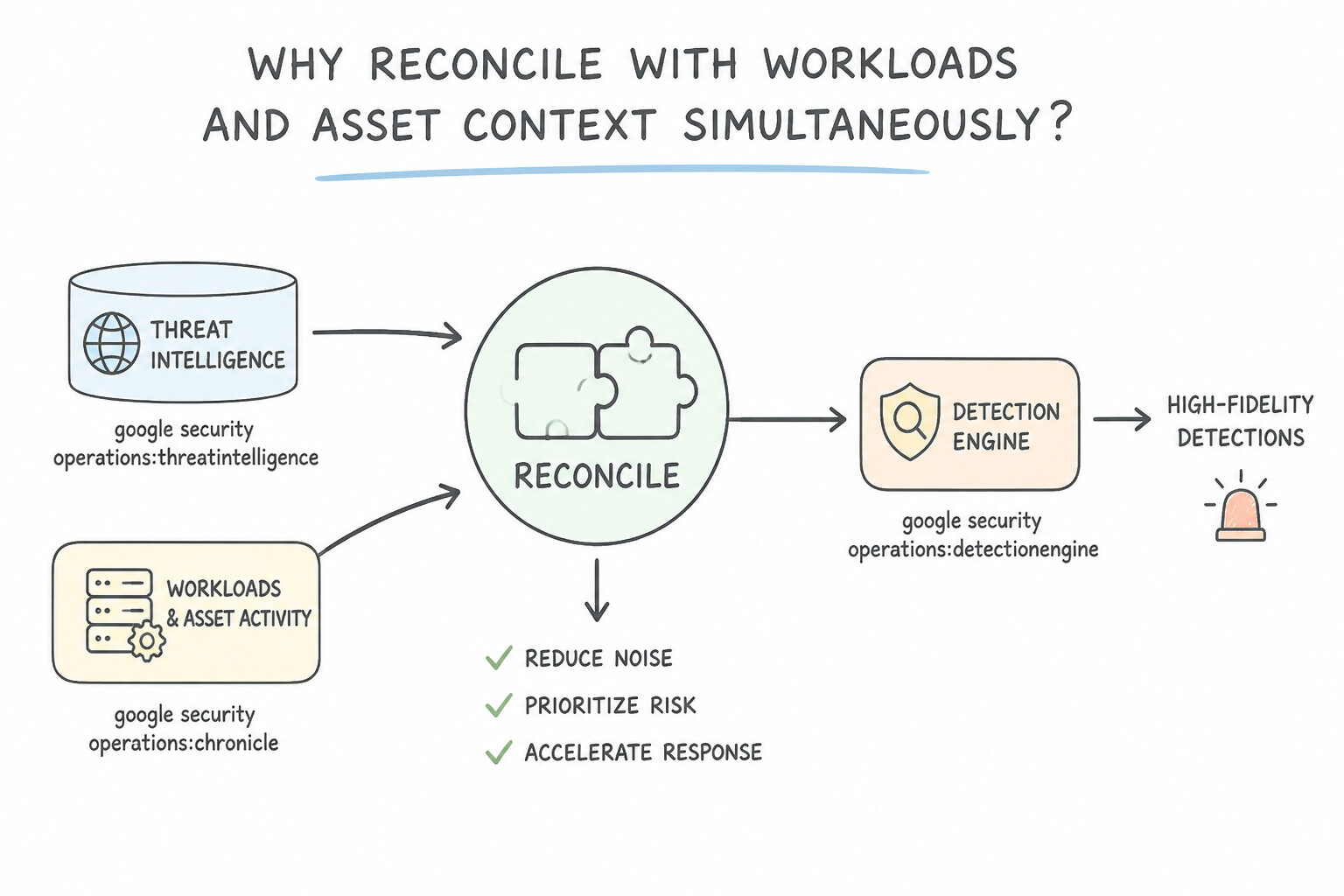
To correlate real-time or historical user/asset activity against threat intelligence inside a YARA-L rule:
- Joining UDM Events with Entity Graph Threat Intel (
$ioc.graph.*): - Declare an event variable (
$e) and an entity graph variable ($ioc) in theevents:section. - Join them on the shared indicator field (e.g.,
$e.target.ip = $ioc.graph.entity.ipor$e.network.dns.questions.name = $ioc.graph.entity.domain.nameor$e.target.process.file.sha256 = $ioc.graph.entity.file.sha256). - Filter the entity graph variable to ensure it represents an active threat indicator:
$ioc.graph.metadata.entity_type = "IP_ADDRESS"(or"DOMAIN_NAME"/"FILE") and$ioc.graph.metadata.threat.severity = "HIGH"(or check$ioc.graph.metadata.threat.confidence_score). - Why Reconcile with User & Asset Context Simultaneously?
- An IOC match on an isolated guest Wi-Fi network has a very different risk profile than the exact same IOC match executed by a
Domain Adminon aPRODUCTIONdatabase server. Reconciling the IOC match with the user's identity and asset criticality eliminates triage delays.
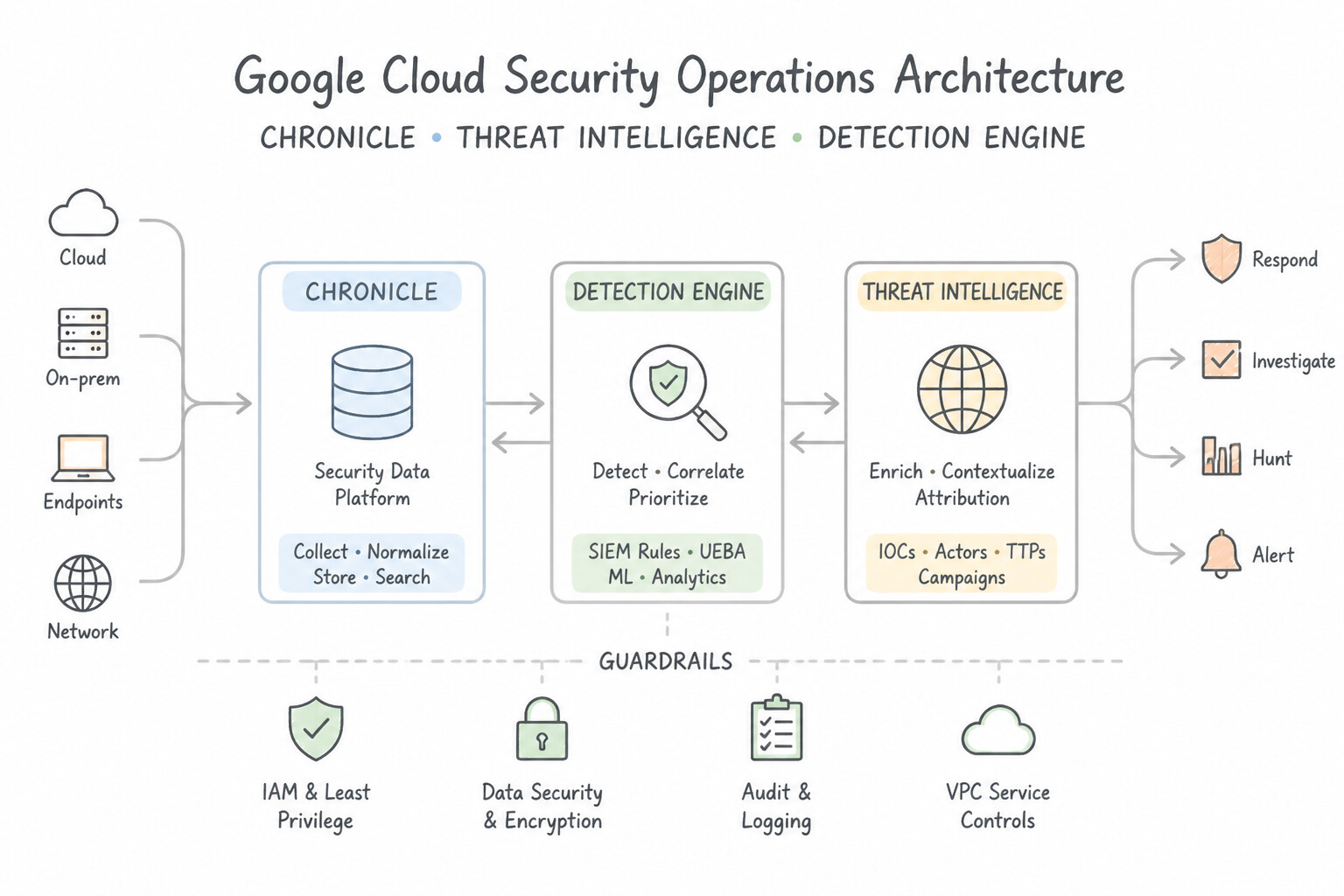
Key Implementation Patterns
- Correlating Network Events with GCTI Feeds: Use In the
eventssection, define an event variable$eand a graph variable$g. Set$e.target.ipequal to$g.entity.artifact.ipand filter where$g.metadata.threat.categoryequals "COMMAND_AND_CONTROL". You must join the event's target IP with the graph entity's artifact IP in the events section to correlate network traffic with threat intelligence. - Prioritizing Alerts via Asset Context: Use Create a YARA-L rule that joins the network event with the source asset entity. Add a condition that requires a threat intelligence match in the event and the 'Critical' tag in the entity's metadata. Use YARA-L to join event data with entity context, filtering for both the threat match and the asset's critical tag.
- Retroactive Threat Hunting: Use Create a YARA-L rule containing the hashes and initiate a Retrohunt job. Retrohunt allows you to scan historical data (past logs) using a new YARA-L rule to find previously undetected threats. (Avoid alternative: Live Rules only detect threats in incoming log streams (future data), not historical data.)
Key Takeaways (4.1a)
- YARA-L rules correlate events and graph data in the
eventssection.- Use
$evariables for log data (UDM) and$gvariables for context/intel (Entity Graph).- Joining
$e.target.ipto$g.entity.artifact.ipis the standard pattern for detecting outbound connections to malicious indicators.- Context is King: Effective detection requires combining event data with entity context (asset value, user role).
Consideration 4.1b: Analyzing logs and events to identify anomalous activity
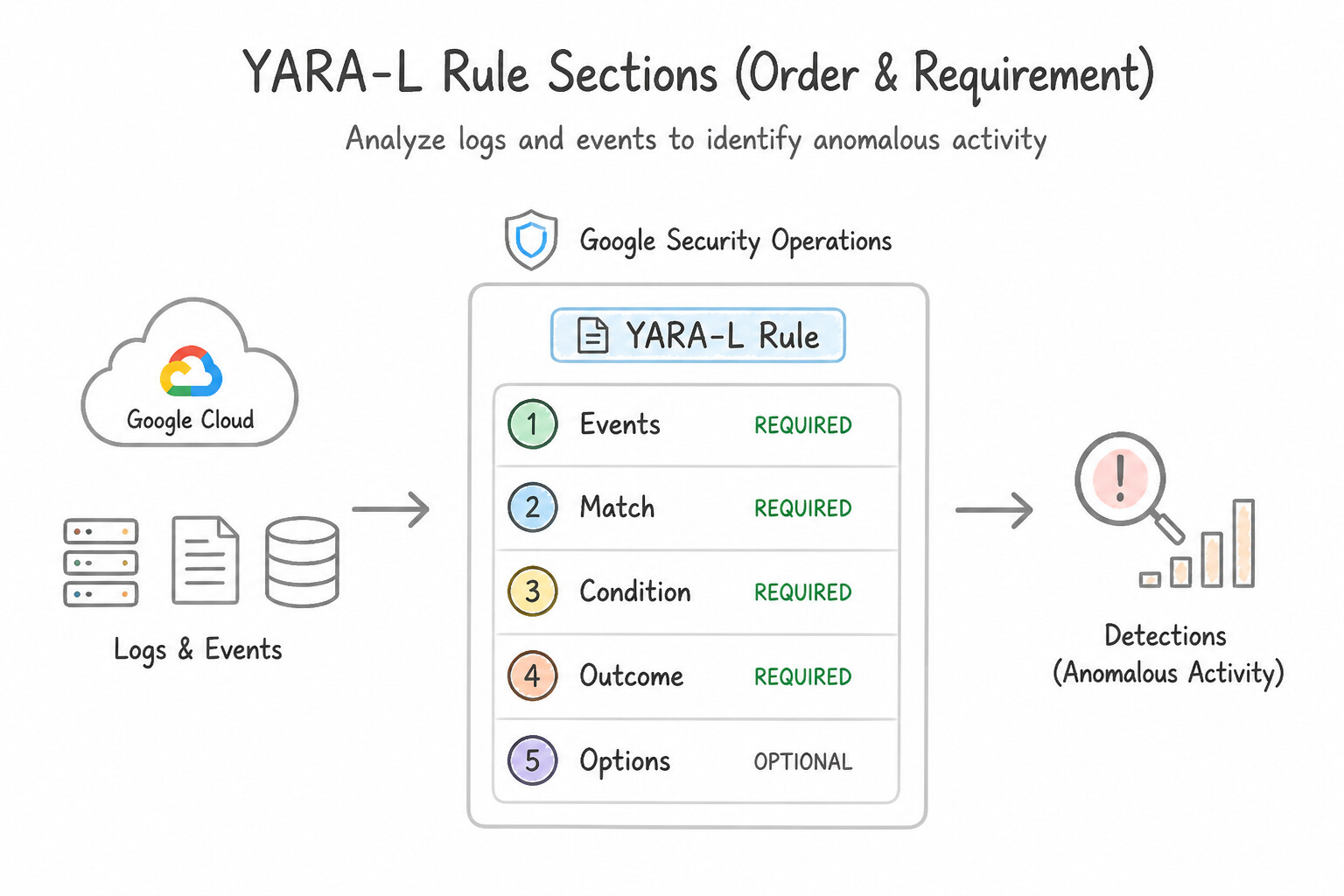
Memorize these non-negotiable YARA-L 2.0 syntax rules in Production:
- The 5 YARA-L Rule Sections (Order & Requirement):
meta:Key-value metadata (author,description,severity,mitre_attack_tactic).events:Defines event/entity variables, field predicates, joins, and functions (Mandatory).match:Defines grouping variables and the correlation time window, e.g.,$user, $ip over 5m(Mandatory for multi-event rules or rules using aggregation functions inoutcome:/condition:).outcome:Defines output variables ($risk_score,$dc_targets = count_distinct($e.target.hostname)) extracted into the alert payload.condition:Defines the boolean trigger criteria, e.g.,$e1 and #e2 > 5(Mandatory in every rule).- Repeated Fields & Quantifiers (
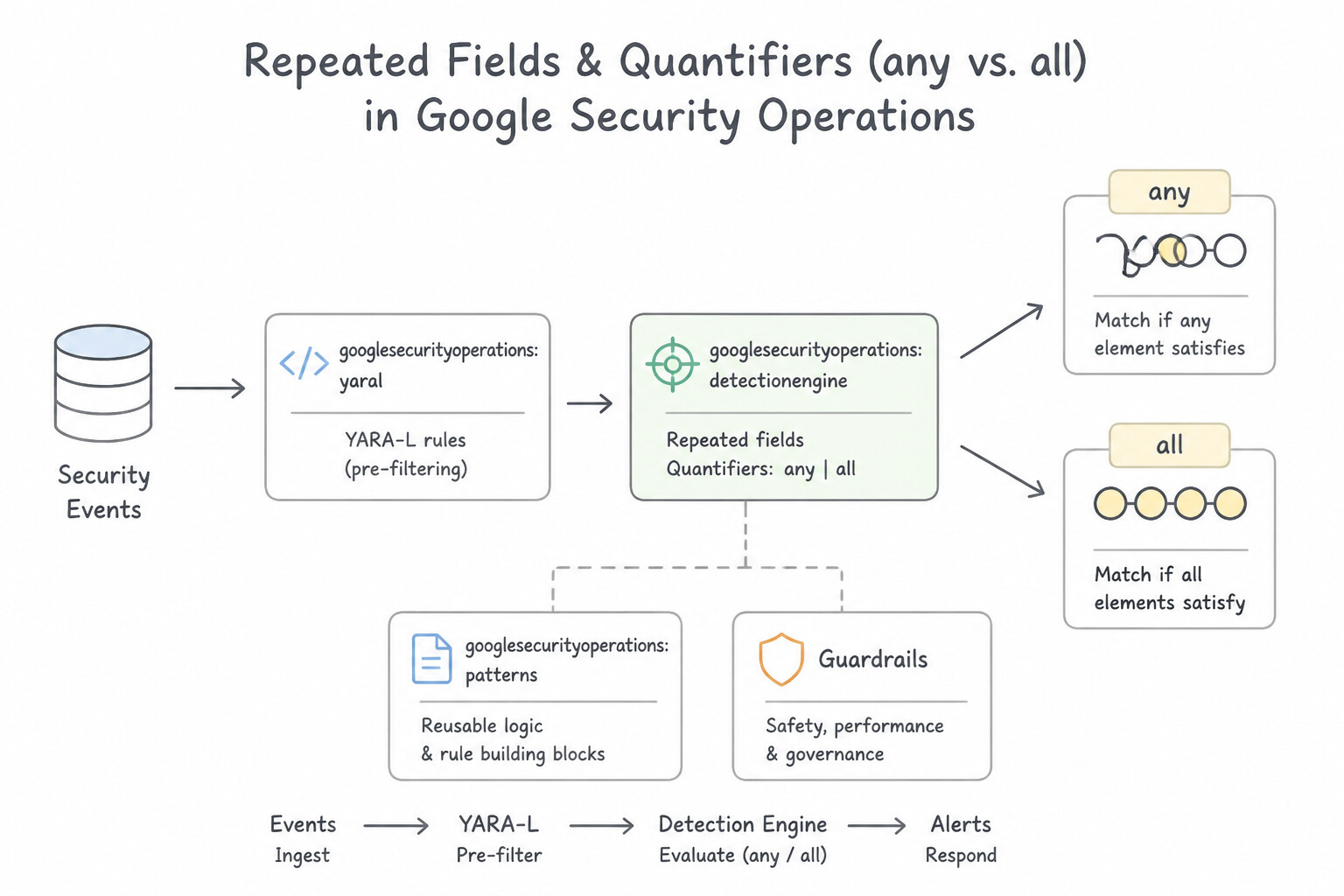
anyvs.all): - By default, referencing a repeated UDM field (like
$e.principal.ip = "10.0.0.1") implicitly acts likeany(true if at least one element in the array equals"10.0.0.1"). - Inside Functions: When passing a repeated field into a YARA-L function like
net.ip_in_range_cidr(), you must explicitly specify theanyorallquantifier:net.ip_in_range_cidr(any $e.principal.ip, "10.20.0.0/16") - The Negation Trap on Repeated Fields: To exclude a subnet or value on a repeated field, always negate the entire
anyexpression:not net.ip_in_range_cidr(any $e.principal.ip, "10.20.0.0/16")(or useall $e.principal.ip != "10.20.0.1"). Never writeany $e.principal.ip != "10.20.0.1"! - Case-Insensitive & Regex Matching:
- Append
nocaseto string comparisons or regexes:$e.target.process.command_line = /.*mimikatz.*/ nocaseorre.regex($e.principal.user.userid, "^admin_.*") nocase.
Key Implementation Patterns
- Stateful Brute Force Detection: Use Add the "
$user" variable and specify "over 10m" to group the events by user within the 10-minute window. The match section aggregates events by a variable (user) over a specific time duration (10 minutes). (Avoid alternative: The scenario requires grouping by user identity, not by IP address.) - Impossible Travel Detection: Use Correlate two successful login events for the same user where the principal.location.country_or_region is different within a defined short time window. Impossible travel requires comparing two events for the same user with different locations in a short timeframe.
- Statistical Data Exfiltration: Use In the outcome section, define a variable that sums "network.sent_bytes". In the condition section, set a threshold for this variable to exceed 5 GB. The outcome section allows you to calculate the sum of bytes across multiple events, which is necessary to detect total volume over time.
Key Takeaways (4.1b)
- The
matchsection in YARA-L defines how events are grouped (aggregated) and the time window for that aggregation.- Use the
overkeyword in thematchsection to specify the time duration (e.g.,over 10m).- Variables used for grouping (like
$useror$ip) must be defined in theeventssection first.- Impossible travel detection requires correlating two distinct events for the same user.
Consideration 4.1c: Assessing suspicious behavior patterns using detection rules and searches across various timelines
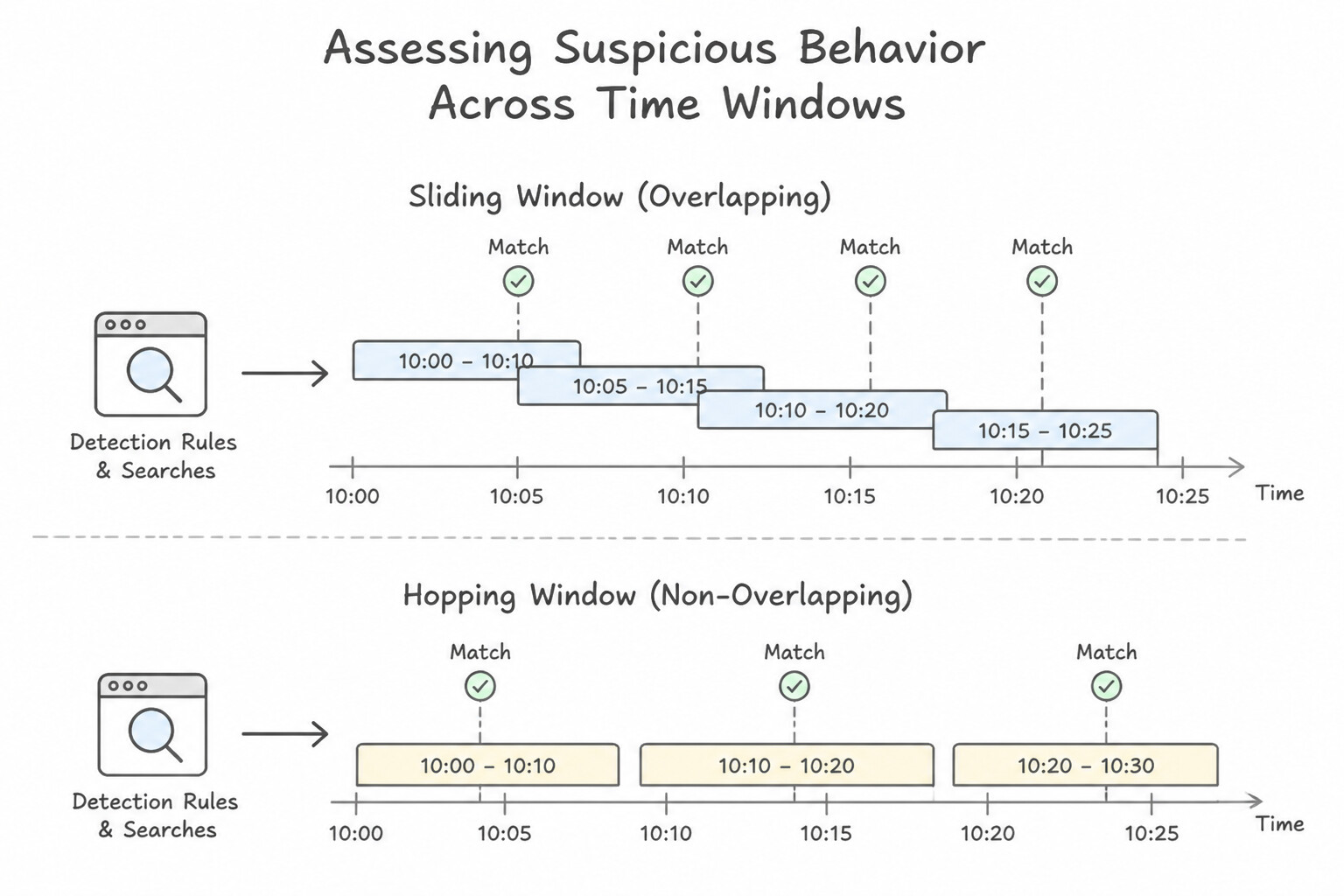
Multi-event behavioral correlation across time is where YARA-L shines:
- Sliding vs. Hopping Time Windows in
match:: $user over 10mcreates a 10-minute correlation window grouped by$user.- To enforce a strict chronological sequence between two different event types (for example,
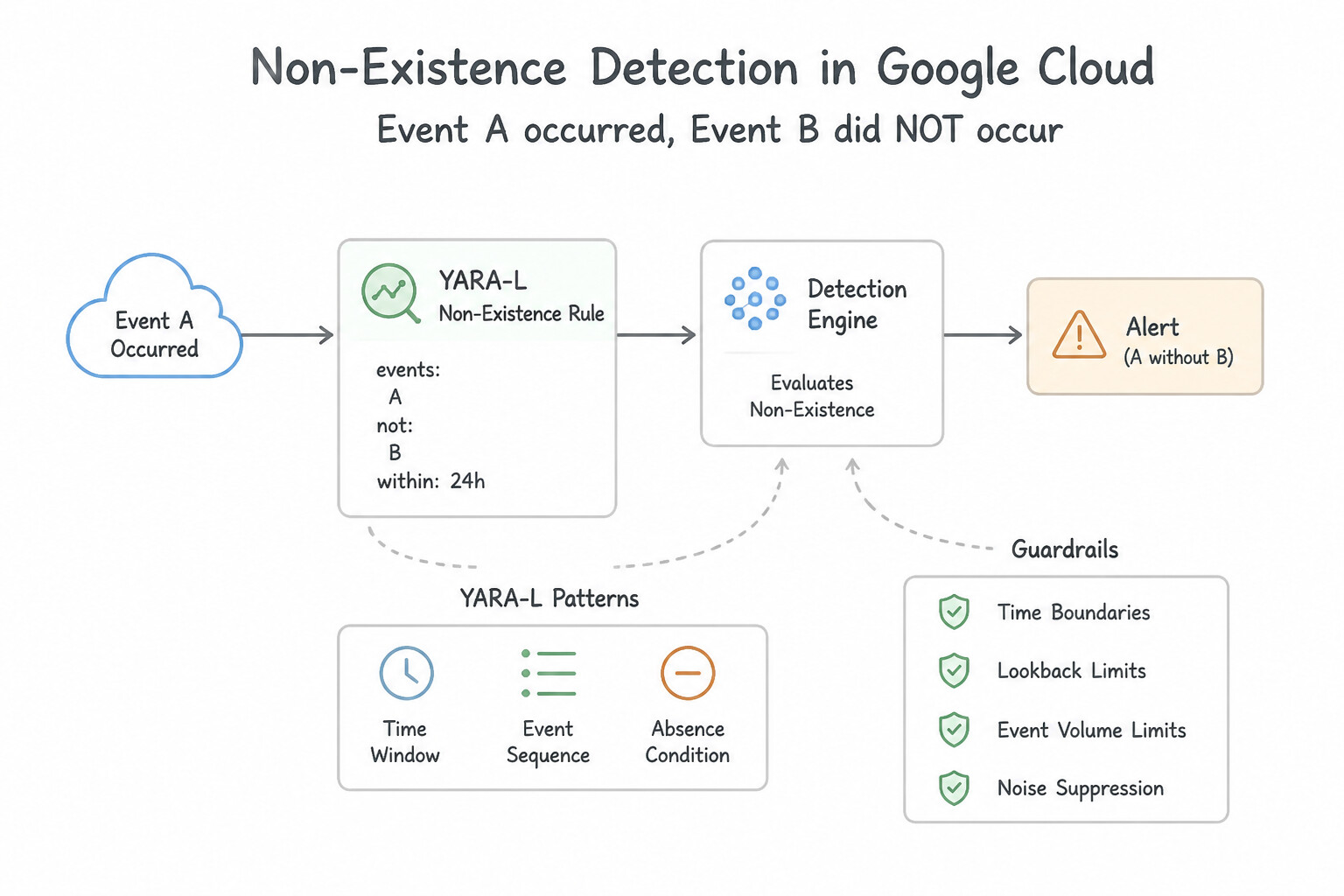
$loginfollowed by$priv_esc, or$user_createdfollowed within 5 minutes by$user_deleted), add a timestamp comparison in theevents:section:$e1.metadata.event_timestamp.seconds <= $e2.metadata.event_timestamp.seconds - Non-Existence (
Event Aoccurred,Event Bdid NOT occur): - To detect when a sensitive action (
$action) occurs without a corresponding approval ticket or MFA challenge ($mfa) within the time window, join$actionand$mfaon the user variable inevents:, group by$user over 15minmatch:, and write incondition::$action and not $mfa(or#mfa = 0).
Key Implementation Patterns
- Sliding Window Logic for Brute Force Detection: Use Define the match section with the user variable followed by the phrase over 10m. The match section in YARA-L controls time windows for event aggregation using the 'over' keyword. (Avoid alternative: The condition section evaluates logic thresholds, not time window definitions.)
- Aggregating Bytes for Exfiltration Detection: Use In the match section, group events by principal.ip over 24h. In the outcome section, calculate the sum of network.sent_bytes. In the condition section, check if the sum is greater than 10 GB. Use the match section for the time window and the outcome section to sum the bytes for threshold comparison.
- Correlating Distinct Events in Sequence: Use Define three event variables (
$e1,$e2,$e3) in the events section. Match on principal.user.userid. In the condition section, enforce$e1.metadata.event_timestamp.seconds<$e2.metadata.event_timestamp.secondsand$e2.metadata.event_timestamp.seconds<$e3.metadata.event_timestamp.seconds.. To detect a sequence, define variables for each event and compare their timestamps (e.g.,$e1.time<$e2.time) in the condition section.
Key Takeaways (4.1c)
- YARA-L rules use the match section to aggregate events over time.
- The syntax
variable over time_duration(e.g.,$user over 10m) defines a sliding window.- The events section is for filtering individual logs, not aggregating them.
- The condition section applies logic to the aggregated results.
Consideration 4.1d: Designing detection rules that use risk values to identify threats matching risk profiles
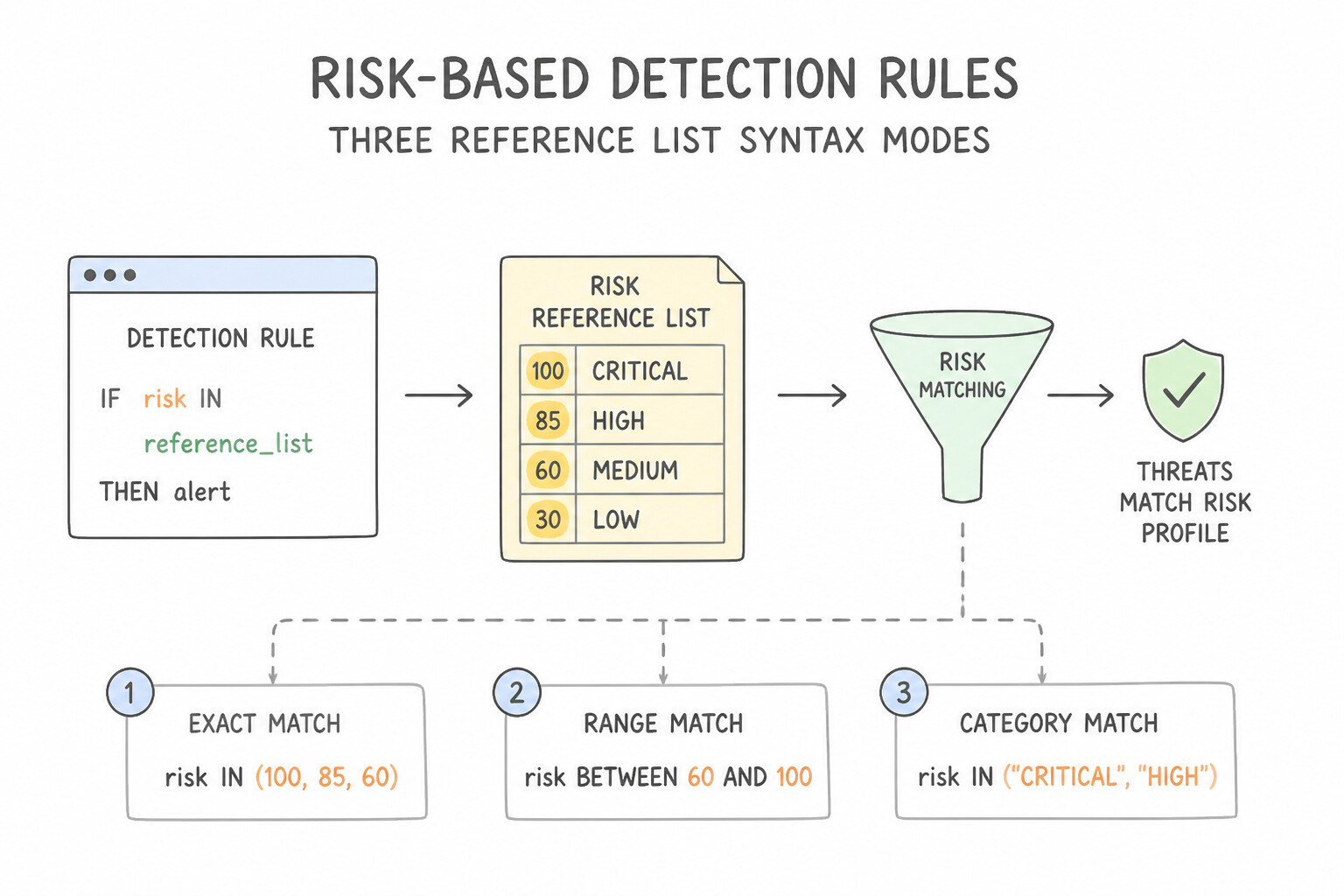
Google SecOps Reference Lists decouple dynamic indicator/exception data from static YARA-L code:
- Three Reference List Syntax Modes in YARA-L:
- Exact String Match (
STRINGlist):$e.principal.user.userid in %privileged_admins(ornot $e.principal.user.userid in %service_accounts_allowlist) - Regular Expression Match (
REGEXlist):$e.target.process.command_line in regex %suspicious_cli_patterns - CIDR Subnet Match (
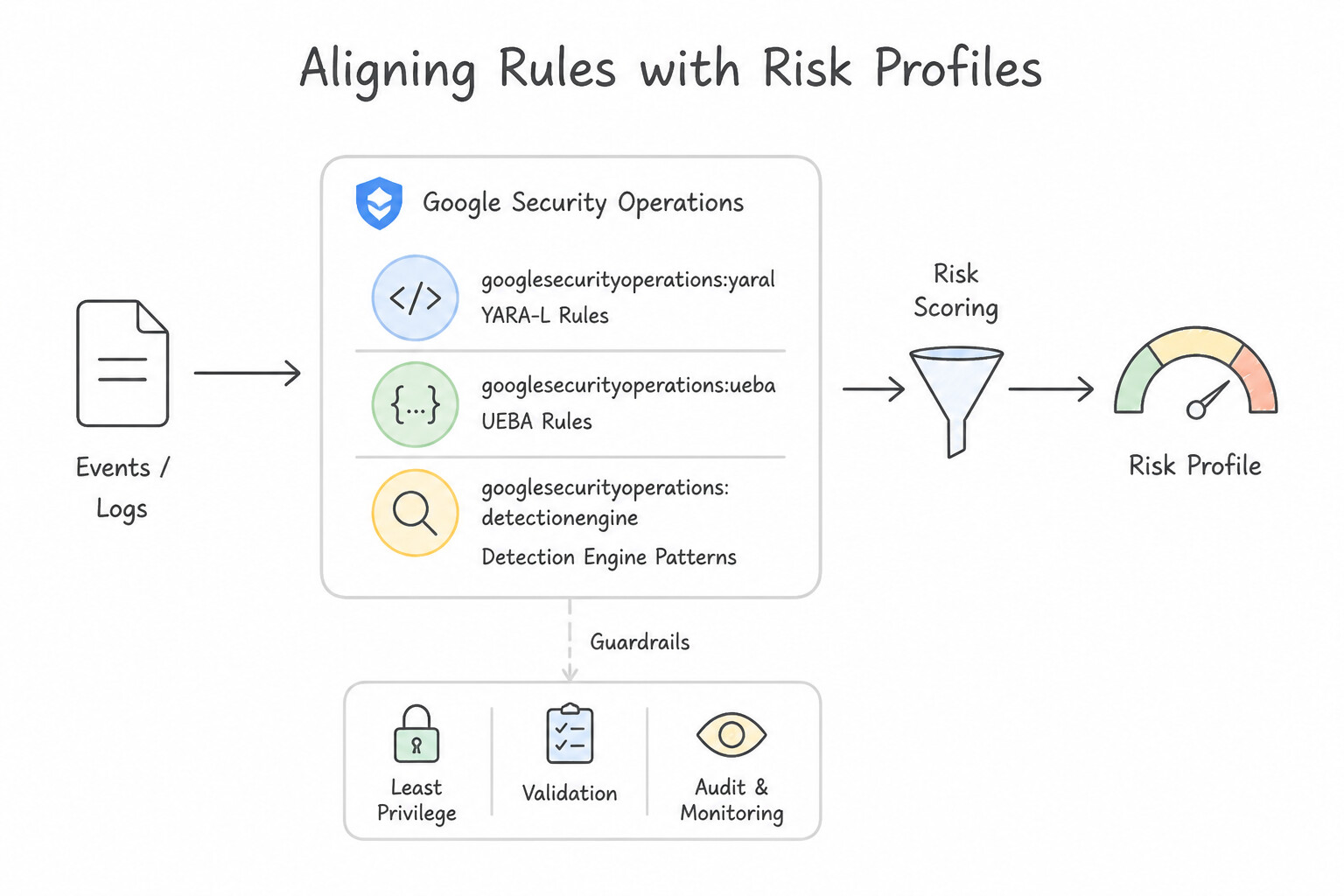
CIDRlist):$e.principal.ip in cidr %corporate_vpn_subnets(orany $e.principal.ip in cidr %known_scanner_cidrs) - Aligning Rules with Risk Profiles:
- Store asset tiers (
%crown_jewel_servers), VIP identities (%executive_users), and sanctioned vulnerability scanners (%qualys_scanner_ips) in Reference Lists so a single YARA-L rule can suppress authorized scanner traffic while assigning elevated risk scores when%crown_jewel_serversare targeted.
Key Implementation Patterns
- Integrating Entity Analytics User Risk Scores: Use In the events section, join the event user to the entity graph variable and add a condition requiring the entity risk score to be above the threshold. To filter based on a user's risk profile, you must join the event variable with the entity variable in the events section and filter on the risk score.
- Asset Criticality Based Alerting: Use Update the rule to join the event variable with an entity variable, and use conditional logic in the outcome section to set the severity based on the entity's labels. Joining events with the entity graph allows rules to use asset context labels for dynamic risk scoring.
- Dynamic Risk Calculation in Rule Outcomes: Use In the outcome section, define a
$risk_scorevariable that adds 50 to the count of failed attempts multiplied by 10 if the IP address is external. The outcome section allows you to define variables using math and conditional logic to calculate dynamic scores.
Key Takeaways (4.1d)
- YARA-L rules generally have separate sections for Meta, Events, Match, and Outcome.
- The events section is used for filtering logic and joining distinct data sources.
- Entity Analytics (UEBA) provides dynamic context, such as risk scores, which are accessed by joining the event to the entity graph.
- Outcomes are for calculating result values, not for filtering the initial search.
Consideration 4.1e: Discovering anomalous behavior of assets or users and assigning risk values to detections (e.g., Google SecOps Risk Analytics, curated detection rules)
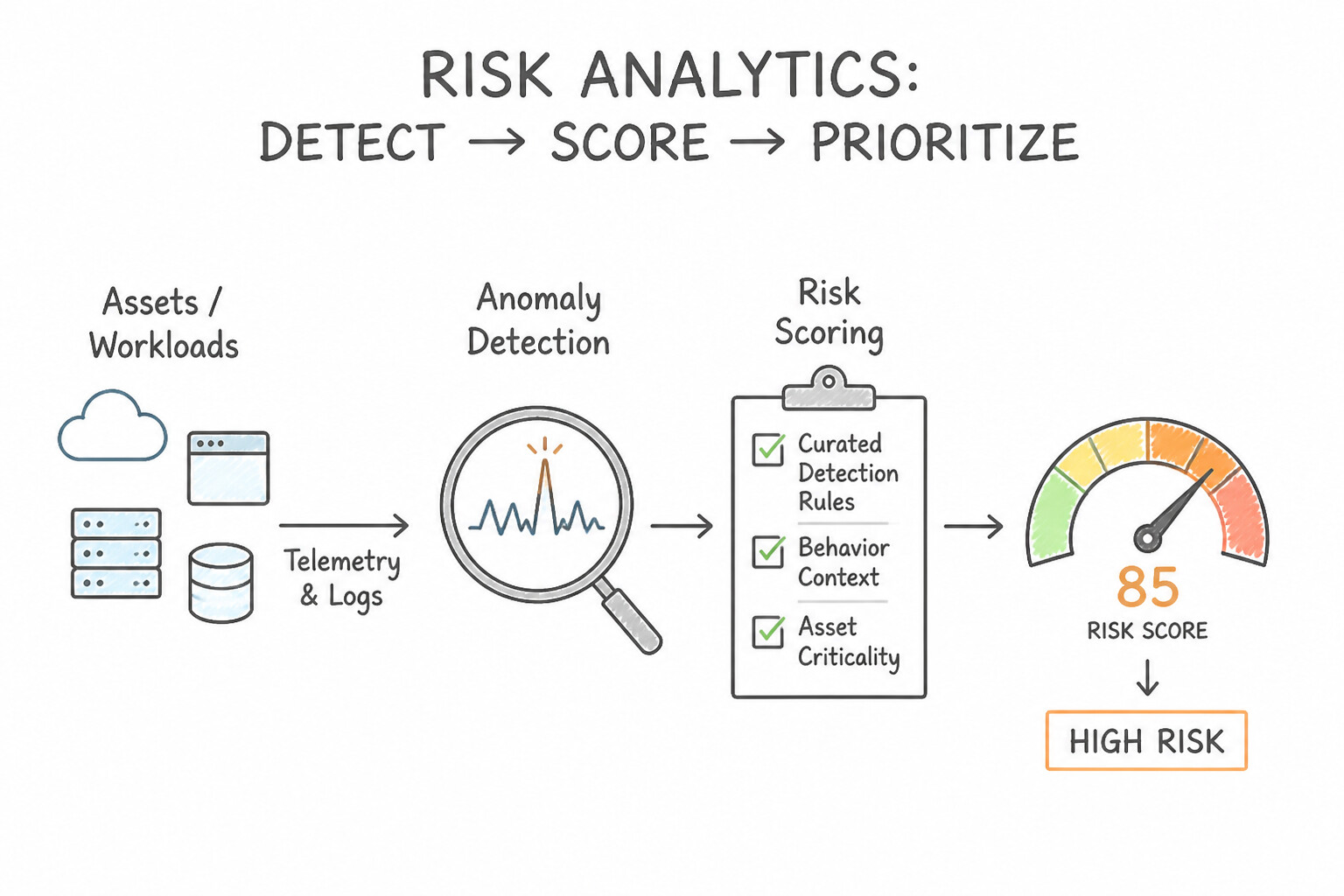
- Assigning Dynamic
$risk_scorein the YARA-Loutcome:Section: - Every YARA-L rule can output a reserved outcome variable named
$risk_score(an integer, typically0to100or up to1000in UEBA rules) that feeds directly into the entity's composite risk score in Risk Analytics:
    outcome:
      $risk_score = max(
        if($e.security_result.severity = "CRITICAL", 80, 40) +
        if($asset.graph.entity.asset.category = "CROWN_JEWEL", 20, 0)
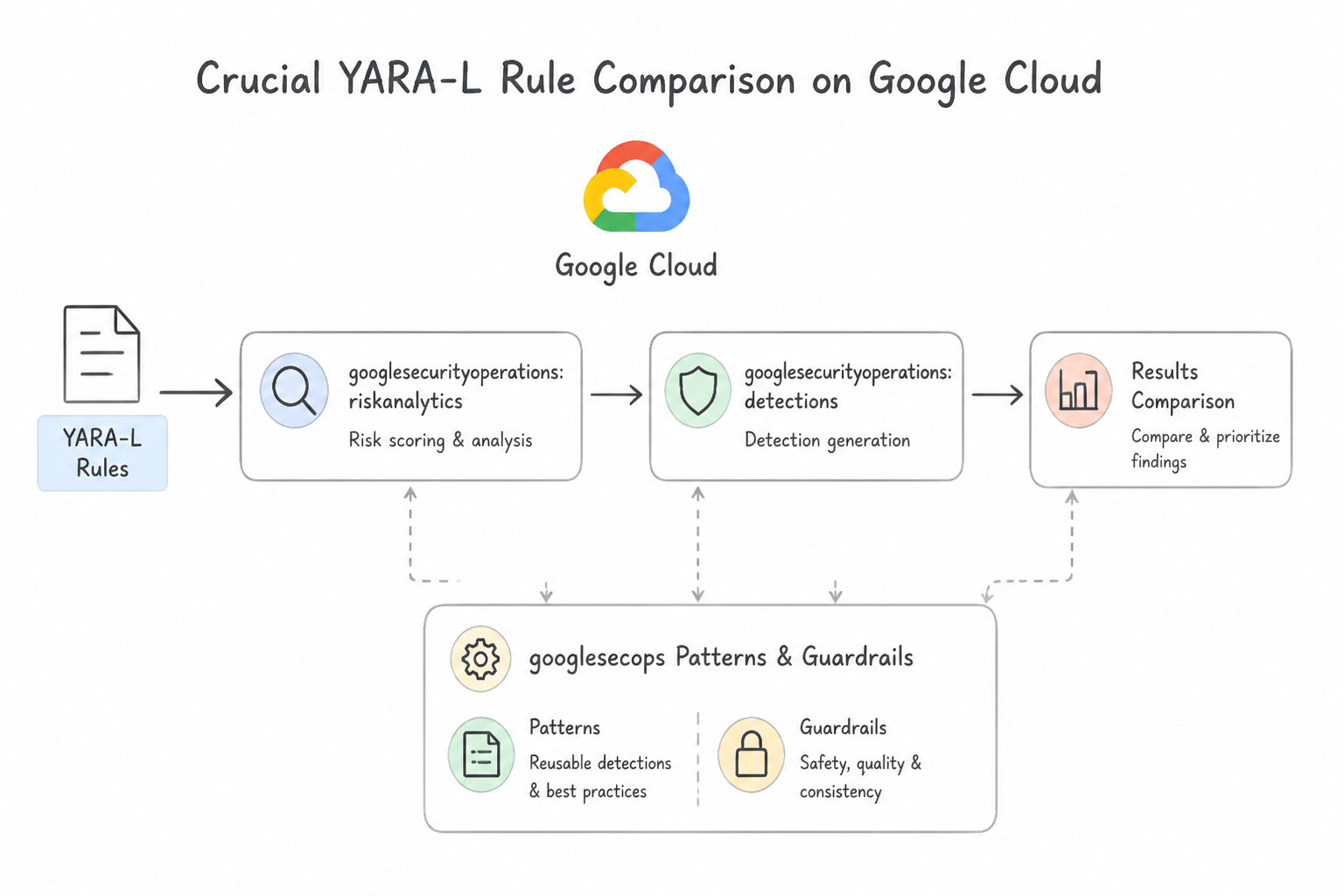
)- Crucial YARA-L Rule: When a rule contains a
match:section (multi-event rule), every variable in theoutcome:section must either be amatch:grouping variable or be wrapped in an aggregation function (max(),min(),sum(),count(),count_distinct(),array(),array_distinct())! - Google SecOps
Risk Analytics (UEBA)&Curated Detections: - Curated Detections provide managed rule sets maintained by Google Threat Intelligence and SecOps engineers. You can enable them in
Alertingmode (creates visible alerts + adds risk score) orPrecise/Broadtiers, or run noisy behavioral rules with Alerting turned OFF so they still contribute$risk_scorepoints to the Risk Analytics Entity Graph without spamming the SOC queue!
Key Implementation Patterns
- Aggregated Risk Scoring Logic: Use The risk engine aggregates the risk from multiple low-severity detections over a sliding window, creating a cumulative high score. Risk Analytics sums the risk of multiple lower-severity events over time to identify cumulative threats.
- Impossible Travel Anomaly Detection: Use Enable UEBA Risk Analytics and ensure User Context data is ingested to support the Geographically Improbable Access detection. UEBA Risk Analytics provides built-in detections for anomalies like 'Geographically Improbable Access' (Impossible Travel), requiring User Context data to function.
- Tuning False Positives in Risk Analytics: Use Create an exclusion for the scanner's service account or IP address within the rule settings. Exclusions allow you to suppress detections for specific known-safe entities while keeping the rule active for others. (Avoid alternative: Disabling the rule globally creates a security blind spot for all other assets.)
Key Takeaways (4.1e)
- Entity risk scores are often cumulative, not just averages or maximums.
- Multiple low-severity detections can aggregate to produce a critical risk score.
- Risk Analytics uses sliding windows to assess behavior over time.
- Understanding scoring logic helps differentiate between system errors and genuine persistent threats.
Consideration 4.1f: Designing detection rules to discover posture or risk profile changes within the environment (e.g., SCC SHA, SCC posture management, Google SecOps)
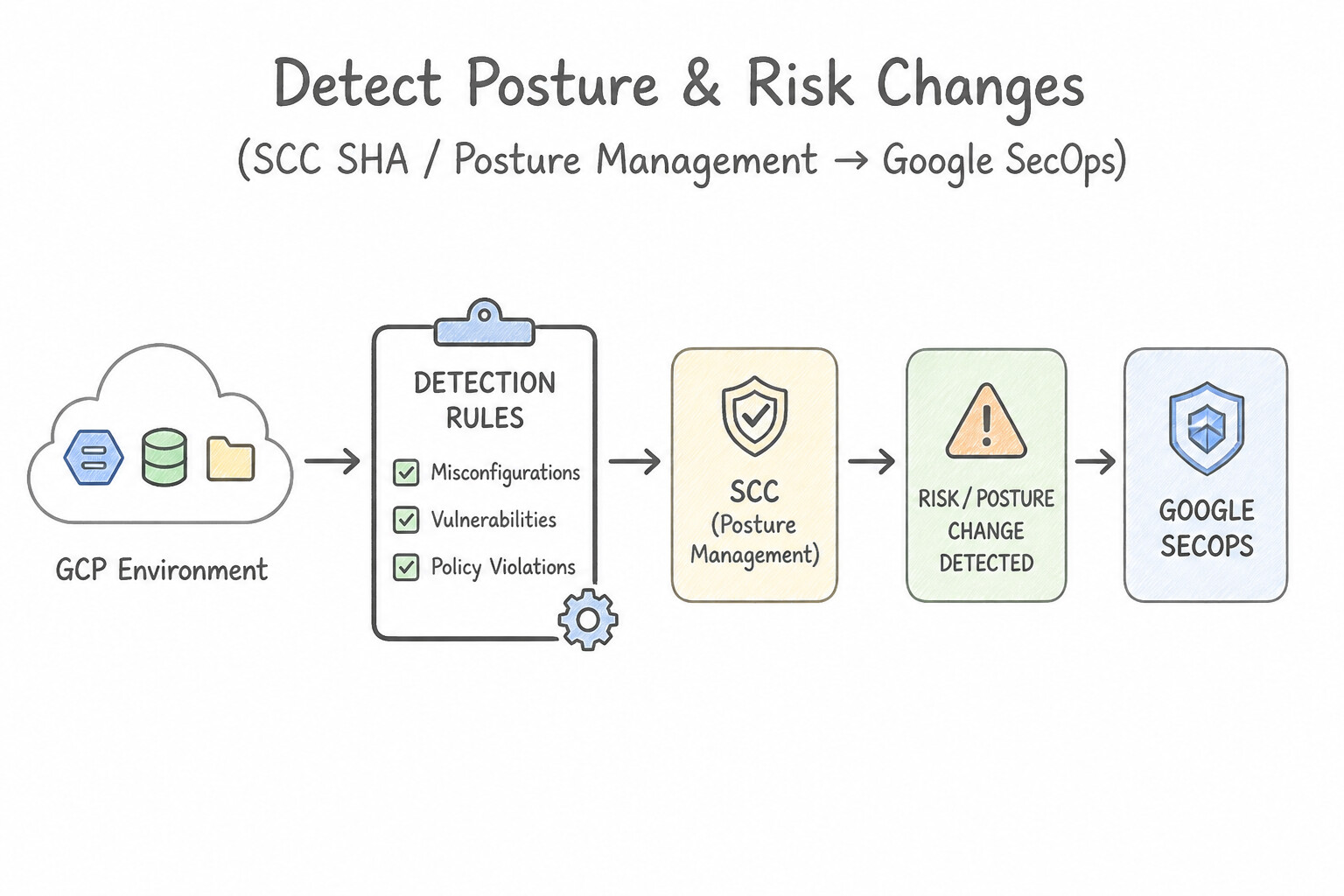
Attackers who compromise a cloud project frequently weaken its security posture first (disabling audit logs, opening firewall port 0.0.0.0/0, removing VPC Service Controls, or detaching organization policies):
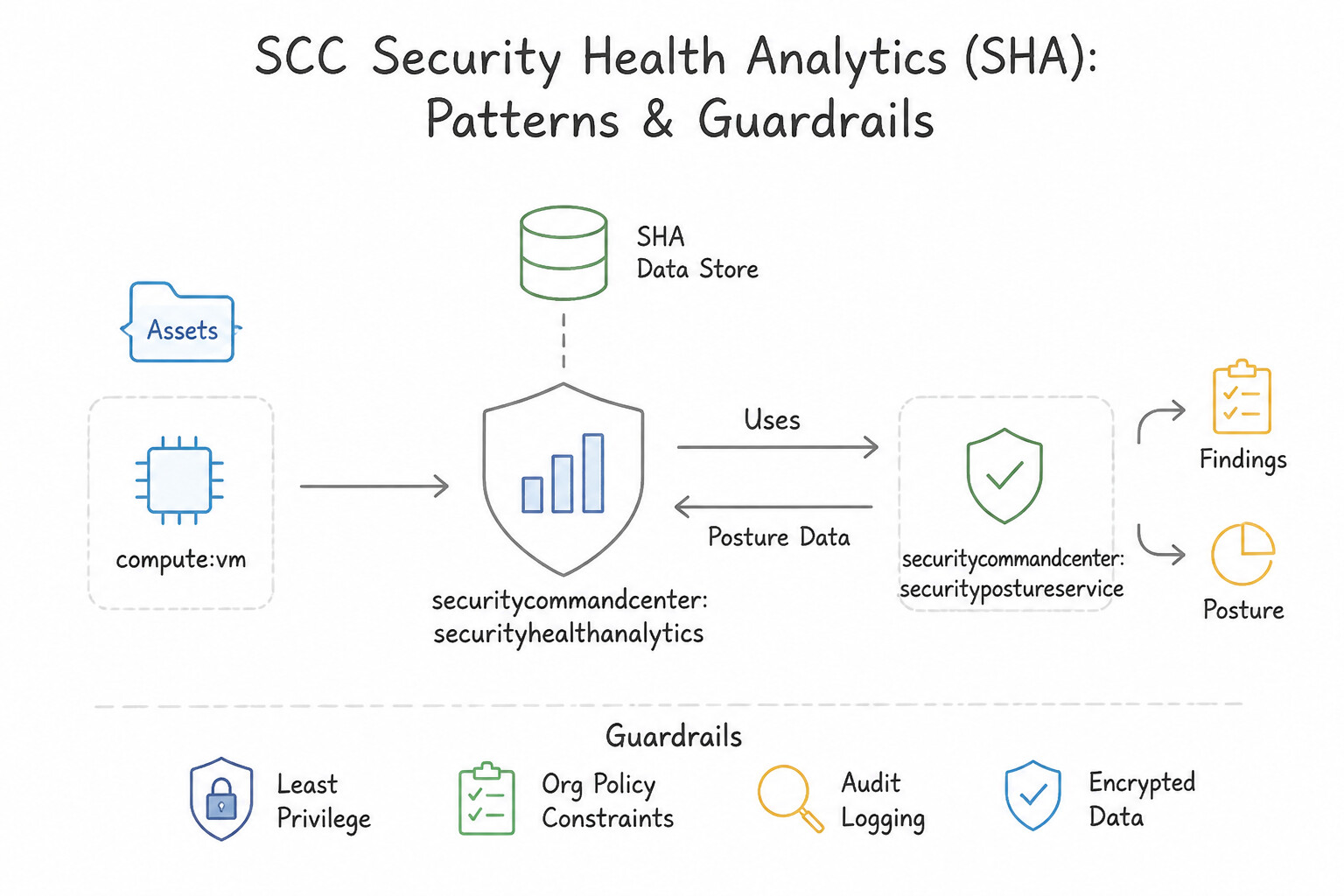
- 1. Cloud-Native Posture Drift Detection (
SCC Security Posture&SHA): - SCC Security Health Analytics (
SHA) continuously scans GCP resource configurations to flag misconfigurations (e.g.,PUBLIC_BUCKET_ACL,OPEN_SSH_PORT,AUDIT_LOGGING_DISABLED). - SCC Security Posture Service lets you define declarative YAML posture baselines (combining Organization Policies and SHA detectors) and automatically generates an SCC finding the moment live infrastructure drifts from the deployed posture.
- 2. Real-Time Control-Plane Mutation Rules in
Google SecOps(GCP_CLOUDAUDIT): - Ingest
Admin ActivityCloud Audit Logs into SecOps and author YARA-L rules monitoring high-risktarget.resource.attribute/methodNamecalls: SetIamPolicy(addingallUsers/allAuthenticatedUsersor grantingroles/owner).v1.compute.firewalls.insert/patch(opening ingress from0.0.0.0/0).google.logging.v2.ConfigServiceV2.UpdateSink/DeleteSink(tampering with log export sinks to blind the SIEM!).
Key Implementation Patterns
- Custom SHA Modules for Label Compliance: Use Create a Security Health Analytics custom module. Define the logic to check for the label using Common Expression Language (CEL). SHA custom modules allow you to define custom detection logic, such as checking for missing labels, using Common Expression Language (CEL).
- Continuous Compliance Monitoring with Security Posture Service: Use Create a posture in the Security Posture Service using the HIPAA predefined template. Deploy the posture to your project or folder scope. The Security Posture Service automates compliance monitoring against standards like HIPAA by deploying predefined templates to your environment.
- YARA-L Rule for IAM Privilege Escalation: Use Create a YARA-L rule. Define the event filter to match SetIamPolicy operations. Add a condition to verify if the changed policy includes 'roles/owner' or 'roles/editor' and matches the 'critical' project label. YARA-L is the detection language for Google SecOps; a rule filtering for SetIamPolicy and checking specific roles enables near real-time detection.
Key Takeaways (4.1f)
- Security Health Analytics (SHA) scans cloud resource configurations for vulnerabilities.
- Default SHA modules detect common issues like public buckets or open firewalls.
- SHA Custom Modules allow you to write custom rules using Common Expression Language (CEL) to check for organization-specific compliance, such as required labels.
- Security Posture Service is the primary SCC tool for defining and monitoring compliance with standards like HIPAA or PCI-DSS.
Consideration 4.1g: Identifying new or low-prevalence processes, domains, and IPs that do not appear in threat intelligence using methods such as YARA-L rules and dashboards
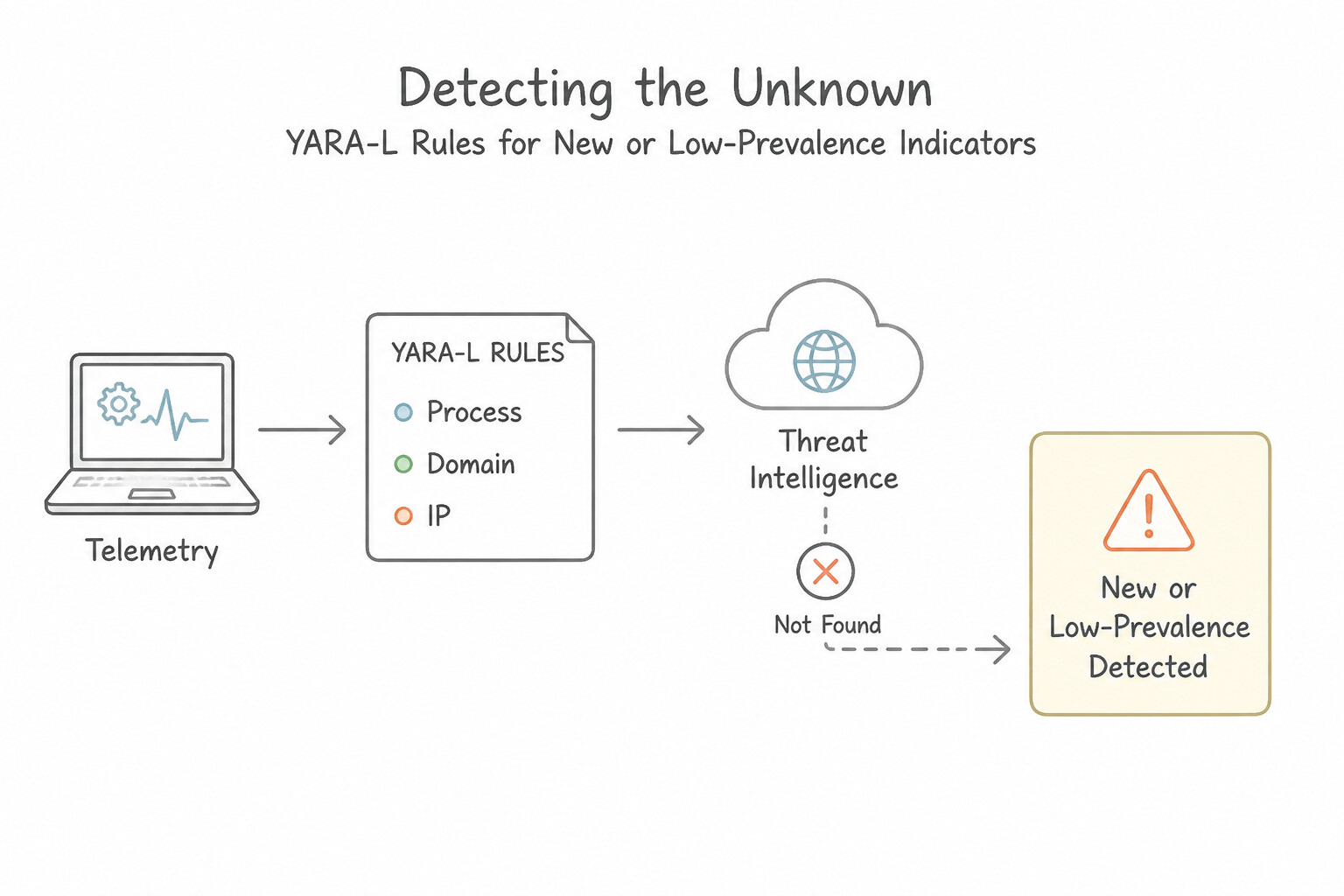
Threat intelligence feeds only know about previously discovered threats. To catch brand-new, zero-day, or custom targeted infrastructure ("Unknown Unknowns"), use Prevalence and First-Seen analytics:
- How Google SecOps
PrevalenceWorks (day_maxandrolling_max): - Google SecOps automatically computes enterprise-wide Prevalence statistics in the Entity Graph for domains (
DOMAIN_NAME), IP addresses (IP_ADDRESS), and files/processes (FILE), measuring how many distinct internal assets accessed that artifact per day (day_max) or over a 10-day rolling window (rolling_max). - Low-Prevalence YARA-L Rule Pattern: Join a
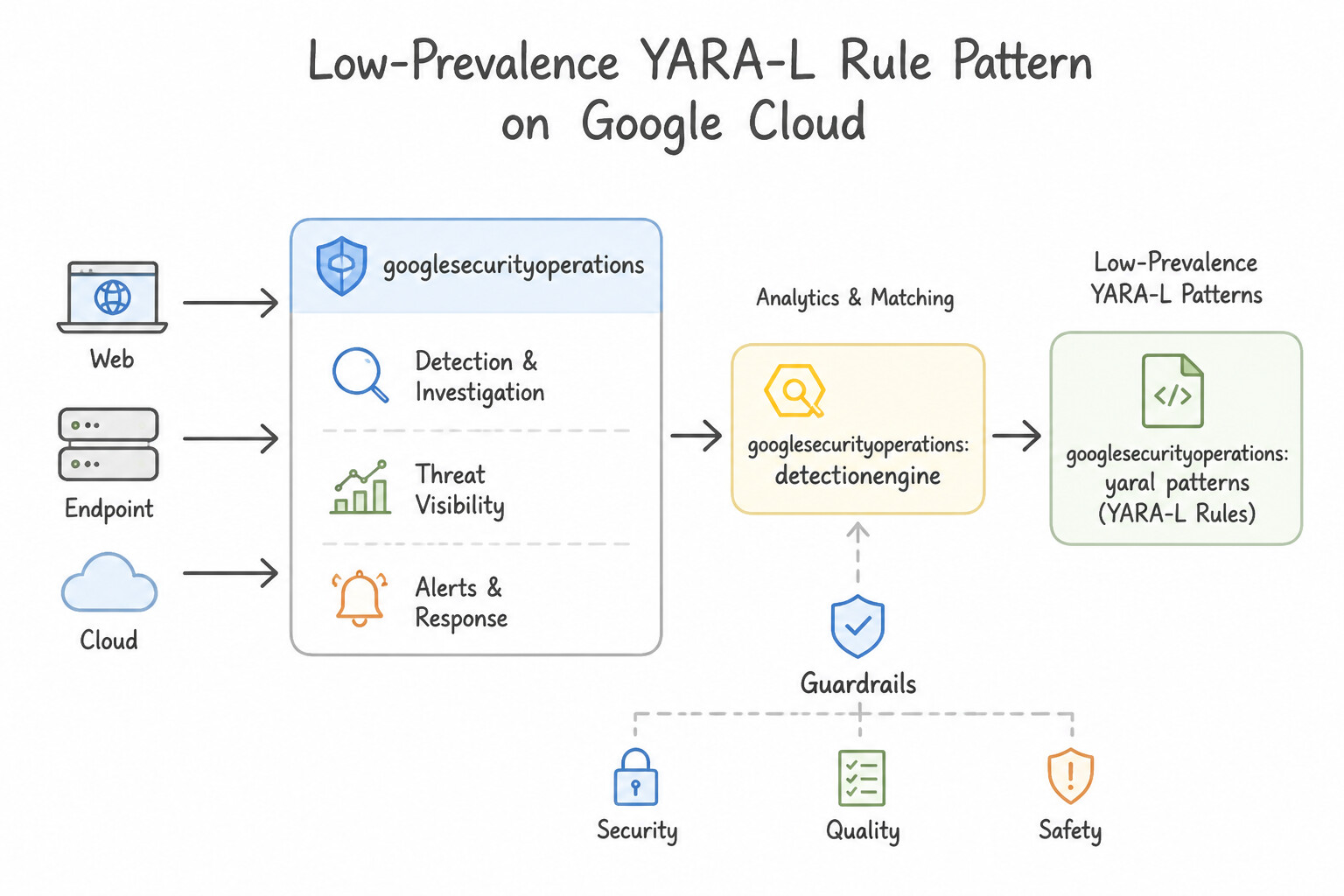
NETWORK_DNSorPROCESS_LAUNCHevent ($e) with theDERIVED_CONTEXTEntity Graph ($prev) and filter for$prev.graph.entity.domain.prevalence.rolling_max <= 2(meaning only 1 or 2 machines in your entire 10,000-host fleet have ever talked to that domain in the last 10 days!). - Combining Low Prevalence with Newly Registered Domains (
NRD): - A low-prevalence domain (
rolling_max <= 3) that was also registered in WHOIS less than 7 days ago ($e.metadata.event_timestamp.seconds - $whois.graph.entity.domain.creation_time.seconds < 604800) is one of the highest-fidelity detections in security engineering for catching targeted phishing and C2 domains without any prior IOC feed!
Key Implementation Patterns
- Detecting First-Seen Domains via YARA-L: Use Write a rule that groups events by the target domain in the match section over a 30-day window. In the condition section, trigger only if the event timestamp equals the minimum timestamp observed for that domain. Grouping by domain over a 30-day window and triggering when the event timestamp is the minimum (earliest) in that window identifies the first time a domain is seen.
- Low-Prevalence Process Execution Alerting: Use Group by process.hash.sha256 and use the condition count_distinct(udm.principal.hostname) < 3. Grouping by the hash and counting distinct hostnames allows you to identify files that appear on very few systems. (Avoid alternative: Grouping by hostname measures activity per computer, not the rarity of a specific file across the network.)
Key Takeaways (4.1g)
- Prevalence analysis helps identify risks that are not yet known to public threat intelligence feeds.
- YARA-L's
matchsection is used to group events over a time window for statistical or historical analysis.- Using
min(timestamp)within a match window is a standard pattern for identifying the first occurrence of an entity.- The 'match' section in YARA-L is used for aggregation and time-window based correlation.
Consideration 4.1h: Assessing how to use entity/context data within detection rules to improve accuracy (e.g., Google SecOps entity graph)
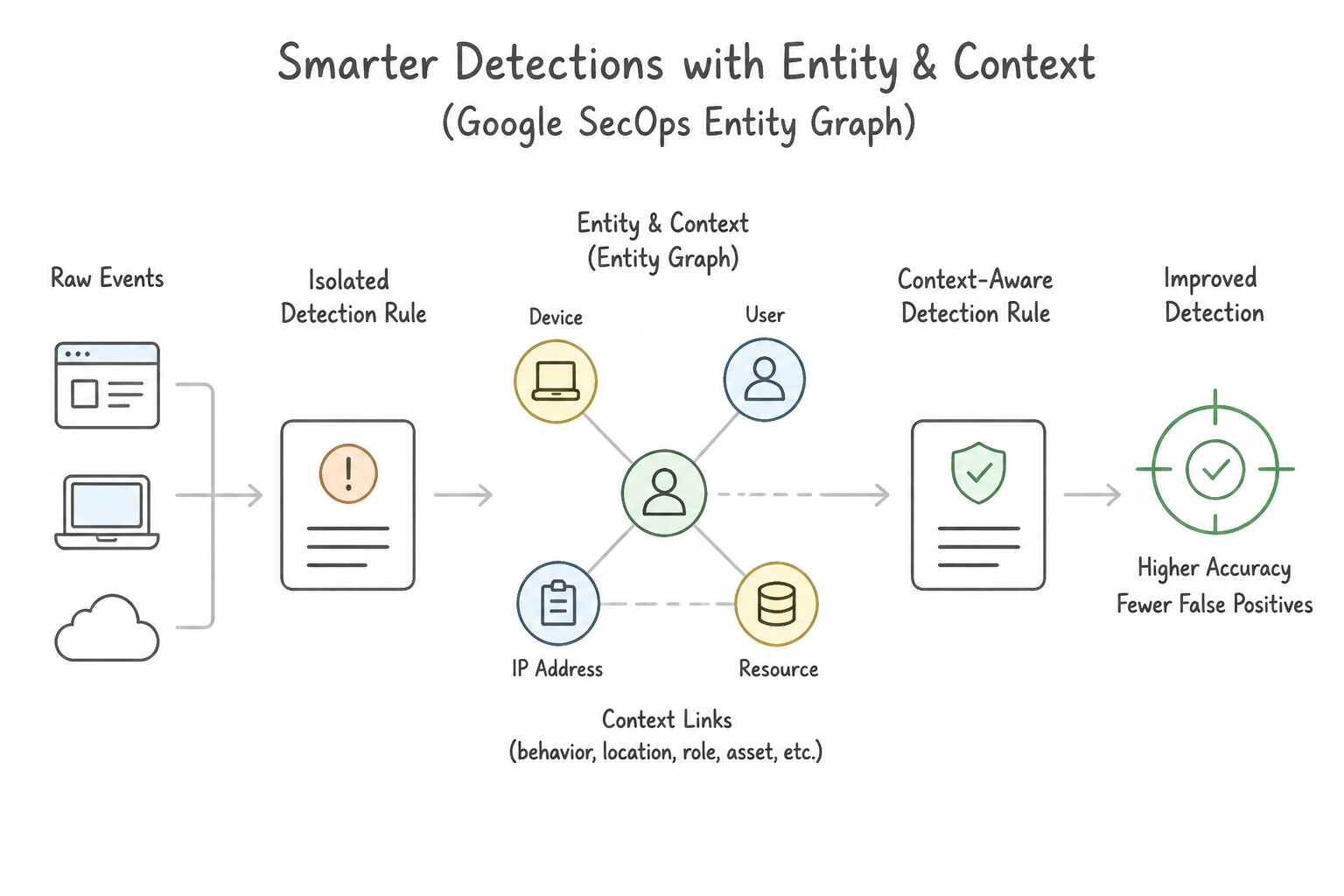
To drastically improve detection rule accuracy and eliminate false positives, enrich every behavioral YARA-L rule with Entity Graph ($g.graph.*) context:
- Three Primary Context Sources in the Entity Graph (
$g.graph.metadata.source_type): ENTITY_CONTEXT: Ingested organizational/asset state from Active Directory, Workday, CMDB, and SCC (e.g.,$u.graph.entity.user.department,$u.graph.entity.user.title,$a.graph.entity.asset.vulnerabilities.cve_id).GLOBAL_CONTEXT: Global threat intelligence and reputation provided by Google Threat Intelligence / VirusTotal / WHOIS ($g.graph.entity.file.sha256,$g.graph.entity.domain.creation_time).DERIVED_CONTEXT: Statistics automatically calculated by Google SecOps from your own telemetry, such as Prevalence (rolling_max,day_max) and First-Seen / Last-Seen (first_seen_time) timestamps!- Practical Accuracy Boost Patterns:
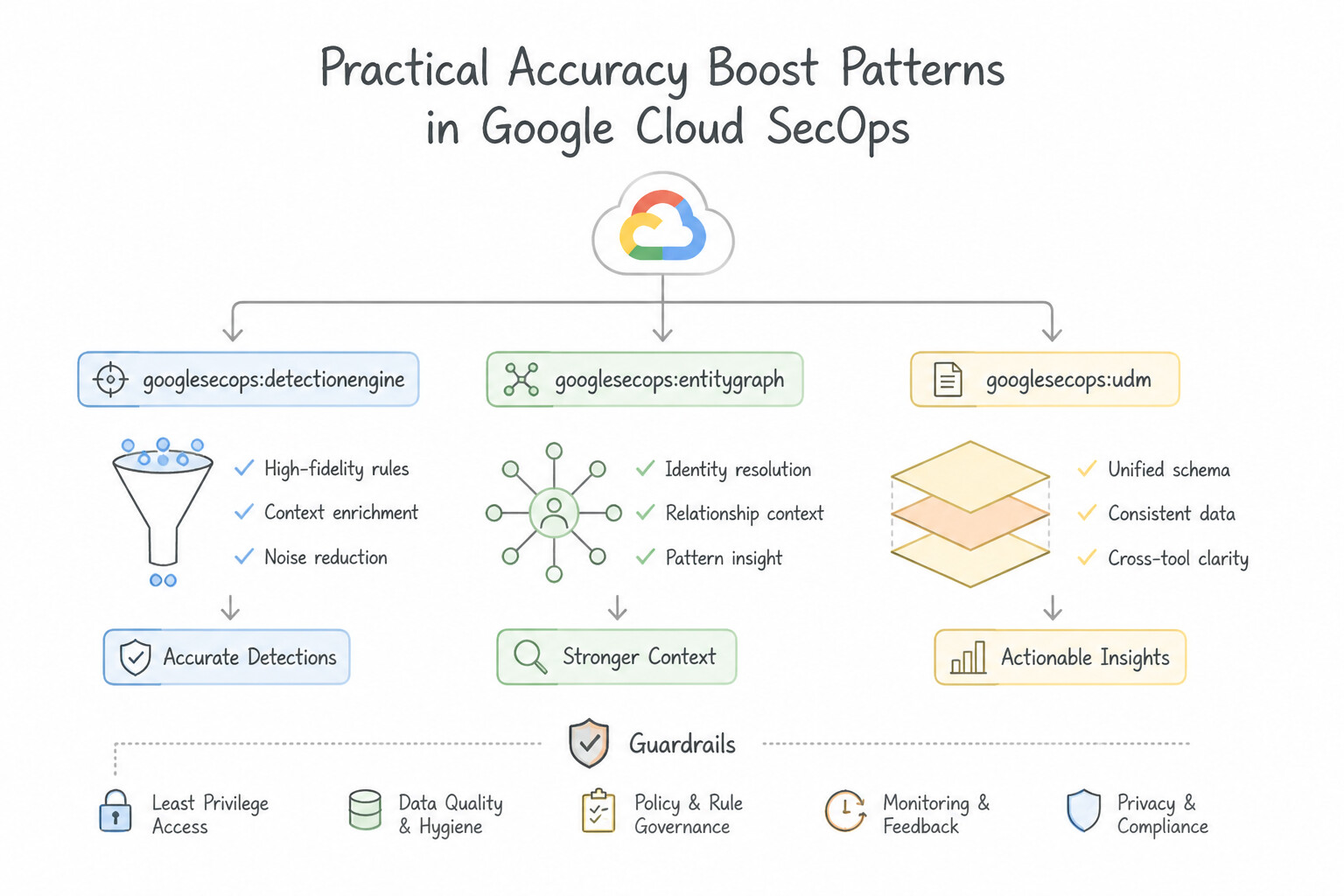
- Suppress Authorized Activity: Join
$ewith$u(ENTITY_CONTEXT) and add$u.graph.entity.user.department != "IT_Security_Operations"so red-teamers or vulnerability admins don't trigger standard user alerts. - Alert Only on Vulnerable Targets: Join a network exploit attempt event (
$e) with the target asset's SCC/Qualys vulnerability record ($a.graph.entity.asset.vulnerabilities.cve_id = "CVE-2024-XXXX") so the alert only fires asCRITICALif the target host actually has that unpatched CVE!
Key Implementation Patterns
- Cross-Data Source User Aliasing: Use Group the events by the unified entity field in the rule. Rely on the Entity Graph to automatically alias the different username formats to the same user entity. The Entity Graph automatically maps different identifiers to a single entity, allowing rules to function across data sources without manual string parsing.
- Role-Based Logic Using HR Context: Use Create a YARA-L rule that joins the event UserID with the entity graph. Add a condition to filter for users where the entity department equals "Billing" and the file tag equals "Medical_Record". Leverage the Entity Graph in YARA-L to filter events based on the user's department context provided by the ingested HR data.
- DHCP IP Address Resolution Over Time: Use Configure the detection rule to use the Google SecOps Entity Graph to resolve the IP address to an asset based on the event timestamp. Google SecOps Entity Graph tracks asset associations over time, allowing you to resolve an IP address to the correct device at a specific past timestamp.
Key Takeaways (4.1h)
- The Entity Graph automatically unifies disparate identifiers (emails, usernames) into a single entity based on context data.
- Detection rules should prefer grouping by Entity fields rather than raw string fields to support cross-source correlation.
- Avoid manual string parsing or static lists when platform-native normalization features are available.
- Context is Key: Detection accuracy improves significantly when you combine event data (actions) with entity context (roles, asset types).
Consideration 4.1i: Configuring SCC Event Threat Detection custom detectors for IOCs
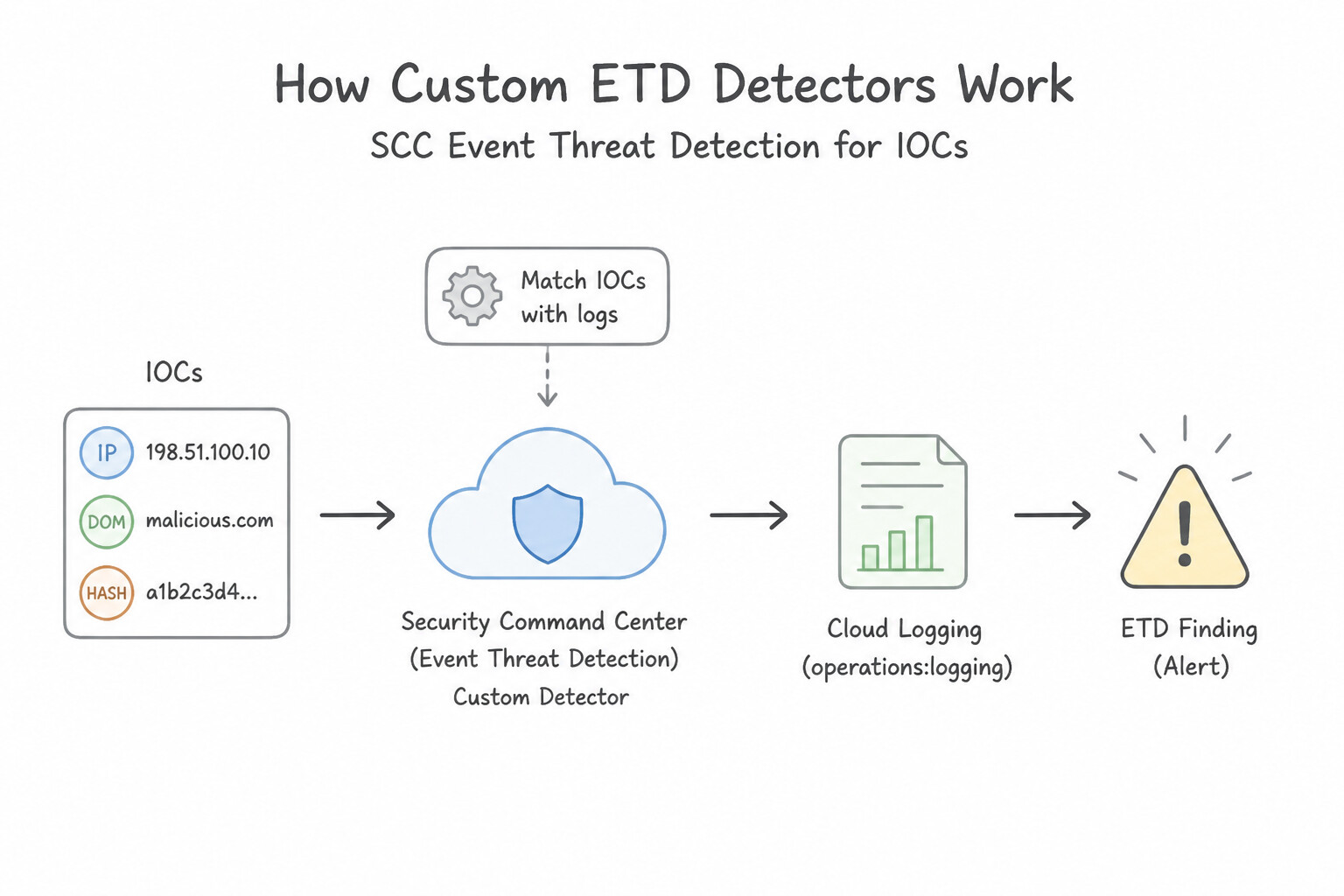
While built-in SCC Event Threat Detection (ETD) rules cover common GCP attacks out of the box, Custom ETD Detectors allow you to deploy organization-specific detection logic directly inside SCC:
- How Custom ETD Detectors Work:
- Configured in Security Command Center (Premium / Enterprise) under Threat Detection → Custom Modules / Detectors using predefined ETD detector templates (configured via JSON in the Cloud Console or
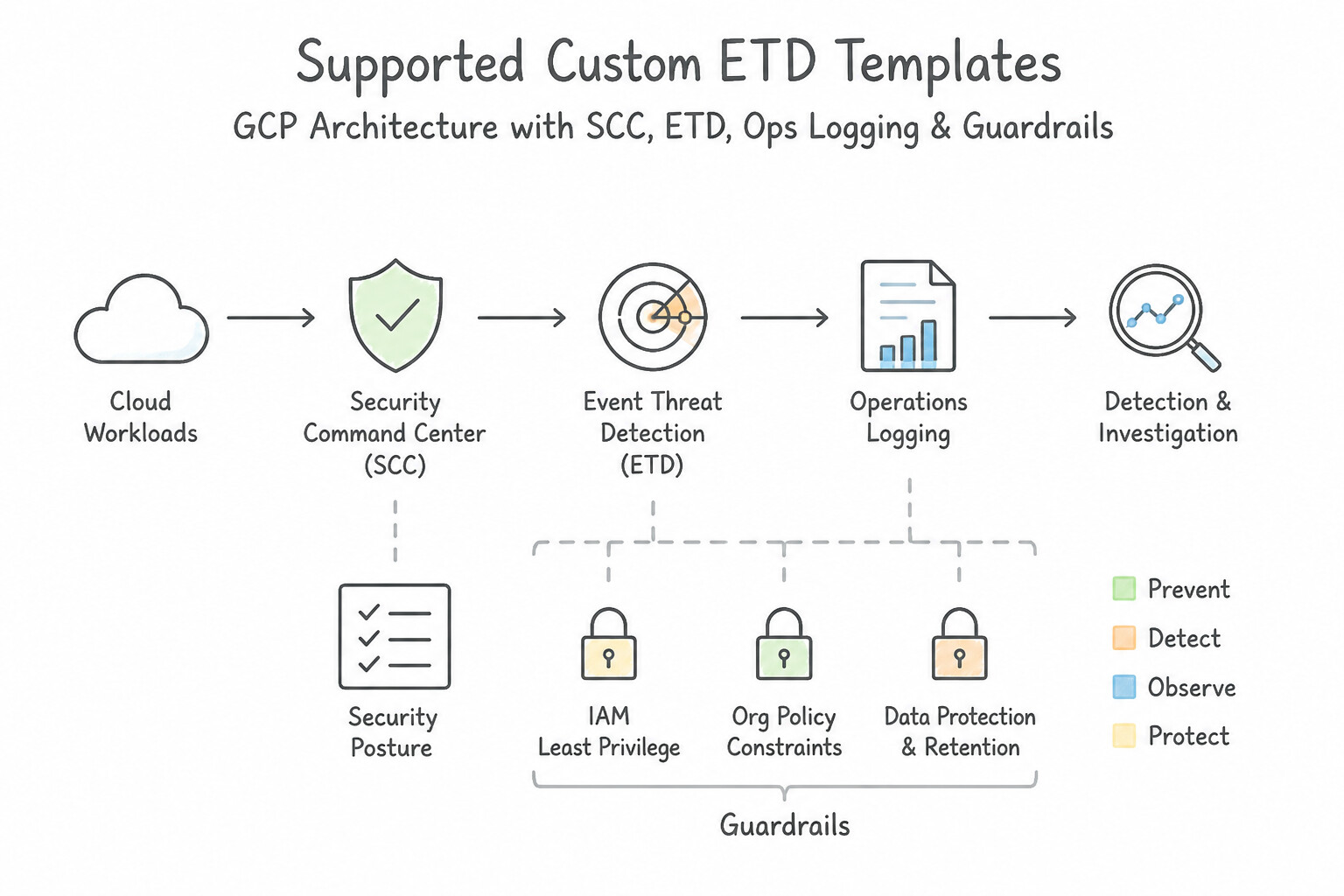
gcloud scc). - Supported Custom ETD Templates include:
bad_ip/bad_domain: Alerts immediately in SCC wheneverVPC Flow LogsorCloud DNS Logsshow communication with your custom list of malicious IP addresses or domains.cloud_logging_query(Custom Cloud Audit Log Detector): Evaluates a custom Cloud Logging filter expression (LQL) against streaming Cloud Audit Logs in real time and emits a structured SCC finding (CUSTOM_...) whenever a match occurs—which can then trigger SCC Attack Path evaluation or export via Pub/Sub to SecOps SOAR!
Key Implementation Patterns
- Ingesting Threat Intel for Malicious IPs: Use Create an Event Threat Detection custom module. Configure the module to match the callerIp field in the logs against the list of IP addresses. ETD custom modules allow you to write rules that scan logs for specific values, such as malicious IPs in the callerIp field.
- Org-Level IOC Rollout: Use Create an Event Threat Detection custom module at the Organization level. Applying the custom module at the Organization level ensures it is automatically inherited by all current and future projects. (Avoid alternative: Configuring modules per project creates high administrative overhead and fails to automatically cover future projects.)
- Detecting Specific User Agents: Use Create a custom module definition in Event Threat Detection that inspects the 'userAgent' field for the specific string. ETD custom modules allow you to define specific rules, such as matching a 'userAgent' string, to detect custom Indicators of Compromise.
Key Takeaways (4.1i)
- Security Health Analytics (SHA) detects misconfigurations (static state).
- Event Threat Detection (ETD) detects threats by analyzing logs (dynamic activity).
- Use ETD Custom Modules to detect specific Indicators of Compromise (IOCs) like custom lists of malicious IP addresses.
- ETD runs as a managed service within Security Command Center Premium.
Quick Decision Cheat Sheet (Subsection 4.1)
If the Scenario Requires... | Choose This Google Cloud Pattern | Avoid This Common Mistake |
|---|---|---|
"YARA-L rule fails to compile when checking net.ip_in_range_cidr($e.principal.ip, ...)" | Add the any or all quantifier before the repeated field: net.ip_in_range_cidr(any $e.principal.ip, "10.0.0.0/8") | Indexing the array with $e.principal.ip[0] or converting the IP to a regex |
"Multi-event YARA-L rule fails to compile in the outcome: section" | Wrap every non- match variable in outcome: inside an aggregation function (max(), min(), count_distinct(), array_distinct()) | Referencing raw $e.principal.hostname in outcome: without array_distinct() or max() when match: only groups by $user |
"Enforce that Event $e1 (User Created) happened BEFORE Event $e2 (User Deleted) within 10 minutes" | Group by $target_user over 10m in match: AND add $e1.metadata.event_timestamp.seconds < $e2.metadata.event_timestamp.seconds in events: | Assuming the order of $e1 and $e2 in the text file automatically enforces chronological order (it does not!) |
"Identify rare domains or processes across the enterprise that do not appear in threat intelligence" | Join with DERIVED_CONTEXT in the Entity Graph and filter on prevalence.rolling_max <= N (or first_seen_time) | Using GLOBAL_CONTEXT or increasing YARA-L match windows to 30 days |
"Create a custom detector inside Security Command Center that triggers on streaming Cloud Audit Logs or DNS IOCs" | Configure an SCC Event Threat Detection (ETD) Custom Detector | Creating a Custom Security Health Analytics (SHA) module (which only scans static resource states, not logs) |
Further Reading (Subsection 4.1)
- YARA-L 2.0 Language Syntax - Context Enrichment — Refer to the section on 'Joins' or 'Using the Graph' to understand how to correlate event variables with graph variables.
- YARA-L 2.0 Language Overview — Provides the foundational syntax and concepts for joining events with entities in detection rules.
- Run a rule against historical data — Documentation describing how to run a Retrohunt job to search historical data for matches to a YARA-L rule.
- Overview of the Unified Data Model (UDM) — Explains the UDM structure, including principal and location fields used in detection logic.
- Get Started: YARA-L 2.0 in SecOps — Explains the concept of events and entities in YARA-L and how they are used to build detection logic.
- YARA-L 2.0 Language Syntax - Joins — Documentation on how to join events with entity context in YARA-L rules to correlate data.
Subsection 4.2: Leveraging Threat Intelligence for Detection
The Big Picture
Every SOC has lived through the "Threat Feed Flood" nightmare: a well-meaning engineer subscribes to five external open-source and commercial Indicator of Compromise (IOC) feeds and turns on a blanket rule that pages the on-call analyst whenever any internal host communicates with any IP or domain on those feeds. Within 20 minutes, the SOC queue is buried under 4,000 false-positive alerts because:
- One of the feeds included a shared Cloudflare CDN IP (
104.16.x.x), a public Google DNS resolver, or an expired sinkholed domain from 2021 (4.2a). - An internal vulnerability scanner or red-team range intentionally probed known malicious signatures, triggering hundreds of repetitive duplicate alerts (4.2c).
- Every IOC match was treated with the same flat severity instead of weighting the alert by GTI Confidence Score (
IC-Score), Threat Severity, Indicator Active Window, and Target Asset Criticality (4.2a,4.2b).
Production Google SecOps detection engineering tames threat intelligence noise through a 3-Stage Precision Pipeline:
Consideration 4.2a: Scoring alerts based on the risk level of IOCs
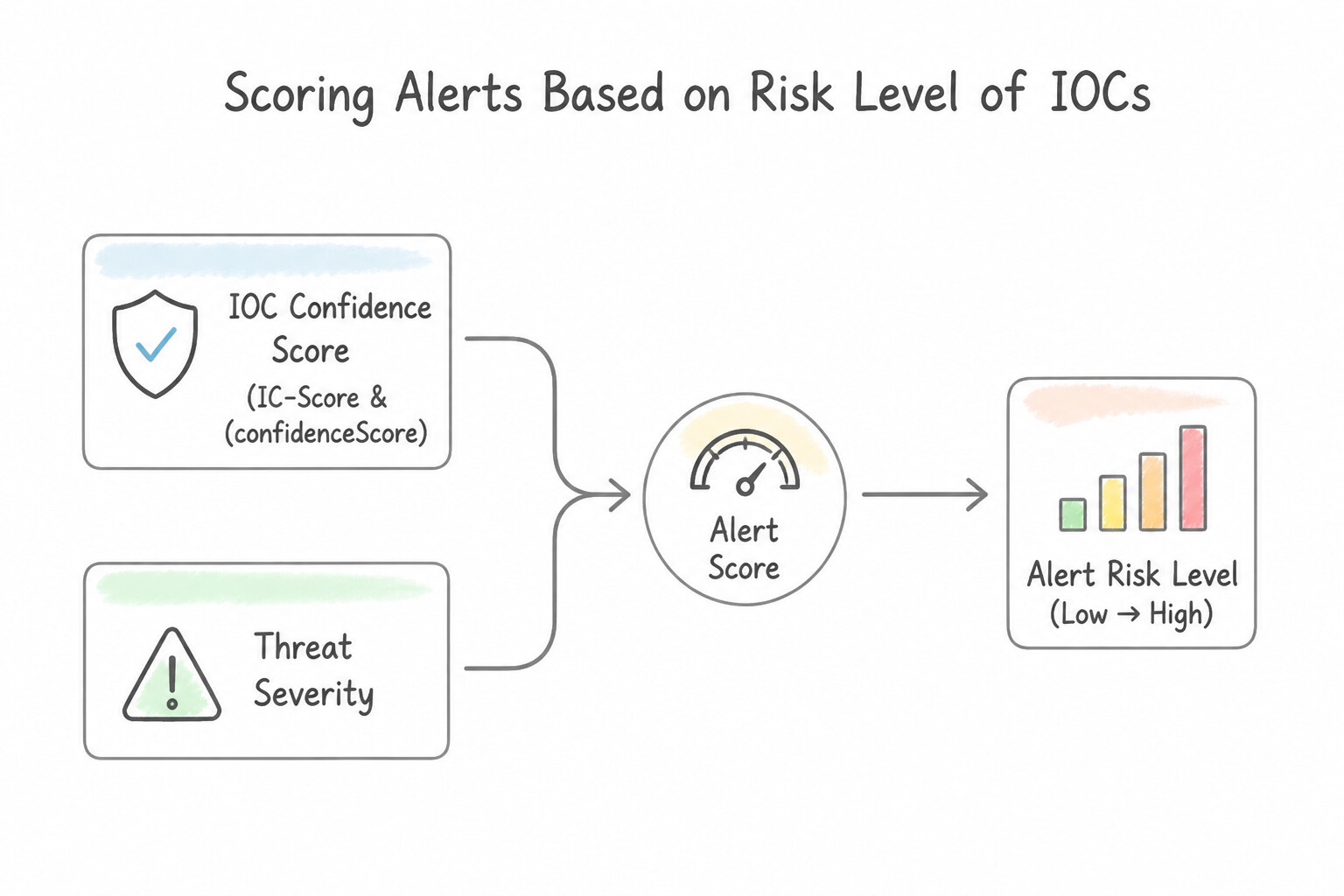
Never treat all IOC matches as equal. In Google SecOps YARA-L, compute a dynamic $risk_score in the outcome: section by combining four dimensions of risk:
- 1. IOC Confidence Score (
IC-Score/confidence_score) & Threat Severity: - Google Threat Intelligence (GTI) assigns a numerical Confidence Score (
IC-Score, 0–100) and Severity (LOW,MEDIUM,HIGH,CRITICAL) to indicators based on source reliability, age, and false-positive history. - Filter out low-confidence noise in the
events:section ($ioc.graph.metadata.threat.confidence_score >= 75) and scale$risk_scoreinoutcome:based on the indicator's severity and confidence. - 2. Enforcement Outcome (
ALLOWvs.BLOCK): - If a perimeter firewall or EDR blocked the connection/execution (
$e.security_result.action = "BLOCK"), assign a lower$risk_score(e.g.,20— informational/attempted) than if the connection was permitted ($e.security_result.action = "ALLOW",$risk_score = 85). - 3. Target Asset Criticality & User Privilege:
- Multiply or add to
$risk_scorewhen the matched internal host is tagged in the Entity Graph (ENTITY_CONTEXT) asasset.category = "PRODUCTION_PCI"or the user is a privileged administrator.
Key Implementation Patterns
- Dynamic Risk Scoring in YARA-L: Use In the outcome section, define a variable named
$risk_scoreand assign it the value of the threat feed's risk field, such as max(entity.risk.score). The outcome section allows you to define variables like risk_score based on event data. - Cumulative Risk Scoring over Time: Use In the outcome section, define a variable that sums the risk scores. Use this variable in the condition section to verify it exceeds 100. Use the sum() function in the outcome section to calculate total risk and filter for values exceeding 100 in the condition section.
- Filtering Noise with Confidence Thresholds: Use Define a variable in the rule's
outcomesection that calculates the risk score based on theconfidence_scorefield. Theconfidence_scorefield specifically measures indicator reliability. Using it in theoutcomesection allows dynamic risk assignment.
Key Takeaways (4.2a)
- The outcome section in YARA-L is used to define output variables for alerts, including dynamic risk scores.
- Dynamic scoring allows alerts to inherit severity from context data like Threat Intelligence feeds rather than using static values.
- The meta section is for static descriptions, not logic.
- The events section is for filtering, and the match section is for grouping.
Consideration 4.2b: Using latest IOCs to search within ingested security telemetry
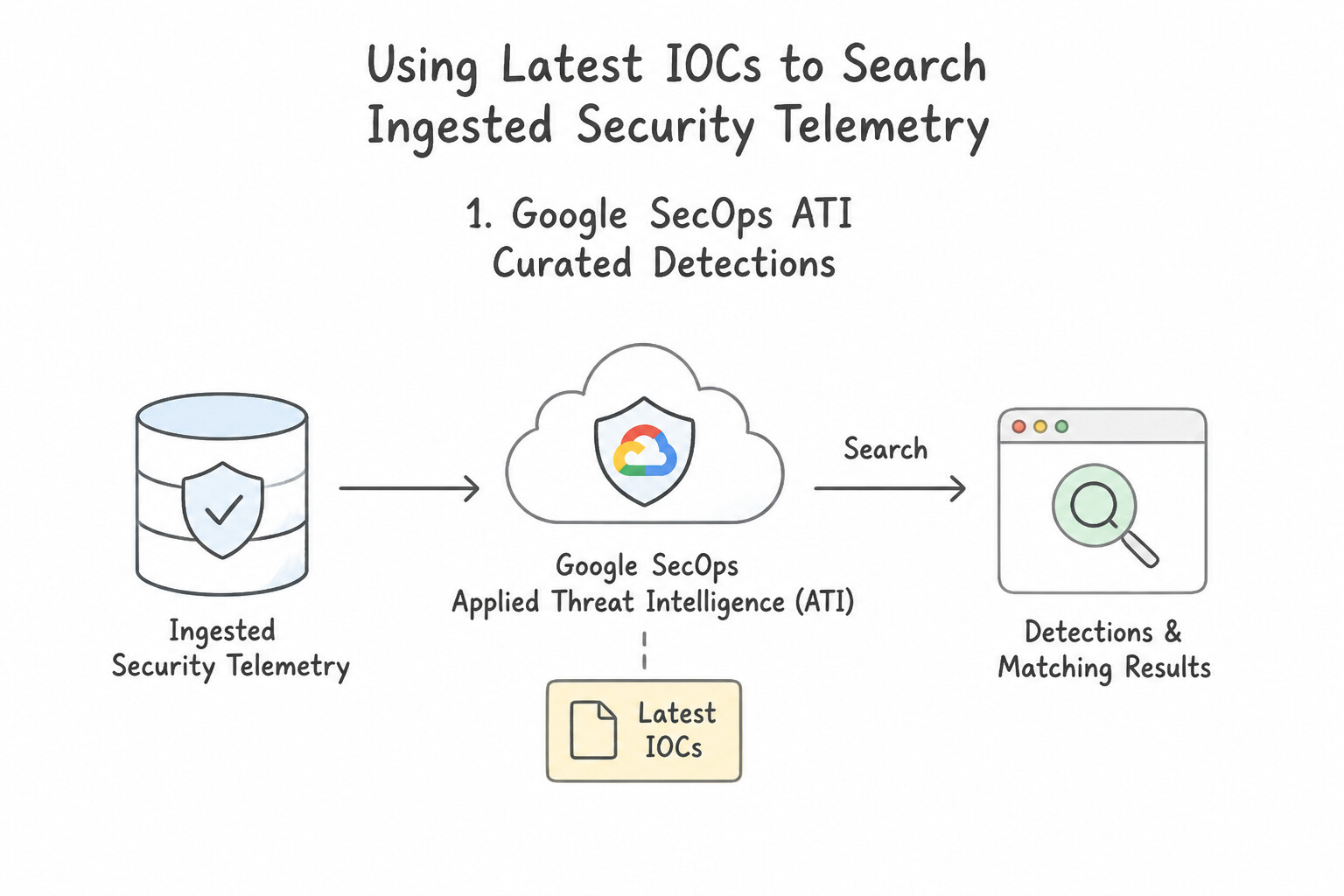
How do you ensure the latest IOCs published five minutes ago are immediately searched across your ingested security telemetry without manual copy-pasting?
- 1. Google SecOps
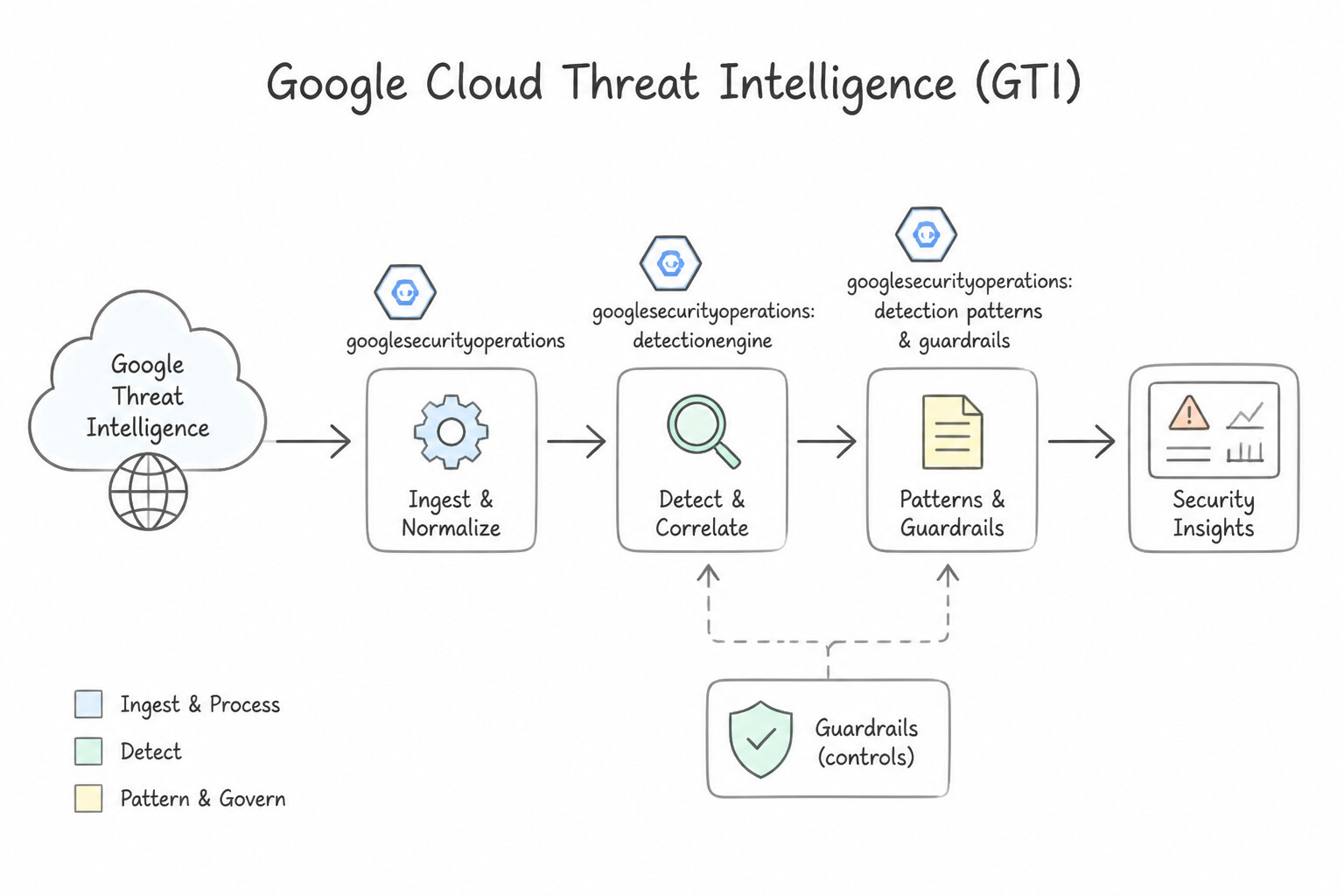
Applied Threat Intelligence (ATI)Curated Detections: - Enabling the Applied Threat Intelligence (ATI) curated rule pack in Google SecOps automatically evaluates incoming and historical UDM telemetry against live, high-confidence Mandiant and GTI campaign indicators curated by Google's threat research team.
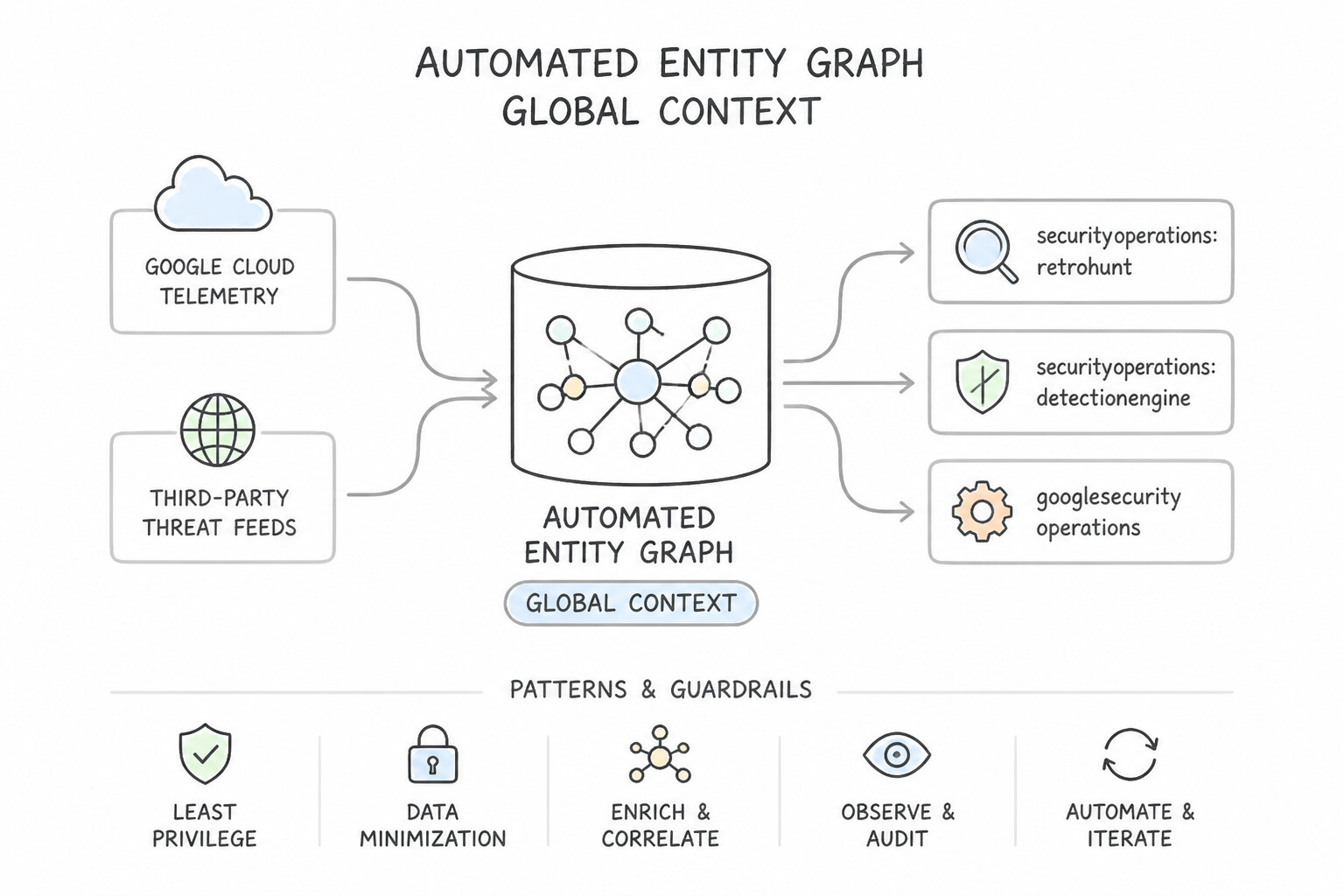
- 2. Automated Entity Graph
GLOBAL_CONTEXT& Third-Party Threat Feeds: - Threat feeds configured via SecOps Feed Management (e.g., MISP, TAXII, CrowdStrike Intel, Recorded Future) write indicator records directly into the Entity Graph (
$ioc.graph.metadata.*). - Any YARA-L rule joining UDM events (
$e) with$ioc.graph.entity.*automatically evaluates against the latest ingested indicators on every rule execution without touching the YARA-L code. - 3. Timestamp Validity Check (
Active IOC Window): - Because IP addresses get reassigned in cloud environments, an IP that hosted malware 9 months ago may belong to a legitimate SaaS customer today. Always compare the event timestamp against the IOC's active interval (
$ioc.graph.metadata.interval.start_timetoend_time) so old, expired IOCs do not trigger false positives on current traffic!
Key Implementation Patterns
- Retroactive IOC Search: Use Run a Retrohunt job with the new YARA-L rule. Retrohunt scans historical data using a YARA-L rule to find past occurrences of an IOC. (Avoid alternative: Live detection only analyzes new logs as they arrive, not historical data.)
- CIDR Block Matching: Use Use the net.ip_in_range_cidr function with the destination IP address field and the "198.51.100.0/24" string. The net.ip_in_range_cidr function correctly evaluates whether a specific IP address exists within a defined CIDR block. (Avoid alternative: The equality operator checks for exact matches, not whether an IP is contained within a subnet range.)
- Reference Lists in YARA-L: Use Create a Reference List using the CSV feed and reference it in the YARA-L rule. Reference Lists decouple data from logic, allowing you to check against dynamic lists of IOCs without changing the rule. (Avoid alternative: Hardcoding values requires editing the rule for every update, which is not automated or scalable.)
Key Takeaways (4.2b)
- Live rules detect threats in real-time as logs are ingested.
- Retrohunt is used to apply new detection logic to historical data.
- When CTI reports identify long-running campaigns, always use Retrohunt to check for past exposure.
- Use dedicated YARA-L functions (like the
netnamespace) for handling specific data types rather than generic string manipulation.
Consideration 4.2c: Measuring frequency of repetitive alerts to identify and reduce false positives
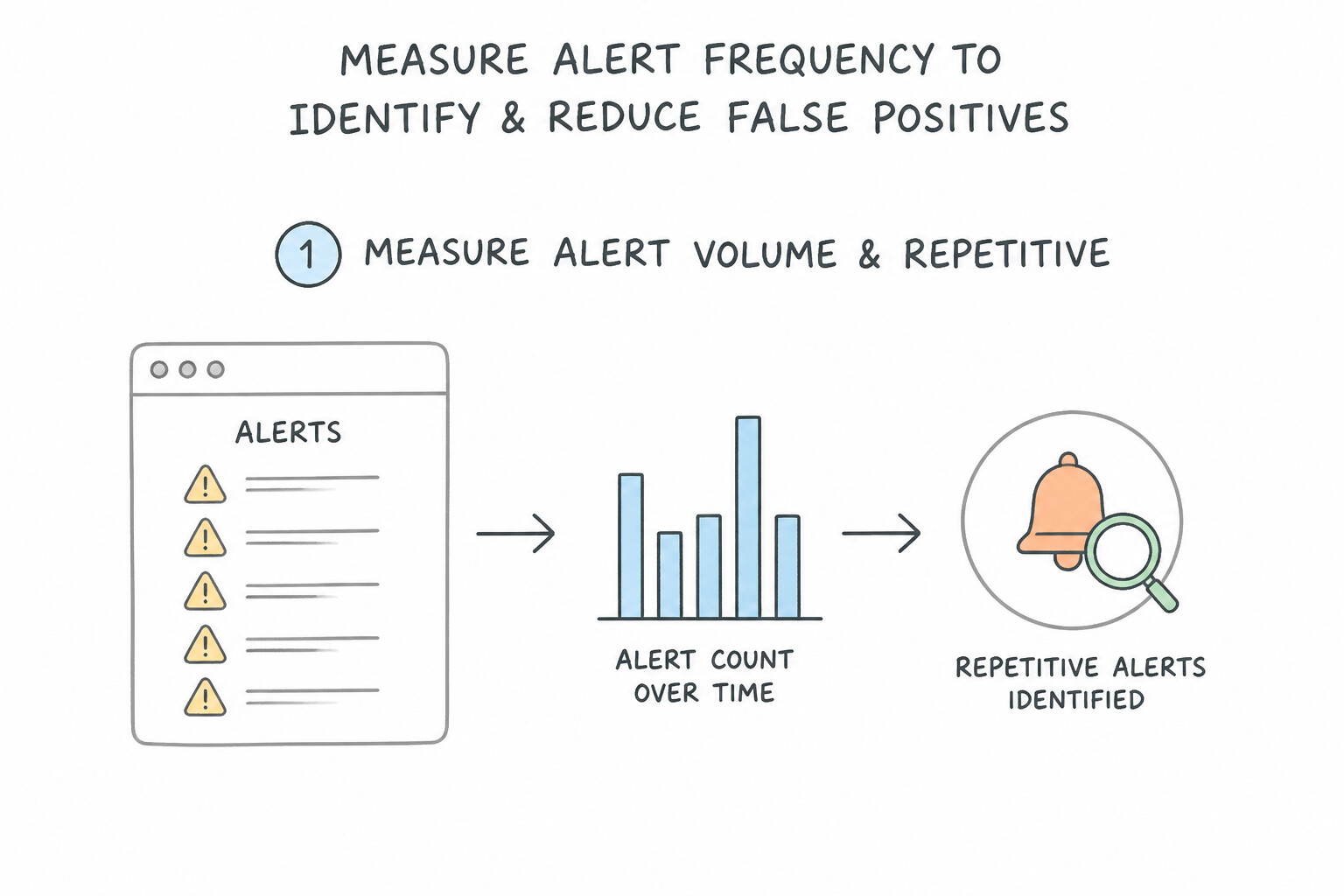
Reducing false positives (rule tuning) is a disciplined engineering loop:
- Step 1 — Measure Alert Volume & Repetitive Offenders:
- Use the Google SecOps Rule & Detection Dashboards (or query the exported
rule_detectionstable in BigQuery) to group alerts byrule_name,principal.hostname,principal.user.userid, andtarget.ip/target.domain.name. - Identify high-frequency outliers: a single rule generating 70% of all daily alerts, or a single IP/service account triggering the same rule 500 times a day.
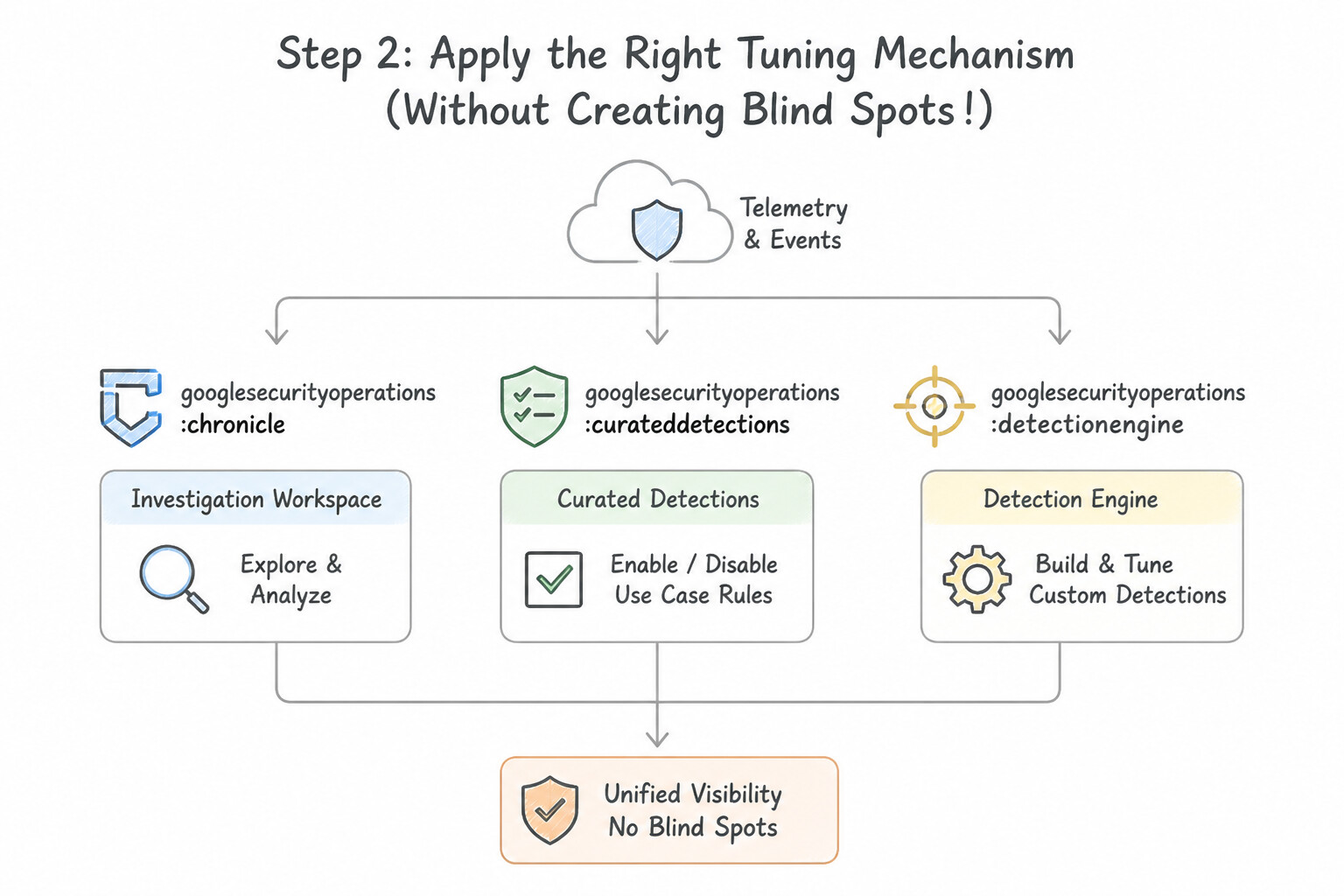
- Step 2 — Apply the Right Tuning Mechanism (Without Creating Blind Spots!):
- Trap to Reject: Never disable an entire detection rule just because one vulnerability scanner or backup script triggers it!
- Tuning Mechanism A —
Reference Lists(not ... in %allowlist): Add sanctioned vulnerability scanners, red-team egress IPs, or automated health-check service accounts to a Reference List and addnot $e.principal.ip in cidr %authorized_scannersto the rule'sevents:section. - Tuning Mechanism B —
PrevalenceFiltering (rolling_max): If a threat feed accidentally flags a popular CDN or enterprise SaaS domain accessed by 800 employee laptops daily, filter out high-prevalence destinations by requiring$prev.graph.entity.domain.prevalence.rolling_max <= 10. - Tuning Mechanism C — Grouping & Window Consolidation (
match:): If a noisy host generates 100 identical single-event alerts in 5 minutes, add amatch: $hostname, $ioc_ip over 1hclause so Google SecOps consolidates all 100 events into 1 single aggregated alert per hour!
Key Implementation Patterns
- Analyzing Domain Prevalence to Reduce Noise: Use Analyze the domain's prevalence to see if it is accessed by a majority of the asset fleet over time. High prevalence (access by many hosts) usually indicates benign administrative traffic rather than a targeted C2 attack.
- Tuning YARA-L Thresholds for Public Assets: Use Modify the rule logic to apply a higher match threshold for assets identified as public-facing. Adjusting the threshold based on asset context allows you to filter background noise on public assets while maintaining strict sensitivity for internal assets.
- Identifying Periodic Noise via BigQuery: Use Export the alert data to BigQuery. Run a SQL query grouping by user identity and timestamp to identify accounts that trigger alerts at precise intervals. BigQuery enables long-term historical analysis and SQL-based frequency detection.
Key Takeaways (4.2c)
- High prevalence (widespread access) is a strong indicator of benign activity for domains and file hashes.
- Targeted attacks typically exhibit low prevalence, affecting only a small subset of assets.
- Never disable a rule to silence noise; instead, analyze the noise to create precise exclusions.
- Avoid blocking potential false positives without verification to prevent business disruption.
Quick Decision Cheat Sheet (Subsection 4.2)
If the Scenario Requires... | Choose This Google Cloud Pattern | Avoid This Common Mistake |
|---|---|---|
"Automatically mute benign red-team exercise IOCs or low-certainty threat feed indicators in YARA-L" | Filter on GTI Confidence Score ( IC-Score) + exclude red-team IPs via a Reference List (%red_team_iocs) | Hardcoding IP exclusions in 50 separate rules or disabling Applied Threat Intelligence |
"Prioritize alerts dynamically based on both IOC severity and whether the target is a production server" | Compute a composite $risk_score in the YARA-L outcome: section using conditional if() statements on $ioc and $asset fields | Using static meta: severity = "HIGH" for every match regardless of asset context |
"Threat intel feed accidentally includes a legitimate high-traffic SaaS domain, causing mass false positives" | Join with DERIVED_CONTEXT Prevalence and require prevalence.rolling_max <= N so ubiquitous domains are ignored | Turning off all DNS detections across the enterprise |
"Measure which detection rules are generating the highest volume of repetitive false positives over 30 days" | Analyze the SecOps Rule Detections Dashboard (or query the rule_detections table in BigQuery) grouped by rule_name and entity | Guessing which rules are noisy without quantitative alert telemetry |
Further Reading (Subsection 4.2)
- YARA-L 2.0 Language Syntax - Outcome Section — Documentation describing how to use the outcome section to define variables and derive values for detections.
- YARA-L 2.0 Language Syntax — Refer to the section on the 'outcome' variable definition to understand how to assign values like risk scores based on conditional logic.
- Threat Intelligence overview — Review how threat intelligence context is applied to events and the fields available for scoring.
- Run a rule against historical data — Official documentation explaining how to execute a Retrohunt job to search historical data for detections.
- YARA-L 2.0 language syntax - Network functions — Documentation listing the available network functions in YARA-L, including net.ip_in_range_cidr.
- Using Reference Lists in YARA-L — Documentation explaining how to use reference lists to check if a field's value appears in a list of values.
Book TOC · Previous · Chapter 4 of 7 · Next
AwesomeGCP.com Learning
The approach taken is a question-led learning approach: you explore realistic project scenarios where you need to make decisions or take actions to achieve business goals within specific constraints. Instead of passive learning, you are challenged to think and work through the options to master the Professional Security Operations Engineer (PSOE) certification!