Book TOC · Previous · Chapter 3 of 7 · Next
Chapter 3: Threat Hunting: UDM Search, BigQuery Analytics, GTI IOCs, Toxic Combinations & Retrohunts
Chapter Focus: Hypothesis-driven hunting across UDM Search and BigQuery, MITRE ATT&CK TTP tracking, GTI Applied Threat Intelligence IOCs, SCC Virtual Red Team & Toxic Combinations, and YARA-L Retrohunts.
Subsection 3.1: Performing Threat Hunting Across Environments
The Big Picture
Wait-for-the-alert security operations is a losing strategy against modern adversaries who use stolen valid credentials ("living off the land"), abuse legitimate administrative tools, and move laterally inside cloud environments without triggering static malware signatures. Proactive Threat Hunting reverses the dynamic: instead of waiting for an alert, the threat hunter starts with a testable hypothesis grounded in adversary behavior (MITRE ATT&CK), cloud posture risk (SCC Toxic Combinations), or frontline threat intelligence (GTI), and systematically queries telemetry across environments to prove or disprove the presence of an active threat.
However, teams that approach threat hunting as "randomly grepping logs" fail in three ways:
- Choosing the Wrong Query Engine for the Hunting Horizon (
3.1a,3.1c): Using Cloud Logging Logs Explorer to run multi-source statistical aggregations across 90 days of VPC Flow Logs and Cloud Audit Logs results in timeouts and manual CSV exports. Conversely, exporting logs to BigQuery just to inspect the last 15 minutes of a single VM's syslog wastes time when Logs Explorer or Google SecOps UDM Search can answer in seconds. A master PSOE engineer knows exactly when to use Logs Explorer, Log Analytics (SQL), BigQuery, and Google SecOps UDM Search / YARA-L. - Hunting Indicators Instead of Behaviors (
3.1b,3.1e): Attackers rotate IP addresses and recompile hashes in minutes, but changing their behavioral TTPs (such as enumerating IAM permissions viaTestIamPermissions, creating service account keys, staging data into an unmonitored GCS bucket, or logging in from impossible geographic locations) is hard. Effective threat hunts target user and service account behavioral anomalies. - The Dead-End Hunt Trap (3.1d): When a threat hunter confirms malicious activity in UDM Search or BigQuery but simply emails a screenshot to an inbox, critical forensic context is lost and containment is delayed. Production hunting workflows immediately transition confirmed findings to the Incident Response (IR) team by opening a formal Google SecOps SOAR Case (attaching the pivoted UDM events and entities) and converting the validated hunting query into an automated YARA-L Detection Rule so the SOC never has to hunt for that pattern manually again.
Consideration 3.1a: Developing queries to search across environment logs to identify anomalous activity
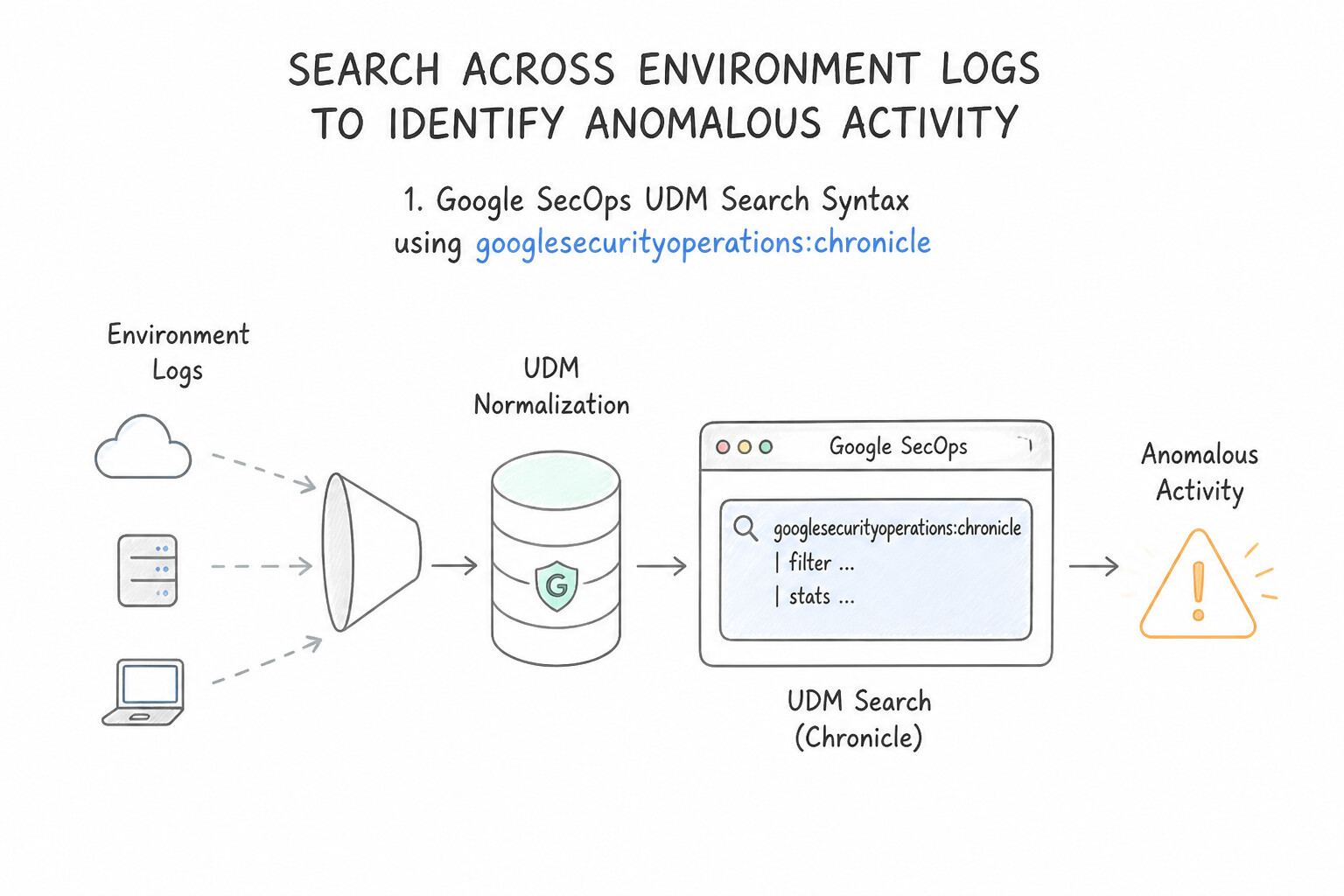
Google Cloud architecture tests concrete query syntax and capabilities across three primary query engines:
- 1. Google SecOps
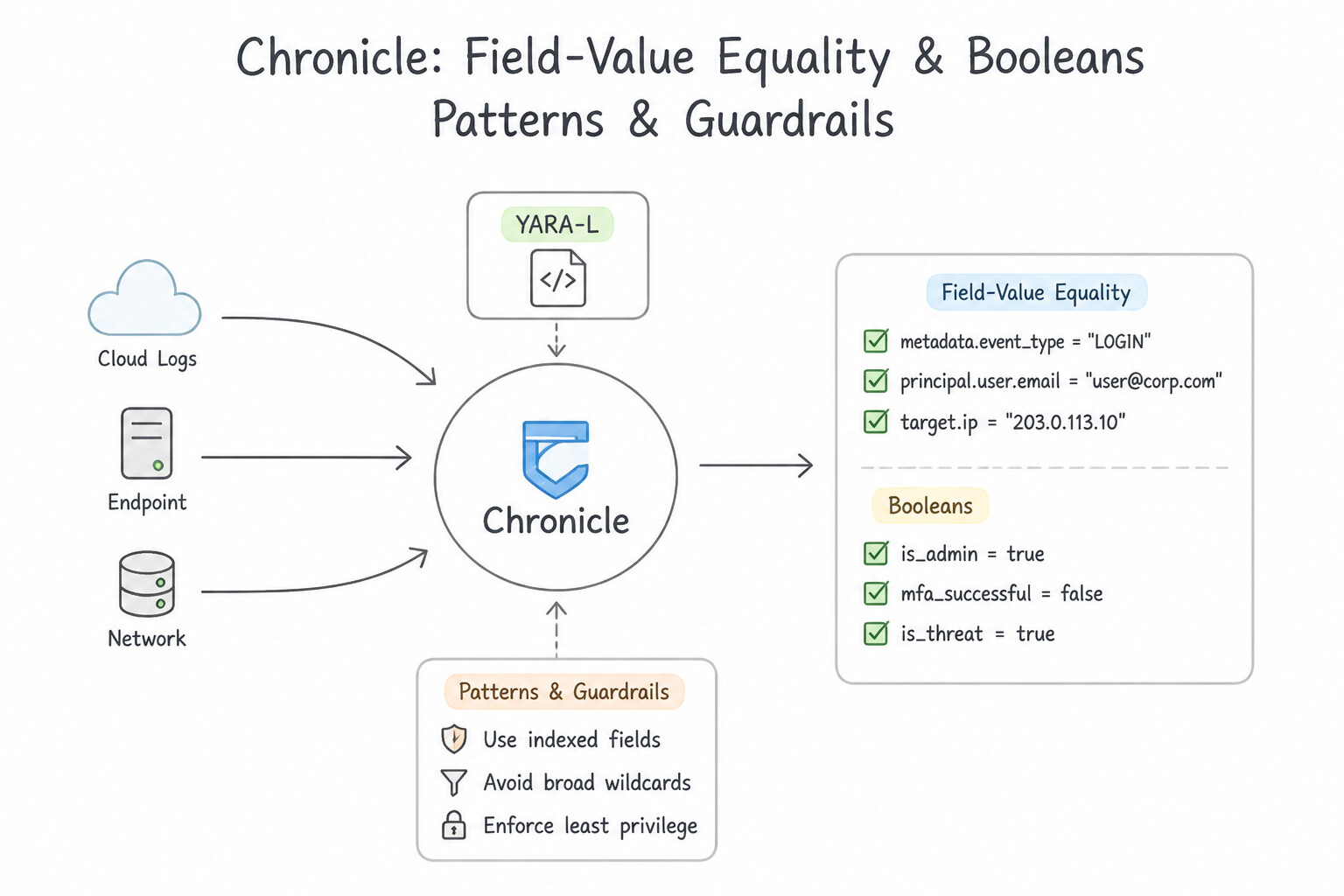
UDM SearchSyntax: - Field-Value Equality & Booleans:
metadata.event_type = "USER_LOGIN" AND principal.user.userid = "alice" nocase(usenocasefor case-insensitive matching). - Regular Expressions:
target.process.command_line = /powershell.*-enc/ nocase(enclose regex inside forward slashes/.../). - CIDR Range Matching:
net.ip_in_range_cidr(principal.ip, "10.20.0.0/16")ortarget.ip = "198.51.100.0/24". - Reference List Lookups in UDM Search:
principal.user.userid in %terminated_employees. - UDM Search Statistical Aggregations (Grouped Hunting): Use
outcome/ aggregation clauses in UDM Search (or YARA-L) to group by fields (e.g., grouping failed logins byprincipal.ipand counting distincttarget.user.useridto spot password spraying). - 2. Cloud Logging
Logs Explorer(Logging Query Language —LQL): - Fast filtering on JSON payload fields:
protoPayload.serviceName="iam.googleapis.com" AND protoPayload.methodName:"CreateServiceAccountKey" - Supports exact match (
=), substring/contains (:), regex (=~), and negation (NOTor-). - 3. Cloud Logging
Log Analytics&BigQuery(ANSI SQL): - When hunting for statistical outliers (e.g., "Find any IP address that attempted to authenticate to more than 25 distinct user accounts within a 10-minute window"), SQL is superior to LQL because SQL supports
GROUP BY,COUNT(DISTINCT ...),HAVING COUNT(...) > 25, andTIMESTAMP_BUCKET/ window functions (LEAD,LAG).
Key Implementation Patterns
- DNS Tunneling Detection via YARA-L: Use Define a variable for the subdomain in the events section. In the match section, aggregate by the registered domain and use count_distinct on the subdomain variable to check if it exceeds a threshold. DNS tunneling creates many unique subdomains; use
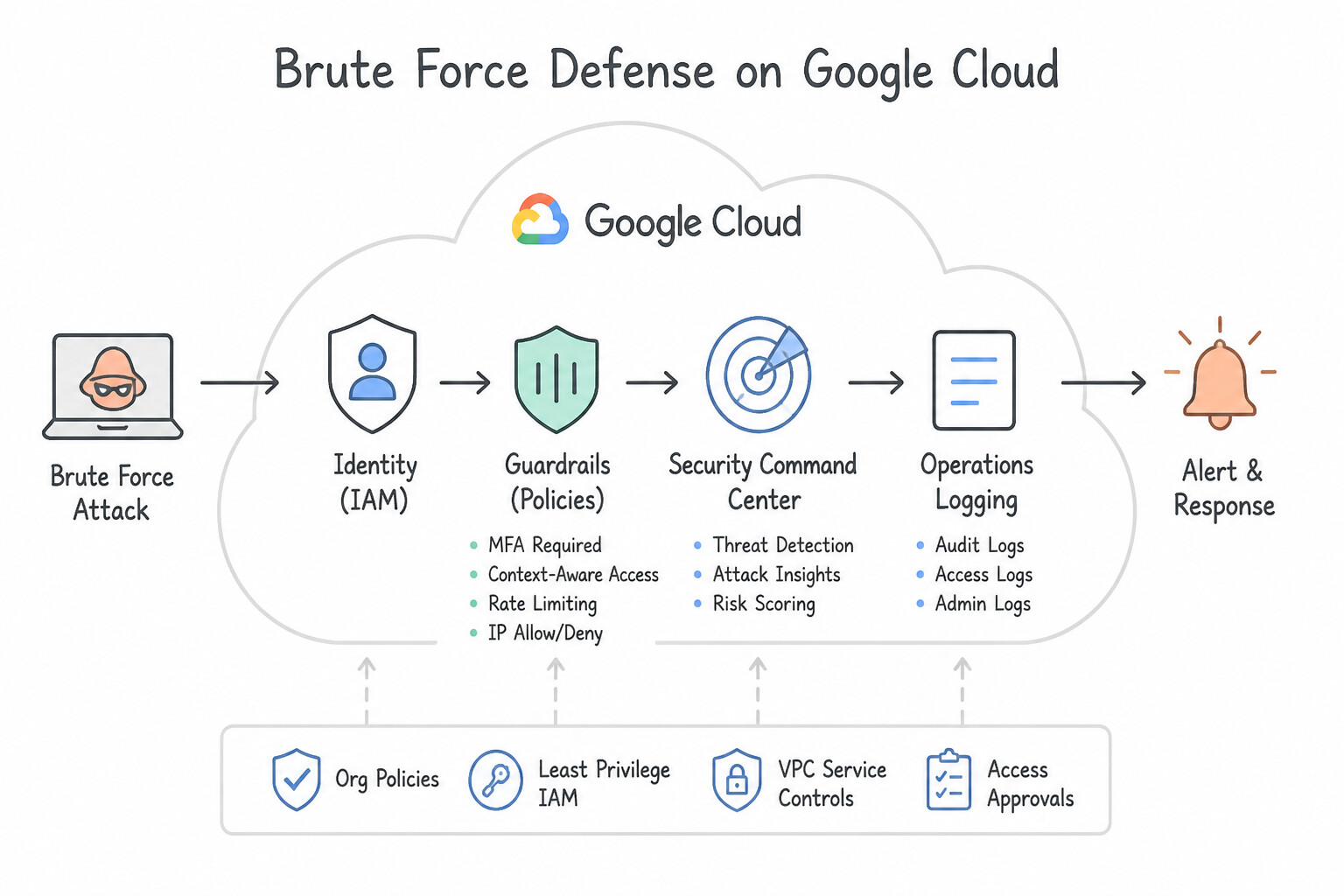
count_distinctin the match section to detect high volumes of unique subdomains per domain. - Detecting Burstable Brute Force Attacks: Use Create a rule that groups failed login events by the source IP address using a match window of 1 hour. Use a
matchsection with a longer time window (e.g., 1 hour) to aggregate slow bursts of failed events. (Avoid alternative: Single-event rules do not aggregate data and cannot detect patterns over time.) - Service Account Key Misuse in BigQuery: Use Query the
cloudaudit_googleapis_com_activitytable. Select rows whereprotopayload_auditlog.authenticationInfo.principalEmailends withgserviceaccount.comandprotopayload_auditlog.requestMetadata.callerIpis NOT in the10.0.0.0/8range. Filter for service account emails and exclude internal IPs to find external misuse.
Key Takeaways (3.1a)
- Behavioral Analysis over Signatures: Detect threats like tunneling by analyzing patterns (e.g., high cardinality of subdomains) rather than just blocking known bad IPs.
- YARA-L Match Section: Use the
matchsection to aggregate events over a time window.- Count vs. Count_Distinct: Use
countfor total volume, andcount_distinctto identify variety or uniqueness (cardinality) in a dataset.- YARA-L Match Section: This section is essential for aggregating multiple events into a single detection context.
Consideration 3.1b: Analyzing user behavior to identify anomalous activity
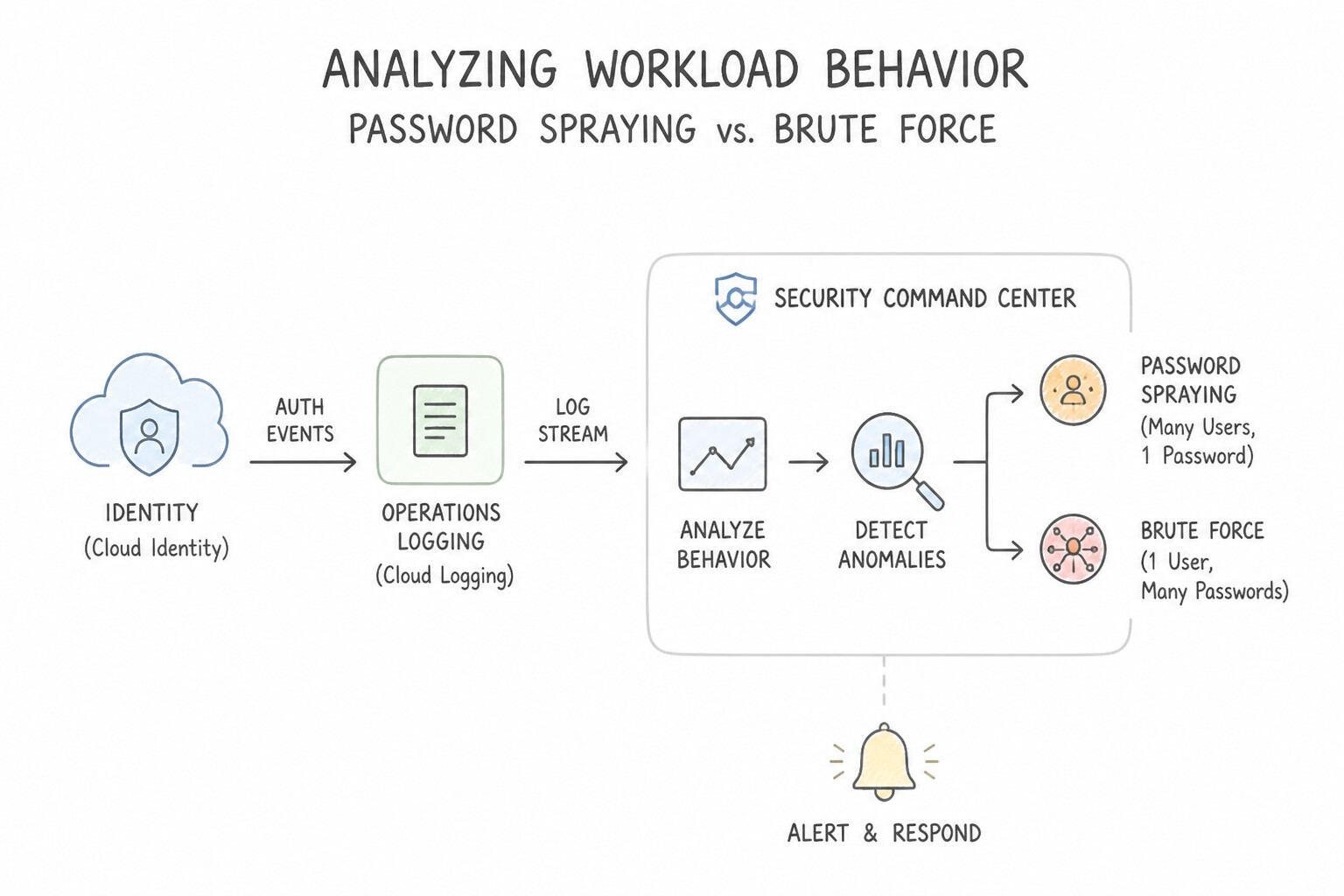
When hunting for compromised human users or hijacked Google Cloud Service Accounts, focus on these high-signal behavioral patterns:
- Password Spraying vs. Brute Force:
- Brute Force: High count of
USER_LOGINfailures from oneprincipal.ipagainst a singletarget.user.userid. - Password Spraying / Credential Stuffing: Low count of failures per user, but one
principal.ip(or distributed botnet) attempting logins across a high number of distincttarget.user.userids (COUNT(DISTINCT target.user.userid) > 20), followed bysecurity_result.action = "ALLOW". - Google Cloud Service Account Privilege Escalation & Persistence:
- Hunt
GCP_CLOUDAUDITevents for: CreateServiceAccountKey(minting an exportable static JSON key for persistence).SetIamPolicygranting privileged roles (roles/owner,roles/editor,roles/iam.serviceAccountTokenCreator,roles/iam.serviceAccountUser).- Service Account Impersonation chains (
GenerateAccessToken,GenerateIdToken,SignJwt,actAs) originating from an unusual external IP or non-production VM. - Anomalous Data Access & Exfiltration Behavior:
- A user or service account querying a massive volume of BigQuery rows (
jobCompletedevents with hightotalBilledBytes) or downloading thousands of Cloud Storage objects (storage.objects.get) at 3:00 AM from an unfamiliar Autonomous System Number (ASN) or geographic location.
Key Implementation Patterns
- Impossible Travel Detection: Use Flag the event as an impossible travel anomaly indicating potential credential compromise. The travel time between locations is physically impossible, indicating compromised credentials. (Avoid alternative: Do not assume anomalous geographic jumps are benign VPN usage without verification.)
- Service Account Anomalous API Usage: Use Investigate the activity as a potential compromise attempting privilege escalation. Sudden deviation from a service account's baseline to sensitive IAM and Compute APIs indicates a high probability of compromise and privilege escalation.
Key Takeaways (3.1b)
- Impossible Travel is a high-fidelity indicator of credential compromise.
- Successful authentication logs are just as important as failed ones during threat hunting.
- Always verify context (like VPN usage) but never dismiss impossible travel alerts without investigation.
- Service accounts typically exhibit predictable, repetitive API usage patterns.
Consideration 3.1c: Investigating the network, endpoints, and services to identify threat patterns or IOCs using Google Cloud tools (e.g., Logs Explorer, Log Analytics, BigQuery, Google SecOps)
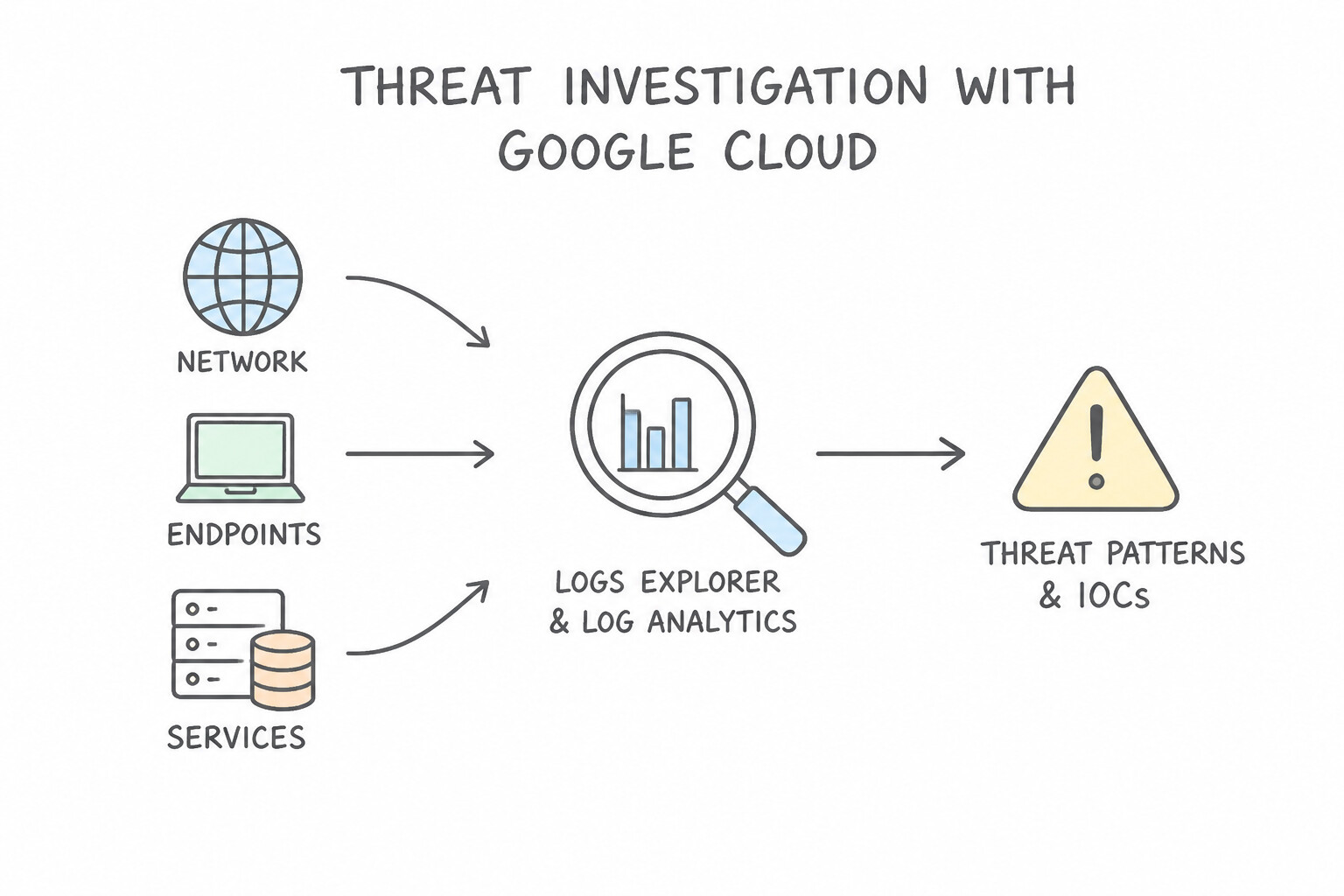
Choose the right Google Cloud investigation tool for the telemetry scale and data location:
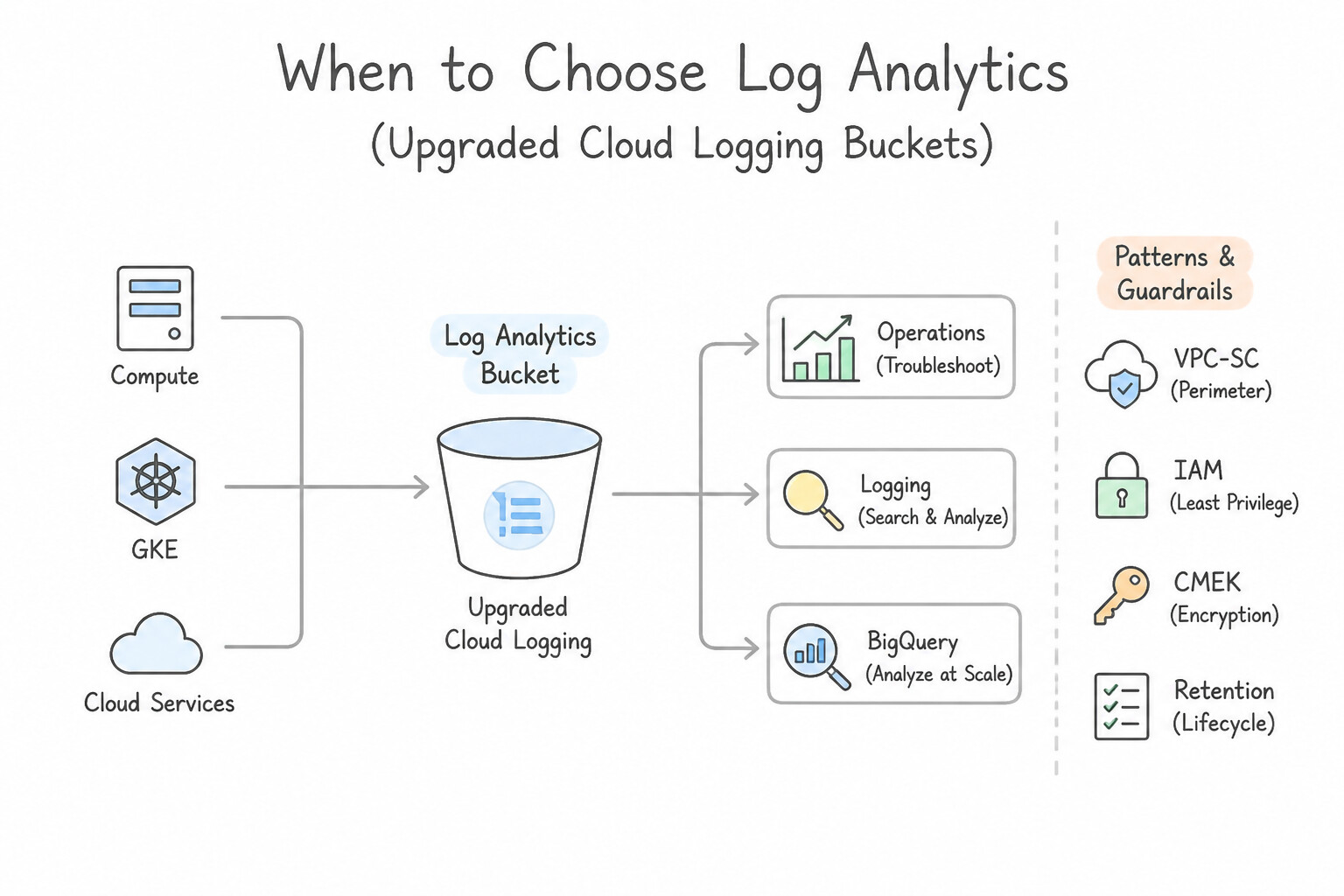
- When to Choose
Logs Explorer: - Investigating recent operational or audit events within a single project/bucket using fast filter expressions (
protoPayload.authenticationInfo.principalEmail="...") without needing SQLJOINs orGROUP BYaggregations. - When to Choose
Log Analytics(Upgraded Cloud Logging Buckets): - Running ad-hoc SQL aggregations (
GROUP BY,COUNT,AVG) directly over Cloud Logging buckets (including linked BigQuery datasets) without setting up a separate export pipeline. - When to Choose
BigQuery: - Performing long-term historical hunts (months/years beyond Cloud Logging default retention), joining multiple disparate tables (e.g., joining
VPC Flow LogswithCloud Audit Logson timestamp + IP to correlate an API call with raw network egress bytes), or running BigQuery ML anomaly detection over terabytes of logs. - When to Choose
Google SecOps SIEM (UDM Search & Asset/User Views): - Investigating across normalized multi-cloud, on-premises EDR, Active Directory, and GCP logs simultaneously over 12 months of hot retention.
- Pivoting in UDM Search: Clicking an IP, hostname, or hash in UDM Search results lets the hunter pivot immediately to the Asset View, User View, or Domain/IP View to see every process launch, DNS query, and login associated with that entity across all log sources.
Key Implementation Patterns
- Historical C2 Pattern Analysis via BigQuery: Use Configure a log sink to export VPC Flow Logs to BigQuery. Run a SQL query to group traffic by destination IP address and packet count. BigQuery is the standard tool for analyzing large volumes of log data using SQL for aggregation and pattern recognition.
- Instant IOC Search with Google SecOps (Chronicle): Use Use Google SecOps (Chronicle) UDM Search to search for the file hashes across the normalized endpoint telemetry. Google SecOps provides instant retrospective search capabilities across normalized data (UDM), making it the fastest way to check for IOCs.
- DNS Tunneling Detection using Log Analytics: Use Upgrade the log bucket to use Log Analytics, then run a SQL query within the Logs Explorer interface. Log Analytics enables SQL querying capabilities directly on Cloud Logging buckets, satisfying the requirement for SQL analysis without data export.
Key Takeaways (3.1c)
- Use Logs Explorer for real-time troubleshooting and searching recent, small-volume logs.
- Use BigQuery for long-term retention, complex analytics, and querying massive datasets (terabytes/petabytes).
- VPC Flow Logs provide the raw data needed to investigate network threats like C2 beaconing.
- Recognize data volume and retention time as key indicators for choosing between operational tools (Logging) and analytical tools (BigQuery).
Consideration 3.1d: Collaborating with the incident response team to identify active threats in the environment
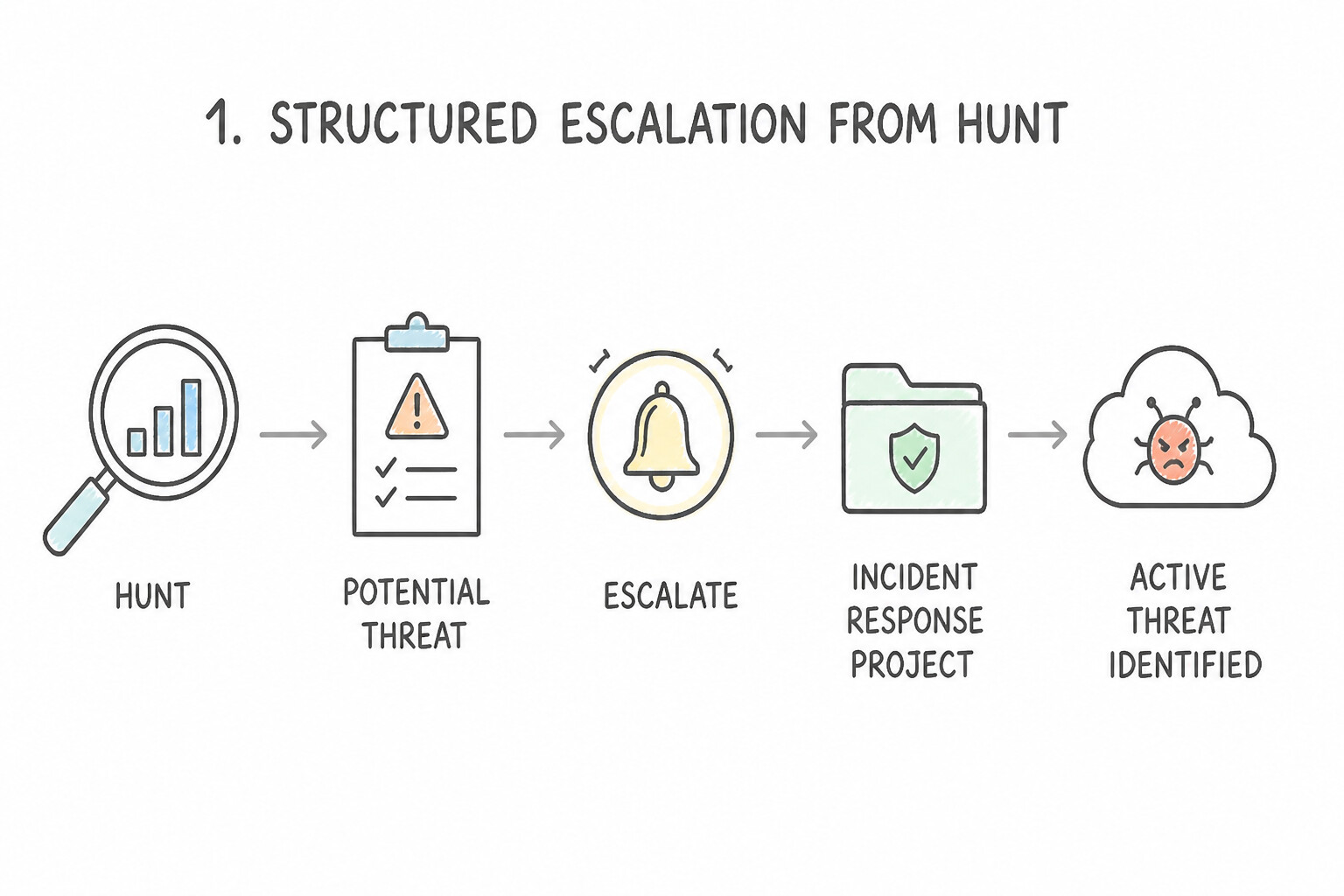
Proactive threat hunting and reactive Incident Response (IR) form a continuous feedback loop:
- 1. Structured Escalation from Hunt to Active Incident:
- The moment a threat hunter discovers active adversary presence (e.g., live C2 beaconing or unauthorized IAM key usage), they must not tip off the attacker or run uncoordinated destructive commands on the host.
- Instead, escalate immediately to the Incident Response team by opening a high-priority Google SecOps SOAR Case, attaching the exact UDM search query, timeline of correlated events, affected entity IDs (
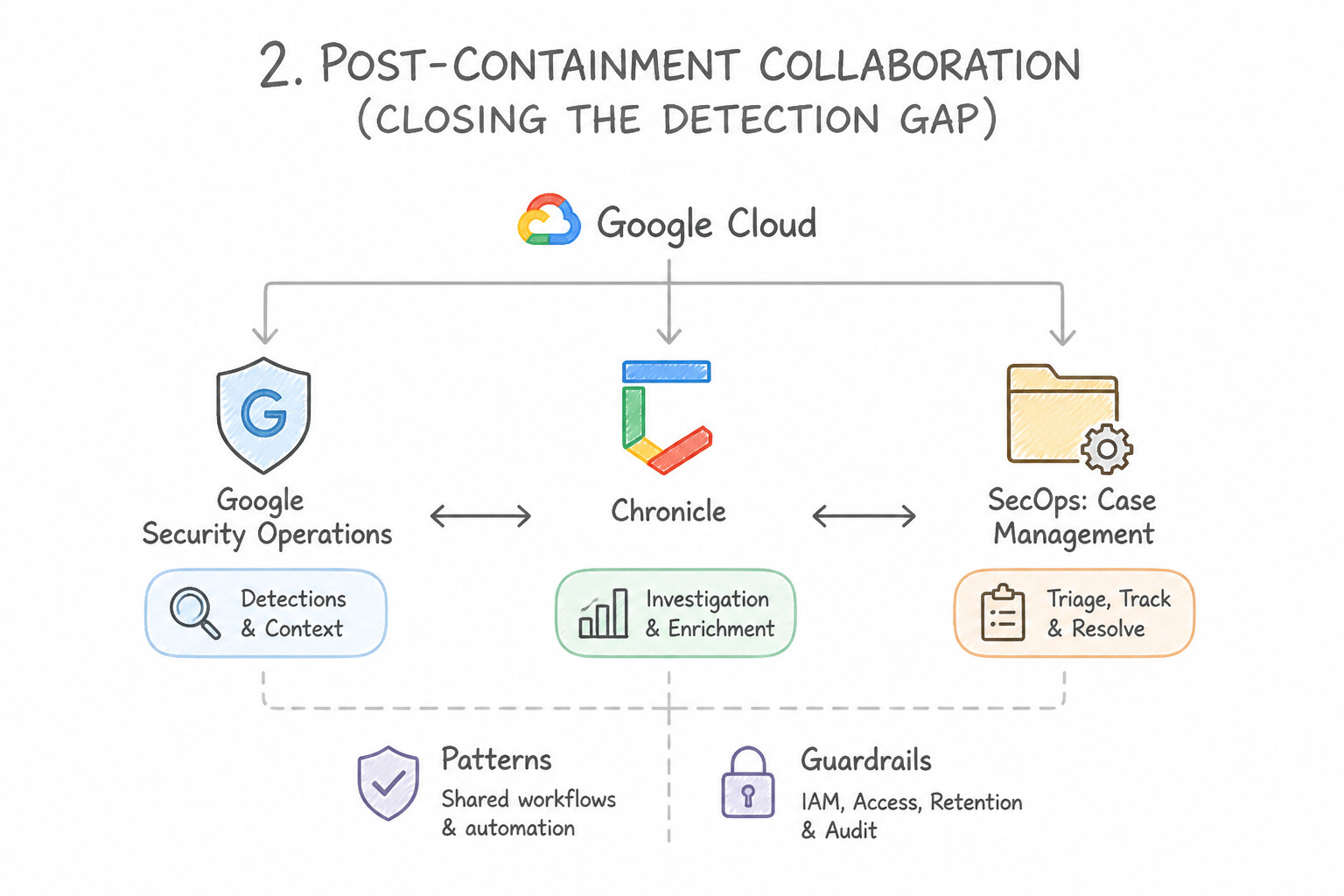
principal.hostname,principal.user.userid), and initial IOCs so IR playbooks can execute forensic preservation and containment. - 2. Post-Containment Collaboration (Closing the Detection Gap):
- During and after an incident, threat hunters collaborate with IR and Detection Engineering to ask: "Why did this adversary activity require a manual hunt instead of triggering an automated alert?"
- Convert the validated hunting query into a permanent YARA-L detection rule (or SCC ETD custom detector) and add newly discovered adversary infrastructure to Reference Lists so future occurrences trigger immediate SOAR cases.
Key Implementation Patterns
- Transitioning Hunt Findings to Incident Response: Use Select the relevant events in the interface and create a new case to assign to the IR team. Creating a case directly in the platform is the standard method to operationalize hunt findings and hand them off to IR. (Avoid alternative: Emailing CSV files disconnects the data from the platform and creates inefficient manual workflows.)
- Automating Context for IR Handoff: Use Configure a SOAR playbook that triggers on alert creation to enrich IP address entities with threat intelligence data. Playbooks automate the enrichment process by fetching and attaching context to alerts immediately upon creation.
- Scoping Incident Impact via Retrohunt: Use Execute a Retrohunt job using the file hash to search through historical data. Retrohunt scans historical telemetry for IOCs, satisfying the requirement to check the past year. (Avoid alternative: Enabling alerting on a new rule only detects future events, not historical ones.)
Key Takeaways (3.1d)
- Threat hunters must operationalize their findings by creating formal cases, not just identifying issues.
- Using native platform features (like Case creation) preserves context (UDM data) better than manual exports (CSV/Email).
- Writing detection rules (YARA-L) is a remediation/prevention step, while creating a case is the immediate response initiation step.
- SOAR Playbooks are used to automate repetitive security tasks.
Consideration 3.1e: Developing hypotheses based on behavior, threat intelligence, posture, and incident data (e.g., SCC, GTI)
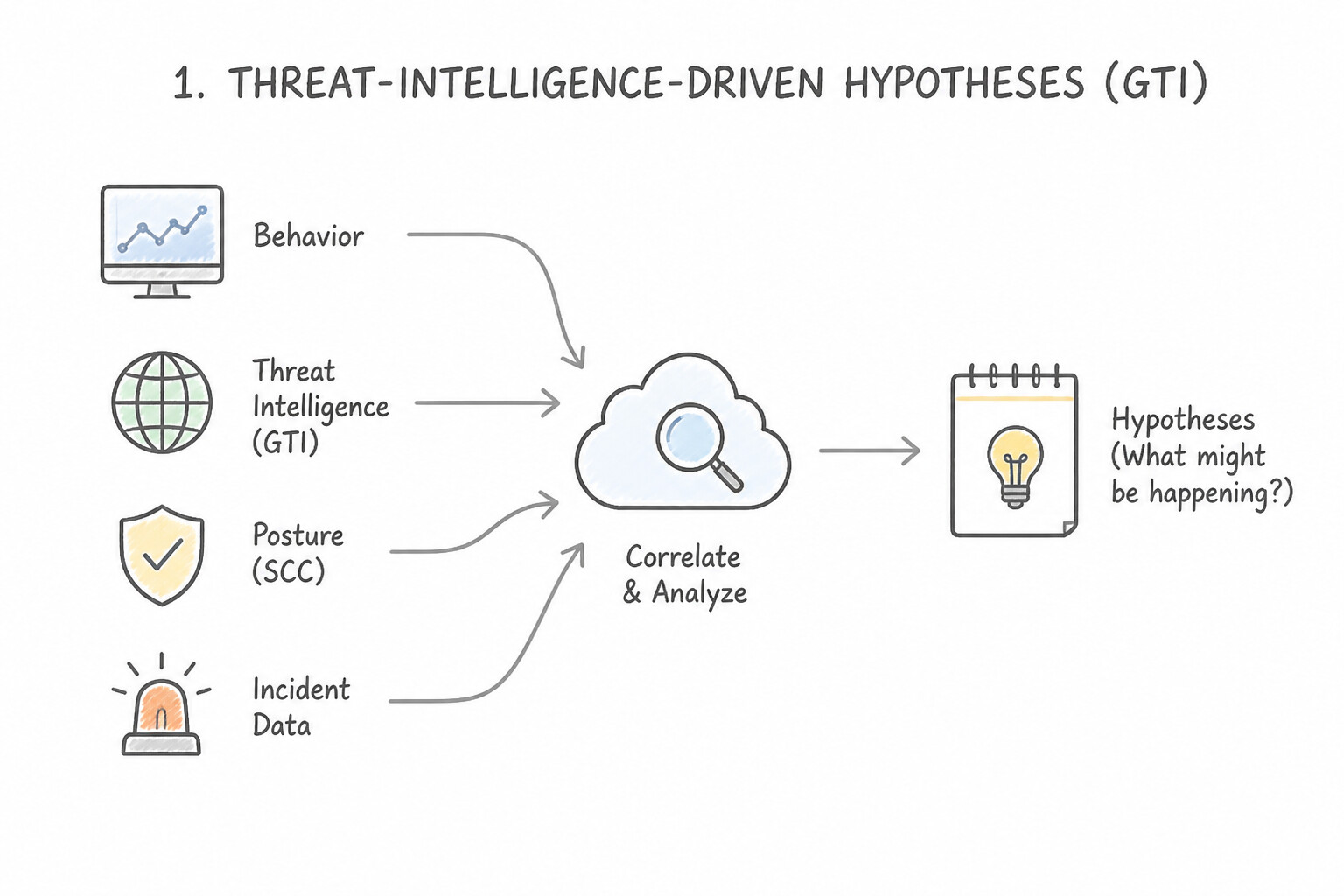
Every professional threat hunt begins with a structured, testable hypothesis (If [Adversary TTP / Vulnerability] is occurring, then we will observe [Specific Telemetry Pattern] in [Data Source]):
- 1. Threat-Intelligence-Driven Hypotheses (
GTI/Mandiant): - Trigger: GTI publishes an advisory on an APT group targeting cloud financial services by abusing OAuth tokens and executing
rcloneto exfiltrate GCS buckets. - Hypothesis: Search EDR
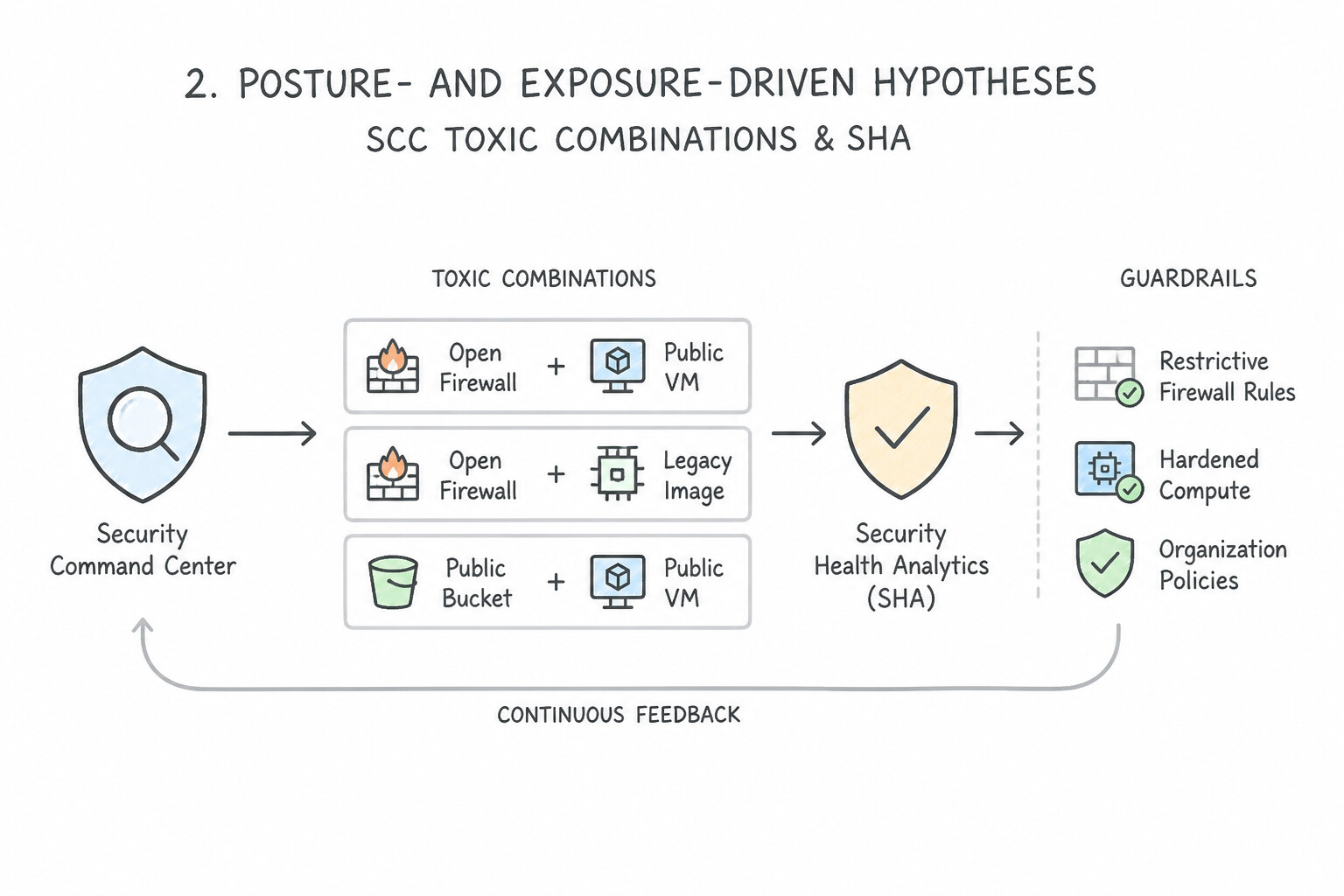
PROCESS_LAUNCHUDM events fortarget.process.command_lineflags matchingrclone(even if the binary was renamed!) correlated with anomalousstorage.objects.list/getCloud Audit Logs. - 2. Posture- & Exposure-Driven Hypotheses (
SCC Toxic Combinations&SHA): - Trigger: SCC Attack Path Simulation flags a Toxic Combination: a Compute Engine VM has a known RCE vulnerability (
CVE), a public IP address allowed through the VPC firewall, and an attached Service Account withroles/bigquery.dataVieweron a crown-jewel dataset. - Hypothesis: Assume the exposed VM may already have been probed or exploited; hunt
VPC Flow Logs,PROCESS_LAUNCHlogs on that VM, andBigQuery Data Accessaudit logs for any queries executed by that VM's Service Account. - 3. Behavioral / Anomaly-Driven Hypotheses (
Risk Analytics / UEBA): - Trigger: An executive or database administrator's Entity Risk Score spikes due to multiple low-severity anomalies across different days.
- Hypothesis: Investigate the complete 30-day timeline of that identity in UDM User View to determine if the anomalies represent slow, stealthy reconnaissance by an attacker.
Key Implementation Patterns
- Hypothesis from SCC Misconfiguration Findings: Use Hypothesize that attackers attempted brute force or password spraying attacks to gain remote access. Port 3389 is used for RDP, and exposure to the internet (0.0.0.0/0) invites credential-based attacks like brute force.
- Anomalous Service Account Behavior: Use The service account key has been compromised and is being used for unauthorized resource creation. The combination of anomalous API calls, permissions, and geography strongly indicates credential theft. (Avoid alternative: Traffic rerouting is a network function and does not trigger arbitrary instance creation by service accounts.)
- Correlating GTI Campaign Data with Asset Inventory: Use Search for high CPU utilization and outbound network connections to known mining pools originating from the Java pods. Crypto-mining malware typically causes CPU spikes and initiates outbound connections to mining pools, making these the best indicators for a hunting hypothesis.
Key Takeaways (3.1e)
- Map Ports to Services: Always identify the service running on a flagged port (e.g., 3389 for RDP, 22 for SSH) to understand the attack surface.
- Internet Exposure Risks: Ingress from 0.0.0.0/0 to management ports is a high-risk misconfiguration that usually implies credential attacks.
- Hypothesis-Driven Hunting: Use posture data (misconfigurations) as a starting point to formulate hypotheses about active threats.
- Service accounts should have a strictly defined scope of activity; deviations are high-fidelity alerts.
Quick Decision Cheat Sheet (Subsection 3.1)
If the Scenario Requires... | Choose This Google Cloud Pattern | Avoid This Common Mistake |
|---|---|---|
"Write a case-insensitive regex hunt in Google SecOps UDM Search" | Use forward slashes with the nocase modifier: target.process.command_line = /.*whoami.*/ nocase | Using SQL ILIKE '%whoami%' inside the standard UDM Search bar |
"Detect credential stuffing / password spraying directly inside Cloud Logging buckets" | Query upgraded log buckets with Log Analytics ( SQL) using GROUP BY src_ip HAVING COUNT(DISTINCT user) > N | Visually scrolling through Logs Explorer or exporting CSVs to Excel |
"Correlate Cloud Audit Logs with VPC Flow Logs across a 2-year compliance archive" | Run a BigQuery SQL JOIN matching the instance IP and a bounded TIMESTAMP_DIFF window | Using SCC Security Health Analytics (which only checks static posture, not historical logs) |
"Threat hunter confirms active C2 beaconing during a manual UDM search" | Immediately escalate to Incident Response by creating a SecOps SOAR Case with all linked UDM artifacts, then codify a YARA-L rule | Manually SSHing into the production VM to delete the binary (destroys forensic evidence and tips off the attacker) |
"Prioritize which cloud assets to hunt on when hundreds of standalone CVE findings exist" | Prioritize assets flagged by SCC Toxic Combinations & Attack Path Simulation (high exposure + high privilege + reachability to crown jewels) | Hunting alphabetically or sorting solely by raw CVSS score on isolated dev VMs with no network access |
Further Reading (Subsection 3.1)
- YARA-L 2.0 Language Syntax — Refer to the section on 'Aggregation functions' to understand how count and count_distinct work within the match section.
- BigQuery export schema — Documentation describing the schema of logs exported to BigQuery, including the
protopayload_auditlogstructure. - Cloud Audit Logs overview — General overview of Cloud Audit Logs, including Admin Activity and Data Access logs.
- Overview of Event Threat Detection — Overview of threat detection concepts in Security Command Center, including anomalous behavior patterns.
- Best practices for using service accounts — Discusses securing service accounts and the importance of monitoring for anomalous usage.
- Building a Production-Ready AI Security Foundation | Google Cloud Blog — Overview of how to detect potential escalation attempts using audit logs.
Subsection 3.2: Leveraging Threat Intelligence for Threat Hunting
The Big Picture
Suppose Google Threat Intelligence (GTI) or Mandiant publishes an urgent threat advisory today (October 13) revealing a zero-day exploitation campaign that used domain update-telemetry-cdn.net and SHA-256 hash 9f86d08... starting four months ago (June 15). If your security architecture only checks threat intelligence against incoming real-time log streams, what happens if the attacker compromised your environment on July 4, planted a legitimate-looking scheduled task or OAuth token, and stopped using update-telemetry-cdn.net in August? A real-time-only SIEM will show zero alerts today, giving leadership a false sense of security while the attacker remains entrenched inside your production environment!
Production Google SecOps architectures solve this temporal gap through Continuous Retroactive IOC Matching, YARA-L Retrohunts (3.2a, 3.2d), GTI Pivoting (Passive DNS, WHOIS, File Behavior), SCC Toxic Combinations (3.2b), and Entity Risk Score Analysis (3.2c):
Consideration 3.2a: Searching for IOCs within historical logs
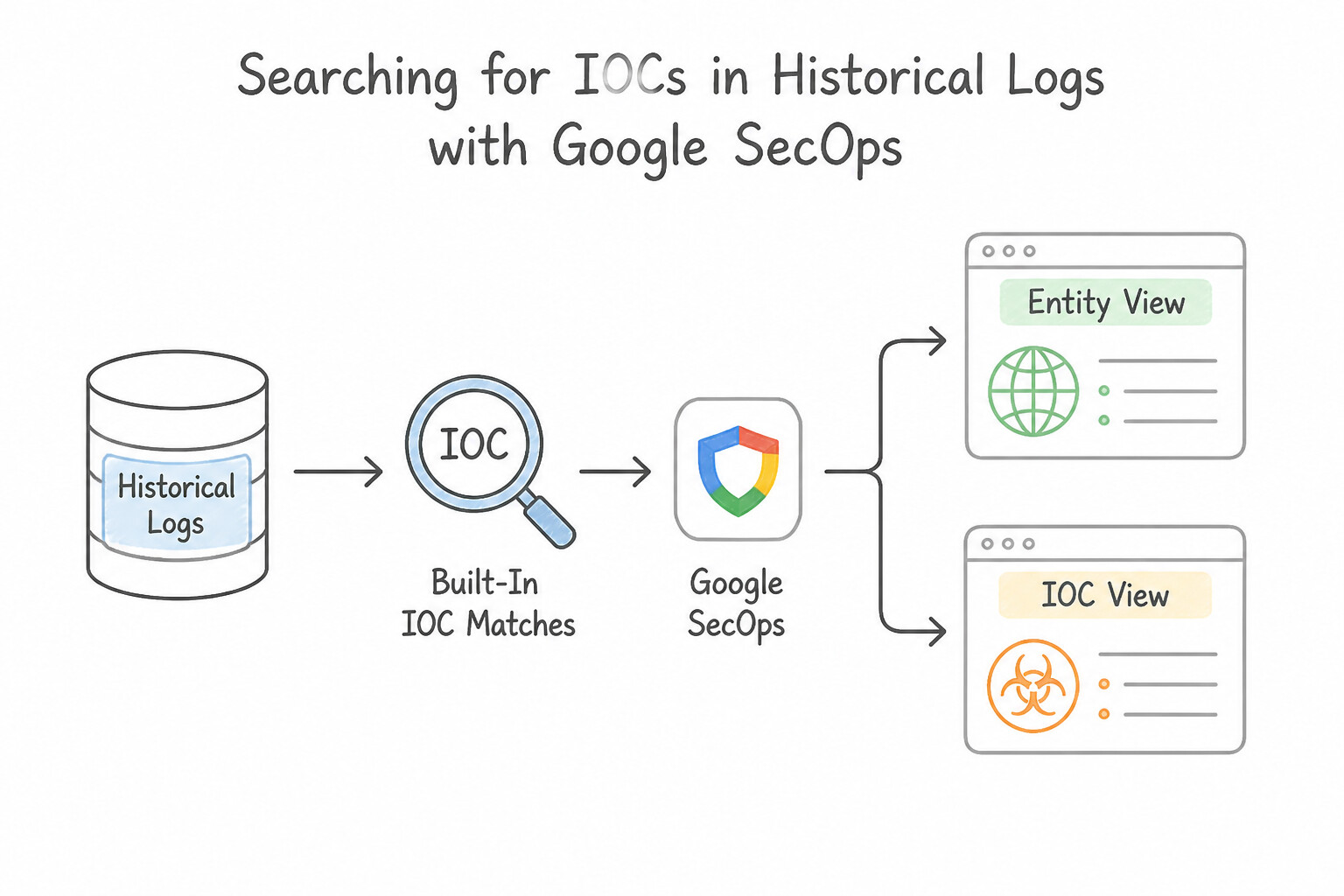
When a threat advisory or incident response report delivers a list of Indicators of Compromise (IPs, domains, SHA-256 hashes) and asks whether your environment was ever touched:
- 1. Built-In
IOC Matches& Entity/IOC View in Google SecOps: - Google SecOps automatically correlates ingested UDM events (
NETWORK_DNS,NETWORK_HTTP,NETWORK_CONNECTION,PROCESS_LAUNCH,FILE_CREATION) against active threat intelligence feeds (including GTI / Mandiant / VirusTotal and custom MISP/STIX feeds) both in real time and retroactively as new IOCs are added to the Entity Graph. - Typing an IP, domain, or SHA-256 hash directly into Google SecOps Search opens the IOC / Domain / IP / Hash View, displaying every historical first-seen/last-seen match and the exact internal assets (
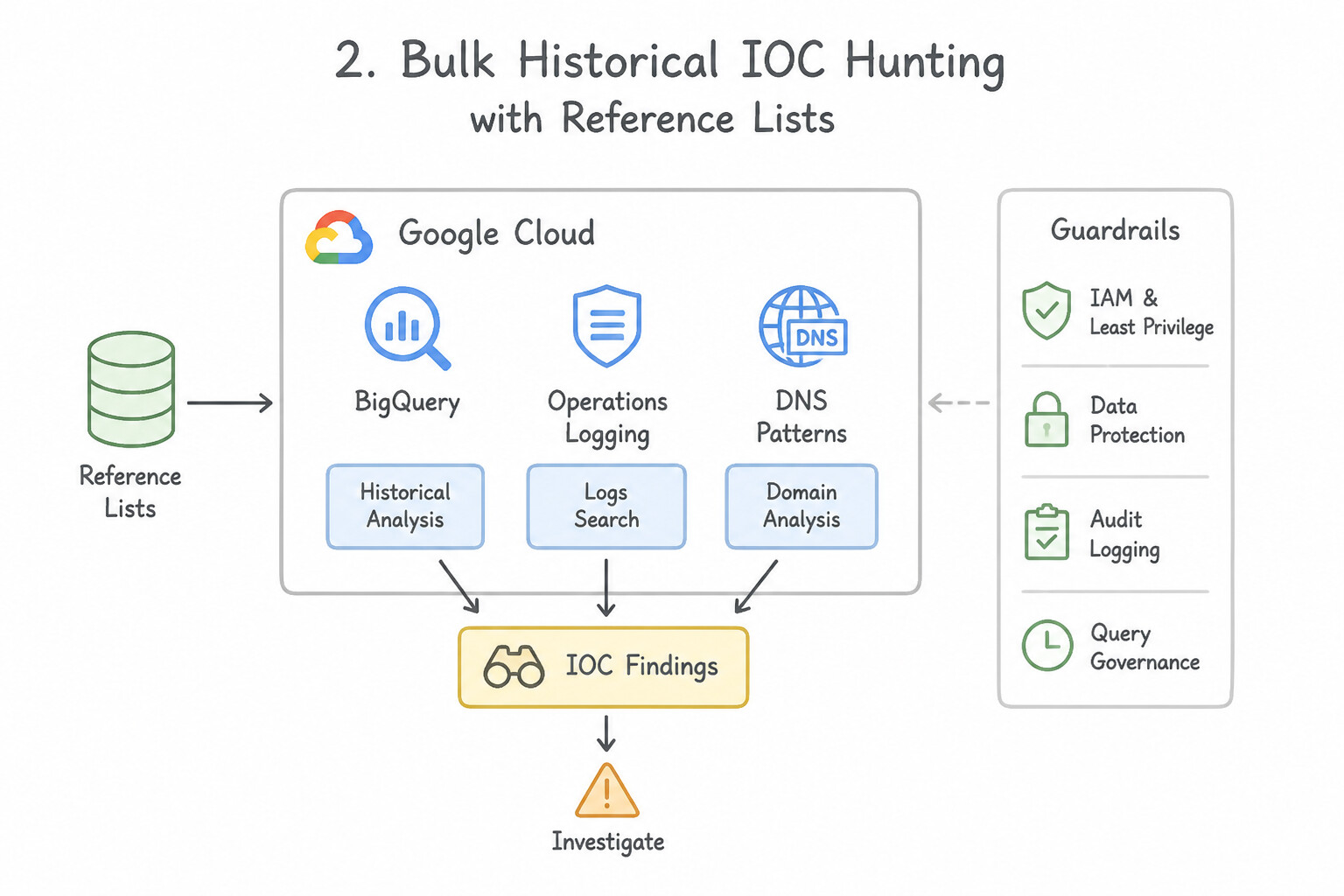
principal.hostname) that communicated with or executed the indicator. - 2. Bulk Historical IOC Hunting with
Reference Lists: - If you receive a batch of 500 custom IOCs from an industry ISAC or partner CISO, upload them into a Google SecOps Reference List (
STRINGorCIDR) and run a UDM Search (target.domain.name in %isac_c2_domains) or a YARA-L Retrohunt across your historical UDM data.
Key Implementation Patterns
- BigQuery SQL for Long-Term DNS IOC Search: Use Run a SQL query in BigQuery against the archived DNS logs table searching for the domain string. BigQuery uses SQL to efficiently query massive historical datasets, making it the correct tool for this 18-month search. (Avoid alternative: Logs Explorer is optimized for recent logs (typically 30 days), not efficient for 18-month historical searches.)
- YARA-L Retrohunt for Behavioral Indicators: Use Initiate a Retrohunt job using the YARA-L rule. Retrohunt runs YARA-L rules against historical log data to find past detections. (Avoid alternative: Enabling the rule only detects future matches in incoming logs, not historical data.)
- UDM Search for File Hashes in Google Security Operations: Use Perform a UDM Search using the query target.process.file.sha256 = "HASH". UDM Search allows for precise, indexed queries against normalized fields like SHA-256 hashes. (Avoid alternative: Raw Log Search scans unparsed text and is less efficient than searching indexed UDM fields.)
Key Takeaways (3.2a)
- Use BigQuery for performing analytics and threat hunting on long-term historical log data.
- Logs Explorer is best suited for real-time debugging and recent log analysis.
- Retrospective threat hunting involves searching historical data for newly discovered Indicators of Compromise (IOCs).
- Security Command Center findings are generated at the time of detection and may not exist for historical events that were unknown at the time.
Consideration 3.2b: Identifying new attack patterns and techniques in real time using threat intelligence and risk assessments (e.g., GTI, detection rules, SCC toxic combinations)
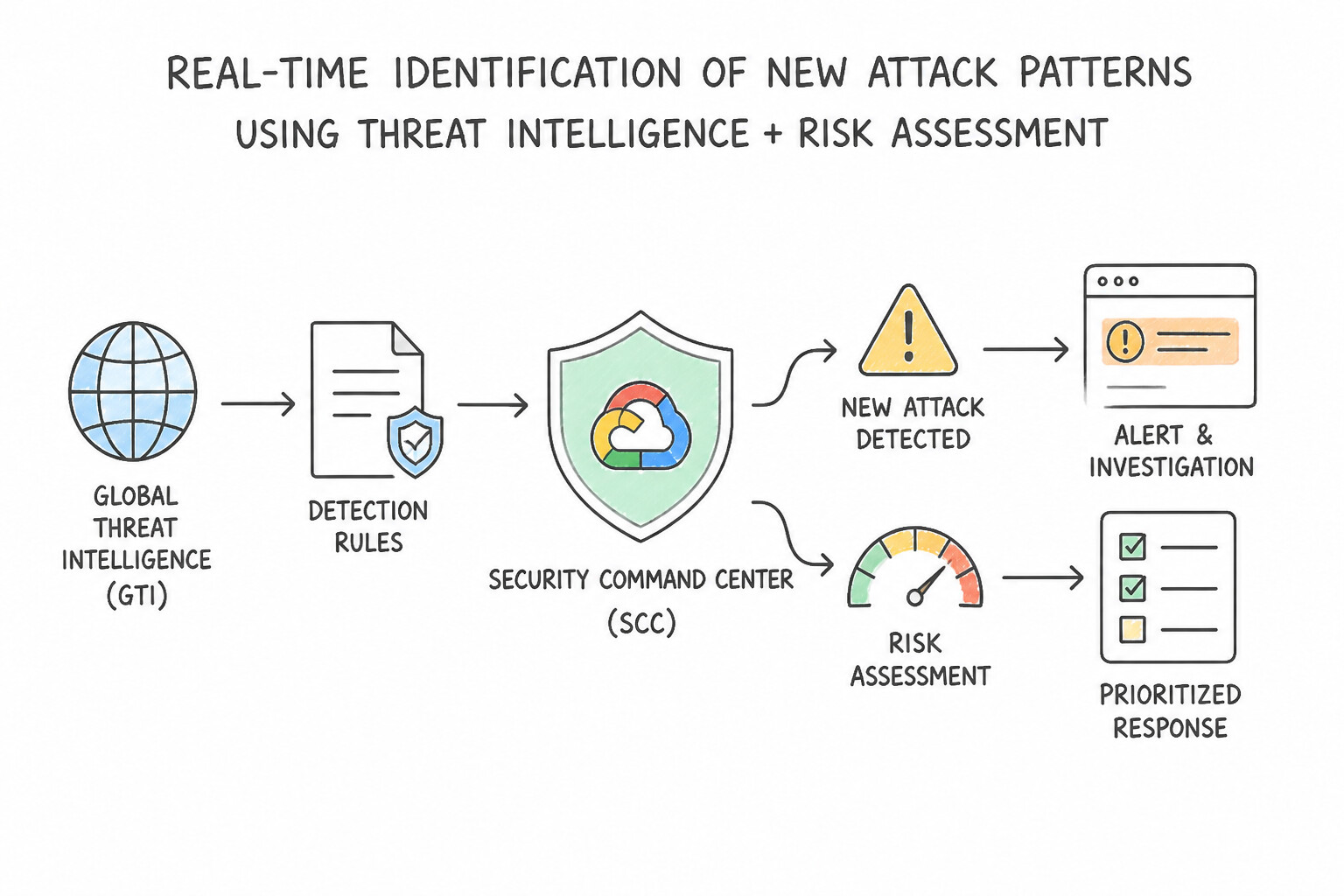
Adversaries constantly evolve their TTPs. To identify novel attack patterns in real time:
- 1.
SCC Toxic Combinations&Attack Path Simulation: - A single misconfiguration (e.g., an overly permissive firewall rule) or a single software vulnerability may look medium-risk in isolation. SCC Toxic Combinations (available in SCC Premium/Enterprise) continuously models the graph of network reachability + vulnerability exploitability + IAM service account permissions + high-value resource access to flag real-time, multi-step Attack Paths before an attacker exploits them.
- 2.
GTIReal-Time Campaign & TTP Intelligence: - Google Threat Intelligence provides not just static atomic IOCs (which age quickly), but behavioral YARA-L rules and MITRE ATT&CK technique mappings authored by Mandiant frontline responders tracking active zero-day exploitation.
- 3. Real-Time Streaming Detection (
Curated Detections+SCC ETD): - Enabling Google SecOps Curated Detections (such as the Cloud Threats, Linux Threats, Windows Threats, and Applied Threat Intelligence rule packs) automatically deploys Google-maintained real-time streaming detections for emerging attack techniques without waiting for manual rule authoring.
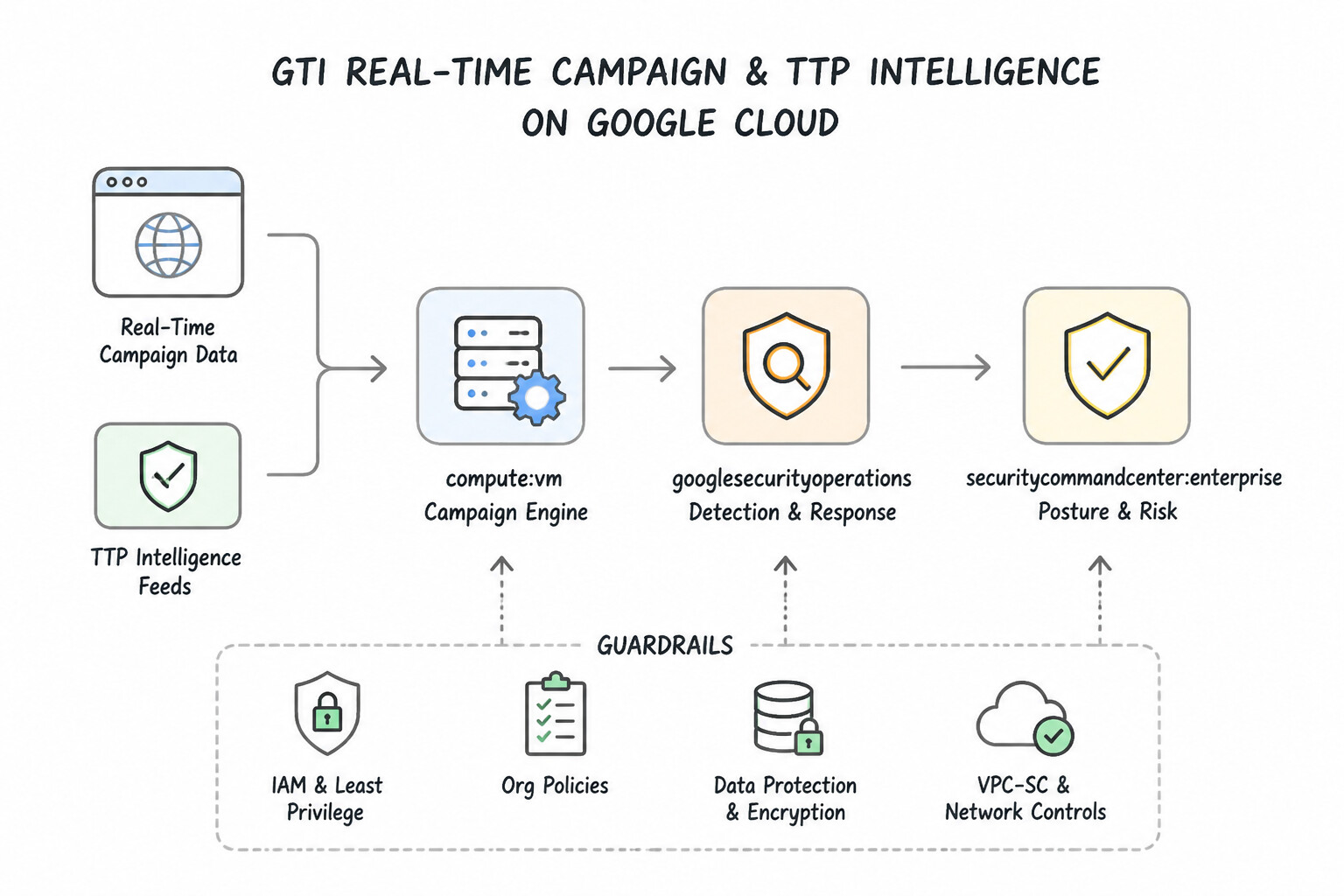
Key Implementation Patterns
- Prioritizing Remediation via Toxic Combinations: Use Use the 'Toxic Combinations' filter or Attack Path Simulation in SCC to identify finding groups involving both exposure and vulnerability. Toxic Combinations in SCC specifically correlate public exposure with vulnerabilities to identify high-risk attack paths.
- Retroactive Hunting with YARA-L: Use Create a YARA-L rule containing the file hashes and execute a retroactive hunt. Retroactive hunting applies new detection logic to historical data to find threats that occurred before the intelligence was available. (Avoid alternative: Live detection only scans new logs arriving after the rule is enabled, not historical data.)
- Proactive Actor-Based Hunting: Use Navigate to the Threat Intelligence section and search for "APT-X". Review the actor's profile to extract the associated Indicators of Compromise (IOCs) and use them to search your event data. Use the integrated Threat Intelligence console to look up the Actor profile, retrieve specific IOCs, and run a search against your data.
Key Takeaways (3.2b)
- Prioritization is Key: In security operations, you must prioritize findings based on risk, not just severity.
- Toxic Combinations: This term refers to the intersection of a vulnerability and an exposure path (internet reachability).
- SCC Enterprise Features: Utilize built-in tools like Attack Path Simulation to visualize and prioritize these combinations automatically.
- Retroactive Hunting: Essential for zero-day scenarios where IOCs are released after the initial compromise.
Consideration 3.2c: Analyzing entity risk scores to identify anomalous behavior
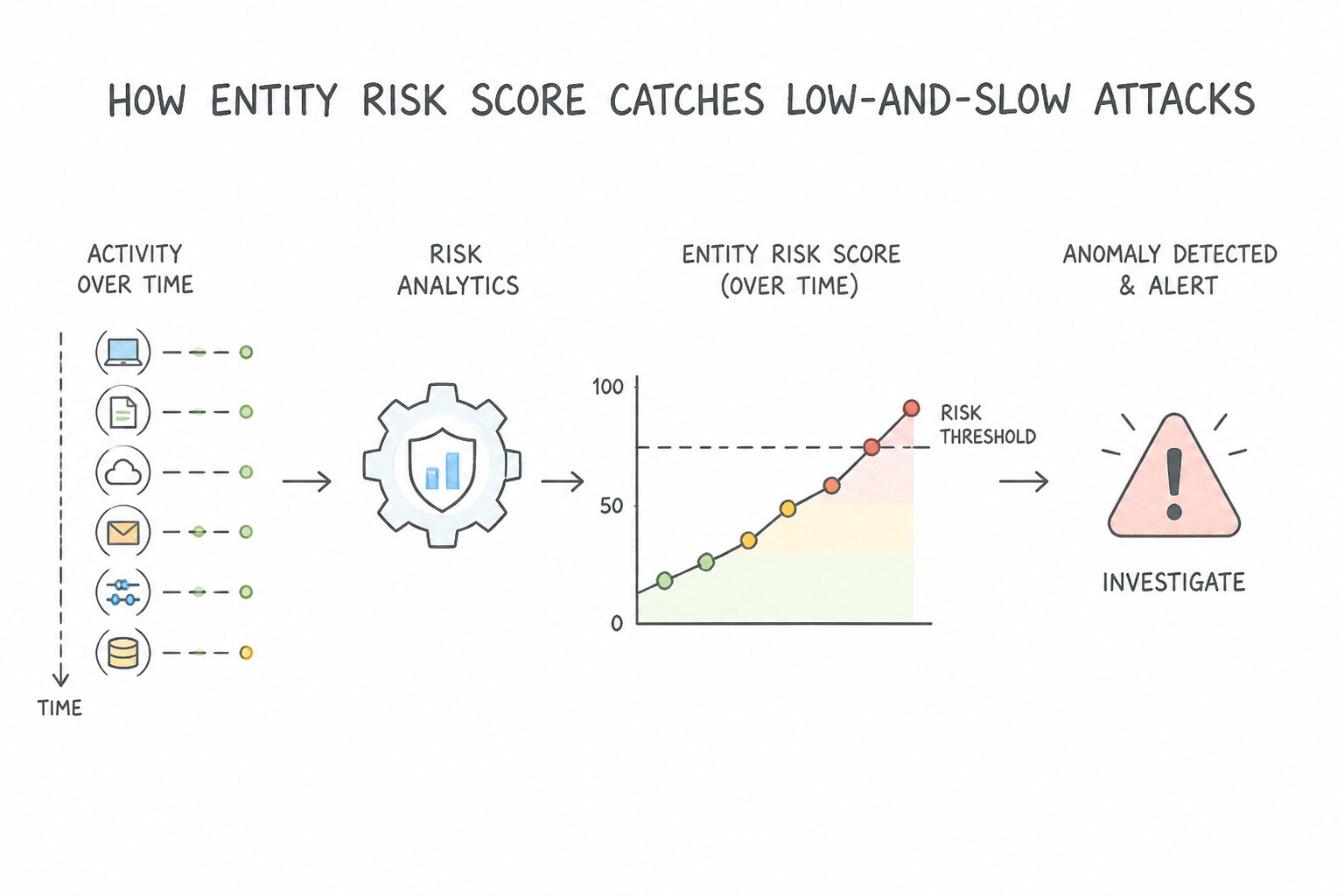
Sophisticated attackers avoid triggering "Critical" severity rules; instead, they generate a series of low-severity events (an unusual port scan, a minor policy lookup, an off-hours archive creation) that Tier 1 analysts ignore individually.
- How
Google SecOps Risk Analytics(Entity Risk Score) Catches Low-and-Slow Attacks: - Every detection or alert in Google SecOps contributes a configurable
risk_score(defined in the YARA-Loutcome: $risk_score = ...section) to the associated User or Asset entity. - Risk Analytics Dashboard aggregates these scores over a configurable lookback window (e.g., 24 hours or 7 days), applying weighting/normalization so you can rank the top riskiest users and hosts across the entire enterprise.
- Hunting with Entity Risk Scores:
- When an entity's Base Risk Score or Normalized Risk Score spikes—even if zero individual "Critical" alerts fired—the threat hunter opens the Entity Risk Timeline to inspect the exact chain of low-severity detections, UEBA behavioral outliers, and SCC vulnerability findings that combined to elevate that entity's risk.
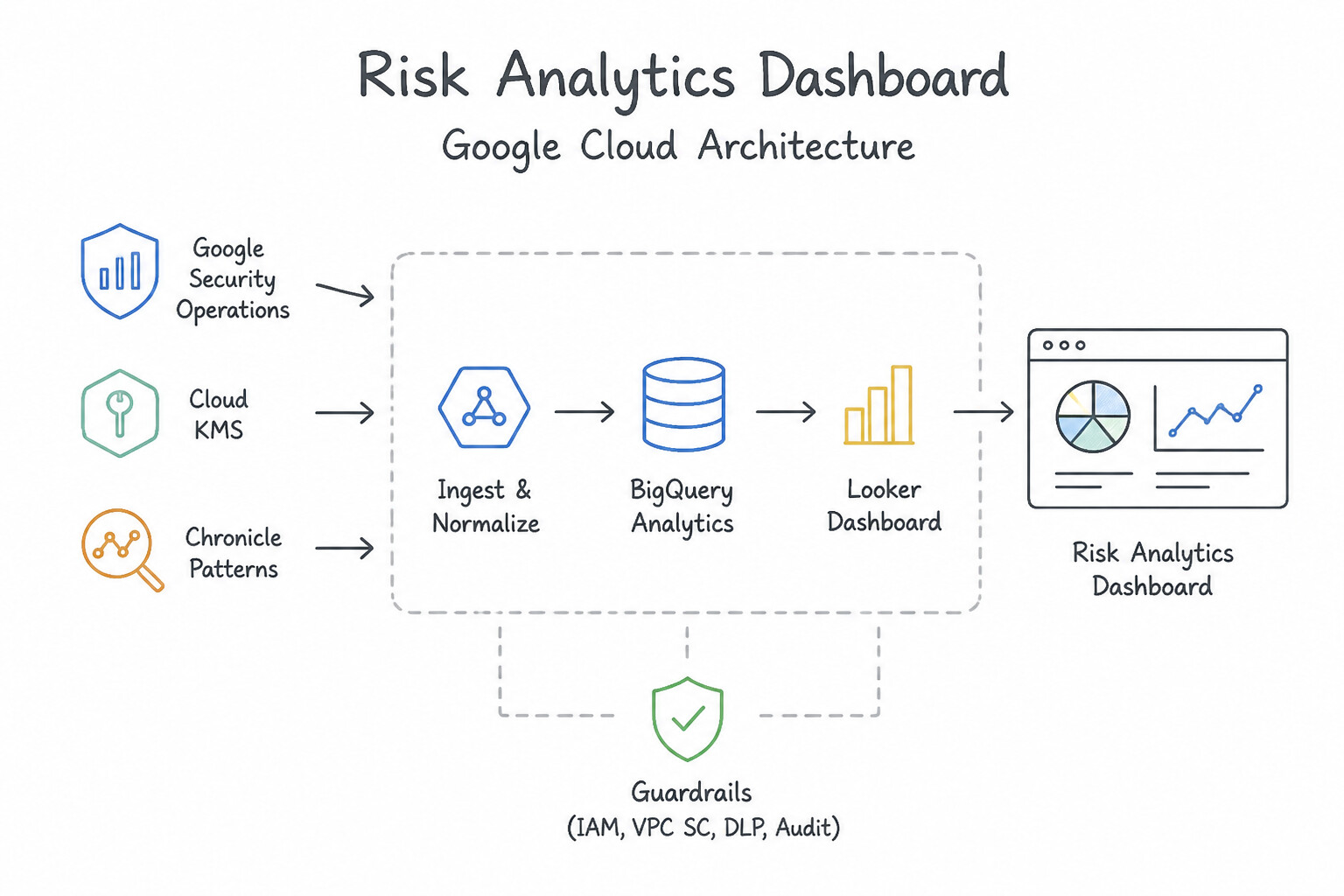
Key Implementation Patterns
- Sudden Risk Score Escalation: Use Open the user entity timeline to analyze the events surrounding the Cloud KMS access and verify if the activity fits established patterns. Investigate the entity timeline to understand the context of the risk score spike before taking action.
- Impossible Travel and Geolocation Scoring: Use Classify this as impossible travel because the user cannot physically move between these locations in the elapsed time. Impossible travel indicates that a user account was used in two locations too far apart to be physically traversed in the time elapsed.
- Peer Group Deviation Analysis: Use Investigate the activity as suspicious because it deviates significantly from the Finance peer group's baseline. The high score relative to the peer group indicates anomalous behavior that requires investigation. (Avoid alternative: Resetting the score suppresses the alert without addressing the root cause.)
Key Takeaways (3.2c)
- Risk Score Spikes: Sudden increases in risk scores often indicate high-confidence threats or significant deviations from baseline behavior.
- Investigate First: Always analyze the entity timeline to establish context before taking destructive or blocking actions.
- Protect Sensitive Assets: Access to critical infrastructure like Cloud KMS warrants higher scrutiny and immediate investigation if anomalous.
- Avoid Operational Risk: Do not delete critical resources (like keys or VMs) as a first response to a threat; prefer isolation or revocation.
Consideration 3.2d: Comparing and performing retrohunt of historical event data with newly enriched logs (e.g., Google SecOps rules engine, BigQuery, Cloud Logging)
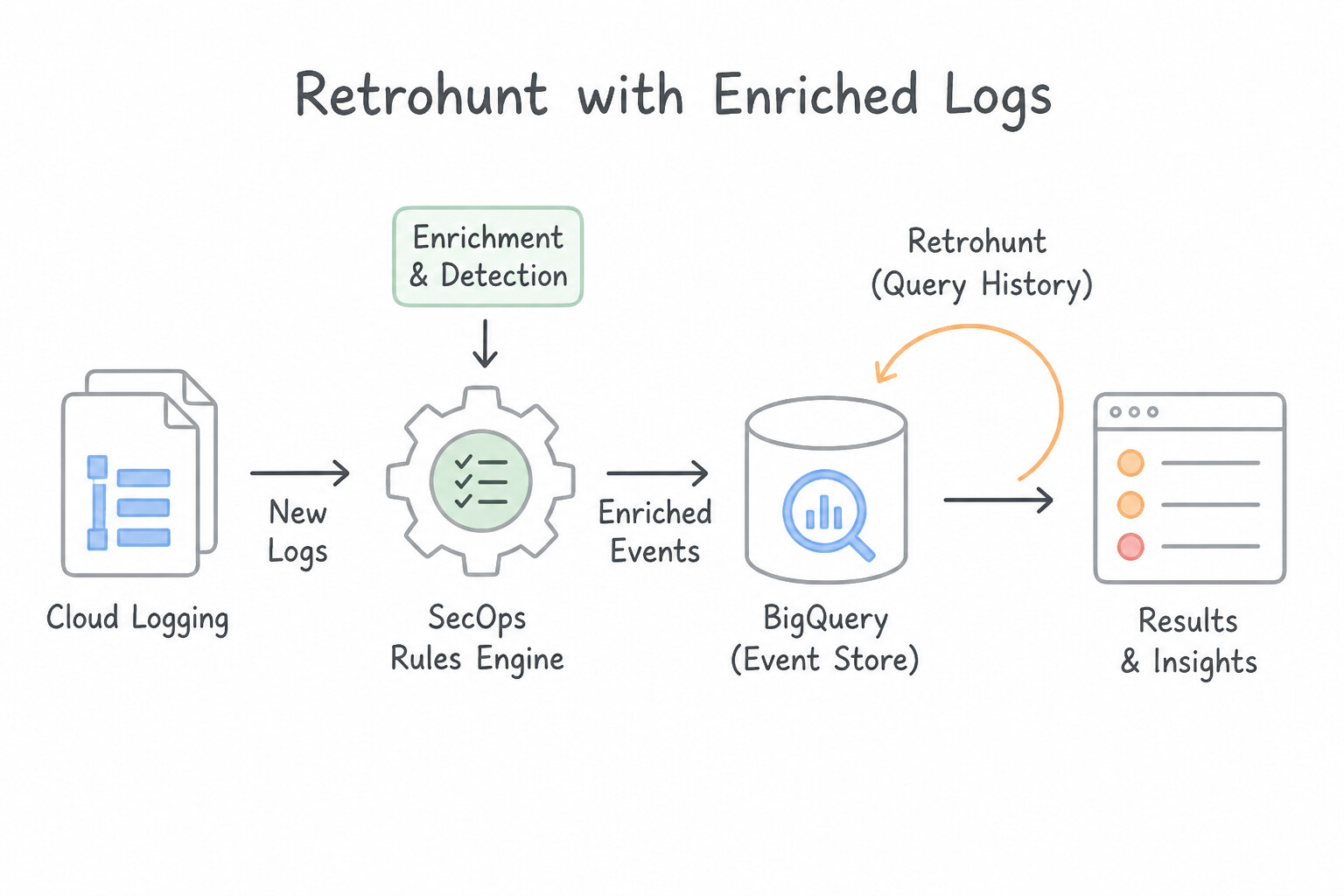
Retrohunt is one of the most critical features in production. Memorize how it works and how it compares to BigQuery / Cloud Logging:
- Google SecOps
RetrohuntMechanics: - When you write a new YARA-L rule (or update an existing rule with new TTPs or a new Reference List), enabling the rule for Live Rule Evaluation only evaluates events arriving from that moment forward.
- To test historical data, trigger a Retrohunt on the rule, specifying a start and end timestamp across your historical UDM retention (default 12 months).
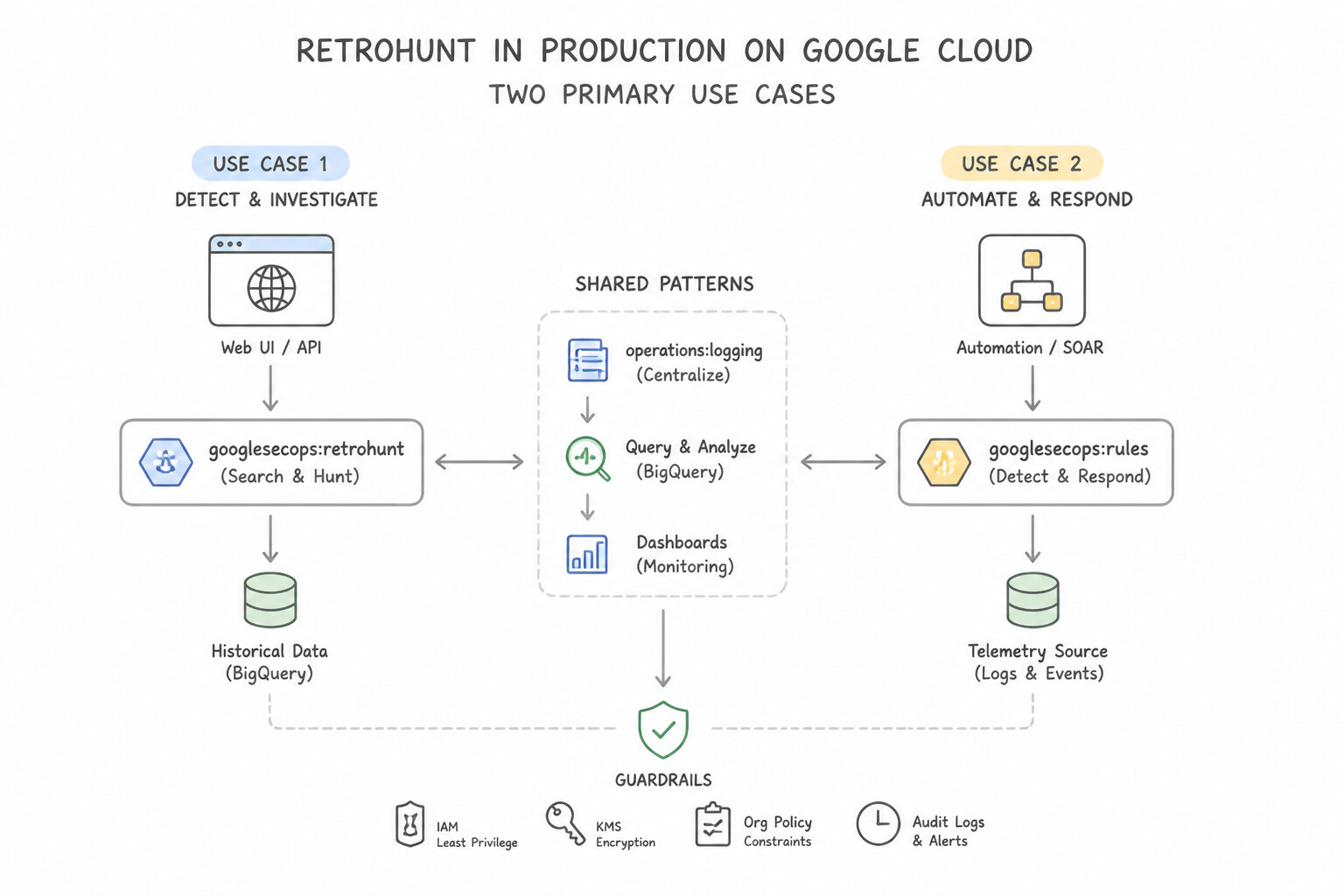
- Two Primary Use Cases for Retrohunt in Production:
- Retroactive Breach Discovery: Running a rule based on newly published threat intel against the last 6–12 months of logs to see if an adversary compromised you before the intel was known.
- Rule Tuning & Validation Before Production: Running a draft YARA-L rule over the past 7–30 days via Retrohunt to inspect how many detections it generates and eliminate false positives before enabling live alerting to SOAR!
- Historical Hunting Beyond SIEM Hot Retention (
BigQueryvs.Cloud Logging): - If an investigation requires hunting logs from 2 or 3 years ago that have aged out of Google SecOps hot UDM retention (or raw logs archived in Cloud Storage / BigQuery), query the historical export in BigQuery (or upgrade/link the Cloud Logging bucket to Log Analytics) joining the historical table against a table of newly enriched IOCs.
Key Implementation Patterns
- Executing Retrohunts in Google SecOps (Chronicle): Use Initiate a Retrohunt job using the new rule for the specified time range. Retrohunt runs YARA-L rules against historical data to find past threats. (Avoid alternative: Live mode only scans incoming logs for future events, not historical data.)
- BigQuery Log Sinks for Long-Term Retention: Use Create a log sink to export VPC Flow Logs to a BigQuery dataset. BigQuery is the standard solution for long-term log retention and complex SQL-based analytics required for threat hunting. (Avoid alternative: Pub/Sub is for real-time streaming, not for historical storage or retroactive analysis.)
Key Takeaways (3.2d)
- Retrohunt scans historical data using YARA-L rules to find past threats.
- Live Rules monitor real-time data ingestion for future threats.
- Retrohunting is essential for assessing impact after a new vulnerability is disclosed (zero-day).
- Use Cloud Logging for immediate troubleshooting and viewing recent logs.
Consideration 3.2e: Searching proactively for underlying threats using threat intelligence (e.g., GTI, detection rules)
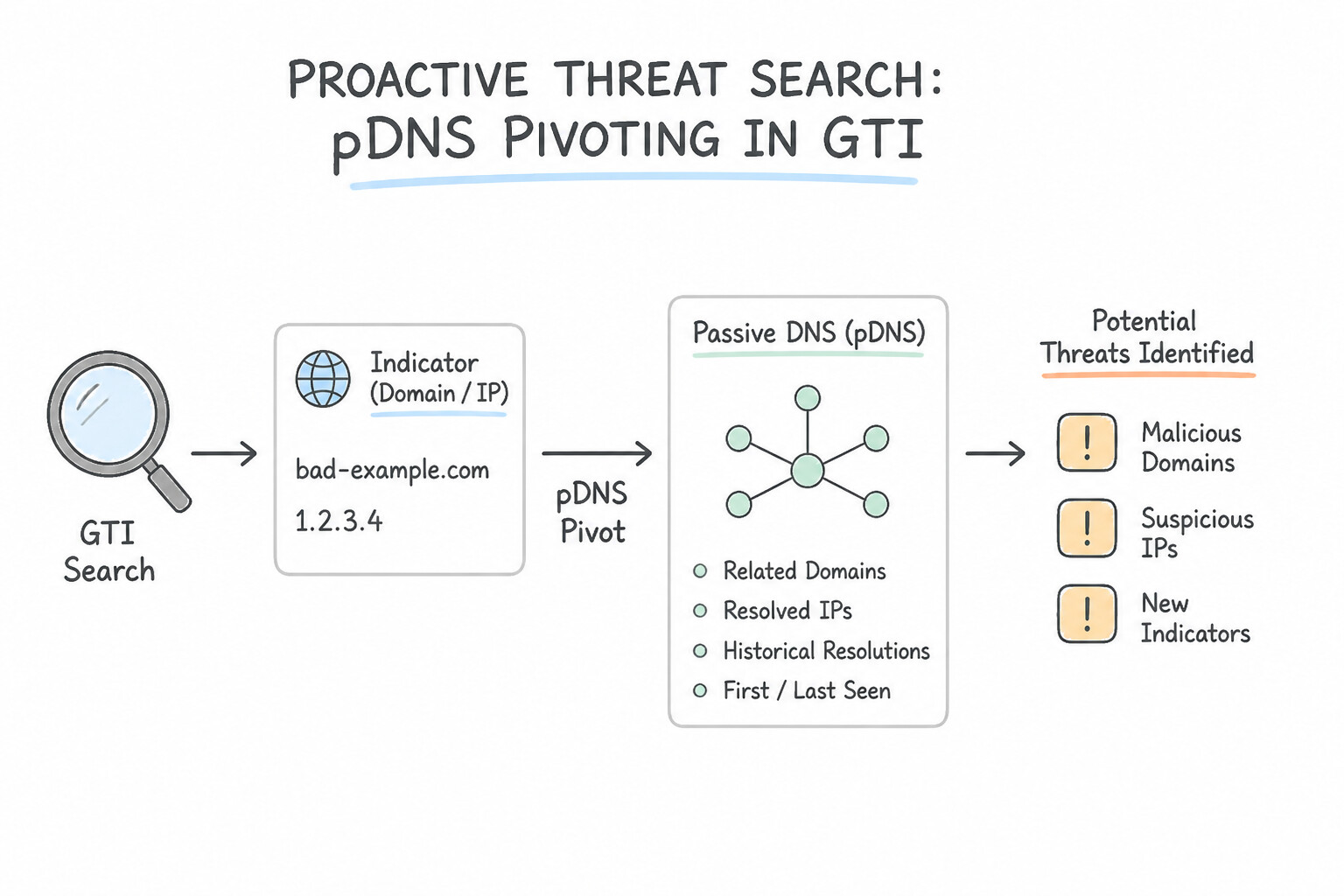
Proactive threat intelligence hunting goes beyond matching known IOC lists—it uses infrastructure pivoting to discover IOCs the threat feed doesn't even know about yet:
- 1.
Passive DNS (pDNS)Pivoting in GTI: - Suppose you find one compromised host connecting to known malicious domain
login-auth-verify.com, which resolves to IP203.0.113.77. - By pivoting on
203.0.113.77in GTI Passive DNS, you discover 14 other domains hosted on that same dedicated C2 server over the past 30 days. You then hunt your internalNETWORK_DNSUDM logs for all 14 sibling domains—uncovering three additional compromised hosts that never queried the original domain! - 2.
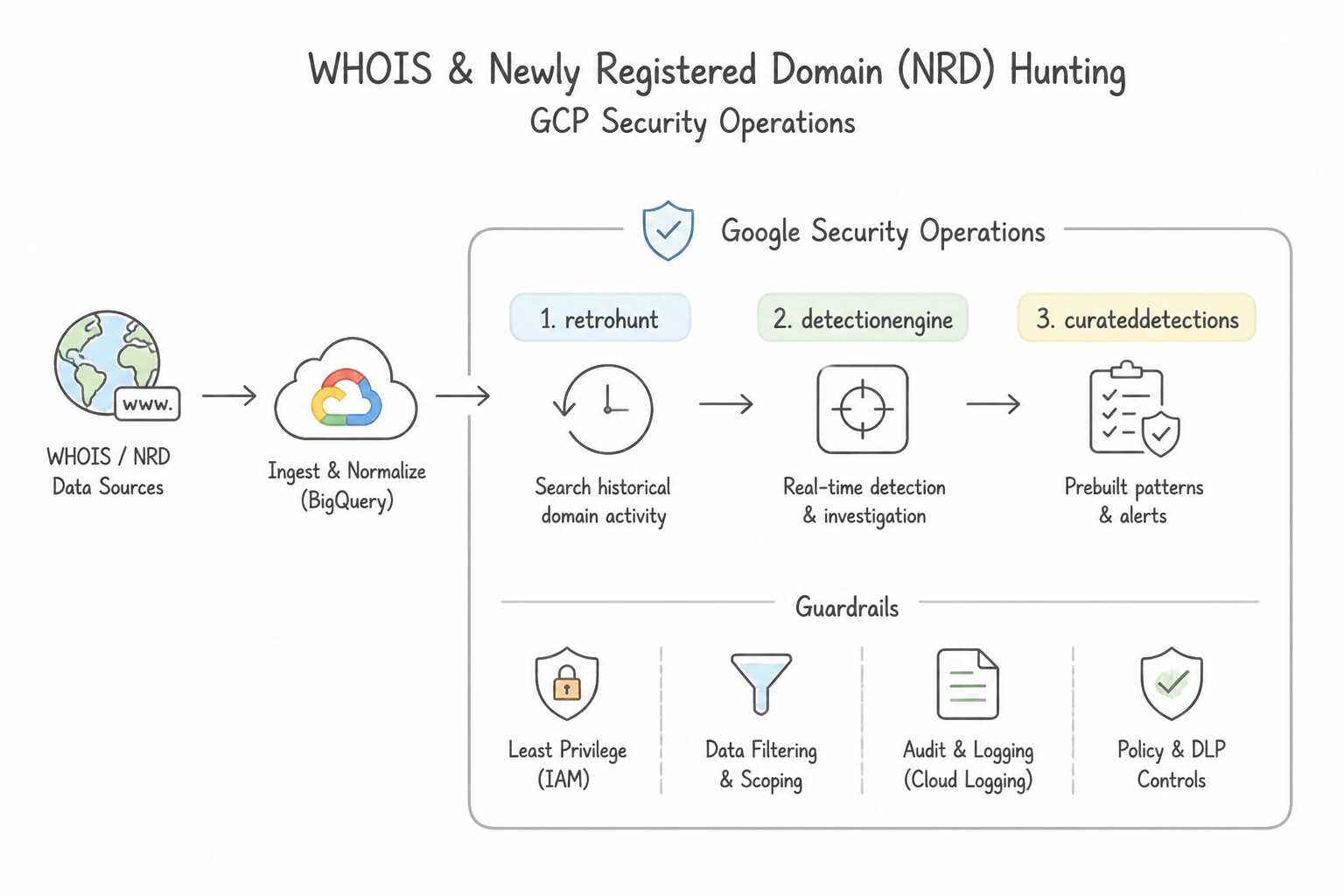
WHOIS& Newly Registered Domain (NRD) Hunting: - Attackers frequently register fresh domains hours before launching phishing or C2 campaigns. By enriching
NETWORK_DNSandNETWORK_HTTPevents with GTI / WHOISentity.domain.creation_time, you can proactively hunt for internal hosts communicating with domains registered within the last 7 to 30 days ($e.metadata.event_timestamp.seconds - $whois.graph.entity.domain.creation_time.seconds < 604800). - 3.
GTI File Similarity& Behavioral Graphs: - If an attacker recompiles a malware binary to change its SHA-256 hash, pivot in GTI / VirusTotal using
vhash,imphash(import table hash), contacted domains/IPs, or embedded YARA signatures to hunt for polymorphic variants across your fleet.
Key Implementation Patterns
- Retroactive Identification of Zero-Day IoCs: Use Run a Retrohunt job using the new YARA-L rule. Retrohunt applies new YARA-L rules to historical data to find past threats. (Avoid alternative: Live Rules only detect threats in real-time streaming data, not historical logs.)
- Leveraging Curated Detections for Emerging Threats: Use Enable the Ransomware rule set within Google Cloud Threat Intelligence (GCTI) Curated Detections. GCTI Curated Detections allow you to enable managed rule sets for categories like Ransomware without writing custom code.
- Automating TI-Based Blocking via Reference Lists: Use Create a reference list in Google Security Operations containing the IP addresses, and refer to this list in your YARA-L rule. Reference lists decouple variable data (IoCs) from detection logic, allowing updates to the list without editing the rule.
Key Takeaways (3.2e)
- Retrohunt is used to scan historical data with new YARA-L rules.
- Live Rules are used to detect threats in real-time as logs are ingested.
- Zero-day investigations often require checking historical logs for indicators that were previously unknown.
- Google Security Operations provides GCTI Curated Detections to offer out-of-the-box threat coverage.
Quick Decision Cheat Sheet (Subsection 3.2)
If the Scenario Requires... | Choose This Google Cloud Pattern | Avoid This Common Mistake |
|---|---|---|
"Validate a newly written YARA-L rule against past telemetry to check for historical compromises or false positives" | Execute a Google SecOps Retrohunt over the target historical time window | Re-ingesting raw logs from Cloud Storage or waiting 2 weeks on Live Rule mode |
"Find other domains hosted on the same adversary C2 IP address over the past 6 months" | Pivot in Google Threat Intelligence ( GTI) using Passive DNS | Querying internal DHCP logs or running traceroute from a production VM |
"Identify chained cloud vulnerabilities + IAM permissions + network exposure that create an exploitable path to high-value data" | Analyze SCC Toxic Combinations & Attack Path Simulation (SCC Premium/Enterprise) | Reviewing isolated SHA findings one by one without reachability or permission context |
"Prioritize investigation of users/hosts accumulating multiple low-severity behavioral detections" | Use Google SecOps Risk Analytics (Entity Risk Score) over a 24h / 7d window | Increasing every low-severity YARA-L rule to CRITICAL (causes massive alert fatigue) |
"Search 3-year-old compliance logs (outside SIEM 12-month retention) against a new batch of 1,000 IOCs" | Load the IOCs into a BigQuery table and run a SQL JOIN against the archived log dataset | Attempting to run a SecOps Retrohunt on logs that have already aged out of SIEM retention |
Further Reading (Subsection 3.2)
- Security Log Analytics in Google Cloud — This article discusses how to use BigQuery for security log analytics, emphasizing the ability to run SQL queries on logs for threat detection.
- Cloud Logging routing and storage — Provides an overview of how logs are routed to supported destinations like BigQuery and Cloud Storage for long-term retention.
- Run a rule against historical data — Documentation on how to run a Retrohunt job to search historical data for threats defined in a YARA-L rule.
- Unified Data Model (UDM) field list — Reference for the standard fields available in UDM, including file hashes and process details.
- UDM Search — Documentation on how to use the UDM Search interface to filter events based on normalized fields.
- Investigating and responding to threats — Review the section on Attack path simulations and how SCC scores finding groups involving toxic combinations.
Book TOC · Previous · Chapter 3 of 7 · Next
AwesomeGCP.com Learning
The approach taken is a question-led learning approach: you explore realistic project scenarios where you need to make decisions or take actions to achieve business goals within specific constraints. Instead of passive learning, you are challenged to think and work through the options to master the Professional Security Operations Engineer (PSOE) certification!