Book TOC · Previous · Chapter 5 of 7 · Next
Chapter 5: Automating & Orchestrating ML Pipelines: Vertex AI Pipelines (KFP/TFX) & Continuous Training
Chapter Focus: Kubeflow Pipelines (KFP) vs. TFX vs. Cloud Composer, component caching/lineage, Ray on Vertex AI, Eventarc/Pub/Sub drift-triggered retraining, and CI/CD/CT automation with Cloud Build.
Subsection 5.1: Developing end-to-end ML pipelines
The Big Picture
Production machine learning is not a single training script—it is a repeatable, automated factory that ingests raw data, validates schemas, transforms features identically for training and serving, trains and evaluates candidate models against a baseline, verifies serving infrastructure, and pushes blessed models to production. Without disciplined pipeline architecture on Gemini Enterprise Agent Platform (Vertex AI Pipelines), three catastrophic failures occur:
- Silent Bad Data & Unvalidated Model Promotions (5.1a):
- Upstream data engineers change a column type or introduce corrupted nulls (
NaNs), and the training pipeline blindly trains a broken model and overwrites production! In TensorFlow Extended (TFX) and Agent Platform Pipelines,ExampleValidator(TensorFlow Data Validation [TFDV]) compares incoming data statistics (StatisticsGen) against a lockedSchemaGenschema and halts the pipeline before training if anomalies or drift appear. - Even if training succeeds, promoting a candidate model based solely on aggregate accuracy risks degrading performance on a critical customer slice.
Evaluator(TensorFlow Model Analysis [TFMA]) paired with aResolvernode compares the candidate model against the currently blessed production model (Baseline) across granular data slices, andInfraValidatorlaunches the model in a sandboxed serving container with sample requests beforePushercan deploy it. - Choosing the Wrong Orchestrator or Fighting Dependency Conflicts (5.1b):
- Managing self-hosted Kubernetes clusters for simple ML workflows wastes DevOps time when Agent Platform Pipelines (serverless Kubeflow Pipelines [KFP] v2 / TFX) runs container steps serverlessly with built-in ML Metadata lineage and execution caching.
- Conversely, when an enterprise pipeline must orchestrate cross-platform data engineering tasks across on-premises databases, BigQuery, Dataproc, and Dataflow before triggering ML training, Managed Service for Apache Airflow (Cloud Composer) is the macro-orchestrator of choice, while Ray on Agent Platform handles distributed Python compute steps.
- Training-Serving Skew from Disconnected Preprocessing (5.1c): Computing global dataset statistics (like
mean,std_dev, or top-$K$ vocabulary indices) in Python/SQL during training and trying to replicate them at serving time causes training-serving skew. TheTransform(tf.Transform/ TFT) component runs a full pass over training data on Dataflow to compute global constants and exports a hermetic preprocessing graph fused directly into the exportedSavedModel—guaranteeing that raw serving requests undergo the exact same mathematical transformation.
Consideration 5.1a: Validating data and models
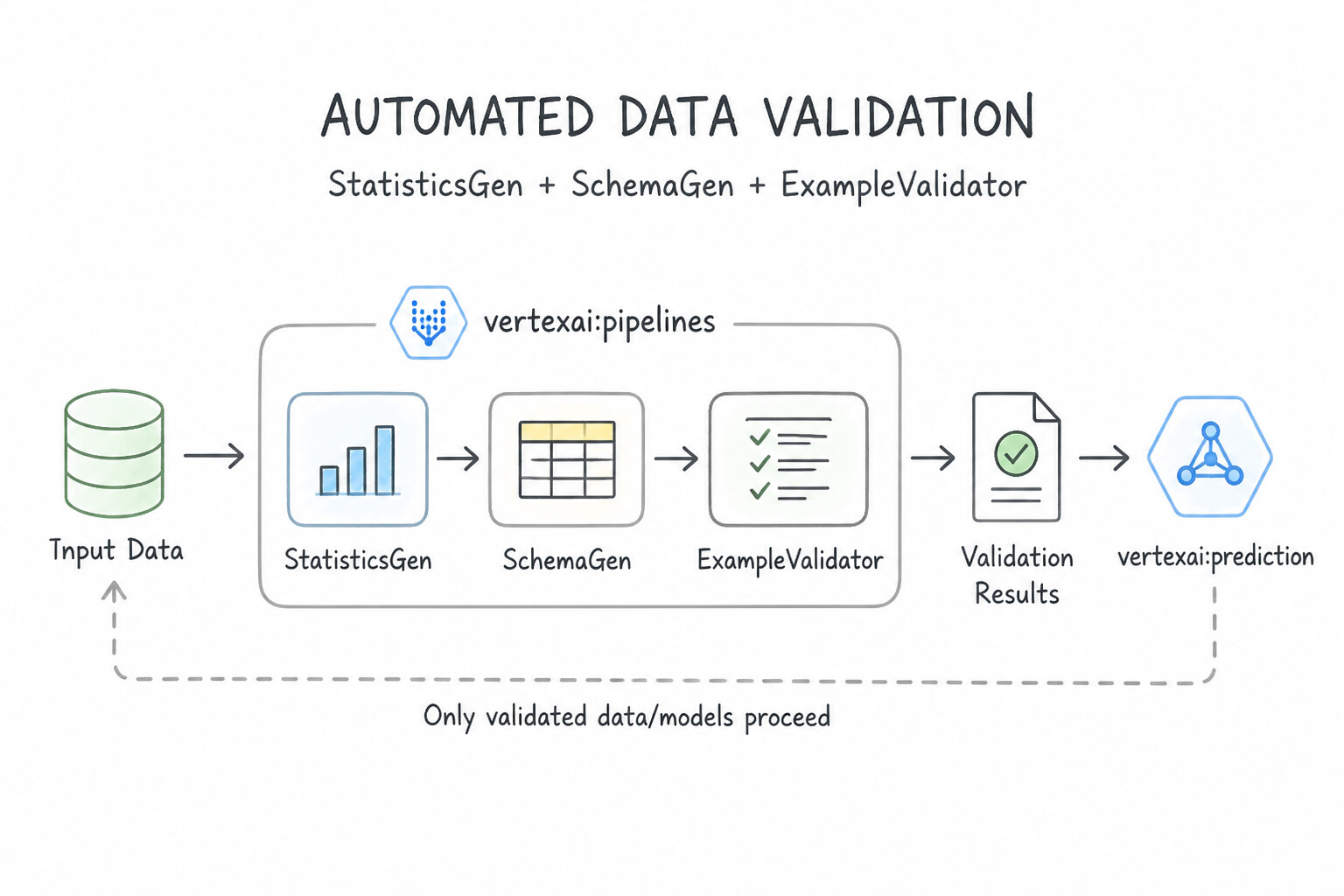
- Automated Data Validation (
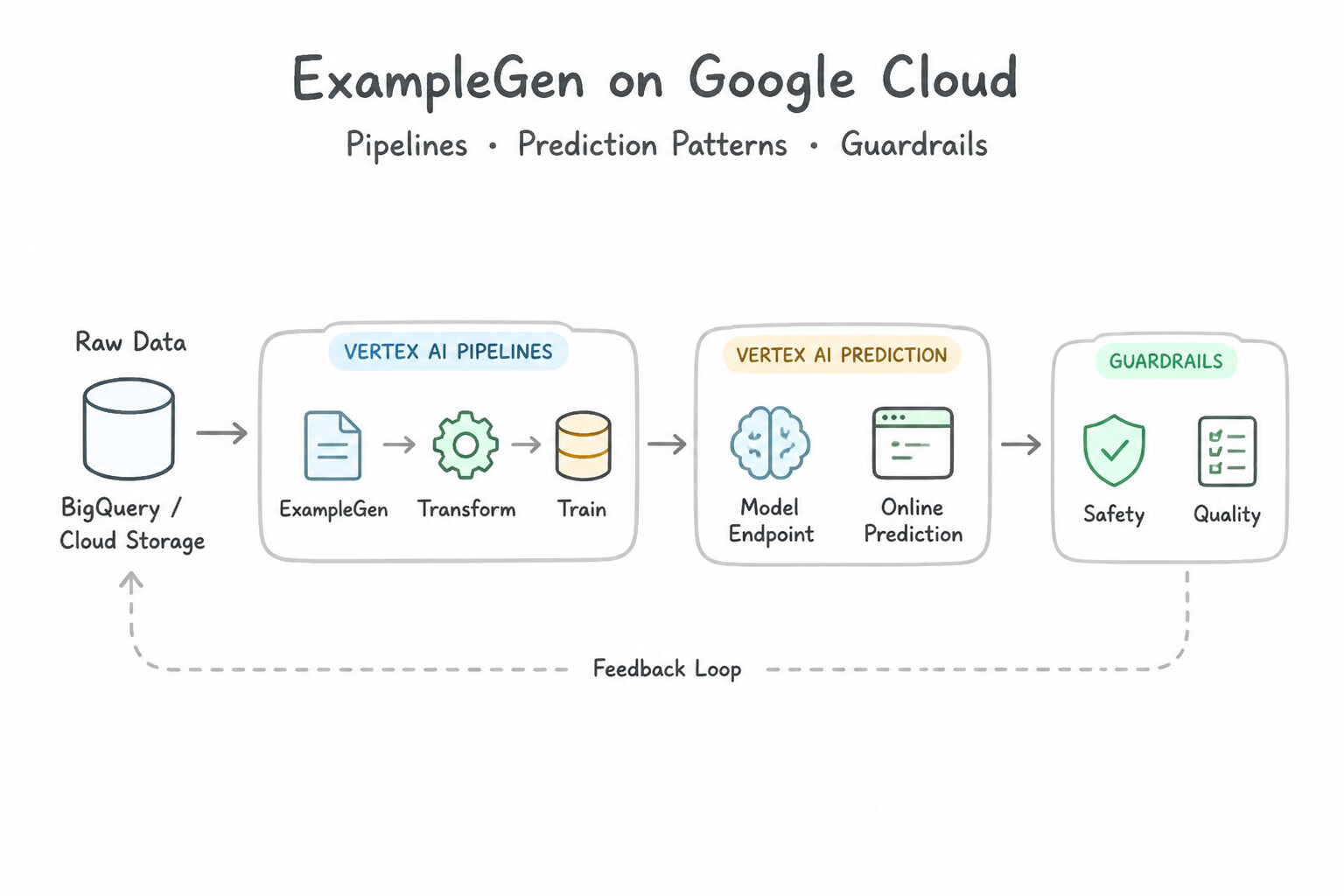
StatisticsGen+SchemaGen+ExampleValidator): ExampleGeningests raw data (from BigQuery or Cloud Storage CSV/TFRecord) and splits it into training and evaluation splits.StatisticsGenuses TensorFlow Data Validation (TFDV) to compute descriptive statistics across every feature.SchemaGeninfers initial data types, valency (required vs. optional), and categorical domains. In production retraining pipelines, you lock/curate the schema (ImportSchemaGen) rather than re-inferring it from scratch on every run (unless intentional schema evolution occurs, in which case you update the curated schema artifact).ExampleValidatorcomparesStatisticsGenoutput against the curated schema to catch missing columns, unexpected string values in numeric fields, out-of-bounds domain values, or training-serving skew (tfdv.validate_statistics(serving_stats, schema, serving_statistics=...)). If an anomaly is detected, the pipeline halts beforeTrainerruns, preventing a poisoned model!- Automated Model Validation (
Resolver+Evaluator+InfraValidator): Resolver(latest_blessed_model_resolver): Queries ML Metadata to fetch the currently blessed production model artifact to serve as the comparison baseline.Evaluator(powered byTensorFlow Model Analysis [TFMA]): Computes evaluation metrics not just on the global dataset, but across configured data slices (e.g., bycountry,device_type, or demographic group) and enforces change thresholds (the candidate model must beat the baseline model'sAUC-PRby at least +\delta) and absolute thresholds before emitting aBLESSEDsignal.InfraValidator: Spins up a temporary sandboxed serving binary (e.g., TensorFlow Serving) with the candidate model and sends sample warmup/prediction requests to verify the model loads into memory and responds without crashing beforePusherdeploys it to production.
Key Implementation Patterns
- Detecting Schema Anomalies in Daily Batches: Use Add the ExampleValidator component to compare the new data statistics against the schema. ExampleValidator detects anomalies like type mismatches by comparing data statistics to the defined schema. (Avoid alternative: Evaluator checks model performance metrics after training, not input data schema compliance.)
- Comparing Candidate Models Against Baselines: Use Add a Resolver node to retrieve the latest blessed model. Configure the Evaluator component to validate the candidate model against this baseline. Use a Resolver to fetch the current best model and the Evaluator component to compare the new model against it before deployment.
- Detecting Training-Serving Skew: Use Generate statistics for the serving data and validate them against the training statistics to check for distribution changes. TFDV detects skew by comparing the statistics of serving data against training data statistics to find distribution shifts.
Key Takeaways (5.1a)
- Data validation is the first line of defense in an ML pipeline.
- StatisticsGen calculates data stats; SchemaGen infers expected data structure.
- ExampleValidator uses the stats and schema to detect anomalies like type mismatches or drift.
- Never automatically update your schema to match bad data; always validate against an expected baseline first.
Consideration 5.1b: Building and orchestrating pipelines using managed or unmanaged services and from templates or custom solutions (e.g., Agent Platform Pipelines, Managed Service for Apache Airflow, and Ray on Gemini Enterprise Agent Platform)
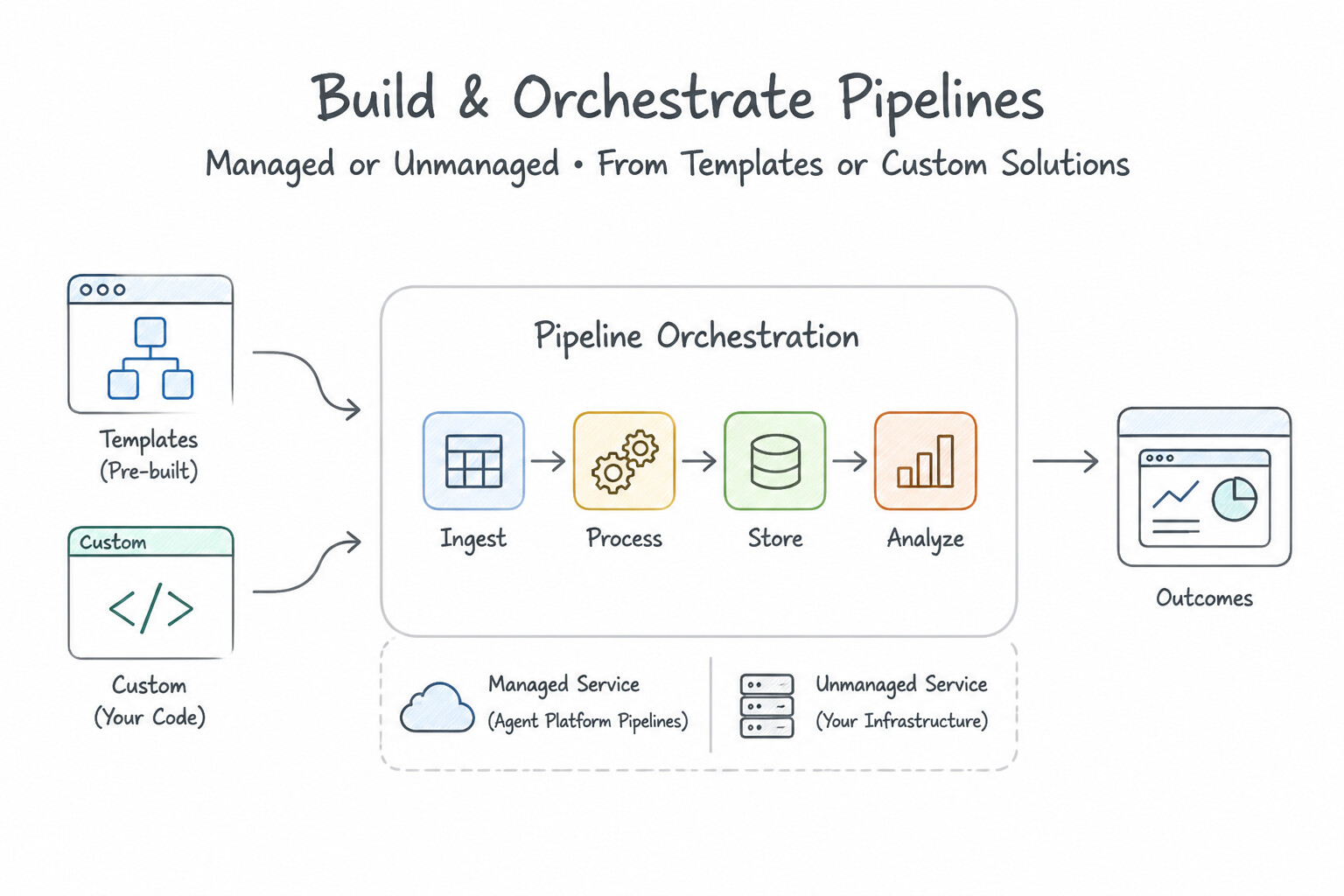
- Choosing the Right Orchestration Engine:
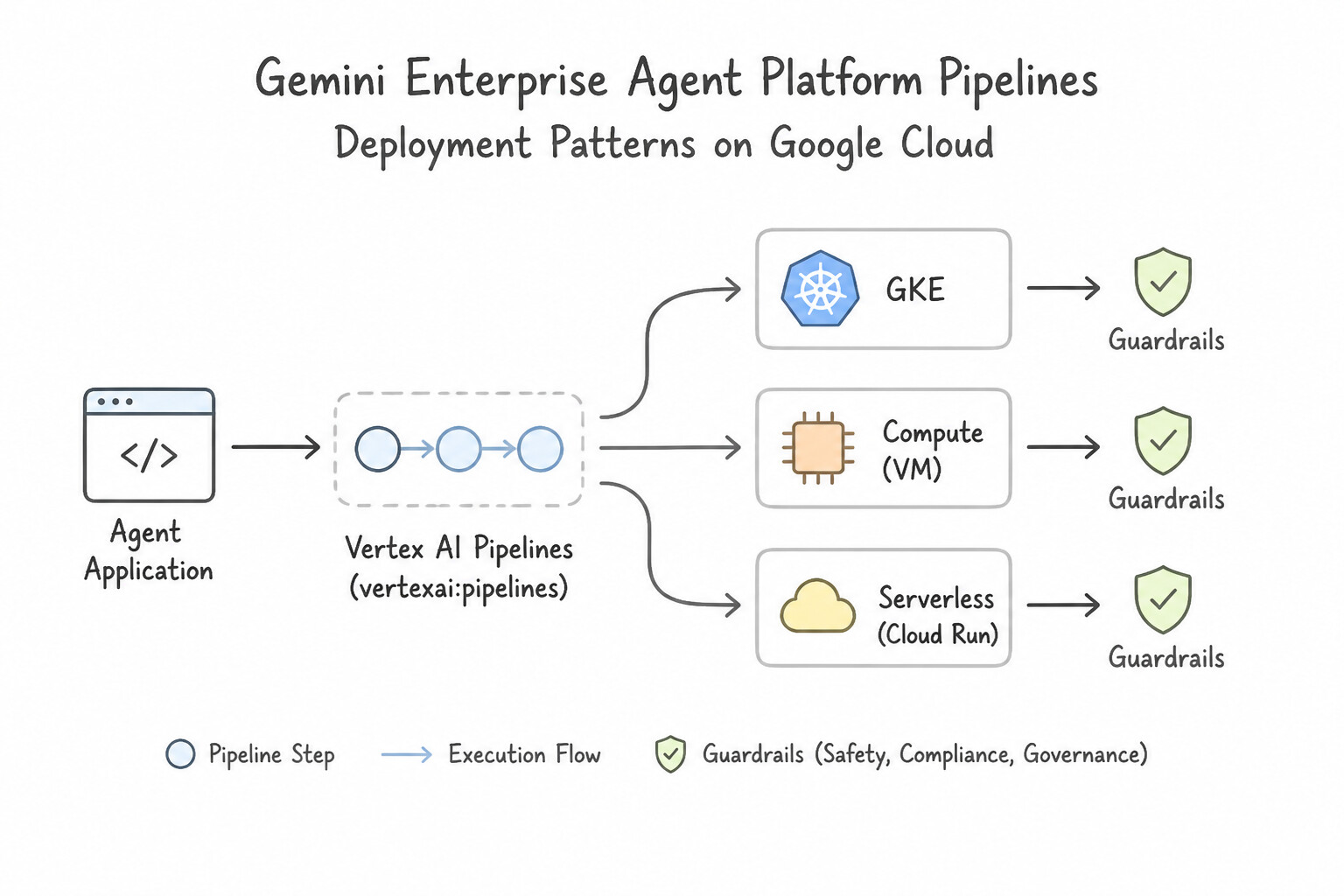
- Gemini Enterprise Agent Platform Pipelines (Vertex AI Pipelines): Serverless execution engine for Kubeflow Pipelines (KFP v2) and TFX (compiled to intermediate YAML/JSON via
kfp.compiler.Compiler().compile()). Zero cluster management, pay-per-step execution, built-in ML Metadata lineage, and automatic step execution caching (enable_caching=True) to skip re-running unchanged upstream steps. - Managed Service for Apache Airflow (Cloud Composer): Choose when orchestrating complex, multi-system enterprise data and ETL workflows spanning on-premises databases, BigQuery SQL jobs, Dataflow pipelines, Dataproc Spark jobs, and cross-cloud APIs (DAG
.pyfiles are activated by uploading them to the Composer environment's Cloud Storagedags/folder). - Kubeflow Pipelines on GKE (Self-Managed, built on Argo Workflows): Choose only when strict regulatory or hybrid-cloud policies mandate running the exact same Kubernetes-native pipeline infrastructure on-premises and in Google Cloud.
- Ray on Agent Platform: Choose when orchestrating distributed Python task graphs, reinforcement learning, or parallel hyperparameter/data processing workloads across managed Ray worker nodes.
- Authoring KFP Components & Hosting Third-Party Tracking (
MLflow): - Lightweight Python Function Components (
@dsl.component): Ideal for pure-Python glue/evaluation steps; setpackages_to_install=[...]or specify a pre-builtbase_image. - Custom Container Components (
@dsl.container_component): Mandatory when a pipeline step has complex, conflicting Python/C++ dependencies or slowpipcompile times—pre-baking dependencies into a Docker image in Artifact Registry eliminates startup overhead on every run. - Per-Step Compute Allocation: In KFP, attach GPUs/TPUs or high-memory machines only to the heavy training step (
train_task.set_cpu_limit('16').set_memory_limit('64G').set_gpu_limit(2).add_node_selector_constraint(...)) while keeping lightweight validation/deployment steps on cheap default CPUs. - Hosting Third-Party
MLflowon Google Cloud: For a scalable, managed MLflow Tracking Server, run the stateless MLflow container on Cloud Run (for sporadic traffic, scale-to-zero) or GKE, backed by Cloud SQL for backend metadata storage and Cloud Storage for artifact storage, protected by Identity-Aware Proxy (IAP).
Key Implementation Patterns
- Choosing a Fully Managed Serverless Orchestrator: Use Use Vertex AI Pipelines to run your pipeline definitions. Vertex AI Pipelines is a serverless, fully managed service that runs ML pipelines without requiring cluster management. (Avoid alternative: Deploying on GKE requires managing the underlying Kubernetes cluster, which violates the requirement to avoid infrastructure management.)
- Orchestrating Complex ETL and ML Hybrids: Use Use Cloud Composer to create a Directed Acyclic Graph (DAG) for the workflow. Cloud Composer (Airflow) provides the necessary third-party connectors and general-purpose orchestration capabilities to manage hybrid data and ML workflows.
- Ensuring Hybrid Cloud Portability: Use Develop the pipeline using the Kubeflow Pipelines (KFP) SDK and run it on Kubernetes. Kubeflow Pipelines provides a container-native orchestration framework that runs consistently on any Kubernetes cluster. (Avoid alternative: Cloud Composer is better suited for general data engineering workflows rather than container-native ML pipelines.)
Key Takeaways (5.1b)
- Vertex AI Pipelines is the serverless, fully managed way to run ML pipelines on Google Cloud.
- Self-hosting Kubeflow Pipelines on GKE requires managing the Kubernetes cluster and infrastructure.
- Serverless options are best for teams with limited DevOps capacity who need reproducibility.
- Use Vertex AI Pipelines for strictly ML-focused workflows where metadata tracking and MLOps standardization are the priority.
Consideration 5.1c: Ensuring consistent data preprocessing between training and serving
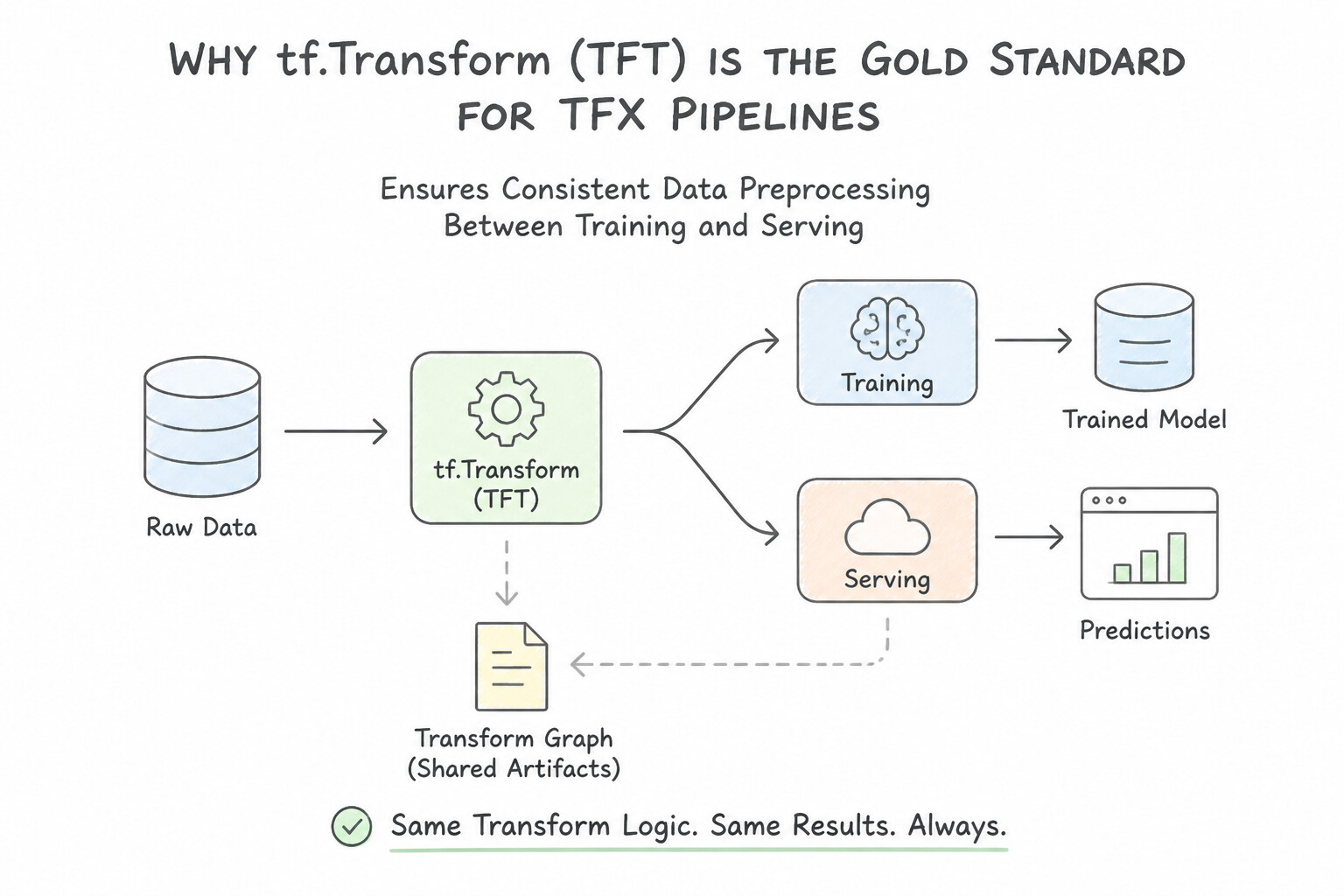
- Why
tf.Transform(TFT) is the Gold Standard for TFX Pipelines: - Many feature transformations—such as
$Z-score normalization (\frac{x - \mu}{\sigma}$), min-max scaling, PCA, and string-to-index vocabulary generation (tft.compute_and_apply_vocabulary)—require two distinct phases: - Analysis Phase (Full Pass over Training Data): Executed once on Dataflow during training to compute the global constants (μ, σ, top-
$K$ vocabulary list). - Transform Phase (Row-Level Graph): Converts those global constants into TensorFlow constant tensors embedded inside a portable Transform Graph that is exported and attached directly to the trained
SavedModel. - At online serving time, the client sends raw, unscaled features to the endpoint, and the embedded
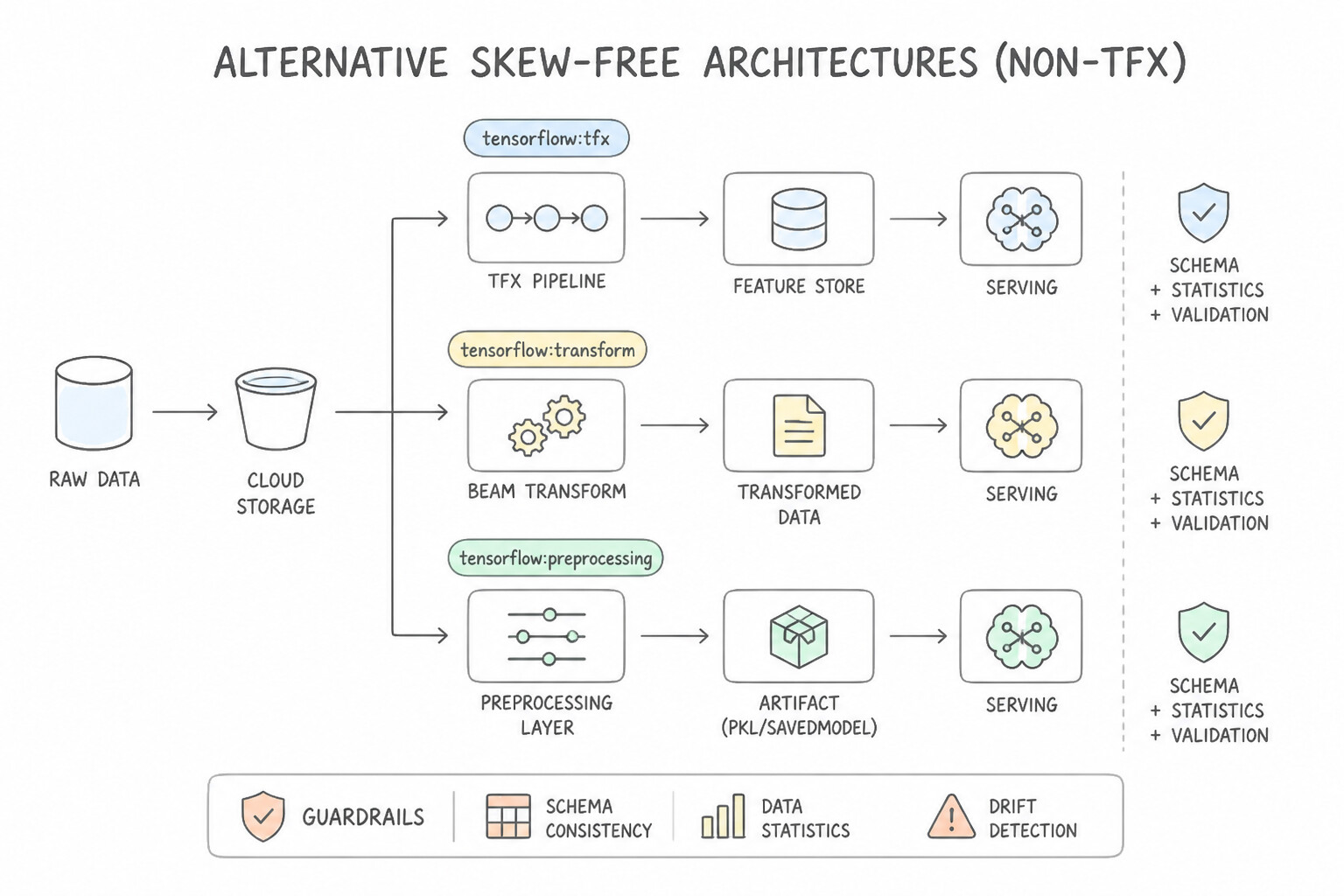
tf.Transformpreprocessing graph applies the exact training-time μ, σ, and vocabulary table automatically—making training-serving skew mathematically impossible! - Alternative Skew-Free Architectures (Non-TFX):
- Agent Platform Feature Store: Centralizes feature computation once and serves from both the Offline Store (training) and Online Store (serving) (critical for windowed time-aggregation features like "transactions in the last 30 minutes" that cannot be computed from a single stateless HTTP request payload!).
- BigQuery ML
TRANSFORMClause or In-Model Keras Preprocessing Layers (tf.keras.layers.Normalization,StringLookup): Embeds preprocessing inside the model artifact itself.
Key Implementation Patterns
- Global Statistics in Z-Score Normalization: Use Define a preprocessing_fn that uses tft.scale_to_z_score. Use the generated Transform Graph to apply the transformation during serving. Tft.scale_to_z_score calculates global statistics during training and packages them into a Transform Graph for consistent application during serving.
- Handling Vocabulary generation for Categorical Features: Use Use
tft.compute_and_apply_vocabularyin the preprocessing function and use the resulting Transform Graph for serving. TFT generates a Transform Graph that embeds the vocabulary mapping, ensuring the serving model processes data exactly like the training model.
Key Takeaways (5.1c)
- Consistency is Key: Logic applied to training data must be applied identically to serving data to avoid skew.
- Global Stats: Operations requiring global stats (like Z-score) cannot be computed on-the-fly during single-instance serving.
- tf.Transform: Use
tf.Transformin TFX to calculate global stats once (Analyze) and reuse them everywhere as a graph (Transform).- Preprocessing_fn: Define transformations in a
preprocessing_fnto ensure they are exported as part of the model artifacts.
Quick Decision Cheat Sheet (Subsection 5.1)
If the Scenario Requires... | Choose This Google Cloud Pattern | Avoid This Common Mistake |
|---|---|---|
"TFX component that detects schema violations and missing columns in new daily CSV batches" | ExampleValidator (powered by TFDV) | Evaluator or InfraValidator |
"TFX component that tests whether a candidate model binary loads and responds in a sandboxed serving container" | InfraValidator | Transform or StatisticsGen |
"How intermediate datasets and models are passed between container steps in Agent Platform Pipelines" | Persisted as artifacts in Cloud Storage (with URIs tracked in ML Metadata) | Passed in shared local VM RAM /tmp across separate containers |
"Skip re-executing unchanged upstream preprocessing steps during iterative pipeline debugging" | enable_caching=True on the pipeline / component decorator | Manually deleting the preprocessing code from the DAG |
"Assign 4 NVIDIA A100 GPUs ONLY to the Trainer step in a KFP pipeline while other steps use CPUs" | Call .set_gpu_limit(4).add_node_selector_constraint(...) on the specific training task object | Provisioning a persistent 4-GPU GKE node pool for all steps |
"Secure a self-hosted MLflow UI running on Compute Engine / GKE using Google Workspace corporate identities without a VPN" | Identity-Aware Proxy ( IAP) behind an Application Load Balancer | Opening port 5000 to 0.0.0.0/0 in VPC Firewall rules |
Further Reading (Subsection 5.1)
- The ExampleValidator TFX Pipeline Component — Documentation on how ExampleValidator identifies anomalies in training and serving data.
- TensorFlow Data Validation (TFDV) — Overview of the libraries underlying the TFX validation components.
- The TFX Evaluator Component — Documentation explaining how the Evaluator computes metrics and validates models against baselines.
- About accessing Vertex AI services through Private Service Connect endpoints — Guide on using ResolverNodes to handle special artifact resolution logic, such as getting the latest blessed model.
- MLOps: Continuous delivery and automation pipelines in machine learning — Discusses the importance of continuous monitoring and validation in ML pipelines.
- Introduction to Vertex AI Pipelines — This page explains how Vertex AI Pipelines runs ML pipelines serverlessly, differentiating it from self-managed Kubeflow.
Subsection 5.2: Automating model retraining
The Big Picture
In production, the world changes the moment your model is deployed: consumer preferences shift, fraudsters adapt their attack patterns, inflation alters price distributions, and new product SKUs launch daily. A model without an automated Continuous Training (CT) and CI/CD architecture fails in two critical ways:
- Choosing the Wrong Retraining Policy (
Scheduledvs.Event-Drivenvs.Drift-Triggeredvs.Delayed Ground Truth) (5.2a): - Retraining on a blind monthly cron schedule (Cloud Scheduler) wastes compute when data is stationary, and reacts far too slowly when a sudden market shock shifts feature distributions overnight.
- Conversely, waiting for ground-truth performance degradation (
Accuracy/F1drop) to trigger retraining fails completely in domains with delayed ground-truth labels—such as a 90-day loan default model or 6-month insurance claim model—where actual outcomes aren't known for months! When ground truth is delayed, architects trigger retraining based on unsupervised statistical signals: Input Feature Data Drift, Prediction Output Drift, or Feature Attribution Drift emitted by Model Monitoring to Cloud Pub/Sub. - Manual Pipeline Compilation & Untested Code Pushes (5.2b):
- Having data scientists manually compile Kubeflow Pipeline
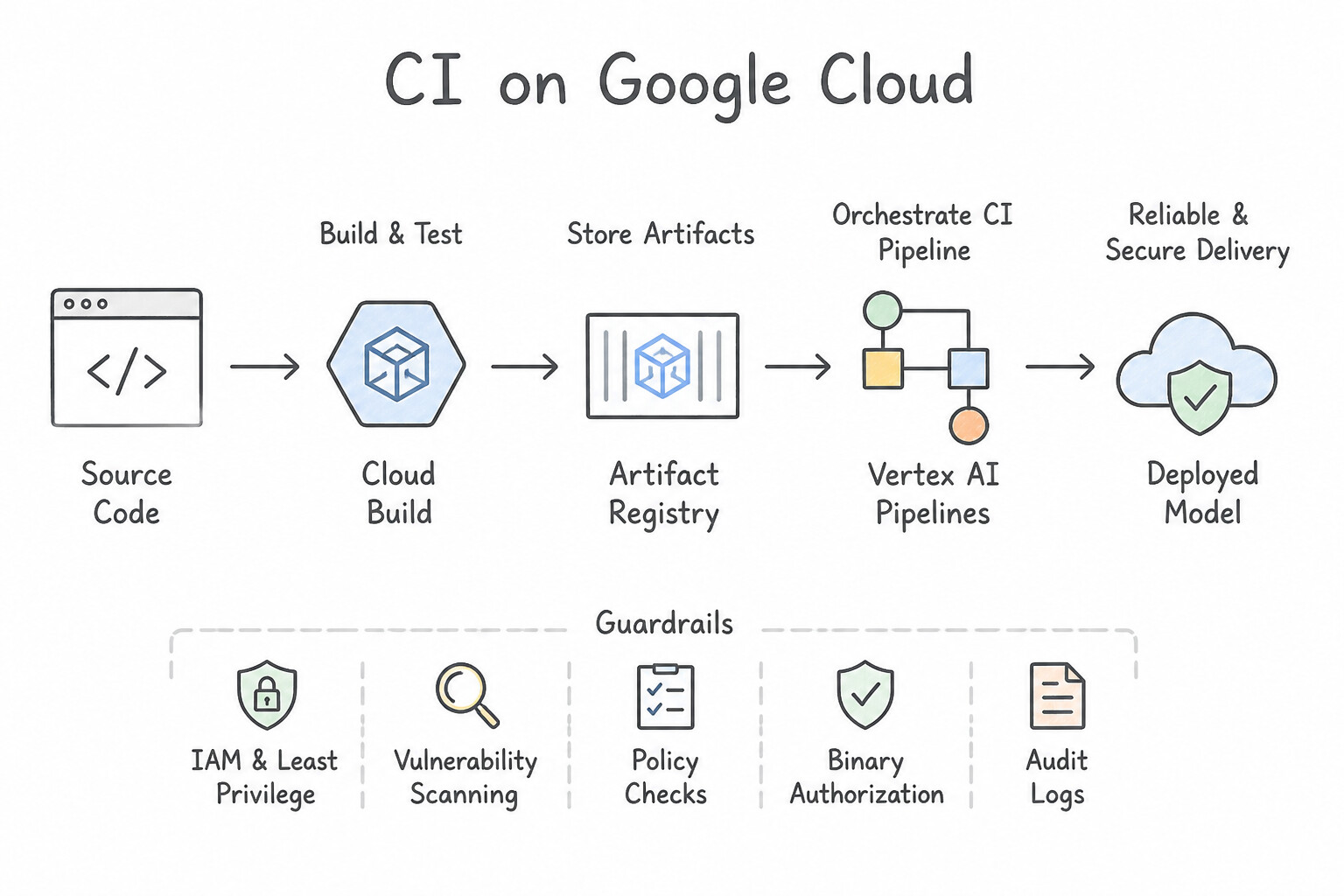
.yamlfiles on their laptops and click "Upload" in the Cloud Console introduces human error and untracked code drift. - In a mature MLOps Level 2 (CI/CD/CT) architecture on Google Cloud, pushing code to Git (Cloud Source Repositories / GitHub / GitLab) triggers Cloud Build, which automatically runs unit tests, builds custom training/serving containers to Artifact Registry, compiles the KFP pipeline definition (
pipeline.json/pipeline.yaml), and submits or schedules the Agent Platform Pipeline run (with progressive environment promotion governed by Cloud Deploy).
Consideration 5.2a: Determining an appropriate retraining policy
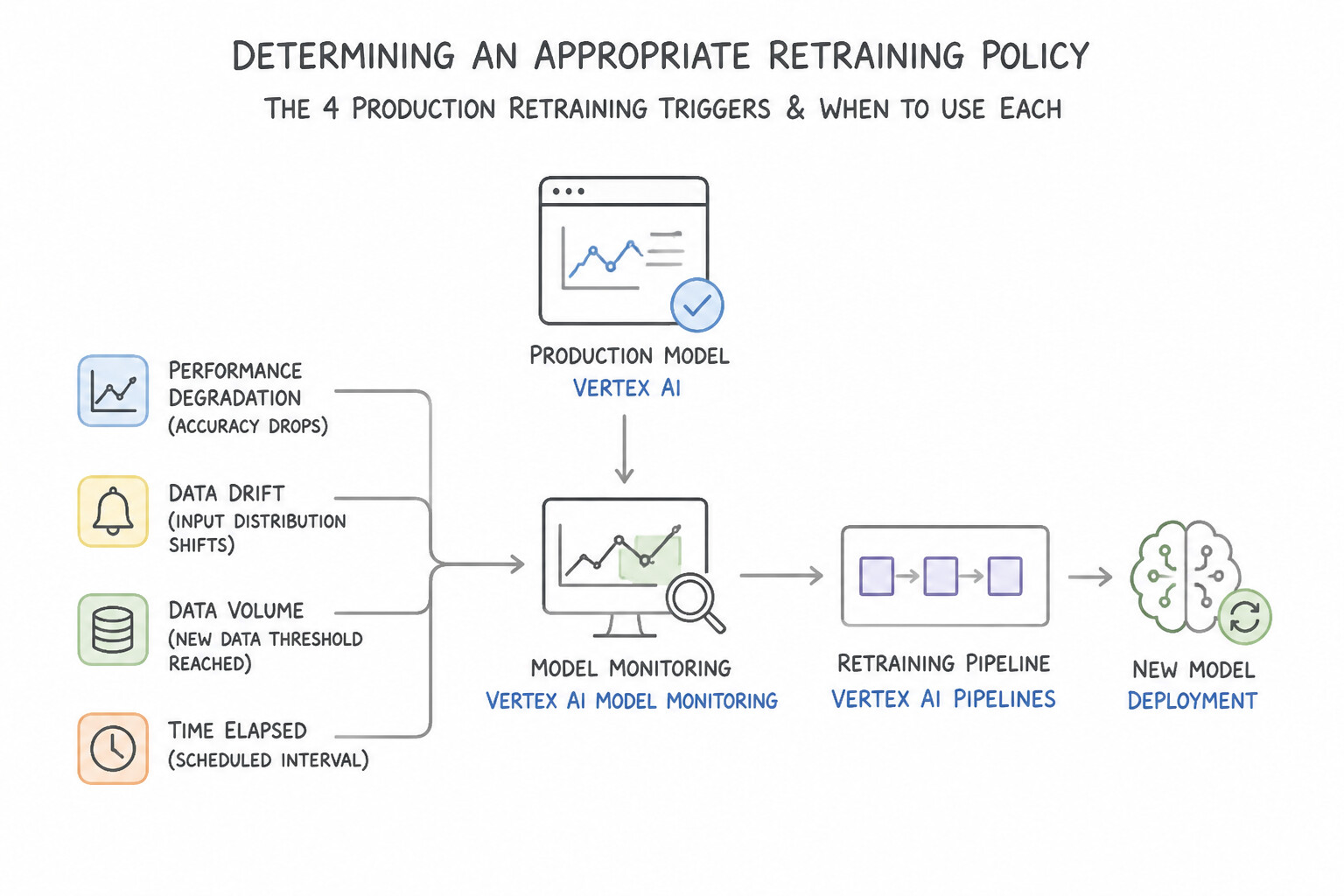
- The 4 Production Retraining Triggers & When to Use Each:
- Scheduled / Periodic Retraining (
Cloud Scheduler→Agent Platform Pipelines): Best when data distributions evolve gradually at a known cadence (e.g., weekly retail catalog updates) and fresh labeled data arrives on a fixed schedule. - Data-Arrival Event-Driven Retraining (
Cloud Storage→Eventarc / Pub/Sub→Cloud Run Functions→Agent Platform Pipelines): Best when upstream partners or ETL jobs upload new training batches to a Cloud Storage bucket at irregular times and retraining must start immediately upon file arrival (google.cloud.storage.object.v1.finalized). - Drift / Skew Event-Driven Retraining (
Model Monitoring→Cloud Monitoring Alert→Pub/Sub→Cloud Run Functions→Agent Platform Pipelines): Best for dynamic environments (fraud detection, real-time bidding, news recommendations) where sudden statistical shifts in production traffic require immediate automated retraining. - Handling Delayed Ground-Truth Labels (e.g., 90-Day Loan Defaults): When actual ground-truth outcomes take 3–6 months to mature, you cannot use real-time precision/recall degradation as your immediate retraining trigger. Instead, monitor Input Feature Drift (Data Drift), Prediction Probability Distribution Drift, and Feature Attribution Drift as leading indicators, and retrain only on mature historical cohorts (or re-calibrate thresholds) while avoiding labeling recent immature loans as "non-default" (which introduces severe label censoring bias!).
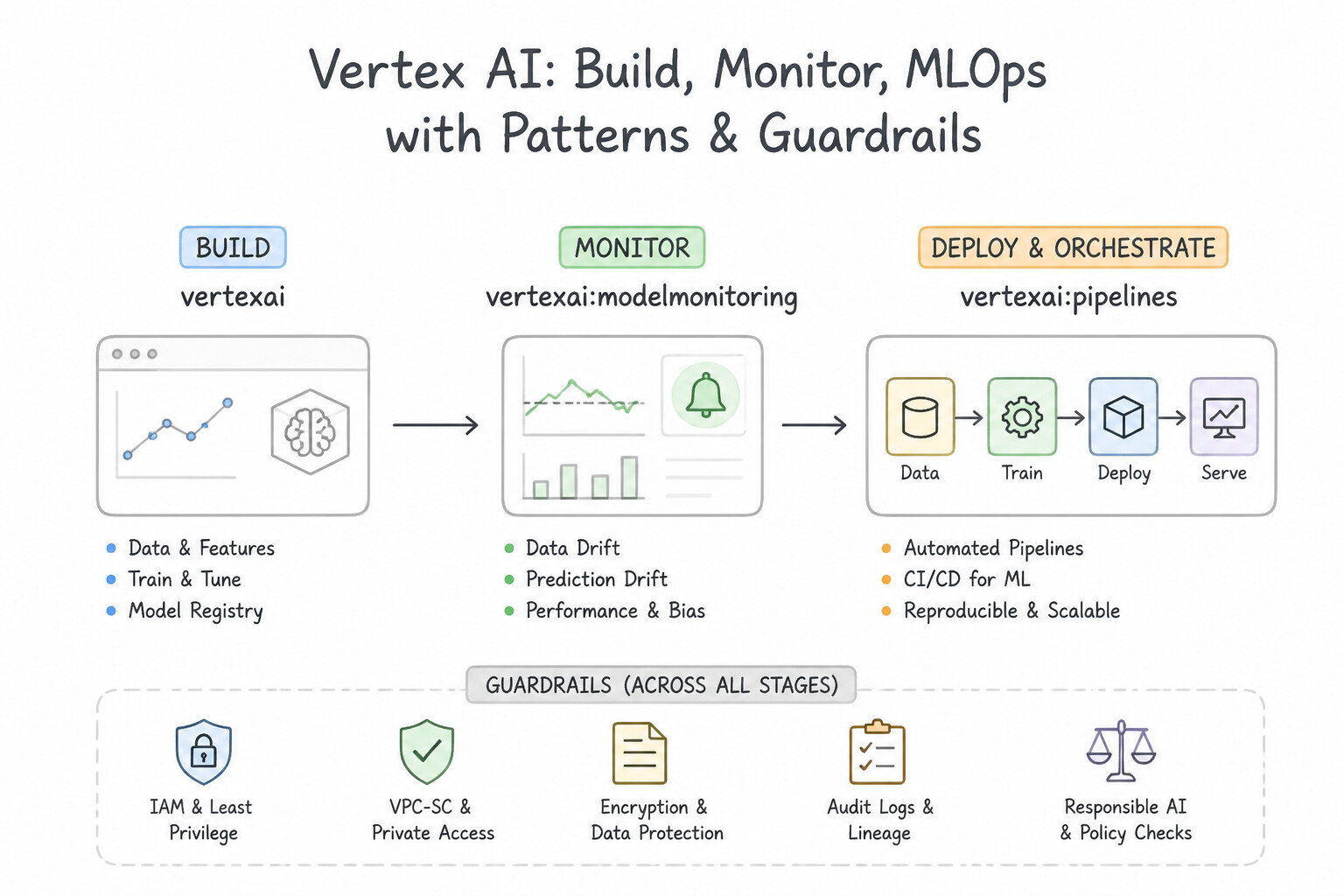
Key Implementation Patterns
- Event-Driven Retraining via Pub/Sub: Use Configure the monitoring alert to publish a message to a Pub/Sub topic. Deploy a Cloud Function triggered by the topic to run the pipeline. Pub/Sub decouples the alert from the action, and Cloud Functions provides the serverless compute to trigger the pipeline immediately.
- Handling Delayed Ground Truth: Use Configure Vertex AI Model Monitoring to detect feature drift on age and income inputs and retrain if significant drift occurs. When ground truth is delayed, monitoring input feature drift serves as a proxy trigger for retraining. (Avoid alternative: Waiting 12 months is too slow and risks poor model performance during that period.)
- Standard MLOps response to data drift in production machine learning systems: Use Automated model retraining. Automated model retraining updates the model weights against newer baseline data to recover predictive performance caused by data drift. (Avoid alternative: Deleting the endpoint creates an unnecessary service outage rather than fixing underlying statistical drift.)
Key Takeaways (5.2a)
- Event-driven architectures decouple the trigger from the action using messaging services like Pub/Sub.
- Cloud Functions are ideal for lightweight glue code that connects different GCP services.
- Avoid using polling (periodic checks) when immediate reaction is required.
- Vertex AI Model Monitoring alerts can easily integrate with Pub/Sub for automation.
Consideration 5.2b: Deploying models in continuous integration, continuous delivery, and continuous training (CI/CD/CT) pipelines (e.g., Cloud Build)
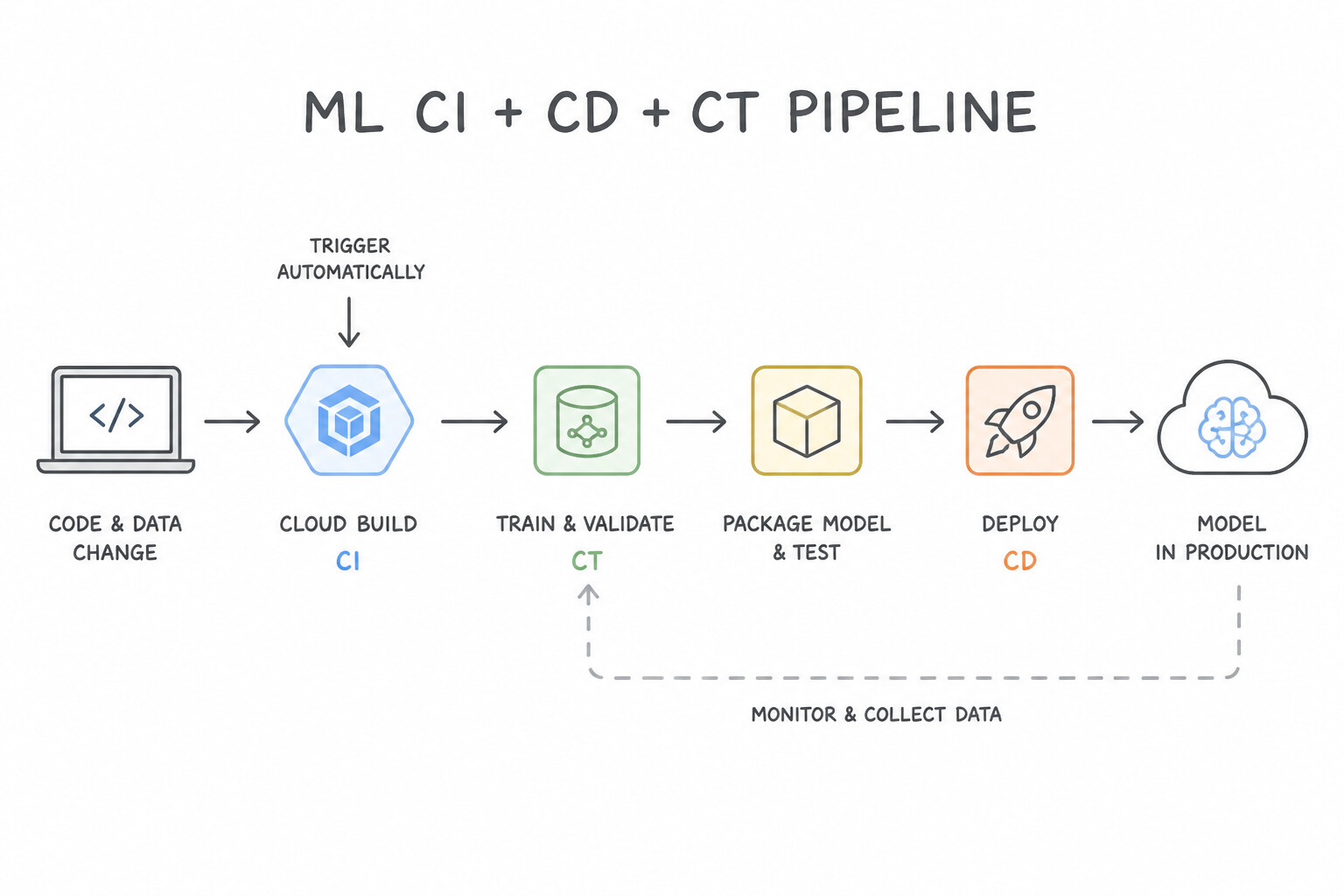
- Distinguishing CI, CD, and CT in MLOps:
- Continuous Integration (CI): Triggered on every Git Pull Request or Commit via Cloud Build Triggers. Runs unit tests (
pyteston feature engineering logic and component signatures), validates notebook execution (papermill), builds container images into Artifact Registry, and compiles the KFP Python DSL into a declarativepipeline.yamlspecification. - Continuous Delivery (CD): Orchestrates the progressive promotion of compiled pipeline templates, container images, or model serving configurations across
dev,staging, andprodenvironments using Cloud Build and Cloud Deploy (with automated smoke tests and approval gates). - Continuous Training (CT): Automated execution of the Agent Platform Pipeline in production (triggered by schedule, new data arrival, or drift alerts) that retrains the model on fresh data, validates it against the current production baseline (
Resolver+Evaluator), registers the new version in Model Registry, and deploys it to the Agent Platform Endpoint. - Decoupling Event Triggers with Serverless Glue (
Pub/Sub+Cloud Run Functions): When wiring Model Monitoring alerts or Cloud Storage events to Agent Platform Pipelines, use a Cloud Pub/Sub topic as the durable event bus and a lightweight Cloud Run Function (Cloud Function) that parses the event payload (e.g., extracting the newly uploadedgs://file URI or the drifted model ID) and callsaiplatform.PipelineJob(...).submit().
Key Implementation Patterns
- CI/CD Integration with Cloud Build: Use Create a Cloud Build trigger connected to the GitHub repository. Configure the trigger to execute the YAML configuration file on pushes to the main branch. Cloud Build triggers natively integrate with GitHub to execute build steps automatically upon commits.
- Batch Prediction Syntax for Regression: Use Create a Cloud Build trigger that invokes a build configuration file whenever a push to the 'dev' branch occurs. Cloud Build triggers automatically start build steps, such as testing and compilation, in response to repository events like a branch push.
- Global Statistics in Z-Score Normalization: Use Create a Cloud Function triggered by the Cloud Storage google.storage.object.finalize event. Configure the function to initiate the Vertex AI Pipeline run. Cloud Functions triggered by the object finalize event allow immediate execution of code (starting the pipeline) when a file upload completes.
Key Takeaways (5.2b)
- Cloud Build Triggers are the standard way to automate CI/CD workflows based on git events.
- Cloud Scheduler is for time-based automation, not event-based source control monitoring.
- Distinguish between building the pipeline (CI, using Cloud Build) and running the pipeline (Orchestration, using Vertex AI Pipelines).
- Avoid polling mechanisms when native event-driven integrations exist.
Quick Decision Cheat Sheet (Subsection 5.2)
If the Scenario Requires... | Choose This Google Cloud Pattern | Avoid This Common Mistake |
|---|---|---|
"Automate unit tests, Docker builds, and KFP compilation on every Git pull request or push" | Cloud Build Triggers | Cloud Scheduler or Dataflow |
"Trigger an Agent Platform Pipeline on a recurring fixed cron schedule (e.g., every Monday at 03:00)" | Cloud Scheduler (or Vertex AI Pipeline Schedules) | Eventarc GCS trigger |
"Trigger an Agent Platform Pipeline immediately when a file lands in a GCS bucket" | Eventarc / Cloud Storage Pub/Sub Notification + Cloud Run Function | Cloud Build Git trigger |
"Progressive release management of container/pipeline artifacts across Dev → Staging → Prod with approvals" | Cloud Deploy | Vertex AI Experiments |
"Tool that compiles KFP Python @dsl.pipeline code into a portable YAML/JSON specification" | kfp.compiler.Compiler().compile() | docker build or gcloud builds submit alone |
Further Reading (Subsection 5.2)
- Vertex AI Model Monitoring overview — Explains how Model Monitoring detects skew and drift and how it generates alerts.
- Triggering Cloud Functions — Documentation on how to trigger a Cloud Function from a Pub/Sub message.
- Introduction to Model Monitoring — Explains the concepts of skew and drift and when to use them.
- MLOps: Continuous delivery and automation pipelines in machine learning — Provides architectural guidance for Level 2 MLOps, detailing automated model retraining triggers based on data and concept drift detection.
- Triggering a pipeline run — Documentation describing how to use Cloud Pub/Sub and Cloud Functions to trigger a Vertex AI Pipeline.
- Automating builds with Cloud Build triggers — This page explains how to create and manage build triggers that automatically start builds on source code changes.
Book TOC · Previous · Chapter 5 of 7 · Next
AwesomeGCP.com Learning
The approach taken is a question-led learning approach: you explore realistic project scenarios where you need to make decisions or take actions to achieve business goals within specific constraints. Instead of passive learning, you are challenged to think and work through the options to master the Professional Machine Learning Engineer (PMLE) certification!