Book TOC · Previous · Chapter 4 of 7 · Next
Chapter 4: Serving & Scaling Models: Model Registry, Batch vs. Online Endpoints & Inference Optimization
Chapter Focus: Vertex AI Model Registry, canary traffic splitting, Online vs. Batch Prediction, Feature Store low-latency online serving (Bigtable vs. Optimized), PrivateServiceConnect endpoints, quantization, distillation, and vLLM/TensorRT-LLM.
Subsection 4.1: Serving models
The Big Picture
Training a high-accuracy model is only half the engineering battle; serving it reliably in production requires choosing the right inference runtime, container packaging, model registry governance, rollout strategy, and request/response preprocessing pipeline:
- Confusing Online, Batch, and Streaming Inference Services (4.1a):
- Calling a synchronous Online Prediction Endpoint in a loop to score 10 TB of nightly BigQuery customer records costs 10x more and hits quota limits when BigQuery ML
ML.PREDICT(in-warehouse) or Agent Platform Batch Prediction (direct BigQuery/GCS I/O) is purpose-built for asynchronous bulk scoring. - Conversely, running a Batch Prediction job when a mobile checkout app needs a
<50mssynchronous fraud decision fails the real-time SLA (Agent Platform Online Endpoint required). - When telemetry arrives continuously on Pub/Sub and requires rolling window aggregations before scoring, run inference inside a streaming Dataflow (
RunInference) pipeline. - Container Packaging Traps: Filename Conventions, Custom C++ Deps & TorchServe (4.1b):
- Prebuilt Serving Containers on Agent Platform enforce strict artifact filenames in Cloud Storage:
model.joblibormodel.pklfor Scikit-learn,model.bstfor XGBoost,saved_model.pbfor TensorFlow, andmodel.mar(TorchServe Model Archive) for PyTorch. Uploadingsales_forecast.pklto a prebuilt container fails at startup! - When serving requires custom OS/C++ libraries (
apt-get), build a Custom Container exposing$AIP_HTTP_PORT,$AIP_HEALTH_ROUTE, and$AIP_PREDICT_ROUTE. - Unversioned Models & Hard Cutover Outages (
4.1c&4.1d): Overwriting a production model file in Cloud Storage without registering distinct versions in Gemini Enterprise Agent Platform Model Registry makes instant rollback impossible. Production teams register every retrained model as a new version in Model Registry (ModelUploadOpin Pipelines) and use Endpoint Traffic Splitting (95% v1 / 5% v2) for Canary, Blue/Green, or A/B Testing (paired with an external API gateway/load balancer if sticky user-session routing is required). - Payload Bloat & Disconnected Inference Preprocessing (4.1e): Sending raw 50 MB satellite TIFF images over HTTP to an online endpoint exceeds the
1.5 MB(standard)online payload limit—clients should upload large blobs to Cloud Storage and pass thegs://URI (or compress/resize via a Serving Input Receiver / Custom Prediction Routine [CPR]).
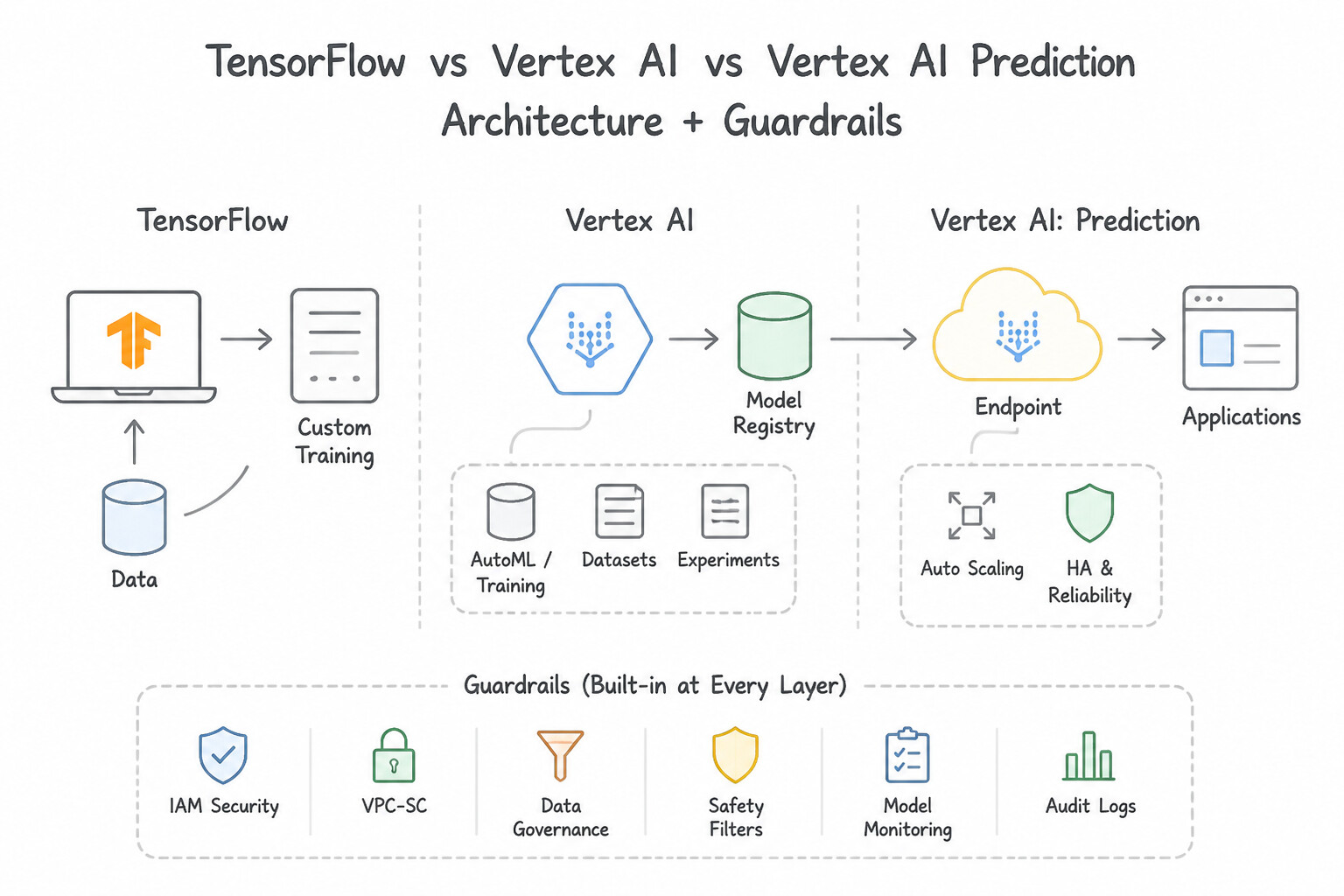
Consideration 4.1a: Deploying models for batch and online inference using appropriate services (e.g., Agent Platform, Model Garden, Cloud Run, and GKE)
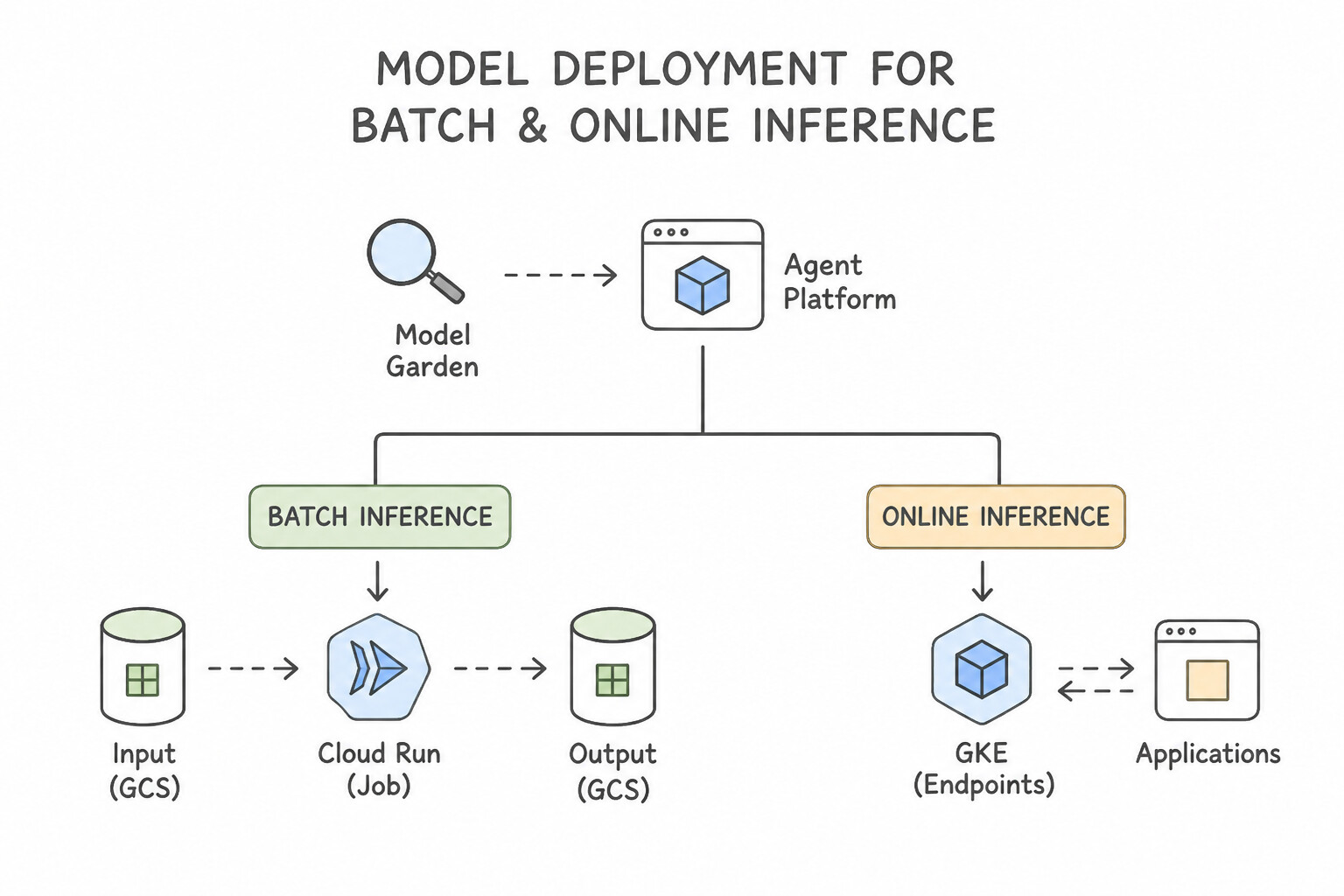
- Online (Synchronous) vs. Batch (Asynchronous) vs. Streaming Inference:
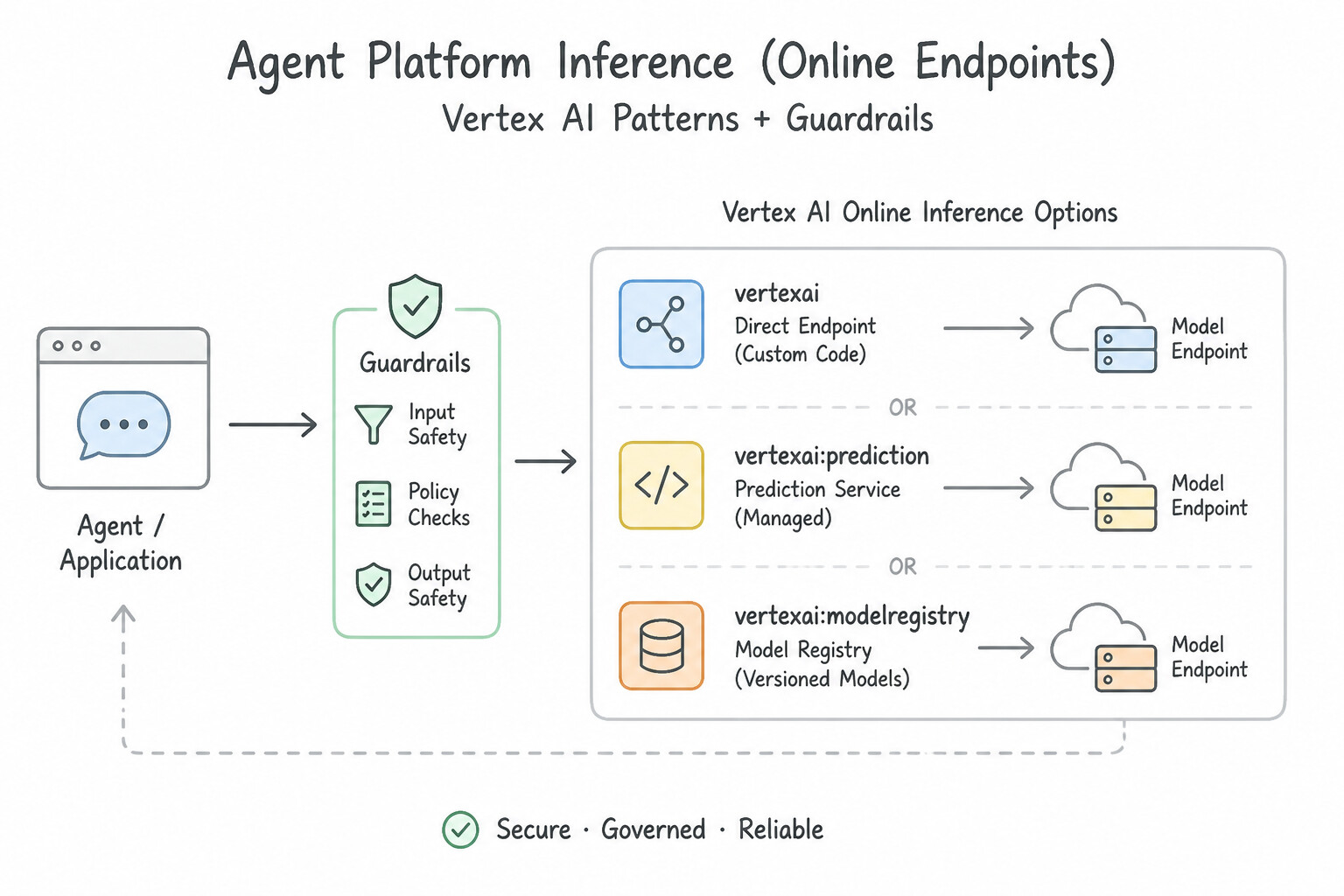
- Agent Platform Inference (Online Endpoints): Choose when a client application (mobile app, checkout page, interactive chatbot) requires an immediate, synchronous HTTP/gRPC response (
<100ms) for a single request or small micro-batch. - Agent Platform Batch Prediction & BigQuery ML (
ML.PREDICT): Choose when scoring hundreds of thousands or millions of accumulated records offline (e.g., nightly churn scoring or daily catalog forecasting) where immediate sub-second latency is not required. If the data and model are in BigQuery, runML.PREDICTin-place; if the model is a custom TensorFlow/PyTorch/XGBoost artifact in Model Registry, run an Agent Platform Batch Prediction job reading directly from BigQuery or Cloud Storage JSONL/CSV without intermediate ETL. - Streaming Inference (
Pub/Sub→Dataflow): Choose when continuous IoT/clickstream events must be windowed and aggregated in flight before invoking the model via Apache Beam'sRunInferencetransform. - Agent Platform Endpoints vs. Cloud Run vs. GKE:
- Agent Platform Endpoints: Built-in Model Registry integration, traffic splitting, Explainable AI, and Model Monitoring.
- Cloud Run: Serverless containers that scale down to zero instances cleanly (note: Vertex AI endpoints with GPUs or public/private configurations often require
min_replica_count >= 1, making Cloud Run ideal for lightweight, bursty microservices needing instant scale-to-zero). - Google Kubernetes Engine (GKE): Best for massive, multi-model GPU/TPU serving fleets using open-source inference engines like vLLM, Triton, or Text Generation Inference (TGI) where fine-grained Kubernetes scheduling is required.
Key Implementation Patterns
- Low-Latency Microservices Integration: Use Upload the model to the Vertex AI Model Registry and deploy it to an endpoint. Vertex AI endpoints provide real-time, low-latency online predictions via a REST API. (Avoid alternative: BigQuery ML is optimized for analytical scoring of data in BigQuery, not for serving mobile app REST API requests.)
- Minimizing Data Movement for Tabular Predictions: Use Use BigQuery ML to run the ML.PREDICT statement on the data. BigQuery ML runs inference directly within the data warehouse, avoiding the costs and complexity of moving 10 TB of data. (Avoid alternative: Exporting data creates unnecessary egress costs and operational overhead compared to in-database processing.)
- Streaming Inference on Unbounded Data: Use Develop a Dataflow pipeline. Use the RunInference API to invoke the model after the windowing and aggregation steps. Dataflow handles streaming, windowing, and inference natively using the RunInference API. (Avoid alternative: Cloud Functions are stateless and cannot easily perform windowed aggregations across a stream of data.)
Key Takeaways (4.1a)
- Online Prediction is for real-time, low-latency, synchronous requests via REST API.
- Batch Prediction is for asynchronous, high-throughput processing of large datasets.
- Vertex AI Endpoints serve models on dedicated compute resources to ensure consistent performance.
- Keep the model close to the data to minimize egress costs and latency.
Consideration 4.1b: Packaging and serving models from different frameworks (e.g., PyTorch and XGBoost) using prebuilt and custom containers
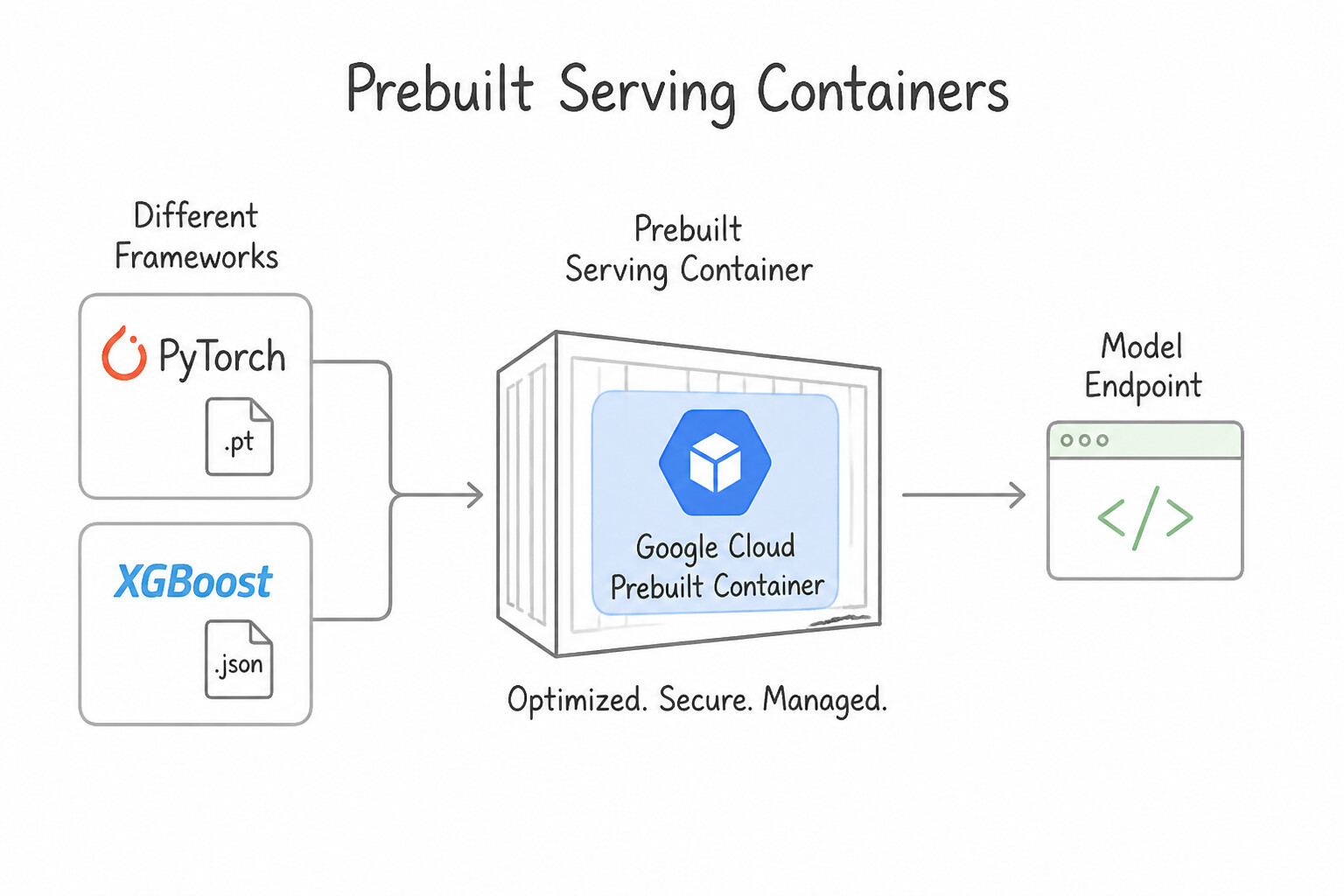
- Prebuilt Serving Containers & Mandatory Artifact Filenames:
- When deploying a Scikit-learn or XGBoost model to an Agent Platform Prebuilt Container, the Cloud Storage artifact directory must contain a file named
model.joblib,model.pkl, ormodel.bst(exact name!). Naming your filesales_forecast.pklwill cause container startup to fail withFileNotFoundError. - For PyTorch on prebuilt containers, package the serialized model weights/TorchScript (
.pt) and a custom handler script into a TorchServe Model Archive (model.mar) usingtorch-model-archiver, and uploadmodel.marto Cloud Storage—prebuilt PyTorch containers run TorchServe out of the box (supporting concurrent worker threads, metrics, and logging). - For cross-framework portability, models can also be exported to ONNX (Open Neural Network Exchange) and served via ONNX Runtime / Triton.
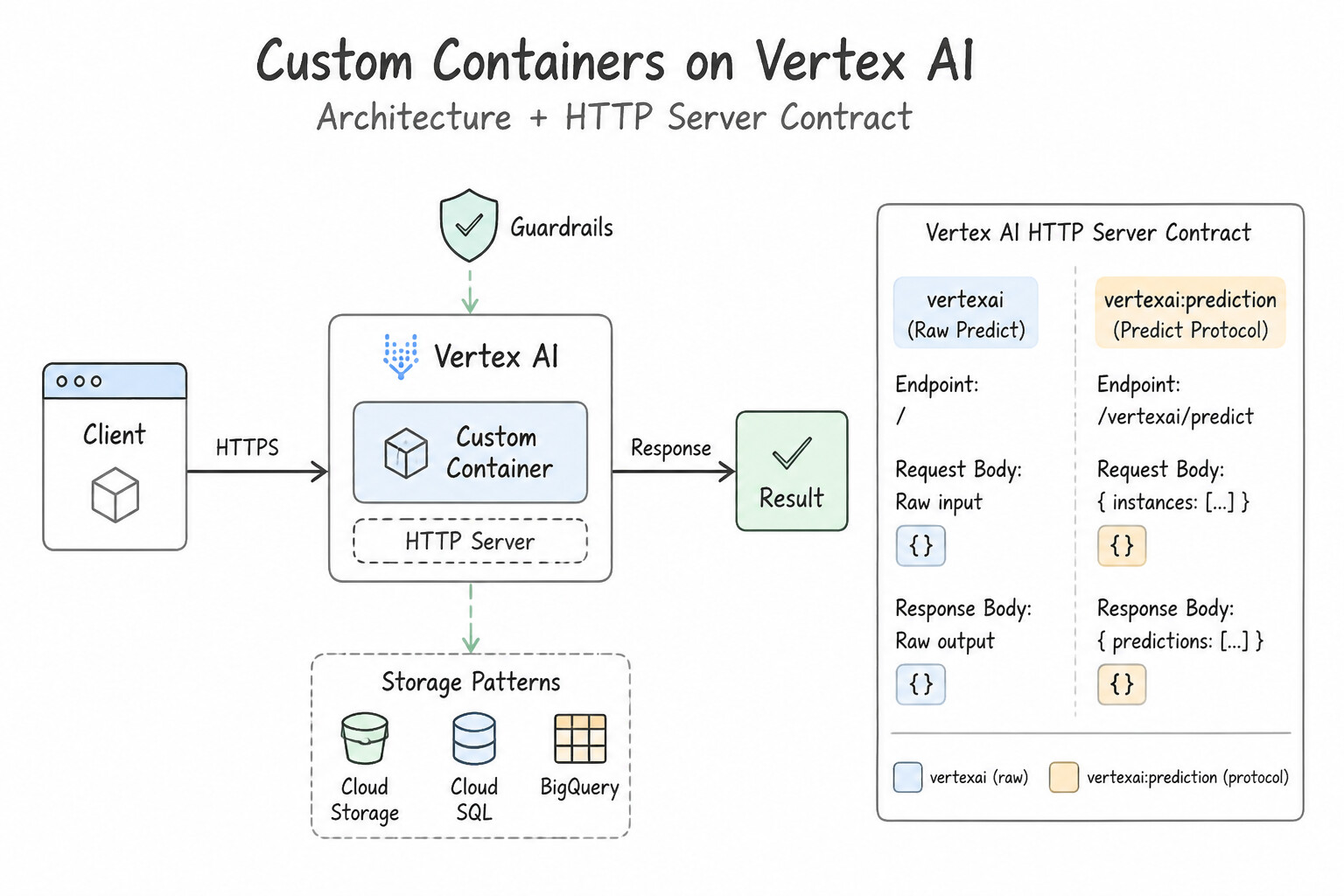
- Custom Containers & the Vertex AI HTTP Server Contract:
- Choose a Custom Container (stored in Artifact Registry) when your model requires OS-level C++ system libraries (
apt-get), a non-standard framework, or a custom web server (e.g.,FastAPI,Flask,vLLM). - Your container's HTTP server MUST satisfy three contract rules:
- Listen on
0.0.0.0at the port specified by theAIP_HTTP_PORTenvironment variable (default8080). - Respond with
HTTP 200 OKto GET requests on the health check path specified byAIP_HEALTH_ROUTE(default/health). - Accept POST prediction payloads (
{"instances": [...]}) on the path specified byAIP_PREDICT_ROUTE(default/predict) and return{"predictions": [...]}.
Key Implementation Patterns
- Scikit-learn Artifact Naming Conventions: Use Rename the artifact in Cloud Storage to "model.pkl". Vertex AI pre-built Scikit-learn containers require the model artifact to be named specifically "model.pkl" or "model.joblib". (Avoid alternative: Using a custom container is an unnecessary administrative overhead when the issue can be resolved by following naming conventions.)
- Custom Dependencies with XGBoost: Use Create a Dockerfile that extends the pre-built XGBoost image. Install the library, push the new image to Artifact Registry, and deploy it as a custom container. Extend the pre-built image with a Dockerfile to install missing system dependencies and deploy it as a custom container.
- Optimized PyTorch Serving with TorchServe: Use Use a Vertex AI pre-built container for PyTorch that includes TorchServe. Vertex AI pre-built PyTorch containers use TorchServe to handle concurrency, logging, and metrics automatically without custom code. (Avoid alternative: Flask requires writing custom API code and manual configuration for concurrency, which contradicts the requirements.)
Key Takeaways (4.1b)
- Vertex AI pre-built containers enforce strict naming conventions for model artifacts.
- Scikit-learn models must be named
model.pklormodel.joblib.- XGBoost models must be named
model.bst,model.json, ormodel.joblib.- Renaming the artifact is the standard fix for 'file not found' errors during pre-built container deployment.
Consideration 4.1c: Organizing and versioning models in Gemini Enterprise Agent Platform Model Registry
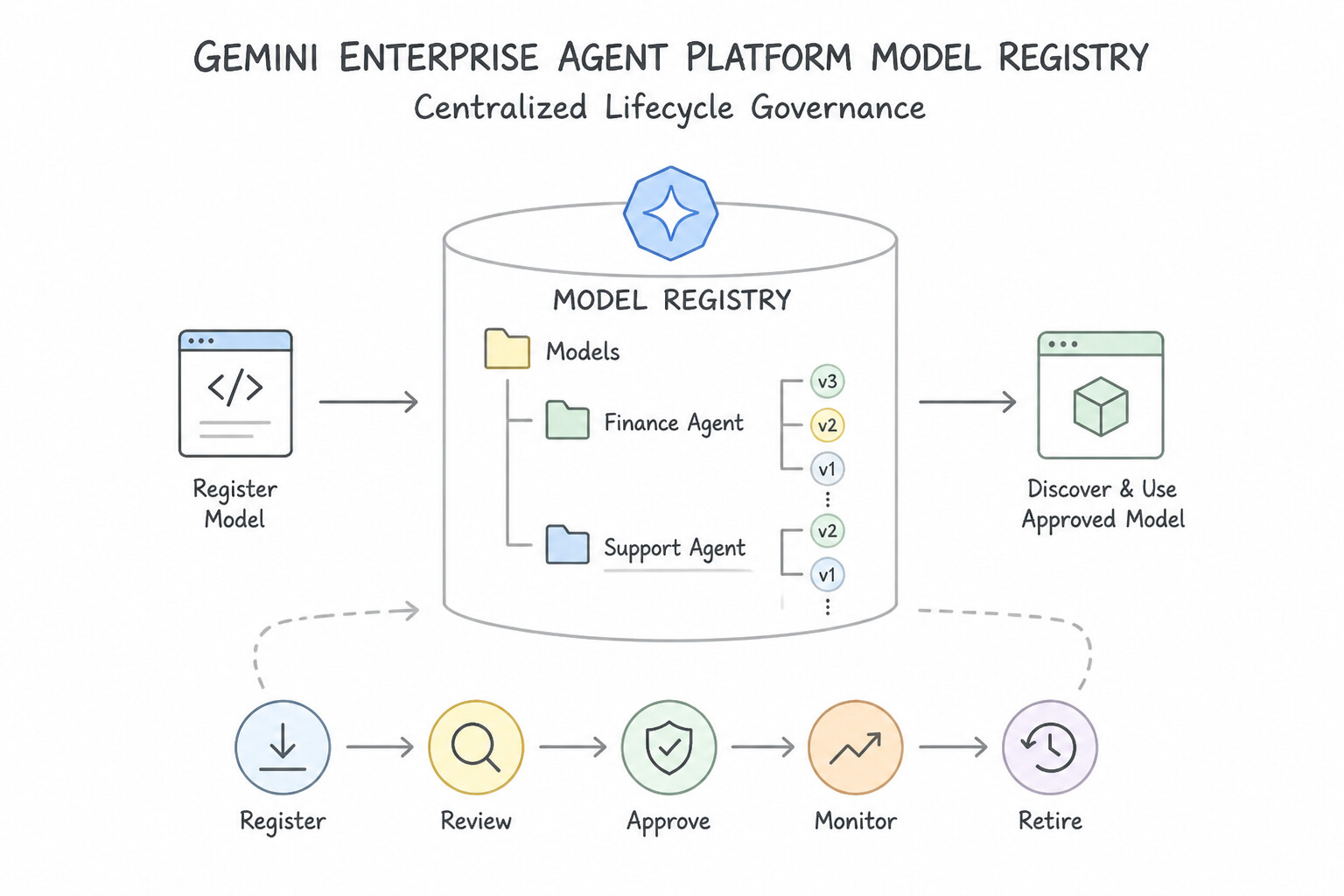
- Centralized Lifecycle Governance in Agent Platform Model Registry:
- Never create a brand-new top-level Model resource (
fraud_model_jan,fraud_model_feb) on every weekly retraining run—that fragments lineage and breaks endpoint references. Instead, register a single logical model (fraud_model) in Model Registry and upload each retrained artifact as a new Model Version (v1,v2,v3) under that parent model, using Version Aliases (champion,challenger,production). - Automated Pipeline Registration (
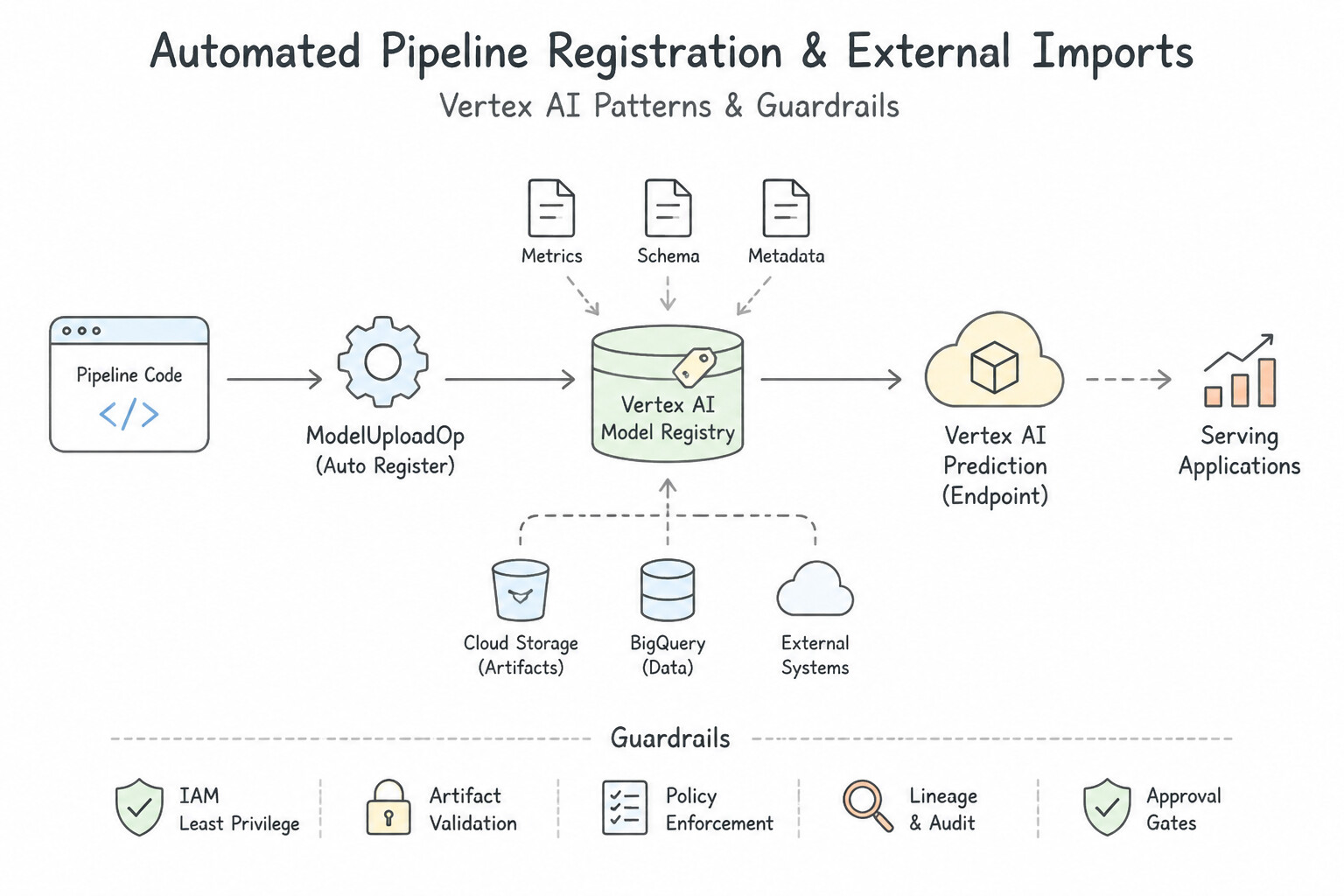
ModelUploadOp) & External Imports: - Inside an Agent Platform Pipeline (KFP), use the standard
ModelUploadOpcomponent (fromgoogle_cloud_pipeline_components) after the evaluation gate passes to automatically register the newly trained model version into Model Registry. - For models trained on-premises (
model.joblib,SavedModel), upload the artifact to Cloud Storage and import it into Model Registry specifying the matching prebuilt or custom serving container URI.
Key Implementation Patterns
- Model Versioning for A/B Testing: Use Import the new model and specify the existing Model ID as the parent_model. Using the parent_model parameter creates a new version of the existing model, enabling seamless traffic splitting. (Avoid alternative: Creating a new Model resource treats the update as an unrelated model rather than a new version.)
- Automating Registration via Vertex AI Pipelines: Use Add a ModelUploadOp component to the pipeline and specify the model artifact URI and serving container image. ModelUploadOp is the dedicated Google Cloud pipeline component for programmatically registering models in the Vertex AI Model Registry.
- Importing External Models with Pre-built Containers: Use Import the model into Vertex AI Model Registry. Select the pre-built container for Scikit-learn and specify the Cloud Storage directory path containing the file. Use the Vertex AI pre-built container for Scikit-learn and point it to the Cloud Storage directory containing the model artifact.
Key Takeaways (4.1c)
- Vertex AI Model Registry organizes iterations of a model using Versions.
- Specifying a
parent_modelID during upload creates a new version of that model.- Endpoints support traffic splitting between different versions of the same model for A/B testing.
- Using versions prevents the proliferation of unrelated Model resources for the same business logic.
Consideration 4.1d: Implementing model rollout strategies (e.g., A/B testing and canary deployments) to compare model versions
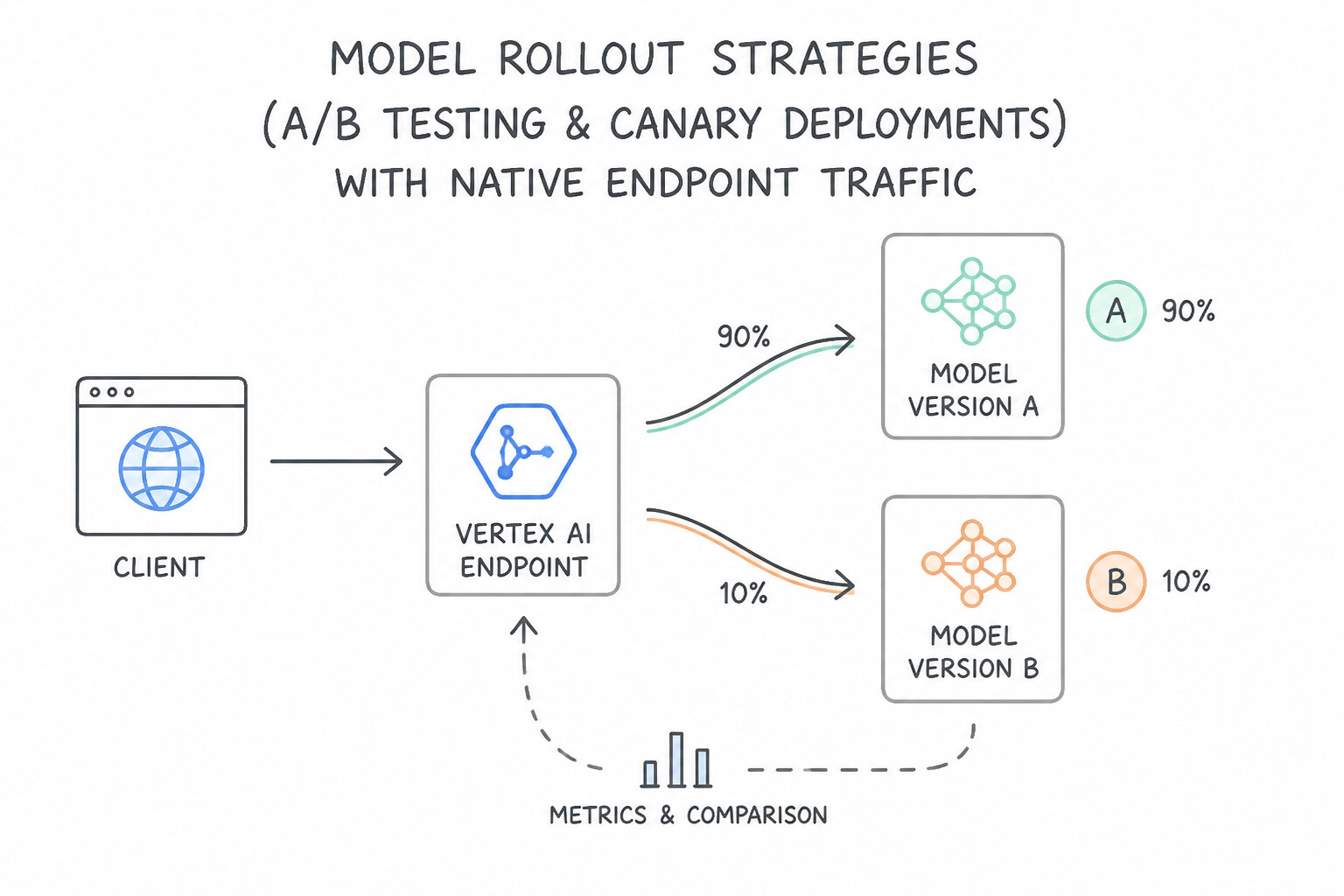
- Native Endpoint Traffic Splitting (
traffic_split): A single Agent Platform Endpoint can host multiple deployed model versions simultaneously, routing incoming requests according to a percentage dictionary (e.g.,{"v1": 90, "v2": 10}). - Canary Rollout: Route 5–10% of live traffic to
v2whilev1serves 90–95%; monitor error rates and latency; gradually rampv2to 100%, or instantly roll back by settingv1=100, v2=0(do not undeployv1untilv2is fully validated, or rollback will take 10+ minutes of cold VM provisioning!). - Blue/Green Deployment: Maintain two complete model environments on the endpoint and flip traffic
100% → 0%after smoke testing. - Shadow Deployment: Mirror live production requests asynchronously to
v2for logging/evaluation without returningv2's predictions to the user. - The Sticky-Session A/B Testing Limitation: Native Agent Platform Endpoint traffic splitting is stateless and random per HTTP request—if User A makes 5 requests during a session, random splitting may send 4 requests to
v1and 1 request tov2. When an A/B test requires user-level session stickiness (ensuringuser_123consistently experiencesv2across their entire session), place an application layer / API Gateway / Cloud Load Balancer with consistent hashing onuser_idin front of two separate endpoints (or deployed model IDs).
Key Implementation Patterns
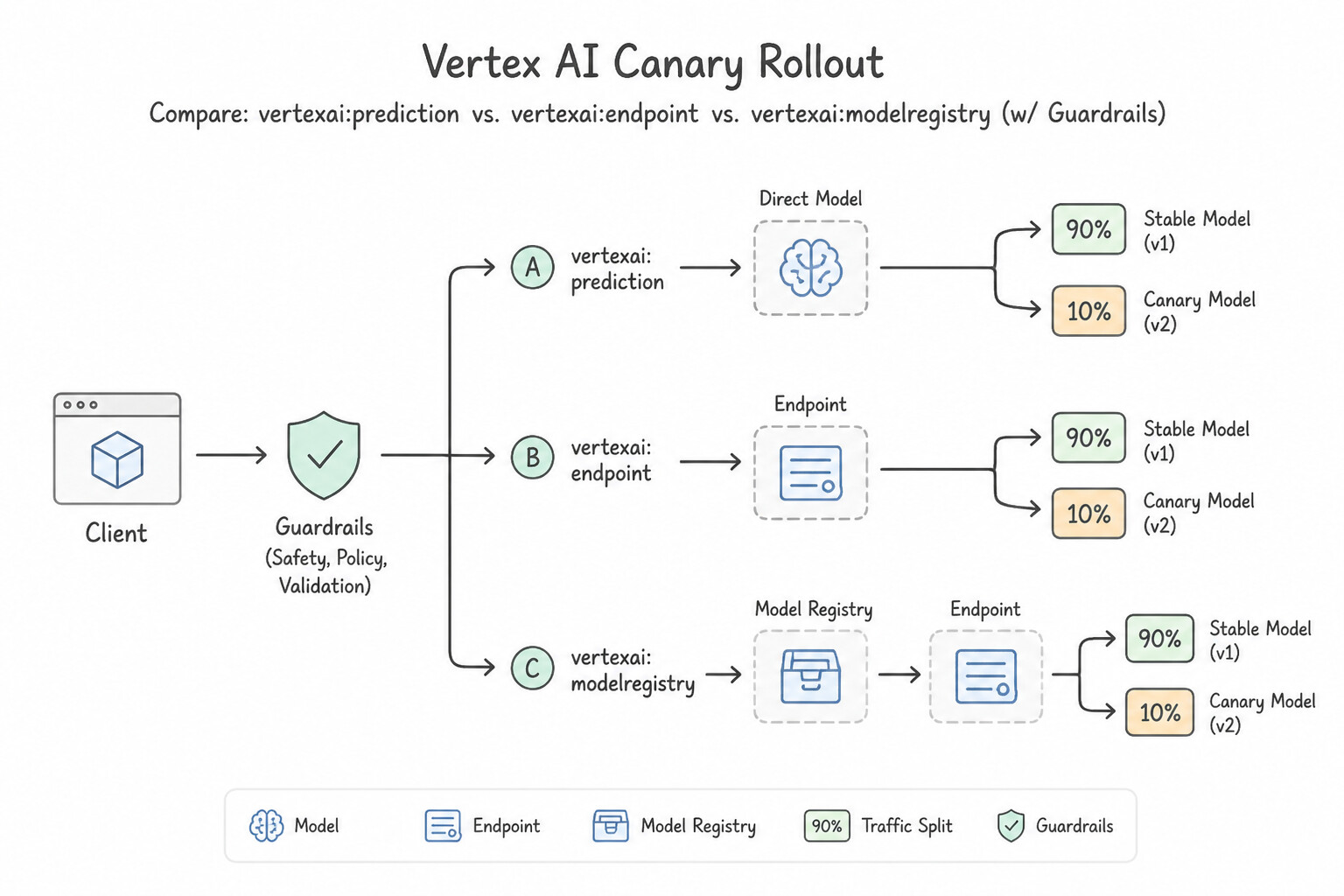
- Configuring Traffic Splitting on Vertex AI Endpoints: Use Deploy the v2 model to the existing endpoint. Update the endpoint's traffic split configuration to assign 90% to the v1 deployed model ID and 10% to the v2 deployed model ID. Deploy both models to the same endpoint and configure the native traffic split percentages.
- Implementing a Canary Deployment Strategy: Use Update the traffic split configuration on the endpoint to assign 10% of traffic to the new model. Monitor the error rates, and then iteratively update the traffic split to the next percentage. Vertex AI Endpoints support traffic splitting between deployed models, allowing you to manually adjust percentages for a controlled canary rollout.
- Ensuring User Consistency (Stickiness) in A/B Tests: Use Deploy each model version to a distinct Vertex AI endpoint and implement routing logic in your application based on the User ID. To ensure user consistency, use application-side logic to route specific users to specific endpoints.
Key Takeaways (4.1d)
- Vertex AI Endpoints support hosting multiple models simultaneously.
- Traffic splitting is a native feature configured on the Endpoint resource using percentages.
- Always use server-side traffic splitting for A/B testing to avoid changing client code.
- Ensure the traffic split percentages sum to exactly 100%.
Consideration 4.1e: Developing solutions for inference preprocessing and postprocessing
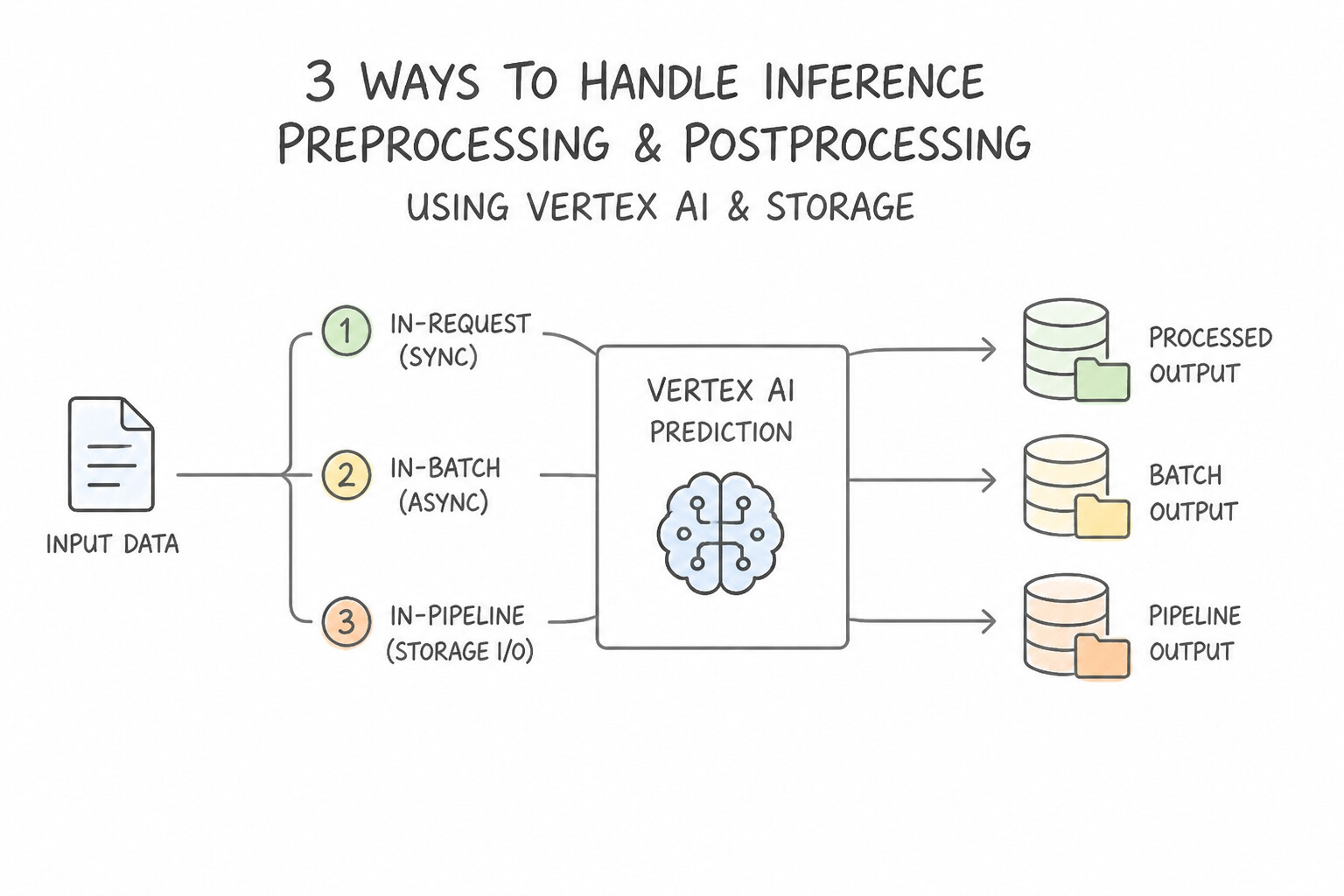
- 3 Ways to Handle Inference Preprocessing & Postprocessing:
- In-Graph Preprocessing (
SavedModel Signatures/tf.Transform/ Keras Layers): For TensorFlow models exported from Keras that expect floating-point tensors while clients send raw JSON strings or base64 JPEG bytes, define atf.functionserving signature (serving_default/ServingInputReceiver) that parses raw inputs inside the TensorFlow graph itself. - Custom Prediction Routines (CPR): When using Scikit-learn, XGBoost, or PyTorch prebuilt framework containers and you need custom Python
preprocess()(e.g., fetching supplemental features, parsing strings) andpostprocess()(e.g., mapping raw probability logits[0.03, 0.91, 0.06]to human-readable class labels{"label": "APPROVED", "confidence": 0.91}) without writing a custom HTTP server or Dockerfile from scratch, subclass the Vertex AIPredictorinterface using a Custom Prediction Routine (CPR). - Handling Large Unstructured Inputs for Batch & Online Inference:
- For Batch Prediction over 500,000 individual text or image files in Cloud Storage, generate a
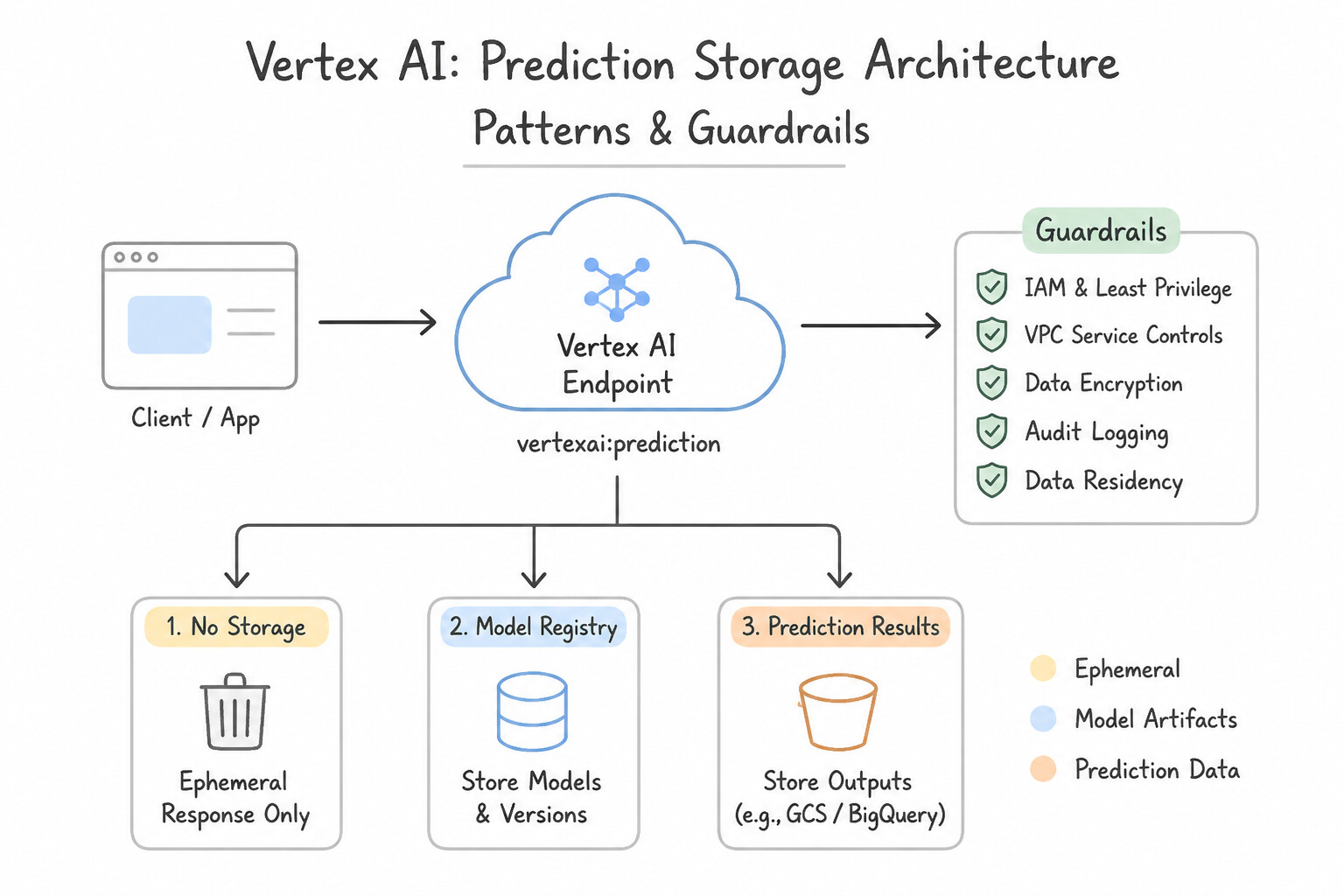
JSONLmanifest file where each line contains thegs://bucket/file.txtURI (rather than passing 500,000 separate CLI arguments). - For Online Prediction with 50 MB high-resolution satellite/medical images that exceed the
1.5 MBHTTP payload limit, have the client upload the image to Cloud Storage and pass thegs://URI to a custom container / CPR that downloads and tiles/resizes the image in memory before inference.
Key Implementation Patterns
- Batch Prediction Input Formatting for NLP: Use Create a JSONL file that lists the Cloud Storage URIs for each text file. Specify this JSONL file as the input source. The standard input for Vertex AI Batch Prediction is a JSONL file listing the Cloud Storage URIs of the data files.
- Handling Large Payloads in Online Prediction: Use Update the client application to upload the images to a Cloud Storage bucket. Send the Cloud Storage URI in the prediction request payload. Upload the large file to Cloud Storage and pass the URI reference to the endpoint to avoid payload size limits.
Key Takeaways (4.1e)
- Vertex AI Batch Prediction requires an input manifest file (JSONL, CSV, or TFRecord) to identify instances.
- You cannot simply point a batch job to a Cloud Storage folder; you must list the files contained within it.
- For unstructured data like text or images, use JSONL files containing Cloud Storage URIs (gs://...) as the input instances.
- Vertex AI Online Prediction has a strict payload limit (default 1.5 MB).
Quick Decision Cheat Sheet (Subsection 4.1)
If the Scenario Requires... | Choose This Google Cloud Pattern | Avoid This Common Mistake |
|---|---|---|
"Prebuilt Scikit-learn container fails to load sales_model.pkl from Cloud Storage" | Rename the artifact file to model.pkl or model.joblib | Rewriting the model in TensorFlow |
"Deploy a complex PyTorch model to a prebuilt Vertex AI container with built-in concurrency & metrics" | Package weights + handler into a TorchServe .mar archive (torch-model-archiver) | Uploading raw .py source files without a .mar archive |
"Custom FastAPI container deployed to Agent Platform Endpoint fails health checks and never becomes ready" | Listen on 0.0.0.0:$AIP_HTTP_PORT and return HTTP 200 on $AIP_HEALTH_ROUTE | Hardcoding 127.0.0.1:5000 (localhost is unreachable by the Vertex proxy!) |
"Client needs to send 50 MB satellite images to an Online Endpoint ( 1.5 MB HTTP limit)" | Upload image to Cloud Storage and send the gs:// URI in the prediction request to a custom container/CPR | Base64-encoding the 50 MB image (bloats payload to 67 MB and fails HTTP limit) |
"Duplicate live production traffic to a new candidate model for silent testing without returning its output to users" | Shadow Deployment (Traffic Mirroring) | Canary Deployment (returns candidate outputs to 5–10% of live users) |
Further Reading (Subsection 4.1)
- Get online predictions from custom trained models — Explains how to deploy a model to an endpoint for online prediction.
- Vertex AI Prediction overview — Overview of when to use batch versus online prediction.
- BigQuery ML: The ML.PREDICT function — Documentation on how to use the ML.PREDICT function to run inference on BigQuery data using SQL.
- Overview of BigQuery ML — General introduction to BigQuery ML, explaining how it enables users to create and execute machine learning models in BigQuery using SQL queries.
- Use RunInference for Generative AI — Documentation explaining how to use the RunInference API to use machine learning models in your Apache Beam pipelines.
- Building streaming data pipelines on Google Cloud | Google Cloud Blog — A reference architecture for building streaming pipelines using Pub/Sub and Dataflow.
Subsection 4.2: Scaling online model serving
The Big Picture
Once a model is deployed to an online endpoint, production traffic exposes five scaling and infrastructure bottlenecks covered in Subsection 4.2:
- Online Feature Store Latency & Flash-Sale Starvation (4.2a): A real-time recommendation or fraud model that queries BigQuery directly during an online HTTP request will suffer 1–3 second query latency (failing a
<50msSLA). Models must fetch real-time entity features from Gemini Enterprise Agent Platform Feature Store's Online Store—and before a predictable flash sale, engineers must proactively scale up the Feature Store online serving nodes and use streaming ingestion for fresh features. - Public Endpoint Exposure & Non-Transitive VPC Peering Traps (4.2b): Regulated banking and healthcare workloads prohibit sending inference payloads over the public internet. Architects deploy to Private Endpoints using Private Service Connect (PSC) or VPC Network Peering. When an on-premises mainframe connects via Cloud VPN/Interconnect to a customer VPC that is peered with Vertex AI's managed network, requests fail unless Cloud Router Custom Route Advertisements export the Vertex AI peered subnet routes across the VPN tunnel (because VPC Peering is non-transitive!).
- Mismatched Serving Hardware (
CPUvs.GPUvs.TPUvs.Edge) (4.2c): Provisioning NVIDIA A100 GPUs to serve a Scikit-learn Random Forest wastes 90% of the serving budget (CPU VMs are optimal for tree ensembles). Conversely, serving a 70B parameter LLM on CPUs yields 30 seconds per token (A100/H100/L4 GPUs or TPU v5e with vLLM continuous batching required). - Wrong Autoscaling Metrics & Cold-Start Flash Sale Outages (4.2d):
- By default, Vertex AI Endpoints autoscale based on CPU utilization. For a deep learning model running on GPUs, the host CPU sits at 15% while the GPU is 100% saturated—so CPU-based autoscaling never scales up while latency skyrockets! You must configure autoscaling on GPU Duty Cycle / GPU Utilization.
- Reactive autoscaling takes 5–10 minutes to spin up new GPU VMs and load model weights. For a known 12:00 PM flash sale, you must manually increase
min_replica_countbefore 12:00 PM. - Unoptimized FP32 Models Exceeding Latency & Memory Budgets (4.2e): Deploying raw 32-bit floating-point (
float32) BERT or Vision models when Post-Training Quantization (FP32 → INT8/FP16), Weight Pruning, Knowledge Distillation (training a compact student model to mimic a giant teacher model), TensorRT (TF-TRT) graph compilation, or Dynamic Batching can slash latency and memory footprint by 2–4x.
Consideration 4.2a: Managing and serving features using Agent Platform Feature Store
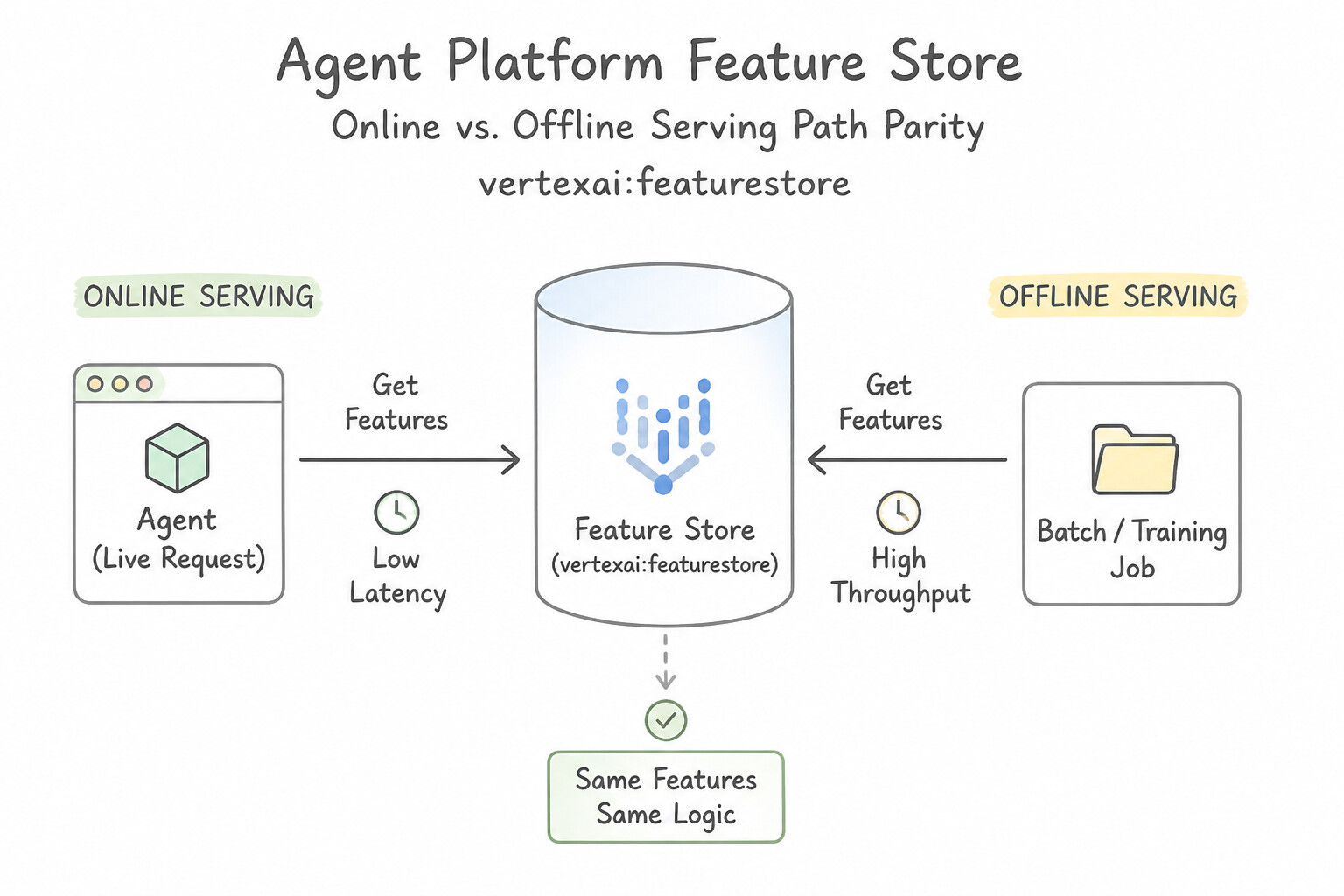
- Online vs. Offline Serving Path Parity: When a model performs well in offline validation (using BigQuery historical tables) but degrades or times out in production, centralize features in Agent Platform Feature Store. During online prediction, the application or custom prediction routine fetches the entity's latest feature vector from the Online Store (
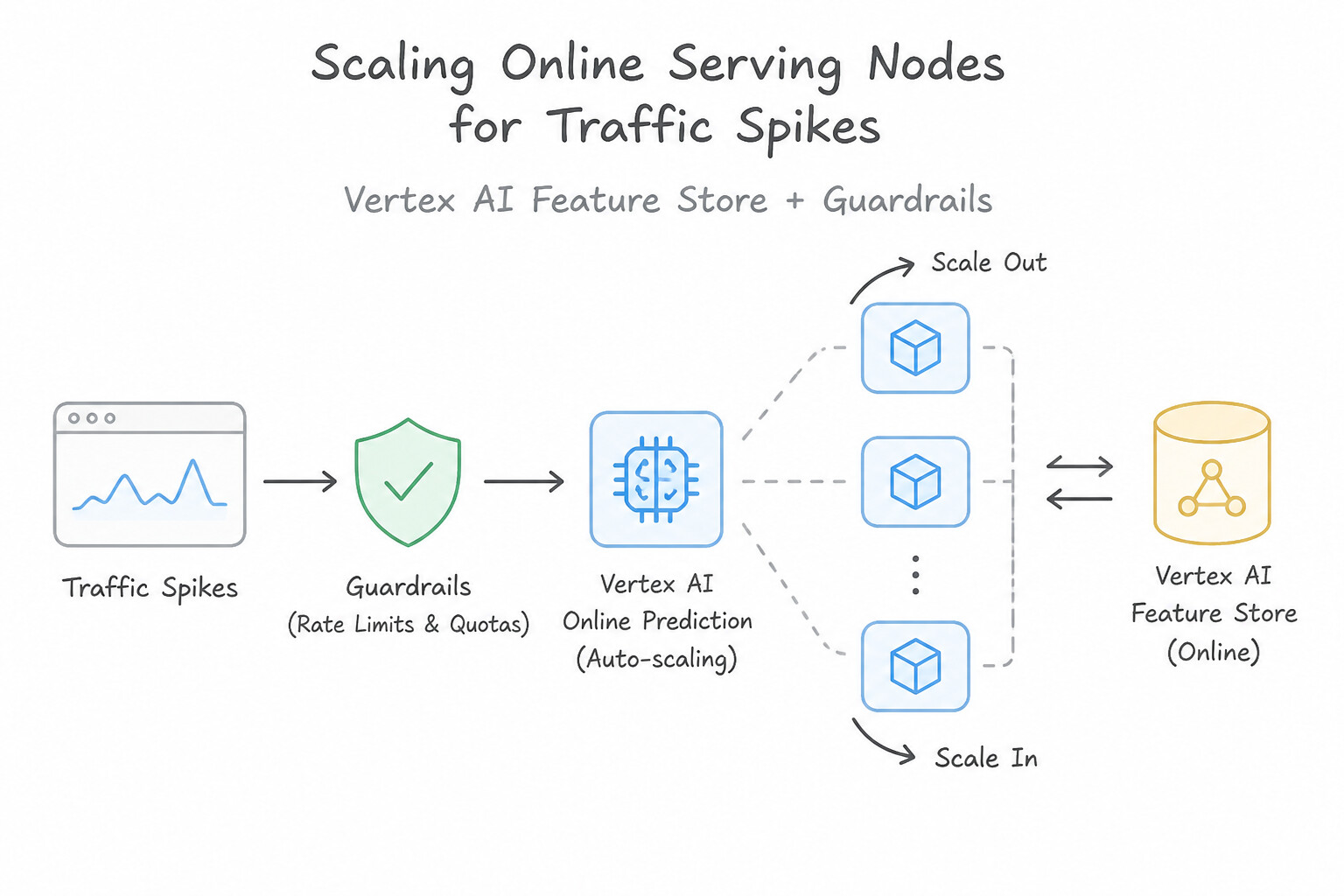
ReadFeatureValues) in milliseconds. - Scaling Online Serving Nodes for Traffic Spikes: The Feature Store Online Store (Bigtable-backed or Optimized Online Serving) uses provisioned serving nodes. Because node rebalancing takes time, always proactively increase the number of online serving nodes ahead of predictable high-traffic events (such as a Black Friday flash sale) rather than relying solely on reactive CPU threshold scaling.
- Low-Latency Feature Freshness (
Streaming Ingestion): When a real-time fraud detection model depends on features from the last 5 minutes (e.g.,recent_declined_card_attempts), compute rolling aggregates in Dataflow and call the Feature Store Streaming Write API (WriteFeatureValues/streaming_read)—never run batch BigQuery imports for sub-minute features.
Key Implementation Patterns
- Mitigating Training-Serving Skew: Use Implement Vertex AI Feature Store to manage feature values and serve them for both training and online prediction. Vertex AI Feature Store provides a unified source for features, ensuring the values used in training match those served in production.
- Scaling for High QPS: Use Manually increase the number of online serving nodes in the Feature Store configuration before the event. Proactively scaling out the nodes ensures capacity is available for the predicted traffic spike. (Avoid alternative: BigQuery is designed for offline batch processing, not low-latency online serving.)
- Real-time Feature Ingestion: Use Implement streaming ingestion using the
write_feature_valuesmethod to update the online store in real time. Streaming ingestion viawrite_feature_valuespushes data directly to the online store for immediate serving availability. (Avoid alternative: Syncing every hour does not meet the 5-minute data freshness requirement.)
Key Takeaways (4.2a)
- Training-Serving Skew is a common cause of poor production performance caused by inconsistent data processing.
- Vertex AI Feature Store centralizes feature logic to ensure consistency between training (batch) and serving (online).
- Avoid duplicating feature engineering logic across different codebases (e.g., SQL and Python) whenever possible.
- Data Warehouses are for analytics; Feature Stores are for serving machine learning features.
Consideration 4.2b: Deploying models to public and private endpoints
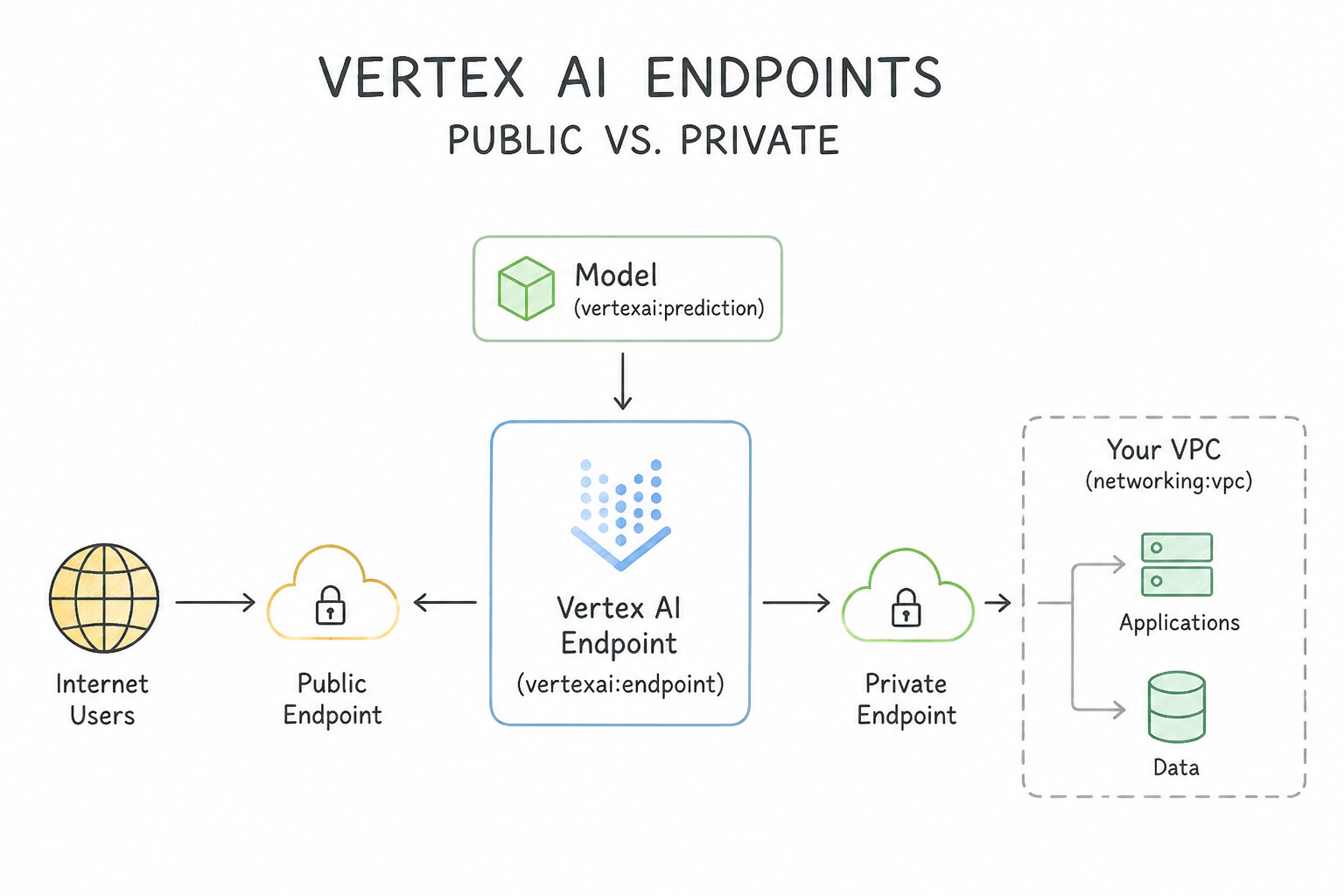
- Public Endpoints vs. Private Endpoints:
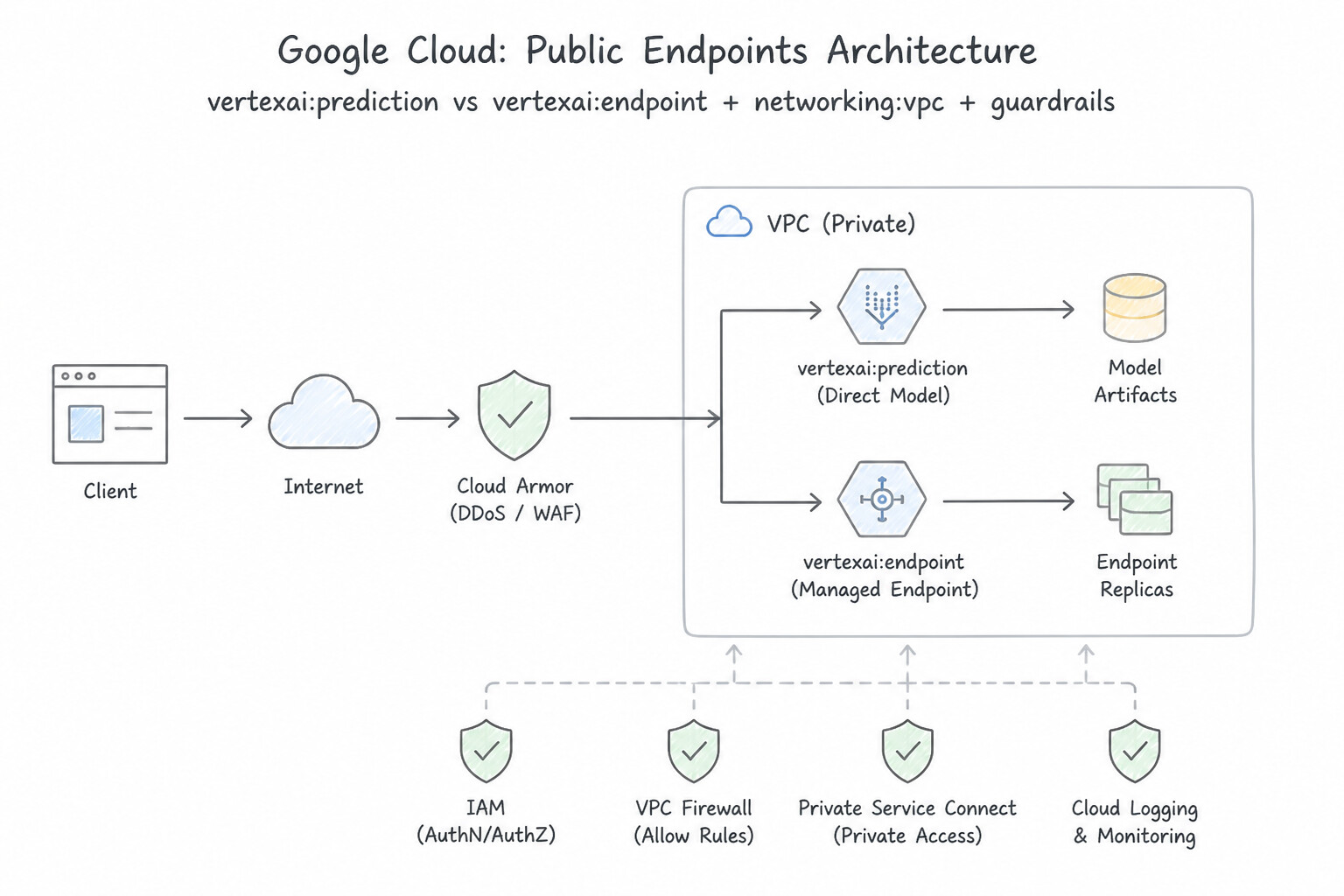
- Public Endpoints expose a Google-managed public IP protected by IAM and TLS—convenient when callers reside across disparate external networks without VPNs, but prohibited by strict financial/healthcare "no public internet" mandates.
- Private Endpoints expose only internal RFC 1918 private IP addresses inside your VPC via VPC Network Peering or Private Service Connect (PSC).
- Solving the On-Premises ↔ VPC Peering Transitivity Trap:
- Suppose your on-premises mainframe connects to your Google Cloud
hub-vpcvia Cloud VPN or Cloud Interconnect, andhub-vpcconnects to a Vertex AI Private Endpoint via VPC Network Peering. By default, VPC Peering is non-transitive:hub-vpc's Cloud Router only advertiseshub-vpc's own local subnets to on-premises, so the on-premises mainframe cannot route packets to the Vertex AI Private Endpoint IP! - The Fix: Configure Cloud Router Custom Route Advertisements on the Cloud VPN/Interconnect BGP session in
hub-vpcto explicitly advertise the Vertex AI peered IP range to the on-premises network (and ensureexport-custom-routesis enabled on the peering connection). - Cross-Project Private Connectivity (
VPC Peeringvs.Private Service Connect): To connect an application GKE cluster inApp-Projectto a Private Endpoint inModel-Projectwith lowest latency and zero public internet traversal, use Private Service Connect (PSC) Endpoints or VPC Network Peering / Shared VPC.
Key Implementation Patterns
- Strict Regulatory Compliance: Use Deploy the model to a private endpoint using VPC Network Peering. Private endpoints use internal IP addresses within your VPC, ensuring the model is not accessible via the public internet. (Avoid alternative: VPC Service Controls protect data boundaries, but a public endpoint still utilizes public network addressing.)
- Hybrid Cloud Connectivity: Use Configure the Cloud Router to advertise the Private Endpoint's IP address range to the on-premises network. You must manually advertise the Private Endpoint's IP range via BGP on the Cloud Router to allow on-premises traffic to route to the peered network.
- Cross-Project VPC Peering: Use Set up VPC Network Peering between the App VPC and the Model VPC. VPC Network Peering connects two VPCs internally, offering the lowest latency and security for cross-project traffic. (Avoid alternative: Cloud NAT is for outbound internet access, not for connecting two private internal networks.)
Key Takeaways (4.2b)
- Private Endpoints provide low-latency, secure communication using internal IP addresses within a VPC.
- Use Private Endpoints when regulatory compliance forbids public internet exposure.
- Public Endpoints are internet-accessible and rely on IAM for security.
- VPC Network Peering is the mechanism that connects your VPC to the Vertex AI service producer network for private access.
Consideration 4.2c: Choosing appropriate hardware (e.g., CPU, GPU, TPU, and edge)
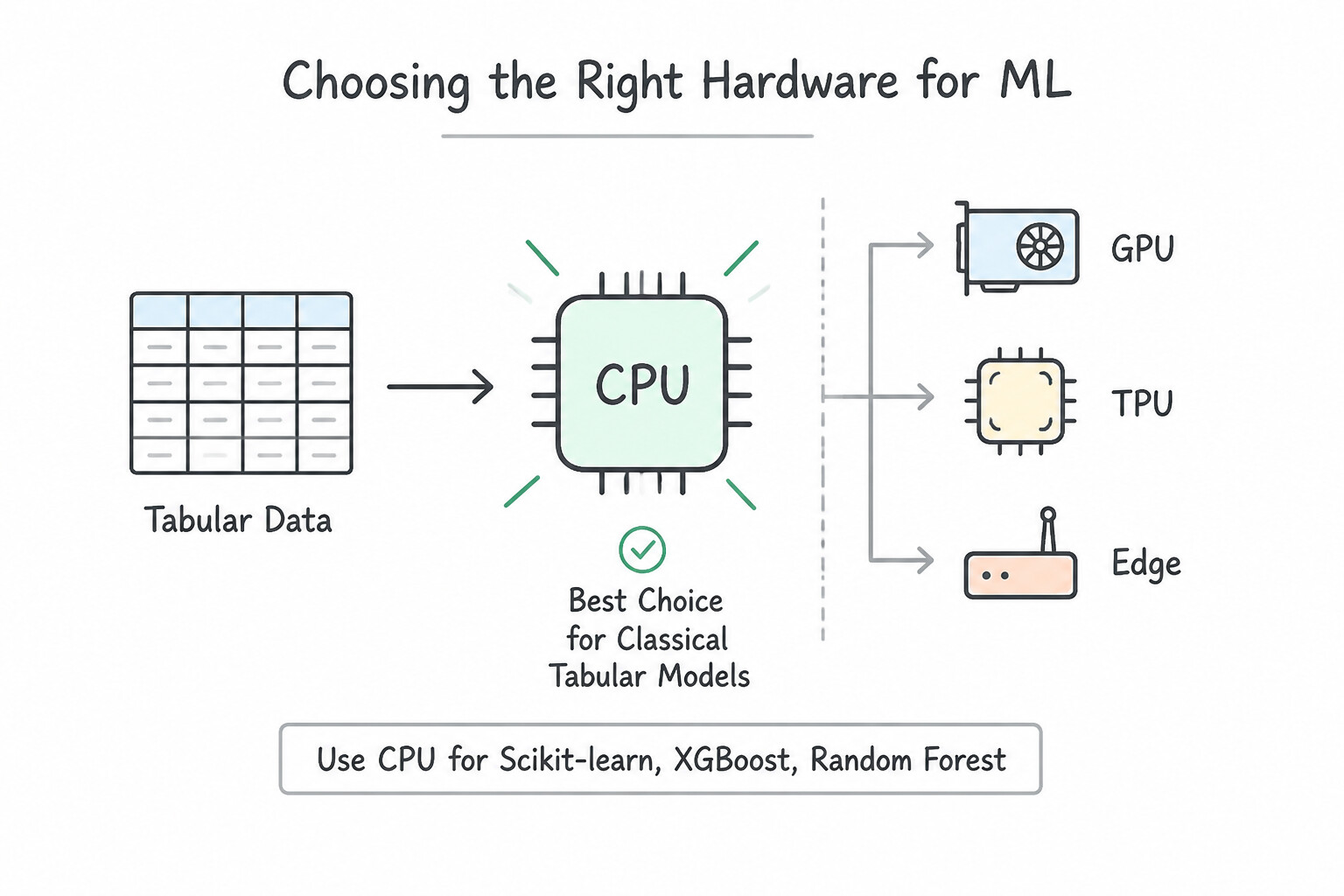
- CPU for Classical Tabular Models (
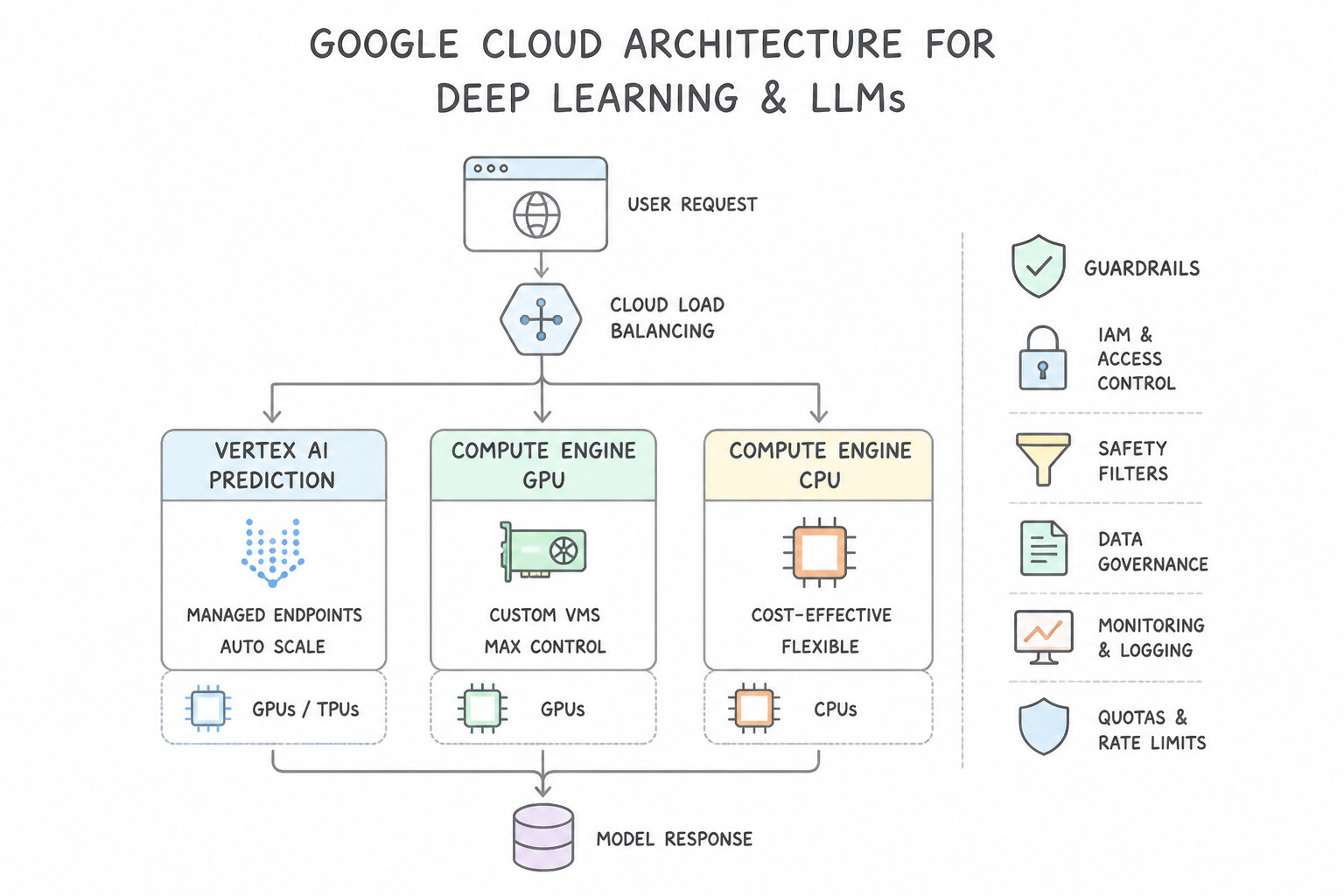
Scikit-learn,XGBoost,Random Forest): Tree-based ensembles and linear models execute sequential branching logic per request and have tiny memory footprints. Serving them on CPU VMs (n1-standard/n2-standard/c2-standard) delivers sub-10ms latency at the lowest cost. - GPUs / TPUs for Deep Learning & Large Language Models:
- For 70B+ parameter Generative AI models, select high-VRAM NVIDIA A100 (80GB) / H100 GPUs or Cloud TPU v5e slices running vLLM (PagedAttention + continuous batching) to meet strict Time-to-First-Token (TTFT) and Queries Per Second (QPS) SLAs.
- For medium CNNs (
ResNet-50) or BERT models with steady online traffic, select cost-efficient inference GPUs like NVIDIA L4 or T4. - Edge Devices (
LiteRT/Edge TPU): When deploying vision/audio models to IoT cameras, factory robotics, or smartphones with sub-10ms local latency and constrained battery/RAM, quantize toINT8and deploy using LiteRT (TensorFlow Lite) or compile for Coral Edge TPU.
Key Implementation Patterns
- Cost Optimization for Tabular Models: Use Select a general-purpose machine type with only CPUs. CPUs are the standard, cost-effective choice for inference with tree-based models on tabular data. (Avoid alternative: GPUs are generally overkill and not cost-effective for Scikit-learn or XGBoost inference on tabular data.)
- Large Language Model (LLM) Latency: Use Deploy the model on Compute Engine instances with NVIDIA A100 or L4 GPUs. NVIDIA A100 and L4 GPUs provide the necessary memory bandwidth and compute power for low-latency inference of large 70B parameter models. (Avoid alternative: CPUs lack the massive parallelism required for fast token generation in large models, leading to unacceptable latency.)
- Standard Computer Vision Cost-Performance: Use Deploy the model on a machine type attached with NVIDIA T4 GPUs. NVIDIA T4 GPUs are the recommended cost-effective hardware for general-purpose ML inference. (Avoid alternative: NVIDIA A100 GPUs are too expensive and powerful for this standard inference scenario.)
Key Takeaways (4.2c)
- Match hardware to workload: Use CPUs for traditional machine learning on tabular data; use GPUs/TPUs for deep learning.
- Consider cost efficiency: Accelerators (GPUs) increase cost significantly; only use them if the performance gain justifies the expense or if latency requirements cannot be met with CPUs.
- Latency targets: 200ms is a generous budget for tabular models on modern CPUs.
- Large Language Models (LLMs) require high-memory bandwidth GPUs (like A100 or L4) for low-latency inference.
Consideration 4.2d: Scaling the serving backend based on the throughput (e.g., Gemini Enterprise Agent Platform Inference and containerized serving)
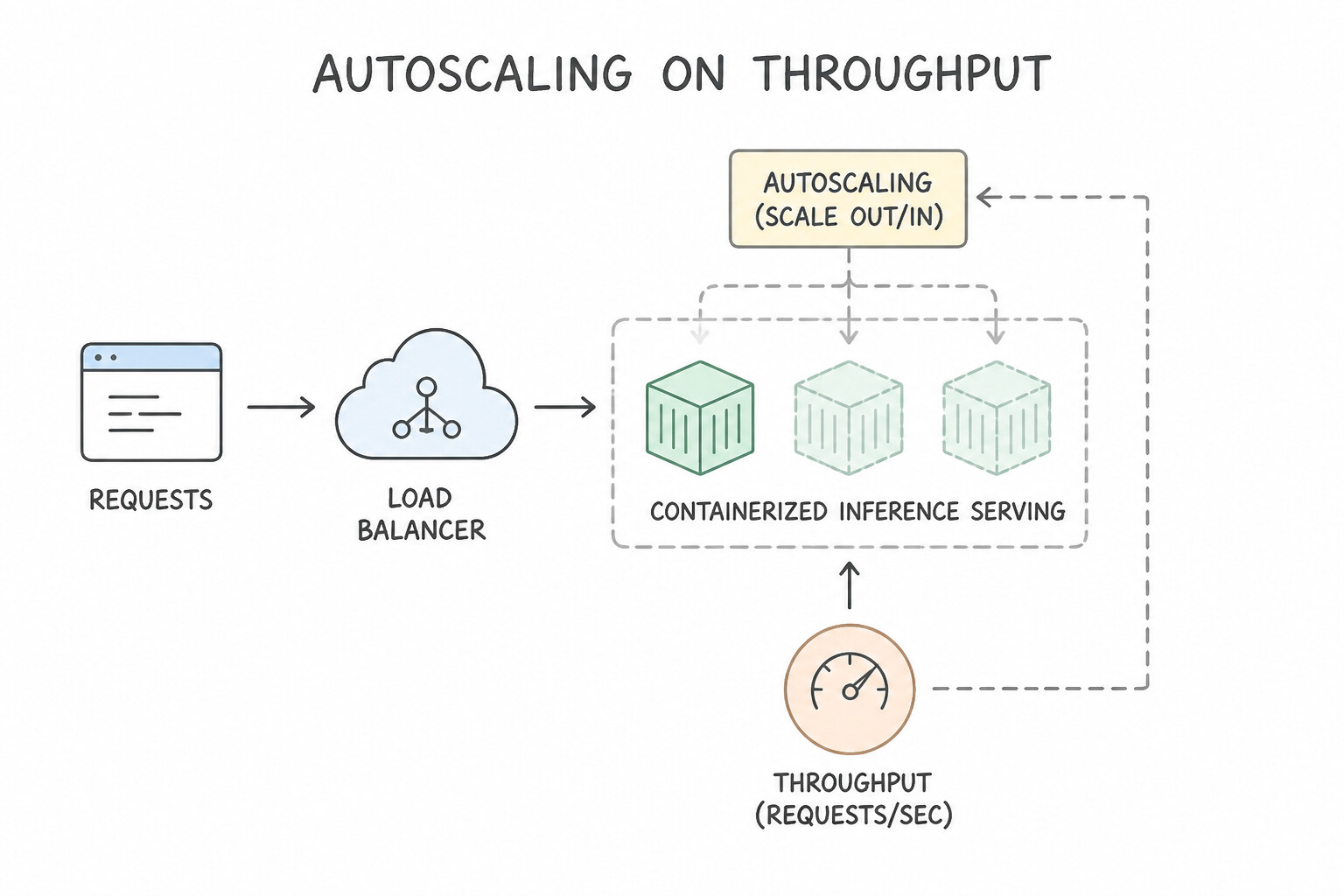
- Autoscaling Metric Selection (
CPU Utilizationvs.GPU Duty Cycle): - When an endpoint backed by NVIDIA GPUs experiences high latency during peak traffic while replica count remains stuck at
1, check the autoscaling metric! The default metric is CPU Utilization (60%), which stays low when inference compute runs on the GPU. Reconfigure the endpoint autoscaler to trigger on GPU Duty Cycle / GPU Utilization (aiplatform.googleapis.com/prediction/online/accelerator/duty_cycle). - Handling Predictable Flash Sales (
Proactive Pre-Scaling): - Reactive autoscaling always lags behind an instantaneous traffic cliff (like a 12:00 PM flash sale or Super Bowl ad) because provisioning new GPU VMs and loading multi-GB weights takes 5–10 minutes. Always manually increase
min_replica_count(or schedule a Cloud Scheduler + Cloud Run Functions call toMutateDeployedModel) before the event starts, and lowermin_replica_countafter the event ends. - Dynamic Batching & Scale-to-Zero:
- Enable Dynamic Batching (in TensorFlow Serving / Triton / Vertex AI Prediction) to group individual concurrent online HTTP requests arriving within a 2–5ms window into a single batched tensor pass on the GPU/TPU, multiplying throughput (QPS).
- For sporadic/dev workloads where idle cost must be zero, set
min_replica_count=0(where supported) or deploy the container on Cloud Run.
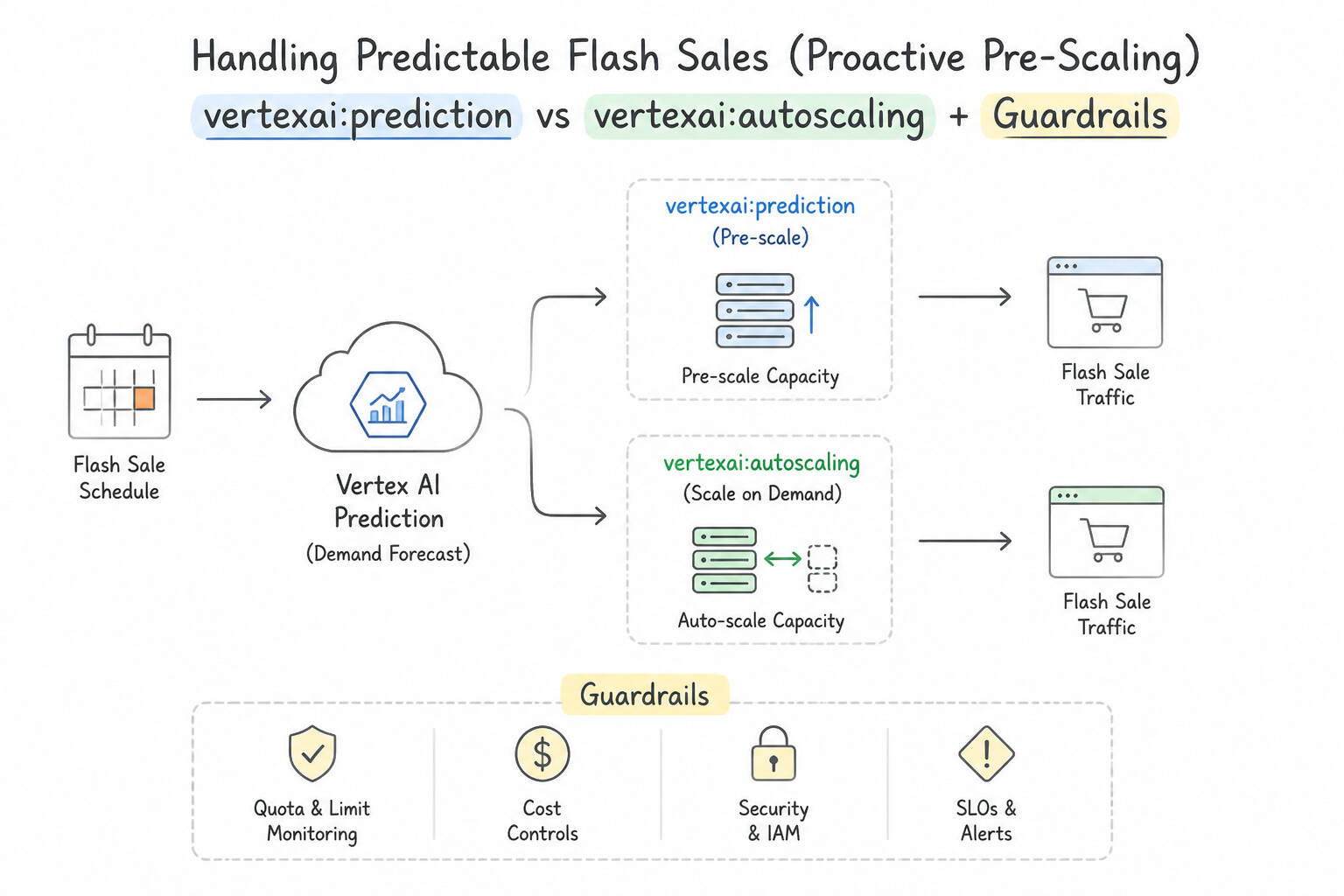
Key Implementation Patterns
- Autoscaling Metrics for GPU-based Models: Use Configure the autoscaling metric to use accelerator-duty-cycle with a target percentage. GPU-based models should use accelerator metrics, not CPU, to trigger autoscaling. (Avoid alternative: CPU utilization is already low; raising the target won't trigger scaling.)
- Mitigating Cold Starts for Flash Sales: Use Update the deployment to set minReplicaCount to a higher value before the event. Increasing minReplicaCount provisions instances in advance, eliminating cold-start latency during the initial traffic spike. (Avoid alternative: MaxReplicaCount limits the maximum scale but does not provision resources in advance to handle the initial burst.)
- Custom Container Health Checks: Use Configure the application to listen on the port defined by the AIP_HTTP_PORT environment variable and respond to the /health path. Vertex AI requires custom containers to listen on the port specified by the AIP_HTTP_PORT environment variable and pass a health check.
Key Takeaways (4.2d)
- Default autoscaling policies often use CPU utilization, which may not reflect the load on specialized hardware like GPUs.
- For GPU-based workloads, use metrics that reflect accelerator usage, such as
accelerator-duty-cycle.- Align your scaling metrics with the actual resource bottleneck of your application to ensure responsiveness.
- Vertex AI Prediction scales automatically but reactively, causing potential cold starts during spikes.
Consideration 4.2e: Tuning ML models for training and serving in production
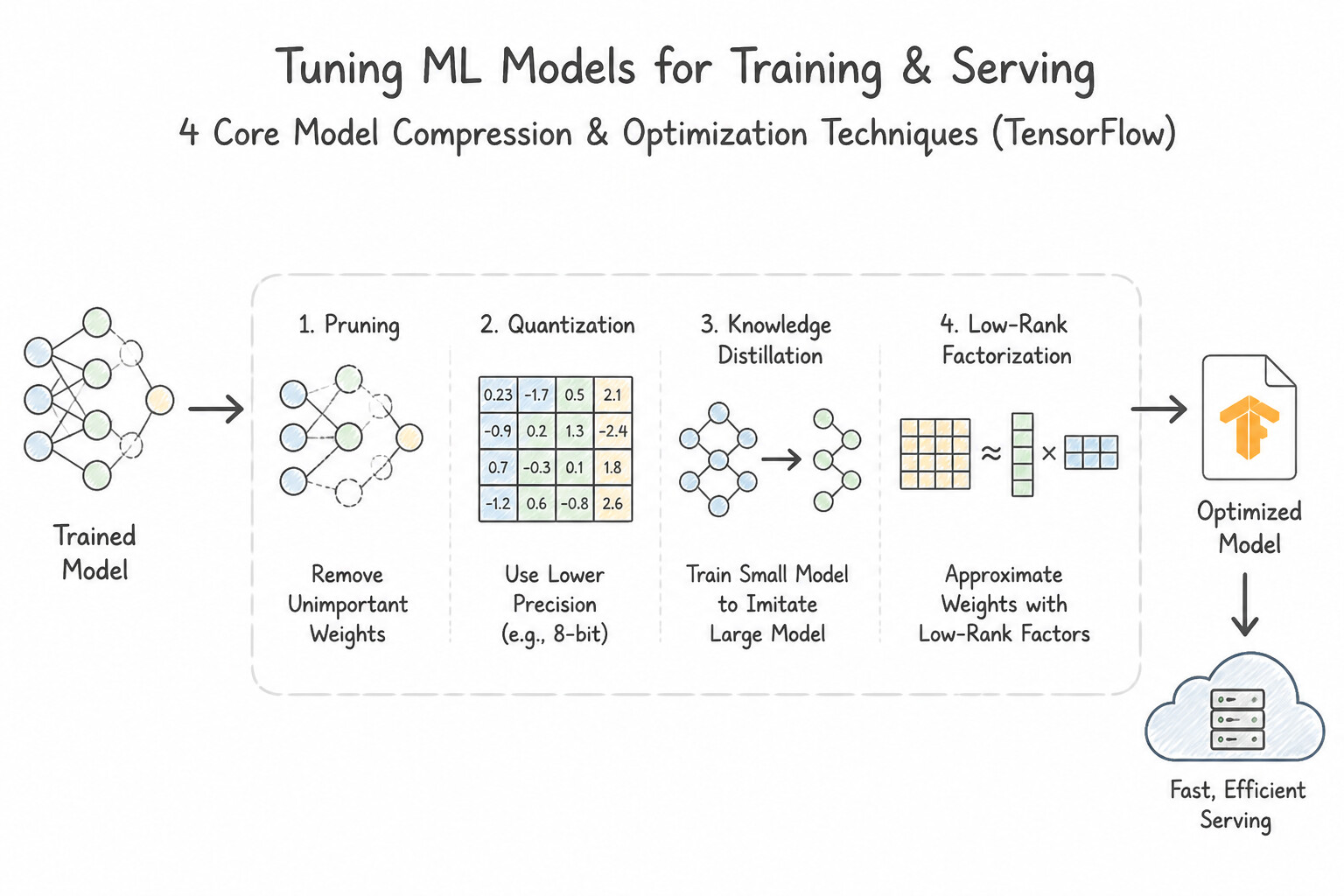
- The 4 Core Model Compression & Optimization Techniques:
- Post-Training Quantization (
FP32→FP16orINT8): Converts 32-bit floating-point weights and activations into 16-bit floats or 8-bit integers without retraining from scratch. Reduces model size by 4x (FP32 → INT8), lowers RAM/VRAM footprint, and accelerates inference on CPU/GPU/Edge hardware. (IfINT8post-training quantization causes an unacceptable accuracy drop, use Quantization-Aware Training [QAT] to simulate quantization noise during fine-tuning). - Knowledge Distillation (
Teacher → Student): When a massive ensemble or large BERT/LLM (Teacher) is too slow for a strict<20msonline latency SLA, train a much smaller, shallower neural network (Student, e.g., DistilBERT) to match the soft probability logits (temperature-scaled softmax outputs) of the teacher model. - Weight Pruning (Sparsity): Eliminates near-zero, non-critical synaptic weights in a neural network to shrink storage size and enable sparse matrix acceleration.
- Hardware-Specific Graph Compilation (
TensorRT/TF-TRT/XLA): When serving a TensorFlow or PyTorch model on NVIDIA GPUs (T4,L4,A100), compile the model with NVIDIA TensorRT (TF-TRT), which fuses adjacent layers (e.g.,Conv2D + Bias + ReLU), selects optimal CUDA kernels, and calibratesFP16/INT8precision for Tensor Cores.
Key Implementation Patterns
- Post-Training Quantization for Latency: Use Convert the model to TensorFlow Lite and apply post-training quantization to int8. Post-training quantization converts weights to int8, reducing model size and latency for edge deployment without retraining. (Avoid alternative: Knowledge distillation requires training a new student model, which contradicts the requirement to avoid retraining.)
- Knowledge Distillation for Large Transformers: Use Use knowledge distillation to train a smaller student model that learns from the output of the massive teacher model. Knowledge distillation creates a smaller student model that mimics a larger teacher model to reduce size and latency.
- Optimizing for NVIDIA GPUs with TF-TRT: Use Use the TensorFlow-TensorRT (TF-TRT) integration to convert the SavedModel. TF-TRT optimizes TensorFlow models specifically for NVIDIA GPUs by fusing layers and calibrating precision. (Avoid alternative: TensorFlow Lite is optimized for mobile and edge devices, not specifically for high-performance server-side NVIDIA GPUs.)
Key Takeaways (4.2e)
- Edge Deployment: Always consider model size and inference speed constraints.
- Post-Training Quantization (PTQ): The primary technique to reduce model size (float32 to int8) without retraining.
- TensorFlow Lite: The framework used to convert and run models on mobile and edge devices.
- Constraint Analysis: If 'no retraining' is specified, discard options involving distillation, architecture changes, or Quantization Aware Training (QAT).
Quick Decision Cheat Sheet (Subsection 4.2)
If the Scenario Requires... | Choose This Google Cloud Pattern | Avoid This Common Mistake |
|---|---|---|
"Private ingress from multiple client VPCs to an Agent Platform Endpoint without managing VPC Peering IP overlaps" | Private Service Connect ( PSC) Private Endpoint | Public Endpoint with firewall rules |
"Compress a float32 model by 4x to 8-bit integers without retraining" | Post-Training Quantization ( INT8) | Knowledge Distillation or Dropout |
"Compress a 24-layer Transformer into a 4-layer model by training on soft teacher probabilities" | Knowledge Distillation | Post-training pruning |
"Fuse Conv2D + BatchNorm + ReLU layers for NVIDIA T4/L4/A100 GPU inference" | TensorRT (TF-TRT) | Apache Arrow or TFRecord |
"Open-source LLM serving engine with PagedAttention and continuous batching on GKE/Vertex" | vLLM | Scikit-learn joblib |
"Aggregate multiple concurrent individual online prediction requests into one GPU forward pass" | Dynamic Batching | Batch Prediction Job (offline asynchronous) |
"Fast approximate nearest neighbor (ANN) vector similarity search index algorithm in Vertex AI Vector Search" | ScaNN (Tree-AH algorithm) | Brute-force exact $k$-NN on unindexed BigQuery tables |
Further Reading (Subsection 4.2)
- Vertex AI Feature Store overview — This page explains the benefits of using a feature store, specifically highlighting how it mitigates training-serving skew by providing a centralized repository for feature values.
- Introduction to feature management in Vertex AI — Documentation on how to update the number of online serving nodes to handle changes in traffic.
- Use a private endpoint for online prediction — Documentation explaining how private endpoints work, including the requirement for VPC peering and the benefit of low latency and secure connections.
- About accessing Vertex AI services through Private Service Connect endpoints — Refer to the section 'Accessing the private endpoint from on-premises' which explicitly states the requirement for custom route advertisements.
- Advertise custom address ranges — Documentation on how to update Cloud Router BGP advertisements to include peering ranges.
- VPC Network Peering overview — Explains how VPC Network Peering enables internal IP connectivity between networks in the same or different projects.
Book TOC · Previous · Chapter 4 of 7 · Next
AwesomeGCP.com Learning
The approach taken is a question-led learning approach: you explore realistic project scenarios where you need to make decisions or take actions to achieve business goals within specific constraints. Instead of passive learning, you are challenged to think and work through the options to master the Professional Machine Learning Engineer (PMLE) certification!