Book TOC · Previous · Chapter 2 of 6 · Next
Chapter 2: Ingesting & Processing Data Pipelines: Pub/Sub, Dataflow, Dataproc, Dataform & Composer
Chapter Focus: Batch vs. streaming architecture, Pub/Sub ordering/exactly-once/DLQs, Apache Beam / Dataflow (windows, watermarks, triggers, state/timers, Shuffle/Prime), Dataproc Serverless, Dataform SQL ELT, and Cloud Composer.
Subsection 2.1: Planning the data pipelines
The Big Picture
Before writing a single line of Apache Beam or Spark code, a Data Engineer must plan the topology of sources, sinks, network paths, and cryptographic boundaries. Pipelines that skip this planning stage fail in production in four ways:
- The Unnecessary Compute Hop (
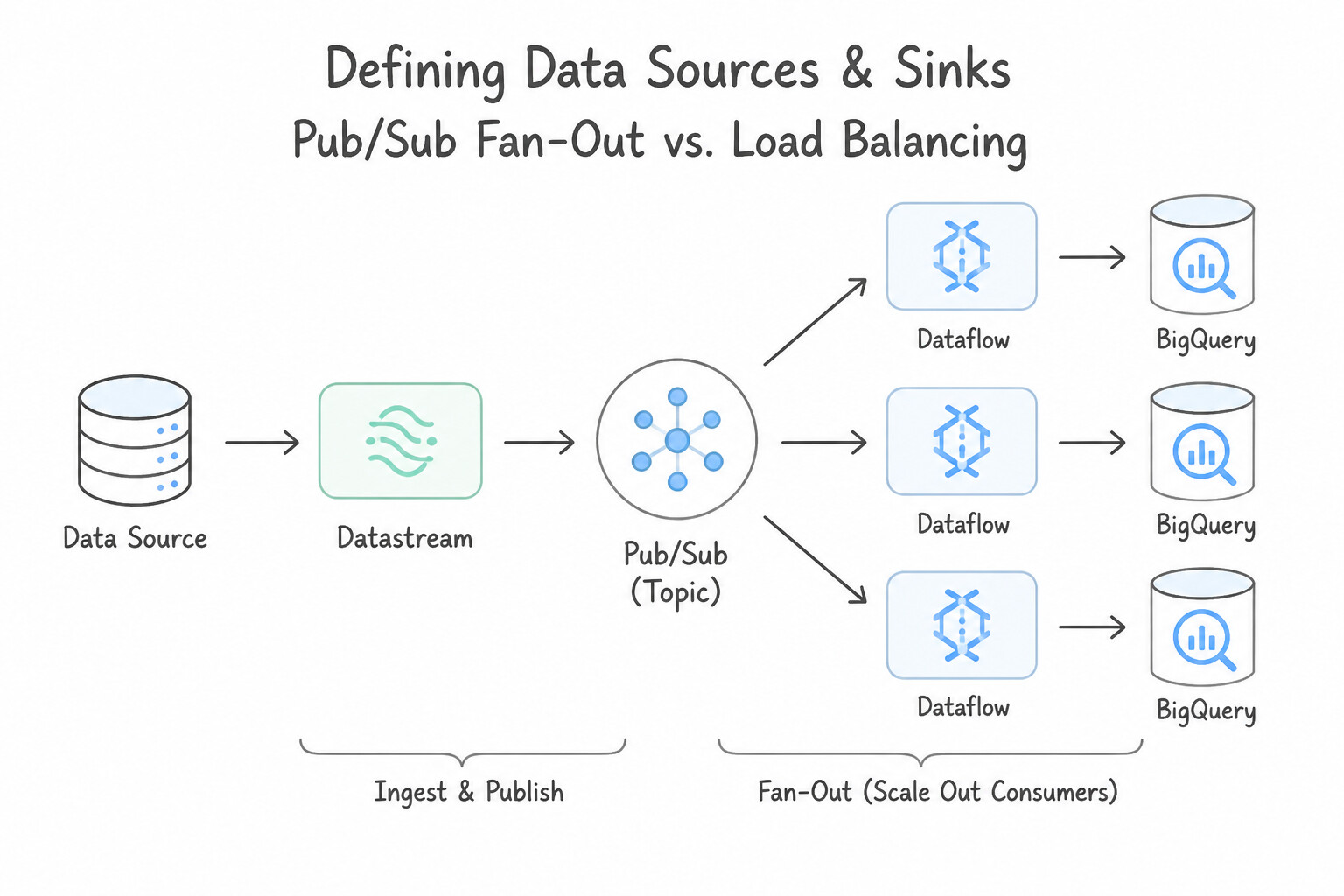
2.1a,2.1b): Spinning up a 24/7 streaming Dataflow cluster just to copy unmodified JSON events from Pub/Sub into BigQuery or Cloud Storage wastes thousands of dollars a month in worker VM costs. When no complex in-flight transformation or stateful windowing is required, native Pub/Sub BigQuery Subscriptions and Pub/Sub Cloud Storage Subscriptions write directly from the message bus to the sink with zero compute infrastructure to manage. - The Fan-Out Starvation Trap (2.1a): Attaching three different microservices (Fraud Detection, Real-Time Billing, and Archival) to a single Pub/Sub subscription causes Pub/Sub to load-balance messages across them—so each service receives only one-third of the events! Fan-out in Pub/Sub requires One Topic → Multiple Subscriptions (one dedicated subscription per logical consumer application).
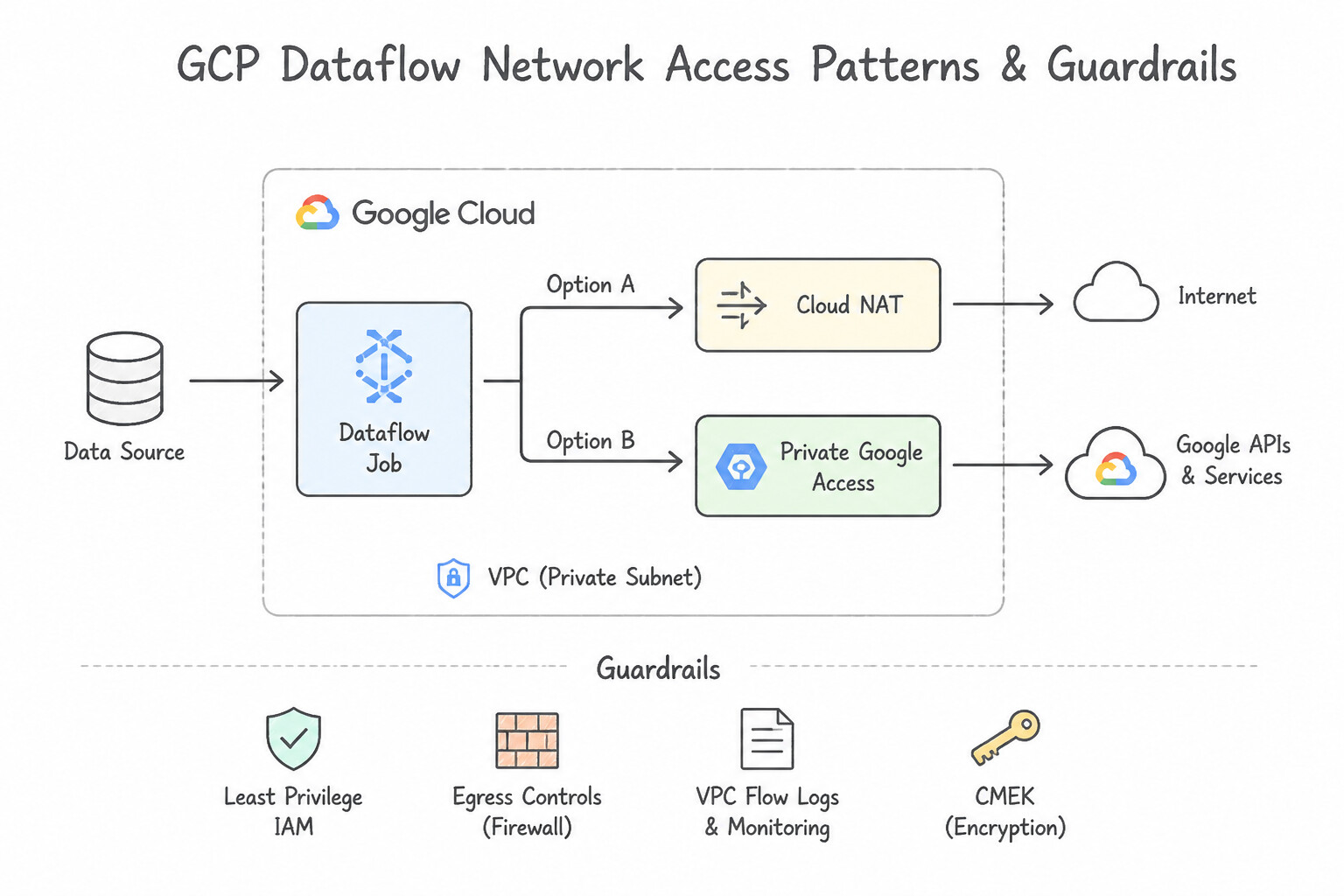
- Public IP Exposure & NAT Egress Charges (2.1c): Deploying Dataflow or Dataproc worker VMs with external public IPs violates enterprise security policies, while routing terabytes of Cloud Storage/BigQuery traffic through Cloud NAT incurs unnecessary per-GB NAT processing fees. Production pipelines disable external IPs (
--no_use_public_ips), enable Private Google Access (PGA) on the VPC subnet (free internal routing to Google APIs), and use Shared VPC + VPC Peering / Private Service Connect (PSC) for hybrid sources.
Consideration 2.1a: Defining data sources and sinks
When planning ingestion sources and target sinks:
- Pub/Sub Fan-Out vs. Load Balancing:
- Multiple Independent Consumers (Fan-Out): Create one Topic and
$N$ Subscriptions (one per consumer group). Every subscription receives 100% of the messages independently. - Horizontal Scaling of a Single Consumer: Multiple worker instances read from the same Subscription; Pub/Sub load-balances messages across those workers.
- Direct Zero-Compute Subscriptions (
Pub/Sub -> BigQueryandPub/Sub -> GCS): Whenever a scenario asks to ingest Pub/Sub messages into BigQuery or Cloud Storage with minimal operational overhead and lowest cost and no custom in-flight code transformation, choose a Pub/Sub BigQuery Subscription (supports topic schema mapping and metadata fields) or Pub/Sub Cloud Storage Subscription—reject Dataflow! - Strict Per-Entity Ordering (
Ordering Keys): Standard Pub/Sub guarantees at-least-once delivery, not global ordering. To process events for a specific entity in order (e.g., status updates fororder_id=991or telemetry fromtruck_42), set an Ordering Key (order_id) on each message and enable message ordering on the subscription (never use a single global ordering key across all entities, as that serializes throughput to a single worker!). - Pub/Sub vs. Pub/Sub Lite (Managed Kafka): Choose standard Pub/Sub for globally distributed, auto-scaling, zero-ops ingestion; choose Pub/Sub Lite (or Google Cloud Managed Service for Apache Kafka) only when zonal partition-based capacity reservation at ultra-low cost is explicitly prioritized over automatic scaling.
Key Implementation Patterns
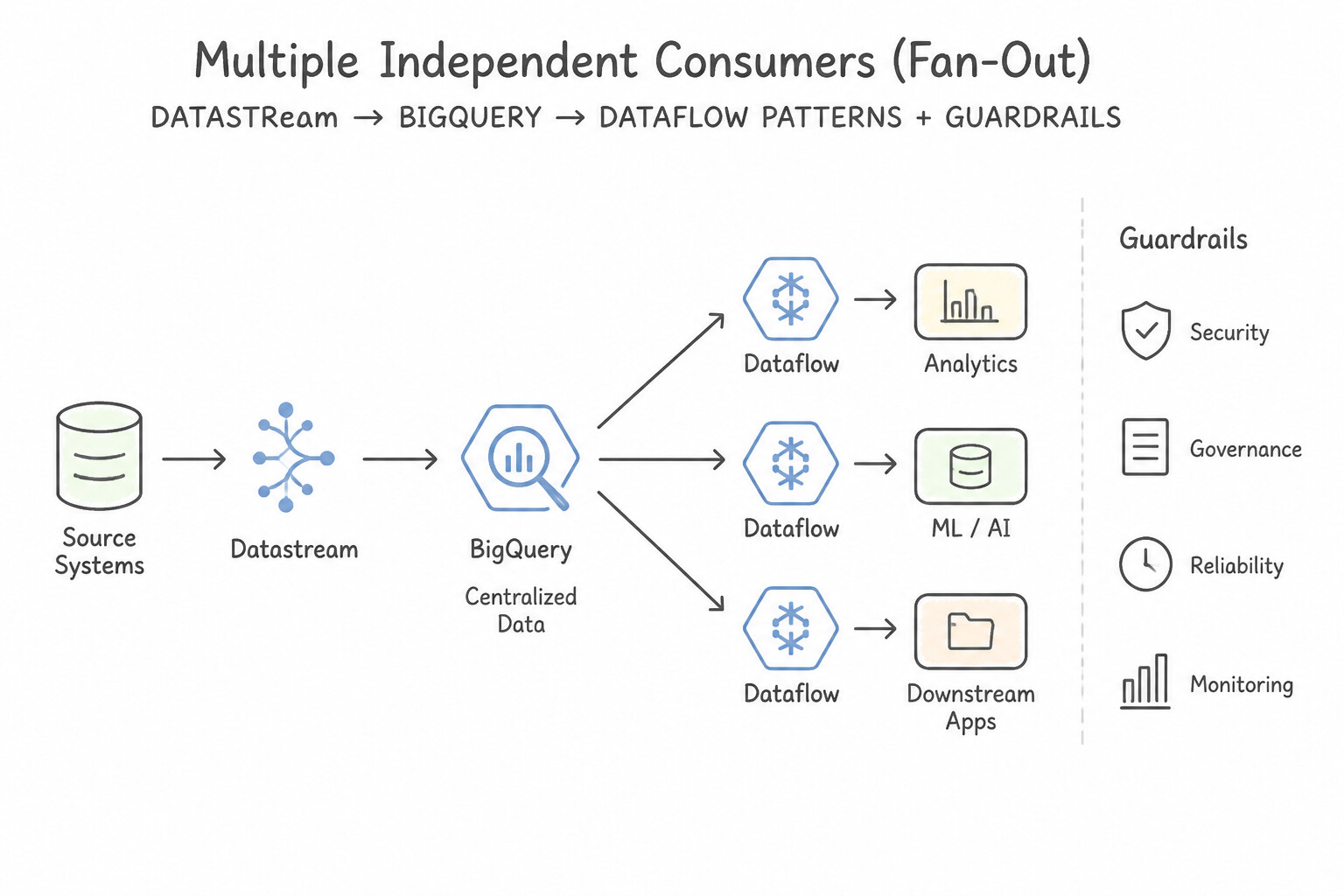
- Migrating On-Premises Oracle to BigQuery: Use Configure a Datastream stream to replicate data from the Oracle database directly to BigQuery. Datastream is the Google Cloud serverless CDC service used to replicate data from Oracle to BigQuery efficiently using log-based capture.
- Transferring AWS S3 Data to Cloud Storage: Use Configure a transfer job using Storage Transfer Service. Storage Transfer Service is a managed service designed for large-scale, cloud-to-cloud data transfers without VM management. (Avoid alternative: Dataflow is a data processing tool, not a dedicated migration tool, and adds unnecessary complexity for simple storage transfers.)
- IoT Time-Series Ingestion for High Throughput: Use Ingest the data into Cloud Bigtable. Use a row key design that incorporates the timestamp. Cloud Bigtable is optimized for high-throughput writes and time-series data, making it ideal for IoT scenarios. (Avoid alternative: BigQuery is optimized for analytical queries (SQL), not for the low-latency writes and operational range scans required by high-velocity IoT data.)
Key Takeaways (2.1a)
- Datastream is the primary Google Cloud service for serverless, log-based Change Data Capture (CDC).
- Log-based CDC is preferred over query-based polling when you need to minimize performance impact on the source database.
- BigQuery Data Transfer Service is best for scheduled batch transfers from SaaS applications, not real-time DB replication.
- Storage Transfer Service is the standard managed solution for cloud-to-cloud migrations (e.g., AWS S3 to GCS).
Consideration 2.1b: Defining data transformation and orchestration logic
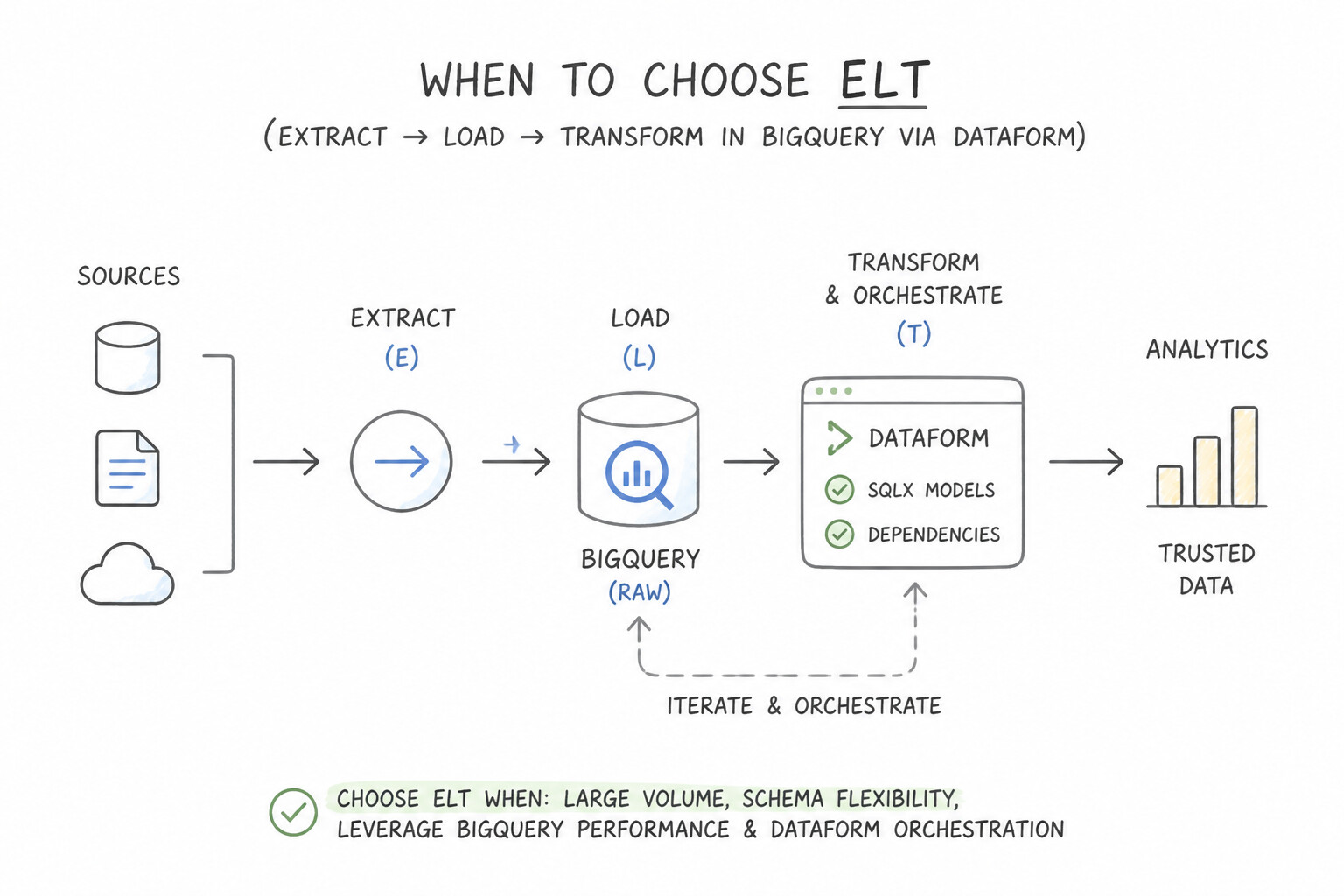
Decide early whether a pipeline belongs in the ETL or ELT paradigm:
- When to Choose
ELT(Extract → Load → Transform in BigQuery viaDataform): - Source data is structured or semi-structured (JSON/Avro/Parquet) and raw payloads are allowed to land in BigQuery/GCS.
- Transformations consist of SQL joins, aggregations, window functions, and schema standardization.
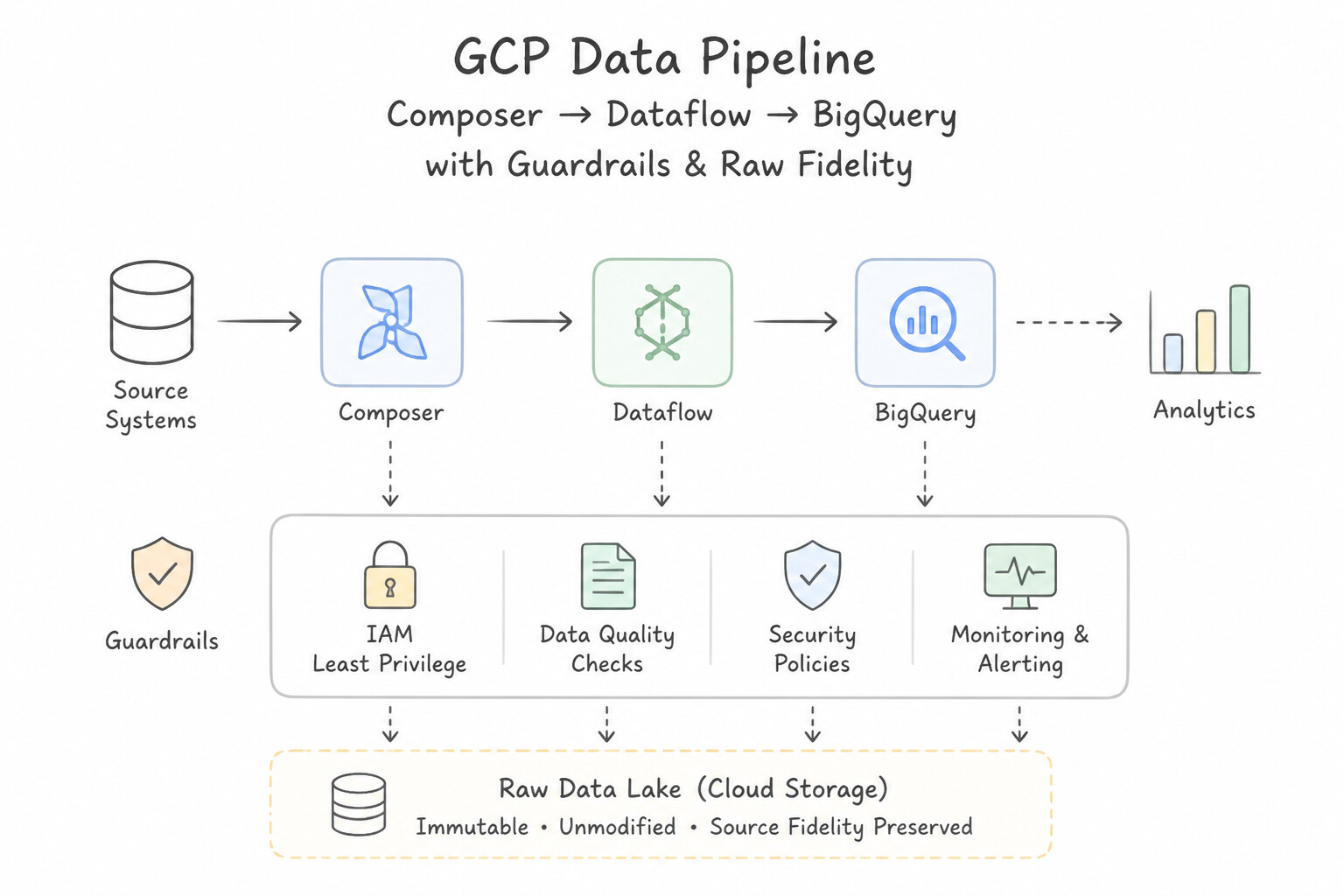
- Benefit: Preserves raw source fidelity in a landing table for instant replay and eliminates external compute clusters.
- When to Choose
ETL(Extract → Transform inDataflow→ Load): - Compliance mandates that raw PII must be redacted or tokenized in-flight before ever touching disk in the data warehouse.
- Unbounded streaming data requires complex event-time session windowing, stateful cross-stream joins with high-frequency lookup side inputs, custom binary protocol decoding, or real-time ML inference (
RunInference) prior to sink delivery.
Key Implementation Patterns
- Complex DAG Orchestration: Use Use Cloud Composer to define a Directed Acyclic Graph (DAG) that manages the tasks. Cloud Composer (Apache Airflow) natively supports complex dependencies, retries, and backfilling. (Avoid alternative: Cloud Scheduler invokes tasks based on time, not dependencies, and lacks native backfilling capabilities.)
- Code-Free Pipeline Development: Use Use Cloud Data Fusion to create the pipeline. Cloud Data Fusion provides a code-free GUI for building data pipelines, making it suitable for teams without programming expertise. (Avoid alternative: Cloud Composer relies on Python for defining workflows and does not provide a code-free GUI for data transformation.)
- Streaming Window Logic: Use Apply a session window with a gap duration of five minutes. Session windows group events dynamically based on gaps in activity, fitting the requirement for user inactivity logic. (Avoid alternative: Fixed windows slice time into static blocks regardless of activity gaps, often splitting single sessions.)
Key Takeaways (2.1b)
- Use Cloud Composer (Apache Airflow) for complex data pipelines requiring dependency management and backfilling.
- Use Cloud Scheduler for simple, time-based cron jobs without complex dependencies.
- Use Workflows for low-latency service orchestration (connecting APIs), but prefer Composer for heavy data engineering tasks (ETL).
- Backfilling is a specific feature of Airflow that allows re-running pipelines for past dates.
Consideration 2.1c: Networking fundamentals
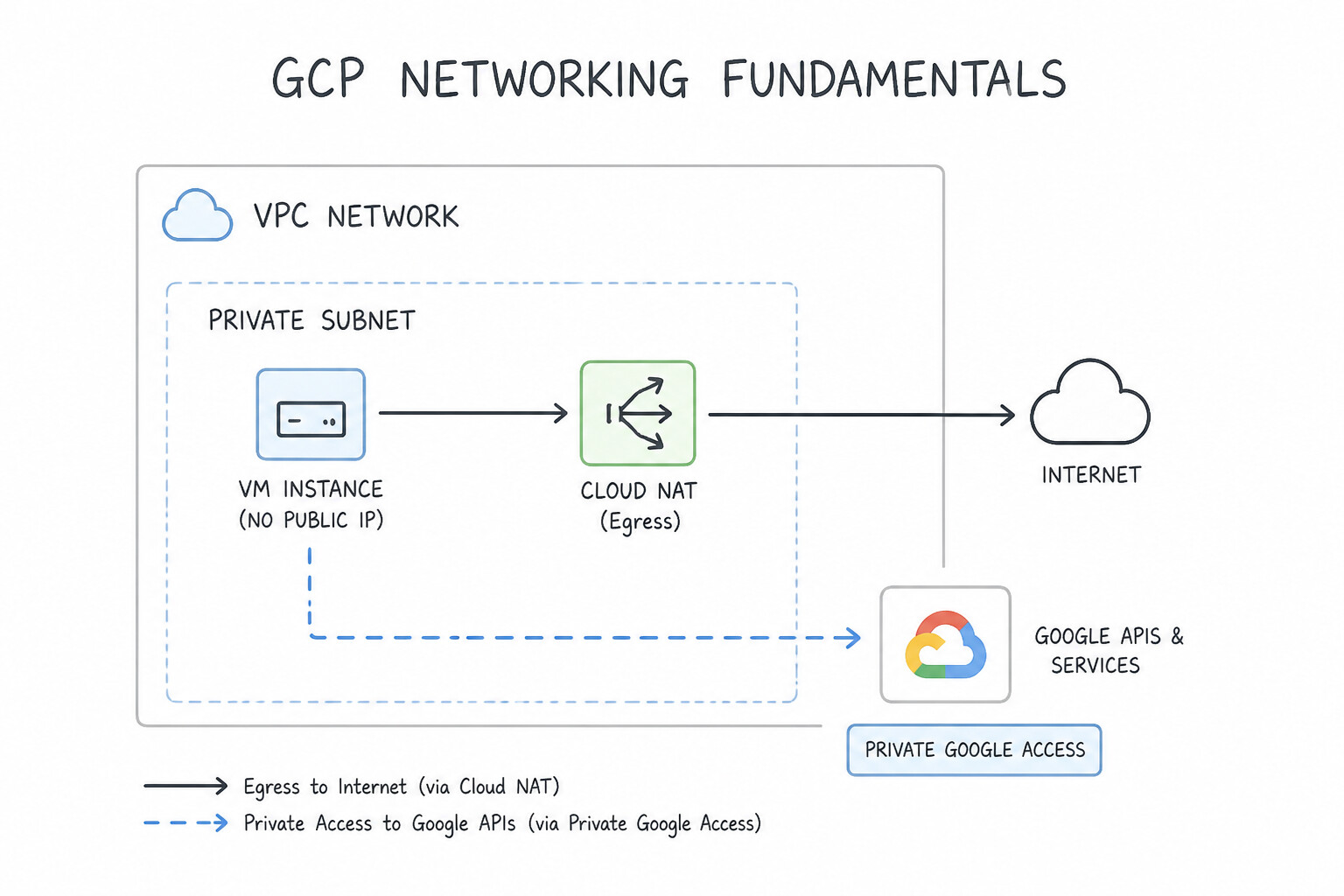
Networking questions in production test four recurring production requirements:
- Private Workers Without External IPs (
--no_use_public_ips+Private Google Access): - Always disable public IPs on Dataflow (
--no_use_public_ips) and Dataproc (--no-address/ internal IP only) worker VMs. - Enable Private Google Access (
PGA) on the VPC subnet so private worker VMs can reach Google Cloud APIs (storage.googleapis.com,bigquery.googleapis.com,pubsub.googleapis.com) over Google's internal network without needing a Cloud NAT gateway! - Reserve Cloud NAT strictly for when private workers must fetch external packages/APIs over the public internet (e.g., external SaaS webhooks or public PyPI mirrors if Artifact Registry remote repositories aren't used).
- Firewall Rules & Subnet Sizing for Dataflow/Dataproc:
- Dataflow and Dataproc workers communicate heavily with each other during distributed shuffles. Ensure an internal VPC firewall rule allows TCP ports
12345–12346(for Dataflow VMs taggeddataflow) or internal subnet traffic for Dataproc. - Ensure the VPC subnet CIDR range is large enough (e.g.,
/22or/20) so Dataflow/Dataproc horizontal autoscaling never fails withIP_SPACE_EXHAUSTED. - Connecting Containerized Workloads to Cloud SQL (
Cloud SQL Auth Proxy): When GKE pods, Cloud Run jobs, or Dataflow workers connect to Cloud SQL, use the Cloud SQL Auth Proxy (sidecar container or language connector) with Private IP to get automatic IAM database authentication and mTLS encryption without managing static SSL certificates.
Key Implementation Patterns
- Secure Dataflow Worker Connectivity: Use Configure a Cloud NAT gateway on the subnet used by the Dataflow workers. Cloud NAT enables outbound internet access for private instances without assigning them public IP addresses. (Avoid alternative: Private Google Access only connects to Google APIs, not the public internet.)
- Dataproc in a Shared VPC Environment: Use Request the Compute Network User role on the Host Project subnet for the Google APIs Service Agent and Dataproc Service Agent of your Service Project. Grant the Compute Network User role on the Host Project subnet to the Service Project's Google APIs and Dataproc Service Agents.
- High-Throughput Hybrid Ingestion: Use Provision a Dedicated Interconnect connection between your on-premises data center and Google Cloud. Dedicated Interconnect provides the necessary bandwidth and bypasses the unstable public internet. (Avoid alternative: Transfer Appliance handles the initial load but Cloud VPN relies on the unstable public internet, failing the daily requirement.)
Key Takeaways (2.1c)
- Dataflow workers are Compute Engine VMs that follow standard VPC networking rules.
- To secure workers, disable public IPs using the
--no_use_public_ipsor equivalent flag.- Use Cloud NAT to provide outbound-only internet access to private VMs.
- Private Google Access is for Google APIs, not the general internet.
Consideration 2.1d: Data encryption
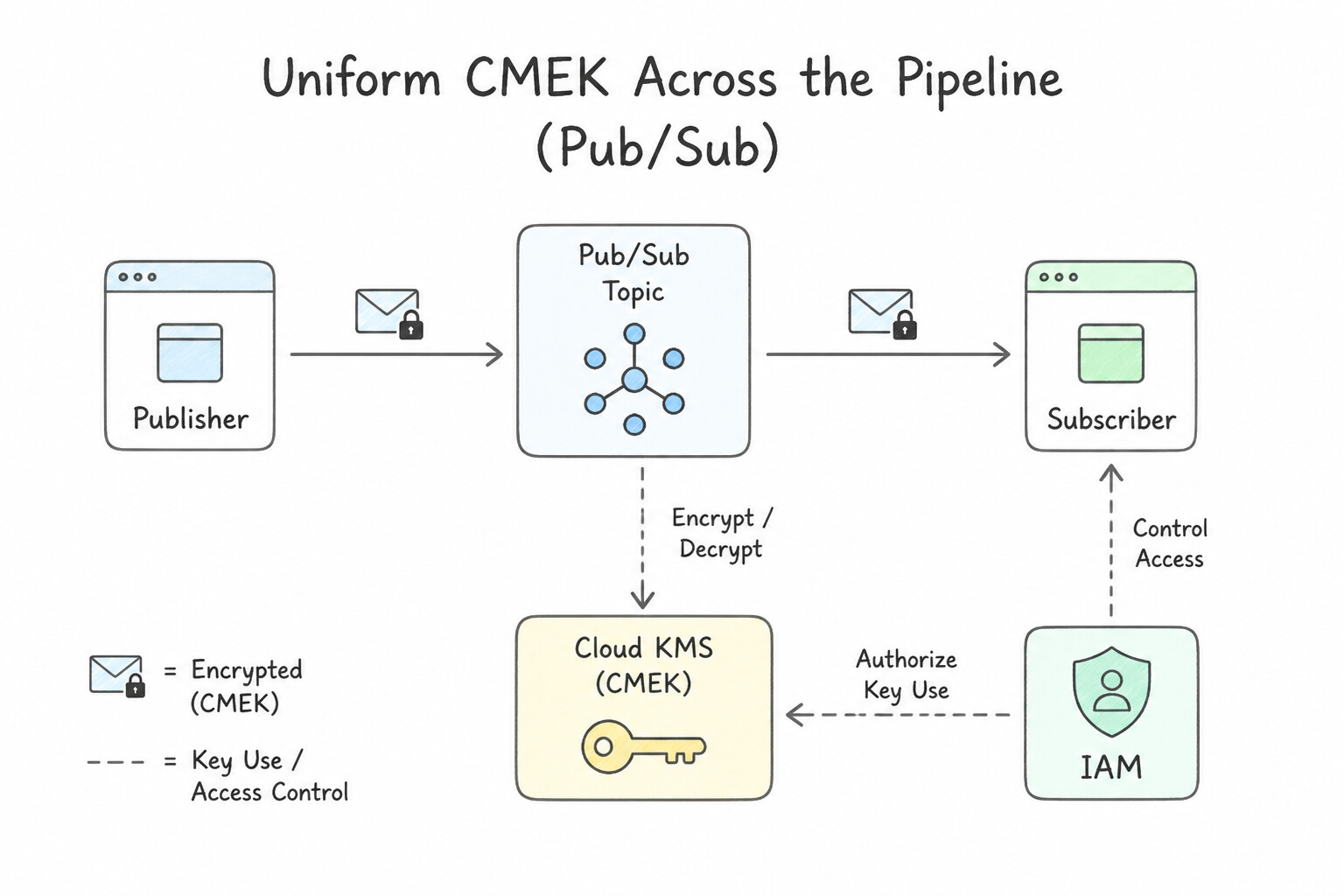
A pipeline is only as secure as its weakest temporary buffer:
- Uniform CMEK Across the Pipeline Chain: If a compliance policy requires Customer-Managed Encryption Keys (
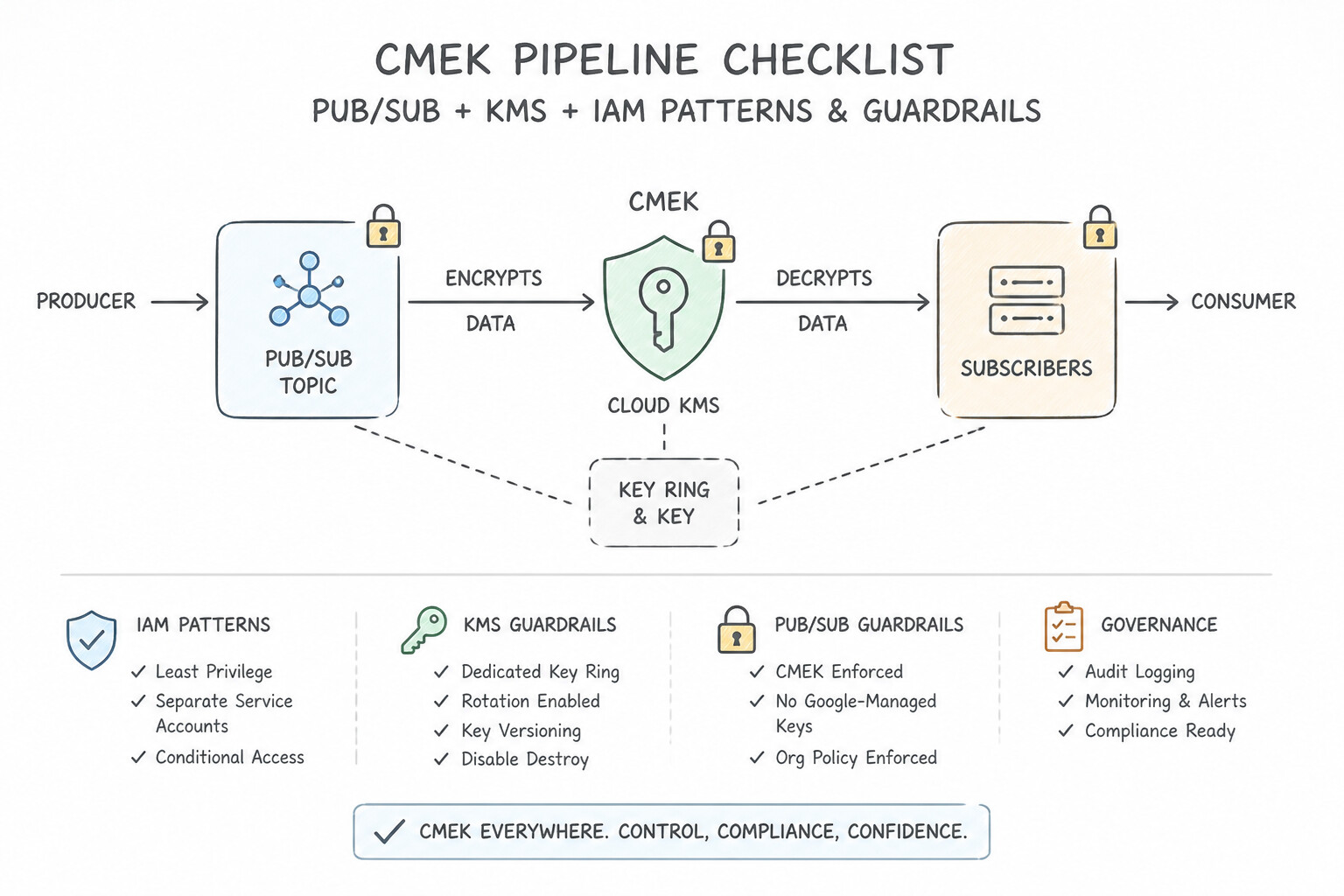
CMEK), configuring CMEK only on the final BigQuery table is insufficient because unencrypted intermediate data sits in Pub/Sub, Dataflow persistent disks, and Cloud Storage staging buckets! - The Complete CMEK Pipeline Checklist:
- Configure the Cloud KMS CryptoKey in the same region as the pipeline resources.
- Grant
roles/cloudkms.cryptoKeyEncrypterDecrypterto the Pub/Sub Service Agent, Cloud Storage Service Agent, Dataflow Service Agent, Compute Engine Service Agent, and BigQuery Service Agent. - Enable CMEK on the Pub/Sub Topic, the Cloud Storage temp/staging bucket, the Dataflow job (
--dataflowKmsKey) (which encrypts worker Persistent Disks and Streaming Engine / Shuffle state), and the target BigQuery dataset/table.
Key Implementation Patterns
- Pub/Sub Topic Encryption with CMEK: Use Create a key in Cloud KMS. Configure the Pub/Sub topic to use this key. Grant the roles/cloudkms.cryptoKeyEncrypterDecrypter role to the Pub/Sub service account. You must create a KMS key, assign it to the topic, and grant the Pub/Sub service account permission to use that key.
- Dataflow Pipeline Worker Security: Use Set the "--dataflowKmsKey" pipeline option to your Cloud KMS key's resource ID when launching the job. The "--dataflowKmsKey" flag specifically encrypts the persistent disks attached to Dataflow workers with a CMEK. (Avoid alternative: Encrypting source data does not automatically propagate encryption settings to the worker nodes' local disks.)
Key Takeaways (2.1d)
- Google Cloud encrypts data by default, but CMEK allows you to control the keys.
- CMEK is configured at the storage layer resource (e.g., Pub/Sub Topic, Cloud Storage Bucket).
- To use CMEK, the Google service (Service Agent) requires the
roles/cloudkms.cryptoKeyEncrypterDecrypterrole on the key.- Always verify which identity needs the permission; it is usually the service agent, not the user.
Quick Decision Cheat Sheet (Subsection 2.1)
If the Scenario Requires... | Choose This Google Cloud Pattern | Avoid This Common Mistake |
|---|---|---|
"Dataflow job with --no_use_public_ips hangs or fails to reach Cloud Storage / BigQuery" | Enable Private Google Access ( PGA) on the subnet and verify firewall rules allow internal worker ports (12345–12346) | Re-enabling external public IPs on all worker VMs |
"Dataflow autoscaling fails at peak load with IP_SPACE_EXHAUSTED" | Expand the subnet primary CIDR range (or run workers in a larger dedicated subnet) | Reducing --maxNumWorkers below what the workload requires |
"End-to-end CMEK compliance required for a Pub/Sub -> Dataflow -> BigQuery pipeline" | Configure CMEK on the Pub/Sub Topic, GCS Staging/Temp Bucket, Dataflow Job ( --dataflowKmsKey), and BigQuery Table | Enabling CMEK only on the destination BigQuery table while leaving Dataflow scratch disks on GMEK |
"Poison-pill message in Pub/Sub fails delivery repeatedly and blocks subscriber progress" | Configure a Dead-Letter Topic ( DLQ) on the subscription with maxDeliveryAttempts (5–100) and grant Pub/Sub Service Agent Publisher/Subscriber roles | Increasing ackDeadlineSeconds to 600s without a Dead-Letter Topic |
Further Reading (Subsection 2.1)
- Datastream Overview — Provides a high-level overview of Datastream, its serverless nature, and its use cases for Oracle and MySQL replication.
- Replicate data from Oracle to BigQuery — A quickstart guide demonstrating how to set up a stream from an Oracle database directly to BigQuery.
- Storage Transfer Service documentation — Overview of Storage Transfer Service capabilities, specifically highlighting support for Amazon S3 as a source.
- Cloud Bigtable Overview — Provides a summary of Bigtable capabilities, specifically highlighting its suitability for time-series data and high throughput workloads.
- Schema Design for Time Series Data — Discusses how to design row keys in Bigtable specifically for time-series data to enable efficient range scans.
- Cloud Composer Overview — Provides an overview of Cloud Composer, its reliance on Apache Airflow, and its suitability for workflow orchestration.
Subsection 2.2: Building the pipelines
The Big Picture
Subsection 2.2 is the single largest technical crucible in production (8 considerations, 2.2a through 2.2h). Building production pipelines requires mastering both Apache Beam / Dataflow and Apache Spark / Dataproc, especially under real-world edge cases:
- Event Time vs. Processing Time & Dropped Late Data (2.2d): In IoT and mobile telemetry, devices lose cellular connectivity in tunnels and upload events hours later. A naive pipeline that groups by Processing Time (when the server receives the packet) places an 8:00 AM crash event into the 11:00 AM window, corrupting time-series metrics. Worse, grouping by Event Time without configuring Allowed Lateness and Triggers drops every event that arrives after the Watermark passes the end of the window!
- The Hot-Key
GroupByKeyShuffle Bottleneck (2.2c,2.2e): In a global clickstream where 60% of events come from"country=US", applying a rawGroupByKeysends hundreds of gigabytes of US records to a single worker thread, causing CPU pegging, straggler tasks, andOutOfMemoryErrorcrashes—while 50 other worker VMs sit idle. UsingCombine.perKey(Combiner functions with local pre-aggregation) orwithFanout(hot-key fanout with intermediate salted keys) distributes the partial aggregation across all workers before the final merge. - Synchronous Per-Element RPCs in
ParDo(2.2e,2.2f,2.2h): Opening a new database connection or making a single-element Vertex AI HTTP request insideprocessElement()for every message at 50,000 msg/sec exhausts TCP sockets and rate-limits downstream APIs. Production Beam pipelines initialize shared clients once per worker in@Setup/@StartBundle, batch elements viaGroupIntoBatches, or invoke ML models natively viaRunInference.
Consideration 2.2a: Data cleansing
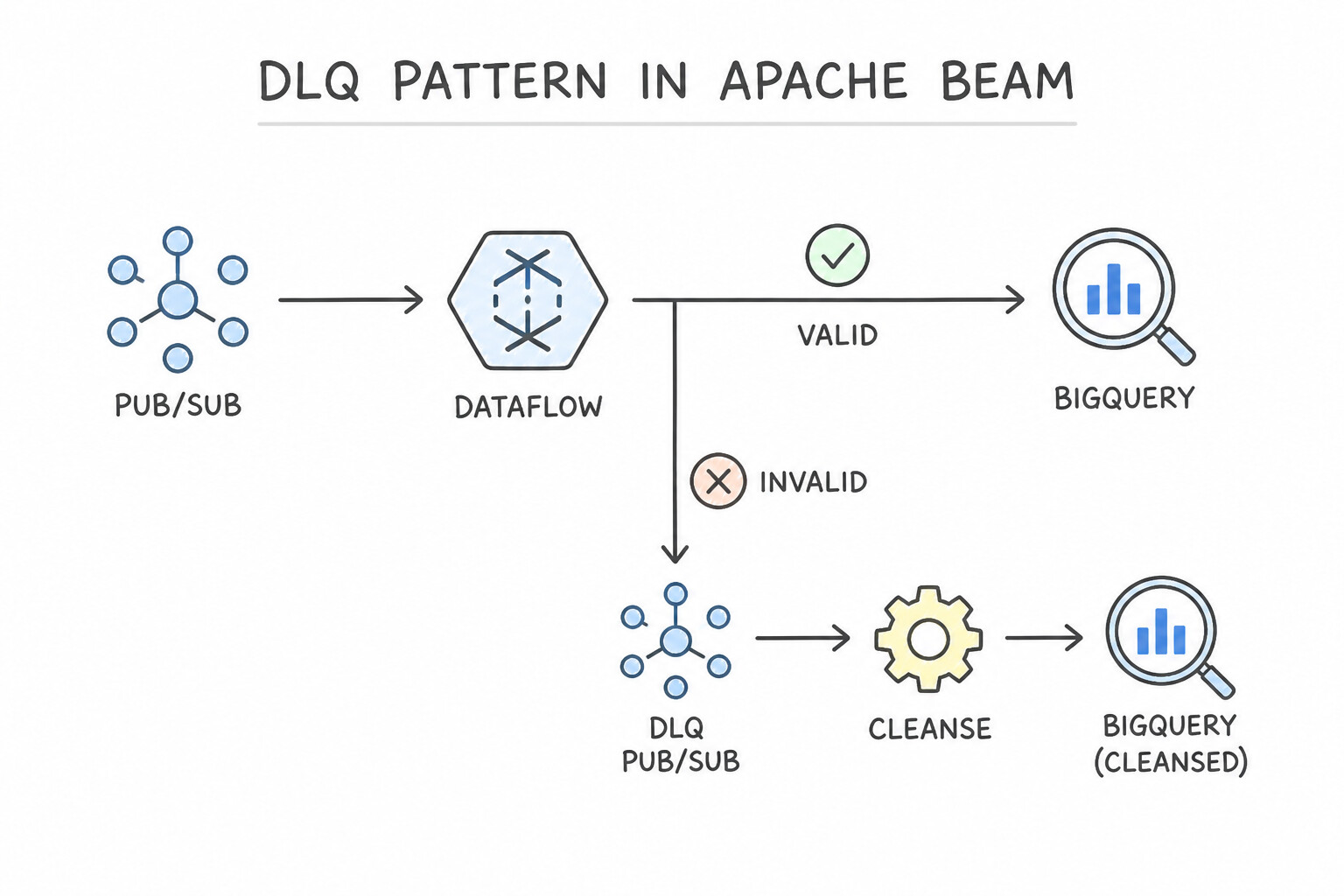
Cleanse data as early as practical without losing raw auditability:
- The Dead-Letter Queue (
DLQ) Pattern in Apache Beam: Never drop malformed records silently (catch (Exception e) { return; }) and never let a single bad record crash the worker (throw e). UseParDowithTupleTag/TaggedOutput: - Emit clean, parsed records to the
mainOutputTag. - Emit unparseable strings, schema violations, or missing required fields to
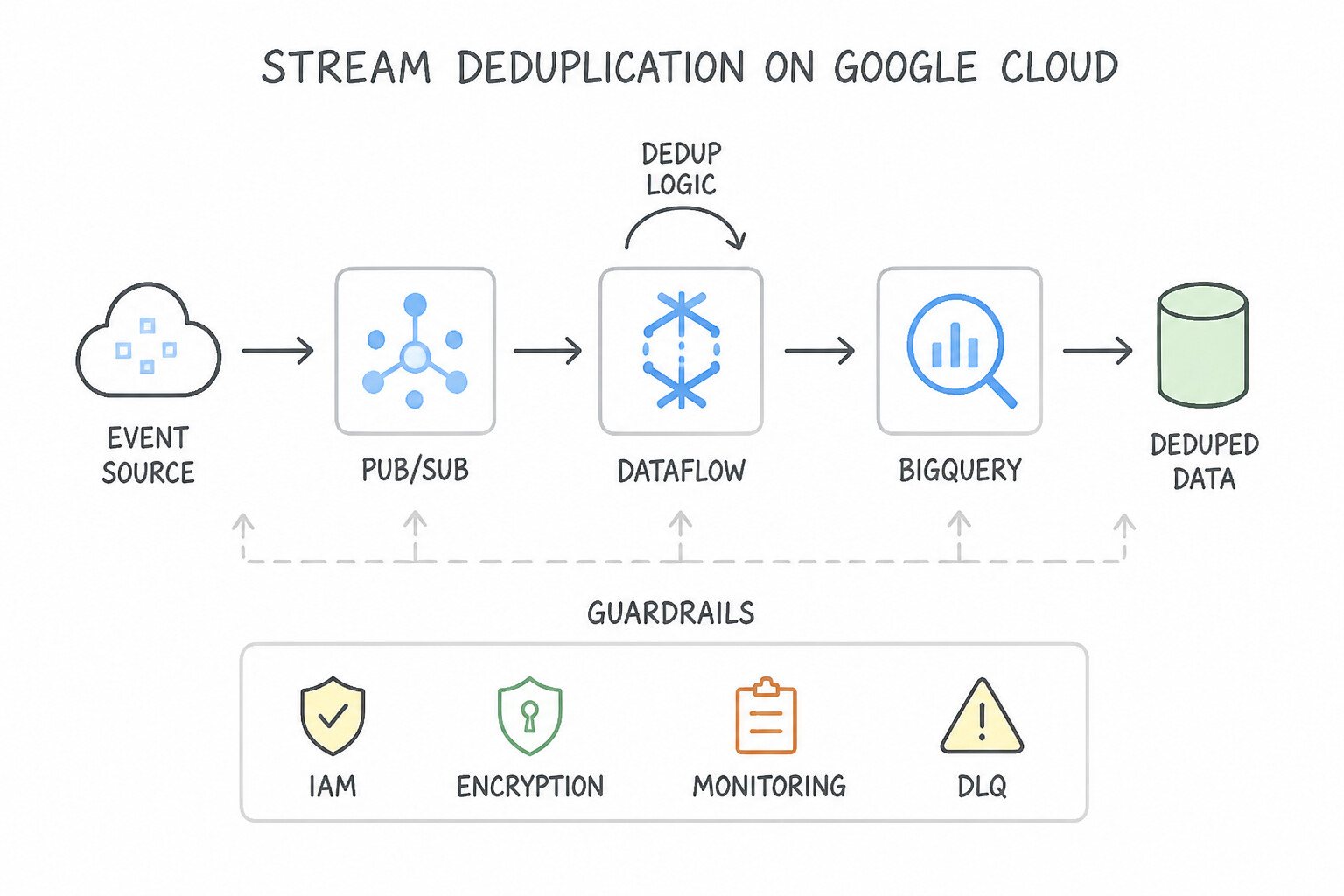
deadLetterTagwrapped in a structured JSON envelope (raw_payload,error_message,stack_trace,processing_timestamp,transform_step) written to a BigQuery DLQ table or GCS bucket for automated alerting and replay. - Stream Deduplication: Use Pub/Sub message attribute IDs with
PubsubIO.read().withIdAttribute("event_id")in Dataflow (which uses Dataflow's deterministic shuffle state to deduplicate within a 10-minute window) or stateful BeamBagState/ValueStatewith a TTL timer for longer deduplication windows.
Key Implementation Patterns
- Handling Malformed JSON in Streaming Pipelines: Use Use a side output (TupleTag) to route malformed messages to a separate storage location. Side outputs allow you to route errors to a Dead Letter Queue (DLQ) without stopping the pipeline. (Avoid alternative: Discarding messages violates the requirement to preserve bad data for analysis.)
- Redacting PII in High-Volume Streams: Use Call the Cloud Data Loss Prevention (DLP) API within a Dataflow ParDo transform to de-identify the sensitive data. Cloud DLP is the dedicated managed service for PII detection and de-identification and integrates directly with Dataflow pipelines.
- Visual Data Preparation for Non-Technical Users: Use Use Cloud Dataprep to visually explore the data and define transformation recipes. Cloud Dataprep provides a visual, no-code interface ideal for business analysts to clean data. (Avoid alternative: Dataflow requires coding skills in Java or Python, which the analysts do not have.)
Key Takeaways (2.2a)
- Streaming pipelines should never crash on bad data; they should handle errors gracefully.
- The Dead Letter Queue (DLQ) pattern is the standard way to isolate bad data.
- In Apache Beam/Dataflow, use TupleTags (Side Outputs) to route data to different destinations based on processing logic.
- Preserving bad data allows for root cause analysis and potential data recovery.
Consideration 2.2b: Identifying the services (e.g., Dataflow, Apache Beam, Dataproc, Cloud Data Fusion, BigQuery, Pub/Sub, Apache Spark, Hadoop ecosystem, and Apache Kafka)
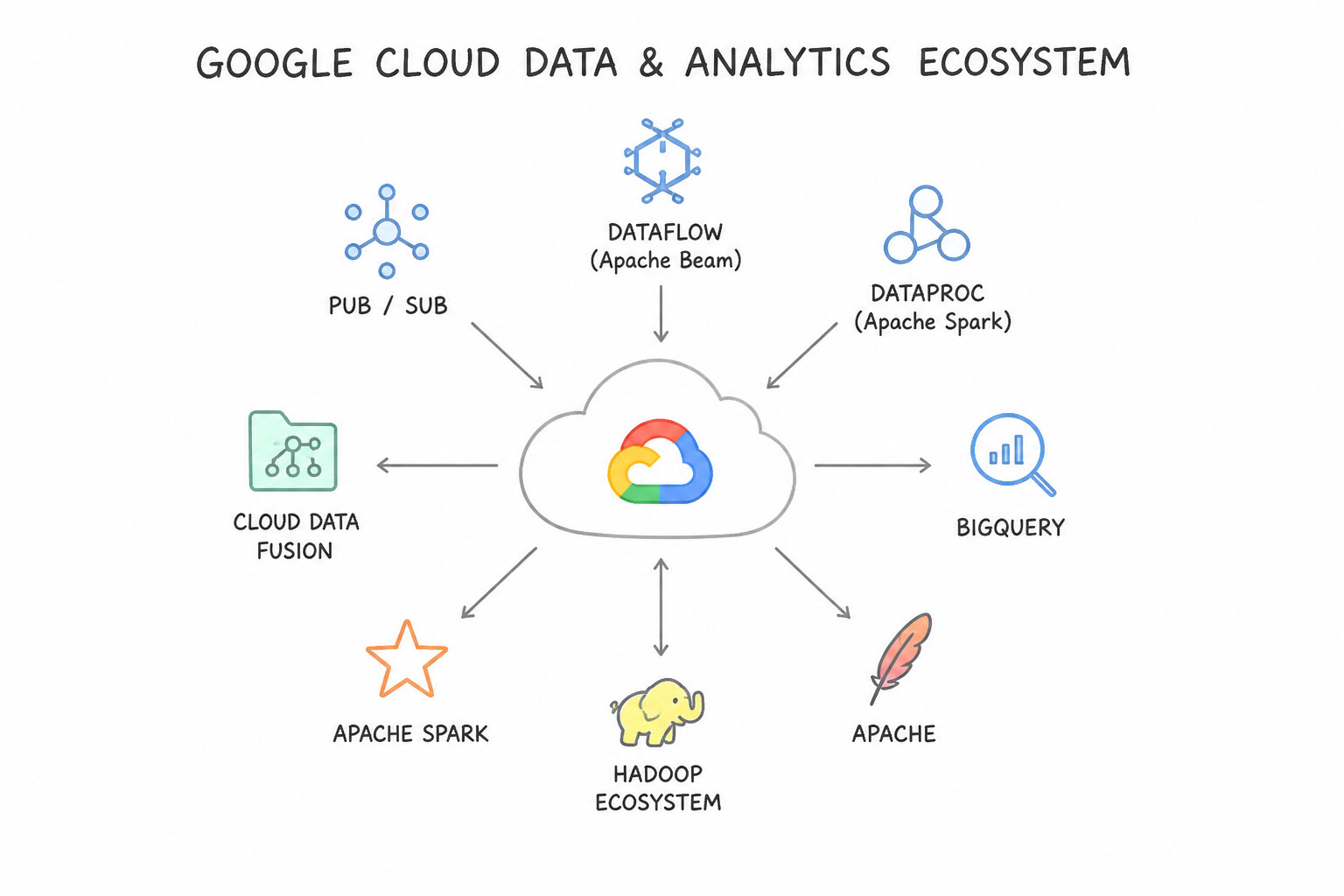
Use this rapid decision rule to choose among Google Cloud's processing engines:
- Cloud Dataflow (Apache Beam): Choose for new unified batch + streaming pipelines, serverless auto-scaling (Dynamic Work Rebalancing + Streaming Engine), sub-second to few-second streaming event-time windowing, and exactly-once delivery from Pub/Sub to BigQuery/Bigtable.
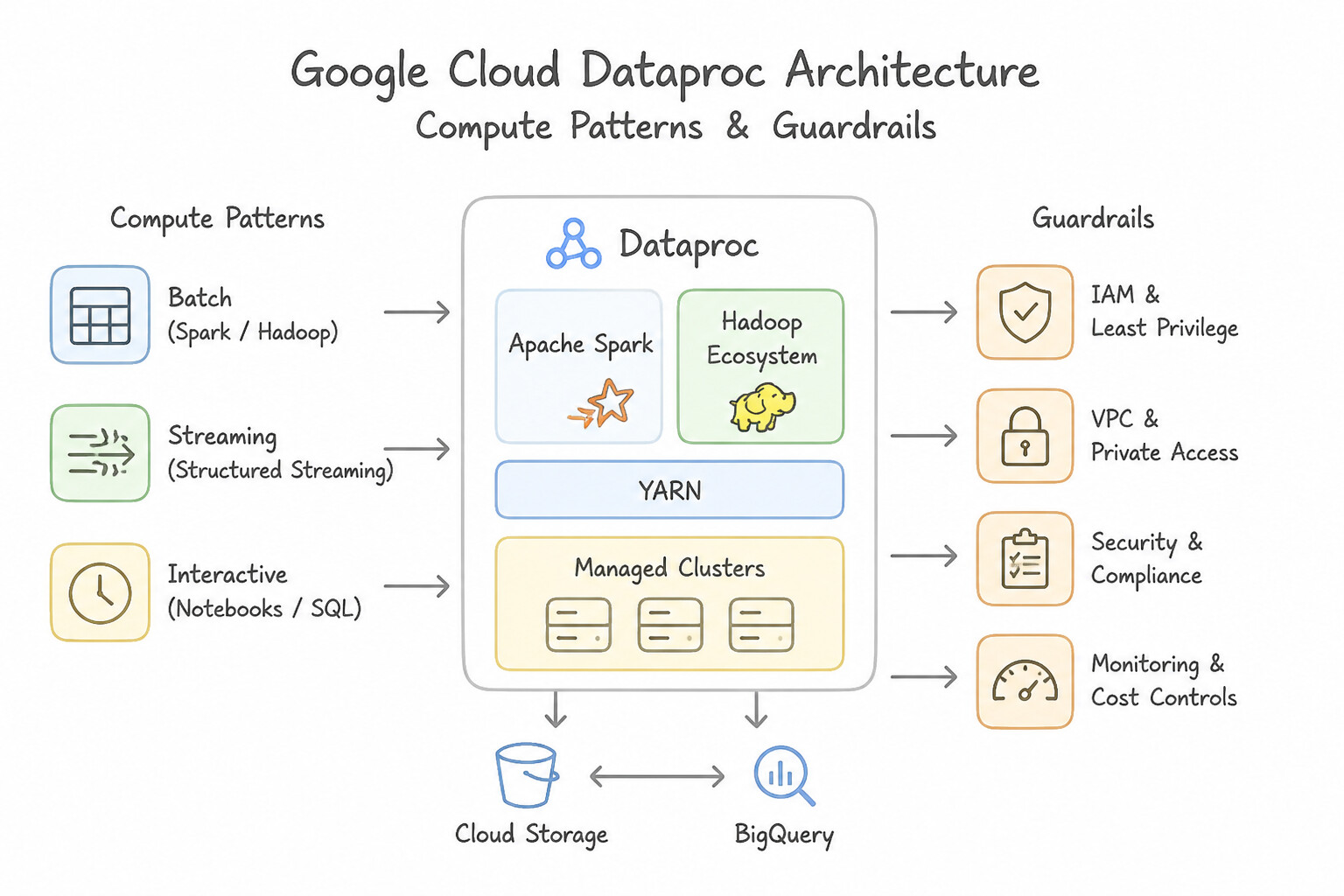
- Cloud Dataproc (Apache Spark / Hadoop): Choose when migrating existing Apache Spark, PySpark, Hive, or Hadoop MapReduce codebases with minimal refactoring, or when workloads depend on Spark-specific libraries (
Spark MLlib,GraphX). Use Dataproc Serverless when you want to run Spark batch jobs without provisioning or managing clusters! - Cloud Data Fusion: Choose when requirement constraints emphasize code-free / visual drag-and-drop pipeline authoring and prebuilt enterprise connectors (SAP, Salesforce, Mainframe) managed by data analysts/integrators.
- BigQuery (with Dataform): Choose when all transformations can be expressed in SQL (
ELT) over structured/semi-structured data already in BigQuery or BigLake.
Key Implementation Patterns
- Legacy Hadoop Migration: Use Create a Cloud Dataproc cluster and submit the existing jobs to the cluster. Cloud Dataproc is a managed service for Hadoop/Spark that supports running existing jobs without code changes. (Avoid alternative: Dataflow requires rewriting code to Apache Beam, which violates the requirement to minimize refactoring.)
- Visual ETL for Business Analysts: Use Recommend that they use the visual interface of Cloud Data Fusion. Cloud Data Fusion provides a code-free, visual interface for building data pipelines. (Avoid alternative: Dataflow requires coding in Java or Python, which the analysts do not know.)
- Serverless Unified Pipeline: Use Write the pipeline using the Apache Beam SDK and run it on Cloud Dataflow. Cloud Dataflow is a serverless service that executes Apache Beam pipelines, supporting both batch and streaming with unified code and automatic scaling. (Avoid alternative: Cloud Functions is not suitable for large-scale batch processing and would require separate implementations for batch and streaming.)
Key Takeaways (2.2b)
- Cloud Dataproc is the go-to service for migrating existing Hadoop and Spark workloads to Google Cloud (Lift and Shift).
- Cloud Dataflow generally requires rewriting code to Apache Beam and is better suited for new pipeline development or full modernization.
- Minimizing refactoring helps meet strict deadlines during migration.
- Using managed services (like Dataproc) is preferred over manual VM installation (Compute Engine) to reduce operational overhead.
Consideration 2.2c: Batch transformations
When building large-scale batch pipelines in Dataflow or Dataproc:
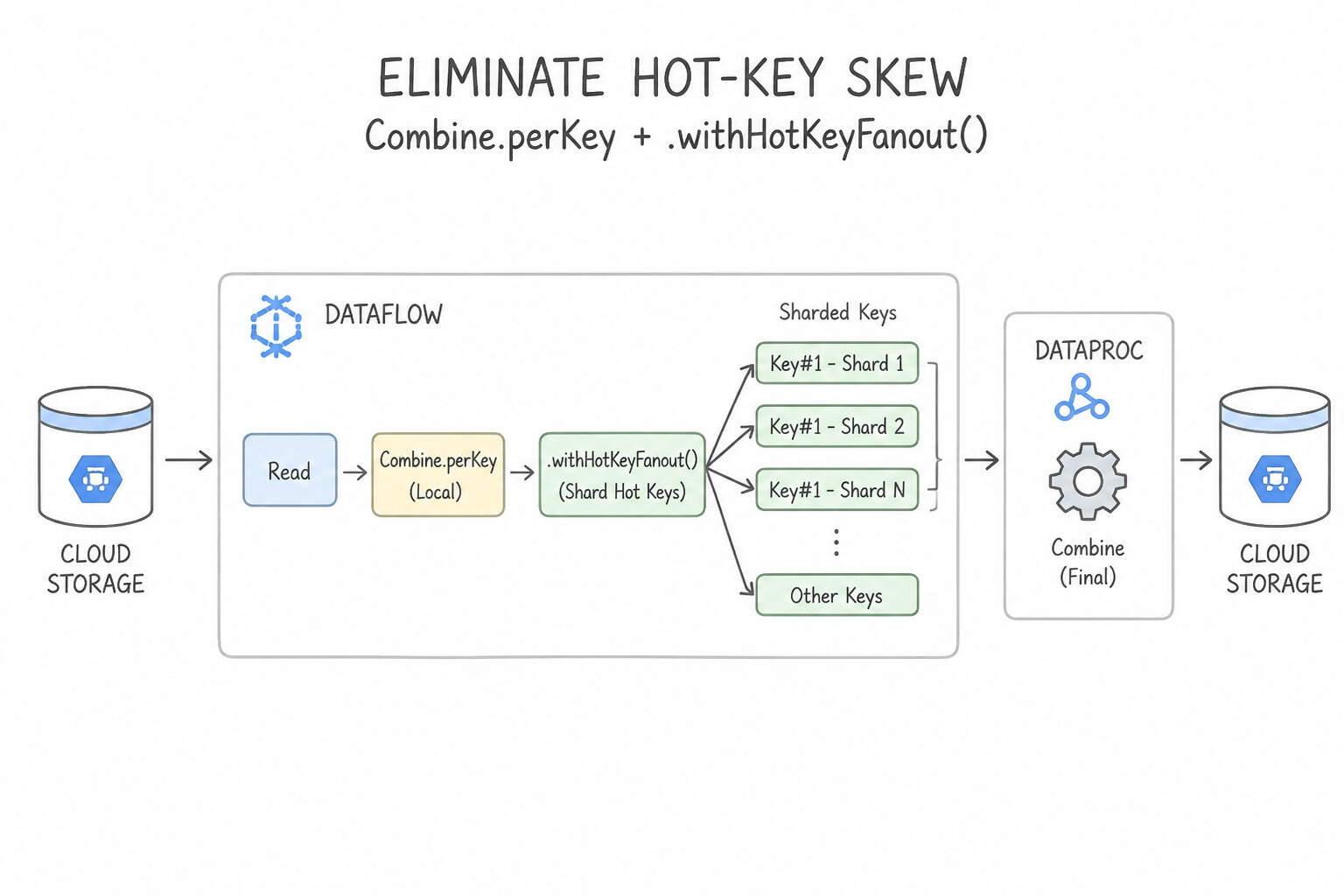
- Eliminate Hot-Key Skew with
Combine.perKey+.withHotKeyFanout(): - Never use raw
GroupByKeyfollowed by aParDoto calculate sums, counts, averages, or min/max!GroupByKeyshuffles every raw element for a key across the network to a single worker. - Instead, use
Combine.perKey(Sum.ofLongs())(or a customCombineFn), which performs map-side partial combining locally on each worker before shuffling only a single partial accumulator per worker across the network. - If a single key (like
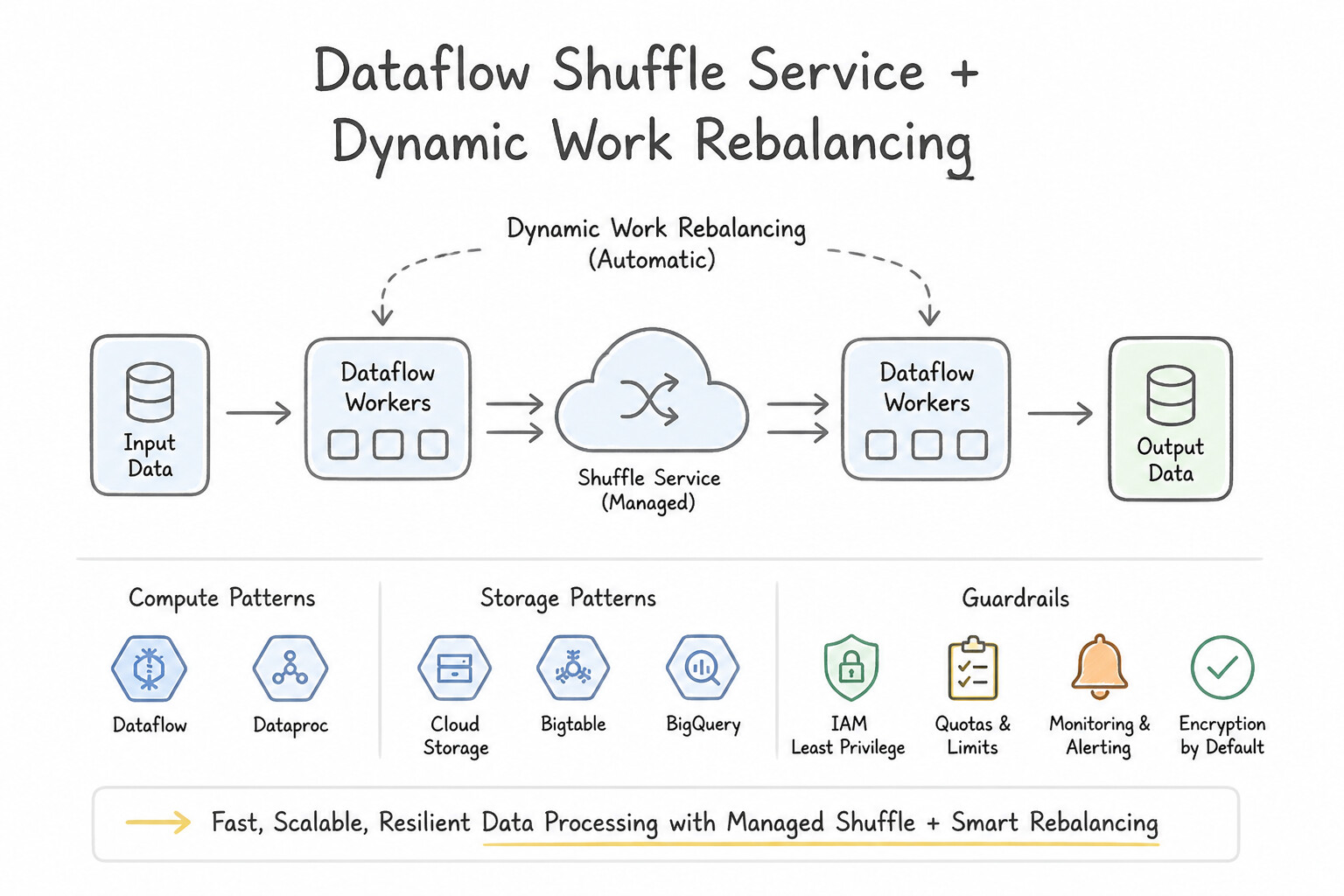
country="US"oruser_id="guest") still has millions of events per bundle, add.withHotKeyFanout(N)to split the hot key across$N$ intermediate sub-keys before the final merge. - Dataflow Shuffle Service & Dynamic Work Rebalancing: Batch jobs on Dataflow automatically offload shuffle state from worker VM disks to the managed Dataflow Shuffle Service and use Dynamic Work Rebalancing (Liquid Sharding) to split straggler file shards across idle workers dynamically.
Key Implementation Patterns
- Handling Skewed Data in Dataflow Batch Jobs: Use Append a random number to the "user_id" key before the GroupByKey step, and perform a second aggregation. Salting the key splits the massive amount of data for the hot key into smaller chunks that can be processed in parallel across multiple workers.
- Enriching Batch Data with Small Lookup Tables: Use Configure the conversion rates as a side input to the ParDo transform processing the transactions. Side inputs efficiently broadcast small, fit-in-memory datasets to all workers, avoiding expensive shuffle operations. (Avoid alternative: CoGroupByKey triggers a network-intensive shuffle, which is unnecessary overhead for joining a very small dataset.)
- Migrating Legacy Spark Jobs to GCP: Use Use Dataproc Workflow Templates to create an ephemeral cluster for each batch, execute the jobs, and delete the cluster. Dataproc Workflow Templates allow running existing Spark code on ephemeral clusters that shut down automatically, minimizing costs.
Key Takeaways (2.2c)
- Hot Keys cause lagging workers: If one worker is stuck at 100% CPU while others are done, suspect data skew.
- GroupByKey limits parallelism: All values for a single key must be processed on one machine.
- Salting solves skew: Add a random suffix to distribute a large key's data across multiple workers.
- Scaling doesn't fix skew: Adding more workers does not help if the workload cannot be split (atomic unit of work is the key).
Consideration 2.2d: Streaming transformations (e.g., windowing, late arriving data)
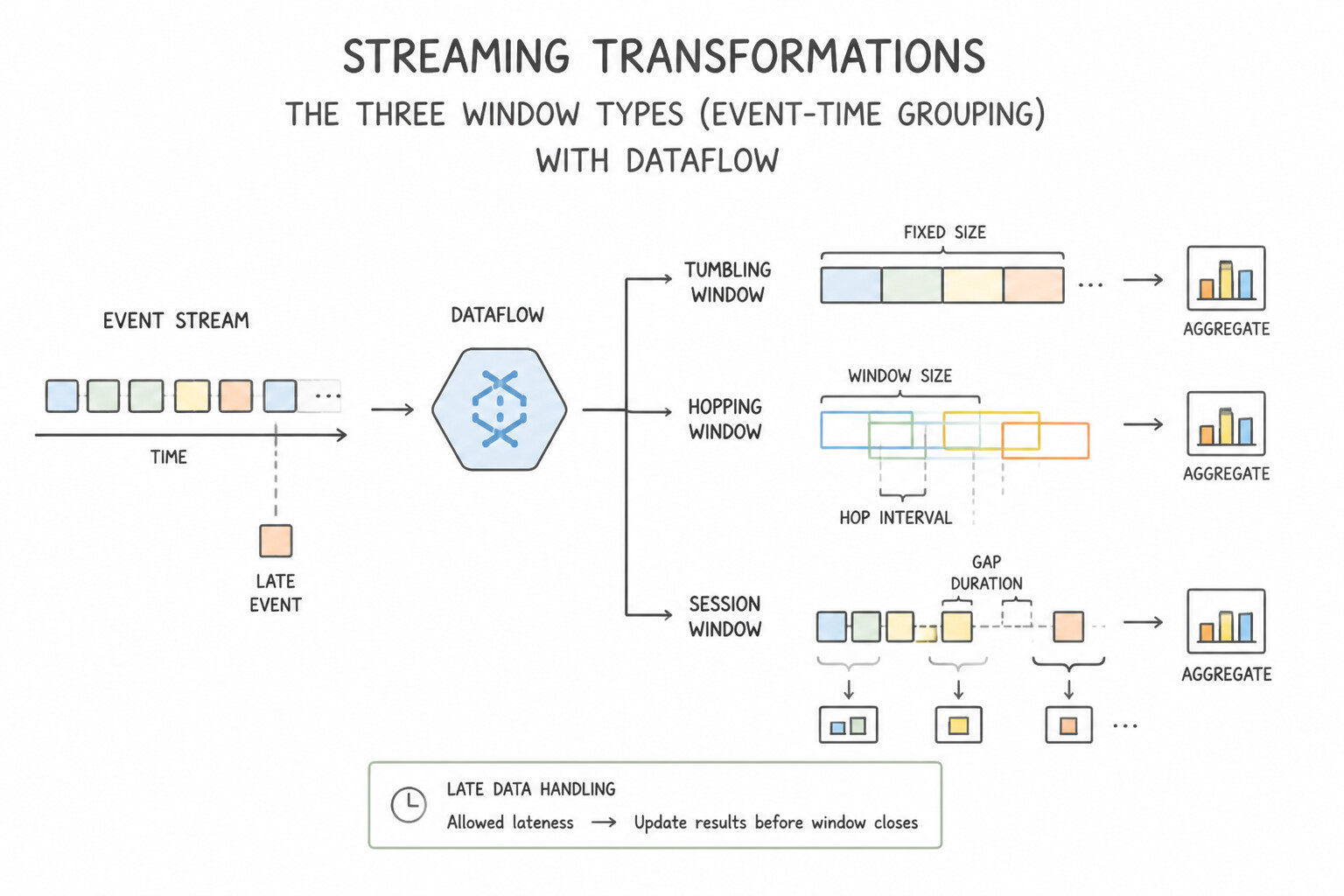
This is one of the most critical topics in production. Memorize every primitive:
- The Three Window Types (Event-Time Grouping):
- Fixed (Tumbling) Windows (
FixedWindows.of(Duration.standardMinutes(5))): Non-overlapping, contiguous time intervals (e.g.,[12:00, 12:05),[12:05, 12:10)). Every event belongs to exactly one window. - Sliding (Hopping) Windows (
SlidingWindows.of(1 hour).every(5 minutes)): Overlapping windows (e.g., "compute the 1-hour moving average updated every 5 minutes"). Each event is duplicated into $60 / 5 = 12$ overlapping windows! - Session Windows (
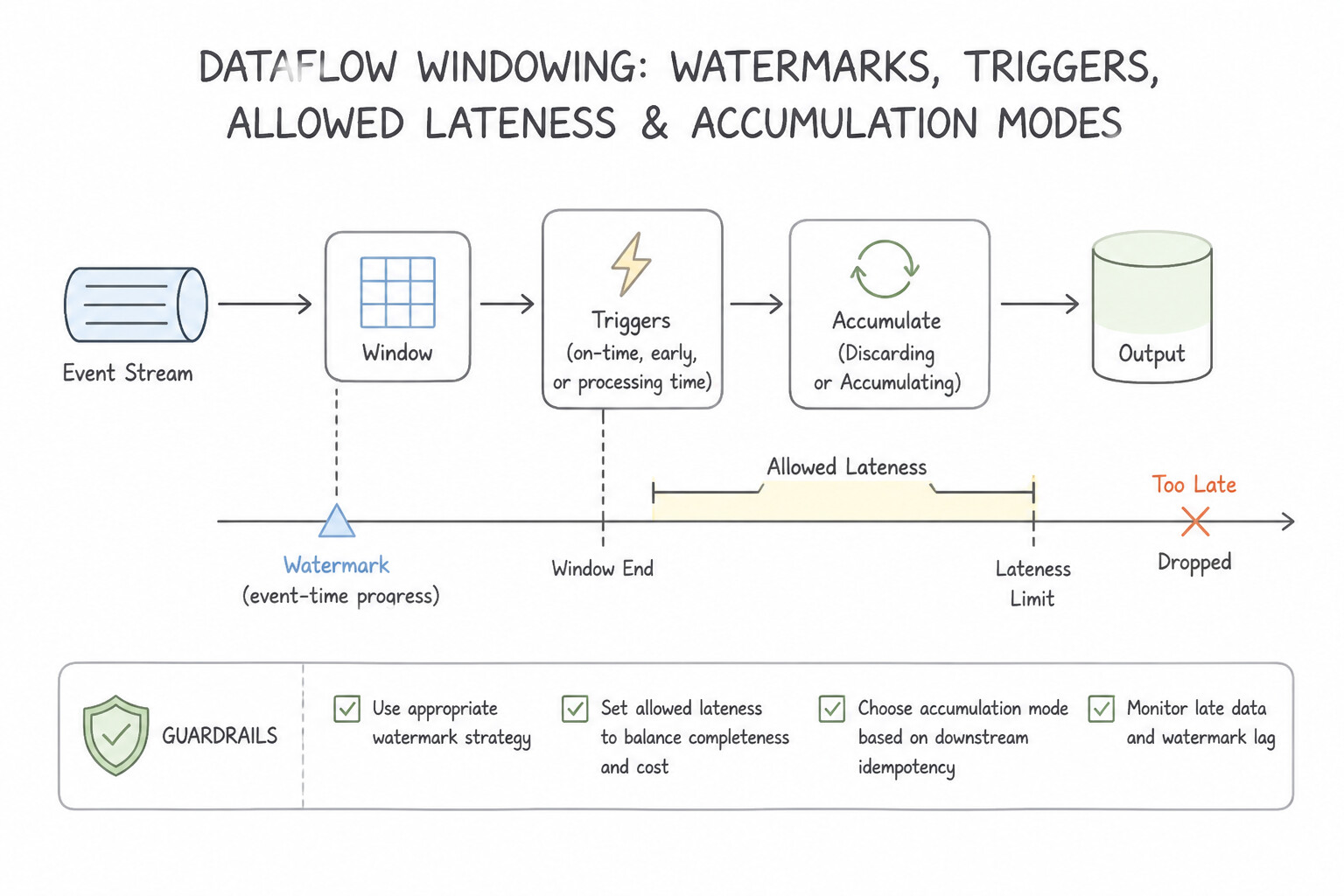
Sessions.withGapDuration(Duration.standardMinutes(30))): Dynamic, per-key windows determined by the data itself—a window stays open as long as events for thatuser_idarrive within 30 minutes of each other, and closes after 30 minutes of inactivity. - Watermarks, Triggers, Allowed Lateness & Accumulation Modes:
- Watermark: Dataflow's heuristic tracking the oldest unprocessed event timestamp—when the watermark passes 12:05, Dataflow believes all on-time data for
[12:00, 12:05)has arrived. - Allowed Lateness (
.withAllowedLateness(Duration.standardHours(2))): By default, allowed lateness is0(any event arriving after the watermark passes window end is dropped immediately). SettingwithAllowedLateness(2h)keeps the window state alive for 2 extra hours in event time so late stragglers trigger a speculative/late firing instead of being dropped! - Triggers:
AfterWatermark.pastEndOfWindow()(fires once when the watermark passes window end).withEarlyFirings(AfterProcessingTime.pastFirstElementInPane().plusDelayOf(1 min))(emits early speculative dashboards before the window closes).withLateFirings(AfterPane.elementCountAtLeast(1))(emits an updated pane whenever late data arrives within the allowed lateness horizon).- Accumulating vs. Discarding Fired Panes: Choose
accumulatingFiredPanes()when the downstream sink overwrites the previous window record with the new total cumulative sum; choosediscardingFiredPanes()when the downstream sink appends and sums incremental deltas.
Key Implementation Patterns
- Aggregating Metrics in Discrete Time Chunks: Use Apply a fixed window with a duration of 60 minutes. Fixed windows divide time into distinct, non-overlapping chunks, ideal for hourly reporting. (Avoid alternative: Sliding windows overlap and create multiple windows covering the same data points, which is not required here.)
- Real-time Rolling Averages: Use Apply a SlidingWindow with a size of 10 minutes and a period of 1 minute. Sliding windows allow for overlapping time intervals, enabling a 10-minute lookback that updates every 1 minute. (Avoid alternative: Fixed windows do not overlap and would only produce a result every 10 minutes, not every 1 minute.)
Key Takeaways (2.2d)
- Use Fixed Windows (Tumbling) for distinct, non-overlapping time-based reporting (e.g., hourly or daily reports).
- Use Sliding Windows (Hopping) for rolling averages or trends (e.g., average over the last hour, updated every 5 minutes).
- Use Session Windows for activity-based grouping where the window size varies by user behavior.
- Use Fixed Windows for disjoint, non-overlapping reporting (e.g., hourly sums).
Consideration 2.2e: Processing logic
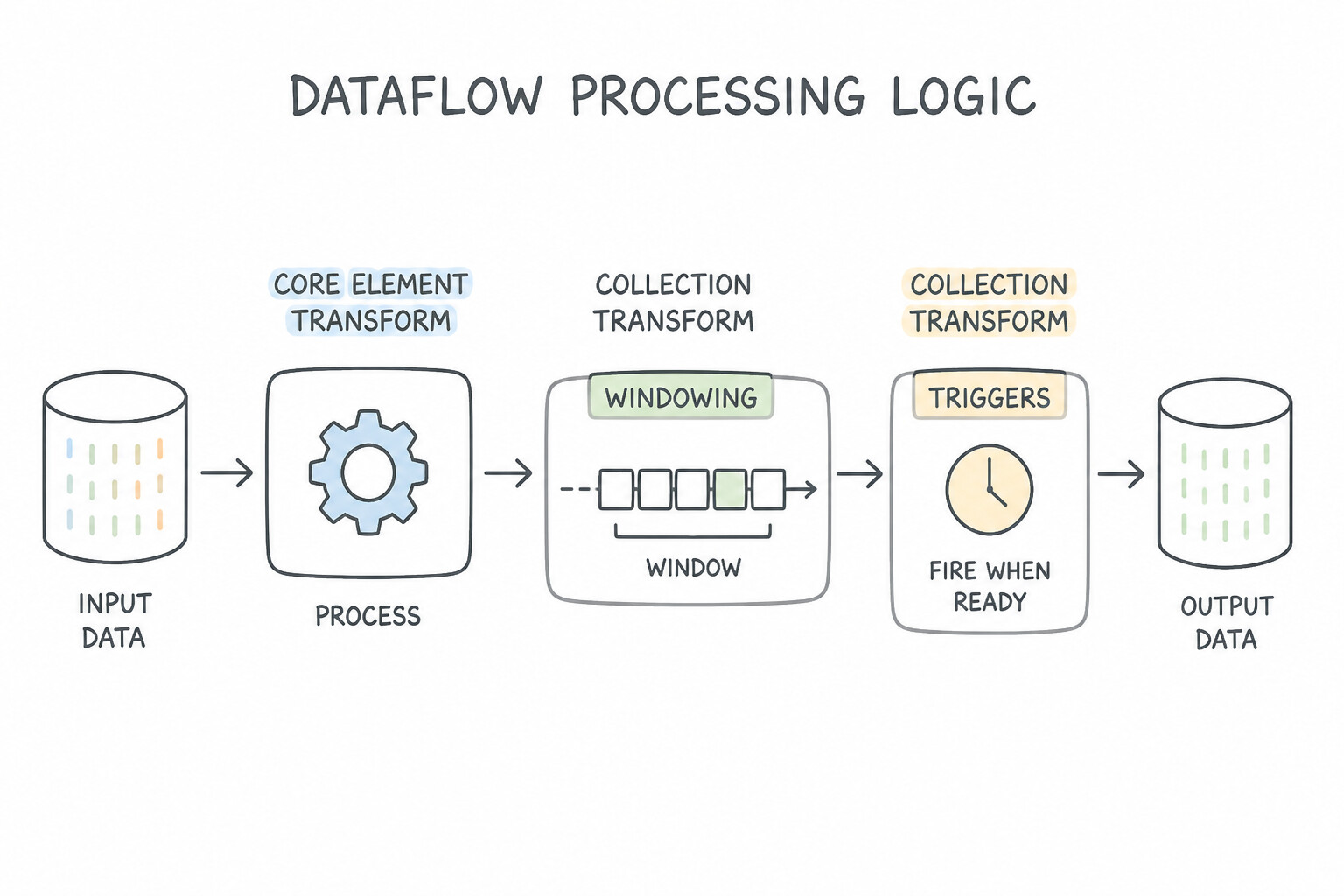
Know the exact Apache Beam transform for each structural operation:
- Core Element & Collection Transforms:
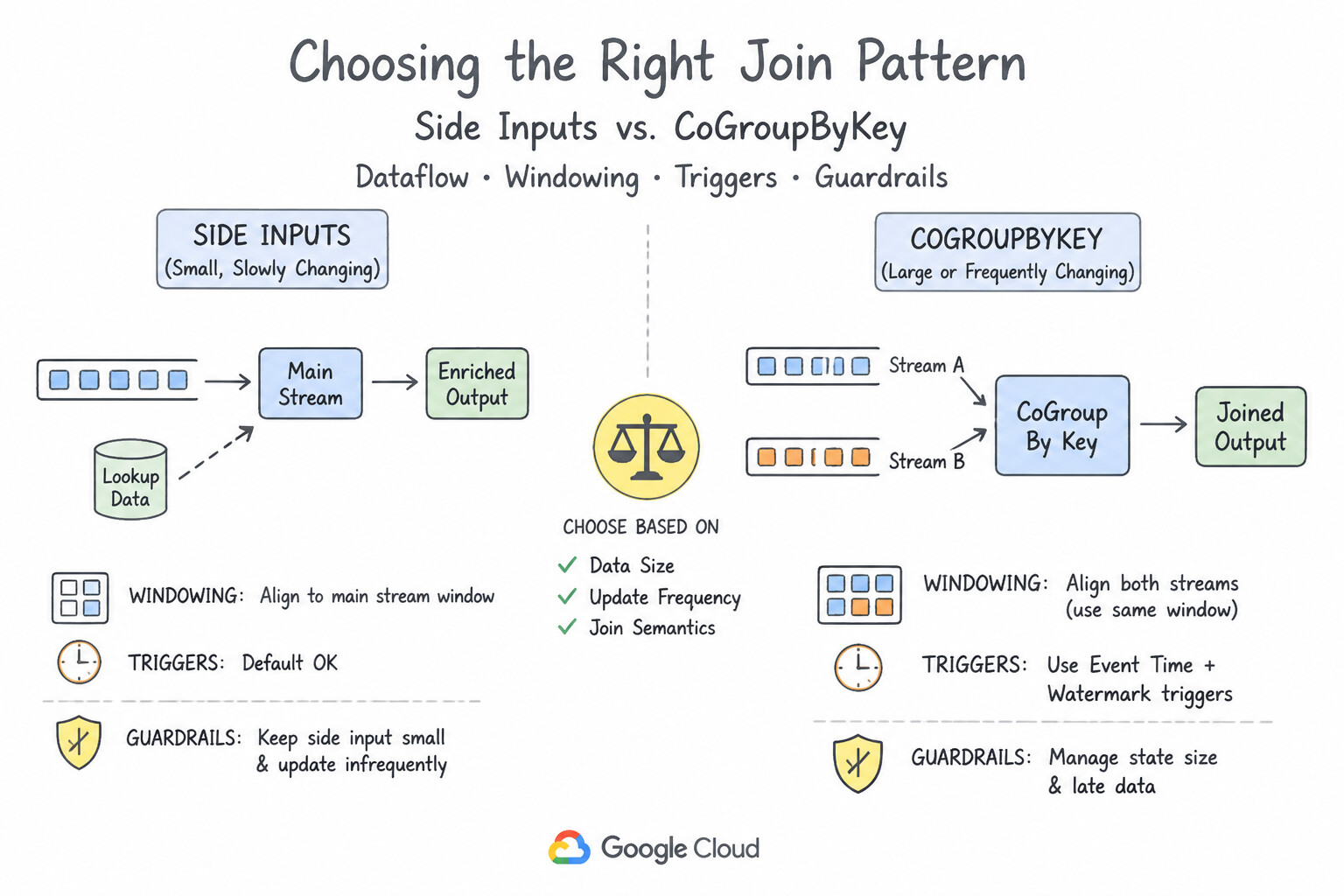
ParDo(withDoFn): General-purpose 1-to-0, 1-to-1, or 1-to-$N$ element-wise mapping/filtering/branching.Flatten: Unions multiplePCollection<T>objects of the exact same data type into a singlePCollection<T>(like SQLUNION ALL).Partition: Splits a singlePCollection<T>into a fixed number of outputs using a deterministic partition function (e.g., deciles0..99).- Choosing the Right Join Pattern (
Side Inputsvs.CoGroupByKey): - Stream + Small/Slowly Changing Lookup Table →
Side Input(AsSingleton/AsMap/AsMultimap): Broadcasts the lookup table to worker memory. To refresh a Side Input periodically (e.g., currency exchange rates updated every 15 minutes in GCS/BigQuery), use the Slowly Changing Lookup Cache pattern (GenerateSequenceevery 15m →ParDoread table →Window.into(GlobalWindows)triggeredAfterPane.elementCountAtLeast(1)withdiscardingFiredPanes→View.asSingleton()). - Joining Two Large, High-Velocity Streams/Tables by Key →
CoGroupByKey: Performs a distributed relational shuffle join across both keyedPCollection<KV<K, V>>inputs within matching windows. - Connection Reuse & Batching (
@Setup+GroupIntoBatches): In a customDoFn, always initialize heavy objects (DB connection pools, gRPC clients, ML tokenizers) inside@Setup(runs once per worker lifecycle) or@StartBundle, NEVER inside@ProcessElement! When calling external rate-limited APIs, precede theParDowithGroupIntoBatches.ofSize(100)(withwithMaxBufferingDuration) to send bulk requests.
Key Implementation Patterns
- Handling Late Data in Streaming Analytics: Use Configure the windowing strategy with allowedLateness and use accumulatingFiredPanes. AllowedLateness accepts late data, and accumulatingFiredPanes updates the previous aggregate with the new value. (Avoid alternative: Increasing window size reduces real-time capabilities and does not specifically address out-of-order data processing.)
- Mitigating Hot Keys in Aggregation: Use Use the Combine.perKey transform and enable withHotKeyFanout. Enabling hot key fanout distributes the processing of the massive key across multiple workers using intermediate aggregation steps. (Avoid alternative: Filtering deletes data, which results in incomplete analytics rather than solving the processing efficiency problem.)
- Enriching High-Throughput Streams: Use Configure the BigQuery table as a side input to the ParDo transform that processes the transactions. Side inputs broadcast small, static datasets to all workers, allowing fast local lookups without shuffling the main stream. (Avoid alternative: CoGroupByKey triggers an expensive network shuffle, which increases latency for high-throughput streams.)
Key Takeaways (2.2e)
- Event Time vs. Processing Time: Always process analytics based on when the event happened (Event Time).
- Watermarks: Use watermarks to manage the flow of time and determine when a window is 'complete'.
- Allowed Lateness: Default behavior drops late data; use allowed lateness to handle out-of-order events.
- Accumulating vs. Discarding: Use accumulating panes to refine results (update totals), and discarding panes to process deltas.
Consideration 2.2f: AI data enrichment
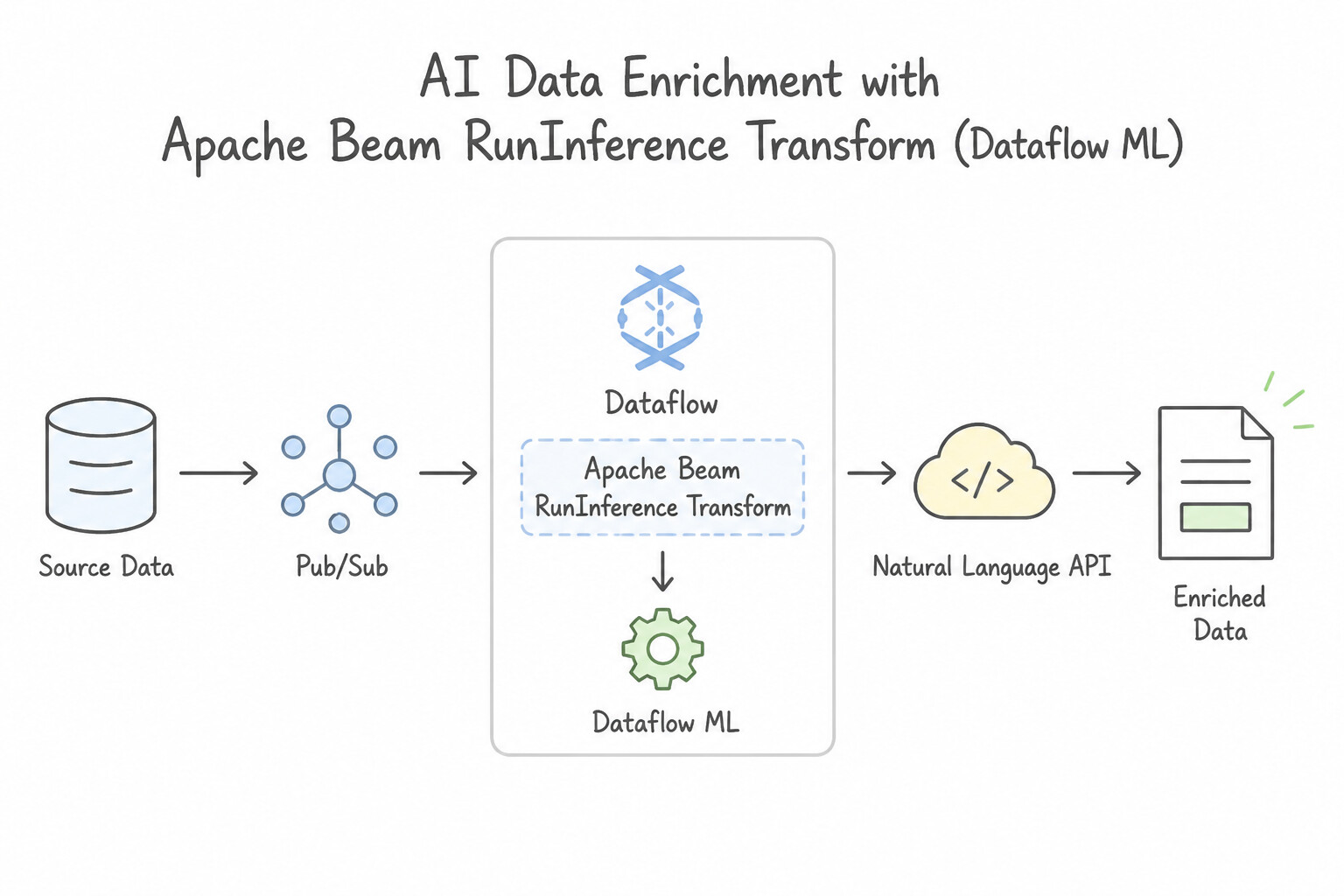
Modern PDE architectures test how you embed AI/ML inference directly into batch and streaming data pipelines:
- Apache Beam
RunInferenceTransform (Dataflow ML): - The idiomatic way to run ML inference inside a Dataflow pipeline.
- Supports both local in-worker model execution (PyTorch, TensorFlow, Scikit-Learn, ONNX loaded onto worker CPUs or Dataflow GPUs) for ultra-low-latency, zero-network-hop scoring, AND remote Vertex AI Endpoint / Gemini API handlers with automatic dynamic micro-batching and retry handling.
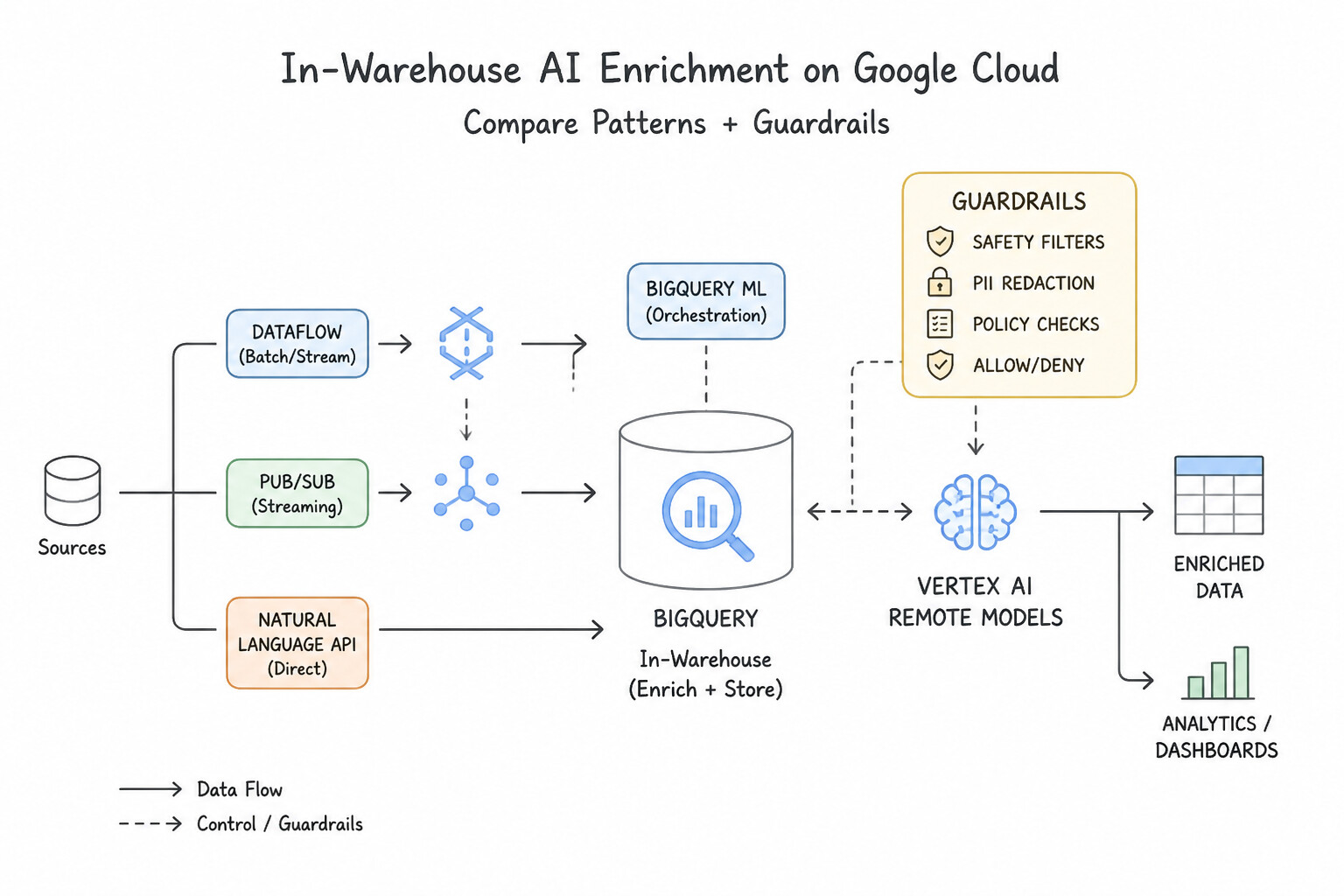
- In-Warehouse AI Enrichment (
BigQuery ML+ Vertex AI Remote Models): - When data is already in BigQuery, avoid exporting data to external Python clusters just to call an LLM or classifier. Create a BigQuery ML Remote Model (
REMOTE WITH CONNECTION ... OPTIONS(ENDPOINT = 'gemini-2.5-flash')) and runML.GENERATE_TEXT,ML.GENERATE_EMBEDDING,AI.GENERATE_TABLE(structured extraction), orML.PROCESS_DOCUMENT(Document AI invoice/form parsing over Object Tables) directly in SQL!
Key Implementation Patterns
- Real-time Sentiment Analysis on Customer Feedback: Use Create a Dataflow pipeline. Use a ParDo function to call the Cloud Natural Language API for each review. Dataflow is best for streaming pipelines, and ParDo allows calling external APIs like Cloud Natural Language for element-wise enrichment.
- Multilingual Chat Translation Pipeline: Use Integrate the Cloud Translation API into your pipeline to detect the source language and translate the text. The Cloud Translation API provides pre-built capabilities to detect source languages and translate text to English with minimal configuration.
- Handling API Quotas for Image Processing: Use Use the GroupIntoBatches transform to aggregate multiple images into a single API request. Batching combines multiple items into one request, reducing the overall request rate to the API. (Avoid alternative: Adding more workers increases the request rate, which worsens the quota error.)
Key Takeaways (2.2f)
- Dataflow is the primary tool for high-throughput streaming pipelines on Google Cloud.
- Use ParDo transforms in Dataflow to apply element-wise logic or call external APIs.
- Cloud Natural Language API is a managed service for sentiment analysis and entity extraction.
- Avoid using batch tools (like Scheduled Queries or file-based processing) for real-time requirements.
Consideration 2.2g: Data acquisition and import
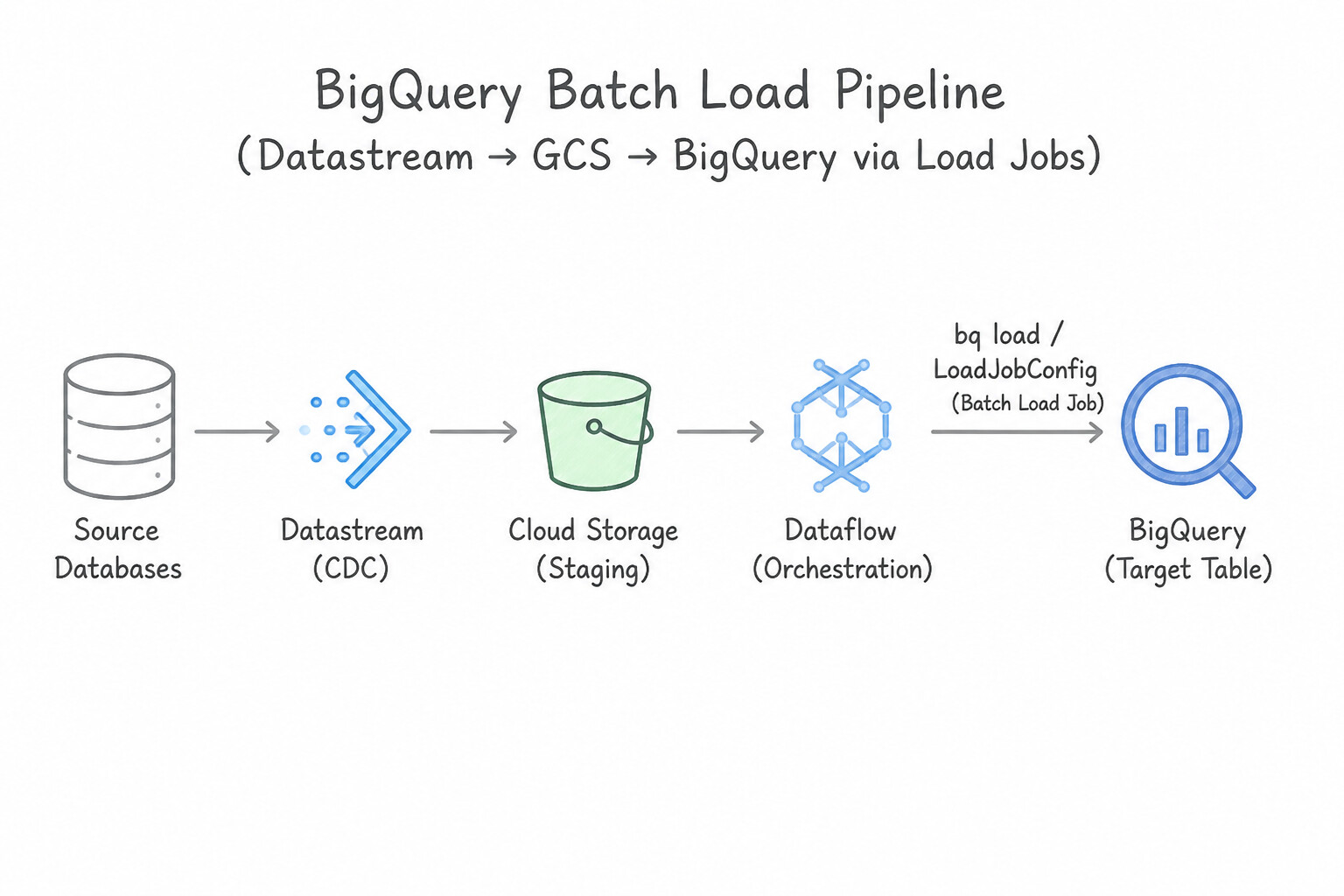
Understand the cost, quota, and consistency trade-offs when loading data into BigQuery:
- BigQuery Batch Load Jobs (
bq load/LoadJobConfigfrom GCS): - Uses a free shared slot pool (you pay $0 for batch load compute unless you explicitly assign the
LOADjob type to a dedicated reservation!). - Atomic: either all rows in the load job succeed or none are committed. Best for scheduled hourly/daily bulk loads where real-time latency is not required.
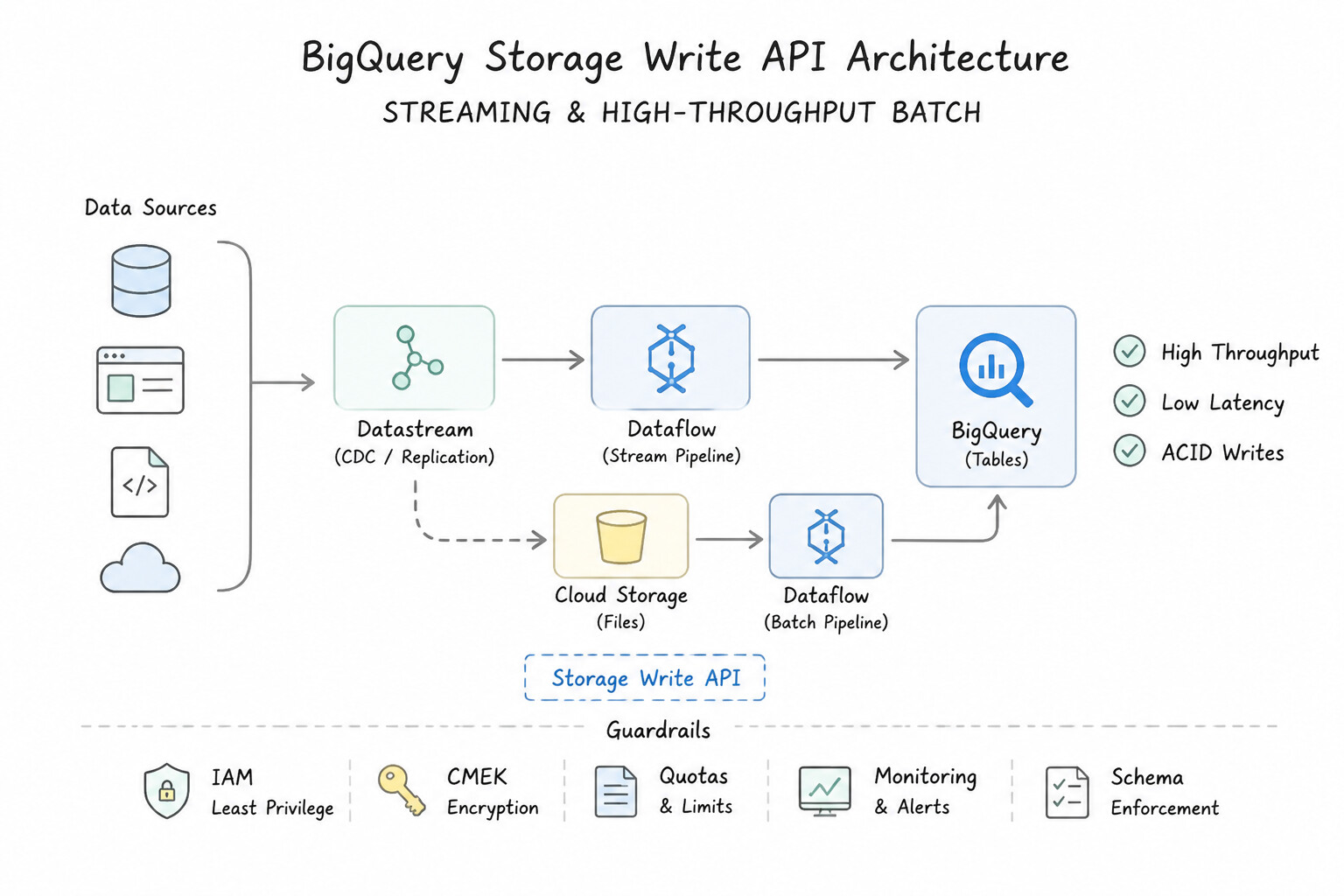
- BigQuery Storage Write API (Modern Streaming & High-Throughput Batch):
- Replaces the legacy
tabledata.insertAllstreaming API (which is 2x more expensive, uses best-effort deduplication, and has lower throughput quotas). - Uses gRPC streaming with Protocol Buffers and supports three modes:
Default Stream: At-least-once semantics, higher quotas, immediately visible for querying.COMMITTEDMode (Write-Ahead Stream Offsets): Immediate row visibility upon append PLUS application-levelexactly-oncesemantics via byte/record offsets.PENDING/BUFFEREDMode: Stages records in streams and commits all streams atomically in a single batch transaction.- In Apache Beam (
BigQueryIO.write()), always specifyMethod.STORAGE_WRITE_API(withwithTriggeringFrequencyandwithNumStorageWriteApiStreamsfor streaming) for high-throughput, exactly-once ingestion.
Key Implementation Patterns
- Real-time Database Replication from On-Premises: Use Use Datastream to replicate data directly to BigQuery using Change Data Capture (CDC). Datastream provides serverless CDC replication from Oracle to BigQuery with minimal source impact and automatic schema drift handling.
- Automated Ingestion from AWS S3: Use Configure a Transfer Job in Storage Transfer Service to schedule daily transfers from the S3 bucket to the Cloud Storage bucket. Storage Transfer Service is the managed solution for scheduled, incremental transfers from AWS S3 to Google Cloud Storage.
- Migrating Petabyte-Scale Archives Offline: Use Order Transfer Appliance from Google Cloud to copy the data and ship it to Google. Transfer Appliance bypasses the slow network by physically shipping the data, allowing for the migration of 2 PB within the two-week deadline.
Key Takeaways (2.2g)
- Datastream is the primary tool for serverless, real-time CDC replication into BigQuery.
- Log-based CDC is preferred over query-based polling because it minimizes the performance impact on the source database.
- Handling schema drift (changes in structure) automatically is a key feature of modern replication tools like Datastream.
- Use Storage Transfer Service for bulk or scheduled transfers from other cloud providers (S3, Azure) to Google Cloud Storage.
Consideration 2.2h: Integrating with new data sources
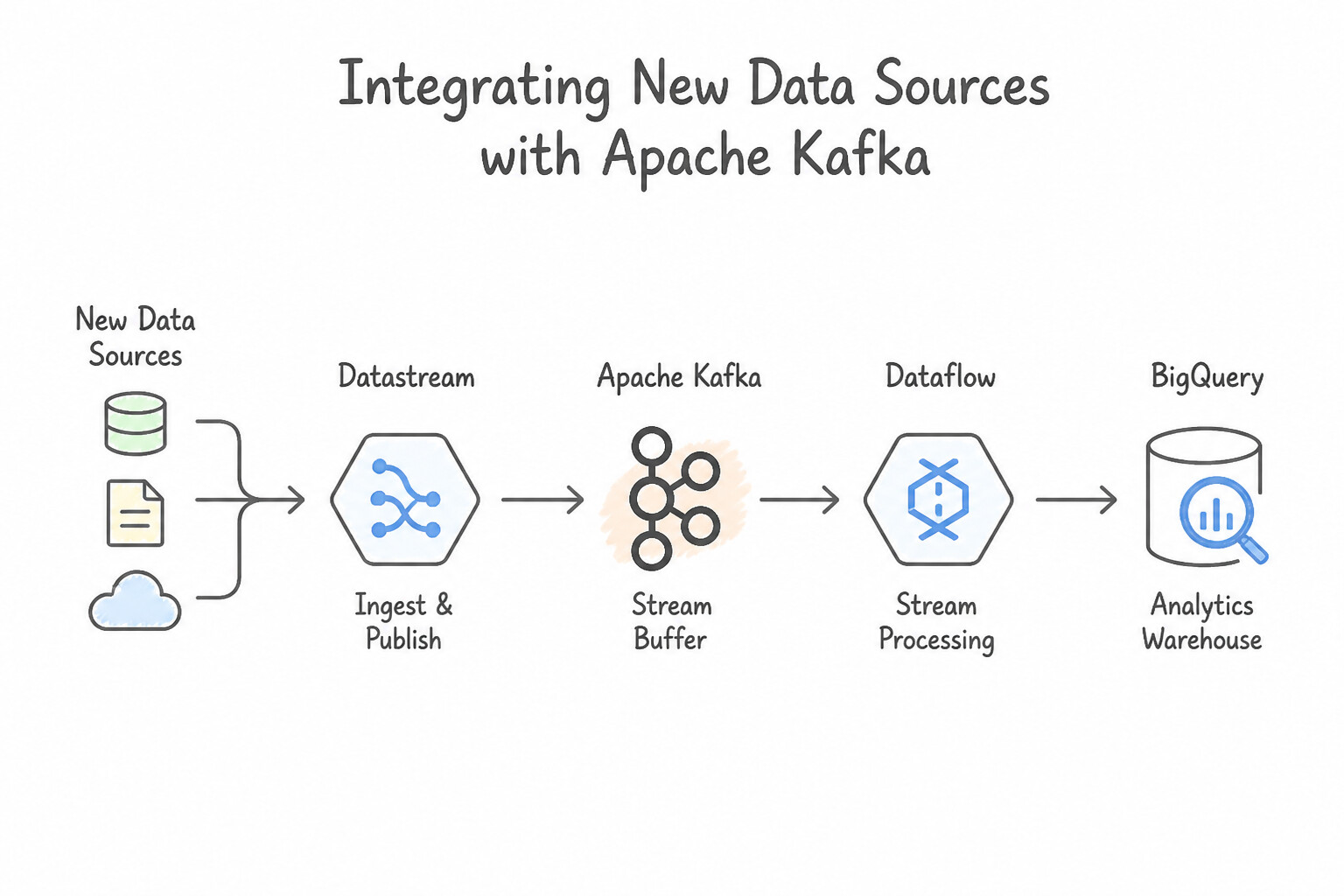
When integrating new external event buses or operational sources into Google Cloud:
- Apache Kafka Integration:
- To ingest from an existing on-premises or multi-cloud Apache Kafka cluster into Dataflow, use Beam's native
KafkaIO.read()connector over private VPC Peering / Interconnect (activatingcommitOffsetsInFinalize()for offset checkpointing). - To bridge Kafka and Pub/Sub without custom code, use the Pub/Sub Kafka Connector (Kafka Connect) or Dataflow Kafka-to-BigQuery / Kafka-to-Pub/Sub templates, or migrate the broker itself to Google Cloud Managed Service for Apache Kafka.
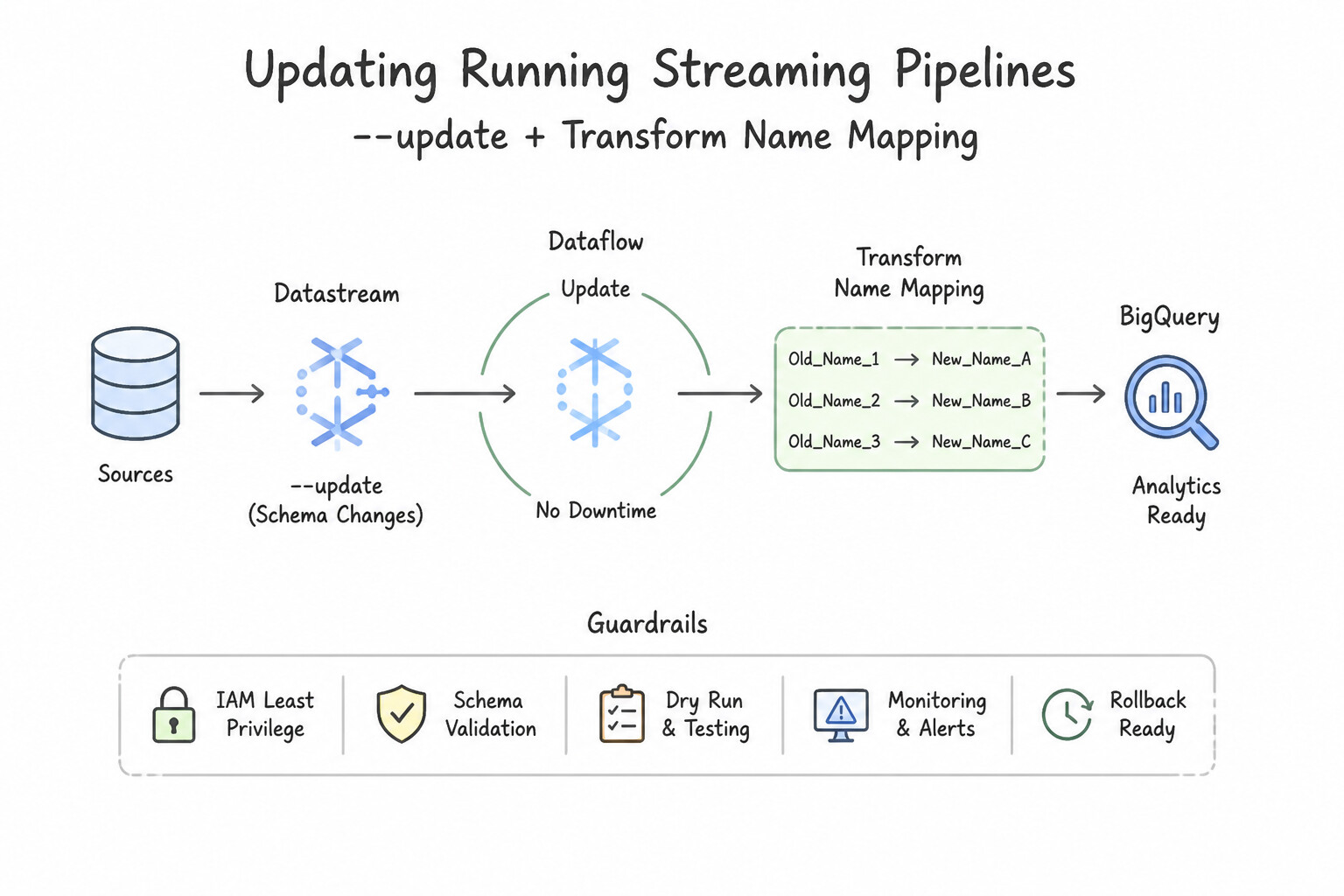
- Updating Running Streaming Pipelines (
--update+ Transform Name Mapping): - When a new data source or schema column requires updating a live 24/7 Dataflow streaming job without dropping in-flight window state, launch a replacement job with
--updateand--jobName=<existing-job-name>. - Critical Rule: Always assign explicit, unique string names to every Beam step (
pipeline.apply("ParseOrders", ParDo.of(...))). If you rename or insert steps in the DAG, pass--transformNameMapping='{"OldStepName":"NewStepName"}'so Dataflow maps persisted state to the new graph; if the change is incompatible, use Drain (processes in-flight windows then stops cleanly) before launching the new job.
Key Implementation Patterns
- Real-time CDC from Legacy Oracle: Use Configure a Datastream stream to replicate data from the Oracle database to BigQuery using Change Data Capture (CDC). Datastream provides serverless CDC that reads transaction logs to replicate data to BigQuery in real-time with minimal source impact.
- Ingesting from Salesforce (SaaS): Use Deploy a Cloud Data Fusion instance. Install the Salesforce plugin and use the visual pipeline studio to design the flow and transformations. Cloud Data Fusion provides a code-free, GUI-based environment with built-in plugins for Salesforce integration and visual transformation mapping.
Key Takeaways (2.2h)
- Datastream is the primary Google Cloud service for serverless Change Data Capture (CDC) and replication.
- Use CDC when you need real-time data with minimal impact on the source database performance.
- Avoid frequent polling (running queries) against production databases for replication, as it degrades performance.
- Batch operations (like nightly exports) are suitable only when latency is not a concern.
Quick Decision Cheat Sheet (Subsection 2.2)
If the Scenario Requires... | Choose This Google Cloud Pattern | Avoid This Common Mistake |
|---|---|---|
"High-throughput streaming writes to BigQuery with exactly-once semantics and lowest ingestion cost" | BigQuery Storage Write API ( Method.STORAGE_WRITE_API in Dataflow with COMMITTED streams) | Legacy tabledata.insertAll (STREAMING_INSERTS) |
"Dataflow job suffers from a single worker node at 100% CPU during GroupByKey due to a skewed key" | Replace GroupByKey with Combine.perKey(...) and add .withHotKeyFanout(...) | Increasing --maxNumWorkers (a single hot key without fanout still hashes to only 1 worker!) |
"Dataflow worker throws TooManyRequests or socket exhaustion calling an external API per element" | Initialize the HTTP client in @Setup and batch elements with GroupIntoBatches before calling the API | Creating a new HTTP client inside @ProcessElement for every single record |
"Gracefully stop a streaming Dataflow job so all currently buffered/windowed data finishes writing before shutdown" | Use the Drain command | Using Cancel (immediately terminates VMs and discards in-flight buffered state) |
"Run real-time ML inference inside a streaming Dataflow pipeline with low latency" | Apache Beam RunInference transform (with local model or Vertex AI endpoint handler) | Writing a batch cron job that exports data to GCS and runs predictions once a day |
Further Reading (Subsection 2.2)
- Handling invalid data in Dataflow — This section of the Google Cloud Architecture Center guide explains strategies for handling invalid data, including using a dead-letter file pattern.
- De-identifying PII in a Dataflow pipeline — This solution guide describes the architecture for calling the Cloud DLP API from Dataflow to tokenize or mask sensitive data before writing to storage.
- Cloud Dataprep by Trifacta — Overview of Cloud Dataprep features, emphasizing its intelligent, visual, and serverless nature for data preparation.
- Dataproc Documentation — Read the overview to understand how Dataproc provides a managed environment for the Hadoop ecosystem.
- Cloud Data Fusion Overview — Describes Cloud Data Fusion as a fully managed, cloud-native data integration service with a graphical interface.
- Dataflow overview — Explains that Dataflow is a managed service for executing Apache Beam pipelines, which typically require coding.
Subsection 2.3: Deploying and operationalizing the pipelines
The Big Picture
Building a pipeline that runs on a developer's laptop with DirectRunner is only 20% of the engineering lifecycle; the remaining 80% is automating orchestration, packaging dependencies deterministically, and enforcing CI/CD promotion gates. Subsection 2.3 tests how you avoid two operational disasters:
- The Orchestrator Misuse Anti-Pattern (2.3a): Teams frequently use Cloud Composer (Apache Airflow) when a simple Cloud Scheduler + Cloud Workflows pipeline would cost 98% less, or conversely try to use Cloud Scheduler alone to coordinate a 40-step cross-cloud dependency DAG with conditional retries and SLA alerts. Worse, developers install conflicting C/Python libraries directly into the global Cloud Composer environment or run heavy Pandas transformations inside Airflow workers—crashing the Airflow scheduler and starving all other DAGs.
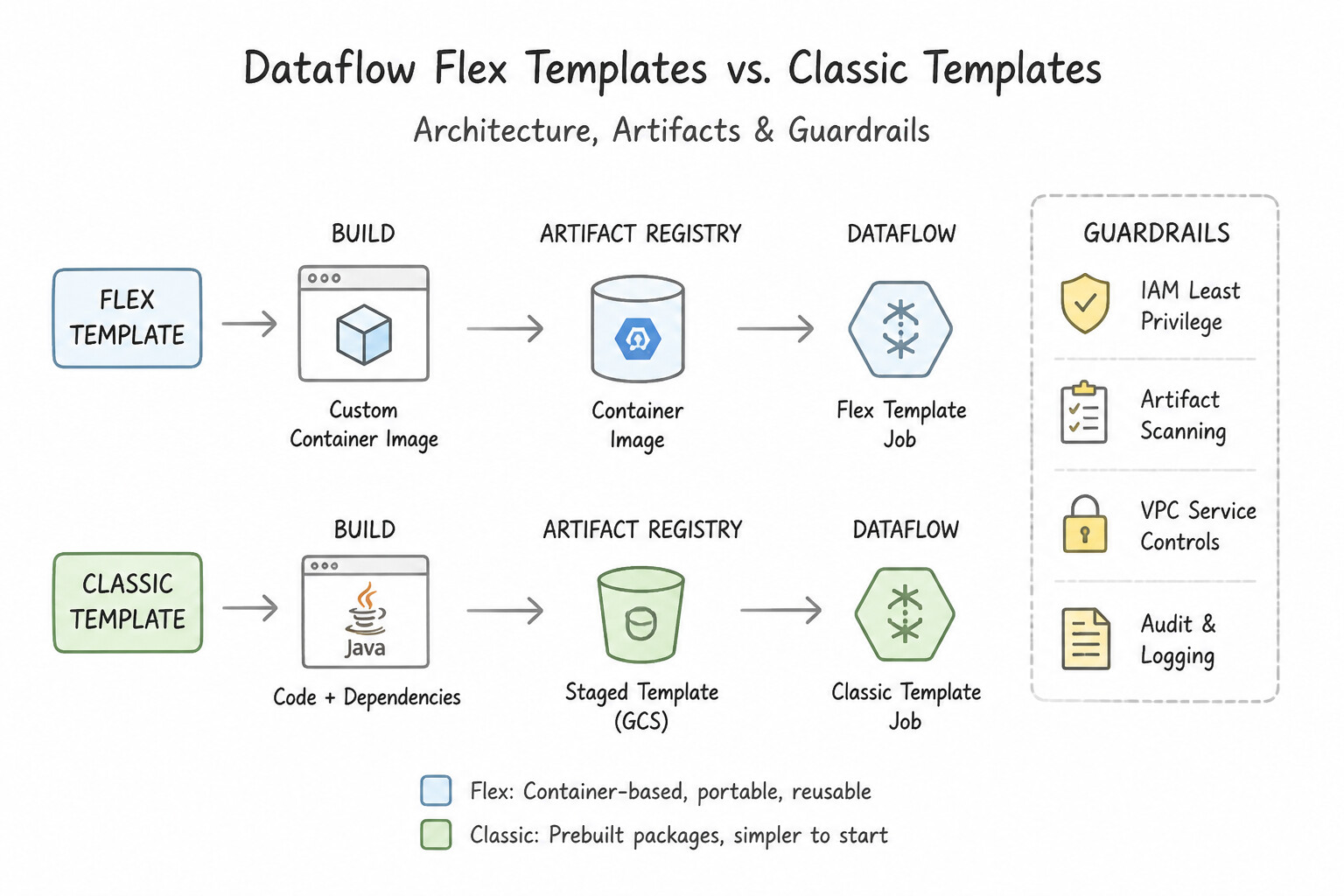
- Classic Templates vs. Flex Templates & Untested Production Releases (2.3b): In Dataflow, legacy Classic Templates serialize a static execution graph at build time—meaning the graph topology cannot adapt dynamically to runtime parameters, and Python dependency drift between developer laptops breaks production builds. Dataflow Flex Templates package the pipeline code, exact Python/Java dependencies, and base OS into an immutable Docker container image in Artifact Registry built by Cloud Build, compiling the execution graph dynamically at job launch time.
Consideration 2.3a: Job automation and orchestration (e.g., Cloud Composer and Workflows)
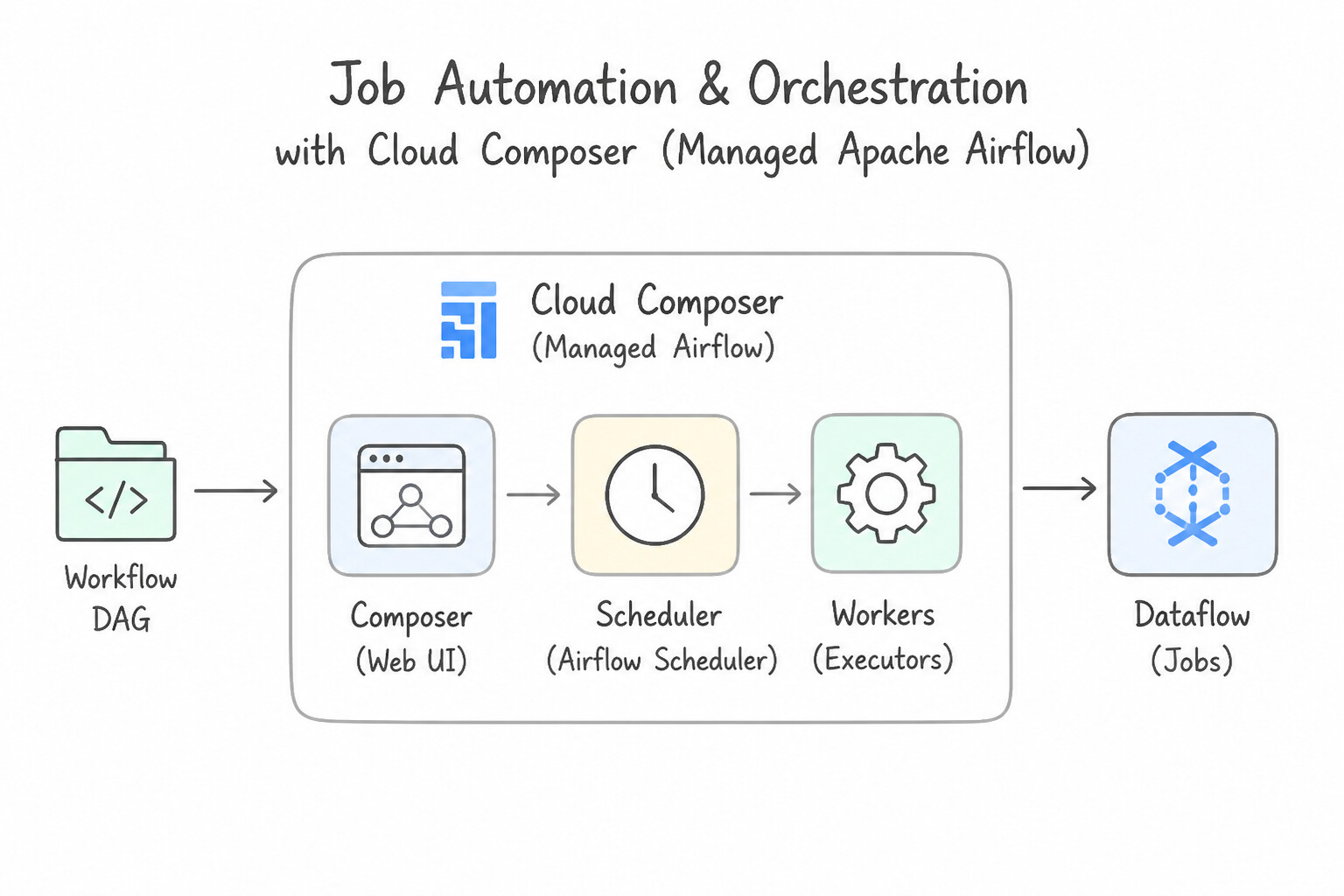
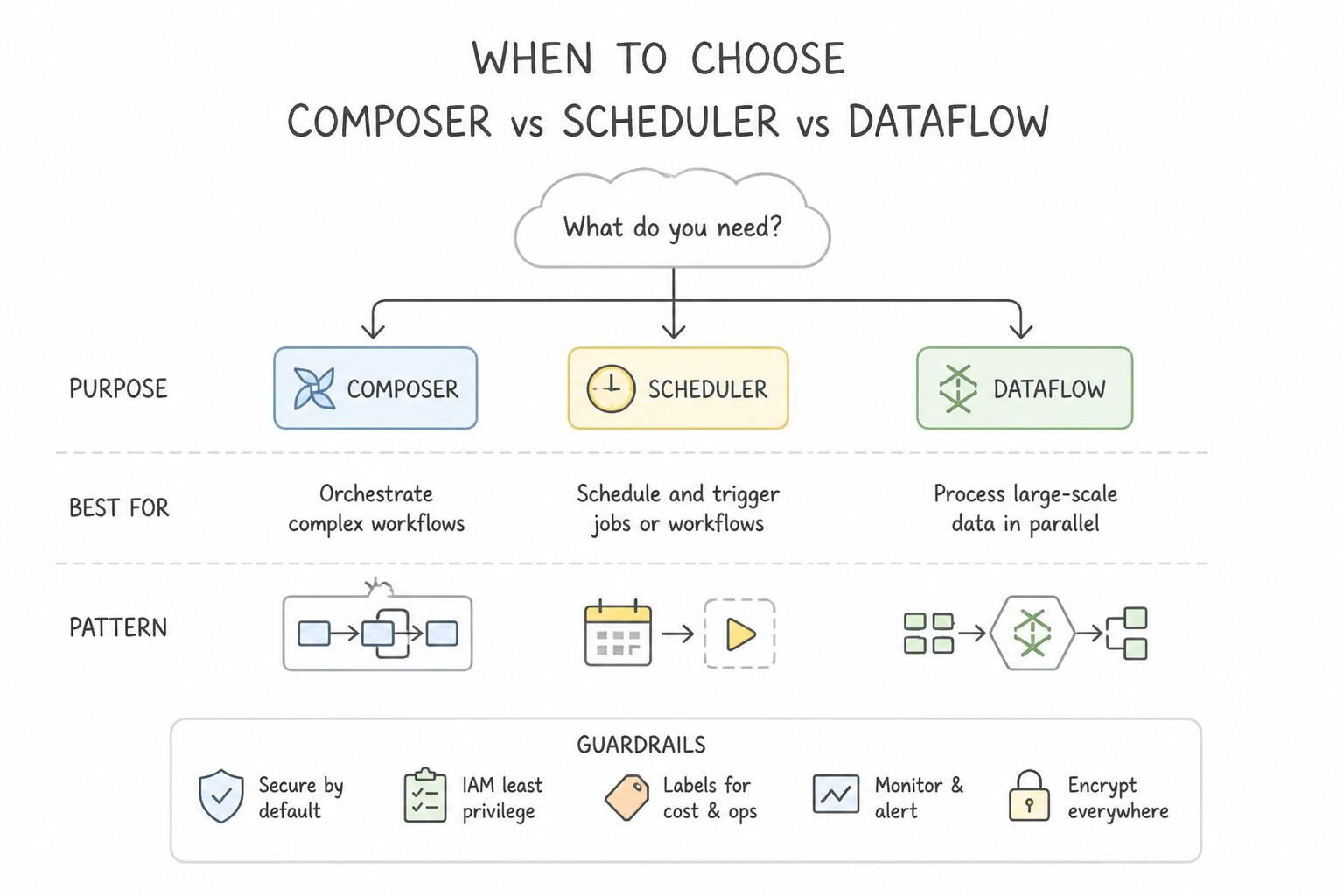
Choose the right Google Cloud orchestration service based on workflow complexity, environment span, and cost profile:
- Cloud Composer (Managed Apache Airflow):
- When to Choose: Complex batch/ETL Directed Acyclic Graphs (
DAGs) with dozens of interdependent tasks, cross-environment orchestration (bridging on-premises databases/clusters, AWS/Azure, and Google Cloud), backfill/catchup semantics, and rich ecosystem operators (DataflowStartFlexTemplateOperator,BigQueryInsertJobOperator,DataprocInstantiateWorkflowTemplateOperator). - Critical Composer Best Practices:
- Never process data inside Airflow workers: Offload all compute to Dataflow, Dataproc, or BigQuery.
- Isolate conflicting dependencies: If one task needs
scikit-learn==1.5and another needsscikit-learn==0.24, run them inKubernetesPodOperator(orGKEStartPodOperator) using custom container images from Artifact Registry rather than polluting global Composer PyPI packages. - Use Deferrable Operators (
deferrable=True): Releases the worker slot to the Airflow Triggerer while waiting for external jobs or GCS files. - Cloud Workflows (Serverless State Machine):
- When to Choose: Lightweight, event-driven or API-centric orchestration chaining Google Cloud services (
Cloud Functions,Cloud Run,BigQueryjobs,Dataflowtemplate launches) defined in YAML/JSON. Scales to zero with zero idle cluster cost and low-latency startup (ideal when triggered by Eventarc on GCS object arrival or Cloud Scheduler). - Cloud Scheduler vs. Dataproc Workflow Templates:
- Use Cloud Scheduler alone only for simple single-target cron triggers (e.g., hitting an HTTP endpoint or publishing a Pub/Sub trigger message at
0 2 * * *). - Use Dataproc Workflow Templates when automating the exact lifecycle: Create Ephemeral Dataproc Cluster → Run Ordered Spark/Hive Jobs → Tear Down Cluster Always (even on failure).
Key Implementation Patterns
- Orchestrating Complex Dependencies: Use Use Cloud Composer to define and manage the pipeline as a DAG. Cloud Composer (Apache Airflow) is designed specifically for orchestrating complex workflows with dependencies and conditional logic. (Avoid alternative: Cloud Scheduler is for simple time-based triggers, not for managing complex dependencies between multiple tasks.)
- Event-Driven DAG Triggering: Use Enable Cloud Storage notifications to a Pub/Sub topic. Deploy a Cloud Function that subscribes to the topic and triggers the DAG using the Airflow REST API. Use an event-driven pattern: GCS notifies Pub/Sub, which triggers a Cloud Function to start the DAG via API.
- Serverless API Chaining: Use Define the execution steps in a YAML file and deploy the orchestration using Cloud Workflows. Cloud Workflows is serverless, low-latency, and pay-per-use, making it ideal for chaining microservices. (Avoid alternative: Cloud Composer incurs standing cluster costs and higher latency, making it unsuitable for lightweight, pay-per-use requirements.)
Key Takeaways (2.3a)
- Use Cloud Scheduler for simple, time-based cron jobs without complex dependencies.
- Use Cloud Composer (Apache Airflow) for complex ETL pipelines that require dependency management, retries, and conditional logic.
- Pipelines defined as DAGs (Directed Acyclic Graphs) allow you to visualize and manage the order of operations effectively.
- Managed services reduce operational overhead compared to running scripts on VMs.
Consideration 2.3b: CI/CD (Continuous Integration and Continuous Deployment)
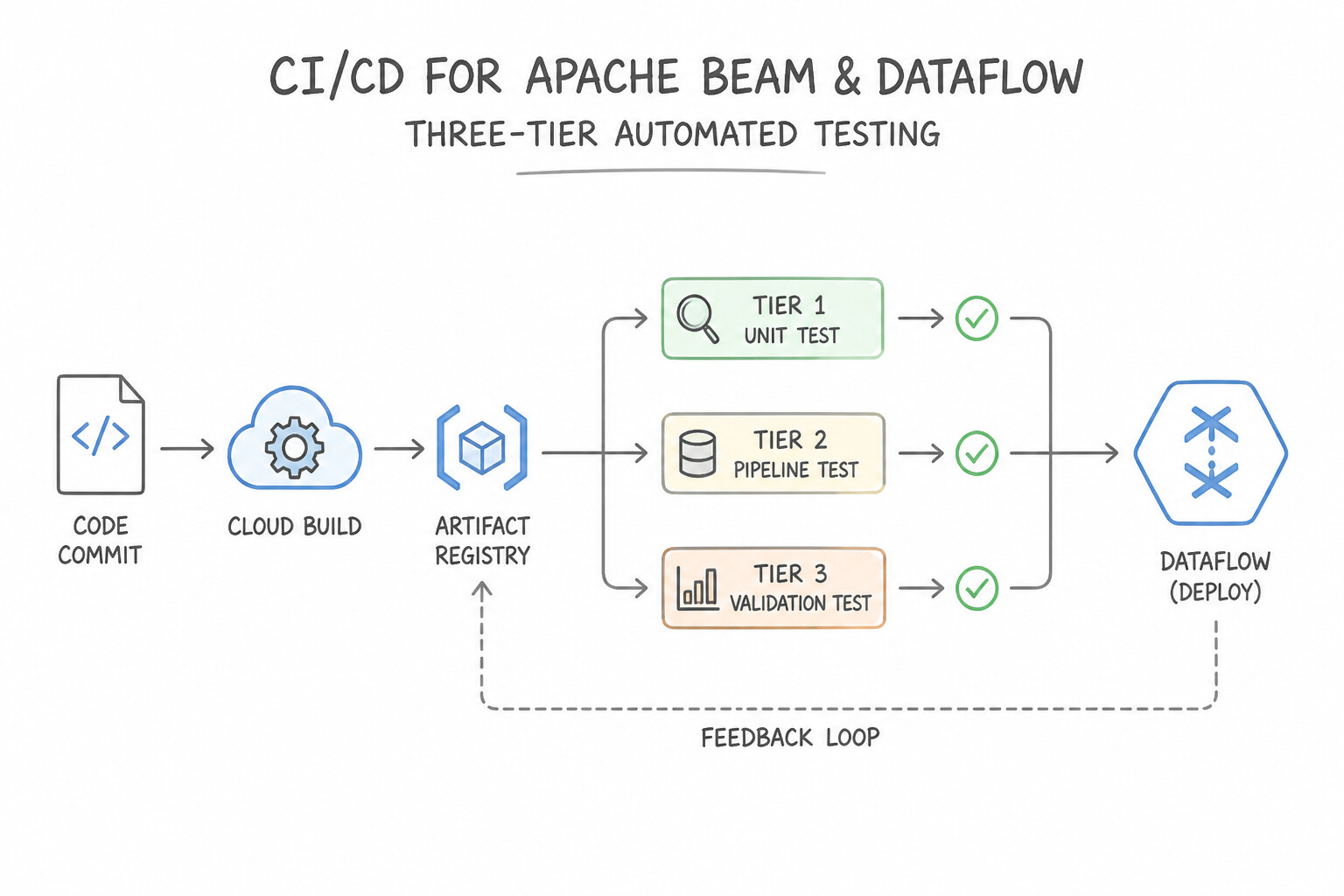
A production-grade CI/CD pipeline (Git → Cloud Build → Artifact Registry → Staging → Prod) enforces automated testing and immutable packaging:
- Three-Tier Automated Testing for Apache Beam / Dataflow:
- Unit & Windowing Logic Tests (
DirectRunner+TestStream+PAssert): Run fast in-memory tests inside Cloud Build without spinning up cloud VMs. UseTestStreamto deterministically advance the simulated event-time watermark and inject artificial late-arriving elements, and verify window panes withPAssert.that(output).containsInAnyOrder(...). - End-to-End Integration Tests (
DataflowRunnerin Staging): Deploy the candidate pipeline to an isolated staging project against synthetic/masked test data and validate output tables before promoting to production. - DAG Syntax & Import Validation (Cloud Composer): In Cloud Build, run
pytestto verify that all Airflow.pyDAG files parse without syntax errors, import cycles, or top-level database calls before syncing (gcloud storage rsync) to the Composerdags/GCS bucket. - Dataflow Flex Templates vs. Classic Templates:
- Always prefer Dataflow Flex Templates for modern CI/CD: they package the pipeline code and all OS/Python/Java dependencies into a versioned Docker image stored in Artifact Registry, and generate the Beam execution graph dynamically at launch time (allowing conditional branching based on runtime parameters).
Key Implementation Patterns
- Automating Dataflow Flex Template Builds: Use Create a Dockerfile that installs FFMPEG and the pipeline code. In Cloud Build, build the image, push it to Artifact Registry, and use
gcloud dataflow flex-template buildto create the template spec. Flex Templates use Docker containers to handle system-level dependencies, enabling custom environments for Dataflow workers. - Pre-deployment Unit Testing: Use Add a build step that executes unit tests using the DirectRunner to validate the DoFn logic. DirectRunner executes pipelines locally, allowing unit tests to verify logic without provisioning cloud resources. (Avoid alternative: Monitoring alerts are reactive and occur after deployment, failing to prevent the regression.)
- Synchronizing DAGs for Cloud Composer: Use Create a Cloud Build configuration that uses the
gsutil rsynccommand to copy DAG files from the Git repository to the/dagsfolder in the Cloud Composer environment's Cloud Storage bucket. Cloud Composer syncs DAGs from a specific Cloud Storage bucket, so the CI/CD pipeline must copy files there.
Key Takeaways (2.3b)
- Use Dataflow Flex Templates when you need custom system dependencies (non-Python/Java libraries) on workers.
- Flex Templates rely on Docker images stored in Artifact Registry or Container Registry.
- The deployment sequence for Flex Templates is: Build Docker Image -> Push to Registry -> Build Template Spec.
- requirements.txt is only for Python packages, not system binaries.
Quick Decision Cheat Sheet (Subsection 2.3)
If the Scenario Requires... | Choose This Google Cloud Pattern | Avoid This Common Mistake |
|---|---|---|
"Simple cron job to trigger a single Cloud Function or Dataflow template once a night at minimal cost" | Cloud Scheduler | Cloud Composer (massive overkill for a single cron trigger) |
"Serverless orchestration of HTTP APIs and GCP services with conditional branching and scale-to-zero billing" | Cloud Workflows | Running a custom Python while True loop on a Compute Engine VM |
"Package a Dataflow pipeline into an immutable Docker container for self-service deployment across Dev/Staging/Prod" | Dataflow Flex Templates + Artifact Registry + Cloud Build | Manually SSHing into a VM to run python pipeline.py --runner=DataflowRunner |
"Airflow scheduler in Cloud Composer is slow and timing out when parsing DAG files" | Move top-level API/DB queries and heavy imports inside operator execution methods (keep top-level DAG Python code pure and fast) | Executing bigquery.Client().query(...) at the top level of the .py DAG file (runs every 30 seconds during DAG parsing!) |
"Automate CI/CD deployment of SQL transformations and assertions into BigQuery upon Git merge" | Dataform connected to Git + Cloud Build triggering Dataform workflow executions via API/CLI | Manually copy-pasting SQL queries between dev and prod consoles |
Further Reading (Subsection 2.3)
- Cloud Composer Overview — Provides a high-level overview of Cloud Composer, explaining that it is a managed Apache Airflow service used to author, schedule, and monitor pipelines.
- Cloud Scheduler vs. Cloud Composer — A blog post that clearly delineates when to use the simple Cloud Scheduler versus the more robust Cloud Composer for orchestration.
- Triggering DAGs with Cloud Functions — This guide provides a step-by-step tutorial on setting up a Cloud Function to trigger a Cloud Composer DAG in response to a Cloud Storage event.
- Choose Workflows or Cloud Composer for service orchestration — A guide comparing Cloud Workflows, Cloud Composer, and Cloud Tasks based on use cases like service chaining vs. data pipelines.
- Cloud Workflows Overview — Introduction to Cloud Workflows, highlighting its serverless nature and use cases for HTTP-based service orchestration.
- Using Flex Templates — Refer to the section 'Building and running a Flex Template' to see the required steps involving Docker and the gcloud command.
Book TOC · Previous · Chapter 2 of 6 · Next
AwesomeGCP.com Learning
The approach taken is a question-led learning approach: you explore realistic project scenarios where you need to make decisions or take actions to achieve business goals within specific constraints. Instead of passive learning, you are challenged to think and work through the options to master the Professional Data Engineer (PDE) certification!