Book TOC · Previous · Chapter 1 of 6 · Next
Chapter 1: Designing Data Processing Systems: Security, Privacy, Reliability, Portability & Migration
Chapter Focus: BigQuery column/row-level security, Sensitive Data Protection (DLP), CMEK,VPC-SC, SLO/RPO/RTO pipeline resilience, open-format portability (Iceberg/Parquet), and BigQuery Data Transfer Service migrations.
Subsection 1.1: Designing for security and compliance
The Big Picture
Data engineering platforms concentrate an enterprise's most sensitive assets—customer PII, payment records, healthcare telemetry, and proprietary financial models—into centralized analytical stores. Teams that treat security as an afterthought routinely fall into four production anti-patterns:
- The Over-Privileged Project & Cloned Table Anti-Pattern (
1.1a,1.1f,1.1g): Granting primitive roles (roles/editororroles/owner) at the project level or running development pipelines inside the production project exposes live datasets to accidental truncation and data leakage. Worse, creating physical copies of a 50 TB table just to hide three sensitive columns (SSN,Salary,DOB) from marketing analysts triples storage costs and creates schema synchronization nightmares—when a single table with Policy Tags + Dynamic Data Masking and Row-Level Security (Row Access Policies) solves both problems with zero data duplication. - The Cleartext PII vs. Broken JOIN Trap (1.1c): When de-identifying sensitive columns with Sensitive Data Protection (Cloud DLP), replacing
customer_idwith a static[REDACTED]string destroys the ability to joinorderswithcustomersin BigQuery. Production architectures use Deterministic Encryption (Format-Preserving Encryption [FPE]orAES-SIV) or Cryptographic Hashing (CryptoHashConfigwith a KMS-wrapped key) so identical inputs map to identical surrogate tokens, preserving referential integrity across tables. - The Uncontrolled Key & Exfiltration Perimeter Gap (
1.1b,1.1d,1.1e): Relying on default Google-managed keys when regulators require unilateral key revocation fails compliance audits—requiring Cloud KMS (CMEK), Cloud HSM, or Cloud EKM (for external sovereignty). Similarly, IAM alone cannot stop a compromised service account from copying a BigQuery table to an external personal project; only a VPC Service Controls (VPC-SC) perimeter paired with Organization Policy (gcp.resourceLocations) and Cloud Storage Bucket Lock guarantees sovereignty, exfiltration prevention, and SEC Rule 17a-4 WORM immutability.
Consideration 1.1a: Identity and Access Management (e.g., Cloud IAM and organization policies)
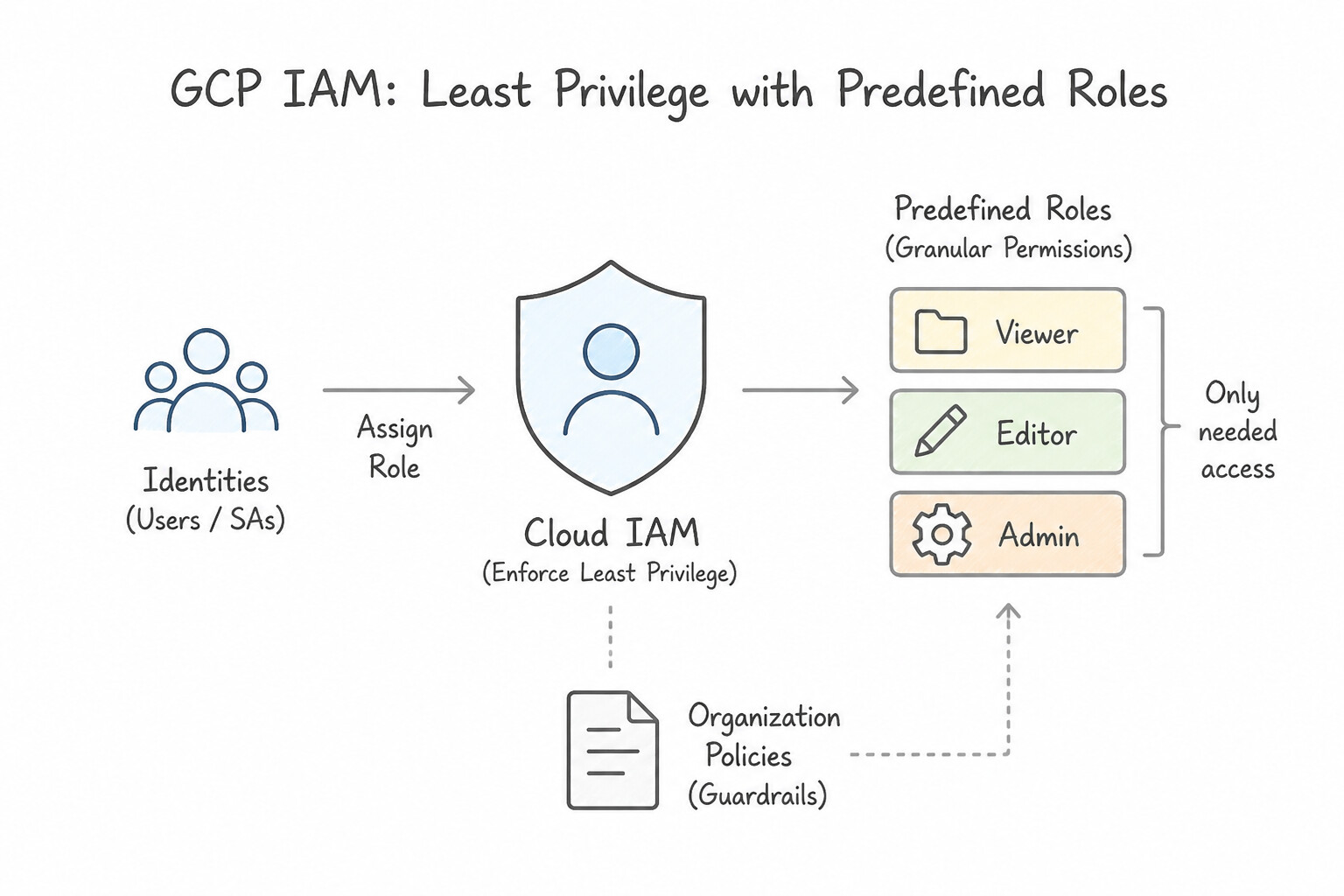
When designing IAM and Organization Policy architectures, apply these core rules:
- Principle of Least Privilege & Predefined Roles: Always reject primitive roles (
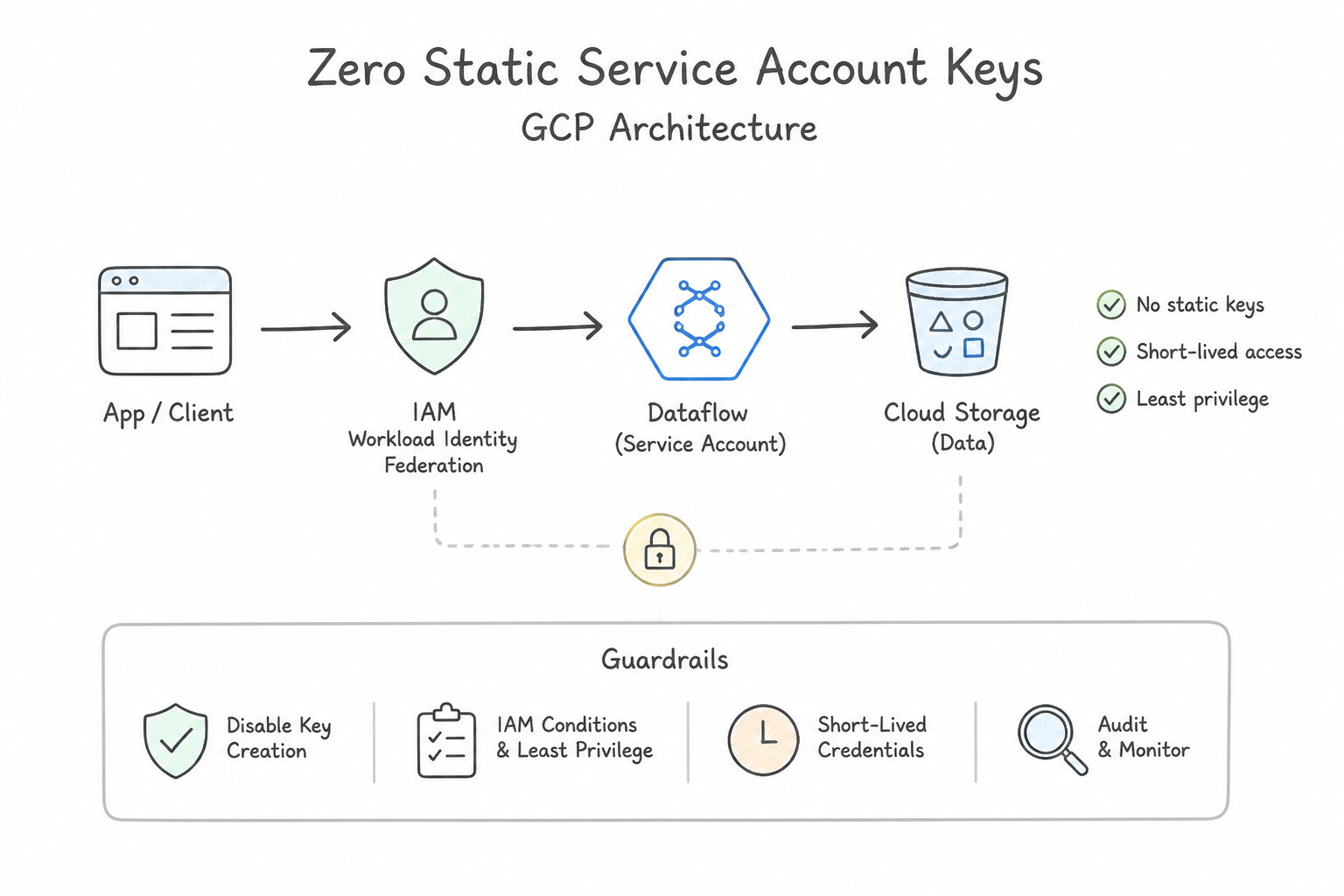
Owner,Editor,Viewer) and overly broad*Adminroles when a specific predefined role exists. In BigQuery, separate compute execution (roles/bigquery.jobUser) granted on the user's billing/consumer project from read access (roles/bigquery.dataViewer) granted on the storage dataset—this allows departments to query central datasets while billing slot consumption to their own project. - Zero Static Service Account Keys: Never download JSON service account keys to VMs, laptops, or Git repos. Use attached Service Accounts on Dataflow/Dataproc worker VMs, Workload Identity Federation for external workloads/GKE pods, and enforce
constraints/iam.disableServiceAccountKeyCreationvia Organization Policy. - IAM Conditions for Context-Aware Access: Use IAM Conditions to restrict role bindings by time-of-day (temporary contractor access), resource name prefix, or request attributes without creating duplicate datasets.
- VPC Service Controls (
VPC-SC) vs. IAM: IAM verifies who (identity); VPC-SC verifies where (service perimeter). Wrap BigQuery, Cloud Storage, and Dataflow in a VPC-SC perimeter to block data exfiltration (such asbq cpto an external project) even if a privileged credential is compromised.
Key Implementation Patterns
- Cross-Project Data Pipeline Security: Use Add the Dataflow worker service account from Project A to the IAM policy of the Cloud Storage bucket in Project B. Grant the Storage Object Viewer role. Grant the Dataflow service account from Project A the necessary read permissions directly on the specific Cloud Storage bucket in Project B.
- Preventing Exfiltration via Service Account Keys: Use Configure the
constraints/iam.disableServiceAccountKeyCreationOrganization Policy on the folder. Organization Policies provide preventative guardrails. This specific constraint disables the creation of external Service Account keys.
Key Takeaways (1.1a)
- IAM policies are attached to the resource being accessed, not the identity requesting access.
- Service accounts are global identities; a service account from Project A can be granted permissions in Project B.
- Avoid exporting service account keys (JSON); use IAM bindings for secure service-to-service communication.
- Apply the principle of least privilege (e.g., Object Viewer instead of Owner).
Consideration 1.1b: Data security (encryption and key management)
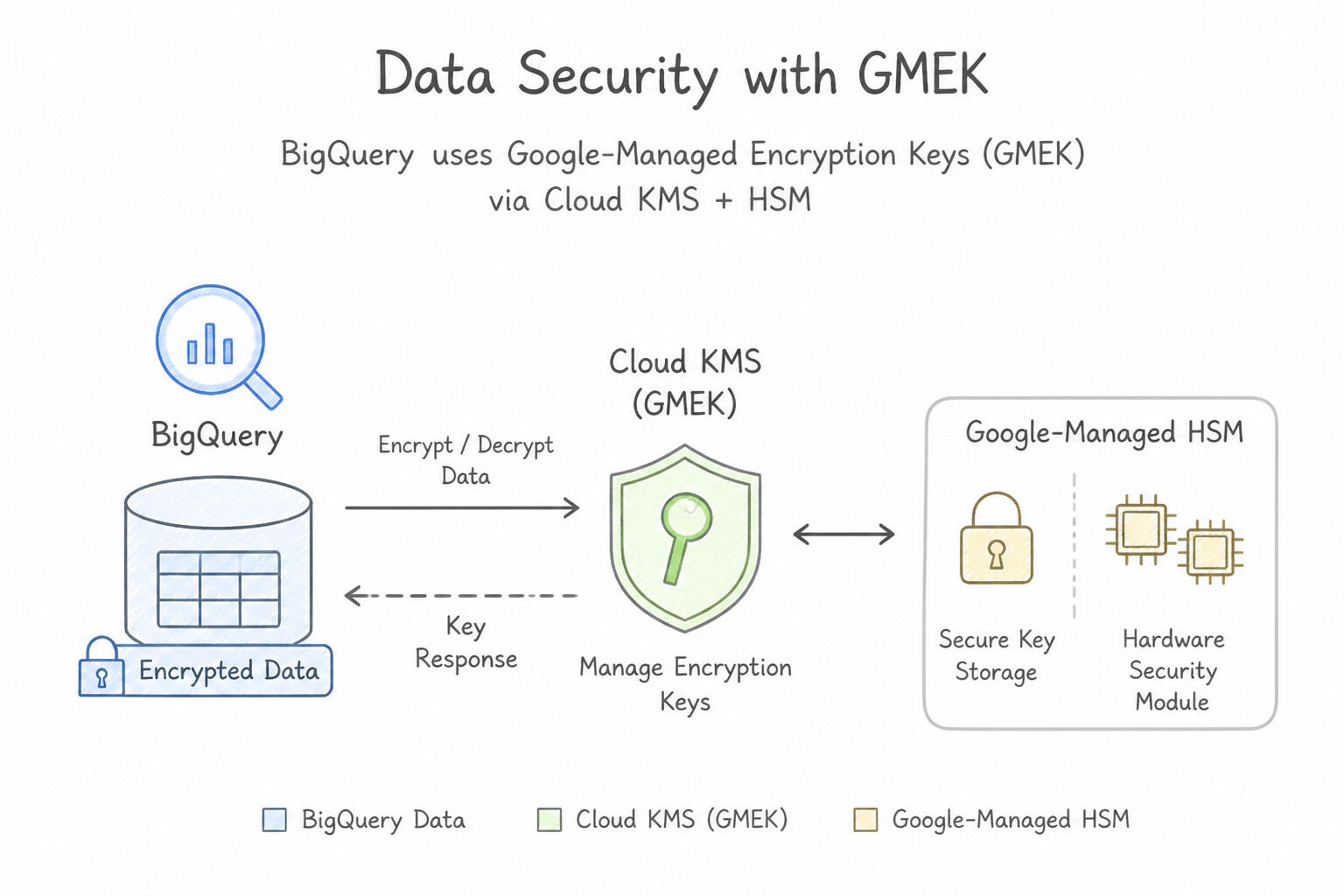
Google Cloud encrypts all data at rest (AES-256) and in transit (TLS) by default, but production scenarios test who controls the key lifecycle:
- Google-Managed Encryption Keys (
GMEK): Default, zero operational overhead. Choose when no regulatory mandate requires customer control over rotation or revocation. - Customer-Managed Encryption Keys (
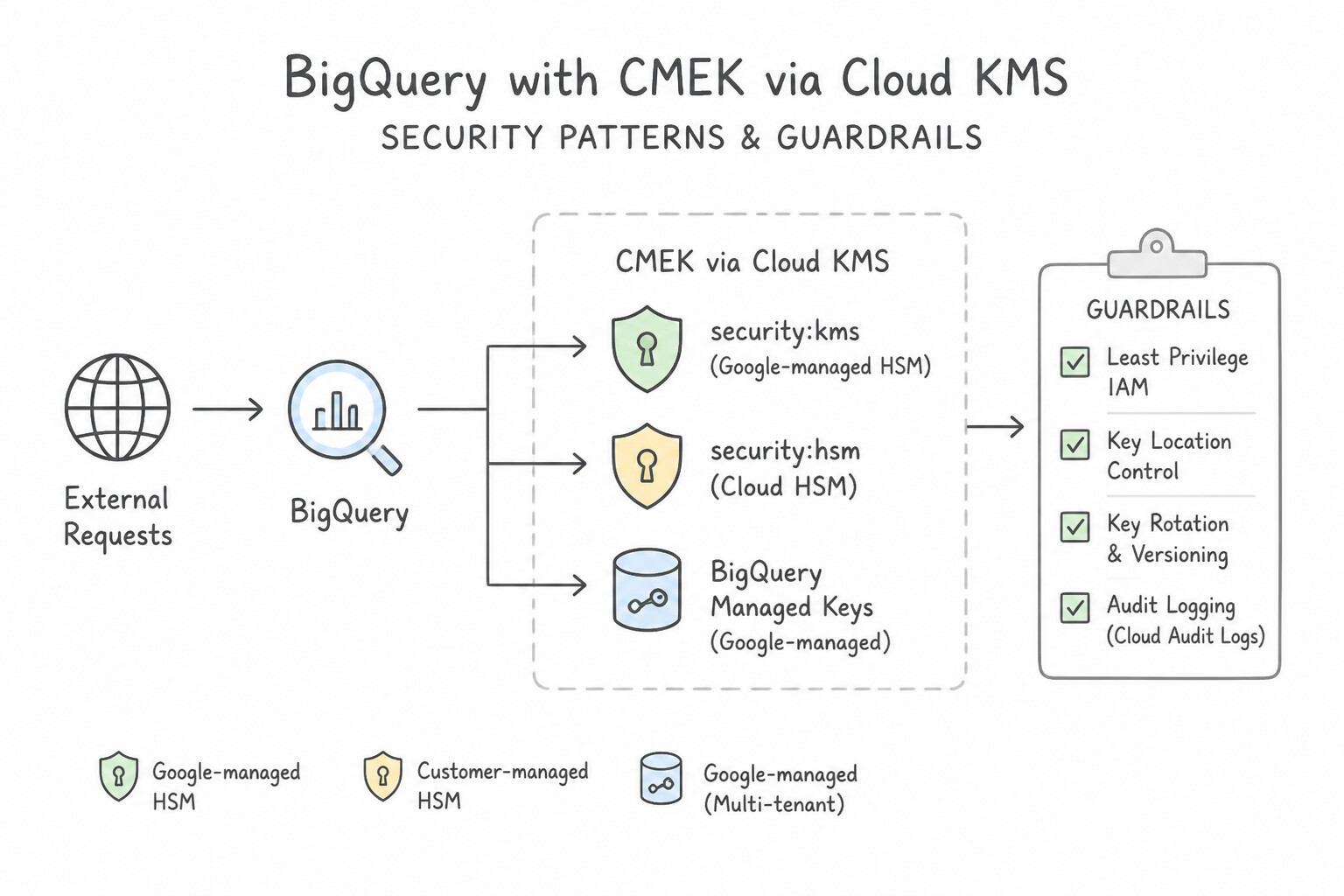
CMEKvia Cloud KMS): You control key creation, rotation schedules, and disabling/destruction in Cloud KMS. Remember that automatic key rotation generates a new primary key version for new writes, but does not automatically re-encrypt existing BigQuery tables or GCS objects unless rewritten/copied. - Cloud HSM: FIPS 140-2 Level 3 / FIPS 140-3 certified physical hardware security modules inside Google Cloud (used with CMEK when compliance mandates hardware-backed key generation).
- Cloud External Key Manager (
Cloud EKM): Keys stay in an external third-party key manager outside Google Cloud's infrastructure, giving the customer independent audit and instant revocation control. - Customer-Supplied Encryption Keys (
CSEK): You supply the raw AES-256 key on every API call (supported on Cloud Storage and Compute Engine disks, not BigQuery); Google never stores the key on disk. - AEAD Encryption Functions & Crypto-Shredding: For row-level or per-user cryptographic erasure in BigQuery, assign a unique key per user in a keyset and encrypt PII columns with BigQuery AEAD encryption functions (
AEAD.ENCRYPT); deleting that user's key instantly crypto-shreds their data without rewriting petabytes of storage.
Key Implementation Patterns
- Hardware-Backed Key Protection: Use Create a key in Cloud Key Management Service (Cloud KMS) with the protection level set to HSM. Cloud HSM provides FIPS 140-2 Level 3 validated hardware-backed keys fully integrated with Cloud KMS. (Avoid alternative: Default keys are software-backed (Level 1) and managed by Google, failing the Level 3 requirement.)
- Default Encryption Override in BigQuery: Use Create a key in Cloud Key Management Service (Cloud KMS). Update the BigQuery dataset configuration to use this Customer-Managed Encryption Key (CMEK). CMEK allows you to manage key rotation and revocation in Cloud KMS, overriding the default Google-managed encryption.
- External Key Management: Use Use Cloud External Key Manager (Cloud EKM) connected to a supported third-party key management partner. Cloud EKM allows keys to be stored and managed in a third-party system outside Google Cloud while still integrating with services like BigQuery.
Key Takeaways (1.1b)
- Standard Google-managed keys and Cloud KMS software keys are FIPS 140-2 Level 1 compliant.
- Cloud HSM provides FIPS 140-2 Level 3 compliance for keys managed within Google Cloud.
- Use Cloud HSM when regulations specifically mandate hardware-backed key protection.
- Data in Google Cloud is encrypted by default.
Consideration 1.1c: Privacy (e.g., strategies to handle personally identifiable information)
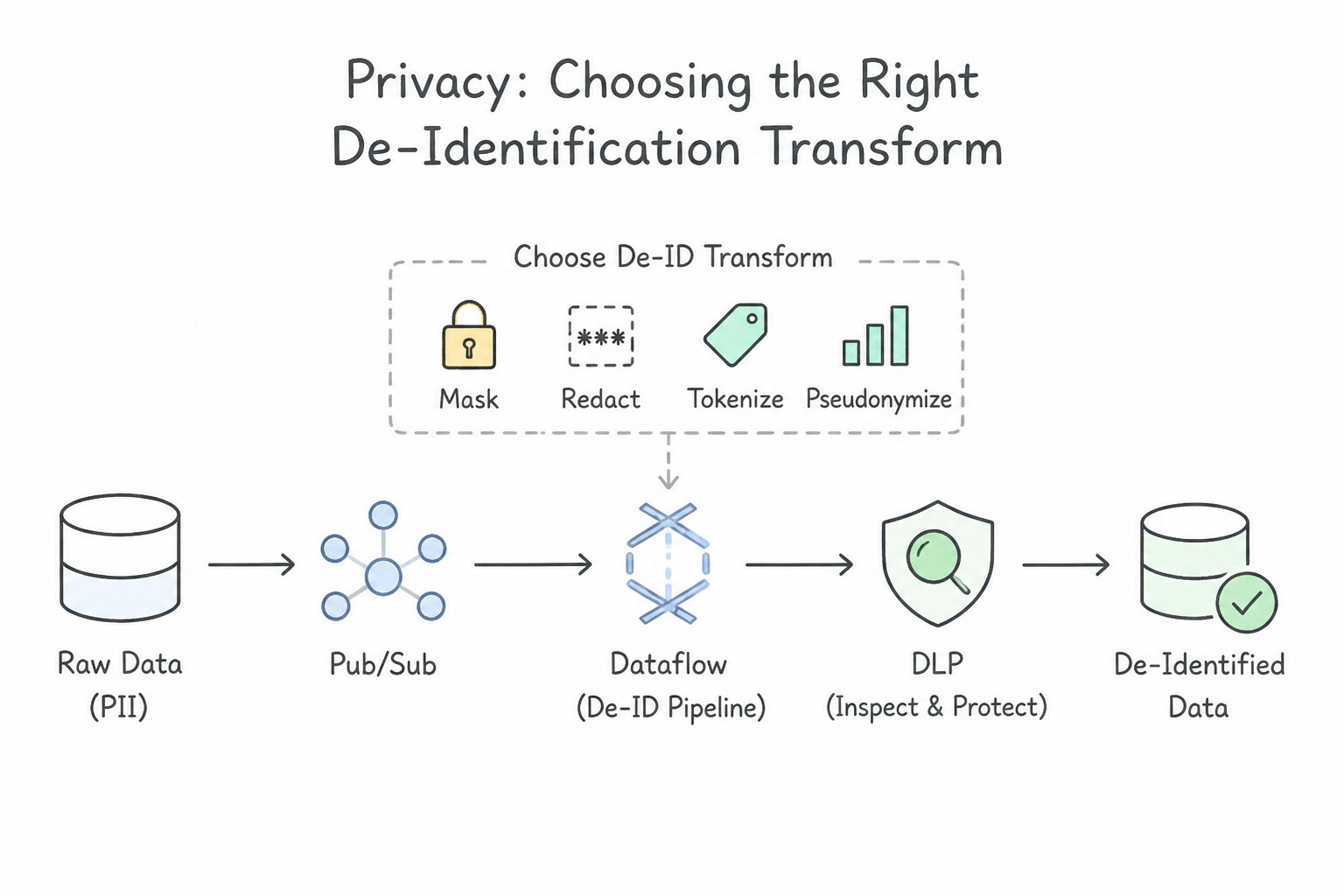
Sensitive Data Protection (formerly Cloud DLP) is tested heavily across batch, streaming, and warehouse workflows:
- Choosing the Right De-Identification Transform:
- Redaction / Masking (
[REDACTED]or***-**-1234): Irreversible; use for unstructured free-text logs, chat transcripts, or display-only fields where downstream joins are never needed. - Cryptographic Hashing (
CryptoHashConfig): Deterministic one-way hash using a KMS-wrapped key. Preserves JOIN key referential integrity across tables when you never need to decrypt back to cleartext. - Format-Preserving Encryption (
CryptoReplaceFfxFpeConfig/FPE) or Deterministic Encryption: Reversible deterministic tokenization that preserves the exact character set and length (e.g., a 16-digit credit card or 9-digit SSN becomes a valid-looking 9-digit surrogate token). ChooseFPEwhenever legacy schemas validate column format/length AND authorized systems must later re-identify the record! - Date Shifting & Bucketing / K-Anonymity: Date Shifting shifts all dates for a given
patient_idby the same random offset (preserving intervals between admission and discharge); Bucketing groups exact ages/salaries into ranges (30-39) to prevent re-identification via quasi-identifiers. - Inline Streaming vs. Native Warehouse Masking: To prevent raw PII from ever landing on disk in BigQuery, invoke the SDP API (
projects.content.deidentify) using De-identification Templates inside a Dataflow streaming pipeline (batching records in Beam to respect API quotas). If raw PII is allowed at rest for compliance officers, use BigQuery Dynamic Data Masking on Policy Tags instead.
!Redaction / Masking ([REDACTED] or Architecture (1.1c) --1234): Irreversible; use for unstructured free-text logs, chat transcripts, or display-only fields where downstream joins are never needed.
![Redaction / Masking ([REDACTED] or Architecture (1.1c)](images/pde-1.1c-2-redaction-masking.jpg)
Key Implementation Patterns
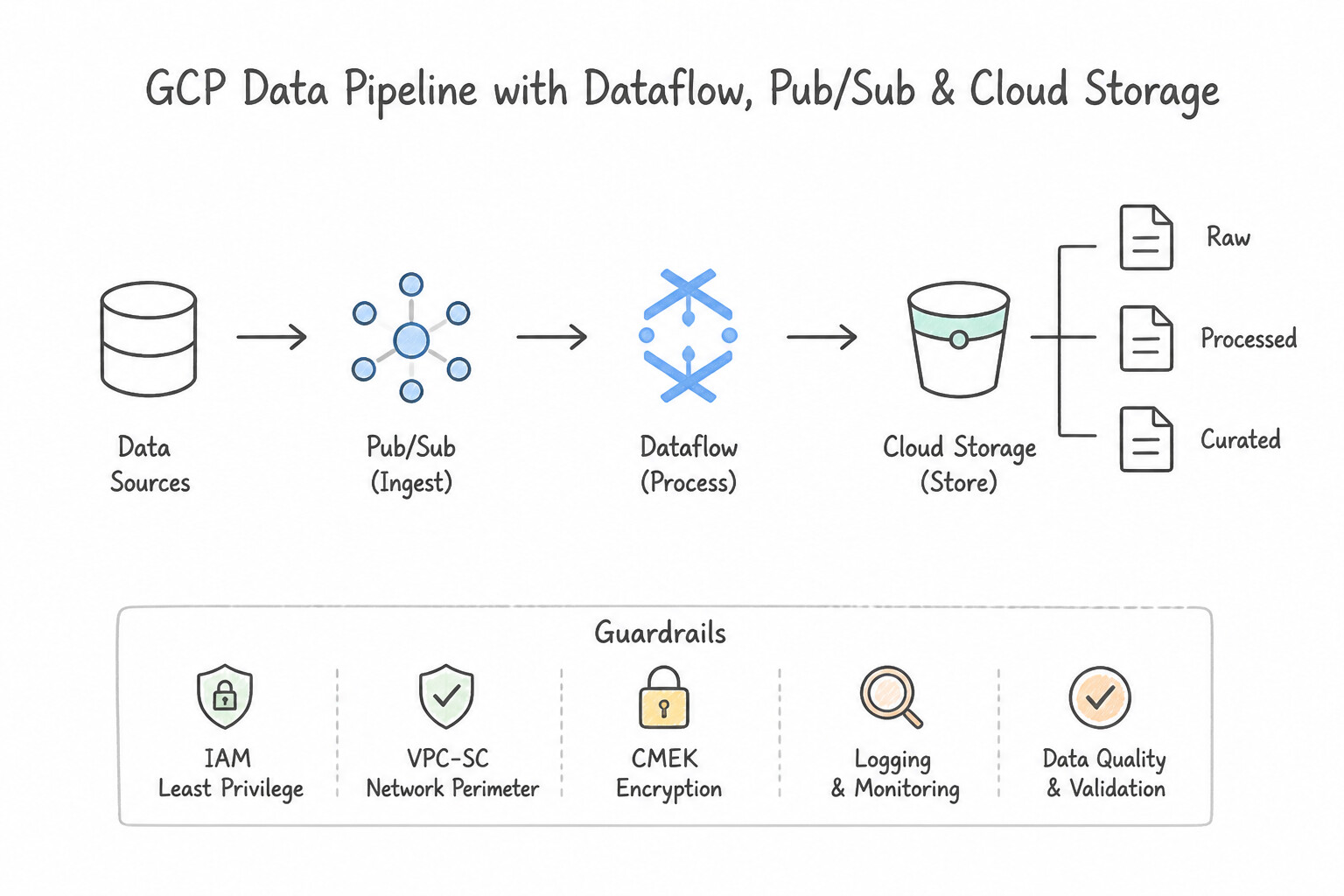
- Real-time PII Redaction in Streaming Pipelines: Use Create a Dataflow pipeline to read from Pub/Sub. Use the Cloud Data Loss Prevention (DLP) API to de-identify the sensitive data. Write the output to BigQuery. Dataflow supports streaming pipelines that can call the Cloud DLP API to redact PII in real-time before writing to BigQuery.
- Pseudonymization for Analytics Joins: Use Use Cloud DLP to apply cryptographic deterministic encryption using a surrogate type. Deterministic encryption creates consistent tokens for identical inputs, allowing joins while hiding PII. (Avoid alternative: Redaction removes the unique information needed to match records.)
- Fine-Grained Access Control for HR Data: Use Create Data Catalog policy tags and assign them to the "Salary" and "SSN" columns. Grant the Fine-Grained Reader role on the policy tags to the Payroll team. BigQuery Column-level security uses Data Catalog policy tags to restrict access to specific columns based on IAM roles assigned to those tags.
Key Takeaways (1.1c)
- Use Dataflow for streaming ETL (Extract, Transform, Load) pipelines when you need low-latency processing.
- Integrate Cloud DLP with Dataflow to de-identify PII (Personally Identifiable Information) in real-time before storage.
- Avoid storing raw PII, even temporarily, if the compliance requirement mandates redaction before storage.
- Access controls (IAM/Column-level security) are not a substitute for data redaction or de-identification.
Consideration 1.1d: Regional considerations (data sovereignty) for data access and storage
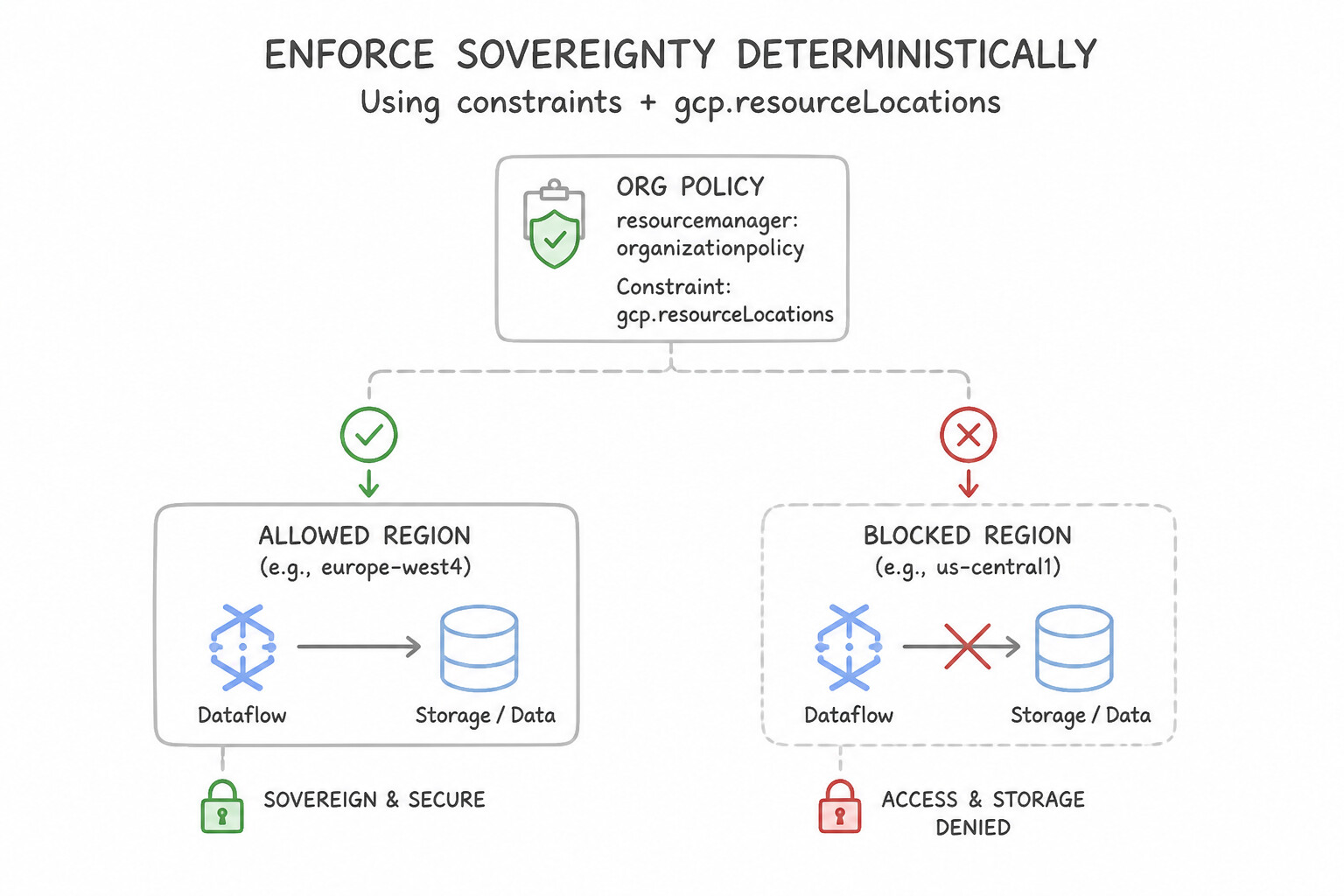
Data sovereignty mandates that data must be stored and processed strictly within a specific country or region (e.g., europe-west3 Frankfurt):
- Enforce Sovereignty Deterministically with
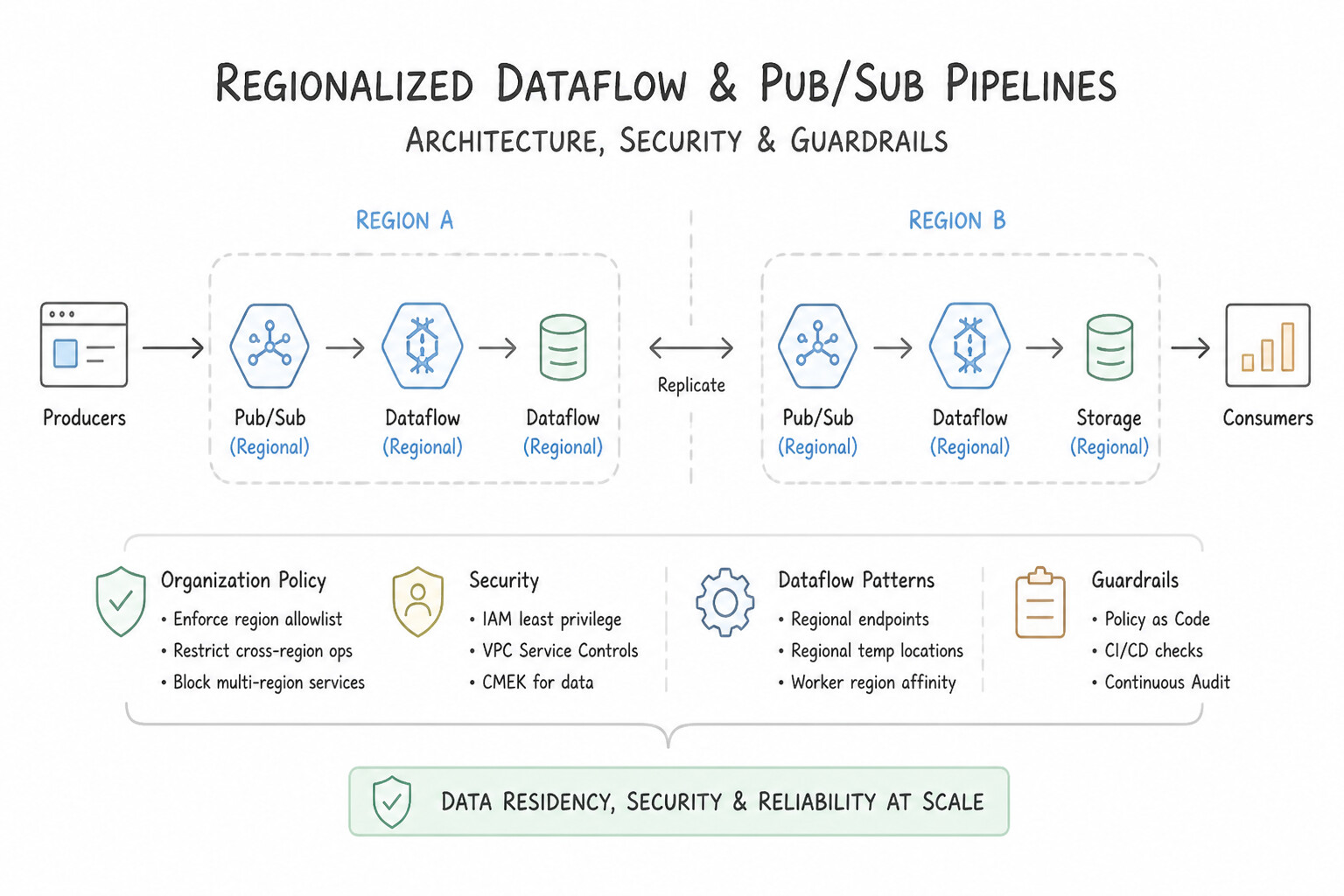
constraints/gcp.resourceLocations: Configure the Resource Location Restriction Organization Policy at the Folder or Project level to allowlist only approved regions. Any attempt to create a Cloud Storage bucket, BigQuery dataset, or Dataflow worker VM outside the allowlist is blocked at the API layer. - Regionalizing Dataflow & Pub/Sub Pipelines:
- By default, Pub/Sub routes messages globally; to enforce strict regional data residency, configure a Message Storage Policy on the Pub/Sub topic (or Organization Policy) AND publish/subscribe via regional Pub/Sub endpoints (
<region>-pubsub.googleapis.com). - In Dataflow, specify both
--region(where the job controller and metadata live) and--workerZone/--workerRegion(where the Compute Engine VMs process data), paired with a regional Cloud Storage--tempLocationand--stagingLocationin the same region.
Key Implementation Patterns
- Organization Policy for Resource Location: Use Configure an Organization Policy with the Resource Location Restriction constraint. Allow only the specific European Union regions in the policy. Organization Policies allow you to restrict resource creation to specific regions across the entire hierarchy.
- Dataflow Worker Locality: Use Set the --region flag to northamerica-northeast1 when you launch the Dataflow job. Setting the --region flag explicitly controls the regional endpoint and the default location for worker VMs, ensuring data sovereignty compliance. (Avoid alternative: Dataflow defaults to the us-central1 region if unspecified; it does not automatically colocate workers with your data storage.)
- BigQuery Cross-Region Joins: Use Create a copy of the
us-central1dataset ineurope-west1, and join the tables from the new copy. BigQuery joins require co-located data; copying the dataset allows the join to succeed. (Avoid alternative: A view does not physically move data; the location mismatch persists.)
Key Takeaways (1.1d)
- Use Organization Policies to set preventative guardrails on resources (e.g., location, external IP usage).
- Use IAM to manage user permissions and access control.
- Use Cloud Monitoring for reactive detection and auditing, not prevention.
- Data sovereignty requirements are typically handled via the Resource Location Restriction constraint.
Consideration 1.1e: Legal and regulatory compliance
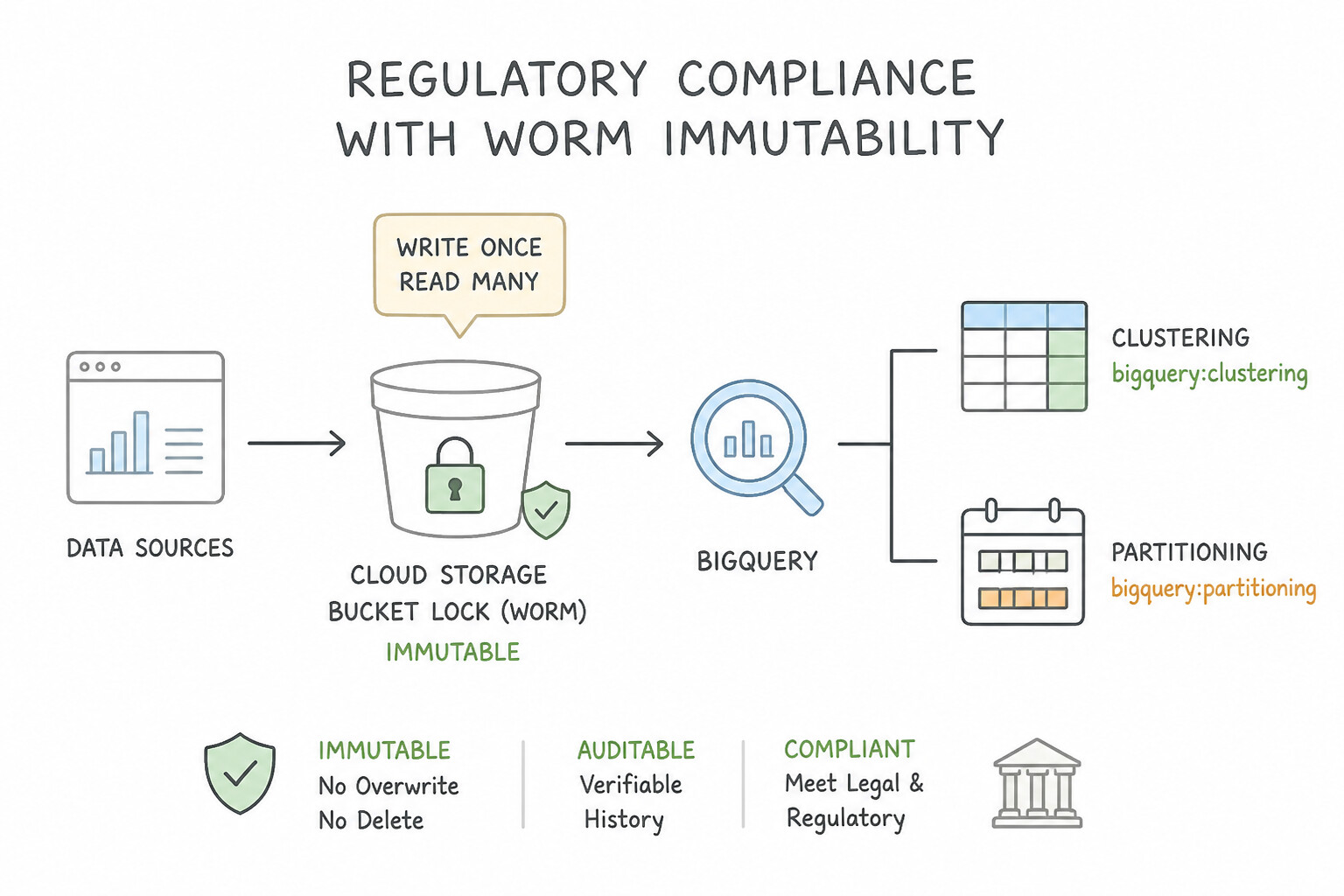
When scenarios cite SEC Rule 17a-4, FINRA, HIPAA, PCI-DSS, or GDPR:
- WORM Immutability (
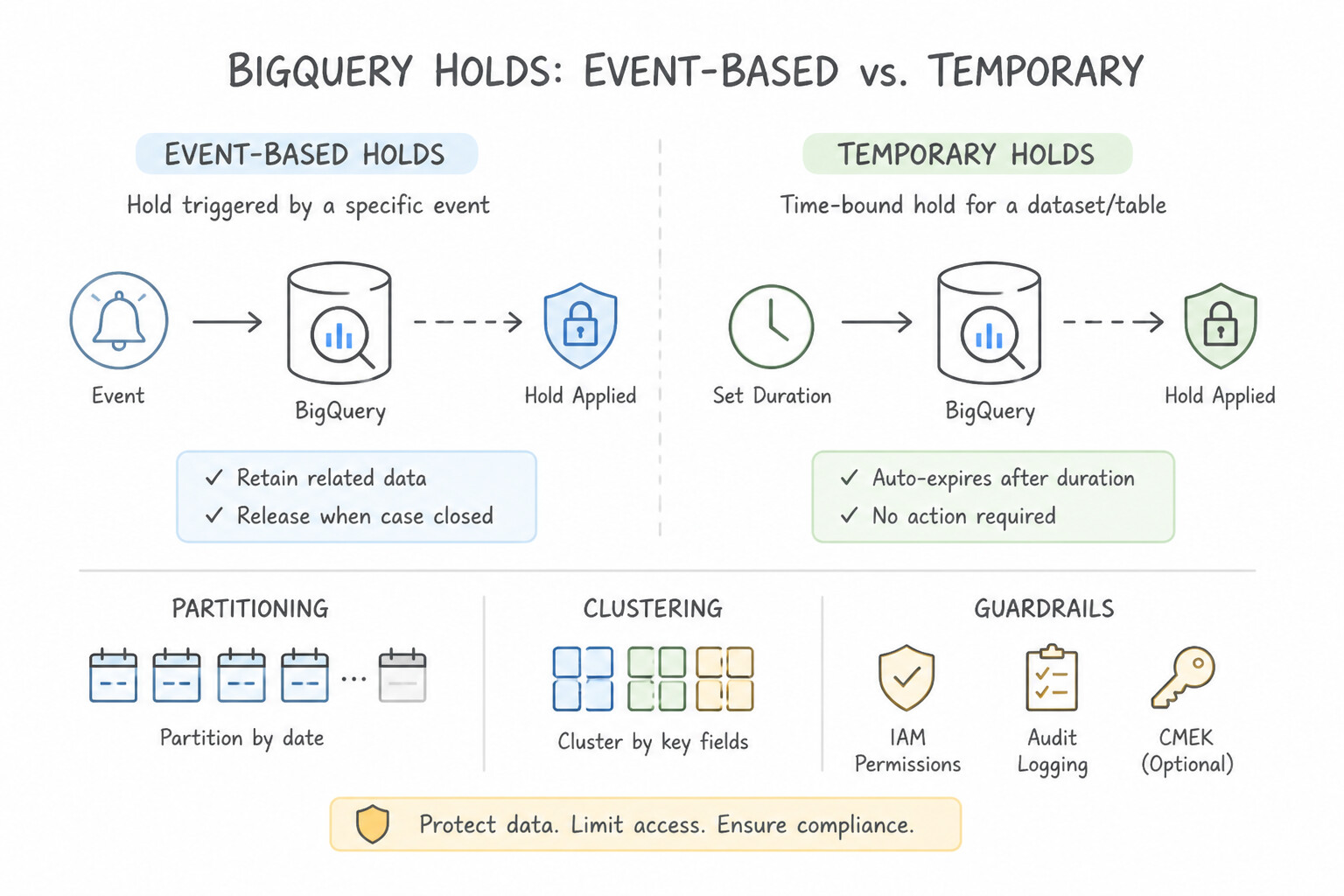
Cloud Storage Bucket Lock): Attach a Retention Policy to a Cloud Storage bucket specifying the minimum retention duration (e.g., 7 years) and lock the policy (Bucket Lock). Once locked, no user—not even a Project Owner or Org Admin—can delete an object before its retention period expires or shorten/remove the retention policy. - Event-Based Holds vs. Temporary Holds: Use an Event-Based Hold when the retention clock must start only after a future event occurs (e.g., loan closure); use a Temporary Hold for active legal discovery/litigation freezes.
- Right to Be Forgotten (
GDPRErasure) at Scale: Deleting individual rows across 1,000 daily BigQuery partitions or immutable GCS backups viaDELETEDML is expensive or impossible on locked archives. Instead, encrypt user PII with per-user keys (AEAD) or CMEK and perform crypto-shredding (destroying the cryptographic key renders the ciphertext permanently unreadable).
Key Implementation Patterns
- GDPR: The Right to be Forgotten in BigQuery: Use Cluster the table by
user_id. Clustering organizes data so BigQuery can skip irrelevant blocks during a DELETE operation, reducing scan costs. (Avoid alternative: Creating separate tables for each user (sharding) is unmanageable and inefficient for analysis.) - Data Sovereignty via Organization Policies: Use Configure an Organization Policy with the Resource Location Restriction constraint to allow only 'europe-west3'. Organization Policies are the correct tool to enforce guardrails like valid physical locations for resources across a hierarchy.
Key Takeaways (1.1e)
- Partitioning is best for low-cardinality columns (like dates) and has a limit of 4000 partitions.
- Clustering optimizes filtering and DML operations on high-cardinality columns (like User IDs) by enabling block pruning.
- GDPR compliance requires actual deletion of data, not just filtering it from views.
- Optimizing BigQuery schema with clustering significantly reduces DML costs.
Consideration 1.1f: Designing the project, dataset, and table architecture to ensure proper data governance
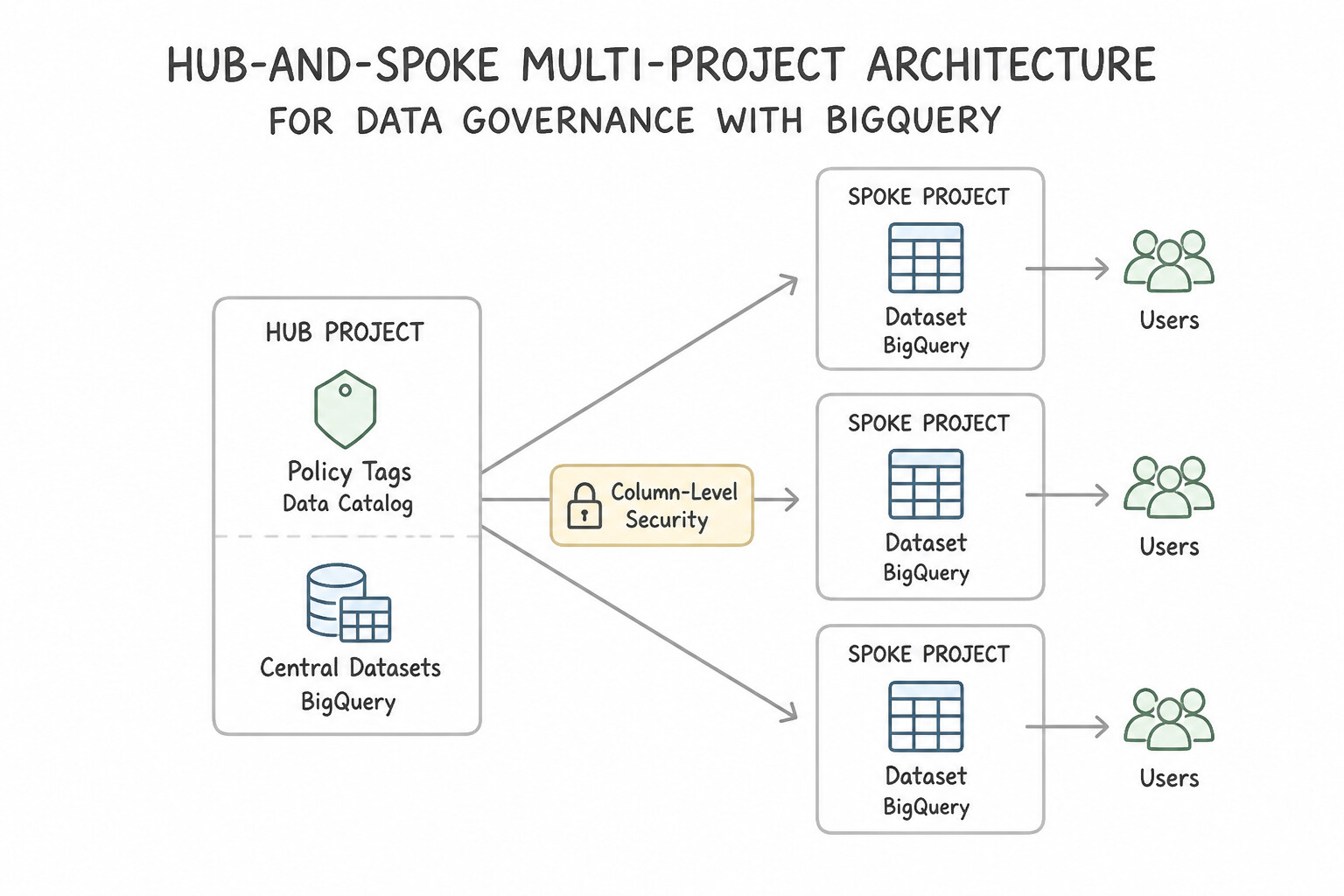
Master the BigQuery four-tier access hierarchy (Project → Dataset → Table/View → Column/Row):
- Hub-and-Spoke Multi-Project Architecture: Place core datasets in a central Data Storage Project, and create separate Consumer / Department Projects (
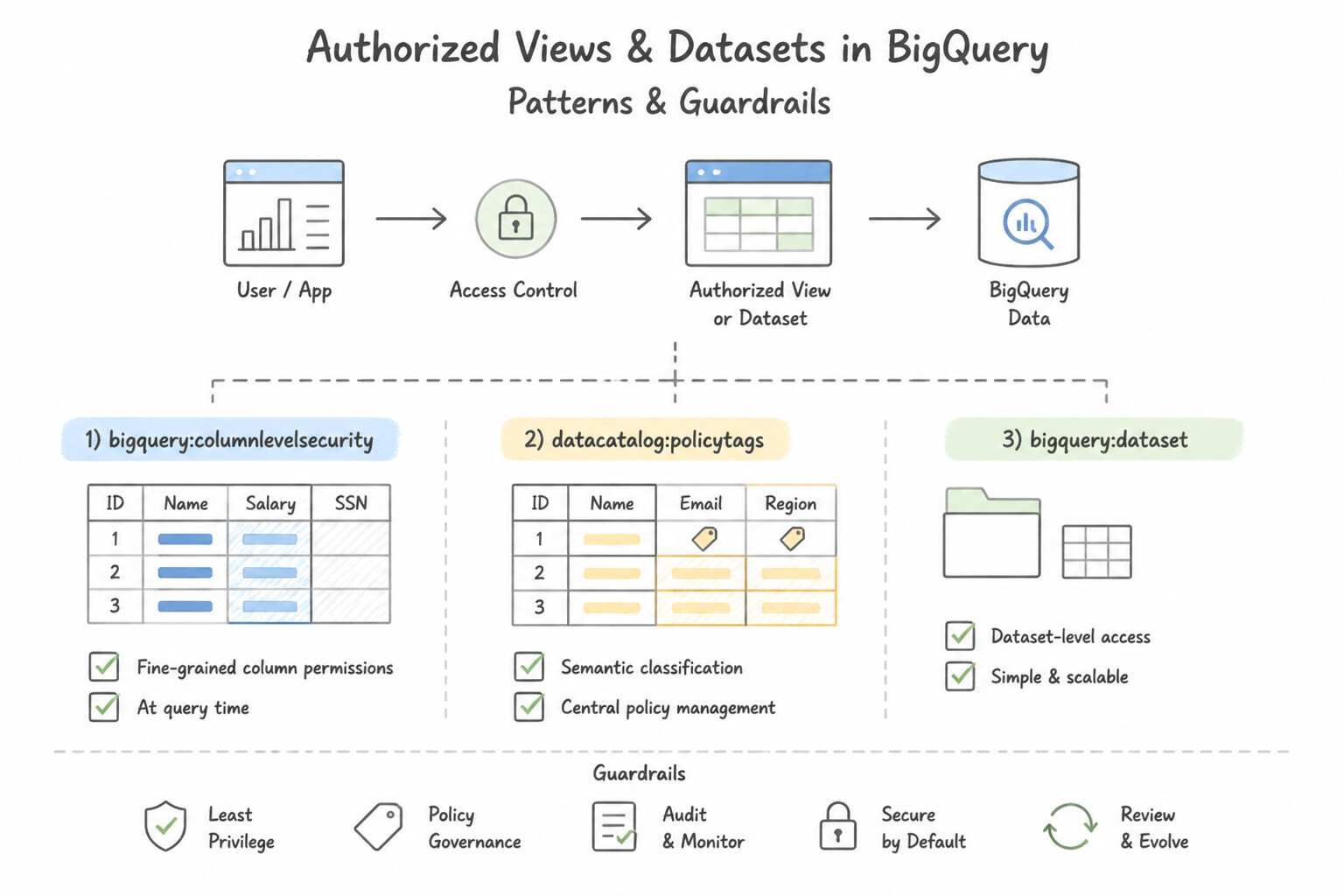
proj-finance,proj-marketing). Grant analystsroles/bigquery.jobUserin their Consumer Project (so their department pays for query compute) androles/bigquery.dataVieweron specific datasets/tables in the central Storage Project. - Authorized Views & Authorized Datasets: When analysts need to query a restricted view (
v_sales_summary) without having direct read access to the underlying raw base tables, place the view in a separate consumer dataset and authorize that view (or the entire Authorized Dataset) on the source dataset. - Column-Level Security (
Policy Tags) & Dynamic Data Masking: Create a taxonomy of Policy Tags in Dataplex / Data Catalog (e.g.,High-PII,Financial), attach them to sensitive BigQuery columns, and attach Data Policies (Dynamic Data Masking rules) such asSHA-256,Last 4 characters, orDefault Masking Value (NULL). GrantFine-Grained Readeronly to auditors andMasked Readerto analysts—both query the exact same table withSELECT *without query failures! - Row-Level Security (
CREATE ROW ACCESS POLICY): Filter rows dynamically based onSESSION_USER()or group membership (CREATE ROW ACCESS POLICY region_filter ON dataset.sales GRANT TO ('group:eu-analysts@example.com') FILTER USING (region = 'EU')).
Key Implementation Patterns
- Restricting PII Access via Policy Tags: Use Use Data Catalog to create a taxonomy with policy tags. Apply the policy tags to the 'SSN' and 'Email' columns and grant the Fine-Grained Reader role only to authorized users. Policy tags allow you to restrict access to specific columns within a single table using IAM.
- Vendor Data Sharing via Authorized Views: Use Create a view in a separate dataset. Authorize the view to access the source dataset. Assign the auditor the BigQuery Data Viewer role on the separate dataset. Authorized Views allow users to query data without needing read access to the underlying source tables.
- Regional Data Segregation using Row-Level Security: Use Create row access policies for the table. Define a filter expression for each region and assign the policies to the respective manager groups. Row-Level Security (RLS) natively filters rows based on user identity or group membership using SQL predicates.
Key Takeaways (1.1f)
- Column-Level Security in BigQuery is implemented using Data Catalog Policy Tags.
- Policy Tags allow granular control over who can view specific fields within a table.
- Authorized Views are an alternative but require creating and managing separate view resources.
- Users need the 'Fine-Grained Reader' role on the policy tag to decrypt/view the protected column.
Consideration 1.1g: Multi-environment use cases (development vs. production)
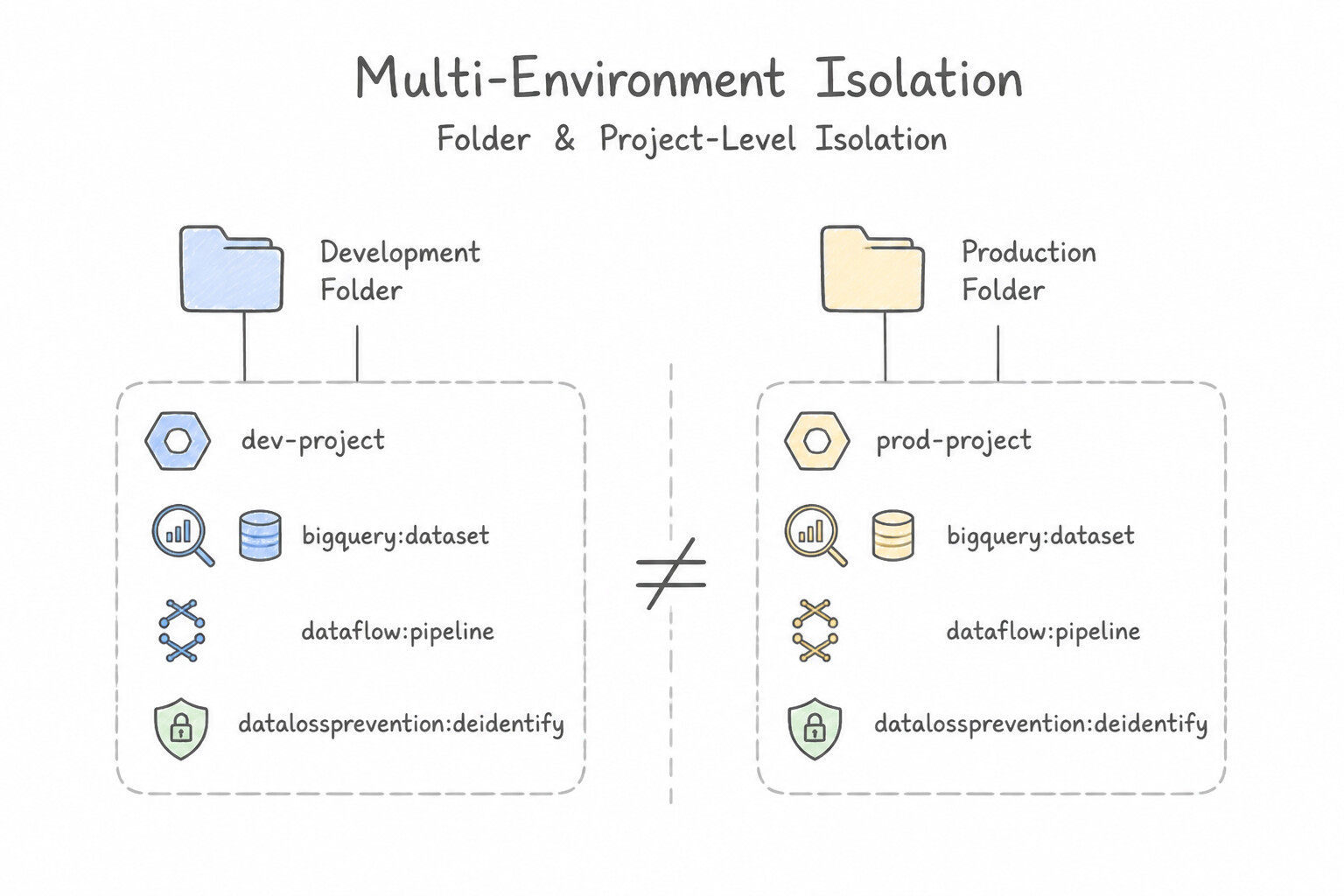
Never mix dev, test, and prod workloads inside a single Google Cloud project by just adding _dev and _prod suffixes to dataset names:
- Folder & Project-Level Isolation: Create separate Google Cloud projects (
data-platform-dev,data-platform-staging,data-platform-prod) organized under environment folders. This isolates IAM bindings, KMS keys, VPC networks, and BigQuery/Dataflow quotas so a runaway dev job never starves production. - Zero Human Write Access in Production: Developers get interactive write permissions only in
dev. All schema changes (Dataform), DAG deployments (Cloud Composer), and pipeline updates (Dataflow Flex Templates) inprodare deployed exclusively by automated CI/CD Service Accounts (Cloud Build) after passing tests instaging. - Safe Test Data Seeding: Never copy raw production PII into
devorstaging. Either generate synthetic test datasets or run an automated Sensitive Data Protection (Cloud DLP) de-identification pipeline (FPE/CryptoHash/Date Shift) before writing masked data to non-production projects.
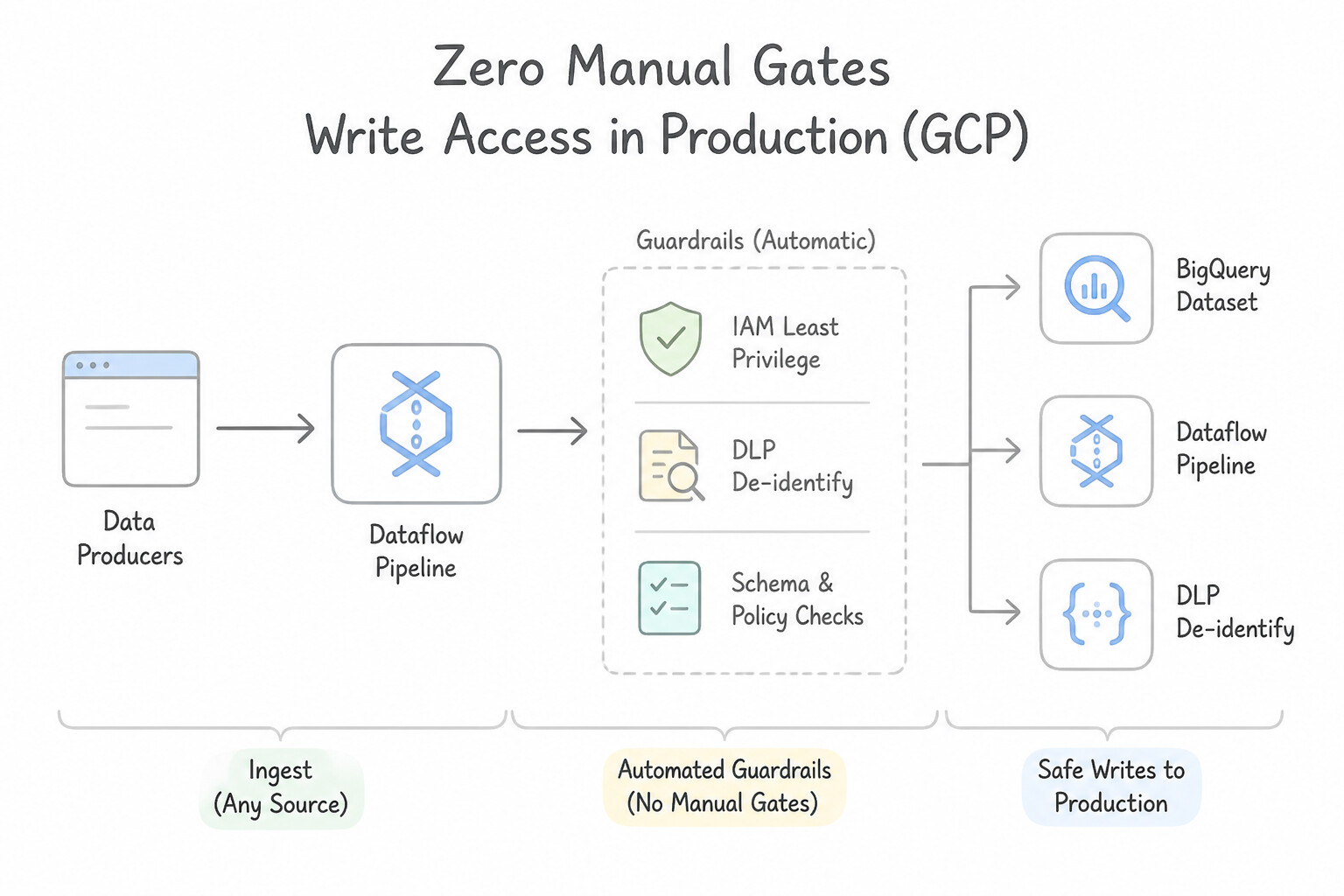
Key Implementation Patterns
- Sanitizing PII for Development: Use Build a Dataflow pipeline that reads from the production dataset, uses Cloud Data Loss Prevention (Cloud DLP) to de-identify PII, and writes to the development dataset. Dataflow and Cloud DLP sanitize data in flight, ensuring only de-identified data reaches the development environment.
- Handling Secrets across Environments: Use Store the API keys in Secret Manager. Configure Cloud Composer to use Secret Manager as the backend for Airflow variables. Secret Manager is the recommended secure storage for sensitive data, and Cloud Composer supports fetching variables directly from it.
- Pipeline Identity Separation: Use Create a user-managed service account in the 'Prod' project with minimal permissions and specify it using the --serviceAccount parameter. Create a dedicated service account for production with restrictive permissions to follow security best practices.
Key Takeaways (1.1g)
- Never copy raw PII (Personally Identifiable Information) into lower environments like Development or Test.
- Use Cloud Data Loss Prevention (Cloud DLP) to de-identify sensitive data.
- Perform sanitization 'in flight' using Dataflow pipelines to ensure sensitive data never rests in the destination environment.
- Avoid manual copy-then-delete workflows, as they create a temporary security risk.
Quick Decision Cheat Sheet (Subsection 1.1)
If the Scenario Requires... | Choose This Google Cloud Pattern | Avoid This Common Mistake |
|---|---|---|
"Enforce strict data residency so no storage or compute resource can ever be created outside EU regions" | Organization Policy constraints/gcp.resourceLocations + regional Pub/Sub endpoints & Dataflow --region/--workerZone | Relying on developer naming conventions or manual Cloud Asset Inventory audits after creation |
"De-identify PII while preserving exact string length/format (e.g., 16-digit card or 9-digit SSN) and reversibility" | Sensitive Data Protection (Cloud DLP) Format-Preserving Encryption ( FPE) | Masking with *, CryptoHashConfig (irreversible), or Bucketing |
"De-identify a join key across BigQuery/GCS tables when reversal to cleartext is NEVER required" | Sensitive Data Protection CryptoHashConfig (or deterministic surrogate tokenization) | Random UUID replacement per row (breaks all relational JOIN operations) |
"Instantaneously revoke Google Cloud's ability to decrypt sensitive data stored in BigQuery/GCS using keys hosted outside GCP" | Cloud External Key Manager ( Cloud EKM) (or disable/destroy the Cloud KMS CMEK key version) | Waiting for 90-day lifecycle deletion rules or running DELETE FROM across petabytes |
"Share a filtered subset of rows/columns from 20 views without granting access to the underlying raw tables or authorizing each view one by one" | Place all 20 views in a separate dataset and configure an Authorized Dataset on the source dataset | Granting roles/bigquery.dataViewer on the raw source dataset or manually maintaining 20 individual Authorized View entries |
"Prevent developers from downloading static Service Account JSON keys across all projects" | Enable Organization Policy constraints/iam.disableServiceAccountKeyCreation and use Service Account Impersonation / Workload Identity | Rotating downloaded JSON keys weekly via custom bash scripts |
Further Reading (Subsection 1.1)
- Dataflow Security and Permissions — Overview of the service accounts used by Dataflow and how to configure access to Cloud Storage.
- Granting Access to Cloud Storage — Documentation on how to add members (including service accounts from other projects) to a bucket's IAM policy.
- Restricting Service Account Key Creation — Documentation on Organization Policy constraints, specifically listing 'constraints/iam.disableServiceAccountKeyCreation' as a way to prevent creating new external keys.
- Best practices for managing service account keys — Guidance on why service account keys are risky and how to mitigate those risks using constraints.
- Cloud HSM Overview — Explains that Cloud HSM allows you to host encryption keys and perform cryptographic operations in FIPS 140-2 Level 3 certified hardware security modules.
- Cloud Key Management Service (KMS) documentation — General documentation for creating and managing keys, including the distinction between software and hardware protection levels.
Subsection 1.2: Designing for reliability and fidelity
The Big Picture
A data pipeline that only works when every upstream producer sends clean schemas, every network call succeeds on the first attempt, and no worker VM ever restarts is a ticking time bomb in production. Subsection 1.2 tests how you engineer end-to-end data fidelity and operational resilience across five failure modes:
- The Poison-Pill Crash Loop (
1.2a,1.2e): If a streaming Dataflow job parses incoming JSON with a strict schema and crashes whenever a single malformed record arrives, Pub/Sub retries that unacknowledged message indefinitely—halting the entire pipeline. Production pipelines wrap parsing and validation in aParDowith Multiple Outputs (TaggedOutput/ Dead-Letter Queue pattern): valid records flow to the main BigQuery sink, while corrupted records (along with error metadata and raw payloads) route to a Dead-Letter table/bucket for automated alerting and replay. - Silent Data Corruption in SQL ELT (
1.2a,1.2e): Running raw scheduled SQL queries without automated schema assertions allows duplicate primary keys orNULLforeign keys to silently propagate into executive dashboards. Dataform solves this by compiling SQL workflows into dependency graphs where built-in assertions (uniqueKey,nonNull,rowConditions) run automatically before downstream tables are updated. - At-Least-Once Duplicate Inflation (
1.2c,1.2d): Retrying a failed batch job withWRITE_APPENDdoubles row counts; streaming without deterministic record IDs creates duplicate rows during worker failover. Reliable architectures pair idempotent writes (WRITE_TRUNCATEon the target date partition,MERGEupserts, or BigQuery Storage Write APICOMMITTEDstreams with stream offsets) with ACID-compliant databases (Cloud Spanner,Cloud SQL,BigQuerymulti-statement transactions).
Consideration 1.2a: Preparing and cleaning data (e.g., Dataform, Dataflow, and Cloud Data Fusion, prompting LLMs for query generation)
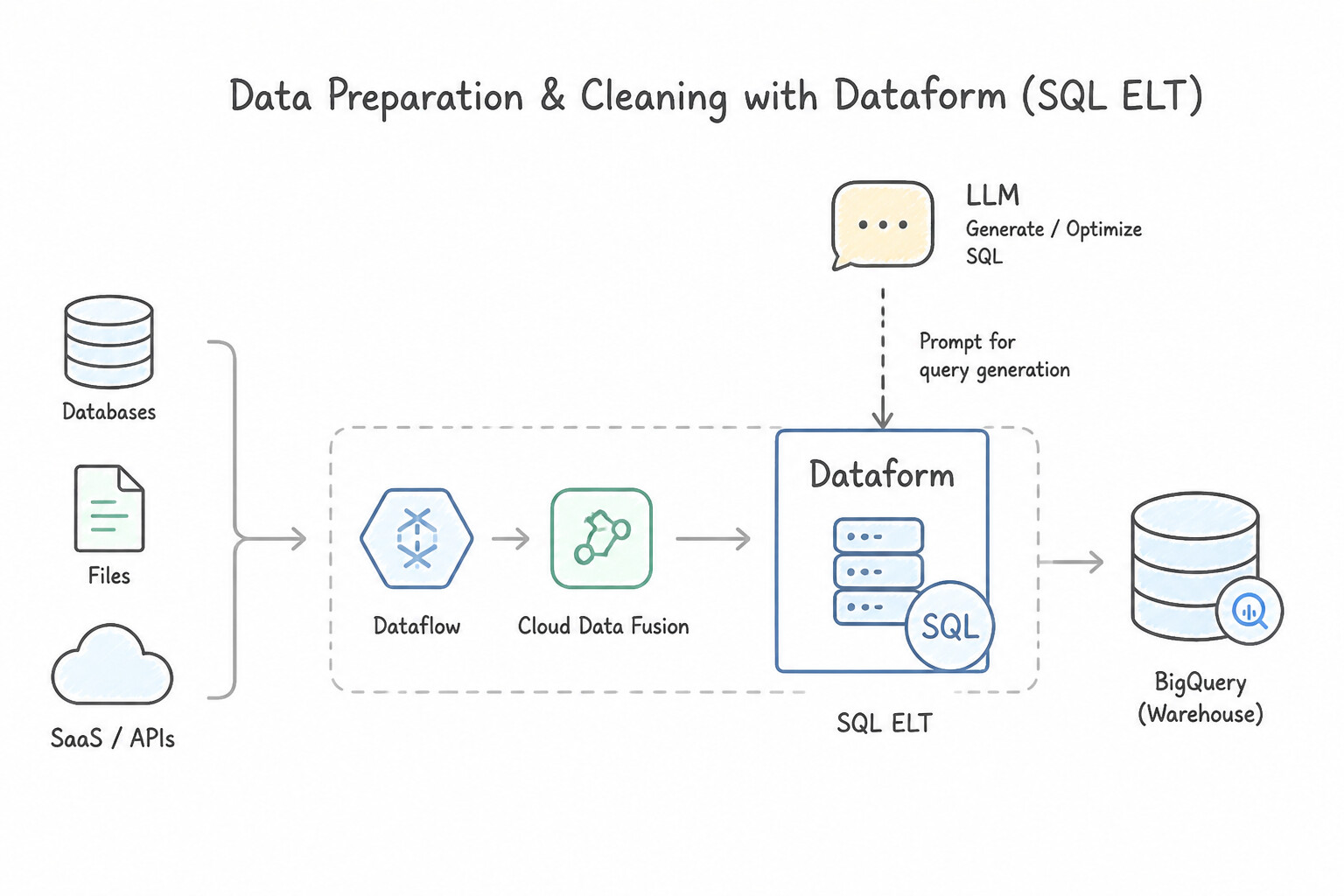
Match the data preparation service to the transformation pattern and team persona:
- Dataform (SQL ELT in BigQuery): Best when data is already landed in (or federated into) BigQuery and analysts/engineers want Git-versioned SQLX transformations, dependency graphs (
${ref("staging_table")}), incremental table updates, and automated data quality assertions—at zero additional compute fee beyond standard BigQuery execution. - Cloud Dataflow (Apache Beam): Best for high-volume, unbounded streaming or complex unstructured/custom-code batch cleaning (e.g., regex parsing, stateful session deduplication, inline Cloud DLP calls) with Dead-Letter Queues (
TaggedOutput). - Cloud Data Fusion vs. Cloud Dataprep (Trifacta): Choose Cloud Data Fusion when integrating enterprise ERP/CRM sources via 150+ prebuilt connectors and visual Wrangler transformations compiled to Spark/Dataproc. Choose Cloud Dataprep when business analysts need interactive, visual data exploration, anomaly detection, and recipe-based cleaning on sample datasets.
- Prompting LLMs for Query Generation (
Gemini in BigQuery): To generate accurate GoogleSQL queries without hallucinations, provide schema context (table/column definitions), business logic rules, and few-shot SQL examples in the prompt, and validate generated queries using a BigQuery Dry Run (--dry_run) before execution.
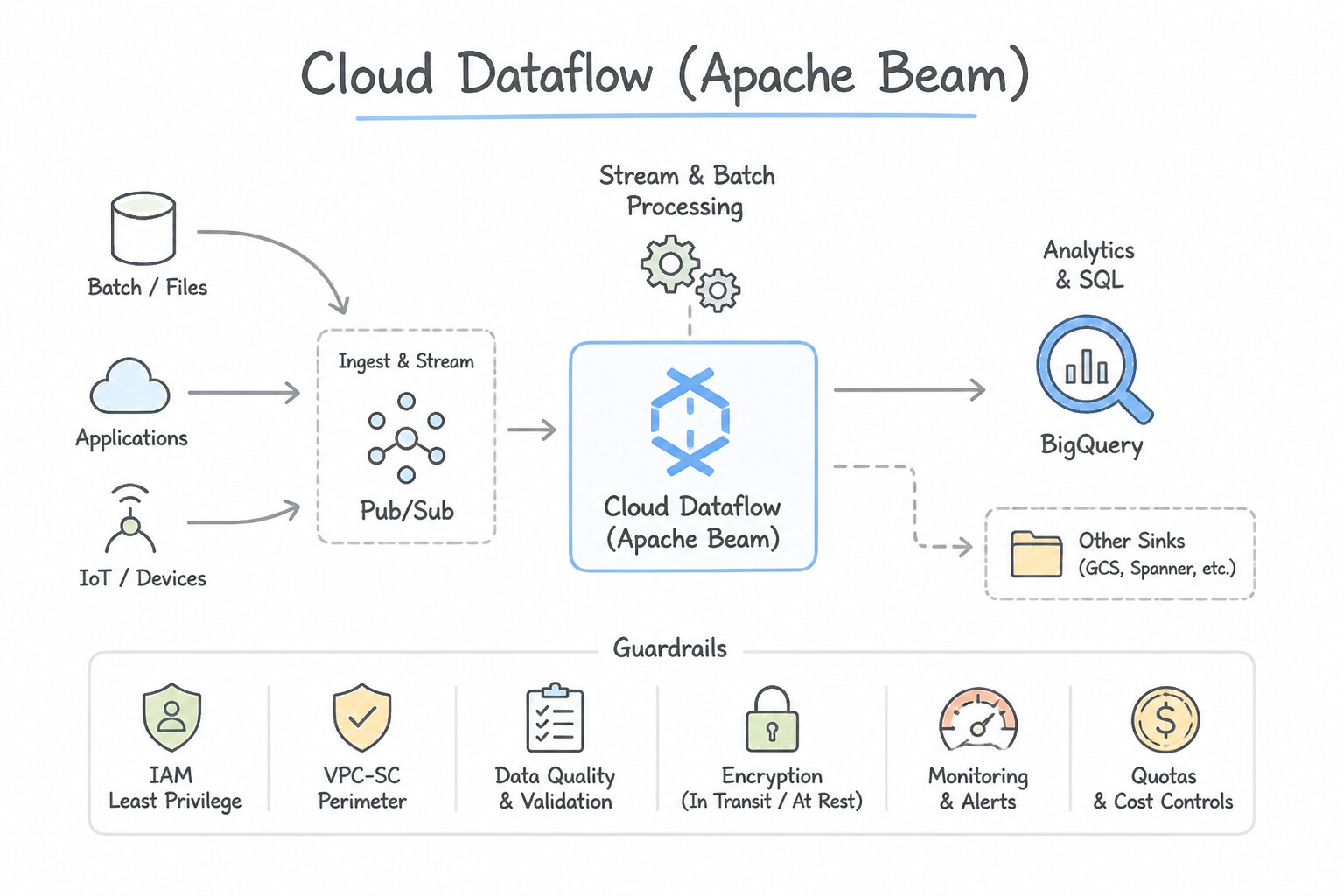
Key Implementation Patterns
- Handling Malformed Records in Streaming Pipelines: Use Modify the pipeline to catch parsing errors. Output valid records to BigQuery and write malformed records to a separate Cloud Storage bucket. Implement a Dead Letter Queue (DLQ) pattern by catching errors and routing bad data to a separate storage location.
- Code-Free Data Preparation for Analysts: Use Use Cloud Data Fusion and the Wrangler interface to define the transformations. Cloud Data Fusion provides a code-free visual interface called Wrangler for data preparation. (Avoid alternative: Cloud Dataflow with Apache Beam requires coding skills which the team lacks.)
- SQL-Based Transformation and Testing: Use Create a Dataform repository. Define the tables in SQLX files and add assertions to check for unique keys and valid row conditions. Dataform enables SQL-based pipelines with built-in assertions for data quality validation like uniqueness and row conditions.
Key Takeaways (1.2a)
- Handle Exceptions: Never assume input data is perfect. Always wrap parsing logic in try/catch blocks.
- Dead Letter Pattern: Route bad data to a separate location (side input/output) rather than dropping it or crashing the pipeline.
- Preserve Evidence: Storing malformed data allows you to analyze and fix upstream issues later.
- Cloud Data Fusion is the go-to choice for building data pipelines visually without code.
Consideration 1.2b: Monitoring and orchestration of data pipelines
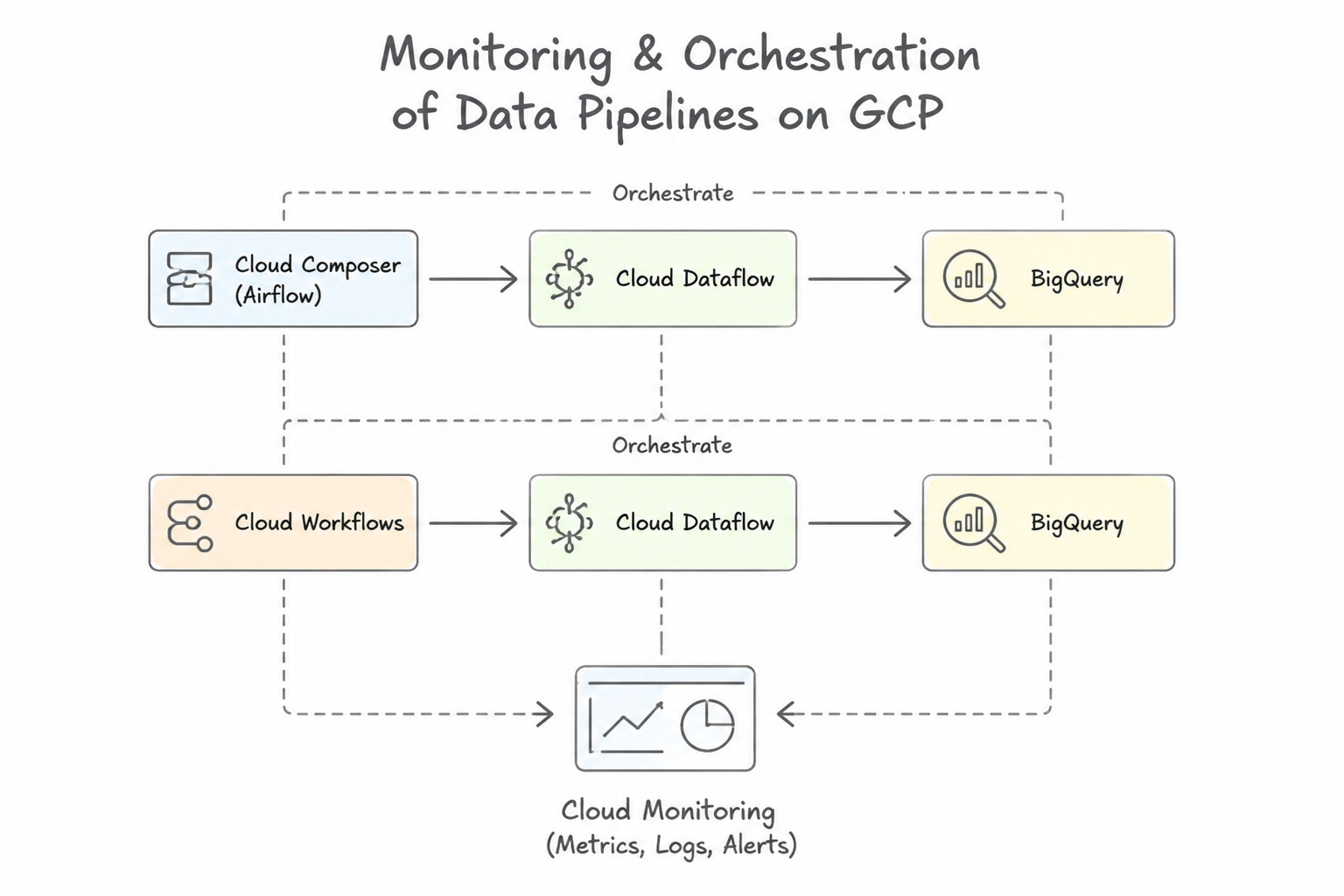
Reliable orchestration requires decoupled coordination and proactive observability:
- Cloud Composer (Managed Apache Airflow) vs. Cloud Workflows: Use Cloud Composer for complex multi-step data engineering DAGs spanning on-premises, multi-cloud, BigQuery, Dataflow, and Dataproc with rich sensor/retry semantics. Use Cloud Workflows for lightweight, serverless, low-latency HTTP/event-driven microservice and API orchestration with sub-second startup and pay-per-step pricing.
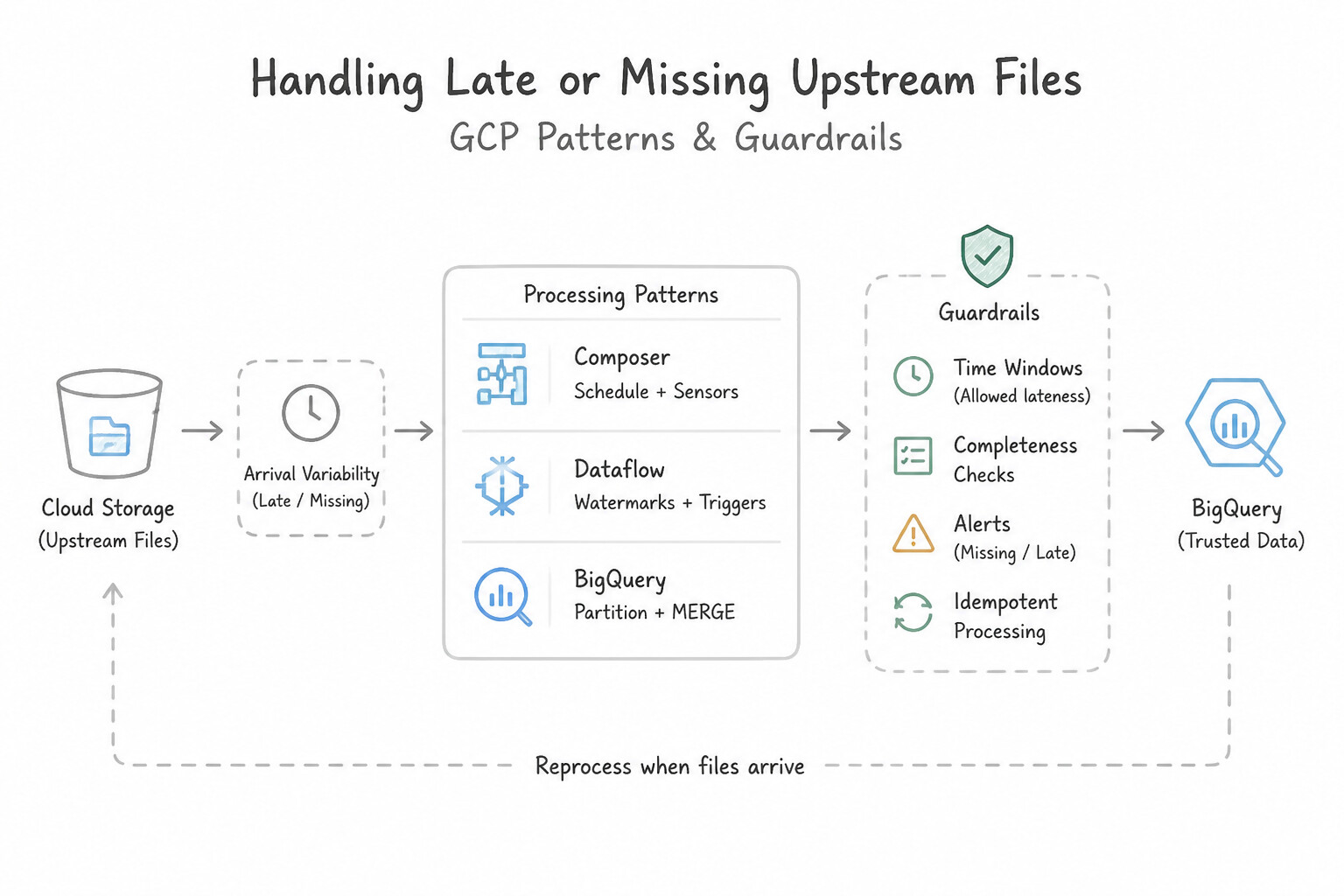
- Handling Late or Missing Upstream Files: In Cloud Composer, never use a
PythonOperatorwithtime.sleep()or a standardpoke-mode sensor for multi-hour waits (it ties up worker slots and causes DAG deadlocks). Always use Deferrable Operators or setmode="reschedule"onGCSObjectExistenceSensor, paired with anexecution_timeoutandsla_miss_callback. - Key Pipeline Health Metrics: Monitor
system_laganddata_watermark_agein Dataflow (to detect when streaming processing falls behind event arrival) and configure Cloud Monitoring Alerting Policies before SLA breaches occur.
Key Implementation Patterns
- Orchestrating Complex Hybrid Workflows: Use Use Cloud Composer to create a directed acyclic graph (DAG) for the workflow. Cloud Composer manages Apache Airflow, which handles complex dependencies, backfilling, and offers open-source portability. (Avoid alternative: Cloud Scheduler is for simple cron jobs, not for managing complex dependencies or backfilling.)
- Monitoring Streaming Pipeline Freshness: Use Create an alert policy for the Dataflow System Lag metric. System Lag measures the time delay between data generation and processing, making it the correct metric for latency requirements. (Avoid alternative: Element Count measures the quantity of data processed, not the time delay of that data.)
Key Takeaways (1.2b)
- Cloud Composer is the managed service for Apache Airflow.
- Choose Cloud Composer when you need open-source portability, handling of complex dependencies, or backfilling capabilities.
- Cloud Scheduler is for simple time-based triggering (cron), not complex workflows.
- Cloud Workflows is for chaining microservices and APIs, not heavy data engineering pipelines.
Consideration 1.2c: Disaster recovery and fault tolerance
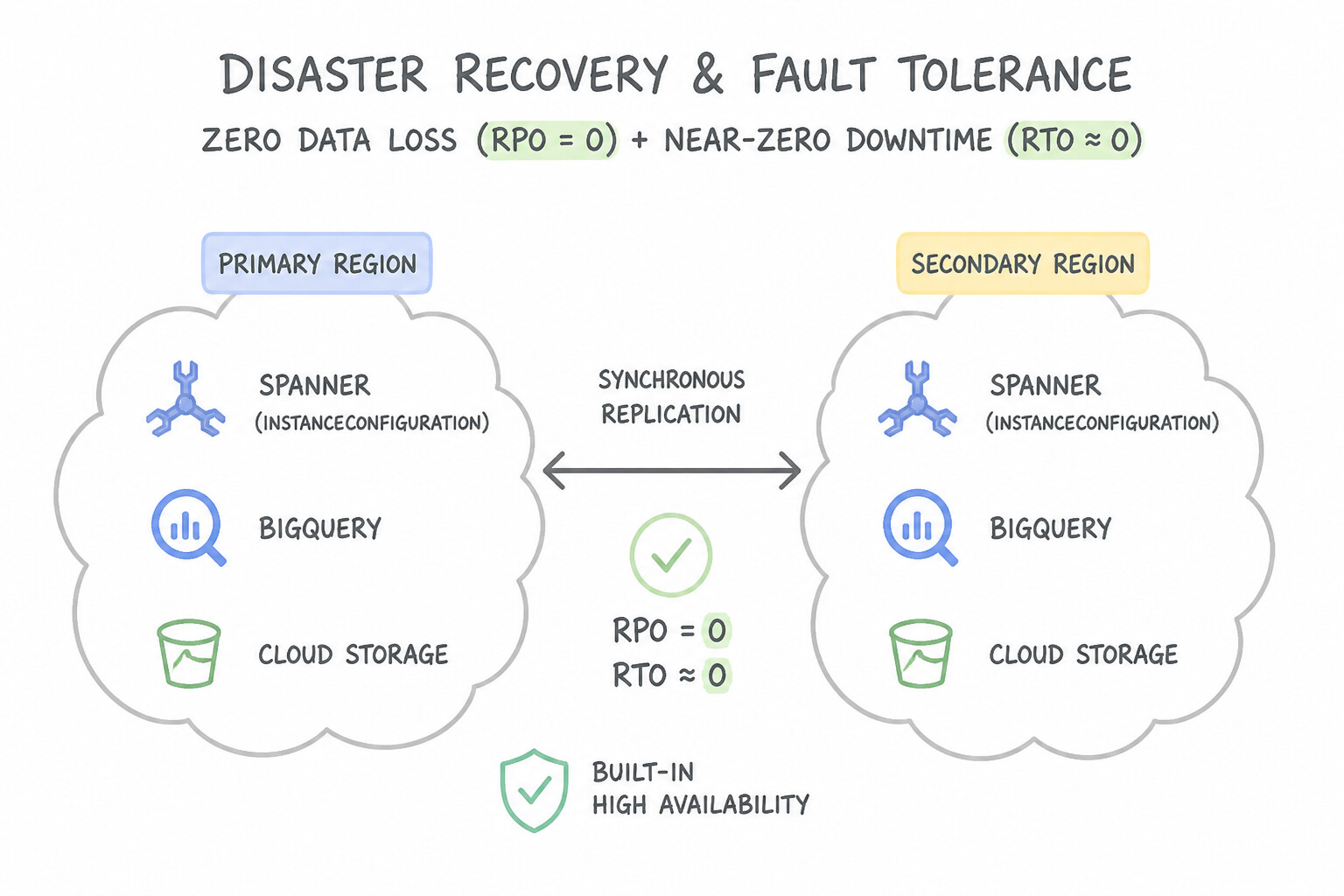
Every DR question in Production hinges on two numbers—RPO (how much data you can afford to lose) and RTO (how fast you must recover):
- Zero Data Loss (
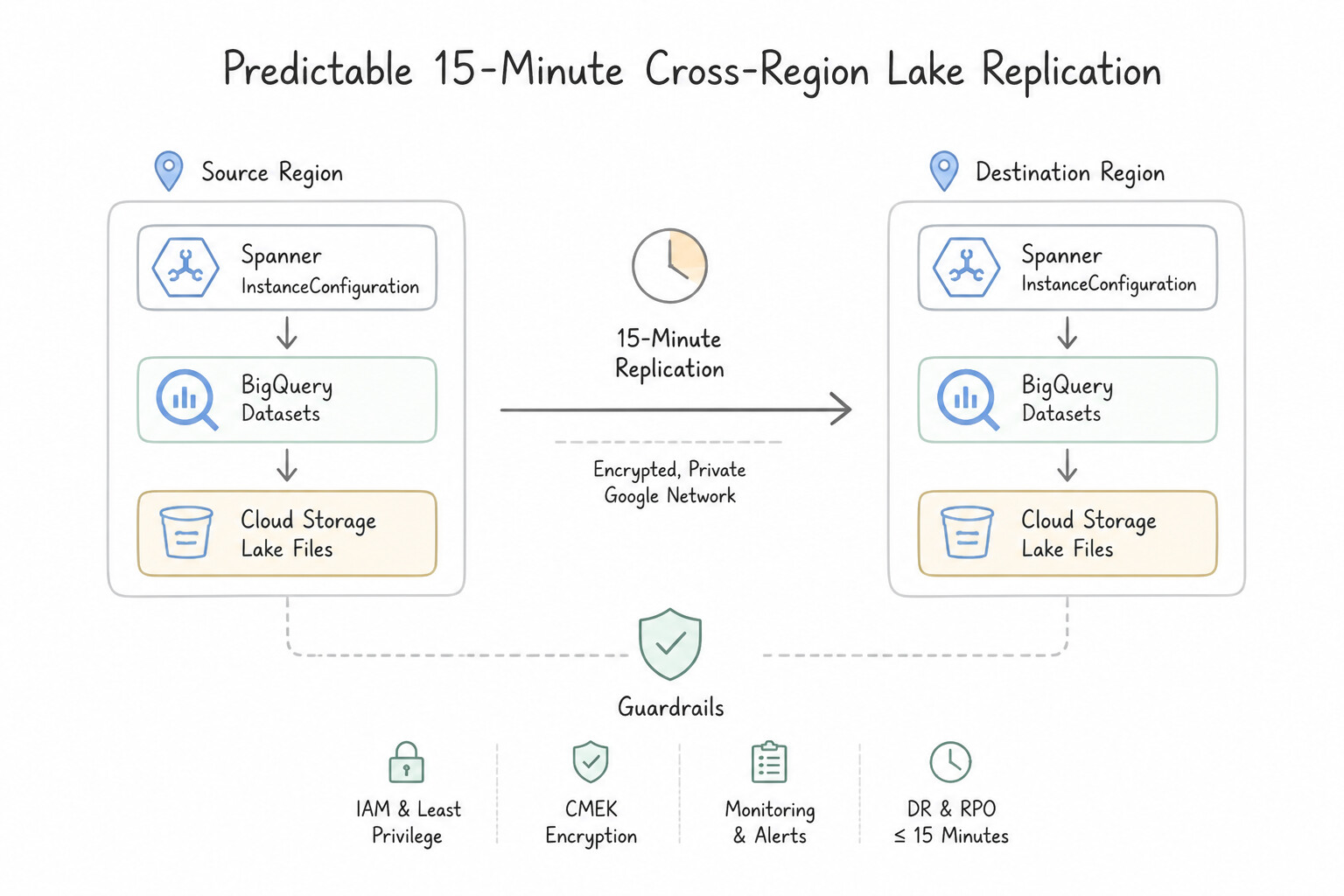
RPO = 0) + Near-Zero Downtime (RTO ~ 0): Requires synchronous multi-region or cross-zone replication—specifically Cloud Spanner (multi-region configuration) for global relational OLTP, or Cloud SQL High Availability (HA) for single-region cross-zone automatic failover. - Predictable 15-Minute Cross-Region Lake Replication: Standard dual-region/multi-region Cloud Storage replication is asynchronous and best-effort; enabling Cloud Storage Turbo Replication on a dual-region bucket provides a hard 15-minute RPO SLA for newly written objects.
- BigQuery Disaster Recovery: BigQuery is regional by default (redundantly stored across zones within a region). For cross-region DR, configure BigQuery Cross-Region Dataset Replication (or managed DR with Enterprise Plus Edition) to asynchronously replicate datasets to a secondary region and promote the secondary replica during a regional outage.
- Idempotent Pipeline Restarts: Ensure batch retries never duplicate rows by writing to daily partitions with
WRITE_TRUNCATEor staging into a temp table followed by an atomicMERGEstatement.
Key Implementation Patterns
- Cloud Spanner Multi-Region Configuration: Use Create a Multi-Region instance configuration with replicas distributed across different regions. Multi-Region configurations provide 99.999% availability and protection against regional outages. (Avoid alternative: Regional instances only offer 99.99% availability and do not survive a total region failure.)
- BigQuery Cross-Region Dataset Replication: Use Enable cross-region replication for the BigQuery dataset to a secondary region. BigQuery cross-region replication is the native, managed feature for replicating datasets to another region for disaster recovery. (Avoid alternative: Exporting to Cloud Storage is a backup strategy, not a seamless disaster recovery solution, as it requires manual restoration before querying.)
- Cloud SQL Cross-Region Read Replicas for DR: Use Create a read replica in a different region. Promote the read replica to primary if the us-central1 region fails. Cross-region read replicas allow you to promote a copy of the database in a different region, protecting against regional failures.
Key Takeaways (1.2c)
- Regional Spanner instances offer 99.99% availability and protect against zonal failures.
- Multi-Region Spanner instances offer 99.999% availability and protect against regional failures.
- Mission-critical global applications requiring zero downtime during a regional outage must use Multi-Region configurations.
- Use Native Features: Always prefer managed platform features (like cross-region replication) over custom scripts for critical tasks like Disaster Recovery.
Consideration 1.2d: Making decisions related to ACID compliance and availability
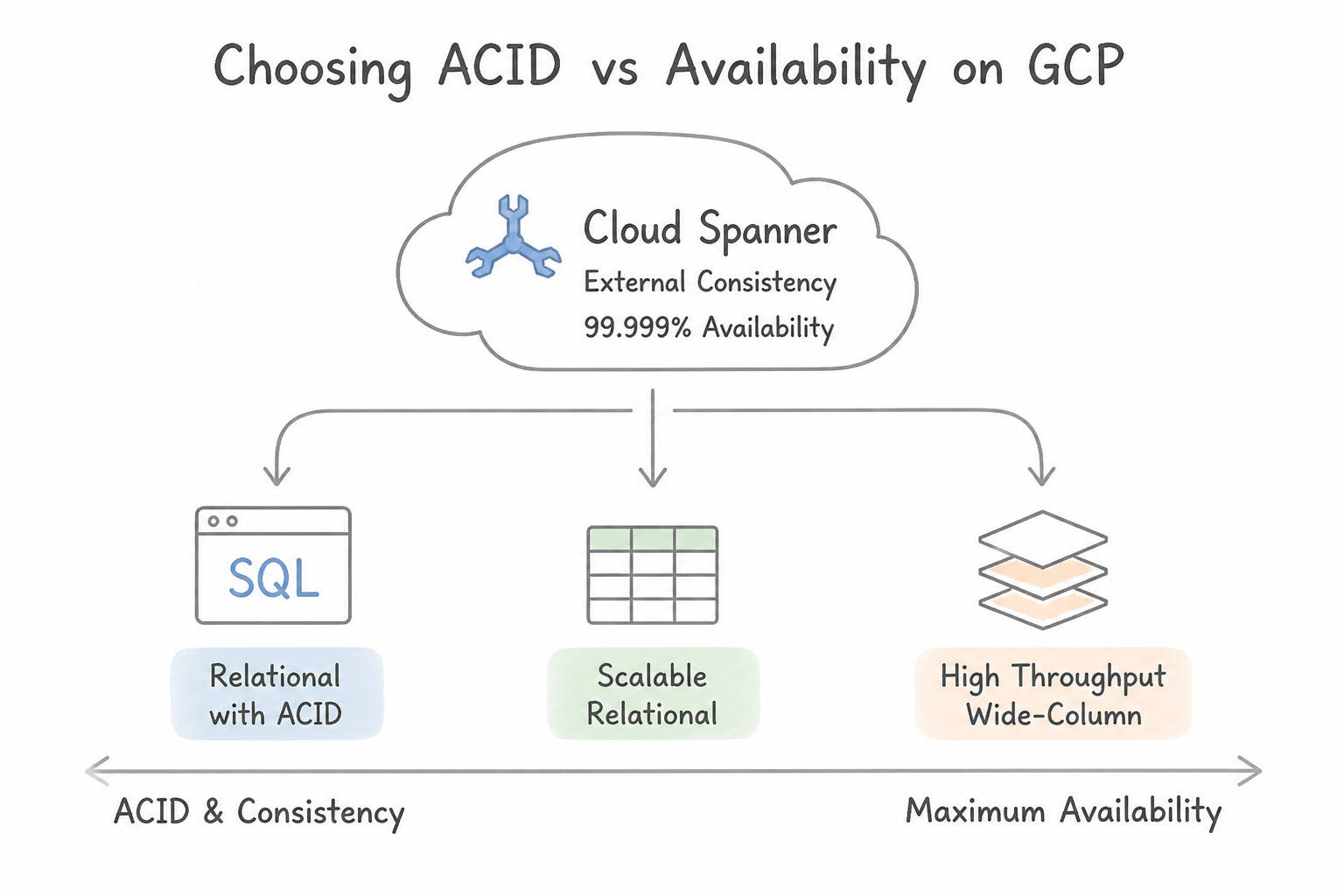
Understand how each Google Cloud storage engine handles ACID transactions and consistency:
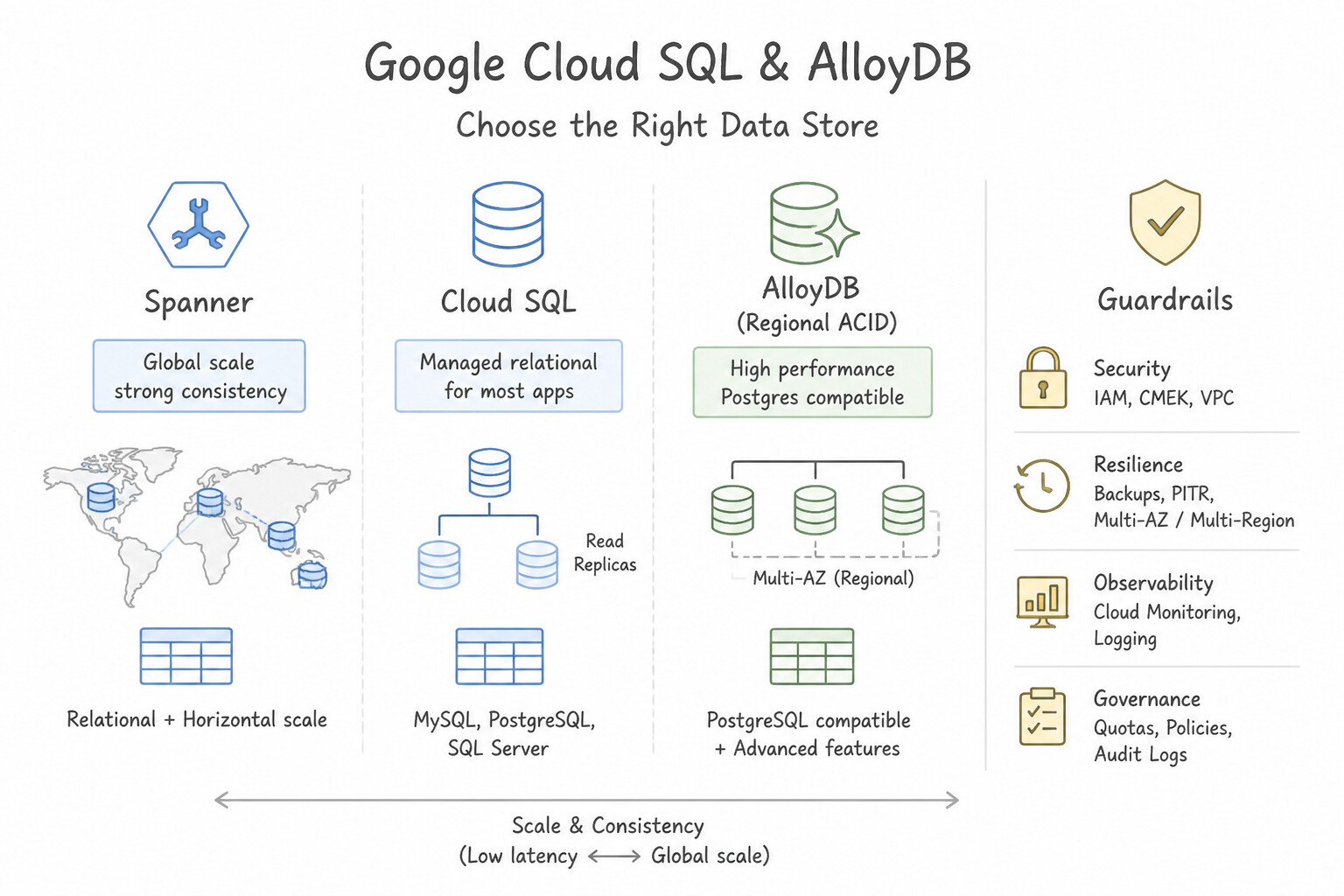
- Cloud Spanner (External Consistency +
99.999%Availability): Uses Google's hardware atomic clocks and GPS (TrueTime API) to guarantee External Consistency (strict serializability—if Transaction T2 starts after T1 commits in real wall-clock time, T2 is guaranteed to see T1's writes globally without stale reads). - Cloud SQL & AlloyDB (Regional ACID): Full ACID compliance within a single region. Cross-region read replicas are replicated asynchronously (eventual consistency for reads on the replica; promoting a cross-region replica during a regional failure has a non-zero RPO).
- BigQuery Multi-Statement Transactions (
BEGIN TRANSACTION ... COMMIT): BigQuery supports full ACID semantics across multiple DML statements (INSERT,UPDATE,DELETE,MERGE) within a single query job or session using Snapshot Isolation and optimistic concurrency control. - Cloud Bigtable (Single-Row Atomicity Only): Bigtable guarantees atomic reads and writes only within a single row key (
ReadModifyWriteRow/CheckAndMutateRow). Multi-row transactions are not supported—if a workload requires multi-row ACID transactions, reject Bigtable and choose Spanner, AlloyDB, or Cloud SQL.
Key Implementation Patterns
- Global Financial Ledger Consistency: Use Use Cloud Spanner with a multi-region configuration. Cloud Spanner is the only option providing global strong consistency (ACID), horizontal scaling, and 99.999% availability suitable for a global banking ledger. (Avoid alternative: Cloud SQL uses asynchronous replication for cross-region replicas, resulting in eventual consistency rather than the required strong global consistency.)
- Legacy ERP Lift-and-Shift: Use Migrate the database to Cloud SQL for MySQL to maintain compatibility with stored procedures. Cloud SQL supports full MySQL compatibility, including stored procedures, and handles vertical scaling for single-region workloads. (Avoid alternative: Spanner is overkill for single-region datasets that fit vertically and lacks native support for legacy MySQL stored procedures.)
- IoT Telemetry Ingestion: Use Use Cloud Bigtable to maximize write performance and scalability. Cloud Bigtable is purpose-built for high-throughput IoT writes and low latency where multi-row transactions are not needed. (Avoid alternative: Cloud Spanner is ideal for global transactions, but it is overkill here since multi-row consistency is not required.)
Key Takeaways (1.2d)
- Cloud Spanner is the primary choice for global applications requiring strong consistency (ACID) and horizontal scaling.
- Multi-region Cloud Spanner configurations offer 99.999% availability (5 nines).
- Cloud SQL cross-region replicas are asynchronous and eventually consistent.
- Strong external consistency guarantees that a read always reflects the most recent write, regardless of global location.
Consideration 1.2e: Data validation
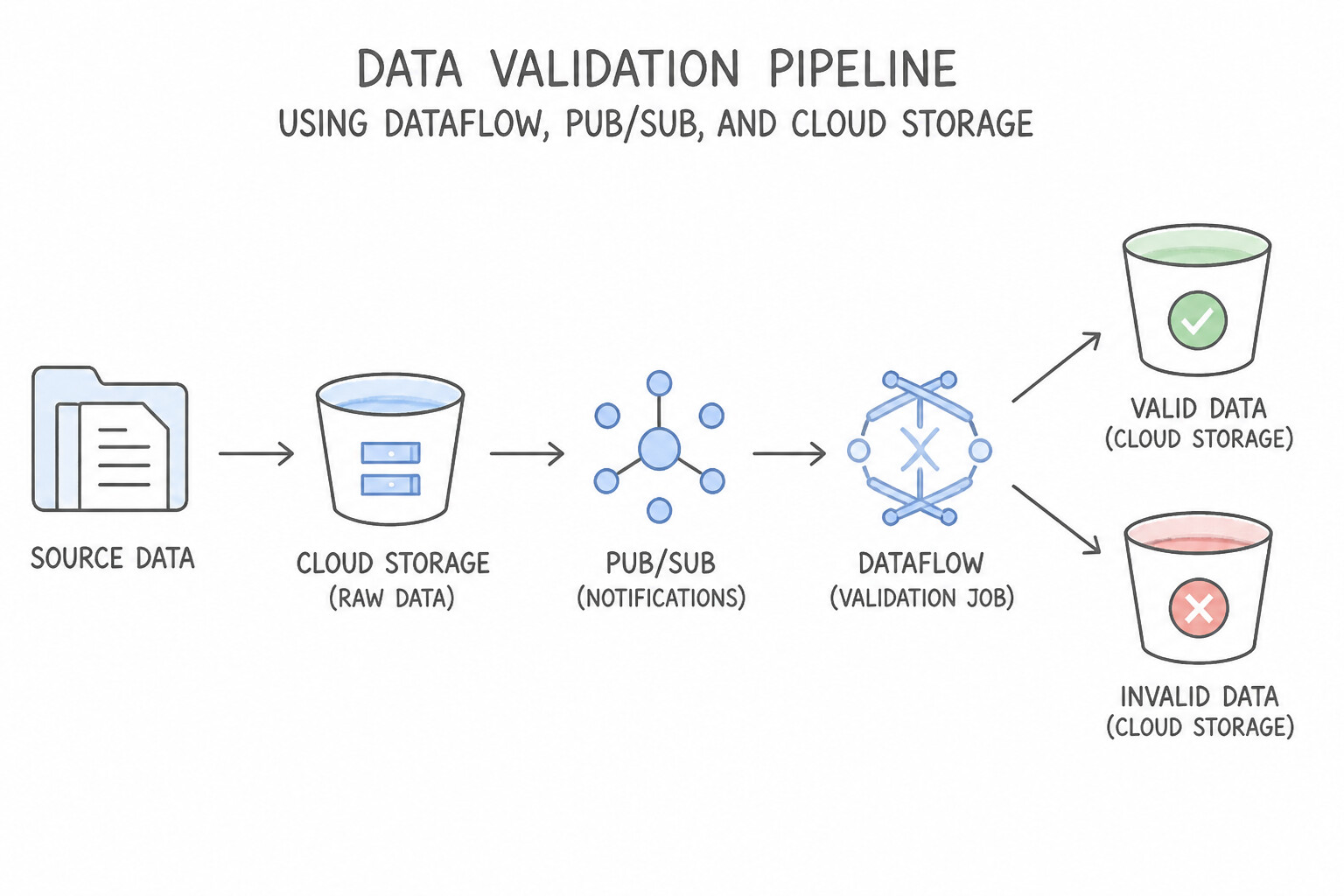
Defense-in-depth data validation catches bad data at three stages:
- At the Ingestion Edge (
Pub/Sub Schemas): Attach an Avro or Protocol Buffer schema to a Pub/Sub topic so non-conforming producer messages are rejected immediately at theprojects.topics.publishAPI call before entering the stream. - In Flight (
Dataflow TaggedOutput+Dataform Assertions): - In Dataflow, route schema/validation failures to a side
PCollection(Dead-Letter Queue) rather than throwing unhandled exceptions. - In Dataform, configure
assertions: { uniqueKey: ["order_id"], nonNull: ["customer_id"], rowConditions: ["amount >= 0"] }in the.sqlxconfig block; chain downstream tables usingdependOnDependencyAssertions: true(the circuit-breaker pattern) so corrupted staging data never overwrites production gold tables. - At Rest Across the Lakehouse (
Dataplex Auto Data Quality): Run serverless Dataplex Data Quality tasks defined in YAML across BigQuery and Cloud Storage tables to validate completeness, freshness, and cross-table reconciliation totals, publishing pass/fail metrics to Cloud Monitoring and Data Catalog.
Key Implementation Patterns
- Handling Malformed JSON in Streaming Pipelines: Use Update the ParDo function to use a try-catch block. Capture the exception and route the malformed messages to a side output connected to a separate storage sink. Using a try-catch block with a side output allows you to isolate bad data without stopping the pipeline.
- Detecting Data Drift and Skew: Use Integrate TensorFlow Data Validation (TFDV) to compute descriptive statistics and visualize the distribution skew between training and serving data. TensorFlow Data Validation (TFDV) is the standard tool for calculating data statistics, inferring schemas, and detecting drift or skew between training and serving data.
- Enforcing Schema at Ingestion: Use Define a schema in Pub/Sub and associate it with the topic. Pub/Sub schemas validate message structure at ingestion, rejecting invalid messages before they reach the topic or downstream pipelines. (Avoid alternative: Dead-letter topics handle processing failures after ingestion, but they do not prevent invalid data from entering the topic originally.)
Key Takeaways (1.2e)
- Use try-catch blocks in Dataflow ParDo functions to handle predictable data errors.
- Do not allow bad data to crash the pipeline or trigger infinite retries.
- Use Side Outputs (TaggedOutputs) to route invalid data to a Dead Letter Queue (DLQ).
- Store invalid data in GCS or BigQuery for later inspection and debugging.
Quick Decision Cheat Sheet (Subsection 1.2)
If the Scenario Requires... | Choose This Google Cloud Pattern | Avoid This Common Mistake |
|---|---|---|
"Version-controlled SQL ELT transformations in BigQuery with built-in schema and uniqueness checks" | Dataform with assertions (uniqueKey, nonNull, rowConditions) | Writing custom bash scripts calling bq query without dependency tracking |
"Block malformed JSON/Avro payloads at the messaging ingestion layer before any compute pipeline runs" | Pub/Sub Topic Schema Enforcement (Avro or Protocol Buffers) | Filtering malformed messages only after landing them in BigQuery |
"Guarantee 15-minute RPO for objects replicated across two regions in Cloud Storage" | Dual-Region Cloud Storage bucket with Turbo Replication enabled | Default asynchronous replication (no 15-minute SLA) or periodic hourly gsutil rsync cron jobs |
"Prevent stale reads globally across multi-region relational database transactions" | Cloud Spanner (leverages TrueTime for External Consistency) | Cloud SQL cross-region read replicas or Firestore in Datastore mode without ancestor queries |
"Airflow sensor waiting 4 hours for an on-premises file arrival is starving Cloud Composer worker slots" | Switch the sensor to Deferrable mode or mode="reschedule" (or trigger the DAG via Eventarc / Cloud Functions on google.cloud.storage.object.v1.finalize) | Increasing the number of permanent GKE worker nodes to run idle poke loops |
Further Reading (Subsection 1.2)
- Handling invalid inputs in Dataflow — This Google Cloud blog post details the patterns for handling bad data, specifically discussing the Dead Letter pattern using side outputs to separate valid and invalid records.
- Cloud Data Fusion overview — Provides an introduction to Cloud Data Fusion capabilities, highlighting its visual interface and code-free environment.
- Wrangler overview — Explains how to use the Wrangler interface to prepare and clean data interactively.
- Create assertions with Dataform — Documentation explaining how to define unique keys and row condition assertions in Dataform SQLX files.
- Overview of Dataform — General overview of how Dataform helps manage SQL workflows in BigQuery.
- Cloud Composer Overview — Read the introduction to understand how Cloud Composer is built on Apache Airflow and manages workflow orchestration.
Subsection 1.3: Designing for flexibility and portability
The Big Picture
Business requirements never stay static: an acquisition brings 800 TB of Parquet tables sitting in Amazon S3 and Azure Data Lake Storage; a new regulatory rule forbids moving European telemetry out of its origin cloud; or a batch-only retail pipeline suddenly needs sub-minute streaming recommendations. Subsection 1.3 tests how you architect future-proof, portable, and self-discovering data platforms:
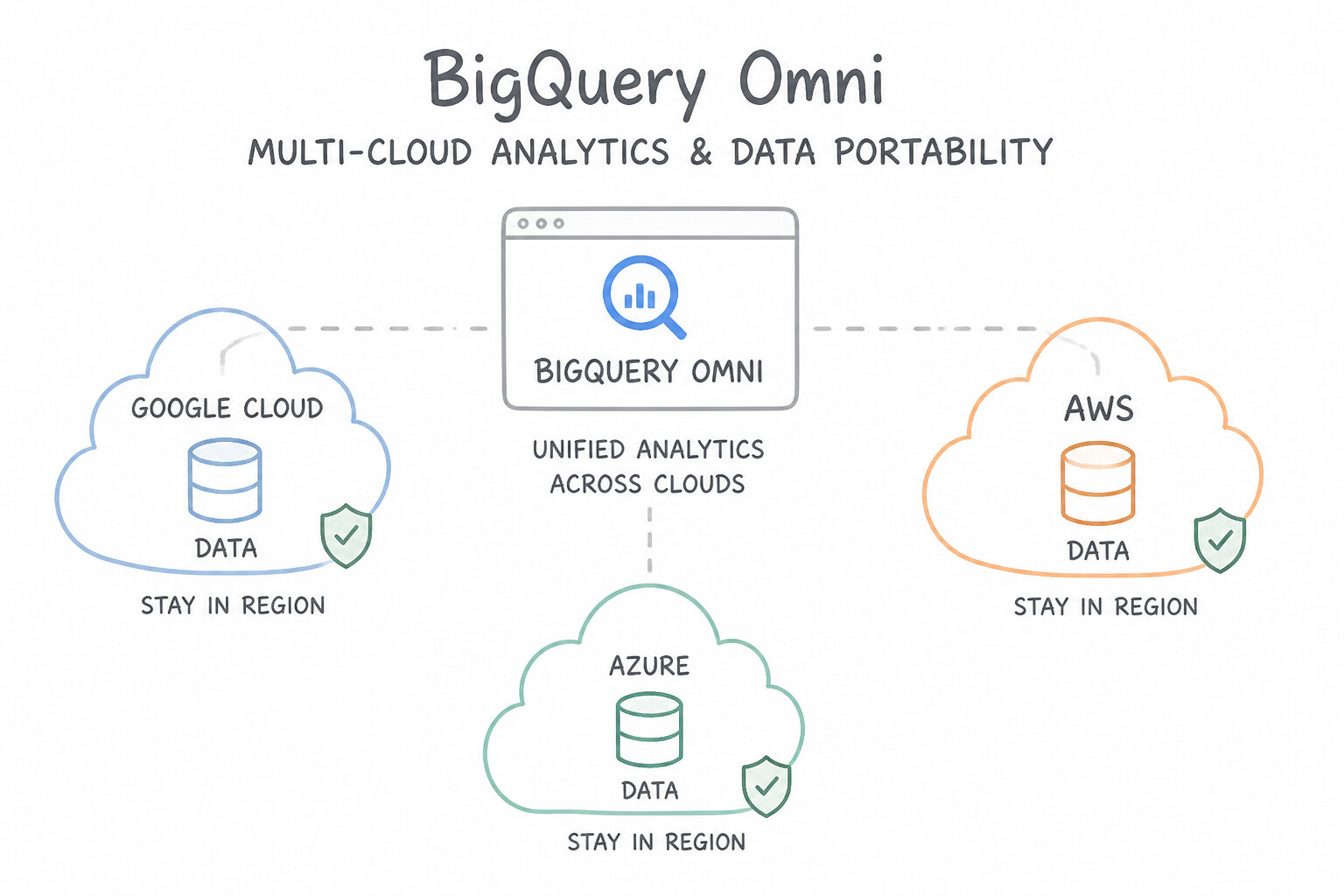
- The Cross-Cloud Egress Tax Trap (1.3b): When an enterprise needs to join or analyze 500 TB of data residing in AWS S3 or Azure Blob Storage alongside BigQuery data, copying all 500 TB across the internet every night via Storage Transfer Service incurs massive AWS/Azure network egress fees and violates multi-cloud data residency mandates. BigQuery Omni (powered by Anthos clusters running directly inside AWS/Azure regions and unified via BigLake tables) executes BigQuery SQL compute in-place next to the S3/Azure data and transfers only the compact aggregated result set back to Google Cloud.
- Proprietary Lock-In vs. Open Lakehouse Portability (
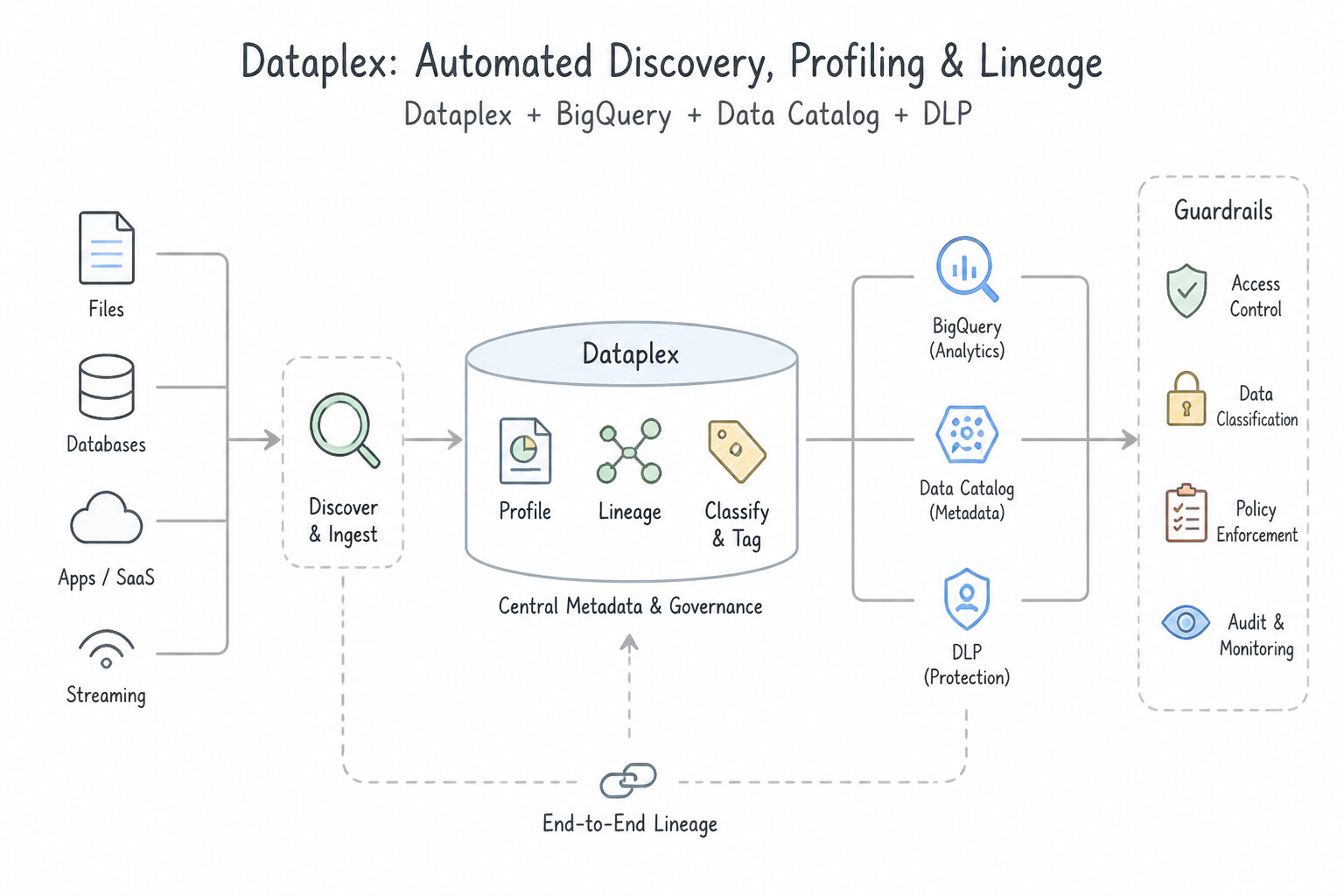
1.3a,1.3b): Writing custom pipelines in proprietary vendor-specific frameworks or storing lake files in unindexed CSVs forces complete rewrites when requirements shift. Using Apache Beam (portable acrossDataflowRunner,SparkRunner, andFlinkRunner), Apache Spark on Dataproc, and open columnar table formats (Apache Iceberg / Parquet / Avro governed via BigLake) ensures both compute and storage remain portable. - The "Data Swamp" Discovery Failure (1.3c): Dumping thousands of files into Cloud Storage without automated profiling, lineage, or business glossary tagging turns a data lake into a data swamp. Dataplex automates schema discovery, Dataplex Data Profiling computes column statistics (null rates, cardinality, quantiles), and Dataplex Data Lineage automatically records table-to-table movement across BigQuery, Dataflow, Cloud Data Fusion, and Composer.
Consideration 1.3a: Mapping current and future business requirements to the architecture
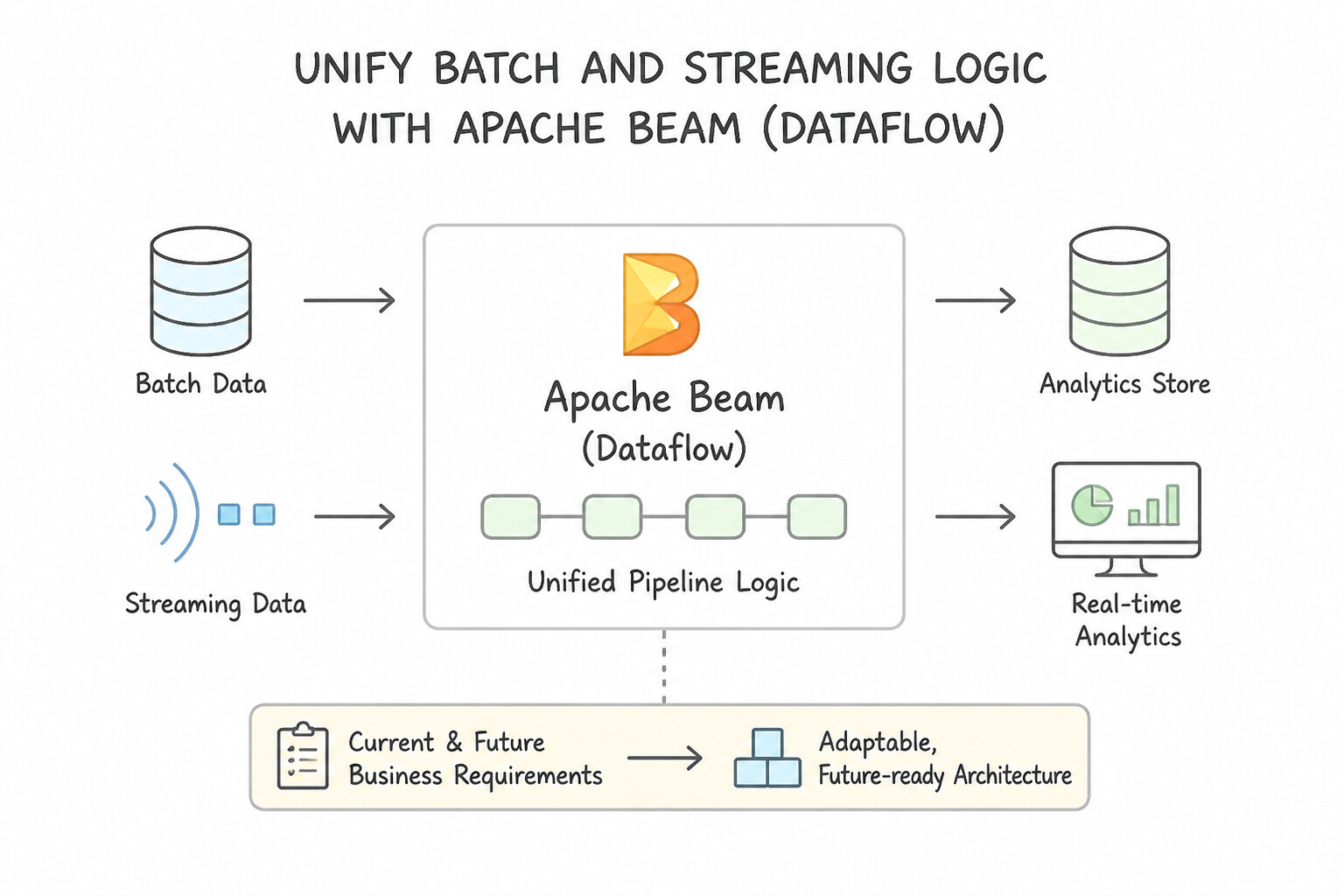
When a workload scenario requires a company whose workload is growing 10x or transitioning from nightly batch to real-time streaming:
- Unify Batch and Streaming Logic with Apache Beam (
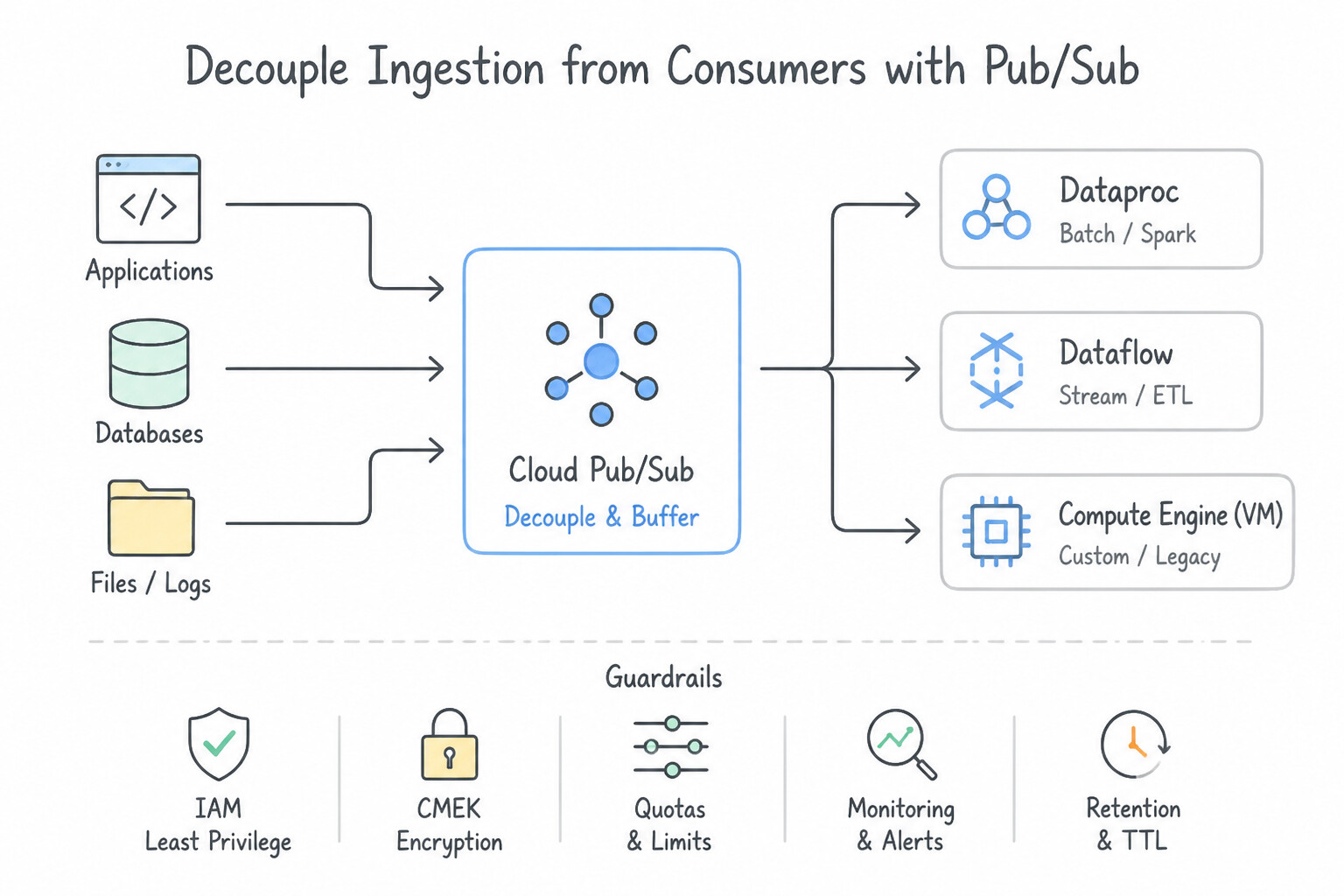
Dataflow): If a company currently runs nightly batch ETL but plans to move to real-time event streaming within 6 months, write the transformation logic in Apache Beam on Dataflow. Switching a Beam pipeline from a bounded GCS source to an unbounded Pub/Sub source requires changing only the I/O connector and adding a Window/Trigger strategy—preserving 95% of the business logic code. - Decouple Ingestion from Consumers with Pub/Sub: Never wire producers directly to a single database via point-to-point REST calls. Place Cloud Pub/Sub at the ingestion edge so new future consumers (a real-time fraud model, a BigLake archiver, a BigQuery streaming subscription) can be attached simply by adding a new Pub/Sub subscription with zero changes to the producer.
- Design for Schema Evolution: Use self-describing formats that support backward/forward schema evolution (Avro or Protocol Buffers in Pub/Sub/GCS, and nullable/repeated
RECORDadditions in BigQuery) so adding new fields in the future does not break existing downstream consumers.
Key Implementation Patterns
- Migrating Legacy Spark Jobs with Future Cloud Agnostic Goals: Use Migrate the workloads to Dataproc. Dataproc is a managed Hadoop/Spark service that supports existing open-source workloads without code modification, ensuring portability. (Avoid alternative: Dataflow requires rewriting Spark code to Apache Beam, violating the requirement for minimal code changes.)
- Multi-Cloud Data Analysis Architecture: Use Configure BigQuery Omni to create external tables referencing the data in AWS and Azure. BigQuery Omni allows you to run analytics on data in AWS and Azure without moving the data, minimizing egress costs. (Avoid alternative: Storage Transfer Service moves data, which violates the requirement to avoid data movement and high egress costs.)
Key Takeaways (1.3a)
- Dataproc is the preferred choice for lifting and shifting existing Hadoop/Spark workloads to GCP.
- Managed services reduce operational overhead compared to manual VM deployments.
- Using standard open-source APIs (like Spark) preserves portability and avoids vendor lock-in.
- Dataflow requires rewriting code to Apache Beam, which may not be suitable for migrations requiring minimal changes.
Consideration 1.3b: Designing for data and application portability (e.g., multi-cloud and data residency requirements)
Master the two dimensions of portability tested in production—Multi-Cloud Data Portability and Compute/Storage Open Standards:
- BigQuery Omni for Multi-Cloud Analytics & Data Residency:
- When data resides in Amazon S3 or Azure Blob Storage and cannot be moved due to strict data residency laws or prohibitive egress fees, use BigQuery Omni.
- BigQuery Omni runs managed BigQuery compute clusters inside the target AWS or Azure region, querying BigLake tables over S3/Azure locally.
- To combine multi-cloud S3 data with Google Cloud BigQuery tables in a single SQL query, use
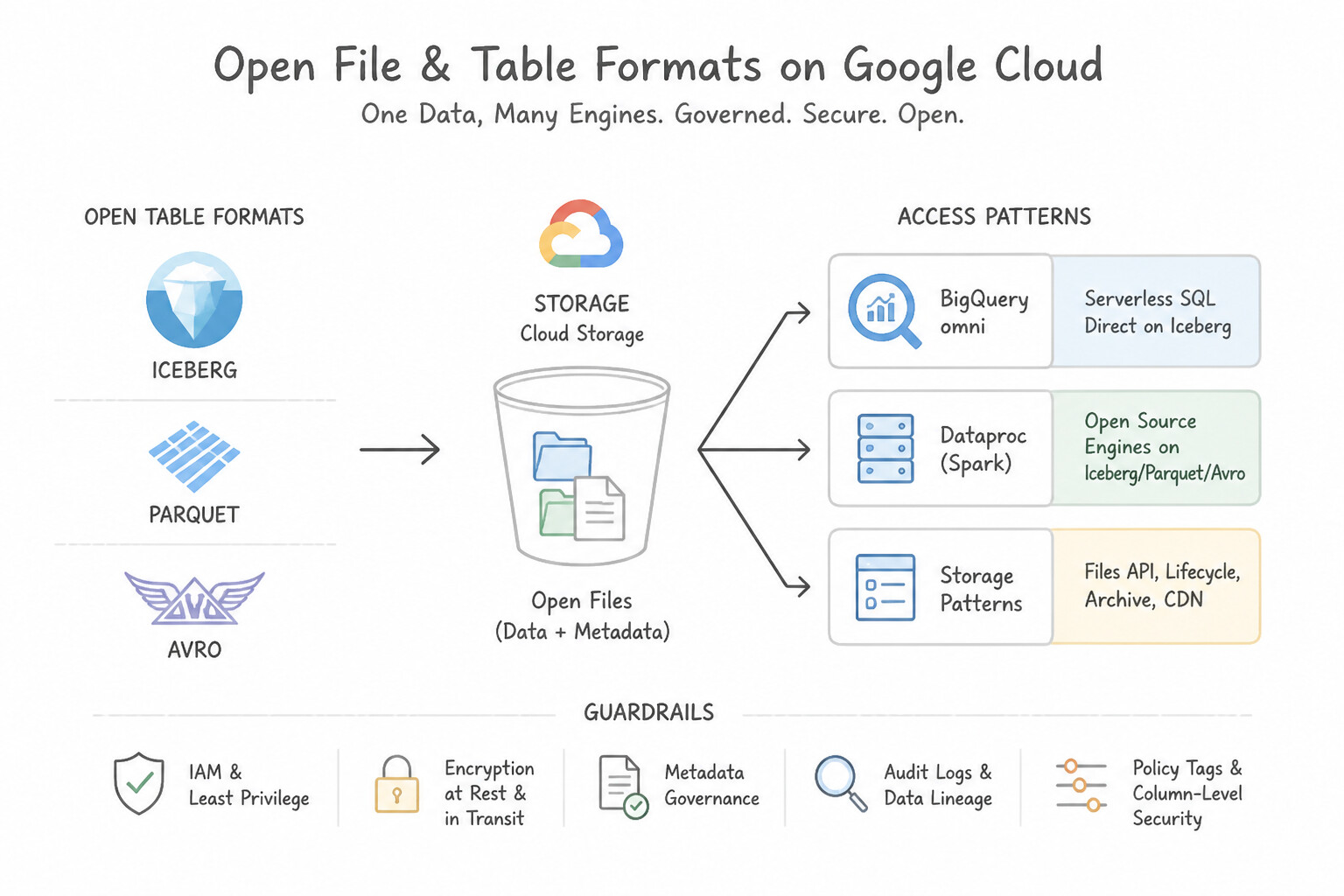
LOAD DATAor cross-cloud materialized results so only the filtered/aggregated subset crosses cloud boundaries. - Open File & Table Formats (
Apache Iceberg,Parquet,Avro): - Apache Parquet / ORC: Columnar, compressed storage ideal for analytical read performance and predicate pushdown across Spark, Presto/Trino, and BigQuery.
- Apache Avro: Row-oriented binary format with embedded JSON schema; ideal for full-row streaming writes, Kafka/PubSub payloads, and fast BigQuery batch loads.
- Apache Iceberg on BigLake (
BigLake Metastore): Provides open lakehouse ACID transactions, schema evolution, and time travel on Cloud Storage accessible simultaneously by BigQuery and open-source Apache Spark / Dataproc.
Key Implementation Patterns
- Cross-Cloud Data Analytics without Migration: Use Configure BigQuery Omni to query the data residing in Amazon S3. BigQuery Omni allows you to run SQL queries on data stored in Amazon S3 without moving it to Google Cloud. (Avoid alternative: Storage Transfer Service moves data, which violates the specific compliance and cost constraints provided in the scenario.)
- Hybrid Containerized Data Processing: Use Use Dataproc on Google Kubernetes Engine (GKE) to deploy the Spark jobs. Dataproc on GKE enables running Spark jobs on Kubernetes, ensuring consistency with the on-premises Kubernetes environment. (Avoid alternative: Using VMs and Hadoop creates an architecture inconsistent with the organization's Kubernetes strategy.)
- Pipeline Portability via Apache Beam: Use Develop the pipeline using the Apache Beam SDK. Apache Beam decouples pipeline logic from the runner, allowing the same code to execute on Dataflow, Flink, or Spark. (Avoid alternative: The native Apache Flink API is not directly supported by the Dataflow service, preventing the migration to Dataflow.)
Key Takeaways (1.3b)
- BigQuery Omni allows you to query data stored in AWS S3 or Azure Blob Storage without moving it to Google Cloud.
- Avoid moving data across clouds when compliance or egress costs are major concerns.
- BigQuery Omni provides a unified SQL interface for multi-cloud data analysis.
- Dataproc on GKE modernizes Apache Spark workloads by running them on Kubernetes rather than YARN.
Consideration 1.3c: Data staging, cataloging, profiling, and discovery (data governance)
A well-governed data platform turns raw bytes into discoverable, trusted assets:
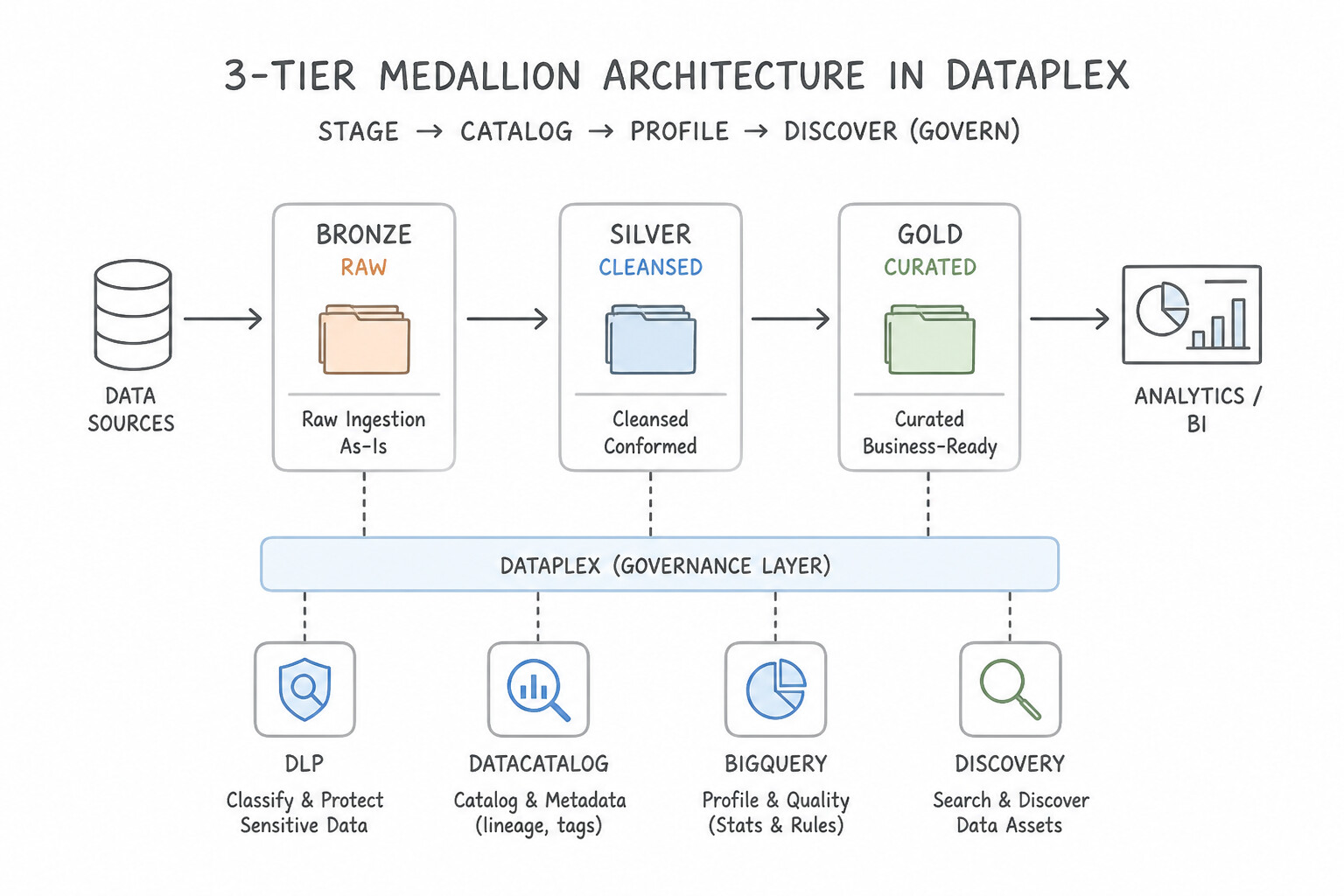
- The 3-Tier Medallion Staging Architecture in Dataplex:
- Raw Zone (
Bronze): Stores unmodified source payloads (JSON, CSV, Avro) in Cloud Storage with strict retention/immutability so pipelines can always be replayed from source truth. - Curated Zone (
Silver): Stores validated, deduplicated, schema-enforced tables (Parquet/Iceberg in GCS or partitioned BigQuery tables). - Consumption / Product Zone (
Gold): Stores business-ready dimensional models, aggregates, and feature views exposed via BigQuery and Analytics Hub. - Automated Discovery, Profiling & Lineage (
Dataplex): - Dataplex Discovery: Automatically scans Cloud Storage zones to infer schemas, detect Hive partitions (
year=2026/month=10/), and register tables in BigQuery and Dataproc Metastore. - Dataplex Data Profiling: Scans BigQuery tables to automatically compute column distributions, null percentages, uniqueness, and min/max/mean metrics so analysts can assess dataset suitability before building models.
- Dataplex Data Lineage: Automatically captures and visualizes upstream-to-downstream lineage graphs across BigQuery SQL jobs, Dataform, Dataflow, Cloud Data Fusion, and Cloud Composer without manual instrumentation.
Key Implementation Patterns
- Automated PII Discovery and Tagging: Use Create a Cloud Data Loss Prevention (DLP) inspection job. Configure the job to scan the BigQuery tables and publish the findings to Data Catalog. Cloud DLP has a built-in feature to scan BigQuery tables and automatically publish results as tags to Data Catalog.
- Ingesting Custom Metadata for Hybrid Data: Use Use the Data Catalog API to create a custom Entry Group. Use the API to create Entries for the database resources. Data Catalog requires the use of the API to create custom Entry Groups and Entries for non-GCP or on-premises resources.
- Column-Level Security with Policy Tags: Use Create a Taxonomy using Data Catalog. Create Policy Tags for the sensitive data, apply them to the columns, and manage access using Identity and Access Management (IAM). Policy Tags allow you to implement centralized Column-Level Security by restricting access to specific columns based on IAM roles.
Key Takeaways (1.3c)
- Cloud Data Loss Prevention (DLP) is used to scan and discover sensitive data (PII).
- Data Catalog is used to manage metadata and tags for data governance.
- DLP has a native integration to publish inspection findings directly to Data Catalog, avoiding the need for custom scripts.
- Always prefer built-in service integrations over custom code (like Dataflow pipelines) to minimize operational overhead.
Quick Decision Cheat Sheet (Subsection 1.3)
If the Scenario Requires... | Choose This Google Cloud Pattern | Avoid This Common Mistake |
|---|---|---|
"Query data in AWS S3 or Azure Blob Storage in-place without cross-cloud raw data egress" | BigQuery Omni + BigLake Tables | Copying raw buckets nightly via Storage Transfer Service or querying S3 over public internet from GCE |
"Share open-format tables on GCS across both Spark (Dataproc) and BigQuery with unified governance and ACID" | BigLake Tables for Apache Iceberg + BigLake Metastore | Maintaining duplicate copies of data in HDFS and BigQuery native storage |
"Track how a corrupted column in an executive dashboard was derived across Dataflow, Staging, and Dataform" | Enable Dataplex Data Lineage (Data Lineage API) | Searching Cloud Logging manually for historical SQL strings |
"Allow business users to search for datasets across projects using custom business metadata (e.g., Data Owner, Cost Center, PII Level)" | Dataplex Catalog (Data Catalog) Tag Templates (public/private structured tags) | Encoding all governance metadata into 200-character table names |
"Fastest file format for bulk loading into BigQuery when rows are not queried in-place on GCS" | Compressed Apache Avro (splittable block compression + embedded schema) | Gzipped CSV or prettified multi-line JSON (non-splittable, slow CPU parsing) |
Further Reading (Subsection 1.3)
- Dataproc Documentation — Overview of Dataproc features, emphasizing it is a managed Spark and Hadoop service ideal for migrating on-premises clusters.
- Cloud Architecture Center - Migrating Hadoop to Google Cloud — Discusses strategies for migrating Hadoop workloads, highlighting the lift-and-shift approach using Dataproc.
- BigQuery Omni Overview — Provides an introduction to BigQuery Omni, explaining how it enables analytics on data stored in Amazon S3 or Azure Blob Storage.
- Dataproc on GKE overview — Documentation explaining how Dataproc on GKE works, allowing you to deploy Dataproc clusters on GKE infrastructure.
- Running Apache Spark on Kubernetes — Official Apache Spark documentation describing the native support for running Spark jobs on Kubernetes clusters.
- Apache Beam Execution Model — Provides an overview of how Beam pipelines are executed and how runners translate the model.
Subsection 1.4: Designing data migrations
The Big Picture
Migrating legacy on-premises data warehouses (Teradata, Netezza, Oracle Exadata), operational databases (MySQL, PostgreSQL, SQL Server), and multi-petabyte object stores to Google Cloud is one of the highest-risk initiatives a Data Engineer leads. Naive migrations fail for three predictable reasons:
- Ignoring the Physics of Network Bandwidth (
1.4a,1.4b): Attempting to transfer 1 PB of on-premises archive files over a shared 1 Gbps corporate internet link takes over 100 days at 100% utilization—violating a 30-day datacenter exit deadline. A PDE architect calculates transfer time first and selects Transfer Appliance (offline physical shipment) when bandwidth is constrained, or Dedicated/Partner Interconnect + Storage Transfer Service when high-speed private links exist. - Big-Bang Cutover vs. Continuous Zero-Downtime CDC (1.4b): Taking a production Oracle or PostgreSQL database offline for 48 hours to dump and load 20 TB into BigQuery or AlloyDB is unacceptable for 24/7 businesses. Zero-downtime migrations use Datastream (for heterogeneous CDC replication into BigQuery/GCS) or Database Migration Service (
DMS) (for continuous homogeneous/heterogeneous replication into Cloud SQL / AlloyDB), cutting over only after historical backfill and live streaming CDC lag reach zero. - Blind Cutover Without Automated SQL Translation & Validation (
1.4a,1.4b): Legacy Teradata BTEQ scripts and Oracle PL/SQL stored procedures use proprietary syntax and data types that fail in BigQuery GoogleSQL. Production migrations use the BigQuery Migration Service (Migration Assessment → Batch SQL Translator → Data Validation Tool [DVT]) to automate conversion and mathematically prove row/column parity before decommissioning legacy systems.
Consideration 1.4a: Analyzing current stakeholder needs, users, processes, and technologies, and creating a plan to get to desired state
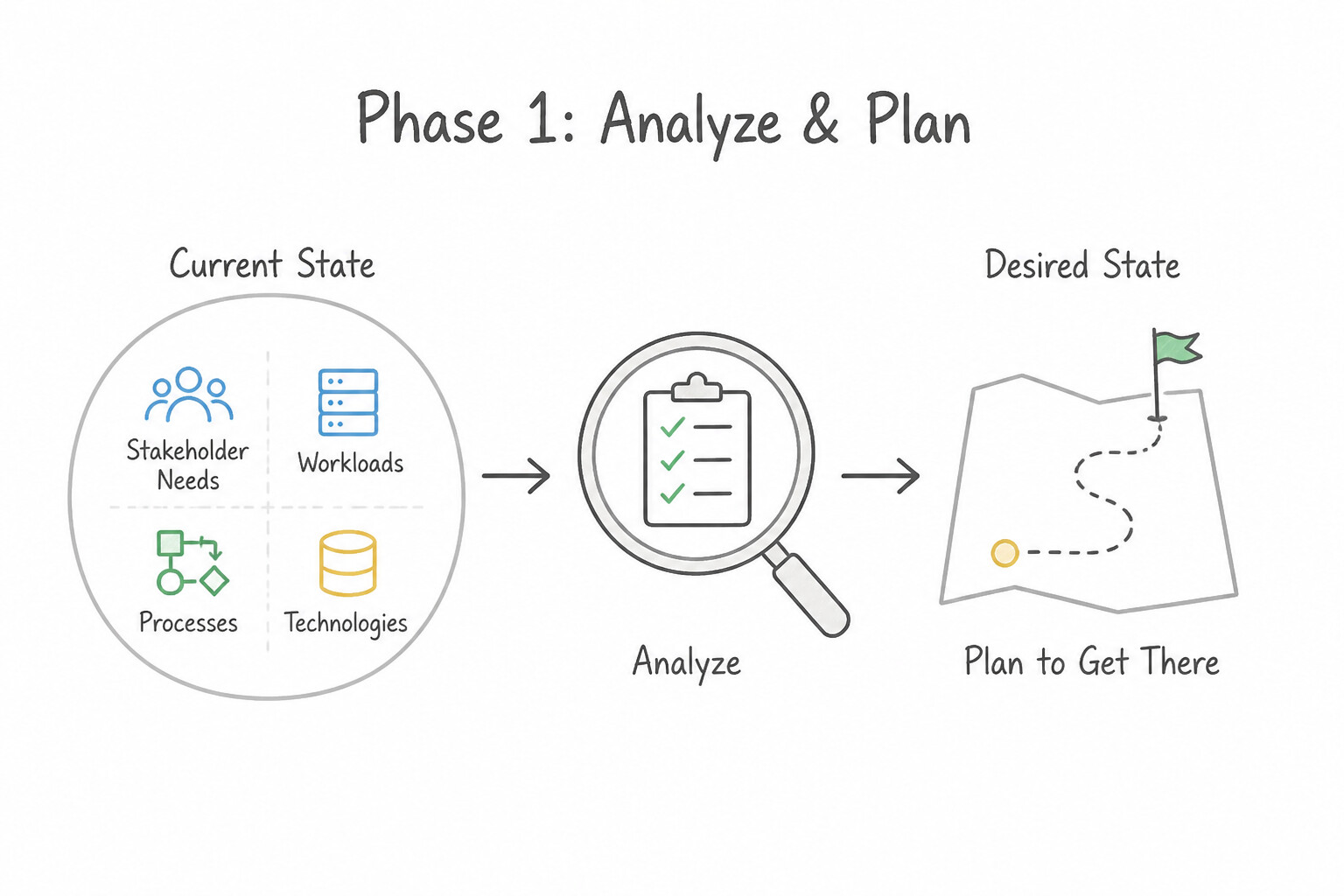
When designing a multi-phase enterprise data migration plan:
- Phase 1 — Discovery & Assessment (
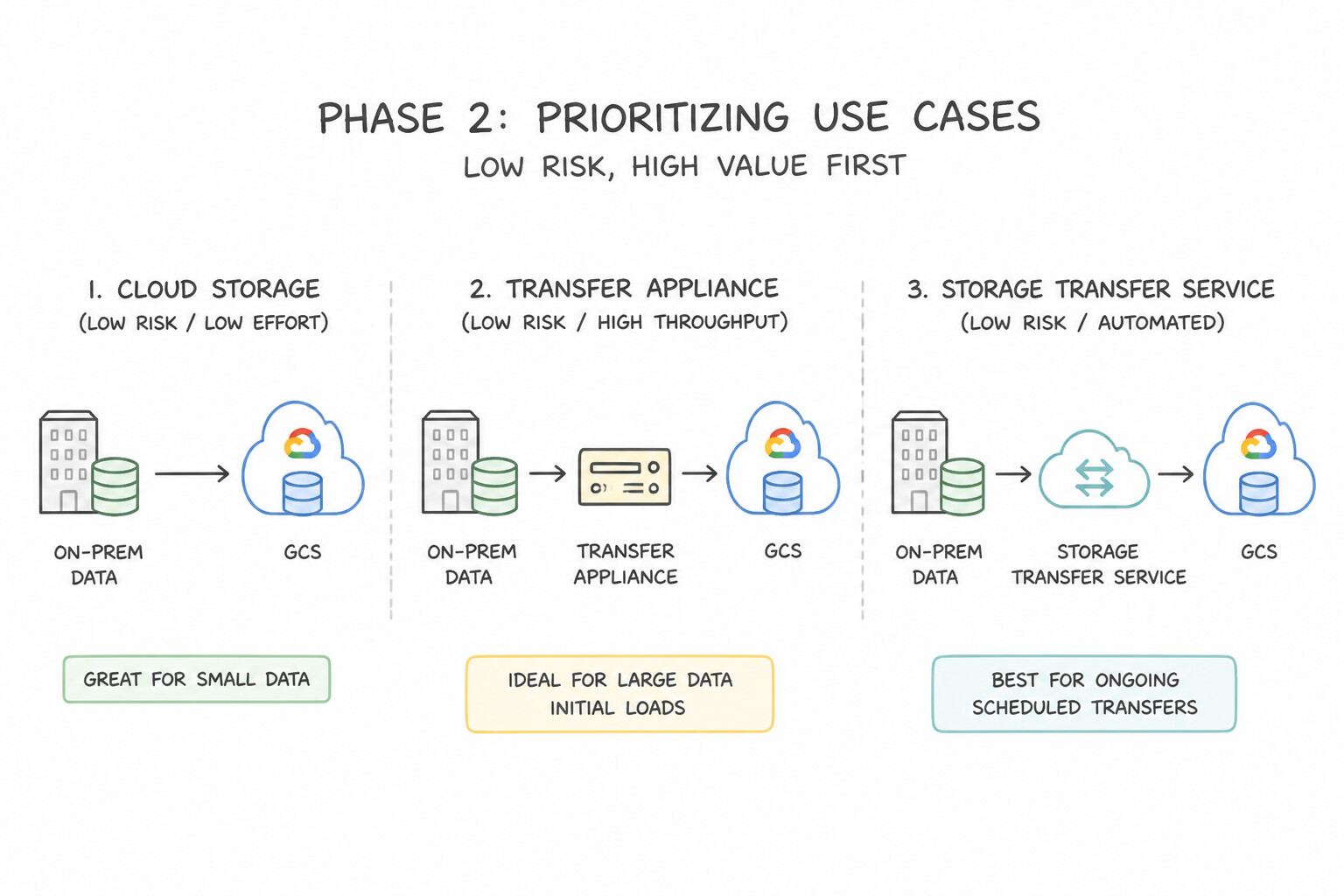
BigQuery Migration Assessment): Before moving a single byte from Teradata, Snowflake, or Redshift, extract query logs and schema metadata from the legacy warehouse into BigQuery Migration Assessment. It automatically profiles table sizes, query complexity, lineage between batch jobs and BI reports, and estimates target BigQuery slot capacity. - Phase 2 — Prioritizing Use Cases (Low Risk / High Value First): Never migrate the most mission-critical, tightly coupled regulatory reporting pipeline in Wave 1! Start with read-only analytical marts or self-contained historical datasets to validate tooling and IAM patterns, using a dual-run (parallel execution) period where both legacy and BigQuery pipelines run side-by-side to verify output parity.
- Phase 3 — Automated Dialect Translation (
BigQuery Batch SQL Translator): Use the AI-enhanced BigQuery Batch SQL Translator (with custom UDF/macro mapping rules) to bulk-convert Teradata SQL/BTEQ, Oracle PL/SQL, Redshift, HiveQL, or Spark SQL into native BigQuery GoogleSQL.
Key Implementation Patterns
- Bandwidth Constrained Migration Planning: Use Order a Transfer Appliance to capture the data locally and ship it to Google. Transfer Appliance allows offline data migration by shipping physical hardware, bypassing the slow internet connection to meet the deadline. (Avoid alternative: Transferring 800 TB over 500 Mbps would take roughly 160 days, missing the 3-week deadline.)
- Cloud-to-Cloud Object Storage Migration: Use Create a Storage Transfer Service job. Select AWS S3 as the source and Cloud Storage as the destination. Schedule the job to repeat daily. Storage Transfer Service is a managed tool optimized for cloud-to-cloud transfers with built-in scheduling capabilities.
- Zero-Downtime Database Migration: Use Use Database Migration Service (DMS) to create a continuous migration job, then promote the Cloud SQL instance. DMS continuous migration keeps the source and destination in sync, allowing for a cutover that typically takes seconds. (Avoid alternative: This offline method requires stopping the database for the entire duration of the export and import, exceeding the 60-second limit.)
Key Takeaways (1.4a)
- Always perform a quick bandwidth-to-volume calculation for migration scenarios.
- Use online transfers (Storage Transfer Service, gsutil) when bandwidth allows meeting the deadline.
- Use offline transfers (Transfer Appliance) when the data volume is too high for the available bandwidth within the required timeframe.
- Distinguish between bits (Mbps) and Bytes (MBps) when calculating speeds (divide Mbps by 8).
Consideration 1.4b: Planning migration and validation to Google Cloud (e.g., BigQuery Data Transfer Service, Database Migration Service, Transfer Appliance, Google Cloud networking, Datastream)
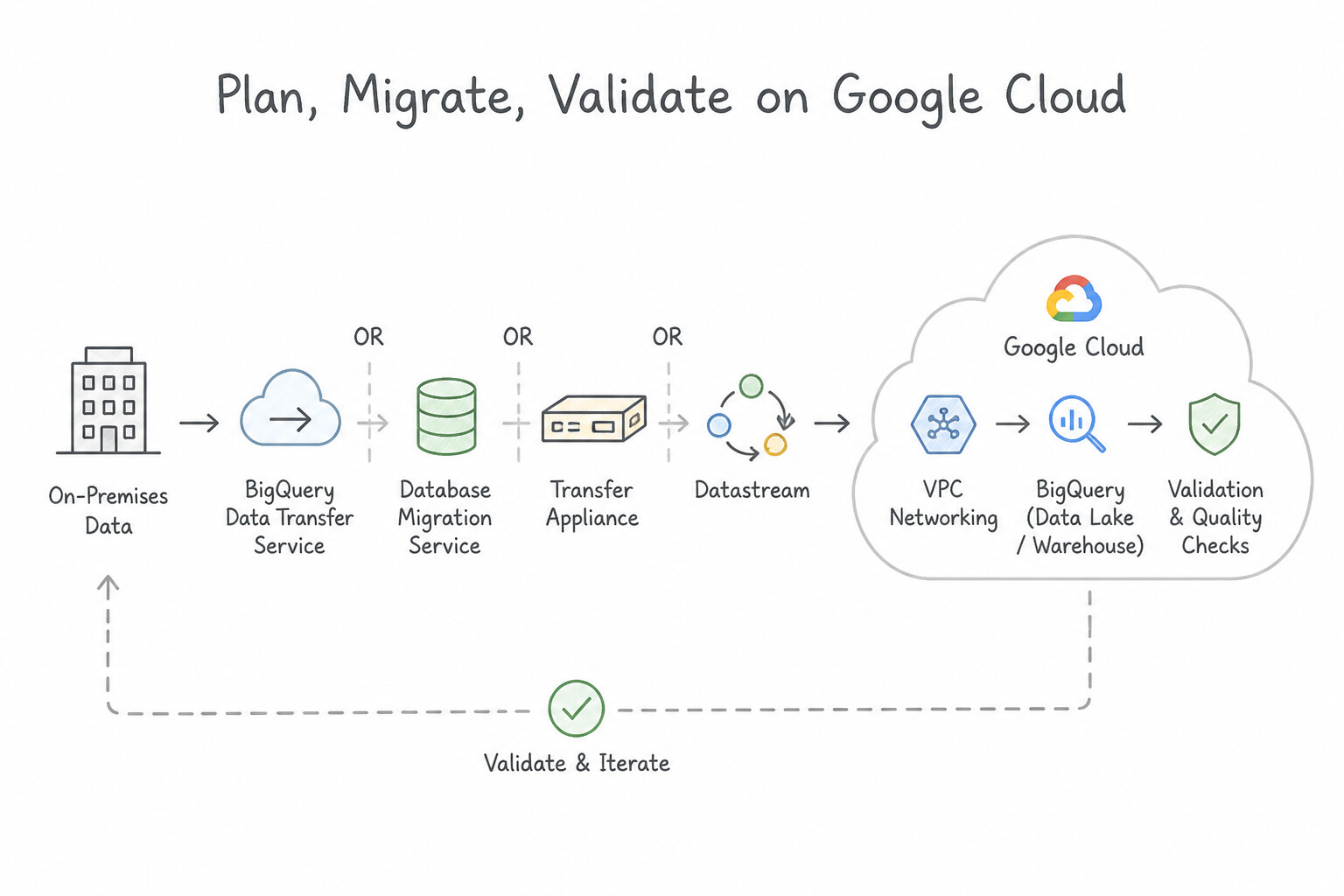
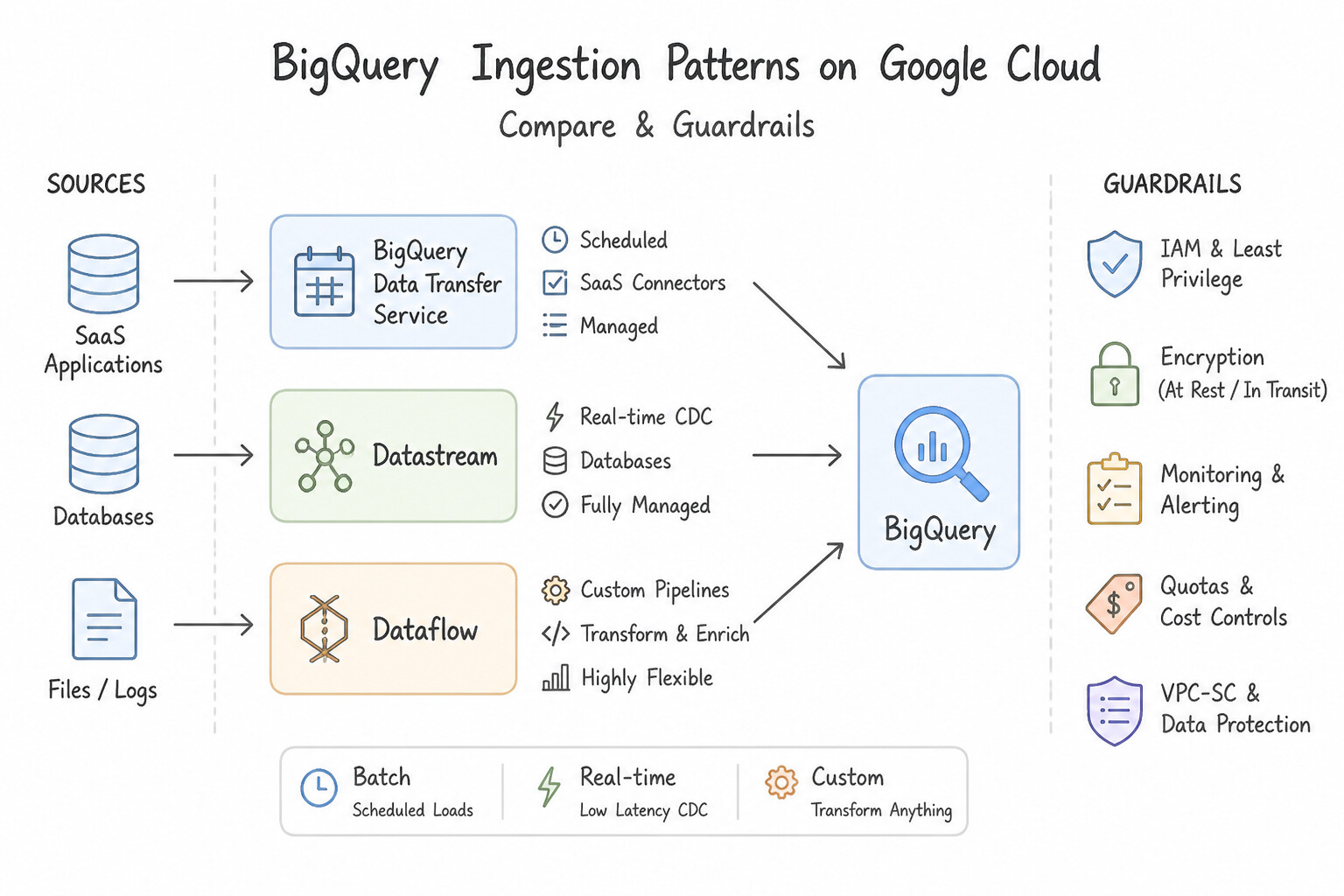
Memorize this exact decision matrix for the 5 Google Cloud migration tools:
- BigQuery Data Transfer Service (
BQ DTS): Managed, code-free scheduled ingestion into BigQuery from Google SaaS apps (Google Ads, Campaign Manager, YouTube, Google Play), external cloud warehouses/storage (Amazon S3, Redshift, Snowflake), and on-premises Teradata / Oracle (in coordination with Storage Transfer Service). - Storage Transfer Service (
STS): High-performance online object/file transfer from AWS S3, Azure Blob Storage, or on-premises POSIX filesystems (using containerized Transfer Agents deployed on-prem that scale horizontally and support bandwidth throttling so corporate WAN links aren't saturated). - Transfer Appliance: Physical, tamper-evident, AES-256 encrypted storage server (
40 TBor300 TB) shipped to your datacenter. Choose whenever network bandwidth is insufficient to transfer the dataset within the required deadline (Rule of thumb: >60 TB on a ≤ 100 Mbps link, or >1 PB when time is short). - Datastream (Serverless CDC to Analytics): Agentless, serverless Change Data Capture (
CDC) reading binary database logs (Redo Logs,binlog,WAL) from Oracle, MySQL, PostgreSQL, SQL Server, or AlloyDB and streaming continuously into BigQuery (via Storage Write API + automaticMERGEupsert views) or Cloud Storage. - Database Migration Service (
DMS— Operational DB to Operational DB): Serverless continuous replication specifically for migrating operational databases to Cloud SQL or AlloyDB for PostgreSQL with near-zero downtime. - Private Hybrid Networking & Validation: Connect Datastream/DMS/STS privately via Cloud VPN (HA VPN) or Dedicated / Partner Interconnect (with Reverse Proxy / PSC VPC Peering), and verify post-migration accuracy using Google's open-source Data Validation Tool (
DVT) to compare row counts, column sums/averages, and cryptographic row hashes between source and target.
Key Implementation Patterns
- SaaS Data Ingestion Strategy: Use Enable BigQuery Data Transfer Service for each data source. Configure the transfer settings to load data into BigQuery datasets daily. BigQuery Data Transfer Service provides built-in, no-code connectors for Google ecosystem products like Ads, YouTube, and Play.
- Oracle to BigQuery Real-Time Analytics: Use Configure Datastream to replicate data from the Oracle database directly to BigQuery. Datastream is the serverless CDC service designed to stream real-time changes from Oracle to BigQuery with minimal source impact. (Avoid alternative: A custom Dataflow polling pipeline increases load on the source database and requires more maintenance than the fully managed Datastream service.)
Key Takeaways (1.4b)
- Use BigQuery Data Transfer Service for automated, code-free ingestion from Google SaaS products (Ads, YouTube, Play).
- Use Datastream for real-time replication from relational databases (CDC).
- Avoid custom code (Cloud Functions/Dataflow) when a native, managed integration exists.
- Datastream is the go-to serverless service for real-time Change Data Capture (CDC) into BigQuery.
Quick Decision Cheat Sheet (Subsection 1.4)
If the Scenario Requires... | Choose This Google Cloud Pattern | Avoid This Common Mistake |
|---|---|---|
"Real-time serverless CDC replication from Oracle / MySQL / Postgres / SQL Server into BigQuery or GCS" | Datastream | Database Migration Service ( DMS) (targets Cloud SQL/AlloyDB) or scheduled hourly CSV dumps |
"Migrate an operational MySQL/Postgres/Oracle DB to Cloud SQL or AlloyDB with minimal downtime" | Database Migration Service ( DMS) (continuous replication) | BigQuery Data Transfer Service (targets BigQuery) or offline cold dump/restore |
"Automated scheduled ingestion from Google Ads, YouTube, Teradata, Redshift, or Snowflake into BigQuery" | BigQuery Data Transfer Service ( BQ DTS) | Writing custom Python cron scrapers on Compute Engine |
"Petabyte-scale migration where network transfer time exceeds the allowable project timeline" | Transfer Appliance | Upgrading internet bandwidth for a one-time transfer or running gsutil over VPN |
"Datastream resides in a Google-managed tenant VPC and must reach an on-premises DB over Cloud VPN / Interconnect in a Shared VPC" | Configure Private Connectivity (VPC Peering / PSC) + a HAProxy / Cloud NAT reverse proxy VM (or custom advertised routes) in the peered VPC | Exposing the on-premises production database directly to public internet IPs |
Further Reading (Subsection 1.4)
- Transfer Appliance Overview — Provides guidelines on when to use Transfer Appliance, specifically recommending it when data size exceeds 20 TB or transfer would take more than a week.
- Data Transfer Options — A guide comparing different transfer methods (Online vs. Offline) and helping users choose the right path based on their constraints.
- Storage Transfer Service documentation — Overview of Storage Transfer Service capabilities, including supported data sources (Amazon S3) and use cases like data migration and archival.
- Supported source and destination databases — Provides an overview of how DMS works for PostgreSQL, including the distinction between continuous (online) and one-time migrations.
- BigQuery Data Transfer Service overview — Provides an overview of the service, supported data sources, and how it automates data loading without coding.
- Loading data from Google Ads — Specific documentation on setting up the transfer for Google Ads, highlighting the ease of configuration.
Book TOC · Previous · Chapter 1 of 6 · Next
AwesomeGCP.com Learning
The approach taken is a question-led learning approach: you explore realistic project scenarios where you need to make decisions or take actions to achieve business goals within specific constraints. Instead of passive learning, you are challenged to think and work through the options to master the Professional Data Engineer (PDE) certification!