Book TOC · Previous · Chapter 5 of 6 · Next
Chapter 5: Zero-Downtime Database Migrations & Heterogeneous CDC Replication (DMS & Datastream)
Chapter Focus: Homogeneous vs. heterogeneous migrations, Database Migration Service (DMS) continuous CDC with Gemini-assisted SQL/PL-SQL conversion, Spanner Migration Tool (SMT), Datastream, and fallback cutover plans.
Subsection 3.1: Design and implement data migration and replication
The Big Picture
Section 3 represents 23% of the entire Google Cloud architecture—all concentrated into a single high-stakes subsection (3.1a through 3.1d). Moving a live, multi-terabyte enterprise database from an on-premises datacenter or another cloud (AWS RDS / Aurora, Azure SQL) into Google Cloud while thousands of customers are actively placing orders is like changing the engines on a commercial jet mid-flight. Three architectural mistakes cause migrations to fail:
- Choosing Dump-and-Restore When Continuous CDC Is Required (
3.1a&3.1d): A traditional offline migration (pg_dump/mysqldump→ upload to GCS → import into Cloud SQL) requires halting all source writes for the entire duration of the export, network transfer, and import. For a 5 TB database over a 1 Gbps link, that takes 12 to 24+ hours of complete application outage! Whenever the business requires zero or near-zero downtime, you must use Continuous Change Data Capture (CDC) via Database Migration Service (DMS), which takes an initial snapshot and then continuously streams ongoing transaction logs (binlog/WAL/Redo Logs) until source and target are in real-time sync (replication lag = 0). - Omitting Reverse Replication & Fallback Validation (
3.1b&3.1c): What happens if you cut over production traffic to AlloyDB or Cloud Spanner, run for 3 hours of new customer transactions, and then hit a critical legacy integration bug that forces an immediate rollback to on-premises? If you didn't configure Reverse Replication (streaming those 3 hours of new Google Cloud writes back to the on-premises source database), rolling back means losing 3 hours of committed financial transactions! - Underestimating Heterogeneous Schema & Code Conversion (
3.1c&3.1d): Migrating Oracle → Cloud SQL for PostgreSQL / AlloyDB or SQL Server → Cloud Spanner is a heterogeneous migration. Data types (NUMBER,VARCHAR2,DATE), sequences, triggers, and proprietary procedural code (PL/SQLpackages →PL/pgSQL) do not copy over verbatim. You must use DMS Conversion Workspaces (powered by Gemini AI conversion assistance) or Spanner Migration Tool (SMT), convert schemas and application SQL first, and verify row-by-row parity with the open-source Data Validation Tool (DVT) before cutover.
Consideration 3.1a: Develop and execute migration strategies and plans, including zero/near-zero downtime, extended outage, and fallback
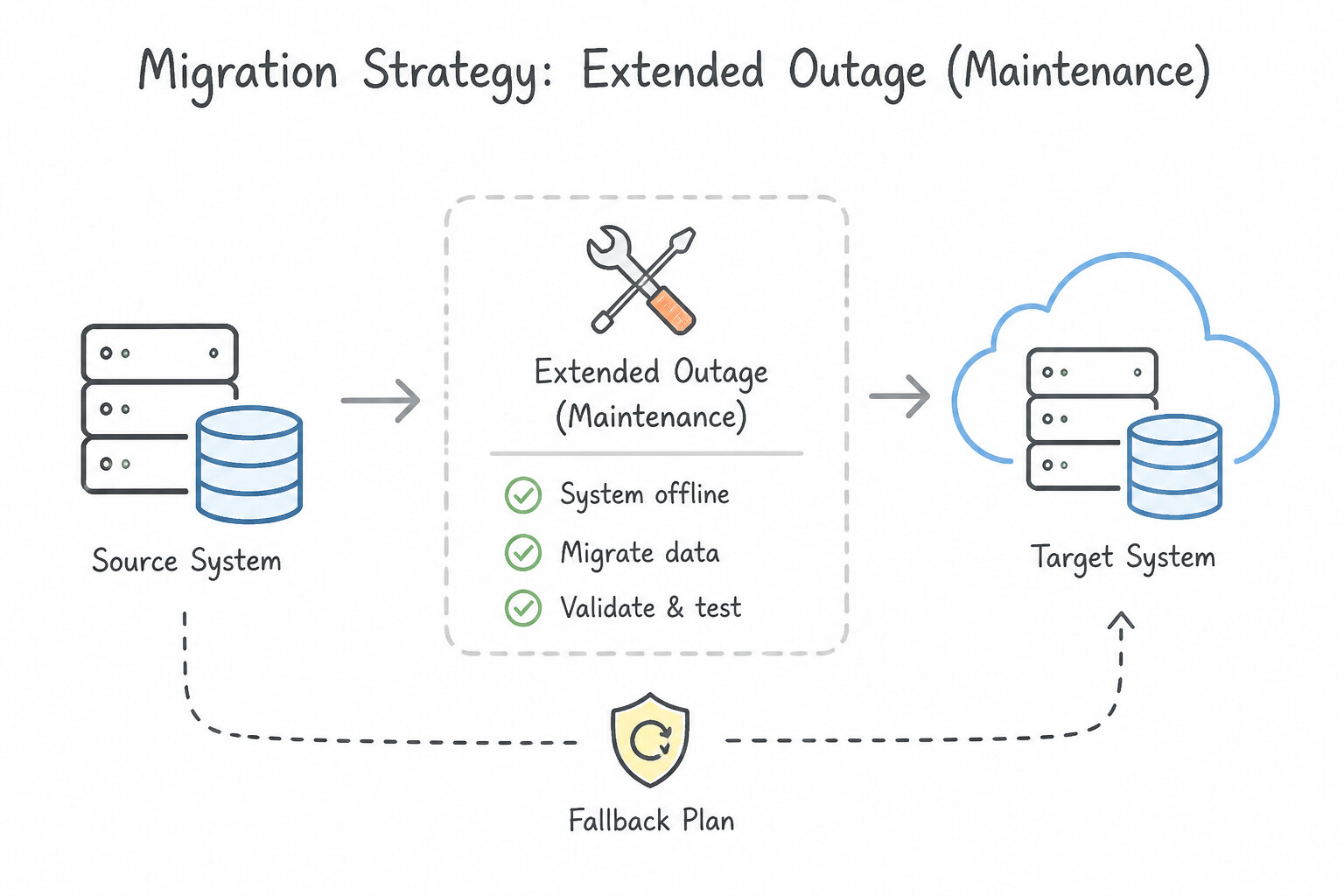
Match the migration pattern directly to the business downtime window and network bandwidth:
- Extended Outage (Maintenance Window / Cold Migration —
One-Time Dump & Restore): - Acceptable only when the scenario explicitly states the application can tolerate several hours (or a weekend) of downtime, or for non-production/legacy archival databases.
- Workflow: Stop application writes → export native backup/dump (
pg_dump,mysqldump --single-transaction, SQL Server.bakfull backup) to Cloud Storage → import into Cloud SQL / AlloyDB → switch application endpoint. - Near-Zero Downtime Migration (
Continuous CDCviaDMSorDatastream + Dataflow): - Required whenever downtime must be minimized to seconds or a few minutes (only the final cutover switch).
- Prerequisites on Source Engines for DMS Continuous CDC:
- MySQL: Enable binary logging (
log_bin = ON), setbinlog_format = ROW,binlog_row_image = FULL, and configure GTID (gtid_mode = ON,enforce_gtid_consistency = ON) or binlog file/position retention. - PostgreSQL: Install the
pglogicalextension on the source database, setwal_level = logical, configuremax_replication_slotsandmax_wal_senders, and ensure every table has a Primary Key (tables without a primary key only migrate their initial snapshot; ongoingUPDATEandDELETECDC events require a Primary Key orREPLICA IDENTITY!). - Oracle: Enable Supplemental Logging and
ARCHIVELOGmode (read via Oracle LogMiner or Binary Reader). - SQL Server: Use full + differential/transaction-log backups stored in Cloud Storage for continuous DMS replication.
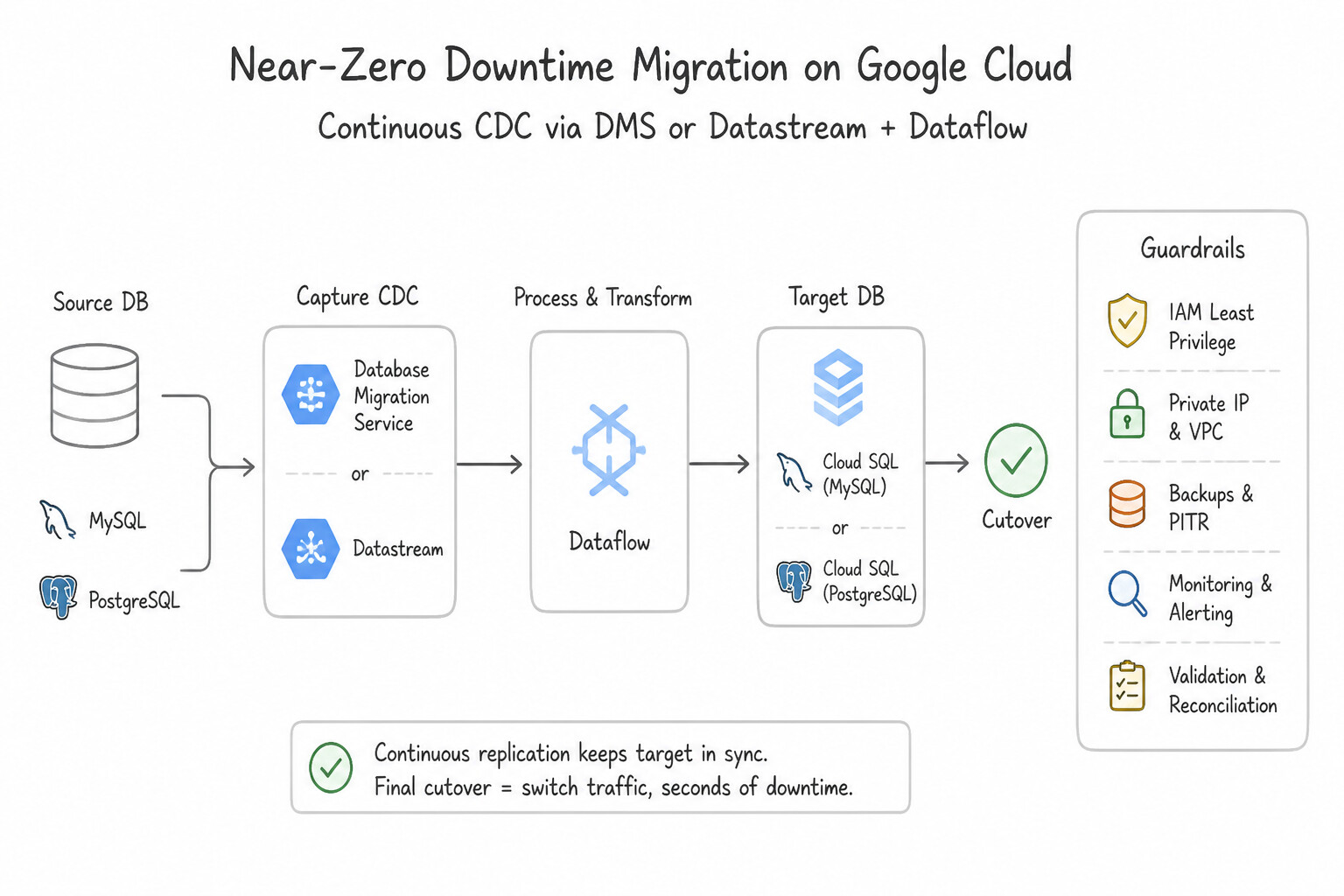
Key Implementation Patterns
- Homogeneous Zero-Downtime Migration using DMS: Use Configure the source database for replication and create a Database Migration Service (DMS) migration job with the job type set to "continuous". Continuous migration replicates ongoing changes, allowing the source to stay online until a brief cutover.
- Fallback Strategy using Reverse Replication: Use Configure the on-premises database as a replica of the Cloud SQL instance after the cutover. Reverse replication keeps the old database in sync with the new one, allowing a safe and quick fallback. (Avoid alternative: Restoring a pre-cutover snapshot causes the loss of all data generated during the smoke tests.)
- Extended Outage Strategy for Cost Optimization: Use Export the data using pg_dump, upload the file to a Cloud Storage bucket, and import it into the Cloud SQL instance. Using pg_dump and Cloud Storage is the standard, simplest path for offline migrations where downtime is acceptable.
Key Takeaways (3.1a)
- Continuous Migration is required for minimizing downtime in 24/7 environments.
- Database Migration Service (DMS) automates the setup of replication for migrations to Cloud SQL.
- Change Data Capture (CDC) relies on transaction logs (like binary logs in MySQL) to replicate ongoing changes.
- Static exports (like mysqldump) are suitable only when significant downtime is acceptable or data is static.
Consideration 3.1b: Reverse replication from Google Cloud to source
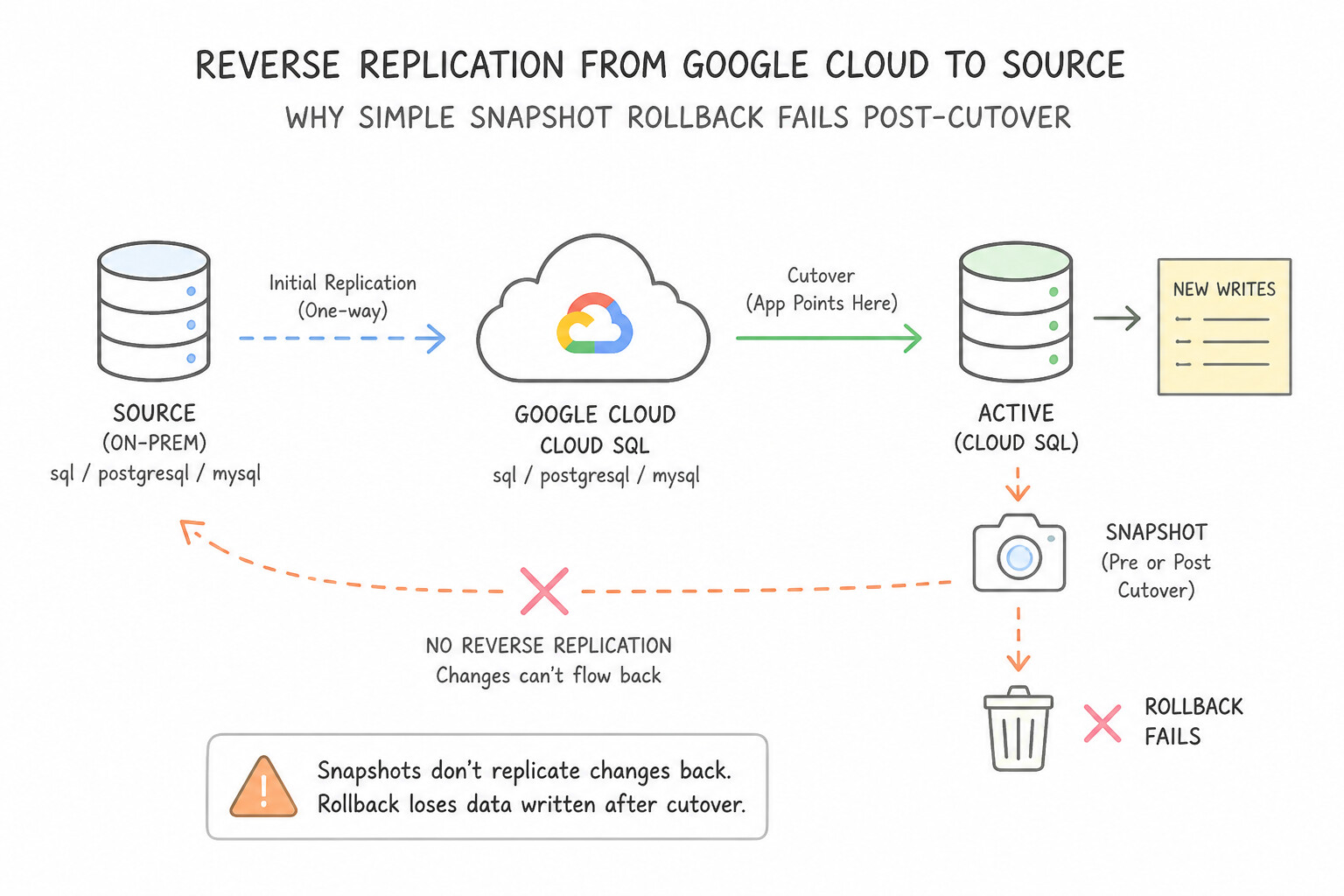
When a regulatory or enterprise risk mandate requires an instant rollback (fallback) to the on-premises/AWS source database without losing transactions committed in Google Cloud after cutover:
- Why Simple Snapshot Rollback Fails Post-Cutover: Once production users start writing new orders to the Google Cloud target database after cutover, the old source database immediately becomes stale. Rolling back without Reverse Replication destroys every transaction written after cutover!
- How to Implement Reverse Replication by Engine:
- Cloud Spanner → Source Database (
MySQL/PostgreSQL/Oracle): - Enable Cloud Spanner Change Streams on the target Spanner database to capture all post-cutover inserts/updates/deletes.
- Run the official Google-provided Spanner to Source Database Dataflow Template (Reverse Replication runner), which reads the Spanner Change Stream, filters out forward-migrated records to prevent infinite replication loops, and writes the changes back to the source database in order!
- AlloyDB / Cloud SQL for PostgreSQL → Source (
Oracle/PostgreSQL): - Use DMS Reverse Replication (or Datastream reading from PostgreSQL logical replication slots + a Dataflow writer to the source database) to stream post-cutover changes back to the source environment until the fallback window expires and the legacy system is decommissioned.
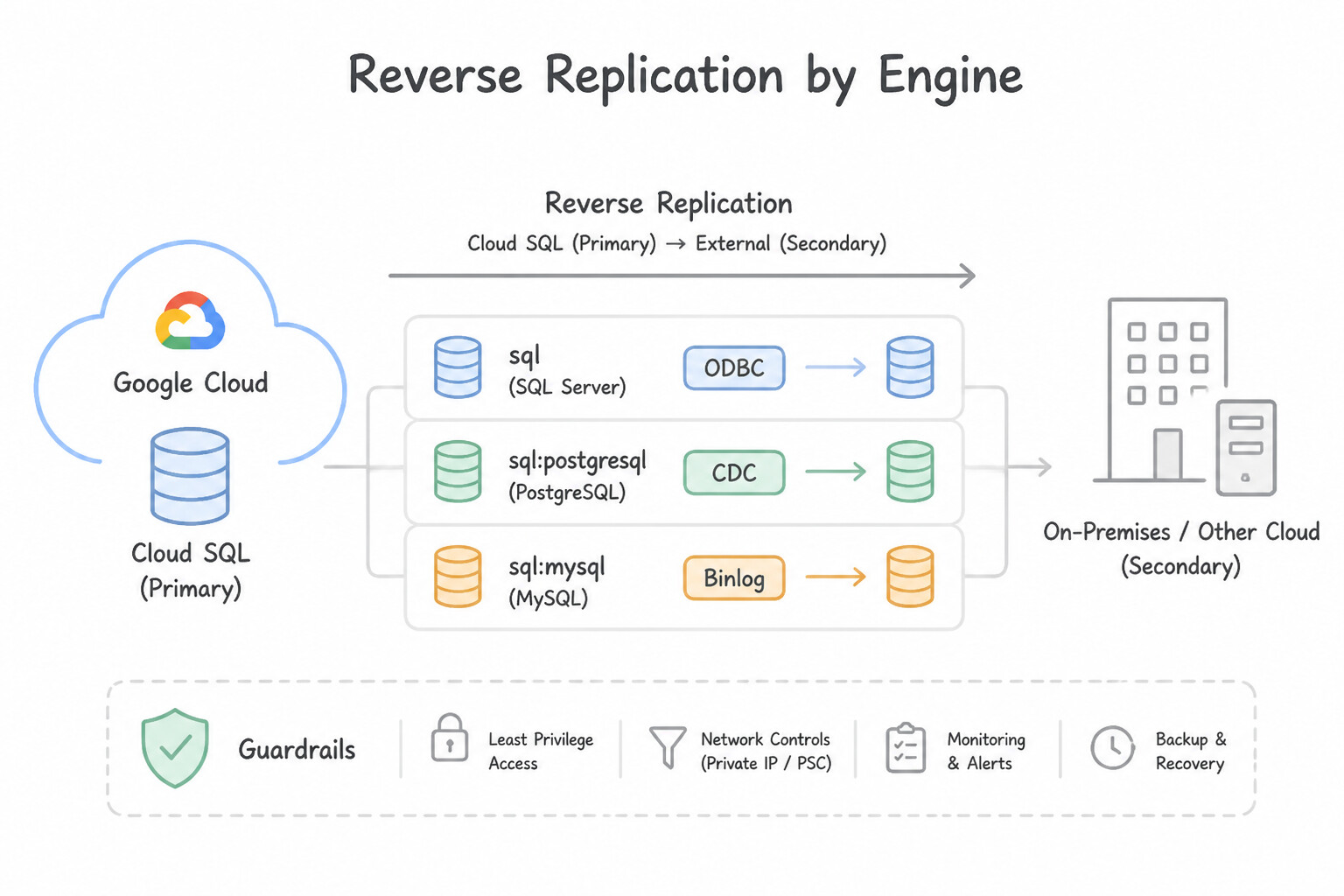
Key Implementation Patterns
- PostgreSQL High Availability Fallback Strategy: Use Configure the on-premises database instance as an external read replica of the Cloud SQL primary instance. Reverse replication allows an external (on-premises) instance to act as a read replica for a Cloud SQL primary, ensuring synchronization for fallback.
- MySQL GTID Consistency in Reverse Flows: Use Configure the on-premises MySQL server with gtid_mode=ON and enforce_gtid_consistency=ON. Cloud SQL uses GTID for replication; the external on-premises replica must also have GTID enabled to replicate successfully. (Avoid alternative: GTID is a core component of Cloud SQL's managed features and should not be disabled.)
Key Takeaways (3.1b)
- Cloud SQL can replicate data to external servers using External Read Replicas.
- This configuration is often used as a fallback strategy (reverse replication) after a migration.
- High Availability (HA) is for redundancy within Google Cloud regions, not for on-premises replication.
- Exports provide point-in-time snapshots, not continuous synchronization.
Consideration 3.1c: Plan and perform database migration, including fallback plans and DDL/DML conversion
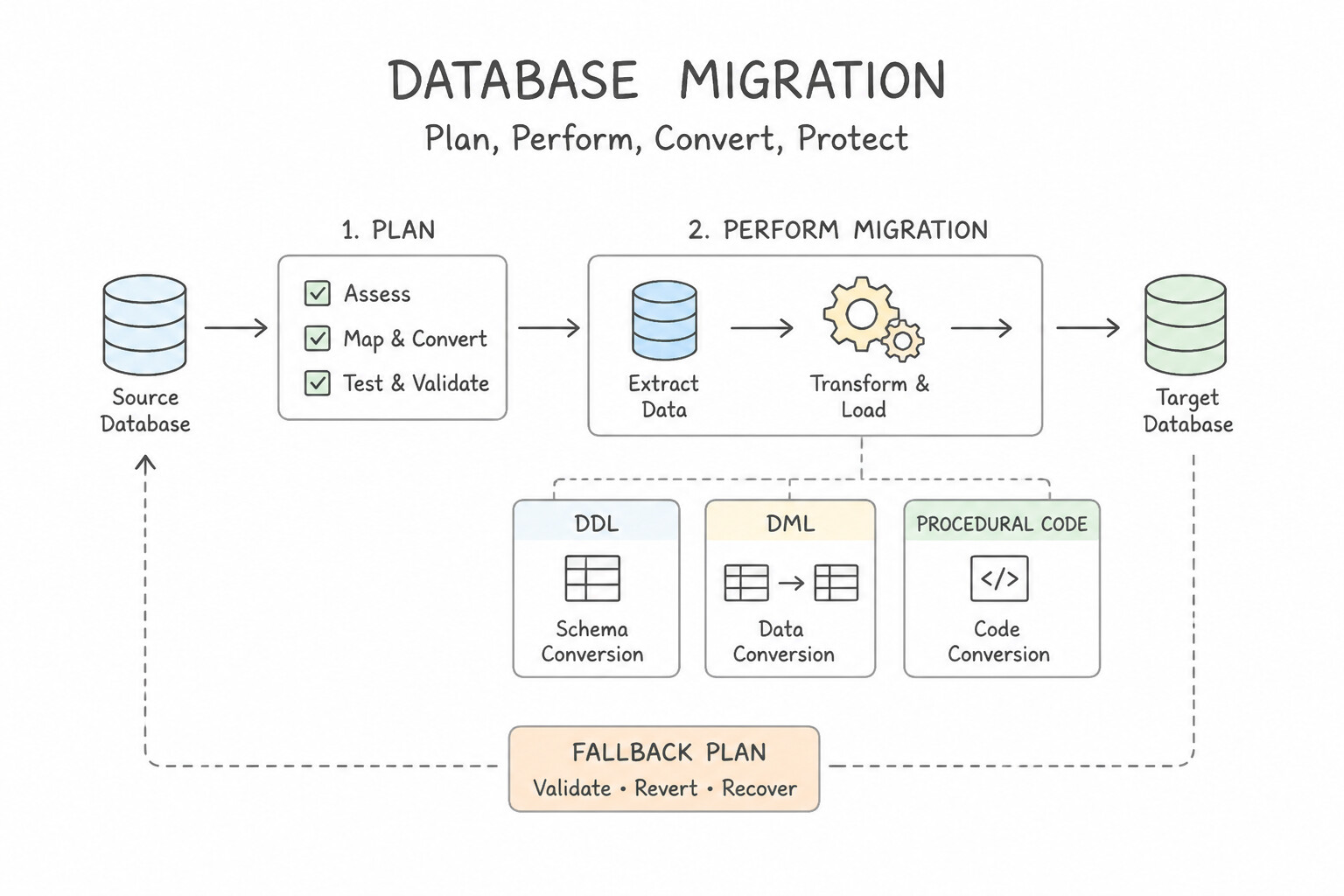
A bulletproof migration execution plan requires handling Schema/Code Conversion, Data Validation, and Deterministic Cutover:
- DDL, DML & Procedural Code Conversion (
Heterogeneous Migrations): - Use DMS Conversion Workspaces (with integrated Gemini-powered AI conversion) to automatically pull the source Oracle or SQL Server schema, convert tables, views, data types (
NUMBER→NUMERIC/BIGINT,DATE→TIMESTAMP), packages, andPL/SQLstored procedures into PostgreSQL-compatiblePL/pgSQL, highlight incompatible constructs, and apply the converted DDL to Cloud SQL or AlloyDB. - When migrating to Cloud Spanner, use the Spanner Migration Tool (
SMT) to evaluate schema changes—converting sequentialAUTO_INCREMENTkeys into UUIDv4 or bit-reversed sequences and turning parent-child foreign key tables into Interleaved Tables before loading data! - Pre-Cutover Data Validation (
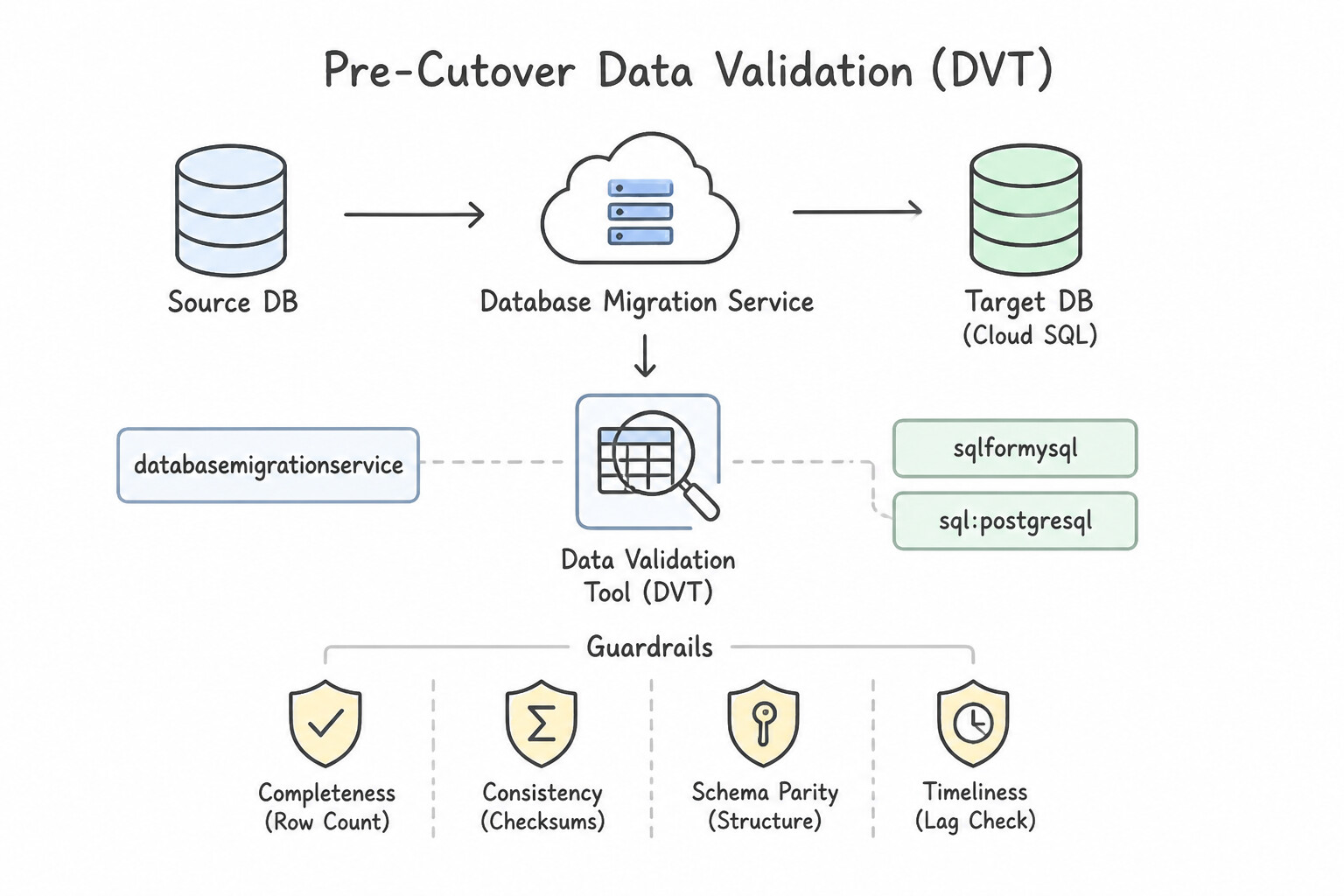
Data Validation Tool — DVT): - Never cut over blindly! Run Google's open-source Data Validation Tool (
DVT) at three levels: (1) Schema-level validation, (2) Aggregate / Group-By validation (COUNT(*),SUM(),AVG()), and (3) Row-level cryptographic hash (SHA-256) checksum comparison across source and target tables. - The Exact 5-Step Cutover Checklist:
- Place the source application in maintenance / read-only mode (stop writes and drain active transactions).
- Monitor DMS / Dataflow until
Replication Lag = 0seconds and source/target transaction counters match. - Run a final DVT validation pass and verify database sequences (
setval()in Postgres so newly generated IDs don't collide with migrated rows!). - Promote the Cloud SQL / AlloyDB target instance (which detaches replication and makes the target read-write) and start Reverse Replication if fallback is required.
- Update DNS / Service Discovery / Connection Pool endpoints to point the application to Google Cloud.
Key Implementation Patterns
- Minimal Downtime MySQL Migration: Use Use Google Cloud Database Migration Service (DMS) to create a continuous migration job. Promote the new instance when the replication lag is minimal. Continuous migration via DMS replicates data in real-time, allowing for a cutover with minimal downtime.
- Handling Unsupported PostgreSQL Extensions: Use Verify that PostGIS is on the list of supported Cloud SQL extensions, and refactor the application to remove the dependency on the proprietary extension. Cloud SQL supports specific extensions like PostGIS but not custom proprietary ones; you must refactor to remove unsupported dependencies.
Key Takeaways (3.1c)
- Continuous Migration allows source databases to remain active while data is replicated to the cloud.
- Downtime in continuous migration is limited only to the final cutover/promotion phase.
- One-time migrations or manual dumps generally require downtime for the duration of the data transfer to ensure consistency.
- Cloud SQL is a managed service and restricts access to the underlying OS.
Consideration 3.1d: Determine the correct database migration tools for a given scenario (e.g., databases hosted outside of Google Cloud)
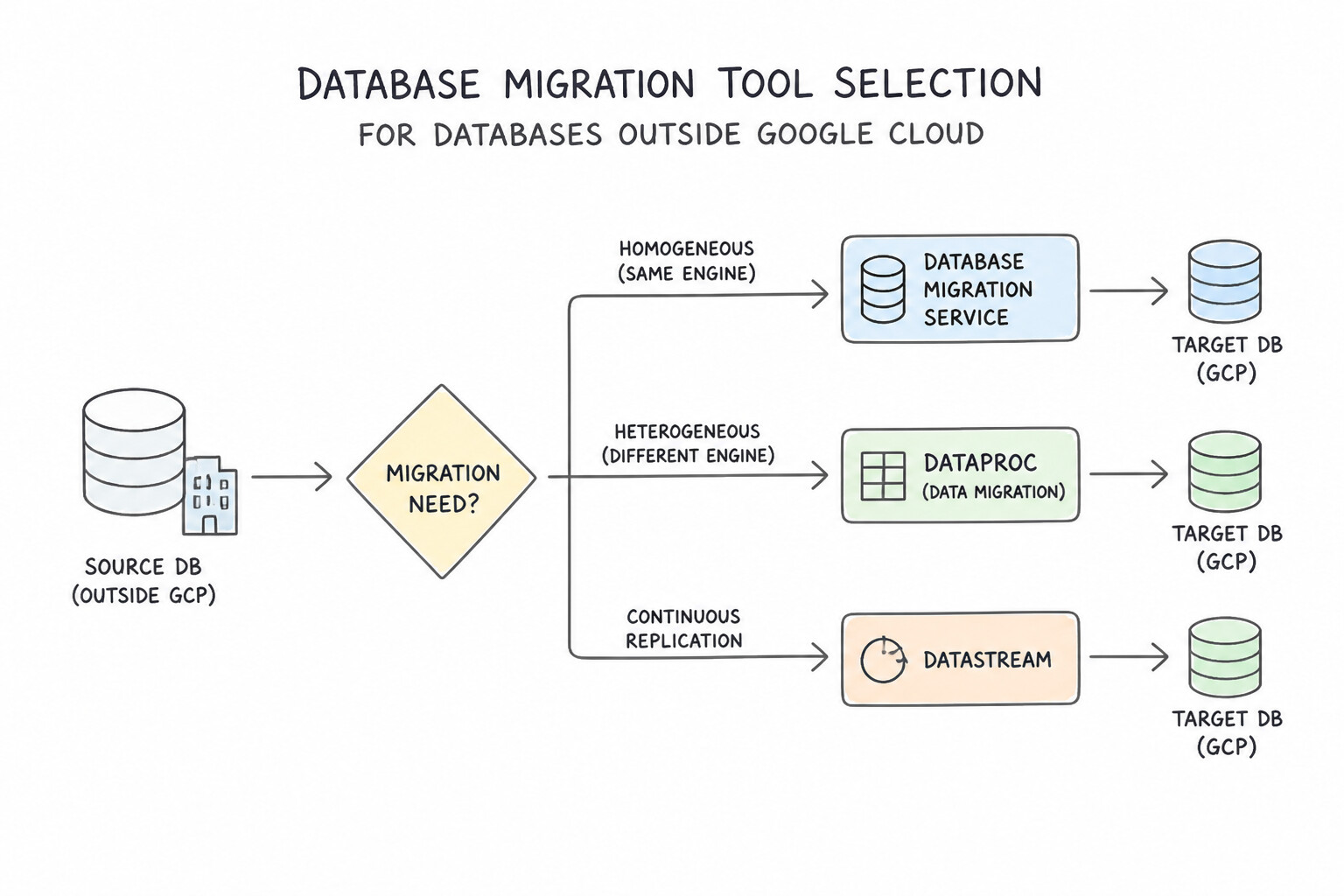
Selecting the right migration tool and network plumbing for external (on-prem / AWS / Azure) sources is a core PDBE competency:
- Tool Selection Matrix:
- Database Migration Service (
DMS): First choice for MySQL → Cloud SQL for MySQL, PostgreSQL → Cloud SQL for PostgreSQL / AlloyDB, SQL Server → Cloud SQL for SQL Server / PostgreSQL, and Oracle → Cloud SQL for PostgreSQL / AlloyDB. Serverless (no migration VMs to size!). - Datastream + Dataflow (
Spanner Migration Tool): First choice for zero-downtime migrations to Cloud Spanner (Datastream captures CDC from Oracle/MySQL/Postgres → Cloud Storage → Dataflow template writes to Spanner and routes failed records to a Dead-Letter Queue [DLQ] for replay). - Storage Transfer Service / Transfer Appliance: When migrating 50 TB–500 TB+ over a slow/congested WAN link where initial network seeding would take weeks, ship a physical Transfer Appliance (or use Storage Transfer Service from AWS S3) to stage the baseline backup in Cloud Storage, and then use CDC to catch up the delta!
- DMS Network Connectivity Methods (
Source ↔ Target): - VPN / Cloud Interconnect + Private Services Access (
VPC Peering) /PSC: Best for private enterprise networks (remember to enable Export/Import Custom Routes on the VPC peering if the source is on-premises!). - Reverse SSH Tunnel: When the source firewall allows outbound SSH from Google Cloud to a bastion host on-premises (or vice versa) without a full VPN.
- IP Allowlisting: Simplest when the source has a public IP and allows inbound connections from DMS public IP ranges over TLS/mTLS.
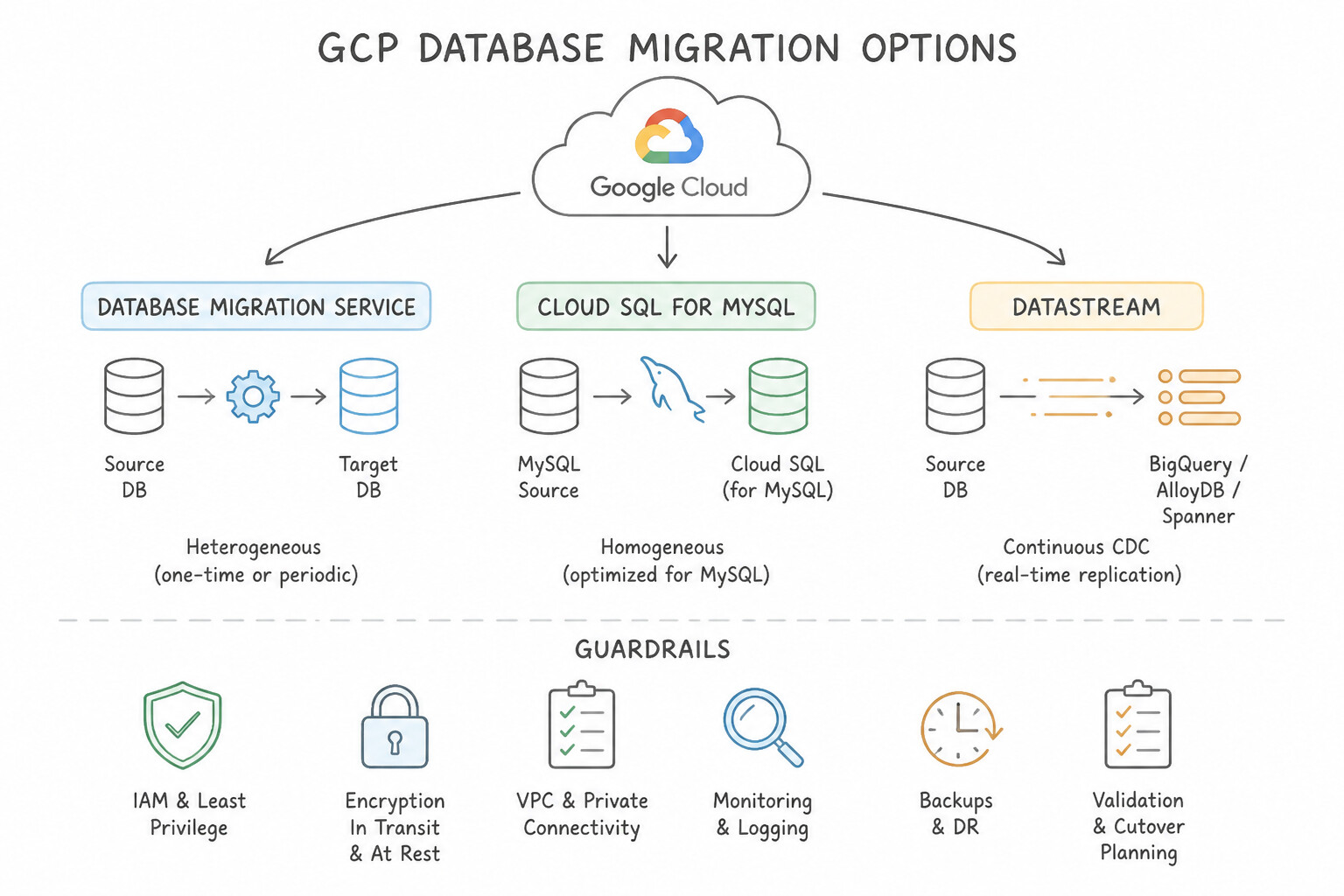
Key Implementation Patterns
- Zero-Downtime Migration from AWS RDS: Use Create a migration job using Database Migration Service (DMS) configured for continuous replication. Database Migration Service (DMS) supports continuous replication, allowing for minimal downtime migrations from AWS RDS to Cloud SQL.
- Real-time Analytics without Operational Impact: Use Configure a Datastream stream from the Oracle database to BigQuery. Datastream is a serverless CDC service that replicates data from Oracle to BigQuery in real time with minimal source impact. (Avoid alternative: Database Migration Service is for migrating databases to Cloud SQL or AlloyDB, not for streaming analytics to BigQuery.)
- Heterogeneous Oracle to PostgreSQL Migration: Use Use Database Migration Service (DMS) to create a migration job and use the integrated conversion workspace to convert the schema and migrate data. Database Migration Service provides a specialized workflow for Oracle to PostgreSQL migrations, including schema conversion and data replication.
Key Takeaways (3.1d)
- Database Migration Service (DMS) is the primary tool for homogeneous migrations (e.g., MySQL to MySQL) into Cloud SQL.
- Use DMS when the requirement calls for minimal downtime and continuous replication.
- Export/Import (Dump/Load) strategies are valid but generally require downtime, making them suitable only when maintenance windows are flexible.
- Use Datastream for serverless, real-time Change Data Capture (CDC) to BigQuery.
Quick Decision Cheat Sheet (Subsection 3.1)
If the Scenario Requires... | Choose This Google Cloud Pattern | Avoid This Common Mistake |
|---|---|---|
"Minimal-downtime migration from MySQL / Postgres / SQL Server / Oracle to Cloud SQL or AlloyDB" | Database Migration Service ( DMS) in Continuous (CDC) mode | One-time mysqldump / pg_dump (requires extended write downtime) |
"Convert Oracle PL/SQL packages, triggers, and schemas to PostgreSQL / AlloyDB" | DMS Conversion Workspaces (with Gemini AI conversion assistance) / Ora2Pg | Expecting PostgreSQL to execute native Oracle PL/SQL packages unmodified |
"PostgreSQL DMS continuous migration skips UPDATE and DELETE operations on specific tables" | Add Primary Keys to those tables (required by pglogical CDC) | Restarting the Cloud SQL instance repeatedly |
"Fallback / rollback from Google Cloud back to on-premises after cutover with zero data loss" | Configure Reverse Replication (e.g., Spanner Change Streams + Dataflow or DMS Reverse Replication) | Restoring the pre-cutover source snapshot (destroys all post-cutover transactions) |
"Mathematically verify row counts, column aggregates, and row-level hashes between source and target before cutover" | Run Google Cloud Data Validation Tool ( DVT) | Manually running SELECT COUNT(*) on 3 sample tables |
Further Reading (Subsection 3.1)
- Database Migration Service documentation — Provides an overview of how DMS works for MySQL, including the prerequisites for continuous migration jobs.
- Create a migration job — Explains the steps to create a migration job and the difference between migration job types.
- About replication in Cloud SQL — Provides an overview of replication options, including external replicas which are fundamental to reverse replication strategies.
- Database Migration Service documentation — Documentation on how to perform migrations, where concepts of continuous replication and cutover strategies are detailed.
- Importing data from a SQL dump file — Documentation on how to import data into Cloud SQL from a SQL dump file stored in Cloud Storage.
- Best practices for importing and exporting data — Guidelines on using native export/import tools efficiently for Cloud SQL.
Book TOC · Previous · Chapter 5 of 6 · Next
AwesomeGCP.com Learning
The approach taken is a question-led learning approach: you explore realistic project scenarios where you need to make decisions or take actions to achieve business goals within specific constraints. Instead of passive learning, you are challenged to think and work through the options to master the Professional Cloud Database Engineer (PDBE) certification!