Book TOC · Previous · Chapter 4 of 7 · Next
Chapter 4: Data Protection, Cryptography & AI Security: SDP (DLP), CMEK/HSM/EKM, Confidential VM & Model Armor
Chapter Focus: Sensitive Data Protection (de-identification: FPE, tokenization, masking, bucketing), Secret Manager, CMEK vs. CSEK vs. Cloud HSM vs. Cloud EKM, Confidential Computing, and Vertex AI / Model Armor security.
Subsection 3.1: Protecting sensitive data and preventing data loss
The Big Picture
Securing data across Google Cloud requires surgical precision. Teams that apply blunt-force data masking or leave default compute metadata settings untouched routinely fall into four production traps:
- Picking the Wrong De-Identification Transform in Sensitive Data Protection (3.1a): Google Cloud architecture relentlessly tests your ability to pick the exact Sensitive Data Protection (Cloud DLP) transformation that satisfies both the security constraint and the downstream functional constraint:
- If you use Redaction or Character Masking (
************1234) on a Primary Account Number (PAN) or SSN, you destroy referential integrity—analysts can no longerJOINaCustomerstable with aTransactionstable on that column! - If analysts need to join tables on a de-identified column and authorized fraud investigators need reversible re-identification, you must use Deterministic Encryption (
CryptoDeterministicConfig/ AES-SIV) or Format-Preserving Encryption (FPE-FFX) backed by a Cloud KMS wrapped key (CryptoKey). - Specifically, choose Format-Preserving Encryption (
FPE-FFX) whenever a legacy database schema or application validator strictly requires the token to preserve the exact original character length and alphabet (e.g., a 16-digit numeric credit card column orCHAR(9)SSN field), because AES-SIV expands the string via Base64 encoding! - Conversely, if you need one-way irreversible pseudonymization that still preserves table joins, use Cryptographic Hashing (
CryptoHashConfig/ HMAC-SHA256). - Coarse Table Access vs. Fine-Grained Data Store Controls (3.1b): Granting an analyst
roles/bigquery.dataVieweron an entire dataset when only 2 columns contain PII violates least privilege. Use BigQuery Policy Tags (Column-Level Security) (roles/datacatalog.categoryFineGrainedReader), Dynamic Data Masking, Row-Level Security, or Authorized Views (where the analyst gets access only to the View, never the underlying source table!). - Storing Secrets in Env Vars, Git, or Cleartext VM Metadata (
3.1c,3.1d): Placing a database password in a startup script or custom VM metadata key makes it readable to any local user or SSRF attacker queryinghttp://metadata.google.internal. Always store secrets in Secret Manager, grant the workload SAroles/secretmanager.secretAccessor(while Secret Admins holdroles/secretmanager.admin), and automate 30-day rotation using Secret Manager Rotation Schedules + Pub/Sub + Cloud Functions. - Legacy Metadata SSRF & Project-Wide SSH Keys (3.1d): Legacy metadata endpoints (
v0.1,v1beta1) do not require theMetadata-Flavor: GoogleHTTP header, making them trivial to exploit via SSRF—always setdisable-legacy-endpoints = true. And to prevent a user with project-wide SSH keys from logging into a sensitive database VM, setblock-project-ssh-keys = trueon the instance metadata (and enforce OS Loginenable-oslogin = TRUE).
Consideration 3.1a: Configuring Sensitive Data Protection for discovering and redacting PII including pseudonymization and format-preserving encryption
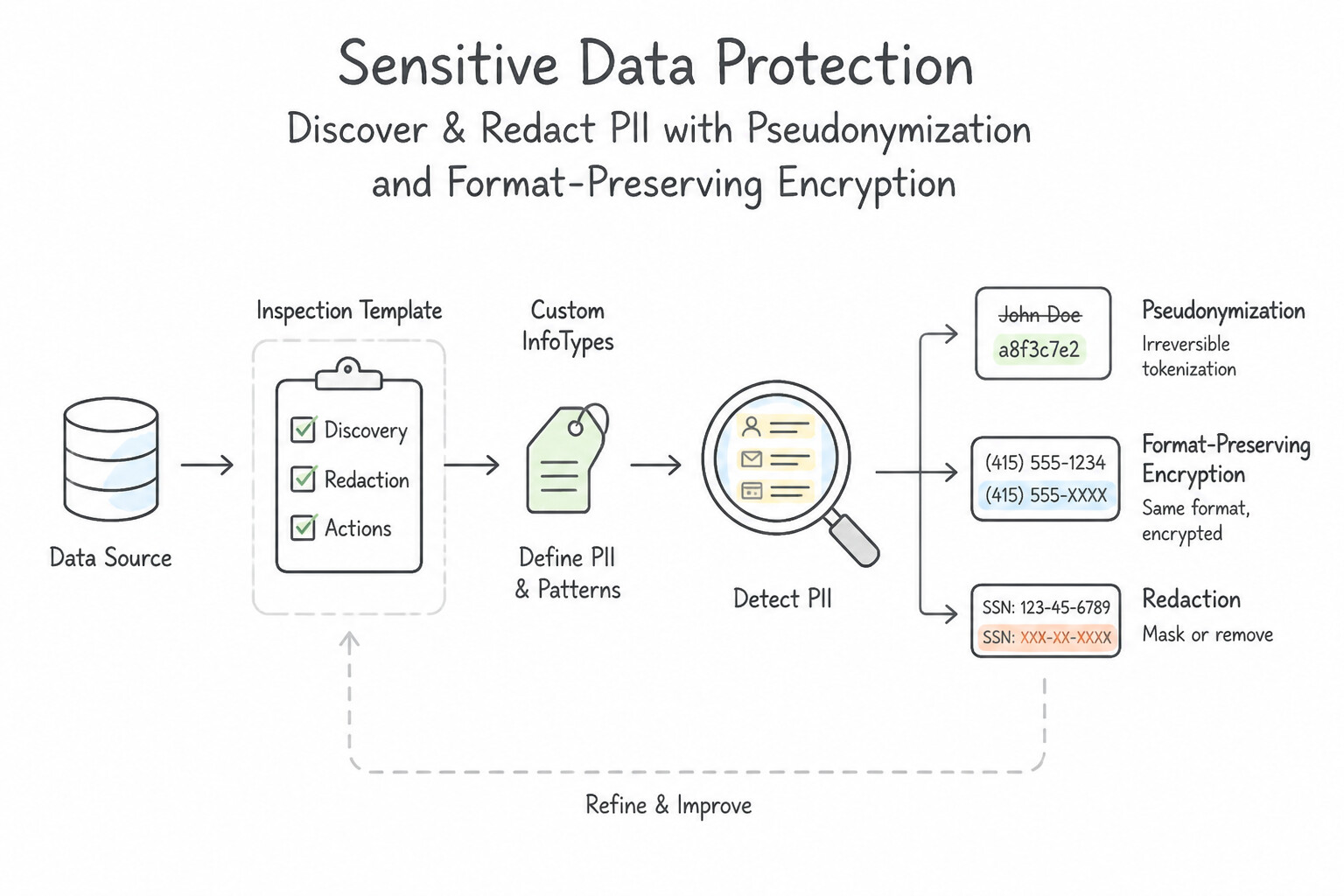
- Inspection Templates, Custom InfoTypes & Sampling Job Triggers:
- Use Built-in InfoTypes (
CREDIT_CARD_NUMBER,US_SOCIAL_SECURITY_NUMBER,EMAIL_ADDRESS) for standard PII, and create Custom InfoTypes (using Regular Expressions or Dictionaries) for proprietary internal identifiers (e.g.,EMP-[0-9]{8}). - When scanning petabytes of historical Cloud Storage logs or BigQuery tables where scanning 100% of bytes is cost-prohibitive, configure an SDP Job Trigger with Sampling (e.g., scanning a random 1%–5% subset of files/rows or filtering by
TimespanConfigto scan only newly added data since the last run). - The De-Identification Matrix (Memorize This in Production!):
- Format-Preserving Encryption (
FPE-FFX): Reversible encryption (using a KMS-wrapped key) that preserves the exact input length and character set (alphabet: NUMERICkeeps a 16-digit credit card as 16 digits). Ideal for legacy databases with strict schema validation. - Deterministic Encryption (
CryptoDeterministicConfig/ AES-SIV): Reversible encryption that outputs Base64 ciphertext (longer than input) and optionally prefixes a Surrogate InfoType (MY_TOKEN(24):...) so SDP knows how to re-identify it later. Ideal for joining BigQuery tables on pseudonymized keys. - Cryptographic Hashing (
CryptoHashConfig): One-way irreversible salted HMAC that produces identical outputs for identical inputs (supportsJOINs without allowing decryption). - Character Masking: Replaces characters with a symbol (
*or#) while optionally leaving the last$N$ characters unmasked (numberToIgnore: 4,reverseOrder: true) for customer support verification. - Date Shifting: Shifts all dates for a given patient/entity by a consistent random offset (± N days) anchored by an entity ID column—preserving the exact chronological intervals between medical treatments while hiding real dates!
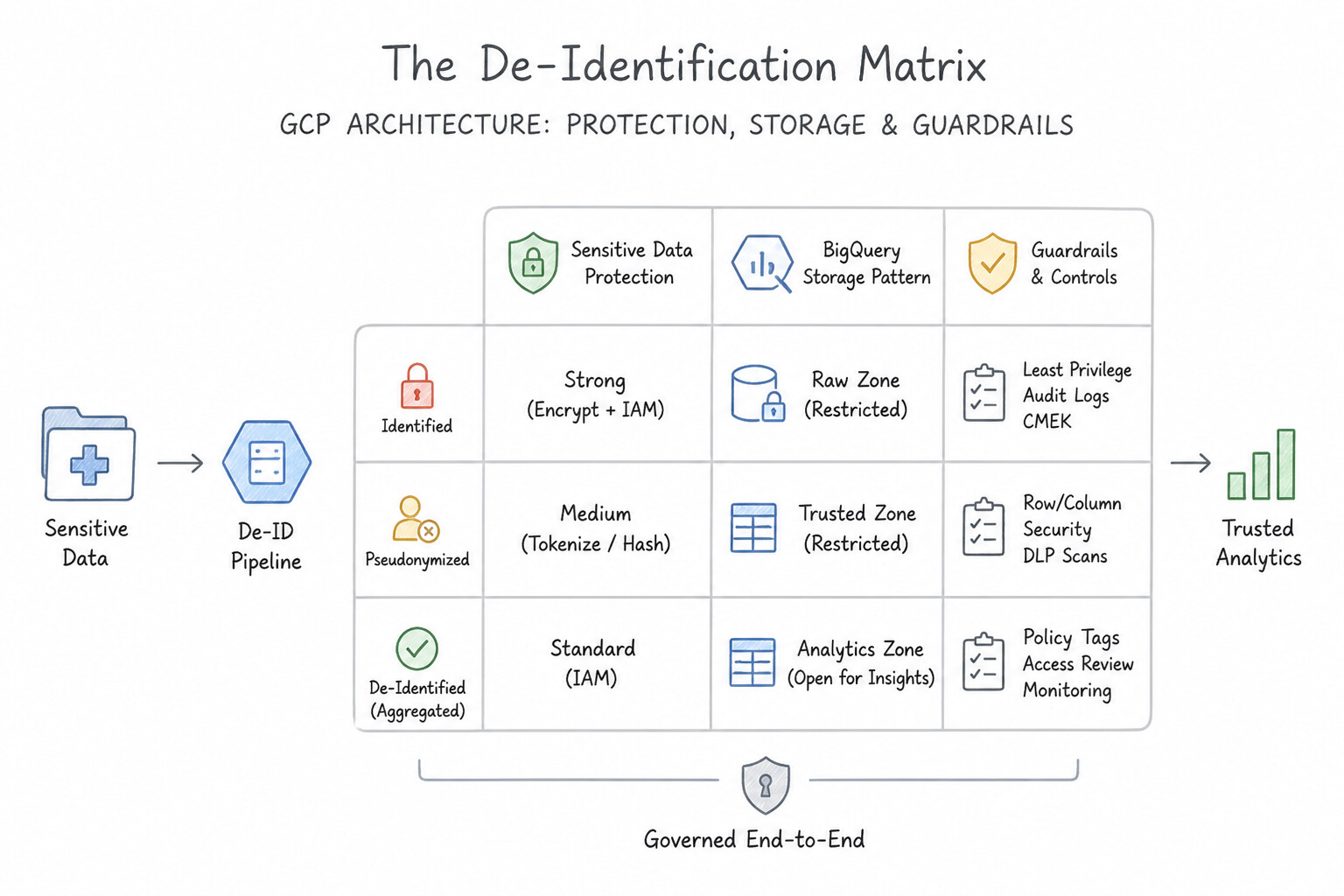
Key Implementation Patterns
- Legacy System Compatibility using FPE: Use Configure a de-identification template using Format-Preserving Encryption (FPE) with the FFX mode. Format-Preserving Encryption (FPE) encrypts data while maintaining the original length and character set, satisfying the 16-digit requirement.
- Custom InfoTypes for Proprietary Identifiers: Use Create a custom infoType backed by a regular expression (regex). Custom infoTypes with regular expressions (regex) allow you to define and detect proprietary patterns that built-in detectors do not support. (Avoid alternative: Built-in infoTypes detect specific standard data (like driver's licenses) and cannot be repurposed for arbitrary proprietary patterns.)
- Reversible Pseudonymization with KMS Integration: Use Configure a de-identification template that uses deterministic encryption (AES-SIV) with a wrapped key. Deterministic encryption creates a consistent, reversible token (pseudonym) using a cryptographic key, allowing authorized re-identification.
Key Takeaways (3.1a)
- Format-Preserving Encryption (FPE) is the go-to solution when encrypted data must match the original data's length and character set (e.g., for legacy system compatibility).
- Hashing creates fixed-length strings that usually differ from the input format, making them unsuitable for fields with strict numeric or length constraints.
- Masking is useful for display (redaction) but often changes the data type (e.g., adding asterisks), which can break backend validation.
- Use Built-in InfoTypes for standard PII (emails, tax IDs, credit cards).
Consideration 3.1b: Restricting access to Google Cloud data services such as BigQuery, Cloud Storage, and Cloud SQL
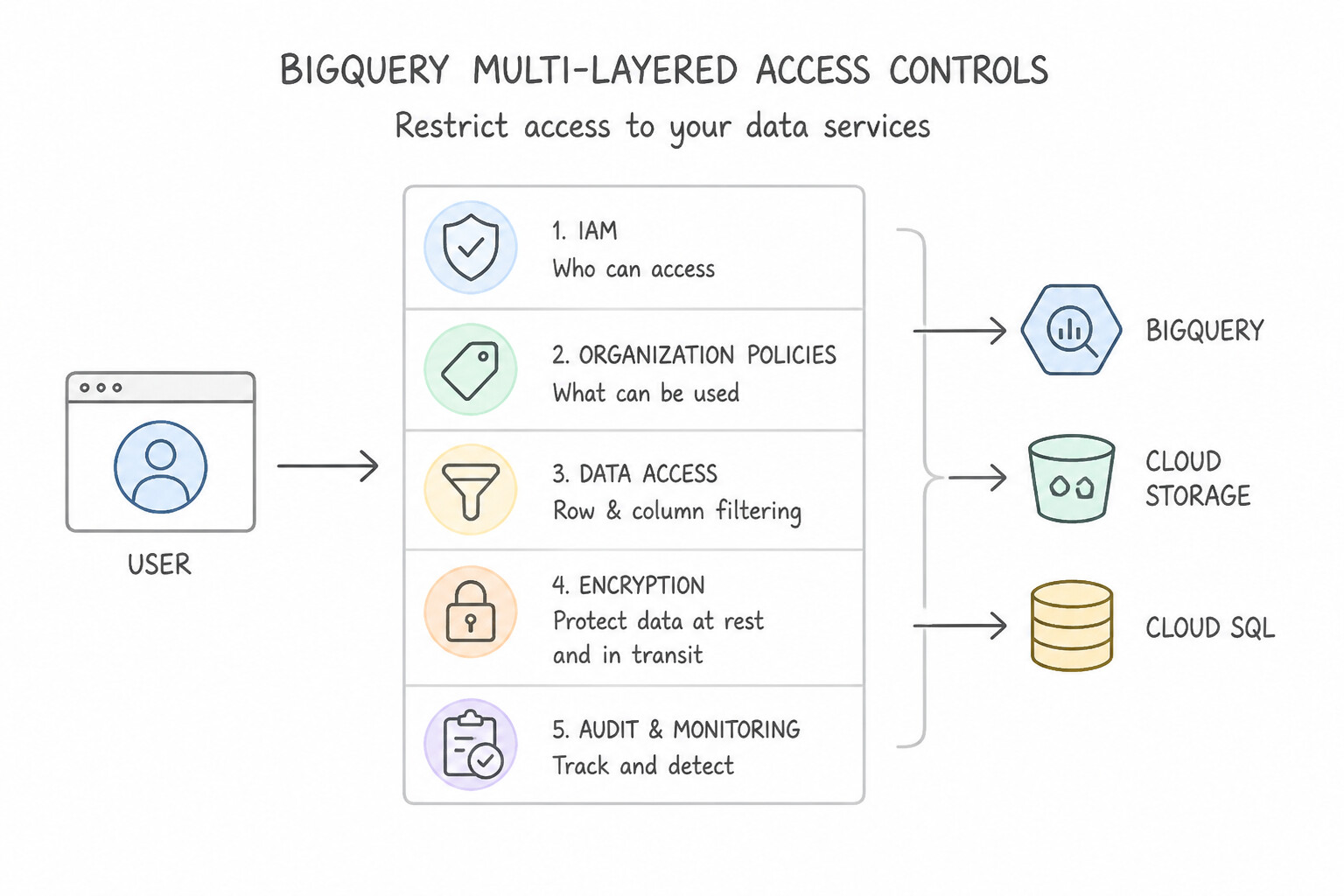
- BigQuery Multi-Layered Access Controls:
- Authorized Views / Authorized Datasets: Create a SQL View in a separate dataset that omits sensitive columns or filters rows (
WHERE region = SESSION_USER()), authorize the View to read the raw source dataset, and grant analystsroles/bigquery.dataVieweron the View's dataset only (never on the underlying raw table!). - Column-Level Security (
Policy Tags) & Dynamic Data Masking: Tag sensitive columns (SSN,Salary) in Data Catalog/Dataplex taxonomy; only users withroles/datacatalog.categoryFineGrainedReadersee cleartext values (or masked values viaroles/bigquerydatapolicy.maskedReader). - Row-Level Security (
CREATE ROW ACCESS POLICY): Filter rows dynamically inside a single table based on the caller's IAM group/user. - Cloud Storage: Enforce Uniform Bucket-Level Access (UBLA), Public Access Prevention (
inherited/enforcedviaconstraints/storage.publicAccessPrevention), and VPC Service Controls. - Cloud SQL: Disable Public IP (
constraints/sql.restrictPublicIp), connect over Private Services Access (Private IP) or Private Service Connect, enforce TLS/Cloud SQL Auth Proxy, and use Cloud SQL IAM Database Authentication.
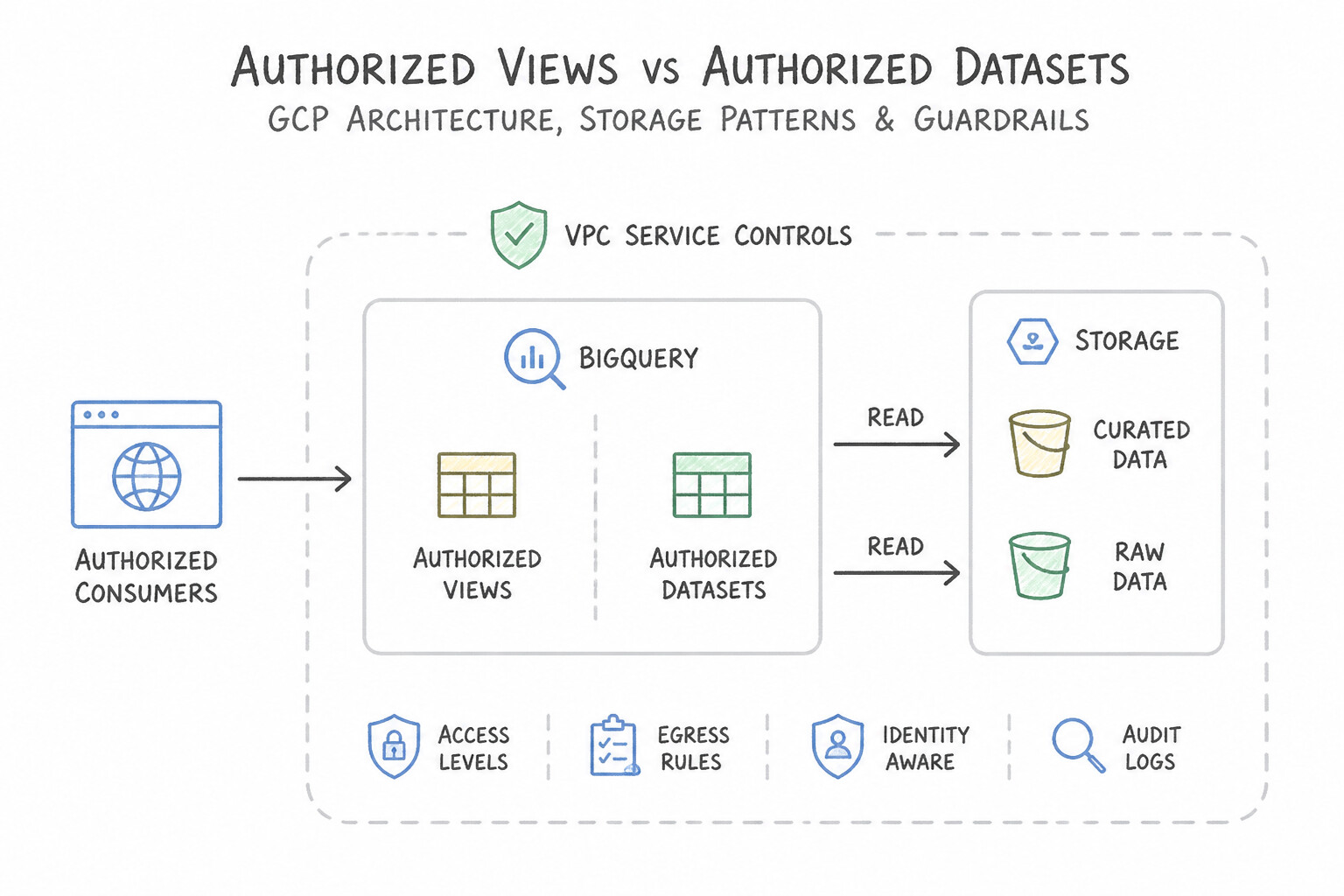
Key Implementation Patterns
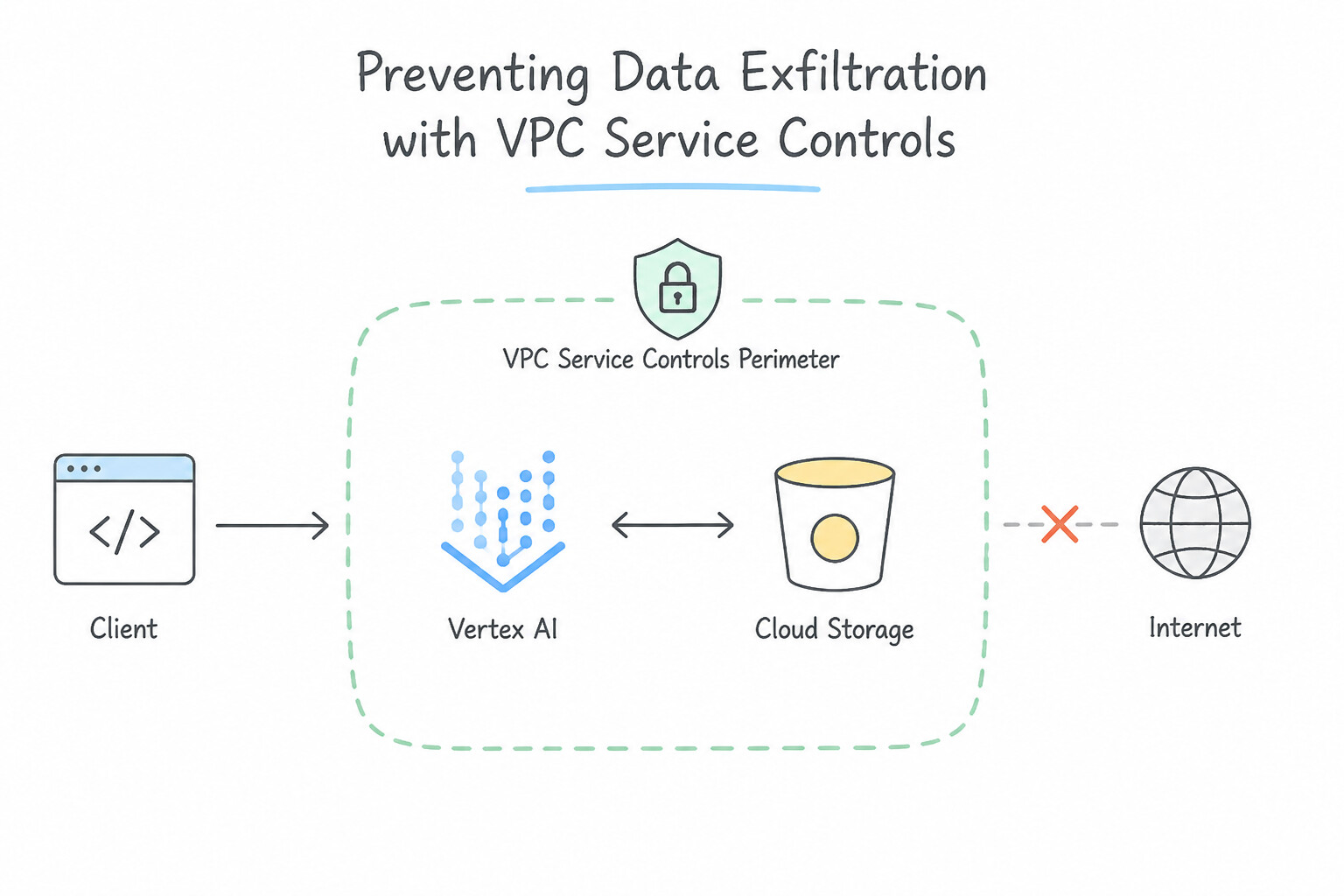
- VPC Service Controls Data Exfiltration Prevention: Use Configure VPC Service Controls to define a service perimeter that includes the project. VPC Service Controls create a security perimeter that prevents data exfiltration to resources outside the perimeter, regardless of IAM permissions.
- BigQuery Authorized Views for Data Minimization: Use Create a view that selects the required data but excludes the PII columns. Authorize the view to access the source dataset. Grant the analysts access only to the view. Authorized Views allow users to query data restricted by SQL logic without needing direct access to the underlying tables.
- Cloud SQL Private IP Enforcement: Use Configure the instance with a private IP address. Set up private services access to peer your VPC with the Google-managed VPC hosting Cloud SQL. Private IP ensures internal-only access via VPC peering, meeting the security requirement.
Key Takeaways (3.1b)
- IAM controls access to resources but does not prevent authorized users from moving data to unauthorized external locations.
- VPC Service Controls create a service perimeter to isolate resources.
- VPC Service Controls are the primary defense against data exfiltration (copying data out of your organization).
- Always apply the principle of least privilege; users should only see the data they need.
Consideration 3.1c: Securing secrets using Secret Manager
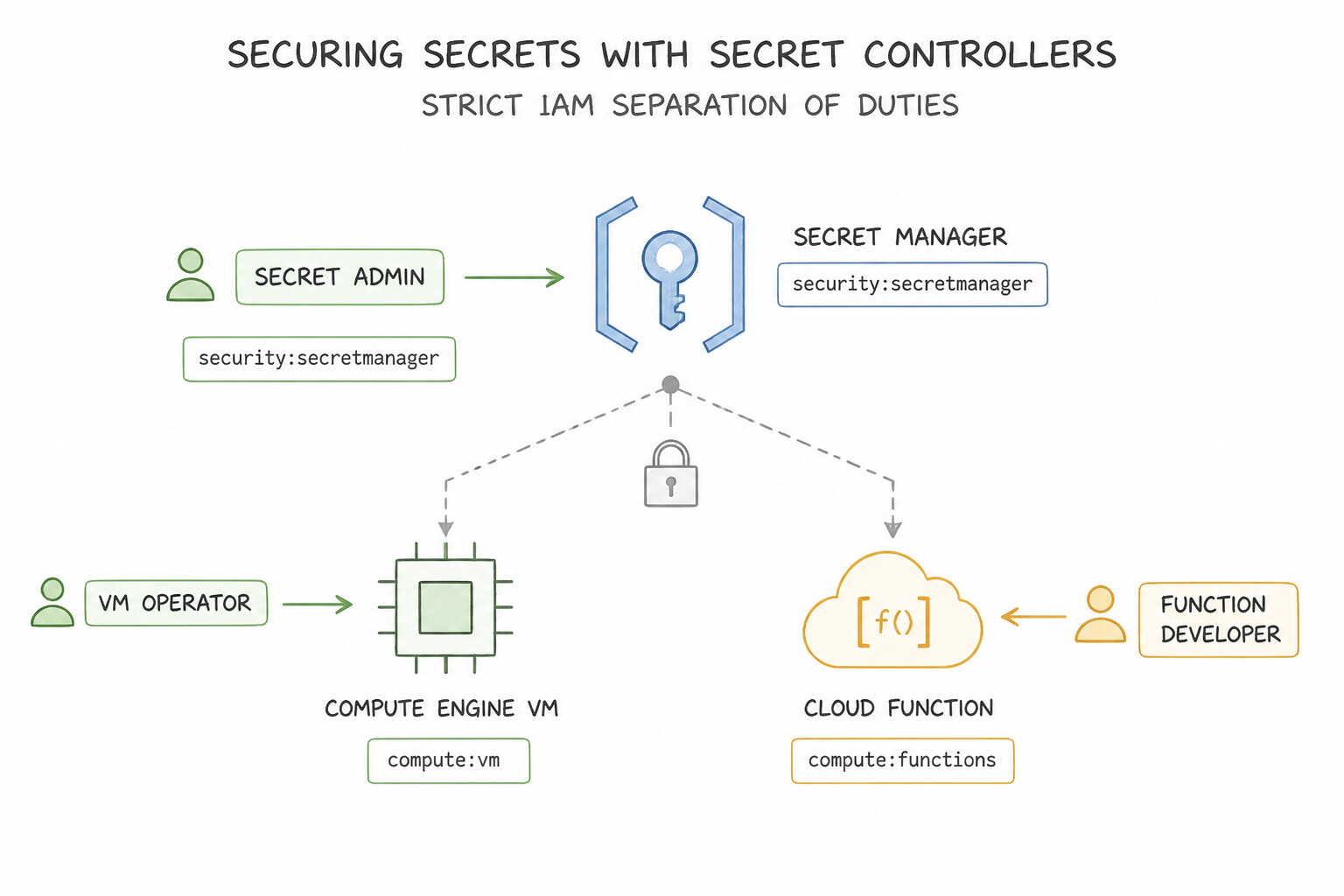
- Strict IAM Separation of Duties:
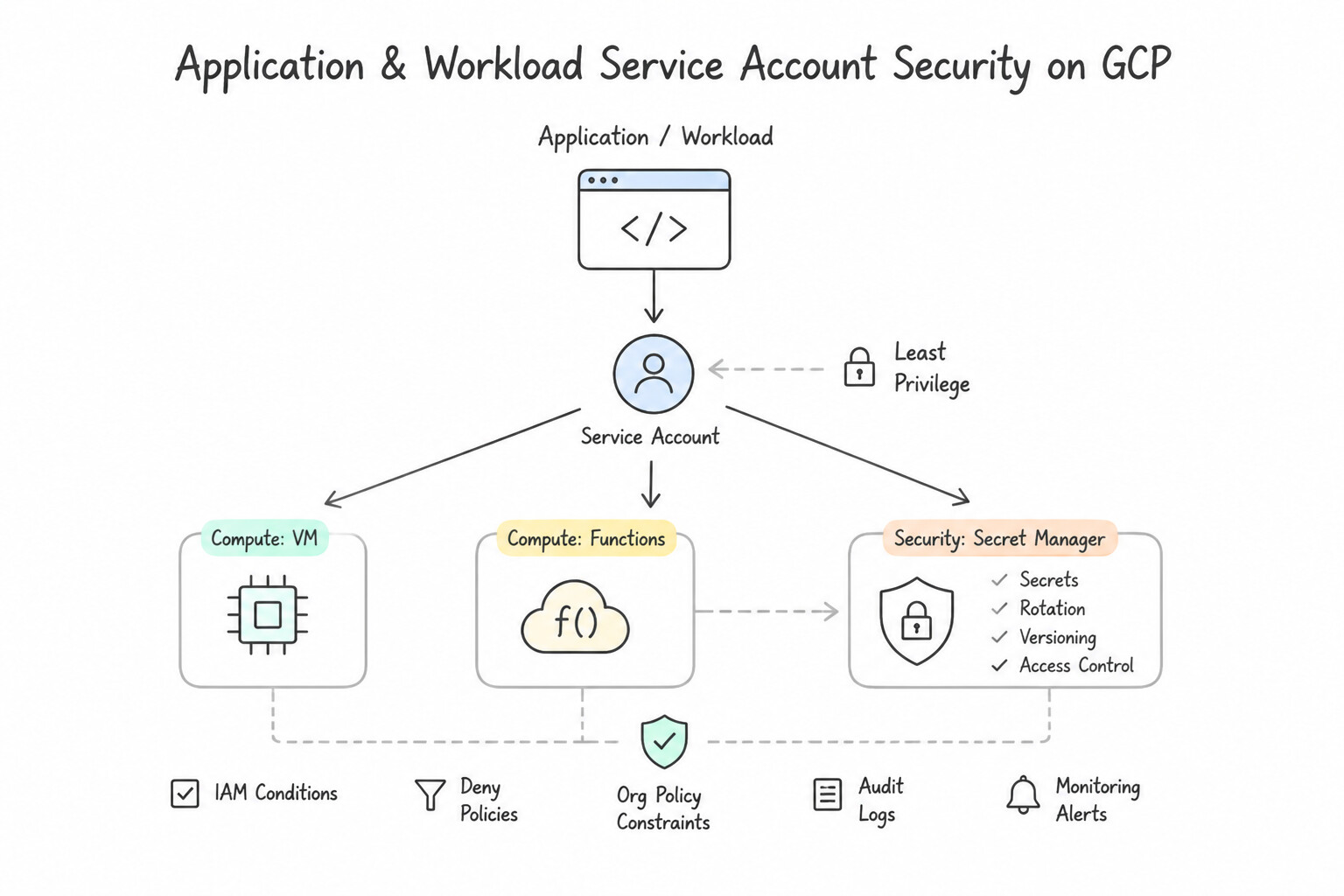
- Application / Workload Service Account: Grant
roles/secretmanager.secretAccessor(allows reading the secret payloadversions/latestat runtime; cannot list all secrets, change IAM, or delete versions). - Security / Platform Admin: Grant
roles/secretmanager.admin(manages secret lifecycle, rotation schedules, and IAM policies). - Automated Secret Rotation Architecture: Configure a Rotation Schedule (e.g., every 30 days) on the Secret in Secret Manager, which publishes
SECRET_ROTATEnotifications to a Cloud Pub/Sub topic. Trigger a Cloud Function / Cloud Run rotation handler that generates a new password, updates the target database (e.g., Cloud SQL), adds a new Secret Version in Secret Manager, verifies connectivity, and disables the old version.
Key Implementation Patterns
- Migrating Hardcoded Credentials to Secret Manager: Use Create a secret in Secret Manager containing the password. Update the application code to call the Secret Manager API to retrieve the secret payload at runtime. Secret Manager is the recommended service for storing sensitive data, allowing applications to retrieve secrets programmatically via API calls without storing them locally.
- Implementing Automatic Secret Rotation: Use Configure a rotation schedule for the secret in Secret Manager and associate it with a Cloud Function that handles the credential update logic. Secret Manager has a native rotation feature that triggers a Cloud Function to securely update both the external database and the secret version.
Key Takeaways (3.1c)
- Never store secrets in plain text files or source code.
- Avoid using environment variables for sensitive secrets as they can leak in logs.
- Use Secret Manager to store, manage, and access secrets programmatically.
- Grant access to secrets using the Principle of Least Privilege via IAM.
Consideration 3.1d: Protecting and managing compute instance metadata
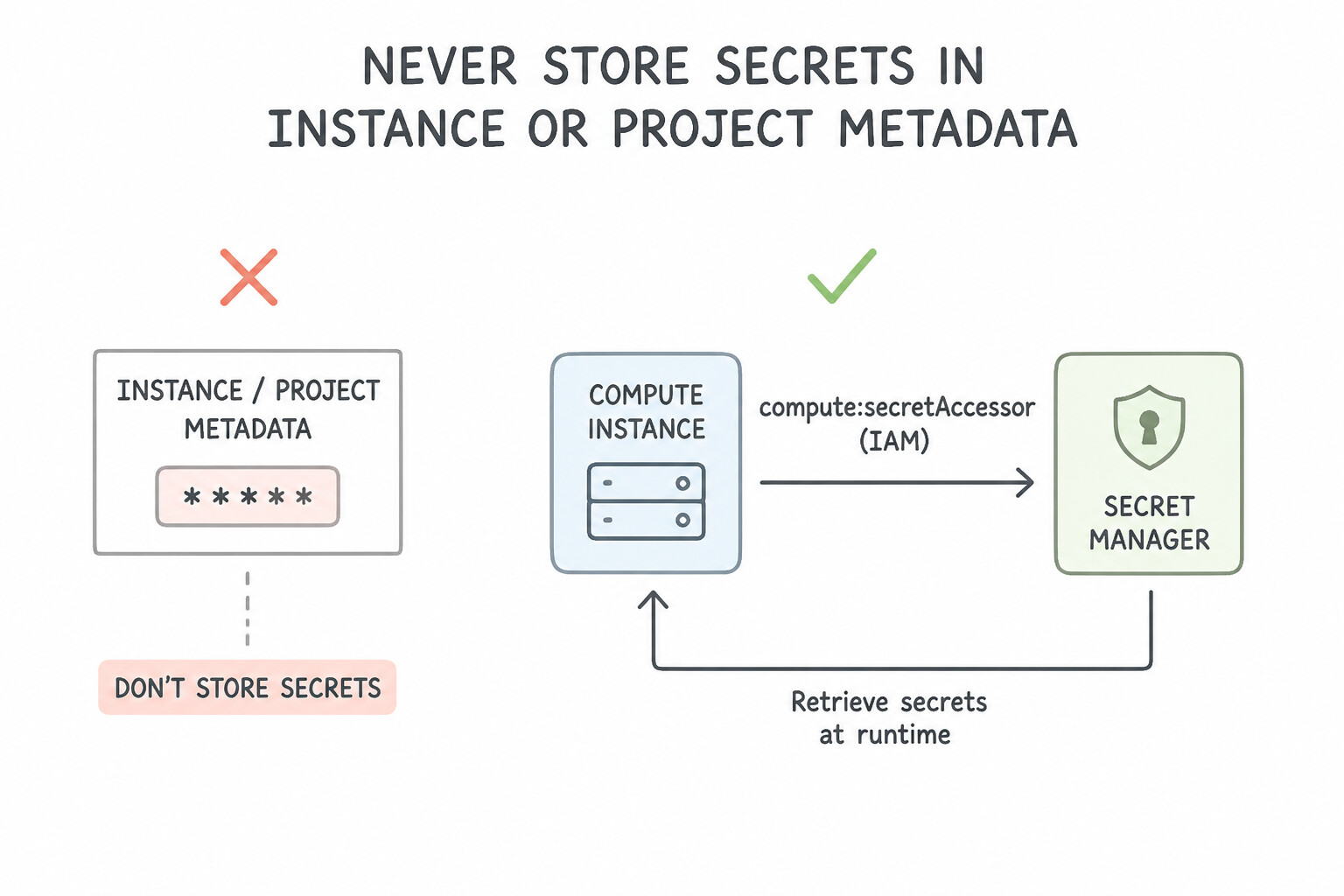
- Never Store Secrets in Instance or Project Metadata: Custom metadata (
startup-script, environment keys) is readable by any process on the VM and by anyone withcompute.instances.get/roles/vieweracross the project! Instead, store credentials in Secret Manager and have the startup script fetch them using the VM's attached Service Account. - Disable Legacy Metadata Endpoints (
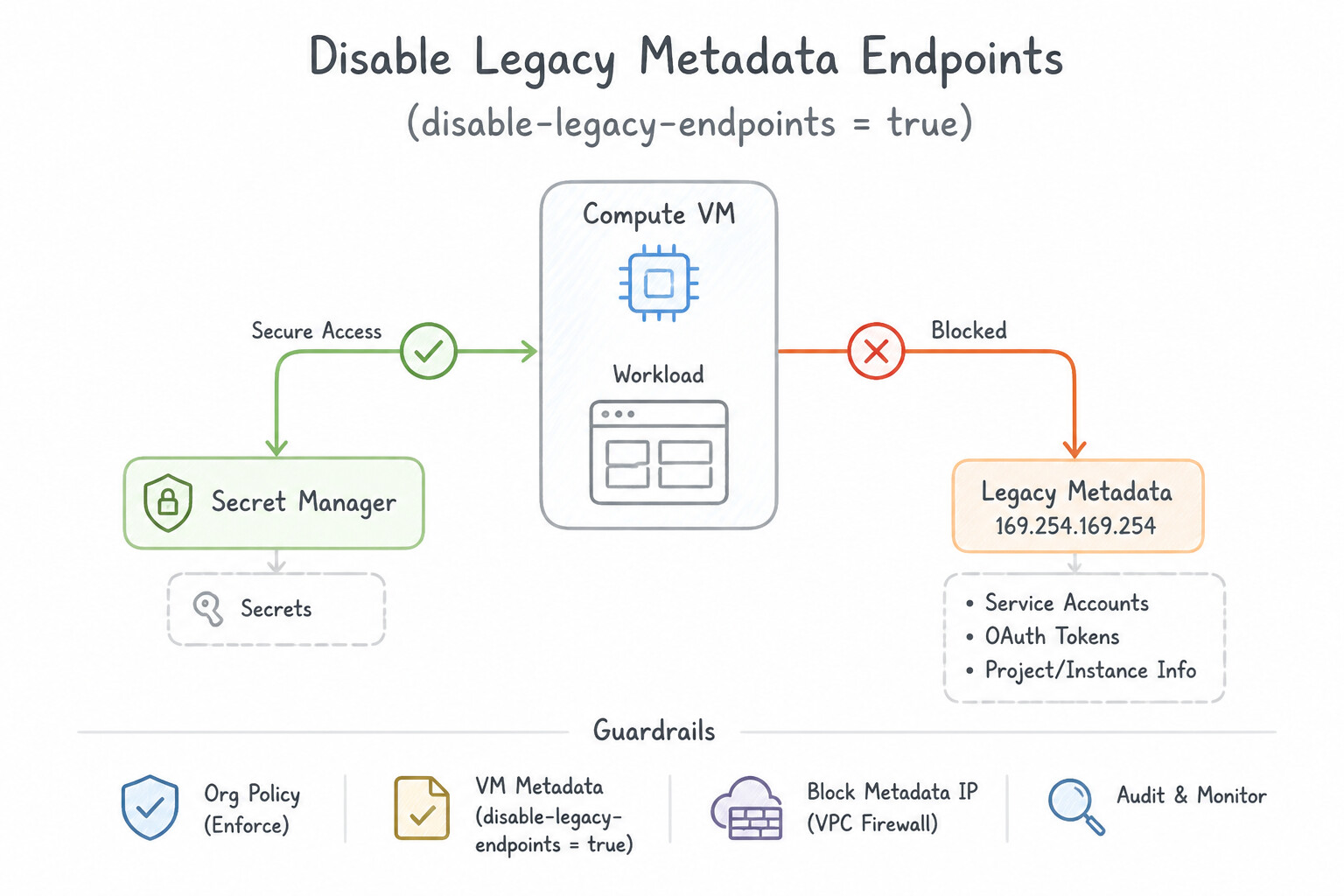
disable-legacy-endpoints = true): Thev1metadata endpoint (http://metadata.google.internal/computeMetadata/v1/) requires the custom HTTP headerMetadata-Flavor: Google, which blocks simple Server-Side Request Forgery (SSRF) GET requests. Always ensurev0.1andv1beta1are disabled. - Isolate Instance SSH Access (
block-project-ssh-keys = true&OS Login): By default, any SSH public key added to Project Metadata can log into every VM in the project. Setblock-project-ssh-keys = trueon sensitive VMs—or better yet, enable OS Login (enable-oslogin = TRUE,enable-oslogin-2fa = TRUE) at the Organization/Project level to tie Linux SSH access andsudoprivileges directly to IAM roles (roles/compute.osLoginvs.roles/compute.osAdminLogin).
Key Implementation Patterns
- Mitigating SSRF Vulnerabilities via Metadata Server Versions: Use Update the VM metadata to set the value of 'disable-legacy-endpoints' to 'true'. Disabling legacy endpoints forces the use of metadata v1, which requires a custom header that simple SSRF attacks cannot inject.
- Securing Sensitive Bootstrap Credentials: Use Store the password in Secret Manager. Update the startup script to retrieve the secret value using the VM's attached service account. Metadata is visible to many users; storing secrets in Secret Manager and accessing them via the VM's identity is the secure standard.
- Preventing Lateral Movement via Project-Wide Keys: Use Add the metadata key "block-project-ssh-keys" with the value "true" to the specific database VMs. This specific metadata key prevents the instance from merging project-level SSH keys into its configuration. (Avoid alternative: Setting this at the project level affects all VMs, not just the sensitive database ones.)
Key Takeaways (3.1d)
- The Compute Engine metadata server hosts sensitive credentials at
169.254.169.254.- Legacy metadata endpoints are vulnerable to simple SSRF attacks because they do not enforce custom headers.
- The v1 metadata endpoint requires the
Metadata-Flavor: Googleheader, offering protection against SSRF.- Always disable legacy endpoints on VMs to improve security posture.
Quick Decision Cheat Sheet (Subsection 3.1)
If the Scenario Requires... | Choose This Google Cloud Pattern | Avoid This Common Mistake |
|---|---|---|
"Scan petabytes of historical Cloud Storage objects for PII exposure while minimizing SDP inspection costs" | Configure a Sensitive Data Protection Job Trigger with Sampling (e.g., random percentage subset of files) | Scanning 100% of petabytes daily or running regex grep on a single Compute Engine VM |
"Detect proprietary internal account numbers ( ACCT-999-X) using Sensitive Data Protection" | Create a Custom InfoType using a Regular Expression (Regex) detector | Training a custom Vertex AI LLM for simple deterministic string patterns |
"Automatically rotate a Cloud SQL database password every 30 days with zero hardcoded credentials" | Secret Manager rotation schedule → Pub/Sub topic → Cloud Function that updates Cloud SQL and writes a new Secret Version | Storing the password in VM custom metadata or rotating manually every quarter |
"Protect Compute Engine VM metadata credentials against Server-Side Request Forgery (SSRF) attacks" | Enforce disable-legacy-endpoints = true so requests require the Metadata-Flavor: Google header (v1 endpoint) | Blocking 169.254.169.254 in VPC firewall rules (breaks all GCP guest agents and IAM token retrieval!) |
"Startup script needs a database password at boot; currently stored in cleartext VM metadata" | Move the password to Secret Manager, grant roles/secretmanager.secretAccessor to the VM's Service Account, and fetch it via the Secret Manager API at boot | Base64-encoding the password inside the custom metadata key (Base64 is not encryption!) |
Further Reading (Subsection 3.1)
- Pseudonymization with Format-Preserving Encryption — This section explains how FPE-FFX mode allows you to encrypt sensitive data while preserving the length and character set of the input, specifically useful for maintaining compatibility with legacy systems.
- Creating custom infoTypes — Documentation on how to create custom infoTypes using regular expressions to match patterns.
- Pseudonymization — Explains the concept of pseudonymization in Sensitive Data Protection, specifically highlighting how deterministic encryption allows for re-identification.
- De-identifying sensitive data — Provides an overview of various de-identification transformations including masking, hashing, and encryption.
- VPC Service Controls overview — Read the section on 'Benefits of VPC Service Controls' to understand how it mitigates data exfiltration risks.
- Creating authorized views — This page explains how authorized views allow you to share query results with particular users and groups without giving them access to the underlying tables.
Subsection 3.2: Managing encryption at rest, in transit, and in use
The Big Picture
Google Cloud encrypts all customer data at rest and in transit by default using AES-256 envelope encryption (where data chunks are encrypted with unique Data Encryption Keys [DEKs], which are wrapped by Key Encryption Keys [KEKs] in Google's internal Key Management Service). However, when regulatory auditors or sovereign security policies step in, security engineers must avoid four high-consequence traps:
- Over-Engineering or Under-Engineering the Key Management Tier (
3.2a,3.2b,3.2d): - If a startup has zero regulatory requirements for custom key rotation and minimal ops staff → Google Default Encryption is the right answer.
- If compliance requires customer-controlled rotation schedules, audit logging of key usage, or immediate cryptographic revocation ("crypto-shredding") → Customer-Managed Encryption Keys (CMEK) in Cloud KMS (
Softwareprotection level). - If a financial or government regulator explicitly mandates that keys reside in FIPS 140-2 Level 3 (or FIPS 140-3) validated Hardware Security Modules → Cloud HSM (
HSMprotection level). - If a strict data sovereignty law states that cryptographic key material must never be stored on or imported into the cloud provider's infrastructure → Cloud External Key Manager (Cloud EKM) (keys remain in an external partner's on-premises or third-party appliance, called over VPC/internet via an EKM URI).
- If a customer wants to generate raw AES-256 keys on-premises and pass the key in the HTTP header of every single API call (with Google never storing the key on disk) → Customer-Supplied Encryption Keys (CSEK) (supported only on Compute Engine disks and Cloud Storage).
- Missing Service Agent IAM Bindings & Asymmetric Key Rotation Myths (3.2c):
- When you configure a Cloud Storage bucket or BigQuery dataset to use a CMEK key, it is not the human developer who calls Cloud KMS during object uploads—it is the Google-managed Service Agent for that service (e.g.,
service-PROJECT_NUMBER@gs-project-accounts.iam.gserviceaccount.comfor Cloud Storage)! If that Service Agent is not grantedroles/cloudkms.cryptoKeyEncrypterDecrypteron the KMS key, every upload fails with403 Permission Denied. - Symmetric keys in Cloud KMS support automated scheduled rotation (where new versions encrypt new data while old versions remain active to decrypt historical data). Asymmetric keys (used for digital signatures or asymmetric decryption) do NOT support automatic rotation—you must manually create a new key version, distribute the new public key to verifiers, and update client code.
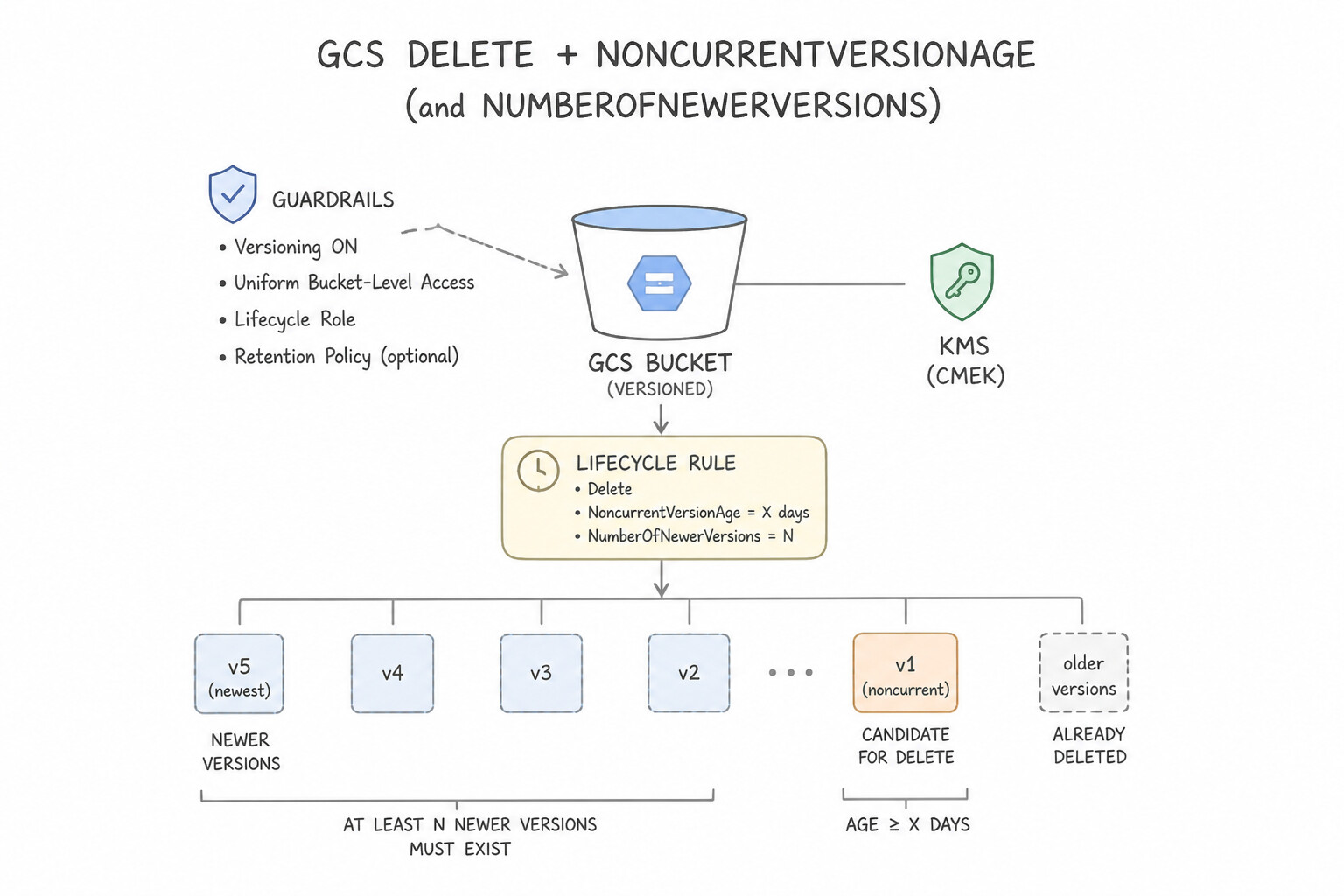
- Orphaned Object Versions & Incomplete Multipart Uploads (3.2e): Enabling Object Versioning on a Cloud Storage bucket protects against accidental deletion, but without Object Lifecycle Management rules (
Deleteaction withNoncurrentVersionAge+AbortIncompleteMultipartUpload), historical PII versions and abandoned upload chunks accumulate forever—and if immediate unrecoverability is demanded for a specific tenant, destroying the tenant's CMEK key version (crypto-shredding) is the fastest mathematical guarantee. - Forgetting Encryption In-Use (3.2f): CMEK and Cloud HSM protect data at rest; TLS/IPsec/MACsec protect data in transit. Neither protects data while it is decrypted inside system RAM during active computation! Protecting data in use requires Confidential Computing (Confidential VM and Confidential GKE Nodes, powered by hardware memory encryption like AMD SEV / SEV-SNP / Intel TDX), enforced at scale via
constraints/compute.confidentialModeTyped.
Consideration 3.2a: Identifying use cases for default encryption, CMEK, and Cloud External Key Manager
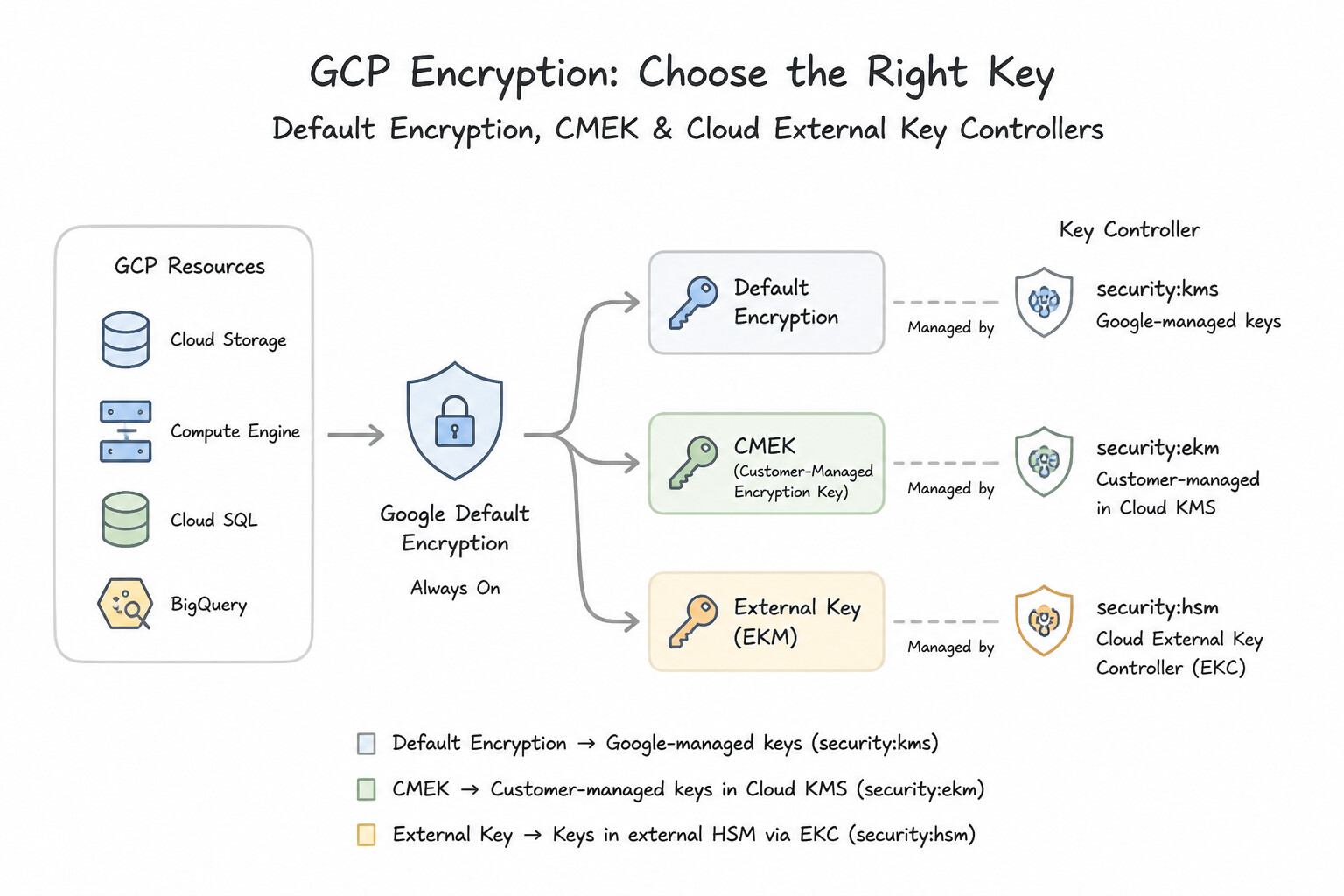
- Google Default Encryption: Best when a scenario emphasizes minimal operational overhead and no requirement for customer-controlled rotation or external key custody.
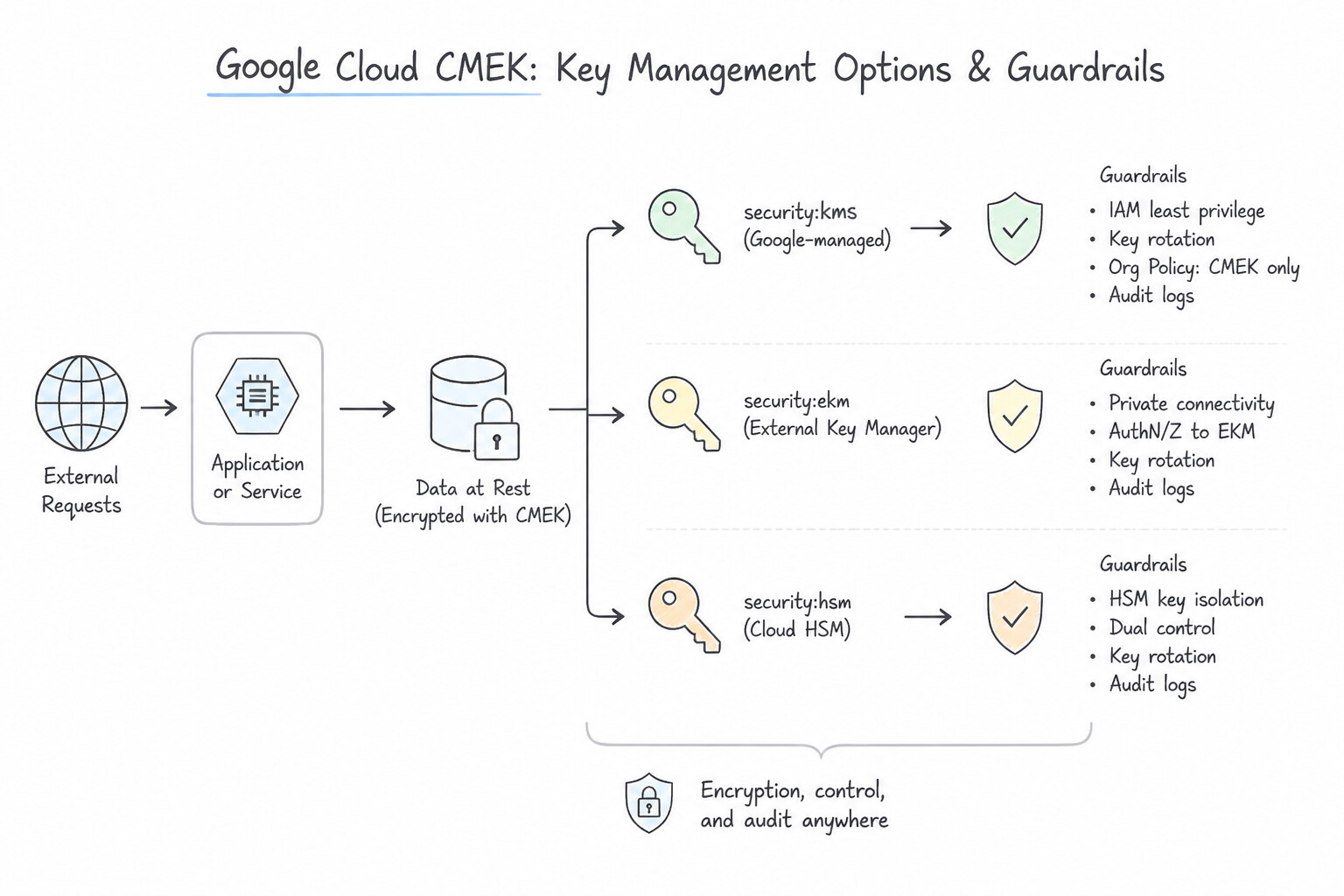
- Customer-Managed Encryption Keys (CMEK): Best when compliance requires custom rotation intervals (e.g., every 45 days), auditing every key operation, or crypto-shredding (disabling/destroying a key version to render all data encrypted with that key version immediately unreadable).
- Cloud External Key Manager (Cloud EKM): Best when a regulatory requirement explicitly states that encryption keys must be stored outside of Google Cloud (in an external third-party key management partner like Thales, Fortanix, or Virtru) and key material must never be imported into Google Cloud. (Watch out for the trade-off: if your external EKM appliance goes offline, Google Cloud services cannot encrypt or decrypt your data!).
Key Implementation Patterns
- Strict Data Sovereignty and External Control: Use Use Cloud External Key Manager (Cloud EKM) to connect to your external key manager. Cloud EKM keeps the key material in your external system, ensuring it never enters Google infrastructure. (Avoid alternative: Default encryption stores and manages keys within Google infrastructure, which violates the requirement.)
- Operational Overhead vs. Baseline Security: Use Rely on Google Cloud default encryption. Default encryption is automatic, requires zero maintenance, and secures data at rest by default. (Avoid alternative: CMEK requires active management of keys and permissions, adding unnecessary overhead.)
- Immediate Access Revocation (Crypto-shredding): Use Configure Customer-Managed Encryption Keys (CMEK) and disable the specific key version associated with the dataset. CMEK allows you to disable a key version, instantly rendering the associated data unreadable. (Avoid alternative: Default encryption does not allow you to manually destroy keys for immediate crypto-shredding.)
Key Takeaways (3.2a)
- Default Encryption is automatic and Google-managed.
- CMEK (Customer-Managed Encryption Keys) gives you control but stores keys in Google Cloud (via Cloud KMS or Cloud HSM).
- Cloud EKM allows you to keep keys in an external system; the key material never enters Google Cloud.
- Use Cloud EKM when compliance dictates that the cloud provider must not possess the encryption keys.
Consideration 3.2b: Determining when to use software and hardware keys
- Cloud KMS
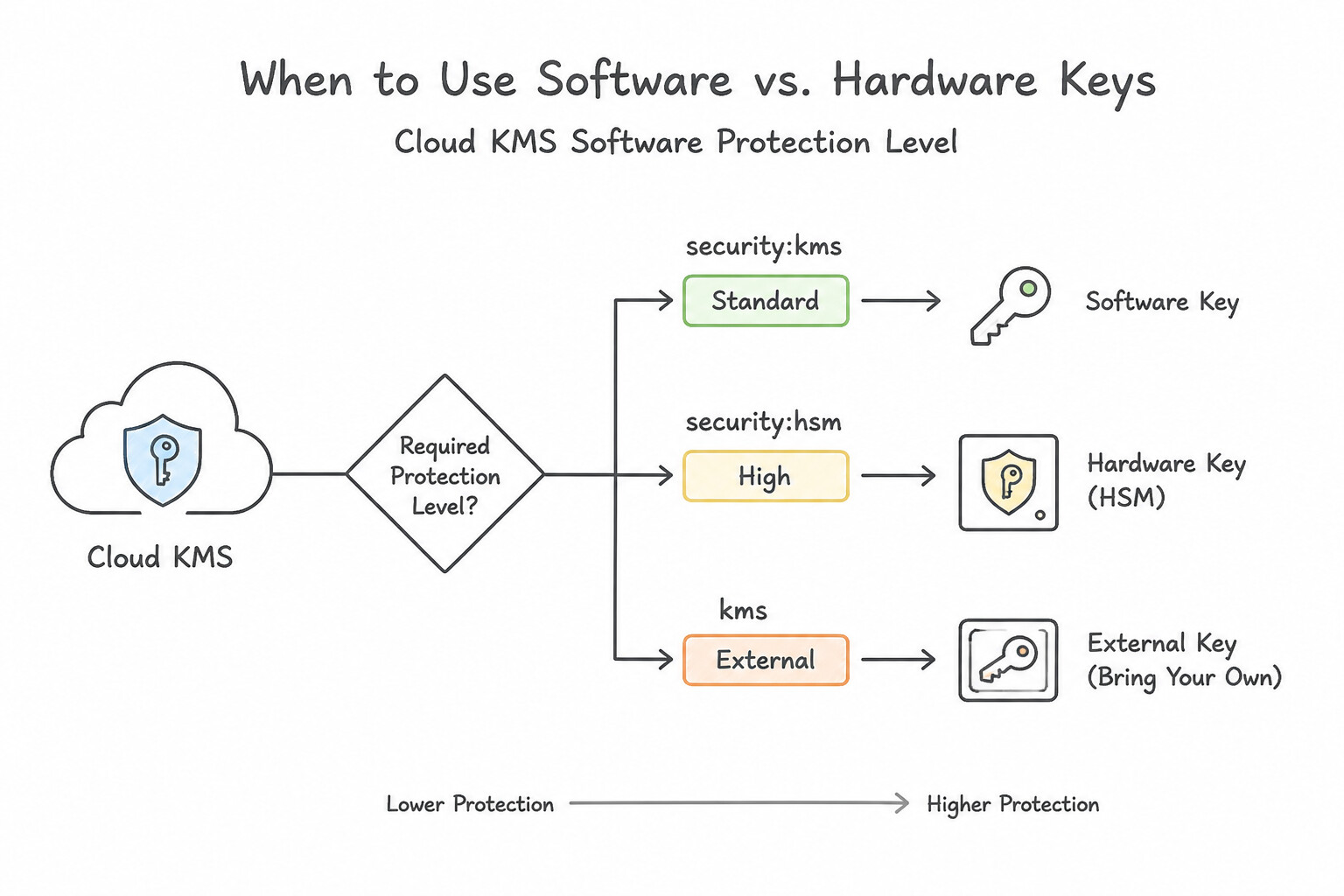
SoftwareProtection Level: Key material is generated and processed in software and wrapped at rest by Google master keys. Lowest cost (\$0.06/key version/month) and highest quota elasticity; compliant with FIPS 140-2 Level 1. - Cloud HSM (
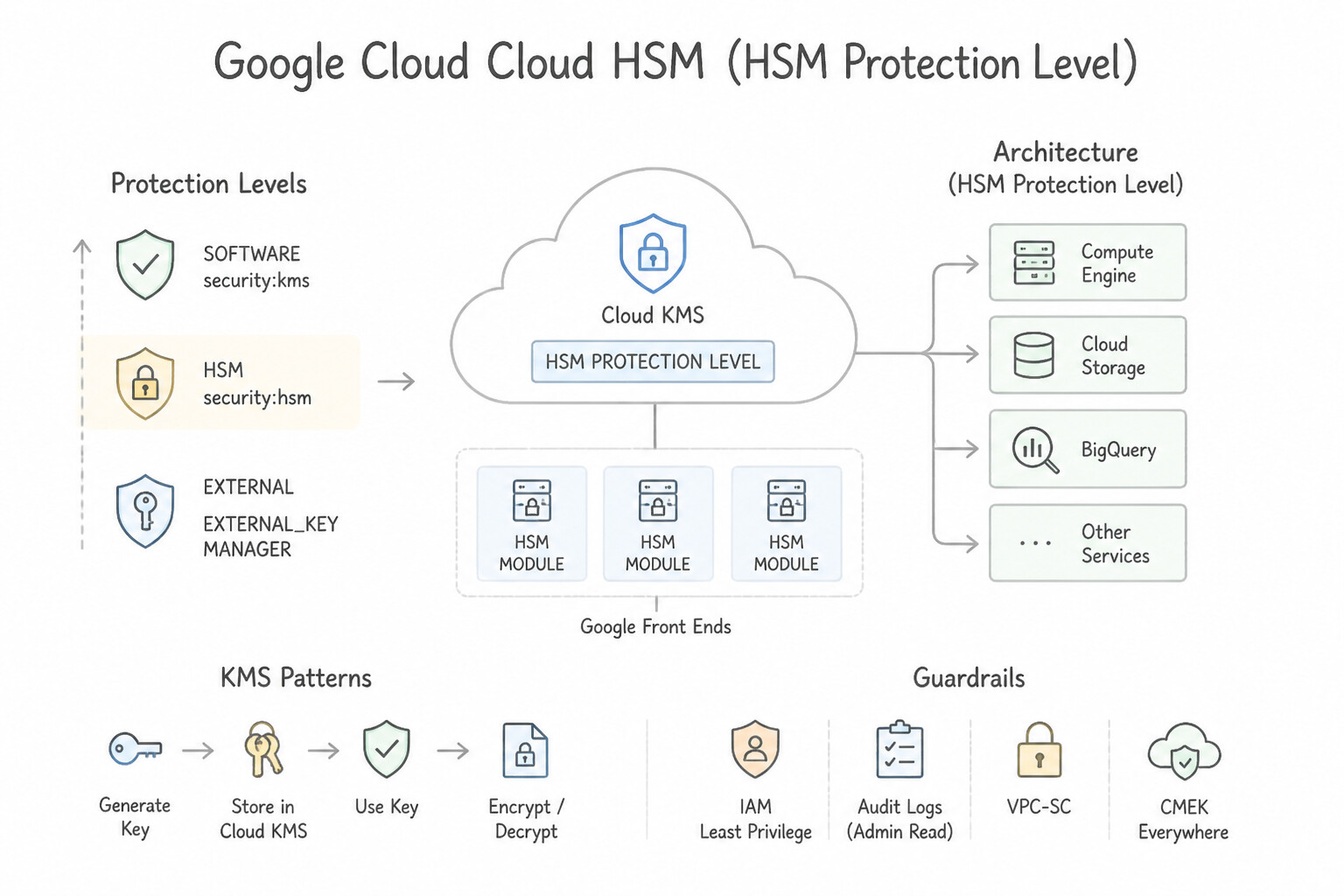
HSMProtection Level): Key material is generated, stored, and used strictly inside FIPS 140-2 Level 3 validated physical Hardware Security Modules managed by Google. Whenever an architectures prompt mentions "FIPS 140-2 Level 3" or "hardware-backed keys inside Google Cloud", immediately select Cloud HSM (HSMprotection level).
Key Implementation Patterns
- Strict Regulatory Compliance (FIPS 140-2 Level 3): Use Create the keys with the HSM protection level. Cloud HSM keys are FIPS 140-2 Level 3 certified, meeting the regulatory mandate. (Avoid alternative: Software protection level is only FIPS 140-2 Level 1 certified.)
- External Key Control (Hold Your Own Key): Use Use Cloud External Key Manager (Cloud EKM) to connect to an external key management partner. Cloud EKM allows keys to reside in a third-party system outside Google Cloud. (Avoid alternative: Default keys are managed by Google and stored within Google infrastructure.)
Key Takeaways (3.2b)
- Software Keys: FIPS 140-2 Level 1 compliant. Good for general use.
- Cloud HSM: FIPS 140-2 Level 3 compliant. Required for strict regulatory hardware requirements.
- Cloud EKM: Use when you need to store keys outside of Google Cloud completely.
- Always check the specific FIPS level required by your compliance standards.
Consideration 3.2c: Creating and managing encryption keys including rotation, revocation, and imports
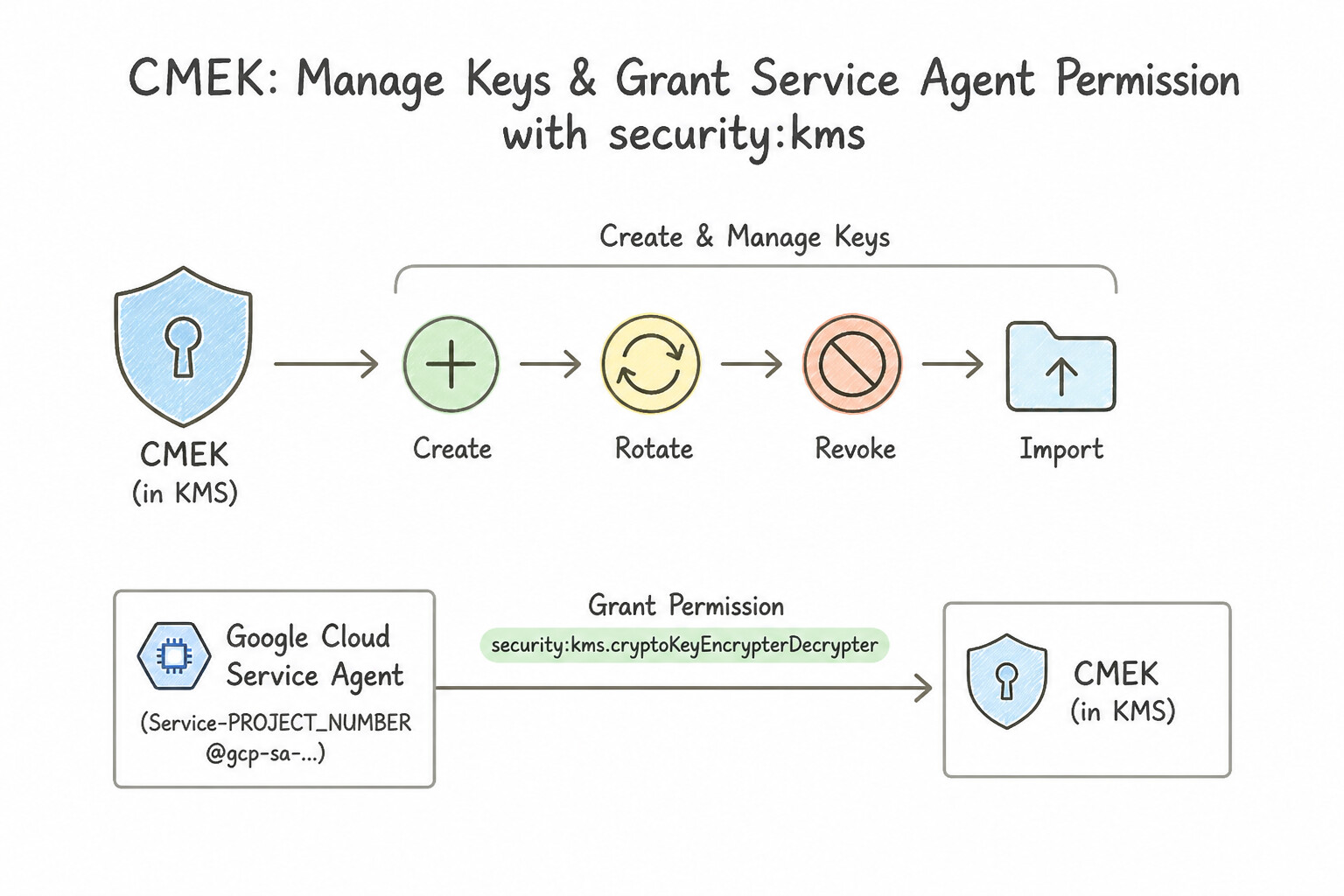
- Granting the Service Agent Permission for CMEK: To allow Cloud Storage, BigQuery, Compute Engine, or GKE to use a CMEK key (especially across a centralized Security/KMS project), grant
roles/cloudkms.cryptoKeyEncrypterDecrypterto the Service Agent of the consuming project (e.g.,service-PROJECT_NUMBER@gs-project-accounts.iam.gserviceaccount.com). - Symmetric vs. Asymmetric Rotation:
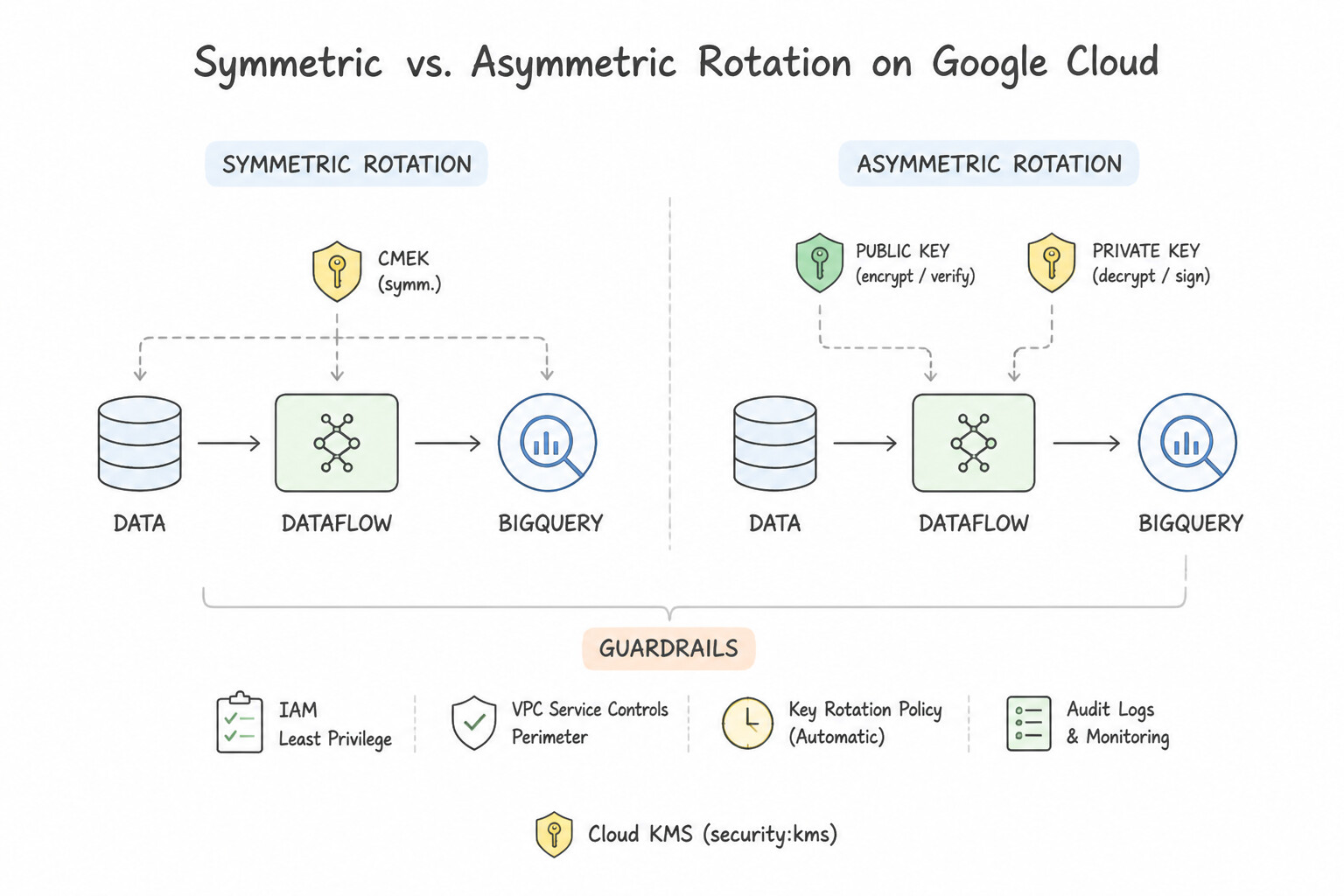
- Symmetric Encryption Keys: Configure an automatic rotation period (e.g., 30, 45, or 90 days). Rotation creates a new Primary Key Version for new writes; older key versions remain Enabled so existing historical files can still be decrypted without re-encrypting petabytes of storage!
- Asymmetric Keys: Cannot be rotated automatically because external clients/verifiers hold the public key or certificate. Rotate manually by creating a new version, distributing the new public key, and updating clients.
- Securely Importing On-Premises Keys (
Key Import Job): Never email or upload raw plaintext keys! Create an Import Job in Cloud KMS (selecting the protection level and wrapping method), download Google's public RSA wrapping key, wrap your on-premises key material locally using thegcloud kms keys versions importCLI (which performs local RSA-OAEP + AES key wrapping), and upload the wrapped payload.
Key Implementation Patterns
- Configuring Automatic Key Rotation: Use Create symmetric encryption keys. Configure the rotation period to 45 days and set the next rotation time. Symmetric keys support automatic rotation, allowing you to set a custom 45-day schedule. (Avoid alternative: Asymmetric keys do not support automatic rotation and are not the standard choice for bulk data encryption.)
- Handling Asymmetric Key Rotation: Use Create a new key version manually. Distribute the new public key to verifiers, and update the application to sign data using the new key version. Asymmetric rotation is a manual process: create a new version, distribute the public key, then use the new private key.
- Importing On-Premise Keys (BYOK): Use Create an Import Job in Cloud KMS. Use the provided wrapping key to encrypt your on-premise key material, and import the wrapped key into a new key version. You must use an Import Job to get a wrapping key, encrypt your material locally, and then upload it.
Key Takeaways (3.2c)
- Symmetric keys are used for encrypting data at rest in Google Cloud services.
- Only symmetric keys support automatic rotation in Cloud KMS.
- You must explicitly set the rotation period and starting time to meet custom compliance schedules (like 45 days).
- Symmetric keys in Cloud KMS support automatic rotation.
Consideration 3.2d: Applying encryption methods to appropriate use cases
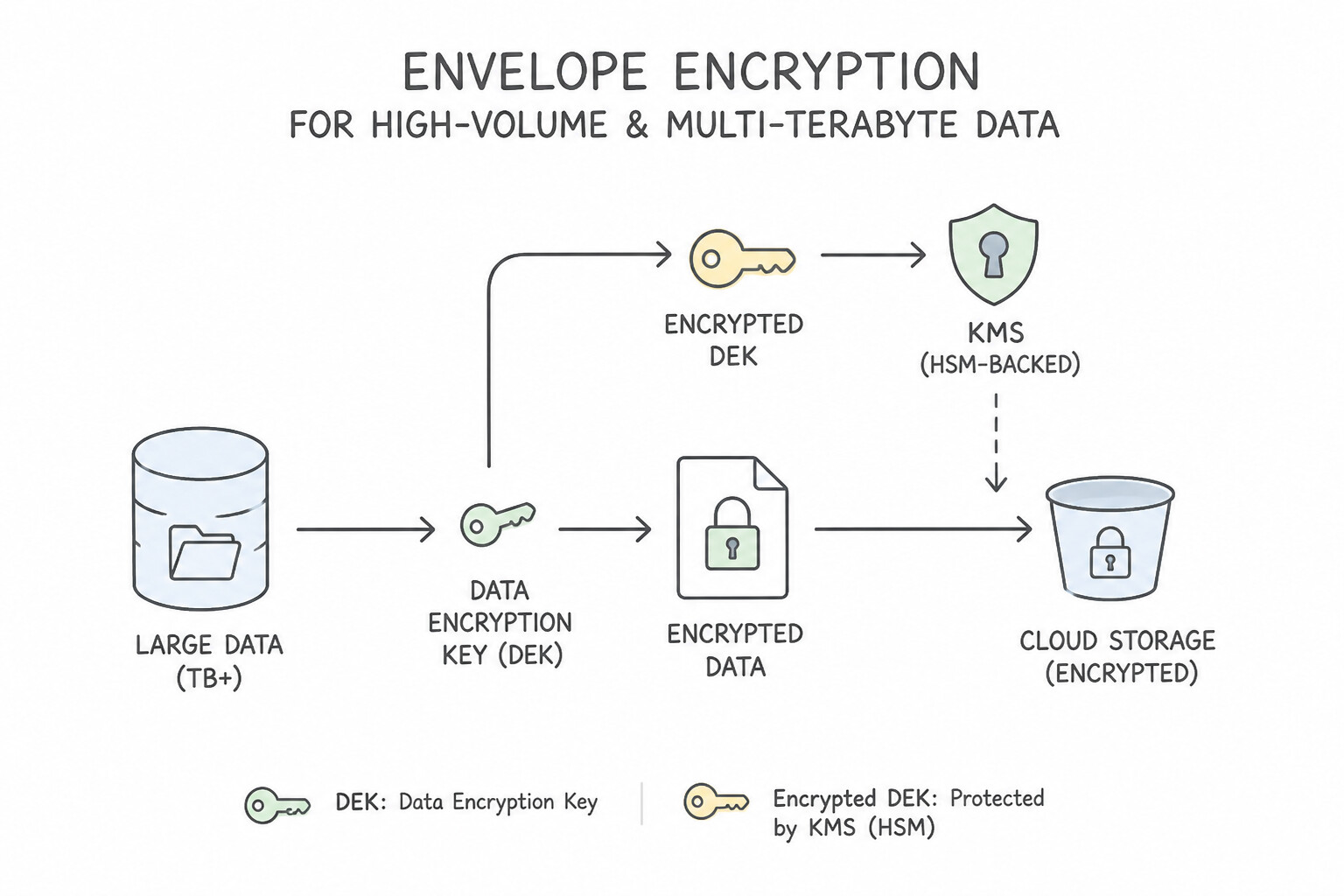
- Envelope Encryption for High-Volume / Multi-Terabyte Data: Cloud KMS API calls have payload size limits (max 64 KiB per
encryptcall) and QPS quotas. Never send a 10 TB database backup or millions of log records per hour directly to the Cloud KMSencryptendpoint! Instead, implement Envelope Encryption: - Generate a local symmetric Data Encryption Key (DEK) (e.g., AES-256-GCM) in memory.
- Encrypt the multi-terabyte file or log stream locally at CPU speed using the DEK.
- Call Cloud KMS once to encrypt (wrap) the tiny DEK using your KMS Key Encryption Key (KEK), and store the wrapped DEK alongside the ciphertext.
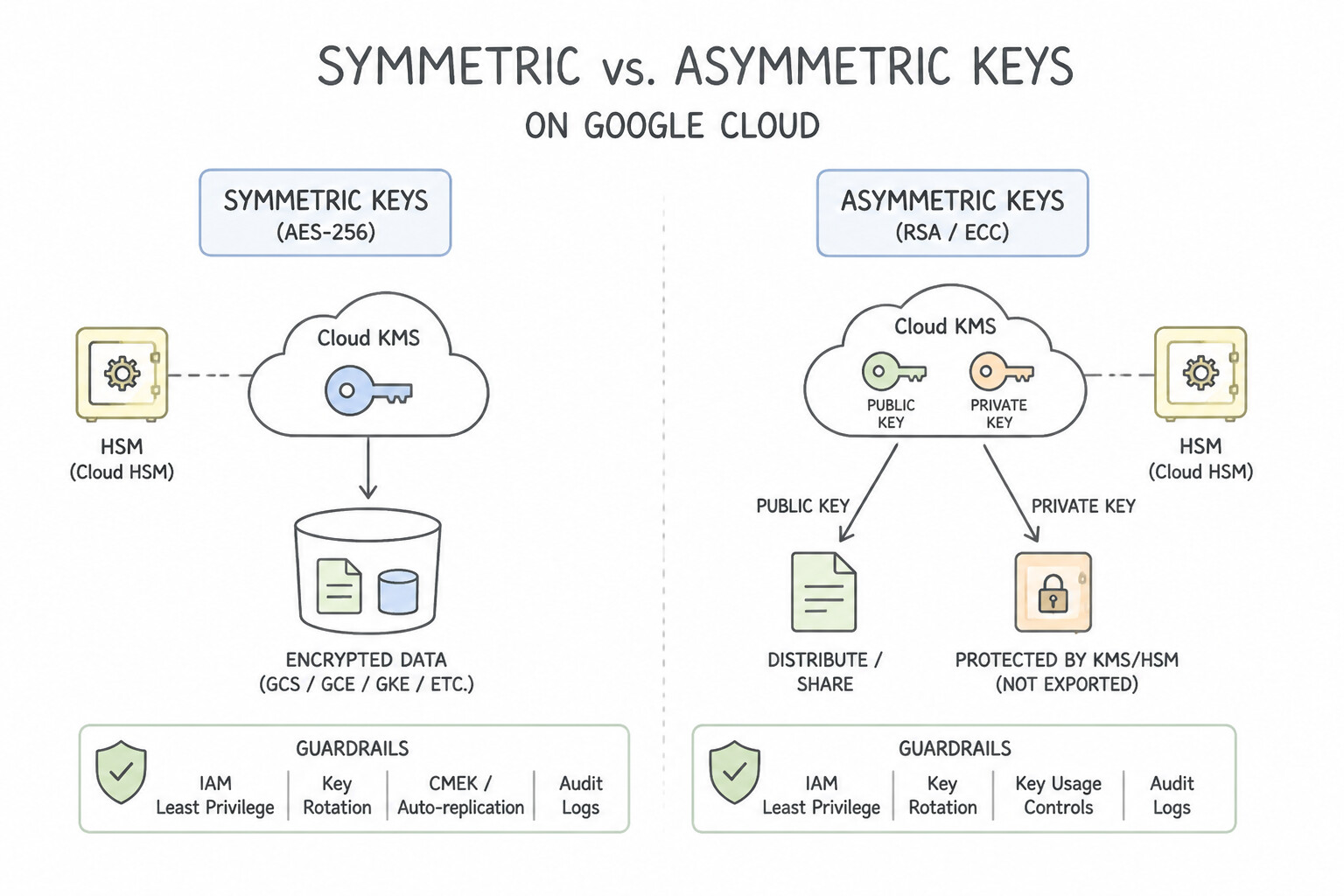
- Symmetric vs. Asymmetric Keys: Use Symmetric AES-256 for bulk data encryption at rest; use Asymmetric RSA/ECDSA for digital signatures (Binary Authorization attestations) and asymmetric key exchange.
Key Implementation Patterns
- Hardware-Backed Key Compliance: Use Create a key in Cloud Key Management Service with the protection level set to HSM. Cloud HSM provides keys backed by FIPS 140-2 Level 3 validated hardware, satisfying the compliance requirement. (Avoid alternative: Software keys in Cloud KMS are validated to FIPS 140-2 Level 1, which does not meet the Level 3 requirement.)
- Protection of Data in Use: Use Configure Confidential VM (Confidential Computing) for the Compute Engine instances. Confidential VM encrypts data in use (memory) using hardware keys. (Avoid alternative: Shielded VM protects boot integrity, not data in memory.)
- External Key Control (Sovereignty): Use Use Cloud External Key Manager (Cloud EKM) connected to a third-party key management partner. Cloud EKM keeps keys in an external system outside Google Cloud, meeting the requirement to never store keys on provider infrastructure.
Key Takeaways (3.2d)
- Cloud KMS 'Software' protection level meets FIPS 140-2 Level 1.
- Cloud KMS 'HSM' protection level meets FIPS 140-2 Level 3.
- Use Cloud HSM when compliance mandates hardware-backed key protection.
- Customer-Managed Encryption Keys (CMEK) allow you to control keys used by Google services like Cloud Storage.
Consideration 3.2e: Configuring Cloud Storage lifecycle policies
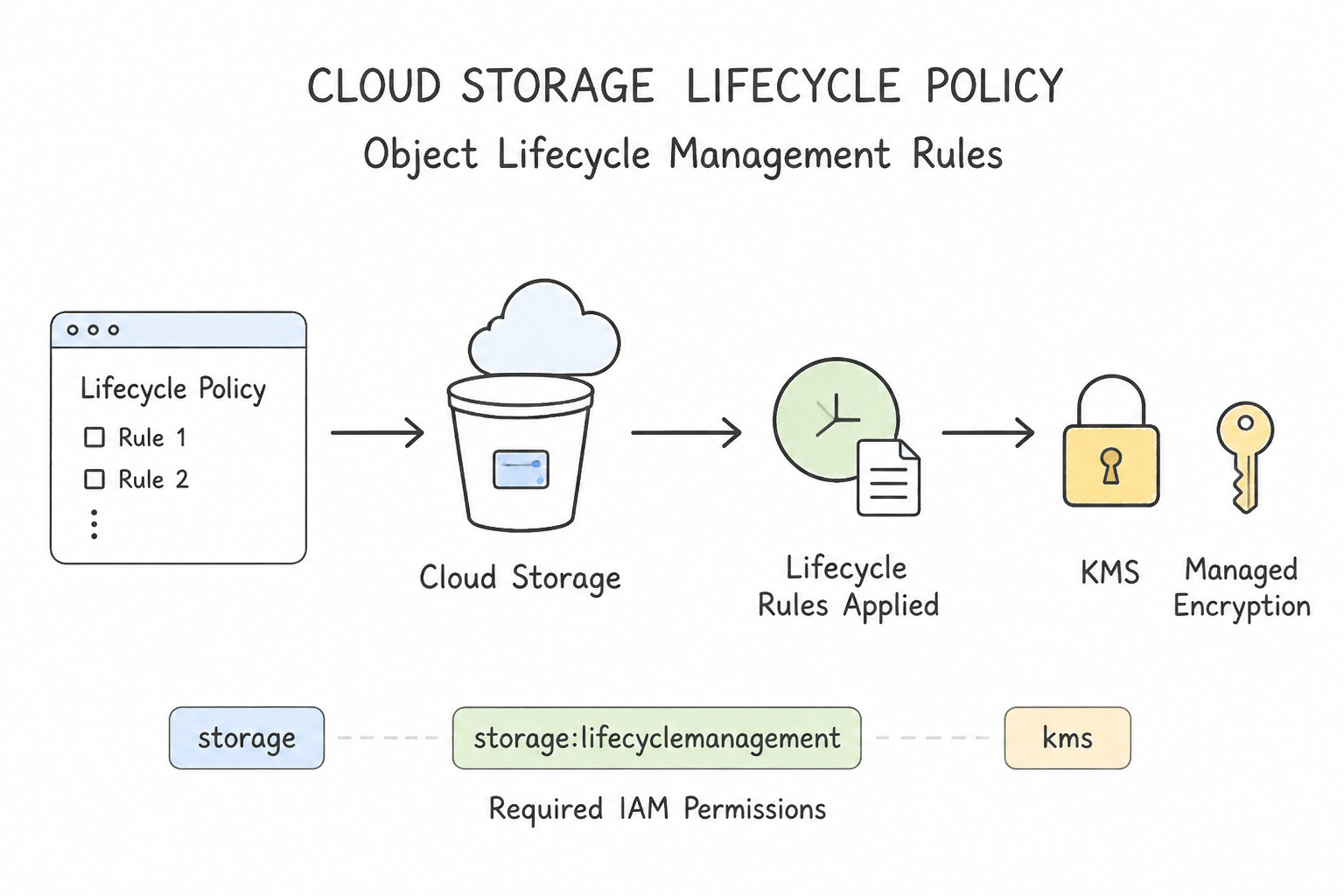
- Object Lifecycle Management Rules:
Delete+NoncurrentVersionAge(andNumberOfNewerVersions): Automatically purges old noncurrent object versions in a versioned bucket after$N$ days so historical PII does not linger beyond retention limits.AbortIncompleteMultipartUpload(Agecondition): Automatically cleans up orphaned chunks from failed multipart uploads.- Bucket Lock (WORM Retention Policy): For SEC Rule 17a-4, FINRA, or HIPAA immutable archiving, configure a Retention Policy on the bucket and lock it (irreversible WORM protection).
- Instant Cryptographic Erasure (
Crypto-Shredding): When a customer exercises a right-to-erasure (or a tenant offboards) and you must guarantee immediate unrecoverability across active objects, backups, and caches without waiting for background storage scrubbing, disable and destroy the tenant-specific CMEK CryptoKey Version in Cloud KMS.
Key Implementation Patterns
- Crypto-Shredding vs. Lifecycle Deletion: Use Disable and destroy the specific CryptoKey version used to encrypt the customer's data. Crypto-shredding (destroying the key) renders encrypted data immediately unrecoverable. (Avoid alternative: Lifecycle policies are eventually consistent and do not guarantee immediate data destruction.)
- Clean-up of Incomplete Multipart Uploads: Use Add a lifecycle rule to the bucket with the AbortIncompleteMultipartUpload action. The AbortIncompleteMultipartUpload action is specifically designed to clean up parts of failed multipart uploads. (Avoid alternative: The standard Delete action removes valid, completed objects, not incomplete upload fragments.)
- Versioning and Lifecycle for Ransomware Mitigation: Use Add a Lifecycle Management rule with the Delete action and the NoncurrentVersionAge condition set to 30 days. NoncurrentVersionAge targets only non-current versions based on when they were replaced, preserving recent history for recovery.
Key Takeaways (3.2e)
- Crypto-shredding is the industry standard for ensuring immediate data unrecoverability in the cloud.
- Cloud Storage lifecycle policies are asynchronous and not suitable for immediate, critical data destruction.
- CMEK (Customer-Managed Encryption Keys) enables granular control over data access and destruction independent of the storage medium.
- Large file uploads often use multipart uploads to improve performance and reliability.
Consideration 3.2f: Enabling Confidential Computing
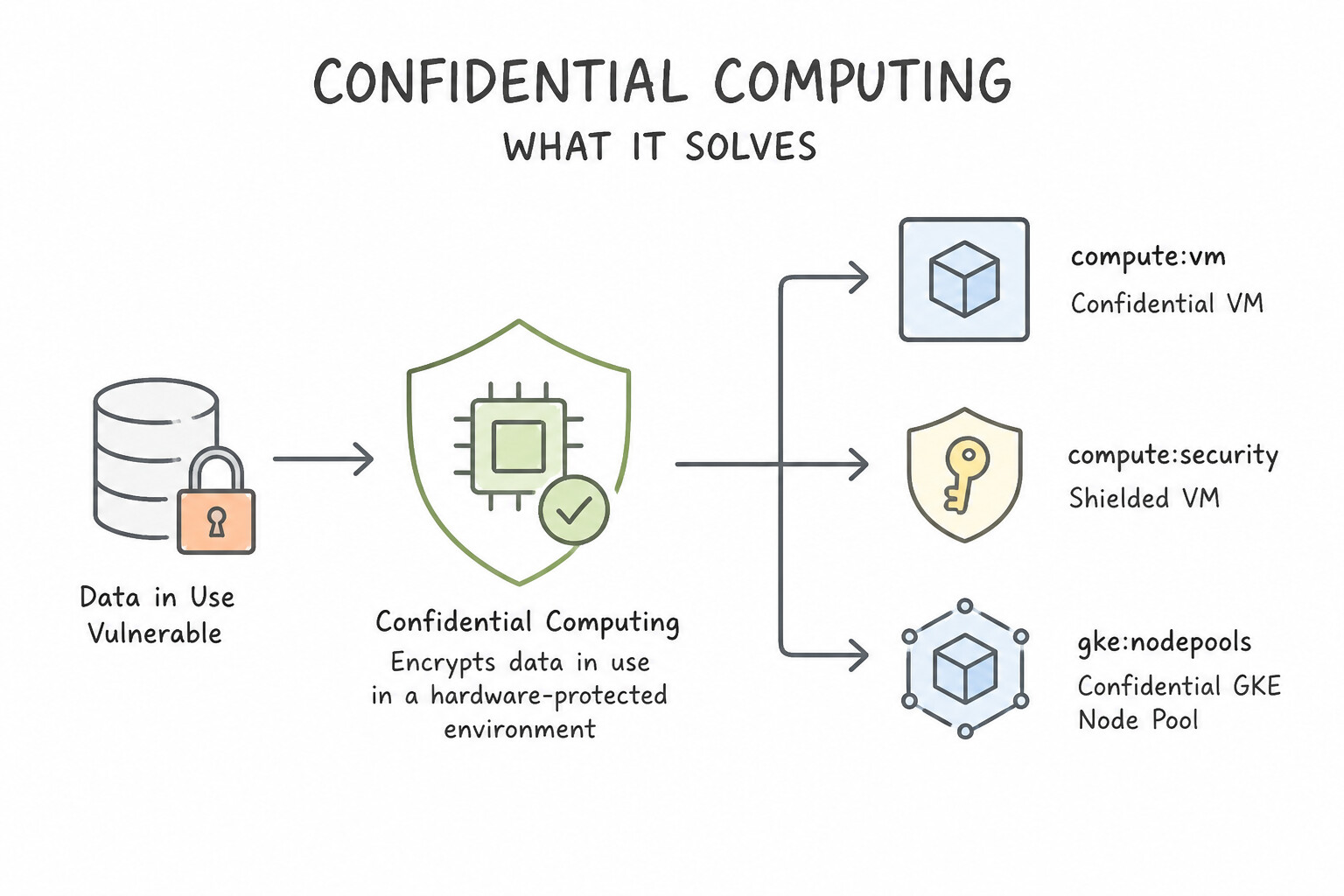
- What Confidential Computing Solves: Encrypts data in use (while residing in physical system RAM during CPU processing) using hardware-isolated memory encryption keys generated inside the processor (AMD SEV / AMD SEV-SNP / Intel TDX) that even Google's hypervisor cannot read.
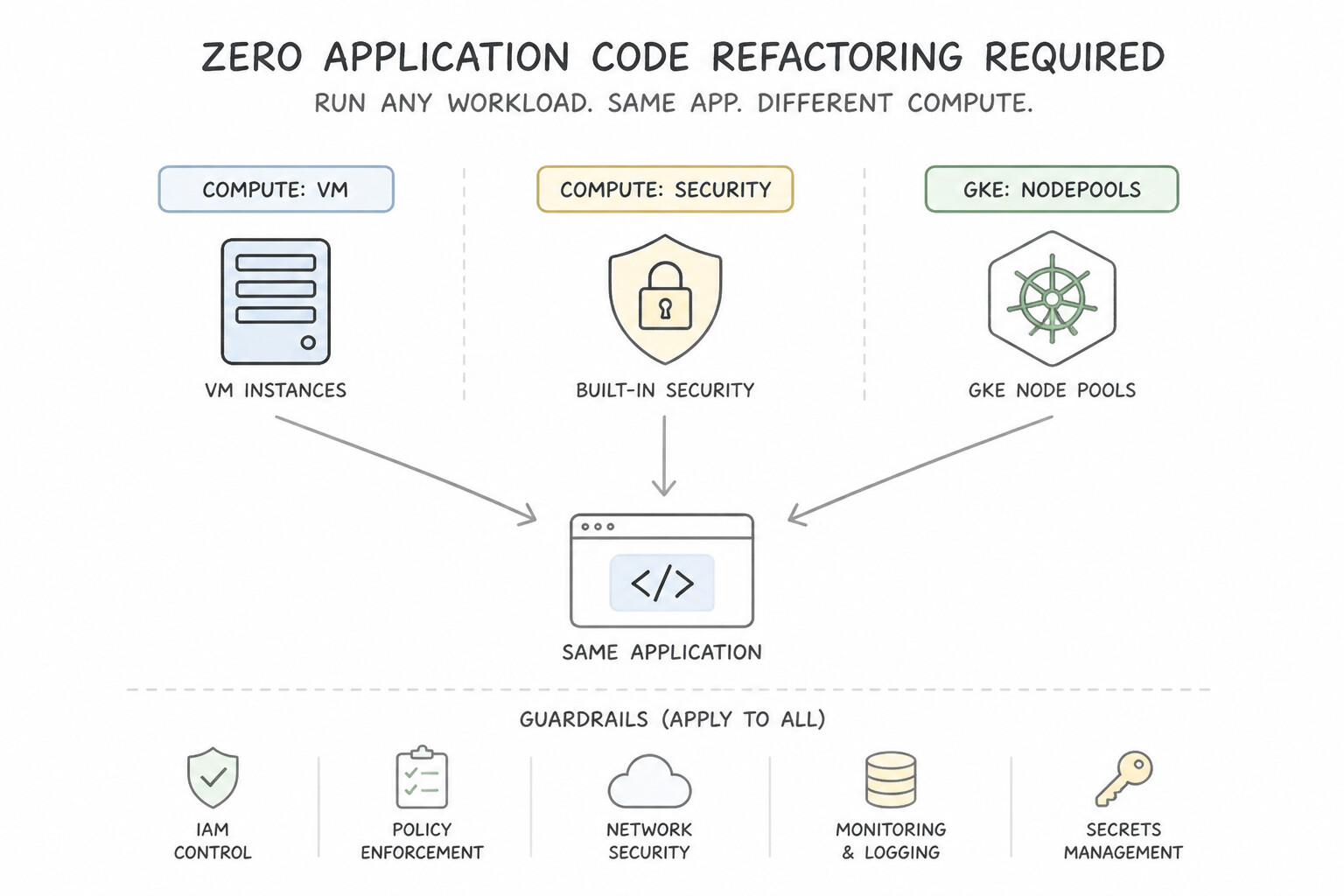
- Zero Application Code Refactoring Required: Unlike enclave SDKs that require rewriting C++ code, Confidential VM (on supported
N2D,C2D,C3Dmachine series) and Confidential GKE Nodes encrypt memory transparently—existing Linux containers and binaries run unmodified! - Governance Guardrail: Enforce
constraints/compute.confidentialModeTypedvia the Organization Policy Service on sensitive folders to block anyone from launching non-confidential VMs.
Key Implementation Patterns
- Enabling Confidential VMs for Financial Processing: Use Select an N2D machine type. In the Security settings, select 'Enable Confidential Computing Service'. Confidential VMs encrypt data in memory. This requires a supported machine type (like N2D) and enabling the Confidential Computing service.
- Confidential GKE Node Pools: Use Create a new node pool with Confidential GKE Nodes enabled. Configure the microservice to run on this node pool. Confidential GKE Nodes encrypt data in memory (in use), meeting the compliance requirement. (Avoid alternative: Shielded GKE Nodes protect boot integrity, not data in use (memory encryption).)
Key Takeaways (3.2f)
- Data in Use protection requires Confidential Computing.
- Confidential VMs encrypt memory using hardware-based keys generated by the CPU.
- Not all machine types support Confidential Computing; usually N2D, C2D, or similar AMD-based types are required.
- Shielded VMs protect boot integrity, whereas Confidential VMs protect runtime memory confidentiality.
Quick Decision Cheat Sheet (Subsection 3.2)
If the Scenario Requires... | Choose This Google Cloud Pattern | Avoid This Common Mistake |
|---|---|---|
"Guarantee immediate, irreversible data unrecoverability for a departing tenant's data across Cloud Storage" | Use CMEK per tenant and disable/destroy the specific CryptoKey version (Crypto-Shredding) | Waiting 365 days for Lifecycle rules or overwriting objects with zeroes |
"Import an existing on-premises key into Cloud KMS without exposing plaintext key material in transit" | Create a Cloud KMS Import Job, download the public wrapping key, and wrap the key locally via gcloud kms keys versions import | Uploading a raw hex key via Cloud Storage or pasting it into Secret Manager |
"Rotate an Asymmetric signing key in Cloud KMS every 90 days" | Manually (or via scheduled script) create a new key version, distribute the new public key to verifiers, and update signing clients | Enabling the Cloud KMS automatic rotation schedule checkbox (only supported for Symmetric keys!) |
"Automatically purge old noncurrent object versions after 30 days in a versioned Cloud Storage bucket" | Configure an Object Lifecycle rule with Delete action + NoncurrentVersionAge: 30 | Using the standard Age: 30 condition alone (which deletes live current objects too!) |
"Enforce that all VMs created inside the Highly-Sensitive folder must use hardware memory encryption" | Apply the constraints/compute.confidentialModeTyped Organization Policy constraint on the folder | Enabling Shielded VM Secure Boot (Secure Boot verifies kernel signatures, not RAM encryption) |
Further Reading (Subsection 3.2)
- Cloud External Key Manager (Cloud EKM) — Overview of Cloud EKM, explaining how it protects data using keys held in a supported external key management partner.
- Cloud Key Management — A comparison table of Default, CMEK, Cloud HSM, and Cloud EKM features and use cases.
- Default encryption at rest — Google Cloud automatically encrypts data when it is stored at rest. There is no setup or configuration required and no need to modify the way you access the service.
- Customer-managed encryption keys (CMEK) — Documentation explaining how CMEK works with Cloud Storage and how disabling a key affects data access.
- Key lifecycle management — Details on Key states in Cloud KMS, including Enabled, Disabled, and Destroyed.
- Cloud KMS Protection Levels — Documentation explaining the different protection levels (Software and HSM) and their respective FIPS 140-2 validation levels.
Subsection 3.3: Securing AI workloads
The Big Picture
As enterprises deploy custom machine learning training pipelines on Vertex AI and autonomous generative AI agents on the Gemini Enterprise Agent Platform, security engineers face three modern AI threat vectors tested on the updated Google Cloud architecture:
- PII Memorization & Membership Inference Attacks in Training Models (3.3a): If a data science team trains a model directly on raw healthcare or census records in BigQuery/Cloud Storage, two bad things happen: (a) raw PII is exposed to data scientists and training logs, and (b) an adversary querying the deployed model can extract whether a specific individual was in the training set (Membership Inference Attack) or coax the model into regurgitating memorized PII (Model Inversion / Memorization). Defense-in-depth requires de-identifying PII with Sensitive Data Protection (Cloud DLP) before training—and applying Differential Privacy (e.g.,
DP-SGD— Differentially Private Stochastic Gradient Clipping & Noise Injection) during training so mathematical privacy bounds (ε) prevent the model weights from memorizing individual records! - Data Exfiltration from Vertex AI Workbench Notebooks & Custom Training Jobs (3.3b): A Vertex AI Workbench instance with a public IP address and the default Compute Engine service account (
roles/editor) is an insider exfiltration playground: a rogue contractor canpip installmalicious packages or copy terabytes of proprietary training data out to an external bucket. Hardening IaaS/PaaS AI training requires four mandatory controls: - Disable Public IPs on Vertex AI Workbench instances (connect via Private IP + Private Google Access + IAP proxy).
- Attach a dedicated, least-privilege User-Managed Service Account to Vertex AI Custom Training jobs and Workbench instances.
- Encrypt training artifacts, notebooks, and model registries with CMEK.
- Enclose the project (
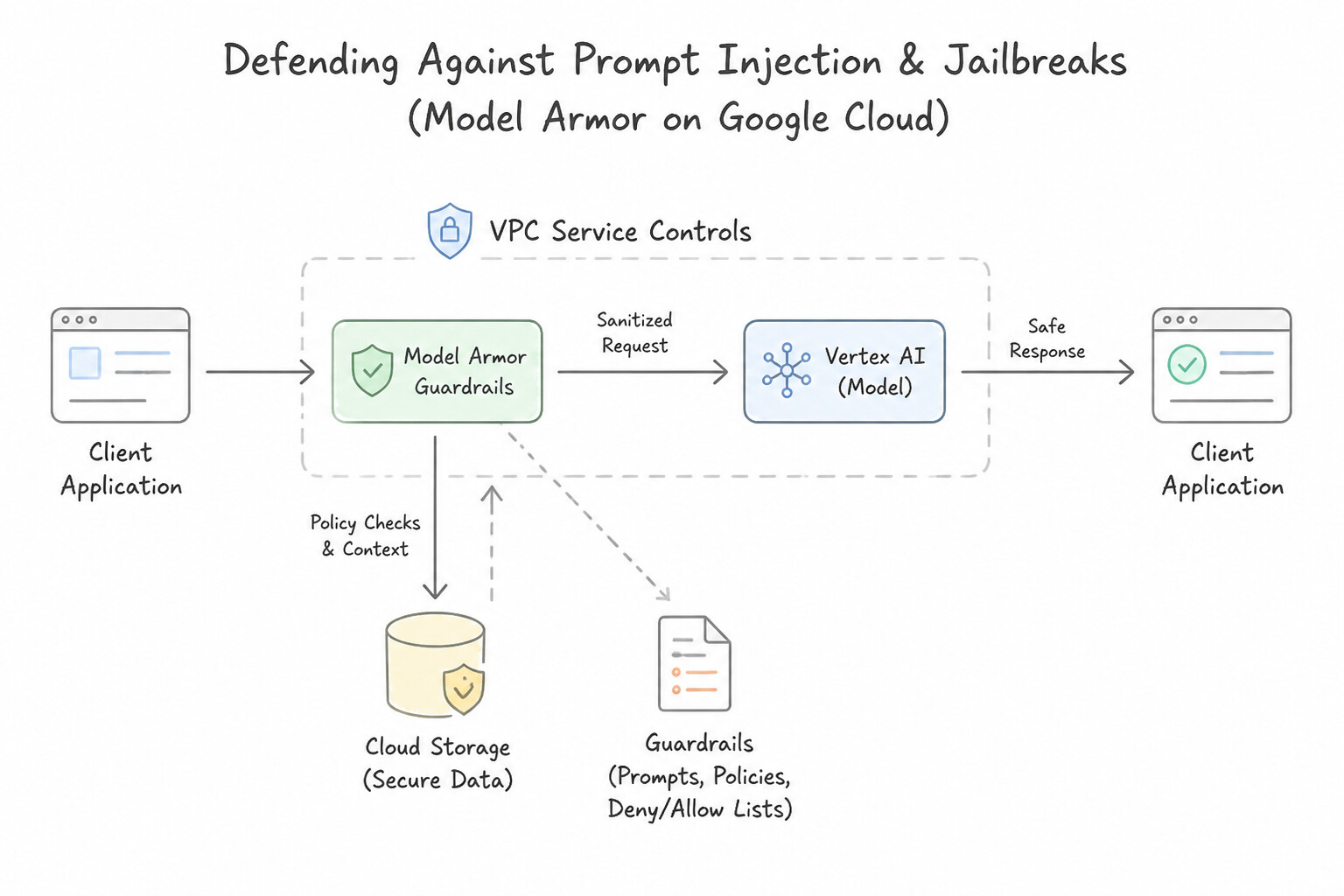
vertex-ai,storage.googleapis.com,bigquery.googleapis.com) inside a VPC Service Controls (VPC-SC) perimeter to block data exfiltration to external projects. - Prompt Injection, Jailbreaks & Over-Privileged Agents (3.3c): When deploying generative AI apps and agents on Vertex AI / Gemini Enterprise Agent Platform, relying on natural-language system prompts ("Ignore malicious user commands") fails against Direct and Indirect Prompt Injection (where untrusted external documents or emails retrieved via RAG contain hidden adversarial instructions). You must deploy Model Armor as a runtime AI security filter (blocking prompt injections, jailbreaks, malicious URLs, and PII leaks), enforce Vertex AI Data Governance (which guarantees Google never uses customer prompts or tuning data to train foundation models), and govern agent tool execution with least-privilege Agent Identities, OAuth 2.0 On-Behalf-Of user ACL propagation, and VPC-SC.
Consideration 3.3a: Implementing security and privacy controls for AI/ML systems to prevent exploitation of data or models
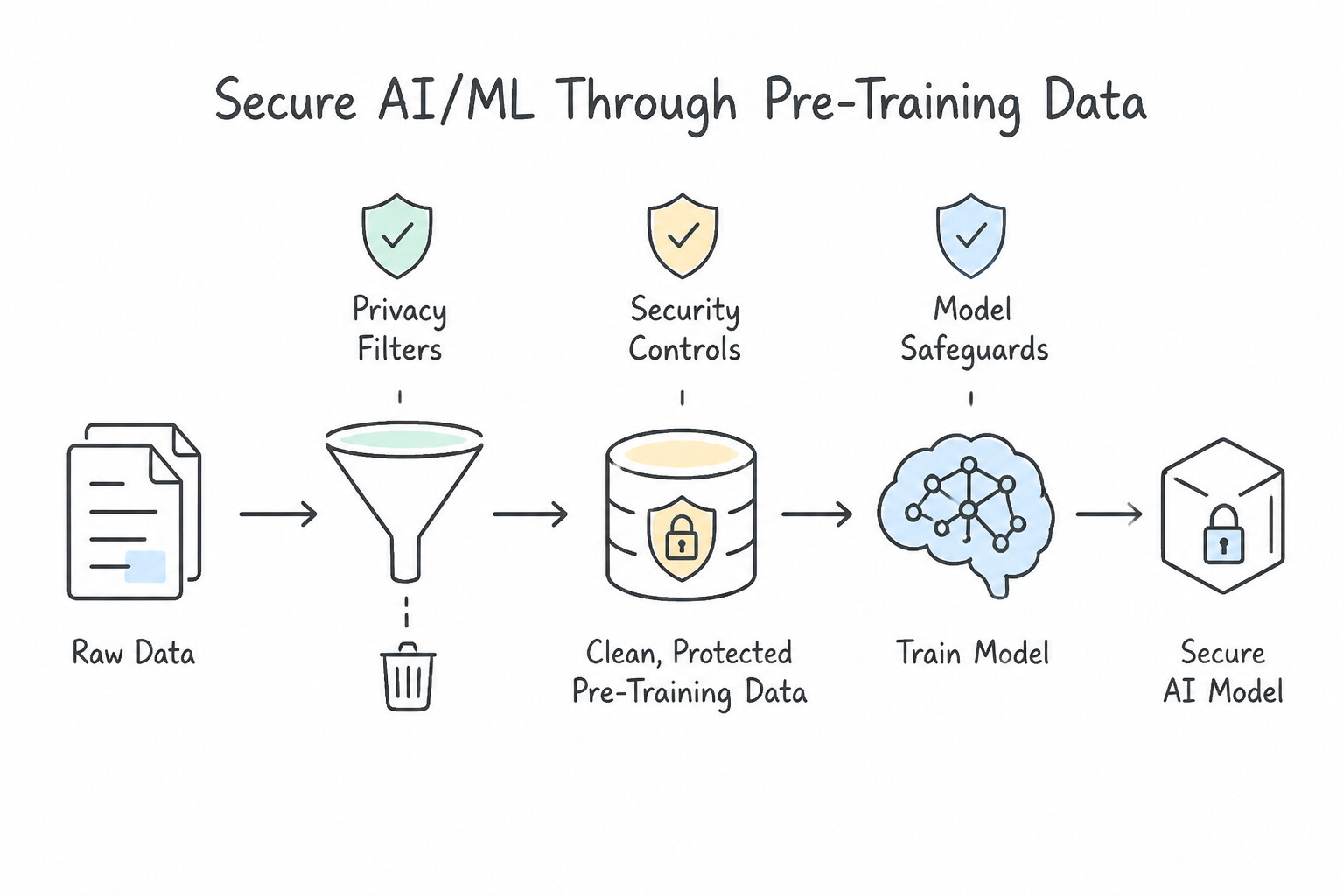
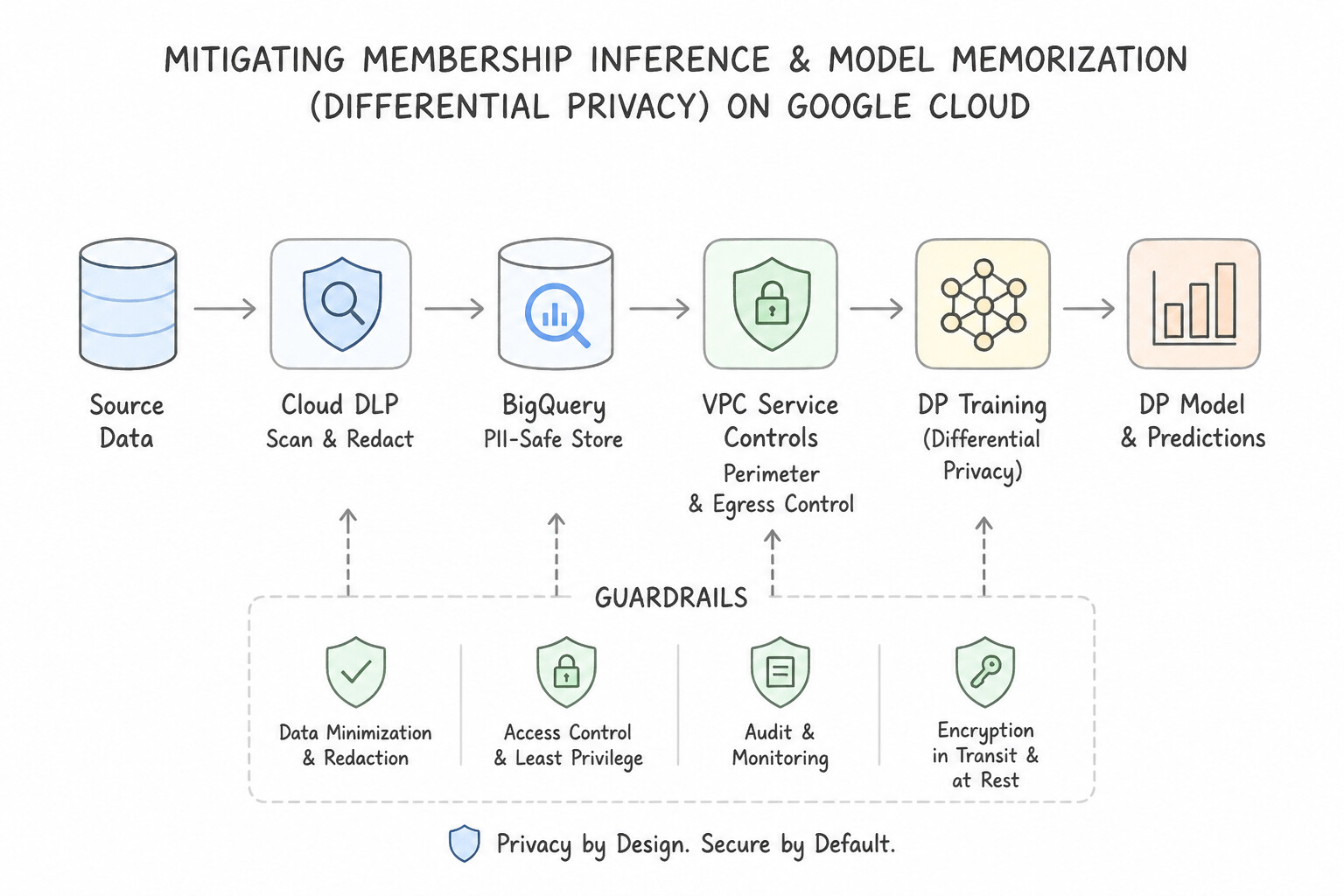
- Pre-Training Data Sanitization with Sensitive Data Protection (Cloud DLP): Always inspect and de-identify sensitive PII/PHI/PCI in training datasets before feeding them to Vertex AI training pipelines or fine-tuning jobs. Use Deterministic Encryption / FPE / Bucketing / Date Shifting so statistical relationships and cross-table joins remain intact for feature engineering without exposing raw identifiers.
- Mitigating Membership Inference & Model Memorization (
Differential Privacy): Even if obvious PII columns are removed, deep neural networks and LLMs can overfit on rare combinations of quasi-identifiers, allowing attackers to run Membership Inference Attacks (determining whether a specific patient or citizen record was in the training set). Train models using Differential Privacy (DP-SGD), which clips individual gradient contributions and injects calibrated statistical noise so the trained model parameters are mathematically insensitive to any single record. - Vertex AI Data Governance Guarantee: By default in Google Cloud Vertex AI and Gemini for Google Cloud, customer prompts, responses, and fine-tuning weights are isolated to the customer's project and are never used to train Google's base foundation models.
Key Implementation Patterns
- Preventing PII Leakage in Training Data: Use Use Cloud Data Loss Prevention (Cloud DLP) to de-identify the PII in the dataset before training. Cloud DLP de-identifies sensitive data, allowing you to use the dataset for training without exposing PII. (Avoid alternative: IAM controls who can access data, but it does not modify or hide PII within the data itself once accessed.)
- Securing Vertex AI Network Boundaries: Use Configure VPC Service Controls to define a service perimeter including the Vertex AI API and Cloud Storage API. VPC Service Controls create a security perimeter around managed services to prevent data exfiltration and restrict access based on network context.
- Mitigating Model Inversion Attacks: Use Train the model using Differential Privacy (DP) techniques like DP-SGD. Differential Privacy adds noise during training to mathematically guarantee that individual data points cannot be reconstructed or identified from the model. (Avoid alternative: Encryption protects data storage, but the model learns from decrypted data; it does not prevent the model from memorizing sensitive patterns.)
Key Takeaways (3.3a)
- Cloud DLP is the primary tool for inspecting and de-identifying sensitive data (PII).
- De-identification allows you to use sensitive datasets for analytics and AI training by masking direct identifiers while preserving utility.
- Encryption protects data storage but does not anonymize data for processing.
- IAM and VPC Service Controls manage access and network boundaries, not data content sanitization.
Consideration 3.3b: Determining security requirements for IaaS-hosted and PaaS-hosted training models
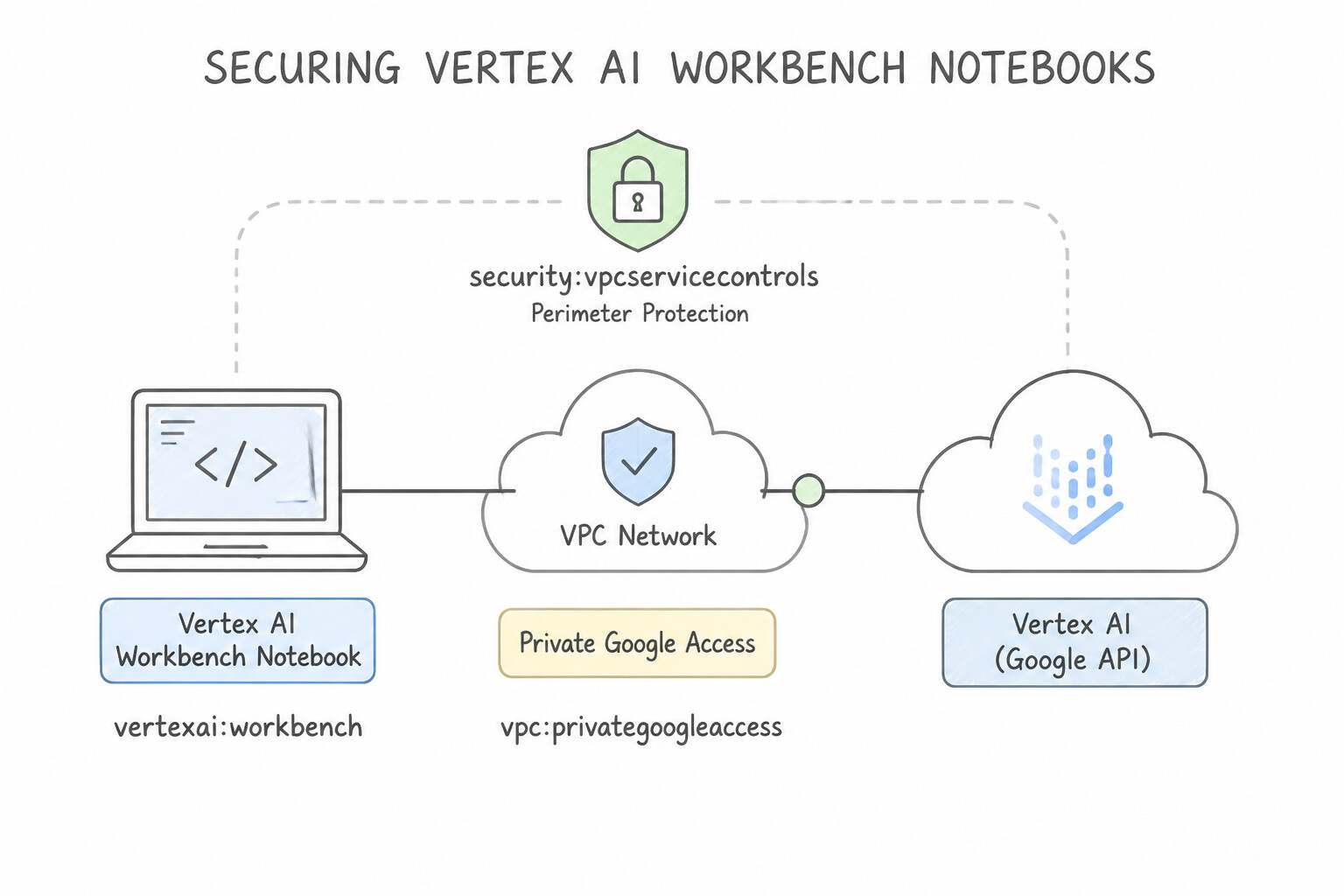
- Securing Vertex AI Workbench Notebooks:
- Disable Public IP Addresses during notebook creation (
--no-enable-public-ip), place the instance on a subnet with Private Google Access (PGA) enabled, and access the JupyterLab UI through the identity-verified Vertex AI Proxy / IAP. - Disable root access (
enable-root-access = false), disable local file downloads in the Jupyter interface, and attach a dedicated user-managed Service Account (never the default Compute Engine SA!). - Securing PaaS-Hosted Vertex AI Custom Training & Pipelines:
- Explicitly pass a custom user-managed Service Account (
--service-account) with least-privilege IAM roles (e.g.,roles/storage.objectVieweron the training input bucket only) so the training container does not inherit the over-privileged Compute Engine default Service Account. - Configure CMEK (
encryptionSpec) on Vertex AI datasets, training jobs, model artifacts, and endpoints. - For IaaS-hosted GPU/TPU training on GKE or Compute Engine handling highly confidential weights in RAM, use Confidential VMs / Confidential GKE Nodes (
NVIDIA H100 Confidential Computing/AMD SEV).
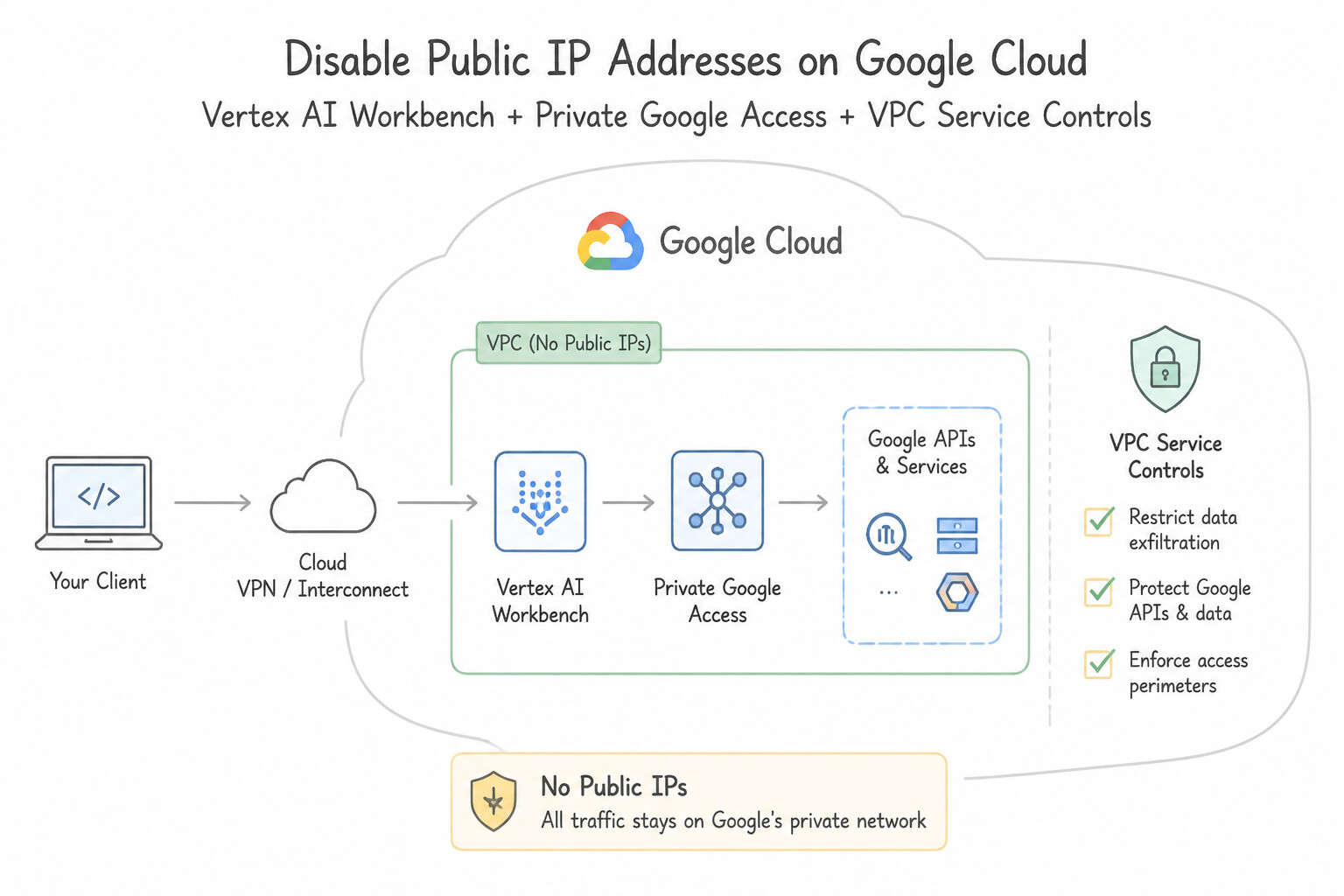
Key Implementation Patterns
- Private Connectivity for Vertex AI Workbench: Use Create the instances without external IP addresses. Enable Private Google Access on the subnet. Private Google Access allows VMs with no external IP addresses to access Google APIs. (Avoid alternative: Assigning external IP addresses violates the security policy requirement.)
- VPC Service Controls for Model Exfiltration Prevention: Use Configure a VPC Service Controls perimeter that includes the Vertex AI API and Cloud Storage API. VPC Service Controls create a secure perimeter around resources to prevent data exfiltration to unauthorized networks or projects.
- Service Accounts for Custom Training Jobs: Use Create a user-managed service account with the Storage Object Admin role for the specific buckets. Specify this account in the
serviceAccountfield of the CustomJob configuration. Creating a dedicated service account with granular permissions and attaching it to the job enforces least privilege.
Key Takeaways (3.3b)
- Remove external IP addresses to isolate VMs from the internet.
- Enable Private Google Access on the subnet to allow private VMs to reach Google APIs.
- Vertex AI Workbench User-Managed Notebooks run on Compute Engine and follow standard VPC networking rules.
- IAM controls who can access a resource, but not where data can go once accessed.
Consideration 3.3c: Implementing security controls for Vertex AI
- Preventing Data Exfiltration (
VPC Service Controls): Wrapaiplatform.googleapis.com(Vertex AI),discoveryengine.googleapis.com(Gemini Enterprise / Vertex AI Search),storage.googleapis.com, andbigquery.googleapis.cominside a VPC Service Controls (VPC-SC) perimeter so an insider or compromised notebook/agent cannot exfiltrate training data or model weights to an external project. - Defending Against Prompt Injection & Jailbreaks (
Model Armor): Deploy Model Armor templates to inspect both incoming user prompts (Direct Prompt Injection / Jailbreaks) and retrieved third-party RAG documents (Indirect Prompt Injection), as well as filtering model responses for sensitive data leakage (via built-in Sensitive Data Protection integration) and malicious URLs. - Identity & Access Governance for Enterprise Agents: Never connect an enterprise agent to internal knowledge stores using a single god-mode Service Account that returns all company documents to any user. Enforce Document-Level ACL inheritance in Vertex AI Search / Gemini Enterprise and propagate the authenticated end-user's identity (
OAuth 2.0 On-Behalf-Of) across agent tool invocations.
Key Implementation Patterns
- Mitigating Data Exfiltration in Vertex AI: Use Configure a VPC Service Controls perimeter that includes the project, the Vertex AI API, and the Cloud Storage API. VPC Service Controls create a security perimeter that prevents data from being copied to resources outside the trusted boundary.
- Compliance with Encryption Key Regulations: Use Create a key in Cloud Key Management Service (Cloud KMS). Specify this key when creating the training pipeline. Using Cloud KMS allows you to implement Customer-Managed Encryption Keys (CMEK), giving you full control over key rotation and auditing.
Key Takeaways (3.3c)
- IAM manages permissions (who can do what) but does not restrict data movement between projects.
- VPC Service Controls define security perimeters to prevent data exfiltration to unauthorized Google Cloud resources.
- Data exfiltration often involves copying data from a secured corporate project to an unsecured personal project.
- Securing AI workloads involves securing both the compute instances (Vertex AI) and the data storage (Cloud Storage).
Quick Decision Cheat Sheet (Subsection 3.3)
If the Scenario Requires... | Choose This Google Cloud Pattern | Avoid This Common Mistake |
|---|---|---|
"De-identify PII in BigQuery before ML training while preserving feature distributions and cross-table joins" | Use Sensitive Data Protection (Cloud DLP) with Deterministic Encryption ( AES-SIV), FPE, or Bucketing | Deleting all columns that might contain demographic or relational keys |
"Model is susceptible to Membership Inference or Model Inversion attacks leaking individual training rows" | Apply Differential Privacy ( DP-SGD) during model training | Increasing the key size of the Cloud KMS encryption key |
"Vertex AI Workbench instance needs zero public IP addresses and compliance-grade encryption on model artifacts" | Disable Public IP, enable Private Google Access on the subnet, and configure CMEK in Cloud KMS | Using default service accounts and public IP with IP-based firewall rules |
"Stop unauthorized exfiltration of training data or model artifacts from Vertex AI to external GCP projects" | Configure a VPC Service Controls (VPC-SC) perimeter around aiplatform.googleapis.com and storage.googleapis.com | Using Cloud Armor (Cloud Armor protects HTTP Load Balancers, not internal gsutil or Vertex AI SDK calls) |
"Block prompt injection, jailbreaks, and PII leakage in a generative AI agent application" | Deploy Model Armor + Sensitive Data Protection (SDP) | Relying solely on system prompt instructions or client-side JavaScript validation |
Further Reading (Subsection 3.3)
- De-identifying sensitive data — Documentation on how Cloud DLP (Sensitive Data Protection) uses transformations like masking and bucketing to de-identify data.
- Sensitive Data Protection — Guide on using Sensitive Data Protection to prepare datasets for machine learning workloads.
- VPC Service Controls Overview — Read the section on 'Benefits of VPC Service Controls' to understand how it mitigates data exfiltration.
- Federated Learning: what it is and how it works — Discusses how techniques like Differential Privacy help AI models learn from data without revealing sensitive information about individuals.
- Responsible AI — Google Cloud guidance on implementing Responsible AI, including privacy and safety considerations for model development.
- Configuring Private Google Access — Documentation explaining how Private Google Access works and how to enable it for subnets.
Book TOC · Previous · Chapter 4 of 7 · Next
AwesomeGCP.com Learning
The approach taken is a question-led learning approach: you explore realistic project scenarios where you need to make decisions or take actions to achieve business goals within specific constraints. Instead of passive learning, you are challenged to think and work through the options to master the Professional Cloud Security Engineer (PCSE) certification!