Book TOC · Previous · Chapter 3 of 7 · Next
Chapter Focus: Cloud NGFW Enterprise IPS, Cloud Armor WAF, Identity-Aware Proxy (IAP), Secure Web Proxy, Shared VPC micro-segmentation, VPC Service Controls (ingress/egress/dry-run/bridges), PGA, and Private Service Connect.
Subsection 2.1: Designing and configuring perimeter security
The Big Picture
Teams migrating from on-premises data centers often try to replicate a single "perimeter firewall" in Google Cloud by exposing bastion hosts with public IP addresses and writing flat IP-based VPC firewall rules. In production, this naive perimeter fails across four critical attack surfaces:
- Project Admins Overriding Corporate Firewall Rules (2.1a): Standard VPC firewall rules live at the individual project/VPC level. If a central security team relies on project-level firewall rules to block incoming SSH (
tcp:22) from0.0.0.0/0, any Project Owner or Network Admin in a child project can create a higher-priorityALLOWrule (priority: 100) and expose their VMs. Enforcing unbypassable top-down guardrails requires Hierarchical Firewall Policies at the Organization or Folder node (usingDENYrules that execute before VPC rules, andgoto_nextto delegate evaluation of permitted traffic down the hierarchy), paired with Identity-Aware Proxy (IAP) TCP Forwarding (35.235.240.0/20) so VMs need zero public IP addresses. - Blindness to Encrypted Layer 7 Payloads (
2.1b,2.1e): Standard Layer 3/4 stateful firewalls only see IP addresses and TCP/UDP ports—they cannot see an attacker tunneling malware or command-and-control (C2) traffic inside port443TLS, nor can they restrict outbound VM package downloads to*.debian.orgby FQDN. Inspecting encrypted payloads requires Cloud Next Generation Firewall (Cloud NGFW) Enterprise with Security Profile Groups (IPS Threat Prevention) and TLS Inspection Policies backed by private intermediate CAs in Certificate Authority Service (CAS)—and for outbound HTTP/S web traffic, Secure Web Proxy (SWP) filtering by URL Lists and Caller Service Account. - Unthrottled Layer 7 Application Attacks (2.1d): Exposing an HTTP(S) application without Google Cloud Armor attached to the Global External Application Load Balancer leaves backends vulnerable to SQL Injection (
sqli-stable), Cross-Site Scripting (xss-stable), and volumetric Layer 7 request floods. Engineers must also know the exact operational difference between Cloud Armor'sthrottleaction (caps request rate to the configured threshold and drops only excess requests) andrate_based_ban(completely blocks the client IP for a penaltyban_duration_seconce the threshold is crossed), and always test new WAF rules in Preview Mode first. - DNS Spoofing, Malware Resolution & Unused API Sprawl (
2.1c,2.1f,2.1g): Leaving public Cloud DNS zones unsigned invites cache poisoning (mitigated by DNSSEC +DSrecords at the domain registrar); allowing compromised VMs to resolve known C2 domains requires Cloud DNS Response Policies (DNS firewall); and leaving unused Google Cloud APIs enabled expands the attack surface (audited via Service Usage API and restricted viaconstraints/serviceuser.services).
Consideration 2.1a: Configuring network perimeter controls including Cloud NGFW, IAP, load balancers, and Certificate Authority Service
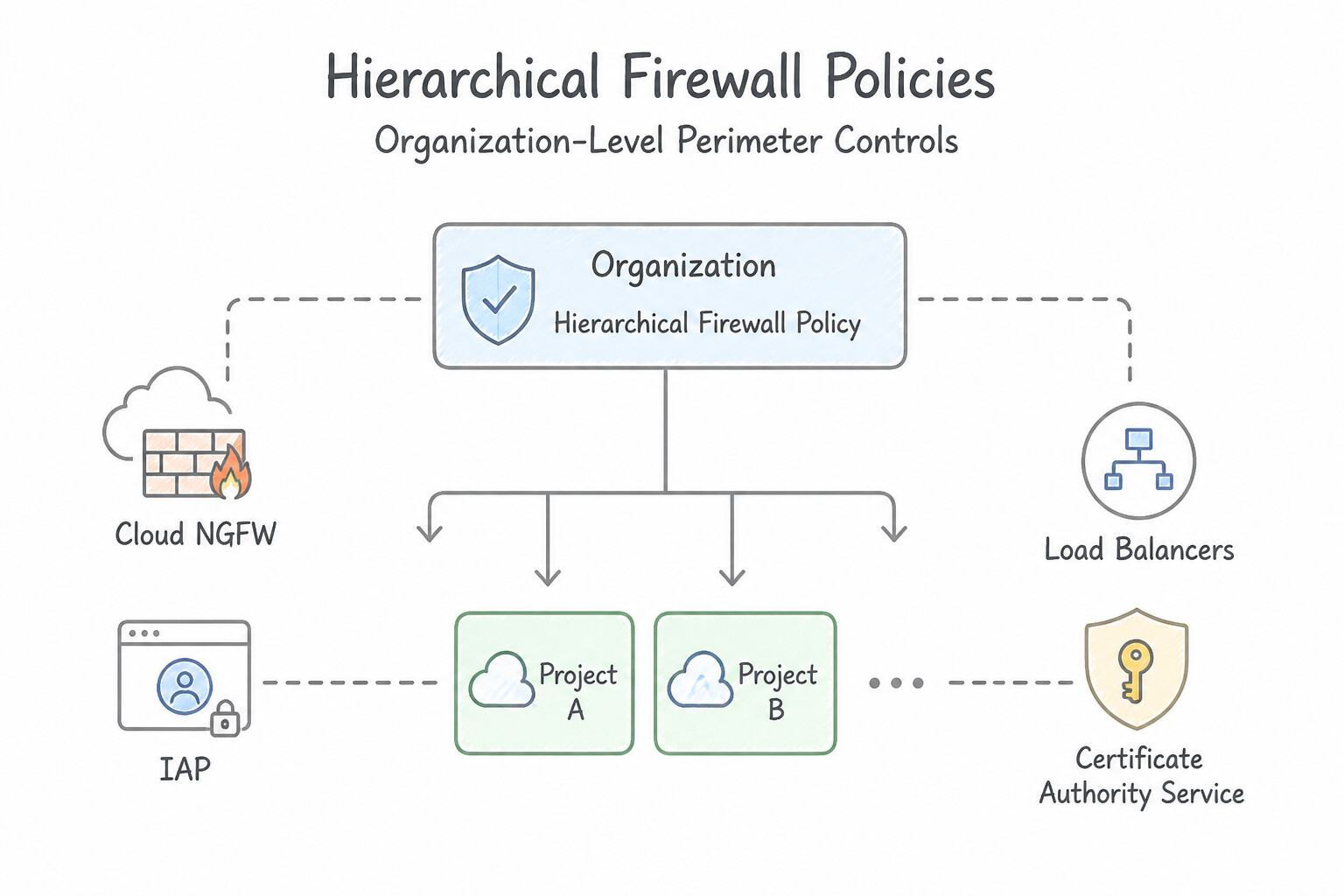
- Hierarchical Firewall Policies (
Organization/Folder) vs. Network Firewall Policies (VPC): - Hierarchical Firewall Policies are evaluated top-down (
Organization → Folder → VPC). A lower-level rule cannot override an explicitALLOWorDENYmatched at a higher level! To allow child folders or VPCs to inspect traffic that passes an Organization-level check, set the rule action togoto_next. - Identity-Aware Proxy (IAP) Zero-Trust Access:
- Replaces public bastion hosts and VPNs. To enable IAP TCP Forwarding for SSH (
tcp:22) or RDP (tcp:3389) to VMs without external IPs: - Create a VPC ingress firewall rule allowing
35.235.240.0/20on port22/3389. - Grant users
roles/iap.tunnelResourceAccessor(plusroles/compute.instanceAdmin.v1or OS Login roles). - For IAP-protected Web Applications behind an External/Internal Application Load Balancer, grant users
roles/iap.httpsResourceAccessor. - Certificate Authority Service (CAS): Managed, highly available service for operating private Root and Subordinate Certificate Authorities (
CA PoolsinDevOpsorEnterprisetier) used to issue mTLS workload certificates and subordinate CAs for Cloud NGFW / Secure Web Proxy TLS Inspection.
Key Implementation Patterns
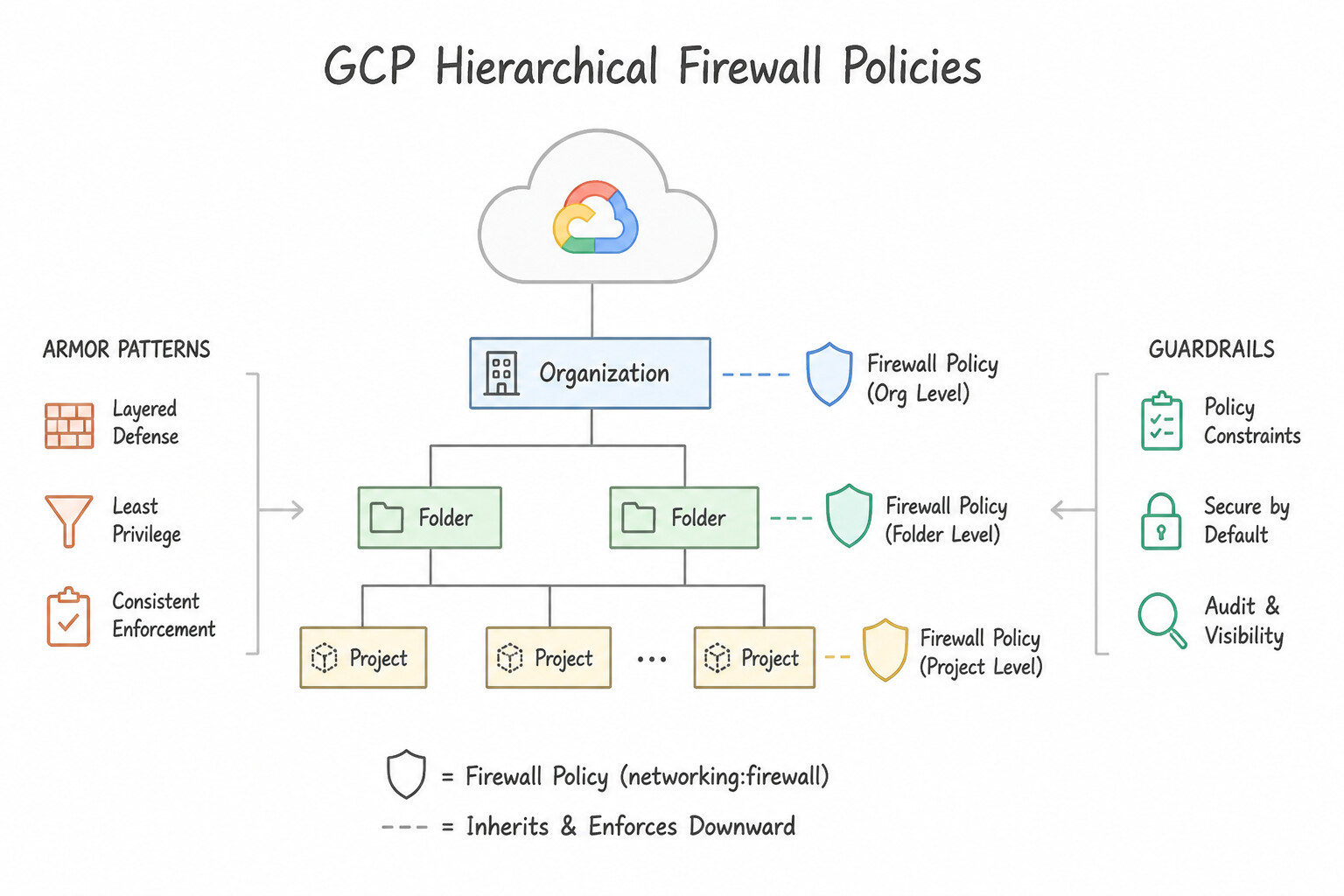
- Hierarchical Firewall Policy Enforcement: Use Create a hierarchical firewall policy associated with the "Production" folder. Add a rule to deny ingress traffic on port 22. Applying the deny policy only to the "Production" folder enforces security there while leaving the "Development" folder unaffected.
- Cloud Armor WAF Integration: Use Create a Google Cloud Armor security policy with the pre-configured SQL injection rule. Attach this policy to the load balancer's backend service. Cloud Armor acts as a WAF with pre-configured rules for SQL injection that can be attached to the load balancer backend.
- Securing Administrative Access via IAP: Use Create a firewall rule to allow ingress traffic from the IP range 35.235.240.0/20 on port 22. Grant the IAP-secured Tunnel User role to the team. IAP allows SSH access to private VMs by tunneling traffic from Google's known IP range (35.235.240.0/20) and requires the IAP-secured Tunnel User role.
Key Takeaways (2.1a)
- Hierarchical firewall policies allow centralized security enforcement across many projects.
- Policies can be attached to the Organization or specific Folders.
- To apply different security postures to different environments (e.g., Prod vs. Dev), attach policies at the Folder level.
- Hierarchical deny rules take precedence over local VPC allow rules.
Consideration 2.1b: Setting up application layer inspection on Cloud NGFW (layer 7)
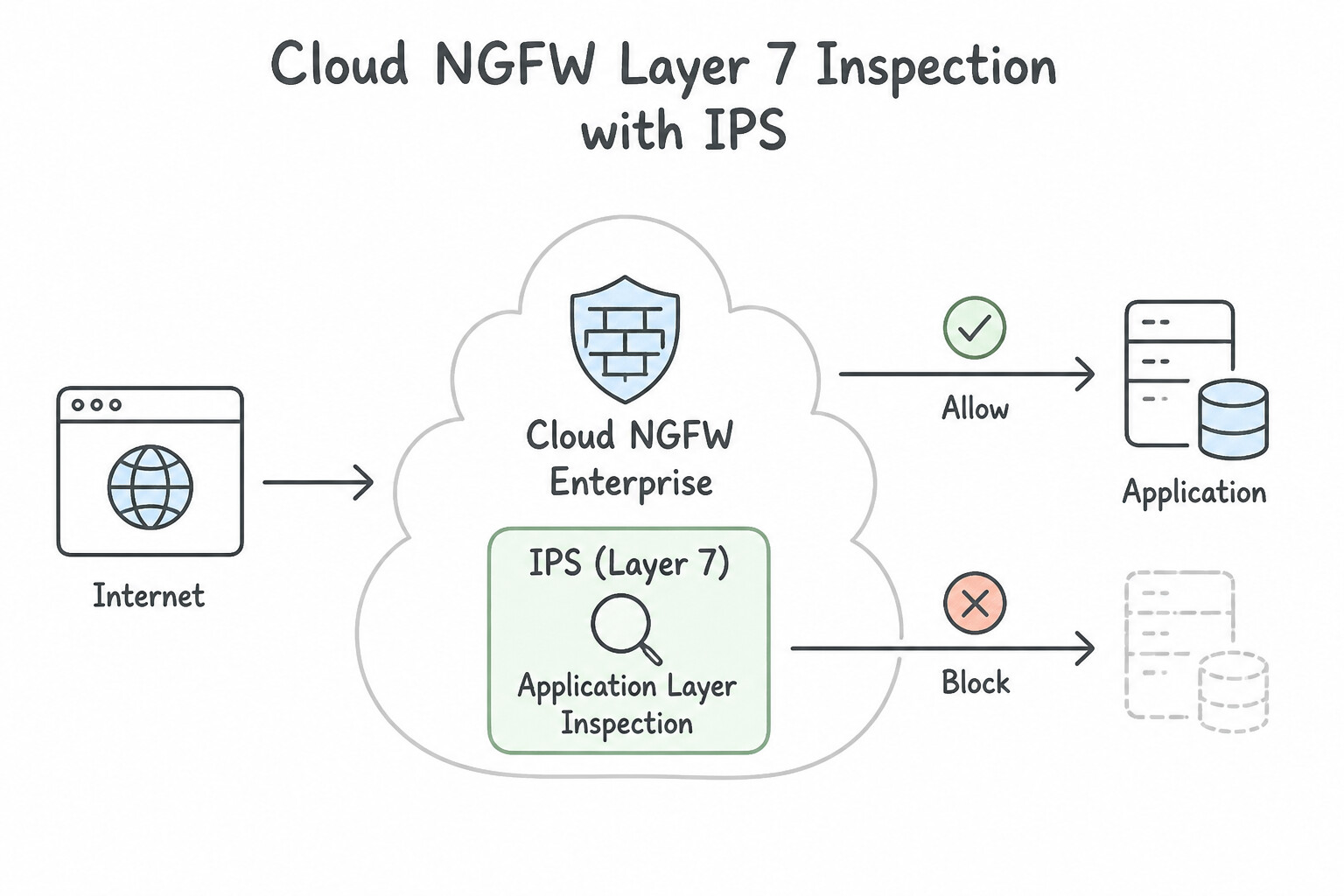
- Cloud NGFW Enterprise (Intrusion Prevention System — IPS): Inspects workload traffic at Layer 7 using Palo Alto Networks threat prevention technologies. To configure it:
- Create a Threat Prevention Profile inside a Security Profile Group.
- Create a Firewall Policy rule with action
apply_security_profile_grouppointing to that Security Profile Group, and associate a Firewall Endpoint with your VPC zone. - Decrypting TLS Traffic (
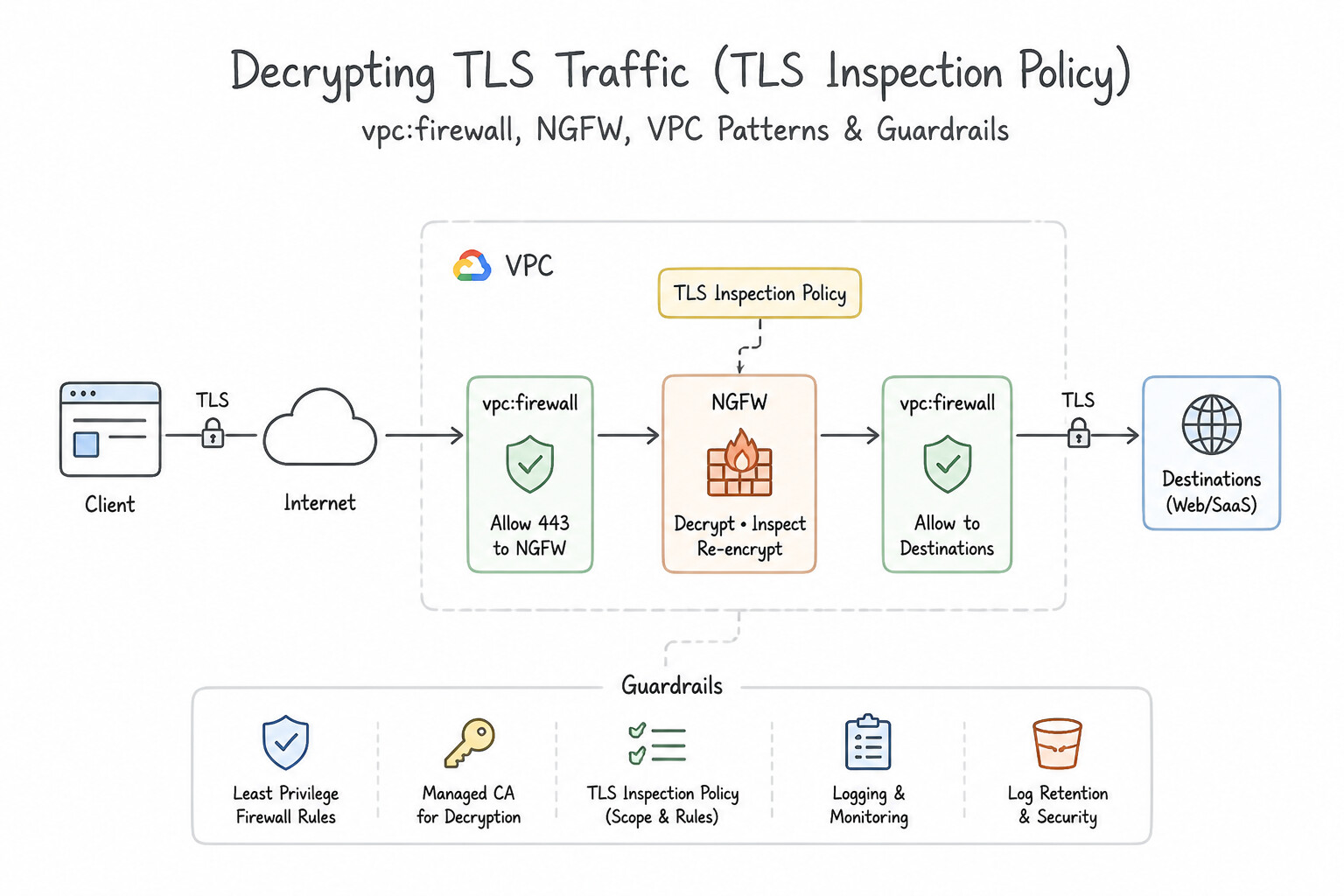
TLS Inspection Policy): To inspect encrypted TLS payloads in Cloud NGFW, configure a TLS Inspection Policy referencing a Certificate Authority Service (CAS) CA Pool (which dynamically generates certificates on the fly) and grant the Network Security Service Agent (service-PROJECT_NUMBER@gcp-sa-networksecurity.iam.gserviceaccount.com)roles/privateca.certificateManager. - Tuning False Positives: If a specific Palo Alto threat signature ID blocks legitimate internal application traffic, configure a Threat Signature Override inside the Threat Prevention Profile for that specific Threat ID (setting its action to
ALLOWorALERTinstead of disabling the entire profile).
Key Implementation Patterns
- Enabling Intrusion Prevention System (IPS): Use Create a security profile group containing a threat prevention profile. Create a firewall policy rule with the action set to apply the security profile group. Layer 7 inspection requires creating a Security Profile Group with threat prevention profiles and referencing it in a firewall policy rule.
- Handling False Positives in IPS: Use Configure a threat signature override in the security profile for the specific threat ID and set the action to Allow. Overrides let you disable a specific rule (Threat ID) that is causing a false positive without turning off the entire IPS.
- Inspecting Encrypted TLS Traffic: Use Create a TLS inspection policy that uses a Certificate Authority (CA) pool. Cloud NGFW requires a TLS inspection policy linked to a Certificate Authority (CA) pool to decrypt and inspect TLS traffic. (Avoid alternative: Allowing port 443 permits the traffic to flow but does not decrypt or inspect the payload.)
Key Takeaways (2.1b)
- Cloud NGFW Enterprise is required for Layer 7 inspection (IPS).
- Inspection logic is defined in a Security Profile Group.
- Firewall Policy Rules reference the Security Profile Group to apply inspection to traffic.
- Cloud Armor is distinct from Cloud NGFW; Armor protects Load Balancers (Web/WAF), while NGFW protects the VPC network.
Consideration 2.1c: Differentiating between private and public IP addressing
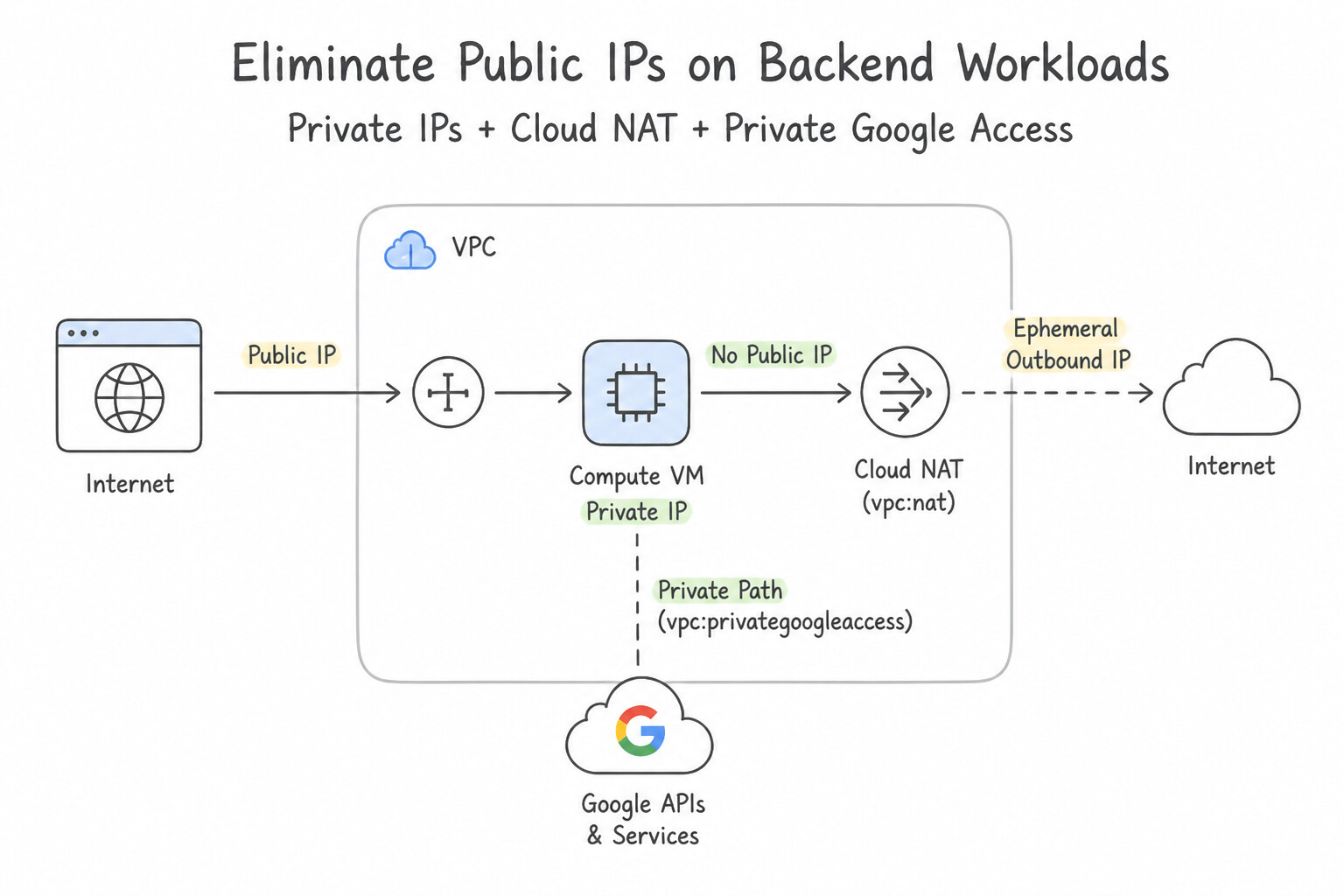
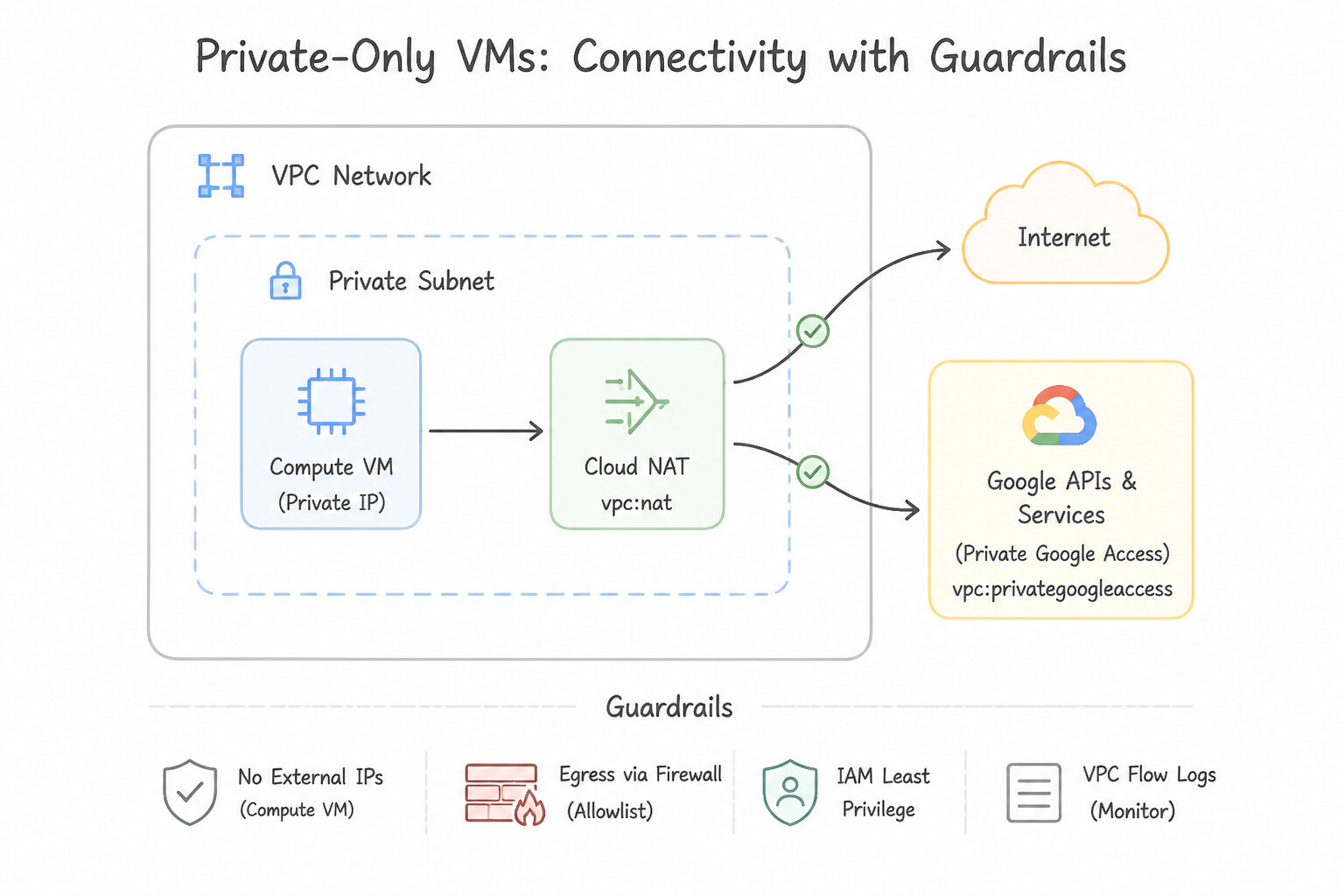
- Eliminate Public IPs on Backend Workloads: Production Compute Engine VMs, GKE worker nodes, Cloud SQL instances, and Vertex AI Workbench notebooks should operate with RFC 1918 Private IPs only, enforced globally via the
constraints/compute.vmExternalIpAccess(Deny All) andconstraints/sql.restrictPublicIpOrganization Policies. - Enabling Connectivity for Private-Only VMs:
- Inbound user/API traffic → Application Load Balancer + Cloud Armor / IAP.
- Inbound admin SSH/RDP → IAP TCP Forwarding (
35.235.240.0/20). - Outbound access to Google APIs (
storage.googleapis.com) → Private Google Access (PGA) enabled on the subnet. - Outbound access to the public internet (OS patches, webhooks) → Cloud NAT or Secure Web Proxy.
Key Implementation Patterns
- Secure Outbound Access for Private Subnets: Use Configure a Cloud NAT gateway on the Cloud Router associated with the subnet. Cloud NAT allows instances without external IP addresses to access the internet for updates while preventing inbound connections. (Avoid alternative: Private Google Access is for connecting to Google APIs, not the general internet.)
- Accessing Google APIs without Internet Access: Use Enable Private Google Access on the subnet used by the VM instances. Private Google Access enables VMs with only internal IPs to reach Google APIs via the Google backbone without NAT or external IPs. (Avoid alternative: The scenario prohibits NAT gateways, and Cloud NAT provides general internet access rather than just API access.)
Key Takeaways (2.1c)
- Instances without external IP addresses cannot access the internet directly.
- Cloud NAT enables outbound internet access for private instances while blocking inbound traffic.
- Private Google Access is specifically for Google APIs, not general internet access.
- Security best practices often minimize the use of public IP addresses to reduce the attack surface.
Consideration 2.1d: Configuring web application firewalls such as Google Cloud Armor
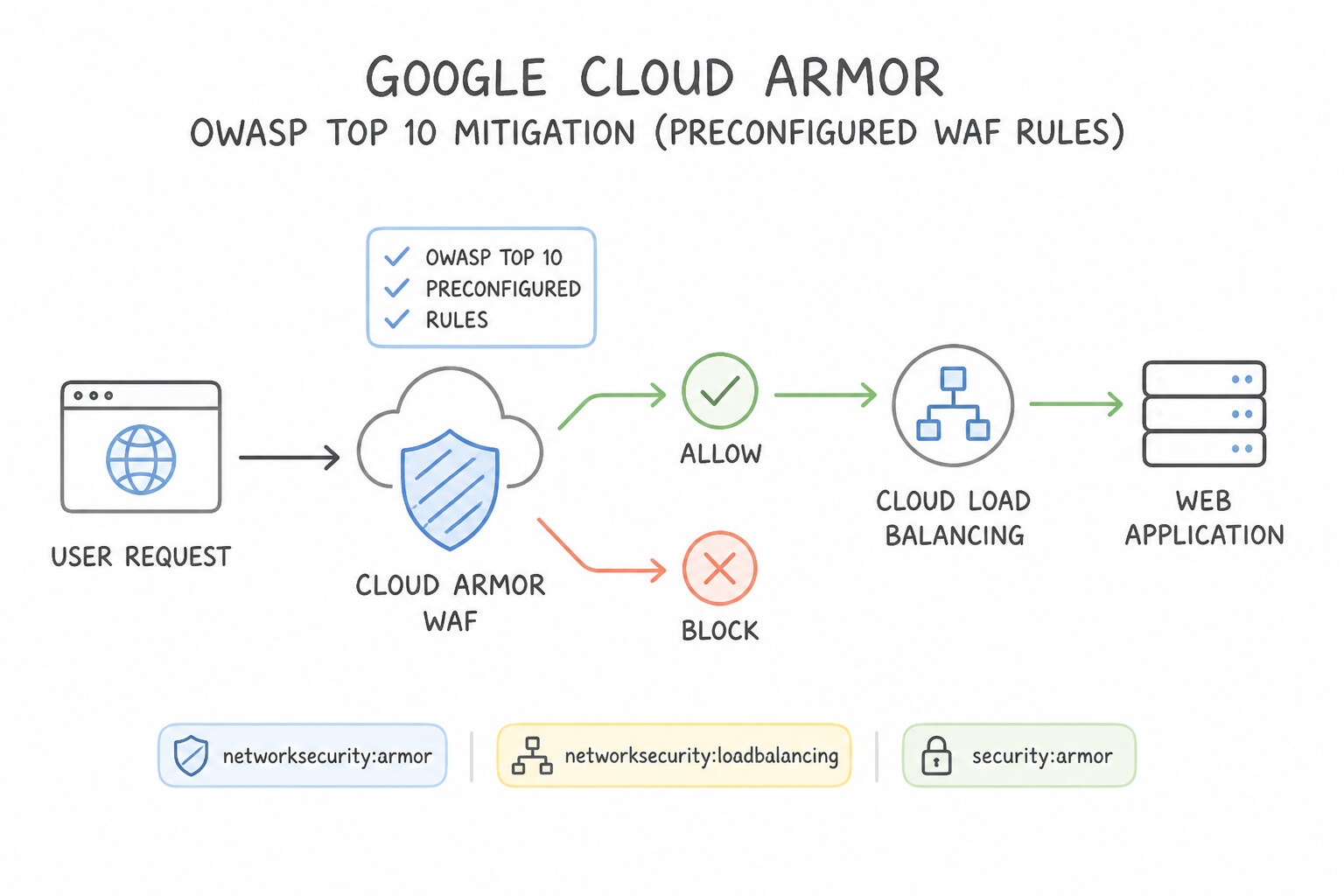
- OWASP Top 10 Mitigation (
Preconfigured WAF Rules): Attach a Cloud Armor security policy to the backend service of your Global External Application Load Balancer and enable preconfigured ModSecurity Core Rule Set signatures such asevaluatePreconfiguredWaf('sqli-stable')(SQL Injection),'xss-stable'(Cross-Site Scripting),'lfi-stable'(Local File Inclusion), and'rce-stable'(Remote Code Execution). - Rate Limiting:
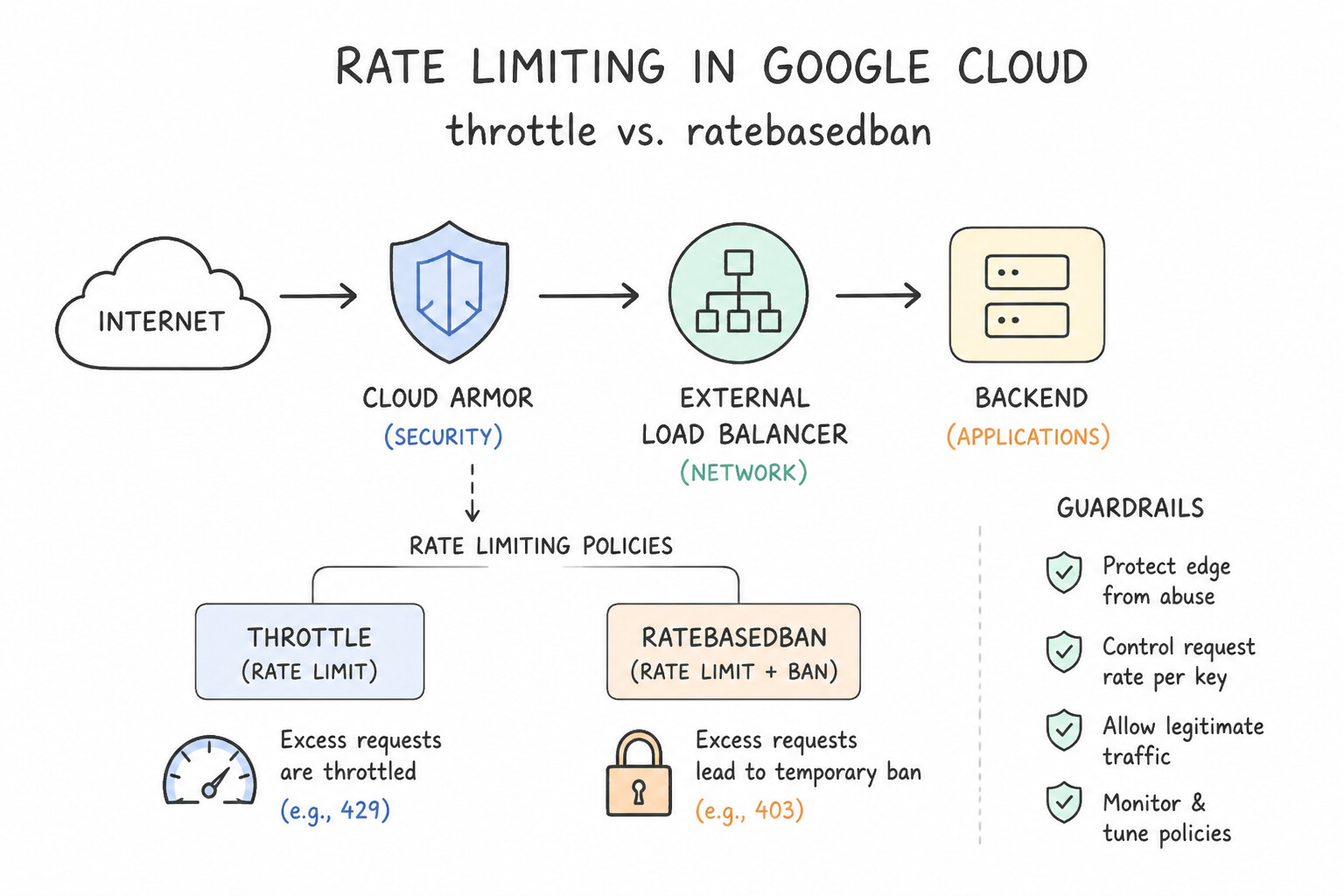
throttlevs.rate_based_ban: - Use
throttlewhen you want to cap a client's request rate (e.g., max 500 requests/minute per IP) and drop only the excess requests while letting requests below the limit continue immediately. - Use
rate_based_banwhen you want to completely block all traffic from an offending client for a penalty window (ban_duration_sec, e.g., 600 seconds) once they exceed the threshold. - Safe Rollout via
Preview Mode: Always enable Preview Mode on new Cloud Armor WAF or rate-limiting rules first; Preview Mode logs what action would have been taken in Cloud Logging (previewSecurityPolicy) without dropping live customer traffic.
Key Implementation Patterns
- Mitigating OWASP Top 10 Attacks: Use Configure a Google Cloud Armor security policy that uses preconfigured WAF rules. Preconfigured WAF rules in Google Cloud Armor provide immediate, managed protection against OWASP Top 10 attacks like SQLi and XSS without custom coding.
- Testing Rules Without Service Interruption: Use Enable Preview mode for the new rule and review the results in Cloud Logging. Preview mode evaluates traffic against the rule and logs the potential outcome (allow or deny) without actually enforcing the action, preventing service disruption.
- Throttling High-Volume API Requests: Use Configure a Google Cloud Armor security policy with a rate limiting rule. Rate limiting restricts the volume of requests from an IP address over a specific time period without permanently blocking the IP. (Avoid alternative: A deny rule permanently blocks the IP address and does not automatically restore access if the request volume decreases.)
Key Takeaways (2.1d)
- Google Cloud Armor protects applications at the edge using Global External Application Load Balancers.
- Use preconfigured WAF rules to mitigate OWASP Top 10 vulnerabilities (SQLi, XSS) immediately without custom coding.
- Avoid using VPC firewalls (Layer 3/4) for deep application layer (Layer 7) inspection.
- Adaptive Protection helps with anomalies but requires a learning baseline; preconfigured rules are for static, known signatures.
Consideration 2.1e: Deploying Secure Web Proxy
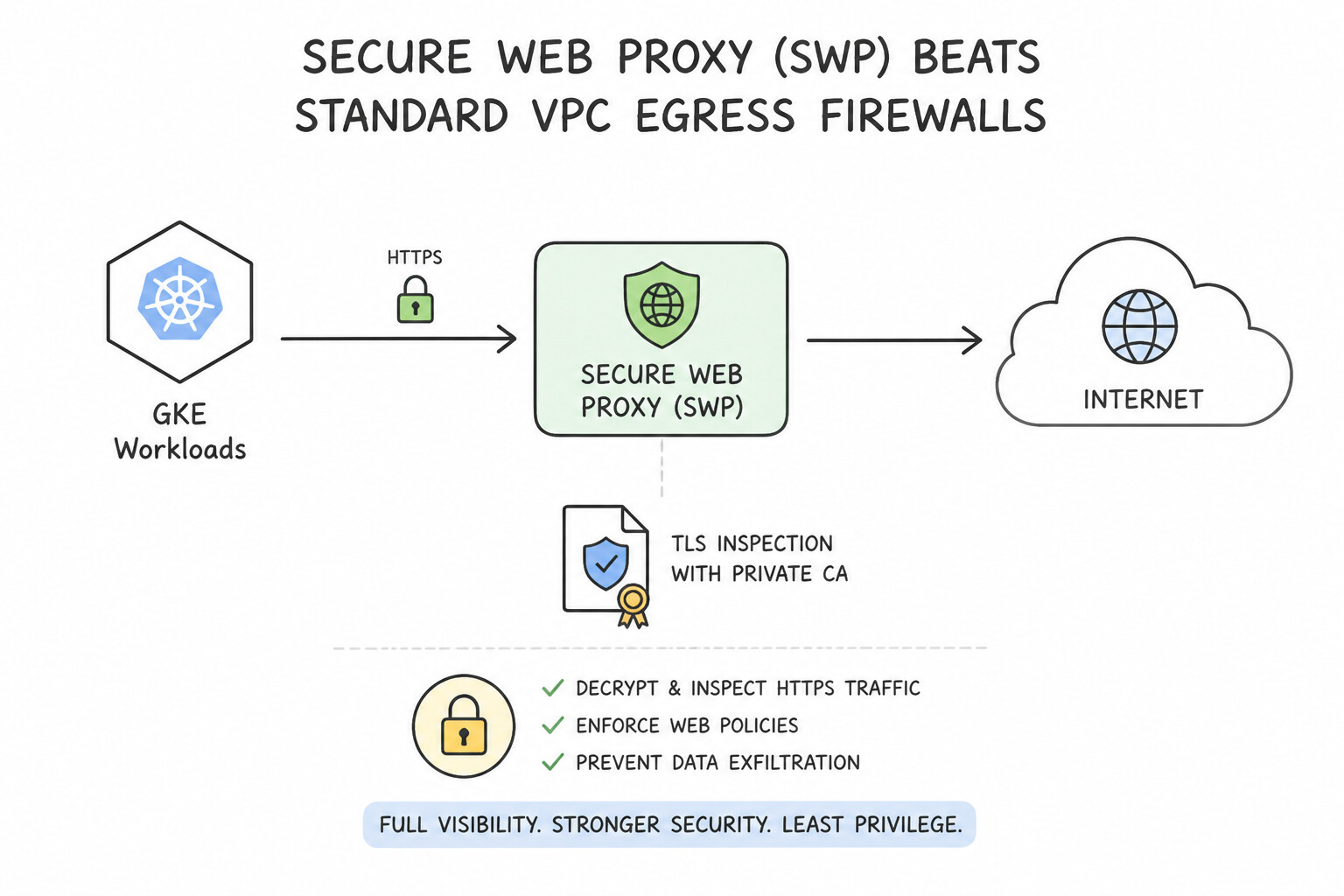
- Why Secure Web Proxy (SWP) Beats Standard VPC Egress Firewalls: Standard VPC egress firewall rules only filter by destination IP CIDR and Port—they cannot filter by domain name (
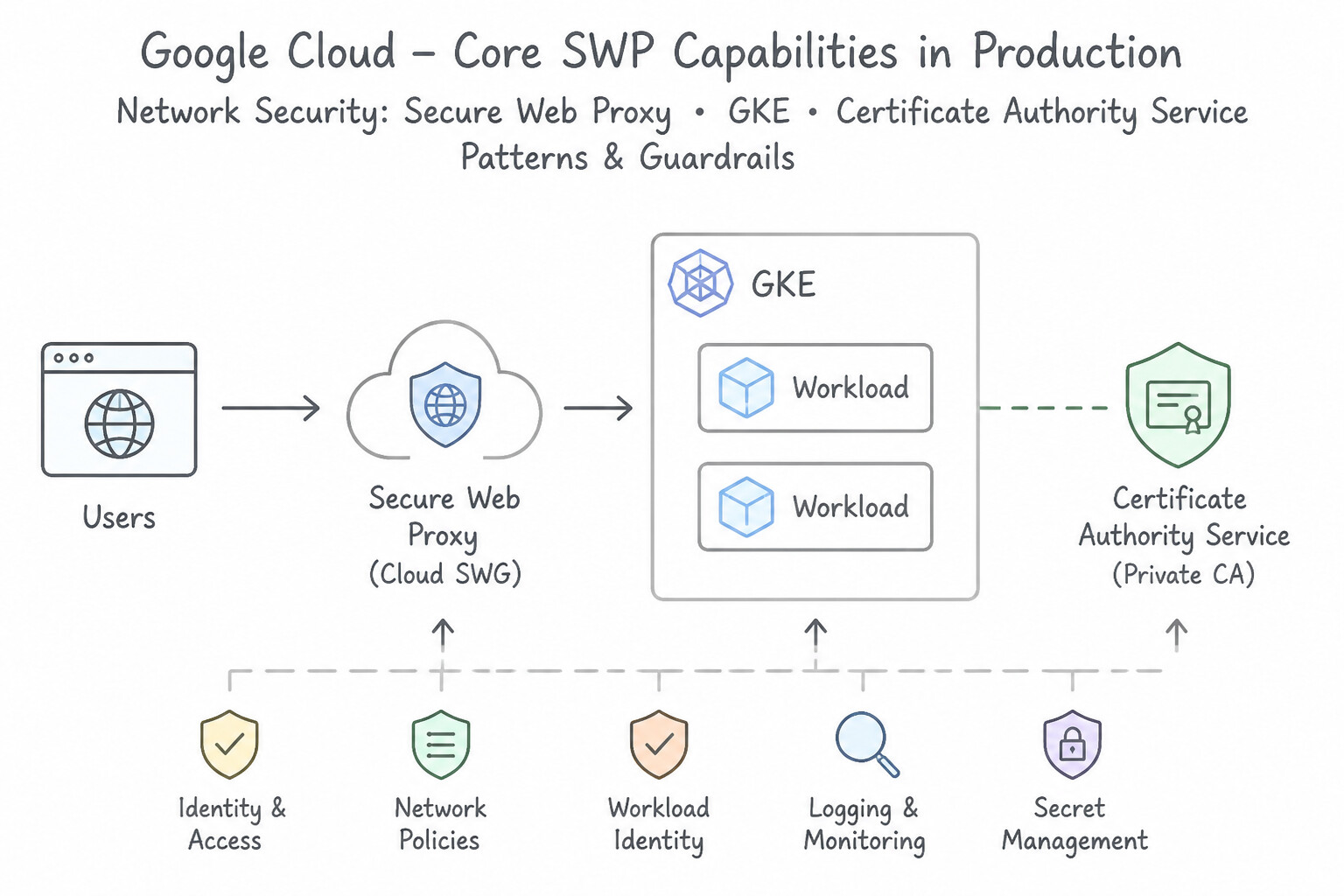
*.debian.orgorapi.stripe.com) or distinguish two HTTP paths. Secure Web Proxy is a managed regional Layer 7 egress proxy for VPC workloads. - Core SWP Capabilities in Production:
- URL Lists (FQDN & Path Filtering): Allow outbound traffic only to explicit domain wildcards (
*.debian.org,packages.cloud.google.com) and deny everything else. - Identity-Based Egress Rules (CEL): Filter outbound web access by caller
source.matchServiceAccount('app-sa@proj.iam.gserviceaccount.com')or Secure Tags (source.matchTag(...)) rather than fragile VM IP addresses. - Outbound TLS Inspection: Attach a TLS Inspection Policy backed by a Certificate Authority Service (CAS) CA Pool to decrypt and inspect outbound HTTPS URLs and payloads.
Key Implementation Patterns
- Granular FQDN Filtering: Use Create a URL list containing *.debian.org and packages.cloud.google.com. Create a Secure Web Proxy rule with priority 1000 to ALLOW requests matching this list. Create a rule with priority 2000 to DENY all other traffic. Use a URL list for the specific domains and create a higher priority ALLOW rule, followed by a lower priority DENY rule for all other traffic.
- Enabling TLS Inspection: Use Create a TLS inspection policy that uses a Certificate Authority Service (CAS) pool. Apply this policy to the Secure Web Proxy. Secure Web Proxy requires a TLS inspection policy backed by Certificate Authority Service (CAS) to decrypt and inspect HTTPS traffic.
- Identity-Based Egress Policies: Use Create a Secure Web Proxy policy rule that filters traffic based on the source_service_accounts of the application Pods. Secure Web Proxy can filter traffic by the Service Account identity, allowing distinct policies for apps sharing the same infrastructure.
Key Takeaways (2.1e)
- Secure Web Proxy is used for granular egress filtering based on FQDNs and URLs.
- VPC Firewalls primarily filter based on IP ranges and ports.
- In Google Cloud policies, lower integer values indicate higher priority.
- Always place specific 'Allow' rules at a higher priority than the catch-all 'Deny' rule.
Consideration 2.1f: Configuring Cloud DNS security settings
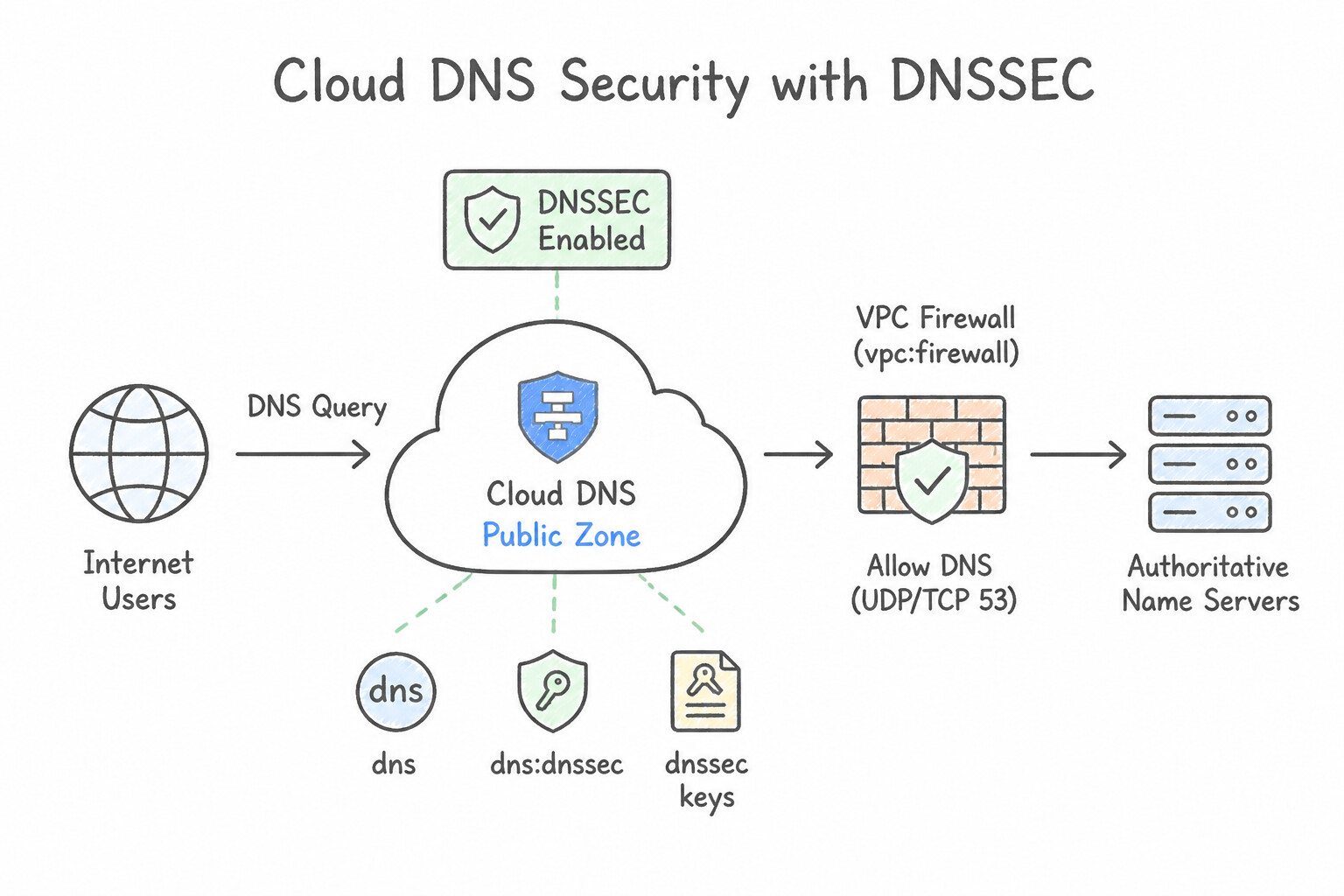
- Public Zones → Enable
DNSSEC: Protects public domain resolution against DNS cache poisoning and man-in-the-middle spoofing by cryptographically signing DNS records (RRSIG,DNSKEY). After enabling DNSSEC on a Cloud DNS public managed zone, you must copy the generatedDS(Delegation Signer) record to your top-level domain registrar to complete the chain of trust! - VPC Outbound DNS →
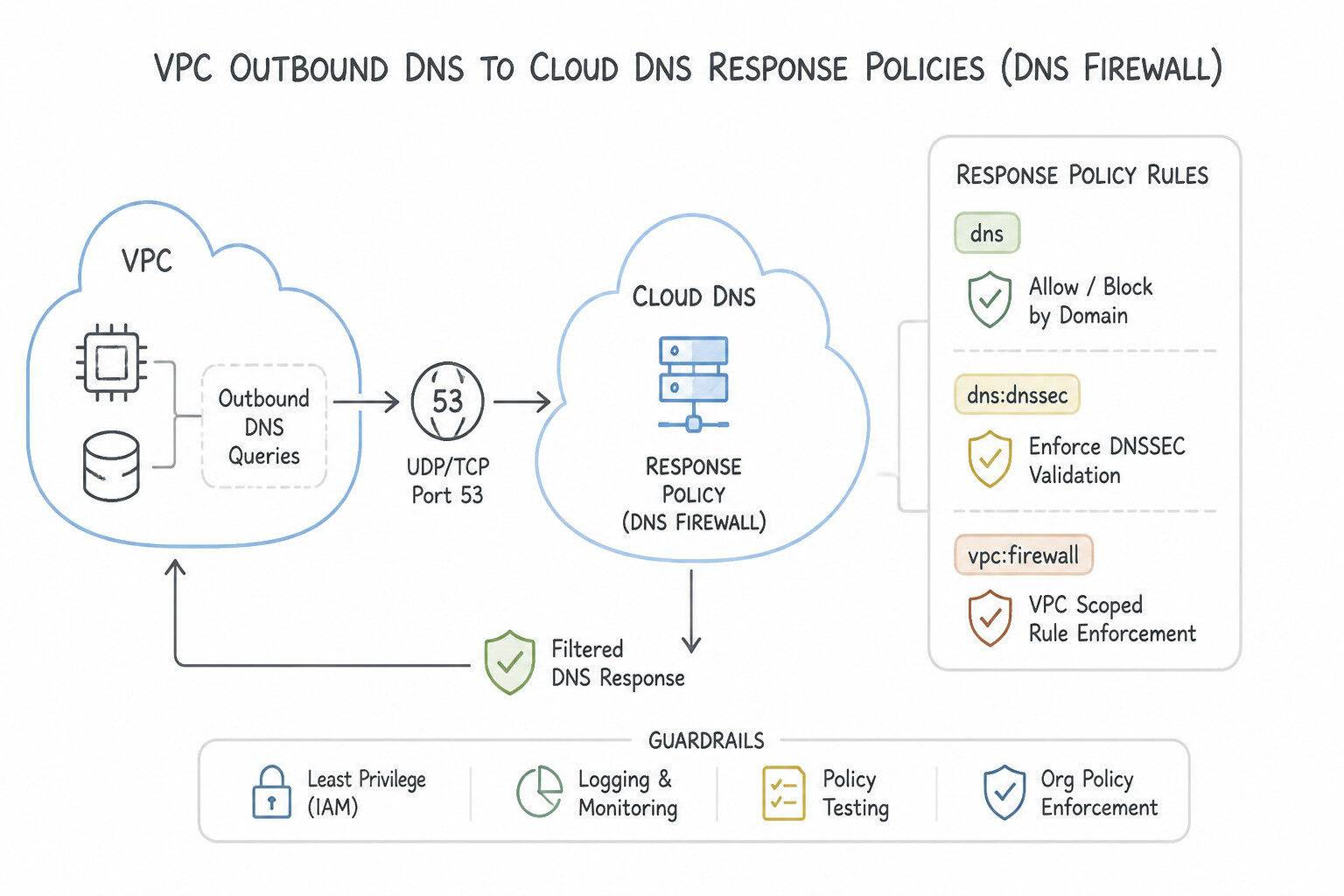
Cloud DNS Response Policies(DNS Firewall): To prevent compromised VMs in a VPC from resolving known malicious or command-and-control (C2) domains, attach a Cloud DNS Response Policy to the VPC with rules that returnNODATA/NXDOMAIN(or redirect to a sinkhole IP) for blocked FQDNs. - Split-Horizon DNS →
Private Managed Zones: Serve internal private IP addresses forexample.comto VMs inside your VPC while serving public load balancer IPs forexample.comto internet users.
Key Implementation Patterns
- Preventing DNS Spoofing on Public Zones: Use Enable DNSSEC on the Cloud DNS managed zone. Add the generated Delegation Signer (DS) records to your domain registrar. DNSSEC authenticates DNS responses to prevent spoofing. You must enable it on the zone and update the registrar with DS records.
- Blocking Malicious Domain Resolution: Use Configure a Cloud DNS response policy with rules to deny resolution for the malicious domains and bind it to the VPC network. Cloud DNS response policies act as a DNS firewall to filter queries based on domain names. (Avoid alternative: Firewall rules block by IP and port, not by domain name, and would block all DNS traffic.)
Key Takeaways (2.1f)
- DNSSEC prevents spoofing: It ensures that DNS responses are authentic and have not been modified.
- Two-step process: Enabling DNSSEC requires action in the Cloud DNS console AND updating the domain registrar with DS records.
- Public vs. Private: Private zones are for internal VPC use; public zones are for the internet.
- Forwarding vs. Authoritative: Forwarding is for looking up other domains; authoritative zones store your domain's records.
Consideration 2.1g: Continually monitoring and restricting configured APIs
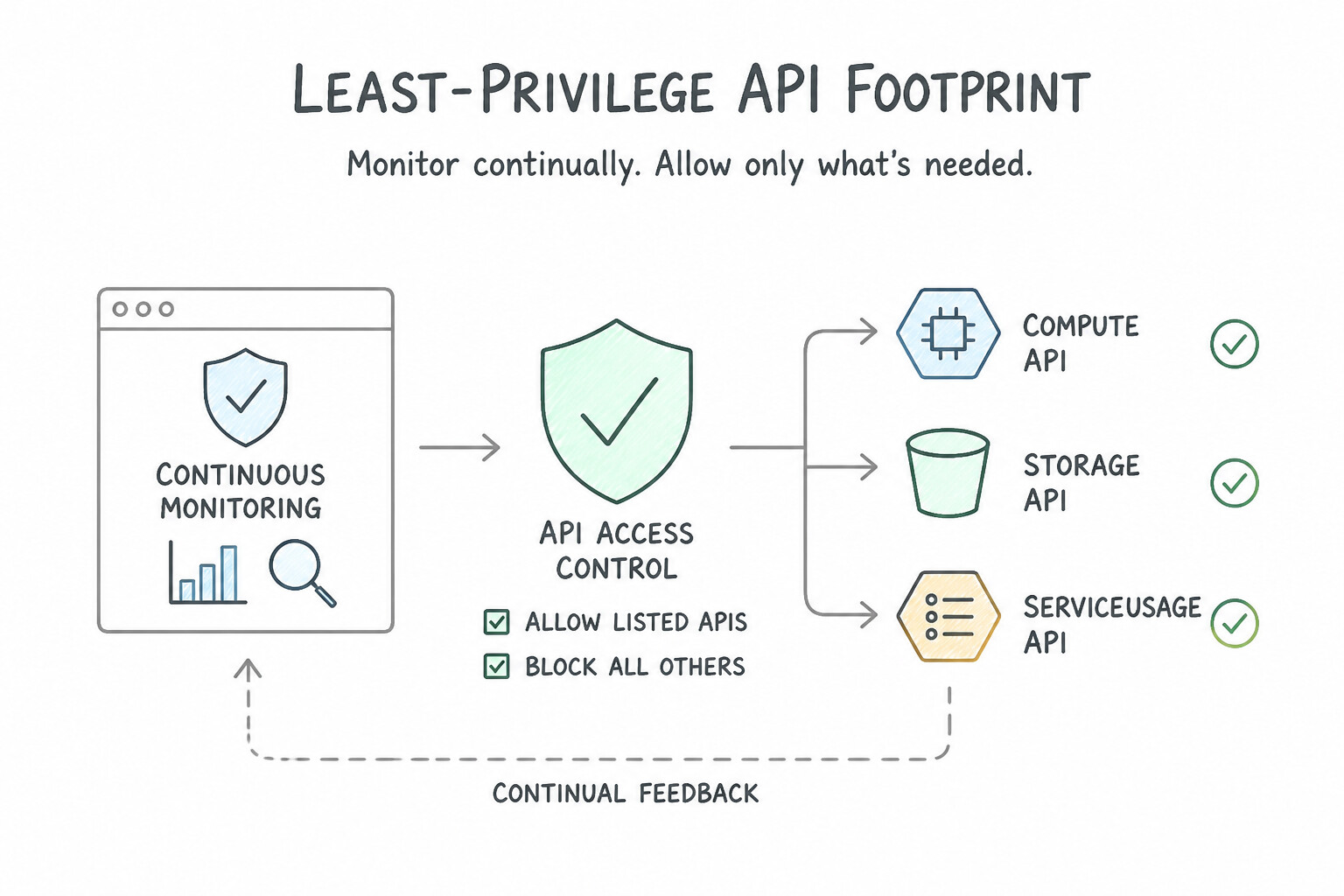
- Least-Privilege API Footprint: Every enabled Google Cloud API in a project is a potential attack vector if credentials are compromised.
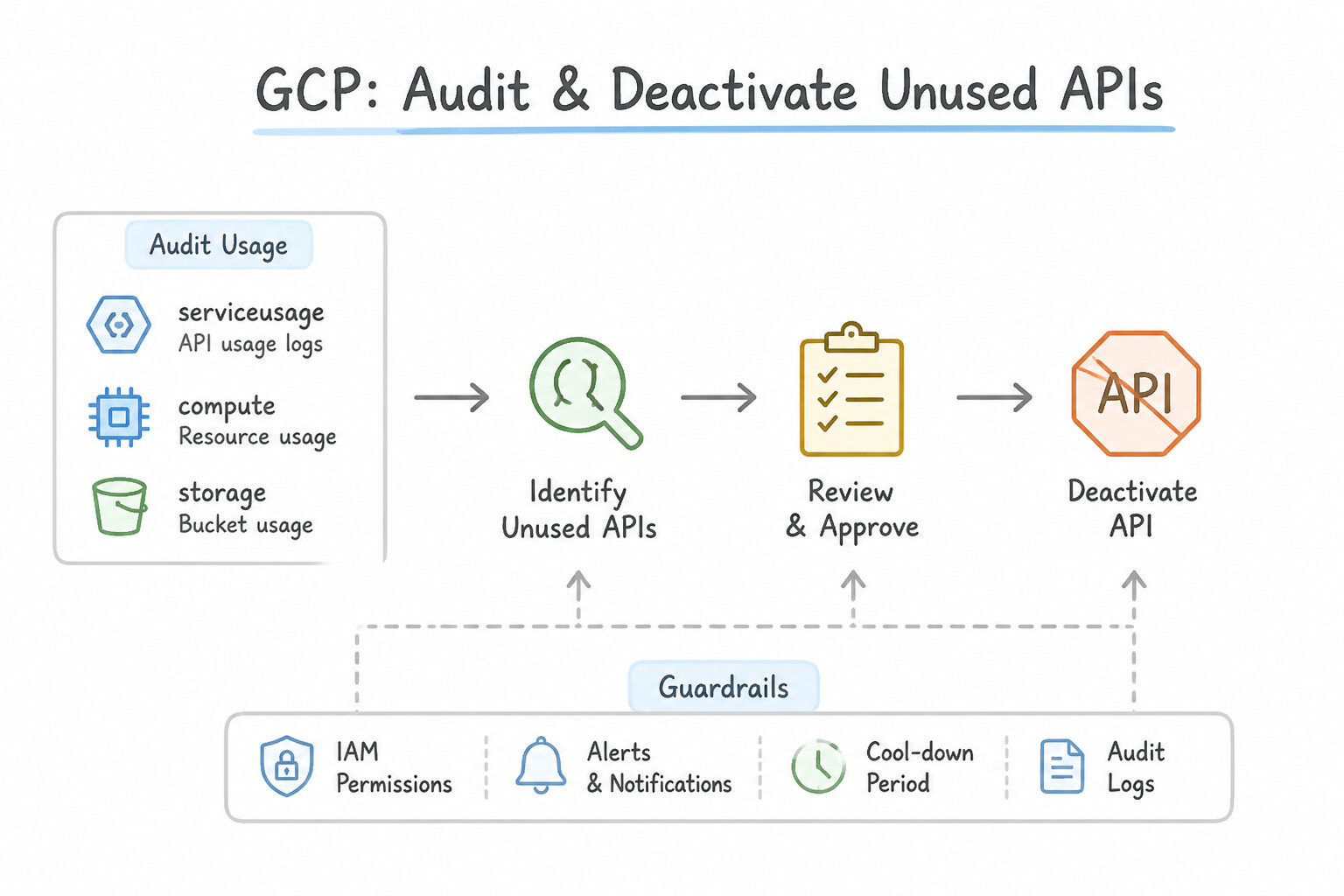
- Auditing & Deactivating Unused APIs: Query the Service Usage API (
serviceusage.googleapis.com) and Cloud Monitoring metrics (serviceruntime.googleapis.com/api/request_count) to identify enabled APIs with zero requests over the past 30–90 days, and disable them. - Preventative API Guardrails:
- Use the
constraints/serviceuser.servicesOrganization Policy constraint on Sandbox or regulated Folders to restrict which APIs project admins can enable. - Use VPC Service Controls (
VPC Accessible Services) to restrict which APIs workloads inside a security perimeter can call.
Key Implementation Patterns
- Reducing Attack Surface via Service Disablement: Use Use the Service Usage API to view utilization metrics and the last used timestamp for each API. Disable the APIs with no recent activity. Service Usage API metrics provide evidence of activity, ensuring you only disable truly unused services.
- Hierarchical Restriction of API Enablement: Use Configure an Organization Policy on the Sandbox folder using the constraints/serviceuser.services constraint. Add the sensitive APIs to the policy's denied list. Organization Policies provide centralized control over resource configuration, and the serviceuser.services constraint specifically controls API enablement.
- Preventing Data Exfiltration with VPC Service Controls: Use Configure a VPC Service Controls service perimeter that includes the project. Restrict the Cloud Storage API within the perimeter. VPC Service Controls create a secure perimeter around services like Cloud Storage to prevent data exfiltration and restrict access to specific networks.
Key Takeaways (2.1g)
- Enabled but unused APIs increase the attack surface of a project.
- The Service Usage API provides the authoritative data (metrics and timestamps) on whether an API is actively being used.
- Always verify usage metrics before disabling a service to prevent accidental outages of dependent services.
- Use Organization Policies for centralized, preventative governance across the resource hierarchy.
Quick Decision Cheat Sheet (Subsection 2.1)
If the Scenario Requires... | Choose This Google Cloud Pattern | Avoid This Common Mistake |
|---|---|---|
"SSH into private VMs (no public IP) failed after enabling IAP; what firewall or IAM setting is missing?" | Allow ingress from 35.235.240.0/20 on tcp:22 and grant roles/iap.tunnelResourceAccessor | Allowing 130.211.0.0/22 (Load Balancer health check range, not IAP TCP forwarding!) |
"Mitigate OWASP Top 10 SQLi and XSS attacks at the perimeter without modifying legacy app code" | Attach a Google Cloud Armor policy with preconfigured WAF rules ( sqli-stable, xss-stable) to the Global ALB | Deploying VPC Service Controls or enabling VPC Flow Logs |
"Test a new Cloud Armor WAF rule on live production traffic without risking false-positive outages" | Enable Preview Mode on the Cloud Armor rule and inspect previewSecurityPolicy in Cloud Logging | Lowering rule priority below the default allow rule (never gets evaluated!) |
"Cloud NGFW IPS blocks a specific benign internal traffic pattern as a false-positive threat ID" | Configure a Threat Signature Override for that specific Threat ID in the Threat Prevention Profile | Switching the entire firewall policy to dry-run or deleting the Security Profile Group |
"Protect a public Cloud DNS managed zone against DNS spoofing and cache poisoning" | Enable DNSSEC on the Cloud DNS zone and register the DS record with the parent domain registrar | Converting the public zone to a private zone (breaks external user resolution) |
Further Reading (Subsection 2.1)
- Hierarchical firewall policies overview — Explains how hierarchical firewall policies work, their inheritance model, and how they interact with VPC firewall rules.
- Google Cloud Armor overview — Provides a high-level explanation of Cloud Armor's capabilities, including WAF rules and DDoS protection.
- Tuning Google Cloud Armor WAF rules — Details how to configure and tune the pre-configured WAF rules, specifically mentioning the SQL injection rule set.
- Connect to instances without external IP addresses — Official documentation describing how to use IAP for TCP forwarding to SSH into instances without external IP addresses, including the necessary firewall and IAM configurations.
- Cloud NGFW overview — Provides a comparison between Essentials, Standard, and Enterprise tiers, highlighting the IPS capabilities of the Enterprise tier.
- Set up intrusion detection and prevention service in your network — Detailed steps on creating a security profile group and referencing it in a firewall policy rule.
Subsection 2.2: Configuring boundary segmentation
The Big Picture
In Google Cloud, boundary segmentation operates across three distinct layers: the VPC Network Layer (Shared VPC, VPC Peering, Firewall Rules), the Kubernetes Workload Layer (GKE NetworkPolicies), and the Google API Perimeter Layer (VPC Service Controls). Confusing these three boundaries leads to three classic production security failures:
- Expecting VPC Firewall Rules to Stop
storage.googleapis.comExfiltration (2.2c): Suppose a developer's laptop is compromised, or an insider with validroles/storage.objectViewercredentials runsgsutil cp gs://corp-patient-records/* gs://my-personal-gmail-bucket/. Becausestorage.googleapis.comandbigquery.googleapis.comare multi-tenant public APIs, VPC firewall rules are completely bypassed! Only VPC Service Controls (VPC-SC) builds a context-aware cryptographic service perimeter around Google Cloud managed APIs—blocking both unauthorized Ingress (stolen credentials used from outside the corporate network/ACM Access Level) and unauthorized Egress (copying data from a protected project to an external bucket outside the perimeter). - The Transitive VPC Peering Fallacy & Over-Broad Shared VPC IAM (2.2a):
- VPC Network Peering is strictly non-transitive: If
VPC-Ais peered withVPC-B, andVPC-Bis peered withVPC-C, workloads inVPC-Acannot reachVPC-Cunless you create a direct peering connection betweenVPC-AandVPC-C(or use Private Service Connect / Network Connectivity Center / HA VPN). - In a Shared VPC, granting application developers
roles/compute.networkAdminor Project-levelroles/compute.networkUseron the Host Project lets them deploy VMs into any department's subnet. Least privilege requires grantingroles/compute.networkUserat the specific Subnet level inside the Host Project! - IP-Based N-Tier Firewalls & Flat GKE Pod Networks (2.2b): Writing N-tier VPC firewall rules using ephemeral VM IP addresses breaks as soon as Managed Instance Groups autoscale. Instead, isolate Web → App → Database tiers using Service Account–based firewall rules (
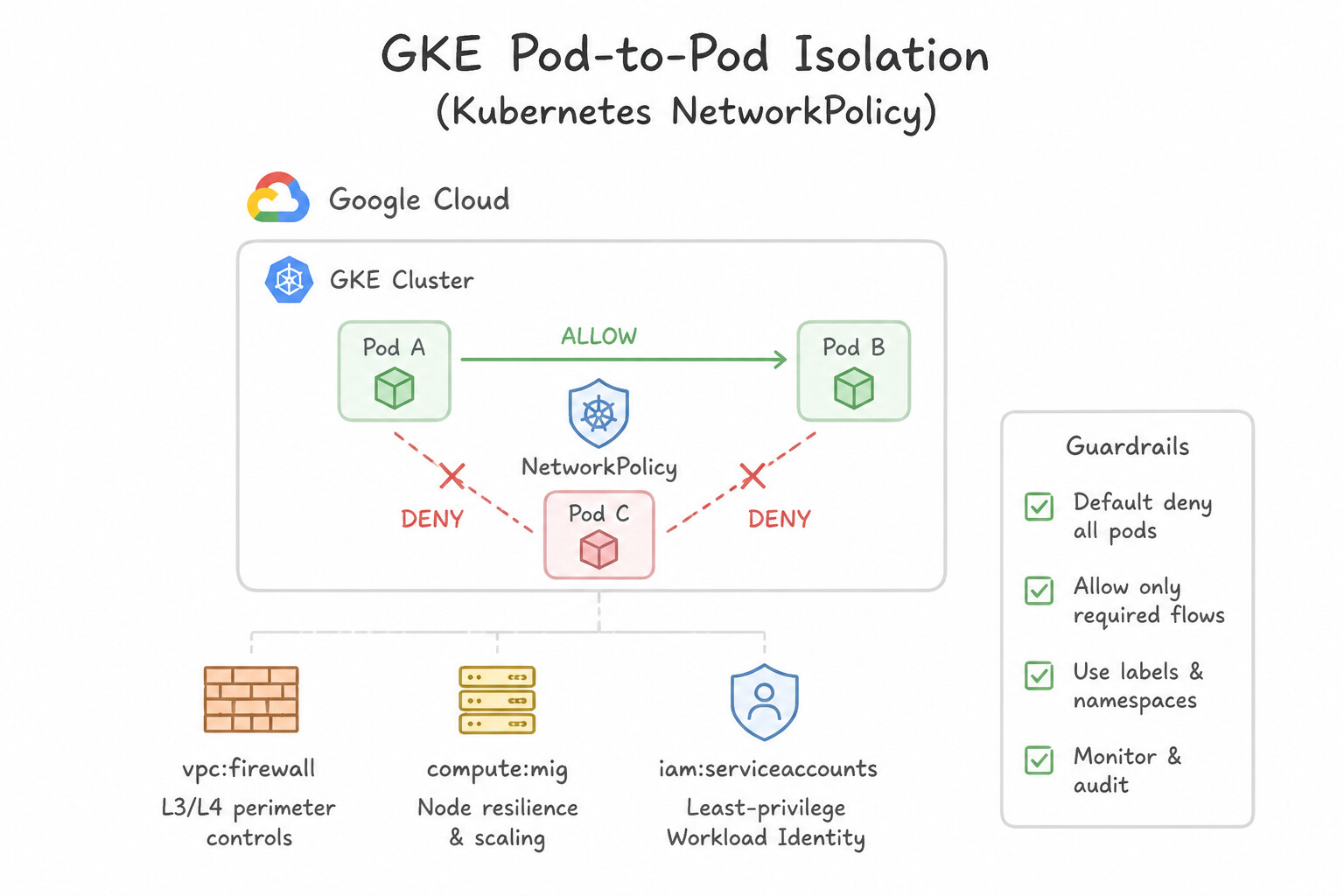
sourceServiceAccounts/targetServiceAccounts) or IAM-governed Secure Tags. Inside GKE, all pods across all namespaces can talk to each other by default unless you enable GKE Network Policy (Dataplane V2) and apply a default-deny KubernetesNetworkPolicy(podSelector: {},policyTypes: [Ingress, Egress]).
Consideration 2.2a: Configuring security properties of VPC networks, VPC peering, Shared VPC, and firewall rules
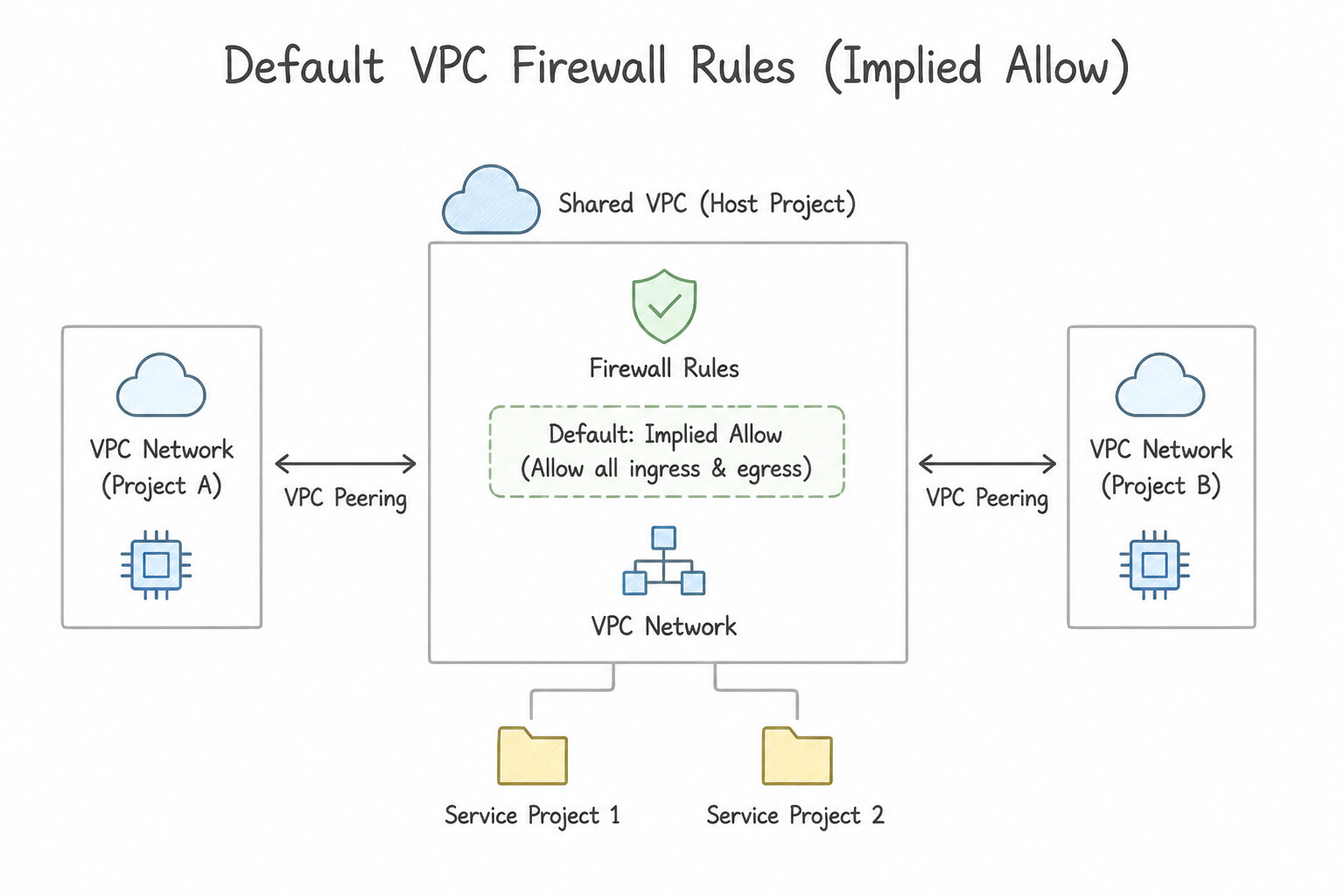
- Default VPC Firewall Rules (
Implied Allow Egress,Implied Deny Ingress): Every VPC has two implied priority-65535rules that cannot be deleted: Implied allow egress (0.0.0.0/0) and Implied deny ingress (0.0.0.0/0). Never use thedefaultauto-mode VPC in production because it pre-populates permissive rules (default-allow-internal,default-allow-ssh,default-allow-rdp). - Shared VPC Separation of Duties:
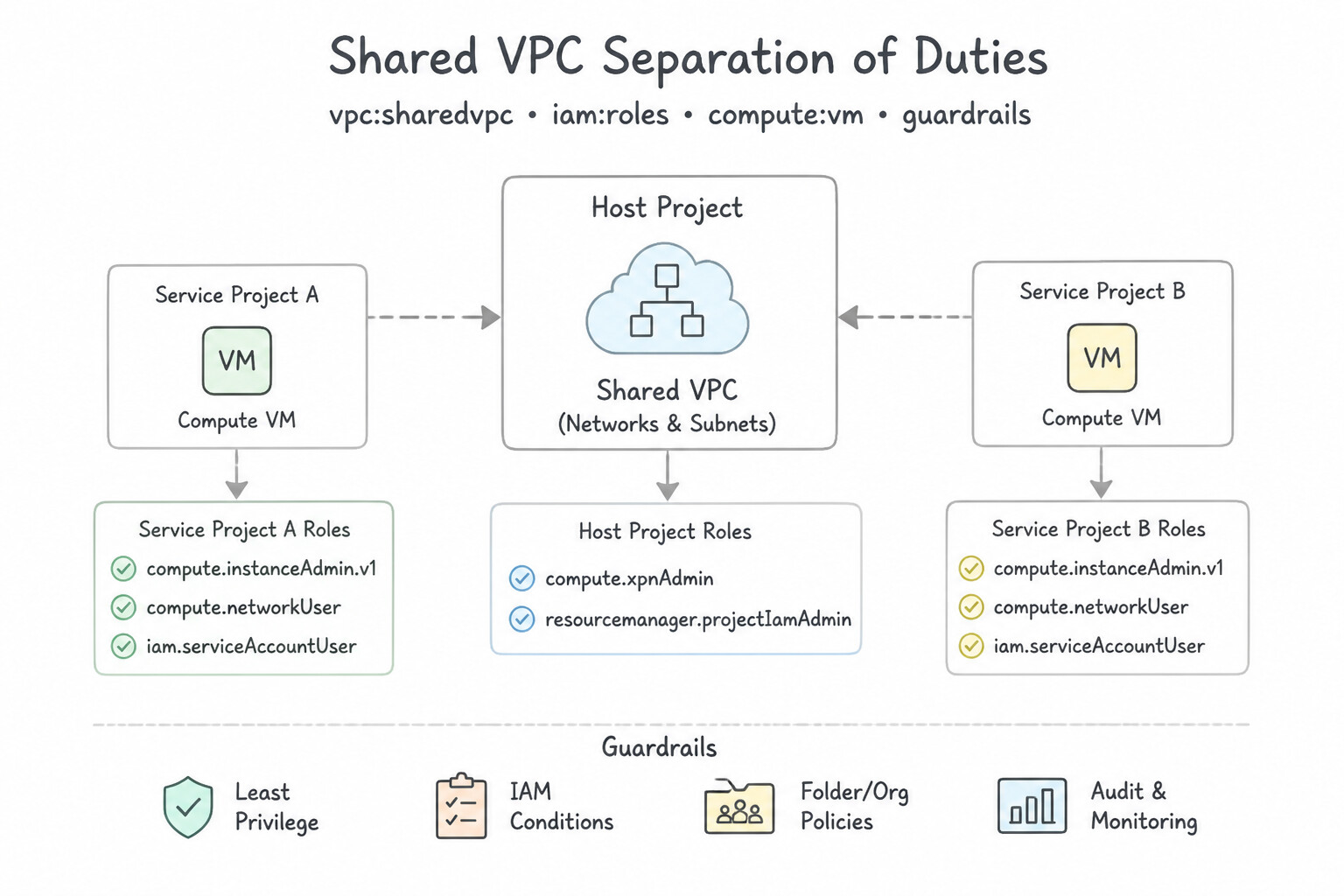
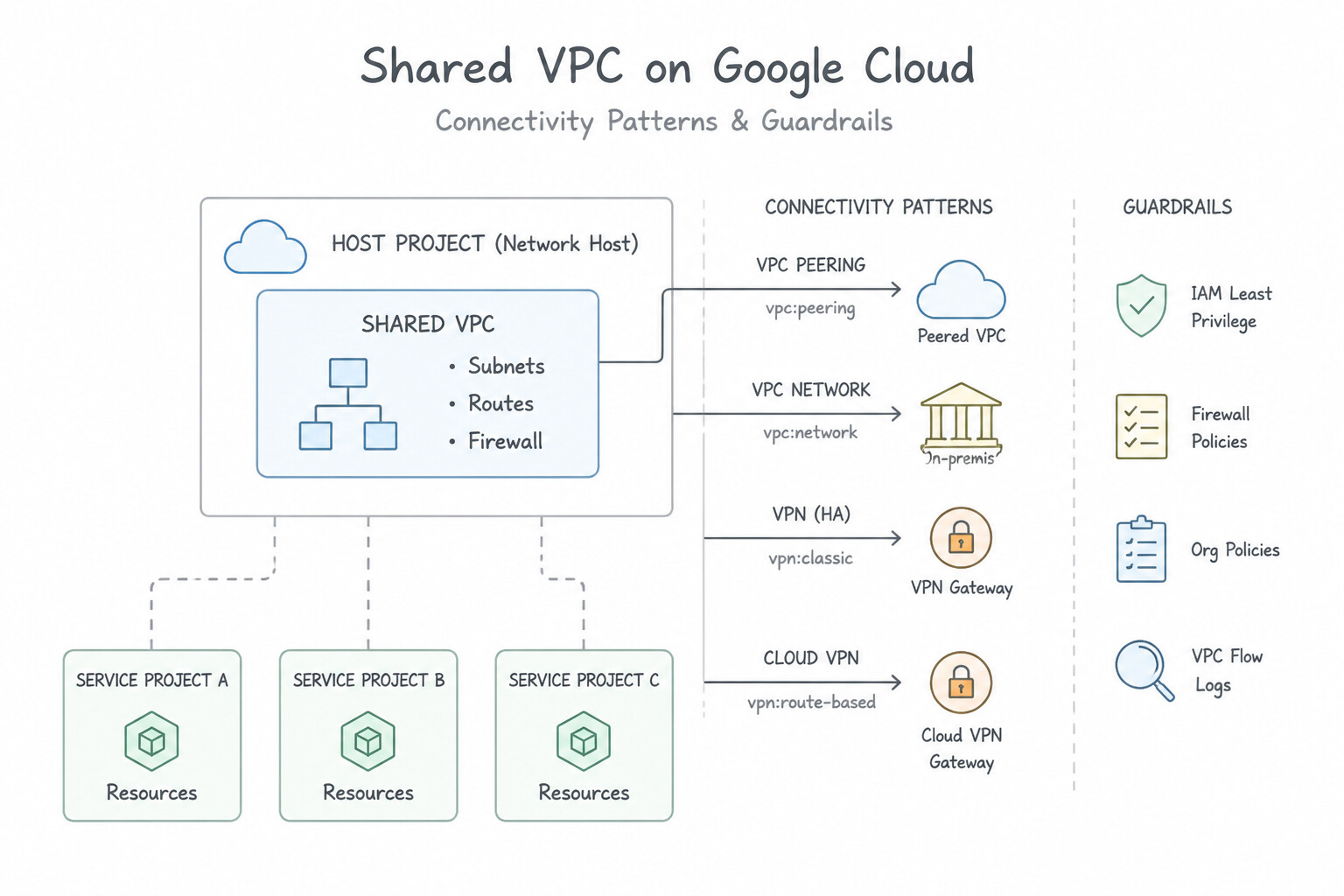
- Network & Security Admins administer subnets, routes, and firewall rules in the central Host Project (
roles/compute.networkAdmin,roles/compute.securityAdmin). - Application Developers deploy VMs and GKE clusters in Service Projects and are granted
roles/compute.networkUseron only their designated subnet in the Host Project. - VPC Network Peering Rules & Non-Transitivity:
- Connects two VPCs privately across the same or different organizations with zero single point of failure and full line-rate bandwidth.
- Requires non-overlapping subnet CIDRs and is strictly non-transitive (
Spoke-A↔Hub↔Spoke-Bdoes not allowSpoke-Ato talk toSpoke-Bwithout direct peering betweenSpoke-AandSpoke-Bor a NVA/PSC hub).
Key Implementation Patterns
- Shared VPC Delegation of Duties: Use Grant the Compute Network User role to the developers on 'subnet-us-east-1' in the Host Project. This provides the required access to the specific subnet while restricting administrative privileges. (Avoid alternative: This grants access to all subnets in the Host Project, which is too broad.)
- Identity-Based Firewall Rules: Use Create an ingress firewall rule on the backend VM allowing traffic from the source service account used by the frontend VMs. Using a service account as a firewall source filter automatically handles access for new VMs created by the MIG without managing IP addresses.
- VPC Peering Transitivity: Use Create a VPC Network Peering connection directly between Spoke-A and Spoke-B. VPC Peering is non-transitive; networks must be directly peered to communicate via internal IP addresses. (Avoid alternative: Exporting custom routes allows sharing routes to on-premises or dynamic destinations but does not enable transitive peering between spokes.)
Key Takeaways (2.2a)
- Shared VPC separates network administration (Host Project) from resource usage (Service Project).
- The
roles/compute.networkUserrole is required for Service Project users to attach resources to Host Project subnets.- Always apply IAM roles at the most granular level possible (e.g., Subnet vs. Project) to follow the principle of least privilege.
- Network Admins should retain control over firewalls and routes; Developers should only consume network connectivity.
Consideration 2.2b: Configuring network isolation and data encapsulation for N-tier applications
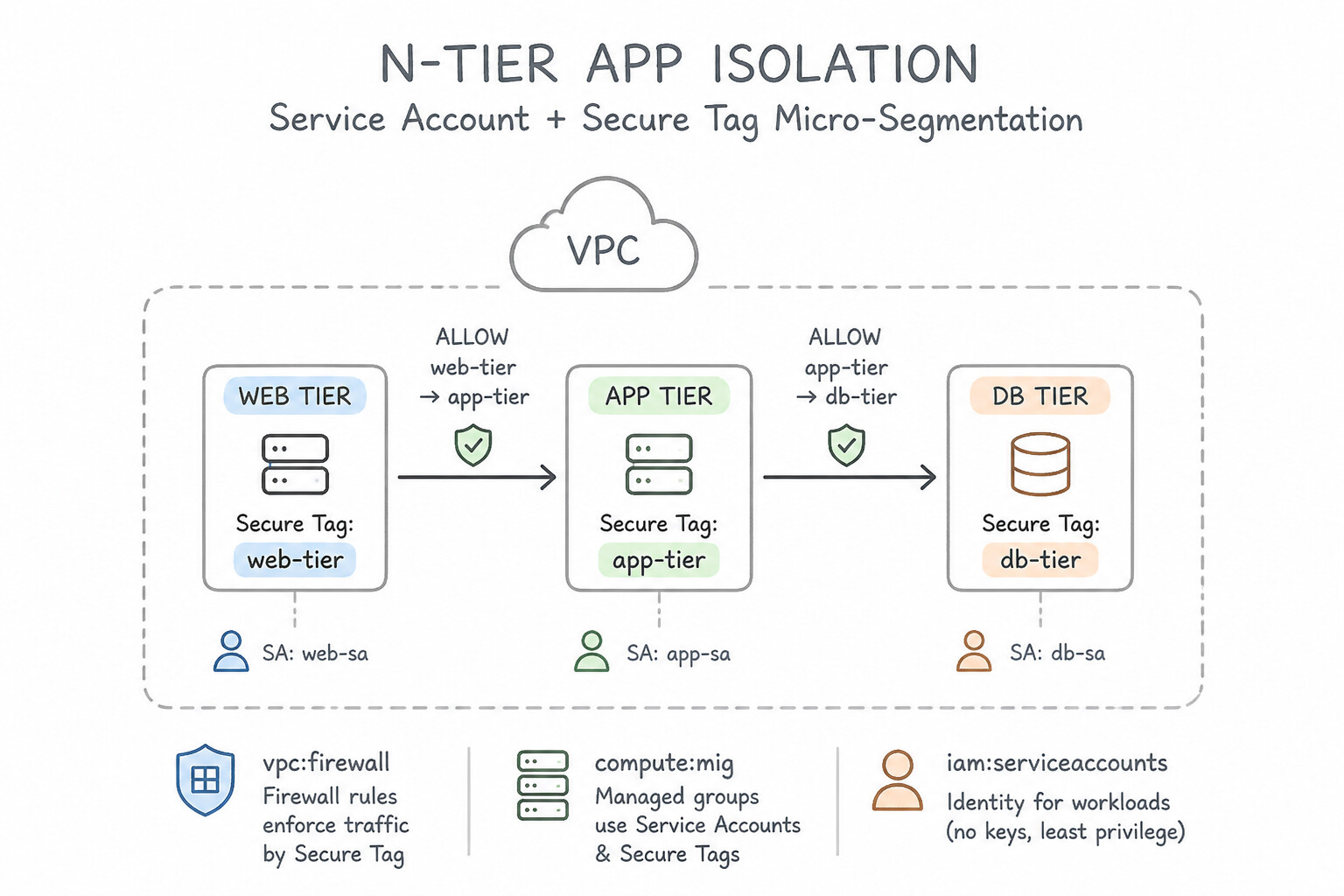
- Service Account & Secure Tag Micro-Segmentation:
- Instead of filtering N-tier traffic by subnet CIDR blocks, assign a dedicated Service Account (
web-sa,app-sa,db-sa) or IAM-governed Secure Tag (tagValues/...) to each tier's VMs. - Create an ingress firewall rule on the database tier with
targetServiceAccounts: [db-sa]andsourceServiceAccounts: [app-sa]ontcp:5432. Because Service Account bindings and Secure Tags are governed by IAM (unlike legacy network tags, which any user withcompute.instances.setTagscan spoof!), developers cannot spoof tier membership. - (architectures Note: You cannot mix Network Tags and Service Accounts in the same VPC firewall rule!)
- GKE Pod-to-Pod Isolation (
Kubernetes NetworkPolicy): By default in Kubernetes, all pods in all namespaces can communicate freely. To enforce Zero-Trust micro-segmentation inside GKE (e.g., isolating apaymentsnamespace), enable GKE Network Policy / Dataplane V2 and deploy a default deny-allNetworkPolicy(podSelector: {}withpolicyTypes: ["Ingress", "Egress"]), then layer explicit allow rules from frontend pods to backend pods.
Key Implementation Patterns
- Dynamic Segmentation with Identity-Based Firewalls: Use Assign unique service accounts to the VMs in each tier. Create an ingress firewall rule allowing traffic from the Web tier's service account to the App tier's service account. Service accounts provide a strong, immutable identity for firewall rules that works seamlessly with autoscaling.
- Hierarchical Boundary Protection: Use Create a hierarchical firewall policy at the Organization level with a deny rule for ports 22 and 3389. Hierarchical firewall policies allow centralized enforcement of firewall rules across all projects in an Organization. (Avoid alternative: Configuring rules per project is not centralized and relies on individual project maintenance.)
- Micro-segmentation in Kubernetes (GKE): Use Apply a Kubernetes NetworkPolicy that allows ingress from frontend pods and denies egress for backend pods. NetworkPolicies are the standard Kubernetes way to control traffic flow between pods using labels and selectors. (Avoid alternative: VPC firewall rules are generally for node-level or external traffic, not dynamic pod-to-pod traffic within a cluster.)
Key Takeaways (2.2b)
- VPC firewall rules can filter traffic based on Service Accounts, Network Tags, or IP ranges.
- Service Accounts provide the most secure, identity-based mechanism for filtering traffic between VMs.
- Network tags are useful for routing or less critical segmentation but are mutable by instance admins.
- Avoid managing individual IP addresses for autoscaling groups; rely on dynamic abstractions.
Consideration 2.2c: Identifying use cases and configuring VPC Service Controls
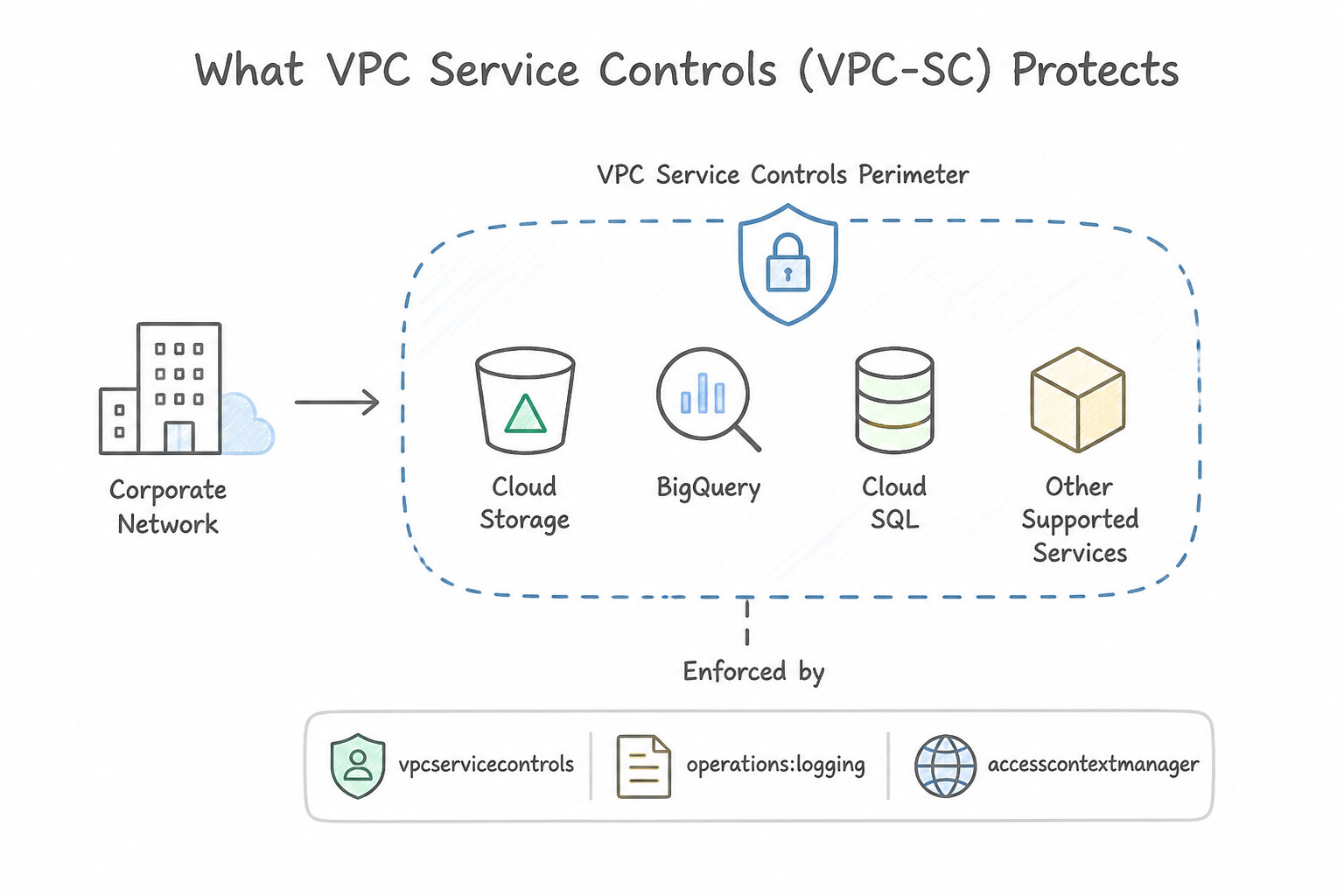
- What VPC Service Controls (VPC-SC) Protects: Wraps Google Cloud managed APIs (Cloud Storage, BigQuery, Vertex AI, Cloud KMS, Secret Manager) in a project-level Service Perimeter to prevent data exfiltration (even by an attacker holding valid IAM credentials or a leaked Service Account key).
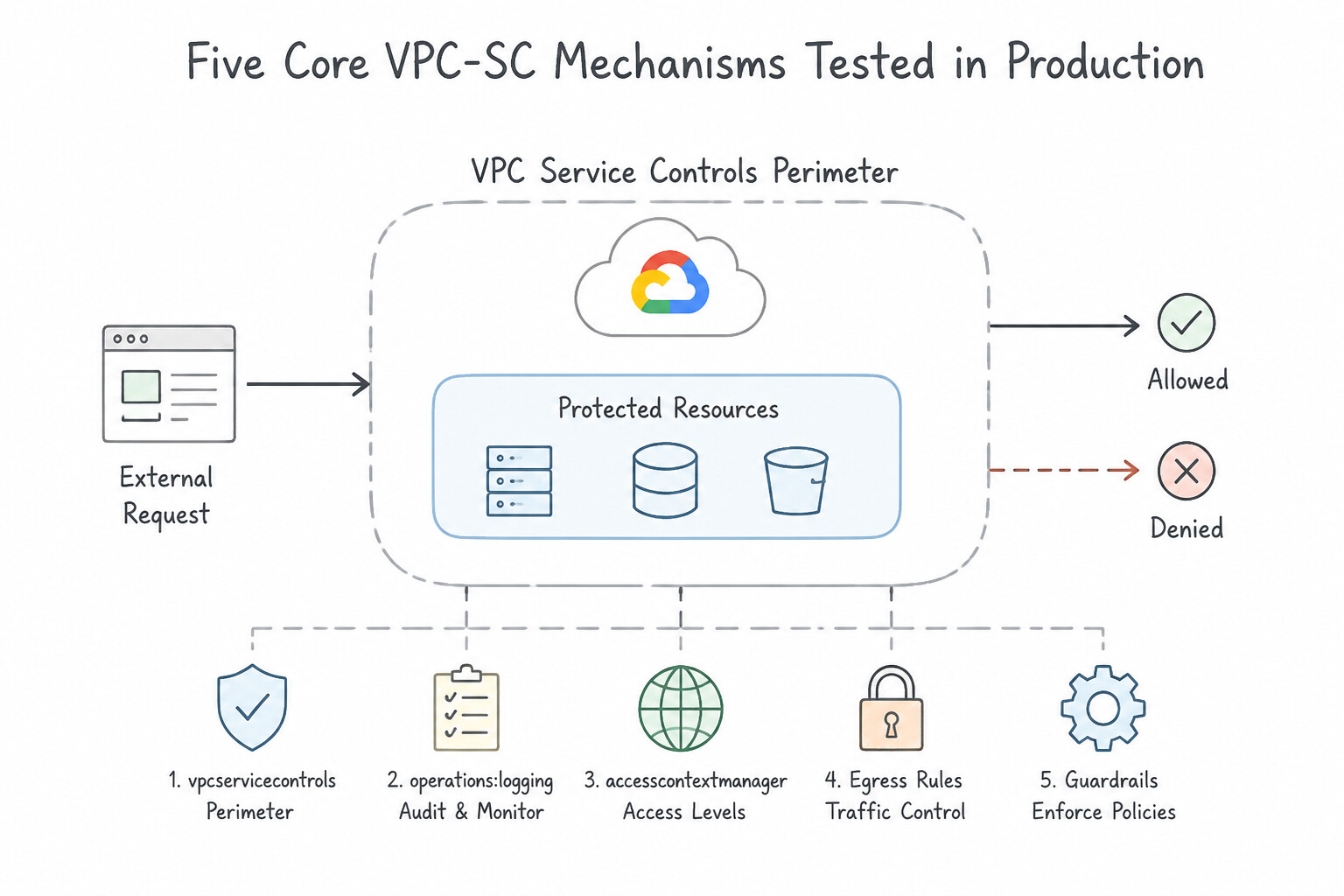
- Five Core VPC-SC Mechanisms Tested in production:
- Dry-Run Mode vs. Enforced Mode: Always deploy new or modified perimeters in Dry-Run Mode first! Dry-Run evaluates traffic against the proposed perimeter and logs violations in Cloud Audit Logs (
violationReason) with zero impact on production workloads. - Access Context Manager (ACM) Access Levels: Allow trusted external users (e.g., engineers on the corporate VPN CIDR or verified devices) to enter the perimeter via an Ingress Rule / Access Level.
- Ingress and Egress Rules: Granularly permit a specific identity (
identities) in a specific source project/network to call a specific service/method (storage.objects.create) in an external project (e.g., copying reports to a partner's bucket). - Perimeter Bridges: Enable bidirectional data sharing between two separate VPC-SC Service Perimeters (e.g.,
Patient-DataandResearch). - VPC Accessible Services: Restricts which Google Cloud APIs can be reached from inside the VPC network inside the perimeter (e.g., allowing only
storage.googleapis.comand blocking all other Google APIs overrestricted.googleapis.com).
Key Implementation Patterns
- Safe Implementation of VPC Service Controls: Use Configure the service perimeter in dry run mode. Review the audit logs to identify potential violations. Dry run mode logs policy violations without blocking requests, allowing you to validate the configuration safely before enforcement.
- Context-Aware Access for Administrators: Use Create an Access Level in Access Context Manager using the corporate IP address range. Add this Access Level to the ingress policy of the service perimeter. Access Levels in Access Context Manager define trusted IP ranges, which allow access through the VPC Service Control perimeter when attached to its policy.
Key Takeaways (2.2c)
- Always use Dry Run mode when implementing or changing VPC Service Control perimeters in production.
- Dry Run mode logs violations but allows the traffic, preventing accidental outages.
- Audit logs are the primary mechanism for verifying VPC SC configurations.
- VPC Service Controls protect managed services like Cloud Storage and BigQuery from data exfiltration.
Quick Decision Cheat Sheet (Subsection 2.2)
If the Scenario Requires... | Choose This Google Cloud Pattern | Avoid This Common Mistake |
|---|---|---|
"VPC-A is peered with VPC-B, and VPC-B is peered with VPC-C, but VMs in VPC-A cannot ping VPC-C" | Create a direct VPC Network Peering connection between VPC-A and VPC-C (VPC Peering is non-transitive!) | Adding static routes in VPC-B (peering drops transitive next-hop packets) |
"Developers in Shared VPC Service Project A must only launch VMs in subnet-a and never in subnet-b" | Grant roles/compute.networkUser on subnet-a only in the Host Project | Granting roles/compute.networkUser at the Host Project level |
"Isolate N-tier VMs dynamically without relying on IP ranges or user-editable network tags" | Use Service Account–based firewall rules ( sourceServiceAccounts / targetServiceAccounts) or IAM Secure Tags | Combining Network Tags and Service Accounts in the same rule (unsupported by GCP) |
"Enable bidirectional resource communication between two distinct VPC Service Controls perimeters in the same Org" | Create a VPC-SC Perimeter Bridge (or symmetric Ingress/Egress rules) between the two perimeters | Creating a VPC Network Peering connection (VPC Peering does not bridge VPC-SC API perimeters!) |
"Ensure VMs inside a VPC-SC perimeter can ONLY invoke storage.googleapis.com and no other Google APIs" | Enable VPC Accessible Services on the perimeter and allowlist only storage.googleapis.com | Relying on Cloud NAT or standard egress firewall rules |
Further Reading (Subsection 2.2)
- Provisioning Shared VPC — This guide details the process of setting up Shared VPC, including the specific steps for 'Service Project Admins' and how to grant the 'Compute Network User' role on specific subnets.
- Compute Engine IAM Roles — Provides a comprehensive list of Compute Engine roles. Look specifically at the description for 'Compute Network User' and 'Compute Network Admin' to understand the difference in capabilities.
- VPC Firewall Rules - Filtering by Service Account — Explains the differences between using network tags and service accounts for firewall rule filtering, highlighting why service accounts are preferred for strict control.
- VPC Network Peering overview — Refer to the section 'VPC Network Peering restrictions' which explicitly states: 'Transitive peering is not supported. Only directly peered networks can communicate. If VPC network N1 is peered with N2 and N3, but N2 and N3 are not connected, VM instances in N2 cannot communicate with VM instances in N3 over the peering connection.'
- Hierarchical firewall policies overview — Explains how hierarchical firewall policies work, their inheritance model, and how they differ from VPC firewall rules.
- Kubernetes Network Policies — Documentation on how to enable and configure network policies in GKE to restrict traffic between pods.
Subsection 2.3: Establishing private connectivity
The Big Picture
When connecting on-premises data centers, multi-project VPCs, and Google APIs, security architects must navigate four high-stakes connectivity traps tested heavily in production:
- The Unencrypted Cloud Interconnect Trap (2.3b): By default, Dedicated Interconnect and Partner Interconnect provide dedicated high-bandwidth Layer 3 VLAN attachments—not end-to-end encryption! If a financial or defense compliance mandate requires encrypted hybrid transit over Cloud Interconnect, you have exactly two native options depending on throughput and layer:
- Layer 3 IPsec Encryption: Deploy HA VPN over Cloud Interconnect (terminating IPsec tunnels over the Interconnect VLAN attachments for a 99.99% SLA with Cloud KMS/IPsec encryption).
- Layer 2 Line-Rate Hardware Encryption (10 Gbps / 100 Gbps Dedicated Interconnect): Enable MACsec (IEEE 802.1AE) for Cloud Interconnect, which encrypts Ethernet frames at Layer 2 with near-zero throughput overhead.
- Confusing
private.googleapis.com(199.36.153.8/30) withrestricted.googleapis.com(199.36.153.4/30) (2.3a,2.3c): When private VMs or on-premises hosts access Google APIs without traversing the public internet, choosing the wrong Virtual IP (VIP) range breaks your security boundary: private.googleapis.com(199.36.153.8/30): Routes to almost all Google APIs—including APIs that do NOT support VPC Service Controls (creating a potential data exfiltration side-channel via unsupported APIs!).restricted.googleapis.com(199.36.153.4/30): Routes exclusively to Google APIs supported by VPC Service Controls and blocks all unsupported APIs at the network layer! Whenever VPC-SC or anti-exfiltration is mentioned, always chooserestricted.googleapis.com(199.36.153.4/30) (or a Private Service Connect endpoint targeting thevpc-sc/all-apisbundle).- The Overlapping IP CIDR Merger Nightmare (
2.3a,2.3c): When Company A acquires Company B and both use10.0.0.0/8in their VPCs, neither VPC Network Peering nor Shared VPC nor Cloud VPN can connect them directly because of RFC 1918 IP overlap. The modern cloud-native solution is Private Service Connect (PSC): the producer publishes their service via an Internal Load Balancer + PSC Service Attachment (with NAT), and the consumer accesses it via a local PSC Endpoint IP inside their own VPC—completely immune to overlapping CIDRs! - Outbound NAT Without Static Allowlisting or Logging (2.3d): When private VMs use Cloud NAT with automatic IP allocation to call an external B2B partner API that enforces a strict source IP allowlist, dynamic NAT IP scaling breaks the partner integration. You must configure Cloud NAT with Manual NAT IP Allocation using reserved static external IP addresses—and enable Cloud NAT Logging (
TRANSLATION_AND_ERRORS) for forensic traceability.
Consideration 2.3a: Designing and configuring private connectivity between VPC networks and Google Cloud projects
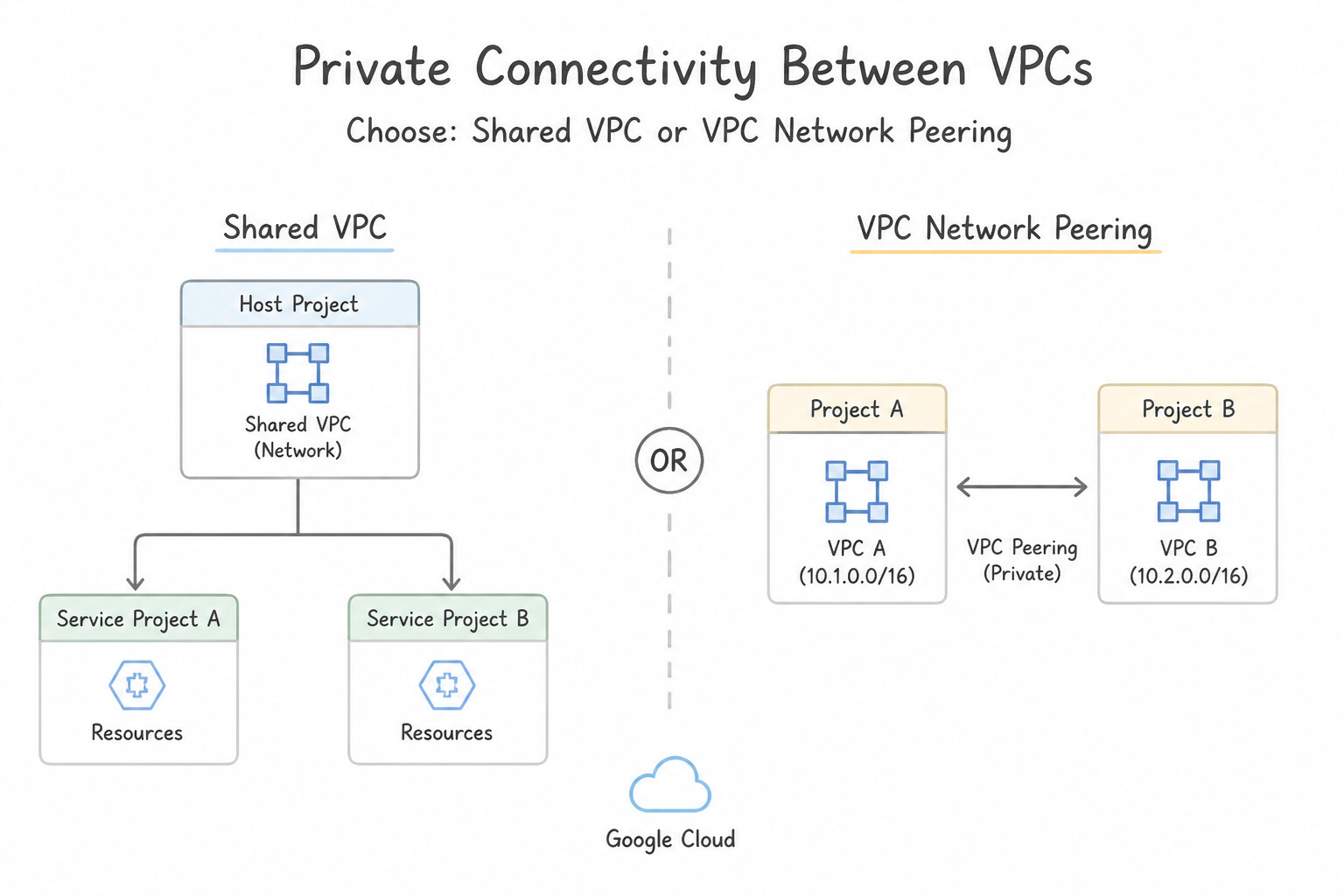
- Choosing Between
Shared VPC,VPC Network Peering, andPrivate Service Connect (PSC): - Shared VPC: Best within a single Organization when a central network security team wants to own the VPC, subnets, and firewall rules in a Host Project while Service Projects consume subnets.
- VPC Network Peering: Best when two independent VPCs (same or different Organizations) with non-overlapping IP ranges need full bidirectional Layer 3 routing with zero bandwidth bottlenecks.
- Private Service Connect (PSC): Best when connecting across overlapping IP address ranges (e.g., M&A acquisitions both using
10.0.0.0/8), or when exposing a single microservice unidirectionally (Consumer → Producer) without exposing the entire VPC subnet table. - Private Google Access for On-Premises Hosts: Allows on-premises servers connected via Cloud VPN or Cloud Interconnect to reach Google APIs privately without traversing the public internet. Requires:
- Advertising the VIP range (
199.36.153.4/30forrestricted.googleapis.comor199.36.153.8/30forprivate.googleapis.com) to on-premises via Cloud Router custom route advertisements. - Configuring on-premises DNS (or Cloud DNS Inbound Forwarding) to resolve
*.googleapis.comto that VIP range.
Key Implementation Patterns
- VPC Peering for High Throughput: Use Configure VPC Network Peering between the two VPC networks. VPC Network Peering connects VPCs directly with internal IP addresses, offering the lowest latency and no gateway bottlenecks. (Avoid alternative: Cloud VPN uses gateways and encapsulation, which adds latency and throughput limits compared to peering.)
- Shared VPC for Centralized Administration: Use Configure a Shared VPC. Designate the central project as the Host project and attach the application projects as Service projects. Grant application teams the necessary subnet permissions. Shared VPC enables centralized network administration in a Host project while allowing Service projects to use the network resources for their instances.
- Handling IP Overlap with Private Service Connect: Use Configure the application as a published service using Private Service Connect. Private Service Connect allows access to services in other VPC networks even if IP address ranges overlap. (Avoid alternative: VPC Network Peering does not support overlapping IP address ranges.)
Key Takeaways (2.3a)
- VPC Network Peering provides the lowest latency and highest throughput for connecting two VPC networks.
- Peering works across different regions and projects.
- Unlike VPNs, Peering does not use a gateway, so there is no bottleneck at the connection point.
- Traffic in peered networks communicates via internal IP addresses.
Consideration 2.3b: Designing and configuring private connectivity and encryption between data centers and VPC networks
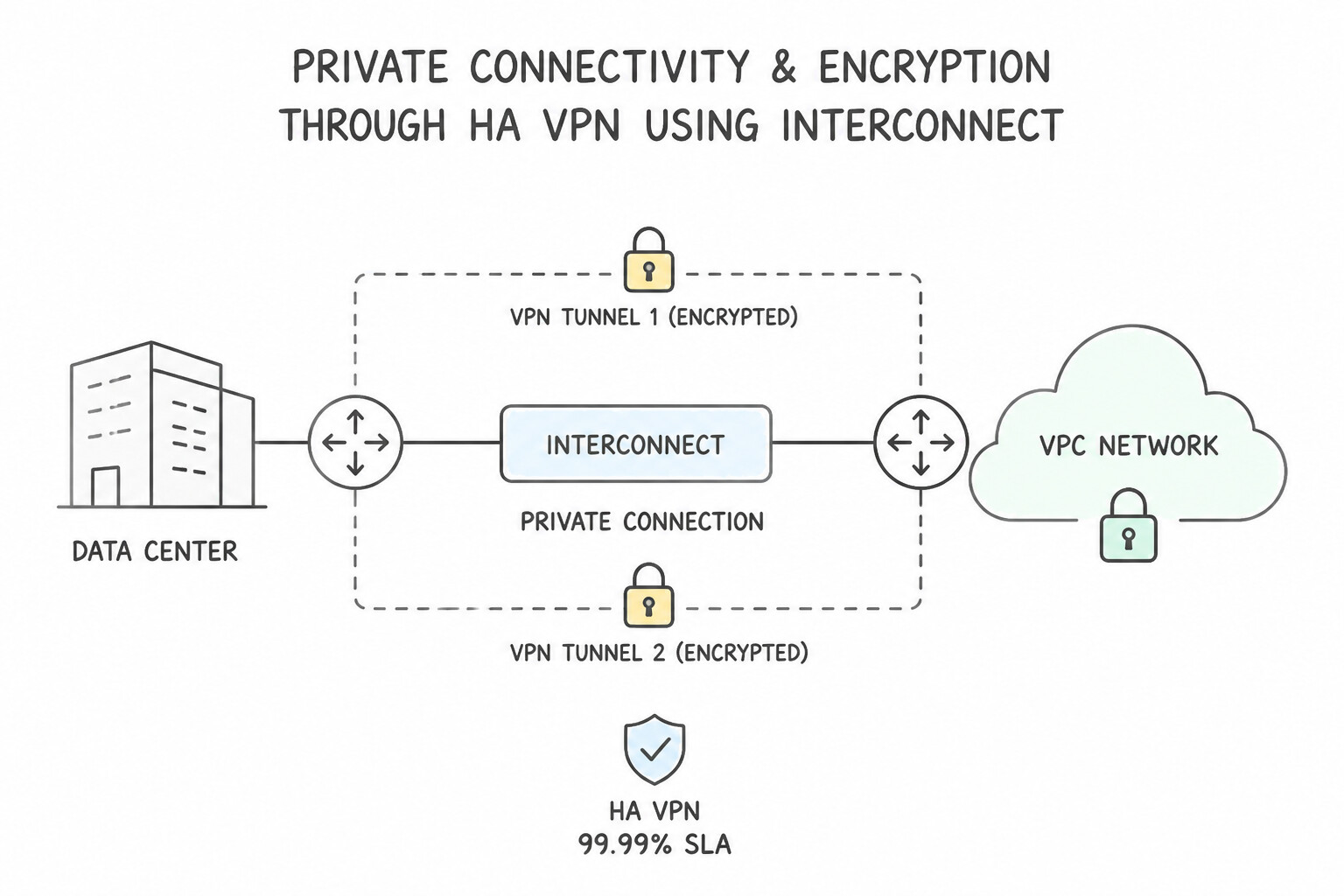
- HA VPN (99.99% SLA): Uses two IPsec VPN interfaces in Google Cloud connected to two on-premises VPN gateway interfaces via dynamic BGP routing (
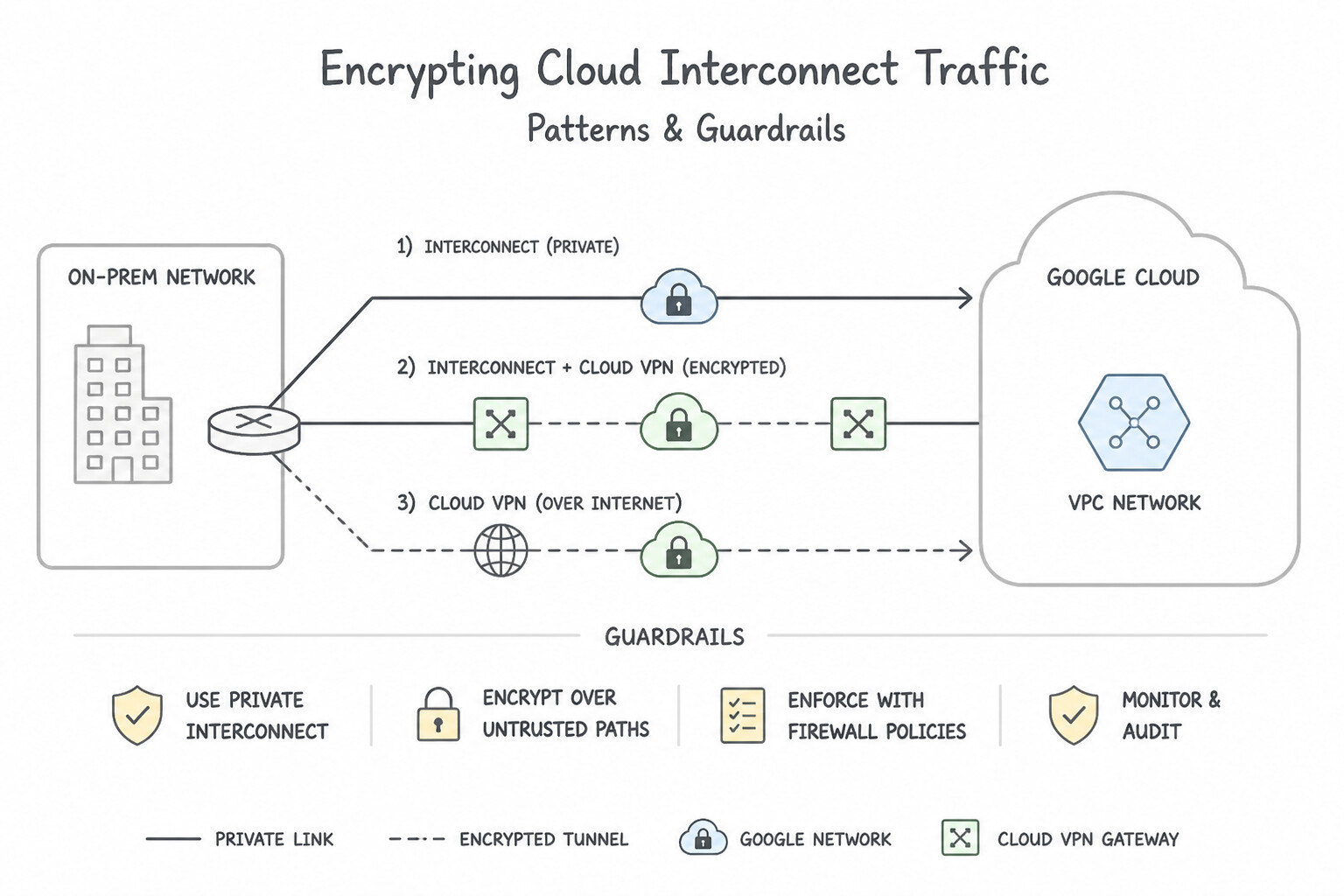
Cloud Router). - Encrypting Cloud Interconnect Traffic: Because Cloud Interconnect is unencrypted by default, choose between:
- HA VPN over Cloud Interconnect: Deploys IPsec HA VPN gateways directly over the Cloud Interconnect VLAN attachments (works on both Dedicated and Partner Interconnect; caps per-tunnel throughput to IPsec limits, scalable via multiple tunnels).
- MACsec for Cloud Interconnect: Layer 2 hardware encryption (
IEEE 802.1AE) supported on Dedicated Interconnect (10 Gbps and 100 Gbps links), providing line-rate encryption with minimal latency and zero IPsec tunnel overhead.
Key Implementation Patterns
- High-Bandwidth Encrypted Hybrid Connectivity: Use Configure HA VPN over Cloud Interconnect. HA VPN over Cloud Interconnect combines the private, high-speed transport of Interconnect with the Layer 3 IPsec encryption of Cloud VPN. (Avoid alternative: Using the public internet violates the requirement for private address space and avoiding public internet traversal.)
- Private Google Access for On-Premises Hosts: Use Configure on-premises DNS to resolve *.googleapis.com to the restricted VIP range (199.36.153.4/30). Advertise this route via Cloud Router. You must configure DNS to point to Google's restricted private VIPs and advertise the route to those VIPs over the VPN connection.
- Layer 2 Encryption for High-Speed Transfers: Use Enable MACsec for Cloud Interconnect on the 100 Gbps Dedicated Interconnect links. MACsec provides line-rate Layer 2 encryption with minimal overhead, ideal for 100 Gbps connections. (Avoid alternative: IPsec adds significant protocol overhead and processing requirements, reducing effective throughput.)
Key Takeaways (2.3b)
- Cloud Interconnect provides private, high-bandwidth connectivity but is unencrypted by default.
- Cloud VPN provides IPsec encryption but typically runs over the public internet.
- To achieve high-bandwidth, private, and encrypted connectivity, deploy HA VPN over Cloud Interconnect.
- MACsec offers Layer 2 encryption, while IPsec offers Layer 3 encryption; ensure you select the one matching your compliance requirements.
Consideration 2.3c: Establishing private connectivity between VPC and Google APIs using Private Google Access and Private Service Connect
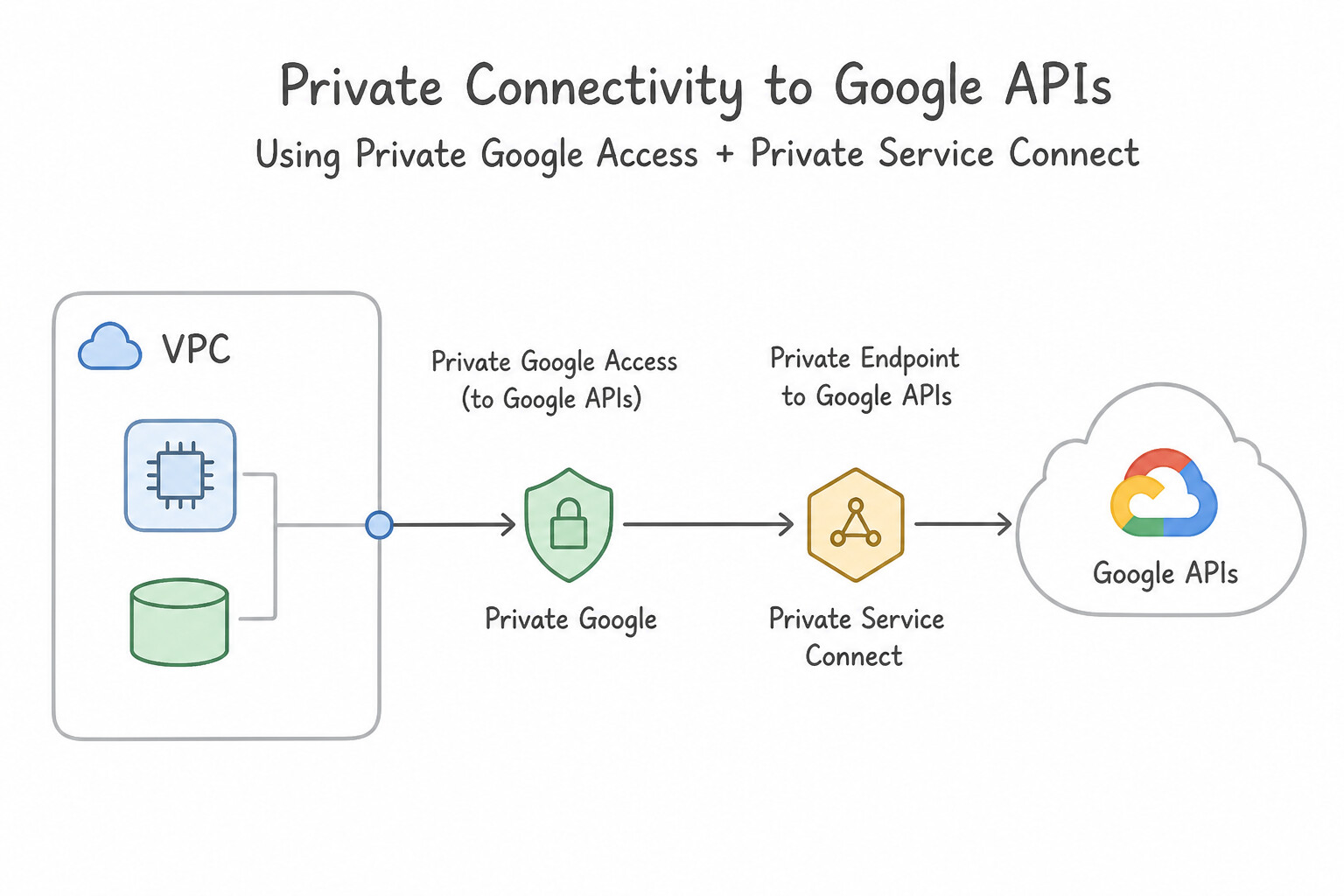
- Enabling Private Google Access (PGA) on a Subnet: Flipping
Private Google Access = Onon a VPC subnet allows VMs without external IPs in that subnet to reach Google APIs via the default internet gateway route (0.0.0.0/0or explicit route to199.36.153.8/30/199.36.153.4/30). - DNS Configuration for
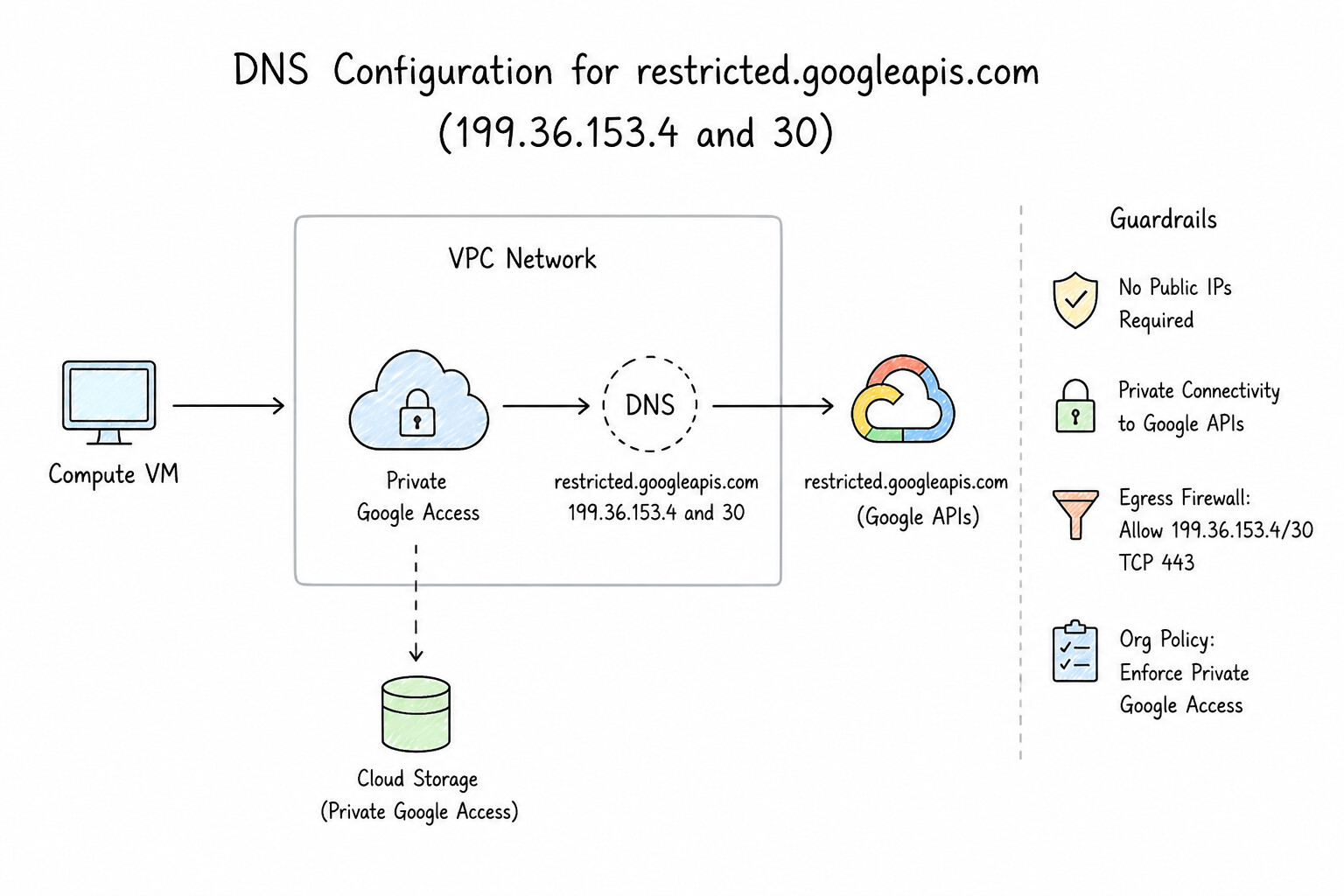
restricted.googleapis.com(199.36.153.4/30): - Create a Cloud DNS Private Managed Zone for
googleapis.com. - Create a
CNAMErecord for*.googleapis.compointing torestricted.googleapis.com.. - Create an
Arecord forrestricted.googleapis.com.pointing to the four IPs in199.36.153.4/30(199.36.153.4,.5,.6,.7). - Add a VPC custom static route for
199.36.153.4/30with next hopDefault internet gateway(and restrict egress firewall rules to only allow199.36.153.4/30ontcp:443). - Private Service Connect (PSC) Endpoints for Google APIs: If security policy requires accessing Google APIs via an internal RFC 1918 IP address inside your own VPC CIDR (e.g.,
10.240.0.10) with custom service directory names (storage-prod.p.googleapis.com), create a global PSC Endpoint targeting theall-apisorvpc-scbundle.
Key Implementation Patterns
- Enabling Private Google Access on Subnets: Use Edit the subnet configuration and enable Private Google Access. Private Google Access allows VMs with no external IP addresses to reach Google APIs and services. (Avoid alternative: Cloud Storage is a global service, not a VPC network, so VPC Network Peering cannot be established with it.)
- DNS Configuration for Restricted VIPs: Use Create a CNAME record for *.googleapis.com that points to restricted.googleapis.com, and create A records for the 199.36.153.4/30 IP address range. Restricted.googleapis.com (199.36.153.4/30) limits access only to APIs supported by VPC Service Controls.
Key Takeaways (2.3c)
- Private Google Access is enabled at the subnet level.
- It allows VMs with only internal IP addresses to access Google APIs and services.
- Traffic via Private Google Access stays within the Google network and does not use the public internet.
- It is a key security control for isolating workloads while maintaining service access.
Consideration 2.3d: Using Cloud NAT to enable outbound traffic
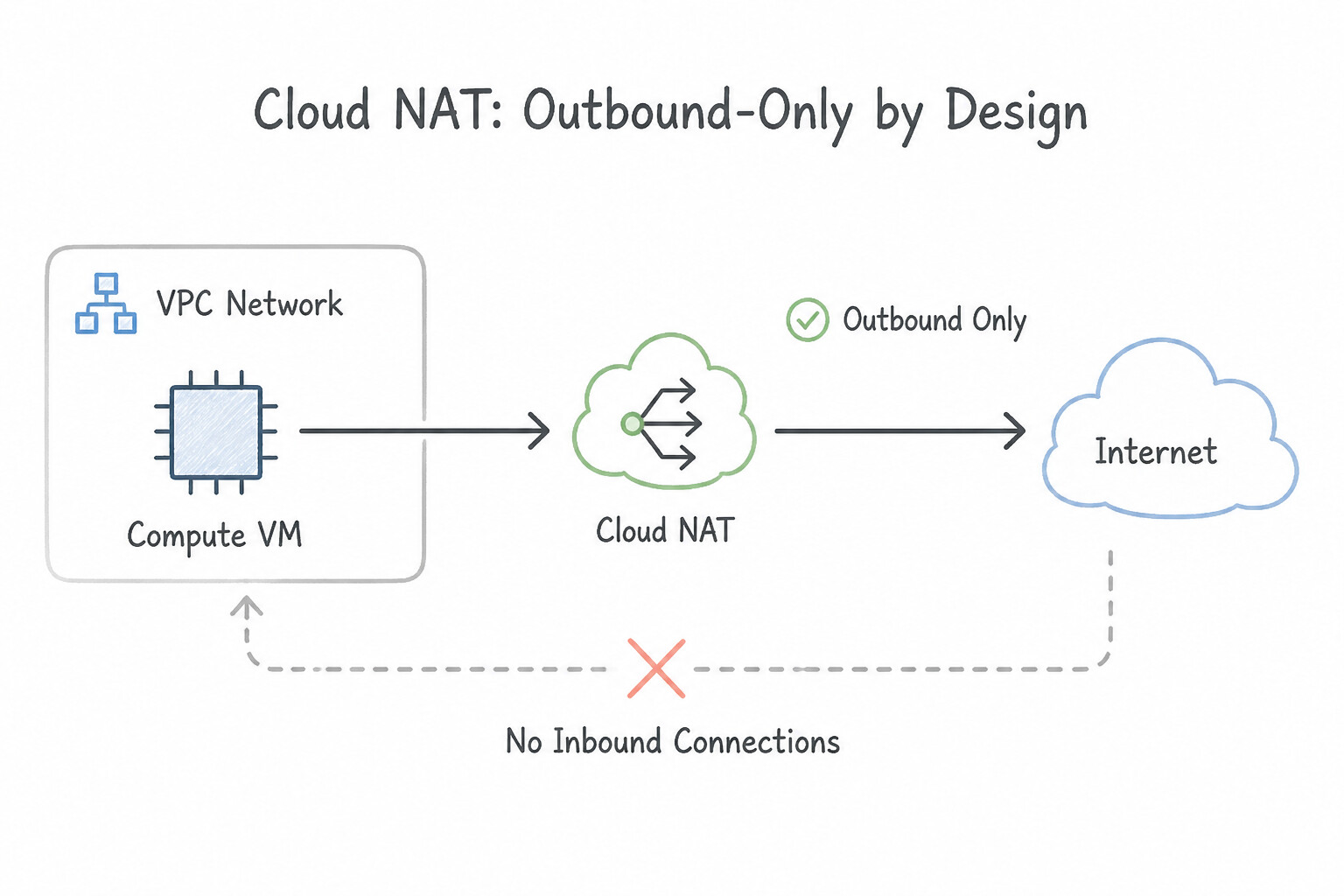
- Outbound-Only By Design: Cloud NAT is a software-defined, distributed source NAT service with no choke-point VM. It enables private VMs and private GKE nodes to initiate outbound connections to the internet while strictly blocking any unsolicited inbound connections from the internet.
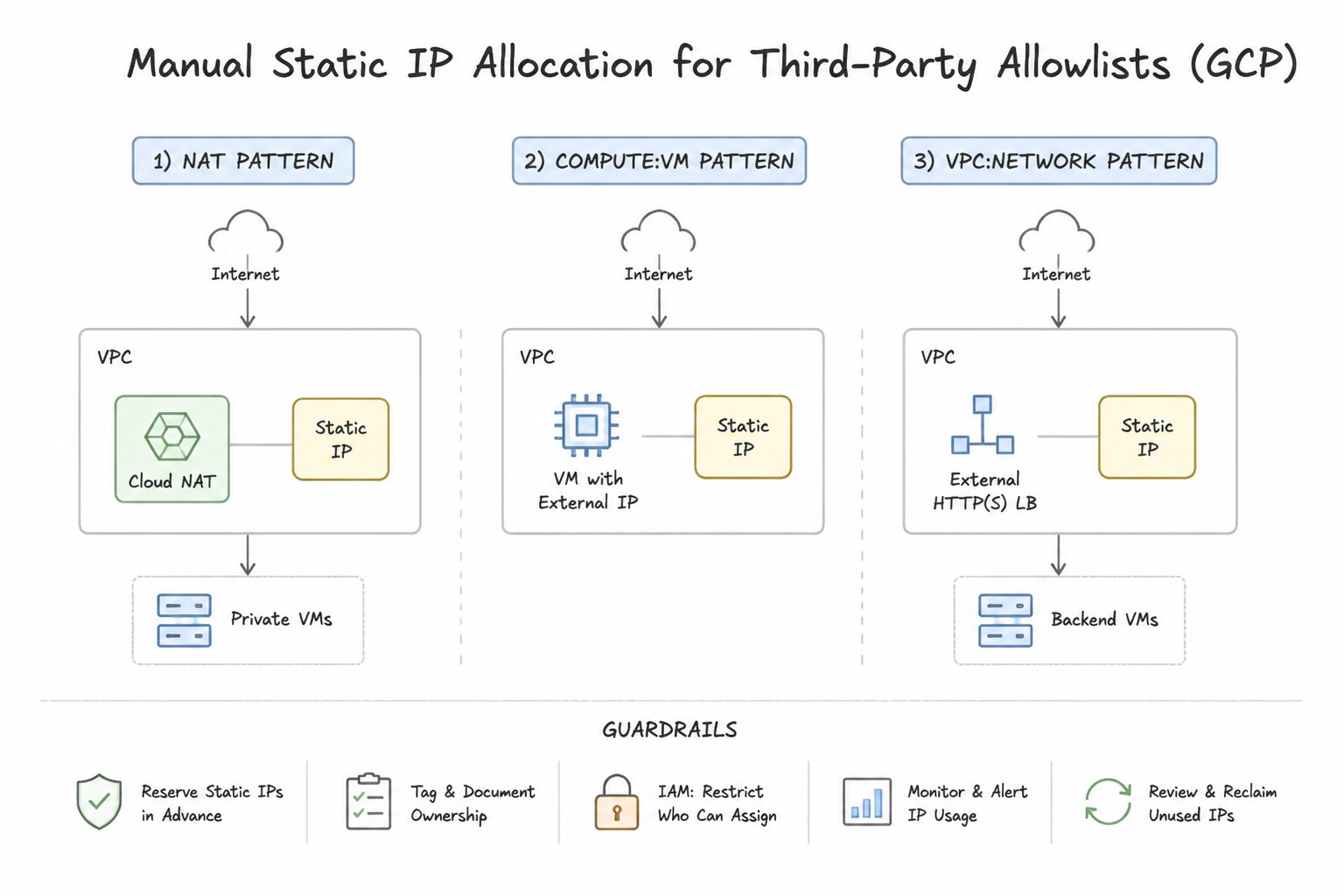
- Manual Static IP Allocation for Third-Party Allowlists: When an external SaaS/partner firewall requires a fixed list of source IPs, reserve static external IP addresses and set Cloud NAT to Manual NAT IP allocation.
- Cloud NAT Logging & Port Exhaustion Monitoring: Enable Cloud NAT logging (Translations and Errors or Errors only) to audit which internal VM IP/port mapped to which external NAT IP/port at any timestamp, and increase Minimum ports per VM instance (or enable Dynamic Port Allocation) if high-concurrency workloads log
OUT_OF_RESOURCESport drops.
Key Implementation Patterns
- Minimizing Attack Surface for Patch Management: Use Configure Cloud NAT on the VPC router associated with the subnet. Cloud NAT enables outbound internet access for private instances while blocking inbound connections, perfectly matching the requirement for secure patching.
- Forensics and Compliance Auditing: Use Edit the Cloud NAT gateway configuration to enable logging. Set the log filter to include translations and errors. Cloud NAT logging provides visibility into the translation of internal IP addresses to external IP addresses and captures destination details.
- Strict Third-Party IP Allowlisting: Use Reserve static external IP addresses and configure a Cloud NAT gateway to use manual IP allocation. Manual IP allocation allows you to reserve specific static IPs for Cloud NAT, satisfying the partner's allowlist requirement. (Avoid alternative: Auto-allocated IPs are managed by Google and can change or expand, making them unsuitable for strict static allowlisting.)
Key Takeaways (2.3d)
- Instances without external IP addresses are more secure because they cannot be directly addressed from the internet.
- Cloud NAT provides outbound internet access for private instances while blocking inbound connections.
- Firewalls control traffic but do not hide the instance's IP address if an external one is assigned.
- Private Google Access is for Google APIs, not general internet access.
Quick Decision Cheat Sheet (Subsection 2.3)
If the Scenario Requires... | Choose This Google Cloud Pattern | Avoid This Common Mistake |
|---|---|---|
"On-premises servers need encrypted connectivity over Partner Interconnect (where L2 MACsec is unavailable)" | Deploy HA VPN over Cloud Interconnect | Relying on default Partner Interconnect encryption (Interconnect is unencrypted by default!) |
"Route all *.googleapis.com traffic from a VPC through the VPC-SC compliant VIP" | Configure a Cloud DNS private zone CNAME to restricted.googleapis.com and A records to 199.36.153.4/30 | Using private.googleapis.com (199.36.153.8/30) |
"Private VMs cannot reach storage.googleapis.com even though a 0.0.0.0/0 route to Default Internet Gateway exists" | Enable Private Google Access (PGA) on the VM's subnet | Assigning external IPs to the VMs or deploying a NAT instance |
"Forensic investigators need to identify which internal private VM initiated an outbound connection through Cloud NAT" | Enable Cloud NAT Logging (log filter set to Translation and Errors or ALL) | Checking Admin Activity audit logs (Admin Activity logs do not record data-plane NAT translations) |
"Hybrid VPN between on-premises and Google Cloud requires a 99.99% availability SLA" | Deploy HA VPN with 2 tunnels connected to redundant on-premises peer devices using Cloud Router (BGP) | Using Classic VPN with static routing (99.9% SLA) |
Further Reading (Subsection 2.3)
- VPC Network Peering overview — Google Cloud VPC Network Peering allows internal IP address connectivity across two VPC networks regardless of whether they belong to the same project or the same organization.
- Shared VPC overview — Provides a comprehensive overview of Shared VPC, including the Host and Service project structure and use cases for separation of duties.
- Provisioning Shared VPC — Details the steps to set up a Shared VPC, including enabling the host project and attaching service projects.
- Private Service Connect overview — Explains how Private Service Connect allows private consumption of services across VPC networks, even with overlapping IP ranges.
- VPC Network Peering restrictions — Details the requirement that peered VPC networks must not have overlapping IP subnets.
- HA VPN over Cloud Interconnect overview — Explains how HA VPN over Cloud Interconnect provides a solution for encrypting traffic over Dedicated or Partner Interconnect, meeting requirements for secure private connectivity.
Book TOC · Previous · Chapter 3 of 7 · Next
AwesomeGCP.com Learning
The approach taken is a question-led learning approach: you explore realistic project scenarios where you need to make decisions or take actions to achieve business goals within specific constraints. Instead of passive learning, you are challenged to think and work through the options to master the Professional Cloud Security Engineer (PCSE) certification!