Book TOC · Previous · Chapter 5 of 7 · Next
Chapter 5: DevSecOps Automation, Security Telemetry & Detection: Binary Authorization, Audit Logs & SCC
Chapter Focus: Artifact Analysis CVE scanning, Binary Authorization attestations, Security Posture Management, Cloud Audit Logs, Log Router sinks, VPC Flow Logs, Packet Mirroring, Cloud IDS, and Security Command Center (SCC) Enterprise.
Subsection 4.1: Automating infrastructure and application security
The Big Picture
In a high-velocity DevSecOps environment deploying hundreds of containers and VM updates daily, relying on periodic vulnerability spreadsheets or manual change-control boards creates four critical operational blind spots:
- Asynchronous Registry Scans Without a Synchronous CI/CD Gate (4.1a): Simply enabling automatic vulnerability scanning in Artifact Registry (via the Container Analysis API) detects CVEs after an image is pushed, but it does not automatically stop a developer from deploying a container with a
CRITICAL(CVSS ≥ 9.0) vulnerability to production! Stopping vulnerable images requires a two-stage defense: (a) running On-Demand Scanning (gcloud artifacts docker images scan) synchronously as a step insidecloudbuild.yamlto fail the build immediately if high/critical CVEs exist, and (b) minting a cryptographic Binary Authorization Attestation using an asymmetric Cloud KMS key only after the scan passes. - Bypassed Admission Gates, Cross-Project Attestors & Break-Glass Chaos (4.1b): Binary Authorization enforces deploy-time admission control on GKE and Cloud Run. However, teams frequently hit three operational pitfalls in production:
- Rolling out a strict
REQUIRE_ATTESTATIONpolicy directly to an existing cluster causes outages if legacy pods lack signatures—always audit first usingDRY_RUN(DRY_RUN_AUDIT_LOG_ONLY) mode! - When a central
secops-prodproject hosts the Binary Authorization Attestors andapp-prodhosts the GKE Cluster, the GKE cluster's Binary Authorization Service Agent (service-APP_PROJECT_NUMBER@gcp-sa-binaryauthorization.iam.gserviceaccount.com) must be grantedroles/binaryauthorization.attestorsVerifierin the Security Project (plusroles/containeranalysis.notes.occurrences.viewer). - During a P0 production incident when a hotfix must bypass attestation immediately, do not disable Binary Authorization globally on the cluster! Use the pod-level Break-Glass annotation (
image-policy.k8s.io/break-glass: "true"), which permits the deployment and automatically writes a high-visibility audit log entry in Cloud Audit Logs. - Unsigned Kernel Modules & Unpatched VM Fleets (4.1c): Enabling Shielded VMs / Shielded GKE Nodes with Secure Boot blocks rootkits by requiring all boot components and Linux kernel modules to be signed by a trusted key—which also means any workload loading an unsigned custom kernel module will fail until the module is signed or Secure Boot is adjusted. For OS patching, distinguish between stateful VMs (use VM Manager OS Patch Management with scheduled phased rollouts and disruption budgets) and stateless Managed Instance Groups (MIGs) (bake a hardened golden image via Cloud Build/Packer, create a new Instance Template, and trigger a MIG Rolling Update).
- Preventive vs. Detective Posture Drift (4.1d): Security engineers must pair preventive guardrails (Custom Organization Policy Constraints in YAML/CEL, and Policy Controller / OPA Gatekeeper on GKE with
dryrunvs.denyenforcement) with detective drift monitoring (Security Health Analytics [SHA] Custom Modules in Security Command Center written in CEL).
Consideration 4.1a: Automating vulnerability scanning for CVEs in CI/CD pipelines
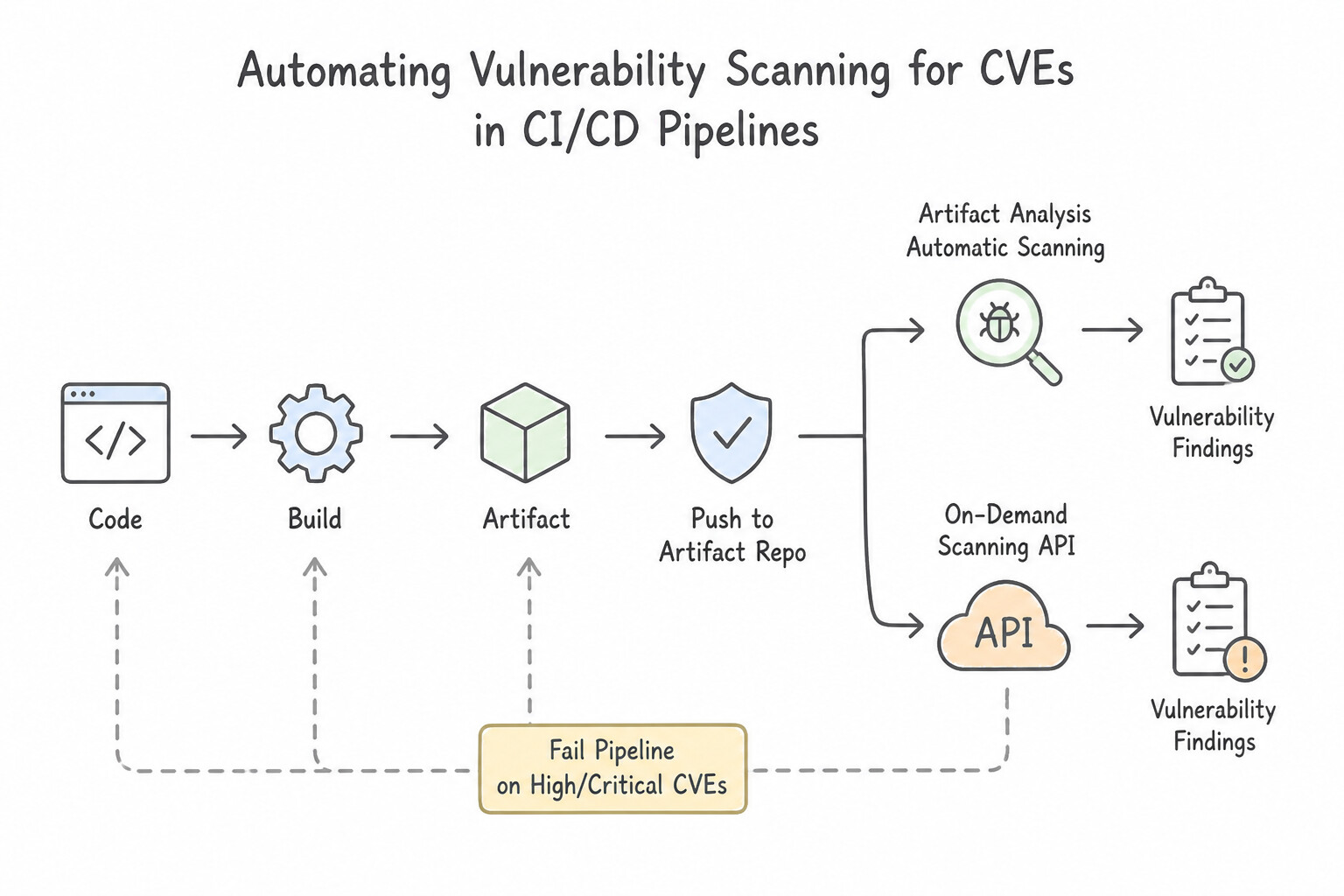
- Artifact Analysis Automatic Scanning vs. On-Demand Scanning API:
- Enabling the Container Analysis API (
containeranalysis.googleapis.com) on Artifact Registry automatically scans images upon push and continuously monitors pushed images for newly disclosed CVEs. - To scan a locally built container image inside a CI/CD pipeline (such as Cloud Build) before pushing it to a registry, enable the On-Demand Scanning API (
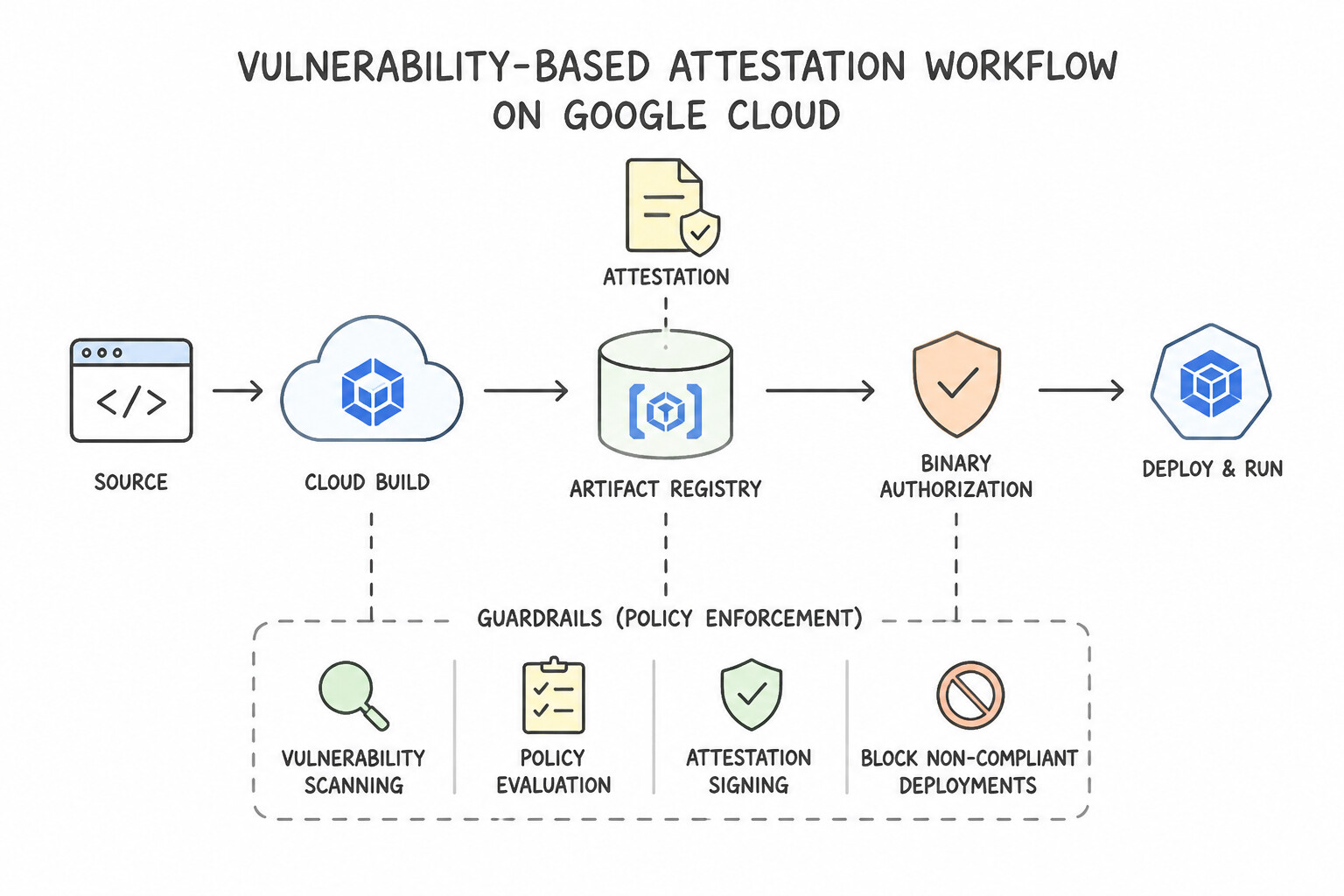
ondemandscanning.googleapis.com) and rungcloud artifacts docker images scanin a build step, failing the pipeline ifCRITICALorHIGHCVEs are returned. - Vulnerability-Based Attestation Workflow: After the vulnerability scan step succeeds with zero policy-violating CVEs, a subsequent Cloud Build step uses an asymmetric signing key stored in Cloud KMS (or the built-in Vulnerability Check Attestor / Kritis signer) to create a signed Binary Authorization Attestation bound to the immutable image digest (
@sha256:..., never a mutable tag like:latest!).
Key Implementation Patterns
- Gating Deployments with Binary Authorization: Use Configure Cloud Build to create an attestation after a successful vulnerability scan. Configure a Binary Authorization policy on the GKE cluster to require this attestation. Binary Authorization uses attestations to gate deployments, ensuring only images that pass specific checks (like vulnerability scans) are allowed.
- Scanning Locally Before Pushing: Use Run the "gcloud artifacts docker images scan" command on the locally built image. This command invokes the On-Demand Scanning API to scan local images immediately without a permanent registry push. (Avoid alternative: This scans the image after it is pushed, which does not meet the requirement to scan before pushing.)
- Failing Cloud Build on Vulnerability Threshold: Use Add a build step to the cloudbuild.yaml file that uses On-Demand Scanning. Configure the step to parse the scan output and exit with an error if the score exceeds 7.0. On-Demand Scanning runs synchronously within the build pipeline, allowing you to block the build immediately based on vulnerability severity.
Key Takeaways (4.1a)
- Binary Authorization prevents the deployment of non-compliant images to GKE.
- Attestations act as digital signatures that verify a specific process (like a vulnerability scan) has passed.
- Defense in depth requires enforcement at the cluster level, not just in the CI/CD pipeline.
- Container Analysis provides the vulnerability data used to make attestation decisions.
Consideration 4.1b: Configuring Binary Authorization for securing GKE or Cloud Run
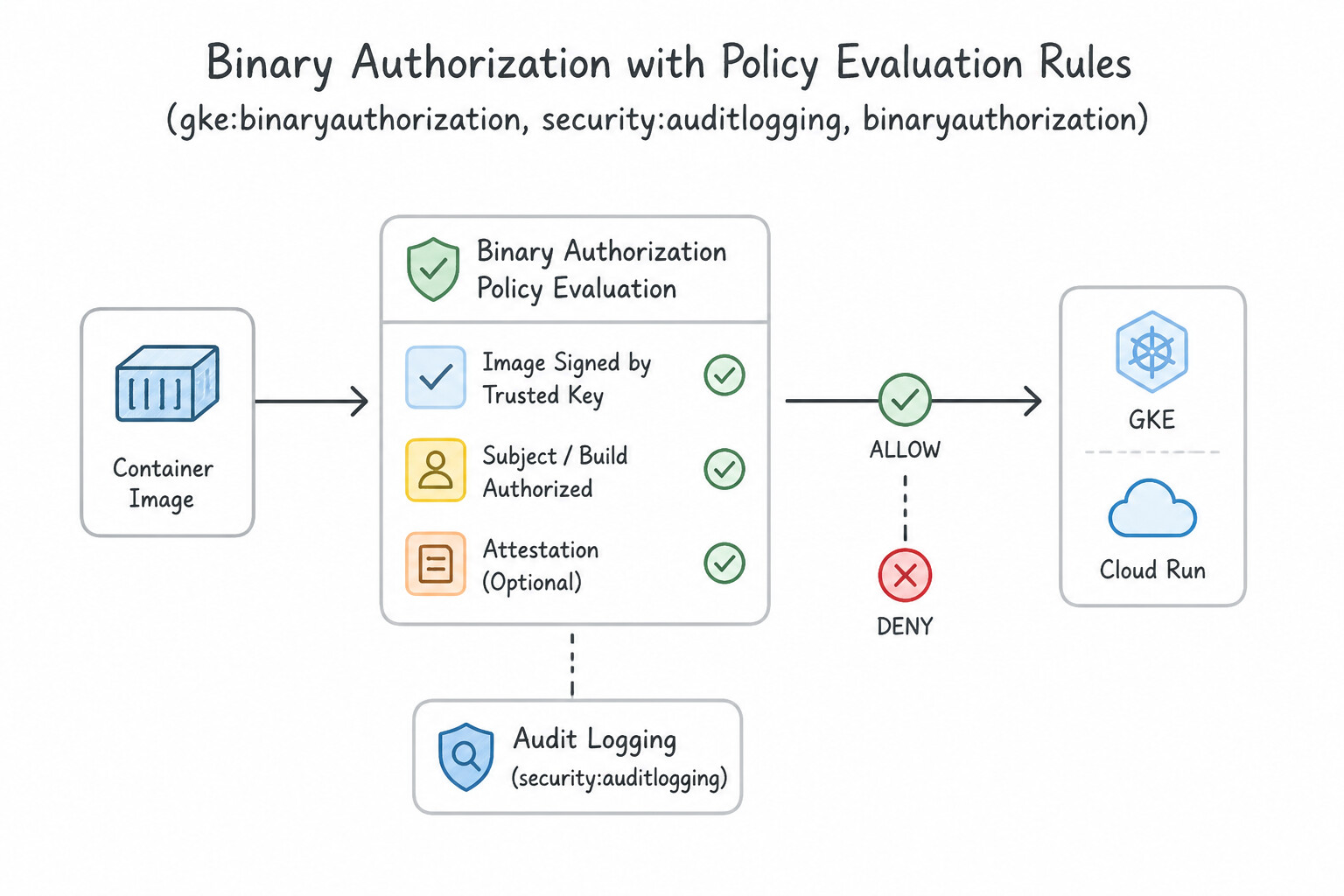
- Policy Evaluation Rules:
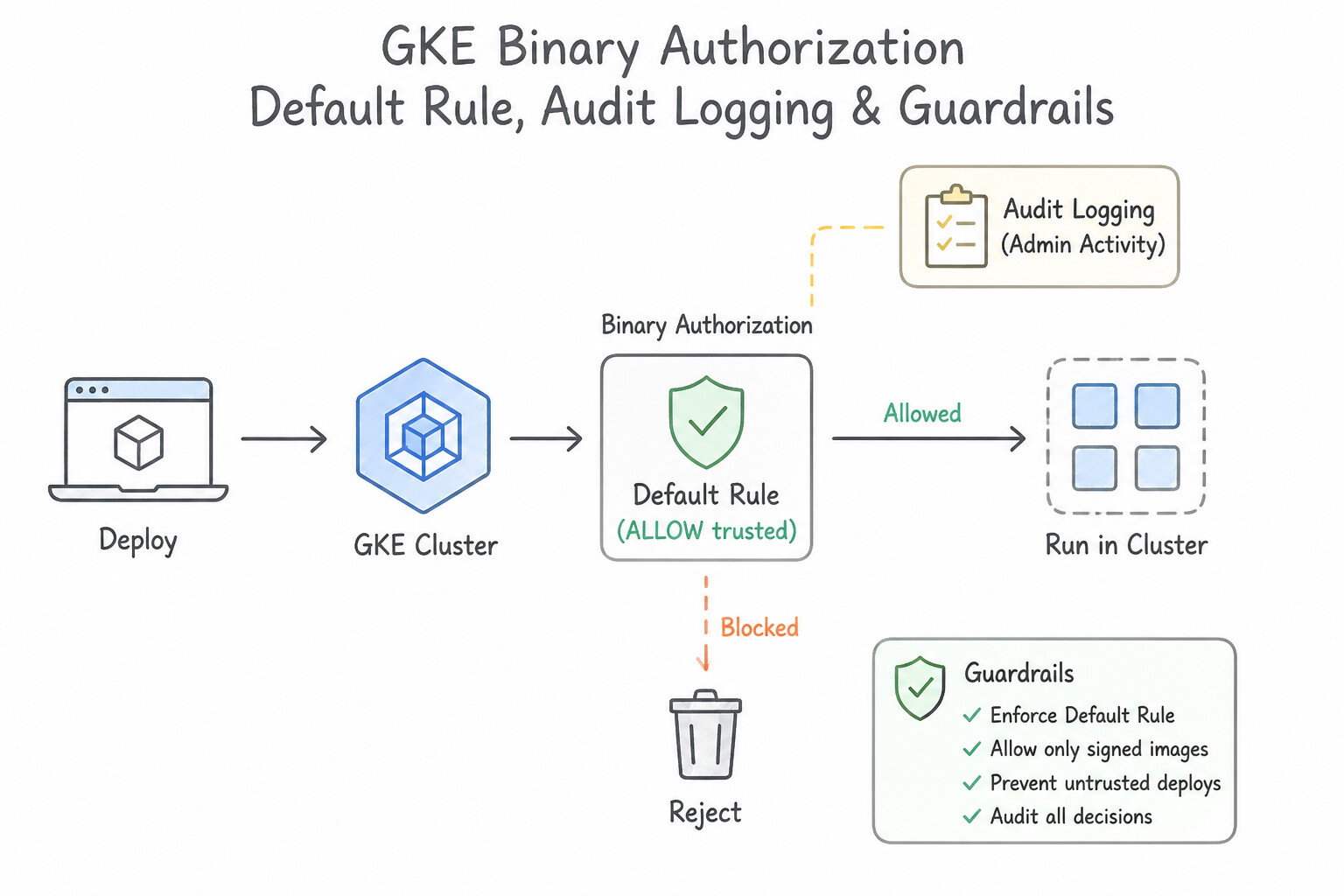
- Default Rule: Set to
Disallow all images(orRequire attestationsverifying signatures from your CI/CD Attestor's public key). - Exempt Image Allowlists: Optionally exempt specific trusted repositories (e.g.,
gcr.io/google-containers/*or a specific private Artifact Registry pathus-docker.pkg.dev/prod-sec/approved-base/*). - Dry-Run Mode (
DRY_RUN_AUDIT_LOG_ONLY): Logs every pod deployment that would have been blocked without actually rejecting the pod—essential when migrating existing clusters to Binary Authorization. - Emergency Break-Glass Procedure: If a production outage requires deploying an unsigned hotfix container immediately, add the annotation
image-policy.k8s.io/break-glass: "true"(or--Breakglassflag) to the Kubernetes Pod/Deployment manifest. Binary Authorization allows the pod to start and immediately emits a Breakglass audit event in Cloud Audit Logs for post-incident review. - Cross-Project Attestor Verification: When a GKE cluster in
Project-Averifies attestations managed inSecurity-Project-B, grantroles/binaryauthorization.attestorsVerifieron the Attestor (androles/containeranalysis.notes.occurrences.vieweron the Note) toProject-A's Binary Authorization Service Agent.
Key Implementation Patterns
- Emergency Break-glass Deployment: Use Add the
image-policy.k8s.io/break-glass: "true"annotation to the Pod specification. The break-glass annotation bypasses enforcement for a single deployment and logs the event. (Avoid alternative: Dry Run mode disables enforcement broadly, reducing overall security.) - Attestor Separation of Duties: Use In the Security Project, grant the Binary Authorization Attestor Verifier role to the GKE service agent of the Compute Project. The GKE Service Agent in the cluster's project needs the Attestor Verifier role in the project where the attestors are stored.
- Implementing Dry Run Mode: Use Configure the Binary Authorization policy with the enforcement mode set to DRY_RUN_AUDIT_LOG_ONLY. Dry Run mode logs policy violations without blocking deployments, allowing safe testing on live clusters. (Avoid alternative: This mode immediately blocks non-compliant images, risking production outages before verification.)
Key Takeaways (4.1b)
- Binary Authorization prevents the deployment of untrusted container images on GKE.
- The 'Break Glass' feature allows you to bypass policy enforcement during emergencies.
- Break Glass is triggered using the
image-policy.k8s.io/break-glassannotation in the Pod specification.- All Break Glass events are automatically recorded in Cloud Audit Logs for compliance and review.
Consideration 4.1c: Automating VM and container image hardening, maintenance, and patch management
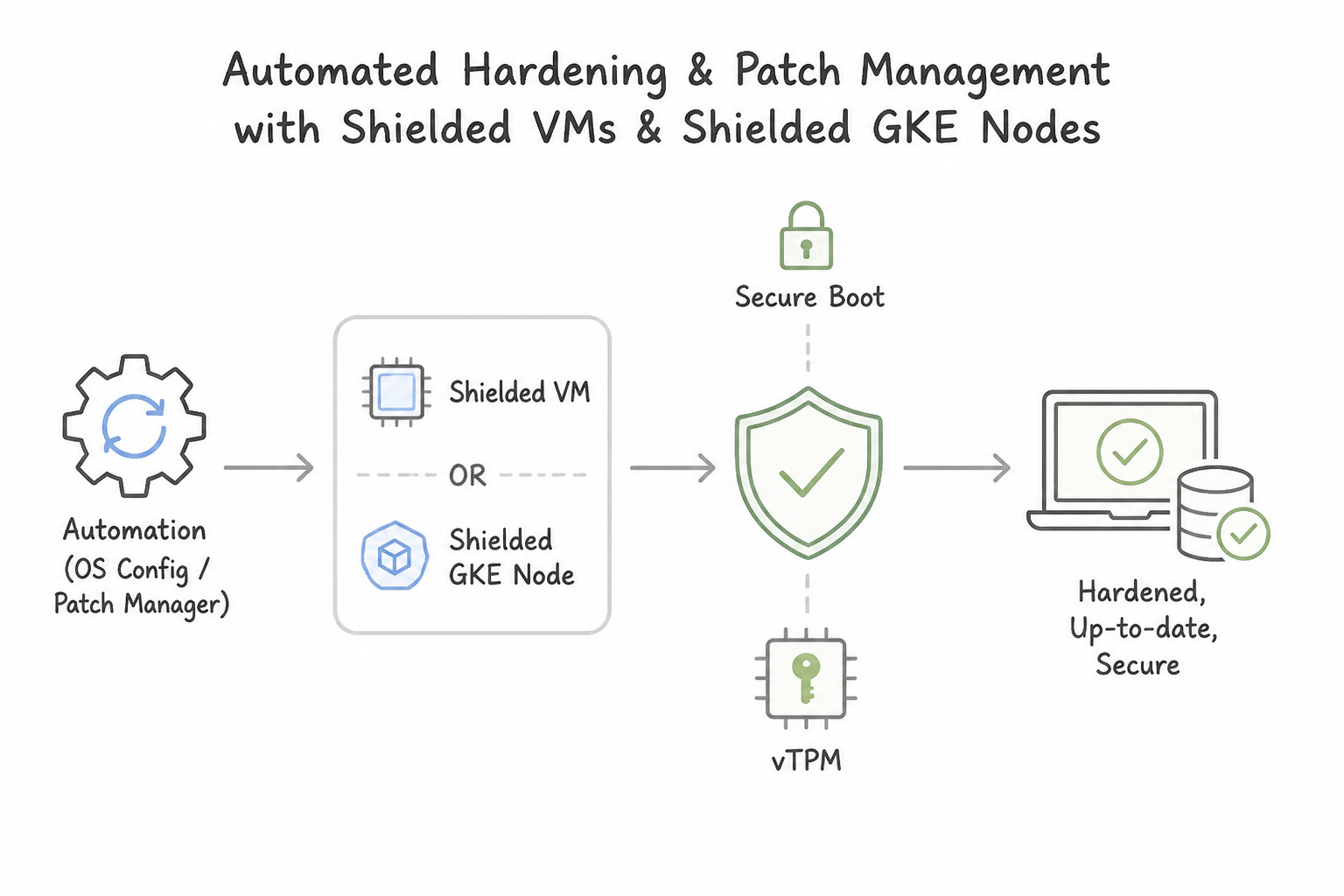
- Shielded VMs & Shielded GKE Nodes (
Secure Boot,vTPM,Integrity Monitoring): - Secure Boot verifies the digital signature of all boot components and kernel modules against trusted UEFI certificates. (Classic Common Pitfall: If a legitimate third-party agent or GPU driver installs an unsigned custom kernel module, Secure Boot will block the module from loading! Either sign the kernel module or disable Secure Boot on that specific node pool/VM).
- vTPM (Virtual Trusted Platform Module) enables Measured Boot, storing boot integrity hashes (
PCRs) validated by Integrity Monitoring (which alerts in Cloud Logging if the boot sequence changes unexpectedly). - VM Patch Management (
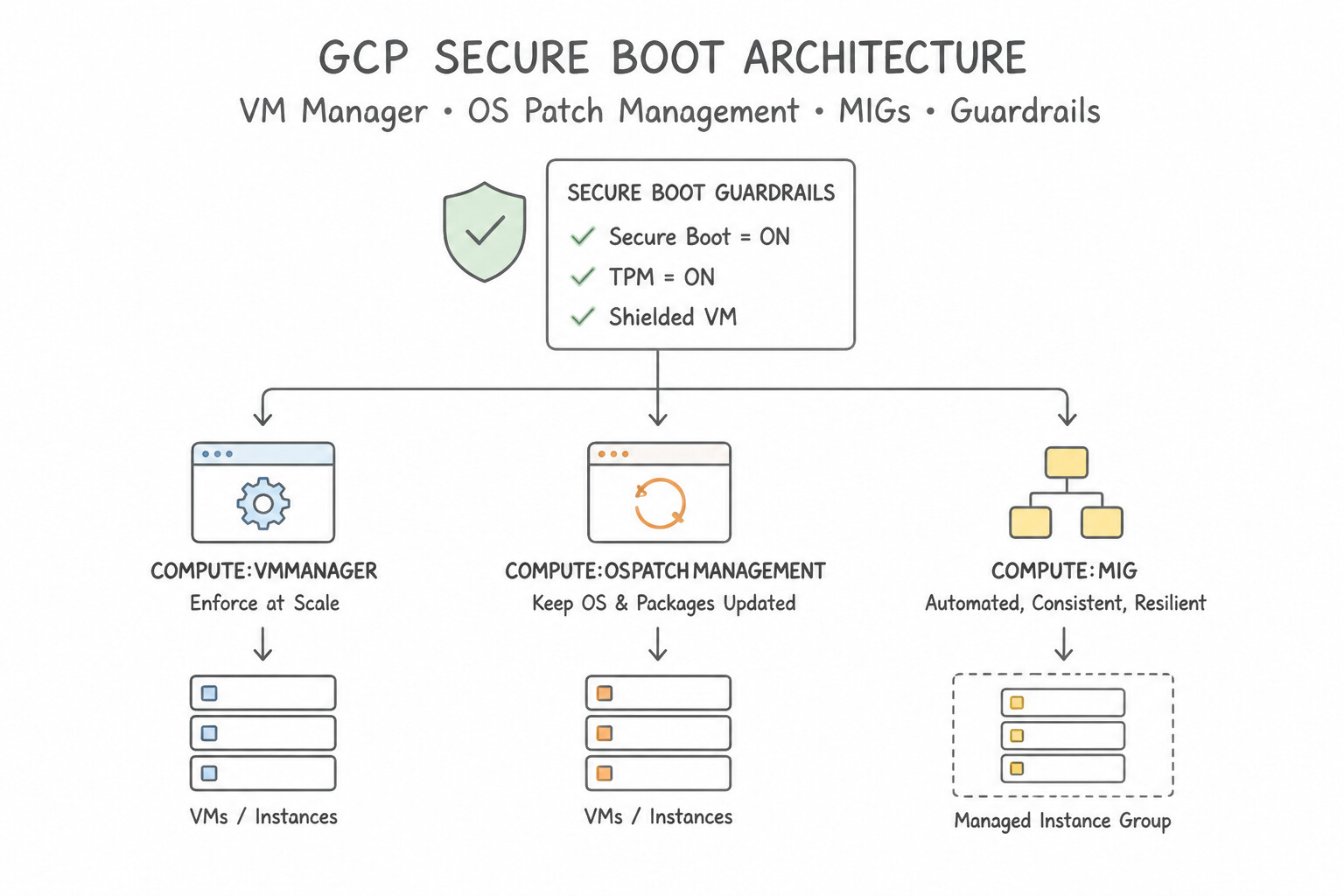
VM Managervs.Immutable Golden Images): - For long-lived / stateful VMs: Use VM Manager (OS Patch Management) (
osconfig.googleapis.com) to schedule automated patch deployments with maintenance windows, pre/post-patch scripts, and a Rollout Disruption Budget (limiting how many VMs reboot concurrently per zone). - For stateless autoscaled VMs in Managed Instance Groups (MIGs): Never patch running VMs in place! Automate a Cloud Build + Packer pipeline to bake a hardened Custom Golden Image, create a new Instance Template, and execute a MIG Rolling Update (
proactivereplacement).
Key Implementation Patterns
- Centralized OS Patch Management: Use Use VM Manager to create a patch deployment. Define a schedule and configure a rollout disruption budget with zone-based staggering. VM Manager's patch deployments allow you to schedule updates and use rollout disruption budgets to stagger patching across zones automatically.
- Immutable Infrastructure Strategy: Use Build a new custom image with the updates. Create a new instance template with this image, and start a rolling update on the managed instance group. Building a new image and performing a MIG rolling update ensures immutable infrastructure by replacing old VMs with new, pre-patched ones.
- Shift-Left Container Vulnerability Blocking: Use Add a step in your Cloud Build configuration to run a vulnerability scan. Configure the build to fail if vulnerabilities meet the severity threshold. Integrating a scanning step that fails the pipeline upon detecting vulnerabilities is the standard automated method for blocking bad images.
Key Takeaways (4.1c)
- Use VM Manager (OS Patch Management) for automated patching of Compute Engine instances.
- Avoid manual scripts or startup scripts for recurring maintenance tasks.
- Use Patch Deployments to define maintenance windows.
- Use Rollout Disruption Budgets to stagger updates and maintain availability.
Consideration 4.1d: Managing policy and drift detection at scale using posture management and custom policies
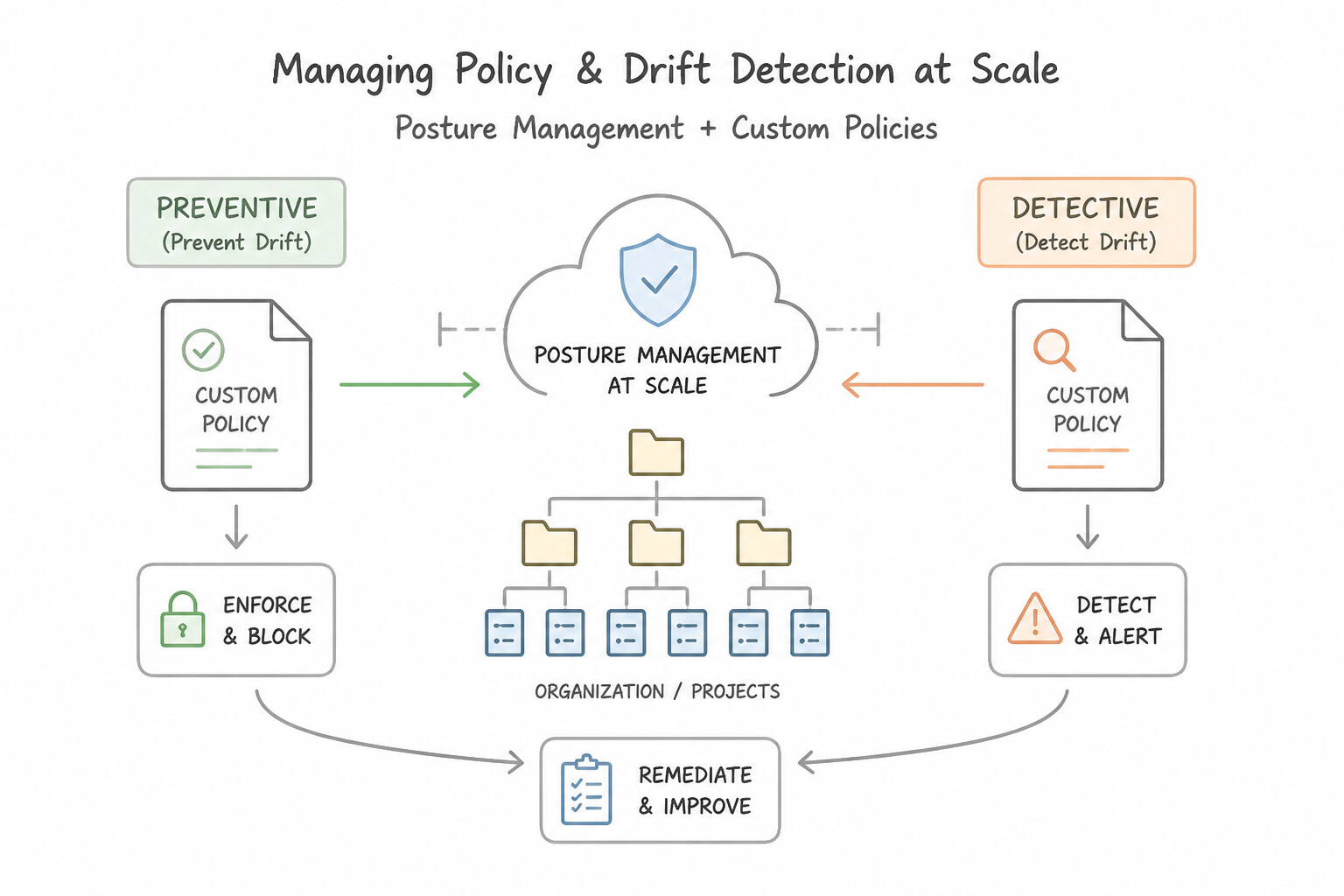
- Preventive vs. Detective Custom Controls (Know the Difference!):
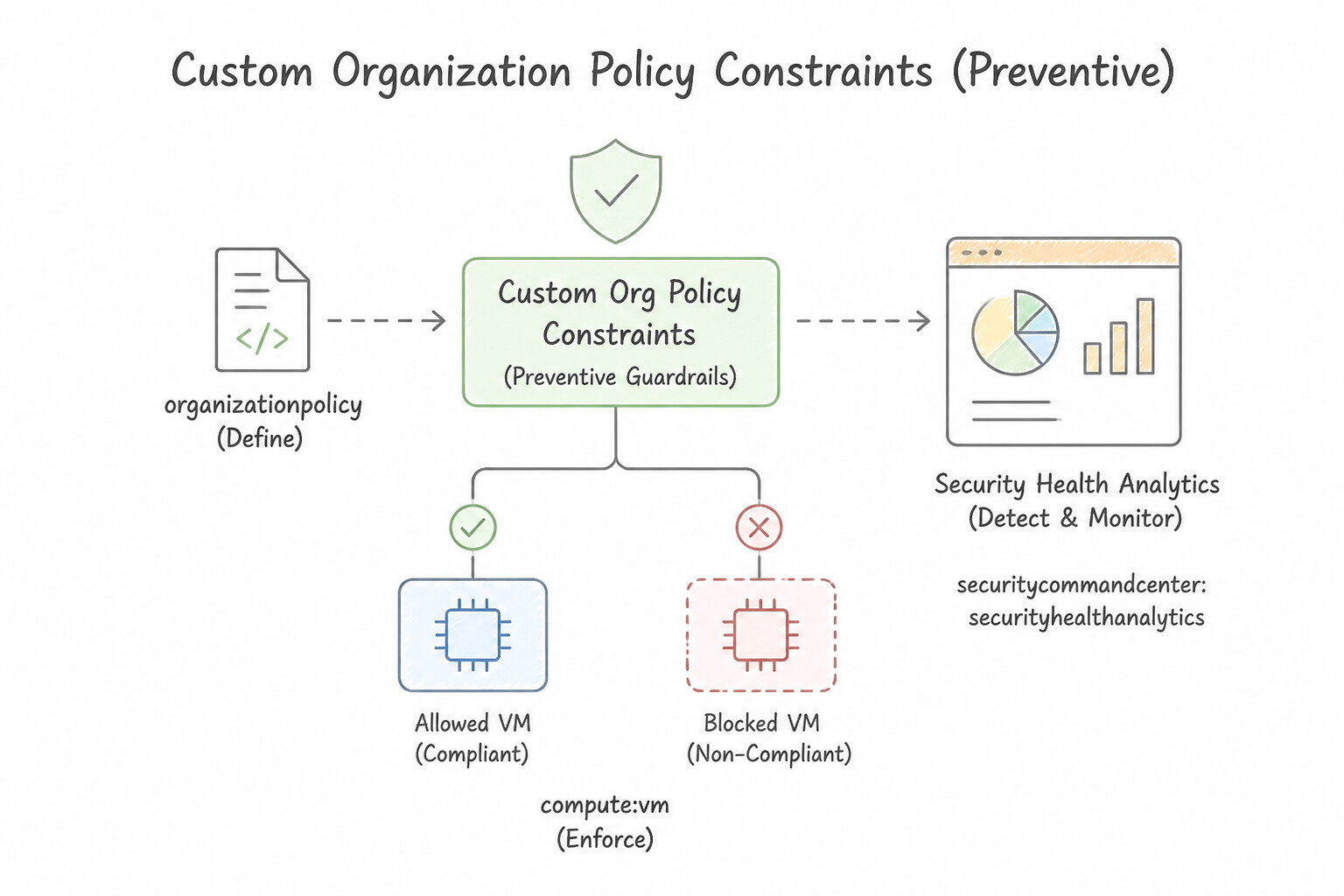
- Custom Organization Policy Constraints (
Preventive): Defined in YAML using Common Expression Language (CEL) (methodTypes: [CREATE, UPDATE],actionType: ALLOW/DENY). Evaluates synchronously at the Google Cloud API gate and blocks non-compliant resources from ever being created. - Security Health Analytics (SHA) Custom Modules (
Detective): Defined in Security Command Center (SCC Premium) using CEL predicates + custom recommendation/severity text. Continuously scans existing assets in Cloud Asset Inventory and generates a finding in SCC whenever a resource drifts out of compliance (e.g., a VM missing a mandatorycost-centerlabel). - GKE Policy Controller (OPA Gatekeeper): Enforces Kubernetes admission constraints across GKE fleets. Set
enforcementAction: dryrunto audit existing cluster violations in logs without blocking deployments, andenforcementAction: denyto enforce blocking admission.
Key Implementation Patterns
- Defining Custom Constraints with CEL: Use Define a
CustomConstraintin a YAML file using Common Expression Language (CEL). Register the constraint by running thegcloud org-policies define-constraintcommand. Custom constraints use Common Expression Language (CEL) for logic and must be defined withgcloud org-policies define-constraint. - Security Health Analytics Custom Modules: Use Create a Security Health Analytics custom module in Security Command Center that defines the resource filter and logic for the missing label. SHA Custom Modules allow you to create custom detection rules for resource configurations, such as checking for specific label combinations.
Key Takeaways (4.1d)
- Organization Policies act as guardrails to prevent non-compliant resource configurations.
- Standard constraints cover common use cases (List or Boolean).
- Custom constraints allow granular control using Common Expression Language (CEL).
- You must define a custom constraint using
gcloud org-policies define-constraintbefore you can enforce it.
Quick Decision Cheat Sheet (Subsection 4.1)
If the Scenario Requires... | Choose This Google Cloud Pattern | Avoid This Common Mistake |
|---|---|---|
"Audit which running pods in an existing GKE cluster would violate a new Binary Authorization policy without breaking workloads" | Set the Binary Authorization policy enforcement mode to DRY_RUN_AUDIT_LOG_ONLY | Setting the default rule to Allow all images (logs zero violations!) |
"GKE cluster in App-Project fails to verify Binary Authorization attestations hosted in Security-Project" | Grant roles/binaryauthorization.attestorsVerifier in Security-Project to the App-Project Binary Authorization Service Agent | Sharing the Cloud KMS private signing key across projects |
"Schedule automated monthly OS patching across 500 stateful database/enterprise VMs with max 10% concurrent reboots" | Configure a VM Manager (OS Patch Management) patch deployment with a Rollout Disruption Budget | Writing custom cron jobs on each VM with no fleet coordination |
"Test a new GKE Policy Controller constraint against live clusters without rejecting developer kubectl apply calls" | Set the Policy Controller constraint enforcementAction: dryrun | Disabling the Policy Controller webhook entirely |
"Detect and generate an SCC finding whenever a Compute Engine VM lacks a mandatory cost-center label" | Create a Security Health Analytics (SHA) Custom Module using CEL ( !resource.labels.contains('cost-center')) | Enabling Event Threat Detection (ETD detects active runtime attacks, not static label drift) |
Further Reading (Subsection 4.1)
- Create attestations — Describes how to use Cloud Build to create attestations based on vulnerability scan results.
- Binary Authorization overview — Provides a high-level explanation of how Binary Authorization enforces deploy-time security.
- Artifact analysis and vulnerability scanning — Documentation on how to scan local images using the gcloud artifacts docker images scan command.
- Scan OS packages manually — Overview of On-Demand Scanning capabilities, including scanning images stored locally or in Artifact Registry.
- On-Demand Scanning documentation — Explains how to scan images locally or in a build pipeline for vulnerabilities.
- Container scanning overview — Provides architectural patterns for integrating scanning into CI/CD pipelines.
Subsection 4.2: Configuring logging, monitoring, and detection
The Big Picture
Subsection 4.2 has 8 considerations (4.2a–4.2h)—making it one of the most critical domains on the entire Google Cloud architecture. Organizations that leave logging at default settings or wire up ad-hoc exports fail in production for four reasons:
- Confusing the Four Network Telemetry & Inspection Tools (4.2a):
- VPC Flow Logs: Captures sampled Layer 3/4 flow metadata (5-tuple IP/port/protocol, bytes, packets, and firewall
disposition: ALLOW/DENY)—no packet payloads! Enabled at the Subnet level; zero performance overhead. Use it to troubleshoot why a VM cannot connect to a database or to spot SSH brute-force connection spikes. - Cloud Next Generation Firewall (Cloud NGFW) Firewall Rules Logging: Logs every connection matching a specific firewall rule.
- Packet Mirroring: Clones full Layer 2–7 packet headers AND raw payloads from specified VMs/subnets/tags and forwards them to an Internal Passthrough Network Load Balancer (Collector ILB) hosting your own third-party NDR/IDS virtual appliances.
- Cloud Intrusion Detection System (Cloud IDS): Google's managed Layer 7 deep-packet inspection service (powered by Palo Alto Networks threat signatures) that uses Packet Mirroring under the hood to detect malware, spyware, C2, and lateral movement without managing collector VMs.
- Missing
DATA_READAudit Logs vs. Runaway Logging Costs (4.2b,4.2f): - Admin Activity Audit Logs (
cloudaudit.googleapis.com/activity) and System Event Logs are always enabled, free of charge, retained for 400 days, and cannot be disabled or excluded. - Data Access Audit Logs (
cloudaudit.googleapis.com/data_access—ADMIN_READ,DATA_READ,DATA_WRITE) are disabled by default on almost all services (except BigQuery) because they can generate terabytes of billable logs! If an auditor asks why object downloads (storage.objects.get) were not logged during a breach, you must explicitly enableDATA_READData Access logs in IAM & Admin > Audit Logs. - Conversely, if an automated internal health-check or backup Service Account generates millions of benign
DATA_READorHTTP 200logs per hour: use IAM Audit ConfigexemptedMembersto exempt that specific Service Account from Data Access logs, or add an Exclusion Filter on the_DefaultLog Sink (e.g.,httpRequest.status = 200) to drop noisy application logs before ingestion charges apply! - Broken Log Routing, Missing Child Projects & Leaky Log Access (
4.2d,4.2e,4.2g): - To capture logs from all current and future projects across an enterprise, create an Aggregated Log Sink at the Organization (or Folder) level with
includeChildren = true(--include-children). - Match the sink destination to the requirement: Cloud Storage (
Archiveclass + Bucket Lock) for low-cost 7-year compliance retention; BigQuery for SQL forensic joins; Cloud Pub/Sub for real-time streaming to an external SIEM (Splunk, QRadar, Chronicle). - Enforce least-privilege log access:
roles/logging.viewer(Logs Viewer) can read standard_Defaultlogs (Admin Activity, System Event, app logs) but cannot read Data Access logs;roles/logging.privateLogViewer(Private Logs Viewer) can also read sensitive Data Access and Access Transparency logs. For even finer multi-tenant isolation inside a single project, route logs to custom User-Defined Log Buckets and grant access to filtered Log Views (roles/logging.viewAccessor). - Incident Response Forensics & Security Command Center Tiers (
4.2c,4.2h): - Security Command Center (SCC) Standard vs. Premium:
Standardtier includes basic Security Health Analytics (SHA) misconfiguration checks.Premium(orEnterprise) tier unlocks Event Threat Detection (ETD) (real-time log analysis for cryptomining, SSH brute force, IAM anomalous grants, malware DNS), Container Threat Detection, Virtual Machine Threat Detection, Attack Path Simulation, and Custom SHA Modules. - Cloud Incident Response Golden Order: When SCC detects a compromised cryptomining VM: (1) Quarantine/Isolate the VM at the network layer (apply deny-all ingress/egress firewall rules) while keeping the VM running so volatile memory is preserved, (2) Take a Persistent Disk Snapshot (and memory dump if required) and mount the snapshot on a forensic workstation in an isolated project, and (3) Remediate/terminate only after forensics are complete!
Consideration 4.2a: Configuring and analyzing network logs such as Cloud NGFW, VPC flow logs, Packet Mirroring, Cloud IDS, and Log Analytics
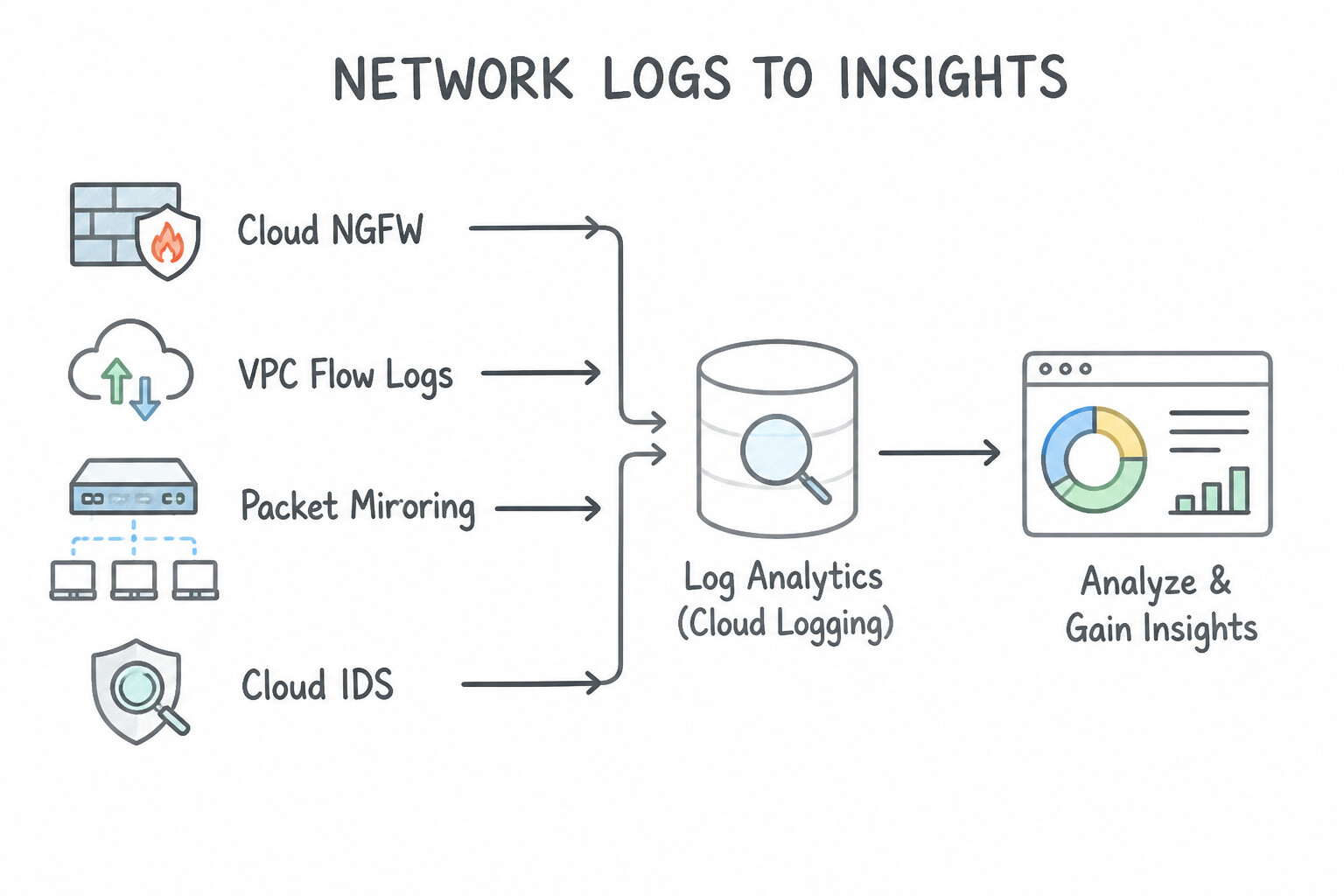
- When to Choose
VPC Flow Logs: You need to troubleshoot connectivity (ALLOWvs.DENY), audit East–West connection patterns, or detect port scanning/SSH brute-force volume using Layer 3/4 metadata without capturing raw packet payloads. Enabled per VPC Subnet. - When to Choose
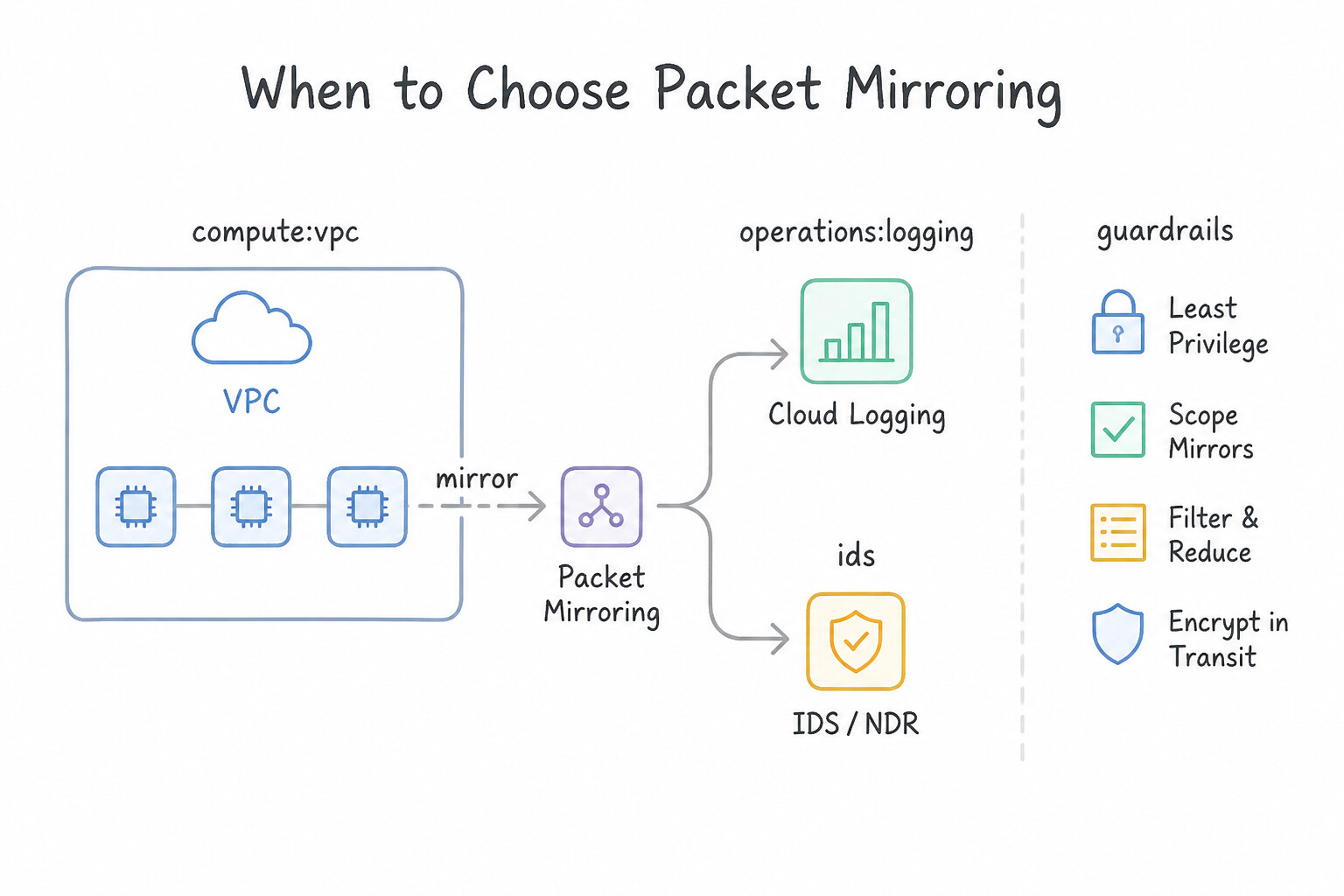
Packet Mirroring: You already operate your own custom or third-party network forensics / IDS virtual appliances behind an Internal Passthrough Network Load Balancer (Collector ILB) and need to clone full packet payloads from specific subnets, network tags, or VM instances. - When to Choose
Cloud IDS: You want full-payload Layer 7 intrusion detection (malware, C2, lateral exploits) powered by Palo Alto Networks threat signatures as a fully managed Google Cloud service without deploying or maintaining third-party collector appliances. (You create a Cloud IDS Endpoint in a peered service producer network and attach a Packet Mirroring policy pointing to that endpoint).
Key Implementation Patterns
- Troubleshooting Connectivity via VPC Flow Logs: Use Enable VPC Flow Logs for the relevant subnet. In the Logs Explorer, query the logs for the destination IP address and check the disposition field. VPC Flow Logs provide a record of network traffic, including a 'disposition' field that confirms if traffic was allowed or denied by firewall rules.
- Managed Threat Detection with Cloud IDS: Use Create a Cloud Intrusion Detection System (Cloud IDS) endpoint and configure a packet mirroring policy. Cloud IDS is a managed, agentless service designed to detect malware and spyware using packet mirroring and built-in signatures.
- Deep Packet Inspection with Packet Mirroring: Use Configure a Packet Mirroring policy to copy traffic from the subnet to the Collector ILB. Packet Mirroring copies the full traffic payload and sends it to a collector for inspection, meeting the requirement. (Avoid alternative: VPC Flow Logs only capture metadata (headers), not the actual packet payload required for deep inspection.)
Key Takeaways (4.2a)
- VPC Flow Logs provide visibility into network traffic flows without capturing packet payload.
- The 'disposition' field in flow logs (ALLOW vs. DENY) is the definitive indicator of firewall behavior.
- System/Agent logs only reflect the OS perspective and cannot confirm external network blocks.
- Audit logs track configuration changes, not network traffic flow.
Consideration 4.2b: Designing an effective logging strategy
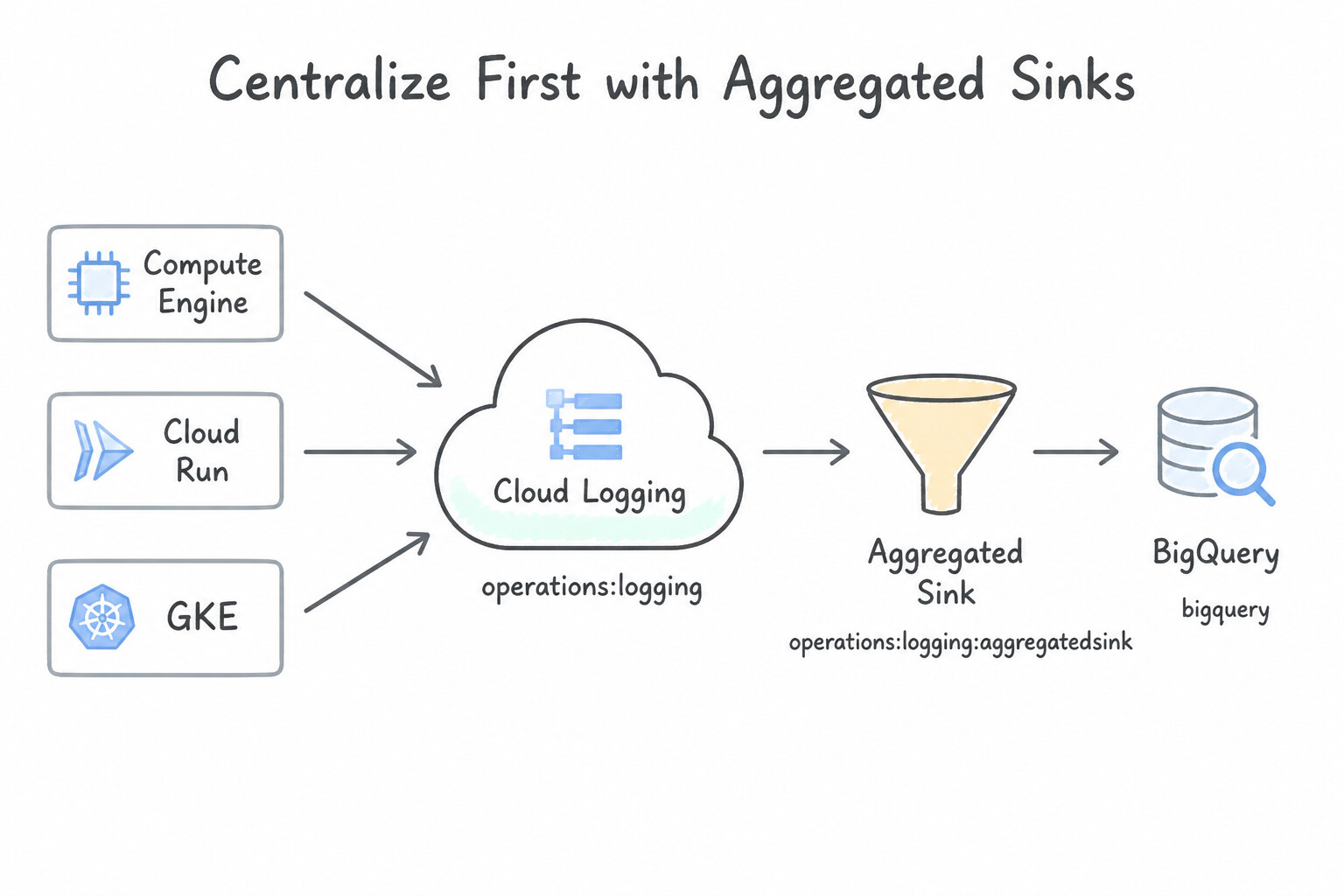
- Centralize First with Aggregated Sinks: Always configure an Organization-level (or Folder-level) Aggregated Log Sink with
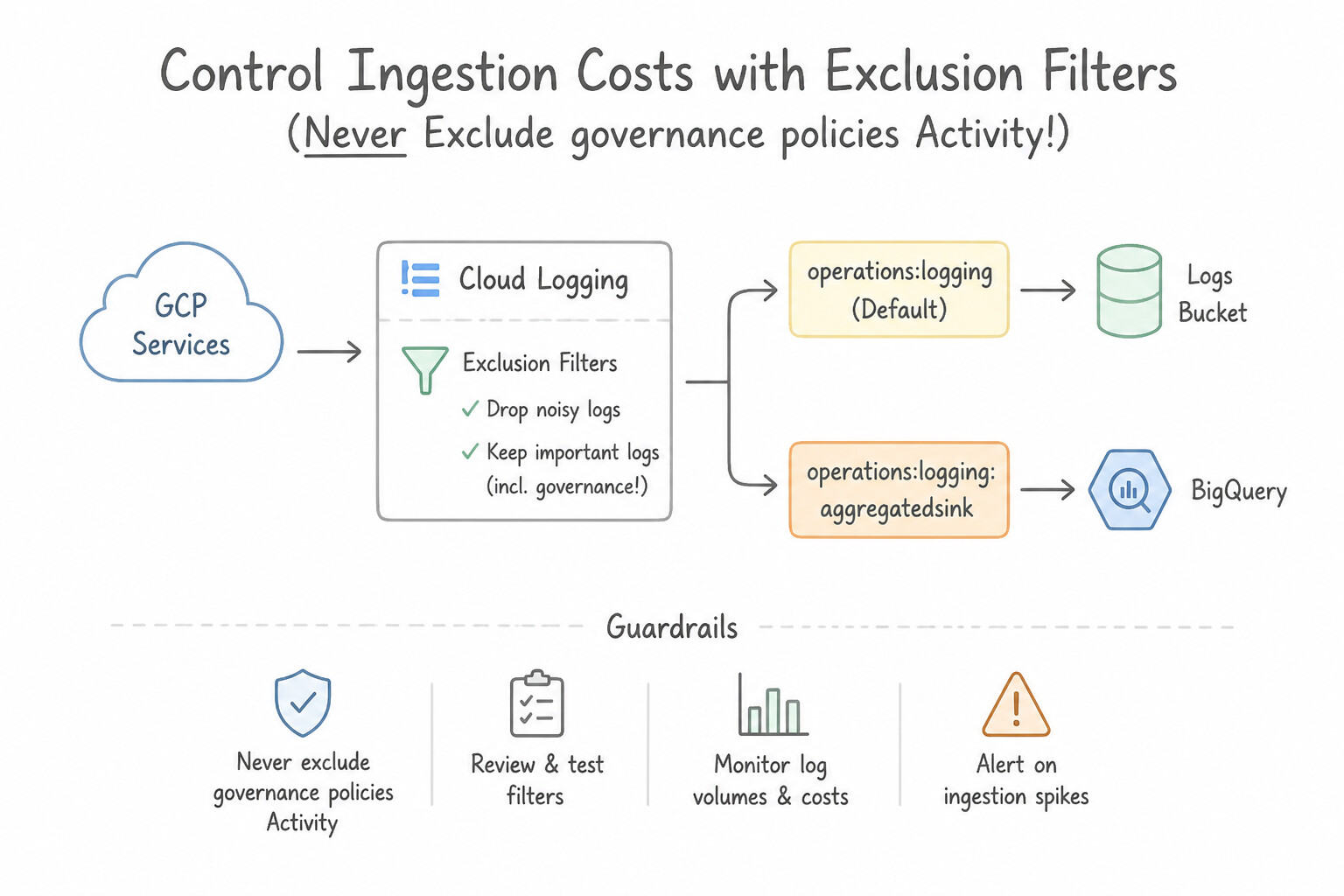
includeChildren = trueso newly created projects cannot bypass centralized security logging. - Control Ingestion Costs with Exclusion Filters (Never Exclude Admin Activity!): If high-volume load balancer
HTTP 200 OKlogs or dev debug logs are blowing up Cloud Logging ingestion costs, add an Exclusion Filter on the_DefaultLog Sink (e.g.,resource.type="http_load_balancer" AND httpRequest.status=200). Logs matched by an exclusion filter on_Defaultare dropped before storage billing—while still allowing a separate sink to route them to cheap Cloud Storage if desired!
Key Implementation Patterns
- Organization-Level Log Aggregation: Use Create an aggregated sink at the Organization node with the include children option enabled, pointing to the BigQuery dataset. An aggregated sink at the Organization level with 'include children' automatically captures logs from all current and future projects centrally.
- Enabling Data Access Logs: Use Update the IAM Audit Config for the Cloud Storage API to enable Data Access logs with the log type DATA_READ. Data Access logs for reading data (DATA_READ) are disabled by default; you must enable them to track object reads. (Avoid alternative: Object Versioning protects data availability and history but does not log who views or downloads the data.)
- Cost Optimization via Log Exclusions: Use Configure an exclusion filter on the _Default sink for httpRequest.status = 200. Exclusion filters on the _Default sink prevent specific logs from being ingested, saving money while keeping others. (Avoid alternative: Disabling logging stops all log generation, meaning you lose visibility into errors.)
Key Takeaways (4.2b)
- Use aggregated sinks at the Organization level for centralized compliance and security logging.
- The
includeChildrenproperty ensures new projects are automatically covered by the logging strategy.- Avoid per-project configurations for requirements that apply to the entire organization.
- BigQuery is the ideal destination for logs that need to be queried for security analysis.
Consideration 4.2c: Logging, monitoring, responding to, and remediating security incidents
- Event-Driven Automated Remediation (
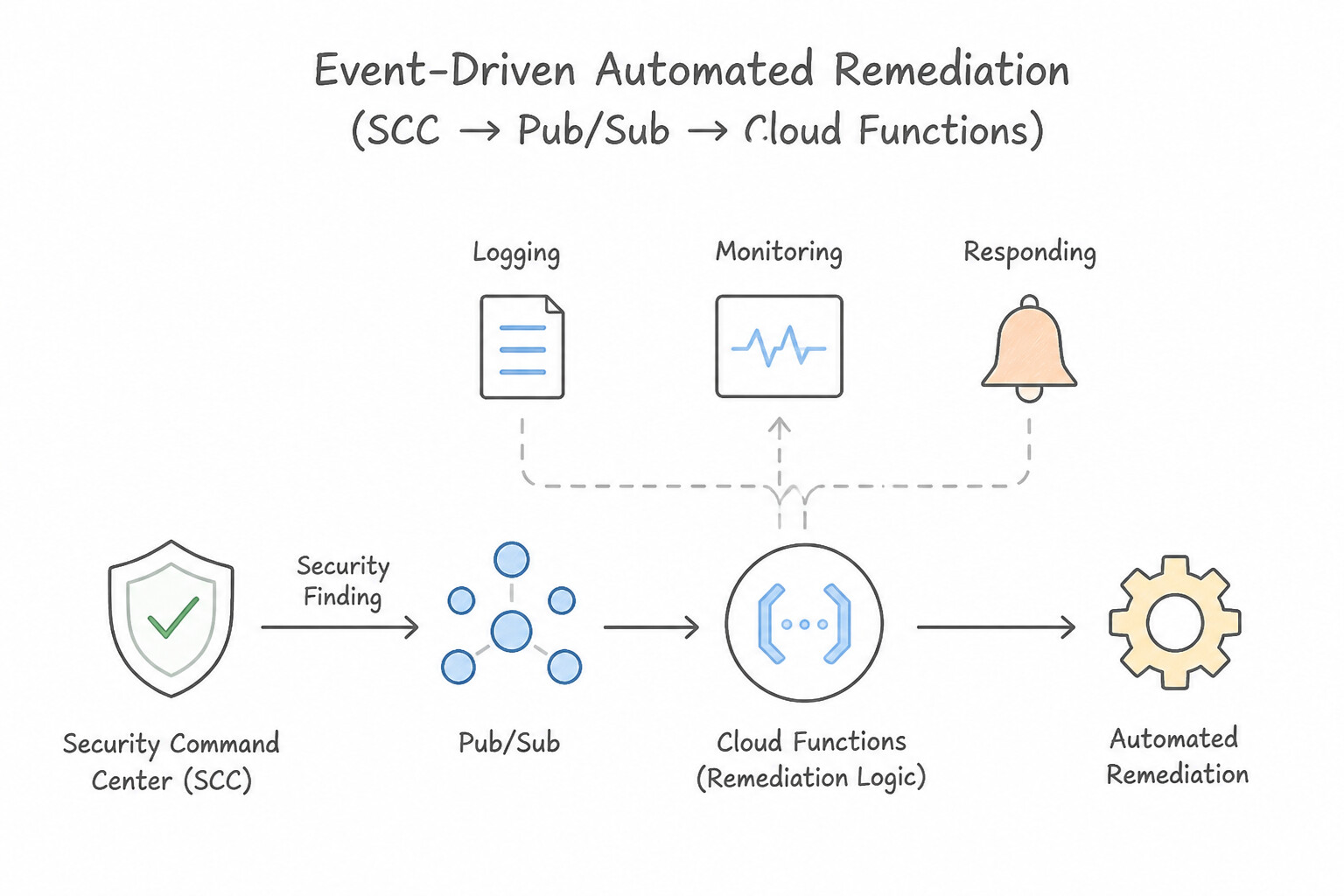
SCC → Pub/Sub → Cloud Functions / Cloud Run): When Security Command Center detects a critical misconfiguration (such as a firewall rule opened to0.0.0.0/0or a public Cloud Storage bucket), route the finding via an SCC Notification Config to Cloud Pub/Sub, which triggers a Cloud Function using a narrow Service Account to automatically revoke the public ACL or delete the offending firewall rule in seconds. - Forensic Evidence Preservation on a Compromised VM:
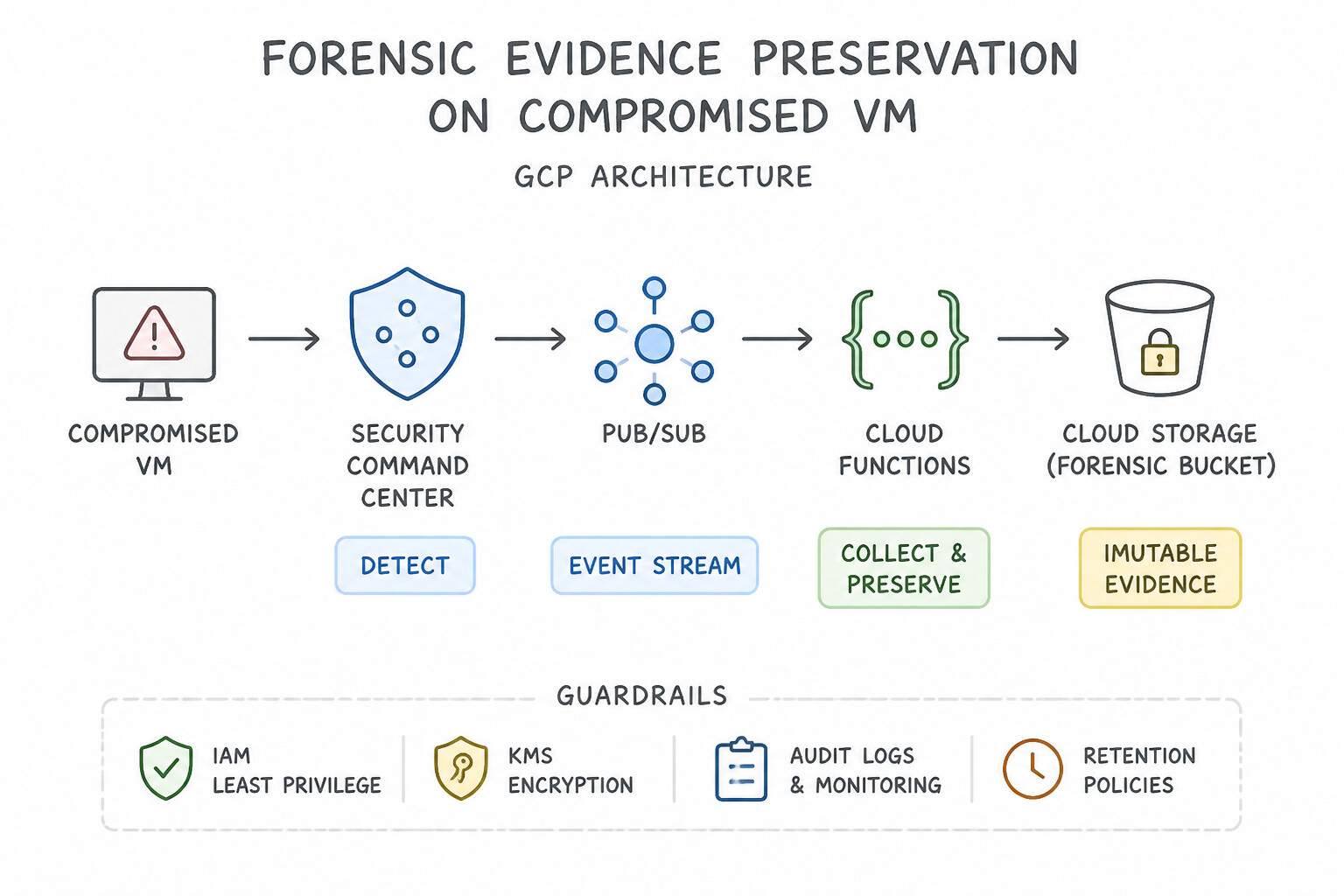
- Contain (Isolate Network): Apply a quarantine network tag / Service Account firewall rule that denies all ingress and egress traffic to halt C2 communication and cryptomining immediately.
- Preserve Evidence (Do NOT Power Off!): Never stop or delete the VM first, as stopping wipes volatile RAM and ephemeral state. Create a Snapshot of the Persistent Disk while the instance is isolated, and inspect the disk snapshot attached as a secondary read-only disk on a forensic VM in a separate Forensics Project.
- Eradicate & Recover: Terminate the compromised VM and redeploy from a verified golden image.
Key Implementation Patterns
- Automated Firewall Remediation: Use Configure an SCC notification to send findings to a Pub/Sub topic. Trigger a Cloud Function to delete the firewall rule. Chaining SCC, Pub/Sub, and Cloud Functions creates a real-time, automated remediation pipeline. (Avoid alternative: BigQuery is for analytics and batch processing, not real-time automated remediation.)
- Centralized Organization Logging: Use Create an aggregated sink at the Organization level. Set the includeChildren parameter to true and configure the destination as the Cloud Storage bucket. An aggregated sink at the Organization level with includeChildren set to true automatically captures logs from all current and future projects.
Key Takeaways (4.2c)
- Security Command Center (SCC) is the starting point for detecting threats and misconfigurations.
- Pub/Sub is the bridge that enables event-driven architectures by decoupling producers (SCC) from consumers (remediation tools).
- Cloud Functions provide the logic to perform the actual remediation (e.g., deleting a resource) automatically.
- Manual alerts (Email/Slack) are useful for visibility but do not satisfy requirements for automated remediation.
Consideration 4.2d: Designing secure access to logs
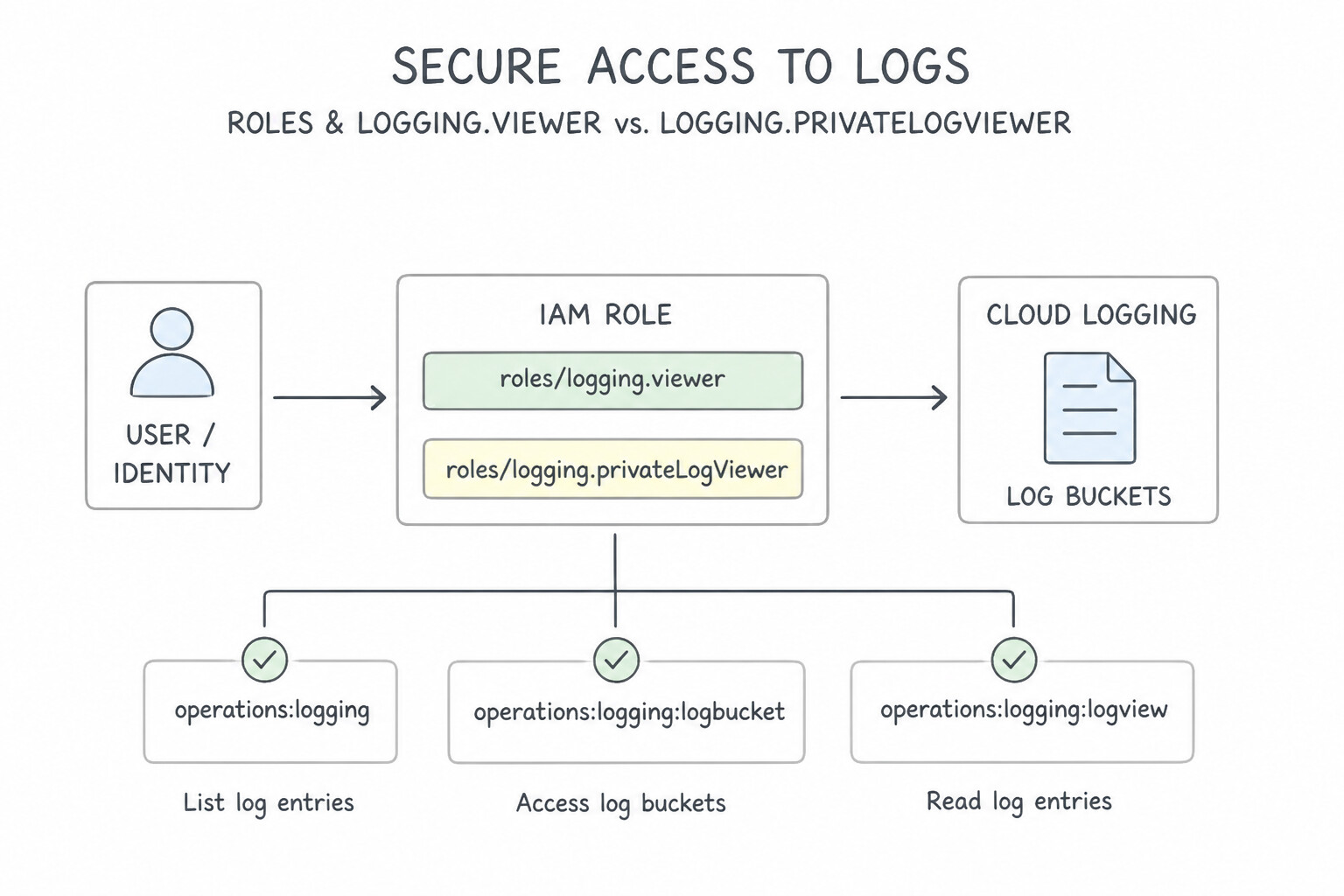
roles/logging.viewervs.roles/logging.privateLogViewer:- Logs Viewer (
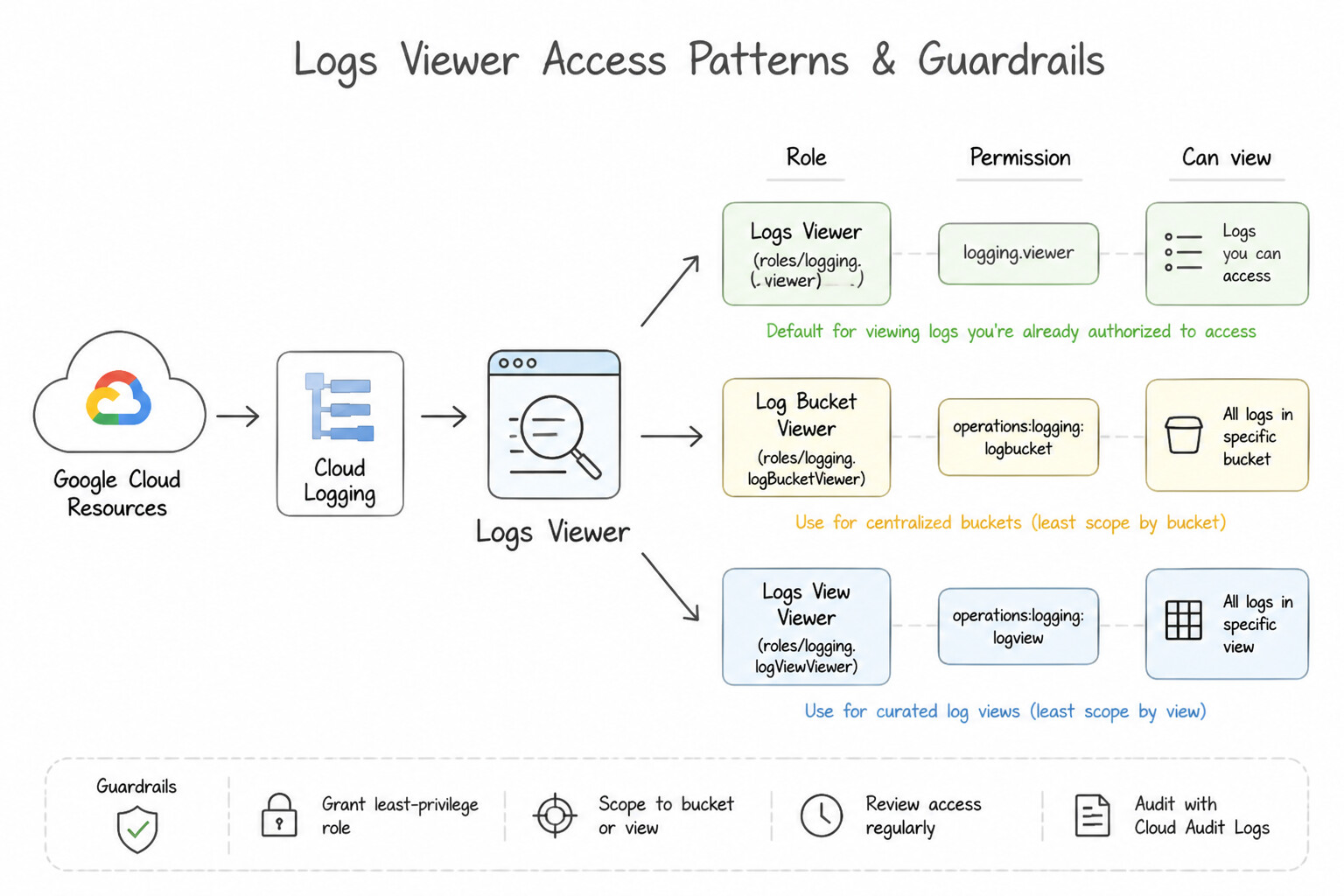
roles/logging.viewer): Grants read access to standard logs in the_Requiredand_Defaultbuckets (Admin Activity, System Event, application logs), excluding Data Access and Access Transparency logs. - Private Logs Viewer (
roles/logging.privateLogViewer): Grants read access to all logs, including sensitiveData AccessandAccess Transparencylogs. - Granular Segregation via
Log Buckets+Log Views: When multiple teams share a centralized logging project or bucket and Team A must only see logs fromresource.labels.service_name="payments-api", create a Custom Log View with that filter on the Log Bucket and grant Team Aroles/logging.viewAccessorconstrained to that specific Log View. - Querying Central BigQuery Log Datasets: When analysts query exported logs in a central Security Project's BigQuery dataset, grant them
roles/bigquery.dataViewer(on the dataset) ANDroles/bigquery.jobUser(on the project to run SQL queries)—without granting them any IAM roles on the source application projects!
Key Implementation Patterns
- Segregation of Duty for Sensitive Logs: Use Create a user-defined log bucket and route application logs to it. Create a log view for developers that excludes payment logs and a log view for auditors that includes all logs. Grant access to the views. Log Views provide granular access control by filtering which logs are visible to specific users.
- Centralized Logging Access in a Hub-and-Spoke Model: Use Grant the roles/bigquery.dataViewer and roles/bigquery.jobUser roles to the analysts on the Security project. BigQuery requires both dataViewer (to read) and jobUser (to query) roles on the destination project to analyze exported logs.
- Access Control for Data Access Audit Logs: Use Assign the Logs Viewer (roles/logging.viewer) role to the analyst. Logs Viewer grants access to standard logs but automatically excludes sensitive Data Access logs. (Avoid alternative: This role is for scoping access to specific Log Views, not general log viewing with standard exclusion rules.)
Key Takeaways (4.2d)
- Use Log Buckets to centralize and store logs within Cloud Logging.
- Use Log Views to create filtered subsets of logs for specific users or teams.
- Grant IAM roles on Log Views (roles/logging.viewAccessor) to enforce least privilege access to log data.
- Avoid splitting logs across different storage services (like GCS) if the goal is strictly access control within the logging interface.
Consideration 4.2e: Exporting logs to external security systems
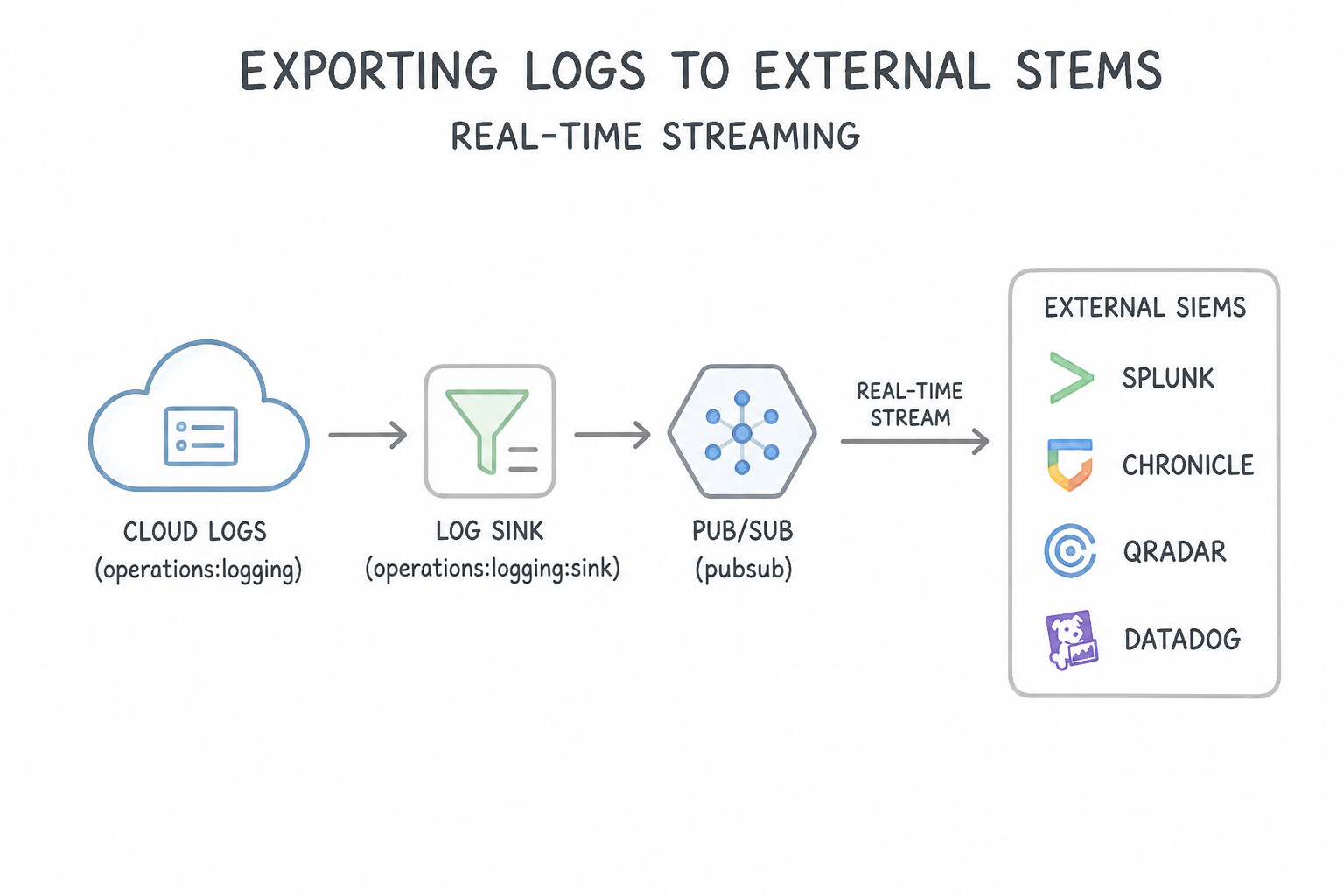
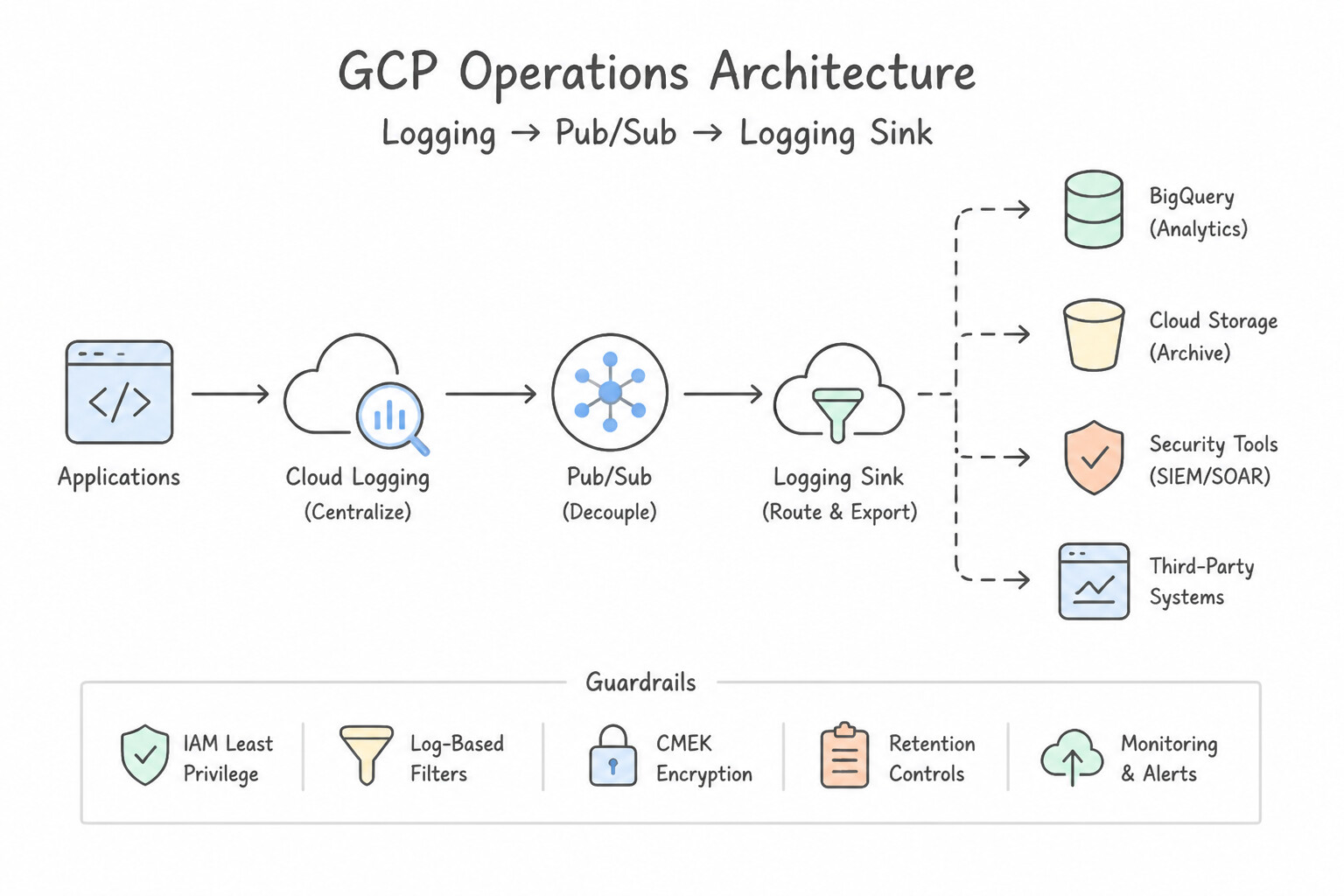
- Real-Time Streaming to External SIEMs (Splunk, Chronicle, QRadar, Datadog): Create a Log Router Sink (or SCC Notification Config) with a Cloud Pub/Sub topic as the destination. External SIEM connectors subscribe to the Pub/Sub subscription (
roles/pubsub.subscriber), providing a decoupled, durable message buffer that never drops logs if the on-premises SIEM goes down for maintenance.
Key Implementation Patterns
- Real-time SIEM Integration Architecture: Use Create a Log Router sink with a Cloud Pub/Sub topic as the destination. Configure the Splunk add-on to pull from the subscription. Cloud Pub/Sub acts as a real-time message queue, allowing external systems to ingest logs immediately as they are generated.
- Organization-Wide Log Aggregation: Use Configure an aggregated sink at the Organization node to export logs to the BigQuery dataset. Aggregated sinks at the Organization level automatically route logs from all child projects to a central destination. (Avoid alternative: Configuring individual sinks for 500 projects causes excessive administrative overhead.)
- Long-term Compliance Archiving: Use Create a log sink to export logs to a Cloud Storage bucket with the Archive storage class. The Archive storage class in Cloud Storage provides the lowest cost for long-term data that is accessed less than once a year. (Avoid alternative: BigQuery is optimized for analytics and is more expensive for long-term cold storage compared to Cloud Storage Archive.)
Key Takeaways (4.2e)
- Use Cloud Pub/Sub for real-time log streaming to external third-party tools.
- Use Cloud Storage for long-term log retention and compliance archival.
- Use BigQuery for security analytics and SQL-based log investigation.
- A Log Router Sink is the mechanism to direct log entries to these destinations.
Consideration 4.2f: Configuring and analyzing Cloud Audit Logs and data access logs
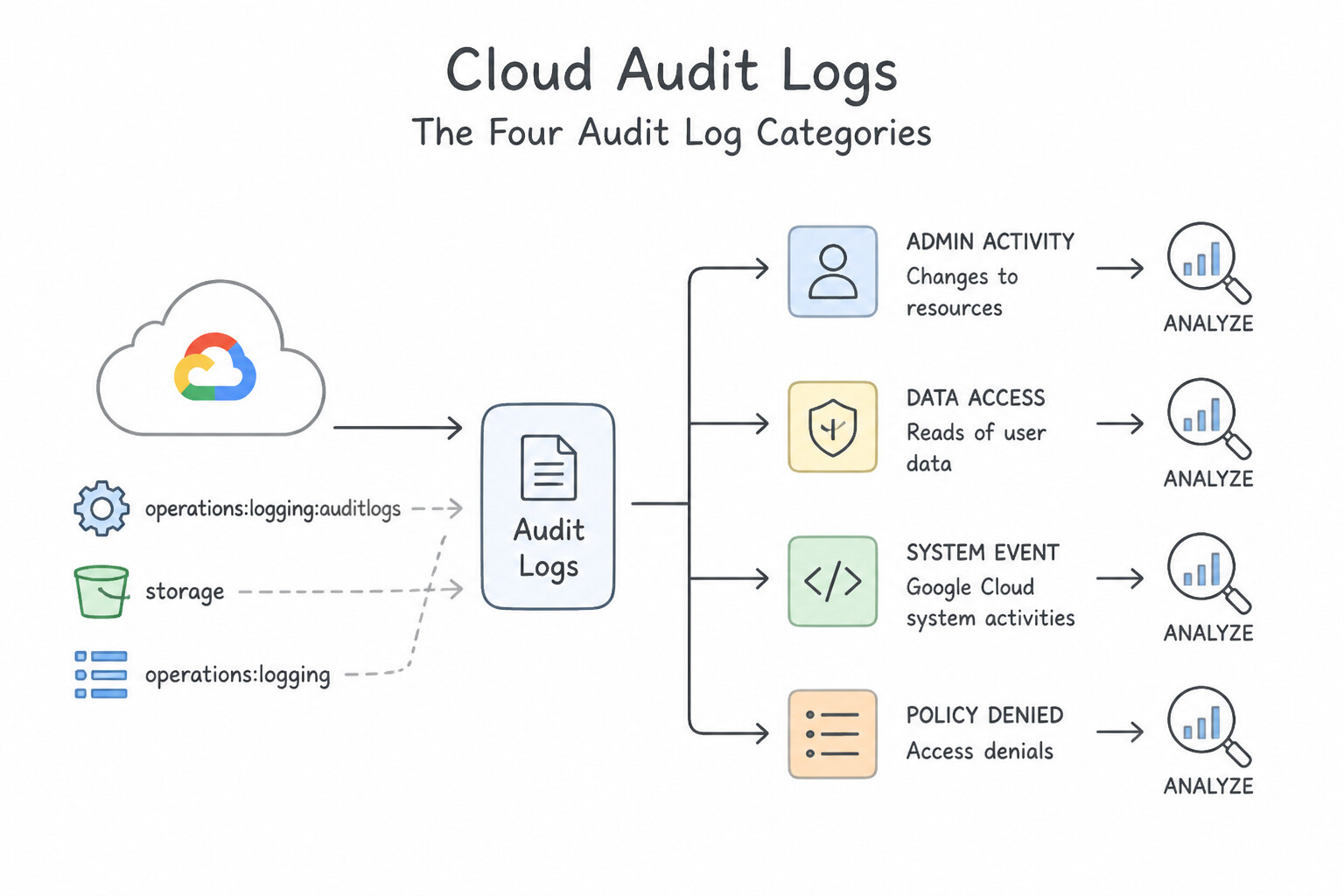
- The Four Cloud Audit Log Categories:
- Admin Activity (
ADMIN_WRITE): Logs API calls that create, modify, or delete resources or IAM policies. Always on, free, 400-day retention in_Required. - System Event: Logs Google Cloud automated system actions (e.g., live migration, preemptible termination). Always on, free, 400-day retention in
_Required. - Policy Denied: Logs when a Google Cloud service denies access to a user or service account due to a security policy violation (e.g., VPC-SC or Organization Policy). Retained 30 days in
_Default(billable). - Data Access (
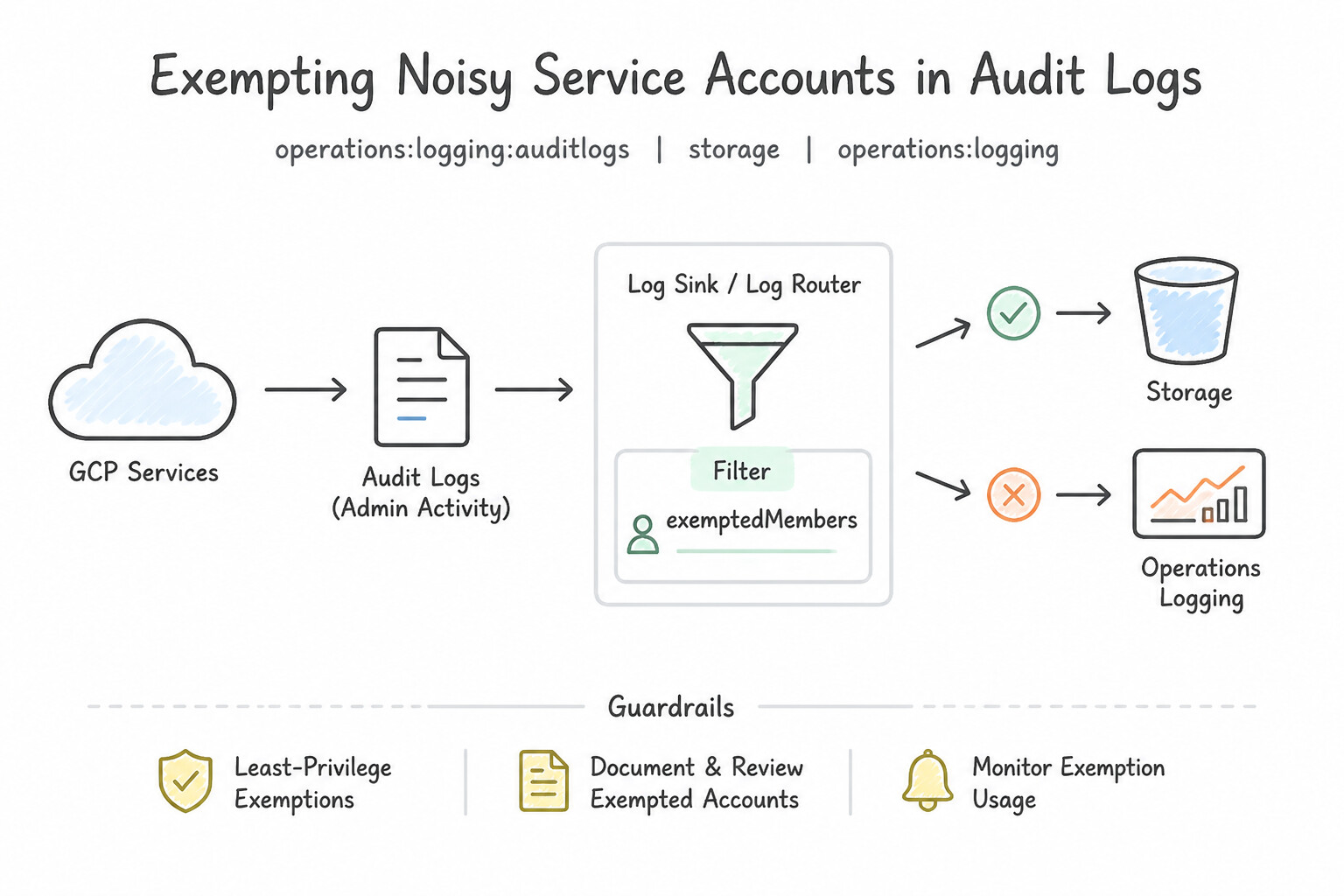
ADMIN_READ,DATA_READ,DATA_WRITE): Logs reading resource metadata (ADMIN_READ) and reading/writing user-provided data (DATA_READ,DATA_WRITE—such asstorage.objects.get). Disabled by default (except BigQuery); 30-day default retention in_Default(billable). - Exempting Noisy Service Accounts (
exemptedMembers): If enablingDATA_READon Cloud Storage generates massive billable log volume from a trusted internal monitoring or backup Service Account, add that Service Account to the Exempted Principals (exemptedMembers) list in the project's IAM Audit Config.
Key Implementation Patterns
- Enabling Data Access Logs for Specific Services: Use Navigate to the IAM & Admin Audit Logs page and enable Data Access logs for the Cloud Storage API. Data Access logs capture data reads and writes but are disabled by default for Cloud Storage; you must enable them to see object views.
- IAM Roles for Sensitive Log Viewing: Use Assign the Private Logs Viewer role to the auditor. Assign the Logs Viewer role to the developer. Private Logs Viewer includes Data Access logs permission. Logs Viewer excludes Data Access logs permission. (Avoid alternative: Logs Viewer cannot view Data Access logs, while Private Logs Viewer can. This option swaps the required roles.)
- Reducing Cost via Principal Exclusions: Use Update the IAM Audit Config for the project to add the service account to the exempted principals list. Exempting the principal in the IAM Audit Config prevents log generation at the source for that specific user. (Avoid alternative: Exclusion filters discard logs after generation; they do not stop the initial creation of the log entry.)
Key Takeaways (4.2f)
- Admin Activity logs track configuration changes and are on by default.
- Data Access logs track data reads/writes and are off by default for most services (except BigQuery).
- To log object reads in Cloud Storage, you must explicitly enable Data Access logs.
- Versioning and Flow Logs serve different purposes (recovery and network monitoring, respectively).
Consideration 4.2g: Configuring log exports using log sinks and aggregated sinks
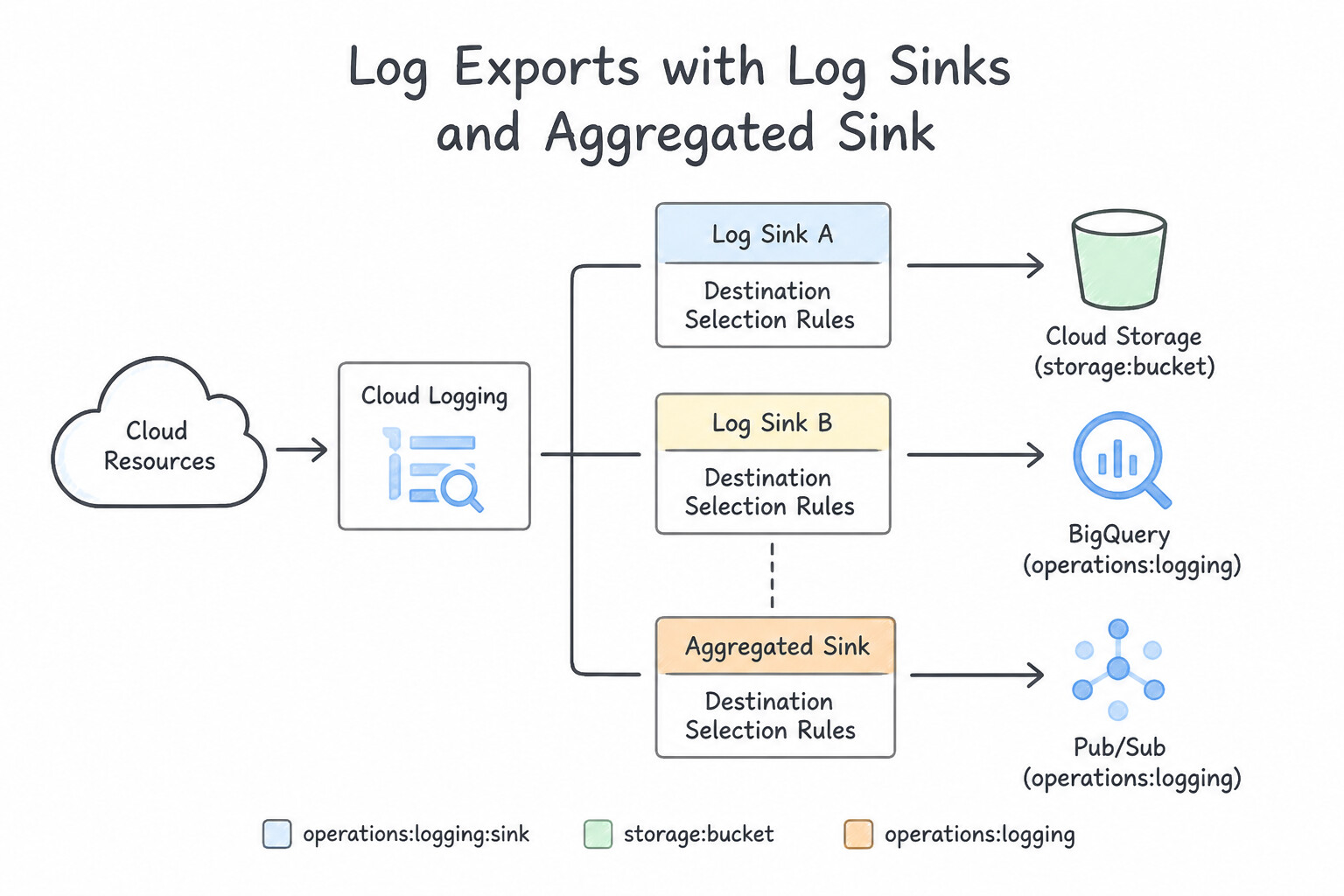
- Destination Selection Rules:
- Cloud Storage (
Archivestorage class): Lowest storage cost per GB/month for multi-year (1–7+ year) compliance archival where logs are rarely read. Pair with Bucket Lock (Retention Policy) for WORM immutability. - BigQuery (or Log Analytics Linked Dataset): Best when security analysts need fast SQL querying and relational joins across months of historical audit and VPC flow logs.
- Cloud Pub/Sub: Best for real-time event-driven streaming to external SIEMs or serverless remediation functions.
- Cross-Project Sink Service Account Permissions: Every Log Sink uses a unique Writer Identity Service Account (e.g.,
serviceAccount:p12345-999@gcp-sa-logging.iam.gserviceaccount.com). You must grant that Writer Identityroles/storage.objectCreator(on the destination GCS bucket),roles/bigquery.dataEditor(on the destination BigQuery dataset), orroles/pubsub.publisher(on the destination Pub/Sub topic)!
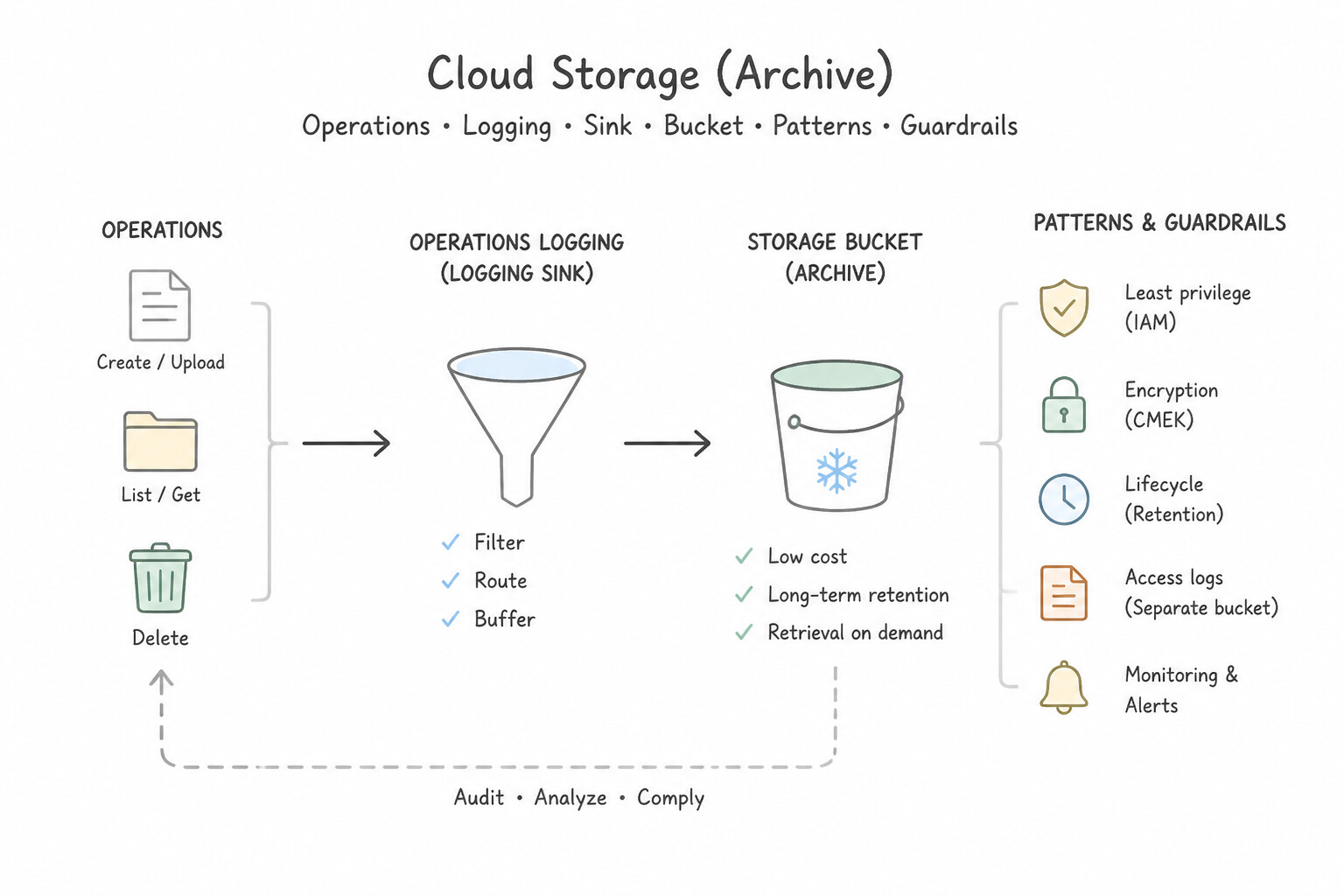
Key Implementation Patterns
- Long-Term Compliance Archival: Use Create a log sink to export the logs to a Cloud Storage bucket. Set the bucket's storage class to Archive. Cloud Storage with the Archive class is the most cost-effective solution for long-term retention of rarely accessed data. (Avoid alternative: BigQuery is optimized for analytics and querying, making it more expensive than Cloud Storage for simple archival purposes.)
- Real-Time SIEM Integration: Use Create a log sink with a Pub/Sub topic as the destination. Configure the SIEM to pull messages from the subscription. Pub/Sub is the standard pattern for real-time log streaming to external systems. (Avoid alternative: Cloud Storage is for archival and batch processing, not real-time streaming.)
Key Takeaways (4.2g)
- Use Cloud Storage for long-term, low-cost log retention and compliance archival.
- Use BigQuery for security analytics and SQL-based log investigation.
- Use Pub/Sub for streaming logs to third-party SIEMs or external tools.
- Always align the storage class (Standard, Nearline, Coldline, Archive) with the access frequency to optimize costs.
Consideration 4.2h: Configuring and monitoring Security Command Center
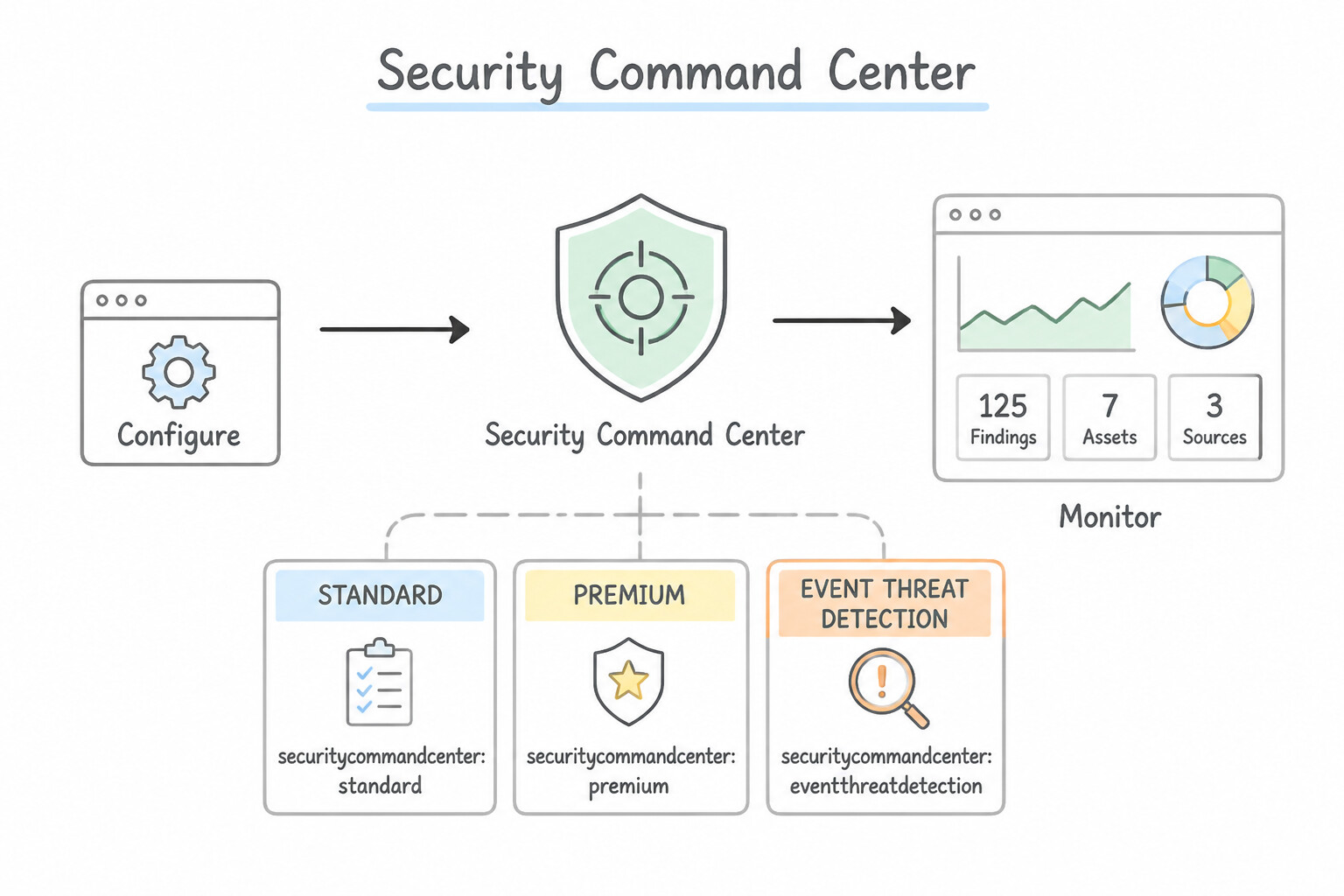
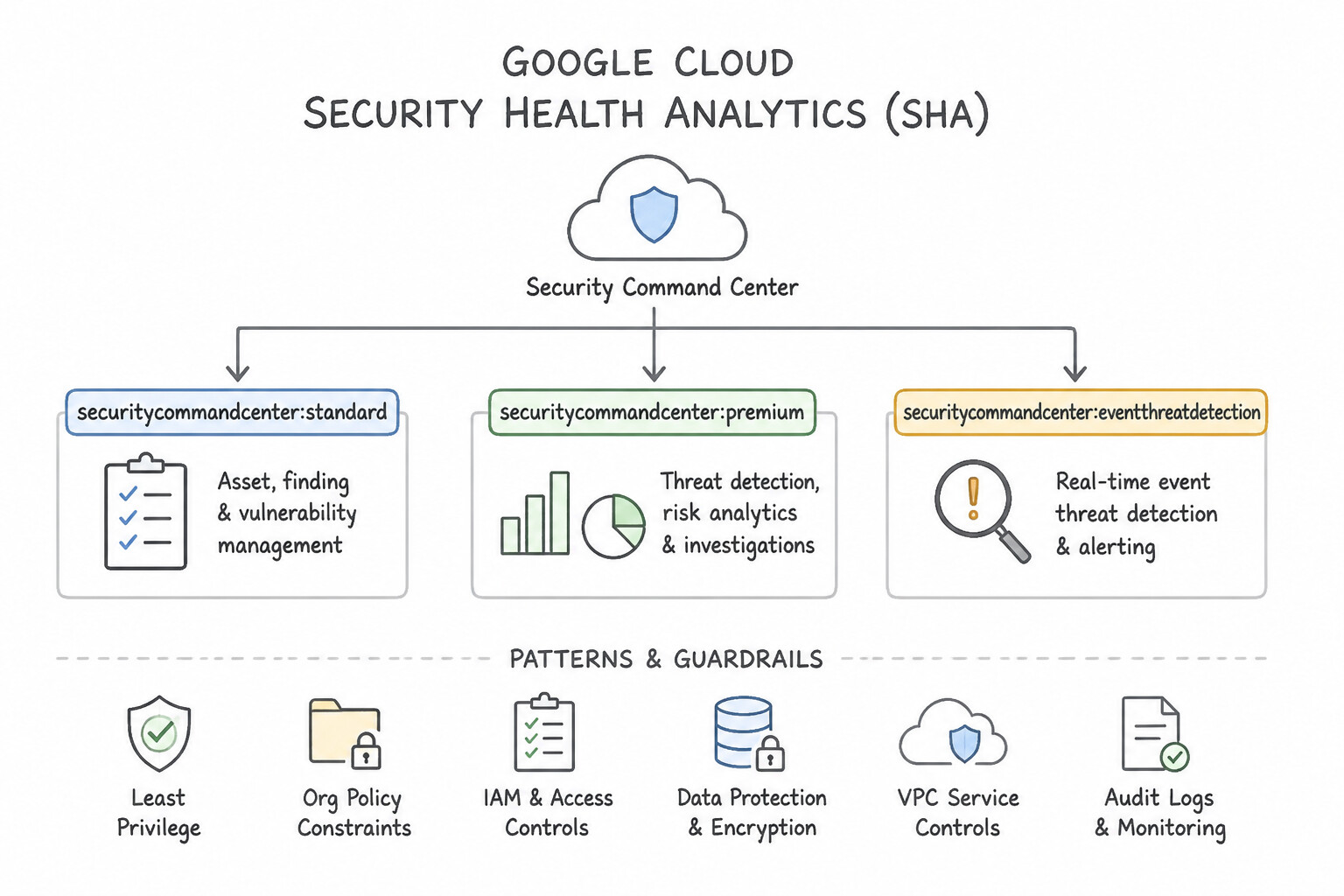
- SCC Capabilities & Tiers:
- Security Health Analytics (SHA): Continuous Cloud Security Posture Management (CSPM) scanning for misconfigurations (open firewalls, public buckets, unrotated keys, disabled audit logs).
- Event Threat Detection (ETD — SCC Premium / Enterprise Required): Real-time log-based threat detection scanning Cloud Logging, VPC Flow Logs, and Cloud DNS logs to detect active attacks: cryptocurrency mining (
Malware: Coinminer), SSH brute-force, anomalous IAM role grants, and data exfiltration. - Web Security Scanner: DAST scanner identifying XSS, outdated libraries, and mixed content in web apps.
- Suppressing Known Benign Findings (
Mute Rules): If an accepted architectural pattern (e.g., an intentionally public static-assets Cloud Storage bucket) repeatedly triggers findings in SCC, create a Mute Rule filtering on the specificcategoryandresource.nameso SOC analysts are not buried in alert fatigue.
Key Implementation Patterns
- Standard vs. Premium Tier Features: Use Upgrade the organization to the Security Command Center Premium tier to enable Event Threat Detection. Event Threat Detection requires the Premium tier and is designed to analyze logs for threats like crypto-mining. (Avoid alternative: Security Health Analytics checks for misconfigurations, not log-based threats.)
- Handling False Positives via Mute Rules: Use Create a mute rule that filters on the finding category and specific resource name. Mute rules allow you to suppress specific findings based on criteria like resource name while keeping the detector active elsewhere. (Avoid alternative: Disabling the detector stops checking for the vulnerability globally, which leaves other resources unprotected.)
- Real-time SIEM Integration: Use Create a Notification Config to publish findings to a Pub/Sub topic. Notification Configs stream findings to Pub/Sub, enabling real-time integration with external SIEM tools. (Avoid alternative: Cloud Storage is best for batch processing and archiving, not real-time event streaming.)
Key Takeaways (4.2h)
- SCC Standard is primarily for identifying misconfigurations (Security Health Analytics).
- SCC Premium is required for active threat detection features like Event Threat Detection and VM Threat Detection.
- Event Threat Detection relies on Cloud Logging data to identify threats such as malware and crypto-mining.
- Mute rules in Security Command Center allow you to suppress findings based on criteria like resource names without disabling the detector globally.
Quick Decision Cheat Sheet (Subsection 4.2)
If the Scenario Requires... | Choose This Google Cloud Pattern | Avoid This Common Mistake |
|---|---|---|
"User downloaded sensitive files from Cloud Storage ( storage.objects.get), but no log entry exists in Cloud Audit Logs" | Enable Data Access Audit Logs ( DATA_READ) for the Cloud Storage API in IAM Audit Config | Checking Admin Activity logs (Admin Activity only logs bucket creation/config changes, never DATA_READ object downloads!) |
"Grant a junior SOC analyst read access to standard logs while hiding sensitive Data Access audit logs" | Grant roles/logging.viewer (Logs Viewer) instead of roles/logging.privateLogViewer | Granting roles/Owner or roles/logging.admin |
"Enable DATA_READ audit logs on Cloud Storage, but prevent a high-frequency internal backup Service Account from generating terabytes of log charges" | Add the backup Service Account to exemptedMembers (Exempted Principals) in the Cloud Storage IAM Audit Config | Disabling DATA_READ logs for the entire project (blinds the SOC to human insider exfiltration!) |
"Stream Security Command Center findings or Cloud Audit Logs to an on-premises Splunk SIEM in real time" | Route via a Cloud Pub/Sub topic (using an SCC Notification Config or Log Sink) | Writing a cron script that runs gcloud logging read every hour |
"Automatically remediate public Cloud Storage buckets within seconds of detection" | SCC Notification Config → Cloud Pub/Sub → Cloud Function that enables Public Access Prevention / removes allUsers | Sending daily email digests to the security team for manual clicking |
Further Reading (Subsection 4.2)
- Use VPC Flow Logs — Provides details on how to enable flow logs and explains the record format, including the disposition field.
- Flow logs overview — Explains the concepts of VPC Flow Logs, their use cases for network monitoring and forensics, and how they record 5-tuple flow data.
- Cloud IDS overview — Explains how Cloud IDS provides managed threat detection for malware, spyware, and C2 attacks using Packet Mirroring.
- Packet Mirroring overview — Describes how Packet Mirroring copies traffic from VPC instances to a collector or analysis tool like Cloud IDS.
- Use cases for Packet Mirroring — Describes scenarios requiring deep packet inspection and how Packet Mirroring fits into security monitoring.
- Collate and route organization-level logs — This guide explains how to create aggregated sinks to route logs from all projects in an organization to a central destination.
Book TOC · Previous · Chapter 5 of 7 · Next
AwesomeGCP.com Learning
The approach taken is a question-led learning approach: you explore realistic project scenarios where you need to make decisions or take actions to achieve business goals within specific constraints. Instead of passive learning, you are challenged to think and work through the options to master the Professional Cloud Security Engineer (PCSE) certification!