Book TOC · Previous · Chapter 2 of 7 · Next
Chapter 2: Authorization & Hierarchy Governance: IAM Conditions, Deny Policies, PAM, ACM & Org Policies
Chapter Focus: IAM Allow vs. Deny precedence, IAM Conditions, Privileged Access Manager (PAM) JIT elevation, Access Context Manager (ACM), Policy Intelligence Recommender, and Organization Policy constraints.
Subsection 1.4: Managing and implementing authorization controls
The Big Picture
In a small startup project, granting individual engineers predefined roles at the Project level works fine. In a regulated 500-project enterprise, naive IAM practices create three severe security vulnerabilities:
- The
Project Owner& ACL Backdoor (1.4a,1.4b,1.4c): IAM Allow policies in Google Cloud are additive (union) down the resource hierarchy—a child resource cannot use an IAM Allow binding to subtract a permission granted at the Folder or Organization level. Worse, if a developer holdsroles/owneron a project, they can grant themselves any permission unless blocked by an IAM Deny Policy (which is evaluated before IAM Allow policies and always wins). Similarly, on Cloud Storage buckets, legacy Object ACLs can grant public or cross-account read access to individual files completely invisible to Project IAM—unless Uniform Bucket-Level Access (UBLA) is enabled to disable ACLs permanently. - Standing Privileged Access (
1.4d,1.4g,1.4h): Granting permanentroles/bigquery.adminorroles/compute.instanceAdminto on-call engineers "just in case there is a 3:00 AM outage" leaves standing high-privilege credentials vulnerable to compromise 24/7. Modern Zero-Trust authorization replaces standing privileges with Privileged Access Manager (PAM) Entitlements, requiring engineers to request Just-in-Time (JIT) temporary elevation with a mandatory business justification and peer/manager approval workflow. - Blind Role Sprawl & Context-Free Access (
1.4e,1.4f): Over time, teams accumulate broad roles they never use. Without Policy Intelligence (IAM Recommender to rightsize excess permissions based on 90-day usage, Policy Analyzer to audit who can access a resource, and Policy Troubleshooter to diagnose403 Permission Deniederrors) and Access Context Manager (ACM) (to enforce corporate IP and Endpoint Verification device posture), valid credentials stolen from an unmanaged home laptop can access production APIs from anywhere in the world.
Consideration 1.4a: Managing privileged roles and separation of duties using IAM roles and permissions
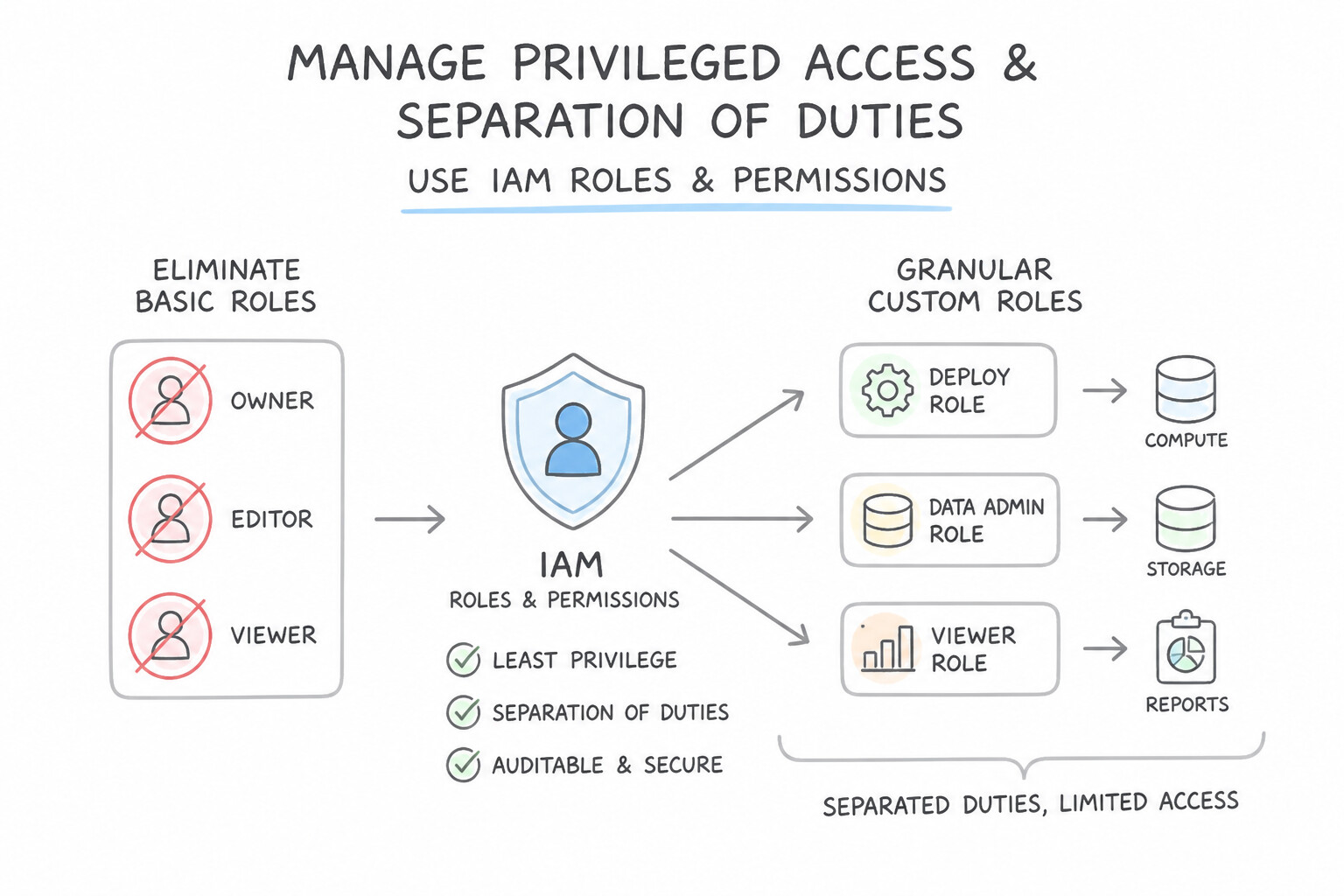
- Eliminate Basic Roles (
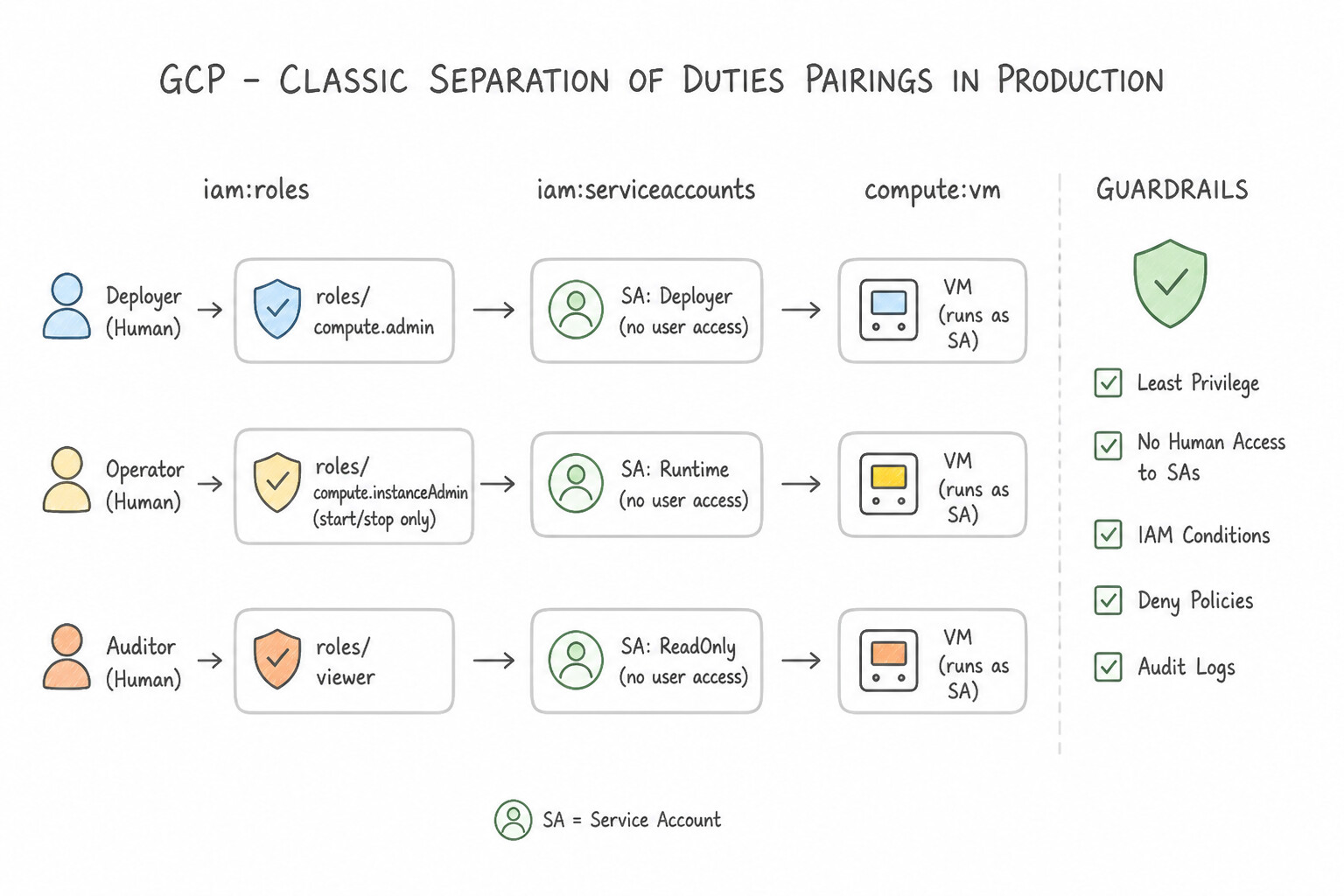
Owner,Editor,Viewer): Basic roles grant thousands of permissions across all services. Always prefer Predefined Roles first; if no predefined role is narrow enough (e.g., allowing a developer to onlycompute.instances.startandcompute.instances.stopVMs, or allowing an auditor to inspect bucket metadata viastorage.buckets.getwithout reading objects), create a Custom IAM Role. - Classic Separation of Duties Pairings in Production:
- Cloud KMS: Grant
roles/cloudkms.adminto the Security/Key Management team (so they can create/rotate keys but cannot encrypt/decrypt data) androles/cloudkms.cryptoKeyEncrypterDecrypterto the workload Service Account (so it can encrypt/decrypt data but cannot destroy or modify keys). - Compute & Service Accounts: Grant
roles/compute.instanceAdmin.v1+ resource-scopedroles/iam.serviceAccountUserwithout grantingroles/iam.serviceAccountAdmin.
Key Implementation Patterns
- Separation of Duties for Service Account Management: Use Assign the roles/iam.serviceAccountUser role to the DevOps team. The Service Account User role allows users to attach service accounts to resources without granting permissions to manage the service account itself.
- Cloud KMS Separation of Duties: Use Assign roles/cloudkms.admin to the Security Operations team. Assign roles/cloudkms.cryptoKeyEncrypterDecrypter to the Data Engineering team. Roles/cloudkms.admin handles key management without data access, while roles/cloudkms.cryptoKeyEncrypterDecrypter allows data usage without management rights.
- Least Privilege with Custom Roles: Use Create a custom IAM role with the storage.buckets.get and storage.buckets.getIamPolicy permissions. Assign this role to the auditor. A custom role with specific bucket permissions grants access to metadata and policies without exposing object data.
Key Takeaways (1.4a)
- Least Privilege: Always grant only the specific permissions required for a task.
- Service Account User: Use this role for users who need to attach service accounts to resources (run operations as the service account).
- Service Account Admin: Use this role for users who need to manage the lifecycle (create/delete) of service accounts.
- Separation of Duties: Split critical tasks (like identity creation vs. resource deployment) across different roles/teams.
Consideration 1.4b: Managing IAM and ACL permissions
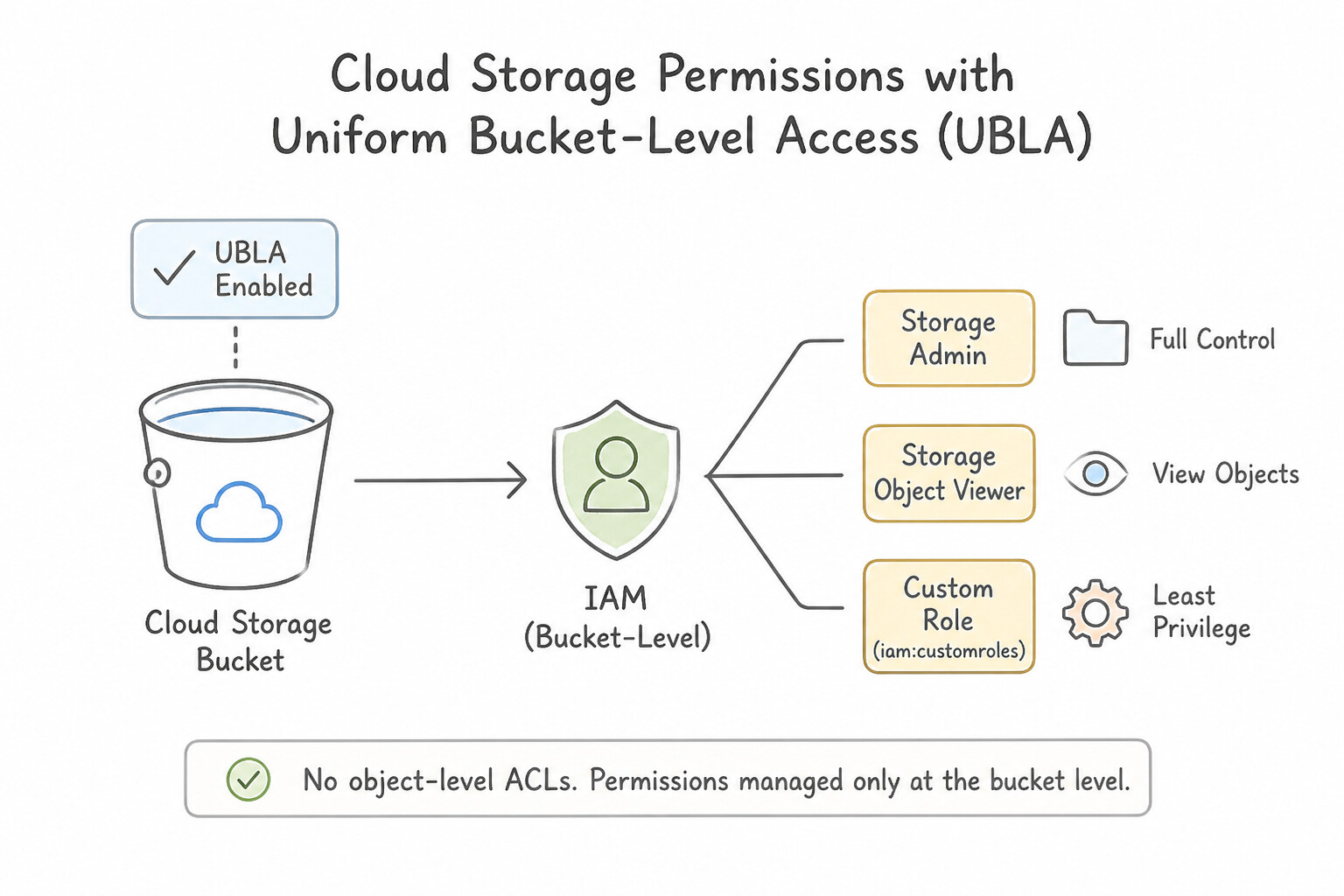
- Uniform Bucket-Level Access (UBLA) on Cloud Storage: By default, Cloud Storage supports both IAM and legacy fine-grained Object ACLs. Dual authorization models cause "shadow access" where a file remains readable via an Object ACL even after a user is removed from IAM. Enable Uniform bucket-level access (and enforce
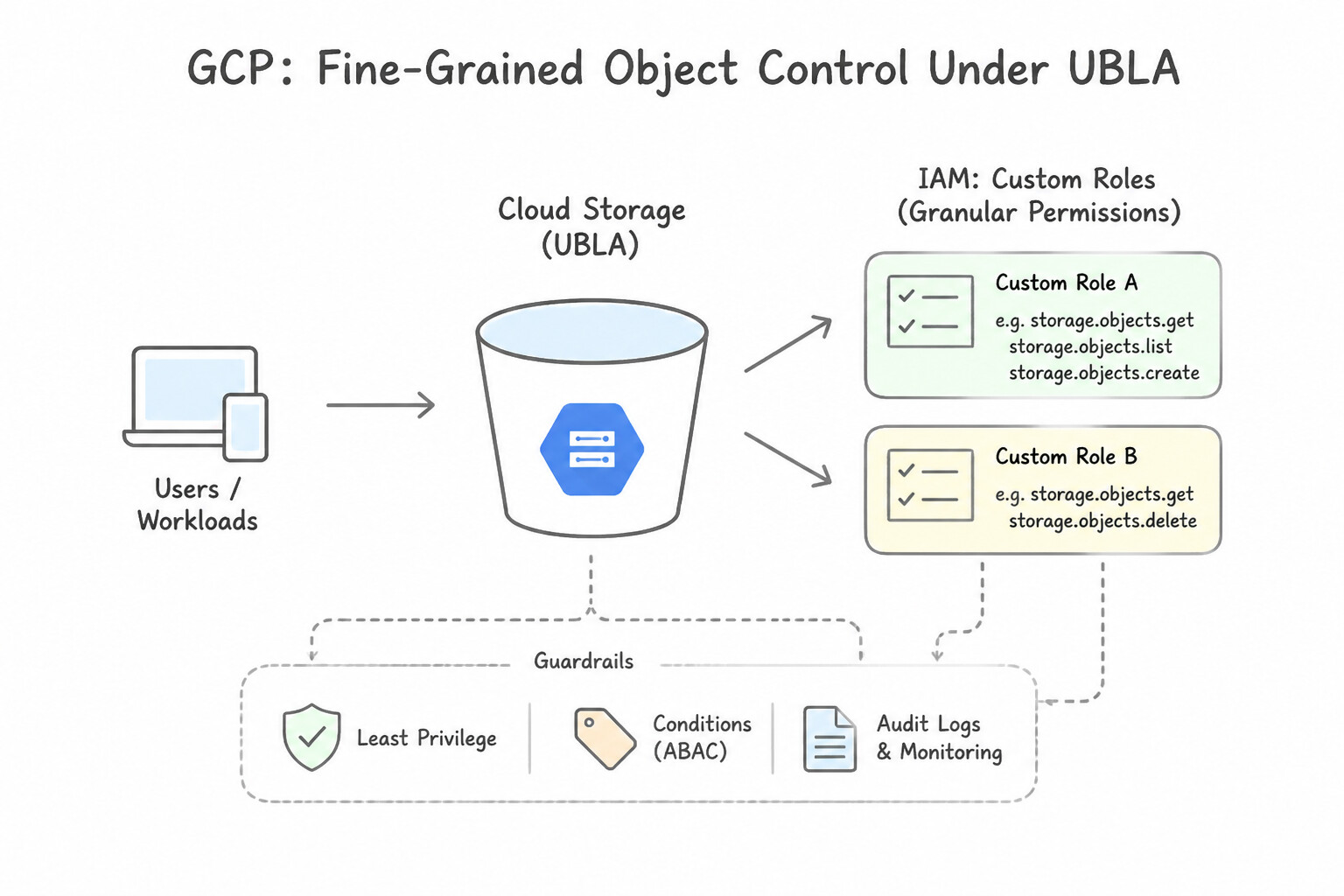
constraints/storage.uniformBucketLevelAccessvia Organization Policy) to disable all ACL evaluation and delegate 100% of access control to IAM. - When Fine-Grained Object Control Is Needed Under UBLA: Use IAM Conditions evaluating
resource.name.startsWith("projects/_/buckets/BUCKET/objects/PREFIX/")rather than reverting to legacy ACLs.
Key Implementation Patterns
- Enforcing Uniform Access on Cloud Storage: Use Enable uniform bucket-level access on the storage buckets. Uniform bucket-level access disables ACLs and forces the bucket to rely solely on IAM policies for access control. (Avoid alternative: Fine-grained access control allows the use of ACLs, which is the opposite of the requirement to disable them.)
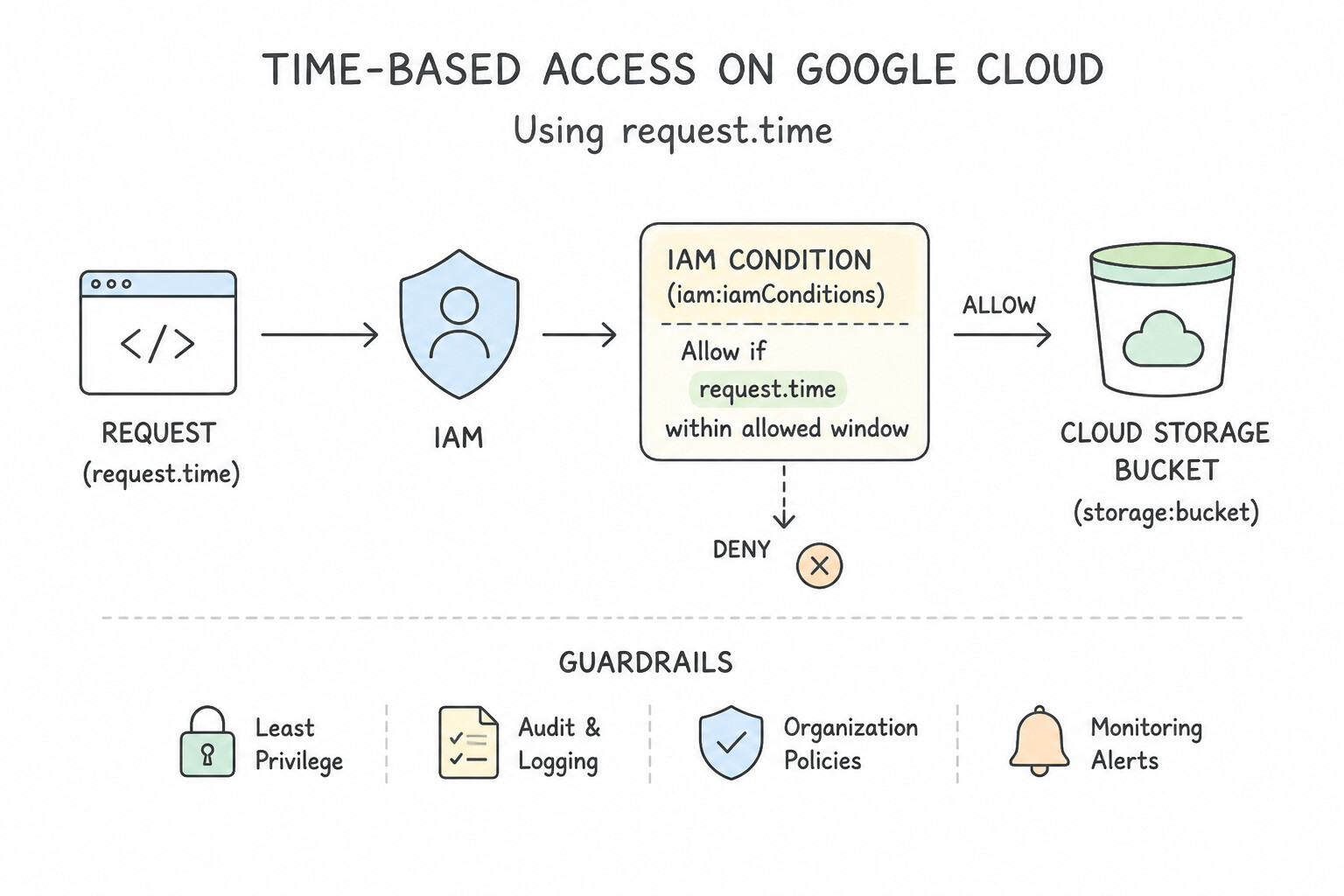
- Implementing Just-In-Time Access with Conditions: Use Add an IAM policy binding for the auditors with the Viewer role. Configure a condition based on request.time to restrict access to the 48-hour window. IAM Conditions with request.time allow you to set specific date/time windows for access to be active.
- Creating Custom Roles for Least Privilege: Use Create a custom IAM role containing only the
compute.instances.startandcompute.instances.stoppermissions and assign it to the team. Custom roles allow you to group specific permissions when predefined roles are too broad, ensuring least privilege.
Key Takeaways (1.4b)
- Uniform Bucket-Level Access is the Google-recommended standard for Cloud Storage security.
- It disables legacy Access Control Lists (ACLs).
- It ensures that access is determined solely by IAM policies.
- This setting simplifies auditing and reduces the risk of accidental data exposure.
Consideration 1.4c: Granting permissions using IAM conditions and IAM deny policies
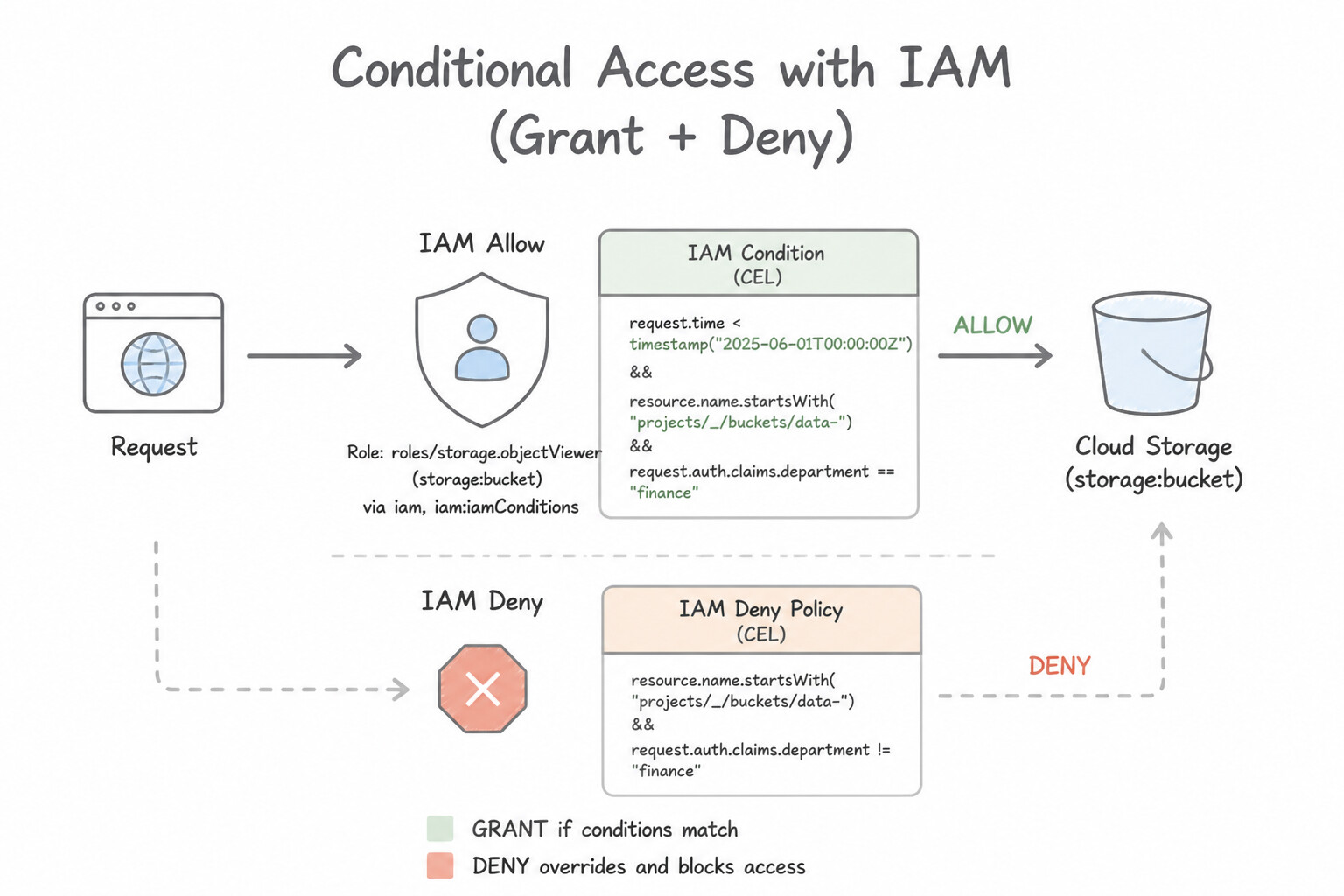
- IAM Conditions (CEL-Based ABAC): Attach Common Expression Language (CEL) conditions to IAM Allow bindings using:
- Time attributes (
request.time): Temporary contractor access that expires automatically (request.time < timestamp("2026-12-01T00:00:00Z")) or business-hours-only access (request.time.getHours("America/New_York") >= 9 && request.time.getHours("America/New_York") < 17). - Resource attributes (
resource.name,resource.type,resource.service): Restrictingroles/storage.adminto only buckets or object prefixes starting withprojects/_/buckets/dev-. - Resource Tags (
resource.matchTag): Granting access only if a resource carries a cryptographically governed IAM Tag (e.g.,resource.matchTag('123456/env', 'dev')). - IAM Deny Policies (Hard Guardrail Overriding Allow): Because IAM Allow policies are purely additive, you cannot use an Allow policy to strip a single dangerous permission from
roles/editororroles/owner. Attach an IAM Deny Policy at the Organization, Folder, or Project level specifyingdeniedPrincipals,deniedPermissions(e.g.,iam.serviceAccountKeys.create), and optionalexceptionPrincipals.
Key Implementation Patterns
- Just-In-Time Access for Contractors: Use Grant the Editor role to the contractor's account and add an IAM condition that specifies an expiration timestamp. IAM Conditions natively support time-based expiration for role bindings. (Avoid alternative: Automation scripts require unnecessary maintenance when native features exist.)
- Scoping Permissions by Resource Name Prefix: Use Grant the Storage Admin role to the developers. Add an IAM condition to the binding: resource.name.startsWith("projects/_/buckets/dev-test-"). Use an IAM condition with resource.name.startsWith to restrict the role grant to specific bucket names.
Key Takeaways (1.4c)
- IAM Conditions allow for attribute-based access control (ABAC).
- Use the
request.timeattribute in IAM Conditions to set expiration dates for role bindings.- Avoid building custom automation (like Cloud Functions) for features natively supported by IAM.
- Deny policies are for high-level guardrails, while conditional Allow policies are for granular access management.
Consideration 1.4d: Defining access control across organization, folder, project, and resource levels using least privilege
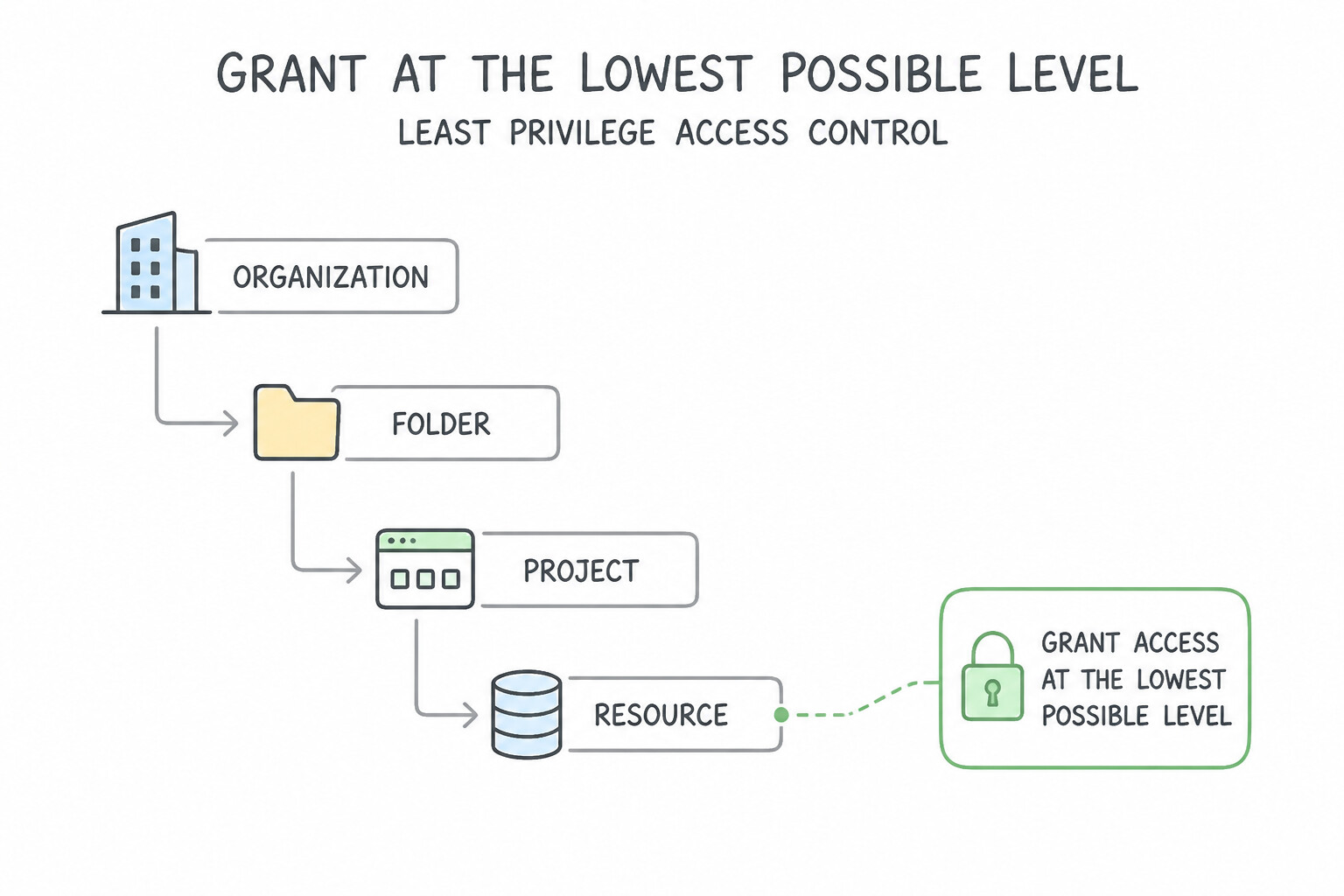
- Grant at the Lowest Possible Level Needed: If a service account only needs to read from one Cloud Storage bucket in a project containing 20 buckets, bind
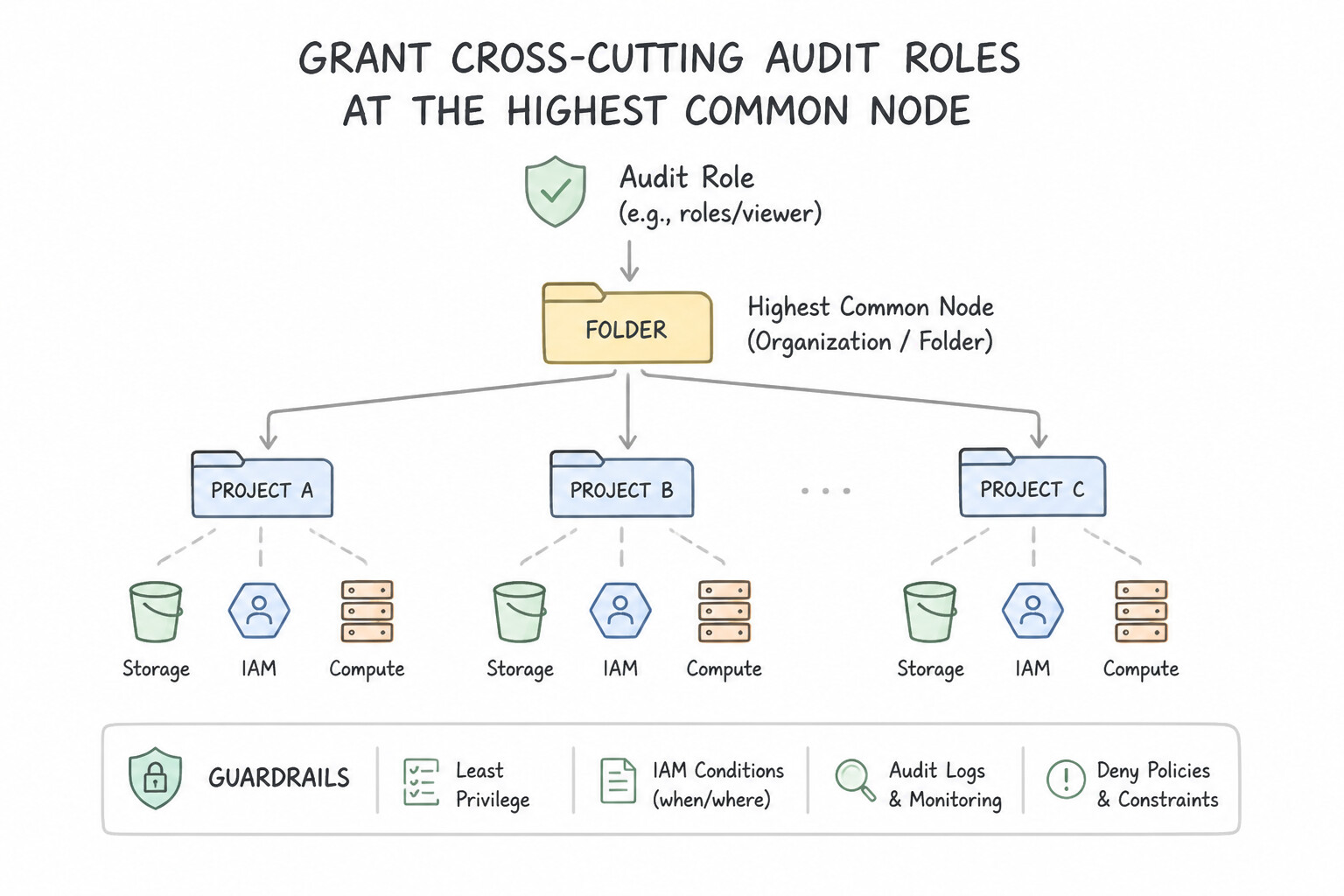
roles/storage.objectVieweron that specific bucket resource, not at the Project level! - Grant Cross-Cutting Audit Roles at the Highest Common Node: Conversely, if a central security audit team needs read-only security visibility across every project in the company, bind
roles/iam.securityReviewerandroles/viewerto their Google Group at the Organization root (or Folder level) so inheritance automatically covers future projects.
Key Implementation Patterns
- Granular Storage Access: Use Remove the Storage Object Viewer role from the project IAM policy. Add the Storage Object Viewer role to the service account on the specific bucket's IAM policy. Moving the role assignment from the project level to the specific bucket level restricts access to only that resource, adhering to least privilege.
- Environment Separation via Folders: Use Create a Development folder and a Production folder. Assign the Editor role on the Development folder and the Viewer role on the Production folder to the developer group. Using folders allows IAM roles to be inherited by all contained projects automatically.
- Global Auditor Access: Use Add the auditors to a Google Group. Grant the Google Group the Organization Viewer and Security Reviewer roles at the Organization node. Granting roles at the Organization level ensures permission inheritance for all current and future projects.
Key Takeaways (1.4d)
- IAM permissions are inherited from parent resources (Organization, Folder, Project) to child resources.
- To restrict access to a specific resource, avoid granting roles at the project level.
- Apply IAM roles directly to the specific resource (e.g., a specific bucket) to enforce the principle of least privilege.
- Uniform Bucket-Level Access unifies permission methods but does not block project-level inheritance.
Consideration 1.4e: Configuring Access Context Manager
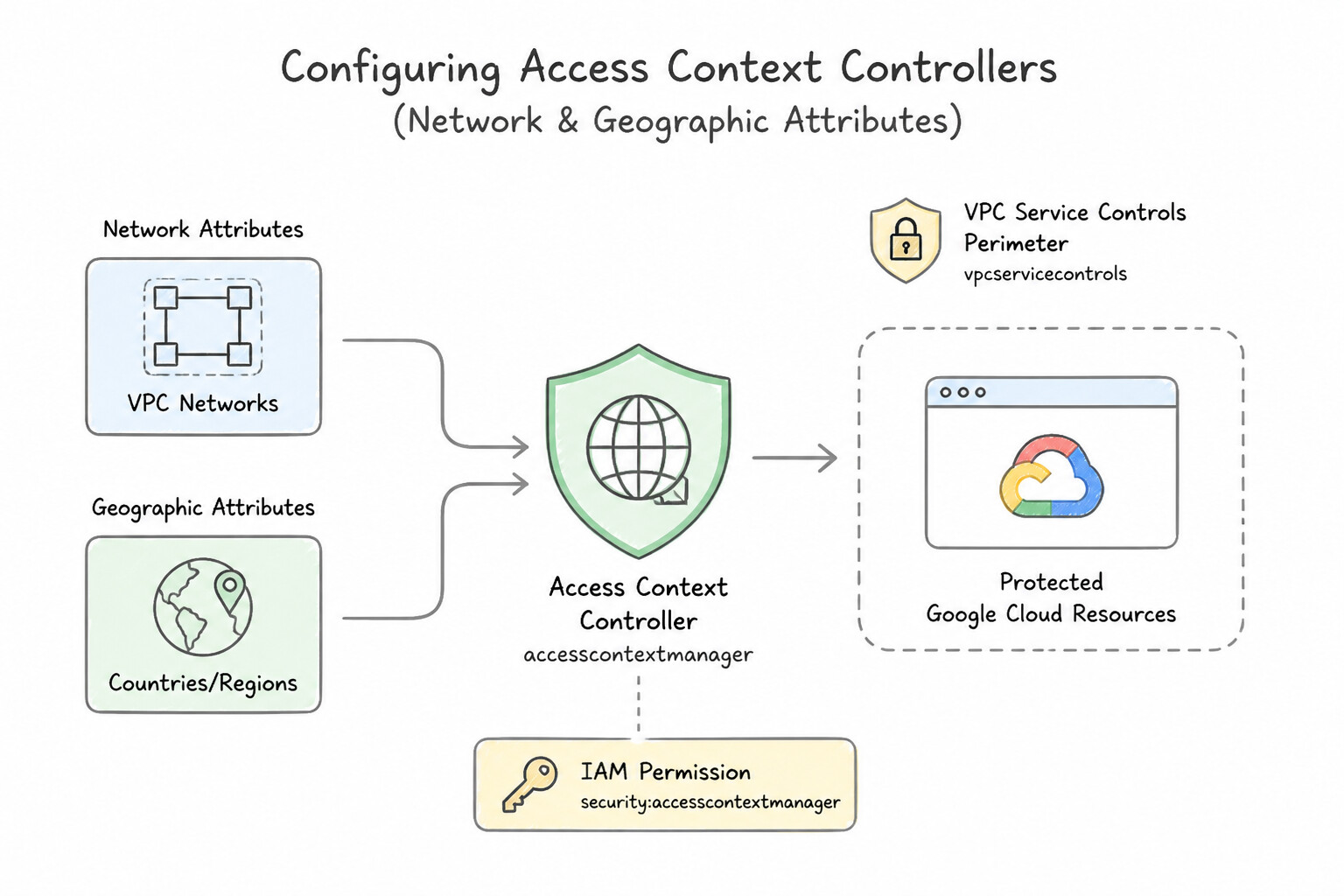
Access Context Manager (ACM) defines reusable, context-aware Access Levels at the Organization level that are enforced by Identity-Aware Proxy (IAP), VPC Service Controls (VPC-SC), and IAM Conditions:
- Network & Geographic Attributes: Restrict access by corporate egress CIDR blocks (
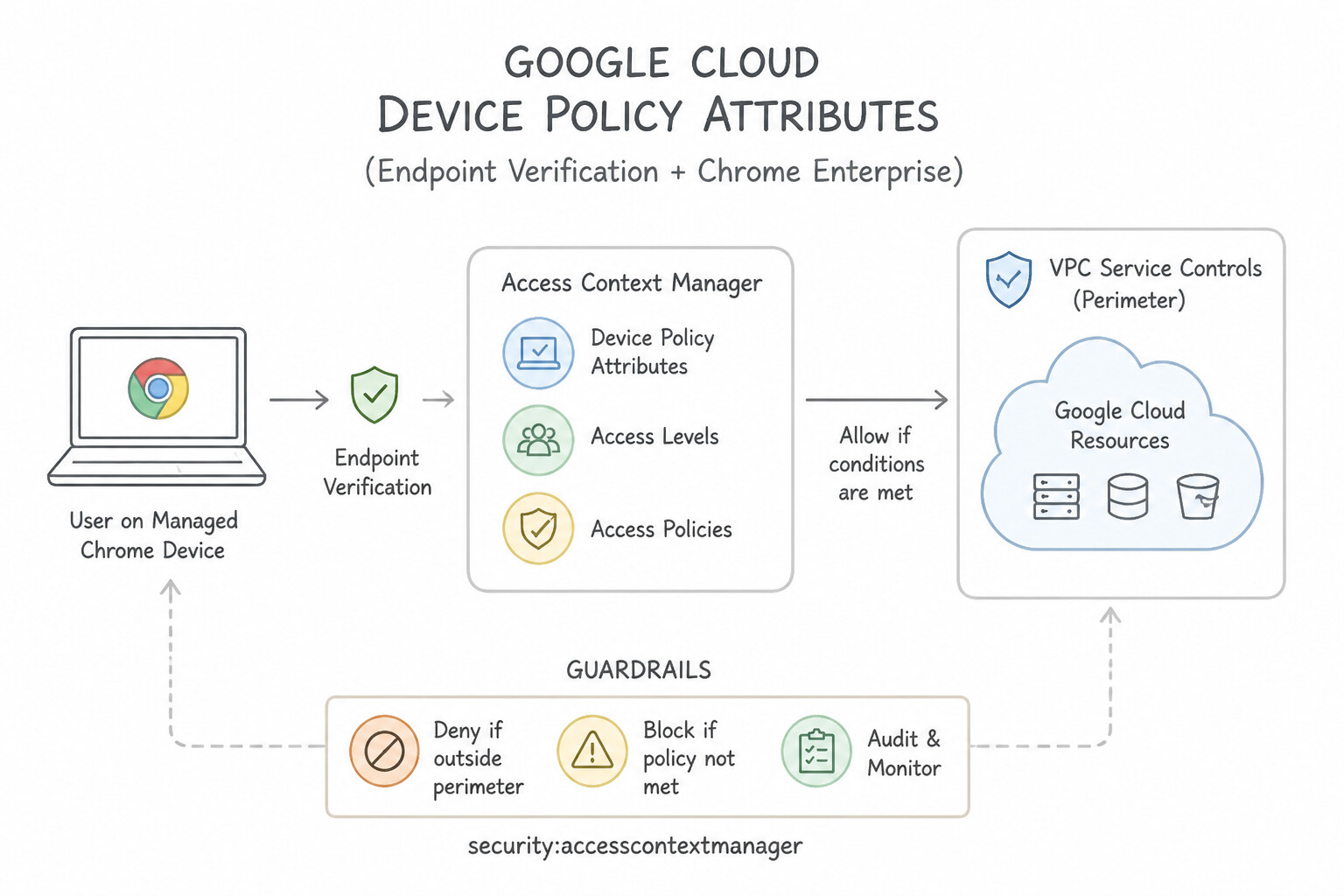
ipSubnetworks) or ISO country codes (regions: ["US", "CA"]). - Device Policy Attributes (via Endpoint Verification / Chrome Enterprise): Enforce zero-trust device posture—requiring
requireScreenlock: true,encryptionStatus: ENCRYPTED,requireCorpOwned: true, and minimum OS versions (osConstraints) collected from the Endpoint Verification browser extension.
Key Implementation Patterns
- Restricting Access by IP Subnet: Use Create a basic access level. Configure the ipSubnetworks attribute with the CIDR blocks of the corporate VPN. Basic Access Levels in Access Context Manager allow you to restrict access based on IP subnetworks (CIDR ranges). (Avoid alternative: VPC firewall rules protect VM instances, not the Google Cloud Console or APIs management layer.)
- Geographic Access Restrictions: Use Create an access level in Access Context Manager that specifies "US" in the regions list. Apply this access level to a VPC Service Controls perimeter containing the project. Access Context Manager allows defining access levels based on geographic regions, which is enforced by VPC Service Controls.
- Enforcing Device Compliance (Endpoint Verification): Use Create an Access Level in Access Context Manager. Use a Basic Level to define a Device Policy that specifies
osConstraintsand setsrequireScreenLockto true. Basic Access Levels in Access Context Manager support Device Policy conditions, which can enforce OS versions and screen lock requirements reported by Endpoint Verification.
Key Takeaways (1.4e)
- Access Context Manager defines 'Access Levels' based on request context (IP, Identity, Device).
- Use 'Basic Access Levels' with the
ipSubnetworkscondition to restrict access to specific IP CIDR ranges.- VPC Firewall rules protect VMs, while Access Context Manager protects Google Cloud APIs and the Console.
- Access Context Manager defines 'who' and 'where' (context) can access resources using Access Levels.
Consideration 1.4f: Applying Policy Intelligence
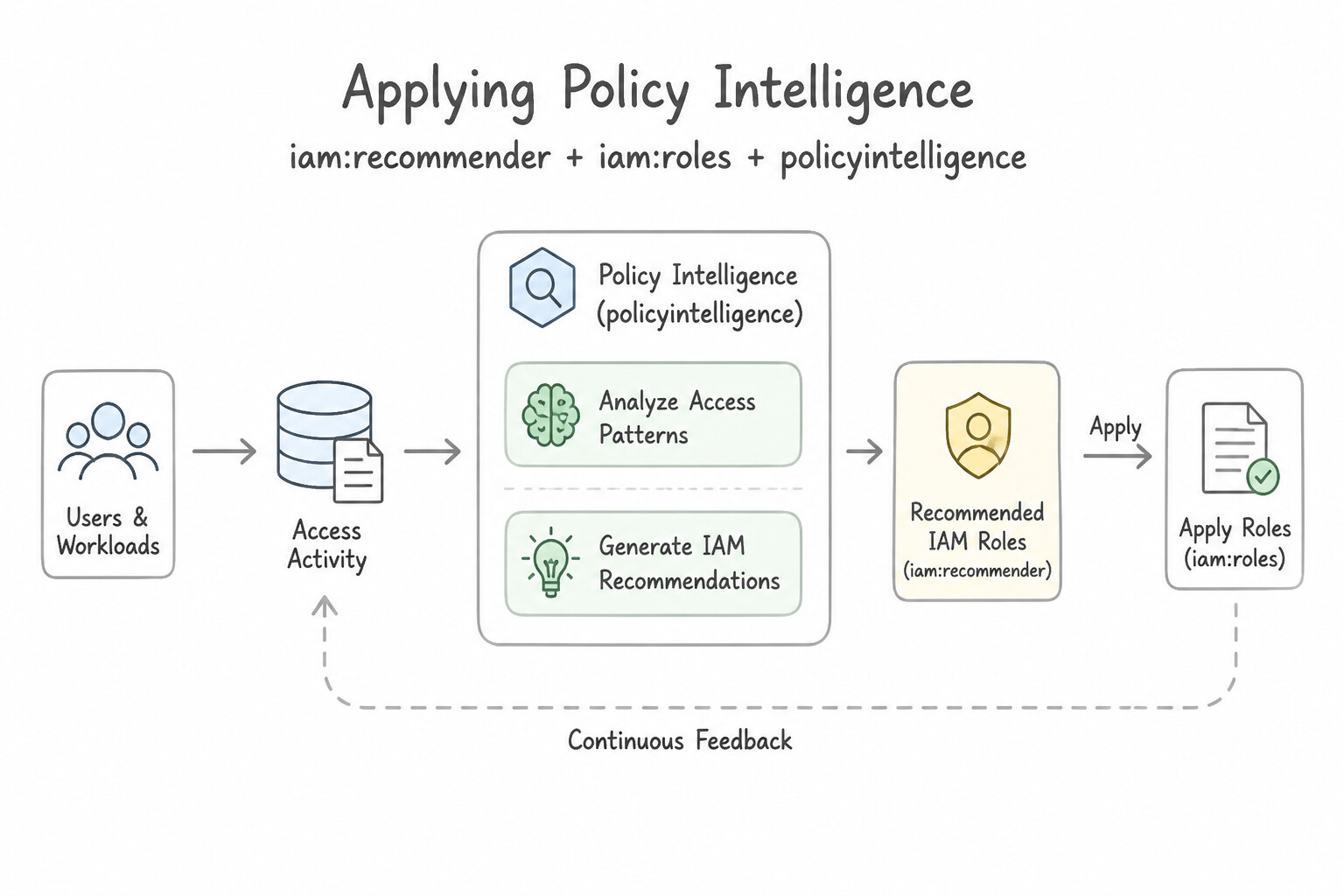
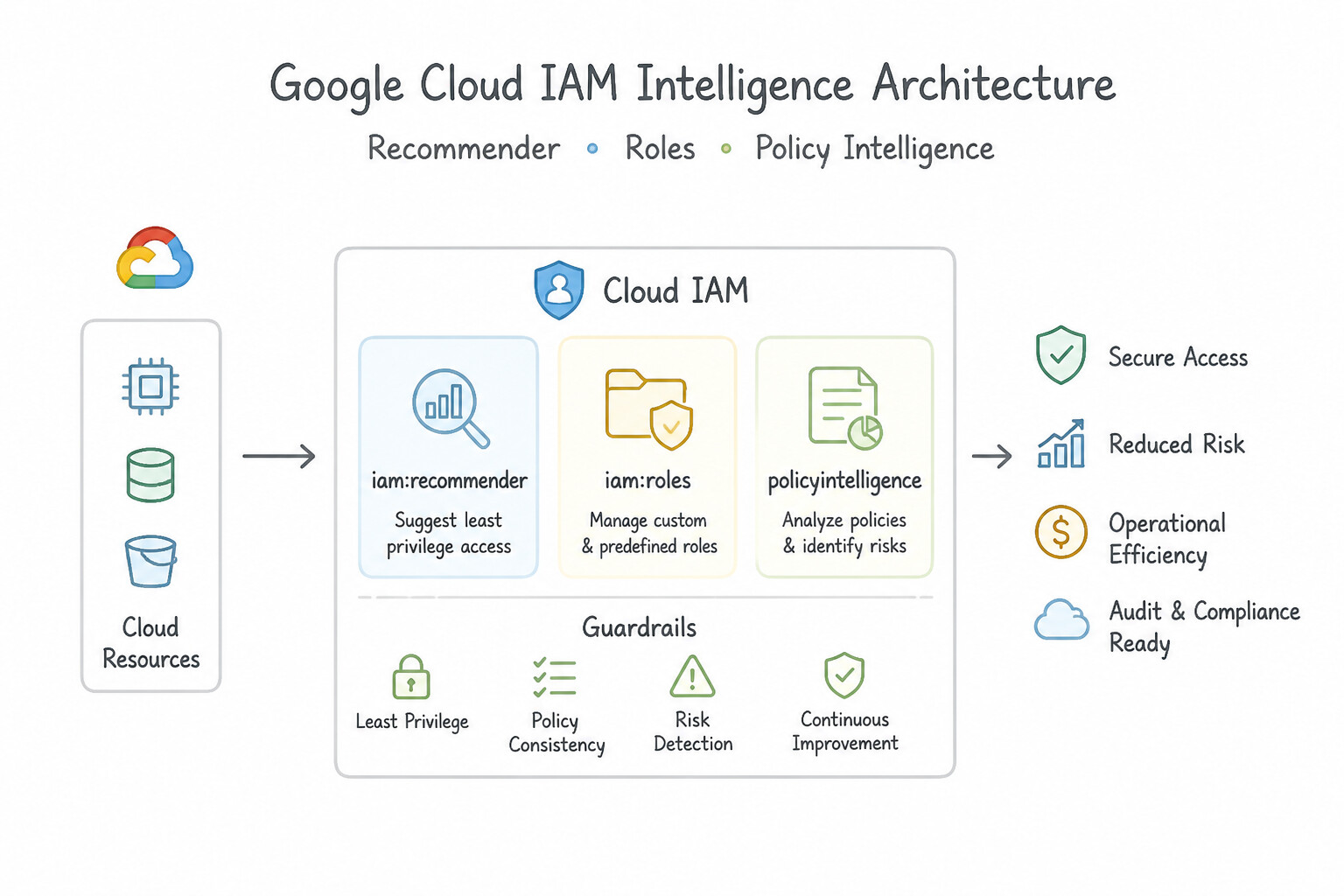
Never confuse the three Policy Intelligence tools in production:
- IAM Recommender: Analyzes the last 90 days of actual permission usage (via Cloud Audit Logs / Policy Insights) and recommends revoking unused roles or replacing broad roles (
roles/editor) with least-privilege predefined/custom roles. - Policy Analyzer: Answers audit & inventory questions across the hierarchy: "Which principals (expanding group memberships and folder inheritance) have permission
bigquery.tables.getDataon dataset X?" - Policy Troubleshooter: Answers debugging questions for a specific 3-tuple (
Principal,Resource,Permission): "Why did user Alice receive a403 Access Deniedwhen callingstorage.objects.createon bucket Z?" (evaluates Allow policies, Deny policies, and IAM Conditions).
Key Implementation Patterns
- Enforcing Least Privilege with IAM Recommender: Use Review the IAM Recommender insights for the project and apply the suggested role replacements. IAM Recommender automatically analyzes 90 days of usage data to suggest role downgrades. (Avoid alternative: Manual log analysis is inefficient compared to using the automated IAM Recommender tool.)
- Auditing Access to Sensitive Resources: Use Configure a Policy Analyzer query to identify which principals have the specific IAM permission on the Cloud Function. Policy Analyzer is the specific tool designed to query effective access and resolve hierarchy inheritance. (Avoid alternative: This command only lists direct bindings and misses inherited permissions from the project or folder level.)
- Debugging Access Denied Errors: Use Use the Policy Troubleshooter to check the access by specifying the principal, resource, and permission. Policy Troubleshooter analyzes the effective IAM policy for a specific principal, resource, and permission tuple to diagnose access issues.
Key Takeaways (1.4f)
- Least Privilege: Always strive to grant only the permissions required for the task.
- IAM Recommender: The primary tool for rightsizing permissions based on 90-day historical usage data.
- Policy Intelligence: A suite of tools including Recommender and Policy Analyzer designed to secure access management.
- Automation vs. Manual: Prefer built-in intelligent tools over manual log audits for scalability and accuracy.
Consideration 1.4g: Managing permissions through groups
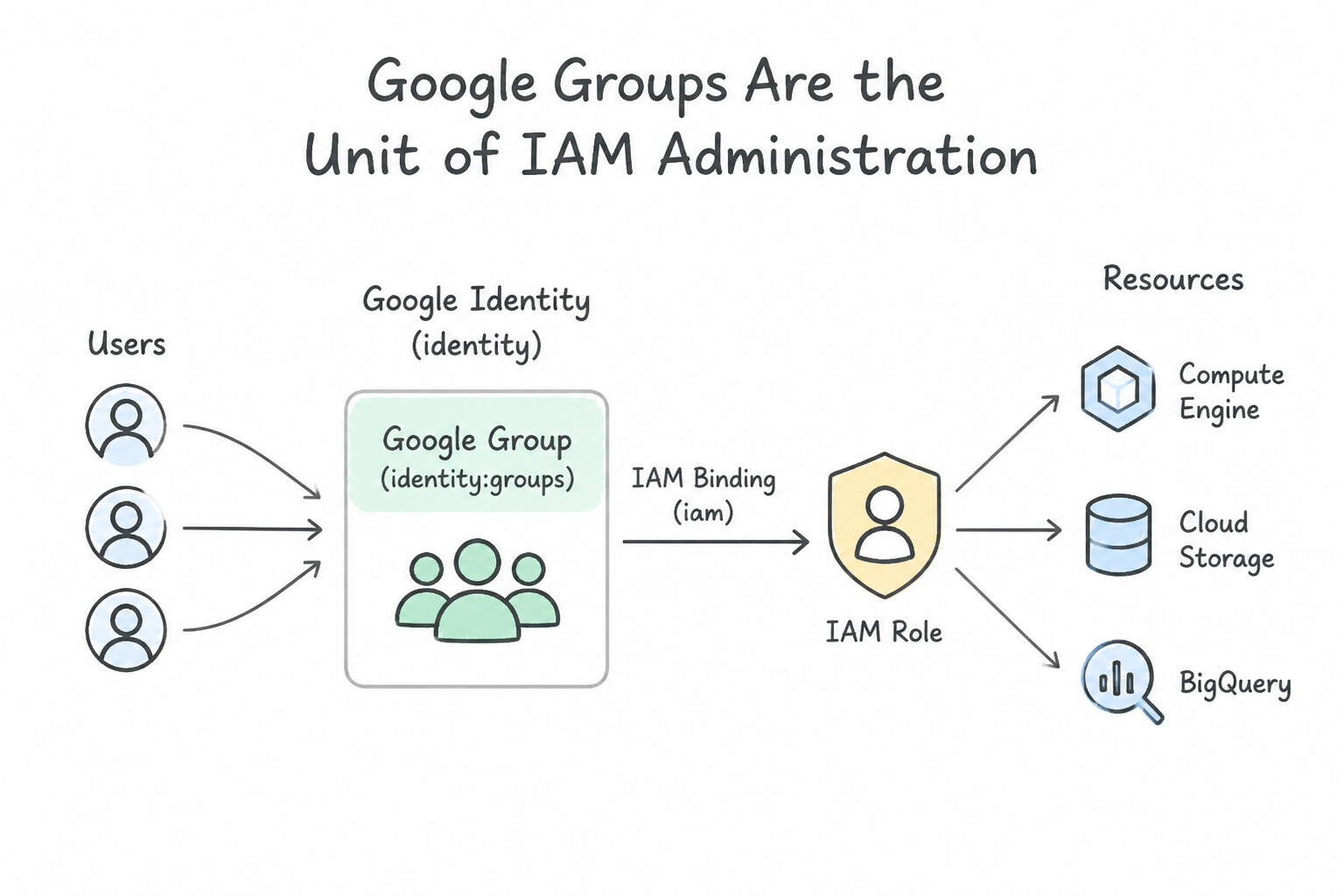
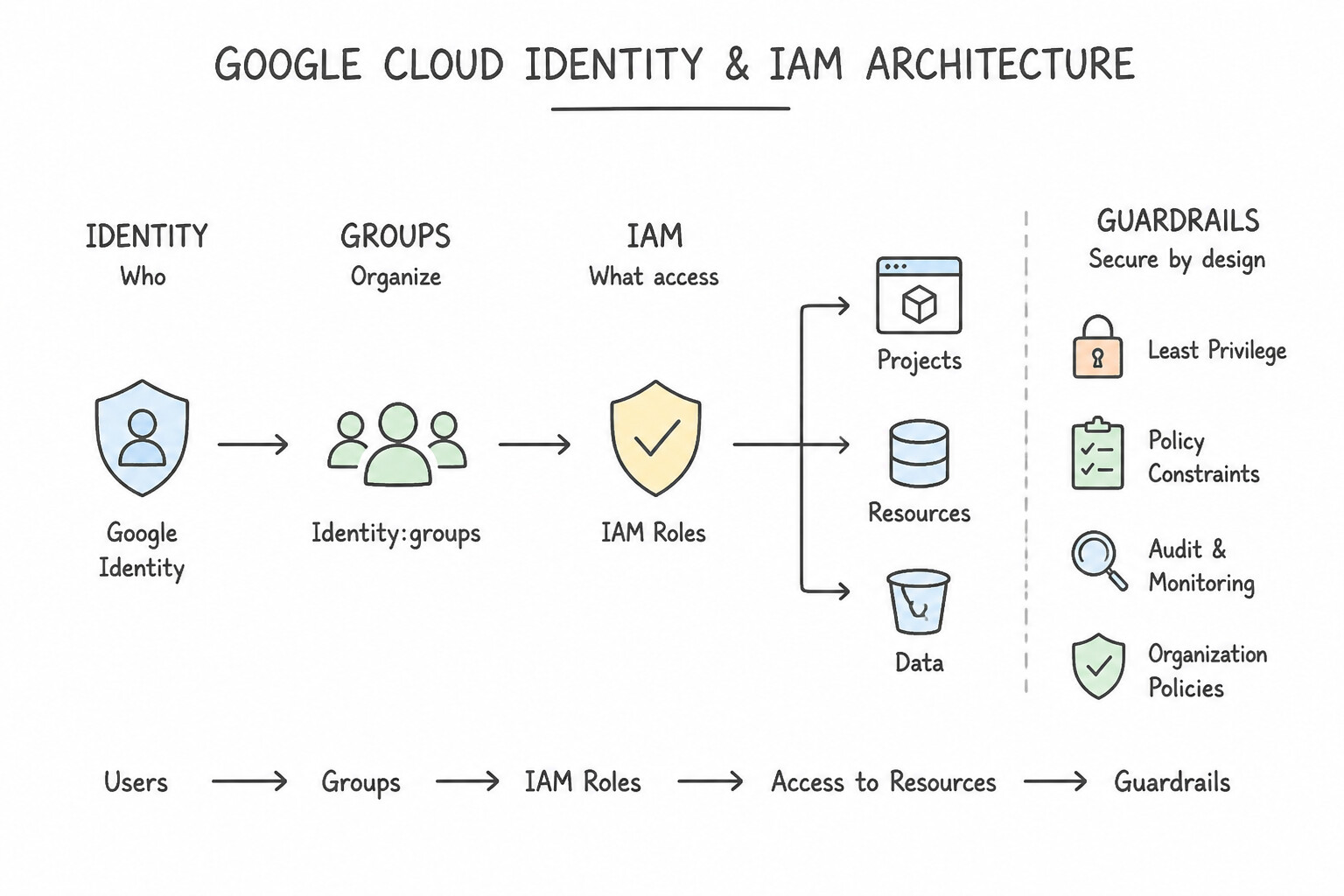
- Google Groups Are the Unit of IAM Administration: Never bind IAM roles directly to individual user email addresses (
user:bob@example.com). Bind roles to task/job-function Google Groups (group:gcp-network-admins@example.com), and manage group membership via GCDS (synced from Active Directory), SCIM, or Cloud Identity Dynamic Groups (user.organizations.exists(o, o.department=='DataScience')).
Key Implementation Patterns
- Scalable User Onboarding: Use Create a Google Group for the developers. Bind the necessary IAM roles to the group. Add each new developer to this group. Using Google Groups allows you to manage permissions for a collection of users centrally, reducing the need to assign roles to individuals manually.
- Dynamic Membership Automation: Use Configure dynamic groups in Cloud Identity with a membership query based on the department attribute. Bind IAM roles to these groups. Dynamic groups automatically manage membership based on user attributes like department. (Avoid alternative: Custom scripts require maintenance and are not a built-in automated solution.)
Key Takeaways (1.4g)
- Use Google Groups to manage access for humans at scale instead of individual user assignments.
- IAM Policies should bind roles to groups to minimize administrative overhead.
- Avoid using Basic roles (Owner, Editor, Viewer) in production; prefer Predefined or Custom roles.
- Never share service account keys between users.
Consideration 1.4h: Identifying use cases and configuring Privileged Access Manager
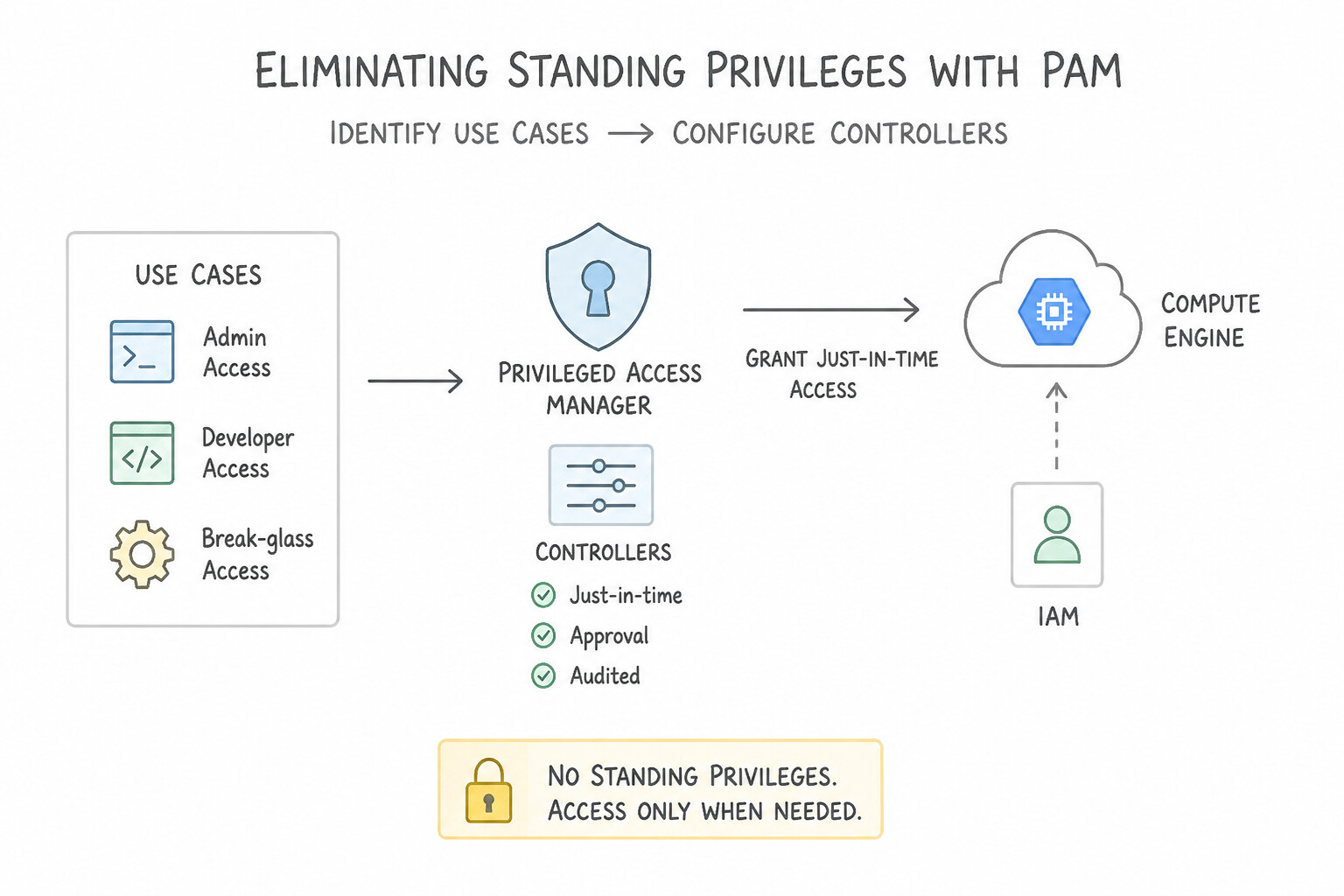
- Eliminating Standing Privileges with PAM: Instead of permanently binding
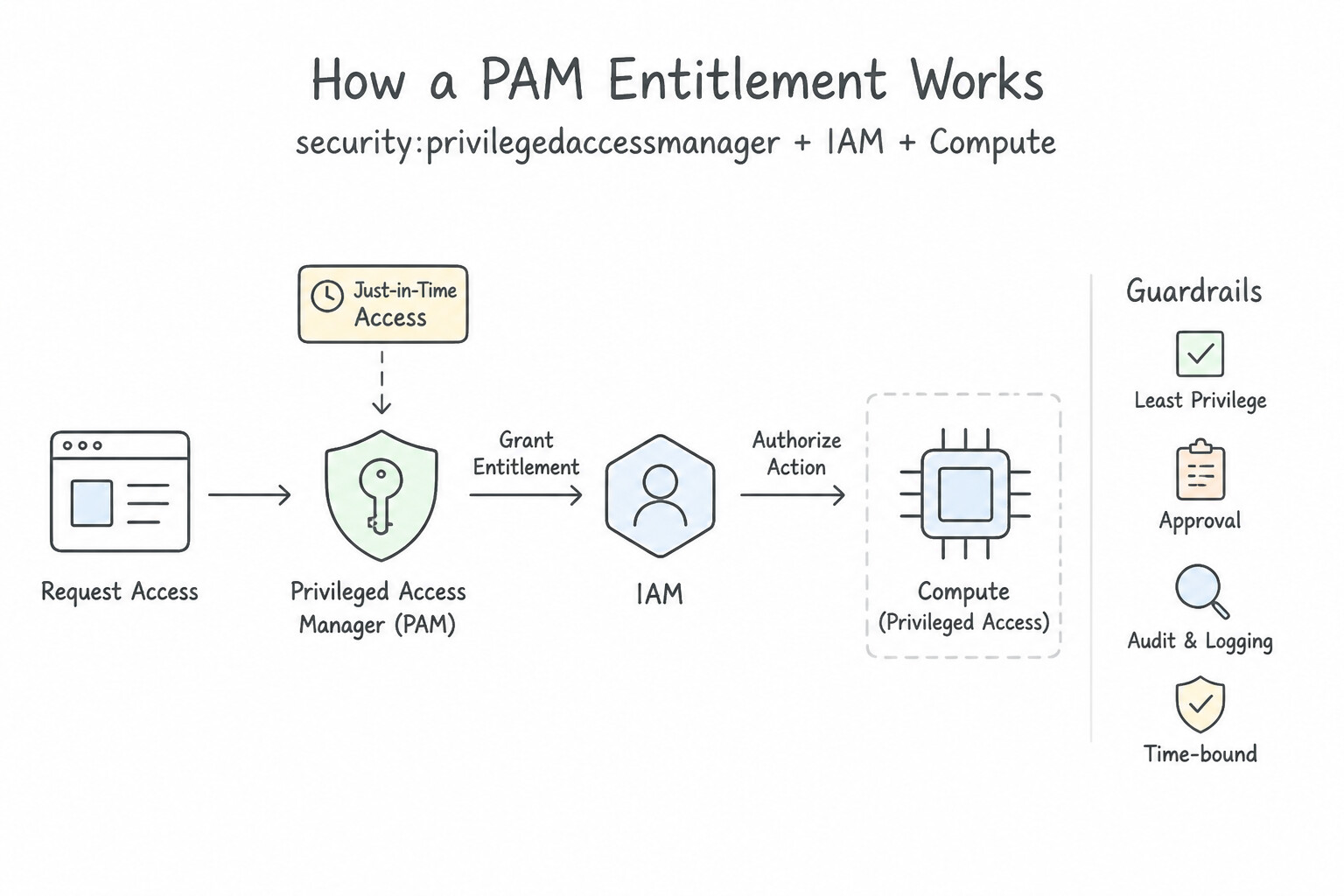
roles/cloudsql.adminorroles/Ownerto engineers, create a PAM Entitlement at the Organization, Folder, or Project level. - How a PAM Entitlement Works: Defines the Eligible Requesters (e.g.,
group:sre-oncall@example.com), the Roles to be granted, the Maximum Grant Duration (e.g., 2 hours), whether a Manual Approval Workflow (e.g., Security Manager sign-off) is required, and mandatory Requester Justification. When approved, PAM temporarily binds the role and automatically revokes it when the timer expires—logging the full lifecycle underprivilegedaccessmanager.googleapis.com.
Key Implementation Patterns
- Configuring Just-In-Time (JIT) Access for Developers: Use Create an Entitlement in Privileged Access Manager. Assign the necessary role. Configure the approval workflow to "Automated approval". PAM with "Automated approval" allows users to self-serve temporary access immediately.
- Auditing Privileged Access Grants: Use In the Logs Explorer, query for the service
privilegedaccessmanager.googleapis.comto view the audit logs. PAM operations, including grants and justifications, are recorded in Cloud Audit Logs under the serviceprivilegedaccessmanager.googleapis.com. - Implementing Four-Eyes Principle for Sensitive Operations: Use Create a PAM entitlement with a manual approval workflow. Designate the Security Manager as the approver. PAM Entitlements with manual approval workflows require a designated approver to authorize requests before access is granted.
Key Takeaways (1.4h)
- Privileged Access Manager (PAM) allows for Just-In-Time (JIT) privilege elevation.
- Automated approval workflows in PAM provide immediate access without human intervention, balancing security and agility.
- Permanent role assignments should be avoided for high-privilege tasks to follow the Principle of Least Privilege.
- Access Approval is distinct from PAM; it manages Google's access to your data, not your users' access to your cloud resources.
Quick Decision Cheat Sheet (Subsection 1.4)
If the Scenario Requires... | Choose This Google Cloud Pattern | Avoid This Common Mistake |
|---|---|---|
"Contractors need Editor access that automatically expires at 5:00 PM on Friday" | Add an IAM Condition using request.time < timestamp(...) on the role binding | Scheduling a Cloud Scheduler job to delete their Cloud Identity accounts |
"Prevent key admins ( roles/cloudkms.admin) from decrypting sensitive customer files" | Enforce Separation of Duties: grant roles/cloudkms.admin to Key Admins and roles/cloudkms.cryptoKeyEncrypterDecrypter only to workload SAs | Granting roles/owner or both KMS roles to the same security group |
"Rightsize overly broad Editor roles based on actual API usage over the past 90 days" | Review and apply IAM Recommender insights (Policy Intelligence) | Guessing permissions manually from VPC Flow Logs |
"Require corporate-owned, disk-encrypted laptops with screen locks enabled before accessing internal web apps" | Configure Endpoint Verification + an Access Context Manager (ACM) Device Policy Access Level enforced on IAP | Relying solely on source IP firewall rules (which do not verify device encryption or screen lock) |
"Auditors need temporary, approval-gated, just-in-time elevation to privileged roles with logged business justifications" | Configure a Privileged Access Manager (PAM) Entitlement | Sharing a single break-glass Super Admin password among the team |
Further Reading (Subsection 1.4)
- Service Account User role — This section explains the Service Account User role and how it grants the permissions necessary to attach a service account to a resource.
- Understanding service accounts — General overview of service accounts, including the difference between managing and using them.
- Separation of duties — Explains the concept of separating key administration from key usage using IAM roles.
- Cloud KMS permissions and roles — Detailed list of permissions included in roles/cloudkms.admin and roles/cloudkms.cryptoKeyEncrypterDecrypter.
- IAM roles for Cloud Storage — Provides a list of Cloud Storage permissions and explains the difference between bucket-level and object-level access.
- Creating and managing custom roles — Guide on how to create custom roles when predefined roles do not meet specific needs.
Subsection 1.5: Defining the resource hierarchy
The Big Picture
In Google Cloud, the Resource Hierarchy (Organization → Folders → Projects → Resources) is not merely an accounting directory—it is the inheritance backbone for both IAM Policies and Organization Policies. Organizations that dump 300 projects directly under the Organization root without structured Folders suffer three chronic governance failures:
- The Inheritance Union vs. Restriction Confusion (
1.5a,1.5c): Engineers frequently misunderstand how policies combine down the tree: - IAM Allow Policies combine by Union (Additive): If a user is granted
roles/viewerat the Organization node androles/editoron Project A, their effective permission on Project A isViewer ∪ Editor. You can never revoke an Organization-level or Folder-level IAM Allow binding by editing the Project-level IAM policy! - Organization Policies evaluate Top-Down with Optional Hierarchical Inheritance / Override: A constraint set at the Organization root (
constraints/compute.vmExternalIpAccess = Deny Allorconstraints/gcp.resourceLocations = in:eu-locations) automatically governs every Folder and Project underneath it—unless a child Folder/Project explicitly overrides it (and only if the parent policy did not lock inheritance or ifinheritFromParentrules permit). - Environment Bleed During Project Moves (1.5a): Moving a project from a
Developmentfolder into aHighly-Confidential-Productionfolder immediately changes the project's inherited IAM and Organization Policies to those of the destination folder, while any IAM bindings attached directly to the Project itself travel with the project! If developers were bound directly at the Project level instead of theDevelopmentFolder level, they retain access to the project even after it is promoted to theProductionfolder! - When Pre-Built Constraints Aren't Specific Enough (1.5b): Google provides dozens of pre-built boolean and list Organization Policy constraints (
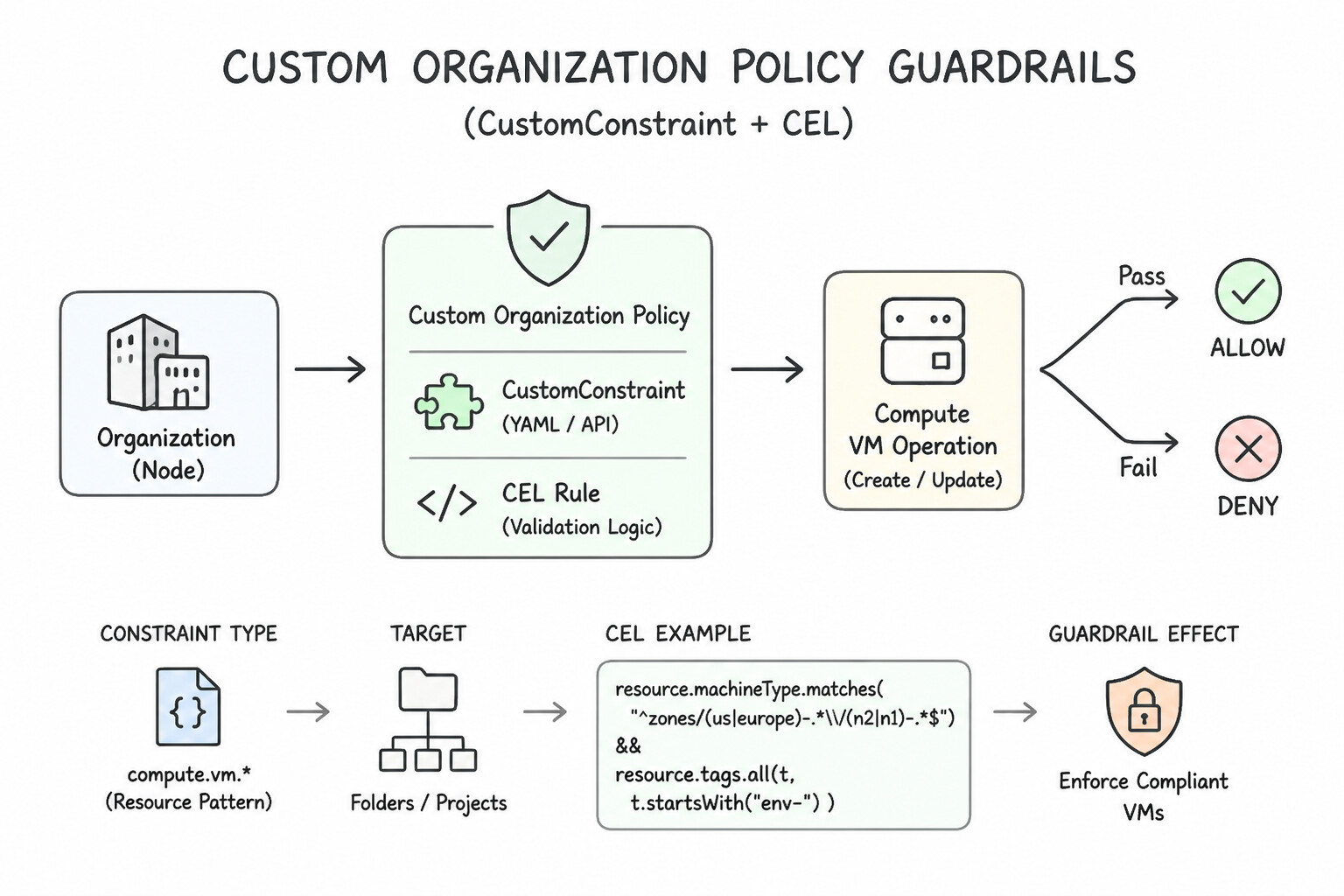
gcp.resourceLocations,iam.disableServiceAccountKeyCreation,compute.vmExternalIpAccess). However, when a CISO mandates an organization-specific rule—such as "Every GKE Node Pool must have Shielded Nodes enabled and binary authorization set toPROJECT_SINGLETON_POLICY_ENFORCE" or "No Compute Engine disk can be created smaller than 100 GB"—you must author a Custom Organization Policy Constraint in YAML using Common Expression Language (CEL).
Consideration 1.5a: Managing folders and projects at scale
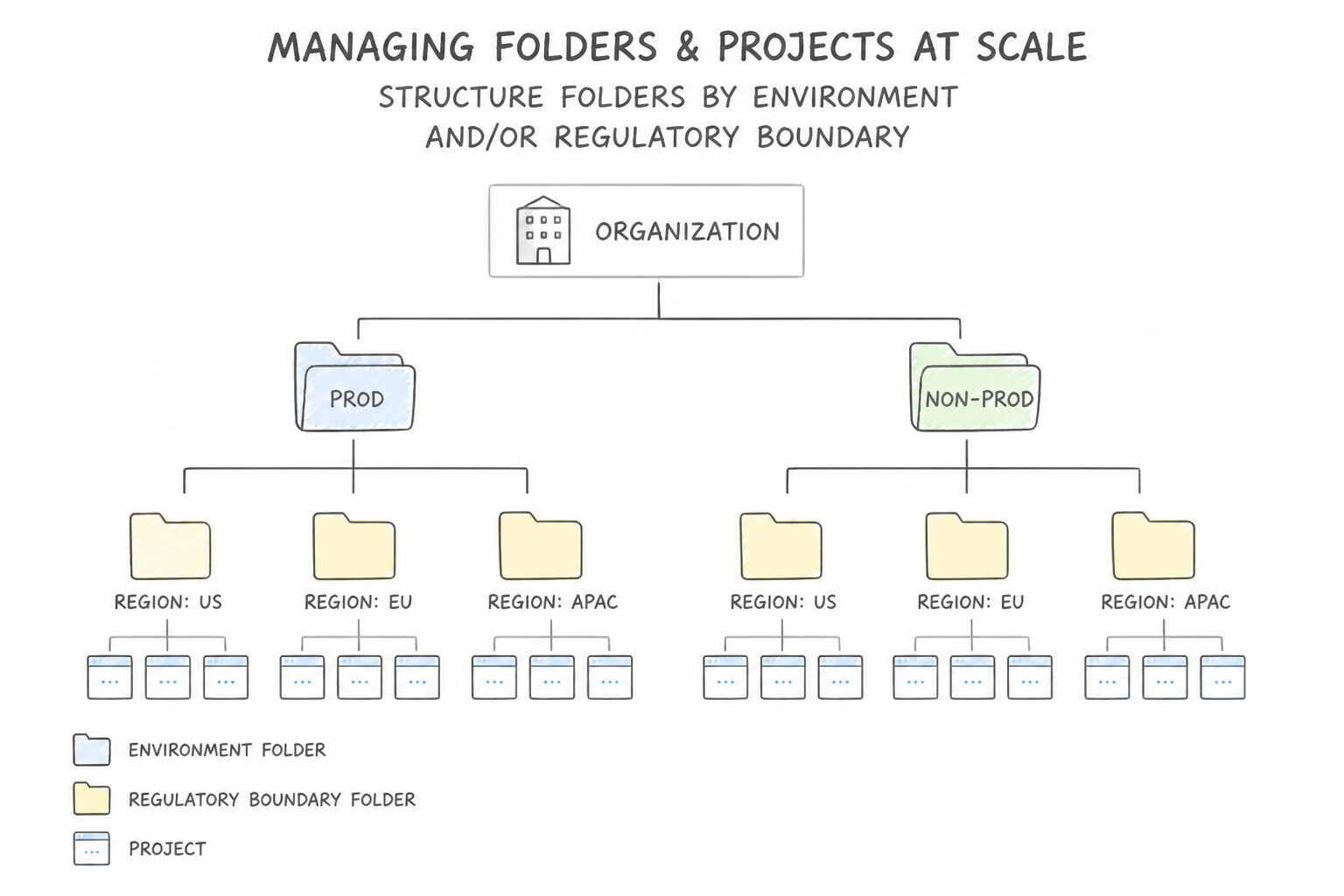
- Structure Folders by Environment and/or Regulatory Boundary (
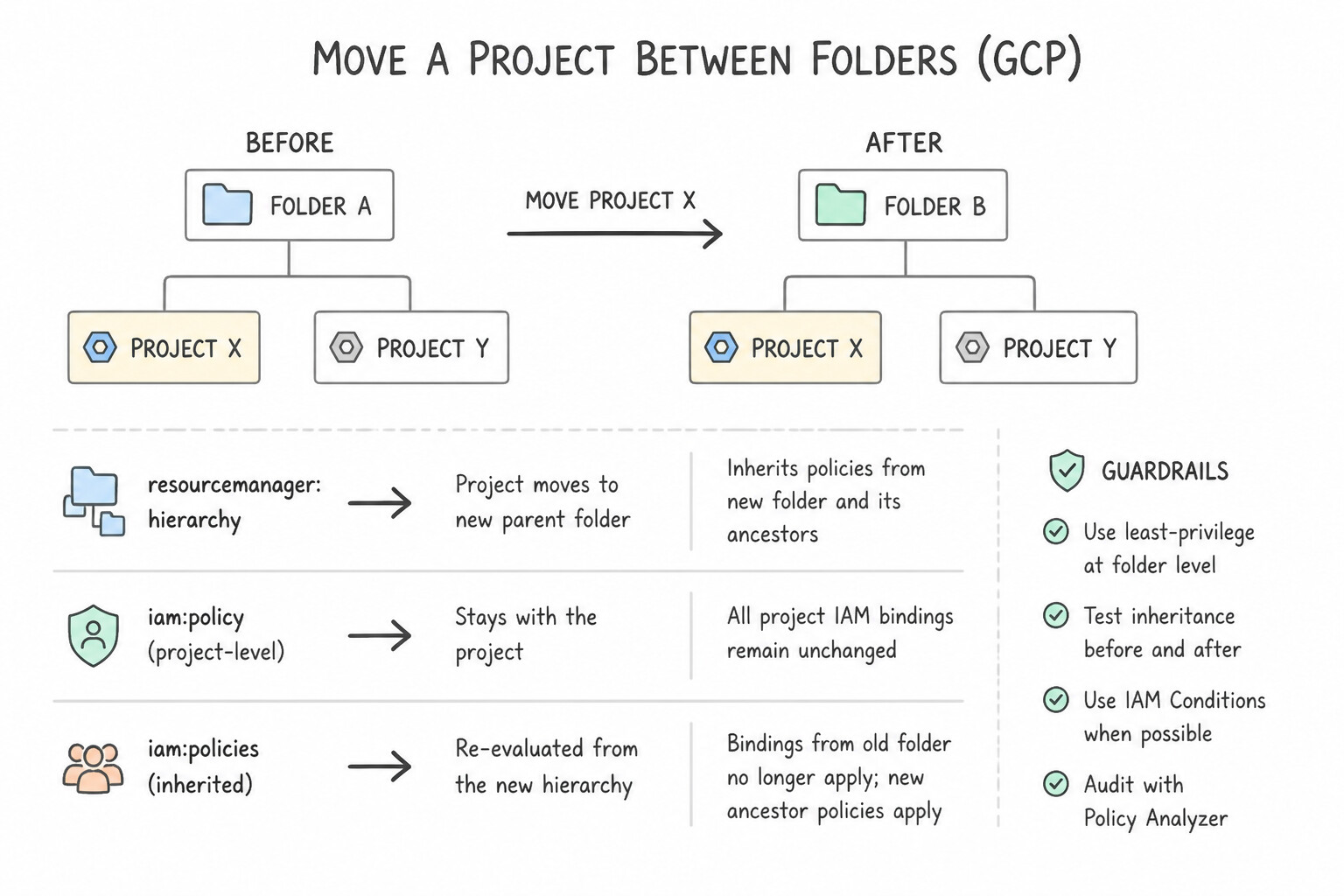
Prod/Non-Prod/PCI-CDE): Grouping projects into Folders allows you to apply environment-wide IAM roles and Organization Policies once at the Folder level rather than maintaining 500 individual project configurations. - What Happens When You Move a Project Between Folders:
- The project loses all IAM policies and Organization Policies that were inherited from the source Folder.
- The project gains all IAM policies and Organization Policies inherited from the destination Folder.
- Any IAM bindings or Organization Policy overrides configured directly on the Project resource itself remain intact. (Therefore, always bind environment-specific developer roles at the Folder level, never directly on a project that might later be moved to Production!).
Key Implementation Patterns
- Environment-Based Folder Isolation: Use Create separate folders for Development and Production. Assign the IAM roles to the developer group at the respective folder level. Grouping projects into folders and assigning IAM roles at the folder level allows permissions to automatically inherit to all current and future projects.
- Impact of Moving Projects: Use The project inherits policies from the "Highly Confidential" folder while retaining its existing project-level bindings. A moved project adopts the new parent's inherited policies but keeps its own direct configurations. (Avoid alternative: Moving a project removes the link to the old parent, so it stops inheriting policies from the old location.)
- Organization Policy Overrides: Use Create a specific Folder for the department. Configure the compute.vmExternalIpAccess Organization Policy on that Folder to allow external IP addresses. Organization Policies are inherited but can be overridden at the Folder level to create scoped exceptions.
Key Takeaways (1.5a)
- Folders organize resources: Use folders to group projects by environment (Dev/Prod) or department to simplify management.
- Inheritance scales IAM: Assign permissions at the folder level to automatically grant access to all projects within that folder.
- Avoid manual work: Granular project-level assignment is difficult to maintain at scale; use hierarchy inheritance instead.
- Policies in Google Cloud flow down the resource hierarchy (Organization -> Folder -> Project).
Consideration 1.5b: Managing pre-built or custom organization policies for organization, folders, and projects
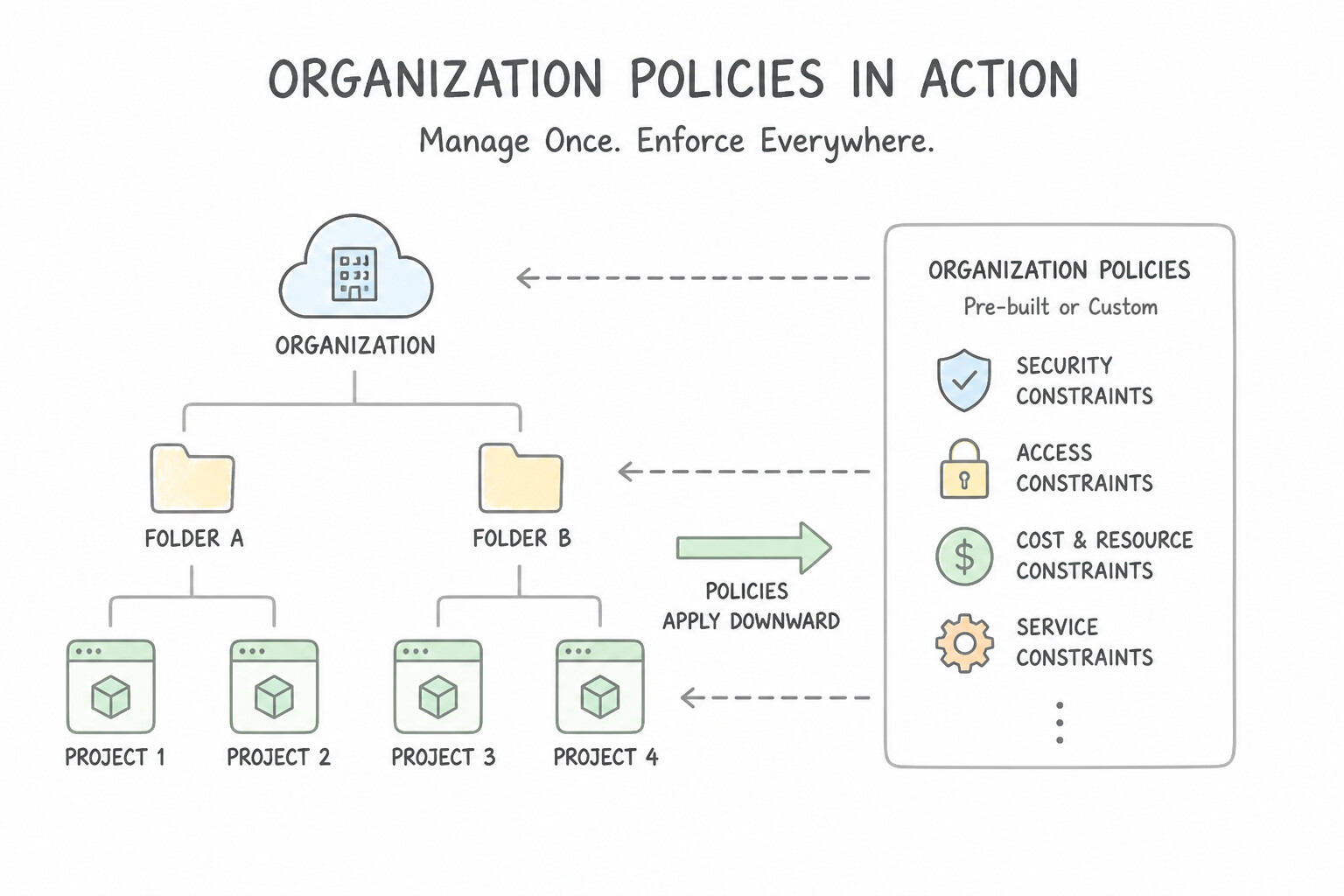
- High-Frequency Pre-Built Organization Policy Constraints in production:
constraints/gcp.resourceLocations(List constraint): Restricts physical creation of regional resources (GCS buckets, BigQuery datasets, VMs) to approved regions or location groups (in:eu-locations,in:us-locations).constraints/compute.vmExternalIpAccess(List constraint): Blocks VMs from being assigned public external IP addresses across the Organization.constraints/iam.allowedPolicyMemberDomains(List constraint): Restricts IAM policy bindings to only identities from your corporate Cloud Identity workspace customer ID (preventing accidental sharing with@gmail.comor external domains).constraints/serviceuser.services(List constraint): Restricts which Google Cloud APIs can be enabled in a Sandbox or regulated folder.- Custom Organization Policy Constraints (
CustomConstraint+ CEL): When a requirement inspects specific resource fields not covered by pre-built constraints (e.g., GKE cluster flags, Compute Engine machine types, or Firewall rule attributes), define aCustomConstraintin YAML using a Common Expression Language (CEL) expression (resource.shieldedInstanceConfig.enableSecureBoot == true), setactionType: ALLOWorDENYandmethodTypes: [CREATE, UPDATE], register it at the Organization level, and enforce it via an Organization Policy. - Managing Targeted Exceptions (
Overridevs.Tags): To exempt a single legacy project or folder from an Organization-level constraint, either configure a policy override on that specific child Folder/Project (Enforcement: Offor customized list) or use Conditional Organization Policies tied to IAM Tags (resource.matchTag(...)) so only resources carrying a governed tag formed byroles/resourcemanager.tagUserreceive the exception.
Key Implementation Patterns
- Inheritance Override for Legacy Projects: Use Edit the organization policy on the legacy project. Set the enforcement of the constraint to "Off". Override the inherited Organization Policy at the project level by setting enforcement to 'Off' for that specific project. (Avoid alternative: Removing the central policy removes security for everyone; managing policies per folder is inefficient.)
- Geographic Compliance via List Constraints: Use Configure the 'constraints/gcp.resourceLocations' Organization Policy. Set the policy to 'Allow' and add 'europe-west3' and 'europe-west4' to the list of allowed values. Organization Policies are used to restrict resource configurations. The resourceLocations list constraint specifically controls allowed regions.
Key Takeaways (1.5b)
- Organization Policies are inherited top-down through the resource hierarchy.
- Child resources (Projects/Folders) can override inherited policies.
- To create an exception for a specific project, apply a policy directly to that project with the desired state (e.g., Enforcement: Off).
- Organization Policies take precedence over local configuration and IAM permissions.
Consideration 1.5c: Using the resource hierarchy for access control and permissions inheritance
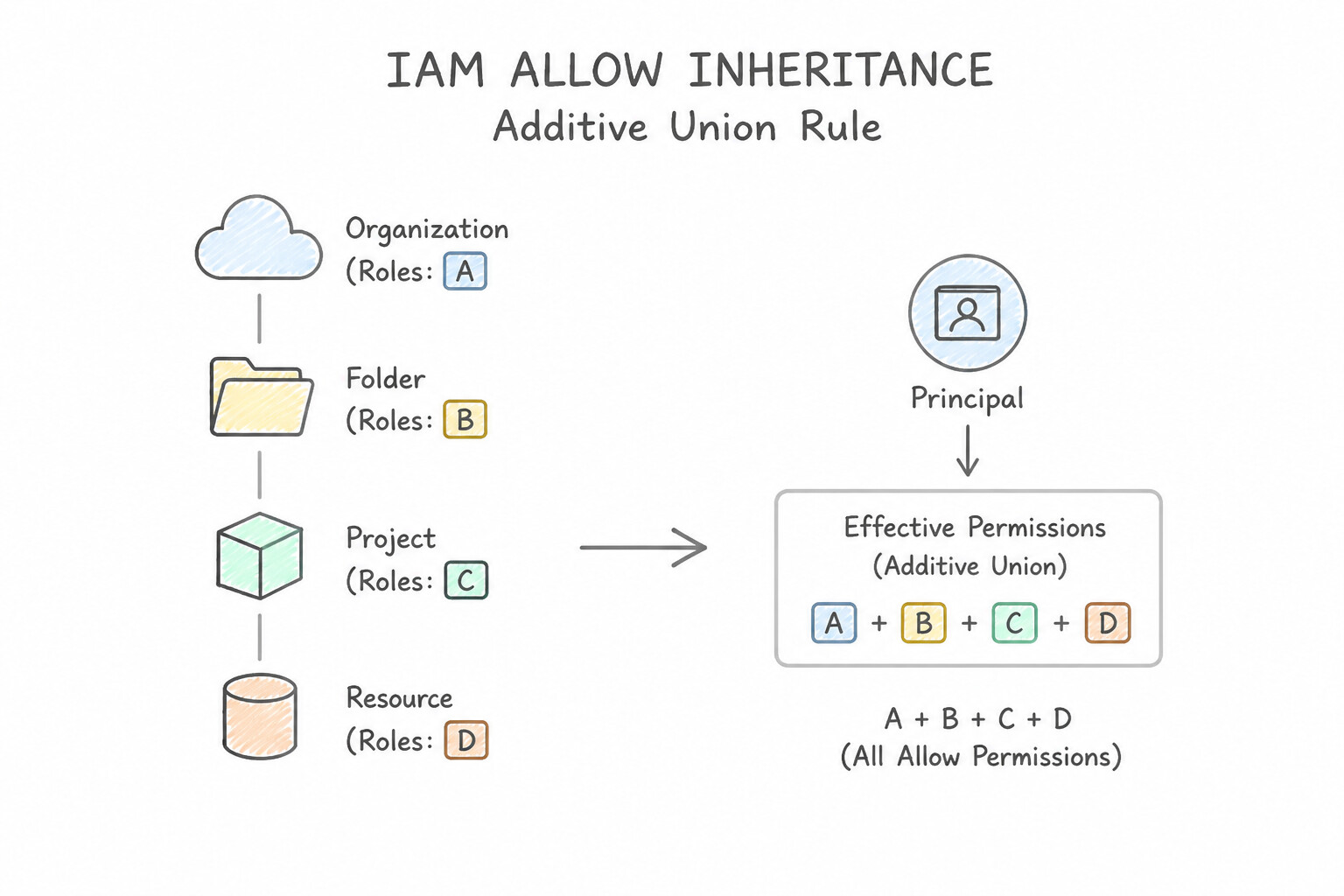
- The Additive Union Rule of IAM Allow Inheritance: Effective IAM Allow permissions on any resource equal: $$\text{Effective Allow} = \text{Org Policy} \cup \text{Folder Policies} \cup \text{Project Policy} \cup \text{Resource Policy}$$ If a user has
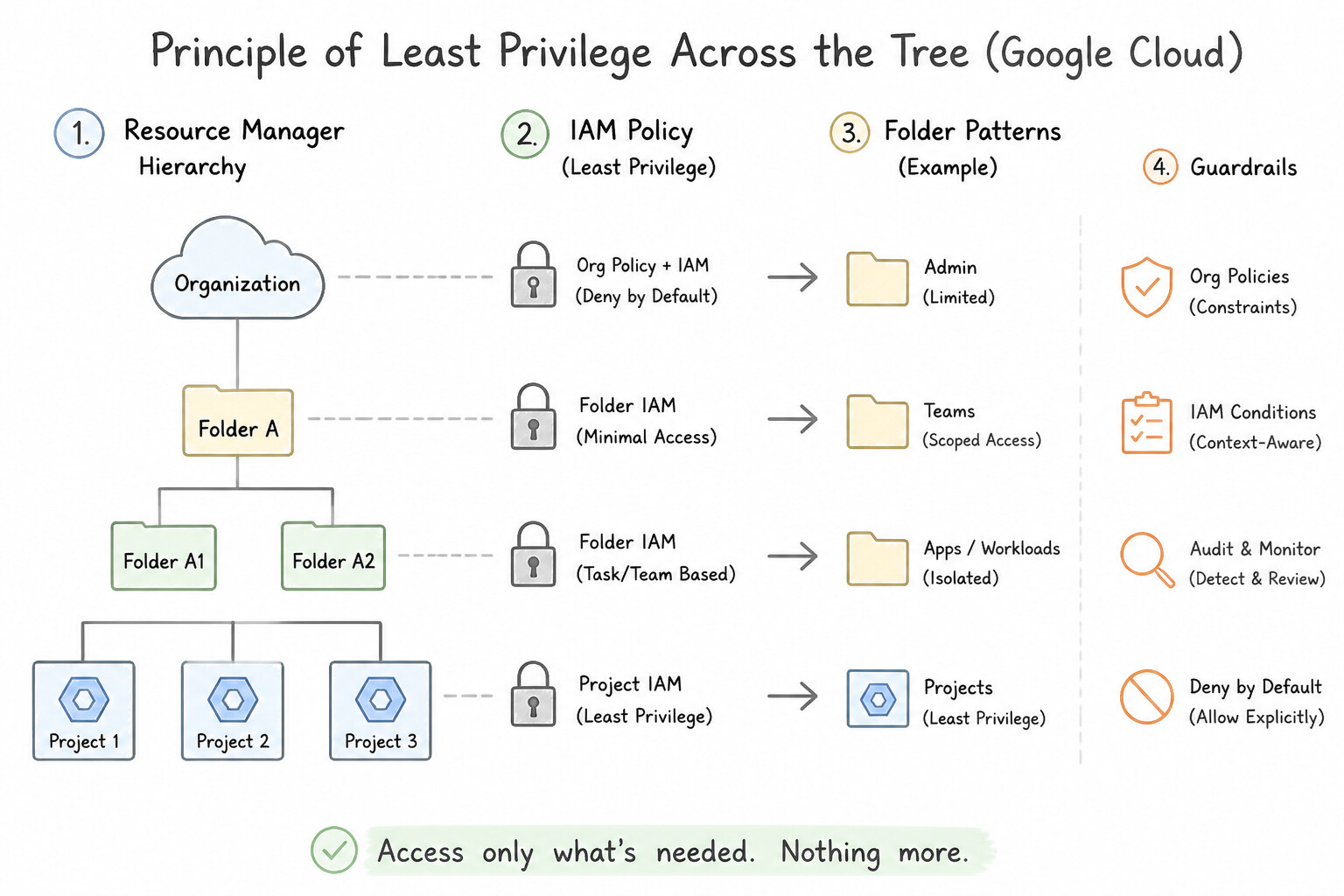
roles/storage.objectViewerat the Folder level androles/storage.objectAdminat the Project level, they can delete objects in that project because the union includes the broader permission. - Principle of Least Privilege Across the Tree: Only grant Organization-level or Folder-level IAM roles to principals who genuinely need access to every child project under that node (such as
roles/iam.securityReviewerfor the central SOC orroles/resourcemanager.folderAdminfor platform automation).
Key Implementation Patterns
- Inheritance of Broad Audit Permissions: Use Grant the read-only IAM role to the security audit team at the Organization level. IAM roles assigned at the Organization node are inherited by all child projects, covering both current and future resources automatically. (Avoid alternative: Assigning roles per project is manual and does not automatically secure future projects.)
- Environment Isolation via Folders: Use Create separate folders named Development and Production. Move the projects into the corresponding folders. Grant the Project Editor role on the Development folder and the Project Viewer role on the Production folder. Grouping projects into Folders allows you to apply different IAM policies (Editor vs. Viewer) at the folder level, which all contained projects inherit.
- Additive Nature of IAM Roles: Use Delete the bucket. The effective policy is the union of the Folder and Project permissions. IAM permissions are additive; the Project-level Storage Admin role adds the ability to delete buckets, regardless of the read-only Viewer role inherited from the Folder.
Key Takeaways (1.5c)
- IAM policies are inherited from parent resources (Organization -> Folder -> Project).
- Assign broad, organization-wide roles (like auditing) at the Organization node.
- Using inheritance prevents manual toil and ensures security coverage for future projects automatically.
- Use Folders to group projects with similar access requirements (e.g., by environment).
Quick Decision Cheat Sheet (Subsection 1.5)
If the Scenario Requires... | Choose This Google Cloud Pattern | Avoid This Common Mistake |
|---|---|---|
"Restrict physical location of all new Cloud Storage buckets, BigQuery datasets, and VMs to Frankfurt ( europe-west3)" | Configure constraints/gcp.resourceLocations in Organization Policy Service | Using VPC Service Controls (VPC-SC restricts API perimeters, not geographic region selection) |
"Prevent any VM in the organization from being assigned a public external IP address" | Enforce constraints/compute.vmExternalIpAccess (Deny All) at the Organization node | Creating a VPC firewall rule to block 0.0.0.0/0 (the VM still gets a public IP allocated) |
"Enforce a bespoke preventive rule on resource creation fields not covered by built-in constraints" | Author a Custom Organization Policy Constraint ( CustomConstraint) in YAML using CEL | Writing a custom Cloud Function to delete resources after they are created |
"Grant a central auditing team read-only visibility across all existing and future projects with minimal overhead" | Place auditors in a Google Group and grant roles/viewer / roles/iam.securityReviewer at the Organization root | Scripting role bindings on each project individually |
"Project moved from Dev folder to Prod folder, but developers still have Editor access" | The Editor binding was attached directly to the Project instead of the Dev Folder; move developer bindings to the Dev Folder | Expecting the Prod Folder's IAM policy to overwrite Project-level IAM bindings |
Further Reading (Subsection 1.5)
- Resource hierarchy — This page explains the Organization, Folder, and Project nodes and how they structure your Google Cloud resources.
- IAM policy inheritance — This section details how allow policies set at higher levels in the hierarchy affect resources at lower levels.
- Creating and managing folders — Documentation explaining the effects of moving a project into a folder, including policy implications.
- Introduction to the Organization Policy Service — Provides an overview of how organization policies work, including inheritance and resource hierarchy.
- Creating and managing policies — Explains how to set and override policies at different levels of the hierarchy.
- Organization Policy Service constraints — List of available constraints, including boolean constraints like constraints/compute.requireOsLogin.
Book TOC · Previous · Chapter 2 of 7 · Next
AwesomeGCP.com Learning
The approach taken is a question-led learning approach: you explore realistic project scenarios where you need to make decisions or take actions to achieve business goals within specific constraints. Instead of passive learning, you are challenged to think and work through the options to master the Professional Cloud Security Engineer (PCSE) certification!