Book TOC · Previous · Chapter 1 of 7 · Next
Chapter 1: Identity, Authentication & Federation: Cloud Identity, SSO, Service Accounts & WIF
Chapter Focus: Cloud Identity vs. Workspace, GCDS, third-party IdP SAML/OIDC SSO, Workforce Identity Federation, Service Account impersonation, Workload Identity Federation, and 2SV/session controls.
Subsection 1.1: Managing Cloud Identity
The Big Picture
Every Google Cloud security perimeter ultimately rests on Identity. When enterprises migrate to Google Cloud, teams that treat identity provisioning as a manual afterthought routinely trigger three catastrophic production failures:
- The Authoritative Sync Wipeout (
1.1a,1.1b): Google Cloud Directory Sync (GCDS) performs a strict one-way authoritative synchronization from on-premises Active Directory (LDAP) to Cloud Identity. If an engineer creates cloud-only break-glass Super Administrator accounts (superadmin@example.com) or adds external auditors manually to a synced Google Group—and forgets to configure GCDS Google Domain Exclusion Rules—the very next nightly GCDS cron job will suspend the Super Admin accounts and strip the manual group members. Even worse, if an Active Directory admin accidentally moves an Organizational Unit (OU) outside the LDAP query scope without GCDS Notification/Deletion Limits configured, GCDS will mass-suspend thousands of production users at 2:00 AM. - The Third-Party IdP Lockout Loop (
1.1a,1.1b): When an organization enables third-party SAML Single Sign-On (SSO) and their external IdP suffers a global outage (or its SAML X.509 signing certificate expires), standard users are redirected to a dead IdP login page. Without at least two cloud-native Break-Glass Super Administrator accounts protected by hardware FIDO2 Security Keys (which bypass third-party SSO redirection when signing in directly viaadmin.google.com), the security team is locked out of their own cloud during an incident. - Identity Bloat for External Contractors (
1.1c,1.1d,1.1e): Provisioning 1,500 short-term partner consultants into corporate Active Directory and syncing them into Cloud Identity creates massive licensing and offboarding drift. Modern Google Cloud architecture separates Cloud Identity + GCDS/Directory API (for corporate employees) from Workforce Identity Federation (which lets external human contractors authenticate directly via their own SAML/OIDC IdP using short-lived federated tokens and CEL Attribute Conditions—with zero Cloud Identity accounts required).
Consideration 1.1a: Configuring Google Cloud Directory Sync and implementing single sign-on (SSO) with a third-party identity provider
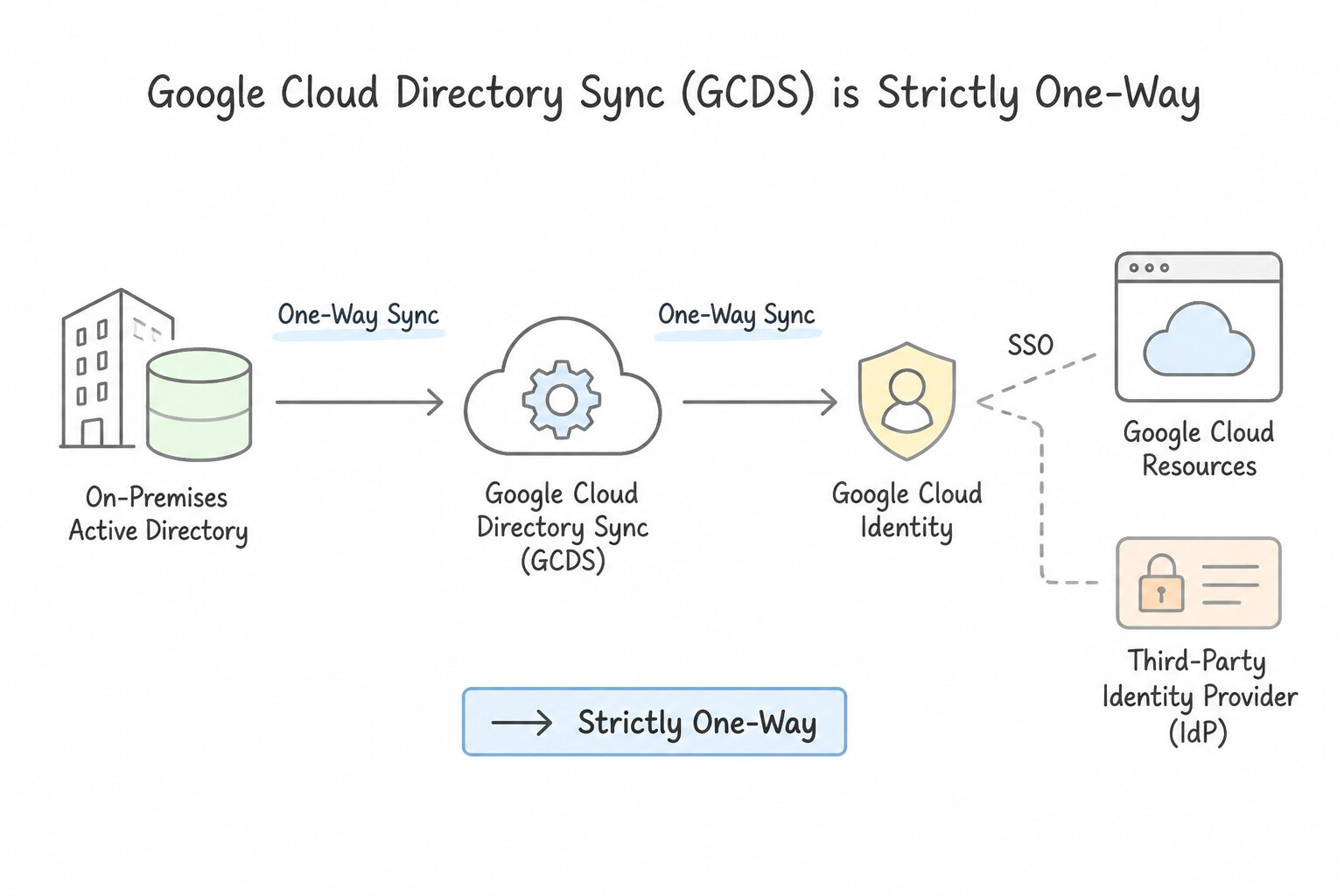
When evaluating scenarios on Google Cloud Directory Sync (GCDS) and third-party SAML 2.0 SSO, anchor on these four architectural rules:
- GCDS Is Strictly One-Way (LDAP → Cloud Identity): GCDS reads from on-premises Active Directory/LDAP and writes to Cloud Identity; it never modifies Active Directory. Because it treats LDAP as the single source of truth, any user or group member existing in Cloud Identity but missing from LDAP will be suspended/deleted unless protected by a Google Domain Configuration Exclusion Rule.
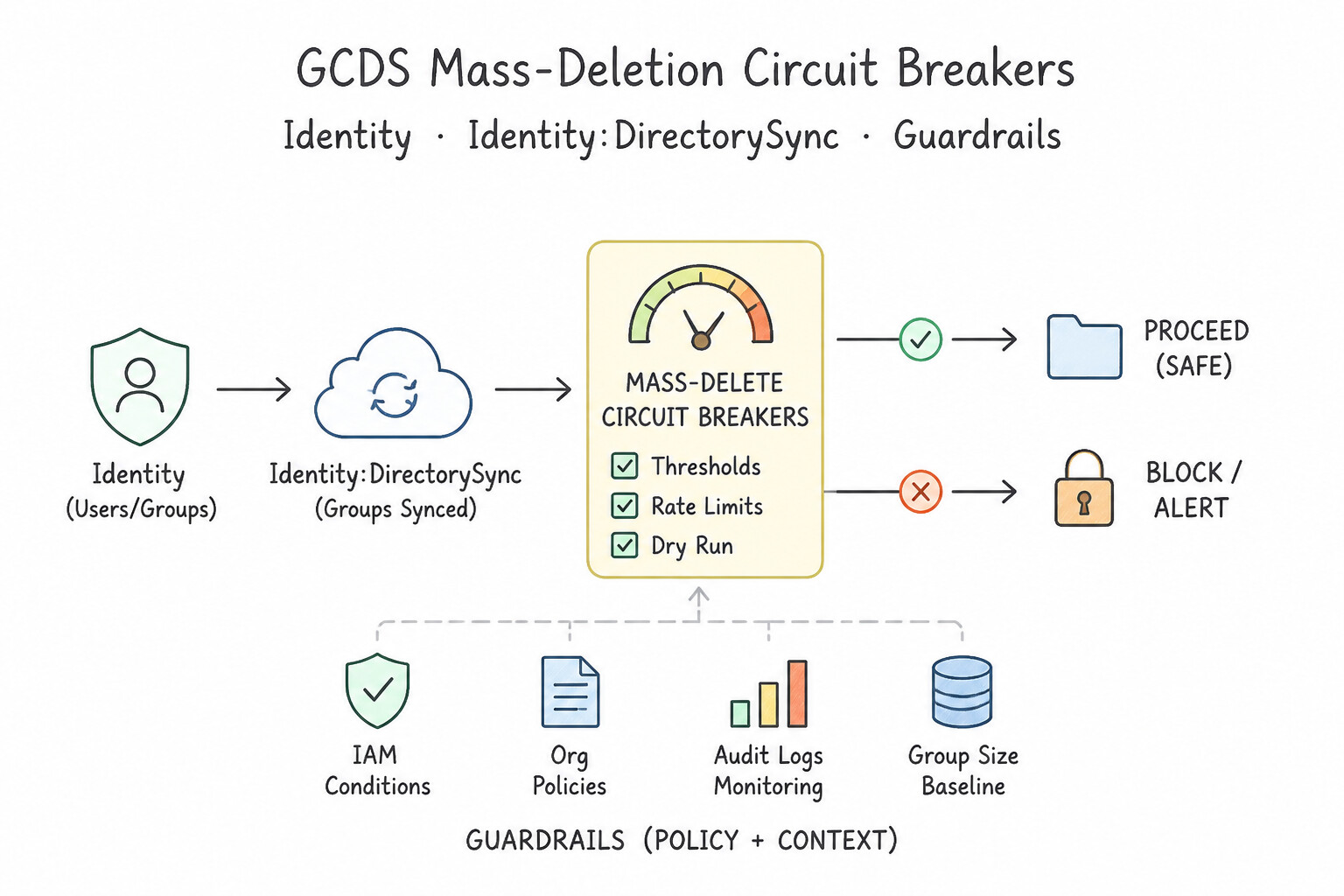
- GCDS Mass-Deletion Circuit Breakers: Always configure User Deletion / Suspension Limits (by percentage or absolute count) under GCDS Notifications & Limits so an accidental Active Directory OU move aborts the sync rather than suspending the entire company.
- Multi-Forest AD Requires Multiple GCDS Instances: A single GCDS configuration supports only one LDAP connection. When merging two unconnected AD forests into one Cloud Identity domain, deploy two separate GCDS instances with mutually exclusive Exclusion Rules so Instance A does not delete Instance B's users.
- Bypassing Broken Third-Party SSO: Super Administrators are exempt from third-party IdP SAML redirection when they navigate directly to
admin.google.comand authenticate with their Google-native credentials and Security Key. You can also configure SSO Network Masks (or SSO Profiles assigned per Organizational Unit/Group) for partial SSO rollouts.
Key Implementation Patterns
- Protecting Cloud-Only Admin Accounts: Use Configure a Google Domain Configuration exclusion rule in GCDS for the super administrator accounts. Exclusion rules prevent GCDS from modifying or deleting specific Google-side entities that do not exist in the LDAP source. (Avoid alternative: Adding cloud-only admins to AD is unnecessary and contradicts the practice of maintaining independent break-glass accounts.)
- Mitigating Mass Deletion Risks: Use Configure a notification limit in GCDS to cancel the sync if the number of suspended users exceeds a specific percentage. Notification limits in GCDS stop the sync process if the number of deletions or suspensions exceeds a defined safety threshold.
Key Takeaways (1.1a)
- GCDS is a one-way sync tool (LDAP to Google); it defaults to deleting Google entities not found in LDAP.
- Exclusion Rules are required to protect cloud-native accounts (like Super Admins) from being modified or deleted by GCDS.
- Never disable deletion globally for the sake of a few accounts, as this prevents proper lifecycle management for regular users.
- Exclusion rules can use exact matches or Regular Expressions.
Consideration 1.1b: Managing a super administrator account
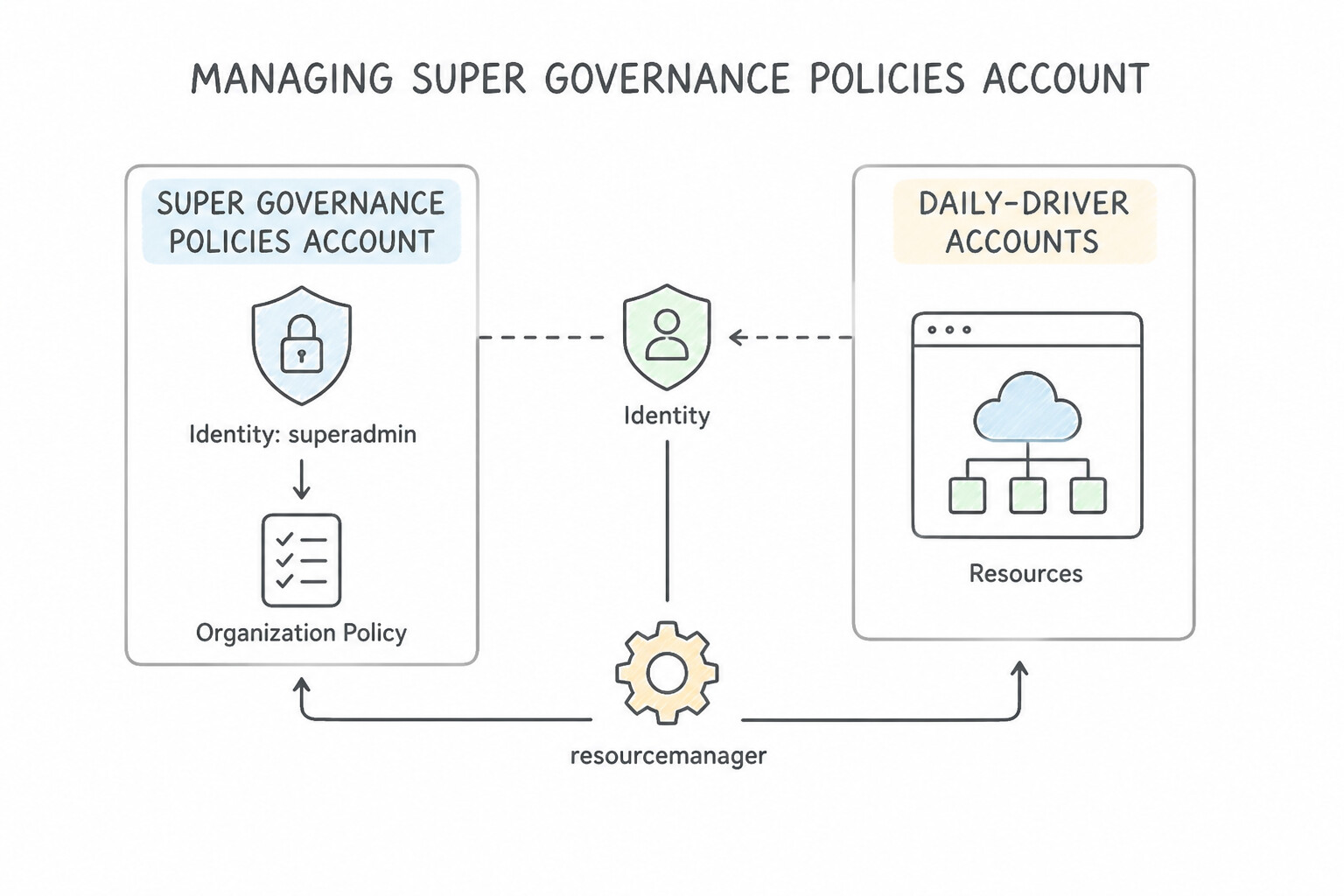
The Super Administrator role in Cloud Identity/Google Workspace is the most powerful identity in Google Cloud—it can grant itself Organization Admin and override any IAM policy. Follow Google's five golden rules for Super Admins:
- Separate Daily-Driver Accounts from Super Admin Accounts: Admins must never use a Super Admin account for daily email, browsing, or routine engineering. Maintain a standard account (
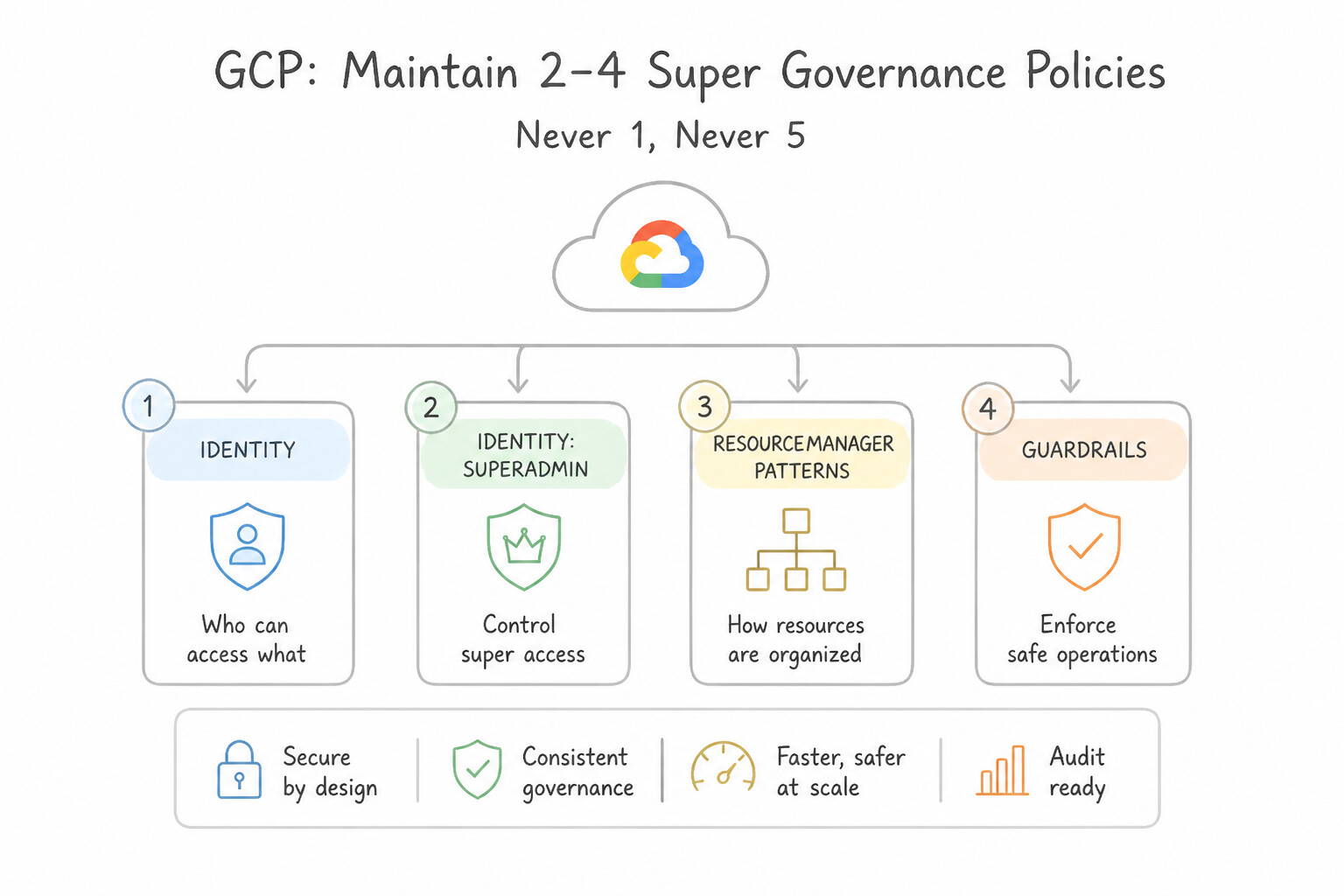
alice@example.com) for daily work and a dedicated cloud-only account (alice-admin@example.com) strictly for break-glass elevation. - Maintain 2 to 4 Super Admins (Never 1, Never >5): Having only 1 Super Admin creates a single point of business continuity failure; having more than 4–5 expands the catastrophic blast radius.
- Enforce Phishing-Resistant FIDO2 Hardware Security Keys: SMS and mobile OTP codes are vulnerable to SIM-swapping and real-time Adversary-in-the-Middle (AitM) phishing proxies. Enforce Security Keys (
FIDO2/ Titan) exclusively for all Super Admin accounts, and pre-generate printable Backup Verification Codes stored in a physical safe for key-loss recovery. - Exempt from Third-Party SSO & GCDS: Keep break-glass Super Admin accounts as cloud-only identities excluded from GCDS sync rules and exempt from third-party SAML SSO so they remain functional during an Active Directory or IdP outage.
Key Implementation Patterns
- Break-Glass Account Configuration: Use Create a dedicated Super Administrator account in Cloud Identity that is exempt from SSO and protect it with a hardware security key. A 'break-glass' account created directly in Cloud Identity, exempt from SSO, ensures access during IdP failures.
- Super Admin Redundancy Best Practices: Use Create one additional Super Administrator account to serve as a secure backup. Best practices recommend having at least two Super Administrator accounts for redundancy but keeping the total number low to reduce security risks. (Avoid alternative: Creating too many Super Administrator accounts increases the security attack surface and violates the principle of least privilege.)
- Phishing-Resistant MFA Enforcement: Use Configure the 2-Step Verification policy to enforce the use of security keys. Security keys are hardware devices that verify the website's identity, making them resistant to phishing attacks. (Avoid alternative: SMS and phone calls are vulnerable to interception and phishing, failing the security requirement.)
Key Takeaways (1.1b)
- Single Sign-On (SSO) creates a dependency on the availability of the Identity Provider (IdP).
- Always maintain at least one 'break-glass' Super Administrator account in Cloud Identity.
- Break-glass accounts must not use SSO; they should authenticate directly with Google.
- Secure break-glass accounts with the highest available protection, such as hardware security keys.
Consideration 1.1c: Automating the user lifecycle management process
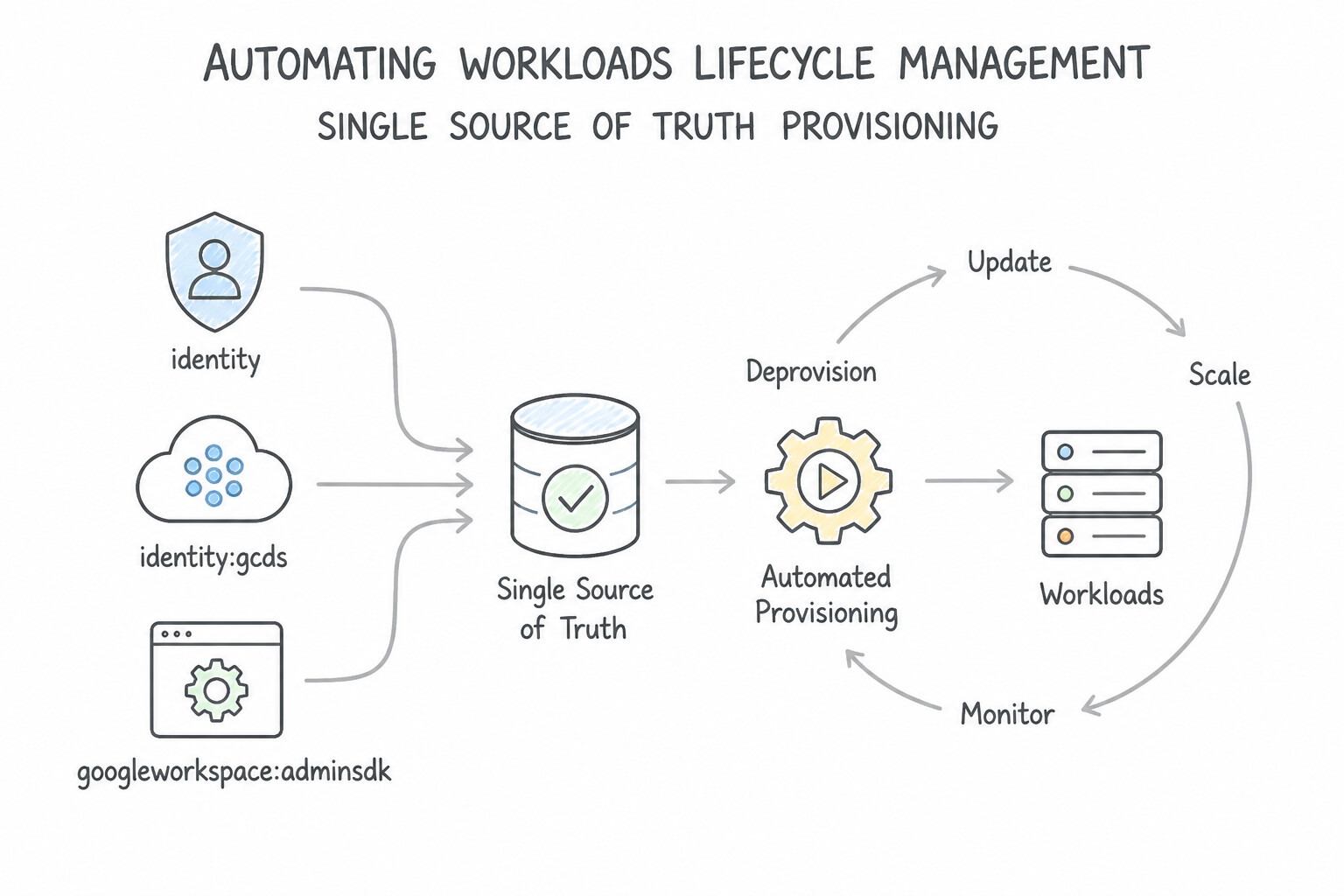
Manual user onboarding, role changes, and offboarding fail compliance audits due to orphaned accounts and privilege creep:
- Single Source of Truth Provisioning: Synchronize corporate lifecycle events (hire, department transfer, termination) automatically from your authoritative identity source using GCDS (for on-premises LDAP/AD), SCIM automatic provisioning (for cloud IdPs like Okta or Microsoft Entra ID), or the Admin SDK Directory API (for custom HRIS systems).
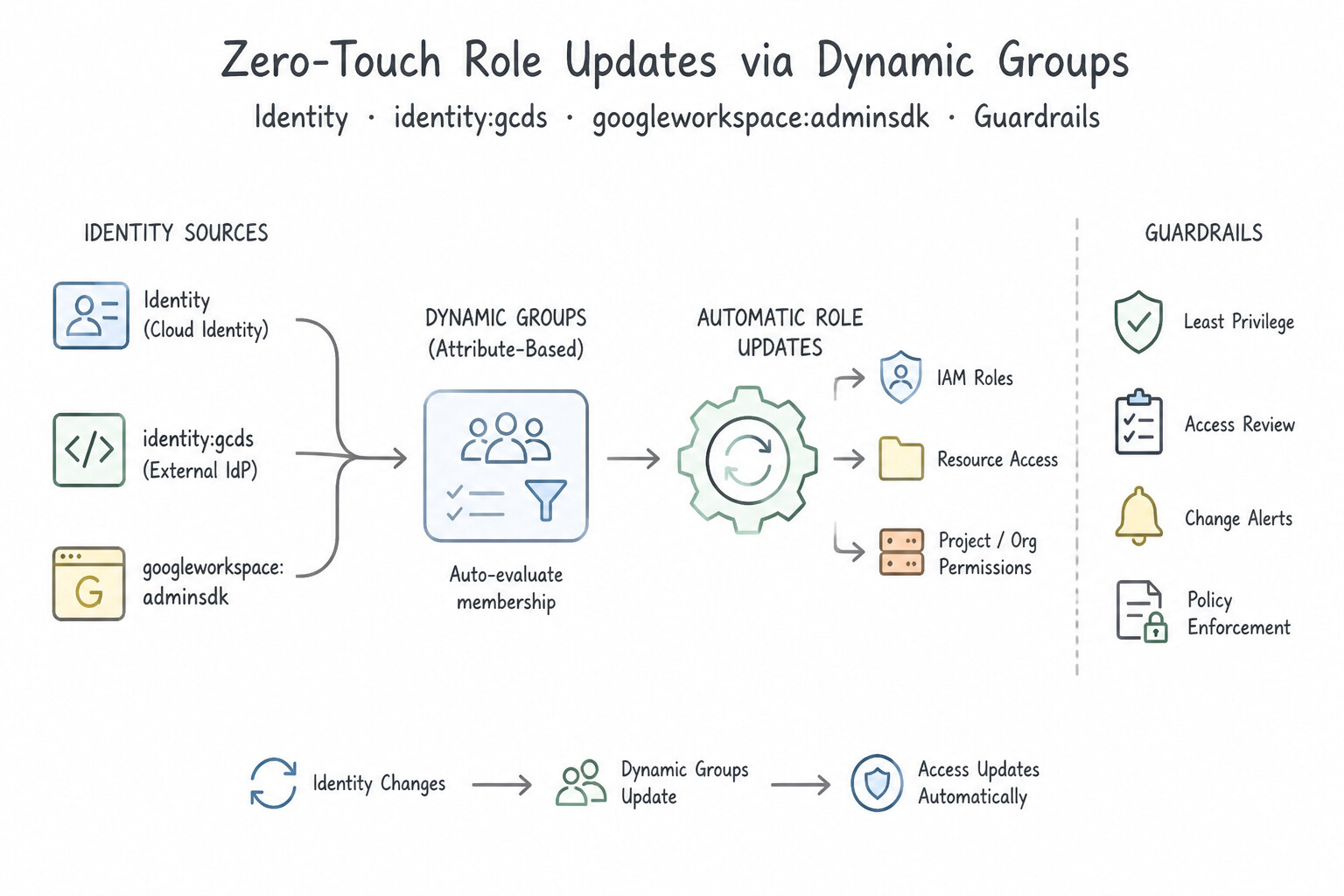
- Zero-Touch Role Updates via Dynamic Groups: Instead of manually moving users between IAM groups when they change departments, synchronize user attributes (
department,cost_center,job_title) into Cloud Identity and configure Dynamic Groups using Common Expression Language (CEL) membership queries (e.g.,user.organizations.exists(org, org.department=='Security')). - Secure Offboarding Sequence: When an employee or admin leaves, immediately suspend the account, revoke active OAuth/session tokens, strip privileged admin roles, and transfer data ownership—retaining the suspended identity temporarily to preserve immutable audit log correlation before final deletion.
Key Implementation Patterns
- Directory Sync for Hybrid Identity: Use Install Google Cloud Directory Sync (GCDS) on a server with access to AD. Configure a scheduled task to run the sync command hourly. GCDS is the official tool for one-way synchronization from LDAP to Cloud Identity and supports automated scheduling.
- Custom HRIS Integration: Use Develop a custom script that monitors the HRIS system and calls the Admin SDK Directory API to create users. The Admin SDK Directory API allows for programmatic user creation when standard sync tools like GCDS or SAML are not supported. (Avoid alternative: GCDS requires an LDAP source directory and cannot sync directly from a custom SQL database.)
- Automated Group Membership for IAM: Use Configure dynamic groups in the Google Admin console using membership queries based on user attributes. Dynamic groups automate membership based on user attributes like department and location. (Avoid alternative: Custom scripts require maintenance and do not utilize the built-in automation features of Cloud Identity.)
Key Takeaways (1.1c)
- Use Google Cloud Directory Sync (GCDS) for one-way synchronization of users and groups from LDAP to Cloud Identity.
- GCDS does not write back to the on-premises directory, preserving it as the single source of truth.
- Automation of GCDS is achieved via system schedulers (Cron/Task Scheduler).
- Google Workspace Password Sync (GWPS) is a separate tool specifically for syncing passwords, not user provisioning.
Consideration 1.1d: Administering user accounts and groups programmatically
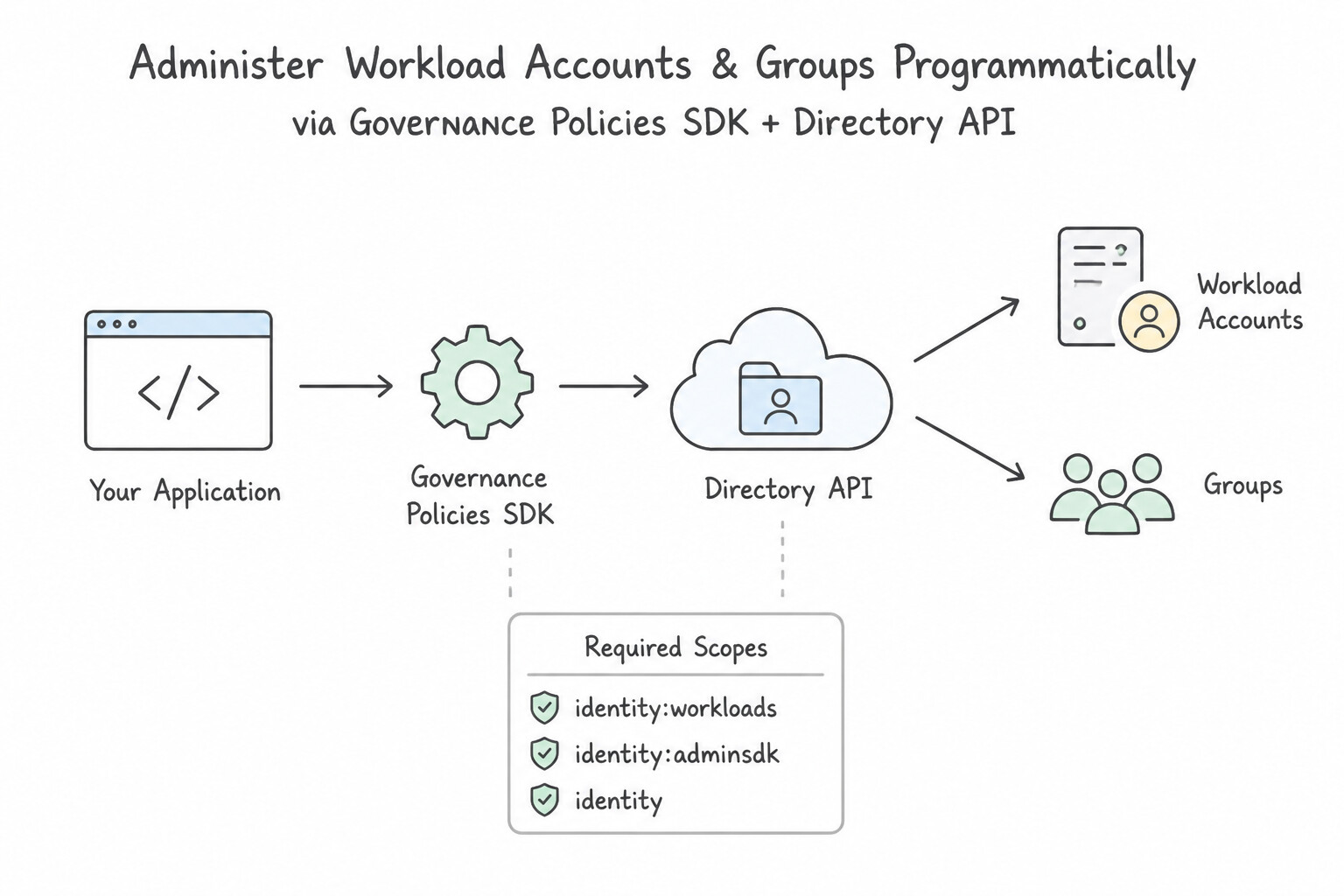
When building custom identity automation scripts or microservices that manage Cloud Identity users and groups:
- Use the
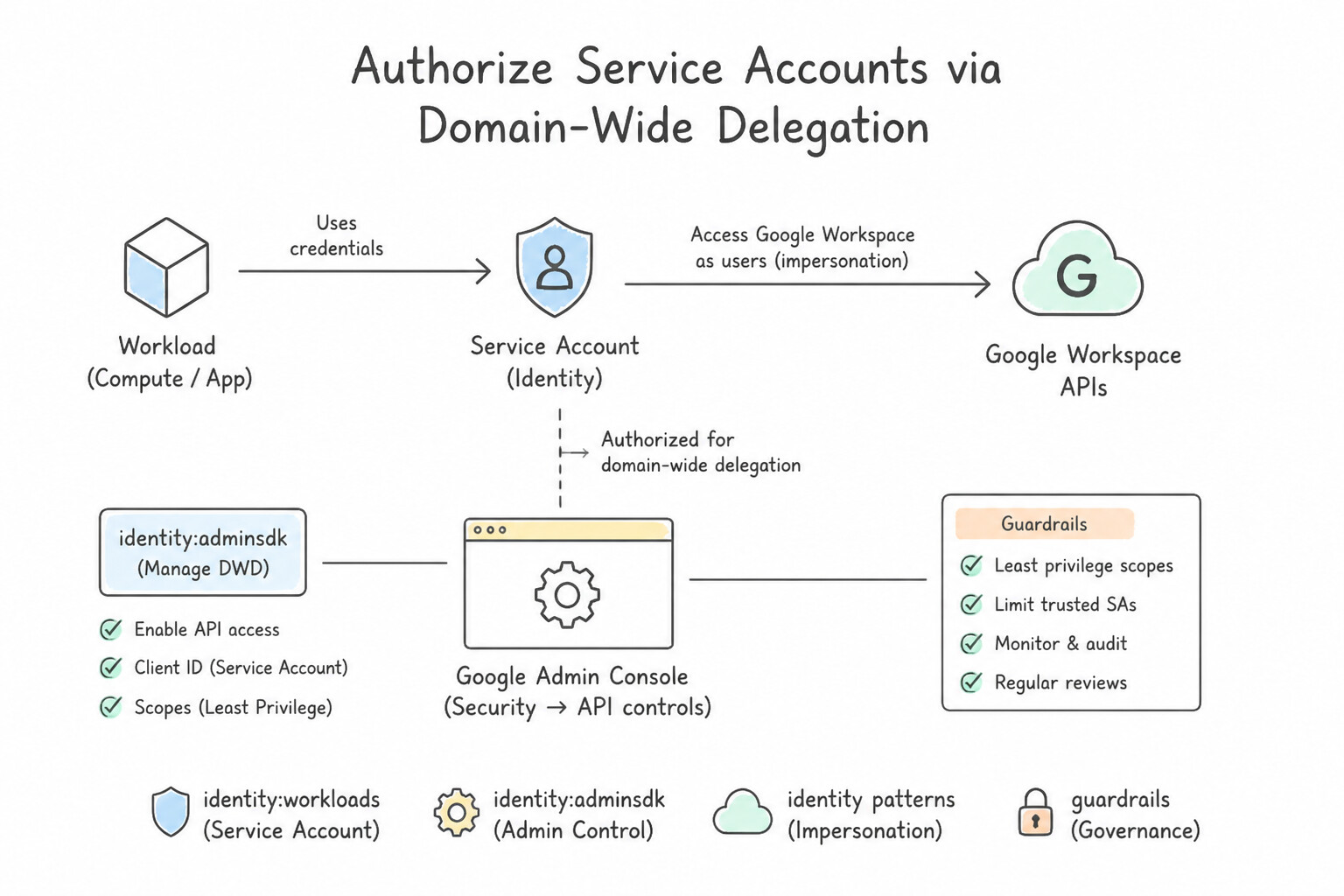
Admin SDK Directory API: The authoritative REST API for creating, suspending, deleting, and updating Cloud Identity / Workspace users and groups is the Admin SDK Directory API (users.insert,users.update,groups.insert,members.insert). - Authorize Service Accounts via Domain-Wide Delegation (or Admin Roles): To manage directory resources programmatically without human login prompts, assign a dedicated Service Account only the minimum required Admin Console role (e.g., User Management Admin or Groups Admin) or configure Google Workspace Domain-Wide Delegation scoped strictly to
https://www.googleapis.com/auth/admin.directory.user/.group. - Handle Quota &
429 Too Many Requests/503Errors with Truncated Exponential Backoff: Bulk identity provisioning scripts hitting the Directory API will trigger rate limits if run in a tight loop. Always implement truncated exponential backoff with random jitter rather than fixed sleep intervals or immediate retries.
Key Implementation Patterns
- Programmatic User Provisioning via Directory API: Use Use the Admin SDK Directory API users.insert method. The Admin SDK Directory API is the standard tool for programmatic user provisioning in Cloud Identity. (Avoid alternative: This method creates groups, not user accounts.)
- Service Account Domain-Wide Delegation: Use Configure Google Workspace Domain-Wide Delegation for the service account with the necessary API scopes. Domain-Wide Delegation grants a service account access to Google Workspace data (like Groups) by impersonating an admin. (Avoid alternative: IAM roles control Google Cloud resources, not Google Workspace directory data.)
Key Takeaways (1.1d)
- The Admin SDK Directory API is the primary tool for programmatic management of users and groups in Cloud Identity.
- IAM APIs manage permissions (policies), not user creation.
- Service Accounts are for applications, not humans.
- IAM roles grant access to GCP resources (compute, storage), not Workspace directory data (users, groups).
Consideration 1.1e: Configuring Workforce Identity Federation
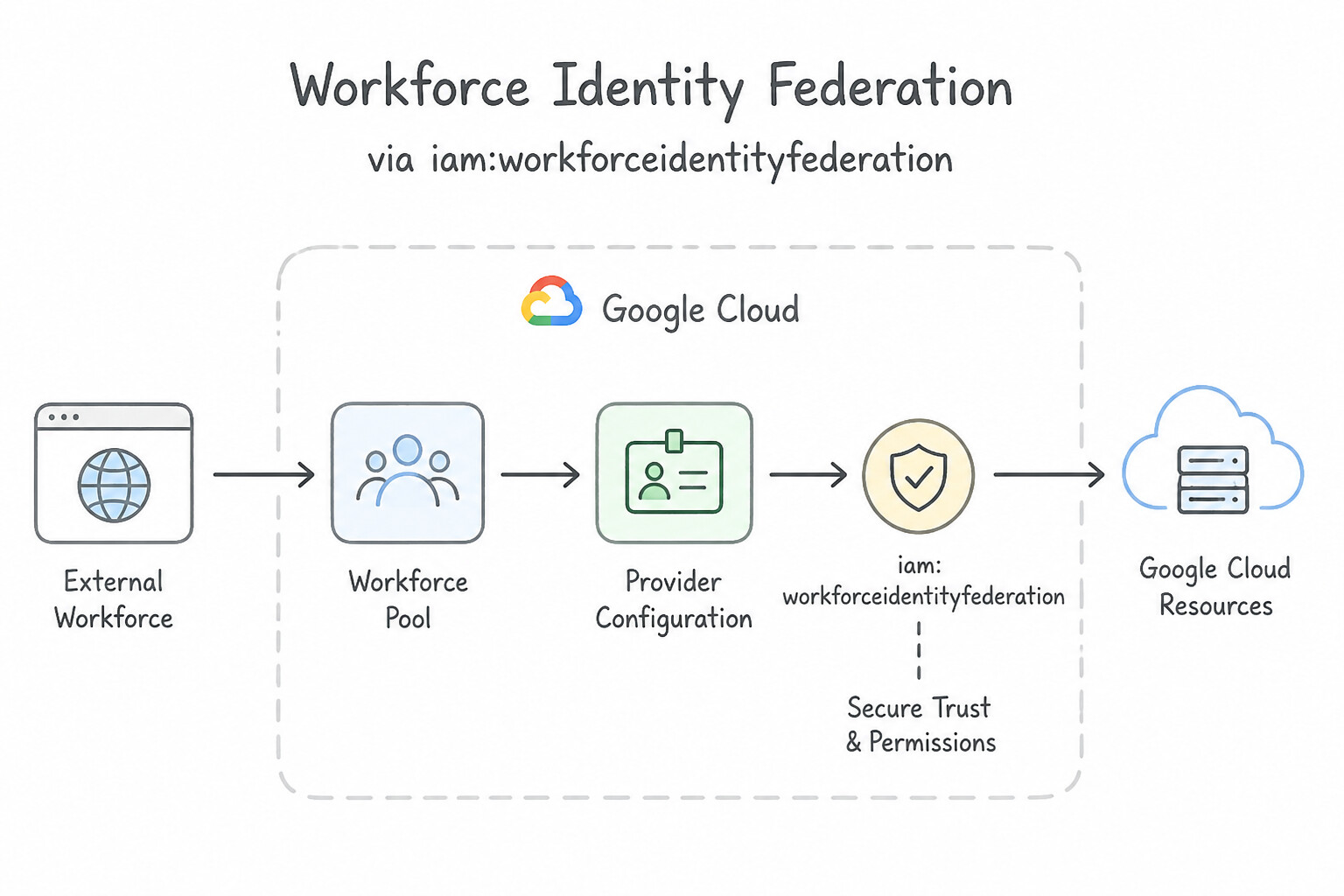
Workforce Identity Federation allows external human users (contractors, B2B partners, or acquired company employees) to access Google Cloud Console and APIs using their existing third-party IdP without creating or syncing user accounts in Cloud Identity:
- Workforce Pool & Provider Configuration: Create a Workforce Identity Pool at the Organization level and configure an OIDC (requiring the external IdP's Issuer URI and Client ID) or SAML 2.0 (requiring the IdP XML metadata / Entity ID, SSO URL, and X.509 certificate) provider.
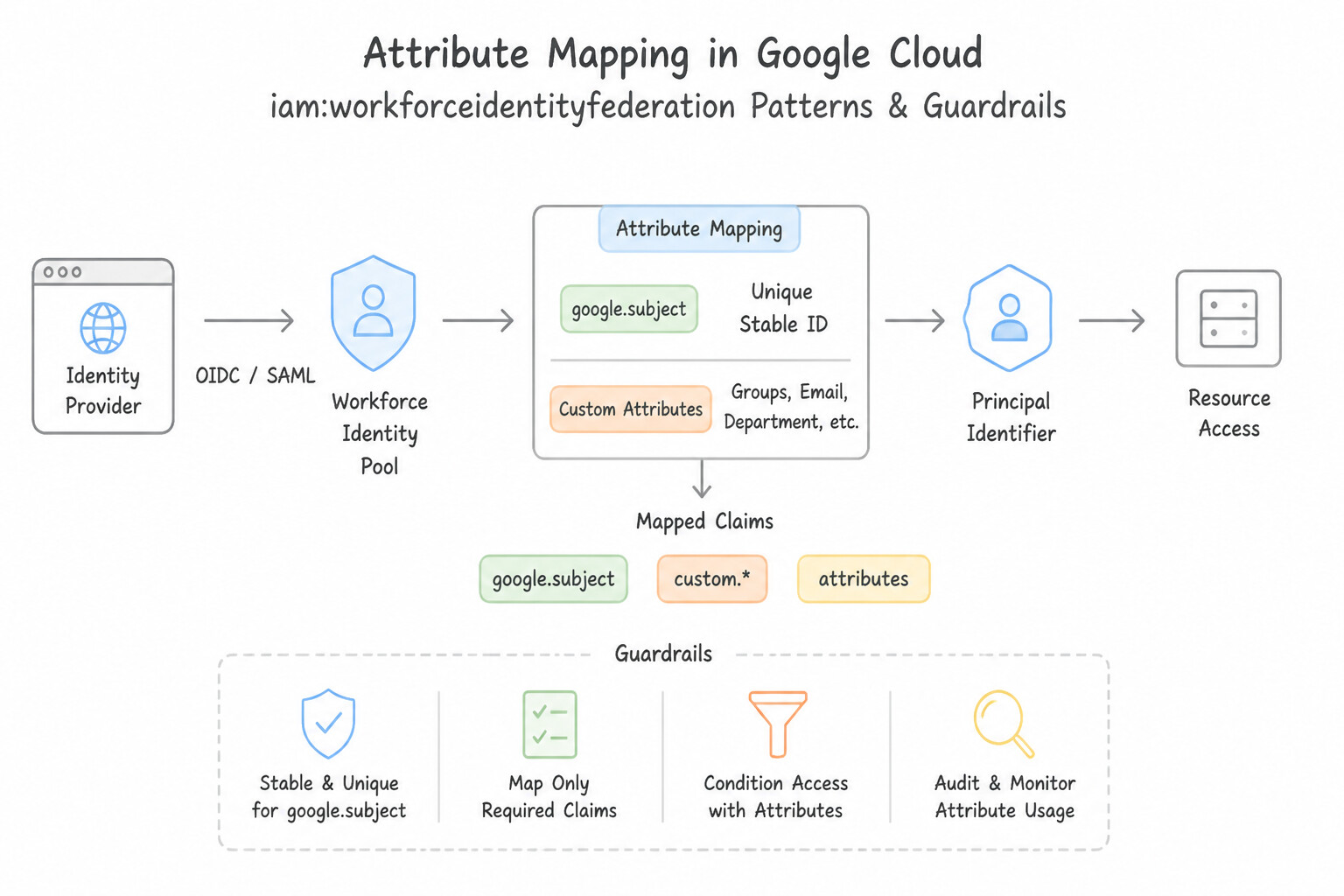
- Attribute Mapping (
google.subject& Custom Attributes): Map the external IdP's unique user identifier togoogle.subject, group claims togoogle.groups, and custom claims (e.g.,assertion.job_roleorassertion.department) toattribute.job_roleso you can write fine-grained IAM bindings likeprincipalSet://iam.googleapis.com/locations/global/workforcePools/POOL/attribute.job_role/auditor. - CEL Attribute Conditions (Admission Gate): To prevent all users in a partner's external IdP from exchanging tokens, define a Common Expression Language (CEL) Attribute Condition on the Workforce Provider (e.g.,
assertion.department == 'Cloud-Contractors' && assertion.email_verified == true) to reject unauthorized external users at the Security Token Service (STS) boundary.
Key Implementation Patterns
- Configuring OIDC Provider for External Partners: Use The Issuer URI and the Client ID. OIDC configurations require the Issuer URI to verify token signatures and the Client ID to verify the token audience. (Avoid alternative: Userinfo endpoints and Access Tokens are part of the runtime flow, not the static configuration needed to set up the provider.)
- Restricting Access via Attribute Conditions: Use In the workforce identity pool provider configuration, add an attribute condition using a Common Expression Language (CEL) expression to check the email domain. Attribute conditions in the provider configuration allow you to use CEL to filter which external identities can federate based on claims like email domain.
- Mapping External Groups to Google Attributes: Use Configure the Workforce Identity Pool provider to map "assertion.job_role" to "attribute.job_role". You must map external OIDC claims to Google attributes (e.g.,
attribute.job_role) in the pool provider settings to reference them in IAM policies.
Key Takeaways (1.1e)
- Workforce Identity Federation allows external users to access Google Cloud without syncing accounts.
- For OIDC Federation, the Issuer URI is used to locate public keys for signature verification.
- The Client ID is used to validate the audience claim, ensuring the token is intended for your specific pool.
- Secrets (like Client Secret) are generally not shared with the Resource Server (Google Cloud) in federation scenarios.
Quick Decision Cheat Sheet (Subsection 1.1)
If the Scenario Requires... | Choose This Google Cloud Pattern | Avoid This Common Mistake |
|---|---|---|
"Cloud-only Super Admin accounts or manual group members disappear after nightly GCDS sync" | Configure Google Domain Configuration Exclusion Rules in GCDS | Creating dummy accounts in Active Directory; disabling GCDS group sync entirely |
"Prevent accidental AD Organizational Unit (OU) move from suspending thousands of users in Cloud Identity" | Configure a Notification / Deletion Limit (percentage or user count) in GCDS | Relying on manual log review after the sync completes |
"Third-party SAML IdP is down and admins cannot log in to fix SSO settings" | Sign in directly at admin.google.com using a cloud-only Super Admin break-glass account | Opening a support ticket to delete the Organization; logging in via console.cloud.google.com |
"Protect Super Administrator accounts against phishing and Man-in-the-Middle credential theft" | Enforce FIDO2 / Titan Hardware Security Keys in 2-Step Verification policy + dedicated non-daily admin accounts | Using SMS text codes or TOTP mobile authenticator apps |
"External human contractors need Google Cloud Console access without syncing users into Cloud Identity" | Configure Workforce Identity Federation with OIDC ( Issuer URI + Client ID) or SAML + CEL Attribute Conditions | Using Workload Identity Federation (for machines only) or creating static Service Account JSON keys |
Further Reading (Subsection 1.1)
- Use exclusion rules with GCDS — Documentation explaining how to set up exclusion rules to prevent GCDS from changing or deleting specific user, profile, group, calendar, or resource data.
- Use limits and notifications with GCDS — This article explains how to set limits to prevent GCDS from deleting or suspending more than a specified number or percentage of users.
- Authentication and authorization — See the section on 'Create a break-glass super admin account' which explicitly advises creating an account that does not use SSO for emergencies.
- Security best practices for administrator accounts — Review the section on 'Create a spare super admin account' which advises having at least two accounts but limiting the total number.
- Protect your business with 2-Step Verification — Explains the different methods of 2-Step Verification available in Google Workspace and Cloud Identity, and highlights security keys as the strongest option.
- Security best practices for administrator accounts — Details specific recommendations for Super Admin accounts, including the requirement for security keys.
Subsection 1.2: Managing service accounts
The Big Picture
Across real-world incident response reports, leaked user-managed Service Account JSON keys and over-privileged default Service Accounts are the single most common initial access vector in cloud compromises. Naive teams fall into three deadly anti-patterns:
- The Default Service Account Blast Radius (
1.2a,1.2b): By default, a newly created Compute Engine VM or GKE node pool inherits the Compute Engine default service account (PROJECT_NUMBER-compute@developer.gserviceaccount.com), which historically receives the broadEditor(roles/editor) basic role across the entire project. If a single web container on that VM suffers a Server-Side Request Forgery (SSRF) or Remote Code Execution (RCE) vulnerability, the attacker queries the local instance metadata server (169.254.169.254) and immediately obtains an OAuth 2.0 token with write access to every bucket, database, and VM in the project. - The Exported JSON Key Time Bomb (
1.2c,1.2d): Exporting a static Service Account JSON key (private_key_id) to authenticate an AWS EC2 instance, a GitHub Actions workflow, or a developer's laptop creates a non-expiring credential outside Google Cloud's visibility. If committed to Git or leaked in a build log, anyone on the internet can impersonate that Service Account from anywhere unless stopped by VPC-SC or IAM conditions. - Confusing
Service Account UserwithService Account Token Creator(1.2e,1.2f,1.2g): Engineers frequently grant the wrong role when delegating service account usage: roles/iam.serviceAccountUserallows a principal to attach a Service Account to a long-running resource (like launching a Compute Engine VM that runs as that SA).roles/iam.serviceAccountTokenCreatorallows a principal (a human usinggcloud --impersonate-service-accountor an external workload via Workload Identity Federation) to call the IAM Credentials API and mint short-lived OAuth 2.0 access tokens or OIDC ID tokens directly.
Consideration 1.2a: Securing and protecting service accounts including default service accounts
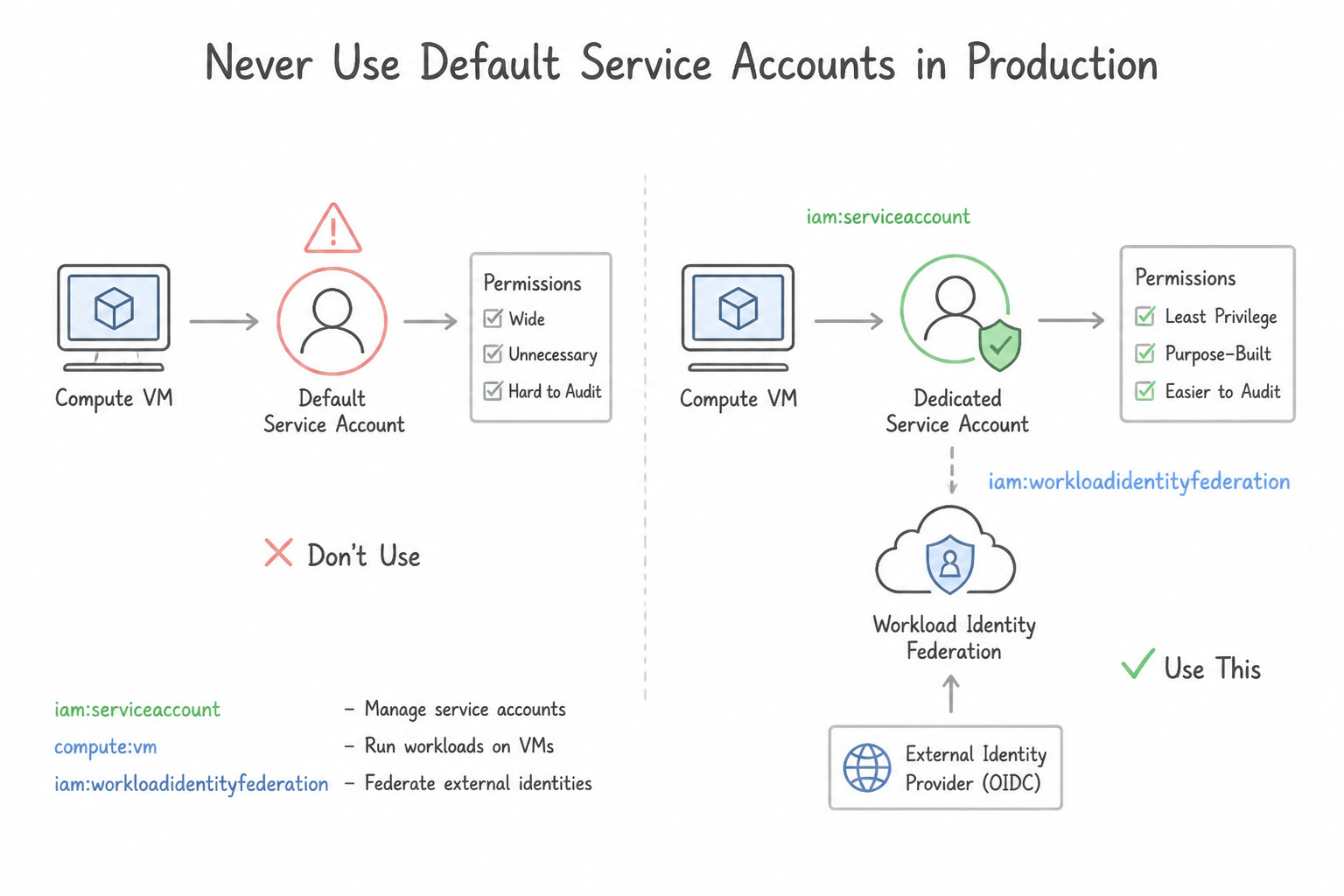
- Never Use Default Service Accounts in Production: The Compute Engine (
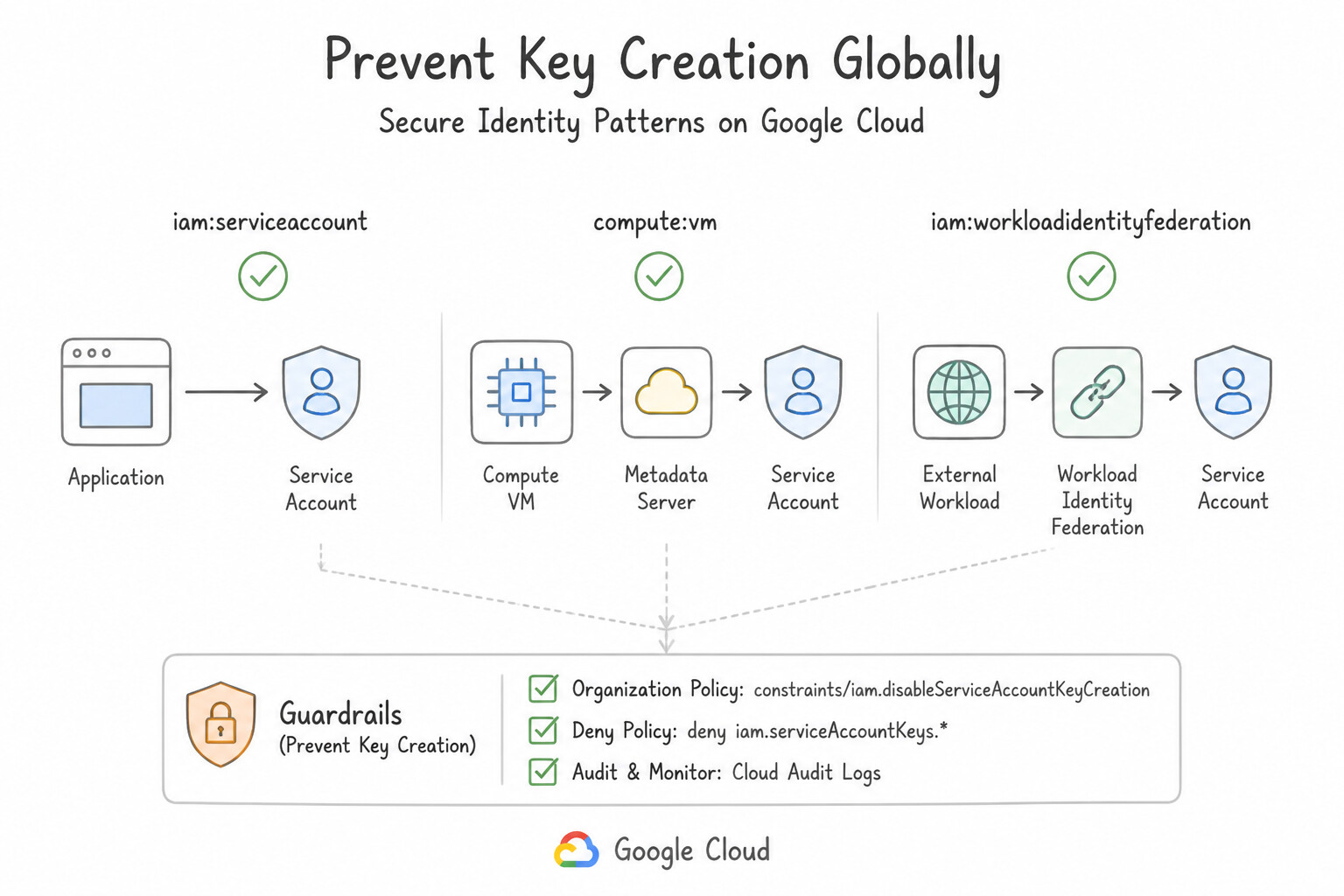
PROJECT_NUMBER-compute@developer.gserviceaccount.com) and App Engine (PROJECT_ID@appspot.gserviceaccount.com) default service accounts violate least privilege. Enforce the Organization Policyconstraints/iam.automaticIamGrantsForDefaultServiceAccountsso default SAs do not automatically receiveroles/editor, and always attach a dedicated, user-managed Service Account per microservice with granular roles (e.g.,roles/storage.objectVieweron a single bucket). - Prevent Key Creation Globally: Enforce
constraints/iam.disableServiceAccountKeyCreationacross the Organization so neither developers nor compromised scripts can generate downloadable JSON keys.
Key Implementation Patterns
- Mitigating Risk of Default Service Accounts: Use Create a custom service account with the specific permissions the application requires. Update the VMs to use this new account. The best practice is to replace the default service account with a custom service account that has granular, least-privilege permissions.
- Securing Access from External Clouds (AWS/Azure): Use Configure Workload Identity Federation. Create a workload identity pool and provider for AWS. Grant the AWS Identity and Access Management (IAM) role permission to impersonate a Google Cloud service account. Workload Identity Federation allows external workloads to access Google Cloud resources using their native credentials (AWS IAM) without managing long-lived service account keys.
- Preventing Key Exfiltration via Org Policy: Use Enforce the constraints/iam.disableServiceAccountKeyCreation boolean constraint in the Organization Policy Service. This constraint specifically prevents the creation of user-managed service account keys organization-wide.
Key Takeaways (1.2a)
- Default service accounts often have the primitive Editor role, which is too permissive for production workloads.
- Always prefer creating custom service accounts with granular IAM roles that match the specific needs of the application.
- Avoid using primitive roles (Owner, Editor, Viewer) for service accounts whenever possible.
- Replacing a service account on a running VM requires stopping and updating the instance configuration or updating it via the API carefully.
Consideration 1.2b: Identifying scenarios requiring service accounts
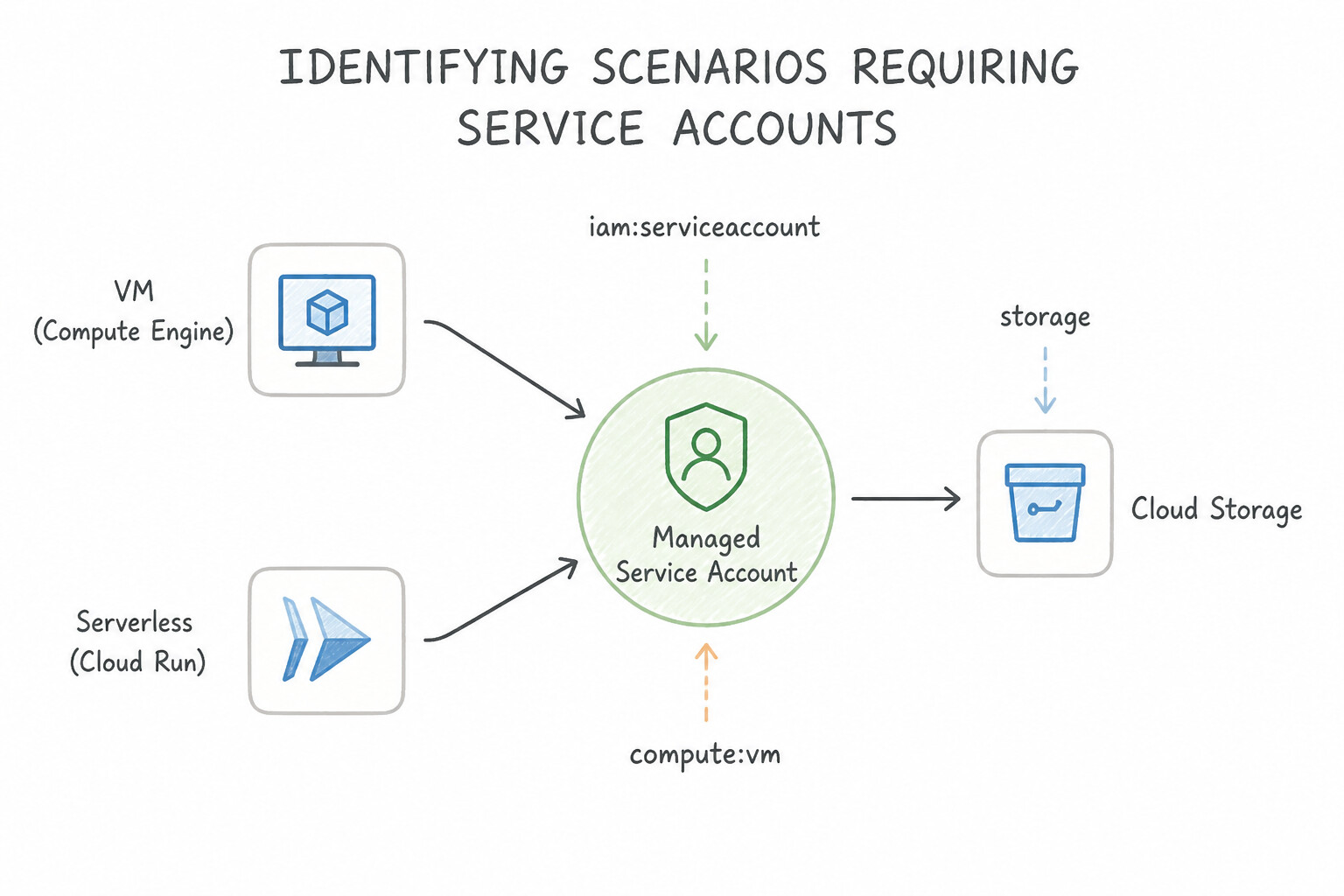
- Google Cloud VM / Serverless → Attached User-Managed Service Account: When a workload runs on Compute Engine, Cloud Run, or Cloud Functions, attach a dedicated user-managed Service Account directly to the instance/service so the runtime fetches auto-rotated tokens from the local metadata server.
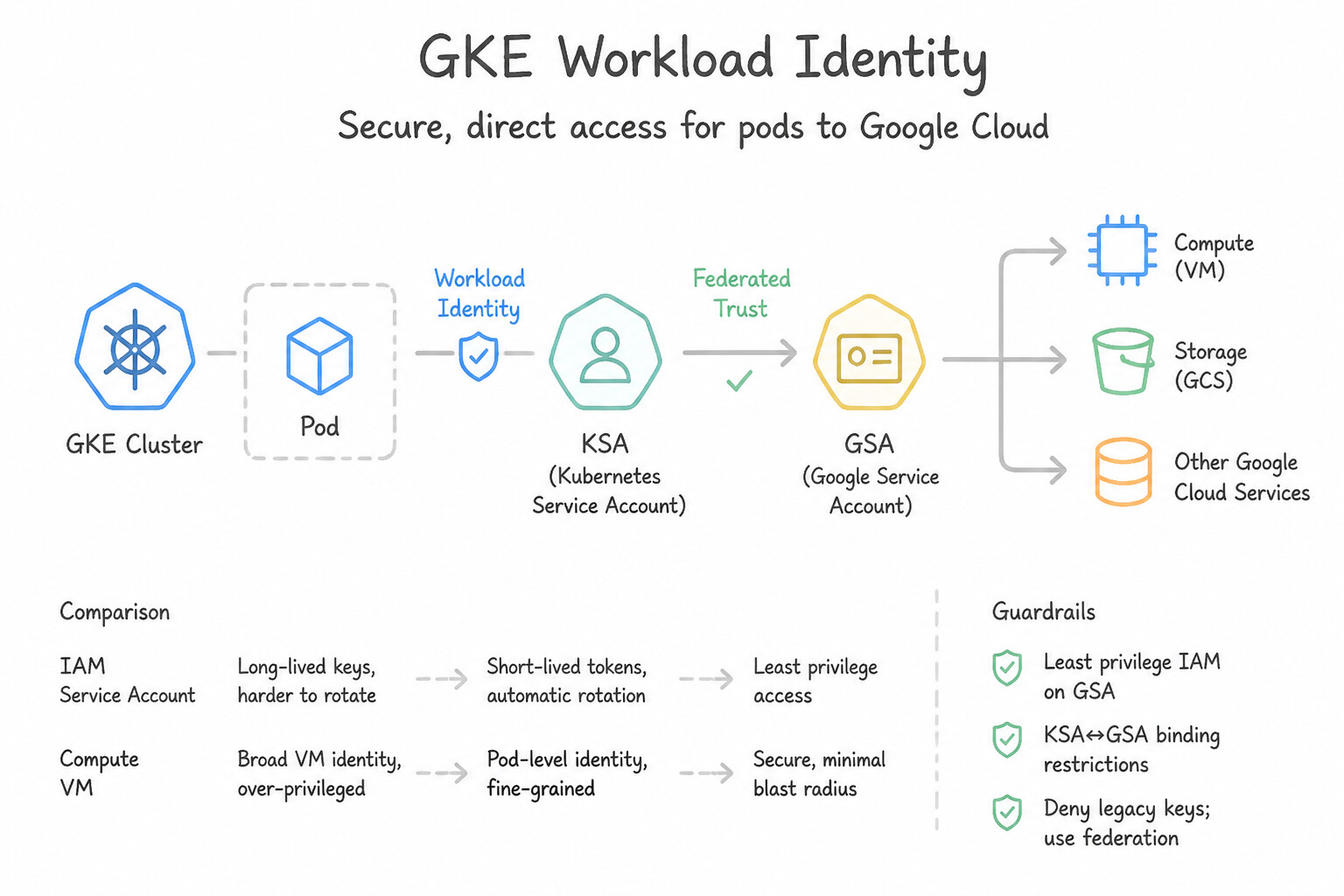
- GKE Pods → GKE Workload Identity: Never use the node pool's Compute Engine Service Account for application pods (which gives every pod on the node the union of all permissions). Enable GKE Workload Identity, create a dedicated Kubernetes Service Account (
KSA) per microservice, bind it to a Google Service Account (GSA) viaroles/iam.workloadIdentityUser, and annotate theKSAwithiam.gke.io/gcp-service-account=GSA_EMAIL. - External Clouds (AWS, Azure), CI/CD (GitHub Actions, GitLab), or On-Premises → Workload Identity Federation: Never export JSON keys for non-GCP workloads; federate their native AWS IAM role or OIDC/SAML token via a Workload Identity Pool.
Key Implementation Patterns
- Compute Engine Default vs. User-Managed Service Accounts: Use Create a user-managed service account. Grant the Storage Object Viewer IAM role to this service account for the bucket. Configure the VM to use this new service account. Replacing the over-privileged default service account with a dedicated user-managed service account containing only the specific IAM role (Storage Object Viewer) enforces least privilege.
- Workload Identity Federation (On-Premises): Use Configure Workload Identity Federation to allow the on-premises identity provider to impersonate a service account. Workload Identity Federation enables keyless authentication by exchanging external credentials for short-lived Google Cloud tokens.
- GKE Workload Identity: Use Enable Workload Identity on the cluster. Create a Kubernetes Service Account (KSA) for each microservice. Bind each KSA to a Google Service Account (GSA) that has the specific required roles. Workload Identity allows you to assign granular Google Cloud permissions to specific Kubernetes workloads safely and efficiently.
Key Takeaways (1.2b)
- Avoid using the Default Compute Engine Service Account in production because of its overly broad Editor permissions.
- Create dedicated User-Managed Service Accounts for each specific workload or application.
- Apply IAM roles that grant the minimum necessary permissions (Least Privilege).
- Avoid managing static JSON keys for Compute Engine workloads; use attached service accounts instead.
Consideration 1.2c: Creating, disabling, and authorizing service accounts
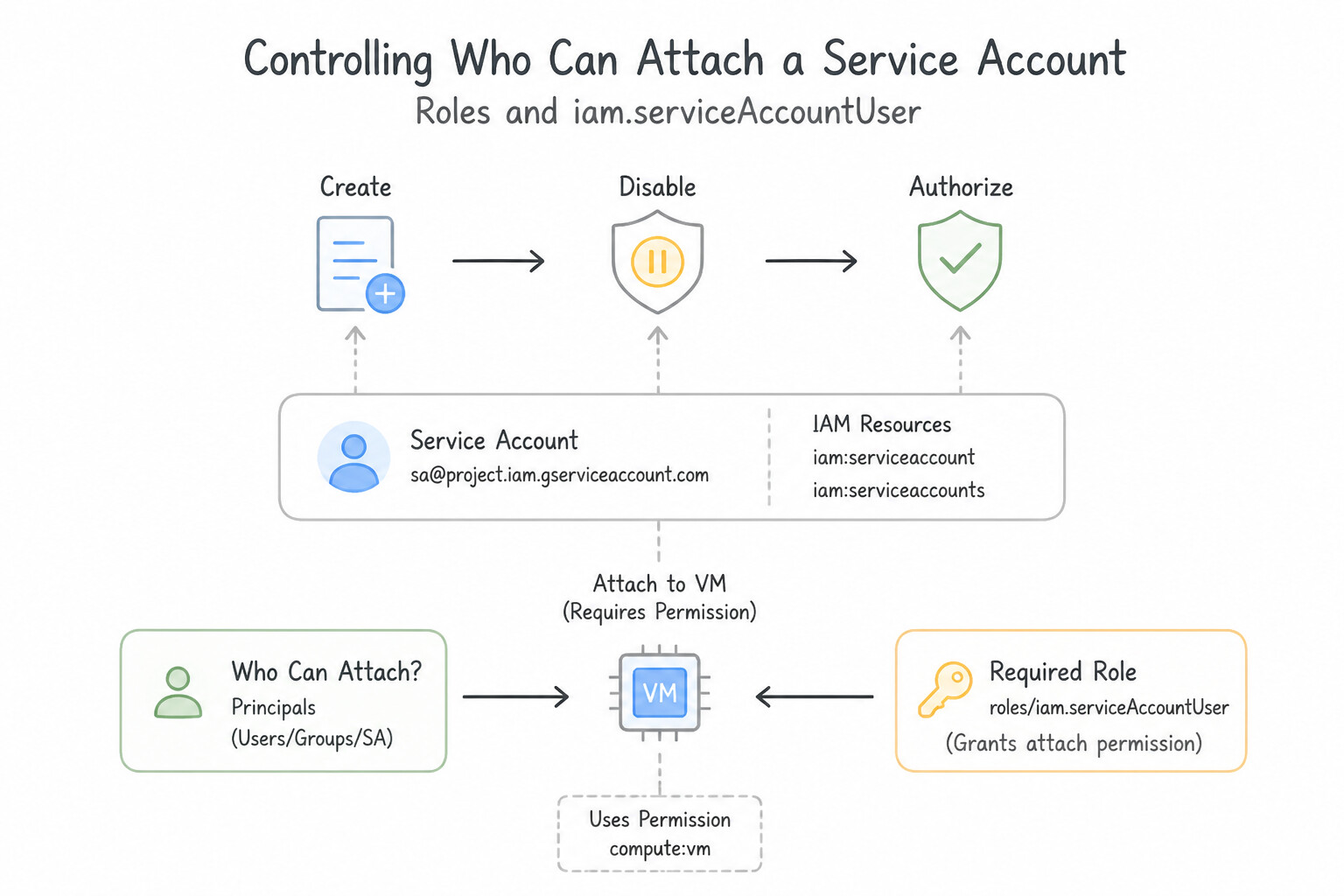
- Controlling Who Can Attach a Service Account (
roles/iam.serviceAccountUser): A Service Account is simultaneously an Identity (who makes API calls) and a Resource (something other principals can be granted permissions on). To prevent privilege escalation where a developer attaches a high-privilege production Service Account to their own test VM, grantroles/iam.serviceAccountUserat the individual Service Account resource level (not at the Project level!). - Zero-Downtime Key Rotation (
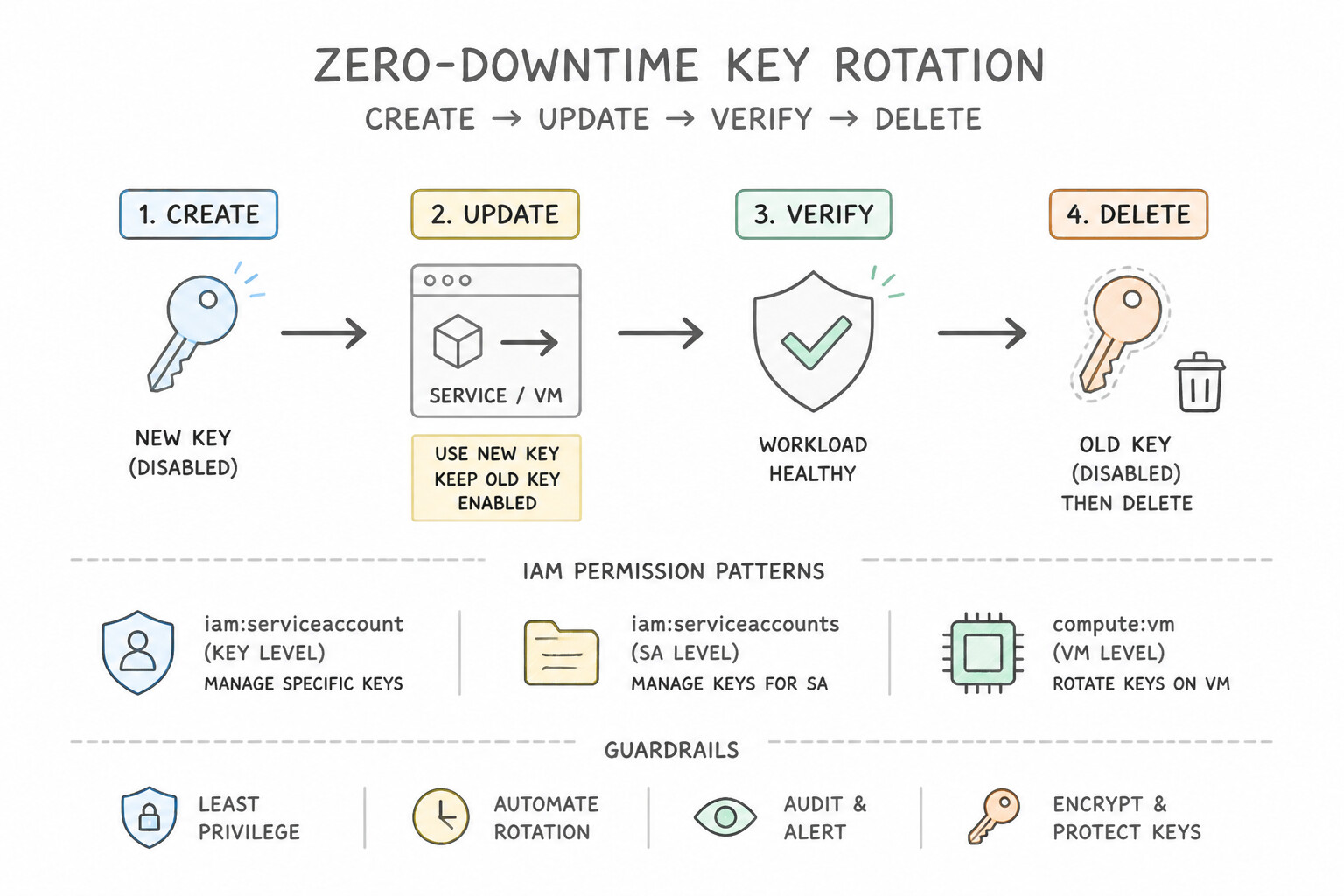
Create → Update → Verify → Delete): If a static key is compromised or due for rotation, first create a new key, update and redeploy the application to use the new key, verify traffic succeeds, and disable/delete the old key. Deleting the old key first causes an immediate production outage; disabling before deleting allows safe rollback if an unmigrated worker is discovered.
Key Implementation Patterns
- Immediate Remediation of Leaked Credentials: Use Create a new key, update the application to use the new key, and then delete the compromised key. Rotate the key: create a new one, update the app, then delete the old one to maintain uptime. (Avoid alternative: Deleting the account breaks the application and removes permissions permanently.)
- Preventing Privilege Escalation via
actAs: Use Grant the developers the Service Account User role only on the specific service accounts they are authorized to use. Scoping the Service Account User role to specific resources enforces the principle of least privilege. (Avoid alternative: Granting this role at the project level gives access to all service accounts, causing the security risk.)
Key Takeaways (1.2c)
- Service account keys are high-risk credentials; protect them carefully.
- When a key is leaked, prefer rotation (Create -> Update -> Delete) to maintain availability.
- Deleting a service account is destructive and removes all IAM permissions.
- Disabling a service account immediately stops all authentication, causing downtime.
Consideration 1.2d: Securing, auditing, and mitigating usage of service account keys
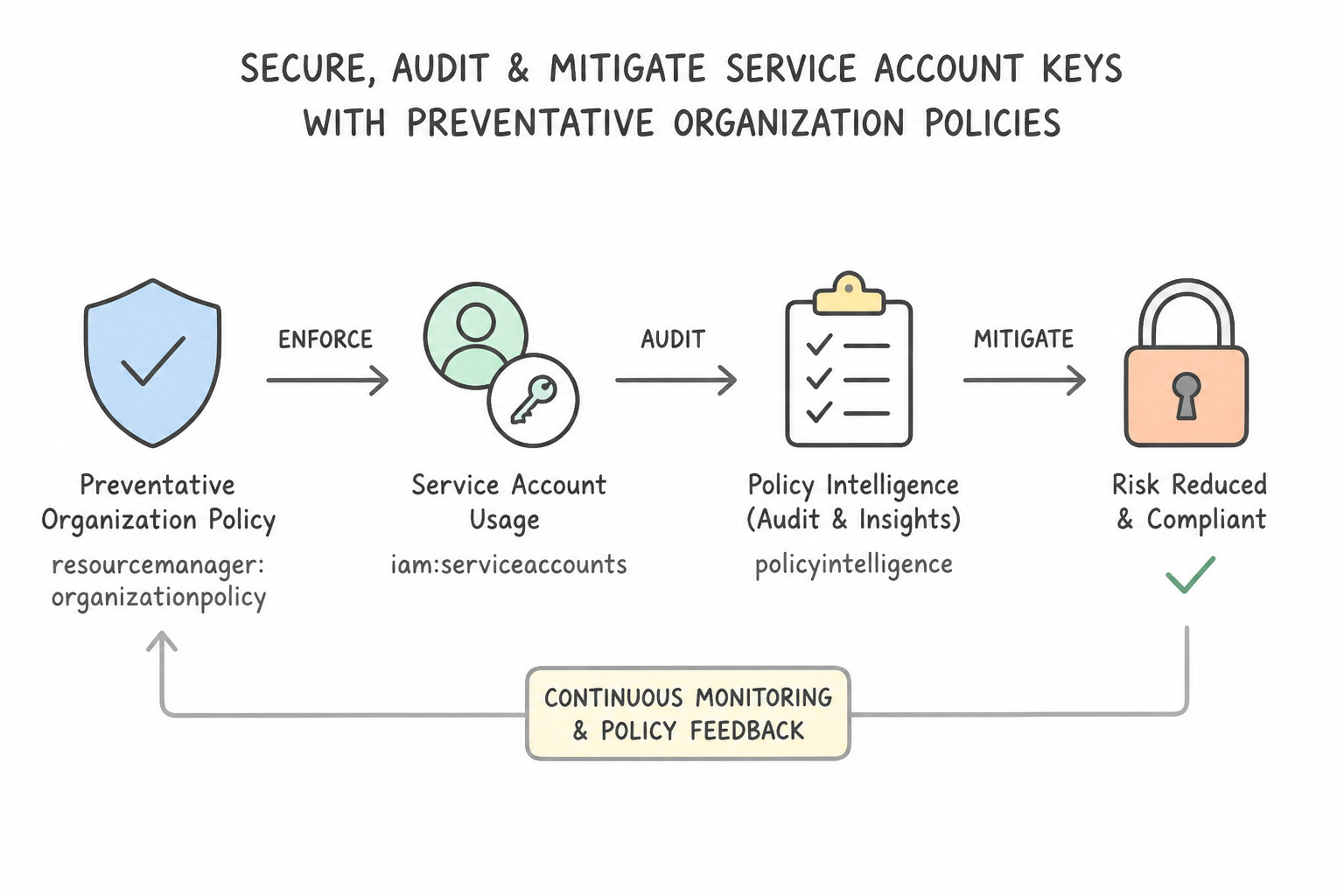
- Preventative Organization Policies:
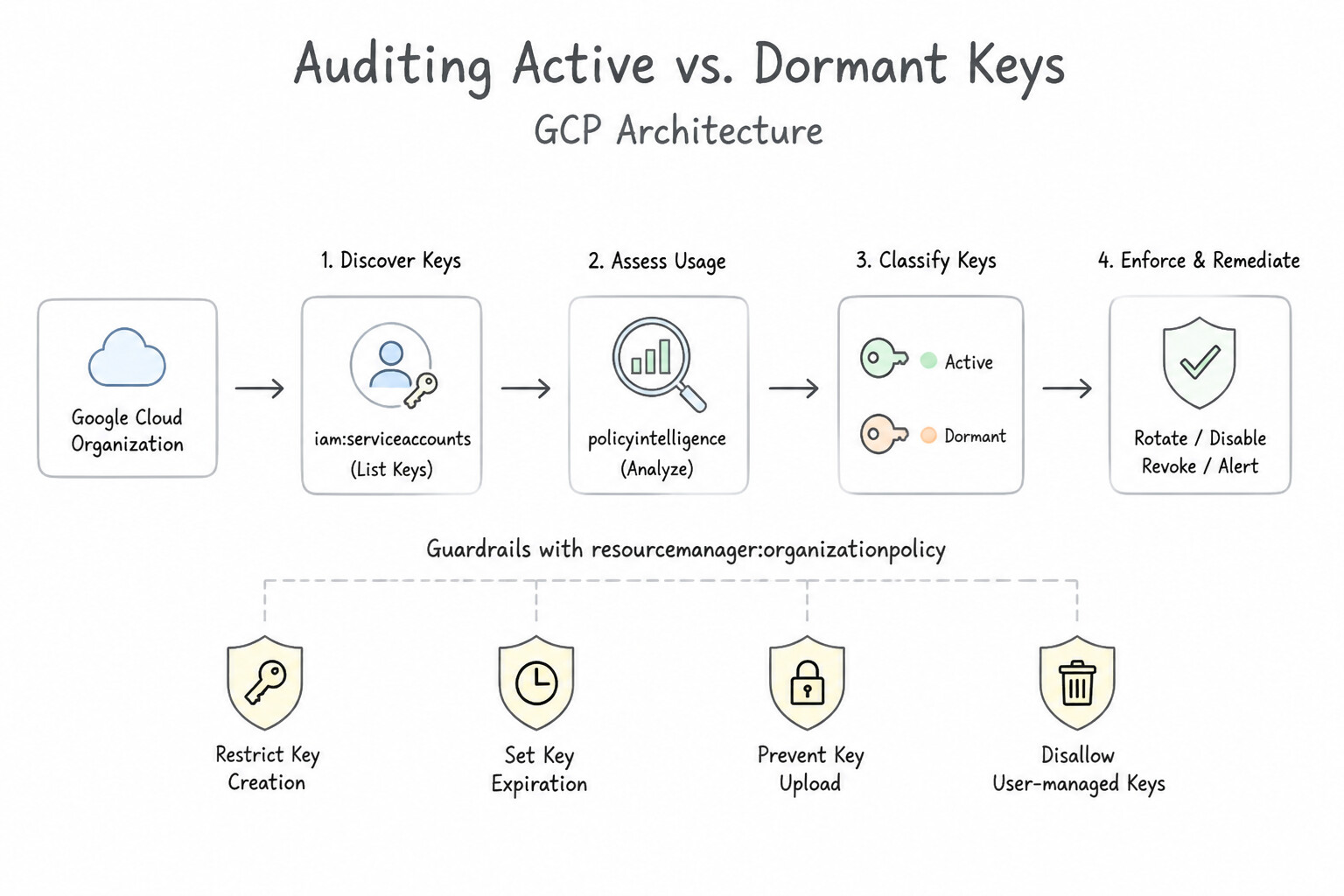
constraints/iam.disableServiceAccountKeyCreation: Blocks Google from generating new user-managed keys.constraints/iam.disableServiceAccountKeyUpload: Blocks users from uploading their own external public keys to a Service Account.- Auditing Active vs. Dormant Keys: Use Policy Intelligence / IAM Activity Analyzer (
serviceAccountKeyLastUsemetadata) or Cloud Asset Inventory / Cloud Monitoring (iam/service_account/key/authn_events_count) to identify unused keys before disabling and deleting them. If a legacy regulatory system forces static keys, automate rotation at least every 90 days (or less).
Key Implementation Patterns
- Preventing Key Sprawl via Organization Policy: Use Configure the Organization Policy
constraints/iam.disableServiceAccountKeyCreationto Enforce at the Organization level. Enforcing this Organization Policy prevents the creation of new service account keys across the entire resource hierarchy. - Detecting and Auditing Unused Keys: Use Query the serviceAccountKeyLastUse metadata using Policy Intelligence. Policy Intelligence provides the
serviceAccountKeyLastUsemetadata, offering a direct way to query key usage history without parsing raw logs. (Avoid alternative: Cloud Monitoring is for real-time alerts, not for querying historical non-usage over long periods like 90 days.) - Migrating External Workloads to Keyless Authentication: Use Configure Workload Identity Federation to trust the AWS account and allow the EC2 instance to impersonate the service account. Workload Identity Federation enables keyless authentication by trusting the external AWS identity provider.
Key Takeaways (1.2d)
- User-managed service account keys are a significant security risk and should be minimized.
- Organization Policies provide preventive guardrails across the resource hierarchy.
- The
iam.disableServiceAccountKeyCreationconstraint effectively stops key sprawl without breaking existing keys.- Always prefer Workload Identity Federation or IAM over downloading static key files.
Consideration 1.2e: Managing and creating short-lived credentials
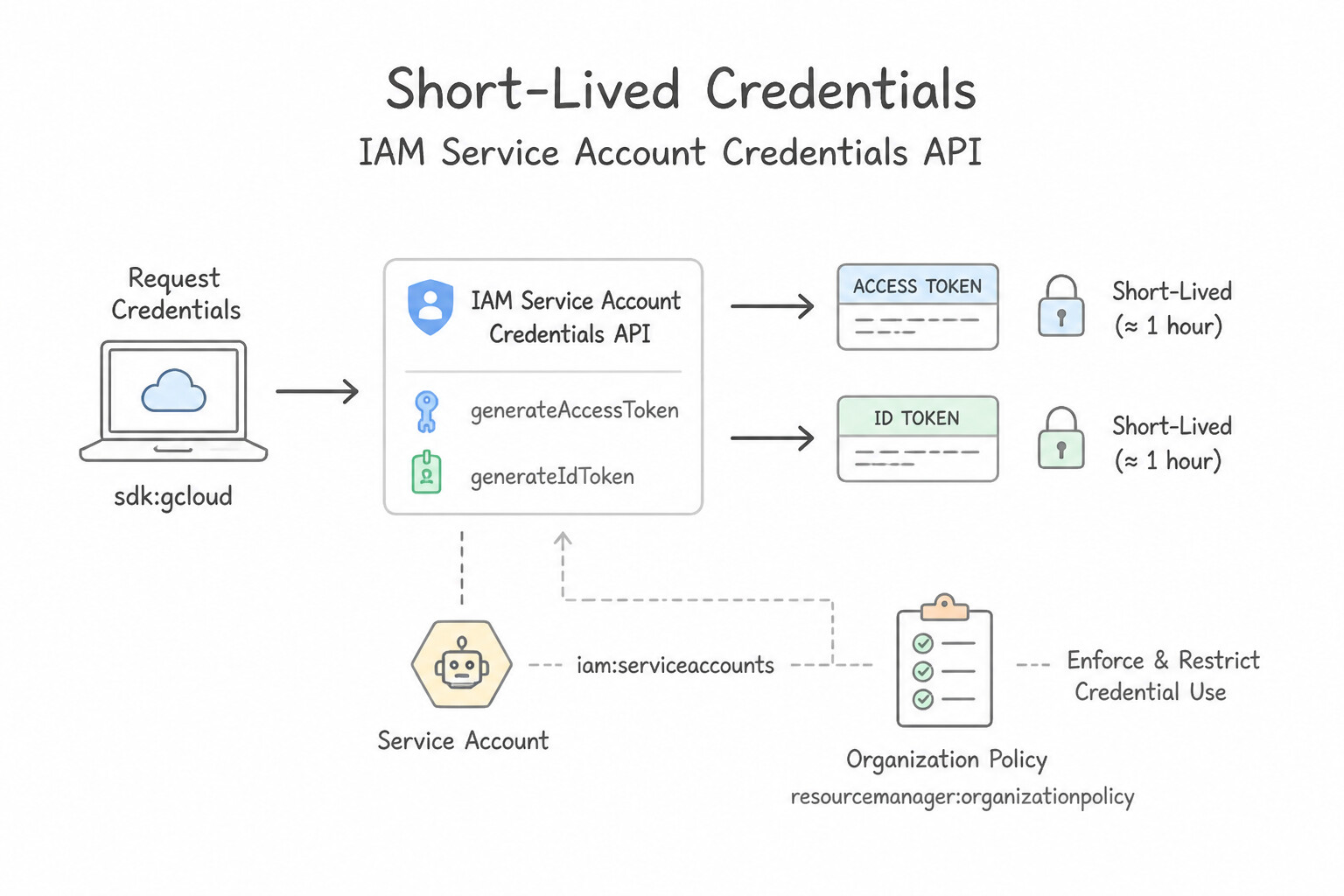
- IAM Service Account Credentials API (
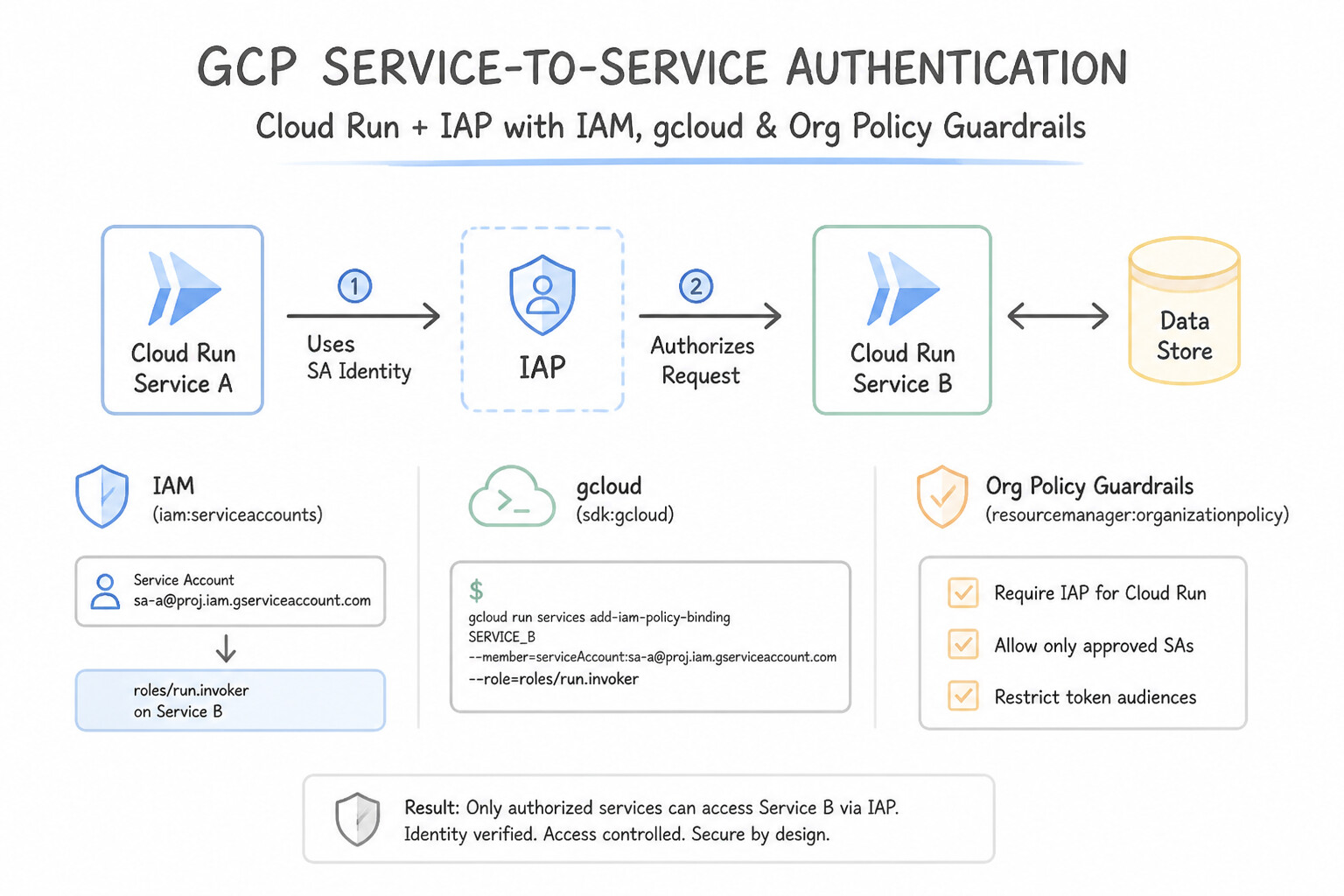
generateAccessToken/generateIdToken): Mints temporary OAuth 2.0 access tokens (default 1 hour lifetime; extendable up to 12 hours only if permitted byconstraints/iam.allowServiceAccountCredentialLifetimeExtension) or signed OIDC ID tokens. - Service-to-Service Authentication on Cloud Run / IAP: When a Compute Engine VM or Cloud Run service calls an authenticated Cloud Run endpoint or IAP-protected resource, it needs an OpenID Connect (OIDC) ID token (not an OAuth 2.0 access token!) with the
audienceparameter set to the target Cloud Run service URL (fetched fromhttp://metadata.google.internal/computeMetadata/v1/instance/service-accounts/default/identity?audience=SERVICE_URLwith headerMetadata-Flavor: Google), and the caller SA must holdroles/run.invoker.
Key Implementation Patterns
- Securing Local Development with Impersonation: Use Run 'gcloud auth login' with your user credentials. Then, run 'gcloud config set auth/impersonate_service_account' with the service account email. Impersonation allows using short-lived credentials via your user identity without downloading keys.
- Enforcing Token Lifetime constraints: Use Add the constraints/iam.allowServiceAccountCredentialLifetimeExtension constraint to the Organization Policy and set the policy rule to Deny All. Enforcing a Deny All rule on this constraint reverts all tokens to the default 1-hour maximum, ensuring they never exceed the 4-hour limit.
- Authenticating Service-to-Service (Cloud Run): Use Fetch an OpenID Connect (OIDC) ID token from the metadata server with the audience set to the Cloud Run service URL. Cloud Run requires an OIDC ID token with the audience claim matching the service URL for authentication.
Key Takeaways (1.2e)
- Avoid downloading service account keys (JSON files) whenever possible to reduce security risks.
- Use service account impersonation for local development to leverage short-lived credentials.
- The
gcloud config set auth/impersonate_service_accountcommand configures the CLI to act as a service account globally for that configuration.- Users require the 'Service Account Token Creator' role to impersonate a service account.
Consideration 1.2f: Configuring Workload Identity Federation
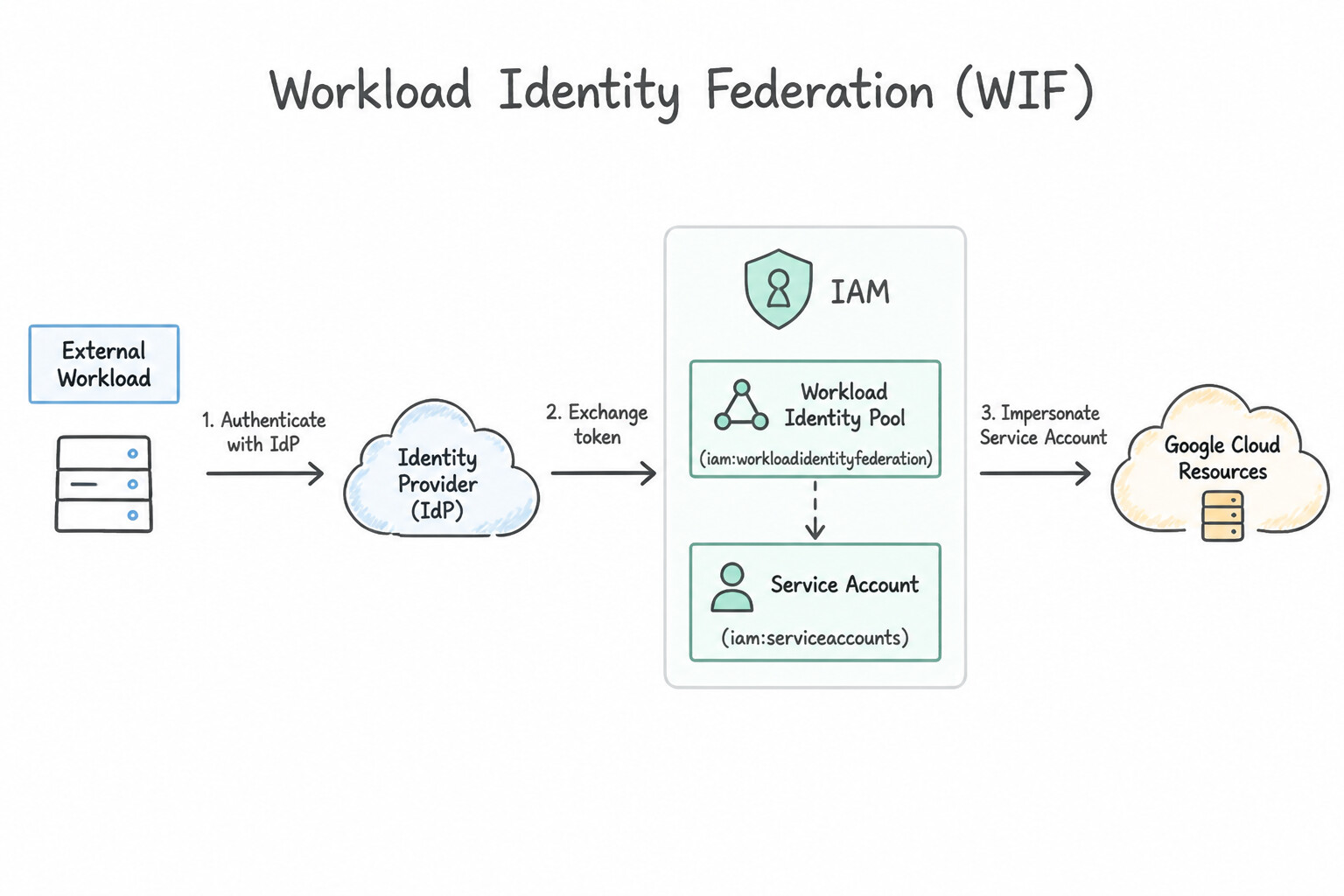
- How Workload Identity Federation (WIF) Works:
- The external workload obtains a native credential from its platform (e.g., an AWS IAM Role signed
GetCallerIdentitytoken, an Azure AD Managed Identity OIDC token, or a GitHub Actions OIDC JWT). - It sends this credential to the Google Security Token Service (STS), which validates the token against the Workload Identity Pool Provider and evaluates any CEL Attribute Condition.
- STS returns a short-lived federated token, which the workload exchanges (via
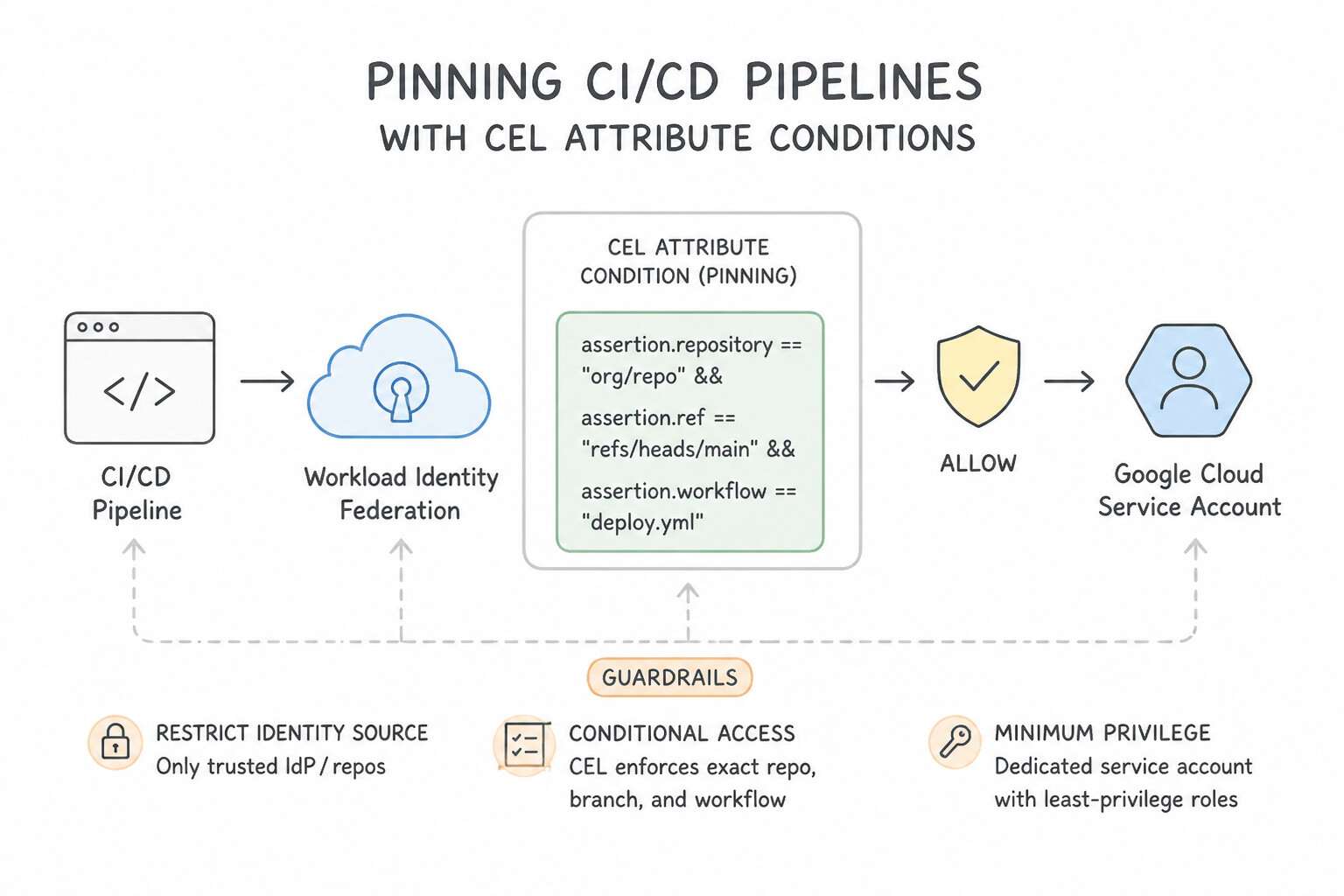
roles/iam.workloadIdentityUser) to impersonate a target Google Service Account—or uses directly in IAM bindings (principalSet://...). - Pinning CI/CD Pipelines with CEL Attribute Conditions: When trusting GitHub Actions (
https://token.actions.githubusercontent.com), always configure a CEL Attribute Condition on the Workload Identity Provider (e.g.,assertion.repository == 'my-org/prod-repo' && assertion.ref == 'refs/heads/main') so other public GitHub repositories cannot spoof tokens into your Workload Identity Pool!
Key Implementation Patterns
- Migrating AWS Workloads to GCP Without Keys: Use Create a Workload Identity Pool with an AWS provider. Authorize the AWS IAM role to impersonate the Google Service Account. Workload Identity Federation allows AWS workloads to access Google Cloud using their AWS identity without managing keys.
- Securing GitHub Actions CI/CD Pipelines: Use Configure Workload Identity Federation with an OIDC provider. Configure the provider to trust the GitHub token issuer and impersonate the service account. Workload Identity Federation allows external workloads to authenticate using OIDC without storing long-lived keys.
Key Takeaways (1.2f)
- Avoid using long-lived Service Account keys whenever possible to reduce security risks.
- Use Workload Identity Federation to grant external workloads (AWS, Azure, On-prem) access to Google Cloud resources.
- Use the specific provider type (e.g., AWS) in Workload Identity Federation for easier configuration compared to generic OIDC.
- Avoid exporting Service Account keys whenever possible to reduce security risks.
Consideration 1.2g: Managing service account impersonation
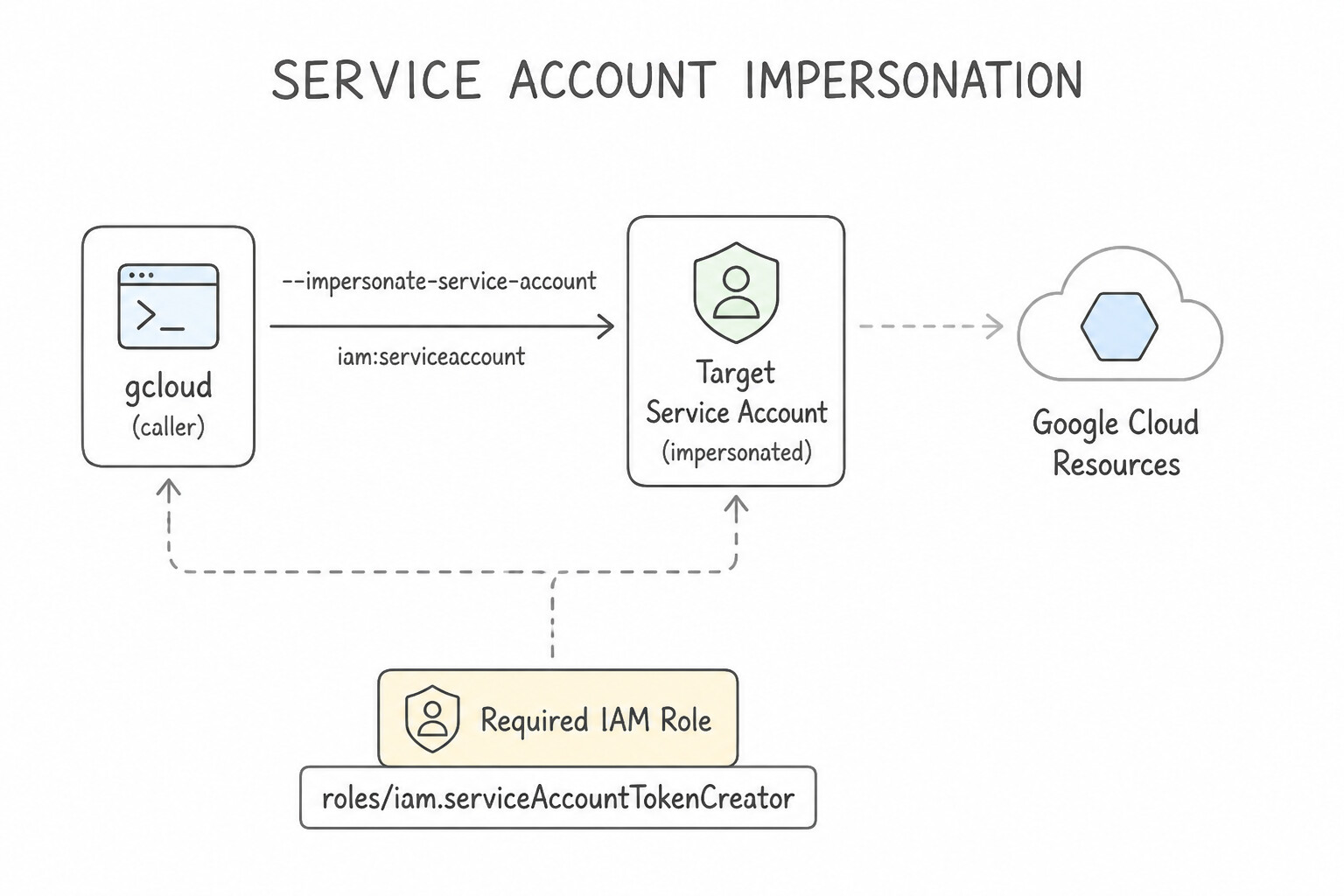
- Required IAM Role (
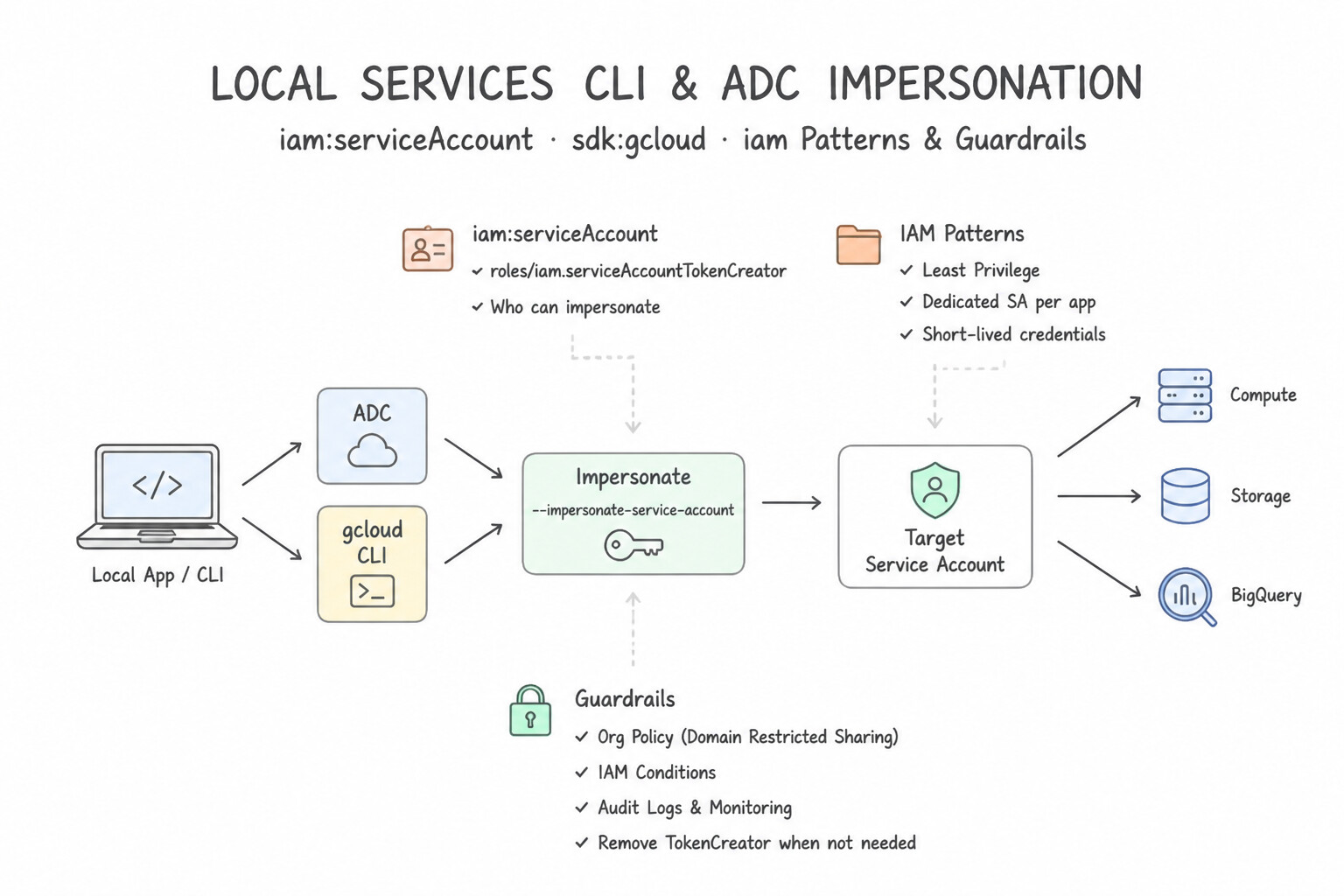
roles/iam.serviceAccountTokenCreator): Granting a developer or automation SAroles/iam.serviceAccountTokenCreatoron a target Service Account lets them generate short-lived tokens on demand without ever possessing a private key file. - Local Developer CLI & ADC Impersonation:
- For
gcloudcommands: Rungcloud auth loginas your human user, then setgcloud config set auth/impersonate_service_account SA_EMAIL(or pass--impersonate-service-account=SA_EMAIL). - For local Python/Go/Terraform code using Application Default Credentials (ADC): Run
gcloud auth application-default login --impersonate-service-account=SA_EMAIL. Every action is double-logged in Cloud Audit Logs with both the Service Account identity and the human'sprincipalSubjectinauthenticationInfo.serviceAccountDelegationInfo!
Key Implementation Patterns
- Eliminating Long-Lived Credential Usage: Use Grant the developers the Service Account Token Creator role on the service account. Instruct them to authenticate with their user credentials and run
gcloud config set auth/impersonate_service_account. Impersonation allows users to act as a service account using their own credentials without managing static JSON keys. - Local Development with ADC: Use Run the command gcloud auth application-default login --impersonate-service-account [SERVICE_ACCOUNT_EMAIL]. This command configures local ADC to use service account impersonation securely. (Avoid alternative: Downloading keys creates a security risk and violates the scenario requirement.)
- Troubleshooting Impersonation Permissions: Use Ask an administrator to grant you the Service Account Token Creator role (roles/iam.serviceAccountTokenCreator) on the service account. The Token Creator role is specifically required to generate tokens or impersonate a service account.
Key Takeaways (1.2g)
- Avoid downloading Service Account JSON keys whenever possible.
- Use Service Account Impersonation for interactive tools like the
gcloudCLI.- The IAM role required for impersonation is
roles/iam.serviceAccountTokenCreator.- Impersonation uses short-lived credentials, which significantly reduces security risk.
Quick Decision Cheat Sheet (Subsection 1.2)
If the Scenario Requires... | Choose This Google Cloud Pattern | Avoid This Common Mistake |
|---|---|---|
"Block all teams across the Organization from creating downloadable Service Account JSON keys" | Enforce constraints/iam.disableServiceAccountKeyCreation at the Organization root | Revoking roles/owner or writing a cron job to delete keys after creation |
"GKE pods cannot authenticate via Workload Identity despite creating both the KSA and GSA" | Bind roles/iam.workloadIdentityUser on the GSA for serviceAccount:PROJECT_ID.svc.id.goog[NAMESPACE/KSA] and annotate the KSA with iam.gke.io/gcp-service-account | Granting roles/iam.serviceAccountUser or mounting a Kubernetes Secret with a JSON key |
"Rotate a potentially compromised Service Account key used by a live production app with zero downtime" | 1. Create new key → 2. Update app config → 3. Verify traffic → 4. Disable/Delete old key | Deleting the compromised key first before deploying the new key |
"Find which static Service Account keys have not been used in the last 90 days before deleting them" | Query serviceAccountKeyLastUse via Policy Intelligence / IAM Activity Analyzer | Manually grepping application source code repositories |
"Restrict GitHub Actions OIDC Workload Identity Federation to only builds on the main branch of org/prod-repo" | Configure a CEL Attribute Condition on the Workload Identity Pool Provider ( assertion.repository == 'org/prod-repo' && assertion.ref == 'refs/heads/main') | Using VPC firewall rules (GitHub Actions uses dynamic public IPs) |
Further Reading (Subsection 1.2)
- Service accounts — Provides an overview of service accounts, including user-managed (custom) vs default service accounts.
- Best practices for using service accounts — Specifically discusses the recommendation to use single-purpose service accounts and avoid the default service account in production.
- Workload Identity Federation — Official documentation explaining how to configure workload identity federation to let external workloads access Google Cloud resources.
- Restrict IAM service account usage — Official documentation describing how to use the Organization Policy Service to restrict the creation of external service account keys.
- Organization Policy Service constraints — A list of available constraints, including details on IAM constraints.
- Use Workload Identity — Official documentation explaining how Workload Identity allows GKE workloads to impersonate Identity and Access Management (IAM) service accounts to access Google Cloud services.
Subsection 1.3: Managing authentication
The Big Picture
Authentication proves who a principal is before authorization (IAM) is ever evaluated. Even when an organization sets up Cloud Identity, three subtle authentication misconfigurations routinely undermine enterprise security:
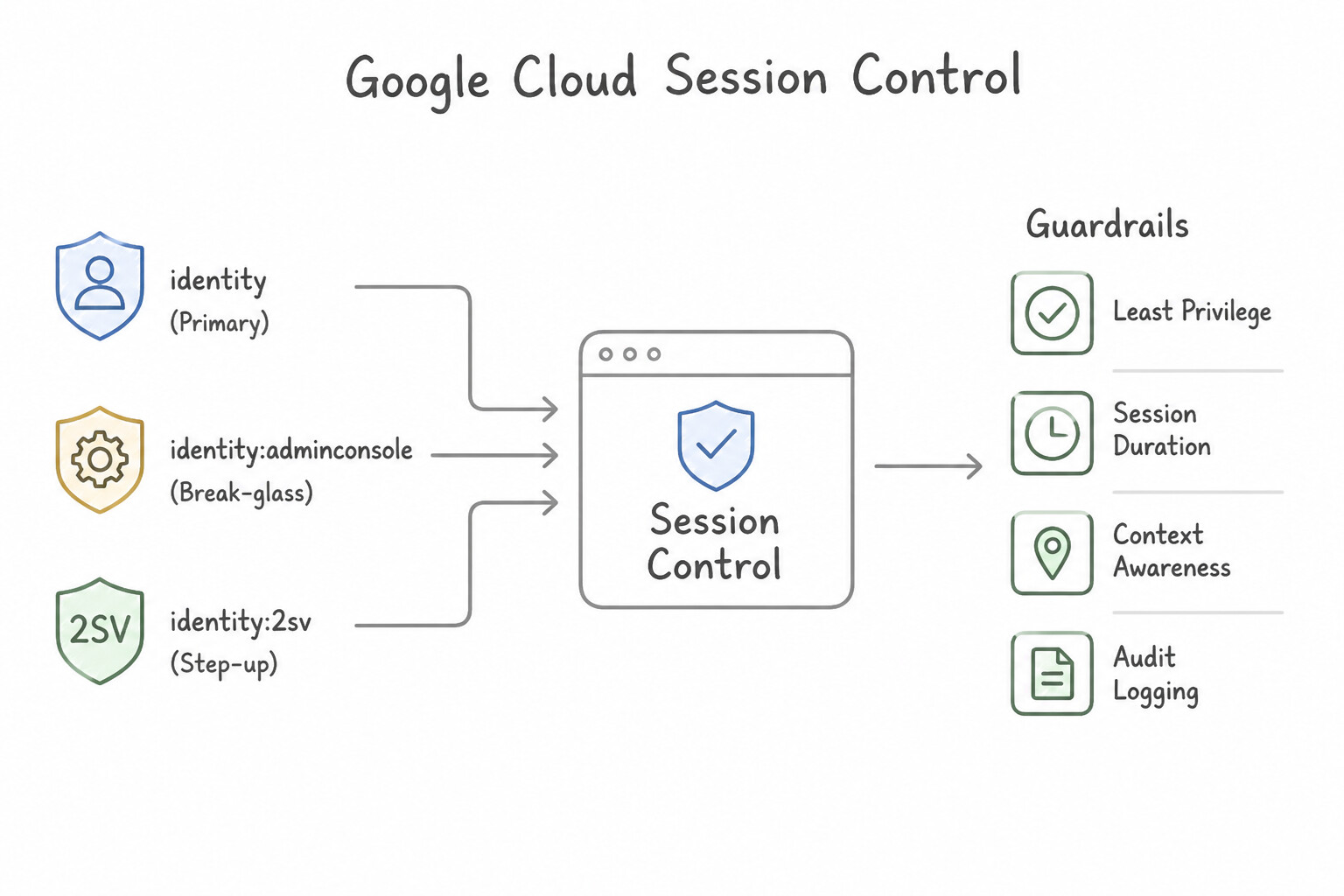
- Infinite Console Sessions on Unattended Endpoints (1.3a): By default, web sessions in Google Workspace / Cloud Identity stay active for days. In regulated environments (PCI-DSS, HIPAA, FedRAMP), if an engineer leaves an unlocked laptop or switches networks, a long-lived browser cookie allows session hijacking unless Google Cloud Session Control is configured in the Google Admin Console (
Security > Authentication > Google Cloud session control) to force re-authentication every$N$ hours (e.g., 1 to 4 hours). - SAML Handshake Failures & Over-Scoped OAuth Consent Screens (1.3b): When integrating a third-party SAML 2.0 IdP with Google Cloud, mismatches in the Assertion Consumer Service (ACS) URL, Entity ID,
NameIDemail attribute mapping, or an expired IdP X.509 signing certificate break logins across the company. Conversely, when internal developers deploy an OAuth 2.0 web application on App Engine or Cloud Run and leave the OAuth Consent Screen User Type set toExternalinstead ofInternal, external Gmail users can attempt to authenticate, and the app triggers Google's unverified-app security warning screens. - Weak MFA Factors & Blanket Org Unit Exceptions (1.3c): Turning on 2-Step Verification (2SV) with "Any method allowed" leaves users exposed to SMS interception and push-fatigue attacks instead of enforcing Security Keys (
FIDO2). Worse, when a new hire joins and 2SV enforcement is already active on their Organizational Unit without a New User Enrollment Period, they are immediately locked out on day one before they can register their key. And when a single legacy user in an OU needs a temporary 2SV exception, moving them out of their OU breaks all their other inherited policies—whereas a Configuration Group applies the targeted exception cleanly.
Consideration 1.3a: Creating password and session management policy for user accounts
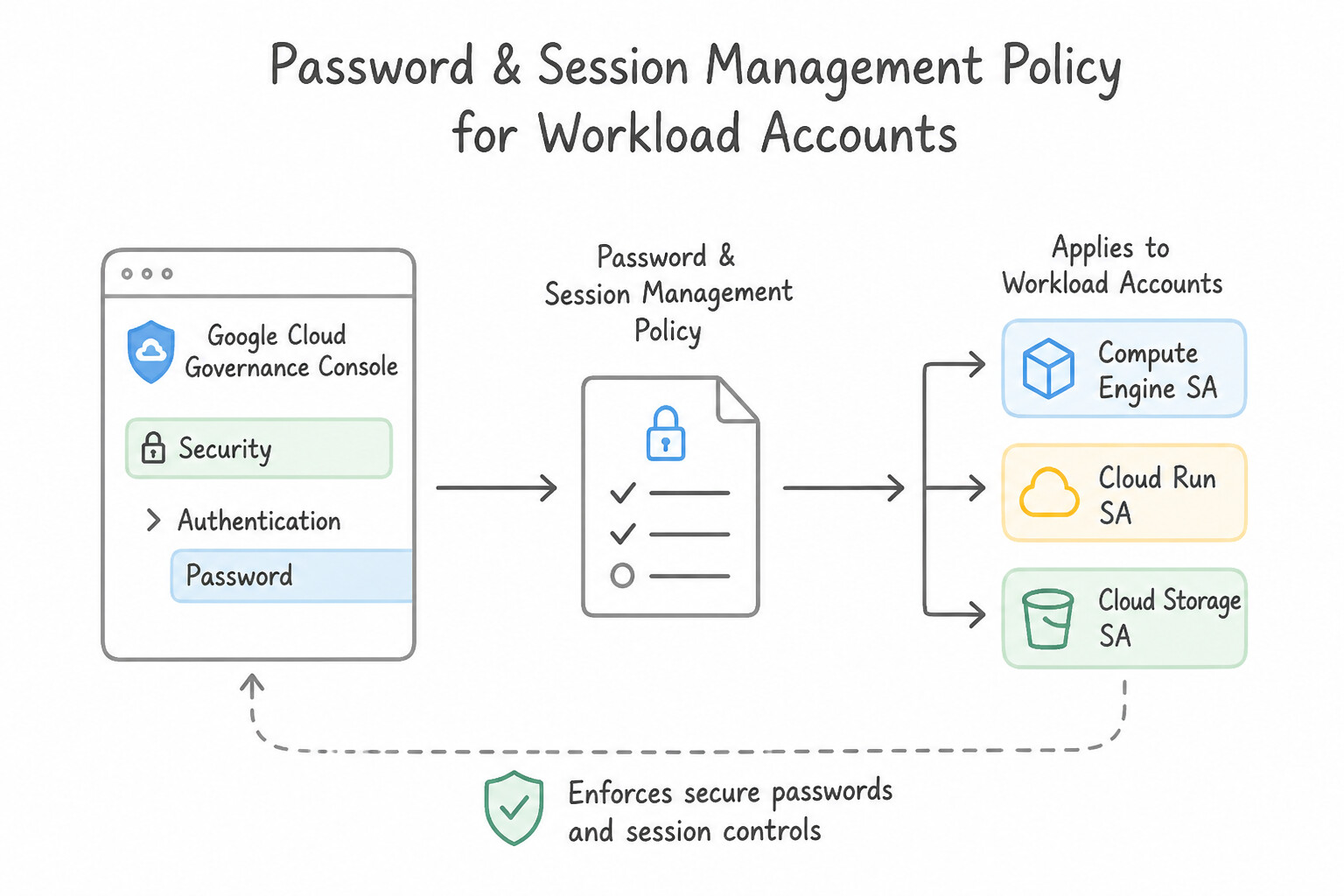
- Password Management in Google Admin Console (
Security > Authentication > Password management): Enforce strong password complexity, minimum character length (e.g., 12–16+ characters), password history (preventing reuse), and force password change on next sign-in where Google-native credentials are used. - Google Cloud Session Control (
Security > Authentication > Google Cloud session control): To enforce strict session timeouts (e.g., requiring administrators or PCI-scoped engineers to re-authenticate after 1 hour or 8 hours), configure Google Cloud session control in the Google Admin Console. You can scope different session lengths to different Organizational Units (OUs) or groups, and enforce re-authentication across both the Google Cloud Console and thegcloudCLI.
Key Implementation Patterns
- Enforcing Password Complexity for Compliance: Use In the Google Admin console, navigate to Security > Authentication > Password management. Set the minimum password length to 12 and enable password complexity. Cloud Identity password policies are managed in the Google Admin console under Security > Authentication > Password management.
- Phishing-Resistant 2SV for Administrators: Use Place administrators in a dedicated Organizational Unit or Configuration Group. Set the 2SV enforcement method to "Security Key" for this group. Set the enforcement method to "Any" for the rest of the organization. Using OUs or Groups allows you to apply strict 'Security Key' enforcement only to admins while allowing 'Any' method for others.
- Mitigating Session Hijacking via Duration Limits: Use In the Google Admin console, navigate to Security > Session control. Set the re-authentication policy for the Google Cloud Console to require re-authentication every 4 hours. Google Cloud Console session control settings in the Google Admin console allow you to define specific re-authentication frequencies.
Key Takeaways (1.3a)
- User management and authentication policies for Google Cloud are handled in the Google Admin console, not the Google Cloud console.
- Password policies (length, complexity, expiration) are a core feature of Cloud Identity Free and Premium.
- Identity Platform is a separate product for adding authentication to customer-facing applications.
- Admins should always use phishing-resistant MFA (Security Keys).
Consideration 1.3b: Setting up Security Assertion Markup Language (SAML) and OAuth
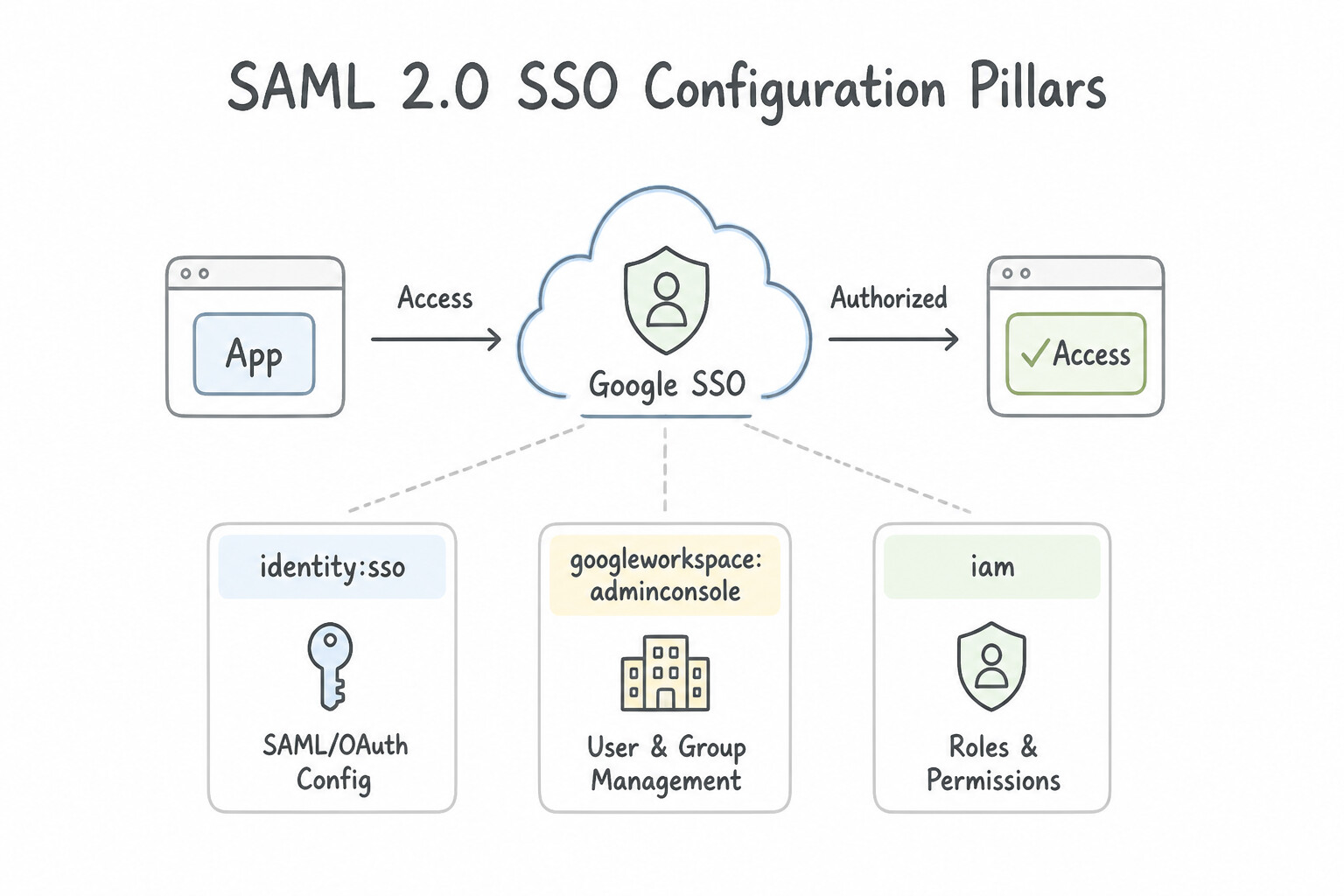
- SAML 2.0 SSO Configuration Pillars:
- In Google Admin Console (Service Provider): Configure the IdP's Sign-in page URL, Sign-out page URL, and upload the IdP's public X.509 verification certificate (must be re-uploaded whenever the IdP rotates its signing certificate!).
- In the Third-Party IdP (Identity Provider): Configure Google's Entity ID and Assertion Consumer Service (ACS) URL, and map the SAML
NameIDattribute in the assertion to match the user's Primary Email Address in Cloud Identity. - OAuth 2.0 Consent Screen (
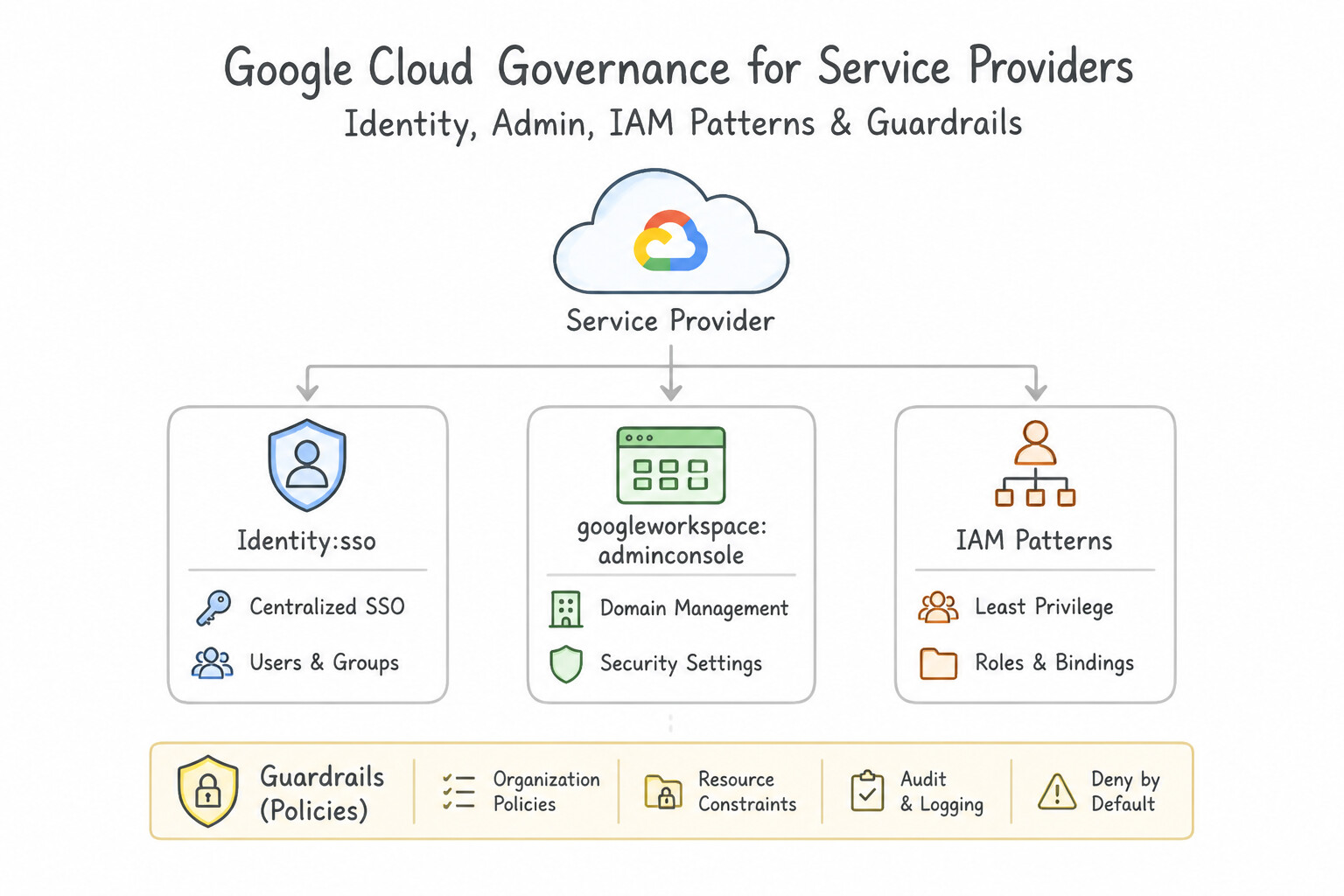
Internalvs.External): When deploying an internal corporate web application that uses Google OAuth 2.0 sign-in, set the OAuth Consent Screen User Type toInternal. This restricts login exclusively to members of your Google Cloud Organization and bypasses Google's external app verification review process.
Key Implementation Patterns
- Third-Party IdP Integration: Use In the Google Admin console, configure the SSO profile with the sign-in page URL and X.509 certificate. Configure the Assertion Consumer Service (ACS) URL on the IdP. SAML SSO requires configuring the IdP's sign-in URL and certificate in the Google Admin console, and Google's ACS URL on the IdP.
- SAML Attribute Mapping: Use Configure the on-premises IdP to map the NameID attribute in the SAML assertion to the user's primary email address that matches the Google Cloud format. Google Cloud identifies users via the NameID field in the SAML assertion; mapping this to the correct email address resolves the mismatch.
- OAuth Consent Screen Scope: Use Set the User Type to Internal. Internal User Type restricts access to organization members and bypasses the app verification requirement for sensitive scopes. (Avoid alternative: External User Type requires strict verification for sensitive scopes and allows users outside the organization to attempt sign-in.)
Key Takeaways (1.3b)
- SAML 2.0 is the standard protocol for federating external Identity Providers with Google Cloud.
- Google Cloud acts as the Service Provider (SP) in an inbound SSO configuration.
- Configuration involves uploading the IdP's X.509 certificate to Google and defining Google's ACS URL on the IdP.
- SAML SSO requires the NameID in the assertion to match the Google Cloud user's primary email address.
Consideration 1.3c: Configuring and enforcing 2-step verification
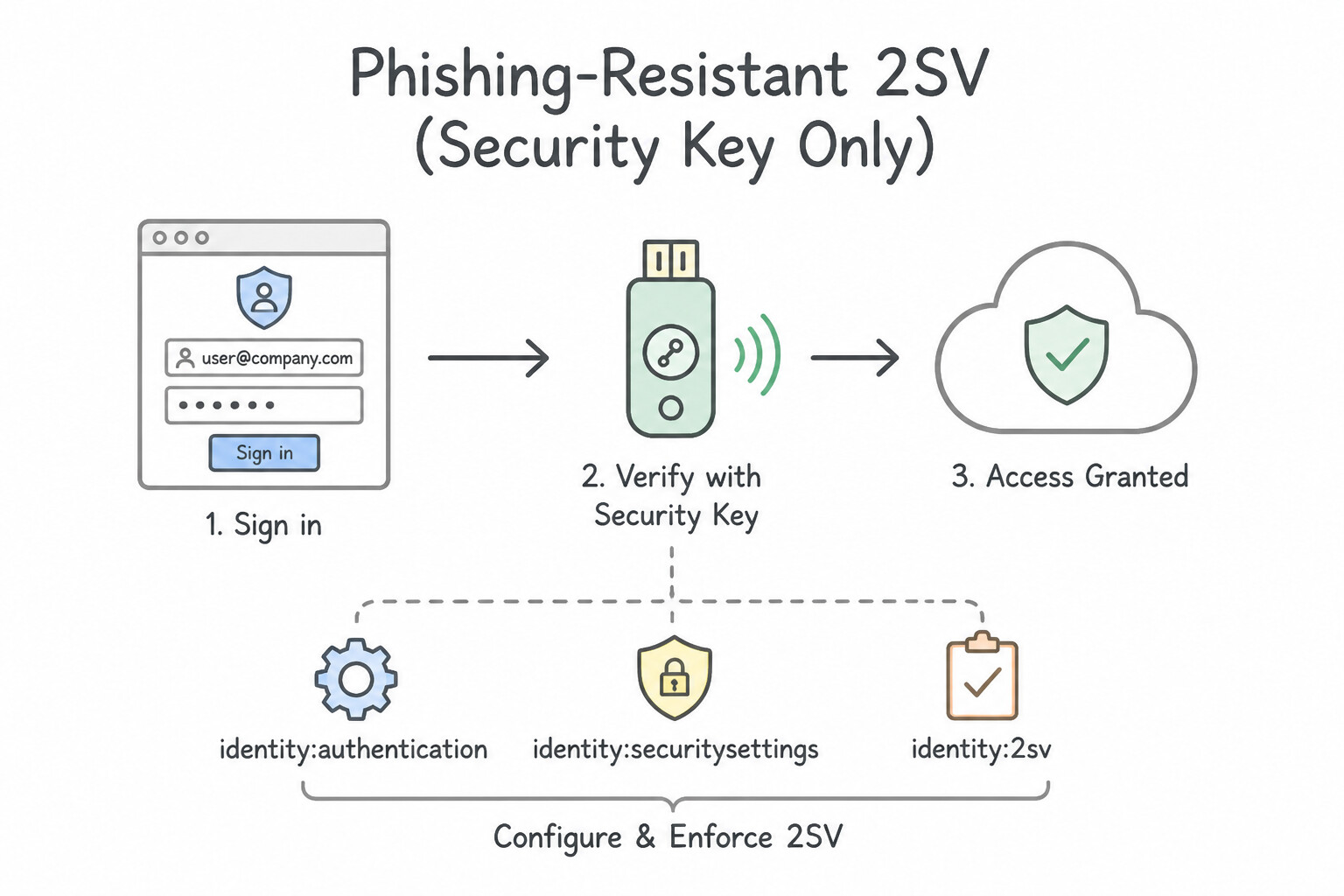
- Phishing-Resistant 2SV (
Security Key Only): In the Google Admin Console (Security > Authentication > 2-Step Verification), set Allowed methods toSecurity key(FIDO2 / WebAuthn / Titan) for privileged OUs to block phishable SMS/voice calls and TOTP codes. - Onboarding Without Lockout (
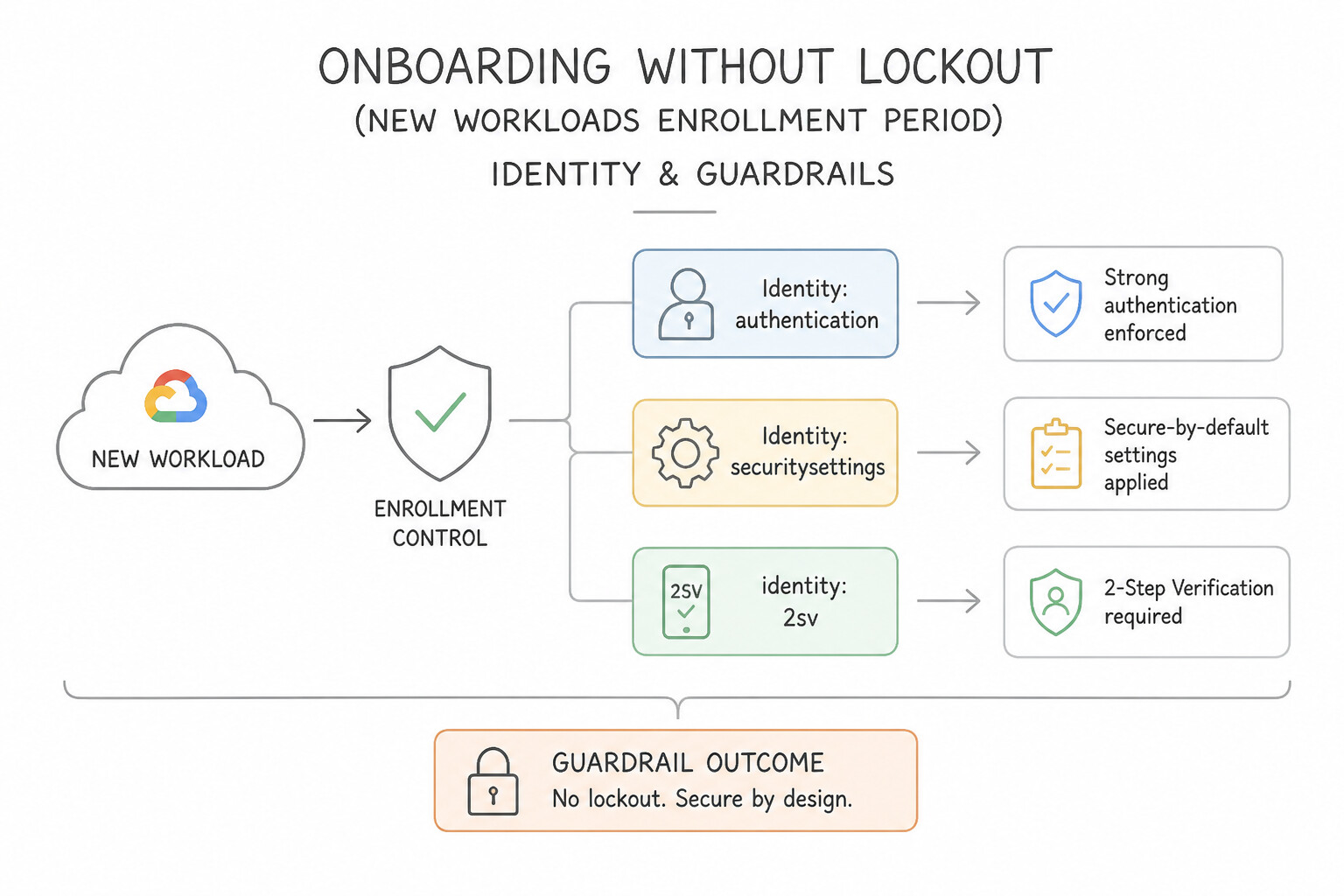
New User Enrollment Period): If an Organizational Unit has 2SVEnforcement: On, a newly created user who has not yet enrolled a second factor will be immediately locked out upon first login. Configure the New user enrollment period (e.g., 1 to 7 days) so new hires can log in with their password solely to register their security key. - Granular Policy Exceptions via
Configuration Groups: Because a user can belong to only one Organizational Unit (OU) at a time, moving a single user to a different OU to grant a temporary 2SV exception alters all their other OU-inherited policies. Instead, place the user in a Configuration Group and apply the 2SV override policy to that group.
Key Implementation Patterns
- Phased 2SV Rollout with Grace Period: Use In the Google Admin console, turn on 2-Step Verification and configure the "New user enrollment period" to 1 week. The "New user enrollment period" setting provides a built-in grace period for new accounts to set up 2SV before being locked out.
- High Assurance Hardware Enforcement: Use Set the allowed 2-Step Verification methods to "Security Key". This setting strictly enforces the use of phishing-resistant hardware keys, satisfying the high-security requirement. (Avoid alternative: This setting permits weak authentication methods like SMS, which the scenario explicitly prohibits.)
Key Takeaways (1.3c)
- Use the 'New user enrollment period' to smooth the onboarding process for 2SV enforcement.
- Avoid manual operational tasks for security enforcement; prefer built-in policy settings.
- Identity and authentication policies for Google Cloud are managed in the Google Admin console.
- Security Keys are the only truly phishing-resistant 2SV method available for enforcement in high-security scenarios.
Quick Decision Cheat Sheet (Subsection 1.3)
If the Scenario Requires... | Choose This Google Cloud Pattern | Avoid This Common Mistake |
|---|---|---|
"Enforce maximum web and CLI session duration (e.g., 1 hour or 4 hours) for Cloud Console users" | Configure Google Cloud session control in the Google Admin Console | Editing OAuth token TTLs in Cloud KMS or using IAM Conditions |
"SAML SSO returns 403 / user not recognized because AD uses employeeID@corp.local while Cloud Identity uses first.last@company.com" | Configure SAML Attribute Mapping in the IdP so NameID maps to the user's Cloud Identity Primary Email (mail) | Renaming all Cloud Identity accounts to @corp.local |
"Internal OAuth 2.0 application shows 'Unverified App' warning or allows personal Gmail accounts" | Set the OAuth Consent Screen User Type to Internal | Creating a VPC Service Controls perimeter around the OAuth consent screen |
"Eliminate SMS/OTP phishing risks for administrators via 2-Step Verification" | Set 2SV Enforcement = On and Allowed methods = Security key | Allowing "Any except verification codes via text/phone call" (still permits phishable TOTP codes) |
"Override a 2SV or authentication policy for a cross-departmental subset of users without reorganizing OUs" | Use a Configuration Group in the Google Admin Console | Creating dozens of micro-Organizational Units for every policy permutation |
Further Reading (Subsection 1.3)
- Manage password requirements — Official Google Workspace Admin Help documentation detailing how to enforce password length and complexity monitoring for user accounts.
- Deploy 2-Step Verification — This guide details how to turn on 2-Step Verification and how to use Configuration Groups or OUs to apply different enforcement methods (Any vs. Security Key) to different users.
- Set session length for Google Cloud services — This help article explains how to configure the Google Cloud Console session control setting in the Google Admin console to require re-authentication after a set period.
- Set up SSO for your organization — Provides the detailed steps for configuring the SSO profile in the Google Admin console, including the required URLs and certificate uploads.
- Single sign-on — Provides an overview of how to enable SSO and the requirements for user identification via NameID.
- Best practices for federating Google Cloud with an external identity provider — Discusses mapping user identities and handling discrepancies between local and cloud directories.
Book TOC · Previous · Chapter 1 of 7 · Next
AwesomeGCP.com Learning
The approach taken is a question-led learning approach: you explore realistic project scenarios where you need to make decisions or take actions to achieve business goals within specific constraints. Instead of passive learning, you are challenged to think and work through the options to master the Professional Cloud Security Engineer (PCSE) certification!