Book TOC · Previous · Chapter 4 of 7 · Next
Chapter 4: Configuring & Deploying Cloud-Native Runtimes: Cloud Run & Google Kubernetes Engine (GKE)
Chapter Focus: Cloud Run revisions, traffic splitting, concurrency, min-instances, Direct VPC Egress, Cloud Run Jobs, GKE Autopilot/Standard, Liveness/Readiness/Startup probes, HPA/VPA, and Gateway API.
Subsection 3.1: Deploying applications to Cloud Run
The Big Picture
Cloud Run is the centerpiece of serverless compute In Google Cloud architectures, bridging source-to-container developer ergonomics with scale-to-zero economics. However, teams that deploy to Cloud Run without understanding its runtime contract, event delivery envelopes, and API gateway perimeter consistently hit four production walls:
- Violating the Cloud Run Container Contract (3.1a): Hardcoding
listen(3000)instead of binding to0.0.0.0on the dynamically injected$PORTenvironment variable (default8080), or forgetting thatgcloud run deploy --source .requires Cloud Build and Artifact Registry APIs enabled under the hood to invoke Google Cloud Buildpacks. - Unauthenticated or Non-Idempotent Event Triggers (
3.1b,3.1c): Exposing a background Cloud Run event-receiver with--allow-unauthenticatedbecause developers did not know how to configure Eventarc or Pub/Sub Push Subscriptions with a dedicated OIDC Service Account (roles/run.invoker)—or failing to handle at-least-once duplicate deliveries and base64-encoded Pub/Sub JSON envelopes, resulting in corrupted state or infinite retry loops when the receiver returnsHTTP 500instead of2xxon permanent validation errors. - Direct Backend Exposure Without an API Gateway (3.1d): Giving external mobile/web clients the raw
*.a.run.appURL directly instead of fronting Cloud Run with Apigee or Cloud API Gateway + Global External Application Load Balancer (Serverless NEG) and setting Cloud Run ingress tointernal-and-cloud-load-balancing. - Breaking Active Clients During API Upgrades (3.1e): Overwriting an existing OpenAPI / Cloud Endpoints or Apigee contract with breaking field removals instead of deploying a side-by-side backward-compatible API version (
/v1and/v2).
Consideration 3.1a: Deploying applications from source code
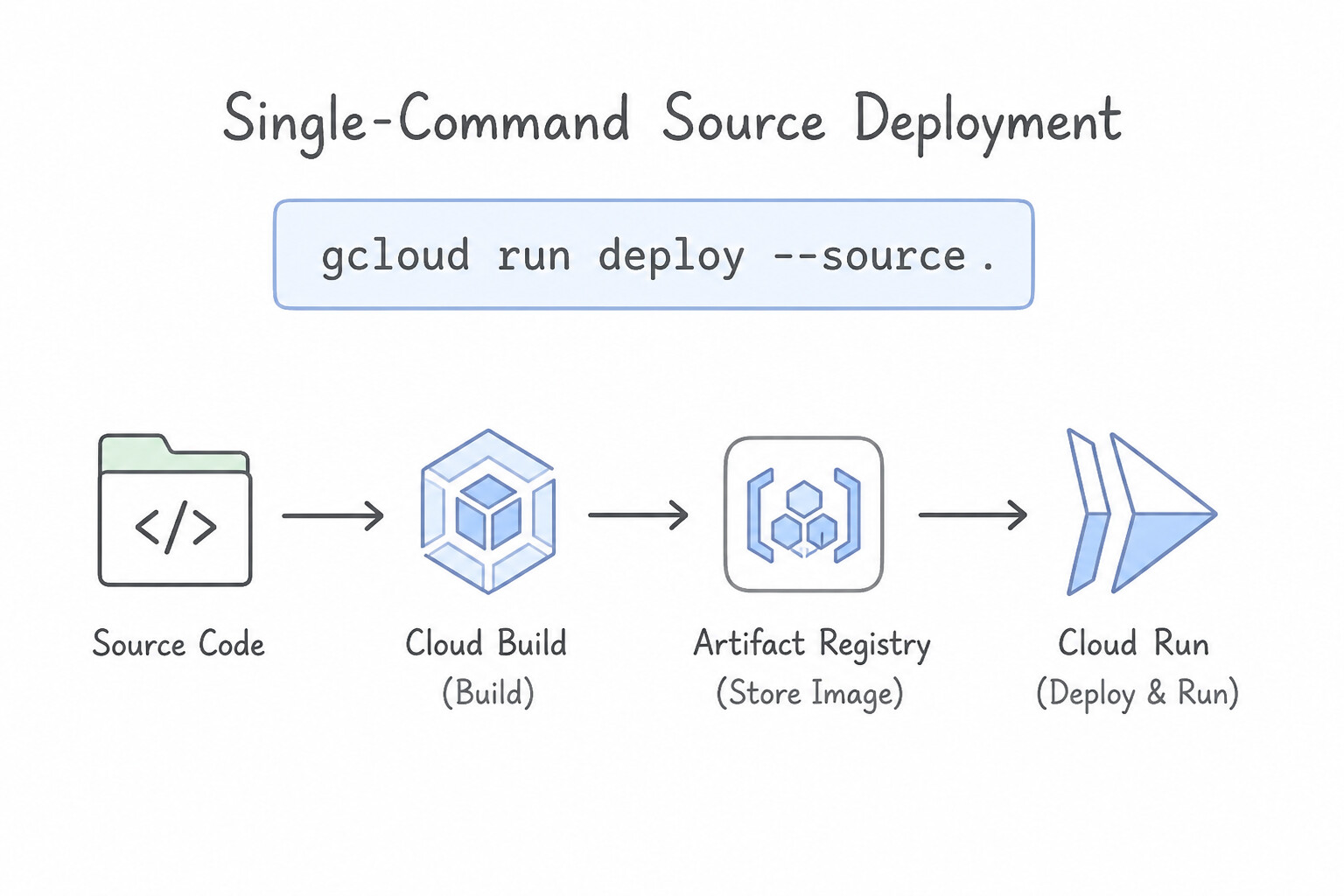
- Single-Command Source Deployment (
gcloud run deploy --source .): - When you run
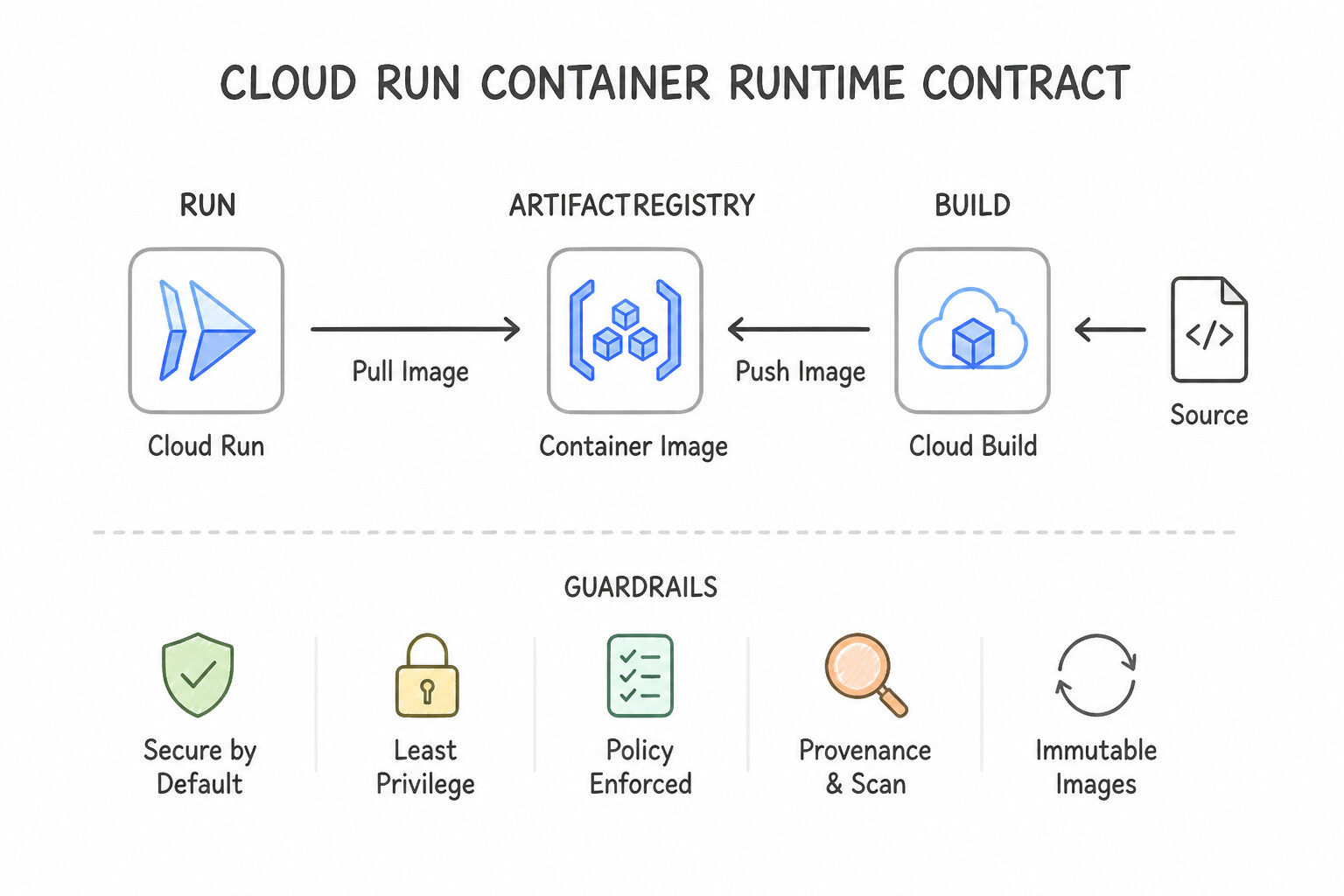
gcloud run deploy SERVICE --source ., the CLI zips your local directory, uploads it to Cloud Storage, triggers Cloud Build, and either builds yourDockerfile(if present in the root directory) or automatically invokes Google Cloud Buildpacks to detect your language runtime (Node.js, Python, Go, Java, .NET, Ruby, PHP), install dependencies (package.json,requirements.txt,go.mod,pom.xml), push the container image to Artifact Registry, and deploy a new Cloud Run Revision. - You can customize the entrypoint of a Buildpack build without a Dockerfile by adding a
Procfile(e.g.,web: gunicorn --bind :$PORT main:app) or passing build environment variables (--set-build-env-vars). - The Cloud Run Container Runtime Contract:
- The container must listen for incoming requests on
0.0.0.0(all interfaces) on the port defined by the$PORTenvironment variable (which defaults to8080; listening on127.0.0.1/localhostwill cause deployment health check failure!). - The filesystem is in-memory (
tmpfs); anything written to disk consumes container memory allocation and vanishes when the instance scales down. - Execution Environments (1st Gen vs. 2nd Gen): Choose the 2nd Generation execution environment (
--execution-environment=gen2) when workloads need full Linux syscall compatibility, faster CPU/network performance, or Cloud Storage FUSE / NFS volume mounts.
Key Implementation Patterns
- Basic Source Deployment Command: Use Run the command gcloud run deploy --source . from the application directory. The --source flag enables direct deployment from source code using Google Cloud Buildpacks to automatically build the container image. (Avoid alternative: The --image flag requires a remote container image URL, not a local source directory.)
- Custom Entrypoint Configuration: Use Create a
Procfilein the application root. Add a line starting withweb:followed by your custom command. AProcfilein the source root allows you to override the default startup command when using Buildpacks. (Avoid alternative: Thepom.xmlfile manages Java dependencies and builds, but does not use a<startup>tag for container entrypoints.) - Optimizing Upload Speed: Use Create a .gcloudignore file in the root directory and list the patterns to exclude. The .gcloudignore file specifies patterns for files and directories that the gcloud CLI should exclude from the upload. (Avoid alternative: The .dockerignore file affects the Docker build process, but .gcloudignore controls the initial file upload by the gcloud CLI.)
Key Takeaways (3.1a)
- Source Deployment: Use
--sourcewithgcloud run deployto deploy code without a Dockerfile.- Buildpacks: Google Cloud Buildpacks automatically turn source code into secure, production-ready container images.
- Efficiency: Source deployment combines building, pushing, and deploying into one step.
- Deploying from source uses Google Cloud Buildpacks to create container images automatically.
Consideration 3.1b: Invoking Cloud Run services using triggers (e.g., Eventarc, Pub/Sub)
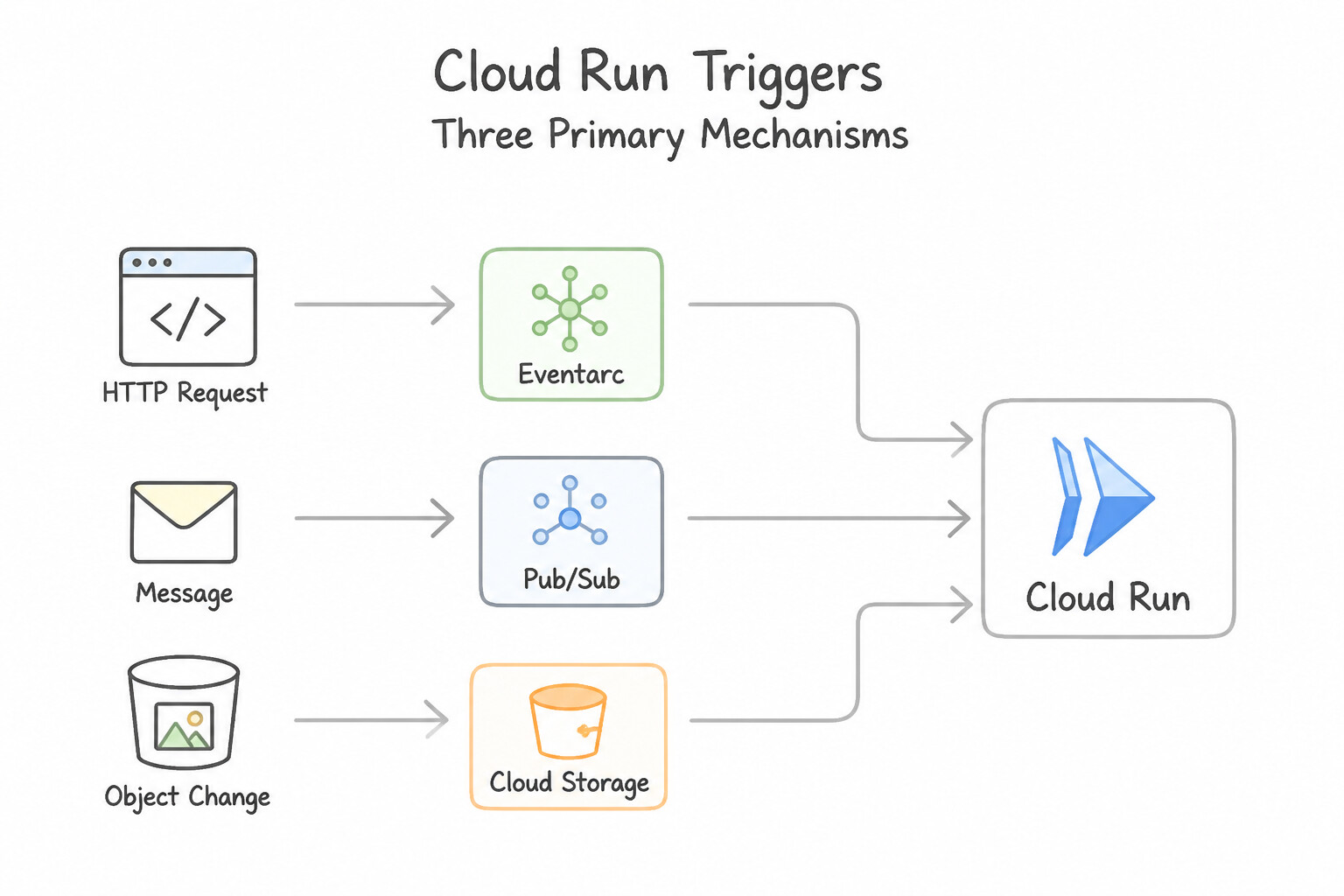
- Three Primary Trigger Mechanisms for Cloud Run:
- Direct Pub/Sub Push Subscription: Lowest-latency path when your own microservices publish messages to a Cloud Pub/Sub topic.
- Eventarc Direct Sources (Cloud Storage, Pub/Sub, Firestore): Routes native events from Cloud Storage (e.g.,
google.cloud.storage.object.v1.finalized) directly to Cloud Run with minimal latency. - Eventarc Cloud Audit Log Triggers (130+ Google Cloud Services): Triggers Cloud Run whenever an administrative or data-access operation completes in services like BigQuery (
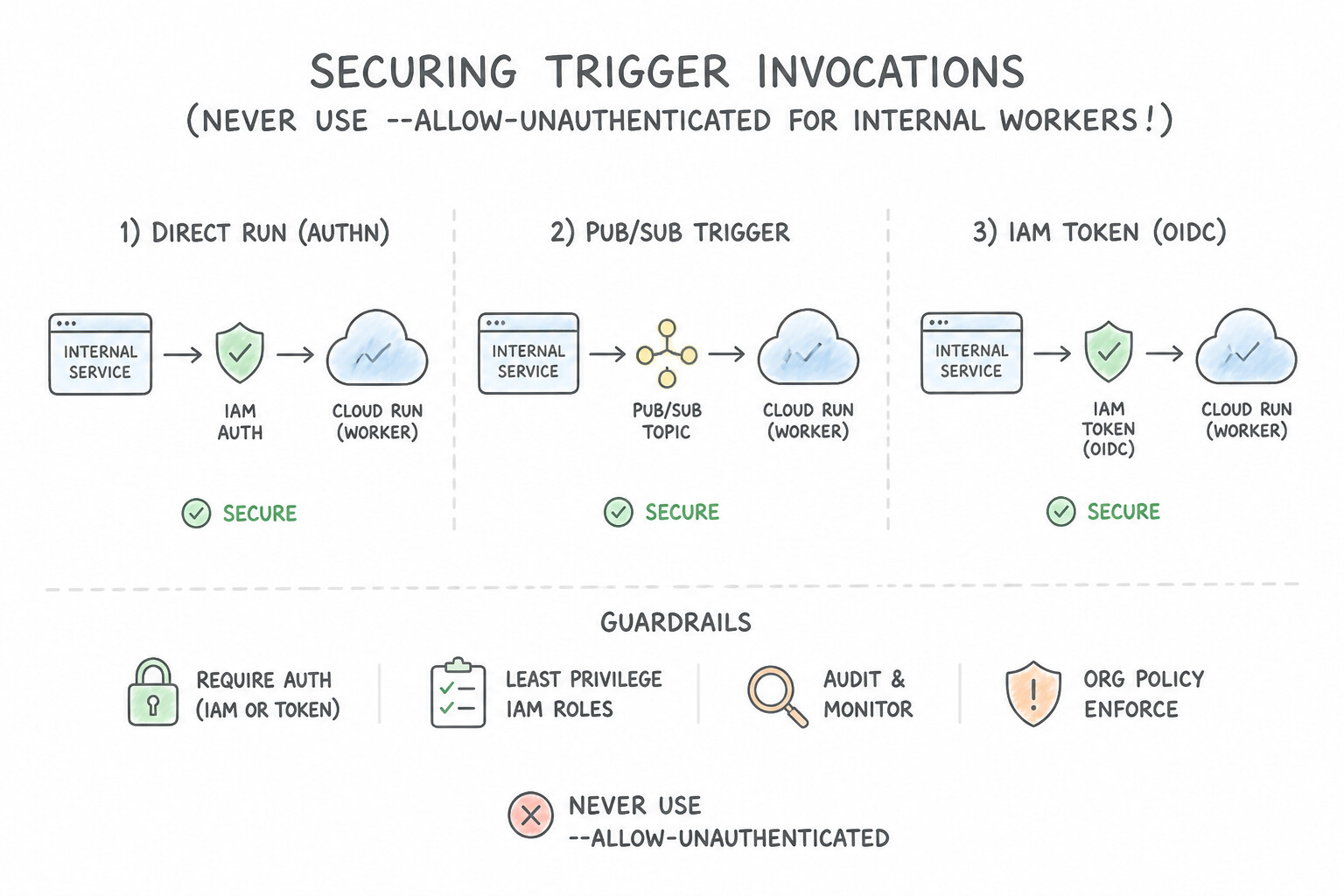
jobCompleted), Cloud SQL, IAM, or Compute Engine—Requires enabling Cloud Audit Logs for that target service! - Securing Trigger Invocations (Never Use
--allow-unauthenticatedfor Internal Workers!): - Configure the Cloud Run service with
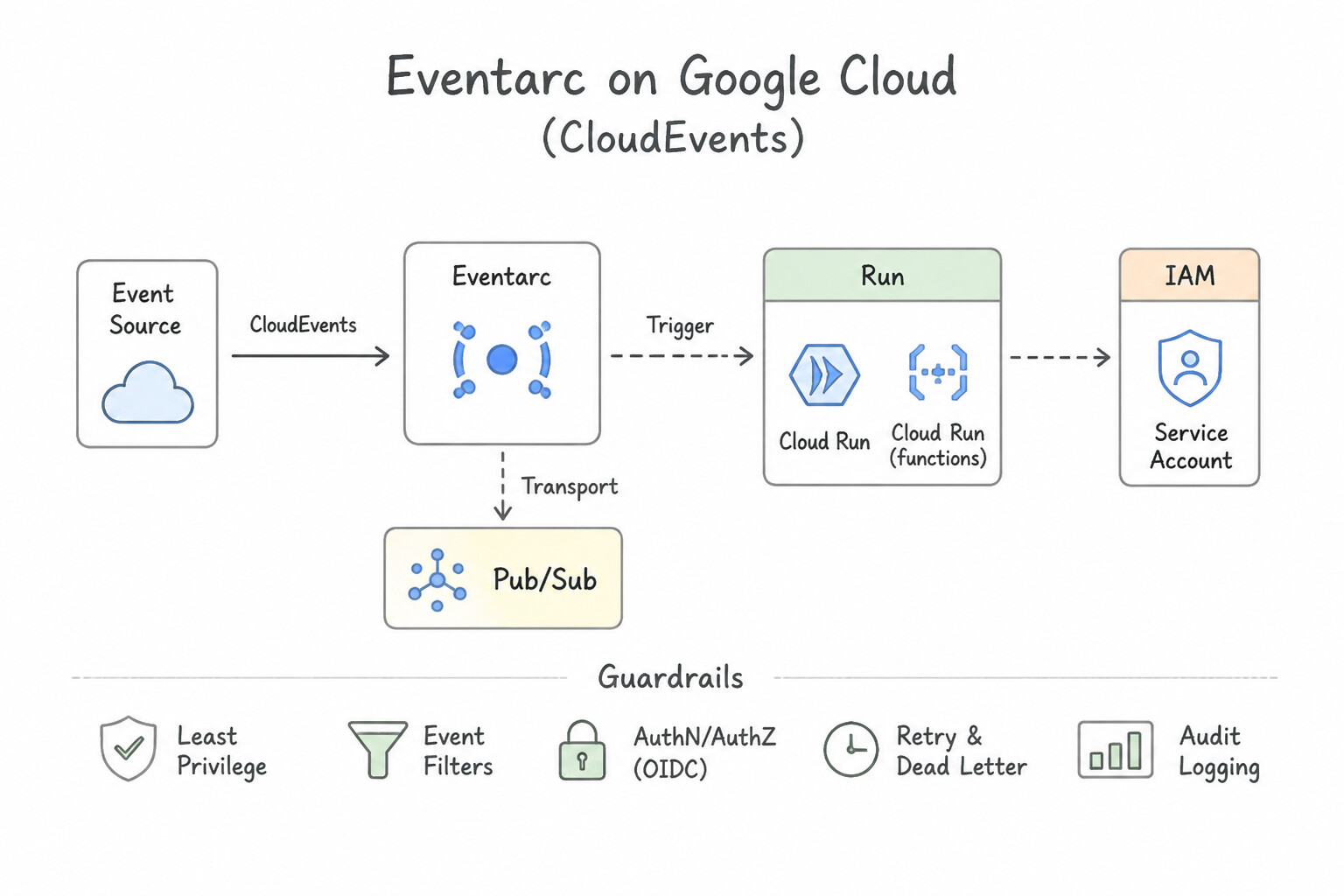
--no-allow-unauthenticated(Require authentication). - Attach a dedicated Trigger Service Account to the Eventarc trigger or Pub/Sub Push Subscription, and grant that service account
roles/run.invokeron the target Cloud Run service. Eventarc/Pub/Sub will automatically attach a signed OIDC token to every HTTPSPOSTdelivery.
Key Implementation Patterns
- Configuring Pub/Sub Push Authentication: Use Create a service account with the Cloud Run Invoker role. Configure a Pub/Sub push subscription to use this service account for authentication. Use a service account with the Cloud Run Invoker role and configure the Pub/Sub subscription to use it for OIDC authentication.
- Processing CloudEvents in Application Code: Use Update the application code to accept HTTP POST requests and parse the body and headers according to the CloudEvents specification. Eventarc delivers events as HTTP POST requests using the CloudEvents standard format. (Avoid alternative: Cloud Run is designed for push-based HTTP triggering, not pull-based subscription models.)
- Handling Cloud Storage Events via Eventarc: Use Create an Eventarc trigger with the google.cloud.storage.object.v1.finalized event filter. Grant the Eventarc trigger's service account the Cloud Run Invoker role. Use the finalized event for completed uploads and ensure the trigger has the Cloud Run Invoker role.
Key Takeaways (3.1b)
- Cloud Run services should default to 'Require authentication' for security.
- Use Service Accounts to provide identity for machine-to-machine interactions (like Pub/Sub to Cloud Run).
- The
roles/run.invokerrole is required to call a private Cloud Run service.- Pub/Sub Push subscriptions support OIDC authentication to invoke private endpoints securely.
Consideration 3.1c: Configuring event receivers (e.g., Eventarc, Pub/Sub)
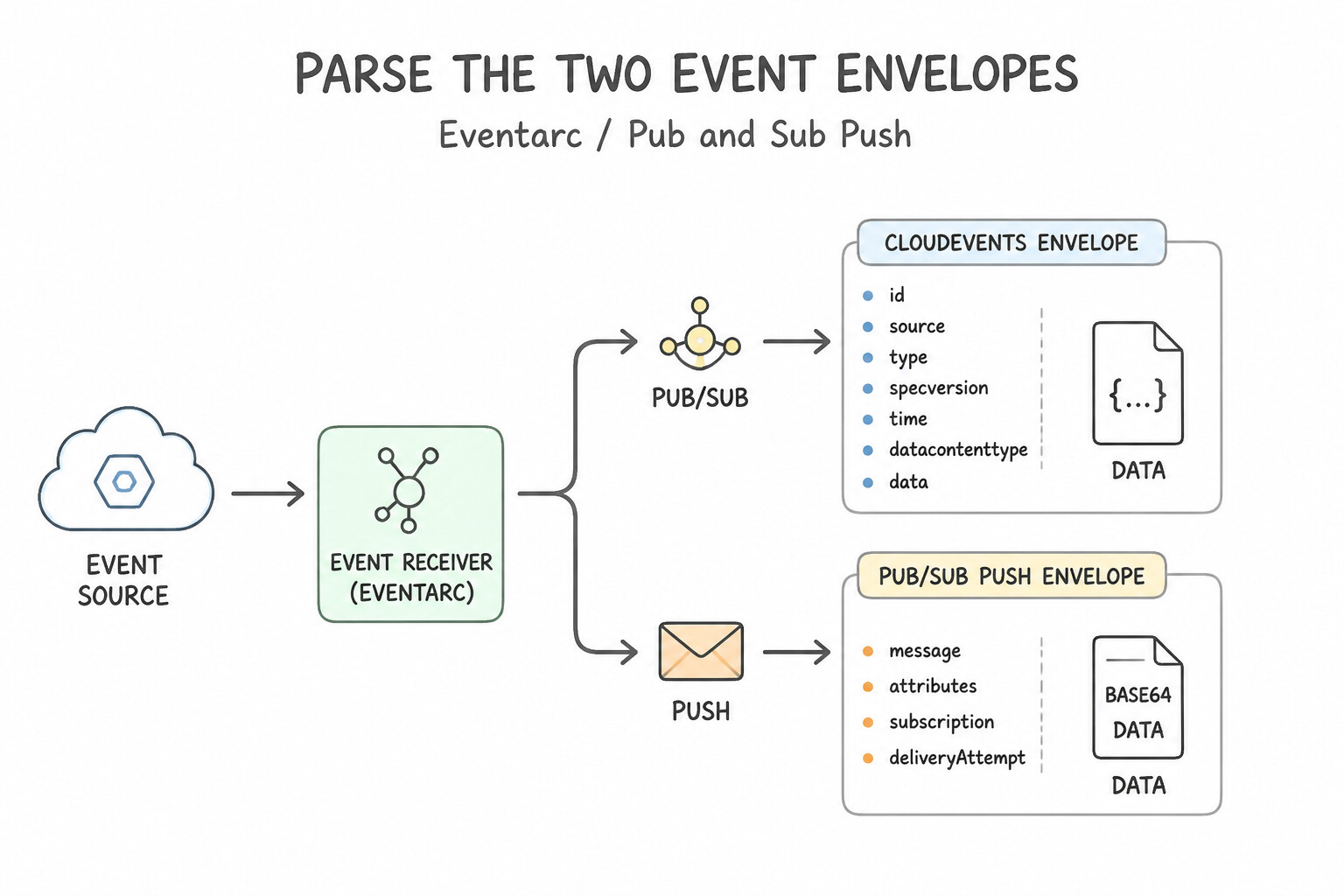
- Parsing the Two Event Envelopes (
CloudEventsvs.Pub/Sub Push JSON): - Eventarc (
CloudEventsformat): Delivers metadata in standard HTTP headers (ce-id,ce-type,ce-source,ce-subject,ce-time) or structured CloudEvents JSON body. - Pub/Sub Push Subscription: Sends an HTTP
POSTbody structured as{"message": {"data": "<BASE64_ENCODED_PAYLOAD>", "messageId": "...", "attributes": {...}}, "subscription": "..."}. Your receiver code must base64-decodemessage.data! - HTTP Status Code ACK / NACK Contract:
- Returning
200,201,202, or204(2xx) is an ACK—Pub/Sub/Eventarc deletes the message from the queue. - Returning
429,500,502,503, or504(or timing out past the subscriptionackDeadlineSeconds) is a NACK—Pub/Sub backs off exponentially and redelivers the message. - Critical Trap: If a message contains permanently malformed JSON that can never succeed, do not return
500forever without a Dead-Letter Topic (DLT), or either acknowledge/log it or route it to a DLT aftermaxDeliveryAttempts. - Idempotency is Mandatory: Because both Pub/Sub and Eventarc guarantee at-least-once delivery, network blips can cause the exact same
messageId/ce-idto be delivered twice. Always record processed event IDs or use idempotent databaseUPSERTtransactions.
Key Implementation Patterns
- Securing Pub/Sub Push Subscriptions: Use Configure the push subscription to enable authentication using the service account. Grant the Cloud Run Invoker role to the service account on the Cloud Run service. Enable authentication on the subscription using a service account and grant that account the Cloud Run Invoker role on the service.
- Eventarc Triggers for Cloud Storage: Use Create an Eventarc trigger using the "google.cloud.storage.object.v1.finalized" event type. The 'finalized' event type indicates a successful object creation (upload) in Cloud Storage, which is the correct trigger for this scenario.
Key Takeaways (3.1c)
- Cloud Run services are private by default; public access requires granting
run.invokertoallUsers.- To securely connect services (like Pub/Sub to Cloud Run), use Service Accounts for identity.
- Pub/Sub push subscriptions can generate OIDC tokens for authentication.
- The
roles/run.invokerrole controls who can send requests to a Cloud Run service.
Consideration 3.1d: Exposing and securing APIs in applications (e.g., Apigee)
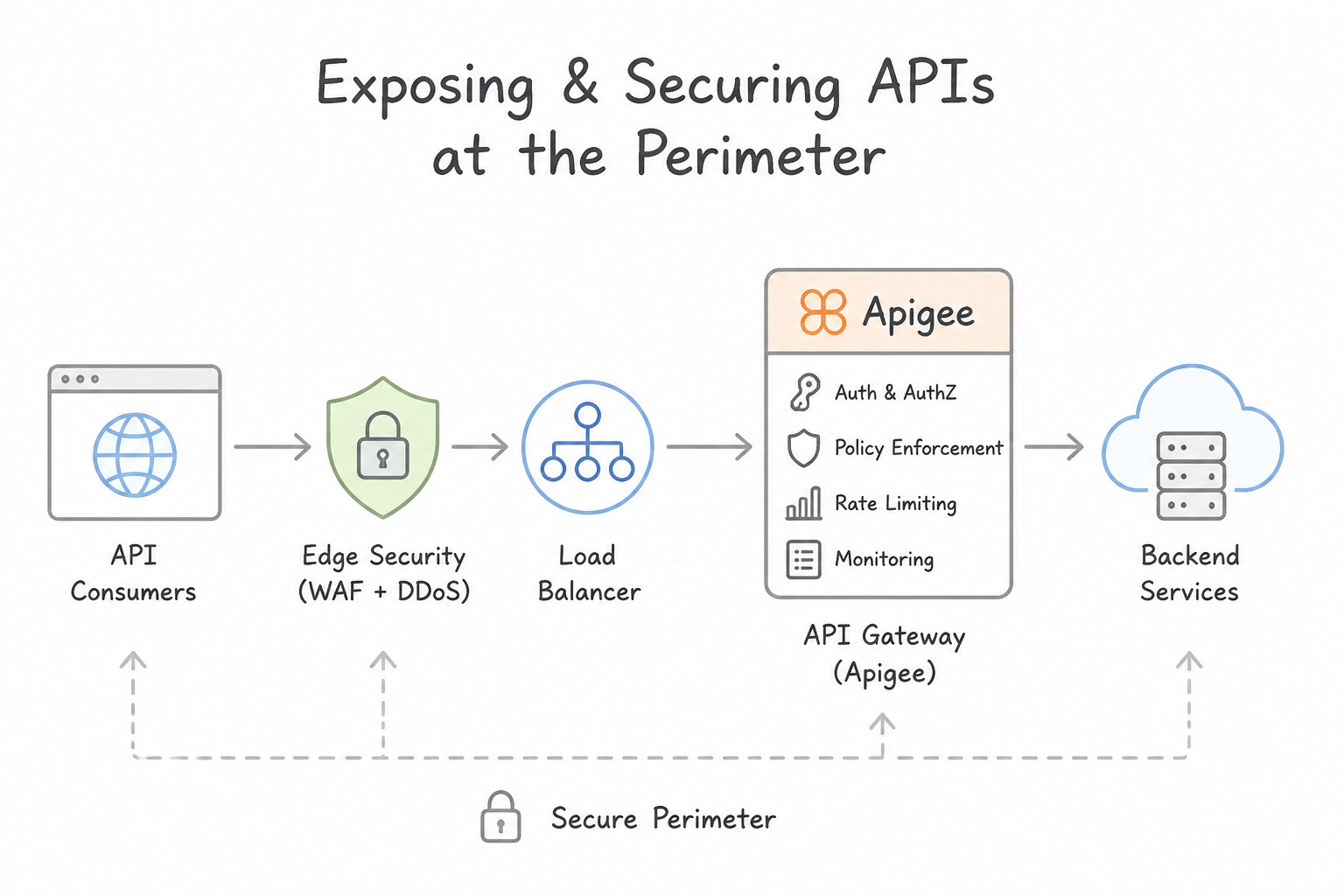
- Securing the Perimeter (
Apigee/API Gateway+ Load Balancer + Ingress Controls): - If you place Apigee or Cloud API Gateway in front of a Cloud Run service, leaving the Cloud Run service at
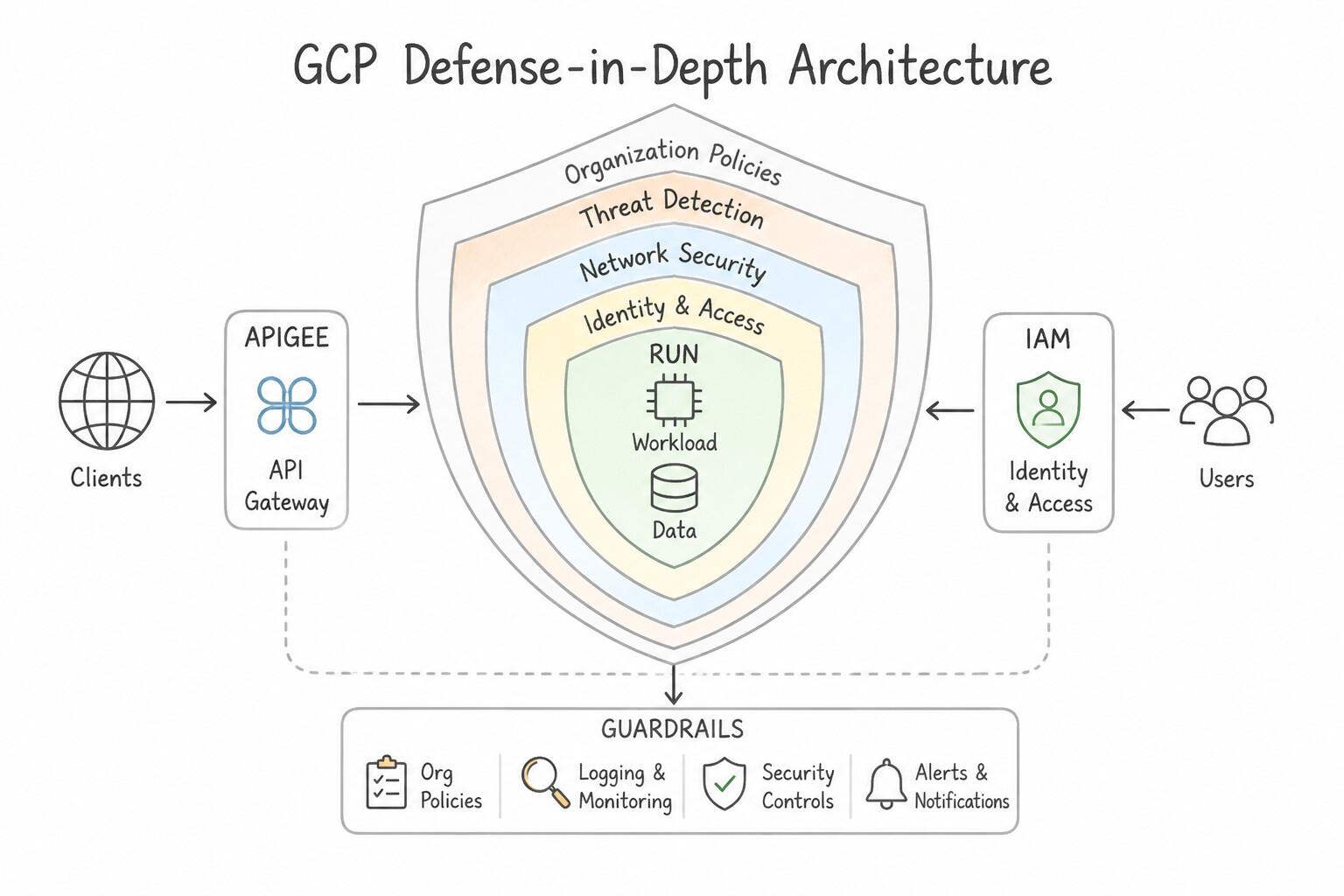
--ingress=alland--allow-unauthenticatedallows attackers to bypass the API gateway completely if they discover the*.a.run.appURL! - Defense-in-Depth Architecture:
- Configure the API Gateway / Apigee proxy to authenticate to Cloud Run using a dedicated Gateway Service Account granted
roles/run.invoker(removingallUsers). - Restrict Cloud Run network ingress to
internal-and-cloud-load-balancing(orinternal) so traffic can only enter via your Global External Application Load Balancer (with Cloud Armor WAF/DDoS protection) or VPC/PSC. - API Gateway Responsibilities vs. Application Responsibilities: Offload cross-cutting concerns—OAuth 2.0 / JWT signature verification, API key validation, rate limiting, CORS headers, and request/response transformation—to Apigee or Cloud API Gateway so your Cloud Run code focuses purely on business logic.
Key Implementation Patterns
- Secure Service-to-Service Authentication: Use Configure the Cloud Run service to 'Require authentication'. In the Apigee proxy, use the GoogleAuthentication policy to generate an OIDC ID token. Grant the Cloud Run Invoker role to the service account used by Apigee. Cloud Run native authentication uses IAM and OIDC tokens, which Apigee can generate securely using the GoogleAuthentication policy.
- Handling Traffic Spikes: Use Add the SpikeArrest policy in Apigee to limit the traffic rate. SpikeArrest smooths traffic by limiting the rate of requests (e.g., per second or minute), preventing sudden bursts from overloading the backend. (Avoid alternative: Quota limits total volume over a long period (e.g., per day) but does not prevent short-term bursts (e.g., all requests in one second).)
- Restricting Network Ingress: Use Set the Cloud Run ingress setting to 'Allow internal traffic and traffic from Cloud Load Balancing'. This setting restricts network access to only internal sources and the load balancer, effectively blocking direct public internet access.
Key Takeaways (3.1d)
- Cloud Run 'Require authentication' provides a secure default by offloading auth checks to Google's infrastructure.
- Service-to-service authentication in Google Cloud typically uses OIDC ID tokens.
- The 'Cloud Run Invoker' IAM role is required to call a secured Cloud Run service.
- Apigee's 'GoogleAuthentication' policy automates token generation for Google Cloud backends.
Consideration 3.1e: Deploying a new API version in Cloud Endpoints considering backward compatibility
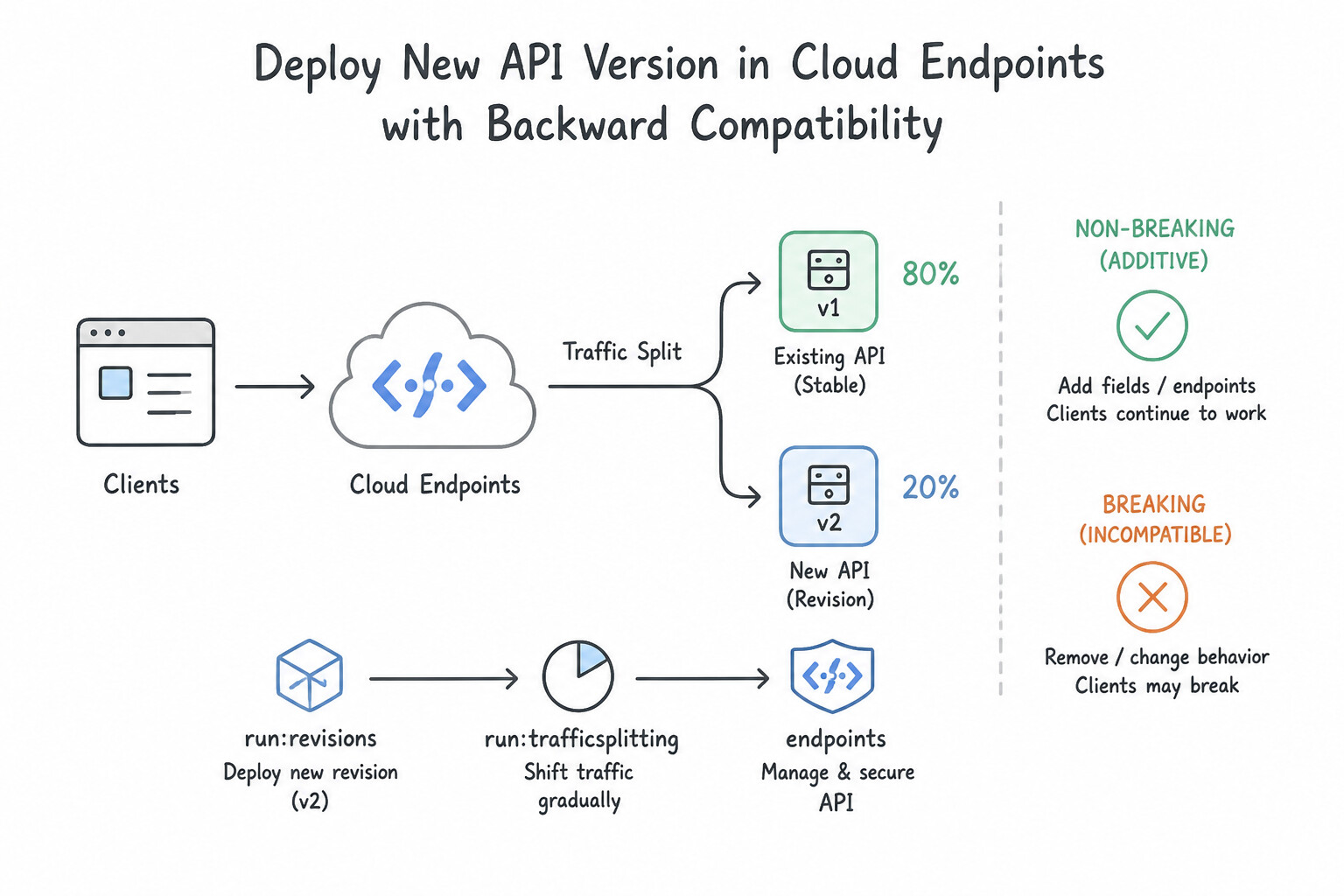
- Non-Breaking (Additive) vs. Breaking Changes:
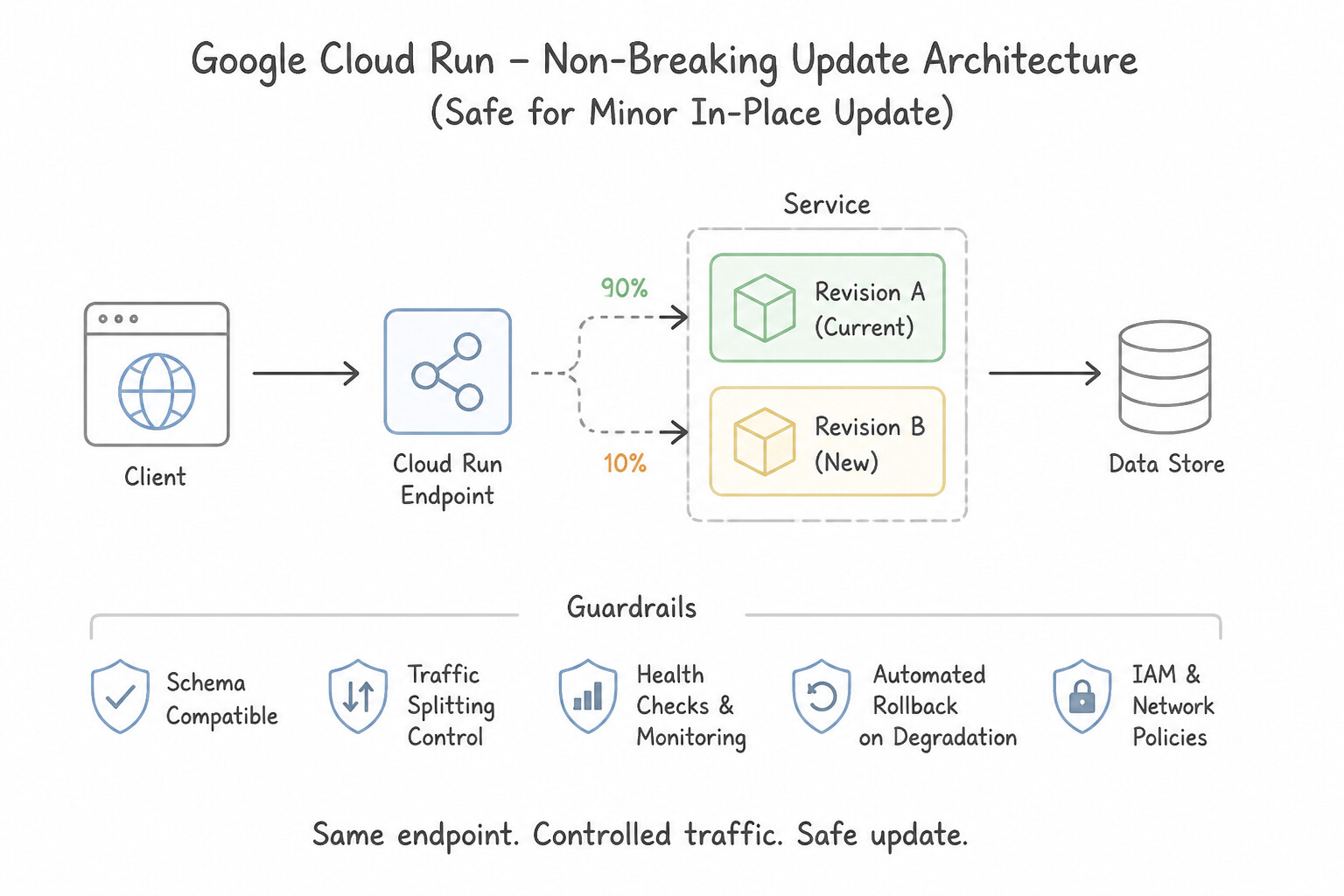
- Non-Breaking (Safe for Minor In-Place Update): Adding a new optional request field, adding a new field to a JSON response object, or adding a brand-new endpoint path (
/v1/recommendations). Existing clients ignore unknown JSON response fields and continue working. - Breaking (Requires New Major Version
/v2): Renaming or deleting an existing field, changing a field's data type (e.g.,inttostring), adding a new required request parameter, or changing authentication schemes. - Zero-Downtime Major Version Rollout (
/v1+/v2Coexistence): - When introducing breaking changes in Cloud Endpoints, Cloud API Gateway, or Apigee, publish a new OpenAPI/gRPC config version exposing
/v2/...routed to the new Cloud Run service/revision while keeping/v1/...routed to the v1 backend (or a compatibility adapter) until telemetry in Cloud Monitoring/Apigee Analytics confirms v1 client traffic has drained to zero.
Key Implementation Patterns
- Configuring Traffic Splitting for Canary Releases: Use Deploy the new revision. Run the "gcloud run services update-traffic" command to route 10% of traffic to the new revision. Cloud Run traffic splitting allows you to divide incoming requests between revisions by percentage without changing the service URL or client configuration.
- Updating Endpoints Configuration ID on Cloud Run: Use Update the Cloud Run service environment variable ENDPOINTS_SERVICE_VERSION with the new configuration ID. You must explicitly update the environment variable to tell the ESPv2 container which configuration ID to load.
- Deploying Breaking Changes via URL Path Versioning: Use Update the OpenAPI document to include paths for both /v1 and /v2. Use the x-google-backend directive to route /v1 paths to the v1 service address and /v2 paths to the v2 service address. Use the OpenAPI spec to define versioned paths (/v1, /v2) and the x-google-backend extension to route them to the correct Cloud Run services.
Key Takeaways (3.1e)
- Cloud Run Services are composed of immutable Revisions.
- Use traffic splitting to perform canary releases or gradual rollouts.
- Traffic splitting is handled by Cloud Run and does not require client-side changes or new service URLs.
- Cloud Endpoints works seamlessly with Cloud Run traffic splitting as long as the API contract remains backward compatible.
Quick Decision Cheat Sheet (Subsection 3.1)
If the Scenario Requires... | Choose This Google Cloud Pattern | Avoid This Common Mistake |
|---|---|---|
"Deploy a Python/Go/Node.js directory directly to Cloud Run without writing a Dockerfile" | Run gcloud run deploy <SERVICE> --source . (uses Cloud Build + Google Cloud Buildpacks) | Manually provisioning a VM to install Docker and build images |
"Pub/Sub push handler on Cloud Run receives garbled/encoded strings in request.body.message.data" | Base64-decode message.data before parsing JSON | Assuming Pub/Sub sends raw unencoded JSON at the top level of the HTTP body |
"Event-driven Cloud Run service occasionally charges a customer twice for the same order" | Implement idempotency using the event ID / messageId or a transactional database key | Lowering Cloud Run --max-instances to 1 (does not prevent network retry redeliveries!) |
"Cloud Run service needs to mount a Cloud Storage bucket as a local POSIX filesystem path" | Enable the 2nd Generation execution environment and configure a Cloud Storage volume mount (GCS FUSE) | Writing to the default container directory and expecting files to sync to Cloud Storage automatically |
Further Reading (Subsection 3.1)
- Deploying from source code — Official documentation explaining how to use the --source flag to deploy directly to Cloud Run without a Dockerfile.
- Build an application with buildpacks — Provides specific details on how to use a Procfile to customize the container entrypoint for various languages.
- gcloudignore documentation — Reference documentation explaining how the gcloud CLI uses the .gcloudignore file to filter files during upload.
- Using Pub/Sub with Cloud Run — This guide details how to configure Pub/Sub to push messages to Cloud Run, specifically covering the 'Authentication' section where a service account is required for private services.
- Managing access via IAM — Explains the IAM roles for Cloud Run, including the specific purpose of the Cloud Run Invoker role.
- Eventarc overview — Explains how Eventarc routes events to destinations like Cloud Run using the CloudEvents format.
Subsection 3.2: Deploying containers to GKE
The Big Picture
Deploying a container to Google Kubernetes Engine (GKE) with a bare-minimum YAML manifest works on day one in a tutorial—and fails catastrophically under real production traffic. Google Cloud architecture focuses heavily on four operational failure modes on GKE:
- The Missing Resource Request & OOMKill Trap (
3.2b,3.2d): Deploying Pods withoutresources.requestsandresources.limits. Withoutrequests, the kube-scheduler flies blind, packing too many heavy pods onto a single node, and the Horizontal Pod Autoscaler (HPA) cannot calculate CPU utilization percentages at all! Furthermore, settingrequests < limits(BurstableQoS) on critical stateful services risks sudden OOMKills when nodes experience memory pressure, whereas settingrequests == limitsgrants the highest priorityGuaranteedQoS class. - The Liveness vs. Readiness Probe Confusion (3.2c): Pointing a
livenessProbeat a/healthzendpoint that queries a downstream database, or setting a shortlivenessProbetimeout on a slow-starting legacy Java container without astartupProbe. When the database hiccups for 3 seconds, thelivenessProbefails on every Pod simultaneously, causingkubeletto kill and restart all Pods at once in a catastrophic CrashLoopBackOff cascade! - Rolling Update Downtime & Unscheduled GPU Workloads (3.2a): Running a
Deploymentwithout aPodDisruptionBudgetor poorly tunedmaxUnavailable/maxSurgeduring node upgrades, or failing to apply Taints and Tolerations on expensive GPU node pools (allowing cheap general-purpose logging/web pods to consume $20/hour GPU nodes). - Autoscaling Thrashing (Flapping) & Unscalable Custom Metrics (3.2d): Scaling a Pub/Sub worker Deployment on CPU instead of external queue backlog (
num_undelivered_messages), or failing to configure a scale-down stabilization window (stabilizationWindowSeconds) so HPA rapidly adds and deletes pods every 30 seconds.
Consideration 3.2a: Deploying containerized applications
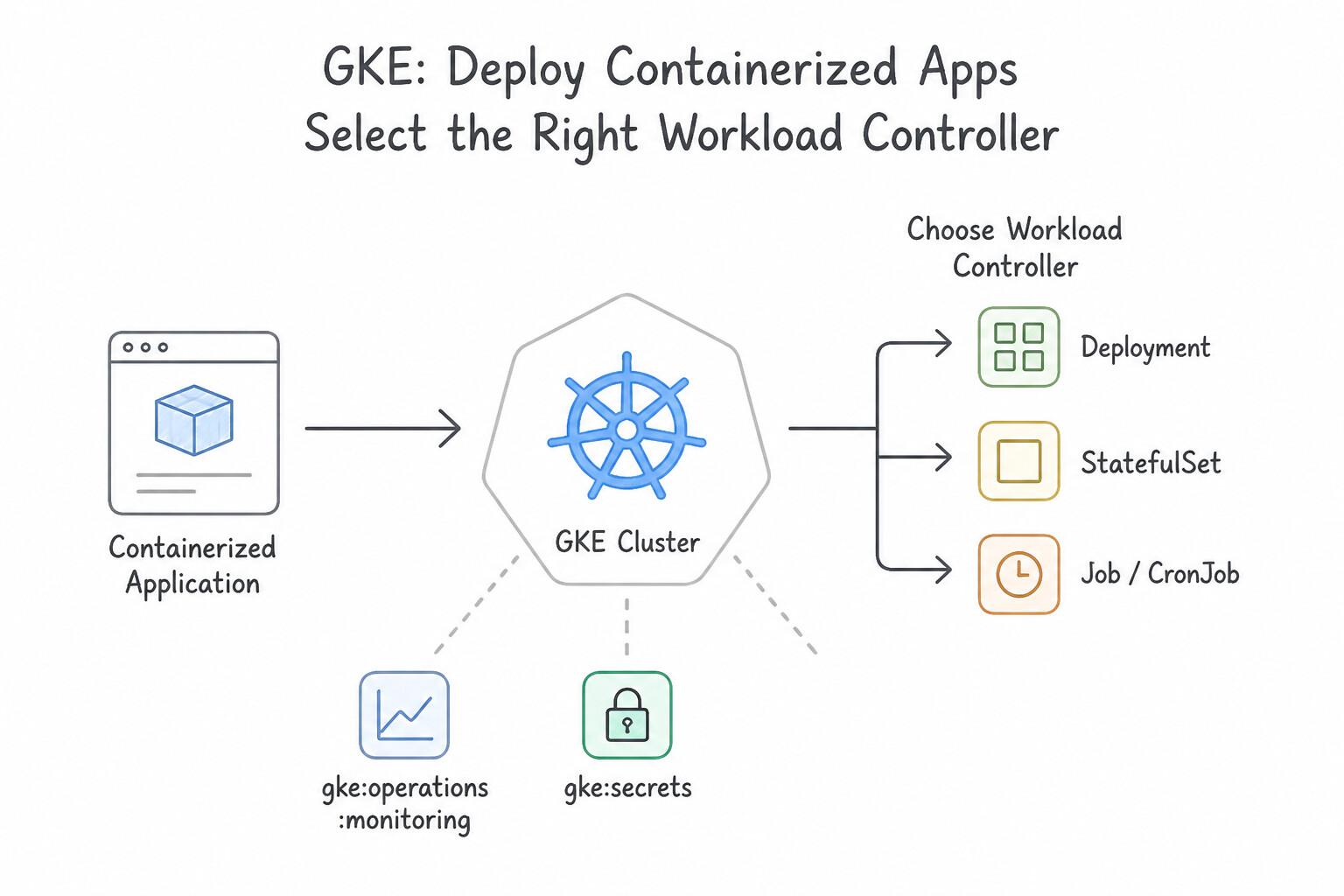
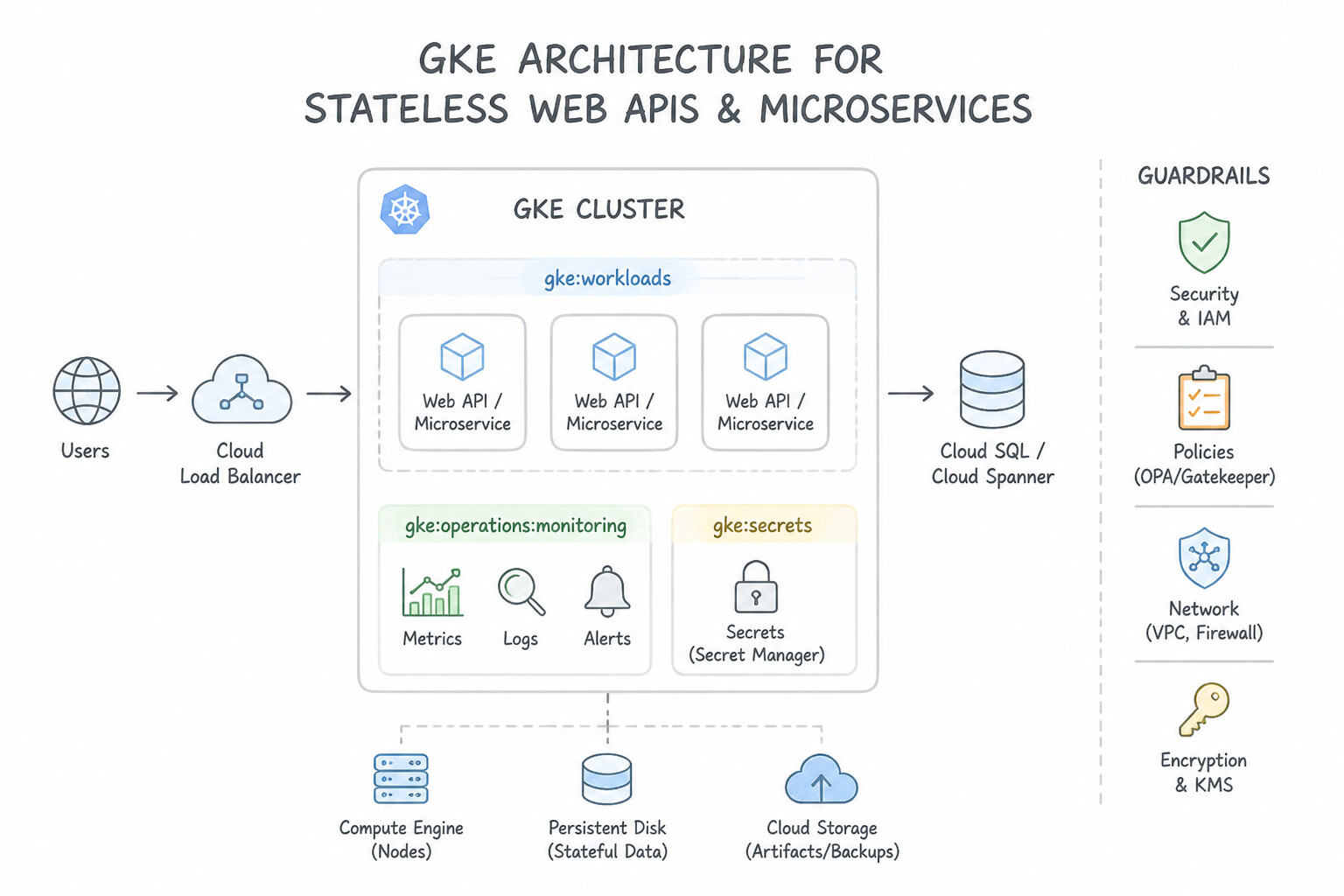
- Selecting the Right Kubernetes Workload Controller:
Deployment: Stateless web APIs and microservices where pods are interchangeable. SupportsRollingUpdate(maxSurge: max extra pods created above desired count;maxUnavailable: max pods taken down during update—setmaxUnavailable: 0for zero capacity dip!) andRecreate(terminates all old pods before starting new ones).StatefulSet: Stateful workloads (databases, Kafka, ZooKeeper) requiring stable, ordered network identities (pod-0,pod-1) and dedicated PersistentVolumeClaims (volumeClaimTemplates) that stay bound to the specific pod across restarts. To resize an existing PVC without downtime, ensure theStorageClasshasallowVolumeExpansion: true.DaemonSet: Runs exactly one pod per node (or matching node pool) for node-level log collectors, monitoring agents, or security daemons.- Isolating Specialized Node Pools with Taints & Tolerations + Node Affinity:
- To prevent general-purpose pods from scheduling onto an expensive GPU or high-memory node pool, apply a Node Taint (
nvidia.com/gpu=present:NoSchedule) to the GPU node pool—which repels all pods that do not declare a matching Toleration. - Pair the Toleration with a Node Selector / Node Affinity on the GPU workload so GPU pods also cannot accidentally land on CPU-only nodes!
Key Implementation Patterns
- Ensuring Application Availability During Startup: Use Add a readinessProbe to the Deployment YAML file with an initialDelaySeconds value of 45. Readiness probes prevent traffic from reaching a Pod until it passes the check, ensuring the app is fully initialized. (Avoid alternative: Liveness probes restart containers upon failure; they do not control traffic flow based on initialization status.)
- Secure Configuration Injection: Use Create a Kubernetes Secret with the API key. Reference the Secret in the Deployment manifest using env.valueFrom.secretKeyRef. Kubernetes Secrets are the standard way to securely store and inject sensitive data like API keys into Pods.
Key Takeaways (3.2a)
- Liveness Probes manage container restarts for crash recovery.
- Readiness Probes manage traffic flow ensuring requests only go to healthy, initialized backends.
- Without a readiness probe, Kubernetes assumes a Running container is ready for traffic immediately.
- Use
initialDelaySecondsto account for known startup times.
Consideration 3.2b: Defining resource requirements for container workloads
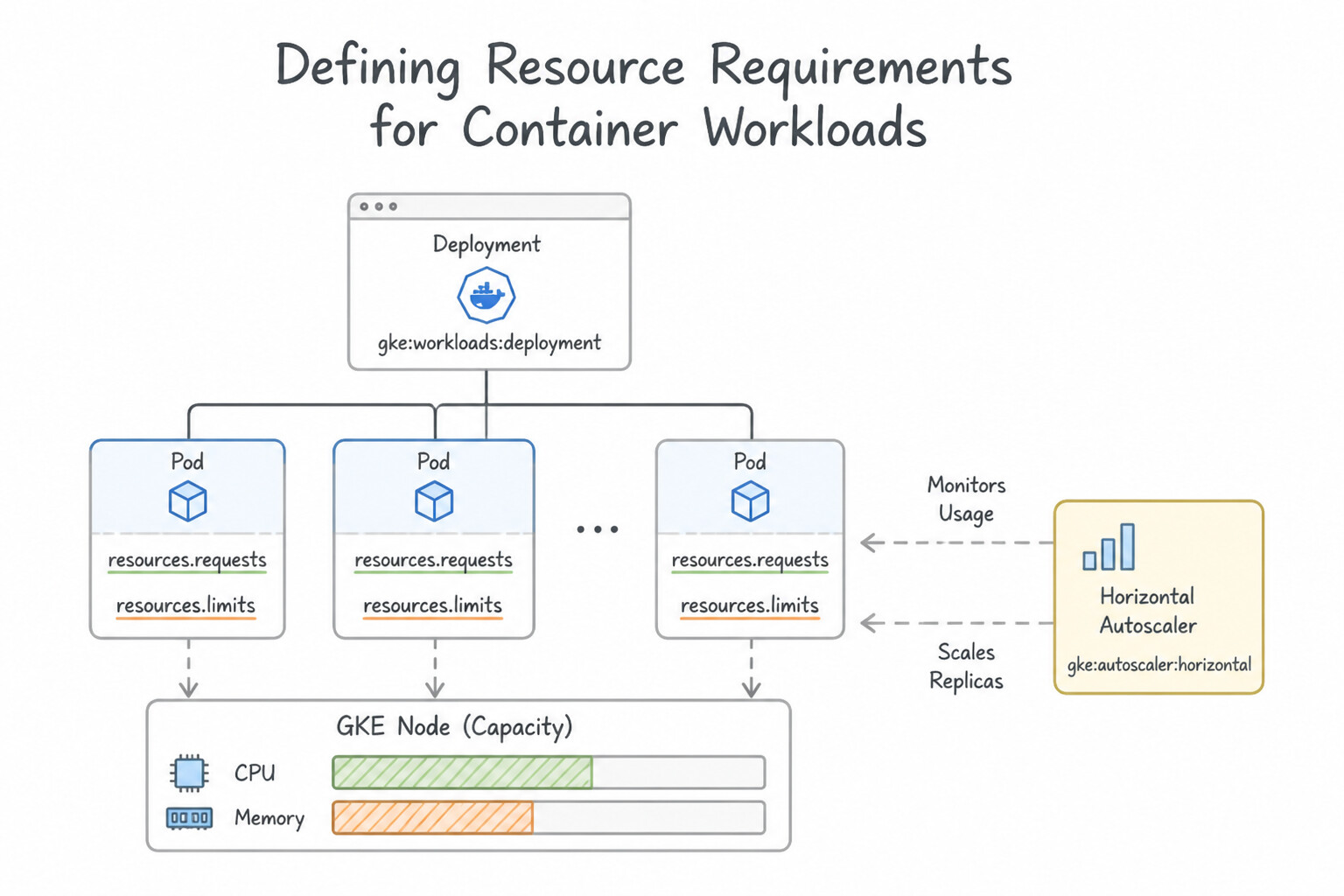
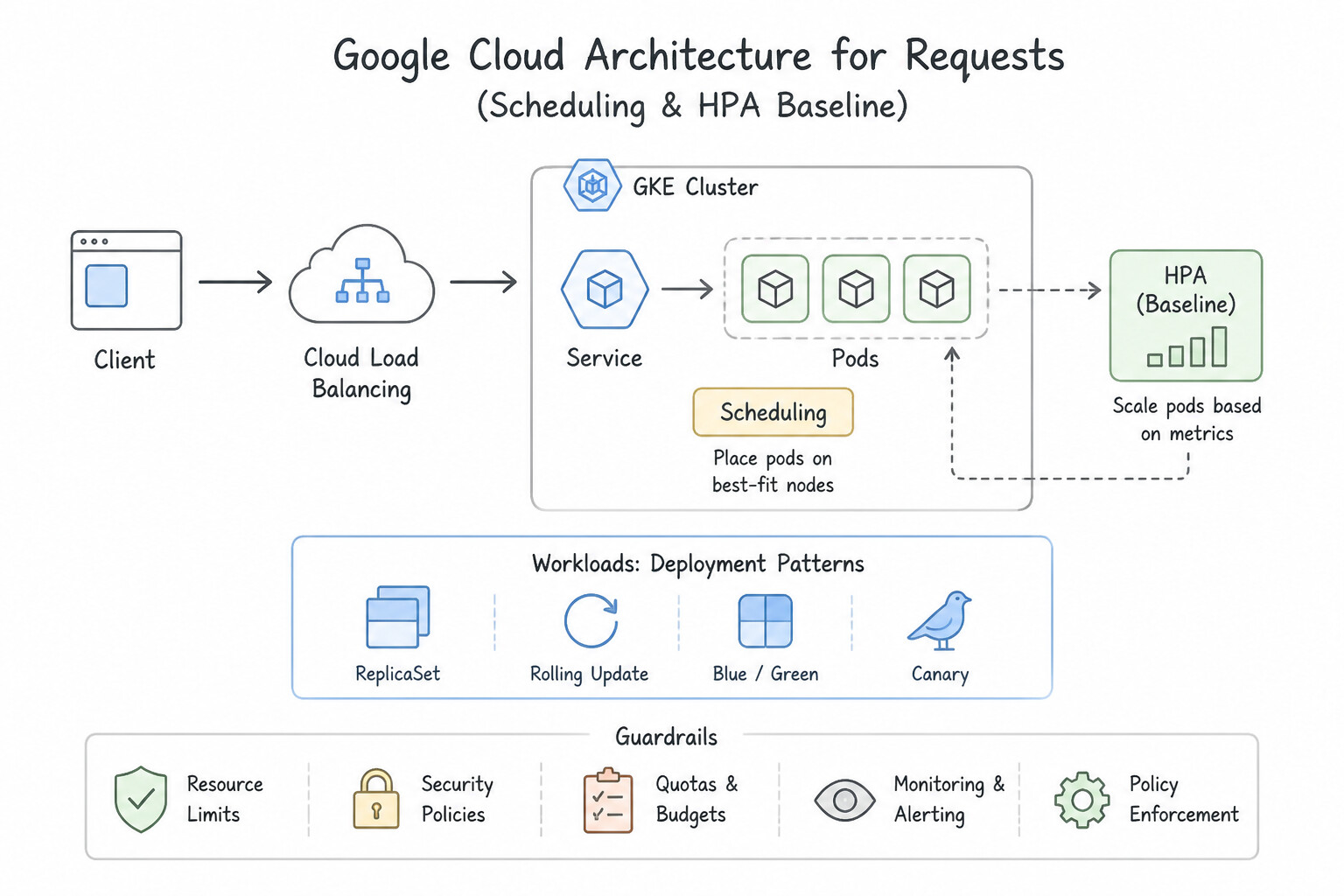
resources.requestsvs.resources.limits:requests(Scheduling & HPA Baseline): The minimum guaranteed CPU (e.g.,250m= 0.25 vCPU) and memory (512Mi) reserved for the container on a node. The kube-scheduler usesrequeststo place pods on nodes, and HPA divides current usage byrequeststo compute utilization percentage.limits(Hard Ceiling): The maximum resources the container is allowed to consume. If a container exceeds its CPU limit, the Linux kernel throttles its CPU cycles (increasing latency, but never killing the pod). If a container exceeds its Memory limit, the Linux kernel immediately terminates it withOOMKilled(Exit Code 137)!- Kubernetes Quality of Service (QoS) Classes (Eviction Order Under Node Memory Pressure):
BestEffort(Evicted First): Pod defines neitherrequestsnorlimits.Burstable(Evicted Second): Pod definesrequests < limits(or onlyrequests).Guaranteed(Evicted Last — Highest Protection): Every container in the Pod setsrequests.cpu == limits.cpuANDrequests.memory == limits.memory. Always useGuaranteedQoS for latency-critical or stateful production pods!- Right-Sizing with Vertical Pod Autoscaler (VPA): Use VPA in recommendation (
Off) mode to observe real CPU/memory usage and get data-drivenrequestsrecommendations; never run VPA inAutomode on CPU/memory alongside an HPA scaling on the same CPU/memory metrics, as the two controllers will fight each other!
Key Implementation Patterns
- Ensuring Pod Scheduling Reliability: Use Set resource requests for CPU and memory in the container specification. Resource requests tell the scheduler the minimum resources required to run the pod, ensuring they are reserved upon scheduling. (Avoid alternative: Node selectors control 'where' a pod goes, but not 'how much' resource capacity is reserved for it.)
- Prerequisites for Horizontal Pod Autoscaling: Use Define CPU resource requests in the Deployment manifest. HPA requires defined CPU resource requests in the pod specification to calculate utilization percentages. (Avoid alternative: Increasing max replicas does not fix the underlying issue of missing metric calculations.)
- Resolving OOMKilled Errors: Use Increase the memory limits in the deployment configuration. The container is hitting its hard memory cap; increasing the limit solves the OOMKilled error. (Avoid alternative: Requests control scheduling, not the maximum memory usage allowed before killing the container.)
Key Takeaways (3.2b)
- Requests are used by the scheduler to reserve resources and determine pod placement.
- Limits are used by the runtime to cap resource usage and prevent a single pod from exhausting node resources.
- Always define requests for critical workloads to prevent scheduling issues.
- HPA scales pods based on the ratio of current usage to requested resources.
Consideration 3.2c: Implementing Kubernetes health checks to increase application availability
- Master the Three Probe Types (architectures Gold!):
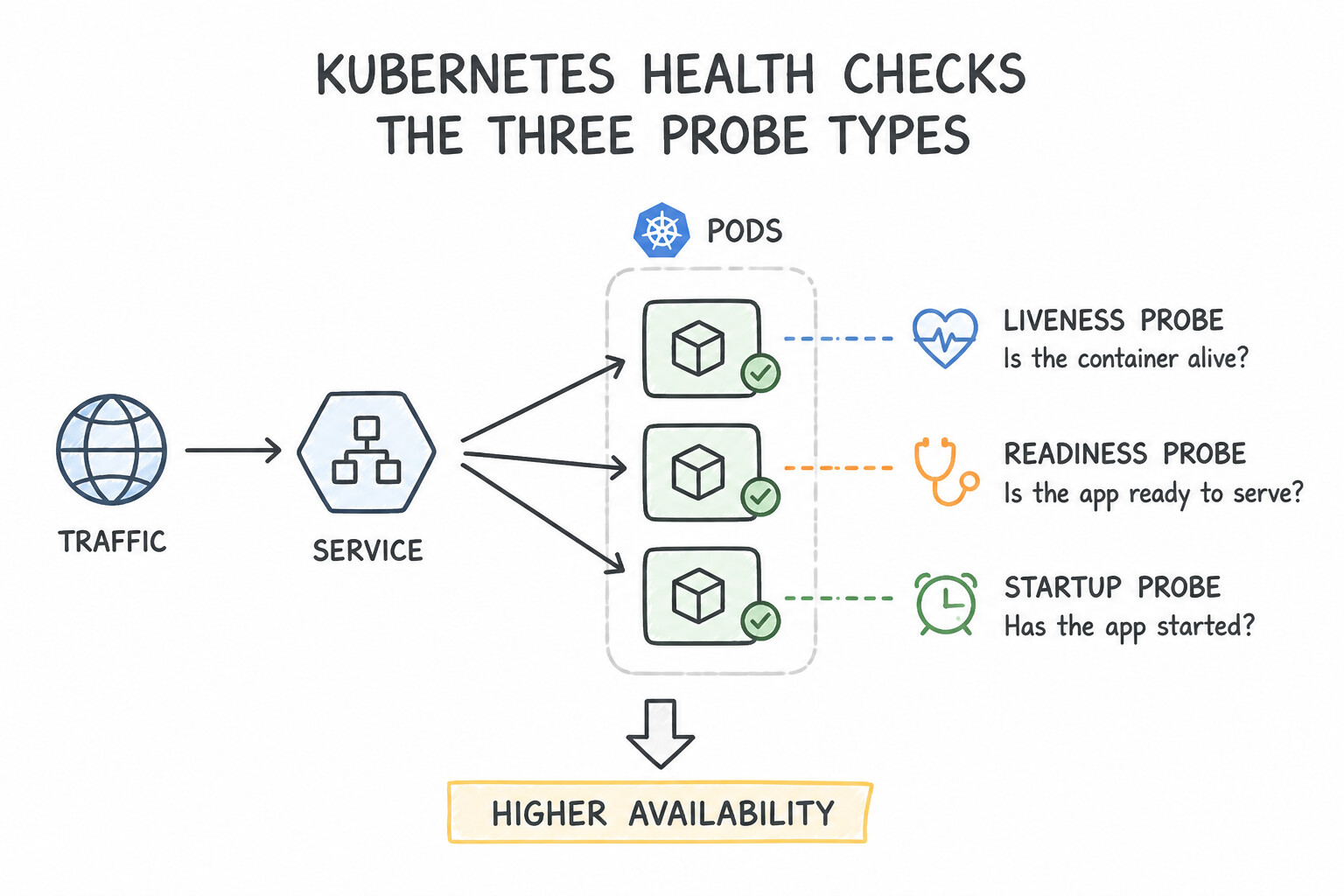
startupProbe(Did the app finish booting?): Disables liveness and readiness checks until it succeeds once. Use for slow-starting legacy or JVM apps that take 60–180 seconds to initialize so you can keep a fast, sensitivelivenessProbeduring normal runtime without killing the pod during boot.readinessProbe(Can this Pod serve user traffic right now?): Runs continuously. When it fails, Kubernetes removes the Pod's IP from theService/ NEG load-balancing endpoints so no new requests are routed to it, without restarting the container. Use when a pod is temporarily overloaded, warming a local cache, or waiting for a required config sync.livenessProbe(Is the process deadlocked and needing a restart?): Runs continuously. When it fails,kubeletkills and restarts the container. Golden Rule: AlivenessProbeendpoint must never check external dependencies (like Cloud SQL or downstream APIs); if the database slows down, failing liveness probes across all pods will trigger a cluster-wide restart storm!- Zero-Downtime Graceful Shutdown (
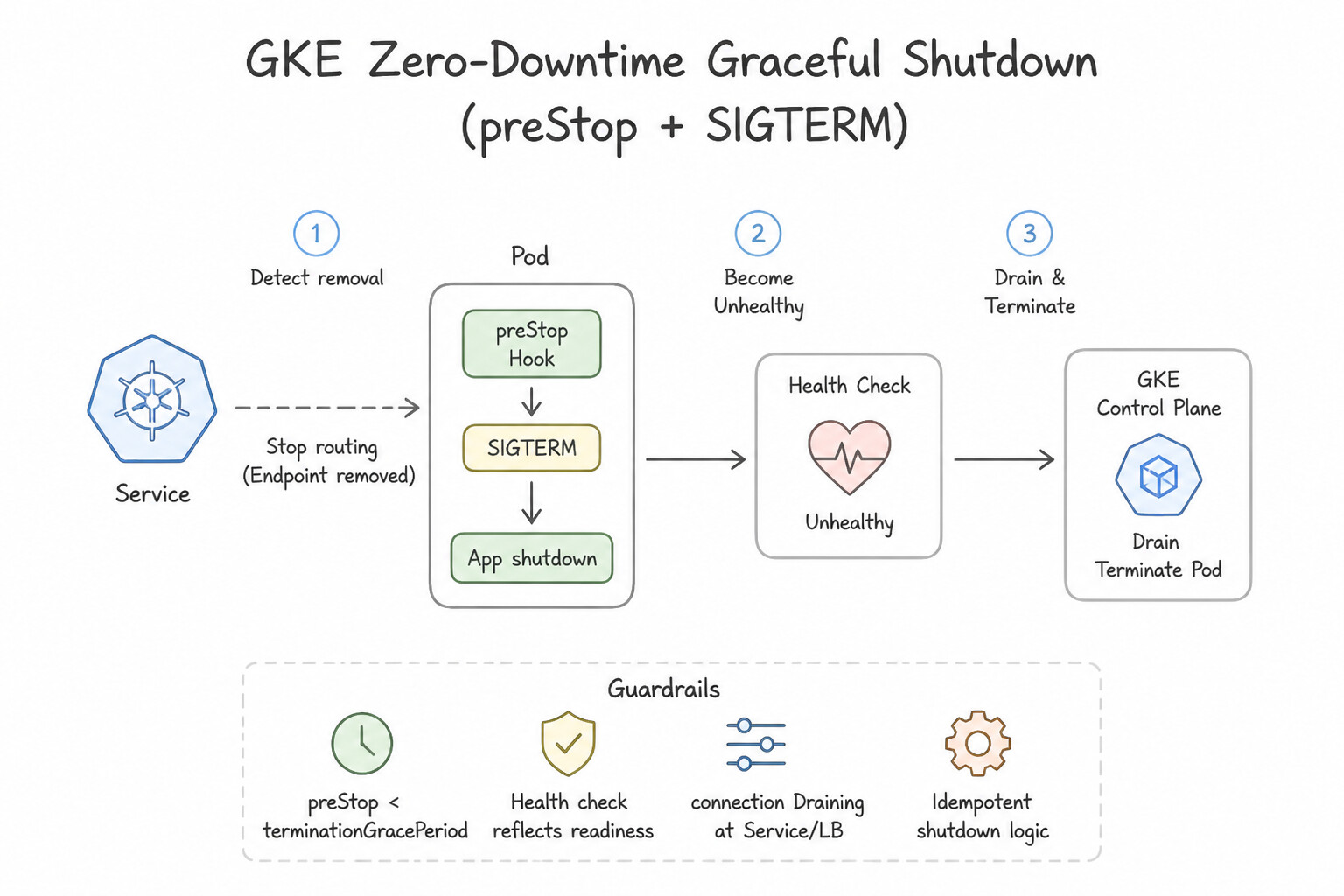
preStop+SIGTERM): During a rolling update or scale-down, Kubernetes removes the Pod from Service endpoints in parallel with sendingSIGTERMto the container. Because kube-proxy / load balancer endpoint propagation takes a few seconds, configure alifecycle.preStopsleep hook (e.g.,sleep 5) and handleSIGTERMin application code to finish in-flight requests before exiting withinterminationGracePeriodSeconds.
Key Implementation Patterns
- Handling Deadlocks in Long-Running Processes: Use Configure a livenessProbe that executes a command to verify queue processing. Liveness probes detect broken states like deadlocks and restart the container to restore availability. (Avoid alternative: Readiness probes stop traffic but do not restart the container, so the application would remain stuck.)
- Slow-Starting Legacy Applications: Use Configure a startupProbe that targets the same endpoint as the liveness probe. Startup probes disable other probes until the application successfully initializes, preventing premature restarts. (Avoid alternative: Using a fixed delay is brittle; if startup time varies, the probe might still fail or wait unnecessarily long.)
- Preventing Traffic to Unready Pods: Use Configure a readinessProbe that returns a success code only when the cache is fully loaded. Readiness probes prevent traffic from reaching a Pod until it passes the check, making them ideal for initialization tasks like cache loading.
Key Takeaways (3.2c)
- Use Liveness Probes to restart containers that are stuck or in a broken state (deadlocks).
- Use Readiness Probes to manage traffic flow and prevent requests from going to unready pods.
- A process that is running is not necessarily healthy; configure probes to check application logic/endpoints.
- Startup Probes: Use them for applications with slow or variable initialization times to delay liveness checks.
Consideration 3.2d: Configuring the Horizontal Pod Autoscaler for cost optimization
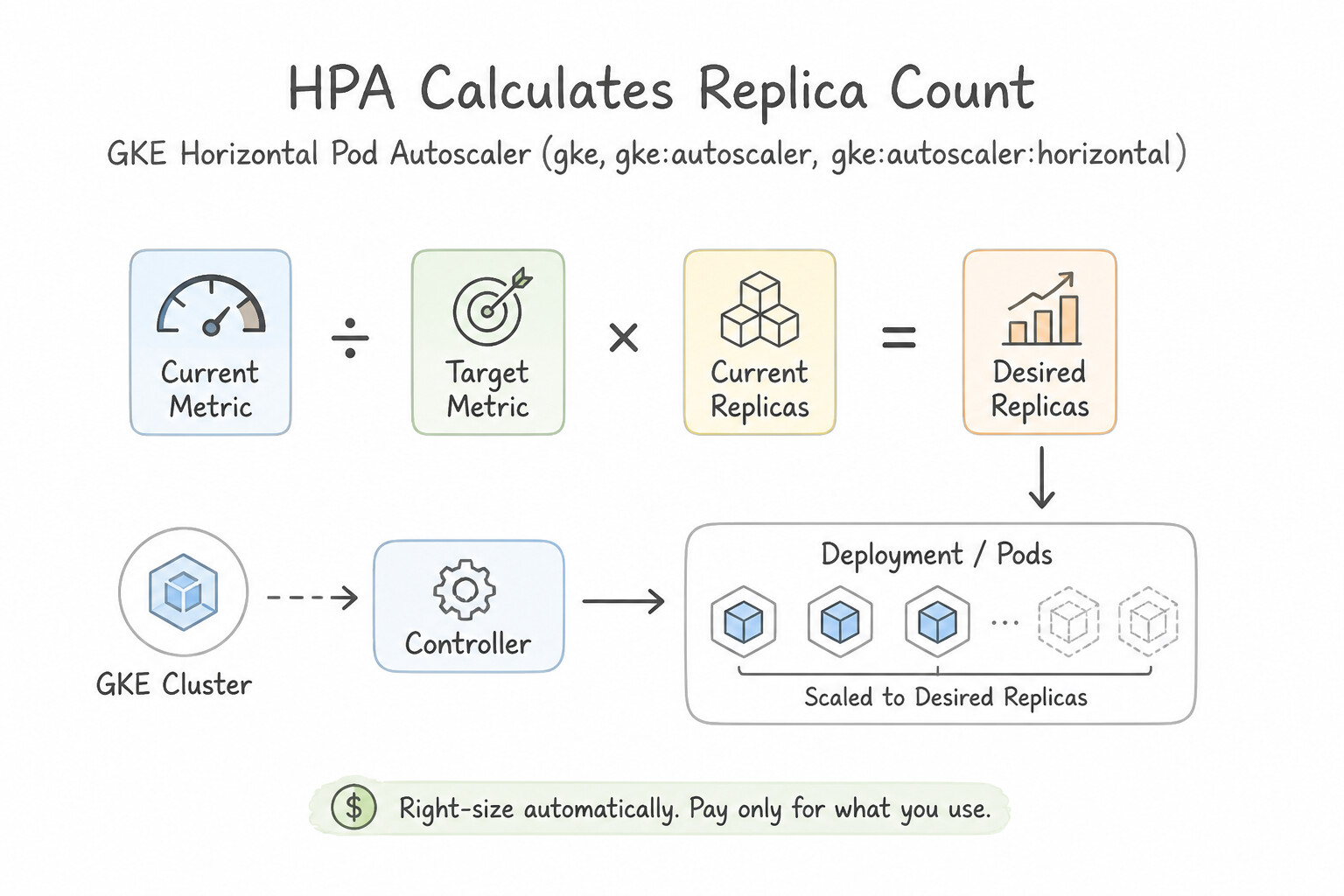
- How HPA Calculates Replica Count: $$\text{Desired Replicas} = \left\lceil \text{Current Replicas} \times \frac{\text{Current Metric Value}}{\text{Target Metric Value}} \right\rceil$$ Mandatory Requirement: For CPU or memory percentage scaling (
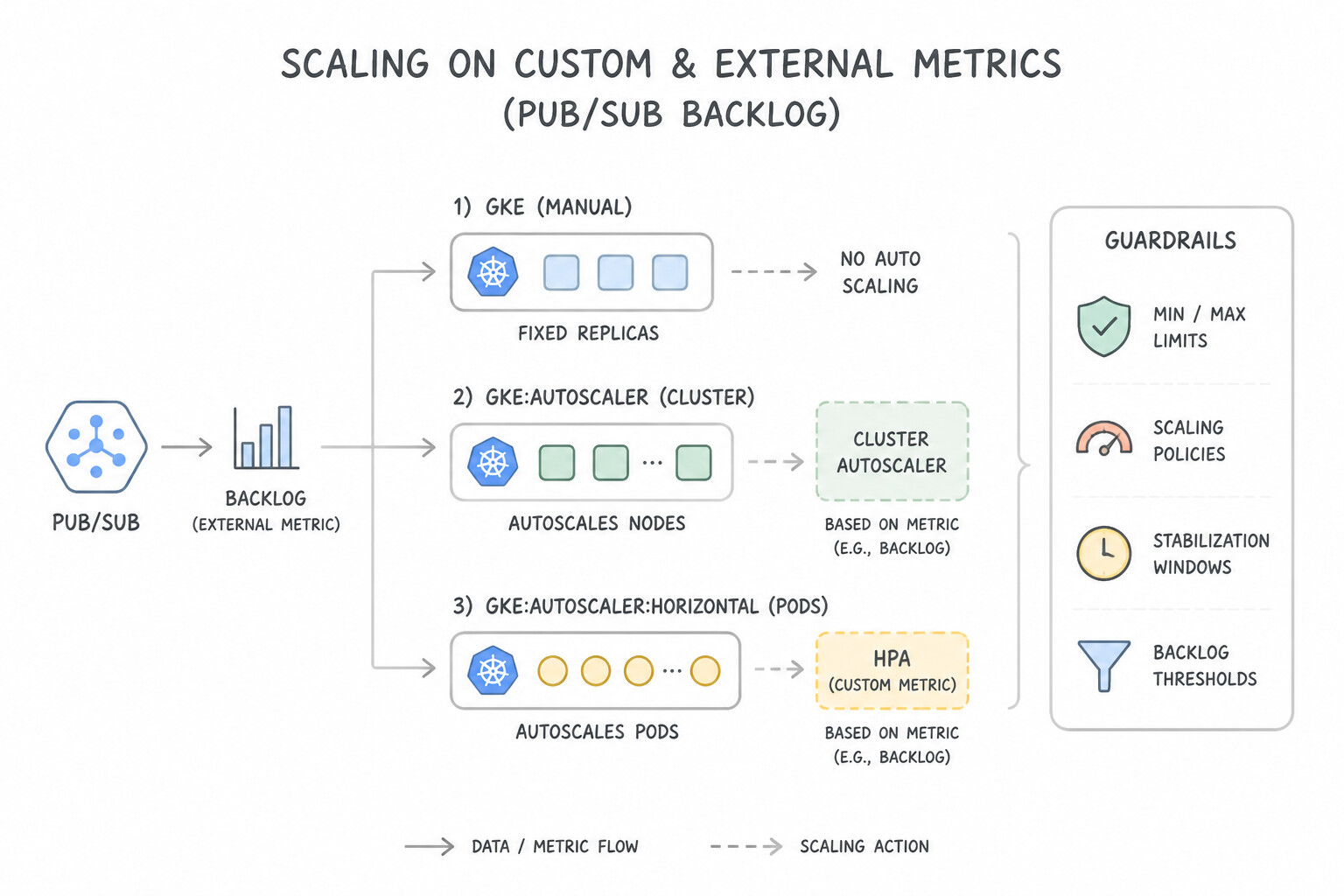
Utilization), the Pod spec must defineresources.requests.cpu(ormemory). Ifresources.requestsis omitted, HPA reports<unknown>/70%and never scales! - Scaling on Custom & External Metrics (e.g., Pub/Sub Backlog):
- Background worker pods pulling messages from a Cloud Pub/Sub subscription may be I/O-bound (waiting on network calls) and use only 15% CPU even when 500,000 messages are backed up in the queue!
- Deploy the Custom Metrics Stackdriver Adapter on GKE and configure HPA with an
Externalmetric targetingpubsub.googleapis.com|subscription|num_undelivered_messageswithtarget.averageValue(so queue backlog drives pod count directly). - Preventing Thrashing / Flapping (
behavior.scaleDown.stabilizationWindowSeconds): - Spiky traffic can cause HPA to scale pods up and then immediately terminate them 30 seconds later, wasting CPU on cold starts. Configure
behavior.scaleDown.stabilizationWindowSeconds(default300seconds, or higher for heavy caches) so HPA waits for sustained low load before scaling in, while keepingscaleUprapid.
Key Implementation Patterns
- Optimizing HPA Utilization Targets: Use Increase the targetCPUUtilizationPercentage to 80%. Increasing the target allows Pods to run at higher utilization before scaling out, reducing unnecessary replicas. (Avoid alternative: Decreasing the target utilization creates more Pods sooner, increasing costs.)
- Preventing Rapid Fluctuation (Thrashing): Use Configure a
scaleDownstabilization window in the HPAbehaviorsection. Stabilization windows delay scale-down actions to ensure traffic dips are not just temporary spikes. (Avoid alternative: This only sets a lower limit and does not smooth out rapid scaling actions.)
Key Takeaways (3.2d)
- Horizontal Pod Autoscaler (HPA) adds or removes Pod replicas based on CPU or memory utilization.
- Increasing the target utilization percentage reduces the number of replicas needed, optimizing costs.
- Decreasing the target utilization creates a larger buffer for spikes but increases costs.
- Avoid mixing HPA and VPA on the same metric (e.g., CPU) to prevent scaling conflicts.
Quick Decision Cheat Sheet (Subsection 3.2)
If the Scenario Requires... | Choose This Google Cloud Pattern | Avoid This Common Mistake |
|---|---|---|
"Pod exits with Exit Code 137 (OOMKilled) under peak traffic" | Increase resources.limits.memory (and requests.memory) and profile memory leaks with Cloud Profiler | Increasing resources.limits.cpu (CPU overage only throttles, never triggers Exit Code 137) |
"Protect a critical payment Pod from node-pressure eviction on GKE" | Configure Guaranteed QoS by setting requests.cpu == limits.cpu and requests.memory == limits.memory | Leaving requests unset (BestEffort QoS is the very first class evicted!) |
"Increase the size of a GKE Pod's PersistentVolumeClaim without recreating the disk" | Ensure the StorageClass has allowVolumeExpansion: true and edit spec.resources.requests.storage on the PVC | Resizing the Compute Engine Persistent Disk manually in the console without updating the Kubernetes PVC |
"HPA scales down too aggressively during brief 1-minute dips in traffic" | Increase behavior.scaleDown.stabilizationWindowSeconds in the HPA v2 spec | Disabling HPA and scaling pods manually with a cron job |
Further Reading (Subsection 3.2)
- Configure Liveness, Readiness and Startup Probes — The official Kubernetes documentation detailing how to define readiness probes to control when a Pod is added to the service load balancer.
- Cluster lifecycle — Google Cloud documentation explaining workload lifecycles and how GKE utilizes probes for health checking.
- Secrets — Official Kubernetes documentation explaining what Secrets are, why to use them, and how to create and use them in Pods.
- Using Secrets in GKE — Google Cloud documentation specifically regarding how Secrets are handled and encrypted within GKE.
- Resource Management for Pods and Containers — Official Kubernetes documentation explaining the distinction between requests and limits.
- GKE Concepts: Cluster Architecture — Overview of how GKE manages resources and scheduling within the cluster.
Book TOC · Previous · Chapter 4 of 7 · Next
AwesomeGCP.com Learning
The approach taken is a question-led learning approach: you explore realistic project scenarios where you need to make decisions or take actions to achieve business goals within specific constraints. Instead of passive learning, you are challenged to think and work through the options to master the Professional Cloud Developer (PCD) certification!