Book TOC · Previous · Chapter 5 of 7 · Next
Chapter 5: Integrating Managed Data Services & Consuming Google Cloud and Vertex AI APIs
Chapter Focus: Cloud SQL Auth Proxy, connection pooling, Pub/Sub ordering/dead-letter queues, Cloud Tasks vs. Scheduler, gRPC streaming, batching, pagination, exponential backoff, and Vertex AI Gemini APIs.
Subsection 4.1: Integrating applications with data and storage services
The Big Picture
Even when your compute platform (Cloud Run/GKE) and database (Cloud SQL/Firestore/Spanner) are configured properly in isolation, the integration boundary between application code and data/messaging services is the #1 source of production outages under load:
- The Serverless Connection Storm (4.1a): A Cloud Run service or Cloud Function scales out from 2 instances to 400 instances during a traffic spike. Because the developer instantiated the database connection inside the per-request handler function instead of in global module scope, every HTTP request opens a brand-new TCP/TLS handshake to Cloud SQL—instantly exhausting
max_connections, spiking latency, and crashing the database withFATAL: remaining connection slots are reserved. - Non-Transactional Race Conditions & Unoptimized Reads (4.1b): Reading a user's wallet balance from Firestore or Cloud Spanner, subtracting $50 in Python memory, and issuing an unconditional
SETwrite back to the database—allowing two concurrent requests to overwrite each other (lost update race condition) instead of using an atomic Read-Modify-Write Transaction or Optimistic Concurrency Control. - Blocking Publishers & Non-Idempotent Subscribers (4.1c): Publishing messages to Cloud Pub/Sub synchronously one-by-one inside a tight loop without batching, or failing to call
message.ack()(or handle duplicate delivery idempotently) in a streaming pull subscriber—causing the exact same messages to redeliver endlessly after theackDeadlineexpires.
Consideration 4.1a: Managing connections to various Google Cloud datastores (e.g., Cloud SQL, Firestore, Cloud Storage)
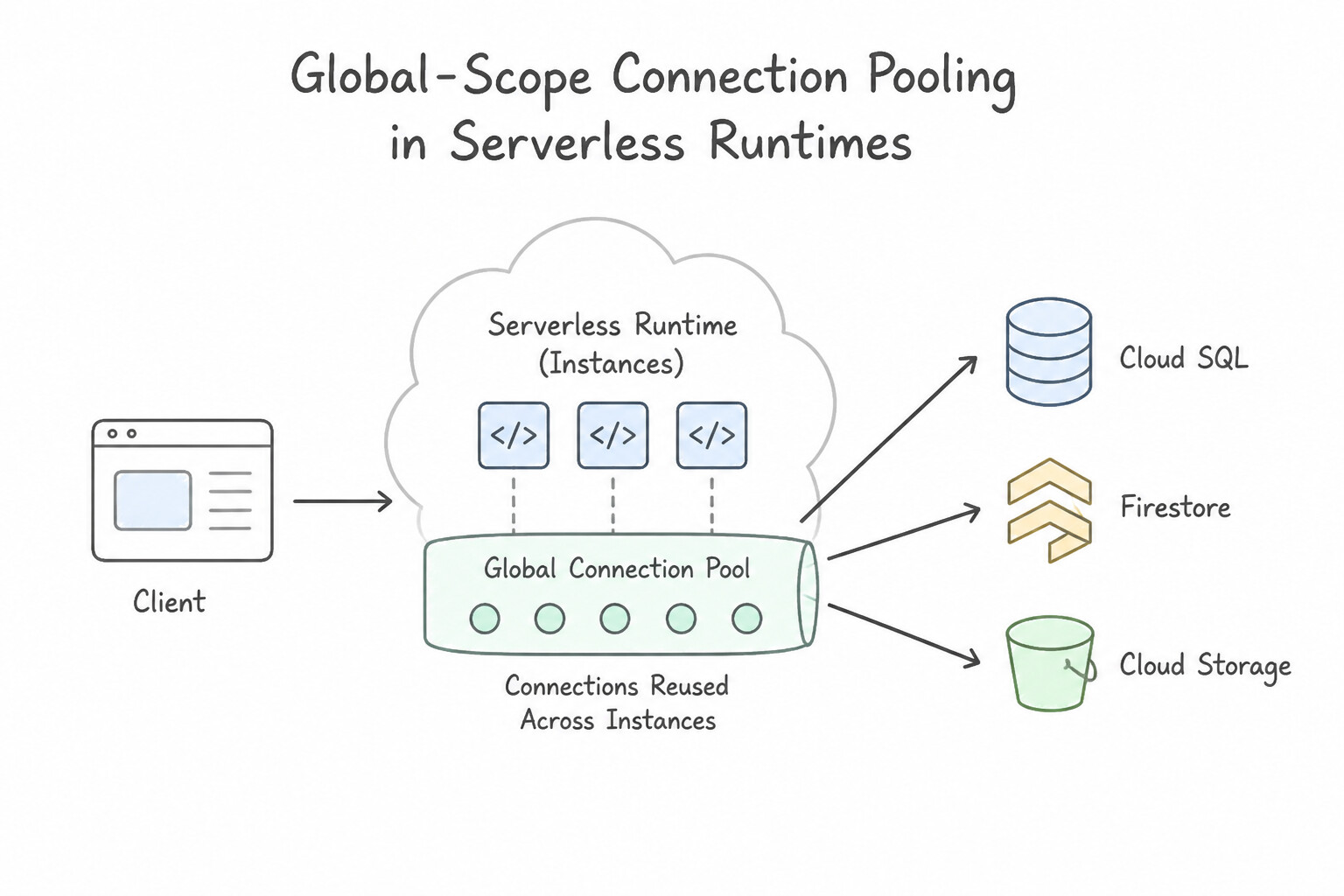
- Global-Scope Connection Pooling in Serverless Runtimes (
Cloud Run/Cloud Functions): - Golden Rule: Always initialize database connection pools (
sqlalchemy.create_engine(..., pool_size=5),pg.Pool,HikariCP), Firestore clients, Spanner clients, and Cloud Storage clients in global / module scope (outside the HTTP request or event handler function!). - This allows warm container instances to reuse existing TCP/TLS connections and gRPC channels across thousands of subsequent requests instead of paying a 50–150ms handshake penalty on every call.
- Sizing Connection Pools Against
max_connections: - If your Cloud SQL instance supports
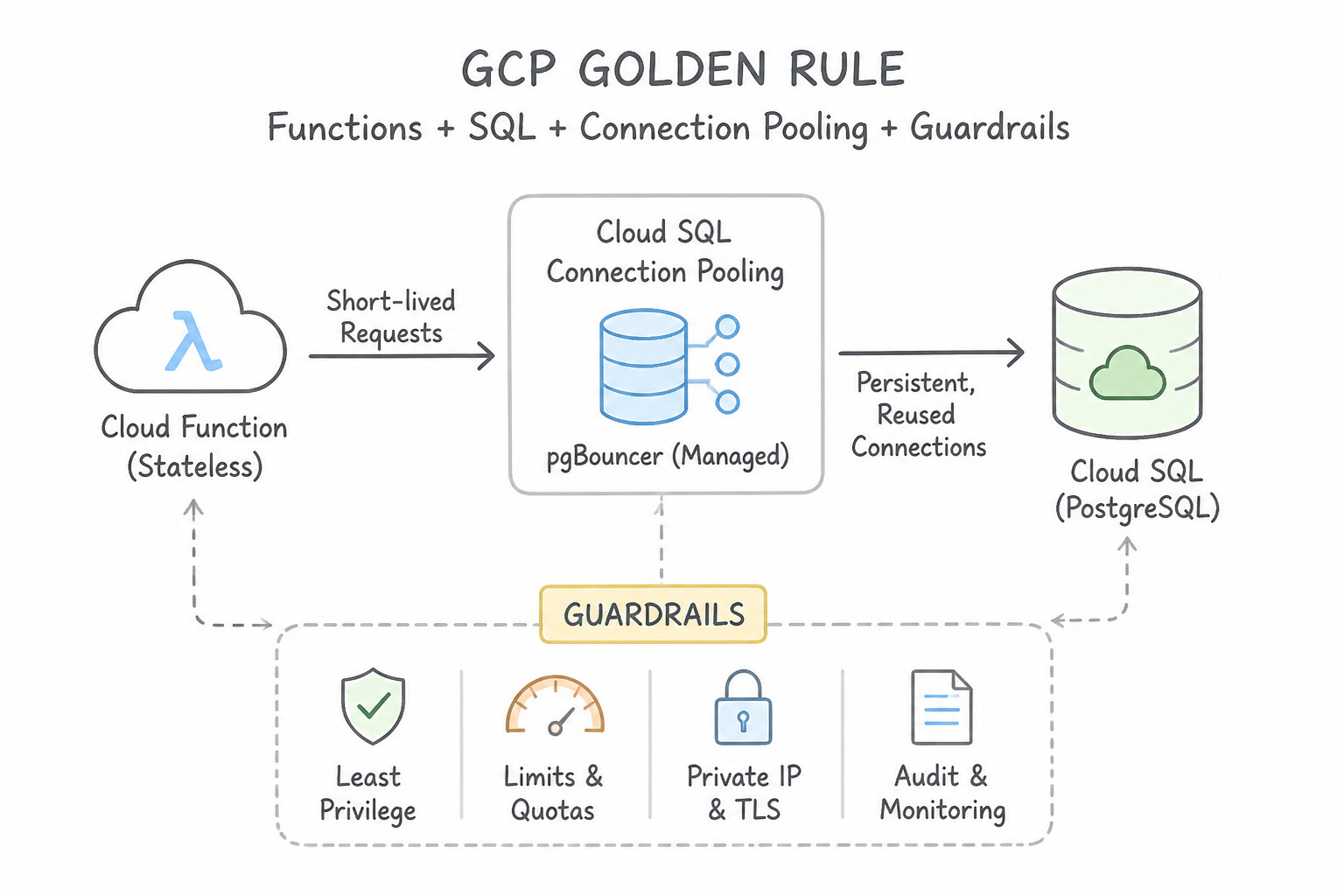
max_connections = 500and your Cloud Run service has--max-instances = 100, each instance's pool must not exceed5connections (100 instances × 5 connections = 500). For extreme fan-out, use PgBouncer or Cloud SQL built-in connection pooling alongside bounded--max-instances. - Connecting Cloud Run to Private IP Cloud SQL / AlloyDB:
- A Cloud SQL instance configured with Private IP only resides inside your VPC. For a Cloud Run service to reach that Private IP, you must configure Direct VPC Egress (or attach a Serverless VPC Access Connector) on the Cloud Run service, and connect either directly over the VPC or via the built-in Cloud SQL Auth Proxy Unix domain socket (
/cloudsql/PROJECT:REGION:INSTANCE).
Key Implementation Patterns
- Optimizing Cloud SQL Connections in Cloud Functions: Use Move the database client initialization to the global scope. Initializing the client in the global scope allows connection reuse across invocations on the same instance. (Avoid alternative: Closing connections per request prevents reuse and increases latency due to repeated handshakes.)
- Direct Client Uploads to Cloud Storage: Use Generate a V4 signed URL on your backend and send it to the client. Signed URLs provide secure, temporary access for direct uploads without exposing credentials. (Avoid alternative: Public write access exposes the bucket to everyone on the internet and is insecure.)
- Secure Cloud SQL Access from GKE: Use Add the Cloud SQL Auth Proxy as a sidecar container in the Kubernetes Pod and connect the application to localhost. The Cloud SQL Auth Proxy sidecar handles secure IAM authentication and SSL encryption, allowing the app to connect via localhost.
Key Takeaways (4.1a)
- Cloud Functions recycle execution environments; use this to your advantage.
- Define heavy initialization logic (like database clients) in the global scope to enable reuse.
- Avoid opening new database connections inside the function handler for every request.
- Connection pooling improves performance and prevents database connection exhaustion.
Consideration 4.1b: Reading and writing data to and from various Google Cloud datastores
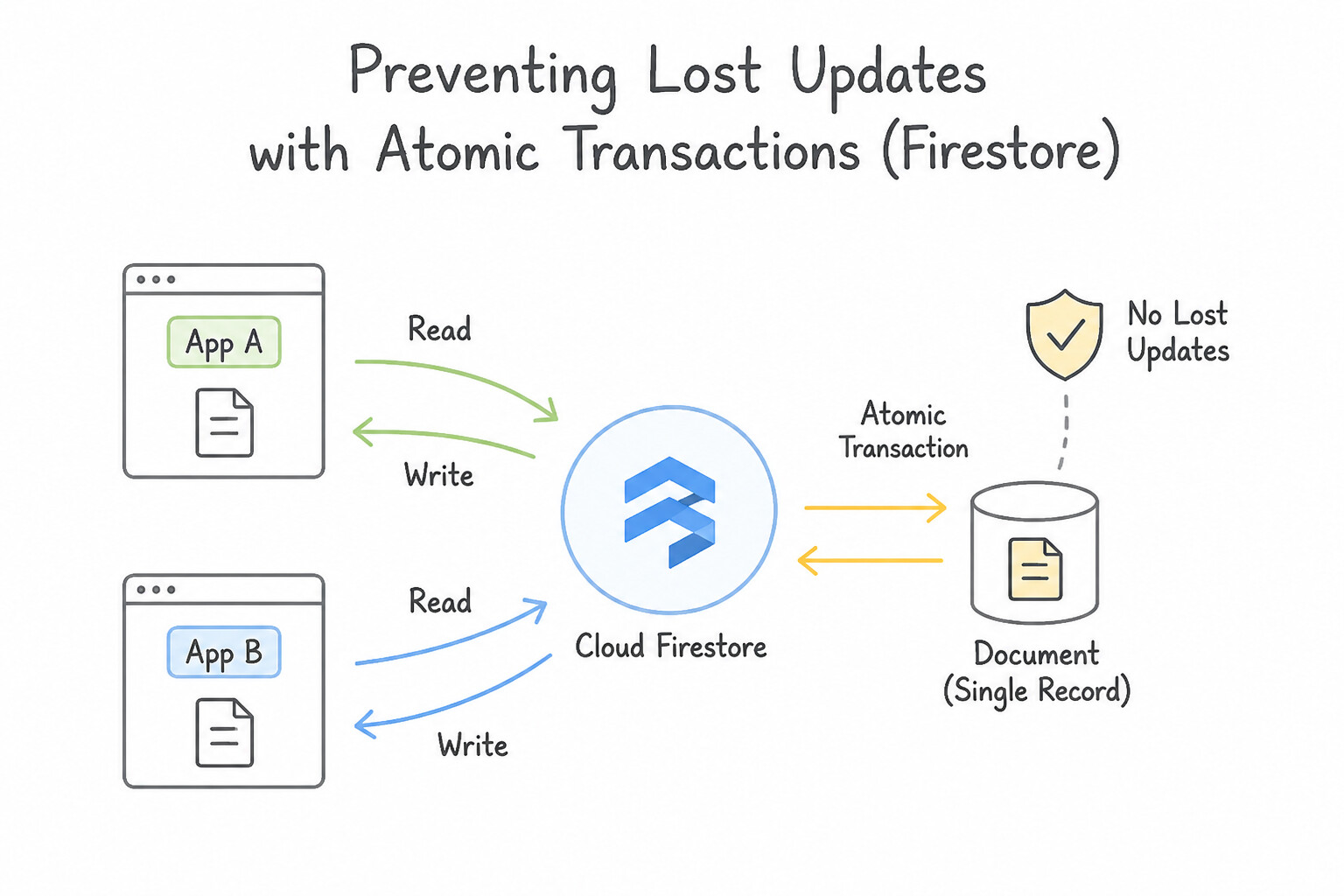
- Preventing Lost Updates with Atomic Transactions (
Firestore&Cloud Spanner): - Whenever application logic reads a value (e.g.,
inventory_countoraccount_balance) and writes back a new value based on that read, never perform a standaloneget()followed byset(). Use a Database Transaction (@firestore.transactional/runTransactionor Spannerrun_in_transaction) or an atomicFieldValue.increment(-1)transform so concurrent modifications automatically retry on conflict without corrupting state. - Cloud Storage Conditional Writes & Resumable Uploads:
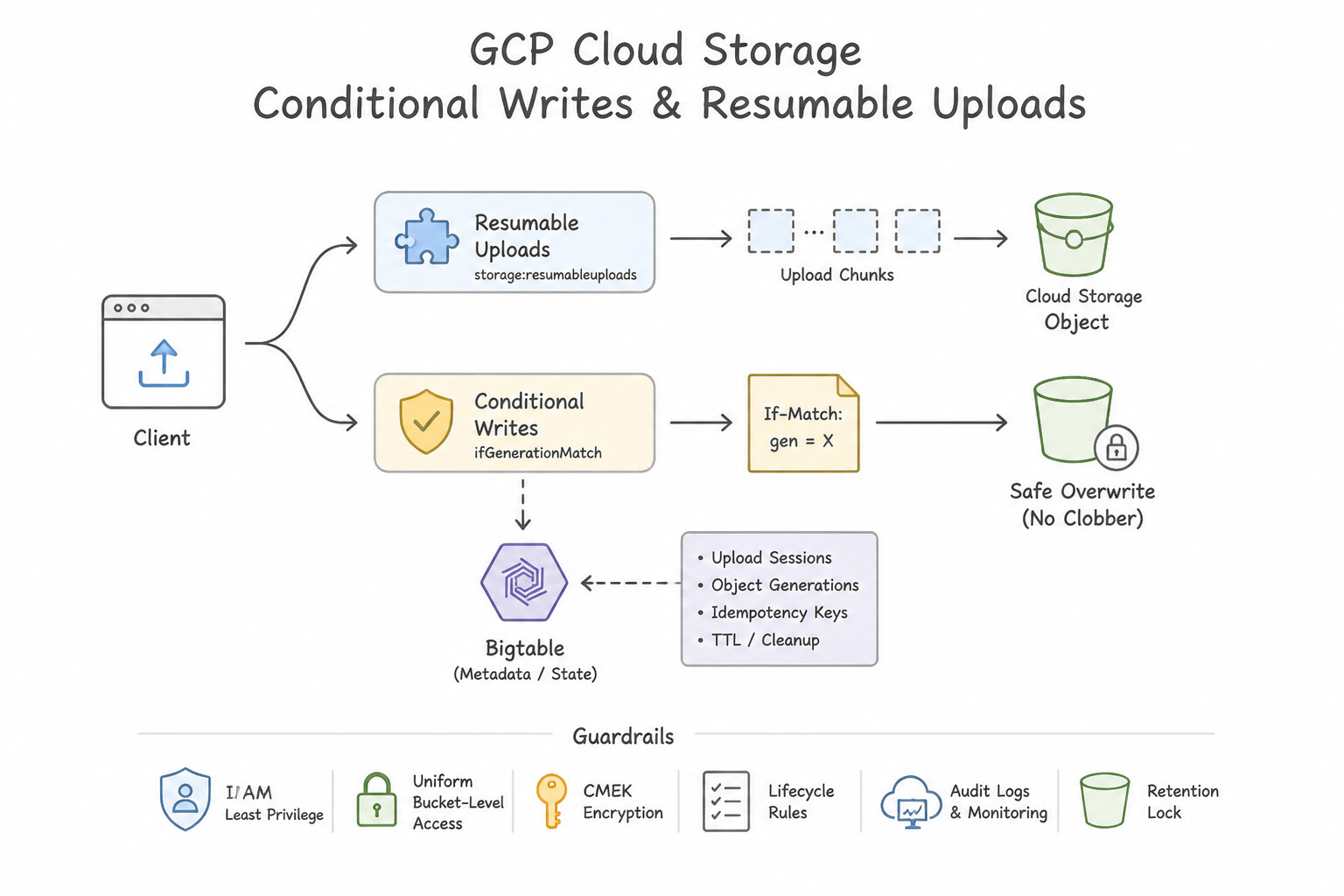
- To prevent two distributed workers from overwriting the same Cloud Storage object concurrently (optimistic concurrency control), pass the
ifGenerationMatchprecondition header (if_generation_match=0ensures the write succeeds only if the object does not yet exist; passing the currentgenerationnumber ensures atomic compare-and-swap). - For uploading large files (>5–10 MB) over unreliable networks, always use Cloud Storage Resumable Uploads (or Parallel Composite Uploads for high-bandwidth multi-chunk uploads) rather than a single-shot
multipartPOST so interrupted transfers resume from the last acknowledged byte chunk. - Batch Writes vs. Transactions in Firestore: Use a
WriteBatch(up to 500 operations) when you need atomic all-or-nothing writes without needing to read documents first; use a Transaction when the writes depend on reading the current state of one or more documents.
Key Implementation Patterns
- Optimizing Large File Uploads to Cloud Storage: Use Use the resumable upload feature. Initiate a session to obtain a session URI and upload the data using this URI. Resumable uploads allow you to resume a transfer after a communication failure by using a session URI to track progress.
- Preventing Hotspots in Cloud Bigtable: Use Prefix the row key with a hash of the device ID. Salting the row key with a hash distributes writes across the cluster, preventing hotspots caused by sequential timestamps. (Avoid alternative: Sequential counters cause the same hotspotting issues as timestamps because all writes target the end of the key range.)
- Ensuring Data Integrity in Firestore: Use Run the read and write operations within a Firestore transaction. Transactions ensure that data read during the operation has not changed before the write occurs, preventing race conditions. (Avoid alternative: Batched writes only group write operations atomically; they do not support reading data to validate conditions before writing.)
Key Takeaways (4.1b)
- Use resumable uploads for large files (typically >5MB) or when network reliability is low.
- Resumable uploads use a session URI to track state and allow resumption from the last successfully received byte.
- Standard PUT requests are atomic and fail completely if interrupted.
- Parallel uploads are for speed; resumable uploads are for reliability.
Consideration 4.1c: Writing applications that publish and consume data using Pub/Sub
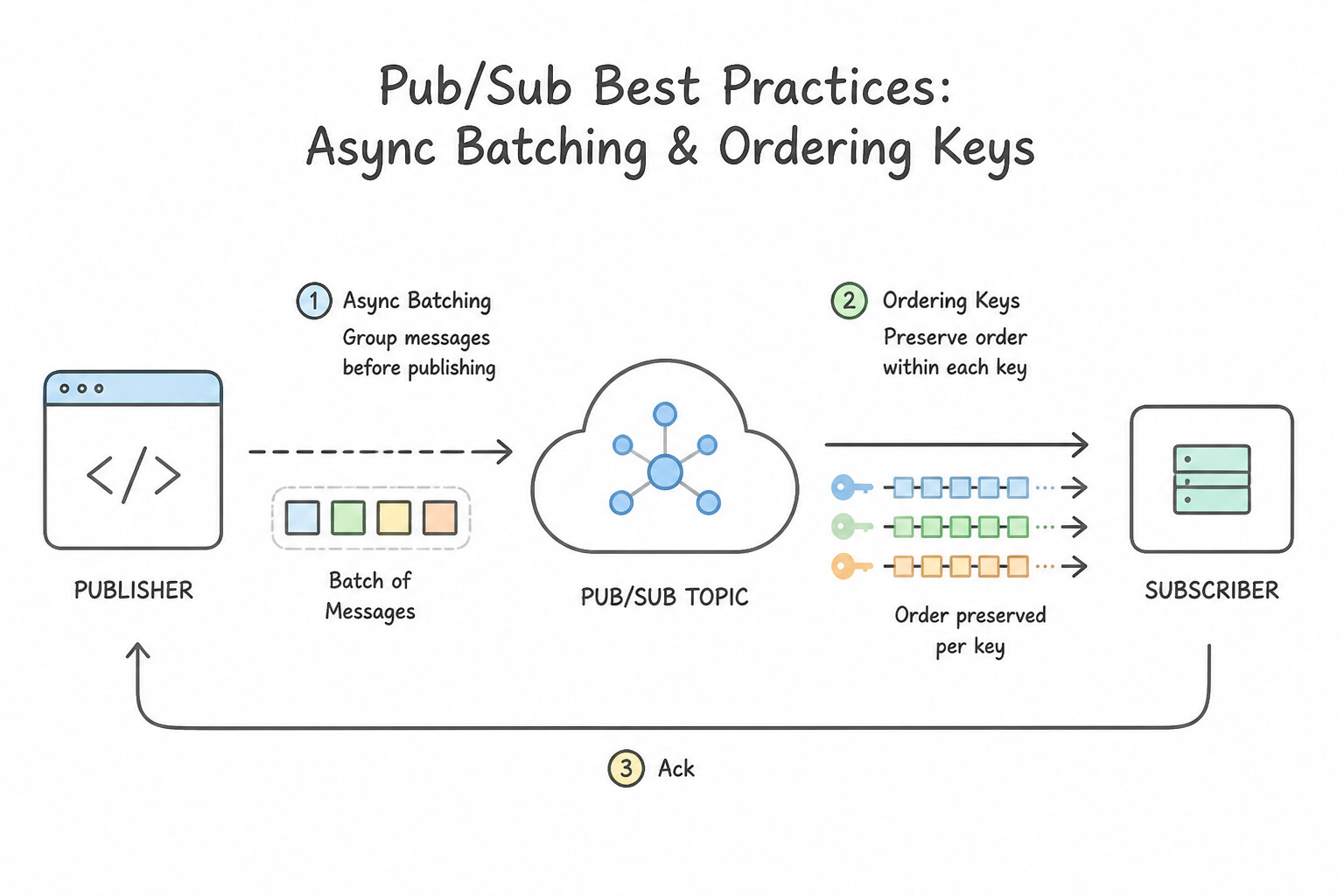
- Publisher Best Practices (Async Batching & Ordering Keys):
- The Pub/Sub Publisher Client Library automatically buffers messages in memory and sends them in asynchronous batches (configurable by
max_messages,max_bytes, andmax_latency, e.g.,10ms) to maximize throughput and reduce per-RPC overhead. Calling.result()synchronously inside aforloop on every single.publish()call destroys batching and slashes throughput by 90%! - When using Ordering Keys, enable
enable_message_ordering=Trueon the publisher client and setenableMessageOrdering: trueon the subscription. Note that if a batch with an ordering key fails to publish, the client library pauses subsequent messages for that key untilresume_publish(ordering_key)is called. - Subscriber Best Practices (
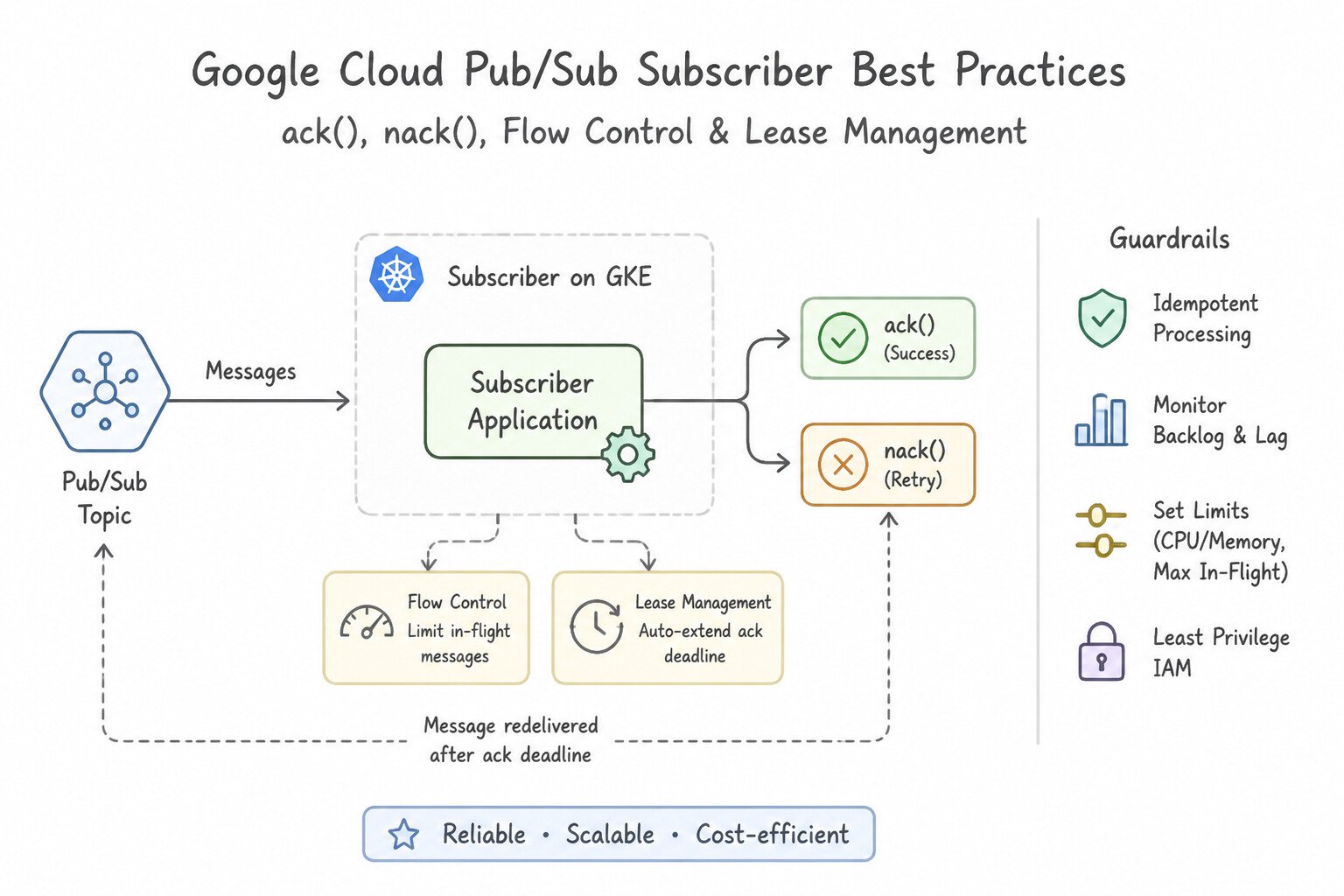
ack(),nack(), Flow Control & Lease Management): - In a Pull / StreamingPull subscriber, once a message is processed and persisted safely, call
message.ack(). If a transient downstream error occurs (e.g., DB timeout), callmessage.nack()—which immediately resets theackDeadlineto0and triggers fast redelivery with backoff rather than waiting for the deadline to expire. - To prevent a subscriber pod from running out of RAM (
OOMKilled) during a 1M-message backlog spike, configure Subscriber Flow Control (FlowControl(max_messages=100, max_bytes=10 * 1024 * 1024)) in the client library so the client pauses pulling new messages while 100 messages are still in flight.
Key Implementation Patterns
- Choosing Subscription Type for High Throughput: Use Configure a Pull subscription and process messages using the Pub/Sub client library. Pull subscriptions allow the subscriber to control the rate of message consumption, making them ideal for high-volume, variable workloads.
- Handling Malformed Data Structures: Use Define a schema in Pub/Sub and associate it with the topic. Pub/Sub schemas enforce data structure validation at the topic level, rejecting messages that do not conform to the definition. (Avoid alternative: Updating subscriber code handles errors after they occur but does not prevent invalid messages from being published.)
- Enforcing Message Processing Order: Use Enable message ordering on the subscription. Publish messages with an ordering key set to the account ID. Pub/Sub message ordering requires enabling the feature on the subscription and using an ordering key (like account ID) during publication.
Key Takeaways (4.1c)
- Pull subscriptions give the subscriber control over message flow rate, making them ideal for high-throughput workers.
- Push subscriptions are event-driven and best for serverless or webhook-based applications.
- Client libraries for Pub/Sub handle complex logic like flow control and batching automatically in Pull scenarios.
- Pub/Sub Schemas enforce data integrity by validating message payloads before they are persisted.
Quick Decision Cheat Sheet (Subsection 4.1)
If the Scenario Requires... | Choose This Google Cloud Pattern | Avoid This Common Mistake |
|---|---|---|
"Reuse database connections across invocations in Cloud Functions or Cloud Run" | Declare the connection pool variable in global/module scope | Storing connection objects in Cloud Storage or Memorystore |
"Ensure a Cloud Storage upload only succeeds if the file does not already exist" | Set the precondition ifGenerationMatch: 0 | Calling blob.exists() before blob.upload() (race condition window between the two calls!) |
"Upload a 10 GB backup file from a client over an unstable cellular network to Cloud Storage" | Use a Resumable Upload session URI | Single-request simple or multipart upload (restarts from byte 0 on any TCP drop) |
"Pub/Sub subscriber needs to immediately return a transiently failed message to the queue for retry" | Call message.nack() (or return HTTP 500/429 on a Push endpoint) | Letting the thread sleep until ackDeadlineSeconds expires |
Further Reading (Subsection 4.1)
- Best practices for Cloud Run networking — This section of the documentation explicitly explains that global variables are preserved between invocations and should be used to store database connections.
- Signed URLs — Overview of Signed URLs, including use cases for uploading files directly from clients and how to generate them securely.
- Connect from Google Kubernetes Engine — Official documentation describing how to add the Cloud SQL Auth Proxy to your GKE deployment using the sidecar pattern.
- Resumable uploads — Official documentation explaining when to use resumable uploads and how the protocol works using the JSON API.
- Schema design best practices — Refer to the section on 'Row keys' and 'Designing your row key' to understand how to avoid hotspots.
- Transactions and Batched Writes — This page explains the difference between transactions and batched writes, and provides code examples for implementing atomic operations in Firestore.
Subsection 4.2: Consuming Google Cloud APIs
The Big Picture
Modern applications constantly invoke Google Cloud APIs—from Cloud Storage, BigQuery, and Pub/Sub to Vertex AI (Gemini APIs). Developers who treat cloud APIs like local in-memory function calls run into five classic failure modes tested heavily in Subsection 4.2:
- The Disabled API & Wrong Credential Trap (
4.2a,4.2h): Deploying an application to a fresh staging project where it immediately fails with403 SERVICE_DISABLEDbecause the target API (secretmanager.googleapis.comoraiplatform.googleapis.com) was not enabled via Service Usage (gcloud services enable), or failing with403 PERMISSION_DENIEDbecause the developer confused the project where the API is enabled with the Service Account's IAM permissions. - Hand-Rolling Raw REST Calls Instead of Cloud Client Libraries (4.2b): Writing custom
urllib/axiosHTTP wrappers that manually refresh OAuth tokens, construct JSON envelopes, and parse errors instead of using Google Cloud Client Libraries—which natively use gRPC under the hood for high-throughput services (Spanner, Bigtable, Pub/Sub, Firestore), pool connections, and handle Application Default Credentials (ADC) automatically. - Chatty N+1 Calls & Over-Fetching Megabytes of Unused JSON (
4.2c,4.2d,4.2e): Making 1,000 sequential individual API requests instead of Batching, fetching a 5 MB metadata payload when you only needed two fields (nameandstatus) instead of passing a FieldMask (fieldsparameter), or trying to fetch 500,000 records in one call withoutpageTokenpagination. - Synchronized Retry Storms (The Thundering Herd) (
4.2f,4.2g): When a Google Cloud API returns429 Too Many Requests(rate limit / quota exceeded) or503 Service Unavailable, retrying immediately in awhileloop—or retrying at fixed 2-second intervals across 500 synchronized worker instances—amplifies the outage instead of resolving it with Truncated Exponential Backoff with Randomized Jitter and Caching.
Consideration 4.2a: Enabling Google Cloud services
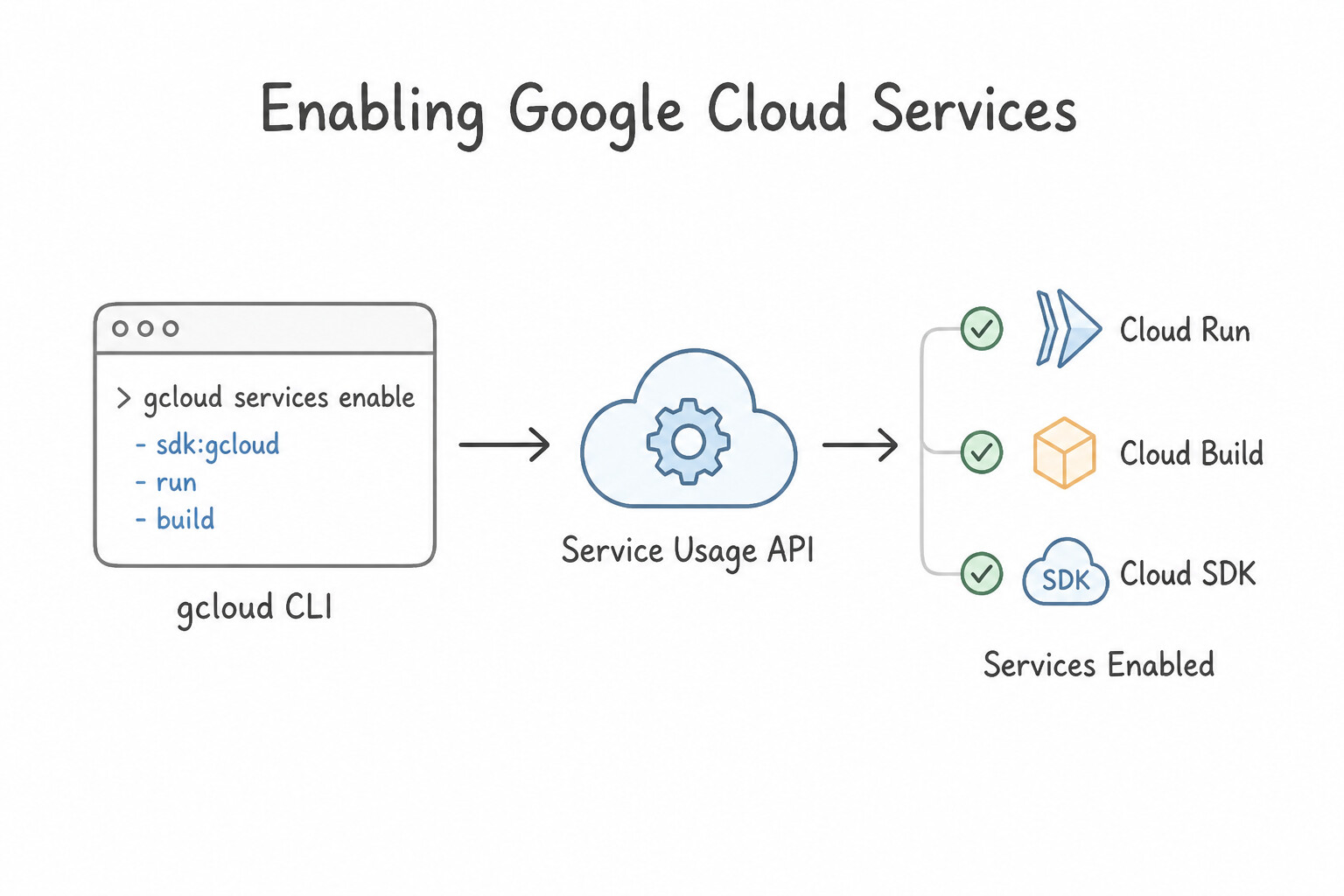
- Service Usage API &
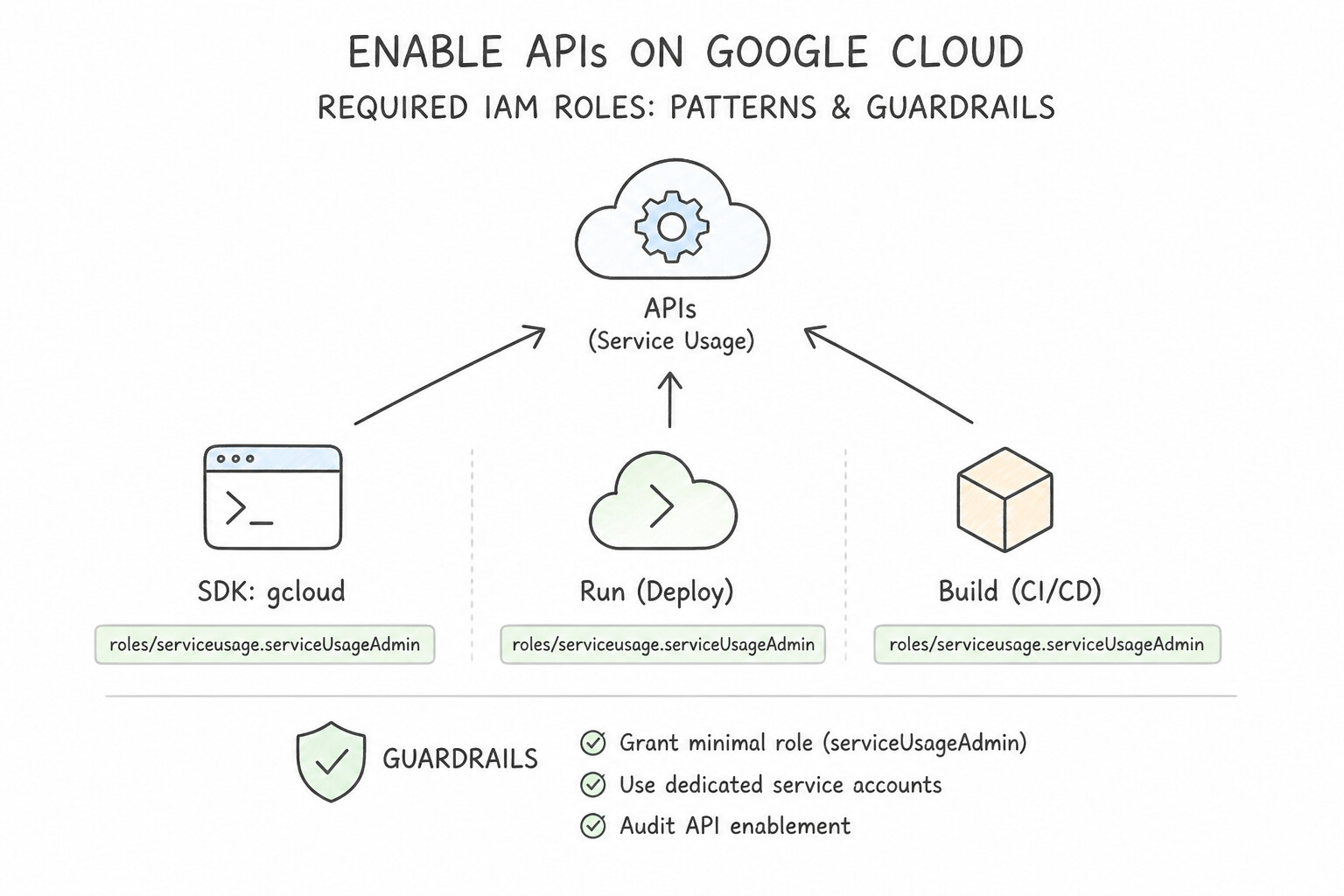
gcloud services enable: Before any code or service account can invoke a Google Cloud API in a project, that API must be enabled in the project (gcloud services enable run.googleapis.com secretmanager.googleapis.com aiplatform.googleapis.com). Attempting to call a disabled API returnsHTTP 403: Access Not Configured / SERVICE_DISABLED—even if the caller hasroles/owner! - Required IAM Role to Enable APIs: Automating API enablement in Terraform or Cloud Build requires the pipeline service account to hold
roles/serviceusage.serviceUsageAdmin(permissionserviceusage.services.enable). - Cross-Project API Quota Billing (
X-Goog-User-Project): When a service account in Project A calls a Google Cloud API against resources in Project B, API quota and billing can be attributed to a specific consumer project using thex-goog-user-projectheader (requiresroles/serviceusage.serviceUsageConsumeron the target quota project).
Key Implementation Patterns
- Automating Service Enablement via CLI: Use Add the command
gcloud services enable run.googleapis.com cloudbuild.googleapis.comto your script. Thegcloud services enablecommand is the standard CLI method to activate specific Google Cloud APIs. (Avoid alternative:gcloud appcommands are for App Engine, and the correct command group for enabling APIs isgcloud services.) - Programmatic API Enablement: Use Call the Service Usage API
services.enablemethod for the BigQuery service. The Service Usage API is the dedicated interface for programmatically enabling and disabling Google Cloud services. (Avoid alternative: The Service Management API is for creating services, not for enabling existing Google Cloud services on a project.)
Key Takeaways (4.2a)
- Most Google Cloud APIs are disabled by default in new projects and must be enabled before use.
- The
gcloud services enablecommand is used to activate APIs programmatically.- Project creation and API enablement are distinct steps in automation scripts.
- Google Cloud services must be enabled explicitly in a project before use.
Consideration 4.2b: Making API calls using supported options (e.g., Cloud Client Libraries, REST API, gRPC, API Explorer)
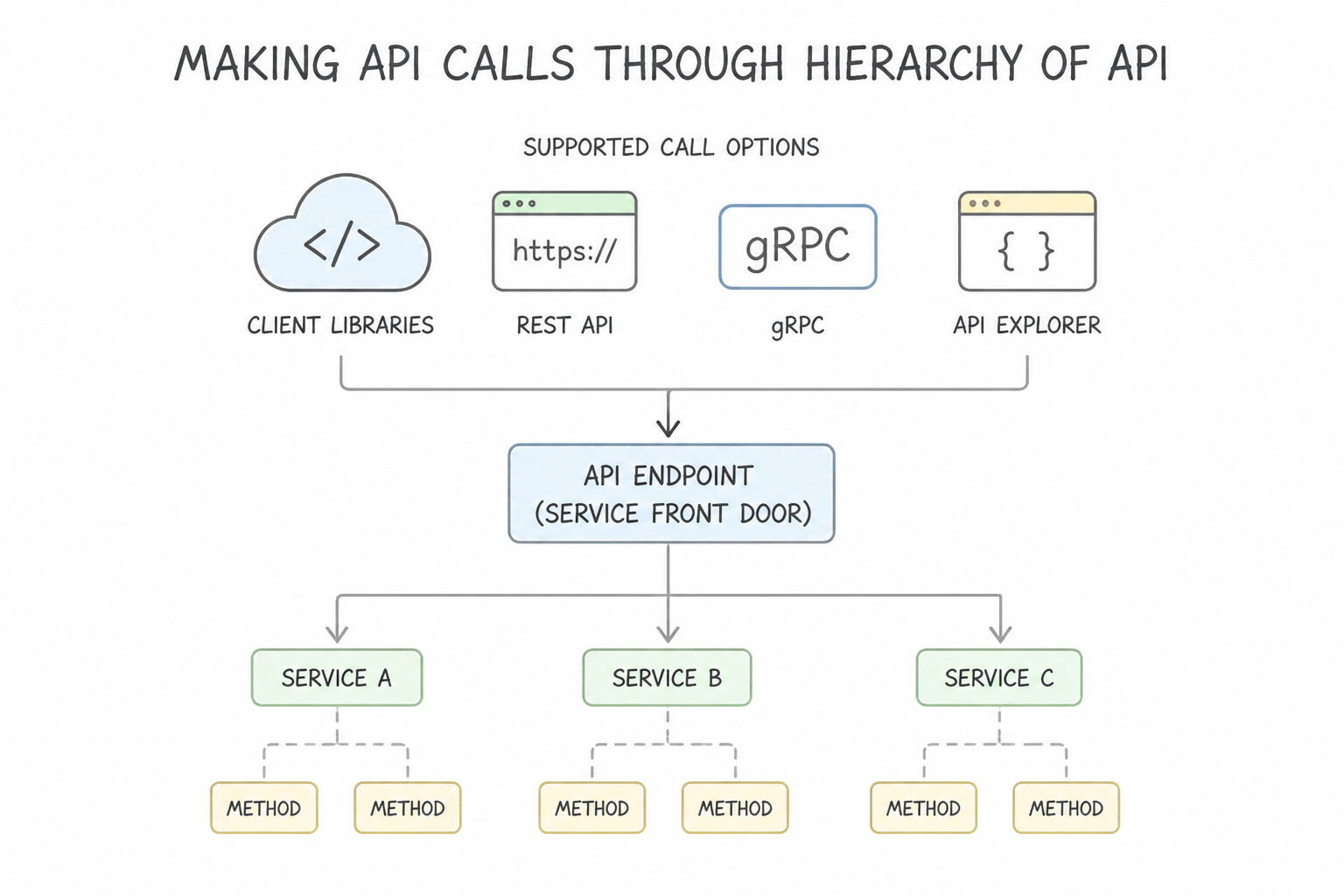
- Hierarchy of API Invocation Options:
- Google Cloud Client Libraries (Always Recommended First): Modern, idiomatic libraries (
google-cloud-storage,@google-cloud/pubsub,cloud.google.com/go/...,google-genai) built specifically for each service. They automatically use gRPC for high-performance APIs, manage connection/session pools, implement automatic ADC authentication, and handle built-in retries and pagination iterators. - Google APIs Client Libraries (Discovery-based): Older auto-generated REST libraries used only for legacy or administrative APIs (like Google Workspace/Admin SDK) that do not have a modern Cloud Client Library.
- Direct gRPC or REST/HTTP: Use raw REST only when running in constrained environments (like edge workers or bash
curlscripts) where installing a client library is impractical. - Google APIs Explorer: Interactive browser widget embedded directly inside official Google Cloud documentation pages—ideal for testing API parameters, inspecting live request/response JSON schemas, and verifying permissions interactively without writing code.
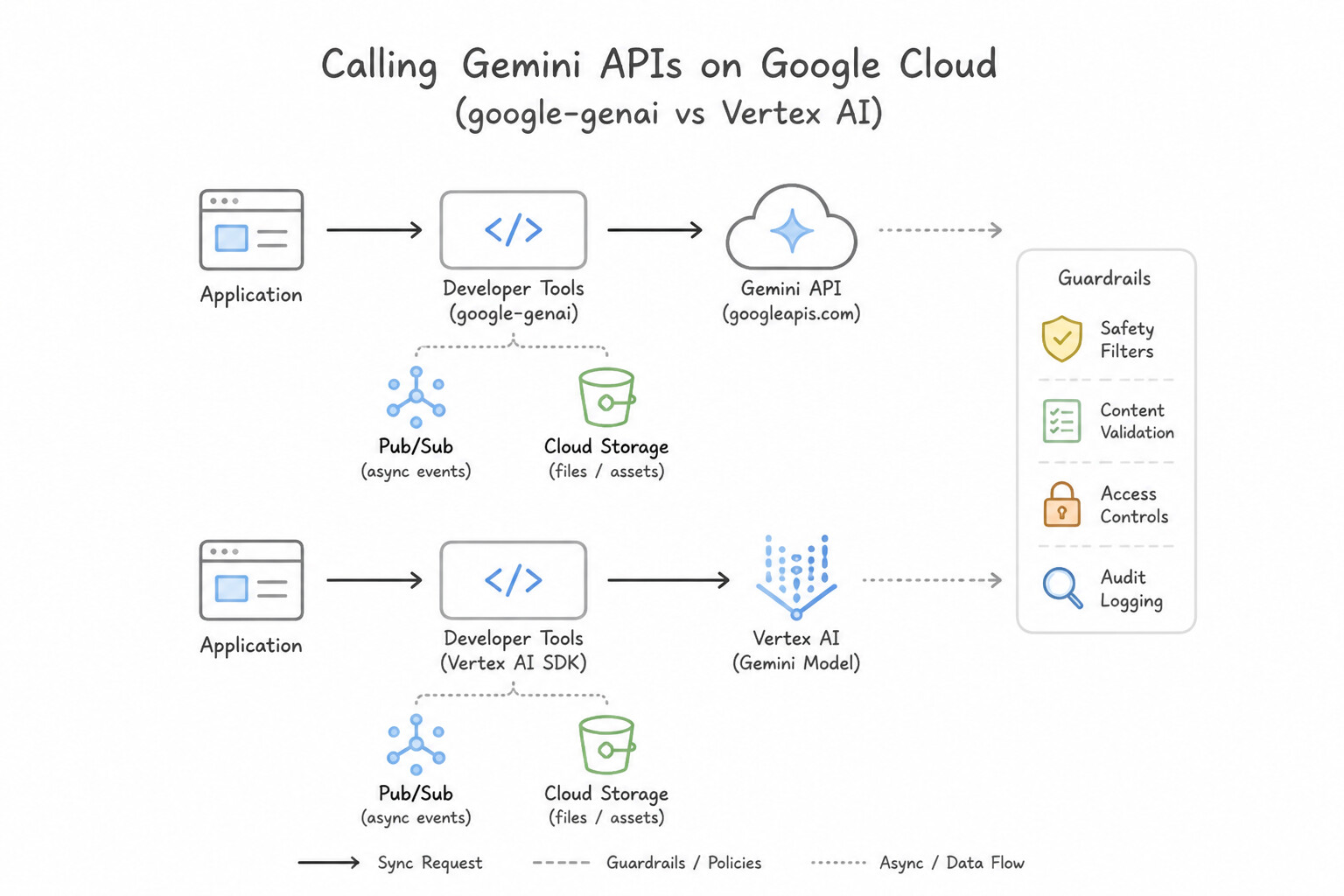
- Calling Generative AI / Gemini APIs (
google-genai/ Vertex AI): Use the unified Google GenAI SDK configured for Vertex AI (vertexai=True), utilizing Structured Outputs (response_schema) when downstream code requires deterministic JSON parsing and Streaming (generate_content_stream) to minimize Time-To-First-Token (TTFT) in interactive UIs.
Key Implementation Patterns
- Choosing the Idiomatic Approach: Use Install and use the Google Cloud Client Libraries for Node.js. Google Cloud Client Libraries are the recommended, idiomatic, and most efficient way to interact with Google Cloud services like Pub/Sub and Cloud Storage. (Avoid alternative: Using raw gRPC stubs creates high maintenance overhead and complexity compared to using the pre-built Cloud Client Libraries.)
- High-Performance Low-Latency Requirements: Use Configure the application to use gRPC with Protocol Buffers. GRPC uses binary serialization and HTTP/2 to lower latency and increase throughput, fitting the scenario's requirements perfectly. (Avoid alternative: REST with JSON has higher serialization overhead and larger payload sizes than required for this high-throughput scenario.)
- Interactive API Debugging: Use Use the APIs Explorer feature in the Cloud Build documentation to test the API call. The APIs Explorer allows you to interactively construct and test API calls directly within the browser-based documentation. (Avoid alternative: Using Client Libraries requires writing code and setting up an environment, which violates the constraints of the scenario.)
Key Takeaways (4.2b)
- Always prefer Google Cloud Client Libraries for new development on Google Cloud.
- Cloud Client Libraries provide idiomatic code, automatic authentication via ADC, and built-in performance optimizations.
- Use Google API Client Libraries only as a fallback when a specific Cloud Client Library is unavailable.
- Avoid direct REST or gRPC calls unless you have a specific, advanced requirement that libraries cannot meet.
Consideration 4.2c: Batching requests
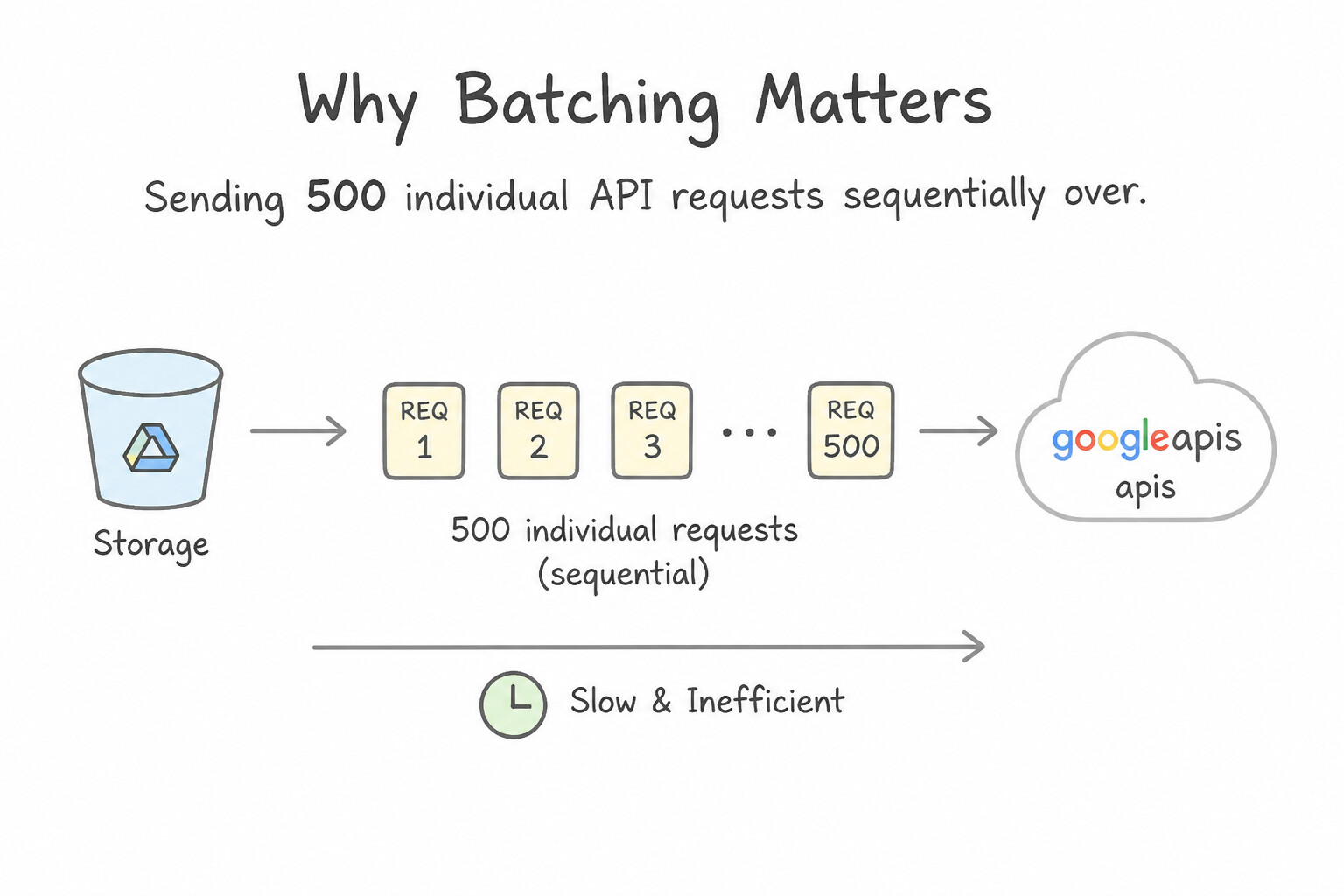
- Why Batching Matters: Sending 500 individual API requests sequentially over the network incurs 500 separate TCP/HTTP round-trip delays and high per-request CPU overhead. Batching consolidates multiple operations into a single network request (or concurrent gRPC stream).
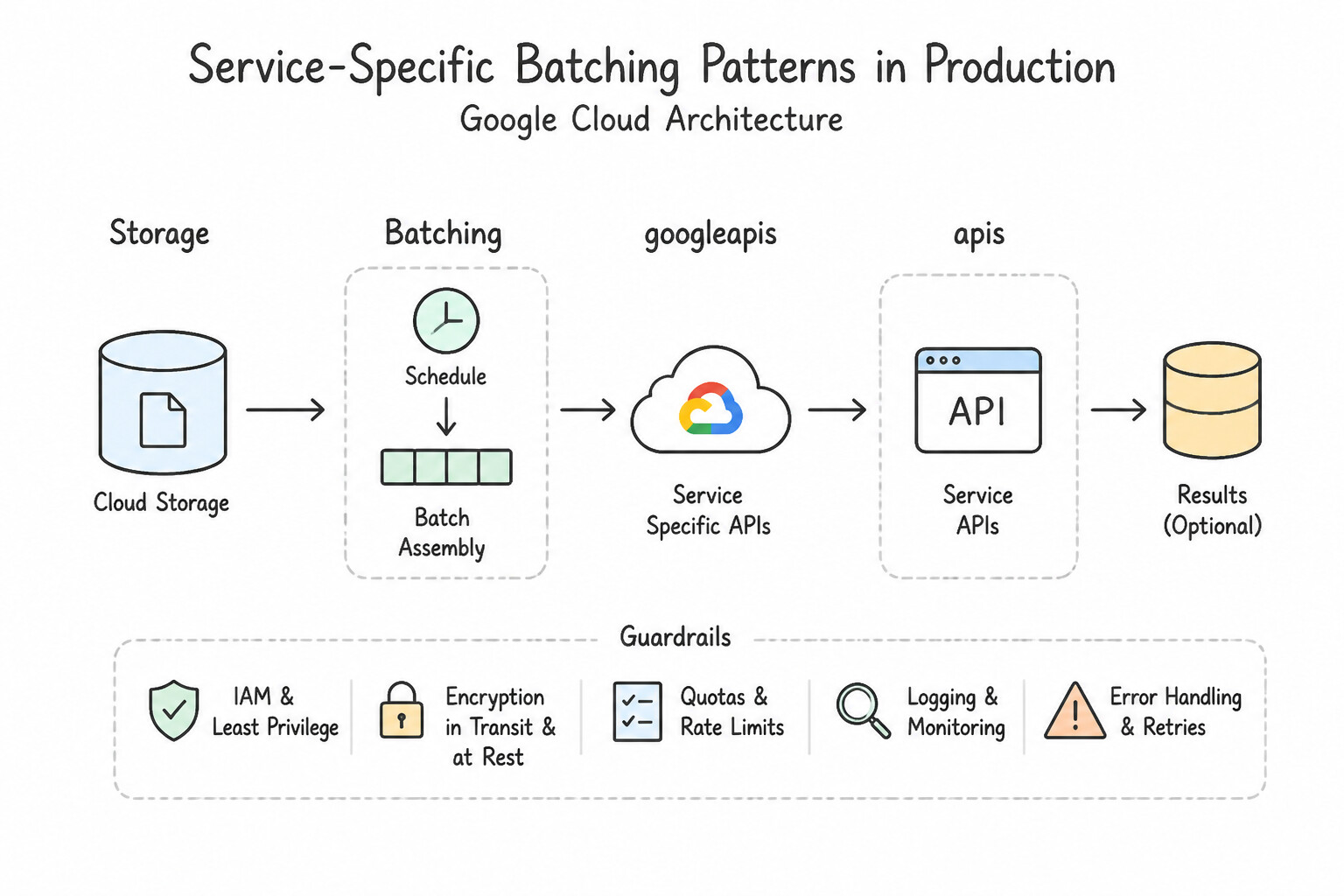
- Service-Specific Batching Patterns in Production:
- Cloud Pub/Sub: Configure publisher
BatchSettings(max_messages=500, max_bytes=1024*1024, max_latency=0.05)so the client library automatically bundles messages before sending a singlePublishRPC. - Cloud Firestore / Bigtable / Spanner: Use
db.get_all([ref1, ref2, ...])orWriteBatchin Firestore,mutate_rowsin Bigtable, andbatch.insert_or_updatein Spanner instead of single-row calls inside aforloop. - Cloud Storage: Use
batchcontext managers (with storage_client.batch(): ...) when updating metadata or deleting hundreds of objects at once—and remember to handle partial failures where item #42 in a batch fails while the other 99 succeed!
Key Implementation Patterns
- Handling Partial Failures in Batch Responses: Use Parse the multipart/mixed response body to inspect the status of each individual part. Batch responses encapsulate individual request statuses within a multipart body that must be parsed. (Avoid alternative: The main response code only reflects the transmission status of the batch, not the individual requests.)
- Batch Request Limits and Quotas: Use Split the updates into multiple batch requests, with each request containing a maximum of 1,000 calls. Google APIs generally limit a single batch request to 1,000 individual calls. (Avoid alternative: Quotas manage rate limits and volume over time, not the maximum number of items allowed in a single batch file.)
- Reducing HTTP Overhead for High-Volume Operations: Use Update the application to bundle multiple API calls into a single batch request. Batching reduces network overhead and round-trip latency by grouping multiple operations into a single HTTP request. (Avoid alternative: Increasing timeouts prevents errors but does not improve the speed or throughput required to meet the time window.)
Key Takeaways (4.2c)
- Batching groups multiple API calls into one HTTP request to reduce network round trips.
- A batch response typically has an HTTP 200 status code if the transmission succeeded, even if individual requests failed.
- The response body is
multipart/mixed; applications must parse this to check the status of each individual operation.- Batch operations in Google Cloud APIs are generally not atomic; success and failure are tracked per request.
Consideration 4.2d: Restricting return data
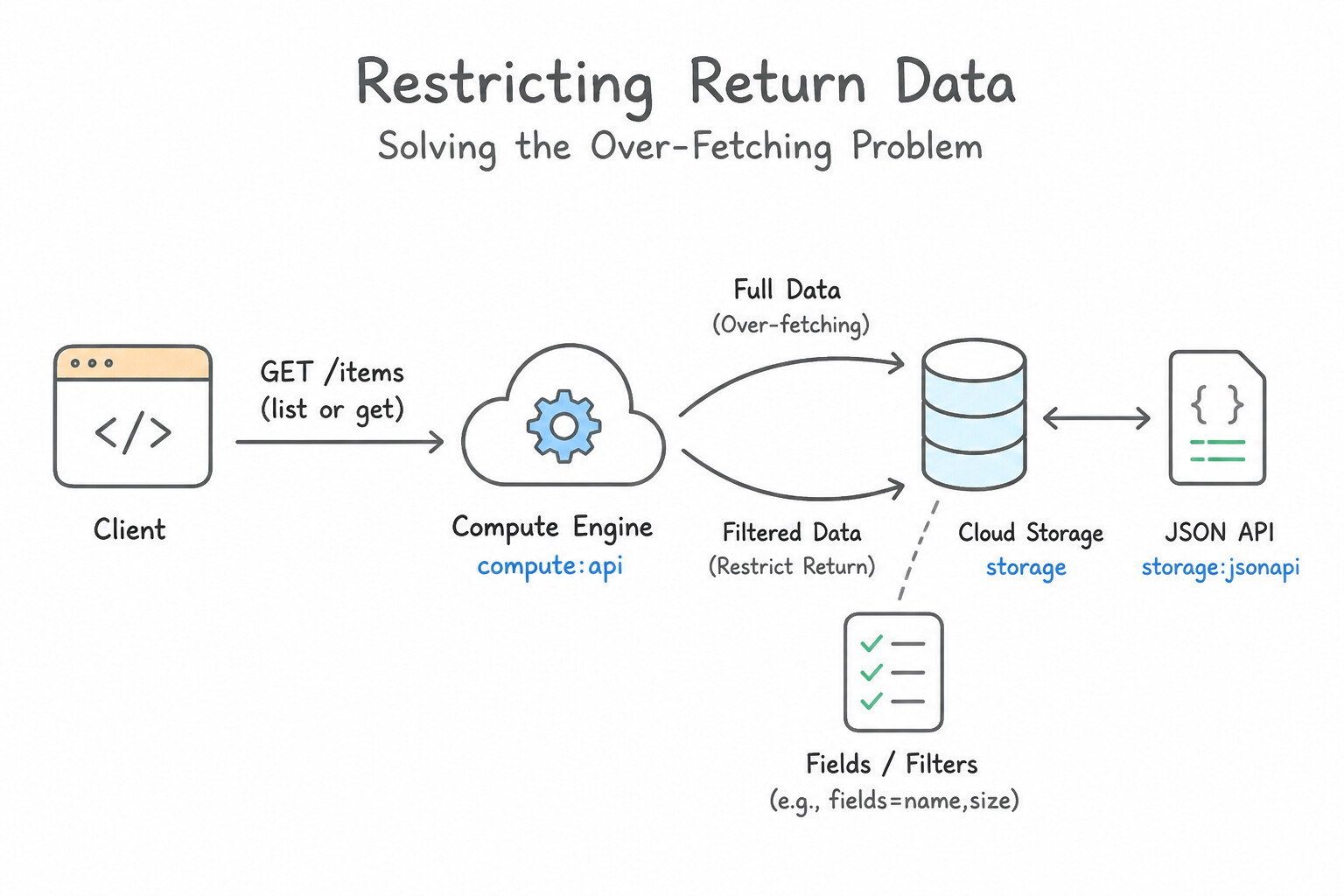
- The Over-Fetching Problem: Calling a
listorgetmethod on a Google Cloud API (such as listing Compute Engine instances, Cloud Storage objects, or Google Places/Maps details) returns the complete resource representation by default—often dozens of nested fields totaling hundreds of kilobytes per item. - Partial Responses via
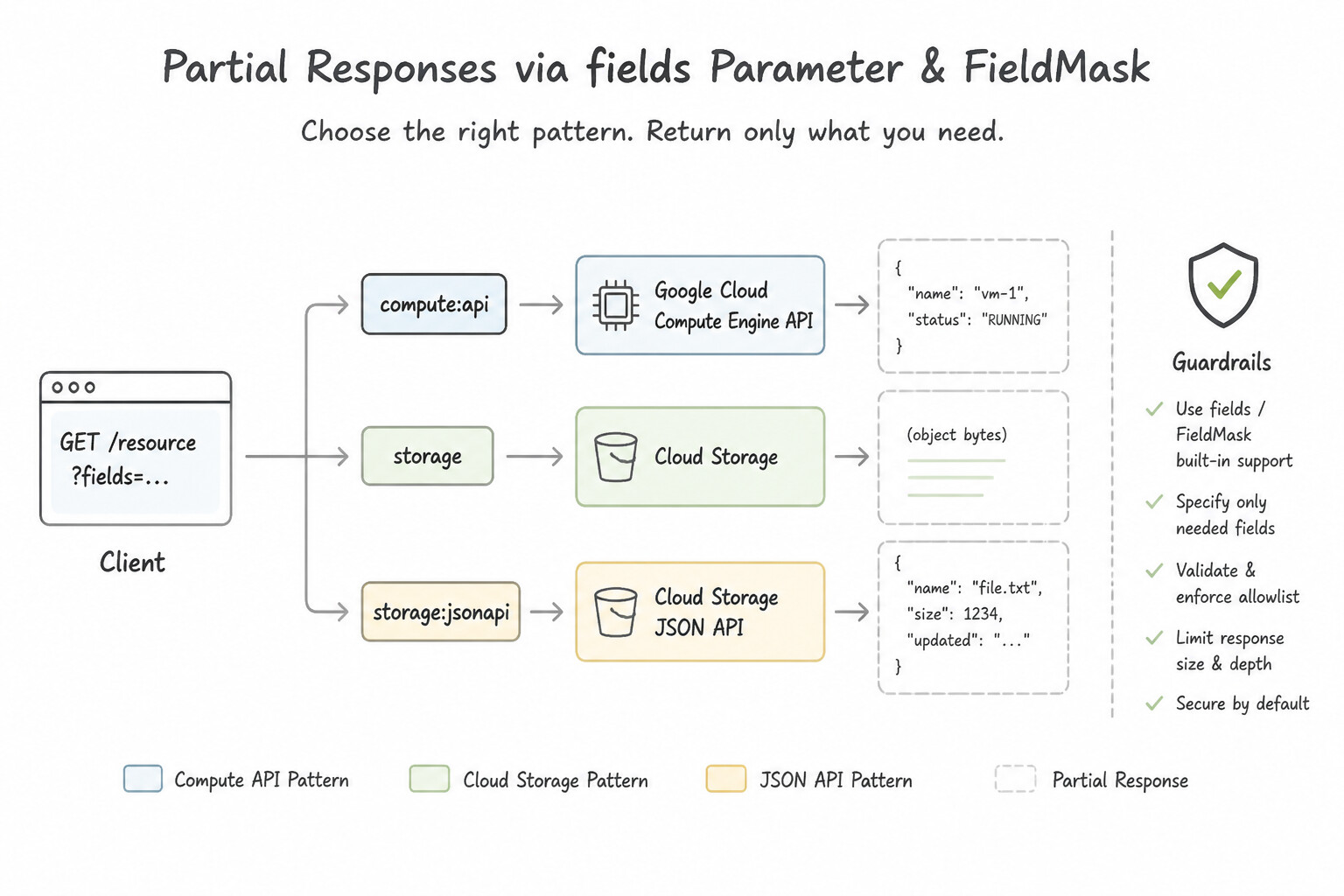
fieldsParameter /FieldMask: - In REST APIs: Pass the
fieldsquery parameter (orX-Goog-FieldMaskHTTP header) specifying only the exact fields your application needs—for example:fields=items(name,size,updated),nextPageToken. - In gRPC APIs: Populate a
google.protobuf.FieldMask(read_mask) in the request protobuf message. - Three Benefits of Restricting Return Data: (1) Drastically reduces network bandwidth and JSON deserialization CPU/memory on the client, (2) lowers API latency, and (3) on billed-by-field APIs (like Google Maps/Places), directly reduces per-request API billing tier costs.
Key Implementation Patterns
- Optimizing Mobile Bandwidth via Partial Response: Use Add the "fields" query parameter to the request with the value "items(name,status)". The
fieldsparameter is used to request a partial response containing only specific fields. (Avoid alternative: Thefilterparameter selects which resources to return, not which data fields within those resources.) - Nested Field Selection Syntax: Use Set the fields parameter to items(name,metadata(department)). The fields parameter uses parentheses to denote nesting. You must wrap properties in items() for list operations and use nested parentheses for sub-objects like metadata. (Avoid alternative: Slashes (/) are not valid syntax for nesting in the fields parameter; parentheses must be used instead.)
Key Takeaways (4.2d)
- Use the
fieldsquery parameter to request a partial response and reduce payload size.- Use the
filterquery parameter to restrict which resources are returned based on criteria.- Partial responses improve latency and reduce bandwidth usage, especially for mobile applications.
- Use the
fieldsparameter to improve performance by requesting only necessary data (partial response).
Consideration 4.2e: Paginating results
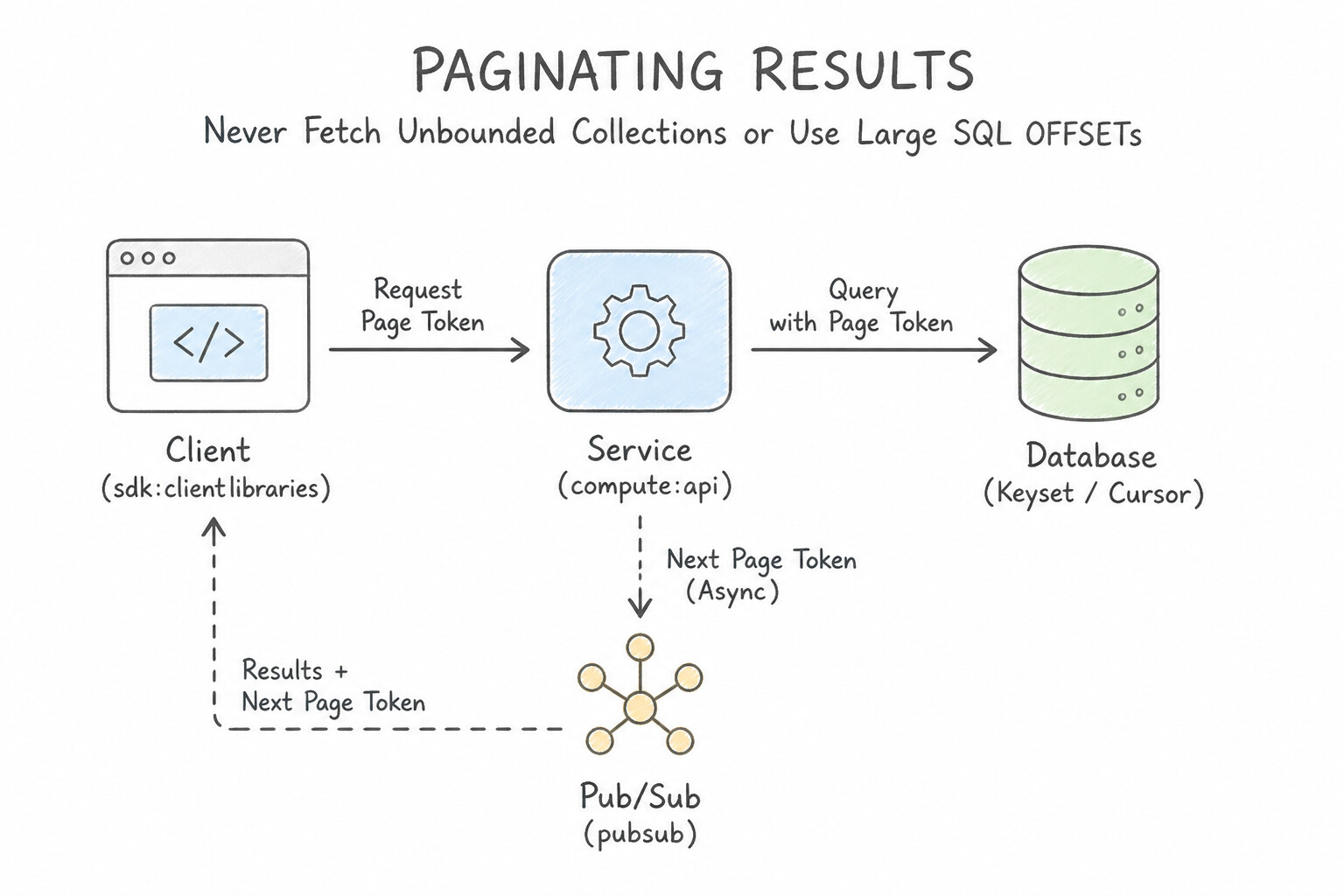
- Never Fetch Unbounded Collections or Use Large SQL
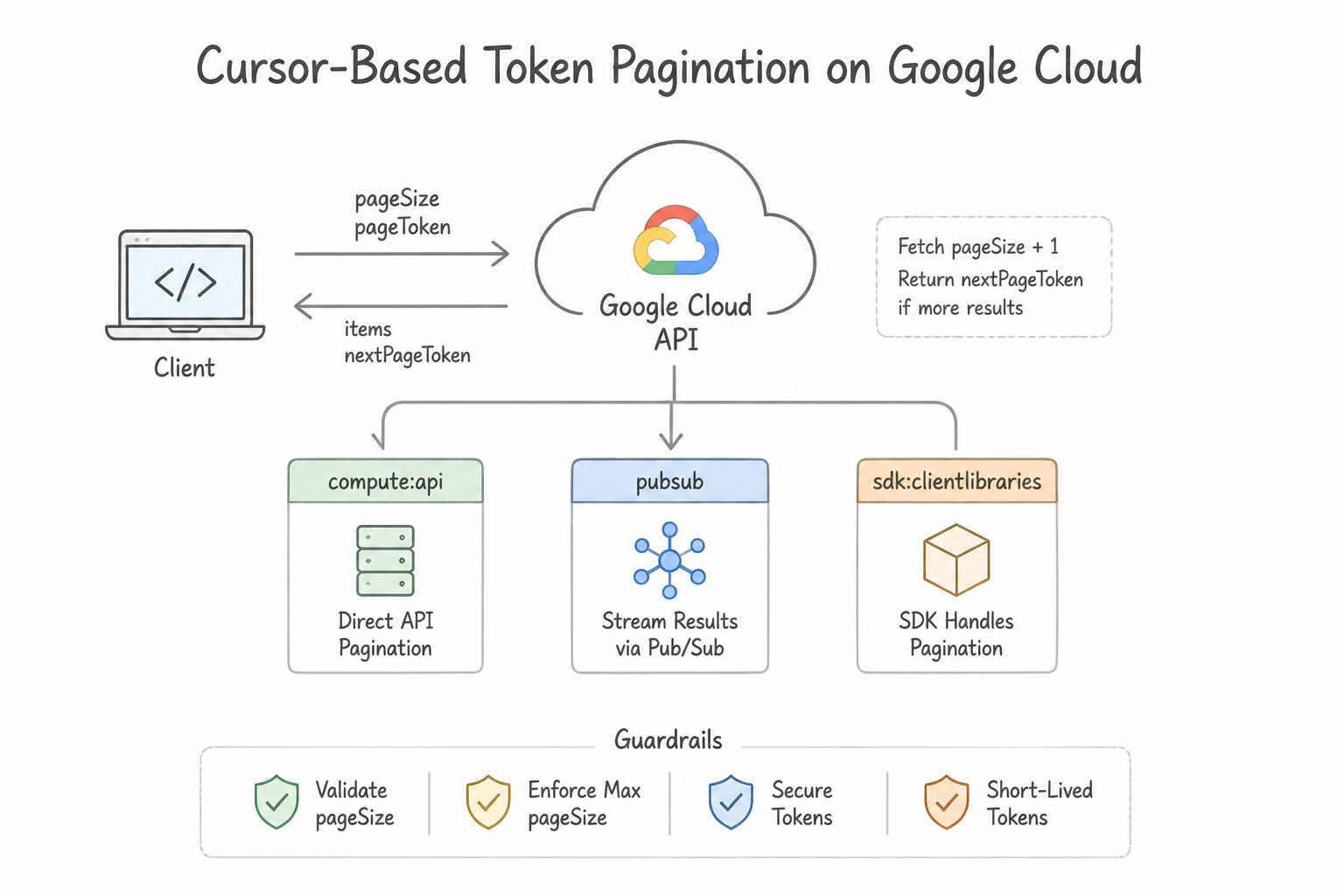
OFFSETs: Attempting to retrieve 100,000 Cloud Storage objects, Logging entries, or database rows in a single unpaginated response will either hit API response size limits, time out, or trigger anOOMKilledcrash in your container. Equally important, usingLIMIT 100 OFFSET 500000in a database forces the engine to scan and discard 500,000 rows on every page! - Cursor-Based Token Pagination (
pageSize+pageToken/nextPageToken): - Set
pageSize(ormaxResults) to a reasonable batch size (e.g.,100to1000). - Inspect the response for
nextPageToken. - Continue looping (
while next_page_token:) passingpageToken=next_page_tokenin the next request untilnextPageTokenis empty or null. - Important: Whenever you combine pagination with partial response Field Masks (4.2d), you must include
nextPageTokeninside yourfieldsmask (fields=items(id,name),nextPageToken), or the API will stripnextPageTokenfrom the response and your pagination loop will stop after Page 1!
Key Implementation Patterns
- Basic Page Token Implementation: Use Check the response for a nextPageToken and use it in the next request until the token is empty. The nextPageToken in the response indicates more results exist; pass this token in the next request to retrieve the subsequent page. (Avoid alternative: Setting maxResults higher than the API's hard limit does not bypass pagination; the API will still return a partial page.)
- Client Library Iterators vs. Manual Paging: Use Call the list method and iterate over the result using the
iterateAll()feature to process items across all pages. Google Cloud Client Libraries automatically handle pagination logic when you use the built-in iteration methods likeiterateAll(). - Controlling Response Size: Use Set the "max_results" parameter to 50 in the "list_blobs" method. The "max_results" parameter in the "list_blobs" method restricts the number of objects returned in a single API call. (Avoid alternative: The "timeout" parameter controls the request duration limit, not the quantity of items returned.)
Key Takeaways (4.2e)
- Google Cloud APIs use pagination to handle large result sets efficiently.
- Always check for a
nextPageTokenin the API response of a List operation.- Do not assume a single API call will return all resources in a project.
- Use a loop structure to request subsequent pages until the token is null.
Consideration 4.2f: Caching results
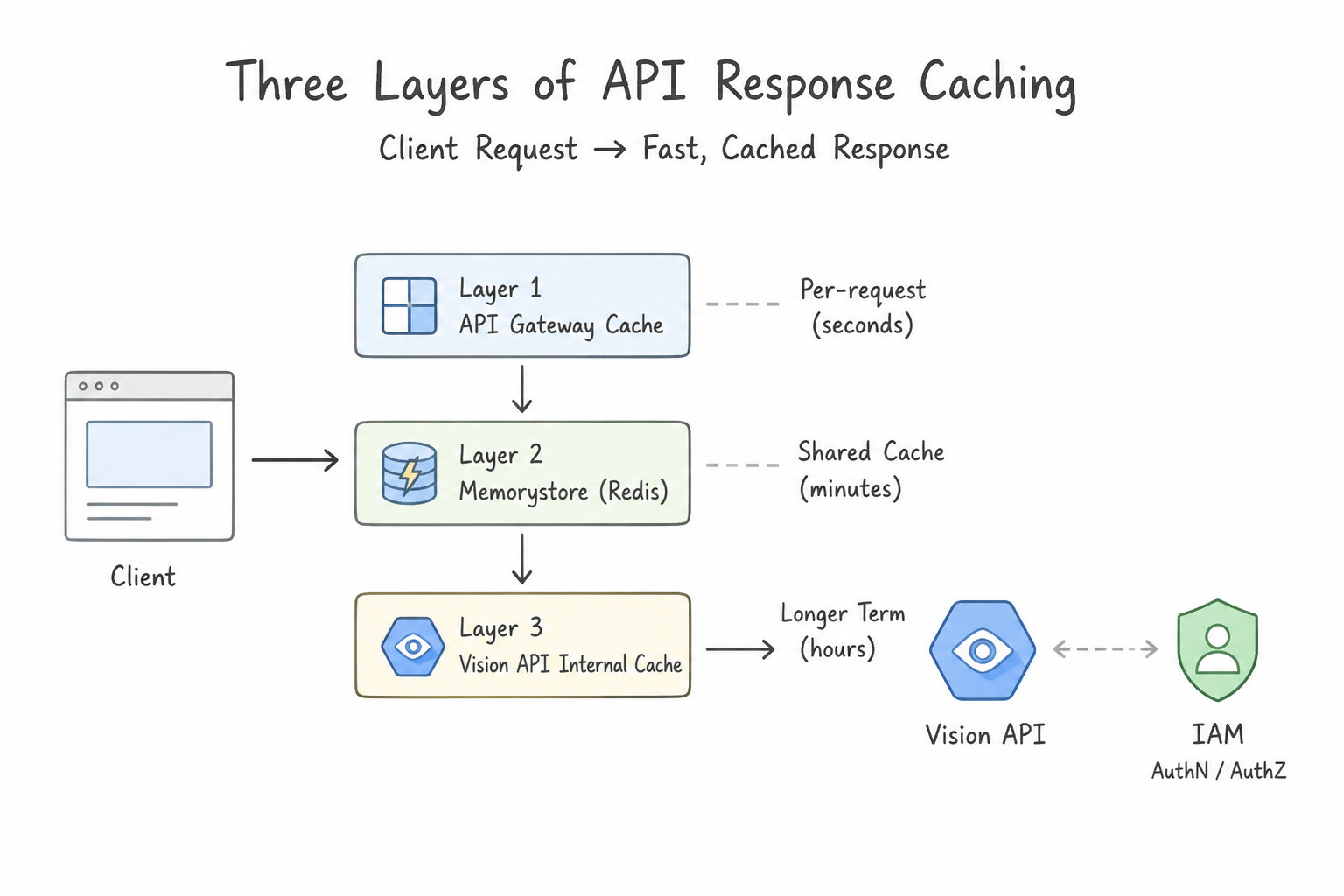
- Three Layers of API Response Caching:
- HTTP Conditional Requests (
ETag&If-None-Match): Google Cloud REST APIs (like Cloud Storage and IAM/Resource Manager) return anETagheader representing the exact version of the resource. Store theETagalongside the cached response and sendIf-None-Match: "<ETAG>"on subsequentGETrequests. If the resource has not changed, the API immediately returnsHTTP 304 Not Modifiedwith an empty body—saving bandwidth and deserialization overhead. - Distributed Application Caching (
Memorystore for Redis): When multiple Cloud Run or GKE instances repeatedly query expensive external APIs or slow aggregations, cache the serialized result in Memorystore for Redis with an appropriate TTL. - Vertex AI / Gemini Context Caching: When invoking Gemini APIs repeatedly against the same large static context (e.g., a 200-page API specification, codebase snapshot, or video), use Vertex AI Context Caching to cache the input tokens at a fraction of standard input token cost and lower latency.
Key Implementation Patterns
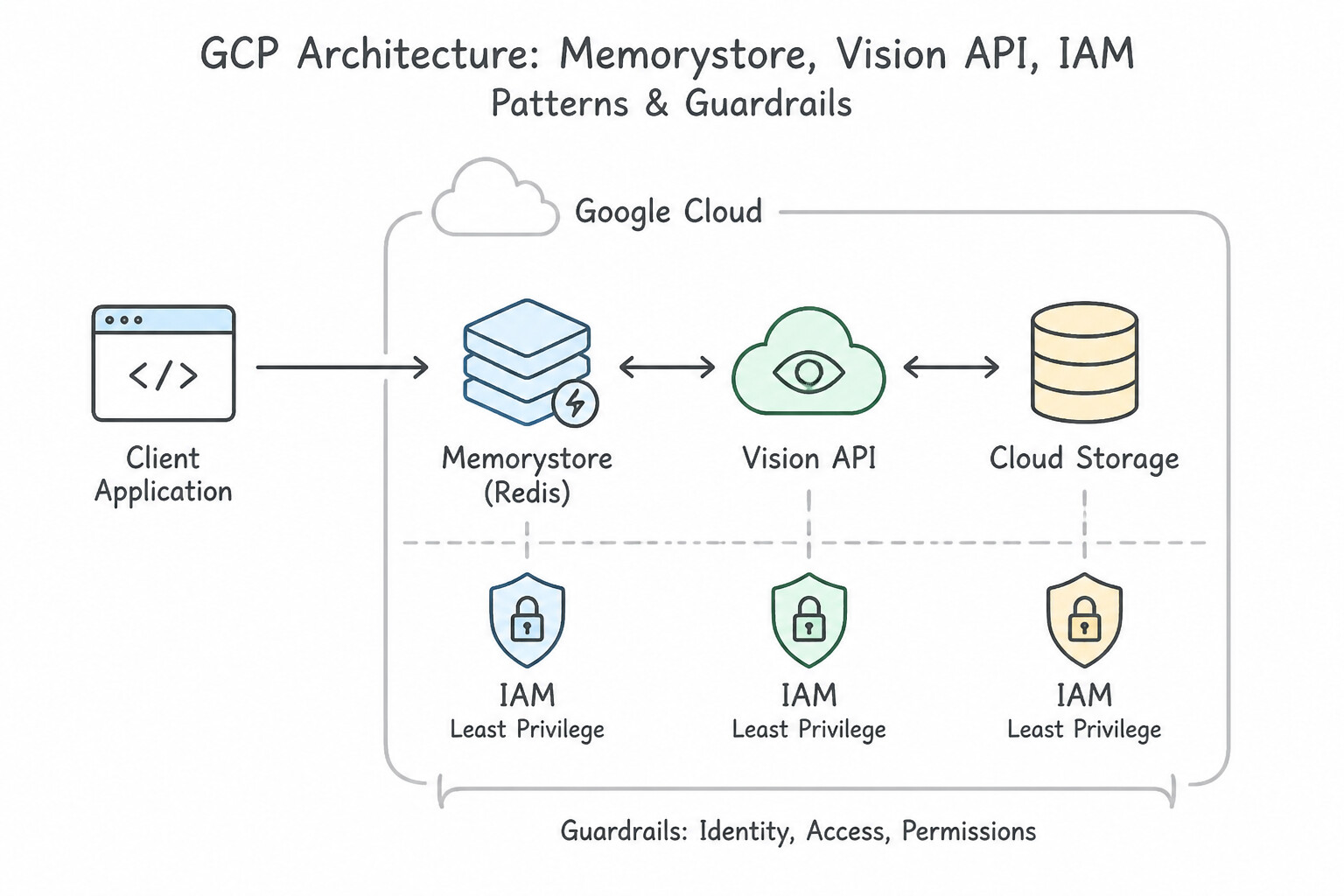
- Cost Reduction for Repetitive API Calls: Use Calculate a hash of the image content. Use Memorystore for Redis to store and retrieve the analysis results based on this hash. Hashing the image content creates a unique key to store and retrieve API results from a centralized cache like Memorystore.
- Handling OAuth2 Token Lifecycle: Use Modify the application to cache the access token and reuse it until it expires. Access tokens are valid for a set duration (usually 1 hour), so caching and reusing them eliminates redundant network calls and prevents rate limiting. (Avoid alternative: Using multiple service accounts adds complexity and fails to address the performance impact of fetching a token for every request.)
- Optimizing Serverless Cold Starts and API Quotas: Use Declare a variable in the global scope to store the secret. If the variable is empty, fetch the secret from the API and store it; otherwise, use the stored value. Using a global variable allows the function to cache the secret across multiple invocations on the same instance.
Key Takeaways (4.2f)
- Google Cloud APIs often charge per request; caching responses for identical inputs saves money.
- Use cryptographic hashes (like SHA-256) to create unique keys for content-based caching.
- Memorystore for Redis is the standard solution for high-performance, shared in-memory caching in Google Cloud.
- Avoid storing shared cache data on local instance disks, as it does not scale.
Consideration 4.2g: Handling errors (e.g., exponential backoff)
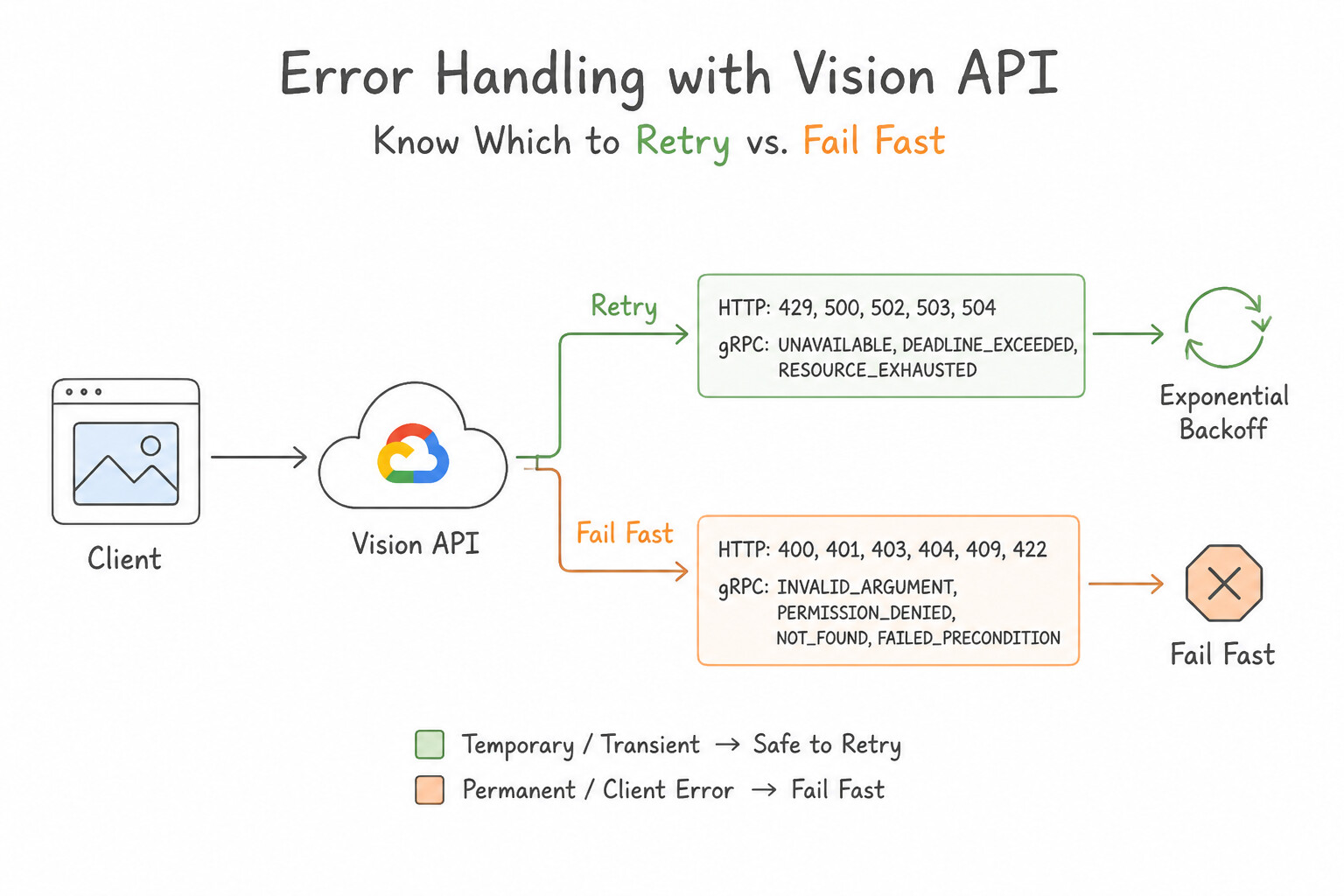
- Know Which HTTP / gRPC Status Codes to Retry vs. Fail Fast:
- RETRYABLE (Transient Errors):
HTTP 408 Request TimeoutHTTP 429 Too Many Requests/ gRPCRESOURCE_EXHAUSTED(rate limit / quota burst)HTTP 500 Internal Server Error/ gRPCINTERNALHTTP 502 Bad Gateway,HTTP 503 Service Unavailable/ gRPCUNAVAILABLE,HTTP 504 Gateway Timeout/ gRPCDEADLINE_EXCEEDED- NON-RETRYABLE (Permanent Client Errors — Fail Fast!):
HTTP 400 Bad Request/INVALID_ARGUMENT(malformed payload)HTTP 401 Unauthorized/UNAUTHENTICATED(missing/expired credentials)HTTP 403 Forbidden/PERMISSION_DENIED(missing IAM role or disabled API — retrying will never grant an IAM role!)HTTP 404 Not Found/NOT_FOUND- The Truncated Exponential Backoff with Randomized Jitter Formula: $$\text{sleep\_time} = \min\left(\text{max\_backoff},\; b \times 2^{\text{attempt}} + \text{random}(0, \text{jitter})\right)$$
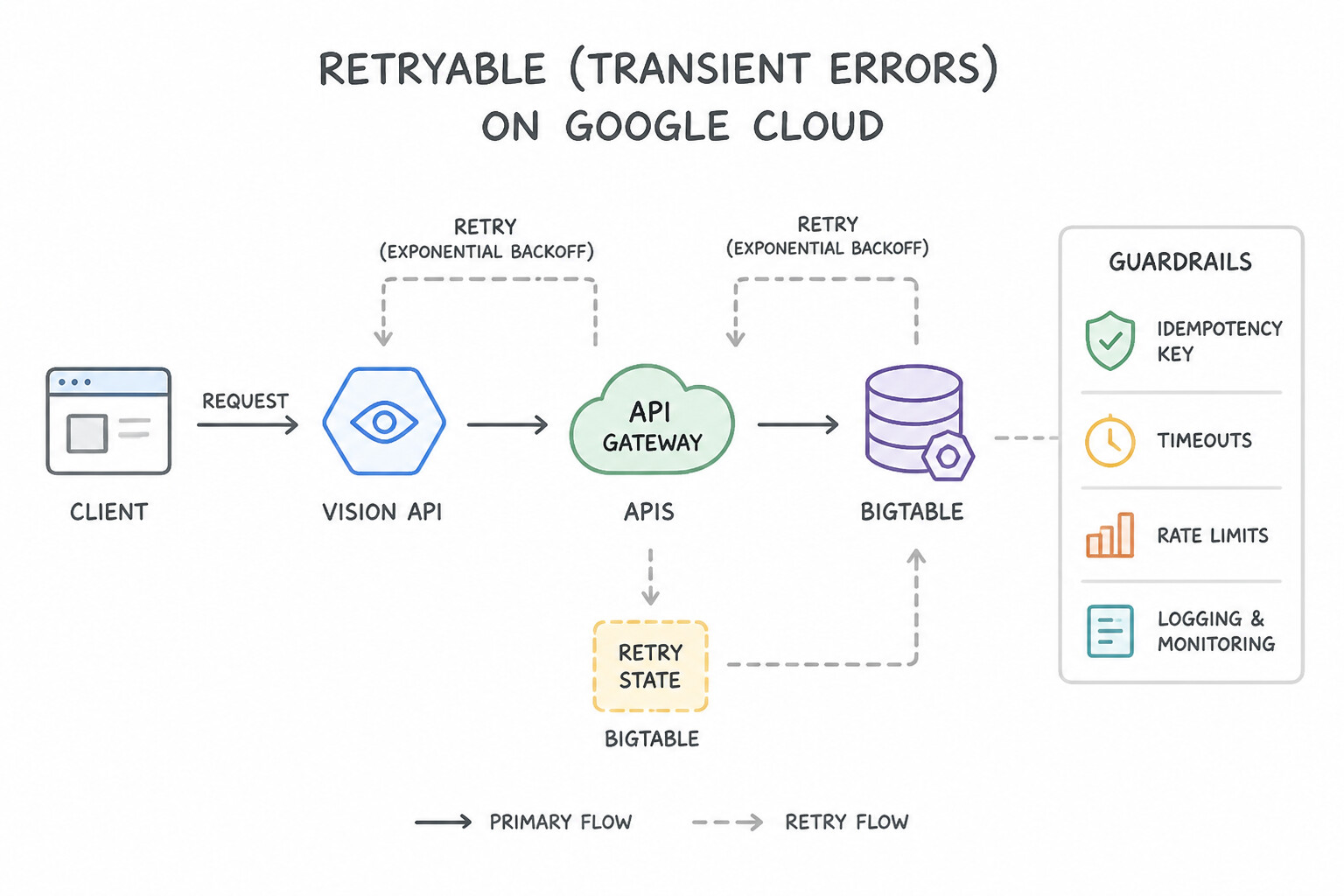
- Exponential (
2^attempt): Doubles wait time (1s,2s,4s,8s,16s...) to give overloaded downstream servers room to recover. - Randomized Jitter (
+ random()): Desynchronizes hundreds of concurrent client instances that all received a429at the exact same millisecond, preventing synchronized retry waves (Thundering Herd). - Truncated (
min(max_backoff, ...)+max_attempts): Caps the maximum sleep interval (e.g.,32sor64s) and aborts after a bounded number of attempts or total deadline.
Key Implementation Patterns
- Implementing Truncated Exponential Backoff: Use Implement a truncated exponential backoff strategy for retries. Exponential backoff increases wait times between retries, allowing the server to recover from congestion. (Avoid alternative: Immediate retries increase server load and worsen the rate-limiting condition.)
- Mitigating the Thundering Herd Problem: Use Implement exponential backoff with randomized jitter. Jitter adds randomness to the retry interval, spreading out traffic and preventing synchronized spikes. (Avoid alternative: Immediate retries increase load and worsen the traffic spike.)
Key Takeaways (4.2g)
- HTTP 429 indicates rate limiting or congestion.
- Never retry immediately on rate-limit errors; it worsens the problem.
- Exponential Backoff increases the wait time between retries (1s, 2s, 4s...) to relieve server load.
- Truncation ensures the backoff delay does not grow indefinitely.
Consideration 4.2h: Using service accounts to make Cloud API calls
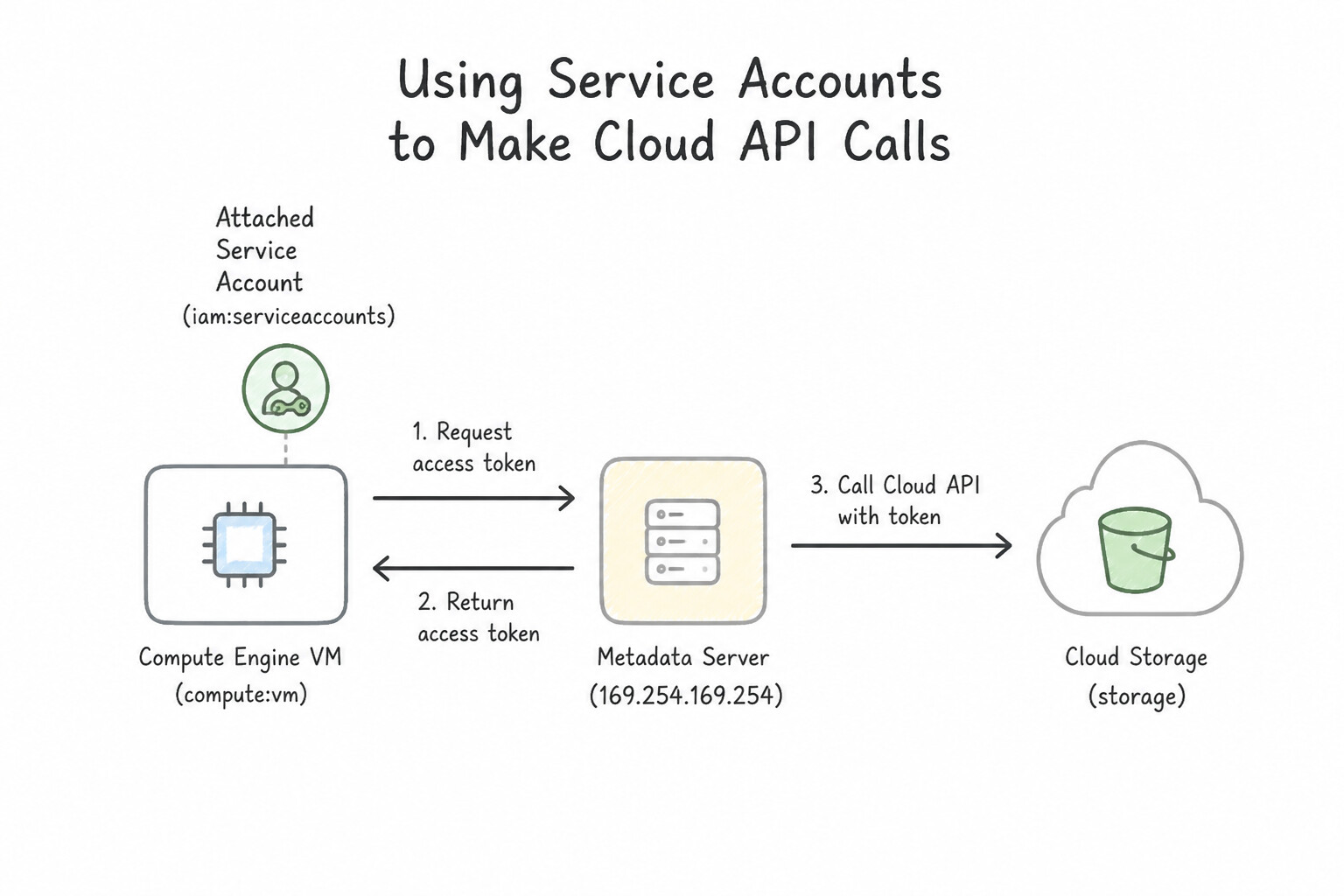
- Attached Service Accounts & the Metadata Server: When your code runs on Cloud Run, GKE (with Workload Identity), Compute Engine, or Cloud Functions, never package credential files. The Google Cloud Client Library calls the local Compute Metadata Server (
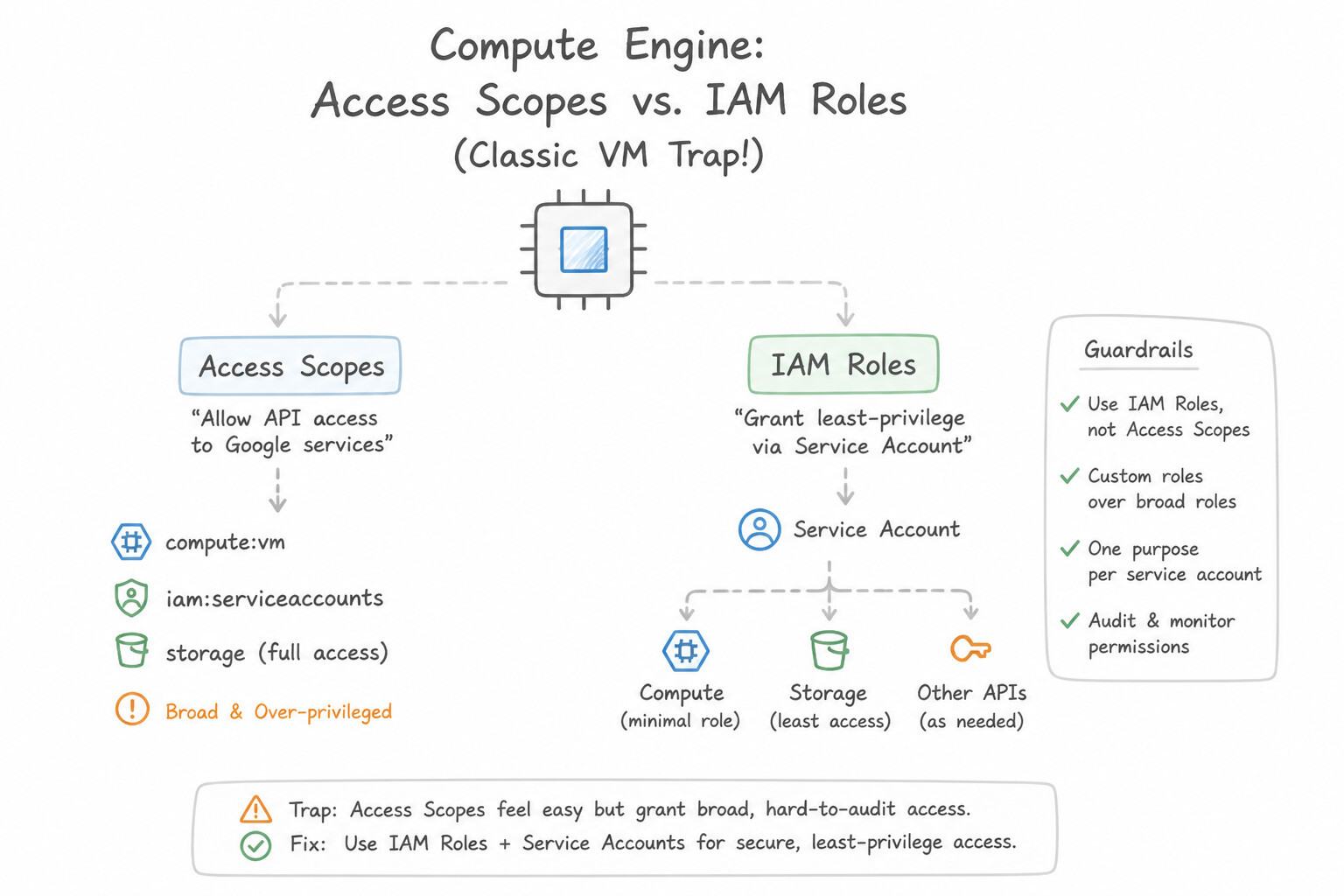
http://metadata.google.internal/computeMetadata/v1/instance/service-accounts/default/tokenwith headerMetadata-Flavor: Google) to fetch and automatically refresh short-lived OAuth 2.0 access tokens before they expire. - Compute Engine Access Scopes vs. IAM Roles (Classic VM Trap!): On a Compute Engine VM, the effective permission of the attached service account is the intersection of its IAM Roles AND the VM's OAuth Access Scopes. Always set the VM's access scope to
cloud-platform(https://www.googleapis.com/auth/cloud-platform) and govern permissions exclusively through IAM Roles on the dedicated service account. - Restricting Third-Party / Client-Side API Keys: While backend services must use Service Accounts / OAuth, browser/mobile client SDKs (such as Google Maps Platform or Firebase web configs) use public API Keys. Always secure API Keys with both:
- Application Restrictions (HTTP Referrers for web SPAs, Android package + SHA-1 fingerprint, or iOS bundle ID), AND
- API Restrictions (limiting the key strictly to the specific Maps/Places APIs required).
Key Implementation Patterns
- Application Default Credentials on Compute Engine: Use Assign a user-managed service account to the VM instance. Remove the JSON key file and unset the GOOGLE_APPLICATION_CREDENTIALS environment variable. Attaching a service account to the VM allows the application to use Application Default Credentials (ADC) without managing static key files.
- Access Scopes vs. IAM Roles: Use Stop the VM and update the access scopes to 'Allow full access to all Cloud APIs'. The default access scope for Storage is read-only. You must update the scope to allow the IAM role to function correctly. (Avoid alternative: Adding more IAM permissions does not override the restriction set by the read-only access scope.)
- Cross-Project API Access: Use In Project B, add the service account email from Project A as a principal and assign the BigQuery Data Viewer role. To access a resource in a different project, you must add the identity (Service Account) to the IAM policy of the project where the resource resides.
Key Takeaways (4.2h)
- Avoid using long-lived service account keys (JSON files) on Google Cloud infrastructure.
- Use the identity attached to the resource (Service Account) for authentication.
- Application Default Credentials (ADC) simplifies authentication by automatically discovering credentials from the environment.
- Compute Engine VMs use Access Scopes as a legacy layer of permission control.
Quick Decision Cheat Sheet (Subsection 4.2)
If the Scenario Requires... | Choose This Google Cloud Pattern | Avoid This Common Mistake |
|---|---|---|
"Reduce network payload size and JSON parsing latency when calling Google Cloud REST APIs" | Use the fields query parameter (or X-Goog-FieldMask header) for partial responses | Compressing the request body only or fetching full resources and filtering in client memory |
"Test a Google Cloud API method and inspect its exact response structure interactively in the browser" | Use Google APIs Explorer in the official documentation | Writing and deploying a throwaway Cloud Run service just to see a sample JSON response |
"Avoid re-downloading unchanged large metadata resources over REST" | Cache the ETag and send If-None-Match to receive lightweight 304 Not Modified responses | Polling the full resource every second without conditional headers |
"API returns HTTP 400 Bad Request or HTTP 403 Permission Denied" | Do NOT retry; log the error and fail fast (or send to Dead-Letter Queue) | Retrying 400/403 IAM errors with exponential backoff (wastes quota and never succeeds) |
Further Reading (Subsection 4.2)
- Enabling and disabling services — Provides the official documentation on how to enable services using the Google Cloud console and the gcloud CLI.
- gcloud services enable — Reference documentation for the specific command used to enable services.
- Cloud Client Libraries — Provides an overview of the different types of libraries available for Google Cloud and explains why Cloud Client Libraries are the recommended option.
- gRPC vs REST: Understanding gRPC, OpenAPI and REST and when to use them in API design | Google Cloud Blog — Explains how Google Cloud APIs use gRPC for high performance and the benefits of Protocol Buffers and HTTP/2.
- Cloud Bigtable Client Libraries — Documentation noting that Cloud Bigtable client libraries use gRPC to connect to the service.
- Using the APIs Explorer — Overview of how to use the APIs Explorer to try Google APIs interactively. It explains how to browse APIs, fill in parameters, and execute requests.
Book TOC · Previous · Chapter 5 of 7 · Next
AwesomeGCP.com Learning
The approach taken is a question-led learning approach: you explore realistic project scenarios where you need to make decisions or take actions to achieve business goals within specific constraints. Instead of passive learning, you are challenged to think and work through the options to master the Professional Cloud Developer (PCD) certification!