Book TOC · Previous · Chapter 3 of 8 · Next
Chapter 3: Custom Agentic Workflows in Code: Models, ADK, Sessions & Memory Bank
Chapter Focus: Selecting the right model (Gemini Pro vs. Flash vs. open-weight SLMs), building code-first agents with ADK, managing short-term Sessions vs. long-term Memory Bank, and configuring CLI skills in Agent vs. Human mode.
Section 3 covers Developing Custom Agents across Subsections 3.1, 3.2, and 3.3. Chapter 3 focuses on Subsection 3.1: how to choose the right language model for your cost, latency, and privacy needs, how to write custom agents in code using the Agent Development Kit (ADK), and how to manage short-term Sessions versus long-term Memory Bank.
Subsection 3.1: Designing and Building Agentic Workflows in Code
The Big Picture
When low-code builders aren't flexible enough, engineers build custom agents in code using ADK. To build a fast, reliable, and cost-effective custom agent, you must make four architectural decisions: (1) which model powers each step, (2) how ADK orchestrates tools and human approvals, (3) where short-term Session state and long-term Memory Bank facts live, and (4) how Agents CLI skills behave in interactive human mode versus headless automation mode.
Consideration 3.1a: Selecting and Configuring the Appropriate Language Model (LLM vs. SLM, SaaS vs. Self-Hosted, Proprietary vs. OSS)
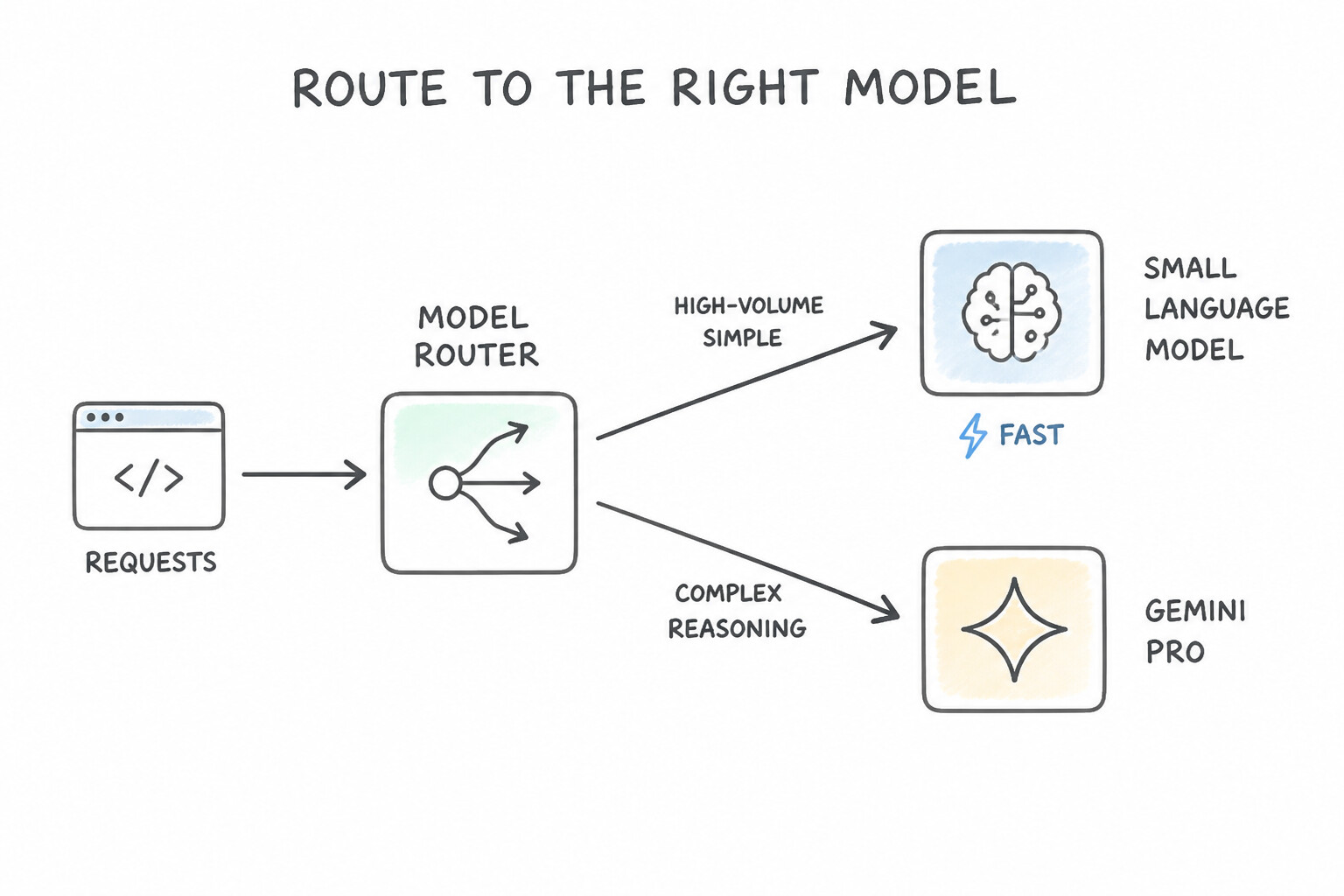
Using your largest, most expensive frontier model for every tiny classification or formatting step wastes money and adds seconds of latency. Conversely, using a tiny model for complex legal analysis leads to reasoning failures.
How to Choose the Right Model Tier
Gemini Pro(Frontier Reasoning & Massive Context): ChooseGemini Prowhen the agent needs deep multi-step reasoning, complex coding, or analysis across a massive context window (up to 1M–2M tokens)—such as cross-referencing a 600-page legal contract or an entire repository at once.Gemini Flash/Flash-Liteor Small Language Models (SLMs): ChooseFlash,Flash-Lite, or an open-weight SLM (like Gemma) for high-volume, low-latency tasks: intent routing, entity extraction, summarization, or simple tool calling.- The Model Router Pattern: Place a lightweight
Gemini Flash/ SLM router at the front of your agent pipeline. It handles 80% of simple requests in milliseconds at a fraction of the cost, and only routes the 20% of genuinely hard queries toGemini Pro.
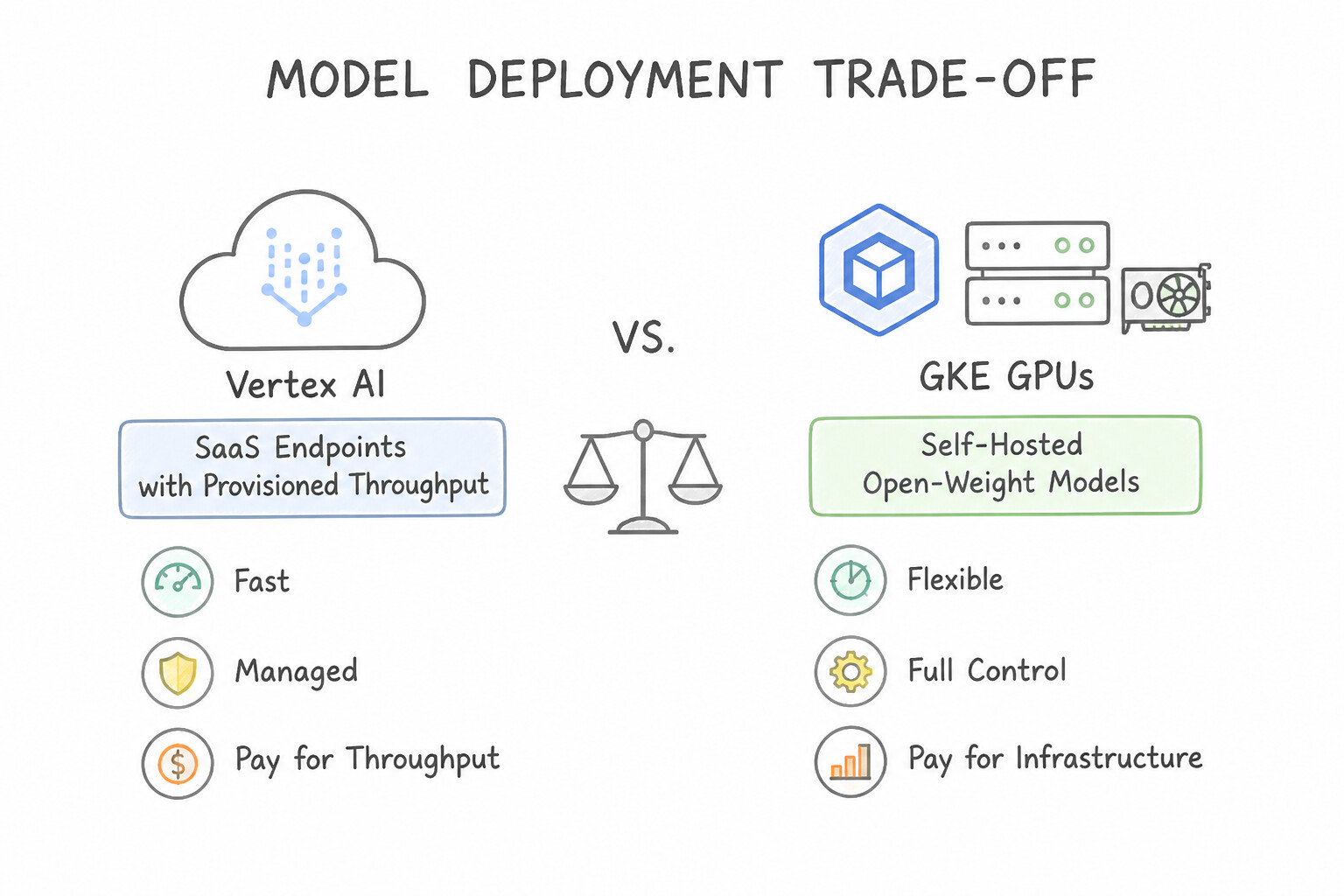
SaaS vs. Self-Hosted OSS & Pricing Models
- Managed SaaS (Vertex AI Gemini API) vs. Self-Hosted Open-Weight (GKE / Model Garden):
- Default to Managed SaaS (
Vertex AI) for the lowest operational overhead, built-in enterprise security (CMEK, VPC-SC, zero data retention options), and automatic scaling. - Choose Self-Hosted Open-Weight (
Gemma/Llamaon GKE or Vertex AI dedicated endpoints) only when the scenario requires strict air-gapped isolation, custom weight-level fine-tuning, or running inside a disconnected/edge environment. - Pay-As-You-Go vs. Provisioned Throughput: For spiky or unpredictable traffic, use standard Pay-As-You-Go token pricing. When a production pipeline runs continuous, predictable high-throughput volume and requires guaranteed latency SLAs without
429 Quota Exceededthrottling, purchase Vertex AI Provisioned Throughput.
Key Takeaways (3.1a)
- Cut latency and cost on mixed traffic → Use a
Gemini Flash/ SLM Router in front ofGemini Pro.- Analyze a 500-page legal/financial corpus in a single pass → Use
Gemini Pro's long context window (with Context Caching if queried repeatedly).- Guarantee predictable cost and reserved capacity for steady high-volume traffic → Use
Provisioned Throughput.
Consideration 3.1b: Building Custom Agents Using Open-Source Libraries (Agent Development Kit [ADK])
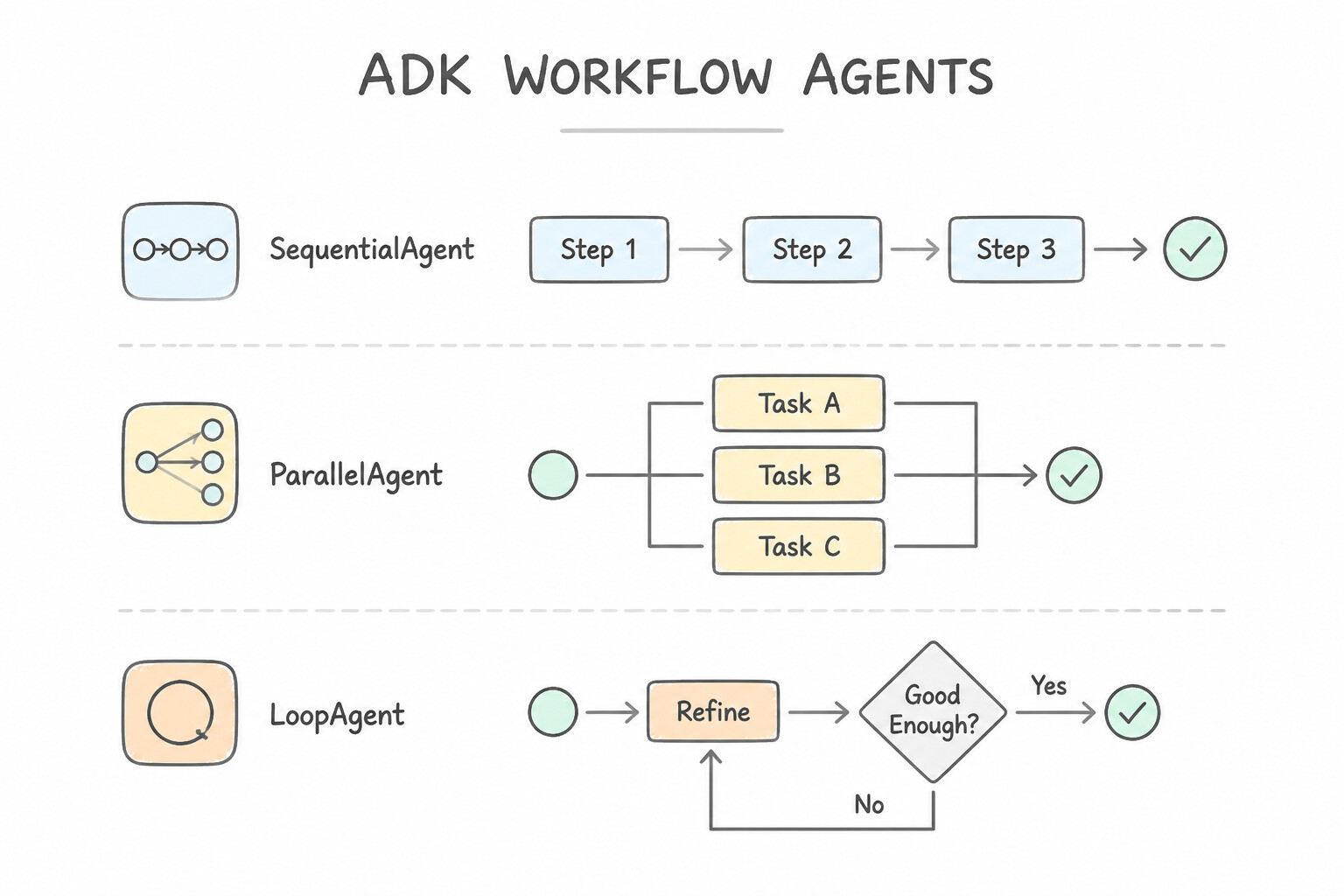
The Agent Development Kit (ADK) is Google's code-first framework for building deterministic and LLM-powered agents. Rather than writing fragile while loops around raw LLM calls, ADK gives you structured building blocks for orchestration, tool integration, and state persistence.
Core ADK Orchestration Patterns
LlmAgent(Dynamic Reasoning & Tool Selection): Powered by Gemini to interpret instructions, decide which tools to call, and respond to the user.SequentialAgent(Strict Step-by-Step Order): Runs sub-agents one after another (A → B → C), passing outputs via shared session state. Use this when Step B depends on Step A's output.ParallelAgent(Concurrent Fan-Out): Runs independent sub-agents at the same time (for example, checking flight prices, hotel availability, and weather concurrently) to cut total latency.LoopAgent(Iterative Critique & Refinement): Repeats aDraft → Critique/Testcycle until a quality condition is met or a mandatorymax_iterationslimit is reached.
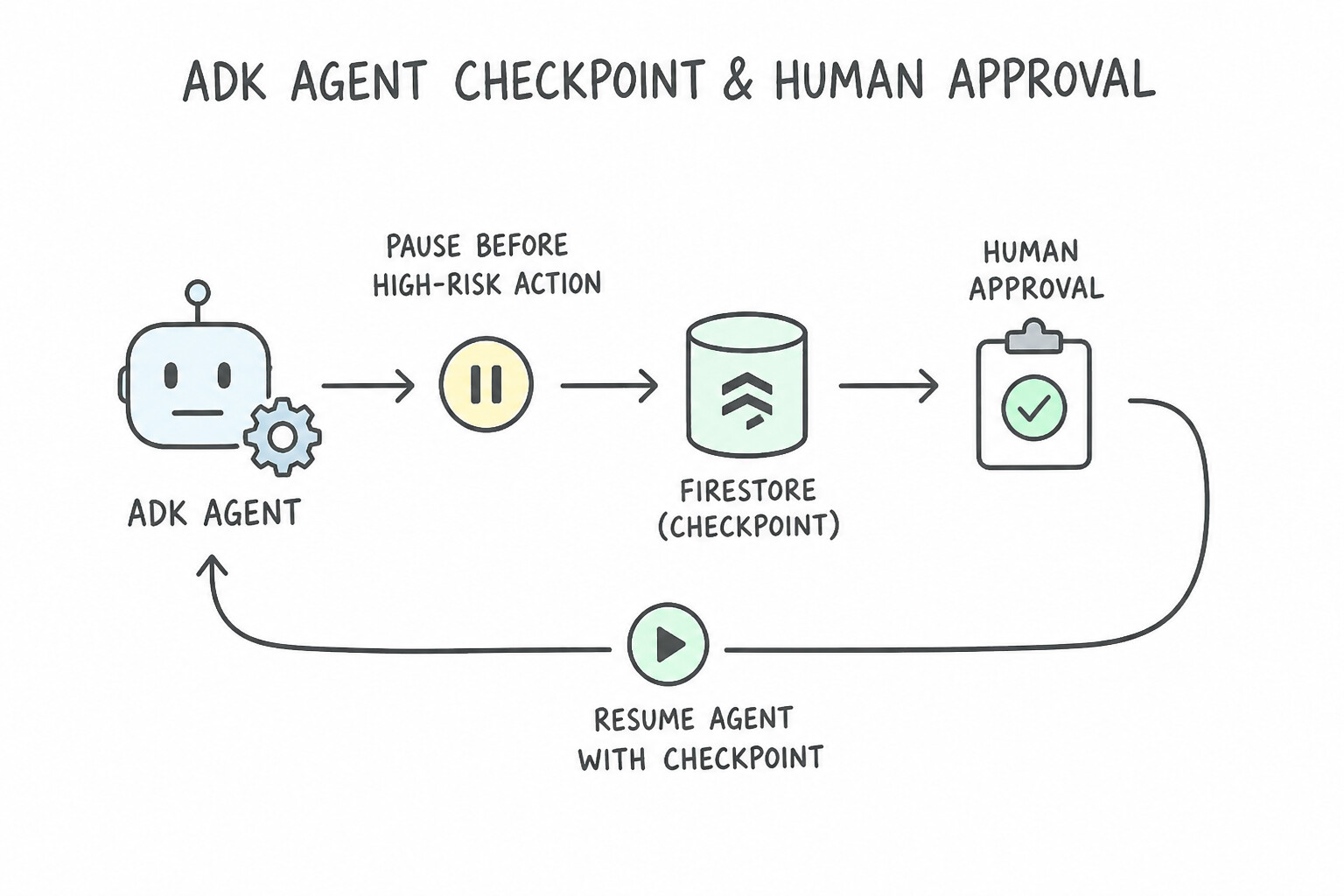
State Checkpointing, OpenAPI Tools, and Human-in-the-Loop (HITL)
- Dynamic OpenAPI Tool Ingestion: ADK can ingest standard OpenAPI 3.0 specifications directly to generate typed tool definitions (with descriptive docstrings so the model knows when and how to call each endpoint), and can wrap legacy XML/SOAP services using an intermediate JSON-to-XML adapter tool.
- External Checkpointing & Interrupt/Resume (HITL): When an agent must pause for hours waiting for a manager to approve a $50,000 refund, never keep a synchronous HTTP request open. ADK serializes the current execution checkpoint to Firestore or Managed Sessions, notifies the human reviewer, and resumes execution from that exact checkpoint once the approval webhook arrives.
Key Takeaways (3.1b)
- Pause a workflow for human approval without timing out → Save an ADK checkpoint to
Firestore/Managed Sessionsand resume asynchronously.- Connect an ADK agent to a legacy SOAP/XML API → Write a deterministic JSON-to-XML
ADK Tool Adapter(never ask the LLM to write raw SOAP XML envelopes).
Consideration 3.1c: Configuring Sessions and Memory (Agent Platform Memory Bank and Managed Sessions)
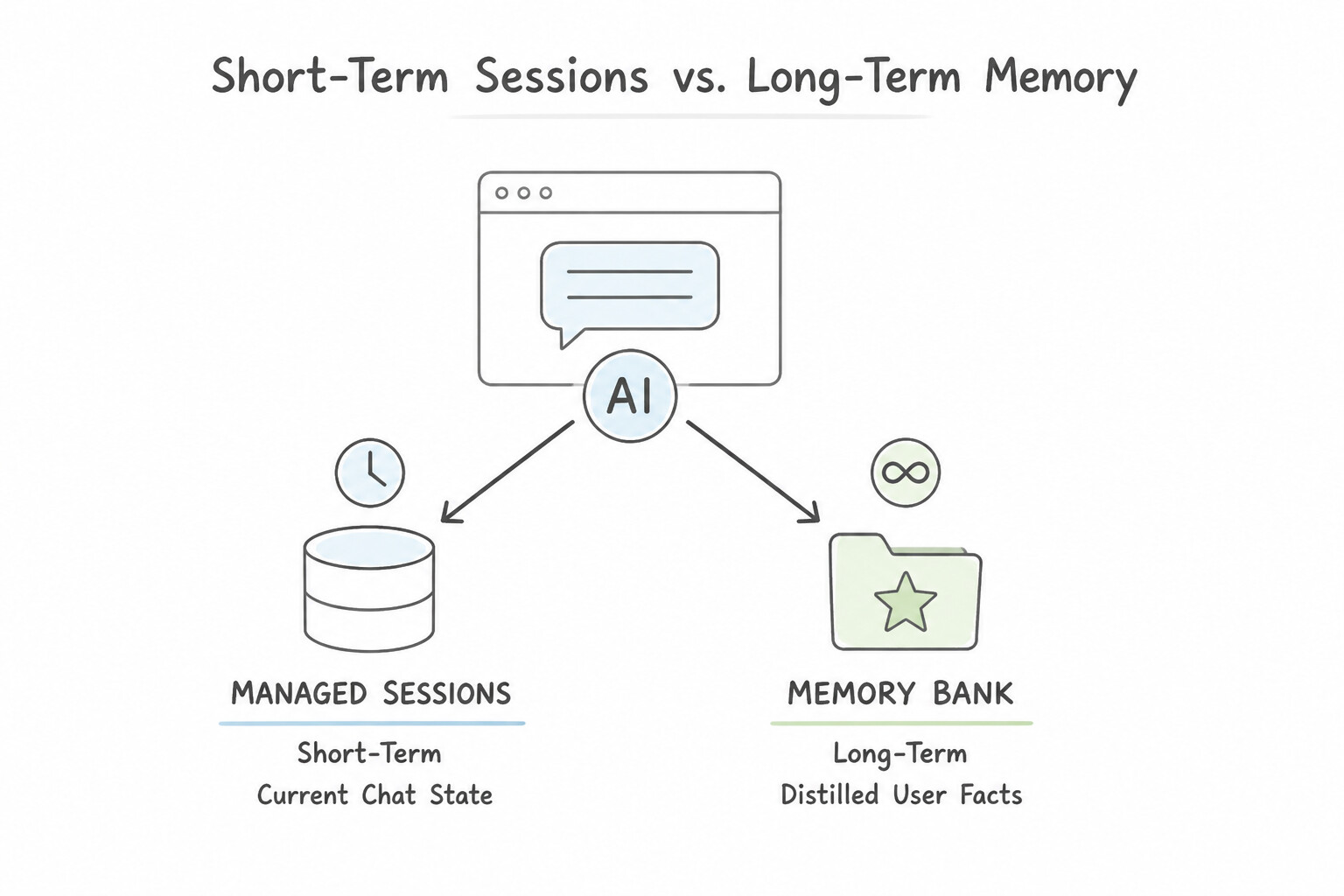
Stateful agent architectures separate Managed Sessions (short-term working memory) from Agent Platform Memory Bank (long-term cross-session memory).
Managed Sessions vs. Memory Bank
- Managed Sessions (
Short-Term Working Memory): - Stores the turn-by-turn message history and temporary scratchpad variables (
session.state) for one single conversation. - Should be configured with a Time-To-Live (TTL) policy so stale session data expires automatically for privacy and storage hygiene (e.g., after 24 hours or 30 days).
- Agent Platform Memory Bank (
Long-Term Cross-Session Memory): - Stores durable facts, preferences, and summaries about a user across separate conversations over weeks or months (for example: "User prefers Python over Java and manages the EU-West production cluster").
- Uses asynchronous background distillation: instead of dumping every raw chat message into long-term storage, an background process extracts concise semantic facts from completed sessions and indexes them in Memory Bank.
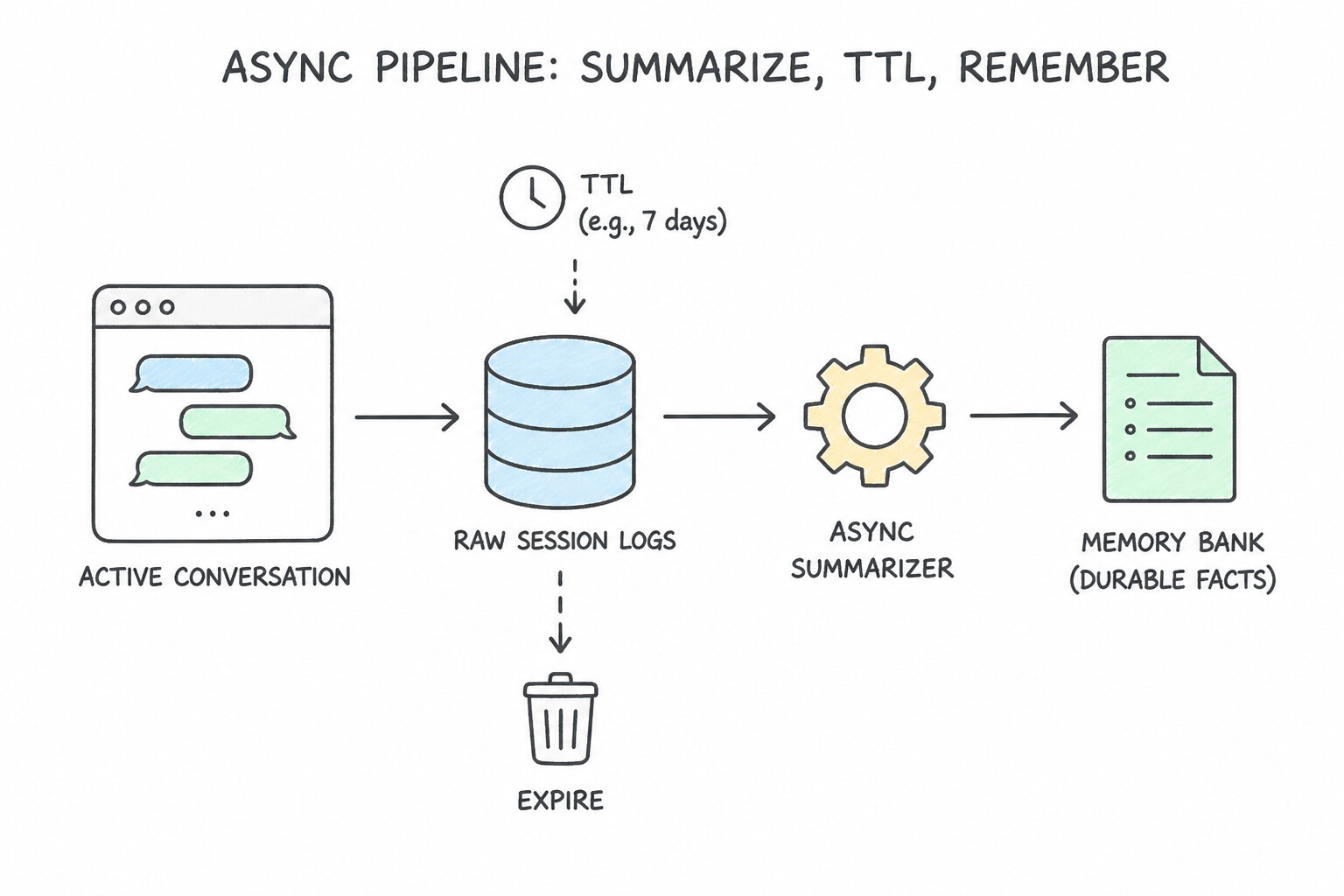
Multi-Tenant Isolation & Context Compaction
- Tenant-Scoped Namespace Keys: In a multi-tenant B2B application, always scope both Session IDs and Memory Bank queries using a verified
(tenant_id, user_id)composite key/filter so Customer A's facts never leak into Customer B's session. - Sliding Window + Summarization for Long Chats: If a single session runs for 100+ turns, passing the entire raw transcript on every turn wastes tokens. Keep the most recent N turns verbatim and compress older turns into a rolling summary.
Key Takeaways (3.1c)
- Track temporary variables during a single checkout flow →
Managed Sessions(session.state) with a strict TTL.- Remember a customer's preferences two weeks later in a new chat →
Agent Platform Memory Bank(via asynchronous fact extraction).- Prevent B2B cross-customer memory leaks → Enforce
tenant_idnamespacing and metadata filters on all Session and Memory Bank calls.
Consideration 3.1d: Configuring Skills Using Agents CLI (Plugins and Agent vs. Human Mode)
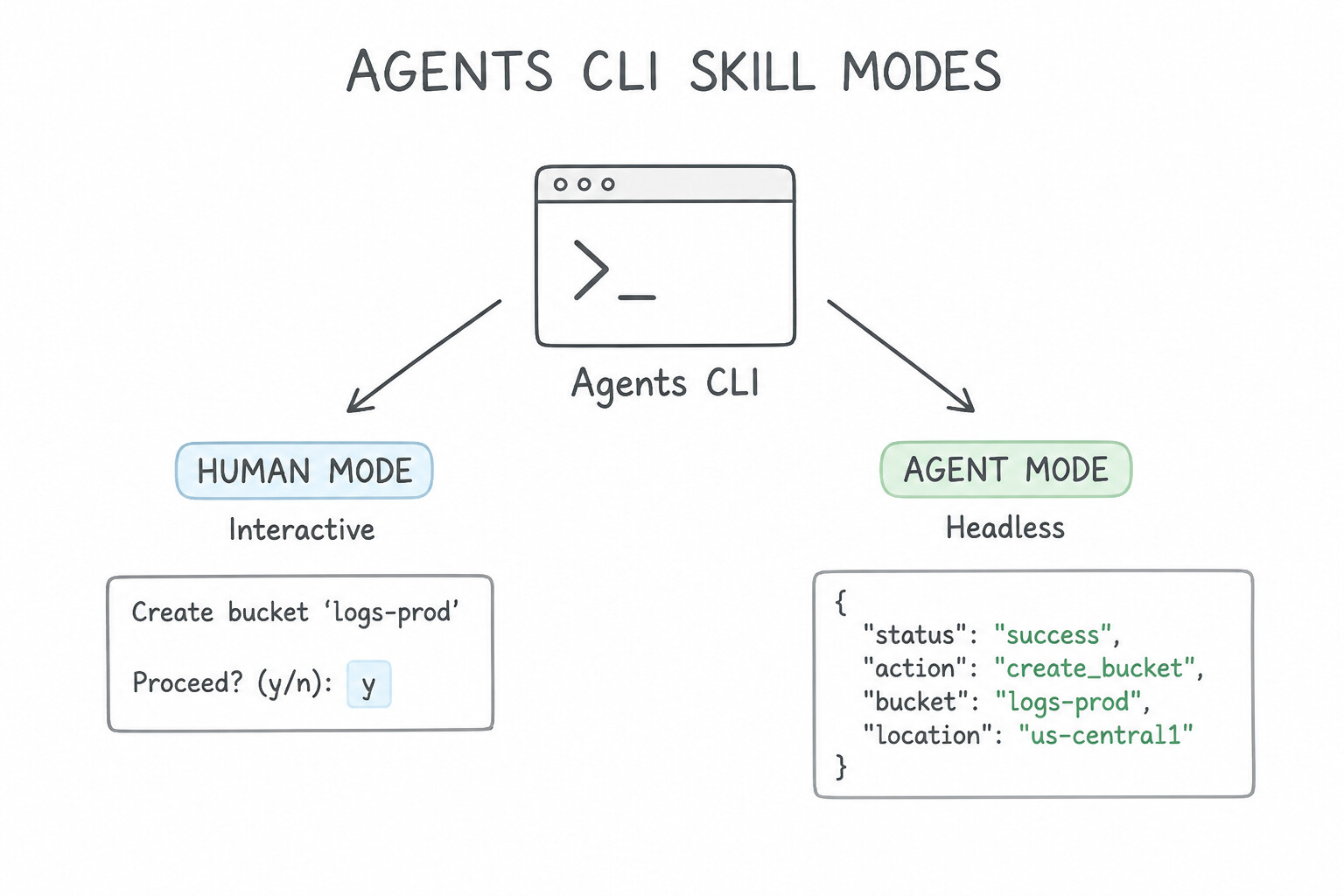
The Agents CLI allows skills and plugins to be run both by human engineers at their terminal and by autonomous agents inside automated workflows. Because humans and LLMs interact with CLI tools differently, the Agents CLI supports two distinct execution modes: Human Mode and Agent Mode.
Human Mode vs. Agent Mode
- Human Mode (
Interactive): Designed for a person typing in a terminal. Outputs colorized text, progress spinners, and interactive[y/N]confirmation prompts before destructive actions (such as deleting a production resource or modifying billing). - Agent Mode (
Headless / Programmatic): Designed for an LLM agent or CI/CD pipeline calling the skill. Disables interactive stdin prompts (which would cause a headless agent to hang forever!), returns strictly structured JSON (stdout) with machine-readable error codes, and enforces pre-configured policy gates or human-in-the-loop approval callbacks for high-risk actions.
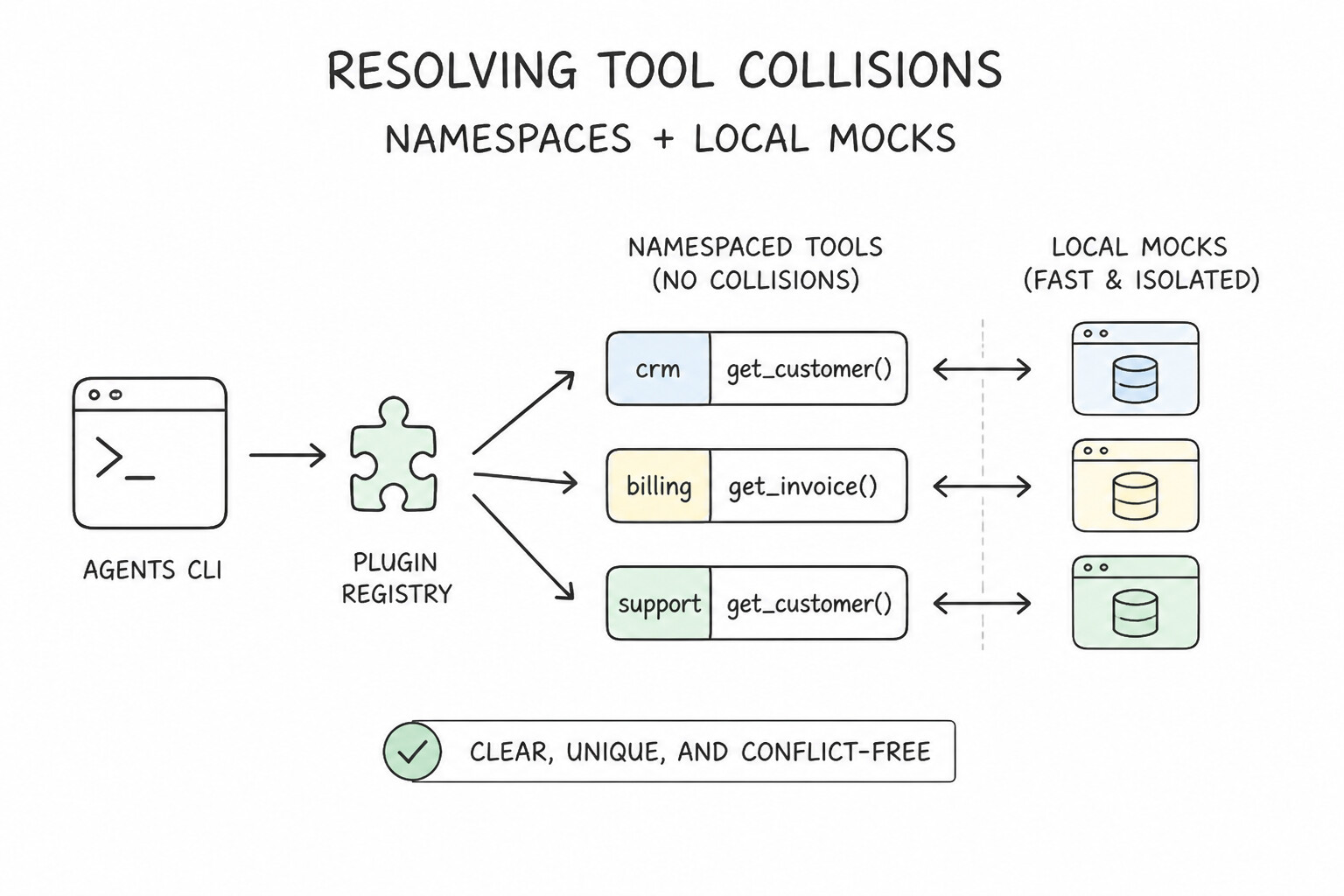
Managing CLI Plugins, Namespaces, and Local Emulation
- Resolving Tool Name Collisions Across Plugins: If you register both a
githubplugin and ajiraplugin via the Agents CLI, and both define a tool namedcreate_issue, the model may call the wrong one. Resolve collisions by enforcing namespace prefixes (github.create_issuevs.jira.create_issue) in the plugin registration config. - Local CLI Emulation & Mocking: When developing skills that call paid or rate-limited third-party SaaS APIs, use the Agents CLI's local emulation / mock mode so developers and CI tests can validate tool argument schemas offline without hitting live external endpoints.
Key Takeaways (3.1d)
- CLI skill hangs waiting for
[y/N]input when called by an automated agent → Run inAgent Mode(with structured JSON output and policy/webhook approval gates).- Two registered plugins have tools with the same name (
searchorcreate_issue) → Add explicitnamespace prefixesin the plugin configuration.
Quick Decision Cheat Sheet (Subsection 3.1)
If the Scenario Requires... | Choose This Google Cloud Pattern | Avoid This Common Mistake |
|---|---|---|
Minimize cost and latency when 80% of user queries are simple FAQs and 20% require deep multi-step reasoning | Use a tiered Model Router ( Gemini Flash / SLM) that handles simple queries and escalates complex ones to Gemini Pro | Sending 100% of traffic directly to Gemini Pro |
Ensure zero 429 Quota Exceeded errors and predictable monthly pricing for a high-volume production agent | Purchase Vertex AI Provisioned Throughput | Relying on default Pay-As-You-Go dynamic shared quota for mission-critical steady traffic |
Pause an ADK workflow for 12 hours waiting for a manager's approval without losing state | Save the workflow checkpoint to Firestore / Managed Sessions and resume via webhook callback | Increasing the Cloud Run HTTP request timeout to 12 hours |
Remember a user's coding language preference and role across separate chats over several months | Distill facts asynchronously into Agent Platform Memory Bank | Storing permanent user profiles inside short-lived session state without extraction |
Automatically delete temporary conversation transcripts after 7 days for privacy compliance | Configure a 7-day TTL policy on Managed Sessions | Manually running a cron job to drop the entire database |
Prevent two CLI plugins ( jira and servicenow) from clashing on a tool named create_ticket | Configure namespace prefixes ( jira.create_ticket, servicenow.create_ticket) | Merging both plugins into a single untyped tool |
Further Reading (Subsection 3.1)
- Agent Development Kit (ADK) Documentation — Official guide to ADK LlmAgent, SequentialAgent, ParallelAgent, LoopAgent, Sessions, and Memory.
- Vertex AI Provisioned Throughput — Reserving guaranteed model throughput for predictable production workloads.
Book TOC · Previous · Chapter 3 of 8 · Next
AwesomeGCP.com Learning
The approach taken is a question-led learning approach: you explore realistic project scenarios where you need to make decisions or take actions to achieve business goals within specific constraints. Instead of passive learning, you are challenged to think and work through the options to master the Professional Agentic Architect (PAA) certification!