Book TOC · Previous · Chapter 4 of 8 · Next
Chapter 4: Enterprise Domain Knowledge: RAG Pipelines, Vector Search, Identity & MCP Tooling
Chapter Focus: Designing high-precision RAG pipelines (chunking, asymmetric embeddings, hybrid search, cross-encoder reranking), configuring Agent Identity permissions, and connecting databases/SaaS via MCP servers and Agent Registry.
Chapter 4 covers Subsection 3.2: how to connect custom code-first agents to your organization's databases, knowledge repositories, and third-party APIs. You will learn how to tune custom RAG & Vector Search pipelines for high accuracy, how to scope permissions with Agent Identity, and how to connect databases and SaaS tools using Google Cloud MCP Servers and Agent Registry.
Subsection 3.2: Integrating Enterprise Domain Knowledge
The Big Picture
When building a custom RAG pipeline or database integration, simple semantic similarity isn't enough. Pure vector search often misses exact part numbers or error codes, and returning top-20 raw chunks without reranking clutters the prompt. Subsection 3.2 covers the four stages of a high-precision retrieval pipeline, Agent Identity access models, and MCP server integration patterns.
Consideration 3.2a: Designing, Configuring, and Managing RAG Pipelines and Vector Retrieval Systems
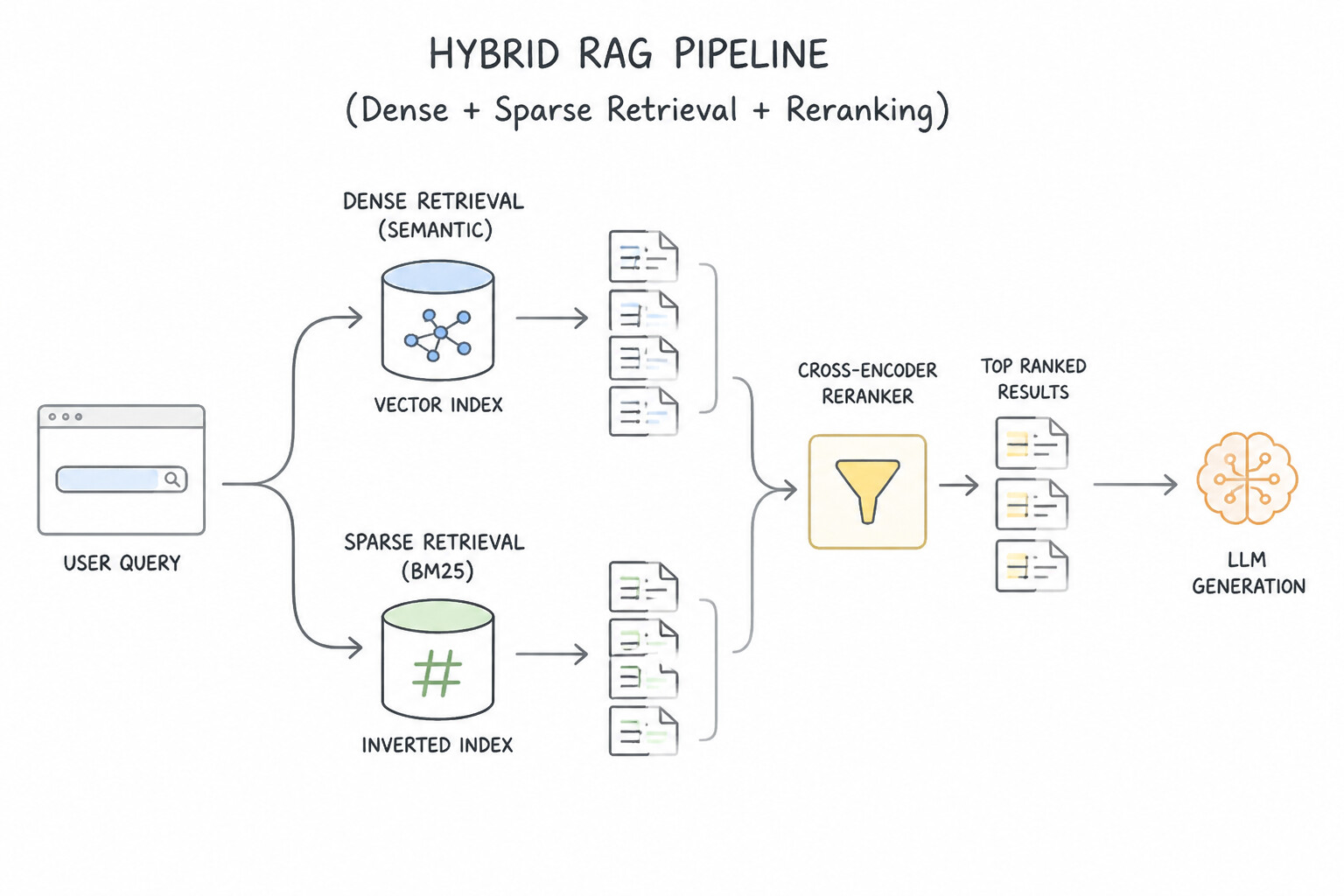
When a custom RAG pipeline misses exact product SKUs, returns irrelevant paragraphs in the top results, or splits tables in half, apply one of these four optimization levers in RAG Engine and Vector Search 1.0:
The Four Levers of High-Precision RAG
- Layout-Aware Chunking (Keep Tables & Sections Together): Use Document AI Layout Parser so tables, lists, and code blocks remain intact inside a single chunk (often paired with parent-child retrieval, where a small child chunk matches the query and fetches the full parent section for context).
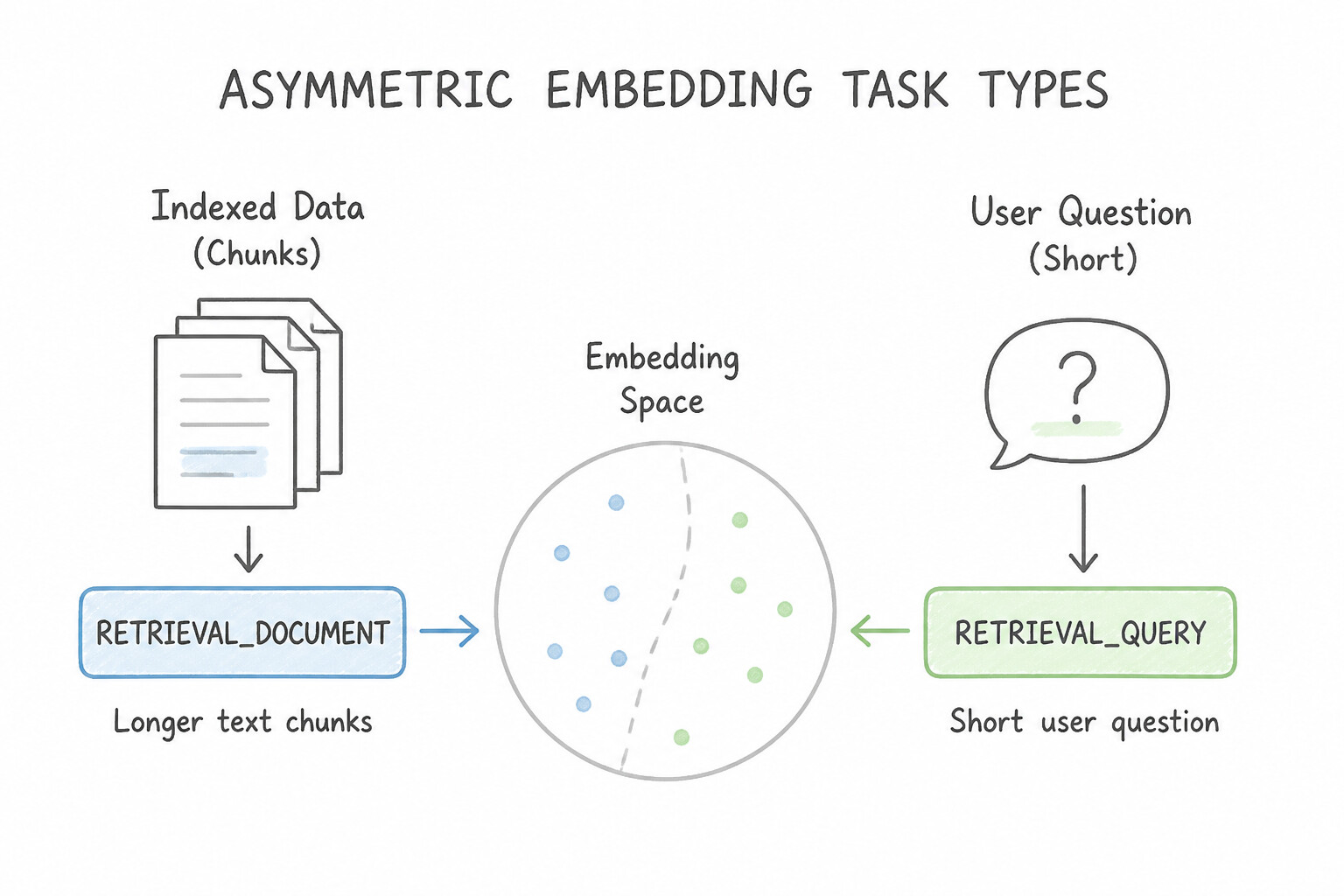
- Asymmetric Embedding Task Types (
RETRIEVAL_DOCUMENTvs.RETRIEVAL_QUERY): User questions are short ("What is the PTO rollover cap?"), while policy documents are long paragraphs. When using Vertex AI text embedding models (text-embedding-004/005), set the task type toRETRIEVAL_DOCUMENTwhen indexing chunks andRETRIEVAL_QUERYwhen embedding the user's question so the vector spaces align properly. - Hybrid Search (
Dense Vector+Sparse BM25): - Dense embeddings capture conceptual meaning ("laptop won't turn on" matches "power troubleshooting"), but fail on exact strings like
ERR_SSL_9042or SKUXJ-990-B. - Sparse keyword embeddings (BM25 / SPLADE) match exact tokens.
- Configuring Hybrid Search in Vector Search 1.0 (combining dense and sparse scores via Reciprocal Rank Fusion [RRF]) gives you both semantic understanding and exact code matching.
- Semantic Reranking (
Cross-Encoder): Vector search (a bi-encoder) is super fast at narrowing 10 million chunks down to the top 25, but its similarity score is approximate. Adding a Semantic Cross-Encoder Reranker (Vertex AI Ranking API) jointly reads the query and each of the 25 candidate chunks to score their true relevance, passing only the top 3–5 highest-quality chunks to Gemini.
Streaming vs. Batch Index Updates & Metadata Filtering
- Streaming Index Updates vs. Batch Rebuild: In Vector Search 1.0, choose a Streaming Index when new documents or inventory updates must become searchable within seconds/minutes. Choose Batch Index updates when data changes only daily/weekly and you want lower cost.
- Pre-Filter with Metadata Token Restricts: Use Vector Search numeric and string restricts (namespaces) (e.g.,
department = "engineering",effective_year >= 2026) so the ANN search only evaluates vectors matching the user's filter criteria.
Key Takeaways (3.2a)
- RAG fails on exact part numbers, SKUs, or error codes → Enable
Hybrid Search(Dense Vector + Sparse BM25).- Top-20 retrieved chunks contain noisy results → Add a
Cross-Encoder Reranker(Ranking API) to pick the top 5.- Improve alignment between short questions and long document chunks → Use asymmetric task types (
RETRIEVAL_QUERYvs.RETRIEVAL_DOCUMENT).
Consideration 3.2b: Configuring Agent Permissions (Agent Identity)
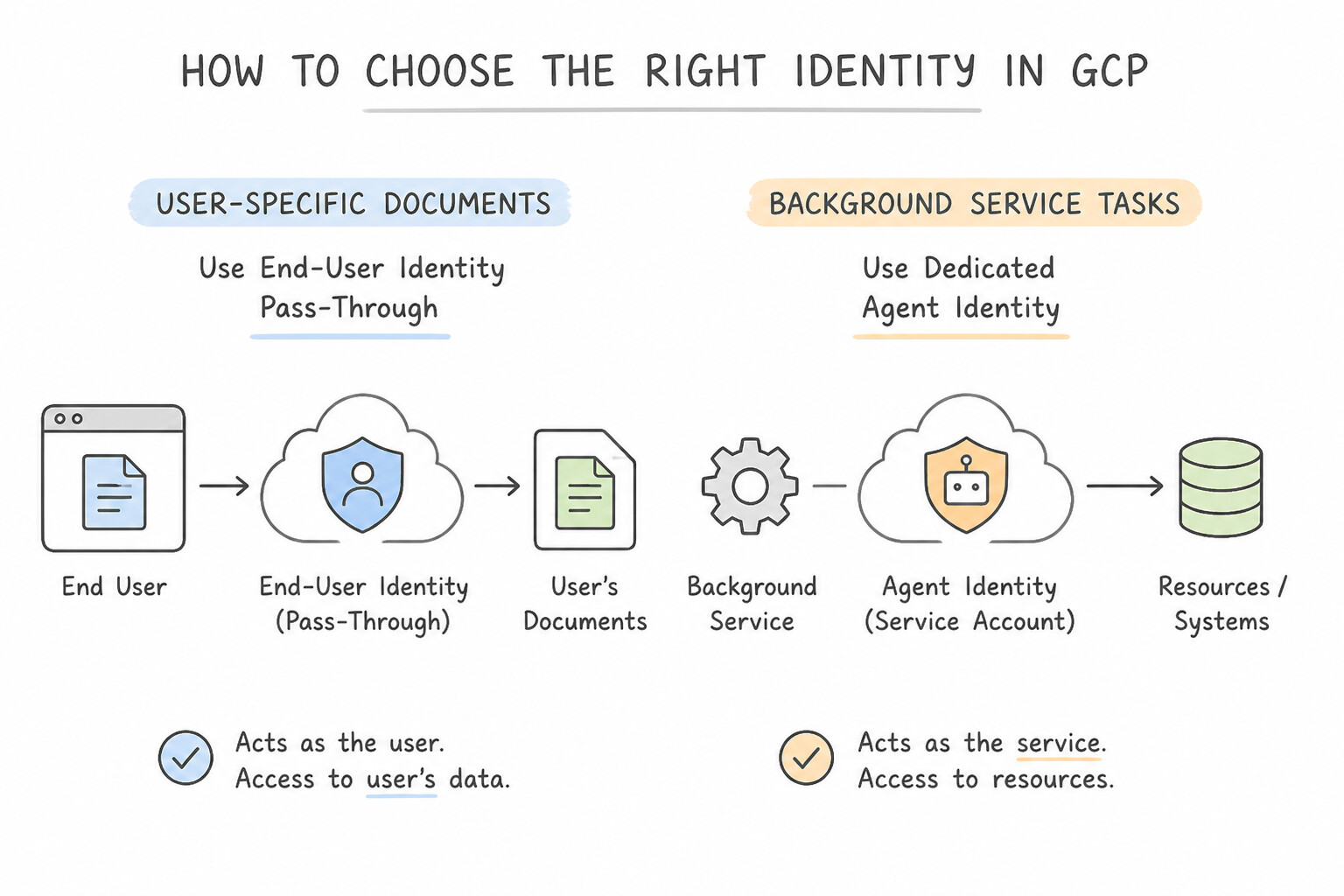
Never let all the agents in your project share the default Compute Engine service account (<project-number>-compute@developer.gserviceaccount.com), and never use an agent's own service account to bypass a human user's file permissions.
Two Distinct Permission Models (Agent Identity vs. End-User Pass-Through)
- Model 1: Dedicated
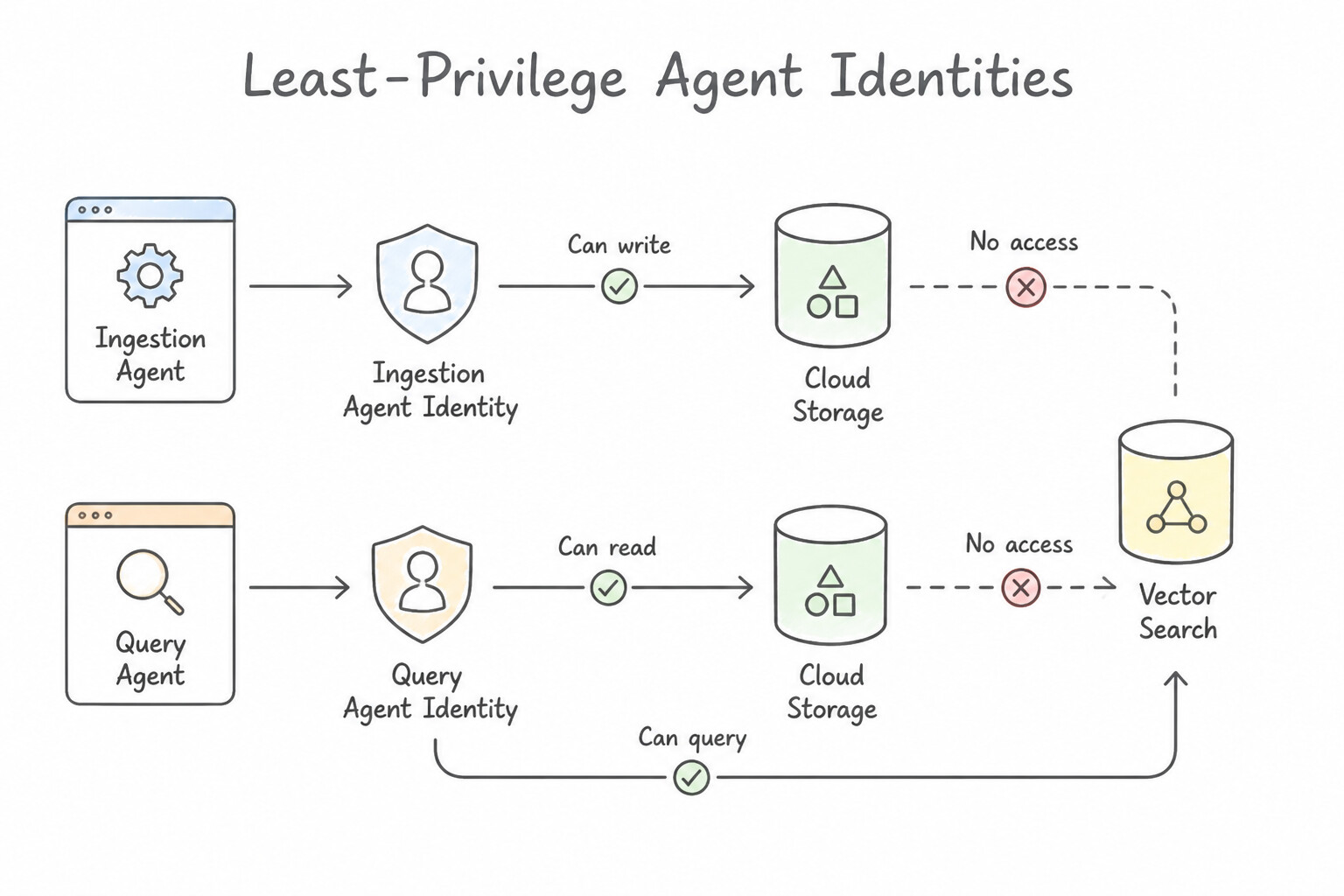
Agent Identity(When the Agent Acts as Itself): - Every autonomous agent gets its own dedicated Agent Identity (backed by a distinct Google Cloud Service Account / Workload Identity principal).
- Grant only the exact predefined IAM roles required for that agent's job. For example, an ingestion worker reading PDFs from a Cloud Storage bucket needs
roles/storage.objectVieweron that specific bucket—notroles/storage.adminacross the whole project. - Model 2: End-User Identity Pass-Through (When the Agent Acts for a Human):
- When an employee asks an agent to search shared company folders or query sensitive HR tables, the agent must propagate the human user's identity (via OAuth 2.0 On-Behalf-Of tokens or Agent Search ACLs) so the backend enforces the human's exact permissions.
Per-Session Downscoping with Credential Access Boundaries
- What if an agent's service account has read access to a multi-tenant Cloud Storage bucket, but during a specific chat session it should only be able to read files under the
gs://company-data/tenant-42/folder prefix? - Use a Credential Access Boundary (CAB) to exchange the agent's standard OAuth 2.0 token for a short-lived downscoped token restricted to
resource.name.startsWith('.../objects/tenant-42/')before invoking the tool.
Key Takeaways (3.2b)
- Give each agent its own least-privilege identity → Configure a dedicated
Agent Identityper agent (never share the default compute service account).- Restrict a shared bucket access token to one tenant's folder prefix for a single session → Use
Credential Access Boundarytoken downscoping.
Consideration 3.2c: Using Google Cloud Tools (Agent Registry, Google Cloud MCP Servers) to Configure Prebuilt and Custom Capabilities
Instead of writing custom API glue code inside every agent, Google Cloud provides prebuilt Google Cloud MCP servers (for services like BigQuery, Cloud SQL, Spanner, and Cloud Storage) alongside Agent Registry to catalog and govern custom integrations.
Prebuilt vs. Custom MCP Servers for Databases & SaaS
- Prebuilt Google Cloud MCP Servers (and Toolbox for Databases): When an agent needs standard schema discovery and safe read-only analytics on BigQuery or Cloud SQL, use Google's prebuilt MCP servers rather than writing a custom SQL execution wrapper from scratch.
- Custom MCP Servers on Cloud Run (for Business-Specific Logic):
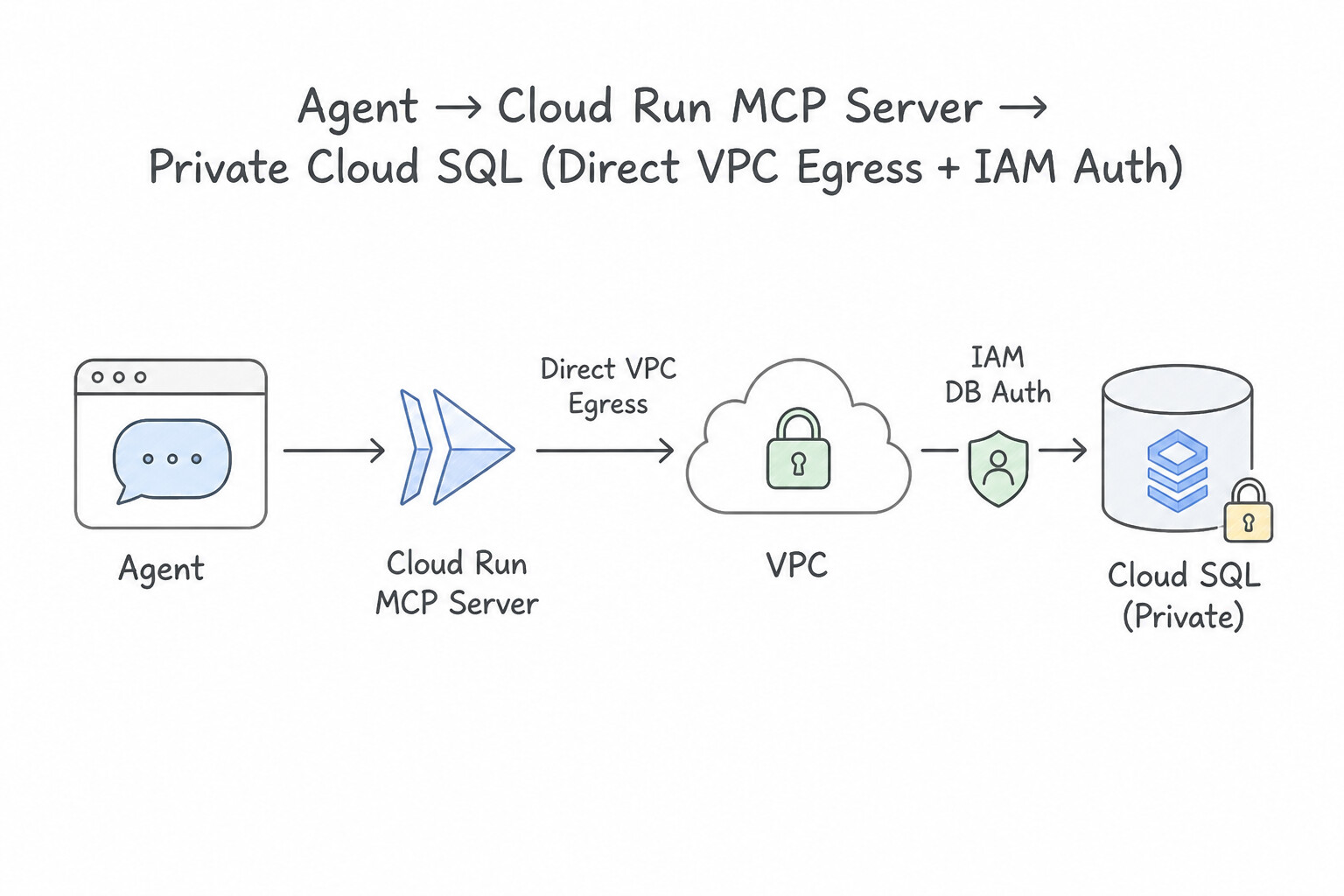
- When you want an agent to perform a specific business action on a private Cloud SQL database (like
issue_refund(order_id)), deploy a custom MCP server on Cloud Run. - Connect Cloud Run to the private Cloud SQL instance using Direct VPC Egress (or the Cloud SQL Auth Proxy) and IAM Database Authentication (keyless).
- Expose high-level, parameterized MCP tools (where the server binds
$1parameters safely) rather than letting the LLM generate rawUPDATE/DELETESQL strings.
Third-Party SaaS Integration & Centralized Governance (Agent Registry)
- Remote SaaS MCP Servers with OAuth Passthrough: When connecting an agent to external SaaS platforms (Salesforce, ServiceNow, Slack, Workday) via a remote SSE/HTTP MCP server, configure OAuth 2.0 token passthrough via Auth Manager so every SaaS API call executes under the user's authorized SaaS permissions.
- Centralized Governance with
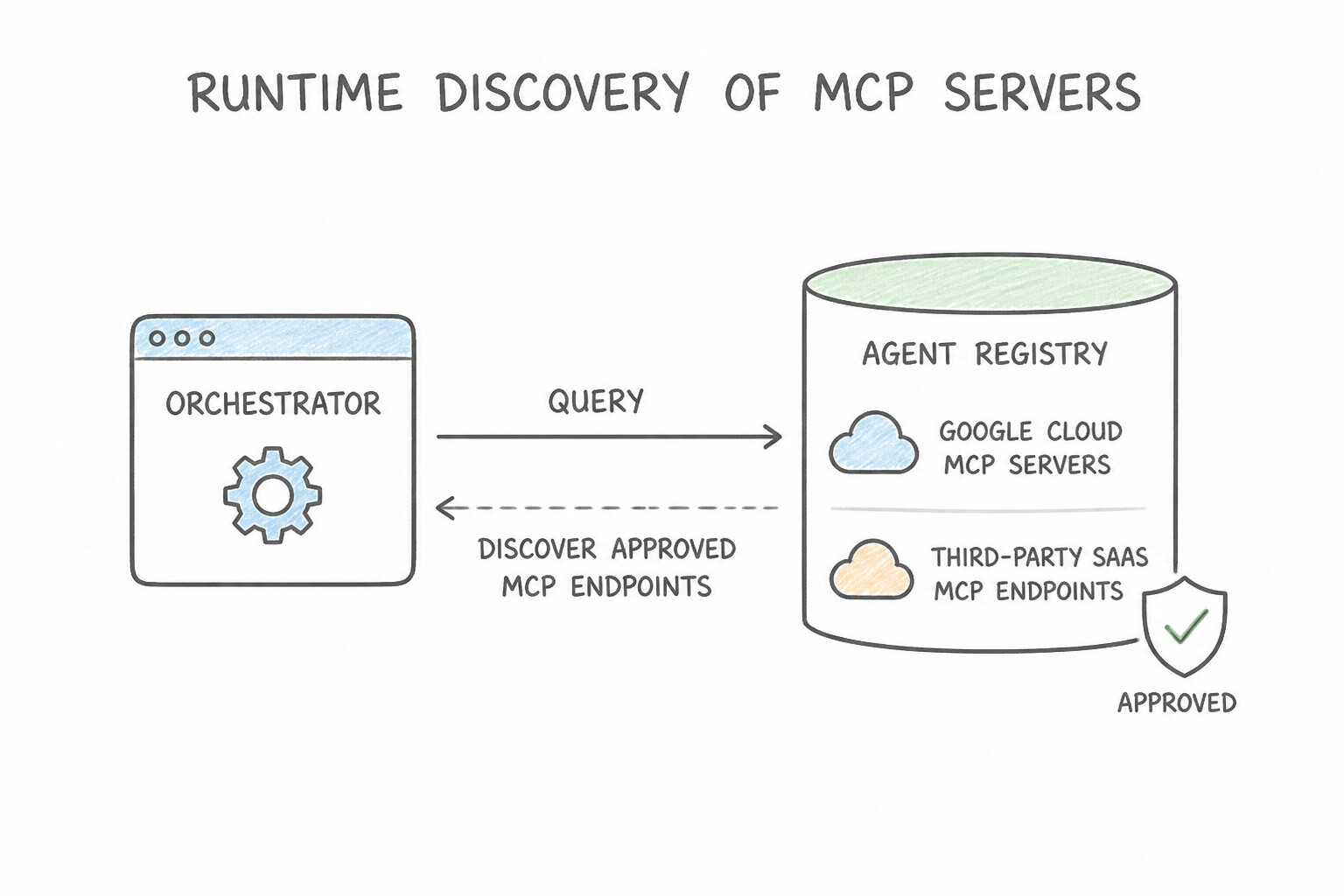
Agent Registry: Don't hardcode MCP server URLs inside agent code or let developers connect unvetted internet tools. Register all approved internal and third-party MCP servers in Agent Registry. Agents query Agent Registry at runtime to discover vetted tool endpoints and schemas, while Organization Policies block bindings to unregistered endpoints.
Key Takeaways (3.2c)
- Connect an agent to private Cloud SQL safely → Deploy an
MCP server on Cloud RunwithDirect VPC Egress,IAM DB Auth, and parameterized queries.- Avoid hardcoding MCP URLs and block unapproved third-party tools → Register vetted tools in
Agent Registryand enforce allowlists.
Quick Decision Cheat Sheet (Subsection 3.2)
If the Scenario Requires... | Choose This Google Cloud Pattern | Avoid This Common Mistake |
|---|---|---|
Fix a RAG system that misses exact part numbers, SKUs, or error codes | Enable Hybrid Search (Dense Vector + Sparse BM25) in Vector Search 1.0 | Increasing chunk size to 10,000 tokens or switching to a larger LLM |
Improve relevance when the top 25 vector search chunks contain noisy matches | Add a Semantic Cross-Encoder Reranker (Vertex AI Ranking API) before passing chunks to Gemini | Passing all 25 unranked chunks directly into the prompt |
Optimize embeddings when matching short user questions against long policy paragraphs | Set task type to RETRIEVAL_QUERY for user queries and RETRIEVAL_DOCUMENT for indexed chunks | Using SEMANTIC_SIMILARITY or the same task type for both |
Allow an agent to query a private Cloud SQL database without SQL injection risks or static passwords | Host an MCP server on Cloud Run using Direct VPC Egress, IAM Database Auth, and parameterized tool schemas | Attaching a public IP to Cloud SQL and letting the LLM run raw SQL strings |
Dynamically discover approved MCP servers at runtime without hardcoding URLs in agent code | Query Agent Registry to resolve vetted MCP server endpoints | Storing MCP server URLs inside user prompts |
Restrict an agent's Cloud Storage access token to a single customer's folder prefix for one request | Apply a Credential Access Boundary (CAB) to mint a downscoped OAuth 2.0 token | Creating a new IAM Service Account for every single chat session |
Further Reading (Subsection 3.2)
- Vertex AI Vector Search Hybrid Search (Dense + Sparse) — Combining semantic dense vectors and keyword sparse embeddings with RRF.
- Vertex AI RAG Engine Overview — Managed document ingestion, layout-aware chunking, and ranking for RAG.
Book TOC · Previous · Chapter 4 of 8 · Next
AwesomeGCP.com Learning
The approach taken is a question-led learning approach: you explore realistic project scenarios where you need to make decisions or take actions to achieve business goals within specific constraints. Instead of passive learning, you are challenged to think and work through the options to master the Professional Agentic Architect (PAA) certification!