Book TOC · Previous · Chapter 2 of 8 · Next
Chapter 2: Enterprise Coding Agents, Secure Sandboxes & Antigravity Customization
Chapter Focus: Connecting coding agents to internal tools via MCP, isolating untrusted code execution in GKE Sandbox and Cloud Workstations, and customizing Antigravity with Skills, Rules, Hooks, Subagents, and Agents CLI.
Section 2 focuses on AI Coding Agents—such as Google Antigravity and Claude Code on Google Cloud. This chapter covers how to give coding agents safe access to internal databases and tools (via MCP), how to isolate agent-generated code inside secure sandboxes (GKE Sandbox and Cloud Workstations), and how to customize agent behavior using Skills, Rules, Hooks, Plugins, Subagents, and the Agents CLI.
Subsection 2.1: Using Coding Agents Effectively
The Big Picture
To make a coding agent productive in an enterprise, it needs context from your internal systems (issue trackers, database schemas, logs) and a safe place to run tests. However, letting an autonomous coding agent run arbitrary shell commands on a production network or dump millions of rows into its prompt window is dangerous. Subsection 2.1 covers how to connect tools via MCP, isolate execution in sandboxes, and guide code refactoring.
Consideration 2.1a: Configuring Coding Agents with MCP Servers, Custom Skills, and Access to Tools
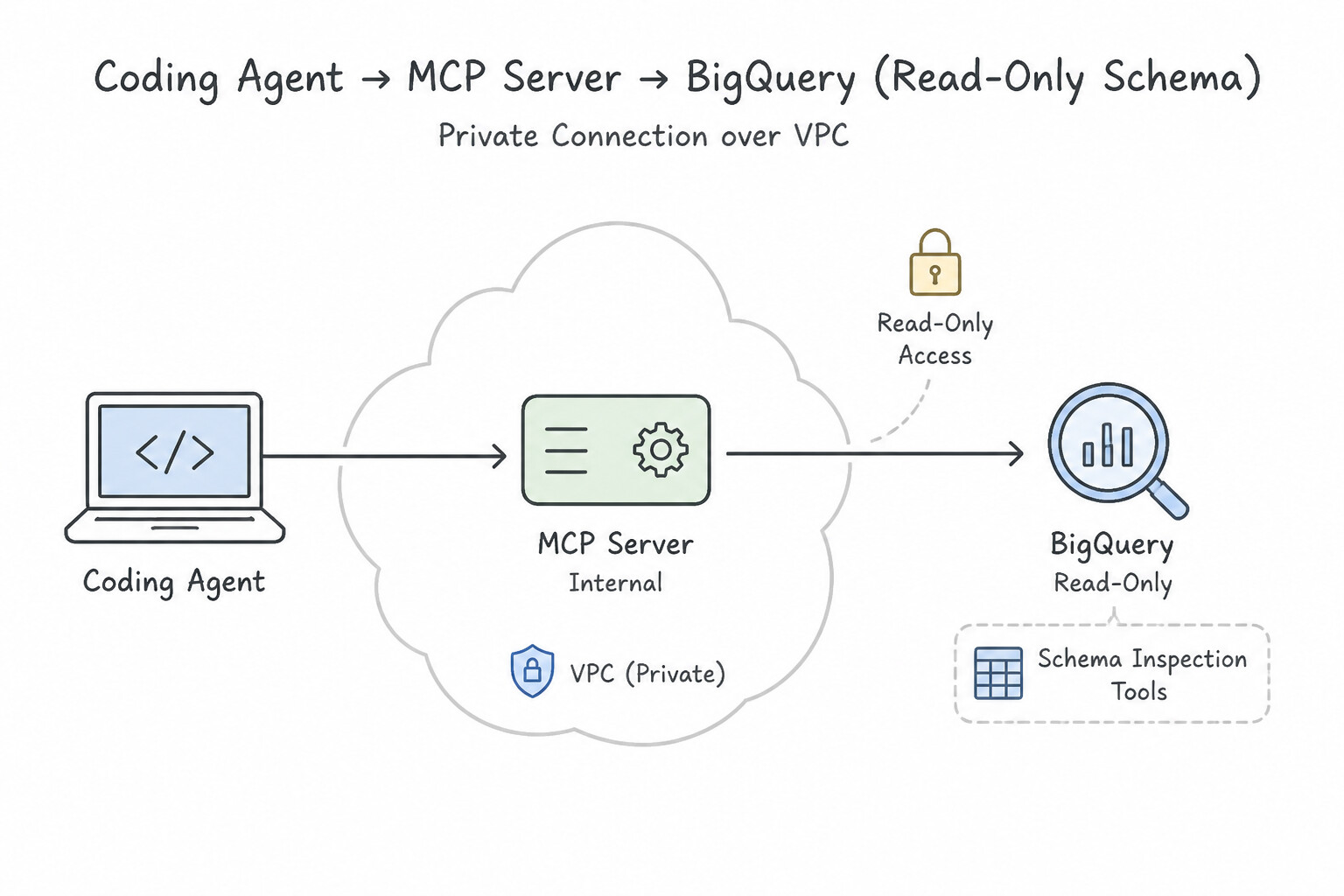
Coding agents like Antigravity and Claude Code on Google Cloud write much better code when they can inspect your real database schemas, read build logs, and check Jira tickets. Instead of building custom one-off scripts for each tool, you connect the coding agent to Model Context Protocol (MCP) servers.
How to Configure MCP Tools Safely for Coding Agents
- Private VPC Connectivity (Never Expose Internal Databases Publicly): Run your internal MCP servers on Cloud Run or GKE with Internal-only ingress and connect from your developer environment over a private VPC (using Private Service Connect or Direct VPC Egress).
- Least-Privilege IAM for Coding Tools: If a coding agent only needs to inspect BigQuery table schemas to write SQL queries, bind its MCP server service account to
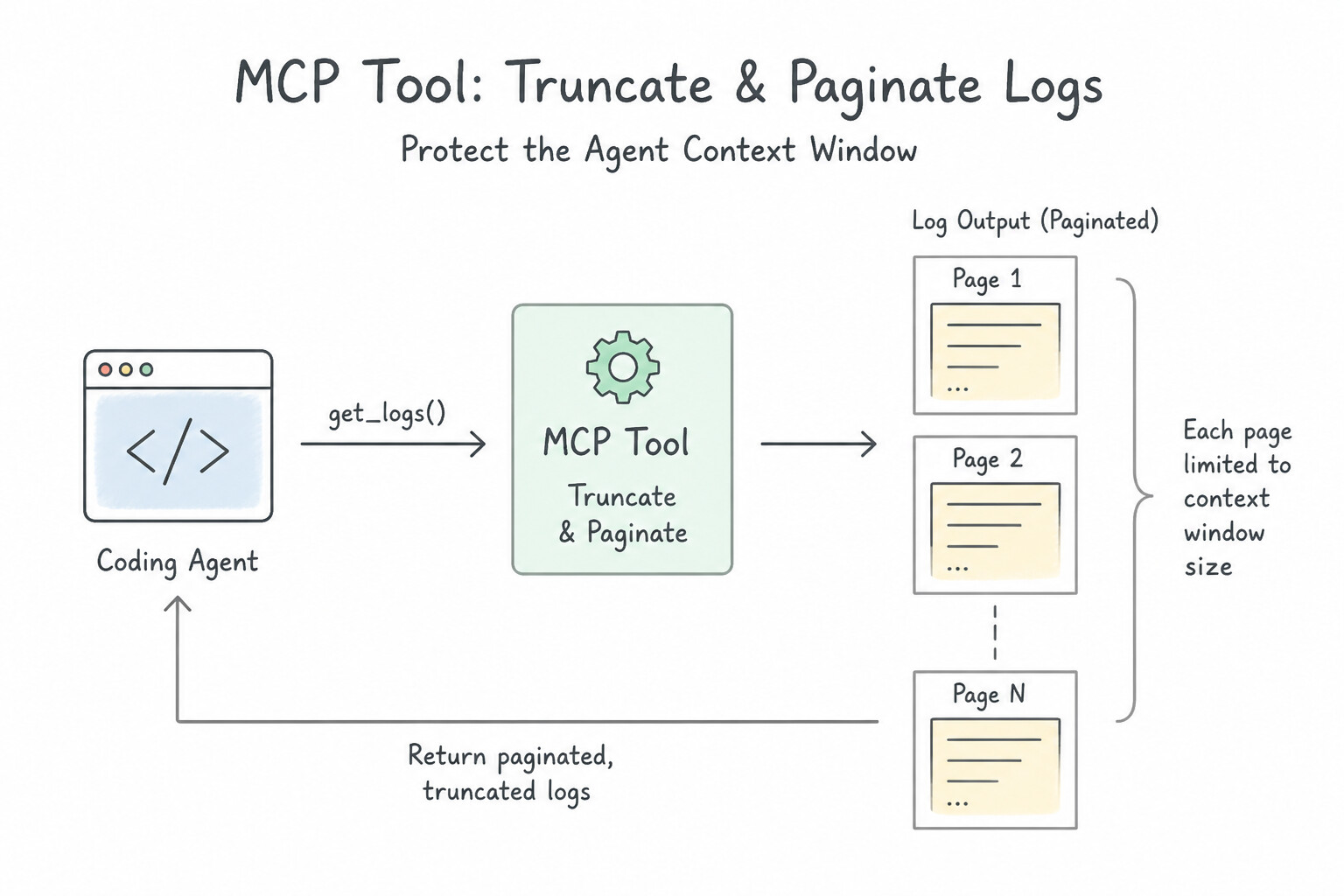
roles/bigquery.metadataViewer(ordataVieweron a dev dataset)—neverroles/ownerorroles/bigquery.adminon production! - Schema-First Inspection & Output Truncation: If an agent calls an MCP tool that returns a 50,000-line stack trace or a 100,000-row table dump, it will instantly blow up the model's context window and drive up token costs. Design MCP tools for coding agents to:
- Return compact metadata/schemas first (
list_tables,describe_table). - Enforce a strict
LIMITand truncate/paginate large text or log outputs before returning them to the agent.
Progressive Context Loading with Custom Skills
- Don't Put Everything in the System Prompt: If your engineering org has 30 different guides (how to write database migrations, how to configure Terraform, how to run accessibility tests), don't paste all 30 guides into the global system prompt.
- Package Procedural Guides as Custom Skills (
SKILL.md): Store each guide in its own skill folder with a short YAML description inSKILL.md. The coding agent reads only the lightweight skill descriptions at startup and loads the fullSKILL.mdinstructions only when your task actually needs that skill.
Key Takeaways (2.1a)
- Coding agent needs to write SQL against BigQuery without risking prod data → Expose a read-only/metadata MCP tool (
roles/bigquery.metadataViewer).- Tool calls cause context-window overflow errors → Add pagination, row limits, and output truncation in the MCP server.
- Share team-specific workflows without bloating every prompt → Package them as modular
Skills(SKILL.md).
Consideration 2.1b: Using Coding Agents in Secure Sandboxes (GKE, Cloud Workstations, and Antigravity)
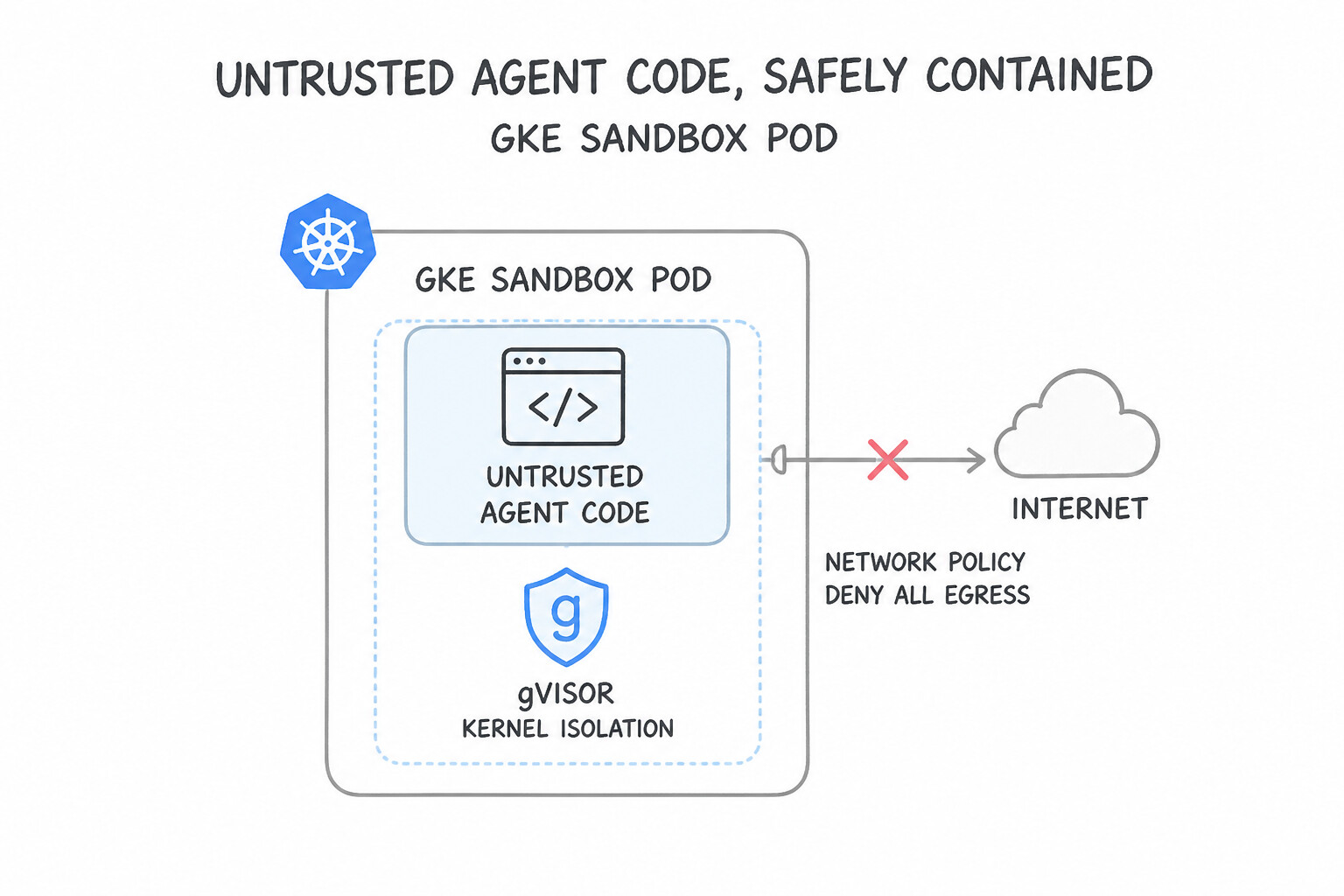
When an AI coding agent writes code and runs unit tests or shell scripts, you must treat that execution as untrusted code. A hallucinated command or a malicious package could try to wipe files, steal environment credentials, or open a connection to an external attacker server.
Two Core Sandbox Patterns on Google Cloud
- Pattern 1: GKE Sandbox (
gVisor) for Automated Code Execution: - Standard Docker containers share the host Linux kernel—meaning a kernel exploit inside a container could compromise the whole node.
- Enabling GKE Sandbox (
runtimeClassName: gvisor) places a user-space application kernel between the container and the host OS, blocking direct host syscalls. - Always pair GKE Sandbox with a Kubernetes
NetworkPolicythat denies external internet egress (allowing access only to internal mocks or approved package caches) and aResourceQuota/LimitRange(CPU, memory, and execution timeout) so an infinitewhile Trueloop cannot starve the cluster. - Pattern 2: Cloud Workstations for Interactive Developer Environments:
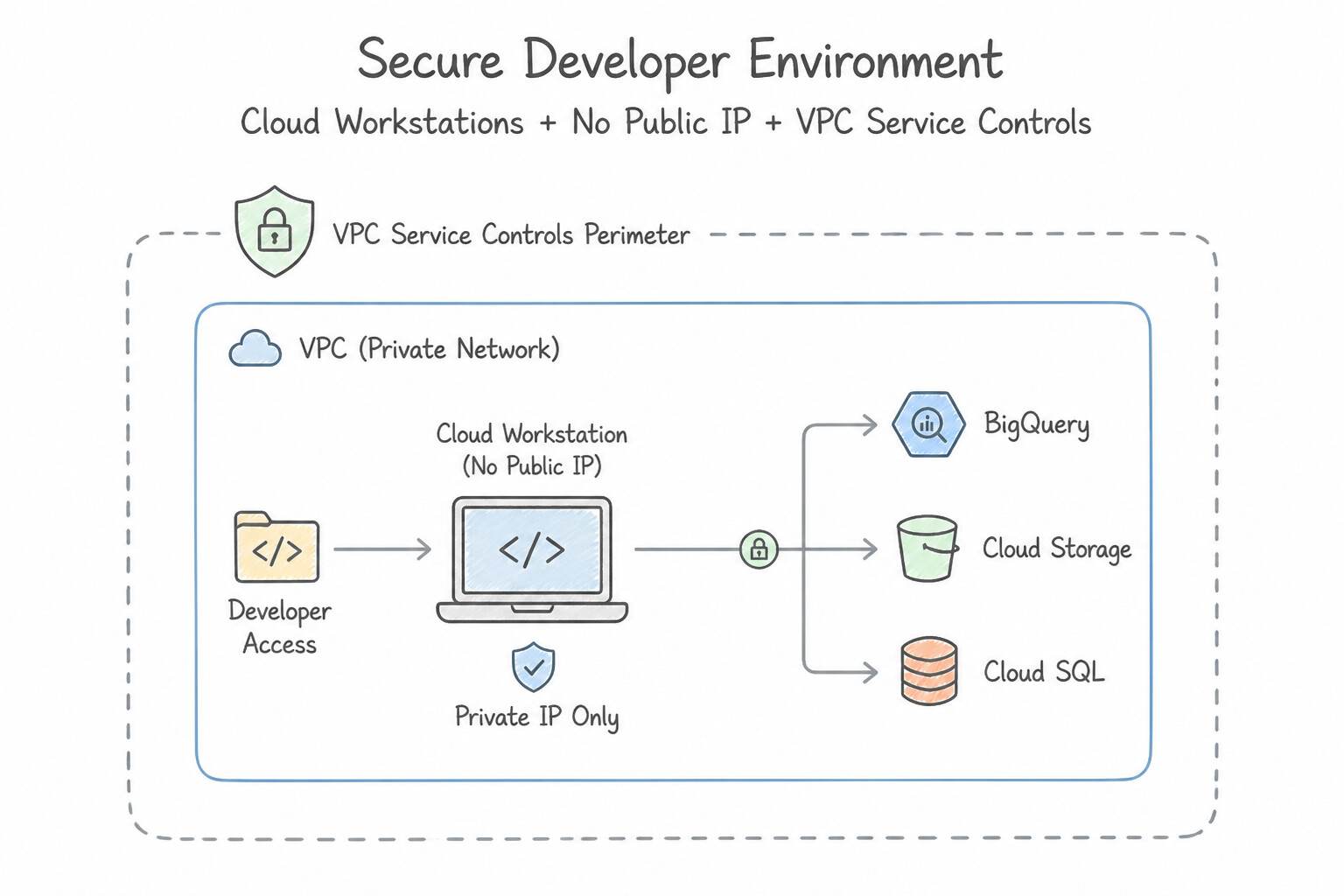
- Instead of letting contractors or developers run coding agents on unmanaged laptops with local source code copies, provision Cloud Workstations inside a VPC Service Controls (VPC-SC) perimeter.
- Disable public IP addresses on the workstations (
disablePublicIpAddresses), restrict clipboard/file export policies, and pull dependencies through a private Artifact Registry remote repository.
Controlling Blast Radius in Antigravity Sandboxes
- Sandboxed Terminal Execution: In Antigravity, commands run inside a local sandbox by default (restricting network access and writes outside the workspace), and only escalate when explicitly approved.
- Ephemeral, Credential-Free Test Environments: Never mount production service account credentials or
.envsecrets inside the sandbox where agent-generated tests run. Use mock endpoints or ephemeral test containers that are wiped clean after each run.
Key Takeaways (2.1b)
- Run untrusted LLM-generated Python/Bash safely on Kubernetes → Use
GKE Sandbox (gVisor)+ deny-all egressNetworkPolicy+ CPU/memory quotas.- Provide remote developers a zero-trust IDE with coding agents and zero local code leakage → Use
Cloud Workstations(no public IP) insideVPC-SC.
Consideration 2.1c: Using Coding Agents to Refactor Source Code, Optimize Runtimes, and Patch Vulnerabilities
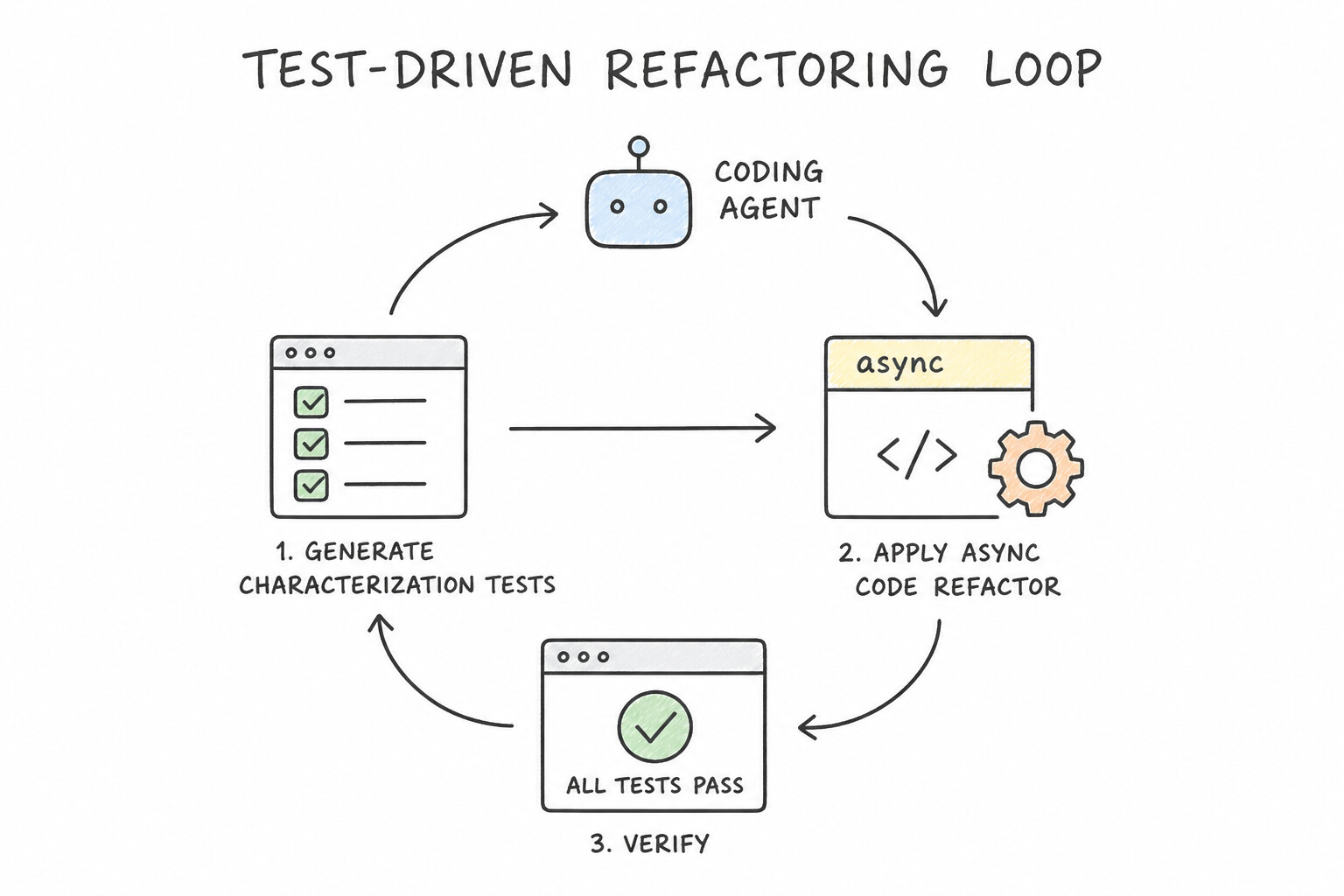
When asking a coding agent to modernize legacy code, fix slow endpoints, or patch security flaws, asking it to "rewrite this 5,000-line file to be faster and safer" in one shot usually breaks business logic. Production engineering teams use structured, verifiable agentic loops.
How to Guide Refactoring & Optimization Loops
- Test-Driven Refactoring (Characterization Tests First): Before refactoring legacy code (such as converting synchronous blocking I/O calls into asynchronous
async/awaitcode), have the coding agent generate and run unit/characterization tests against the existing behavior first. Once the baseline tests pass, the agent refactors the code in small steps and re-runs the test suite after each change. - Profile First, Then Optimize: Don't let an agent guess why an application is slow. Feed actual Cloud Profiler flamegraphs, query execution plans, or benchmark timings into the agent so it targets the real bottleneck—such as replacing an O(N2) nested loop with a hash map lookup (O(N)), or replacing an N+1 ORM query inside a loop with a single batched
JOINorWHERE id IN (...)query.
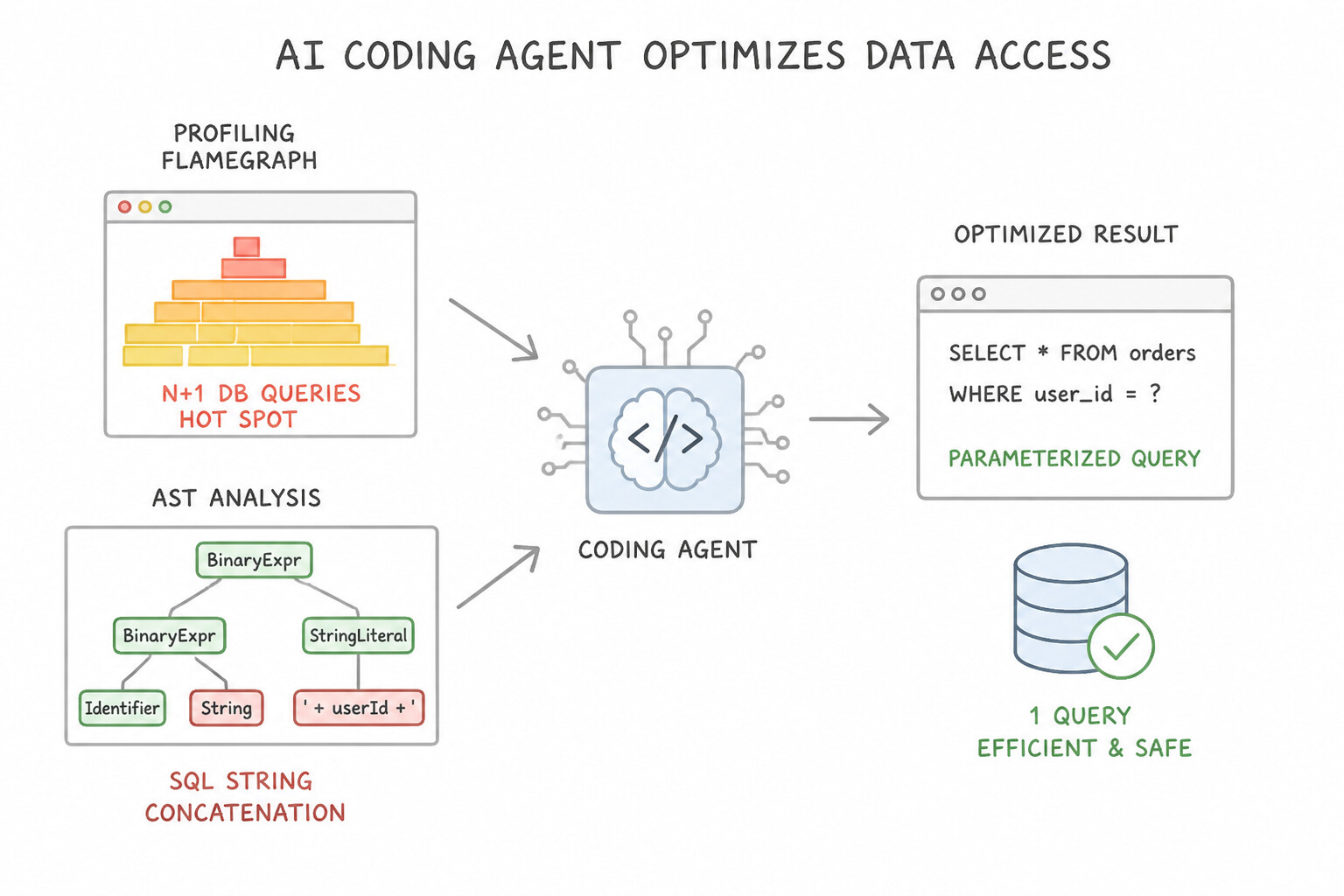
Patching Application Vulnerabilities with AST & SAST Verification
- Contextual AST Analysis Over Naive Regexes: When patching security flaws like SQL Injection (SQLi), Cross-Site Scripting (XSS), or insecure deserialization, combine Abstract Syntax Tree (AST) / SAST scanner findings with the coding agent.
- Parameterized Queries: To fix SQL injection, the agent must refactor raw string concatenation (
f"SELECT * FROM users WHERE name = '{user_input}'") into parameterized queries / prepared statements (WHERE name = ?), and then verify the fix by running both the SAST scanner and a regression test suite.
Key Takeaways (2.1c)
- Refactor legacy blocking code without breaking behavior → Generate baseline unit tests first, then refactor iteratively in a test loop.
- Fix high database latency caused by ORM loops → Refactor N+1 queries into batched/joined queries guided by profiler/trace data.
- Remediate SQL injection vulnerabilities → Use AST-guided refactoring to convert string interpolation into parameterized queries.
Quick Decision Cheat Sheet (Subsection 2.1)
If the Scenario Requires... | Choose This Google Cloud Pattern | Avoid This Common Mistake |
|---|---|---|
Give a coding agent access to BigQuery table structures without exposing production data | Connect via an internal MCP server using a service account with roles/bigquery.metadataViewer | Granting roles/bigquery.admin or passing database credentials in the prompt |
Prevent large log files or query results from crashing the coding agent's context window | Enforce output truncation, line limits, and pagination inside the MCP tool implementation | Dumping raw 100MB log files directly into the chat history |
Execute untrusted LLM-generated code and tests safely on Kubernetes | Run pods in GKE Sandbox ( gVisor) with a deny-all egress NetworkPolicy and ResourceQuota | Running untrusted code inside the main agent container or on standard privileged GKE nodes |
Provide contractors a managed IDE with coding agents where source code cannot be copied to laptops | Use Cloud Workstations (public IP disabled) inside a VPC Service Controls perimeter | Letting contractors clone repositories onto personal machines with local API keys |
Patch SQL injection flaws across a repository reliably | Use AST/SAST analysis to locate vulnerable sinks and refactor to parameterized queries, verified by tests | Using simple regex find-and-replace or asking the LLM to review code without running tests |
Further Reading (Subsection 2.1)
- GKE Sandbox (gVisor) Overview — Isolating untrusted workloads on GKE using gVisor user-space kernel sandboxing.
- Cloud Workstations Architecture & Security — Securing cloud development environments with VPC-SC, private ingress, and IAM.
Subsection 2.2: Customizing Coding Agents for Enterprise Workflows
The Big Picture
Every enterprise has its own coding standards, security gates, and deployment pipelines. Subsection 2.2 covers how you customize Antigravity using its five extensibility building blocks (Rules, Skills, Hooks, Plugins, and Subagents) and how you use the Agents CLI to build, test, govern, and scale agents across environments.
Consideration 2.2a: Creating Skills, Plugins, Extension Hooks, Rules, and Subagents Using Antigravity
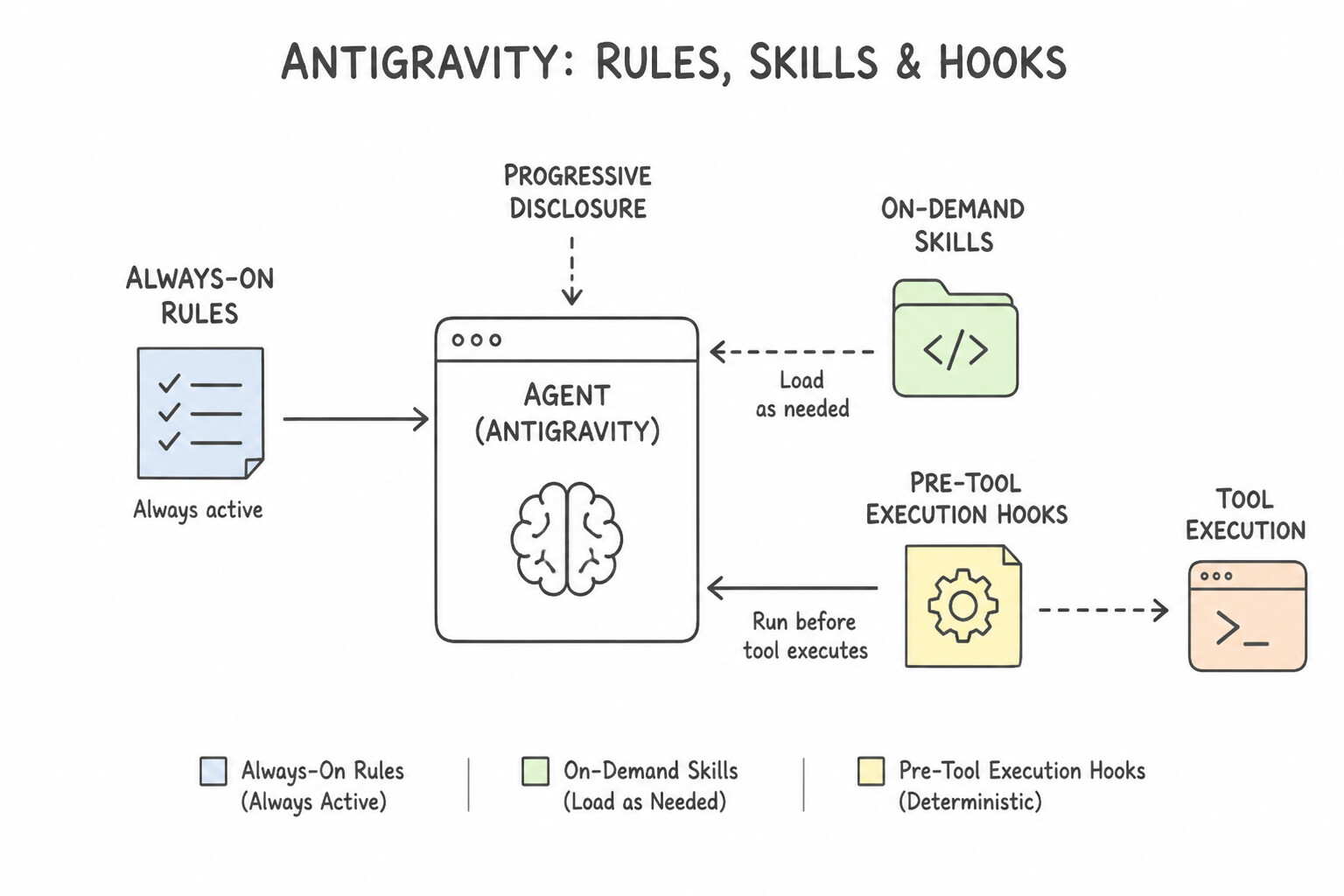
Customizing Antigravity effectively requires knowing the exact role of each of its five customization primitives: Rules, Skills, Extension Hooks, Subagents, and Plugins.
When to Use Each Antigravity Primitive
- Rules (
Always-On Guidelines): Short, permanent instructions (like "Always use Python type hints" or "Follow Google C++ style") that are injected into every conversation turn. Keep Rules brief so they don't waste context tokens. - Skills (
SKILL.md—On-Demand Playbooks): A folder containing aSKILL.mdfile (with YAMLnameanddescriptionfrontmatter) plus optional helper scripts and templates. Antigravity uses progressive disclosure: it only keeps the 1-sentence description in memory and loads the fullSKILL.mdinstructions only when the current task matches that skill. - Extension Hooks (
Pre-Tool/Post-Tool—Deterministic Gates): Shell scripts or executables that run automatically at specific lifecycle points (such as before or after a tool runs). - Use a Pre-Tool Execution Hook when you must guarantee a security rule (like blocking
rm -rf,terraform destroy, or commands containing secrets). Because a hook is deterministic code that returns a non-zero exit code to block execution, the LLM can never bypass it! - Use a Post-Tool Execution Hook to automatically run a formatter (
gofmt,ruff) or linter every time the agent edits a file.
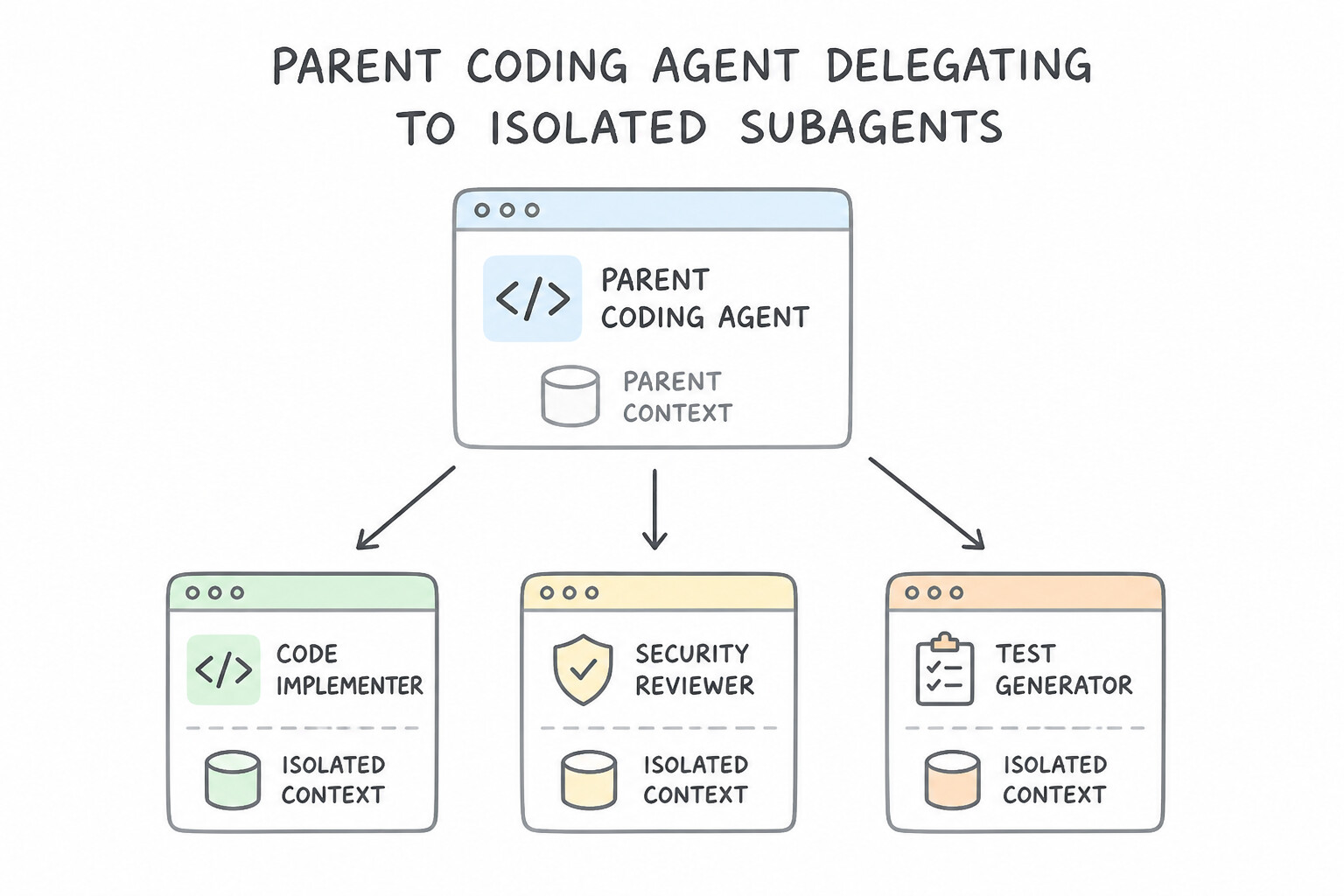
Scaling Complexity with Subagents and Plugins
- Subagents (
Isolated Context & Specialist Roles): When a task requires reading 50 files to research a bug or running an independent security audit, invoke a Subagent (such as the read-onlyresearchsubagent or a custom security-auditor subagent). Each subagent runs in its own separate context window and returns only a concise summary to the main agent—preventing context bloat in your main session. - Plugins (
Distributable Bundles): When a platform team wants to distribute a complete setup (combining custom Skills, Rules, Hooks, and MCP server configs) to 200 developers as a single versioned unit that can be enabled or disabled together, package them as an Antigravity Plugin.
Key Takeaways (2.2a)
- Block destructive CLI commands with 100% certainty → Use a
Pre-Tool Execution Hook(never rely on a Rule or Skill for hard security blocking).- Provide a detailed 20-page migration playbook without bloating every prompt → Create a
Skill (SKILL.md)(uses progressive disclosure).- Keep deep codebase exploration from filling up the main agent's context window → Delegate to a
Subagent.- Ship Skills + Rules + Hooks + MCP configs together as one installable package → Create a
Plugin.
Consideration 2.2b: Augmenting Antigravity with Agents CLI to Build, Scale, Govern, and Optimize Deployed Agents
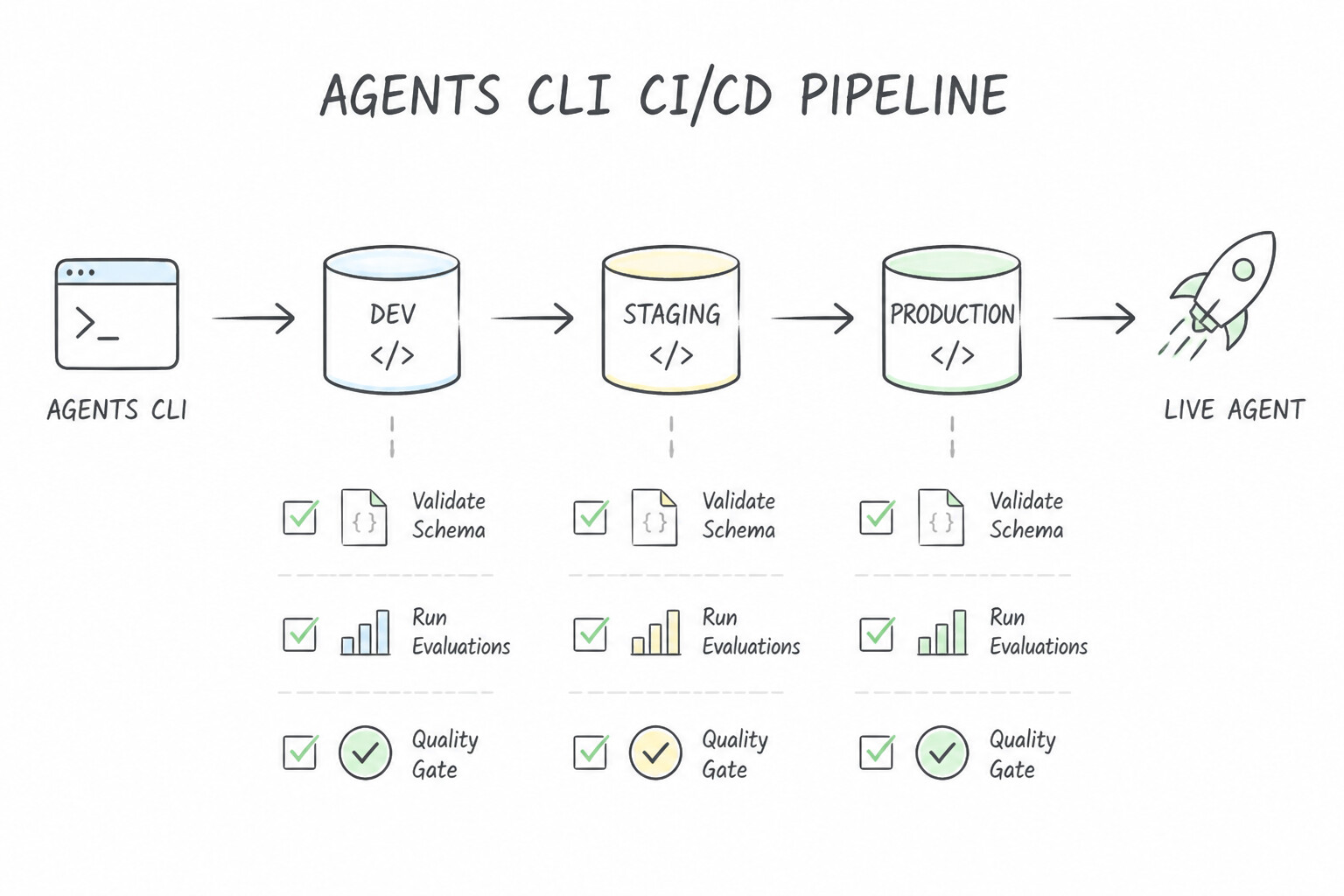
While developers design and test agents interactively inside Antigravity, enterprise teams need a repeatable, scriptable command-line workflow to package, validate, govern, and scale those agents in production. That is the role of the Agents CLI in Agent Platform.
Building, Packaging, and Governing with Agents CLI
- Automated Multi-Environment Packaging (
Dev → Staging → Prod): Use the Agents CLI inside Cloud Build or GitHub Actions pipelines to validate agent manifests, swap environment-specific variables (pointing to Dev vs. Prod MCP endpoints), run regression tests, and deploy immutable versions across environments. - Fleet-Wide Governance & Skill Registry Sync: Platform administrators use the Agents CLI to enforce organization-wide policies, verify that agents only reference approved tools/skills from the Skill Registry and Agent Registry, and audit deployed configurations across projects.
Profiling Token Bloat and Scaling Remote Agents
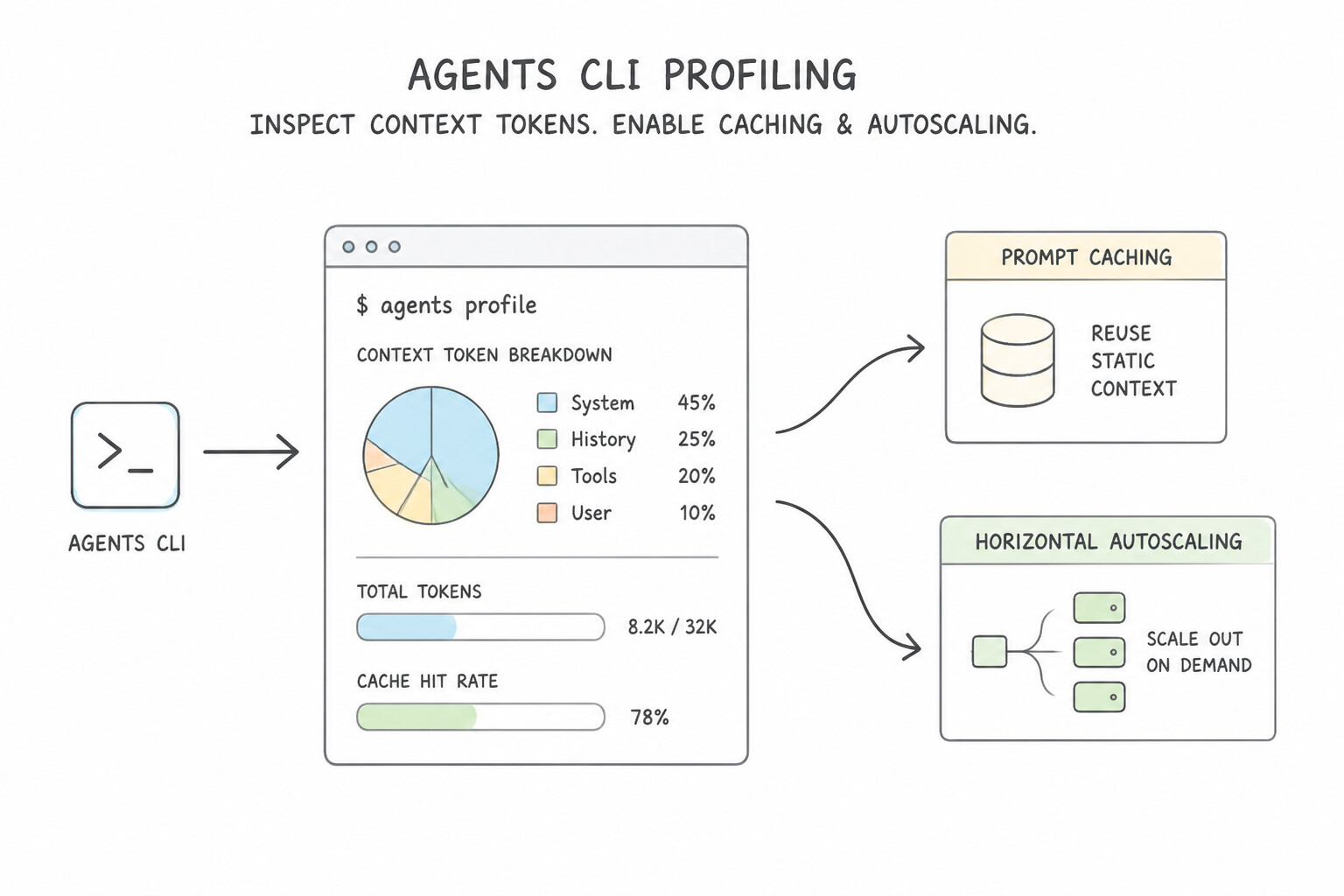
- Diagnosing Token Bloat & Latency (
agents cli profile): If a coding or workflow agent suddenly becomes slow (e.g., 15-second turn latency) and expensive, run the Agents CLI profiling command to inspect how the context window is assembled. Profiling reveals whether an oversized system prompt, uncompacted chat history, or a verbose MCP tool schema is consuming tokens—so you can enable prompt caching and context trimming. - Configuring Horizontal Auto-Scaling: Use the Agents CLI to configure minimum/maximum instance counts and concurrency targets for remote backend agents so they scale smoothly during peak workday traffic and scale down overnight.
Key Takeaways (2.2b)
- Automate building, testing, and promoting agents in CI/CD → Use the
Agents CLIin Cloud Build.- Find out why an agent's token cost and turn latency spiked → Run
Agents CLI profileto inspect context assembly, then enable caching/trimming.
Quick Decision Cheat Sheet (Subsection 2.2)
If the Scenario Requires... | Choose This Google Cloud Pattern | Avoid This Common Mistake |
|---|---|---|
Deterministically block a coding agent from running rm -rf or DROP DATABASE | Configure a Pre-Tool Execution Hook that inspects the command and exits non-zero | Adding 'Never run destructive commands' to a Workspace Rule or system prompt |
Enforce a short coding style rule (like 'Always use 2-space indentation') on every turn | Define a Workspace Rule | Writing a Pre-Tool Hook to parse indentation before every shell command |
Provide a specialized 15-step runbook for database upgrades without wasting tokens on unrelated tasks | Create a Custom Skill ( SKILL.md) loaded on demand via progressive disclosure | Pasting the entire 15-step runbook into the global always-on Rules file |
Run a broad 40-file codebase search or security audit without cluttering the main chat history | Invoke a dedicated Subagent with its own isolated context window | Reading all 40 files directly inside the primary agent's conversation loop |
Distribute a team's Skills, Rules, Hooks, and MCP server configs as a single installable unit | Bundle them into an Antigravity Plugin | Asking every developer to manually copy files into hidden folders |
Identify which prompt section or tool schema is causing 15-second latency and high token bills | Run the Agents CLI profile command, then enable context trimming and prompt caching | Lowering model temperature or increasing network socket timeouts |
Further Reading (Subsection 2.2)
- Google Cloud Agent Platform & Agents CLI Overview — Building, governing, and scaling enterprise agents on Google Cloud.
Book TOC · Previous · Chapter 2 of 8 · Next
AwesomeGCP.com Learning
The approach taken is a question-led learning approach: you explore realistic project scenarios where you need to make decisions or take actions to achieve business goals within specific constraints. Instead of passive learning, you are challenged to think and work through the options to master the Professional Agentic Architect (PAA) certification!