Book TOC · Previous · Chapter 5 of 7 · Next
Chapter 5: Trust & Security: Zero Trust, Encryption in 3 States, Defense-in-Depth & Sovereignty
Chapter Focus: Phishing/DDoS/Ransomware mitigation, Zero Trust (BeyondCorp/IAP), AAA (Cloud Identity, IAM, 2SV), Encryption at rest/in transit/in use, SCC, Google SecOps, and Assured Workloads.
Subsection 5.1: Describe fundamental cloud security concepts
The Big Picture
For decades, traditional on-premises security relied on a "Castle-and-Moat" (perimeter-based) mental model: anyone outside the corporate firewall was untrusted, and anyone inside the office VPN was implicitly trusted. In the modern era of remote work, cloud microservices, third-party SaaS integrations, and generative AI agents, perimeter security breaks down catastrophically:
- The Implicit Lateral-Movement Trap (
5.1a,5.1b,5.1d): If a single employee falls for a phishing email or a third-party vendor system is compromised, an attacker inside a perimeter-trusted network can move laterally across internal servers to deploy ransomware, hijack compute for cryptomining, or exfiltrate sensitive databases. Modern cloud security replaces perimeter trust with Zero-Trust Architecture ("Never Trust, Always Verify"), Least Privilege, and Security by Default. - Incomplete Data State Protection (5.1e): Encrypting hard drives (At Rest) and network cables (In Transit) is built into Google Cloud by default, but regulated workloads (finance, healthcare, sovereign government) increasingly require protecting data even while it is actively loaded into RAM for computation (In Use via Confidential Computing).
- Confusing the Three 'A's of Access Governance (5.1f): Many cloud architects mix up Authentication (Who are you? — verified via passwords, 2-Step Verification / MFA, and SSO), Authorization (What are you allowed to do? — enforced via IAM roles and policies), and Auditing (What did you actually do? — recorded via immutable Cloud Audit Logs).
Consideration 5.1a: Describe relevant cybersecurity threats and business implications (e.g., DDoS, ransomware, cryptomining, malware, viruses, phishing, misconfiguration, unsecured third party systems, physical damage, LLM attacks)
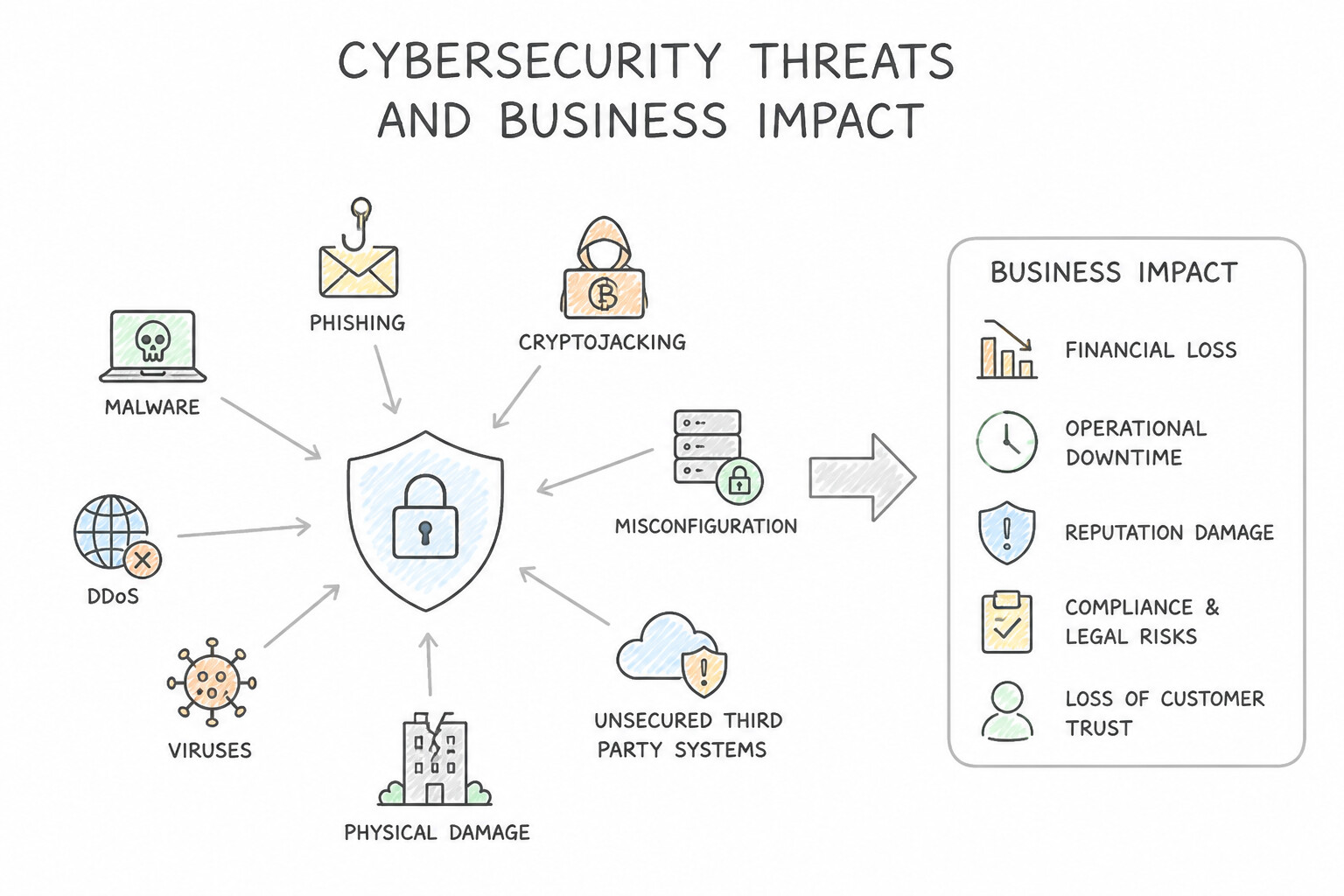
- Classic Infrastructure & Identity Threats:
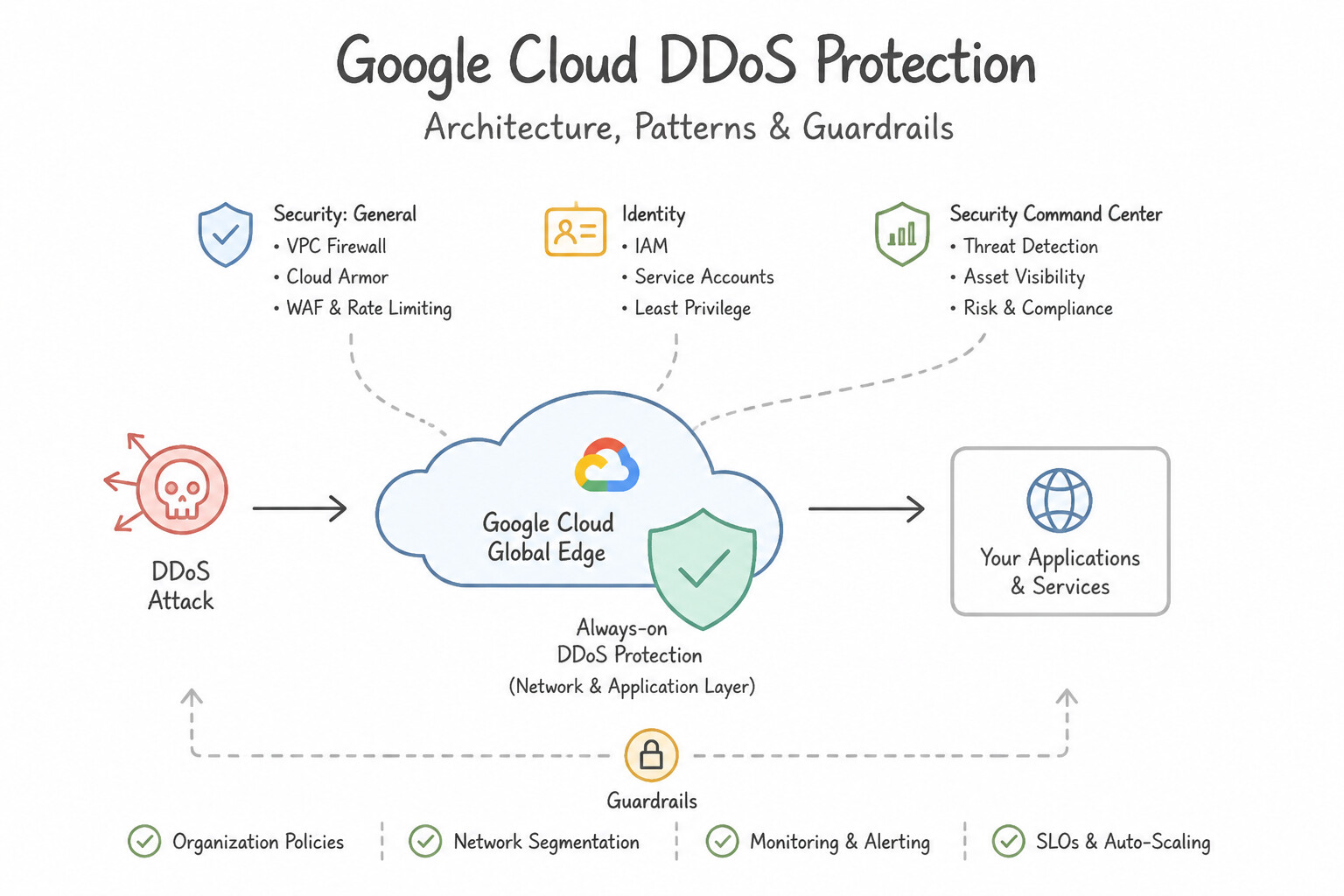
- DDoS (Distributed Denial of Service): Floods a public website or API with bogus traffic from millions of bots to exhaust server capacity and knock the business offline (attacking Availability).
- Ransomware, Malware, & Viruses: Malicious software that encrypts or corrupts corporate files and demands payment to restore access, halting operations and causing severe reputational and financial damage.
- Phishing: Social engineering attacks (deceptive emails/messages) that trick employees into surrendering login credentials.
- Cryptomining (Cryptojacking): Attackers compromise cloud credentials to spin up huge GPU/VM clusters to mine cryptocurrency—causing massive, unexpected cloud billing spikes.
- Cloud-Specific & AI-Era Threats:
- Cloud Misconfiguration: The #1 cause of customer-side cloud breaches (e.g., accidentally making a private Cloud Storage bucket public or opening firewall port
0.0.0.0/0). - Unsecured Third-Party Systems & Physical Damage: Supply-chain vulnerabilities in vendor software, or fires/floods/power failures at physical facilities.
- LLM Attacks (Prompt Injection, Data Poisoning, Sensitive Data Extraction): Manipulating generative AI inputs to bypass safety instructions, leak confidential system prompts/training data, or trigger unauthorized agent tool execution.
Key Implementation Patterns
- Mitigating DDoS Attacks on E-Commerce Platforms: Use Phishing attack. Phishing involves sending fraudulent emails resembling reputable sources to steal sensitive data like passwords. (Avoid alternative: DoS attacks aim to crash services or networks by flooding them with traffic, not by stealing credentials via email.)
- Preventing Cryptomining Hijacks on Compute Resources: Use Ransomware, which encrypts data and blocks access until a fee is paid. Ransomware is defined by the encryption of data and a demand for payment to release it. (Avoid alternative: Phishing involves tricking users into revealing info, not encrypting files for ransom.)
- Detecting Cloud Misconfigurations exposing Sensitive PII: Use Distributed Denial-of-Service (DDoS). A DDoS attack uses traffic from many different sources to overwhelm a system and make it unavailable to users. (Avoid alternative: Phishing attempts to steal sensitive information by tricking users, not by overwhelming a system with traffic.)
Key Takeaways (5.1a)
- Phishing is a deceptive attack usually delivered via email to steal credentials.
- Social Engineering targets human psychology rather than technical system flaws.
- Security awareness training is a primary defense against phishing.
- Ransomware is malware that encrypts data and demands payment for the decryption key.
Consideration 5.1b: Differentiate between cloud security and on-premises security
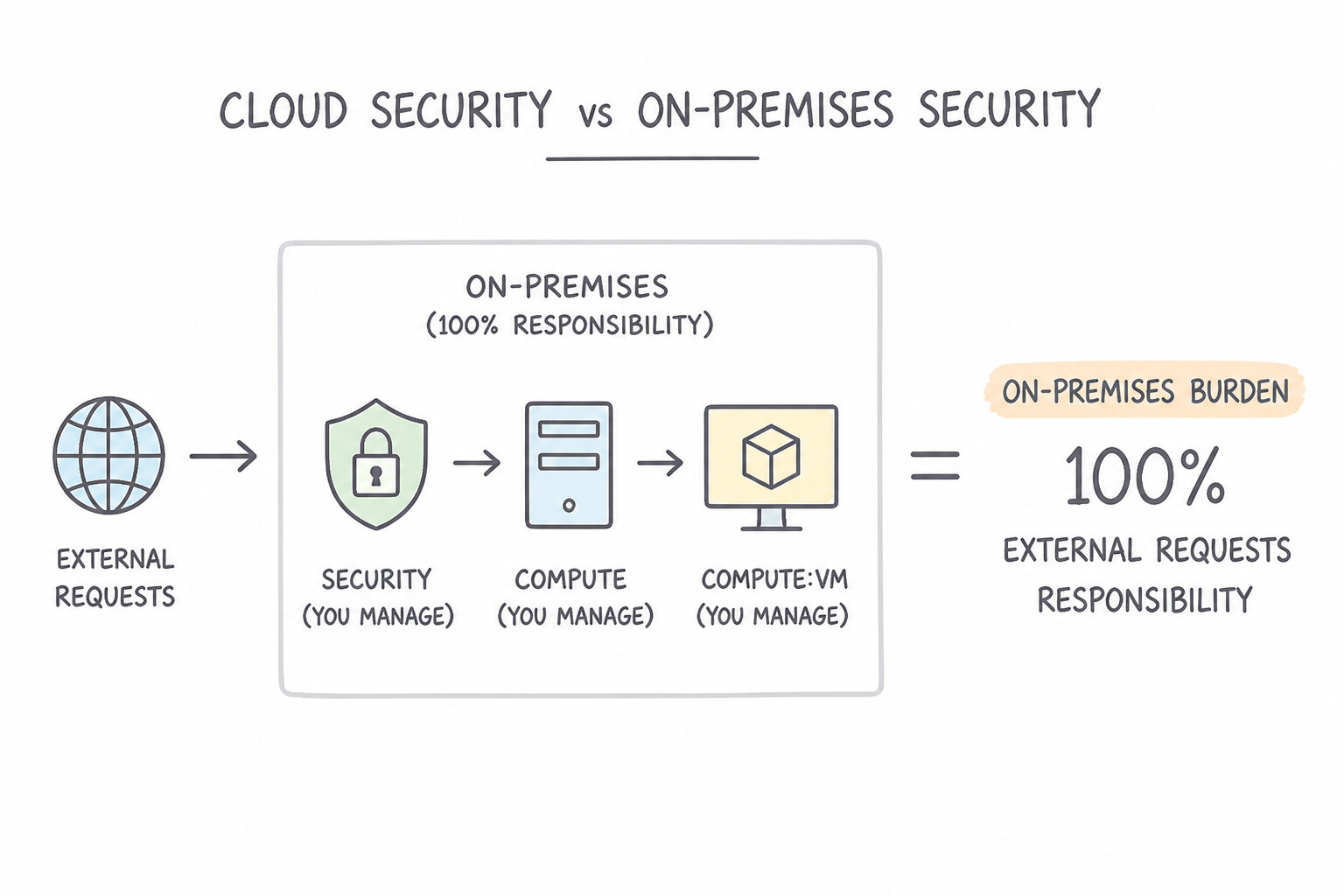
- On-Premises Burden (100% Customer Responsibility): In a traditional data center, the customer must fund, staff, and maintain physical perimeter guards, biometric doors, server hardware patching, network cabling encryption, and software security—often resulting in delayed patching and inconsistent visibility across siloed tools.
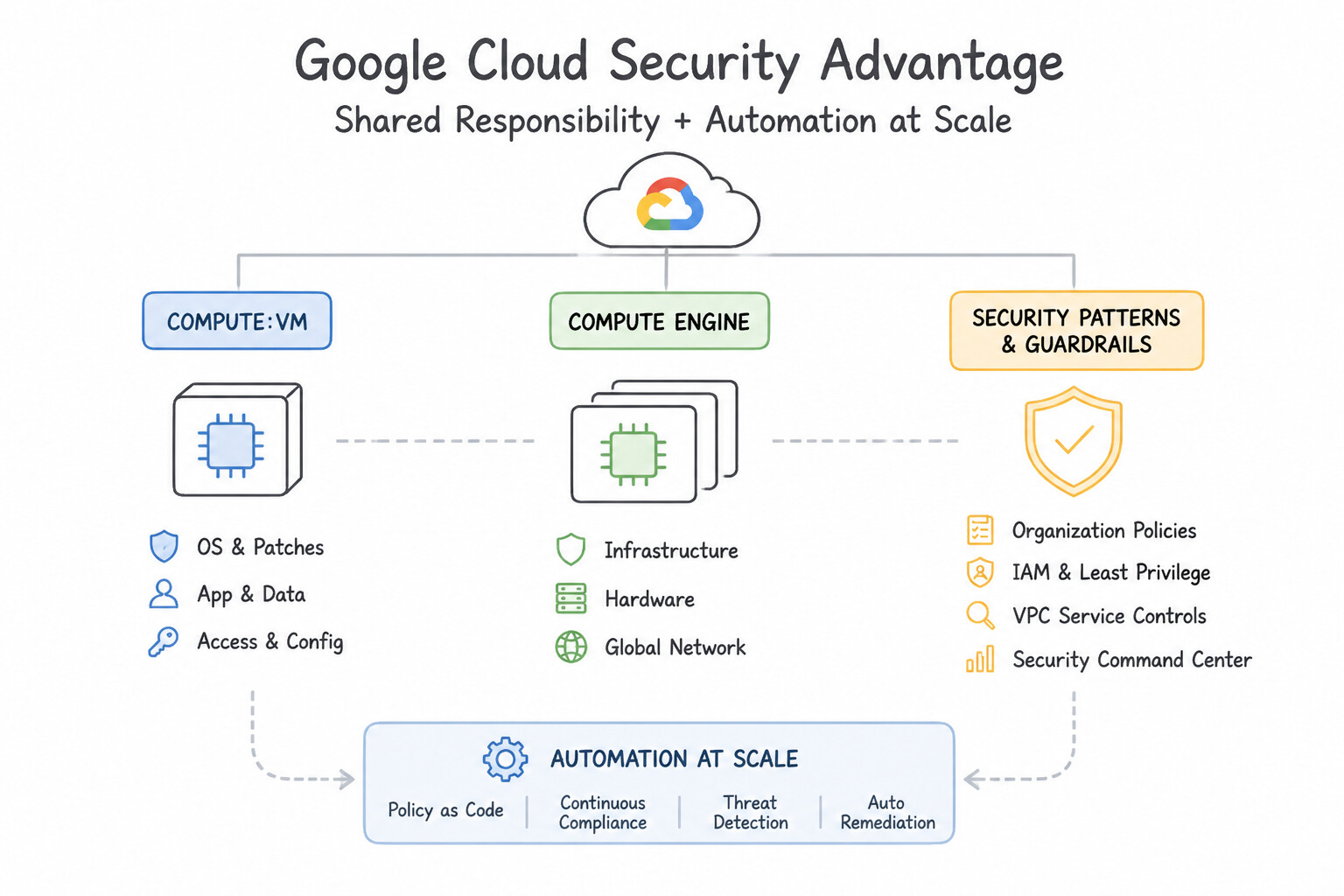
- Cloud Security Advantage (Shared Responsibility + Automation at Scale): Google Cloud handles physical data center security, custom hardware roots of trust (Titan chips), and hypervisor/network encryption automatically (Security by Default), while providing centralized, software-defined policy enforcement, automated patching, and global threat telemetry across the customer's cloud resources.
Key Implementation Patterns
- Hardware Maintenance in IaaS: Use Replacing failed physical hardware components in the data center. Google manages the physical infrastructure, including hardware replacement, power, and cooling. (Avoid alternative: In IaaS, the customer remains responsible for patching the guest operating system.)
- Shared Responsibility Model Definition: Use Rely on Google to replace the failed hardware component. Google manages the physical infrastructure, including hardware repairs, as part of the Security of the Cloud. (Avoid alternative: Customers are not permitted physical access to Google data centers to perform repairs.)
- Operating System Patching in PaaS: Use Rely on Google to manage the operating system patches. In a PaaS model like App Engine, Google manages the operating system and runtime updates for you. (Avoid alternative: In PaaS, you do not have access to patch the OS manually.)
Key Takeaways (5.1b)
- In an IaaS model (like Compute Engine), Google manages the physical hardware, power, cooling, and network infrastructure.
- The customer remains responsible for the operating system, patching, application software, and data security in IaaS.
- Moving to the cloud shifts the responsibility of 'racking and stacking' servers to the cloud provider.
- In the cloud, physical security and hardware maintenance are the provider's responsibility (Security of the Cloud).
Consideration 5.1c: Describe the importance of control, compliance, confidentiality, integrity, and availability in a cloud security model
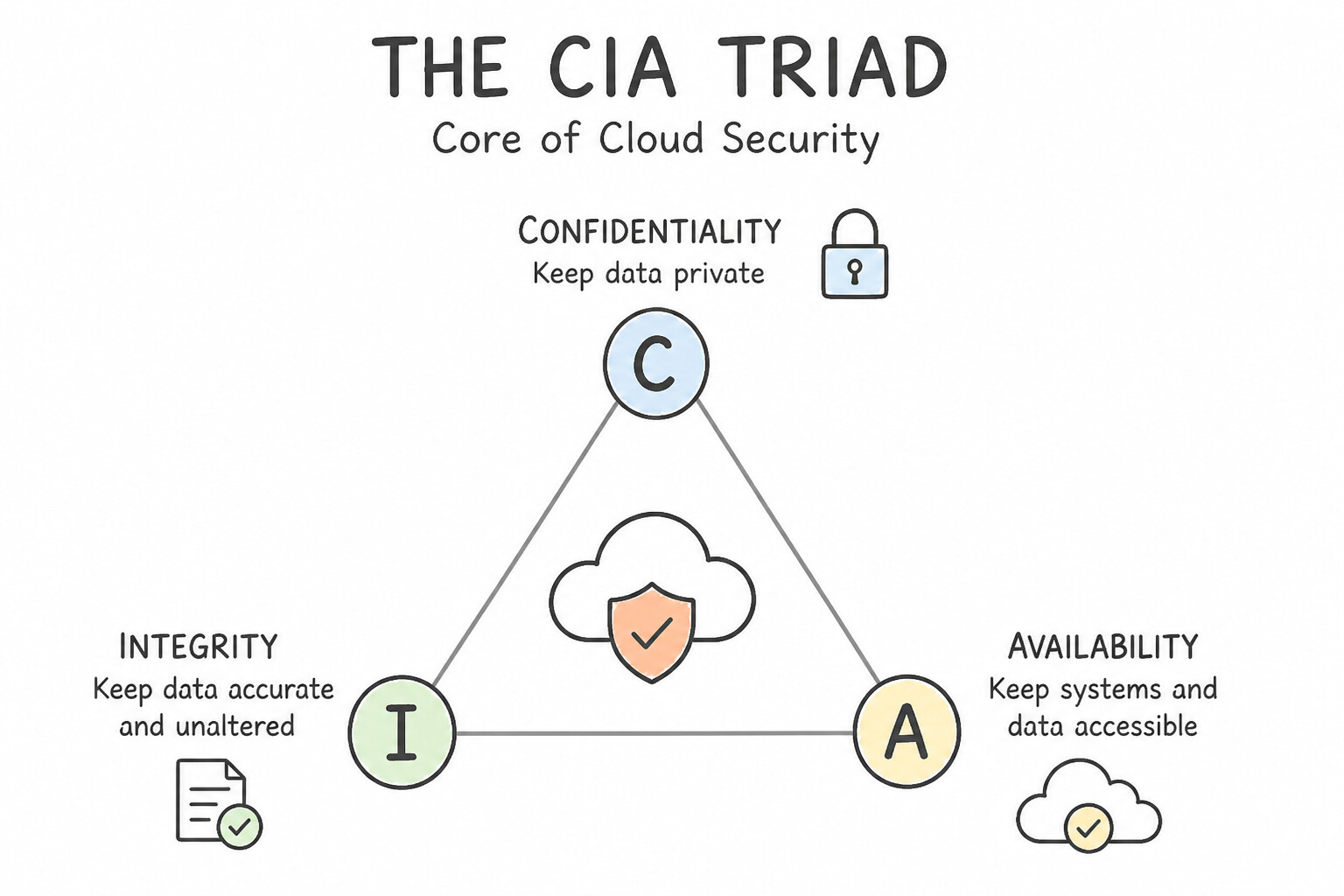
- The CIA Triad (Memorize Each Pillar's Exact Meaning):
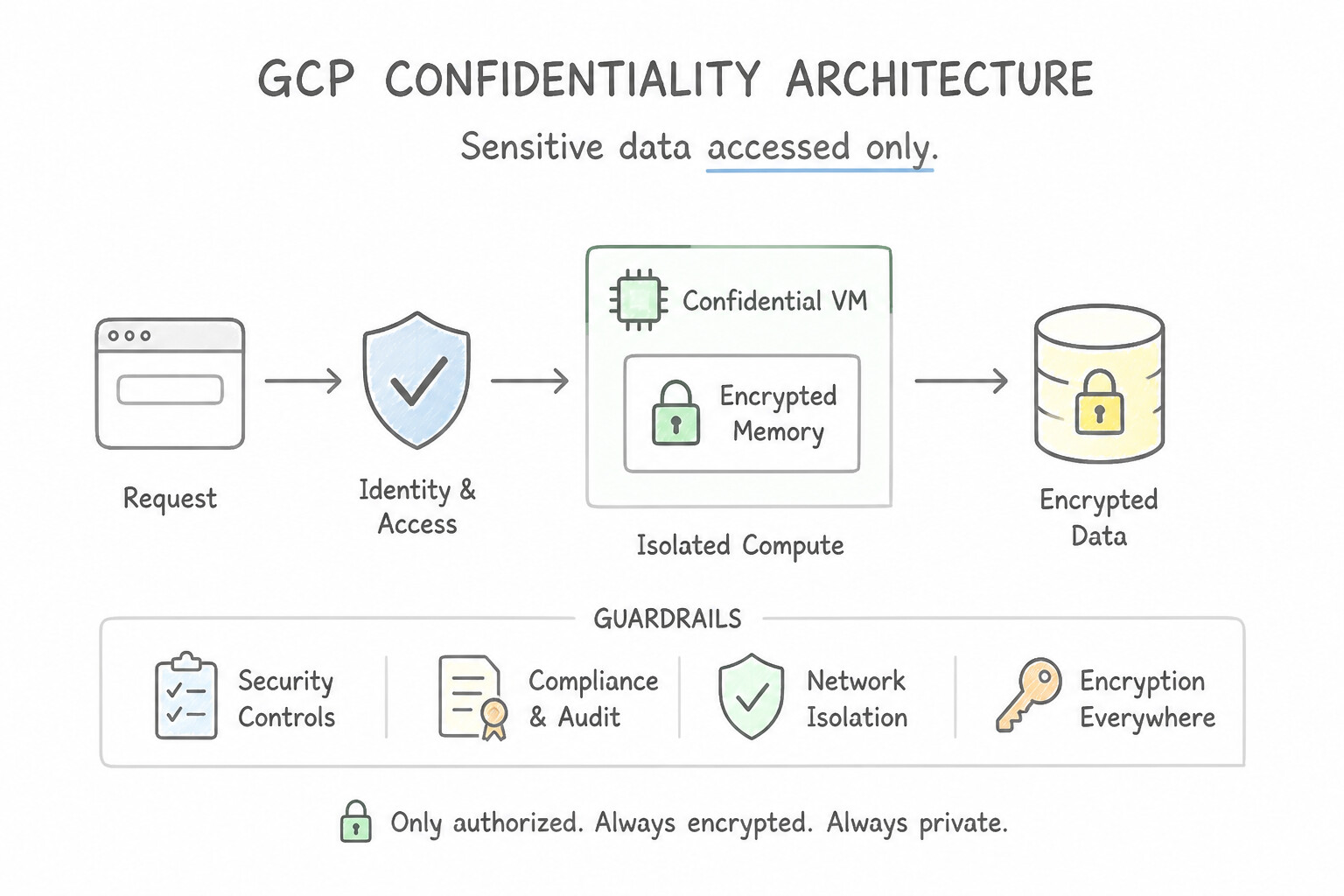
- Confidentiality: Ensuring sensitive data is accessed only by authorized users and processes (enforced via IAM, encryption, and DLP).
- Integrity: Ensuring data and systems remain accurate, authentic, and unmodified by unauthorized tampering (enforced via cryptographic checksums, digital signatures, and immutable logs).
- Availability: Ensuring authorized users can reliably access applications and data whenever needed (enforced via multi-zone redundancy, load balancing, and DDoS mitigation).
- Control & Compliance: Control gives organizations technical mechanisms (IAM, Org Policies) to govern data access; Compliance demonstrates adherence to legal and industry standards (GDPR, HIPAA, PCI-DSS, ISO 27001).
Key Implementation Patterns
- Ensuring Data Confidentiality with Encryption: Use Confirm that the company retains full ownership of the data and Google processes it only according to your instructions. Customers retain full ownership of their data stored on Google Cloud. (Avoid alternative: Google does not take ownership of customer data for optimization purposes.)
- Maintaining Data Integrity in Transaction Logs: Use Establish a process to manage and apply OS patches yourself. In an IaaS model like Compute Engine, the customer is fully responsible for securing and patching the Guest Operating System. (Avoid alternative: Google does not automatically patch the Guest OS for standard Compute Engine VMs; this is a customer responsibility.)
- Maximizing System Availability via Multi-Region Deployment: Use Do nothing, because Google Cloud encrypts all customer data at rest by default. Google Cloud encrypts all data stored on disks by default without requiring user intervention. (Avoid alternative: There is no manual setting to enable encryption because it is always active by default.)
Key Takeaways (5.1c)
- Customers retain full ownership of their data on Google Cloud.
- Google processes data only according to customer instructions.
- Google does not use customer content for advertising.
- Trust and security are foundational to the cloud agreement.
Consideration 5.1d: Define key security terms and concepts (e.g., data loss prevention, privileged access, least privilege, zero-trust architecture, security by default, security posture, cyber resilience, firewall, encryption, decryption)
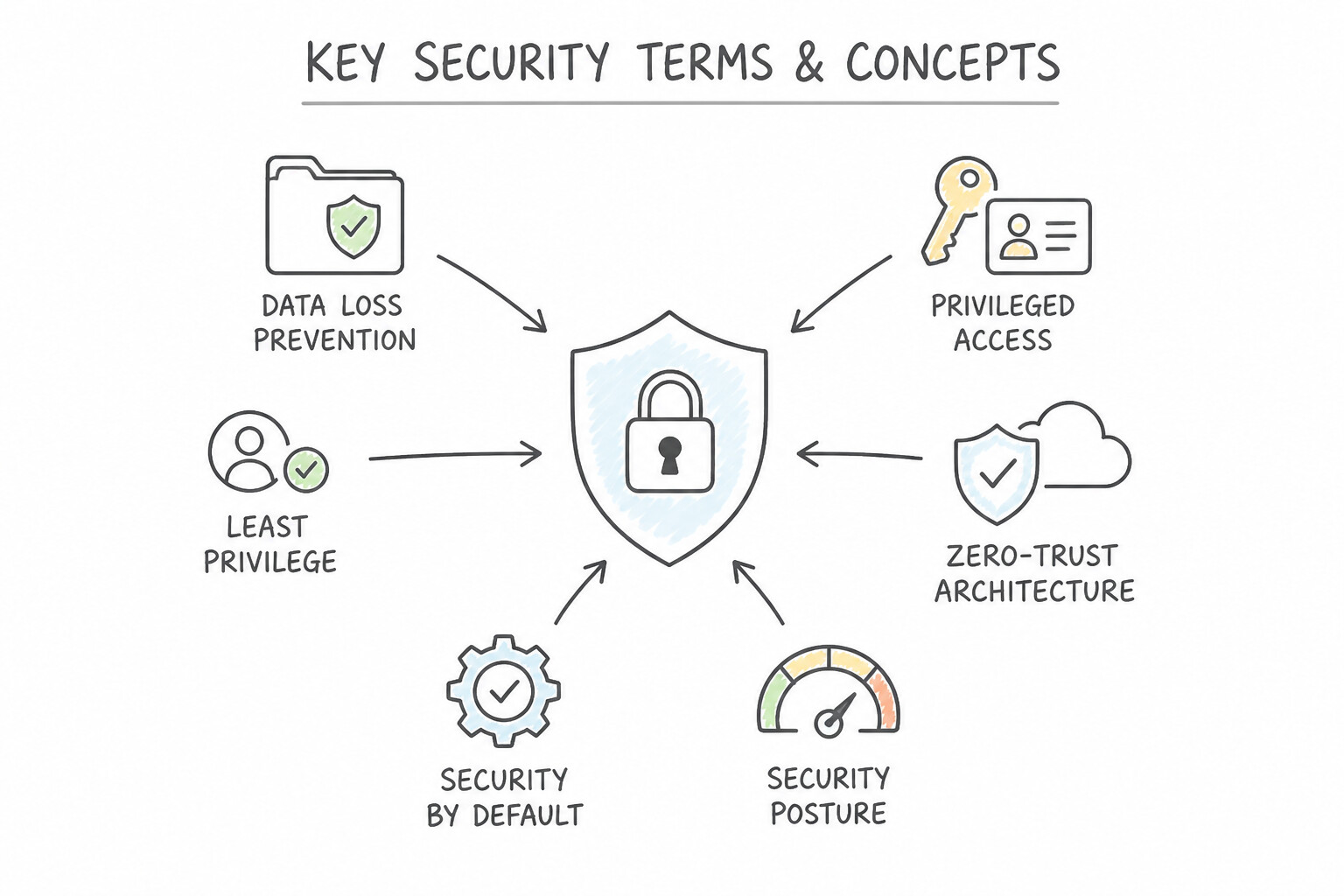
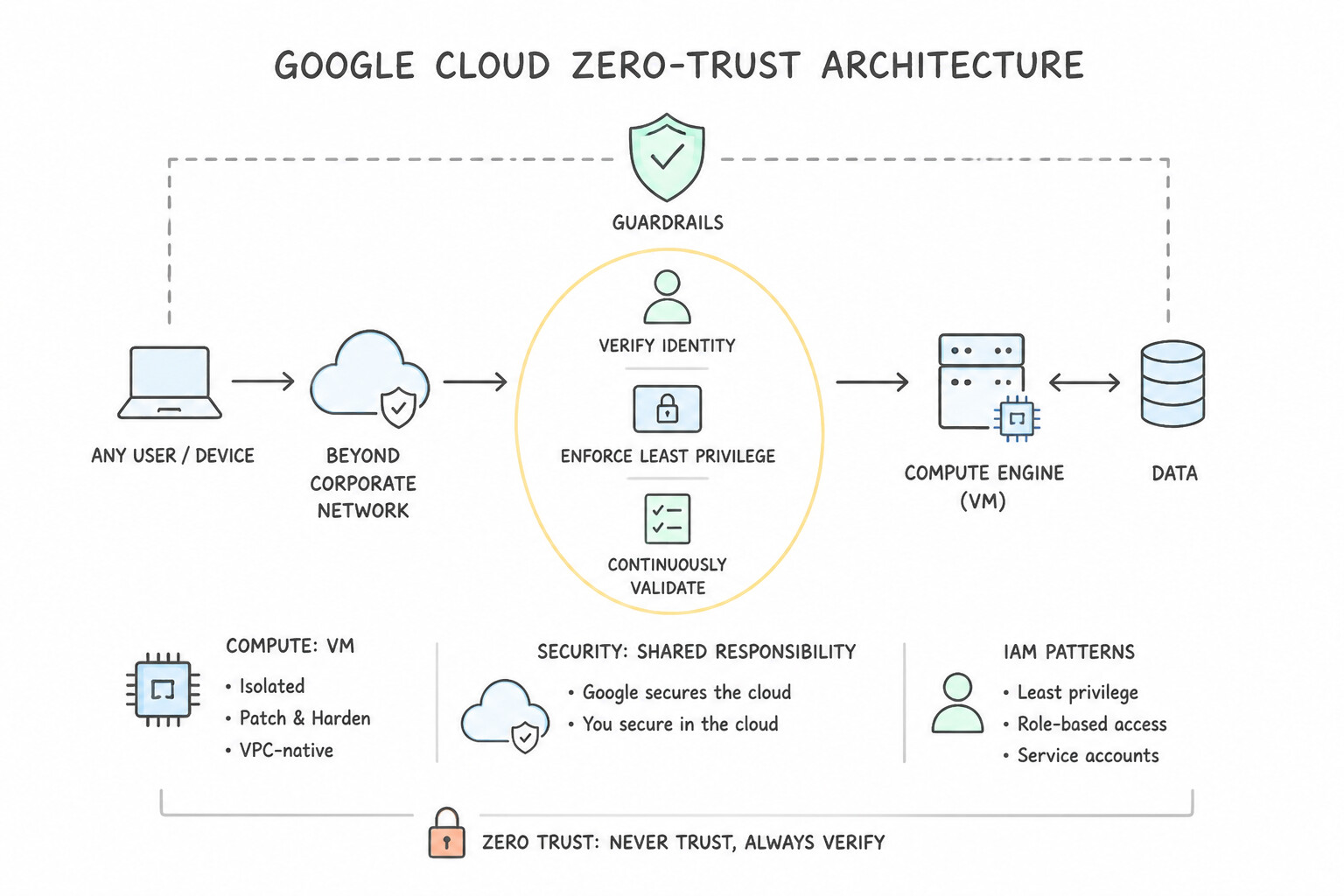
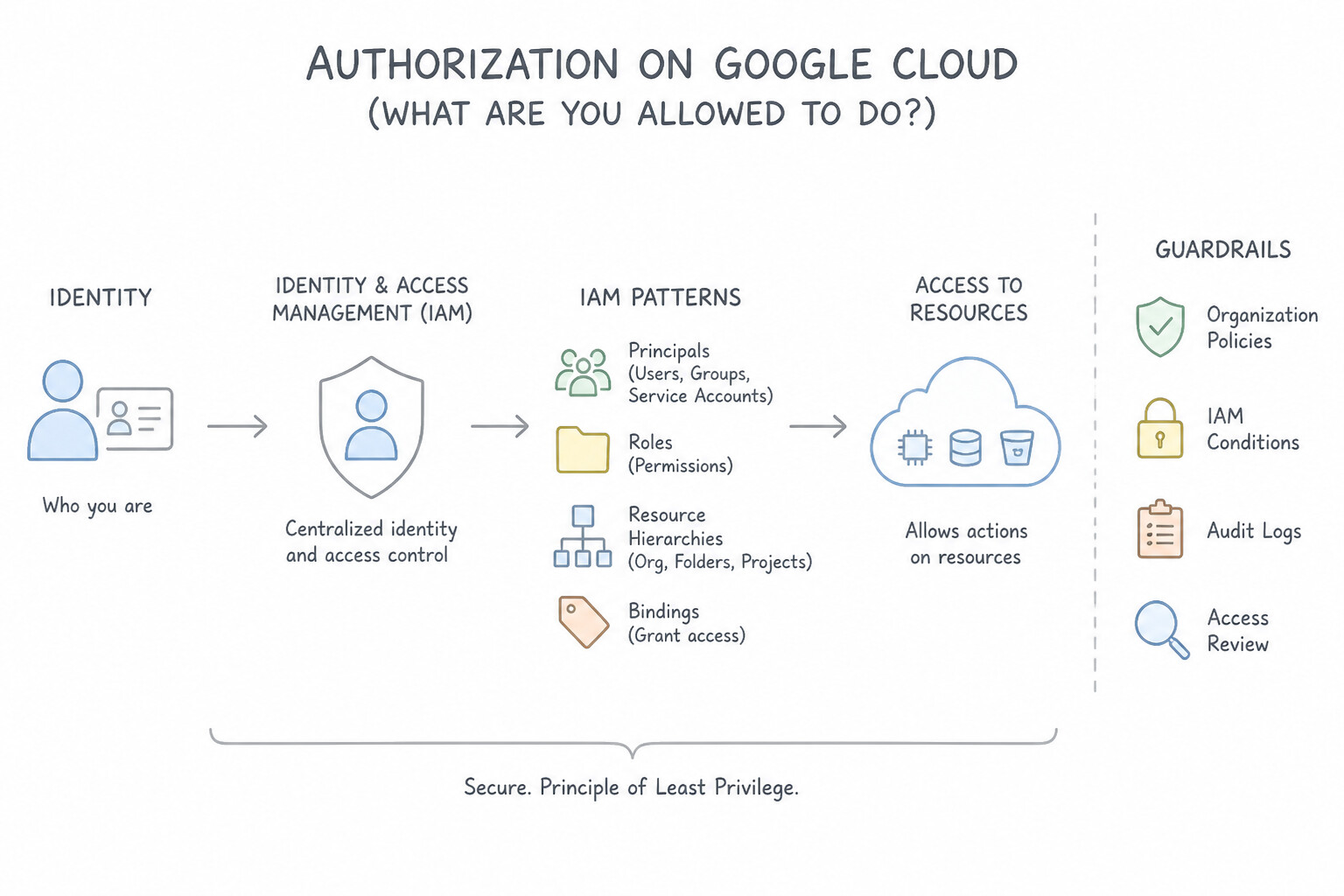
- Principle of Least Privilege & Privileged Access: Grant every user, service account, or AI agent only the minimum permissions necessary to perform its specific job, and nothing more. Privileged access refers to elevated administrative permissions that must be tightly restricted and audited.
- Zero-Trust Architecture: A security model based on "Never Trust, Always Verify." It eliminates implicit trust based on network location (even inside the office LAN) and continuously verifies user identity, device health, and request context for every single access attempt.
- Security by Default & Cyber Resilience: Security by default means critical protections (such as encryption at rest and in transit) are turned on automatically without manual configuration. Cyber resilience is an organization's ability to continuously deliver business outcomes despite adverse cyber events—and rapidly recover when an incident occurs.
- Data Loss Prevention (DLP), Firewalls, Encryption & Decryption: DLP discovers, classifies, and redacts/masks sensitive PII (credit cards, SSNs). Firewalls filter incoming and outgoing network traffic based on IP/port rules. Encryption scrambles readable plaintext into unreadable ciphertext using a cryptographic key; Decryption converts ciphertext back into plaintext for authorized key holders.
Key Implementation Patterns
- Least Privilege Principle: Use Assign the task of patching the guest OS to your internal operations team. In the IaaS model (Compute Engine), the customer is responsible for the guest OS, including patching. (Avoid alternative: Google does not automatically manage the guest OS in IaaS; that is a customer responsibility.)
- Zero-Trust Security Model: Use Grant the BigQuery Data Viewer role to the analyst for the specific dataset. This role grants read-only access specifically to the required data, preventing unwanted actions like deletion or billing access. (Avoid alternative: The Owner role grants full control, including billing and deletion rights, which exceeds the required permissions.)
- Sensitive Data Discovery with DLP: Use Defense in depth. Defense in depth uses multiple layers of security controls to protect system resources if a single control fails. (Avoid alternative: The shared responsibility model defines which security tasks belong to Google versus the customer, not the layering of defenses.)
Key Takeaways (5.1d)
- In IaaS (Compute Engine), the customer manages the Guest OS, including patching.
- Google manages the physical infrastructure and hardware security.
- The Shared Responsibility Model changes depending on whether you use IaaS, PaaS, or SaaS.
- Always verify who owns the maintenance tasks for your specific cloud services.
Consideration 5.1e: Explain how encryption safeguards an organization's data in different usage states (e.g., in use, in transit, at rest)
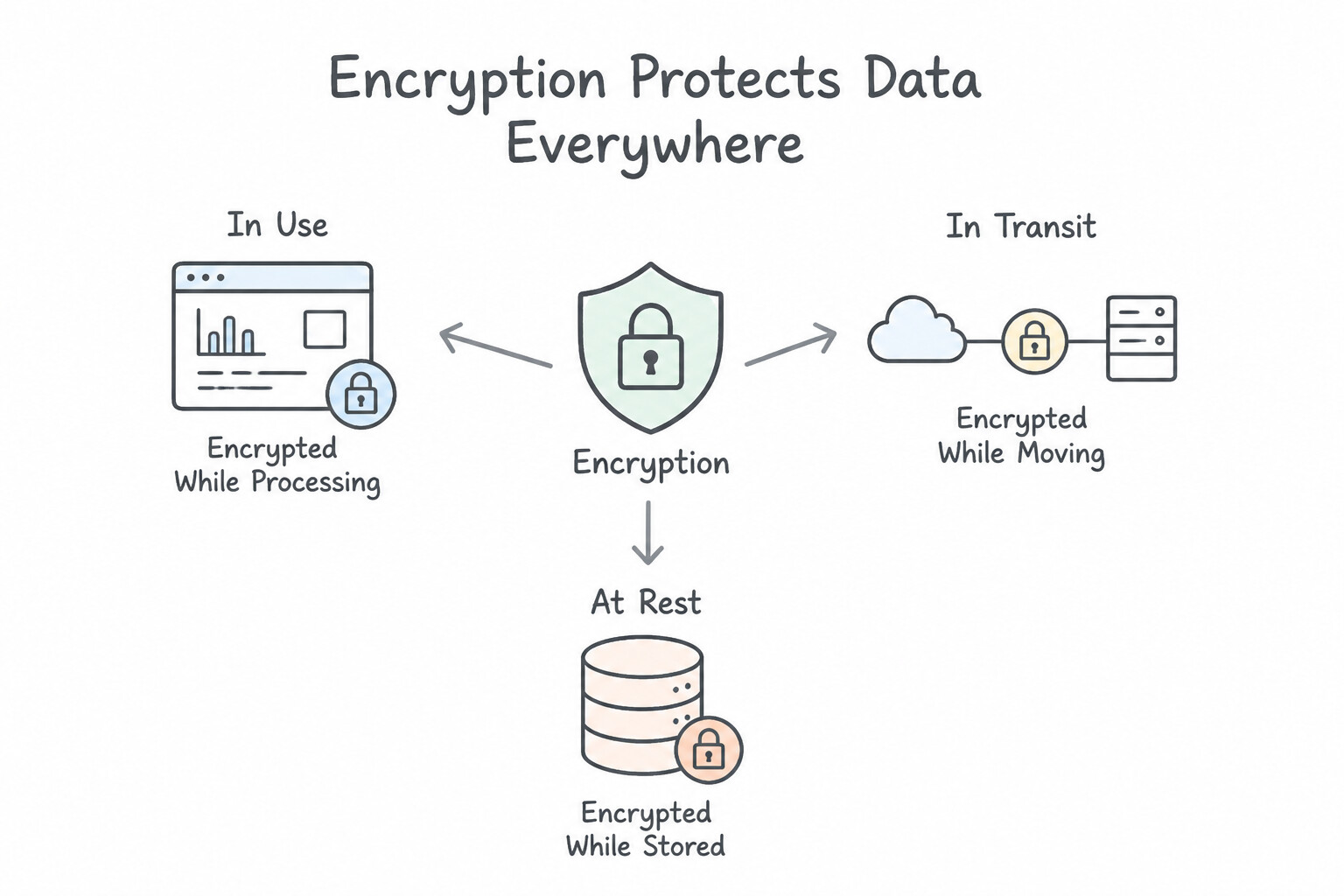
- 1. Data at Rest (Stored on Disks, Databases, or Backup Media): Protected by Encryption at Rest, which Google Cloud enables by default across all storage and database services (splitting data into chunks and encrypting each with AES-256 keys).
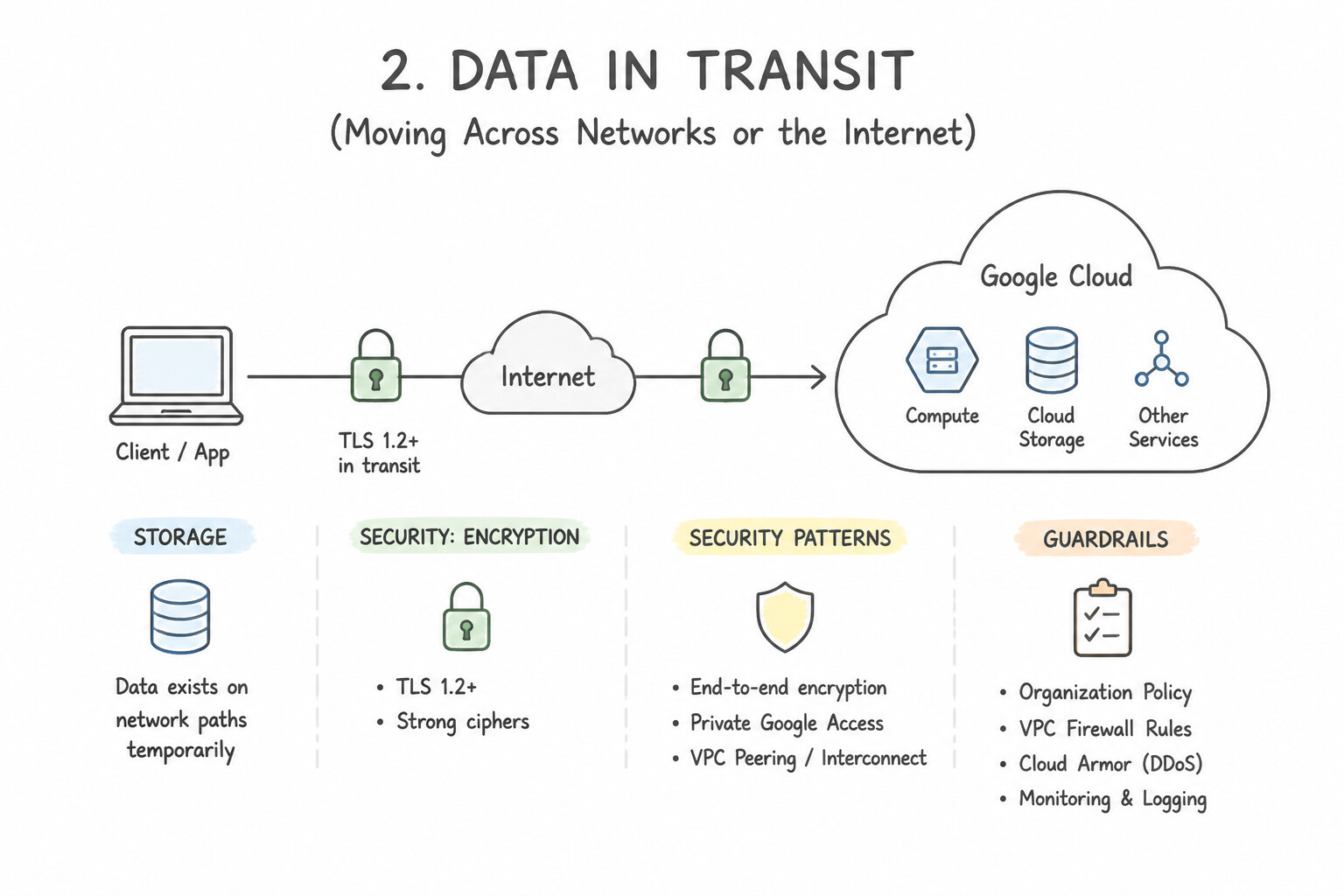
- 2. Data in Transit (Moving Across Networks or the Internet): Protected by Encryption in Transit (TLS / HTTPS / IPsec), authenticating endpoints and preventing eavesdropping or man-in-the-middle tampering while packets travel between users and data centers.
- 3. Data in Use (Actively Being Processed in CPU/Memory RAM): Traditionally, data had to be decrypted in RAM during computation. Confidential Computing encrypts data in use inside hardware-isolated CPU enclaves (Trusted Execution Environments), keeping memory contents invisible even to the host OS or cloud administrator.
Key Implementation Patterns
- Proactive Defense via Global Infrastructure Visibility: Use Explain that Google Cloud encrypts all data at rest by default, so no configuration is required. Google Cloud encrypts all data at rest by default using Google-managed keys without any user configuration. (Avoid alternative: VPNs encrypt data in transit, not data at rest stored on disks.)
- Actionable Insights from Frontline Incident Response: Use Google Cloud uses encryption by default, protecting data in transit with Transport Layer Security (TLS). Google Cloud encrypts data in transit by default using standard protocols like TLS. (Avoid alternative: Encryption at rest protects stored data, not data moving across the internet.)
Key Takeaways (5.1e)
- Google Cloud encrypts all data at rest by default.
- Default encryption uses Google-Managed Encryption Keys (GMEK).
- No configuration or action is required from the user for default encryption.
- Data in Transit protection is different from Data at Rest protection.
Consideration 5.1f: Differentiate between authentication, authorization, and auditing (e.g., multi-factor authentication, two-step verification [2SV], IAM)
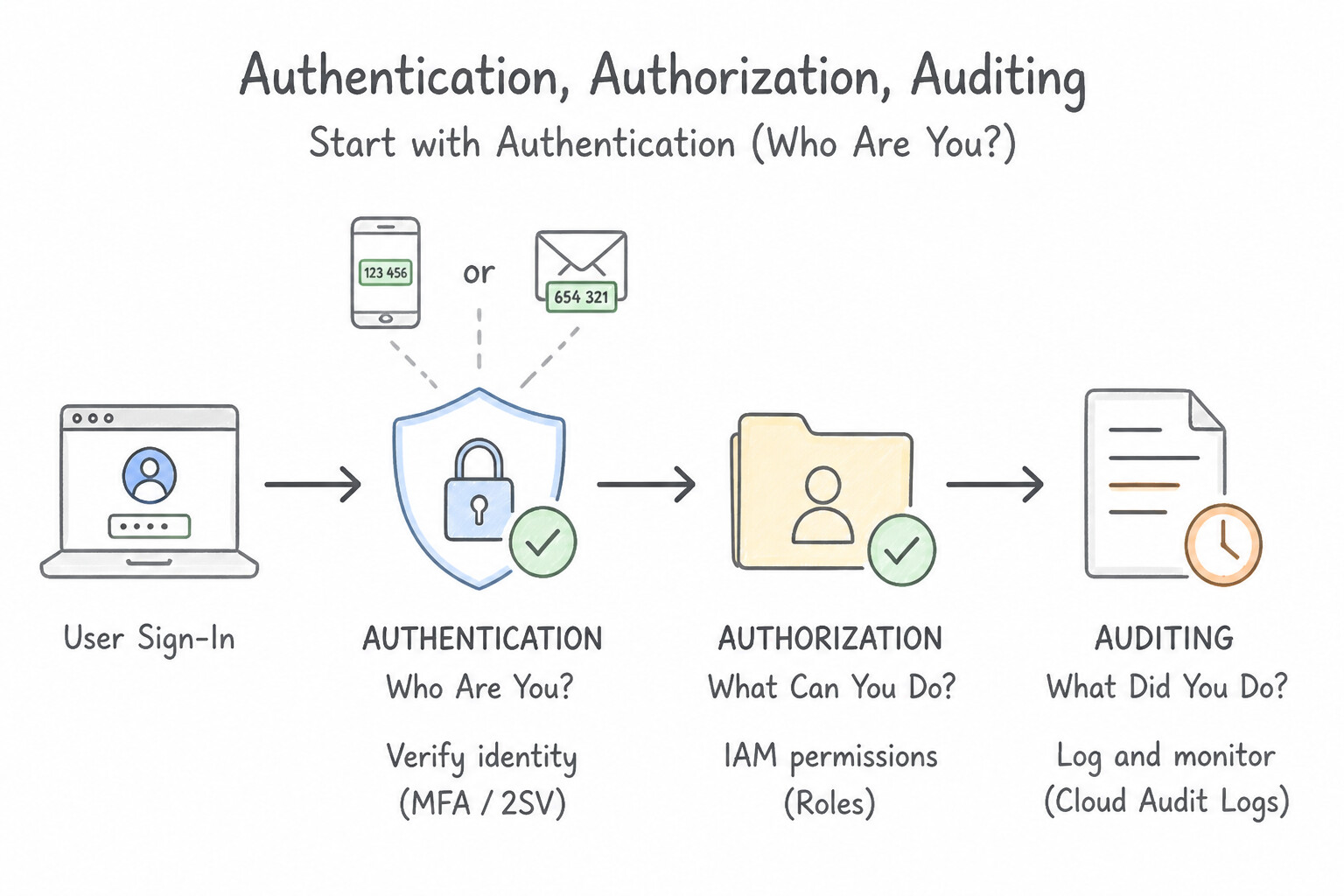
- Authentication ("Who Are You?"): Proving that a user or service is genuinely who they claim to be. Strengthened by Multi-Factor Authentication (MFA) / Two-Step Verification (2SV), which requires two or more verification factors (e.g., something you know like a password + something you have like a hardware security key or authenticator app).
- Authorization ("What Are You Allowed to Do?"): Determining which specific cloud resources an already authenticated identity is permitted to read, edit, or delete—governed in Google Cloud by Identity and Access Management (IAM).
- Auditing ("What Did You Do, and When?"): Recording an immutable chronological trail of administrative actions, logins, and data access events (Cloud Audit Logs) for forensic investigation and regulatory compliance.
Key Implementation Patterns
- Eliminating Telemetry Data Silos Across Multi-Cloud Environments: Use Enforce the use of Titan Security Keys. Titan Security Keys use cryptography to verify the website domain, preventing authentication on fake phishing sites. (Avoid alternative: SMS codes can be intercepted or phished by fake websites.)
- Accelerating Threat Detection with Integrated AI and Automation: Use Grant the Cloud Functions Developer role to the team members. This predefined role grants only the specific permissions needed to deploy functions, adhering to the principle of least privilege. (Avoid alternative: The Owner role grants full control, including billing and deletion rights, which violates the stated restrictions.)
Key Takeaways (5.1f)
- 2-Step Verification (2SV) significantly reduces the risk of unauthorized access.
- Methods that rely on users manually entering codes (SMS, email) are vulnerable to phishing attacks.
- Titan Security Keys provide the strongest protection because they physically verify the identity of the website (domain) before authenticating.
- Principle of Least Privilege: Always grant the minimum permissions required for a task.
Consideration 5.1g: Define the fundamental cloud security operations (SecOps) terms (e.g., security posture, threat intelligence, threat response)
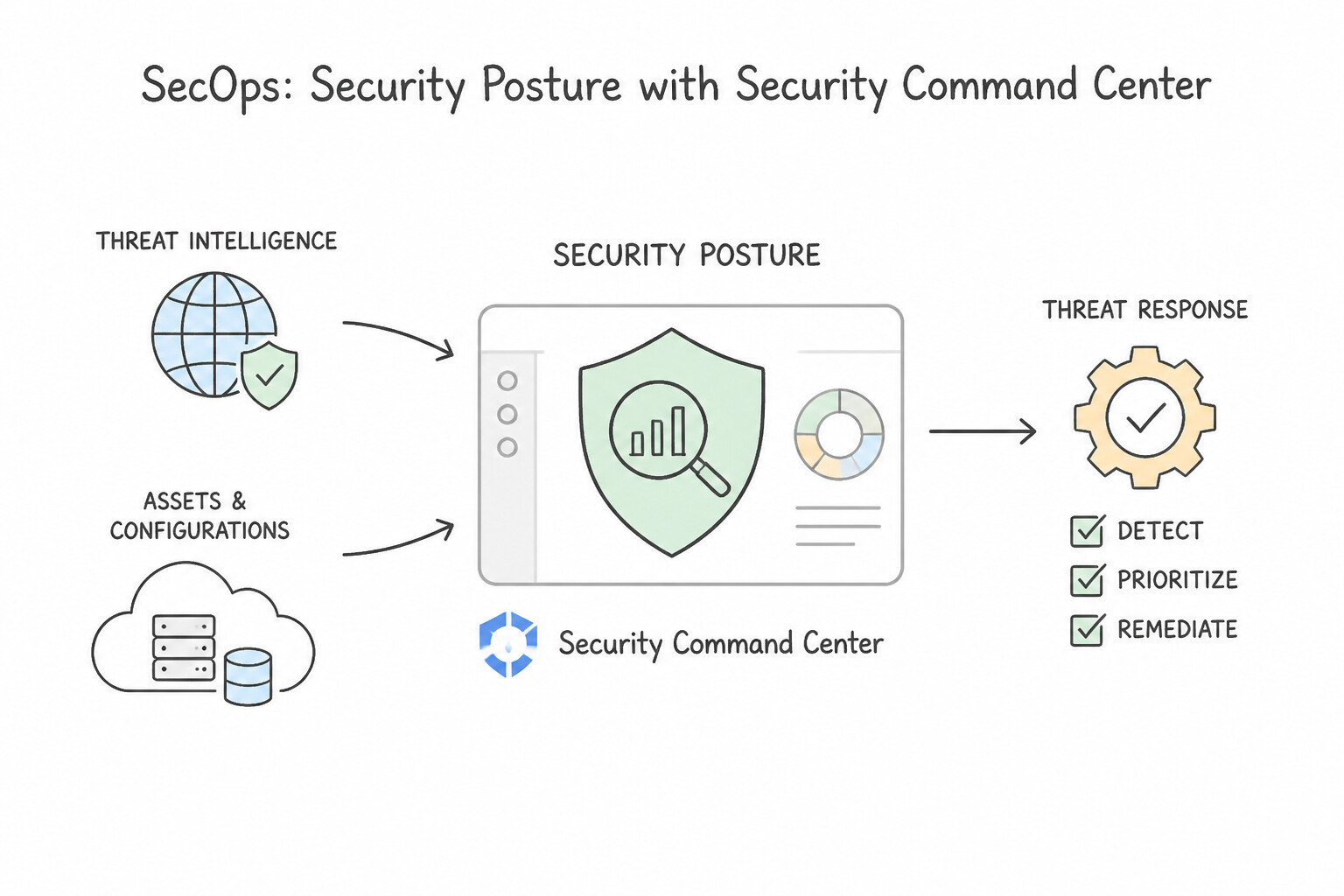
- Security Posture: The overall defensive readiness and strength of an organization's cloud environment—measured by its configurations, vulnerability status, IAM policies, and compliance alignment.
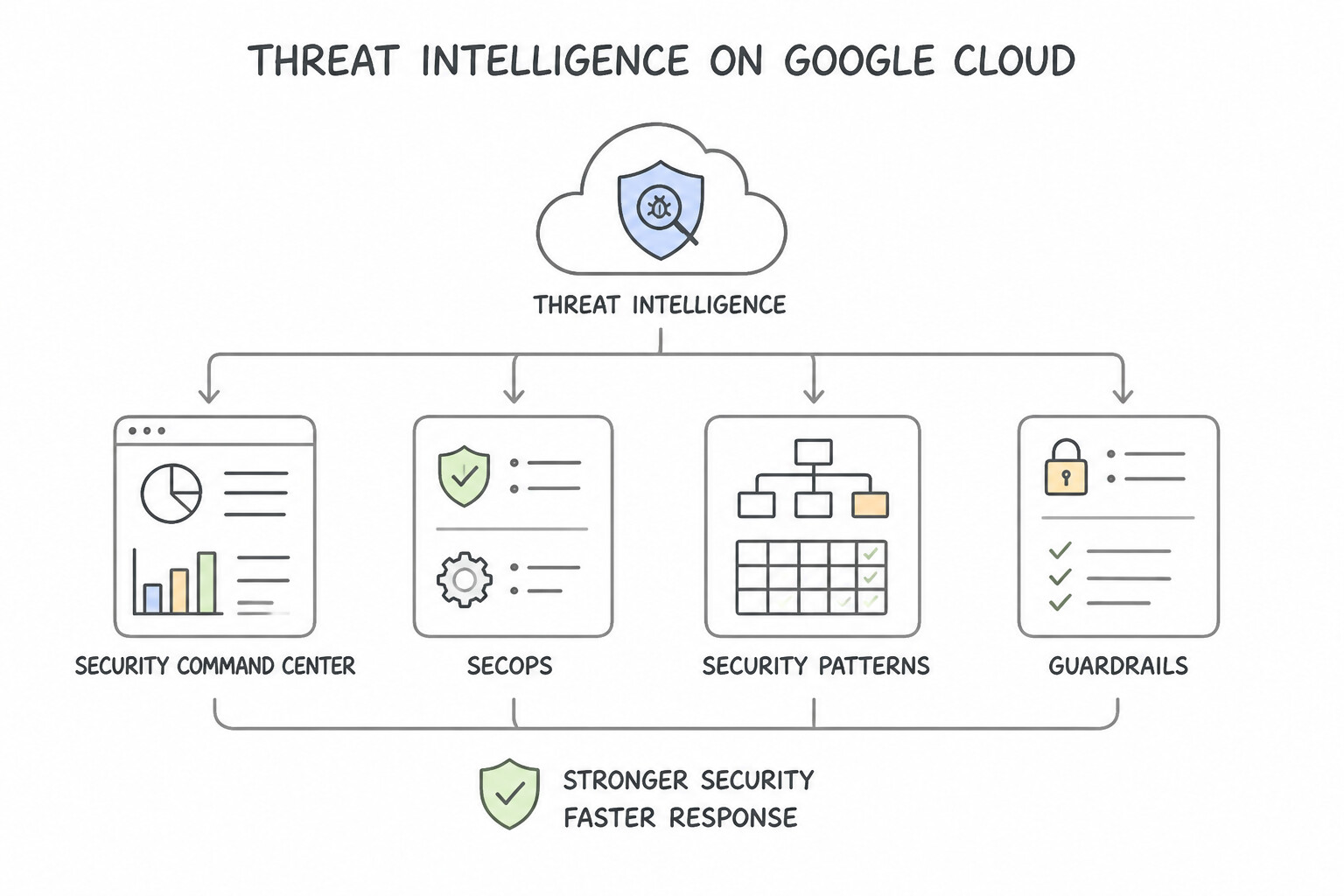
- Threat Intelligence: Actionable, evidence-based knowledge about existing or emerging cyber adversaries, their attack vectors, indicators of compromise (IoCs), and motivations—enabling defenders to anticipate attacks proactively.
- Threat Response (Incident Response): The coordinated operational process of detecting an active intrusion, containing the attacker, eradicating malicious artifacts, and restoring normal business operations with minimal impact.
Key Implementation Patterns
- Defining Security Posture Management: Use The security posture of the organization. Security posture represents the comprehensive overall security state and exposure level of an organization. (Avoid alternative: Threat response refers to how you react to an active attack, not your baseline defensive state.)
- Leveraging Actionable Threat Intelligence: Use Categorize it as threat intelligence. Threat intelligence provides evidence-based knowledge about attackers to help you proactively defend your environment. (Avoid alternative: Security posture evaluates your internal security readiness, not external attacker data.)
- Automating Threat Response Workflows: Use Threat response. Threat response is the correct term for the reactive actions taken to contain and mitigate an active security breach. (Avoid alternative: Security posture refers to the overall state of your defenses, not the reactive steps taken during an active incident.)
Key Takeaways (5.1g)
- Security posture describes your organization's overall state of cybersecurity readiness.
- A strong security posture means having fewer misconfigurations, vulnerabilities, and unpatched systems.
- Threat intelligence focuses on understanding the external attackers.
- Threat response focuses on the actions taken during or after an active security incident.
Quick Decision Cheat Sheet (Subsection 5.1)
If the Scenario Requires... | Choose This Security Term / Concept | Avoid This Common Mistake |
|---|---|---|
"Only authorized users can view sensitive information" | Confidentiality (CIA Triad) | Integrity or Availability |
"Data remains accurate, authentic, and unaltered by unauthorized tampering" | Integrity (CIA Triad) | Confidentiality or Availability |
"Systems and data are reachable and operational whenever authorized users need them" | Availability (CIA Triad) | Confidentiality or Integrity |
"Granting users and service accounts only the bare minimum permissions needed to do their job" | Principle of Least Privilege | Zero-Day or Defense-in-Depth |
"'Never trust, always verify' based on identity, device, and context rather than network perimeter" | Zero-Trust Architecture | Castle-and-Moat perimeter VPN |
"Data stored on disks/buckets" · "Data moving across networks" · "Data actively processed in RAM" | At Rest · In Transit · In Use (Confidential Computing) | Mixing up the three data states |
"Verifying who a user is (e.g., via MFA/2SV)" vs. "Determining what resources they can access (IAM)" | Authentication vs. Authorization | Auditing (which records what happened after the fact) |
"Overall defensive readiness and configuration health of a cloud environment" | Security Posture | Threat Response |
Further Reading (Subsection 5.1)
- Phishing — Google Cloud's overview of what phishing is, how it works, and how to prevent it.
- Common Cyber Threats — A general guide to cybersecurity concepts, including definitions of common threats like Phishing, Ransomware, and Malware.
- Ransomware Prevention and Mitigation — Provides an overview of what ransomware is, how it impacts organizations, and Google Cloud best practices for prevention and recovery.
- What is a DDoS attack? — Provides a clear definition of DDoS attacks, how they work, and the difference between DoS and DDoS.
- Google's Secure AI Framework (SAIF) — Google's Secure AI Framework (SAIF) highlights the importance of securing AI systems against emerging threats like prompt injection, data poisoning, and model theft.
- Model Armor — Product page for runtime protection against prompt injection and sensitive data leaks.
Subsection 5.2: Describe the business value of making Google part of an organization's security team with its defense-in-depth, multilayered approach to cloud security
The Big Picture
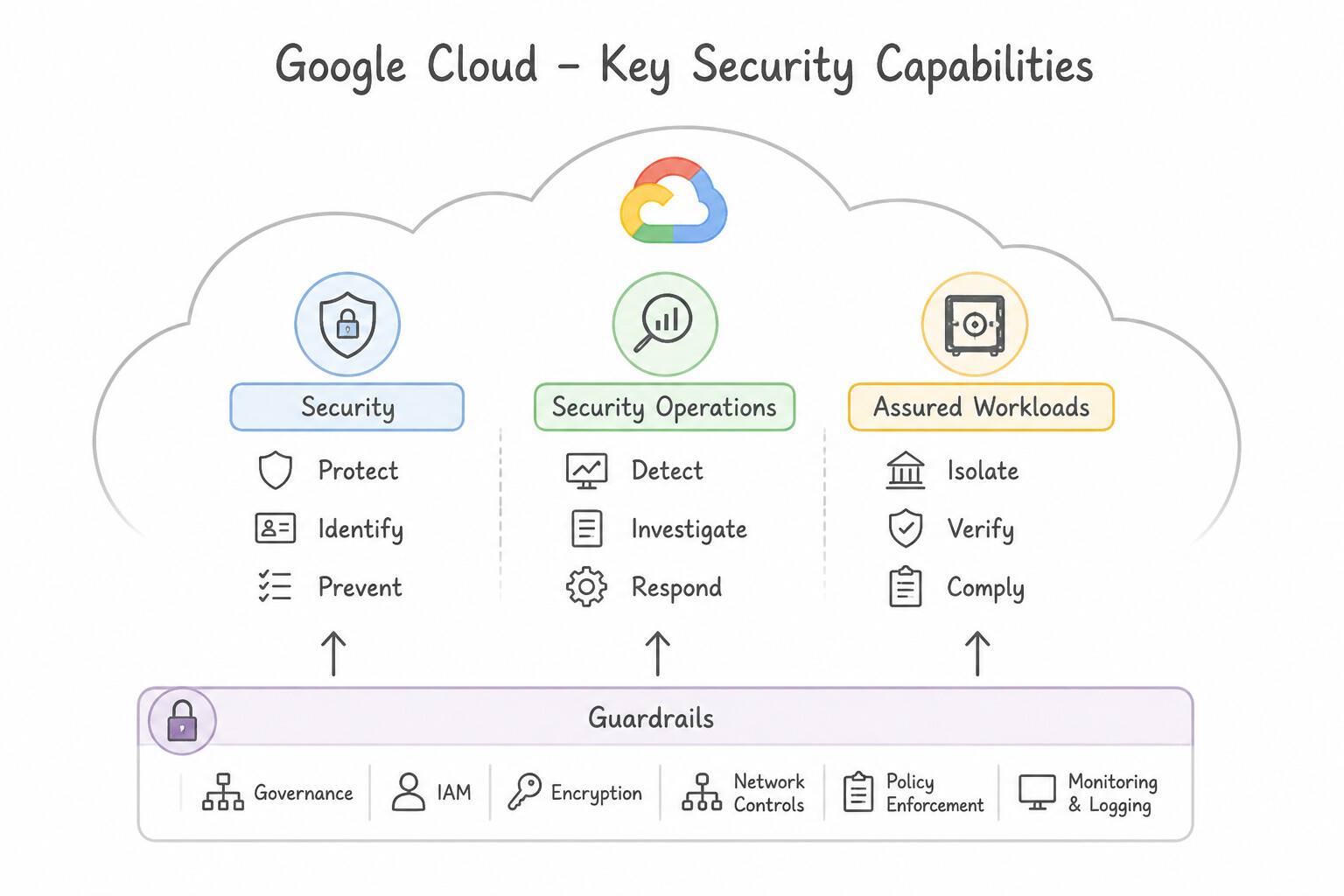
Understanding theoretical security concepts (5.1) is only half the battle; In production architectures, you must match specific enterprise threats, compliance obligations, and AI risks to the exact Google Cloud security service built to solve them:
- Proactive Posture Management vs. Unified SecOps Telemetry (
5.2b,5.2c,5.2d): Candidates frequently confuse Security Command Center (SCC) with Google Security Operations (Google SecOps). - Security Command Center (SCC) is Google Cloud's native posture and risk management platform: it scans your Google Cloud environment to proactively discover misconfigurations (e.g., public buckets, open firewall ports), software vulnerabilities, toxic risk combinations, and compliance drift.
- Google Security Operations (Google SecOps — formerly Chronicle SIEM + SOAR) is a unified SOC threat detection, investigation, and response platform that ingests petabytes of security telemetry (logs from GCP, on-prem, EDR, firewalls) and correlates it with Google Threat Intelligence (Google global visibility + Mandiant frontline incident response + VirusTotal crowdsourced malware database).
- Securing the AI Stack & Defending Against LLM Threats (
5.2a,5.2f): As organizations deploy generative and agentic AI, they need AI Protection (discovering AI assets/models and assessing AI risks in SCC), Model Armor (runtime screening of LLM prompts and responses against prompt injection, jailbreaks, sensitive data leaks, and malicious URLs), and Gemini in Google Security Operations (using Gen AI to summarize incidents and translate natural language into threat-hunting queries). - Network, Identity, Data Protection & Digital Sovereignty (
5.2e,5.2g,5.2h): A complete defense-in-depth architecture combines Cloud Armor (DDoS + WAF), Identity-Aware Proxy (IAP) (Zero-Trust app access), Sensitive Data Protection (DLP) (PII discovery & de-identification), Confidential Computing (RAM encryption), Titan security chips (hardware root of trust), and Compliance Resource Manager / Sovereign Controls (customer trust & data residency).
Consideration 5.2a: Recognize how Google Cloud secures every layer of the AI stack (e.g., infrastructure, data, models, platform, agents)
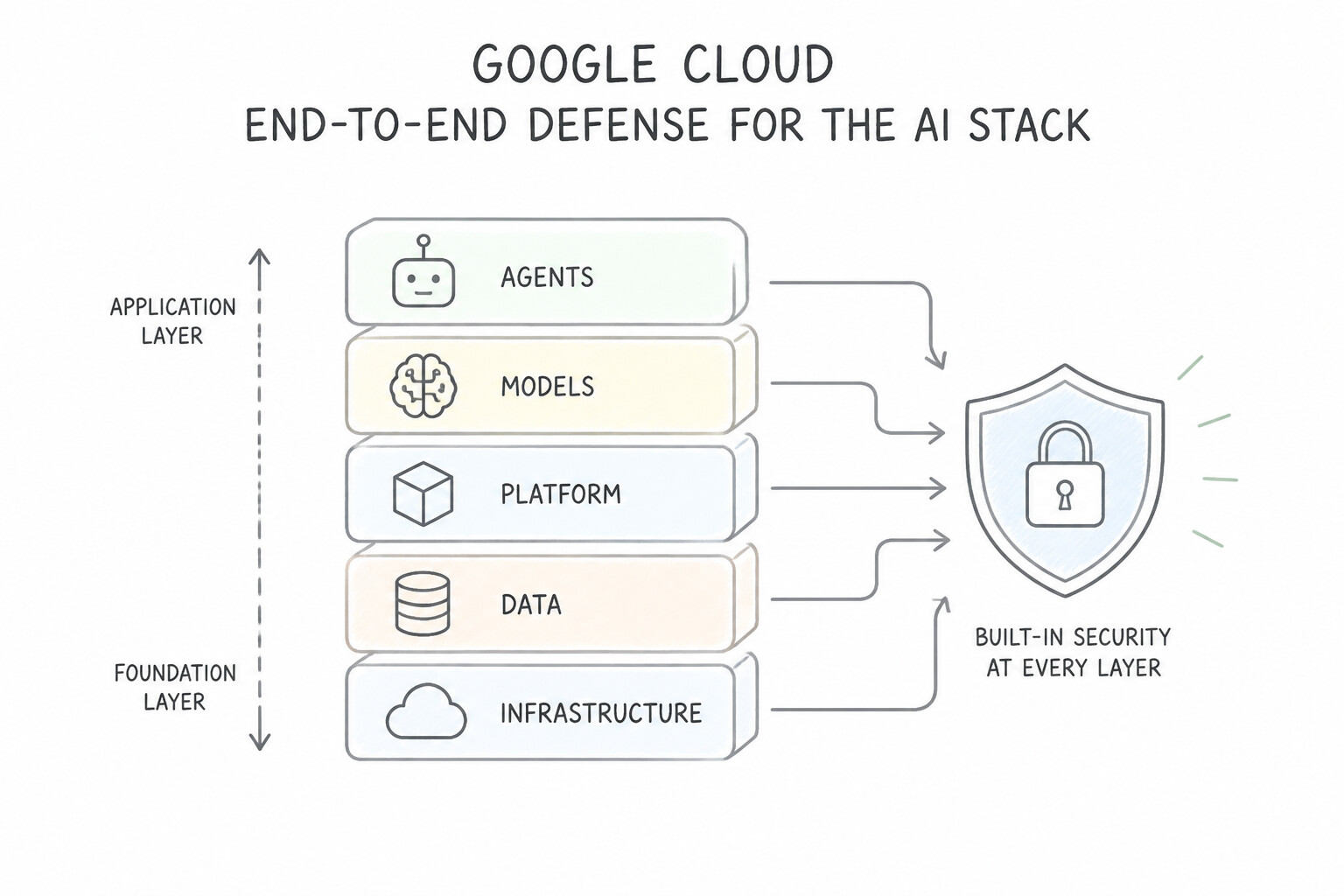
- End-to-End Defense Across 5 AI Layers:
- Infrastructure Layer: Custom Titan security chips, cryptographic verified boot, and hardware-isolated Confidential Computing for GPUs/TPUs.
- Data Layer: BigQuery and Cloud Storage encryption, IAM fine-grained access controls, and Sensitive Data Protection (DLP) to strip PII before training or RAG grounding.
- Model Layer: Integrity verification of weights, safety tuning, and customer-isolated model tuning (Google never uses customer data to train its foundation models without permission).
- Platform Layer (Vertex AI): Private endpoints (VPC Service Controls), audit logging, and AI Protection posture visibility.
- Agent & Application Layer: Model Armor screening user prompts and agent tool calls against prompt injection and data exfiltration.
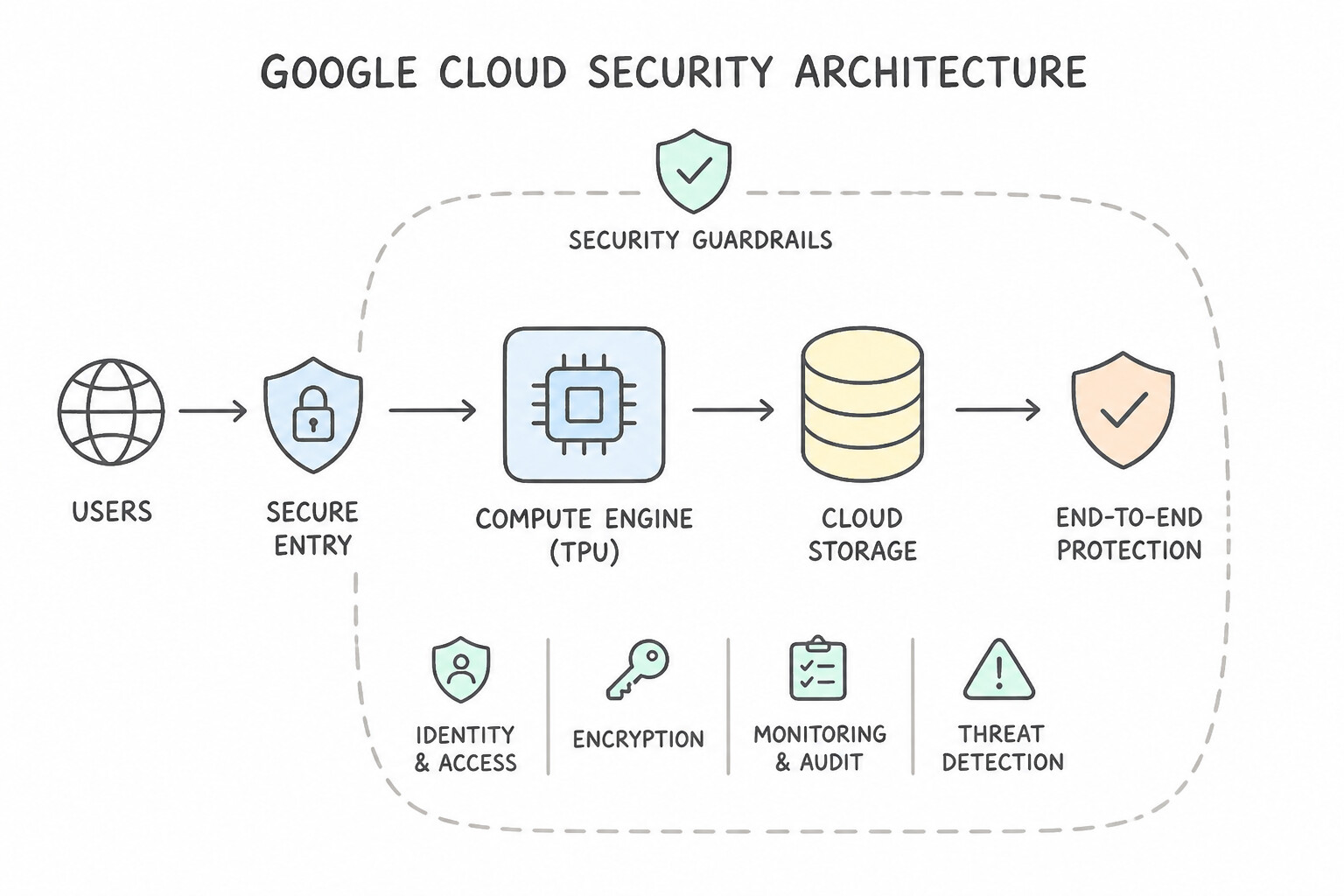
Key Implementation Patterns
- Securing the AI Infrastructure Layer with Custom Hardware: Use Custom-designed Titan security chips that establish a hardware root of trust. Titan chips verify the hardware integrity of Google's servers before they boot up, preventing firmware tampering. (Avoid alternative: VPC firewalls control network traffic, not physical server hardware integrity.)
- Securing the AI Data Layer with Boundary Control: Use Configure VPC Service Controls to create a security perimeter around the data stores. VPC Service Controls create a secure boundary around your cloud resources to prevent unauthorized data exfiltration. (Avoid alternative: Shielded VMs protect the compute infrastructure from malware but do not prevent data exfiltration over the network.)
- Securing the AI Model Layer and Customer Data Privacy: Use Explain that customer prompts, outputs, and custom training data are never used to train the shared public foundation models of Google. Google Cloud guarantees that enterprise customer data is never used to train its public foundation models.
Key Takeaways (5.2a)
- Google Cloud employs a defense-in-depth approach, meaning security is layered throughout the entire technology stack.
- The physical infrastructure layer is the foundation of the AI stack and must be protected against firmware tampering.
- Google designs its own hardware, including the Titan security chip, to establish a hardware root of trust for its servers.
- Data layer security (like encryption) and network layer security (like firewalls) complement physical security but do not replace it.
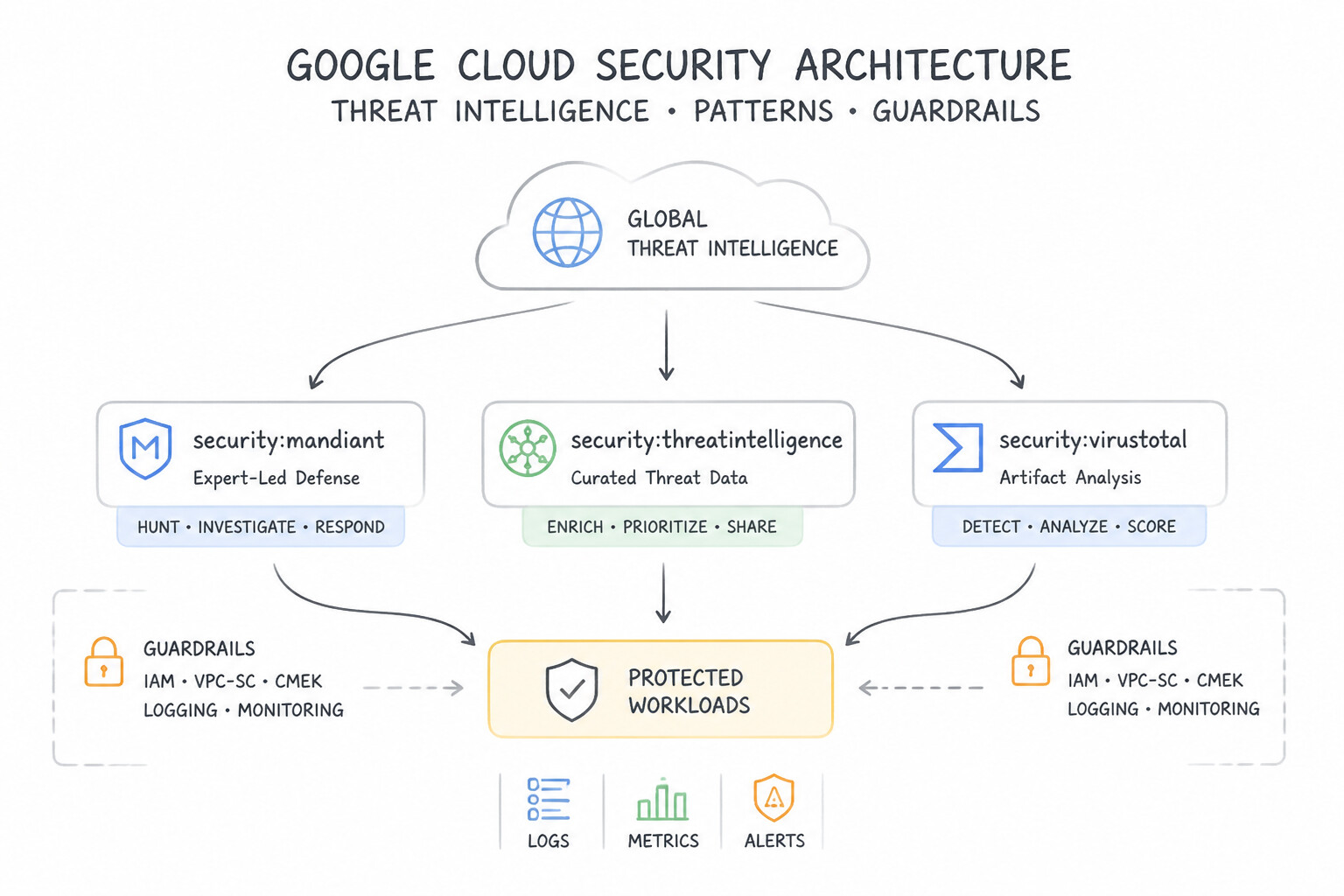
Consideration 5.2b: Recognize how Google Threat Intelligence provides organizations with proactive insights into cyber threats and identify the unique sources that power its analysis (e.g., Google's vast global visibility, Mandiant's frontline incident response expertise, VirusTotal's crowd sourced threat detection)
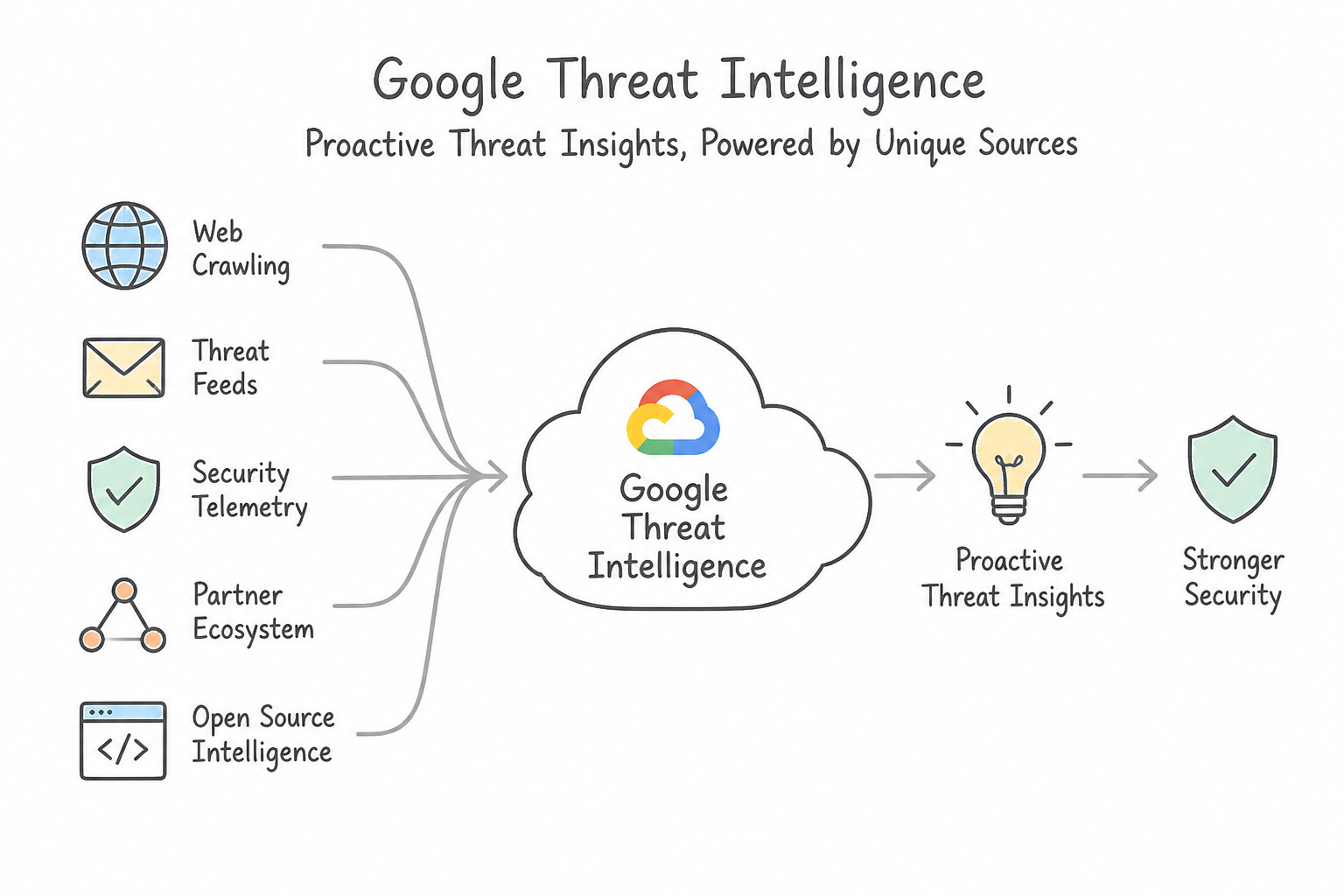
- The 3 Unique Intelligence Sources Powering
Google Threat Intelligence: - Google's Vast Global Visibility: Telemetry protecting billions of users across Search, Gmail, Chrome, Android, and YouTube.
- Mandiant's Frontline Incident Response Expertise: Real-world human intelligence gathered from investigating the world's most sophisticated nation-state and enterprise cyber breaches.
- VirusTotal's Crowdsourced Threat Detection: The world's largest repository of malicious files, URLs, and indicators of compromise contributed by a global security community.
Key Implementation Patterns
- Google Threat Intelligence Global Telemetry Foundation: Use Google's vast global network visibility that monitors internet-scale traffic to identify malicious infrastructure. Google's massive global infrastructure provides internet-scale telemetry to proactively identify and block emerging threats.
- Mandiant Frontline Expertise in Threat Intelligence: Use Mandiant, because it provides frontline incident response expertise and human-led breach investigations. Mandiant provides frontline incident response and human-led investigations of active breaches. (Avoid alternative: VirusTotal focuses on crowdsourced scanning of files and URLs, not frontline breach investigations.)
- VirusTotal Crowdsourced Analysis Engine: Use Use VirusTotal to analyze the file using crowdsourced threat data. VirusTotal provides crowdsourced file and URL analysis to quickly identify known malware. (Avoid alternative: Mandiant offers expert incident response services, not automated crowdsourced file analysis.)
Key Takeaways (5.2b)
- Google Threat Intelligence is built on three unique pillars: Google's global scale, Mandiant's frontline expertise, and VirusTotal's crowdsourced community.
- Google's vast global visibility allows for proactive identification of malicious infrastructure at an internet scale.
- Mandiant provides human-led incident response and deep behavioral insights into cyber attackers.
- VirusTotal provides continuous, crowdsourced intelligence on specific malware files and malicious URLs.
Consideration 5.2c: Recognize the benefits of Security Command Center to proactively discover, prioritize, and remediate security risks and misconfigurations across the Google Cloud environment
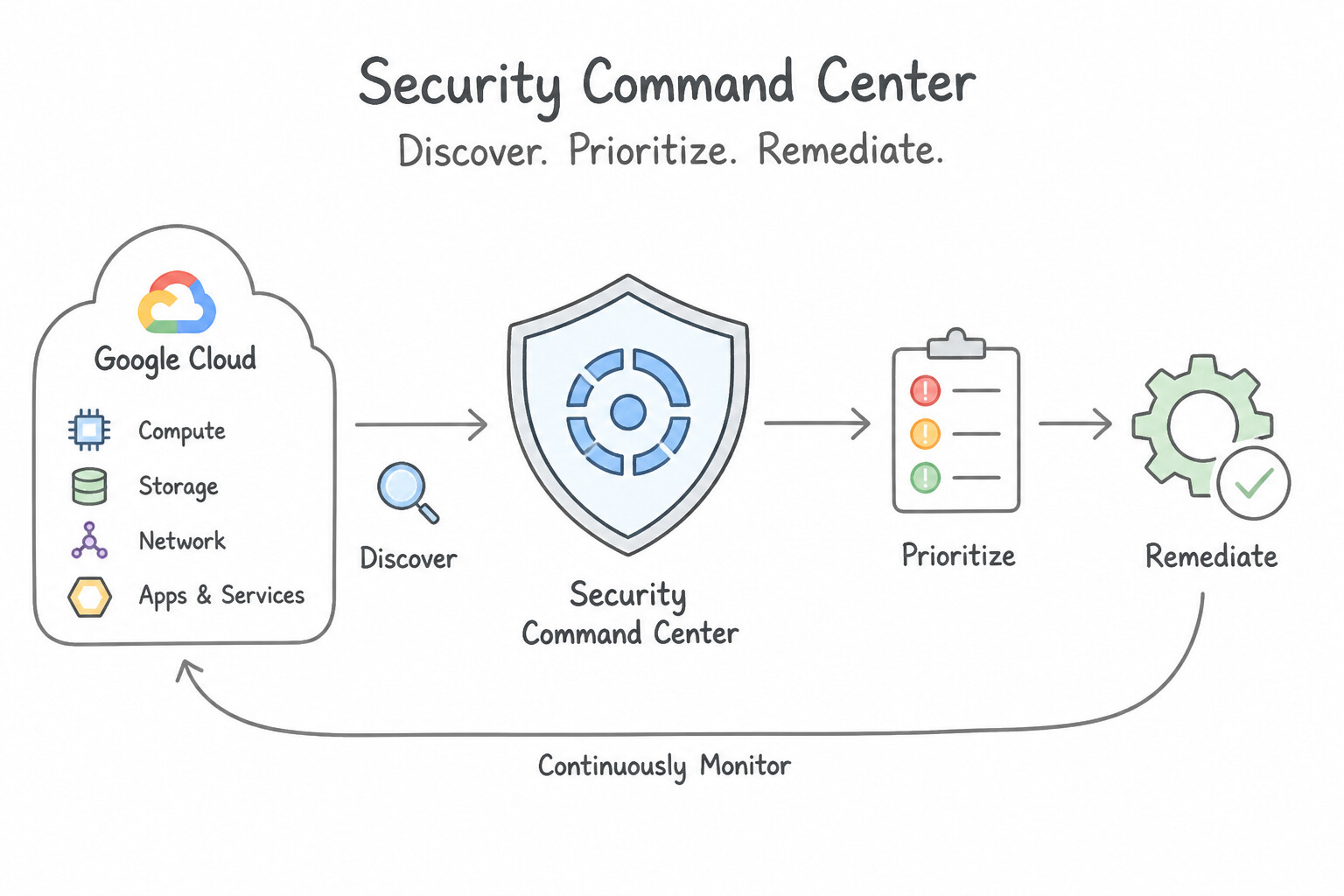
- Built-In Cloud Security Posture & Risk Management: Security Command Center (SCC) provides centralized visibility and control over your Google Cloud assets.
- Key Capabilities: Automatically discovers cloud misconfigurations (open firewall ports, public storage buckets, missing MFA), identifies OS/container software vulnerabilities, runs attack path simulations to highlight toxic combinations exposing high-value assets, detects active cloud threats (like cryptomining), and maps compliance against CIS, PCI-DSS, NIST, and ISO standards.
Key Implementation Patterns
- Gemini in SecOps Threat Hunting: Use Adopt a SecOps model to encourage collaboration between security and operations teams from the start. SecOps fosters collaboration and integrates security early in the lifecycle to prevent last-minute delays. (Avoid alternative: Isolation increases communication barriers and delays, which contradicts the goal of reducing friction.)
- Model Armor Application Safeguards: Use Accelerated response times through the automation of repetitive alert investigations. SecOps tools automate manual, repetitive tasks, allowing analysts to respond to real threats faster. (Avoid alternative: Encryption protects data confidentiality but does not speed up the manual investigation of security alerts.)
- Automated Compliance for Government Workloads: Use Create an Assured Workloads folder configured with the FedRAMP High compliance regime. Assured Workloads creates a folder with pre-configured controls for compliance regimes like FedRAMP and restricts support access. (Avoid alternative: IAM controls user permissions but does not restrict Google support access or automate compliance configurations.)
Key Takeaways (5.2c)
- SecOps integrates security into the development and operations lifecycle to improve speed and security simultaneously.
- Traditional silos between security and operations teams cause delays and friction.
- Security should be a shared responsibility, not just a final checkpoint.
- SecOps combines security and operations to improve the speed and quality of threat response.
Consideration 5.2d: Recognize the benefits of using a unified security operations platform, like Google Security Operations, to ingest telemetry and accelerate threat detection and response
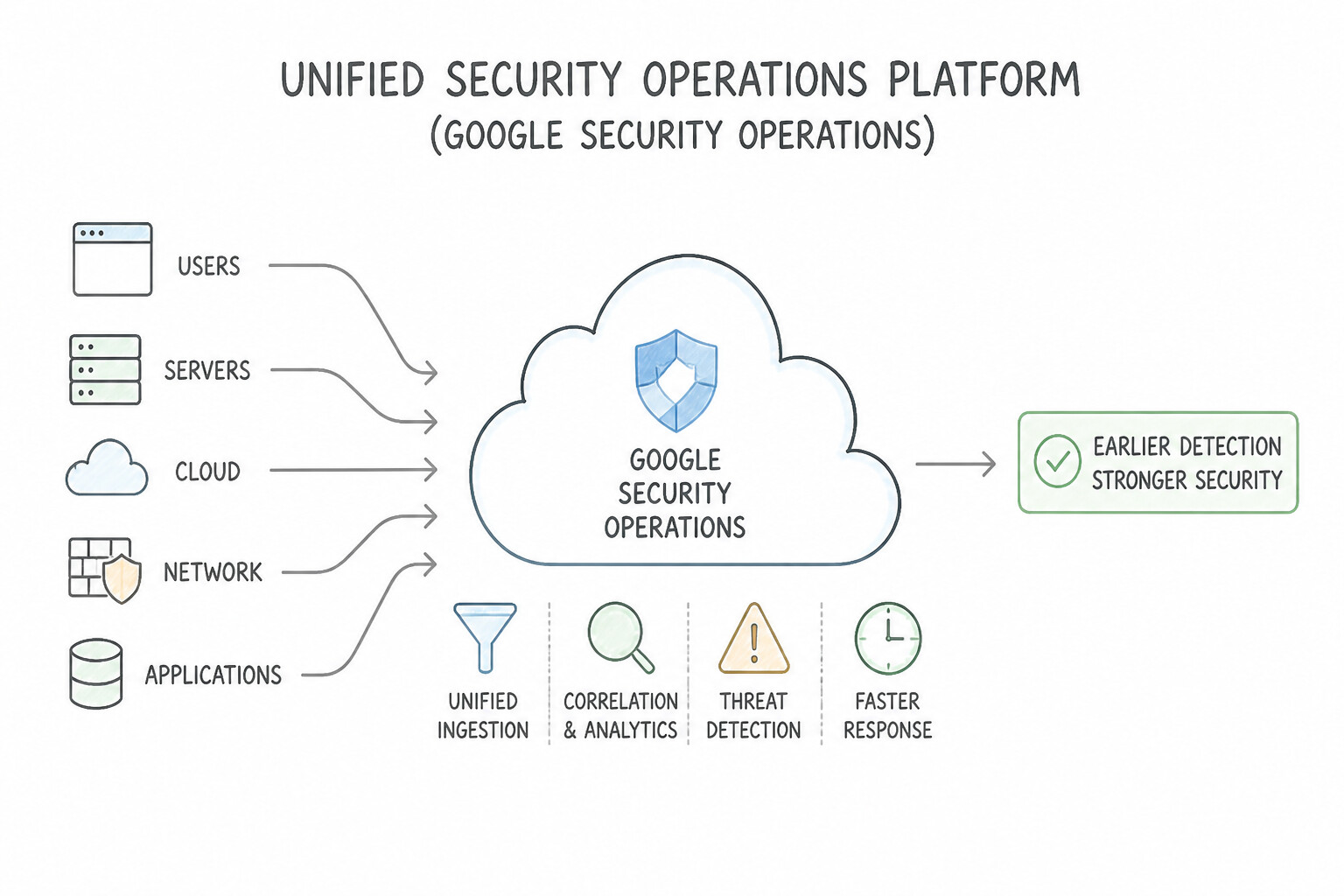
- Eliminating SOC Swivel-Chair Fatigue: Google Security Operations (Google SecOps) combines cloud-scale SIEM (Security Information and Event Management) and SOAR (Security Orchestration, Automation, and Response) in a single unified platform.
- Key Business Value: Ingests and retains petabytes of enterprise security telemetry (cloud logs, network flows, endpoint alerts), searches years of logs at sub-second speed, automatically enriches alerts with Google Threat Intelligence, and executes automated SOAR response playbooks to contain threats in minutes instead of weeks.
Key Implementation Patterns
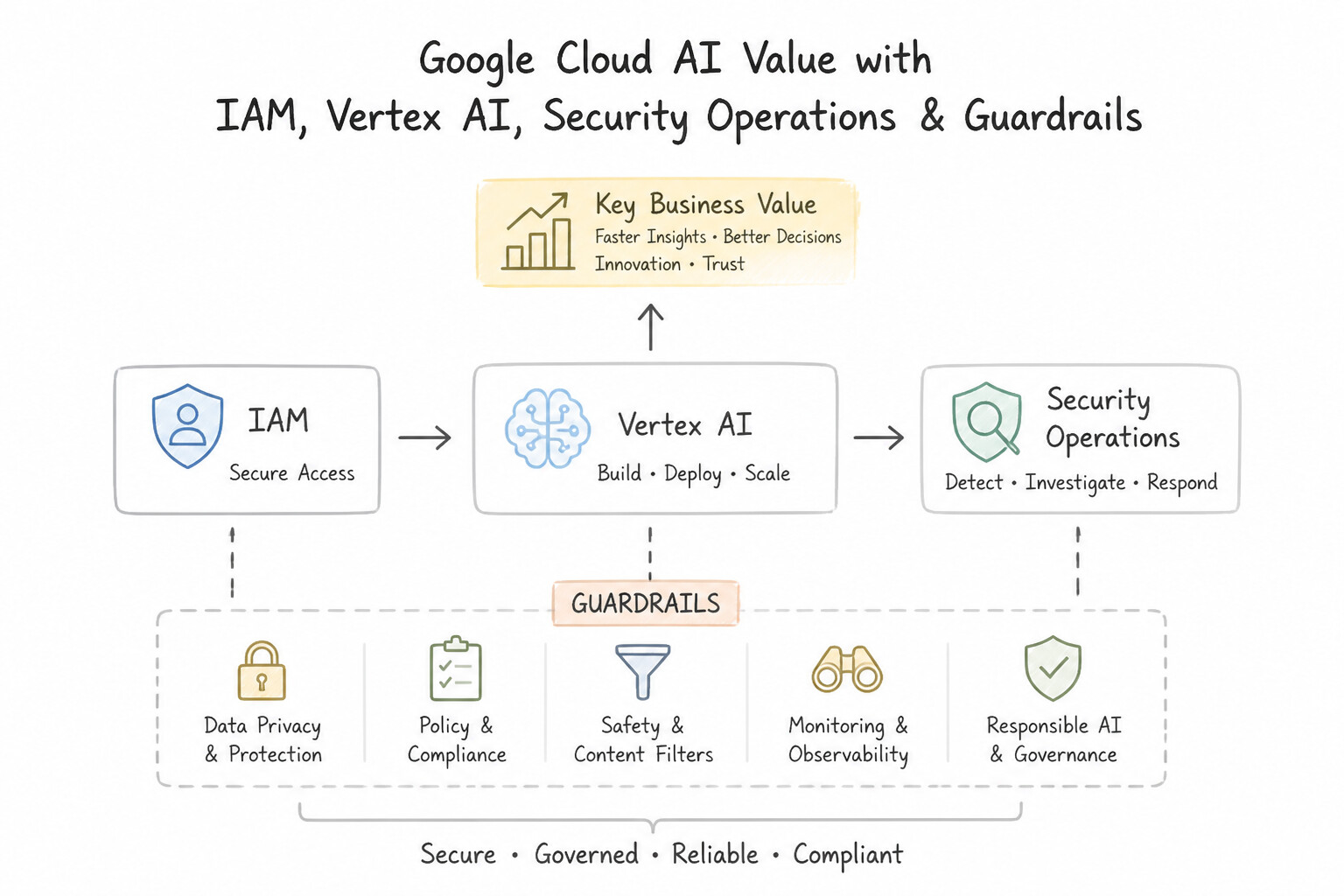
- Securing the AI Platform Layer with Granular IAM: Use Use Identity and Access Management (IAM) to assign specific roles to the data scientists and platform engineers based on their required tasks. IAM is the correct tool for enforcing role-based access control and separation of duties at the platform layer.
- Google Security Operations for Telemetry Analytics: Use Implement Google Security Operations to ingest and analyze the security telemetry. Google Security Operations is a unified platform built to ingest and analyze massive amounts of security telemetry for rapid threat detection.
Key Takeaways (5.2d)
- Google Cloud's defense-in-depth strategy secures the AI stack across multiple layers, including infrastructure, data, platform, models, and agents.
- The Platform layer relies heavily on Identity and Access Management (IAM) to enforce fine-grained, role-based access control.
- IAM is the primary tool for implementing the principle of least privilege and separation of duties within Google Cloud environments.
- Google Security Operations is a cloud-native SIEM/SOAR platform designed for high-speed ingestion and analysis of massive enterprise security telemetry.
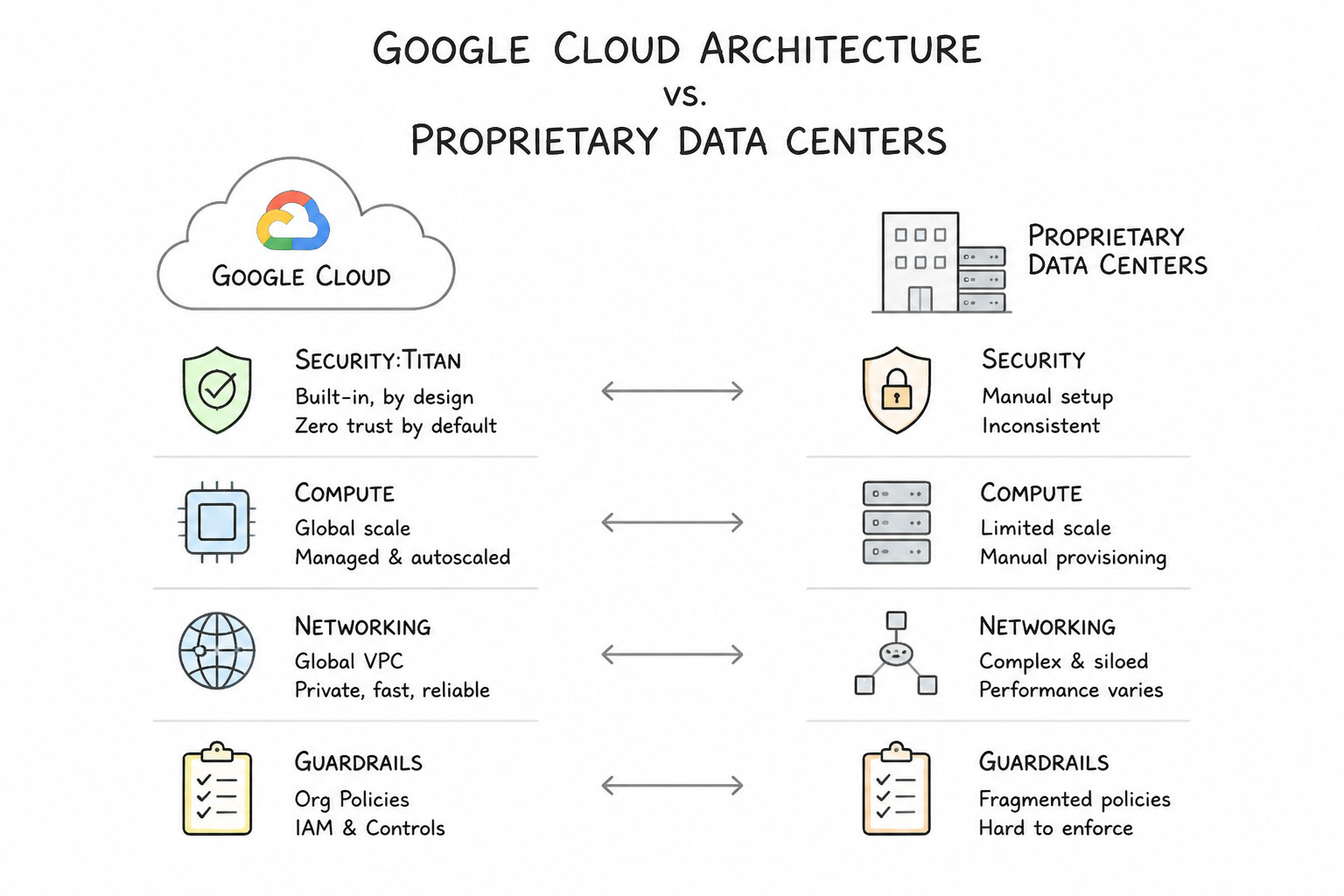
Consideration 5.2e: Recognize the benefits of Google's secure-by-design cloud platform (e.g., core infrastructure, proprietary data centers, purpose-built servers and networking, custom security hardware and software)
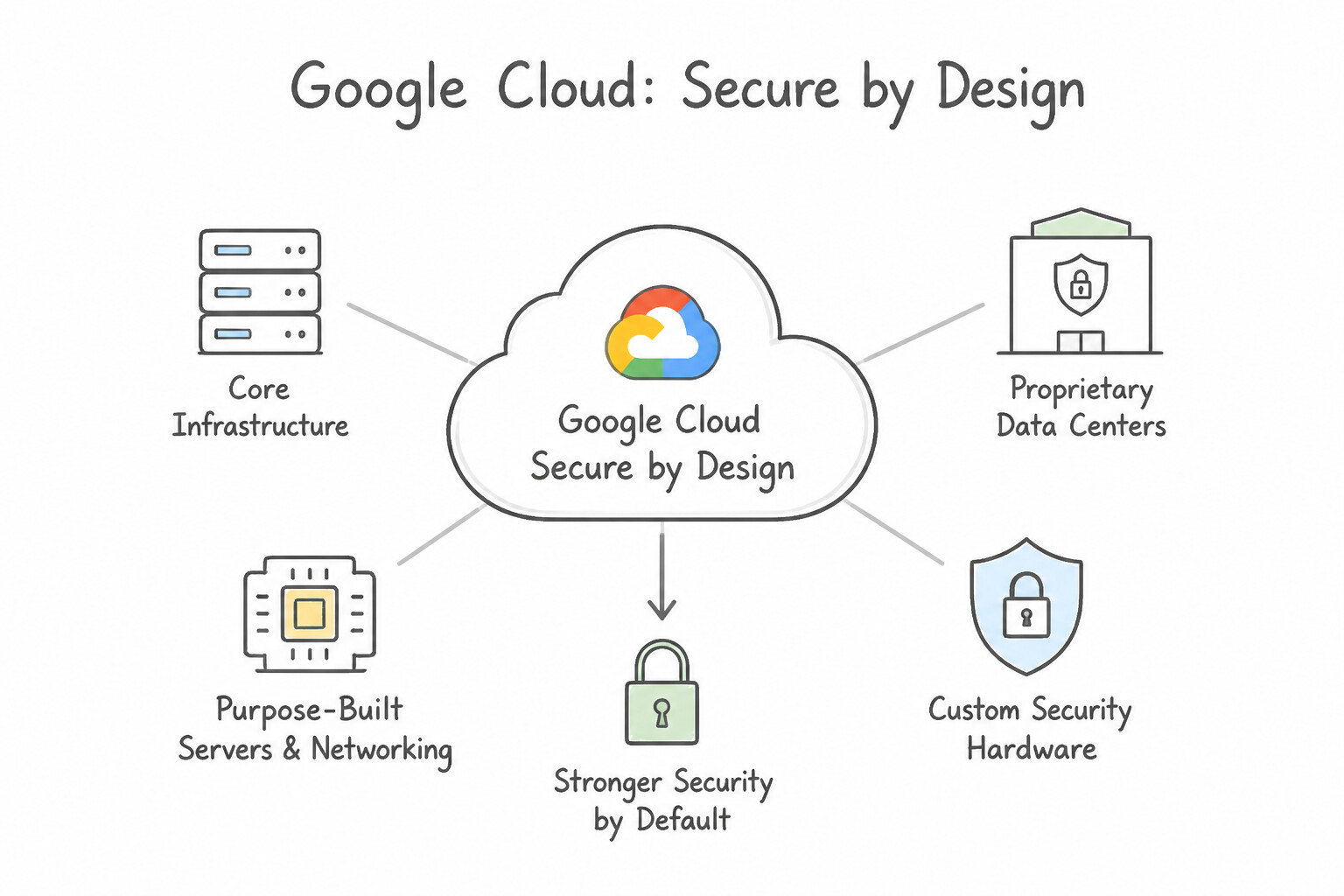
- Security Built into Hardware & Facilities from the Ground Up:
- Proprietary Data Centers: Biometric access controls, 24/7 guards, laser perimeter intrusion detection, and on-site crushing/shredding of decommissioned disks.
- Purpose-Built Servers & Custom Hardware (
Titan Security Chips): Google designs its own server motherboards and custom Titan hardware root-of-trust chips to cryptographically verify BIOS and OS firmware integrity at every boot (Verified Boot). - Global Private Fiber Network: Encrypts inter-datacenter traffic across Google-owned terrestrial and subsea fiber cables.
Key Implementation Patterns
- Hardware-Level AI Infrastructure Protection: Use The Titan security chip, which establishes a hardware root of trust. Titan is Google's custom-built security chip that validates the system integrity at the hardware level during boot. (Avoid alternative: Cloud HSM is used for managing encryption keys, not for validating the server hardware boot process.)
- Securing Sensitive Data Used in AI Training: Use Configure the application and database to communicate using their internal IP addresses. Using internal IP addresses routes traffic over Google's private global backbone, avoiding the public internet. (Avoid alternative: A third-party VPN still relies on the public internet for transport.)
Key Takeaways (5.2e)
- Google designs its own hardware to ensure security from the ground up.
- The Titan security chip provides a hardware root of trust.
- A hardware root of trust validates system integrity during the boot process.
- Security in the cloud relies on layers, starting with the physical infrastructure.
Consideration 5.2f: Recognize the functionality, business value, and use cases for Google Cloud's AI-assisted and AI-focused security offerings (e.g., Gemini in Google Security Operations, AI Protection, Model Armor)
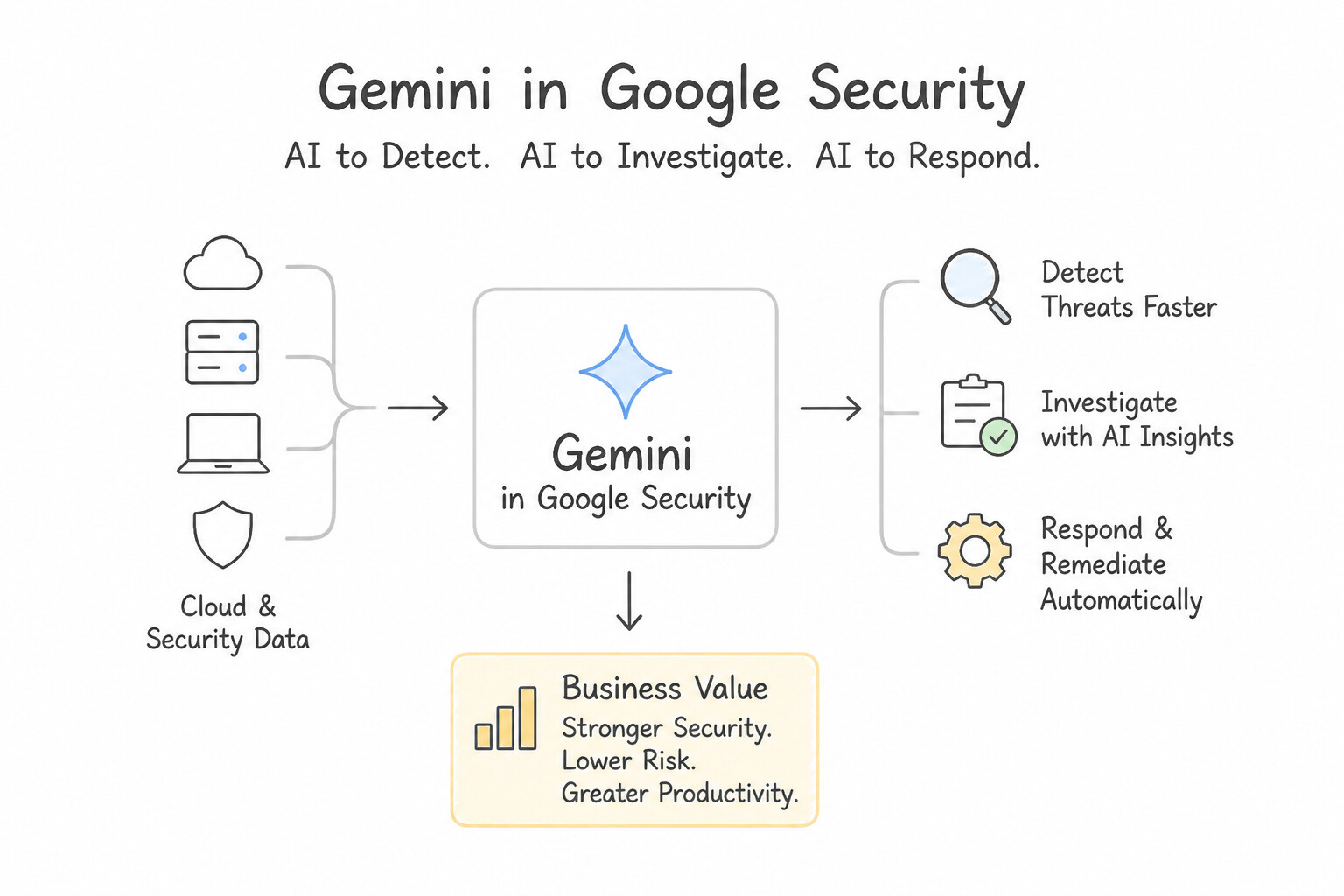
- Gemini in Google Security Operations (
AI for Security): Embeds generative AI directly into the SOC—converting natural-language questions into complex threat-hunting queries, generating concise plain-English summaries of multi-stage attack alerts, and recommending remediation playbooks to bridge the cybersecurity talent shortage. - AI Protection (
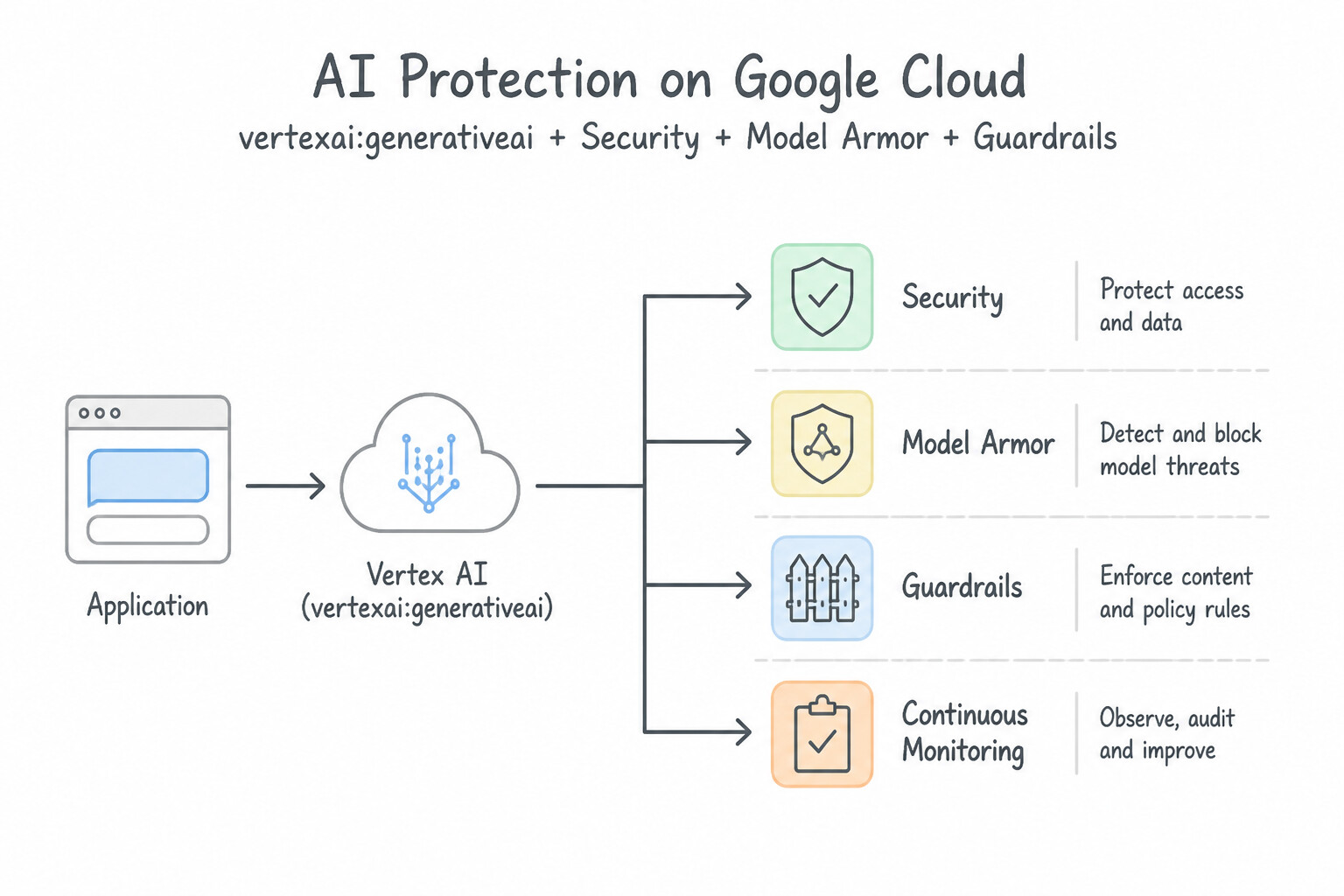
Security for AI Posture): Integrated into Security Command Center to automatically discover all AI models, datasets, and agents across the enterprise, evaluate AI configuration risks, and enforce governance guardrails. - Model Armor (
Runtime Security for LLMs & Agents): Inspects both incoming user prompts and outgoing model responses in real time (even across models) to block prompt injection, jailbreak attempts, toxic content, malicious URLs, and sensitive data leaks.
Key Implementation Patterns
- Securing the AI Agent Layer with Safety Guardrails: Use Configure built-in safety filters and content guardrails to block malicious prompts and toxic responses. Safety filters actively analyze real-time prompts and responses to block harmful content at the application layer.
- Model Armor for Generative AI Application Protection: Use Implement Model Armor to inspect and filter the application's prompts and responses. Model Armor is specifically designed to protect AI models from prompt injection, toxicity, and data leaks. (Avoid alternative: Web Security Scanner is a vulnerability scanning tool, not a real-time traffic filtering service.)
- Gemini in Security Command Center Findings: Use SecOps shifts the organization from a reactive stance to a proactive stance using threat intelligence. SecOps enables proactive threat detection using intelligence, preventing incidents before they cause damage. (Avoid alternative: SecOps encourages continuous updates and agility, not locking down environments.)
Key Takeaways (5.2f)
- Google Cloud uses a defense-in-depth approach, meaning security is implemented at every layer of the AI stack.
- Infrastructure security (like firewalls) protects against network attacks, while data security (like encryption) protects stored files.
- Application and agent layer security focuses on user interaction, using tools like content guardrails to evaluate real-time text for safety and toxicity.
- Prompt injection is a threat where users try to force an AI to ignore its instructions; guardrails are the primary defense against this.
Consideration 5.2g: Recognize the functionality, use cases, and business value of Google's other security offerings (e.g., Cloud VPC, Cloud VPN, Cloud Interconnect, firewalls, Cloud Armor, Cloud Logging, IAM, Sensitive Data Protection, Confidential Computing, Certificate Manager, Identity-Aware Proxy)
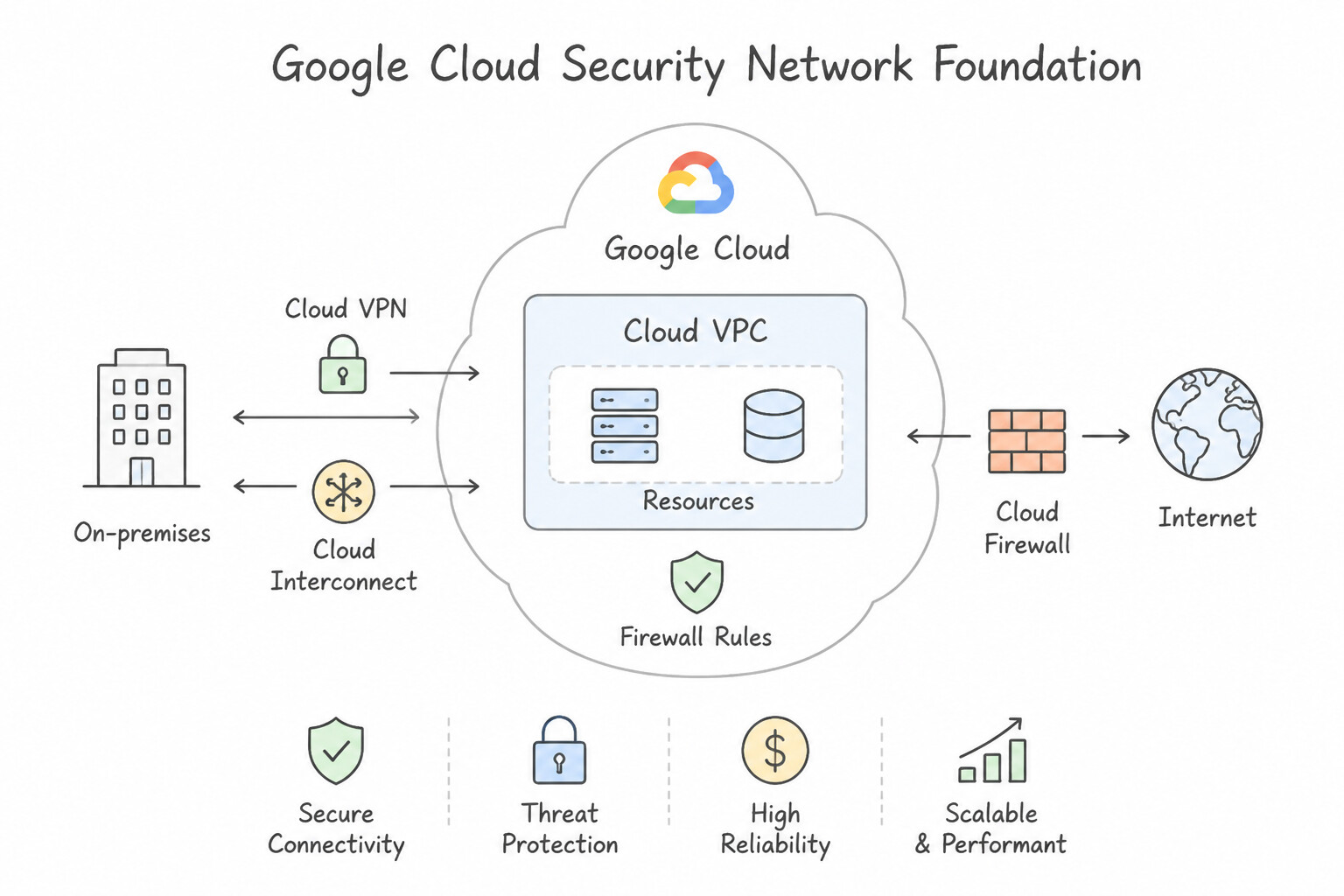
- Network Security & Hybrid Connectivity:
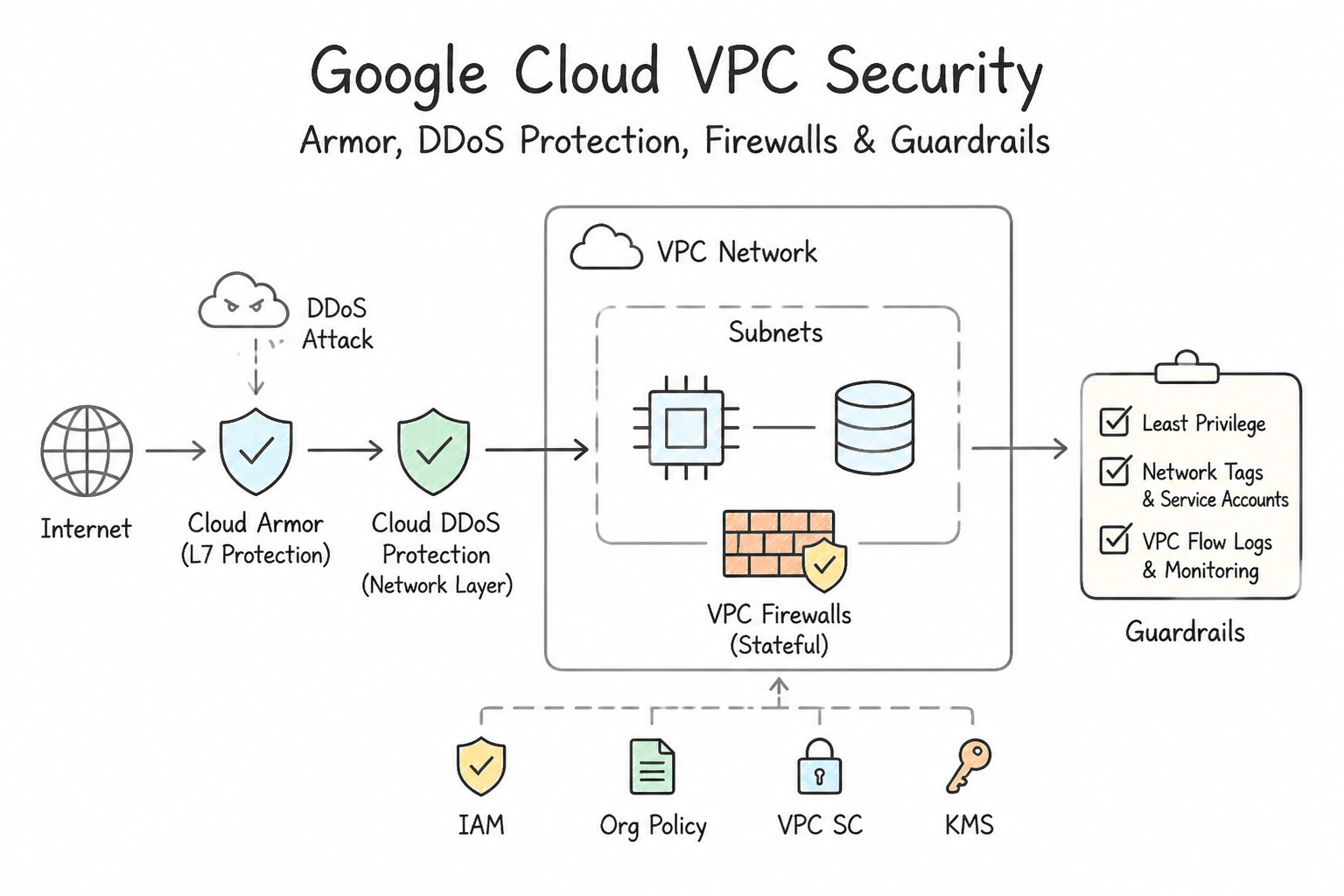
- Cloud Virtual Private Cloud (Cloud VPC) & Firewalls: Logically isolated global virtual network with stateful firewall rules controlling ingress/egress traffic.
- Cloud VPN vs. Cloud Interconnect: Cloud VPN connects on-premises networks to Google Cloud over the public internet using an encrypted IPsec tunnel (ideal for low-cost, quick setup, < 3 Gbps). Cloud Interconnect (
DedicatedorPartner) provides a physical, high-bandwidth, low-latency private connection that bypasses the public internet. - Cloud Armor: Global edge DDoS mitigation and Web Application Firewall (WAF) that blocks Layer 3/4/7 attacks (SQL injection, cross-site scripting, bot floods) before they reach your backends.
- Certificate Manager: Automates provisioning, deployment, and renewal of SSL/TLS certificates for encrypted HTTPS traffic.
- Identity, Access & Auditing:
- IAM (Identity and Access Management): Fine-grained authorization defining who (identity) has what access (role) to which resource.
- Identity-Aware Proxy (IAP): Implements Zero-Trust access to internal web applications and VMs by verifying user identity and context at the application layer—eliminating the need for a corporate VPN.
- Cloud Logging: Centralizes platform, application, and Cloud Audit Logs for compliance and forensics.
- Data Protection:
- Sensitive Data Protection (formerly Cloud DLP): Automatically discovers, classifies, and de-identifies/masks/redacts sensitive PII (credit card numbers, SSNs, health records) across structured and unstructured data (including AI training sets and prompts).
- Confidential Computing: Encrypts sensitive workloads in memory (Data in Use) while being processed.
Key Implementation Patterns
- Hardware Root of Trust with Titan Chip: Use Configure Google Cloud Armor security policies attached to a global load balancer. Google Cloud Armor provides defense against DDoS attacks at the global edge of the Google network. (Avoid alternative: Identity-Aware Proxy controls user access based on identity, not traffic volume or DDoS mitigation.)
- Minimized Attack Surface via Custom Hardware: Use Configure Google Cloud Armor security policies. Google Cloud Armor acts as a Web Application Firewall (WAF) to filter application-layer attacks like SQL injection and XSS. (Avoid alternative: Cloud NAT manages outbound connectivity for private instances and does not inspect inbound web traffic.)
- Multi-Layered Physical Data Center Controls: Use Configure a Google Cloud Armor security policy to filter traffic based on the geographic location of the client. Google Cloud Armor provides native capability to allow or deny traffic based on geographic origin (Geo-blocking).
Key Takeaways (5.2g)
- DDoS attacks aim to overwhelm resources to make them unavailable.
- Google Cloud Armor is the primary service for DDoS protection and Web Application Firewall (WAF) capabilities.
- Cloud Armor operates at the edge of the Google network, integrating with global load balancers.
- Google Cloud Armor is the Web Application Firewall (WAF) for Google Cloud.
Consideration 5.2h: Describe how Google Cloud earns and maintains customer trust in the cloud (e.g., transparency reports, third-party audits, digital sovereignty, data residency, compliance resource manager)
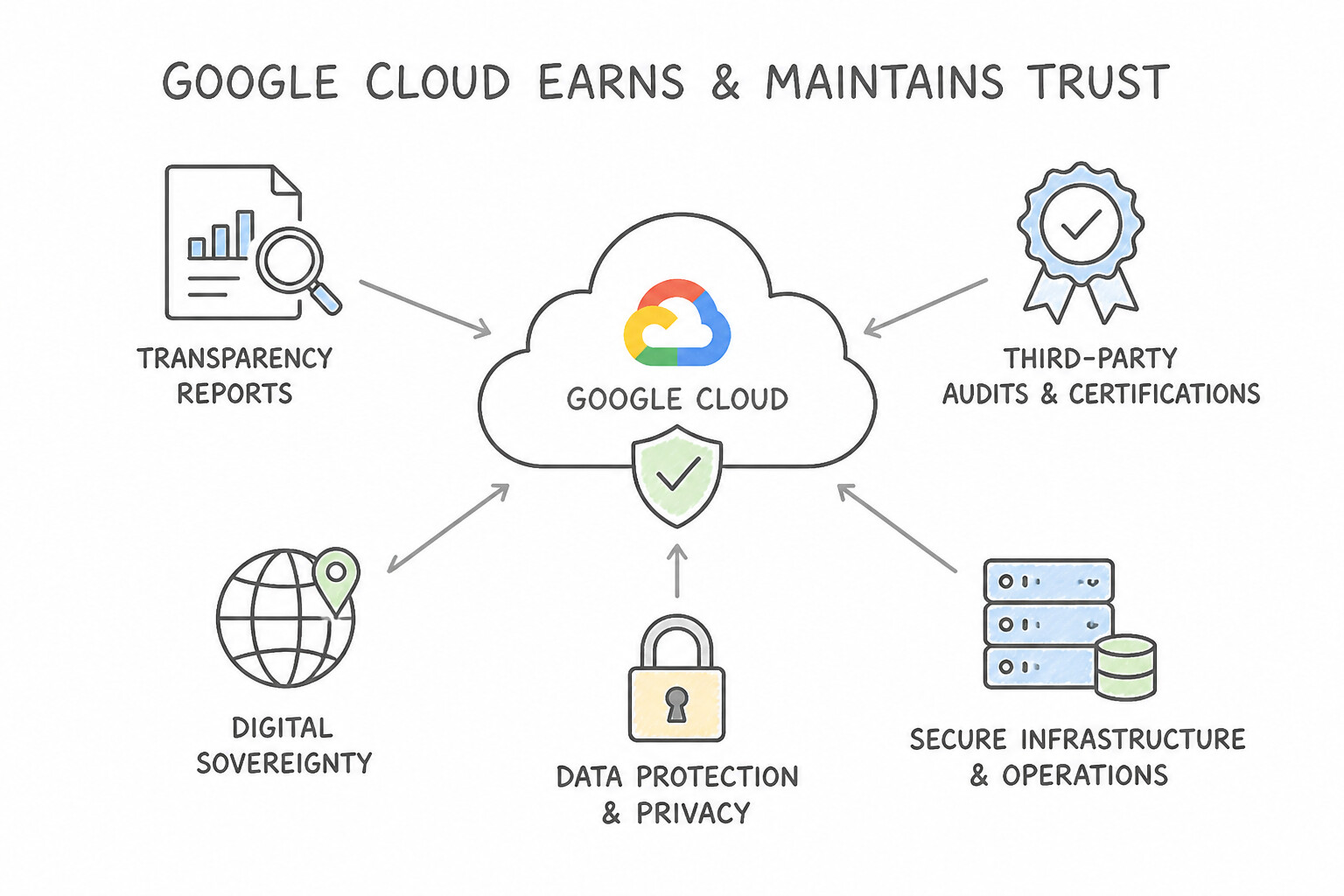
- Transparency Reports & Independent Third-Party Audits: Google publishes regular Transparency Reports detailing government requests for data and undergoes rigorous independent third-party audits (SOC 1/2/3, ISO 27001, PCI-DSS, FedRAMP, HIPAA).
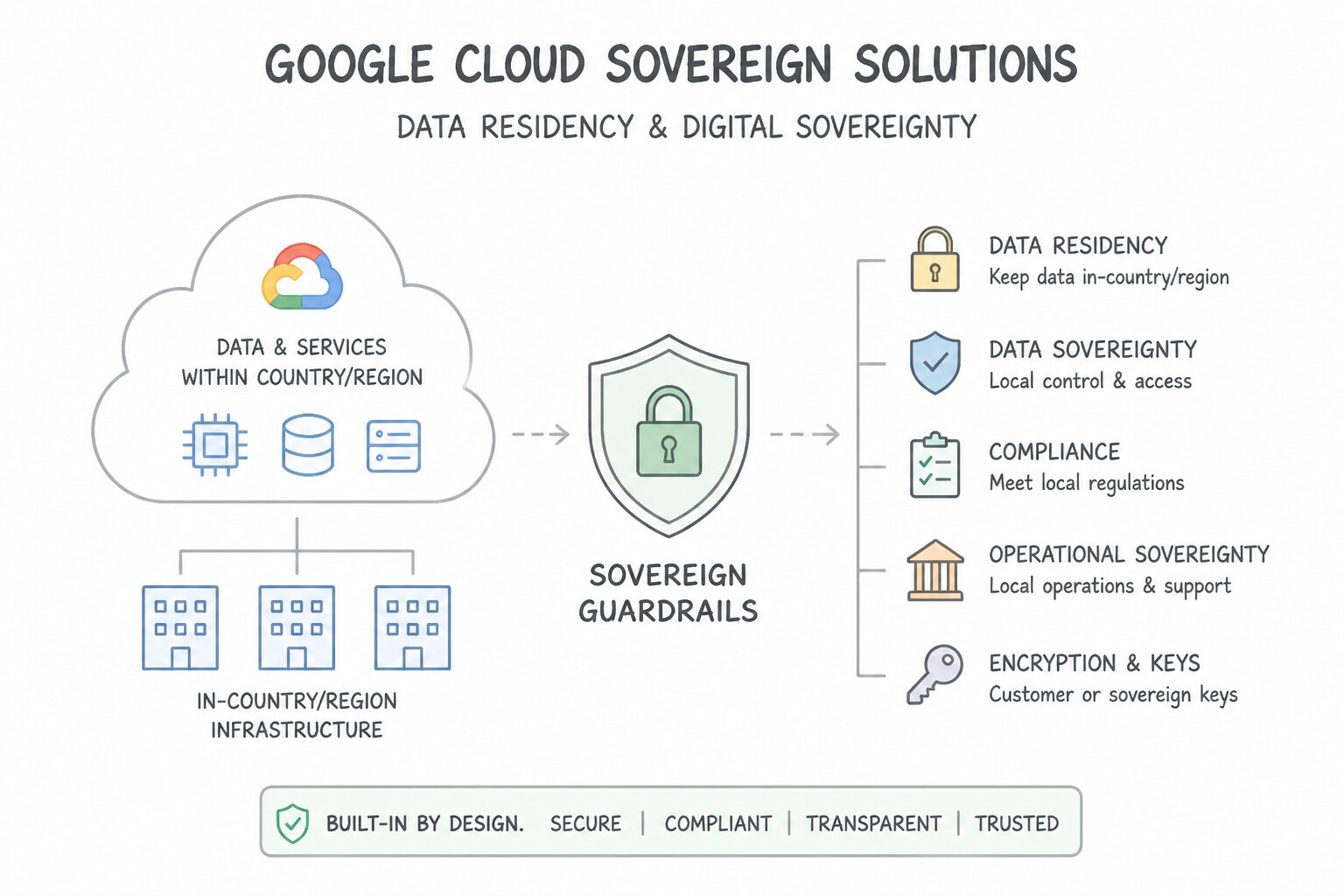
- Data Residency & Digital Sovereignty (
Google Cloud Sovereign Solutions): - Data Residency: Allows organizations to specify the exact geographic region where their data is stored at rest.
- Digital Sovereignty: Goes beyond residency to provide data sovereignty (control over data access via Cloud EKM external keys and Key Access Justifications), operational sovereignty (restricting support/admin access to vetted regional personnel via Access Approval and Assured Workloads), and software sovereignty (running workloads without lock-in or in air-gapped sovereign clouds).
- Compliance Resource Manager / Compliance Reports Manager: Centralizes compliance certifications, audit reports, and regulatory alignment checks in one self-service console.
Key Implementation Patterns
- Data Ownership and Portability: Use Tell them that they retain full ownership of their data and can take their data with them at any time. Google Cloud guarantees that you own your data and provides the ability to export or migrate it at any time. (Avoid alternative: Google Cloud does not take ownership of customer data; the customer retains full ownership.)
- Government Data Request Visibility: Use The Google Transparency Report. The Google Transparency Report specifically provides historical data on government requests for user information. (Avoid alternative: Access Transparency logs track Google personnel access to your data, not external government requests.)
- Selecting Regions for Regulatory Compliance: Use Deploy your resources and data storage specifically in Google Cloud regions located within the European Union. To meet data residency requirements, you must explicitly select Google Cloud regions located within the specific geographic boundary required.
Key Takeaways (5.2h)
- Customers always retain ownership of their data on Google Cloud.
- Google Cloud supports data portability, allowing users to export data at any time.
- Google Cloud does not use customer data for advertising.
- Trust principles are fundamental to the Google Cloud customer agreement.
Quick Decision Cheat Sheet (Subsection 5.2)
If the Scenario Requires... | Choose This Google Cloud Security Product | Avoid This Common Mistake |
|---|---|---|
"Google global visibility + Mandiant frontline incident response + VirusTotal crowdsourced threat detection" | Google Threat Intelligence | Security Command Center or Cloud Logging alone |
"Proactively discover cloud misconfigurations, software vulnerabilities, and attack paths across GCP" | Security Command Center (SCC) | Cloud Armor or Cloud VPN |
"Unified SIEM + SOAR platform to ingest petabytes of telemetry and accelerate SOC threat detection & response" | Google Security Operations (Google SecOps) | Identity-Aware Proxy or Certificate Manager |
"Use generative AI in the SOC to summarize incidents and write threat-hunting queries in natural language" | Gemini in Google Security Operations | BigQuery ML or Vision API |
"Discover AI models/datasets and assess AI security posture risks" vs. "Screen live prompts/responses against prompt injection & jailbreaks" | AI Protection vs. Model Armor | Cloud Firewalls or Cloud Interconnect |
"Global edge DDoS protection and Web Application Firewall (WAF) against SQLi/XSS" | Cloud Armor | Sensitive Data Protection or IAM |
"Zero-Trust access to internal applications for remote workers without using a VPN" | Identity-Aware Proxy (IAP) | Cloud Armor or Public IP firewall rules |
"Automatically discover, classify, and redact/mask PII (SSNs, credit cards) in storage, databases, or AI prompts" | Sensitive Data Protection (Cloud DLP) | Confidential Computing or Cloud KMS |
"Encrypt sensitive data in RAM while it is actively being processed ( Data in Use)" | Confidential Computing | Standard Encryption at Rest |
"Encrypted IPsec tunnel over the public internet" vs. "Dedicated physical high-speed private link to GCP" | Cloud VPN vs. Cloud Interconnect | Public internet without encryption |
"Download third-party audit certificates (ISO, SOC 2) and manage regulatory compliance alignment" | Compliance Resource Manager / Compliance Reports Manager | Google Threat Intelligence |
Further Reading (Subsection 5.2)
- Google Infrastructure Security Design Overview — This document outlines how Google secures its infrastructure, specifically detailing the role of custom hardware and the Titan chip in establishing a secure boot process and a hardware root of trust.
- Titan hardware chip — This page explains about Titan chip that establishes hardware root of trust and verifies platform firmware.
- Titanium hardware security architecture at Google — This page explains how Titan chips and custom motherboards defend servers against physical and firmware attacks.
- VPC Service Controls overview — This page explains how VPC Service Controls mitigate data exfiltration risks by creating security perimeters around Google Cloud managed services.
- VPC Service Controls — This page shows the product page covering isolation perimeters that protect AI workloads and training data from exfiltration.
- Service perimeter details and configuration — This page explains about enforced perimeters that block requests crossing the boundary.
Book TOC · Previous · Chapter 5 of 7 · Next
AwesomeGCP.com Learning
The approach taken is a question-led learning approach: you explore realistic project scenarios where you need to make decisions or take actions to achieve business goals within specific constraints. Instead of passive learning, you are challenged to think and work through the options to master the Cloud Digital Leader (CDL) certification!