Book TOC · Previous · Chapter 4 of 7 · Next
Chapter 4: Infrastructure & Application Modernization: Migration 'Rs', VMs, GKE, Serverless & Apigee
Chapter Focus: Retire/Retain/Rehost/Replatform/Refactor migration strategies, Compute Engine, VMware Engine, GKE, Cloud Run, Eventarc, and Apigee API Management monetization/security.
Subsection 4.1: Describe how Google Cloud helps organizations transition to the cloud
The Big Picture
When an enterprise decides to exit an aging on-premises data center, leadership faces a classic architectural tension:
- The "Refactor Everything First" Trap: If a company insists on rewriting 400 legacy monolithic applications into serverless microservices before vacating a data center whose lease expires in 6 months, the migration stalls, budgets explode, and the company pays millions in lease-extension penalties.
- The "Lift-and-Shift Forever" Trap: Conversely, if a company simply rehosts (lifts and shifts) oversized, always-on on-premises VMs onto cloud VMs and never modernizes them, they miss out on cloud autoscaling, managed services, and serverless cost efficiency.
Google Cloud resolves this through a phased migration journey—starting with Discovery and Assessment, choosing the right migration strategy (Retire, Retain, Rehost, Replatform, Refactor/Reimagine) per workload, and matching each application to the optimal compute abstraction (VMs, Spot VMs, Containers/Kubernetes, Serverless, Load Balancing & Autoscaling).
Consideration 4.1a: Define fundamental cloud migration terms (e.g., workload, discovery and assessment, retire, retain, rehost [lift and shift], replatform [move and improve], refactor; reimagine)
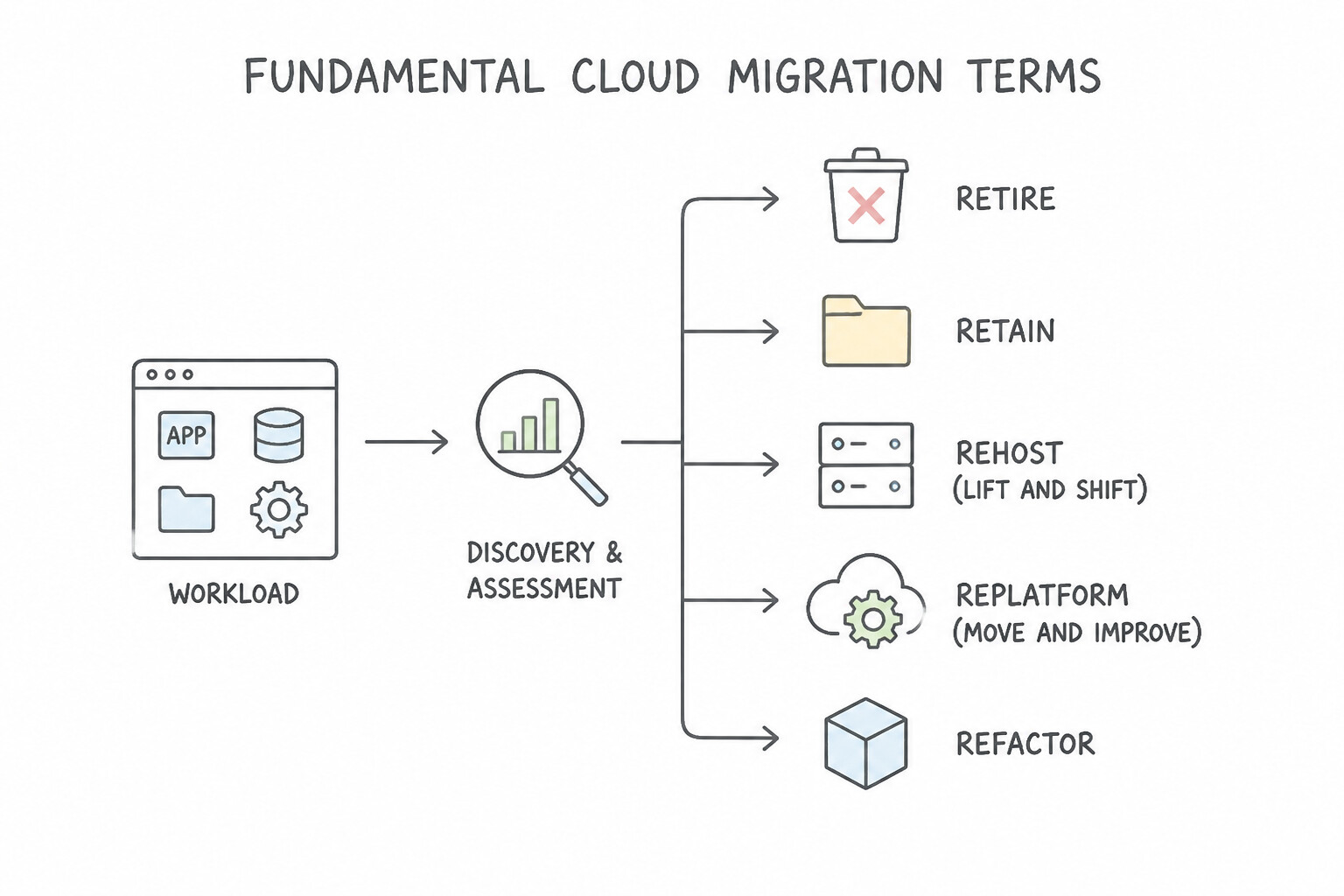
- Workload & Discovery/Assessment: A workload is any distinct application, service, or capability consuming compute resources. Discovery and assessment is the mandatory first step of any migration—inventorying all on-premises servers, mapping application dependencies, evaluating TCO, and identifying which workloads to move first.
- Retire vs. Retain:
- Retire: Decommissioning and turning off legacy applications that have no active users or business value.
- Retain: Keeping specific workloads on-premises (temporarily or permanently) due to strict regulatory rules, unsupported legacy hardware dependencies, or recent capital investments.
- Rehost (
Lift and Shift) vs. Replatform (Move and Improve) vs. Refactor (Reimagine): - Rehost (Lift and Shift): Moving an application from on-premises to the cloud (e.g., Compute Engine VMs) with zero or minimal code/architectural changes. Pros: Fastest time-to-migrate, lowest risk, ideal for urgent data-center lease exits. Cons: Least cloud-native optimization.
- Replatform (Move and Improve): Making targeted tweaks during migration to take advantage of managed cloud services without rewriting the core application architecture (e.g., moving a self-hosted MySQL database onto Cloud SQL).
- Refactor / Reimagine: Re-architecting and rewriting a monolithic application into cloud-native microservices, containers, or serverless functions to unlock maximum scalability, resilience, and deployment velocity.
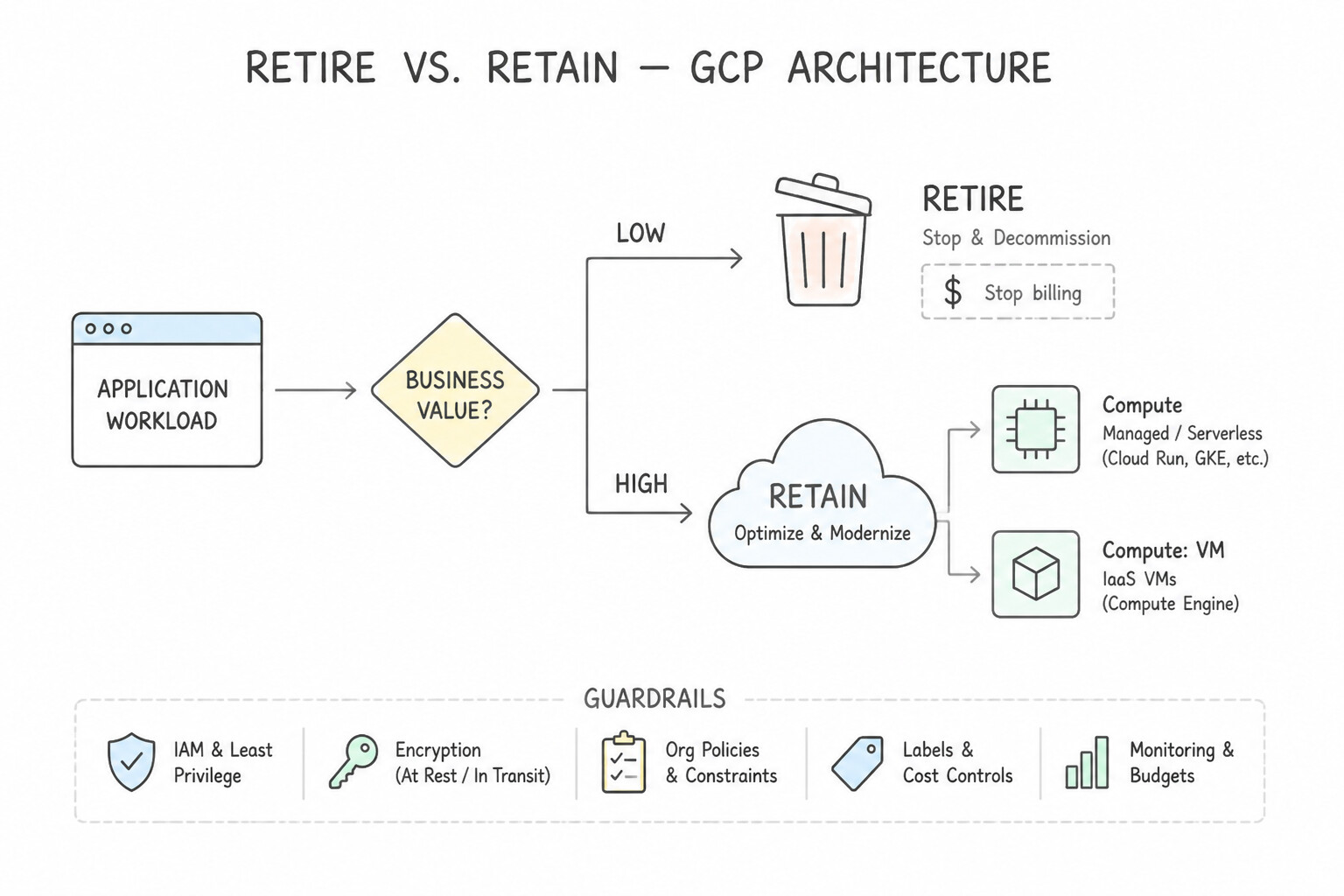
Key Implementation Patterns
- Identifying Cloud Workloads: Use Adopt public cloud services to shift from capital expenses (CapEx) to operating expenses (OpEx). Public cloud models utilize OpEx, allowing the startup to pay only for usage without upfront hardware costs. (Avoid alternative: A private cloud requires purchasing hardware upfront, which creates high capital expenses.)
- Virtual Machines for Legacy Applications: Use Adopt the Rehost strategy to migrate the VMs without modifications. Rehosting (lift and shift) moves workloads without modifications, making it the fastest option for strict deadlines. (Avoid alternative: Refactoring involves rewriting code, which takes too long and violates the minimal changes requirement.)
- Inventory and Planning Phase: Use Migrate to a cloud service that automatically scales resources up during traffic spikes and scales down when traffic decreases. Elasticity allows infrastructure to grow and shrink automatically to match demand. (Avoid alternative: Provisioning for peak load permanently leads to wasted resources and higher costs.)
Key Takeaways (4.1a)
- CapEx (Capital Expenditure): Upfront investment in physical assets like hardware and data centers.
- OpEx (Operating Expenditure): Ongoing costs for day-to-day operations, such as cloud consumption bills.
- Pay-as-you-go: The cloud consumption model where you pay only for the resources you utilize, providing financial flexibility.
- Cloud Migration Benefit: Moving to the cloud shifts IT spending from CapEx to OpEx, lowering barriers to entry for startups.
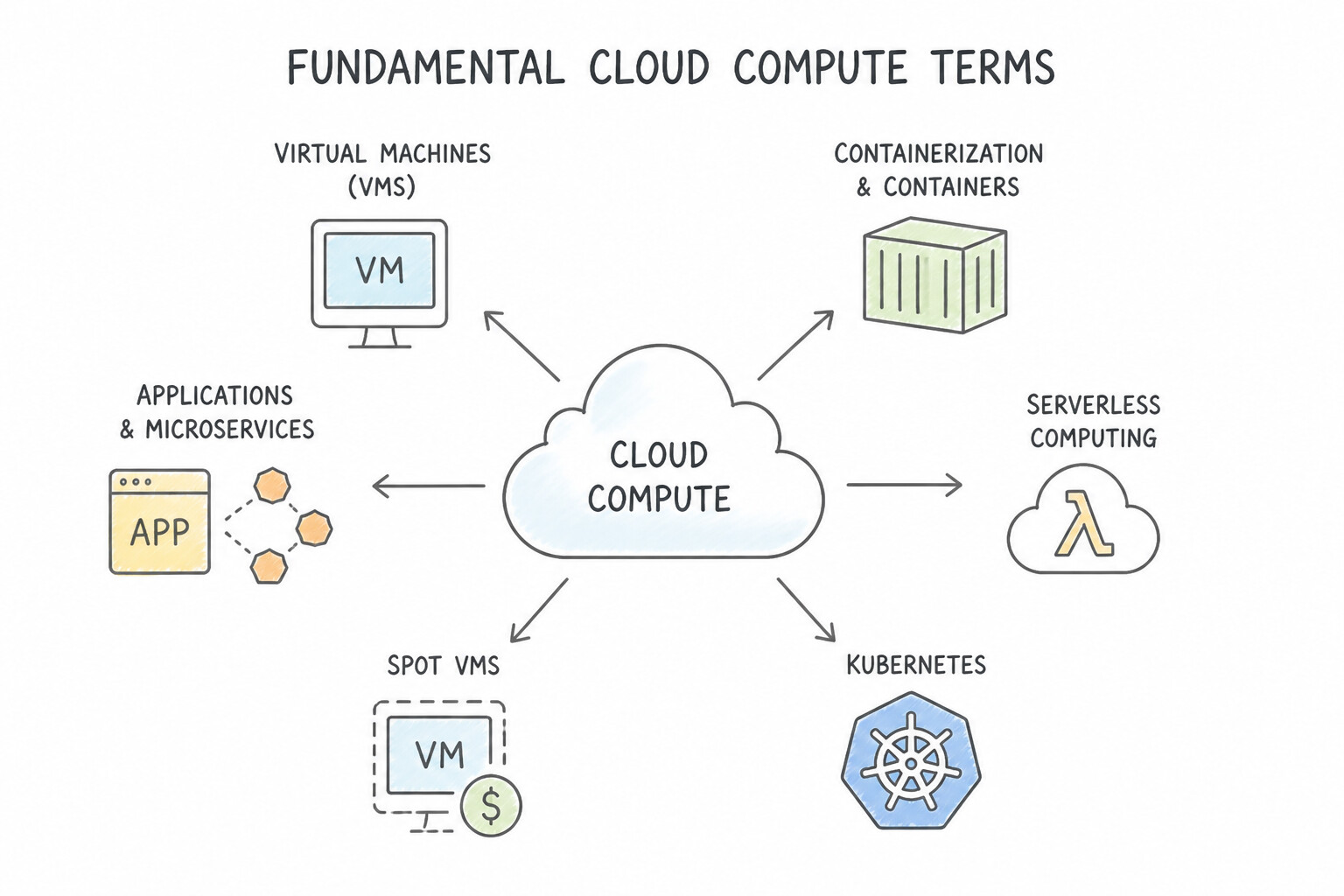
Consideration 4.1b: Define the fundamental cloud compute terms (e.g., virtual machines (VMs), containerization and containers, applications and microservices, serverless computing, spot VMs, Kubernetes, autoscaling and load balancing, managed services)
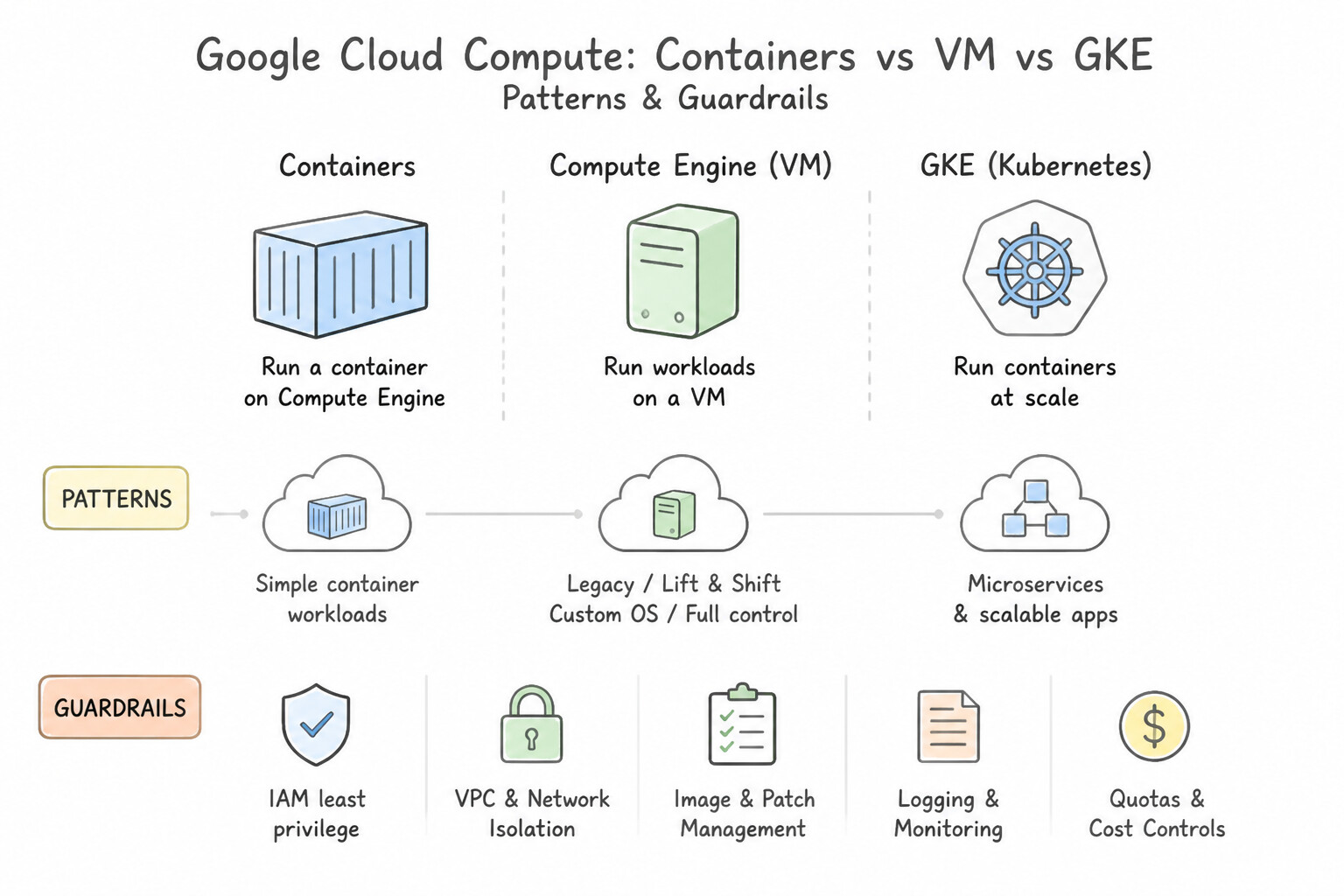
- Virtual Machines (VMs) vs. Containers:
- Virtual Machines (VMs): Emulate an entire physical computer, including a full guest Operating System (OS) on top of a hypervisor. Heavier footprint, takes seconds/minutes to boot, provides full OS-level control.
- Containers: Package only the application code and its runtime libraries/dependencies, sharing the host OS kernel. Lightweight, portable across any environment (laptop, on-prem, cloud), and starts in milliseconds.
- Kubernetes: An open-source container orchestration platform (originally designed by Google) that automates deploying, scaling, healing, and networking clusters of containers across multiple machines.
- Monoliths vs. Microservices: A monolith bundles all business functions (UI, checkout, inventory, billing) into a single tightly coupled codebase—if one module crashes or needs scaling, the whole app is affected. Microservices decompose the application into independent, loosely coupled services that can be developed, deployed, and scaled independently by separate teams.
- Serverless Computing & Managed Services: Managed services automate operational tasks like patching, backups, and high availability. Serverless computing goes a step further: developers deploy code or containers with zero server provisioning, automatic scaling from peak traffic down to zero instances (pay-only-when-code-runs).
- Spot VMs: Spare, unused Google Cloud compute capacity offered at steep discounts (up to 60–91% off). Because Google Cloud can preempt (reclaim) Spot VMs with short notice if capacity is needed elsewhere, Spot VMs are strictly for fault-tolerant, stateless batch jobs (rendering, genomics, distributed data processing)—never for stateful databases or latency-sensitive production web frontends.
- Autoscaling & Load Balancing: Load balancing distributes incoming user traffic evenly across multiple healthy backend instances to prevent any single server from overloading. Autoscaling dynamically adds instances when traffic spikes and removes instances when demand drops.
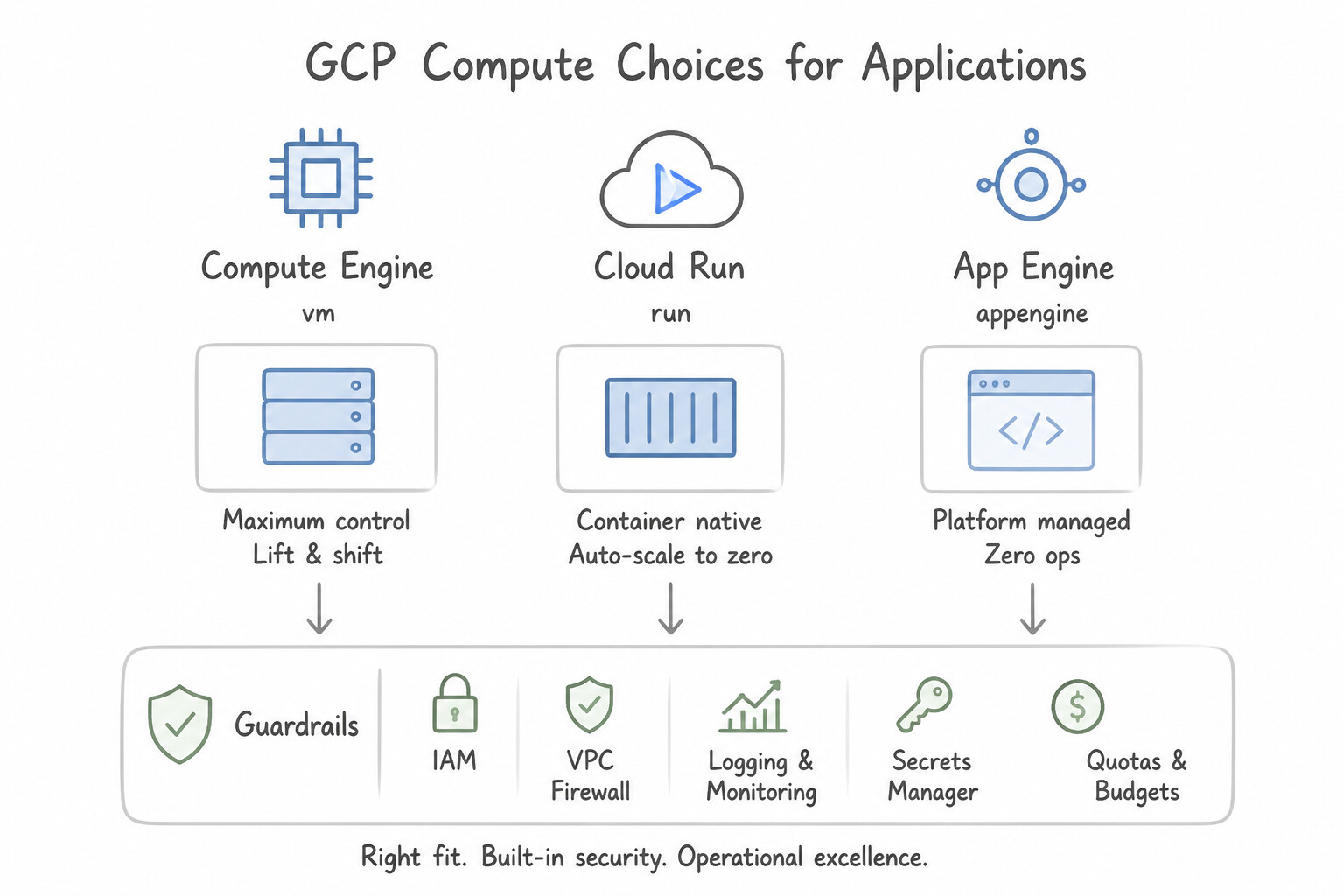
Key Implementation Patterns
- Custom Machine Types for Cost Optimization: Use Create a virtual machine (VM) on Compute Engine to host the application. Compute Engine offers full control over the OS and file system, meeting the legacy application's requirements. (Avoid alternative: Cloud Run abstracts the OS and does not provide the specific OS control required for this legacy application.)
- Independent Scaling via Microservices: Use This model shifts costs from capital expenditure (CapEx) to operational expenditure (OpEx), allowing you to pay only for what you use. Cloud computing replaces upfront hardware costs (CapEx) with pay-as-you-go operating costs (OpEx).
- Automated Lifecycle Management: Use Run the application on Compute Engine virtual machines (VMs). Compute Engine provides full control over the operating system, allowing specific kernel selection and file system configuration. (Avoid alternative: App Engine manages the operating system for you, preventing the required custom kernel configuration.)
Key Takeaways (4.1b)
- Compute Engine (IaaS) offers the highest level of control over the operating system and infrastructure.
- Use Compute Engine for legacy migrations (Lift and Shift) requiring specific OS versions or file system configurations.
- PaaS (App Engine) and Serverless (Cloud Run, Cloud Functions) reduce operational overhead but limit control over the underlying OS.
- CapEx (Capital Expenditure) involves high upfront costs for physical assets like servers.
Quick Decision Cheat Sheet (Subsection 4.1)
If the Scenario Requires... | Choose This Migration / Compute Term | Avoid This Common Mistake |
|---|---|---|
"Inventorying all applications, dependencies, and TCO before starting a migration" | Discovery and Assessment | Jumping straight into Refactoring or Rehosting |
"Move applications to the cloud as-is with zero code changes for the fastest data center exit" | Rehost ( Lift and Shift) | Refactor or Replatform |
"Make minimal changes during migration to adopt a managed service (like Cloud SQL)" | Replatform ( Move and Improve) | Rehost or Retire |
"Rewrite a legacy monolithic application into cloud-native microservices and serverless components" | Refactor / Reimagine | Rehost ( Lift and Shift) |
"Lightweight, portable application package that shares the host OS kernel" | Container | Virtual Machine (VM) (includes full guest OS) |
"Open-source system for automating deployment, scaling, and management of containerized applications" | Kubernetes | Hypervisor or Bare Metal |
"Heavily discounted spare VM capacity that can be interrupted/reclaimed at any time" | Spot VMs (only for fault-tolerant batch jobs!) | Using Spot VMs for live customer-facing databases |
"Distribute incoming network traffic across healthy servers" vs. "Add/remove servers based on load" | Load Balancing vs. Autoscaling | Vertical scaling (manually rebooting a bigger machine) |
Further Reading (Subsection 4.1)
- Google Cloud Pricing Philosophy — Review the section on 'Pay-as-you-go' to understand how Google Cloud charges for services based on usage rather than upfront hardware purchases.
- Migration to Google Cloud: Getting started — This guide outlines the various migration strategies (Rehost, Refactor, Replatform, etc.) and helps decision-makers choose the right path based on their constraints.
- Google Cloud Architecture Framework: Performance optimization — This guide discusses how to design cloud systems for elasticity and auto-scaling to match resources to demand.
- Benefits of Cloud Computing — Review the section on 'Efficiency' and 'Speed' to understand how cloud resources shorten development cycles.
- Choosing a Compute Option — A guide helping you choose between Compute Engine, App Engine, Cloud Run, and Cloud Functions based on requirements like OS control and scalability.
- Compute Engine Overview — Documentation describing Virtual Machine instances, which are the building blocks of Compute Engine.
Subsection 4.2: Describe the functionality, business use cases, and business value of Google Cloud's infrastructure offerings
The Big Picture
Once an organization understands compute concepts (4.1), it must select the exact Google Cloud product that balances operational velocity against infrastructure control:
- Compute Engine (
IaaS—4.2a) & Google Cloud VMware Engine: Choose Compute Engine when workloads require complete control over the guest Operating System, custom kernel modules, specific machine shapes, or rapid lift-and-shift of general VMs. Choose Google Cloud VMware Engine (GCVE) when migrating existing on-premises VMware vSphere environments as-is without hypervisor conversion, or Bare Metal Solution for specialized legacy hardware/licensing (such as Oracle RAC). - Google Kubernetes Engine (
GKE—4.2c): Choose GKE when running complex, multi-container microservices architectures that need rich Kubernetes orchestration, service meshes, custom networking, or portable hybrid/multicloud container deployments. Use GKE Autopilot to let Google manage the underlying worker nodes automatically. - Cloud Run & Cloud Run functions (
Serverless—4.2d): Choose Cloud Run when teams want to deploy stateless web applications, APIs, or container images with zero cluster/server management and automatic scale-to-zero billing. Choose Cloud Run functions (formerly Cloud Functions) for lightweight, single-purpose event-driven code snippets triggered by cloud events (e.g., a file uploaded to Cloud Storage or a message published to Pub/Sub). - Hybrid & Multicloud Portfolio (4.2e): When regulations, data sovereignty, or multi-vendor strategies require running workloads across on-premises data centers, AWS, or Azure alongside Google Cloud, Google provides a unified control plane via GKE Enterprise (Anthos), BigQuery Omni, AlloyDB Omni, Looker, and Cloud SQL.
Consideration 4.2a: Discuss the business value of using Compute Engine to create and run virtual machines on Google's infrastructure
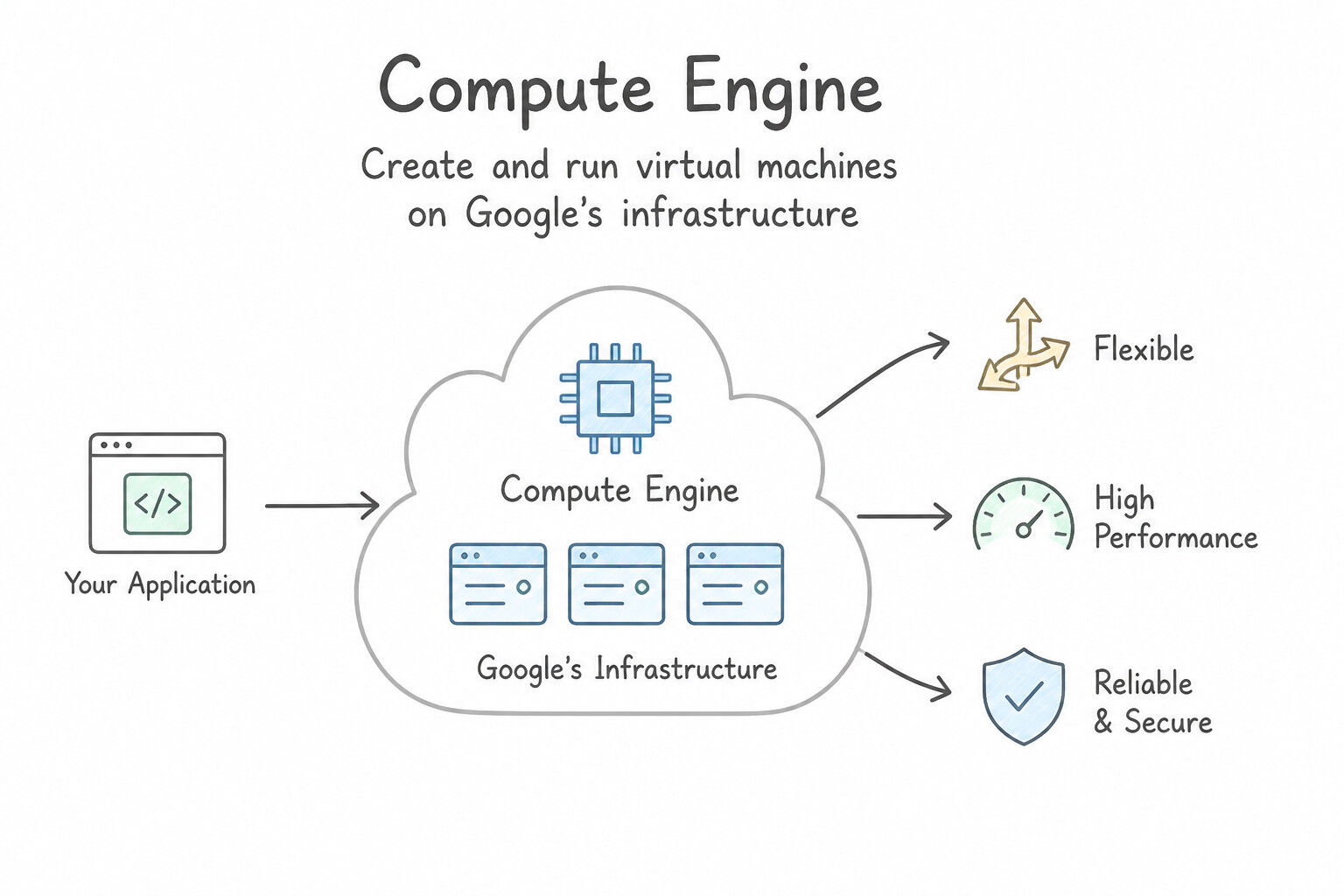
- Flexible, High-Performance IaaS Virtual Machines: Compute Engine lets organizations create and run VMs on Google's global infrastructure with predefined or custom machine types (tailoring exact vCPU-to-RAM ratios so you never pay for unused resources).
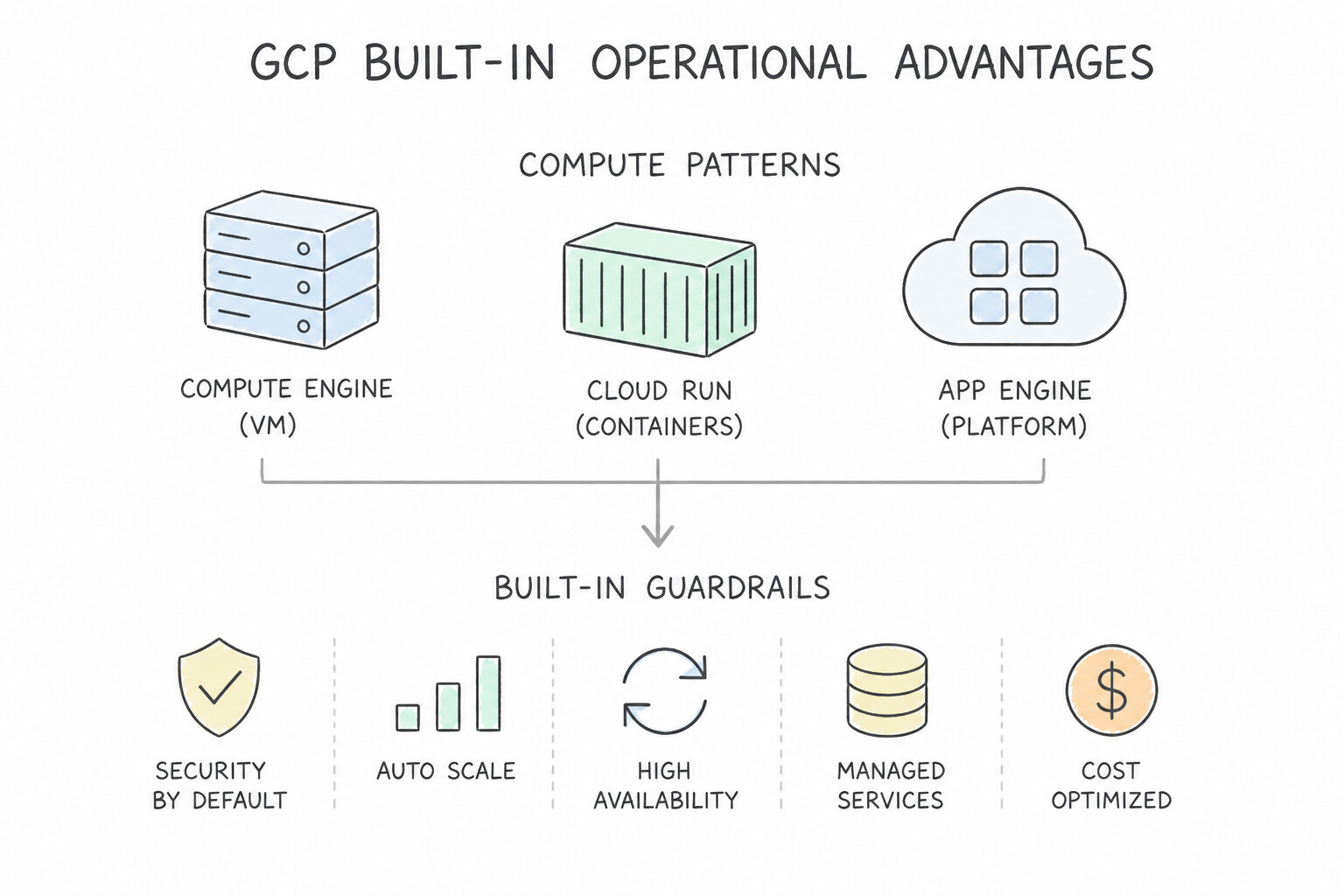
- Built-In Operational Advantages:
- Live Migration: Keeps VMs running continuously without rebooting during host hardware maintenance events.
- Automatic Rightsizing Recommendations: Analyzes actual CPU/memory utilization and suggests smaller machine types to cut waste.
- Flexible Billing: Per-second billing, Spot VMs for batch jobs, and Committed Use Discounts (CUDs) for predictable steady-state workloads.
- Companion Lift-and-Shift Offerings: Google Cloud VMware Engine (GCVE) migrates VMware workloads without re-architecting; Bare Metal Solution runs specialized legacy workloads (like Oracle) on dedicated, non-virtualized hardware inside regional facilities connected to Google Cloud with sub-2ms latency.
Key Implementation Patterns
- Cost Efficiency with Scale-to-Zero: Use Migrate the application to Compute Engine virtual machines (VMs). Compute Engine allows you to run virtual machines with specific OS requirements without code changes. (Avoid alternative: Cloud Run requires containerization, which the scenario prohibits due to time constraints.)
- Cross-Cloud Data Analytics Without Egress Costs: Use Rehost the applications to Compute Engine virtual machines (VMs). Rehosting (Lift and Shift) to Compute Engine is the fastest migration strategy that requires no code changes. (Avoid alternative: Replatforming requires containerization, which adds complexity and time compared to a direct lift and shift.)
- Developer Productivity and Reduced Operations: Use Provision Spot VMs for the processing jobs. Spot VMs offer significant discounts for fault-tolerant workloads that can withstand interruptions. (Avoid alternative: Committed use discounts require a long-term commitment and offer less savings than Spot VMs.)
Key Takeaways (4.2a)
- Lift and Shift: Moving applications 'as-is' usually involves Infrastructure as a Service (IaaS).
- Compute Engine Value: Compute Engine provides the flexibility to run specific operating systems and kernels, making it ideal for legacy workloads.
- Migration Constraints: When time is limited and code changes are restricted, choose the service that most closely mimics the existing on-premises environment.
- Rehosting (Lift and Shift) is the fastest migration strategy and requires minimal changes to the application.
Consideration 4.2b: Describe the business value of modern application development (e.g., flexible architectures like microservices, accelerated deployment processes through managed services, cost optimization, enhanced scalability and resilience, improved operational efficiency)
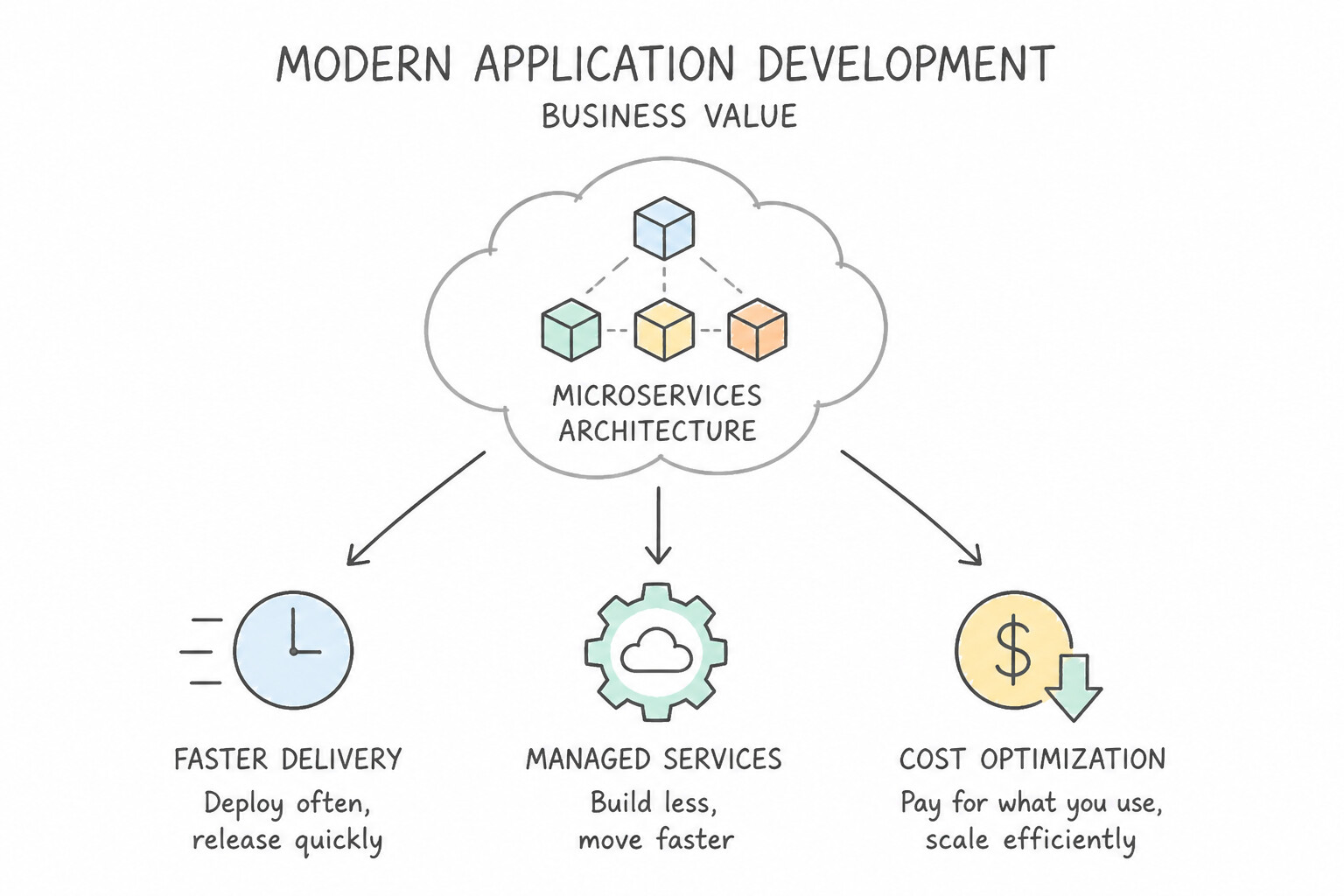
- Five Business Outcomes of Cloud-Native Application Modernization:
- Flexible Architectures (Microservices): Teams update and scale individual features (e.g., the payment service) independently without risking a full-system outage.
- Accelerated Deployment Velocity: Managed CI/CD pipelines (Cloud Build, Cloud Deploy, Artifact Registry) enable daily releases instead of quarterly maintenance windows.
- Cost Optimization: Serverless scale-to-zero and container bin-packing eliminate paying for idle capacity.
- Enhanced Scalability & Resilience: Automated load balancing and multi-zone self-healing absorb sudden traffic spikes and hardware failures gracefully.
- Improved Operational Efficiency: Shifting OS and cluster patching to Google Cloud frees developers to write revenue-generating business features.
Key Implementation Patterns
- Environment Consistency: Use Package the application code and all its dependencies into containers. Containers bundle code and dependencies together, ensuring the application runs the same way everywhere. (Avoid alternative: Manual installation on VMs is prone to errors and does not guarantee environment consistency.)
- Resource Utilization Efficiency: Use Deploy the applications using containers. Containers share the OS kernel, making them lightweight and allowing high application density. (Avoid alternative: VMs require a full guest OS for each instance, which consumes more resources and reduces density.)
- Environmental Consistency: Use Package the application and all its dependencies into a container image. Containers bundle code and dependencies together, ensuring the application runs consistently in any environment. (Avoid alternative: Virtual machines are too heavy and resource-intensive just to solve application dependency mismatches.)
Key Takeaways (4.2b)
- Containers bundle application code with all necessary dependencies and libraries.
- Using containers ensures that an application runs consistently across development, testing, and production environments.
- This approach eliminates the "works on my machine" problem caused by environment differences.
- Containers share the host operating system kernel, making them lightweight and efficient.
Consideration 4.2c: Describe the business value of using GKE to deploy and manage containers
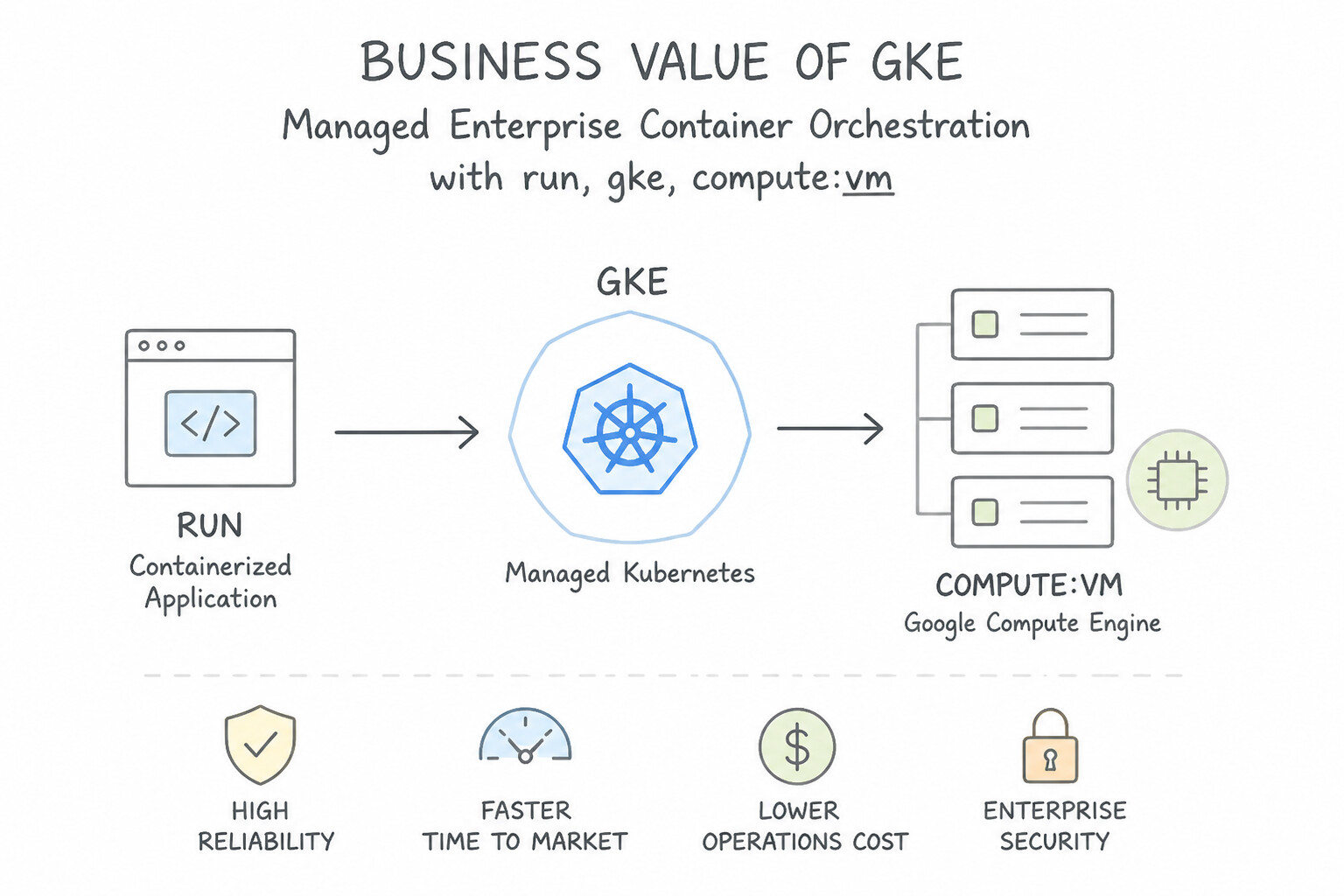
- Managed Enterprise Container Orchestration: GKE eliminates the complexity of installing and maintaining a Kubernetes control plane from scratch. It automates container scheduling, horizontal pod autoscaling, rolling updates, self-healing (restarting failed containers automatically), and secrets/networking integration.
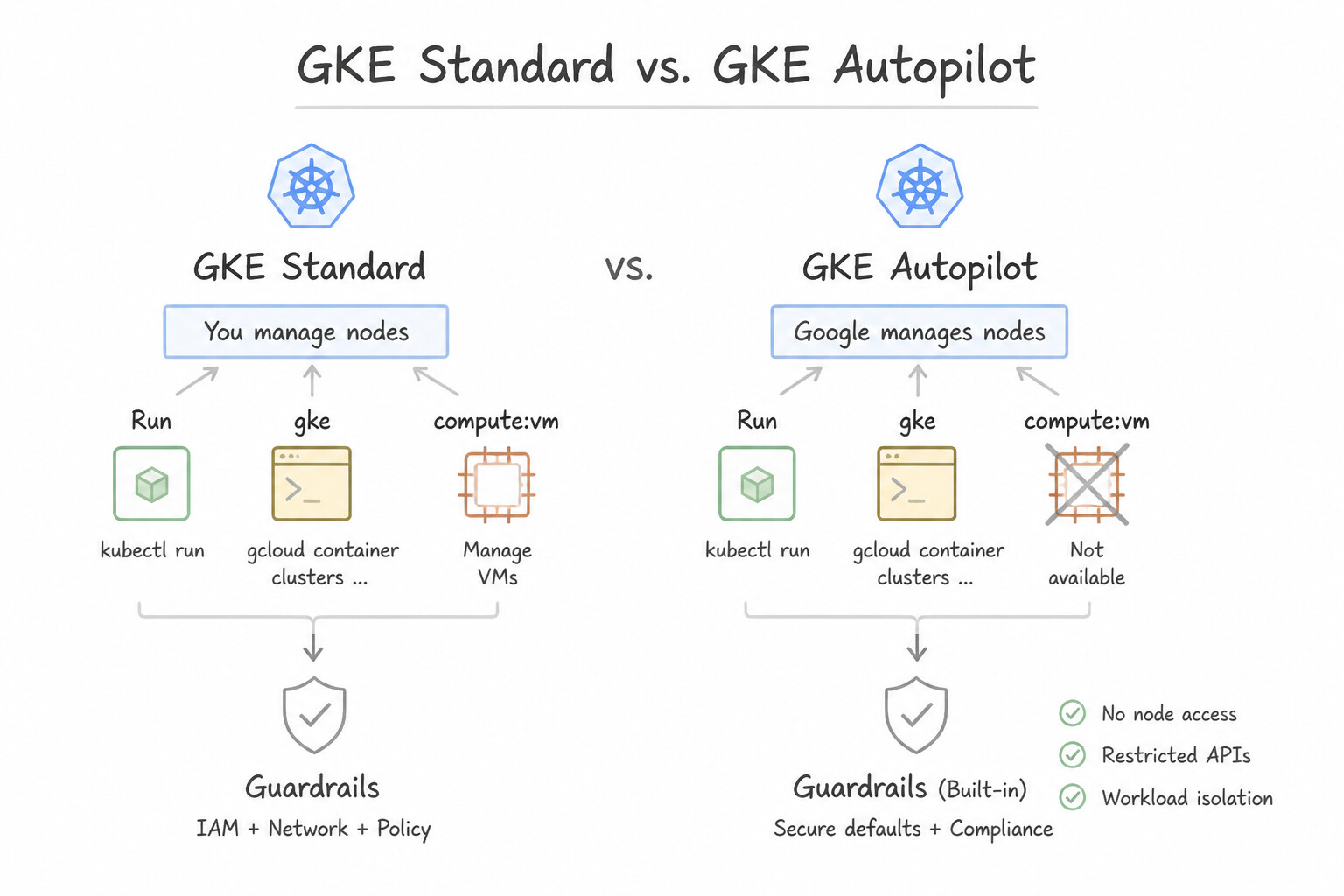
- GKE Standard vs. GKE Autopilot: In Standard mode, administrators configure and manage worker nodes; in GKE Autopilot, Google provisions, secures, and manages the underlying nodes automatically—charging only for the CPU, memory, and storage requested by your running pods.
Key Implementation Patterns
- Cost Efficiency for Sporadic Workloads: Use Deploy the application to Cloud Run. Cloud Run allows you to deploy containers that scale to zero when not in use, ensuring you only pay when requests are being processed. (Avoid alternative: Managed instance groups use Compute Engine VMs and typically keep at least one instance running, incurring costs during idle periods.)
- Avoiding Vendor Lock-in: Use Containerize the application and deploy it using Google Kubernetes Engine (GKE). Containers and Kubernetes are open standards that ensure applications can run anywhere, preventing vendor lock-in. (Avoid alternative: Cloud Functions is a proprietary serverless model that may increase vendor dependence.)
Key Takeaways (4.2c)
- Cloud Run is ideal for stateless containerized web applications that need to scale to zero to save costs.
- Scale to zero means no infrastructure costs are incurred when the application is idle.
- GKE and Compute Engine are infrastructure-based services where you generally pay for the underlying resources (VMs) as long as they are running.
- Choose serverless options like Cloud Run for unpredictable or sporadic traffic patterns to optimize for cost.
Consideration 4.2d: Describe the business value of using serverless computing Google Cloud products (e.g., Cloud Run; Cloud Run functions)
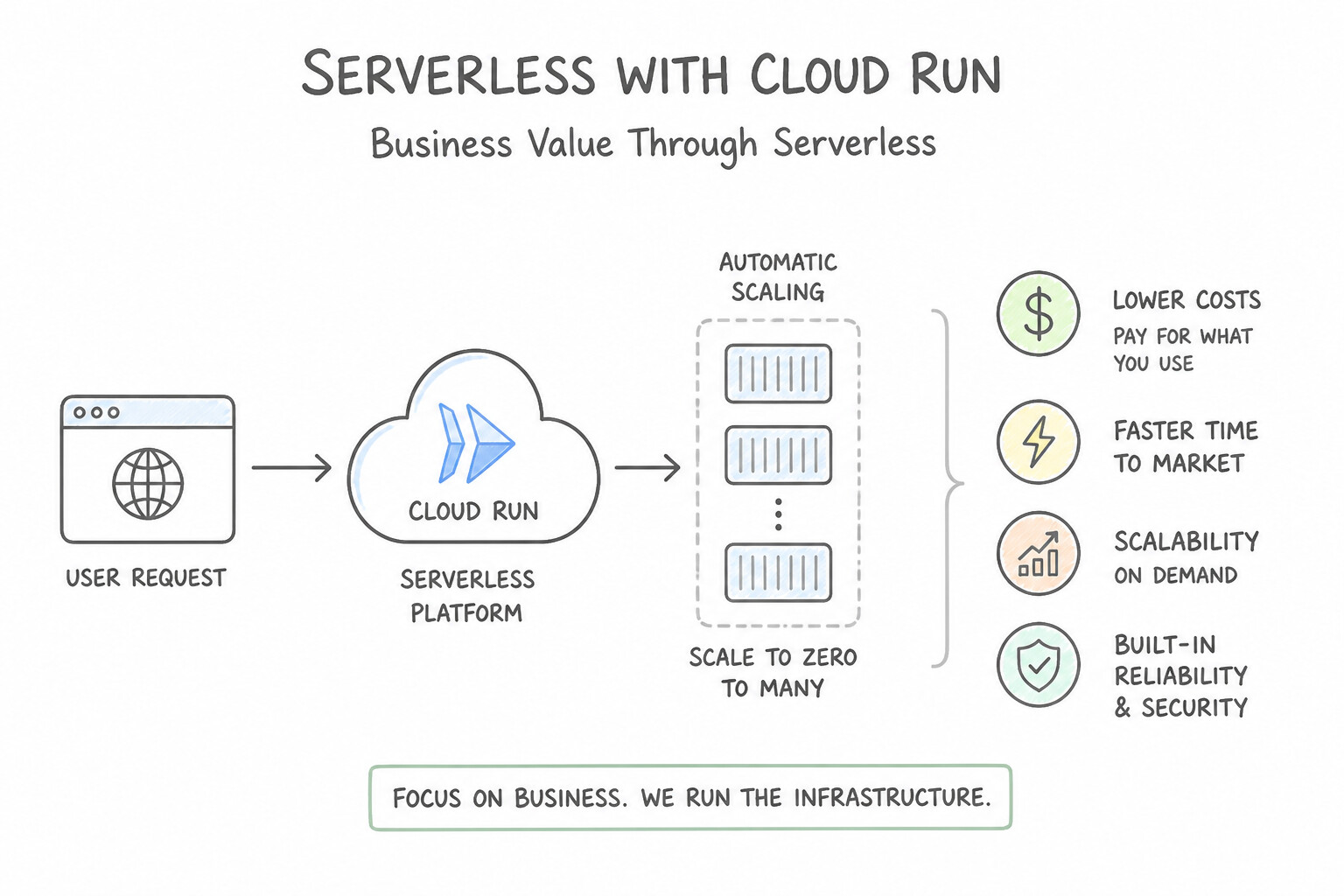
- Cloud Run (Serverless Containers & Web Services): Runs any stateless HTTP container, web app, or microservice on a fully managed serverless platform. Developers push code or a container image, and Cloud Run automatically scales from zero to thousands of instances in seconds—meaning you pay $0.00 when no requests are arriving.
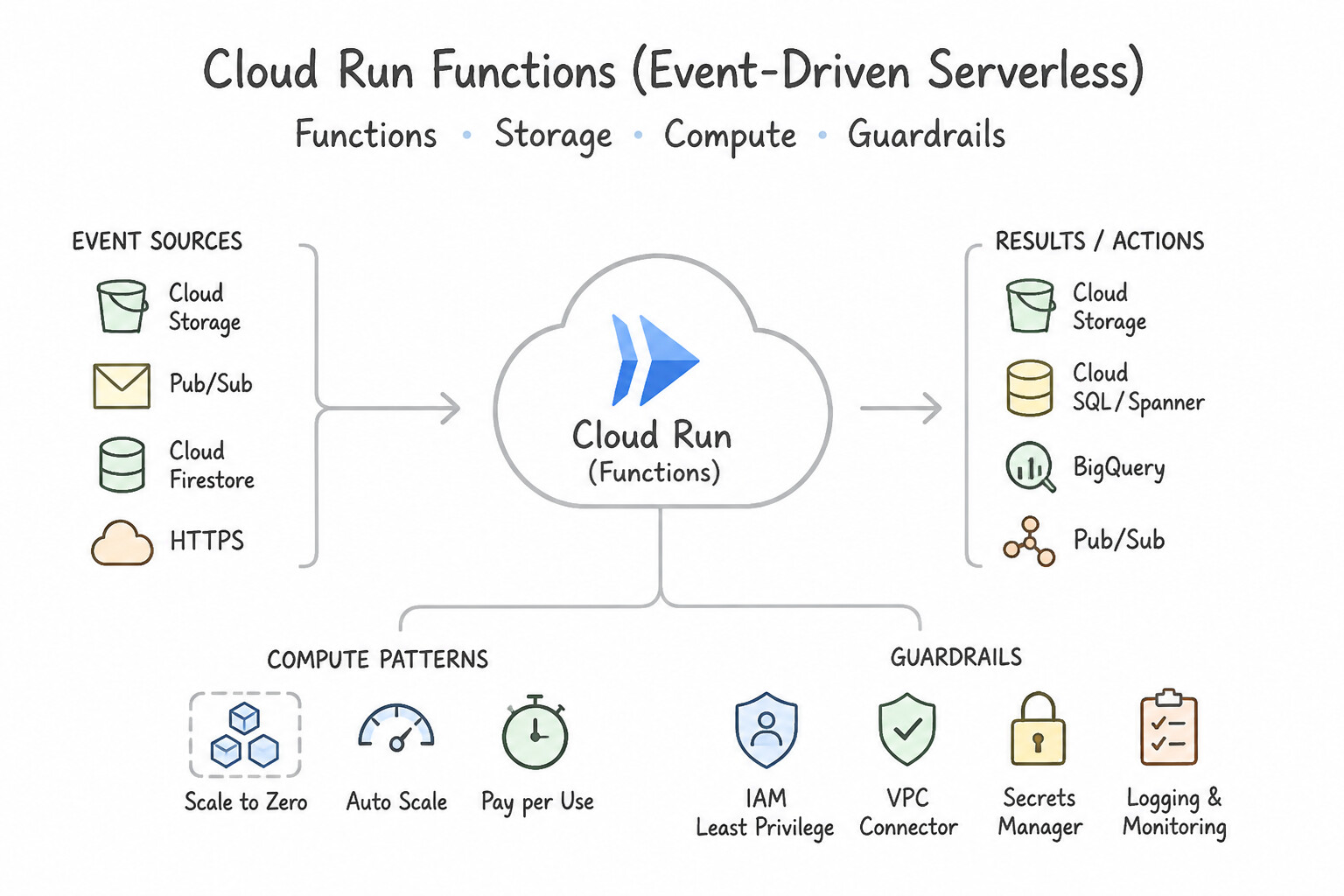
- Cloud Run functions (formerly Cloud Functions — Event-Driven Serverless): Executes lightweight, single-purpose functions written in standard languages (Python, Node.js, Go, Java) in direct response to cloud events (such as an image uploaded to Cloud Storage, a Pub/Sub message, or a Firestore document update) without managing servers or containers.
- App Engine: Fully managed PaaS for web applications that also supports automatic scaling and version traffic splitting.
Key Implementation Patterns
- Monetizing Logistics Tracking Data via Public APIs: Use Cloud Functions. Cloud Functions is designed to run lightweight code in response to events, such as a file upload to Cloud Storage. (Avoid alternative: Compute Engine requires you to provision and manage virtual machines, which violates the requirement to avoid permanent servers.)
- Expanding Ecosystem Reach with Partner APIs: Use Deploy the container to Cloud Run. Cloud Run allows you to deploy stateless containers that are portable to other Kubernetes environments because it is built on the Knative standard. (Avoid alternative: Cloud Functions deploys code snippets, not Docker containers, and requires code adaptation rather than running a container as-is.)
- Tiered Subscription Models for Weather Data: Use Deploy the application to App Engine. Use the built-in traffic splitting feature to route requests between versions. App Engine is a fully managed platform that includes native support for versioning and traffic splitting, making it ideal for A/B testing web applications.
Key Takeaways (4.2d)
- Cloud Functions is ideal for single-purpose code triggered by cloud events.
- Serverless means you do not manage the underlying infrastructure or servers.
- Use Cloud Functions to connect Google Cloud services (like Storage) with custom logic.
- Cloud Run allows you to deploy stateless containers without managing infrastructure.
Consideration 4.2e: Recognize the Google Cloud products that are supported on multicloud and hybrid cloud environments (e.g., AlloyDB Omni, BigQuery Omni, GKE Enterprise, Cloud SQL, Looker)
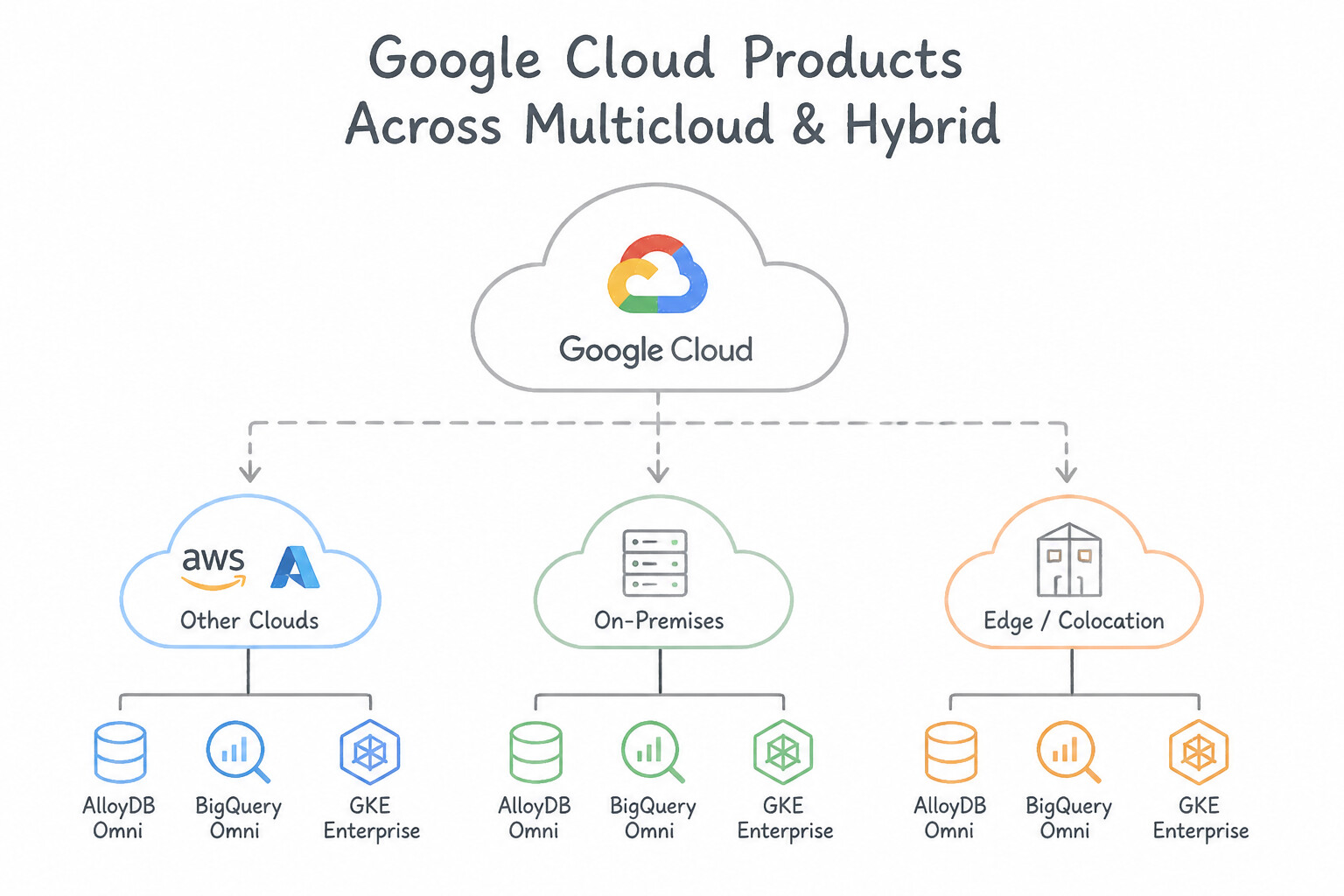
- Production-Critical Hybrid & Multicloud Services :
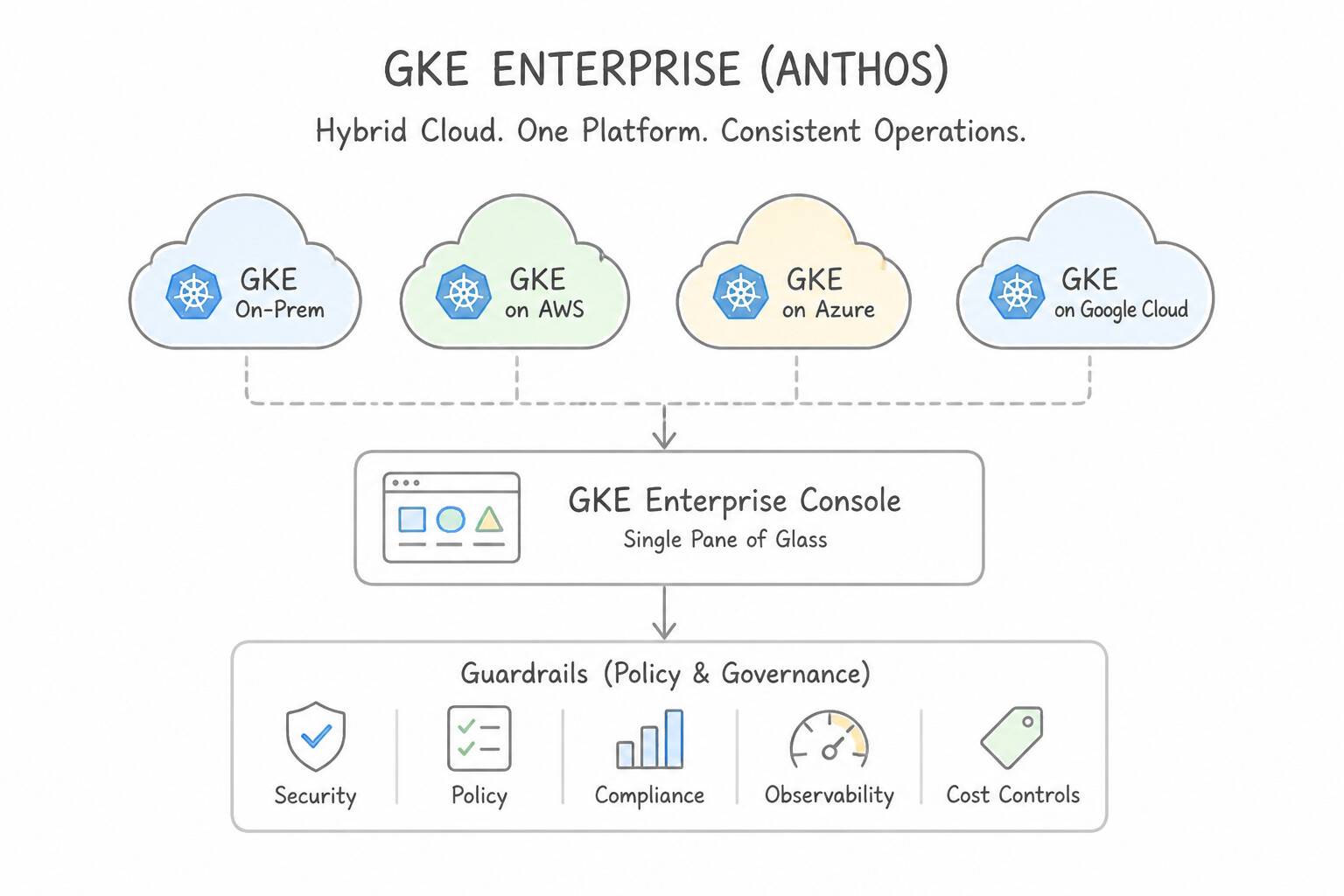
- GKE Enterprise (formerly Anthos): Extends GKE to manage, govern, and secure Kubernetes container clusters consistently across Google Cloud, on-premises data centers, AWS, and Azure.
- BigQuery Omni: Allows analysts to run standard BigQuery SQL queries directly against data stored in Amazon S3 (AWS) or Azure Blob Storage in place, without paying egress fees to copy data into Google Cloud first.
- AlloyDB Omni: A downloadable, containerized edition of AlloyDB for PostgreSQL that runs on-premises, at the edge, or on other clouds (AWS/Azure) for low-latency local requirements or disconnected environments.
- Looker: Connects natively to multi-cloud and on-premises SQL databases (BigQuery, Snowflake, Redshift, Azure Synapse, Cloud SQL) to provide a single enterprise BI semantic layer across all environments.
- Cloud SQL: Supports hybrid replication and secure connectivity with on-premises applications and databases.
Key Implementation Patterns
- Regulatory Compliance and Data Sovereignty: Use Adopt a hybrid cloud architecture to process data in the cloud while storing PII on-premises. A hybrid cloud connects on-premises infrastructure with the public cloud, allowing for compliance with data residency laws while using cloud services.
- Single Pane of Glass for Multi-Cloud Operations: Use Adopt GKE Enterprise to manage and view all clusters from the Google Cloud Console. GKE Enterprise extends Google Cloud management features to other clouds and on-premises data centers, providing a single unified dashboard.
- Cloud Bursting for Seasonal Peaks: Use Use cloud bursting to scale into Google Cloud. Cloud bursting specifically addresses using public cloud resources to handle temporary traffic spikes from a private data center. (Avoid alternative: Permanent migration replaces the data center instead of supplementing it during peaks.)
Key Takeaways (4.2e)
- Hybrid Cloud is the bridge between on-premises infrastructure and the public cloud.
- Use Hybrid Cloud when you have strict compliance or data residency requirements that prevent moving all data to the cloud.
- Hybrid Cloud allows you to keep sensitive data secure on-premises (Private) while bursting to the cloud (Public) for extra processing power or advanced features like AI.
- Data Sovereignty refers to the concept that data is subject to the laws of the country in which it is located.
Quick Decision Cheat Sheet (Subsection 4.2)
If the Scenario Requires... | Choose This Google Cloud Product | Avoid This Common Mistake |
|---|---|---|
"Full control over the guest OS, custom machine vCPU/RAM shapes, or lift-and-shift VMs" | Compute Engine | Cloud Run or Cloud Run functions |
"Migrate an on-premises VMware vSphere environment to Google Cloud without converting hypervisors" | Google Cloud VMware Engine (GCVE) | Rewriting all VMware VMs into Cloud Run functions |
"Run specialized legacy hardware/licensing workloads (e.g., Oracle RAC) adjacent to Google Cloud" | Bare Metal Solution | GKE or App Engine |
"Managed Kubernetes orchestration for complex containerized microservices" | Google Kubernetes Engine (GKE) (use GKE Autopilot for hands-off node ops) | Compute Engine manual Docker scripts |
"Deploy stateless containers with zero cluster management and automatic scale-to-zero" | Cloud Run | Compute Engine or Bare Metal Solution |
"Execute lightweight event-driven code triggered by a Cloud Storage upload or Pub/Sub event" | Cloud Run functions | Provisioning 24/7 Compute Engine VMs |
"Manage & govern Kubernetes clusters consistently across Google Cloud, on-premises, AWS, and Azure" | GKE Enterprise (Anthos) | Standard single-cloud Compute Engine |
"Query data sitting in AWS S3 or Azure Blob Storage directly from BigQuery without copying it" | BigQuery Omni | AlloyDB Omni or Cloud Storage Transfer for every ad-hoc query |
"Downloadable edition of AlloyDB to run high-speed PostgreSQL on-premises, at the edge, or on other clouds" | AlloyDB Omni | BigQuery Omni (analytics only) or Cloud Spanner |
Further Reading (Subsection 4.2)
- Compute Engine: Virtual Machines (VMs) — Overview of Compute Engine, explaining how it provides secure and customizable virtual machines that can run varied workloads.
- Migrate to Google Cloud: Get started — Discusses different migration paths, including rehosting (lift and shift) using Compute Engine.
- Spot VMs — Spot VMs are affordable compute instances suitable for batch jobs and fault-tolerant workloads. They offer significant cost savings but come with the caveat that Compute Engine might stop them to reclaim capacity.
- Bare Metal Solution overview — The official overview page for Bare Metal Solution, which explains how it supports specialized workloads like Oracle databases that require dedicated physical hardware.
- What is Bare Metal Solution? — General product page explaining the use cases for lifting and shifting specialized workloads to dedicated hardware.
- Containers at Google — Overview of how containers work and their benefits, including portability and efficiency.
Subsection 4.3: Describe the business value of application programming interfaces (APIs)
The Big Picture
In a traditional enterprise, systems were wired together through brittle, custom point-to-point database links or nightly FTP file drops. When mobile apps, partner ecosystems, and AI agents arrived, this legacy model collapsed for two reasons:
- Tightly Coupled Backend Fragility (4.3a): Without a clean Application Programming Interface (API) contract, any schema change to an internal ERP or inventory database immediately breaks every mobile app and partner integration connected to it. An API acts as a standardized contract ("waiter at a restaurant") that decouples what data/action a client requests from how the backend system implements it.
- Exposing Raw Endpoints Without Enterprise Governance or Monetization (
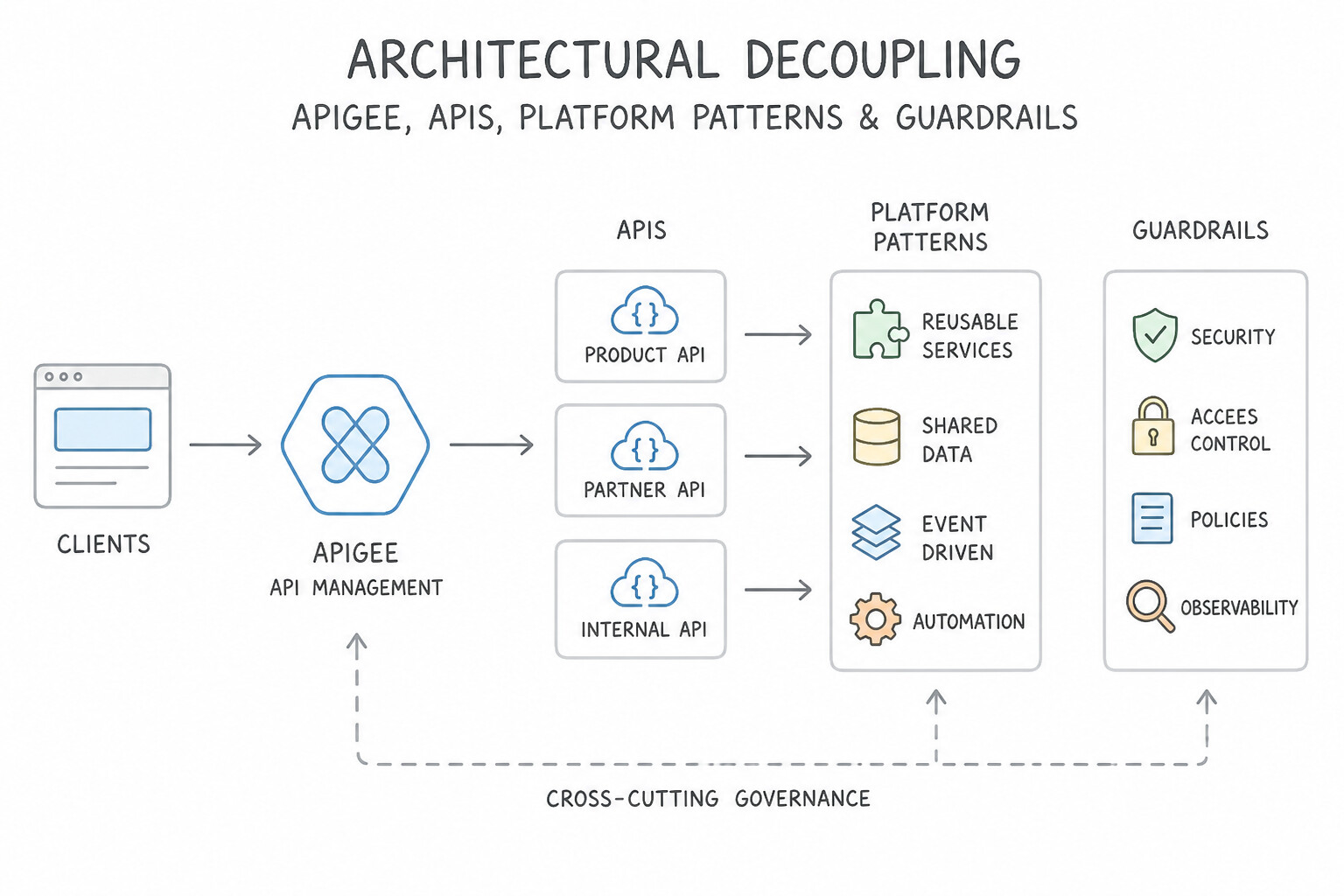
4.3b,4.3c): Simply opening a backend microservice URL to the public internet invites DDoS/bot scraping, credential stuffing, and uncontrolled traffic spikes that crash internal systems—while giving the business zero visibility into which partner is calling which endpoint and zero ability to bill for usage. Apigee API Management places an intelligent enterprise gateway and management plane in front of all APIs—enforcing rate limiting (quotas/spike arrest), OAuth/API-key security, legacy protocol mediation (SOAP/XML to REST/JSON), developer portals, API analytics, and turnkey API monetization.
Consideration 4.3a: Define application programming interface (API)
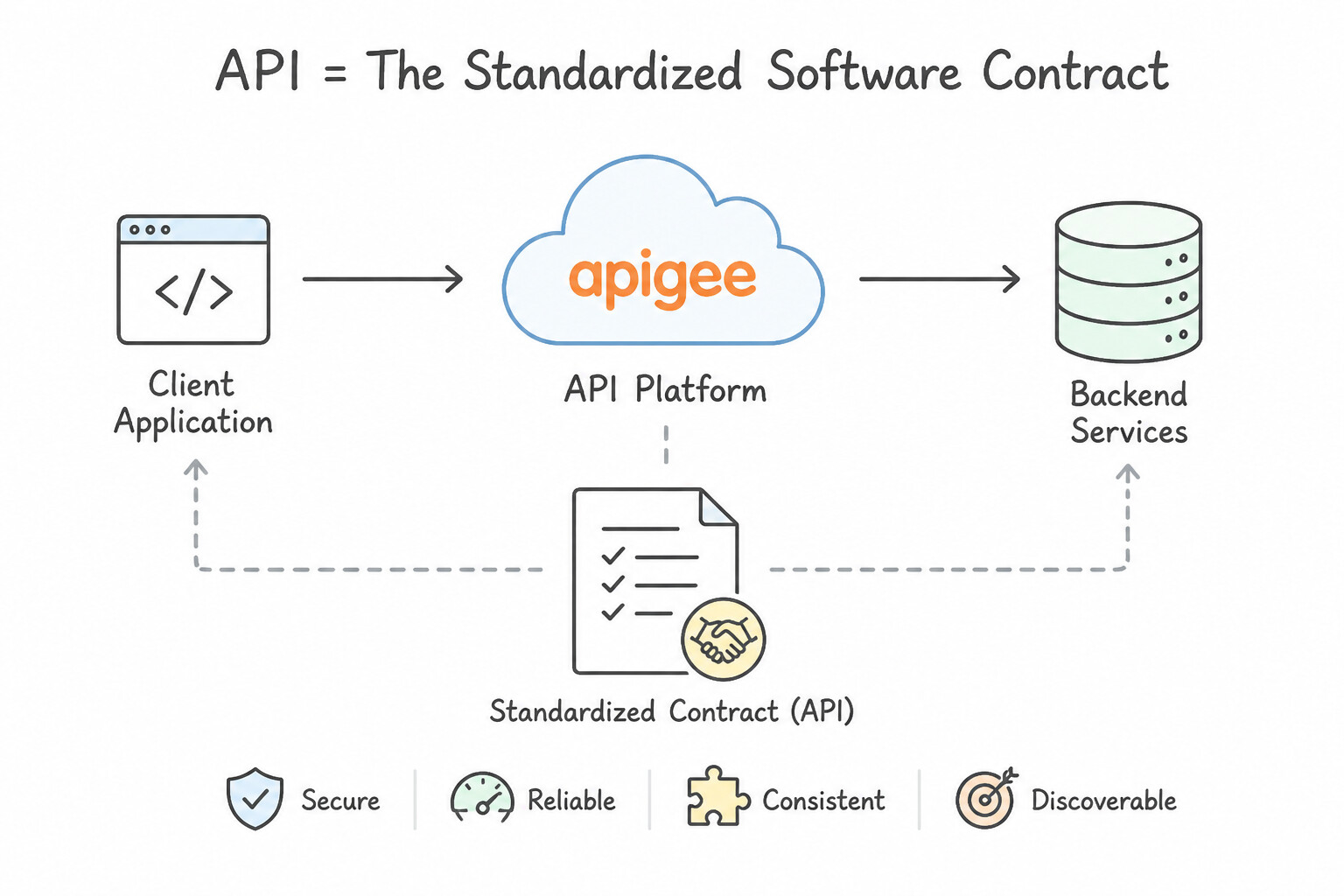
- The Standardized Software Contract: An Application Programming Interface (API) is a documented set of rules, protocols, and endpoints that allows two different software applications to communicate and exchange data or trigger actions—without either system needing to know how the other is built internally.
- Architectural Decoupling: By hiding internal database schemas and legacy implementation details behind a clean API interface, engineering teams can modernize, replace, or scale backend systems (e.g., migrating from an on-premises mainframe to Cloud Spanner) without breaking external client applications.
Key Implementation Patterns
- The Interface Metaphor: Use Describe the API as a software intermediary that enables the website and database to talk to each other. An API functions as a software intermediary that allows two applications to communicate. (Avoid alternative: APIs are interfaces for communication, not tools for bulk database migration or replication.)
- Modernizing Legacy Systems: Use Create an Application Programming Interface (API) to act as a bridge between the mobile app and the mainframe. An API connects the modern app to the legacy system, allowing communication without replacing the hardware. (Avoid alternative: Rewriting code replaces the system, which contradicts the requirement to not replace the mainframe immediately.)
- Monetizing Data Assets: Use Build an Application Programming Interface (API) to expose the data. APIs allow secure, programmatic access to data and enable usage tracking for monetization. (Avoid alternative: Email is manual, insecure, and cannot be easily tracked for monetization or programmatic access.)
Key Takeaways (4.3a)
- APIs act as software intermediaries enabling applications to talk to each other.
- APIs abstract the complexity of backend implementation from the user.
- APIs allow systems to interact without needing to know each other's code or database language.
- APIs allow different software systems to communicate with each other.
Consideration 4.3b: Describe how organizations can create new business opportunities by exposing and monetizing public-facing APIs
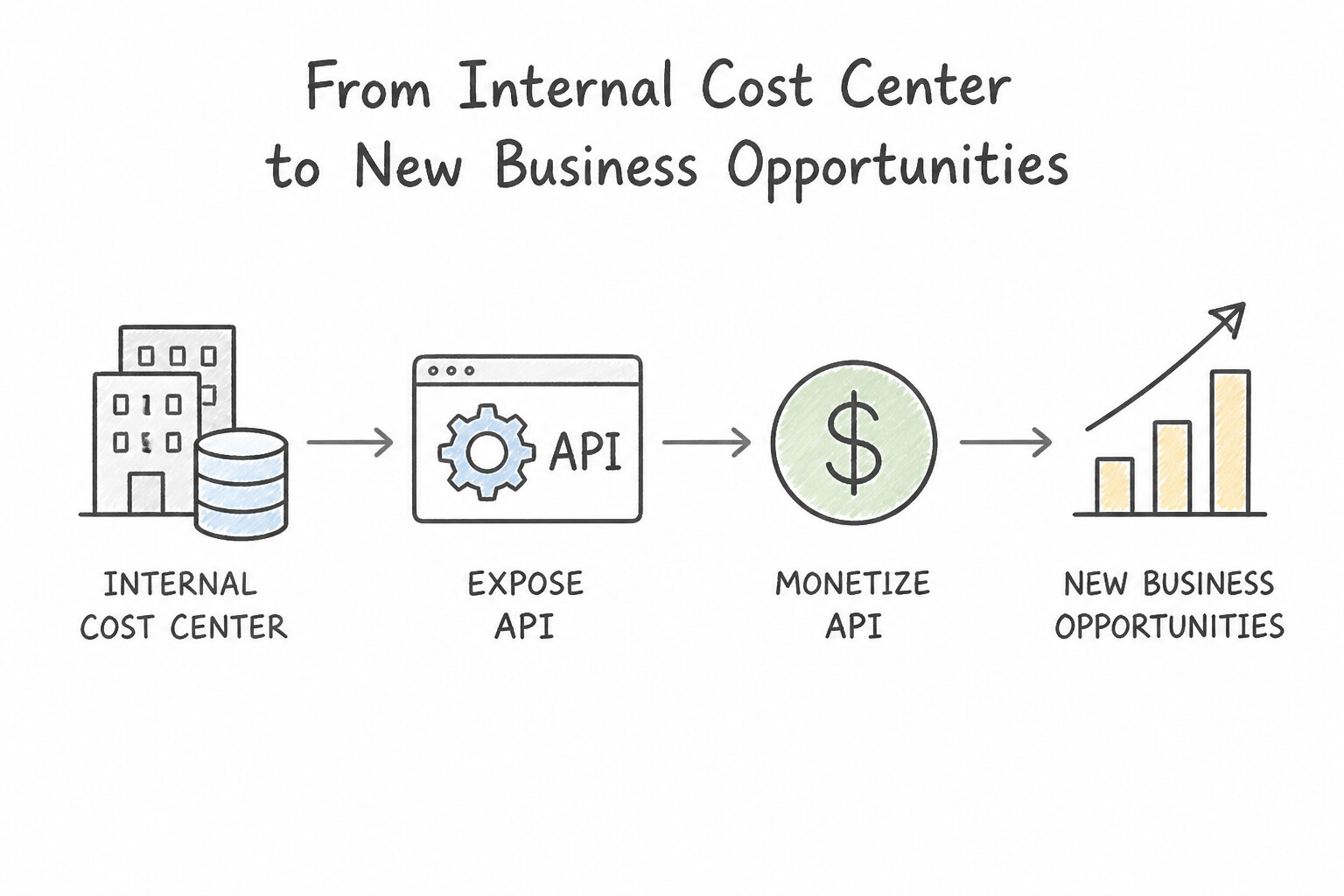
- From Internal Cost Center to Digital Revenue Product: When an organization packages its core data or capabilities as secure public/partner APIs (e.g., a bank exposing real-time payment verification, a logistics carrier exposing live shipment tracking, or a retailer exposing inventory APIs to marketplace partners), APIs become revenue-generating digital products.
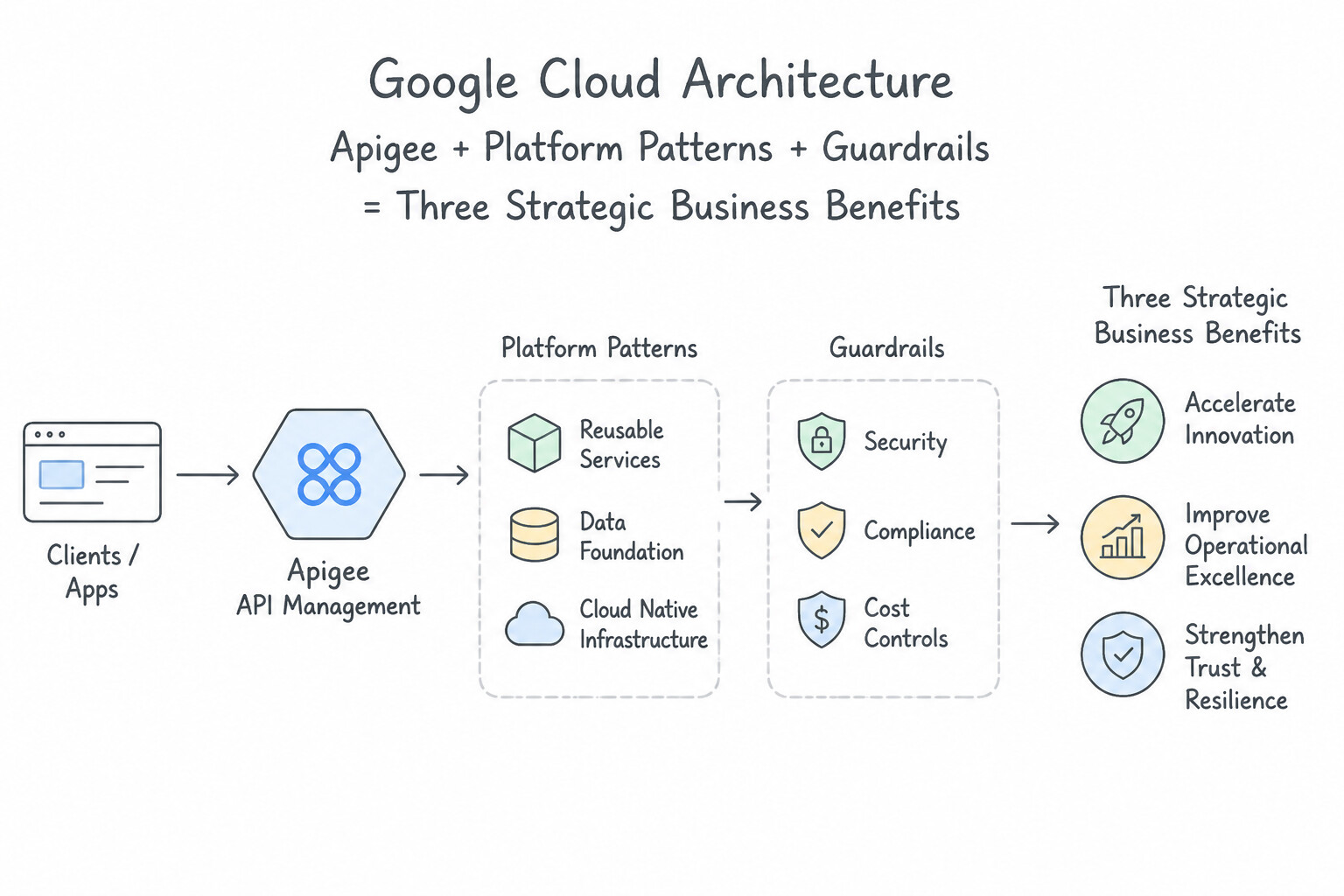
- Three Strategic Business Benefits:
- Direct API Monetization: Charging external developers or B2B partners per API call, via tiered monthly subscriptions, or through revenue-sharing models.
- Partner Ecosystem Expansion: Enabling third-party apps to embed your company's services directly into their customer journeys, expanding market reach at near-zero marginal distribution cost.
- Faster Internal Innovation: Reusable internal APIs stop different departments from rebuilding the same authentication, billing, or customer-lookup logic from scratch.
Key Implementation Patterns
- Direct Revenue via Tiered Pricing: Use Implement a tiered monetization model using an API management platform. Set strict quotas for a free tier and charge for higher usage levels. A tiered/freemium model allows you to offer basic access for free while charging for premium features or high volume.
- Indirect Revenue via Partner Integration: Use Classify it as indirect monetization that drives revenue by expanding sales channels. Indirect monetization leverages APIs as distribution channels to increase sales volume rather than charging for the API itself. (Avoid alternative: Direct monetization involves charging for the API usage itself, which contradicts the requirement not to charge access fees.)
- API-as-a-Product Mindset: Use Manage the APIs with a product mindset, including roadmaps, user documentation, and support. API products require roadmaps, documentation, and support to attract and retain paying developers. (Avoid alternative: Undocumented APIs are unusable for external developers and fail as a product.)
Key Takeaways (4.3b)
- APIs allow businesses to treat data/services as products with distinct pricing models.
- The Freemium model is effective for capturing broad user bases while monetizing heavy users.
- API Management platforms provide the technical controls (quotas, billing integration) to enforce these business models.
- Direct Monetization creates revenue by charging for the API usage itself (e.g., per call or subscription).
Consideration 4.3c: Describe the business value of using Apigee API Management
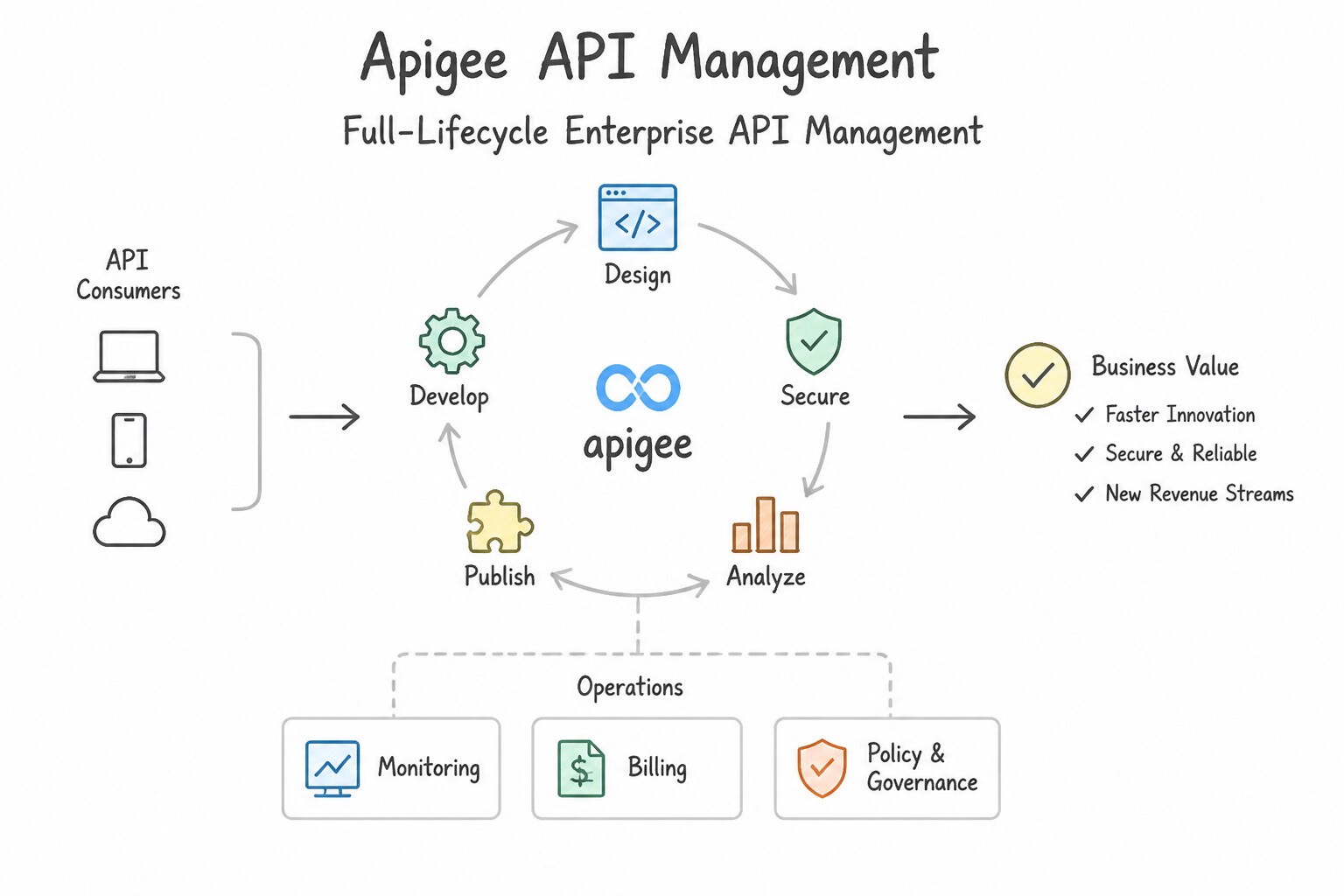
- Full-Lifecycle Enterprise API Management: Apigee is Google Cloud's flagship platform for designing, securing, analyzing, scaling, and monetizing APIs across cloud, on-premises, and hybrid environments.
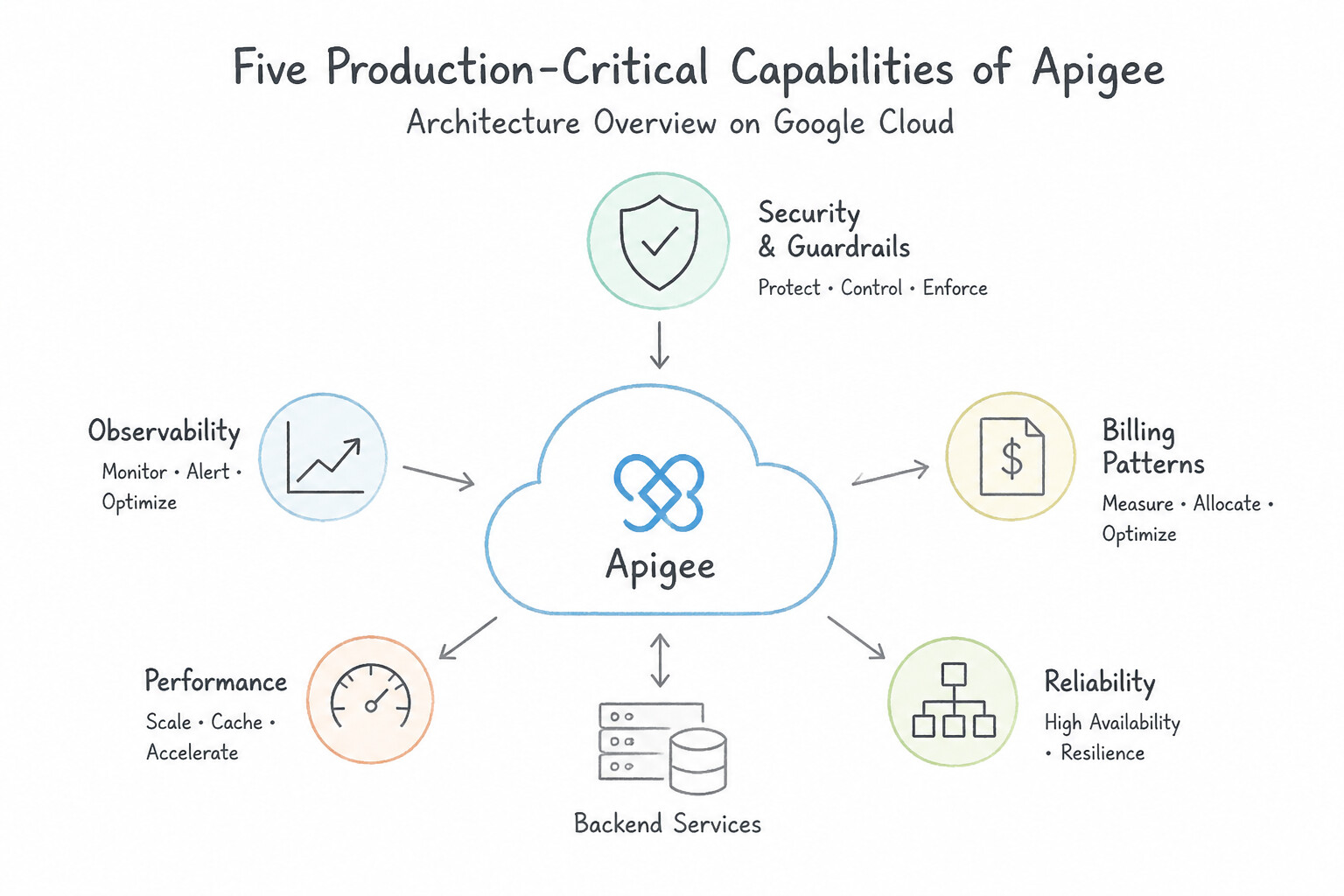
- Five Production-Critical Capabilities of Apigee:
- API Security & Governance: Enforces OAuth 2.0, API keys, JWT validation, mTLS, and bot/threat protection at the API edge before malicious requests ever reach backend servers.
- Traffic Management (Quotas, Rate Limiting & Spike Arrest): Prevents a single noisy partner or sudden traffic surge from overwhelming fragile legacy backends, and caches frequent responses to reduce backend load and latency.
- Protocol Transformation & Legacy Modernization: Automatically translates legacy on-premises SOAP/XML mainframe services into modern RESTful JSON APIs without rewriting the legacy backend code.
- Developer Portal & Ecosystem Onboarding: Provides a customizable self-service portal where external developers discover documentation, register apps, and obtain API keys.
- Built-In Monetization & Deep API Analytics: Configures rate plans, tracks per-partner consumption, automates billing, and monitors API latency and error trends in real time.
Key Implementation Patterns
- API Monetization Strategies: Use Use Apigee to configure monetization and create rate plans for the APIs. Apigee provides built-in monetization features to create rate plans and charge developers for API usage. (Avoid alternative: Cloud Monitoring observes performance metrics but does not handle billing or monetization logic.)
- Legacy Modernization Facade: Use Implement an Apigee API proxy to transform the XML responses into JSON for the mobile app. Apigee acts as a facade that transforms XML to JSON, modernizing access without changing the backend. (Avoid alternative: Modifying the mainframe code violates the scenario constraint regarding risk and rewriting.)
- Traffic Management and Spike Arrest: Use Use Apigee to configure a Spike Arrest policy to limit the rate of requests sent to the backend. Apigee Spike Arrest policies throttle incoming traffic surges to protect backend systems from being overloaded. (Avoid alternative: Monitoring alerts are reactive and notify you after a failure, rather than preventing the failure from occurring.)
Key Takeaways (4.3c)
- Apigee is the primary tool for full lifecycle API management and monetization.
- Cloud Billing manages your costs for Google Cloud resources, not your customers' bills.
- Cloud Monitoring tracks technical metrics, not business revenue or rate plans.
- Apigee acts as a facade to modernize legacy backend systems without rewriting code.
Quick Decision Cheat Sheet (Subsection 4.3)
If the Scenario Requires... | Choose This Concept / Product | Avoid This Common Mistake |
|---|---|---|
"Standardized contract that lets two applications communicate without knowing each other's internal code" | Application Programming Interface (API) | Direct cross-system database table sharing |
"Monetize APIs by charging external partners per call or via subscription rate plans" | Apigee API Management | Cloud Billing Budgets or Cloud Load Balancing |
"Protect fragile backend servers from partner traffic spikes using Quotas, Rate Limiting, and Spike Arrest" | Apigee API Management | Cloud Storage or Cloud CDN alone |
"Modernize a legacy on-premises SOAP/XML system by exposing it as a modern REST/JSON API without changing backend code" | Apigee API Management | Rewriting the entire legacy mainframe before exposing data |
"Provide a self-service Developer Portal for third-party developers to discover docs and request API keys" | Apigee API Management | IAM Console (never give external third-party consumers raw GCP project IAM roles to browse APIs!) |
Further Reading (Subsection 4.3)
- What is an API? — A comprehensive overview of APIs, explaining them as mechanisms that enable two software components to communicate using a set of definitions and protocols.
- Application modernization — Provides an overview of modernization strategies, including the use of APIs to expose legacy data and functionality.
- API Management — Information on Apigee, Google Cloud's platform for developing and managing APIs to create new revenue streams.
- Monetization in Apigee — Overview of how Apigee handles API packages, rate plans, and monetization models.
- API Monetization Models — Discusses the primary models for API monetization, including free, developer pays (direct), and developer gets paid (revenue share/indirect incentives).
- API Product Mindset — Google Cloud's Apigee page explains the value of managing APIs as products to unlock digital value and innovation.
Book TOC · Previous · Chapter 4 of 7 · Next
AwesomeGCP.com Learning
The approach taken is a question-led learning approach: you explore realistic project scenarios where you need to make decisions or take actions to achieve business goals within specific constraints. Instead of passive learning, you are challenged to think and work through the options to master the Cloud Digital Leader (CDL) certification!