Book TOC · Previous · Chapter 6 of 7 · Next
Chapter 6: Scaling with Cloud Operations: FinOps Cost Control, Observability & SRE Resilience
Chapter Focus: FinOps cultural pillar, CUDs/SUDs/Spot VMs, Active Assist, Resource Hierarchy billing, Cloud Observability, the 4 Golden Signals, SLIs/SLOs/SLAs, and Error Budgets.
Subsection 6.1: Recognize how Google Cloud supports an organization's ability to control their cloud costs
The Big Picture
When an organization transitions from on-premises data centers (CapEx) to the cloud (OpEx), the rules of financial management change overnight. In an on-premises world, a developer cannot accidentally buy 50 physical GPU servers on a Friday afternoon without months of procurement signatures. In the cloud, an unguarded script or forgotten test cluster can spin up 50 GPUs in 30 seconds! To prevent cloud bill shock without slowing down developer velocity, Google Cloud combines three interlocking controls:
- Cross-Functional FinOps Culture (
People, Process, and Technology—6.1a,6.1b,6.1c): Cloud cost management is not solely the job of Finance or solely the job of IT—it is a shared partnership across Finance, Technology/Engineering, and Business leadership backed by visibility tools (Google Cloud Pricing Calculator, Cloud Billing Reports, Cost Table, and Active Assist / Recommender). - Structural Governance via the 4-Level Resource Hierarchy (6.1d): Every Google Cloud resource lives inside a strict tree (Organization Node → Folders → Projects → Resources). Policies (IAM and Organization Policies) applied at a parent node are automatically inherited downward by all child folders, projects, and resources—while Labels (
env:prod,cost-center:marketing) slice billing data horizontally across projects. - Hard vs. Soft Consumption Guardrails (
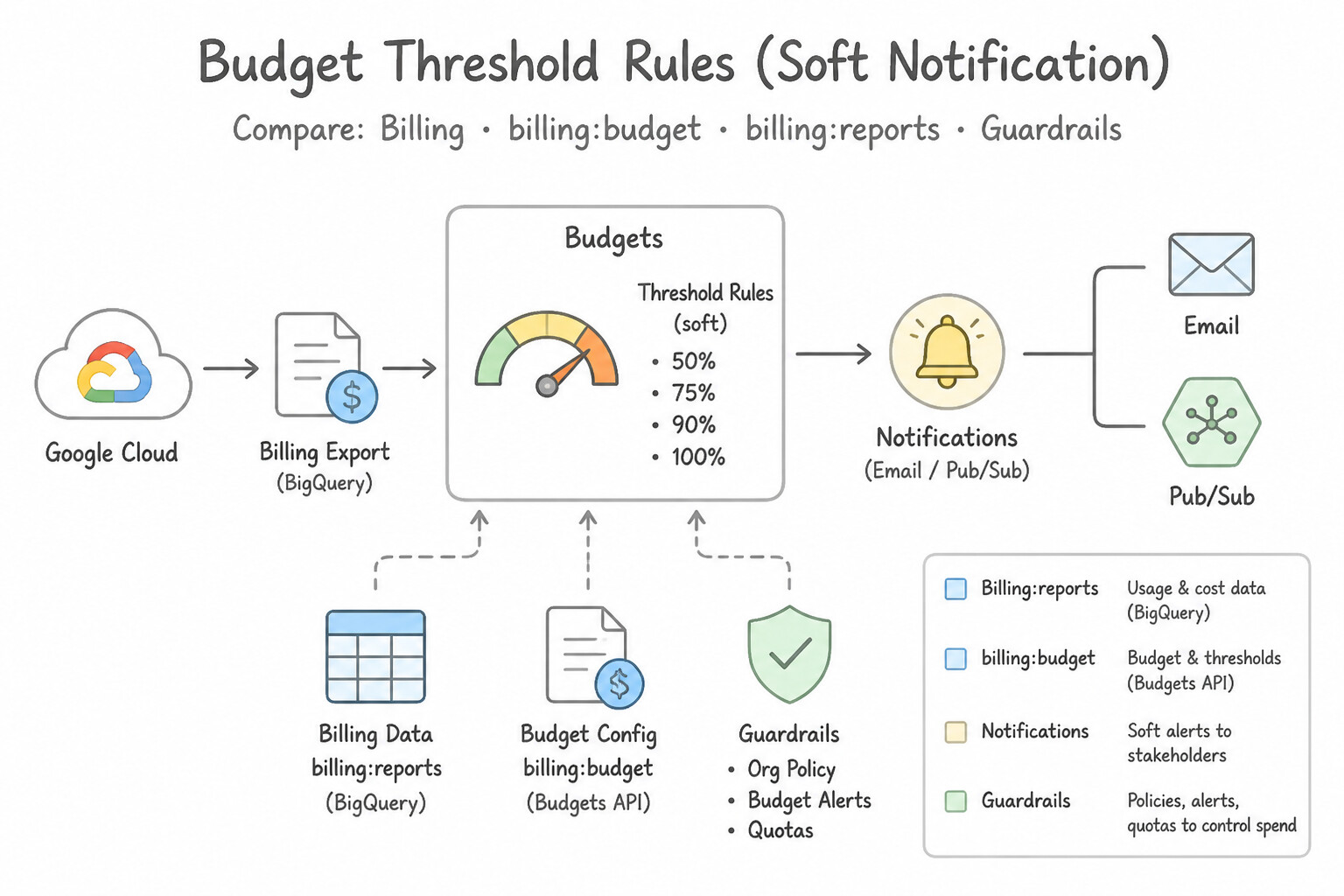
Quotasvs.Budgets,CUDs,Spot VMs,DWS—6.1e): The single most common common pitfalls in Section 6.1 is confusing Cloud Billing Budgets & Threshold Alerts (which send notifications/emails or Pub/Sub events when spend approaches a target, without automatically shutting down resources) with Resource Quota Policies (which enforce a hard technical ceiling that blocks provisioning additional VMs/GPUs beyond a limit).
Consideration 6.1a: Explain how an organization's transition from an on-premises environment to the cloud shifts their capital expenditures (CapEx) to operational expenditures (OpEx), and how that affects their total cost of ownership (TCO)
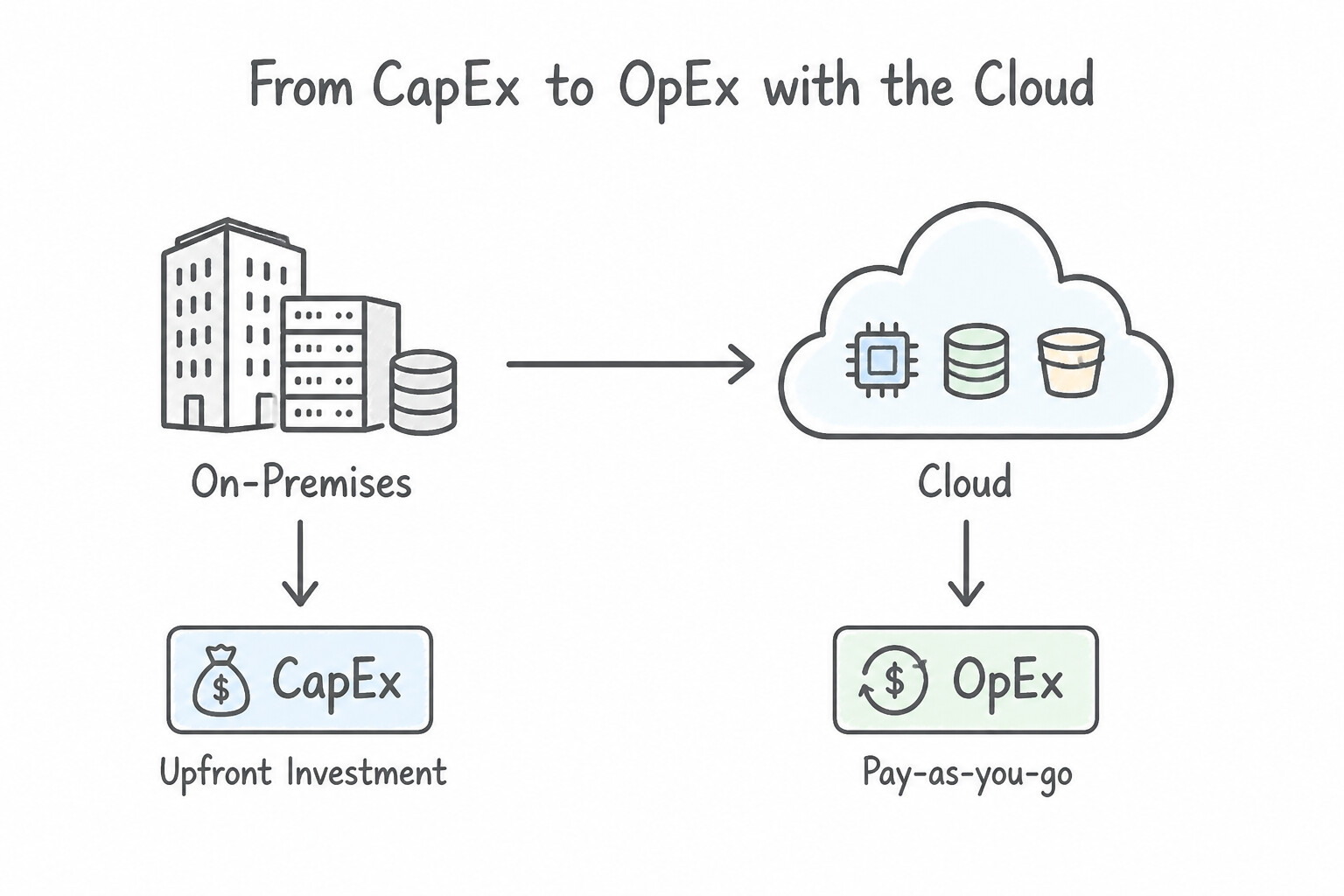
- Capital Expenditure (CapEx) vs. Operational Expenditure (OpEx):
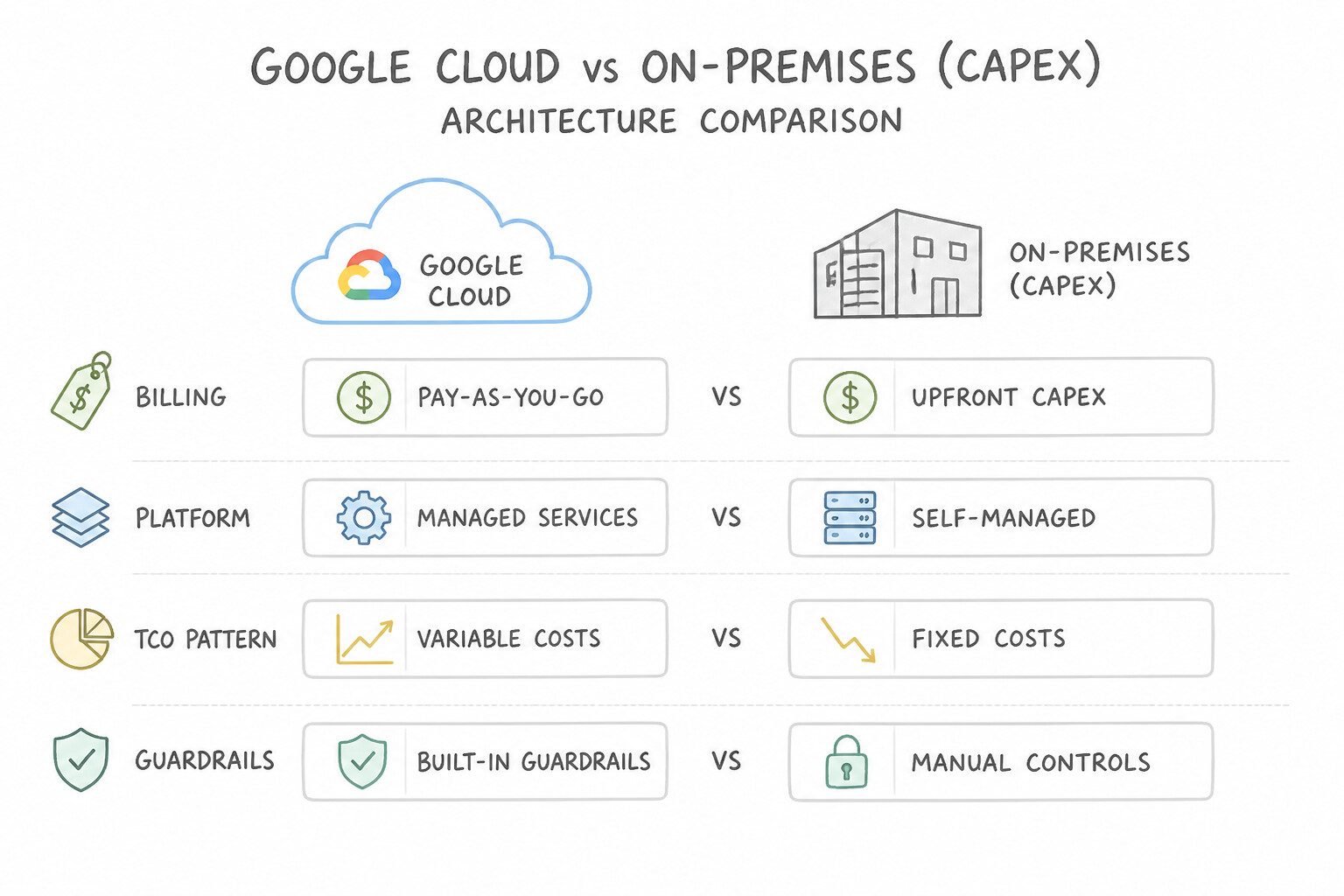
- CapEx (On-Premises): Large upfront capital outlays to purchase physical servers, storage arrays, networking gear, and data center facilities—Capacity must be over-provisioned for peak 3–5 year forecasts and depreciates even when sitting idle.
- OpEx (Cloud): Pay-as-you-go recurring operational expenses billed strictly for the compute, storage, and APIs actually consumed—freeing up capital and scaling costs dynamically with customer revenue.
- Total Cost of Ownership (TCO): A valid TCO comparison between on-premises and cloud must include hidden on-premises overhead—power, cooling, physical floor space, hardware maintenance contracts, spare parts, physical security guards, and IT admin patching time—not just raw server sticker prices.
Key Implementation Patterns
- Latency Reduction with Global Backbone Network: Use Adopt an Operating Expenditure (OpEx) model to pay for resources only as they are used. OpEx allows the startup to pay only for what they use without upfront investment. (Avoid alternative: CapEx requires large upfront payments for hardware, which the startup cannot afford.)
- Global Service Availability via Cloud DNS: Use Expenses for power, cooling, physical security, and IT maintenance labor. TCO includes indirect costs like electricity, cooling, real estate, and labor, which are often overlooked in on-premises calculations. (Avoid alternative: The initial invoice only covers the upfront purchase, ignoring the ongoing costs required to keep the server running.)
- Differentiating Bandwidth and Latency for Big Data Transfer: Use Migrate to Google Cloud and configure resources to scale automatically based on traffic. Cloud elasticity allows you to pay only for what you use, handling peaks cost-effectively. (Avoid alternative: Buying more hardware is a CapEx approach that leads to wasted resources when traffic is low.)
Key Takeaways (6.1a)
- CapEx (Capital Expenditure): Upfront investment in physical assets (like servers).
- OpEx (Operating Expenditure): Ongoing operational costs (like cloud subscription fees).
- Cloud Benefit: Moving to the cloud shifts IT spending from CapEx to OpEx, allowing for pay-as-you-go flexibility.
- TCO (Total Cost of Ownership) is the sum of all direct and indirect costs over the lifecycle of an asset.
Consideration 6.1b: Describe Google-recommended practices for cloud financial governance (e.g., identify who manages cloud costs, Google Cloud's cost management tools)
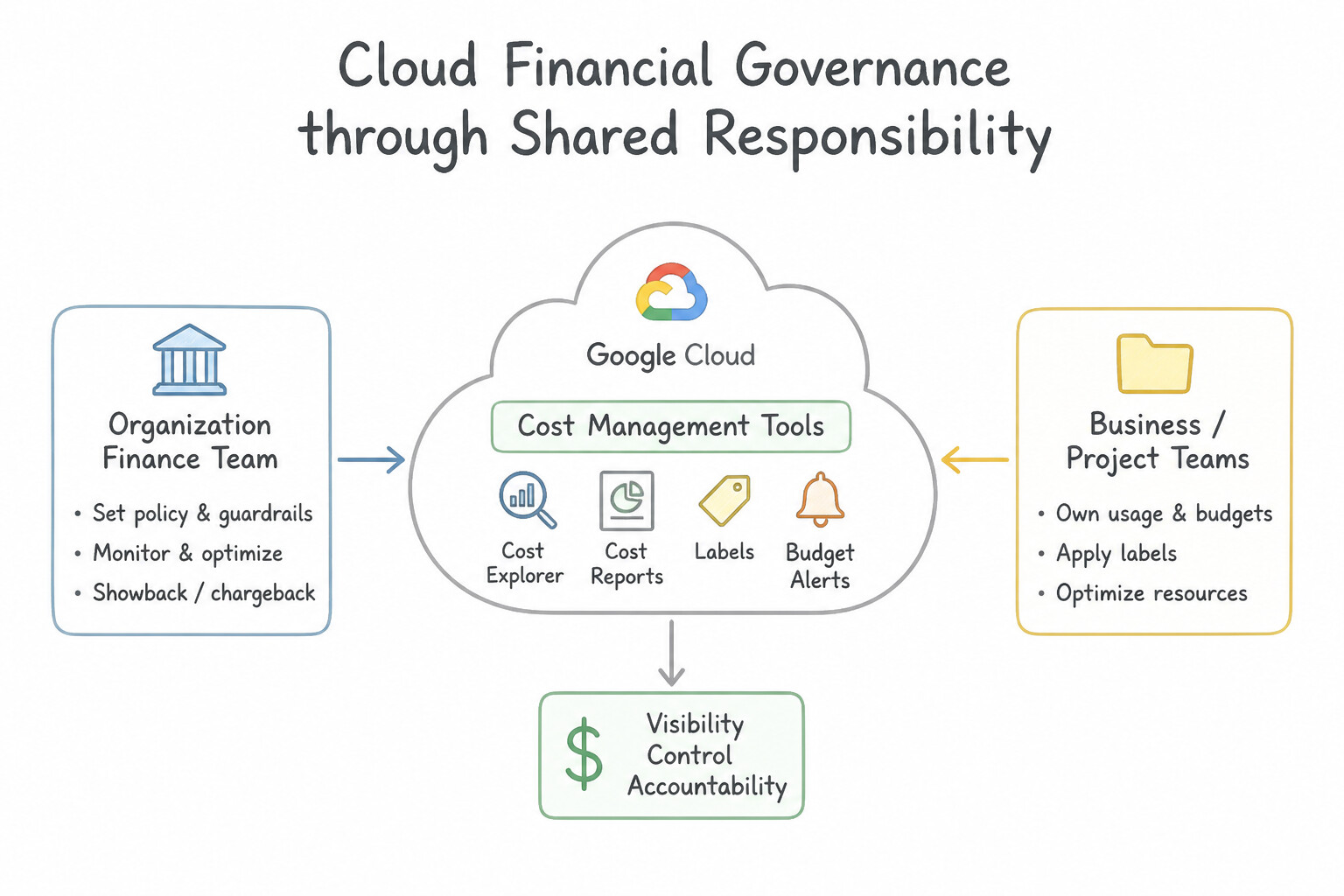
- Shared Accountability (Who Manages Cloud Costs?): Cloud financial governance (FinOps) is a collaborative responsibility shared across Finance/Procurement, Engineering/IT, and Executive Business Owners—bringing financial accountability to the engineers who provision resources in real time.
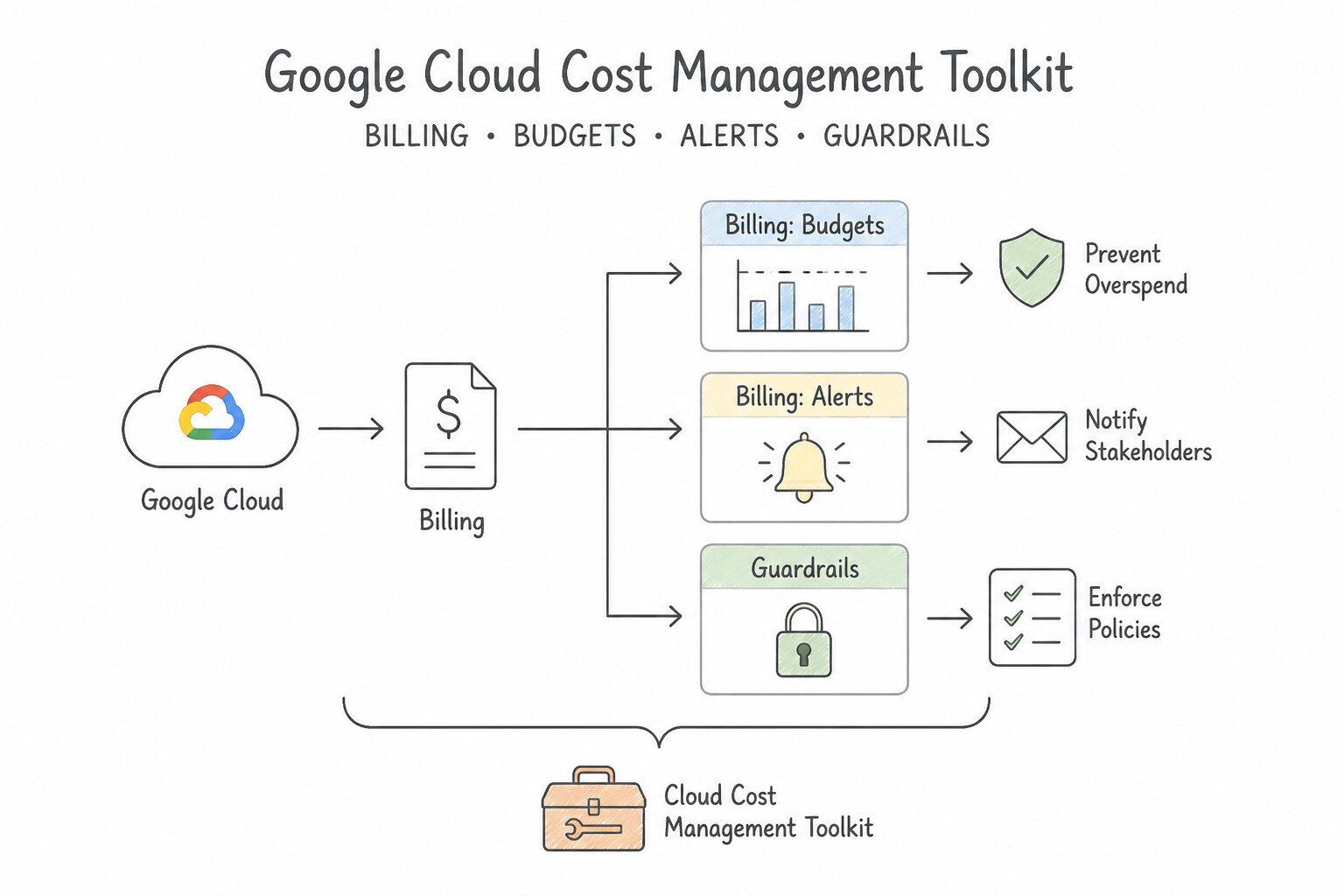
- Google Cloud Cost Management Toolkit:
- Google Cloud Pricing Calculator: Estimates monthly cloud costs before migrating or deploying a new architecture.
- Cloud Billing Reports & Cost Table: Visualizes current and historical spend trends, forecasts future costs, and reconciles invoice line items filtered by project, service, SKU, or Label.
- Cloud Billing Export to BigQuery + Looker: Exports detailed hourly usage and pricing records to BigQuery for custom multi-team chargeback/showback analysis.
- Active Assist / Recommender: Uses machine learning to automatically detect idle resources (unattached disks, idle VMs) and suggest VM rightsizing and Committed Use Discounts (CUDs).
Key Implementation Patterns
- Eliminating Idle Capacity Overprovisioning: Use Set up a budget in Google Cloud Billing and configure alert thresholds to email the finance team. Budgets and alerts are the standard mechanism to trigger notifications based on specific spending thresholds. (Avoid alternative: Billing export helps with analysis but does not inherently send notifications when spending limits are reached.)
- Comprehensive Cloud TCO Calculation: Use Apply a label to each resource with the key 'department' and the value of the department name. Labels are the standard mechanism for attributing costs to specific business units in a shared environment. (Avoid alternative: VPC networks control connectivity, not cost allocation or billing visibility.)
- Capital Preservation for Core Business Growth: Use Configure Cloud Billing export to BigQuery to query the data using SQL. Exporting billing data to BigQuery enables advanced SQL analysis and the ability to join costs with business data. (Avoid alternative: Manual CSV exports are inefficient, hard to automate, and do not scale for complex ongoing analysis.)
Key Takeaways (6.1b)
- Budgets do not stop spending: They are monitoring tools that trigger alerts.
- Alerts allow reaction: Notifications enable stakeholders to take action before costs spiral.
- Thresholds are customizable: You can set alerts at various percentages of your total budget.
- Planning vs. Monitoring: Use the Pricing Calculator to estimate costs before you build; use Budgets and Alerts to monitor costs while you run.
Consideration 6.1c: Recognize the role of people, process, and technology in controlling cloud costs
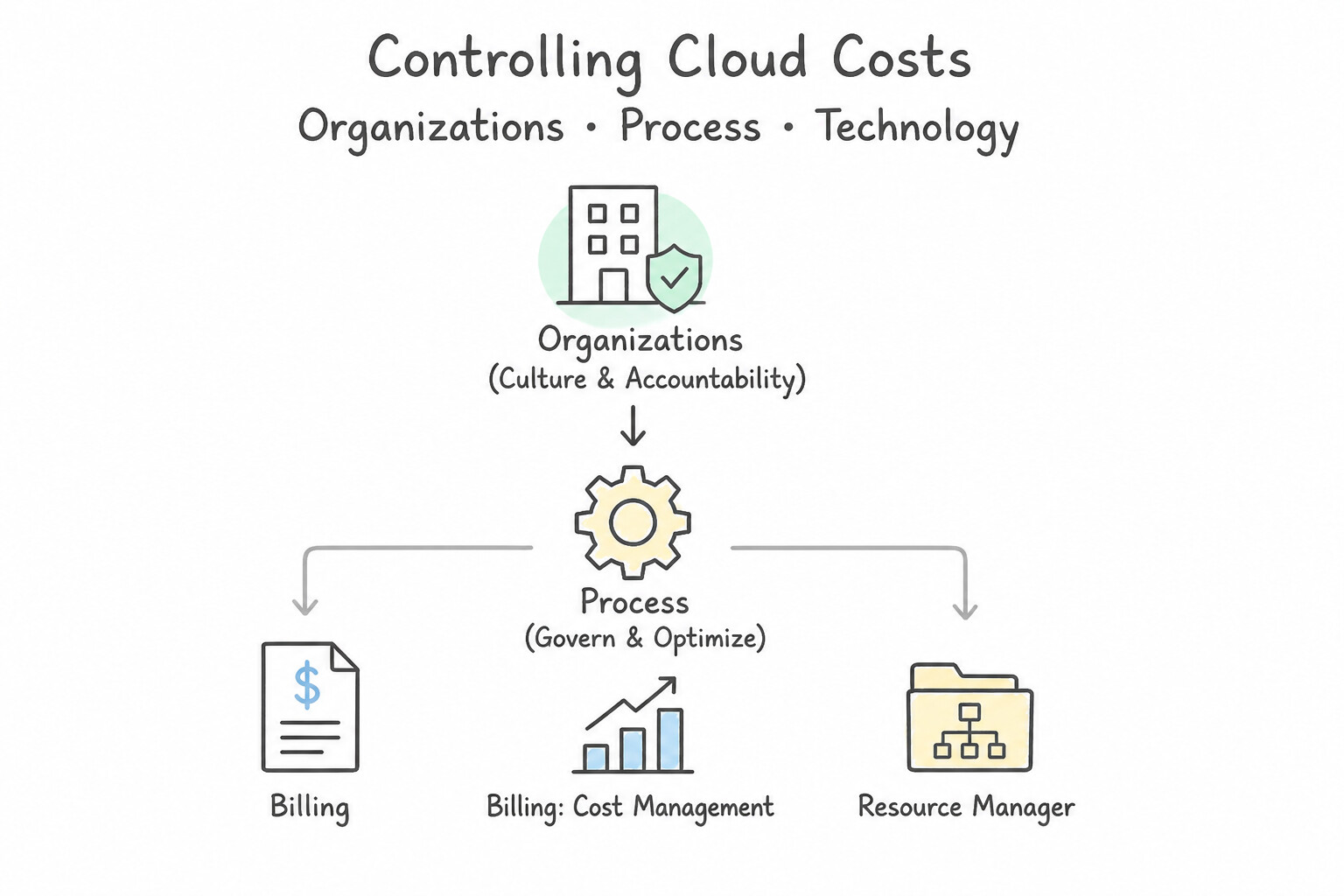
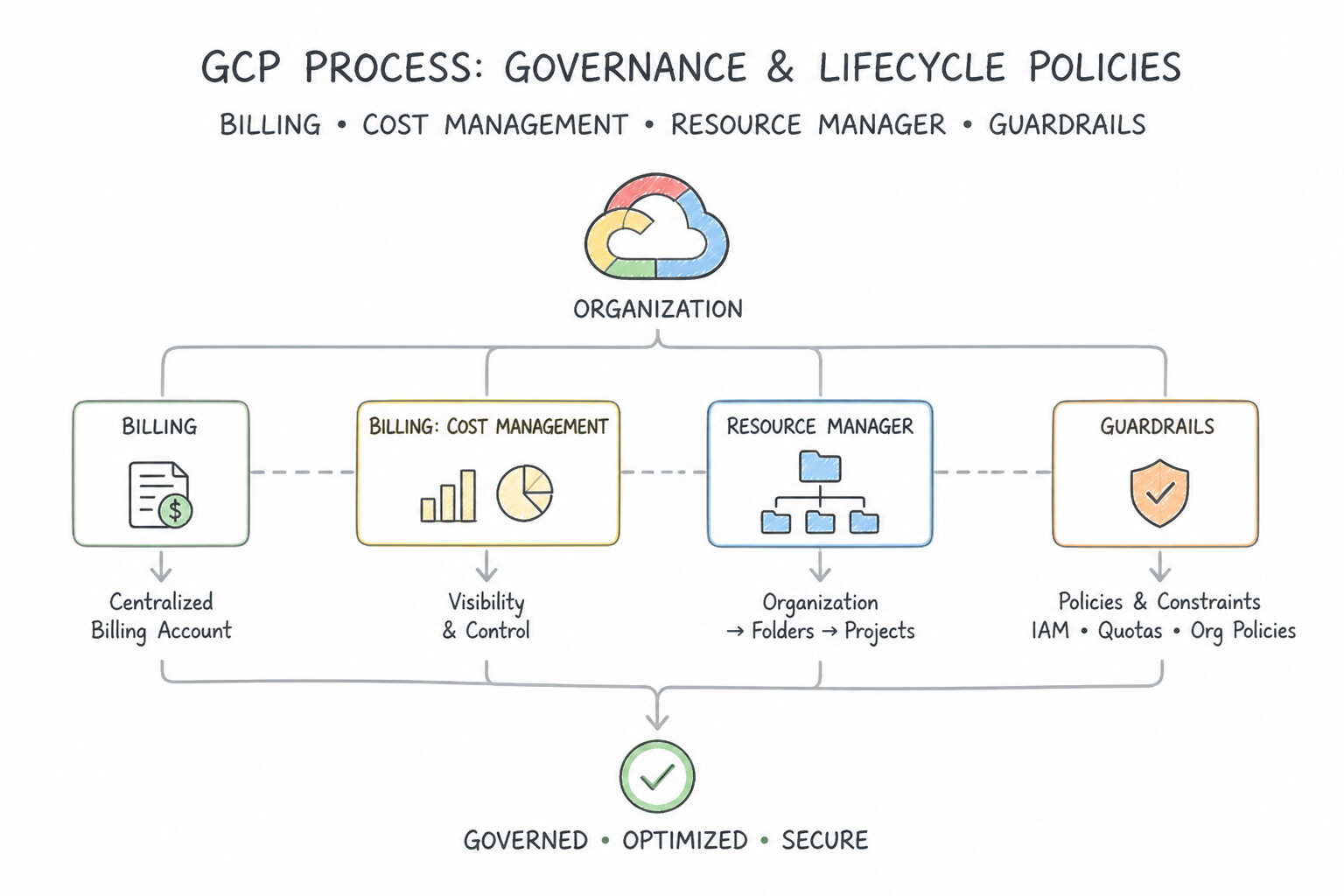
- People (Culture & Accountability): Fostering a blame-free FinOps culture where engineering teams treat cost efficiency as an architectural metric alongside latency and reliability.
- Process (Governance & Lifecycle Policies): Establishing mandatory resource labeling standards (
cost-center,env,owner), regular monthly cost-review cadences, pre-deployment budget sign-offs, and automated cleanup processes for temporary sandbox environments. - Technology (Native Cloud Automation): Leveraging Autoscaling, Serverless scale-to-zero (
Cloud Run), Cloud Storage Autoclass, Spot VMs, Resource Quotas, and Budget Alerts to eliminate waste automatically.
Key Implementation Patterns
- Cost Allocation using Labels: Use State that IT expenses will shift from capital expenditures (CapEx) to operational expenditures (OpEx). Cloud computing moves IT spending from upfront hardware purchases (CapEx) to pay-as-you-go services (OpEx). (Avoid alternative: Cloud migration shifts costs away from CapEx, not towards it.)
- Automated Budget Notifications: Use Perform a Total Cost of Ownership (TCO) analysis that includes costs for power, cooling, and IT staff. TCO analysis provides a holistic view by including indirect costs like labor and facilities, ensuring a fair comparison. (Avoid alternative: The Pricing Calculator estimates cloud costs but does not help calculate the missing on-premises indirect costs.)
- Billing IAM Role Separation: Use Apply labels to each resource with a key of "department" and a value for the team name. Labels are metadata tags used to group and filter resources in billing reports for cost allocation. (Avoid alternative: VPC networks control networking and traffic, not cost allocation or billing reporting.)
Key Takeaways (6.1c)
- CapEx (Capital Expenditure): Upfront spending on physical infrastructure (common in on-premises).
- OpEx (Operational Expenditure): Pay-as-you-go spending on services and consumables (common in cloud).
- Agility: shifting to OpEx allows businesses to scale costs up or down based on actual demand.
- TCO is Holistic: Total Cost of Ownership includes both direct costs (hardware) and indirect costs (labor, facilities).
Consideration 6.1d: Recognize the components of Google Cloud's resource hierarchy (e.g., resources, projects, folders, organization node) and the benefits (e.g., access control, inheritance and propagation rules, security and compliance, visibility and auditing capabilities)
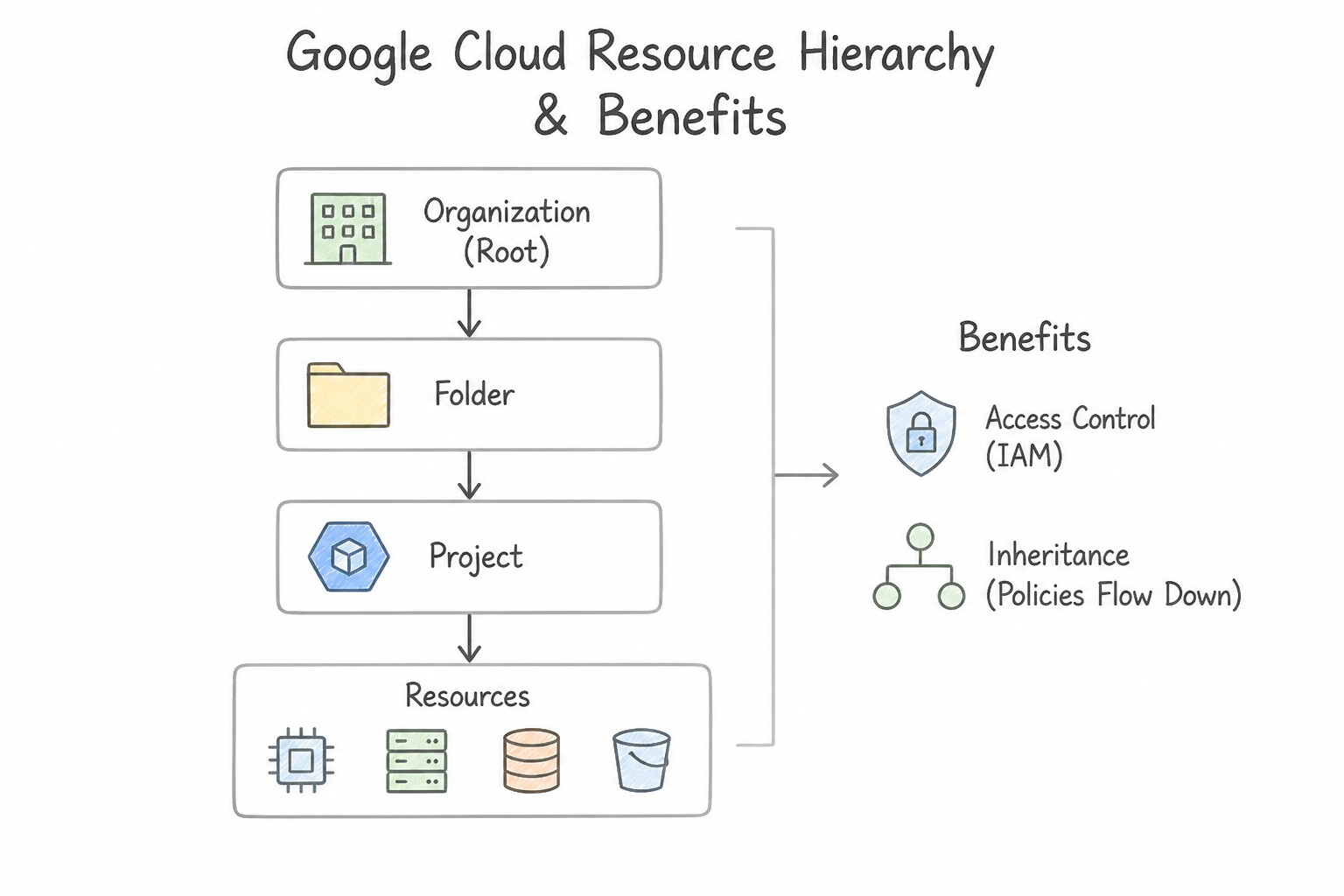
- The 4 Levels from Top to Bottom (Memorize the Exact Order!):
- Organization Node (Level 1 — Root): Represents the entire company (e.g.,
altostrat.com). Centralizes visibility and prevents "shadow IT" orphan projects. - Folders (Level 2 — Grouping): Group projects by department, division, geographic subsidiary, or environment (
Production,Staging,Development). Folders can be nested inside other folders. - Projects (Level 3 — Trust & Billing Boundary): The foundational organizing entity required to use Google Cloud. Every resource belongs to exactly one Project, and projects link to Cloud Billing accounts, enable APIs, and isolate workloads.
- Resources (Level 4 — Leaf Assets): The actual cloud services provisioned inside a project (Compute Engine VMs, Cloud Storage buckets, BigQuery datasets, GKE clusters).
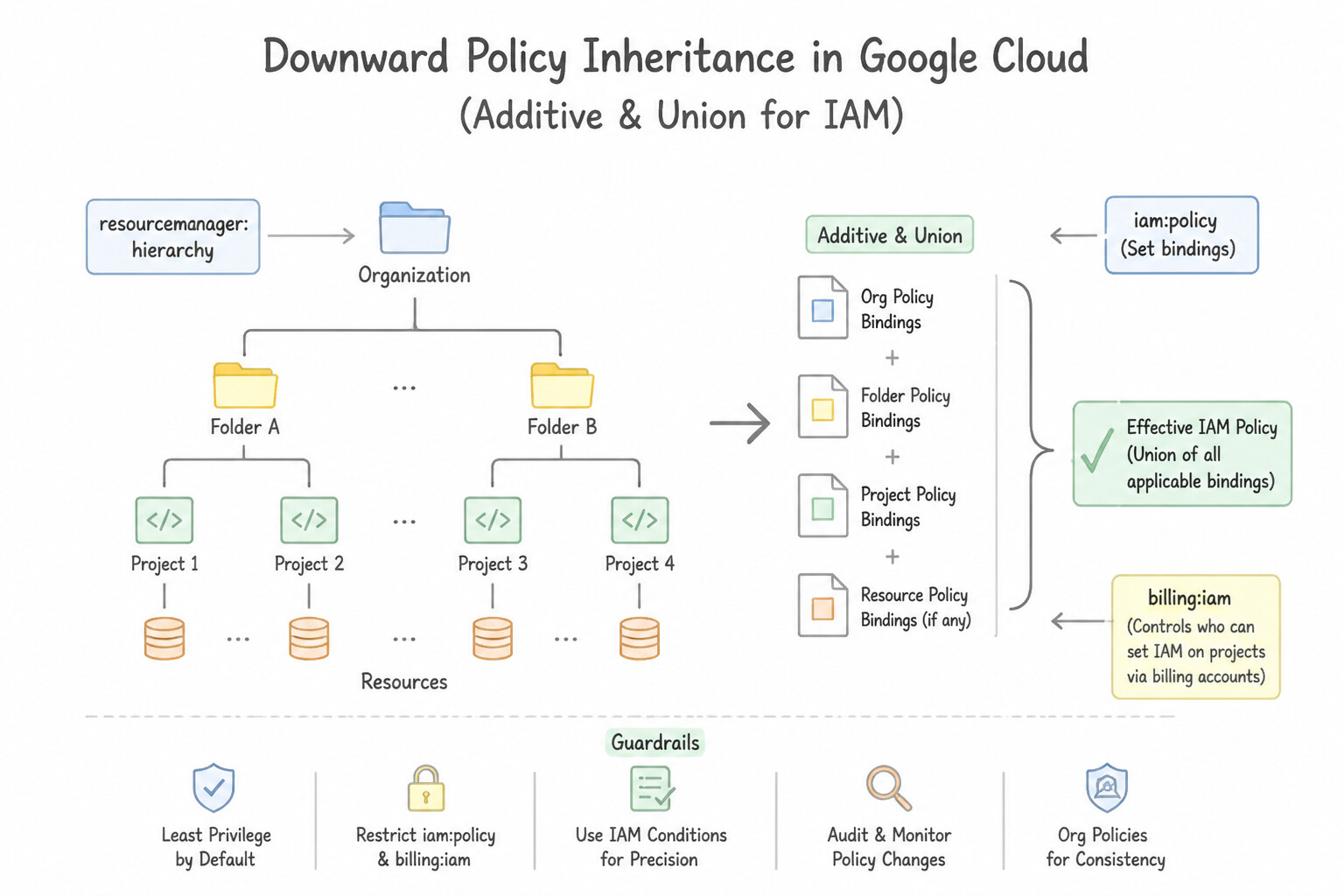
- Downward Policy Inheritance (
Additive / Unionfor IAM): IAM permissions and Organization Policy constraints set at a higher level (Organization or Folder) automatically propagate downward to all child folders, projects, and resources. Because IAM is additive, a broad role granted at the Organization level cannot be revoked by a lower-level project role—which is why Least Privilege requires granting broad roles only at the lowest necessary level!
Key Implementation Patterns
- FinOps Culture and Cross-Functional Alignment (People): Use Grant the Billing Account Viewer role to the Finance team on the Marketing folder. Permissions granted on a Folder are inherited by all Projects within it, automating access for current and future resources. (Avoid alternative: Granting roles individually is manual and does not automatically apply to future projects.)
- Proactive Cost Management with Budgets and Alerts (Process): Use Assign the Viewer role to the auditor for the specific project only. Granting the role at the project level restricts access to that single project, satisfying the requirement to exclude others. (Avoid alternative: Granting access at the folder level allows the user to view all projects in that folder due to policy inheritance.)
- Cost Allocation via Resource Labeling (Technology): Use Create a Folder for each department and place the relevant Projects inside each Folder. Folders provide a structural way to map business units to cloud resources, enabling automatic cost aggregation by department. (Avoid alternative: Multiple Organizations create unnecessary complexity and isolation for departments within the same company.)
Key Takeaways (6.1d)
- Google Cloud resources are organized in a hierarchy: Organization > Folder > Project > Resource.
- IAM policies are inherited from parent resources to child resources.
- Granting roles at the Folder level is a best practice for managing departmental access efficiently.
- Always follow the principle of least privilege by scoping access to the correct level (e.g., Folder vs. Organization).
Consideration 6.1e: Recognize how to control cloud consumption (e.g., resource quota policies, budget threshold rules, Cloud Billing reports, Dynamic Workload Scheduler, Spot VMs)
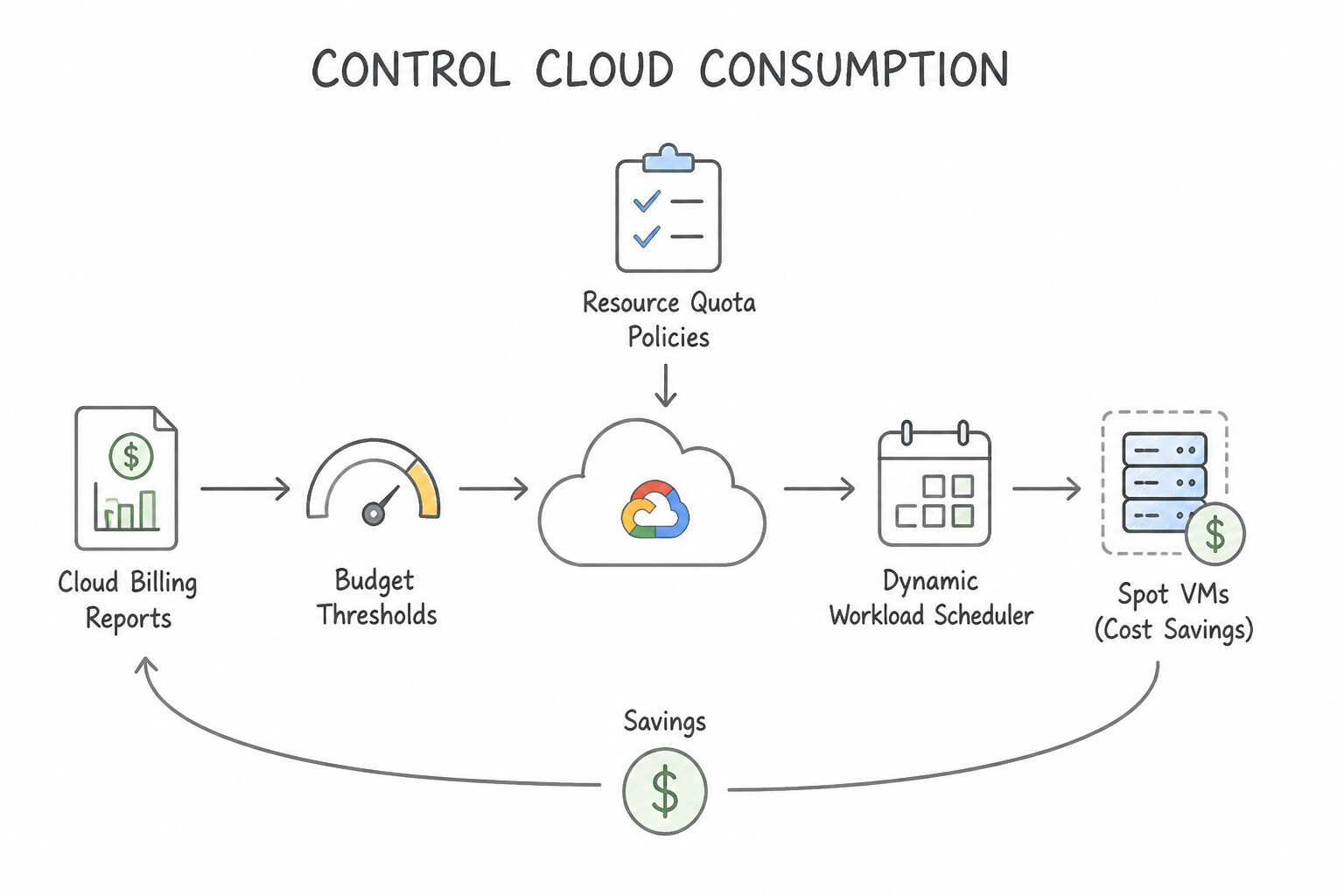
- Budget Threshold Rules vs. Resource Quota Policies (Crucial Distinction!):
- Budget Threshold Rules (Soft Notification): Monitor actual or forecasted spend against a target dollar amount (e.g.,
50%,90%,100%) and send email alerts to billing admins or trigger Pub/Sub notifications for programmatic actions. Budgets NEVER automatically cap usage or shut down running production resources on their own (so a sudden traffic spike doesn't accidentally take your live business offline!). - Resource Quota Policies (Hard Technical Limit): Enforce a strict ceiling on how much of a specific cloud resource a project can consume (e.g., maximum vCPUs, GPUs, or API requests per minute)—protecting against accidental runaway scripts, testing mistakes, or cryptomining attacks.
- Smart Workload Scheduling & Discount Levers:
- Committed Use Discounts (CUDs): 1-year or 3-year commitments for predictable, steady-state resource usage offering up to 57%–70% discounts.
- Spot VMs: Up to 60%–91% discounts on spare compute capacity for fault-tolerant, interruptible batch jobs.
- Dynamic Workload Scheduler (DWS): Helps organizations schedule and queue high-demand AI/ML accelerators (GPUs and TPUs) for batch training and fine-tuning jobs when capacity becomes available, optimizing both accelerator access and cost.
Key Implementation Patterns
- Centralized Ownership with Organization Node: Use Budgets act as a monitoring tool to send alerts and do not automatically stop usage. Budgets trigger alerts but do not turn off services by default. (Avoid alternative: Budgets track actual costs, not just estimates.)
- Fault-Tolerant Batch Processing Costs: Use Set the "Group by" option to "Service". Grouping by Service organizes costs by Google Cloud product, such as Compute Engine or Cloud Storage. (Avoid alternative: Grouping by Project shows total costs per project, not the breakdown by specific products.)
- Environment Segregation using Folders: Use Request a quota increase for the specific resources in the Google Cloud Console. Quotas are limits on resource usage; for planned high-traffic events, you must proactively request an increase to accommodate the load. (Avoid alternative: Budget alerts monitor costs but do not increase the technical resource limits required for the surge.)
Key Takeaways (6.1e)
- Cloud Billing budgets are monitoring tools, not hard spending caps.
- Budgets trigger alerts (emails) when spending thresholds are reached.
- Budgets do not automatically stop resources or disable billing.
- To stop spending automatically, you must implement programmatic actions using Cloud Pub/Sub and Cloud Functions.
Quick Decision Cheat Sheet (Subsection 6.1)
If the Scenario Requires... | Choose This FinOps / Governance Concept | Avoid This Common Mistake |
|---|---|---|
"Shift from upfront hardware purchases to pay-as-you-go recurring operational expenses" | CapEx to OpEx shift | Increasing CapEx depreciation schedules |
"Who is responsible for managing cloud costs in a modern FinOps model?" | Shared partnership across Finance, Technology/Engineering, and Business teams | "Only the Finance department" or "Only IT admins" |
"Estimate what a planned workload will cost on Google Cloud before deploying it" | Google Cloud Pricing Calculator | Cloud Billing Reports (tracks historical/current usage) |
"Order of the 4 levels in Google Cloud's Resource Hierarchy from top to bottom" | Organization → Folders → Projects → Resources | Putting Projects above Folders or Resources above Projects |
"Hard cap that prevents a project from provisioning more than X vCPUs/GPUs" | Resource Quota Policies | Cloud Billing Budgets (alerts only!) |
"Send email or Pub/Sub alerts at 50%, 90%, and 100% of forecasted or actual spend" | Cloud Billing Budgets & Threshold Rules | Resource Quotas |
"Automatically identify idle VMs, unattached disks, and oversized machine types to save money" | Active Assist / Recommender | Manual spreadsheet audits |
"Schedule and acquire high-demand GPU/TPU capacity for batch AI training jobs cost-effectively" | Dynamic Workload Scheduler (DWS) | Provisioning 24/7 idle GPU VMs year-round |
Further Reading (Subsection 6.1)
- Google Cloud Pricing - Pay-as-you-go — Review the section on 'Pay-as-you-go' which explains how Google Cloud allows you to pay only for the services you use, converting fixed costs into variable costs.
- Total Cost of Ownership (TCO) — This article explains TCO in the context of cloud computing, detailing the shift from CapEx to OpEx and the hidden costs of on-premises data centers.
- Cloud Computing Concepts — A guide explaining fundamental cloud concepts including elasticity, scalability, and the shift from CapEx to OpEx.
- Create, edit, and delete budgets and budget alerts — This official documentation explains how to set up budgets and configure alert rules to send emails to billing admins and other recipients.
- Create and manage labels — This page explains what labels are, how they are used for organizing resources, and specifically mentions their utility for billing and cost analysis.
- View billing reports and cost trends — Documentation on how to view billing reports, including how to filter and group costs by labels (resource tags).
Subsection 6.2: Describe the fundamental concepts of modern operations, reliability, and resilience in the cloud
The Big Picture
In legacy IT operations, a tension always existed between Developers (who wanted to ship new features as fast as possible) and Operations (who wanted to freeze all changes so servers wouldn't break). Furthermore, when an application did slow down or crash, engineers had to SSH into individual servers and grep through local text logs while customers complained on social media. Google pioneered Site Reliability Engineering (SRE) and Google Cloud Observability to solve both problems scientifically:
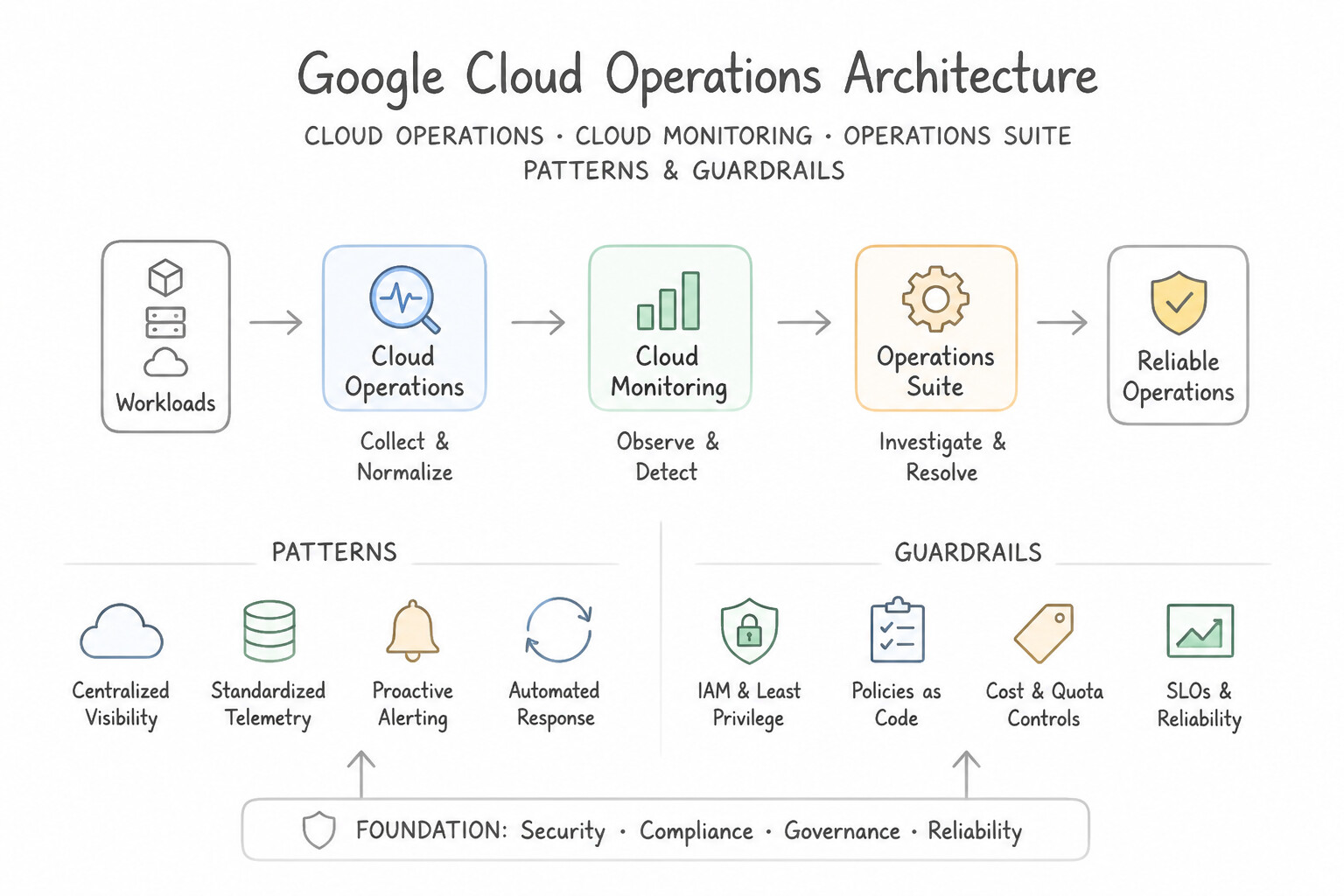
- The Full-Stack Observability Toolkit (6.2a): Instead of flying blind, modern cloud systems emit continuous telemetry across Cloud Monitoring (dashboards, metrics, uptime checks, and alerts), Cloud Logging (centralized log ingestion and analysis), Cloud Trace (pinpointing latency bottlenecks across distributed microservices), Cloud Profiler (continuous CPU/memory profiling in production with near-zero overhead), and Error Reporting (grouping and alerting on application crashes/exceptions).
- Resilient Infrastructure Design (
6.2b,6.2c): Hardware will eventually fail. Resilient cloud architectures achieve High Availability (HA) and Fault Tolerance through Redundancy (eliminating single points of failure across multiple Zones and Regions), Replication (synchronizing data across zones/regions), Scalable Infrastructure (load balancing + autoscaling), and Automated Backups (for disaster recovery against data corruption or accidental deletion). - Measuring Performance & Governing Release Velocity with SRE (
6.2d,6.2e): - The 4 Golden Signals of Monitoring (6.2d): Latency (time to service a request), Traffic (demand volume on the system), Saturation (how "full" CPU/memory/disk capacity is), and Errors (rate of failed requests).
- The SRE Contract Triad (
SLI → SLO → SLA& Error Budgets —6.2e): An SLI (Service Level Indicator) is the actual quantitative measurement (e.g.,99.92% successful HTTP requests over the last 30 days). An SLO (Service Level Objective) is the internal reliability target set by the engineering team (e.g.,SLI must be ≥ 99.95%). An SLA (Service Level Agreement) is the external legal/business contract with customers that carries financial penalties/credits if breached (e.g.,99.90% uptime guarantee).
Consideration 6.2a: Describe how to modernize operations by using Google Cloud's Observability (e.g., operations suite, Cloud Monitoring, Cloud Logging, Cloud Trace, Cloud Profiler, Error Reporting)
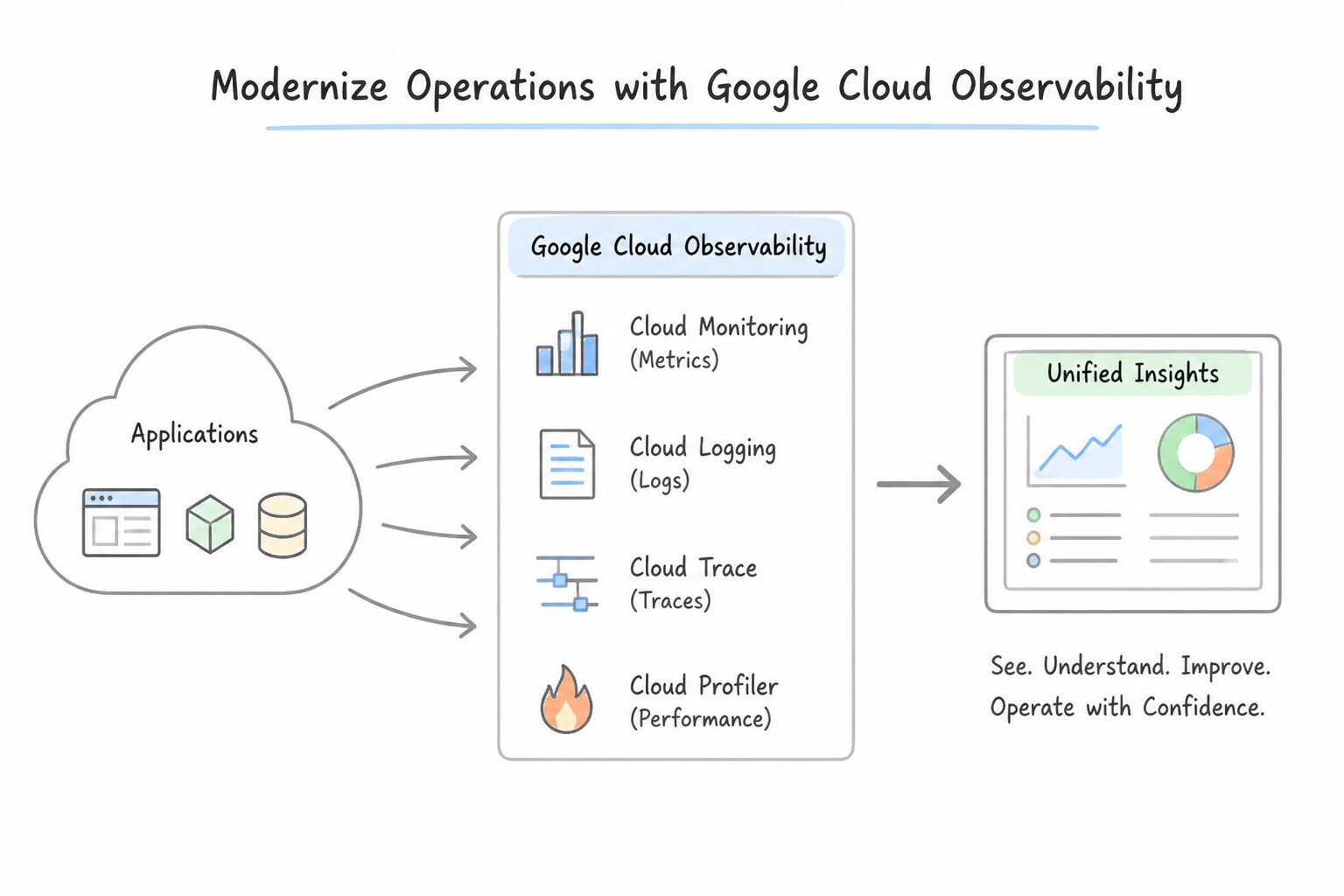
- The 5 Core Tools of Google Cloud's Observability Suite (Memorize Each Tool's Role!):
- Cloud Monitoring: Collects metrics, events, and metadata from Google Cloud and hybrid applications to power real-time dashboards, uptime/health checks, and automated alerting policies.
- Cloud Logging: Fully managed, real-time log management system that ingests, searches, analyzes, and archives platform, application, and security audit logs at petabyte scale.
- Cloud Trace: Distributed tracing system that tracks how a single user request propagates across dozens of microservices—pinpointing exact latency bottlenecks in distributed architectures.
- Cloud Profiler: Statistical, low-overhead profiler that continuously analyzes CPU and memory consumption of production code to help developers eliminate inefficient functions and cut compute costs.
- Error Reporting: Automatically counts, deduplicates, groups, and alerts on real-time application crashes and stack-trace exceptions across running cloud services.
Key Implementation Patterns
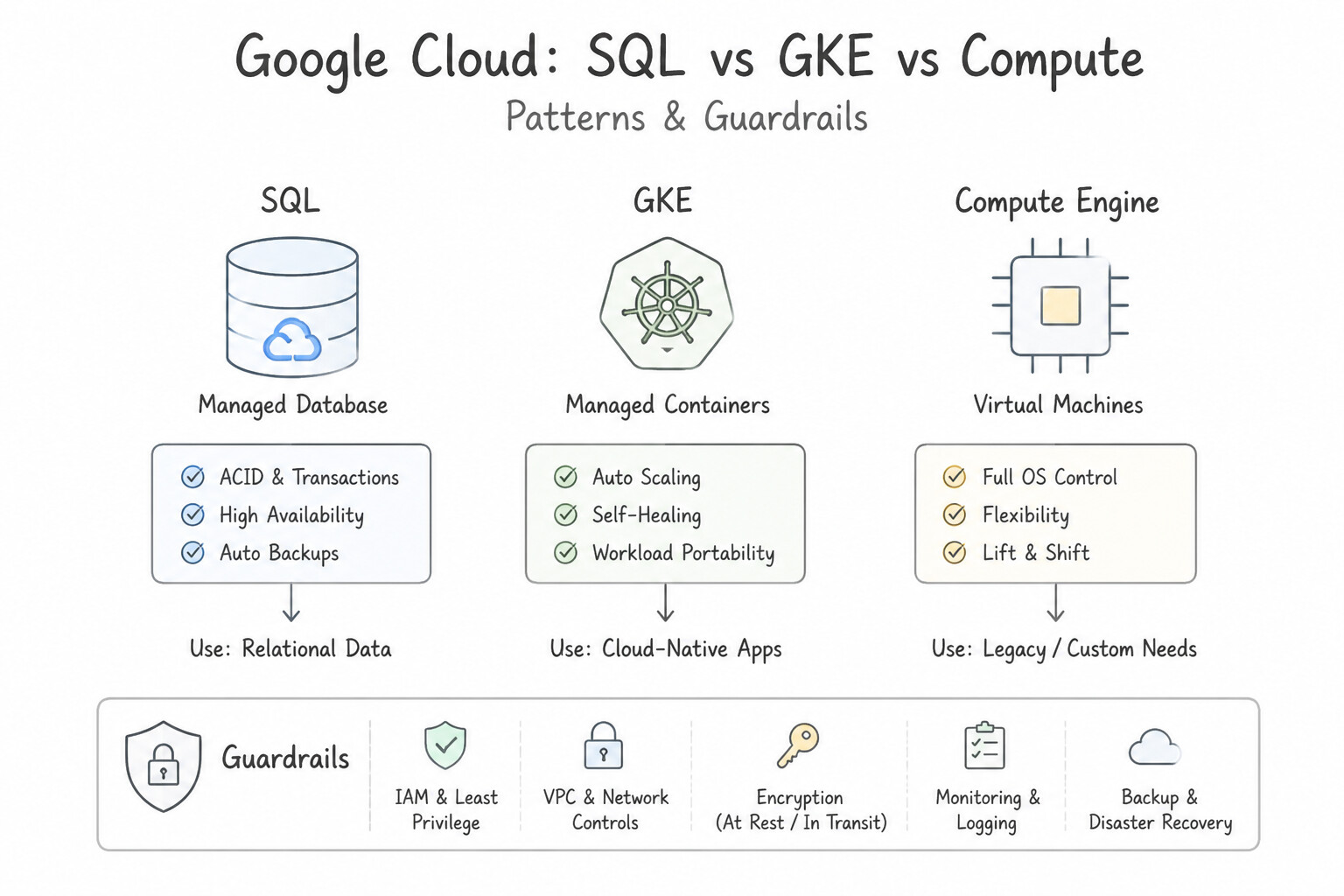
- Real-Time Infrastructure Monitoring and Alerting: Use Migrate the applications and databases to fully managed services like Google Kubernetes Engine Autopilot and Cloud SQL. Managed services automate routine tasks like patching and backups, freeing up engineering time. (Avoid alternative: Hiring more people adds cost but does not remove the manual burden or modernize the operation.)
- Distinguishing Between SLIs, SLOs, and SLAs: Use Purchase the Premium Support plan. Premium Support is the only tier offering a 15-minute response time for critical (P1) issues. (Avoid alternative: Standard Support offers a 4-hour response time for high-impact issues, which is too slow for the scenario.)
- Selecting the Correct Support Plan: Use Select the Premium Support plan. Premium Support guarantees a 15-minute response time for P1 critical cases. (Avoid alternative: Basic Support does not include technical support cases or response time guarantees.)
Key Takeaways (6.2a)
- Toil is manual, repetitive work that does not create long-term value.
- Managed services reduce toil by automating infrastructure maintenance like patching and backups.
- Modernizing operations allows engineering teams to focus on innovation rather than maintenance.
- Basic Support is for billing and documentation only.
Consideration 6.2b: Recognize the fundamental cloud operations terms (e.g., operational excellence, reliability, high availability)
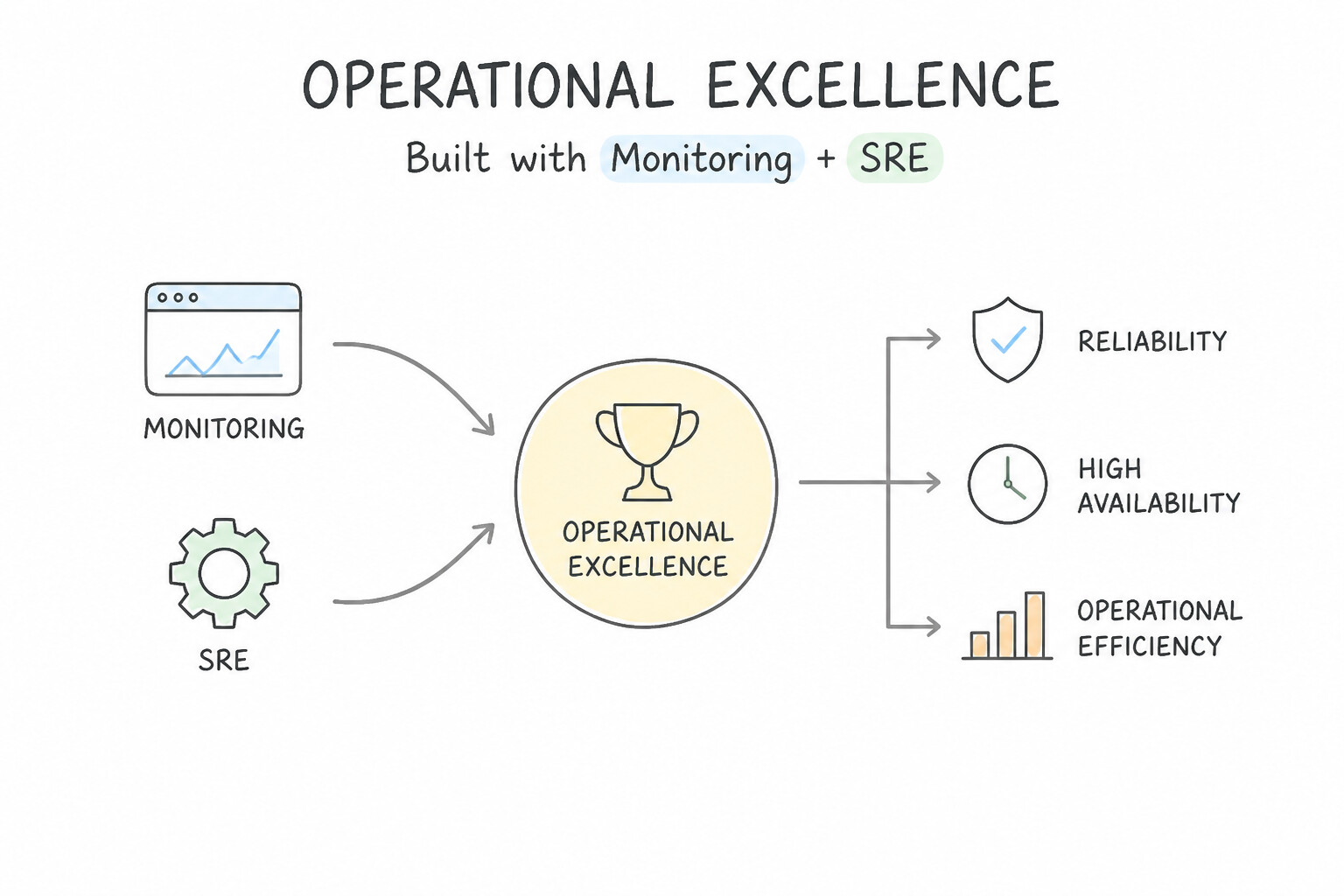
- Operational Excellence: The ability to run, monitor, and continuously improve cloud systems and automated processes (CI/CD, Infrastructure as Code, blameless postmortems) to deliver business value reliably.
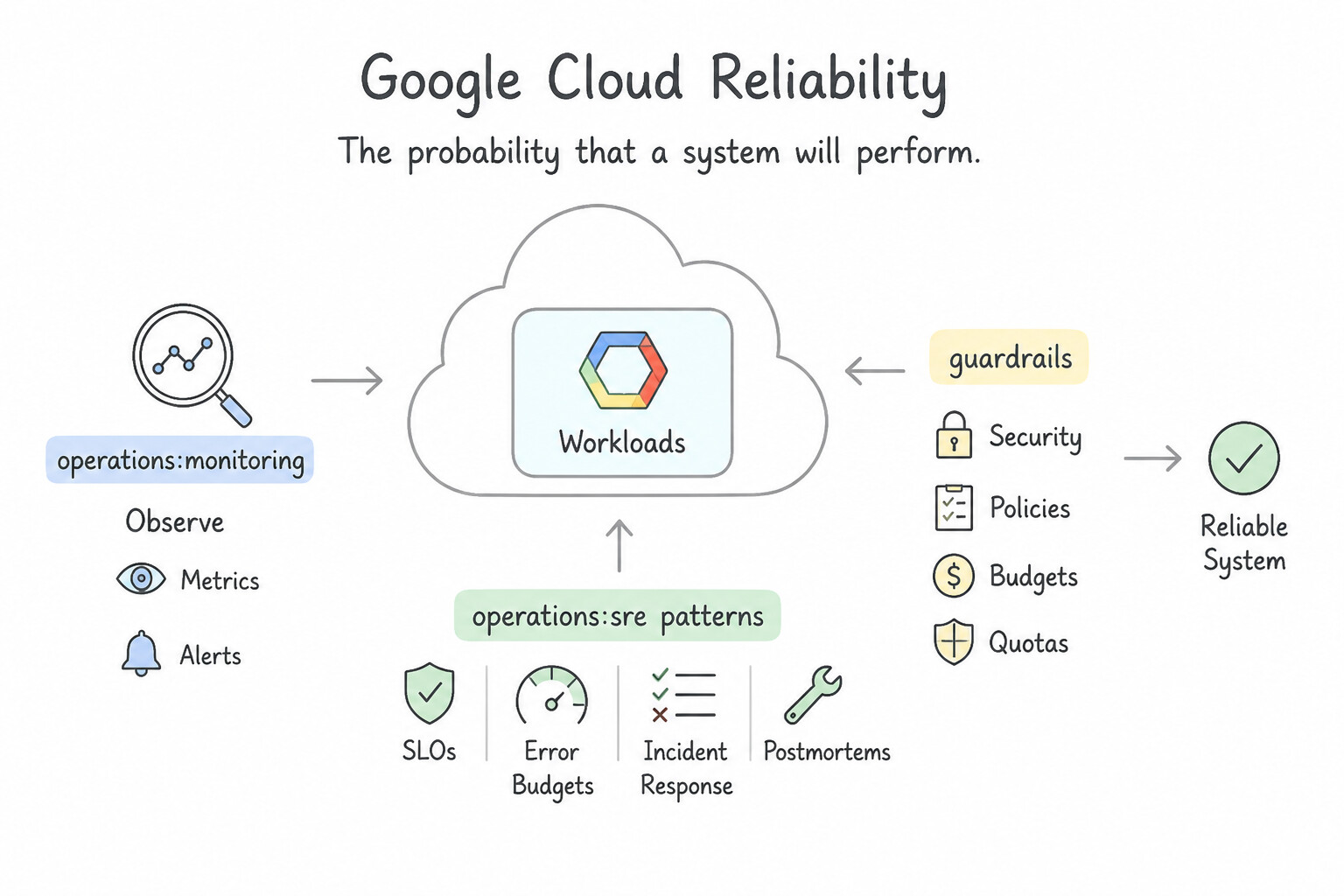
- Reliability: The probability that a system will perform its intended function correctly and consistently over a specified period—encompassing availability, fault tolerance, and recoverability.
- High Availability (HA): Designing a system so that it continues operating with minimal to zero downtime even when an underlying hardware component, server, or entire data center zone fails (measured in "nines," such as
99.99%uptime).
Key Implementation Patterns
- High Availability across Multiple Zones: Use Service Level Agreement (SLA). An SLA is a contract that links reliability targets to financial consequences. (Avoid alternative: An SLI is a measurement metric, not a contract containing penalties.)
- Defining Error Budgets in SRE: Use Service Level Indicator (SLI). An SLI is the specific quantitative measurement (the metric itself) of a service's behavior, such as latency or error rate. (Avoid alternative: An SLA is a formal contract outlining consequences for failure, not the measurement itself.)
- Ensuring System Resilience: Use Service Level Objective (SLO). An SLO is the specific internal target (like 99.9%) set for a reliability metric. (Avoid alternative: An SLA is a formal contract with financial consequences, not just an internal engineering goal.)
Key Takeaways (6.2b)
- SLIs measure the service level (Metrics).
- SLOs define the reliability target (Goals).
- SLAs enforce the target with financial consequences (Contracts).
- SLI (Indicator) is the metric you measure (e.g., latency).
Consideration 6.2c: Recognize how to design resilient infrastructure and processes (e.g., redundancy, replication, scalable infrastructure, backups)
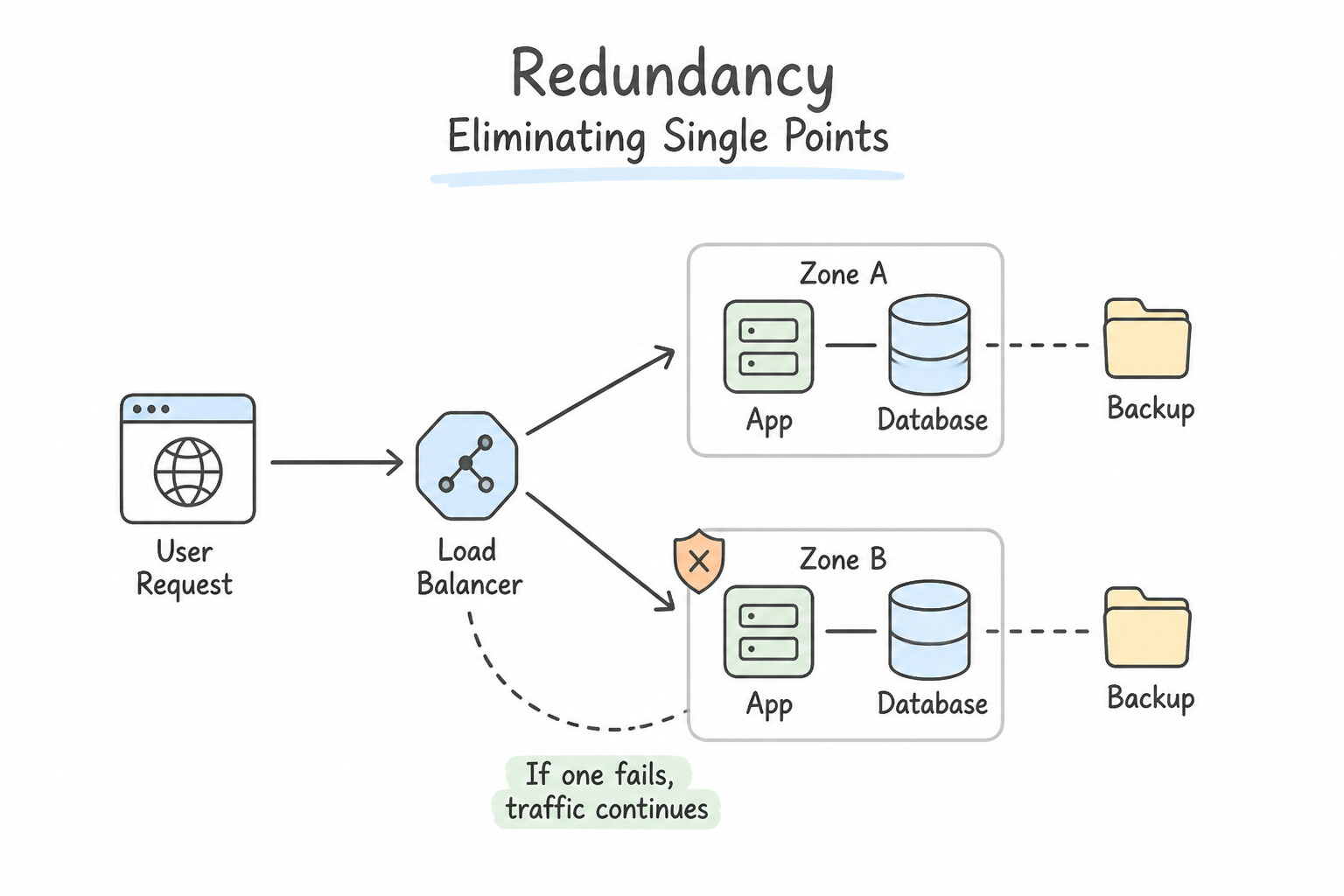
- Redundancy (Eliminating Single Points of Failure): Running multiple instances of critical components across separate Zones (within a Region) or across multiple Regions so that if one instance or zone goes offline, another immediately handles the load.
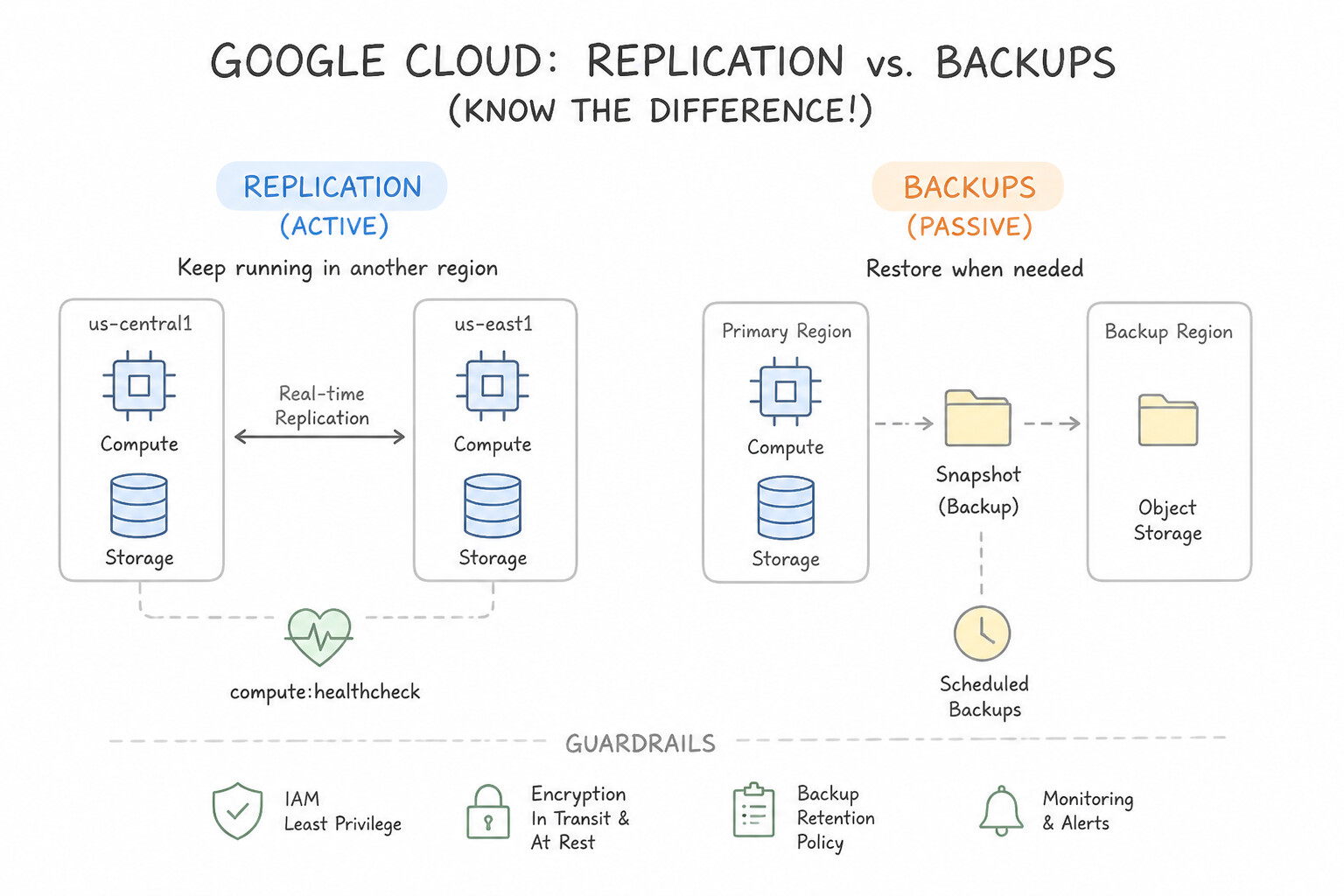
- Replication vs. Backups (Know the Difference!):
- Replication: Continuously copying live data across multiple database nodes in different zones/regions so the system can automatically fail over in seconds if the primary node fails (maximizing High Availability).
- Backups: Periodic point-in-time snapshots stored separately to restore data if someone accidentally drops a table, deploys corrupt code, or suffers a ransomware attack (because live replication immediately copies an accidental deletion to the standby replica!).
- Scalable Infrastructure: Combining global Cloud Load Balancing with Autoscaling so the architecture automatically expands during traffic surges and routes around unhealthy instances.
Key Implementation Patterns
- Multi-Region High Availability: Use Configure the Cloud Storage bucket to use the Multi-region location type. Multi-region storage replicates data across widely separated regions, ensuring access even if one region fails. (Avoid alternative: Regional storage keeps data in one specific place and cannot survive the failure of that entire region.)
- Automated Infrastructure Self-Healing: Use Create an application health check and enable auto-healing on the managed instance group. Auto-healing policies in managed instance groups use health checks to detect unresponsive applications and automatically recreate the affected instances.
- Scalable Database Read Performance: Use Configure the Cloud SQL instance for High Availability (HA). High Availability (HA) creates a standby instance in a different zone that automatically takes over if the primary zone fails. (Avoid alternative: Backups are for disaster recovery and take time to restore; they do not prevent downtime during a zone failure.)
Key Takeaways (6.2c)
- Regional Storage is for data used in a specific area; it is cheaper but vulnerable to regional outages.
- Multi-region Storage provides geo-redundancy, ensuring data remains accessible even if a whole region fails.
- Storage Classes (like Nearline or Archive) manage costs based on access frequency, while Location Types manage availability and latency.
- Managed Instance Groups (MIGs) provide features to maintain the availability of your applications.
Consideration 6.2d: Recognize how a system's performance and reliability are measured (e.g., latency, traffic, saturation, errors)
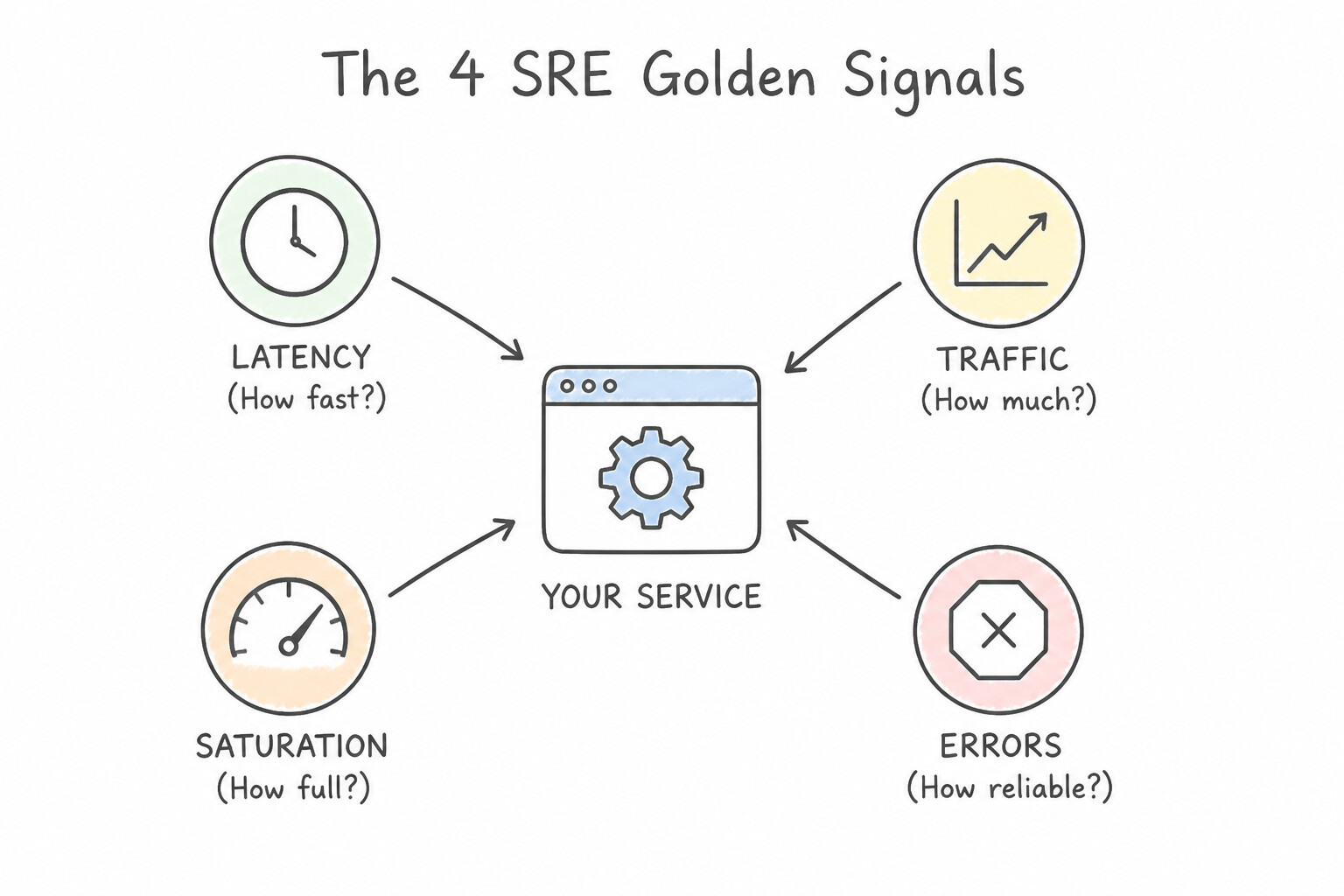
- The 4 SRE Golden Signals (Memorize All Four!):
- Latency: The time it takes to service a request (e.g.,
200 mscheckout page response time)—crucially distinguishing between the latency of successful requests vs. failed requests. - Traffic: A measure of how much demand is currently being placed on your system (e.g.,
15,000 HTTP requests per secondor50,000 Pub/Sub messages per second). - Saturation: How "full" your service's constrained resources are (e.g.,
CPU at 94%,memory at 98%, orconnection pool utilization)—performance typically degrades sharply as saturation approaches 100%. - Errors: The rate of requests that fail—either explicitly (e.g.,
HTTP 500 Internal Server Error), implicitly (returning HTTP 200 with wrong content), or by policy (taking longer than a strict timeout).
Key Implementation Patterns
- Differentiating SLI, SLO, and SLA Relationships: Use Metric A is a Service Level Indicator (SLI), Metric B is a Service Level Objective (SLO), and Metric C is a Service Level Agreement (SLA). SLIs are actual measurements, SLOs are internal targets, and SLAs are business contracts with consequences.
- Measuring System Performance via Latency and Throughput: Use Latency to measure the request processing time, and Traffic to measure the incoming request volume. Latency measures the time taken to process a request, and traffic measures the volume of incoming requests. (Avoid alternative: Errors measure failures and saturation measures capacity, not request duration or incoming volume.)
Key Takeaways (6.2d)
- SLIs are the actual, real-time measurements of the behavior of a service, such as latency or error rate.
- SLOs are internal targets based on SLIs that tell your team if the service is performing acceptably.
- SLAs are formal business contracts with customers that dictate what happens, usually financial penalties, if the service fails to meet agreed-upon standards.
- Not every service needs an SLA, but almost all services benefit from having SLIs and SLOs.
Consideration 6.2e: Recognize fundamental concepts of DevOps and Site Reliability Engineering (e.g., service level indicators, service level objectives, service level agreements)
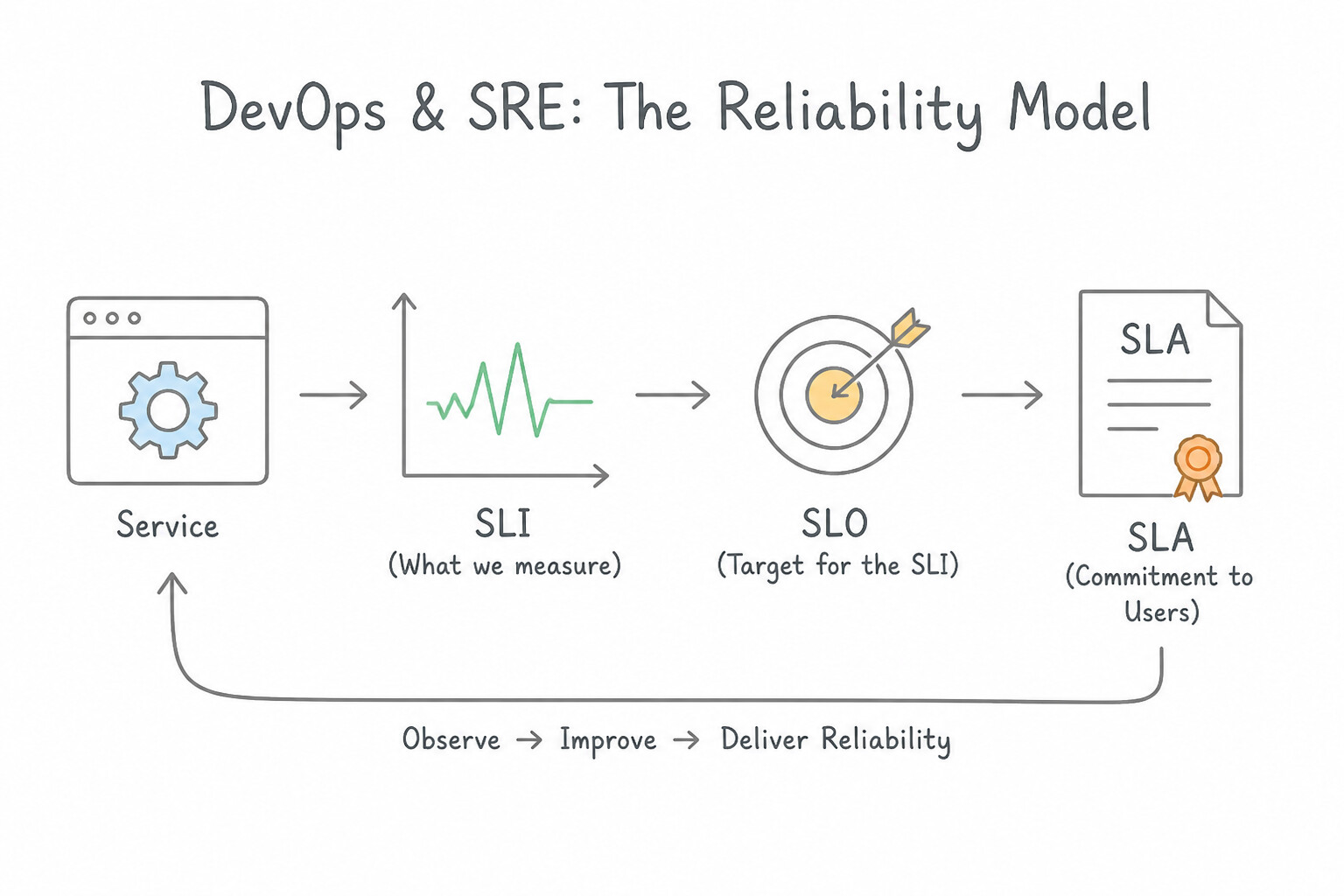
- DevOps vs. Site Reliability Engineering (SRE): DevOps is a cultural and organizational movement that breaks down silos between software development and IT operations through automation and shared ownership. SRE (coined at Google) is the concrete engineering discipline that implements DevOps by treating operations as a software problem.
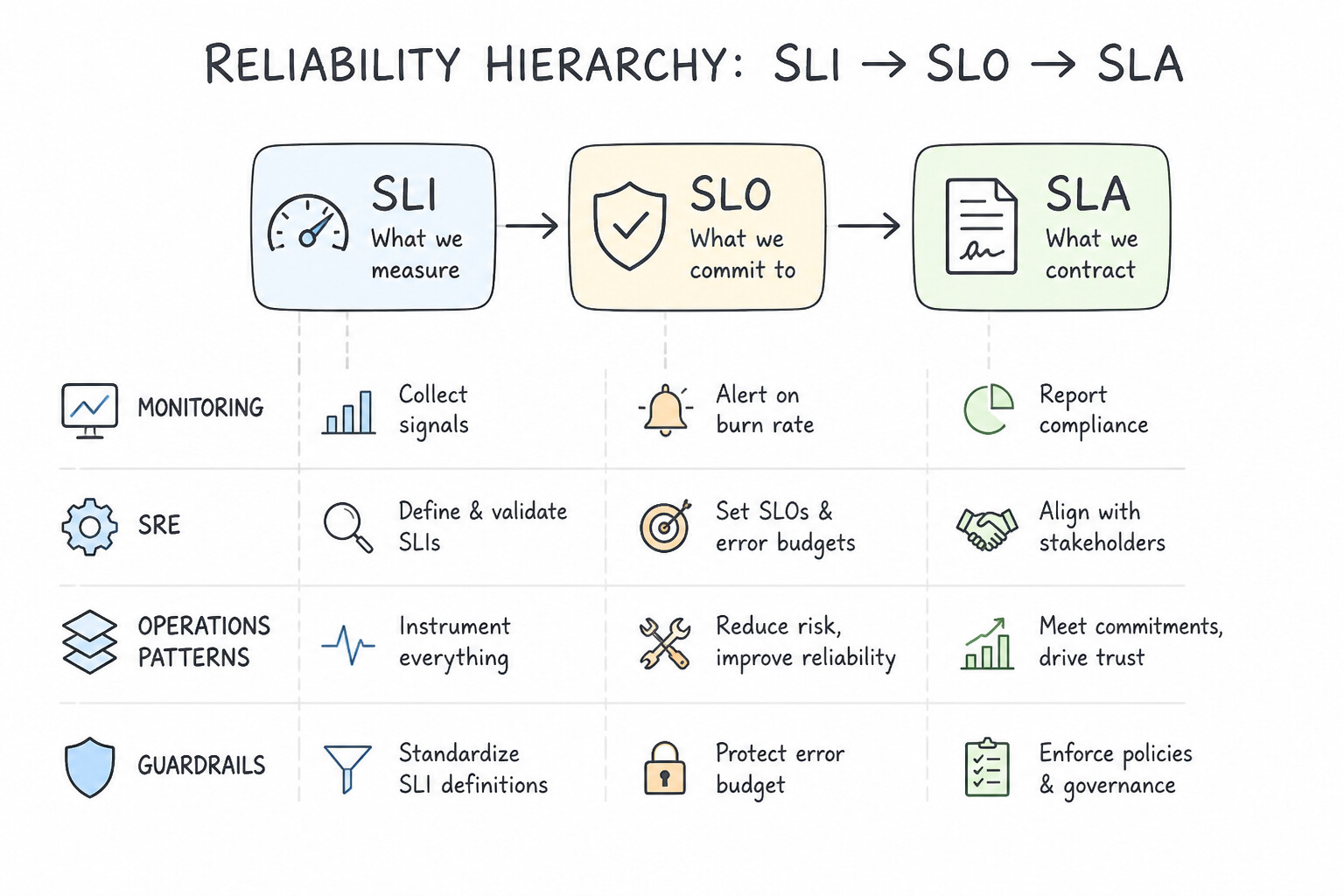
- The Reliability Hierarchy (
SLI → SLO → SLA): - SLI (Service Level Indicator — "How did we actually perform?"): A specific, quantitative metric measuring an aspect of service reliability (e.g., 95th-percentile request latency in ms, or the ratio of HTTP 200 responses to total requests).
- SLO (Service Level Objective — "What is our internal engineering goal?"): The target value or range for an SLI that the engineering team commits to internally (e.g., "99.95% of checkout requests must succeed in < 300 ms").
- SLA (Service Level Agreement — "What did we legally promise the customer?"): A formal, legally binding contract between a service provider and its customers that defines the minimum promised availability (usually slightly looser than the internal SLO, e.g.,
99.90%) and specifies financial credits or penalties if breached. - Error Budgets: Calculated as
100% − SLO(e.g., a99.9%SLO gives a0.1%monthly Error Budget, or ~43 minutes of allowed downtime). As long as the team has Error Budget remaining, they can ship new features rapidly; if the Error Budget is exhausted, feature launches pause and engineering effort focuses on reliability improvements.
Key Implementation Patterns
- Measuring Request Response Time (Latency): Use Service Level Indicator (SLI). An SLI is the specific quantitative measurement of service performance, such as error rate or latency. (Avoid alternative: An SLA is a contract with consequences for failure, not the measurement itself.)
- Quantifying System Demand (Traffic): Use Service Level Agreement (SLA). An SLA is a contract that includes financial consequences if reliability targets are not met. (Avoid alternative: An SLO is an internal target for reliability without financial penalties.)
- Assessing Resource Capacity Limits (Saturation): Use Postpone the new feature launches and focus the team on improving system reliability. When an error budget is exhausted, SRE principles dictate freezing new feature launches to prioritize stability work. (Avoid alternative: Changing the SLO target to hide poor performance invalidates the reliability goal and does not improve the user experience.)
Key Takeaways (6.2e)
- SLI (Indicator) is the metric or measurement itself.
- SLO (Objective) is the target goal you want to achieve.
- SLA (Agreement) is the contract detailing consequences for not meeting the goal.
- SLI is the measurement (the 'what').
Quick Decision Cheat Sheet (Subsection 6.2)
If the Scenario Requires... | Choose This Observability / SRE Concept | Avoid This Common Mistake |
|---|---|---|
"Track how a request flows across multiple microservices to find latency bottlenecks" | Cloud Trace | Cloud Profiler or Cloud Audit Logs |
"Continuously analyze CPU and memory usage of production code to optimize resource efficiency" | Cloud Profiler | Cloud Trace or Error Reporting |
"Automatically aggregate, deduplicate, and alert on application crashes and stack-trace exceptions" | Error Reporting | Cloud Trace |
"Collect metrics, run uptime health checks, and build operational dashboards & alerts" | Cloud Monitoring | Cloud Profiler |
"Survive a hardware or zone outage with automatic failover" vs. "Recover from accidental data deletion or corruption" | Redundancy / Replication (HA) vs. Backups | Relying on HA replication alone to undo an accidental DELETE query |
"Time to fulfill a request" · "Volume of requests/sec" · "How full CPU/RAM capacity is" · "Rate of failed requests" | Latency · Traffic · Saturation · Errors (The 4 Golden Signals) | Confusing Saturation with Traffic |
"Actual measured metric" → "Internal engineering target" → "External customer contract with financial penalties" | SLI → SLO → SLA | Making the external SLA stricter than the internal SLO |
"Allowed unreliability ( 100% - SLO) used to objectively decide whether to ship new features or focus on stability" | Error Budget (SRE) | Cloud Billing Budget |
Further Reading (Subsection 6.2)
- Site Reliability Engineering - Eliminating Toil — This chapter from Google's SRE book defines toil and explains why minimizing it is crucial for engineering productivity.
- Cloud SQL Features — Overview of Cloud SQL, highlighting fully managed features like automated backups and patching.
- Google Cloud Customer Care overview — Provides a comparison table of Basic, Standard, Enhanced, and Premium support plans, including response time SLAs.
- Google Cloud Architecture Framework: Operational Excellence — Discusses the principles of operational excellence, including the use of automation to reduce toil and the benefits of scaling resources dynamically.
- Compute Engine Autoscaling — Provides details on how managed instance groups can automatically scale the number of VM instances in response to load.
- Google Cloud Platform Services: Technical Support Services Guidelines — Official documentation defining the criteria for S1, S2, S3, and S4 severity levels in Google Cloud support cases.
Book TOC · Previous · Chapter 6 of 7 · Next
AwesomeGCP.com Learning
The approach taken is a question-led learning approach: you explore realistic project scenarios where you need to make decisions or take actions to achieve business goals within specific constraints. Instead of passive learning, you are challenged to think and work through the options to master the Cloud Digital Leader (CDL) certification!