Book TOC · Previous · Chapter 1 of 7 · Next
Chapter 1: Platform Operations & Access Governance: Google SecOps, SCC Enterprise, GTI & Federation
Chapter Focus: Unified Google SecOps (SIEM + SOAR) + SCC Enterprise + Google Threat Intelligence (GTI) architecture, Cloud IDS, Workforce Identity Federation, SecOps Data RBAC scopes, and Audit Log governance.
Subsection 1.1: Enhancing Detection and Response
The Big Picture
When enterprise security teams migrate to Google Cloud, they typically inherit a patchwork of overlapping tools: Security Command Center (SCC), Google Security Operations (SecOps) SIEM & SOAR, Google Threat Intelligence (GTI), Cloud IDS, Cloud Armor, and legacy on-premises third-party SIEMs or ticketing systems. Teams that deploy these tools without a unified architectural blueprint consistently suffer from three critical production failures:
- The Blind-Spot vs. Duplicate-Billing Trap (
1.1a,1.1c): Teams either ingest every high-volume debug log into two separate SIEMs (multiplying ingestion and egress costs with zero added detection value) or assume that enabling SCC Standard Tier gives them runtime container/VM threat detection and multi-step attack path simulations (which strictly require SCC Premium / Enterprise Tier). Worse, they confuse VPC Flow Logs (sampled 5-tuple network metadata) with Cloud IDS (deep Layer-7 payload inspection via VPC Packet Mirroring), leaving blind spots against encrypted or application-layer exploits. - The Siloed Alert Fatigue Trap (
1.1b,1.1e): When SCC, Cloud IDS, and GTI operate as isolated consoles, Tier 1 analysts must manually pivot across four browser tabs to determine whether an SCCMalware: Bad Domainfinding on a GKE node is linked to a broader campaign. Production architectures wire SCC Continuous Exports (via Cloud Pub/Sub or native SCC-to-SecOps connectors) directly into Google SecOps SIEM & SOAR, where Entity Graph correlation and GTI enrichment automatically fuse posture findings, network intrusion alerts, and endpoint telemetry into a single risk-prioritized case. - The Unverified Coverage Assumption Trap (1.1d): Security teams often enable out-of-the-box detectors without mapping them against MITRE ATT&CK tactics or running purple-team validation and SCC Attack Path Simulations, discovering only during a real breach that a critical log source (such as
Data Accessaudit logs orDNSquery logs) was never enabled.
Consideration 1.1a: Prioritizing telemetry sources (e.g., SCC, Google SecOps, GTI, Cloud IDS) to detect incidents or misconfigurations within an enterprise environment
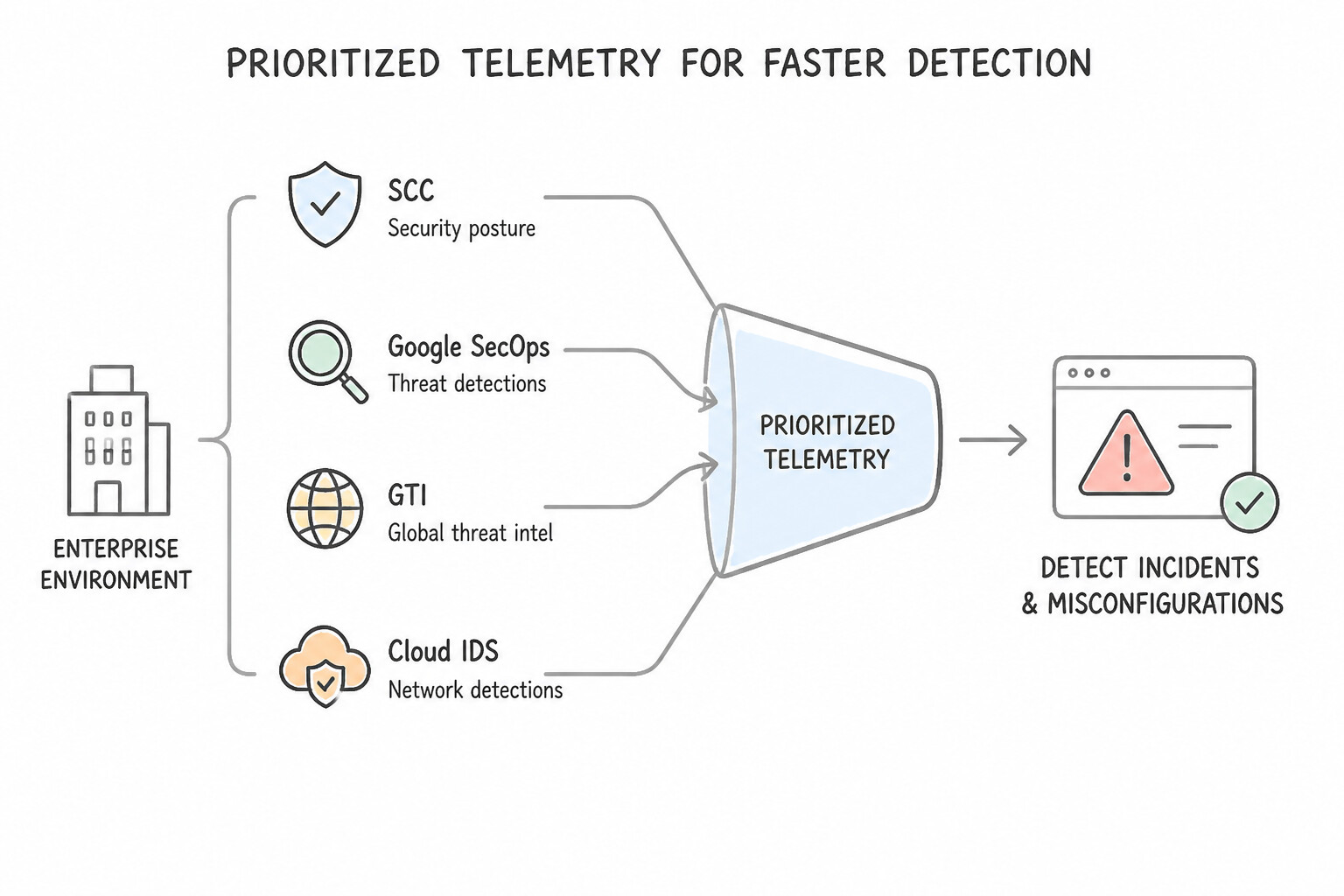
When a workload scenario requires you to prioritize which telemetry sources to ingest first under budget or time constraints, apply the Signal-to-Noise & Detection Value Hierarchy:
- Tier 1 (Foundational Identity & Control Plane — Mandatory First):
- Cloud Audit Logs (
Admin Activity,System Event,Policy Denied): Always-on, zero ingestion cost in Cloud Logging, and highest signal-to-noise ratio for IAM privilege escalation, service account key creation, firewall modifications, and VPC Service Controls perimeter violations. - Identity Provider (IdP) & Active Directory Logs (
Cloud Identity,Workspace,Okta,Entra ID): Essential for detecting initial access, impossible travel,MFA fatigue, and mapping users in the Google SecOps Entity Graph. - Tier 2 (High-Value Threat & Posture Detections):
- Security Command Center (
SCC) Findings: IngestingEvent Threat Detection (ETD),Security Health Analytics (SHA),Virtual Machine Threat Detection (VMTD), andContainer Threat Detection (CTD)findings gives immediate curated threat and posture visibility. - Cloud DNS & Cloud NAT Logs: High-signal, low-volume network telemetry critical for spotting Command-and-Control (C2) domain resolution, DNS tunneling, and data exfiltration without the massive volume of full packet capture.
- Tier 3 (Contextual Network & Data-Plane Telemetry — Tune & Sample):
- VPC Flow Logs & Data Access Audit Logs: Extremely valuable for lateral movement and data exfiltration investigations, but high volume. Prioritize enabling
Data Accesslogs (ADMIN_READ,DATA_READ,DATA_WRITE) only on sensitive projects/buckets (or useexemptedMembersfor noisy trusted internal service accounts) and tune VPC Flow Logs sampling rates (0.5or0.1) and metadata filters. - Cloud IDS: Prioritize on high-value/regulated VPC segments where deep Layer-7 payload inspection (detecting exploit signatures inside allowed ports like
443) is required.
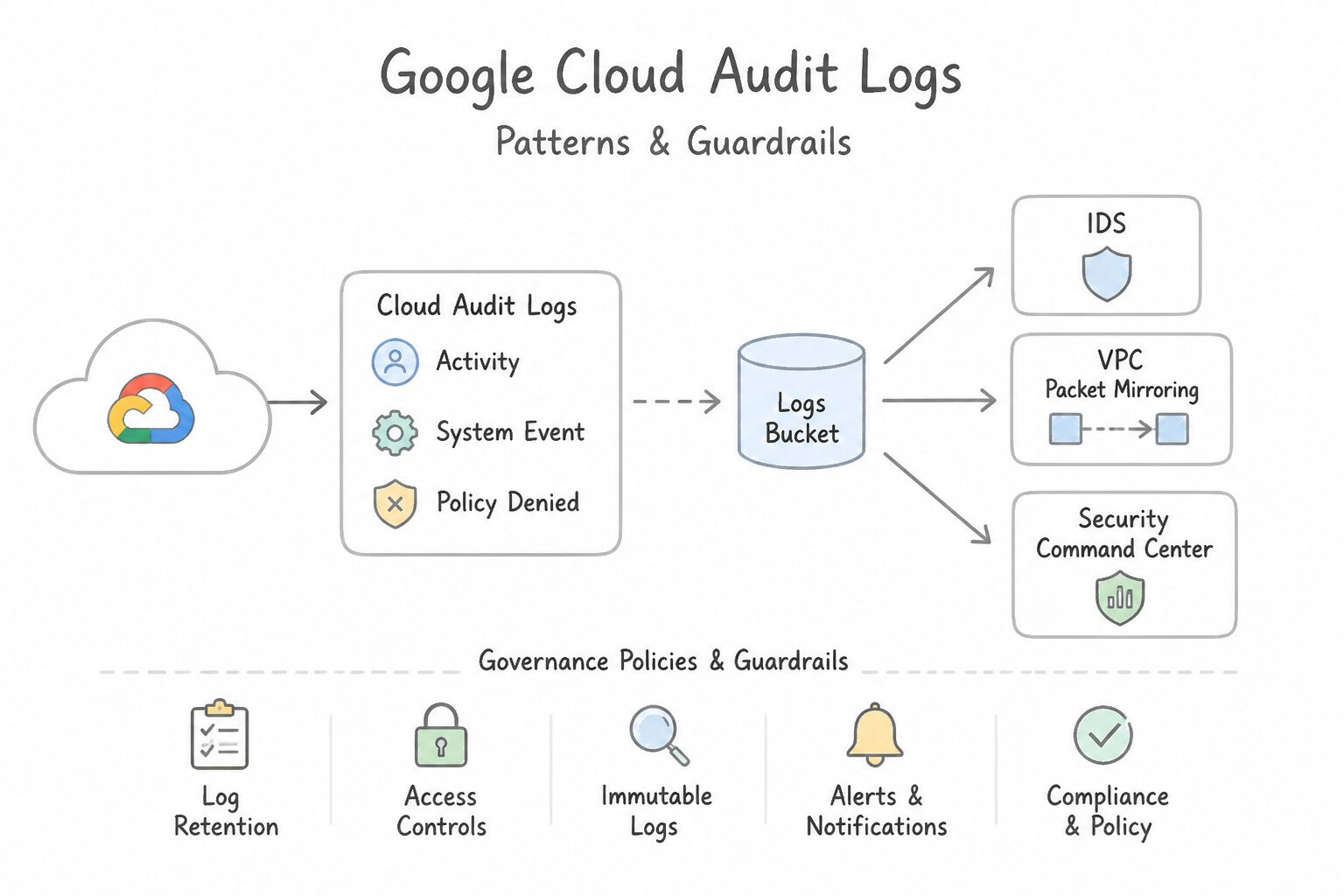
Key Implementation Patterns
- Deep Packet Inspection for Malware: Use Create a Cloud IDS endpoint and configure a Packet Mirroring policy to mirror traffic to the endpoint. Cloud IDS provides managed deep packet inspection to detect malware signatures in traffic payloads without requiring agents. (Avoid alternative: VPC Flow Logs only record traffic metadata (headers), not the actual payload required for signature detection.)
- Historical IOC Search: Use Search for the IP address in Google Security Operations. Google Security Operations is optimized for sub-second searches over massive amounts of historical security telemetry, making it the correct choice for retro-hunting. (Avoid alternative: Cloud IDS inspects live traffic and cannot retroactively analyze traffic from six months ago.)
Key Takeaways (1.1a)
- VPC Flow Logs provide visibility into network metadata (IPs, ports) but cannot inspect payloads.
- Cloud IDS provides Deep Packet Inspection (DPI) to detect intrusion attempts, malware, and C2 activity within payloads.
- Packet Mirroring allows traffic inspection without installing agents on VMs.
- Cloud Armor is for WAF and DDoS protection, not internal network signature detection.
Consideration 1.1b: Integrating multiple tools (e.g., SCC, Google SecOps, GTI, Cloud IDS, downstream third-party systems) in the security architecture to enhance detection capabilities
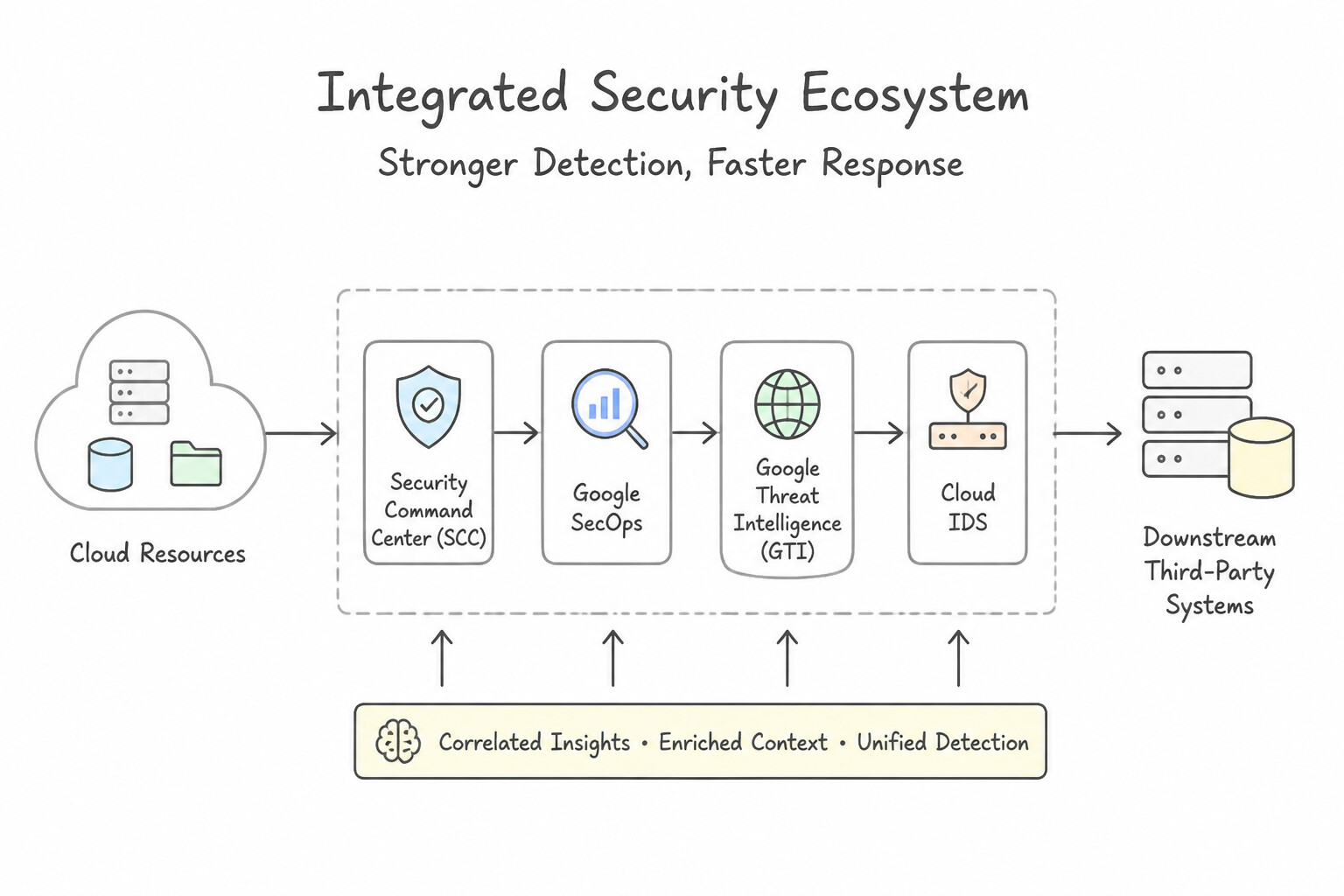
When integrating SCC, Google SecOps, GTI, Cloud IDS, and downstream third-party systems (e.g., ServiceNow, Jira, Splunk, CrowdStrike):
- Centralized Event Bus Pattern (
Log Router→Cloud Pub/Sub): - Never build brittle point-to-point scripts polling APIs on cron schedules. Use an Organization-level Aggregated Log Router Sink (
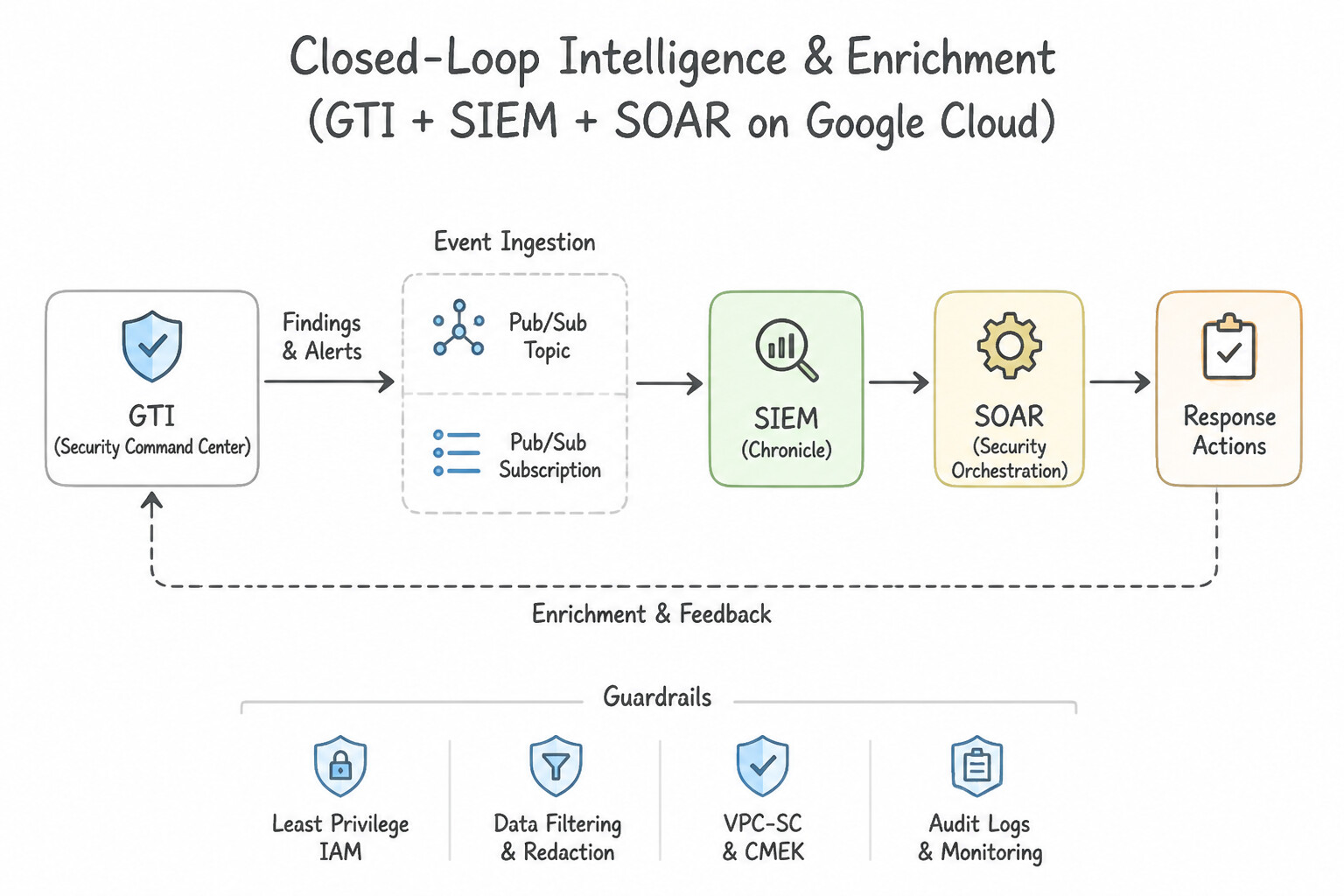
--include-children) routing to Cloud Pub/Sub (or directly to the native Google SecOps Cloud Logging ingestion integration). - For SCC Findings, configure SCC Continuous Exports to Cloud Pub/Sub (with finding category/severity filters) to stream findings in real time to downstream third-party tools, while using the native SCC-to-SecOps integration to populate the SecOps SIEM and SOAR queues automatically.
- Closed-Loop Intelligence & Enrichment (
GTI+SIEM+SOAR): - Google Threat Intelligence (GTI) automatically enriches ingested UDM events in SecOps SIEM (matching IPs, domains, and file hashes against Mandiant and VirusTotal feeds) and exposes on-demand enrichment actions (
Get File Report,Passive DNS Lookup,GTI Threat Actor Attribution) inside SecOps SOAR playbooks. - Bi-Directional Downstream Third-Party Sync:
- When an enterprise uses a corporate ticketing system (such as ServiceNow or Jira) alongside Google SecOps SOAR, use the official SecOps Marketplace Integration with bi-directional webhook/sync jobs so case comments, status changes, and closure codes stay synchronized across both systems without manual copy-pasting.
Key Implementation Patterns
- Real-time Export to Third-Party SIEM: Use Configure a Continuous Export in SCC to send findings to a Pub/Sub topic. Configure the Splunk add-on for Google Cloud to pull messages from the subscription. Continuous Exports to Pub/Sub provide the lowest latency path for sending SCC findings to external SIEMs like Splunk.
- Automated Remediation of Open Firewalls: Use Configure a continuous export of SCC findings to a Pub/Sub topic. Create a Cloud Function triggered by the topic to disable the firewall rule. Use SCC to detect, Pub/Sub to route the alert, and a Cloud Function to automatically fix the issue.
- Deep Network Inspection with Cloud IDS and SecOps: Use Create a Cloud IDS endpoint in the VPC. Configure a Packet Mirroring policy to send traffic to the endpoint. Ingest the generated threat logs into Google Security Operations. Cloud IDS provides deep packet inspection for malware detection and requires Packet Mirroring to inspect traffic.
Key Takeaways (1.1b)
- Use Pub/Sub for real-time, event-driven integrations between Google Cloud and third-party tools.
- Avoid using Cloud Storage or BigQuery for low-latency alerting requirements.
- SCC Continuous Exports filter and route findings automatically without custom scripts.
- Security Command Center (SCC) is the primary detection tool for misconfigurations in Google Cloud.
Consideration 1.1c: Justifying the use of tools with overlapping capabilities based on requirements
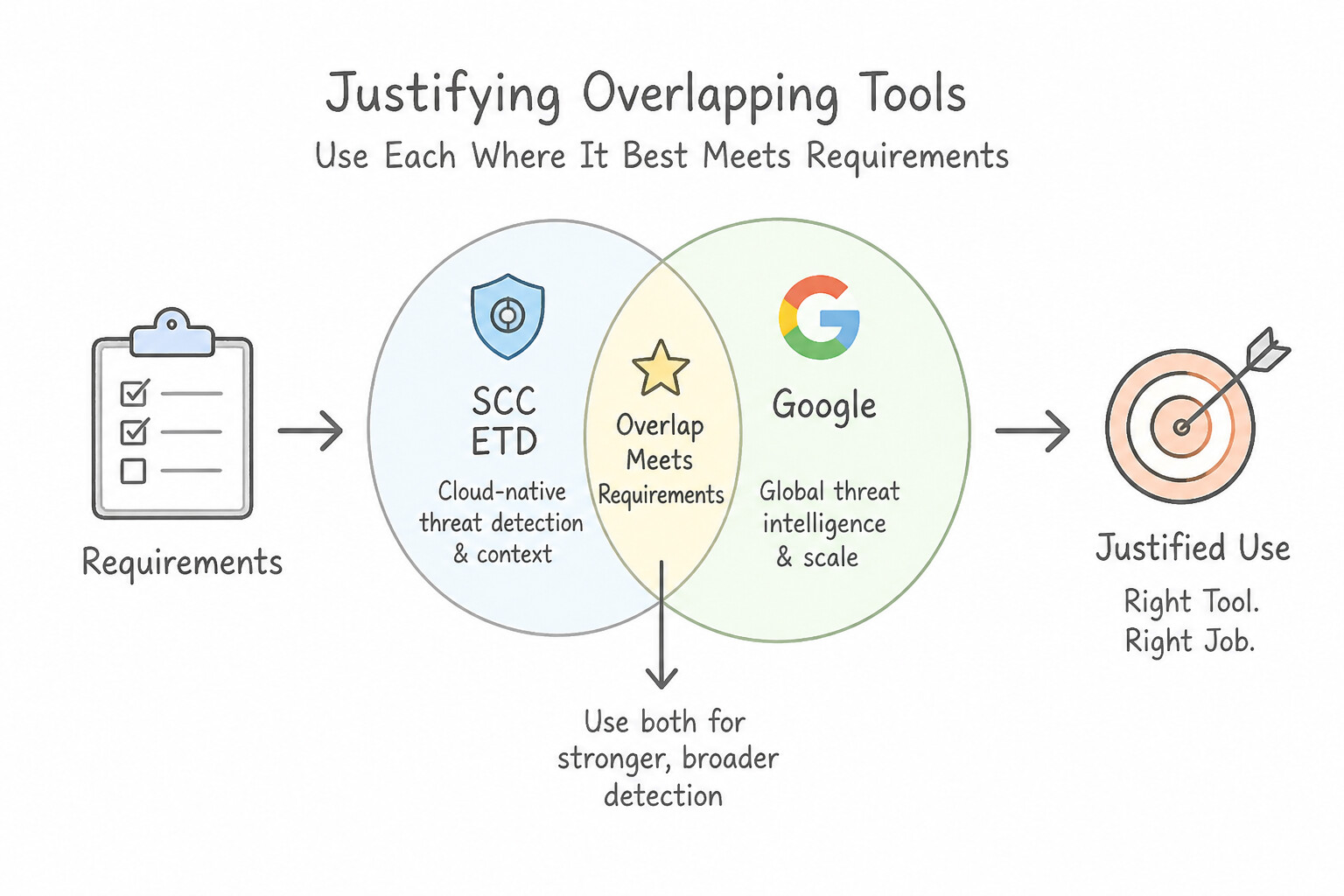
A classic PSOE architectural pattern asks why an architect should retain two tools that appear to overlap rather than decommissioning one. Memorize these four canonical overlap justifications:
- 1.
SCC Event Threat Detection (ETD)vs.Google SecOps SIEM (YARA-L): - Why keep both:
SCC ETDprovides zero-configuration, low-latency streaming detection optimized specifically for Google Cloud control-plane logs (Cloud Audit Logs,GKE,Cloud DNS) and feeds directly into SCC Attack Path Simulations. Google SecOps SIEM correlates those same GCP logs with multi-cloud (AWS/Azure), on-premises (EDR, Active Directory, Firewall) telemetry across a 12-month hot retention window, runs custom multi-event YARA-L rules, and performs historical Retrohunts. - 2.
VPC Flow Logsvs.Cloud IDS: - Why keep both:
VPC Flow Logscapture lightweight Layer-3/Layer-4 connection metadata (src_ip,dest_ip,port,bytes) across every subnet with zero appliance overhead—ideal for volumetric exfiltration and lateral movement baselines.Cloud IDSinspects full mirrored Layer-7 packet payloads (PCAP) to detect application-layer exploit signatures, malware callbacks, and command injection that look like normalTCP/443traffic in Flow Logs. - 3.
Cloud Armor (WAF)vs.Cloud IDS: - Why keep both:
Cloud Armorsits at the global HTTP(S) Load Balancer edge to actively block North–South DDoS, OWASP Top 10 web attacks, and bot traffic inline.Cloud IDSoperates out-of-band via VPC Packet Mirroring to detect both North–South and East–West (internal VM-to-VM) intrusions across all protocols (not just HTTP/S) without adding inline latency. - 4.
Endpoint Detection & Response (EDR)vs.SCC Virtual Machine Threat Detection (VMTD): - Why keep both: Guest OS
EDRagents provide rich process tree telemetry and live host quarantine, but sophisticated kernel rootkits can blind or tamper with an in-guest agent.SCC VMTDscans VM memory from the host hypervisor layer (out-of-band, agentless), catching kernel-mode rootkits and cryptominers even when the guest OS agent is disabled.
Key Implementation Patterns
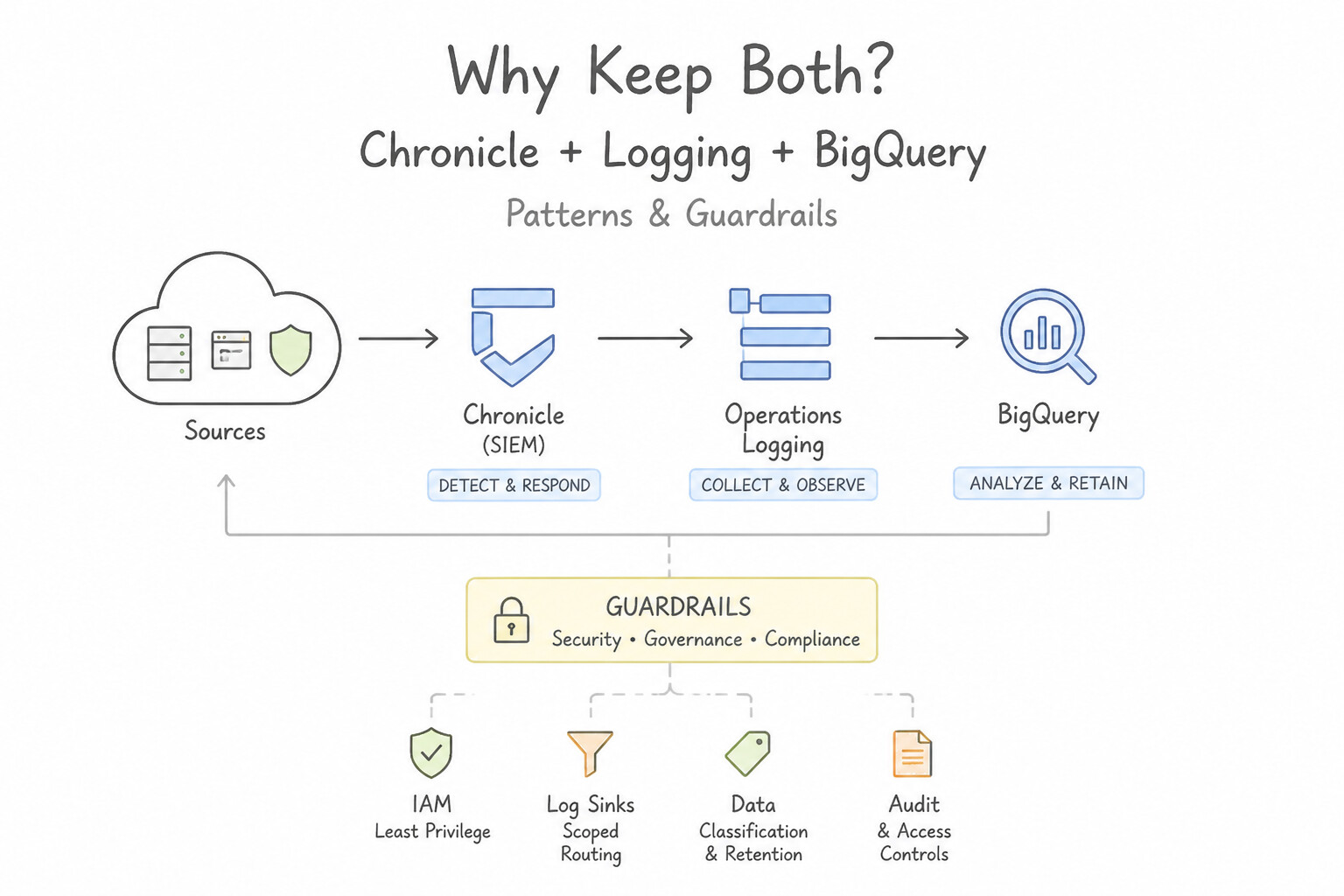
- Log Analysis: Chronicle vs. Cloud Logging: Use Ingest logs into Google Security Operations. Use the Unified Data Model (UDM) for normalization and search. Google Security Operations is purpose-built for security analytics, offering sub-second search on massive datasets and automatic UDM normalization.
- Threat Detection: SCC Event Threat Detection vs. Custom Alerts: Use Enable Security Command Center Premium to utilize Event Threat Detection. SCC Premium includes Event Threat Detection, which automatically detects these threats using managed ML models. (Avoid alternative: Log-based alerts require manual creation and maintenance of specific search queries.)
- Network Visibility: Packet Mirroring vs. VPC Flow Logs: Use Configure Packet Mirroring to mirror traffic to a collector group. Packet Mirroring copies full traffic (including payloads) for inspection, meeting the requirement. (Avoid alternative: VPC Flow Logs only capture metadata (who sent what to whom), not the actual data payload.)
Key Takeaways (1.1c)
- Google Security Operations (Chronicle) is the preferred tool for petabyte-scale threat hunting and security analytics.
- Cloud Logging is ideal for operational troubleshooting and short-term log retention.
- The Unified Data Model (UDM) standardizes data from disparate sources, enabling efficient correlation of Indicators of Compromise (IoCs).
- BigQuery is powerful for general analytics but requires manual schema management compared to Chronicle's automated normalization.
Consideration 1.1d: Evaluating the effectiveness of existing tools to identify gaps in coverage and mitigate potential threats
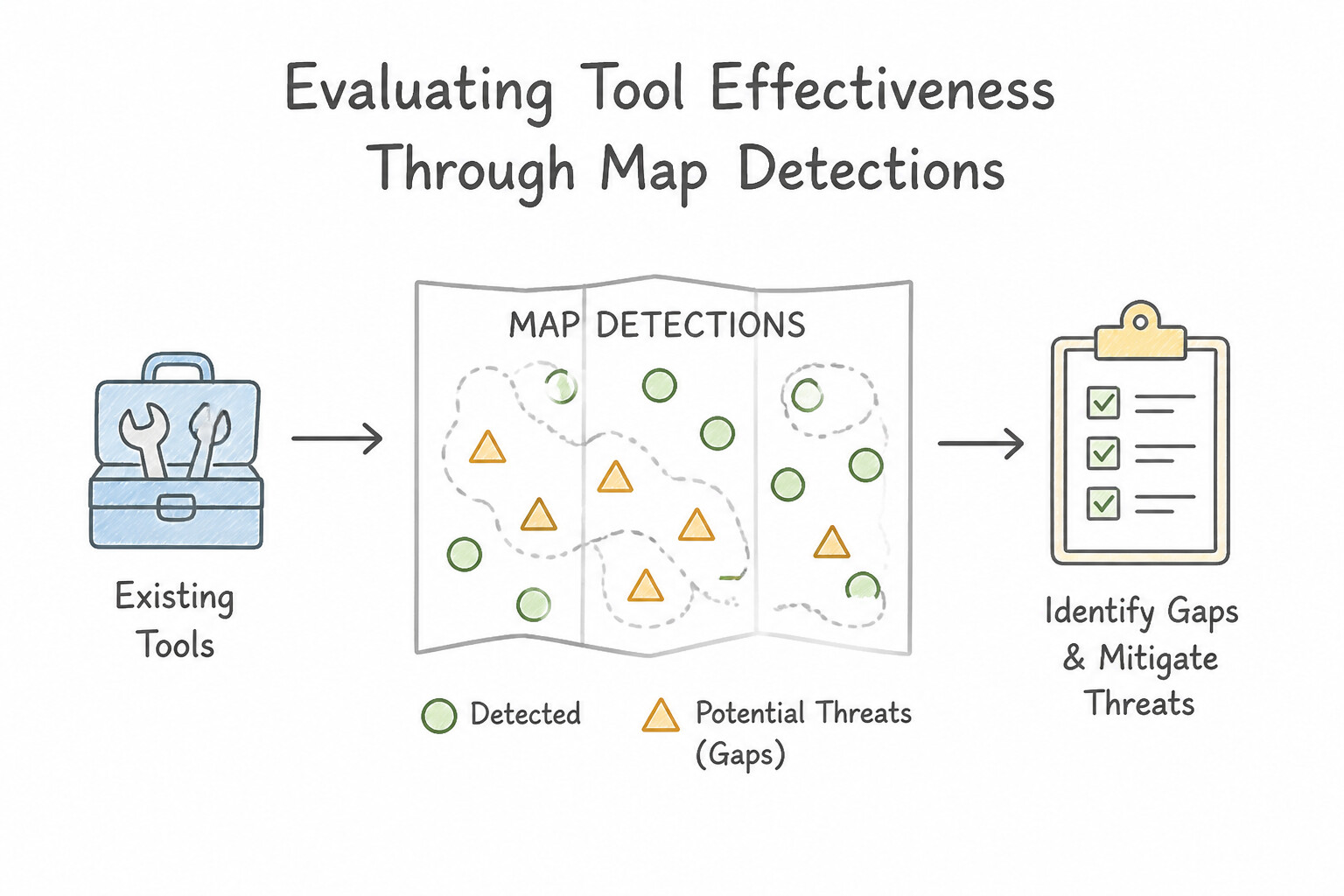
To audit existing security tooling and close detection coverage gaps:
- Map Detections to the
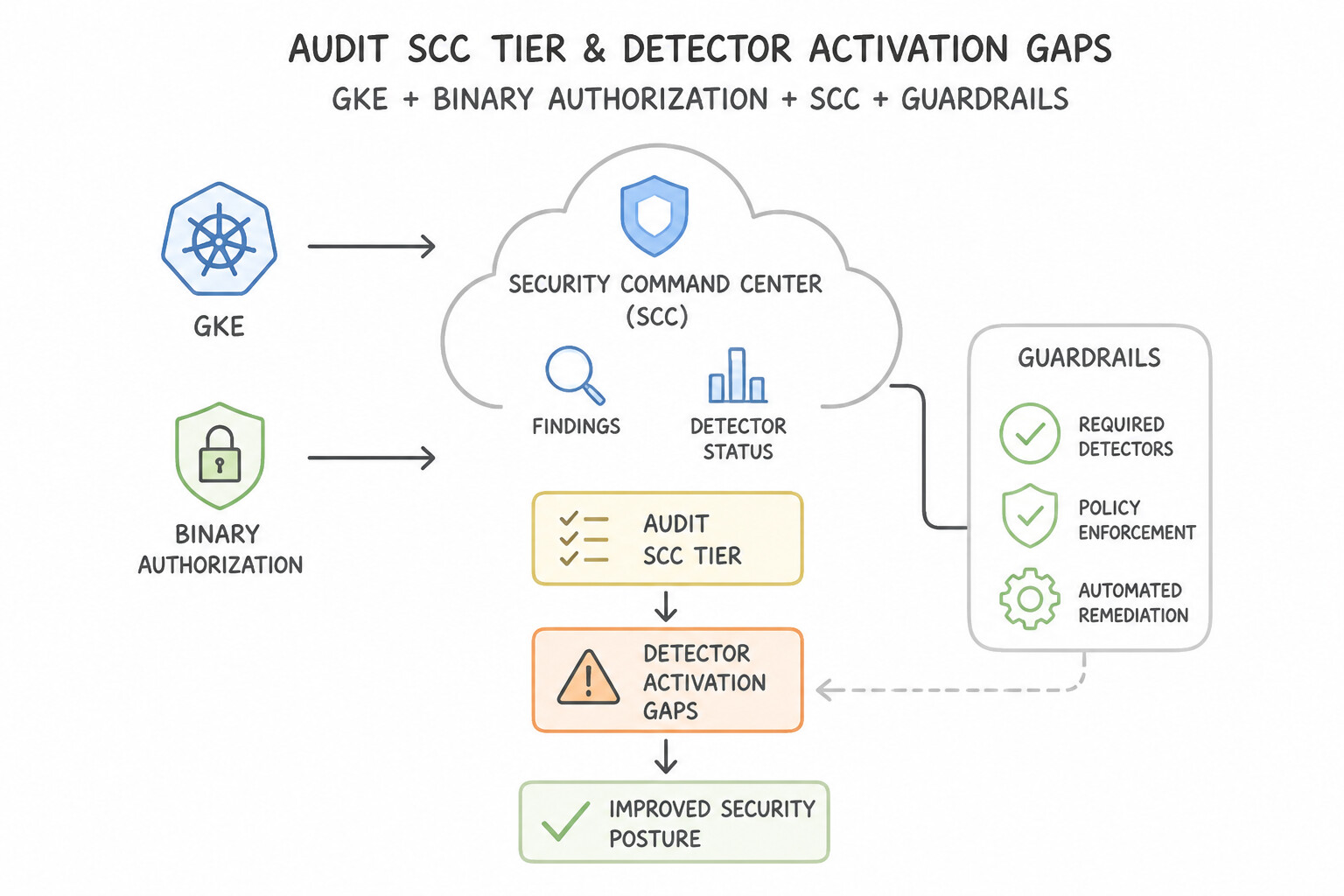
MITRE ATT&CKMatrix: Evaluate existing rules and built-in detectors against adversary tactics (Initial Access, Execution, Persistence, Privilege Escalation, Defense Evasion, Credential Access, Discovery, Lateral Movement, Exfiltration). Use Google SecOps Curated Detections dashboards to see which ATT&CK techniques lack active rules or required log sources. - Audit SCC Tier & Detector Activation Gaps:
- Verify that
VMTD,CTD,ETD,SHA, and Toxic Combinations / Attack Path Simulation are enabled at the Organization level (requiring SCC Premium or SCC Enterprise)—if a project or detector module is disabled, critical runtime threats go unnoticed. - Validate Telemetry Completeness (The "Rule Without Data" Gap):
- A YARA-L rule or Curated Detection that checks
NETWORK_DNSorPROCESS_LAUNCHevents is 0% effective if Cloud DNS logging or EDR process telemetry is not being ingested and parsed into UDM. - Continuous Validation via Attack Simulation & Retrohunt:
- Use safe adversary emulation / purple-team tests and SCC Attack Path Simulation to verify that high-value assets (crown-jewel BigQuery datasets or production GKE clusters) cannot be reached via chained misconfigurations (Toxic Combinations).
Key Implementation Patterns
- Closing Visibility Gaps in Container Runtime: Use Enable Container Threat Detection in the Security Command Center settings. Container Threat Detection provides runtime visibility into GKE containers to detect active threats like reverse shells. (Avoid alternative: Binary Authorization secures the deployment pipeline but does not monitor running containers.)
- Mitigating Layer 7 Threats Bypassing L3/L4 Filters: Use Configure Google Cloud Armor security policies and attach them to the backend service. Google Cloud Armor provides Web Application Firewall (WAF) capabilities to filter Layer 7 traffic and block SQL injection attacks.
- Identifying OWASP Vulnerabilities in Public Apps: Use Configure Web Security Scanner to crawl and test the application. Web Security Scanner actively crawls and tests web applications for vulnerabilities like XSS. (Avoid alternative: VPC Flow Logs monitor network traffic metadata, not application-layer vulnerabilities like XSS.)
Key Takeaways (1.1d)
- Binary Authorization protects deployment integrity but does not monitor runtime.
- Container Threat Detection is required to identify behavioral attacks like reverse shells inside GKE.
- Security must be layered: scan images (static), verify trust (admission), and monitor behavior (runtime).
- VPC Firewall rules filter traffic based on IP, protocol, and port (L3/L4) but do not inspect payload content.
Consideration 1.1e: Evaluating automation and cloud-based tools to enhance existing detection and response processes
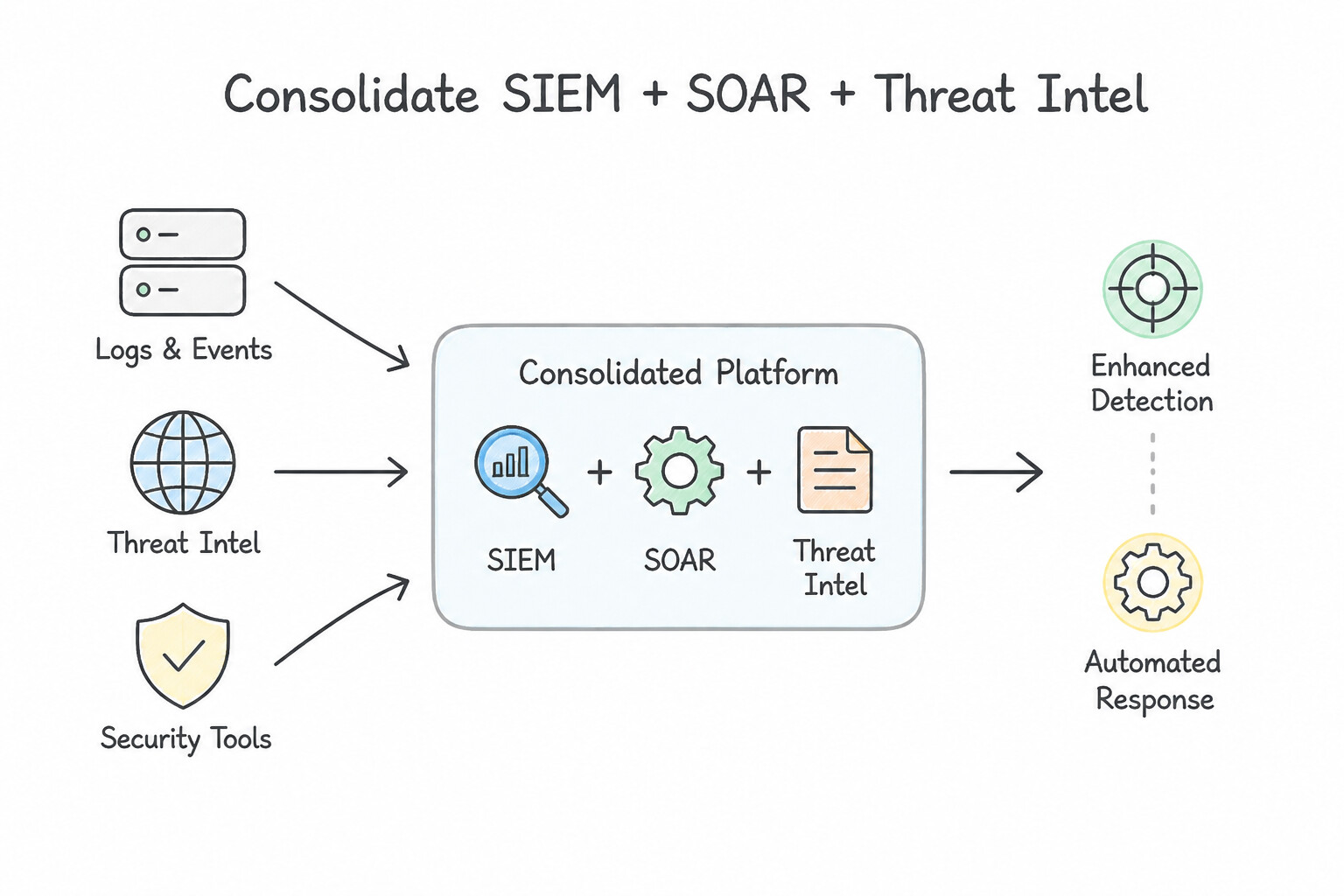
When evaluating how to modernize slow, manual SOC workflows using cloud-based and automated tooling:
- Consolidate SIEM + SOAR + Threat Intel in
Google SecOps( orSCC Enterprise): - Moving from fragmented on-premises log servers and manual spreadsheet triage to Google SecOps eliminates infrastructure patching, scales elastically to petabytes, and couples YARA-L / UEBA detections directly with SOAR playbooks.
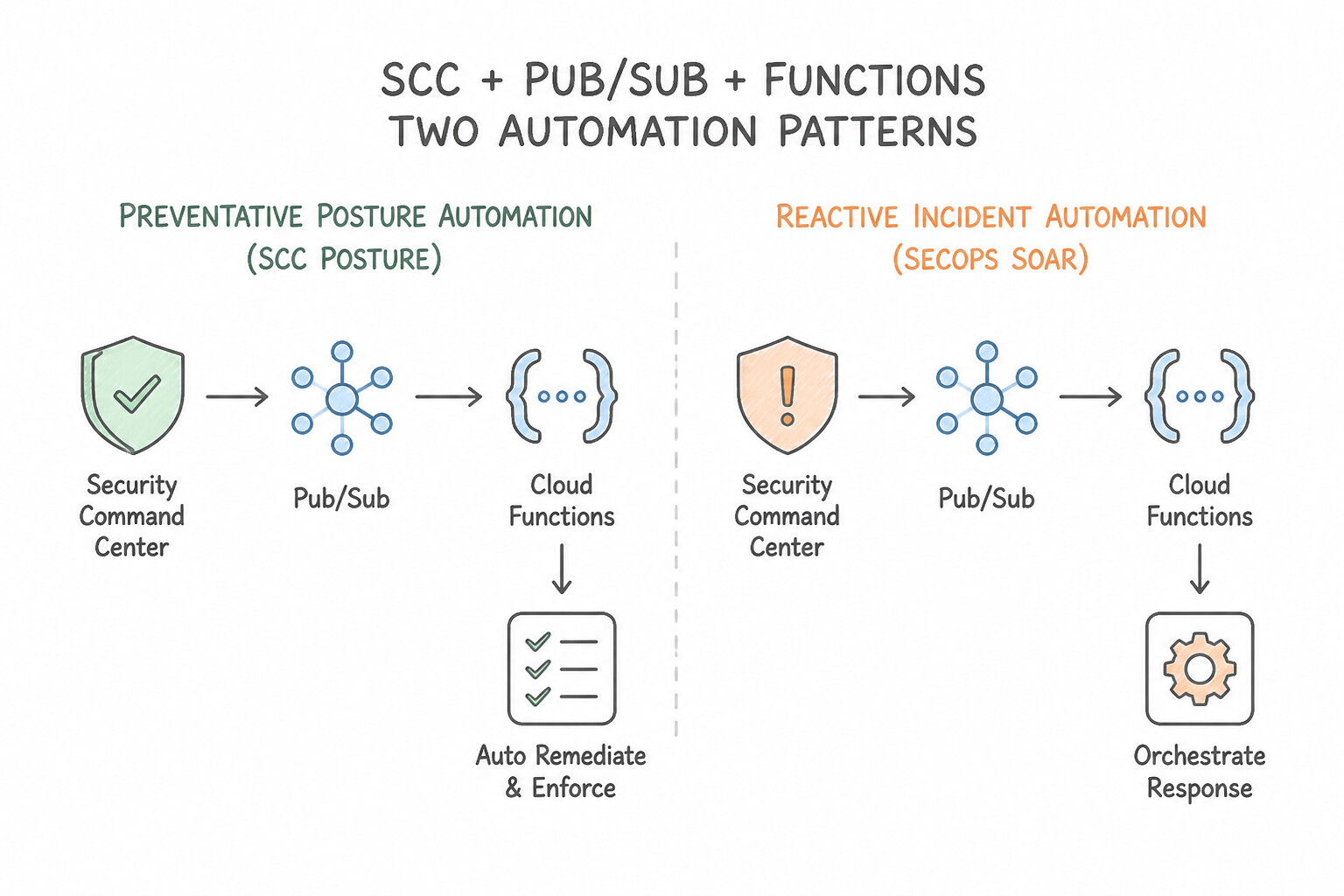
- Distinguish Preventative Posture Automation (
SCC Posture) from Reactive Incident Automation (SecOps SOAR): - Preventative / Drift Remediation: Use SCC Security Posture Service (declarative YAML posture policies deployed at the Organization/Folder level with Organization Policy constraints and SHA custom modules) to prevent and detect configuration drift continuously.
- Event-Driven Serverless Remediation: For simple, deterministic cloud misconfigurations (e.g., revoking
allUserson a newly public Cloud Storage bucket), an SCC Continuous Export → Cloud Pub/Sub → Cloud Run / Cloud Functions pipeline provides sub-second automated remediation. - Multi-Step Orchestrated Incident Response: When response requires multi-tool enrichment (GTI + AD + SIEM pivot), case correlation, conditional branching, and human analyst approval gates, use Google SecOps SOAR Playbooks.
Key Implementation Patterns
- Automating Storage Bucket Remediation: Use Configure Security Command Center to export findings to a Pub/Sub topic. Create a Cloud Function triggered by the topic to remove the "allUsers" IAM member from the bucket. Use SCC exports to Pub/Sub to trigger a Cloud Function for immediate, event-driven remediation.
- Automated Compromised Instance Isolation: Use Configure an automation to add a specific network tag to the VM that matches a deny-all egress firewall rule. Network tags allow you to isolate a running VM immediately using firewall rules without destroying volatile memory.
- Reducing Alert Fatigue with SOAR: Use Implement a Chronicle SOAR playbook to parse email headers, enrich indicators with threat intelligence, and auto-close false positives. Chronicle SOAR playbooks automate workflows like parsing, enrichment, and filtering to reduce alert fatigue.
Key Takeaways (1.1e)
- Event-driven architectures are preferred over polling for real-time security response.
- Security Command Center findings can be exported to Pub/Sub for downstream automation.
- Cloud Functions provide a serverless way to run remediation scripts in response to events.
- Preserve Volatile Memory: Never stop or reboot a compromised instance if you intend to perform forensics; this destroys RAM.
Quick Decision Cheat Sheet (Subsection 1.1)
If the Scenario Requires... | Choose This Google Cloud Pattern | Avoid This Common Mistake |
|---|---|---|
"Agentless detection of cryptocurrency mining or kernel rootkits in VM memory" | Enable SCC Virtual Machine Threat Detection ( VMTD) in SCC Premium/Enterprise | Installing third-party guest antivirus or relying solely on VPC Flow Logs |
"Prioritize highest-value, lowest-cost logs for IAM privilege escalation and config changes" | Prioritize Cloud Audit Logs ( Admin Activity) + IdP authentication logs | Enabling Data Access ( DATA_READ) across the entire organization or full PCAP everywhere |
"Justify keeping both SCC Event Threat Detection ( ETD) and Google SecOps SIEM" | Defense-in-Depth: ETD gives real-time GCP-native streaming alerts & attack paths; SecOps correlates multi-cloud/on-prem logs over 12 months with custom YARA-L & Retrohunt | Decommissioning ETD because SecOps also ingests Cloud Audit Logs |
"Justify keeping both VPC Flow Logs and Cloud IDS" | VPC Flow Logs provide ubiquitous L3/L4 flow metadata for traffic baselining; Cloud IDS performs deep L7 payload signature inspection via Packet Mirroring | Using VPC Flow Logs to inspect HTTP POST payloads or disabling Flow Logs once Cloud IDS is deployed |
"Stream GCP logs and SCC findings to a downstream third-party SIEM/ticketing system at scale" | Organization-level Log Router Sink / SCC Continuous Export → Cloud Pub/Sub | Per-project manual exports or cron scripts polling Cloud Logging APIs |
Further Reading (Subsection 1.1)
- Cloud IDS Overview — Describes Cloud IDS capabilities, including deep packet inspection for malware and C2 detection using Palo Alto Networks technologies.
- Packet Mirroring concepts — Explains how Packet Mirroring copies traffic from instances for inspection by security solutions like Cloud IDS.
- Google Security Operations (Chronicle) Overview — Describes how Google Security Operations ingests, normalizes, and indexes security telemetry to enable instant search across petabytes of data.
- Investigate threats with Google Security Operations — A blog post detailing the investigative workflow, highlighting the speed of search and the ability to pivot on IOCs like IP addresses.
- Receive finding notifications — This guide explains how to set up finding notifications using Pub/Sub to stream findings to external systems.
- Send Security Command Center data to Splunk — A reference architecture specifically detailing the SCC to Splunk integration via Pub/Sub.
Subsection 1.2: Configuring Access
The Big Picture
A Security Operations Center (SOC) holds the "keys to the kingdom": its SIEM ingests confidential raw logs from every business unit, its posture platform (SCC) maps every exploitable vulnerability across the cloud estate, and its automation engine (SecOps SOAR) holds credentials capable of isolating production servers and disabling user accounts. When access to these security tools is configured naively, organizations fall into three high-risk traps:
- The Over-Privileged Analyst & Flat Data Access Trap (
1.2b,1.2c): Granting every Tier 1 contractor or regional SOC analystroles/chronicle.adminorroles/chronicle.editorallows them to modify production YARA-L detection rules and query sensitive HR/payroll raw logs outside their regional jurisdiction. Production Google SecOps architectures separate Feature Authorization (via predefined Cloud IAM roles likeroles/chronicle.viewer,roles/chronicle.Editor,roles/chronicle.limitedViewer) from Data Authorization (using SecOps Data RBAC scoped by labels/namespaces/log types and SOAR Environments to isolate multi-tenant or regional cases). - The Static JSON Key & Unbounded Automation Credential Trap (
1.2a,1.2e): Exporting long-lived Service Account JSON keys (private_key_id) to authenticate on-premises log forwarders, CI/CD detection-as-code pipelines, or SOAR integrations creates an unrotated credential that attackers actively harvest. Modern Google Cloud security operations mandate Workforce Identity Federation for human analysts (authenticating via Okta/Entra ID SAML/OIDC without syncing passwords to Google) and Workload Identity Federation (or short-lived OAuth/OIDC tokens with Service Account impersonation) for automated pipelines. - The Unaudited Auditor Trap (1.2d): If a rogue insider or compromised SOAR service account modifies a detection rule, deletes a reference list, or queries sensitive executive logs in Google SecOps or SCC, how does the security team detect it? Teams that fail to enable and monitor Cloud Audit Logs (
Admin Activity+Data Access) for the security tooling project itself have zero visibility into who watched the watchers.
Consideration 1.2a: Configuring user and service account authentication to security tools (e.g., SCC, Google SecOps)
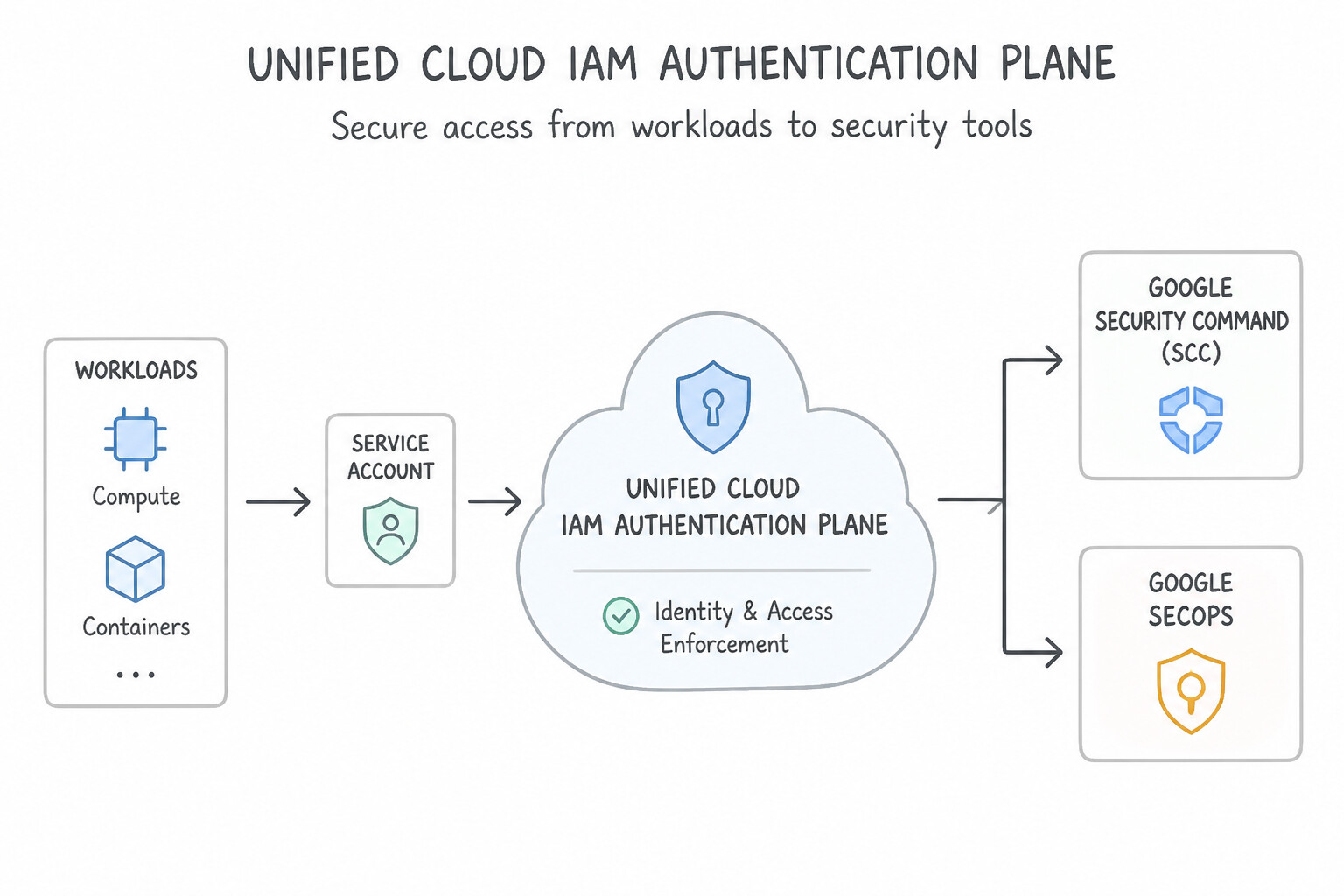
When configuring authentication to Google SecOps (SIEM & SOAR) and Security Command Center (SCC):
- Unified Cloud IAM Authentication Plane: Modern Google SecOps instances are bound to a Google Cloud project and use Google Cloud IAM paired with either Cloud Identity / Google Workspace (with SSO to an enterprise IdP) or Workforce Identity Federation (direct third-party IdP login without creating
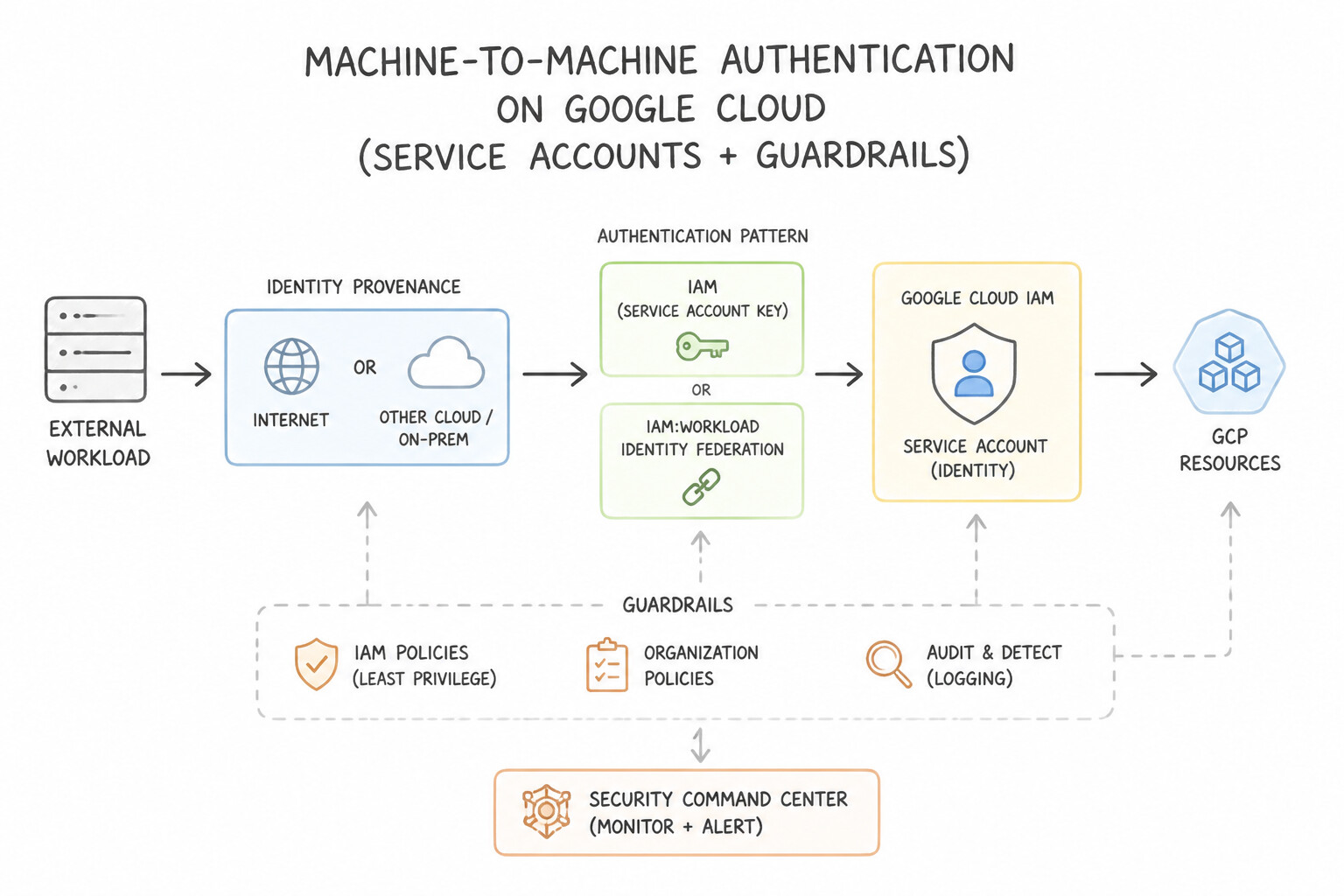
Cloud Identityuser accounts). - Machine-to-Machine Authentication (
Service Accounts): - Workloads running inside Google Cloud (e.g., a Cloud Run function triggering an SCC remediation or querying the SecOps API) must authenticate using their attached Service Account via the local metadata server—never via embedded JSON keys.
- Workloads running outside Google Cloud (e.g., AWS/Azure connectors or GitHub Actions detection-as-code pipelines) should authenticate via Workload Identity Federation exchanging external OIDC/STS tokens for short-lived Google Cloud access tokens.
Key Implementation Patterns
- Automating SCC Finding Exports via Service Accounts: Use Grant the Security Center Notification Config Editor (
roles/securitycenter.notificationConfigEditor) role to the service account. This role provides the exact permissions needed to manage notification configurations without granting broader access. - Workload Identity Federation for Hybrid SIEM: Use Configure Workload Identity Federation. Create a Workload Identity Pool and Provider to exchange external credentials for short-lived Google access tokens. Workload Identity Federation enables keyless authentication for external workloads by exchanging external credentials for short-lived Google tokens.
- Google SecOps (Chronicle) IdP Integration: Use Configure a SAML 2.0 application in Azure AD and provide the Identity Provider metadata to Google SecOps. SAML 2.0 is the standard protocol for federating identity between an IdP (Azure AD) and an SP (Google SecOps). (Avoid alternative: Manual user creation does not enable SSO and creates management overhead.)
Key Takeaways (1.2a)
- Least Privilege: Always assign the most restrictive role that still allows the required action.
- Specific Roles: Google Cloud often provides granular roles (like
notificationConfigEditor) for specific sub-tasks within a product.- Automation Security: Service accounts used in CI/CD should have strictly scoped permissions to limit blast radius if compromised.
- Avoid using long-lived Service Account keys (JSON files) whenever possible to reduce credential theft risks.
Consideration 1.2b: Configuring user and service account authorization for feature access using IAM roles and permissions
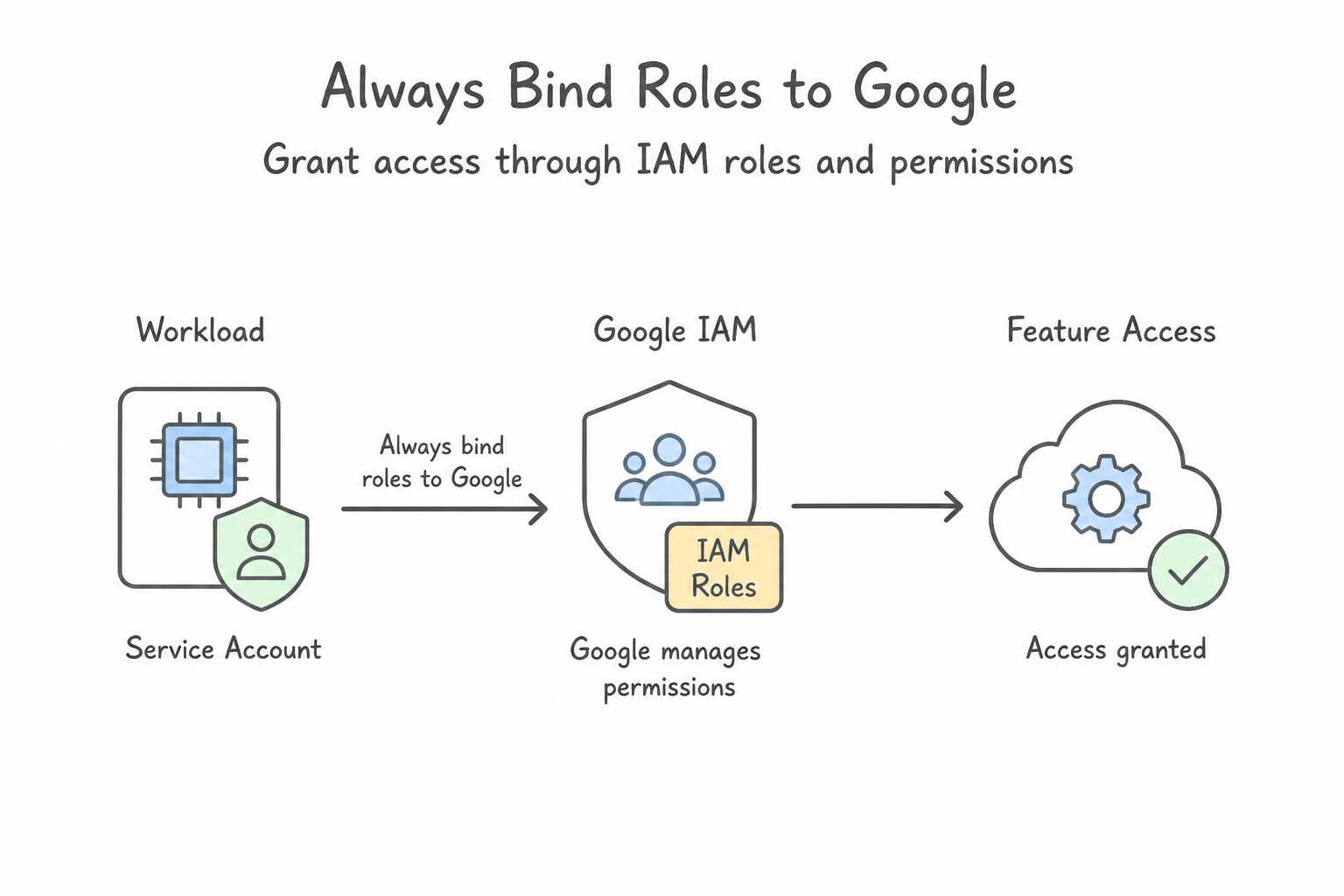
Match every SOC persona to the exact predefined IAM role with the minimum required feature permissions:
- Google SecOps Predefined IAM Roles (
roles/chronicle.*): roles/chronicle.admin(Chronicle API Admin): Full administrative control over SecOps configuration, Data RBAC, parser management, and RBAC settings.roles/chronicle.editor(Chronicle API Editor): For Detection Engineers / Threat Hunters who need to create, modify, enable, and retrohunt YARA-L detection rules, manage reference lists, and configure feeds.roles/chronicle.viewer(Chronicle API Viewer): For Tier 1 / Tier 2 SOC Analysts who need read-only access to UDM Search, alerts, rules, Entity Graph, and raw log views without modifying detection rules or parsers.roles/chronicle.limitedViewer(Chronicle API Limited Viewer): Restricted read-only access that hides sensitive features such as unparsed raw log inspection unless explicitly granted.roles/chronicle.serviceAgent/ Ingestion Roles: Used strictly by ingestion pipelines and forwarders to write telemetry without read access to the SIEM.- Security Command Center (SCC) Predefined IAM Roles (
roles/securitycenter.*): roles/securitycenter.adminViewer: Read-only visibility into all SCC findings, assets, and posture across the Organization/Folder/Project.roles/securitycenter.findingsEditor/findingsStateSetter: Allows SOC analysts or automated SOAR playbooks to update finding state (ACTIVE→INACTIVE) or mute findings without modifying global SCC detector settings.roles/securitycenter.admin: Full administrative control over SCC settings, detector modules, and continuous exports.- Always Bind Roles to Google Groups (Never Individual Users): Assign IAM roles to IdP-synchronized Google Groups (e.g.,
gcp-soc-tier1@corp.com,gcp-detection-engineers@corp.com) so onboarding/offboarding happens automatically via IdP group membership.
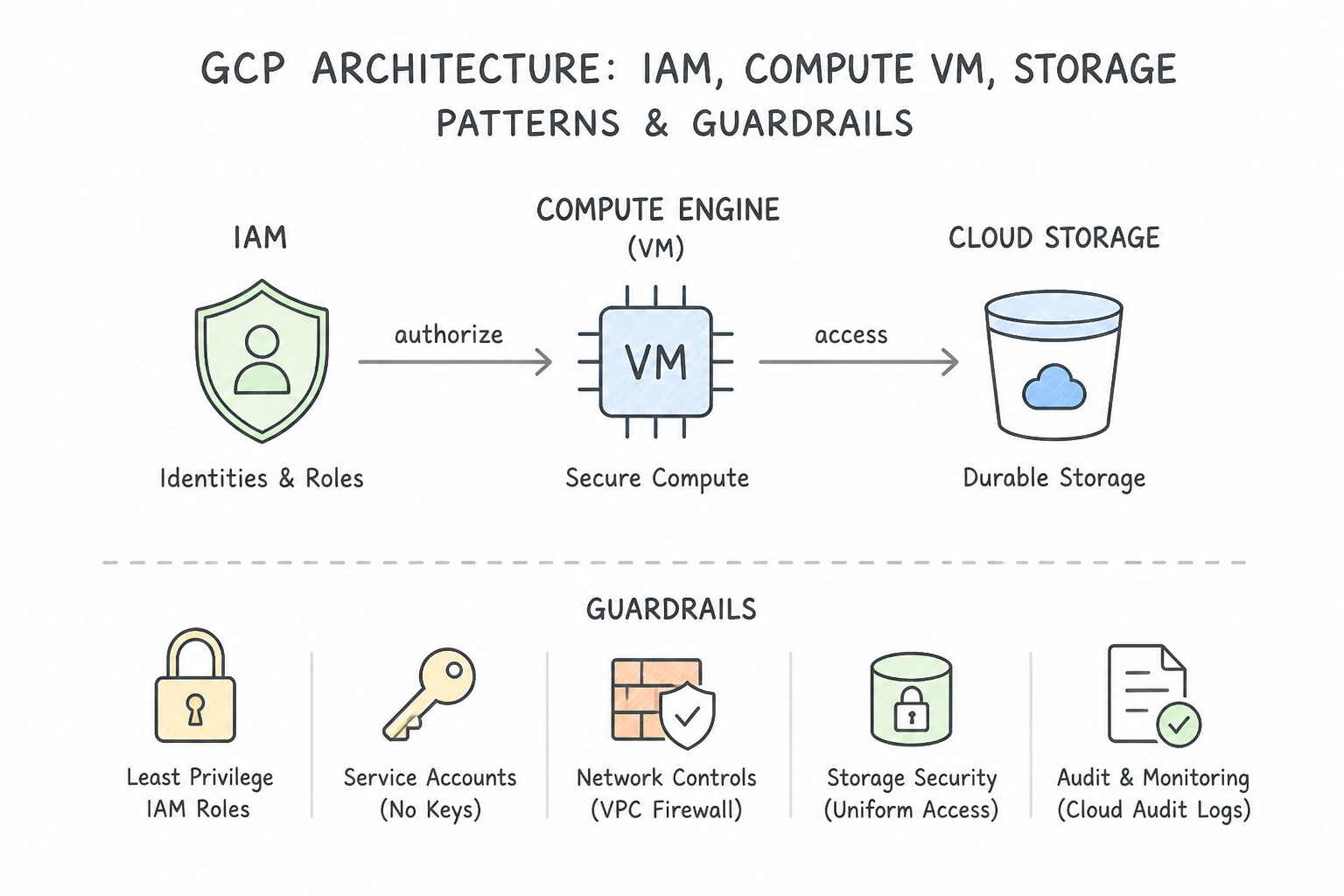
Key Implementation Patterns
- Granular Permissions with Custom Roles: Use Create a custom role with compute.instances.start, compute.instances.stop, and compute.instances.get permissions, and assign it to the team. Custom roles allow you to select specific permissions (start/stop) without including delete access.
- Temporal Access with IAM Conditions: Use Grant the auditor the Storage Object Viewer role. Add a condition to the IAM policy binding that specifies an expiration date and time. IAM Conditions allow you to set an automatic expiration timestamp on a specific role binding.
- Secure Local Development with Service Account Impersonation: Use Grant the developers the Service Account Token Creator role on the service account. Instruct them to use the --impersonate-service-account flag with their gcloud commands. Impersonation uses short-lived tokens instead of keys; the Service Account Token Creator role is required to generate these tokens.
Key Takeaways (1.2b)
- Use Predefined roles when they fit the job function and security requirements.
- Use Custom roles when Predefined roles are too broad or violate least-privilege principles.
- Avoid Basic roles (Editor/Owner) for specific operational teams.
- Permissions are granular strings (e.g., service.resource.verb) that make up roles.
Consideration 1.2c: Configuring user and service account authorization for data access using IAM roles and permissions
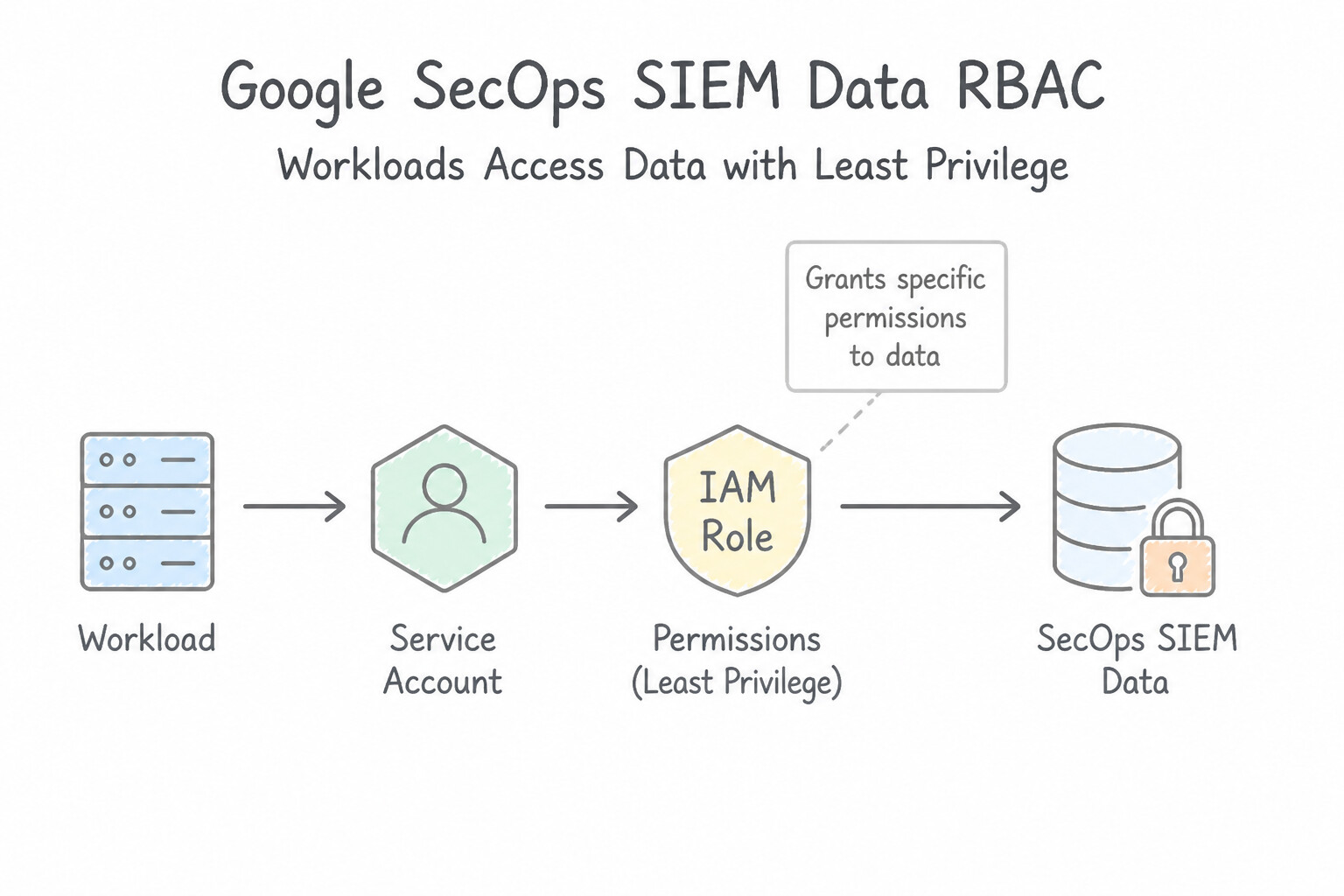
Feature roles (viewer vs. editor) control what actions a user can take in the UI, but Data Authorization controls which rows, logs, and cases they are allowed to see:
- Google SecOps SIEM
Data RBAC(Scope-Based Access Control): - When regional privacy laws (e.g., GDPR in EU vs. US) or internal confidentiality rules (e.g., restricting HR/Finance or PCI logs) require row-level isolation inside a single SecOps tenant, configure Data RBAC scopes based on Namespaces, Log Types (
log_type), or Ingestion Labels. - Bind analysts' IAM principals/groups to specific Data Access Scopes so an EU Tier 1 analyst running a UDM search only retrieves events tagged with the
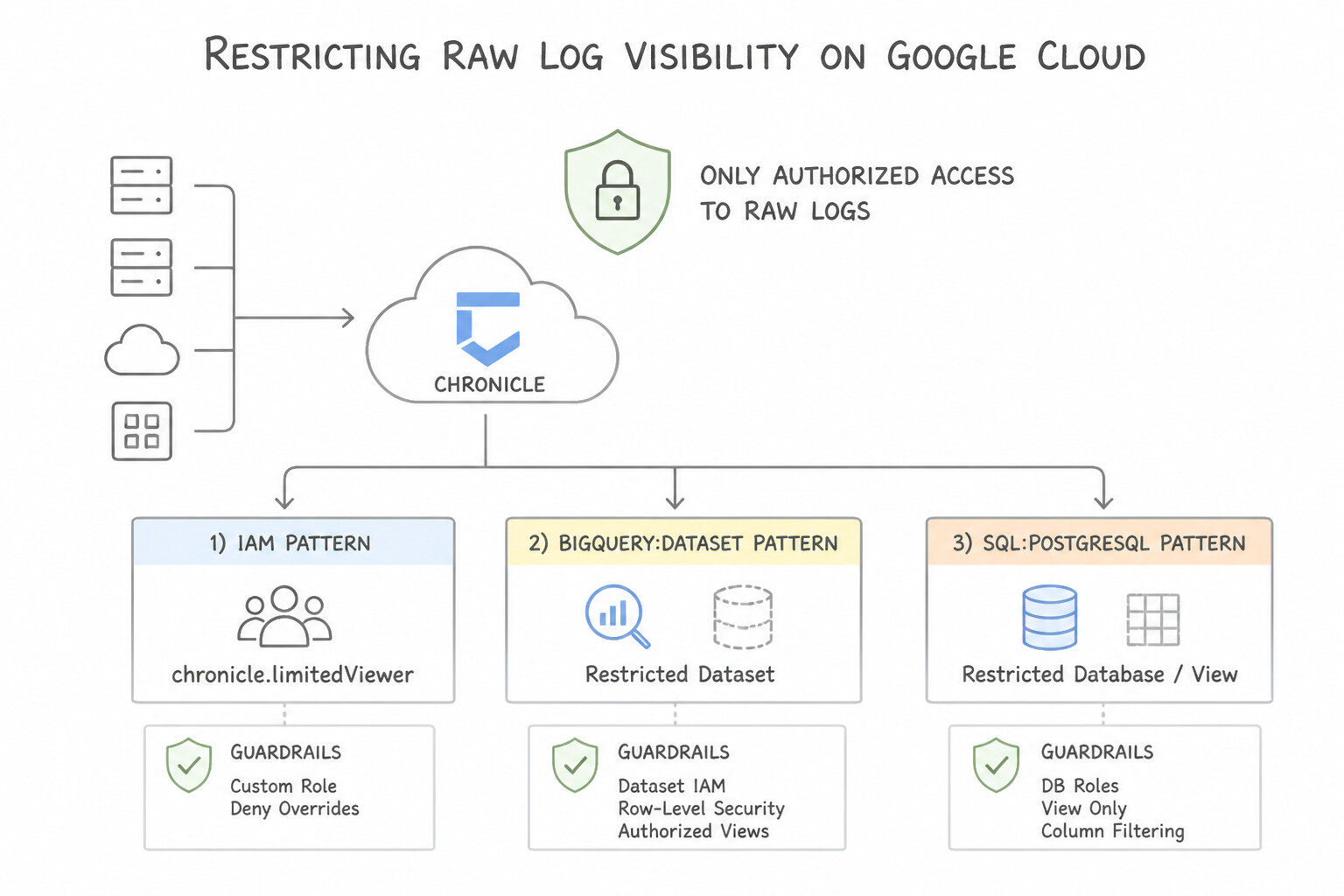
EUscope, while a Global Threat Hunter bound to theAll Datascope sees telemetry across all regions. - Restricting Raw Log Visibility (
chronicle.limitedViewer): - Raw unnormalized logs often contain unredacted PII or credentials that were stripped during UDM normalization. Assign
roles/chronicle.limitedViewerto contractors or Tier 1 analysts who need to triage UDM fields and alerts without viewing raw log strings. - Google SecOps SOAR
Environments: - In SOAR (especially for MSSPs or multi-subsidiary enterprises), partition incoming alerts and cases into logical SOAR Environments (e.g.,
Env-Retail,Env-FinTech). Grant analysts permission only to their assigned SOAR Environment(s), while sharing standardized playbooks across environments via theDefault/All Environmentsscope or Master Organization remote playbooks.
Key Implementation Patterns
- Granular BigQuery Dataset Access: Use Grant the BigQuery Data Viewer role to the Finance team on the "quarterly_reports" dataset. Applying the role directly to the specific dataset limits access scope to that resource only. (Avoid alternative: Project-level roles apply to all resources in the project, exposing the restricted dataset.)
- Cloud SQL IAM Database Authentication: Use Enable Cloud IAM authentication on the Cloud SQL instance. Grant the VM's service account the Cloud SQL Instance User role. Create a database user using the service account email address. IAM database authentication uses OAuth2 tokens instead of passwords; you must enable it, grant the Instance User role, and add the service account as a database user.
Key Takeaways (1.2c)
- IAM roles inherit downwards; Project-level roles affect all resources in the project.
- Use resource-level permissions (like Dataset-level IAM) for granular access control.
- Avoid Basic roles (Viewer/Editor/Owner) in production when granular Predefined roles are available.
- Cloud SQL IAM database authentication eliminates the need for stored database passwords.
Consideration 1.2d: Configuring and analyzing audit logs (e.g., Cloud Audit Logs, data access logs) for the solution
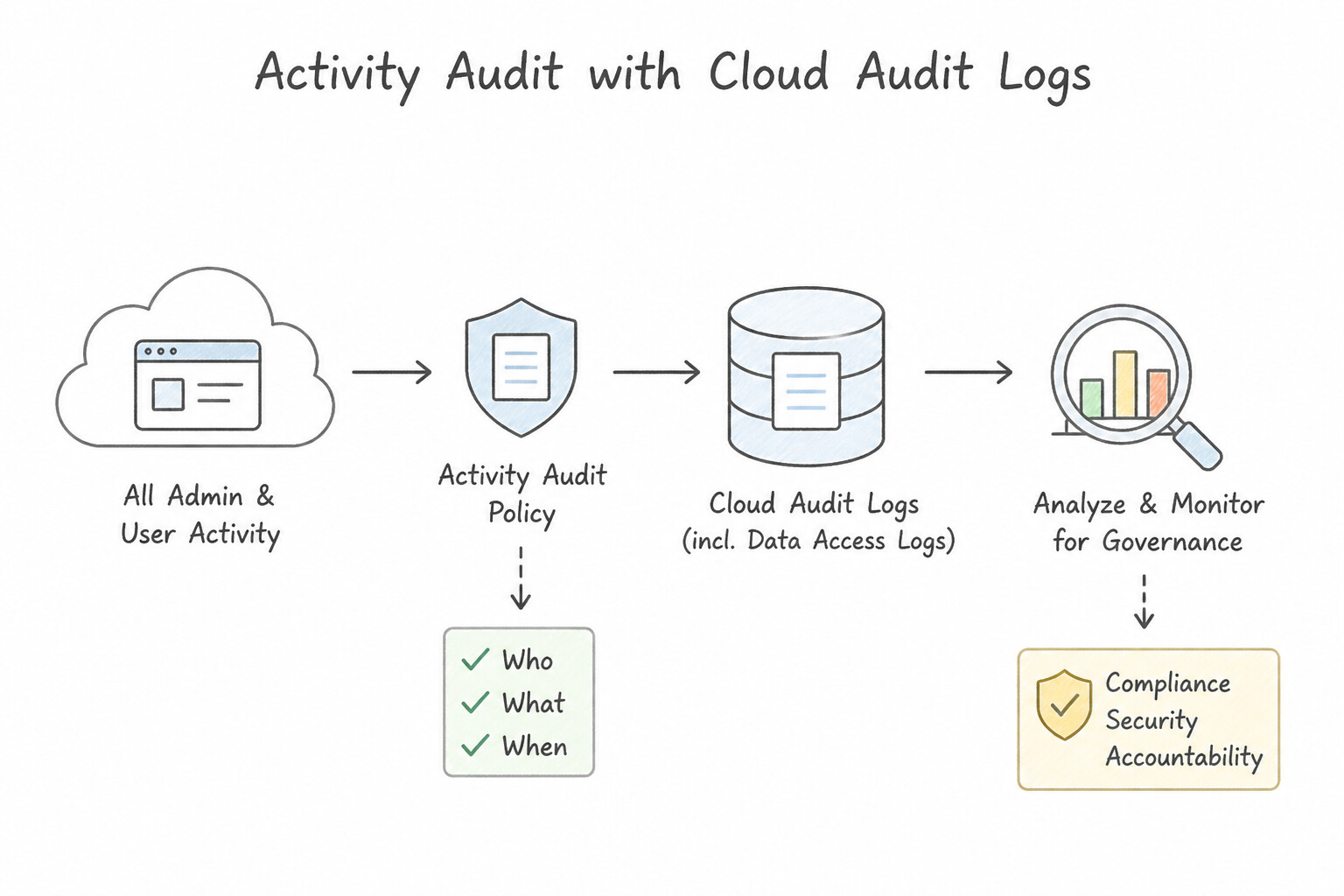
To maintain a tamper-evident audit trail of the security platform itself:
- Admin Activity Audit Logs (Always On): Automatically records administrative mutations across SCC and Google SecOps—such as creating/modifying YARA-L rules, updating parser extensions, changing IAM bindings (
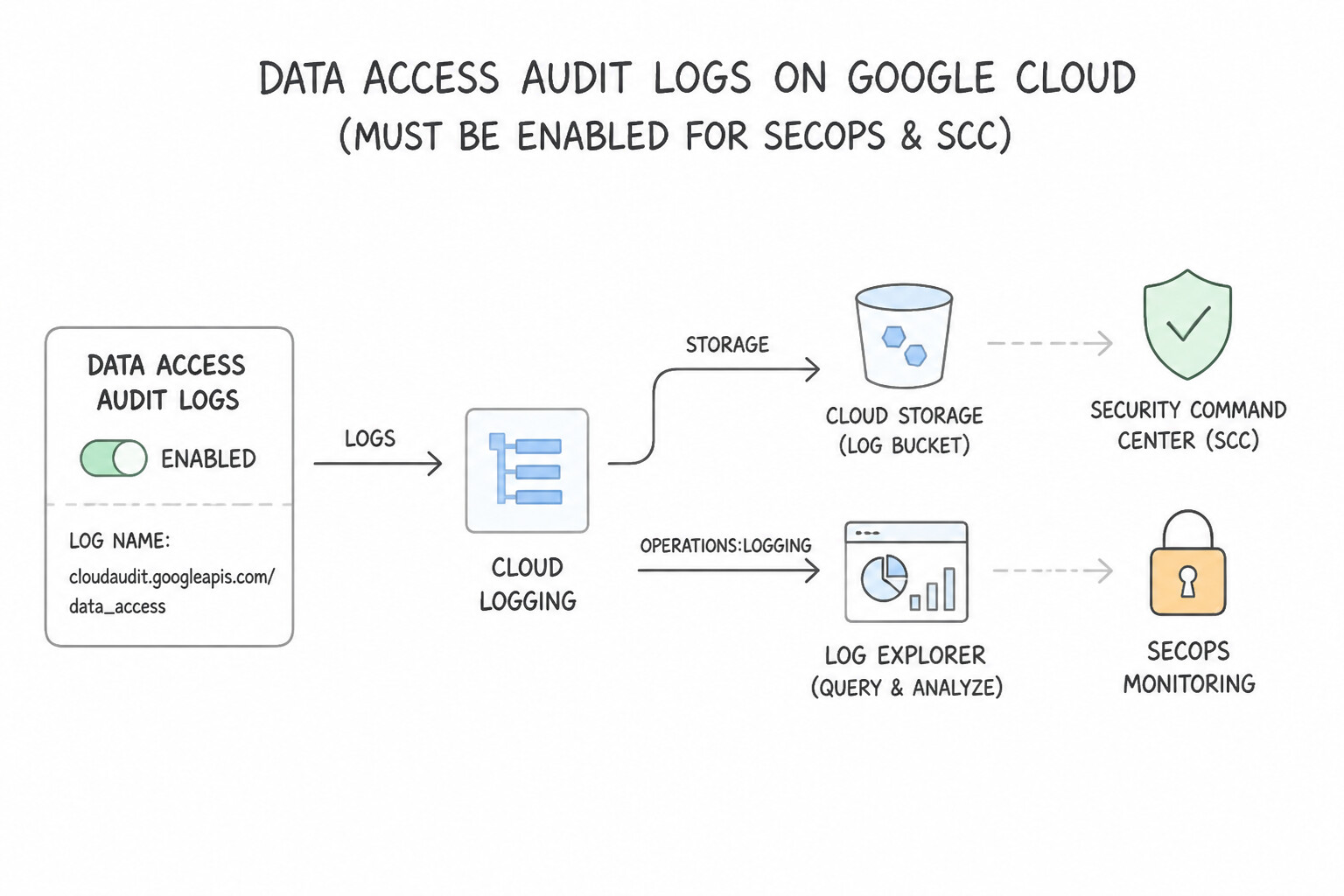
SetIamPolicy), or modifying SCC continuous exports. - Data Access Audit Logs (Must Be Explicitly Enabled for SecOps & SCC):
- By default,
Data Accesslogs (ADMIN_READ,DATA_READ,DATA_WRITE) are disabled for most services to control volume. - To audit who queried what UDM events in Google SecOps, who viewed a sensitive case, or who read SCC findings, explicitly enable
Data Accessaudit logs (ADMIN_READ,DATA_READ,DATA_WRITE) forchronicle.googleapis.comandsecuritycenter.googleapis.comin the Cloud Console IAM Audit Logs configuration. - Protecting Audit Log Integrity: Route the security project's Cloud Audit Logs to a locked Cloud Logging Bucket (with Bucket Lock / Retention Policy enabled) or an isolated Compliance Project protected by VPC Service Controls, ensuring that even a compromised project admin cannot delete the audit trail of their actions.
Key Implementation Patterns
- Enabling Data Access Logging for Compliance: Use Navigate to the IAM & Admin Audit Logs page and enable Data Access logs with the Data Read log type for the Cloud Storage API. Data Access logs for Cloud Storage are disabled by default; you must enable 'Data Read' logs to audit object retrieval.
- Filtering Noisy Logs to Reduce Costs: Use Edit the _Default log sink in the Log Router to add an exclusion filter for the service account's email. Exclusion filters in the Log Router allow you to discard specific logs based on the principal (user or service account) to save costs.
- Centralized Organization-Level Log Aggregation: Use Create an aggregated sink at the Organization level with
includeChildrenset to true that exports logs to a Cloud Storage bucket in the logging project. An aggregated sink at the Organization level captures logs from all current and future projects automatically.
Key Takeaways (1.2d)
- Admin Activity logs are on by default and track config changes.
- Data Access logs track data reads/writes and are off by default for most services.
- You must explicitly enable Data Access logs to audit who is reading your data.
- Data Access logs can be voluminous and expensive; monitor them closely.
Consideration 1.2e: Configuring API access for automations within security tools (e.g., service accounts, API keys, SCC, Google SecOps, GTI)
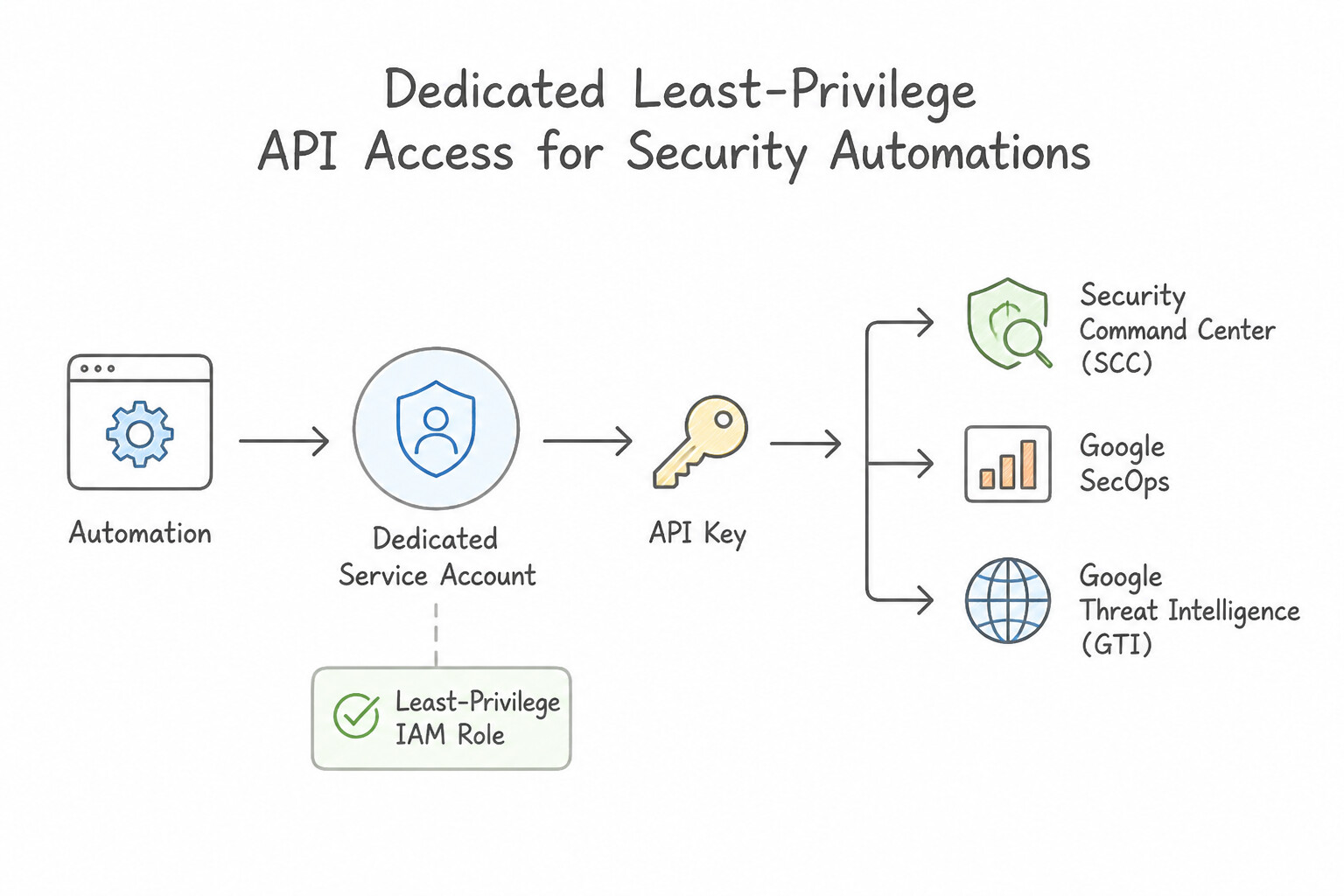
Security Operations relies heavily on programmatic APIs (chronicle.googleapis.com, securitycenter.googleapis.com, GTI / VirusTotal Enterprise API):
- Dedicated Least-Privilege Service Accounts per Automation Function:
- Never share a single "uber-automation" Service Account across log forwarders, CI/CD rule deployment, and SOAR remediation playbooks.
- Create purpose-specific Service Accounts:
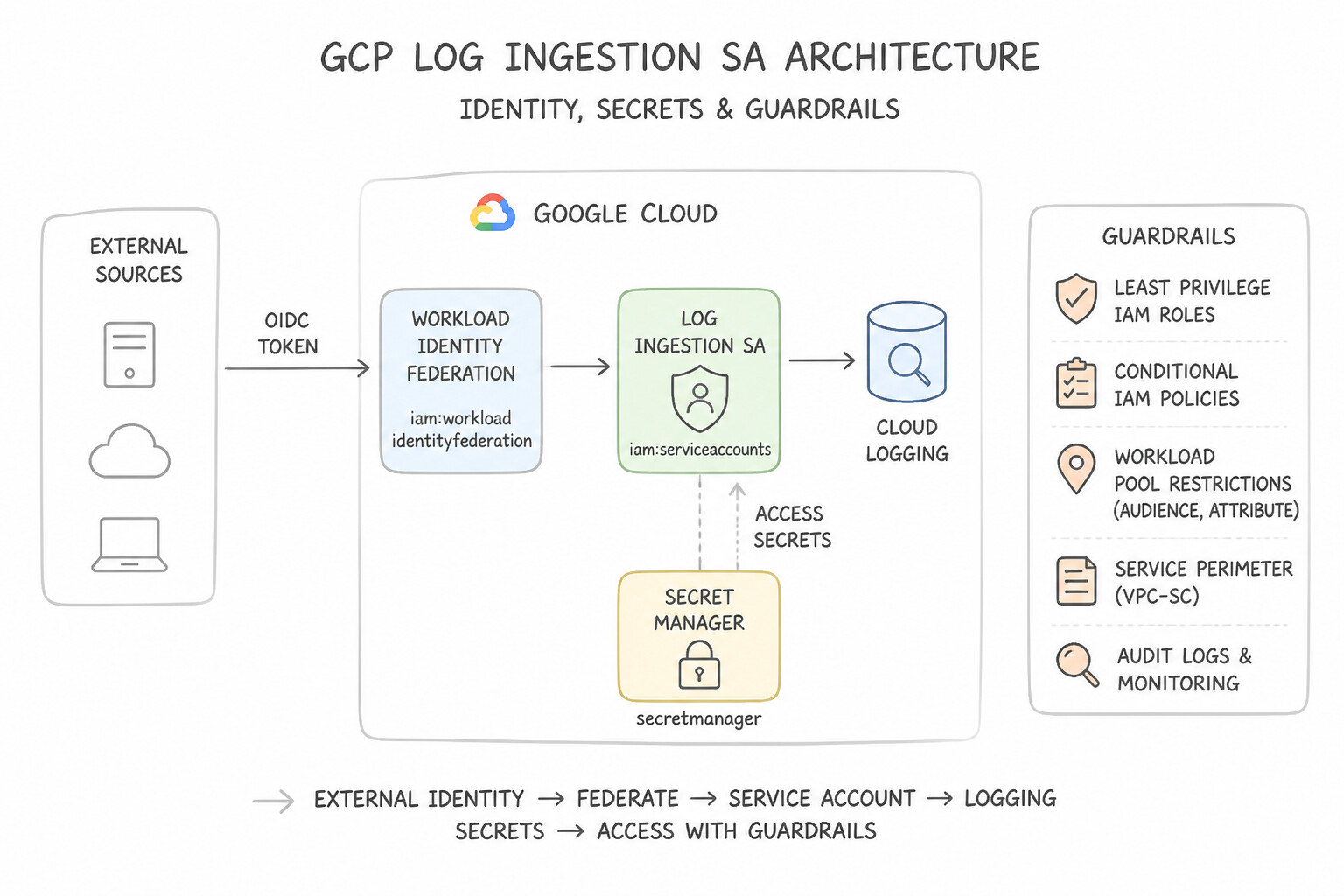
- Log Ingestion SA: Granted only write/ingestion permissions (
roles/chronicle.forwarderor feed ingestion scope) with zero read/search permissions. - Detection-as-Code CI/CD SA: Granted permissions to validate and deploy YARA-L rules and reference lists via the SecOps Detection Engine API, authenticated via Workload Identity Federation from GitHub/GitLab.
- SOAR Remediation SA: Granted granular target permissions (e.g., custom IAM role allowing only
compute.instances.setTags,compute.disks.createSnapshot, andiam.serviceAccounts.disable) rather thanroles/ownerorroles/editor. - Managing Third-Party API Keys (
GTI, External Threat Feeds, EDR): - When a third-party integration or GTI lookup requires an API key, never hardcode the key in playbook parameters or Python script text. Store the API key in Google Cloud Secret Manager (with automatic rotation and
secretmanager.secretAccessorIAM scoping) or within the encrypted credential store of the Google SecOps SOAR Marketplace Integration.
Key Implementation Patterns
- Secure Authentication for On-Premises SOAR Integration: Use Configure Workload Identity Federation to exchange the SOAR platform's external credentials for short-lived Google Cloud access tokens. Workload Identity Federation allows external workloads to access Google Cloud using short-lived tokens without needing long-lived service account keys.
- Handling Secrets for Cloud Functions Automation: Use Store the license key in Secret Manager. Grant the 'Secret Manager Secret Accessor' role to the Cloud Function's service account. Secret Manager provides secure, encrypted storage for secrets, accessible only to authorized service accounts.
- Hardening API Keys for Client-Side Automation: Use Configure the API key with application restrictions to allow specific IP addresses and set API restrictions to the Web Risk API. Restricting the key to specific IPs and specific APIs minimizes the blast radius if the key is leaked.
Key Takeaways (1.2e)
- Workload Identity Federation is the best practice for external workloads accessing Google Cloud resources.
- Avoid using long-lived Service Account keys (JSON files) whenever possible to reduce security risks.
- Service Accounts represent applications, while User Accounts represent humans.
- API Keys are for identifying projects/apps, not for secure service-to-service authentication.
Consideration 1.2f: Provisioning identities using Workforce Identity Federation
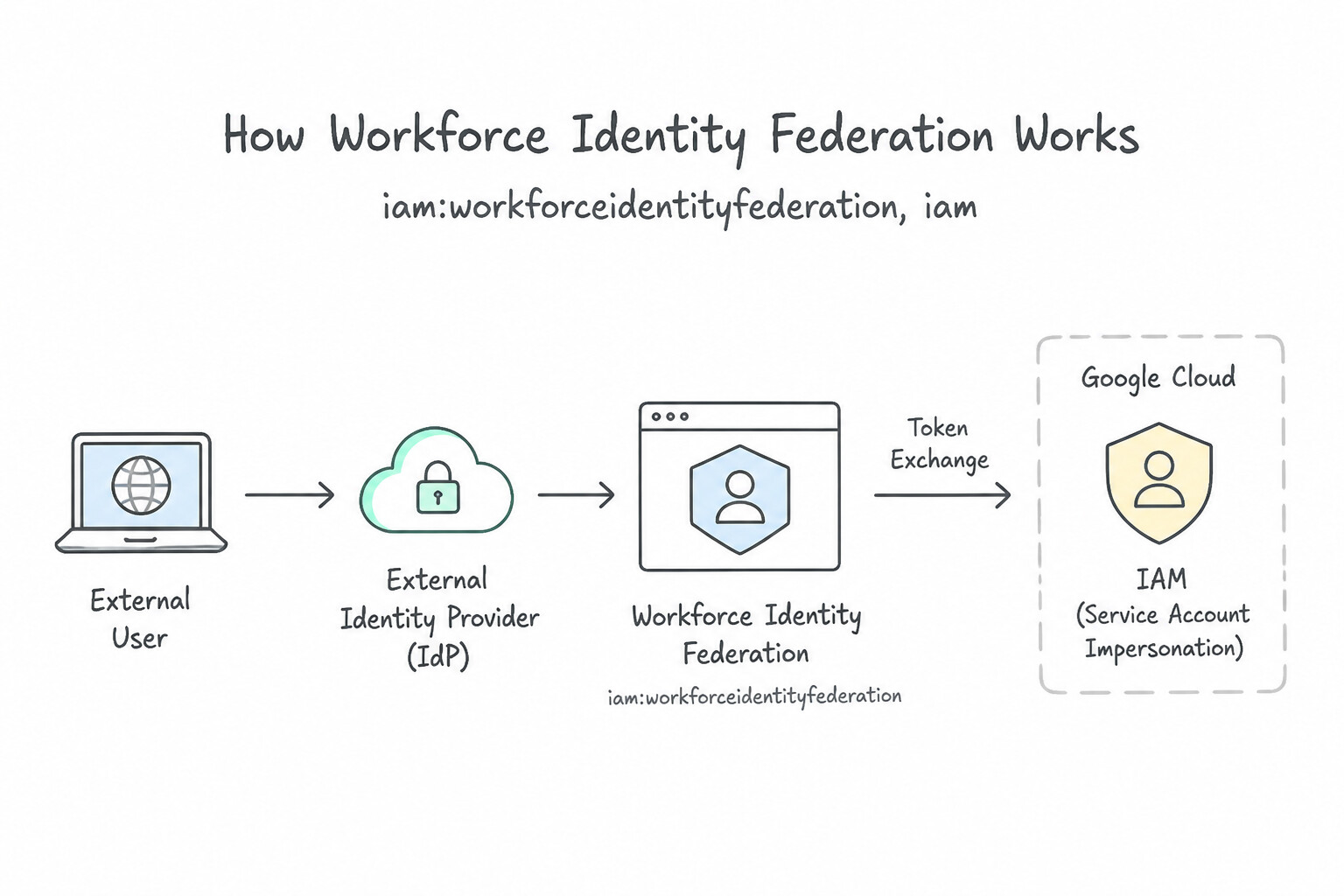
When an enterprise or MSSP wants human analysts managed in an external Identity Provider (Okta, Microsoft Entra ID / Azure AD, Ping Identity) to log directly into Google SecOps and SCC without provisioning or licensing duplicate user accounts in Google Cloud Identity / Workspace:
- How
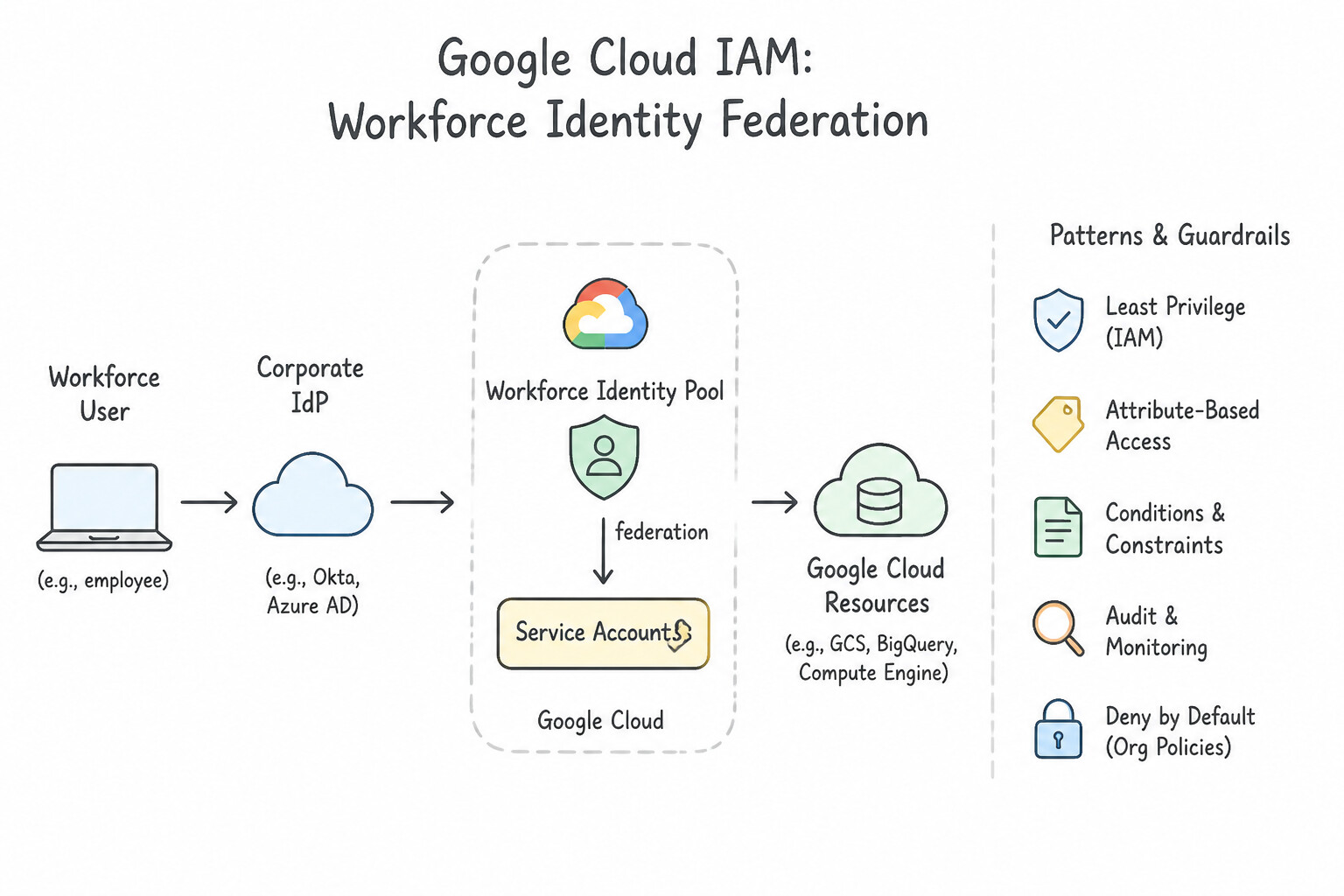
Workforce Identity FederationWorks: - Create an Organization-level
Workforce Identity Pooland configure an OIDC or SAML 2.0 Provider trusting the external IdP's metadata/issuer URL. - Configure Attribute Mapping to translate external IdP claims/assertions into Google attributes:
- Map the unique user identifier (e.g.,
assertion.suborassertion.NameID) togoogle.subject. - Map the user's IdP security groups (e.g.,
assertion.attributes.groups) togoogle.groups. - optionally apply an Attribute Condition (CEL expression, e.g.,
'soc-analysts' in assertion.groups) so only authorized security personnel can federate. - Grant IAM roles (
roles/chronicle.viewer,roles/securitycenter.adminViewer) directly to the federated group principalSet:principalSet://iam.googleapis.com/locations/global/workforcePools/POOL_ID/group/GROUP_NAME.
Key Implementation Patterns
- Attribute Mapping for Subject Identification: Use Update the Workload Identity Pool provider configuration to map
google.subjecttoassertion.email. The default subject mapping uses the IdP's unique ID (UUID). You must explicitly mapgoogle.subjectto the email assertion to use email addresses in IAM policies. - IAM Policy Syntax for Federated Users: Use Add the principal "principal://iam.googleapis.com/locations/global/workforcePools/partner-pool/subject/alice@example.com" to the IAM policy. Workforce Identity Federation requires the "principal://" syntax referencing the specific pool and subject.
- Enforcing Departmental Access via Attribute Conditions: Use Configure an attribute condition in the Workforce Identity Pool Provider using a Common Expression Language (CEL) expression. Attribute conditions in the pool provider filter users during the token exchange process based on external attributes.
Key Takeaways (1.2f)
- Workforce Identity Federation defaults to using the IdP's
subclaim as thegoogle.subject.- To use human-readable emails in IAM policies, map
google.subjecttoassertion.emailorassertion.preferred_username.- Attribute conditions are for access control (filtering), not for defining the identity name.
- Workforce Identity Federation allows external identities to access Google Cloud without Google Accounts.
Quick Decision Cheat Sheet (Subsection 1.2)
If the Scenario Requires... | Choose This Google Cloud Pattern | Avoid This Common Mistake |
|---|---|---|
"Human analysts in external IdP (Entra ID / Okta) need console access to SecOps without Google accounts" | Workforce Identity Federation mapping IdP groups to google.groups (principalSet://.../workforcePools/.../group/...) | Workload Identity Federation (machine-only) or creating local Gmail accounts |
"On-premises automation or CI/CD pipeline needs keyless API access to SecOps / SCC" | Workload Identity Federation with short-lived OIDC/STS token exchange | Downloading a static Service Account .json key file |
"Allow analyst to view normalized UDM events and alerts, but block access to raw unparsed logs" | Assign roles/chronicle.limitedViewer | Assigning roles/chronicle.viewer or roles/chronicle.editor |
"Isolate cases and playbooks between different MSSP customers or business units in SOAR" | Configure Google SecOps SOAR Environments and scope user permissions per Environment | Building separate SOAR instances per business unit or relying on manual case naming conventions |
"Row-level restriction in SecOps SIEM so analysts only see specific log types or regional namespaces" | Configure SecOps Data RBAC (Data Access Scopes & Labels) | Writing YARA-L rules to delete logs or granting project-wide chronicle.viewer without Data RBAC |
"Detect if an insider views sensitive cases or runs unauthorized UDM searches in SecOps" | Enable Data Access Cloud Audit Logs (DATA_READ, ADMIN_READ) on chronicle.googleapis.com | Checking only Admin Activity logs or VPC Flow Logs |
Further Reading (Subsection 1.2)
- Security Center Management API roles and permissions — Provides a list of IAM roles available for Security Command Center, including the specific permissions granted by the Notification Config Editor role.
- Setting up finding notifications — Explains the process of creating notification configurations and the prerequisites needed.
- Workload Identity Federation — Overview of how to access Google Cloud resources from outside Google Cloud without managing service account keys.
- Configure a third-party identity provider — Documentation on how to configure a third-party Identity Provider (IdP) for Google SecOps (Chronicle).
- Single sign-on — General overview of how Google Cloud services utilize SAML for federation.
- Understanding roles — Explains the difference between Basic, Predefined, and Custom roles.
Book TOC · Previous · Chapter 1 of 7 · Next
AwesomeGCP.com Learning
The approach taken is a question-led learning approach: you explore realistic project scenarios where you need to make decisions or take actions to achieve business goals within specific constraints. Instead of passive learning, you are challenged to think and work through the options to master the Professional Security Operations Engineer (PSOE) certification!