Book TOC · Previous · Chapter 2 of 7 · Next
Chapter 2: Data Exploration, Preprocessing, Feature Store, Managed Notebooks & Experiment Tracking
Chapter Focus: Handling class imbalance/missing data, Dataflow/TFTransform vs. BigQuery preprocessing, Sensitive Data Protection (DLP), Vertex AI Feature Store (offline/online parity), Workbench/Colab Enterprise, and Vertex ML Metadata.
Subsection 2.1: Exploring and preprocessing data for ML
The Big Picture
Data is the substrate of every ML system. Even the most sophisticated Transformer or XGBoost architecture will fail in production if its data organization, preprocessing engine, feature store, or privacy pipeline suffers from four classic engineering flaws:
- The Small-File I/O Starvation & Unpartitioned Warehouse Trap (2.1a): Storing 10 million 50 KB PNG images as individual objects in Cloud Storage starves GPUs/TPUs because HTTP object-open overhead dominates training time (fix: pack into 100–200 MB TFRecord shards). Similarly, querying a 5 PB clickstream table in BigQuery by
event_dateanduser_regionwithout date partitioning and column clustering triggers full-table scans that blow up training budgets. - Choosing the Wrong Preprocessing Engine or Introducing Skew (2.1b): Running single-node Pandas on a 2 TB dataset crashes with Out-Of-Memory (OOM) errors; computing
$Z$-score normalization in Python for training and rewriting it in Java for online serving guarantees training-serving skew. Architects push SQL transformations down into BigQuery, use Dataflow (Apache Beam) withtf.Transformfor unified batch/streaming feature pipelines and hermetic preprocessing graphs, and use Dataproc (Apache Spark) when migrating existing PySpark ecosystems. - Time-Travel Leakage & Stale Online Features in Feature Store (2.1c): Joining historical customer labels with today's latest feature values leaks future information into the training set. Gemini Enterprise Agent Platform Feature Store (Vertex AI Feature Store) solves both problems: it executes point-in-time historical joins (
read_instances/batch_serve_to_bq) for offline training and supports streaming ingestion into its low-latency online store for sub-millisecond real-time inference. - Leaking Raw PII/PHI Into Model Weights & Logs (2.1d): Training LLMs or tabular models on unredacted emails, SSNs, or medical DICOM X-rays violates GDPR/HIPAA and risks memorizing sensitive PII. Architects enforce column-level access via BigQuery Policy Tags (Dataplex), de-identify unstructured text/images via Sensitive Data Protection (Cloud DLP), and strip PHI from medical imaging via the Cloud Healthcare API DICOM De-identification service.
Consideration 2.1a: Organizing and exploring different data types (e.g., tabular, text, and images) for efficient experimenting, training, and serving
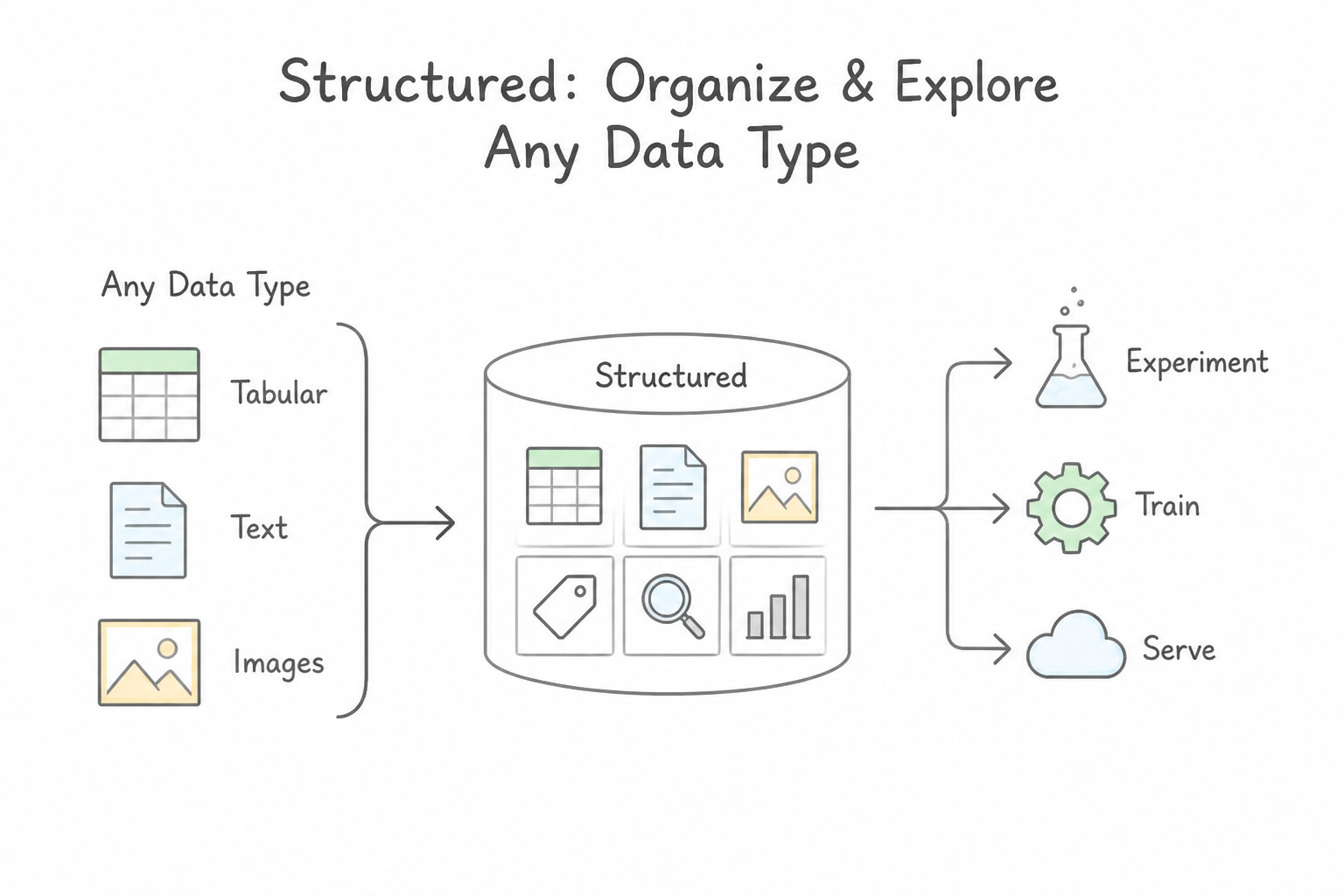
- Structured & Tabular Data in BigQuery: Store large tabular datasets in BigQuery and optimize query cost and scan speed by partitioning on the temporal column (e.g.,
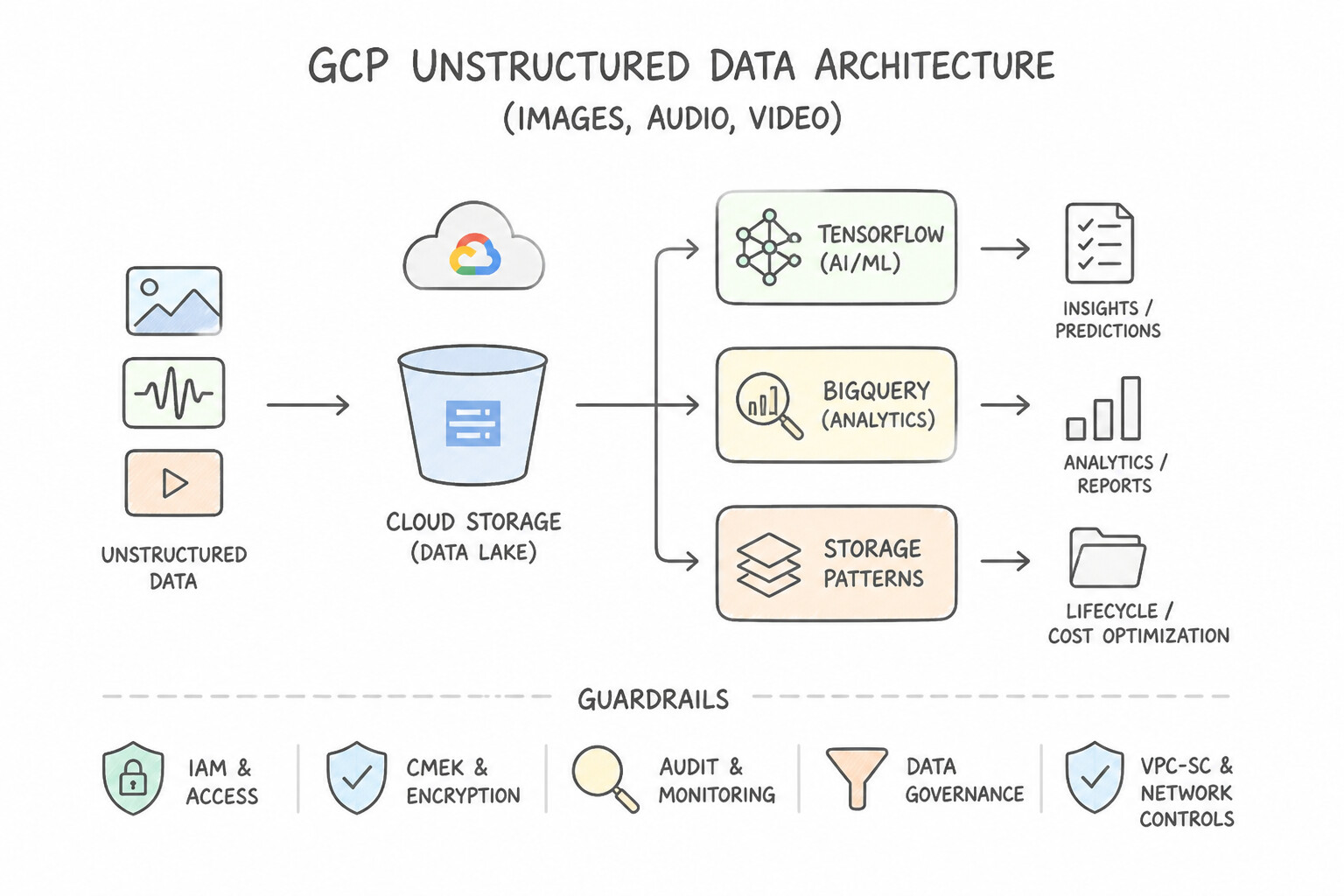
PARTITION BY DATE(event_timestamp)) and clustering on high-cardinality filter/join columns (e.g.,CLUSTER BY customer_id, store_region). - Unstructured Data (Images, Audio, Video) in Cloud Storage: Never read millions of tiny individual files over the network during distributed training. Use Dataflow to serialize small images/labels into contiguous 100–200 MB TFRecord files in Cloud Storage.
- Managed Datasets, Multimodal Manifests & Region Alignment:
- When creating a Managed Dataset in Agent Platform (Vertex AI), the Cloud Storage staging bucket MUST reside in the exact same regional location (e.g.,
us-central1) as the Dataset—multi-regional buckets (US) or cross-region buckets will fail validation. - For multimodal datasets (combining tabular columns with images/text), create a CSV or JSONL import manifest that includes the tabular features alongside the
gs://bucket/image.jpgURI reference. - Exploratory Profiling & Leakage Prevention: Use TensorFlow Data Validation (TFDV) (
tfdv.generate_statistics_from_tfrecord/visualize_statistics) to automatically profile distributions, missing values, and schema anomalies. For imbalanced classes, use stratified splitting (or SMOTE oversampling on the training split only); for time-series data, enforce strict chronological / manual split columns and encode cyclical time features (hour_of_day,day_of_week) using \sin/\cos trigonometric transformations so23:00and00:00remain adjacent.
Key Implementation Patterns
- Optimizing I/O for Millions of Small Images: Use Convert the dataset into sharded TFRecord files. Grouping small files into larger TFRecord files reduces network overhead and enables high-throughput sequential reads. (Avoid alternative: Adding compute power (GPUs) does not fix a data loading (I/O) bottleneck; it just wastes resources.)
- Organizing Petabyte-Scale Tabular Data: Use Create a new table partitioned by the timestamp column and clustered by the geographic region column. Partitioning by time minimizes scanned data for date ranges, and clustering by region speeds up filtering within those timeframes.
- Handling Regional Dependencies: Use Create the Vertex AI dataset in the
us-east1region. Vertex AI datasets and their source Cloud Storage buckets must be in the same region. (Avoid alternative: Permissions cannot override the physical regional location requirement for Vertex AI datasets.)
Key Takeaways (2.1a)
- I/O Bottlenecks: If GPU utilization is low, check if the model is waiting for data.
- Small File Problem: Reading millions of small files from cloud object storage is inefficient due to request latency.
- TFRecord: Use TFRecord format to serialize and batch small data items (images, text) into larger files for efficient streaming.
- Sharding: Split large datasets into multiple TFRecord files (shards) to allow parallel reading.
Consideration 2.1b: Choosing the right tool for data preprocessing based on scale and complexity (e.g., BigQuery [SQL], Dataflow, Apache Spark, and in-memory Python frameworks)
!Choosing the right tool for data preprocessing based on scale and complexity (e.g., BigQuery [SQL], Dataflow, Choosing the right tool for data preprocessing based on scale and complexity (e.g., BigQuery [SQL], Dataflow, Apache Spark, and in-memory Python frameworks).
![Choosing the right tool for data preprocessing based on scale and complexity (e.g., BigQuery [SQL], Dataflow,](images/pmle-2.1b-1-way-preprocessing-tool.jpg)
- The 4-Way Preprocessing Tool Decision Matrix:
- In-Memory Python (
Pandas,Scikit-learn,Polars): Best for exploratory prototyping on datasets<10–50 GBthat fit comfortably in a single notebook VM's RAM. - BigQuery (SQL Pushdown): Always the first choice when petabytes of structured data already live in BigQuery and transformations can be expressed in SQL (aggregations, window functions,
LOG, one-hot encoding). Eliminates data egress and cluster management. - Dataflow (
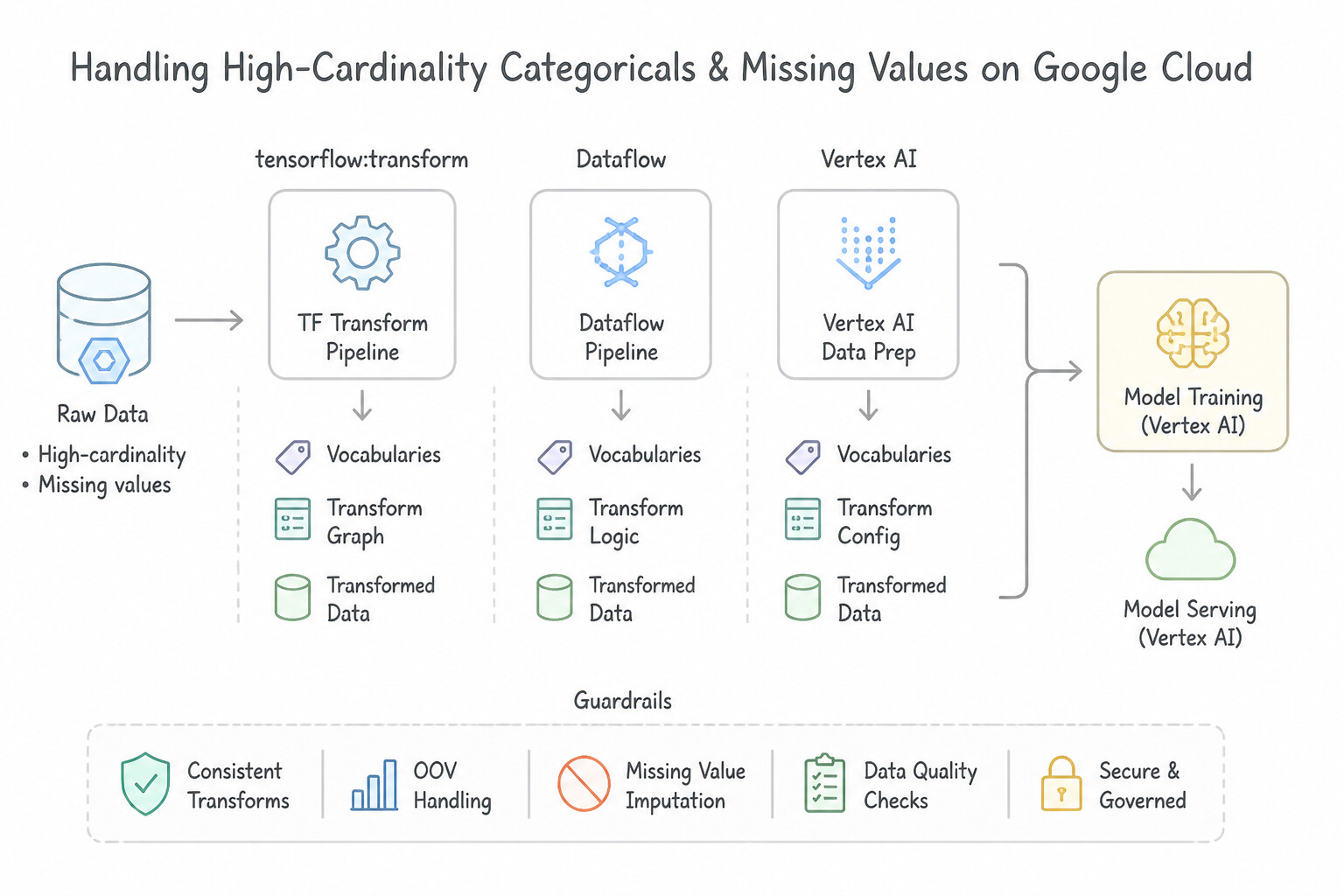
Apache Beam+tf.Transform): The gold standard when you need unified batch and streaming pipelines (using Sliding Windows for rolling real-time aggregates like "clicks in the last 5 minutes" with Watermarks for late-arriving data) or when you must compute global dataset statistics ($Z$-score mean/std, vocabulary tables) viatf.Transformand export a hermetic preprocessing graph into a TensorFlowSavedModel. - Dataproc / Serverless Spark (
Apache Spark): Choose when the team has existing PySpark / Spark MLlib code or Hadoop ecosystems. Use the BigQuery Storage Read API (which streams columnar Apache Arrow buffers in parallel without serialization overhead) to feed Spark or Distributed training workers. - Handling High-Cardinality Categoricals & Missing Values: Map high-cardinality categorical features (e.g., 50,000
zip_codeorproduct_idvalues) into dense low-dimensional Embedding Layers rather than sparse 50,000-column one-hot vectors. Impute missing numerical values with median/mean + a binary missingness indicator, and map missing categoricals to an explicit"MISSING"/<OOV>bucket.
Key Implementation Patterns
- Preventing Training-Serving Skew with TensorFlow Transform: Use Use TensorFlow Transform to define the preprocessing steps. Export the transform graph to be included in the exported SavedModel. TensorFlow Transform embeds preprocessing logic into the model graph, ensuring consistency between training and serving.
- Preprocessing Streaming Data with Windowing: Use Apply a Sliding window with a size of 10 minutes and a period of 1 minute. A Sliding window allows you to define both the duration of data to include (size) and how often to calculate it (period). (Avoid alternative: Fixed windows do not overlap and would only produce a result once every 10 minutes.)
Key Takeaways (2.1b)
- Consistency is Key: Ensure preprocessing logic is identical between training and serving to prevent skew.
- TensorFlow Transform (TFT): Use TFT to calculate global statistics (full-pass) and embed them into the serving graph.
- Embed Logic: Whenever possible, include preprocessing steps inside the SavedModel to simplify client applications and API contracts.
- Streaming data requires Windowing to perform aggregations (like averages or sums).
Consideration 2.1c: Creating and consolidating features in Gemini Enterprise Agent Platform Feature Store
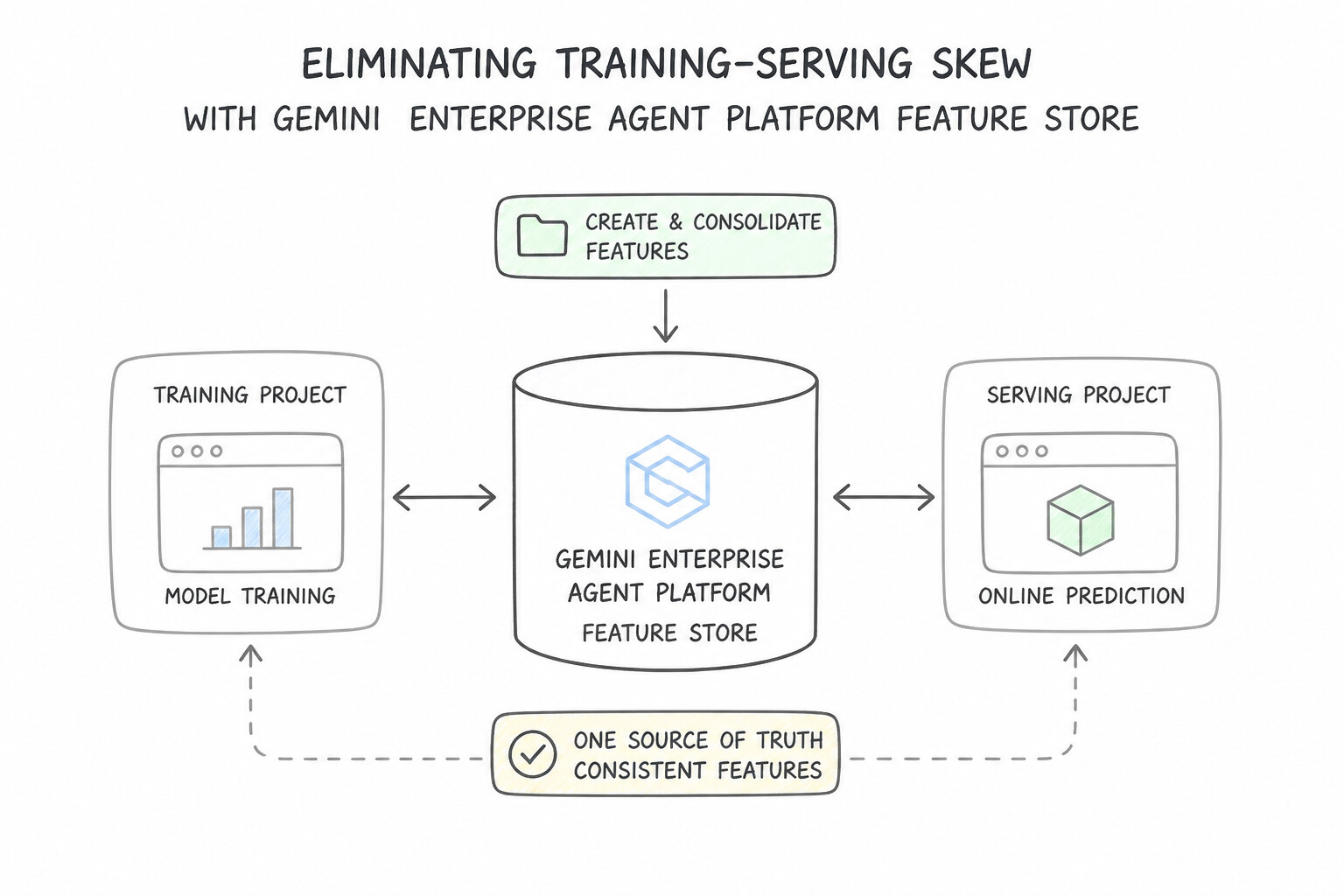
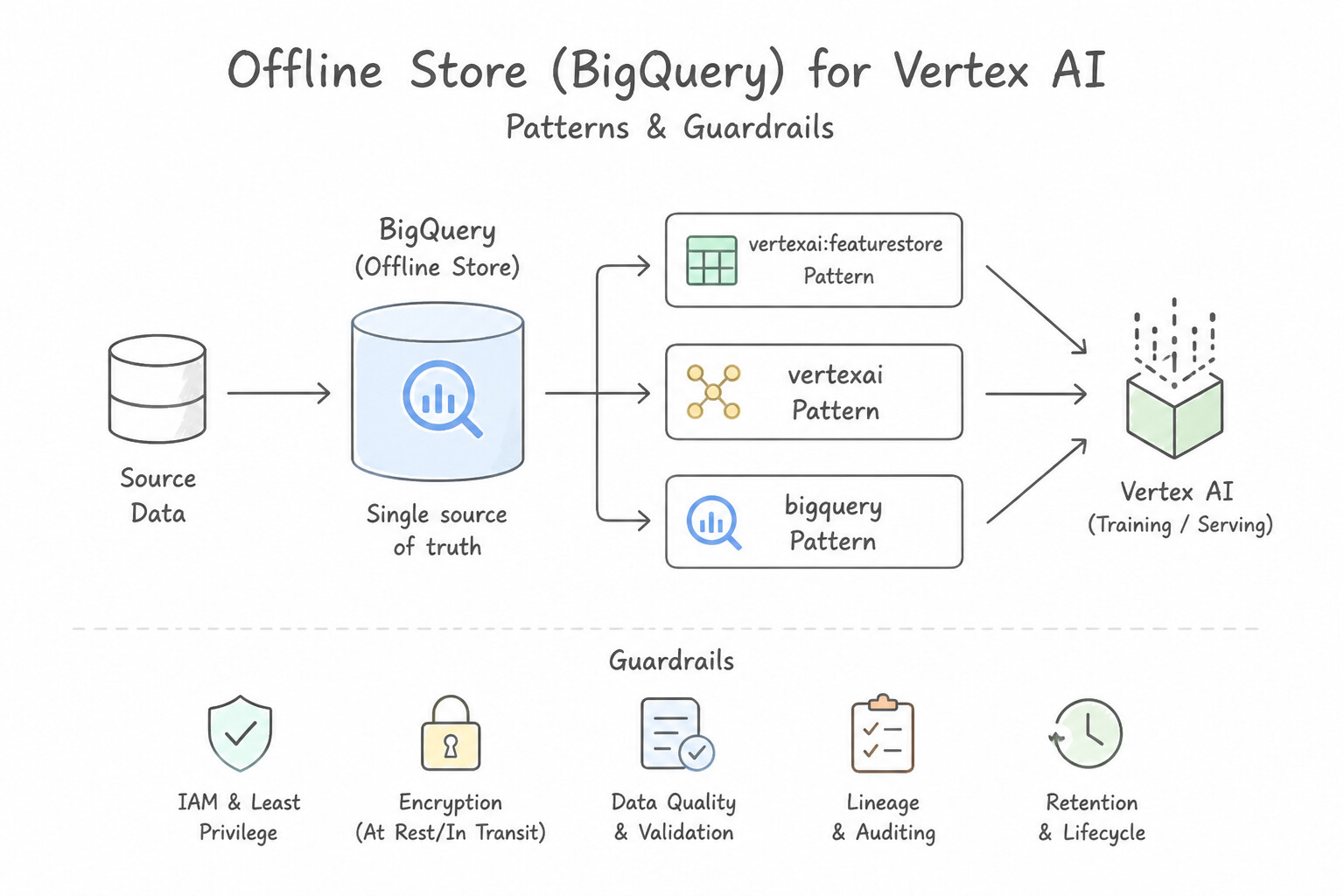
- Eliminating Training-Serving Skew Across Teams: When data scientists write feature logic in Python/SQL for training and backend engineers rewrite that logic in Java/Go for online serving, subtle bugs (null handling, time-zone boundaries, rounding) degrade production accuracy. Agent Platform Feature Store (Vertex AI Feature Store) provides a single source of truth with dual storage engines:
- Offline Store (backed by BigQuery): Stores historical time-series feature values for batch training and offline evaluation.
- Online Store (backed by Bigtable or Optimized Online Serving): Serves the latest feature vector for an
entity_id(e.g.,user_123) at single-digit millisecond latency during live inference. - Preventing Data Leakage with Point-in-Time Historical Joins: When generating a training dataset for historical events (e.g., "Did user
$X$ churn on March 15?"), never join against a static snapshot table containing April's feature values. Call Feature Store's batch read / point-in-time lookup (read_instances/batch_serve_to_bq) with a pass-list of(entity_id, timestamp)pairs—Feature Store automatically retrieves the exact feature values as they existed at or immediately prior to each observation timestamp. - Batch vs. Streaming Feature Ingestion: Use scheduled BigQuery/Spark jobs for daily offline features (e.g.,
30_day_avg_spend), and use Pub/Sub → Dataflow (Sliding Window) → Feature Store Streaming Write API (WriteFeatureValues) when online fraud or recommendation models require sub-second feature freshness (e.g.,tx_count_last_5_min).
Key Implementation Patterns
- Point-in-Time Correctness for Training Data: Use Use the batch serving capability. Provide a read instance file containing entity IDs and timestamps to perform a point-in-time lookup. Batch serving with a read instance list containing timestamps enables point-in-time lookups to prevent data leakage.
- Mitigating Training-Serving Skew: Use Ingest the calculated features into Vertex AI Feature Store. Use the offline store for training data and the online store for serving. Vertex AI Feature Store creates a centralized repository that serves consistent feature values for both batch training and online inference.
- High-Performance Feature Engineering on Structured Data: Use Use BigQuery SQL to create a logical view that performs the transformations. BigQuery SQL processes data in place, avoiding movement and leveraging existing storage infrastructure. (Avoid alternative: Exporting data creates unnecessary data movement and storage costs for simple transformations.)
Key Takeaways (2.1c)
- Data leakage occurs when training data contains information that would not be available at prediction time.
- Vertex AI Feature Store's batch serving allows for point-in-time lookups.
- To perform a point-in-time lookup, you must provide a read instance file with timestamps.
- Online serving is for real-time inference (latest values), while batch serving is for training (historical values).
Consideration 2.1d: Ensuring data privacy and handling sensitive information (e.g., personally identifiable information [PII])
!Ensuring data privacy and handling sensitive information (e.g., personally identifiable information [PII]) — S Ensuring data privacy and handling sensitive information (e.g., personally identifiable information [PII]).
![Ensuring data privacy and handling sensitive information (e.g., personally identifiable information [PII]) — S](images/pmle-2.1d-1-sensitive-data.jpg)
- Sensitive Data Protection (Cloud DLP) for Unstructured & Structured PII:
- When ingesting unstructured text (customer emails, support chats, call transcripts) from Cloud Storage or Pub/Sub/Dataflow, call the Sensitive Data Protection API with built-in or custom
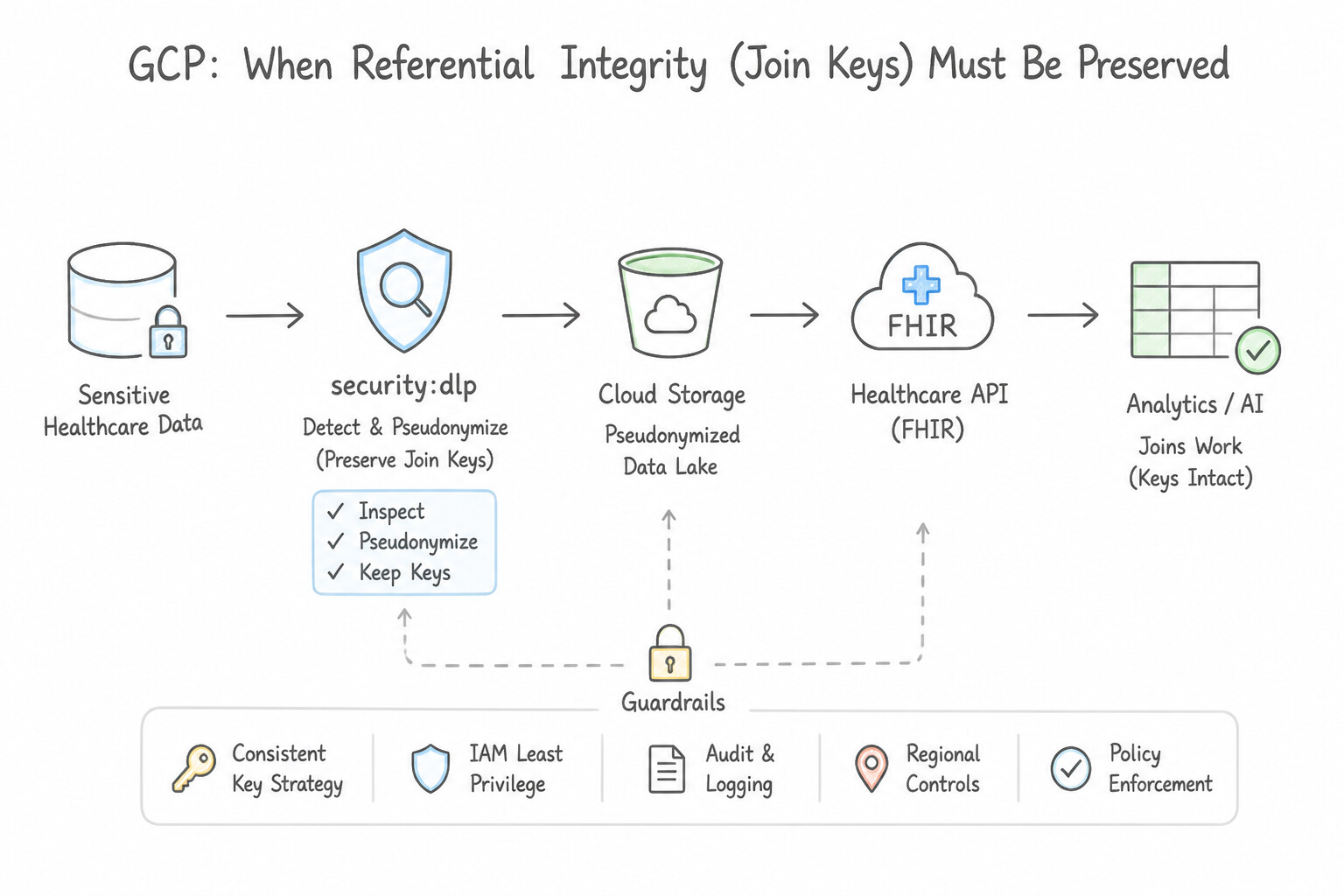
infoTypes(EMAIL_ADDRESS,PHONE_NUMBER,US_SOCIAL_SECURITY_NUMBER,CREDIT_CARD_NUMBER) to redact or replace PII with semantic placeholders ([EMAIL],[SSN]) before storing or training. - When Referential Integrity (Join Keys) Must Be Preserved: If ML engineers need to join tables on
user_idorssnacross datasets or measure unique customer counts without seeing the raw PII, do not use random masking or full redaction—use Deterministic Cryptographic Hashing (CryptoHashConfig) or Format-Preserving Encryption (CryptoReplaceFfxFpeConfig) in Sensitive Data Protection. - De-identifying Medical Imaging (
Cloud Healthcare API): When preparing X-ray, CT, or MRI datasets in DICOM format containing Protected Health Information (PHI) in both header tags and burned-in pixel text, run the Cloud Healthcare API DICOM De-identification pipeline (datasets.dicomStores.deidentify) before exporting images to Cloud Storage for training. - Column-Level Access Control in BigQuery (
Dataplex Policy Tags): When a shared BigQuery table contains both non-sensitive ML features and restricted PII columns (likeraw_salaryorfull_name) that only HR analysts may view, attach Dataplex / Data Catalog Policy Tags with Dynamic Data Masking to the sensitive columns and grant theFine-Grained Readerrole only to authorized principals.
Key Implementation Patterns
- De-identifying Unstructured Text in Cloud Storage: Use Use the Cloud Data Loss Prevention (DLP) API. Create a job to inspect the files for CREDIT_CARD_NUMBER and PHONE_NUMBER infoTypes, and apply a de-identification transformation to mask the detected values. Cloud DLP is the dedicated service for identifying and redacting specific PII types (infoTypes) in storage while preserving the rest of the data utility.
- Handling Medical Imaging Data (DICOM): Use Import the DICOM data into a Cloud Healthcare API dataset and run the de-identify operation. Cloud Healthcare API has a native de-identify operation specifically for removing PHI from DICOM files. (Avoid alternative: BigQuery security controls access to tabular data but does not scrub the actual source files needed for training.)
- Streaming Ingestion for Real-Time Fraud Detection: Use Use streaming ingestion to write feature values directly to the online store. Streaming ingestion allows feature values to be written and made available for serving in real-time. (Avoid alternative: BigQuery is optimized for analytics, not for the low-latency point lookups required for real-time serving.)
Key Takeaways (2.1d)
- Cloud DLP is the standard solution for discovering and redacting sensitive data (PII) in Google Cloud.
- Avoid writing custom regex scripts for standard PII types (like credit cards); managed services are more accurate and secure.
- De-identification (masking/redaction) is preferred over deletion when you need to preserve the surrounding context for ML training.
- The Cloud Healthcare API is the specific solution for managing, storing, and de-identifying medical data formats like DICOM and FHIR.
Quick Decision Cheat Sheet (Subsection 2.1)
If the Scenario Requires... | Choose This Google Cloud Pattern | Avoid This Common Mistake |
|---|---|---|
"Millions of small PNG/JPEG files in GCS causing low GPU utilization during training" | Consolidate into 100–200 MB TFRecord shards using Dataflow | Upgrading from T4 to A100 GPUs or moving images to BigQuery |
"Error creating Managed Dataset in us-central1 from a GCS bucket" | Move data to a single-region us-central1 GCS bucket | Using a multi-region US bucket or us-east1 bucket |
"Train model in Python, serve in Java, accuracy drops due to feature calculation mismatch" | Consolidate features in Agent Platform Feature Store (or use tf.Transform) | Retraining the model more frequently on the broken features |
"50,000 unique zip codes or product IDs causing sparse explosion in a deep neural network" | Use a dense Embedding Layer (tf.keras.layers.Embedding) | One-hot encoding 50,000 columns or passing raw zip code integers as continuous numbers |
"Redact PII in streaming customer chat logs before landing in BigQuery" | Pub/Sub → Dataflow calling Sensitive Data Protection API → BigQuery | Granting IAM Viewer roles or running weekly batch SQL REGEXP_REPLACE |
"Restrict access to 2 sensitive PII columns in a shared 50-column BigQuery ML feature table" | Dataplex / Data Catalog Policy Tags (Column-Level Security) | Duplicating the 50 TB table into two separate projects |
"Fastest zero-copy dataframe transfer between BigQuery and Spark / Python memory" | BigQuery Storage Read API with Apache Arrow format | Exporting BigQuery tables to uncompressed CSV files in Cloud Storage |
Further Reading (Subsection 2.1)
- TFRecord and tf.Example — Official TensorFlow documentation explaining the TFRecord format, why it is useful for streaming data, and how to read/write these files efficiently.
- Best practices for Cloud Storage — General best practices for using Cloud Storage, including advice on request rates and object sizes.
- Introduction to partitioned tables — Explains how partitioning works in BigQuery, focusing on time-unit partitioning to reduce costs.
- Introduction to clustered tables — Details how clustering works to sort data and improve query performance for specific filters.
- Vertex AI Locations — Documentation explaining that for Image, Text, Video, and Tabular data, the Cloud Storage bucket must be in the same region as the Vertex AI dataset.
- Data splits for tabular data — Documentation detailing the three split options: Random, Manual, and Chronological (Time), and how to configure them in the console or API.
Subsection 2.2: Model prototyping using notebooks (e.g., Gemini Enterprise Agent Platform Workbench and Colab Enterprise)
The Big Picture
Jupyter notebooks are where 90% of ML prototypes are born—and where 90% of enterprise security audits and reproducibility efforts go to die. Without disciplined cloud architecture, notebook prototyping in Gemini Enterprise Agent Platform Workbench (Vertex AI Workbench) and Colab Enterprise fails in four predictable ways:
- Choosing the Wrong Notebook Backend for Collaboration vs. OS Customization (
2.2a&2.2b): Provisioning a dedicated Workbench Instance when three analysts need simultaneous Google Docs-style real-time cursor collaboration and inline commenting (which only Colab Enterprise provides)—or conversely, choosing serverless Colab Enterprise when a researcher needs root OS access, custom Linux kernel drivers, or a persistent custom Docker container (Workbench Instance). - Public IPs, Over-Privileged Default Service Accounts & Leaked Secrets (2.2a): Launching notebooks with external public IPs in a regulated financial VPC, leaving the Compute Engine default service account (
Editor) attached, or hardcoding API keys inside.ipynbcells that get pushed to Git. Production notebooks run with No Public IP + Private Google Access, Single-User IAM mode, a dedicated least-privilege Service Account, and fetch credentials dynamically from Secret Manager. - Bloated Git Repositories & Unvalidated Notebook Commits (2.2a): Committing
.ipynbfiles containing 50 MB of embedded matplotlib plots and base64 dataframe outputs bloats Git history and breaks code review diffs. Teams enforcenbstripoutpre-commit hooks to strip cell outputs beforegit commitand runpapermill/nbconvertinside Cloud Build to verify notebooks execute cleanly on push. - Pandas OOM Crashes on Terabyte Data & Disconnected Model Garden Prototyping (
2.2b&2.2c): Loading a 2 TB dataset into local notebook memory withpd.read_csv()crashes the kernel instead of attaching a Dataproc Serverless Spark kernel / Dataproc Hub session. Similarly, manually downloading 70B open-weight model checkpoints to a local notebook disk instead of launching a 1-click Colab Enterprise / Workbench notebook directly from Model Garden wastes hours of setup.
Consideration 2.2a: Applying collaboration and security best practices when setting up and running notebook environments
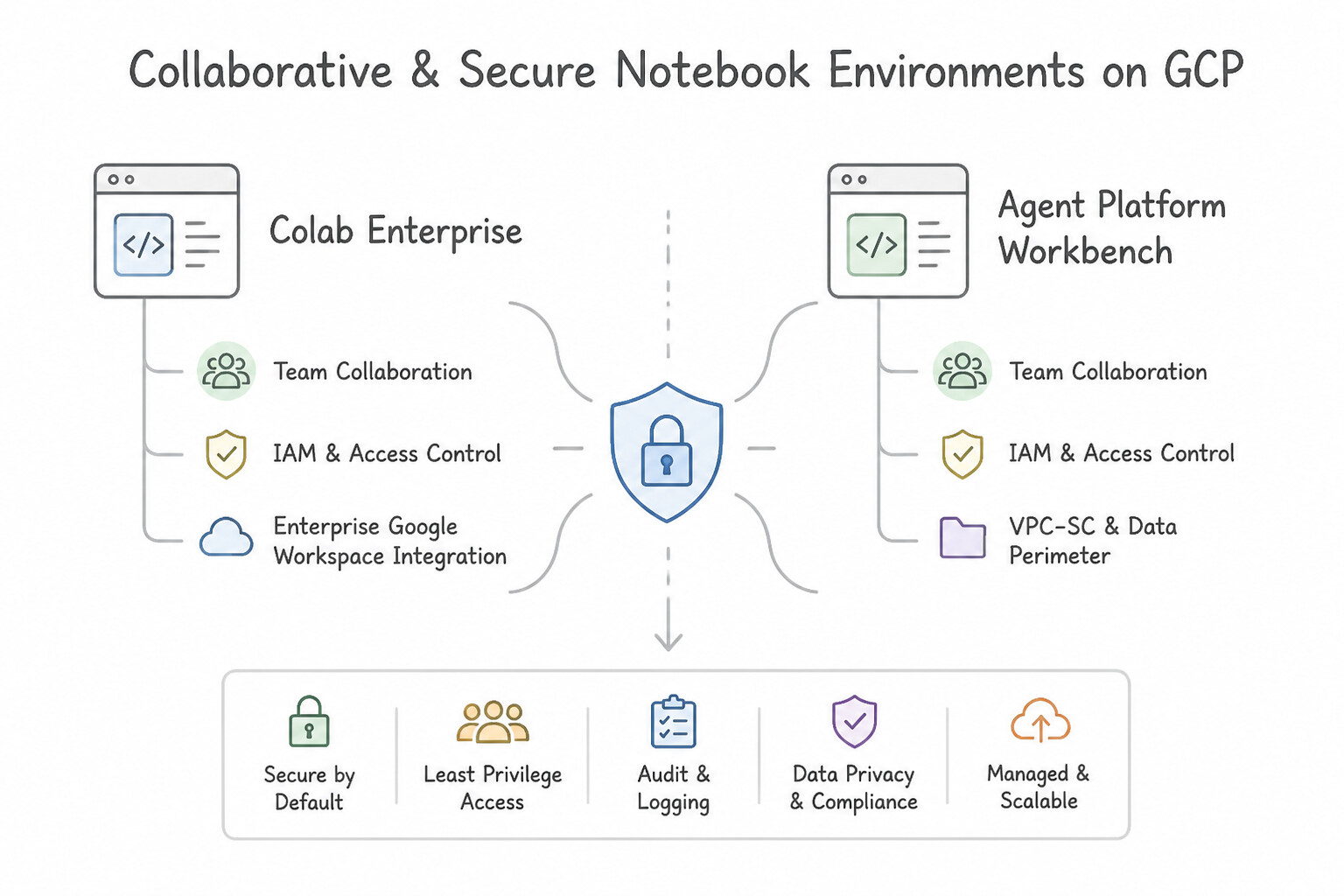
- Colab Enterprise vs. Agent Platform Workbench Instances:
- Choose Colab Enterprise when multiple data scientists and business analysts need real-time collaborative editing (seeing each other's live cursors, adding cell comments) or zero-ops serverless runtimes integrated directly into BigQuery Studio.
- Choose Agent Platform Workbench Instances when you need persistent VM control, custom startup scripts, custom Docker containers, root OS access, or granular single-user IAM isolation.
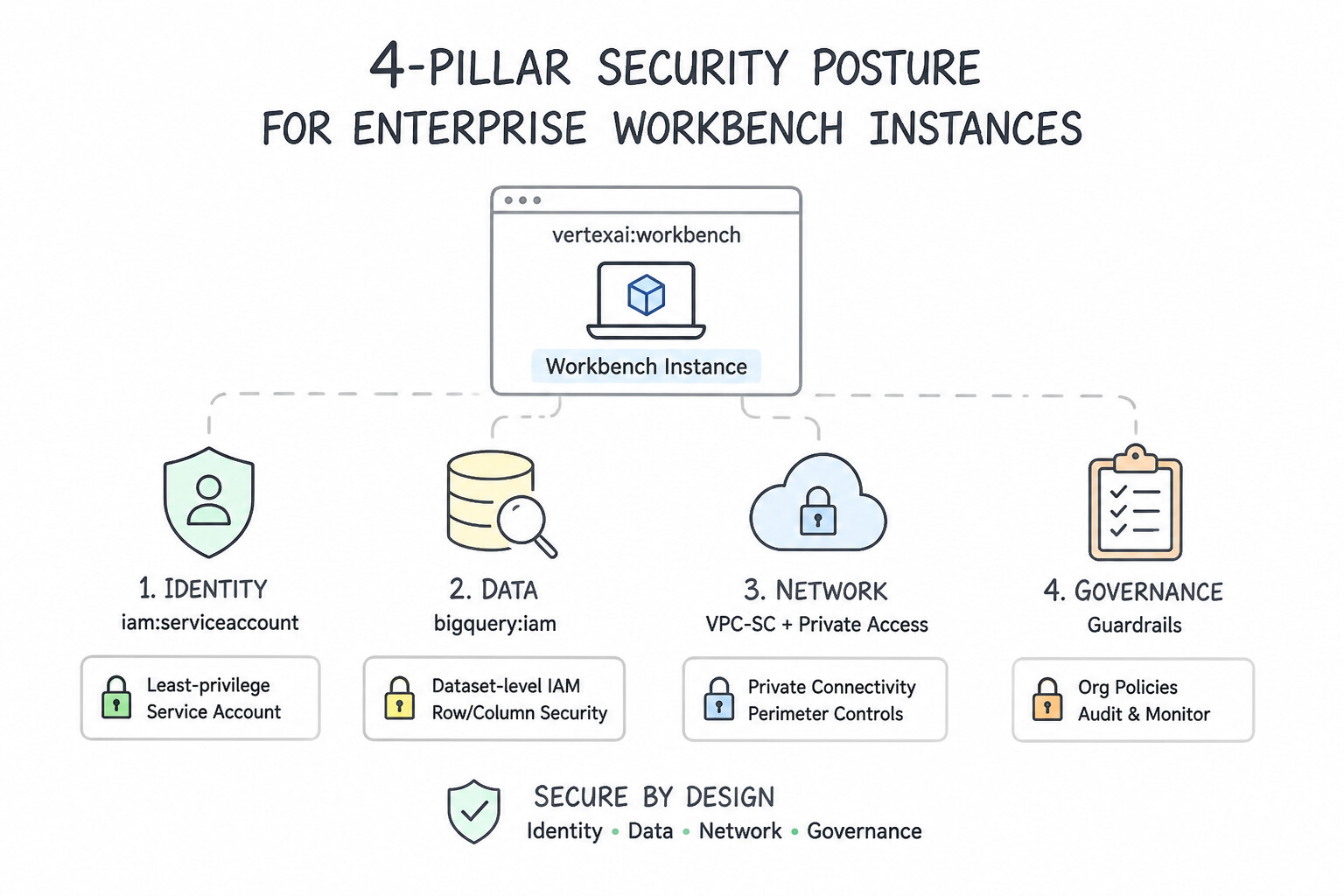
- The 4-Pillar Security Posture for Enterprise Workbench Instances:
- Network Isolation: Disable External IP addresses (
--no-public-ip) and enable Private Google Access (PGA) on the subnet so the notebook communicates with BigQuery, Cloud Storage, and Artifact Registry strictly over Google's private internal network (and through Cloud NAT only if outbound public PyPI access is approved). - Principle of Least Privilege (Service Account): Never use the Compute Engine default service account. Attach a dedicated custom Service Account granted only the exact dataset-level or bucket-level IAM roles required (e.g.,
roles/bigquery.dataVieweron a single dataset +roles/bigquery.jobUseron the project). - User Identity Isolation: Configure Single-User Only access mode bound to the specific researcher's Google corporate identity (
user:alice@company.com) rather thanService Account access mode(which lets anyone withiam.serviceAccounts.actAson that SA open the JupyterLab UI). - Secret Management: Never store database passwords or third-party API keys in notebook cells or
.envfiles committed to Git. Retrieve secrets at runtime in memory using the Google Cloud Secret Manager Python client. - Git Repository Hygiene & Automated Notebook CI: Configure
nbstripoutas a Git filter/pre-commit hook to strip cell execution outputs, large dataframes, and base64 images before committing.ipynbfiles. To validate notebooks automatically ongit push, trigger Cloud Build to execute the notebook headlessly usingpapermillorjupyter nbconvert --to notebook --execute.
Key Implementation Patterns
- Service Account Least Privilege: Use Create a user-managed service account. Grant the BigQuery Data Viewer role on the specific dataset to the service account. Configure the instance to use this service account. A user-managed service account with a dataset-level IAM role ensures the instance has only the exact permissions required.
- Network Isolation for PII Data: Use Disable the Assign external IP address setting during creation. Enable Private Google Access on the VPC subnet. Disabling the external IP meets the security policy, and Private Google Access enables connectivity to Google APIs internally.
- Real-time Collaboration for Analysts: Use Use Vertex AI Colab Enterprise to create and share the notebook. Colab Enterprise supports real-time collaboration, commenting, and co-authoring similar to Google Docs. (Avoid alternative: Vertex AI Workbench Instances use standard JupyterLab, which lacks native real-time co-authoring features.)
Key Takeaways (2.2a)
- Always prefer user-managed service accounts over the default Compute Engine service account for production or specific workloads.
- Apply IAM roles at the most granular level possible (e.g., dataset level vs. project level) to enforce least privilege.
- Avoid using legacy Access Scopes; rely on IAM for access control.
- Separate identities for different workloads to limit blast radius if credentials are compromised.
Consideration 2.2b: Developing models in Agent Platform Workbench or Colab Enterprise notebooks using common frameworks (e.g., PyTorch, sklearn, and JAX)
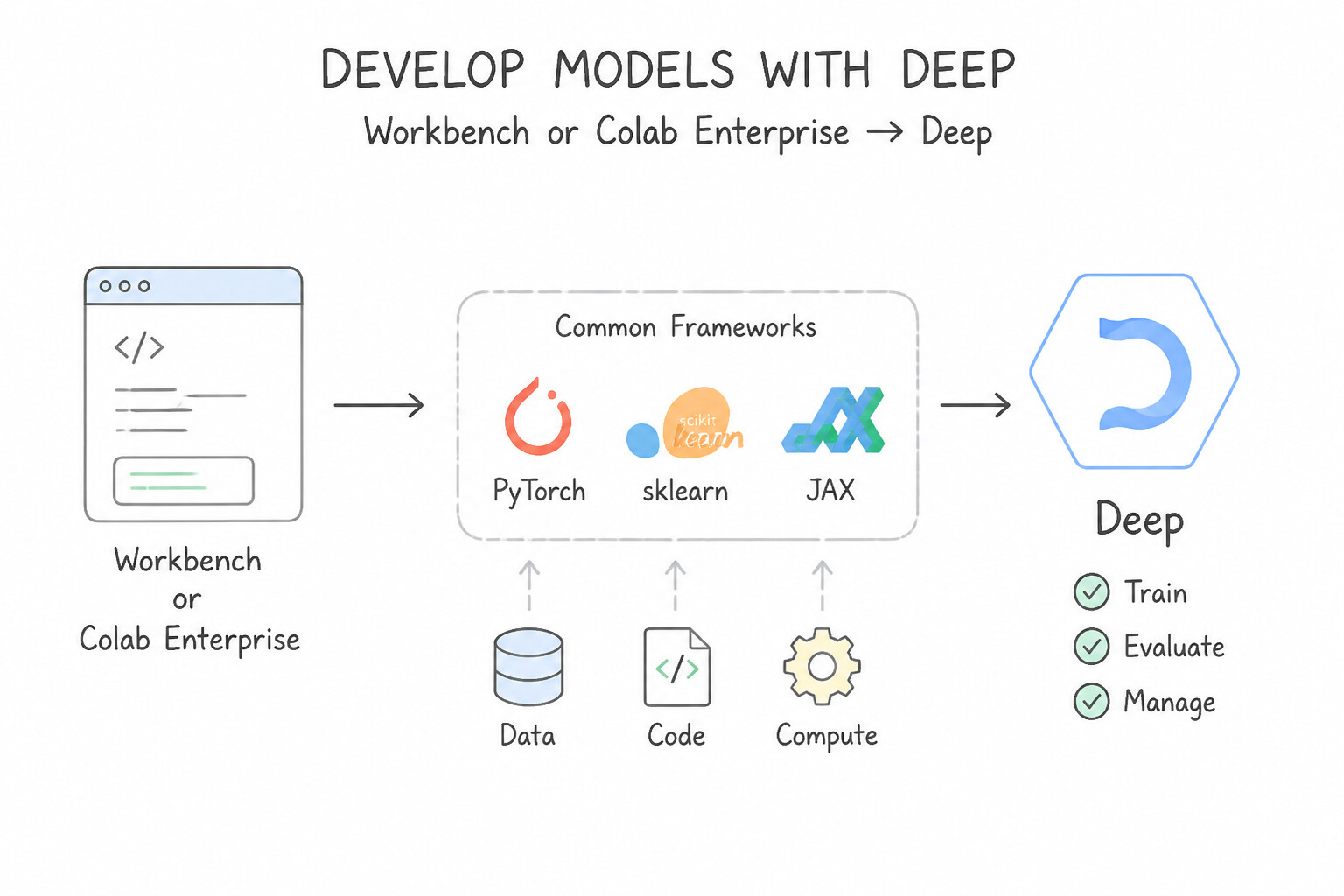
- Deep Learning VM Images vs. Custom Containers in Workbench:
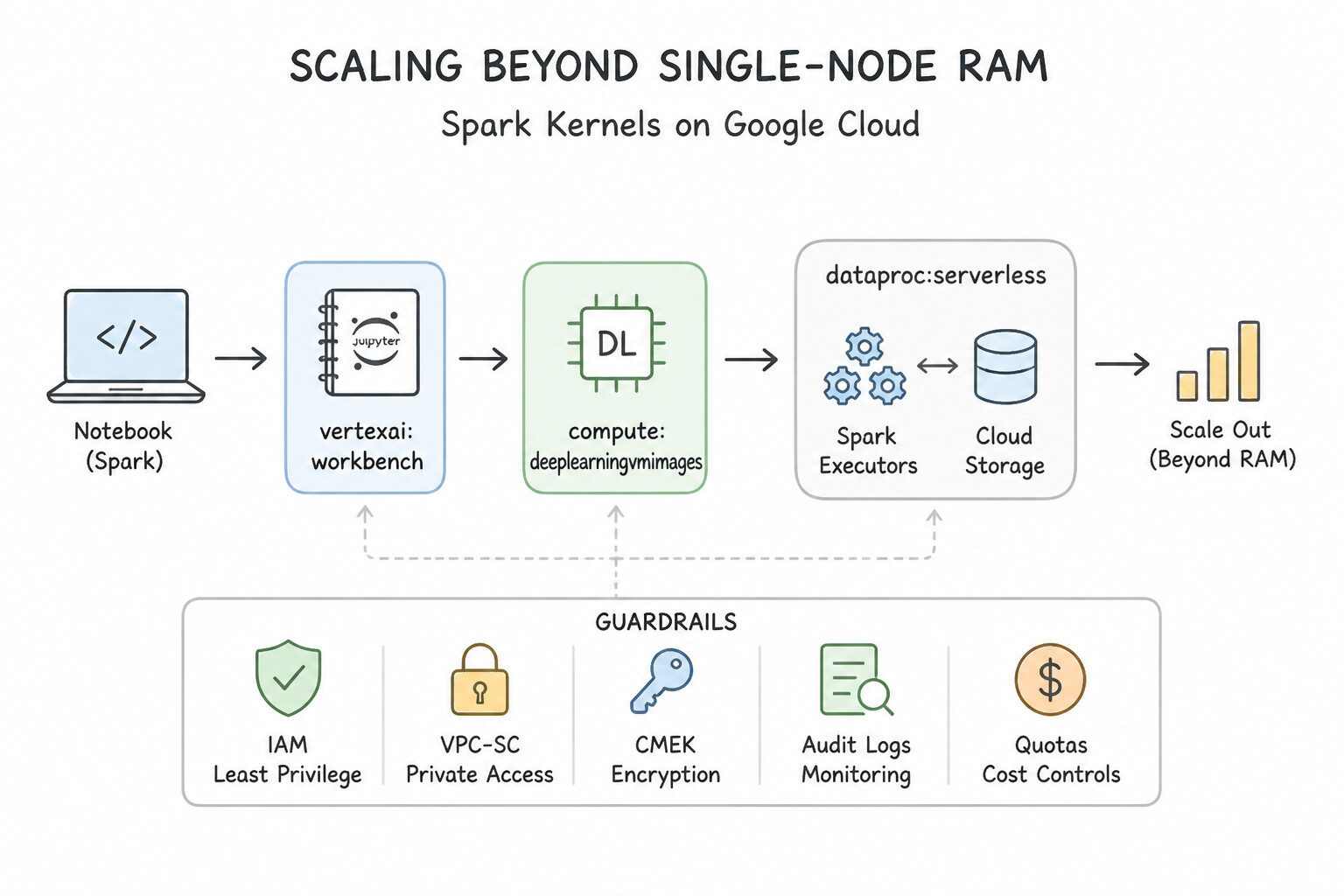
- When a team needs a specific version of PyTorch, TensorFlow, Scikit-learn, or JAX with pre-verified NVIDIA CUDA and cuDNN drivers, provision the Workbench instance using an official Google Deep Learning VM Image—never compile GPU drivers manually via
ssh. - When a team requires custom OS-level C++ libraries (
apt-getbioinformatics/geospatial packages) that must be identical across 20 researchers' notebooks, build a Custom Container derived from a Deep Learning Container base image, push it to Artifact Registry, and provision Workbench instances from that container. - Scaling Beyond Single-Node RAM with Spark Kernels:
- Pandas (
pd.DataFrame) runs in a single process on the notebook VM's RAM. When dataset size grows from 2 GB to 2 TB, Pandas crashes withMemoryError. - Instead of resizing the notebook VM to a massive expensive machine that sits idle during thinking time, connect the Workbench notebook to Dataproc Serverless for Spark (for serverless ad-hoc PySpark execution without managing a cluster) or attach a Dataproc cluster / Dataproc Hub Spark kernel (
PySpark/Spark MLlib) for petabyte-scale distributed processing. - Framework Selection in Notebooks: Use Scikit-learn / XGBoost for fast tabular prototyping, PyTorch for dynamic eager computation graphs (
define-by-run), TensorFlow / Keras for productionSavedModeland TFX graph pipelines, and JAX (jit,grad,vmap,pmap) for high-performance XLA-compiled differentiable numerical computing on TPUs and GPUs.
Key Implementation Patterns
- Optimizing TensorFlow Environment Setup: Use Create a new Vertex AI Workbench instance. Select a Deep Learning VM Image from the public image family that matches your required TensorFlow version and CUDA drivers. Deep Learning VM Images are pre-configured with specific framework versions and drivers, offering the fastest setup for standard environments.
- Prototyping with PySpark and Scikit-learn: Use Use the serverless Spark integration in Vertex AI Workbench to execute the PySpark code. Vertex AI Workbench supports serverless Spark integration, allowing you to run PySpark on large datasets seamlessly alongside local code without managing clusters.
- Single User Access Control: Use Select 'Single user only' in the Security settings during instance creation and enter the researcher's email address. The 'Single user only' setting explicitly restricts JupyterLab proxy access to the specified email address. (Avoid alternative: Service Accounts manage the instance's permissions, not who can access the JupyterLab interface.)
Key Takeaways (2.2b)
- Vertex AI Workbench instances are backed by Deep Learning VM Images.
- Deep Learning VM Images come pre-configured with specific versions of frameworks (TensorFlow, PyTorch) and hardware drivers (CUDA).
- Use pre-built images to minimize setup time and ensure consistency across development environments.
- Avoid manual installation or custom containers for standard use cases where a Google-provided image already exists.
Consideration 2.2c: Using a variety of foundational and open-source models in Model Garden to create model prototypes in notebook environments
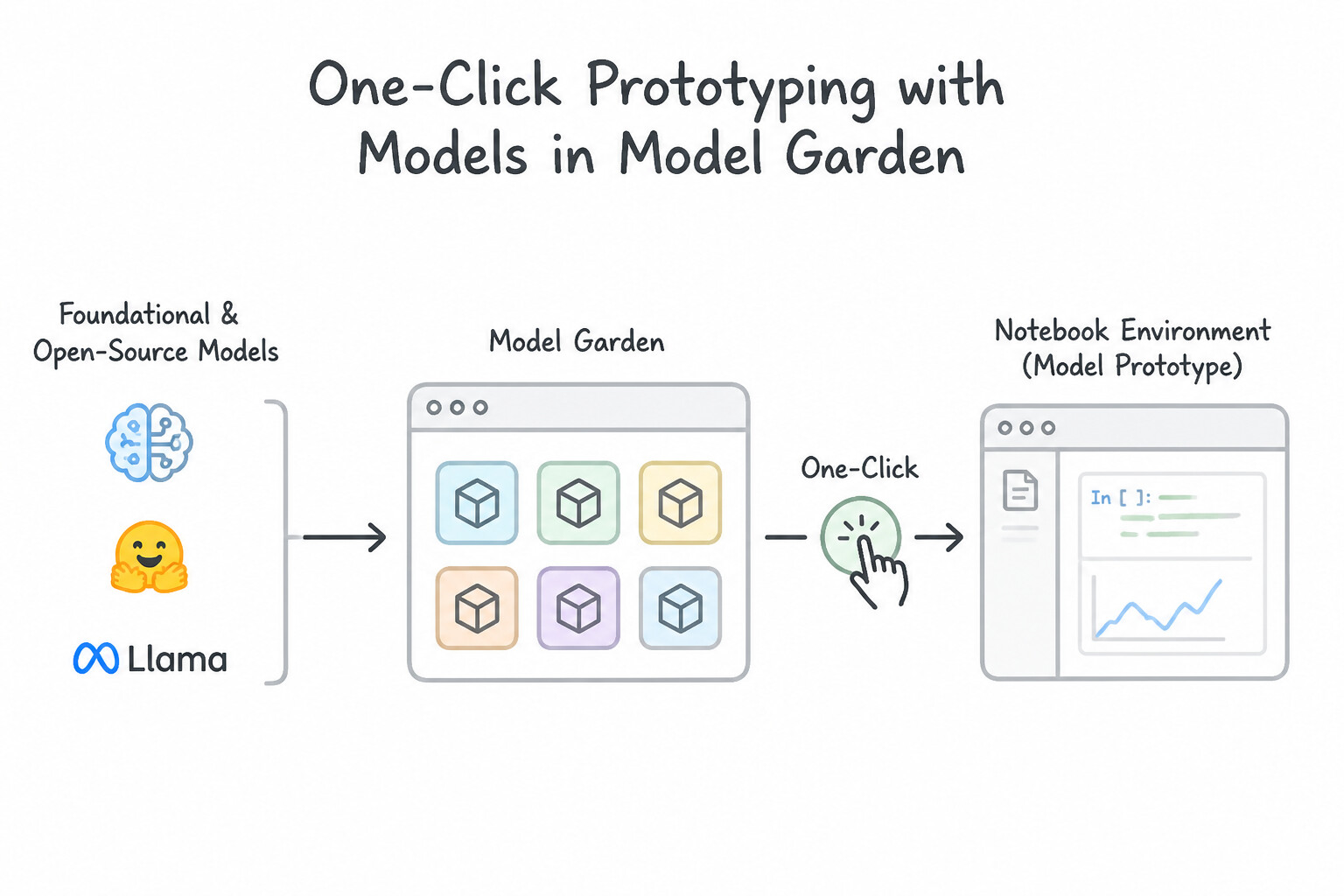
- One-Click Notebook Prototyping from Model Garden: Every curated foundation and open-source model card in Agent Platform Model Garden (including Gemini, Gemma, Llama, Mistral, BERT, and Stable Diffusion) provides direct launch actions: Open in Colab Enterprise, Open in Workbench, or 1-Click Deploy to Endpoint. Launching the pre-authored notebook automatically populates the exact SDK setup, dependency installs, and prompt/inference boilerplate for that model.
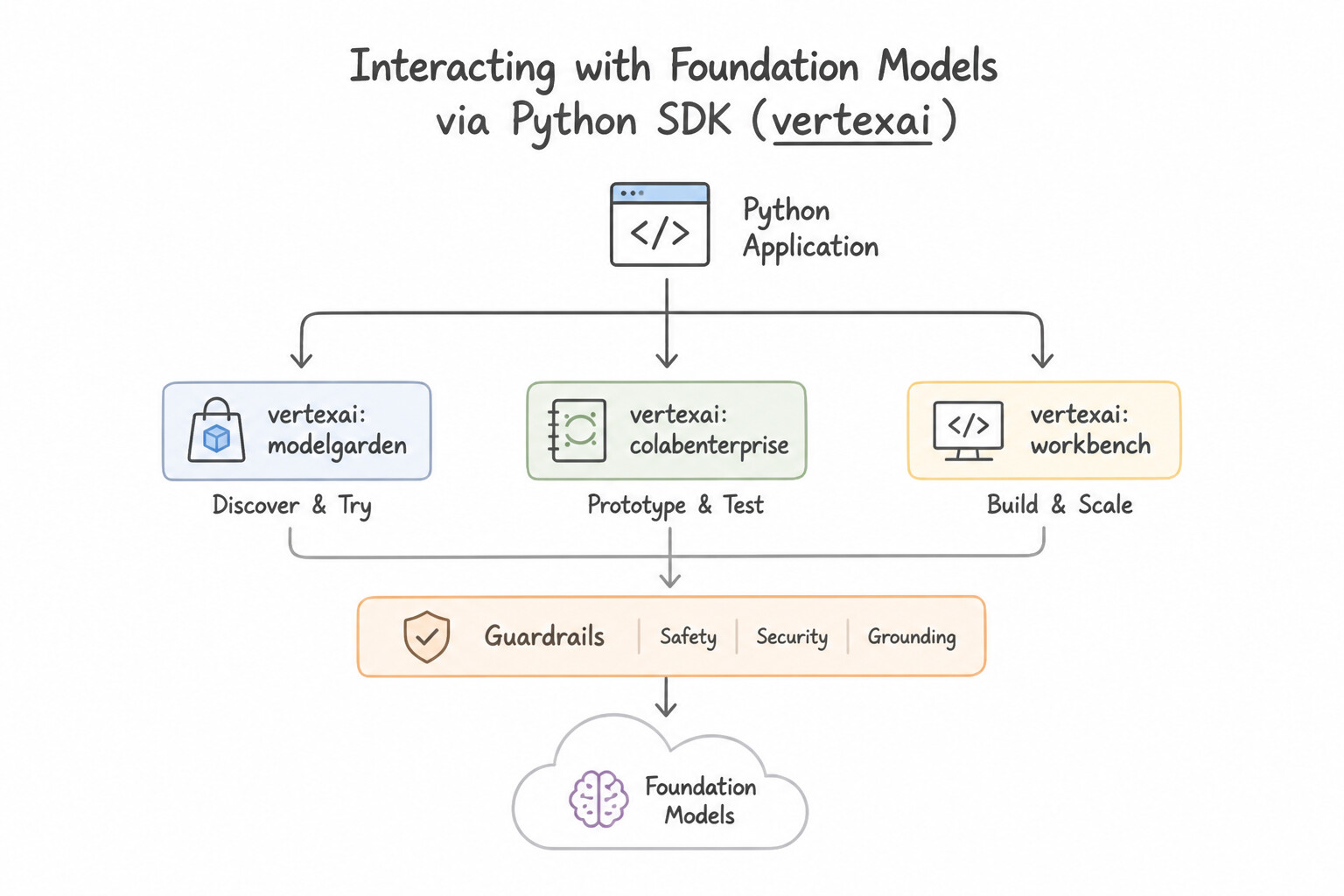
- Interacting with Foundation Models via the Python SDK: To benchmark multiple foundation models programmatically inside a notebook (e.g., comparing
gemini-2.5-provs.gemini-2.5-flashon 50 test prompts), initialize the Vertex AI Python SDK (vertexai.init()) and instantiateGenerativeModel("model-name")(or thegoogle-genaiSDK client) to loop over evaluation prompts and log latency/quality metrics. - Resource-Constrained Customization (
PEFT/LoRA/QLoRA): When prototyping a domain-customized open-weight LLM from Model Garden (e.g., medical or legal adaptation) under tight GPU memory and budget constraints, use Parameter-Efficient Fine-Tuning (PEFT)—specifically LoRA (Low-Rank Adaptation) or QLoRA (4-bit Quantized LoRA)—which freezes >99% of the base model weights and trains only tiny low-rank adapter matrices.
Key Implementation Patterns
- Seamless Transition from Discovery to Prototyping: Use Click the "Open in Colab Enterprise" or "Open in Vertex AI Workbench" button directly on the model card. Model Garden provides one-click access to Notebooks pre-loaded with the specific model's sample code. (Avoid alternative: Manual downloading and uploading is inefficient and ignores the native cloud integration provided by Model Garden.)
- Programmatic Access to Foundation Models: Use Import the Vertex AI SDK for Python. Initialize the models using their specific classes or model IDs. The Vertex AI SDK for Python allows you to programmatically load and interact with Model Garden models using Python code. (Avoid alternative: The requirement specifically asks to avoid manual UI interactions, making UI-generated tokens the wrong approach.)
- Parameter-Efficient Fine-Tuning (PEFT): Use Use Parameter-Efficient Fine-Tuning (PEFT) with Low-Rank Adaptation (LoRA). PEFT with LoRA allows fine-tuning large models by updating only a small subset of parameters, saving cost and memory. (Avoid alternative: Training from scratch requires massive data and compute, which contradicts the small dataset and budget constraints.)
Key Takeaways (2.2c)
- Vertex AI Model Garden is the central hub for discovering foundation and open-source models.
- The fastest way to prototype with a model from Model Garden is using the integrated 'Open in Colab Enterprise' or 'Open in Workbench' features.
- Avoid manual infrastructure setup (like raw VMs) when managed services provide pre-configured environments.
- Use the Vertex AI SDK for Python to interact with Google Cloud AI services programmatically.
Quick Decision Cheat Sheet (Subsection 2.2)
If the Scenario Requires... | Choose This Google Cloud Pattern | Avoid This Common Mistake |
|---|---|---|
"Real-time Google Docs-style cursor collaboration and commenting in notebooks" | Colab Enterprise | Agent Platform Workbench User-Managed / Instance |
"Provision a Workbench instance with no external IP that still accesses BigQuery and GCS" | Enable Private Google Access (PGA) on the VPC subnet | Attaching a public NAT gateway to reach Google APIs or opening firewall port 22 |
"Restrict a Workbench instance so only one specific lead researcher can open JupyterLab" | Configure Single-user only access mode with the researcher's email | Service account access mode (shared across anyone who can actAs the SA) |
"Access a third-party API key inside a shared Git-tracked Workbench notebook" | Fetch at runtime using Google Cloud Secret Manager SDK | Storing the key in an environment variable inside the Dockerfile or notebook cell |
"Automatically verify that every .ipynb pushed to Git executes without errors" | Cloud Build trigger running papermill or jupyter nbconvert --execute | Manual code review of raw JSON .ipynb files |
"Platform lead wants to give 50 data engineers self-service governed Spark notebooks from approved templates" | Dataproc Hub | Giving all 50 engineers roles/Owner to create unmanaged Compute Engine VMs |
"Differentiable numerical computing in Python with jit, grad, vmap, and XLA compilation" | JAX | Scikit-learn or Pandas |
Further Reading (Subsection 2.2)
- Service accounts — Overview of service accounts, including the difference between user-managed and default service accounts.
- Control access to datasets — Documentation on how to grant IAM roles on specific BigQuery datasets.
- Configuring Private Google Access — Documentation explaining how Private Google Access enables instances without external IP addresses to reach Google APIs and services.
- Vertex AI Workbench Security — Overview of networking and security options for Vertex AI Workbench instances.
- Colab Enterprise overview — Review the 'Collaborate' section which highlights sharing notebooks, granting permissions, and the ability to edit simultaneously.
- Introduction to Vertex AI Workbench — Provides an overview of the different Workbench options, highlighting the differences between Instances (User-Managed) and Managed notebooks.
Subsection 2.3: Tracking and running ML experiments
The Big Picture
Data science teams frequently celebrate a model that achieves high validation scores in a notebook—only to discover three weeks later that nobody knows which hyperparameter combination, training dataset snapshot, or preprocessing container produced it, or that their evaluation metric completely misrepresented real-world performance. Production experimentation on Gemini Enterprise Agent Platform (Vertex AI) solves three critical failure modes:
- Choosing the Wrong Experimentation & Profiling Environment (2.3a): Logging ad-hoc Scikit-learn, XGBoost, and PyTorch trial metrics in local spreadsheets instead of Experiments on Gemini Enterprise Agent Platform (Vertex AI Experiments); guessing why a GPU training job is slow instead of inspecting step time and kernel utilization in Vertex AI TensorBoard Profiler; or keeping regulated financial training workflows inside manual interactive notebooks instead of converting them into reproducible Agent Platform Pipelines (Kubeflow Pipelines).
- Evaluating Predictive & GenAI Models with the Wrong Metrics (2.3b):
- For Predictive ML: Using
RMSEwhen extreme outliers shouldn't dominate (MAEis robust to outliers), usingAccuracyon imbalanced fraud data instead ofPR-AUCorF1-Score, or using classification accuracy on a recommendation system instead of ranking metrics likeNDCG(Normalized Discounted Cumulative Gain). - For Generative AI: Relying solely on n-gram overlap (
ROUGEfor summarization,BLEUfor translation) when evaluating open-ended reasoning, RAG faithfulness, or chatbot tone—where LLM-as-a-Judge / Autoraters (Vertex AI Gen AI Evaluation Service/AutoSxS) and Groundedness / Faithfulness metrics are essential. - Broken Artifact Lineage & Audit Trails (2.3c): When a newly deployed production model exhibits unexpected bias or errors, teams without Gemini Enterprise Agent Platform ML Metadata (Vertex ML Metadata) cannot trace the deployed
Modelversion back to the exactExecutionrun, hyperparameter set, andDatasetURI that created it.
Consideration 2.3a: Choosing the appropriate Google Cloud environment for development and experimentation (e.g., Experiments on Gemini Enterprise Agent Platform, Gemini Enterprise Agent Platform Pipelines, and Kubeflow Pipelines) given the framework
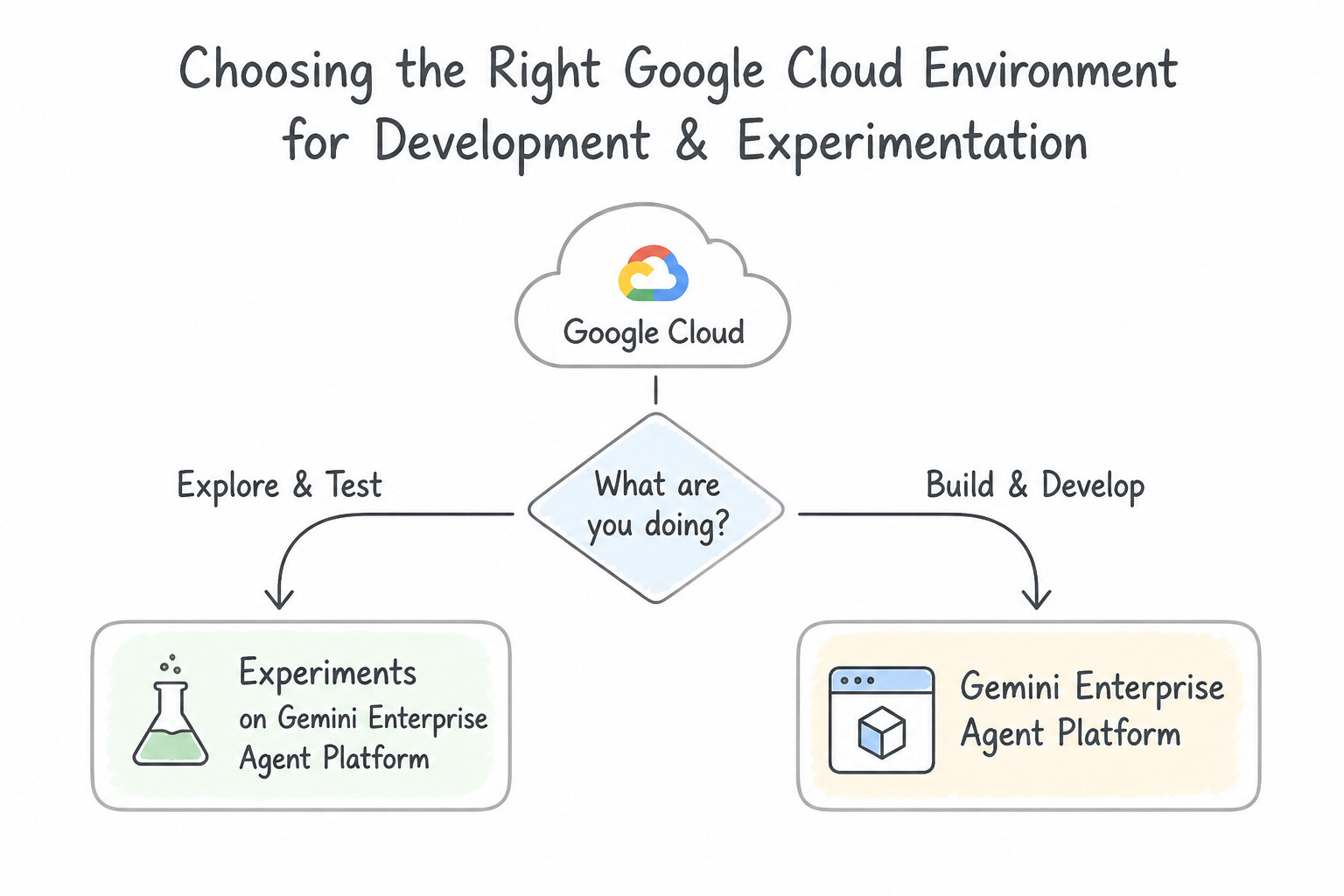
- Experiments on Gemini Enterprise Agent Platform (Vertex AI Experiments): The right choice during interactive development when data scientists run ad-hoc experiments across diverse frameworks (Scikit-learn, XGBoost, PyTorch, TensorFlow) inside notebooks or custom jobs and want a centralized console to log and compare hyperparameters (
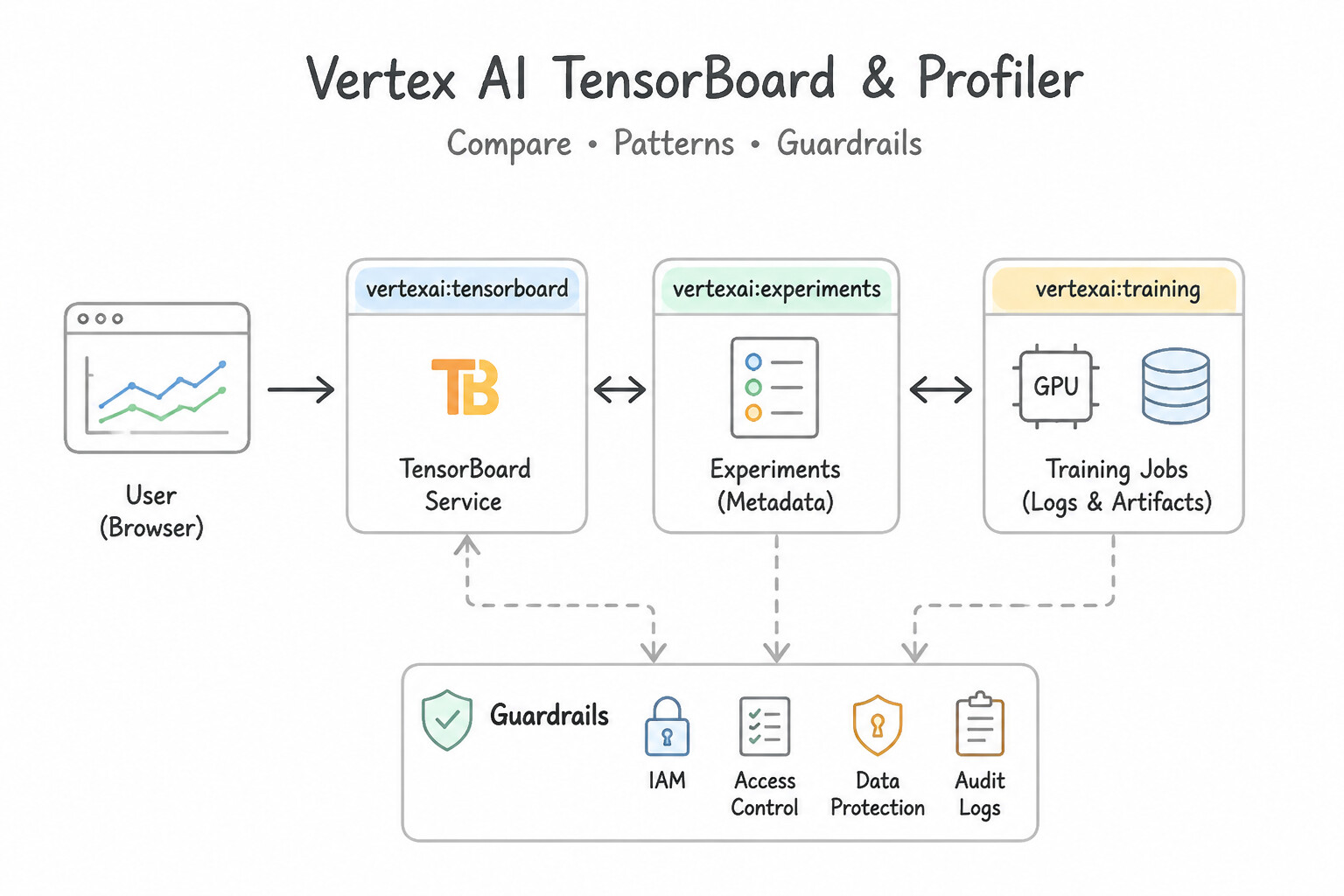
aiplatform.log_params), summary metrics (aiplatform.log_metrics), and time-series metrics (aiplatform.log_time_series_metrics). - Vertex AI TensorBoard & TensorBoard Profiler: Choose TensorBoard when training deep neural networks (PyTorch/TensorFlow/JAX) to visualize real-time training/validation loss curves, gradient histograms, and embeddings. Choose TensorBoard Profiler specifically when you need to diagnose hardware performance bottlenecks (e.g., determining whether a slow GPU/TPU training step is bottlenecked on CPU data loading, host-to-device copy, or device compute kernels).
- Transitioning from Notebooks to Agent Platform Pipelines (Kubeflow Pipelines): When a scenario mentions regulatory compliance, strict reproducibility, multi-step dependency orchestration, or eliminating manual notebook execution drift, convert the experimental notebook into a containerized Agent Platform Pipeline (Kubeflow Pipelines). Every step runs in an isolated container and automatically logs its inputs, outputs, and execution state.
Key Implementation Patterns
- Profiling PyTorch Training Performance: Use Modify your training script to use the Vertex AI TensorBoard Profiler plugin. Vertex AI TensorBoard Profiler visualizes execution traces to identify code-level bottlenecks. (Avoid alternative: Cloud Monitoring shows high-level infrastructure metrics, not code-level execution traces.)
- Compare Metrics Across Multiple Frameworks: Use Use the Vertex AI SDK to create an experiment and log run data to Vertex AI Experiments. Vertex AI Experiments provides the specific dashboard and SDK functions to track and compare runs across different frameworks. (Avoid alternative: TensorBoard is better for deep debugging of individual runs, not high-level comparison tables across different libraries.)
- Reproducible Workflow Orchestration: Use Refactor the code into components and build a workflow using Vertex AI Pipelines. Vertex AI Pipelines provides the necessary workflow orchestration, componentization, and artifact lineage tracking for reproducible MLOps. (Avoid alternative: Notebook execution is good for simple scheduling but lacks the granular lineage tracking and formal graph structure of pipelines.)
Key Takeaways (2.3a)
- Use Cloud Monitoring for infrastructure health (uptime, raw utilization metrics).
- Use Vertex AI Experiments to track model quality (accuracy, loss) and hyperparameters.
- Use Vertex AI TensorBoard Profiler to debug training performance and visualize execution traces.
- Vertex AI Experiments is the standard tool for tracking ML parameters and metrics during the experimentation phase.
Consideration 2.3b: Evaluating predictive and gen AI solutions (e.g., model evaluation metrics and LLM-as-a-judge)
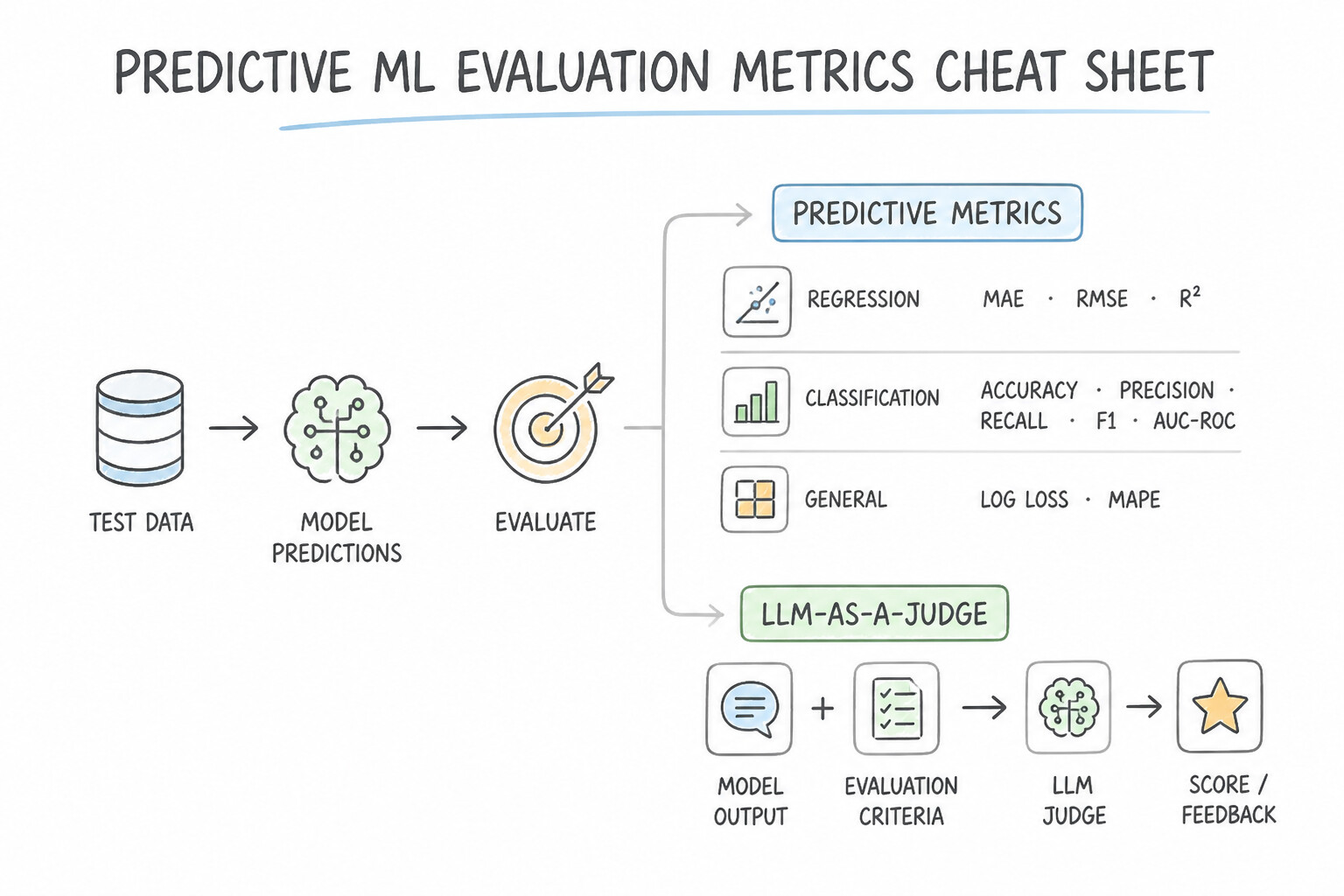
- Predictive ML Evaluation Metrics Cheat Sheet:
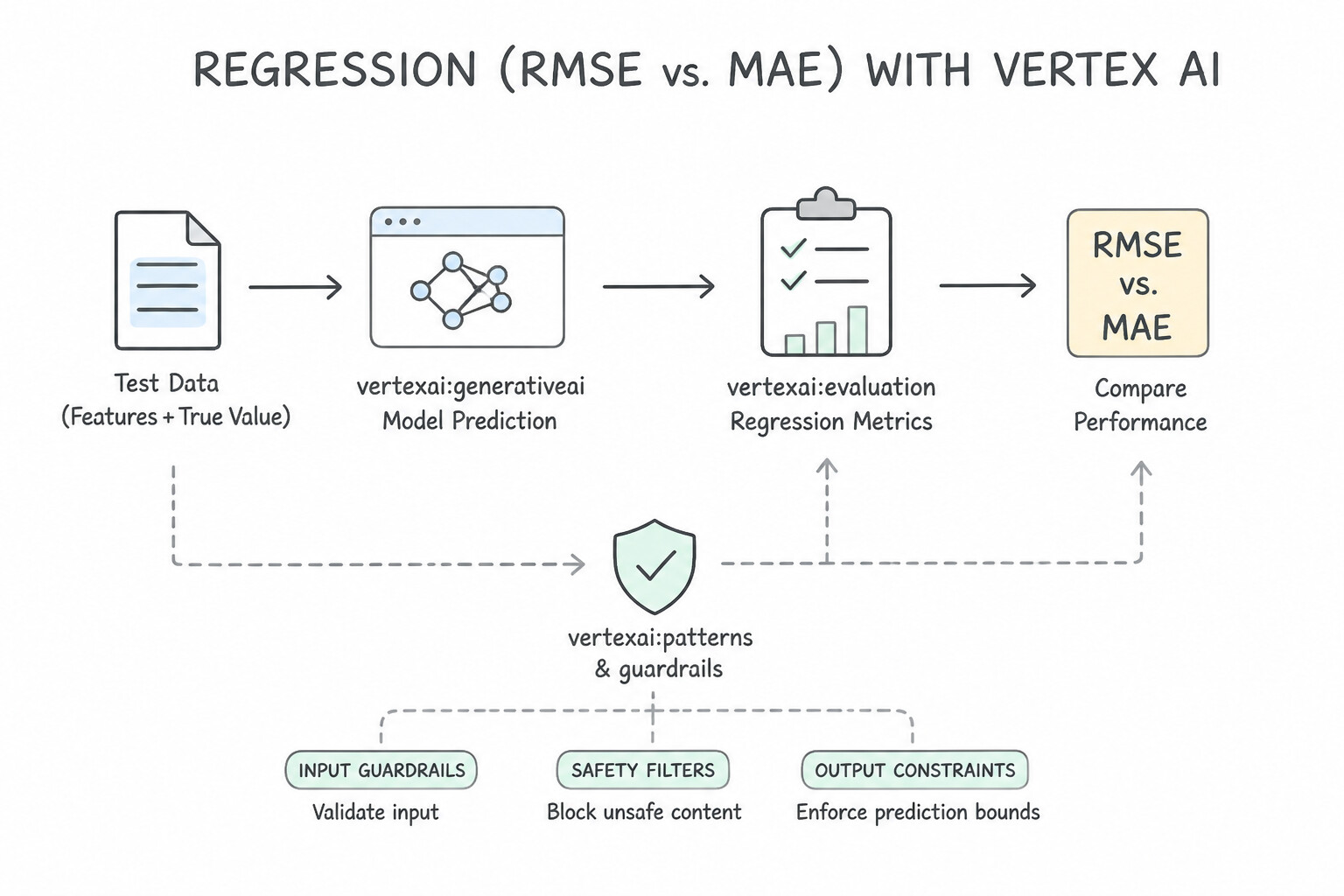
- Regression (
RMSEvs.MAE): Root Mean Squared Error (RMSE) squares residuals before averaging, heavily penalizing large outlier errors (choose when large errors are disproportionately costly). Mean Absolute Error (MAE) penalizes errors linearly and is robust against extreme outliers. - Classification (
Precision,Recall,F1-Score,PR-AUC): - Precision = \frac{TP}{TP + FP} (High precision means very few False Positives).
- Recall = \frac{TP}{TP + FN} (High recall means very few False Negatives).
- F1-Score is the harmonic mean of Precision and Recall.
PR-AUC(AUC-PR) is mandatory when evaluating highly imbalanced binary classifiers (e.g., 0.1% fraud), paired with segment-wise / slice-based evaluation in TFMA.- Recommendation & Ranking Systems (
NDCG): Use Normalized Discounted Cumulative Gain (NDCG@K) to evaluate whether relevant recommended items are ranked at the very top of the list. - Generative AI Evaluation Metrics (
Lexicalvs.RAG Faithfulnessvs.LLM-as-a-Judge): - Reference-Based N-Gram Metrics: Use ROUGE (
ROUGE-L,ROUGE-N—recall-oriented n-gram overlap) to evaluate text summarization against reference human summaries; use BLEU (precision-oriented n-gram overlap) to evaluate machine translation against reference translations. - RAG Groundedness / Faithfulness: When a RAG chatbot hallucinates or contradicts retrieved policy documents, evaluate Faithfulness / Groundedness—measuring whether every claim in the generated answer is entailed strictly by the retrieved context chunks.
- LLM-as-a-Judge (
Gen AI Evaluation Service/AutoSxS): When comparing two LLMs (Model Avs.Model B) on open-ended helpfulness, coherence, or rubric adherence at scale without human raters, use an LLM-as-a-Judge autorater (AutoSxS) to perform pairwise side-by-side evaluation with rationale explanations.
Key Implementation Patterns
- Selecting Metrics for Text Summarization: Use Use the ROUGE metric to measure the recall of n-grams against the reference. ROUGE is the industry-standard metric for summarization that measures n-gram overlap and recall. (Avoid alternative: Perplexity measures model uncertainty/fluency, not the content overlap required for summarization evaluation.)
- Evaluating RAG Faithfulness: Use Configure the Vertex AI Gen AI Evaluation Service to compute the faithfulness metric. Faithfulness measures how well the answer is grounded in the retrieved context, making it the correct metric for this scenario. (Avoid alternative: Answer relevance measures if the response answers the question, not if it used the provided context.)
- Automated Side-by-Side (AutoSxS) Comparison: Use Run a Vertex AI AutoSxS (Automatic Side-by-Side) evaluation job. AutoSxS uses an authoritative model to evaluate and compare the outputs of two LLMs, offering a scalable and cost-effective alternative to human labeling. (Avoid alternative: A/B testing is an online evaluation method involving live traffic, whereas the requirement is to evaluate offline using validation examples.)
Key Takeaways (2.3b)
- ROUGE is for Summarization (focuses on Recall).
- BLEU is for Translation (focuses on Precision).
- Perplexity measures model fluency/uncertainty, not output quality against a reference.
- Evaluation of Generative AI often involves comparing n-gram overlaps with a ground truth (reference).
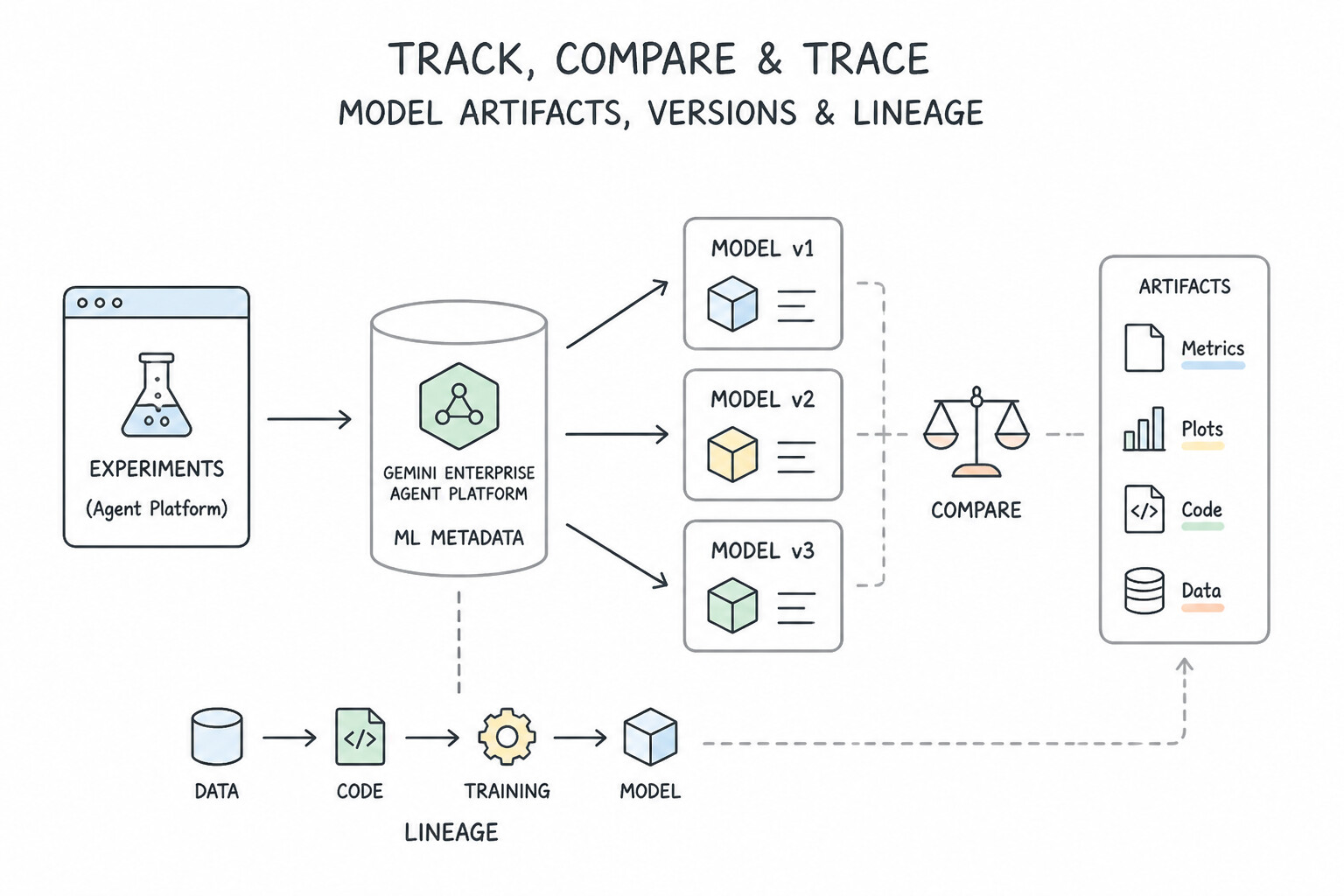
Consideration 2.3c: Tracking and comparing model artifacts, versions, and lineage (e.g., Experiments on Agent Platform and Gemini Enterprise Agent Platform ML Metadata)
- SDK Logging in Experiments (
start_run,log_params,log_metrics): Inside a Python training script or notebook, initialize tracking withaiplatform.init(experiment='my-exp')and wrap the run withwith aiplatform.start_run('run-01'):followed byaiplatform.log_params({...})andaiplatform.log_metrics({...}). - Visualizing High-Dimensional Hyperparameter Trade-Offs (
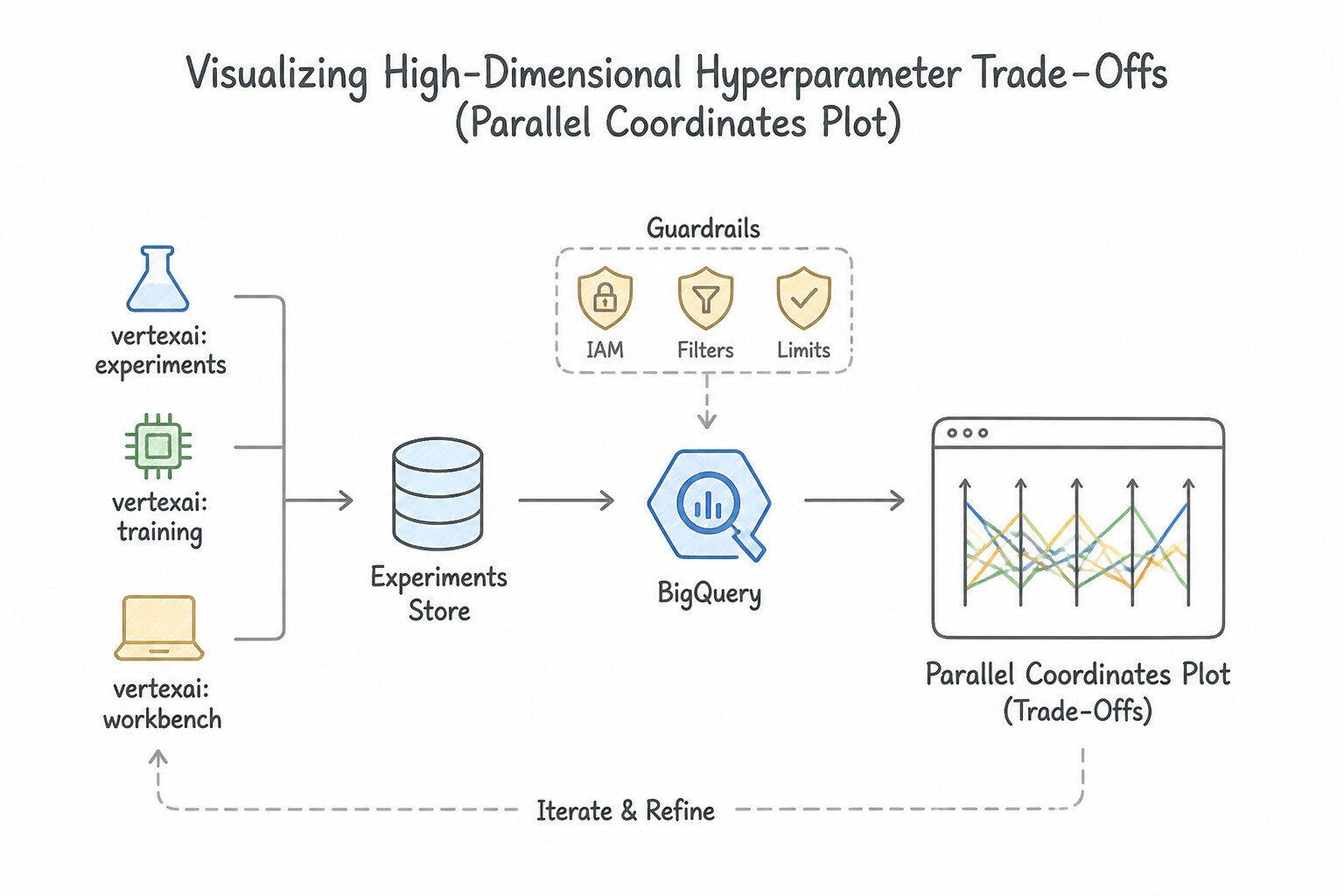
Parallel Coordinates Plot): When comparing 50+ experiment runs across multiple hyperparameters (learning rate, batch size, dropout, layer count, optimizer) and target metrics (validation loss, latency), use the Parallel Coordinates Plot in the Experiments console to visually trace which parameter combinations converge to the best objective region. - End-to-End Artifact Lineage with Agent Platform ML Metadata (Vertex ML Metadata):
- Automatically records the directed acyclic provenance graph connecting Artifacts (
Dataset,Model,Metrics,Schema), Executions (pipeline steps, training jobs, data transformations), and Contexts (pipeline runs, experiments). - During a production incident or audit ("Which exact BigQuery table snapshot and preprocessing parameters produced Model v4?"), query ML Metadata to traverse the lineage graph upstream from the deployed model version back to the source dataset and training execution.
Key Implementation Patterns
- Preventing Training-Serving Skew: Use In the Google Cloud console, navigate to Vertex AI Experiments. Select your experiment, and sort the runs table by the val_accuracy column in descending order. Vertex AI Experiments provides a built-in dashboard to sort and compare runs based on logged metrics.
- Automating Invoice Processing for Accounts Payable: Use Call aiplatform.log_params to record the learning_rate and aiplatform.log_metrics to record the accuracy. Use log_params for configuration values like learning rate and log_metrics for performance results like accuracy.
- Securing MLflow UI Access with Identity-Aware Proxy: Use Configure an HTTP(S) Load Balancer with Identity-Aware Proxy (IAP) enabled for the backend service. IAP allows you to control access to your web applications using Google identity and context without code changes.
Key Takeaways (2.3c)
- Vertex AI Experiments is the standard tool for tracking, visualizing, and comparing parameters and metrics across multiple training runs.
- Vertex ML Metadata is used for tracking the lineage of artifacts (files, datasets) rather than comparing scalar metrics.
- Always prefer built-in visualization consoles over manual log parsing or file inspection for standard operational tasks.
- Use
log_paramsfor input configurations (hyperparameters) like learning rate or batch size.
Quick Decision Cheat Sheet (Subsection 2.3)
If the Scenario Requires... | Choose This Google Cloud Pattern | Avoid This Common Mistake |
|---|---|---|
"Manually log hyperparameters and validation metrics from a custom Python script in Workbench" | aiplatform.start_run() + aiplatform.log_params() + aiplatform.log_metrics() | Writing print() statements to Cloud Logging and parsing them with regex |
"Convert an ad-hoc notebook into a reproducible, auditable workflow for a regulated bank" | Agent Platform Pipelines / Kubeflow Pipelines | Sharing the .ipynb file on Google Drive and running cells manually |
"Evaluate regression model while heavily penalizing large outlier errors" | Root Mean Squared Error ( RMSE) | Mean Absolute Error ( MAE) |
"Evaluate regression model with robustness against extreme outlier anomalies" | Mean Absolute Error ( MAE) | RMSE or MSE |
"Evaluate a fraud classifier on a dataset with 99.9% legitimate and 0.1% fraud rows" | PR-AUC (AUC-PR) + Segment-wise / Slice accuracy | Raw Accuracy or ROC-AUC |
"Evaluate ranking quality of top-10 product recommendations" | NDCG (Normalized Discounted Cumulative Gain) | RMSE or BLEU |
"Trace which dataset version and pipeline execution created a deployed model artifact" | Agent Platform ML Metadata (Vertex ML Metadata) | Vertex AI Feature Store or Cloud Trace |
Further Reading (Subsection 2.3)
- Profile model training performance using Vertex AI TensorBoard — This page explains how to use the Profiler specifically for identifying performance bottlenecks in model training.
- Introduction to Vertex AI Experiments — Provides an overview of how Vertex AI Experiments helps track and analyze experiment runs.
- Introduction to Vertex AI Pipelines — This page explains how Vertex AI Pipelines helps you automate, monitor, and govern your ML systems by orchestrating your ML workflow.
- Building a pipeline — Documentation on how to construct a pipeline using the Kubeflow Pipelines SDK, emphasizing the component-based structure.
- Evaluation metrics for Generative AI — Google Cloud documentation on evaluating models, specifically mentioning ROUGE for summarization tasks and BLEU for translation tasks.
- Generative AI evaluation metrics — Review the section on Pointwise metrics, specifically the definition of Faithfulness and Answer Relevance.
Book TOC · Previous · Chapter 2 of 7 · Next
AwesomeGCP.com Learning
The approach taken is a question-led learning approach: you explore realistic project scenarios where you need to make decisions or take actions to achieve business goals within specific constraints. Instead of passive learning, you are challenged to think and work through the options to master the Professional Machine Learning Engineer (PMLE) certification!