Book TOC · Previous · Chapter 1 of 7 · Next
Chapter 1: Architecting Low-Code AI Solutions: BigQuery ML, AutoML, Model Garden & Prebuilt AI APIs
Chapter Focus: BigQuery ML (
ARIMA_PLUS,BOOSTED_TREE,ML.GENERATE_TEXT, remote Vertex models) vs. AutoML, Model Garden (Gemini, Gemma, Llama), RAG grounding (Vertex AI Search/Vector Search), and Document/Vision/Speech APIs.
Subsection 1.1: Developing ML models using BigQuery ML or AutoML on Gemini Enterprise Agent Platform
The Big Picture
Low-code ML tools—BigQuery ML (BQML) and Gemini Enterprise Agent Platform AutoML (Vertex AI AutoML)—allow teams to build production-grade models in hours without maintaining custom PyTorch or TensorFlow training loops. Yet engineering teams routinely fail in production (and in production) because they violate four architectural invariants:
- Moving Petabytes Out of the Data Warehouse (1.1a): Exporting 50 TB of structured transaction data from BigQuery to Cloud Storage CSVs just to spin up a custom GPU cluster wastes days of engineering time, introduces egress/storage costs, and creates data governance sprawl when
CREATE MODELin BigQuery ML (BOOSTED_TREE_CLASSIFIER,ARIMA_PLUS,KMEANS,MATRIX_FACTORIZATION) can train directly in-place using BigQuery's distributed slot architecture. - Preprocessing Outside the
TRANSFORMClause (1.1b&1.1c): When SQL analysts computeML.STANDARD_SCALER(income)orML.FEATURE_CROSS(...)inside a rawSELECTquery instead of wrapping them inside theTRANSFORM(...)clause ofCREATE MODEL, BigQuery ML does not save the training-time mean, standard deviation, or category vocabulary inside the model artifact. AtML.PREDICTtime, callers either pass raw unscaled features (catastrophic skew) or accidentally re-compute scaling statistics on the small serving batch. - Misconfiguring AutoML for Imbalanced & Temporal Data (1.1d): Accepting AutoML Tabular's default random 80/10/10 split on time-dependent customer logs causes time-travel data leakage; accepting the default
AUC-ROCorLog Lossobjective on a 0.1% fraud dataset yields a model that predicts the majority class 99.9% of the time instead of optimizingAUC-PR. - Over-Engineering External Pipelines for Warehouse-Native GenAI (1.1e): Building external Python ETL jobs to call Gemini for row-by-row BigQuery table enrichment or domain adaptation when BigQuery ML remote models (
REMOTE WITH CONNECTION) allow direct SQL fine-tuning (CREATE MODEL ... OPTIONS(model_type='GEMINI_PRO', ...)) and batch inference (ML.GENERATE_TEXT,ML.GENERATE_EMBEDDING).
Consideration 1.1a: Building models in BigQuery ML or Agent Platform AutoML (e.g., classification, regression, forecasting, and clustering) based on the business problem
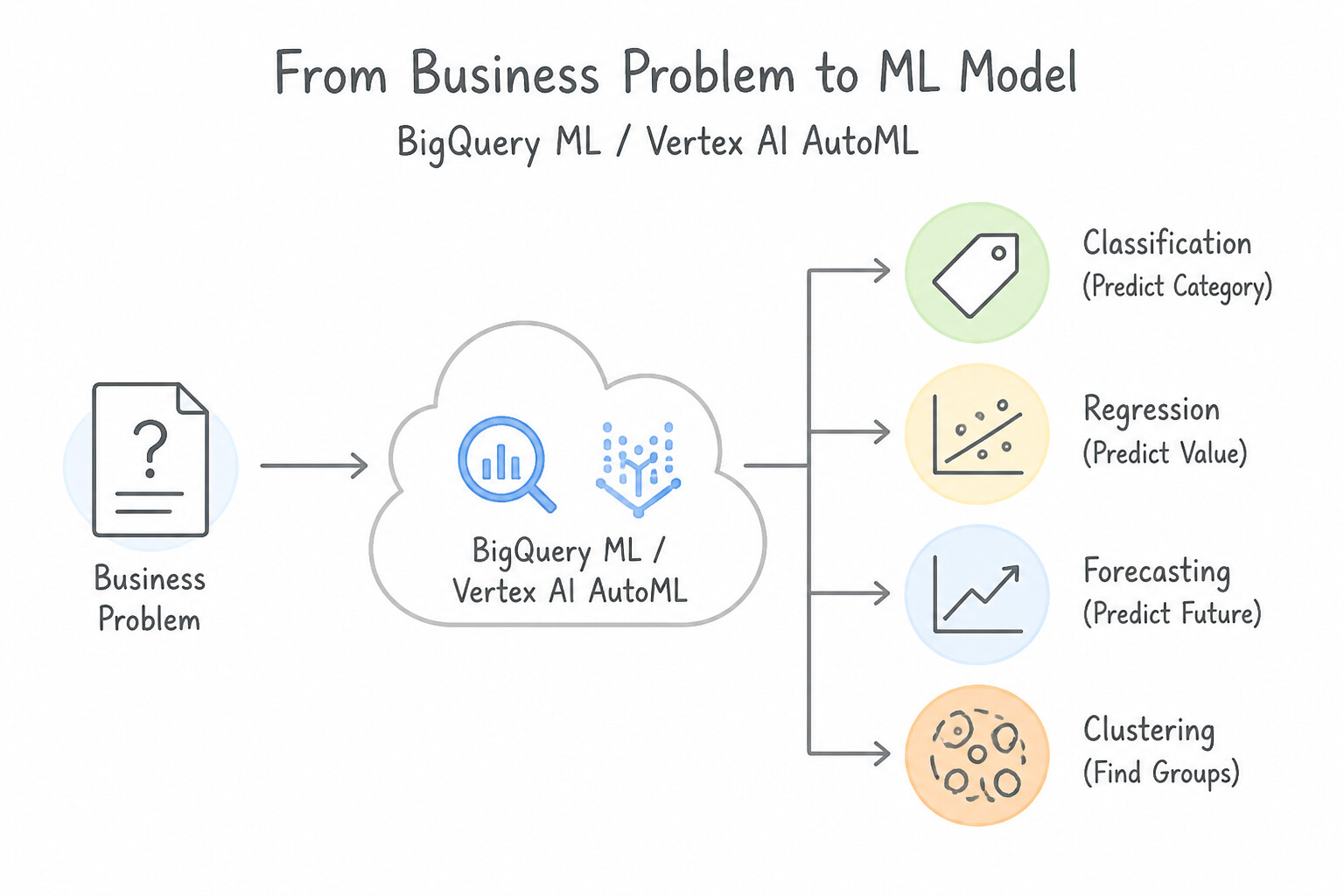
- Supervised Tabular Baselines (
LINEAR_REG&LOGISTIC_REG): ChooseLINEAR_REGfor continuous numeric targets (e.g., customer lifetime value, house price) andLOGISTIC_REGfor binary or multi-class classification when fast training and linear coefficient interpretability (ML.WEIGHTS) are priorities. - Complex Non-Linear Tabular Relationships (
BOOSTED_TREE_*&RANDOM_FOREST_*): ChooseBOOSTED_TREE_CLASSIFIERorBOOSTED_TREE_REGRESSOR(XGBoost under the hood) orDNN_CLASSIFIER/DNN_REGRESSORwhen tabular features exhibit non-linear interactions. - Time-Series Forecasting (
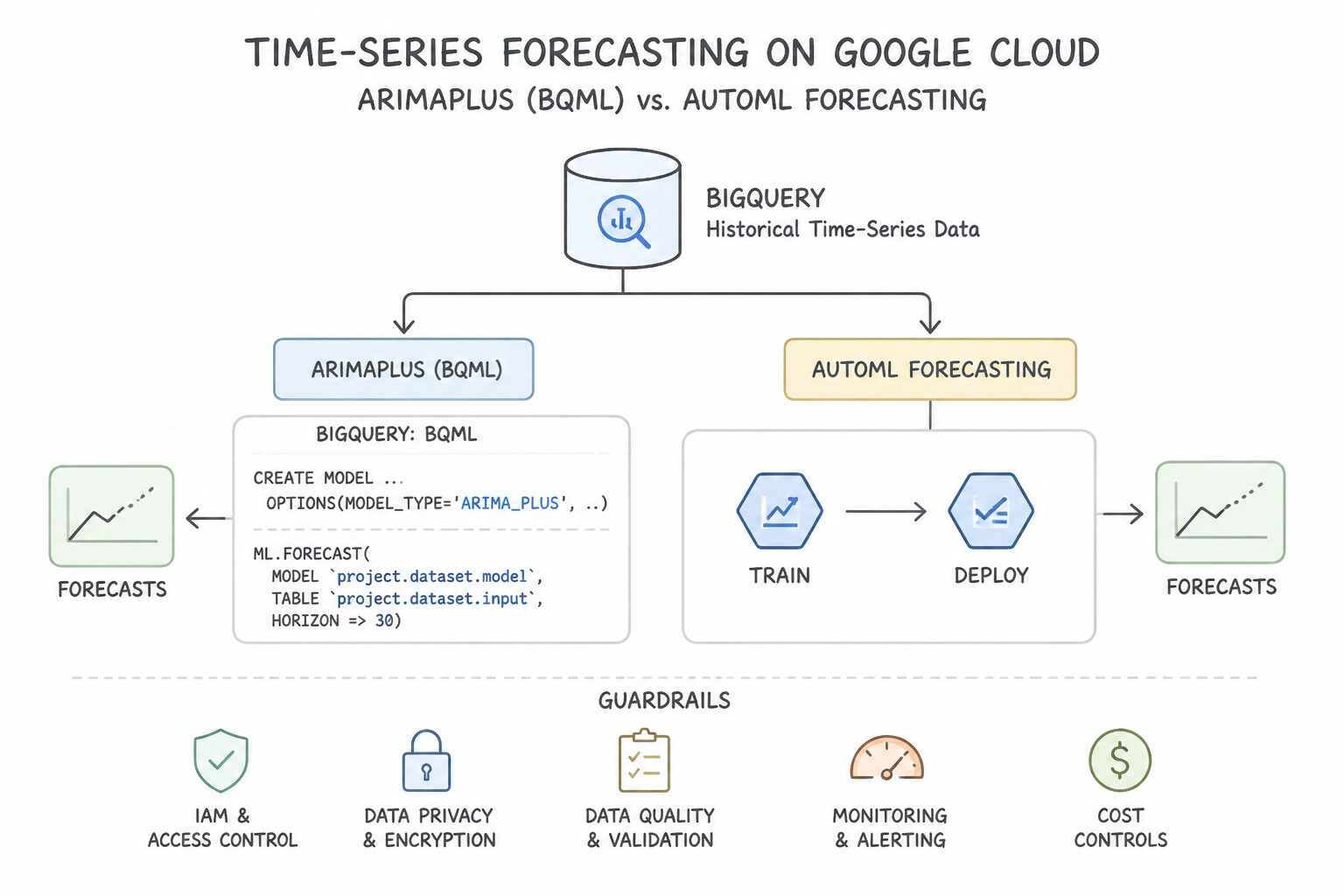
ARIMA_PLUSvs.AutoML Forecasting): - Choose BigQuery ML
ARIMA_PLUSfor univariate or multi-series (TIME_SERIES_ID_COL) forecasting directly in SQL—it automatically handles holiday effects (HOLIDAY_REGION), seasonality, step changes, and spikes/dips. - Choose Agent Platform AutoML Forecasting when your forecast depends on rich time-varying external covariates (like future promotional calendars or weather forecasts) across thousands of SKUs.
- Unsupervised Segmentation, Anomaly Detection & Recommendations (
KMEANS,AUTOENCODER,MATRIX_FACTORIZATION): - Use
KMEANSfor customer/product clustering (supports automatic$K$ selection viaNUM_CLUSTERShyperparameter tuning or Davies-Bouldin index). - Use
AUTOENCODERorKMEANSwithML.DETECT_ANOMALIESfor unsupervised outlier/fraud detection via reconstruction error or centroid distance. - Use
MATRIX_FACTORIZATIONfor collaborative filtering recommendation engines trained on(user_id, item_id, rating)triplets (note: requires reserved or flex BigQuery slots for large matrices).
Key Implementation Patterns
- Inventory Demand Forecasting: Use Create a model using the ARIMA_PLUS model type. ARIMA_PLUS is the dedicated BigQuery ML model for time-series forecasting that handles seasonality and trends automatically. (Avoid alternative: Linear regression requires manual feature engineering to handle time-series patterns effectively.)
- Customer Churn Prediction: Use Create a model with
OPTIONS(model_type='LOGISTIC_REG'). Logistic regression is designed for binary classification tasks like churn prediction. (Avoid alternative: Linear regression predicts continuous numbers, not binary categories.) - Product Recommendation Engine: Use Train a model using model_type='MATRIX_FACTORIZATION' specifying the user, item, and rating columns. Matrix Factorization is the standard BQML model type for creating recommendation systems based on user-item ratings. (Avoid alternative: Linear regression is not optimized for collaborative filtering tasks involving user-item interactions.)
Key Takeaways (1.1a)
- Identify the nature of the prediction target: Continuous number (Regression/Forecasting) vs. Category (Classification).
- If the data is purely historical timestamps and values, the problem is Time-Series Forecasting.
- Use
ARIMA_PLUSin BigQuery ML for univariate time-series forecasting tasks.LINEAR_REGrequires explicit features and is less automated for pure time-series problems compared to ARIMA.
Consideration 1.1b: Performing feature engineering or selection using BigQuery ML
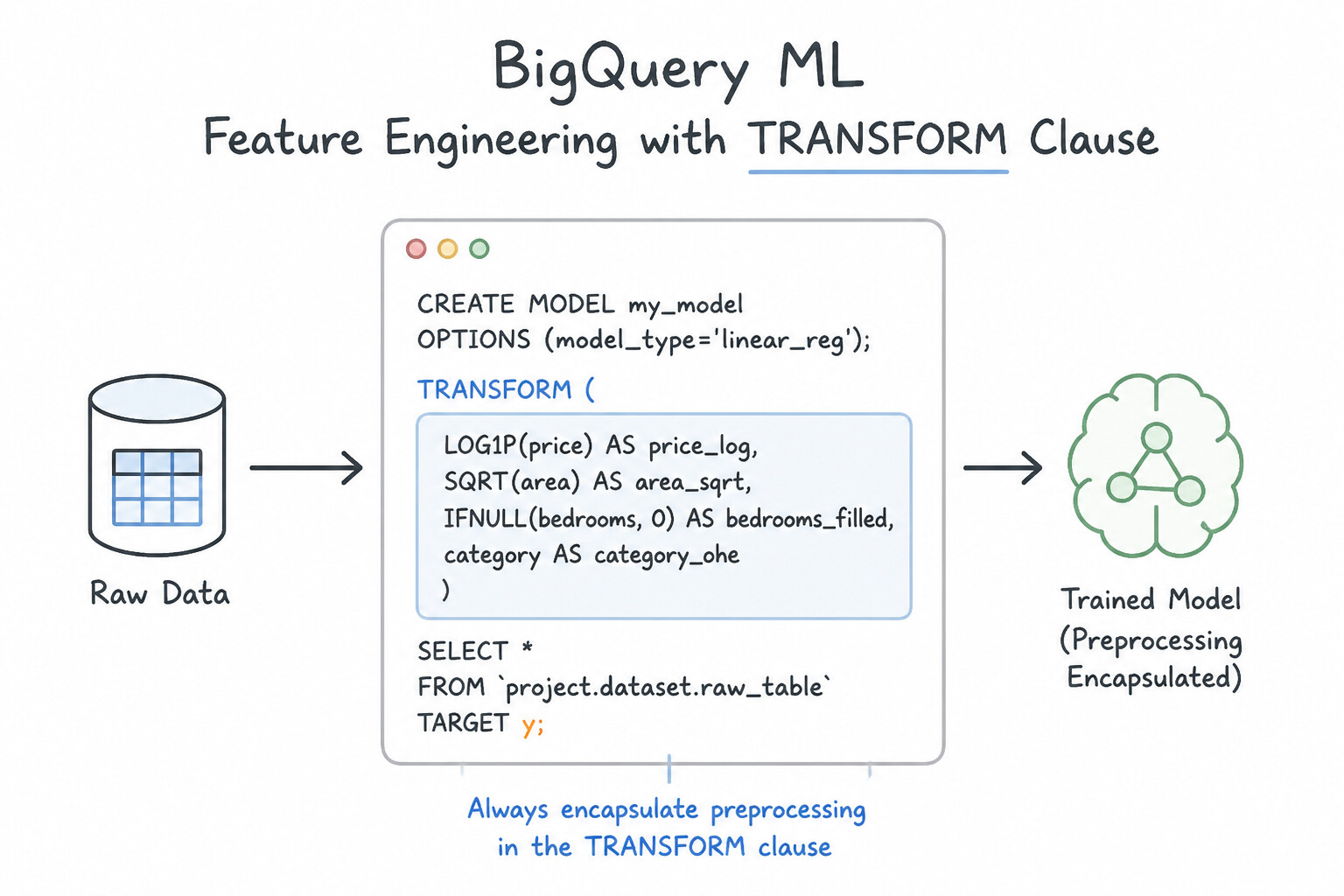
- Always Encapsulate Preprocessing in the
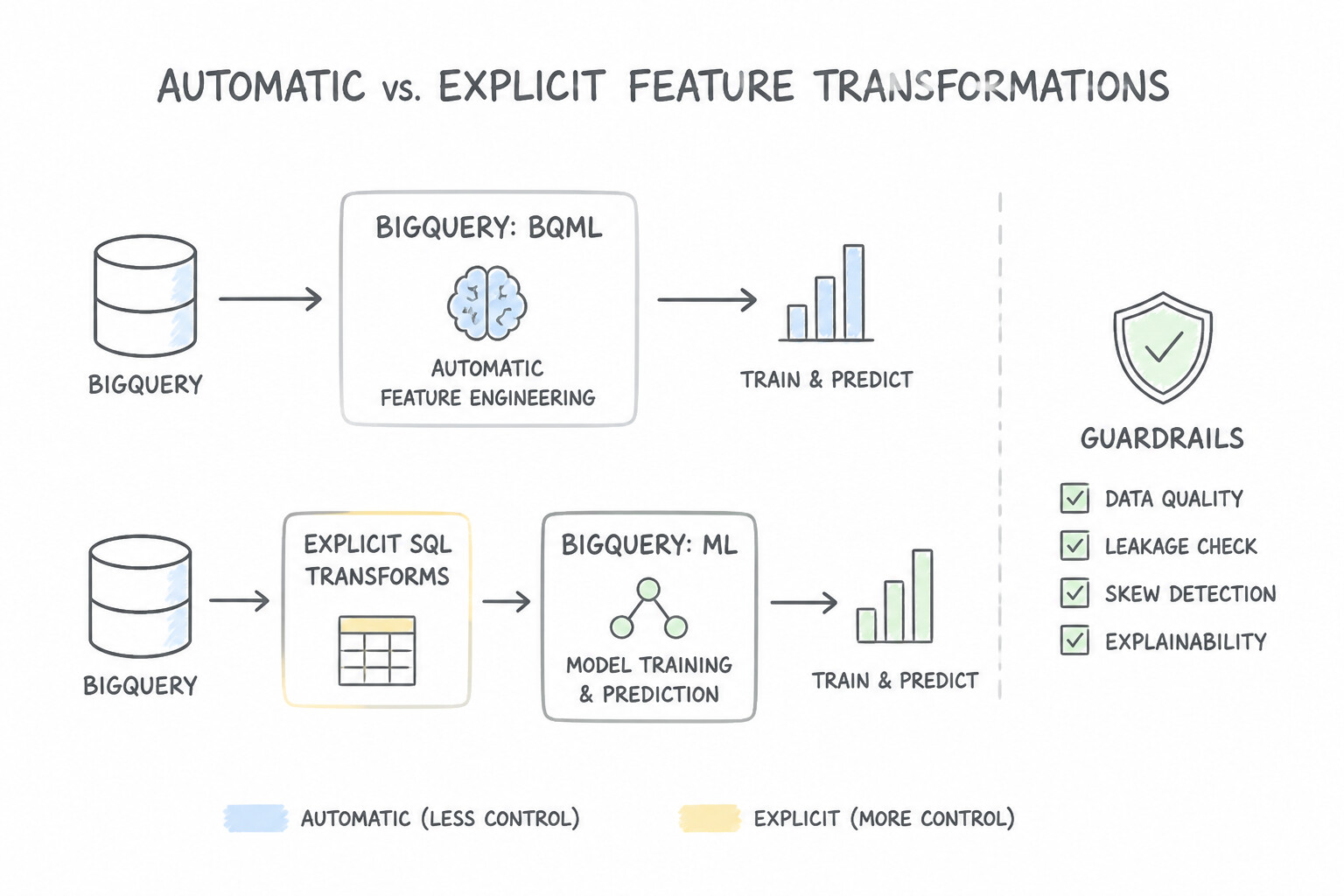
TRANSFORMClause: Placing feature transformations insideCREATE MODEL ... TRANSFORM(SELECT ...)binds the exact training-time statistics (mean, variance, quantile boundaries, one-hot vocabulary) into the saved model artifact. DuringML.PREDICTorML.EVALUATE, callers pass the raw table and BQML applies the exact same transformations automatically—eliminating training-serving skew. - Automatic vs. Explicit Feature Transformations: By default, BQML automatically normalizes numerical columns and one-hot encodes string/categorical columns. Use explicit
TRANSFORMfunctions when you need specialized mathematical feature engineering: - Numerical Scaling & Discretization:
ML.STANDARD_SCALER(col)($Z-score normalization), @@CODE2@@ ([0, 1]$ scaling),ML.BUCKETIZE(col, array_bounds)(fixed bins), andML.QUANTILE_BUCKETIZE(col, num_buckets)(equal-frequency bins for skewed distributions like income). - Categorical Encoding & Feature Crosses:
ML.ONE_HOT_ENCODER(col),ML.LABEL_ENCODER(col), andML.FEATURE_CROSS(STRUCT(col1, col2))to capture non-linear conjunctions (e.g.,pickup_borough × hour_of_day) in linear models. - Dimensionality Reduction & Feature Inspection: Use
MODEL_TYPE='PCA'withML.PRINCIPAL_COMPONENTSto project high-dimensional correlated IoT/tabular features into orthogonal components, and inspect feature importance usingML.GLOBAL_EXPLAINorML.FEATURE_IMPORTANCE.
Key Implementation Patterns
- Preventing Training-Serving Skew: Use Define the transformation using the TRANSFORM clause inside the CREATE MODEL statement. The TRANSFORM clause encapsulates preprocessing logic within the model artifact, ensuring it is automatically applied during prediction. (Avoid alternative: Transformations in the SELECT statement are not saved with the model, requiring manual replication during prediction.)
- Capturing Feature Interactions: Use Use the ML.FEATURE_CROSS function on the pickup and drop-off columns within the TRANSFORM clause. ML.FEATURE_CROSS creates feature interactions (crosses) from categorical variables, allowing the model to learn from specific combinations.
- Handling Skewed Numerical Distributions: Use Use the ML.QUANTILE_BUCKETIZE function in the TRANSFORM clause of the CREATE MODEL statement. ML.QUANTILE_BUCKETIZE creates buckets with an equal number of elements, effectively handling skewed data. (Avoid alternative: ML.BUCKETIZE splits data based on numerical values (range) rather than frequency (count), which is not ideal for skewed data.)
Key Takeaways (1.1b)
- The TRANSFORM clause in BigQuery ML embeds feature engineering logic directly into the model.
- Using the TRANSFORM clause prevents training-serving skew.
- Functions like
ML.PREDICTautomatically apply transformations defined in the TRANSFORM clause to new data.- Preprocessing in the SELECT statement requires manual replication during prediction.
Consideration 1.1c: Generating predictions using BigQuery ML
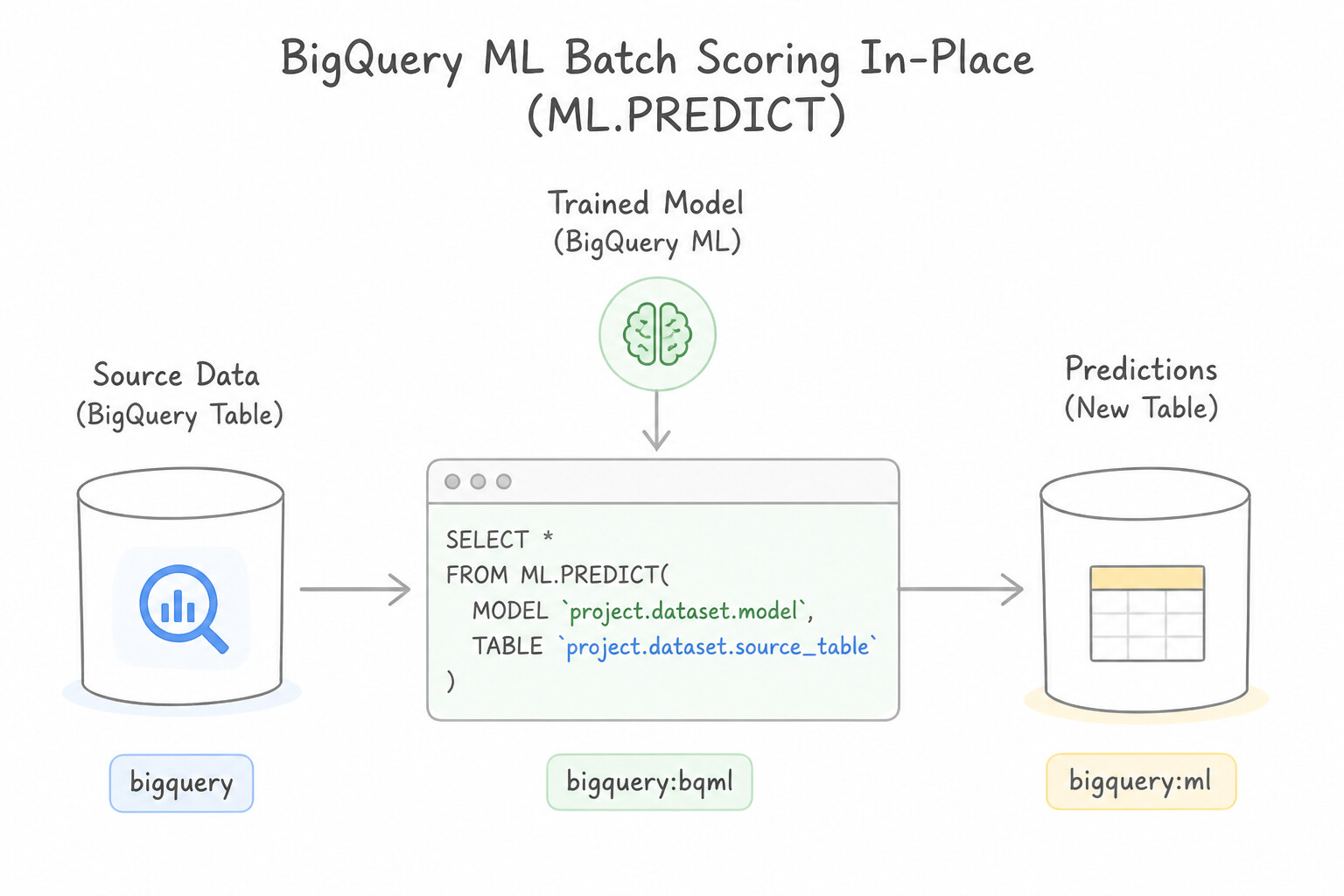
- Batch Scoring In-Place (
ML.PREDICT): RunSELECT * FROM ML.PREDICT(MODEL dataset.model_name, TABLE dataset.new_data)to score millions of rows directly inside BigQuery without data egress. - Custom Classification Thresholds (
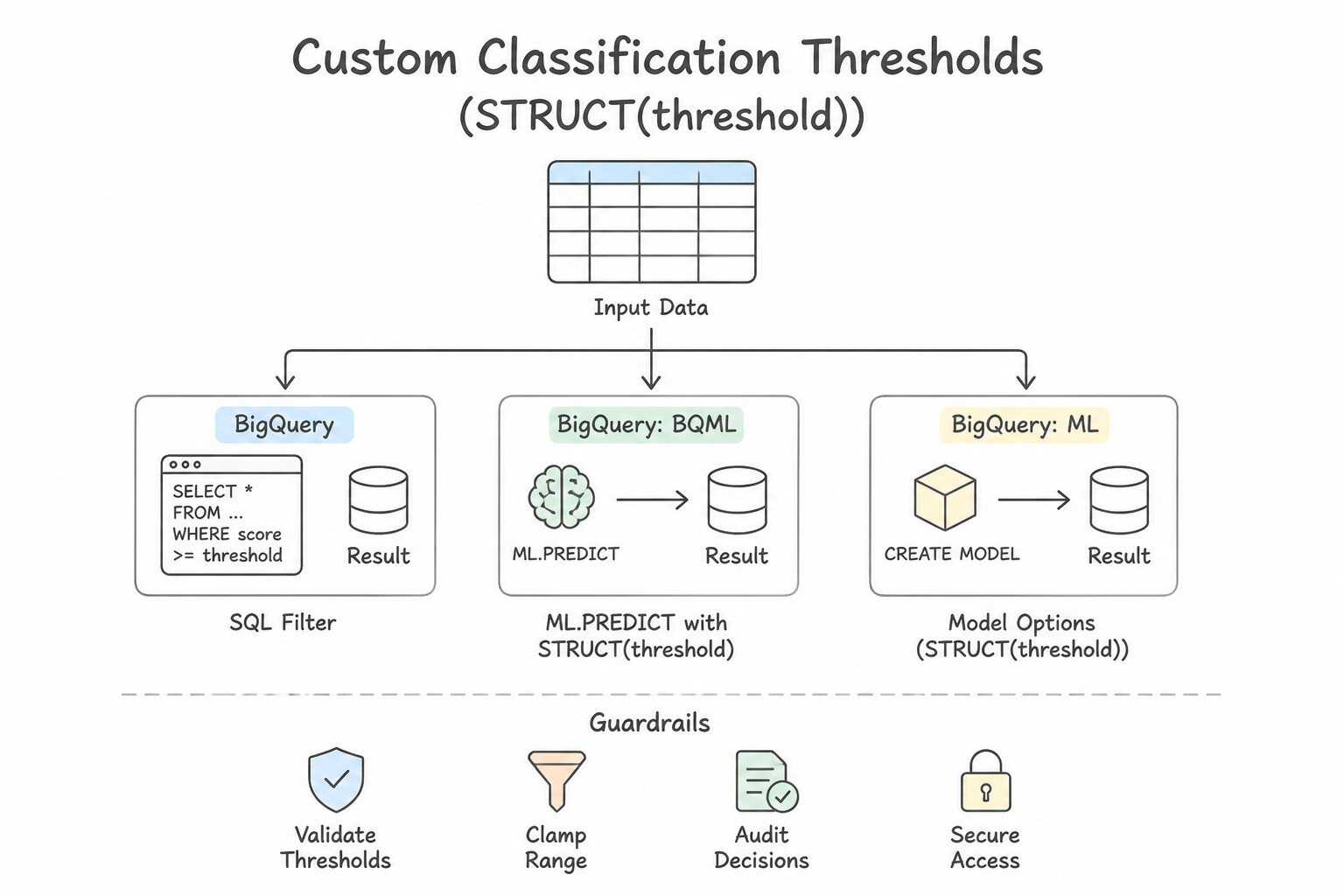
STRUCT(threshold)): By default, binary classifiers in BQML use a0.5probability cutoff. When business requirements demand higher Recall (catching more fraud/churn) or higher Precision (reducing false alarms), pass a third argument:ML.PREDICT(MODEL ..., TABLE ..., STRUCT(0.25 AS threshold)). - Local & Global Explainability (
ML.EXPLAIN_PREDICT&ML.GLOBAL_EXPLAIN): When regulated stakeholders require per-prediction feature attributions alongside predicted values, substituteML.EXPLAIN_PREDICTforML.PREDICTto output top-$K$ Shapley/attribution scores per row. - Forecasting, Anomaly Detection & Exporting for Online Serving:
- Generate future time-series horizons with
ML.FORECAST(MODEL ..., STRUCT(30 AS horizon, 0.95 AS confidence_level)). - Flag outliers with
ML.DETECT_ANOMALIES(MODEL ..., STRUCT(0.02 AS contamination), TABLE ...). - When sub-100ms real-time online inference is required for a BQML model, execute
EXPORT MODEL dataset.model_name OPTIONS(URI='gs://bucket/path')to export a TensorFlowSavedModelor XGBoost artifact and deploy it to an Agent Platform Inference Endpoint.
Key Implementation Patterns
- Batch Prediction Syntax for Regression: Use Run
SELECT * FROM ML.PREDICT(MODEL retail_dataset.clv_model, TABLE retail_dataset.new_customers).ML.PREDICTis the dedicated function in BigQuery ML for applying a trained model to input data to generate predictions. (Avoid alternative:ML.EVALUATEcalculates model performance metrics (like accuracy or RMSE) and does not output row-level predictions.) - Adjusting Classification Thresholds: Use Use the ML.PREDICT function and provide STRUCT(0.1 AS threshold) as a parameter. Pass a STRUCT with the desired threshold to ML.PREDICT to adjust the decision boundary. (Avoid alternative: The threshold is a prediction-time setting, not a training hyperparameter.)
- Automatic Preprocessing with TRANSFORM: Use Pass the raw data directly to the ML.PREDICT function. BigQuery ML automatically applies the TRANSFORM clause logic to raw data during ML.PREDICT. (Avoid alternative: Manual preprocessing is unnecessary because the TRANSFORM clause logic is automatically applied during prediction.)
Key Takeaways (1.1c)
- Use
ML.PREDICTfor generating predictions (inference) on new data.- Use
ML.EVALUATEfor assessing model accuracy using test data.- Use
ML.WEIGHTSto inspect the learned coefficients of a linear model.- BQML functions are invoked via SQL
FROMclauses.
Consideration 1.1d: Training models using Agent Platform AutoML
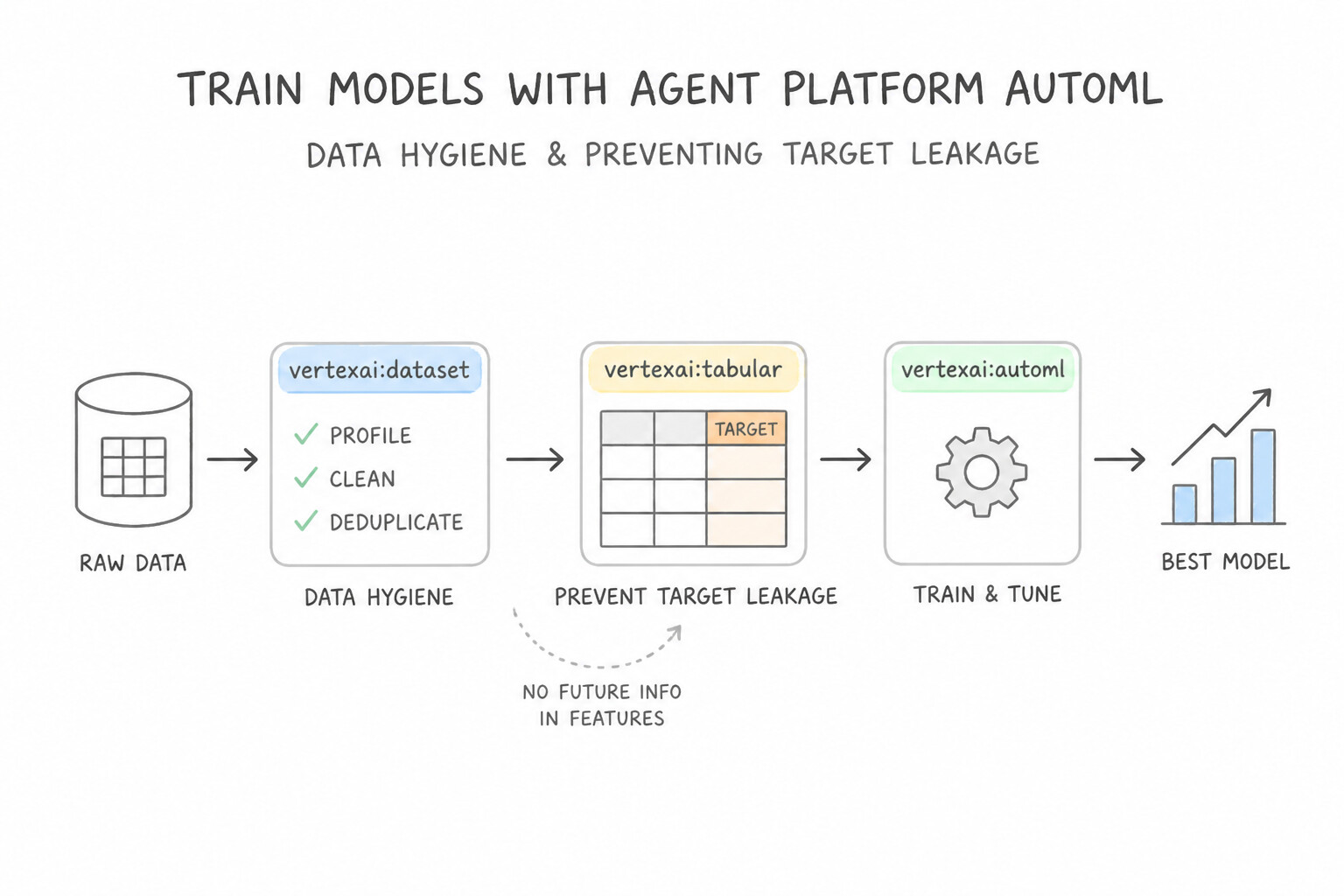
- Data Hygiene & Preventing Target Leakage: Before launching AutoML Tabular, audit all columns for target leakage—any feature updated after or as a direct result of the target outcome (e.g.,
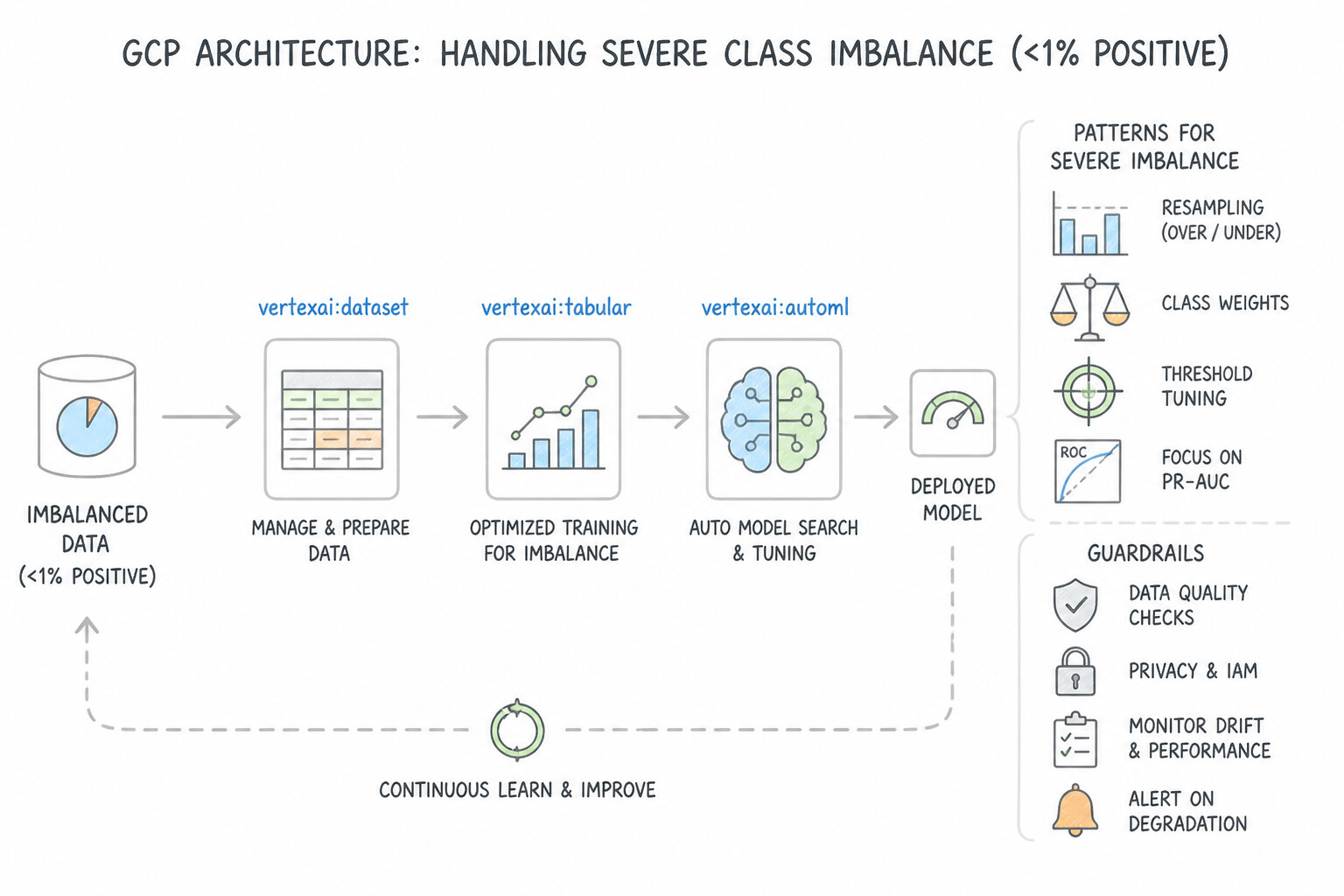
account_cancellation_reason,chargeback_processed_date,final_settlement_amount). If AutoML reports 99.9% validation accuracy and feature importance shows one column dominating 95% of attribution, drop that leaking column and retrain. - Handling Severe Class Imbalance (
<1%Positive Class): - Change the Optimization Objective from default
AUC-ROC/Log LosstoAUC-PR(Area Under the Precision-Recall Curve) so training optimizes minority-class precision and recall. - Provide a Weight Column (assigning higher numerical weights, e.g.,
100.0, to minority rows and1.0to majority rows) or stratify splits carefully. - Chronological Splits & Forecasting Covariates:
- Always configure a Manual / Time-Based Split Column (
TRAIN,VALIDATE,TESTordered by timestamp) whenever rows have temporal dependencies. - In AutoML Forecasting, classify every feature column accurately: Available at Forecast (known in the future, e.g.,
is_holiday,planned_promotion_discount) vs. Unavailable at Forecast (only known historically, e.g.,historical_foot_traffic). If over-prediction (spoilage) and under-prediction (stockouts) have asymmetric costs, select the Quantile Loss optimization objective. - Multimodal AutoML (Vision, Object Detection, Text, Video): Use AutoML Image Classification / Object Detection (importing JSONL manifests with normalized [0, 1] bounding-box coordinates
[xmin, ymin, xmax, ymax]), AutoML Text (Single-label vs. Multi-label classification when an email can have multiple tags simultaneously), and Vertex AI Data Labeling Service when raw datasets lack ground-truth annotations.
Key Implementation Patterns
- Handling Target Leakage in AutoML Tabular: Use Remove the cancellation_date column from the input features. The cancellation_date causes target leakage as it is not available at prediction time; removing it forces the model to learn actual patterns. (Avoid alternative: More training time cannot fix a model that is learning from a leaked feature.)
- Handling Imbalanced Data in Tabular Classification: Use Select the objective to maximize AUC-PR. AUC-PR focuses on the performance of the minority class, making it ideal for imbalanced datasets like fraud detection. (Avoid alternative: AUC-ROC is less informative for imbalanced datasets because it can be overly optimistic about the minority class performance.)
- Imbalanced Datasets in AutoML Tabular: Use Add a weight column to the dataset and assign a higher value to the fraud rows. AutoML allows you to specify a weight column to assign higher importance to minority class rows during training. (Avoid alternative: Removing majority data loses valuable information needed for the model to learn normal patterns.)
Key Takeaways (1.1d)
- Target Leakage creates models that look perfect in training but fail in production.
- Always exclude features that are determined by the outcome (e.g., cancellation dates for churn models).
- Verify that every feature in your training set will be available at serving time.
- Class Imbalance requires specialized metrics; standard accuracy is often misleading.
Consideration 1.1e: Fine-tuning Gemini models using BigQuery
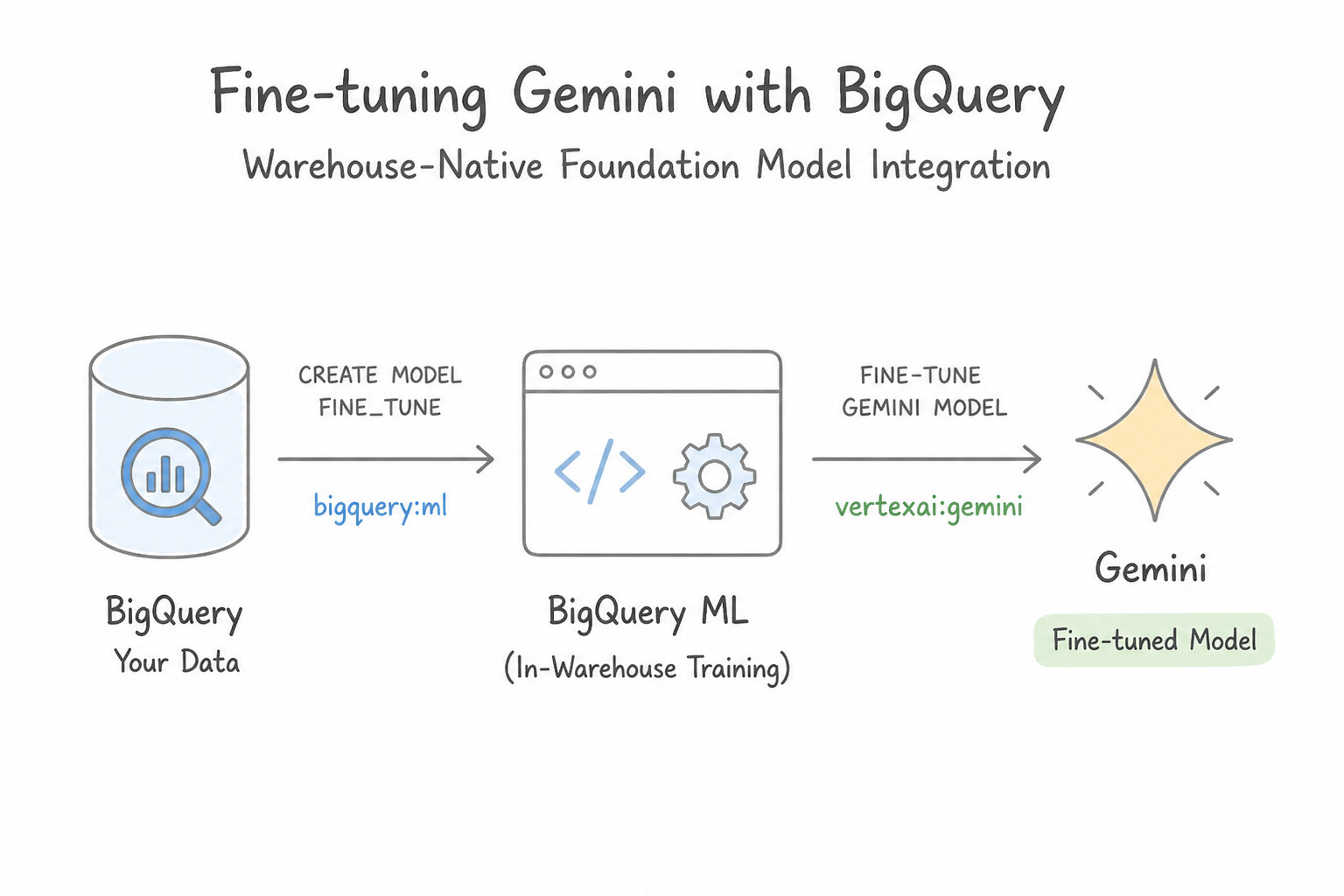
- Warehouse-Native Foundation Model Integration: BigQuery ML connects directly to Agent Platform (Vertex AI) Foundation Models via a Cloud Resource Connection (
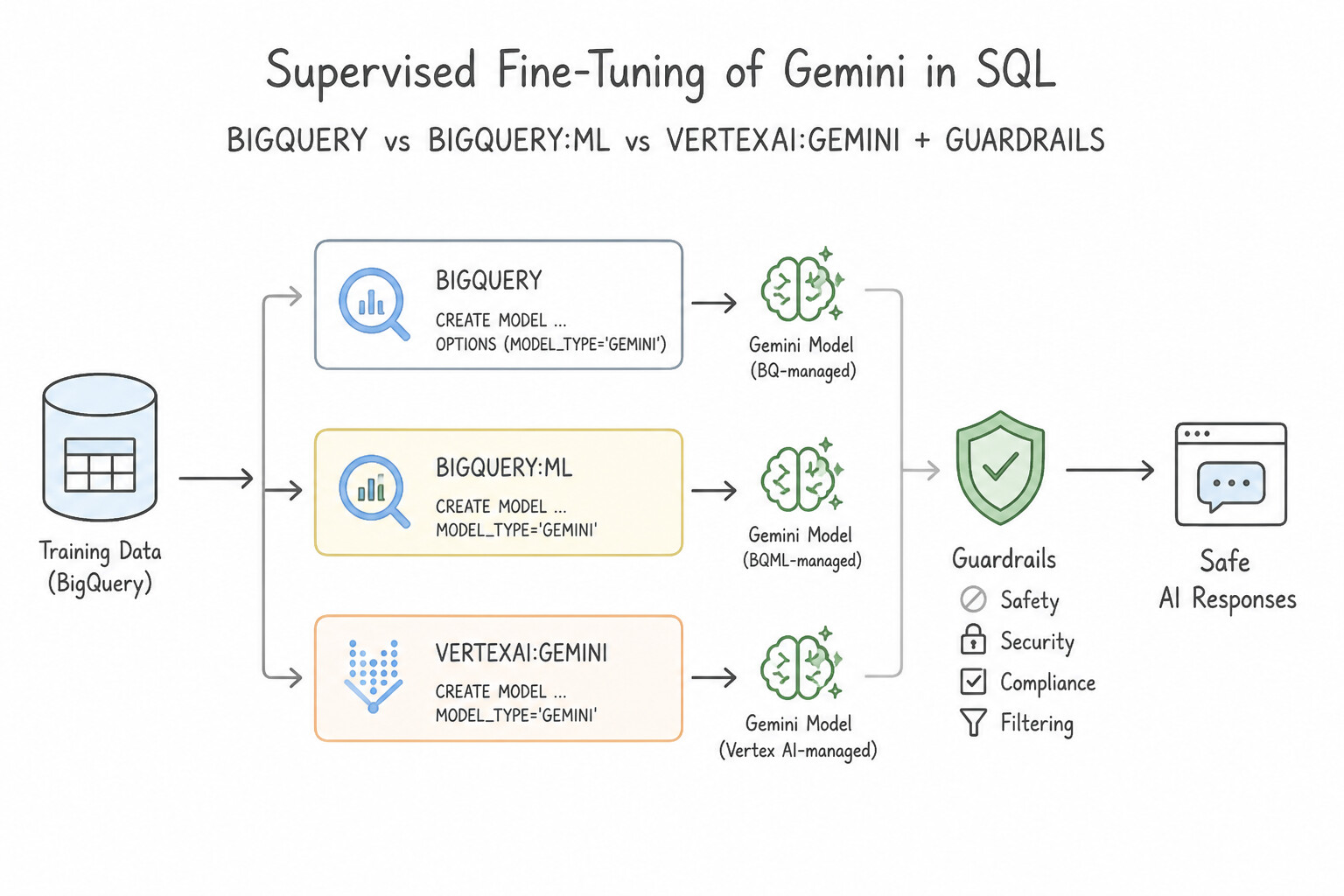
REMOTE WITH CONNECTION), allowing data teams to run generative AI workflows over petabyte tables using standard SQL. - Supervised Fine-Tuning of Gemini in SQL (
CREATE MODEL): When a Gemini model needs domain-specific terminology, consistent classification labels, or specialized SQL-table formatting, fine-tune it directly from a BigQuery training table using:CREATE OR REPLACE MODEL dataset.tuned_gemini REMOTE WITH CONNECTION project.region.conn_id OPTIONS(endpoint='gemini-2.0-flash', max_iterations=..., ...)(or supervised tuning options pointing topromptandlabelcolumns in aAS SELECT prompt, label FROM ...query). - Generative Text & Structured Extraction (
ML.GENERATE_TEXT): Invoke the base or fine-tuned Gemini model across BigQuery rows usingML.GENERATE_TEXT(MODEL dataset.tuned_gemini, TABLE dataset.customer_reviews, STRUCT(0.2 AS temperature, TRUE AS flatten_json_output))for sentiment tagging, summarization, and zero-ETL structured entity extraction. - Vector Embeddings in SQL (
ML.GENERATE_EMBEDDING): Generate dense semantic embeddings for text or multimodal columns directly inside BigQuery usingML.GENERATE_EMBEDDINGpaired withVECTOR_SEARCHfor warehouse-native RAG and semantic similarity joins.
Key Implementation Patterns
- Google Cloud service that enables low-code fine-tuning of generative AI foundation: Use BigQuery ML. BigQuery ML provides built-in capabilities to fine-tune Gemini models directly with standard SQL. (Avoid alternative: Cloud Dataflow is a managed stream and batch data processing pipeline service, not a SQL-based model fine-tuning tool.)
- Standard BigQuery ML function used for generative text inference with foundation models: Use ML.GENERATE_TEXT. ML.GENERATE_TEXT is the standard BigQuery ML function for performing generative text tasks with Vertex AI foundation models. (Avoid alternative: BigQuery ML does not define model-specific execution keywords such as ML.RUN_GEMINI.)
- Standard BigQuery ML SQL function used to produce vector embeddings from structured: Use ML.GENERATE_EMBEDDING. <code>ML.GENERATE_EMBEDDING</code> is the official BigQuery ML SQL function used to generate text, image, and multimodal embeddings. (Avoid alternative: <code>ML.TRANSFORM_VECTOR</code> is a fictitious function name and is not part of BigQuery ML syntax.)
Key Takeaways (1.1e)
- BigQuery ML enables low-code fine-tuning and inference of Vertex AI Gemini models directly using standard SQL queries.
- Cloud Dataflow and Cloud Dataproc are data pipeline and processing tools, not SQL-native model management services.
- Cloud Pub/Sub provides scalable messaging rather than model tuning.
ML.GENERATE_TEXTexecutes text generation tasks on Vertex AI foundation models directly within BigQuery SQL.
Quick Decision Cheat Sheet (Subsection 1.1)
If the Scenario Requires... | Choose This Google Cloud Pattern | Avoid This Common Mistake |
|---|---|---|
"SQL team", "data in BigQuery", "fastest baseline", "minimal data movement" | BigQuery ML ( CREATE MODEL) | Exporting to Cloud Storage for Vertex AI Custom Training |
"Ensure identical SQL feature scaling at training and ML.PREDICT time" | TRANSFORM(...) clause inside CREATE MODEL | Running ML.STANDARD_SCALER in a separate SELECT query before ML.PREDICT |
"Capture non-linear interaction between two categorical columns in BQML linear model" | ML.FEATURE_CROSS(STRUCT(colA, colB)) | ML.MIN_MAX_SCALER or concatenating strings without ML.FEATURE_CROSS |
"Discretize a heavily skewed numerical column (e.g., income) into equal-sized buckets in BQML" | ML.QUANTILE_BUCKETIZE(col, num_buckets) | ML.BUCKETIZE with evenly spaced linear boundaries |
"Increase recall / reduce false negatives on a trained BQML binary classifier without retraining" | ML.PREDICT(..., STRUCT(0.2 AS threshold)) (lower threshold) | Retraining with LINEAR_REG or increasing the threshold to 0.8 |
"Unsupervised customer segmentation in BQML without knowing exact cluster count $K$" | MODEL_TYPE='KMEANS' + hyperparameter tuning on NUM_CLUSTERS | LOGISTIC_REG (requires labels) or hardcoding random $K$ |
"AutoML Tabular model gets 99.9% eval accuracy but fails completely in production" | Target leakage! Inspect feature attributions, drop post-event leaking column, and use a chronological split | Adding more L2 regularization or switching to custom training |
"AutoML Forecasting where over-predicting (spoilage) costs 3x more than under-predicting" | Configure Quantile Loss optimization objective (e.g., quantile < 0.5) | Optimizing RMSE or MAE (which penalize over- and under-prediction symmetrically) |
Further Reading (Subsection 1.1)
- The CREATE MODEL statement for time series models — Documentation describing the syntax and use cases for creating ARIMA_PLUS models in BigQuery ML, specifically highlighting its ability to forecast based on time-series data.
- The CREATE MODEL statement — Documentation detailing the syntax for creating models in BigQuery ML, including the list of supported model types like LOGISTIC_REG.
- Churn prediction for game developers using Google Analytics 4 and BigQuery ML | Google Cloud Blog — A specific tutorial demonstrating how to use BigQuery ML's logistic regression to predict customer churn.
- BigQuery ML Matrix Factorization — Documentation on the CREATE MODEL syntax for Matrix Factorization, explaining how to specify user, item, and rating columns.
- The TRANSFORM clause — Documentation on the syntax and usage of the TRANSFORM clause within the CREATE MODEL statement.
- Feature engineering overview — Overview of automatic preprocessing and manual feature engineering capabilities in BigQuery ML.
Subsection 1.2: Building AI solutions using Google Cloud AI APIs or foundational models
The Big Picture
When building AI applications with Gemini Enterprise Agent Platform Model Garden and Google Cloud Prebuilt AI APIs, the most expensive architectural mistake is training from scratch what Google has already pre-trained—or using a generic OCR API when a specialized domain processor exists. In production, four failure patterns dominate:
- The "Custom Model for a Commodity Perception Task" Trap (1.2b): Teams spend months labeling 50,000 vendor invoices or multilingual support tickets to train a custom LayoutLM or Transformer model when Document AI (Invoice Parser / Form Parser / Document Splitter) or the Cloud Translation / Natural Language / Vision API solves the exact problem out-of-the-box via a serverless REST/gRPC call.
- Choosing the Wrong Model Garden Modality or Consumption Pattern (
1.2a&1.2c): Confusing Gemini (multimodal reasoning over text, code, audio, image, video), Imagen (photorealistic text-to-image generation, inpainting/outpainting), Veo (high-definition generative video), and Text/Multimodal Embeddings (dense vectors for semantic search)—or deploying an open-weight model like Llama on self-managed GPUs when Models as a Service (MaaS) in Model Garden provides a serverless pay-per-token endpoint (unless strict single-tenant VPC/HIPAA infrastructure isolation requires self-managed deployment). - Un-Grounded Hallucinations & Naive Keyword Search in RAG (1.2c): Relying on a foundation model's parametric memory for enterprise HR/financial policies causes hallucinations. Conversely, using pure vector similarity search misses exact part numbers or error codes (
ERR-4092). Production RAG architectures in Agent Builder / Vertex AI Search combine Layout Parser + OCR for complex PDFs, Hybrid Search (dense semantic embeddings + sparse BM25 keyword matching), and Grounding with Citations. - Prompt Token Bloat & Unbounded Latency in Gemini Apps (1.2d): Sending a 50-page policy manual or a 50-shot prompt prefix on every single API call burns token budgets and inflates Time-to-First-Token (TTFT). Architects optimize Gemini workloads using Context Caching (for repeated large prefixes), Semantic Caching, Flash / Flash-Lite model routing (or Supervised Fine-Tuning / Distillation to replace bulky few-shot prompts), and Provisioned Throughput for guaranteed SLA availability.
Consideration 1.2a: Evaluating and selecting the appropriate model for a given task from Gemini Enterprise Agent Platform Model Garden
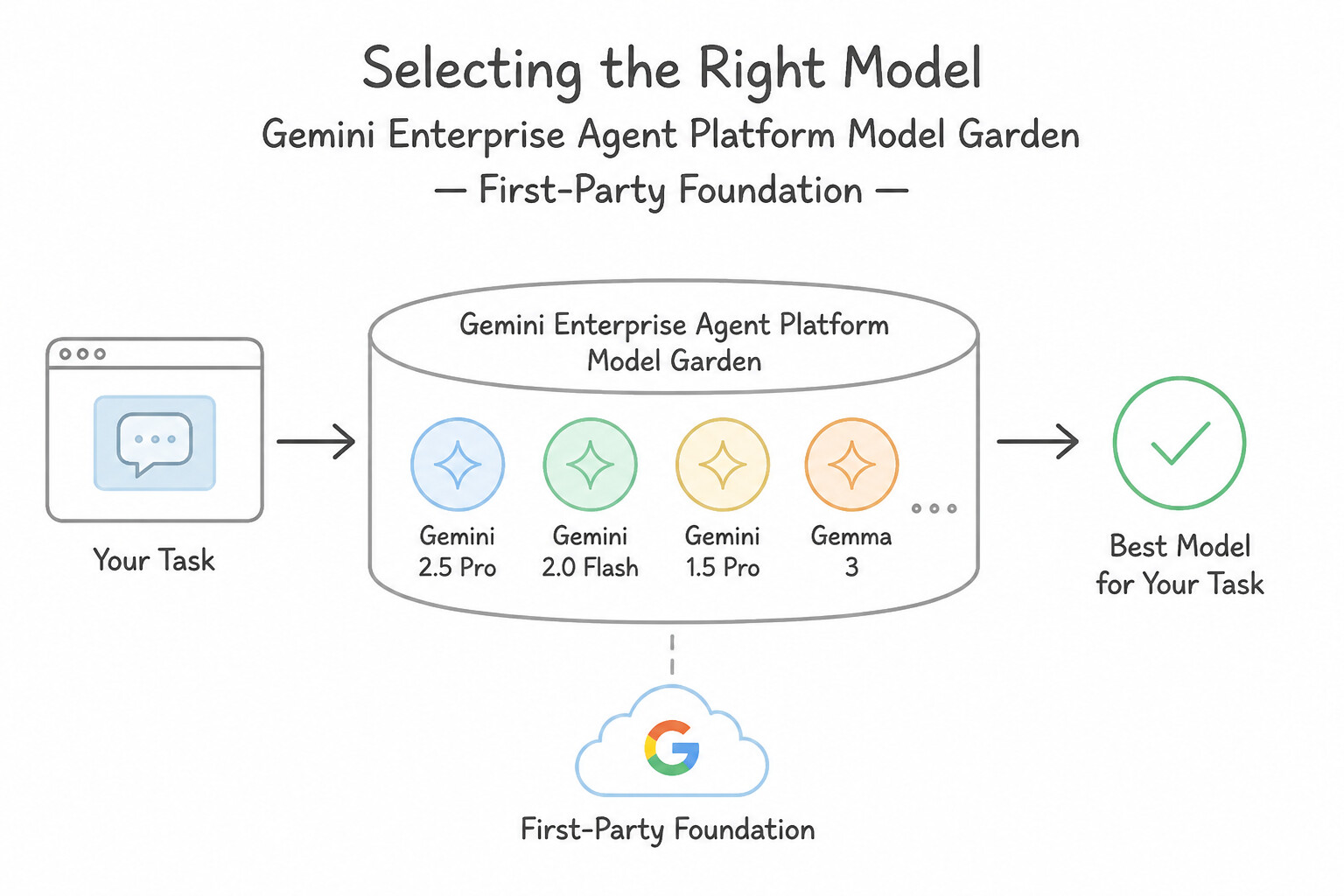
- First-Party Foundation Model Families in Model Garden:
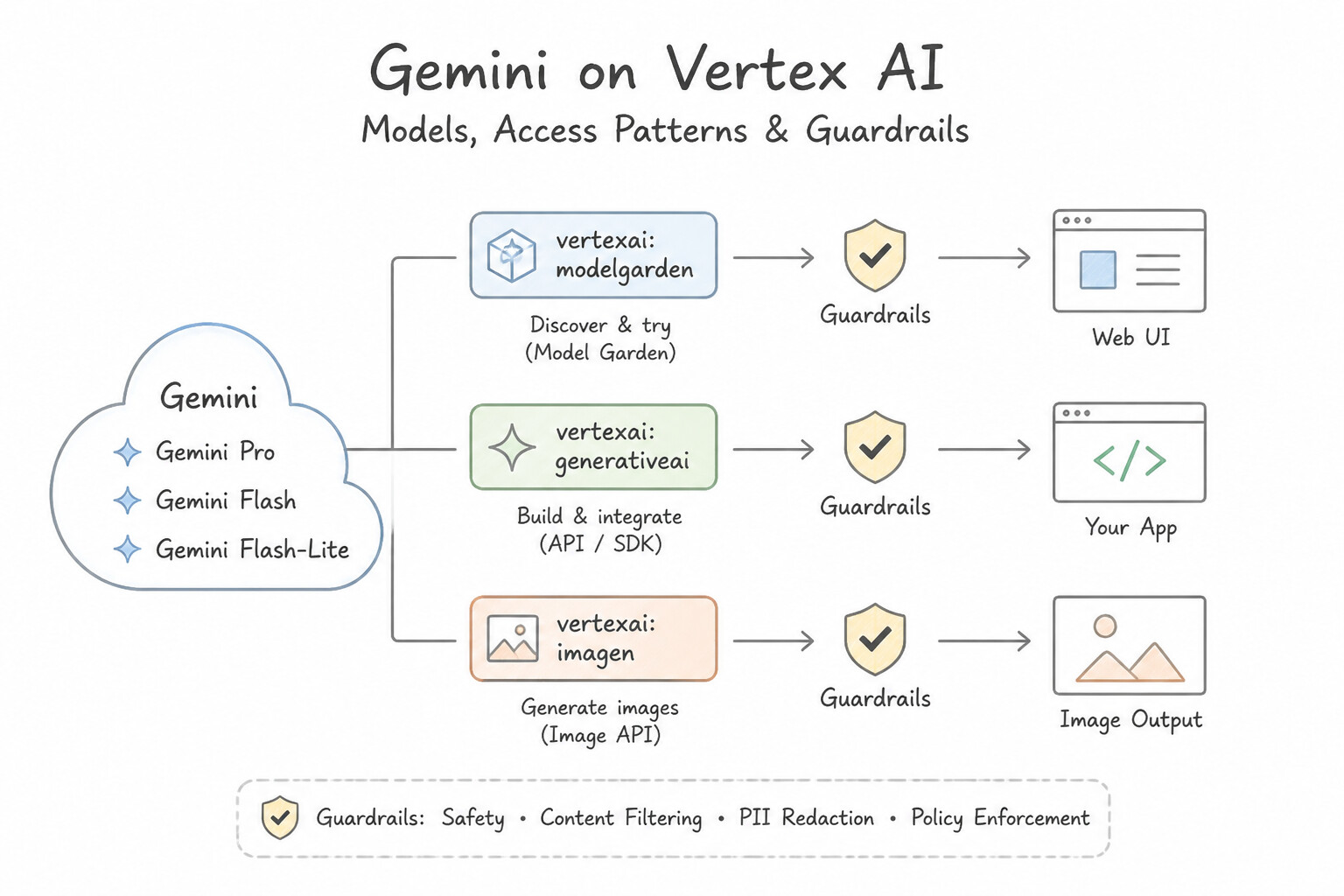
- Gemini (
Gemini Pro,Gemini Flash,Gemini Flash-Lite): Natively multimodal models capable of ingesting interleaved text, images, audio, video, and PDFs with long context windows. Choose Pro for deep reasoning, complex coding, and multi-document synthesis; choose Flash / Flash-Lite for high-throughput, low-latency classification, routing, and extraction. - Imagen: Specialized diffusion/foundation model family for photorealistic text-to-image generation, mask-based inpainting, outpainting, and product background replacement.
- Veo: Google's foundational generative video model for synthesizing high-resolution video clips from text or image prompts.
- Embeddings API (
text-embedding-*,multimodalembedding): Maps text, images, or video into dense floating-point vectors so semantically similar concepts cluster together in vector space (used with Vector Search for RAG and recommendations). - Proprietary Managed APIs vs. Open-Weight Self-Deployed Models: When an enterprise requires total control over model weights, air-gapped VPC Service Controls without shared multi-tenant endpoints, or strict data-residency/healthcare isolation, select an open-weight model (Gemma, Llama, Mistral) from Model Garden and deploy it to a dedicated, private Agent Platform Endpoint on your own GPU/TPU nodes.
Key Implementation Patterns
- Text Summarization for Customer Support: Use Select the Gemini Pro model in Vertex AI Model Garden and integrate its API into your application. Gemini Pro is a pre-trained foundation model available via API in Model Garden, fulfilling the requirements for summarization without training infrastructure.
- Generative Images for Marketing: Use Use the Imagen model to generate images from the text prompts. Imagen is the specific foundation model in Vertex AI Model Garden designed for generating photorealistic images from text descriptions. (Avoid alternative: Summarizing text does not fulfill the requirement to generate visual image assets.)
- Semantic Search Implementation: Use Use the Text Embeddings API to generate vector embeddings for the text. Text Embeddings models convert text into vectors that capture semantic meaning, which is required for semantic search. (Avoid alternative: Entity extraction identifies specific nouns but does not create vector representations for semantic search.)
Key Takeaways (1.2a)
- Foundation models (like Gemini) can perform complex NLP tasks such as summarization without custom training.
- Vertex AI Model Garden provides a catalog of first-party and open-source models available for deployment or API usage.
- Using pre-trained APIs minimizes the need for coding and infrastructure management compared to custom model training.
- Identify the Goal: Determine if the task is to analyze existing data (Vision API) or create new data (Generative AI).
Consideration 1.2b: Building applications using industry-specific APIs (e.g., Document AI API, Vision API, and Translate API)
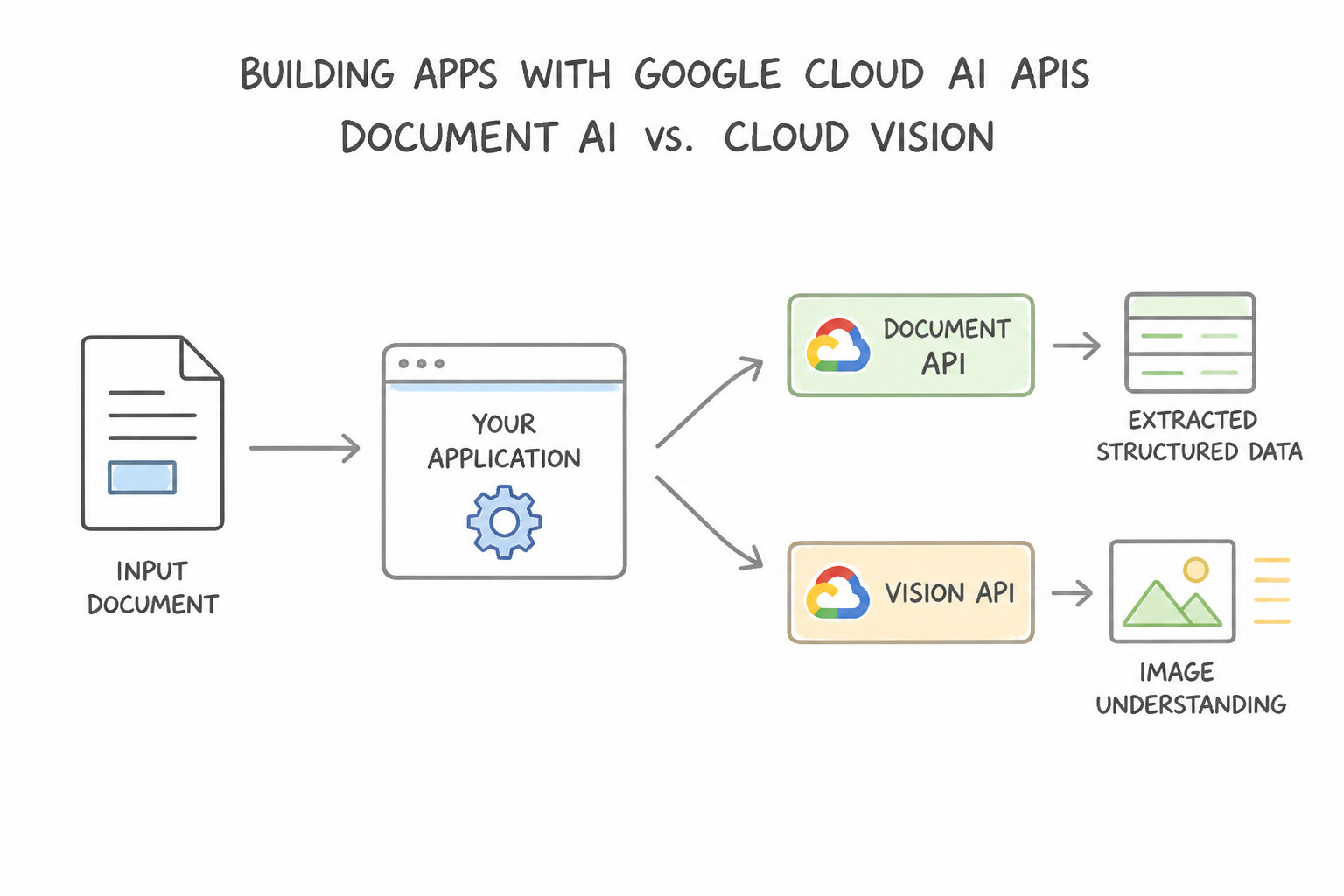
- Document AI vs. Cloud Vision OCR:
- Choose Cloud Vision API (
DOCUMENT_TEXT_DETECTION/TEXT_DETECTION) when you only need raw optical character recognition (text lines + bounding boxes), logo detection, landmark recognition, or SafeSearch moderation on images. - Choose Document AI when you need structural understanding and key-value extraction from business documents:
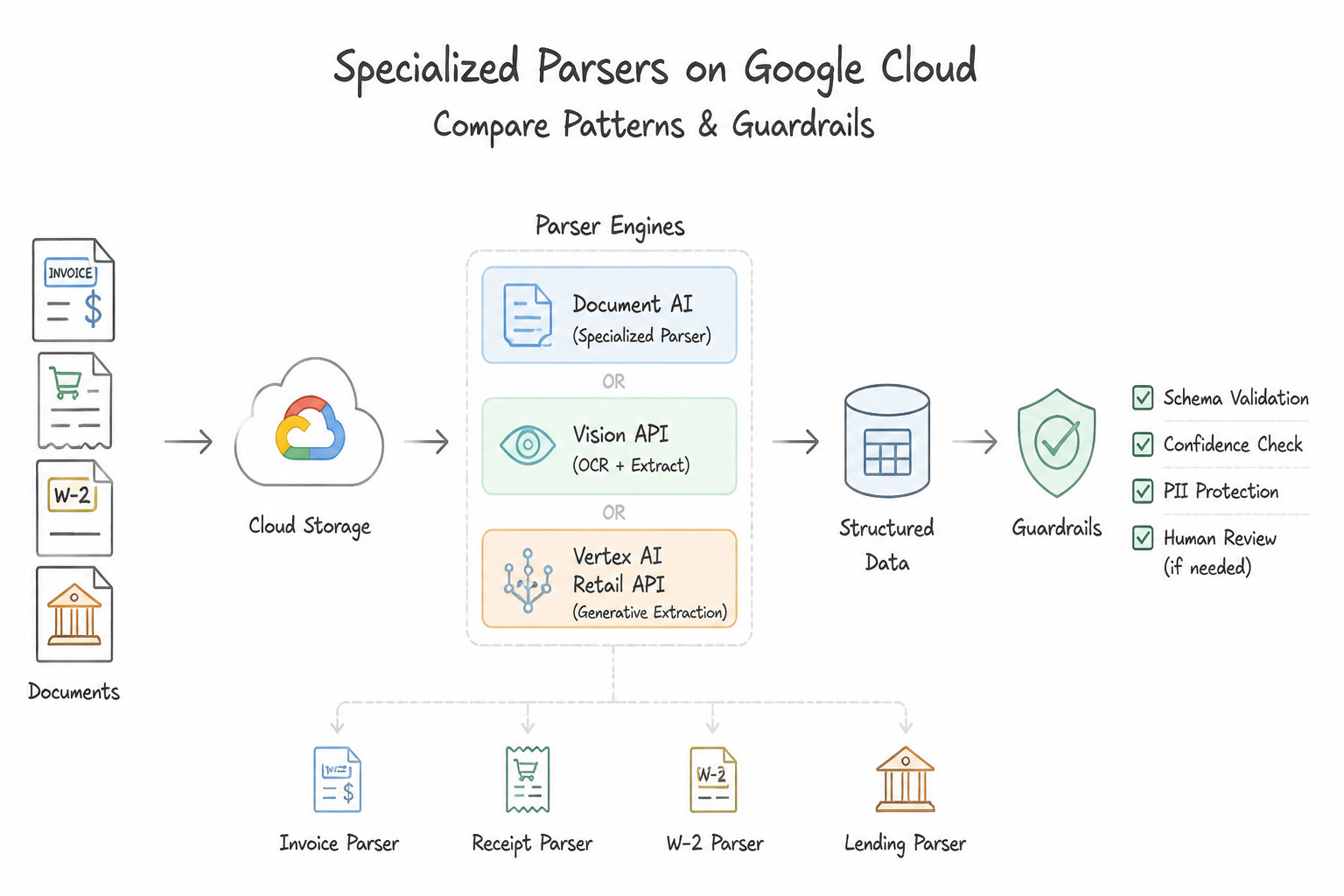
- Specialized Parsers (Invoice Parser, Receipt Parser, W-2/Lending Parsers): Extract normalized schema fields (
total_amount,due_date,line_items,vendor_name) across varying vendor layouts without training. - Form Parser: Extracts generic key-value pairs, checkboxes, and tables from standard forms.
- Document Splitter & Classifier: Splits multi-document PDF packets (e.g., a 100-page mortgage file containing tax returns, pay stubs, and IDs) into logical sub-documents and classifies each page range.
- Retail API (Vertex AI Search for Retail): Purpose-built for e-commerce personalized recommendations ("Others You May Like", "Frequently Bought Together"). Requires importing both the Product Catalog and historical User Events (
detail-page-view,add-to-cart,purchase-complete) meeting minimum volume/duration thresholds before training recommendation models. - Speech, Audio, Video & Language APIs: Use Speech-to-Text API (streaming/batch audio transcription with speaker diarization), Text-to-Speech API (synthesizing natural WaveNet/Neural2 audio), Cloud Translation API (real-time language detection and translation), Cloud Natural Language API (entity extraction and sentiment analysis), and Video Intelligence API (shot-change detection, object tracking, and explicit content moderation in video files).
Key Implementation Patterns
- Automating Invoice Processing for Accounts Payable: Use Use the Document AI Invoice Processor to extract the required entities. The Document AI Invoice Processor is pre-trained to extract structured data from varied invoice layouts automatically. (Avoid alternative: Cloud Vision API extracts raw text but lacks the specialized understanding of invoice structures required here.)
- Implementing Personalized Product Recommendations: Use Import historical user events data such as page views, clicks, and purchases. Personalization models in Retail API require historical user event data (clicks, views, purchases) to learn user preferences. (Avoid alternative: Images are display metadata and do not provide the behavioral signals needed for personalization algorithms.)
- Structuring Mixed-Type Document Packets: Use Train a Custom Classifier processor to identify document types and split the PDF into child documents. The Custom Classifier processor is designed to classify pages and split mixed documents into individual files. (Avoid alternative: Form Parser is for extraction, not for identifying or separating mixed document types.)
Key Takeaways (1.2b)
- Use Document AI specialized processors (like Invoice Processor) for standard business documents to save development time.
- Avoid using generic OCR (Vision API) when semantic understanding of the document layout is required.
- Choose pre-trained APIs over custom model training when standard solutions meet the requirements.
- The Retail API requires both Product Catalog data and User Event data to function effectively.
Consideration 1.2c: Building solutions and tuning models for specific use cases (e.g., Gemini, Imagen, Veo, and models as a service in Model Garden)
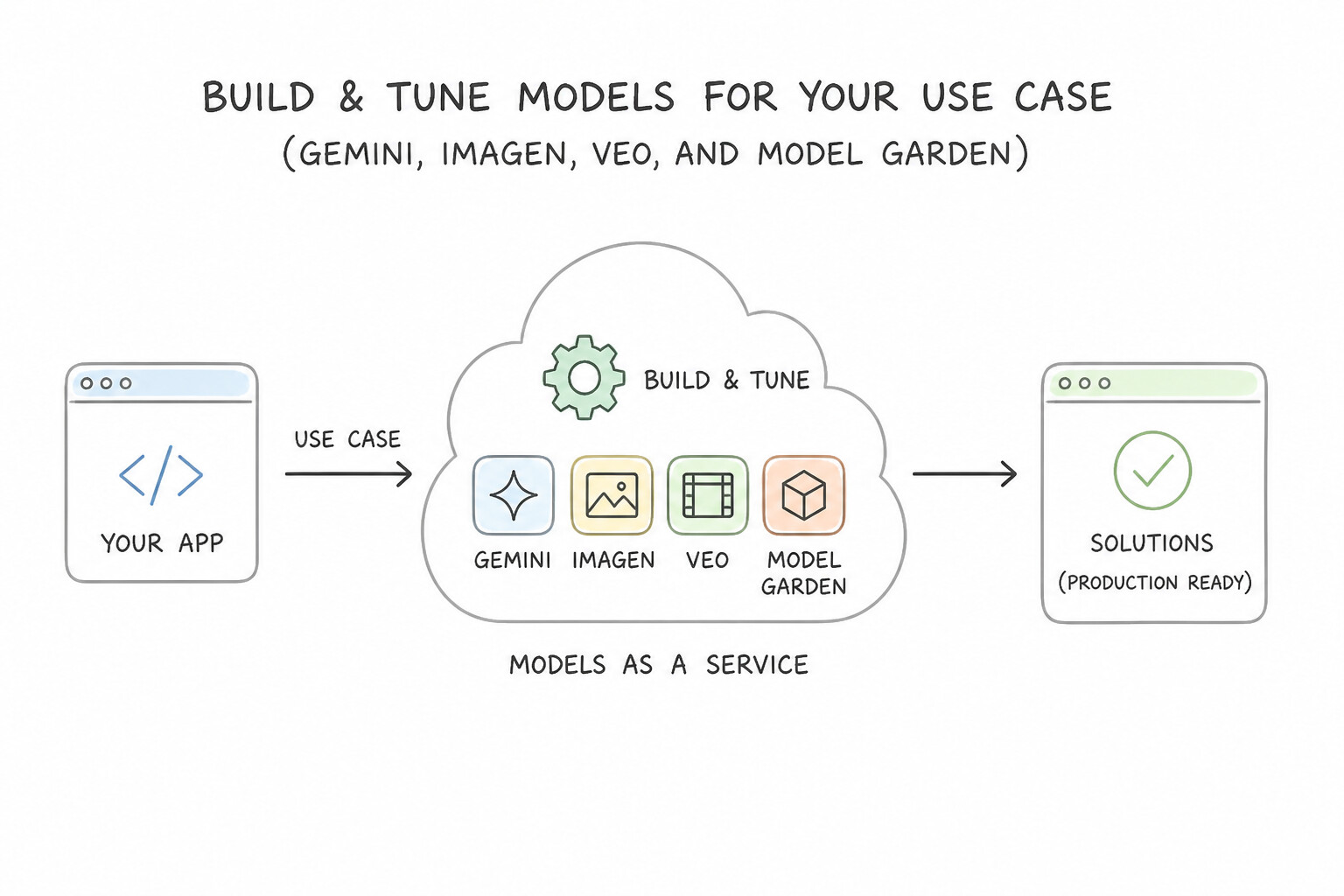
- The Customization Ladder (Prompting → RAG → Fine-Tuning):
- Prompt Engineering & In-Context Learning (Zero/Few-Shot): Always start here when you have
<50examples or simply need task framing and output formatting (response_mime_type="application/json"). - Retrieval-Augmented Generation (RAG) & Grounding: Choose RAG via Agent Builder / Vertex AI Search or Vector Search whenever knowledge changes frequently (daily policy updates, live inventory), requires verifiable source citations, or must enforce document-level access controls.
- Supervised Fine-Tuning (SFT) / Parameter-Efficient Fine-Tuning (PEFT): Choose fine-tuning when you have hundreds/thousands of labeled input-output examples and need to teach the model a consistent style, tone, complex output schema, or specialized domain behavior while shrinking prompt token length.
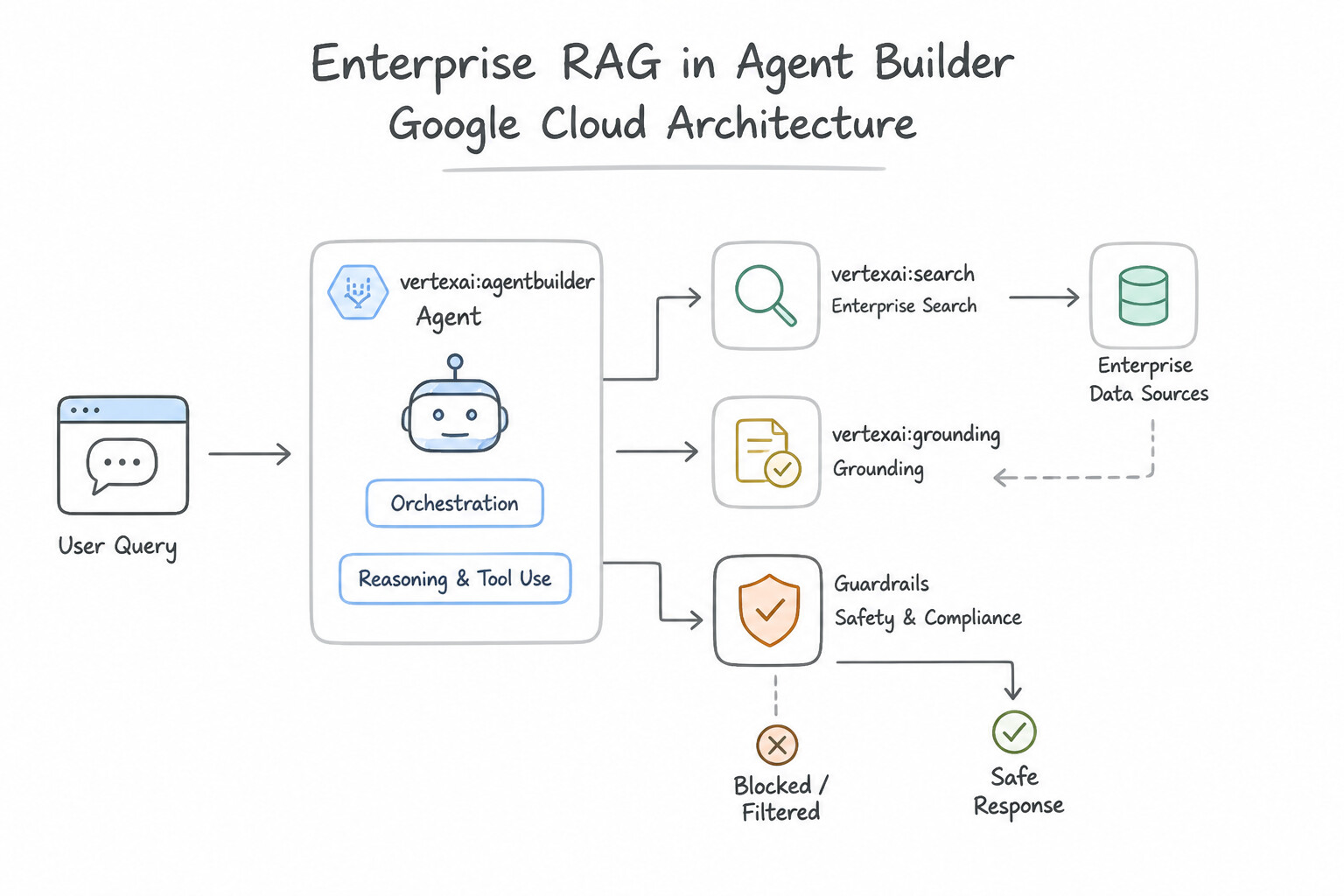
- Architecting Enterprise RAG in Agent Builder:
- Enable Hybrid Search (combining dense semantic vector embeddings with sparse keyword/BM25 token matching) when users search by both natural language concepts and exact SKUs, part numbers, or error codes.
- Configure the Layout Parser with native OCR when ingesting scanned PDFs, tables, and complex engineering diagrams into an unstructured Data Store so chunks preserve table/section hierarchy.
- Models as a Service (MaaS) in Model Garden: Allows consuming partner and open-source models (e.g., Claude, Llama, Mistral) via a fully managed, serverless pay-per-token API endpoint without provisioning or autoscaling underlying GPU instances.
Key Implementation Patterns
- Optimizing Search for Mixed Query Types: Use Enable Hybrid Search to combine vector search and keyword search. Hybrid Search merges semantic vector search results with exact keyword matches to handle mixed query types effectively. (Avoid alternative: Keyword Search handles SKUs well but fails to understand the semantic meaning of natural language descriptions.)
- Enforcing Answer Factuality: Use Configure the generative model to use grounding with your data store. Grounding links the model to your data store to ensure answers come from your documents and includes citations. (Avoid alternative: Prompt engineering alone cannot guarantee factual grounding or generate functional citation links to stored documents.)
- Handling Complex PDF Layouts: Use Configure the Data Store to use the Layout Parser within the document processing settings. The Layout Parser uses OCR to extract text and structure from scanned PDFs and images. (Avoid alternative: The Digital Parser requires a text layer and cannot read scanned images.)
Key Takeaways (1.2c)
- Vector search is ideal for semantic, natural language queries but may fail on exact alphanumeric matches.
- Keyword search is ideal for exact matches (IDs, SKUs) but lacks semantic understanding.
- Hybrid search combines vector and keyword search to handle mixed query types effectively in RAG applications.
- Vertex AI Agent Builder supports hybrid search to optimize retrieval quality.
Consideration 1.2d: Optimizing Gemini-based applications for cost, latency, and availability
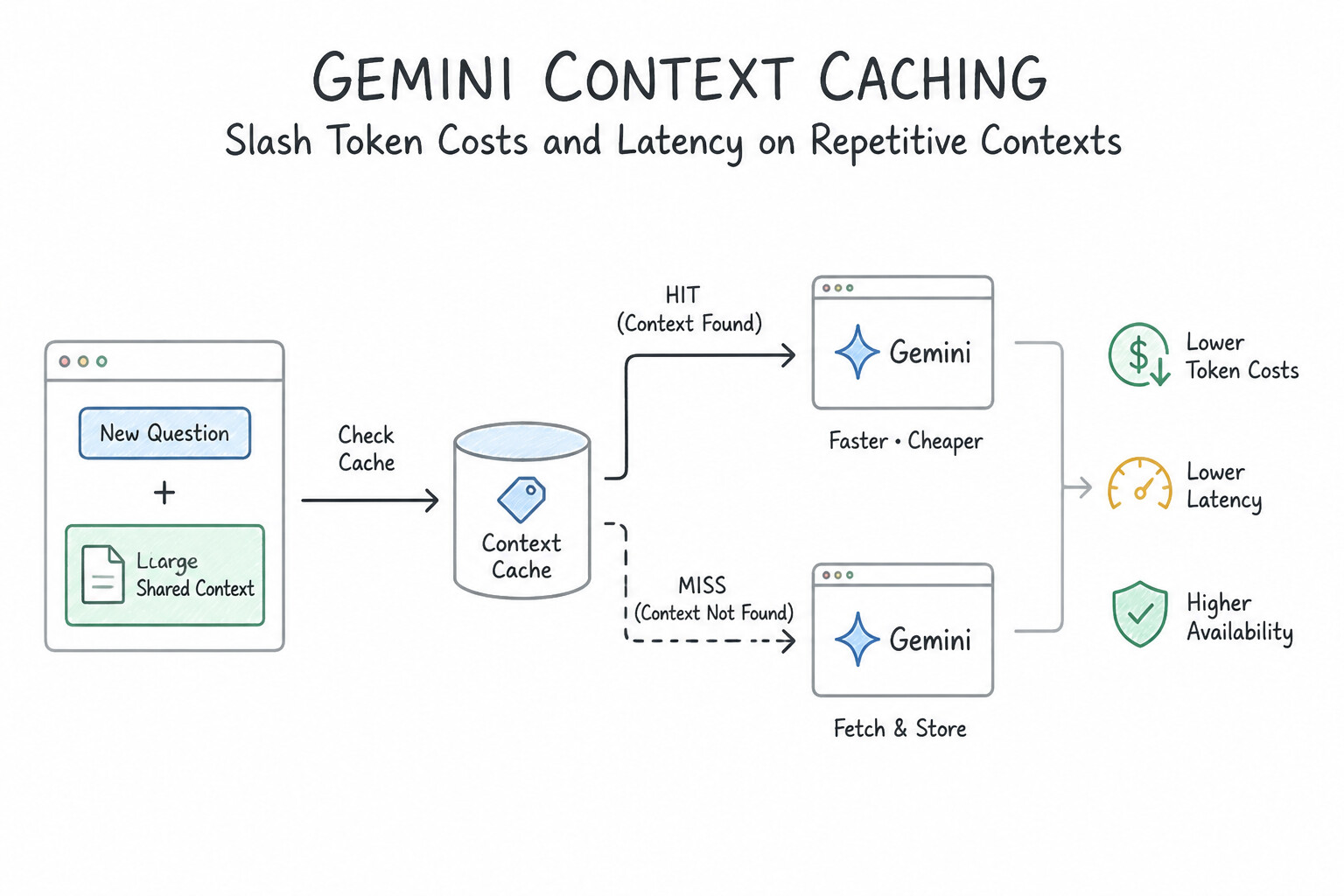
- Slashing Token Costs & Latency on Repetitive Contexts (
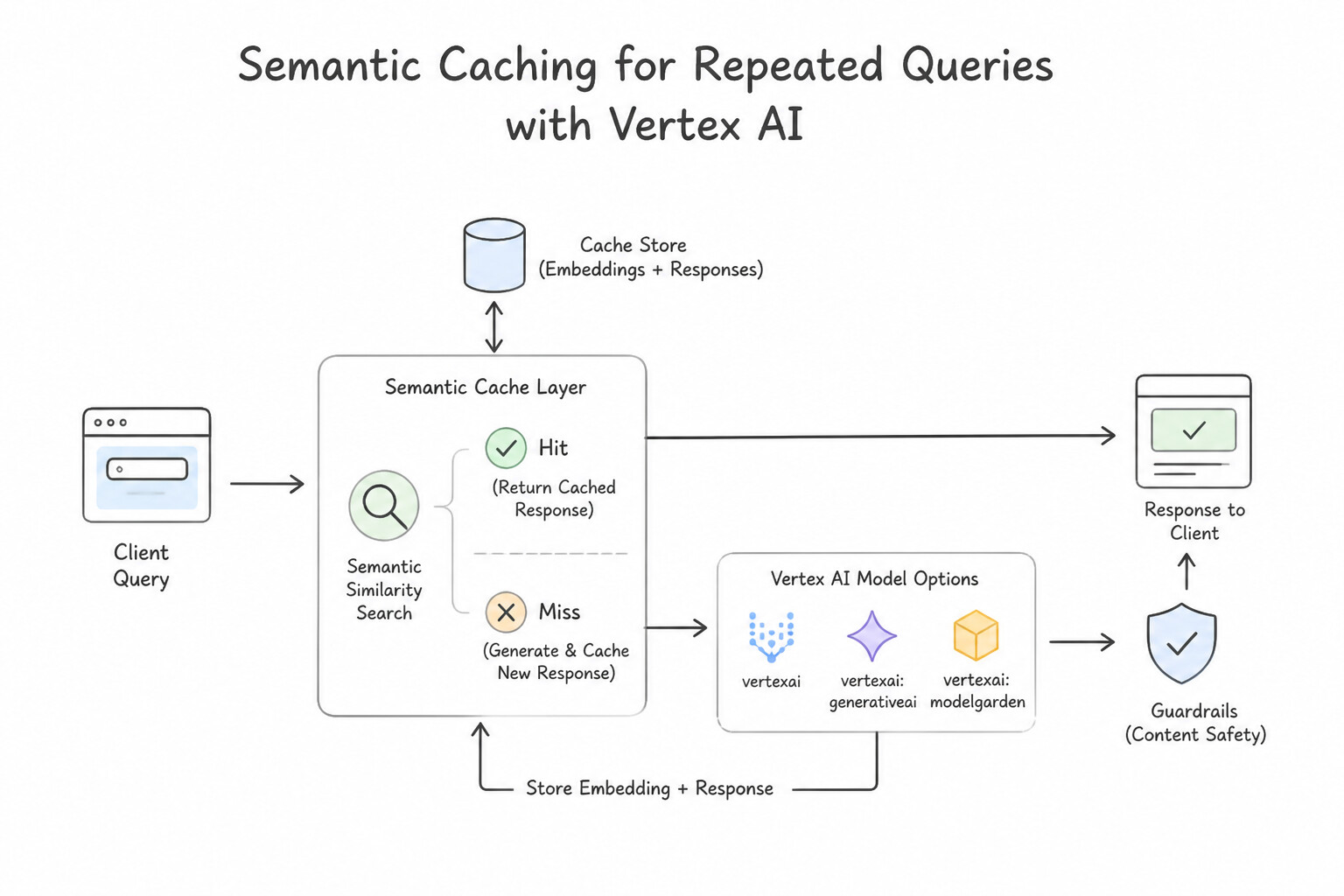
Context Caching): When an application repeatedly queries Gemini against the same large static context (e.g., a 100-page legal codebase, a product catalog, or a 50-example system prompt prefix), enable Context Caching. Cached input tokens are billed at a steep discount and bypass redundant prefill computation—dramatically reducing Time-to-First-Token (TTFT). - Semantic Caching for Repeated User Queries: Store embeddings of frequent user queries and their validated LLM responses in Memorystore for Redis or Vector Search. If an incoming query exceeds a high cosine similarity threshold (e.g., >0.96), return the cached response in milliseconds without invoking the LLM.
- Distillation & Fine-Tuning to Replace Bloated Few-Shot Prompts: If a production prompt requires 40–50 few-shot examples on every request to maintain accuracy, fine-tune a smaller model (
Gemini Flash) on those examples. You eliminate the 50-example prompt prefix on every call and run inference on a faster, cheaper model tier. - Controlling Generation Parameters & Guaranteeing Availability:
- Bound generation latency and cost by setting
max_output_tokens, using streaming responses for interactive UIs, and setting lowtemperature(0.0–0.2) with appropriatetop_p/top_kfor deterministic extraction tasks. - For mission-critical production workloads that cannot tolerate
429 Resource Exhaustedrate limits on shared pay-as-you-go pools, purchase Provisioned Throughput (reserved GSU capacity) and implement multi-region endpoint failover.
Key Implementation Patterns
- Prompt Engineering vs. Fine-Tuning: Use Fine-tune the foundation model on Vertex AI using a dataset of your existing product descriptions. Fine-tuning 'bakes' the style into the model, allowing you to remove examples from the prompt to save costs and reduce latency. (Avoid alternative: Adding more examples increases the token count, which raises cost and latency rather than reducing them.)
- Vertex AI feature designed to decrease token latency and costs by storing and reusing: Use Prompt caching. Prompt caching saves precomputed input tokens to accelerate response times and reduce token processing costs on repeated prompts. (Avoid alternative: Data sharding is a database storage partitioning strategy unrelated to foundation model inference latency.)
- Semantic caching as the technique for storing and retrieving embedding-based model: Use Semantic caching. Semantic caching stores query embeddings and results to serve semantically equivalent requests without querying foundation models again. (Avoid alternative: Model pruning removes non-critical weights to reduce model size rather than caching responses.)
Key Takeaways (1.2d)
- Few-shot prompting is excellent for prototyping but increases input token count, which raises cost and latency.
- Fine-tuning is the preferred optimization strategy when you have a specific style or task that requires many examples, as it reduces the need for long prompts.
- Latency in LLMs is heavily influenced by the number of input tokens processed.
- Prompt Caching stores precomputed input representations to decrease response latency and lower token costs for repetitive prompt contexts.
Quick Decision Cheat Sheet (Subsection 1.2)
If the Scenario Requires... | Choose This Google Cloud Pattern | Avoid This Common Mistake |
|---|---|---|
"Generate photorealistic product backgrounds or edit images via mask" | Imagen in Model Garden | Gemini (text/multimodal output, not specialized high-res diffusion editing) or Vision API |
"Generate high-resolution video clips from text/image prompts" | Veo in Model Garden | Video Intelligence API (analyzes existing video; does not generate video) |
"Extract key-value pairs and tables from generic forms without training" | Document AI Form Parser | Vision API TEXT_DETECTION + custom regex rules |
"Retail API recommendations failing to train after uploading Product Catalog" | Import historical User Events ( detail-page-view, add-to-cart, purchase-complete) | Switching to BigQuery ML LINEAR_REG |
"Ensure HR/Finance RAG chatbot never fabricates policy rules and cites sources" | Agent Builder Grounding with Enterprise Data Store + Citations + Faithfulness check | Increasing temperature to 0.9 or relying on base LLM pre-training |
"Ingest scanned engineering diagrams and multi-column PDFs into Agent Builder RAG" | Enable Layout Parser with native OCR | Plain text chunking without OCR/Layout parsing |
"Reduce cost & latency when the same massive system prompt/corpus is reused across requests" | Context Caching | Increasing max_output_tokens or deploying custom GKE clusters |
"Consume open-source models (Llama, Mistral) in Model Garden without managing GPUs" | Models as a Service (MaaS) managed APIs | Provisioning user-managed Compute Engine VMs with manual Docker scripts |
Further Reading (Subsection 1.2)
- Explore AI models in Model Garden — Provides an overview of how to discover and use foundation models within Vertex AI Model Garden.
- Vertex AI pricing (Generative AI) — Details the pricing model for using foundation model APIs, which is usage-based rather than infrastructure-based.
- Imagen on Vertex AI — Overview of Imagen capabilities, specifically text-to-image generation.
- Get text embeddings — Documentation on how to use the Vertex AI Text Embeddings API to generate vector embeddings for semantic search.
- Processor list — Overview of the Invoice parser, detailing how it extracts entities such as invoice date, due date, and total amount from varied layouts.
- Import user events to Retail API — Documentation explaining the importance of recording user events and how to import historical data to train models.
Book TOC · Previous · Chapter 1 of 7 · Next
AwesomeGCP.com Learning
The approach taken is a question-led learning approach: you explore realistic project scenarios where you need to make decisions or take actions to achieve business goals within specific constraints. Instead of passive learning, you are challenged to think and work through the options to master the Professional Machine Learning Engineer (PMLE) certification!