Book TOC · Previous · Chapter 1 of 6 · Next
Chapter 1: Bootstrapping & Maintaining Google Cloud Organizations: Hierarchy, IaC, Fleets & Workstations
Chapter Focus: Resource Hierarchy, Shared VPC vs. Peering, Organization Policies, Terraform remote state/drift detection, Config Connector, multi-environment GKE Fleets, and secure Cloud Workstations.
Subsection 1.1: Designing the overall resource hierarchy for an organization
The Big Picture
When an organization first adopts Google Cloud, teams often spin up standalone projects ad hoc, attach default VPC networks with overlapping 10.128.0.0/9 auto-mode subnets, share a single privileged Service Account across environments, and view logs one project at a time. Within six months, this "flat, unmanaged" approach hits a brick wall:
- Policy & Billing Sprawl (
1.1a,1.1d,1.1f): Without a structured Organization → Folder → Project hierarchy separating business units and lifecycle environments (dev,staging,prod), administrators cannot apply preventive Organization Policies (such as restricting European customer data toeurope-westregions viaconstraints/gcp.resourceLocationsor blocking external VM IPs indev) without breaking workloads that legitimately need exceptions. - The Overlapping Subnet & Transitive Peering Wall (1.1b): VPC Network Peering works well between two non-overlapping networks, but it is non-transitive (
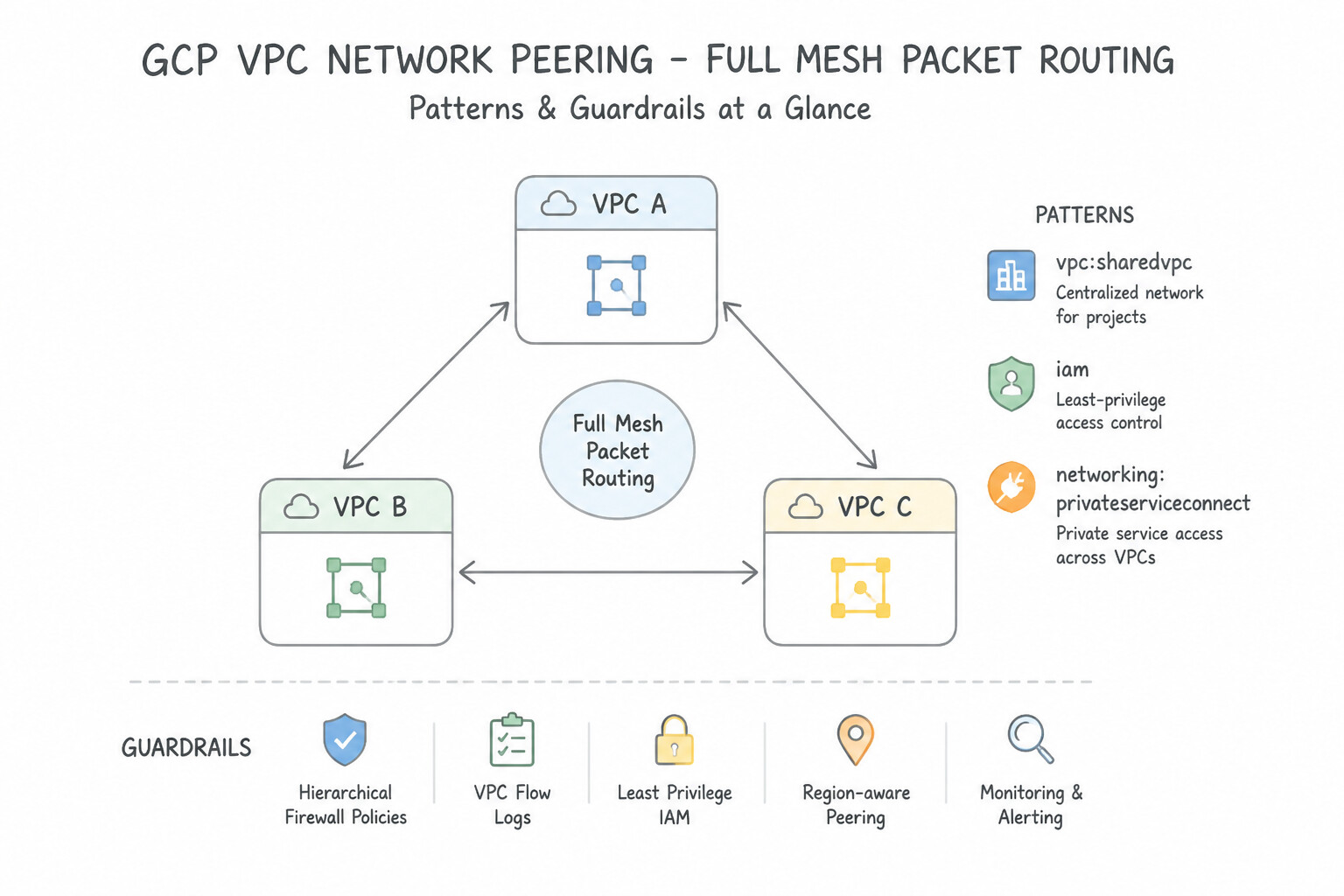
$A\leftrightarrow Band @@CODE2@@ ↔ C does not allow$A\leftrightarrow C$), shares quota ceilings across peered networks, and fails completely when an acquired company has overlapping RFC 1918 IP ranges. Production enterprises standardize on Shared VPC for centralized network/firewall administration across internal service projects, and Private Service Connect (PSC) for zero-trust, NAT-based private service consumption across overlapping networks or external organizations. - Blind Multi-Project Observability & Over-Privileged Identity (
1.1c,1.1e): When a microservice call spans Frontend, Backend, and Data projects, engineers jumping between separate project consoles waste precious incident response time unless unified via a Multi-Project Metrics Scope and Log Scopes / Aggregated Log Sinks. Worse, using the default Compute Engine service account withroles/editoror exporting static JSON keys creates catastrophic lateral-movement blast radiuses.
Consideration 1.1a: Organizing resources (e.g., application-centric, projects, folders)
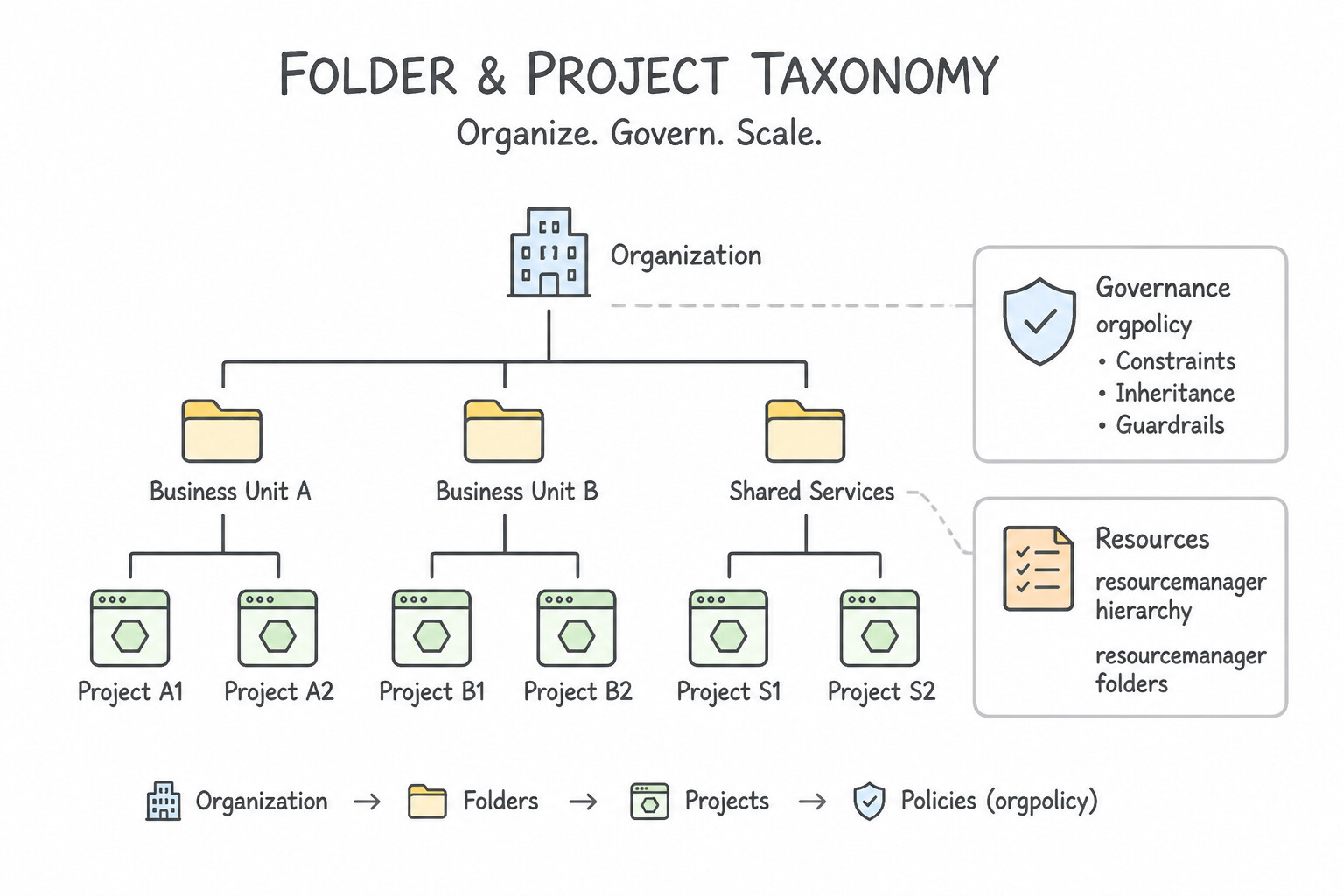
- Folder & Project Taxonomy: Design folders around your governance and cost-attribution model—typically Department / Business Unit at the top folder tier, Environment (
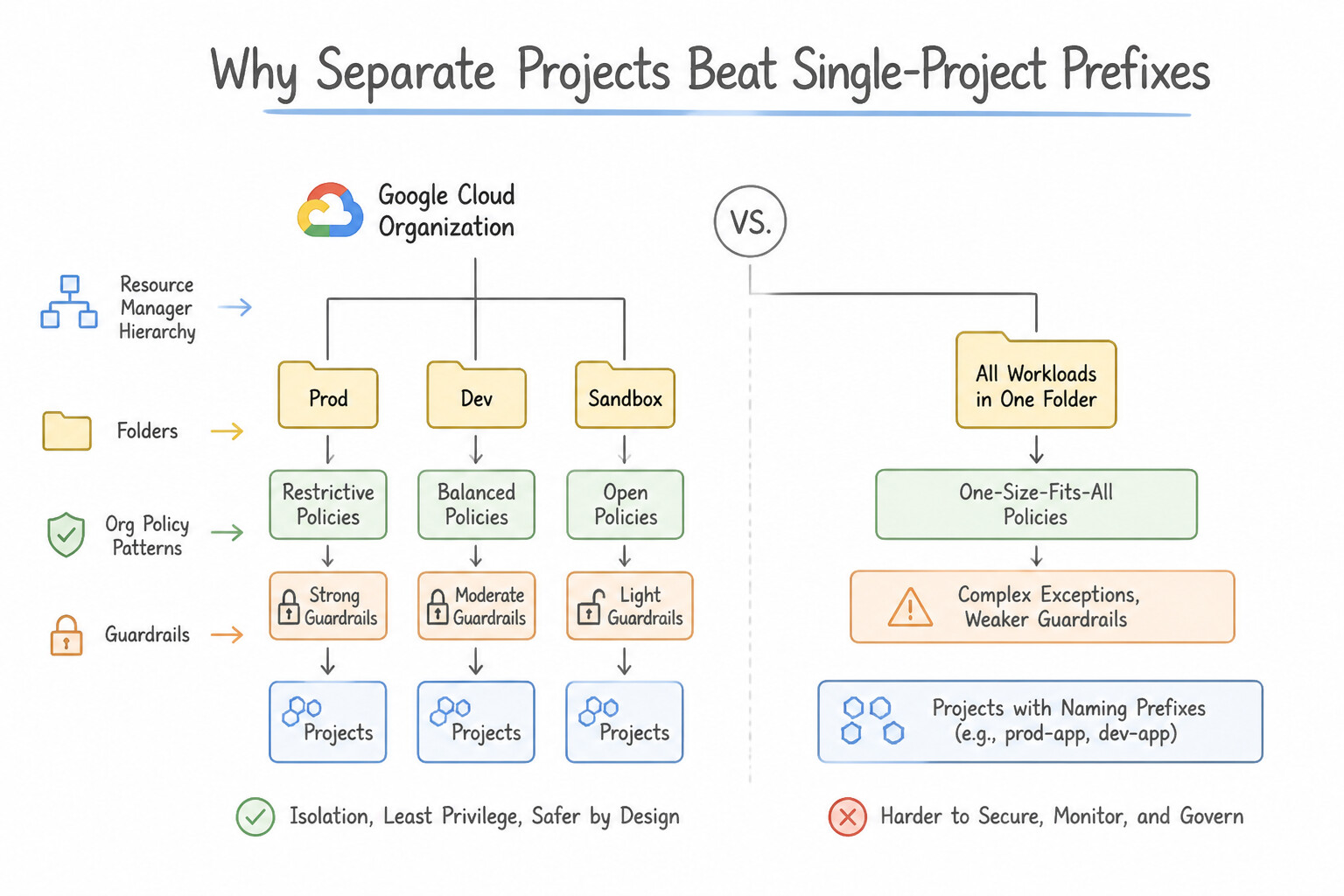
prod,non-prod,dev) at the second folder tier, and Application / Microservice at the Project level. - Why Separate Projects Beat Single-Project Naming Prefixes: Projects are the foundational trust, quota, and billing boundary in Google Cloud. Never mix
devandprodworkloads in the same project using resource naming prefixes (prod-db,dev-db), because project-level IAM roles and API quotas apply across the entire project. - Inheritance Is Additive (Union) for IAM, Restrictive for Org Policies: IAM permissions granted at the Organization or Folder level flow down and union with Project-level bindings (a child project cannot revoke an inherited
roles/ownergrant unless controlled via IAM Deny Policies or Principal Access Boundary). Conversely, Organization Policies restrict what resource configurations are allowed across all descendants.
Key Implementation Patterns
- Environment-Based Policy Inheritance: Use Create separate folders for Production and Development environments. Move projects into the corresponding folder. Apply the Organization Policy to the Production folder. Using Folders to group projects by environment allows you to apply policies efficiently via inheritance.
- Shared Services and Network Hubs: Use Create a "Shared Infrastructure" folder containing a Shared VPC Host Project. Create a "Workloads" folder containing Service Projects for application teams attached to the Host Project. Shared VPC isolates network administration in a Host Project while allowing app teams to deploy VMs in attached Service Projects.
Key Takeaways (1.1a)
- Use Folders to group projects by environment or business unit to simplify policy management.
- Organization Policies are inherited from the Organization node down to Folders and Projects.
- Avoid applying policies individually to projects to reduce operational toil.
- Labels are for tracking and billing; they do not control Organization Policy enforcement.
Consideration 1.1b: Shared networking (e.g., Shared VPC, VPC Network Peering, Private Service Connect)
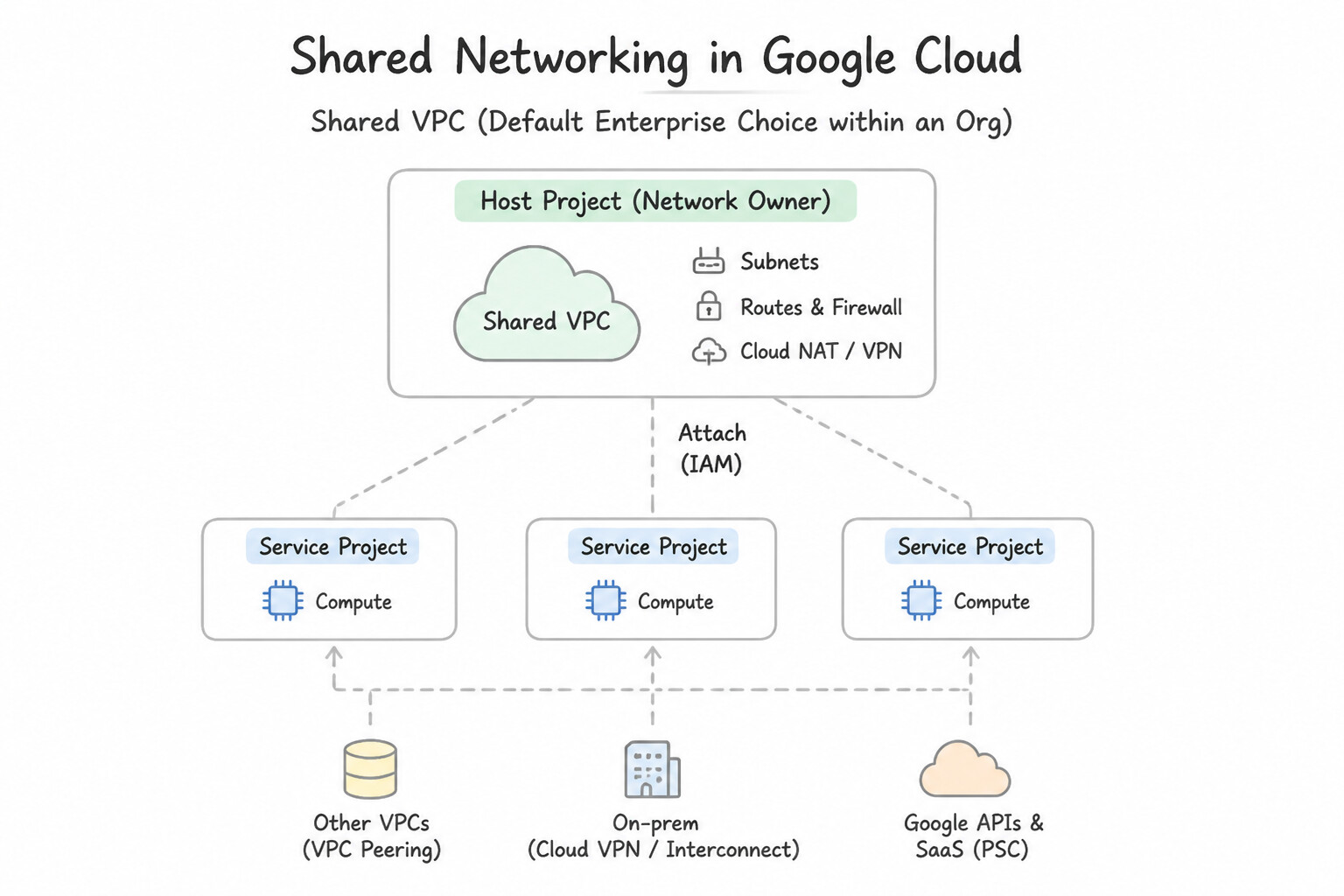
- Shared VPC (Default Enterprise Choice within an Org): Centralizes subnets, routes, Cloud NAT, and firewall rules inside a Host Project (managed by Network Admins), while workload teams deploy VMs, GKE clusters, and Cloud Run services inside isolated Service Projects (granted
roles/compute.networkUseron specific host subnets, not the entire host project). - VPC Network Peering (Full Mesh Packet Routing): Connects two VPCs (same or different orgs) over Google's internal network without external IPs. Remember its 3 architectural constraints: (1) No overlapping CIDR ranges, (2) Non-transitive (only directly peered networks communicate), and (3) Subnet routes are exchanged automatically.
- Private Service Connect (
PSC— Service-Centric & Overlapping-IP Safe): Exposes a specific load-balanced service (Service Attachment in a producer VPC) to a consumer VPC via a local PSC Endpoint (forwarding rule + internal IP) or PSC Backend. PSC uses source NAT, so it works seamlessly across overlapping IP ranges, across different organizations, and enforces unilateral producer/consumer approval.
Key Implementation Patterns
- Separation of Duties in Shared VPC: Use Grant the Compute Network User role to the DevOps team on the specific subnet in the Host Project. The Compute Network User role on a specific subnet allows VM creation in that subnet without network modification rights. (Avoid alternative: Permissions must be granted in the Host Project where the subnet lives, not just in the Service Project.)
- Handling IP CIDR Overlap with Acquired Entities: Use Use Private Service Connect to expose the database and access it from the startup's network. Private Service Connect allows secure access to services across networks with overlapping IP addresses. (Avoid alternative: VPC Network Peering requires non-overlapping CIDR ranges, so it cannot be used here.)
- Transitivity Limitations in VPC Peering: Use Create a VPC Network Peering connection between Spoke A and Spoke B. VPC Network Peering is non-transitive, so Spoke A and Spoke B must be peered directly to communicate. (Avoid alternative: Global dynamic routing affects regional route visibility, not peering transitivity.)
Key Takeaways (1.1b)
- Shared VPC centralizes network administration in a Host Project while keeping application resources in Service Projects.
- Use the Compute Network User role to allow teams to deploy resources (like VMs) without giving them network admin rights.
- Apply IAM roles at the subnet level (permissions binding) to enforce least privilege and restrict teams to specific network segments.
- Network Admins manage the infrastructure (Host Project); Service Admins manage the instances (Service Projects).
Consideration 1.1c: Multi-project monitoring and logging
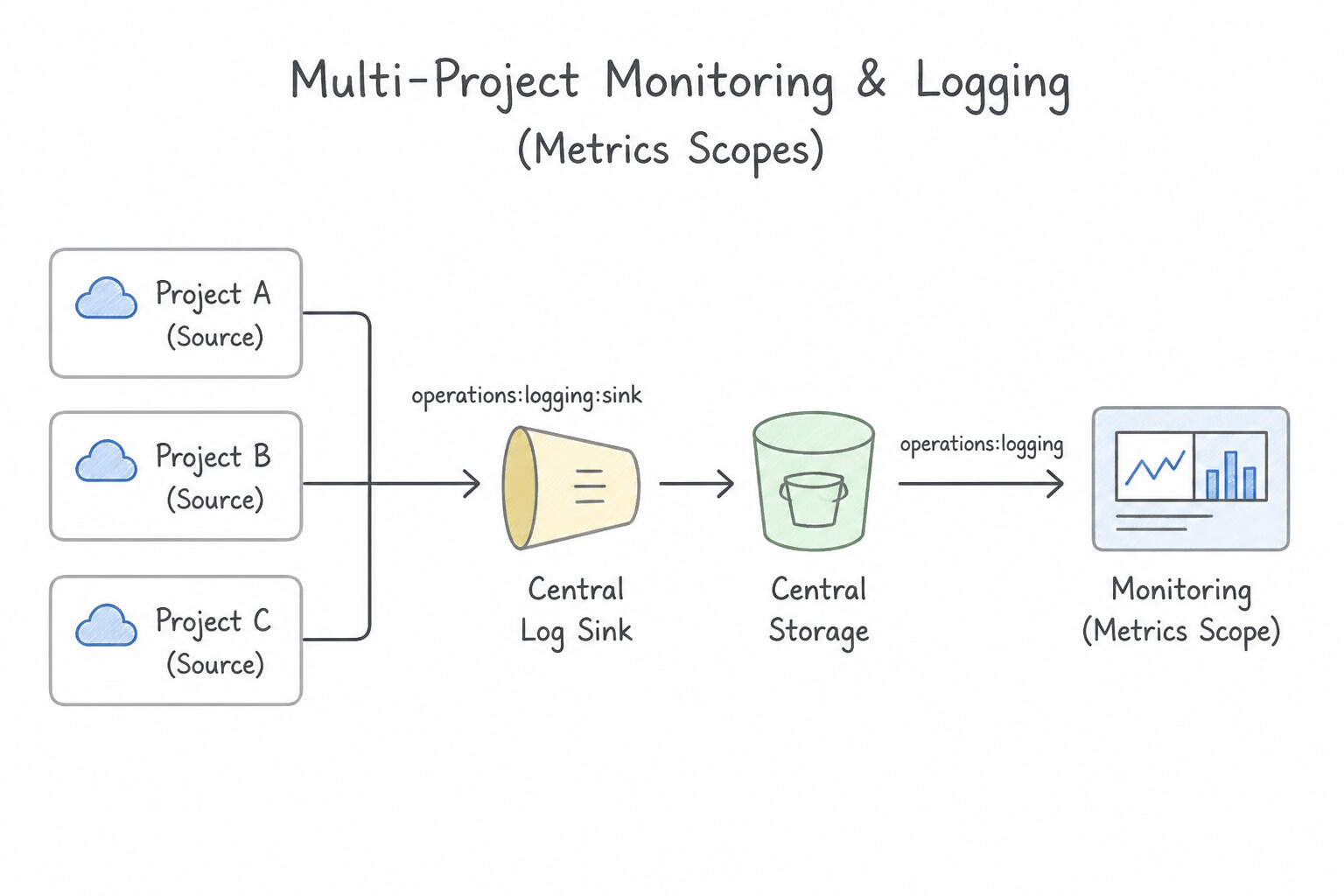
- Multi-Project Cloud Monitoring (
Metrics Scopes): Never export metrics via custom Python scripts just to view multiple projects on one dashboard. Designate a dedicated Monitoring Host (Scoping) Project and add up to hundreds of Monitored Projects to its Metrics Scope so SREs can build unified cross-project dashboards and SLO alerts from a single pane of glass. - Multi-Project Cloud Logging (
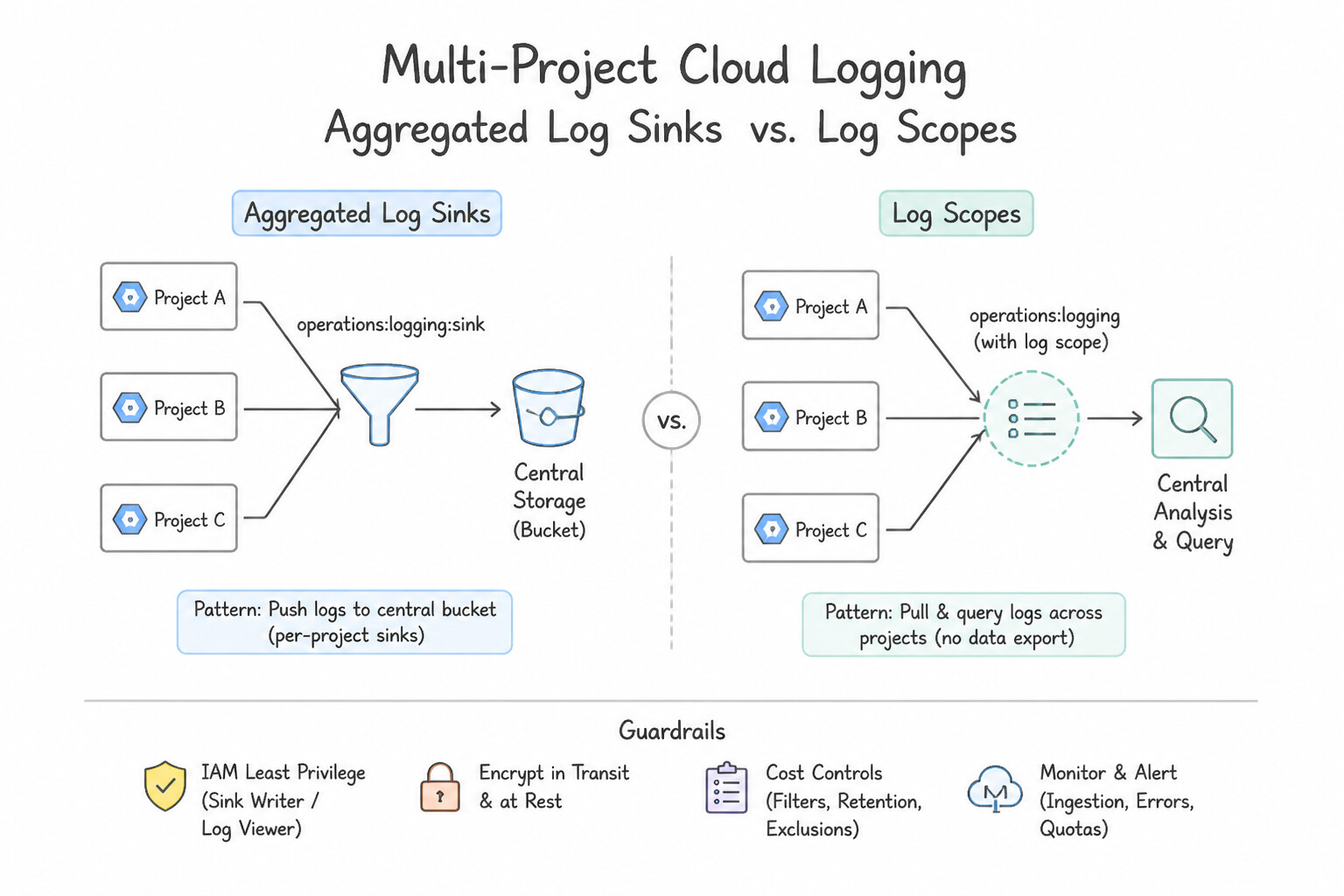
Aggregated Log Sinksvs.Log Scopes): - To route and store logs from an entire Organization or Folder into a central security/compliance project (e.g., a central Cloud Logging bucket, BigQuery dataset, or Cloud Storage bucket), create an Aggregated Log Sink at the Organization or Folder level with
includeChildren=true(and optionallyinterceptChildren=trueto prevent child projects from creating duplicate storage charges). - To query and view logs across multiple projects in Logs Explorer alongside your Metrics Scope without duplicating storage, configure a Log Scope.
Key Implementation Patterns
- Centralized Audit Logging Strategy: Use Create an aggregated sink at the Organization node with include_children set to true that exports to the Cloud Storage bucket. An aggregated sink at the Organization level efficiently routes logs from all current and future projects to a central destination.
- Granular Access to Centralized Logs: Use Create a Log View on the centralized Log Bucket with a filter for the application logs. Grant the team the Logs View Accessor role on the Log View. Log Views partition access to a bucket using filters, allowing granular access control without duplicating storage.
- Unified Metric Visualization: Use Designate one project as the scoping project. Add the other two projects as monitored projects in the Metrics Scope. Configuring the Metrics Scope allows a single project to view and dashboard metrics from multiple other projects. (Avoid alternative: Using multiple browser tabs is inefficient and does not create a single consolidated dashboard.)
Key Takeaways (1.1c)
- Use Aggregated Sinks at the Organization or Folder level for centralized log export.
- Avoid managing configuration per project when the requirement applies to the entire organization.
- Ensure
include_childrenis set to true to capture logs from future resources automatically.- Log Buckets store logs; access to a bucket usually means access to all its data.
Consideration 1.1d: Identity and Access Management (IAM) roles and organization-level policies
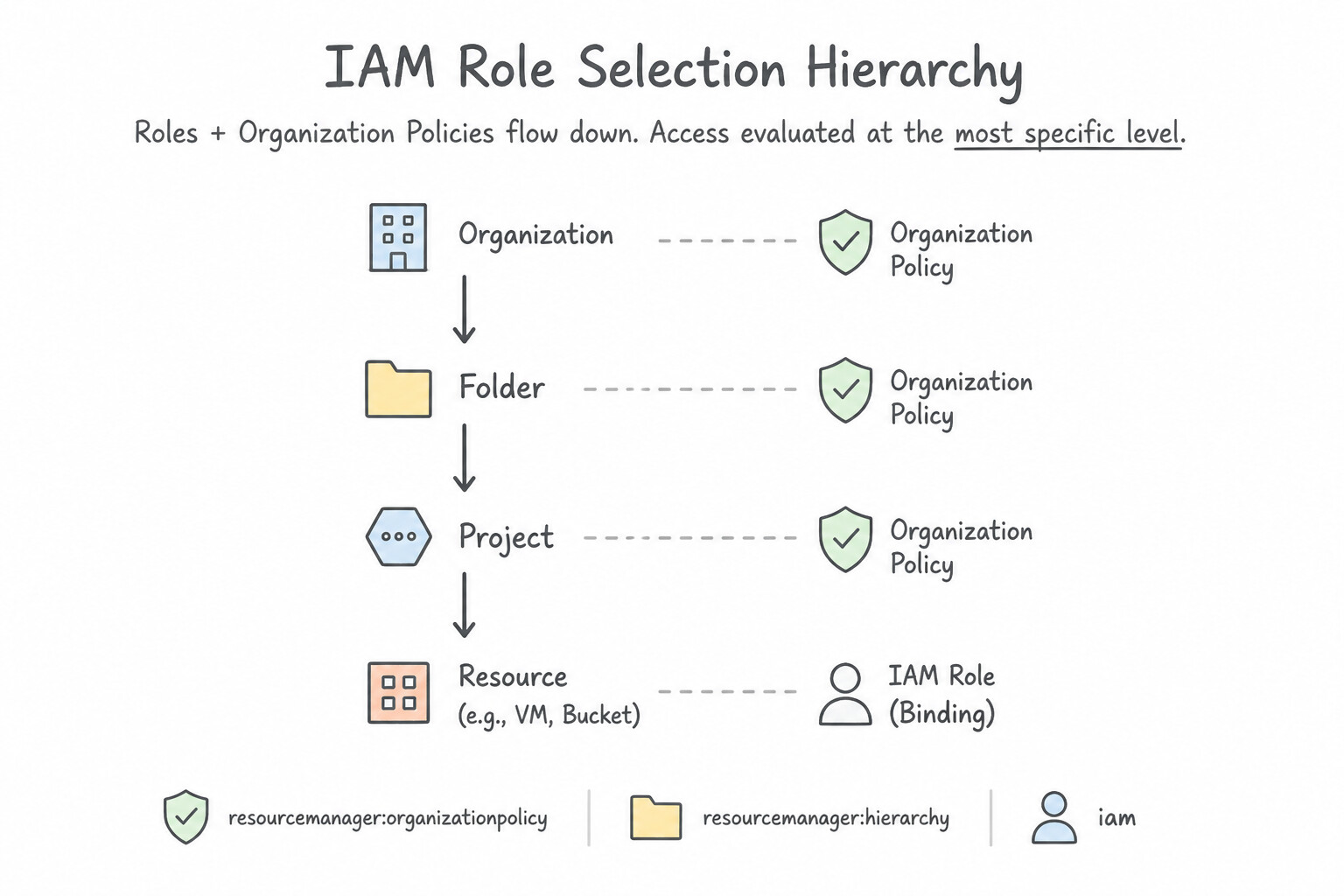
- IAM Role Selection Hierarchy: Always prefer Predefined Roles (e.g.,
roles/run.admin,roles/logging.viewAccessor) over legacy Basic Roles (Owner,Editor,Viewer), and create Custom Roles only when predefined roles grant excessive permissions that violate least privilege. Always assign roles to Google Groups rather than individual user emails. - IAM Conditions & Privileged Access Manager (
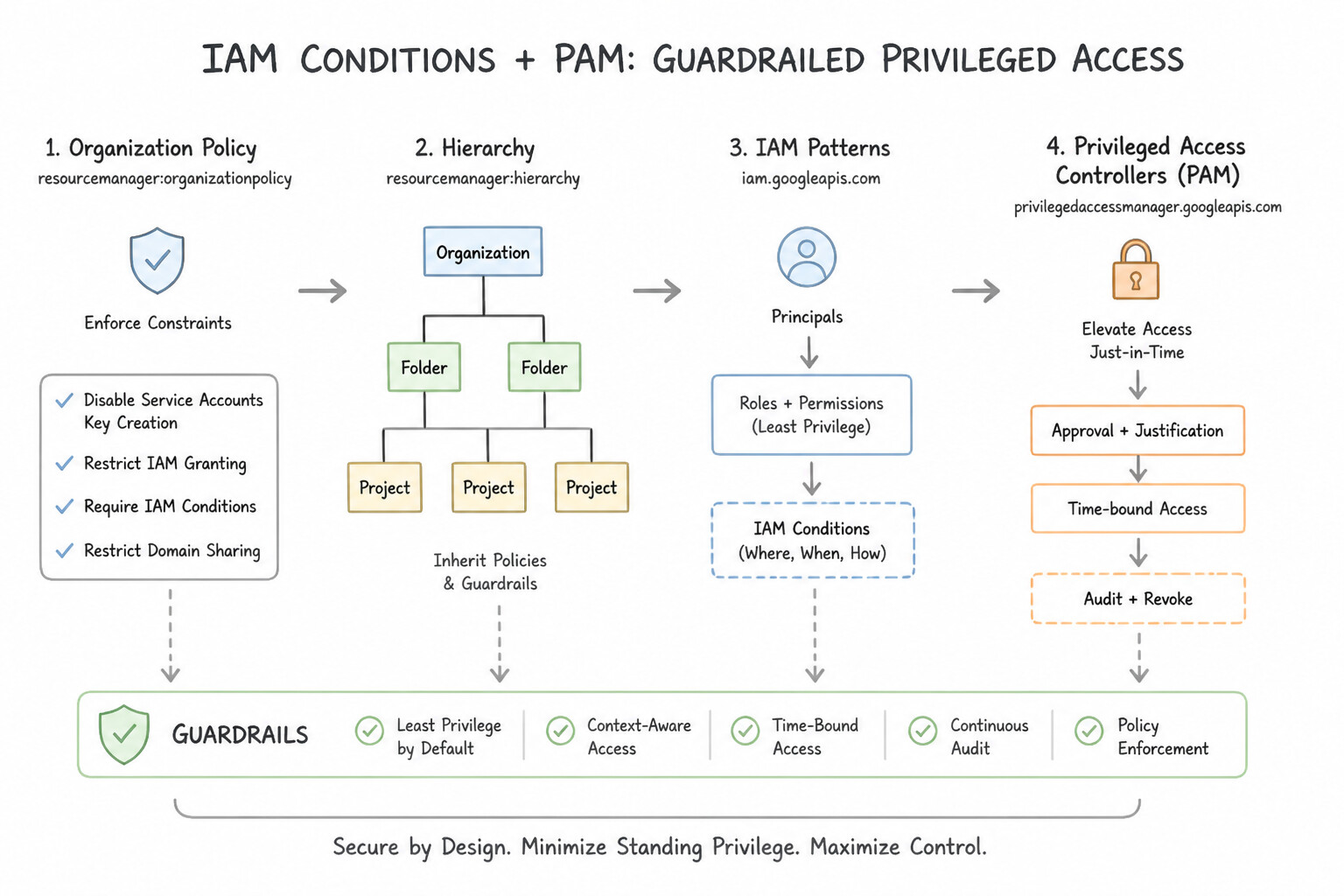
PAM): Use IAM Conditions to restrict role bindings by resource name prefix, tag, or time window. For temporary "break-glass" administrative access during P0 incidents, use Privileged Access Manager (PAM) with audit-logged, time-bound entitlements rather than permanent standingOwnerpermissions. - Organization Policy Service vs. IAM: IAM controls WHO (principal) can act; Organization Policies control WHAT (resource configuration guardrail) can exist—such as
constraints/compute.vmExternalIpAccess(blocking external IPs on VMs),constraints/iam.disableServiceAccountKeyCreation(blocking user-managed JSON keys), andconstraints/compute.requireShieldedVm.
Key Implementation Patterns
- Handling Organization Policy Inheritance and Overrides: Use Edit the Organization Policy on the folder. Set the policy to Customize and use the Replace rule to allow external IP addresses. The Replace rule breaks inheritance from the parent and allows you to define a new, less restrictive policy for the folder.
- Enforcing Domain Restricted Sharing: Use Configure the constraints/iam.allowedPolicyMemberDomains Organization Policy constraint at the Organization node, specifying your organization's directory customer ID. Domain Restricted Sharing is an Organization Policy that limits IAM grants to specific directory customer IDs.
- Immutability of Inherited IAM Roles: Use Remove the Organization Admin role at the Organization level. Re-assign the role at the Organization level with a condition to exclude the Finance folder. Use IAM Conditions at the organization level to exclude specific resources from an inherited role assignment.
Key Takeaways (1.1d)
- Organization Policies are inherited by default down the resource hierarchy.
- Use the 'Replace' rule on a child resource to override and relax a restrictive parent policy.
- IAM roles define permissions (who), while Organization Policies define constraints (what). IAM cannot bypass Org Policies.
- Avoid removing global constraints to solve local problems; use specific exceptions instead.
Consideration 1.1e: Creating and managing service accounts
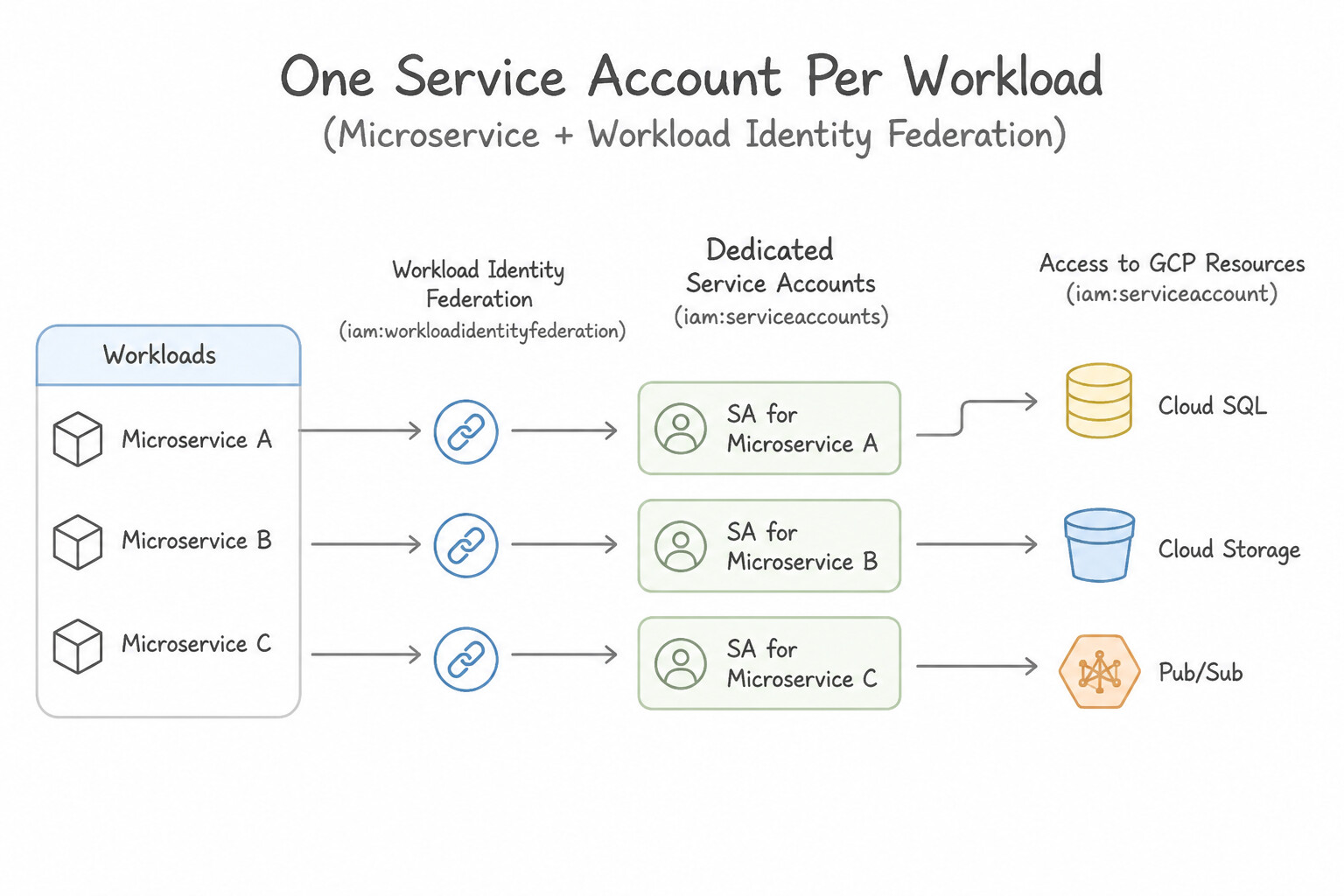
- One Service Account Per Workload / Microservice: Never reuse a single "master" Service Account across multiple microservices or environments, and disable or strip permissions from the Compute Engine / App Engine default service account (
constraints/iam.automaticIamGrantsForDefaultServiceAccounts). - Impersonation (
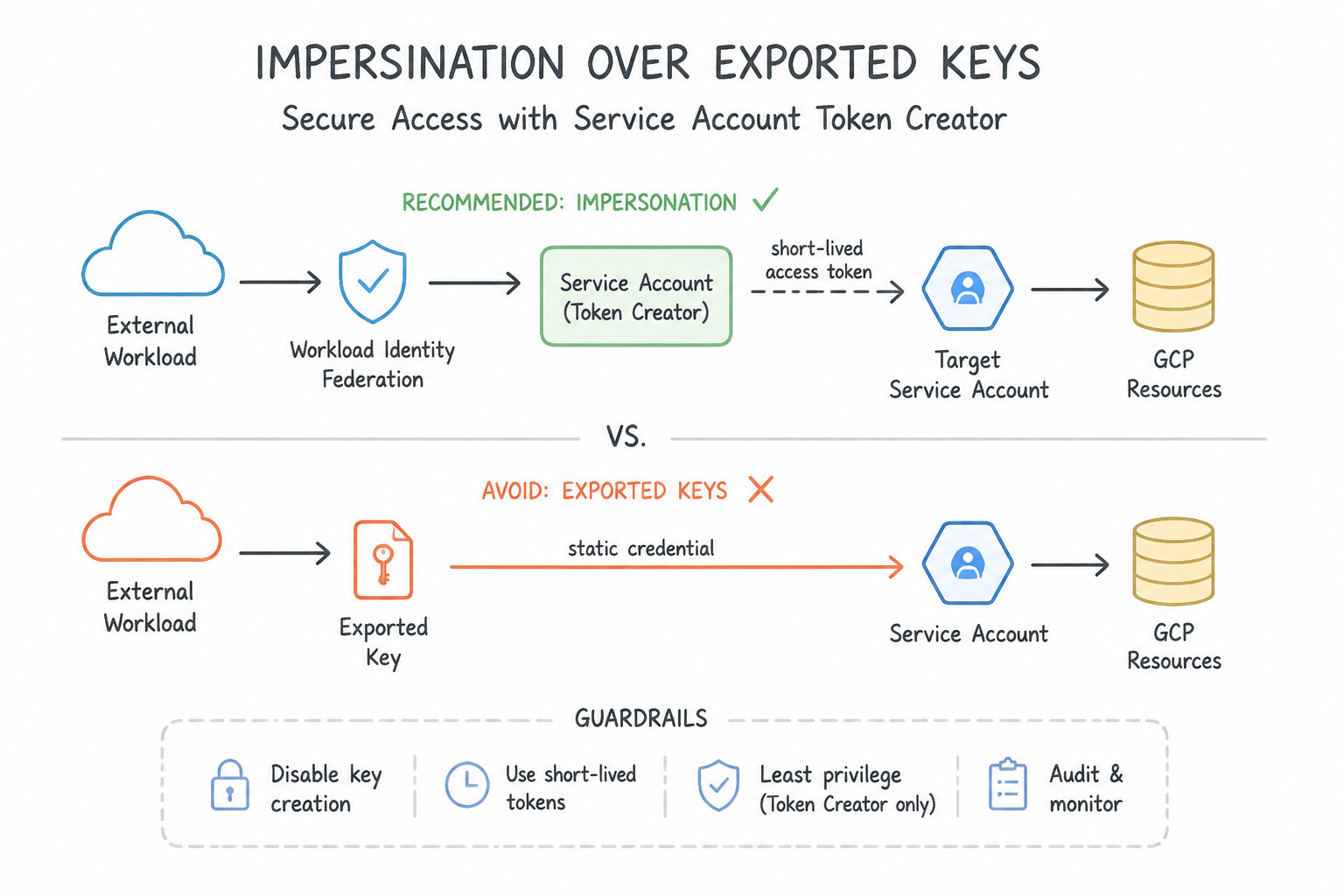
Service Account Token Creator) Over Exported Keys: When developers or CI/CD pipelines need to act as a privileged service account locally or across projects, grantroles/iam.serviceAccountTokenCreator(androles/iam.serviceAccountUserwhen attaching a SA to a resource like a VM/GKE node pool) on the target Service Account and use--impersonate-service-accountto mint short-lived credentials. - Service Account Insights & IAM Recommender: Continuously audit unused service accounts and over-privileged bindings using Active Assist IAM Recommender and Policy Analyzer.
Key Implementation Patterns
- Secure External CI/CD Integration: Use Configure Workload Identity Federation to trust the GitLab instance as an OIDC identity provider and impersonate a service account. Workload Identity Federation allows external workloads to authenticate using OIDC tokens without managing service account keys.
- Centralized DevOps Tooling Architecture: Use Create a service account in the "Shared-Services" project. Grant this service account the necessary IAM roles on the "App-A" and "App-B" projects. Use the service account from the centralized tooling project and grant it permissions directly on the target projects.
- Enforcing Key Safety at the Organization Level: Use Enforce the
iam.disableServiceAccountKeyCreationconstraint at the Organization level. Set the policy on the Sandbox folder to "Off". Enforce the restriction globally at the Organization root for security, then override the specific Sandbox folder policy to allow key creation.
Key Takeaways (1.1e)
- Avoid using long-lived Service Account keys whenever possible to reduce security risks.
- Use Workload Identity Federation to authenticate workloads running outside of Google Cloud (on-premises or other clouds).
- Workload Identity Federation relies on OIDC or SAML trust relationships to exchange external credentials for short-lived Google Cloud tokens.
- Service accounts are project-specific resources but global identities.
Consideration 1.1f: Data residency
- Enforcing Data Residency with
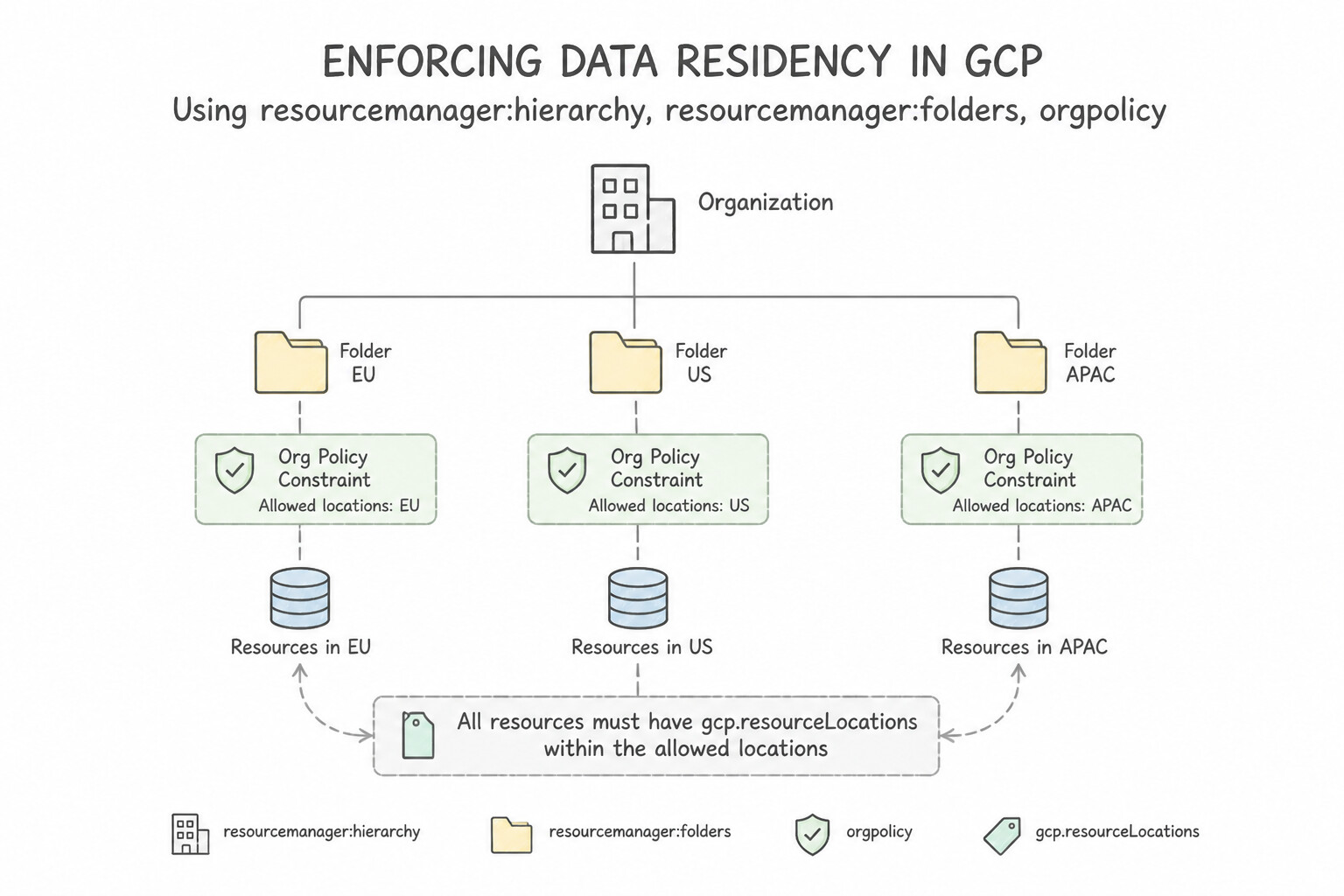
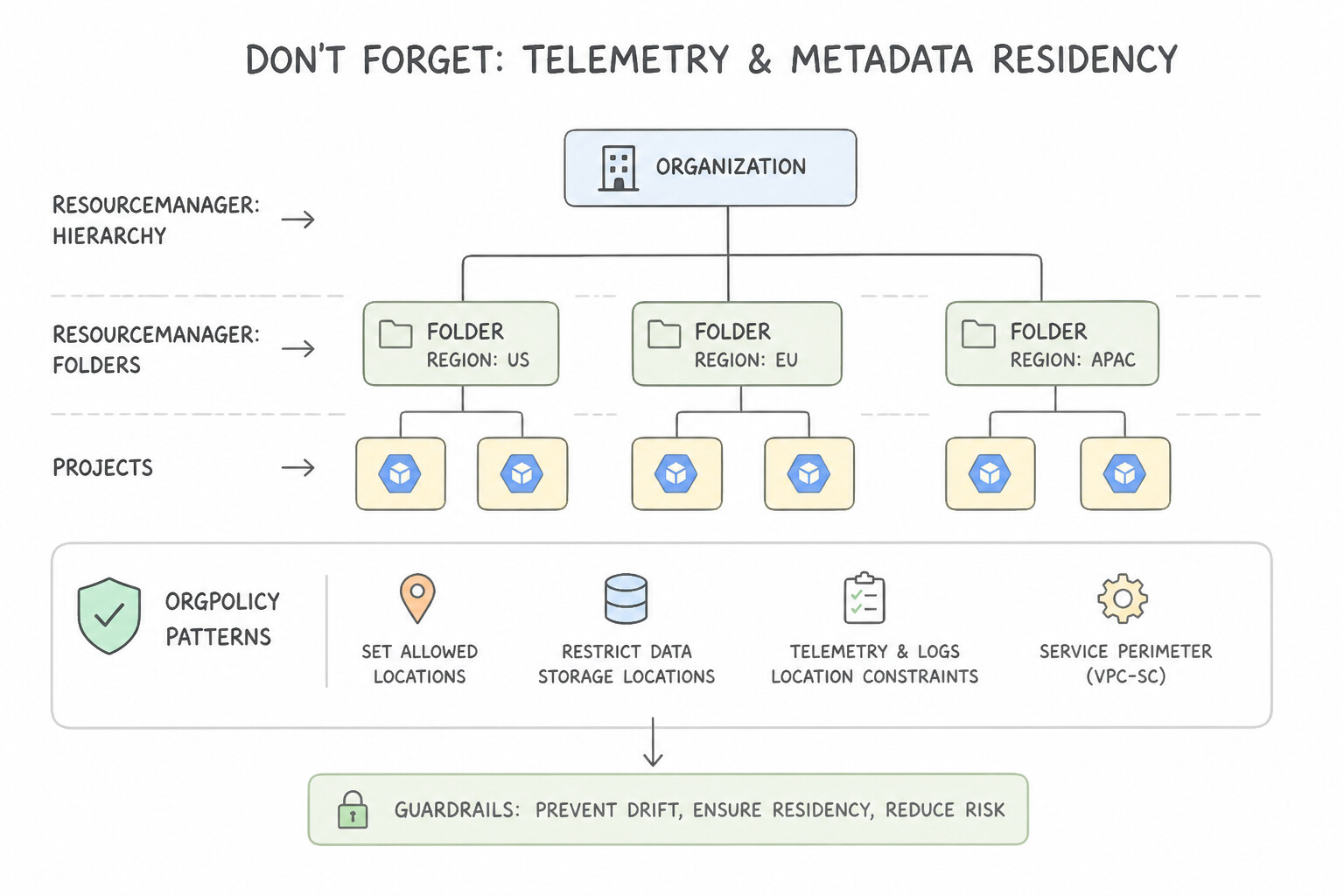
constraints/gcp.resourceLocations: When regulatory mandates (such as GDPR or financial data sovereignty) require all storage and compute resources to reside physically inside a specific country or multi-region (e.g.,in:eu-locationsorus-central1), apply theconstraints/gcp.resourceLocationsOrganization Policy constraint at the Folder or Project level. - Don't Forget Telemetry & Metadata Residency: Data residency applies to observability and backups too! Configure Regional Log Buckets in the compliant region (routing logs away from the global
_Defaultbucket via the Log Router), restrict Cloud Storage buckets to single-region or compliant dual-region configurations, and pair with Assured Workloads when strict sovereign personnel access controls or CMEK hardware enforcement are required.
Key Implementation Patterns
- Hierarchical Structure for Multi-National Compliance: Use Create top-level folders for each geography. Apply the specific Resource Location Restriction policy to each folder. Create department subfolders inside the geographic folders. Grouping by geography at the top level allows you to apply distinct data residency policies cleanly to each region.
- Enforcing Region Restrictions via Organization Policy: Use Configure an Organization Policy with the "constraints/gcp.resourceLocations" constraint to allow only "europe-west1". Organization Policies are the standard governance tool to restrict resource locations across an organization.
Key Takeaways (1.1f)
- Align your resource hierarchy with your primary compliance boundaries (e.g., Geography) to simplify policy management.
- Use Organization Policies to enforce constraints preventatively rather than detecting them later.
- leverage policy inheritance to reduce administrative overhead and manual errors.
- IAM controls who can perform actions.
Quick Decision Cheat Sheet (Subsection 1.1)
If the Scenario Requires... | Choose This Google Cloud Pattern | Avoid This Common Mistake |
|---|---|---|
"Network admins manage subnets/firewalls centrally; app teams manage VMs/GKE in separate projects" | Shared VPC with subnet-level roles/compute.networkUser granted to service project SAs | Granting roles/compute.networkAdmin to app teams; using 50 separate peered VPCs |
"Connect to a managed service or partner API across organizations or with overlapping RFC 1918 IPs" | Private Service Connect (PSC) endpoint / backend with producer Service Attachment | VPC Network Peering or Cloud VPN with manual static route hacks |
"Prevent any resource from being provisioned outside European Union regions" | Organization Policy constraints/gcp.resourceLocations set to in:eu-locations + Regional Log Buckets | Writing a daily cron script to delete non-EU VMs; relying on IAM Conditions alone |
"Audit reports GKE nodes or VMs use default service account with overly broad Editor permissions" | Create a dedicated Custom/Predefined Least-Privilege Service Account ( logging.logWriter, monitoring.metricWriter) and enforce constraints/iam.automaticIamGrantsForDefaultServiceAccounts | Keeping the default service account and trying to restrict it with network firewall rules |
"Centralize logs from all existing and future projects in an Organization into BigQuery / Cloud Storage" | Create an Organization-level Aggregated Log Sink ( --include-children) | Manually creating a Terraform log sink inside every individual project repository |
Further Reading (Subsection 1.1)
- Resource hierarchy architecture — Describes the relationship between Organization, Folders, and Projects, and how policies are inherited.
- Organisations & the Resource Hierarchy — **
- Shared VPC overview — Explains the concept of Host and Service projects and how they enable separation of duties for network administration.
- Decide a resource hierarchy for your Google Cloud landing zone — Provides best practices for structuring folders and projects, including separating infrastructure from workloads.
- Provisioning Shared VPC — This page details the specific IAM roles required for Shared VPC, including the distinction between Service Project Admins and Network Users.
- IAM roles for Networking-related Job Functions — A comprehensive list of networking-related IAM roles, specifically defining what permissions 'compute.networkUser' grants versus 'compute.networkAdmin'.
Subsection 1.2: Managing infrastructure
The Big Picture
Teams that manage cloud resources through Console clicks (ClickOps), unversioned bash scripts, or a single monolithic main.tf file executed from developer laptops inevitably suffer catastrophic production outages:
- Concurrent State Corruption & Laptop Drift (1.2a): When two engineers run
terraform applyfrom their laptops against a local state file (or an unlocked bucket), race conditions corrupt resource bindings. Production IaC requires either Google Cloud's fully managed Infrastructure Manager (which executes Terraform natively using Cloud Build and stores state in Cloud Storage with IAM isolation) or a Git-triggered pipeline backed by a Cloud Storage remote backend (which provides native.tflockobject locking and Object Versioning). - Choosing the Wrong Declarative Control Plane (1.2a): Not every team wants to write HCL. Platform teams that run entirely on GKE often want developers to provision a Cloud SQL database or Pub/Sub topic using the exact same
kubectl/ GitOps workflow they use forDeploymentYAML. That is the exact mission of Config Connector (Kubernetes CRDs for Google Cloud resources), whereas Helm packages Kubernetes application charts, and Cloud Foundation Toolkit (CFT) provides Google-hardened Terraform blueprints for foundational landing zones. - Brittle CLI Parsing in Custom Automation (1.2c): When an operational task requires custom logic (such as dynamically querying tags and snapshotting disks across regions), wrapping
gcloudcommands inside bash loops and parsing text output withawk/grepbreaks whenever CLI output formatting changes. Production automation uses Python or Go with official Google Cloud Client Libraries, Application Default Credentials (ADC), and exponential backoff.
Consideration 1.2a: Infrastructure-as-code tooling and managed services (e.g., Infrastructure Manager, Cloud Foundation Toolkit, Config Connector, GitOps, Terraform, Helm)
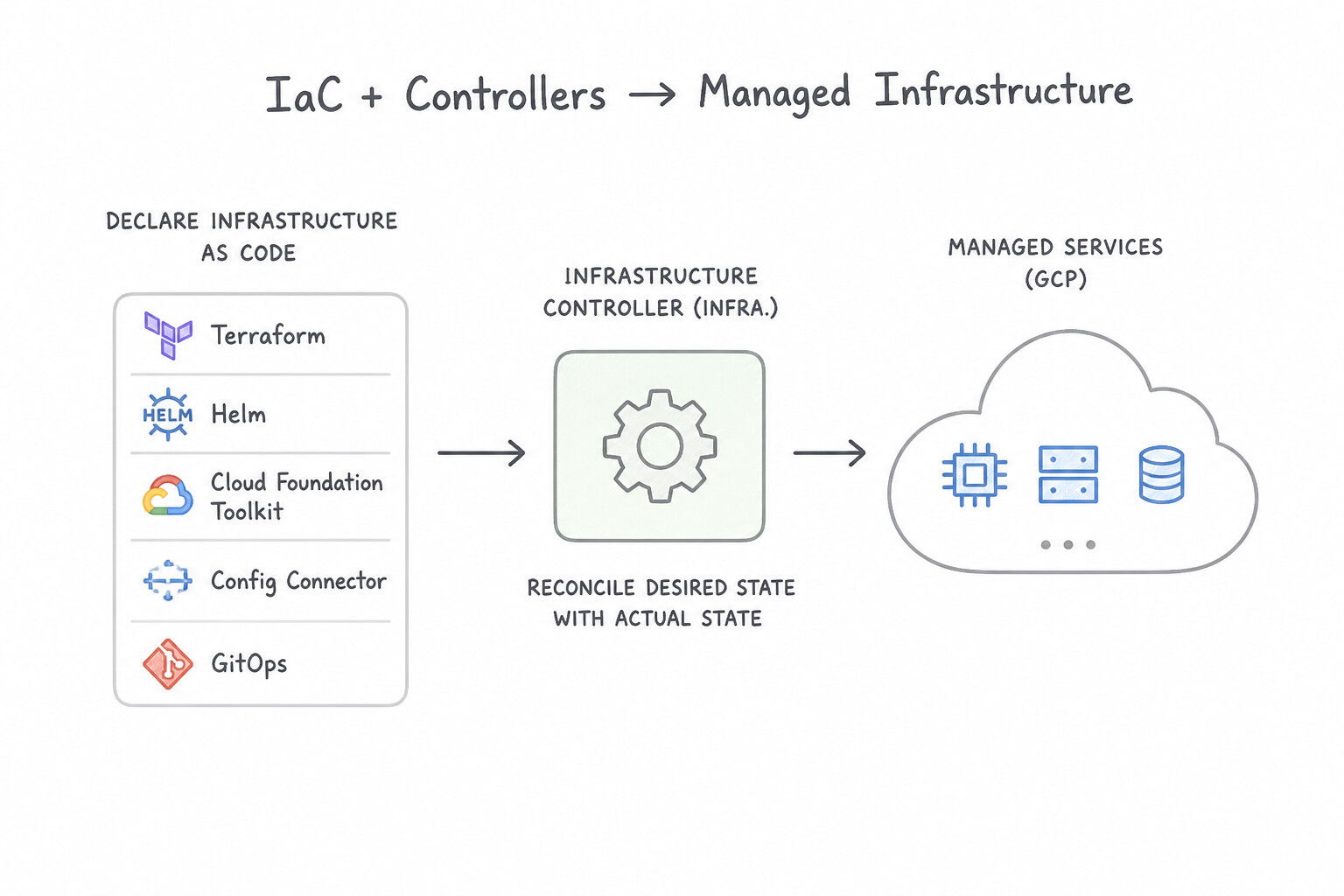
- Infrastructure Manager (
Infra Manager): Google Cloud's managed service for deploying and managing Terraform configurations. It eliminates manual state-bucket bootstrapping, runsterraform plan/applyinside managed Cloud Build workers under a specified user-managed Service Account, and enforces deployment locking and revision history natively viagcloud infra-manager deployments apply. - Cloud Foundation Toolkit (
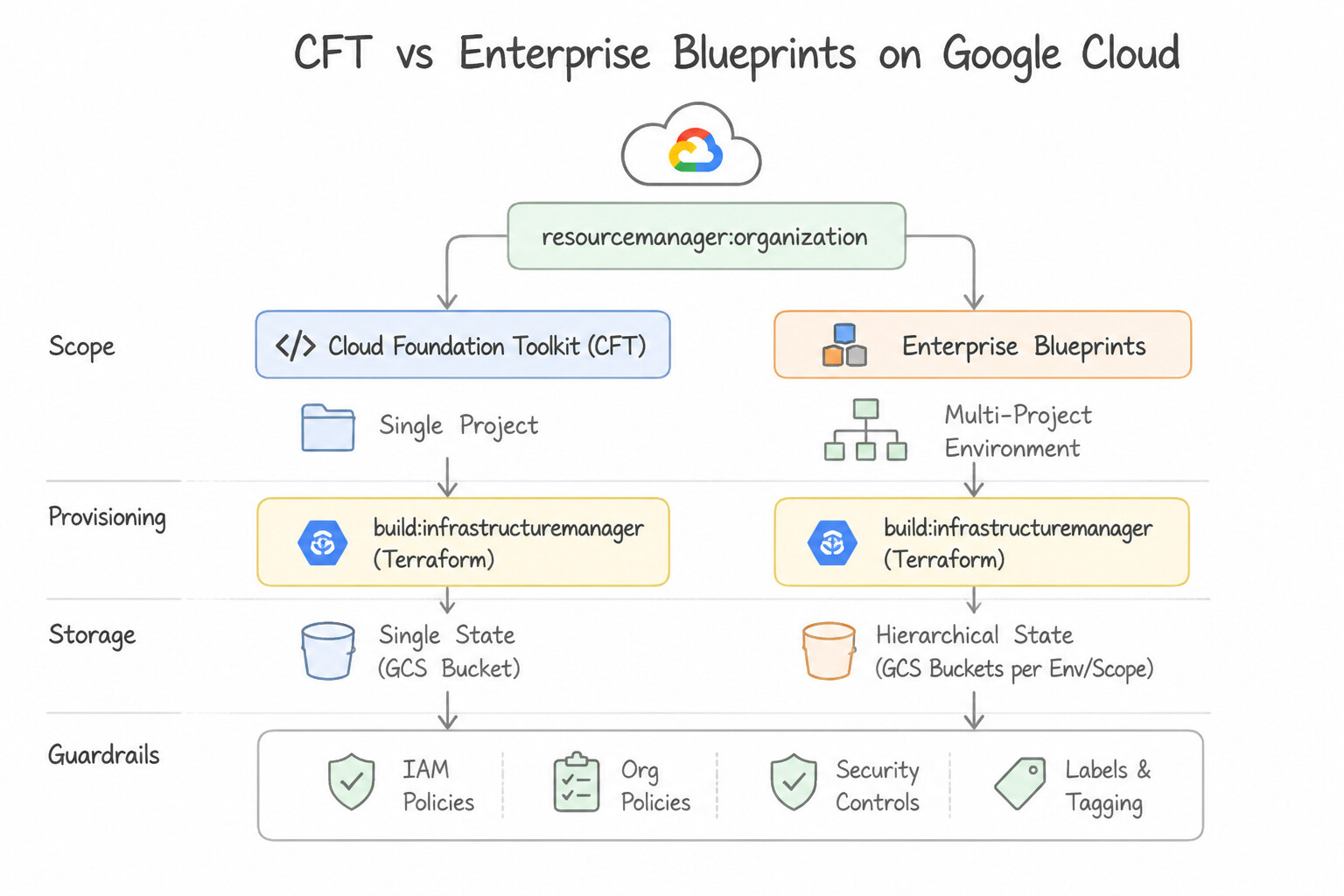
CFT) & Enterprise Blueprints: Google's open-source library of production-ready, security-hardened Terraform modules (e.g.,terraform-google-network,terraform-google-project-factory,terraform-google-kubernetes-engine) that implement the Google Cloud Architecture Framework out of the box. - Config Connector (
KCC) vs. Terraform vs. Helm: - Choose Config Connector when a GKE-centric organization wants to manage Google Cloud resources (Cloud SQL, Pub/Sub, IAM, Cloud Storage) declaratively as Kubernetes Custom Resource Definitions (CRDs) reconciled continuously against the GCP API.
- Choose Terraform / CFT / Infrastructure Manager for foundational organization bootstrapping, networking, and multi-service infrastructure.
- Choose Helm when packaging and versioning parameterized Kubernetes-internal manifests (Deployments, Services, Ingresses) as reusable charts stored in Artifact Registry.
Key Implementation Patterns
- Accelerating Org Setup with Cloud Foundation Toolkit: Use Deploy the Google Cloud Foundation Toolkit (CFT) Terraform modules. CFT provides pre-written, best-practice Terraform modules for landing zones, saving time and ensuring quality. (Avoid alternative: Manual configuration lacks reproducibility, version control, and speed, making it unsuitable for enterprise landing zones.)
- Terraform State Locking in Multi-Developer Teams: Use Configure the Terraform backend to use a Cloud Storage bucket. The Cloud Storage backend automatically handles state locking, preventing concurrent modifications. (Avoid alternative: Git does not support state locking and exposes sensitive data found in the state file.)
- Unifying Management via Config Connector: Use Enable Config Connector on the GKE cluster. Config Connector allows you to manage Google Cloud resources using Kubernetes manifests and tooling. (Avoid alternative: Cloud Foundation Toolkit provides templates but does not inherently enable kubectl management of cloud resources without Config Connector.)
Key Takeaways (1.2a)
- Don't reinvent the wheel: Use the Cloud Foundation Toolkit (CFT) for standard infrastructure patterns.
- Landing Zones: Establishing a secure landing zone early prevents technical debt.
- Infrastructure as Code: Always prefer IaC (like Terraform) over manual console actions for production environments.
- Efficiency: Pre-built modules accelerate adoption and ensure compliance with Google's best practices.
Consideration 1.2b: Making infrastructure changes using Google-recommended practices and blueprints
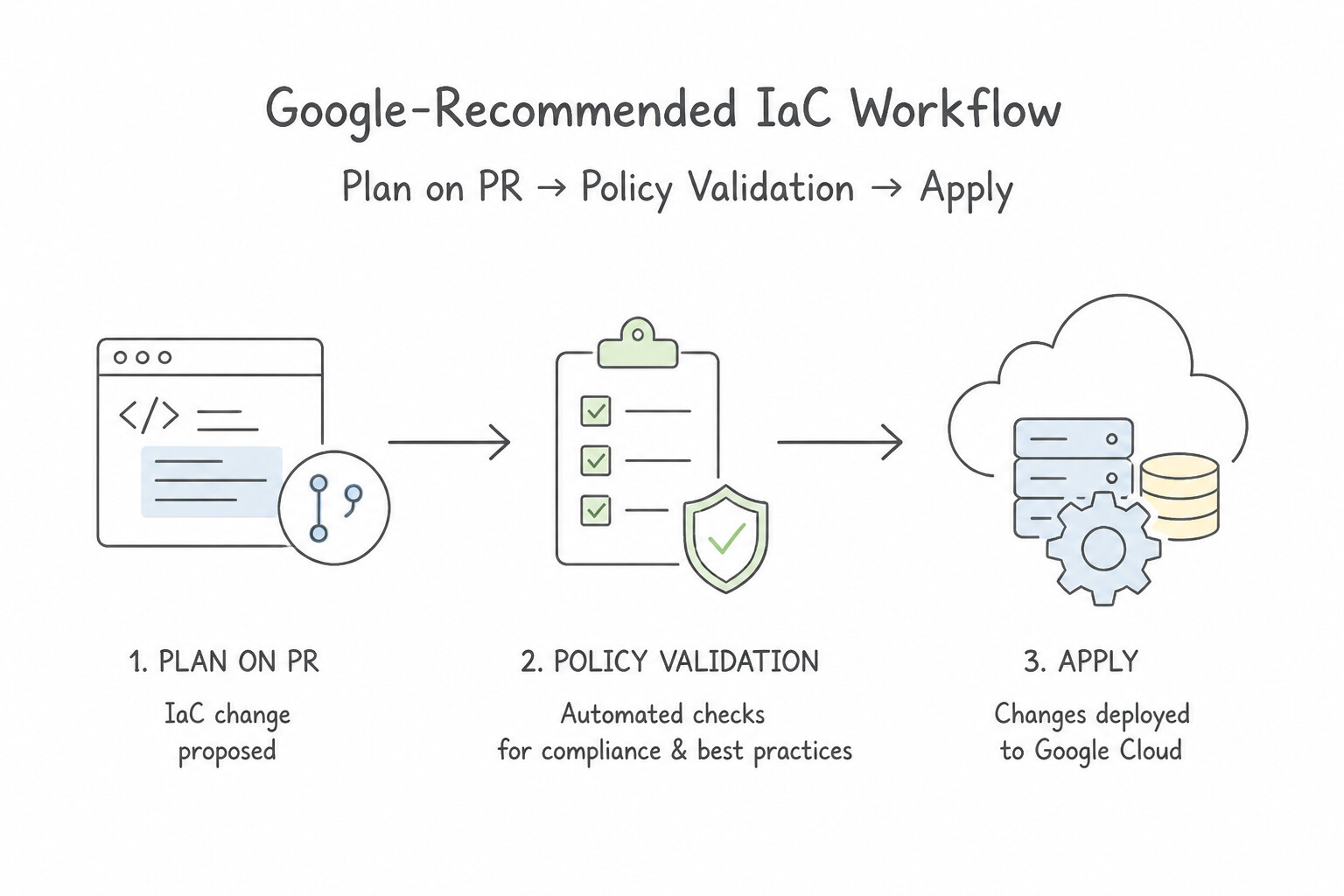
- Google-Recommended IaC Workflow (
Plan on PR→Policy Validation→Apply on Merge): - Engineer opens a Pull Request modifying a versioned CFT/Terraform module call.
- CI pipeline runs
terraform fmt -check,terraform validate,terraform plan -out=tfplan, andgcloud beta terraform vet/ Policy Controller (validating the plan JSON against CAI/OPA constraints before a single resource is touched). - Peer reviewers inspect the exact
tfplandiff attached to the PR. - Merging to
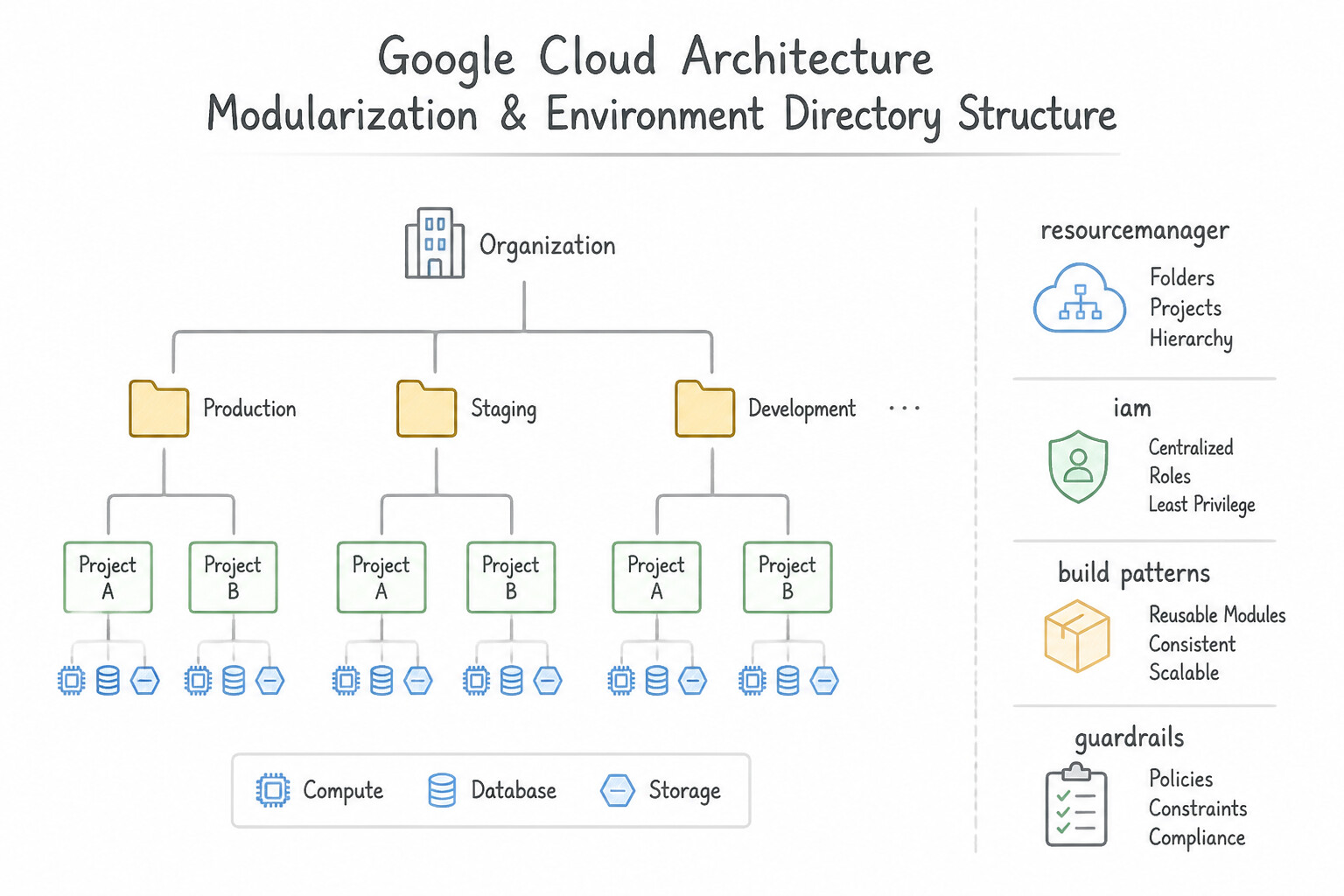
maintriggers an automatedterraform apply tfplanusing that exact approved plan artifact. - Modularization & Environment Directory Structure: Never copy-paste 2,000 lines of resource definitions across
dev/,staging/, andprod/branches, and avoid relying solely on CLIterraform workspace selectfor production isolation. Instead, publish versioned, reusable Terraform modules (pinned via semantic version tags) and invoke them from separate environment directories (environments/dev/,environments/staging/,environments/prod/), each backed by its own isolated Cloud Storage state file and environment-specific Service Account.
Key Implementation Patterns
- Adopting Cloud Foundation Toolkit: Use Use the Google Cloud Foundation Toolkit (CFT) Terraform modules to deploy the infrastructure. CFT provides pre-built, vetted Terraform modules that follow best practices and save time. (Avoid alternative: Writing code from scratch is too time-consuming given the deadline constraints.)
- Policy as Code Validation: Use Configure the CI pipeline to generate a Terraform plan, convert it to JSON, and run 'gcloud beta terraform vet' against your policy library. Use 'gcloud beta terraform vet' to validate a Terraform plan JSON against policies during the CI stage.
- Secure State Management: Use Configure a "backend 'gcs'" block in your Terraform code and migrate the state to a Cloud Storage bucket. The GCS backend provides native state locking to prevent race conditions and secures the state file off local machines with encryption.
Key Takeaways (1.2b)
- Avoid manual configuration (ClickOps) for foundational infrastructure; use Infrastructure as Code (IaC).
- Don't reinvent the wheel; use Google Cloud Foundation Toolkit (CFT) for vetted, best-practice templates.
- Blueprints accelerate deployment while ensuring security and compliance (like CIS benchmarks) are met from the start.
- Policy as Code allows you to define security rules that infrastructure must follow.
Consideration 1.2c: Automation with scripting (e.g., Python, Go)
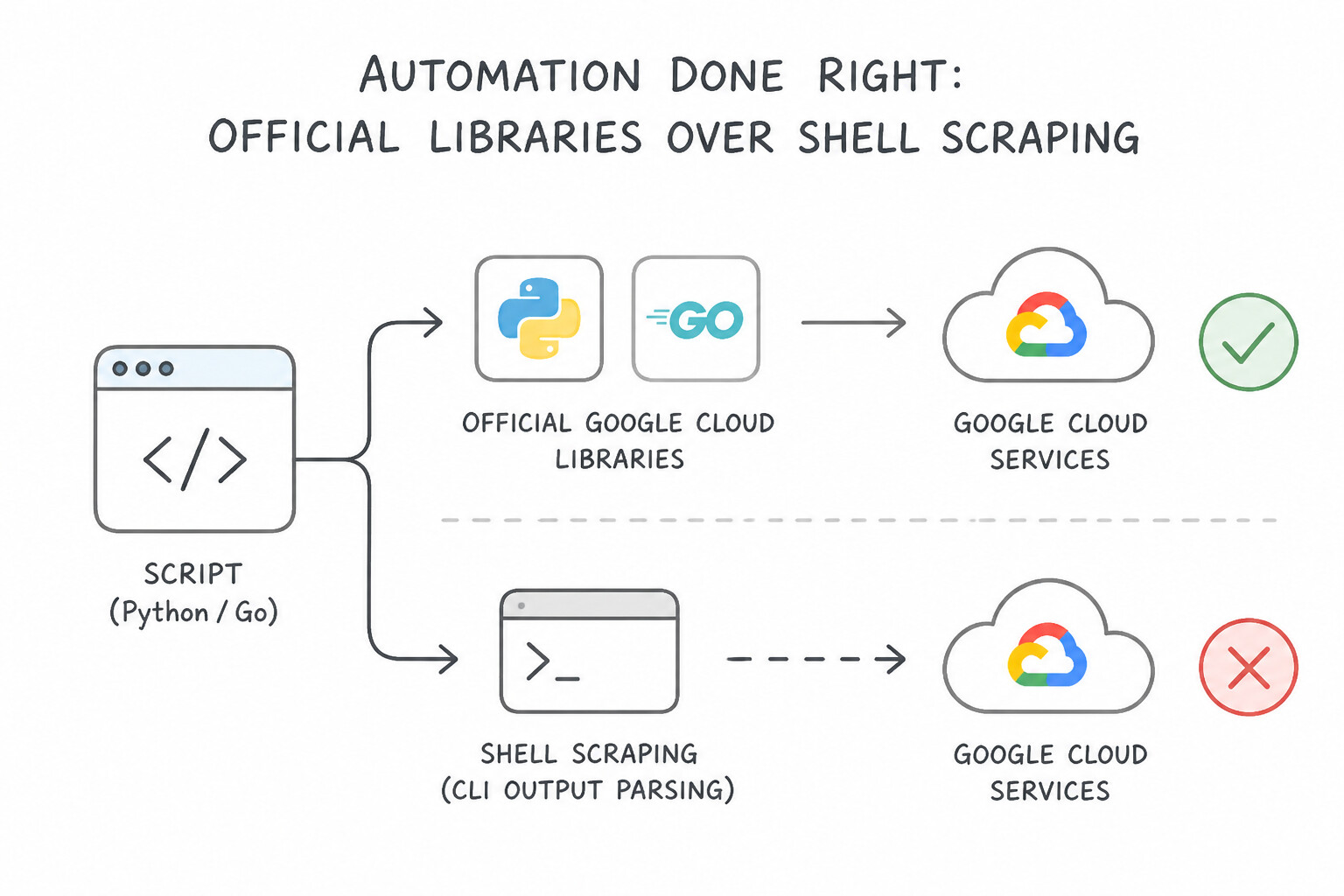
- Official Google Cloud Client Libraries (
Python/Go) Over Shell Scraping: When writing custom operational automation (e.g., automated quota auditing, custom snapshot garbage collection, or dynamic remediation), use the Google Cloud Client Libraries for Python or Go rather than shelling out togcloudwithsubprocessand regex-parsing stdout. Client libraries provide strong typing, native gRPC/HTTP connection pooling, built-in pagination (pages), and automatic retry handling. - Authentication via Application Default Credentials (
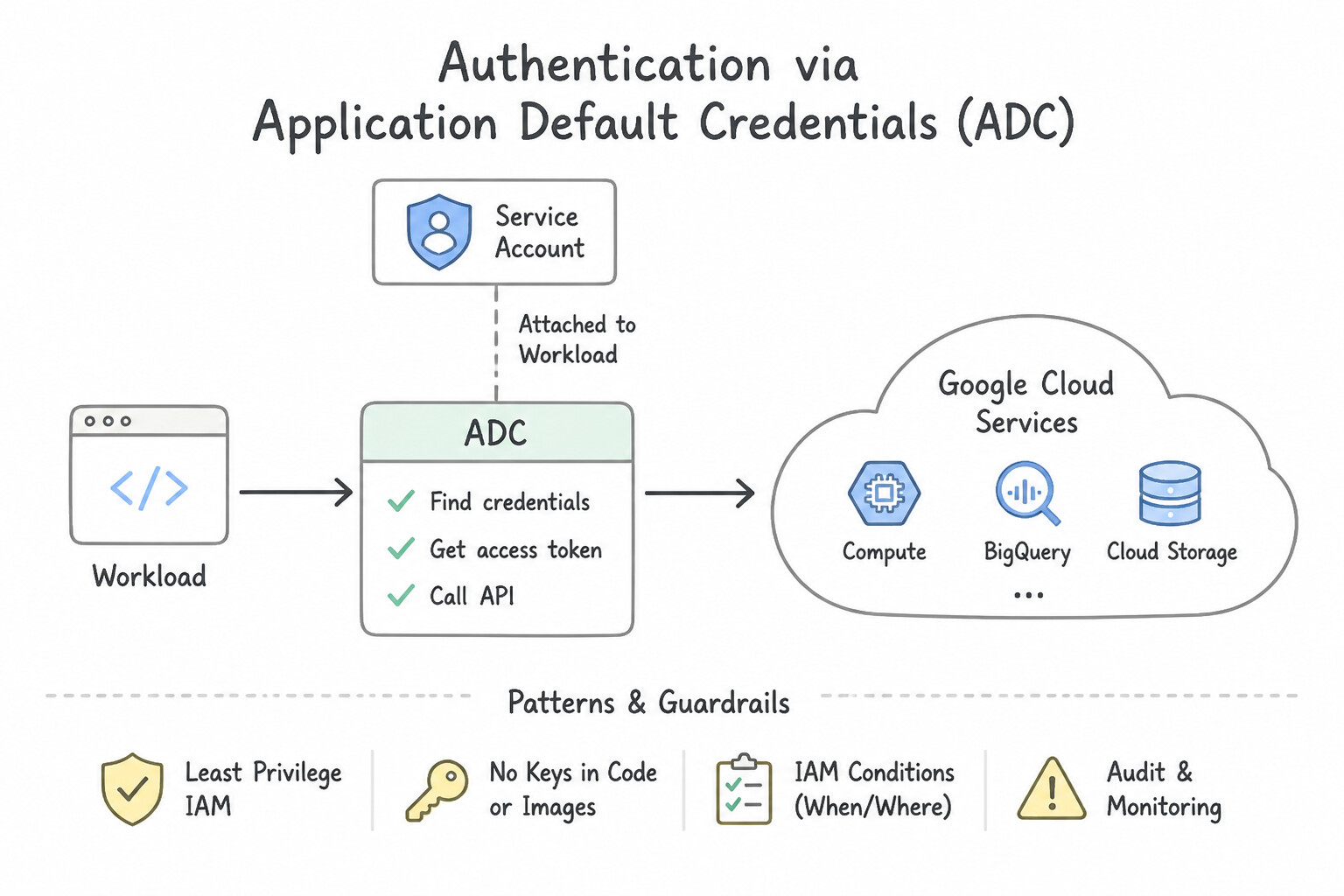
ADC): Never hardcode credentials or pass key file paths in Python/Go automation scripts. Callgoogle.auth.default()(Python) orgoogle.DefaultClient(Go) so the exact same code authenticates seamlessly via Workload Identity / attached Service Account in production and viagcloud auth application-default login(with SA impersonation) during local development. - Idempotency & Rate-Limit Resilience: Design all operational scripts to be idempotent (safe to re-run without creating duplicate resources or failing on already-completed steps) and implement exponential backoff with random jitter when catching
429 Too Many Requestsor503 Service UnavailableAPI responses.
Key Implementation Patterns
- Handling API Rate Limits in Automation Scripts: Use Implement a truncated exponential backoff algorithm with jitter to retry the requests. Exponential backoff with jitter is the standard pattern for handling rate-limit errors in distributed systems. (Avoid alternative: Quota increases address capacity limits but do not fix the lack of error handling in the script logic.)
- Processing Large Datasets via API: Use Modify the script to iterate through the pages using the next_page_token returned by the API response. Large API results are split into pages; you must use the
next_page_tokento retrieve subsequent pages. (Avoid alternative: Timeouts handle latency, not the quantity of data returned in a list operation.) - Secure Authentication for Local Development Scripts: Use Use the Google Cloud Client Libraries and initialize the client to use Application Default Credentials (ADC). ADC automatically discovers credentials from the local environment or the VM's metadata server, enabling seamless portability without manual keys.
Key Takeaways (1.2c)
- HTTP 429 errors indicate you are sending API requests too fast.
- Exponential Backoff is the standard algorithm to handle retries for rate-limited or transient errors.
- Jitter helps prevent synchronized retries from multiple clients.
- Avoid immediate loops or fixed sleep timers in production automation scripts.
Quick Decision Cheat Sheet (Subsection 1.2)
If the Scenario Requires... | Choose This Google Cloud Pattern | Avoid This Common Mistake |
|---|---|---|
"Manage Google Cloud resources (Cloud SQL, GCS, IAM) using Kubernetes manifests ( kubectl) and continuously heal drift" | Config Connector on GKE (with Config Sync) | Standard Kubernetes Deployment manifests; Deployment Manager (legacy) |
"Fully managed Google Cloud service to deploy Terraform blueprints without managing state buckets or CI runners" | Infrastructure Manager ( gcloud infra-manager) | Running Terraform manually inside Cloud Shell |
"Two CI pipelines ran terraform apply simultaneously and corrupted the state file" | Store state in a Cloud Storage remote backend (which enforces native .tflock state locking) with Object Versioning enabled | Storing terraform.tfstate inside the Git repository or on a local VM disk |
"Bootstrap a new enterprise organization following Google-validated best practices in minimum time" | Use Cloud Foundation Toolkit (CFT) modules and Enterprise Foundations Blueprint | Writing raw custom Terraform resources from scratch or Python deployment scripts |
"Custom Python/Go automation script intermittently fails with HTTP 429 during cross-project API scans" | Use official Google Cloud Client Libraries with exponential backoff and jitter + ADC | Adding a fixed time.sleep(1) or requesting unlimited API quota increases |
Further Reading (Subsection 1.2)
- Google Cloud Foundation Toolkit — Overview of the Cloud Foundation Toolkit, explaining how it provides best-practice templates for Terraform and Config Connector to accelerate Google Cloud setup.
- Terraform on Google Cloud — Documentation on using Terraform with Google Cloud, including references to the best practices and available modules.
- Terraform — **
- Backend Type: gcs — Documentation explaining how the GCS backend stores state and supports state locking to prevent concurrent modification.
- Config Connector overview — Provides a high-level explanation of how Config Connector works and its benefits for Kubernetes-native infrastructure management.
- Creating Policy Controller constraints — Describes how to validate Terraform plans against Policy Controller constraints using gcloud beta terraform vet.
Subsection 1.3: Designing a CI/CD architecture stack in Google Cloud, hybrid, and multi-cloud environments
The Big Picture
A classic anti-pattern in early cloud migrations is treating the CI tool (Cloud Build or Jenkins) as a monolithic script runner that compiles code, runs sed -i on Kubernetes YAML files, and immediately executes kubectl apply against production clusters. In hybrid and multi-cloud enterprises, this architecture breaks down in three ways:
- Conflating Continuous Integration (
CI) with Continuous Delivery (CD) (1.3a,1.3b): Cloud Build is an exceptional serverless CI engine (compiling code, running unit tests, building container images or Packer VM images, and pushing immutable artifacts to Artifact Registry). However, using rawcloudbuild.yamlsteps to manage multi-stage promotion (dev→staging→prod), target-specific manifest rendering, canary rollouts, approval gates, and rollbacks requires hundreds of lines of brittle custom bash. Google Cloud's architecture cleanly separates Cloud Build (CI) from Google Cloud Deploy (CD)—which uses Skaffold and Kustomize / Helm under the hood to render, deploy, verify, promote, and roll back releases across GKE, Cloud Run, and GKE Enterprise (hybrid/multi-cloud) targets. - Public Upstream Outages & Uncontrolled Dependency Pulls (1.3c): When every Cloud Build run pulls base images directly from Docker Hub or packages from public PyPI/Maven/npm, a single upstream rate-limit (
429 Too Many Requests) or compromised package breaks the entire enterprise pipeline. Production Artifact Registry architectures combine Standard Repositories (for internal artifacts), Remote Repositories (caching and proxying public upstreams with vulnerability scanning), and Virtual Repositories (exposing a single unified endpoint with priority routing). - Over-Privileged CI Runners & Exposed Private Targets (
1.3d,1.3e): Default Cloud Build workers run in a Google-managed tenant network and cannot reach private-IP GKE control planes or on-premises Git/Jenkins servers—and using the legacy default Cloud Build service account grants sweeping project-wide permissions. Production CI/CD security mandates Cloud Build Private Pools (peered via VPC Peering or Shared VPC / PSC) and Custom Per-Trigger User-Managed Service Accounts.
Consideration 1.3a: Continuous integration (CI) with Cloud Build
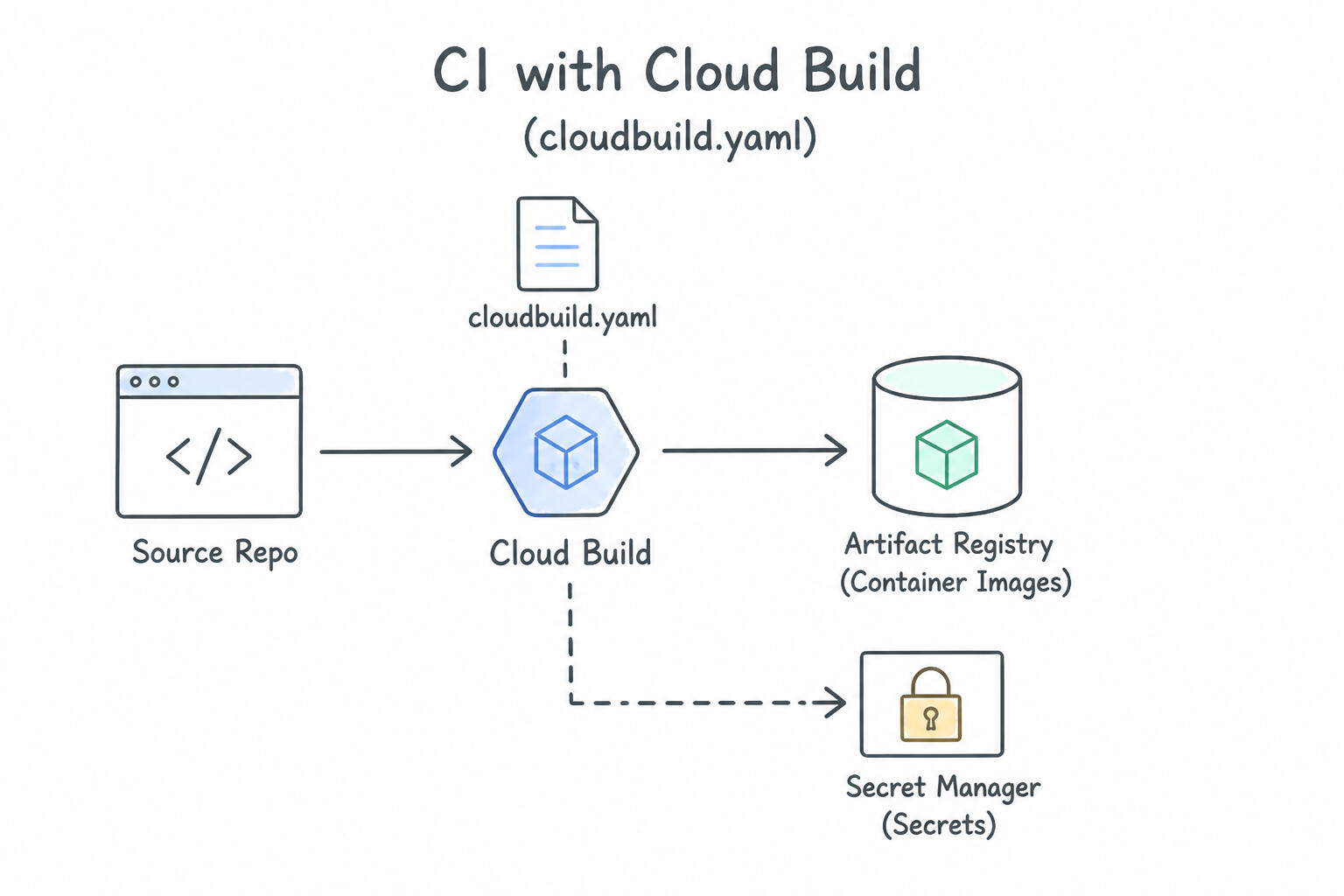
- Cloud Build Architecture (
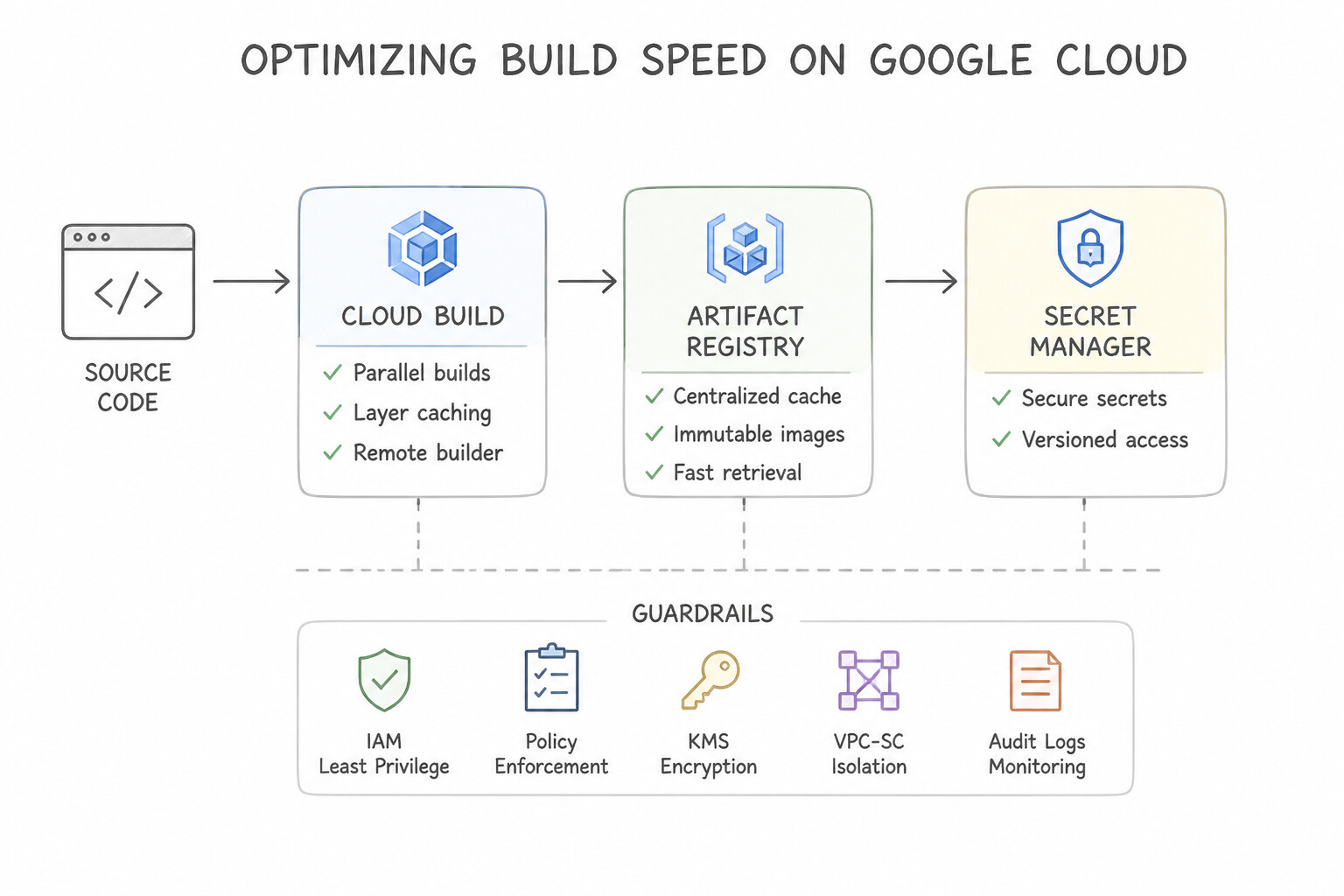
cloudbuild.yaml): Executes each build step inside a fresh container attached to a shared/workspacevolume. UsewaitForto define a Directed Acyclic Graph (DAG) so independent steps (e.g., unit tests, linting, SAST scans) run in parallel (waitFor: ['-']), while packaging waits for all checks to pass. - Optimizing Build Speed: Use Kaniko (
--cache=true) or Docker layer caching (--cache-from) stored in Artifact Registry, select largermachineType(E2_HIGHCPU_8orE2_HIGHCPU_32) for compute-heavy compilations, and cache language dependencies (Maven/Gradle/npm) in Artifact Registry Remote Repositories or Cloud Storage. - Private Network Access (
Cloud Build Private Pools): Whenever Cloud Build must access a Private GKE Cluster, a Private-IP Cloud SQL instance, or a self-hosted GitLab / Bitbucket Server inside your VPC or on-premises network, run the build on a Cloud Build Private Pool connected via Service Networking (VPC Peering) or Network Attachment (PSC).
Key Implementation Patterns
- Optimizing Build Speed with Caching: Use Add the --cache=true argument to the Kaniko executor args list in your cloudbuild.yaml file. Enabling the cache argument instructs Kaniko to store and retrieve intermediate build layers from the container registry. (Avoid alternative: Kaniko natively caches to container registries, not mounted file system volumes.)
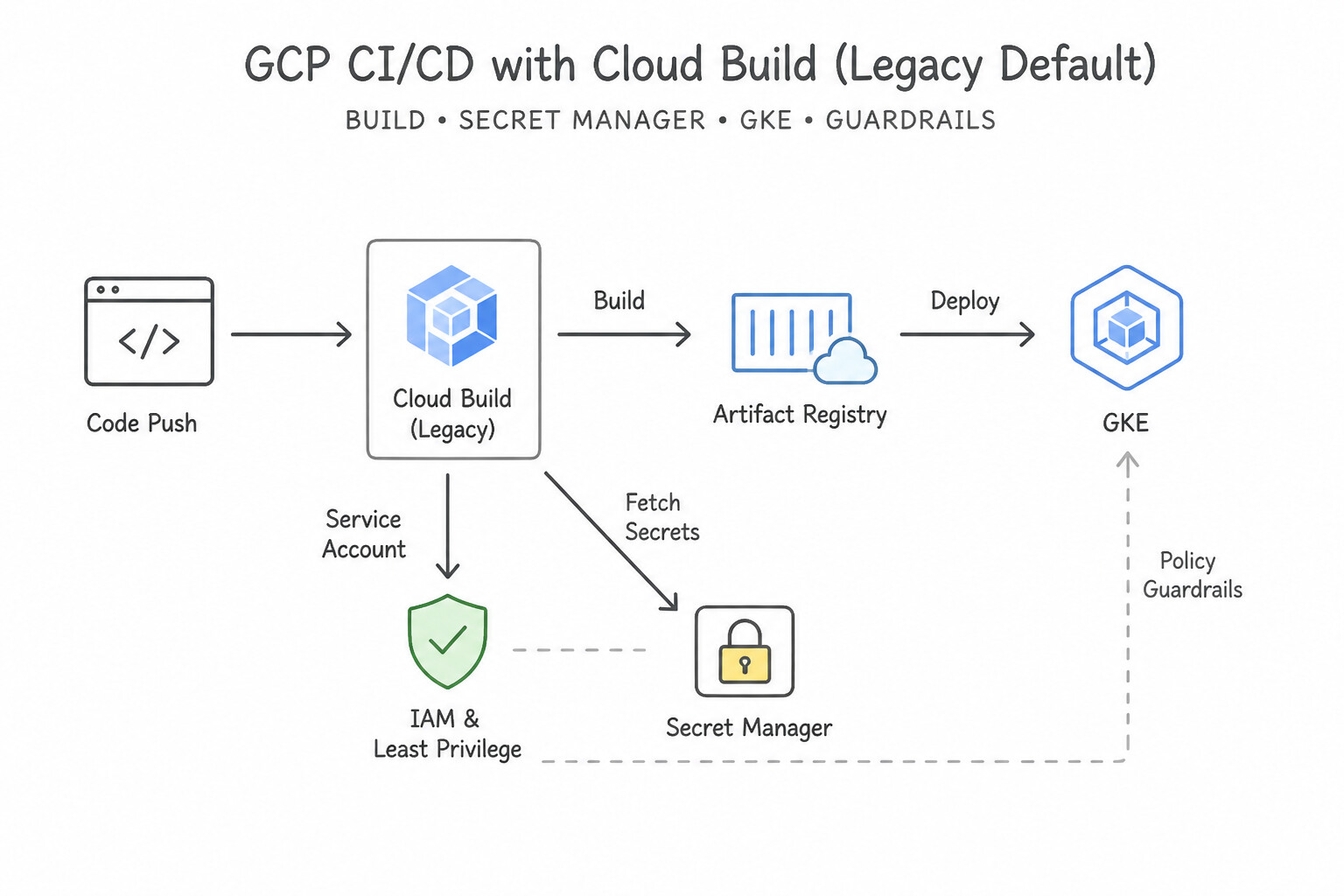
- Managing Secrets in CI: Use Configure the availableSecrets field in cloudbuild.yaml to reference the secret version and map it to an environment variable. Use the availableSecrets field to securely fetch values from Secret Manager and inject them as environment variables.
- Secure Access to Private Resources: Use Create a Cloud Build private pool. Configure VPC Network Peering between the private pool and your VPC. Private pools enable access to resources with private IPs via VPC Network Peering. (Avoid alternative: Opening the firewall to all IPs violates the security requirement to keep the database private.)
Key Takeaways (1.3a)
- Kaniko allows building container images inside a container without a Docker daemon.
- Caching intermediate layers speeds up builds by avoiding redundant work.
- To enable caching in Kaniko, use the
--cache=trueflag.- Remote registries like Artifact Registry act as the storage backend for these cached layers.
Consideration 1.3b: Continuous delivery (CD) with Cloud Deploy, including Kustomize and Skaffold
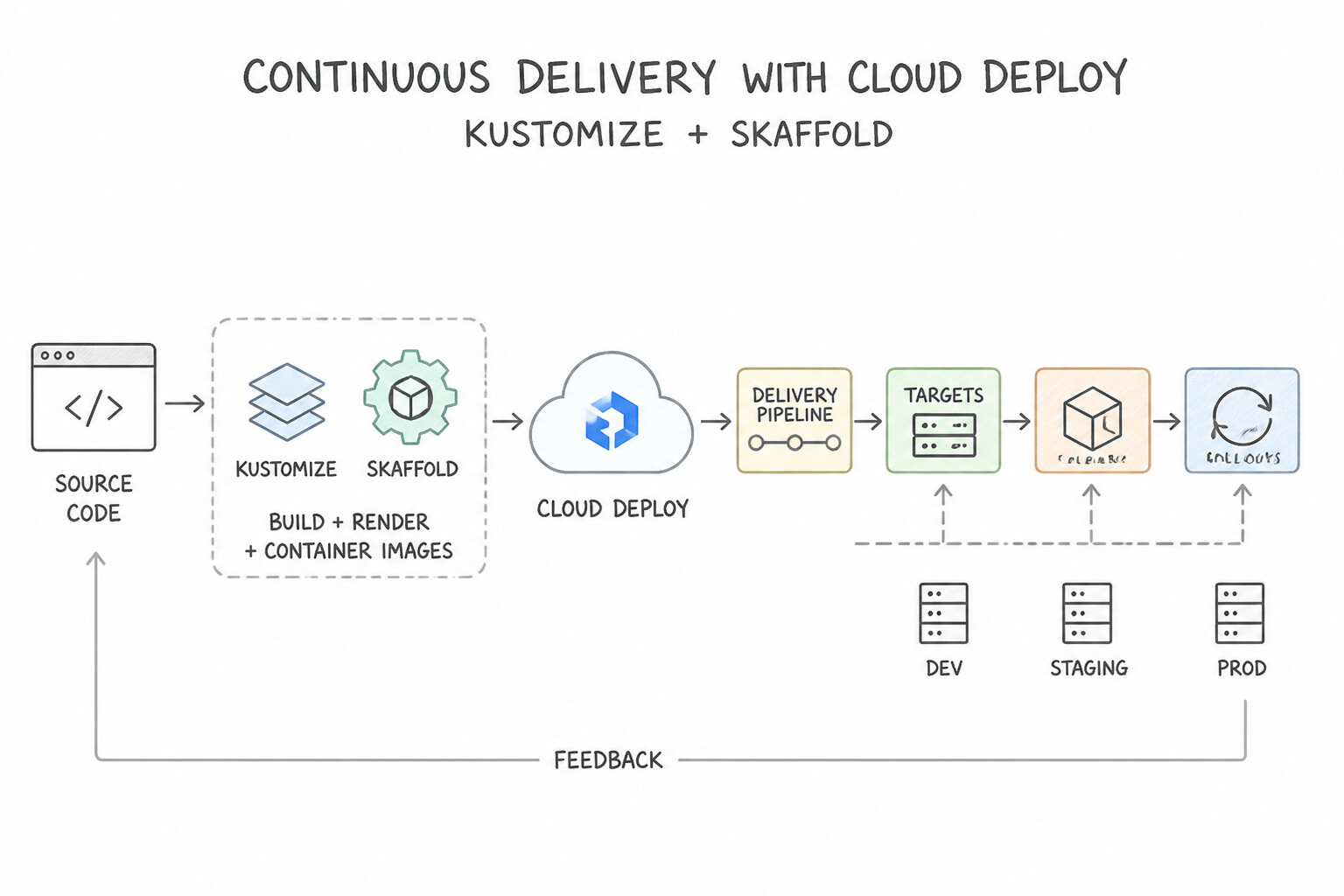
- Google Cloud Deploy (
Delivery Pipeline,Targets,Releases,Rollouts): - A Delivery Pipeline defines the ordered progression of Targets (e.g.,
dev→qa→prod). - A Release is an immutable binding of rendered manifests (via Skaffold) and specific container image SHA256 digests created once at the start of the CD pipeline. When promoting from
devtoprod, you promote the exact same Release—generating a new Rollout resource for the target environment. - Skaffold + Kustomize Together: Skaffold (
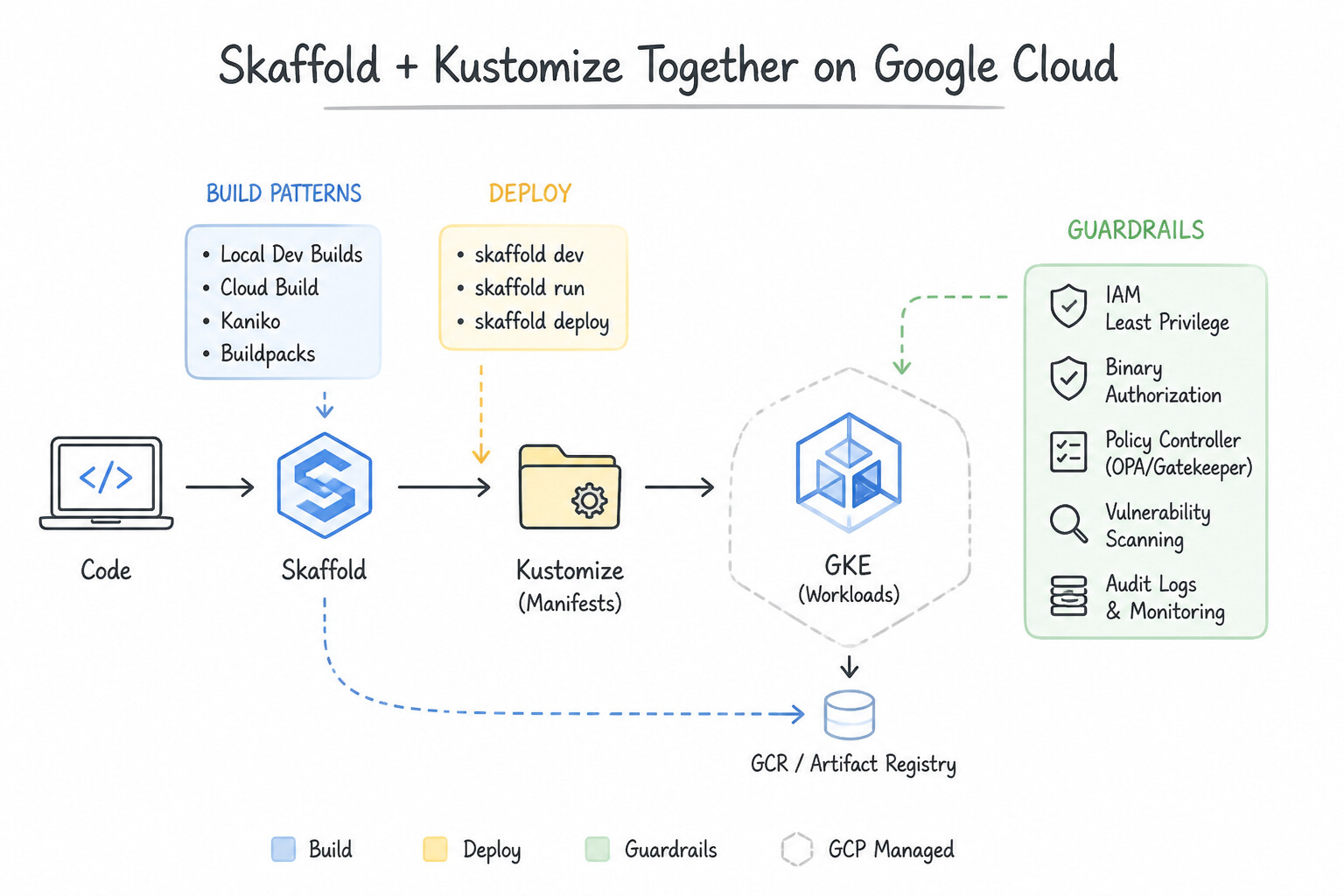
skaffold.yaml) orchestrates the build, render, deploy, and post-deploy verification (verify:) lifecycle in Cloud Deploy. Kustomize (kustomization.yaml) works natively inside Skaffold profiles (profiles:) to apply template-free environment overlays (e.g., 2 replicas ande2-mediumlimits indev/, 20 replicas andn2-standard-4limits inprod/) over a single DRYbase/manifest directory.
Key Implementation Patterns
- Defining Deployment Stages with Cloud Deploy Resources: Use Create three target resources, one for each cluster. Create one delivery pipeline resource that lists the targets in the serial pipeline stages. A Delivery Pipeline resource defines the sequence of stages, while Targets represent the actual destination clusters.
- Environment-Specific Configuration using Kustomize: Use Create a
basedirectory for common resources. Createoverlaysdirectories for dev and prod that contain patches for the differences. Configure Skaffold to apply the specific overlay. Kustomize overlays allow you to define a common base and apply environment-specific patches.
Key Takeaways (1.3b)
- Cloud Deploy uses 'Targets' to define deployment destinations (clusters/services).
- A 'Delivery Pipeline' resource defines the sequence (stages) of deployment.
- Skaffold is used for rendering and building, not for defining the pipeline stages.
- Promotions move a release from one target to the next defined target in the pipeline.
Consideration 1.3c: Artifact Registry configuration
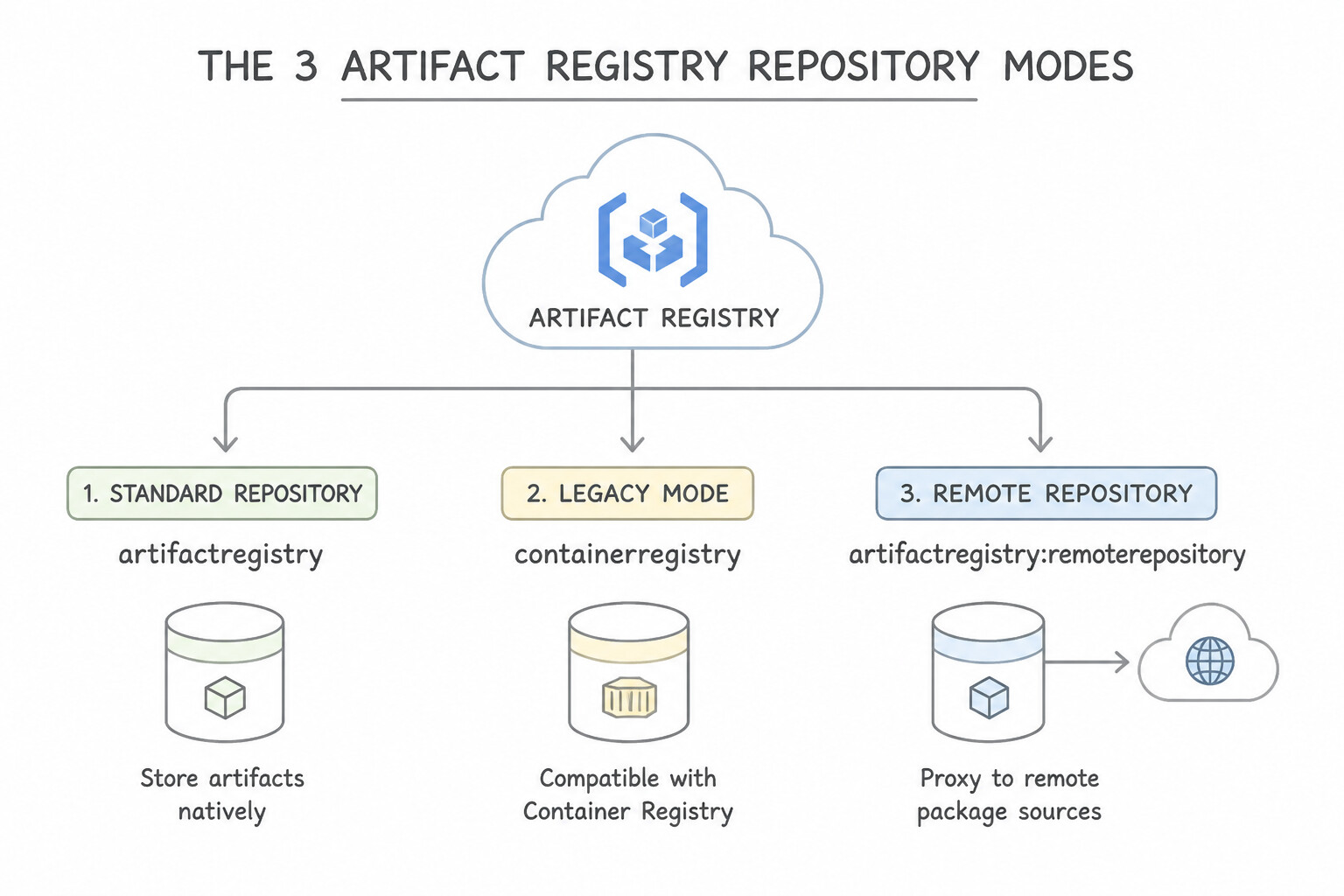
- The 3 Artifact Registry Repository Modes:
- Standard Repository: Stores your organization's private container images (OCI), Helm charts, and language packages (Maven, npm, Python, Go, Apt, Yum).
- Remote Repository: Acts as a pull-through caching proxy for public upstreams (Docker Hub, Maven Central, PyPI, npmjs, Debian/CentOS OS repos). It insulates builds from public internet outages/rate limits and allows Artifact Analysis to scan cached public dependencies before your builds consume them.
- Virtual Repository: Provides a single logical URL backed by an ordered upstream policy combining Standard and Remote repositories (always assign higher priority to internal Standard repositories than external Remote repositories to prevent dependency confusion attacks).
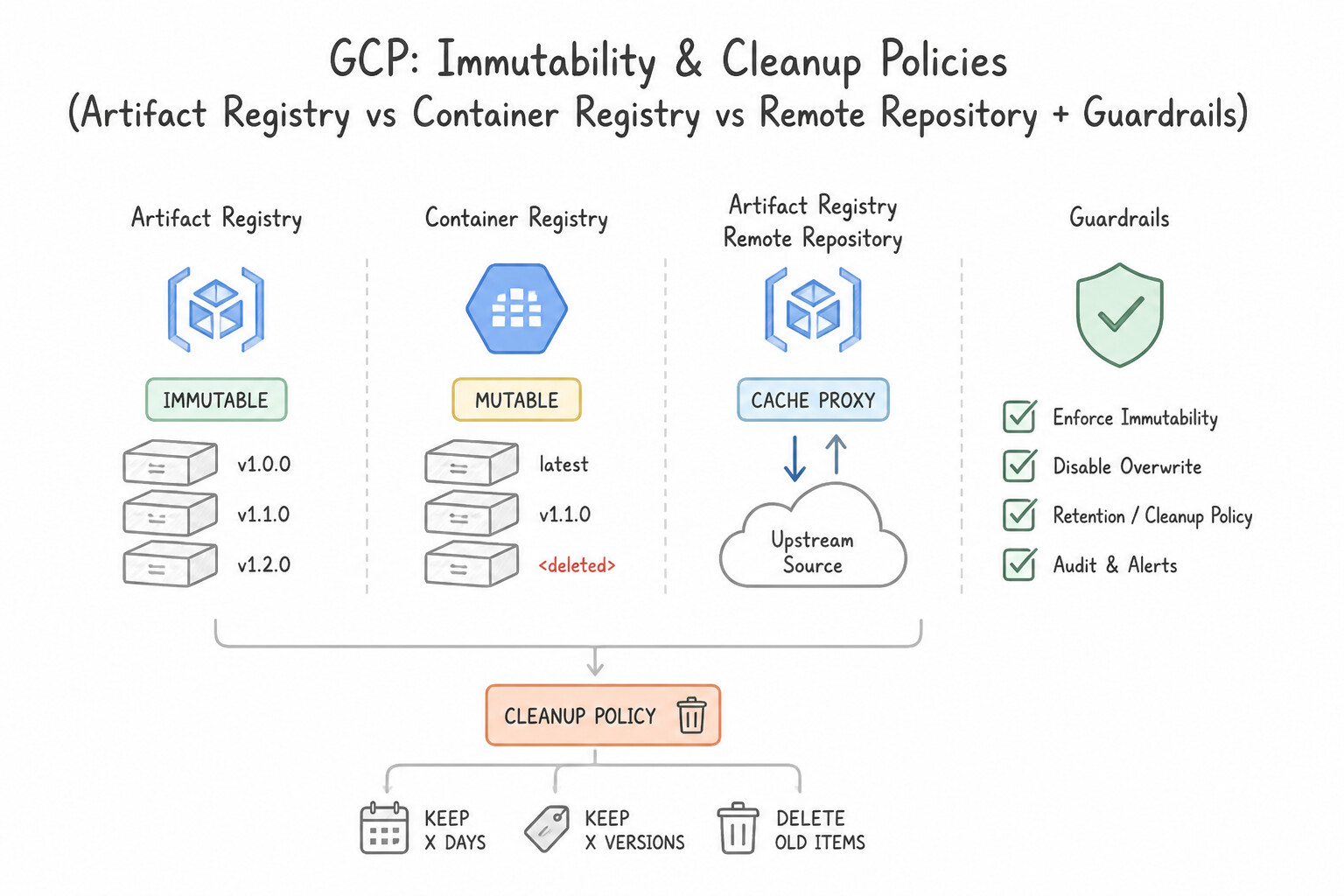
- Immutability & Cleanup Policies: Enable Immutable Image Tags on production repositories (or deploy strictly by
@sha256:digest) and configure Cleanup Policies (withkeeprules for production-tagged or recently pulled images anddeleterules for untagged/stale PR builds) to control storage costs.
Key Implementation Patterns
- Seamless Migration from Container Registry: Use Configure
gcr.iodomain redirection to route requests to Artifact Registry repositories. Domain redirection allows Artifact Registry to servegcr.iorequests transparently. (Avoid alternative: Updating scripts manually violates the requirement to avoid modifications.) - Securing Supply Chain with Remote Repositories: Use Create an Artifact Registry remote repository. Configure it to proxy Docker Hub, and update your pipeline to pull images from this repository. Remote repositories automatically cache upstream artifacts, mitigating rate limits and enabling vulnerability scanning on stored content.
- Optimizing Storage Costs with Lifecycle Policies: Use Configure an Artifact Registry Cleanup Policy. Add a Keep rule for production tags and a Keep rule for feature branch tags with a keep count of 10. Add a Delete rule for all images older than a specific duration. Use Cleanup Policies with specific Keep rules for production and recent versions, and a broad Delete rule to remove the rest.
Key Takeaways (1.3c)
- Artifact Registry is the successor to Container Registry.
- You can route
gcr.iotraffic to Artifact Registry using built-in redirection features.- Redirection avoids the need to rewrite scripts or client-side code immediately during migration.
- Artifact Registry Remote Repositories act as pull-through caches for public upstream sources.
Consideration 1.3d: Widely used third-party tooling (e.g., Git, Jenkins, Argo CD, Packer, kpt)
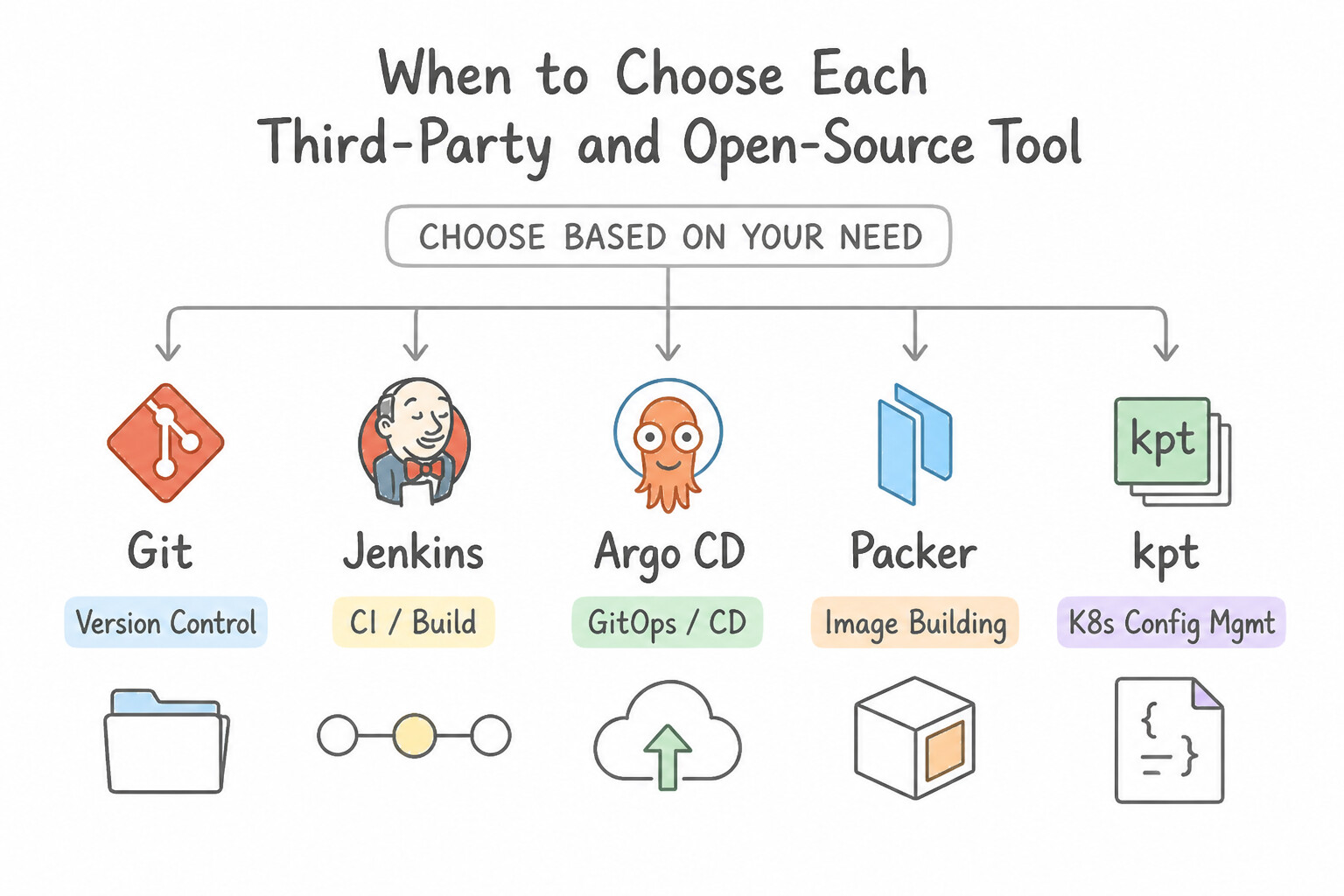
- When to Choose Each Third-Party / Open-Source Tool in Production:
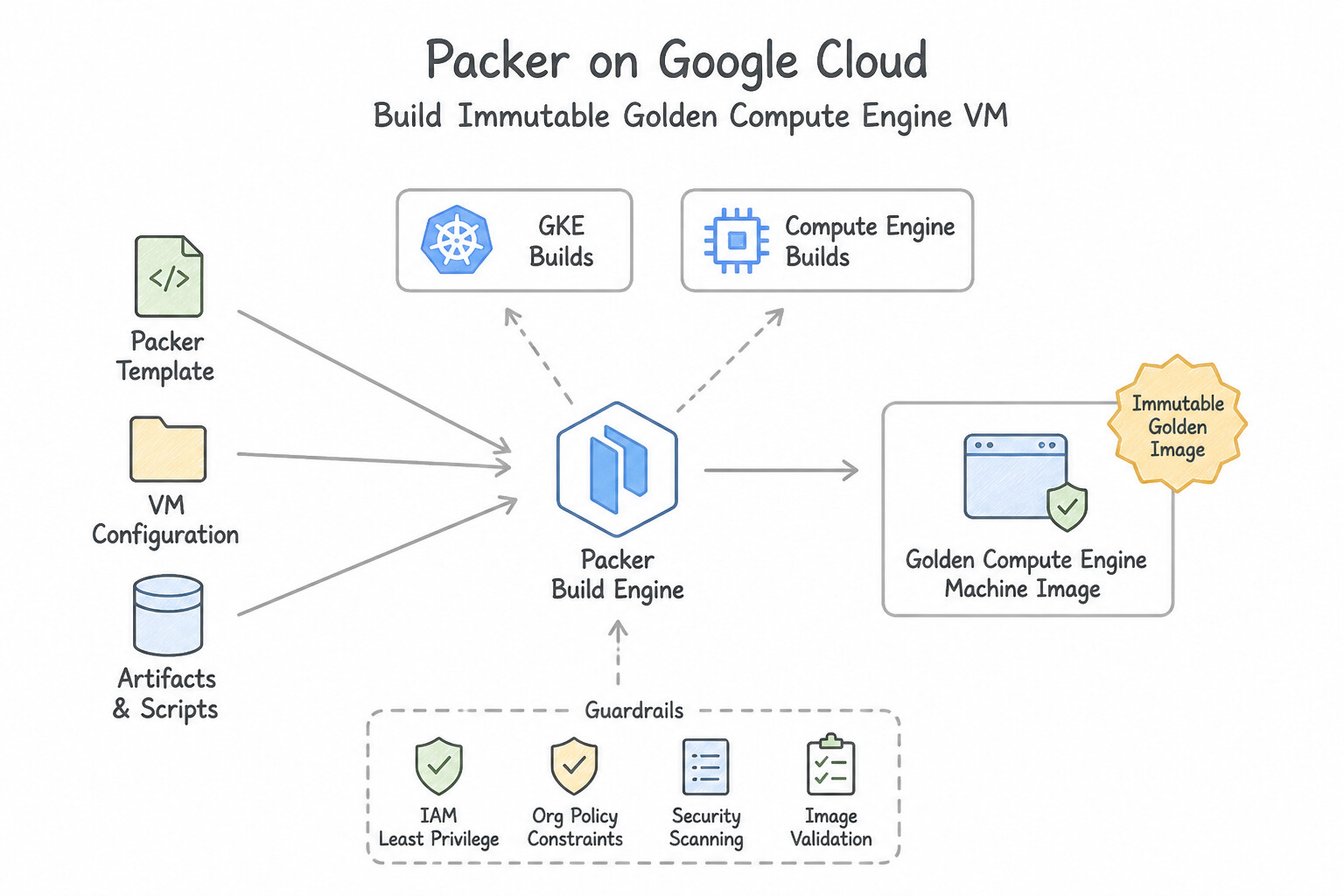
- Packer: Building immutable golden Compute Engine VM images (baked with OS patches, Ops Agent, and application binaries) inside a Cloud Build pipeline for Managed Instance Groups (
MIGs). - Argo CD (or Config Sync): Pull-based GitOps controller running inside Kubernetes clusters that watches a Git config repository and continuously reconciles cluster state against the desired Git commit.
- kpt: Google-originated Configuration-as-Data tool that manipulates, validates, and customizes Kubernetes resource packages in-place using containerized kpt functions (unlike Helm templates or Kustomize runtime overlays).
- Jenkins: When a scenario requires keeping an existing on-premises or hybrid Jenkins orchestrator, replace static GCP credentials with Workload Identity Federation, offload ephemeral build agents to GKE (
Kubernetes plugin), and trigger Cloud Deploy or push to Artifact Registry.
Key Implementation Patterns
- Scaling Jenkins Build Agents on GKE: Use Install the Jenkins Kubernetes plugin. Configure a pod template in the Jenkins configuration to define the agent specifications. The Jenkins Kubernetes plugin enables dynamic creation of agent pods based on defined templates. (Avoid alternative: This uses VMs instead of Kubernetes pods, which contradicts the goal of utilizing the GKE cluster resources.)
- GitOps Synchronization with Argo CD: Use Install Argo CD on a management cluster. Configure it to monitor the Git repository and synchronize the Kubernetes manifests to the target GKE clusters. Argo CD implements the GitOps pull-based model, continuously syncing the cluster state with Git and automatically detecting configuration drift.
- Immutable Infrastructure with Packer and Cloud Build: Use Create a Packer template to define the image configuration. Configure Google Cloud Build to execute Packer to build and export the custom image. Packer is a tool specifically designed to automate the creation of machine images (baking), making it the ideal choice for creating immutable infrastructure in a CI/CD pipeline.
Key Takeaways (1.3d)
- Ephemeral Agents: Use agents that live only for the duration of a single job to save costs and ensure a clean build environment.
- Jenkins Kubernetes Plugin: The standard tool for integrating Jenkins with Kubernetes for dynamic scaling.
- Pod Templates: Definitions within Jenkins that determine the specs of the agent pods.
- GitOps uses Git as the single source of truth for infrastructure and application configuration.
Consideration 1.3e: Security of CI/CD tooling
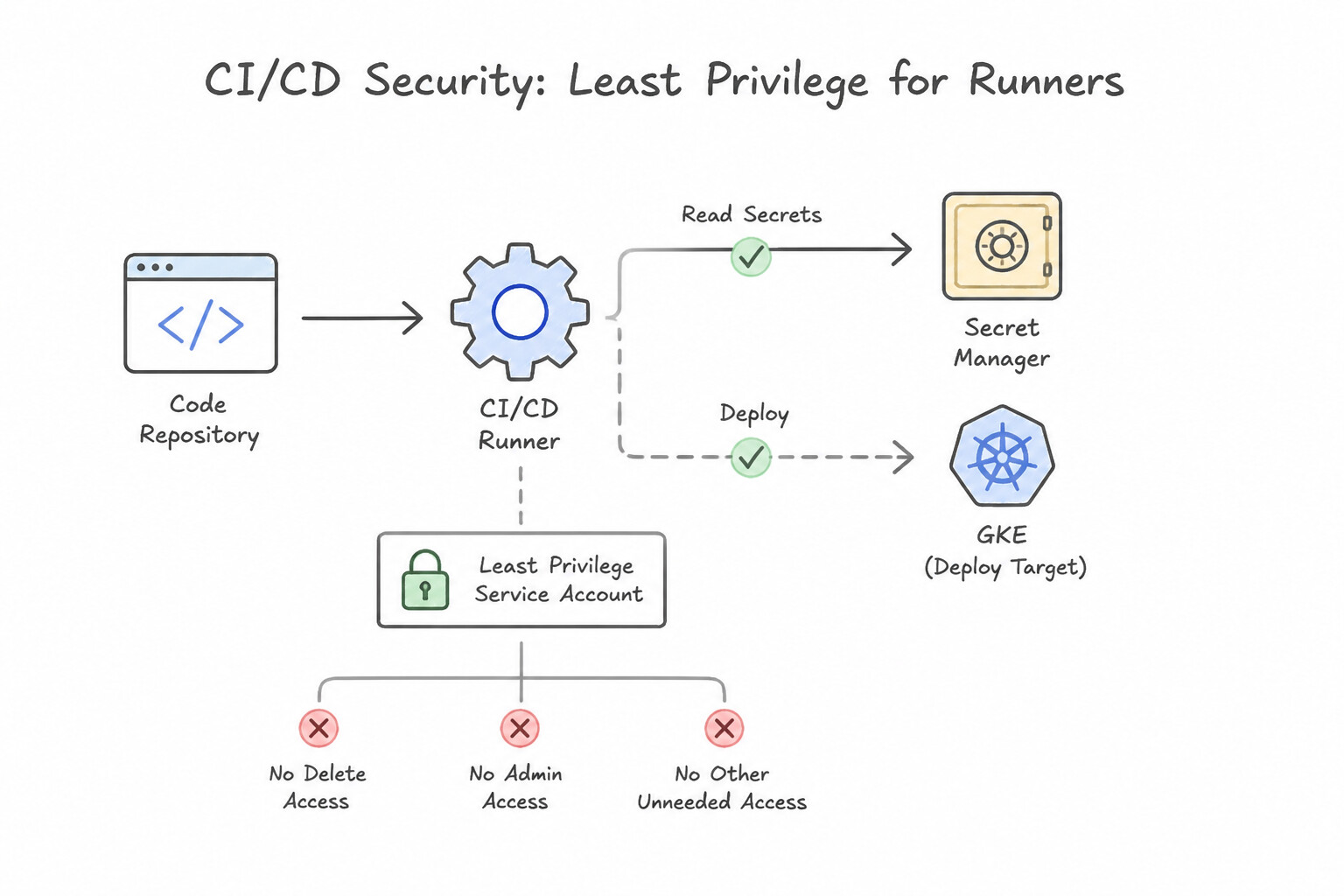
- Principle of Least Privilege for CI/CD Runners:
- Never use the legacy default Cloud Build service account (
[PROJECT_NUMBER]@cloudbuild.gserviceaccount.com) across all triggers. Assign a dedicated, user-managed Service Account per Cloud Build trigger (and per Cloud Deploy target execution environment). - Separate CI permissions (the Cloud Build SA only needs
roles/artifactregistry.writerandroles/clouddeploy.releaser) from CD target execution permissions (only the production Cloud Deploy execution SA hasroles/container.developeron theprodGKE cluster). - Securing Source-to-Build Boundaries: Enforce branch protection and mandatory PR reviews before triggers fire on
main, require approval onPull Requesttriggers from forked repositories so untrusted PR code cannot exfiltrate CI secrets, and isolate Private Pool workers inside a VPC Service Controls (VPC-SC) perimeter when building regulated workloads.
Key Implementation Patterns
- Securing Secrets in Cloud Build: Use Store the API key in Secret Manager. Grant the Cloud Build service account the Secret Accessor role. Reference the secret in the
cloudbuild.yamlfile using theavailableSecretsfield. Secret Manager is the secure, native service for handling secrets in Cloud Build using theavailableSecretsconfiguration. - Trusted Container Deployment: Use Set up Binary Authorization. In your CI/CD pipeline, create a signed attestation after tests pass. Configure the production GKE cluster policy to require this attestation for deployment. Binary Authorization enforces deployment rules based on signed attestations, which serve as proof that required steps (like testing) were completed.
- Hybrid CI/CD Authentication: Use Configure Workload Identity Federation. Create a Workload Identity Pool and Provider to trust OIDC tokens from GitLab. Workload Identity Federation allows keyless authentication by trusting external OIDC tokens. (Avoid alternative: Storing a Service Account key violates the stated security policy prohibiting long-lived keys.)
Key Takeaways (1.3e)
- Never store secrets (API keys, passwords) in source code or configuration files.
- Use Secret Manager to store and manage sensitive data centrally.
- Grant the 'Secret Accessor' role to the service account running the build (e.g., the Cloud Build Service Account).
- Use the
availableSecretsfield incloudbuild.yamlto securely inject secrets into build steps.
Quick Decision Cheat Sheet (Subsection 1.3)
If the Scenario Requires... | Choose This Google Cloud Pattern | Avoid This Common Mistake |
|---|---|---|
"Cloud Build fails with i/o timeout when connecting to a Private GKE cluster or Private Cloud SQL instance" | Configure a Cloud Build Private Pool peered with the VPC network | Whitelisting all Google Cloud IP ranges on the GKE master authorized networks |
"Builds intermittently fail due to Docker Hub pull rate limits or external PyPI/Maven downtime" | Create an Artifact Registry Remote Repository to proxy and cache upstream public packages | Creating a cron job that manually mirrors all of Docker Hub into Cloud Storage |
"Prevent Dependency Confusion attacks when combining internal and public language packages" | Use an Artifact Registry Virtual Repository with higher priority assigned to the internal Standard Repository | Pointing build tools directly at both public and private URLs without priority ordering |
"Automate building hardened Compute Engine custom VM images in a CI pipeline" | Run Packer inside a Cloud Build step to bake an immutable Compute Engine image | Manually configuring a VM, stopping it, and clicking "Create Image" in the Console |
"Ensure a developer's feature-branch Cloud Build trigger cannot deploy directly to the prod GKE cluster" | Assign separate user-managed Service Accounts per trigger and restrict prod deployment permissions to Cloud Deploy's prod target SA | Using a single shared Cloud Build service account with roles/container.admin across all triggers |
Further Reading (Subsection 1.3)
- Kaniko Cache — Official Google Cloud documentation on using Kaniko cache to speed up builds. It explains how to enable the feature in your cloudbuild.yaml file.
- Best practices for speeding up builds — General guide on optimizing Cloud Build performance, including caching strategies and using faster machine types.
- Using secrets in Cloud Build — This page explains how to use Secret Manager with Cloud Build, specifically detailing the 'availableSecrets' and 'secretEnv' fields in the configuration file.
- Cloud Build Private Pools Overview — Explains the architecture of private pools and how they differ from the default pool, specifically highlighting the ability to access resources in a private network.
- Use Cloud Build in a private network — Provides the specific steps to configure VPC Network Peering between a private pool and a user VPC to access private resources.
- Google Cloud deployment archetypes — Provides an overview of the relationship between Delivery Pipelines, Targets, and Releases.
Subsection 1.4: Managing multiple environments (e.g., staging, production)
The Big Picture
As an enterprise scales from one GKE cluster to dozens of clusters across dev, staging, prod, and regional disaster-recovery sites, three operational failure modes emerge:
- Zombie Ephemeral Environments & Cost Runaways (1.4a): Giving every pull request or feature branch its own isolated test environment accelerates feedback, but if those environments are spun up without automated teardown hooks or resource quotas, orphaned preview environments quickly consume more compute budget than production.
- Configuration Drift & Policy Bypass Across Clusters (
1.4b,1.4c): When engineers run manualkubectl edithotfixes on one production cluster, or when a new cluster is added without baseline network policies and security constraints, clusters drift apart. Registering all clusters into a GKE Fleet and enforcing Config Sync (declarative GitOps reconciliation) alongside Policy Controller (admission-time OPA policy enforcement) guarantees that every cluster in the fleet stays continuously aligned with Git. - Disruptive Cluster & VM Upgrades (1.4d): Upgrading a GKE cluster or Compute Engine MIG in place without configuring Release Channels, Maintenance Windows / Exclusions, Surge Upgrades (
maxSurge/maxUnavailable), and PodDisruptionBudgets (PDBs) either takes down stateless workloads or stalls indefinitely when draining stateful pods.
Consideration 1.4a: Managing ephemeral environments
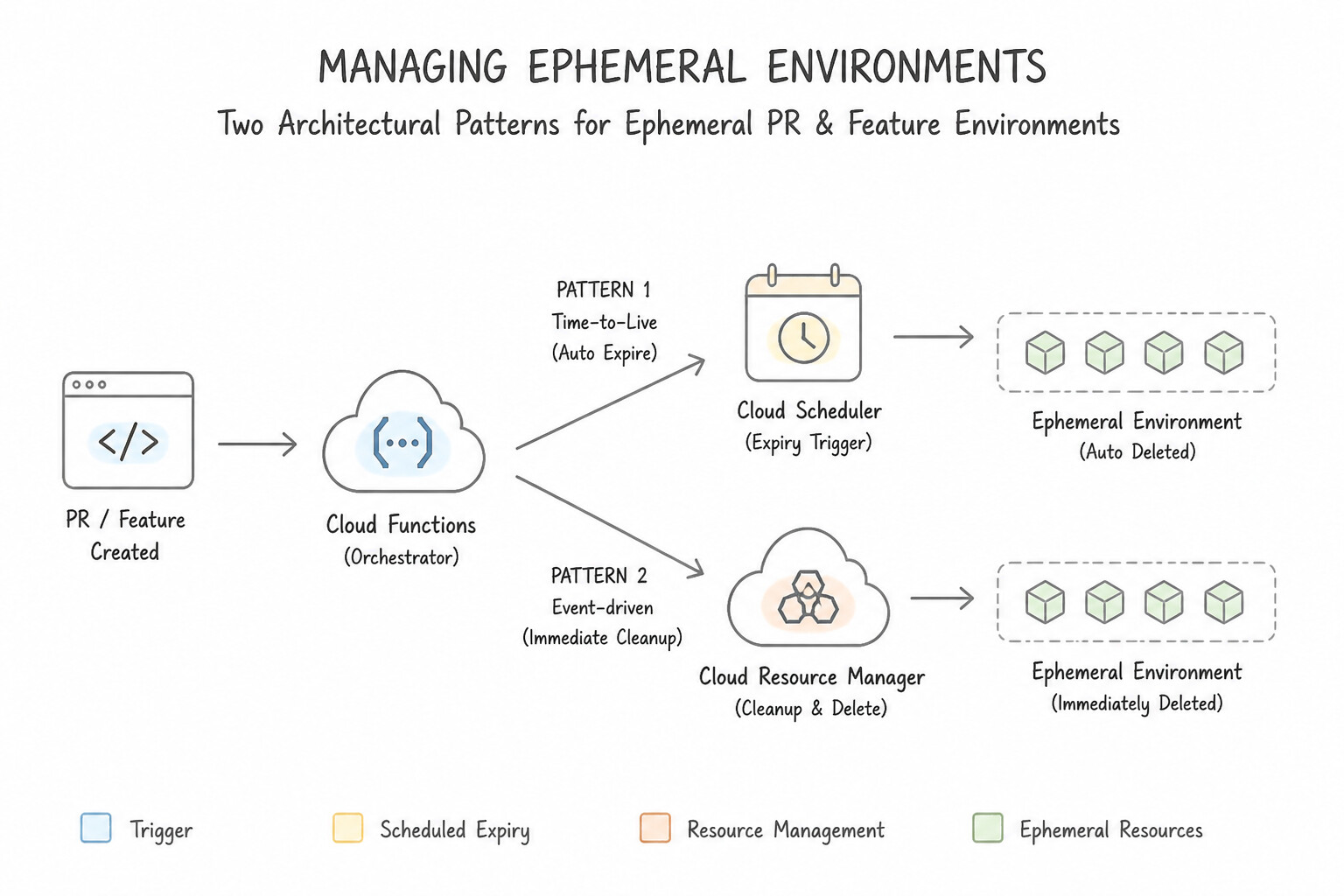
- Two Architectural Patterns for Ephemeral PR / Feature Environments:
- Namespace-per-Branch inside a Shared Non-Prod GKE Cluster (Fastest & Most Cost-Effective for Microservices): A Cloud Build PR trigger creates a dynamic Kubernetes
Namespace(pr-142), applies a strictResourceQuotaandLimitRange(so a runaway test cannot starve other PRs), deploys the preview release, and runs a Git webhook teardown trigger on PR merge/close (kubectl delete namespace pr-142). - Project/Stack-per-Branch via Terraform / Infra Manager (Full Infrastructure Isolation): When testing IAM, VPC, or Cloud SQL schema changes, provision a short-lived environment via Terraform (
pr-142workspace/state) and enforce automated TTL cleanup (via Cloud Scheduler + Cloud Buildterraform destroyor Active Assist Unattended Project Recommender) so abandoned PR stacks never linger.
Key Implementation Patterns
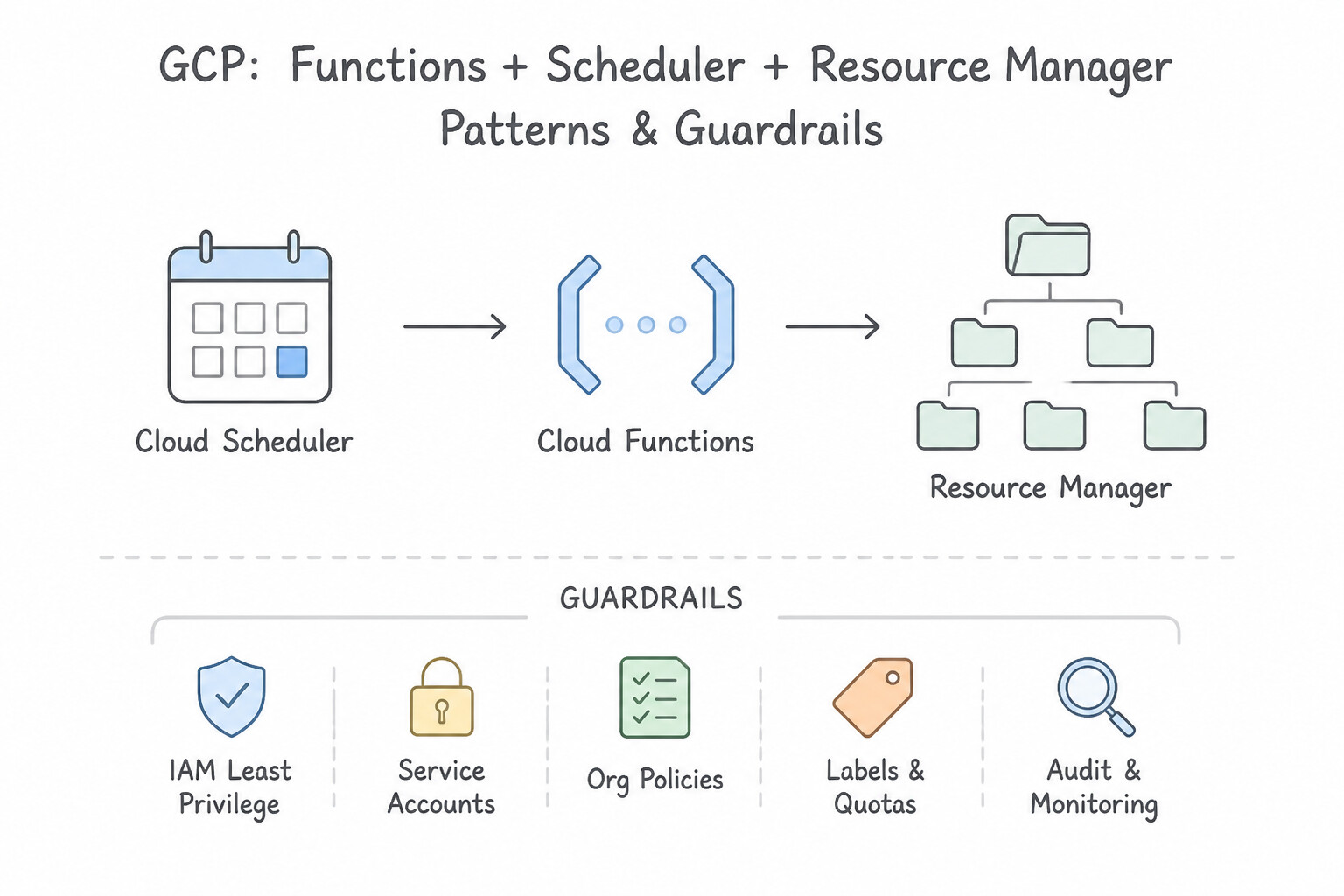
- Automated Lifecycle Management for Cost Control: Use Update the Terraform configuration to tag resources with a creation timestamp label. Configure a Cloud Scheduler job to trigger a Cloud Function that deletes resources older than the defined Time-to-Live (TTL). Label resources with a timestamp and use a scheduled Cloud Function to delete them once they expire.
- Optimizing Compute Costs with Spot VMs: Use Create the GKE node pools using Spot VMs. Spot VMs offer large discounts for fault-tolerant workloads that can handle interruptions. (Avoid alternative: CUDs are for long-term, stable workloads, not temporary, ephemeral environments.)
- Handling Terraform State for Concurrent PRs: Use Configure the pipeline to use a dynamic backend prefix based on the PR number during Terraform initialization. Using a dynamic prefix ensures each PR has its own isolated state file in Cloud Storage. (Avoid alternative: Disabling locking leads to data corruption and does not isolate the environments.)
Key Takeaways (1.4a)
- Ephemeral environments require automated cleanup strategies to prevent cost leakage.
- Never delete Terraform state files to clean up resources; this results in zombie resources.
- Use labels to attach lifecycle metadata (like creation timestamps) to resources.
- Cloud Scheduler combined with Cloud Functions is a common pattern for scheduled infrastructure maintenance tasks.
Consideration 1.4b: Managing configuration and policy
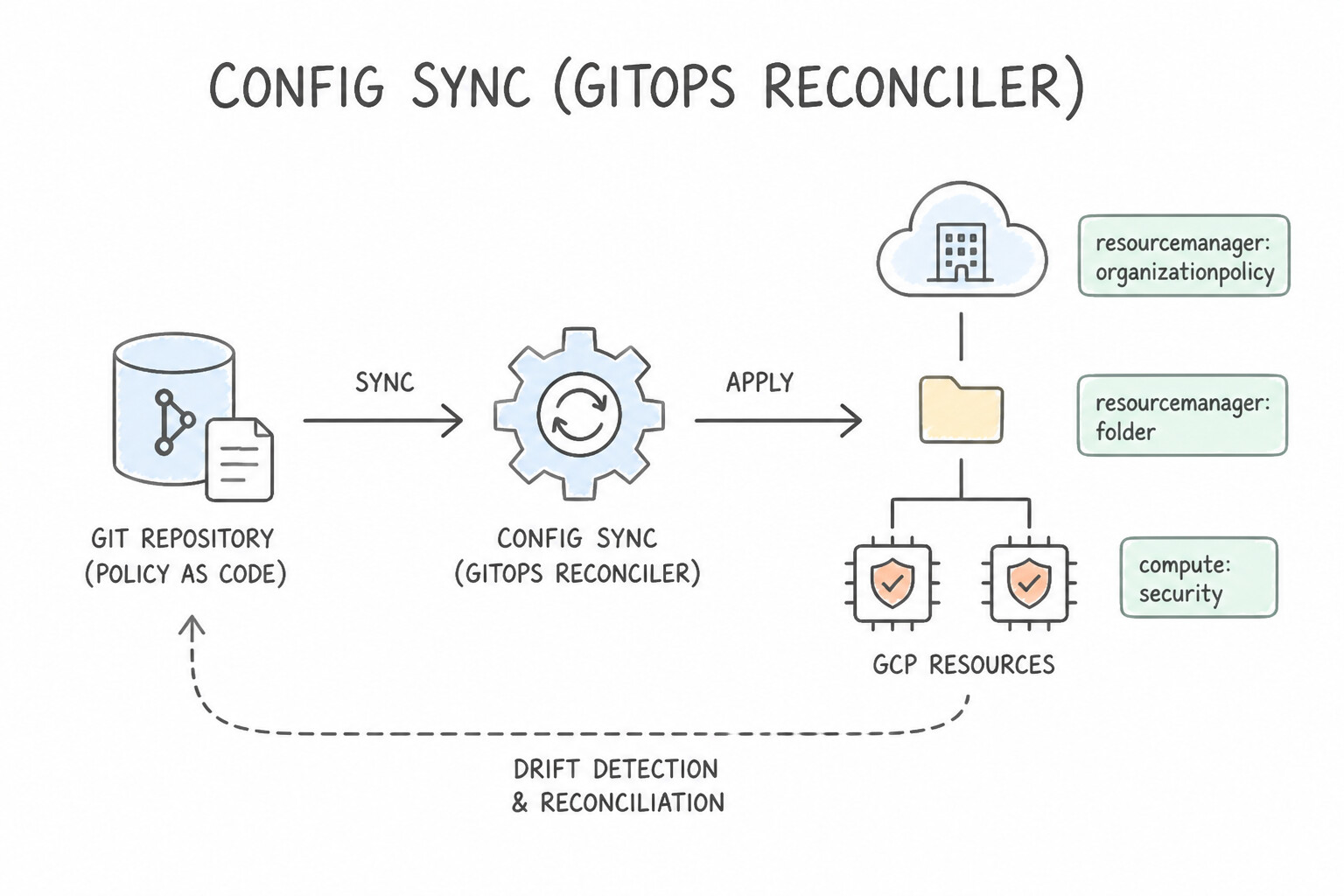
- Config Sync (GitOps Reconciler): Continuously pulls Kubernetes configurations from a central Git repository (or OCI image / Helm chart in Artifact Registry) and applies them to registered clusters. If a user manually modifies a managed object via
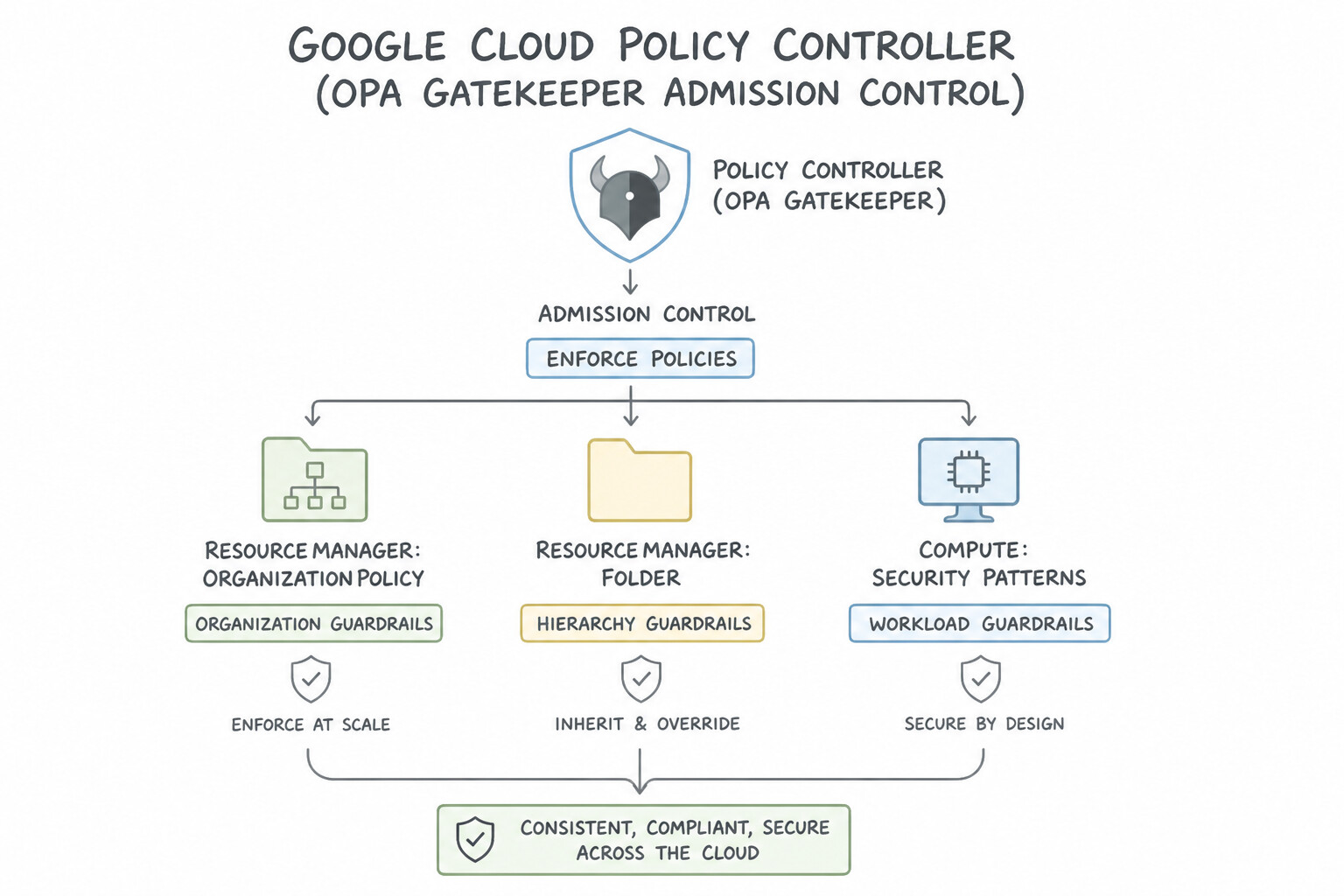
kubectl edit, Config Sync's drift remediation immediately overwrites the manual change and restores the declarative Git state. - Policy Controller (OPA Gatekeeper Admission Control): Validates, audits, and enforces compliance policies (
ConstraintTemplatesandConstraintswritten in Rego, plus Google's prebuilt constraint library) at 3 lifecycle points: (1) CI build time (nomos vet/kpt fn eval), (2) Kubernetes API admission time (ValidatingAdmissionWebhookblocking non-compliant pods like privileged containers or missing labels), and (3) Continuous background audit of existing cluster resources.
Key Implementation Patterns
- Enforcing Data Residency Across Environments: Use Configure the "constraints/gcp.resourceLocations" Organization Policy on the folder to allow only the "europe-west3" region. Organization Policies, specifically the resourceLocations constraint, are the standard way to enforce geographic restrictions on resource creation across a hierarchy.
- Handling Policy Inheritance and Exceptions: Use Configure the 'Require OS Login' policy on the 'Sandpit' folder and set enforcement to 'Off'. Overriding the policy at the folder level allows specific exceptions while keeping the global enforcement active. (Avoid alternative: Removing the policy at the root affects the entire organization, reducing overall security.)
Key Takeaways (1.4b)
- Organization Policies provide centralized governance over resource configurations, separate from user permissions.
- Use the
constraints/gcp.resourceLocationsconstraint to strictly enforce data residency and resource location requirements.- Apply policies at the Folder level to efficiently manage groups of related projects (like Dev, QA, Prod) simultaneously.
- Preventative controls (policies) are generally preferred over reactive controls (scripts) or manual template checks for compliance.
Consideration 1.4c: Managing Google Kubernetes Engine (GKE) clusters across an enterprise (e.g., fleets)
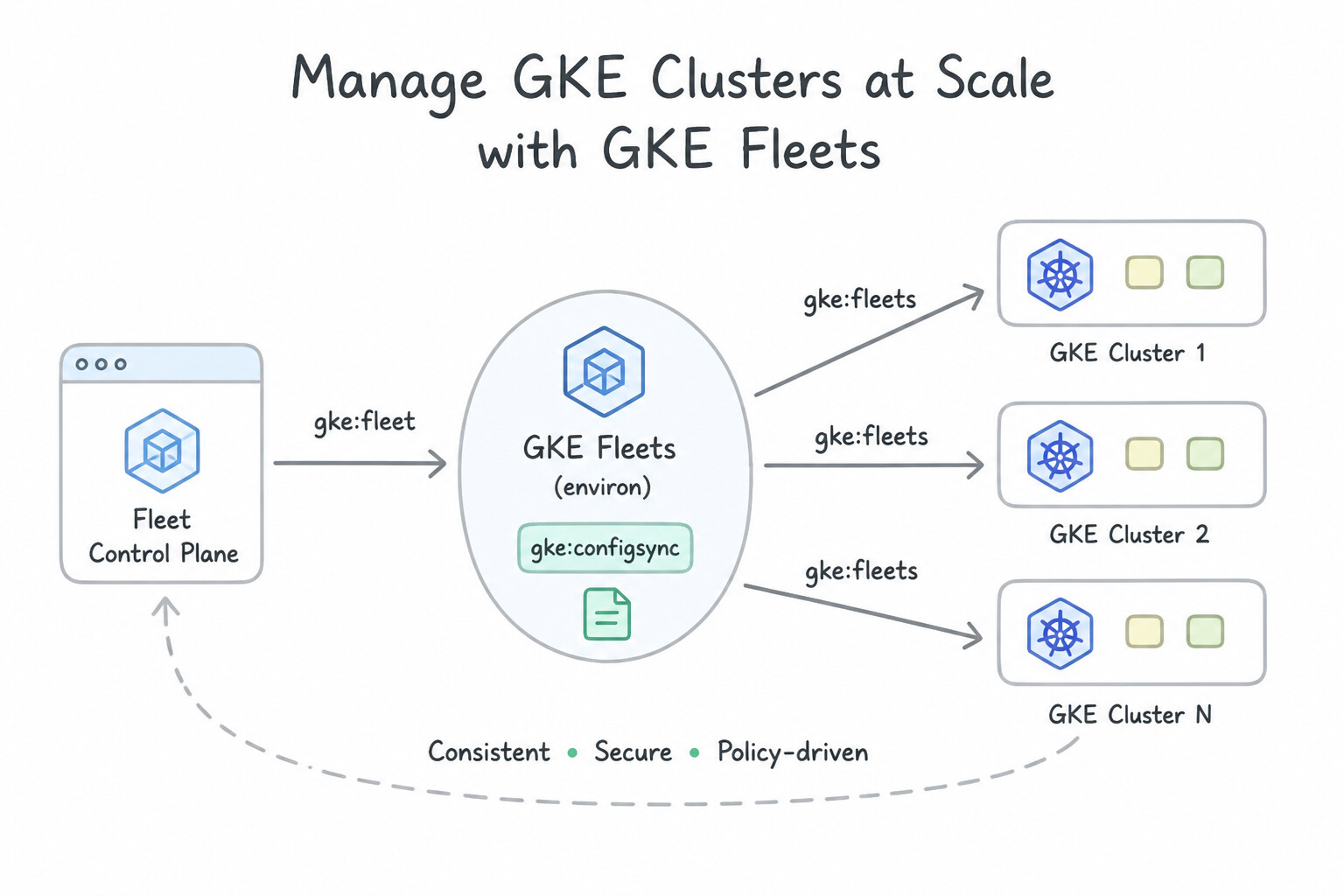
- GKE Fleets (
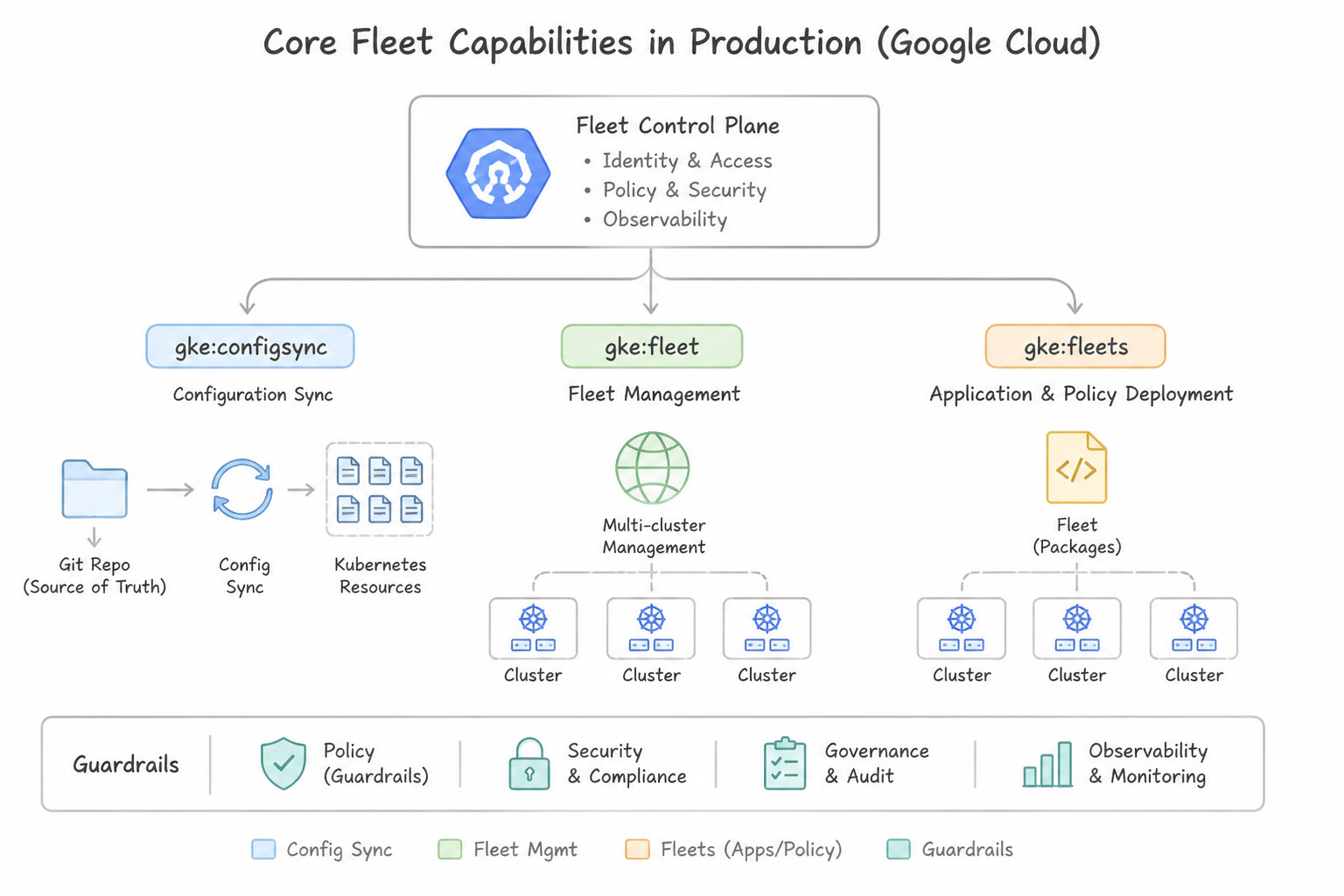
environ): The foundational Google Cloud concept for logically grouping and normalizing Kubernetes clusters (across GKE on GCP, GKE Distributed Cloud on-premises, and attached AWS/Azure clusters). - Core Fleet Capabilities in Production:
- Fleet Workload Identity: All clusters in a Fleet share a single Fleet-level OIDC identity pool (
PROJECT_ID.svc.id.goog), simplifying cross-cluster IAM and Cloud Service Mesh mTLS trust. - Multi-Cluster Services (
MCS) & Multi-Cluster Ingress (MCI) / Gateway: Enables cross-cluster service discovery (service.namespace.svc.clusterset.local) and global anycast load balancing across regional GKE clusters. - Fleet-Level Config & Team Management (
Enterprise Scopes): Allows platform admins to bind namespaces, RBAC roles, Config Sync packages, and log/metric scopes across an entire fleet of clusters simultaneously.
Key Implementation Patterns
- GitOps Configuration Consistency: Use Enable Config Sync on the clusters and create a RootSync object that references your Git repository. Config Sync continuously reconciles the cluster state with a Git repository and automatically reverts manual changes (drift). (Avoid alternative: Cloud Build applies changes only on triggers and does not continuously watch or revert manual changes on the cluster.)
- Governance and Compliance: Use Enable Policy Controller on the fleet. Configure a constraint to disallow the root user. Set the enforcement action to dryrun. Policy Controller with dryrun action audits violations across the fleet without blocking workloads. (Avoid alternative: Pod Security Admission enforcement would immediately disrupt non-compliant workloads.)
- Global Load Balancing: Use Enable Multi-Cluster Ingress on the fleet. Apply MultiClusterService and MultiClusterIngress resources to the config cluster. Multi-Cluster Ingress provides a single global IP and handles proximity routing and failover for fleets. (Avoid alternative: This creates multiple regional IPs instead of a single global IP and relies on slower DNS failover.)
Key Takeaways (1.4c)
- Config Sync is the primary tool for GitOps on GKE, allowing you to sync manifests from a Git repo.
- RootSync and RepoSync are the API resources used to configure the synchronization.
- GitOps enables consistency across large fleets by treating Git as the single source of truth.
- Automated drift detection and correction prevents environments from diverging due to manual intervention.
Consideration 1.4d: Safe and secure patching and upgrading practices
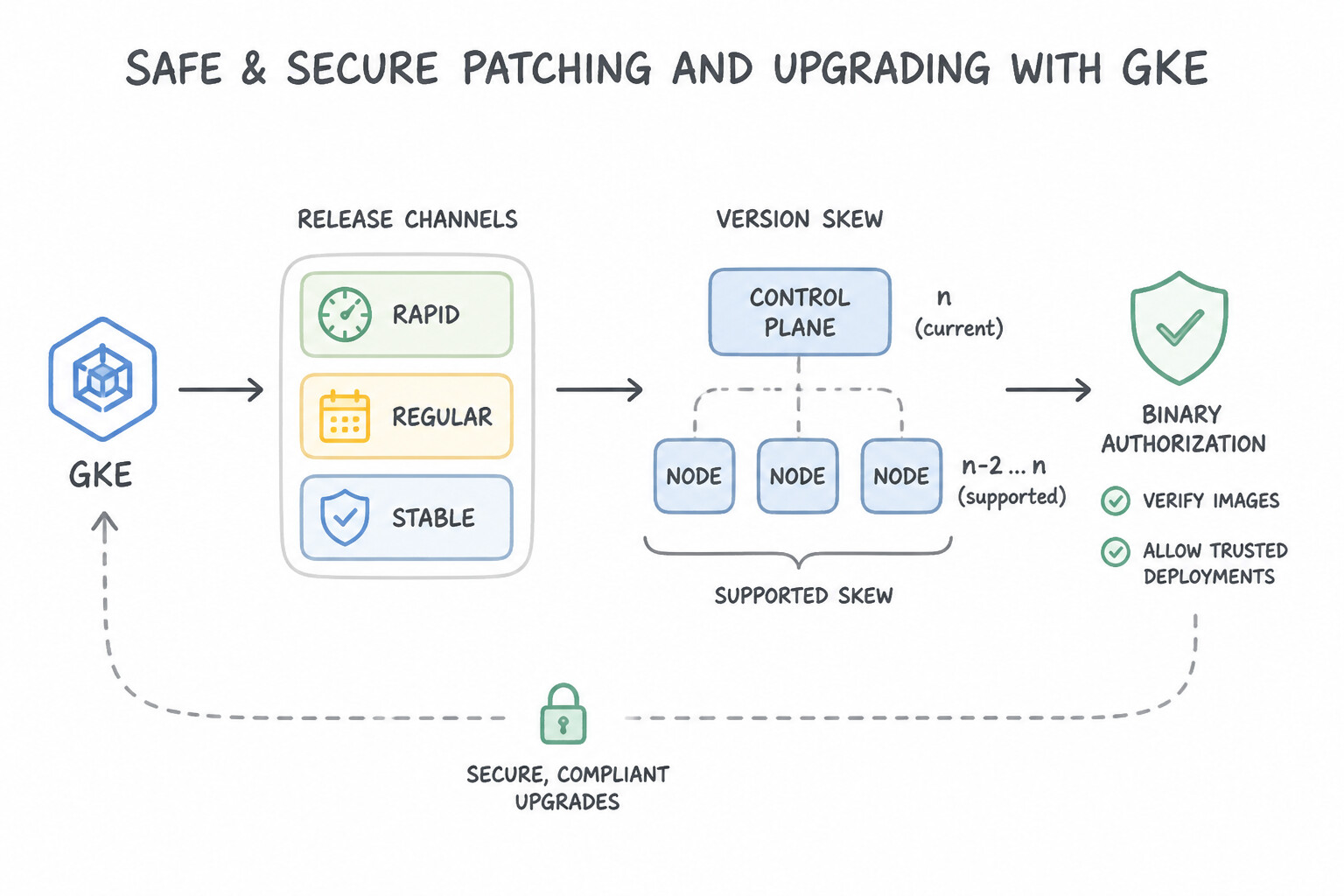
- GKE Release Channels (
Rapid,Regular,Stable) & Version Skew: - Enroll
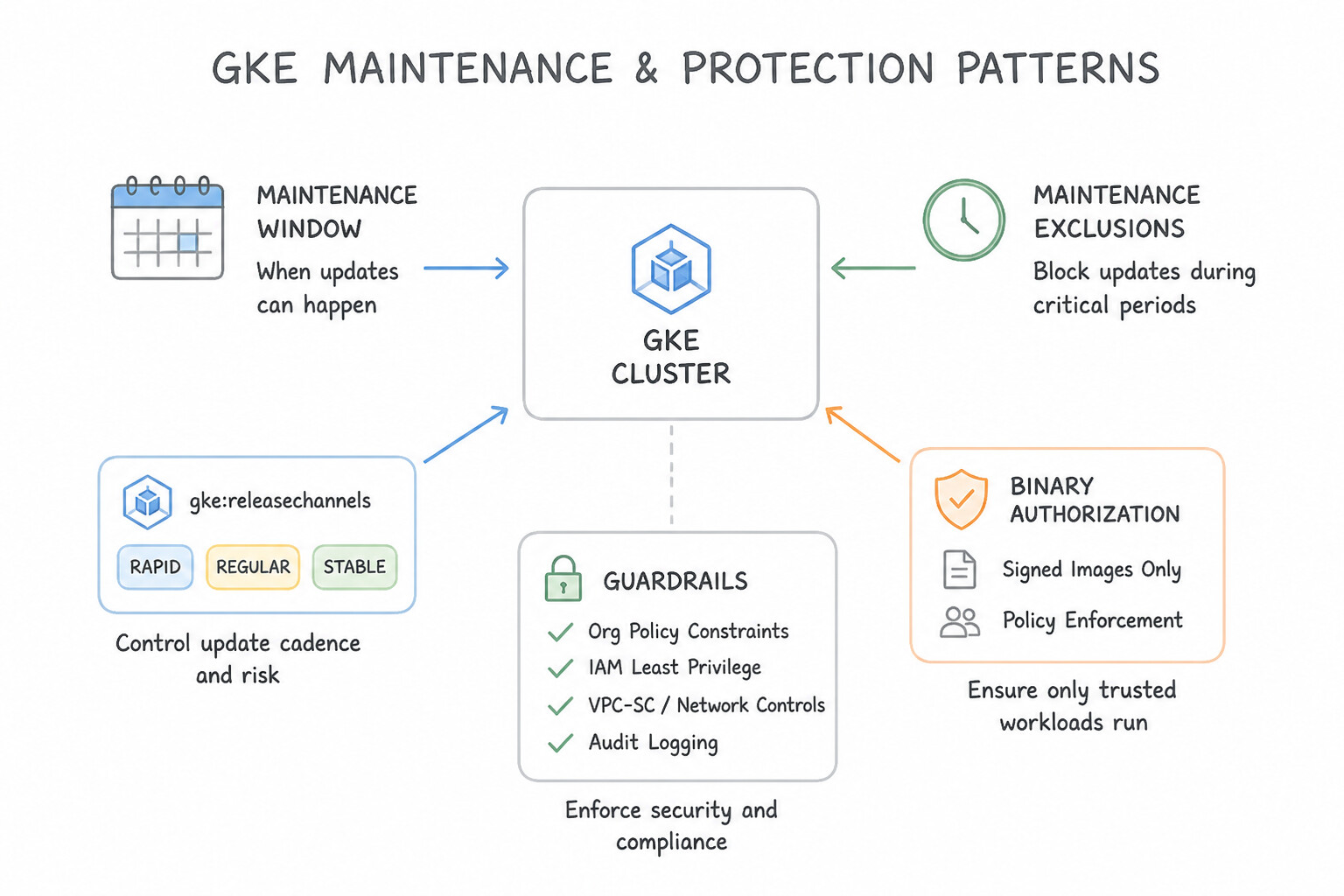
dev/feature clusters inRapid(newest Kubernetes features),staginginRegular(default recommended balance), and mission-criticalprodinRegularorStable(so new Kubernetes versions soak in non-prod for weeks before reaching production). - Maintenance Windows & Maintenance Exclusions: Configure recurring Maintenance Windows (e.g., Tuesdays 02:00–06:00 UTC) so auto-upgrades only happen off-peak, and set Maintenance Exclusions during peak business events (e.g., Black Friday freeze for 30 days) while still allowing emergency P0 security patches if needed.
- Zero-Downtime GKE Node Pool Upgrades (
Surgevs.Blue-Green) &PodDisruptionBudgets: - Surge Upgrades (
maxSurge=1, maxUnavailable=0): Creates 1 extra green node before cordoning and draining an old node—best for fast incremental rolling upgrades. - Blue-Green Node Pool Upgrades: Provisions a complete duplicate node pool, cordons the old pool, drains workloads with a configurable soak time, and keeps the old blue nodes on standby for instant rollback—ideal for large stateful or risk-sensitive workloads.
- The Classic
PDBUpgrade Stall Trap: If a node pool upgrade hangs indefinitely while draining a node, check for a misconfiguredPodDisruptionBudget(minAvailable: 100%ormaxUnavailable: 0) or a single-replica Pod with a restrictive PDB! - Compute Engine VM Patching: Use VM Manager (OS Patch Management) with phased zonal rollout budgets, or rebuild immutable golden images with Packer and roll them out via MIG Rolling Updates (
maxSurge,maxUnavailable).
Key Implementation Patterns
- GKE Release Channel Strategy: Use Configure the Development cluster to use the Rapid channel, Staging to use the Regular channel, and Production to use the Stable channel. Mapping Development to Rapid, Staging to Regular, and Production to Stable balances feature access with stability.
- Secure Supply Chain: Blocking Vulnerable Images: Use Configure Binary Authorization on the GKE cluster. Set up an attestor to verify Artifact Analysis scan results. Enforce a policy that requires a valid attestation to deploy images. Binary Authorization enforces deployment policies on GKE. By requiring an attestation based on Artifact Analysis scan results, you ensure only secure images are deployed.
- Automated OS Patching with VM Manager: Use Create two patch deployments in OS Patch Management. Target instances using labels. Schedule the Production deployment two days after the Test deployment. Use OS Patch Management to create separate schedules for Test and Production environments targeted by labels.
Key Takeaways (1.4d)
- Use the Rapid channel for development environments requiring the latest features.
- Use the Stable channel for production environments requiring maximum stability.
- Utilize the Regular channel for staging or general workloads to validate versions between Rapid and Stable.
- Release channels automate cluster upgrades and version management.
Quick Decision Cheat Sheet (Subsection 1.4)
If the Scenario Requires... | Choose This Google Cloud Pattern | Avoid This Common Mistake |
|---|---|---|
"Developer manually ran kubectl edit in prod; need automatic self-healing back to Git state" | Enable Config Sync with drift prevention / continuous reconciliation from Git | Writing a custom cron job that runs kubectl apply -f every hour |
"Audit and block Kubernetes manifests that lack required cost-center labels across a fleet of clusters" | Enable Policy Controller and apply a K8sRequiredLabels constraint (first in dryrun audit mode, then deny enforcement) | Relying on manual pull-request code reviews to check every YAML file |
"GKE node pool upgrade stalls and logs Cannot evict pod as it would violate the pod's disruption budget" | Update the PodDisruptionBudget (PDB) so maxUnavailable >= 1 (or minAvailable < replicas) and ensure replicas >= 2 | Running kubectl delete pod --force --grace-period=0 in production |
"Cost-effectively spin up isolated microservice preview environments for every Pull Request" | Deploy each PR into an ephemeral GKE Namespace with a ResourceQuota + automated PR-close teardown webhook | Provisioning a brand-new dedicated GKE cluster for every single Pull Request |
"Catch incompatibilities in upcoming Kubernetes minor versions before they reach production clusters" | Enroll dev clusters in the Rapid release channel, staging in Regular, and prod in Regular / Stable | Locking all clusters to a static Kubernetes version and upgrading prod first |
Further Reading (Subsection 1.4)
- Scheduling Cloud Functions for Infrastructure Management — This tutorial explains how to use Cloud Scheduler to trigger a Cloud Function via Pub/Sub, a pattern commonly used for periodic tasks like resource cleanup.
- Best practices for Terraform operations — Review the section on managing resources and state. It highlights why maintaining state integrity is crucial.
- Spot VMs in GKE — Documentation explaining how Spot VMs work within GKE clusters, including their benefits for stateless and batch workloads.
- Spot VMs Overview — General overview of Spot VMs, detailing the pricing model and interruption behavior.
- Managing Terraform State — Describes best practices for storing Terraform state in Google Cloud Storage, including the importance of remote backends and locking.
- Terraform Backend Configuration — HashiCorp documentation on Partial Configuration, which explains how to supply backend parameters (like prefix) dynamically via the command line.
Subsection 1.5: Enabling secure cloud development environments
The Big Picture
In regulated enterprises and large platform organizations, shipping high-powered physical laptops where developers clone proprietary source code to local disks, install arbitrary IDE extensions, and connect over home Wi-Fi via VPN creates three chronic headaches:
- Data Exfiltration & Intellectual Property Leakage (1.5a): If a contractor's laptop is lost or compromised, local git clones,
.envfiles, and cached production datasets sitting on the laptop disk are exposed. Furthermore, allowing laptops to connect directly to private VPC databases over broad client VPNs widens the network attack surface. - "Works on My Machine" Onboarding Toil (1.5b): When a new engineer joins, spending 3 days installing the right versions of
gcloud,kubectl,terraform,skaffold, language SDKs, and internal CA certificates on their laptop is pure operational toil. - Under-Leveraging AI Across the SDLC & Incident Response (1.5c): Writing boilerplate Terraform/Kubernetes manifests, unit tests, and complex PromQL or Logging Query Language (LQL) filters manually slows both inner-loop feature velocity and outer-loop incident triage.
Google Cloud solves these challenges by moving development into Cloud Workstations (fully managed, VPC-internal, custom-containerized cloud IDEs with VPC Service Controls and zero local data persistence) and augmenting engineers across the IDE, terminal, and Cloud Console with Gemini Code Assist, Gemini CLI, and Gemini Cloud Assist.
Consideration 1.5a: Configuring and managing cloud development environments (e.g., Cloud Workstations, Cloud Shell)
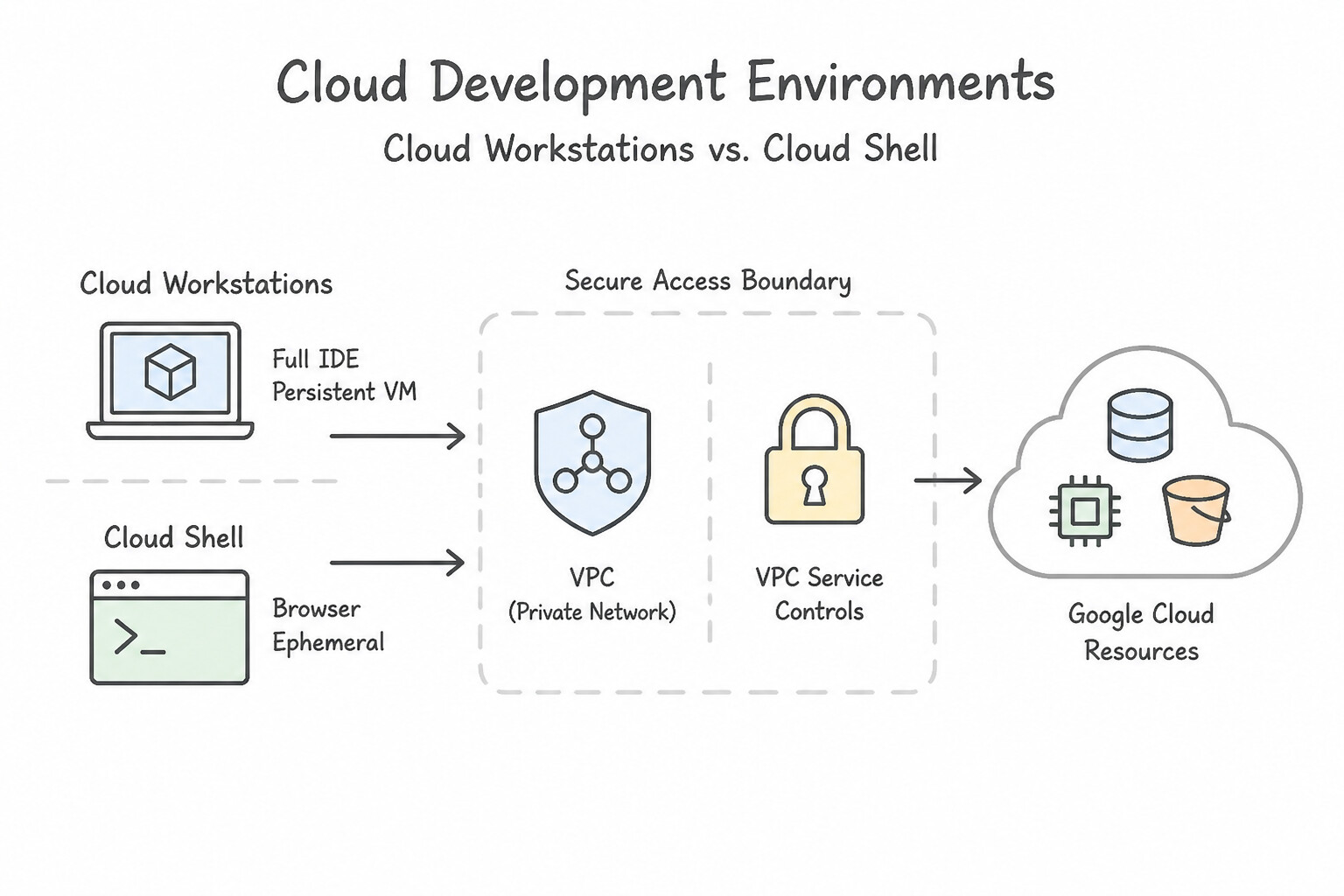
- Cloud Workstations vs. Cloud Shell :
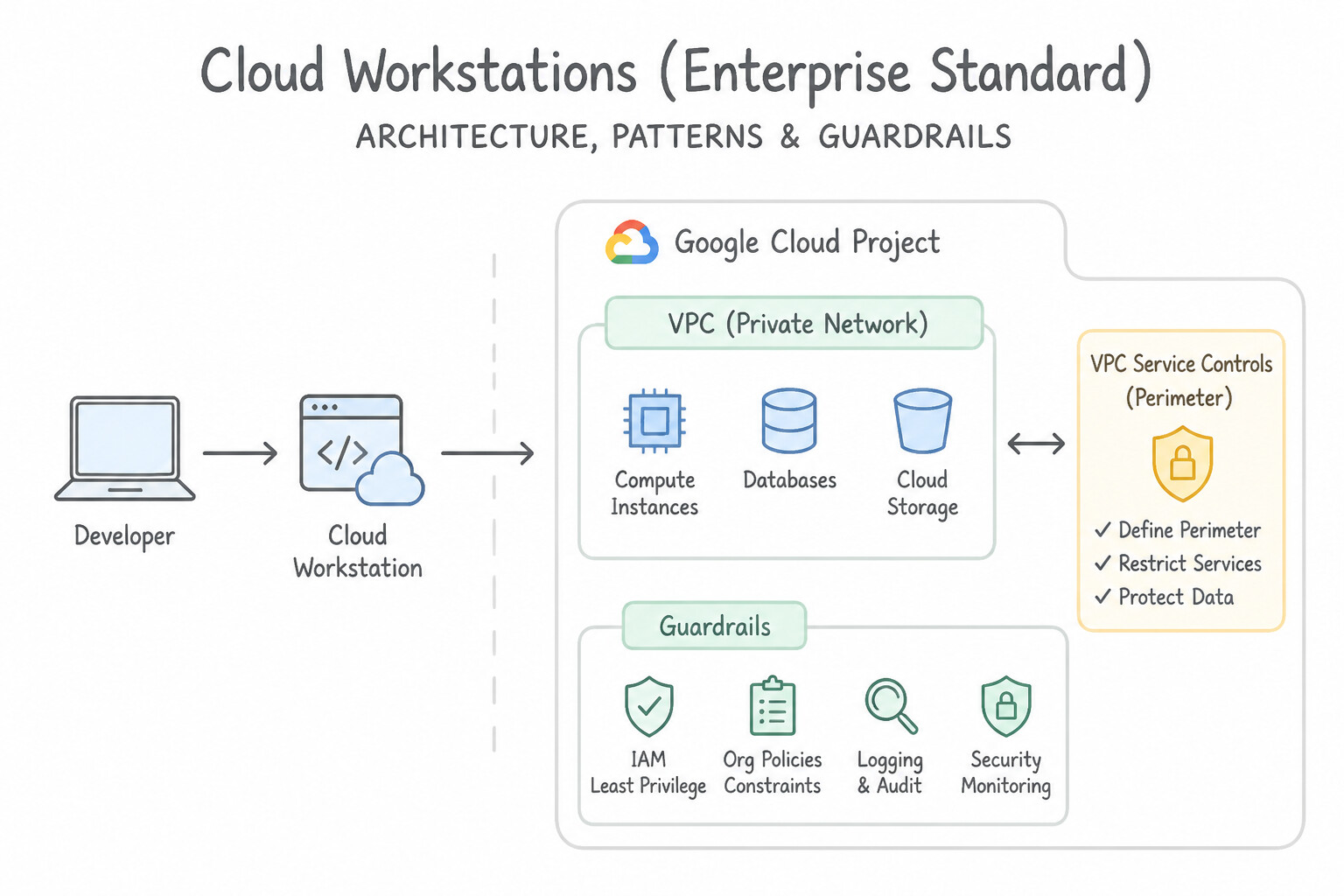
- Cloud Workstations (Enterprise Standard for Development Teams): Fully managed, persistent, customizable development environments that run inside your own VPC network, support custom machine types (including GPUs), disable public IP addresses, integrate with VPC Service Controls (
VPC-SC), and allow administrators to disable local file upload/download, clipboard copy/paste, and port forwarding to prevent source code exfiltration. - Cloud Shell: A free, per-user, ephemeral
e2-smallVM with a 5 GB/homedirectory that runs in a Google-managed external network (outside your VPC by default), terminates after inactivity, and cannot be customized via organization-wide Workstation Configurations. Use Cloud Shell for quick ad-hoc CLI administration, never as a standardized enterprise IDE fleet. - Cloud Workstations Architecture (
Cluster→Configuration→Workstation): - Workstation Cluster: Defines the VPC network, subnet, region, and private endpoint gateway.
- Workstation Configuration: The administrative template defining VM machine type, idle timeout (
idleTimeout) to automatically stop VMs and save costs, persistent disk size (pd-balancedmounted at/home), attached least-privilege Service Account, and container image. - Workstation: The individual developer instance provisioned from a Configuration (granted via
roles/workstations.user).
Key Implementation Patterns
- Enforcing Network Isolation for IDEs: Use When creating the Workstation Cluster, enable the "Disable public IP addresses" setting. Configure the network settings to use the private VPC. The "Disable public IP addresses" setting is configured at the Cluster level to ensure private-only access.
- Preventing Data Exfiltration: Use Configure a VPC Service Controls perimeter that includes the Cloud Workstations project and the projects containing the PII. VPC Service Controls create a secure perimeter that prevents data exfiltration to resources outside the trusted boundary.
- Standardizing Developer Tooling: Use Build a custom container image containing the tools, store it in Artifact Registry, and reference it in the Workstation Configuration. Custom container images allow you to pre-package the exact environment, ensuring consistency and speed for all users.
Key Takeaways (1.5a)
- Cloud Workstations networking (public vs. private) is configured at the Cluster level.
- Disabling public IP addresses on the Cluster minimizes the attack surface.
- Workstation Configurations manage environment details (VM type, image), not network ingress.
- Private clusters require connectivity (like VPC Peering) to the user's private VPC.
Consideration 1.5b: Bootstrapping environments with required tooling (e.g., custom images, IDE, Cloud SDK)
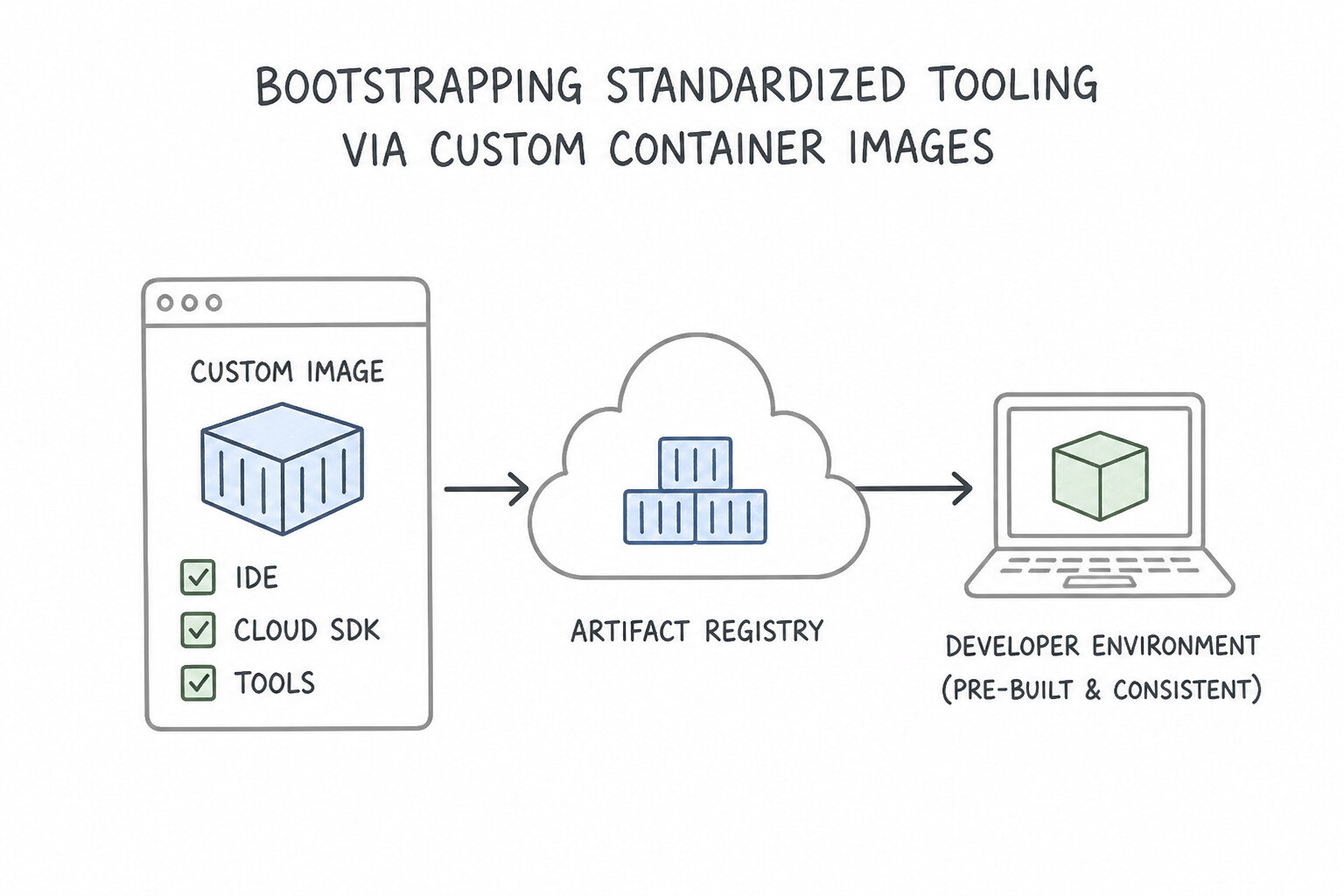
- Bootstrapping Standardized Tooling via Custom Container Images (1.5b):
- Cloud Workstations run a container image inside the Workstation VM. Instead of asking developers to run setup scripts in
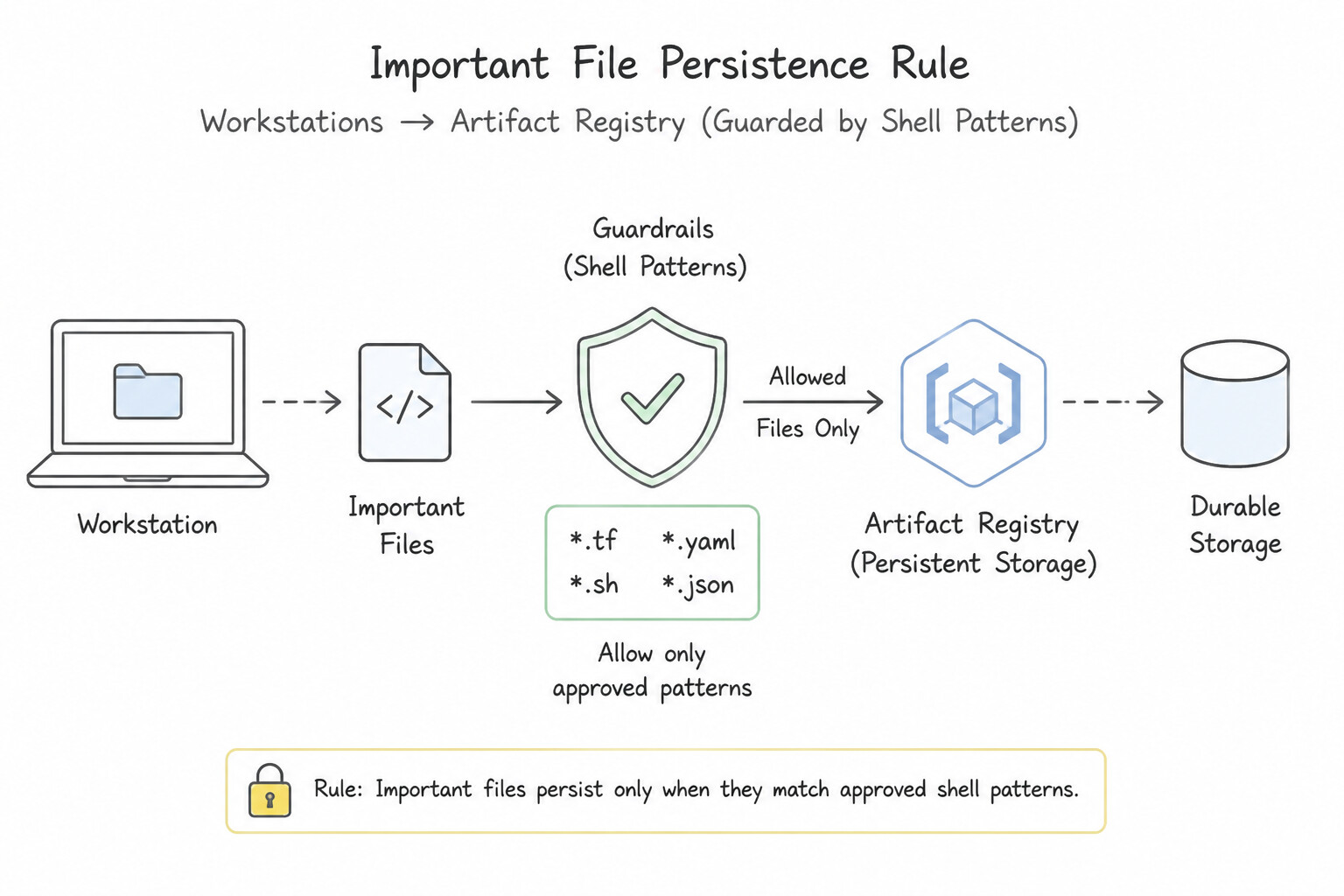
/home, extend Google's prebuilt base images (Code OSS, IntelliJ, Posit) in aDockerfilethat installs standardized versions ofgcloud(Cloud SDK),kubectl,terraform,skaffold,helm, language runtimes, IDE extensions, and enterprise root CA certificates. - Important File Persistence Rule: Because
/homeis dynamically mounted from a persistent disk at runtime when a workstation starts, any files placed inside/homeduringdocker buildare masked/overwritten at runtime! To run startup logic or seed user files in/home, place initialization scripts inside/etc/workstation-startup.d/so they execute at container boot after/homeis mounted. - Automate image rebuilds using Cloud Scheduler + Cloud Build triggered on upstream base image updates or Git changes, scan the image with Artifact Analysis, and store it in Artifact Registry.
Key Implementation Patterns
- Standardizing Dependencies with Cloud Workstations: Use Create a Dockerfile containing the tools, build and push the image to Artifact Registry, and update the Workstation Configuration to use this container image. Cloud Workstations use container images; baking tools into a custom image ensures consistency and fast startup.
- Customizing Cloud Shell for Onboarding: Use Create a custom container image with the tools, push it to Artifact Registry, and configure Cloud Shell to use this image. Custom container images allow you to pre-install tools efficiently for Cloud Shell environments. (Avoid alternative: Installing tools via login scripts runs every time and slows down startup.)
- Immutable Dev VM Images using Packer: Use Use Cloud Build to trigger a Packer build that installs the agent and patches, then saves a custom image to an image family. Using Packer with Cloud Build allows you to automate the creation of pre-configured Golden Images that boot instantly with all requirements met.
Key Takeaways (1.5b)
- Cloud Workstations use container images to define the development environment.
- To pre-install tools, create a custom Dockerfile and build an image.
- Store custom images in Artifact Registry and reference them in the Workstation Configuration.
- Avoid using startup scripts for heavy installations as they slow down boot times.
Consideration 1.5c: Leveraging AI to assist with development and operations (e.g., Gemini Code Assist, Gemini Cloud Assist, Gemini CLI)
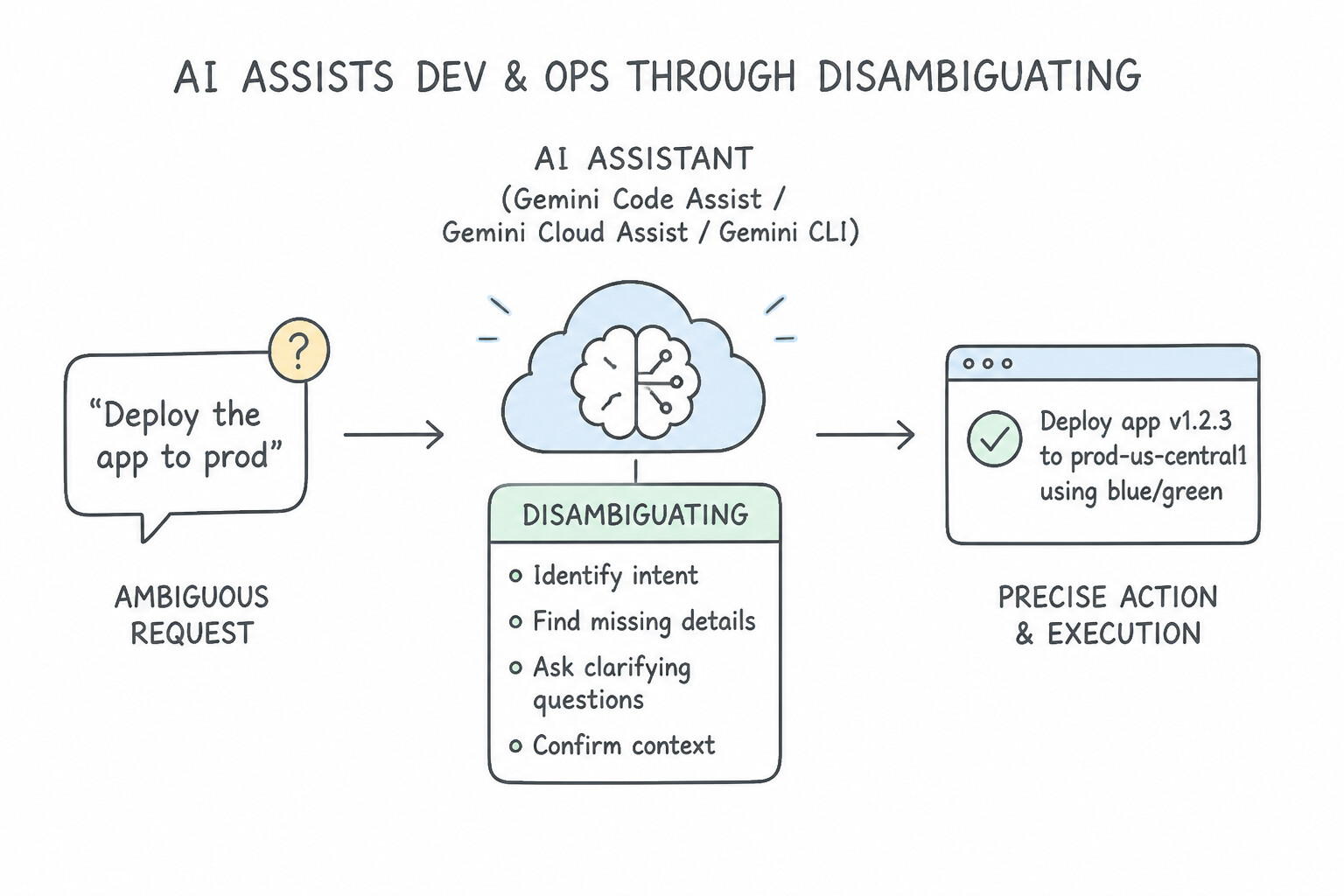
- Disambiguating the Three Gemini Tools for DevOps & SRE (1.5c):
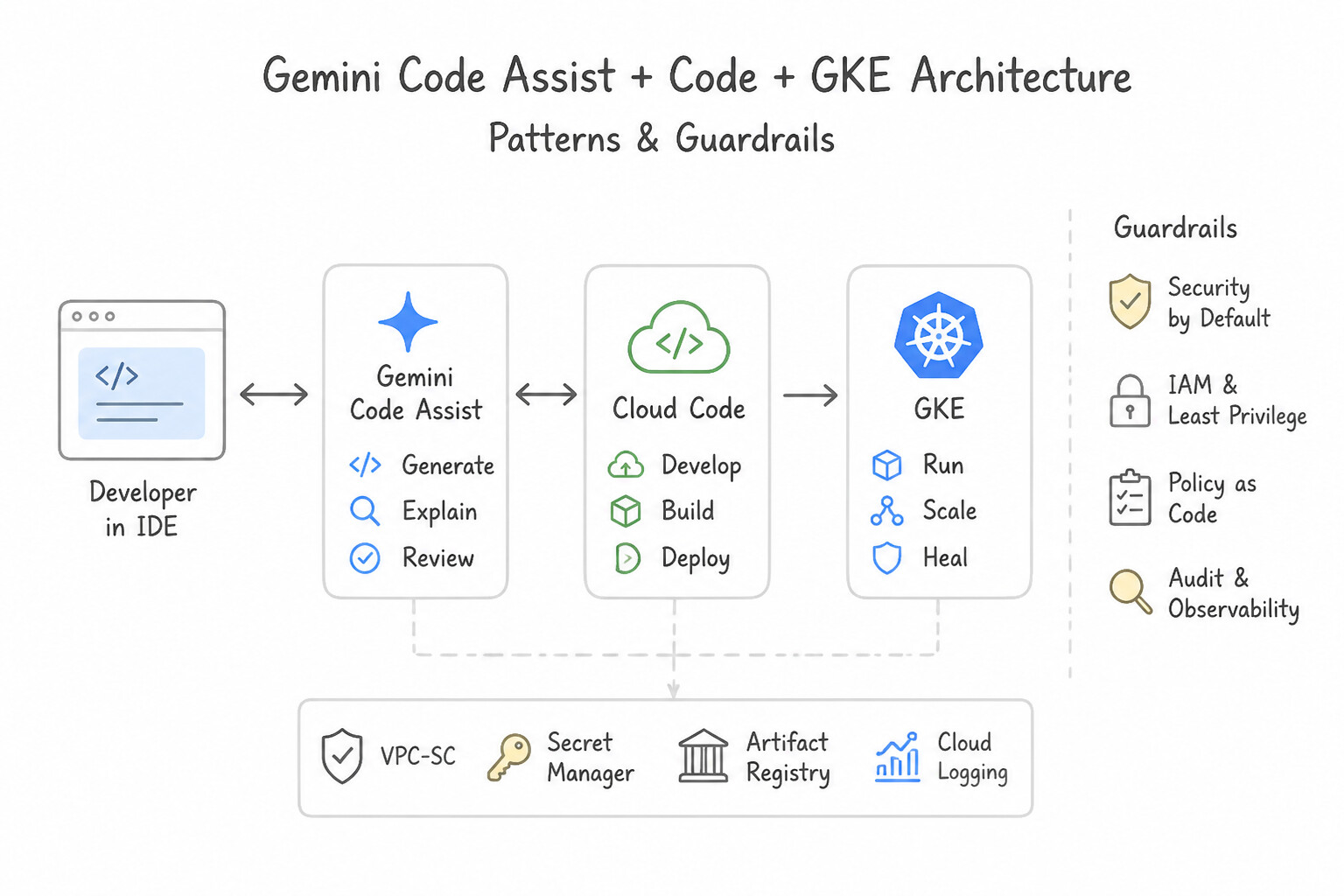
- Gemini Code Assist (Developer Inner-Loop in the IDE): Integrates directly into VS Code, JetBrains, and Cloud Workstations to generate application code, write unit tests, refactor legacy functions, author
Dockerfile/cloudbuild.yaml/ Kubernetes manifests, and explain complex codebases. With Gemini Code Assist Enterprise (Code Customization), you can index private Git repositories (GitHub, GitLab, Bitbucket) so suggestions follow internal libraries and architectural conventions. - Gemini Cloud Assist (Operator & SRE Outer-Loop in the Google Cloud Console): Embedded across Cloud Logging, Cloud Monitoring, Cloud Trace, Cloud Deploy, and Active Assist. Use it to summarize unreadable multi-line stack traces, translate natural language into Logging Query Language (LQL) or PromQL, correlate latency spikes across traces and logs during an incident, and generate Cloud Asset Inventory / FinOps optimization insights.
- Gemini CLI (Terminal-Native Developer & Operator Workflow): Brings Gemini directly into the command-line terminal (including Cloud Shell and Cloud Workstations terminals) to synthesize complex
gcloud/kubectl/gitcommands, analyze local terminal errors, and automate shell workflows without leaving the CLI.
Key Implementation Patterns
- Configuring Gemini for Enterprise Data Privacy: Use Proceed with the deployment without additional configuration. Gemini for Google Cloud Enterprise does not use customer data for model training by default, so no extra action is needed. (Avoid alternative: This specific Organization Policy constraint does not exist, and data privacy is already handled by the default Enterprise terms.)
- Accelerating IaC Development with Gemini: Use Open the Gemini pane in Cloud Code and enter a prompt describing the cluster requirements. The Gemini interface in Cloud Code allows you to generate code from natural language prompts directly within the IDE. (Avoid alternative: This approach uses Gemini for explanation rather than generation, failing to accelerate the initial drafting process.)
Key Takeaways (1.5c)
- Gemini for Google Cloud Enterprise does not use customer data to train foundation models by default.
- No specific 'opt-out' or Organization Policy is needed to prevent model training on your data for Enterprise SKUs.
- VPC Service Controls are used for network security boundaries, not for defining data usage policies for model training.
- Gemini Code Assist is integrated into IDEs (VS Code, IntelliJ) via the Cloud Code extension.
Quick Decision Cheat Sheet (Subsection 1.5)
If the Scenario Requires... | Choose This Google Cloud Pattern | Avoid This Common Mistake |
|---|---|---|
"Secure browser-based IDE inside a private VPC with VPC Service Controls and automatic idle shutdown" | Cloud Workstations with configured idleTimeout and private cluster gateway | Cloud Shell (cannot join custom VPC or enforce org-wide Workstation Configs) |
"Files placed in /home during docker build of a custom Cloud Workstations image disappear when the workstation starts" | Move initialization scripts to /etc/workstation-startup.d/ and install shared binaries in /usr or /opt | Removing the persistent disk (loses all developer work across restarts) |
"Keep custom Cloud Workstations images patched with the latest OS security updates automatically" | Configure a Cloud Scheduler + Cloud Build pipeline to rebuild and push the custom image to Artifact Registry on a weekly schedule | Asking developers to manually run sudo apt-get upgrade every morning |
"AI assistant inside the IDE that learns from your organization's private source code repositories" | Gemini Code Assist Enterprise with Code Customization | Gemini Cloud Assist (Console telemetry/ops tool) |
"AI assistant in the Cloud Console that explains log entries, writes LQL/PromQL queries, and investigates trace anomalies" | Gemini Cloud Assist | Gemini Code Assist (IDE coding assistant) |
"AI assistant invoked directly from the terminal command prompt to generate shell/ gcloud/kubectl commands" | Gemini CLI | Manually searching documentation or writing custom Vertex AI Python scripts for CLI help |
Further Reading (Subsection 1.5)
- Configure private gateways — Documentation explaining how to configure a Cloud Workstations cluster with private IP addresses and disable public ingress.
- VPC Service Controls overview — Explains how VPC Service Controls allow you to define a security perimeter around Google Cloud resources to mitigate data exfiltration risks.
- Configure VPC Service Controls and private clusters — Specific documentation on how to use VPC Service Controls with Cloud Workstations to secure the development environment.
- Customize container images — This guide explains how to create a Dockerfile, build a custom container image, and configure Cloud Workstations to use it. It highlights the benefit of pre-installing tools for your team.
- Customize container images — This guide explains how to create a custom container image for Cloud Workstations using a Dockerfile, build it with Cloud Build, store it in Artifact Registry, and update the workstation configuration.
- Customize container images — This guide explains how to create a custom Docker image that functions as a custom Cloud Shell environment.
Book TOC · Previous · Chapter 1 of 6 · Next
AwesomeGCP.com Learning
The approach taken is a question-led learning approach: you explore realistic project scenarios where you need to make decisions or take actions to achieve business goals within specific constraints. Instead of passive learning, you are challenged to think and work through the options to master the Professional Cloud DevOps Engineer (PDOE) certification!