Book TOC · Previous · Chapter 2 of 6 · Next
Chapter 2: Building & Securing CI/CD Pipelines: Cloud Build, Cloud Deploy, Secrets, SLSA & Binary Authorization
Chapter Focus: Artifact Registry, Cloud Build private pools, Cloud Deploy progressive delivery (Canary, Blue/Green), Secret Manager vs. KMS, Artifact Analysis CVE scanning, SLSA provenance, and Binary Authorization.
Subsection 2.1: Designing pipelines
The Big Picture
A high-performing CI/CD pipeline must unify application microservices, infrastructure-as-code (Terraform/Config Connector), and machine learning workloads (Vertex AI Pipelines) under a single principle: Build Once, Promote Immutably Everywhere. Teams that design pipelines haphazardly fall into three traps:
- Rebuilding Per Environment & Mutable Tag Drift (
2.1a,2.1b): If yourstagingpipeline builds an image from thestagingbranch and tags it:latest, and yourprodpipeline rebuilds from themainbranch 3 days later, unpinned transitive dependencies can change between builds—meaning you are deploying untested bits to production. Production pipelines compile and package once on merge, store the artifact in Artifact Registry, and promote the exact@sha256:digest acrossdev→staging→prodvia Google Cloud Deploy. - Noisy, Unfiltered Triggers & Monorepo Rebuild Storms (2.1d): In a monorepo containing 25 microservices, triggering all 25 Cloud Build pipelines on every commit wastes thousands of build minutes. Proper trigger design uses path filters (
includedFiles/ignoredFiles), separates fast Pull Request pre-submit checks from Post-mergemainrelease triggers, and uses Pub/Sub or Webhook triggers for event-driven automation. - Bespoke Multi-Cloud Deployment Scripts & Bypassable Approvals (
2.1c,2.1e): Writing custom SSH/VPN scripts to deploy to on-premises VMware or AWS EKS clusters creates brittle snowflake pipelines. By registering hybrid and multi-cloud clusters into a GKE Fleet (Connect Gateway), Cloud Deploy deploys to on-premises and multi-cloud targets using the exact sameclouddeploy.yamlpipeline and enforces IAM-governed Approval Gates (requireApproval: true) before production promotion.
Consideration 2.1a: CI/CD of applications and infrastructure
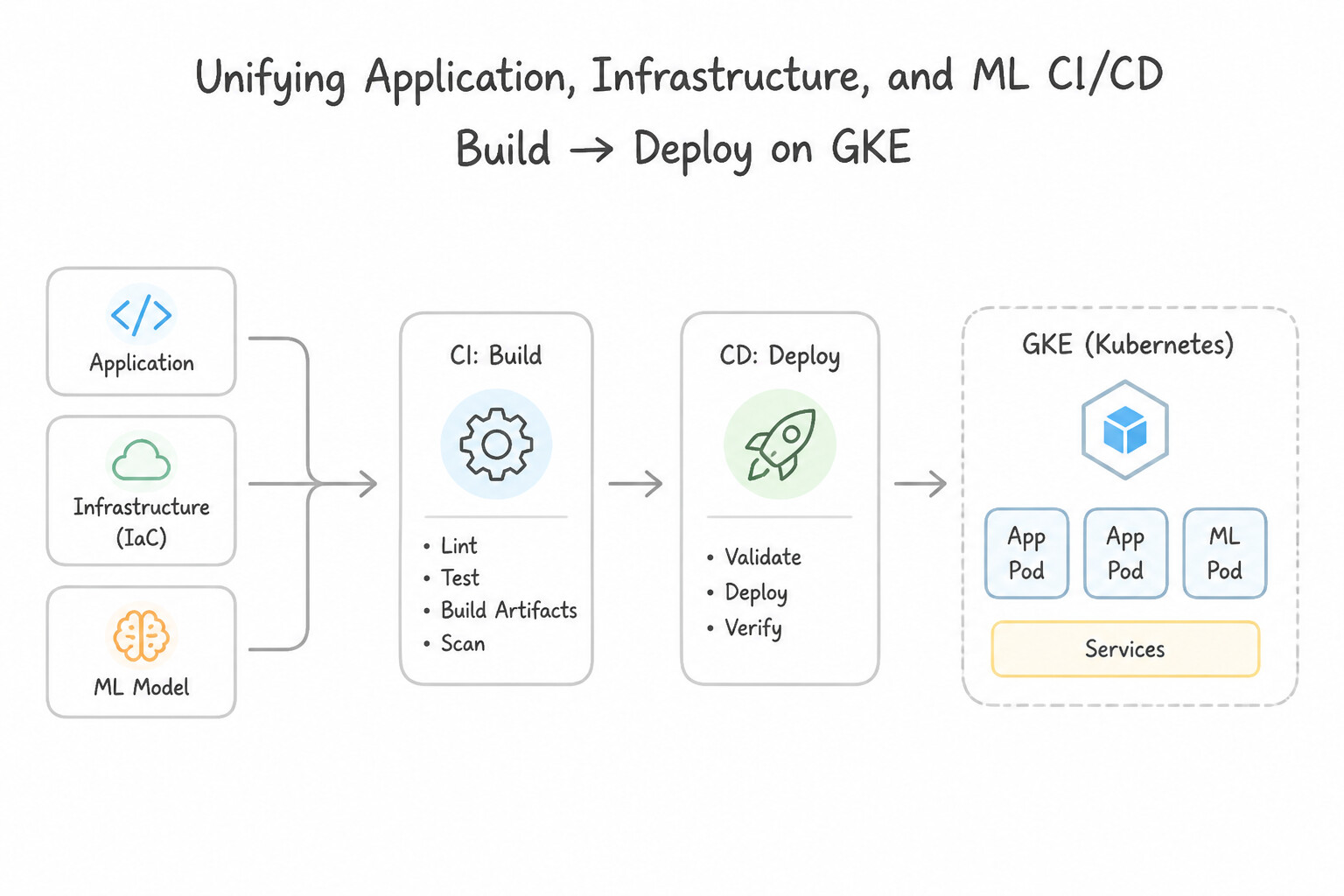
- Unifying Application, Infrastructure, and ML CI/CD (2.1a):
- Application CI/CD: Adopt Trunk-Based Development (short-lived feature branches merging into
mainmultiple times a day). Use Multi-Stage Dockerfiles to compile binaries in a heavy builder stage and copy only the compiled static binary into a minimaldistrolessor scratch runtime image—drastically shrinking image size, startup latency, and CVE surface. - Infrastructure CI/CD: Run
terraform validate,terraform plan, and policy checks (gcloud beta terraform vet) on Pull Requests, and executeterraform applyautomatically only upon merge tomain. - Machine Learning (
MLOps) CI/CD: Version training container images and custom Python wheels in Artifact Registry, trigger Vertex AI Pipelines compilation and execution via Cloud Build when training code or hyperparameters change, and gate model deployment on evaluation metric thresholds in Vertex AI Model Registry.
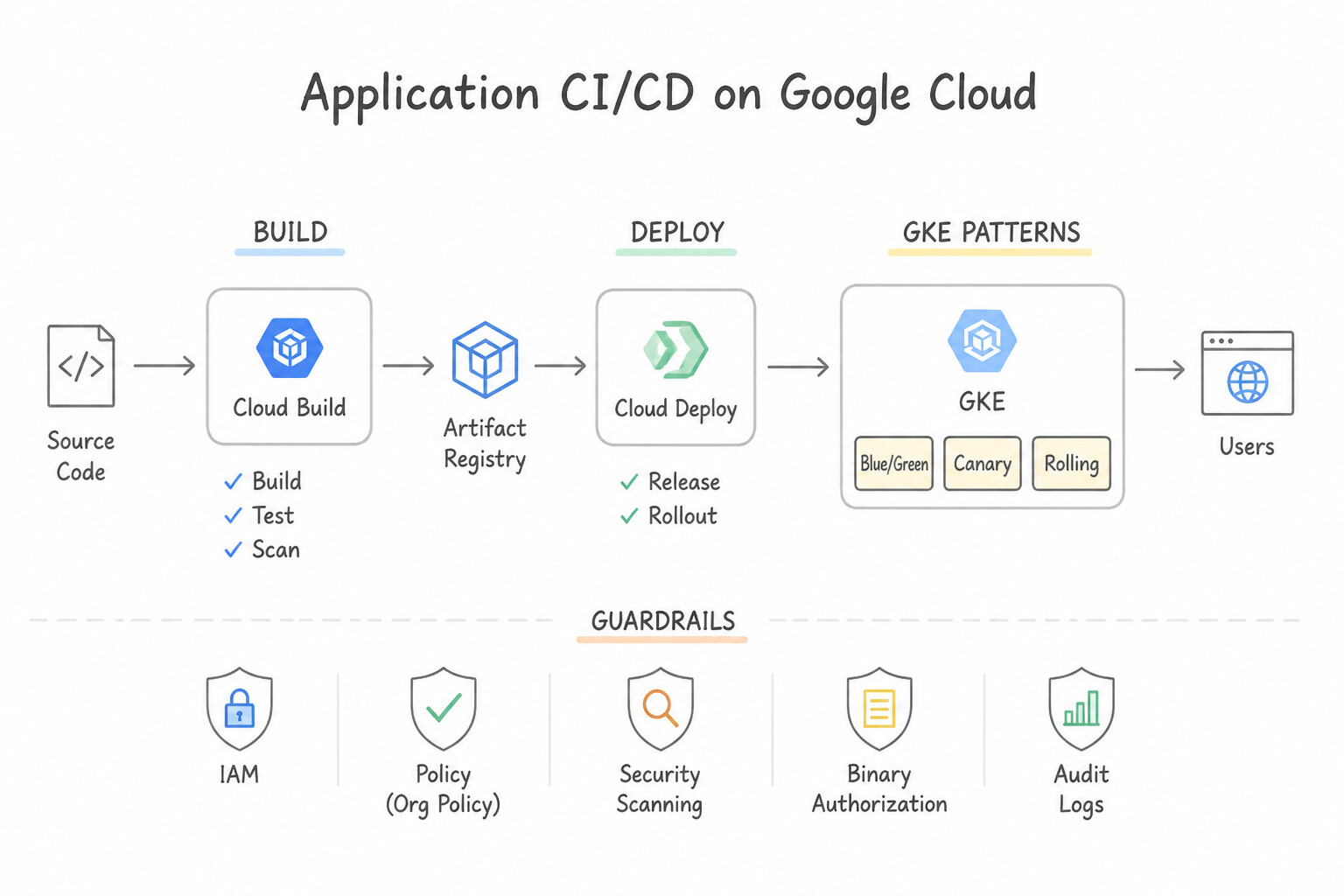
Key Implementation Patterns
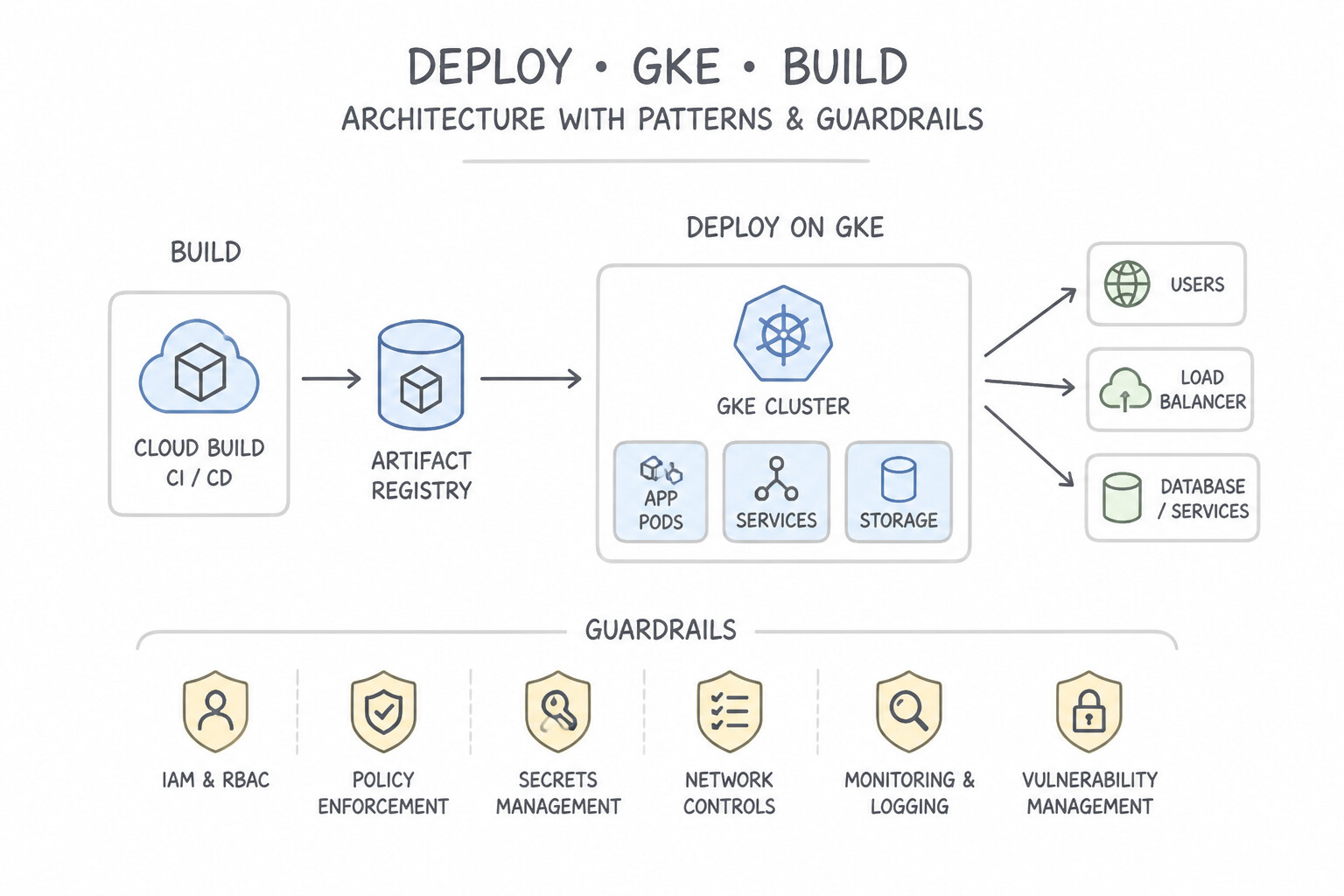
- Cloud Native Continuous Delivery to GKE: Use Use Cloud Build to build the container images and run tests. Use Cloud Deploy to define a delivery pipeline that manages releases, promotions, and rollbacks across your GKE environments. Cloud Build handles the artifact creation (CI), while Cloud Deploy manages the deployment lifecycle (CD) on GKE.
- GitOps for Multi-Cluster Configuration: Use Install Config Sync on each cluster and configure it to sync from a Git repository that contains your manifests. Config Sync uses a GitOps model to automatically sync configurations and self-heal configuration drift. (Avoid alternative: A push-based pipeline does not continuously monitor and correct drift in real-time.)
- Secure Infrastructure as Code (IaC) Pipeline: Use Configure the Terraform backend to use a Cloud Storage bucket. Create Cloud Build triggers to run terraform plan on pull requests and terraform apply on pushes to the main branch. Use a GCS backend for state locking and configure Cloud Build triggers to separate plan (PR) and apply (merge) operations.
Key Takeaways (2.1a)
- Separation of Concerns: Ideally, separate your build process (CI) from your deployment process (CD) for better control and security.
- Cloud Build: Use for compiling code, testing, and building container images.
- Cloud Deploy: Use for managing the delivery lifecycle (release, promote, rollback) to GKE and Cloud Run.
- Cloud-Native: Prefer fully managed Google Cloud services over self-managed legacy tools like Jenkins when migrating to the cloud.
Consideration 2.1b: Artifact management with Artifact Registry
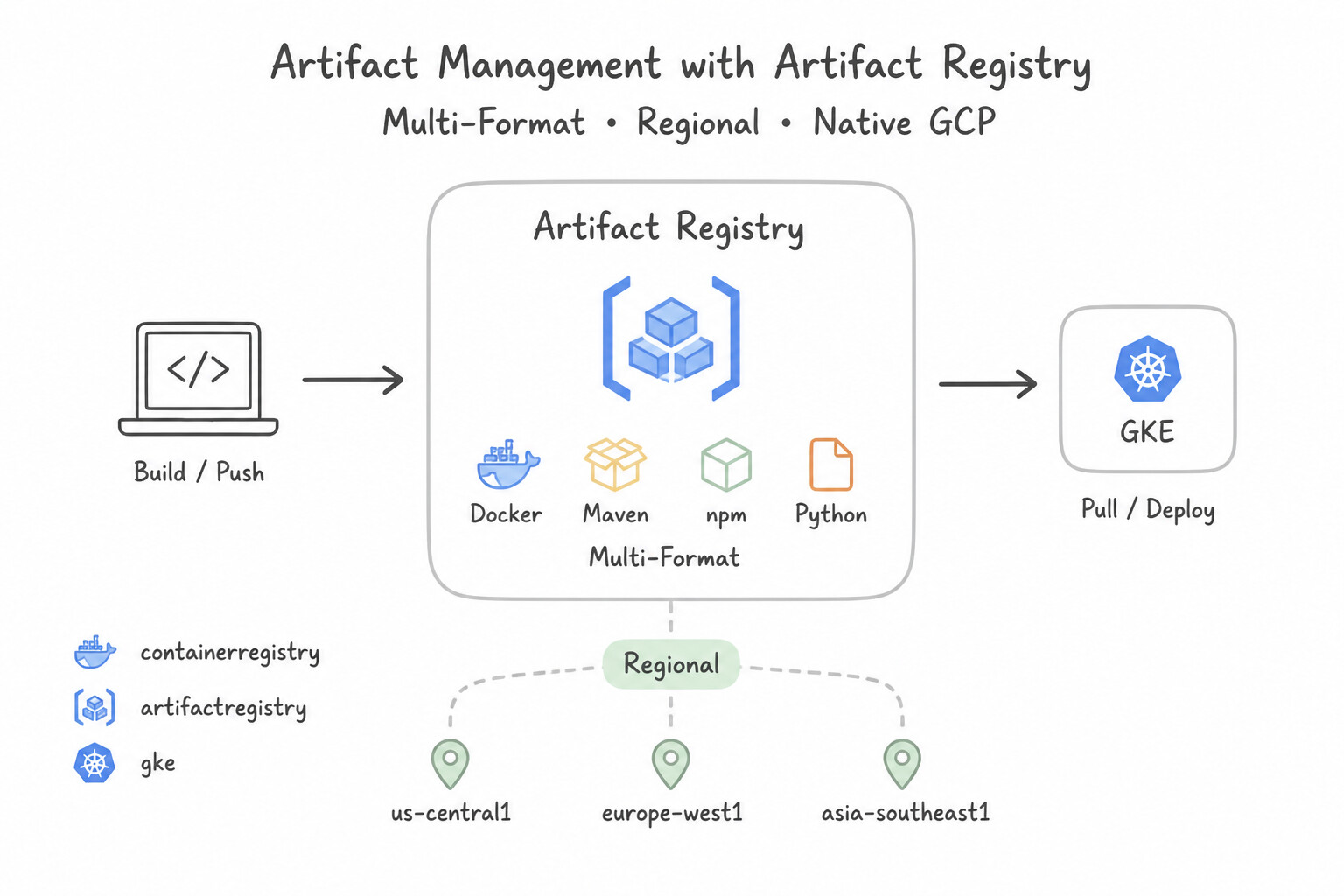
- Artifact Registry Multi-Format & Regional Design (2.1b):
- Consolidate all artifact types—Docker/OCI images, Helm charts, Maven/Gradle jars, npm packages, Python wheels, Go modules, Apt/Yum packages, and Kpt/Terraform modules—into Artifact Registry (replacing legacy Container Registry).
- Co-locate regional Artifact Registry repositories in the same regions as your GKE clusters and Cloud Run services to eliminate cross-region network egress charges and minimize image pull latency during rapid autoscaling.
- Use Cleanup Policies (configured in dry-run mode first to verify impact) combining
Deletepolicies (e.g., delete untagged or PR-prefixed images older than 14 days) withKeeppolicies (e.g., always keep the latest$N$ versions or images taggedprod-*).
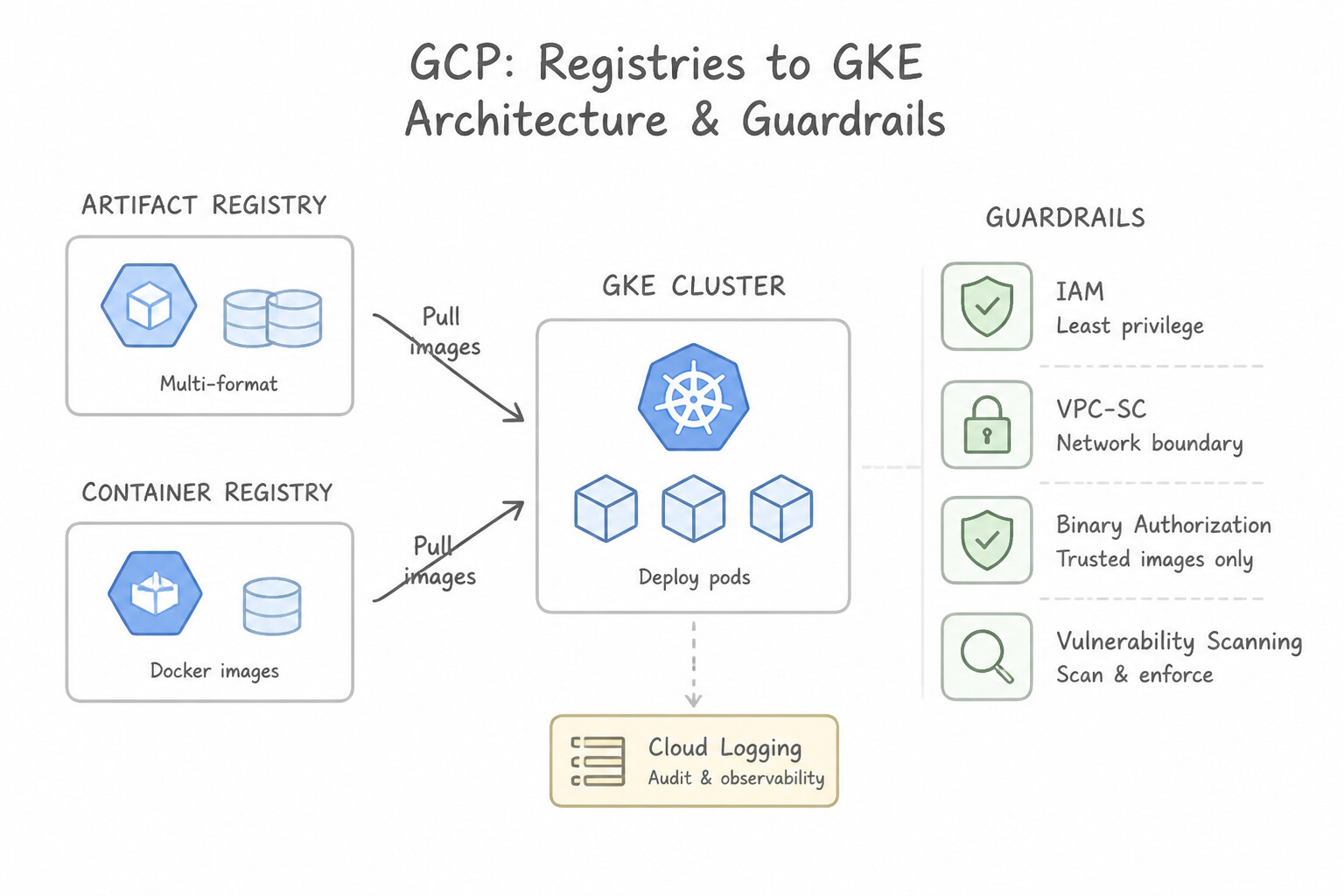
Key Implementation Patterns
- Seamless Migration from Container Registry: Use Enable the 'gcr.io' traffic redirection feature to route requests to Artifact Registry. Artifact Registry supports redirection of gcr.io traffic, allowing legacy URIs to work without modification. (Avoid alternative: Custom DNS manipulation for managed Google services is unsupported and prone to failure compared to the native feature.)
- Cross-Project Image Deployment: Use Grant the Artifact Registry Reader role to the service account used by the GKE nodes in
prod-projecton the repository inbuild-project. Granting the GKE node service account the Artifact Registry Reader role on the target repository enables cross-project image pulling. - Reducing External Dependency Latency: Use Create a Remote repository in Artifact Registry configured to proxy Docker Hub. Update the pipeline to pull images from the Remote repository. Remote repositories automatically cache external artifacts, improving performance and reliability without manual synchronization.
Key Takeaways (2.1b)
- Artifact Registry allows you to redirect
gcr.iotraffic to Artifact Registry repositories.- Redirection enables seamless migration without changing hardcoded image references in manifests.
- Always prefer managed migration features over manual scripts to reduce toil and risk.
- GKE nodes use a Service Account to authenticate with Google Cloud APIs.
Consideration 2.1c: Deployment to hybrid and multi-cloud environments (e.g., GKE)
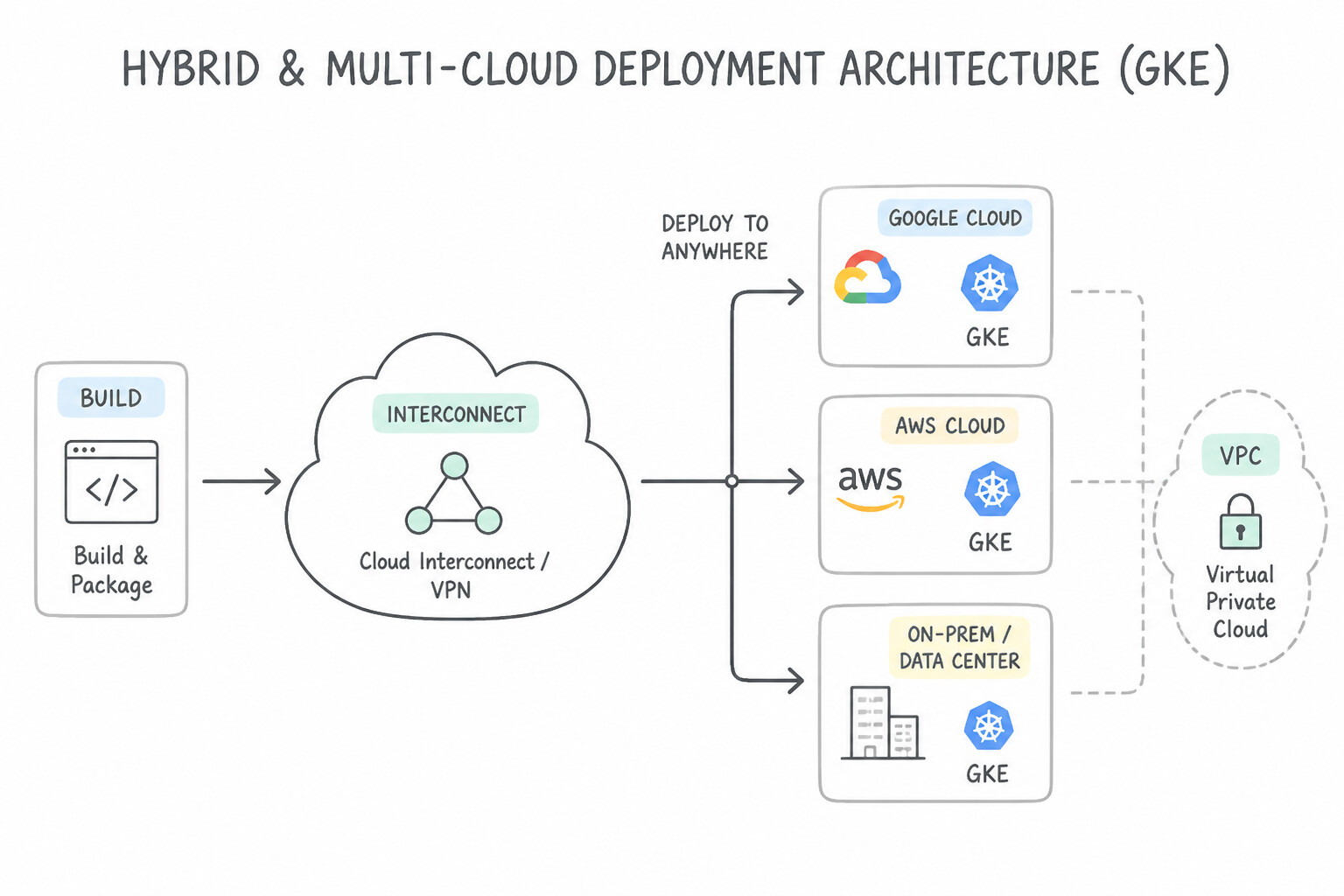
- Hybrid and Multi-Cloud Deployment Architecture (2.1c):
- To deploy consistently to Kubernetes clusters running on-premises (GKE Distributed Cloud / Bare Metal / VMware) or in other public clouds (GKE Multi-Cloud on AWS/Azure or attached EKS/AKS clusters), register those clusters into a Google Cloud Fleet and authenticate through the Connect Gateway.
- Once registered in a Fleet, Google Cloud Deploy targets hybrid and multi-cloud clusters natively using an
anthosCluster(membership) target definition—no inbound firewall holes or custom VPN bastion scripts required. - Alternatively, for pull-based hybrid GitOps, Config Sync (or Argo CD) running inside each hybrid cluster pulls signed manifests or OCI packages outbound over HTTPS from Git / Artifact Registry.
Key Implementation Patterns
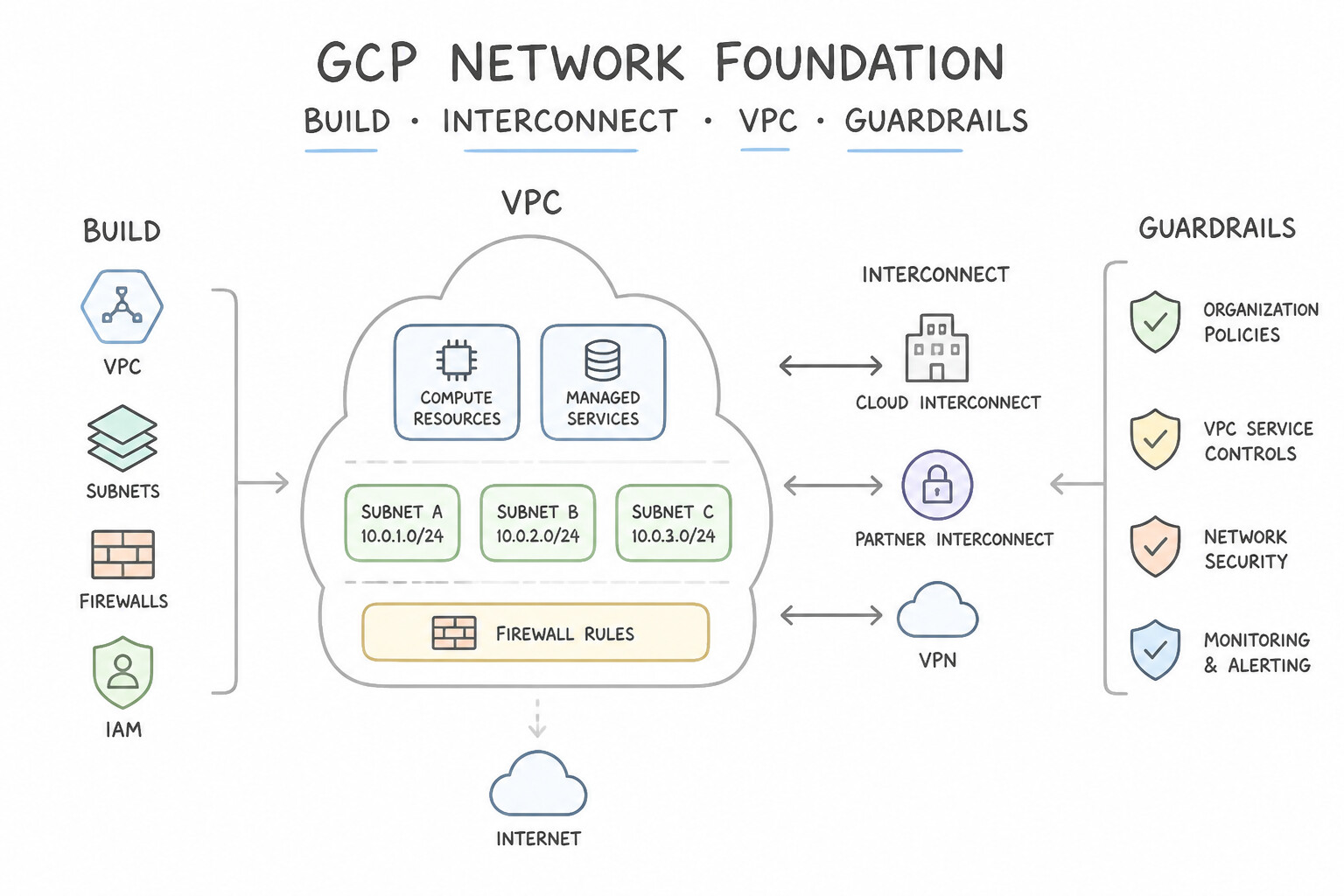
- Secure Access to On-Premises GKE via Cloud Build: Use Create a Cloud Build private pool. Configure the private pool to peer with your Virtual Private Cloud (VPC) network. Private pools enable private connectivity to your VPC via peering, allowing access to on-premises resources connected via Interconnect.
- GitOps for Hybrid Configuration Management: Use Configure Anthos Config Management on all clusters. Store the configuration files in a Git repository and set up Config Sync to pull changes. Anthos Config Management uses a pull-based GitOps model ensuring clusters automatically sync with a central Git repository.
- Unified Multi-Cloud Deployment Interface: Use Configure the Connect Gateway to access the clusters through a single endpoint using Google Cloud IAM authentication. Connect Gateway enables access to multi-cloud clusters using a single interface and Google Cloud IAM. (Avoid alternative: Cloud VPN adds complex network management and does not unify authentication for API access.)
Key Takeaways (2.1c)
- Cloud Build default pools use public IPs and cannot access private VPC resources directly.
- Cloud Build Private Pools allow for VPC Network Peering.
- Peering enables access to private resources within a VPC and extended networks (on-premises via Interconnect/VPN).
- Use Private Pools when security mandates prohibit public internet access.
Consideration 2.1d: CI/CD pipeline triggers
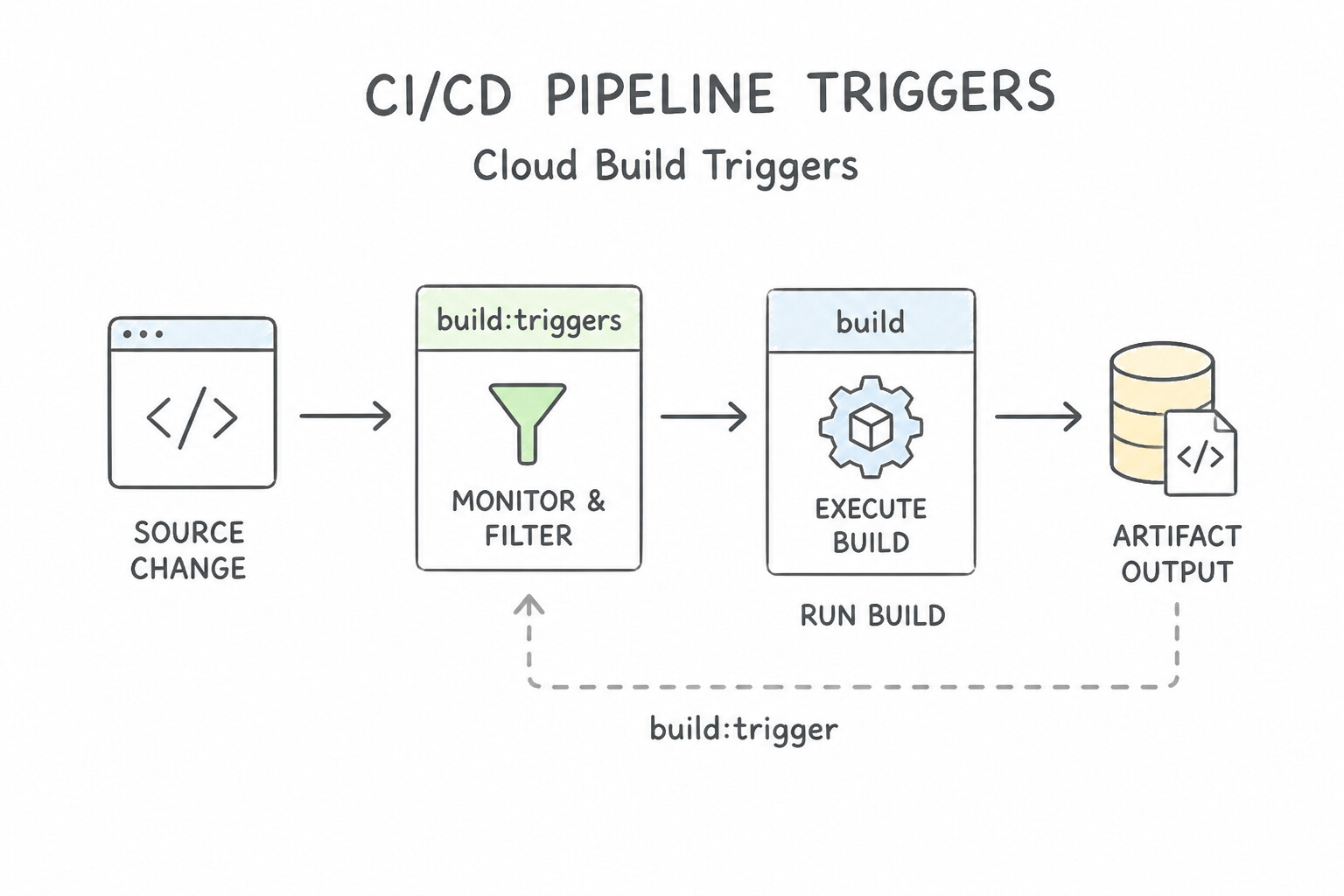
- Designing High-Signal Cloud Build Triggers (2.1d):
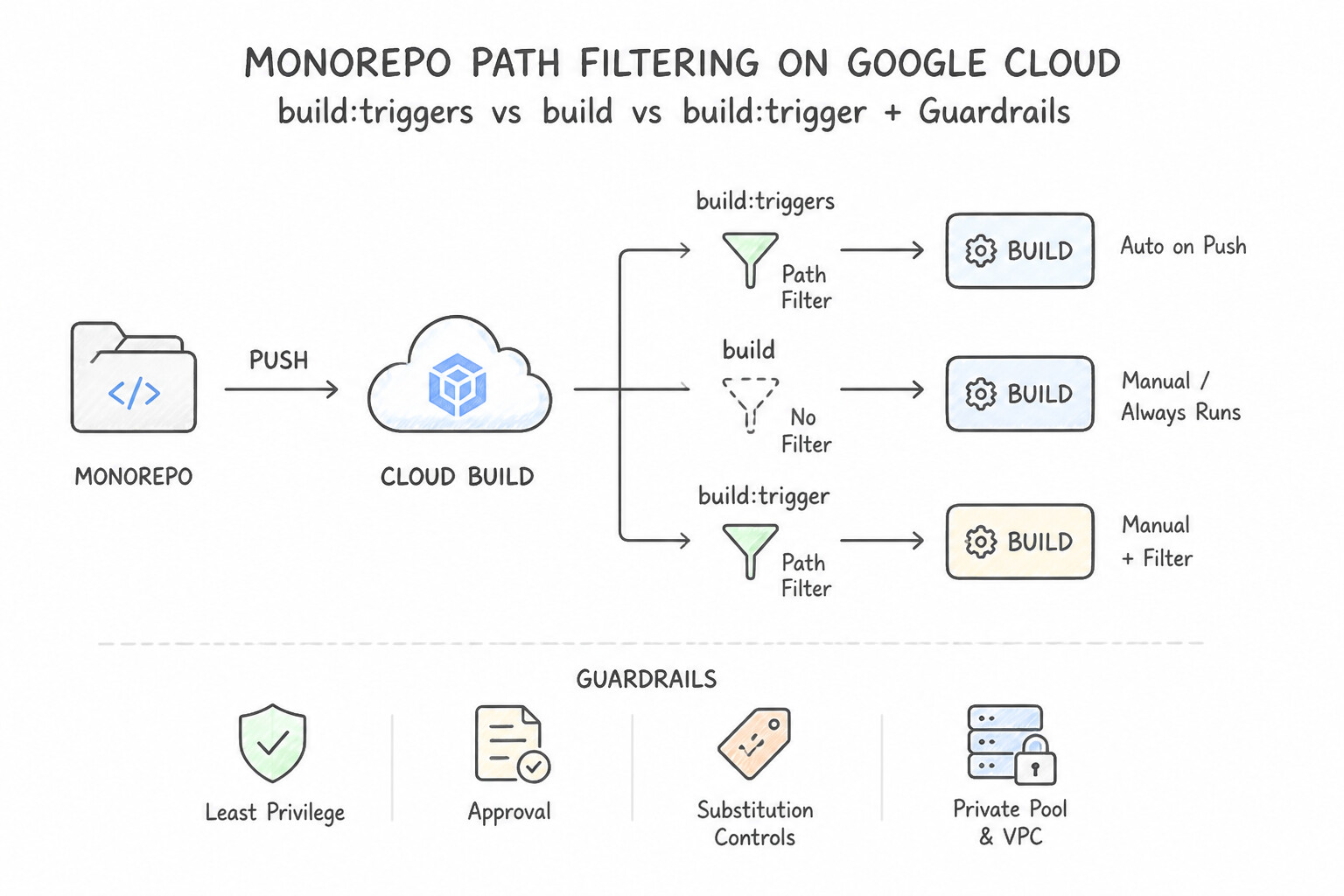
- Monorepo Path Filtering: Configure
includedFiles(e.g.,services/checkout/**,shared/proto/**) andignoredFiles(e.g.,docs/**,**.md) on each microservice's trigger so documentation edits or unrelated service changes never trigger unnecessary builds. - Event-Driven Pub/Sub & Webhook Triggers: Subscribe Cloud Build triggers directly to Cloud Pub/Sub topics—for example, subscribing to the
container-analysis-occurrences-v1or Artifact Registrygcrtopic to automatically rebuild downstream application images whenever a base OS image is updated, or triggering a pipeline from an external system via a HMAC/secret-validated Webhook trigger.
Key Implementation Patterns
- Monorepo Path Filtering: Use Create five separate triggers. In each trigger, configure the 'Included files' filter with the path to the specific microservice directory. Use the 'Included files' filter in the trigger configuration to restrict execution to changes within specific directory paths.
- Production Release via Tags: Use Create a trigger with the event "Push to a tag". Set the tag value to match the pattern ^v.. This correctly targets tag creation events matching the version pattern. (Avoid alternative: This listens for branch updates, not tag pushes.)*
- Secure External Contributions: Use Configure the Cloud Build trigger's comment control setting to "Required for external contributors". Requiring comments for external contributors ensures builds only run after a trusted member reviews and approves the pull request via a comment.
Key Takeaways (2.1d)
- Monorepos often require path filtering to prevent redundant builds.
- Included files (glob patterns) allows you to trigger builds only when specific directories or files are modified.
- Filtering at the Trigger level is more cost-effective than filtering inside the build steps because it prevents the build VM from starting.
- Ignored files is useful for excluding non-code changes (like README updates) from triggering any build.
Consideration 2.1e: Configuring deployment processes (e.g., approval flows)
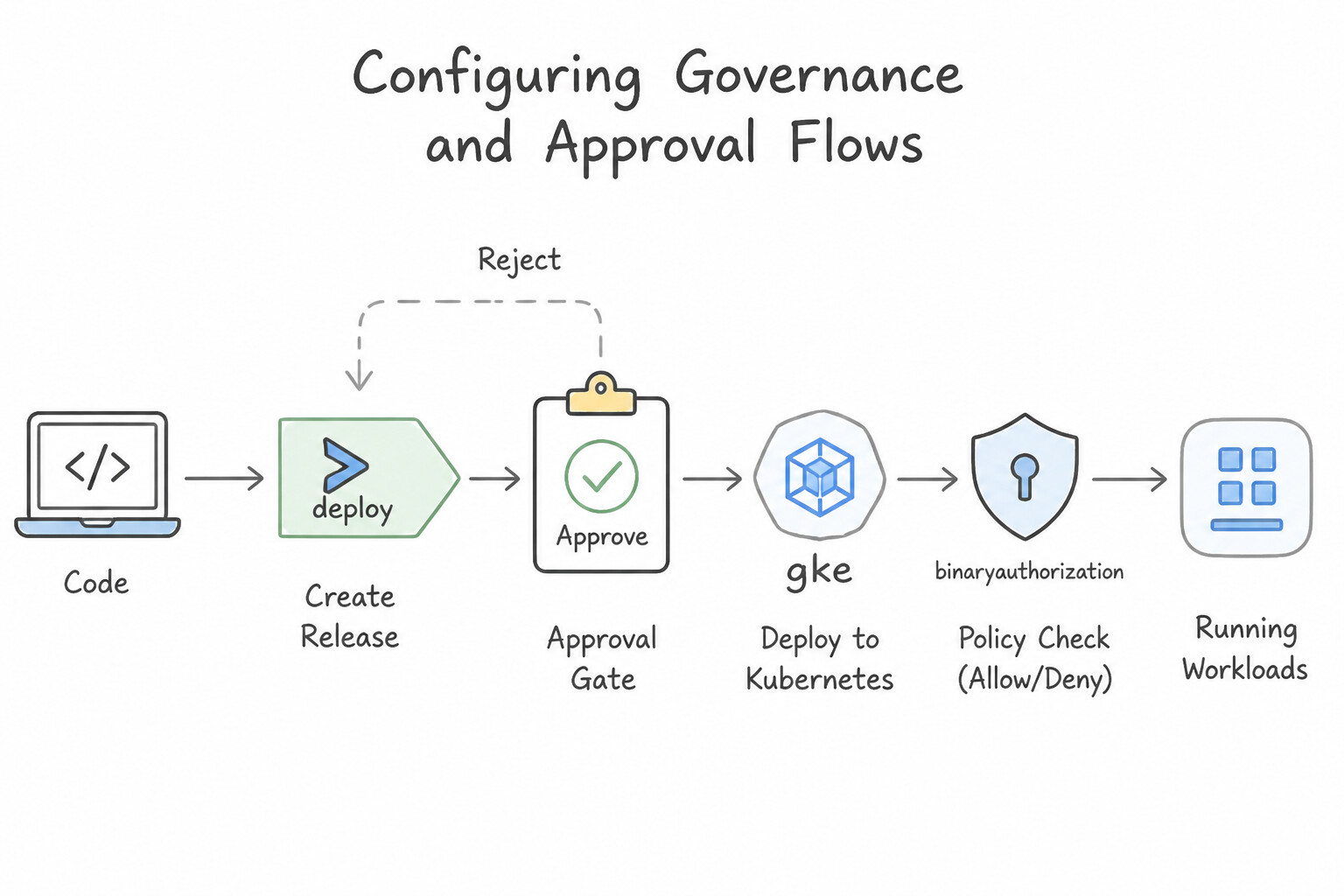
- Configuring Governance & Approval Flows (2.1e):
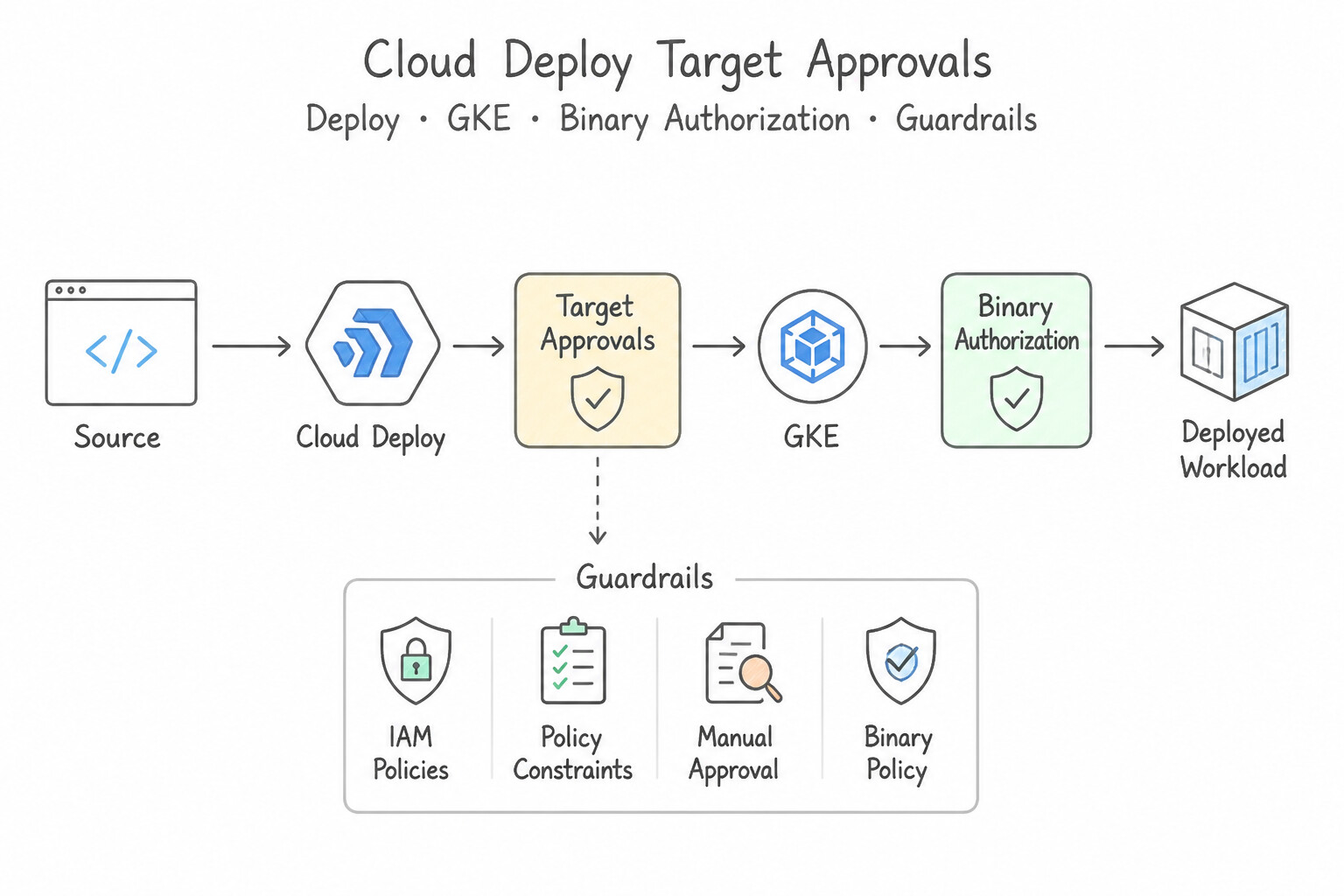
- Cloud Deploy Target Approvals: Set
requireApproval: trueon sensitive targets (such asprod). Promotion halts in aPending Approvalstate until a principal grantedroles/clouddeploy.approver(and not the developer who authored the code, enforcing Separation of Duties) approves the rollout via Console, CLI, or an automated Pub/Sub notification (clouddeploy-approvals) integrated with ServiceNow/Jira/Slack. - Cloud Build Manual Invocation & PR Approvals: Enable
Require approval before build executeson Cloud Build triggers for sensitive infrastructure repositories or untrusted external PRs (CommentControl), requiring aroles/cloudbuild.builds.approversign-off before compute steps run.
Key Implementation Patterns
- Native Manual Approval in Cloud Deploy: Use In the
delivery_pipeline.yamlfile, addrequireApproval: trueto thestandardstrategy within theproductionstage. TherequireApprovalproperty in the delivery pipeline configuration enforces a manual verification step before deployment. - Supply Chain Security with Binary Authorization: Use Configure Binary Authorization with an attestor. Update the CI/CD pipeline to sign the image and create an attestation after the vulnerability scan passes. Set the Binary Authorization policy to require this attestation. Binary Authorization uses attestors and attestations to cryptographically verify that an image has passed required checks (like vulnerability scans) before allowing deployment.
Key Takeaways (2.1e)
- Google Cloud Deploy logic (stages, approvals) is defined in the Delivery Pipeline resource.
- The Target resource defines destination infrastructure, not deployment logic.
- Use
requireApproval: truein the stage strategy to enforce manual approval gates.- Binary Authorization creates a deployment gate based on policy.
Quick Decision Cheat Sheet (Subsection 2.1)
If the Scenario Requires... | Choose This Google Cloud Pattern | Avoid This Common Mistake |
|---|---|---|
"Container image size is 1.4 GB because it includes Maven/Go compiler toolchains and source code" | Refactor the Dockerfile to use a Multi-Stage Build and copy only the compiled artifact into a distroless base image | Increasing GKE node disk size to 500 GB to accommodate bloated images |
"Monorepo commit to one microservice triggers builds for all other unchanged microservices" | Configure includedFiles and ignoredFiles glob patterns on each Cloud Build trigger | Disabling automated triggers and running builds manually |
"Enforce mandatory human or external-ticketing sign-off before a release rolls out to prod in Cloud Deploy" | Set requireApproval: true on the prod target, grant roles/clouddeploy.approver, and subscribe to the clouddeploy-approvals Pub/Sub topic | Putting a sleep 3600 step inside cloudbuild.yaml |
"Deploy to hybrid/multi-cloud Kubernetes clusters without opening inbound firewall ports on-premises" | Register clusters in a GKE Fleet and deploy via Cloud Deploy + Connect Gateway (or pull via Config Sync) | Exposing the on-premises Kubernetes API server to 0.0.0.0/0 on the public internet |
"Automatically trigger a downstream application rebuild whenever a shared Golden Base Image is updated in Artifact Registry" | Configure a Cloud Build Pub/Sub Trigger subscribed to the Artifact Registry gcr Pub/Sub notifications topic filtered to the base image | Polling Artifact Registry every minute with a custom VM cron job |
Further Reading (Subsection 2.1)
- Google Cloud Deploy documentation — Overview of Cloud Deploy, explaining how it manages continuous delivery pipelines for GKE and separates the delivery process from the CI build process.
- Cloud Build documentation — Documentation on Cloud Build, detailing how to create build config files to compile source code and produce container artifacts.
- Config Sync Overview — Describes how Config Sync allows you to manage Kubernetes objects from a single source of truth and ensures that your clusters remain in sync with your desired configuration.
- Managing infrastructure as code with Terraform, Cloud Build, and GitOps — This guide describes how to set up a CI/CD pipeline for managing infrastructure as code (IaC) with Terraform and Cloud Build, including the use of GCS backends for state management.
- Transition to Artifact Registry — This page explains the transition process, including the automated migration tool and how to enable redirection for gcr.io traffic.
- Configuring access control for Artifact Registry — Documentation describing how to grant permissions to repositories, specifically highlighting the Reader role for pulling images.
Subsection 2.2: Implementing and managing pipelines
The Big Picture
Even when a release passes every unit and integration test in staging, production traffic patterns, real customer payloads, and scale-dependent race conditions will occasionally trigger regressions. Organizations that deploy by pushing 100% of production traffic to a new version at once—or that lack end-to-end audit trails linking a running container back to its Git commit—suffer severe operational pain:
- Unbounded Blast Radius on Release (2.2b): If a new revision has a subtle memory leak or serialization bug and you replace all production pods simultaneously (
Recreate), 100% of users experience an outage. DevOps engineers match the deployment strategy (Rolling, Blue/Green, Canary, Traffic Splitting, Shadow/Traffic Mirroring, or Feature Flags) to the workload's risk profile, statefulness, and cost tolerance—and bind progression to objective application or ML telemetry metrics. - Broken Auditability From Commit to Cluster (2.2a): When a compliance auditor or incident responder asks, "Who approved the release currently serving in
prod, which Cloud Build run compiled it, and what exact Git commit SHA is inside it?", teams that deploy via ad-hockubectlcommands have no answer. Combining Artifact Registry build provenance, Cloud Deploy Rollout records, Cloud Build logs, and Cloud Audit Logs provides an unbreakable chain of custody. - Slow Pipeline Triage & Flaky Rollouts (2.2c): When a Cloud Deploy rollout fails verification or a GKE deployment enters
ImagePullBackOff/CrashLoopBackOff, engineers need a deterministic diagnostic workflow to isolate IAM, network, manifest rendering, or health-check failures and mitigate immediately.
Consideration 2.2a: Auditing and tracking deployments (e.g., Artifact Registry, Cloud Build, Cloud Deploy, Cloud Audit Logs)
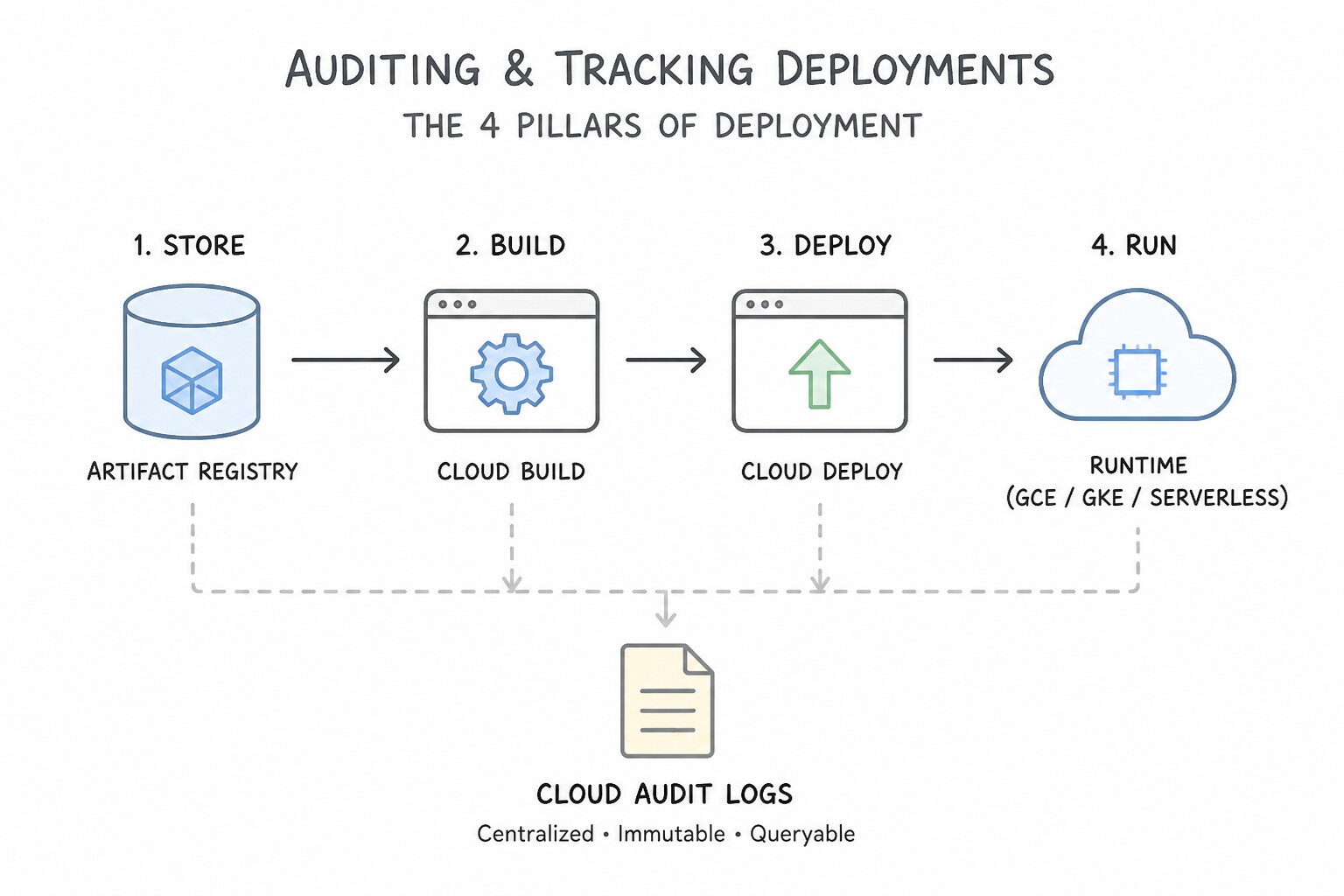
- The 4 Pillars of Deployment Auditing & Traceability (2.2a):
- Cloud Audit Logs (
Admin Activityvs.Data Access): Admin Activity audit logs are always enabled, free of charge, and cannot be disabled; they record who created a Cloud Build trigger, promoted a Cloud Deploy release, approved a rollout, or modified a GKEDeployment(protoPayload.authenticationInfo.principalEmail). Enable Data Access audit logs when compliance requires tracking who read or pulled artifacts/configs. - Artifact Registry & Build Provenance: Every image built by Cloud Build stores signed SLSA provenance metadata in Artifact Analysis linking the exact
@sha256image digest to the source Git repository URL, branch/commit SHA,cloudbuild.yamlsteps, and builder service account. - Cloud Deploy Delivery Metrics & Pub/Sub Events: Cloud Deploy automatically tracks deployment frequency, rollout duration, and failure rates, and publishes lifecycle events to four native Pub/Sub topics:
clouddeploy-operations(promotions, rollouts, approvals),clouddeploy-resources(state changes),clouddeploy-approvals, andclouddeploy-advances. - DORA Four Key Metrics: Track Deployment Frequency and Lead Time for Changes (measuring Delivery Velocity/Throughput) alongside Change Failure Rate (
CFR) and Time to Restore Service (MTTR) (measuring Operational Stability).
Key Implementation Patterns
- End-to-End Traceability with Cloud Deploy: Use Inspect the active release details in the Google Cloud console to view the source provenance. Cloud Deploy releases automatically store source provenance metadata, which links the release to a specific Git commit. (Avoid alternative: Image tags rely on naming conventions and do not inherently prove the link between a Cloud Deploy release and a source commit.)
- Ensuring Artifact Integrity (SLSA): Use Verify the build provenance metadata for the image in Artifact Registry. Build provenance is a signed record generated by Cloud Build that validates the image source and build integrity. (Avoid alternative: Logs track actions but do not provide signed attestation for the artifact itself.)
- Auditing Unauthorized Manual Deployments: Use In Cloud Logging, filter for Admin Activity audit logs related to the GKE resources. Admin Activity logs record API calls that modify resource configurations and include the identity of the user. (Avoid alternative: Cloud Build only logs deployments that run through the CI/CD pipeline, not manual changes.)
Key Takeaways (2.2a)
- Cloud Deploy Releases are immutable snapshots of deployable artifacts.
- Source Provenance links a release back to the specific Git commit hash.
- Use the Cloud Console or gcloud CLI to inspect release details for auditing.
- Do not rely on manual tagging or raw logs for formal provenance verification when dedicated tools exist.
Consideration 2.2b: Deployment strategies (e.g., canary, blue/green, rolling, traffic splitting, feature flags) and defining success metrics based on application or ML pipeline telemetry
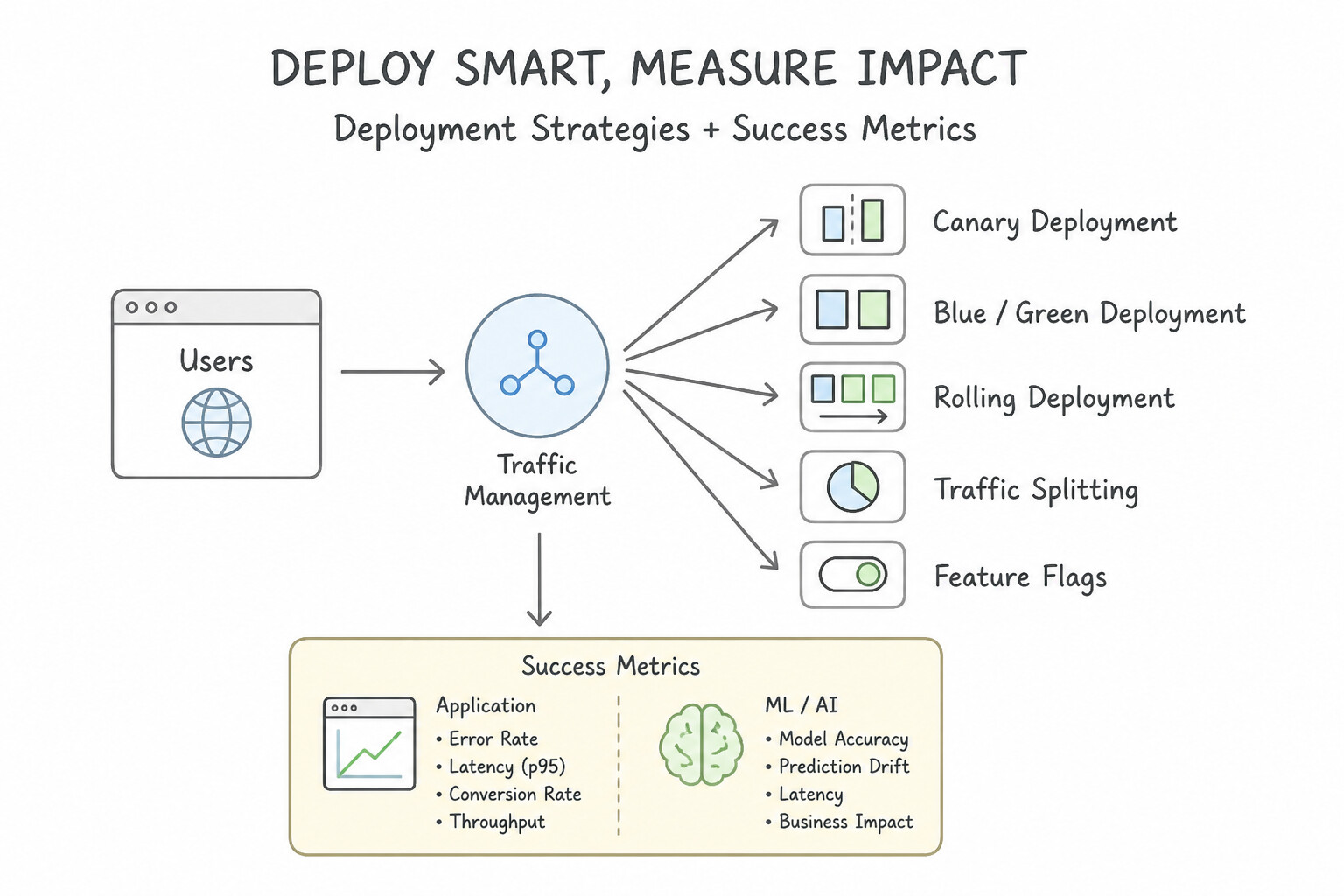
- Comparing Deployment Strategies (2.2b):
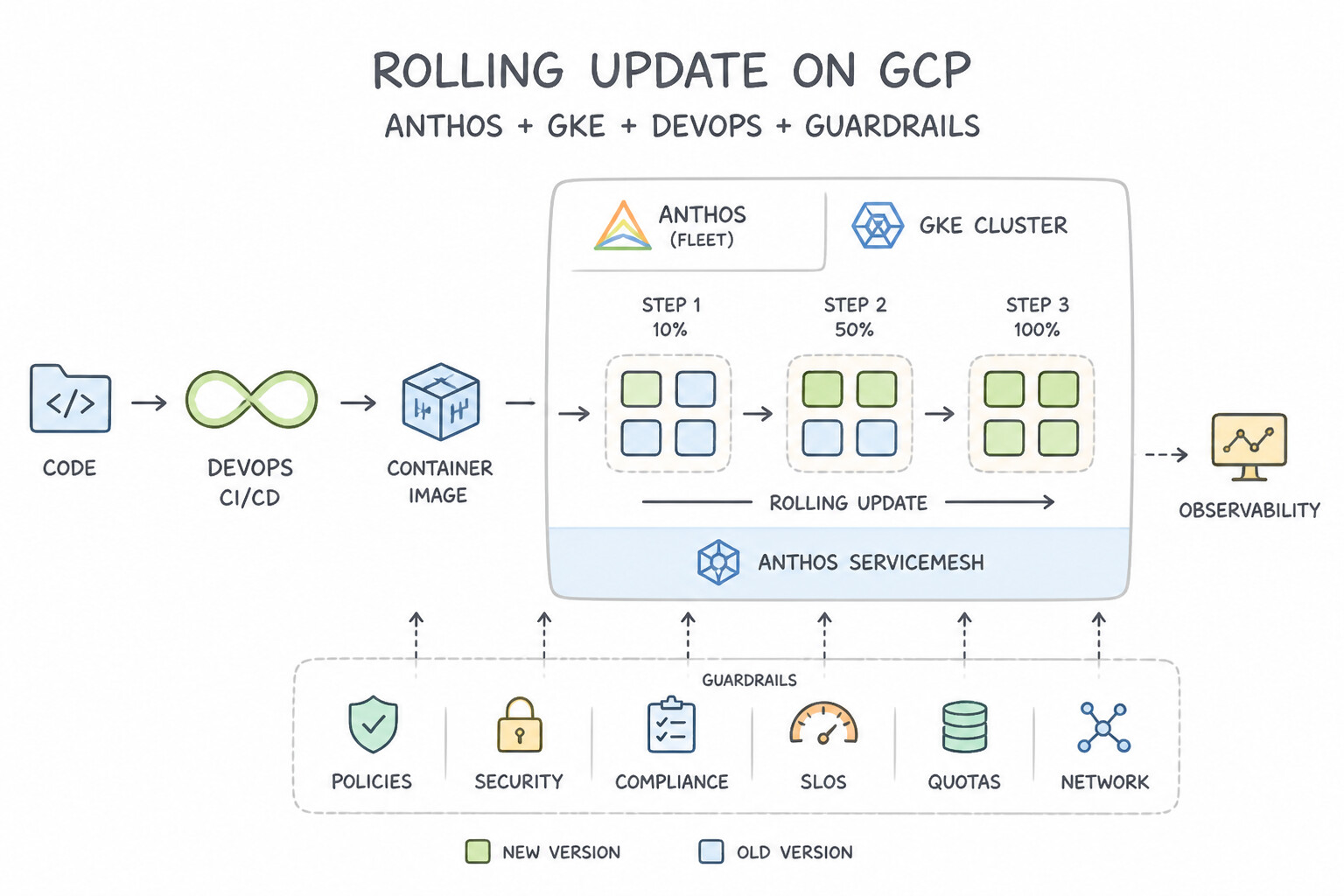
- Rolling Update: Gradually replaces old pods/VMs with new ones (
maxSurge,maxUnavailable). Pros: Zero extra full-environment cost. Cons: Bothv1andv2run simultaneously, and rollback requires rolling back through the pod replacement cycle. - Blue/Green Deployment: Provisions a complete duplicate
Green(v2) environment alongsideBlue(v1), runs smoke tests againstGreeninternally, and flips the Load Balancer / KubernetesServiceselector 100% fromBluetoGreen. Pros: Instant 100% cutover, instant 100% rollback (Bluestays warm), and zero mixed-version traffic if cut over atomically. Cons: Doubles compute cost during the transition window. - Canary Deployment & Traffic Splitting: Routes a small percentage of live traffic (e.g.,
10%→25%→50%→100%) to the new version using Cloud Deploy automated canary phases, Cloud Run revision traffic splitting, or Cloud Service Mesh / Gateway API (HTTPRouteweights). - Feature Flags: Decouples deployment (shipping code to production in a dark/disabled state) from release (enabling the feature dynamically for specific user cohorts via runtime configuration without redeploying containers).
- Telemetry-Driven Success Metrics (Application & ML Workloads):
- Gate canary progression (
skaffold verifyor automated canary analysis) on Golden Signals: HTTP5xxerror rate,p95/p99request latency, and saturation. - For Machine Learning (
ML) models deployed on Vertex AI Endpoints or GKE/Cloud Run (using traffic-split canary deployments), define success metrics around prediction latency, prediction distribution skew / feature attribution drift (Vertex AI Model Monitoring), and online business conversion/accuracy metrics.
Key Implementation Patterns
- Canary Deployment on GKE with ASM: Use Create a VirtualService with a route block containing two destinations. Assign a weight of 95 to the current version subset and a weight of 5 to the new version subset. A VirtualService allows you to define precise percentage-based traffic weights for canary deployments in ASM.
- Decoupling Deployment from Release: Use Wrap the new code in a feature flag and disable it in the production configuration. Feature flags allow you to deploy code to production while keeping the functionality disabled/hidden from users. (Avoid alternative: Canary deployments expose the code to some users, which is not acceptable for a known broken feature.)
- Instant Rollback with Cloud Run: Use Use the Google Cloud console to route 100% of traffic to the previous revision. Switching traffic to an existing healthy revision is instantaneous and the fastest rollback method. (Avoid alternative: Redeploying via CI/CD takes time to build and push, delaying recovery.)
Key Takeaways (2.2b)
- Canary Deployments reduce risk by slowly introducing a new version to a small subset of users.
- Anthos Service Mesh (ASM) uses
VirtualServiceresources to define traffic routing rules, including percentage-based weight splitting.DestinationRuleresources are used to define subsets (versions) of a service based on labels.- Decouple traffic distribution from replica counts for precise control.
Consideration 2.2c: Troubleshooting and mitigating deployment issues
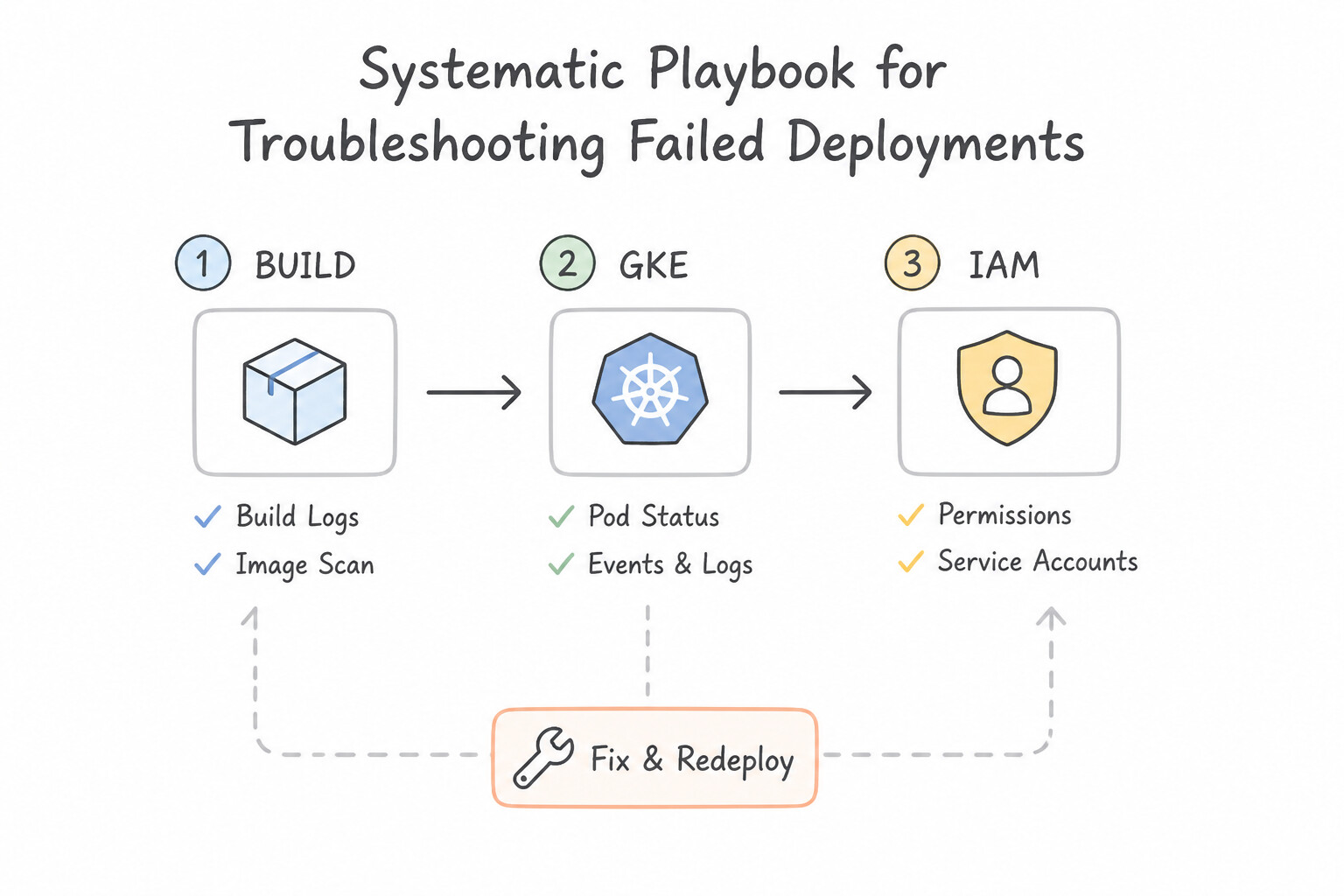
- Systematic Playbook for Troubleshooting Failed Deployments (2.2c):
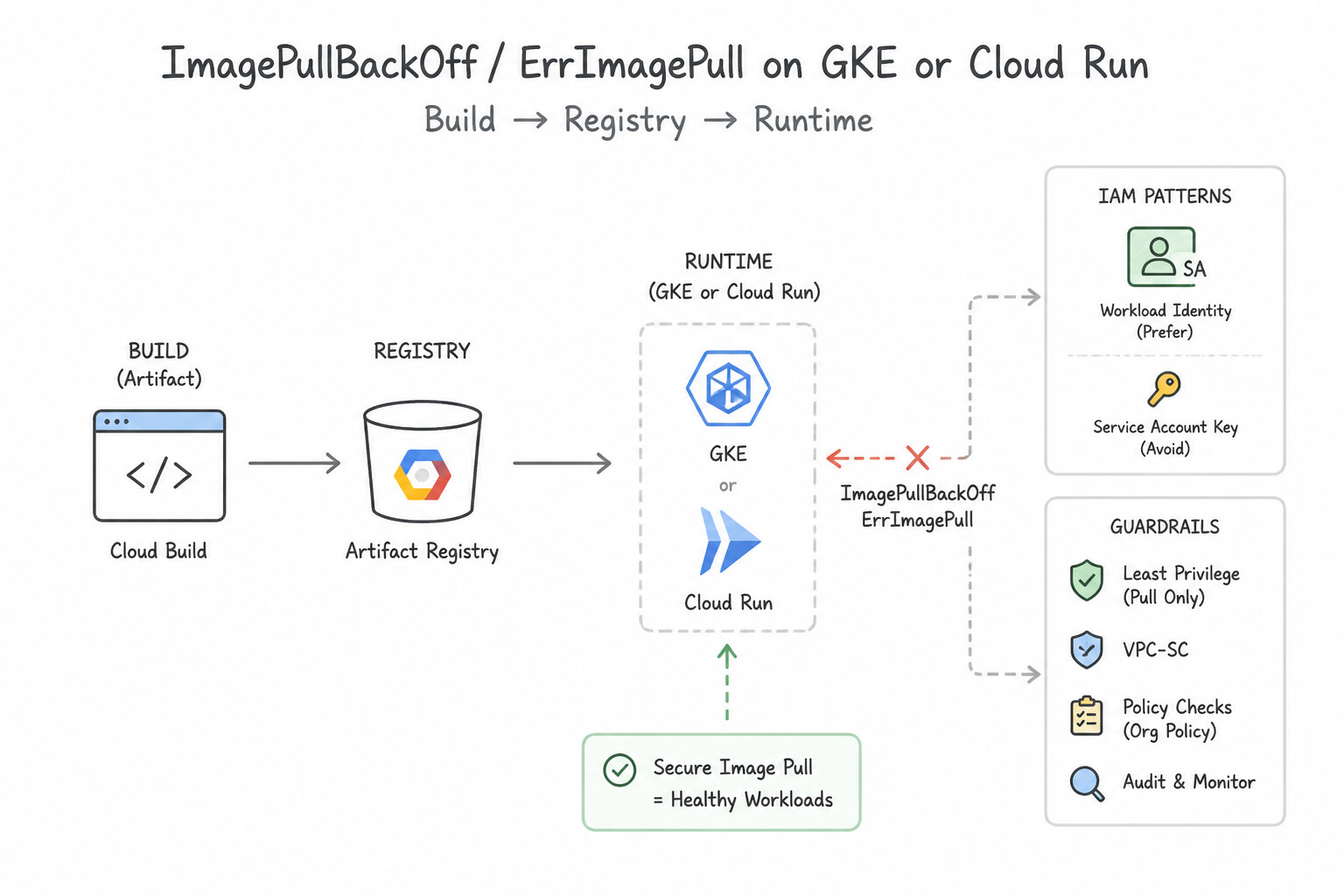
ImagePullBackOff/ErrImagePullon GKE or Cloud Run: Check (1) Does the image@sha256/ tag exist in Artifact Registry? (2) Does the GKE Node Service Account (or Cloud Run Service Identity) haveroles/artifactregistry.readeron the repository? (3) Do private GKE nodes have Private Google Access (or PSC) enabled to reach*.pkg.dev?CrashLoopBackOffImmediately After Rollout: The container starts and exits non-zero, or fails itslivenessProbe. Inspect container logs (kubectl logs --previous/ Cloud Logging), verify required environment variables / mounted Secret Manager secrets exist, and ensure slow-booting apps use astartupProbesolivenessProbedoesn't kill them during initialization.- Cloud Deploy Rollout Stuck in
IN_PROGRESSorFAILED: Check whether the Cloud Deploy Execution Service Account hasroles/container.developer(for GKE) orroles/run.developer+roles/iam.serviceAccountUseron the runtime SA (for Cloud Run), inspect the Skaffold render/deploy build log in Cloud Build, and if a canary phase failsverify, executegcloud deploy targets rollbackimmediately.
Key Implementation Patterns
- Cloud Build Service Account Permissions: Use Grant the Kubernetes Engine Developer role to the Cloud Build service account. The Cloud Build service account needs explicit IAM roles to deploy to GKE. (Avoid alternative: Legacy ABAC is deprecated and insecure; it should not be used for access control.)
- Cloud Build Timeout Configuration: Use Add the timeout property to the cloudbuild.yaml file and set it to 1200s. The default Cloud Build timeout is 10 minutes. You must increase the
timeoutfield in the configuration file to accommodate longer builds. (Avoid alternative: Upgrading the machine type optimizes performance but does not change the configured timeout limit causing the error.) - Mitigating Failed Canary Deployments: Use Update the pipeline to query Cloud Monitoring for the HTTP error rate. Configure an automatic rollback trigger if the error rate exceeds a threshold. Automate the rollback process by checking Cloud Monitoring metrics directly within the pipeline steps.
Key Takeaways (2.2c)
- Cloud Build uses a dedicated service account, not your personal user account or the Compute Engine default account.
- The default Cloud Build service account has limited permissions (mostly related to logging and storage).
- To deploy to other Google Cloud services (like GKE, Cloud Run, or App Engine), you must explicitly grant the required IAM roles to the Cloud Build service account.
- Always follow the principle of least privilege when assigning roles.
Quick Decision Cheat Sheet (Subsection 2.2)
If the Scenario Requires... | Choose This Google Cloud Pattern | Avoid This Common Mistake |
|---|---|---|
"Auditor needs to know which principal approved or promoted a production Cloud Deploy rollout" | Query Cloud Audit Logs ( Admin Activity logs) for clouddeploy.googleapis.com | Enabling verbose debug logging inside application containers |
"Private GKE cluster pods fail with ImagePullBackOff when pulling from Artifact Registry in another project" | Grant roles/artifactregistry.reader to the GKE Node Service Account and ensure Private Google Access is enabled on the subnet | Granting roles/artifactregistry.reader only to the Cloud Build service account |
"Canary phase in Cloud Deploy shows elevated HTTP 500 error rates during verification" | Immediately abort/terminate the rollout and execute a rollback ( gcloud deploy targets rollback or shift 100% traffic to prior stable revision) | Editing the live Kubernetes pod YAML in place to hotfix the bug |
"Startup automated its CI/CD pipeline (high Deployment Frequency), but outages per release spiked; which DORA metric degraded?" | Change Failure Rate ( CFR) (a stability metric; fix by adding automated pre-prod testing and canary verification) | Lead Time for Changes (a velocity metric) |
"Cloud Deploy fails to deploy to a Cloud Run target with Permission iam.serviceAccounts.actAs denied" | Grant the Cloud Deploy Execution Service Account the roles/iam.serviceAccountUser role on the Cloud Run Runtime Service Account | Granting roles/owner to the Cloud Run runtime service account |
Further Reading (Subsection 2.2)
- Viewing release details — Documentation describing how to view the details of a release, including artifacts and build information.
- Cloud Deploy Architecture — Overview of how Cloud Deploy manages pipelines, targets, and releases.
- View build provenance — This page explains how to view the provenance metadata for builds to verify the integrity of artifacts.
- Software supply chain security — Overview of SLSA levels and how Google Cloud products help meet these requirements.
- Cloud Audit Logs overview — Review the section on 'Admin Activity audit logs' to understand what operations they capture and their default retention behavior.
- Traffic Management — The official Istio documentation (which powers ASM) explains how VirtualServices and DestinationRules work together to achieve traffic splitting.
Subsection 2.3: Managing pipeline configuration and secrets
The Big Picture
One of the highest-frequency security failure patterns tested in production is how teams handle cryptographic keys, application configurations, external CI/CD authentication, and sensitive credentials across build and runtime stages:
- The
Dockerfile ENV/ Baked-Layer Leak (2.3c): When a developer passes a database password viadocker build --build-arg DB_PASS=...orENV DB_PASS=...or copies a.envfile into a container image, that secret is permanently written into the OCI image layer metadata stored in Artifact Registry. Even if a laterRUN rm .envstep deletes the file, it remains recoverable in the parent layer tar archive! Secrets must never be baked into artifacts at build time; they must be injected dynamically at runtime. - Confusing
Cloud KMS,Secret Manager,Parameter Manager, andCertificate Manager(2.3a,2.3b): - Cloud KMS stores cryptographic keys (
Symmetric/Asymmetric/HSM/CMEK) and performsencrypt,decrypt, andsignAPI operations—it does not store arbitrary application password strings Directly (unless using envelope encryption). - Secret Manager stores, versions, audits, and rotates sensitive secret payloads (database passwords, third-party API tokens, TLS private keys).
- Parameter Manager stores structured, versioned non-sensitive application configuration parameters (JSON/YAML/unstructured settings, endpoint URLs, feature toggles) and can reference Secret Manager secrets when needed.
- Certificate Manager provisions, renews, and binds X.509 TLS certificates directly to Google Cloud Load Balancers.
- Static Service Account JSON Keys in GitHub Actions / GitLab / Jenkins (2.3b): Exporting a long-lived
.jsonkey and pasting it into an external CI secret store creates an unrotated credential with no automatic expiration. Workload Identity Federation (WIF) eliminates static keys completely via OIDC token exchange.
Consideration 2.3a: Key management (e.g., Cloud Key Management Service)
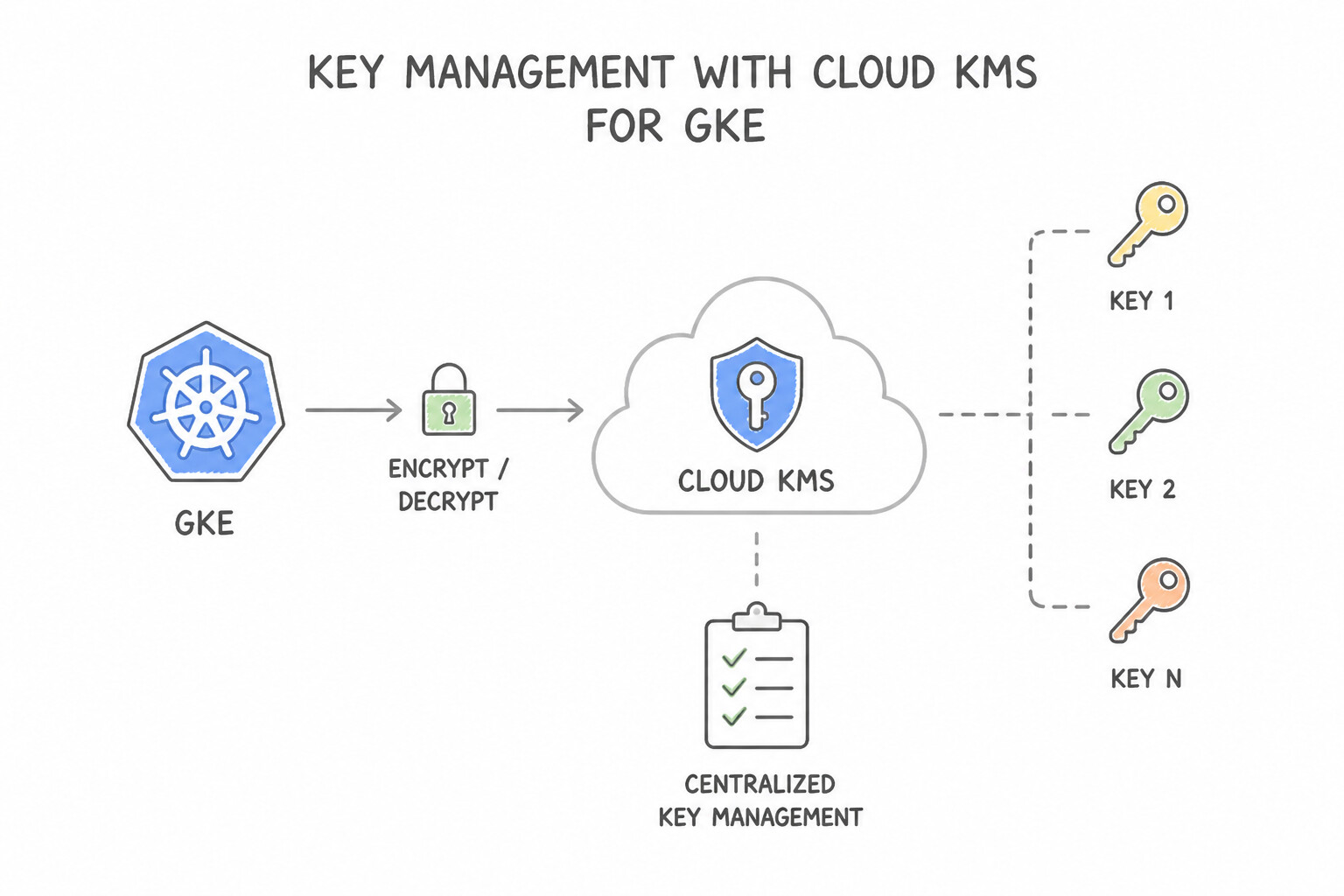
- Cloud Key Management Service (
Cloud KMS—2.3a): - Customer-Managed Encryption Keys (
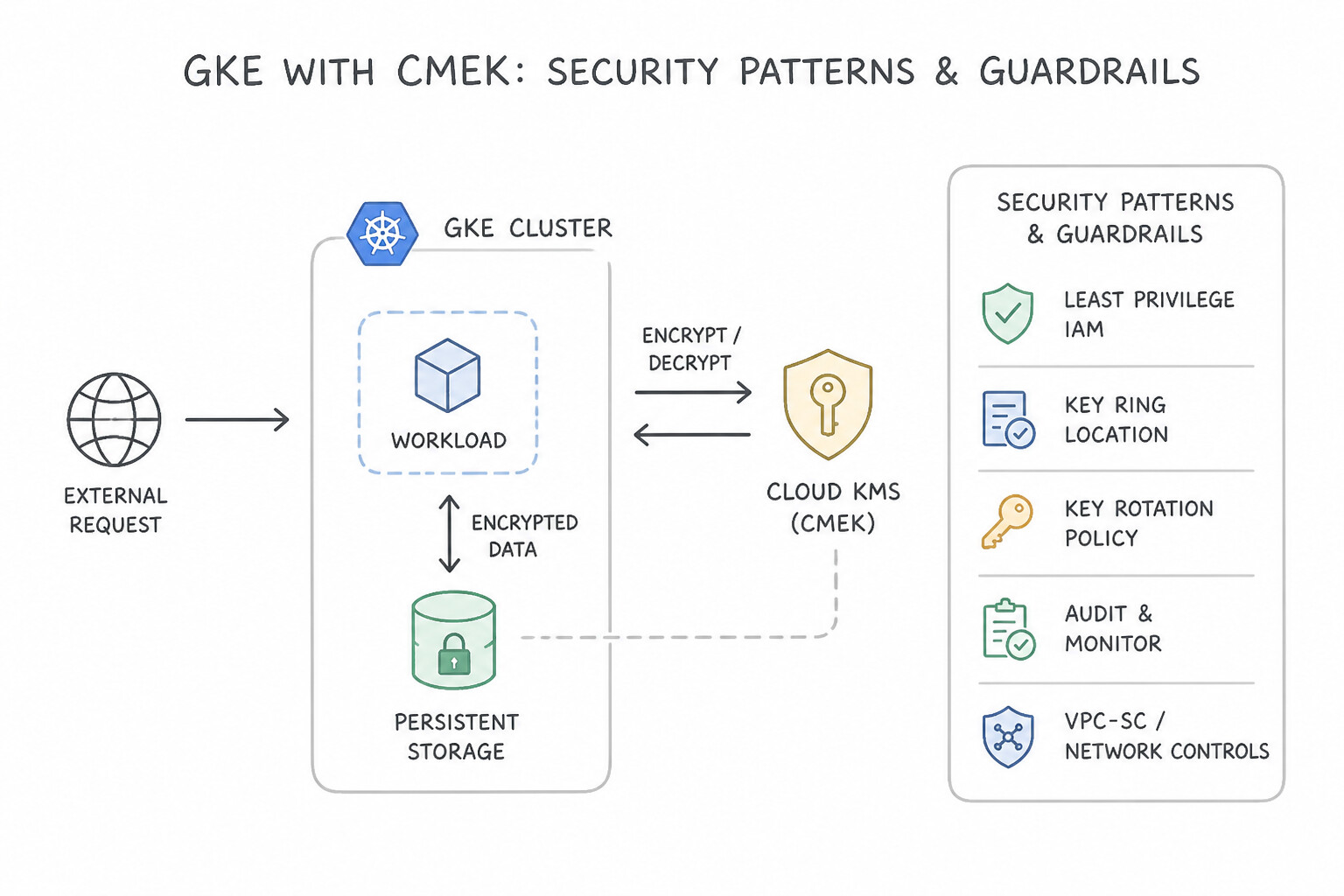
CMEK): By default, Google Cloud encrypts all data at rest using Google-managed keys. When compliance requires explicit control over key rotation schedules, key destruction, or hardware security modules (Cloud HSM / Cloud EKM), configure CMEK on Artifact Registry, Cloud Build buckets, Secret Manager, GKE persistent disks / boot disks, and Cloud Storage. - Asymmetric Keys for Supply Chain Signing: Binary Authorization Attestors use Cloud KMS asymmetric signing keys (
EC_SIGN_P256_SHA256orRSA_SIGN_PSS_4096_SHA256) so the private key never leaves Google's FIPS 140-2/3 validated KMS hardware; Cloud Build calls the KMS API (roles/cloudkms.signerVerifier) to sign image digests. - Envelope Encryption: To encrypt payloads larger than 64 KB with KMS, generate a local Data Encryption Key (
DEK) to encrypt the data, and encrypt (wrap) the DEK using the Key Encryption Key (KEK) in Cloud KMS.
Key Implementation Patterns
- Securing Kubernetes Secrets at Rest: Use Enable Application-layer Secrets Encryption on the cluster and select a Cloud Key Management Service (Cloud KMS) key. Application-layer Secrets Encryption (ALSE) encrypts secrets in etcd using a Cloud KMS key, satisfying the requirement for application-layer encryption.
- Binary Authorization Attestation: Use Create an asymmetric key pair in Cloud Key Management Service (Cloud KMS) with the purpose of 'Asymmetric Sign/Verify'. Configure the Attestor to use the specific key version. Attestors require asymmetric keys to verify signatures. Storing them in Cloud KMS provides secure, centralized management.
- Encrypting Terraform State Files: Use Create a key in Cloud Key Management Service (Cloud KMS) and set it as the default encryption key for the bucket. Using Cloud KMS (CMEK) allows the security team to manage the encryption keys and set them as the bucket default. (Avoid alternative: Google-managed keys do not fulfill the requirement for the security team to manage the keys.)
Key Takeaways (2.3a)
- Kubernetes Secrets are base64 encoded by default, which is not secure enough for high-compliance workloads.
- GKE encrypts storage by default, but this does not protect secrets within the etcd database from API-level access.
- Application-layer Secrets Encryption (ALSE) integrates GKE with Cloud KMS to encrypt secrets at the application layer.
- Always use Cloud KMS keys for envelope encryption when meeting PCI-DSS or other strict compliance standards on GKE.
Consideration 2.3b: Configuration and secret management (e.g., Secret Manager, Certificate Manager, Parameter Manager, Workload Identity Federation)
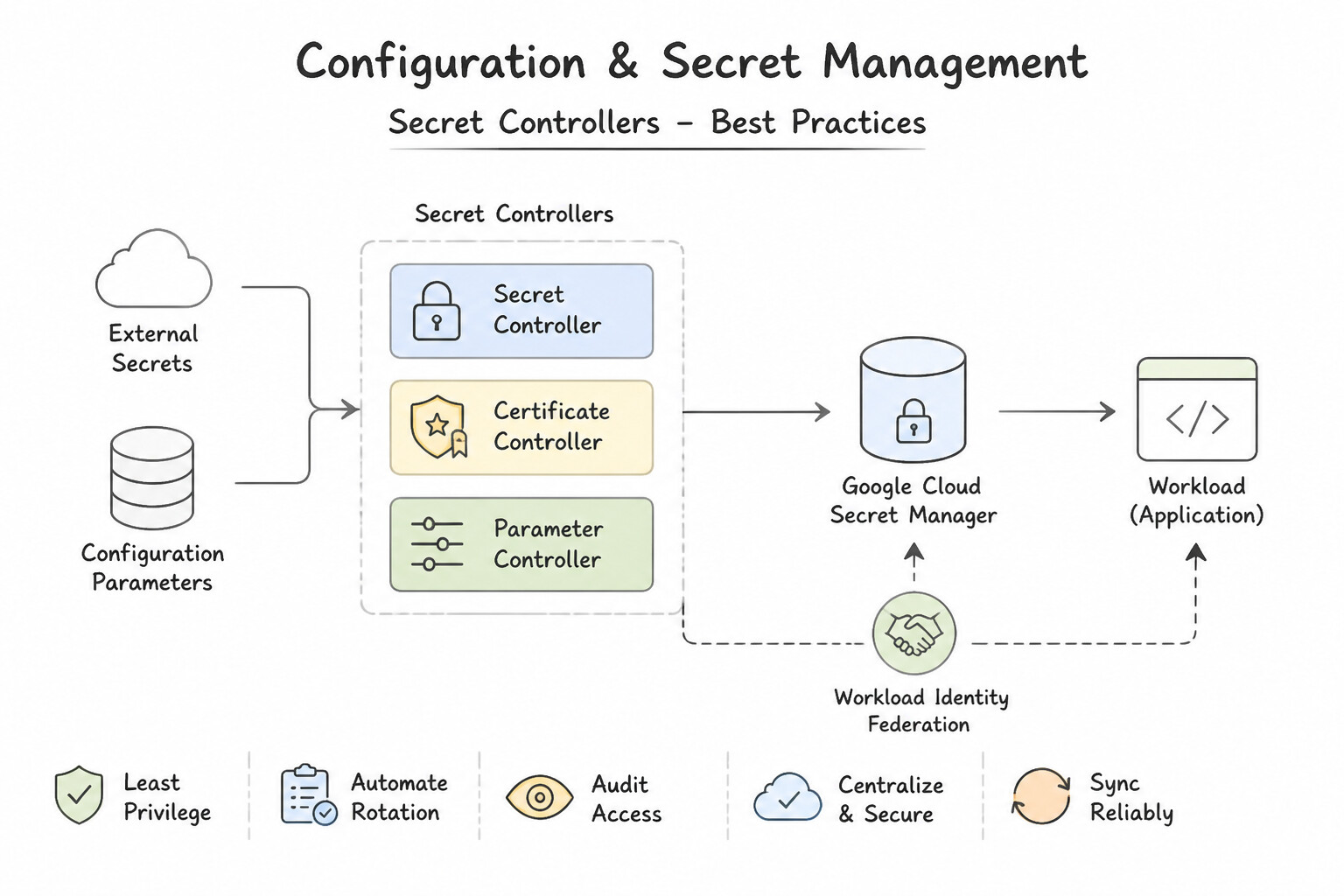
- Secret Manager Best Practices (2.3b):
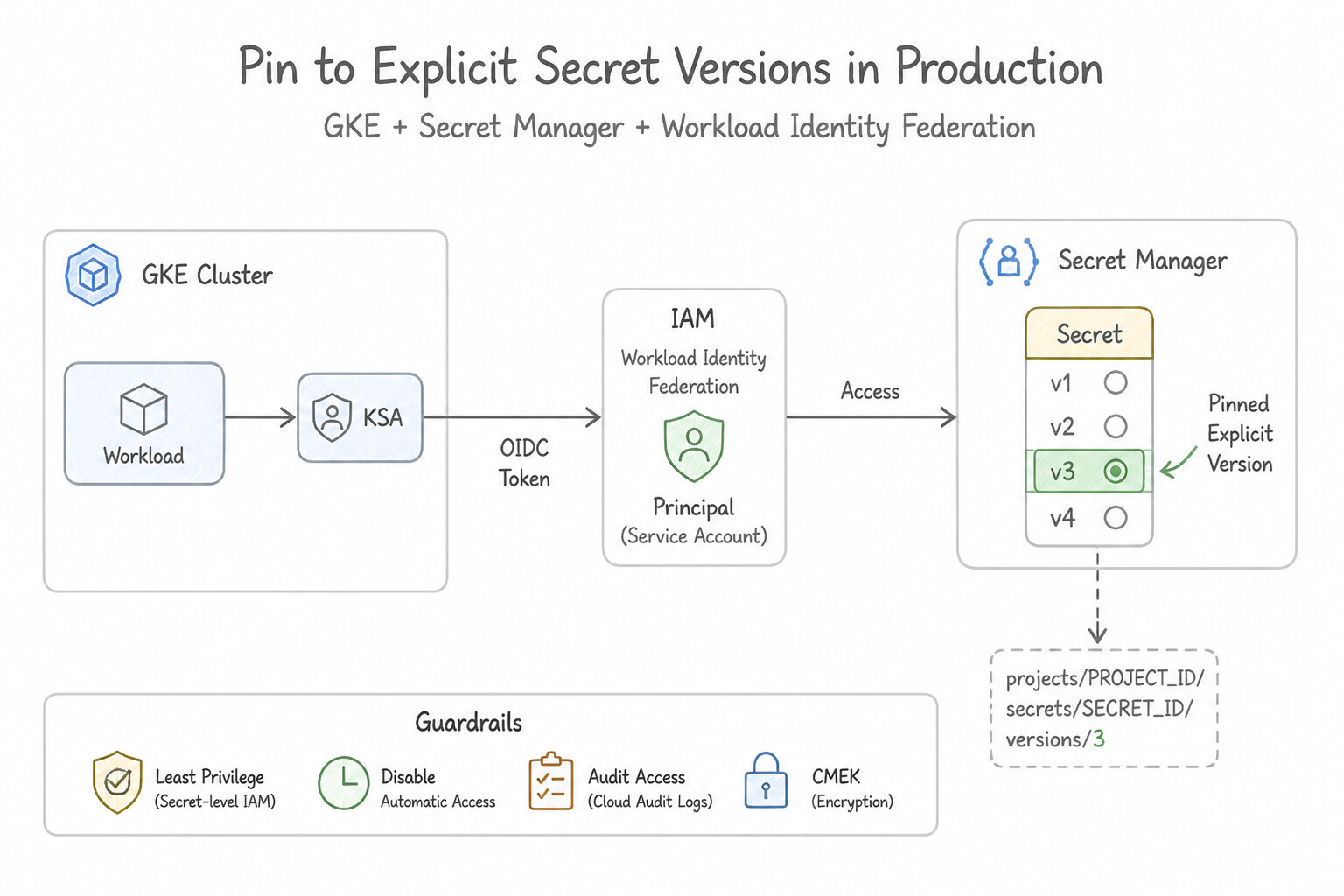
- Pin to Explicit Secret Versions in Production: Never reference the mutable
latestalias in critical production workloads where a malformed secret push could crash all pods on restart; pin to a verified immutable version number (e.g.,projects/p/secrets/db-pass/versions/4), or use gradual rotation with dual active credentials. - Automated Zero-Downtime Secret Rotation: Configure a Rotation Schedule on the Secret Manager secret, which publishes
SECRET_ROTATEevents to a Pub/Sub topic triggering a Cloud Run function that updates the downstream database password (using the alternating/dual-user pattern) and adds a new Secret Version. - Least-Privilege Per-Secret IAM: Grant
roles/secretmanager.secretAccessoron the individual secret resource (not at the project level!) only to the specific runtime Service Account that needs it. - Parameter Manager, Certificate Manager & Workload Identity Federation (2.3b):
- Use Parameter Manager to store, version, and template structured application configurations (JSON/YAML) across environments (
dev,prod) without mixing plain configuration with high-sensitivity credentials. - Use Certificate Manager (paired with Certificate Authority Service for private CAs or Google-managed public CAs) to automate TLS certificate issuance and zero-touch renewal on global and regional Load Balancers.
- Use Workload Identity Federation (
WIF) with strict Attribute Conditions (e.g., restricting token exchange toassertion.repository == 'my-org/my-repo' && assertion.ref == 'refs/heads/main') so external GitHub Actions, GitLab CI, or Jenkins pipelines authenticate without a single static JSON key.
Key Implementation Patterns
- Secrets in GKE Workloads: Use Enable the Secret Manager add-on for GKE. Configure a SecretProviderClass and mount the secret as a volume. The Secret Manager add-on mounts secrets directly from Secret Manager into the Pod as a volume, bypassing etcd storage. (Avoid alternative: Standard Kubernetes Secrets are stored in etcd, which violates the security requirement.)
- GitHub Actions Authentication: Use Configure Workload Identity Federation. Create a Workload Identity Pool and Provider, and configure the GitHub Actions workflow to impersonate the service account using OpenID Connect (OIDC). Workload Identity Federation uses OIDC to allow external providers to impersonate service accounts without managing keys.
Key Takeaways (2.3b)
- Standard Kubernetes Secrets are stored in the cluster's etcd database.
- To avoid storing secrets in etcd, use the Secret Manager add-on for GKE (Secrets Store CSI Driver).
- The CSI driver mounts secrets as volumes, which is often more secure than environment variables.
- Never embed secrets directly in container images or source code.
Consideration 2.3c: Build versus runtime secret injection
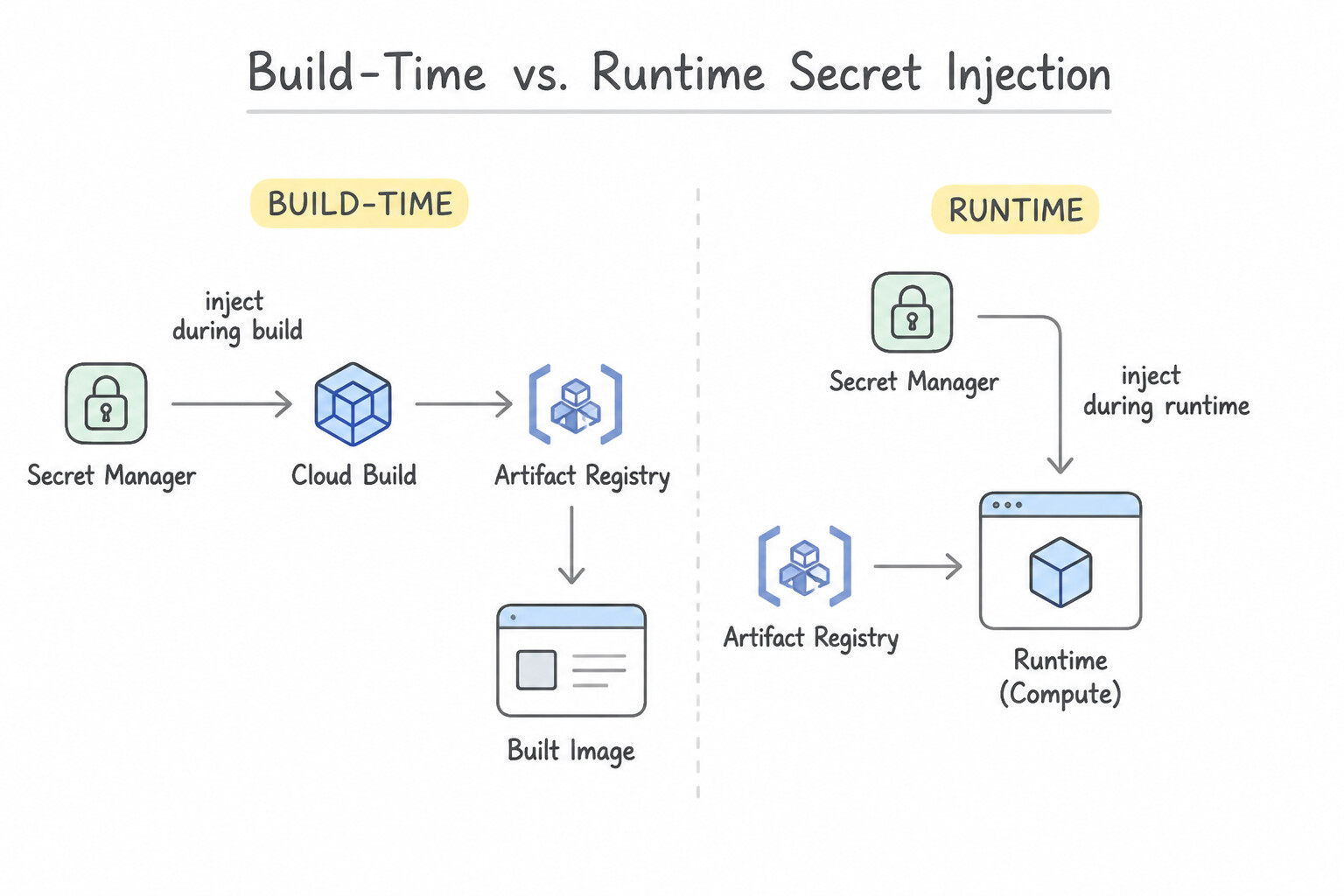
- Build-Time vs. Runtime Secret Injection (2.3c):
- When a Secret Is Needed During the Build (e.g., an SSH key or token to clone a private dependency repo): Declare an
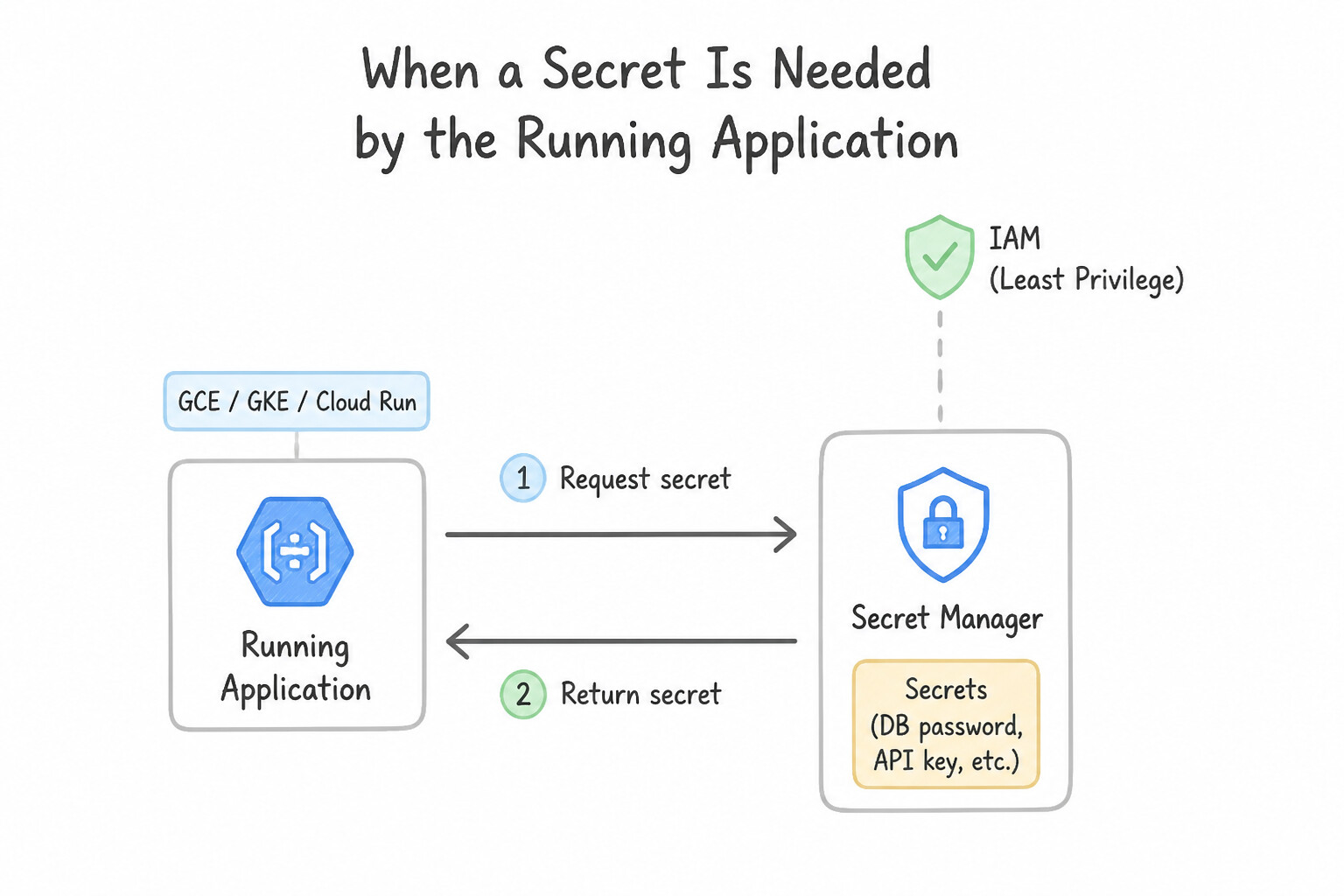
availableSecretsblock incloudbuild.yamlreferencing Secret Manager, and expose it to the specific build step viasecretEnv: ['MY_TOKEN']using$$MY_TOKENinside anentrypoint: 'bash'script (or mount it via Docker BuildKit--secretin memory). Never pass it todocker build --build-argorENV! - When a Secret Is Needed by the Running Application (e.g., a database password or Stripe API key): Inject it at runtime directly into the target compute platform (
Cloud Run --set-secretsorGKE Secret Manager CSI Driver / Workload Identity). - Volume Mount vs. Environment Variable at Runtime: Mounting a Secret Manager secret as a file volume (
/var/secrets/db-pass) is superior to injecting it as an environment variable because: (1) environment variables are often accidentally dumped into crash logs or/proc/self/environ, and (2) mounted secret volumes in Cloud Run (when not pinned to a static version) and GKE CSI Driver can dynamically refresh rotated secret versions without restarting the container or creating a new deployment revision!
Key Implementation Patterns
- Prevention of Secret Leakage via Container Registry: Use Remove the configuration file from the Dockerfile. Configure the application to retrieve credentials from Secret Manager at runtime. Secrets should not be baked into images; use Secret Manager to inject them securely at runtime.
- Secret Rotation without Artifact Rebuilds: Use Store the password in Secret Manager. Configure your deployment to access the secret at runtime as an environment variable or volume mount. Runtime injection allows you to separate configuration from the build artifact, enabling password updates without rebuilding images.
- Handling Build-Time Dependencies for Private Repositories: Use Store the SSH key in Secret Manager. Configure the Cloud Build step to access the secret version and use it to clone the repository. Use Secret Manager to securely mount the key during the build step only. (Avoid alternative: Substitution variables can expose secrets in build logs and the UI.)
Key Takeaways (2.3c)
- Never embed secrets (passwords, keys, credentials) directly into container images or Dockerfiles.
- Container image layers are persistent; deleting a file in a later layer does not remove it from previous layers.
- Use Google Cloud Secret Manager to store sensitive data centrally and securely.
- Inject secrets at runtime (as environment variables or mounted volumes) rather than at build time.
Quick Decision Cheat Sheet (Subsection 2.3)
If the Scenario Requires... | Choose This Google Cloud Pattern | Avoid This Common Mistake |
|---|---|---|
"Developer committed a database password or SA JSON key to Git / Dockerfile" | Revoke/rotate the compromised credential immediately, move it to Secret Manager (or switch to Workload Identity Federation), and inject at runtime | Just deleting the file in a new Git commit without rotating the exposed secret |
"Cloud Build cloudbuild.yaml fails when referencing a Secret Manager variable with $MY_SECRET" | Add availableSecrets, specify secretEnv: ['MY_SECRET'] on the build step, set entrypoint: 'bash', and escape with double dollar signs $$MY_SECRET | Putting the secret in plain text inside the substitutions: block |
"Restrict a GitHub Actions Workload Identity Pool so forked repos or feature branches cannot impersonate the prod deploy Service Account" | Configure an Attribute Condition on the Workload Identity Provider validating assertion.repository and assertion.ref == 'refs/heads/main' | Granting the entire Workload Identity Pool principal set roles/owner |
"Encrypt Artifact Registry images, Cloud Build buckets, and GKE disks with keys whose rotation and destruction you control" | Configure Customer-Managed Encryption Keys ( CMEK) in Cloud KMS | Writing a custom Python script to AES-encrypt Docker tarballs before pushing |
"Automate TLS certificate provisioning and renewal for global external Application Load Balancers" | Use Google Cloud Certificate Manager | Running a manual Let's Encrypt certbot script on a developer laptop every 60 days |
Further Reading (Subsection 2.3)
- Encrypting secrets at the application layer — This guide explains how to enable Application-layer Secrets Encryption on GKE using Cloud KMS keys. It details the architecture of envelope encryption and the steps to configure it for new or existing clusters.
- Creating Attestors in Binary Authorization — Refer to the section on 'Creating an attestor' which details setting up Cloud KMS keys for the attestor.
- Customer-managed encryption keys (CMEK) — Documentation explaining how CMEK works with Cloud Storage and how to set a default key for a bucket.
- Cloud Key Management Service overview — Overview of Cloud KMS capabilities including key creation and rotation.
- Use Secret Manager add-on with Google Kubernetes Engine — Documentation on how the Secret Manager add-on works, specifically highlighting that secrets are mounted as volumes and not stored in etcd.
- Workload Identity Federation — Official documentation explaining how to configure workload identity federation to let external workloads access Google Cloud resources without service account keys.
Subsection 2.4: Securing the deployment pipeline
The Big Picture
Imagine your team configures a vulnerability scanner inside Cloud Build that fails the build if a CRITICAL CVE is found. A week later, two things happen: (1) a critical zero-day CVE (Log4Shell / XZ Utils) is disclosed in an image that was built last month, and (2) an engineer under deadline pressure builds a quick hotfix image on their local laptop and runs kubectl set image directly against the production GKE cluster. Without a defense-in-depth software supply chain architecture, both vectors bypass your CI scanner completely!
Google Cloud secures the software supply chain end-to-end across three enforcement rings:
- Continuous Vulnerability Scanning (
2.4a—Artifact Analysis): Scans images automatically on push to Artifact Registry and continuously monitors already-pushed images as the CVE database updates (for up to 30 days since last push/pull), storing findings as Container Analysis Occurrences under aPACKAGE_VULNERABILITYNote. - Cryptographic Provenance & Deploy-Time Admission Control (
2.4b—SLSA&Binary Authorization): Cloud Build automatically generates authenticated SLSA Level 3 build provenance (proving the image was built by a trusted builder from a verified source repo). Each pipeline stage (CI build, vulnerability gate, QA verification) signs an Attestation using an asymmetric key in Cloud KMS. At deployment time, Binary Authorization acts as a mandatory admission controller on GKE and Cloud Run—rejecting any image that is not referenced by@sha256digest or that lacks the required cryptographic attestations. - Environment-Scoped IAM Isolation (2.4c): Strict IAM boundaries ensure that neither developers nor non-prod CI runners have direct write access to production runtimes, while providing an audited Break-Glass (
breakglassJustification) path for P0 emergencies.
Consideration 2.4a: Artifact Analysis and vulnerability scanning
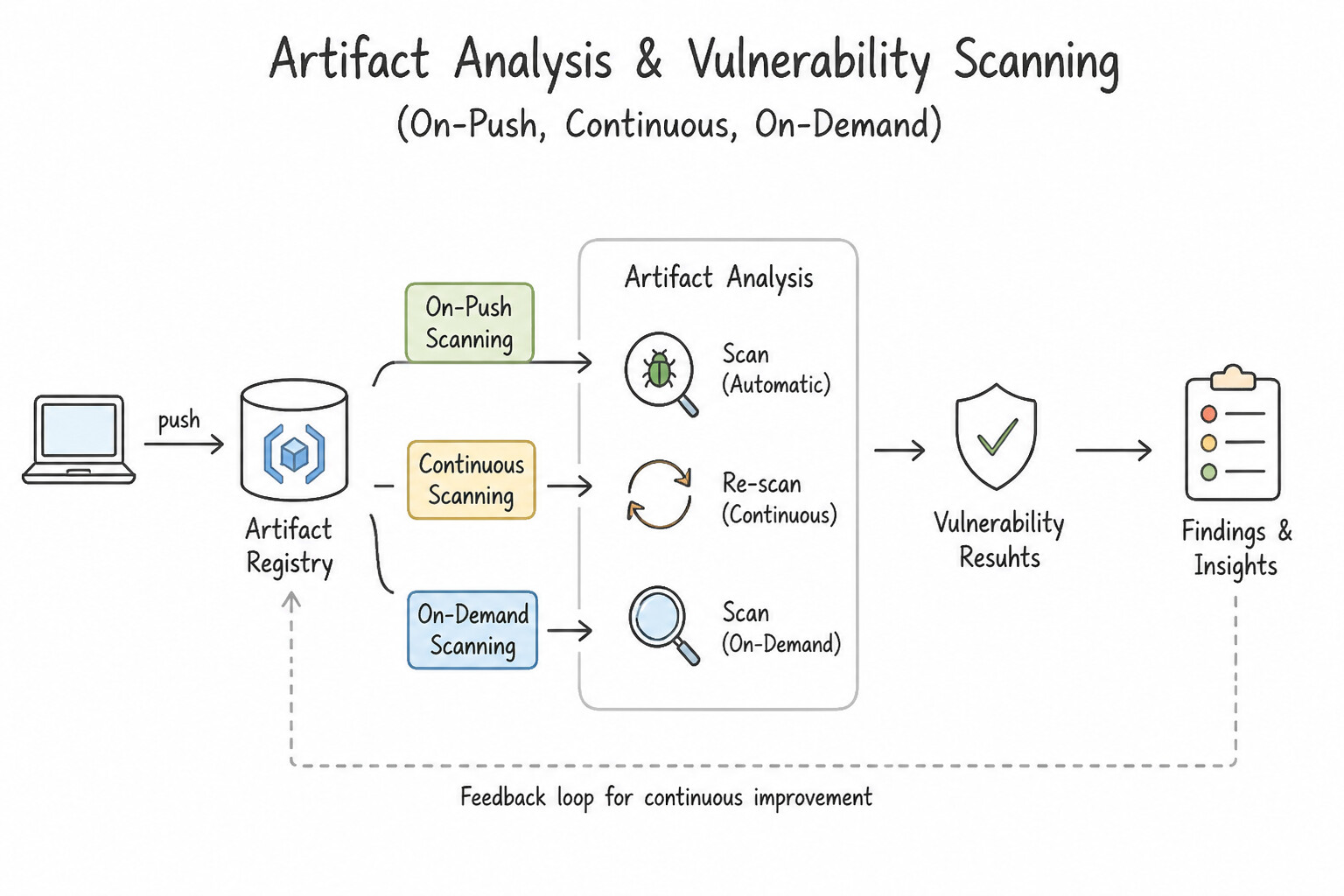
- Artifact Analysis (
On-Push,Continuous, andOn-DemandScanning —2.4a): - Automated Scanning in Artifact Registry: Scans OS packages (Debian, Ubuntu, Alpine, RHEL, SUSE) and application language packages (Java/Maven, Python, Go, Node.js, .NET, Rust) as soon as an image is pushed, and continuously re-evaluates existing images when new CVEs are published.
- On-Demand Scanning API (
gcloud artifacts docker images scan): Allows scanning local container images inside a CI build step before pushing them to a production Artifact Registry repository. - Smart Pipeline Vulnerability Gates: In
cloudbuild.yaml, poll until the scan status isFINISHED, then querygcloud artifacts docker images list-vulnerabilitiesand fail the build ifeffectiveSeverity == CRITICAL(orHIGHwith a known fix available,fixAvailable: true). Integrate Pub/Sub notifications (container-analysis-occurrences-v1) to alert security teams if a new zero-day CVE is discovered in an already-deployed image.
Key Implementation Patterns
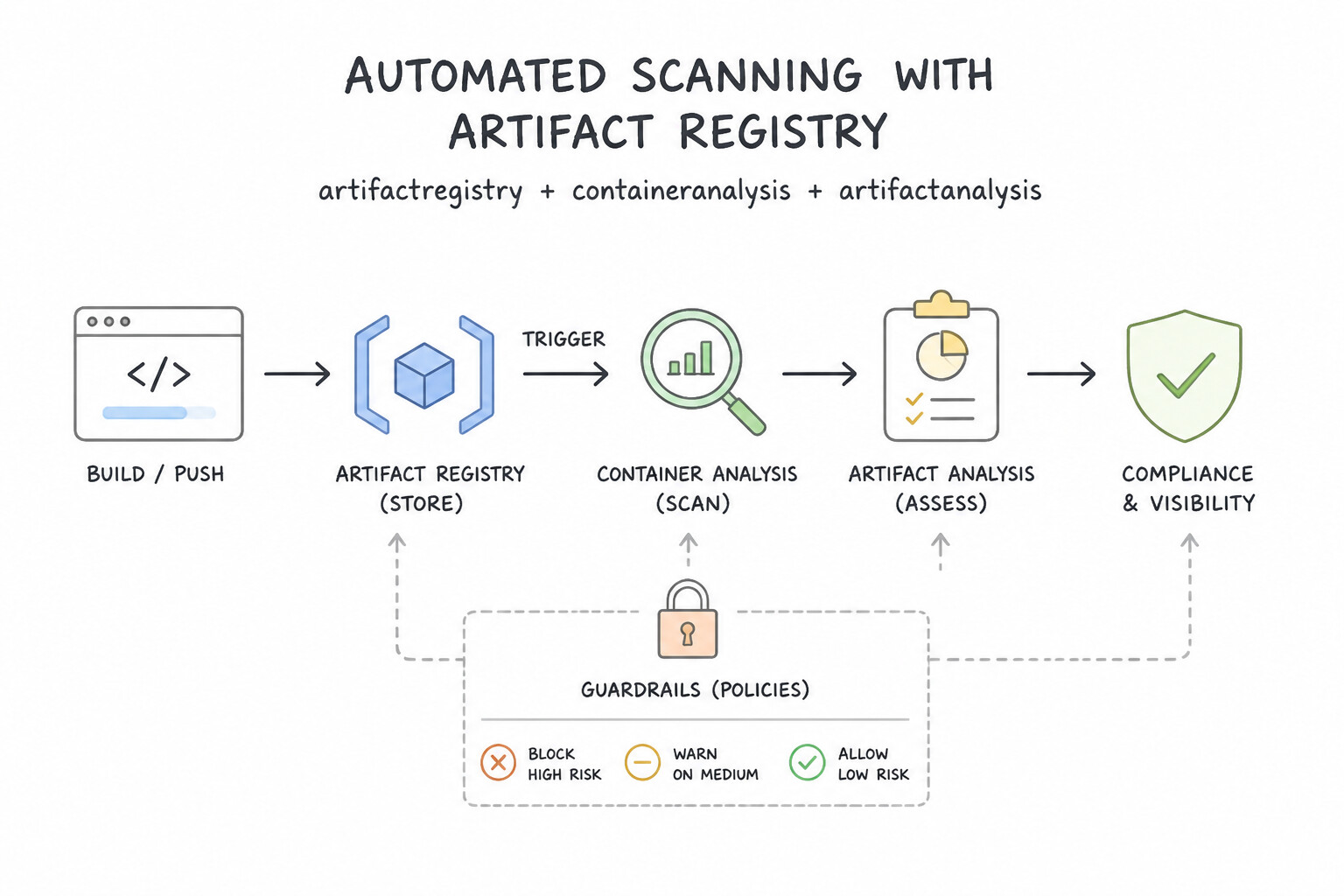
- Enabling Automatic Vulnerability Scanning: Use Enable the Container Analysis API in your project. Automatic vulnerability scanning in Artifact Registry requires the Container Analysis API to be enabled in the project. (Avoid alternative: Binary Authorization enforces policies based on scan results but does not perform the actual scanning.)
- Scanning Language Packages (Maven/Go/Python): Use Review the vulnerability report for Python dependencies and update the package versions in your requirements file. Artifact Analysis scans language dependencies; you must update the vulnerable libraries in your requirements file.
- Gating Deployments with Binary Authorization: Use Configure Binary Authorization with an attestor that verifies scan results and signs the image. Binary Authorization enforces deployment policies by requiring an attestation that confirms the image passed vulnerability scanning.
Key Takeaways (2.4a)
- Artifact Registry stores container images but relies on other services for advanced features.
- The Container Analysis API powers vulnerability scanning for Google Cloud.
- Automatic scanning is a toggle or API enablement, not a manual script configuration.
- Always check if the required API is enabled when a platform feature seems to be missing.
Consideration 2.4b: Software supply chain security (e.g., Binary Authorization, Supply-chain Levels for Software Artifacts [SLSA] framework)
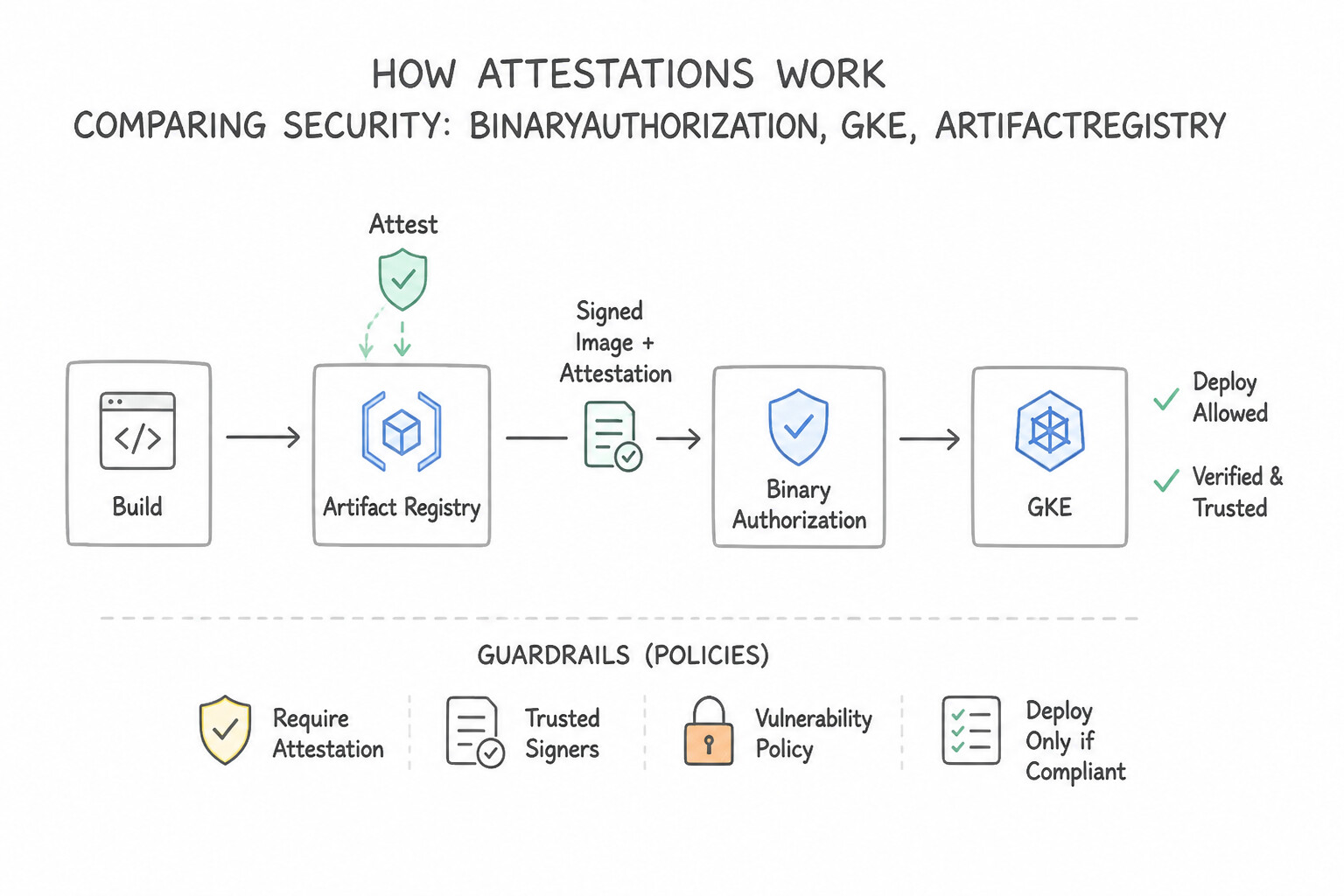
!Software supply chain security (e.g., Binary Authorization, Supply-chain Levels for Software Artifacts [SLSA] Software supply chain security (e.g., Binary Authorization, Supply-chain Levels for Software Artifacts [SLSA] framework).
![Software supply chain security (e.g., Binary Authorization, Supply-chain Levels for Software Artifacts [SLSA]](images/pdoe-2.4b-1-binary-authorization.jpg)
- Binary Authorization (
Policy,Attestors,Notes,Occurrences,KMS—2.4b): - How Attestations Work: An Attestor is a Binary Authorization resource backed by a Container Analysis
Note(ATTESTATION_AUTHORITY) and a Cloud KMS Asymmetric Public Key. When a build passes a check (e.g., unit tests, vulnerability scan, or staging verification), Cloud Build uses the Cloud KMS Private Key to cryptographically sign the image's exactimage@sha256:digestand stores the signature as anOccurrencein Container Analysis. - Always Deploy by
@sha256:Digest: Binary Authorization verifies signatures against immutable SHA256 digests, never mutable tags like:v1.2or:latest! - Rollout Strategy (
DRYRUNAudit First, ThenENFORCED): When introducing Binary Authorization to an existing production GKE cluster, first set the policy enforcement mode toDRYRUN_AUDIT_LOG_ONLY(logs policy violations to Cloud Audit Logs without blocking pods) to verify exemptions and base images before switching toENFORCED_BLOCK_AND_AUDIT_LOG. - Break-Glass Procedure: In a genuine P0 emergency where the CI pipeline is down, an engineer can bypass Binary Authorization by adding the pod annotation
image-policy.k8s.io/break-glass: "true"(oralpha.image-policy.k8s.io/break-glass: "<justification>"). Every break-glass deployment is logged to Cloud Audit Logs—always pair Binary Authorization with a Log-Based Metric / Alerting Policy that pages the Security Operations team wheneverbreakGlassJustificationappears in audit logs! - SLSA (
Supply-chain Levels for Software Artifacts): An industry framework (Levels 0 to 3+) for preventing tampering and ensuring artifact integrity. Cloud Build natively achieves SLSA Level 3 for containerized builds by executing builds in isolated, ephemeral, non-root environments and emitting authenticated, non-falsifiable provenance metadata (Software Delivery Shield).
Key Implementation Patterns
- Enforcing Signed Images in GKE: Use Enable Binary Authorization on the cluster. Create an attestor and configure the policy to require attestations. Binary Authorization enforces deploy-time security by requiring images to be signed (attested) by trusted authorities. (Avoid alternative: Shielded Nodes protect the VM infrastructure, not the software supply chain of the container images.)
- Handling Emergency Deployments (Break Glass): Use Update the Kubernetes manifest to include the image-policy.k8s.io/break-glass: "true" annotation. The 'break glass' annotation explicitly bypasses checks for a single deployment and logs the event. (Avoid alternative: Disabling the policy globally removes security for all deployments, which is an excessive risk.)
- Automated Vulnerability Gating: Use Add a build step in Cloud Build to check vulnerability results from Container Analysis. Create a Binary Authorization attestation if the image passes the check. Automate the gating process by checking Container Analysis scan results in a build step and creating a Binary Authorization attestation only if the image is secure.
Key Takeaways (2.4b)
- Binary Authorization creates a security perimeter that ensures only trusted container images are deployed.
- Attestors are entities that verify images, and attestations are the digital signatures proving that verification.
- Policies in Binary Authorization can be configured to block any deployment that lacks the required attestations.
- Binary Authorization ensures software supply chain security by verifying image signatures before deployment.
Consideration 2.4c: IAM policies based on environment
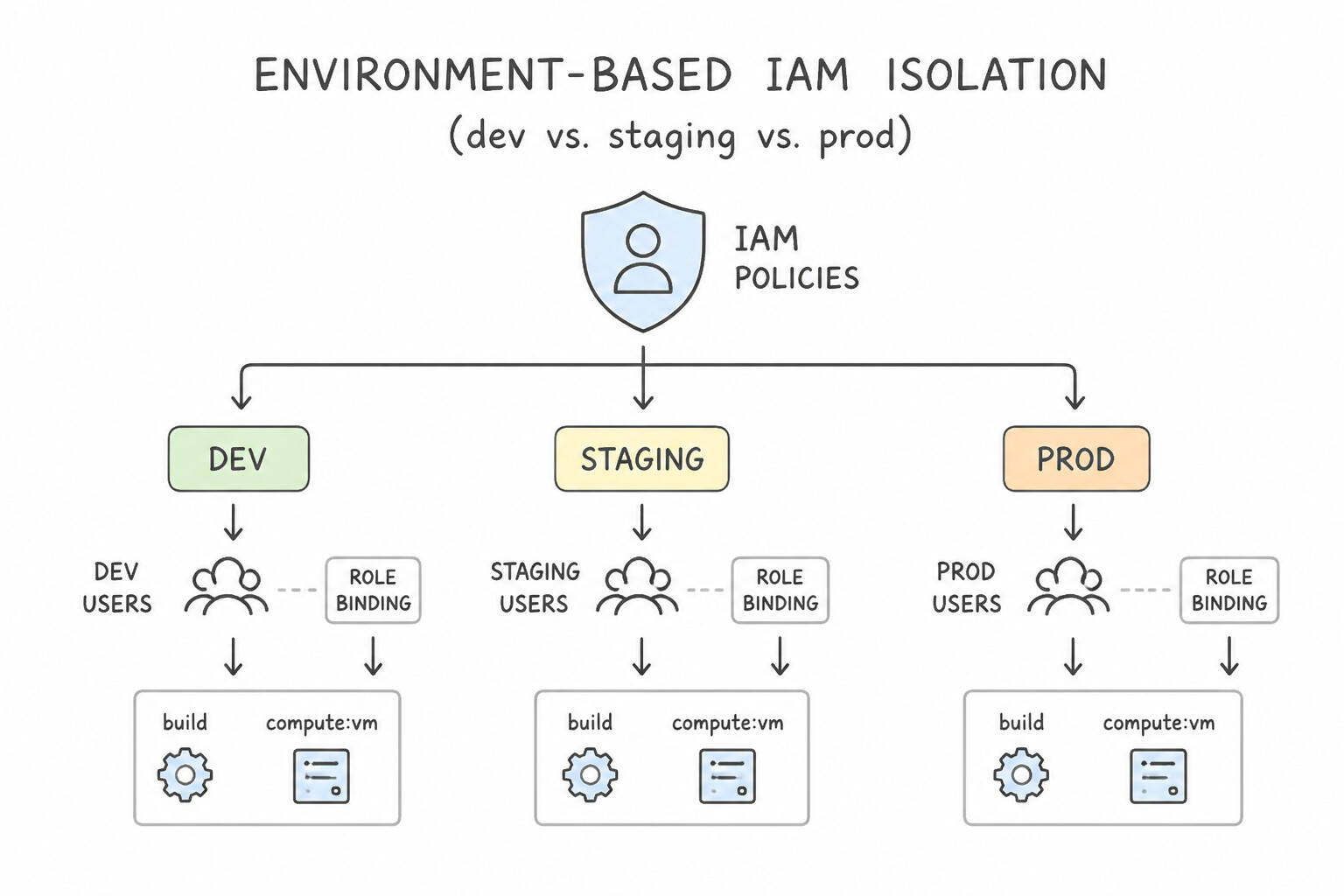
- Environment-Based IAM Isolation (
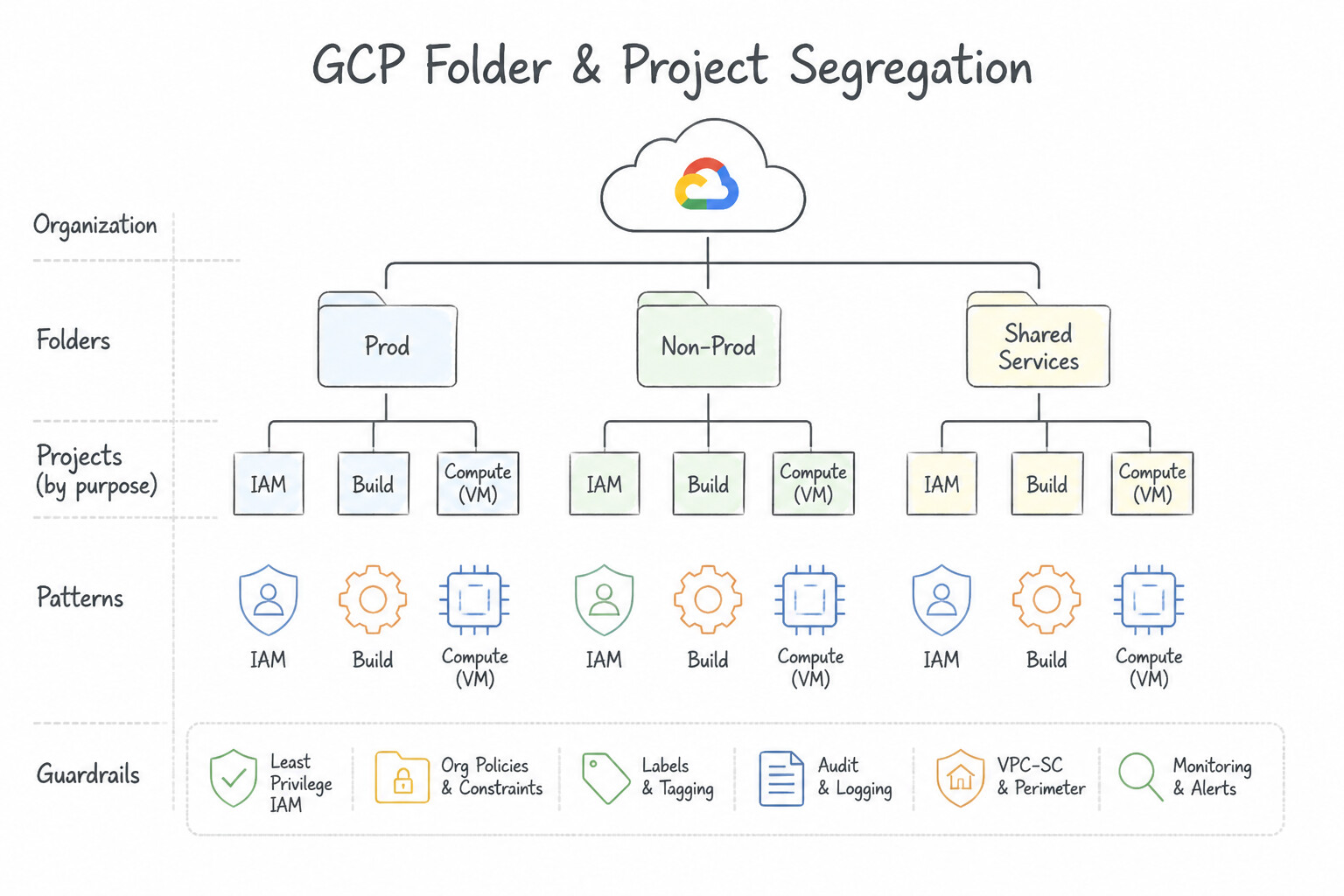
devvs.stagingvs.prod—2.4c): - Folder & Project Segregation: Place
dev,staging, andprodin separate Google Cloud Projects (grouped under environment Folders) so IAM bindings, Service Accounts, and Binary Authorization policies are strictly isolated per environment. - Progression of Human & Pipeline Access:
devEnvironment: Developers may haveroles/container.developerorroles/run.developerfor rapid iteration, and Binary Authorization is typically set toALWAYS_ALLOWor requires only a basicbuilt-by-cloud-buildattestation.stagingEnvironment: Automated deployments only via thestagingCloud Deploy target Service Account; Binary Authorization requiresbuilt-by-cloud-build+vulnerability-scan-passedattestations.prodEnvironment: Zero direct human write access (roles/vieweror read-only troubleshooting access only; emergency write via Privileged Access Manager [PAM]). Only the dedicatedprodCloud Deploy Execution Service Account has deployment permissions, and Binary Authorization requires the full chain (build+sec-scan+qa-verifiedattestations).
Key Implementation Patterns
- Separation of Duties: Developer Access vs. Pipeline Access: Use Assign developers the Editor role in the Development project and the Viewer role in the Production project. Assign the Cloud Build service account the Editor role in the Production project. Developers get write access in Dev and read-only in Prod, while the Cloud Build service account gets write access in Prod to perform deployments.
- Cross-Project Deployment Permissions: Use In the "Production" project, add the Cloud Build service account email from the "Tooling" project to the IAM policy and grant it the required roles. To allow a service account from one project to act in another, add the service account's email to the target project's IAM policy with the necessary roles.
- Securing Cloud Build with Custom Service Accounts: Use Create a user-managed service account. Grant it the App Engine Admin and Service Account User roles. Configure the Cloud Build trigger to use this service account. Create a custom service account with only the necessary roles (App Engine Admin and Service Account User) and assign it to the Cloud Build trigger.
Key Takeaways (2.4c)
- Developers should generally have Viewer (Read-Only) access to Production to debug issues without risking stability.
- The CI/CD pipeline (Service Account) must have sufficient permissions (e.g., Editor or specific Admin roles) to deploy resources in the target environment.
- Avoid granting
iam.serviceAccountUseron high-privilege service accounts to users, as it allows privilege escalation or bypass of controls.- Different environments (Dev vs. Prod) require different IAM policies for the same user groups.
Quick Decision Cheat Sheet (Subsection 2.4)
If the Scenario Requires... | Choose This Google Cloud Pattern | Avoid This Common Mistake |
|---|---|---|
"Pod deployment to GKE is rejected by Binary Authorization even though the image was signed in Cloud Build; manifest uses image: my-app:v1.2" | Update the deployment manifest (or Skaffold rendering) to reference the immutable image@sha256:<digest> instead of a mutable tag | Disabling Binary Authorization attestation verification |
"Ensure only images with zero Critical CVEs can be promoted to production" | Query Artifact Analysis vulnerability occurrences in Cloud Build; only sign the Security Attestation (via Cloud KMS) if CRITICAL == 0, and enforce that Attestor in Binary Authorization | Running apt-get upgrade inside a live production container |
"Verify that a container image was built from an authentic Git commit on a hardened ephemeral runner without tampering" | Use Cloud Build authenticated SLSA Level 3 build provenance (viewed via Artifact Registry / Software Delivery Shield) | Writing a text file with the Git commit SHA into /tmp/version.txt inside the container |
"Enforce different Binary Authorization rules for specific namespaces or system images inside the same GKE cluster" | Configure Cluster-Specific / Namespace-Specific Rules and Exempt Image Allowlists (for Google-managed gke.gcr.io system images) in the Binary Authorization policy | Creating separate GCP Organizations for every namespace |
"Developers can deploy directly to prod GKE from their laptops using their own IAM credentials" | Remove roles/container.developer from human users in prod and grant it only to the prod Cloud Deploy Execution Service Account | Asking developers to sign a policy promising not to run kubectl apply against prod |
Further Reading (Subsection 2.4)
- Artifact analysis and vulnerability scanning — This page explains how automatic scanning works and explicitly states that you must enable the Container Analysis API to use this feature.
- Quickstart: Scan OS packages automatically — Details the difference between OS scanning and other analysis types.
- Binary Authorization overview — Explains how Binary Authorization works with GKE to enforce deploy-time security policies.
- Creating attestations based on vulnerability scans — Details the process of using an attestor to sign images after verifying vulnerability scan results.
- Use breakglass (GKE, Distributed Cloud) — Official documentation explaining how to deploy an image that violates policy using the break glass annotation.
- Attestations overview — This guide explains how to use Cloud Build to check Container Analysis vulnerability scan results and create an attestation if the checks pass.
Book TOC · Previous · Chapter 2 of 6 · Next
AwesomeGCP.com Learning
The approach taken is a question-led learning approach: you explore realistic project scenarios where you need to make decisions or take actions to achieve business goals within specific constraints. Instead of passive learning, you are challenged to think and work through the options to master the Professional Cloud DevOps Engineer (PDOE) certification!