Book TOC · Previous · Chapter 2 of 6 · Next
Chapter 2: High Availability, Disaster Recovery Topologies, Backups, PITR & Production Deployment
Chapter Focus: RPO/RTO engineering, Cloud SQL regional HA vs. cross-region read replicas, AlloyDB primary/read pool HA, Spanner multi-region quorum, automated backups, PITR binary/WAL logs, and failover drills.
Subsection 1.2: Evaluate database high availability and disaster recovery options given the requirements
The Big Picture
On paper, every architect claims their database has "High Availability." In production, disaster strikes when teams conflate Zonal High Availability (HA) with Regional Disaster Recovery (DR), or when they ignore the operational physics of planned maintenance windows:
- The "Standby vs. Read Replica" Confusion (1.2a): In Cloud SQL, a Regional HA Configuration deploys a primary instance in Zone A and a hidden standby instance in Zone B of the same region, backed by synchronous block-level replication on a Regional Persistent Disk. If Zone A fails, the standby takes over in ~60–120 seconds with
RPO = 0(zero data loss). However, if the entire region (us-central1) goes down, both Zone A and Zone B are offline! Surviving a regional outage requires a Cross-Region Read Replica inus-east1—which uses asynchronous replication (RPO > 0) and must be promoted (either manually or via orchestrated DR workflows) to become the new primary. - The Multi-Region Write-Latency Physics Trap (1.2a): When a business demands
RPO = 0andRTO ≈ 0across multiple regions, asynchronous Cloud SQL replicas cannot meet the requirement because in-flight binlog/WAL transactions can be lost during an abrupt regional failure. You must step up to Cloud Spanner Multi-Region, which uses Paxos synchronous quorum replication across 2 read-write regions + 1 witness region ( delivering a 99.999% SLA). Even there, placing the Default Leader Region far from your write-heavy application tier introduces speed-of-light network RTT on every commit. - The Uncontrolled Maintenance Restart Trap (1.2b): Managed databases require periodic OS and engine security patches. If a team leaves Maintenance Windows set to
"Any window"and ignores Maintenance Notifications and deny maintenance periods, Google Cloud may apply a brief restart right in the middle of Black Friday peak checkout!
Consideration 1.2a: Evaluate tradeoffs between multi-regional, regional, and zonal database deployment strategies
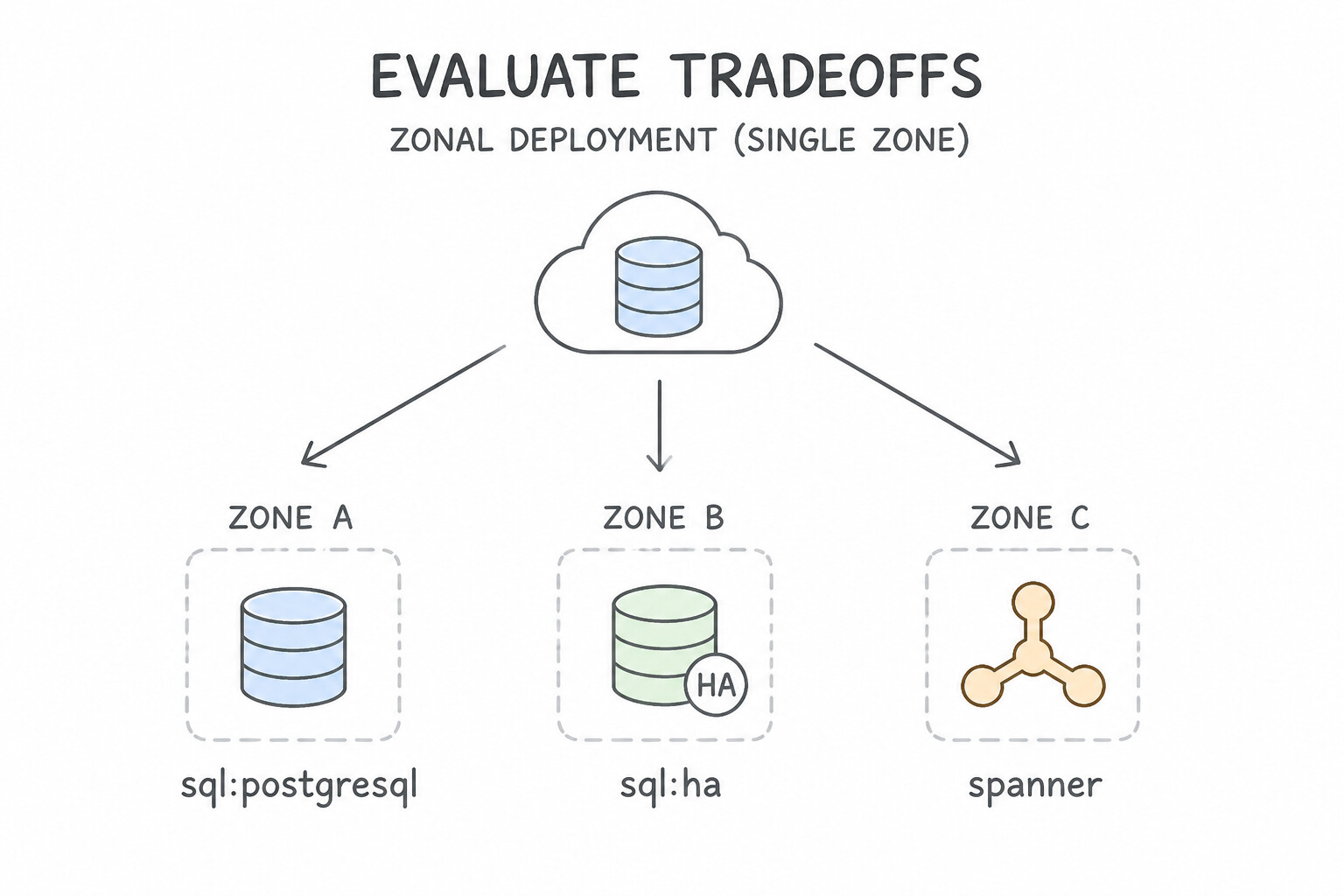
Every PDBE topology question tests your mastery of the Consistency–Availability–Latency–Cost quadrilateral:
- Zonal Deployment (Single Zone):
- Lowest cost (1x compute/storage). Used strictly for dev/test, staging, or easily reconstructible caches. If the zone experiences an outage, the database is unavailable until the zone recovers or you restore from backup to another zone.
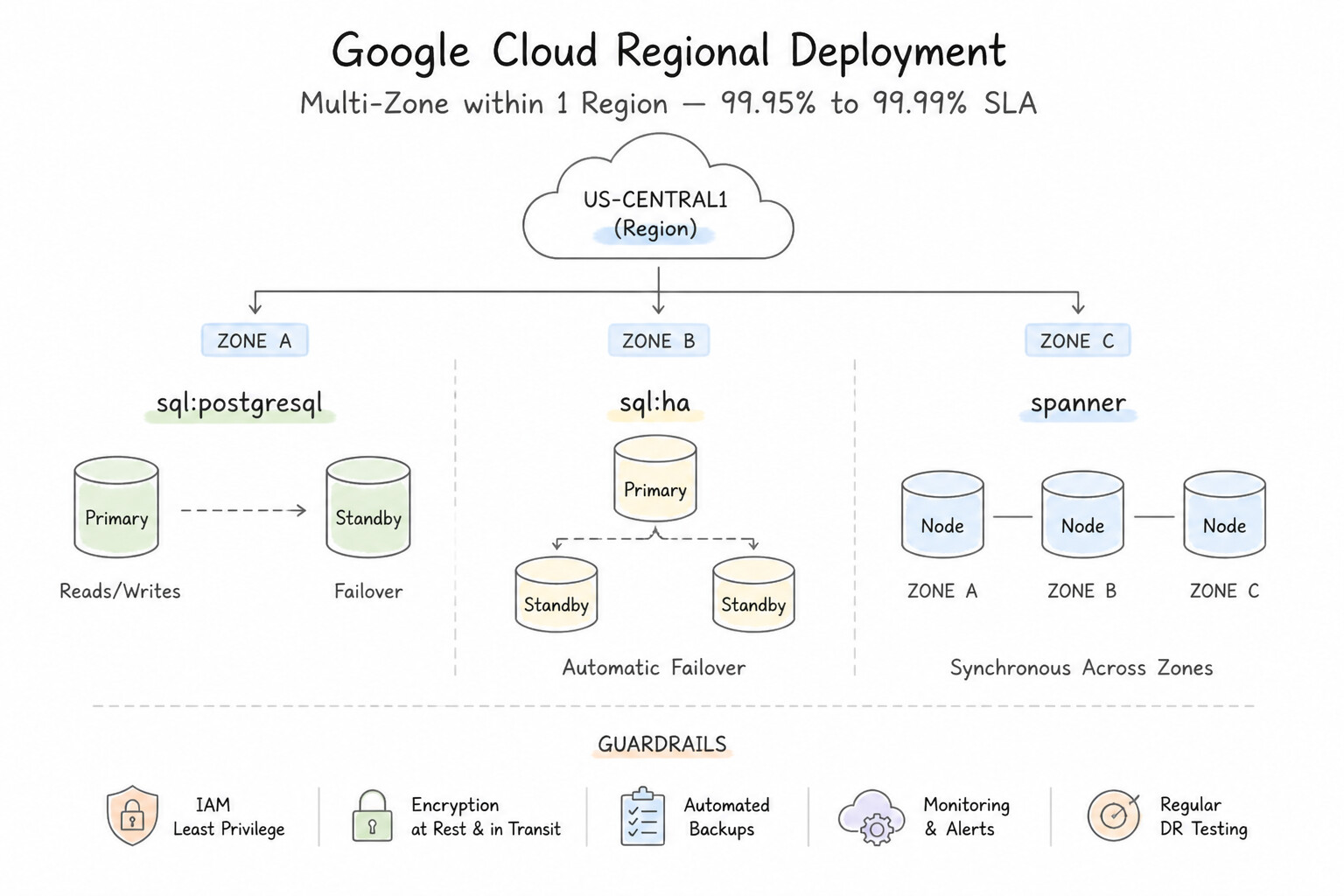
- Regional Deployment (Multi-Zone within 1 Region —
99.95%to99.99%SLA): - Cloud SQL Regional HA: Doubles compute and storage cost (2x) to maintain a synchronous standby in a secondary zone via Regional Persistent Disk. Note: the standby cannot serve read traffic.
- AlloyDB Regional HA: Separates compute from regional storage; the active standby node in another zone already shares the regional storage layer, enabling faster failovers and 99.99% availability (inclusive of maintenance!).
- Cloud Spanner Regional: Distributes 3 Read-Write Replicas across 3 zones in the same region (
99.99%SLA). Because all 3 zones are within single-digit millisecond latency, Paxos quorum commits are fast (~5–10ms) withRPO = 0. - Multi-Regional Deployment (
99.999%SLA vs. Async Cross-Region DR): - Cloud Spanner Multi-Region (
99.999%SLA,RPO = 0,RTO ≈ 0): Standard multi-region configurations (likenam3oreur6) deploy 2 Read-Write Regions (2 replicas each = 4 R/W replicas) plus 1 Witness Region (1 Witness replica that votes in Paxos quorums without storing data, saving storage/replication cost while breaking ties if one R/W region fails). Always configure the Default Leader Region closest to the primary write clients! - Cloud SQL / AlloyDB Cross-Region DR (
RPO > 0,RTO = minutes): Uses asynchronous replication to a secondary region. Protects against full regional disasters without paying the write-latency tax of synchronous cross-region Paxos commits.
Key Implementation Patterns
- Cloud SQL High Availability for Production: Use Enable High Availability (HA) to deploy a primary and standby instance in the same region. Regional HA provides a standby instance in a different zone for automatic failover. (Avoid alternative: A single zonal instance cannot survive a zone failure automatically.)
- Global Financial Ledger Consistency: Use Provision a Cloud Spanner instance with a multi-region configuration. Cloud Spanner Multi-Region configuration provides the required 99.999% SLA and global strong consistency. (Avoid alternative: Cloud SQL HA offers a 99.95% SLA, which is lower than the required 99.999%.)
Key Takeaways (1.2a)
- High Availability (HA) protects against zonal failures by using a standby instance in a different zone.
- Disaster Recovery (DR) protects against regional failures, often using cross-region replicas.
- Cloud SQL HA uses synchronous replication to ensure zero data loss during a failover.
- Failover in an HA configuration is automatic, whereas promoting a read replica is typically manual.
Consideration 1.2b: Define maintenance windows and notifications based on application availability requirements
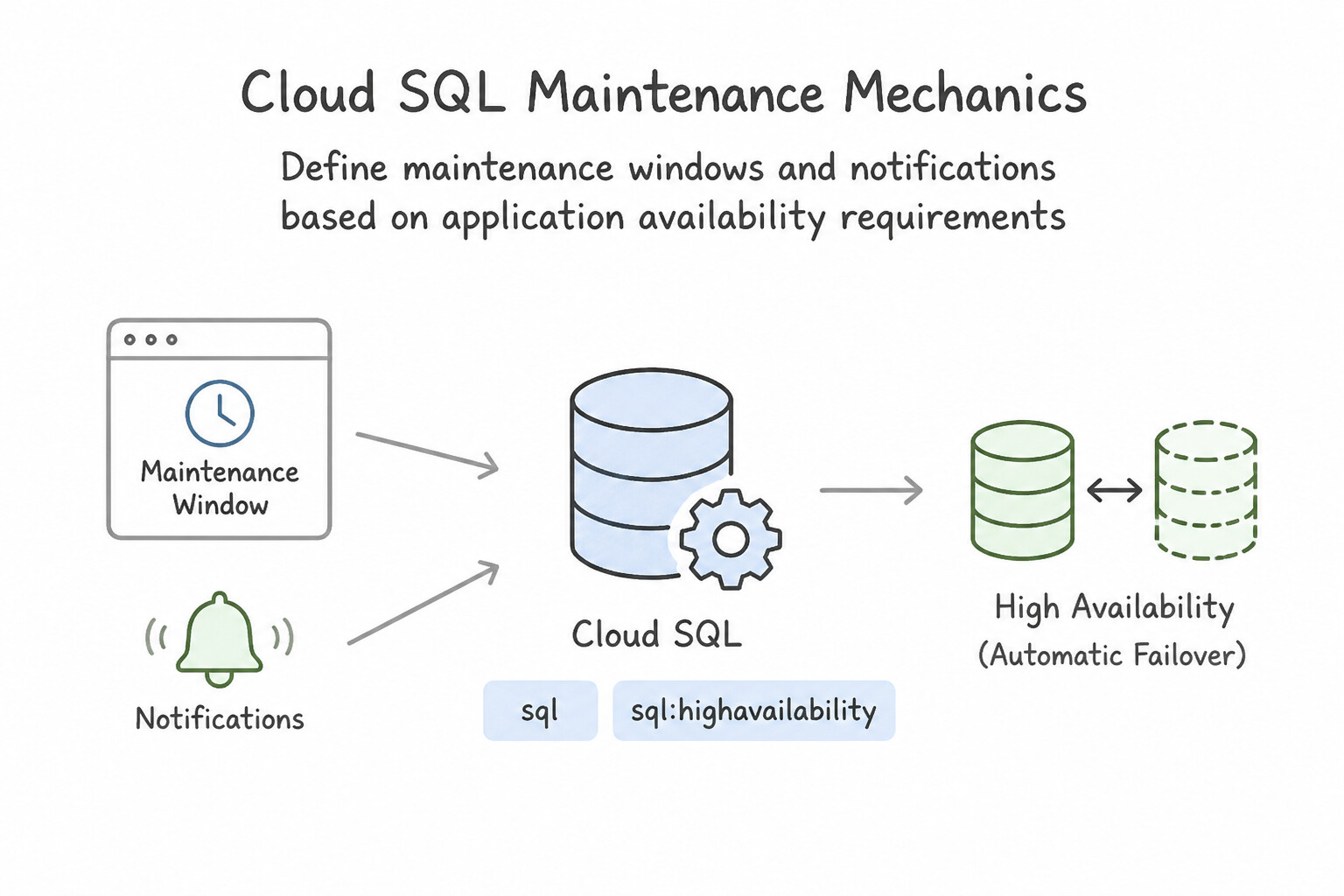
Even a 99.99% database can disrupt applications if planned maintenance is mismanaged:
- Cloud SQL Maintenance Mechanics:
- Configure a Preferred Maintenance Window (day of week + 1-hour start window during lowest traffic) and Order of Update (
Earlierfor dev/staging instances so you can catch driver/query regressions beforeLaterproduction instances are patched at least a week later). - Configure Deny Maintenance Periods (up to 90 consecutive days per year) to freeze non-critical maintenance during peak business seasons (e.g., Black Friday through Cyber Monday, or tax season).
- Subscribe to Upcoming Maintenance Notifications via email/Pub/Sub and monitor
gcloud sql operations list/ Cloud Monitoring so operations teams are alerted at least 1 week before scheduled events. - Engine Differences in Maintenance Downtime:
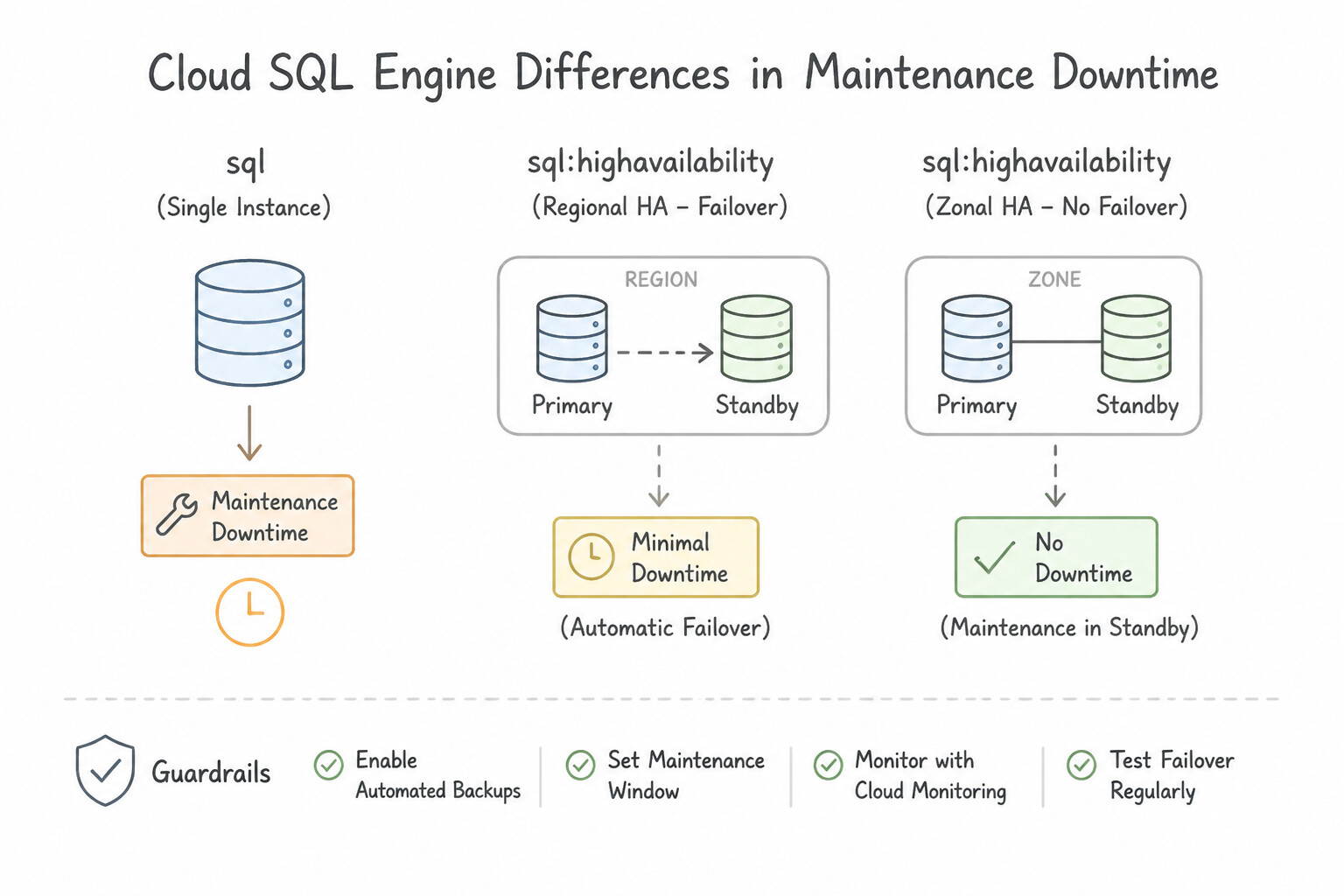
- Cloud SQL Enterprise: Planned maintenance causes a brief connection drop (typically 30–120 seconds). Applications must implement exponential backoff and connection retry logic.
- Cloud SQL Enterprise Plus: Reduces planned maintenance downtime to <10–60 seconds via near-zero-downtime live migration/fast restart.
- AlloyDB & Cloud Spanner: Perform rolling, non-disruptive updates across replicas (zero planned maintenance downtime; AlloyDB's 99.99% SLA explicitly includes maintenance events!).
Key Implementation Patterns
- Production vs. Testing Update Tracks: Use Configure the staging instance to use the Preview maintenance release channel. Configure the production instance to use the Production maintenance release channel. The Preview channel allows instances to receive updates earlier than the Production channel, enabling testing in staging environments.
- Reducing Maintenance Downtime via HA: Use Configure the instance for High Availability (HA). High Availability (HA) enables a failover mechanism during maintenance that typically completes in less than 60 seconds. (Avoid alternative: Read replicas are used for scaling reads, not for automatic maintenance failover.)
- Seasonal Business Freeze: Use Configure a deny maintenance period for the 14-day range. Deny maintenance periods explicitly block automatic maintenance scheduling during a specified date range. (Avoid alternative: Removing the configuration allows Google to schedule maintenance at unpredictable times.)
Key Takeaways (1.2b)
- Cloud SQL updates are mandatory but configurable.
- Use Maintenance Windows to control when (time of day) downtime occurs.
- Use Maintenance Release Channels to control what (version timing) is installed.
- Always set non-production environments to the Preview channel to catch issues early.
Quick Decision Cheat Sheet (Subsection 1.2)
If the Scenario Requires... | Choose This Google Cloud Pattern | Avoid This Common Mistake |
|---|---|---|
"Survive a single zone outage in Cloud SQL with zero data loss ( RPO = 0)" | Enable Cloud SQL High Availability (Regional HA) backed by synchronous Regional Persistent Disk | Relying on an in-region Read Replica for automatic RPO = 0 failover |
"Survive a full regional outage in Cloud SQL" | Provision a Cross-Region Read Replica and promote it during regional DR | Assuming Cloud SQL Regional HA spans multiple regions (it only spans 2 zones in 1 region) |
"99.999% availability ( five nines) relational database with external consistency" | Cloud Spanner Multi-Region | Cloud SQL Enterprise Plus or AlloyDB (both cap at 99.99% regional SLA) |
"Catch database patch regressions in dev/test before they hit production Cloud SQL" | Set dev/test maintenance timing to Earlier and production to Later | Running self-managed PostgreSQL on Compute Engine just to control patch dates |
"Block non-emergency Cloud SQL maintenance during peak Q4 holiday season" | Configure a Deny Maintenance Period (up to 90 days) | Removing the maintenance window setting (which defaults to any time) |
Further Reading (Subsection 1.2)
- Cloud SQL High Availability — Overview of how the High Availability configuration works in Cloud SQL, including the primary and standby instance architecture.
- Cloud Spanner Service Level Agreement (SLA) — This page details the monthly uptime percentage for Cloud Spanner, explicitly stating 99.999% for Multi-Region instance configurations and 99.99% for Regional instance configurations.
- Cloud Spanner Overview — Provides an overview of Cloud Spanner features, including its global distribution and strong consistency capabilities.
- Set maintenance release channel — Documentation explaining the difference between Production and Preview release channels and how to configure them.
- Cloud SQL High Availability configuration — Explains how HA works in Cloud SQL, including the failover process during maintenance and the expected downtime duration.
- Maintenance on Cloud SQL instances — Details the maintenance workflow for HA and non-HA instances and how updates are applied.
Subsection 2.3: Design database backup and recovery solutions
The Big Picture
Every database engineer remembers the moment a developer or deployment script accidentally executes DELETE FROM orders; without a WHERE clause—or DROP TABLE customers;—in production. At that exact second, teams discover two painful truths about database protection:
- High Availability Replicates Corruption Instantly (
2.3a&2.3c): Neither Cloud SQL Regional HA, Cross-Region Read Replicas, nor Cloud Spanner Paxos Replication saves you from an accidentalDROP TABLEor logical corruption, because replication dutifully propagates the destructive command to all standbys and replicas in milliseconds! Recovering from logical data loss requires Point-in-Time Recovery (PITR)—replaying Write-Ahead Logs (WAL) in PostgreSQL, Binary Logs (binlog) in MySQL, or specifying a Version Retention Timestamp (OPTIONS (version_retention_period = '7d')) in Cloud Spanner to clone/restore the database to the exact second (T - 1s) before the destructive statement executed. - Snapshots vs. Logical Exports & Retention Governance (
2.3b&2.3d): Native Automated Backups are fast, block-level incremental disk snapshots (ideal for rapid operational RTO), but by default they are tied to the lifecycle or retention window of the managed service (up to 365 days in Cloud SQL, though remember to check "Keep backups after instance deletion" or use enhanced backup retention!). When compliance demands 7-year cross-region WORM archival or engine-neutral portability, you must pair automated backups with Logical Exports (SQL dump,CSV,Avro) to Cloud Storage—executed with--offload(or from a Read Replica / Spanner Data Boost) so the export never degrades primary OLTP performance, and stored in a Cloud Storage bucket with Object Lifecycle Management and a Locked Retention Policy (Bucket Lock).
Consideration 2.3a: Recommend backup and recovery options based on requirements (automatic scheduled backups)
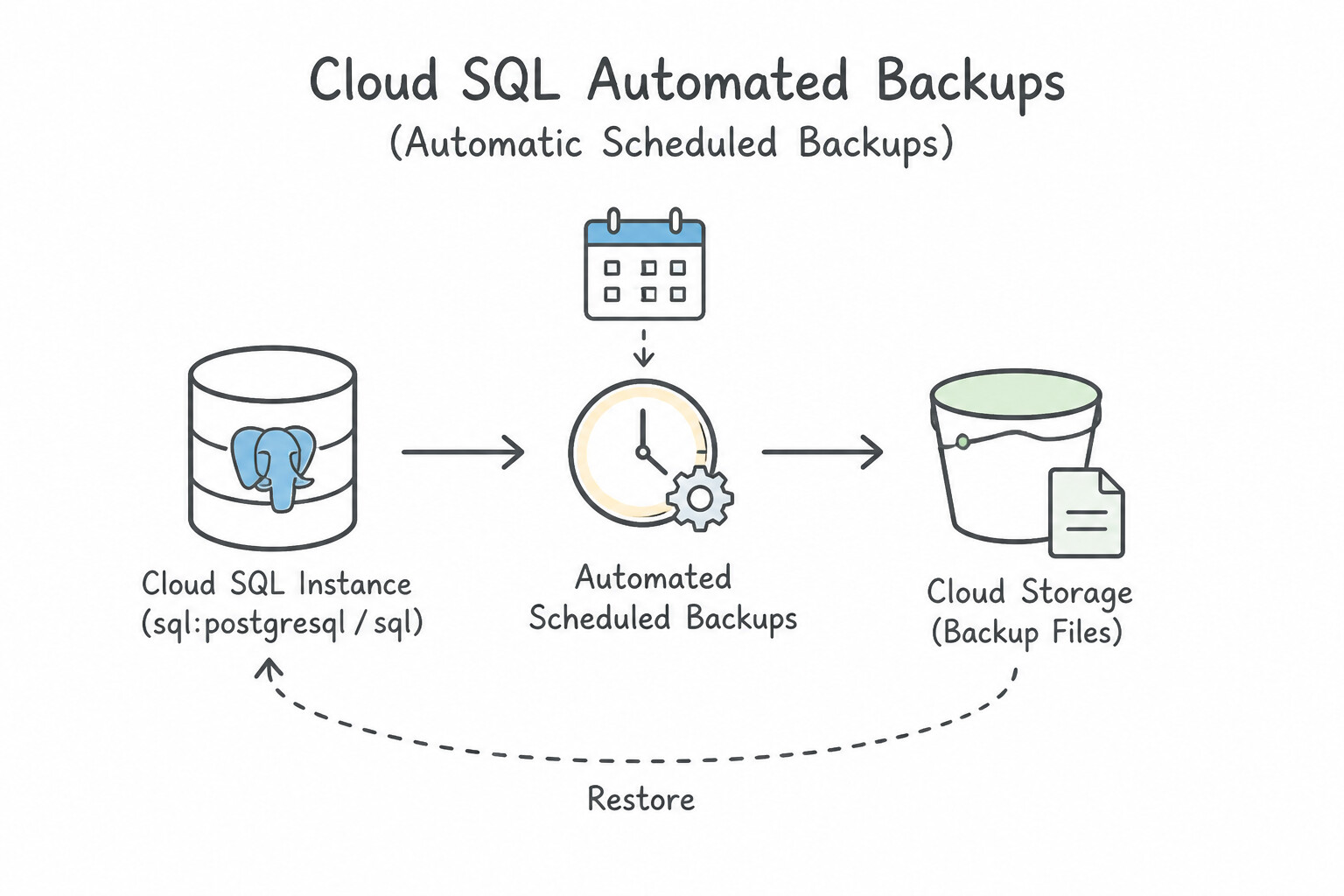
Match the backup mechanism to the database engine and operational recovery target:
- Cloud SQL Automated Backups:
- Schedule the 4-hour backup window during the lowest-traffic off-peak period. Cloud SQL takes an initial full snapshot followed by incremental block-level snapshots (only changed blocks are billed and transferred).
- Always store backups in a multi-regional or secondary regional location distinct from the primary instance region so backups survive a full regional outage.
- Enable Retain backups after instance deletion (
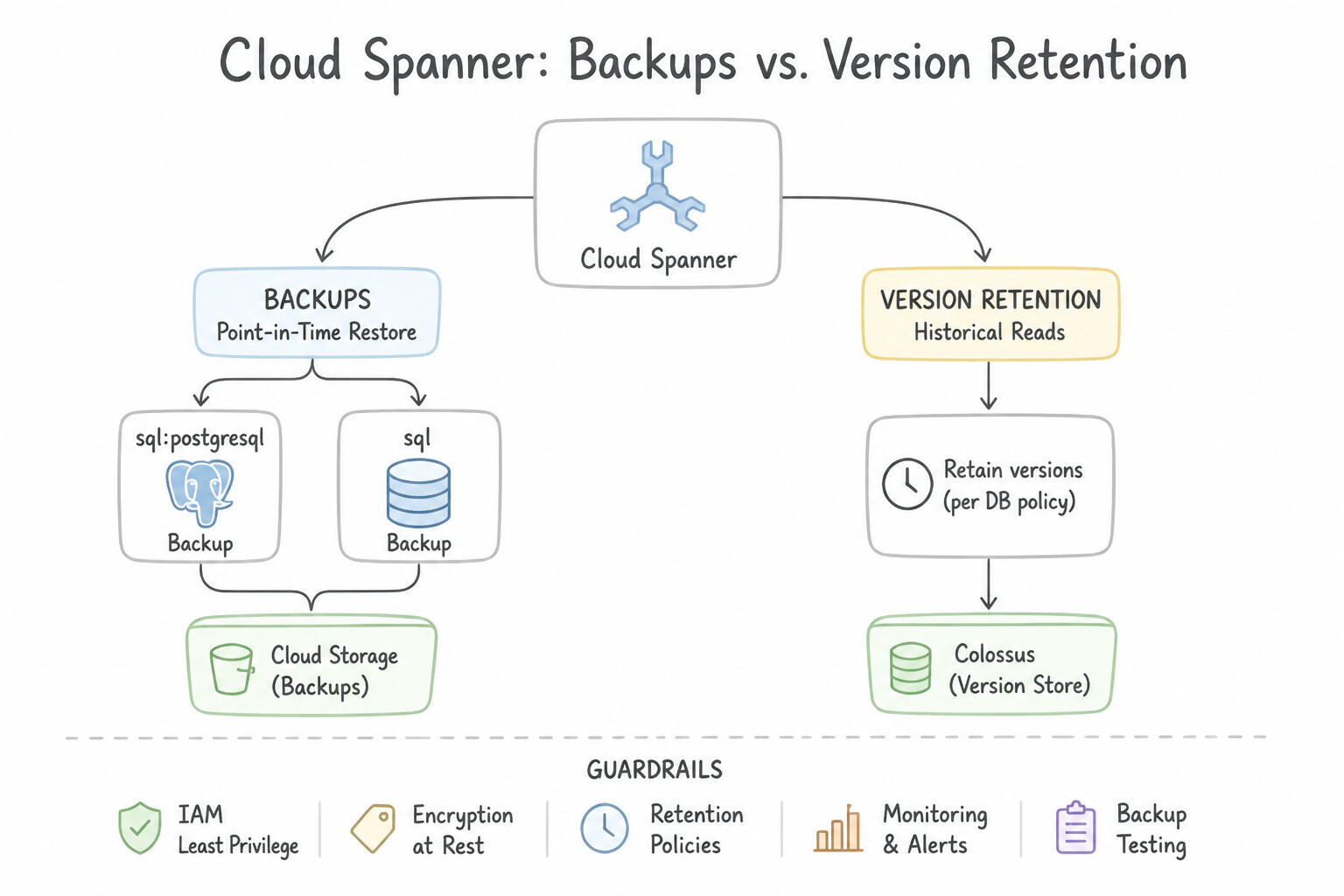
retainedBackupsCount/ backup retention settings) to prevent accidental instance deletion from wiping out all historical backups! - Cloud Spanner Backups vs. Version Retention:
- Version Retention (
version_retention_period): Configurable from1h(default) up to7d. Allows instant historical reads (SELECT * FROM Table FOR SYSTEM_TIME AS OF ...) and fast PITR within the 7-day window without restoring from a separate backup file. - Spanner Backups (
FullandIncremental): Used when recovery points older than 7 days (up to 1 year) or cross-region/cross-instance backup copies are required. - Cloud Bigtable Managed Backups: Create scheduled backups on a cluster (preferring a replication cluster dedicated to analytics/backups in a multi-cluster instance) and copy backups across regions for disaster recovery (retained up to 90 days).
Key Implementation Patterns
- Cloud SQL Backup Windows for High-Load Applications: Use Update the instance configuration to specify a backup window starting at 04:00. Cloud SQL allows you to configure a specific 4-hour backup window to ensure backups occur during off-peak times. (Avoid alternative: Manual scripting via Cloud Scheduler adds complexity and uses on-demand backups rather than the managed automated backup service.)
- Long-Term Retention Compliance for Cloud SQL: Use Configure Cloud Scheduler to trigger a Cloud Function that exports the database to a Cloud Storage bucket. Set the bucket's Object Lifecycle Management to change the storage class to Archive. Automated backups are limited to 1 year. Use Cloud Scheduler to trigger SQL exports to Cloud Storage with the Archive class for long-term, cost-effective retention.
Key Takeaways (2.3a)
- Cloud SQL automated backups occur daily within a user-defined 4-hour window.
- Backups can cause slight performance degradation due to I/O usage.
- Always configure the backup window to coincide with the period of lowest application traffic.
- PITR requires automated backups to be enabled.
Consideration 2.3b: Configure export and import data for databases
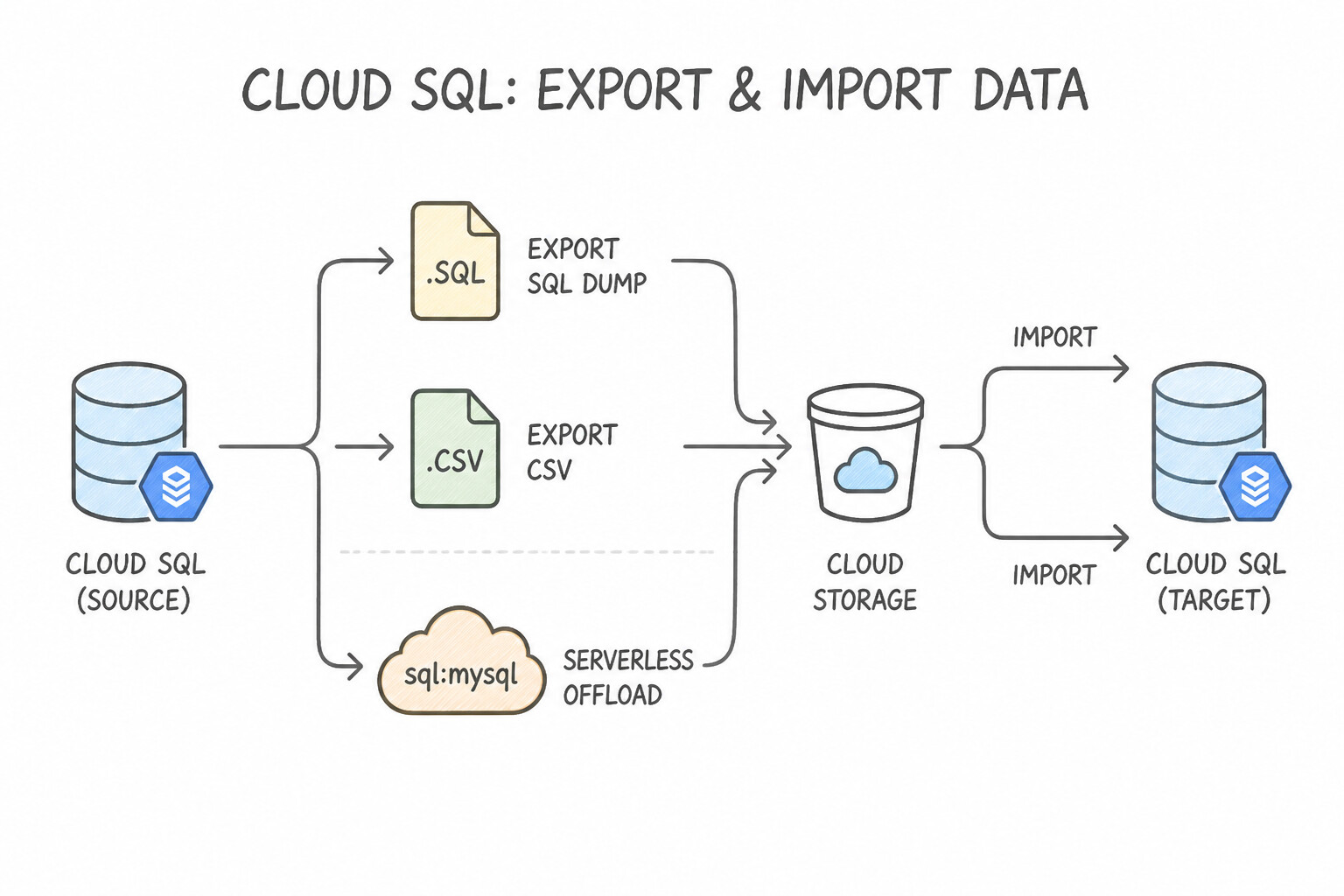
Know the exact performance rules, formats, and IAM permissions for database exports and imports:
- Cloud SQL Export (
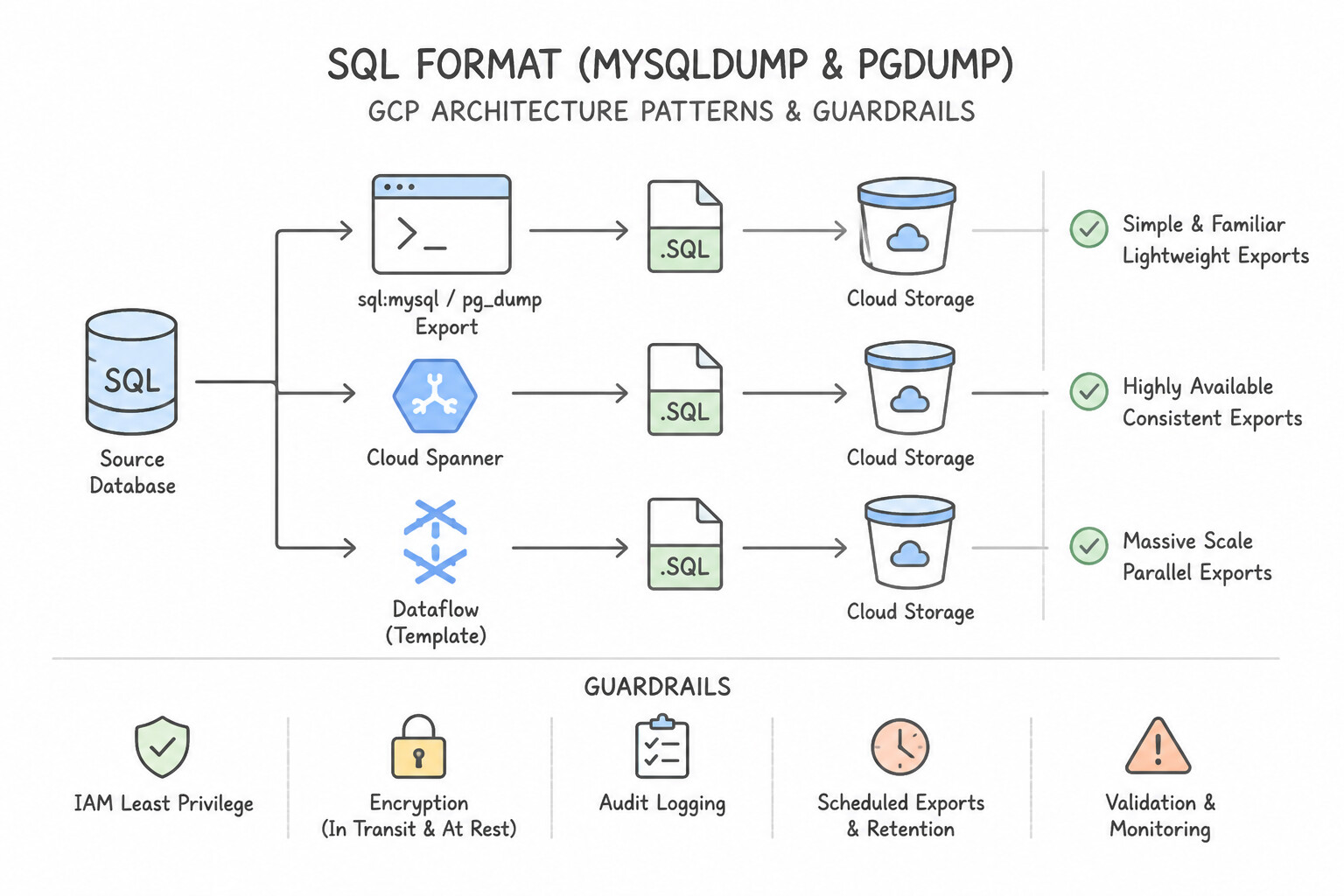
SQL Dumpvs.CSV) & Serverless Offload: SQLFormat (mysqldump/pg_dump): Captures full DDL schema + DML data for restoring back into MySQL/PostgreSQL.CSVFormat: Exports flat tabular data for loading into BigQuery or cross-engine targets.- Protect Primary Performance: Never run a heavy un-offloaded export directly on an overloaded primary instance! Either enable Serverless Export (
--offload) (which spins up a temporary managed worker to read from a disk snapshot with zero CPU/lock impact on the primary) or run the export against a Read Replica. - MySQL Consistent Non-Locking Exports: When running
mysqldumpmanually for InnoDB tables, always pass--single-transaction(plus--routines --triggers --eventsand--set-gtid-purged=OFFwhen importing to Cloud SQL) to avoid global table read locks. - IAM Permission for Cloud SQL Exports/Imports: Grant the Cloud SQL Service Agent (
service-PROJECT_NUMBER@gcp-sa-cloud-sql.iam.gserviceaccount.com)roles/storage.objectAdmin(orobjectCreatorfor export /objectViewerfor import) on the target Cloud Storage bucket. - Cloud Spanner & Bigtable Exports (
DataflowTemplates): - Use official Google-provided Dataflow Templates (
Cloud Spanner to Cloud Storage Avro/CSVwith Spanner Data Boost enabled;Cloud Bigtable to Cloud Storage SequenceFile/Avro/Parquet) for scalable, parallel distributed exports and imports.
Key Implementation Patterns
- Optimizing Large Data Imports in Cloud SQL for MySQL: Use Temporarily disable foreign key and unique key checks on the database before the import, and re-enable them after the import completes. Disabling constraint checks reduces the overhead during bulk inserts, significantly speeding up the process.
- Cloud Spanner Data Export for BigQuery Analytics: Use Use the Dataflow template to export Cloud Spanner data to Cloud Storage in Avro format. Dataflow templates provide a managed, scalable way to export Spanner data to Avro, which is optimized for BigQuery. (Avoid alternative: A custom script on a VM is not a managed or automatically scalable solution.)
Key Takeaways (2.3b)
- Disable foreign key and unique checks before large MySQL imports to improve performance.
- Use the CSV format for faster data movement across heterogeneous systems compared to SQL dumps.
- Re-enable constraints after the import to ensure data integrity.
- Consider parallel imports for further performance gains, but prioritize reducing database overhead first.
Consideration 2.3c: Design for RTO, RPO, and PITR
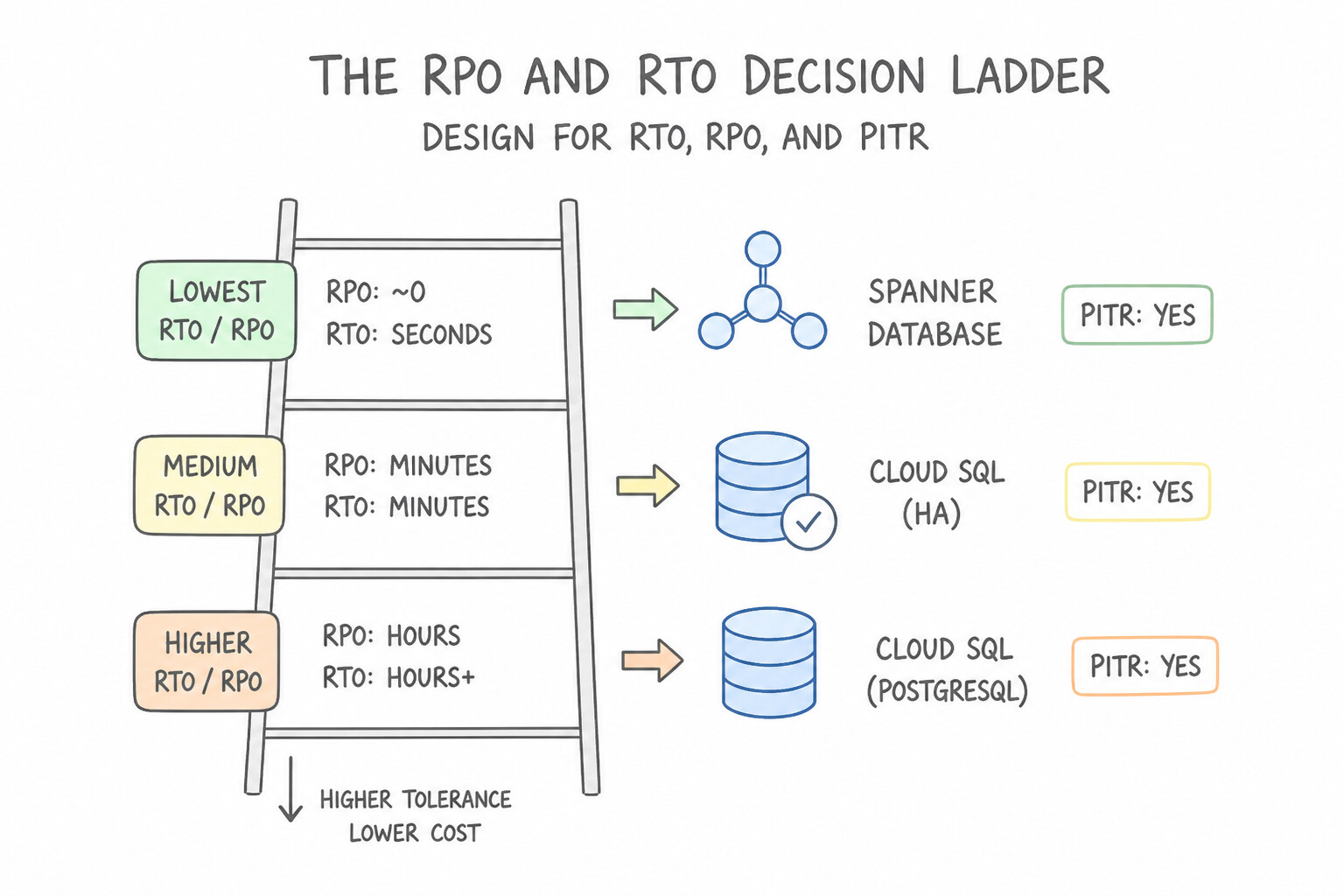
Every disaster recovery question requires translating numeric RPO (Recovery Point Objective = max tolerable data loss in time) and RTO (Recovery Time Objective = max tolerable downtime) into an exact architecture:
- The RPO / RTO Decision Ladder:
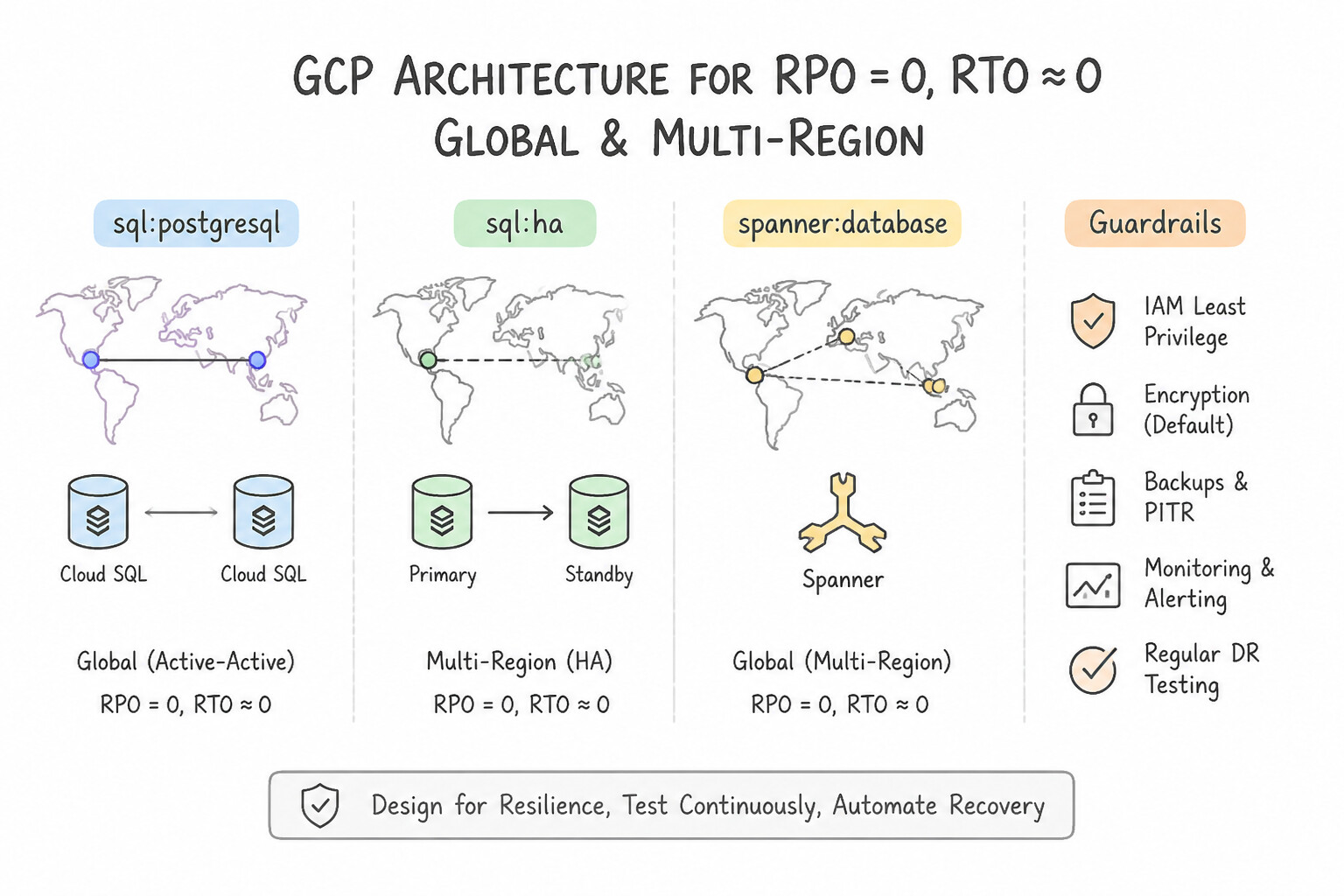
RPO = 0,RTO ≈ 0(Global / Multi-Region): Cloud Spanner Multi-Region (or Firestore Multi-Region).RPO = 0,RTO = 1–2 minutes(Single Region / Zonal Outage): Cloud SQL Regional HA or AlloyDB Regional HA.RPO = seconds,RTO = minutes(Regional Outage): Cloud SQL / AlloyDB Cross-Region Read Replica (promote replica on regional failure).RPO = 1 second (Logical Corruption / Accidental Delete),RTO = minutes to hours: Point-in-Time Recovery (PITR).- How Cloud SQL
PITRWorks Under the Hood: - Requires Automated Backups + Binary Logging (MySQL) or WAL Archiving / Point-in-Time Recovery (PostgreSQL) enabled prior to the incident (retained for 1 to 7 days; up to 35 days in AlloyDB / Cloud SQL Enterprise Plus).
- When triggered (
gcloud sql instances clone SOURCE_INSTANCE TARGET_INSTANCE --point-in-time='2026-10-13T14:29:59Z'), Google Cloud restores the last daily snapshot before the target timestamp onto a brand-new Cloud SQL instance and replays the WAL/binlog forward to the exact microsecond/second requested. You then verify the data and repoint application traffic (or copy the recovered table back).
Key Implementation Patterns
- Cloud SQL High Availability vs. Read Replicas for RTO: Use Enable High Availability (HA) on the Cloud SQL instance. HA provides automated failover to a standby zone with a static IP address, satisfying the RTO requirement. (Avoid alternative: Cross-region replicas address regional failures, not zonal outages, and require manual promotion.)
- Cloud Spanner Version Retention Period for PITR: Use Update the database options to set the version_retention_period to '2d'. You must increase the version retention period to at least 48 hours (2 days) to support stale reads for that duration. (Avoid alternative: The default retention period is only 1 hour, not 7 days.)
- Cloud SQL Point-in-Time Recovery (PITR) Restoration Behavior: Use Initiate a Point-in-Time Recovery (PITR) to a new instance for the specific timestamp, and update the application to use the new instance's IP address. PITR creates a new instance with the restored data, requiring you to update the application connection string.
Key Takeaways (2.3c)
- RTO (Recovery Time Objective) defines the maximum acceptable downtime.
- Cloud SQL High Availability (HA) provides automated failover for zonal outages with synchronous replication.
- HA configurations maintain the same static IP address during failover, simplifying application recovery.
- Read Replicas require manual promotion and IP updates, making them less suitable for strict RTO requirements in zonal failure scenarios.
Consideration 2.3d: Manage data retention
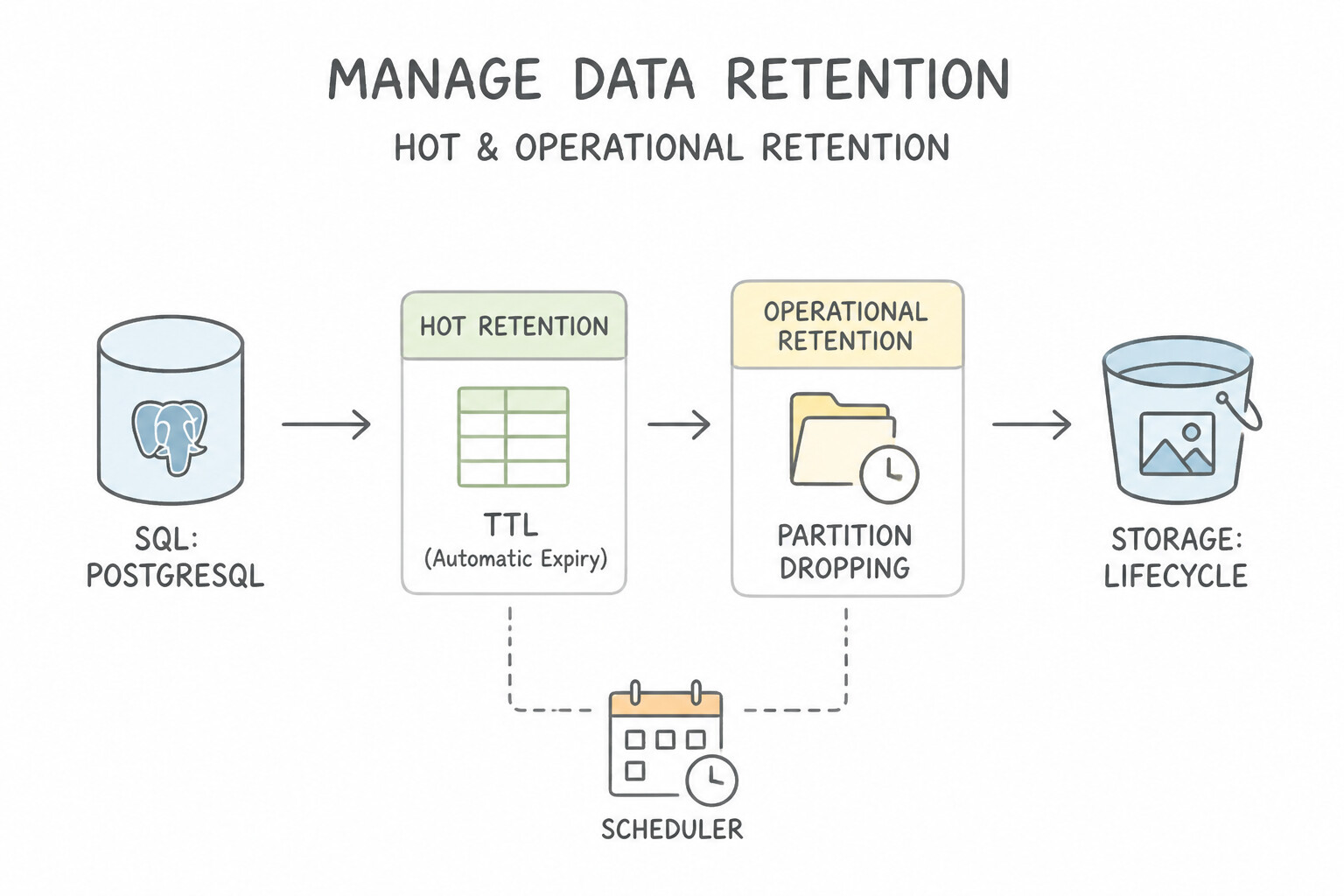
Balancing compliance retention mandates (e.g., 7–10 years) with storage cost and privacy laws (GDPR "Right to be Forgotten") requires a tiered retention architecture:
- Hot / Operational Retention (
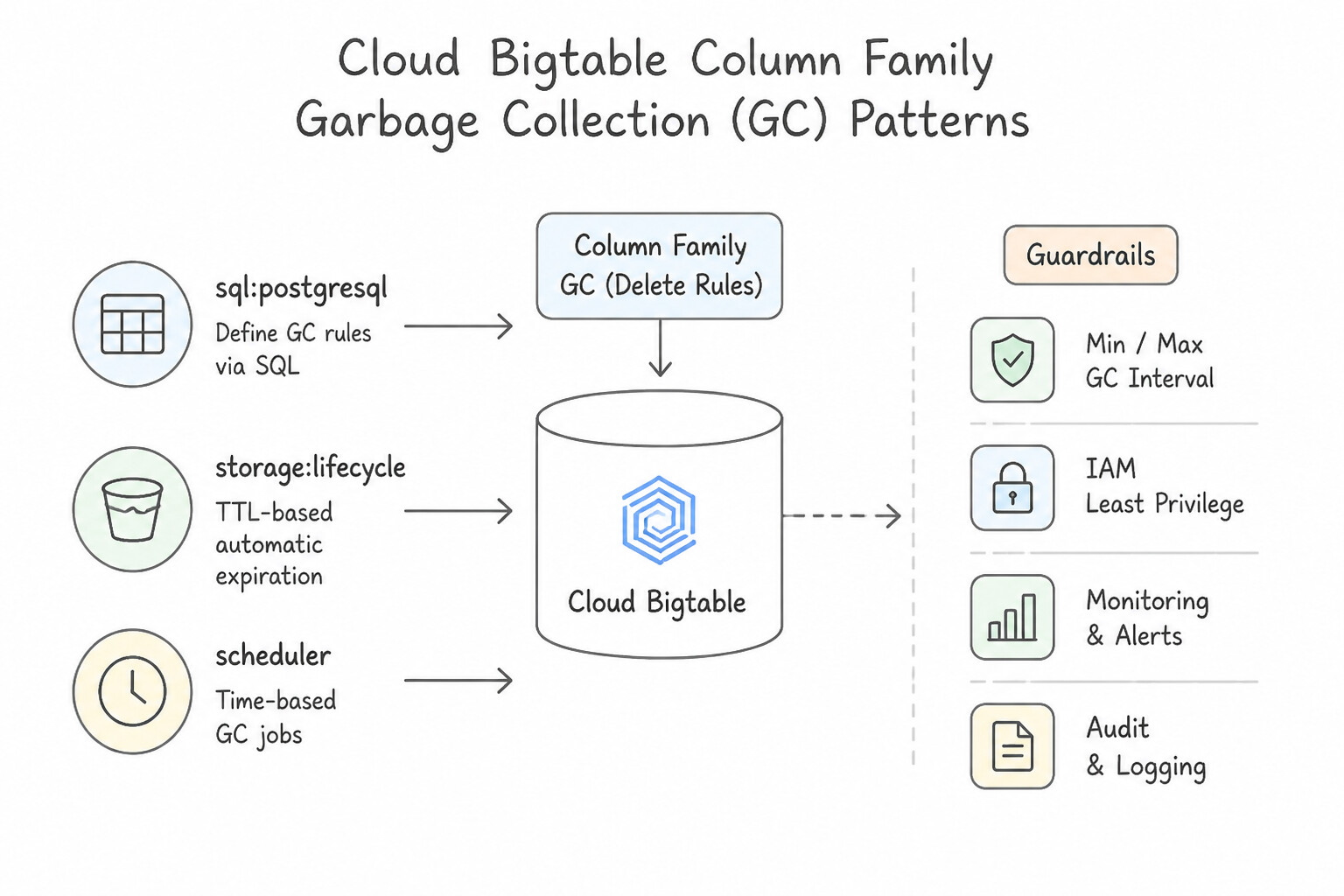
TTL& Partition Dropping): - Cloud Bigtable Column Family Garbage Collection (
GCPolicies): Automatically expire old cells using Max Age (e.g., delete telemetry older than 30 days) or Max Versions (e.g., keep only the latest1version of a cell), or union/intersection policies. Note: actual disk space is reclaimed asynchronously during background major compaction (up to ~1 week). - Cloud Spanner Row Deletion Policies (
TTL) & Partitioned DML: Declare a declarative Row Deletion Policy (ROW DELETION POLICY (OLDER_THAN(created_at, INTERVAL 90 DAY))) on a timestamp column so Spanner automatically purges expired rows in the background using low-priority idle CPU without impacting OLTP traffic! - Firestore
TTLPolicies: Configure a native Time-to-Live (TTL) field on documents for automatic background expiration. - PostgreSQL / MySQL Table Partitioning (
pg_partman): Instead of runningDELETE FROM logs WHERE created_at < ...on 500M rows (which bloats PostgreSQL tables with dead tuples, generates massive WAL, and locks rows), partition tables by date range (RANGE (created_at)) and runDROP TABLE logs_2025_01(orDETACH PARTITION) to reclaim disk space instantaneously with zero bloat! - Cold / Immutable Compliance Retention (
Cloud Storage+Bucket Lock): - Export historical backups/tables to Cloud Storage, apply Object Lifecycle Management rules (
Standard→Nearlineafter 30d →Coldlineafter 90d →Archiveafter 365d), and enforce a Locked Retention Policy (Bucket Lock) for SEC 17a-4 / HIPAA WORM compliance.
Key Implementation Patterns
- Long-term Compliance for Cloud SQL: Use Use Cloud Scheduler to trigger a database export to a Cloud Storage bucket. Configure a bucket Lifecycle rule to move exports to Archive Storage. Export the database to Cloud Storage for long-term retention and use Lifecycle rules to transition data to the cheapest tier (Archive Storage).
- Immutable Backup Storage: Use Export the Cloud Spanner database to a Google Cloud Storage bucket. Configure a Retention Policy on the bucket and lock it. Exporting to Cloud Storage and using a locked Retention Policy (Bucket Lock) ensures WORM compliance prevents deletion even by admins.
Key Takeaways (2.3d)
- Cloud SQL automated backups have retention limits suitable for disaster recovery, not necessarily long-term compliance.
- For multi-year retention, export data to Cloud Storage.
- Use Cloud Storage Lifecycle Management to automate cost savings by moving older backups to Archive Storage.
- Archive Storage is the most cost-effective tier for data accessed less than once a year.
Quick Decision Cheat Sheet (Subsection 2.3)
If the Scenario Requires... | Choose This Google Cloud Pattern | Avoid This Common Mistake |
|---|---|---|
"Recover from accidental DROP TABLE or corrupt DML to an exact second in Cloud SQL" | Enable Automated Backups + Binary Logging (MySQL) / WAL PITR (Postgres) and run PITR clone | Triggering an HA failover (HA only protects against infrastructure failure, not logical corruption) |
"Export a 2 TB Cloud SQL database to Cloud Storage without impacting production OLTP performance" | Use Serverless Export ( --offload) or export from a Read Replica | Running a standard un-offloaded export directly on the primary instance |
"Cloud SQL export to Cloud Storage fails with Permission Denied (403)" | Grant the Cloud SQL Service Agent ( gcp-sa-cloud-sql) roles/storage.objectAdmin on the GCS bucket | Granting the bucket permission only to the human DBA's user account |
"Automatically expire time-series cells older than 30 days in Cloud Bigtable" | Configure a Column Family Garbage Collection ( GC) Max-Age policy | Running hourly client scans to read and issue individual DeleteFromRow mutations |
"Automatically delete expired rows in Cloud Spanner with zero impact on foreground transactions" | Configure a Spanner Row Deletion Policy ( TTL) | Running unpartitioned bulk DELETE SQL jobs during business hours |
Further Reading (Subsection 2.3)
- Automated backups — Documentation explaining how automated backups work, the 4-hour window, and how to configure the start time.
- Scheduling backups — Guide on editing instance settings to select a custom backup window.
- Cloud SQL Backup Retention — Documentation detailing that automated backups can be retained for up to 365 days.
- Exporting Data from Cloud SQL — Guide on how to export data from Cloud SQL to Cloud Storage for long-term retention or migration.
- Best practices for importing and exporting data — Refer to the section regarding 'Slow import' where it advises disabling foreign key checks to speed up the process.
- Optimizing INSERT Statements — Official MySQL documentation detailing strategies for bulk data loading, including disabling keys.
Subsection 4.1: Apply concepts to implement scalable and highly available databases in Google Cloud
The Big Picture
Section 4 represents the final 20% of the Architecture Stack (4.1a through 4.1f), focusing on hands-on deployment, failover verification, multi-region replication, read replica scaling, Infrastructure-as-Code (IaC), and HA monitoring. Many engineering teams check the "High Availability" box during provisioning and assume they are resilient—until an actual zonal outage or regional disaster exposes three fatal operational gaps:
- Untested Failover & Broken Client Reconnection Logic (
4.1a&4.1b): Provisioning a Cloud SQL Regional HA instance or a Bigtable Multi-Cluster App Profile is only half the battle. When a Cloud SQL manual failover test (gcloud sql instances failover) or regional DR drill is executed, teams often discover that their application caches stale DNS lookups, lacks exponential backoff retry loops, or uses hardcoded zone-specific references—turning a 60-second automatic database failover into a 2-hour application outage! Equally critical is distinguishing between a non-destructive HA Failover Test (RPO = 0switchover to the synchronous standby) and a Cross-Region DR Drill (promoting an asynchronous cross-region read replica or executing a Cloud SQL Switchover / Failback workflow). - Misconfigured Multi-Region Replication & App Profiles (
4.1c&4.1d): In Cloud Bigtable, deploying 3 clusters across 3 regions does not automatically provide failover if client applications use a Single-Cluster Routing App Profile! Automatic multi-region failover in Bigtable requires configuring a Multi-Cluster Routing App Profile (which provides high availability and eventual consistency, though it disables single-row read-modify-write transactions unless restricted to a single cluster or specific row-key prefixes). In AlloyDB, scaling out reads uses Read Pools, while cross-region disaster recovery uses a Cross-Region Secondary Cluster that can be promoted or switched over cleanly. - Imperative Provisioning Drift & Blind HA Monitoring (
4.1e&4.1f): Provisioning production databases via ad-hocgcloudcommands creates undocumented snowflake instances. Enterprise teams codify every HA setting (availability_type = "REGIONAL", backup windows,deletion_protection = true, replica topologies, and alerting policies onreplica_lagandfailover_unavailable) in Terraform (or Config Connector on GKE) enforced through CI/CD pipelines.
Consideration 4.1a: Provision highly available database solutions in Google Cloud
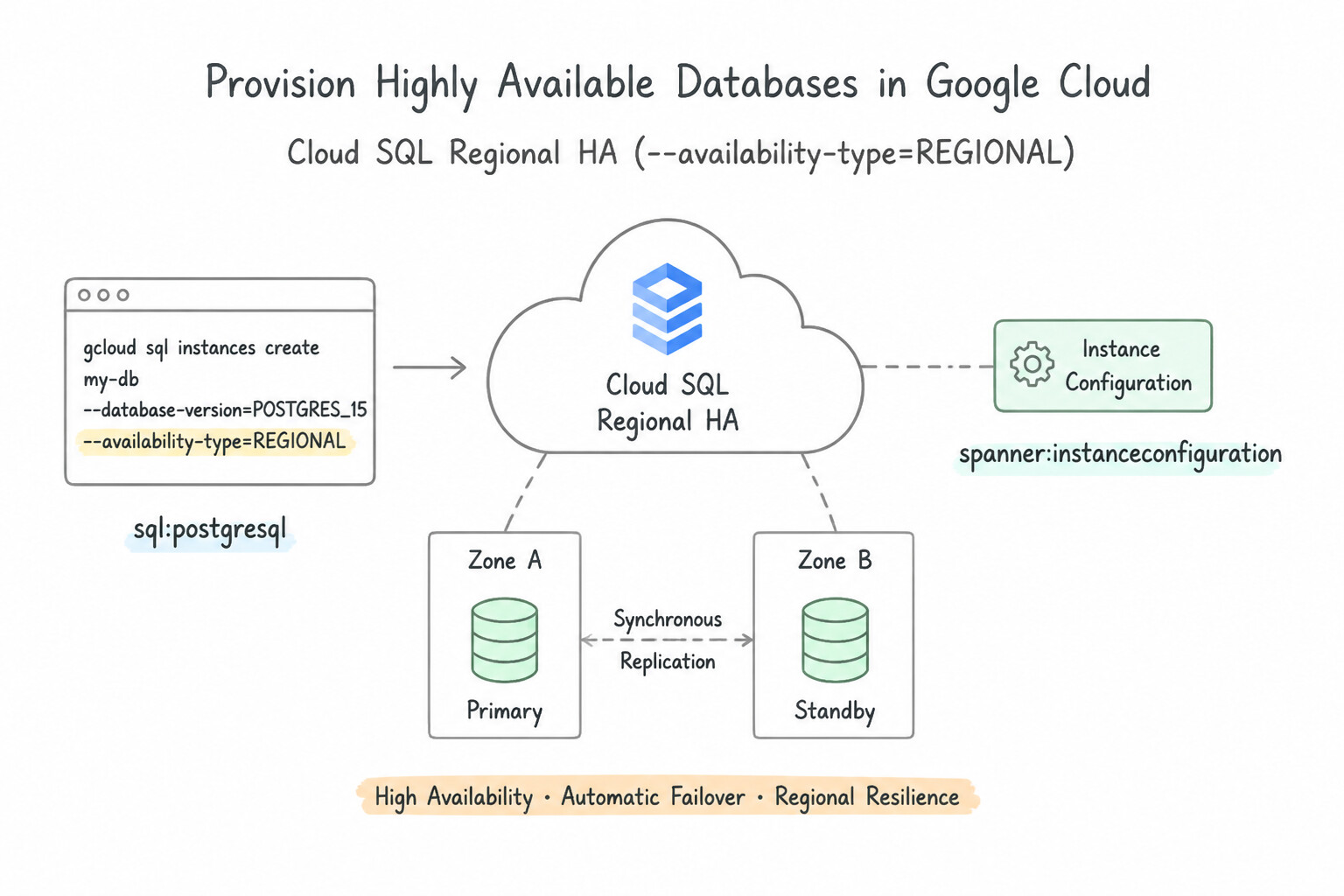
Know the exact provisioning requirements for High Availability across every core Google Cloud database:
- Cloud SQL Regional HA Provisioning (
--availability-type=REGIONAL): - Can be enabled at creation time or enabled later on an existing Zonal instance (note: converting a Zonal instance to Regional HA requires a brief restart of a few minutes).
- Prerequisites: Automated Backups and Point-in-Time Recovery (
PITR/ Binary Logging for MySQL) must be enabled. - Architecture: Provisions a primary VM in Zone A and a standby VM in Zone B within the same region, sharing a synchronously replicated Regional Persistent Disk. Both the primary and standby connect through the same static Private/Public IP address—so when failover occurs, applications reconnect to the exact same IP!
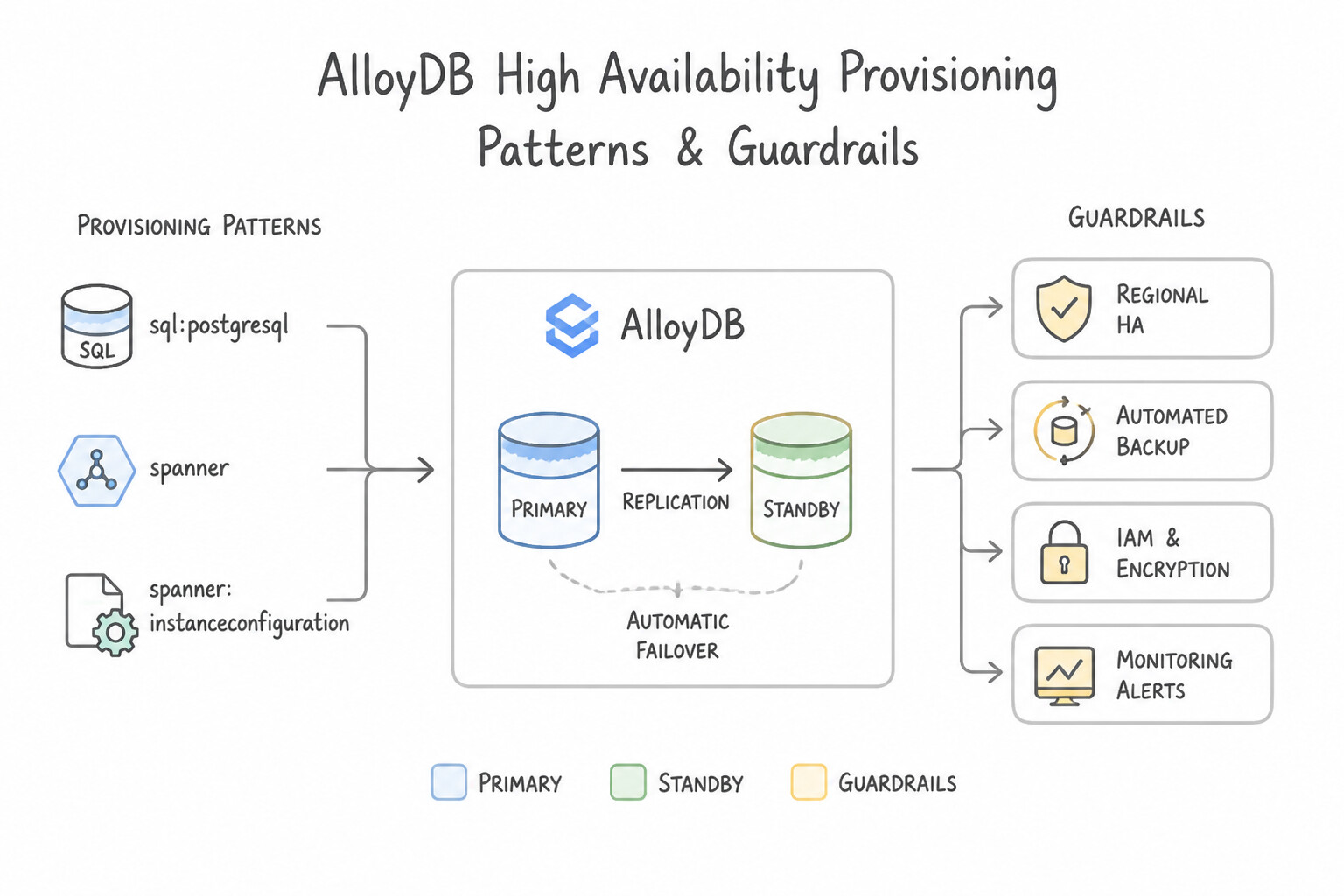
- AlloyDB High Availability Provisioning:
- Provision an AlloyDB Primary Instance in
HIGH_AVAILABILITYmode (--availability-type=REGIONAL), which automatically maintains an active-standby pair across two zones sharing the regional intelligent storage layer. - Cloud Spanner & Firestore High Availability:
- Provisioned by selecting a Regional (
3zones,99.99%SLA) or Multi-Region (nam3,eur6,nam-eur-asia1,99.999%SLA) instance configuration at creation time.
Key Implementation Patterns
- Cloud SQL High Availability Configuration: Use Select the High availability (regional) option to create a standby instance in a different zone. The High Availability configuration creates a standby instance in another zone with synchronous replication and automatic failover.
- Cloud Spanner Multi-Region Availability: Use Create a Cloud Spanner instance using a multi-region configuration. Multi-region configurations offer a 99.999% SLA and ensure availability even during a complete region failure. (Avoid alternative: Regional configurations only provide 99.99% availability and cannot withstand a full region outage.)
Key Takeaways (4.1a)
- High Availability (HA) in Cloud SQL uses a Primary and a Standby instance in different zones.
- HA provides automatic failover and synchronous replication.
- Read Replicas are primarily for scaling reads, not for automatic HA.
- Backups are for Disaster Recovery, not for maintaining uptime during a zonal outage.
Consideration 4.1b: Test high availability and disaster recovery strategies
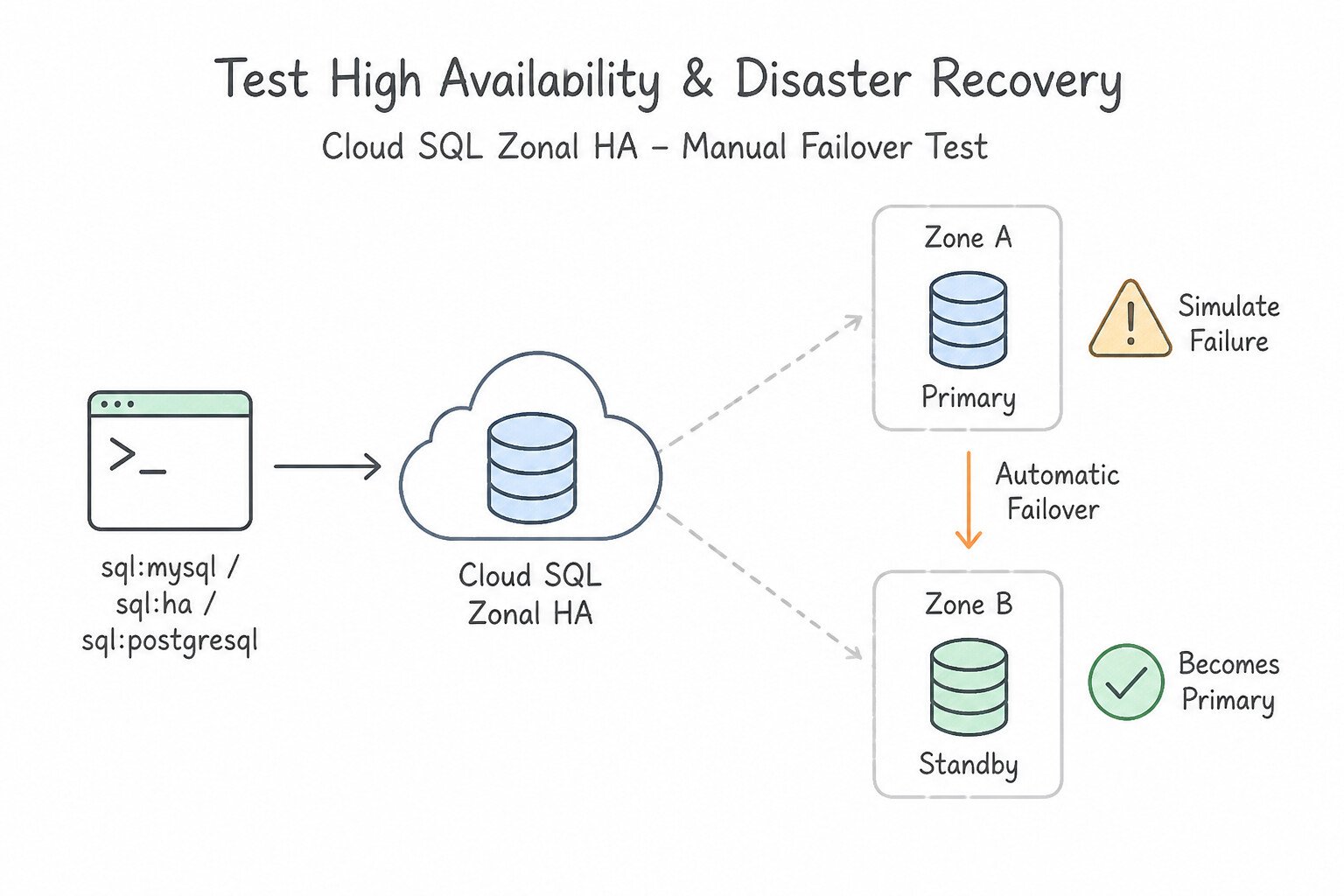
Regularly testing both Zonal HA Failover and Regional DR Switchover/Failover is mandatory for production readiness:
- Testing Cloud SQL Zonal HA (
Manual Failover Test): - Execute
gcloud sql instances failover INSTANCE_NAME. This simulates a zone failure by synchronously switching the primary and standby roles across zones (RPO = 0). - What to validate during the test: (1) Verify that Cloud SQL Auth Proxy and your connection pooler (
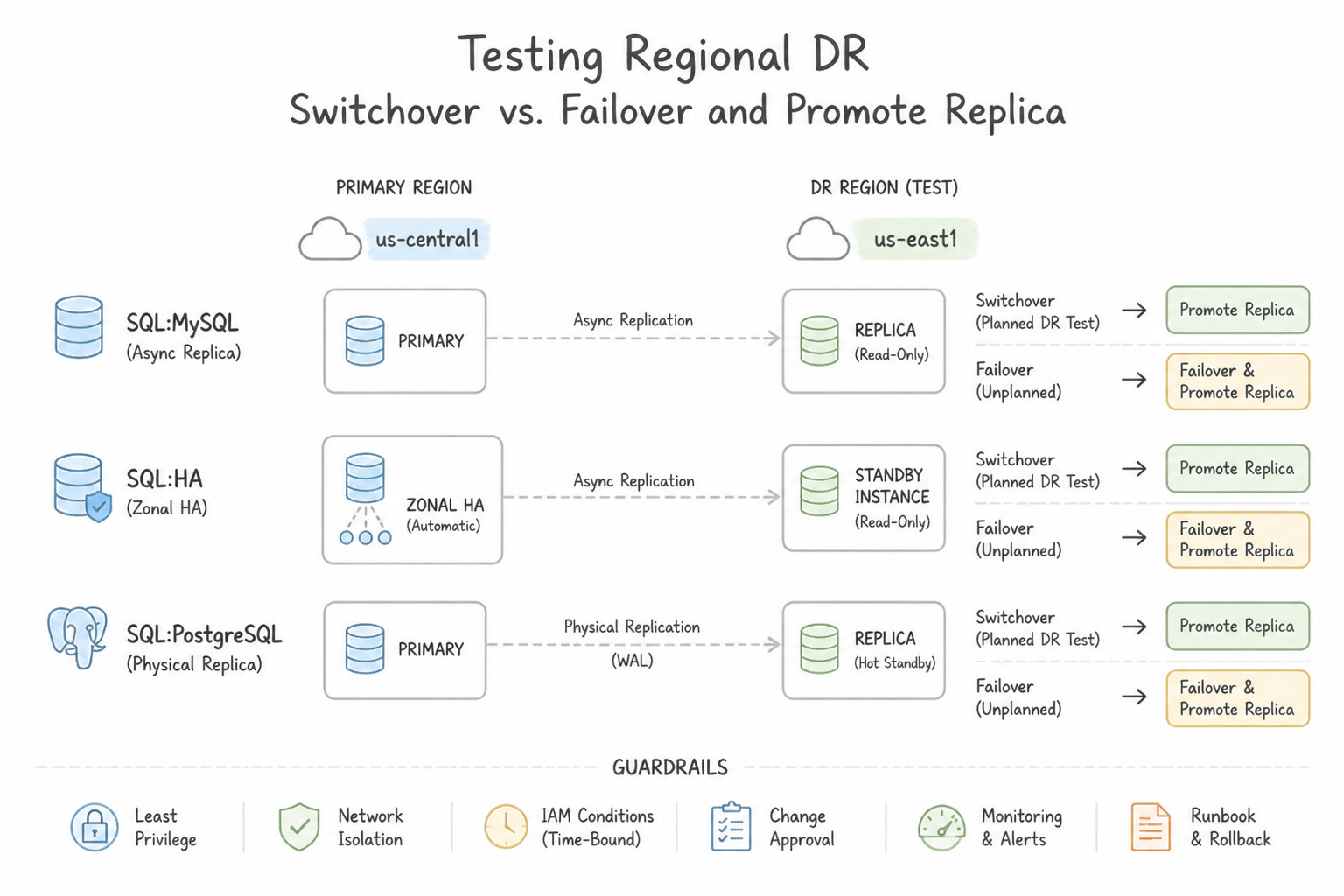
PgBouncer/ HikariCP) automatically drop stale TCP sockets and re-establish connections within 60–120 seconds using exponential backoff; (2) Verify that no uncommitted transactions are partially applied. - Testing Regional DR (
Switchovervs.Failover / Promote Replica): - Cloud SQL Enterprise Plus & AlloyDB Cross-Region Switchover (Planned DR Drill —
RPO = 0): In Cloud SQL (advanced DR / Enterprise Plus) and AlloyDB Cross-Region Secondary Clusters, a Switchover gracefully drains writes on Primary Region A, waits for Secondary Region B to catch up to 100% (RPO = 0), promotes Region B to primary, and automatically demotes Region A into a read replica of Region B—allowing you to test regional DR and switch back with zero data loss and without rebuilding replicas from scratch! - Standard Promote Replica (Unplanned Emergency Regional Failover —
RPO > 0): Callinggcloud sql instances promote-replicasevers replication permanently and turns the replica into an independent standalone primary. To fail back later, you must recreate or re-seed a replica in the original region.
Key Implementation Patterns
- Cloud SQL High Availability Configuration: Use Create the instance with the High availability (regional) option enabled. High availability creates a synchronous standby in another zone that takes over automatically if the primary fails. (Avoid alternative: Read replicas are for scaling reads, not for automatic high availability failover.)
- Cloud SQL Cross-Region Read Replicas for DR: Use Create a cross-region read replica in the secondary region. Promote the replica to a standalone instance if the primary region fails. Promoting a cross-region read replica is the standard low-RTO strategy for regional Disaster Recovery.
- Cloud Spanner Multi-Region Disaster Recovery: Use Create a Cloud Spanner instance with a multi-region configuration. Cloud Spanner multi-region configurations provide a 99.999% SLA and can survive a total region failure. (Avoid alternative: Cross-region replicas require promotion during failure and do not provide the synchronous 99.999% availability of Spanner.)
Key Takeaways (4.1b)
- Cloud SQL High Availability (HA) uses a synchronous standby instance in a different zone.
- HA provides automatic failover in case of zonal outages.
- The instance IP address remains unchanged during a failover event.
- Read replicas are asynchronous and are used for scaling reads, not primarily for HA.
Consideration 4.1c: Set up multi-regional replication for databases
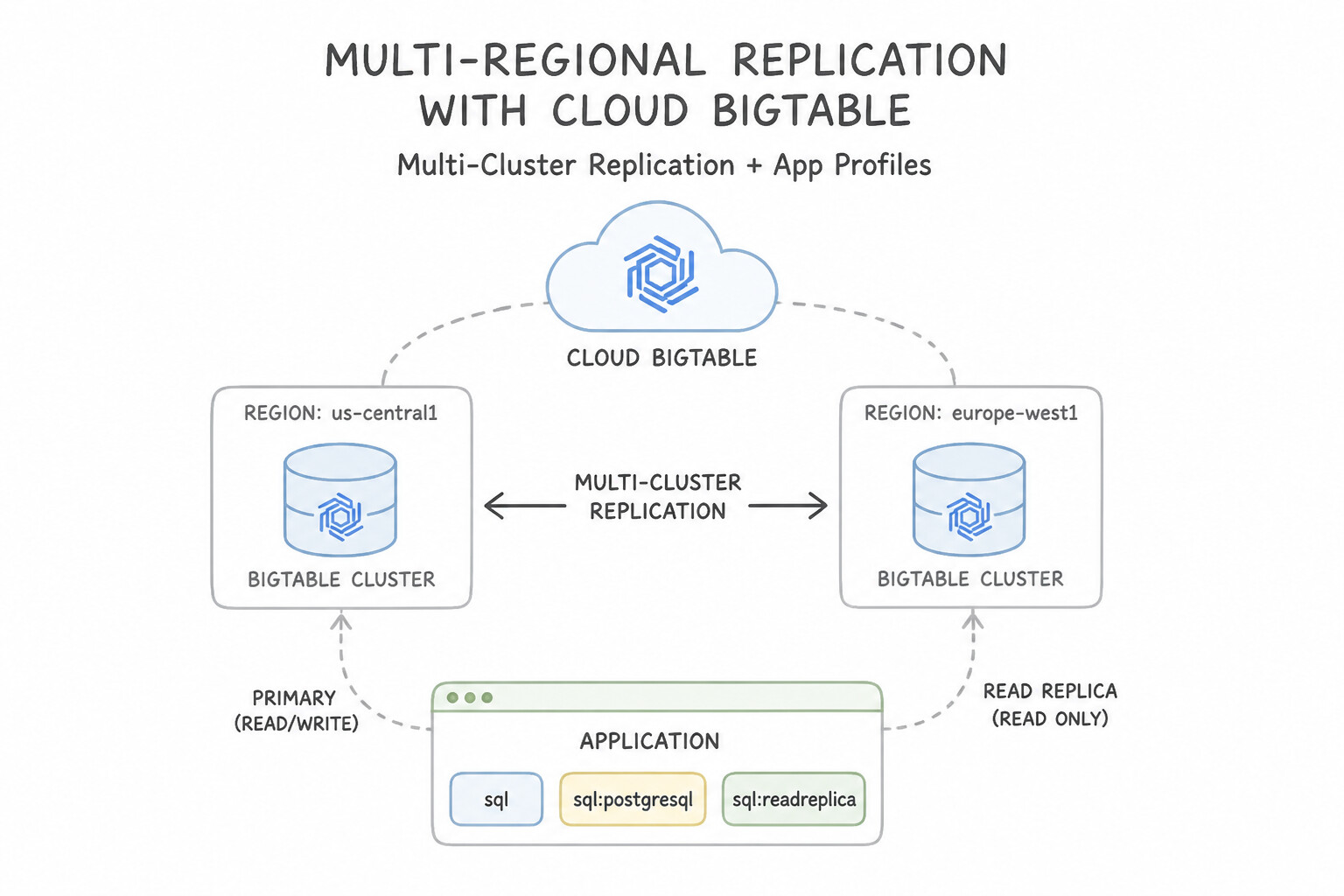
Configure multi-region replication according to each engine's consistency and routing model:
- Cloud Bigtable Multi-Cluster Replication & App Profiles:
- Add clusters in multiple regions (up to 8 clusters per instance across any Google Cloud regions worldwide). Bigtable replicates mutations asynchronously (eventually consistent) between clusters.
- App Profile Routing Policies (critical!):
- Multi-Cluster Routing: Automatically routes requests to the nearest healthy cluster and automatically fails over to another cluster if a cluster becomes unavailable or overloaded. Constraint: Does not support immediate read-your-writes consistency or single-row transactions (
CheckAndMutateRow/ReadModifyWriteRow) unless conflict resolution / row-prefix isolation is used. - Single-Cluster Routing: Pins a specific workload (e.g., an offline Dataflow batch job or a strong read-your-writes transactional microservice) to one specific cluster so batch jobs never steal CPU from live user-facing clusters!
- AlloyDB Cross-Region Replication:
- Create a Secondary Cluster (and Secondary Instance) in a remote region (
gcloud alloydb clusters create-secondary). AlloyDB asynchronously streams storage-layer WAL logs from the Primary Cluster to the Secondary Cluster's regional storage layer. - Cloud Spanner Multi-Region Topologies:
- Use pre-defined multi-region configurations (
nam3,eur6) or Custom Instance Configurations to place Read-Write Replicas, Read-Only Replicas, and Witness Replicas in specific regions.
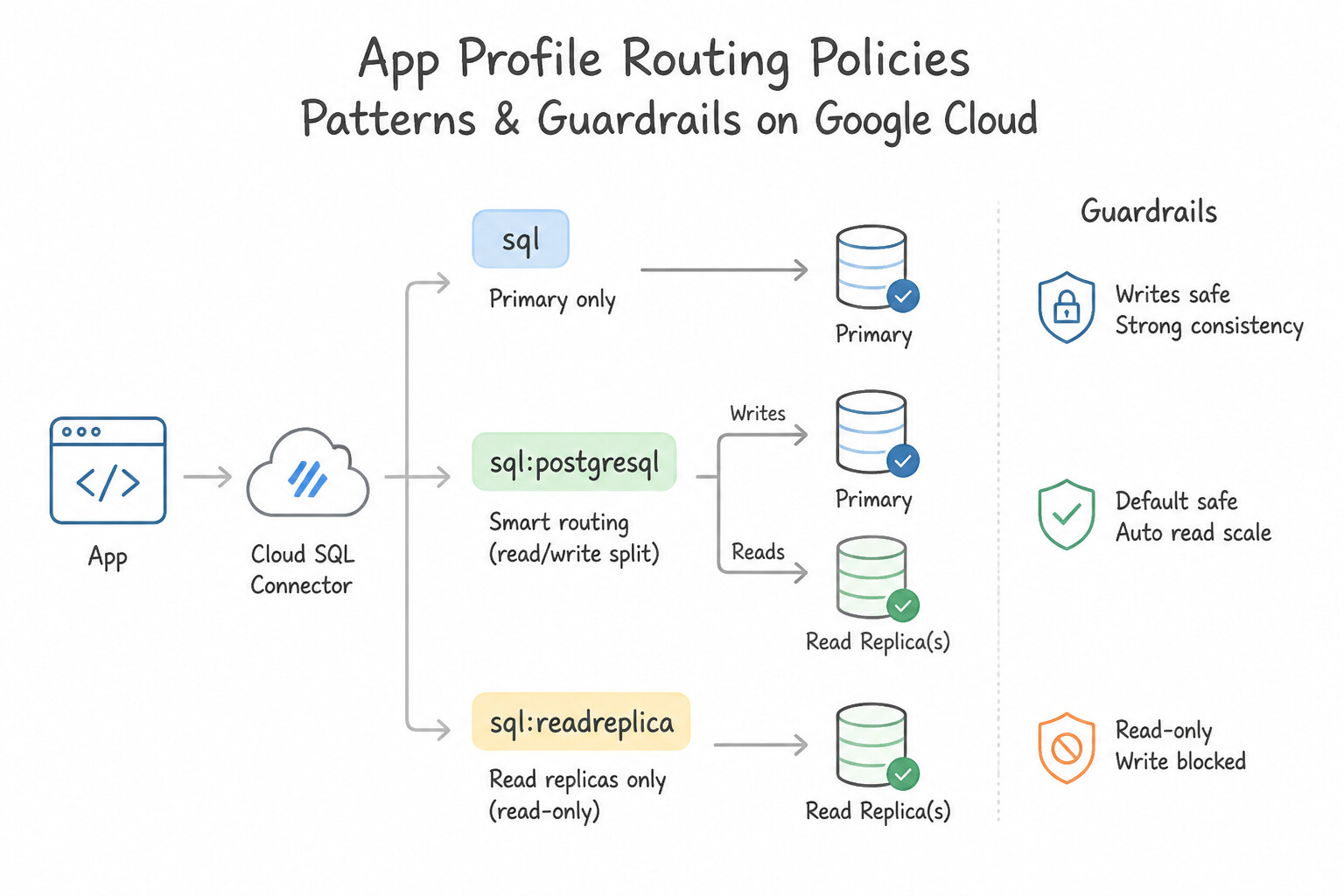
Key Implementation Patterns
- Cloud SQL Disaster Recovery via Cross-Region Replica: Use Create a read replica in us-east1. If us-central1 fails, promote the read replica to a standalone instance. Cross-region read replicas allow for quick promotion to a standalone primary instance in a different region, satisfying the RTO requirement for regional disaster recovery.
- Cloud Spanner Multi-Region Configuration for 99.999% Availability: Use Create a Multi-region instance configuration. Multi-region instances provide 99.999% availability and tolerance against full region failures. (Avoid alternative: Regional instances offer 99.99% availability and cannot survive a full region outage.)
Key Takeaways (4.1c)
- High Availability (HA) protects against zonal failures within a single region.
- Cross-region Read Replicas protect against regional failures and are a key component of Disaster Recovery (DR) plans.
- Promoting a read replica is generally faster (lower RTO) than restoring from a backup.
- RTO (Recovery Time Objective) defines how quickly you must restore service; RPO (Recovery Point Objective) defines how much data loss is acceptable.
Consideration 4.1d: Deploy and scale read replicas
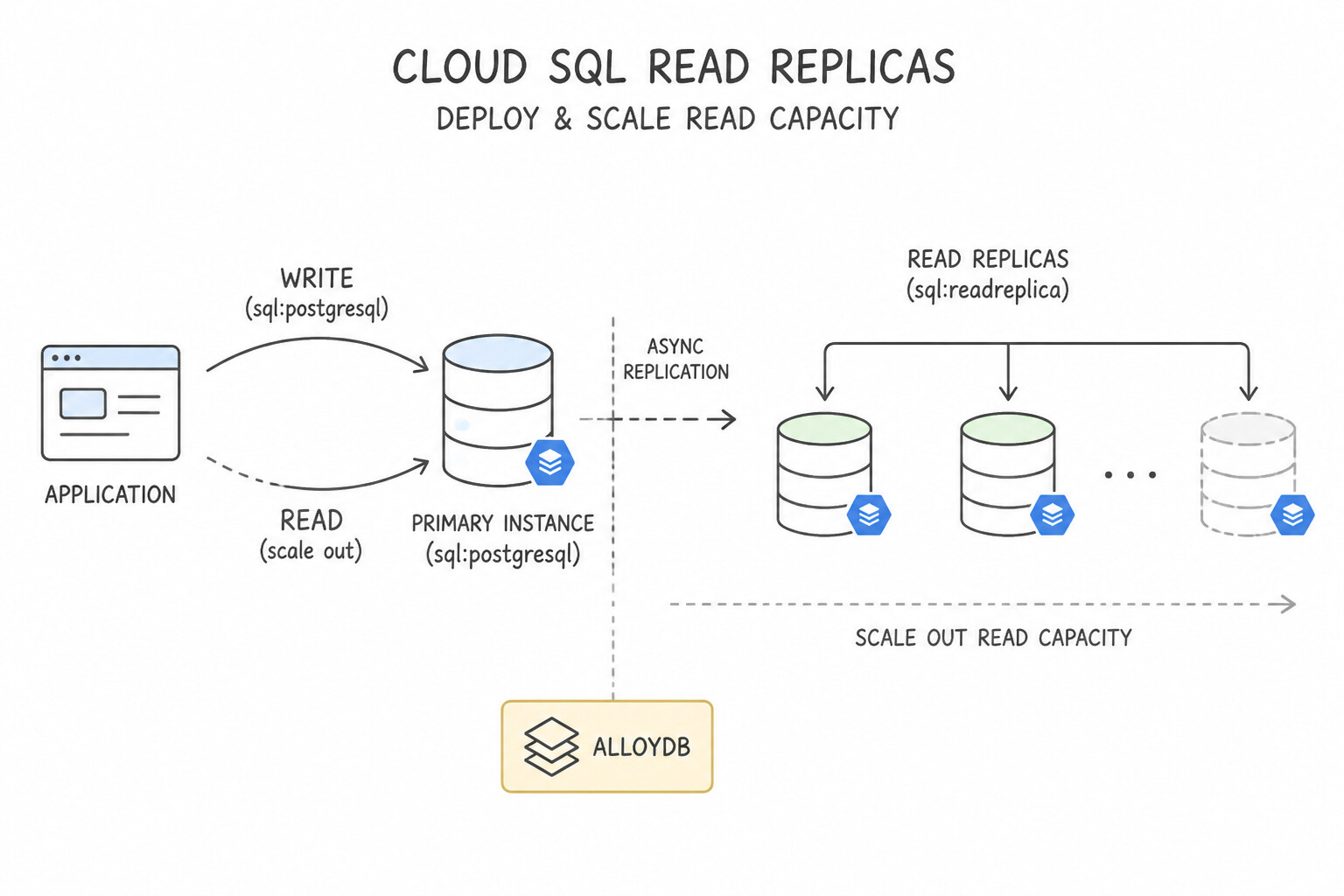
Design read replica architectures that scale cleanly under heavy read traffic without destabilizing the primary:
- Cloud SQL Read Replicas:
- Must be created with a machine tier and disk size equal to or greater than the primary instance (recommended) so the replica can keep up with primary write IOPS and safely take over if promoted during DR!
- Distribute application read queries across multiple read replicas using Cloud SQL Enterprise Plus Read Pool / Internal TCP/UDP Load Balancing / ProxySQL / HaProxy or ORM read-replica routing.
- Remember: If a read replica is deleted or stopped for too long, the primary may accumulate unpurged WAL logs (in PostgreSQL replication slots) until the primary disk fills up! Always monitor
pg_replication_slotsand disk usage. - AlloyDB Elastic Read Pools:
- Instead of managing individual replica IP addresses, provision an AlloyDB Read Pool Instance with
1to20nodes (--node-count). - AlloyDB provides a single static Read Pool IP endpoint and load-balances connections across all nodes in the pool automatically. Because all Read Pool nodes read directly from AlloyDB's shared regional storage layer, adding a new Read Pool node takes only minutes and does not require copying terabytes of disk data!
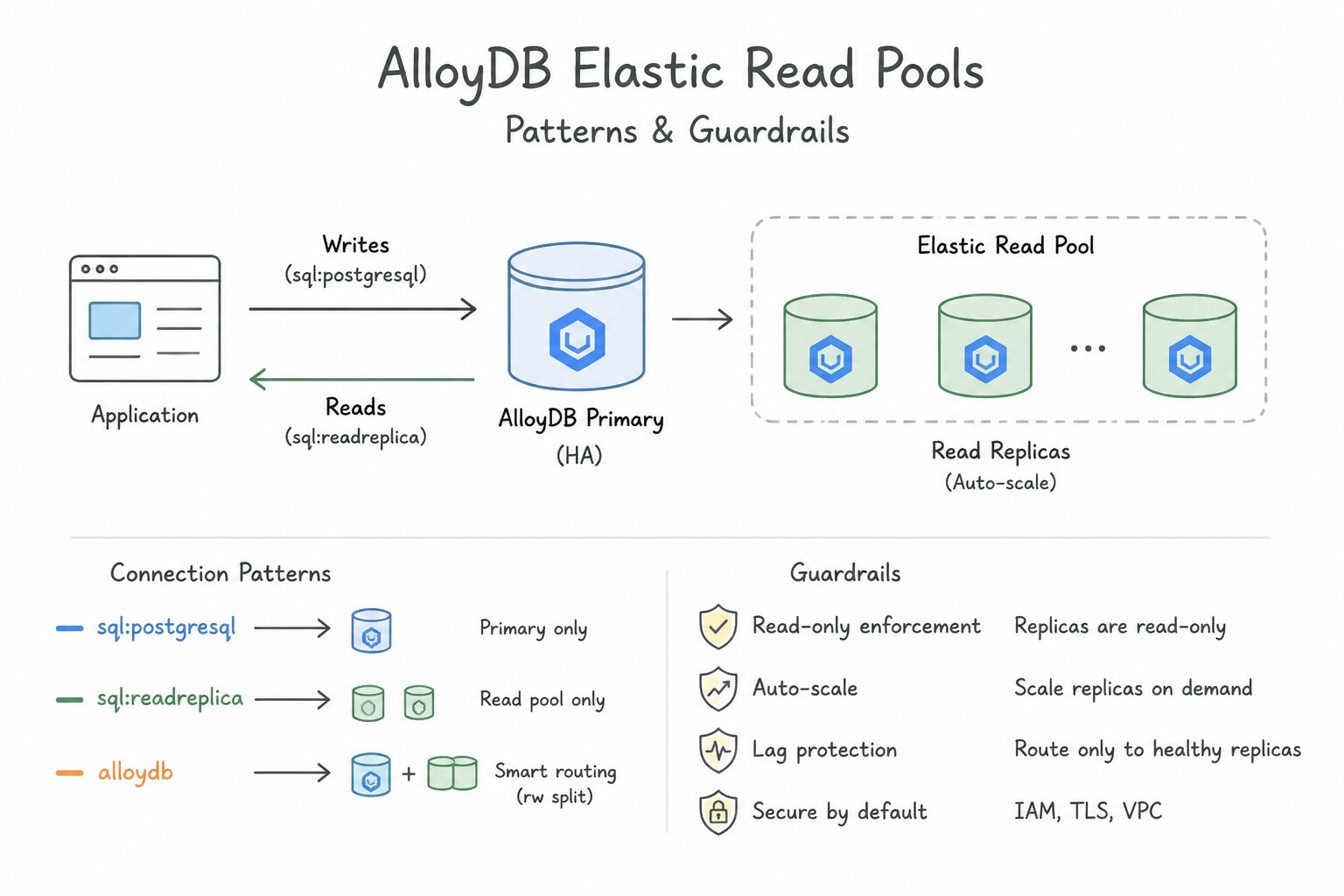
Key Implementation Patterns
- Reducing Read Latency for Global Users in Cloud SQL: Use Create a cross-region read replica in europe-west1. Update the application to direct European read requests to this replica. Deploying a read replica in the same region as your users reduces network latency for read operations.
- Handling Unpredictable Read Spikes in AlloyDB: Use Configure the AlloyDB read pool to use autoscaling. Define the minimum and maximum number of nodes. AlloyDB read pools support native autoscaling, which automatically adjusts the node count based on load. (Avoid alternative: Vertical scaling affects the primary instance and is not the most cost-effective or dynamic way to handle read-only traffic spikes.)
- Isolating Analytics Workloads in Bigtable: Use Add a second cluster to the instance. Create a new app profile configured for single-cluster routing to the new cluster for the analytics jobs. Add a second cluster for replication and use an app profile with single-cluster routing to direct analytics traffic to it.
Key Takeaways (4.1d)
- Network latency is determined by physical distance; bring data closer to users to fix it.
- Cross-Region Read Replicas are the primary tool for reducing read latency for global users.
- Read Replicas scale read capacity but cannot accept write operations.
- Vertical scaling (adding CPU/RAM) improves throughput but does not solve geographic latency.
Consideration 4.1e: Automate database instance provisioning
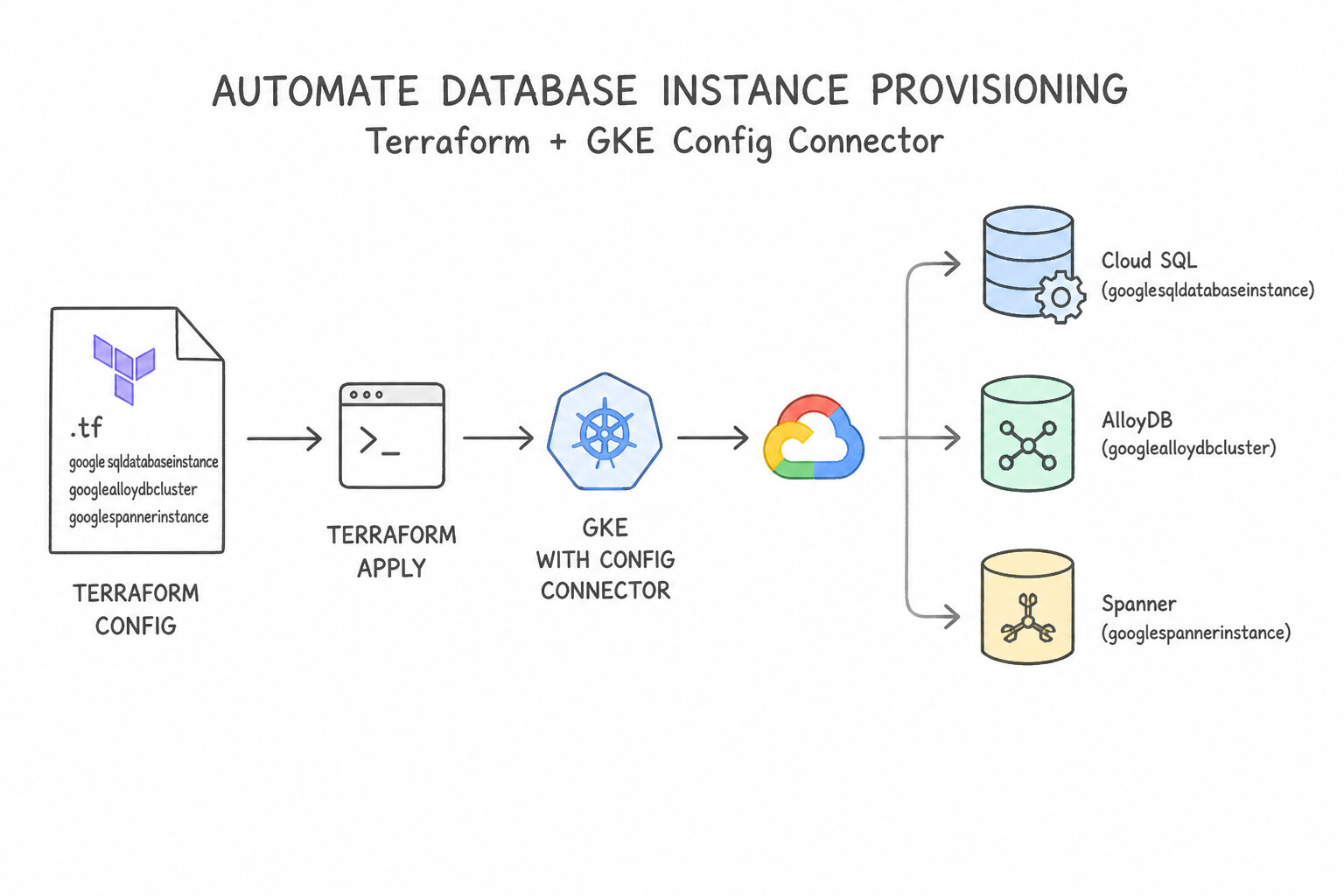
Eliminate manual provisioning errors by treating database infrastructure as version-controlled code:
- Terraform (
google_sql_database_instance,google_alloydb_cluster,google_spanner_instance): - Store Terraform state in a remote Cloud Storage backend with state locking and versioning.
- Parameterize environments (
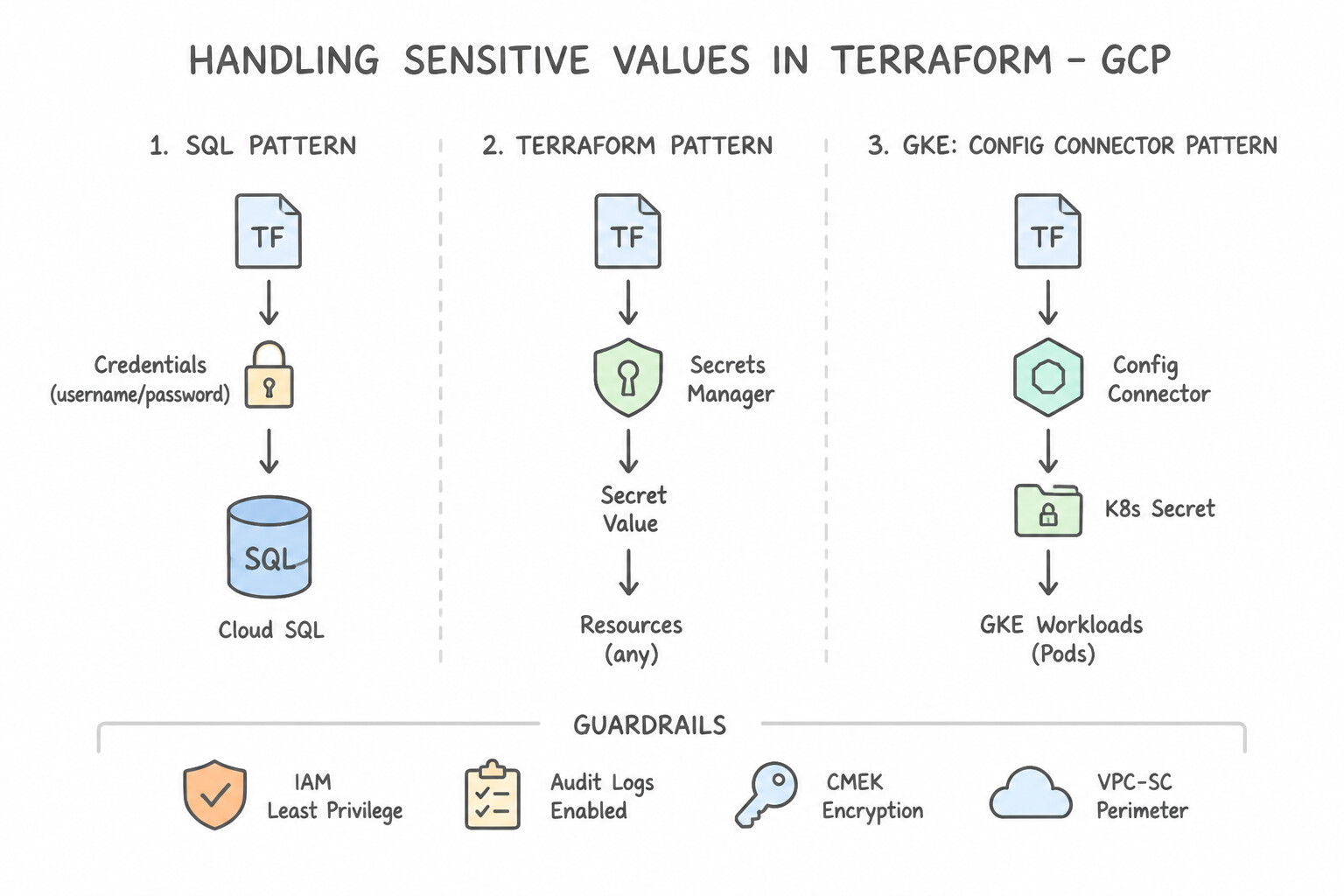
dev,staging,prod) using Terraform Modules so production automatically enforcesavailability_type = "REGIONAL",deletion_protection = true,ipv4_enabled = false(Private IP only),encryption_key_name(CMEK), and automated backup schedules. - Handling Sensitive Values in Terraform: Never commit database passwords in
.tfvarsor Git! Generate random initial passwords synced directly into Secret Manager (google_secret_manager_secret_version) or rely purely on IAM Database Authentication (google_sql_userwithtype = "CLOUD_IAM_SERVICE_ACCOUNT"). - Kubernetes-Native Provisioning (
Config Connector): - If your platform engineering team standardizes on GKE and GitOps (
ArgoCD/Config Sync), enable Config Connector to provision and manageSQLInstance,SpannerInstance, andBigtableInstanceresources declaratively via Kubernetes YAML manifests.
Key Implementation Patterns
- Standardizing Database Configurations Across Projects: Use Create a centralized Terraform module that hardcodes the compliance settings. Expose only project-specific variables, and require developers to source this module. Terraform modules promote code reuse and consistency by encapsulating standard configurations and exposing only necessary variables.
- Kubernetes-Native Database Provisioning: Use Install Config Connector on the GKE cluster. Create a SQLInstance Custom Resource YAML file and apply it with kubectl. Config Connector allows you to provision and manage Google Cloud resources using Kubernetes manifests and API.
Key Takeaways (4.1e)
- Infrastructure as Code (IaC): Always prefer declarative IaC (like Terraform) over manual processes or imperative scripts for managing cloud resources.
- Modules for Consistency: Use Terraform modules to encapsulate best practices and compliance requirements. This enforces standards while simplifying the interface for developers.
- Don't Repeat Yourself (DRY): Avoid copying and pasting configuration files. Centralize logic to make updates and maintenance easier.
- Config Connector allows you to manage Google Cloud resources using Kubernetes manifests.
Consideration 4.1f: Configure monitoring for highly available databases
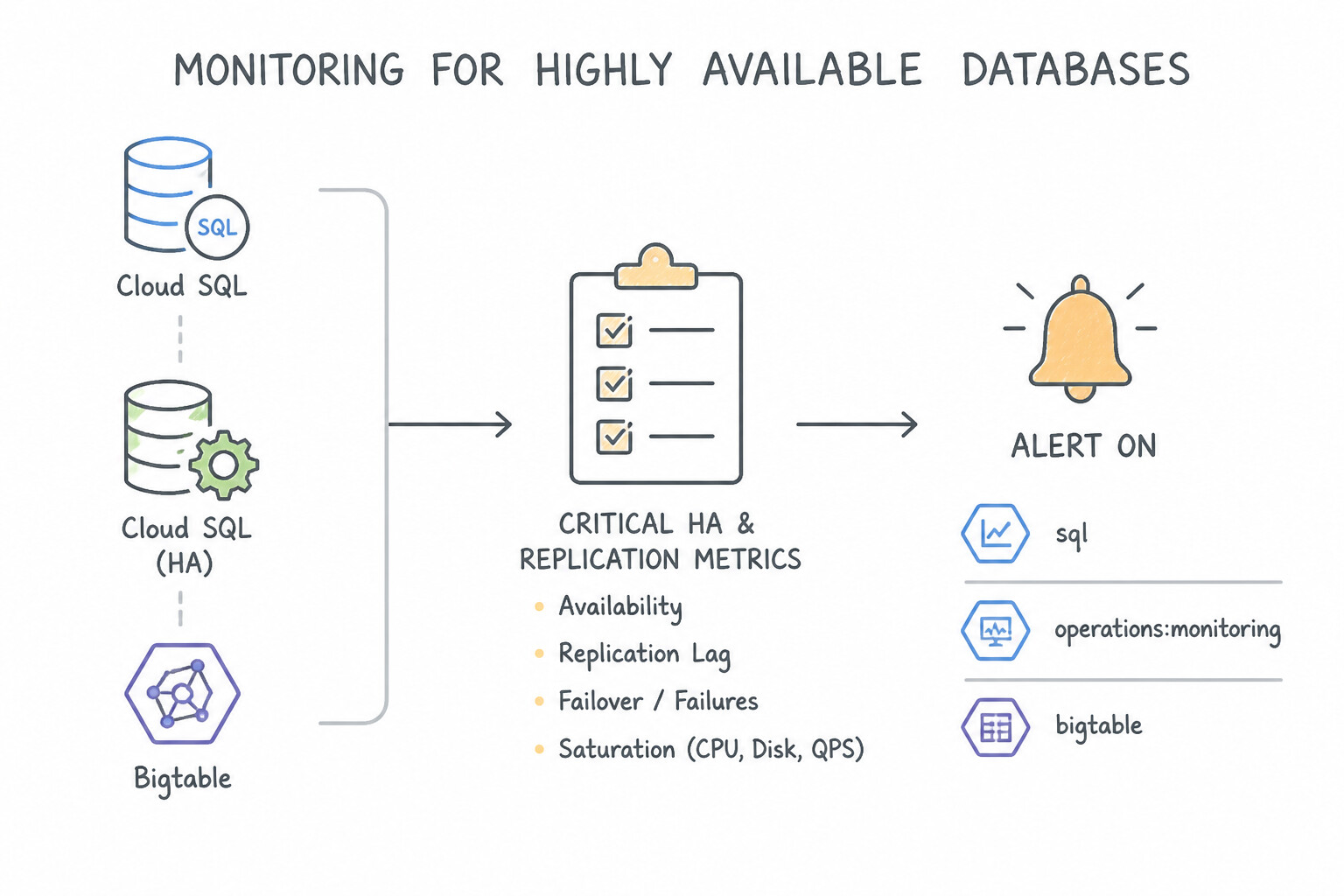
An HA/DR architecture is only as reliable as the telemetry watching its replication health and failover readiness:
- Critical HA & Replication Metrics to Alert On:
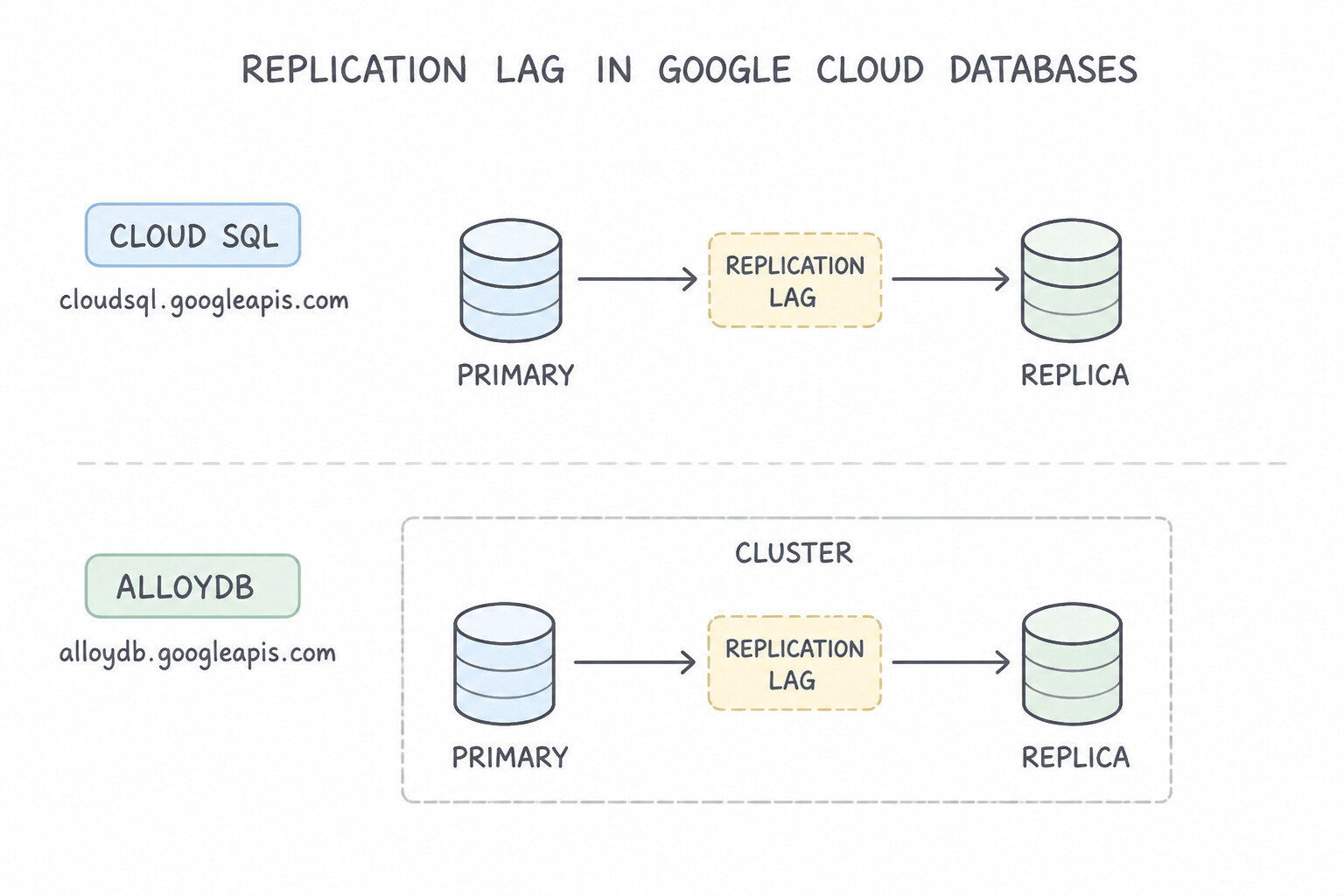
- Replication Lag (
cloudsql.googleapis.com/database/replication/replica_lag/alloydb.googleapis.com/cluster/replication/replica_lag/bigtable.googleapis.com/replication/max_delay): If asynchronous cross-region replica lag exceeds your business RPO (e.g., > 60 seconds), trigger an immediate alert—because an unplanned regional failover at that moment will lose more data than your RPO allows! - Replica State & Failover Readiness (
database/replication/state,database/up): Alert immediately if a standby or read replica enters an unhealthy or stopped state. - Spanner Multi-Region Failover Headroom (
spanner.googleapis.com/instance/cpu/utilization_by_priority): Alert whenever **highpriority CPU exceeds $45\%** in a multi-region instance (or @@ESCAPEDDOLLAR@@65% in a regional instance) so capacity is added before a regional failure causes cascading overload. - PostgreSQL Replication Slot Disk Retention (
oldest_transaction_age/ WAL disk growth): Alert if an inactive replication slot is preventing WAL cleanup and threatening to fill the primary disk.
Key Implementation Patterns
- Cloud SQL Read Replica Lag Monitoring: Use Create an alerting policy for the replication/replica_lag metric on the Asia replica. This metric specifically measures the time delay between the primary instance and the read replica. (Avoid alternative: This metric only checks if the database is running, not if the data is up to date.)
- Bigtable Hotspot Detection: Use Open Key Visualizer to analyze the read and write patterns of the table. Key Visualizer provides heatmaps to identify hotspots and uneven access patterns in Bigtable. (Avoid alternative: Scaling does not fix underlying schema issues or identify hotspots immediately.)
- Cloud Spanner CPU Utilization for HA: Use Set the alert threshold to 45% for high-priority CPU utilization. Multi-region Spanner instances require a 45% CPU threshold to handle regional failover. (Avoid alternative: 65% is the recommended threshold for single-region instances, not multi-region instances.)
Key Takeaways (4.1f)
- Read replicas in Cloud SQL use asynchronous replication, which can lead to replication lag.
- Replication lag is the time difference between the state of the primary instance and the read replica.
- Use the
replication/replica_lagmetric in Cloud Monitoring to track this delay.- Set alerts on replication lag to proactively detect data consistency issues experienced by end users.
Quick Decision Cheat Sheet (Subsection 4.1)
If the Scenario Requires... | Choose This Google Cloud Pattern | Avoid This Common Mistake |
|---|---|---|
"Safely test Cloud SQL Zonal High Availability failover in production" | Run gcloud sql instances failover during a low-traffic window and verify client retry behavior | Promoting a read replica (which permanently breaks replication instead of testing zonal HA standby switchover) |
"Planned cross-region DR test with RPO = 0 and easy failback" | Use Cross-Region Switchover (AlloyDB Secondary Cluster / Cloud SQL Enterprise Plus Advanced DR) | Using destructive promote-replica for a routine planned DR drill |
"Automatic failover across regions in Cloud Bigtable" | Add clusters in multiple regions and configure a Multi-Cluster Routing App Profile | Using a Single-Cluster Routing App Profile without failover automation |
"Scale read capacity dynamically in AlloyDB behind a single IP without duplicating storage" | Scale AlloyDB Read Pool ( --node-count) | Creating multiple standalone AlloyDB primary clusters |
"Ensure a CloudSpanner multi-region deployment can survive a full region failure without latency spikes" | Monitor utilization_by_priority (high priority CPU) and alert when it exceeds $45\%$ | Alerting only when average total CPU reaches $90\%$ |
Further Reading (Subsection 4.1)
- Overview of the high availability configuration — Explains how the high availability configuration works in Cloud SQL, including the roles of primary and standby instances and how failover occurs.
- Cloud Spanner Instance Configurations — Documentation detailing the differences between regional and multi-region configurations, including availability SLAs.
- Cloud Spanner Multi-Region Configurations — Specific details on how multi-region configurations handle regional failures and quorum.
- Overview of the high availability configuration — Explains how the HA configuration works in Cloud SQL, including the primary and standby instance relationship and failover process.
- About read replicas — Explains how read replicas work, including cross-region replication and promotion.
- Cloud Spanner Service Level Agreement (SLA) — Documents the Monthly Uptime Percentage for Multi-Region Instances (99.999%) versus Regional Instances (99.99%).
Book TOC · Previous · Chapter 2 of 6 · Next
AwesomeGCP.com Learning
The approach taken is a question-led learning approach: you explore realistic project scenarios where you need to make decisions or take actions to achieve business goals within specific constraints. Instead of passive learning, you are challenged to think and work through the options to master the Professional Cloud Database Engineer (PDBE) certification!