Book TOC · Previous · Chapter 1 of 6 · Next
Chapter 1: Database Engine Selection, Capacity Planning, Sizing & Fleet Architecture
Chapter Focus: Decision matrix across Cloud SQL, AlloyDB, Cloud Spanner, Bigtable, Firestore, Memorystore, Bare Metal Solution (Oracle) & BigQuery; CPU/RAM/IOPS sizing, and pgvector AI embeddings.
Subsection 1.1: Analyze relevant variables to perform database capacity and usage planning
The Big Picture
Database capacity planning in the cloud is a three-dimensional optimization problem balancing Compute (vCPU & RAM), Storage I/O (IOPS & Throughput), and Cost/Commitment Strategy. Teams that lift-and-shift on-premises sizing habits into Google Cloud routinely trigger three classic production disasters:
- The IOPS-Starved Small Disk Trap (
1.1a&1.1c): In Cloud SQL, Persistent Disk (PD-SSD / Hyperdisk) IOPS and throughput scale linearly with allocated disk size (GB) up to the machine type's network egress cap. A team with a 50 GB high-transaction database provisions a 64-vCPU instance with a 100 GB SSD and wonders why writes stall onIO Wait—because a 100 GB PD-SSD only delivers 3,000 baseline IOPS (30 IOPS/GB)! Conversely, another team disables Automatic Storage Increase to control costs, hits 100% disk utilization during a flash sale, and causes the database to enter read-only/crash-loop state. - The Over-Provisioned Compute vs. Under-Sized Buffer Pool Trap (1.1b): Relational performance hinges on keeping the active working set (hot indexes + frequently accessed rows) in RAM (
shared_buffersin PostgreSQL,innodb_buffer_pool_sizein MySQL, or the NVMe Data Cache in Cloud SQL Enterprise Plus). Choosing a standard machine type when a high-memory machine type (or AlloyDB's disaggregated intelligent storage layer) is required forces constant disk reads, inflating both latency and I/O bottlenecks. - The Spanner & Bigtable CPU Threshold Trap (
1.1a&1.1c): Unlike single-node VMs where 80% CPU might be acceptable, distributed quorum databases (Cloud Spanner and Cloud Bigtable) require strict CPU headroom to survive zonal failovers and background compactions. Google Cloud mandates keeping Cloud Spanner below 65% CPU in single-region configurations and below 45% CPU in multi-region configurations so that if an entire region's traffic shifts during an outage, surviving replicas do not collapse under the doubled load.
Consideration 1.1a: Perform solution sizing based on current environment workload metrics and future requirements
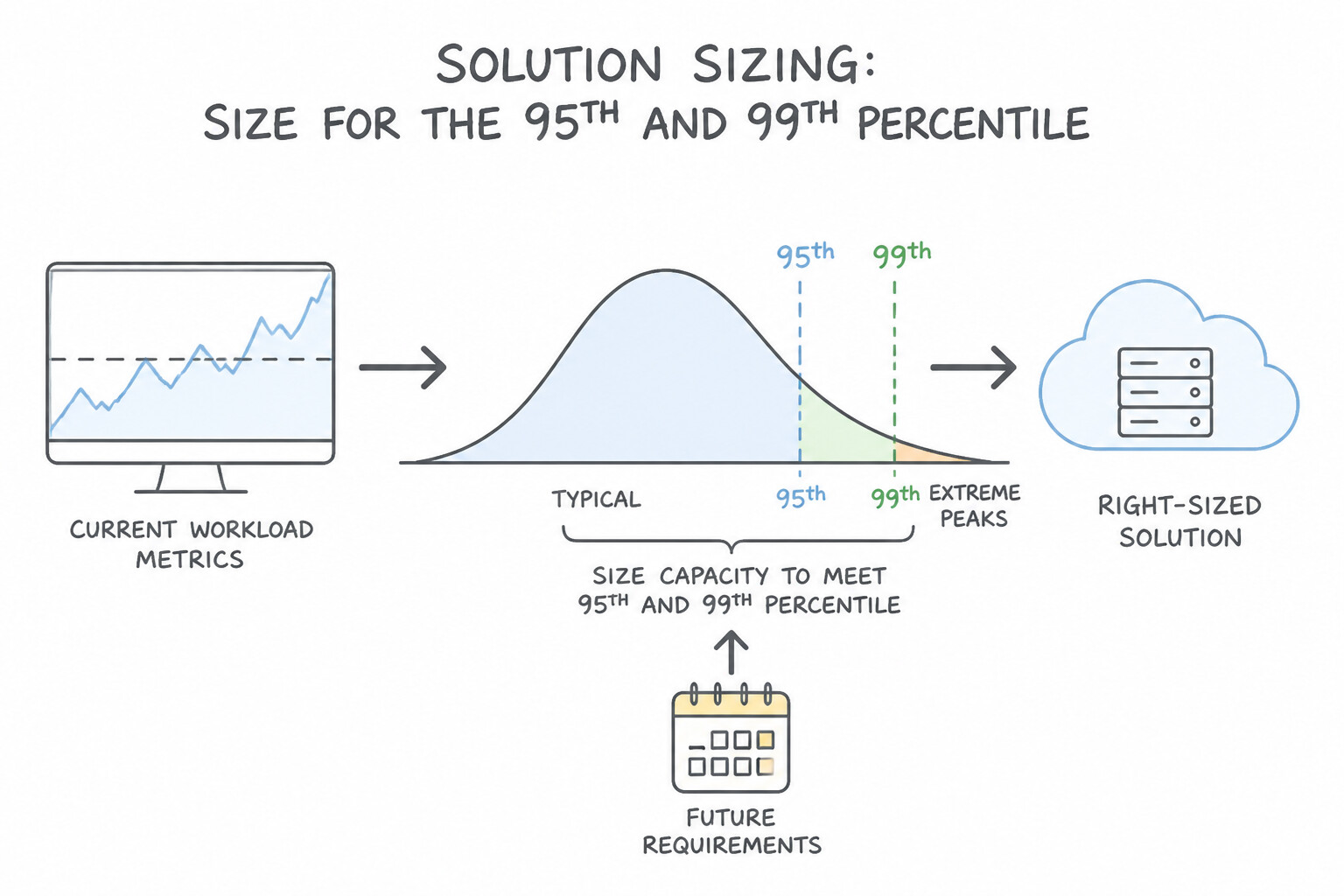
When translating current on-premises or cloud metrics into a target Google Cloud database size:
- Size for the 95th/99th Percentile Peak + Failover Headroom, Never the Average: Average CPU/IOPS hides flash sales, end-of-month batch closes, and failover surges. Always collect peak IOPS, peak read/write throughput (MB/s), active connection count, and working set size (total index size + active table pages).
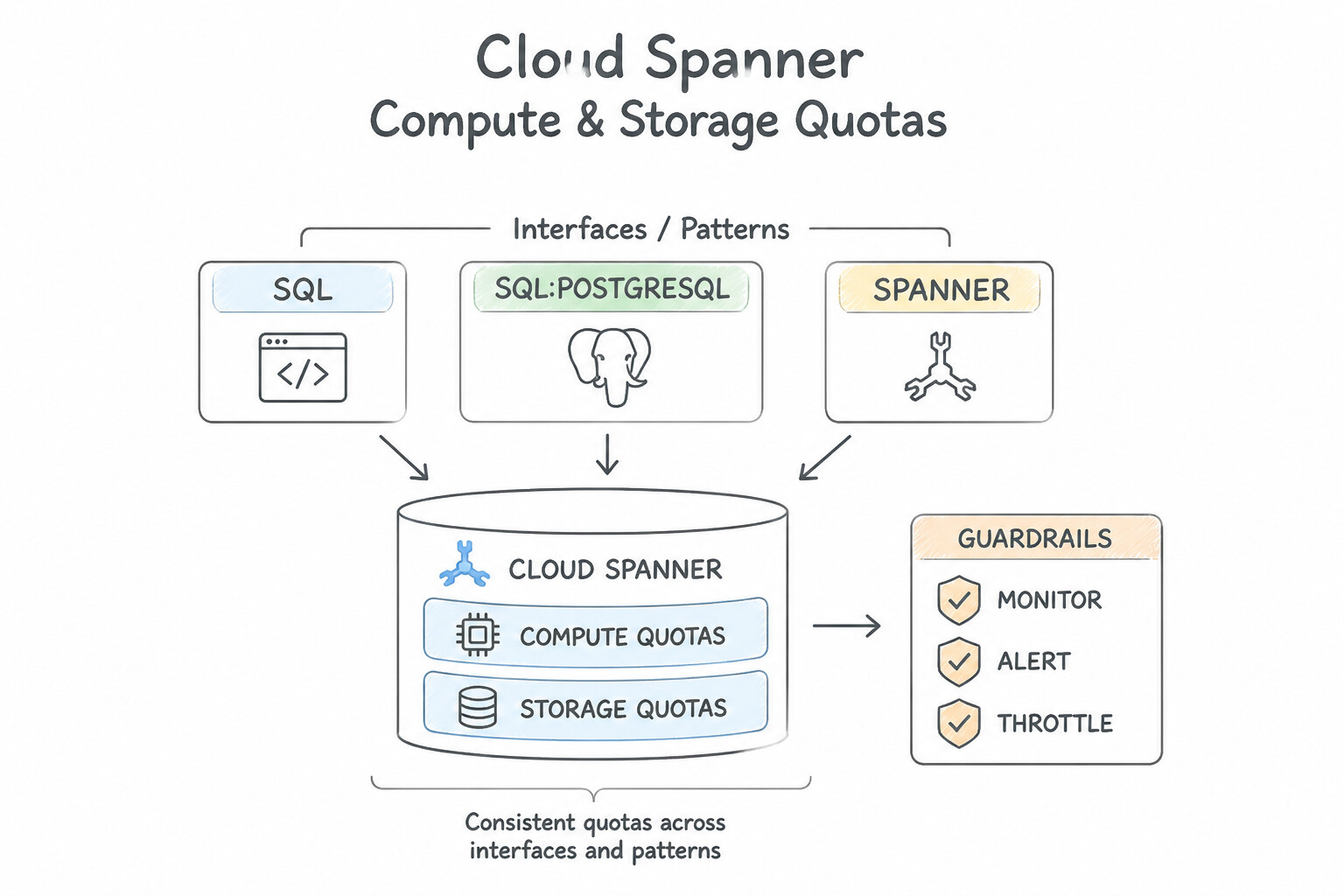
- Cloud Spanner Compute & Storage Quotas:
- Compute is measured in Processing Units (PUs) in increments of
100 PU(up to1,000 PU = 1 Node). Small workloads can start at100 PUfor fractional cost. - Keep High-Priority CPU utilization ≤ 65% for Regional instances and ≤ 45% for Multi-Region instances. Why $45\%? So that if a quorum region fails and traffic shifts to a neighboring region, CPU remains below @@ESCAPEDDOLLAR@@90% without violating latency SLOs.
- Storage scales coupled with compute: each Node (
1,000 PU) supports up to 10 TB of data (or1 TBper100 PUfor sub-node instances). If storage hits $80\%$ of the node quota even at low CPU, you must add Processing Units / Nodes. - Cloud Bigtable Node & Storage Math: Each SSD node supports up to 5 TB of storage (and roughly 10,000 QPS reads / 10,000 QPS writes at ≤ 70% CPU); keep storage utilization below $70\%$ to allow LSM-tree background compactions.
Key Implementation Patterns
- Cloud SQL IOPS vs. Disk Size Dependency: Use Increase the storage capacity of the instance. Disk IOPS performance scales with disk size in Cloud SQL; increasing storage increases available IOPS. (Avoid alternative: CPU usage is low (40%), so adding more vCPUs does not address the disk I/O bottleneck.)
- Cloud Spanner Node Sizing for CPU Utilization: Use Increase the compute capacity of the instance. The usage (75%) exceeds the recommended limit (65%) for Single-Region instances, so you must scale up. (Avoid alternative: The recommended threshold for Single-Region instances is 65%, not 90%.)
Key Takeaways (1.1a)
- Disk I/O performance (IOPS) in Cloud SQL is directly correlated with the provisioned disk size.
- To increase IOPS on a standard Cloud SQL instance, increase the storage capacity.
- CPU usage metrics help distinguish between compute bottlenecks and storage I/O bottlenecks.
- High Availability (HA) features provide redundancy, not performance scaling.
Consideration 1.1b: Evaluate performance and cost tradeoffs of different database configurations (e.g., machine types, storage types)
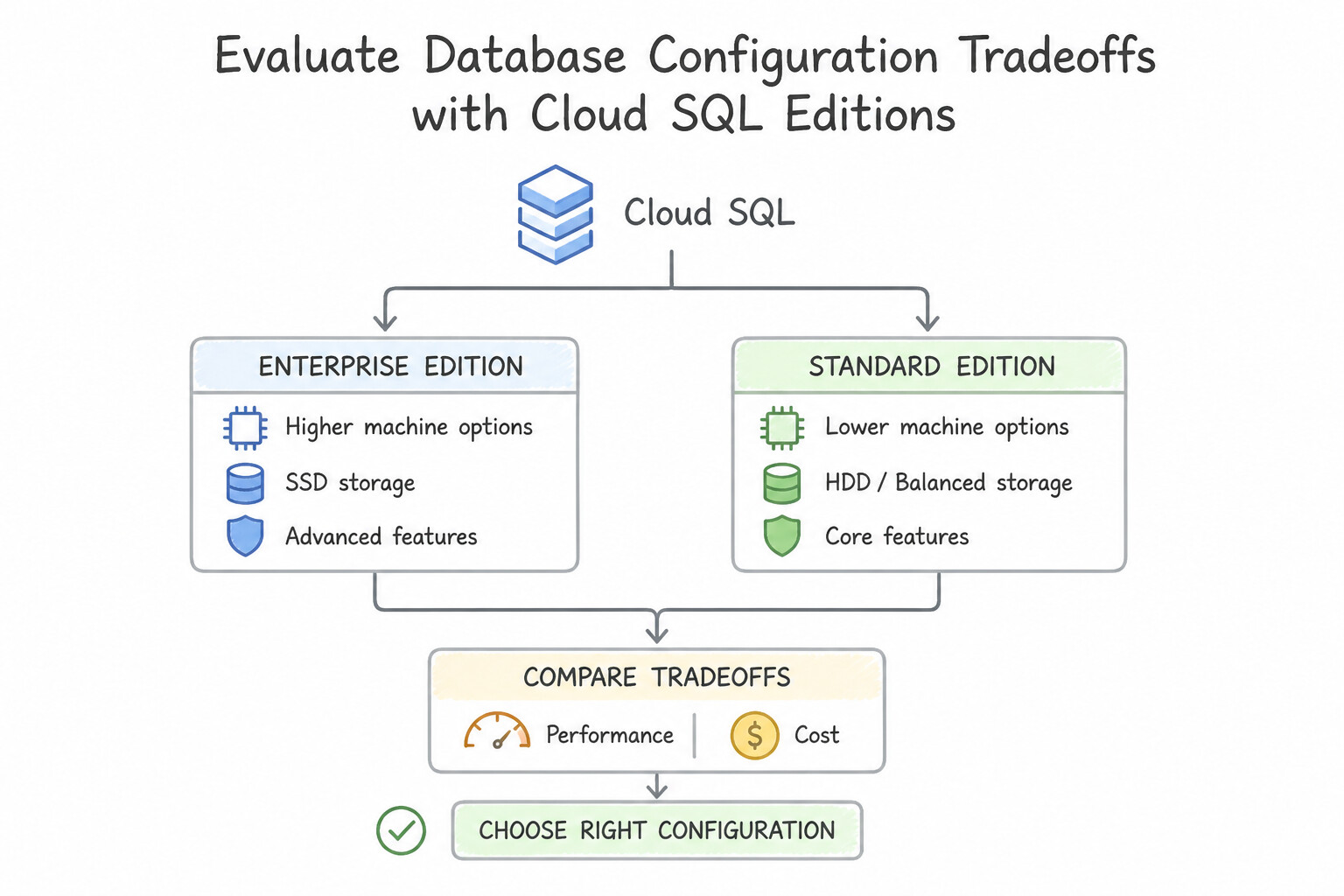
Choosing the right machine tier, edition, and storage medium eliminates unnecessary cloud spend while protecting tail latency:
- Cloud SQL Editions (
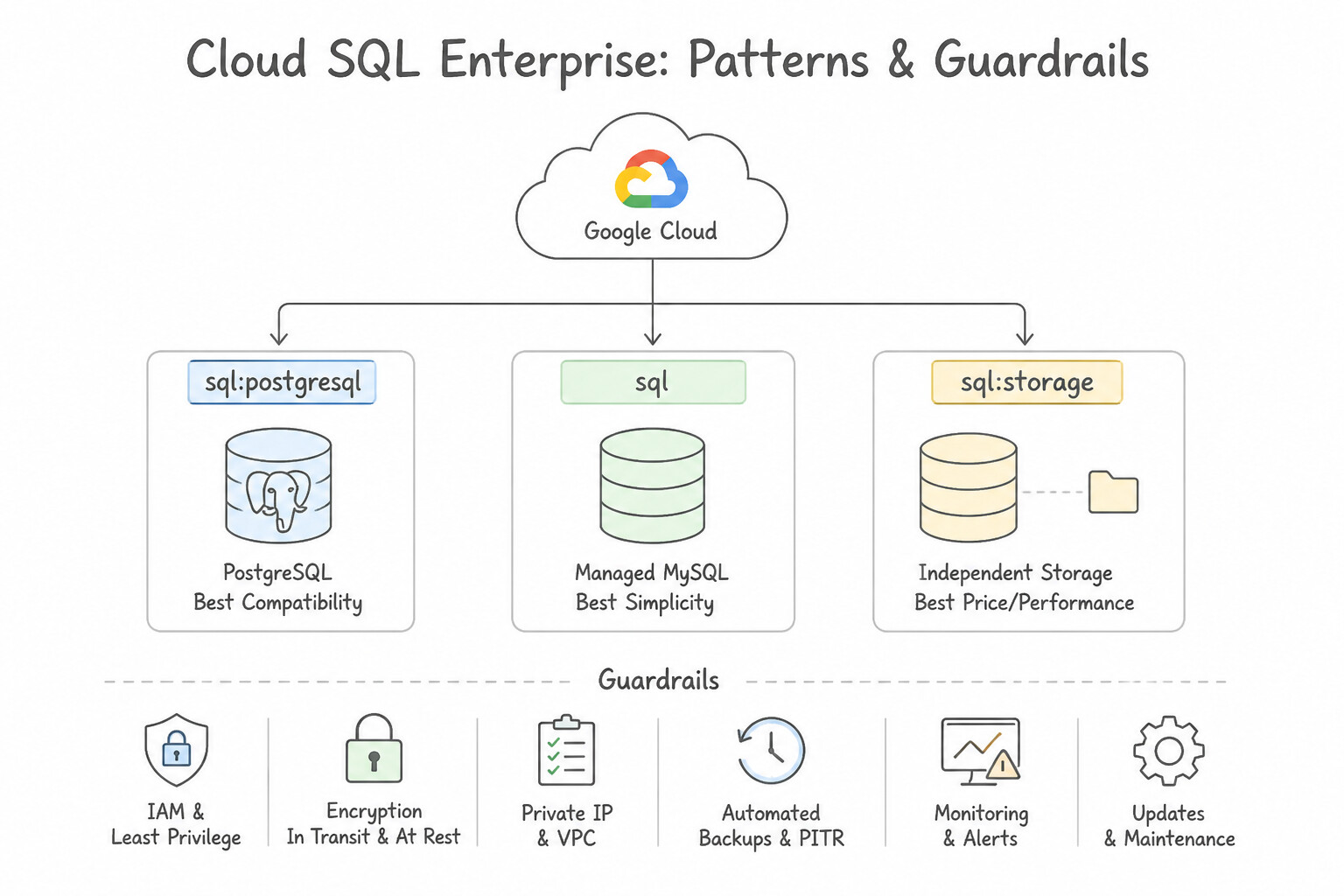
Enterprisevs.Enterprise Plus): - Cloud SQL Enterprise: General-purpose price-performance, 99.95% HA SLA, up to 96 vCPUs / 624 GB RAM, up to 64 TB storage.
- Cloud SQL Enterprise Plus: Mission-critical tier offering 99.99% HA SLA, up to 128 vCPUs / 864 GB RAM, up to 128 TB storage, sub-60-second planned maintenance downtime, and Data Cache (local NVMe SSD extension of the buffer pool that slashes read latency and cost vs. scaling RAM).
- Storage Type Trade-Offs (
SSDvs.HDDvs.Hyperdisk): - Cloud SQL SSD vs. HDD: Always choose SSD (PD-SSD / Hyperdisk Balanced) for production OLTP and any workload requiring random I/O or >400 IOPS. HDD is restricted to low-cost, write-once archival or tiny dev instances and cannot be converted to SSD in place (requires migration/restore to a new instance).
- Bigtable SSD vs. HDD: SSD delivers single-digit millisecond random reads/writes; HDD is 10x cheaper per GB for cold multi-terabyte batch scans (
MapReduce/Dataflow) where 50–200ms random read latency is acceptable. - Cost Optimization Levers: Use Committed Use Discounts (CUDs) (1-year or 3-year) for predictable baseline vCPU/RAM in Cloud SQL, AlloyDB, and Spanner, while handling spiky read demand via Autoscaling Read Replicas / AlloyDB Read Pools / Spanner Managed Autoscaler.
Key Implementation Patterns
- Development Environment Storage Optimization: Use Configure the instance to use standard hard disk drive (HDD) storage. HDD storage is significantly cheaper than SSD storage and is suitable for workloads where performance is not critical. (Avoid alternative: High availability doubles infrastructure costs by creating a standby instance, which is usually not needed for development environments.)
- IOPS Scaling via Disk Size: Use Manually increase the allocated storage capacity. IOPS for Cloud SQL SSDs scales linearly with disk size; increasing disk size increases IOPS cost-effectively. (Avoid alternative: Automatic storage increase triggers based on capacity usage, not performance needs, and usage is currently low.)
Key Takeaways (1.1b)
- Identify the primary constraint (Cost vs. Performance) before selecting resources.
- Standard HDD storage is a valid, cost-effective option for non-latency-sensitive workloads like development or testing.
- Avoid enabling High Availability (HA) for environments that do not require strict uptime guarantees, as it doubles costs.
- Match the machine type and storage capacity to the actual workload needs to avoid over-provisioning.
Consideration 1.1c: Size database compute and storage based on performance requirements
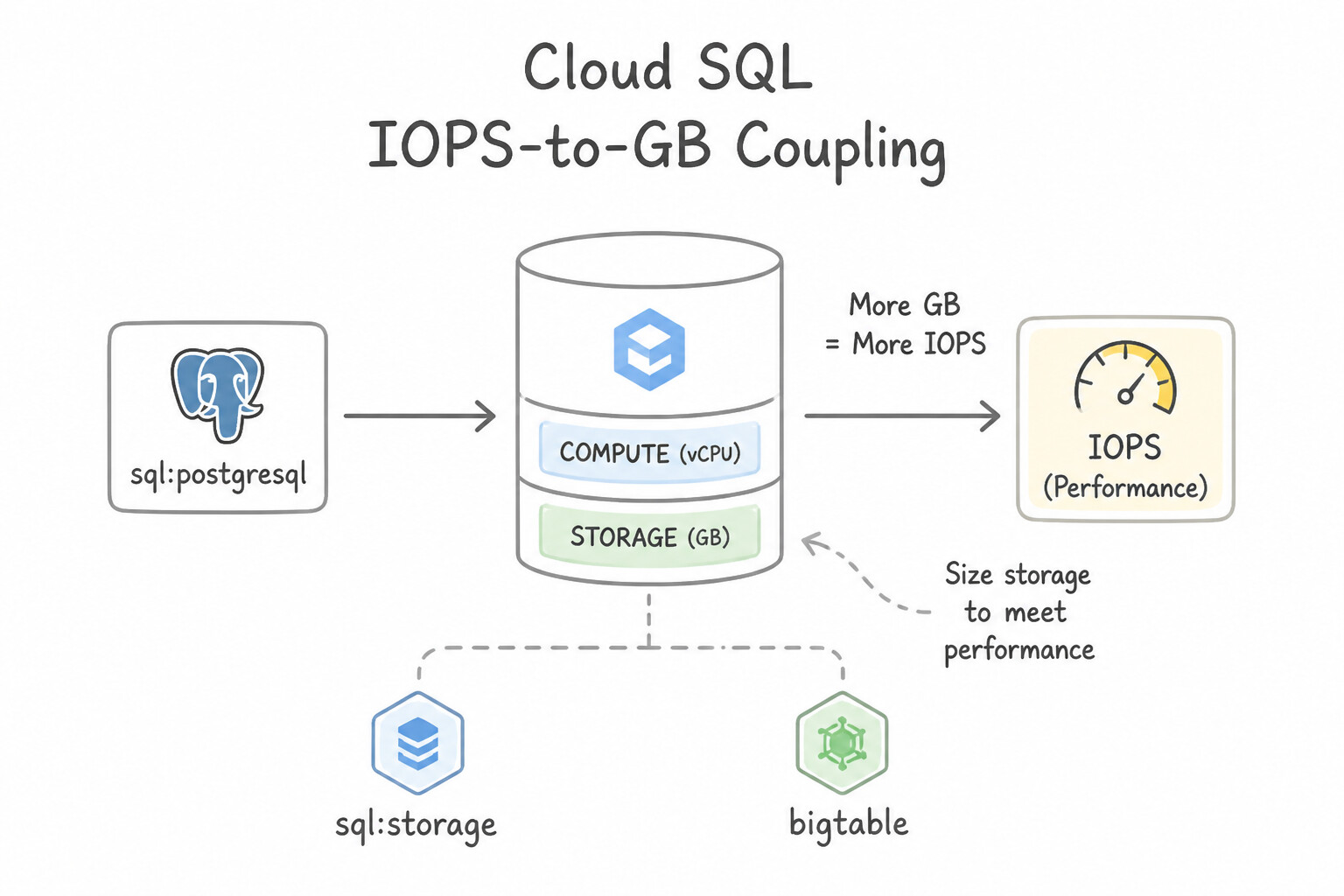
Understanding how Google Cloud couples—or decouples—compute and storage is one of the most critical topics in production:
- Cloud SQL IOPS-to-GB Coupling: In Cloud SQL (on Persistent Disk), baseline and burst IOPS/throughput scale with the provisioned disk capacity (GB) (
30 read/write IOPS per GBon PD-SSD), capped by the vCPU count (15,000to100,000+max IOPS depending on vCPUs). - architectures Rule: If an instance has low CPU utilization ($25\%) and low disk space usage (@@ESCAPEDDOLLAR@@40 GB used out of $100\text{ GB}$), yet queries suffer high Disk I/O throttling /
IO Wait, increase the provisioned SSD disk size (or move to Hyperdisk Balanced where IOPS/throughput can be provisioned independently of disk size, or enable Enterprise Plus Data Cache). - Always enable Automatic Storage Increase in production so WAL/binlog spikes or bulk loads never halt writes—remembering that disk size cannot be decreased once expanded.
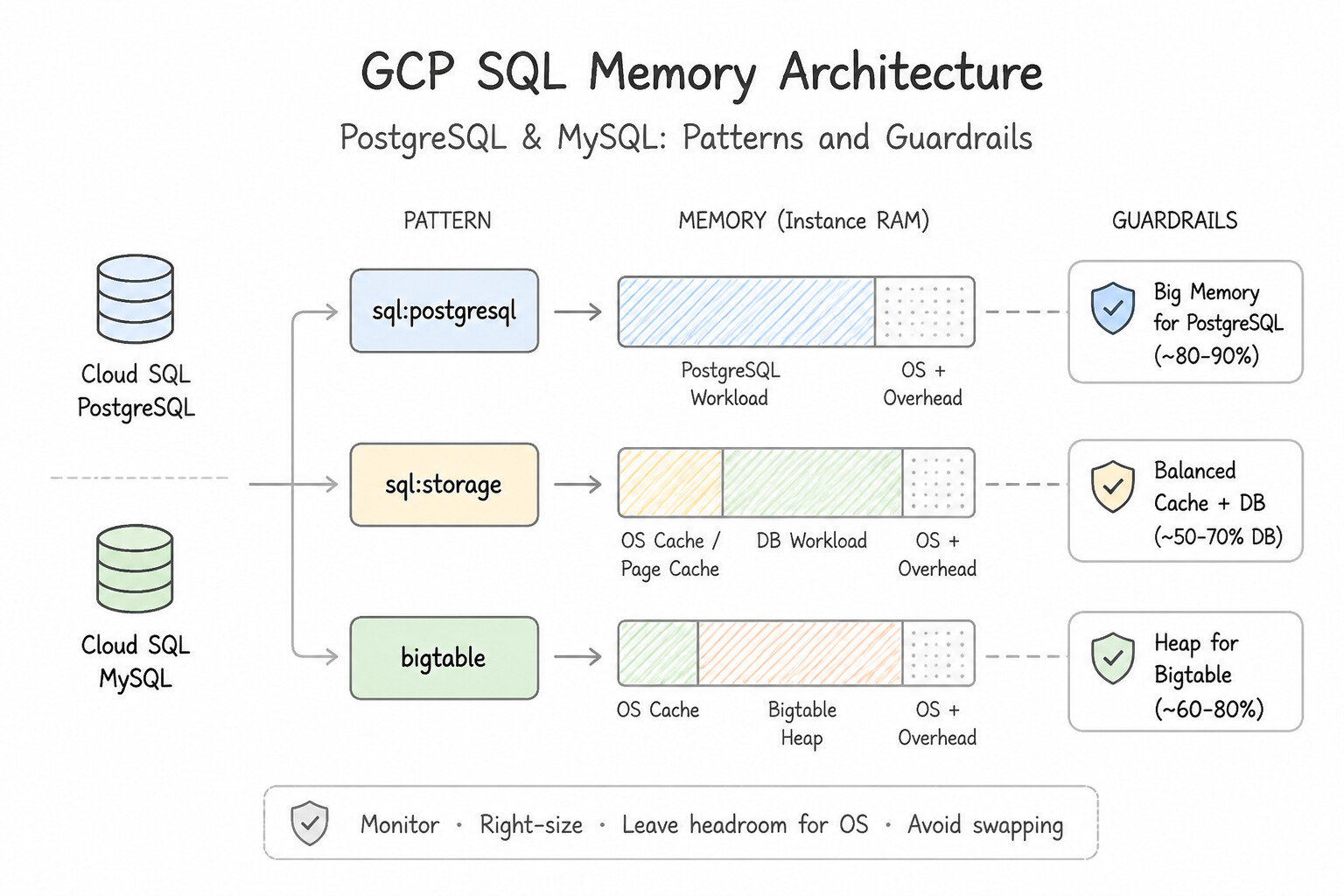
- PostgreSQL & MySQL Memory Parameters: Size instance RAM so that
shared_buffers(Postgres, typically $25\%\text{--}40\%of RAM) or @@CODE1@@ (MySQL, typically @@ESCAPEDDOLLAR@@70%--80% of RAM) holds the active working set, and tunework_memcarefully (work_memis allocated per sort/hash operation per connection, so settingwork_memtoo high with 500 connections triggers Out-Of-Memory [OOM] kills!). - AlloyDB Disaggregated Storage Advantage: Unlike Cloud SQL, AlloyDB completely decouples compute from its distributed regional storage tier: storage scales automatically up to 64 TB+ with zero manual GB provisioning, and I/O performance does not require over-provisioning empty disk space.
Key Implementation Patterns
- Cloud SQL IOPS Scaling via Disk Size: Use Increase the storage capacity of the instance to a larger size. IOPS performance scales with disk size in Cloud SQL; increasing storage capacity increases available IOPS. (Avoid alternative: Adding vCPUs addresses compute bottlenecks, not disk I/O bottlenecks.)
- Bigtable Node Sizing for Storage Density: Use Increase the number of nodes in the cluster. Bigtable recommends a maximum of 2.5 TB of SSD data per node; adding nodes reduces this density. (Avoid alternative: Storage type cannot be changed on an existing cluster and HDD is slower than SSD.)
- Cloud Spanner Compute Sizing for High CPU: Use Increase the provisioned compute capacity by adding more nodes or processing units. Regional Spanner instances should stay under 65% CPU utilization; scale up nodes to reduce load. (Avoid alternative: Multi-region is for geographic availability, not for fixing local CPU sizing issues.)
Key Takeaways (1.1c)
- Identify bottlenecks by analyzing specific metrics (CPU vs. Memory vs. Disk I/O).
- In Cloud SQL, disk performance (IOPS and throughput) is directly related to the provisioned disk size.
- Increasing disk size is a valid strategy to improve I/O performance even if storage capacity is not the primary concern.
- Read Replicas resolve read bottlenecks, not write bottlenecks.
Quick Decision Cheat Sheet (Subsection 1.1)
If the Scenario Requires... | Choose This Google Cloud Pattern | Avoid This Common Mistake |
|---|---|---|
"Cloud SQL disk reaches 100% capacity during unexpected traffic spike" | Enable Automatic Storage Increase ( storage_auto_resize) and set a Cloud Monitoring alert on disk utilization | Expecting you can shrink the disk back down afterward (Cloud SQL disk size can never be decreased in place) |
"Small Cloud SQL database (<200 GB) is IOPS-bound despite low CPU" | Increase SSD storage size (for higher PD-SSD baseline IOPS) or use Hyperdisk Balanced | Switching from SSD to HDD or only adding read replicas for write IOPS bottlenecks |
"Cloud Spanner capacity planning for a small <500 GB transactional app" | Provision fractional compute in Processing Units (e.g., 100 to 900 PUs) instead of full 1,000-PU Nodes | Assuming Cloud Spanner requires a minimum of 3 full nodes ($3,000\text{ PUs}$) |
"Multi-region Cloud Spanner CPU threshold for safe regional failover" | Maintain High-Priority CPU ≤ 45% (and ≤ 65% for single-region) | Running multi-region Spanner at $75\%\text{--}85\%$ CPU utilization |
"Need 99.99% SLA, <60s maintenance downtime, and NVMe read cache on Cloud SQL" | Select Cloud SQL Enterprise Plus edition with Data Cache enabled | Using standard Cloud SQL Enterprise edition with external Memcached for block-level caching |
Further Reading (Subsection 1.1)
- Cloud SQL - Instance settings — Review the section on Storage capacity to understand how IOPS and throughput scale with disk size.
- Diagnose issues with Cloud SQL for PostgreSQL — Provides guidance on troubleshooting common issues, including performance and resource usage interpretation.
- CPU utilization metrics — This page details the recommended CPU utilization thresholds for different instance configurations.
- Cloud SQL Pricing — Review the pricing differences between SSD and HDD storage types under the storage pricing section.
- Instance settings — Documentation on configuring instance settings, including selecting storage type (SSD or HDD) during creation.
- Choose a storage option — Refer to the section on 'Performance' and 'SSD' to see how IOPS scales with disk size.
Subsection 1.4: Evaluate appropriate database solutions on Google Cloud
The Big Picture
Subsection 1.4 is the largest single subsection in production (8 distinct considerations, 1.4a through 1.4h) because selecting the wrong persistence engine forces painful re-architectures months later. Three strategic blind spots dominate real-world failures:
- The "One Engine for Everything" Anti-Pattern (
1.4a,1.4b,1.4c): Teams either try to cram a 50-million-events/sec IoT stream into Cloud SQL (which collapses under B-tree index write amplification, when Cloud Bigtable was built for wide-column append streams), or they deploy a 3-node multi-region Cloud Spanner cluster for a single-region 80 GB internal CRM app that has zero global consistency requirements (overpaying 10x compared to Cloud SQL). Conversely, when migrating a legacy Oracle RAC system that relies on specialized hardware features and certified Oracle licensing with a 60-day datacenter exit deadline, trying to rewrite 500,000 lines of PL/SQL into Spanner on day one guarantees project failure—whereas Bare Metal Solution for Oracle (or Oracle Database@Google Cloud) lifts it cleanly first. - The Compliance, Org Policy & Dependency Blind Spot (
1.4d,1.4e,1.4f): Architects design an elegant multi-region topology only to discover during deployment that Organization Policy Constraints (constraints/gcp.resourceLocations,constraints/sql.restrictPublicIp,constraints/sql.restrictAuthorizedNetworks) block their target regions or public endpoints, or that strict data residency laws (GDPR / Sovereign Controls) prohibit replicating European user rows to a US multi-region configuration without Cloud Spanner Geo-Partitioning. - The Siloed Analytics & Bolted-On Vector Search Trap (
1.4g,1.4h): Modern enterprise applications span multiple data engines and Generative AI workflows. Building brittle nightly CSV export scripts just to join a small operational table in Cloud SQL / Spanner with historical warehouse data in BigQuery wastes engineering effort when BigQuery Federated Queries (EXTERNAL_QUERY) or Datastream CDC solves it natively. Similarly, spinning up a separate third-party vector database for an LLM RAG app on transactional product catalogs introduces dual-write synchronization bugs whenpgvectoron Cloud SQL / AlloyDB (with theScaNNindex) or Spanner / Firestore Vector Search keeps embeddings transactionally consistent with the source row!
Consideration 1.4a: Differentiate between managed and unmanaged database services (e.g., self-managed, bare metal, Google-managed, Google Cloud native and partner offerings)
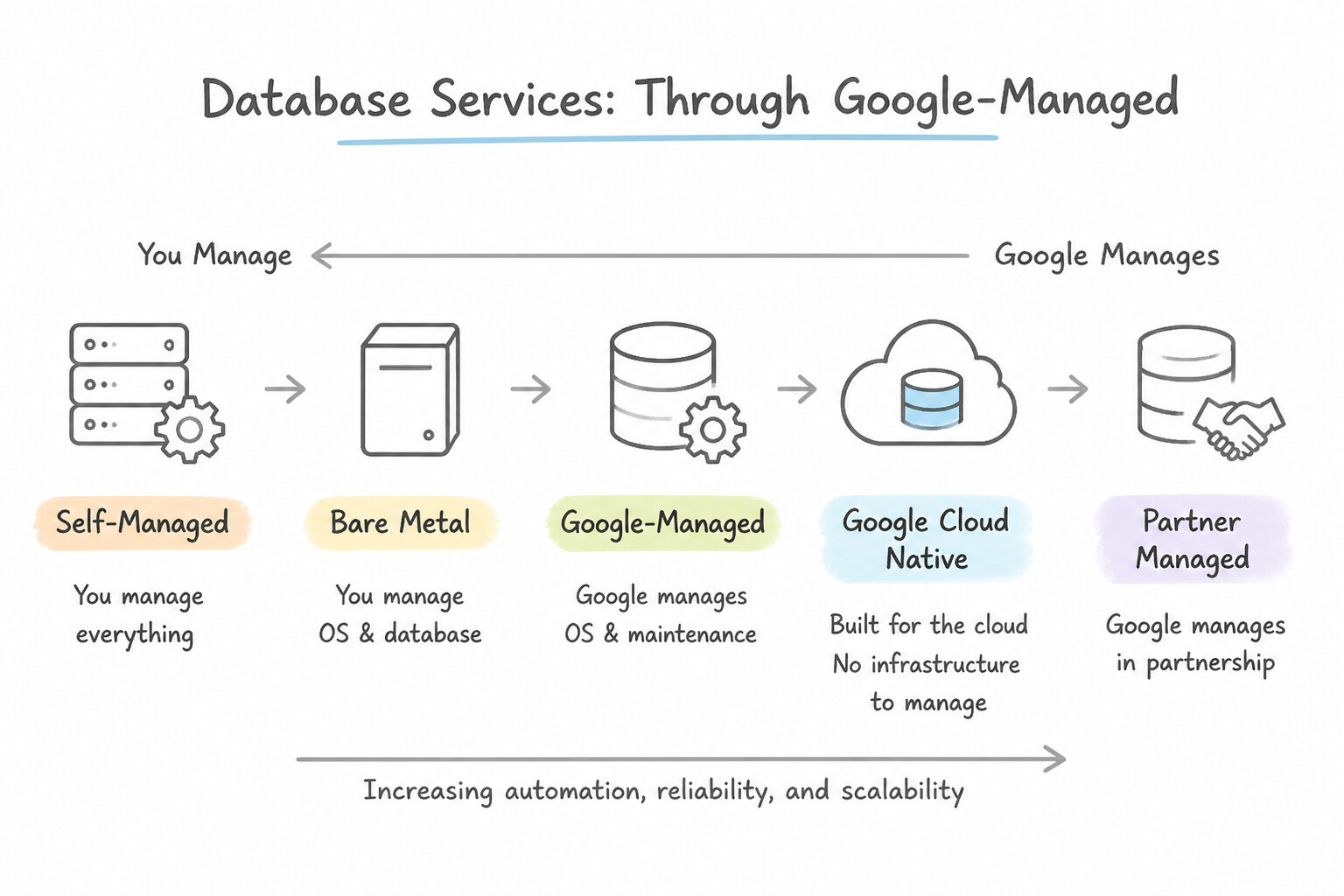
Always favor Google-managed services unless a hard technical or licensing constraint requires unmanaged/bare-metal infrastructure:
- Google-Managed Databases (
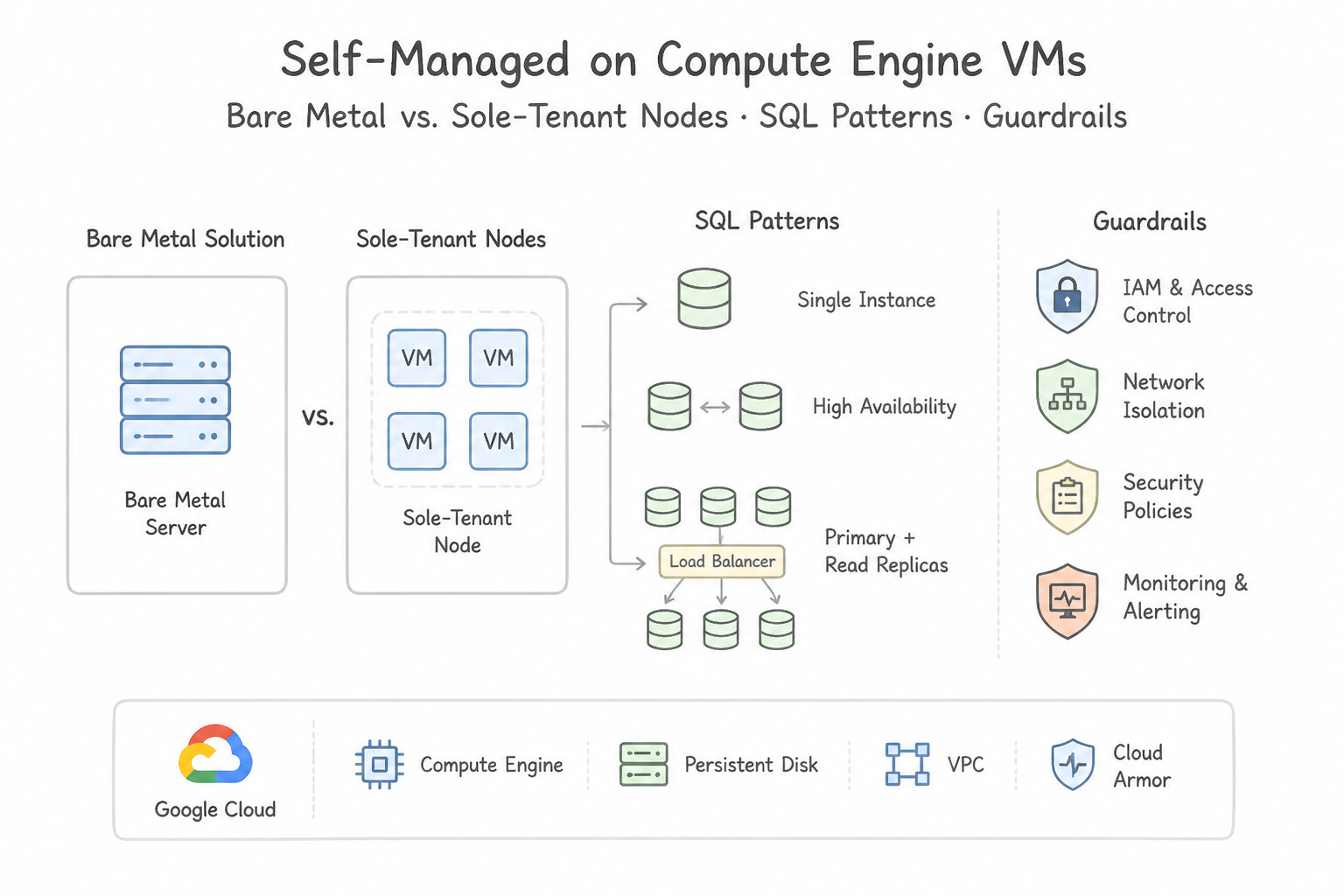
Cloud SQL,AlloyDB,Cloud Spanner,Bigtable,Firestore,Memorystore): Google automates OS patching, storage provisioning, backups, and HA failover. Choose these whenever the scenario asks to "minimize operational overhead" or "focus on application development." - Self-Managed on Compute Engine VMs: Only choose when a legacy database requires OS/root filesystem access, unsupported database versions, or custom C-language PostgreSQL/MySQL extensions that are not on the Cloud SQL/AlloyDB supported extensions list.
- Bare Metal Solution (BMS) & Oracle Database@Google Cloud: Choose when migrating Oracle RAC, workloads requiring certified non-virtualized hardware, hardware-bound per-core licensing (BYOL), or low-latency access from Google Cloud via dedicated Partner Interconnect (
<2ms). - AlloyDB Omni: A downloadable, containerized edition of AlloyDB that runs on-premises, at the edge, or in other clouds with the same high-performance storage/columnar engine and vector capabilities—ideal when strict hybrid or disconnected residency rules block public cloud hosting.
Key Implementation Patterns
- Strict Oracle Licensing and Hardware Residency: Use Provision the database using Bare Metal Solution for Oracle. Bare Metal Solution offers the dedicated physical cores and low latency required for strict Oracle licensing and performance. (Avoid alternative: Sole-tenant nodes are still virtualized environments, which might not satisfy strict physical core licensing requirements.)
- Operating System Level Customization: Use Deploy PostgreSQL on a Compute Engine virtual machine (VM). Compute Engine provides full administrative access (root) to the operating system, allowing the installation of custom kernel-level agents. (Avoid alternative: GKE Autopilot abstracts the node infrastructure and restricts privileged access, making it unsuitable for kernel-level customizations.)
Key Takeaways (1.4a)
- Use Bare Metal Solution (BMS) for Oracle workloads that require dedicated physical cores due to licensing or performance needs.
- Cloud SQL is for managed open-source engines (MySQL, PostgreSQL, SQL Server) and requires migration if coming from Oracle.
- Sole-tenant nodes offer hardware isolation but are still virtualized.
- Managed services (Cloud SQL, AlloyDB) do not allow root access or OS-level software installation.
Consideration 1.4b: Distinguish between SQL and NoSQL business requirements (e.g., structured, semi-structured, unstructured, vector)
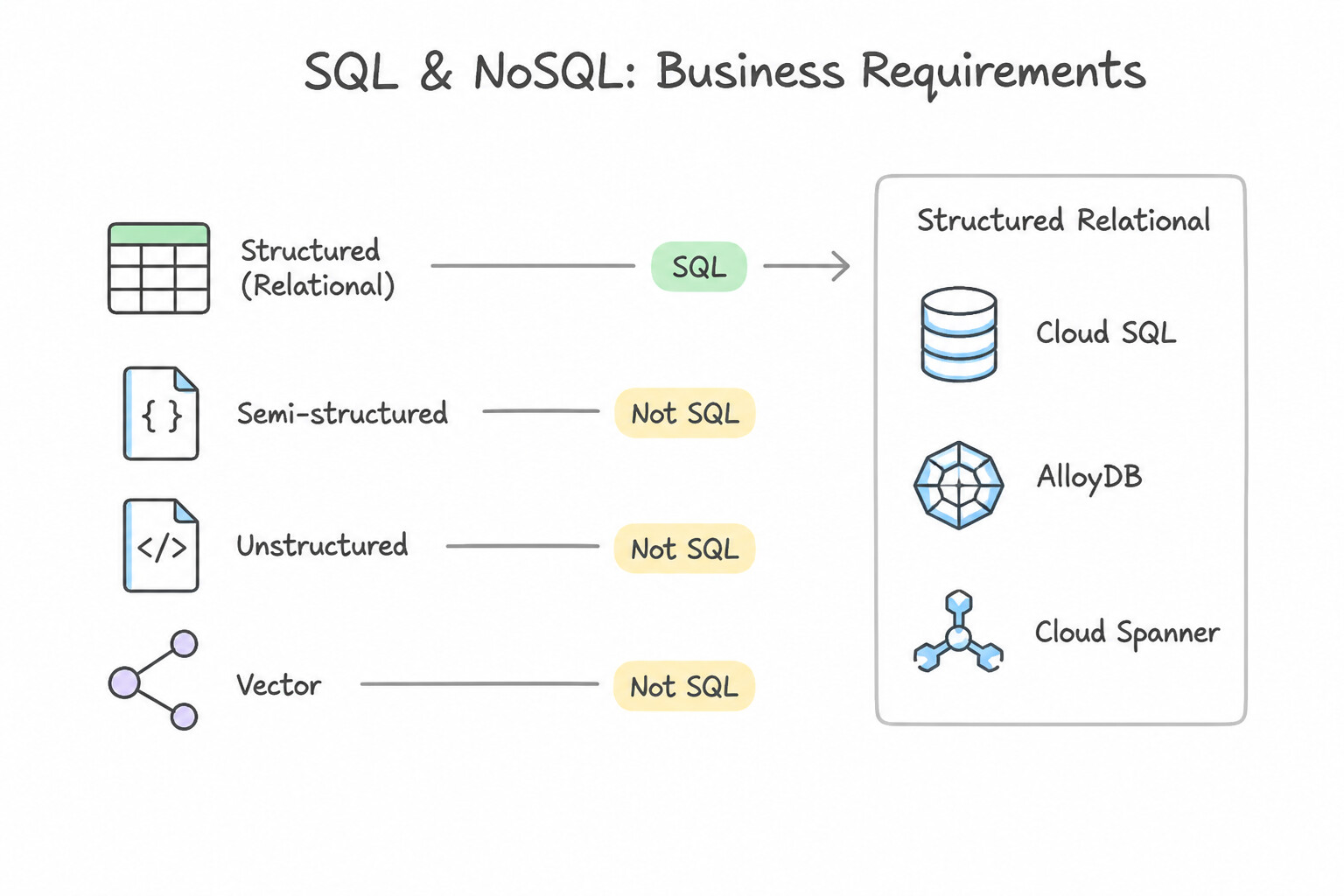
Match the data model (structured, semi-structured, unstructured, vector) to the right engine:
- Structured Relational (
Cloud SQL,AlloyDB,Cloud Spanner): Enforces strict schemas, foreign keys, multi-tableJOINs, and ACID transactions. - Choose Cloud Spanner for global multi-region writes, linear horizontal write scaling, or strict external consistency (
TrueTime). - Choose AlloyDB for demanding PostgreSQL OLTP + real-time operational analytics (HTAP via its Columnar Engine).
- Choose Cloud SQL for standard regional MySQL, PostgreSQL, or SQL Server workloads.
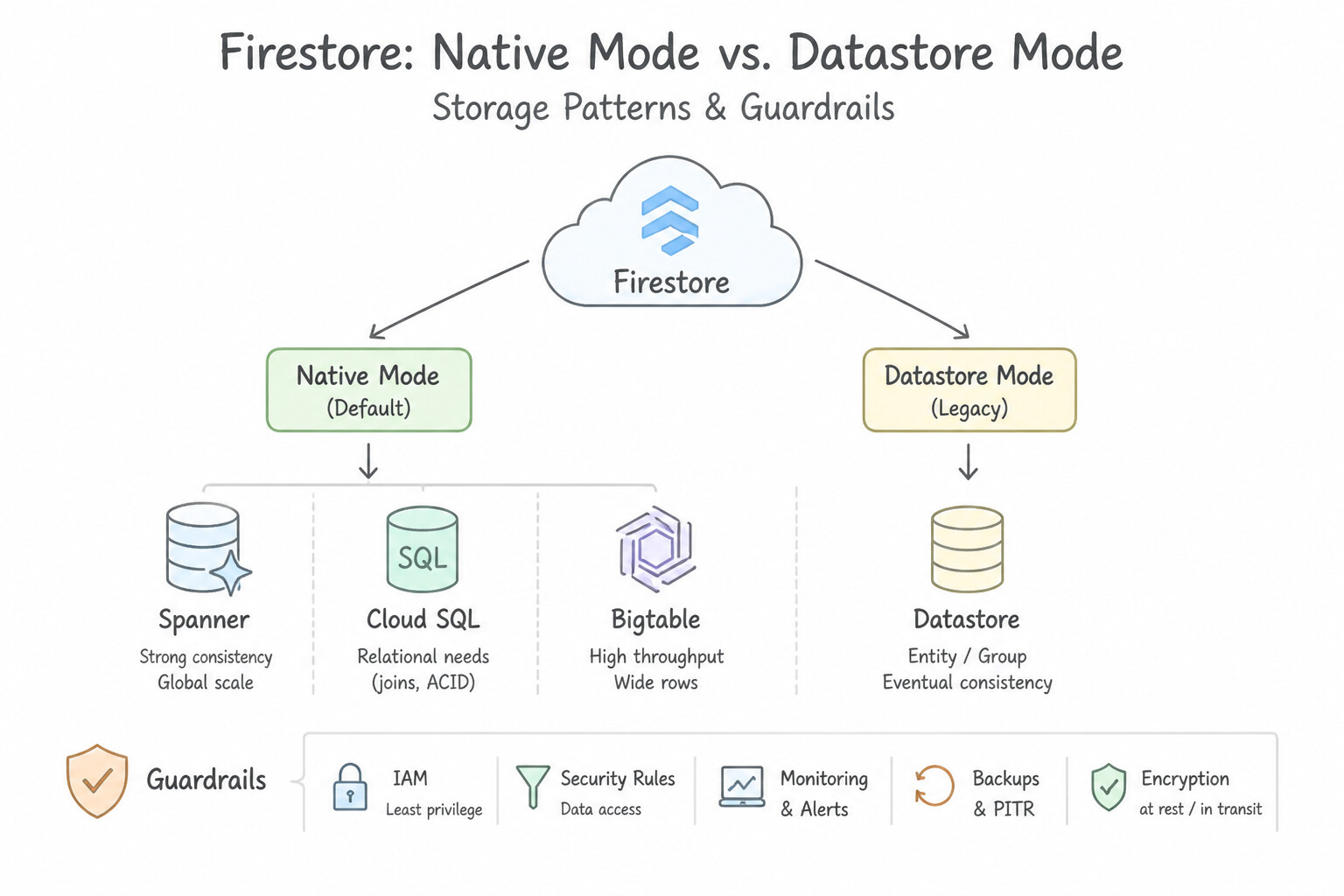
- Semi-Structured Document (
Firestore Native Modevs.Datastore Mode): - Firestore in Native Mode: Hierarchical JSON-like documents (
collections/subcollections), real-time client listeners (onSnapshot), offline mobile/web SDK synchronization, and client-side Firebase Security Rules. - Firestore in Datastore Mode: Server-side backend NoSQL workloads requiring high throughput without mobile client sync listeners.
- Wide-Column / Key-Value (
Cloud Bigtable): Sparse, wide-column table indexed by a single lexicographically sorted Row Key. Built for high-velocity time-series, IoT telemetry, financial ticks, and ML feature stores (>1 TB to petabytes, sub-10ms latency). No multi-row joins or secondary indexes! - Unstructured Blobs (
Cloud Storage): Store raw PDFs, images, audio, and video in Cloud Storage and store only the object URI + metadata inside the database (Firestore,Cloud SQL,Spanner,BigQuery Object Tables).
Key Implementation Patterns
- Global Financial Ledger: Use Use Cloud Spanner with a multi-region configuration. Cloud Spanner provides global ACID consistency, ANSI SQL support, and horizontal scaling. (Avoid alternative: Cloud SQL is regional and does not support global horizontal write scaling.)
- Field Technician Mobile App: Use Use Firestore. Enable offline persistence in the native mobile SDKs to handle local data storage and automatic synchronization. Firestore provides built-in offline persistence and automatic synchronization via its native mobile SDKs. (Avoid alternative: Cloud SQL does not support native offline synchronization for mobile devices, requiring complex custom development.)
- Smart Meter Telemetry: Use Use Cloud Bigtable to store the semi-structured data with a time-series schema. Cloud Bigtable is purpose-built for high-throughput writes (IoT/time-series) and scales horizontally to handle millions of requests per second. (Avoid alternative: Cloud SQL is optimized for relational data and transactions, not for extremely high write throughput (100k+/sec) or semi-structured schemas.)
Key Takeaways (1.4b)
- Cloud Spanner is the choice for global, horizontally scalable, relational (SQL) data with ACID consistency.
- Cloud SQL is best for regional relational workloads.
- Bigtable is for high-throughput NoSQL workloads (IoT, ad tech) that do not need ACID SQL transactions.
- Firestore is for serverless application development using document models.
Consideration 1.4c: Analyze the cost of running database solutions in Google Cloud (comparative analysis)
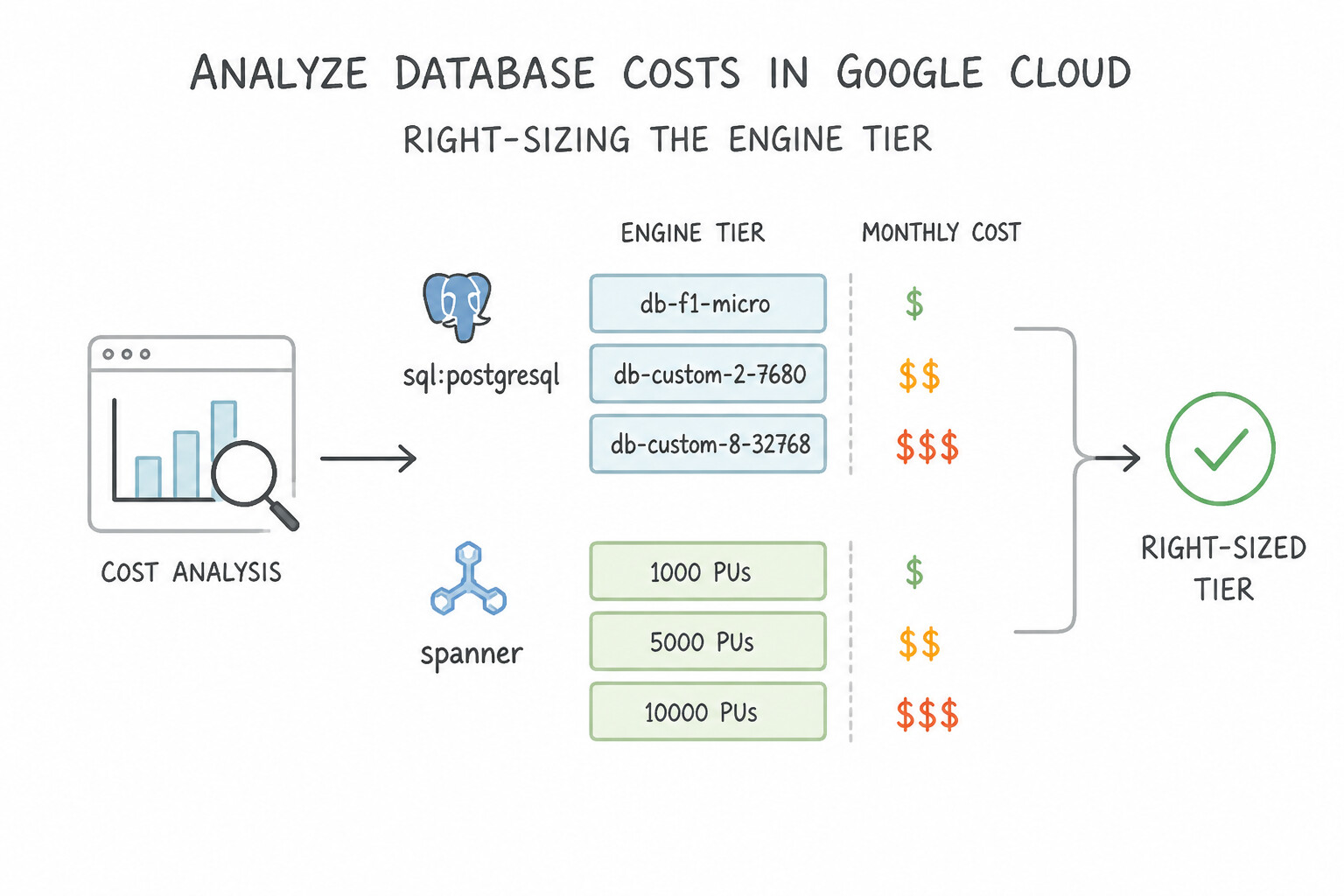
production architecture frequently presents two technically capable databases and asks for the most cost-effective architecture:
- Right-Sizing the Engine Tier:
- Do not use Cloud Spanner (or 3-node Bigtable) for small (<100 GB), single-region apps with low QPS unless fractional Spanner Processing Units (100 PUs) are justified by strict multi-region/external consistency needs.
- For spiky or intermittent dev/staging relational workloads, scale down instances during off-hours (or use serverless Firestore which scales to zero cost when idle).
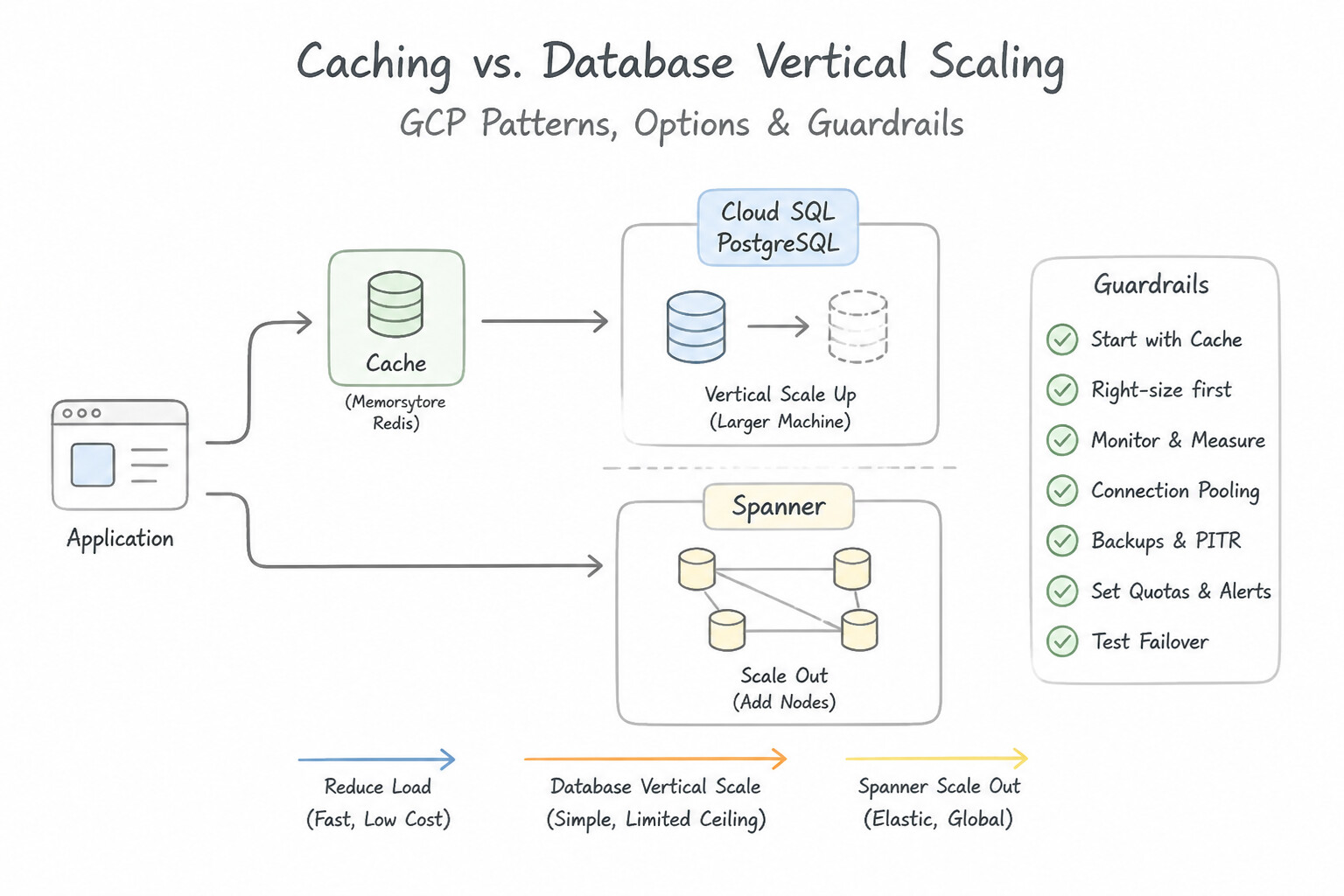
- Caching vs. Database Vertical Scaling: Adding a Memorystore for Redis / Memcached tier in front of Cloud SQL or Firestore to absorb 90% of repetitive read queries (
read-through / cache-aside) is dramatically cheaper than scaling the primary database by 64 vCPUs or adding 5 read replicas. - Storage & Network Egress Costs:
- Co-locate application compute (GKE / Cloud Run) in the same zone/region as the database primary or read replica to eliminate inter-zone and inter-region network egress charges (and latency!).
- Use Committed Use Discounts (CUDs) (1- or 3-year) for steady-state baseline compute, and tier cold historical rows out of expensive SSD transactional storage into BigQuery or Cloud Storage Archive/Coldline.
Key Implementation Patterns
- Cloud SQL Development Environment Cost Optimization: Use Provision the instance with standard hard disk drive (HDD) storage and configure it as a Single Zone instance. HDD storage is cheaper than SSD, and Single Zone deployment avoids the cost of a standby instance. (Avoid alternative: SSD and High Availability significantly increase costs and are unnecessary for this scenario.)
- Spanner Granular Compute Sizing: Use Provision a Cloud Spanner instance with 100 processing units. Spanner allows provisioning in Processing Units (PUs) starting at 100 PUs (1/10th of a node), which minimizes cost for smaller workloads. (Avoid alternative: A full node (1,000 PUs) is more expensive than necessary for a small dataset with low traffic.)
Key Takeaways (1.4c)
- High Availability (HA) configurations in Cloud SQL utilize a standby instance, which approximately doubles the instance cost compared to a Single Zone deployment.
- HDD storage is a cost-effective alternative to SSD for environments where I/O performance is not a bottleneck, such as development or testing.
- Always align the storage type and availability configuration with the specific requirements of the environment (e.g., dev vs. prod) to optimize spending.
- Cloud Spanner compute capacity is measured in nodes or processing units (PUs).
Consideration 1.4d: Assess application and database dependencies
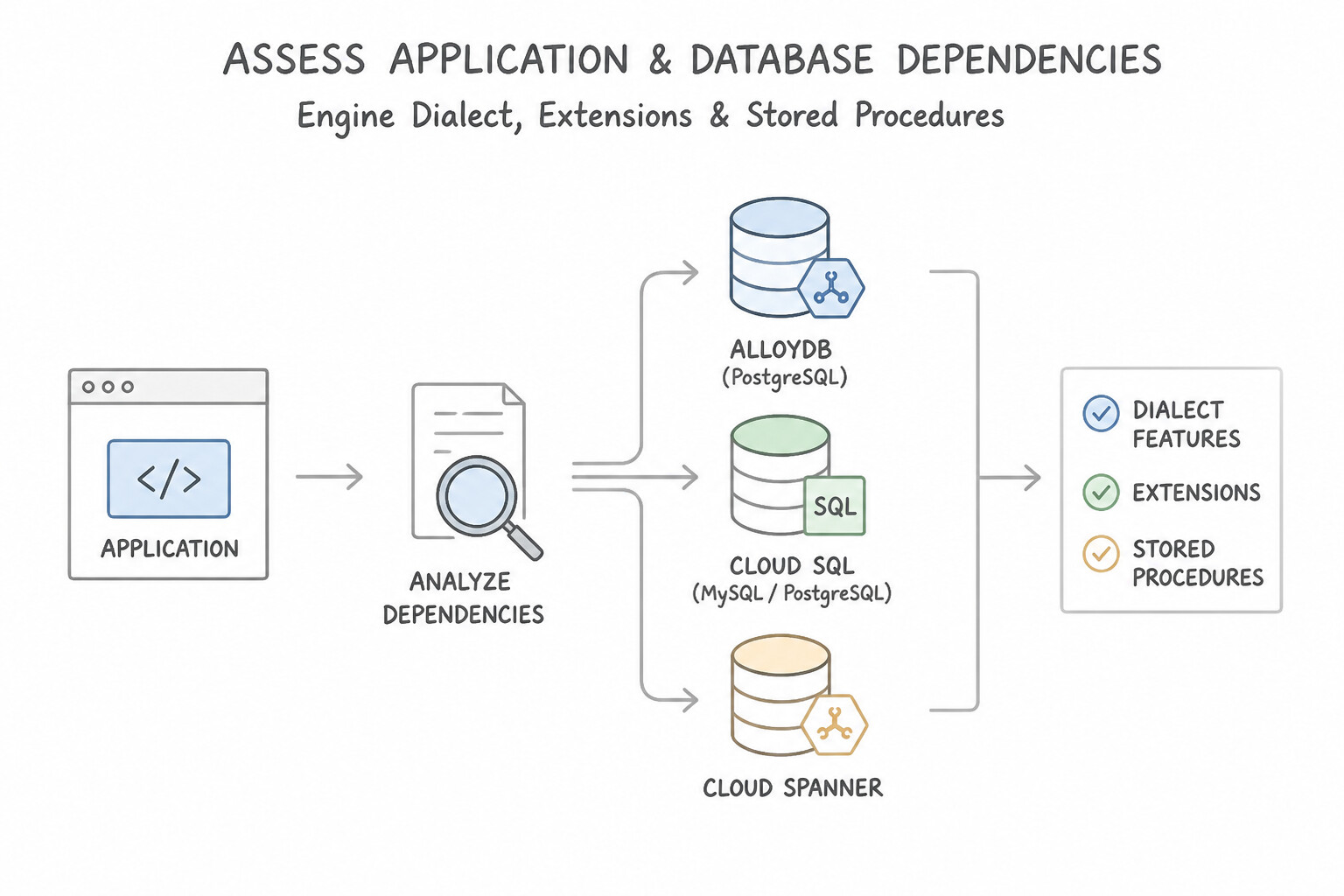
Before selecting a target cloud database, audit all upstream and downstream dependencies:
- Engine Dialect, Extensions & Stored Procedures:
- Does the app depend on SQL Server Agent jobs, SSRS, SSIS, or Linked Servers? Choose Cloud SQL for SQL Server.
- Does a PostgreSQL app require specific extensions (
postgis,pgvector,pg_cron,pg_partman,orafce)? Verify extension support in Cloud SQL / AlloyDB. - Does an Oracle app rely heavily on proprietary packages (
DBMS_AQ, spatial, C-extensions) that cannot be refactored in time? Use Bare Metal Solution for Oracle rather than forcing a rushed heterogeneous migration. - Transaction Semantics & Isolation Levels:
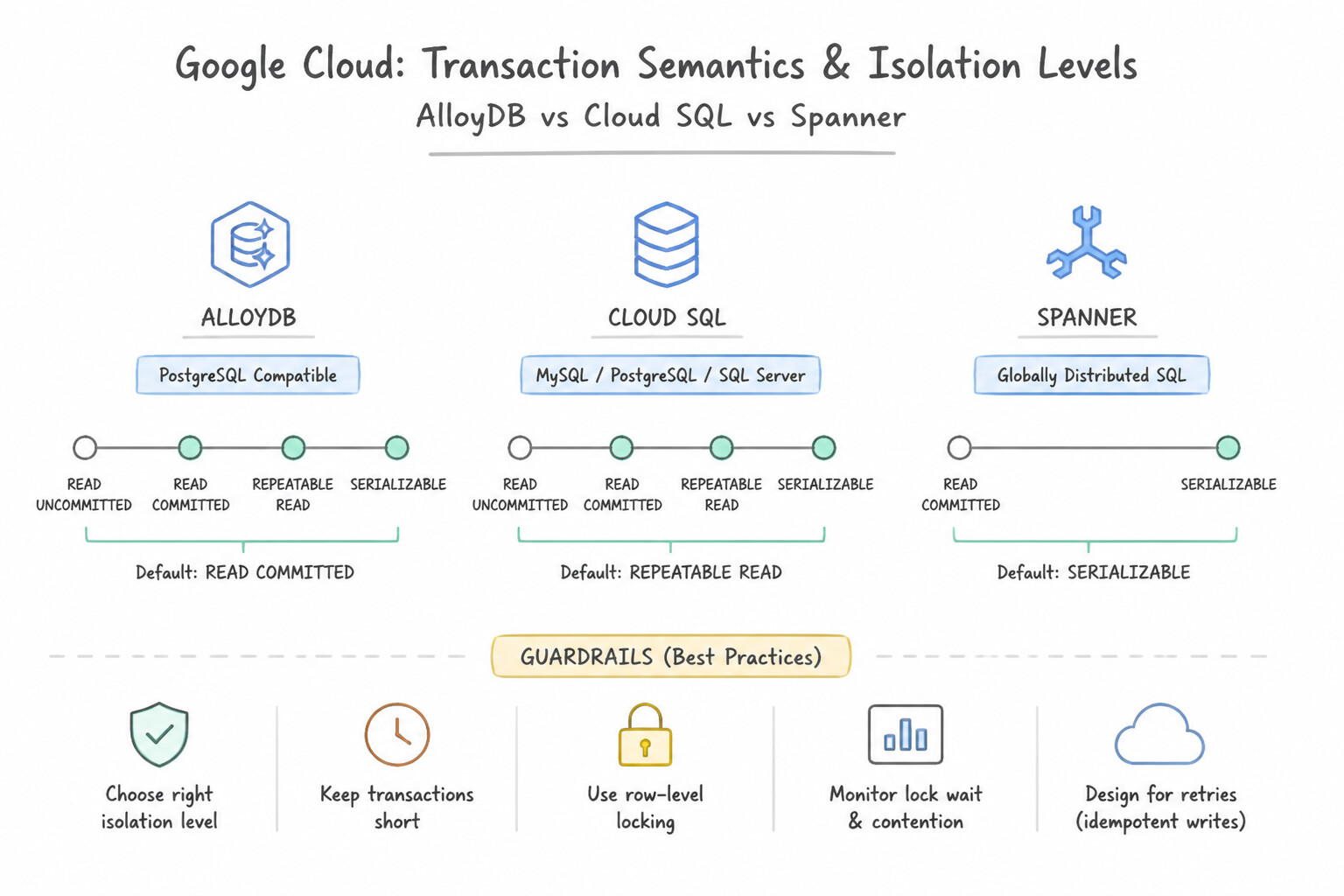
- Cloud Spanner defaults to Serializable isolation using timestamp ordering and TrueTime (read-only transactions execute with zero locks!). Applications migrating from PostgreSQL (
Read Committed) or MySQL (Repeatable Read) must use Spanner read-only transactions for reporting reads and handle transaction retry loops onABORTEDwrite conflicts. - Driver & Connection Lifecycle Dependencies: Legacy thick clients that hold long-lived TCP connections with session variables require Session Pooling and graceful reconnection logic during maintenance failovers.
Key Implementation Patterns
- Legacy Oracle Stored Procedure Dependency: Use Migrate the database to AlloyDB for PostgreSQL. AlloyDB provides full PostgreSQL compatibility with high-performance features suitable for demanding Oracle migrations. (Avoid alternative: Cloud Spanner requires refactoring for stored procedures and does not offer full native PostgreSQL compatibility.)
- High-Frequency IoT Ingestion: Use Migrate the dataset to Cloud Bigtable with a schema designed for time-series access. Cloud Bigtable is optimized for high-throughput writes and time-series data, eliminating the locking issues found in SQL databases. (Avoid alternative: Vertical scaling does not fix fundamental row-locking bottlenecks inherent in SQL databases during massive concurrent writes.)
- Global Strong Consistency for Financial Ledger: Use Use Cloud Spanner with a multi-region configuration. Cloud Spanner provides global strong consistency (external consistency) by default, making it ideal for global financial ledgers. (Avoid alternative: Cloud SQL cross-region replication is asynchronous (eventual consistency) and does not guarantee immediate global visibility.)
Key Takeaways (1.4d)
- AlloyDB for PostgreSQL is the preferred choice for high-performance, enterprise-grade migrations from Oracle to PostgreSQL.
- PostgreSQL is the closest open-source relational database to Oracle regarding stored procedure logic (PL/pgSQL).
- Assess application dependencies (like stored procedures) to determine if a standard service (Cloud SQL) or a high-performance service (AlloyDB) is required.
- Identify the Bottleneck: If a SQL database faces locking issues during writes, vertical scaling is rarely the cure; architectural change is needed.
Consideration 1.4e: Identify solutions to support regulatory and compliance requirements
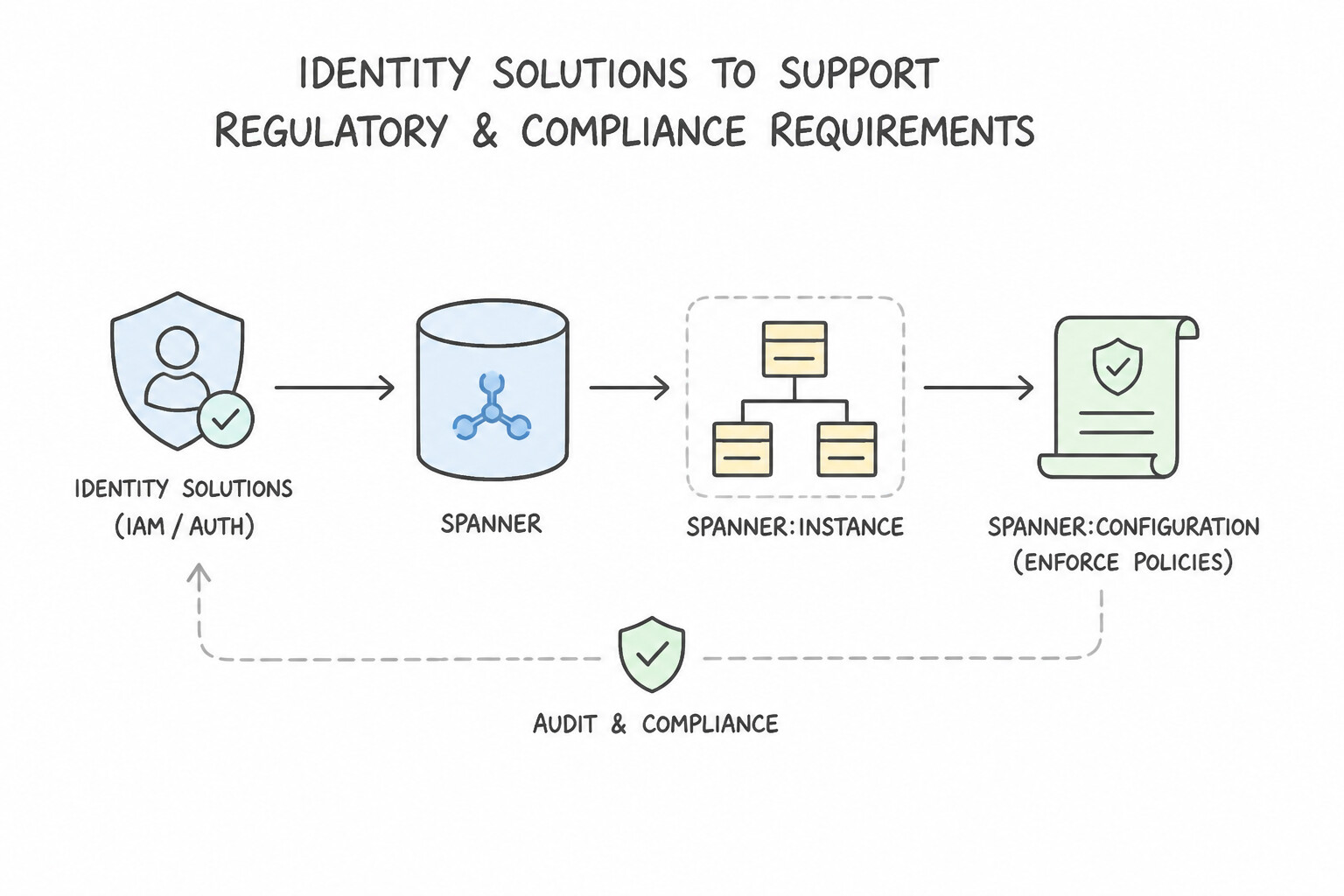
Regulated workloads (HIPAA, PCI-DSS, GDPR, FedRAMP, financial sovereignty) impose four non-negotiable architectural controls:
- Data Residency & Geo-Partitioning: If regulations mandate that EU citizen records never leave the EU and US citizen records never leave the US—even inside a single unified global database table—use Cloud Spanner Geo-Partitioning (Instance Partitions) with Placement Keys (
PLACEMENT KEY (location_code)) to pin row ranges to specific regional storage while maintaining global schema unity. - Key Sovereignty (
CMEK/Cloud EKM/HSM): Use Cloud KMS Customer-Managed Encryption Keys (CMEK) (backed by Cloud HSM or Cloud External Key Manager [EKM]) so auditors can independently rotate or revoke cryptographic access to database storage and backups. - Sensitive Data Protection (Cloud DLP) & Column-Level Security: De-identify, mask, or deterministically tokenize PII/PHI before loading into non-production or analytical environments, and enforce fine-grained access control.
- Immutable Audit Trails: Combine
pgAudit/ Data Access Audit Logs with Cloud Storage Bucket Lock (WORM) retention policies.
Key Implementation Patterns
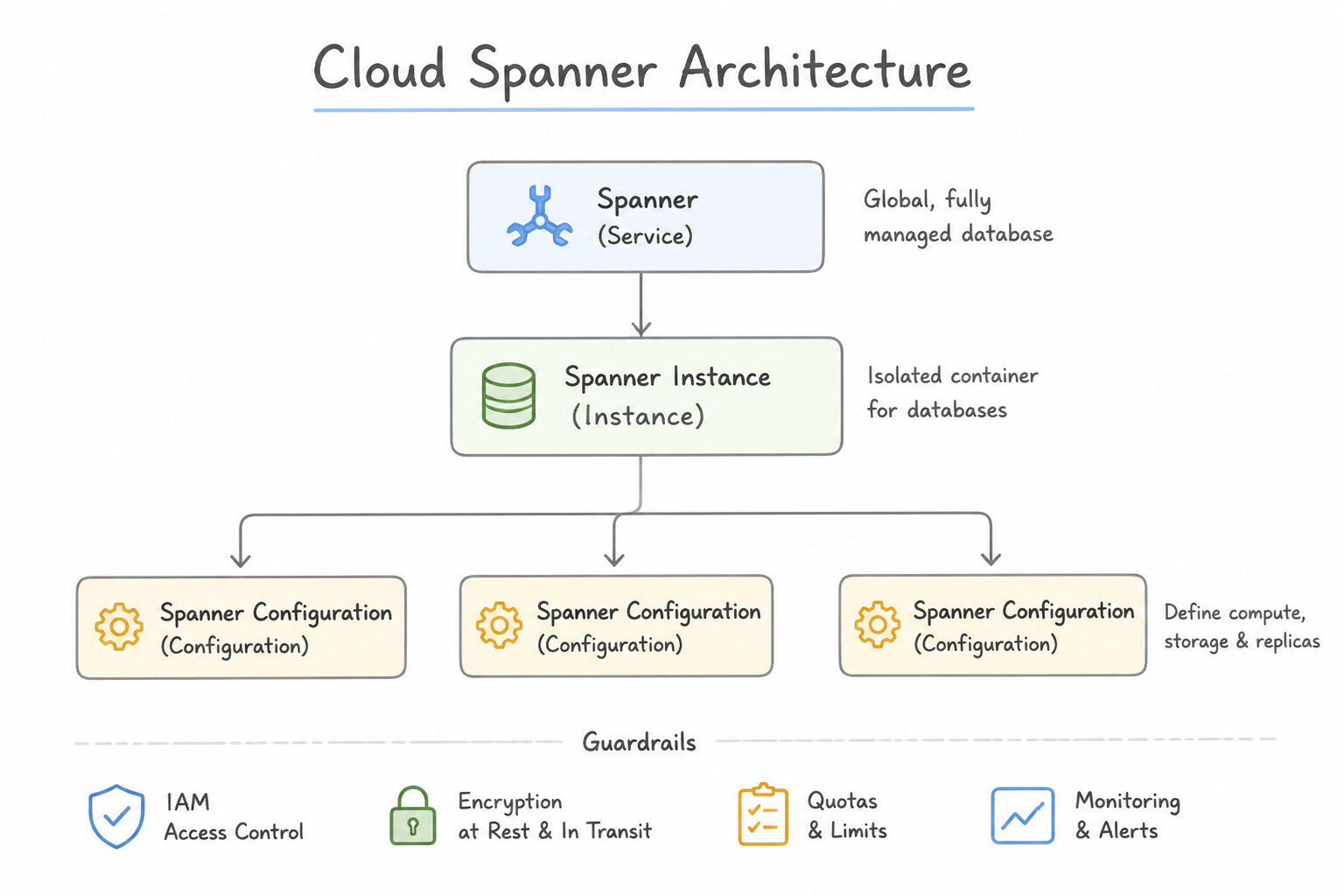
- Data Sovereignty with Global Reach: Use Configure a single Cloud Spanner instance with a multi-region configuration. Use Geo-partitioning to assign row-level data to specific geographic locations. Geo-partitioning allows a single Cloud Spanner instance to enforce row-level physical data residency for compliance.
- Crypto-Shredding and Key Management: Use Configure the Cloud SQL instance to use Customer-Managed Encryption Keys (CMEK) via Cloud Key Management Service (Cloud KMS). CMEK allows you to control the key lifecycle, including the ability to revoke or destroy keys to render data unreadable immediately.
Key Takeaways (1.4e)
- Cloud Spanner is a globally scalable relational database suitable for financial applications.
- Standard multi-region configurations replicate data everywhere defined in the config.
- Geo-partitioning allows row-level control over physical data placement within a single Spanner instance.
- Use Geo-partitioning to meet strict data residency (sovereignty) and compliance requirements without managing separate database instances.
Consideration 1.4f: Understand implications of organizational policies on database strategy
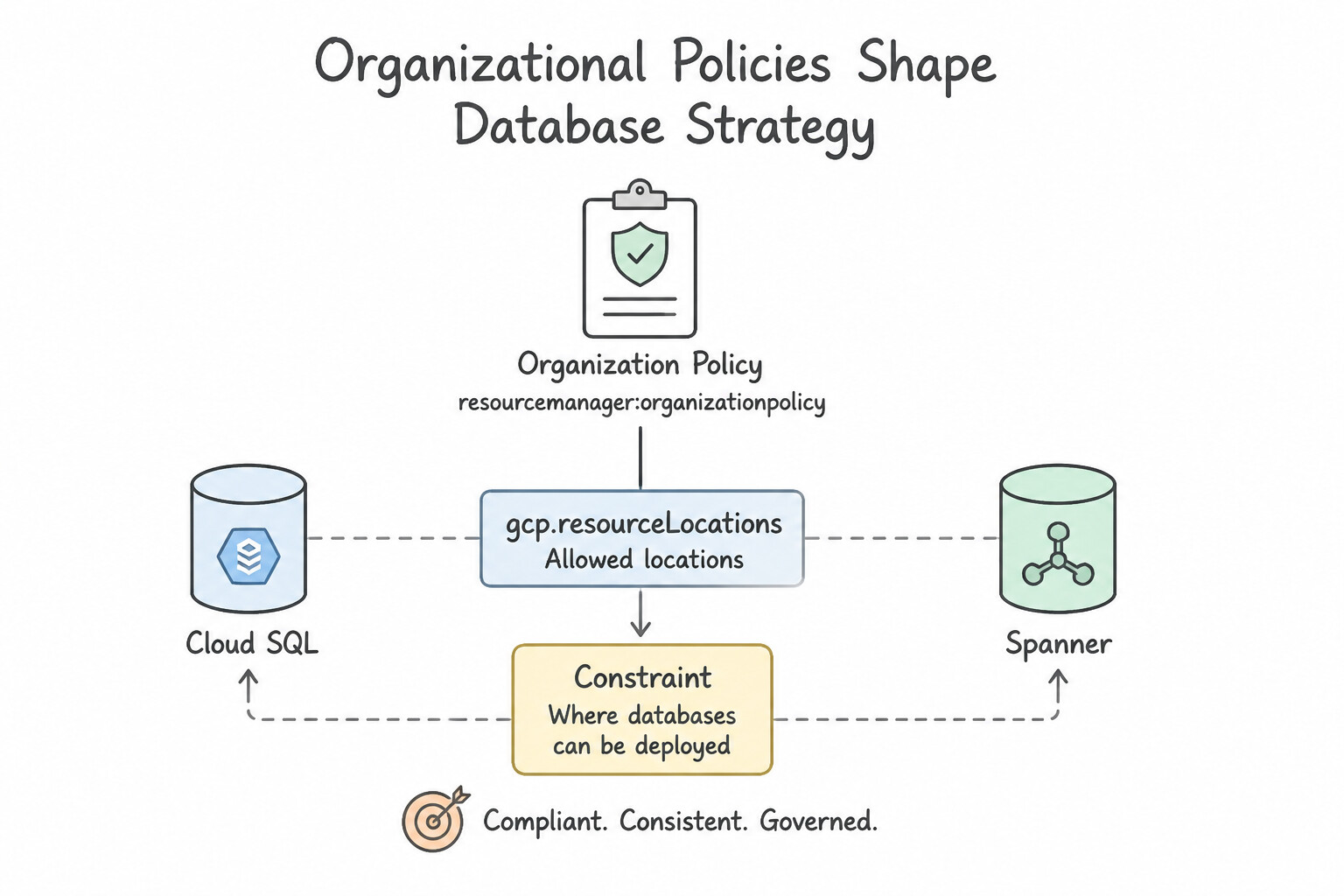
Google Cloud Organization Policy Service enforces guardrails hierarchically across the Organization, Folders, and Projects that override individual IAM permissions:
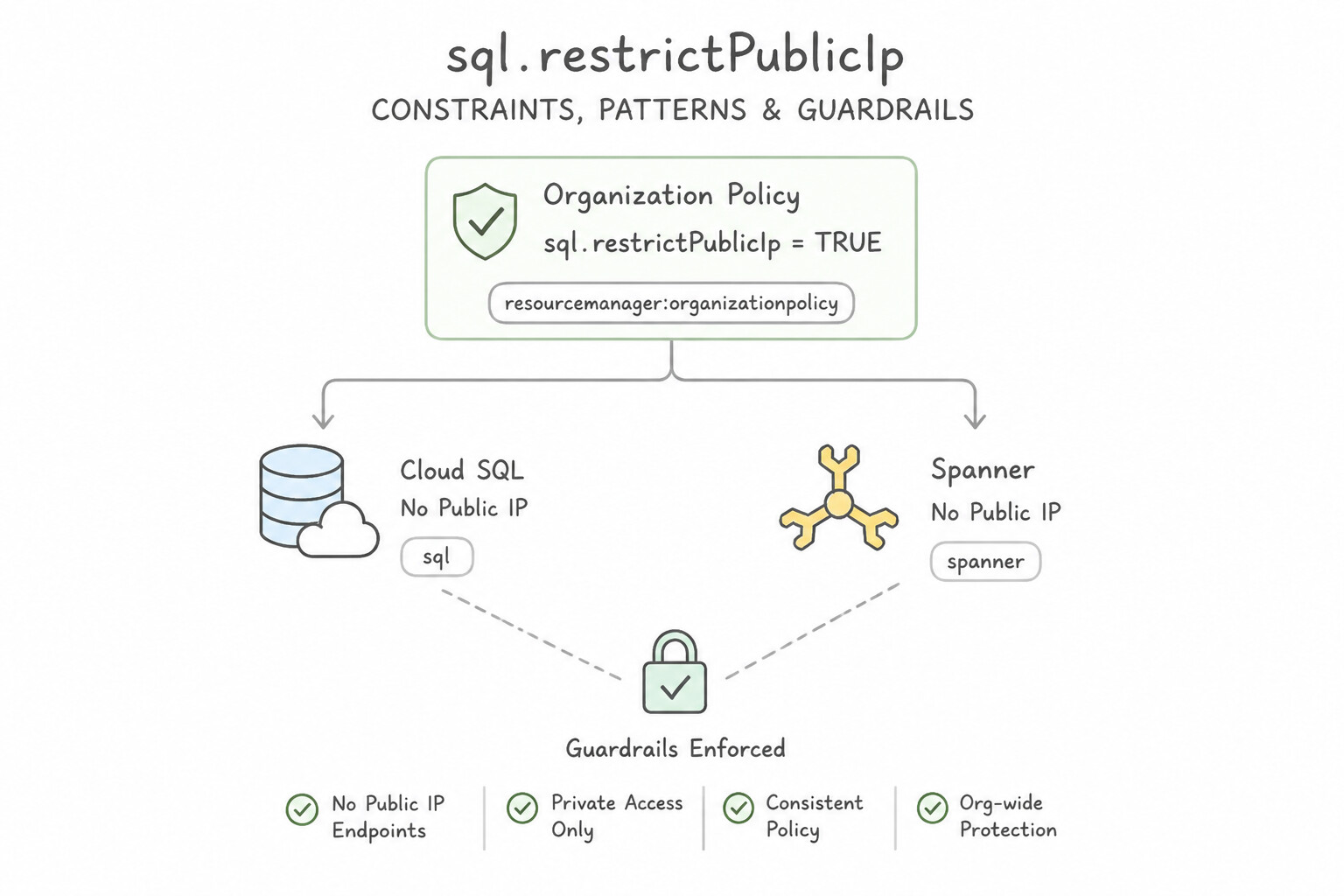
constraints/gcp.resourceLocations: Restricts which physical regions/multi-regions databases and backups can be provisioned in. If an org policy restricts resources toeu-*regions, attempting to create anam3Spanner instance or a cross-region replica inus-central1will fail at the API level.constraints/sql.restrictPublicIp: Blocks creation of any Cloud SQL instance with a Public IPv4 address—requiring Private Services Access (PSA) or Private Service Connect (PSC) for all application and migration (DMS) connectivity.constraints/sql.restrictAuthorizedNetworks&constraints/sql.restrictNonSslTraffic: Prevents open IP allowlists and mandates TLS encryption on all connections.constraints/gcp.restrictCmekCryptoKeyProjects&constraints/sql.requireCustomerManagedEncryption: Enforces mandatory CMEK encryption from centralized security-team KMS projects.
Key Implementation Patterns
- Strict Data Residency Compliance: Use Define a constraint for
gcp.resourceLocationsin the Organization Policy Service to allow only the required EU regions. Organization Policies provide a guardrail to strictly enforce resource location restrictions across projects. (Avoid alternative: IAM controls permissions (who), not resource configuration constraints (where).) - Public IP Restriction Policy: Use Configure the instance to use a private IP address and ensure the public IP address setting is disabled. Using a private IP address and disabling the public IP address strictly adheres to the security policy and enables internal connectivity.
- Customer-Managed Encryption Keys (CMEK) Mandate: Use Configure the database to use Customer-Managed Encryption Keys (CMEK) with Cloud Key Management Service (Cloud KMS). CMEK provides full control over encryption keys, including the ability to revoke access immediately via Cloud KMS.
Key Takeaways (1.4f)
- Organization Policies act as guardrails to enforce compliance rules across your Google Cloud hierarchy.
- Use the
gcp.resourceLocationsconstraint to strictly limit where resources can be created.- Data residency requirements often mandate physical storage restrictions, which are distinct from network access controls.
- Organizational policies often dictate configuration choices; strict security policies usually forbid Public IPs on databases.
Consideration 1.4g: Consider solutions that span multiple database technologies (e.g., federation, exports, hybrid deployments)
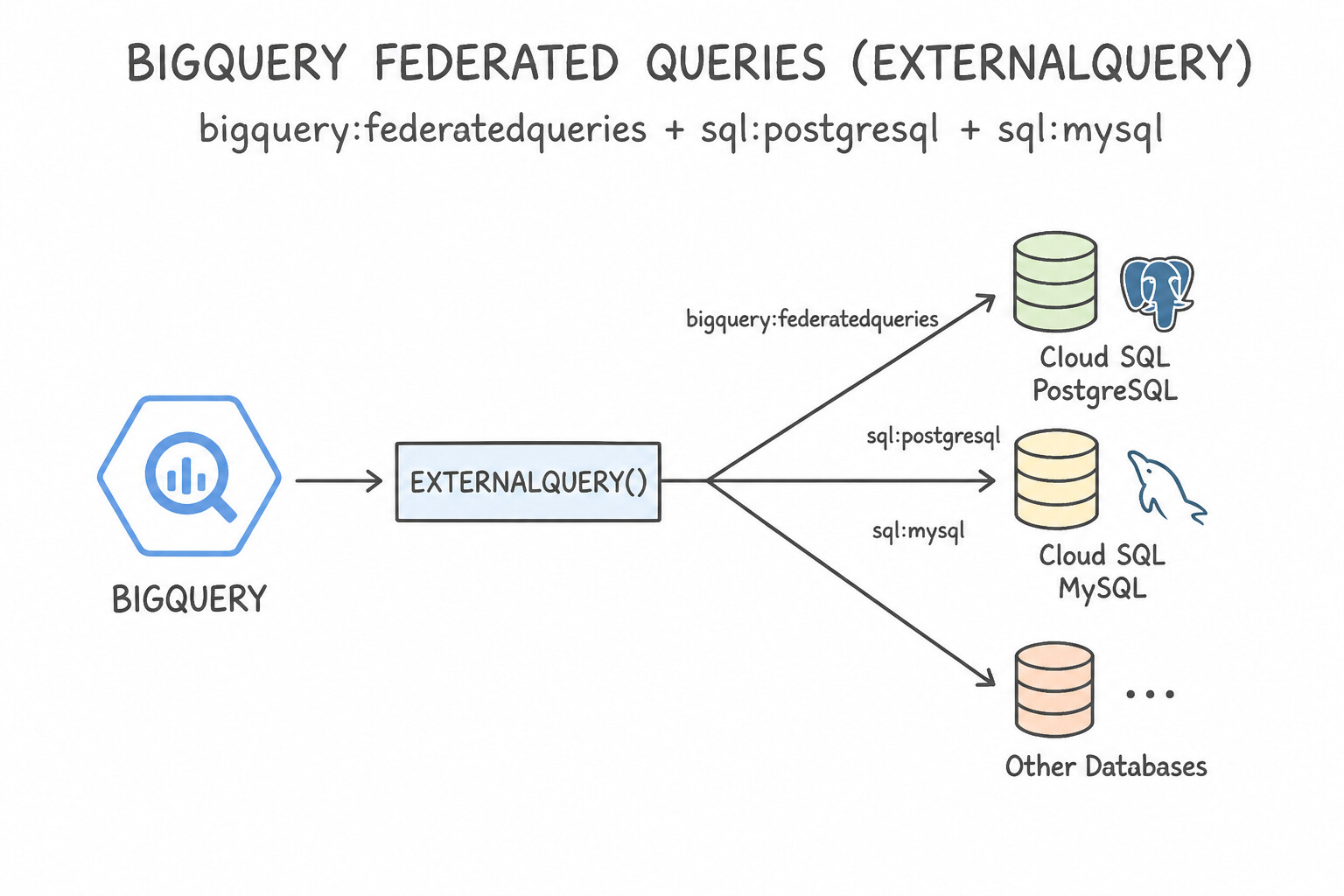
Polyglot persistence and hybrid architectures combine operational and analytical stores without brittle batch glue:
- BigQuery Federated Queries (
EXTERNAL_QUERY): - Allows BigQuery users to run real-time SQL joins between petabyte BigQuery tables and live operational rows in Cloud SQL, AlloyDB, or Cloud Spanner via a BigQuery Cloud Resource Connection—zero ETL storage duplication!
- Best Practice: Push filter predicates (
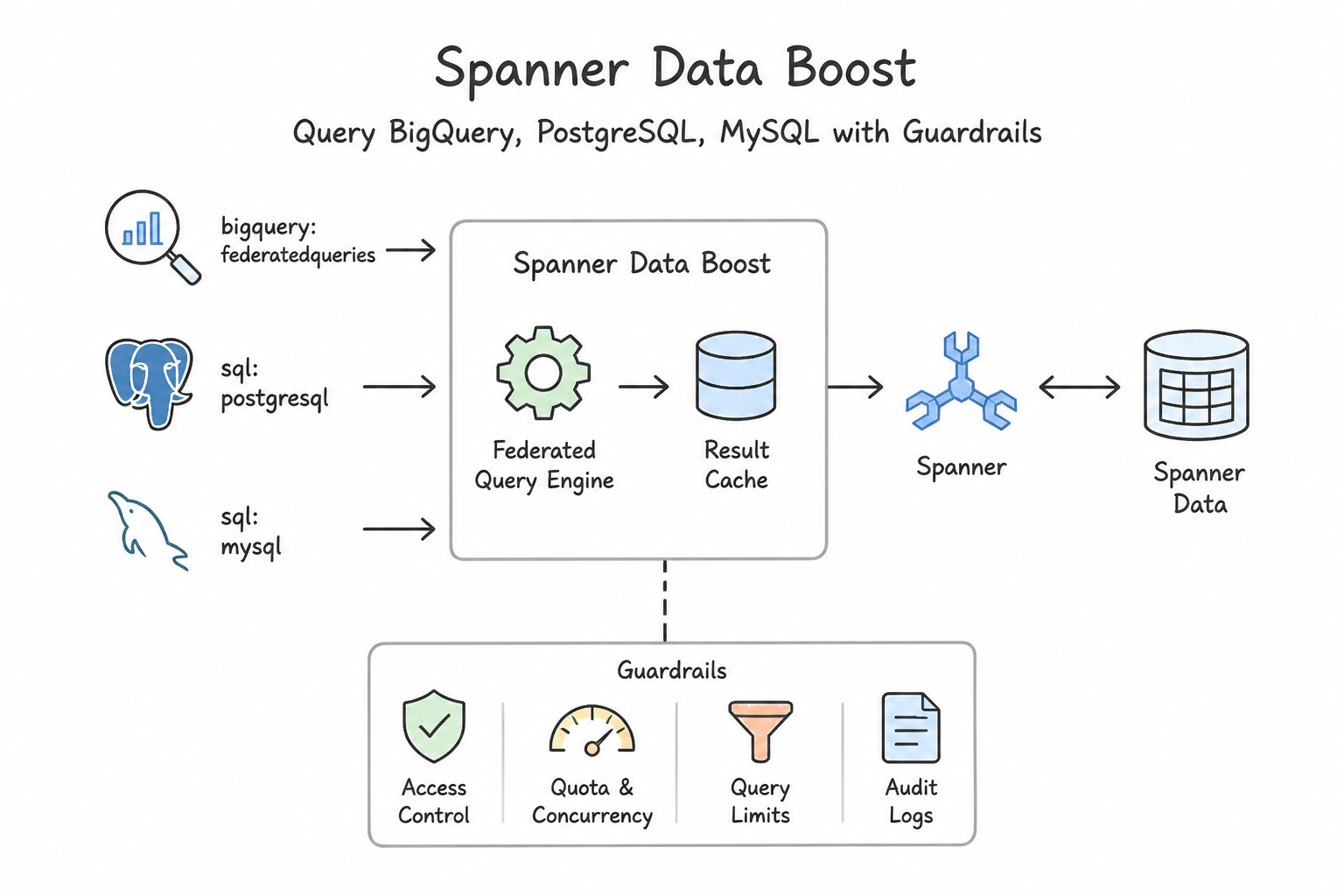
WHERE) inside the innerEXTERNAL_QUERY("connection_id", "SELECT ... WHERE ...")string so the operational database filters rows before streaming them to BigQuery, and target a Read Replica (or Spanner Data Boost) so analytical queries never starve OLTP traffic! - Spanner Data Boost: Provides isolated, serverless compute capacity on demand for large analytical/federated queries (BigQuery federation, Dataflow, Spark) against live Cloud Spanner data with zero impact on provisioned OLTP Spanner nodes/CPU.
- Change Data Capture (CDC) Streaming (
Datastream): When frequent analytical queries would overloadEXTERNAL_QUERY, use Datastream to continuously replicate changes from Cloud SQL / AlloyDB / Oracle into BigQuery in near real-time. - Hybrid Deployments (
AlloyDB Omni): Run AlloyDB Omni in on-premises data centers or edge sites while syncing or migrating seamlessly with managed AlloyDB for PostgreSQL in Google Cloud.
Key Implementation Patterns
- Real-time Analytics on Transactional Data: Use Create a connection to Cloud SQL in BigQuery and use the EXTERNAL_QUERY function. BigQuery federated queries allow direct, real-time access to Cloud SQL data using the EXTERNAL_QUERY function without moving data. (Avoid alternative: Exporting and importing data is a batch process that does not provide real-time access and constitutes a form of ETL.)
- Hybrid Architecture for Burst Traffic: Use Configure a Cloud SQL for MySQL instance as an external read replica of the on-premises instance. Cloud SQL can act as a read replica for an on-premises MySQL primary, allowing you to offload read traffic while keeping the writer on-premises.
Key Takeaways (1.4g)
- Federated Queries: allow BigQuery to query data in Cloud SQL without copying it.
- Zero-ETL: Federation is a key strategy for zero-ETL architectures where real-time access is prioritized over query performance.
- EXTERNAL_QUERY: The specific SQL function used to execute queries against the external database connection.
- Cloud SQL can act as a read replica for an external (on-premises) primary database.
Consideration 1.4h: Leverage database technologies to support generative AI and LLM use cases
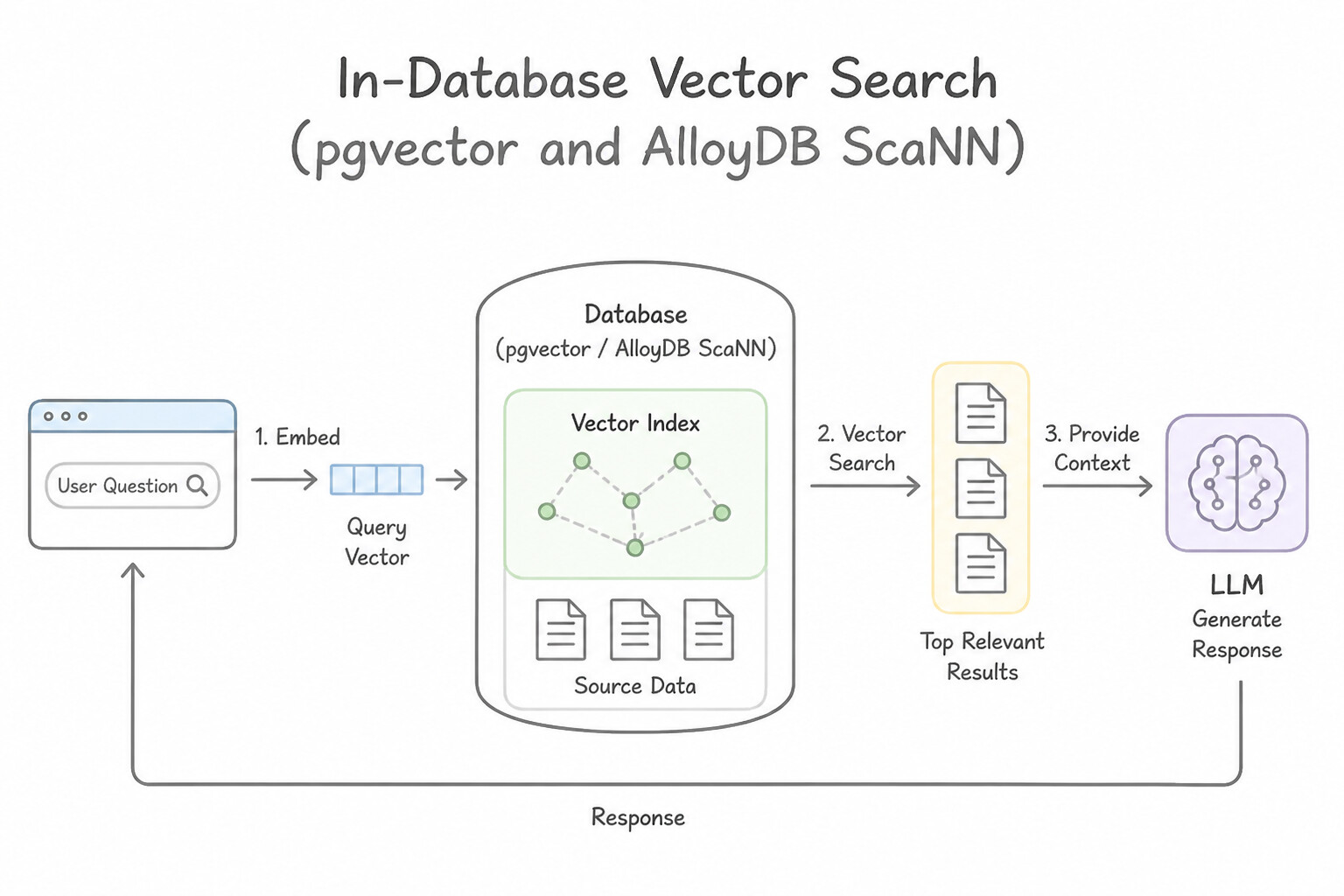
Modern Google Cloud databases are first-class citizens in Retrieval-Augmented Generation (RAG), semantic search, and agentic AI workflows:
- In-Database Vector Search (
pgvector&AlloyDB ScaNN): - Both Cloud SQL for PostgreSQL and AlloyDB for PostgreSQL support the
vector(pgvector) extension to store embeddings (vector(768)/vector(1536)) alongside relational business columns—enabling single-query filtered vector search (e.g., "find top 5 semantically similar products wherein_stock = trueandprice < 100" with full ACID consistency). - AlloyDB
alloydb_scannIndex: Uses Google's proprietary ScaNN (Scalable Nearest Neighbors) quantization algorithm, delivering up to 4x–10x faster vector queries and dramatically smaller memory footprints than standard HNSW/IVFFlat indexes. - Direct
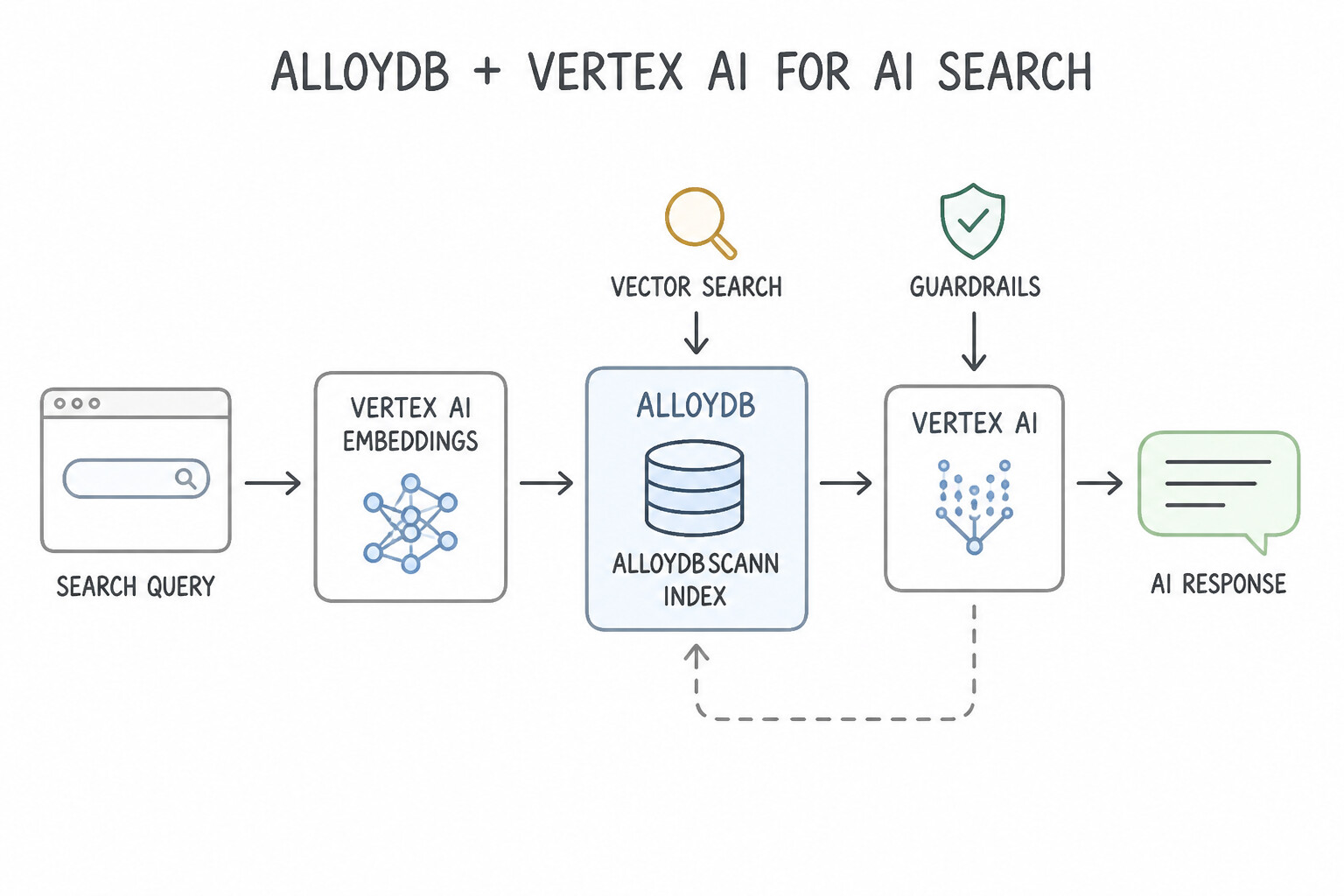
Vertex AIModel Invocation from SQL (google_ml_integration): - In AlloyDB and Cloud SQL, enable the
google_ml_integrationextension (embedding('text-embedding-004', content_col)) to generate embeddings or invoke Gemini LLMs directly inside SQLSELECTstatements or database triggers! - Spanner & Firestore Vector Search: Cloud Spanner (
COSINE_DISTANCE,APPROX_COSINE_DISTANCE+VERTEX_AI_EMBEDDINGvia remote models) and Firestore (find_nearestKNN vector indexes) also support native vector search for globally distributed or mobile-first GenAI apps.
Key Implementation Patterns
- Integrated Embedding Generation: Use Enable the google_ml_integration extension and use the embedding() function to generate vectors via Vertex AI. AlloyDB's google_ml_integration extension allows direct SQL calls to Vertex AI for embedding generation. (Avoid alternative: This increases application complexity by requiring client-side API calls for embeddings.)
- Batch Text Analysis with SQL: Use Create a Cloud Resource Connection to Vertex AI. Create a remote model in BigQuery ML specifying the Gemini Pro endpoint, then use the ML.GENERATE_TEXT function. BigQuery ML remote models let you call Vertex AI LLMs directly using SQL without moving data.
Key Takeaways (1.4h)
- AlloyDB AI integrates directly with Vertex AI to generate vector embeddings using SQL.
- In-database ML integration minimizes application code complexity by removing the need for client-side API calls.
- Generating embeddings within the database transaction avoids the need for external ETL pipelines.
- BigQuery ML Remote Models bridge SQL data and Vertex AI Foundation Models (LLMs).
Quick Decision Cheat Sheet (Subsection 1.4)
If the Scenario Requires... | Choose This Google Cloud Pattern | Avoid This Common Mistake |
|---|---|---|
"Global relational database, active-active multi-region writes, 99.999% SLA, external consistency" | Cloud Spanner (Multi-Region) | Cloud SQL or AlloyDB (single primary region for writes) |
"High-performance PostgreSQL, HTAP (OLTP + analytics), or hybrid on-prem portability" | AlloyDB for PostgreSQL (Columnar Engine) / AlloyDB Omni | Self-managed PostgreSQL on Compute Engine VMs |
"Lift-and-shift Oracle RAC with hardware-bound licensing and <60 days to exit datacenter" | Bare Metal Solution (BMS) for Oracle (or Oracle Database@Google Cloud) | Rewriting all PL/SQL to Cloud Spanner before the datacenter lease expires |
"Petabyte-scale time-series, IoT telemetry, or financial market ticks with sub-10ms latency" | Cloud Bigtable (SSD) | Cloud SQL or Firestore (wrong data model and cost profile for high-velocity wide-column streams) |
"Query live Cloud SQL / Spanner tables directly from BigQuery SQL" | BigQuery Federated Queries ( EXTERNAL_QUERY) (+ Spanner Data Boost / Read Replica) | Writing custom cron jobs to dump CSVs every 5 minutes |
"Generate embeddings from Vertex AI and run fast vector search directly inside PostgreSQL" | AlloyDB / Cloud SQL with google_ml_integration + pgvector (alloydb_scann) | Pulling millions of rows to client memory to compute cosine similarity in Python |
Further Reading (Subsection 1.4)
- Bare Metal Solution for Oracle — Overview of how Bare Metal Solution supports Oracle workloads, highlighting licensing and architecture benefits.
- Cloud SQL for PostgreSQL Features — Review the 'Features' section to understand what is managed by Google. Note the lack of OS access in the feature list compared to a VM.
- Booksy achieves 200% scale with Google Cloud and CockroachDB | Google Cloud Blog — While this links to a generic architecture concept, it highlights the flexibility of using Compute Engine for database workloads where specific storage or OS configurations are needed.
- Cloud Spanner Overview — Read the section on 'Key features' to understand how Spanner combines relational semantics with non-relational scale.
- Google Cloud Database Options — Review the comparison chart to see which databases support SQL versus NoSQL and their regional vs. global capabilities.
- Enable offline data — This page explains how Firestore allows you to access data offline and automatically syncs changes when the device is back online.
Book TOC · Previous · Chapter 1 of 6 · Next
AwesomeGCP.com Learning
The approach taken is a question-led learning approach: you explore realistic project scenarios where you need to make decisions or take actions to achieve business goals within specific constraints. Instead of passive learning, you are challenged to think and work through the options to master the Professional Cloud Database Engineer (PDBE) certification!