Book TOC · Previous · Chapter 2 of 7 · Next
Chapter 2: Application Security, Zero-Trust Identity, Secret Manager & Data Access Patterns
Chapter Focus: IAM least privilege, Workload Identity Federation, IAP/Identity Platform, Secret Manager rotation, CMEK, Sensitive Data Protection, and Cloud Storage/AlloyDB/Firestore/BigQuery access patterns.
Subsection 1.2: Designing secure applications
The Big Picture
In traditional on-premises networks, applications relied on a "castle-and-moat" firewall: once a server was inside the corporate VLAN, it used static database passwords stored in config files, shared a single broad admin account, and communicated with peer services over unencrypted HTTP. In Google Cloud, production scenarios ruthlessly expose four fatal security anti-patterns:
- The Static JSON Key Anti-Pattern (
1.2d,1.2e,1.2g,1.2i): Exporting a Service Account JSON key (credentials.json) and embedding it into a container image, environment variable, or GitHub repository. Static keys do not expire automatically and are the #1 vector for cloud breaches. Google Cloud's golden rule is Zero Static Keys: use Application Default Credentials (ADC), GKE Workload Identity, Workload Identity Federation (WIF) for external CI/CD, and Cloud SQL / AlloyDB Auth Proxies. - Confusing Secret Storage with Cryptographic Key Management (1.2d): Trying to store a 2 KB database password or TLS certificate directly inside Cloud KMS (which only holds cryptographic keys and performs encrypt/decrypt/sign operations, never storing arbitrary secret payloads), or storing raw secrets in plaintext
ConfigMapsinstead of Secret Manager. - Unauthenticated Internal East-West Traffic (
1.2b,1.2h): Assuming that because two microservices run inside the same GKE cluster or VPC, any Pod should be able to talk to any other Pod in plaintext. Production security requires Kubernetes NetworkPolicies (L3/L4 pod firewalling), Cloud Service Mesh (zero-code mutual TLS / mTLS andAuthorizationPolicy), Direct VPC Egress, and Identity-Aware Proxy (IAP) for zero-trust human access. - Unsigned, Unscanned Container Deployments (
1.2c,1.2j): Allowing anyone withkubectlorgcloudaccess to deploy an arbitrary Docker Hub image into production without Artifact Analysis vulnerability scanning and Binary Authorization cryptographic attestation verification.
Consideration 1.2a: Implementing data retention and organization policies (e.g., Cloud Storage Object Lifecycle Management, retention policies)
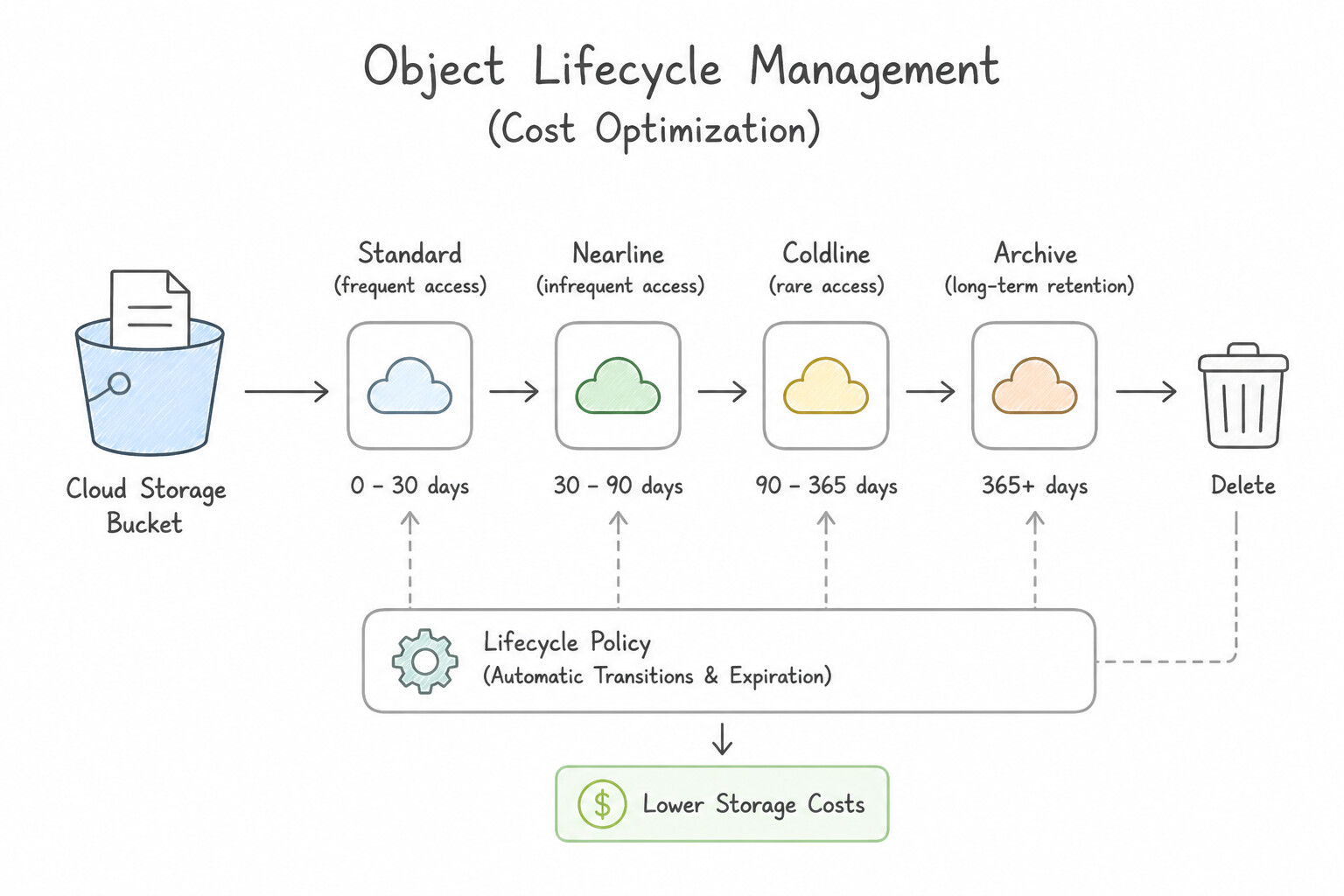
- Object Lifecycle Management (Cost Optimization) vs. Retention Policies (Compliance):
- Object Lifecycle Management allows automatic transitions (
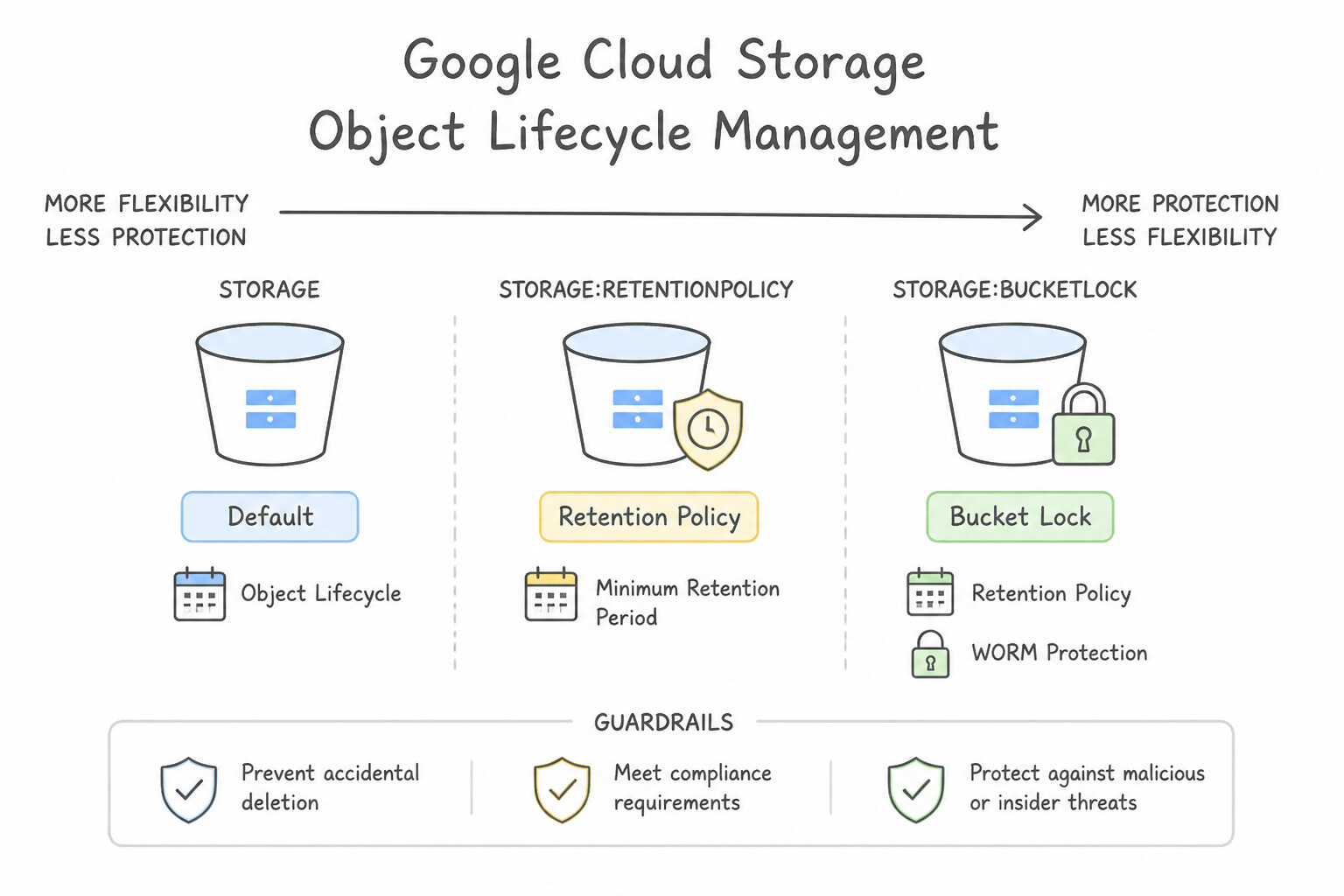
Standard→Nearline→Coldline→Archive) or automatic deletion after$N$ days to save money, but it does not prevent a user with delete permissions from deleting an object early. - Bucket Retention Policy (and Bucket Lock) prevents any object from being deleted or overwritten until its retention age expires (WORM: Write-Once-Read-Many, e.g., SEC Rule 17a-4 or HIPAA 7-year audit logs). Once a Retention Policy is Locked, nobody—not even the Project Owner—can shorten or remove it without deleting the entire bucket after all objects expire.
- Temporary Hold vs. Event-Based Hold: Place a Temporary Hold on an object during active litigation discovery (freezing deletion until released); use an Event-Based Hold when the retention clock should only start ticking after a business event occurs (e.g., loan payoff).
- Organization Policy Service Constraints: Use declarative Organization Policies at the Organization/Folder/Project hierarchy to enforce proactive guardrails across all developers—such as
iam.disableServiceAccountKeyCreation(blocking JSON key downloads),compute.vmExternalIpAccess(blocking public VM IPs), andgcp.resourceLocations(enforcing EU/US data residency).
Key Implementation Patterns
- Immutable Compliance Data Storage: Use Configure a Retention Policy on the bucket for 7 years and lock the policy. Locking a retention policy enforces WORM compliance, preventing anyone (including admins) from deleting data early. (Avoid alternative: Lifecycle rules automate expiration but do not prevent early deletion or modifications.)
- Cost Optimization for Access Logs: Use Configure an Object Lifecycle Management policy. Add rules to set the storage class to Nearline after 30 days, Archive after 120 days, and Delete after 3 years. Object Lifecycle Management automates transitions based on age. Nearline fits monthly access, and Archive fits long-term rare access.
Key Takeaways (1.2a)
- Object Lifecycle Management is for automating deletion or class transitions (TTL).
- Retention Policies are for preventing deletion for a set period.
- Locking a Retention Policy makes it irreversible and prevents even administrators from deleting data or removing the policy.
- Use Object Lifecycle Management to automate cost savings for data that cools down over time.
Consideration 1.2b: Using security mechanisms that identify vulnerabilities and protect services and resources (e.g., Identity-Aware Proxy, Web Security Scanner)
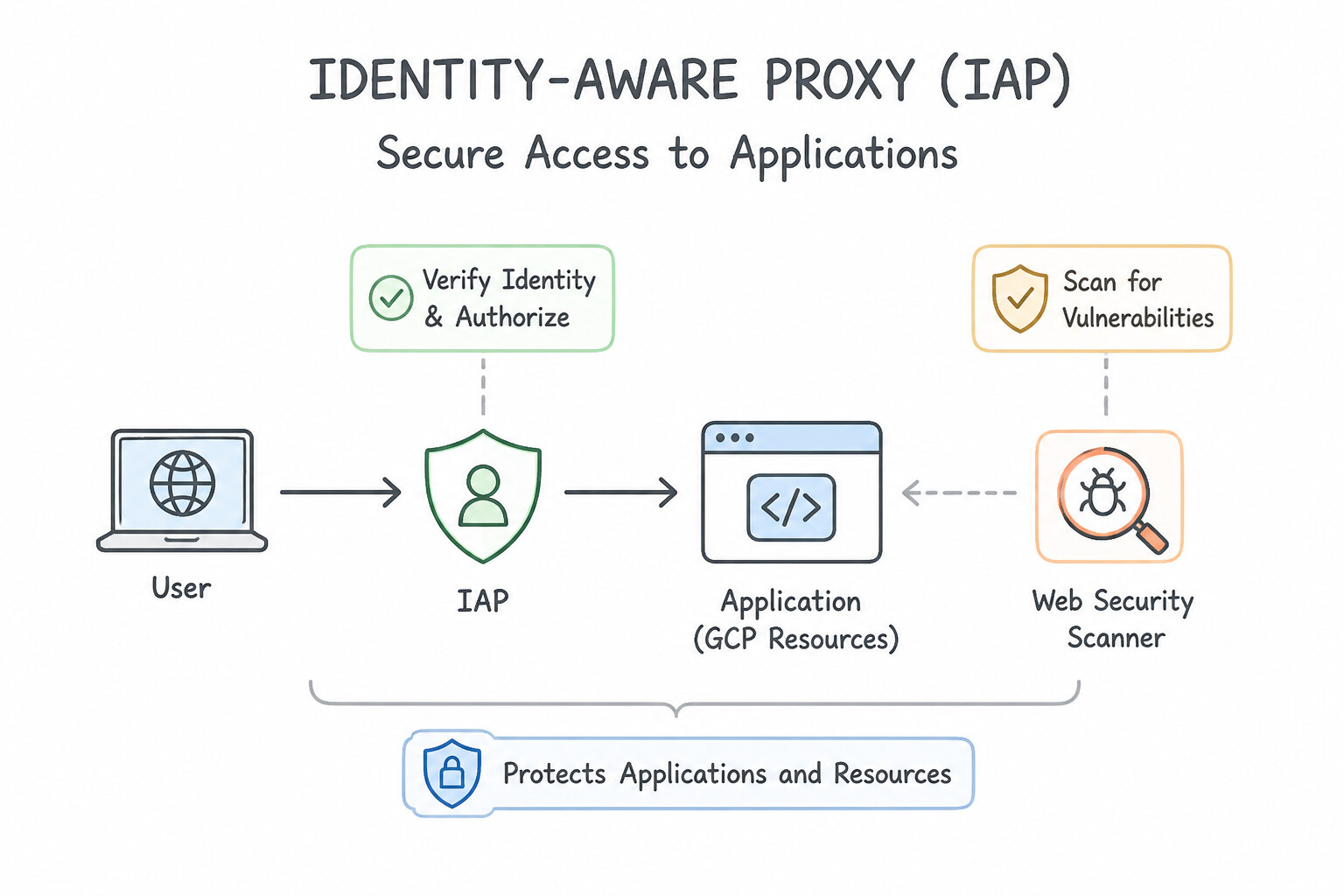
- Identity-Aware Proxy (IAP — BeyondCorp Zero-Trust Access): IAP sits in front of HTTPS Load Balancers, App Engine, and Cloud Run (or TCP/SSH tunnels to private VMs) to authenticate human users via Google Identity + Access Context Manager device/IP posture without requiring a corporate VPN.
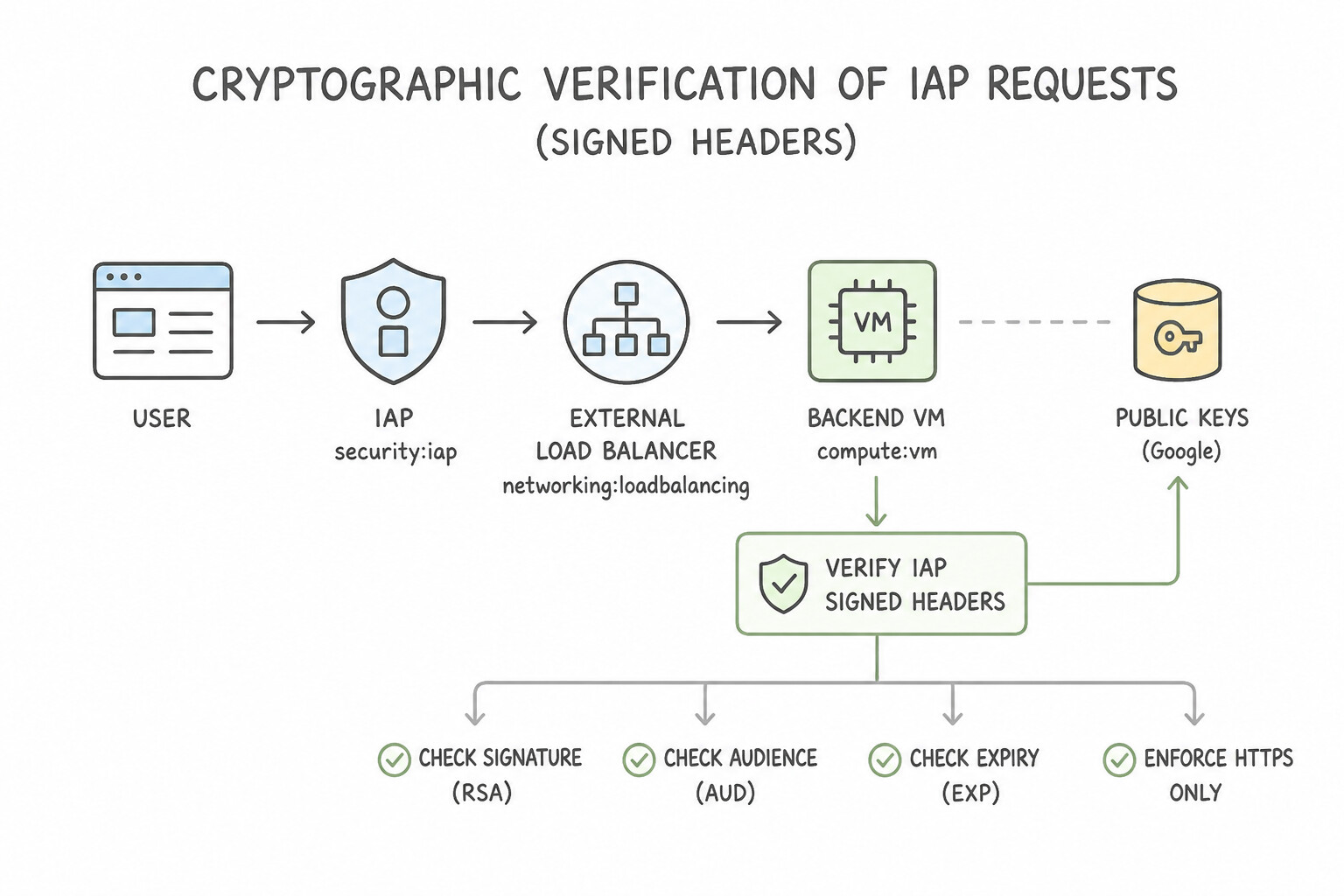
- Cryptographic Verification of IAP Requests (Signed Headers): If a developer accidentally exposes a backend service or misconfigures a firewall rule, an attacker could bypass the Load Balancer and spoof the
X-Goog-Authenticated-User-Emailheader. Production backends must cryptographically verify thex-goog-iap-jwt-assertionheader signature using Google's public keys and validate theaud(audience) andiss(issuer) claims! - Web Security Scanner (Automated DAST): Crawls your public or IAP-protected web applications (on App Engine, GKE, Compute Engine, Cloud Run) to detect common OWASP vulnerabilities—including Cross-Site Scripting (XSS), Flash injection, mixed content, and outdated JavaScript libraries. Always run scans against a staging environment or using a non-privileged test account so the crawler does not click "Delete" buttons in production.
Key Implementation Patterns
- Secure Access to Internal Tools: Use Set up an External Application Load Balancer with the VM as a backend, and enable Identity-Aware Proxy (IAP) on the backend service. IAP allows secure access to private VMs via a Load Balancer by verifying user identity before forwarding traffic.
- Defense Against SQL Injection at the Edge: Use Configure a Google Cloud Armor security policy with preconfigured SQL injection rules and attach it to the load balancer's backend service. Google Cloud Armor provides WAF capabilities to block common web attacks, including SQL injection, at the global load balancer level.
- Automated Web Vulnerability Scanning: Use Configure a scan using Web Security Scanner on the application's staging URL. Web Security Scanner automatically identifies vulnerabilities like XSS and outdated libraries in App Engine applications. (Avoid alternative: VPC Service Controls prevent data exfiltration across network boundaries but do not perform web application vulnerability scanning.)
Key Takeaways (1.2b)
- Identity-Aware Proxy (IAP) enables secure access to applications without a VPN.
- Backends behind an IAP-enabled Load Balancer do not require public IP addresses.
- IAP authenticates users before traffic reaches the application, implementing a Zero Trust model.
- Google Cloud Armor is the standard WAF solution for protecting Google Cloud Load Balancers.
Consideration 1.2c: Responding to and resolving vulnerabilities, including those identified by Artifact Analysis and Security Command Center
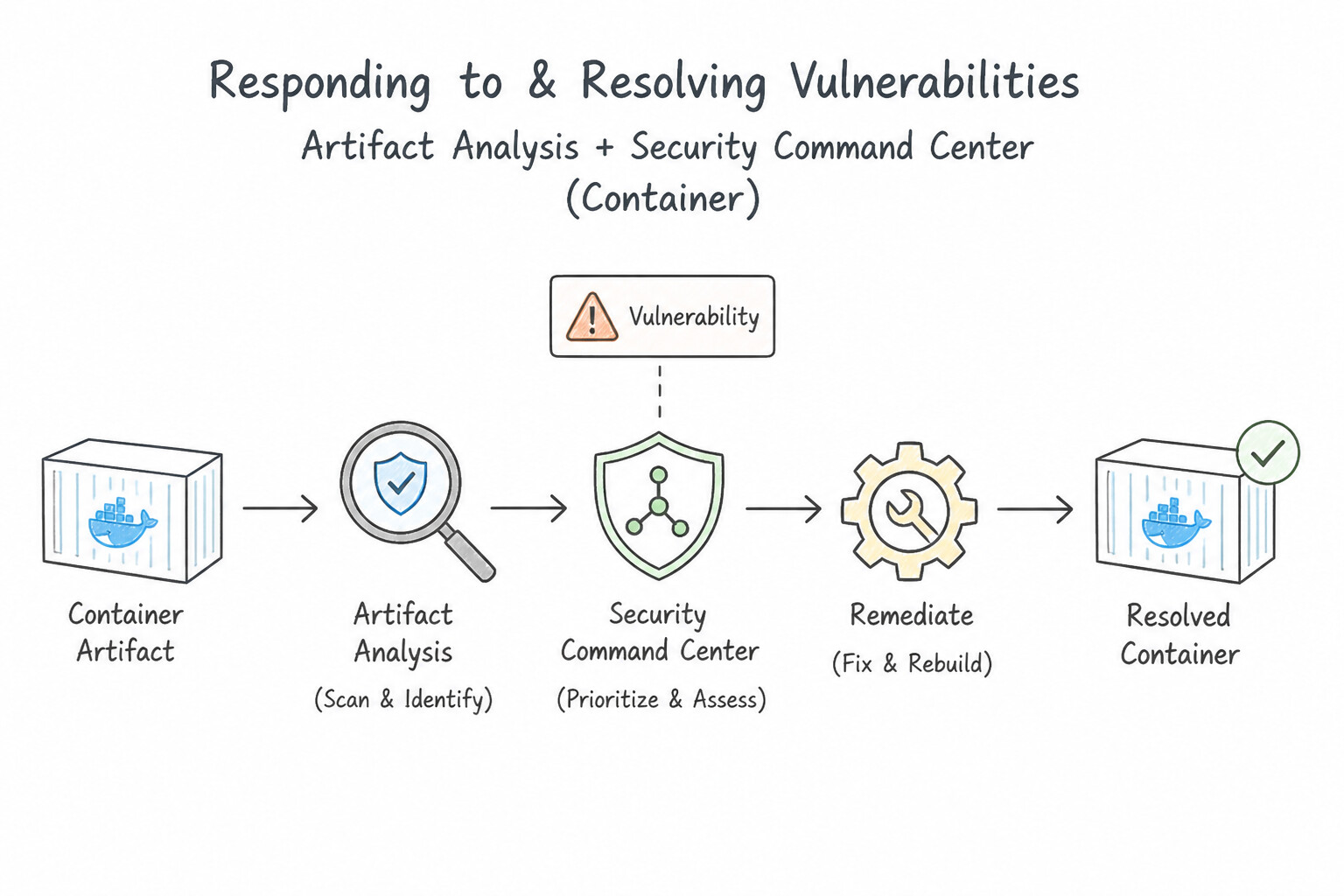
- Artifact Analysis (Container & Package CVE Scanning): Automatically scans container images (both OS packages like Debian/Alpine and language dependencies like
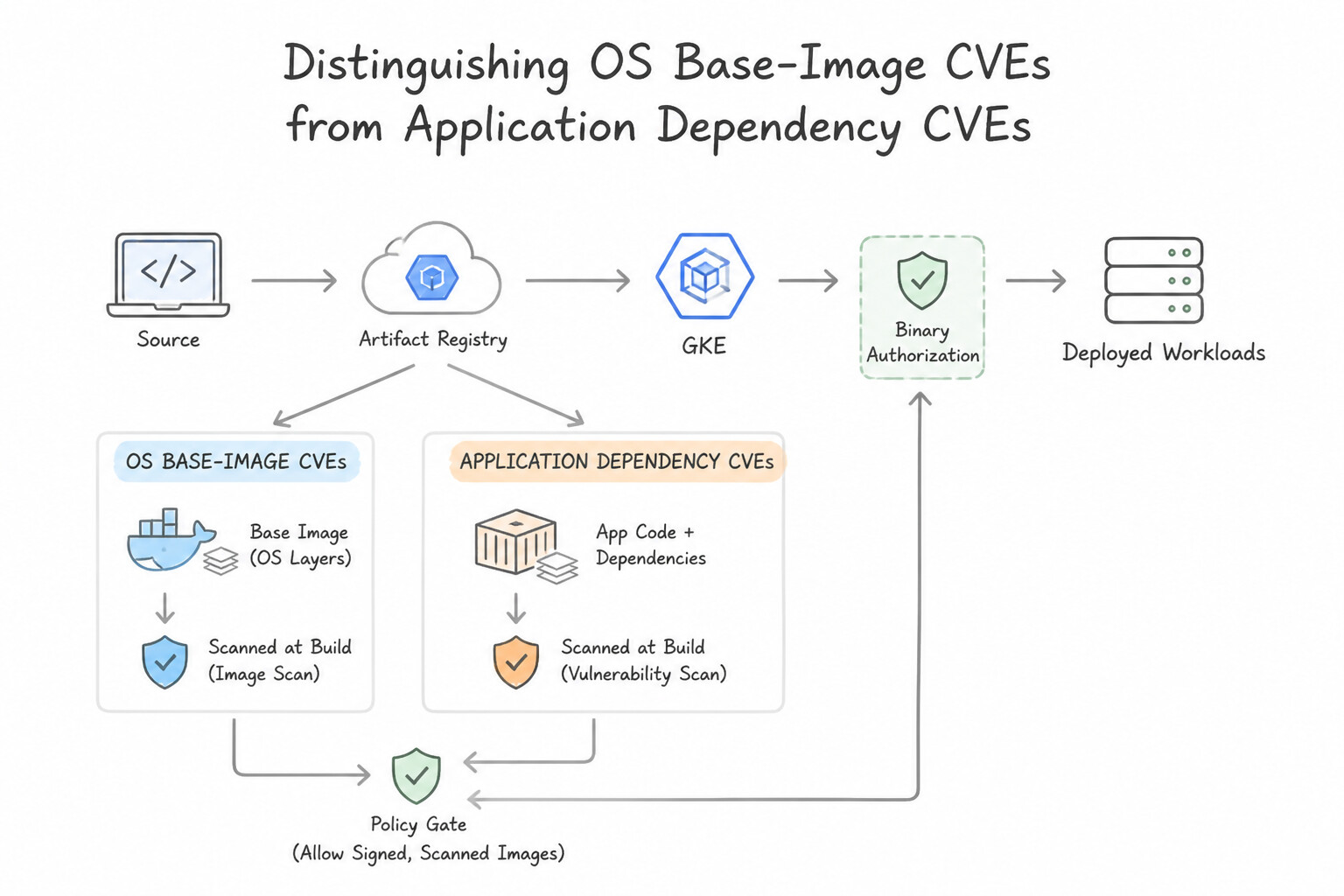
npm,pip,Maven,Go) the moment they are pushed to Artifact Registry, storing vulnerability metadata in the Container Analysis API. - Distinguishing OS Base-Image CVEs from Application Dependency CVEs:
- If Artifact Analysis flags a critical CVE in
opensslorglibc(an OS layer package), remediate by updating theFROMbase image in yourDockerfile(or moving to a Distroless image that strips shells and package managers entirely) and rebuilding. - If it flags a CVE in
lodashorlog4j, remediate by updatingpackage.json/pom.xmlusing Cloud Source Repositories / Git dependabot alerts and rebuilding. - Security Command Center (SCC): Centralizes vulnerability findings, misconfigurations (Security Health Analytics), and active runtime threats (Event Threat Detection, Container Threat Detection flagging unexpected binary execution inside a GKE container) into a single dashboard with Pub/Sub notification exports for automated remediation workflows.
Key Implementation Patterns
- Automated Deployment Blocking via Binary Authorization: Use Enable Binary Authorization on the GKE cluster. Configure a policy that requires an attestation. Use a vulnerability scanner to create this attestation only for images without critical or high vulnerabilities. Binary Authorization enforces deploy-time security by requiring attestations (digital signatures) verifying that images are free of high-severity vulnerabilities.
- Handling False Positives in Vulnerability Reports: Use Configure the pipeline policy to ignore the specific CVE ID. Whitelisting the specific CVE allows the build to pass without lowering the overall security posture. (Avoid alternative: Disabling the scanner removes all security checks, which exposes the system to unknown risks.)
- Real-time Vulnerability Notifications: Use Deploy a Cloud Function that is triggered by the Artifact Analysis Pub/Sub topic to send a message to Slack. Artifact Analysis emits events to Pub/Sub, which can trigger a Cloud Function to send immediate alerts. (Avoid alternative: Cloud Scheduler is a batch/polling tool, not a real-time event-driven solution.)
Key Takeaways (1.2c)
- Binary Authorization is the standard mechanism to enforce deploy-time policies on GKE.
- Attestations verify that an image has passed specific checks (like vulnerability scanning or QA testing) before deployment.
- Always prefer preventive controls (blocking deployment) over detective controls (alerting after deployment) for critical security requirements.
- Artifact Analysis provides the vulnerability data used to make admission decisions.
Consideration 1.2d: Storing, accessing, and rotating application secrets, credentials, and encryption keys (e.g., Secret Manager, Cloud KMS, Workload Identity Federation)
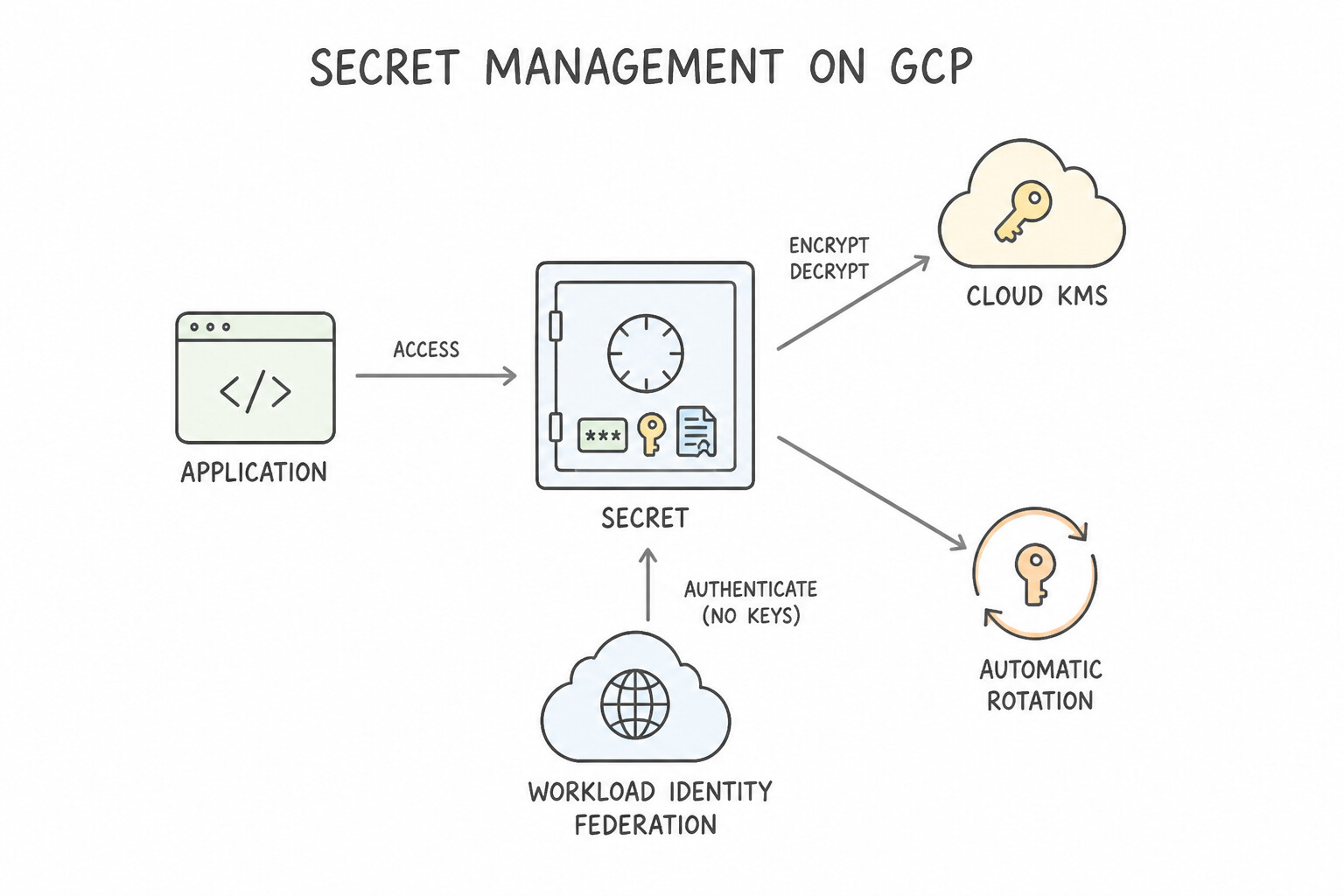
- Secret Manager vs. Cloud KMS:
- Secret Manager stores, versions, audits, and rotates application secrets (database passwords, third-party API keys, TLS certificates). Always pin production workloads to a specific secret version (e.g.,
versions/3) rather than the mutablelatestalias when you want predictable rollbacks, or use mounted secret volumes in Cloud Run/GKE when the app dynamically reloads rotated secrets without restarting. - Cloud KMS manages cryptographic keys (symmetric AES-256 and asymmetric RSA/ECDSA in software or Cloud HSM) for Customer-Managed Encryption Keys (CMEK) and Envelope Encryption (where a KMS Key Encryption Key [KEK] encrypts a local Data Encryption Key [DEK]).
- Automated Secret Rotation Pattern: Configure a rotation schedule on a Secret Manager secret that publishes
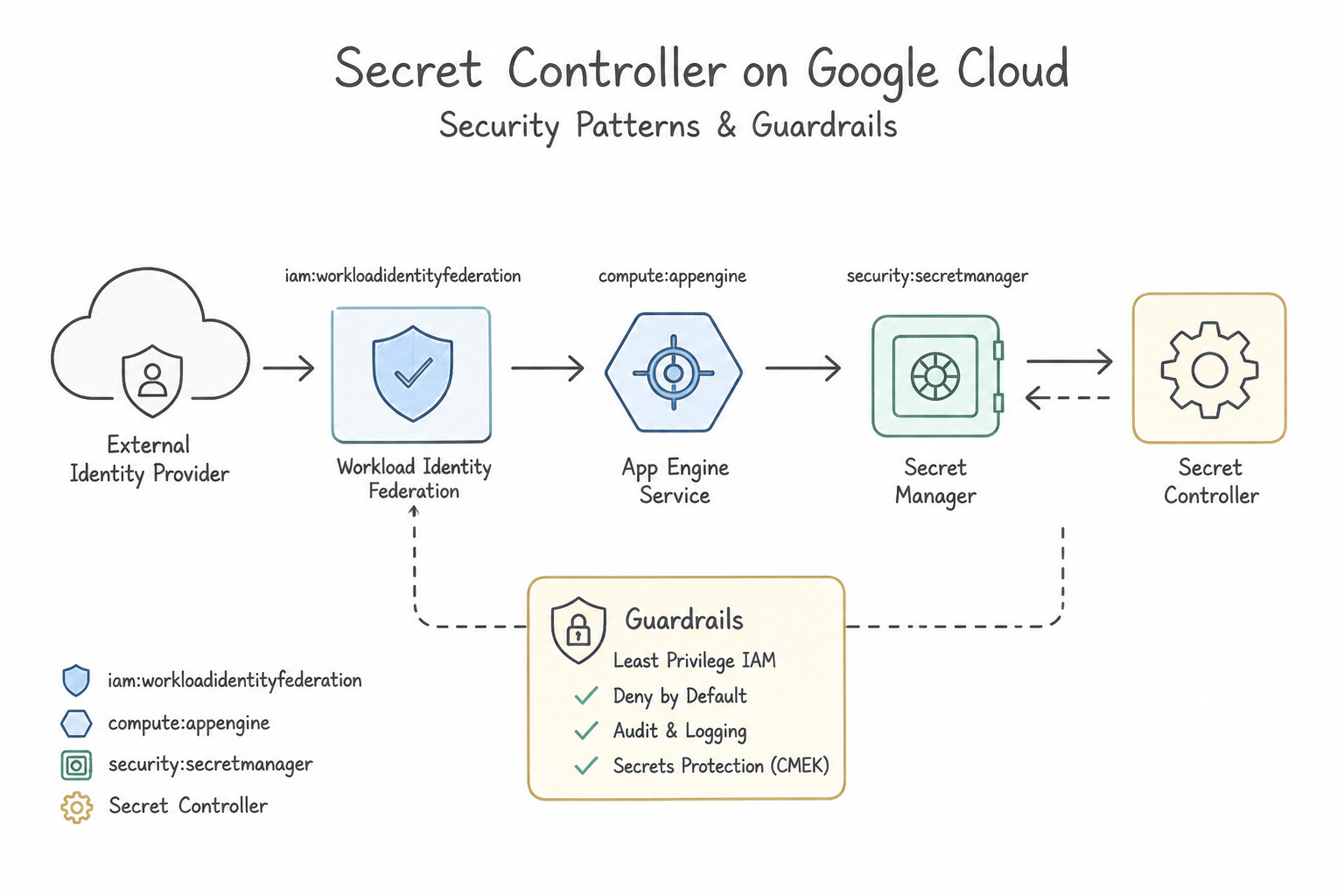
SECRET_ROTATEnotifications to Cloud Pub/Sub, triggering a Cloud Run / Cloud Function handler that updates the password in Cloud SQL/AlloyDB, adds the new Secret Version in Secret Manager, and verifies connectivity. - Workload Identity Federation (WIF): Eliminates static Service Account JSON keys for external workloads (GitHub Actions, GitLab CI, AWS IAM roles, Azure AD, on-prem Kubernetes). The external workload exchanges its native OIDC/AWS token with Google's Security Token Service (STS) via a Workload Identity Pool and Provider to obtain a short-lived Google Cloud access token.
Key Implementation Patterns
- Migrating Hardcoded Credentials: Use Upload the credentials to Secret Manager. Update the application code to access the secrets using the Google Cloud Client Library. Secret Manager is the secure, managed service for storing and accessing sensitive credentials. (Avoid alternative: Manual encryption with Cloud KMS adds complexity and does not offer the full management features of a dedicated secret store.)
- AWS to GCP Authentication: Use Configure Workload Identity Federation. Create a pool and provider for AWS to allow the EC2 instance to impersonate a Google Cloud Service Account. Workload Identity Federation allows keyless authentication by trusting the external identity provider (AWS) directly.
- Automated Database Credential Rotation: Use Configure the secret in Secret Manager with a 30-day rotation schedule. Configure the rotation to trigger a Cloud Function that updates both the Secret Manager version and the Cloud SQL user. Secret Manager natively supports rotation schedules that trigger Cloud Functions to coordinate the update with the external database.
Key Takeaways (1.2d)
- Never hardcode sensitive credentials (passwords, API keys) in source code.
- Use Secret Manager to store, manage, and access secrets securely.
- Avoid storing secrets in environment variables if the configuration file is committed to version control.
- Grant access to secrets using Identity and Access Management (IAM) roles on the service account.
Consideration 1.2e: Authenticating to Google Cloud services (e.g., ADC, JWT, OAuth 2.0, Cloud SQL Auth Proxy, AlloyDB Auth Proxy)
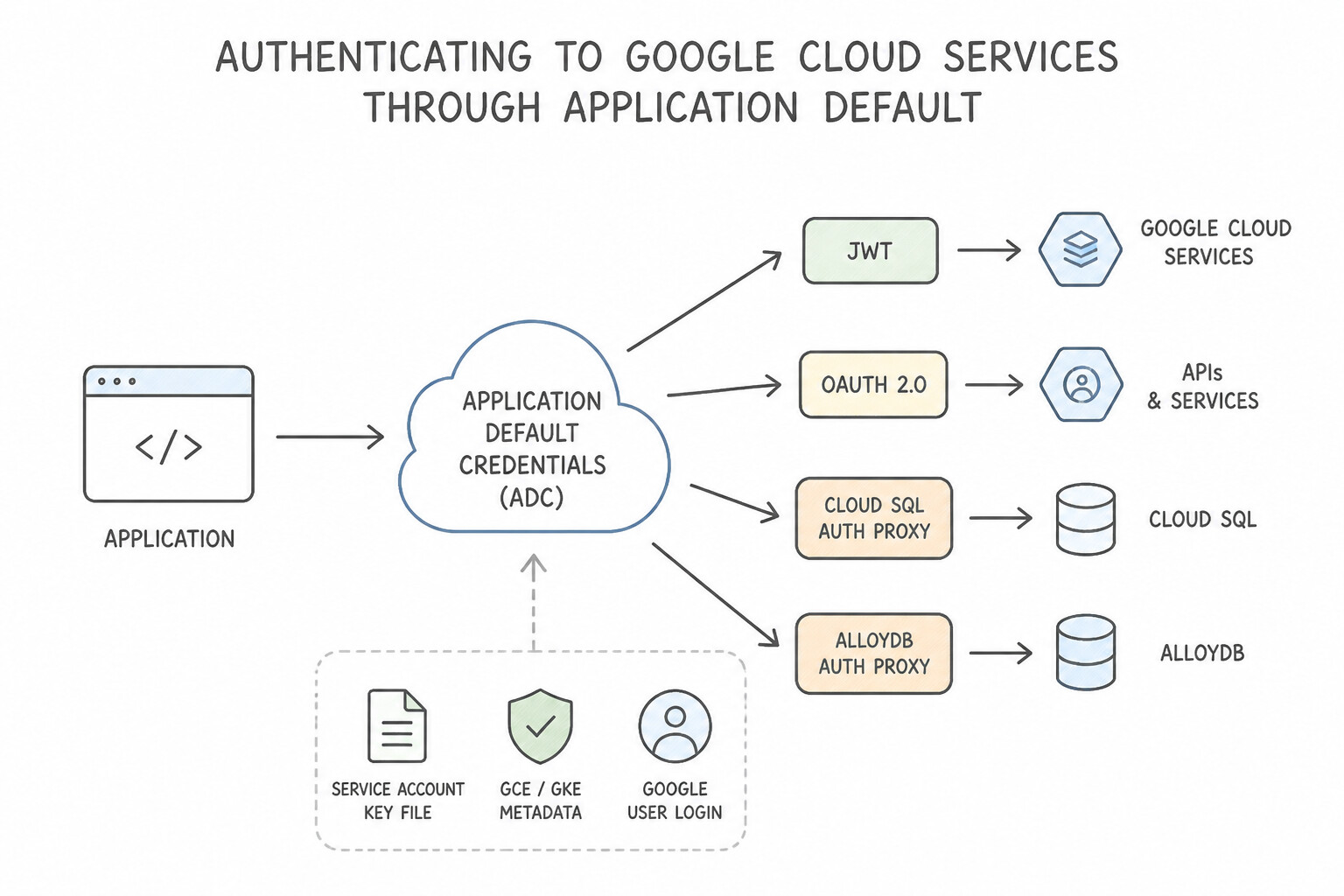
- Application Default Credentials (ADC) — Write Code Once, Authenticate Anywhere: Never write
if env == "local": load_json() else: ...in application code. Initialize Google Cloud Client Libraries with zero credential arguments so ADC automatically locates credentials in order: GOOGLE_APPLICATION_CREDENTIALSenvironment variable (if explicitly set).- Attached user/impersonated credentials from
gcloud auth application-default login(local dev). - The local Compute Metadata Server (
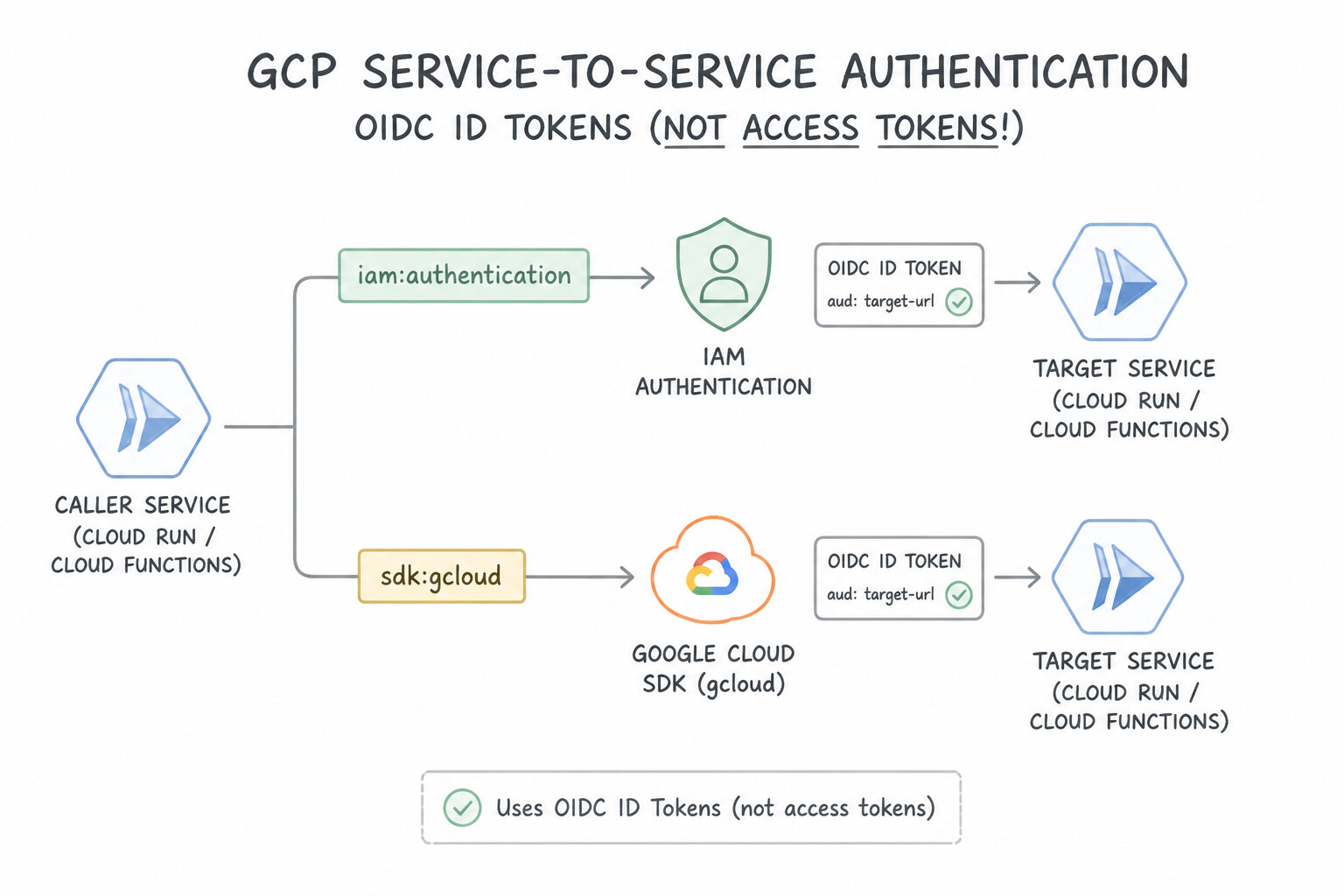
http://metadata.google.internal) attached Service Account on Cloud Run, GKE (via Workload Identity), Compute Engine, or App Engine. - Service-to-Service Authentication on Cloud Run / Cloud Functions (OIDC ID Tokens, Not Access Tokens!):
- To call a Google Cloud API (like Cloud Storage or BigQuery), your app uses an OAuth 2.0 Access Token.
- To call a private Cloud Run service, Cloud Function, or IAP-protected endpoint, your caller service must fetch a Google-signed OIDC ID Token from the metadata server specifying the target service's URL as the
audience(aud) claim, and pass it inAuthorization: Bearer <ID_TOKEN>. - Cloud SQL Auth Proxy & AlloyDB Auth Proxy: Provide automatic TLS 1.3 encryption and Automatic IAM Database Authentication (using short-lived IAM tokens instead of static DB passwords) without managing SSL certificates or whitelisting dynamic client IPs in Authorized Networks.
Key Implementation Patterns
- Local Development to Production Parity: Use Run the command gcloud auth application-default login. This command sets up Application Default Credentials (ADC) locally using your user identity, allowing client libraries to authenticate automatically. (Avoid alternative: This command authenticates the gcloud CLI tool but does not set up the Application Default Credentials required by the client libraries.)
- Secure GKE to Cloud SQL Connectivity: Use Add the Cloud SQL Auth Proxy container to the application pod as a sidecar. The Cloud SQL Auth Proxy sidecar automatically handles encryption and authentication without manual certificate management. (Avoid alternative: Authorized networks are prohibited by the scenario and rely on public IP allowlisting.)
Key Takeaways (1.2e)
- Application Default Credentials (ADC) enable code portability across environments without changes.
- Use
gcloud auth application-default loginto authenticate client libraries locally.- Avoid downloading service account keys for local development when possible to improve security.
- Do not embed secrets or hardcoded paths in your application code.
Consideration 1.2f: Managing and authenticating end-user accounts (e.g., Identity Platform)
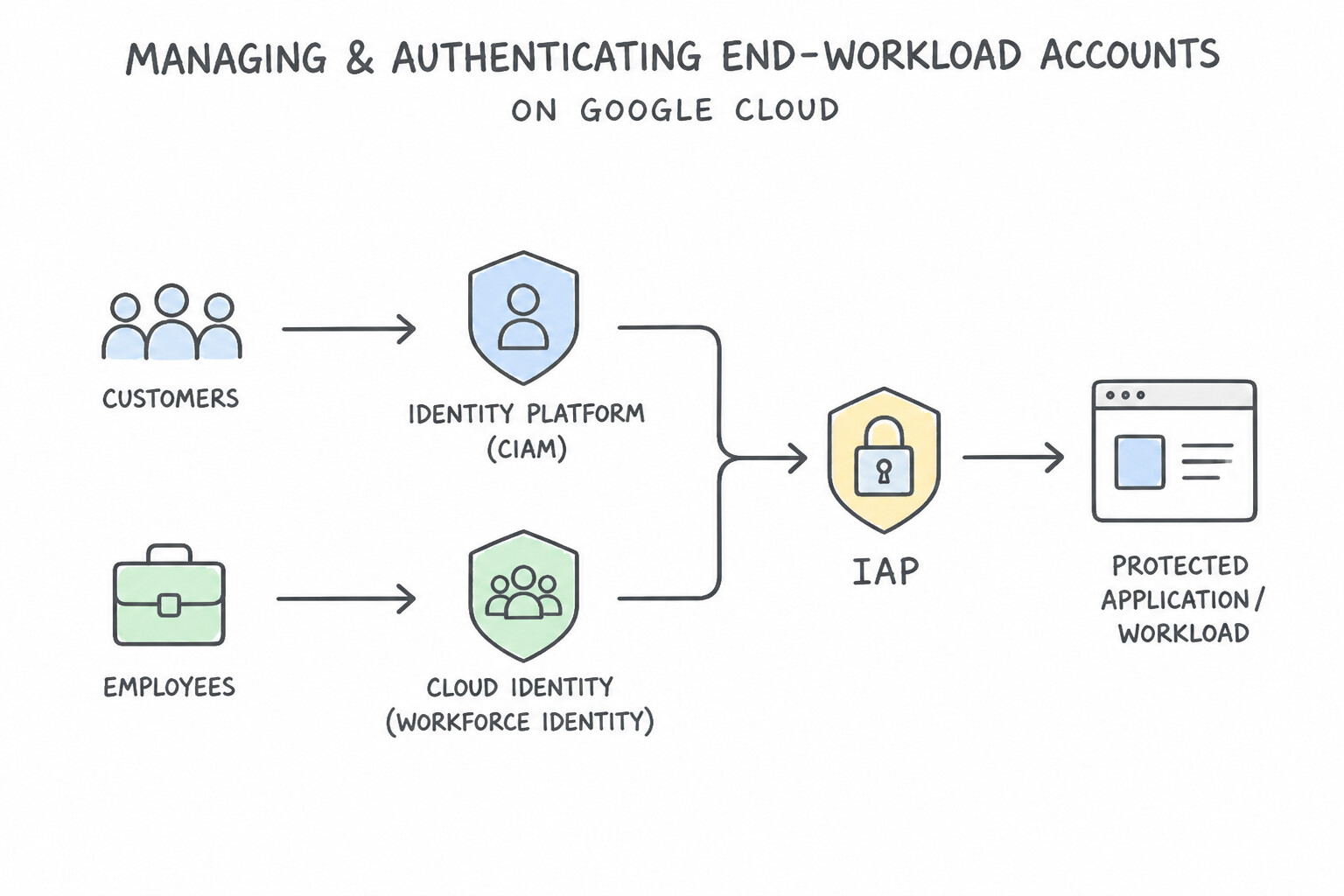
- Identity Platform (CIAM) vs. Workforce Identity / Cloud Identity / IAP:
- Use Identity Platform (built on Firebase Auth infrastructure with enterprise SLAs) when authenticating external customers, consumers, or B2B SaaS tenants via email/password, social providers (Google, Apple, GitHub), phone MFA, or enterprise SAML/OIDC federation.
- Use Cloud Identity + IAP when authenticating internal corporate employees and contractors.
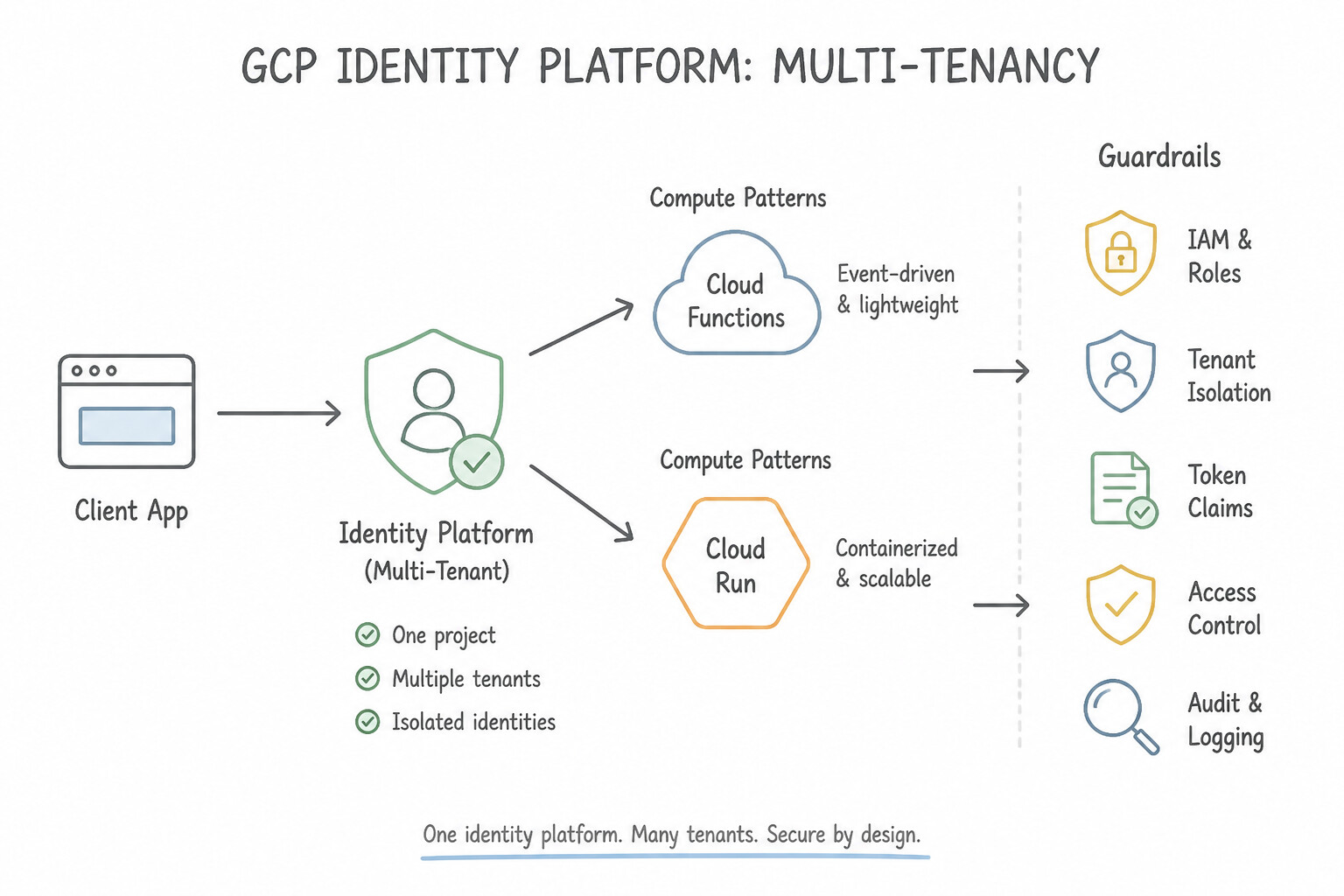
- Multi-Tenancy in Identity Platform: For B2B SaaS applications serving multiple enterprise customers from a single backend, enable Identity Platform Multi-Tenancy—each tenant gets an isolated user pool and its own SAML/OIDC identity provider configuration, and the issued JWT includes a
firebase.tenantclaim that your backend API verifies to enforce strict tenant data isolation. - Blocking Functions (
beforeCreate,beforeSignIn): Use synchronous Cloud Run / Cloud Functions Blocking Functions in Identity Platform to enforce custom registration rules (e.g., rejecting sign-ups from non-corporate email domains) or to inject custom claims (role: "premium_admin") directly into the user's JWT before it is issued.
Key Implementation Patterns
- Migrating Legacy Users without Password Resets: Use Use the Identity Platform Admin SDK to batch import users. Define the hash algorithm as BCRYPT and provide the hash configuration matching the legacy system. Identity Platform allows importing existing user hashes by specifying the algorithm and parameters (like bcrypt rounds) via the Admin SDK.
- Preventing Registration from Unauthorized Domains: Use Deploy a Cloud Function and configure it as a blocking function for the beforeCreate event. Blocking functions triggered on the beforeCreate event allow you to validate and reject user registration requests before the account is actually created.
- Isolating B2B Customers in a SaaS Application: Use Enable multi-tenancy in Identity Platform and create a separate tenant for each client. Identity Platform multi-tenancy provides built-in support for isolated user bases, distinct providers, and custom branding per client.
Key Takeaways (1.2f)
- Identity Platform supports importing users with existing password hashes to allow seamless migration.
- You must specify the hashing algorithm (e.g., BCRYPT, SCRYPT, SHA256) and its parameters (salt, rounds) when importing.
- Password hashes are one-way and cannot be decrypted.
- Changing the hash algorithm configuration during import will cause login failures for users.
Consideration 1.2g: Securing cloud resources using IAM roles for service accounts
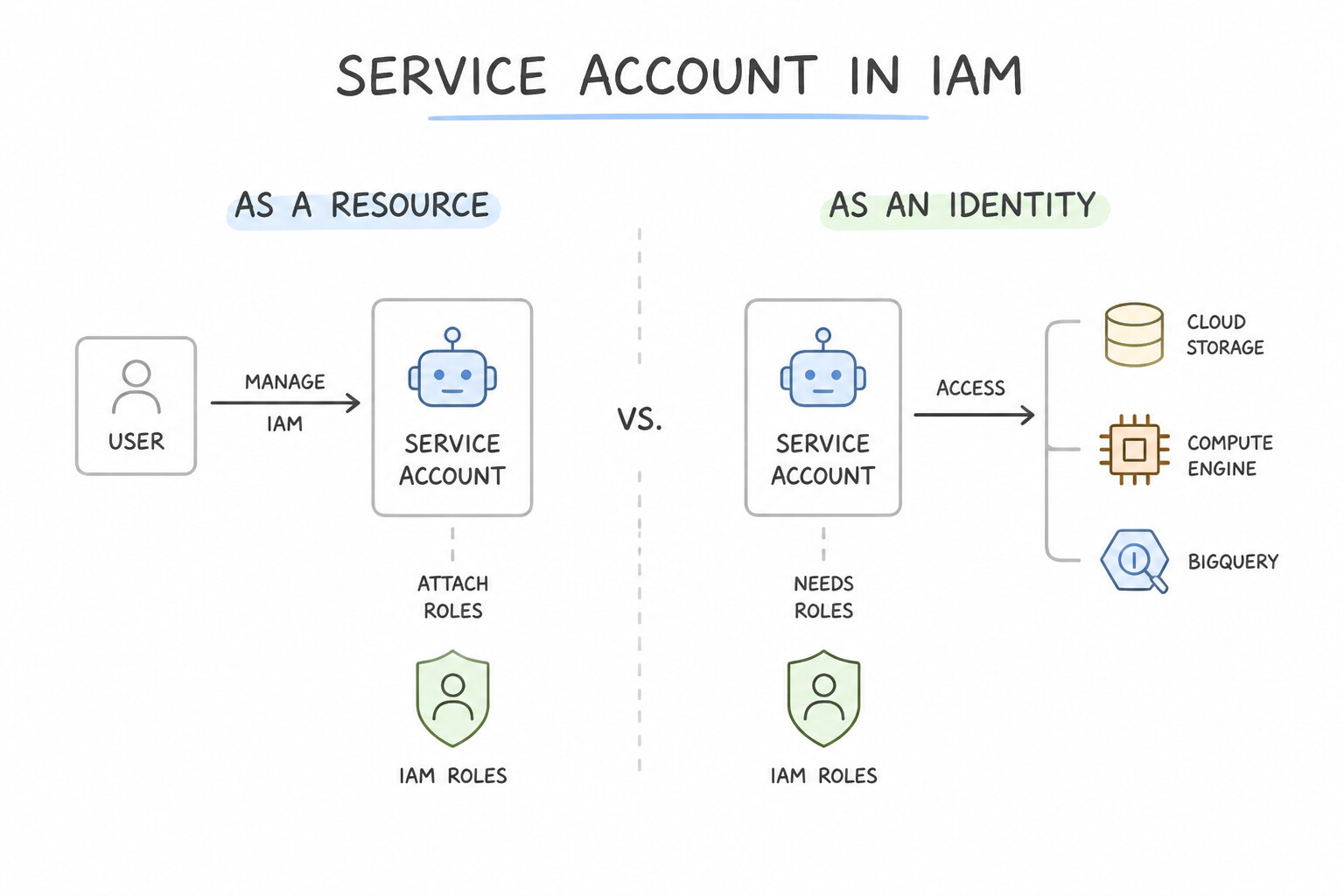
- Service Account as a Resource vs. as an Identity: A Service Account is simultaneously an Identity (it is granted roles on Cloud Storage buckets or BigQuery datasets) and a Resource (developers or CI/CD pipelines can be granted permission to attach or impersonate it).
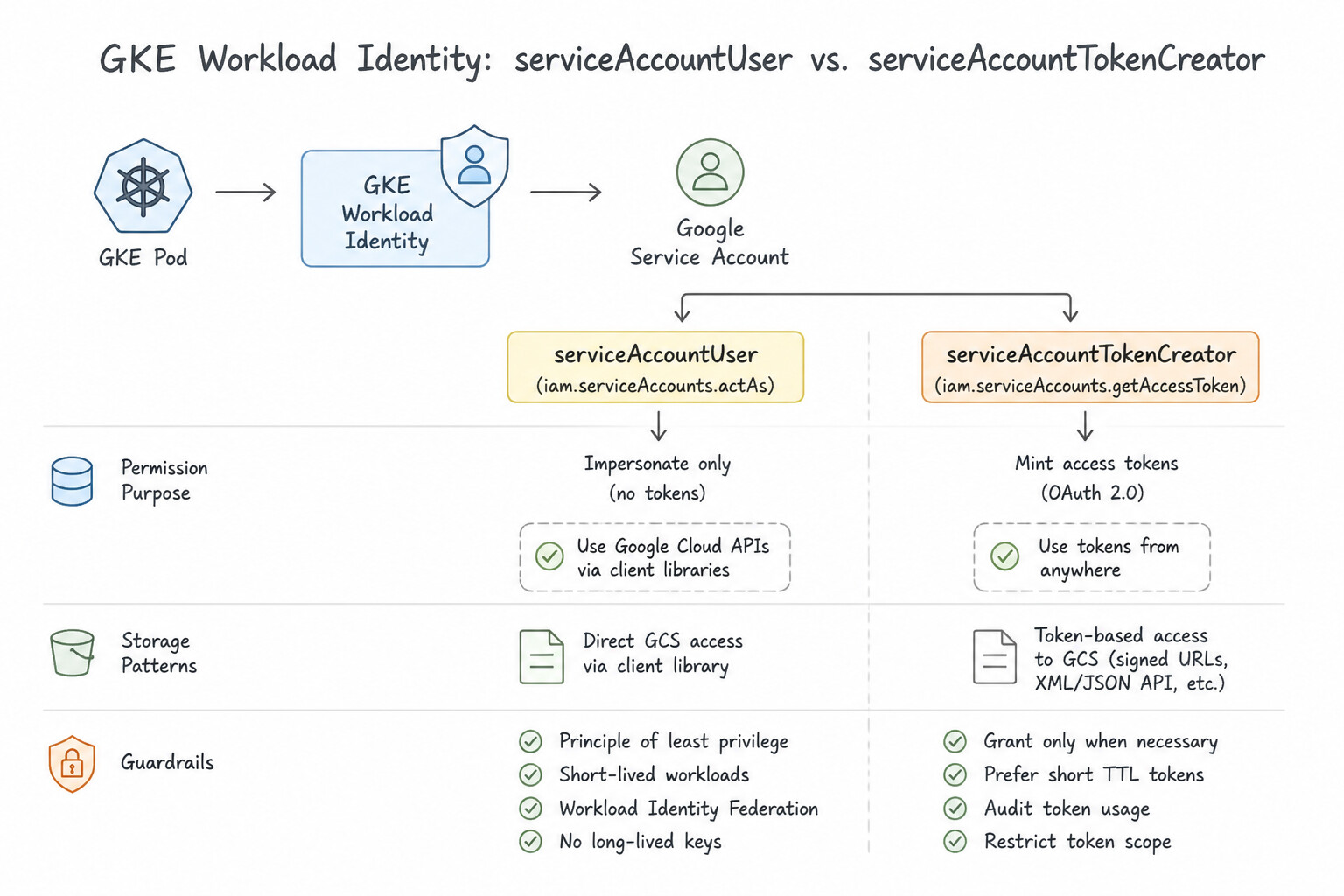
serviceAccountUservs.serviceAccountTokenCreator:- Grant
roles/iam.serviceAccountUserto a deployment pipeline (e.g., Cloud Build) so it can attach a runtime service account to a Cloud Run service or Compute Engine VM at deploy time. - Grant
roles/iam.serviceAccountTokenCreatorwhen a developer or workload needs to impersonate a service account dynamically to generate short-lived OAuth access tokens, OIDC ID tokens, or Cloud Storage Signed URLs via the IAM Credentials API (signBlob). - GKE Workload Identity Binding: Never mount JSON keys as Kubernetes Secrets and never rely on the broad node-level Compute Engine default service account. Configure Workload Identity for GKE by creating a Kubernetes Service Account (KSA), annotating it with
iam.gke.io/gcp-service-account: GSA@PROJECT.iam.gserviceaccount.com, and bindingroles/iam.workloadIdentityUseron the GSA toserviceAccount:PROJECT.svc.id.goog[NAMESPACE/KSA].
Key Implementation Patterns
- GKE Workload Identity vs. Keys: Use Configure Workload Identity to map the Kubernetes Service Account to a Google Service Account. Workload Identity securely links Kubernetes Service Accounts to Google Service Accounts without using static keys. (Avoid alternative: Using JSON keys creates security risks related to key management and potential leakage.)
- Secure Service-to-Service Communication: Use Configure Service A to use a specific service account. Grant that service account the Cloud Functions Invoker role on Service B. Configure Service A to send an OIDC ID token. Service A must authenticate with an OIDC ID token, and its service account requires the Cloud Functions Invoker role on Service B.
- Separation of Duties (Deployer vs. Identity): Use Grant the pipeline user the Service Account User role (roles/iam.serviceAccountUser) on the service account. The Service Account User role allows a user to attach a service account to a resource (like a VM) during creation.
Key Takeaways (1.2g)
- Avoid using static service account keys (JSON files) whenever possible due to security risks.
- Use Workload Identity for GKE workloads to access Google Cloud APIs securely.
- Assign permissions to specific pods (via Workload Identity) rather than entire nodes to follow the principle of least privilege.
- Service-to-Service Auth: Use OIDC ID tokens for Cloud Run and Cloud Functions interactions.
Consideration 1.2h: Securing service-to-service communications (e.g., Cloud Service Mesh, Kubernetes Network Policies)
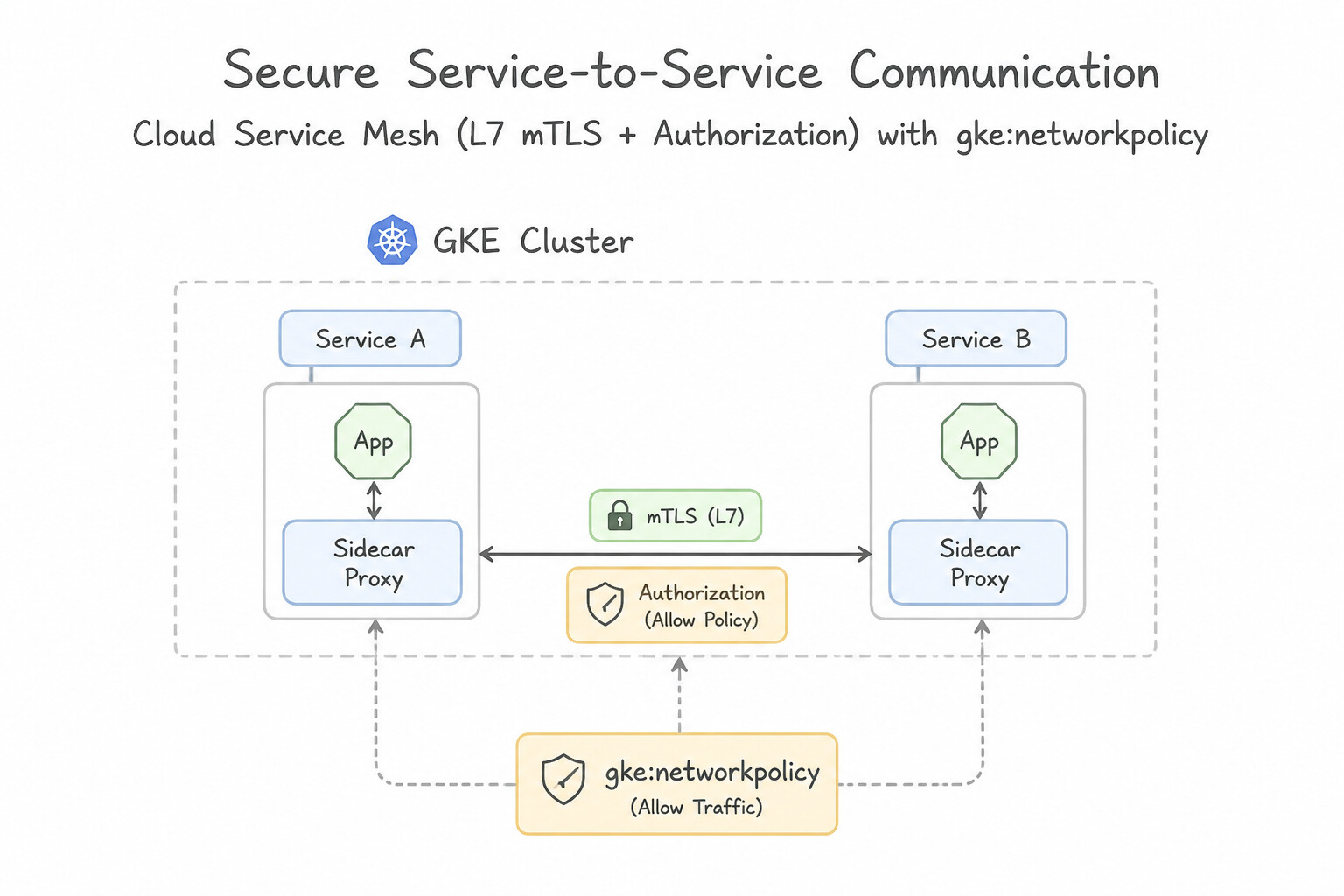
- Cloud Service Mesh (L7 mTLS & Authorization): Deploys Envoy sidecars (or proxyless gRPC) across GKE and Cloud Run to provide automatic Mutual TLS (mTLS) encryption, cryptographic workload identity (
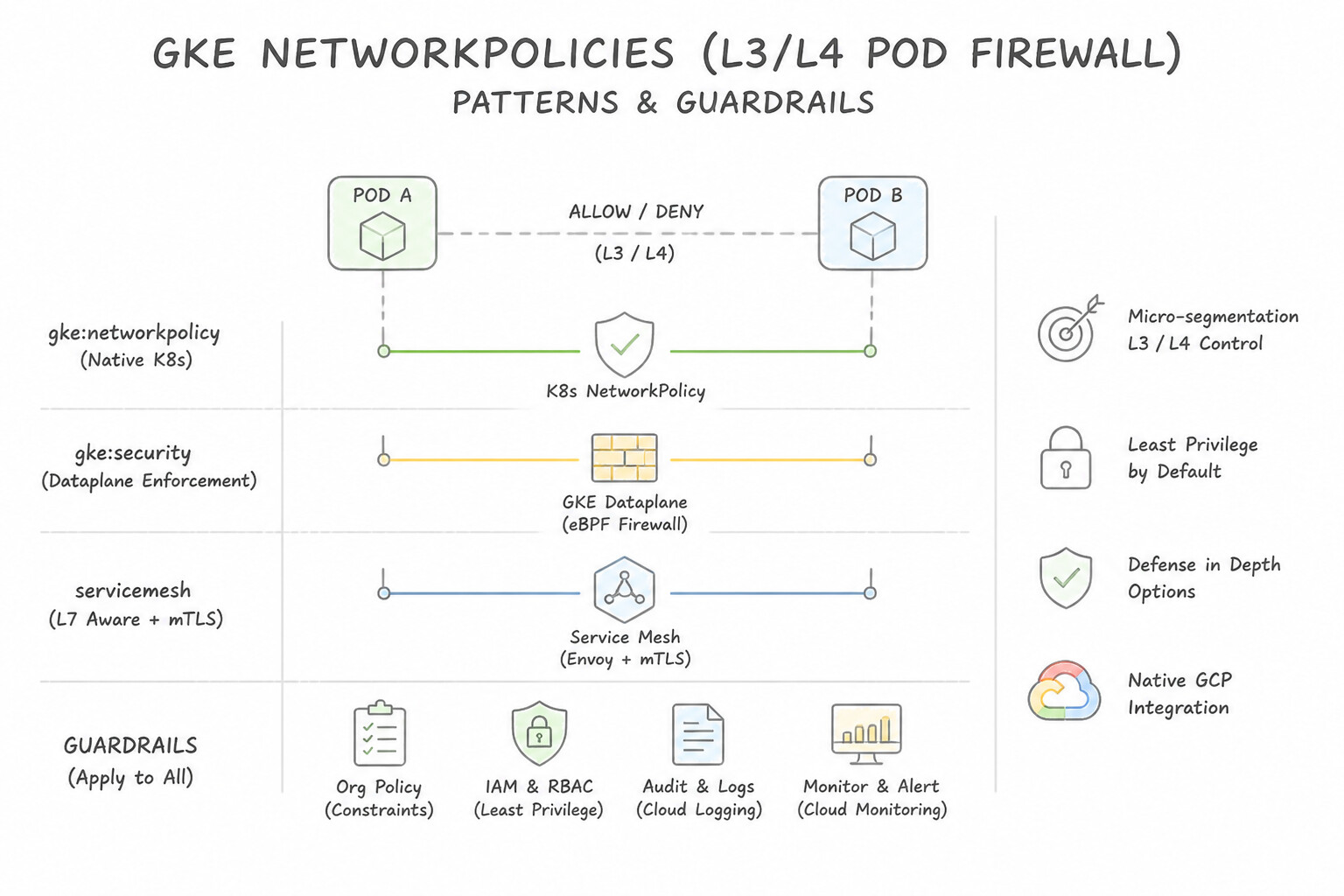
SPIFFE), and L7AuthorizationPolicyrules (e.g., "Only thecheckout-saprincipal may callPOST /v1/chargeon thepaymentsservice; all other services may only callGET"). - Kubernetes NetworkPolicies (L3/L4 Pod Firewall): By default in Kubernetes, all Pods can talk to all other Pods across all namespaces. Implement a default-deny ingress/egress
NetworkPolicyand explicitly whitelist allowed pod label selectors and namespaces at Layer 3/4. - Direct VPC Egress vs. Serverless VPC Access vs. Private Service Connect (PSC):
- Use Direct VPC Egress (or a Serverless VPC Access connector) on Cloud Run so outbound container traffic reaches private RFC 1918 IPs (such as Memorystore for Redis, Private IP Cloud SQL, or internal GKE load balancers) without traversing the public internet.
- Use Private Service Connect (PSC) for private, cross-VPC/cross-organization service consumption without VPC peering IP overlap.
Key Implementation Patterns
- Zero-Trust with Kubernetes Network Policies: Use Create a Kubernetes NetworkPolicy to deny all ingress traffic for the namespaces. Create an additional NetworkPolicy to allow traffic from the frontend namespace selector. NetworkPolicies are the Kubernetes-native way to control pod-to-pod traffic; creating a default deny policy followed by specific allow rules implements the required zero-trust security.
- Implementing mTLS without Code Changes: Use Enable Cloud Service Mesh on the cluster and apply a PeerAuthentication resource with the mTLS mode set to STRICT. Cloud Service Mesh automatically handles mTLS via sidecar proxies, and STRICT mode enforces encryption without code changes.
Key Takeaways (1.2h)
- Kubernetes clusters allow all pod-to-pod traffic by default.
- Use Kubernetes NetworkPolicies to restrict traffic between pods and namespaces.
- A best practice for security is to start with a "deny-all" policy and then explicitly allow necessary traffic (allow-listing).
- VPC Firewall rules are for node/VM level security, not granular pod level security.
Consideration 1.2i: Running services with least privileged access
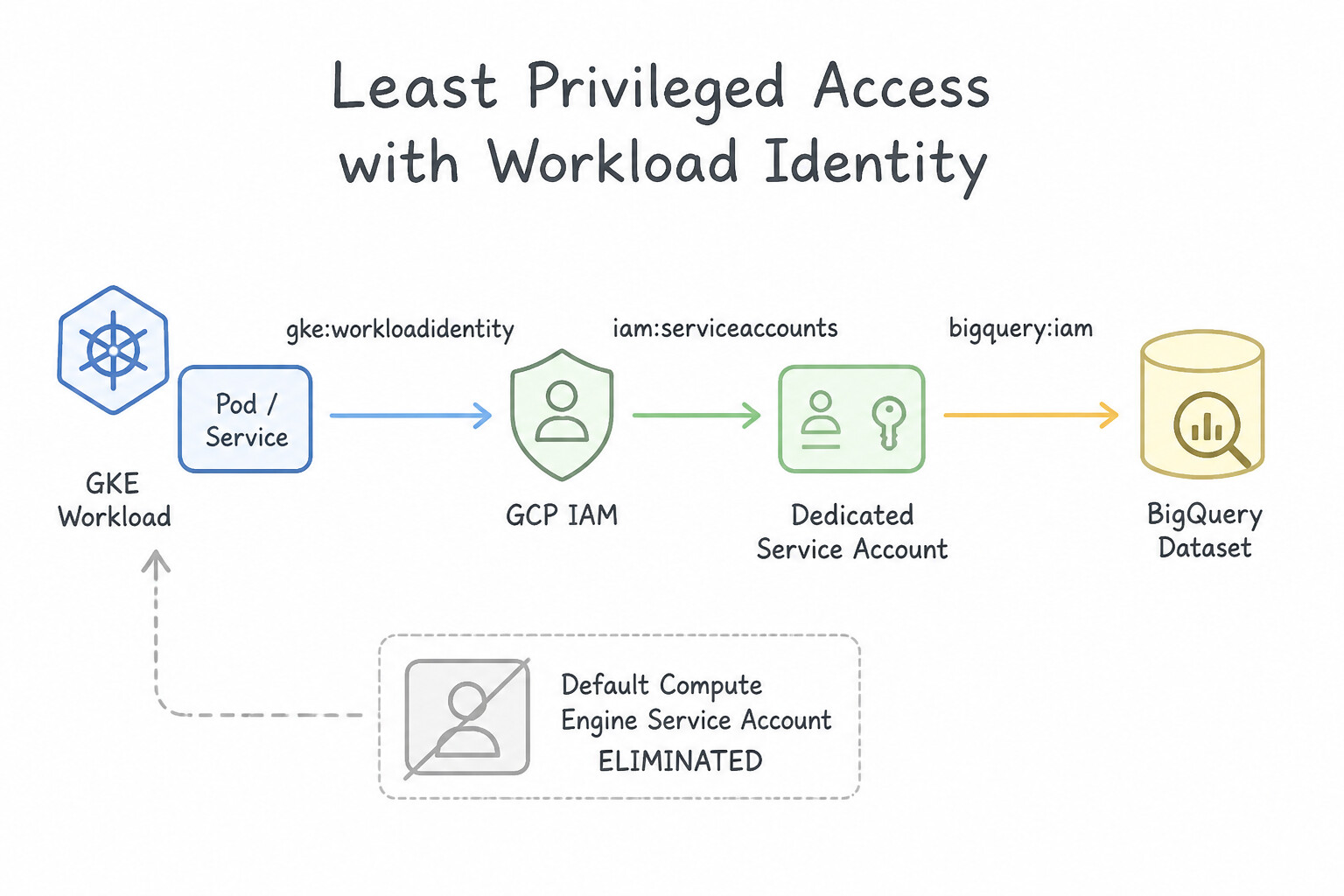
- Eliminate the Default Compute Engine Service Account: By default, Compute Engine, Cloud Run, and GKE nodes may fall back to
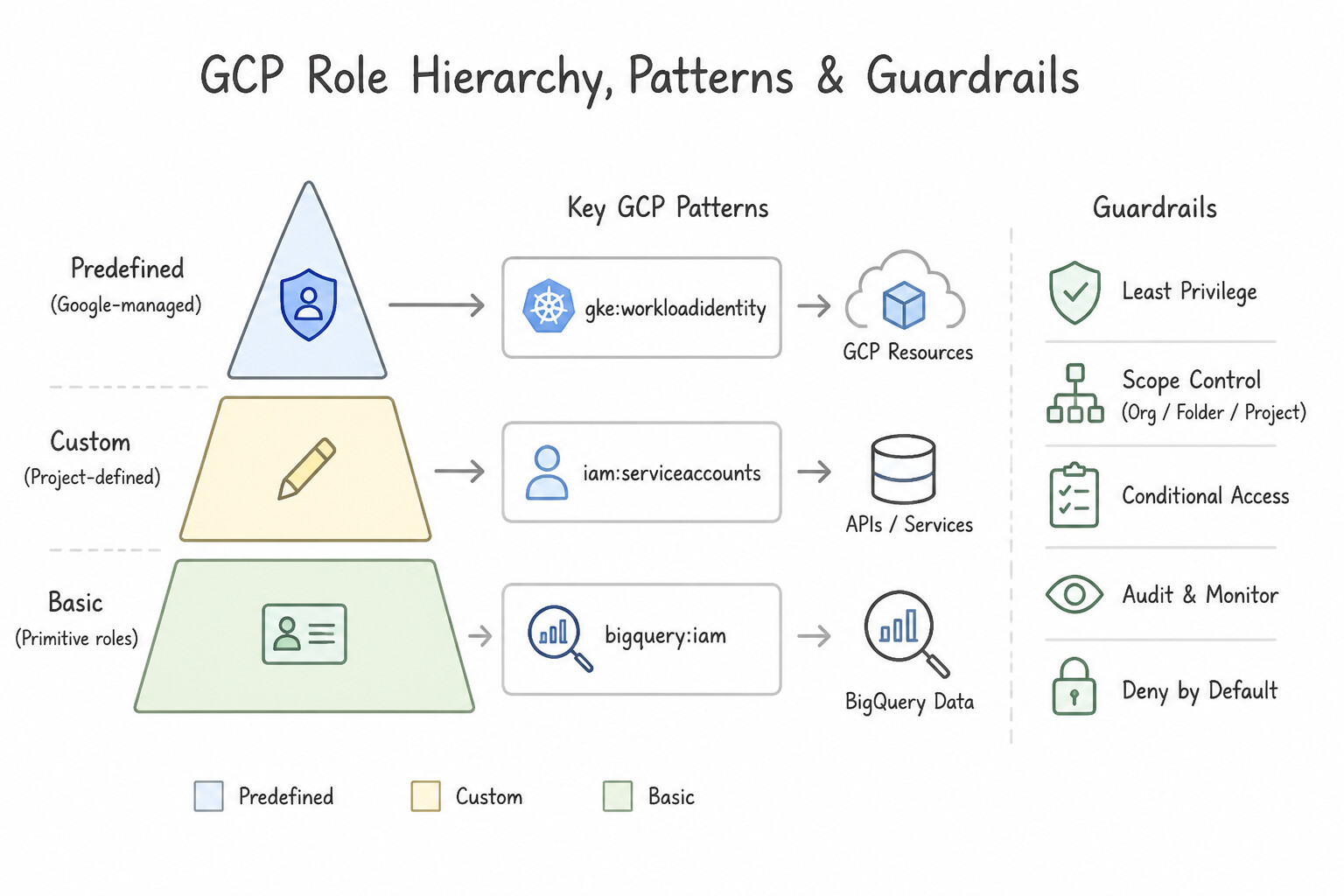
PROJECT_NUMBER-compute@developer.gserviceaccount.com, which historically carried the overly broad Project Editor (roles/editor) basic role. Always create a dedicated, workload-specific Service Account for every microservice (e.g.,order-worker-sa,catalog-reader-sa). - Role Hierarchy (Predefined > Custom > Basic): Never assign Basic roles (
Owner,Editor,Viewer) to application service accounts. Always prefer Predefined Roles first (e.g.,roles/storage.objectViewerinstead ofroles/editor). Create a Custom IAM Role only when no predefined role is narrow enough (remembering that Google does not automatically add new permissions to Custom Roles when services evolve). - IAM Recommender & Policy Intelligence: When auditing an existing production service account that has had overly broad permissions for months, use IAM Recommender—it analyzes 90 days of actual Cloud Audit Logs and suggests the exact minimal predefined or custom role matching real runtime usage.
Key Implementation Patterns
- Securing GKE Pod Access to BigQuery: Use Create a Kubernetes Service Account (KSA) for the application. Create a Google Service Account (GSA) with the BigQuery Data Viewer role on the dataset. Configure Workload Identity to bind the KSA to the GSA. Workload Identity securely binds a Kubernetes Service Account to a Google Service Account, granting permissions only to specific pods.
- Custom Roles for VM Operations: Use Create a custom IAM role with compute.instances.start and compute.instances.stop permissions. Assign this role to the service account. A custom role allows you to specify exactly which permissions (start and stop) are granted, adhering to the principle of least privilege.
- Cloud Run Service-to-Service Invocation: Use Create a dedicated service account for Service A. Grant the Cloud Run Invoker role to this service account on Service B. Assign a dedicated identity to the caller (Service A) and grant that identity the Cloud Run Invoker role specifically on the target service (Service B).
Key Takeaways (1.2i)
- Workload Identity is the standard for GKE authentication to GCP APIs.
- Avoid using Node Service Accounts for application permissions in shared clusters.
- Avoid managing JSON keys (Service Account Keys) manually to reduce security risks.
- Always apply the principle of least privilege by scoping permissions to the smallest necessary resource (e.g., specific dataset vs. entire project).
Consideration 1.2j: Securing application artifacts using Binary Authorization
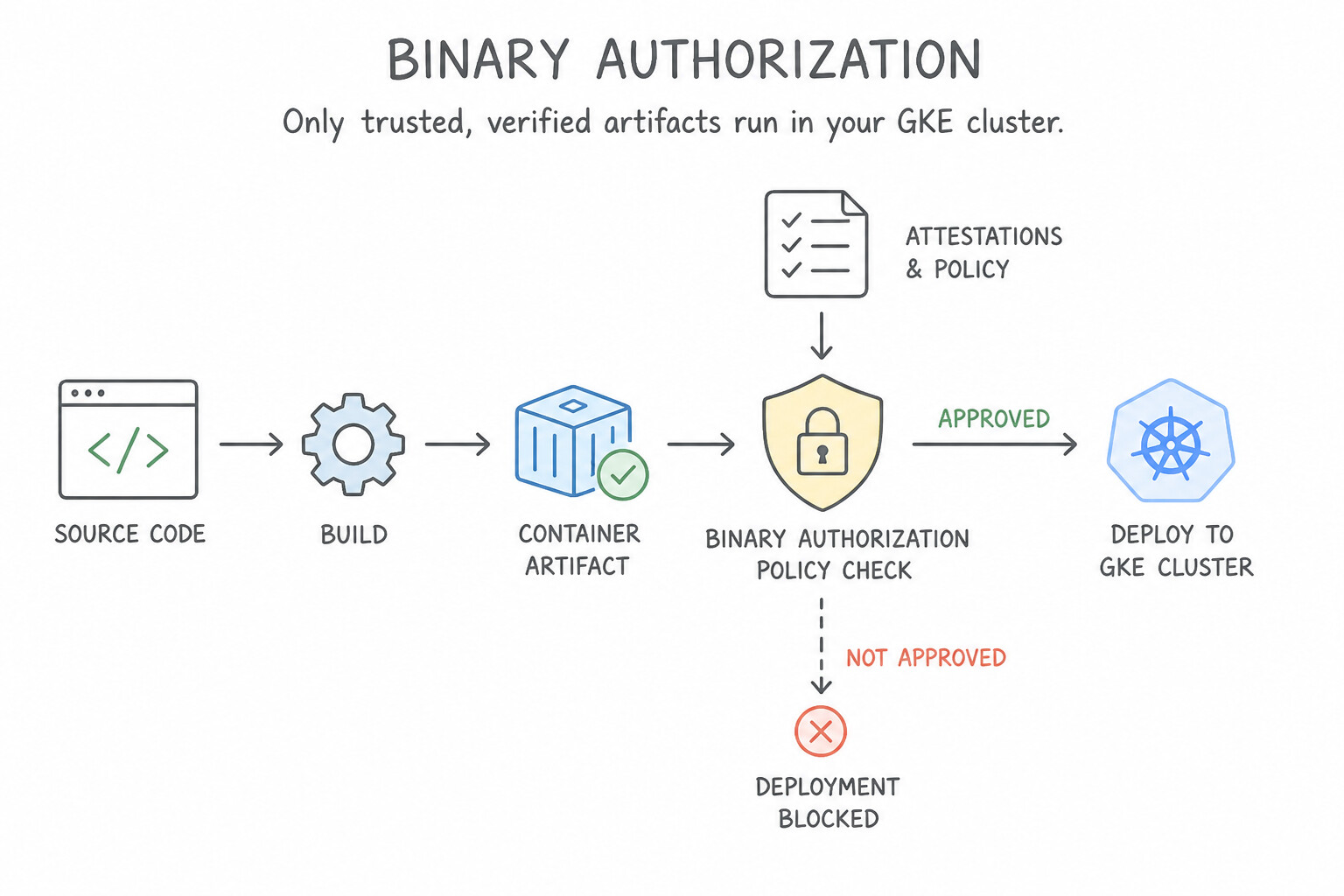
- How Binary Authorization Works: Binary Authorization is a deploy-time admission controller for GKE and Cloud Run. Before a container starts, Binary Authorization checks the Container Analysis API to verify that the image digest has a valid cryptographic signature (Attestation) created by a required Attestor using an asymmetric key stored in Cloud KMS.
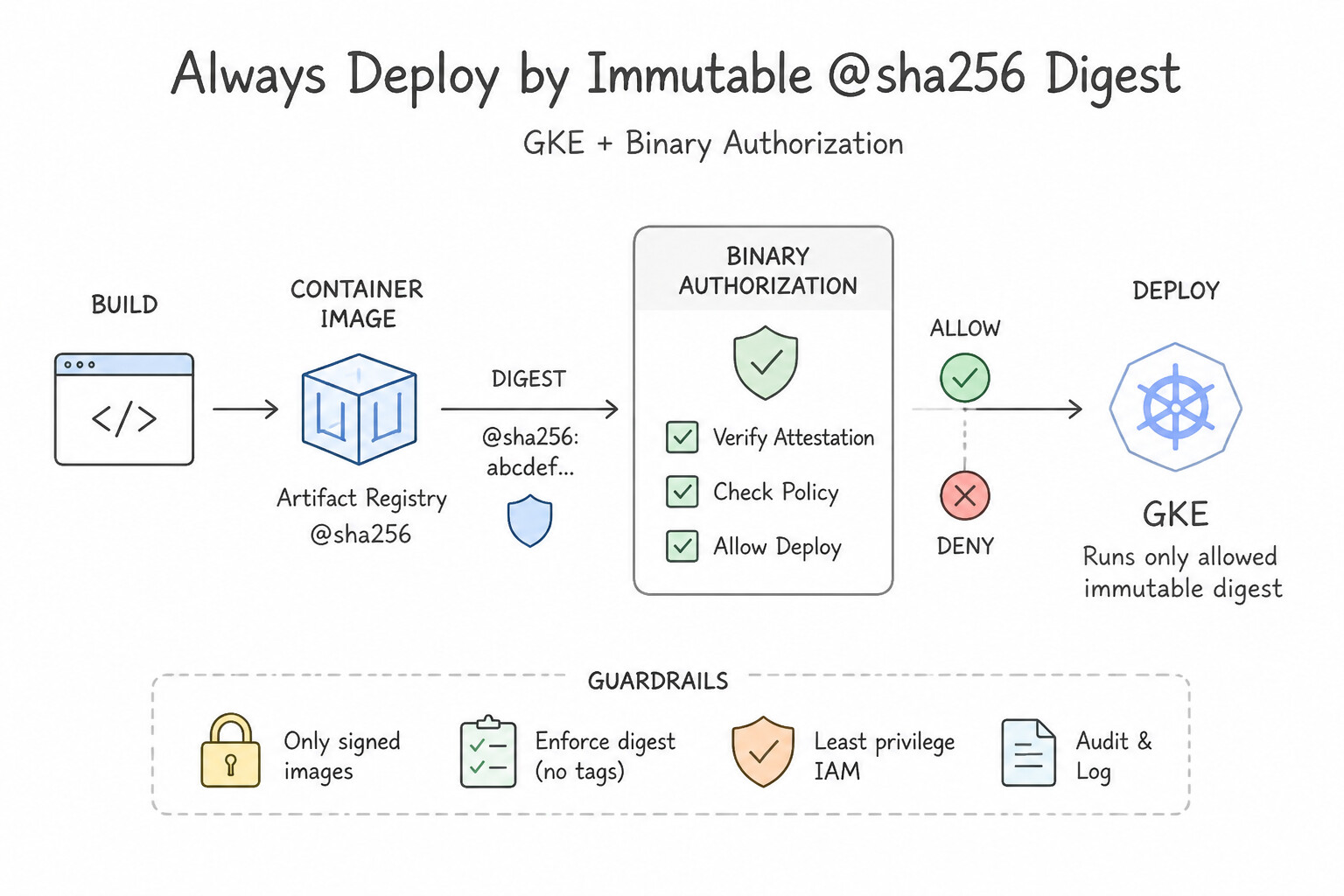
- Always Deploy by Immutable
@sha256Digest: Binary Authorization attestations are bound to the cryptographic@sha256:...digest of the image, never to mutable tags like:latestor:v1.2. If a deployment manifest references:latest, Binary Authorization either blocks it or risks tag-mutation drift. - Emergency Breakglass & Dry-Run Audit Mode:
- When rolling out Binary Authorization to an existing production cluster for the first time without risking outage, enable
DRYRUN(Audit-Only) enforcement mode—non-compliant pods are allowed to deploy, while violations are logged to Cloud Audit Logs. - During a critical production outage requiring an urgent hotfix image that bypassed the standard attestation pipeline, add the
alpha.image-policy.k8s.io/break-glass: "true"annotation to the Pod spec—the deployment succeeds and immediately emits a high-priority audit log event in Cloud Logging for post-incident review.
Key Implementation Patterns
- Enforcing Trusted Images on GKE: Use Enable Binary Authorization on the GKE cluster. Create an attestor representing the CI/CD pipeline and configure the policy to require attestations. Binary Authorization is the specific Google Cloud service designed to enforce signature validation on container images before they are allowed to deploy.
- Testing Policy Impact with Dry Run: Use Configure the policy with the enforcement mode set to Dry Run. Dry Run allows deployments to proceed but logs policy violations, letting you test safely. (Avoid alternative: Enforce Block prevents images from running if they fail the policy, potentially causing outages.)
- Emergency Break-Glass Deployment: Use Deploy the hotfix image using the break-glass annotation in the Pod specification. The break-glass annotation allows a one-time policy bypass for emergencies and automatically logs the event for auditing. (Avoid alternative: Changing the global policy to 'Always Allow' compromises the security of the entire environment and is not a focused emergency fix.)
Key Takeaways (1.2j)
- Binary Authorization is the primary tool for enforcing image trust on GKE.
- Attestors represent the entities (like CI/CD pipelines) that verify and sign images.
- Policies define the rules for admission, such as requiring specific attestations before deployment.
- Security at the registry level (IAM) or network level (Network Policies) does not substitute for deployment-time signature verification.
Quick Decision Cheat Sheet (Subsection 1.2)
If the Scenario Requires... | Choose This Google Cloud Pattern | Avoid This Common Mistake |
|---|---|---|
"JSON service account key accidentally committed to public GitHub repo" | Immediately delete/revoke the compromised key in IAM, audit Cloud Audit Logs, and migrate to Workload Identity Federation / Secret Manager | Merely deleting the file in a new Git commit (key remains in Git history and active in IAM!) |
"Secure internal web app on GCE/GKE/Cloud Run for remote employees without a VPN" | Enable Identity-Aware Proxy (IAP) and verify the x-goog-iap-jwt-assertion header in the backend | Whitelisting employee home IP addresses in VPC firewall rules |
"Roll out Binary Authorization on an existing GKE cluster without blocking current deployments" | Configure Binary Authorization policy in DRYRUN (Audit) mode and monitor Cloud Audit Logs | Enforcing REQUIRE_ATTESTATION immediately before pipelines sign images |
"Hotfix container must bypass Binary Authorization during a P0 production incident" | Deploy with the break-glass pod annotation (logs violation to Cloud Audit Logs) | Deleting the cluster's Binary Authorization policy globally |
"Right-size an over-privileged service account that has used roles/editor for 6 months" | Use IAM Recommender to replace roles/editor with minimal predefined/custom roles | Guessing permissions manually or keeping roles/editor |
"Authenticate customer accounts for a multi-tenant B2B SaaS app with SAML + MFA" | Identity Platform with Multi-Tenancy enabled | Creating IAM users inside your Google Cloud Organization for external app customers |
Further Reading (Subsection 1.2)
- Retention policies and retention policy locks — This page explains how retention policies work, the difference between locked and unlocked policies, and how they help achieve WORM compliance.
- Object Lifecycle Management — This page explains how to configure lifecycle rules, including supported actions like SetStorageClass and Delete, and conditions like Age.
- Storage Classes — This page provides a detailed comparison of Standard, Nearline, Coldline, and Archive storage classes, including intended use cases and pricing structures.
- Identity-Aware Proxy (IAP) overview — Explains how IAP works to control access to cloud applications and VMs running on Google Cloud.
- Enable IAP for Compute Engine — Provides the specific steps and architecture for setting up IAP with a Load Balancer for Compute Engine instances.
- Google Cloud Armor overview — Describes how Cloud Armor works with global load balancers to provide denial of service and WAF protection.
Subsection 1.3: Storing and accessing data
The Big Picture
In cloud-native applications, compute is stateless and elastic, meaning you can fix a compute bottleneck in 30 seconds by changing a flag. Data is stateful and has gravity. Choosing the wrong storage engine or designing a naive primary key / row key creates a structural bottleneck that no amount of hardware provisioning can fix:
- The Monotonic Key Hotspot Catastrophe (1.3b): In distributed databases that shard data lexicographically by key (Cloud Spanner, Cloud Bigtable, Cloud Firestore), using an
AUTO_INCREMENTinteger, a sequential timestamp prefix (2026-10-13T...), or a sequential document ID forces 100% of new writes onto the single tablet/split holding the end of the key range. Nine out of ten nodes sit completely idle while the tenth node melts down at 100% CPU. - Confusing Relational Consistency with NoSQL Throughput (
1.3a,1.3c): Using Cloud Bigtable when the business requires multi-row ACID joins and strong global consistency (Bigtable only guarantees single-row atomic transactions and eventual cross-cluster replication), or using a single-region Cloud SQL instance when a global financial ledger requires multi-region active-active writes (Cloud Spanner) or extreme PostgreSQL transactional/analytical throughput (AlloyDB). - Proxying Gigabytes of Binary Uploads Through Stateless Compute (1.3d): Routing 500 MB user video uploads through a Cloud Run or GKE backend container—which hits Cloud Run's 32 MB HTTP request payload limit, saturates container memory, and doubles egress costs—instead of issuing a Cloud Storage V4 Signed URL so the client uploads directly to Cloud Storage.
- Polling Operational Databases for Analytics (1.3e): Running heavy
GROUP BYanalytical queries or ML feature extractions directly against production OLTP tables instead of streaming events into BigQuery via the Storage Write API or Pub/Sub BigQuery Subscriptions.
Consideration 1.3a: Selecting the appropriate storage system based on the volume of data and performance requirements
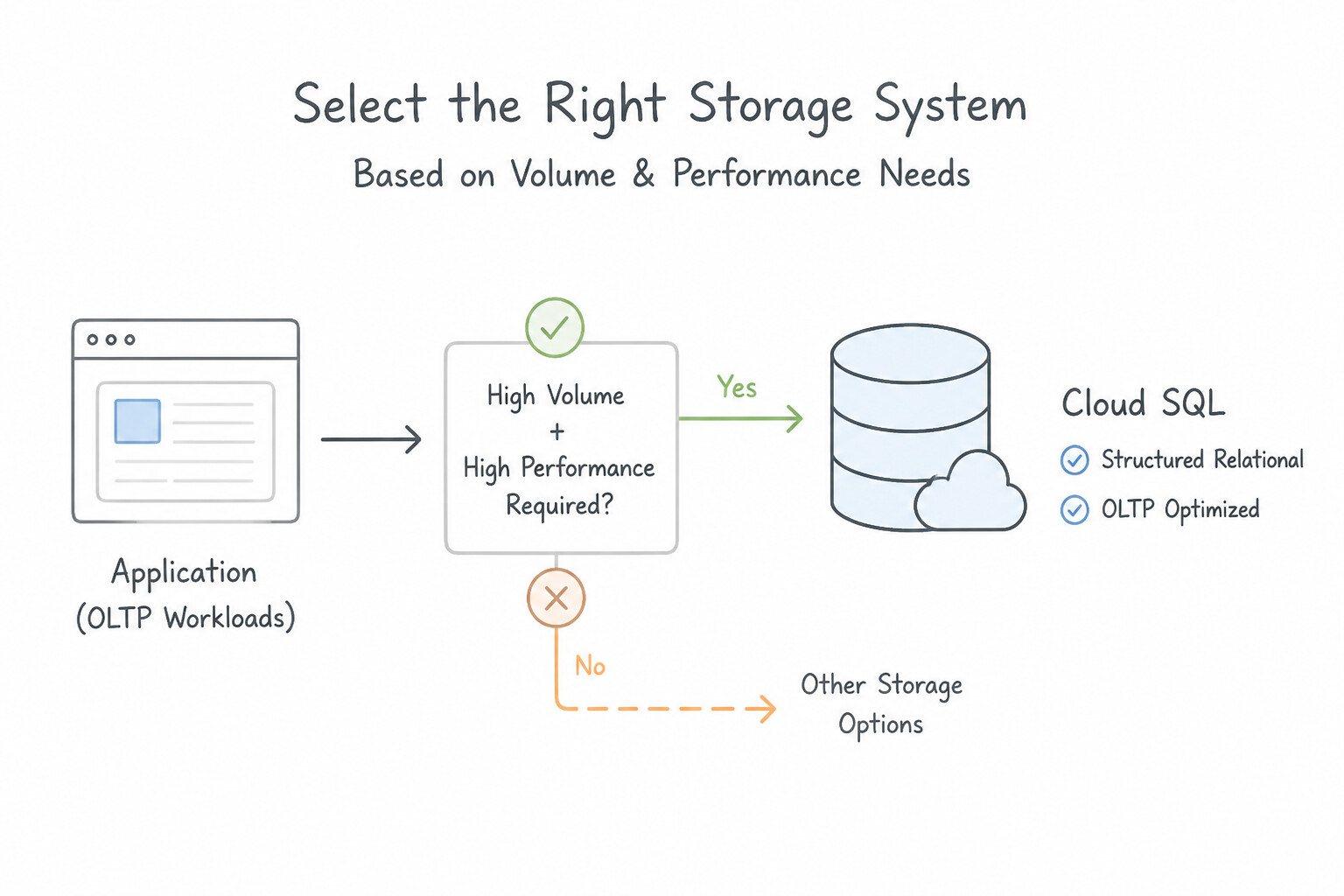
- Structured Relational OLTP (
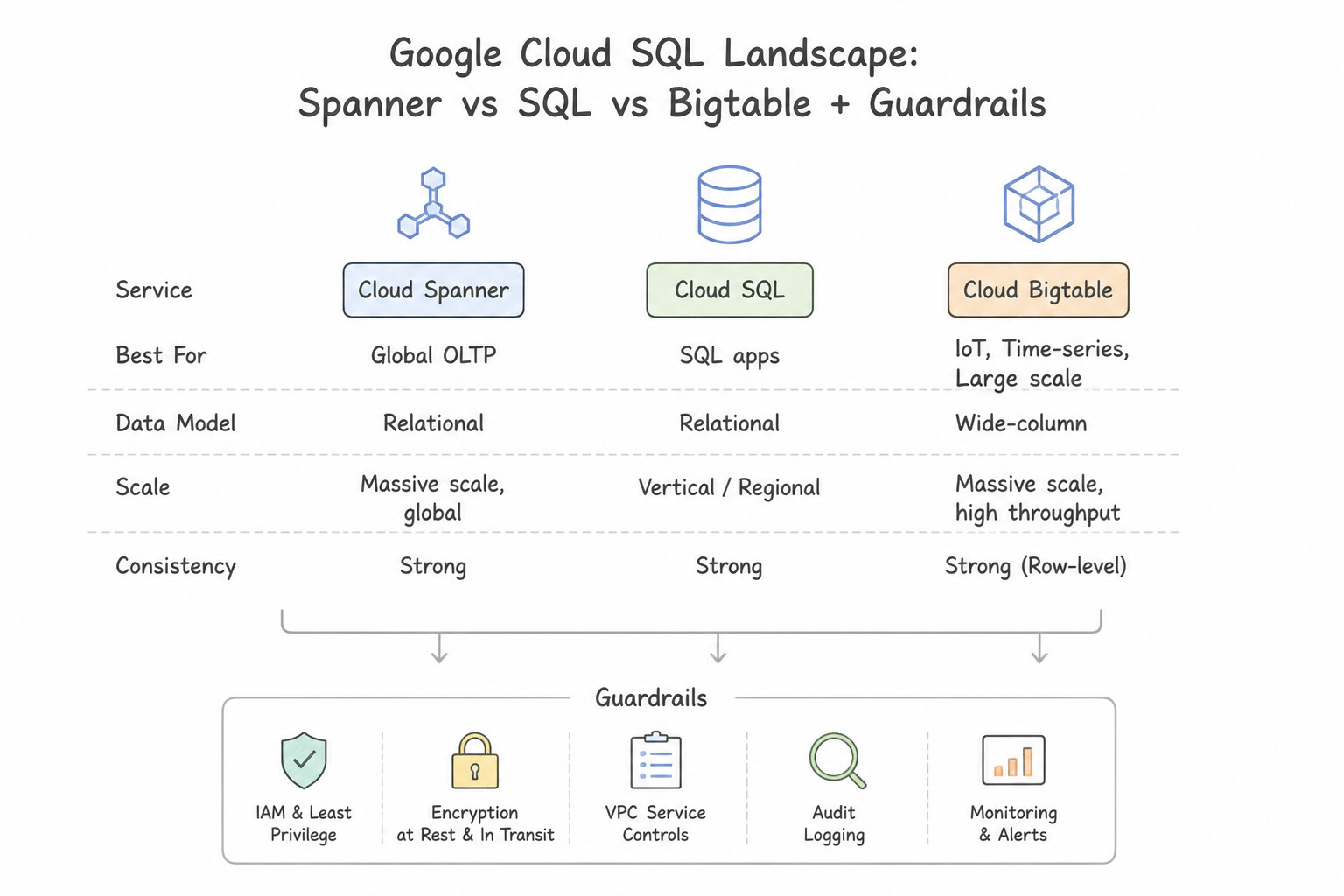
Cloud SQLvs.AlloyDBvs.Cloud Spanner): - Cloud SQL: Best for standard regional relational workloads (MySQL, PostgreSQL, SQL Server) up to ~64 TB with vertical scaling and read replicas.
- AlloyDB for PostgreSQL: Best for demanding enterprise PostgreSQL workloads needing >4x faster transactional throughput, near-instant regional failover, and a built-in columnar engine for real-time hybrid transactional/analytical (HTAP) queries.
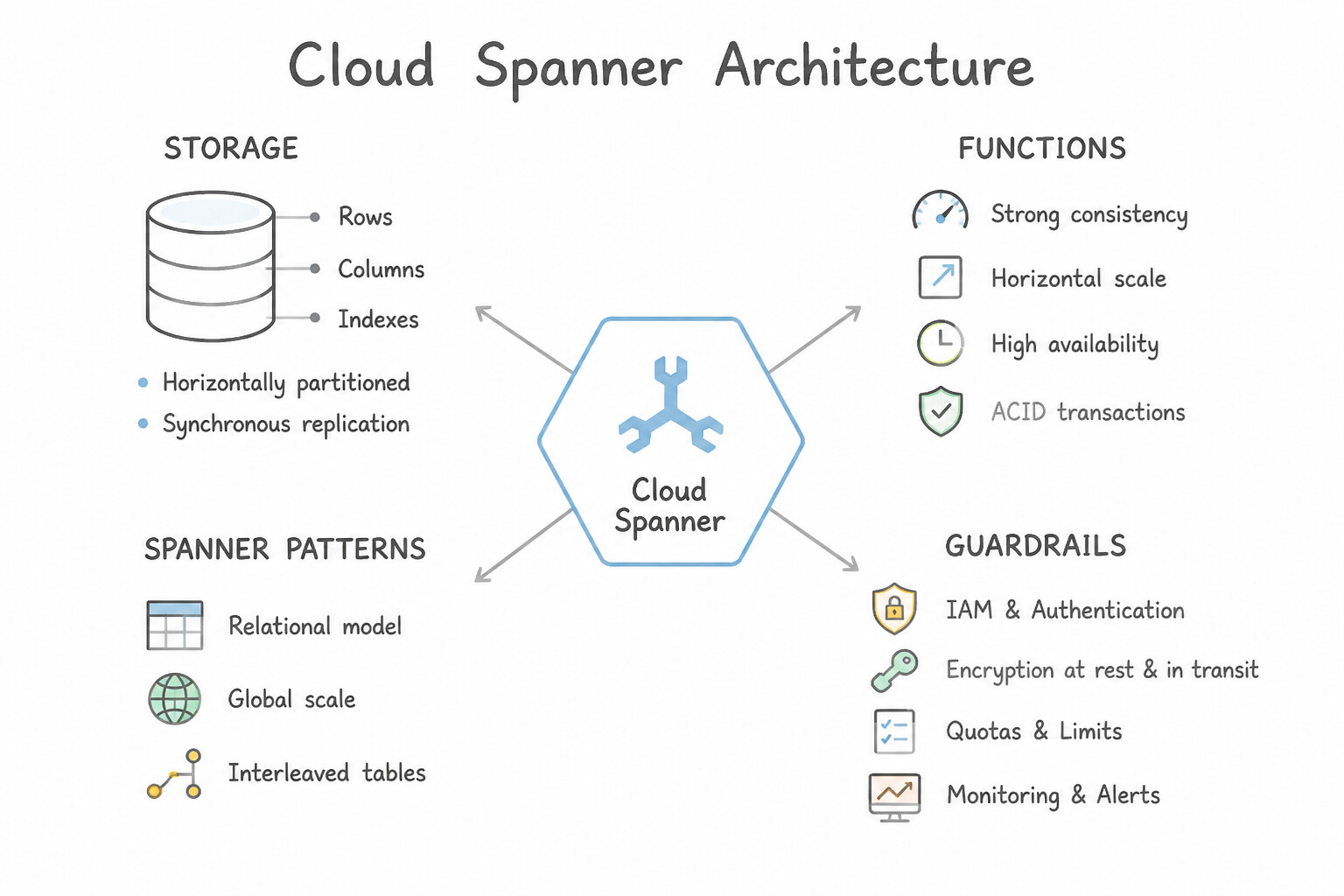
- Cloud Spanner: Best when you need horizontal write scaling across nodes, multi-region active-active writes, external strong consistency, and a 99.999% availability SLA.
- Unstructured / NoSQL (
Firestorevs.Cloud Bigtable) & Object/Analytical (Cloud Storagevs.BigQuery): - Cloud Firestore: Best for web/mobile apps needing hierarchical JSON-like documents, real-time client listeners, offline synchronization, and strong multi-document ACID transactions.
- Cloud Bigtable: Best for massive, high-velocity time-series, IoT sensor streams, ad-tech, or financial tick data (>1 TB to petabytes) requiring sub-10ms single-row reads/writes and contiguous key-range scans.
- Cloud Storage: Best for unstructured binary objects (images, videos, PDFs, backups, ML artifacts).
- BigQuery: Best for petabyte-scale analytical OLAP SQL queries and BigQuery ML training—never use BigQuery as a low-latency OLTP backend for point-lookup web transactions!
Key Implementation Patterns
- Global Consistency for Financial Transactions: Use Use Cloud Spanner with a multi-region configuration. Cloud Spanner offers global ACID consistency and horizontal scalability, meeting all the requirements. (Avoid alternative: Cloud SQL is regional and scales vertically, making it unsuitable for global horizontal write scaling.)
- High-Throughput IoT Data Ingestion: Use Configure a Cloud Bigtable instance to store the sensor data. Cloud Bigtable is optimized for high-throughput writes and wide-column data, making it perfect for IoT scenarios. (Avoid alternative: Cloud SQL is a relational database and may struggle to scale to 100,000 writes per second without significant complexity.)
Key Takeaways (1.3a)
- Cloud SQL is best for regional relational workloads that scale vertically.
- Cloud Spanner is best for global relational workloads that require horizontal scaling and strict ACID consistency.
- Cloud Bigtable is best for high-throughput analytical or time-series data (NoSQL).
- Banking applications almost always require ACID compliance.
Consideration 1.3b: Designing appropriate schemas for structured databases (e.g., AlloyDB, Spanner) and unstructured databases (e.g., Bigtable, Datastore)
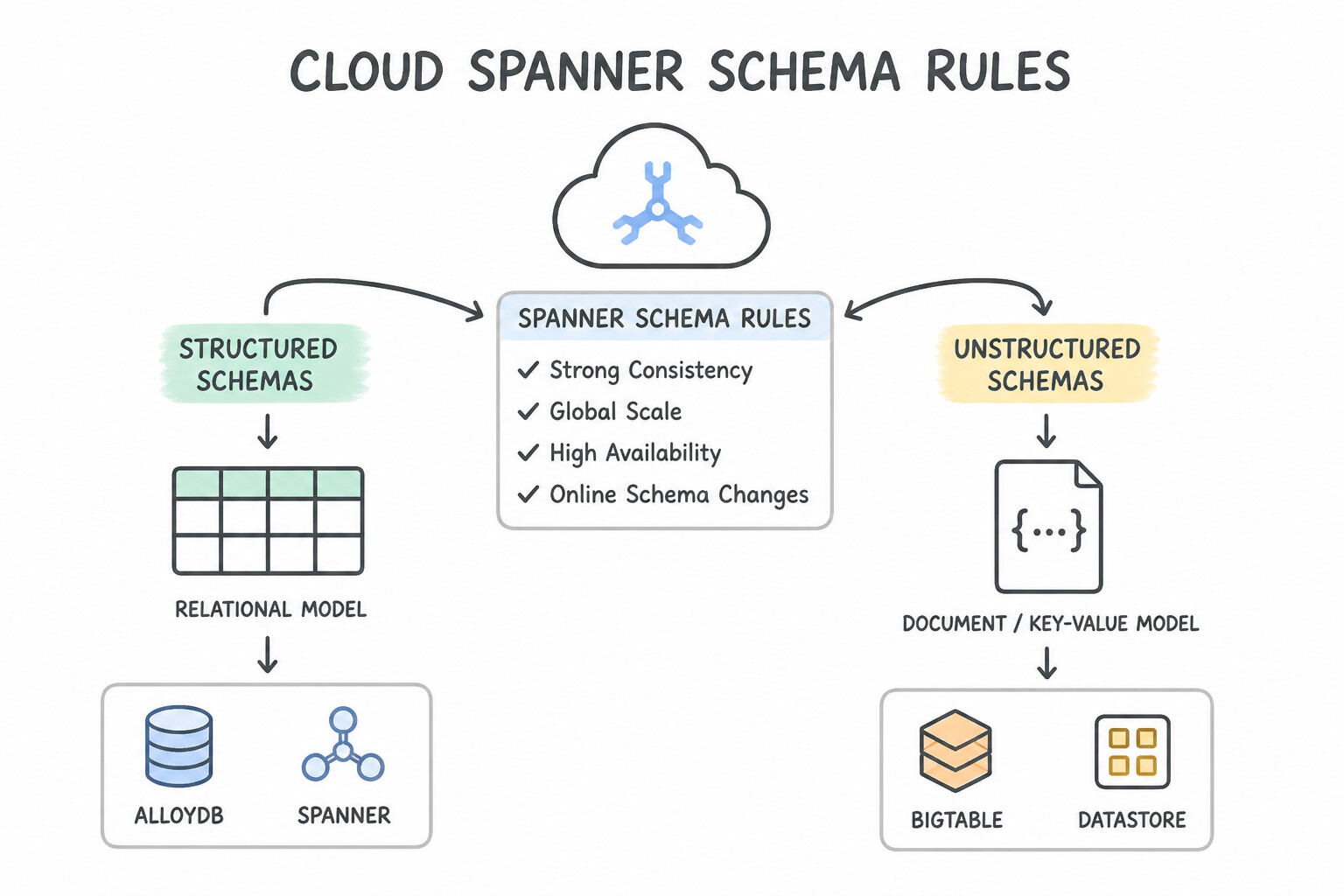
- Cloud Spanner Schema Rules (
UUIDv4&INTERLEAVE IN PARENT): - Never use
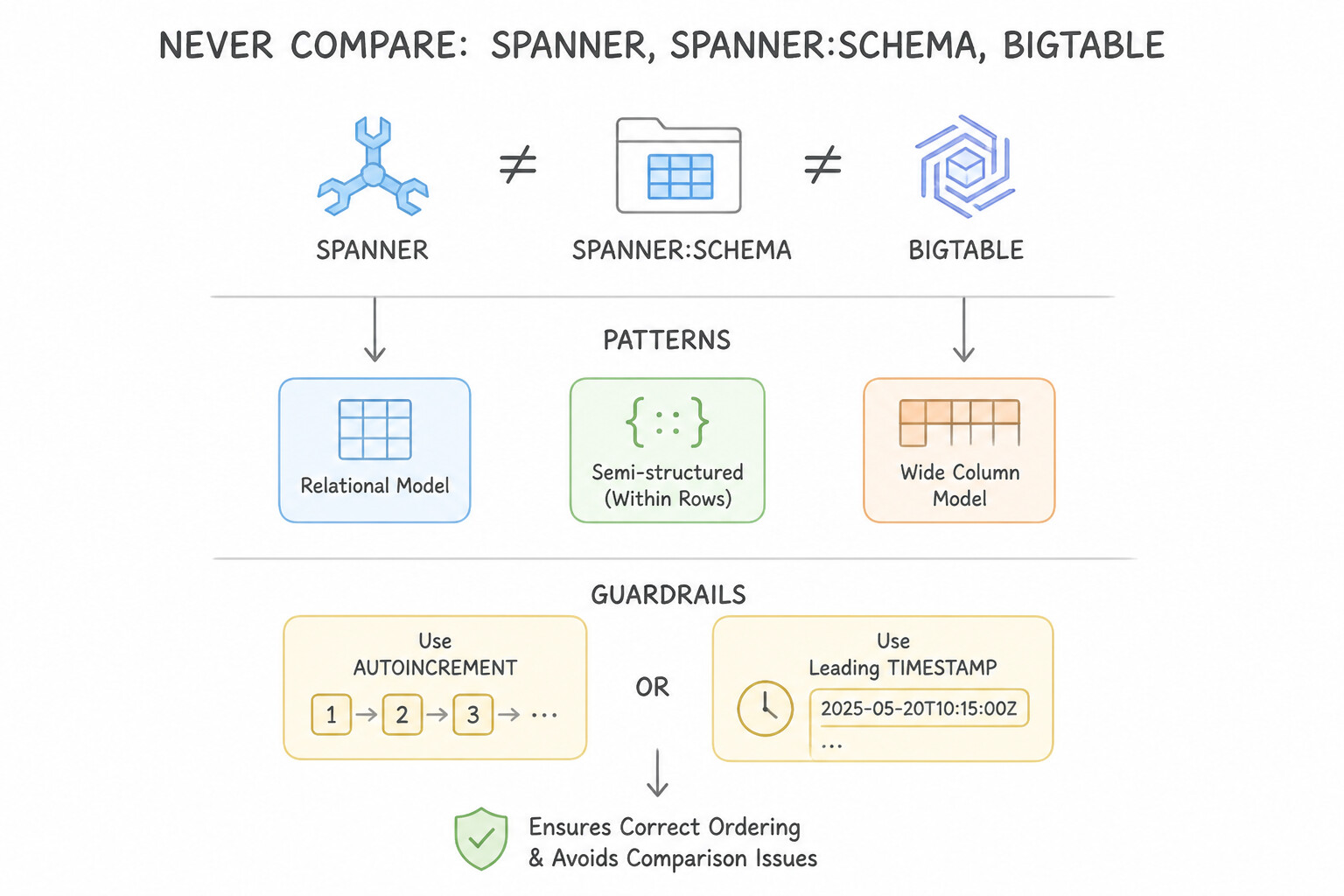
AUTO_INCREMENTor a leadingTIMESTAMPas a Spanner primary key—it causes severe split hotspotting. Use UUIDv4, a SHA-256 hash prefix, bit-reversed sequences, or composite keys starting with a well-distributed high-cardinality column (likeCustomerId). - When a child table (
OrderItems) is frequently joined with its parent table (Orders) by primary key, declareOrderItemswithINTERLEAVE IN PARENT Orders ON DELETE CASCADE. This physically co-locates each customer's orders and line items on the exact same storage split, eliminating cross-network shuffle during joins! - Cloud Bigtable Row-Key Design (The Single Index Rule):
- Bigtable has only one index: the lexicographically sorted Row Key. Queries that do not filter by a row-key prefix trigger a catastrophic full table scan.
- Combine attributes from most-common filter to most-specific using delimiters, and place a reversed timestamp (
Long.MAX_VALUE - timestamp) at the end when you frequently query the "most recent N events for a device": e.g.,DeviceID#MetricType#ReverseTimestamp. - Avoid: Starting row keys with a raw timestamp (
20261013...), sequential IDs, or low-cardinality booleans/regions alone (unless salted with a hash prefix). - Cloud Firestore Document IDs & Index Exemptions: Avoid sequential document IDs (
doc_0001,doc_0002) under high write rates (>500 writes/sec to a single collection range). Use auto-generated random IDs, and exempt monotonically increasing timestamp fields from automatic indexing if you do not filter/sort by them.
Key Implementation Patterns
- Cloud Spanner Primary Key Design: Use Change the Primary Key to use a Universally Unique Identifier (UUID) Version 4. Spanner partitions data by key range; sequential keys cause hotspots on a single server. Random keys like UUIDv4 distribute writes evenly across servers.
- Cloud Spanner Table Interleaving: Use Include the
INTERLEAVE IN PARENTclause in theLineItemstable definition. Table interleaving physically co-locates child rows with their parent rows in storage, optimizing read performance for related data. (Avoid alternative: Foreign keys enforce data integrity but do not influence the physical storage location or locality of the data rows.) - Cloud Bigtable Row Key for Time Series: Use Use [DeviceID]#[ReverseTimestamp] as the row key. Reverse timestamps ensure the newest records are sorted first, allowing you to simply scan the top 50 rows. (Avoid alternative: Standard timestamps sort from oldest to newest, making it inefficient to scan just the most recent records at the start.)
Key Takeaways (1.3b)
- Cloud Spanner partitions data based on key ranges.
- Monotonic (sequential) keys cause write hotspots because all writes target the same split.
- Timestamps are monotonic and cause the same issues as auto-incrementing integers.
- UUIDv4 provides a random distribution of keys, which balances write load across the cluster.
Consideration 1.3c: Understanding the implications of eventual and strongly consistent replication of AlloyDB, Bigtable, Cloud SQL, Spanner, and Cloud Storage
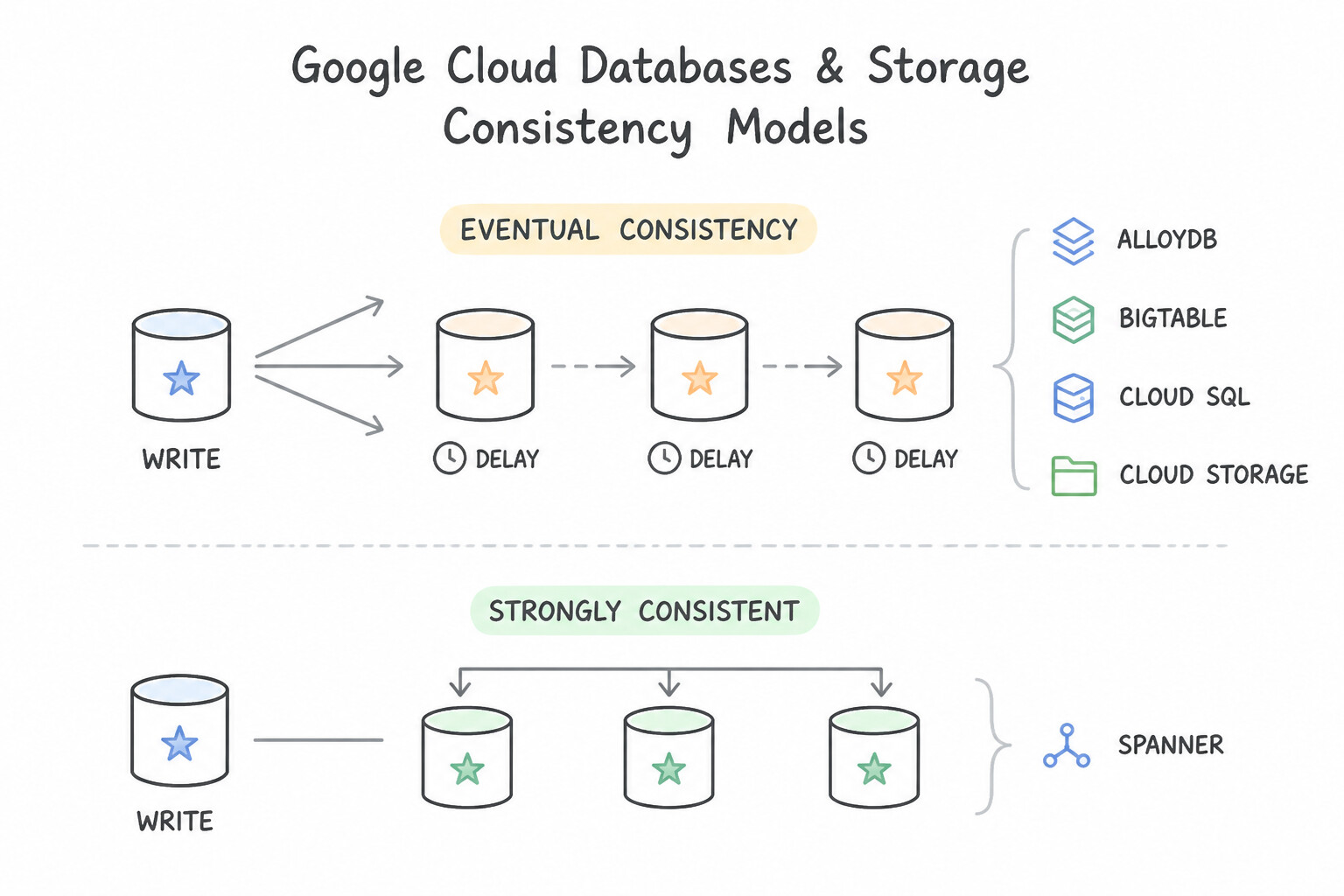
- Strongly Consistent by Default:
- Cloud Spanner: Provides External Strong Consistency globally across all regions using Google's TrueTime hardware atomic/GPS clocks. Every default read sees the latest committed write worldwide without stale reads (unless the developer explicitly requests a bounded stale read
{max_staleness: 15s}to reduce latency). - Cloud Storage: Provides Strong Global Read-After-Write, Read-After-Metadata-Update, and List Consistency for all object creations, overwrites, and deletions worldwide—Wait: only if you enable Cloud CDN caching or objects have
Cache-Control: publiccan clients see cached copies until TTL expiration! - Cloud Firestore: Strongly consistent across all queries and document reads.
- Eventually Consistent Replication Models (Watch for Read-Your-Own-Writes Bugs!):
- Cloud Bigtable (Multi-Cluster): A single-cluster App Profile is strongly consistent for single-row mutations (at the cost of no automatic failover). A Multi-Cluster Routing App Profile provides high availability and low-latency writes, but replication between clusters is eventually consistent.
- Cloud SQL & AlloyDB Read Replicas: While primary-to-HA-standby failover within a region preserves committed transactions, Read Replicas (especially cross-region) replicate asynchronously (
eventual consistency). If a user updates their profile and immediately refreshes the page, routing that read to a Read Replica can display stale data—always route read-your-own-writes critical queries to the Primary instance!
Key Implementation Patterns
- Cloud Storage: Immediate Read-After-Write: Use Write the code to read the file immediately, relying on the strong consistency of Cloud Storage. Cloud Storage is strongly consistent, so you can read a file immediately after it is written. (Avoid alternative: Retry loops are unnecessary because Cloud Storage does not suffer from eventual consistency delays for new objects.)
- Spanner: Bounded Staleness: Use Configure the application to use exact staleness reads with a 15-second bound. Stale reads allow Spanner to serve data from local replicas without checking the leader, significantly improving performance when real-time data is not strictly required.
- Cloud SQL: Read Replica Lag: Use Configure the application to read the shipping address from the primary instance for the "Review Order" page. Directing the read operation to the primary instance guarantees strong consistency, bypassing the replication lag inherent in read replicas.
Key Takeaways (1.3c)
- Google Cloud Storage operations (read, write, delete, list) are strongly consistent.
- Strong consistency means you can read an object immediately after the upload request succeeds.
- You do not need to implement retry loops or sleep timers to handle replication lag for new objects in Cloud Storage.
- This consistency applies globally and across all storage classes.
Consideration 1.3d: Creating signed URLs to grant access to Cloud Storage objects
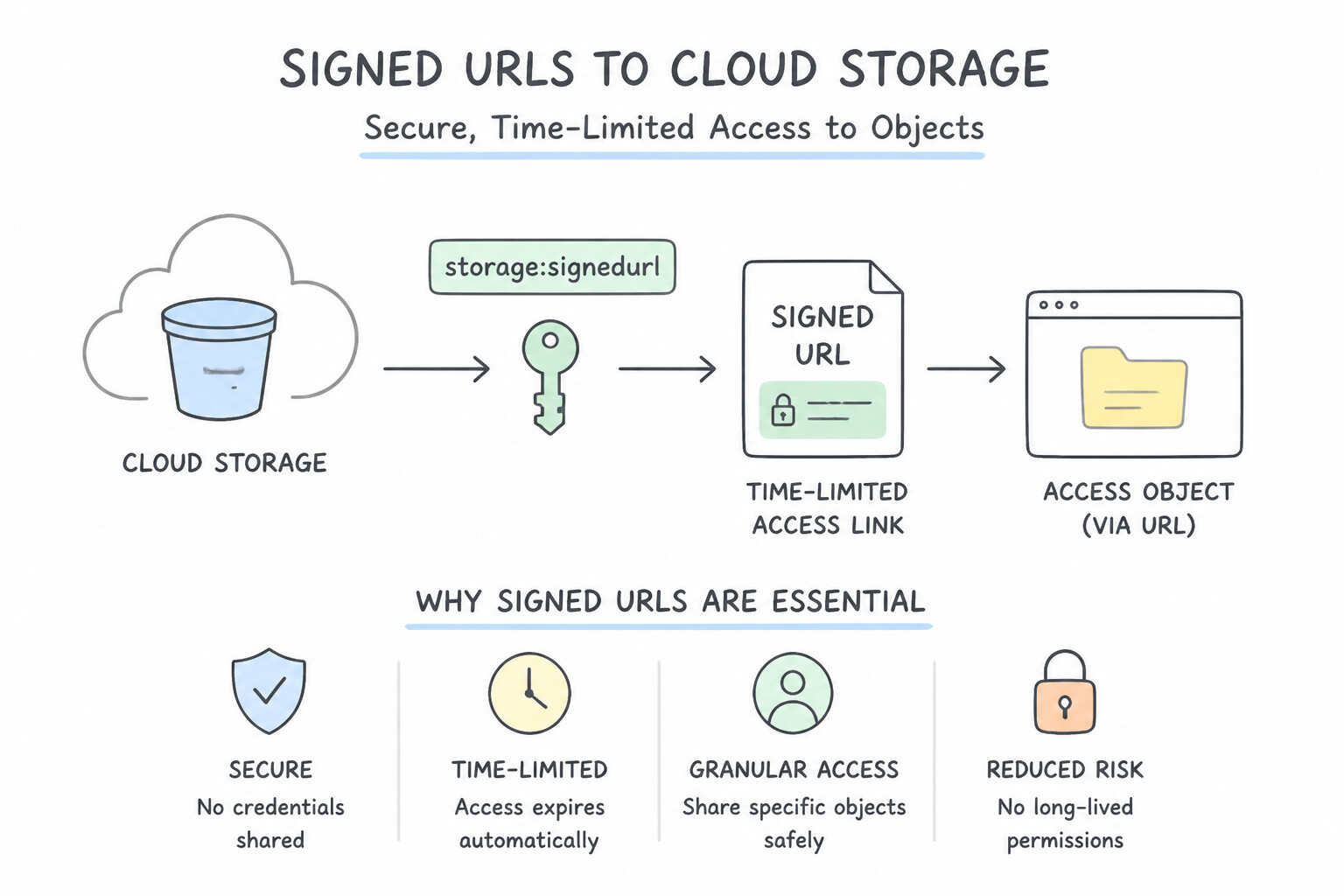
- Why Signed URLs Are Essential: When unauthenticated mobile/web users need to upload a 200 MB profile video or download a private PDF invoice, you must not make the bucket public, and you must not stream the 200 MB file through your Cloud Run/GKE backend. Instead, your backend authenticates the user, generates a V4 Signed URL scoped to a specific HTTP verb (
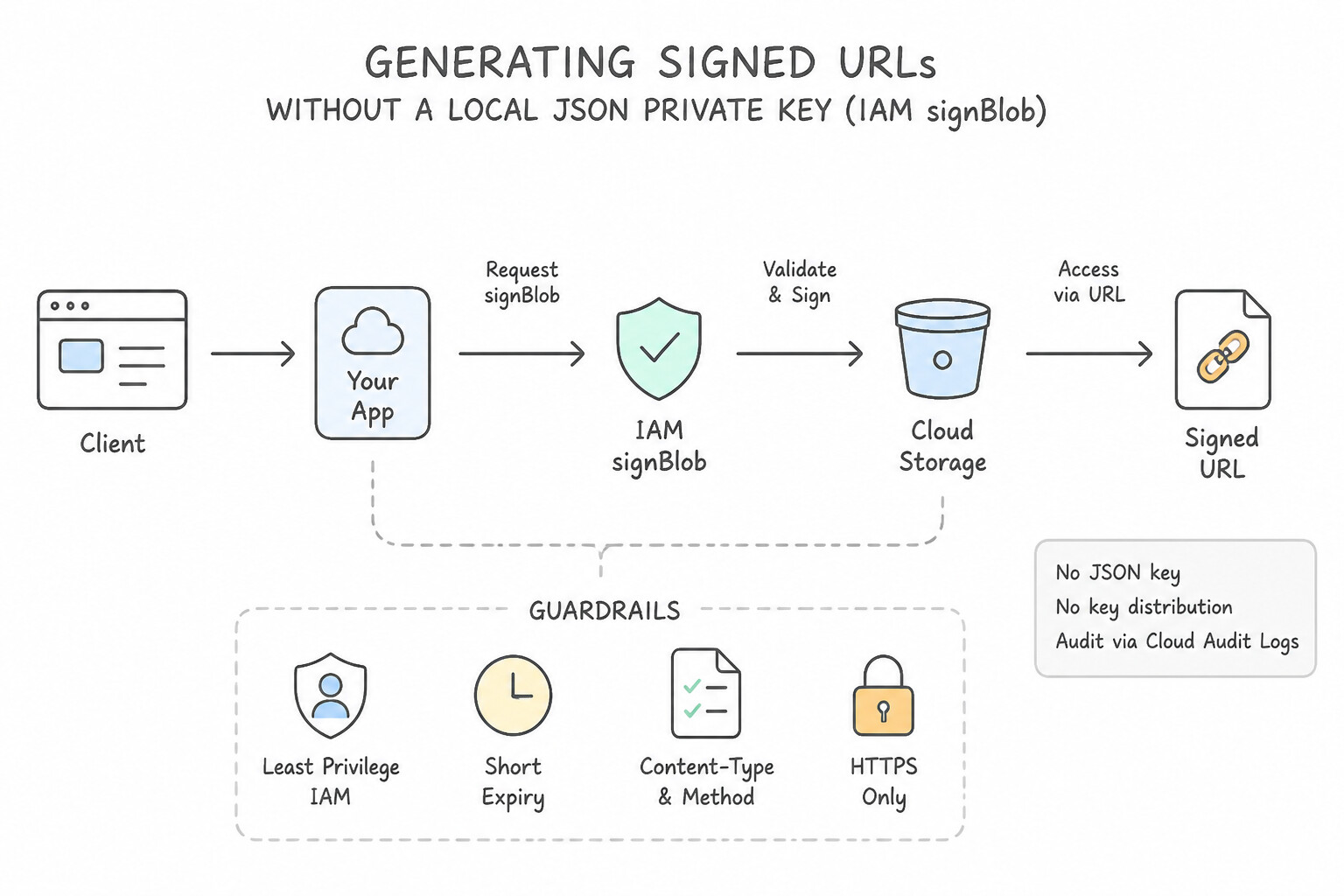
PUTfor upload,GETfor download), object path,Content-Type, and short expiration (e.g.,15 minutes), and returns the URL to the client. - Generating Signed URLs Without a Local JSON Private Key (IAM
signBlob): On Cloud Run, GKE, or Compute Engine using attached Service Accounts (where no local.jsonprivate key file exists on disk), the client library calls the IAM Service Account Credentials API (iamcredentials.projects.serviceAccounts.signBlob) to sign the URL. Therefore, the runtime Service Account must be grantedroles/iam.serviceAccountTokenCreatoron itself (or the target signing service account) in addition to storage permissions (roles/storage.objectCreatororobjectViewer)! - Signed Policy Documents (
POSTUploads): When browser forms need strict server-enforced constraints on direct uploads (such as enforcing a file size range["content-length-range", 1, 10485760]or required prefix), use a Signed Policy Document with an HTMLPOSTform.
Key Implementation Patterns
- Offloading Upload Traffic: Use Generate a signed URL using the HTTP PUT method on the backend. Send the URL to the client to upload the file. Signed URLs with the HTTP PUT method allow clients to upload files directly to Cloud Storage securely. (Avoid alternative: The HTTP GET method is used for downloading files, not uploading them.)
- Enforcing Content Types: Use Configure the client application to send the "Content-Type: text/plain" HTTP header with the upload request. If a Signed URL is generated with a specific Content-Type, the client request must include that exact Content-Type header. (Avoid alternative: Signed URLs bypass the need for the user to have IAM roles; the error indicates a mismatch in the URL signature, not missing permissions.)
Key Takeaways (1.3d)
- Signed URLs are used to grant temporary access to Cloud Storage resources without sharing credentials.
- Use the HTTP PUT method when generating signed URLs for uploading objects.
- Use the HTTP GET method when generating signed URLs for downloading objects.
- Never embed service account keys or long-lived credentials in client-side applications.
Consideration 1.3e: Writing data to BigQuery for analytics and AI/ML workloads
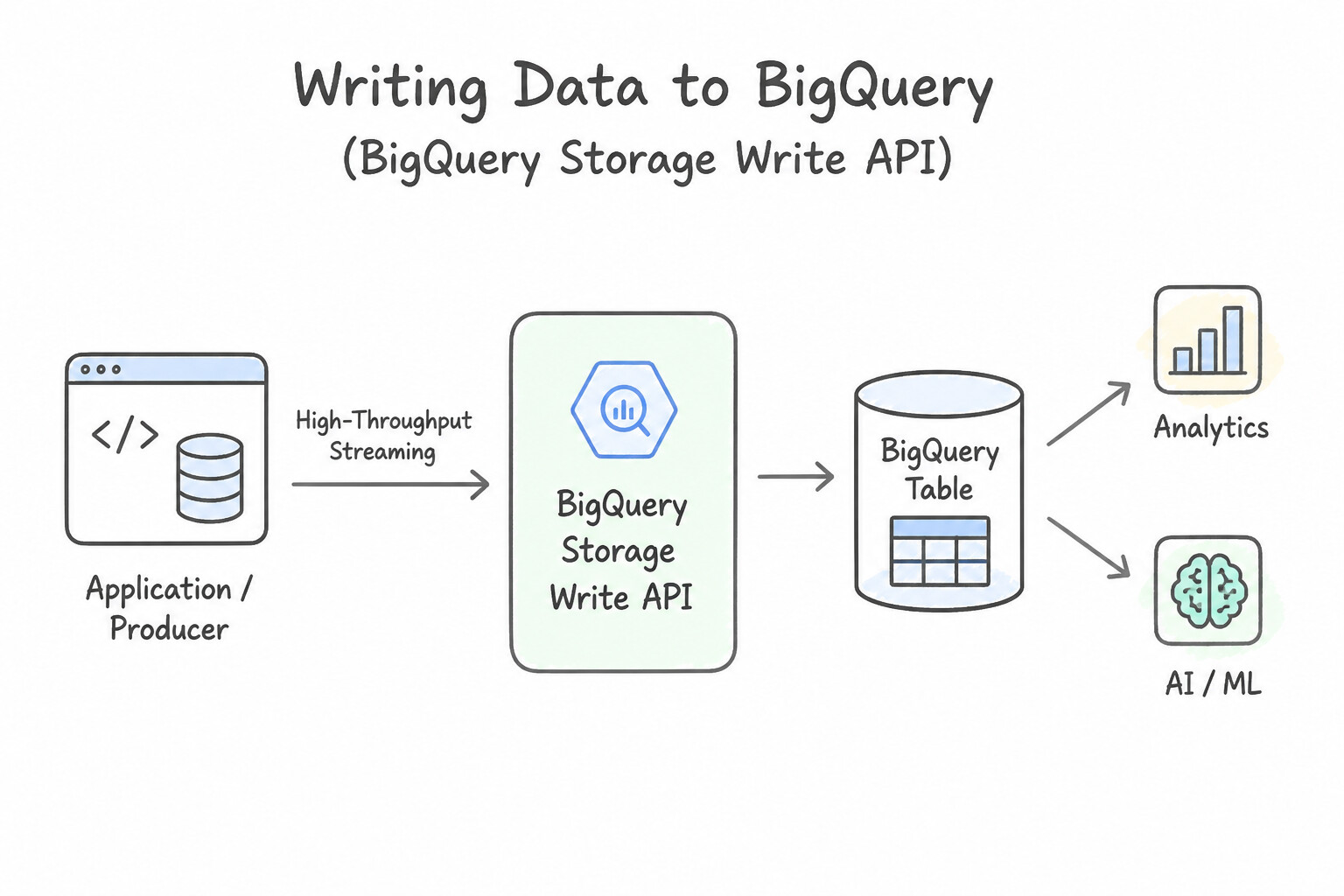
- BigQuery Storage Write API (Recommended High-Throughput Streaming): Replaces the legacy
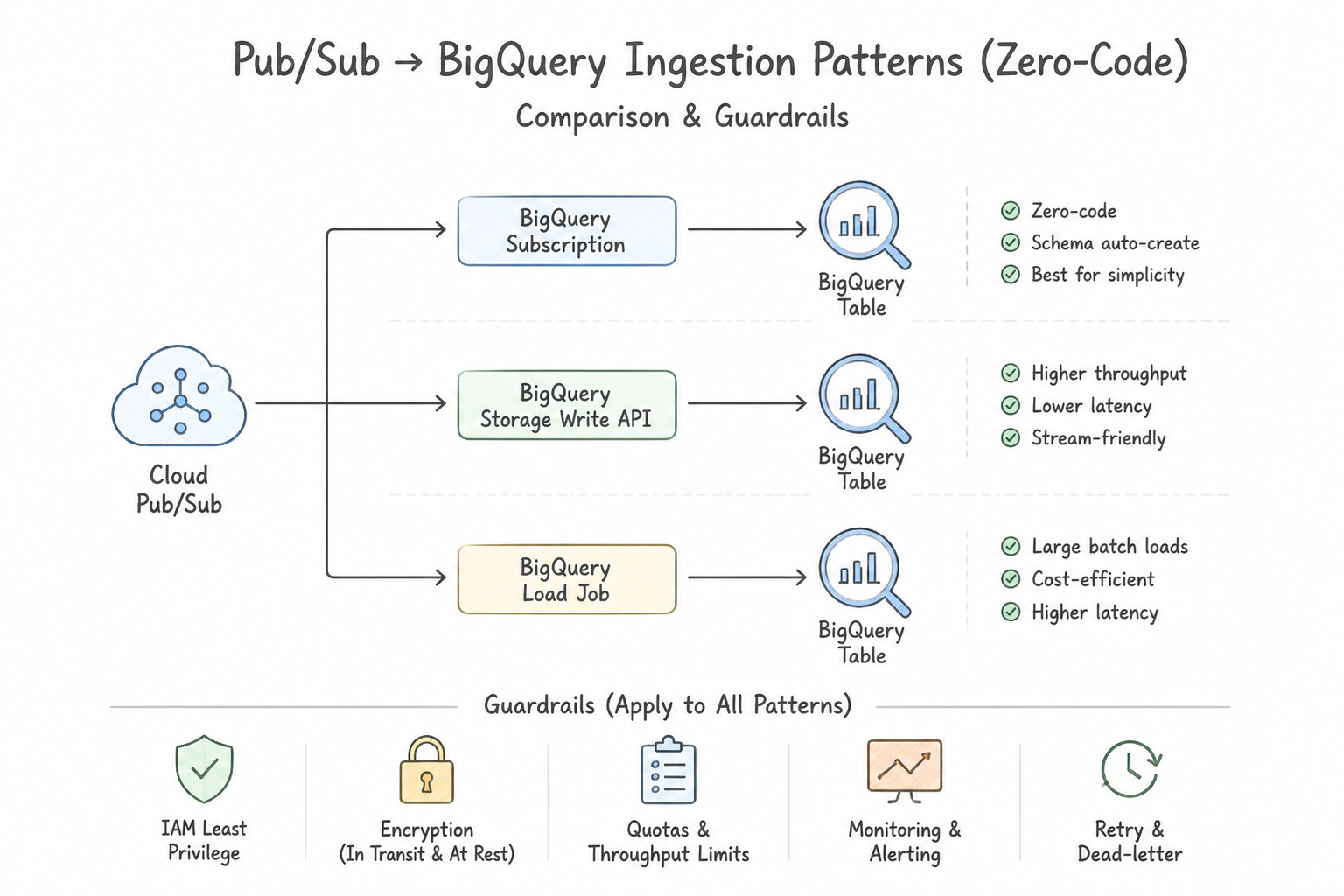
tabledata.insertAllAPI. The Storage Write API uses gRPC bidirectional streaming, supports exactly-once delivery semantics via stream offsets, provides schema update detection, and costs significantly less at high volume. - Pub/Sub BigQuery Subscriptions (Zero-Code Ingestion): When application microservices already publish events to Cloud Pub/Sub and you simply need those events landed in a BigQuery table in real time without custom transformation logic, configure a BigQuery Subscription directly on the Pub/Sub topic—eliminating the need to pay for or maintain a Dataflow or Cloud Run consumer job!
- Change Data Capture (CDC) & Federated Queries: To replicate operational tables from Cloud SQL, AlloyDB, or Oracle into BigQuery continuously with minimal source DB load, use Datastream (serverless CDC) into BigQuery's native
UPSERTstorage write path. For ad-hoc joins against live Cloud SQL/Spanner data without copying data, use BigQuery Federated Queries (EXTERNAL_QUERY). - AI/ML Integration (
BigQuery ML& Vertex AI): Once data lands in BigQuery, developers can invoke BigQuery ML (ML.GENERATE_TEXT,ML.GENERATE_EMBEDDING,CREATE MODEL) or connect Vertex AI directly to BigQuery tables without exporting CSV files to Cloud Storage.
Key Implementation Patterns
- High-Throughput Streaming with Storage Write API: Use Use the BigQuery Storage Write API to stream the data. The Storage Write API uses gRPC for high throughput, low latency, and exactly-once delivery. (Avoid alternative: The legacy streaming API uses REST/HTTP and struggles with high-throughput deduplication.)
- Handling Schema Drift in Batch Loads: Use Configure the load job with schema auto-detection and the ALLOW_FIELD_ADDITION option. Using schema auto-detection with ALLOW_FIELD_ADDITION enables BigQuery to automatically expand the table schema when new fields appear in the source data.
- No-Ops Ingestion via Pub/Sub: Use Configure a Pub/Sub subscription with the delivery type set to Write to BigQuery. BigQuery subscriptions natively ingest data from Pub/Sub into BigQuery without requiring any code or intermediate compute resources. (Avoid alternative: Dataflow introduces a managed service layer (middleware) which adds unnecessary operational complexity for simple ingestion.)
Key Takeaways (1.3e)
- Use the Storage Write API for high-throughput, low-latency streaming ingestion into BigQuery.
- The Storage Write API uses gRPC, making it more efficient than the REST-based legacy API.
- For exactly-once delivery semantics in streaming, rely on the Storage Write API with stream offsets.
- Batch loading is cost-effective but introduces latency suitable only for non-real-time workloads.
Quick Decision Cheat Sheet (Subsection 1.3)
If the Scenario Requires... | Choose This Google Cloud Pattern | Avoid This Common Mistake |
|---|---|---|
"Cloud Spanner write throughput plateaus and CPU spikes on a single server despite adding nodes" | Replace AUTO_INCREMENT / monotonic timestamp primary keys with UUIDv4 or bit-reversed sequences | Adding more Spanner processing units (does not split a monotonic hotspot at the tail of the key range) |
"Optimize frequent SQL joins between Customers and Invoices in Cloud Spanner" | Define Invoices using INTERLEAVE IN PARENT Customers | Creating a secondary index on CustomerId or denormalizing into JSON strings |
"Cloud Run service fails with Permission iam.serviceAccounts.signBlob denied when creating Signed URLs" | Grant roles/iam.serviceAccountTokenCreator to the Cloud Run runtime service account | Downloading a JSON key file and baking it into the Docker container image |
"High-throughput streaming into BigQuery requiring exactly-once semantics and low ingestion cost" | Use the BigQuery Storage Write API (with committed streams and offsets) | Legacy tabledata.insertAll streaming API or batch loading every minute |
"Firestore writes throttle at >500 ops/sec on a collection with sequential document IDs" | Use random auto-generated Document IDs and exempt unused monotonic timestamp fields from indexing | Sharding across multiple Firestore databases when random keys solve the lexical hotspot |
Further Reading (Subsection 1.3)
- Cloud Spanner Overview — Provides an introduction to Cloud Spanner features, specifically highlighting its global distribution and relational semantics.
- Google Cloud Database Options — A high-level comparison of when to use which database service on Google Cloud.
- Cloud Bigtable Overview — Provides a high-level summary of Bigtable, highlighting its suitability for high-throughput and low-latency workloads like IoT.
- Schema design best practices — Specifically review the section on 'Choosing a primary key to prevent hotspots'. It explains why monotonically increasing values lead to performance issues and recommends UUIDs.
- Schema and data model - Creating interleaved tables — This documentation explains how table interleaving works in Cloud Spanner, the syntax for creating them, and the performance benefits regarding data locality.
- Cloud Bigtable Schema Design - Time series data — This page details best practices for time series data, specifically explaining why and how to use reverse timestamps for accessing the most recent data.
Book TOC · Previous · Chapter 2 of 7 · Next
AwesomeGCP.com Learning
The approach taken is a question-led learning approach: you explore realistic project scenarios where you need to make decisions or take actions to achieve business goals within specific constraints. Instead of passive learning, you are challenged to think and work through the options to master the Professional Cloud Developer (PCD) certification!