Book TOC · Previous · Chapter 1 of 7 · Next
Chapter 1: Designing High-Performing, Event-Driven & Resilient Cloud-Native Applications and APIs
Chapter Focus: Compute platform selection, stateless horizontal scaling, gRPC vs. REST, Apigee/API Gateway, Eventarc/Pub/Sub choreography vs. Cloud Workflows orchestration, and Memorystore caching.
Subsection 1.1: Designing high-performing applications and APIs
The Big Picture
Subsection 1.1 is the single largest subsection on Google Cloud architecture because it tests whether you can design systems that stay fast, resilient, and cost-efficient when real-world traffic spikes 100x or an entire zone goes dark. Naive architectures typically fail in four predictable ways:
- Compute Mismatch & Concurrency Starvation (
1.1a,1.1b,1.1i): Deploying a stateful monolith requiring custom Linux kernel modules to Cloud Run (impossible due to the shared sandboxed kernel), or leaving a single-threaded CPU-intensive Node.js/Python service at Cloud Run's default concurrency of80—causing requests to queue behind a blocked event loop while CPU appears underutilized. - Geographical & Zonal Fragility (
1.1c,1.1d,1.1j): Serving global users in Tokyo and Frankfurt directly from a single-zone VM group inus-central1-awithout Cloud CDN, a Global External Application Load Balancer, or Regional Managed Instance Groups (MIGs)—resulting in both high round-trip latency and total downtime during a routine zonal outage. - Synchronous Tight Coupling (
1.1f,1.1g,1.1h,1.1l): Chaining five microservices together with synchronous REST calls during user checkout, without an API management layer (Apigee / Cloud API Gateway), an in-memory cache (Memorystore), or asynchronous buffering (Pub/Sub, Eventarc, Cloud Tasks, Cloud Workflows). When one downstream service slows down, cascading timeouts bring down the entire application. - Big-Bang Deployments (1.1k): Pushing breaking API changes to 100% of production traffic at once instead of using Cloud Run revision traffic splitting or GKE canary/blue-green rollouts to verify error rates on 1–5% of live traffic first.
Consideration 1.1a: Choosing the appropriate platform based on the use case and requirements (e.g., Compute Engine, GKE, Cloud Run)
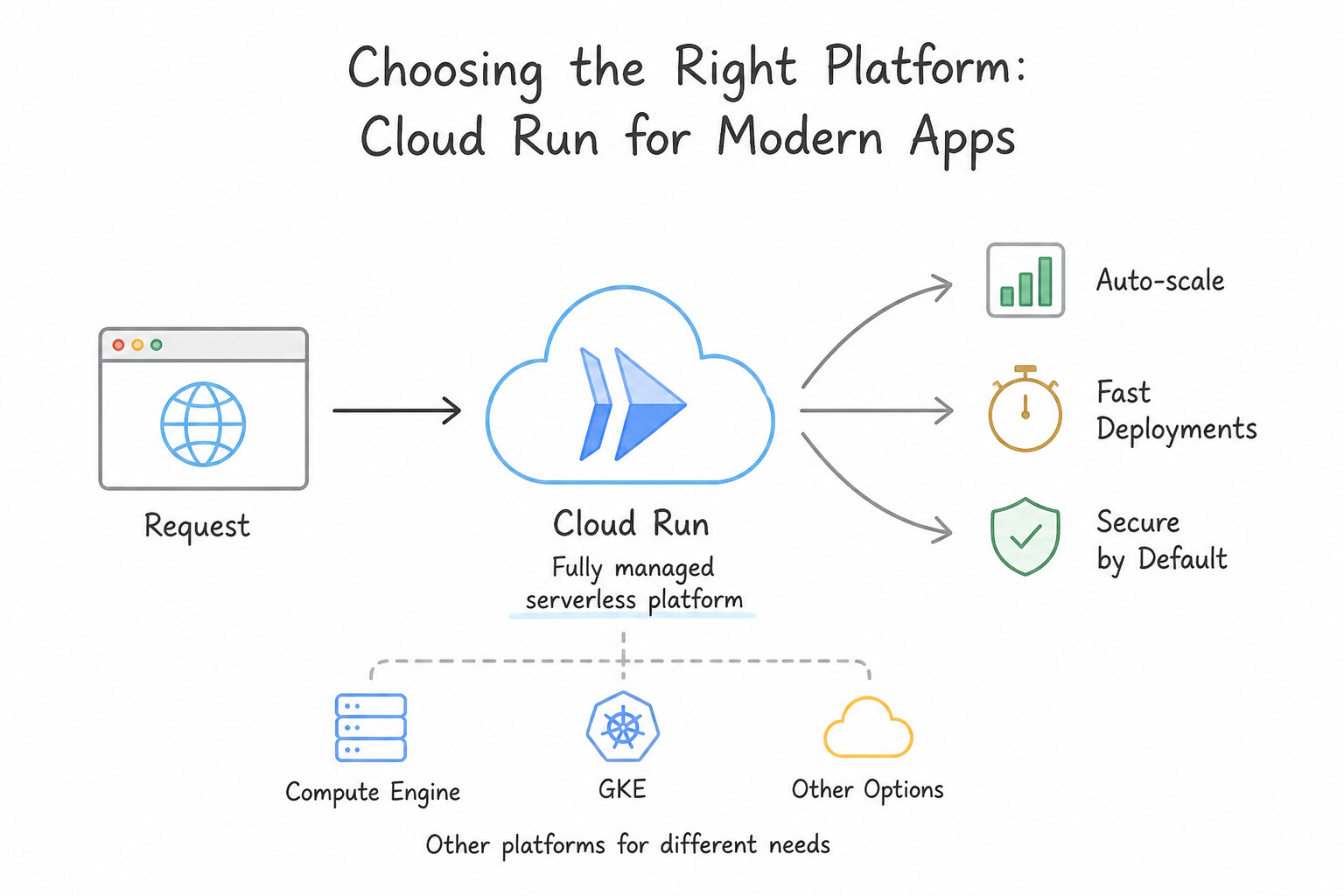
- Cloud Run Services (Default for Stateless HTTP/gRPC Containers): Choose whenever a containerized web app, REST API, or gRPC microservice has variable/sporadic traffic and needs automatic scaling (including scale-to-zero to eliminate idle cost) with zero infrastructure management.
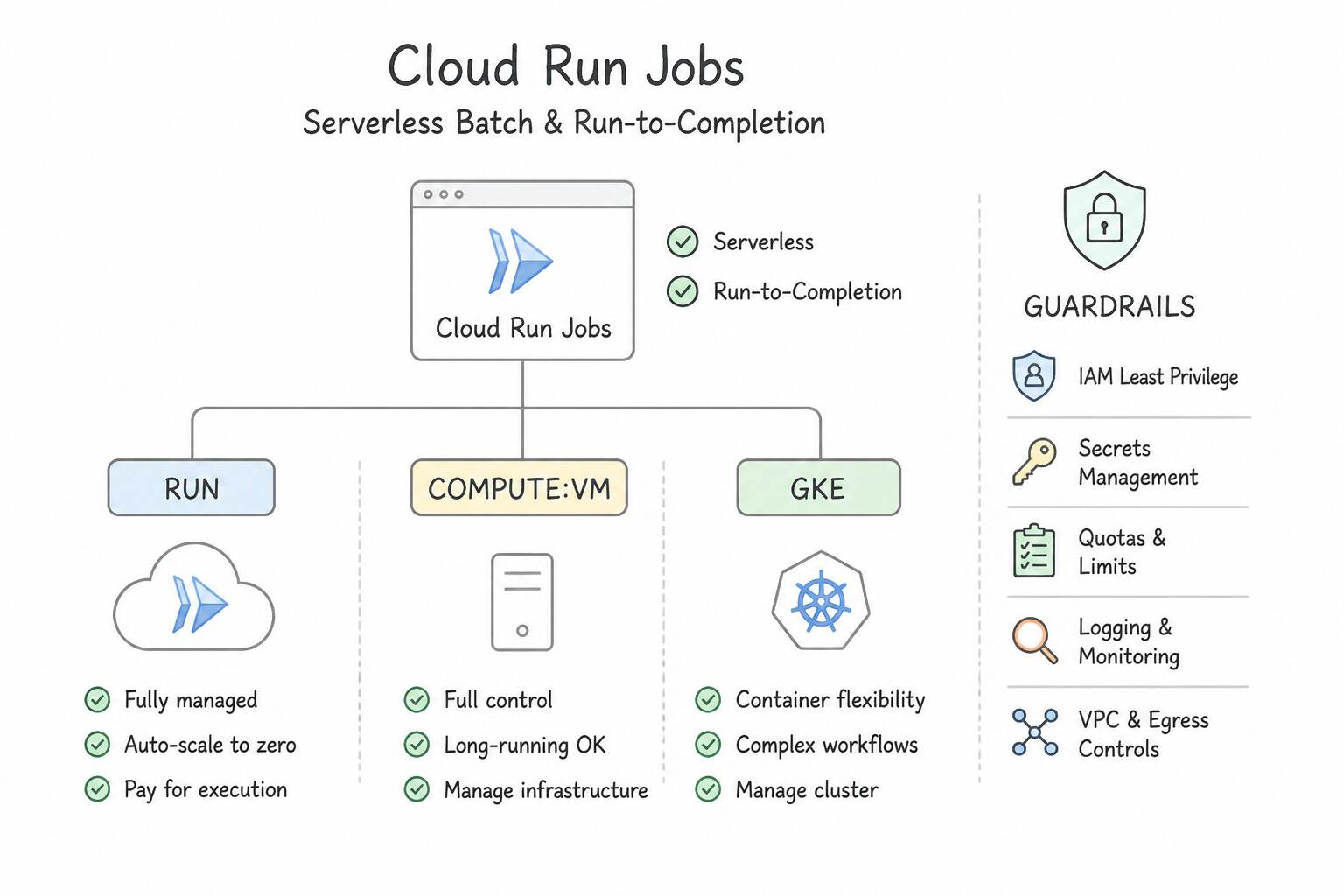
- Cloud Run Jobs (Serverless Batch / Run-to-Completion): Choose when a containerized workload does not listen on an HTTP port—such as a nightly 45-minute data migration, report generator, or database schema script that starts, processes tasks in parallel, and exits.
- Google Kubernetes Engine — Autopilot vs. Standard: Choose GKE when workloads require complex multi-container pod topologies (sidecars, service mesh),
StatefulSetswith stable network IDs and persistent disks, or existing Helm/K8s manifests. Choose GKE Autopilot when the team wants Google to manage nodes, security patching, and capacity (paying per pod request); choose GKE Standard only when you need direct node OS/kernel customization or specialized node-pool hardware control. - Compute Engine (VMs & Regional MIGs): Choose when migrating legacy monoliths ("lift-and-shift") that require custom Linux kernel modules, deep Windows Server registry/licensing access, or raw non-HTTP UDP protocols that cannot run inside serverless container sandboxes.
- Cloud Functions (2nd Gen) & App Engine: Choose Cloud Functions (2nd Gen) for lightweight, single-purpose event glue code (e.g., triggered directly by a Cloud Storage object upload) when you want to deploy a code snippet without managing containers. Choose App Engine Flexible only when an existing App Engine PaaS workload requires custom Docker system dependencies.
Key Implementation Patterns
- Sporadic Traffic & Cost Optimization: Use Deploy the application to Cloud Run. Cloud Run supports Docker containers and scales to zero when idle, ensuring you only pay when the code runs. (Avoid alternative: GKE Standard clusters usually require active nodes to run, preventing true scale-to-zero cost optimization for a single service.)
- Legacy Monolith Migration: Use Migrate the application to Compute Engine virtual machines (VMs). Compute Engine provides full control over the OS, allowing custom kernel modifications and minimizing refactoring. (Avoid alternative: Cloud Run does not allow access to the OS kernel required for custom modifications.)
Key Takeaways (1.1a)
- Cloud Run is the ideal choice for stateless containerized applications that need to scale to zero to save costs.
- Compute Engine and GKE Standard generally incur baseline costs because infrastructure (VMs/Nodes) must be running to accept traffic.
- Scale-to-zero is a critical feature for sporadic workloads to ensure you do not pay for idle resources.
- Always verify if a service allows running Docker containers directly when choosing a compute platform.
Consideration 1.1b: Building, refactoring, and deploying application containers to Cloud Run and GKE
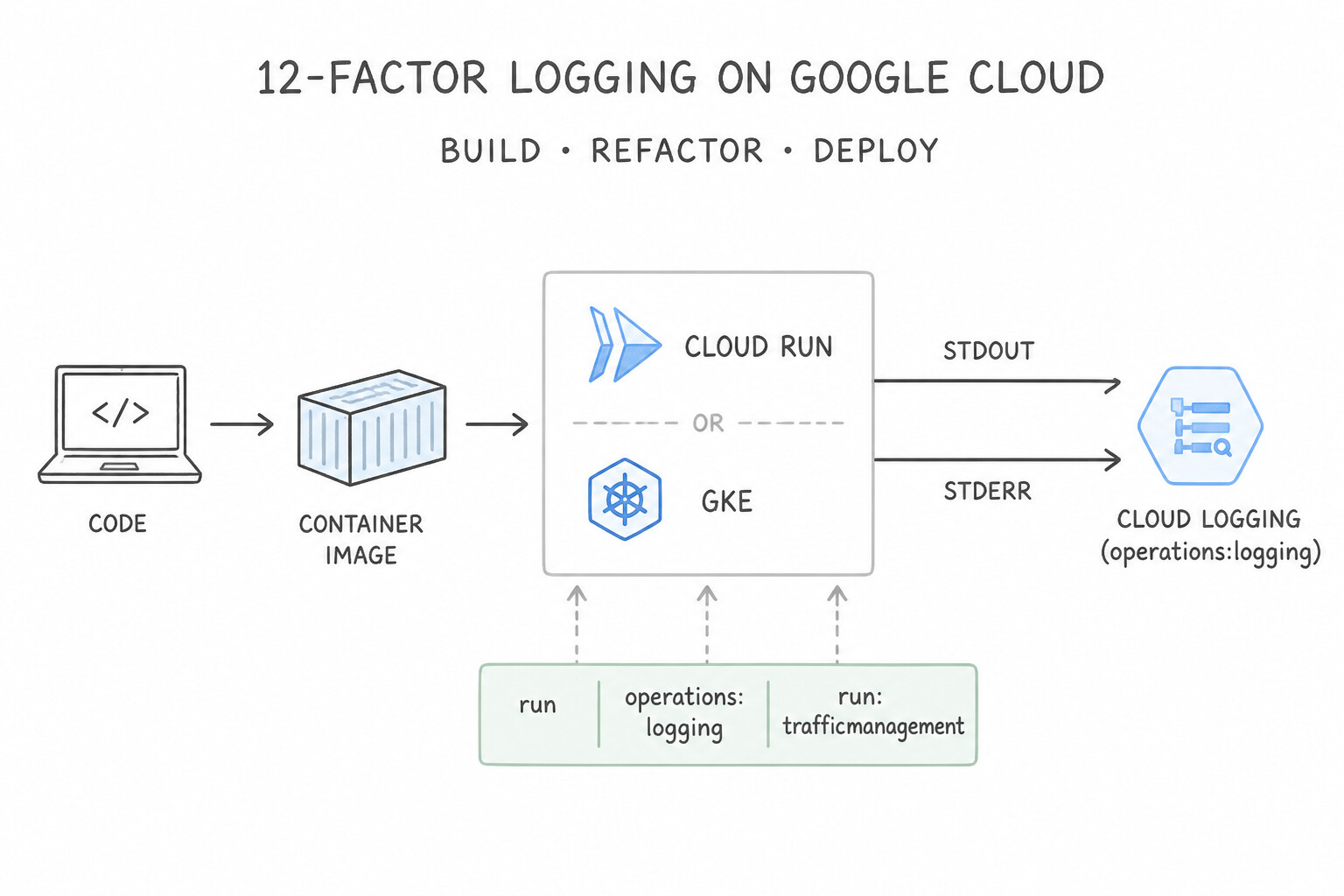
- 12-Factor Logging (
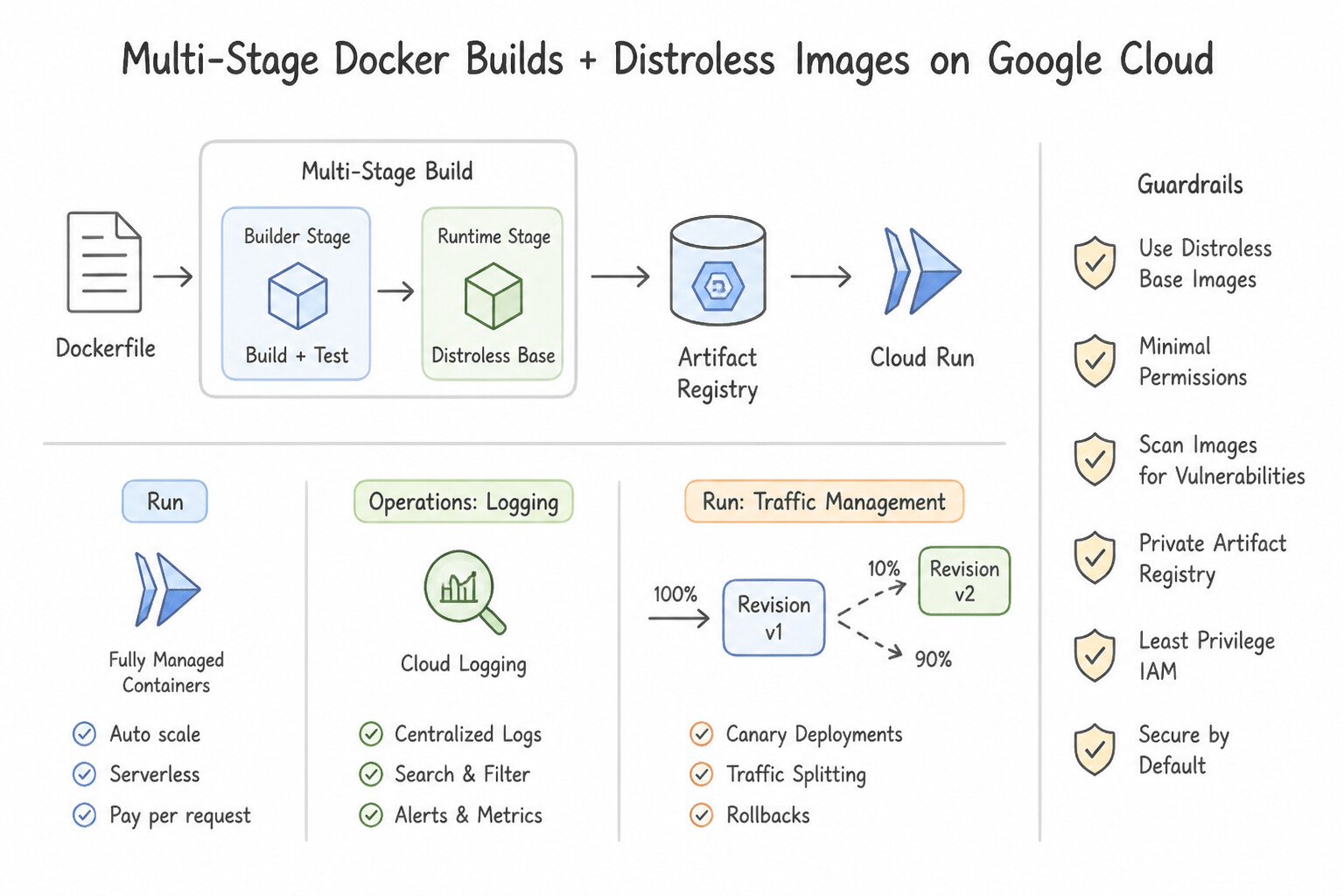
stdout/stderr): Cloud Run and GKE containers have ephemeral filesystems. Legacy apps writing to/var/log/app.loglose logs when instances scale down. Always refactor logging to write structured JSON tostdoutandstderr, which Cloud Logging captures automatically. - Multi-Stage Docker Builds & Distroless Base Images: Never ship compilers, SDKs,
.githistory, or source code in production images. Use multi-stageDockerfilebuilds (compiling in abuilderstage and copying only the static binary into a minimalgcr.io/distroless/staticor Alpine runtime image) to shrink image size, speed up cold starts, and minimize CVE attack surface. - Externalizing Session State: Because Cloud Run and GKE scale horizontally across instances, storing session files on local container disk causes random user logouts. Externalize session state to Memorystore for Redis or Cloud Firestore.
- GKE Deployment Strategies (
RollingUpdatevs.Recreate) &InitContainers: When a database schema migration is backward-incompatible and v1 + v2 pods cannot run simultaneously without corrupting data, change the GKE Deployment strategy fromRollingUpdatetoRecreate. UseInitContainersfor pre-flight setup tasks (such as fetching configuration files or waiting for a downstream dependency) that must finish before the main application container starts.
Key Implementation Patterns
- Refactoring Legacy Logging for Cloud Run: Use Refactor the application to write log entries to standard output (stdout) and standard error (stderr). Cloud Run automatically ingests logs written to stdout and stderr into Cloud Logging, which matches container best practices.
- Traffic Splitting for Risky Deployments: Use Use the Cloud Run traffic settings to assign 1% of traffic to the new revision and 99% to the current revision. Cloud Run has a native traffic splitting feature that allows you to route specific percentages of requests to different revisions.
- Optimizing Container Image Size: Use Update the Dockerfile to use a multi-stage build. Multi-stage builds separate the build environment from the runtime environment, resulting in a tiny final image containing only the binary. (Avoid alternative: Manual compression is unnecessary and incompatible with standard container registry workflows.)
Key Takeaways (1.1b)
- Cloud Run containers are ephemeral; local files are lost on shutdown.
- Do not write logs to local files in a containerized environment.
- Modify applications to write logs to standard output (stdout) and standard error (stderr).
- Cloud Run automatically integrates stdout/stderr with Cloud Logging.
Consideration 1.1c: Understanding how Google Cloud services are geographically distributed (e.g., latency, regional services, zonal services)
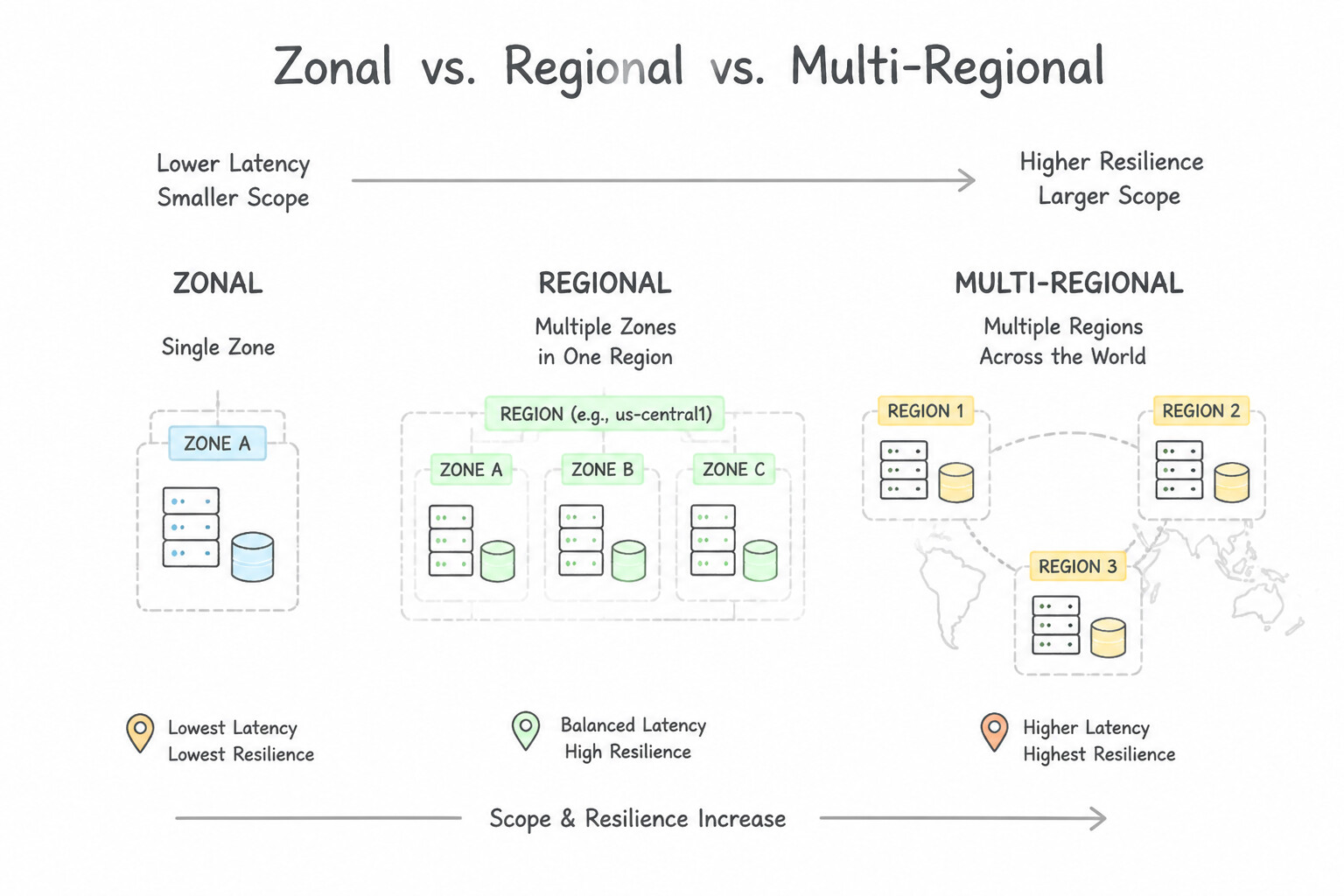
- Zonal vs. Regional vs. Multi-Regional Resources: A zonal resource (single VM, Zonal MIG, Zonal GKE cluster control plane) fails if that single zone goes offline. A regional resource (Regional MIG, Regional GKE cluster, Cloud Run, Cloud SQL HA) distributes compute and control planes across multiple zones within a region to survive a single-zone outage automatically. Multi-regional services (Cloud Spanner multi-region, Cloud Storage dual/multi-region, Global Load Balancers) survive entire regional disasters.
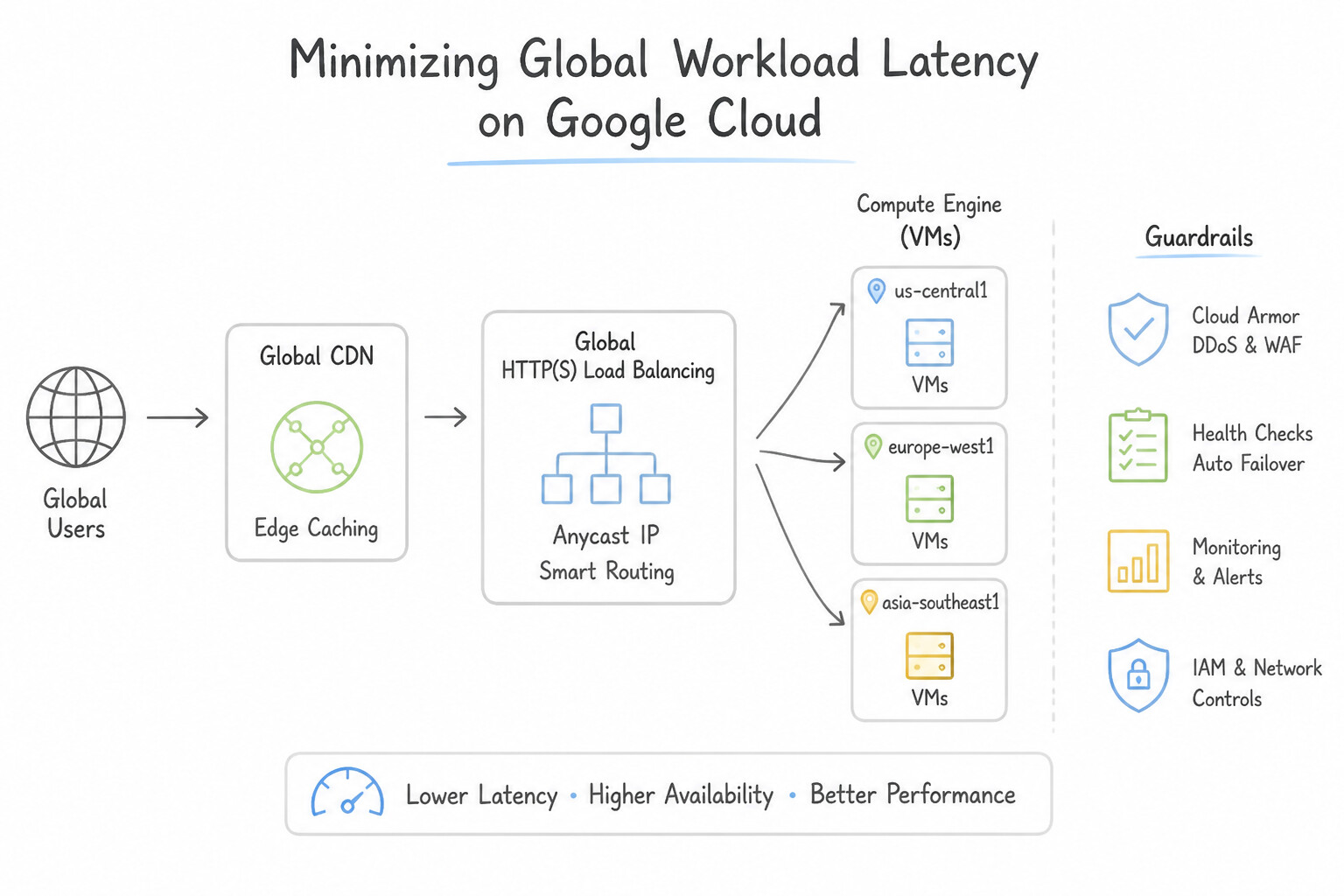
- Minimizing Global User Latency: Place static assets behind Cloud CDN attached to a Global External Application Load Balancer, and deploy stateless compute backends (Cloud Run or Regional MIGs) across multiple regions (
us-central1,europe-west1,asia-northeast1) behind a single global Anycast IP—routing each user to the closest healthy region automatically. - Network Service Tiers (Premium vs. Standard): Premium Tier routes traffic over Google's private global fiber backbone (entering at the edge PoP closest to the user) and is required for Global Load Balancing. Standard Tier routes traffic over the public ISP internet and is chosen only for single-region, non-latency-sensitive workloads optimizing purely for network egress cost.
- Compact Placement Policies (Ultra-Low Intra-Zone Latency): For tightly coupled High-Performance Computing (HPC) or HFT VMs that need minimal microsecond network hops between nodes within a single zone, attach a Compact Placement Policy to co-locate VMs on the same or adjacent physical racks.
Key Implementation Patterns
- Global Static Content Latency: Use Configure a Global External Application Load Balancer and enable Cloud CDN. Cloud CDN caches content at the network edge, closer to users, which minimizes latency for static assets. (Avoid alternative: Larger VMs improve processing power but do not reduce network latency caused by physical distance.)
- Global Database Consistency: Use Provision a Cloud Spanner instance with a multi-region configuration that includes the required locations. Cloud Spanner is the only Google Cloud relational database that offers global strong consistency and multi-region availability. (Avoid alternative: Cloud SQL is regional; writes must go to one region, causing latency and potential consistency lags.)
- High Availability Against Zonal Outages: Use Create a regional managed instance group (MIG) spanning multiple zones within the region. A regional MIG automatically distributes instances across multiple zones, ensuring the application survives a single zone failure. (Avoid alternative: A zonal MIG places all instances in one zone, making the application vulnerable to a single zone outage.)
Key Takeaways (1.1c)
- Latency is heavily influenced by the physical distance between the user and the server.
- Cloud CDN reduces latency by caching static content at edge locations globally.
- Regional resources (like VMs in a specific region) provide services from a single geographic location, which may be slow for distant users.
- Vertical scaling (resizing VMs) improves processing speed but does not fix network latency issues.
Consideration 1.1d: Configuring load balancers and applications for session affinity and performant content delivery
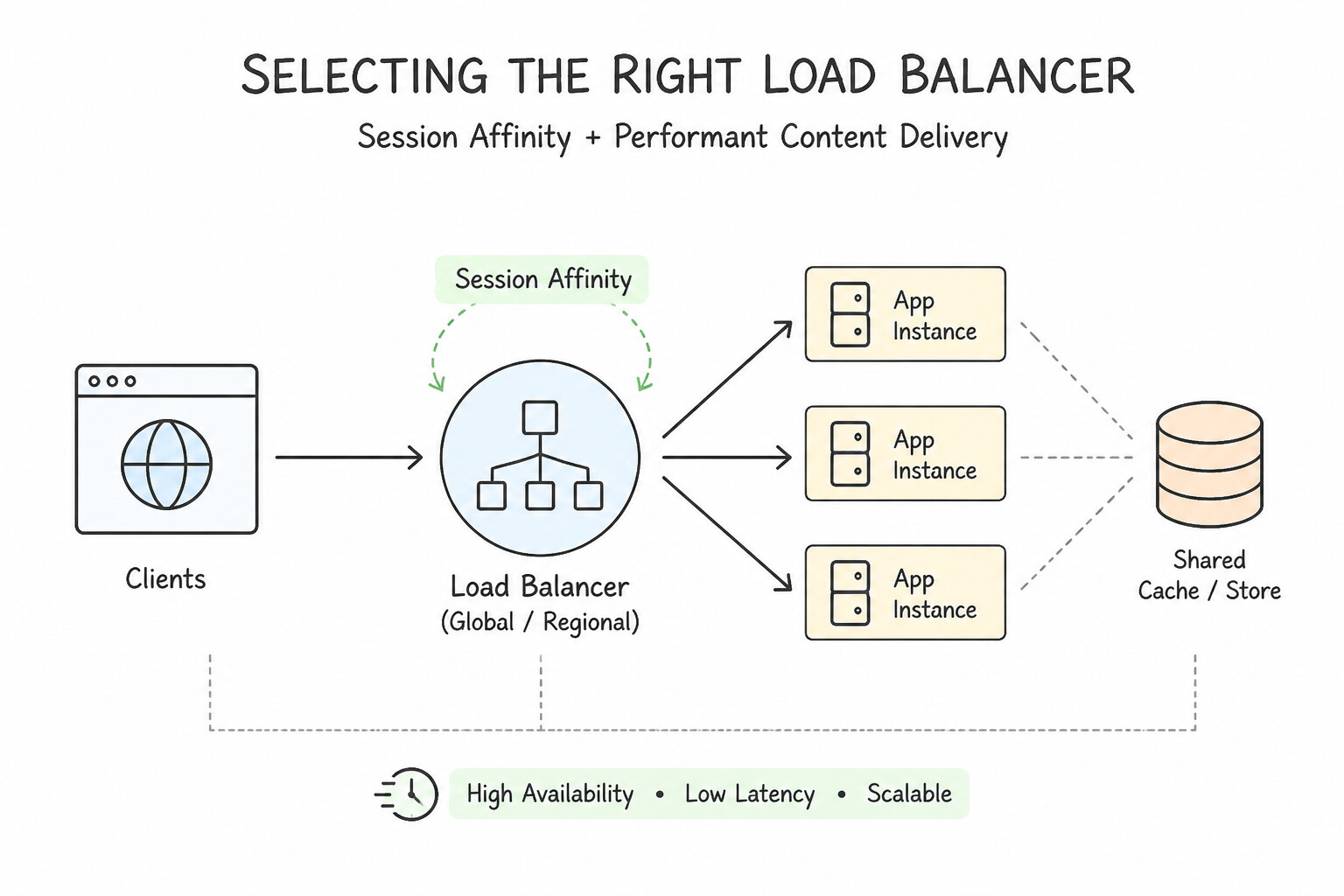
- Selecting the Right Load Balancer: Use the Global External Application Load Balancer (ALB) for L7 HTTP/HTTPS/HTTP2/gRPC traffic needing URL maps, path-based routing, Cloud CDN, Cloud Armor, or multi-region routing. Use an External Passthrough Network Load Balancer (NLB) when you must preserve the original client IP at L4 or handle raw TCP/UDP traffic without proxy termination.
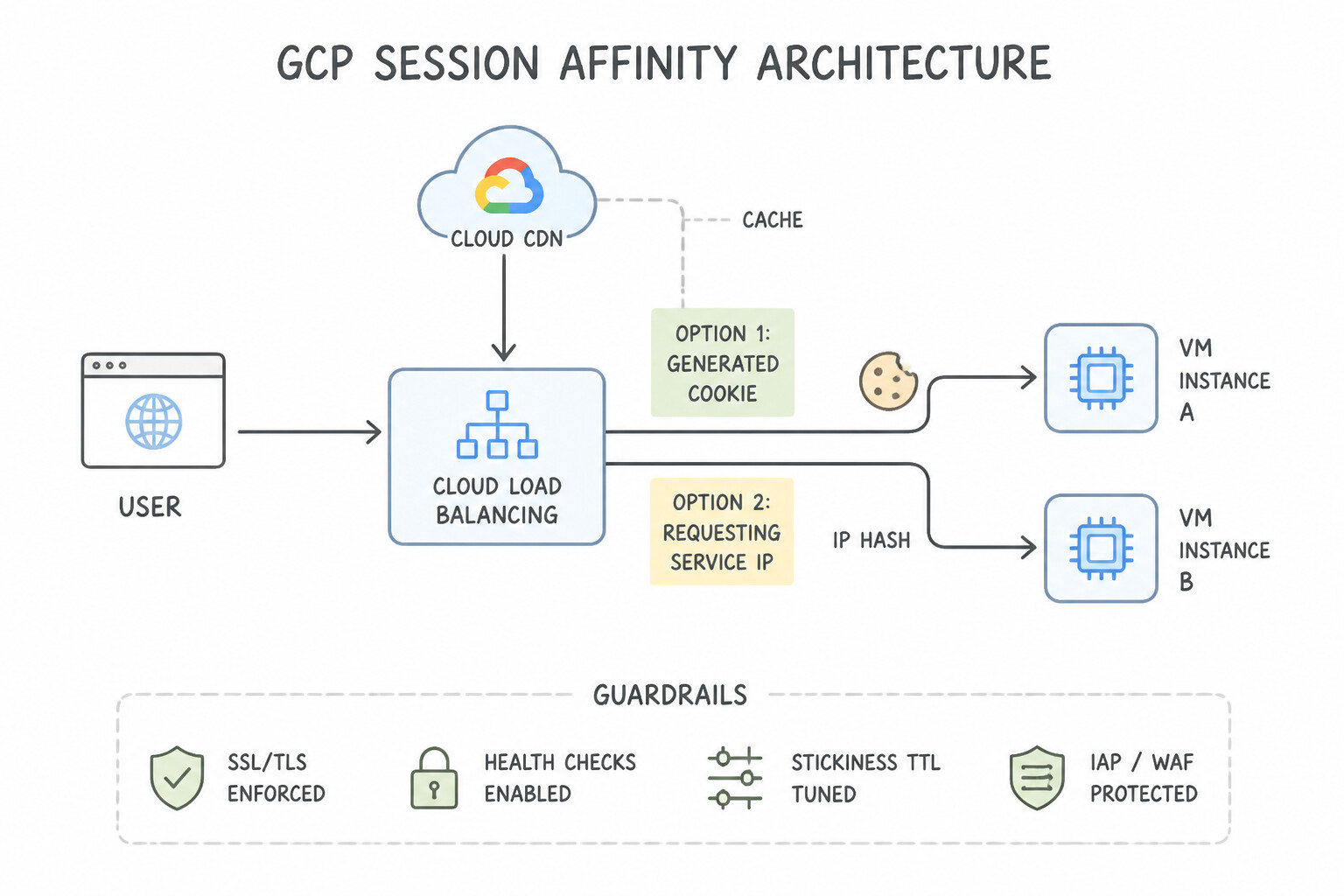
- Session Affinity (
Generated Cookievs.Client IP): When a legacy stateful backend on Compute Engine or GKE requires sticky sessions, enable Generated Cookie Affinity (or HTTP Header/Cookie affinity) on the Backend Service rather thanClient IPaffinity—because thousands of mobile/corporate users behind a carrier NAT share a single public IP, causing severe load imbalance underClient IPaffinity. - WebSocket & Long-Lived Stream Timeouts: An HTTP(S) Load Balancer has a default backend service timeout of 30 seconds. If a WebSocket or server-sent events (SSE) connection drops every 30 seconds, increase the Backend Service timeout (e.g., to
3600or86400seconds)—not the health-check interval! - Cloud CDN Cache Modes & Invalidations: Enable Cloud CDN on backend services or Cloud Storage buckets for static content. Use versioned asset filenames (
app.v42.js) for instant updates so you rarely need expensive global cache invalidations; setCache-Control: privateorno-storeon personalized responses so PII is never cached at the edge.
Key Implementation Patterns
- Stateful Legacy Migration: Use Configure the backend service to use generated cookie session affinity. Generated cookie affinity ensures requests from the same client are routed to the same backend instance, which is required for applications that store state locally. (Avoid alternative: URL maps route based on paths, not IPs. Additionally, Cookie affinity is preferred over IP affinity for HTTP traffic.)
- Global Static Asset Latency: Use Enable Cloud CDN on the backend service of your HTTP(S) Load Balancer. Cloud CDN caches static content at the edge, closer to users, reducing latency without requiring new infrastructure. (Avoid alternative: Deploying resources in multiple regions adds complexity and maintenance overhead compared to enabling a CDN.)
Key Takeaways (1.1d)
- Stateless is best: Ideally, move session state to an external store (like Redis or Firestore) so any instance can handle traffic.
- Session Affinity for legacy: Use Session Affinity on the Backend Service to support legacy stateful apps without code rewrites.
- Cookies vs. IP: For HTTP(S) Load Balancers, 'Generated Cookie' affinity is usually better than 'Client IP' affinity because it tracks specific browsers rather than shared IP addresses.
- Cloud CDN is the primary solution for reducing latency for static assets globally.
Consideration 1.1e: Implementing caching solutions (e.g., Memorystore)
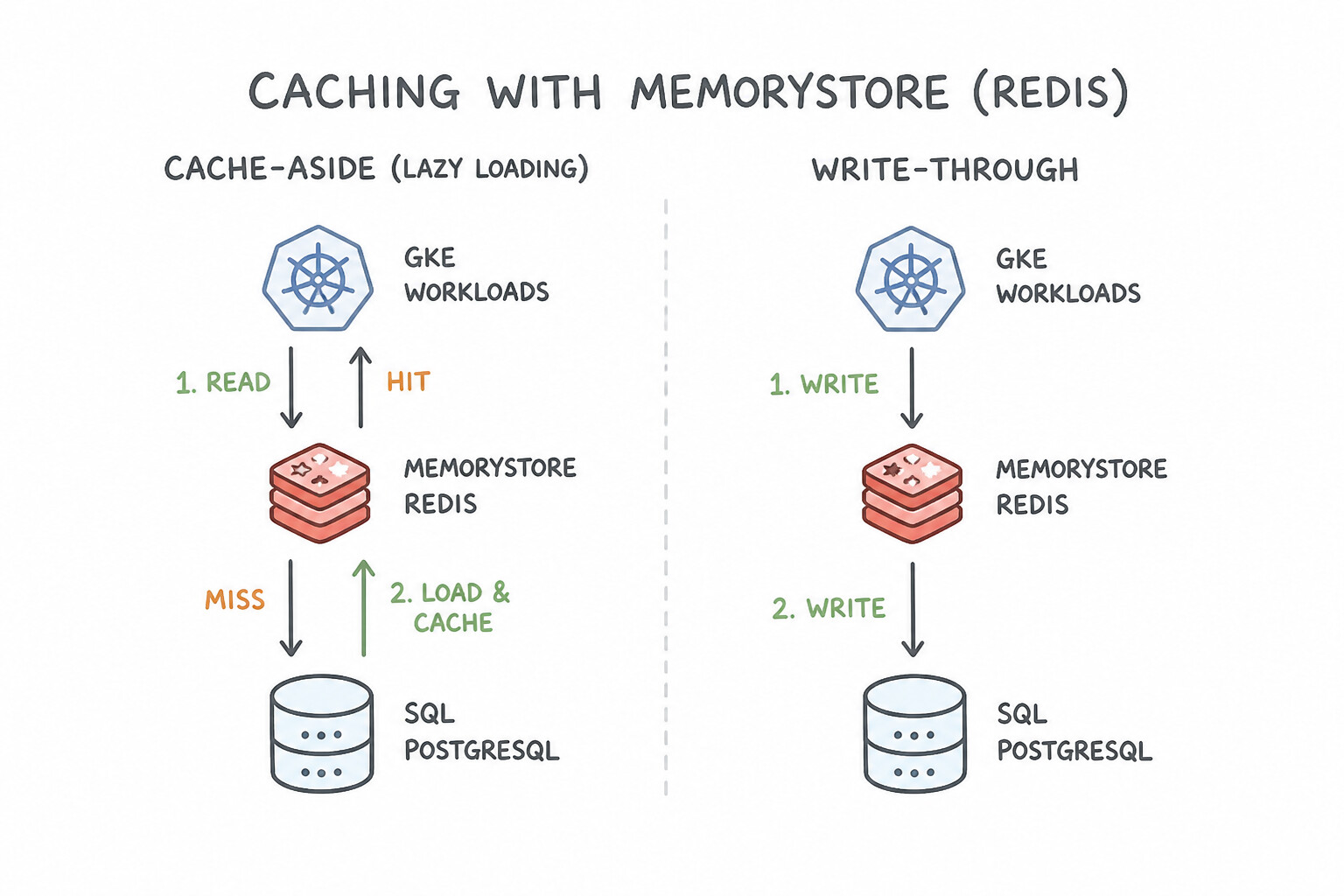
- Cache-Aside (Lazy Loading) vs. Write-Through: In Cache-Aside, the application checks Memorystore for Redis first; on a cache miss, it queries the database, populates Redis with a TTL (Time-To-Live), and returns the data. In Write-Through, the application updates the cache synchronously whenever it writes to the database, preventing stale reads at the cost of higher write latency.
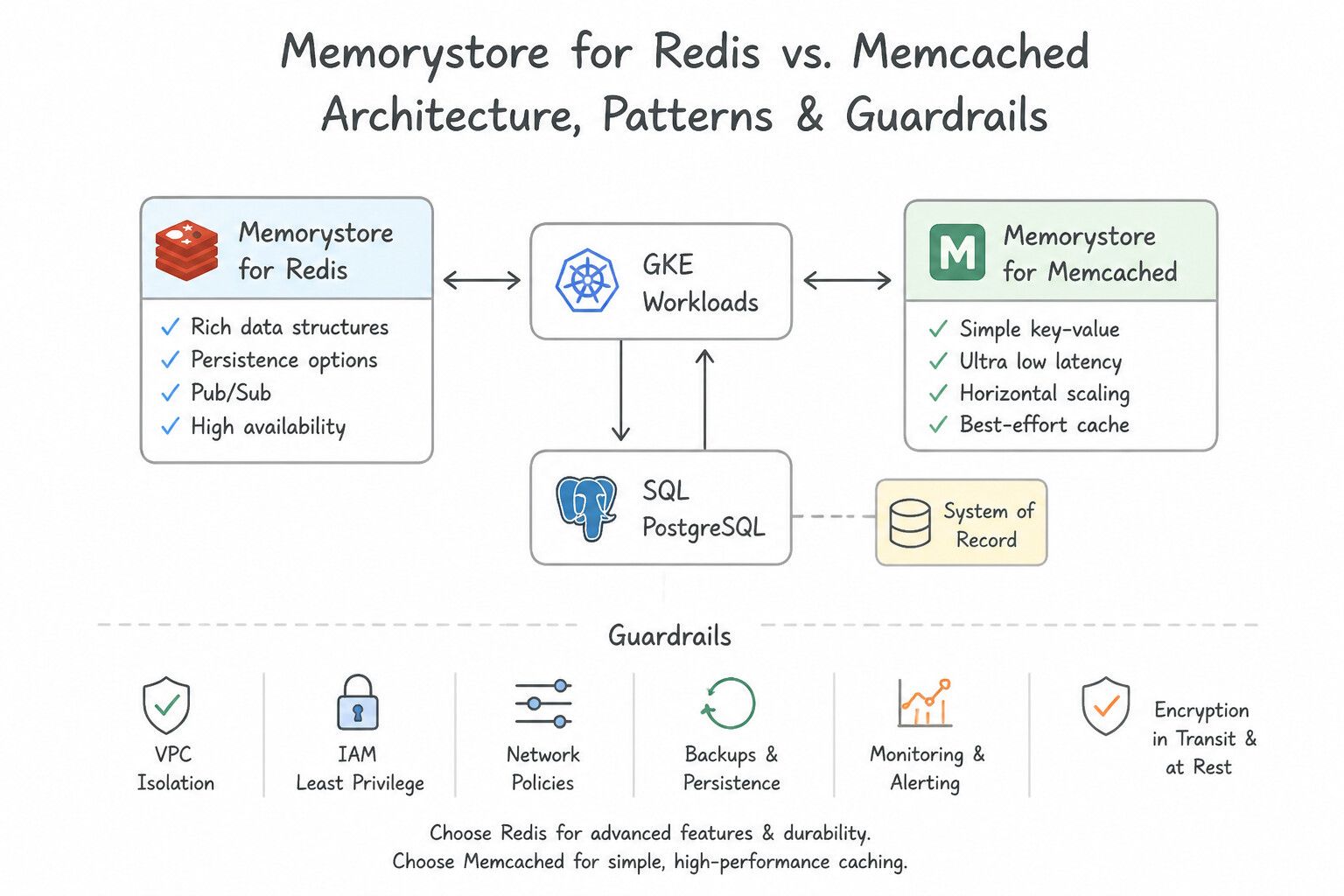
- Memorystore for Redis vs. Memcached: Choose Memorystore for Redis when you need rich data structures (sorted sets for leaderboards, hashes, pub/sub), persistence/snapshots, High Availability (Standard Tier with automatic cross-zone replica failover), or Read Replicas. Choose Memorystore for Memcached only for simple ephemeral string key-value caching needing multi-threaded horizontal shard scaling without HA failover guarantees.
- Eviction Policies (
maxmemory-policy) & Cache Stampedes: Configureallkeys-lruorvolatile-lruwhen Memorystore is used as a pure cache so Redis automatically evicts least-recently-used keys instead of returningOOMerrors when full. To prevent a Cache Stampede (Thundering Herd) when a popular key expires simultaneously for 10,000 concurrent requests, add randomized TTL jitter or use a distributed mutex lock so only one worker recomputes the cached value.
Key Implementation Patterns
- Optimizing Database Read Latency: Use Configure a Memorystore for Redis instance. Implement the cache-aside pattern in the application to store query results. Memorystore provides fast in-memory caching to store the results of complex queries, avoiding repetitive database load for static data.
- High Availability for Critical Caching: Use Provision the Memorystore for Redis instance using the Standard Tier. The Standard Tier provides high availability using a primary and replica node configuration with automatic failover. (Avoid alternative: The Basic Tier consists of a single node and does not support automatic failover or high availability.)
- Session Management for Scalable Microservices: Use Update the application to store session data in Memorystore for Redis. Memorystore provides a centralized, low-latency, in-memory store that allows all pods to access shared session data. (Avoid alternative: Session Affinity does not externalize the state; if the pod fails, the session data in local memory is lost.)
Key Takeaways (1.1e)
- Identify Static Data: If data changes infrequently but is read often, it is a prime candidate for caching.
- Cache-Aside Pattern: Use this pattern to lazily load data into the cache. It ensures only requested data is cached.
- Memorystore: Use Memorystore (Redis or Memcached) to provide sub-millisecond access to cached data.
- Avoid Over-Scaling: Before vertically scaling a database (adding CPU/RAM), check if caching can resolve the bottleneck more efficiently.
Consideration 1.1f: Creating and deploying APIs (e.g., HTTP REST, gRPC)
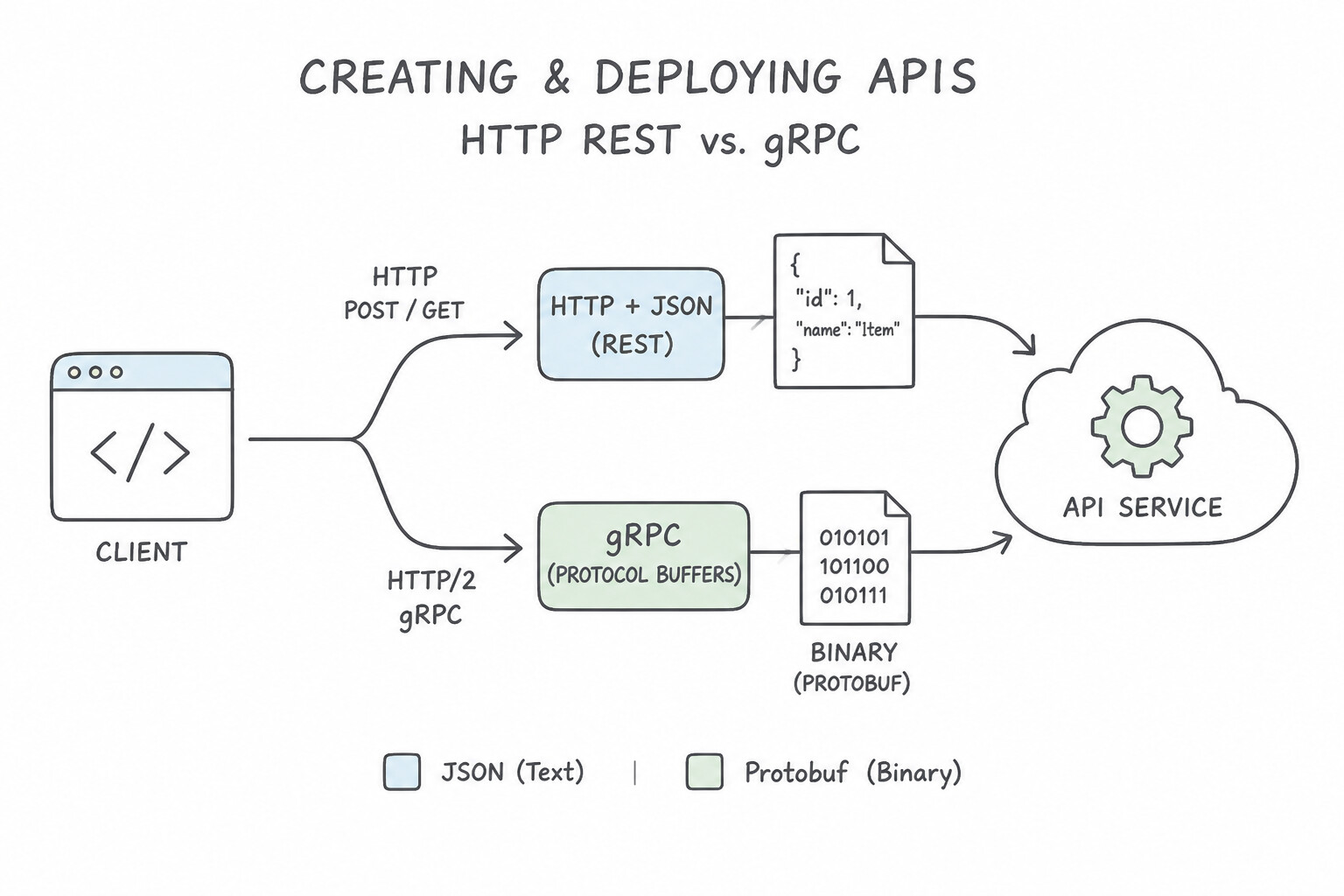
- HTTP/JSON REST vs. gRPC (Protocol Buffers over HTTP/2): Use HTTP REST (JSON) for public external APIs, browser frontends, and broad third-party partner compatibility. Use gRPC for internal, low-latency, high-throughput microservice-to-microservice communication—gRPC serializes messages into compact binary Protocol Buffers (
protobuf), enforces strict.protoschema contracts, and multiplexes requests over persistent HTTP/2 connections (supporting unary, client-streaming, server-streaming, and bidirectional streaming). - Idempotency Keys for Non-Idempotent
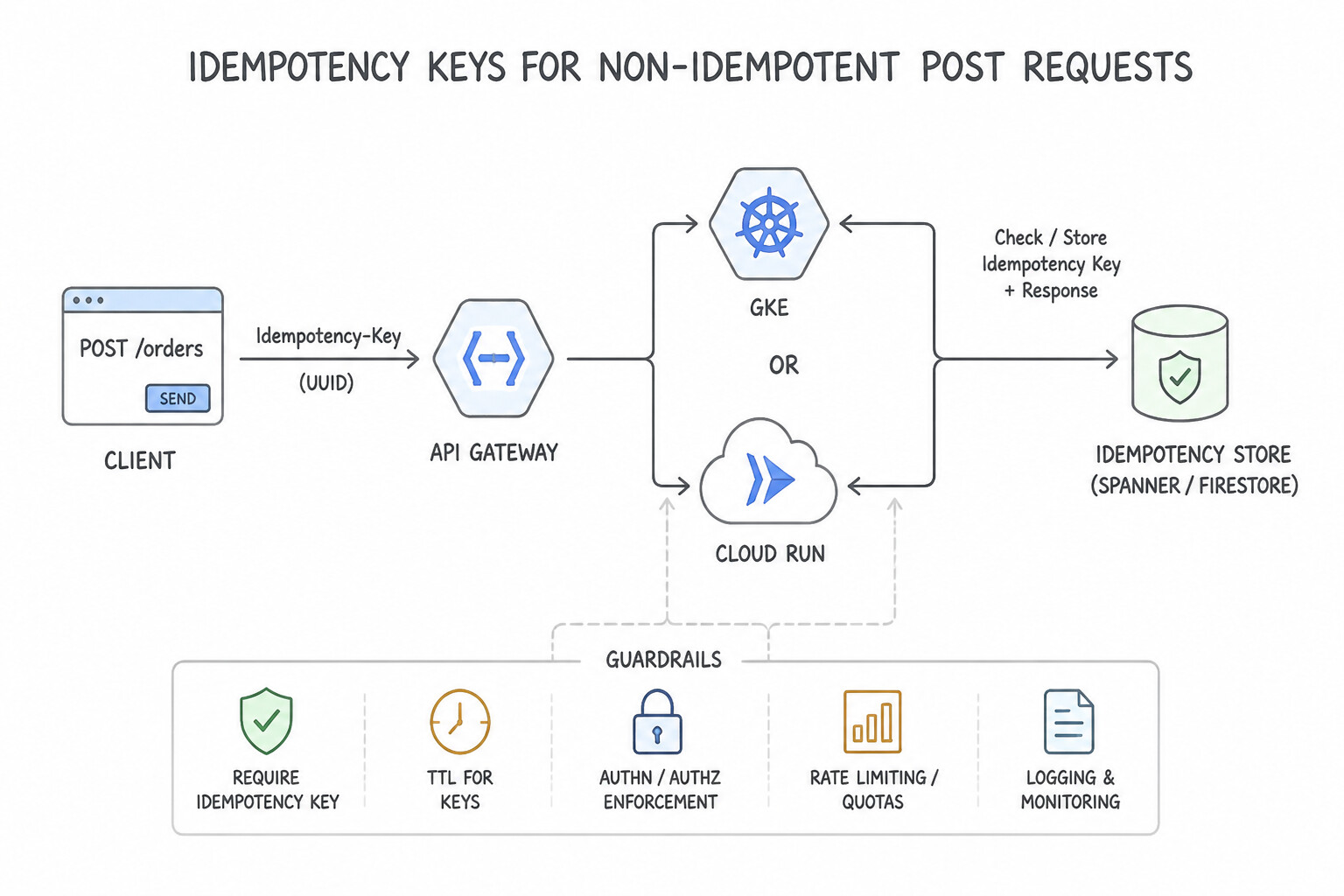
POSTRequests: WhileGET,PUT, andDELETEare naturally idempotent,POST(such as charging a credit card or placing an order) is not. Always require clients to pass a uniqueIdempotency-Keyheader (UUID) and store processed keys in a fast atomic store (Redis/Spanner/Firestore) so network retries return the cached result without double-charging. - Strict Backward Compatibility in
.proto& REST Schemas: In Protocol Buffers, never reuse or change the field tag number (e.g.,= 1,= 2) of an existing field; deprecate removed fields andreservetheir tag numbers and names. When introducing breaking changes to a public REST API, publish a new major version (/v2/orders) while keeping/v1/ordersactive during the deprecation window.
Key Implementation Patterns
- Choosing gRPC for High-Throughput Microservices: Use Implement the services using gRPC with Protocol Buffers to leverage binary serialization and HTTP/2 multiplexing. GRPC uses binary serialization (Protobuf) and HTTP/2, offering the low latency, high throughput, and strict typing required for this scenario.
- Unifying Serverless Backends: Use Create a Google Cloud API Gateway. Define an OpenAPI specification to route traffic to the Cloud Functions, Cloud Run, and App Engine services. API Gateway provides a unified, fully managed entry point for multiple serverless backends using OpenAPI specifications.
- Exposing gRPC Services as REST/JSON: Use Add
google.api.httpannotations to your Protocol Buffers file and deploy the configuration to Cloud Endpoints. GRPC transcoding maps HTTP/JSON to gRPC methods using annotations in the.protofile, handled automatically by Cloud Endpoints.
Key Takeaways (1.1f)
- gRPC is preferred for internal microservices requiring high performance and low latency.
- Protocol Buffers (binary) are more efficient than JSON (text) for serialization.
- REST is generally preferred for public-facing APIs due to broad client compatibility.
- Strict typing helps maintain reliability in complex distributed systems.
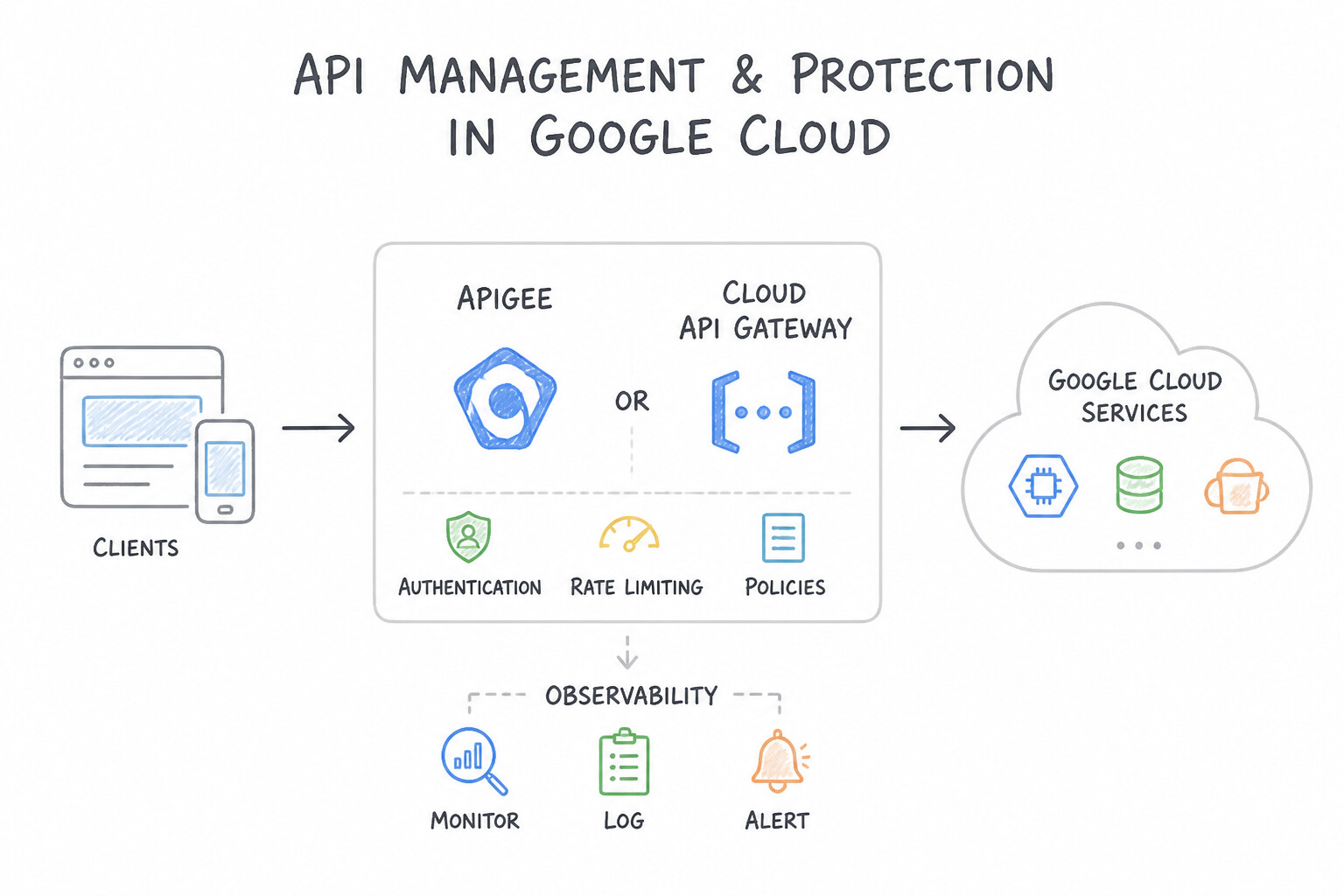
Consideration 1.1g: Using application rate limiting, authentication, and observability (e.g., Apigee, Cloud API Gateway)
- Apigee vs. Cloud API Gateway vs. Cloud Endpoints:
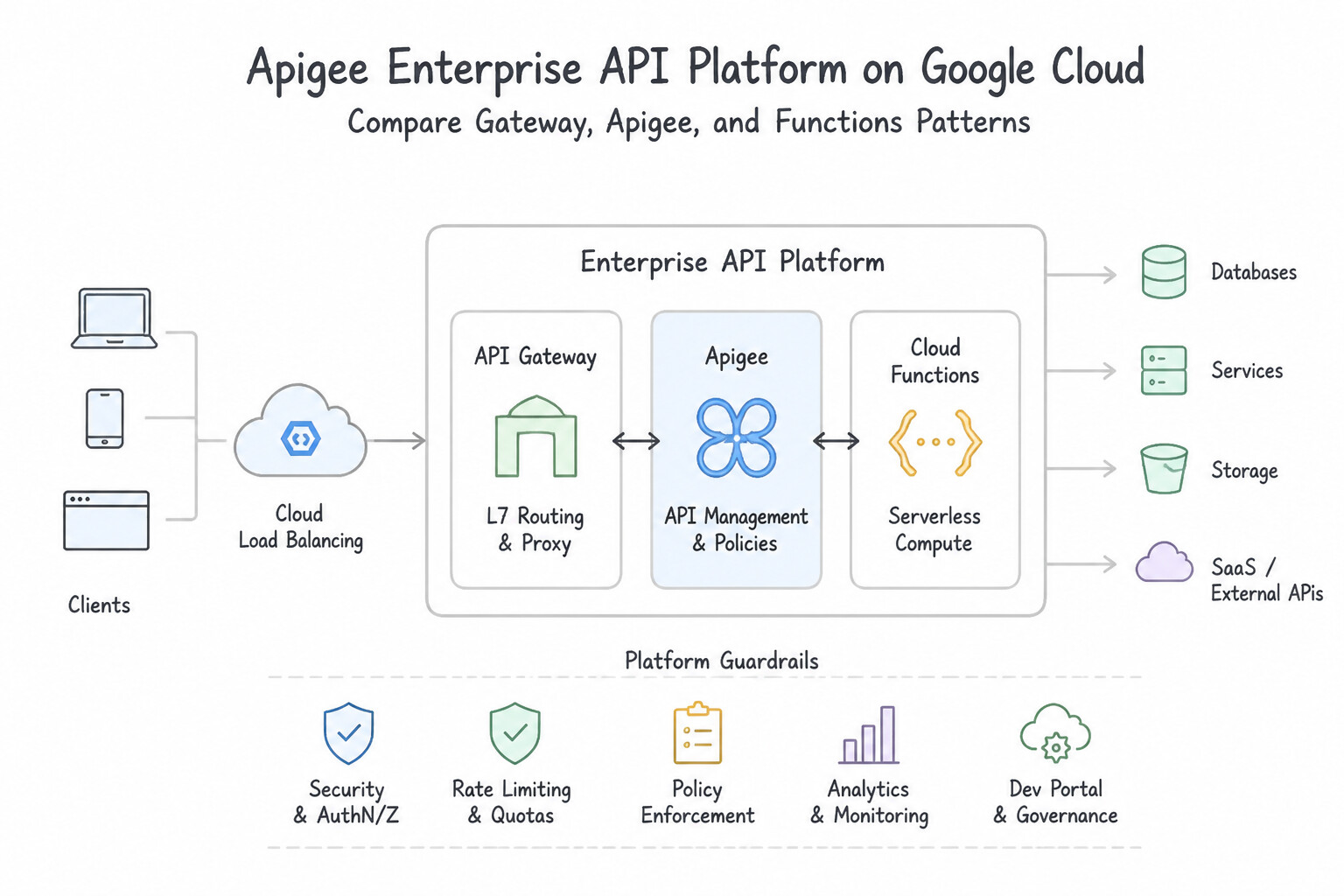
- Apigee: Enterprise API platform for large-scale API products, developer portals, monetization, complex policy pipelines (XML-to-JSON mediation, OAuth 2.0 token issuance), and granular traffic management (Spike Arrest vs. Quota).
- Cloud API Gateway: Fully managed, serverless gateway ideal for securing and routing OpenAPI requests to Cloud Run, Cloud Functions, and App Engine without managing infrastructure.
- Cloud Endpoints (ESPv2): Lightweight Envoy-based sidecar/proxy ideal for gRPC-to-JSON transcoding and high-performance API validation on GKE or Cloud Run.
- Apigee
Spike Arrestvs.QuotaPolicy (Classic common pitfalls!): Spike Arrestprotects backend infrastructure against sudden traffic bursts by smoothing traffic into tiny sub-second intervals (e.g.,30pm= 1 request allowed every 2 seconds, or2000 millis). It is not a billing counter.Quotaenforces long-term business/monetization limits per developer app or tier (e.g.,10,000 requests per monthor1,000 per day).- Edge Authentication Offloading: Always validate JWTs / OAuth 2.0 tokens and API keys at the API Gateway or Apigee edge using a
VerifyJWTpolicy cached against the identity provider's public JWKS endpoint, rejecting unauthenticated requests before they consume backend compute.
Key Implementation Patterns
- Choosing Between API Gateway and Apigee: Use Configure API Gateway to secure and route the APIs. API Gateway is a fully managed, serverless solution that supports API keys and routing for Cloud Functions and Cloud Run, fitting the cost and feature requirements perfectly.
- Implementing Spike Arrests: Use Configure a Spike Arrest policy to throttle the rate of traffic flow. Spike Arrest policies smooth out traffic spikes by limiting the rate of requests (e.g., per second) to protect backend infrastructure. (Avoid alternative: Quota policies limit the total number of calls over a long period (like a day) but do not prevent sudden bursts or smooth traffic.)
Key Takeaways (1.1g)
- Use API Gateway for serverless, low-cost, and simple API management needs (auth, routing, quotas).
- Use Apigee for enterprise-scale API management requiring monetization, developer portals, or complex transformations.
- Avoid managing your own proxies (like NGINX on VMs) when a managed service can fulfill the requirement.
- Spike Arrest is for infrastructure protection; it smooths traffic by limiting the rate (e.g., requests per second).
Consideration 1.1h: Integrating applications using asynchronous or event-driven approaches (e.g., Eventarc, Pub/Sub)
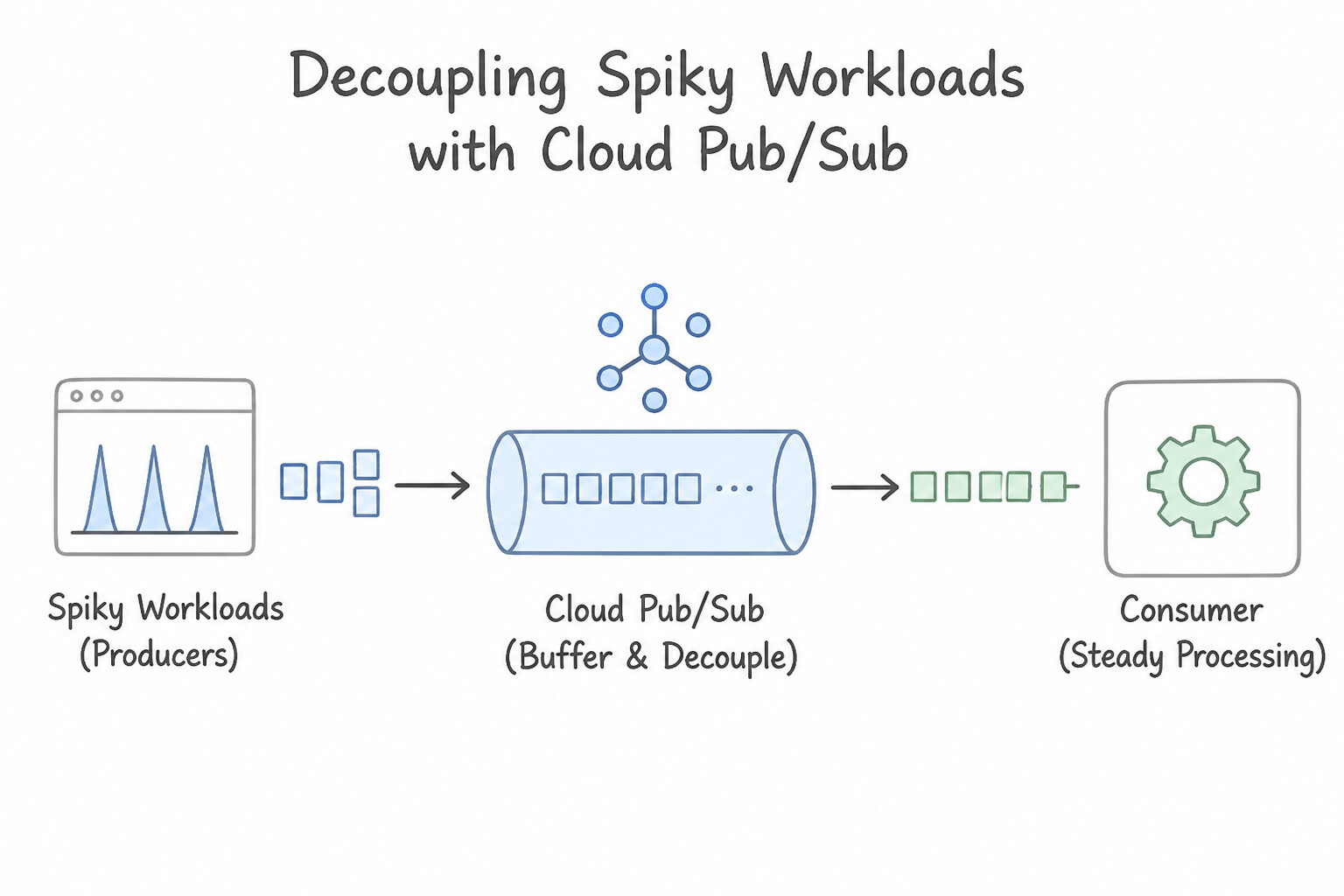
- Decoupling Spiky Workloads with Cloud Pub/Sub: When a flash sale or IoT burst overwhelms a relational database, decouple the frontend from the database by publishing events to a Cloud Pub/Sub topic and using a worker service to pull/process messages at a sustainable pace.
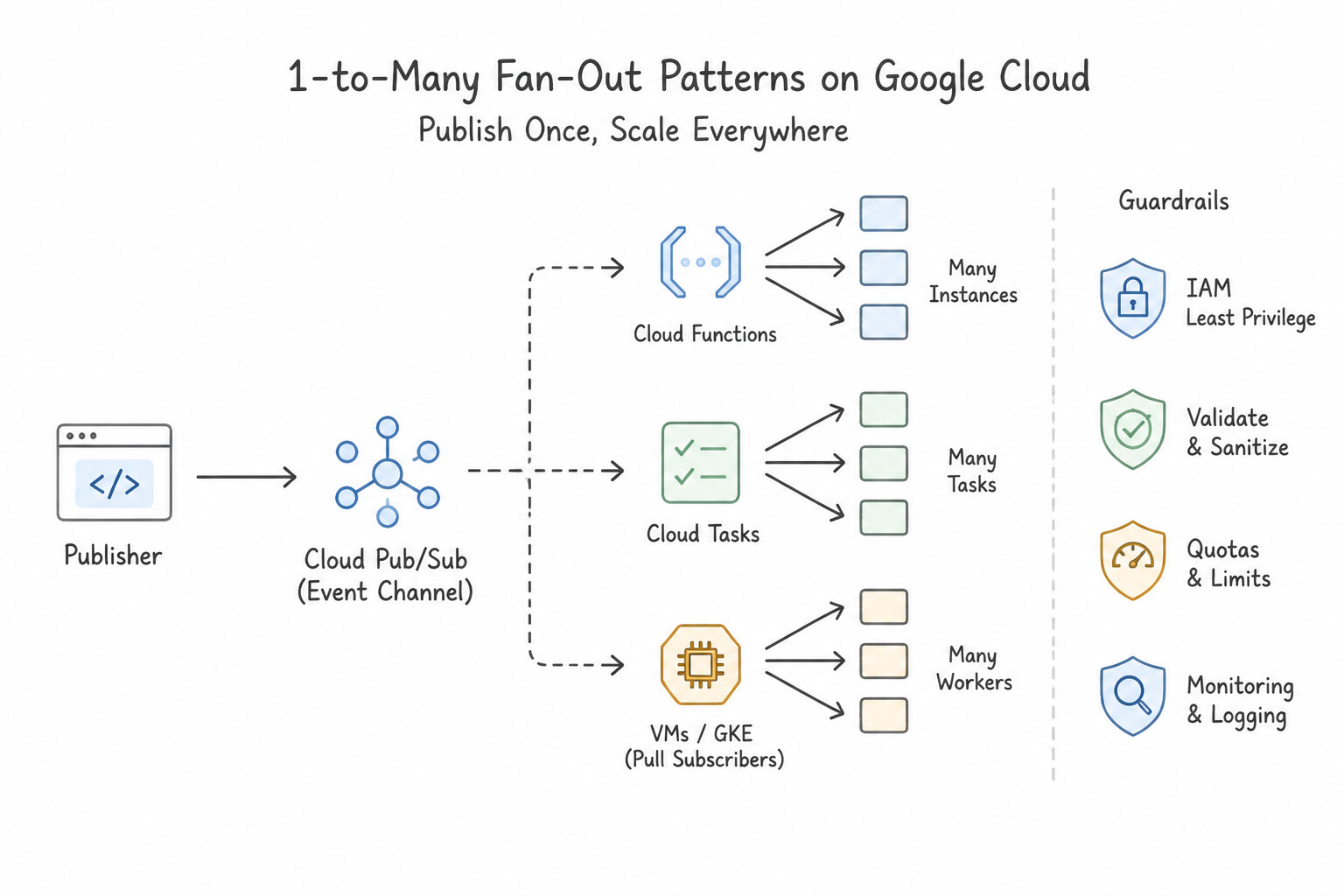
- 1-to-Many Fan-Out Pattern: To have a single event (e.g.,
OrderPlaced) trigger independent downstream microservices (Inventory, Billing, Fraud, Shipping), publish once to one Pub/Sub Topic and attach separate Subscriptions (one per microservice). Every subscription receives its own copy of every message. - Handling Poison Pills with Dead-Letter Topics (DLTs): If a malformed message causes a subscriber to crash repeatedly, Pub/Sub will redeliver it indefinitely until retention expires. Configure a Dead-Letter Topic (DLT) with
maxDeliveryAttempts(e.g.,5) on the subscription—and ensure the Pub/Sub Service Agent hasroles/pubsub.publisheron the DLT androles/pubsub.subscriberon the source subscription! - Duplicate Delivery & Ordering Keys: Pub/Sub guarantees at-least-once delivery, meaning subscribers must be idempotent. When strict per-entity sequence matters (e.g.,
AccountCreatedbeforeAccountUpdatedfor the same user), set an Ordering Key (such asuser_id)—never a single global key, which would bottleneck all throughput to a single serial thread.
Key Implementation Patterns
- Handling One-to-Many Event Distribution: Use Create one Pub/Sub topic. Create three separate subscriptions to the topic, one for each service. Using one topic with multiple subscriptions (Fan-out) ensures every service receives its own copy of the message for independent processing.
- Rate Limiting External API Calls: Use Create a Cloud Tasks queue. Configure the maximum dispatches per minute on the queue to match the third-party limit. Enqueue notification requests to this queue. Cloud Tasks provides built-in rate limiting features to control the flow of requests to downstream services.
- Enforcing Message Sequence in Async Flows: Use Publish messages to Pub/Sub using the account ID as the ordering key and enable message ordering on the subscription. Pub/Sub ordering keys ensure that messages sharing the same key are delivered in the order they were published.
Key Takeaways (1.1h)
- Fan-out Pattern: Use one Pub/Sub topic with multiple subscriptions when multiple independent systems need to react to the same event.
- Decoupling: Asynchronous messaging allows services to operate without waiting for each other, improving reliability and latency.
- Subscriptions: A subscription receives every message from its topic. Sharing a subscription distributes messages (load balancing), while separate subscriptions replicate messages (fan-out).
- Use Cloud Tasks when you need to explicitly control the rate of execution or dispatch rate to a target handler.
Consideration 1.1i: Optimizing for cost and resource usage
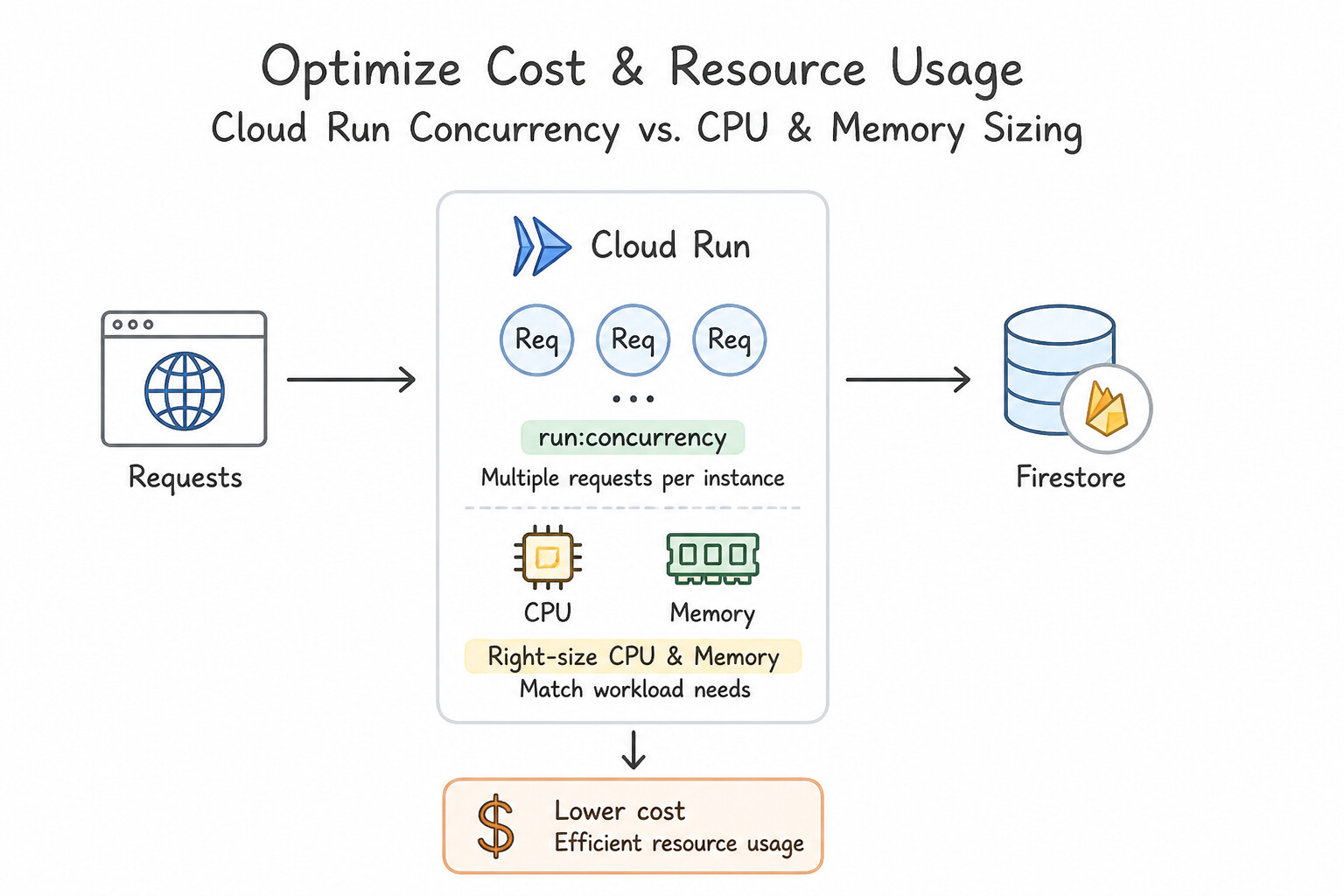
- Cloud Run Concurrency vs. CPU/Memory Sizing: If a Cloud Run service is I/O-bound (waiting on external REST APIs or DB queries) and written in an async/multi-threaded runtime, increase
--concurrency(e.g.,80to250) so fewer container instances handle more concurrent requests—slashing cost. Conversely, if a container is CPU-bound, single-threaded, or memory-heavy per request, lower--concurrency(e.g., to1–10) and right-size CPU/memory. - Cloud Run CPU Allocation (
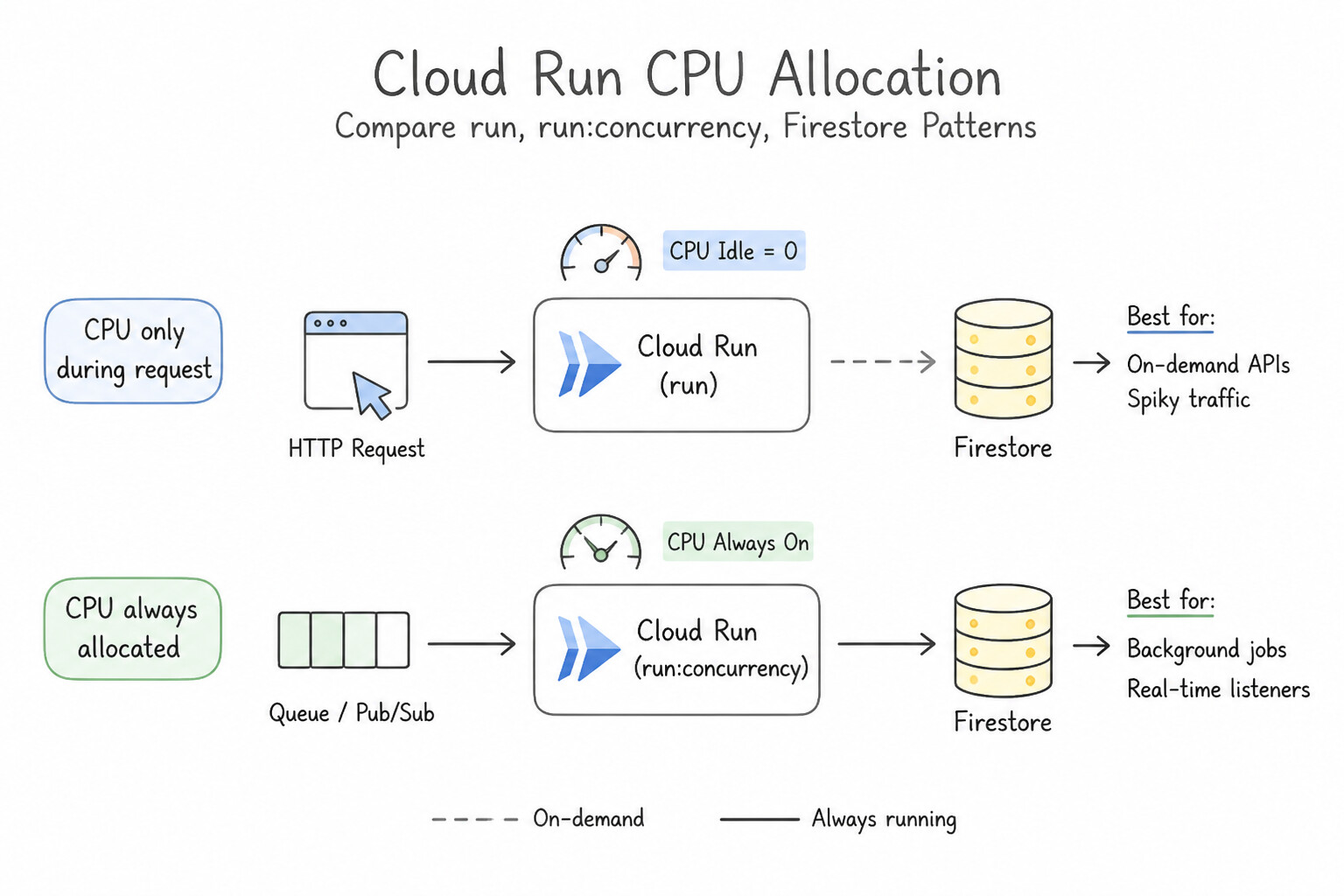
CPU only during requestvs.CPU always allocated): By default, Cloud Run throttles CPU to near zero the instant an HTTP response is returned (CPU allocated only during request processing), which is cheapest for synchronous request-response APIs. If your container spawns background threads or async work after returning the HTTP response, you must enable CPU always allocated (or better yet, offload the background work to Cloud Tasks / Pub/Sub). - Eliminating Cold Starts Cost-Effectively: Set
--min-instances(e.g.,1or2) on latency-critical production services to keep warm instances ready, and enable Startup CPU Boost to temporarily provide extra CPU only during container initialization without paying for larger CPUs all day. - GKE & Compute Engine Cost Optimization: Use Spot VMs (or Spot Node Pools in GKE) for fault-tolerant, stateless batch jobs to save 60–91%, and purchase Committed Use Discounts (CUDs) for predictable steady-state baseline compute.
Key Implementation Patterns
- Cloud Run Concurrency Tuning: Use Increase the maximum concurrent requests per instance setting. Concurrency allows a single container instance to process multiple requests at the same time, which is ideal for I/O bound workloads. (Avoid alternative: Adding more CPU does not help I/O bound applications handle multiple simultaneous requests if concurrency is not configured.)
- Firestore Read Optimization: Use Create a new collection that stores only the summary data for each post. Create a separate collection with smaller documents to reduce bandwidth and latency for the list view. (Avoid alternative: Firestore mobile client SDKs do not support field projection; they always fetch the full document.)
- GKE Spot Instances for Batch Jobs: Use Add a node pool to the cluster that uses Spot VMs. Configure the batch workload to run on these nodes. Spot VMs offer significant discounts for fault-tolerant workloads that can handle interruptions. (Avoid alternative: Migrating to a single VM loses orchestration benefits and does not utilize the specific cost-saving pricing model (Spot) appropriate for fault-tolerant jobs.)
Key Takeaways (1.1i)
- Cloud Run concurrency allows multiple requests to share a single container instance.
- Increasing concurrency is highly effective for I/O bound applications to reduce costs.
- Decreasing max instances limits scale but does not improve resource efficiency.
- Firestore Client SDKs read full documents; they cannot retrieve partial fields.
Consideration 1.1j: Understanding data replication to support zonal and regional failover models
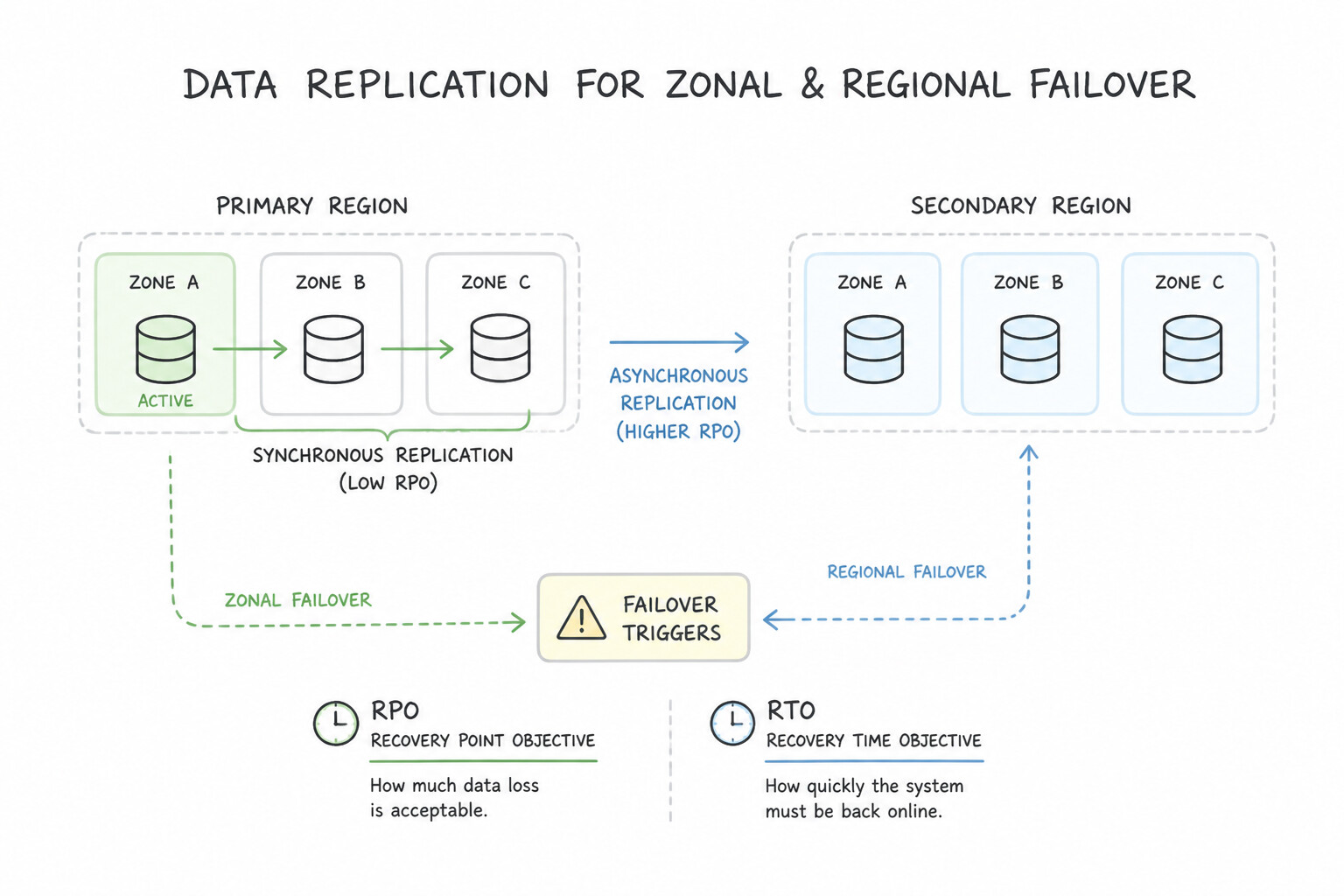
- RPO (Recovery Point Objective) vs. RTO (Recovery Time Objective): RPO measures how much data you can afford to lose (time since last replicated write), which is governed by synchronous (
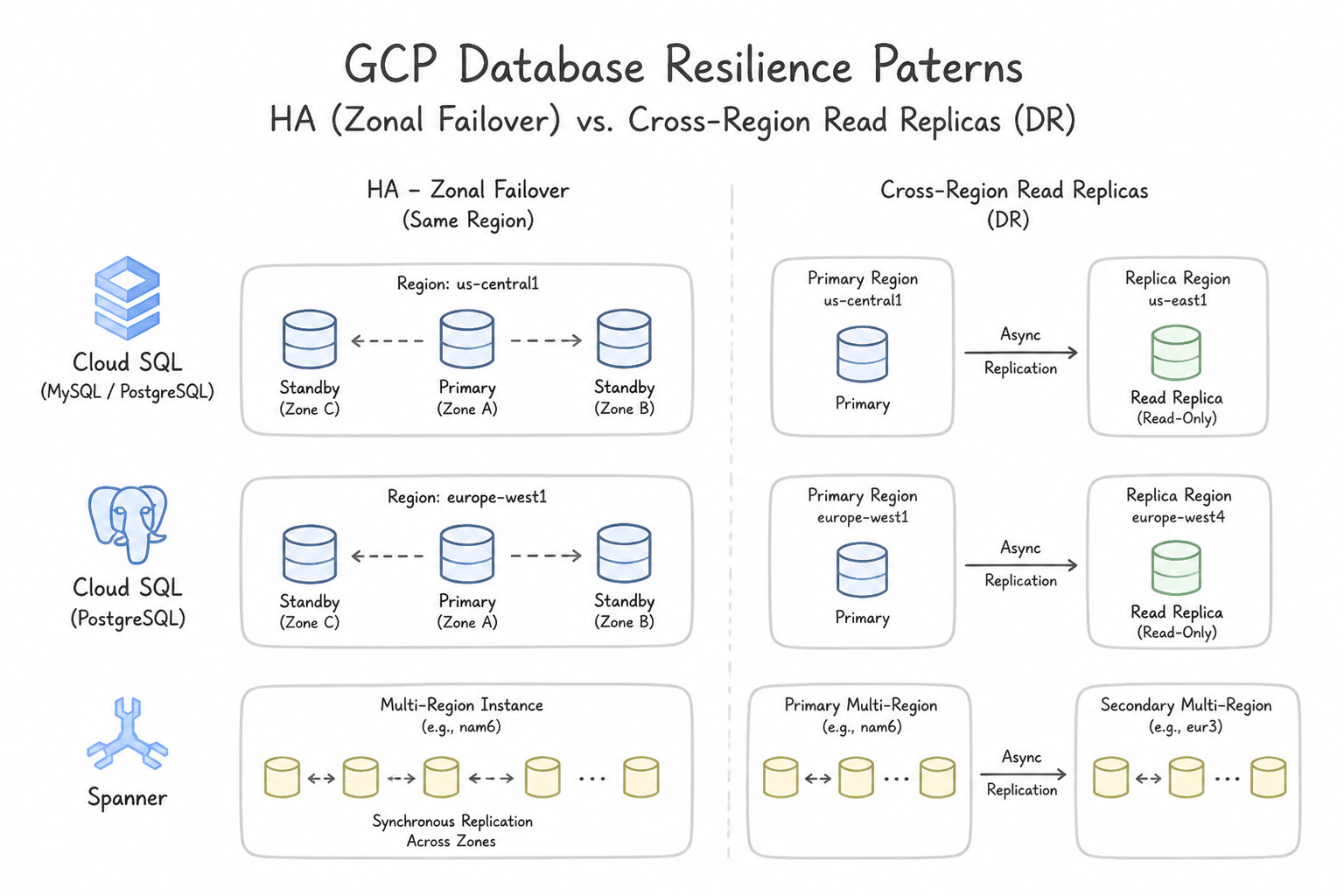
RPO = 0) vs. asynchronous (RPO > 0) replication. RTO measures how long it takes to restore service after an outage. - Cloud SQL High Availability (Zonal Failover) vs. Cross-Region Read Replicas (Regional DR):
- Cloud SQL HA (Regional Instance): Uses synchronous block-level replication between a primary zone and a standby zone in the same region. Survives a zonal failure automatically with
RPO = 0, but does not offload read traffic and does not survive a full region outage. - Cloud SQL Cross-Region Read Replica: Uses asynchronous replication to a different region. Offloads heavy read queries and can be promoted to a standalone primary if the source region fails (with a small non-zero RPO if the primary crashed before flushing its binlog/WAL).
- Multi-Region Active-Active with Zero Data Loss (
RPO = 0): When a global financial or inventory workload requires automatic regional failover with zero data loss (RPO = 0) and near-zero RTO across continents, choose Cloud Spanner (Multi-Region configuration), which uses synchronous Paxos quorum replication across regions.
Key Implementation Patterns
- Cloud SQL High Availability Configuration: Use Enable the High Availability (HA) configuration for the Cloud SQL instance. High Availability (HA) creates a synchronous standby instance in a secondary zone to handle automatic failover. (Avoid alternative: Read replicas use asynchronous replication for scaling reads and do not provide automatic failover by default.)
- Cloud Spanner Multi-Region Consistency: Use Create a Cloud Spanner instance with a multi-region configuration. Multi-region configurations replicate data across regions, providing 99.999% availability and resilience against region failures. (Avoid alternative: Regional configurations only replicate within one region and offer 99.99% availability, failing the region loss requirement.)
Key Takeaways (1.1j)
- High Availability (HA) in Cloud SQL provides redundancy across zones within a region.
- HA uses synchronous replication to a standby instance to ensure zero data loss during a failover.
- Read replicas use asynchronous replication and are primarily for scaling read operations, not for automatic HA.
- Backups are for point-in-time recovery, not for maintaining uptime during a zonal outage.
Consideration 1.1k: Using traffic splitting strategies (e.g., gradual rollouts, rollbacks, A/B testing) on a new service on Cloud Run or GKE
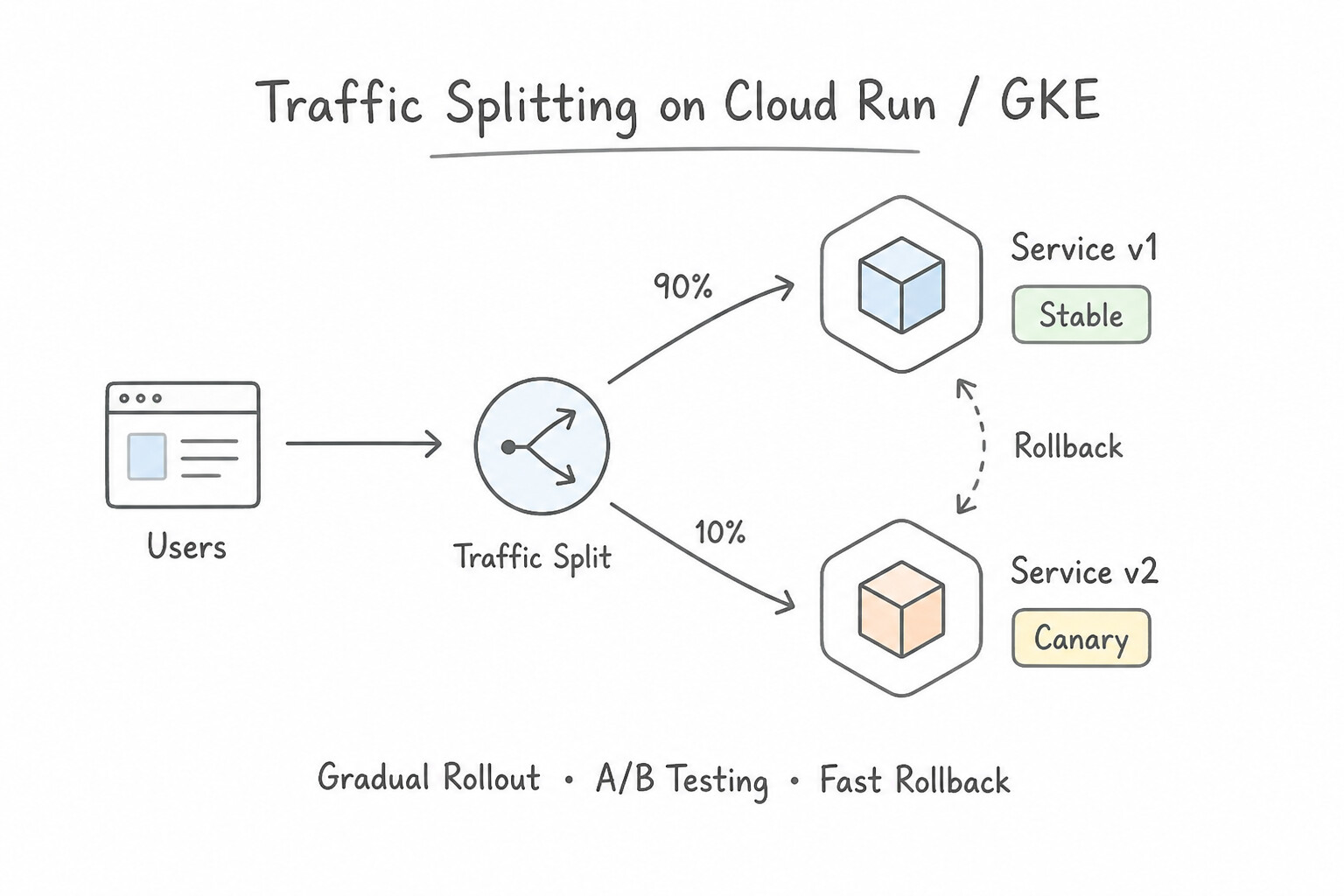
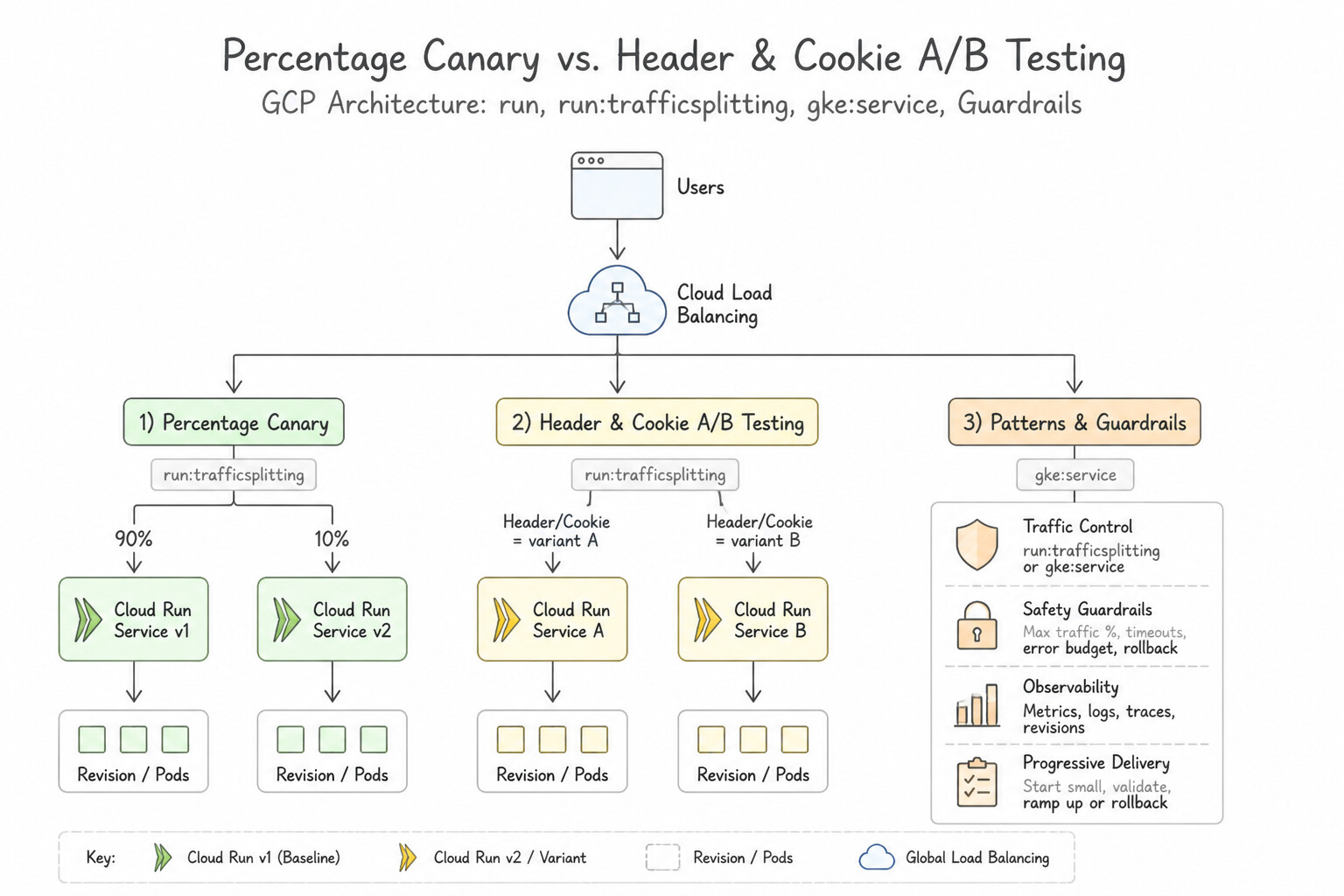
- Cloud Run Revision Traffic Splitting: Every deployment to Cloud Run creates an immutable Revision. To perform a canary rollout, deploy with
--no-traffic(and optionally a--tag canaryfor a dedicated test URLhttps://canary---service-xyz.a.run.app), verify the revision, and then rungcloud run services update-traffic --to-revisions=REV_NEW=5,REV_OLD=95. If error rates spike, shift100%back toREV_OLDfor an instant zero-build rollback. - Percentage Canary vs. Header/Cookie A/B Testing: Native Cloud Run traffic splitting uses random percentage weights across revisions. When an A/B test or dark launch requires routing only specific beta users (e.g., requests containing header
X-Beta-User: trueor a specific cookie) to the canary revision, place a Global External Application Load Balancer (with advanced URL map header matching) or Cloud Service Mesh (VirtualService) in front of the revisions/deployments. - GKE Canary & Blue-Green Deployments: For native Kubernetes Blue-Green deployments, run two separate
Deploymentobjects (version: blueandversion: green) and switch traffic atomically by updating theServicelabel selector frombluetogreen. For fine-grained percentage traffic splitting (such as1%canary without running 100 pods), use Cloud Service Mesh or the GKE Gateway API (HTTPRouteweights).
Key Implementation Patterns
- Cloud Run Canary Deployment: Use Use the gcloud run services update-traffic command. Assign 5% of the traffic to the new revision and 95% to the current revision. Cloud Run natively supports traffic splitting between revisions, allowing you to assign specific percentages to different versions for gradual rollouts.
- GKE Blue/Green Deployment with Service Selectors: Use Update the selector field in the Service manifest to match the labels of the Green pods. Kubernetes Services route traffic based on label selectors; changing the selector instantly redirects traffic to the new set of pods.
- Instant Rollback on Cloud Run: Use Update the traffic configuration to route 100% of traffic to the previous revision. Routing traffic to the previous immutable revision is the fastest way to rollback changes. (Avoid alternative: Redeploying takes time to spin up new resources, making it slower than a traffic update.)
Key Takeaways (1.1k)
- Cloud Run Services consist of immutable Revisions.
- Traffic splitting is a native Cloud Run feature used for gradual rollouts.
- Use
gcloud run services update-trafficto modify traffic allocation without redeploying.- Revisions can be tagged to create dedicated URLs for testing without affecting main traffic.
Consideration 1.1l: Orchestrating application services with Workflows, Eventarc, Cloud Tasks, and Cloud Scheduler
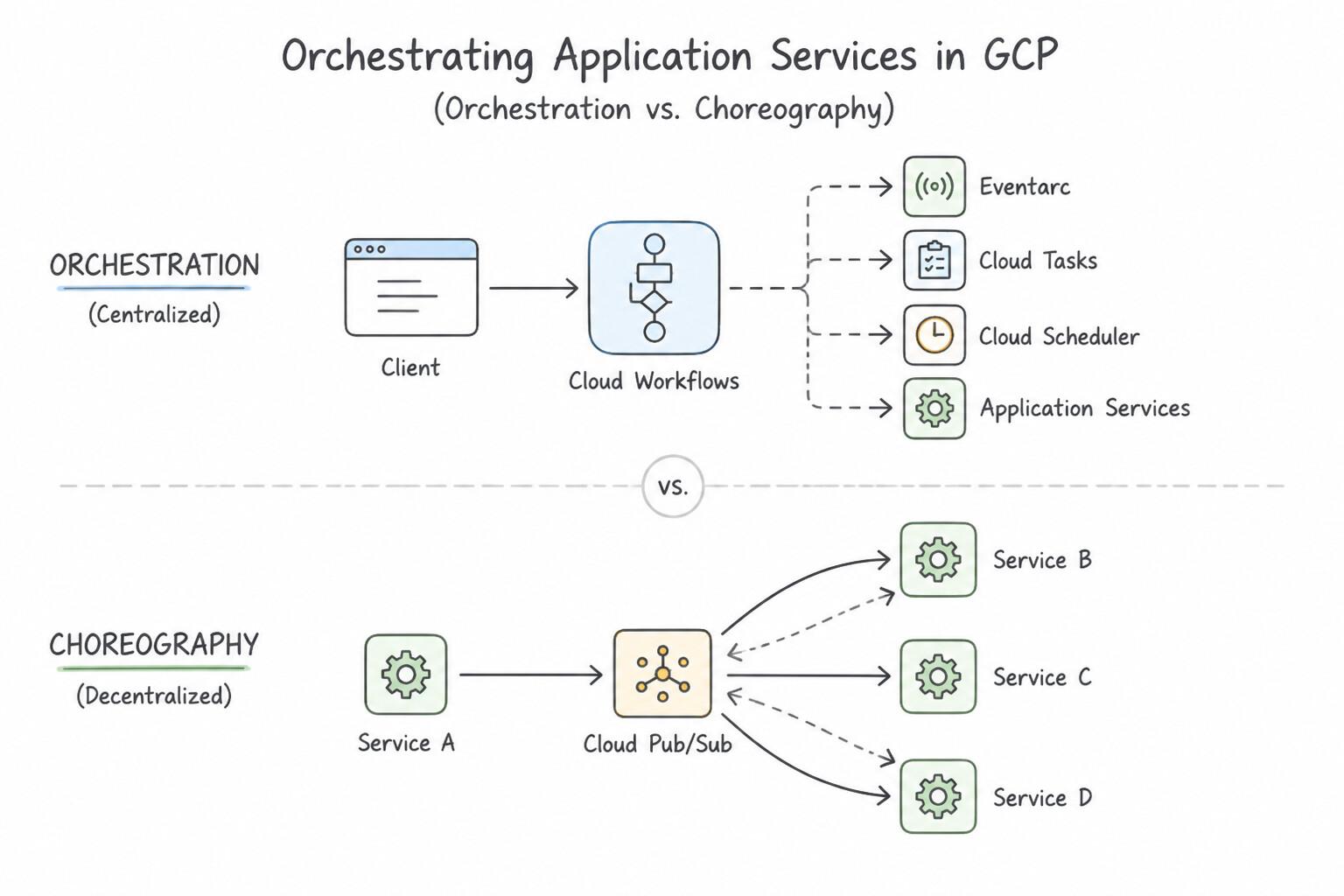
- Orchestration (
Cloud Workflows) vs. Choreography (Pub/Sub/Eventarc): - Choose Cloud Workflows when a multi-step business process (such as Charge Card → Reserve Inventory → Create Shipment, with Saga compensating rollbacks if step 3 fails) requires a centralized state machine, explicit execution order, conditional branching, and step-level retry policies.
- Choose Pub/Sub or Eventarc when services should react independently to domain events without a central coordinator knowing all downstream consumers.
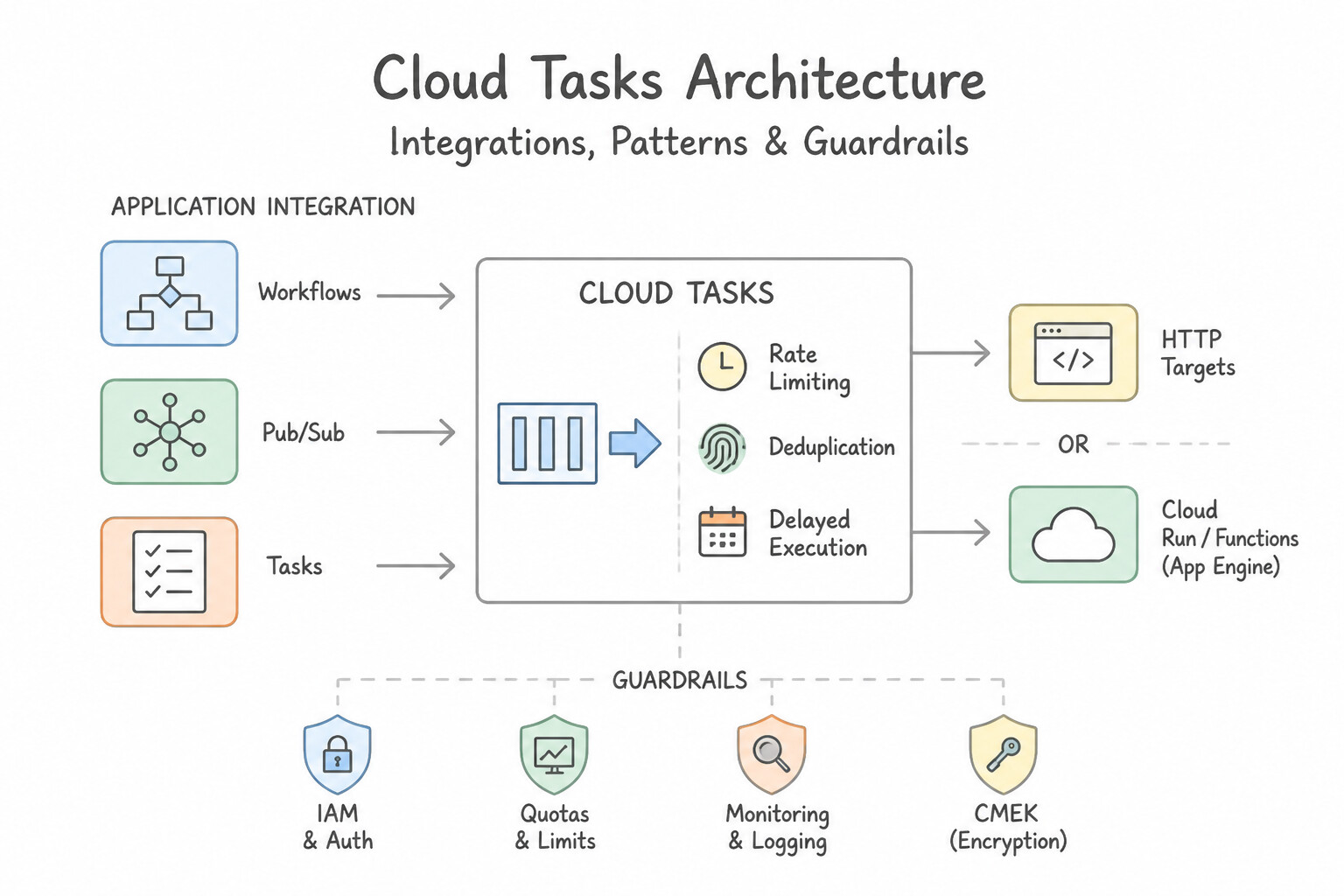
- Cloud Tasks (Rate Limiting, Deduplication & Delayed Execution): Choose Cloud Tasks when a producer service must enqueue work items to be delivered to a specific HTTP handler (e.g., on Cloud Run) with strict rate limiting (
maxDispatchesPerSecond,maxConcurrentDispatches) to avoid overwhelming a rate-limited third-party API or legacy database, or when tasks must be scheduled for a specific future timestamp (scheduleTime, e.g., "Send reminder in 24 hours"). - Cloud Scheduler (Managed Cron): Choose Cloud Scheduler for recurring time-based schedules (
0 2 * * *) that trigger an HTTP endpoint, publish to a Pub/Sub topic, or invoke a Cloud Workflow on a fixed cron cadence.
Key Implementation Patterns
- Orchestrating Complex Transactions with State: Use Create a Cloud Workflow to define the step sequence and exception handling logic. Workflows is designed for stateful orchestration and can natively handle sequences, errors, and compensating transactions (rollbacks). (Avoid alternative: Cloud Pub/Sub is stateless and designed for decoupling, making it difficult to orchestrate complex failure logic without custom code.)
- Event-Driven Processing from Storage: Use Create an Eventarc trigger that routes the
google.cloud.storage.object.v1.finalizedevent to the Cloud Run service. Eventarc connects Cloud Storage events to Cloud Run using the standard CloudEvents format. (Avoid alternative: Cloud Scheduler is for time-based jobs, not immediate event-driven processing.) - Rate Limiting External API Calls: Use Create a Cloud Tasks queue and set the max_dispatches_per_second configuration to 5. Enqueue the sync requests as tasks. Cloud Tasks provides built-in rate limiting capabilities for queues, allowing you to throttle downstream traffic specifically.
Key Takeaways (1.1l)
- Workflows is for orchestrating sequences of services and handling complex logic like retries, jumps, and error handling centrally.
- Pub/Sub is for decoupling asynchronous events (Choreography) and does not maintain state.
- Cloud Tasks is for asynchronous task execution and rate limiting but lacks complex flow control.
- Cloud Scheduler is for time-based triggers (cron jobs).
Quick Decision Cheat Sheet (Subsection 1.1)
If the Scenario Requires... | Choose This Google Cloud Pattern | Avoid This Common Mistake |
|---|---|---|
"Legacy app requires custom Linux kernel module or Windows registry access" | Compute Engine (Regional MIG) | Cloud Run or GKE Autopilot (shared kernel / restricted node access) |
"Logs written to /var/log/app.log disappear when Cloud Run scales down" | Refactor app to write structured JSON logs to stdout and stderr | Mounting a Persistent Disk to Cloud Run (unsupported) |
"WebSocket connections behind HTTP(S) Load Balancer drop after 30 seconds" | Increase the Backend Service timeout (e.g., to 3600s or 86400s) | Increasing the Health Check timeout or switching to TCP Load Balancer |
"Users logged out randomly as Cloud Run or GKE scales horizontally" | Externalize session state to Memorystore for Redis or Firestore | Storing sessions on local container filesystem or relying solely on IP affinity |
"Internal microservices need lowest latency, strict schema, and bidirectional streaming" | gRPC with Protocol Buffers ( protobuf) over HTTP/2 | Verbose JSON over HTTP/1.1 REST polling |
"Test a new Cloud Run revision via a dedicated URL before routing live user traffic" | Deploy with --no-traffic and assign a Revision Tag (--tag) | Deploying a separate Cloud Run service per commit |
"Database schema update on GKE is not backward-compatible; v1 and v2 cannot coexist" | Set GKE Deployment strategy to Recreate | Default RollingUpdate strategy (runs v1 and v2 simultaneously) |
Further Reading (Subsection 1.1)
- Choosing a Google Cloud compute option — This page provides a flowchart and comparison table to help you choose the right compute service. Note the section on Cloud Run for 'Containerized apps' and 'Scales to zero'.
- Cloud Run Pricing — Details the pay-per-use model of Cloud Run, explaining how you are billed only when your container is processing requests.
- Logging and viewing logs — Documentation explaining how Cloud Run automatically captures logs written to stdout and stderr.
- The Twelve-Factor App: Logs — Foundational methodology describing why logs should be treated as event streams.
- Rollouts, gradual rollouts, and traffic migration — Refer to the section on 'Splitting traffic between revisions' to understand how to configure percentages for gradual rollouts.
- Best practices for building containers — This article discusses 7 best practices, including the importance of packaging a single application per container and removing unnecessary tools to keep images small.
Book TOC · Previous · Chapter 1 of 7 · Next
AwesomeGCP.com Learning
The approach taken is a question-led learning approach: you explore realistic project scenarios where you need to make decisions or take actions to achieve business goals within specific constraints. Instead of passive learning, you are challenged to think and work through the options to master the Professional Cloud Developer (PCD) certification!