Book TOC · Previous · Chapter 6 of 8 · Next
Chapter 6: Managing Implementation: Deployment Strategies, Apigee API Management & Terraform IaC
Chapter Focus: Blue/Green, Canary & Rolling deployments, Apigee API gateway governance, Cloud SDK/CLI emulators, Terraform IaC state management, and Gemini Cloud Assist.
Subsection 5.1: Advising development and operation teams to ensure the successful deployment of the solution
The Big Picture
As a Principal Cloud Architect, you do not just hand over a static Visio diagram and walk away—you advise development and operations teams on how to ship, expose, test, migrate, and debug the solution in production (Section 5.1):
- Which deployment strategy (Rolling Update, Blue/Green, Canary, A/B, or Shadow/Dark Launch) meets zero-downtime and instant-rollback requirements without breaking database schema compatibility?
- When should an enterprise deploy Apigee API Management vs. Cloud Endpoints vs. API Gateway to govern, monetize, throttle, and secure external APIs?
- How do teams structure unit, integration, and load testing frameworks before a major retail holiday launch?
- How does Gemini Cloud Assist accelerate real-time root-cause analysis when a Cloud Run or GKE deployment fails with a cryptic IAM or networking error?
Consideration 5.1a: Application and infrastructure deployment
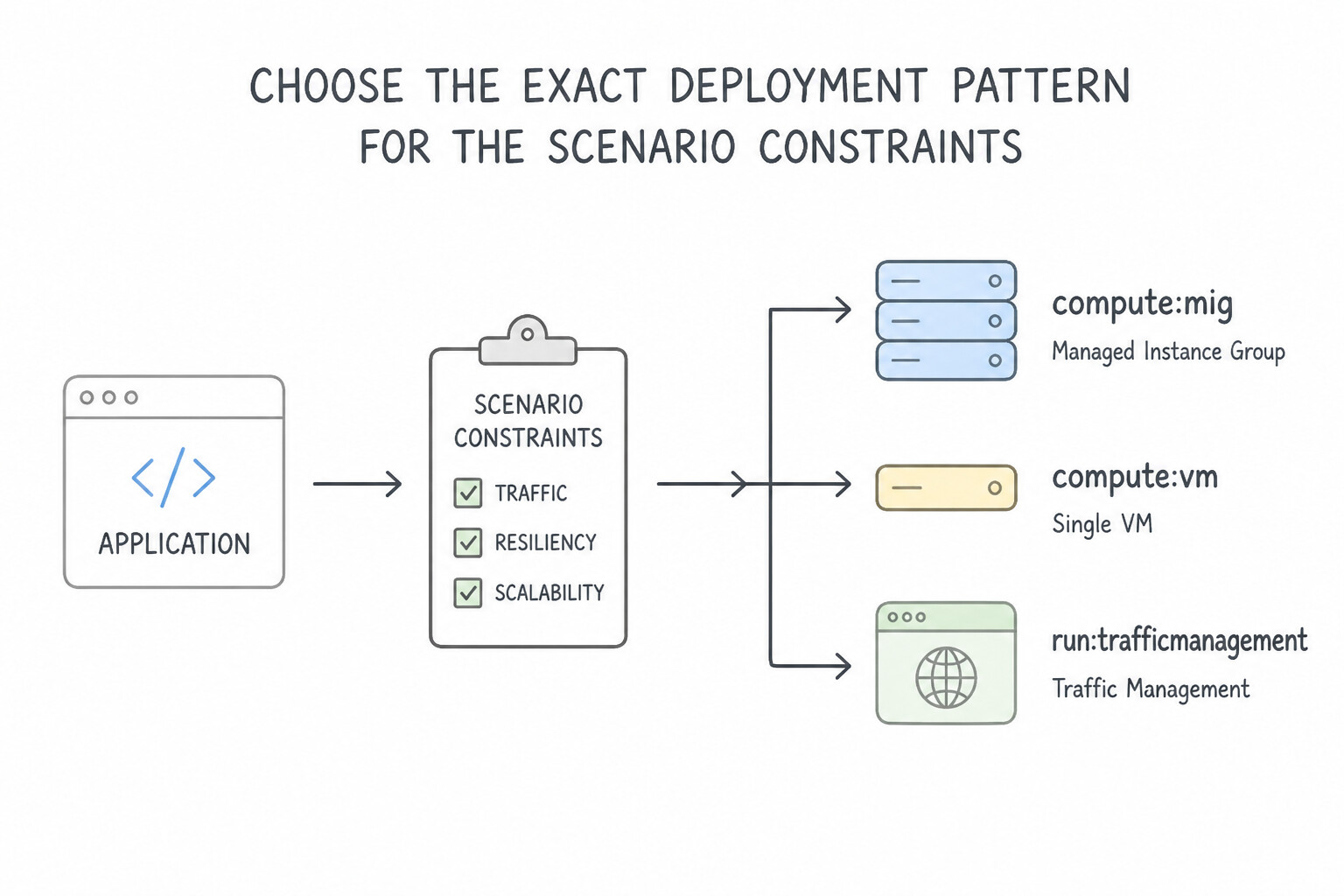
- Choose the Exact Deployment Pattern for the Scenario Constraints:
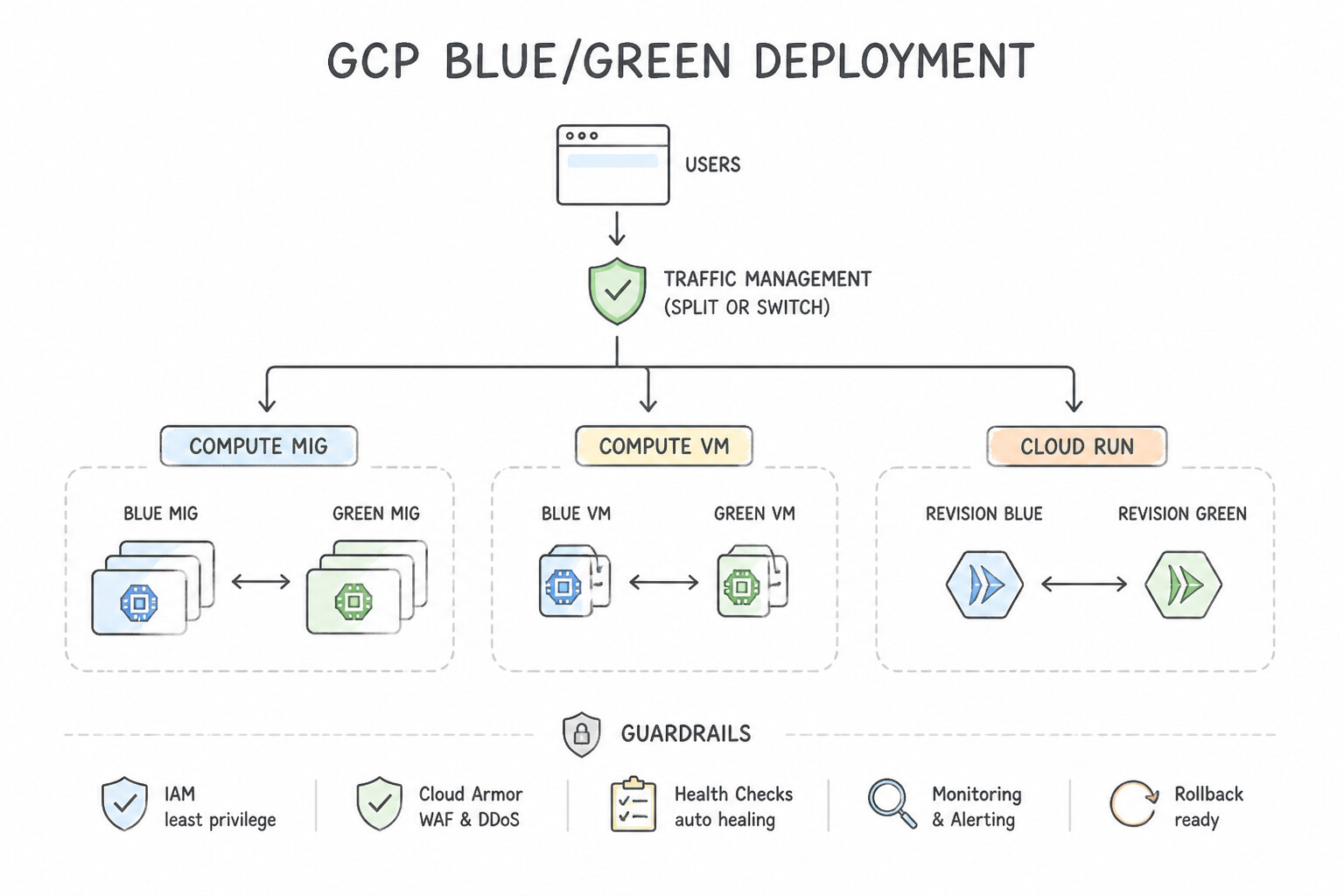
- Blue/Green Deployment: Provision a complete duplicate environment (Green) running
v2alongside the live production environment (Blue) runningv1. Run smoke tests against Green; once verified, flip 100% of traffic at the Load Balancer / GKE Service selector / Cloud Run traffic tag. Pros: Zero downtime, instant 1-second rollback ifv2fails, and zero version-mixing whenv1andv2cannot run side-by-side. Cons: Requires $2\times$ compute capacity during cutover. - Canary Deployment: Route a small fraction ($1\%\text{–}5\%) of live production traffic to @@CODE0@@ while @@ESCAPEDDOLLAR@@95%–99% stays on
v1. Monitor error rates and latency SLIs via Cloud Monitoring; progressively increase traffic ($10\% → 50\% → 100\%$) using Cloud Deploy, Cloud Run revision traffic splitting, or Cloud Service Mesh. Pros: Minimizes blast radius to $1\%$ of users while validating with real production traffic. - Rolling Update: Gradually replaces
v1instances/pods withv2(maxSurge/maxUnavailable). Cost-efficient, but both versions run concurrently and rollback requires another rolling update. - Database Schema Compatibility Rule: For zero-downtime deployments (
Canary/Rolling/Blue-Greensharing a DB), always use the Expand and Contract (Parallel Change) pattern—make new columns nullable/additive first so bothv1andv2code work simultaneously, and only drop deprecated columns afterv1is retired!
Key Implementation Patterns
- Strategy for Zero-Downtime VM Updates: Use Start a rolling update. Set the update policy with maxSurge to 1 and maxUnavailable to 0. Setting maxUnavailable to 0 ensures no capacity is lost, while maxSurge > 0 allows new instances to spin up before old ones are removed. (Avoid alternative: This configuration reduces capacity by taking instances offline before replacements are ready, causing potential downtime.)
- Serverless Traffic Splitting: Use Use the
gcloud run services update-trafficcommand to assign 10% of traffic to the new revision. Cloud Run natively supports traffic splitting between revisions using the update-traffic command. (Avoid alternative: Deploying a separate service and using DNS is unnecessarily complex for revision management.) - Secure Container Supply Chain: Use Enable Binary Authorization on the GKE cluster and configure an attestor to verify the digital signature. Binary Authorization enforces deploy-time security by verifying attestations (digital signatures) on container images before allowing them on GKE.
Key Takeaways (5.1a)
- Rolling Updates allow you to update instances in a MIG without stopping the entire service.
- maxUnavailable=0 ensures that the number of running instances never drops below the target size, essential for high availability.
- maxSurge>0 is required when maxUnavailable is 0, as it allows new instances to be spun up before old ones are terminated.
- Always use health checks to verify new instances are ready before traffic is routed to them.
Consideration 5.1b: API management best practices
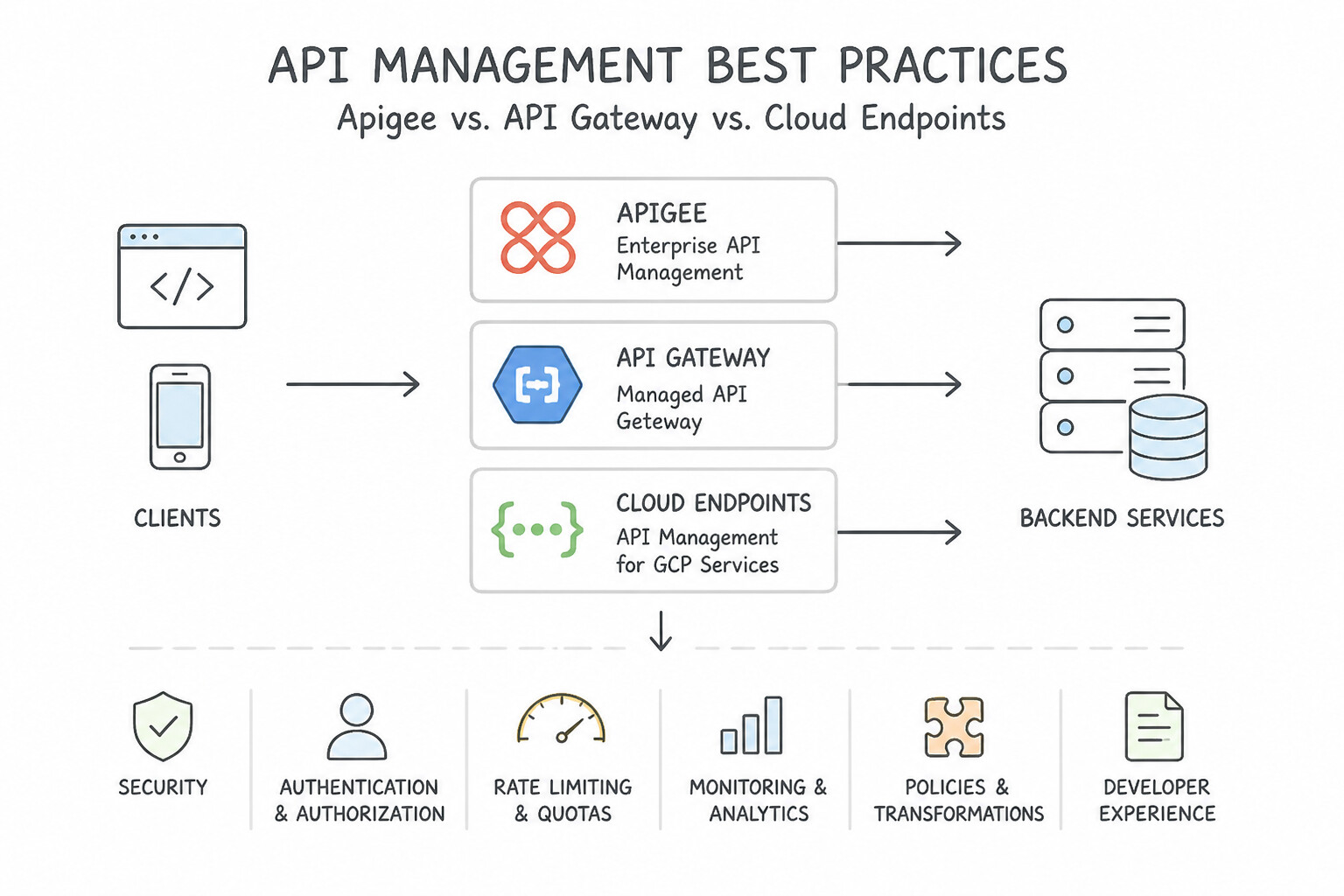
- Apigee vs. API Gateway vs. Cloud Endpoints:
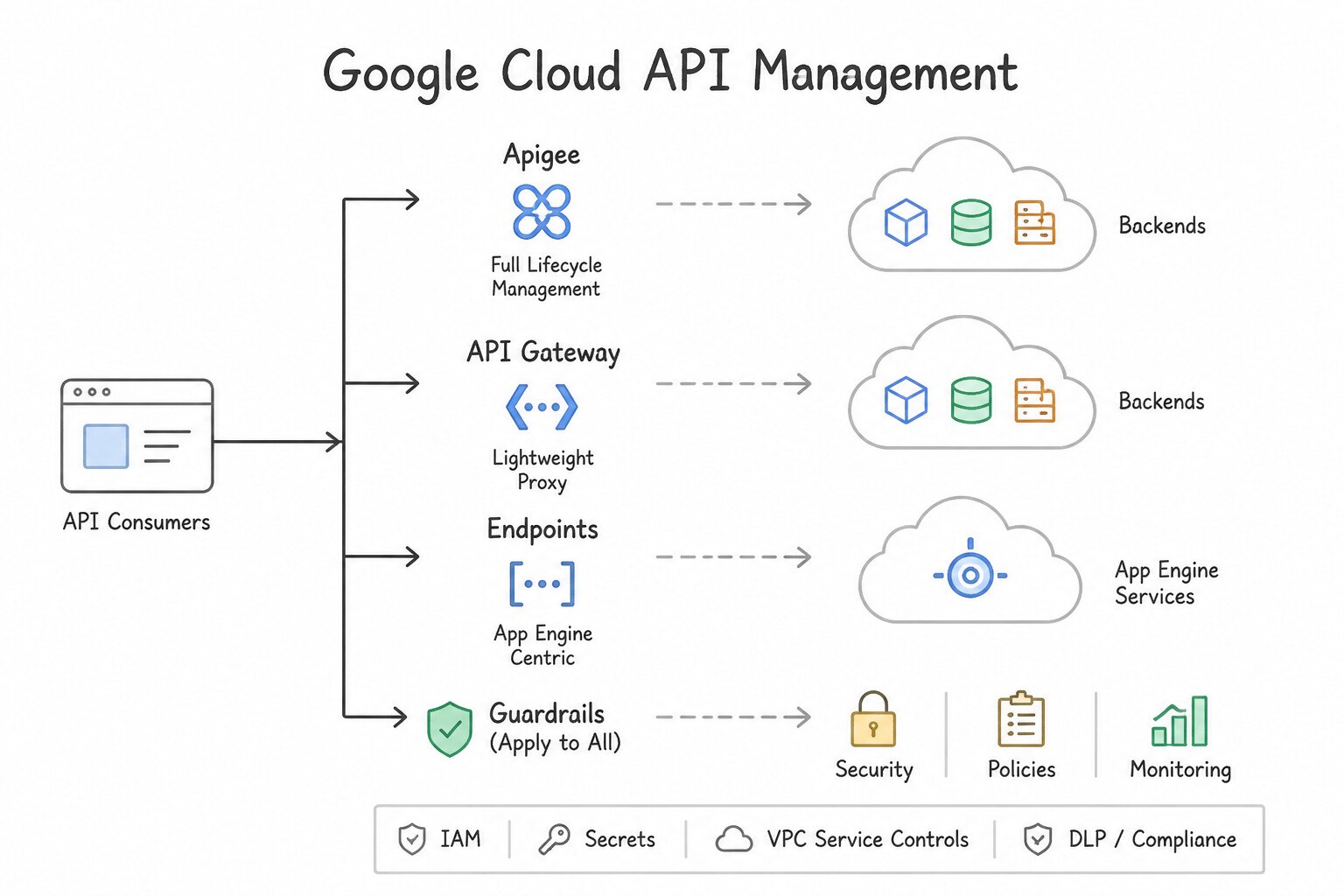
- Apigee API Management: Full-lifecycle enterprise API platform. Mandatory whenever the scenario mentions API monetization / billing plans, a customizable external Developer Portal, complex payload transformation (e.g., modernizing a legacy on-premises SOAP/XML mainframe into a modern REST/JSON API without touching legacy code), Spike Arrest (smoothing sudden traffic bursts to protect fragile backends), Quota policies (per-developer/tier call limits), and advanced API analytics.
- API Gateway / Cloud Endpoints: Lightweight, low-cost OpenAPI/gRPC proxies for simple authentication (API keys, Firebase Auth, JWT) and routing to serverless (
Cloud Run) or GKE backends when full enterprise monetization/mediation is not needed.
Key Implementation Patterns
- Enterprise API Lifecycle & Monetization: Use Use Apigee to manage the full API lifecycle. Apigee is the only Google Cloud product that natively supports full API lifecycle management, including monetization and advanced partner analytics. (Avoid alternative: API Gateway lacks the native monetization and advanced analytics features required for this scenario.)
- Handling Breaking Schema Changes: Use Create a new version of the API (v2) with the renamed field, while keeping the original version (v1) available for a transition period. Versioning the API allows you to introduce breaking changes without disrupting existing clients.
- Serverless API Facade Pattern: Use Deploy Google Cloud API Gateway with an OpenAPI configuration. API Gateway is a fully managed service that handles API key validation and routes traffic to serverless backends via a single URL. (Avoid alternative: Using a VM requires manual server management and configuration, which does not meet the requirement for a managed solution.)
Key Takeaways (5.1b)
- Use Apigee for enterprise requirements, monetization, partner portals, and complex analytics.
- Use API Gateway for fully managed, serverless-focused API hosting.
- Use Cloud Endpoints for high-performance, low-latency API proxies (often with gRPC).
- Never modify a live API contract in a way that breaks backward compatibility.
Consideration 5.1c: Testing frameworks
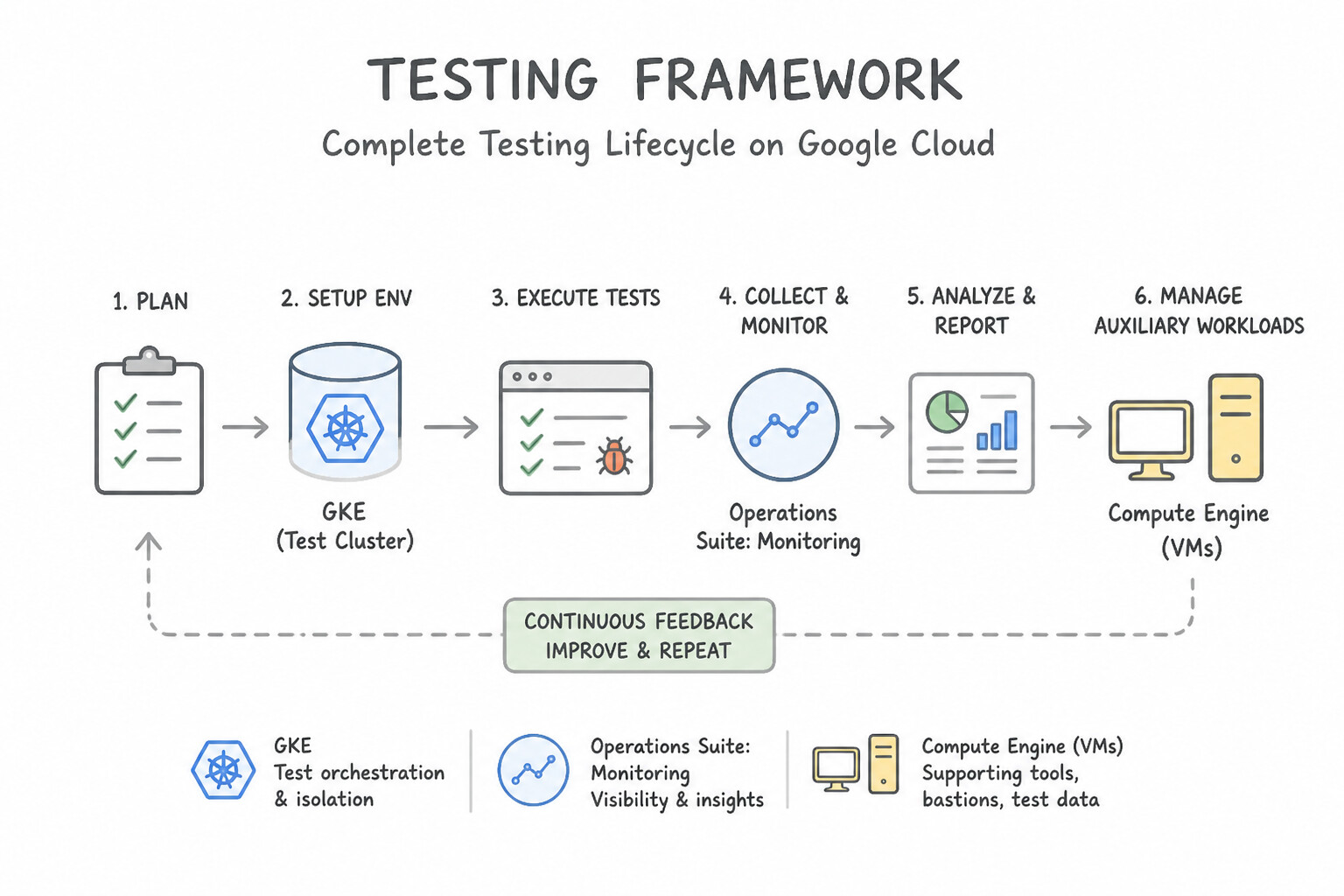
- Advise Teams on the Complete Testing Lifecycle:
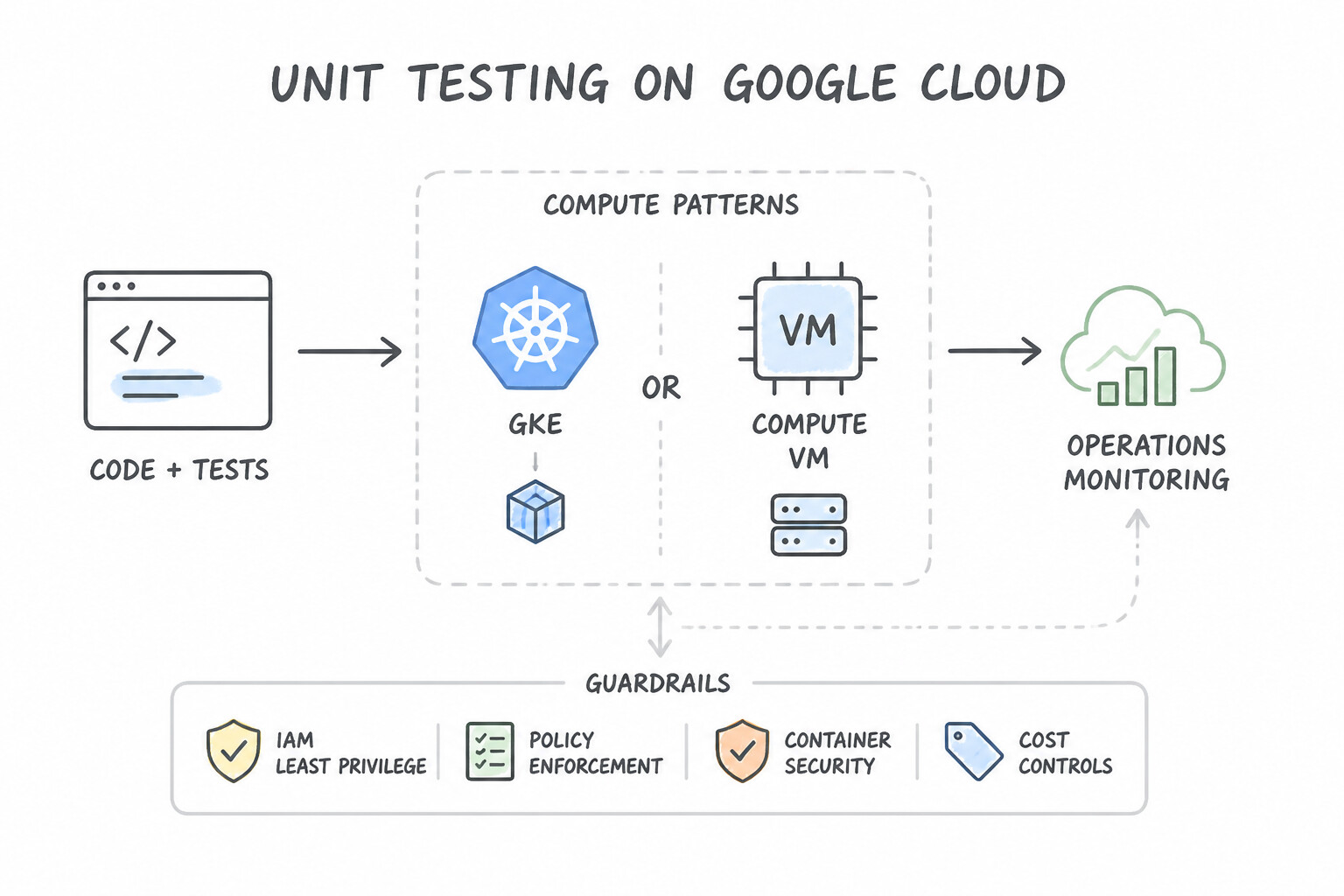
- Unit Testing: Executes in milliseconds inside
Cloud Buildon every commit with mocked dependencies; verifies business logic functions in isolation. - Integration & Contract Testing: Verifies interactions between microservices, message queues, and schemas using local Cloud Emulators or ephemeral staging environments in
Cloud Build. - Load, Stress & Soak Testing: Simulates peak and $2\times$ peak expected concurrency (using distributed Locust, JMeter, or k6 on GKE/Cloud Run) against a staging environment with production-equivalent architecture to uncover database connection pool exhaustion, autoscaler lag, and Google Cloud project quota limits before launch day!
Key Implementation Patterns
- Scalable Load Testing Strategy: Use Deploy a distributed load testing framework like Locust or JMeter on a separate GKE cluster to generate concurrent traffic. Distributed load testing frameworks on GKE can scale to generate the massive traffic needed to verify autoscaling.
- Cost-Effective Local Development: Use Advise the team to use the
gcloud beta emulatorscommand to start local emulators for Pub/Sub and Bigtable. Use local emulators provided by the Google Cloud CLI to mimic services locally for free. (Avoid alternative: Sharing a single cloud environment causes test data collisions and does not eliminate costs completely.) - Mobile Compatibility Verification: Use Upload the application bundle to Firebase Test Lab and execute Robo tests across a matrix of available physical and virtual devices. Firebase Test Lab provides a managed infrastructure to test apps on varied physical and virtual devices hosted by Google.
Key Takeaways (5.1c)
- Single VMs are often insufficient for stress testing large-scale systems.
- Distributed load testing separates the 'controller' from the 'workers' to scale traffic generation.
- GKE is an ideal platform for hosting distributed testing frameworks due to its orchestration capabilities.
- Security tools (like Cloud Armor) and Monitoring tools (like Uptime Checks) are not designed for load generation.
Consideration 5.1d: Data and system migration tooling
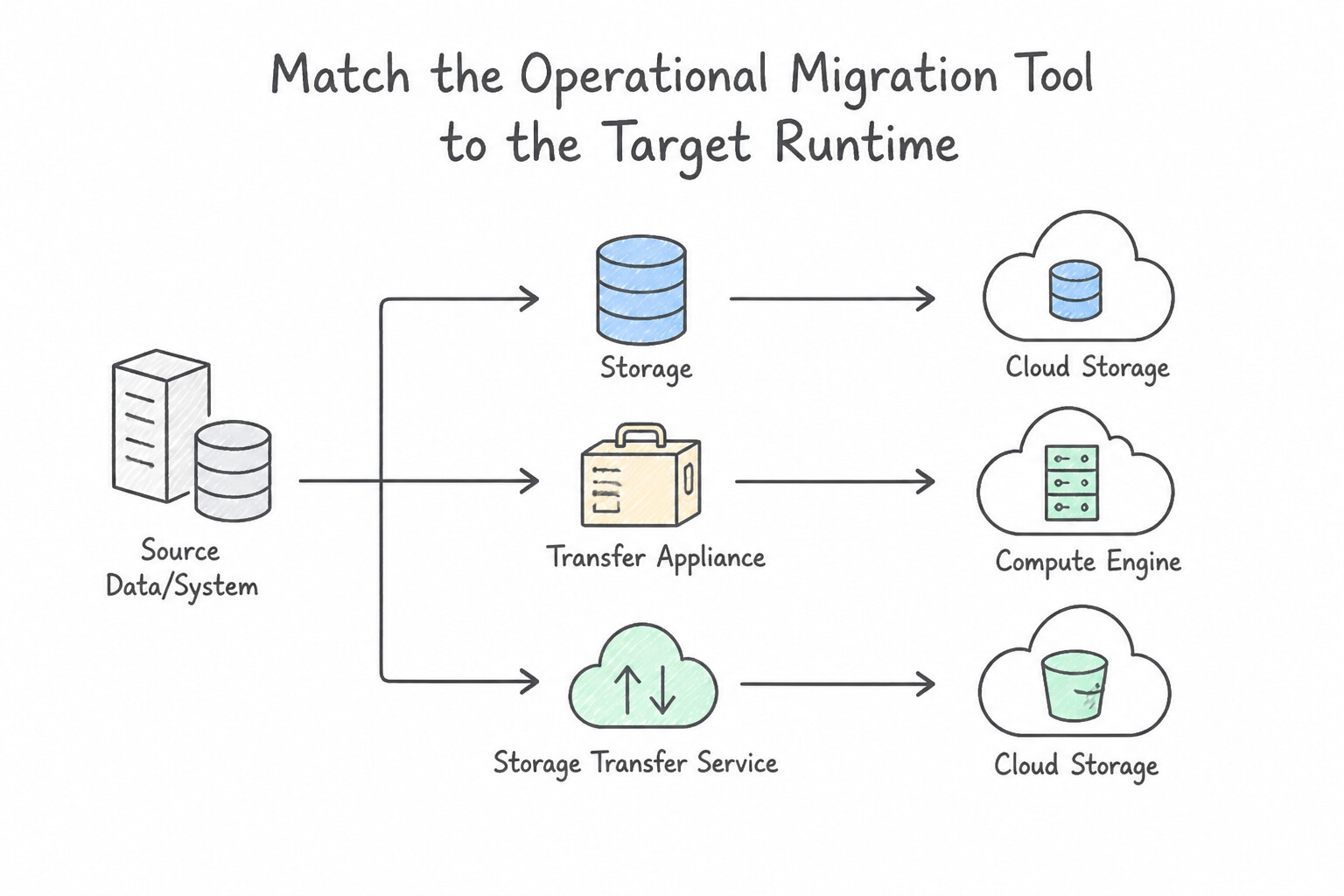
- Match the Operational Migration Tool to the Target Runtime:
- VMs → Compute Engine VMs: Migrate to Virtual Machines (agentless background block replication + test clones + cutover).
- VMs → GKE Containers: Migrate to Containers (extracts application filesystem/processes from Linux/Windows VMs into container images and generates Kubernetes deployment artifacts).
- VMware → Google Cloud VMware Engine (
GCVE): VMware HCX (live vMotion, bulk migration, L2 extension). - Relational DBs → Cloud SQL / AlloyDB: Database Migration Service (
DMS) (continuous CDC).
Key Implementation Patterns
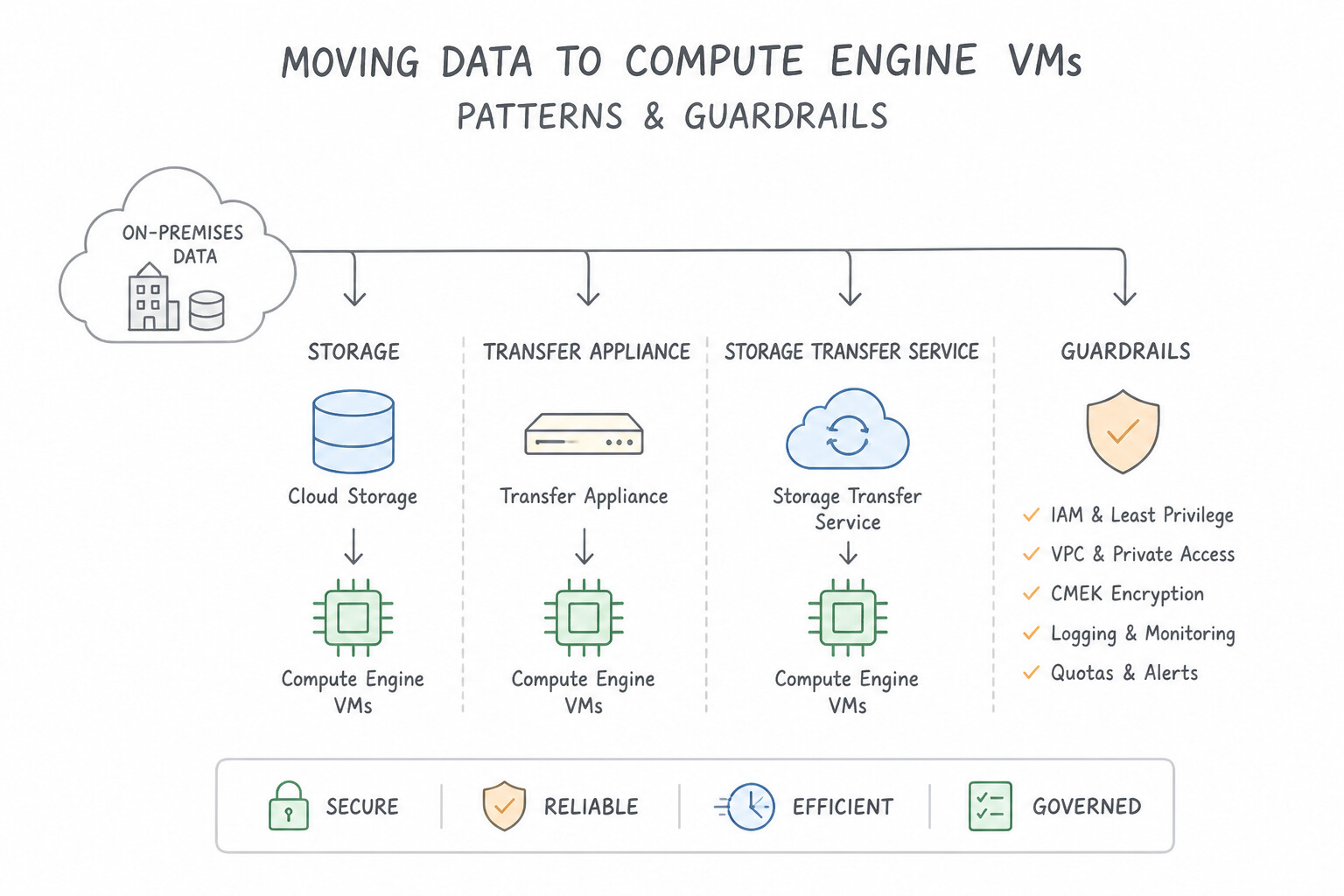
- Offline Bulk Data Transfer: Use Order Transfer Appliance to capture the data offline and ship it to Google. Transfer Appliance bypasses the slow network by physically shipping the data, meeting the deadline. (Avoid alternative: At 200 Mbps, uploading 800 TB takes about a year, missing the deadline.)
- Cloud-to-Cloud Object Storage Migration: Use Create a Transfer Job using Storage Transfer Service targeting the S3 buckets. Storage Transfer Service is a managed solution for S3-to-GCS transfers that supports synchronization and metadata preservation. (Avoid alternative: Gsutil requires self-managed infrastructure and is less efficient for managed, large-scale cloud-to-cloud transfers.)
Key Takeaways (5.1d)
- Always calculate estimated transfer time: (Total Size / Bandwidth).
- If a network transfer takes longer than the project deadline (or generally > 1 week), consider offline transfer methods.
- Transfer Appliance is the standard solution for offline bulk data migration to Google Cloud.
- Compression has minimal effect on already compressed media files like video.
Consideration 5.1e: Gemini Cloud Assist
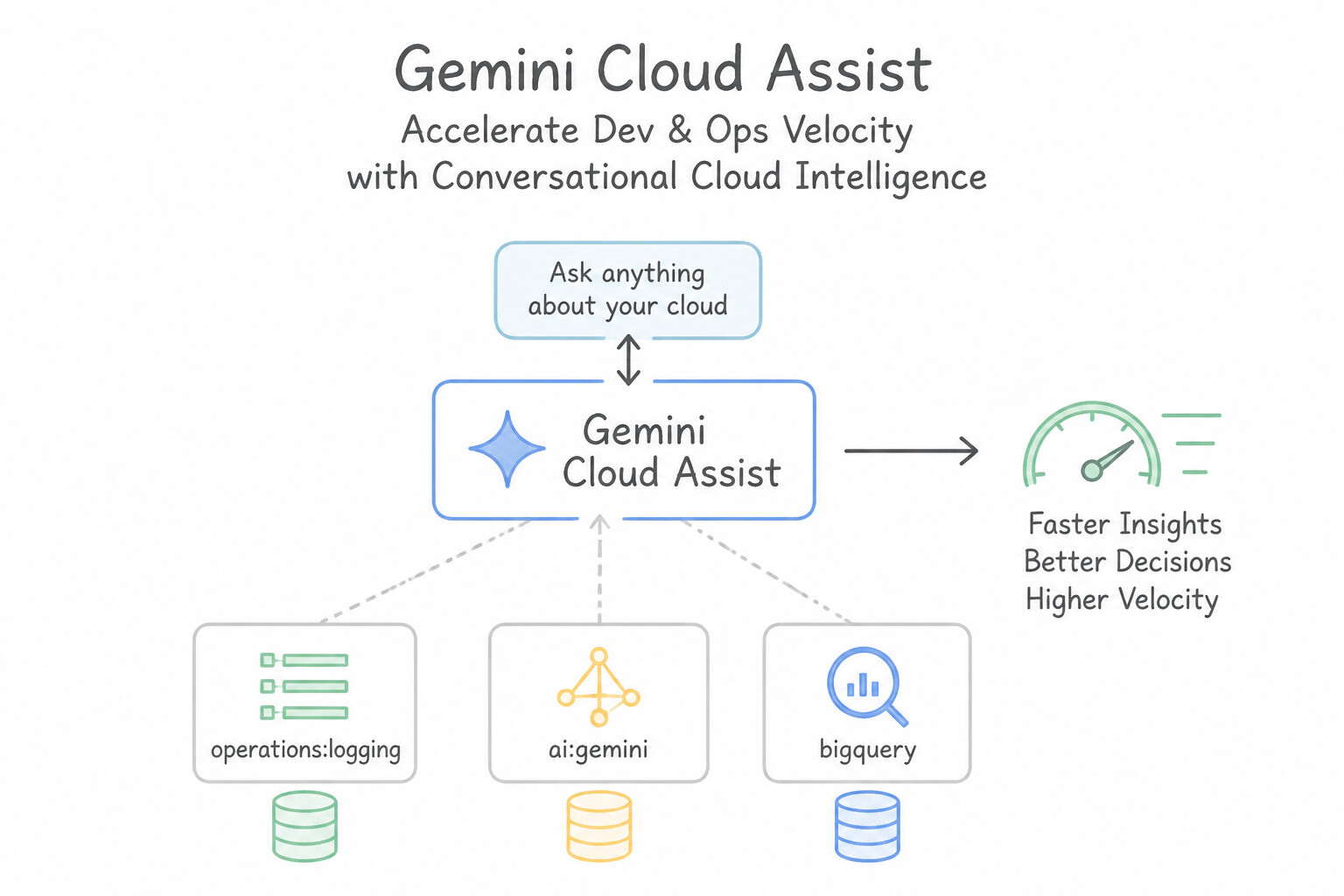
- Accelerate Dev & Ops Velocity with Conversational Cloud Intelligence:
- When a deployment fails with an opaque error (e.g.,
403 Permission Deniedon a Cloud Run revision, a failing GKE readiness probe, or a blocked VPC flow), advise engineers to invoke Gemini Cloud Assist directly in the Google Cloud Console or IDE. - Gemini Cloud Assist inspects the active resource context, correlates Cloud Audit Logs and Policy Troubleshooter findings, identifies the exact missing IAM permission or misconfigured environment variable, and generates the least-privilege
gcloudorterraformremediation command.
Key Implementation Patterns
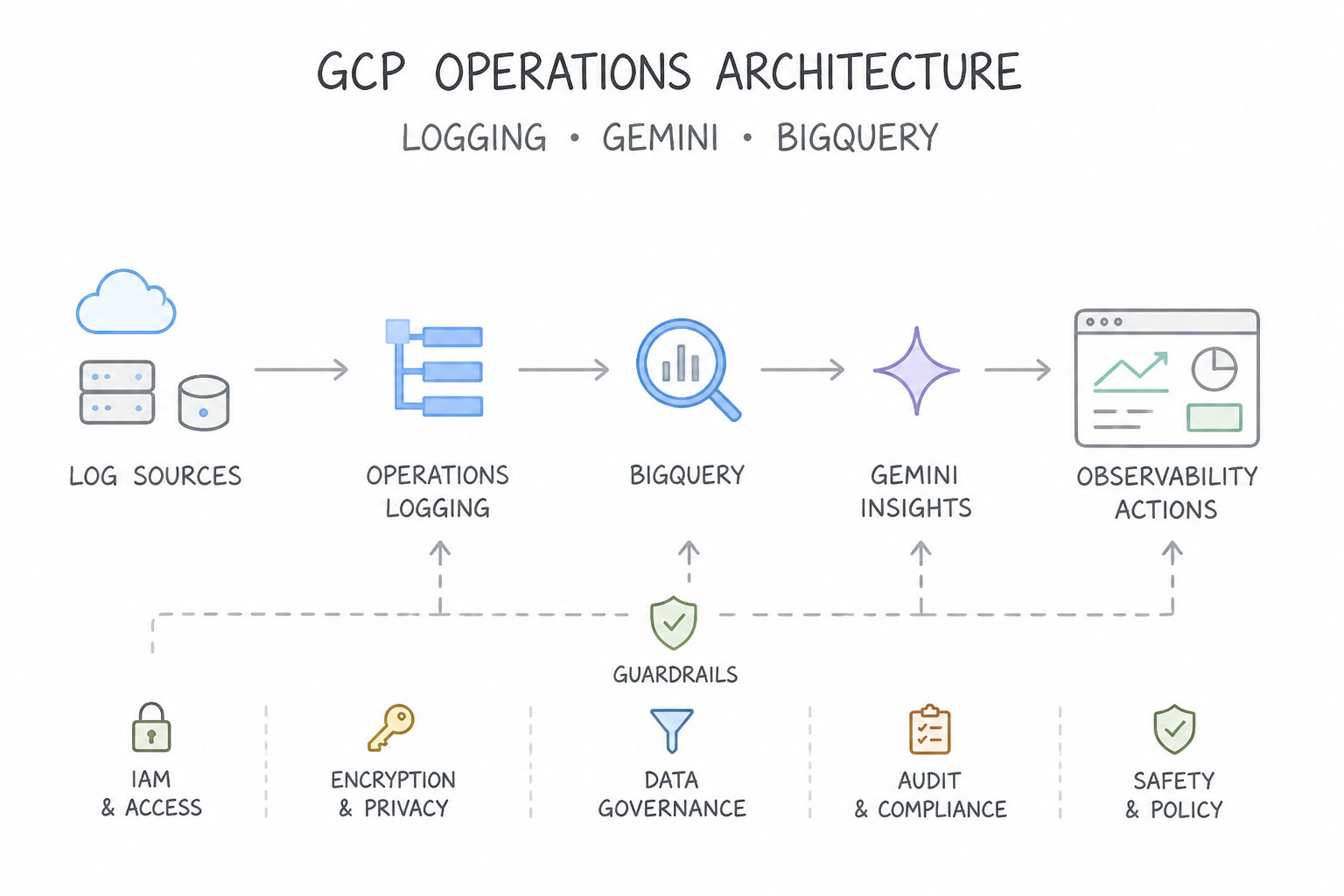
- Accelerating Root Cause Analysis for Operations: Use In the Logs Explorer, expand a relevant log entry and click 'Explain this log entry' to view a natural language summary and troubleshooting steps. The 'Explain this log entry' feature in Logs Explorer uses Gemini to provide immediate summaries and fixes for complex logs.
- Simplifying BigQuery Log Analytics: Use Advise the analysts to use Gemini in BigQuery to enter natural language prompts that generate the required SQL queries. Gemini translates natural language questions into SQL code, allowing non-experts to query BigQuery data. (Avoid alternative: Reliance on developers creates delays and does not solve the skill gap for the analysts.)
- Facilitating Infrastructure as Code Adoption: Use Open the Gemini pane in the Google Cloud Console and enter a prompt describing the desired resources to generate the Terraform code. Gemini Cloud Assist in the console can generate specific Terraform code from natural language prompts.
Key Takeaways (5.1e)
- Gemini in Google Cloud is integrated into various consoles, including Logs Explorer, to provide context-aware assistance.
- The 'Explain this log entry' feature helps translate complex technical errors into natural language explanations.
- Integrated AI tools generally offer a faster workflow than exporting data or using external chat interfaces for operational troubleshooting.
- BigQuery Log Analytics centralizes logs for advanced querying but requires SQL skills.
Quick Decision Cheat Sheet (Subsection 5.1)
If the Scenario Requires... | Choose This Google Cloud Pattern | Avoid This Common Mistake |
|---|---|---|
"Zero downtime + instant rollback + versions v1 and v2 must never serve traffic simultaneously" | Blue/Green Deployment | Rolling Update or Canary Deployment |
"Validate a new release on 2% of real production users before rolling out to the remaining 98%" | Canary Deployment (via Cloud Deploy, Cloud Run traffic splitting, or Service Mesh) | Blue/Green 100% immediate cutover |
"API monetization, partner developer portal, SOAP-to-REST XML/JSON mediation, Spike Arrest" | Apigee API Management | Cloud Endpoints, Cloud NAT, or Cloud Armor alone |
"Smooth out micro-bursts of API traffic to prevent overwhelming a legacy backend ( Spike Arrest vs Quota)" | Apigee Spike Arrest policy (protects backend against sudden traffic spikes; use Quota for monthly/daily business tier limits) | Confusing Quota (business billing counter) with Spike Arrest (rate-smoothing traffic shock absorber) |
"Containerize a legacy Linux application running on a VM without rewriting source code" | Migrate to Containers | Manually copying binaries into a scratch VM image |
Further Reading (Subsection 5.1)
- Updating instances in a MIG — Refer to the section on 'Configuration options for rolling updates' to understand maxSurge and maxUnavailable parameters.
- Rollbacks, gradual rollouts, and traffic migration — This page explains how to manage traffic splitting, rollouts, and rollbacks in Cloud Run. It specifically covers the use of the gcloud command to update traffic percentages between revisions.
- Binary Authorization overview — Explains how Binary Authorization ensures that only trusted container images are deployed on GKE.
- Creating an attestor — Details the process of creating attestors to verify image signatures.
- Quickstart: Deploy an API managed by Cloud Endpoints — A guide comparing Apigee, Cloud Endpoints, and API Gateway. It specifically highlights Apigee for 'Monetization' and 'Business Analytics'.
- Apigee Monetization Overview — Documentation detailing how Apigee handles API packages, rate plans, and billing for API providers.
Subsection 5.2: Interacting with Google Cloud programmatically
The Big Picture
How do elite cloud engineering teams interact with Google Cloud day-to-day? They never click through the web console to provision production resources, they never run unit/integration tests against live shared production databases, and they never write naive HTTP loops without exponential backoff!
Subsection 5.2 tests the complete programmatic toolkit of a Google Cloud Architect: browser and IDE workspaces (Cloud Shell, Cloud Shell Editor, Cloud Code — 5.2a), the Google Cloud SDK CLI triad (gcloud, gsutil/gcloud storage, bq — 5.2b), offline Cloud Emulators (Bigtable, Spanner, Pub/Sub, Firestore — 5.2c), production Terraform Infrastructure as Code (IaC) with remote Cloud Storage state locking (5.2d), and Google API best practices & Client Libraries (Application Default Credentials, gRPC, exponential backoff with jitter — 5.2e & 5.2f).
Consideration 5.2a: Cloud Shell tools
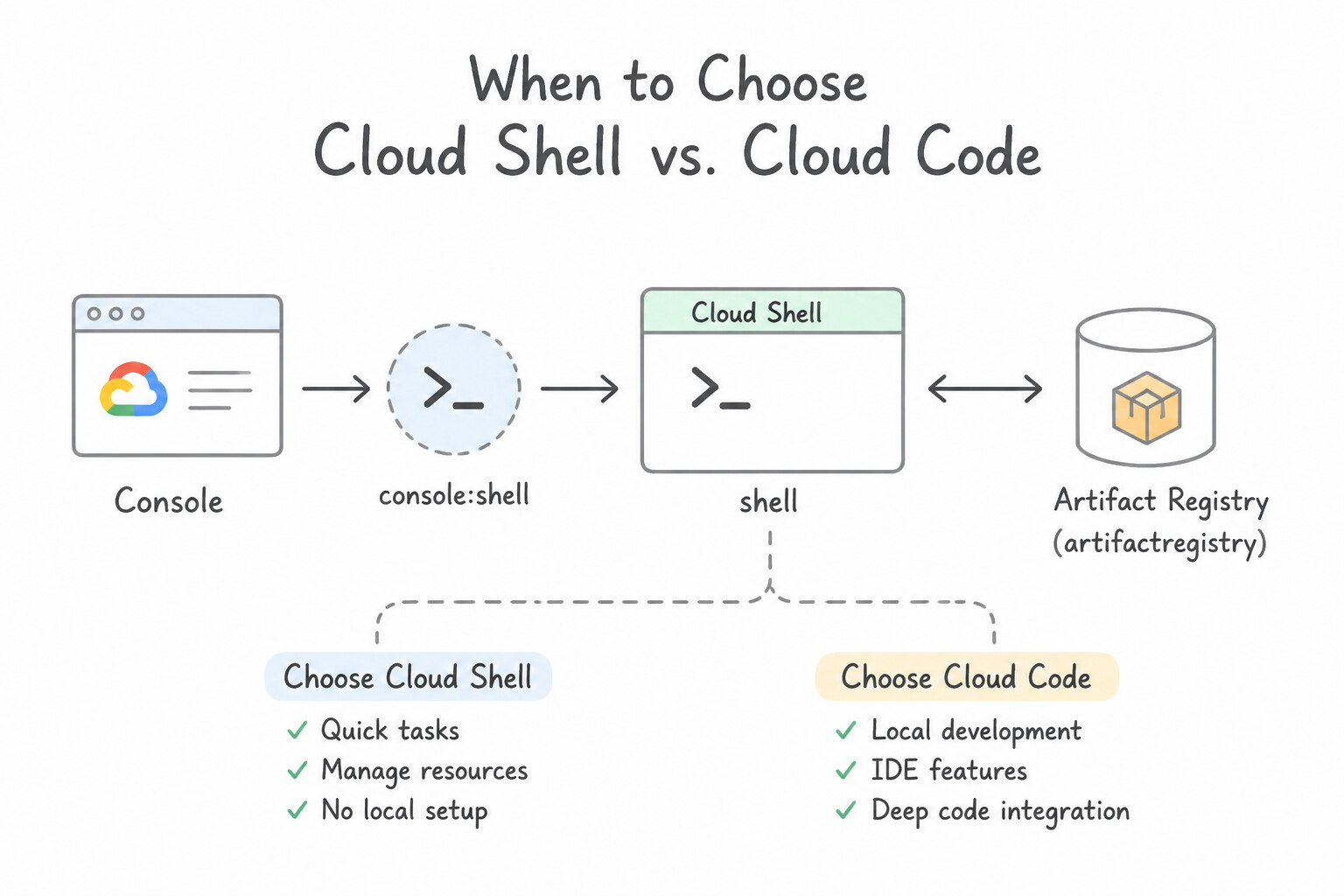
- When to Choose
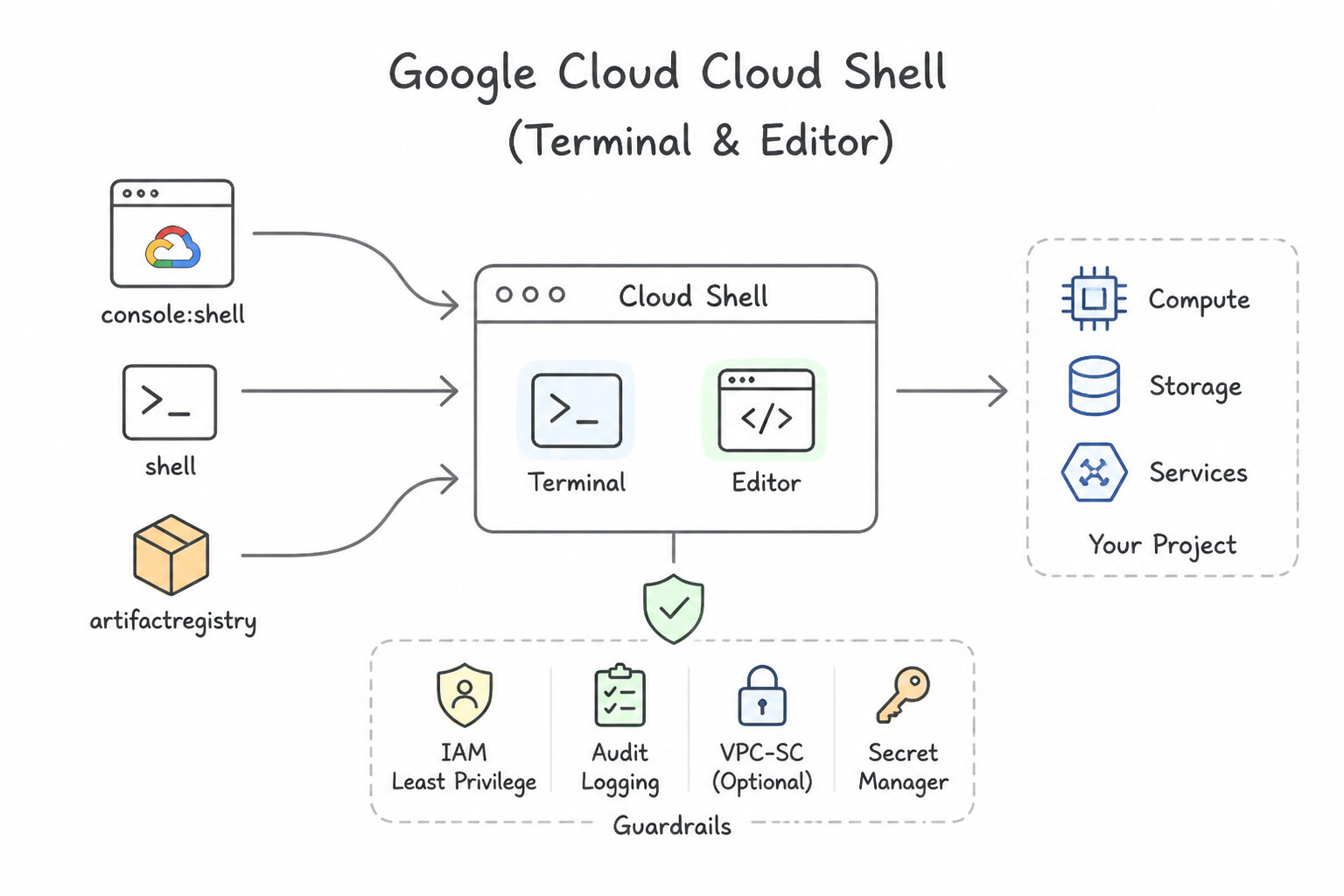
Cloud Shellvs.Cloud Code: - Cloud Shell (Terminal & Editor): Browser-based Linux environment with $5\text{ GB}$ of persistent
$HOMEdisk storage, pre-installedgcloud,kubectl,terraform,docker, andgit, and automatic user authentication. (Note: the root/filesystem resets after 1 hour of inactivity; only$HOMEpersists!). Ideal for rapid administrative tasks, emergency troubleshooting from any browser, and zero-install onboarding. - Cloud Code: Official IDE extension for VS Code and JetBrains (IntelliJ/PyCharm/GoLand). Integrates Skaffold, minikube/GKE live debugging, Cloud Run local emulation, Secret Manager browsing, and Gemini Code Assist directly inside the developer's local or Cloud Workstation IDE.
Key Implementation Patterns
- Persistent Storage Strategy in Cloud Shell: Use Move the scripts and binary to your "
$HOME" directory and add that location to your "$PATH" environment variable. Only the$HOMEdirectory in Cloud Shell is backed by persistent storage; system directories are ephemeral. - Standardizing Team Tooling: Use Create a custom Docker image containing the tools. Upload the image to Artifact Registry and configure the Cloud Shell environment to launch using this image. Cloud Shell supports booting from a custom Docker image, ensuring a consistent, pre-configured environment for the entire team.
- Testing Web Applications Locally in Cloud: Use Click the Web Preview button in the Cloud Shell toolbar and select Preview on port 8080. Web Preview proxies local ports (8080-8084) to a secure URL accessible only to you. (Avoid alternative: This command opens a deployed App Engine application, not the local version running in Cloud Shell.)
Key Takeaways (5.2a)
- Cloud Shell instances are ephemeral; system modifications are lost upon restart.
- Only the
$HOMEdirectory is backed by persistent storage (5 GB).- Store custom scripts, configuration files, and binaries in
$HOMEto ensure they persist.- Use .bashrc in your home directory to customize your environment variables permanently.
Consideration 5.2b: Google Cloud SDKs
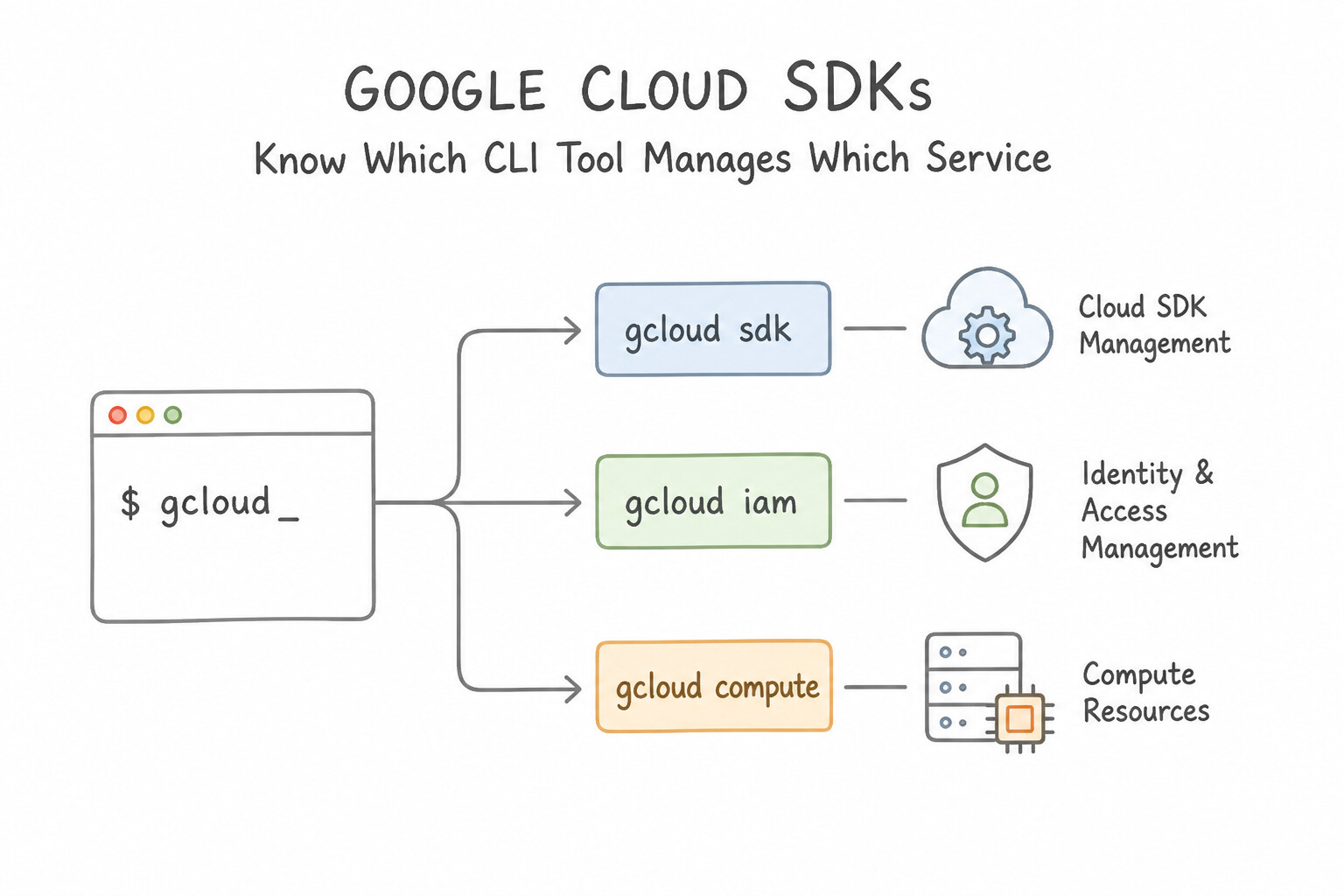
- Know Which CLI Tool Manages Which Service:
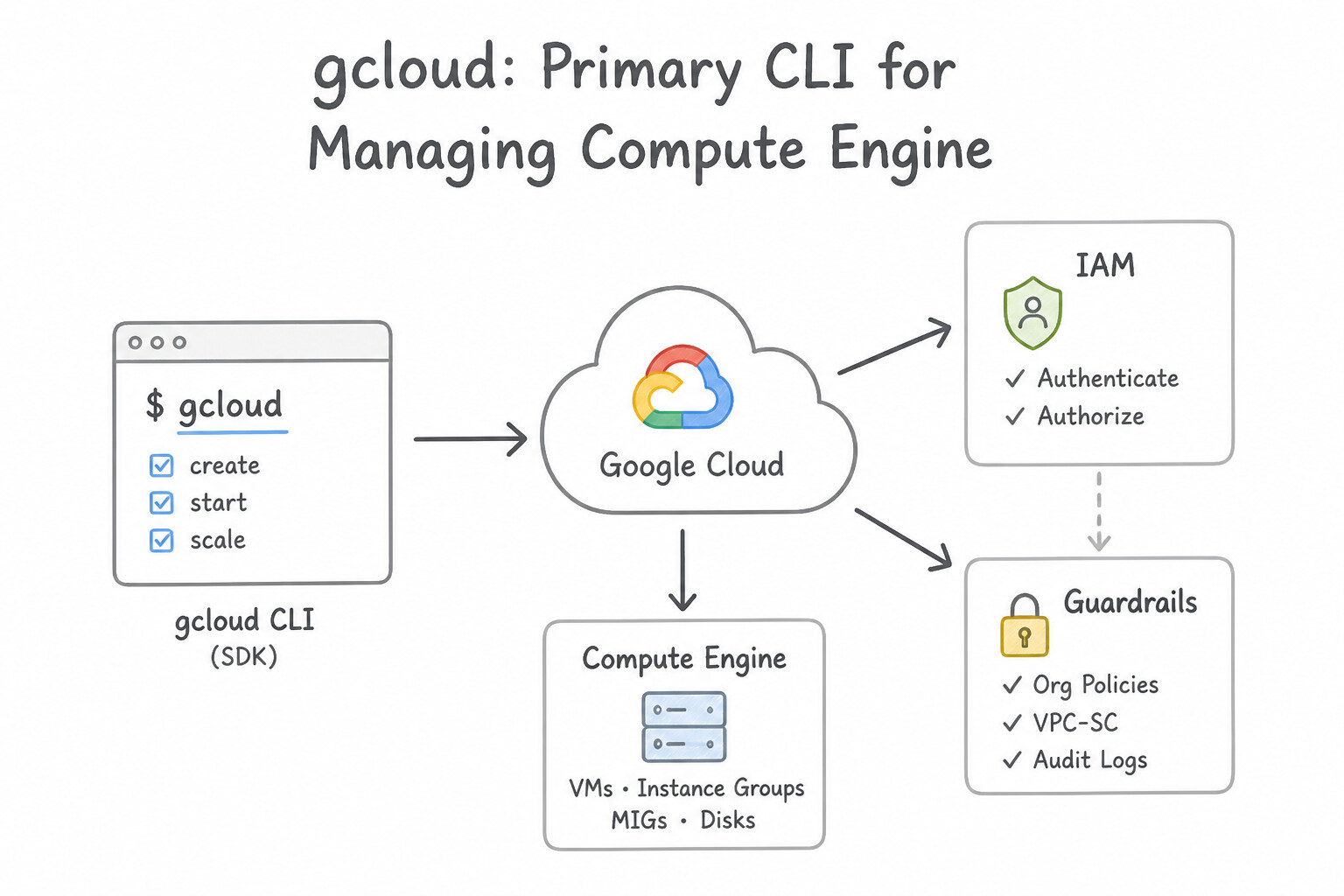
gcloud: Primary CLI for managing Compute Engine, GKE (gcloud container), IAM, Networking, Cloud Run, Cloud SQL, Spanner, Bigtable, and modern object operations (gcloud storage).- Power Flags: Use
--filter(server/client filtering) and--format="value(...)"or"json"for deterministic bash scripting rather than brittleawk/greptext parsing! gsutil(andgcloud storage): Dedicated CLI for Cloud Storage bucket and object management (cp,rsync,mb,lifecycle,iam). Use-m(gsutil -m cp -r) for multi-threaded/multi-processing parallel transfers of thousands of files.bq: Dedicated CLI for BigQuery (bq query --use_legacy_sql=false,bq load,bq mk,bq extract,bq show).
Key Implementation Patterns
- Local Development Authentication Strategy: Use Run the command gcloud auth application-default login on your local laptop. This command generates local user credentials in the specific location that ADC automatically checks. (Avoid alternative: This authenticates the CLI tool but does not set up the credentials required by Client Libraries via ADC.)
- Handling Transient API Errors: Use Implement a truncated exponential backoff strategy with jitter. Exponential backoff with jitter allows the service to recover by spacing out retries. (Avoid alternative: Immediate retries can overwhelm the server and worsen the error rate.)
- Choosing the Correct Library Type: Use Use the Google Cloud Client Libraries for Java. Google Cloud Client Libraries are the idiomatic, gRPC-enabled, recommended libraries for Cloud Spanner and Pub/Sub. (Avoid alternative: Google API Client Libraries are older, auto-generated, and use HTTP/JSON, lacking the gRPC performance benefits required.)
Key Takeaways (5.2b)
- ADC enables portability: Write code once; it authenticates automatically across local and cloud environments.
- Avoid Keys: Prefer local user credentials or IAM roles over downloading long-lived JSON keys.
- Specific Command: Use
gcloud auth application-default loginfor libraries, not justgcloud auth login.- Transient errors (429, 500, 503) should be handled with retries.
Consideration 5.2c: Cloud Emulators
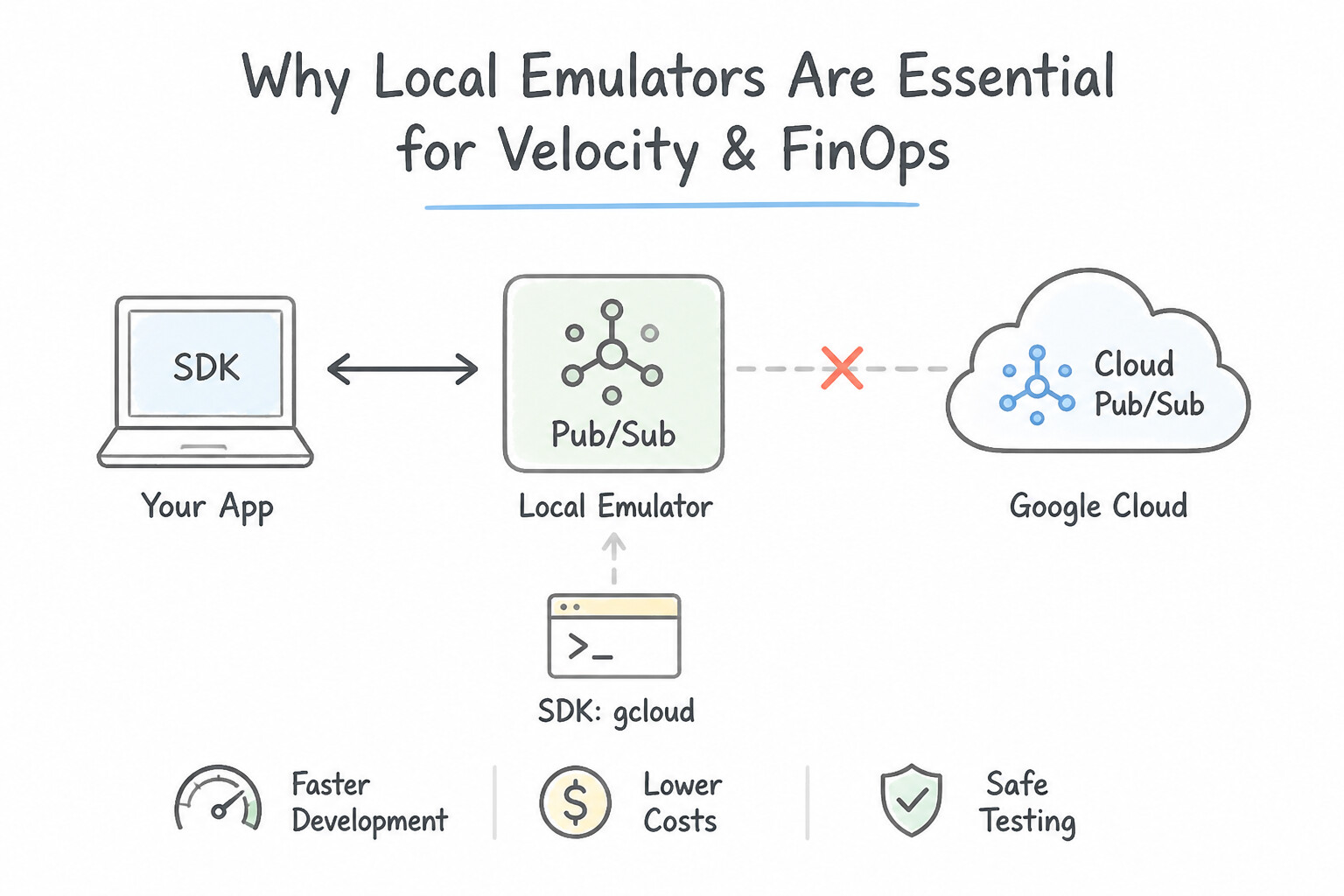
- Why Local Emulators Are Essential for Velocity and FinOps:
- Google Cloud SDK provides local, in-memory emulators (
gcloud beta emulators [pubsub|spanner|bigtable|firestore] start) that simulate the real API locally onlocalhost. - How Client Libraries Connect: Set the corresponding environment variable (e.g.,
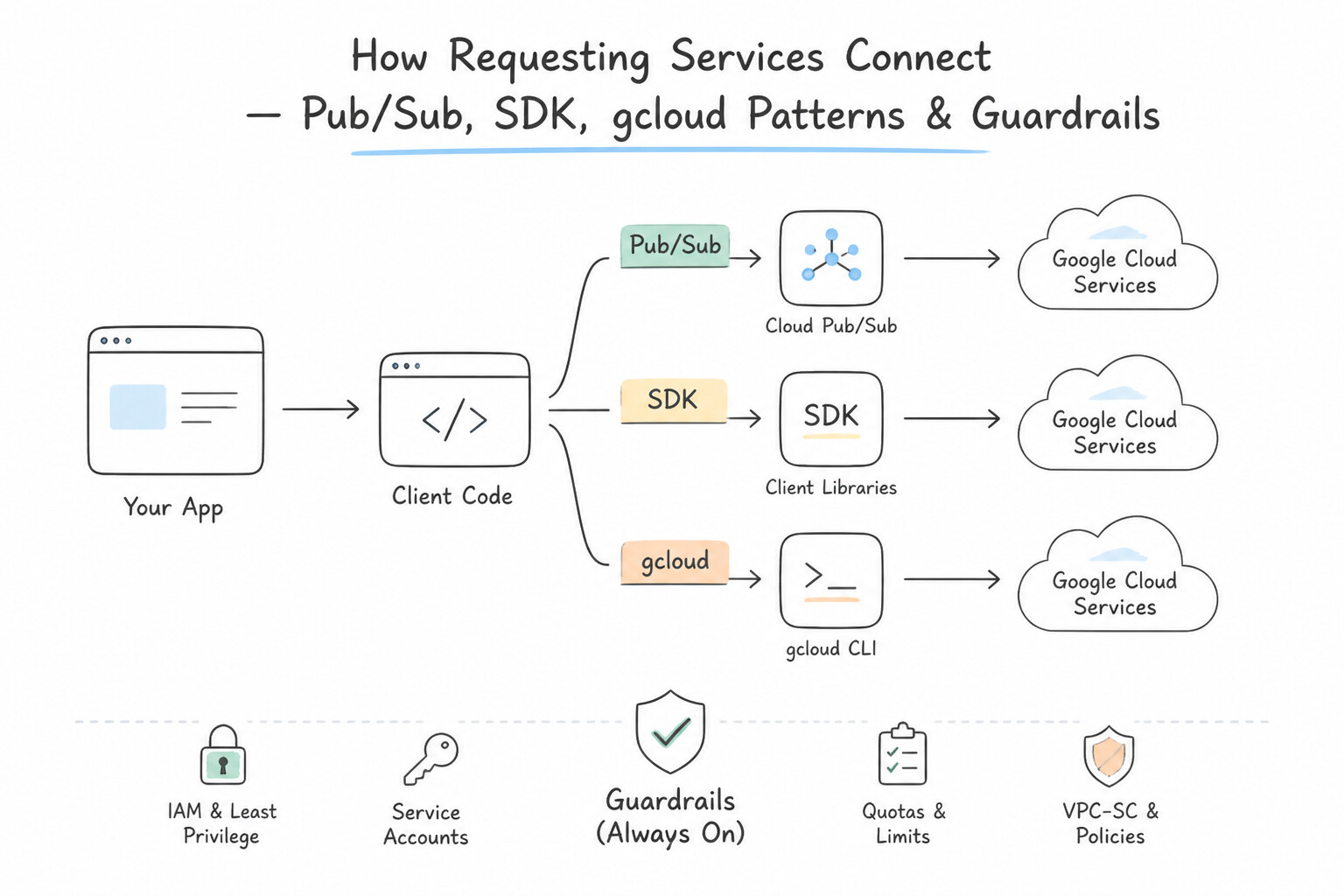
PUBSUB_EMULATOR_HOST=localhost:8085,SPANNER_EMULATOR_HOST=localhost:9010,BIGTABLE_EMULATOR_HOST=localhost:8086,FIRESTORE_EMULATOR_HOST=localhost:8080)—official Google Cloud Client Libraries automatically route traffic to the local emulator with zero cloud billing, zero IAM setup, and offline speed! - Note: There is no local BigQuery emulator or Cloud SQL emulator in the Google Cloud SDK (for Cloud SQL, use a local Docker container of PostgreSQL/MySQL; for BigQuery, use dry-run queries or ephemeral test datasets).
Key Implementation Patterns
- Configuring Pub/Sub Client for Local Emulation: Use Set the PUBSUB_EMULATOR_HOST environment variable to the emulator's host and port. Google Cloud Client Libraries automatically use the emulator if the PUBSUB_EMULATOR_HOST environment variable is set. (Avoid alternative: GOOGLE_APPLICATION_CREDENTIALS is for authentication keys, not for defining emulator endpoints.)
- Automating Environment Variable Setup: Use Run the gcloud beta emulators datastore env-init command. The env-init command generates the necessary environment variable exports to point your client to the local emulator. (Avoid alternative: This configures the gcloud tool's internal settings, not the environment variables required by your application code or client libraries.)
Key Takeaways (5.2c)
- Use Cloud Emulators for local development to save costs and accelerate testing loops.
- Google Cloud Client Libraries support environment variables like
PUBSUB_EMULATOR_HOSTto switch endpoints automatically.- Avoid modifying application code for environment-specific configurations; use environment variables instead.
- Google Cloud emulators allow for local, cost-effective development and testing.
Consideration 5.2d: Infrastructure as Code
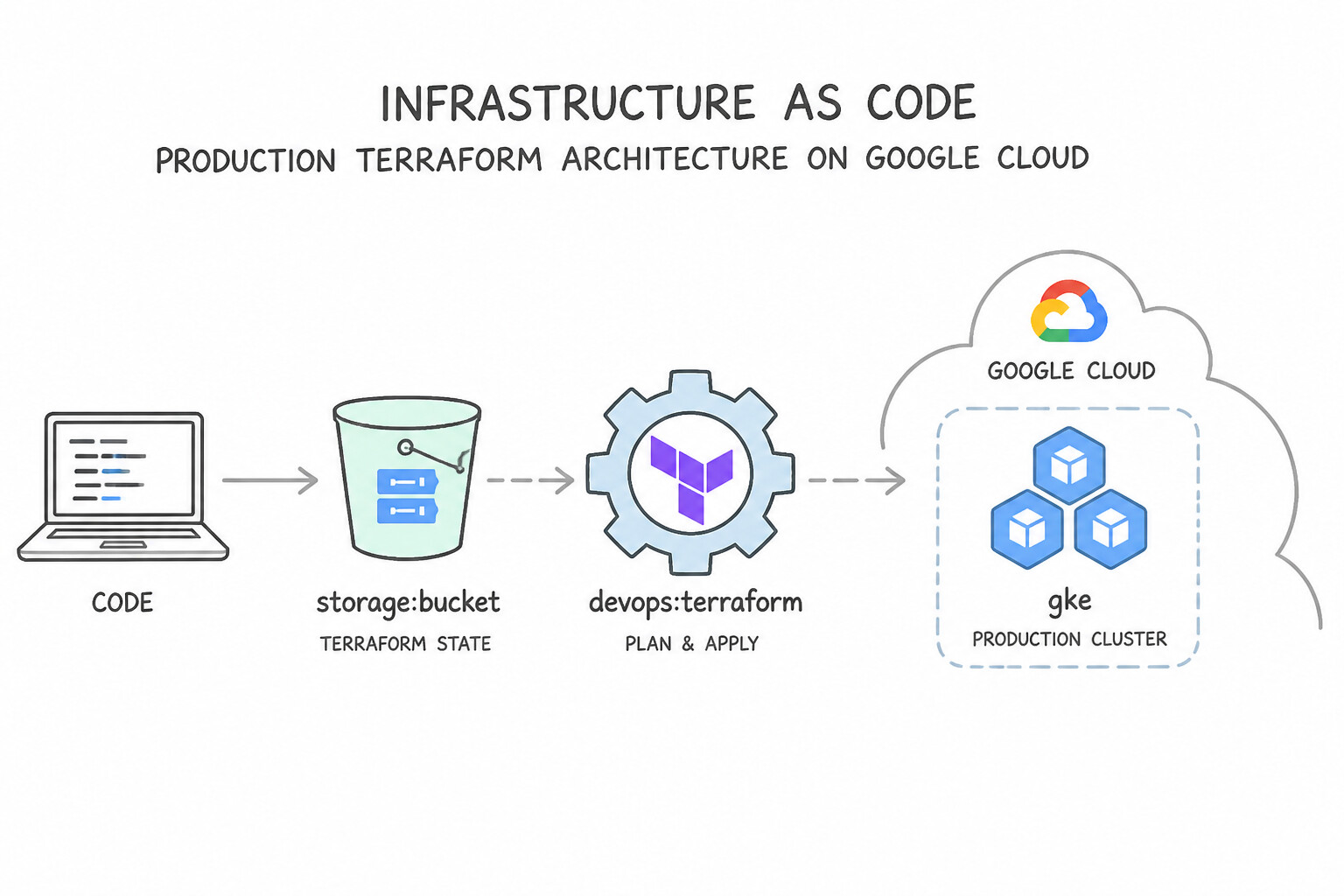
- Production Terraform Architecture on Google Cloud:
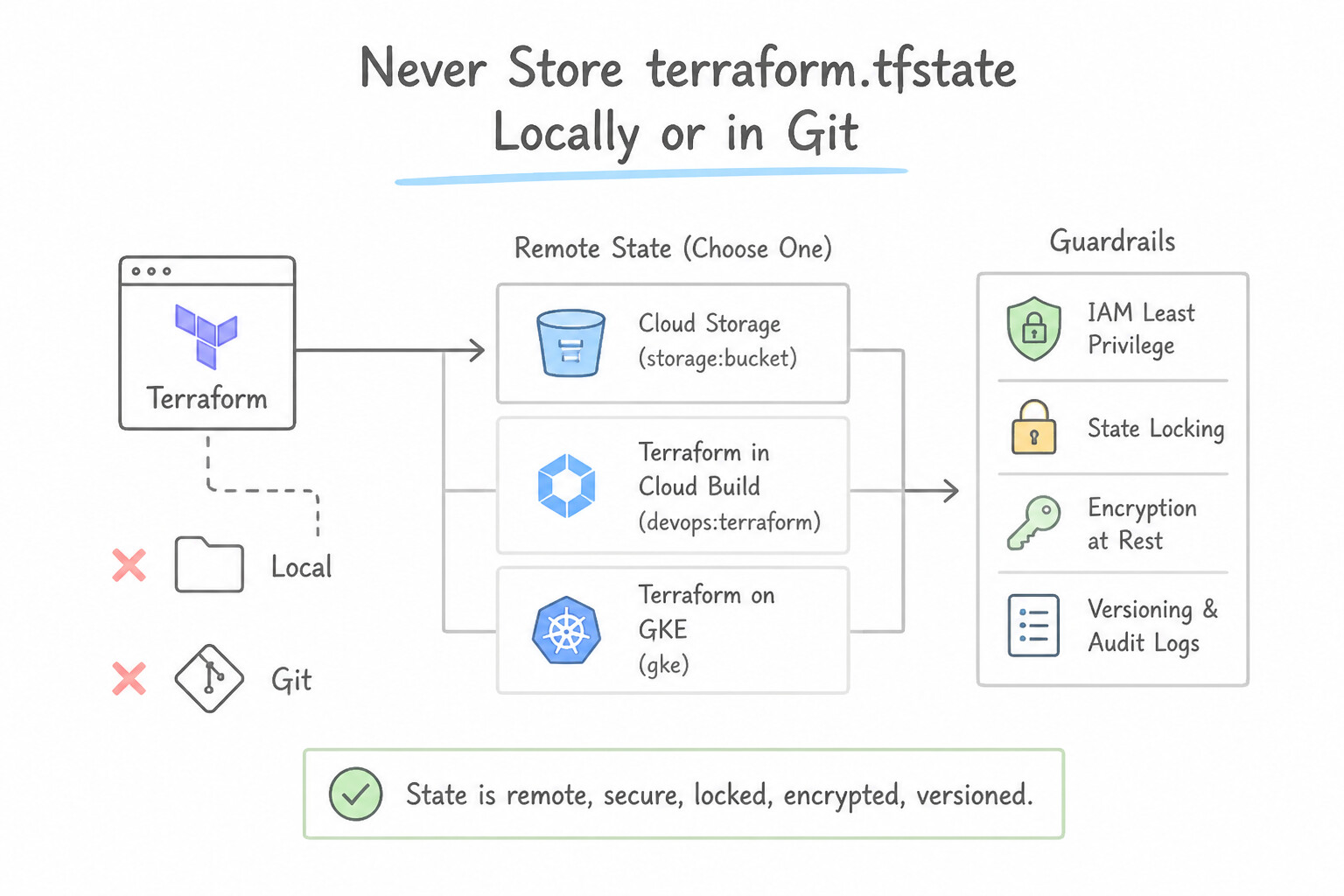
- Never Store
terraform.tfstateLocally or in Git: Local state files cause race conditions when two engineers runterraform applyconcurrently, and state files often contain sensitive resource metadata. - Use the
gcsRemote Backend (Cloud Storage): Storeterraform.tfstatein a dedicated Cloud Storage bucket. Cloud Storage natively supports state locking (via object generation preconditions—no separate DynamoDB/database lock table is needed on Google Cloud!), Object Versioning (to roll back corrupted state), and CMEK encryption. - GitOps Execution: Trigger
terraform planon Pull Requests andterraform applyon merge tomainvia Cloud Build (or Infrastructure Manager, Google Cloud's managed Terraform service) using a least-privilege Service Account.
Key Implementation Patterns
- Terraform State Management: Use Configure the Terraform backend block to use Google Cloud Storage (GCS). Run terraform init to migrate the existing state to the GCS bucket. GCS backends support native state locking and centralized storage, preventing corruption during simultaneous edits.
- Kubernetes-Native Infrastructure Management: Use Enable Config Connector on the GKE cluster and define the resources using Kubernetes YAML manifests. Config Connector allows managing Google Cloud resources using Kubernetes-style YAML, matching the team's existing skill set.
- Migrating Manual Resources to IaC: Use Write Terraform configuration for the resources. Run "terraform import" to map the existing resources to the Terraform state. The terraform import command maps existing real-world resources to the Terraform state file without recreating them.
Key Takeaways (5.2d)
- Terraform state maps configuration to real-world resources.
- Local state files are unsuitable for team collaboration.
- Remote backends store state centrally and support locking to prevent race conditions.
- Google Cloud Storage (GCS) is the recommended backend for Terraform on Google Cloud.
Consideration 5.2e: Google API client libraries and best practices
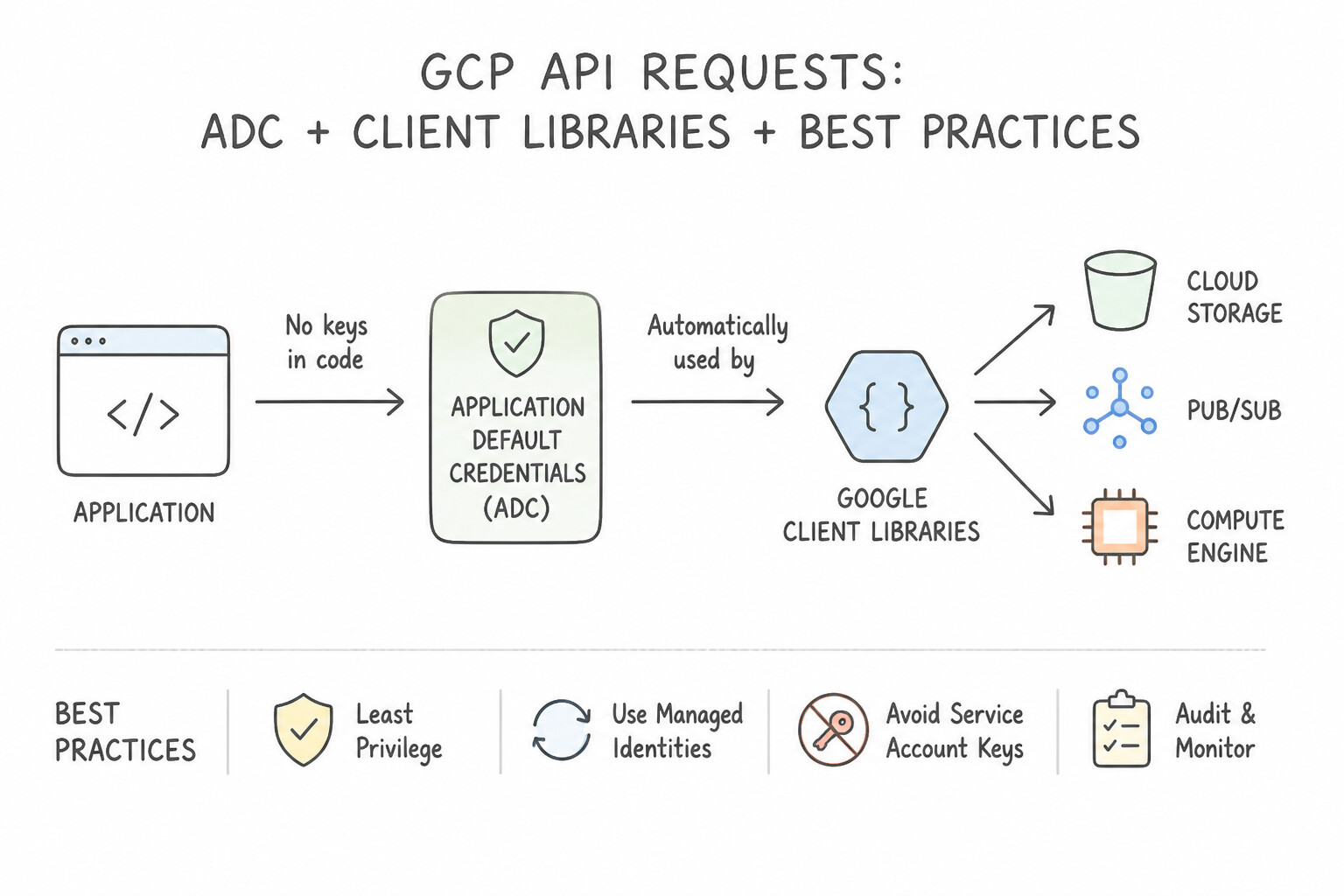
- 1. Application Default Credentials (
ADC): - Always initialize official Google Cloud Client Libraries using ADC (calling
storage.Client()with zero hardcoded credential paths). - Locally, ADC automatically discovers credentials from
gcloud auth application-default login(or Service Account impersonation). In production (Cloud Run,GKE Workload Identity,Compute Engine), ADC automatically fetches short-lived tokens from the local Metadata Server—allowing the exact same application code to run locally and in production with zero credential files! - 2. Resilient Error Handling (
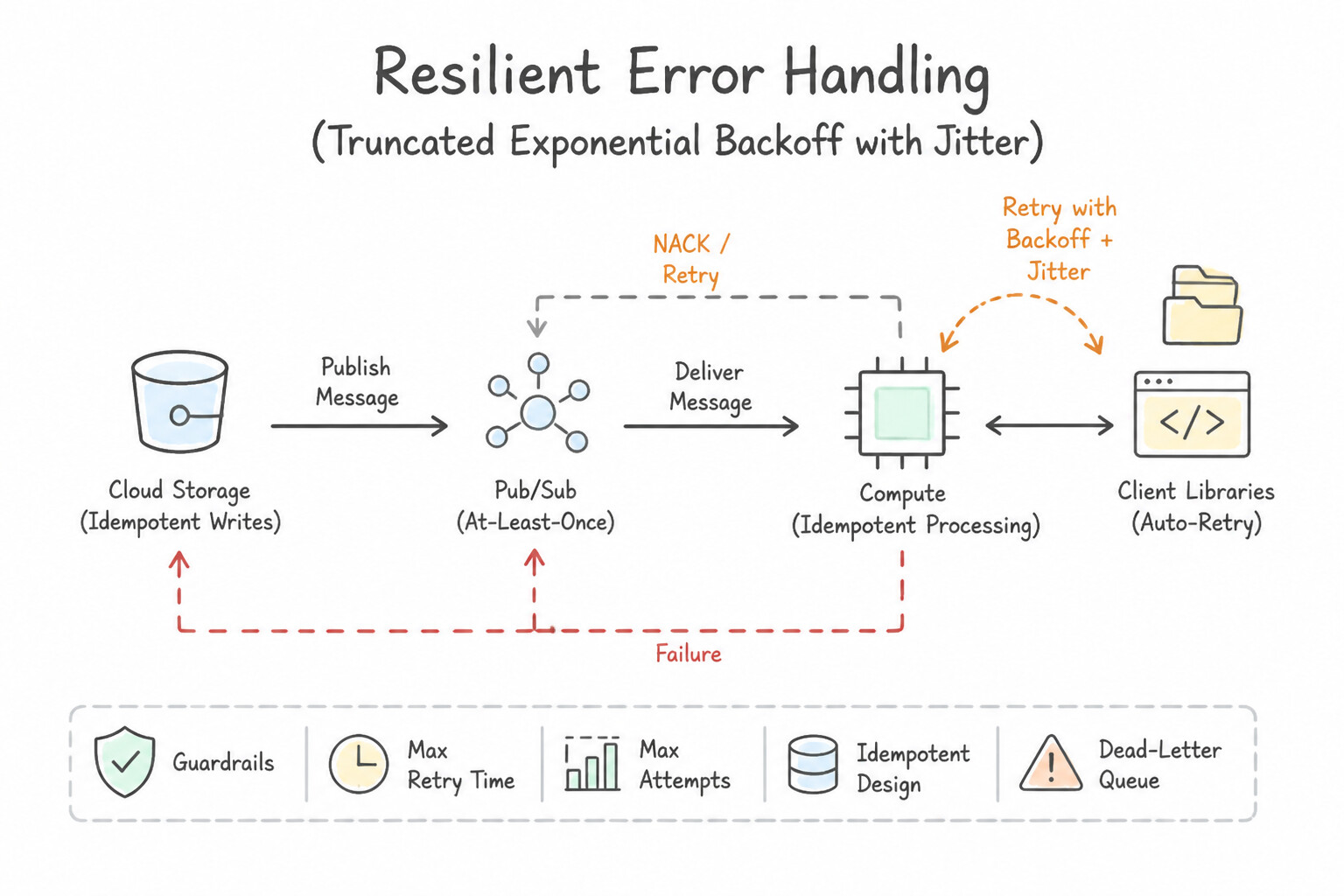
Truncated Exponential Backoff with Jitter): - When a Google API returns transient errors (HTTP
429 Too Many Requestsrate-limit or500/503Server Error), never retry in a tightwhileloop (which causes a thundering herd that amplifies the outage!). - Wait $2^n + \text{random\_jitter}\text{ milliseconds}$ between retries up to a maximum ceiling (
Truncated Exponential Backoff). Official Google Cloud Client Libraries implement this automatically for idempotent calls. - 3. Bandwidth & Protocol Optimization:
- Use gRPC (HTTP/2 multiplexed binary Protobufs) via Cloud Client Libraries for high-throughput, low-latency streaming services (
Pub/Sub,Bigtable,Spanner,BigQuery Storage API), and use FieldMasks (fieldsparameter) on REST calls to return only the specific JSON fields your application needs.
Key Implementation Patterns
- Choosing the Right Client Library: Use Use the Google Cloud Client Libraries for Java. Google Cloud Client Libraries are the idiomatic, performant, and recommended standard for interacting with Google Cloud services. (Avoid alternative: Invoking CLI tools from application code is brittle and inefficient; programmatic libraries should always be preferred.)
- Handling API Rate Limits and Transient Errors: Use Implement a truncated exponential backoff strategy with jitter for retries. Exponential backoff with jitter creates increasing, randomized delays between retries, allowing the system to recover from transient errors and rate limits.
- Implementing Application Default Credentials (ADC): Use Create a service account with the required BigQuery roles and attach it to the VM instance. Initialize the BigQuery client library in your code without specifying credentials. Attaching a service account to the VM allows the client library to automatically discover credentials via ADC without manual key management.
Key Takeaways (5.2e)
- Google Cloud Client Libraries are the preferred choice for interacting with Google Cloud services programmatically.
- These libraries offer better performance (gRPC), automatic authentication, and idiomatic code styles.
- Google API Client Libraries are older and auto-generated; use them only when a Cloud Client Library is unavailable.
- HTTP 429 and 5xx errors are often transient and should be handled with retries.
Quick Decision Cheat Sheet (Subsection 5.2)
If the Scenario Requires... | Choose This Google Cloud Pattern | Avoid This Common Mistake |
|---|---|---|
"Prevent concurrent Terraform runs from corrupting state across a team" | Terraform gcs remote backend on Cloud Storage (native state locking + Object Versioning) | Storing terraform.tfstate in Git or setting up a separate Cloud SQL lock database |
"Offline / zero-cost local development and CI testing for Pub/Sub, Spanner, Bigtable, or Firestore" | Google Cloud SDK Emulators ( gcloud beta emulators ... start) | Mocking every SDK method by hand or paying for 50 live Spanner dev instances |
"Seamless authentication between local developer workstation and production GCP runtime without code changes" | Application Default Credentials ( ADC) with official Cloud Client Libraries | Hardcoding Service Account JSON keys in environment variables |
"Handle transient HTTP 429 (rate limit) and 503 (unavailable) responses gracefully" | Truncated Exponential Backoff with Jitter | Immediate retry loops or switching to a different region on every single 429 |
"Browser-based terminal with pre-installed gcloud/kubectl/terraform and 5 GB persistent storage" | Cloud Shell | Provisioning a permanent public Compute Engine bastion VM |
Further Reading (Subsection 5.2)
- How Cloud Shell works — This page explains the architecture of Cloud Shell, specifically detailing the ephemeral nature of the virtual machine instance and the persistent disk storage attached to the
$HOMEdirectory. - Customize container images — This guide explains how to create a custom Docker image for Cloud Shell to create a specific environment with additional packages and custom configurations.
- Using Web Preview — Documentation explaining how to use the Web Preview feature in Cloud Shell to preview applications on port 8080.
- Application Default Credentials — Documentation explaining how ADC works, the search order for credentials, and how to set up local authentication using gcloud.
- Local Development Authentication — Specific instructions on using 'gcloud auth application-default login' to provide user credentials for local development.
- Truncated exponential backoff — While this documentation is for Cloud Storage, the concept of truncated exponential backoff is a standard across Google Cloud APIs.
Book TOC · Previous · Chapter 6 of 8 · Next
AwesomeGCP.com Learning
The approach taken is a question-led learning approach: you explore realistic project scenarios where you need to make decisions or take actions to achieve business goals within specific constraints. Instead of passive learning, you are challenged to think and work through the options to master the Professional Cloud Architect (PCA) certification!