Book TOC · Previous · Chapter 5 of 8 · Next
Chapter 5: Analyzing & Optimizing Technical and Business Processes: CI/CD, DR, FinOps & Readiness
Chapter Focus: SDLC/CI-CD pipelines, Chaos Engineering, Game Days, DR testing, blameless postmortems, stakeholder alignment, FinOps cost optimization, and organizational change management.
Subsection 4.1: Analyzing and defining technical processes
The Big Picture
When an enterprise suffers recurring production outages, 3-week release cycles, and chaotic midnight rollbacks, the root cause is rarely a missing Google Cloud product—it is a broken technical process. Engineers compile artifacts on local laptops, apply infrastructure changes manually in the console, treat root-cause analysis (RCA) as a blame session, and discover that their Disaster Recovery (DR) plan doesn't work only when a real region goes dark.
Subsection 4.1 tests your mastery of the six technical process pillars of a mature cloud organization: modernizing the Software Development Lifecycle (SDLC) (4.1a), automating fast and hermetic CI/CD pipelines (4.1b), conducting blameless Troubleshooting and Root Cause Analysis (RCA) (4.1c), embedding continuous Testing and Validation of Software and Infrastructure (4.1d), curating governed self-service Service Catalogs (4.1e), and engineering Cold, Warm, and Hot Disaster Recovery (DR) architectures (4.1f).
Consideration 4.1a: Software development lifecycle (SDLC)
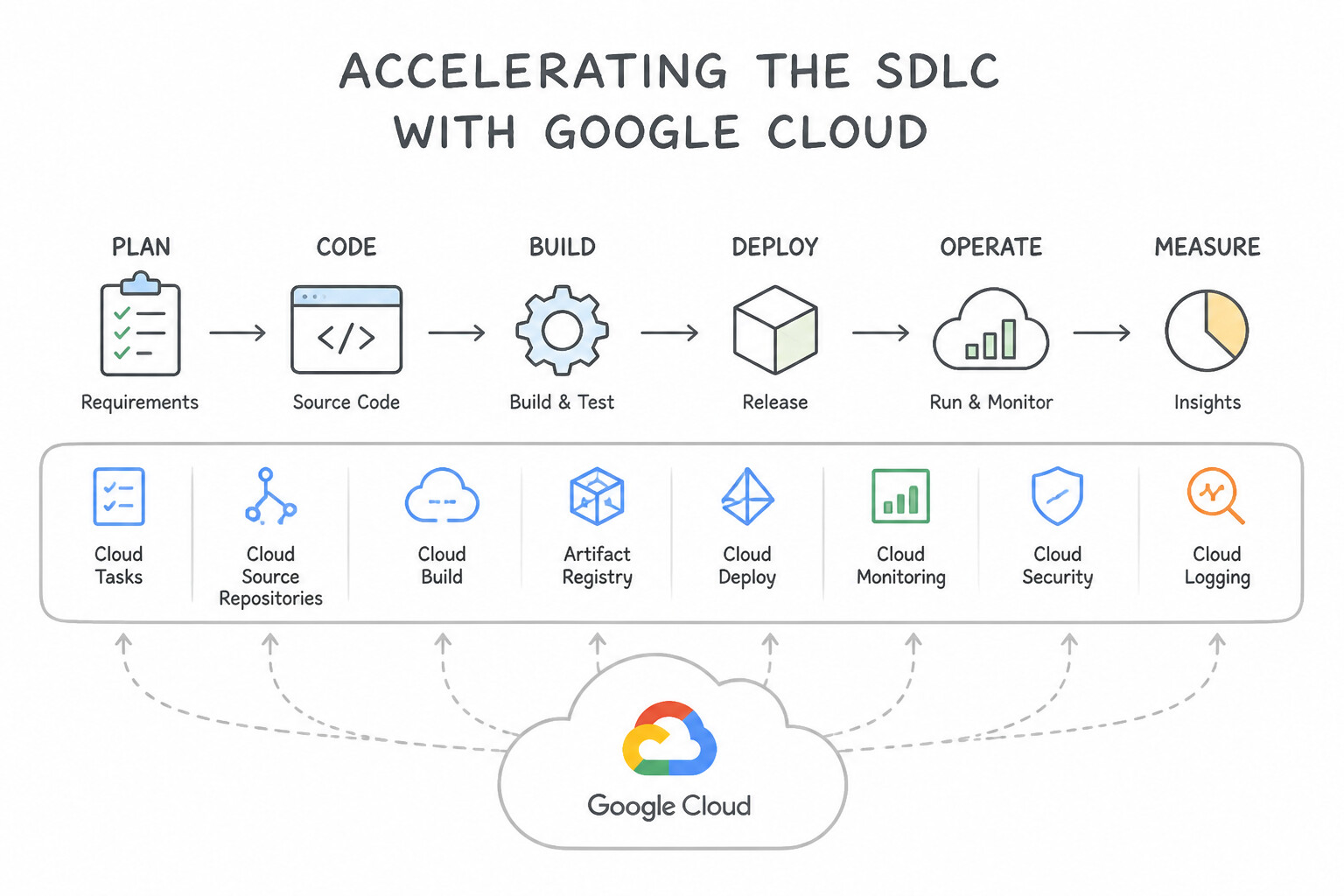
- Accelerating the SDLC (4.1a):
- Adopt Trunk-Based Development with short-lived feature branches, automated pull-request gates, and Shift-Left Security (scanning code, secrets, and Terraform policies on every commit rather than one week before launch).
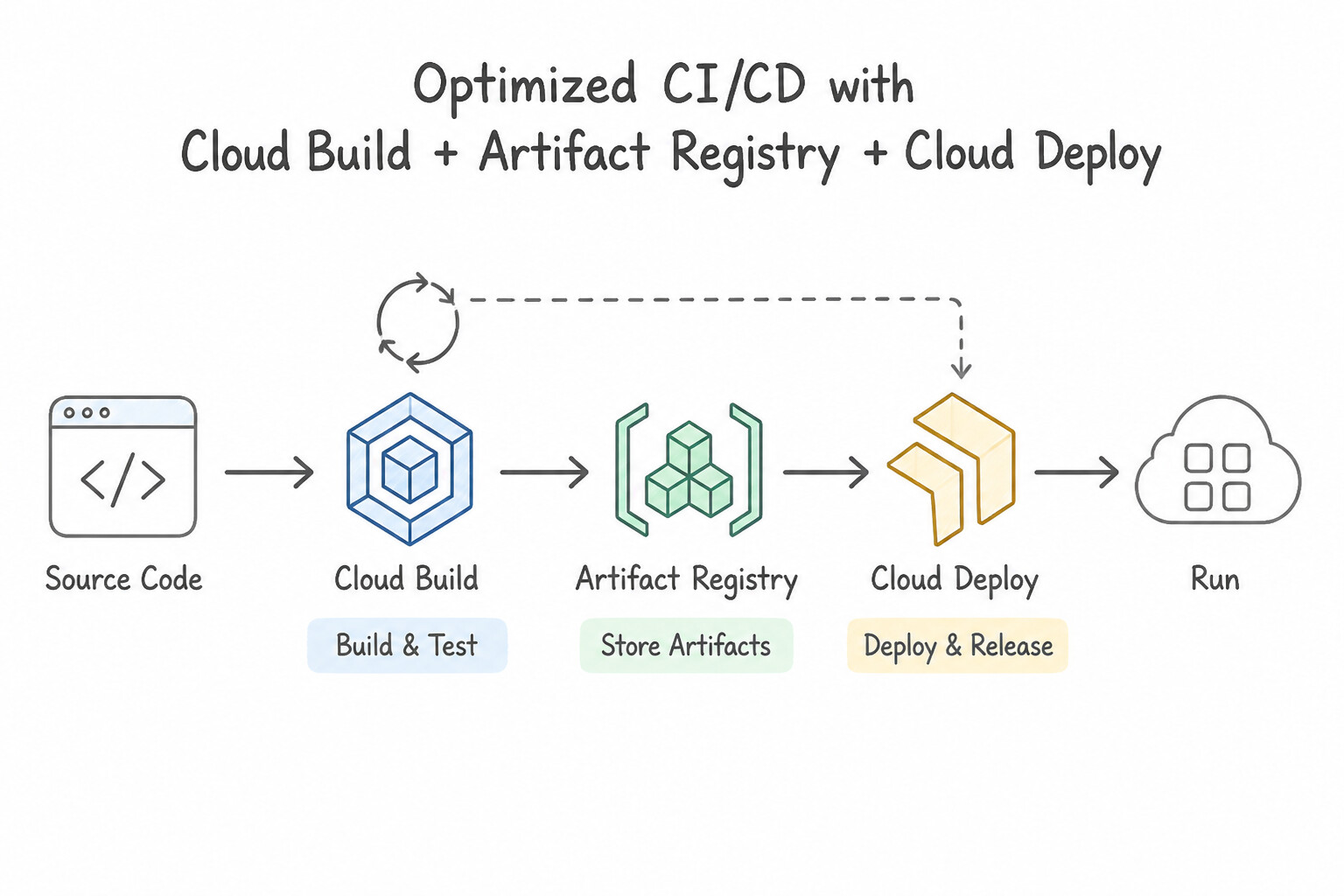
- Optimizing CI/CD Pipelines with
Cloud Build,Artifact Registry, andCloud Deploy(4.1b): - Speeding Up Slow
Cloud BuildPipelines: - Docker Layer Caching: Use Kaniko (
--cache=true) ordocker build --cache-frompulling cached layers from Artifact Registry. - Package Dependency Caching (
Maven,Gradle,npm,pip): Cache downloaded dependency folders in a regional Cloud Storage bucket (or use Artifact Registry Remote/Virtual Repositories as a pull-through cache!) and mount a sharedvolumesworkspace across Cloud Build steps. - Machine Type: Upgrade the Cloud Build worker pool machine type (
E2_HIGHCPU_8/N1_HIGHCPU_32) for CPU-intensive compilation. - Hybrid & Multi-Cluster GitOps: Use GKE Enterprise Config Sync to continuously pull and reconcile Kubernetes manifests from Git across cloud and on-premises clusters without exposing cluster API servers to external CI runners.
Key Takeaways (4.1a)
- Accelerating the SDLC:
- Optimizing CI/CD Pipelines with
Cloud Build,Artifact Registry, andCloud Deploy:- Speeding Up Slow
Cloud BuildPipelines:
Consideration 4.1b: CI/CD
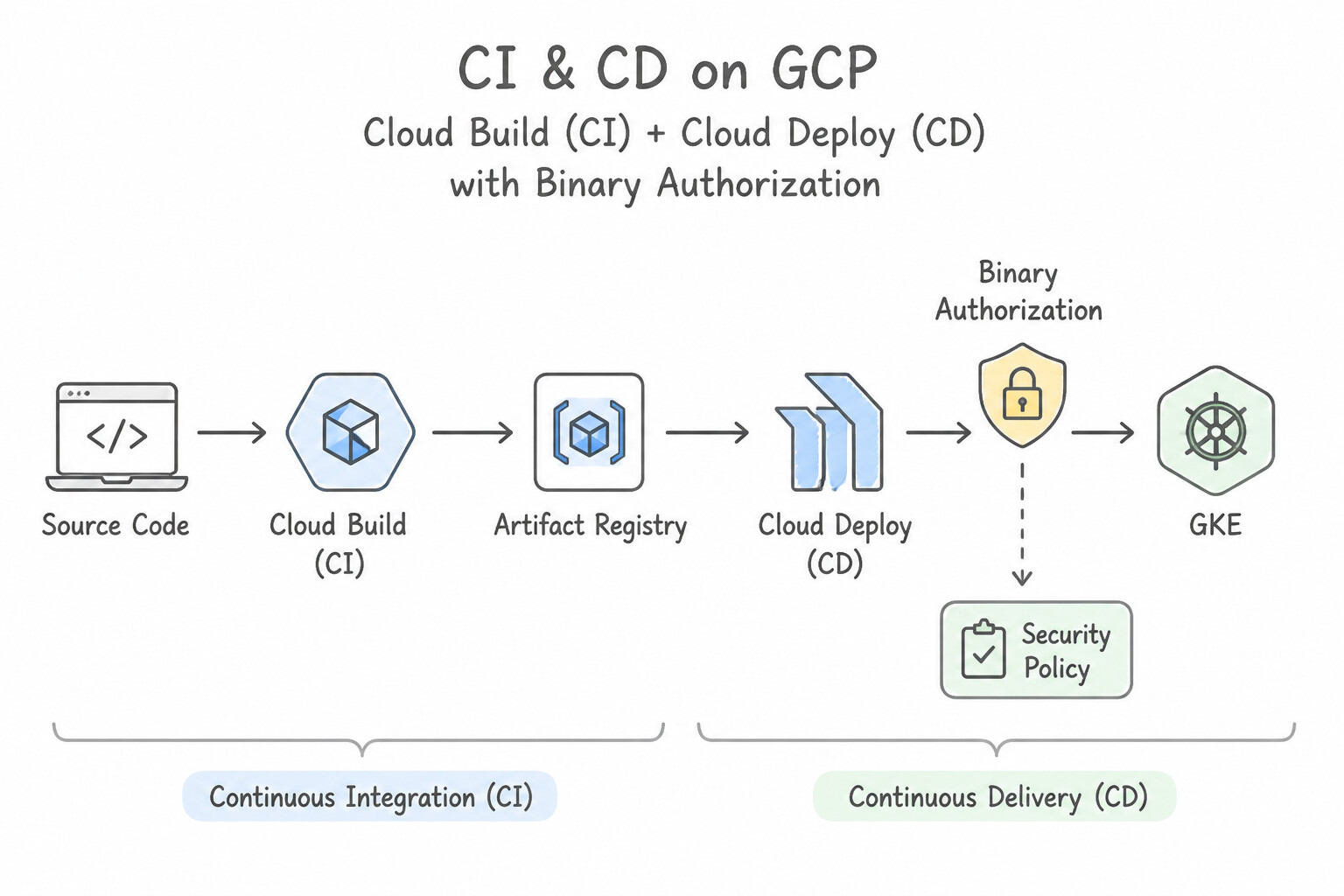
- Separate Continuous Integration (
Cloud Build) from Continuous Delivery (Cloud Deploy): - Cloud Build compiles source code, runs unit/policy tests, builds container images, and pushes immutable digest-tagged images (
@sha256:...) to Artifact Registry. - Cloud Deploy manages the delivery pipeline (
dev→staging→prodtargets on GKE, Cloud Run, or GKE Enterprise) with built-in approval gates, canary / blue-green traffic splitting, and one-click rollbacks.
Key Implementation Patterns
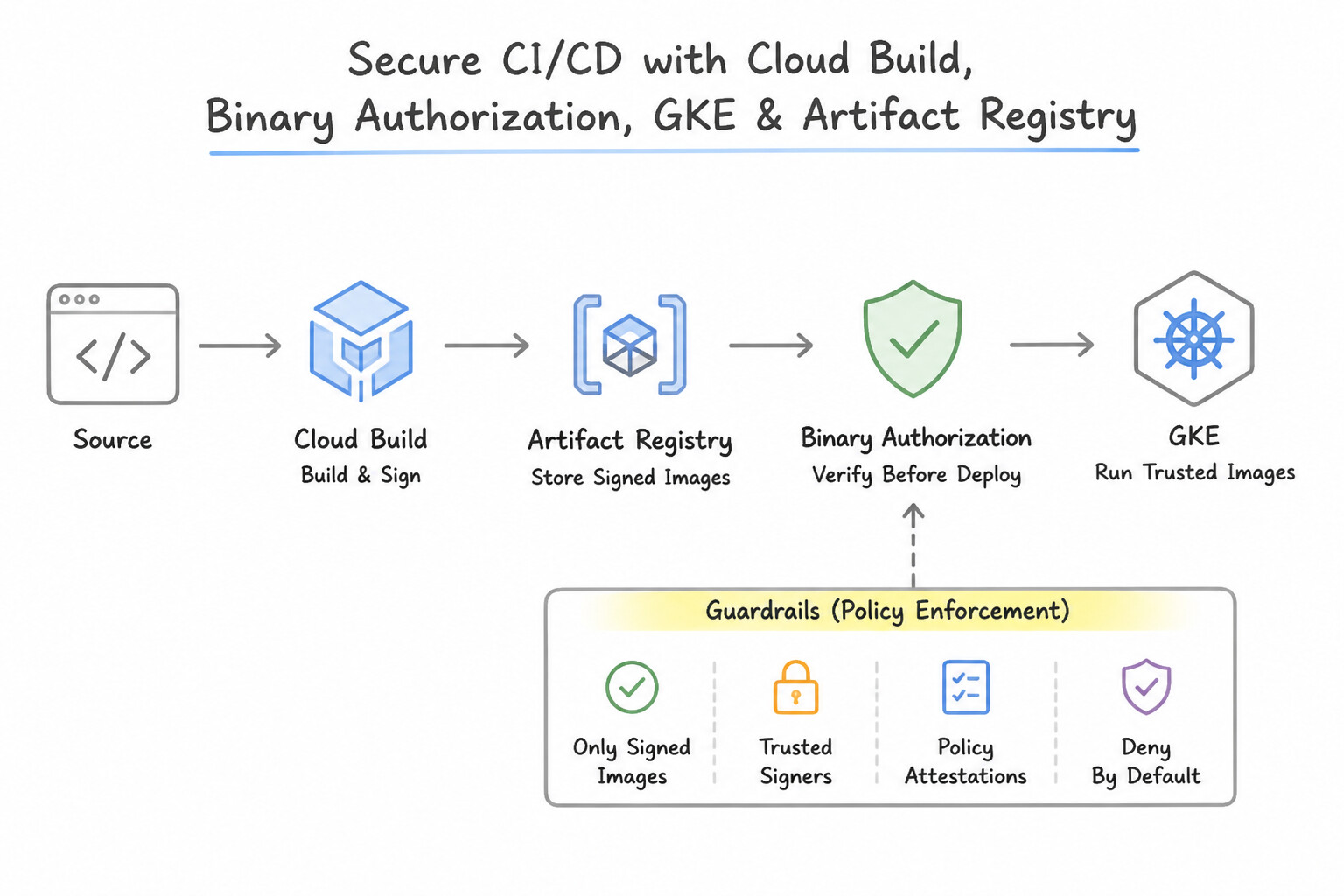
- Secure Supply Chain Implementation: Use Enable Binary Authorization on the GKE cluster. Create an attestor that uses the QA team's public key. Configure the specific policy to require a valid attestation signed by this key. Binary Authorization enforces deployment policies by verifying attestations signed by trusted parties (attestors) before allowing images on GKE.
- Hybrid CI/CD Connectivity: Use Create a Cloud Build private pool. Configure the pool to peer with your VPC network. Private pools peered with your VPC allow build workers to access private VPC resources and connected on-premises networks. (Avoid alternative: Cloud NAT is for outbound VPC traffic, not for connecting external Cloud Build workers to private resources.)
- Zero-Downtime Deployment Strategy: Use Create a new MIG with the new application version. Configure the load balancer to switch traffic to the new MIG. This describes a Blue/Green deployment, which allows instant traffic switching and rollback. (Avoid alternative: Rolling updates replace instances slowly and cannot be rolled back instantly.)
Key Takeaways (4.1b)
- Binary Authorization creates a secure software supply chain by ensuring only trusted images are deployed.
- Attestations are digital signatures that certify an image has passed specific checks (like QA or vulnerability scanning).
- Policies on GKE clusters enforce the presence of these attestations at deploy time.
- IAM handles user access, not artifact verification.
Consideration 4.1c: Troubleshooting and RCA best practices
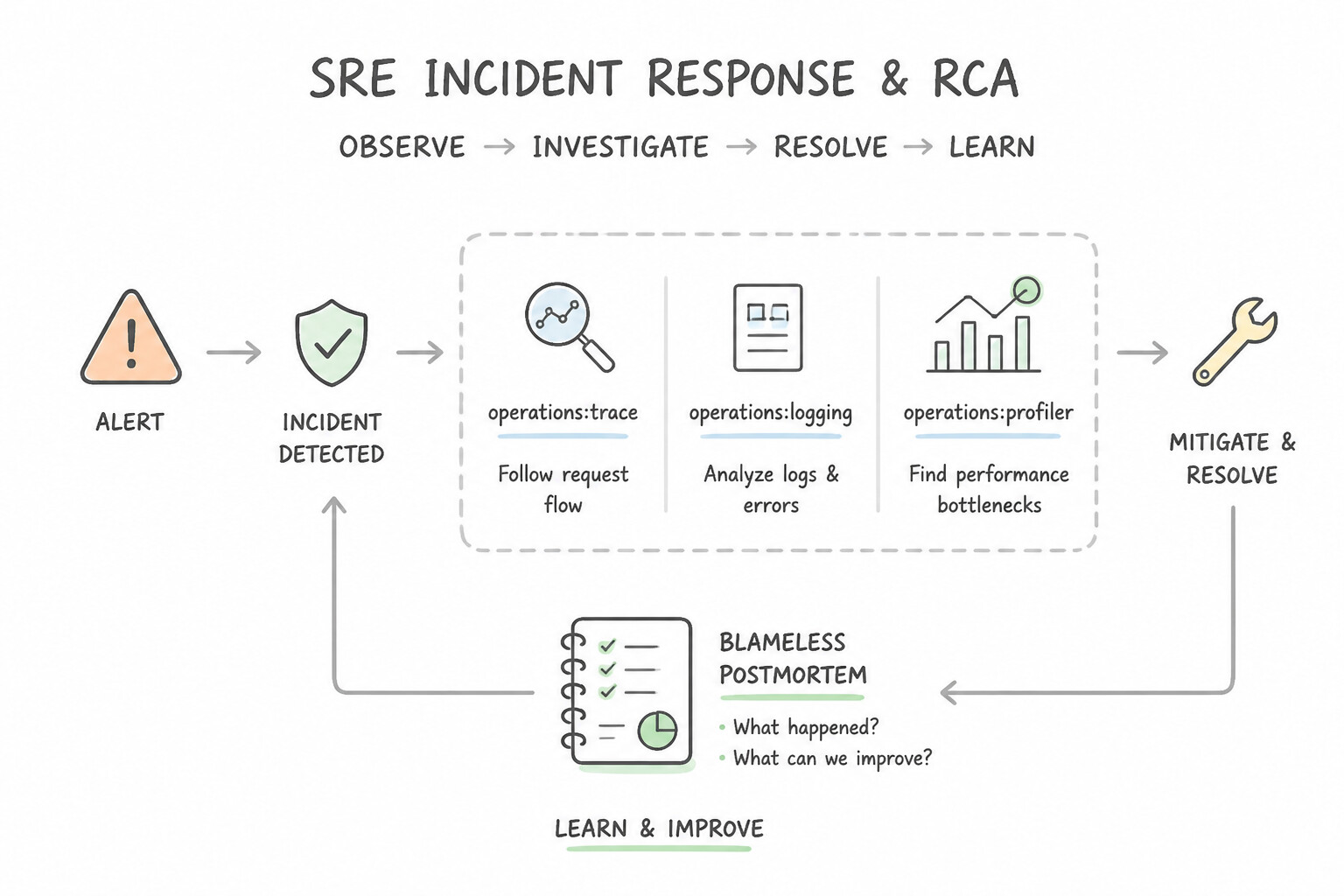
- SRE Incident Response & Blameless Postmortems:
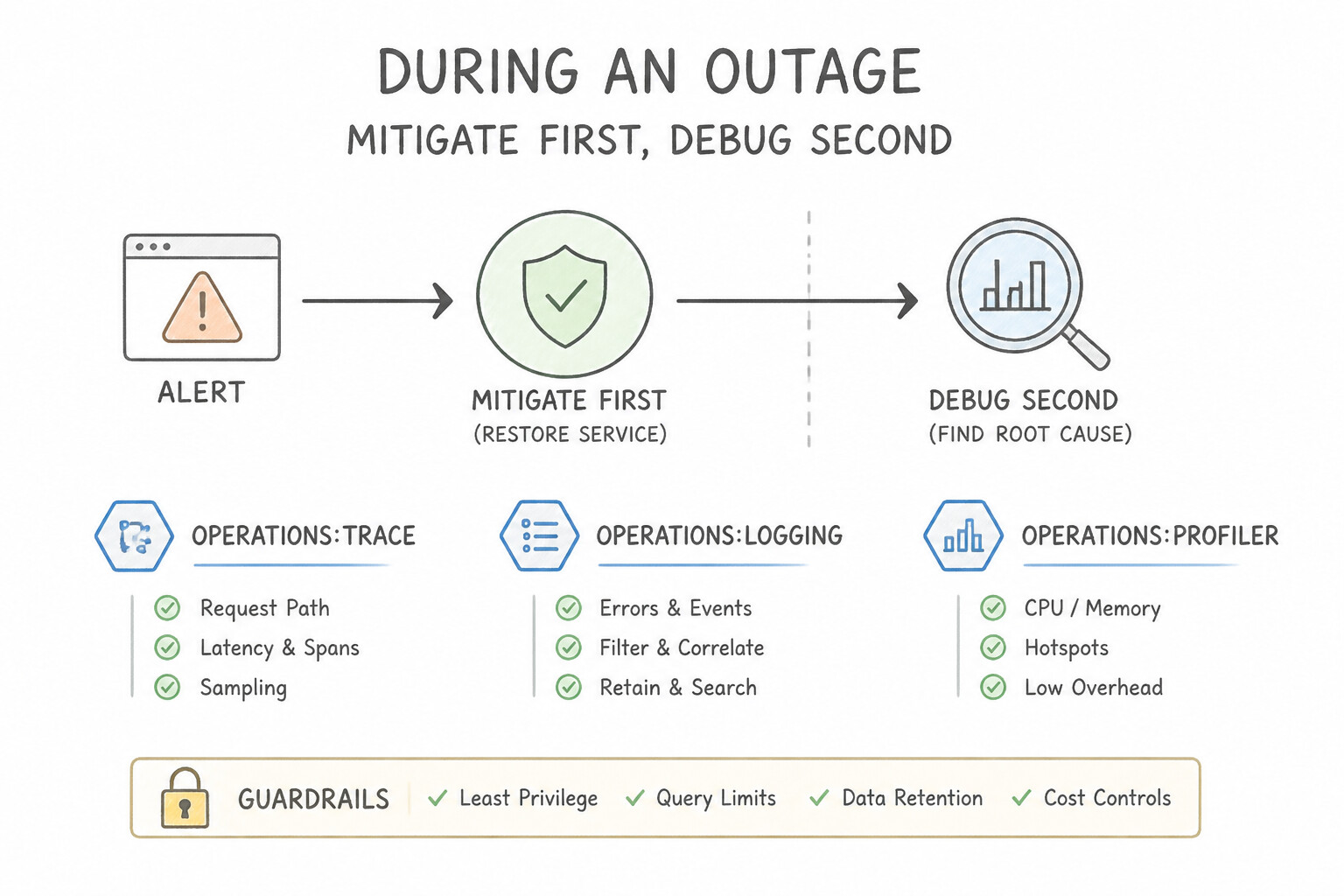
- During an Outage (Mitigate First, Debug Second): Prioritize restoring user service (
RTO) immediately by rolling back the recent deployment, shifting load-balancer traffic away from a degraded region, or scaling up capacity—before spending hours hunting the underlying code bug! - After an Outage (Blameless Postmortem &
5 Whys): Never blame or punish the individual engineer who ran a command or merged a PR. Ask why the system and process allowed a single human action to cause an outage (e.g., missing CI policy check, missing canary stage, missingstaging parity) and create tracked engineering action items to prevent recurrence.
Key Implementation Patterns
- High Latency in Microservices Architecture: Use Instrument the application to send span data to Google Cloud Trace. Cloud Trace visualizes the request flow across microservices to identify where latency occurs. (Avoid alternative: Cloud Profiler optimizes code resource usage, but the resource metrics are already normal.)
- Hybrid Connectivity Packet Loss: Use Use Network Intelligence Center Connectivity Tests to run a trace between the virtual machine (VM) and the database IP address. Connectivity Tests analyzes configuration (routes, firewalls) to simulate packet flow and pinpoint exactly where and why traffic is dropped.
- Cost Spikes due to Inefficient Code: Use Configure the Cloud Profiler agent in your application to capture CPU profiles. Cloud Profiler is designed for low-overhead, continuous profiling in production to identify resource-heavy functions. (Avoid alternative: Manual tools like 'top' are not scalable, do not provide function-level detail, and are difficult to use across multiple dynamic instances.)
Key Takeaways (4.1c)
- Use Cloud Monitoring to check overall system health and resource usage (CPU/Memory).
- Use Cloud Logging to find specific error messages and event details.
- Use Cloud Trace to analyze latency and request flows in distributed microservice architectures.
- Use Cloud Profiler to optimize code performance and reduce resource consumption (CPU/Heap) within a specific service.
Consideration 4.1d: Testing and validation
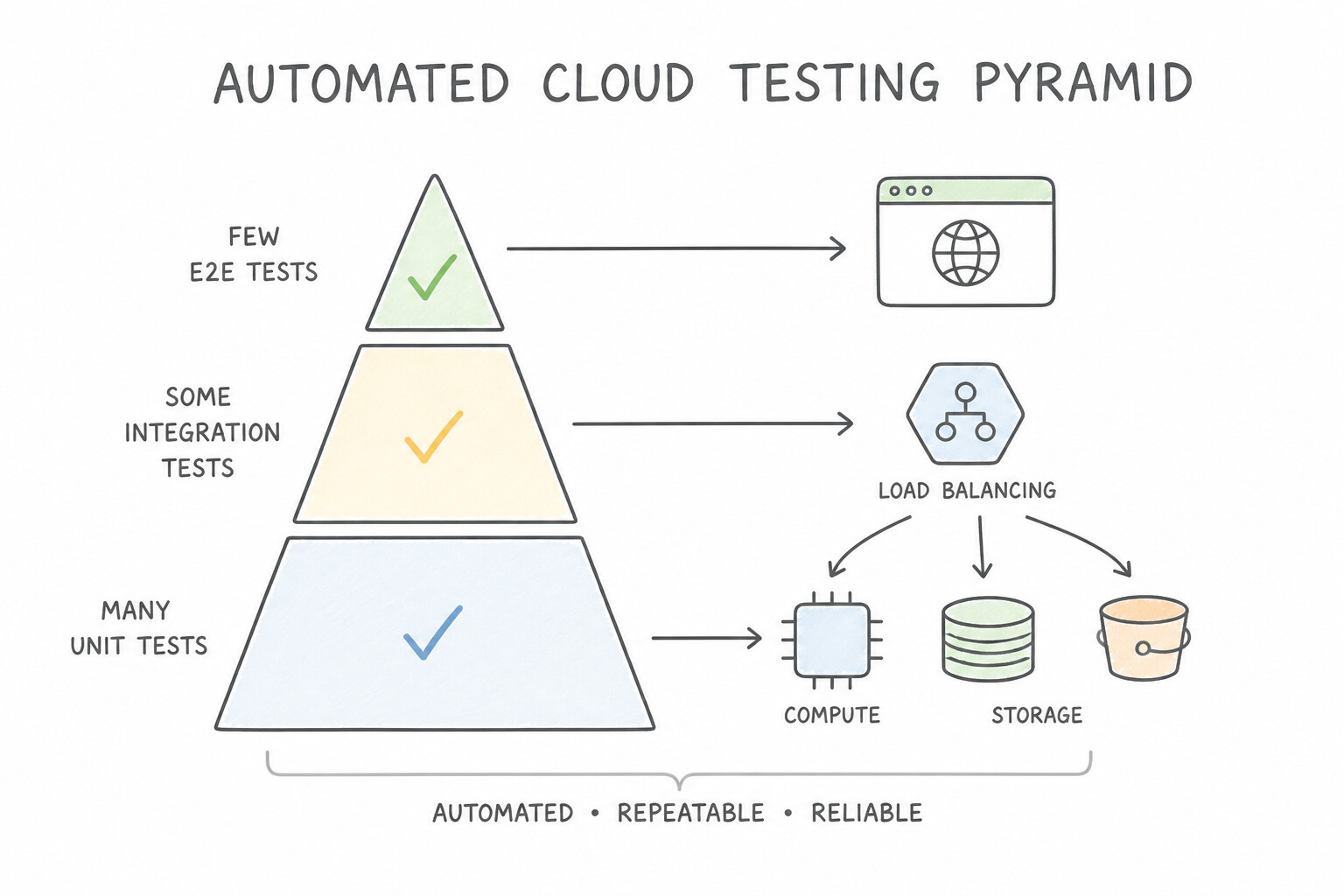
- The Automated Cloud Testing Pyramid:
- Unit & Static Analysis Tests: Fast, isolated code tests + Infrastructure as Code (
IaC) validation (terraform validate,tflint, and Policy Validation /gcloud beta terraform vet/ OPA Gatekeeper to verify Terraform plans against Organization Policies beforeapply). - Integration & Contract Tests: Verify service-to-service APIs and database queries using Cloud Emulators (
Pub/Sub,Spanner,Bigtable,Firestoreemulators) or ephemeral staging namespaces. - End-to-End Smoke & Synthetic Tests: Automatically triggered after staging/canary deployments to validate critical user journeys before promoting to 100% production traffic.
Key Implementation Patterns
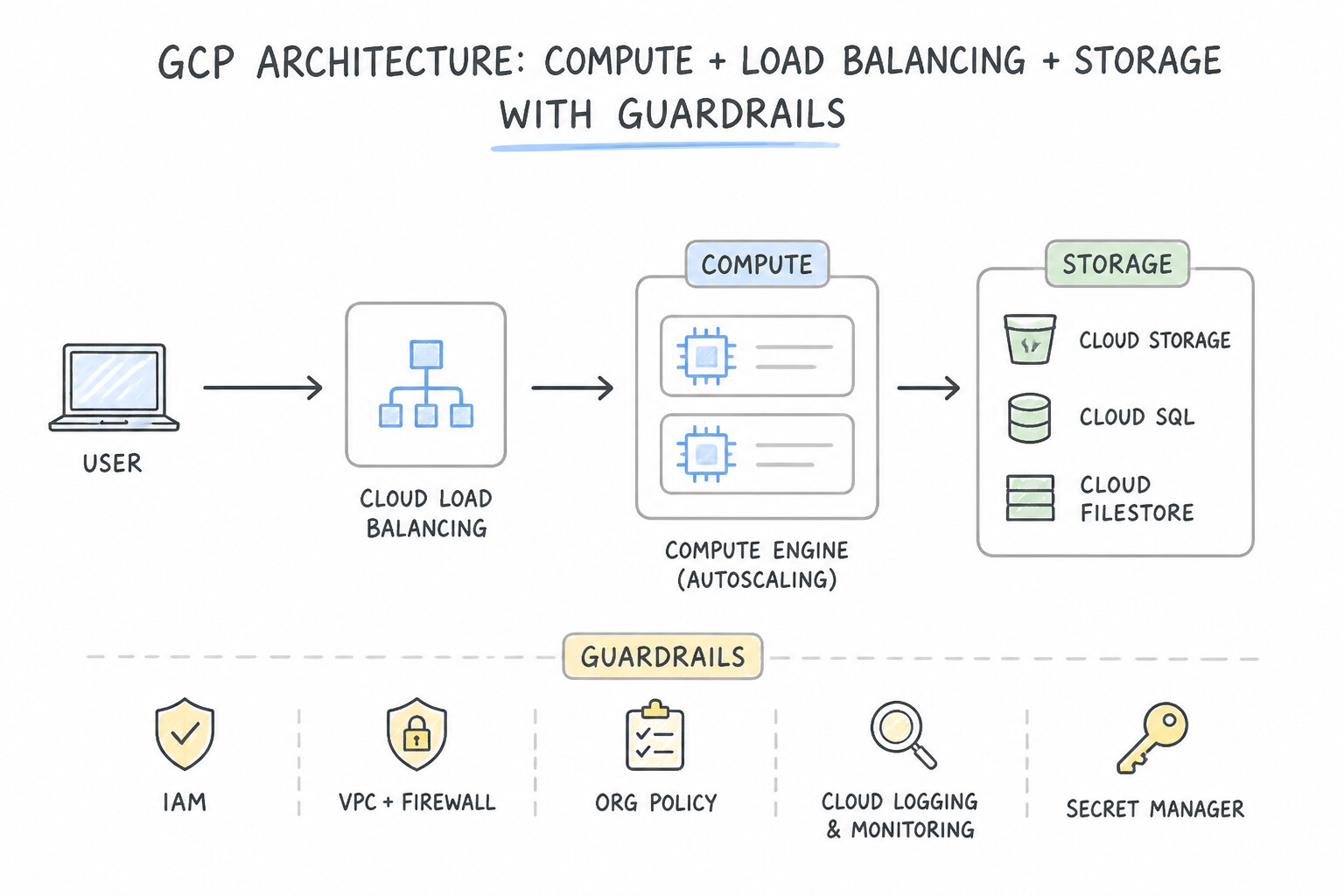
- Resiliency Validation via Chaos Engineering: Use Set up a staging environment that mirrors the production configuration. Simulate a zonal failure by stopping resources in one zone and verifying that the application remains available. Testing failure scenarios in an isolated staging environment mirrors production conditions without risking live traffic.
- Automated Policy Validation in CI/CD: Use Add a pipeline step to convert the Terraform plan to JSON. Use a policy-as-code tool to validate the plan against security rules. Validating the Terraform plan JSON against policies ensures non-compliant resources are caught before creation.
Key Takeaways (4.1d)
- Test in Staging: Always validate destructive tests or failure simulations in a production-mirror staging environment first.
- Validate, Don't Assume: Design documents do not guarantee runtime behavior; functional testing of failure modes is required.
- Simulate Failures: Proactive fault injection (Chaos Engineering) is more reliable than waiting for natural disasters to test your systems.
- Shift-Left: Validate infrastructure configuration as early as possible in the pipeline.
Consideration 4.1e: Service catalog and provisioning
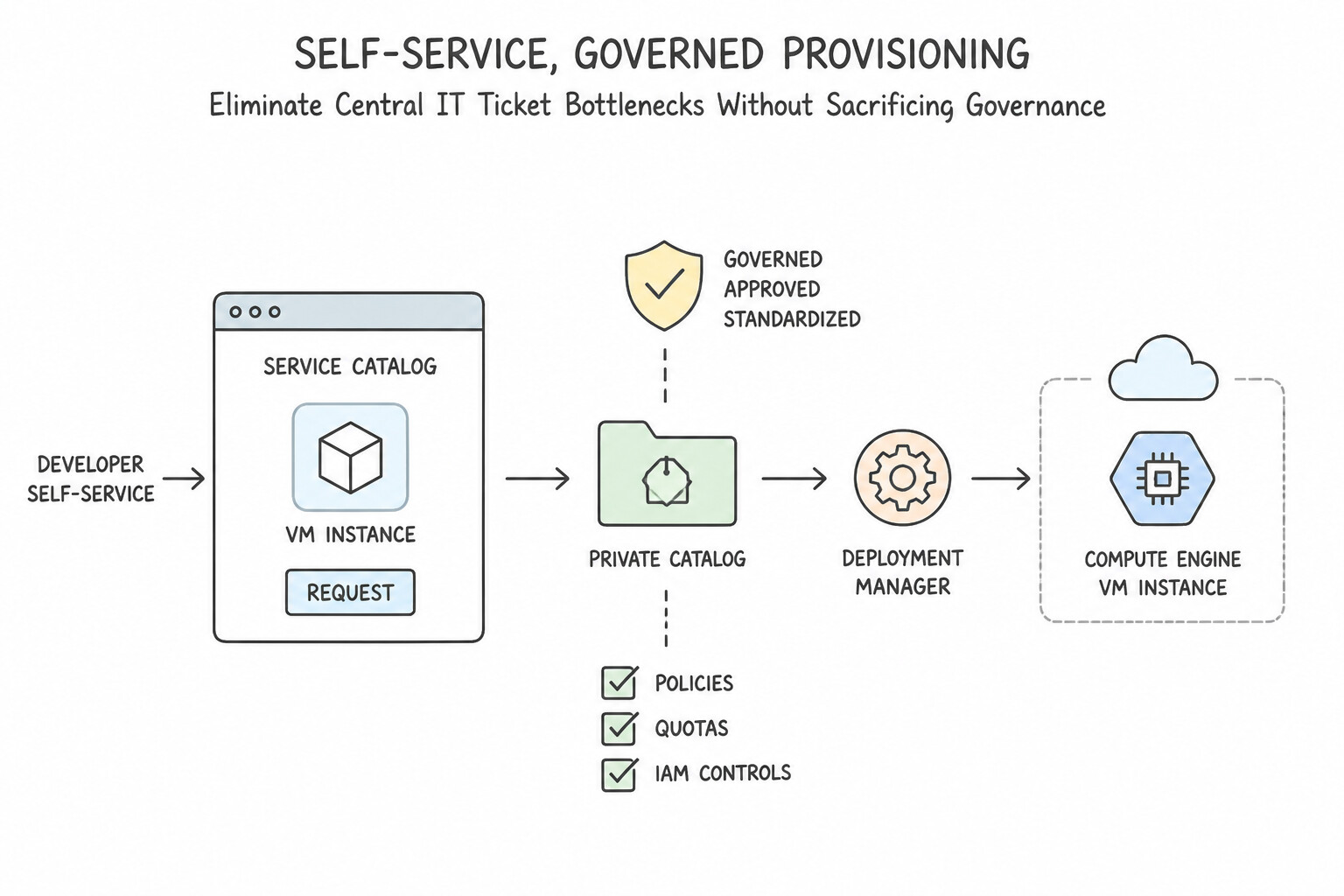
- Eliminate Central IT Ticket Bottlenecks Without Sacrificing Governance:
- When a central platform or security team slows down product teams through manual ticket-based provisioning—or conversely, when giving developers raw
Ownerroles leads to insecure "Shadow IT"—implement Google Cloud Service Catalog. - Platform engineers author pre-approved, security-hardened Terraform configurations (with mandatory CMEK, private IPs, and billing labels baked in) and publish them to Service Catalog so developers can deploy compliant environments on demand.
Key Implementation Patterns
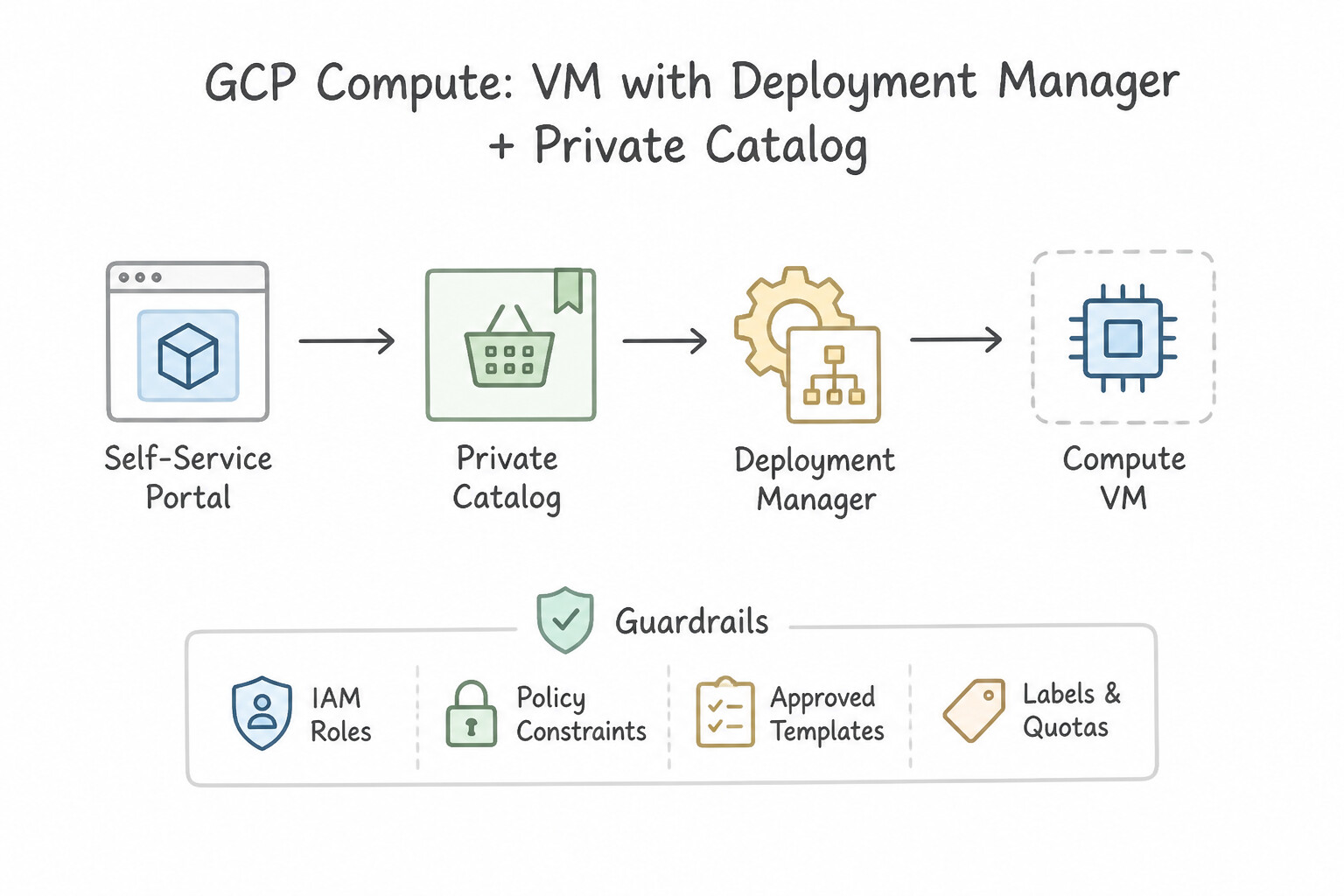
- Centralized Compliance for Self-Service VM Provisioning: Use Create a solution in Google Cloud Private Catalog using a Deployment Manager template with the specific image and machine type. Share the catalog with the developers. Private Catalog allows you to publish approved templates that limit user input to specific, compliant configurations.
- Automated Golden Image Creation Pipeline: Use Use Cloud Build and Packer to create the image. Assign the image to an image family. Reference the image family in Terraform. Image Families allow you to reference a static family name that automatically resolves to the latest image version.
- Infrastructure as Code State Management in Team Environments: Use Configure the Terraform backend to use Google Cloud Storage. This backend supports state locking to prevent concurrent writes. Google Cloud Storage is the standard remote backend for Terraform on GCP and natively supports state locking.
Key Takeaways (4.1e)
- Curate, Don't Gatekeep: Use Service Catalogs to enable self-service while maintaining control, rather than becoming a manual bottleneck.
- Preventive over Reactive: It is better to prevent a non-compliant resource from being created (using Templates/Policy) than to delete it after creation.
- Templates as Policy: Hardcoding specific values (like machine type) into Deployment Manager or Terraform templates effectively acts as a compliance policy.
- Image Families simplify automation by pointing to the latest image version automatically.
Consideration 4.1f: Disaster recovery
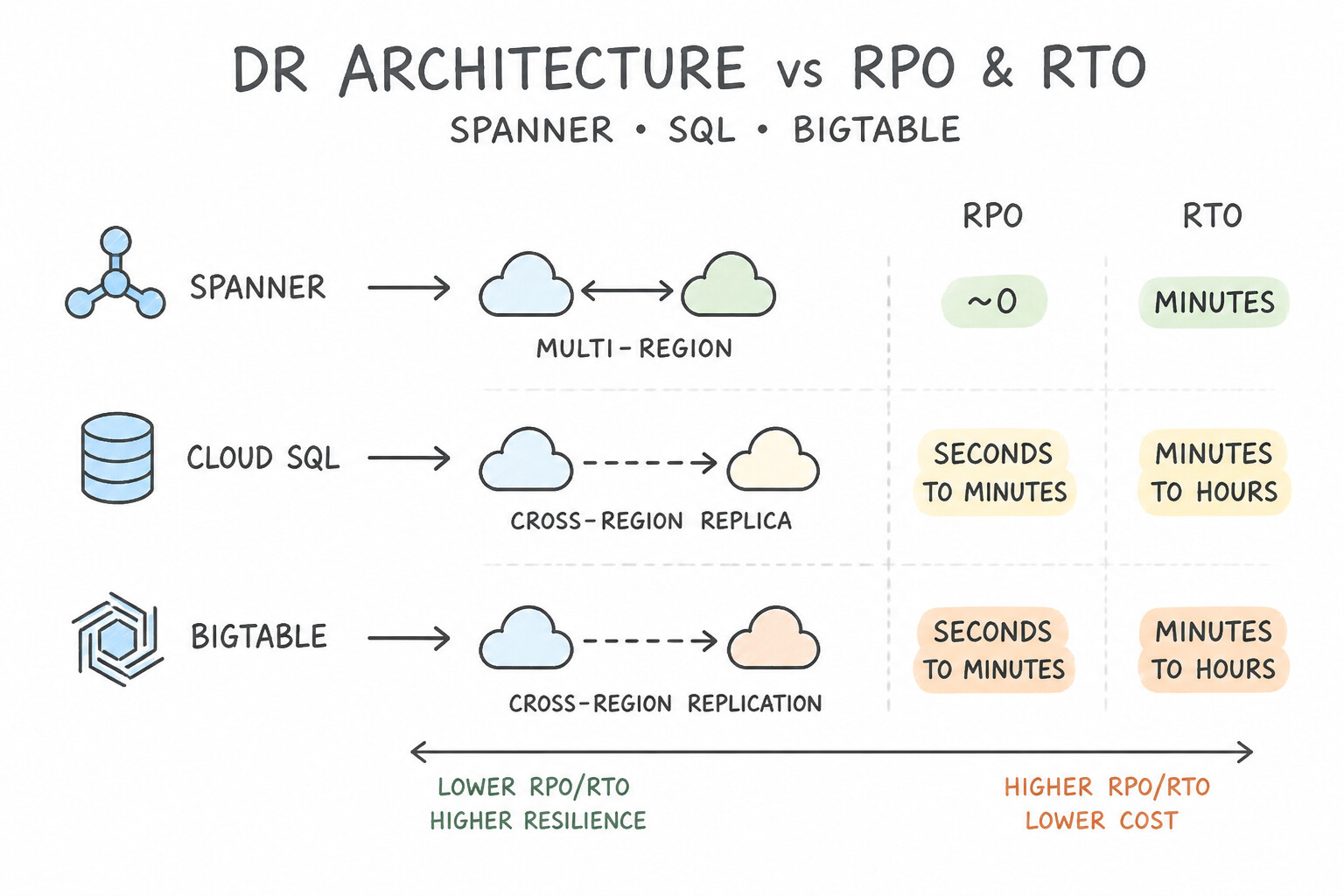
- Match the DR Architecture to the
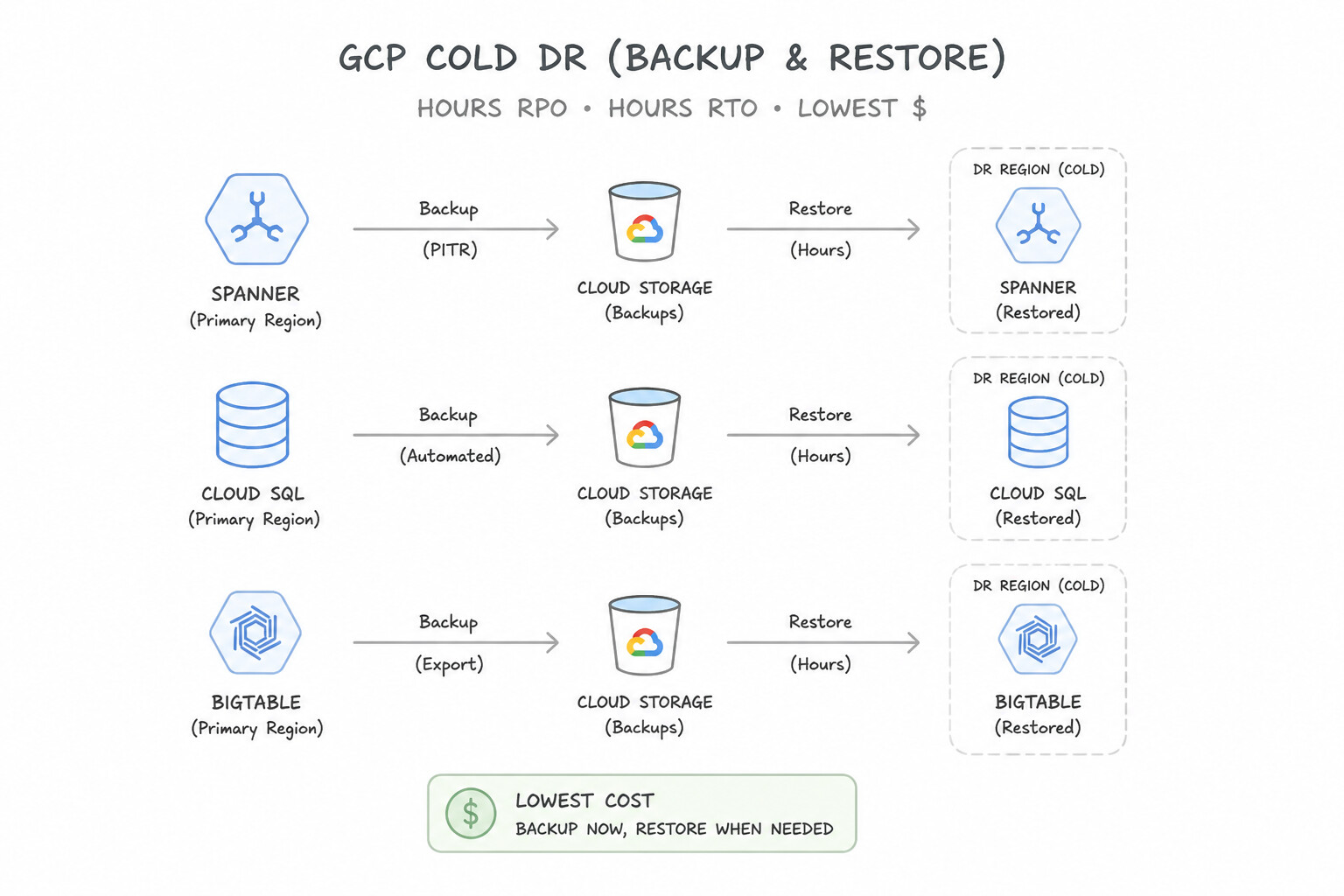
RPO/RTOMatrix: - Cold DR (Backup & Restore — Hours RPO, Hours RTO, Lowest
$): No compute runs in the DR region during normal operations. Periodically replicate backups/snapshots to a secondary region's Cloud Storage; on disaster, run Terraform / Cloud Deployment scripts to provision VMs/GKE and restore data. - Warm DR (Pilot Light — Minutes RPO, Minutes RTO, Medium
$$): Keep the stateful data layer live in the secondary region (e.g., a Cloud SQL Cross-Region Read Replica or continuous replication) alongside a minimal footprint (min-instances/ 1-node MIG) of stateless compute. On failover, promote the replica and autoscale compute + switch Cloud DNS / Global Load Balancer. - Hot DR (Multi-Region Active-Active — Zero RPO, Near-Zero RTO, Highest
$$$): Both regions actively serve production traffic simultaneously behind a Global External Application Load Balancer, backed by Cloud Spanner (multi-region synchronous replication) or multi-region active data stores. If Region A fails, the Global LB shifts 100% of traffic to Region B automatically in seconds!
Key Implementation Patterns
- Global Banking - Zero Downtime Requirement: Use Configure Cloud Spanner with a multi-region instance configuration. Cloud Spanner is the only Google Cloud service offering global strong consistency, 99.999% availability, and automatic multi-region failover. (Avoid alternative: Cloud SQL is a regional service and cannot natively provide global strong consistency or 99.999% availability across three continents.)
- E-Commerce Regional Failover - Database: Use Create a cross-region read replica in the secondary region. Promote this replica to a standalone instance if the primary region fails. Cross-region replicas allow you to fail over to a different region by promoting the replica.
- Cost-Optimized Media Archival - Cold DR: Use Configure a Cold DR strategy. Backup the footage to a bucket using the Cloud Storage Archive class. Create scripts to provision the infrastructure only when recovery is needed. Archive storage minimizes data costs, and a Cold DR strategy eliminates idle compute costs, fitting the 24-48h RTO.
Key Takeaways (4.1f)
- Cloud Spanner is the go-to choice for global, horizontal scaling of relational data with strong consistency.
- Multi-region configurations in Spanner offer 99.999% availability.
- Cloud SQL is primarily regional; cross-region read replicas provide disaster recovery but not immediate active-active global consistency.
- Strong consistency is critical for financial transactions to ensure account balances are accurate everywhere instantly.
Quick Decision Cheat Sheet (Subsection 4.1)
If the Scenario Requires... | Choose This Google Cloud Pattern | Avoid This Common Mistake |
|---|---|---|
"Cloud Build is slow due to re-downloading Maven/npm packages or rebuilding unchanged Docker layers" | Use Cloud Storage / Artifact Registry dependency caching and Kaniko ( --cache=true) | Running builds on a persistent shared Compute Engine VM |
"Validate that Terraform changes comply with corporate security policies BEFORE resources are created" | Run terraform plan + policy validation (gcloud beta terraform vet / OPA) inside the Cloud Build PR pipeline | Relying on Security Command Center to detect violations after deployment |
"Junior engineer accidentally triggered an outage; how should management respond after mitigation?" | Conduct a Blameless Postmortem ( RCA) and add automated CI/CD guardrails & canary checks | Firing/reprimanding the engineer or restricting all deployments to manual VP sign-off |
"Enable developers to self-provision approved, compliant cloud stacks without writing raw Terraform" | Google Cloud Service Catalog backed by curated Terraform blueprints | Giving every developer Project Owner permissions |
"Lowest-cost DR solution when the business can tolerate 4-hour RPO and 6-hour RTO" | Cold Standby (Backup & Restore) with cross-region Cloud Storage backups and automated Terraform recovery scripts | Running a 24/7 Multi-Region Active-Active Cloud Spanner cluster |
Further Reading (Subsection 4.1)
- Binary Authorization Overview — Provides a high-level explanation of how Binary Authorization helps secure the software supply chain on GKE.
- Creating Attestors — Details the steps to create attestors and use keys to verify attestations.
- Cloud Build Private pools overview — Explains how private pools provide a secure, dedicated environment with the ability to access resources in a private network.
- Accessing private GKE clusters with Cloud Build — Specifically discusses the architecture required to deploy to private GKE clusters using Private Pools.
- Application deployment and testing strategies — This article discusses various deployment strategies including Blue/Green and Rolling updates, explaining the trade-offs regarding downtime and rollback speed.
- Cloud Trace overview — Provides a summary of how Cloud Trace helps collect latency data and visualize call stacks in distributed systems.
Subsection 4.2: Analyzing and defining business processes
The Big Picture
You can design a flawless multi-region Kubernetes architecture, and the transformation will still fail if the operations team only knows legacy Windows Server administration (4.2c), if business executives panic over unpredictable monthly OpEx bills (4.2f), if security stakeholders block launch at the 11th hour because they were never consulted (4.2a), or if engineering keeps shipping risky features after burning through 100% of their quarterly Error Budget (4.2d, 4.2e).
Subsection 4.2 tests the socio-technical and FinOps side of the Principal Cloud Architect role: aligning stakeholders, structuring organizational change (Google Cloud Adoption Framework), upskilling teams, establishing objective data-driven decision-making (SLIs/SLOs/Error Budgets), and institutionalizing Cloud FinOps (CapEx → OpEx, CUDs, Network Tier optimization, and chargeback/showback).
Consideration 4.2a: Stakeholder management
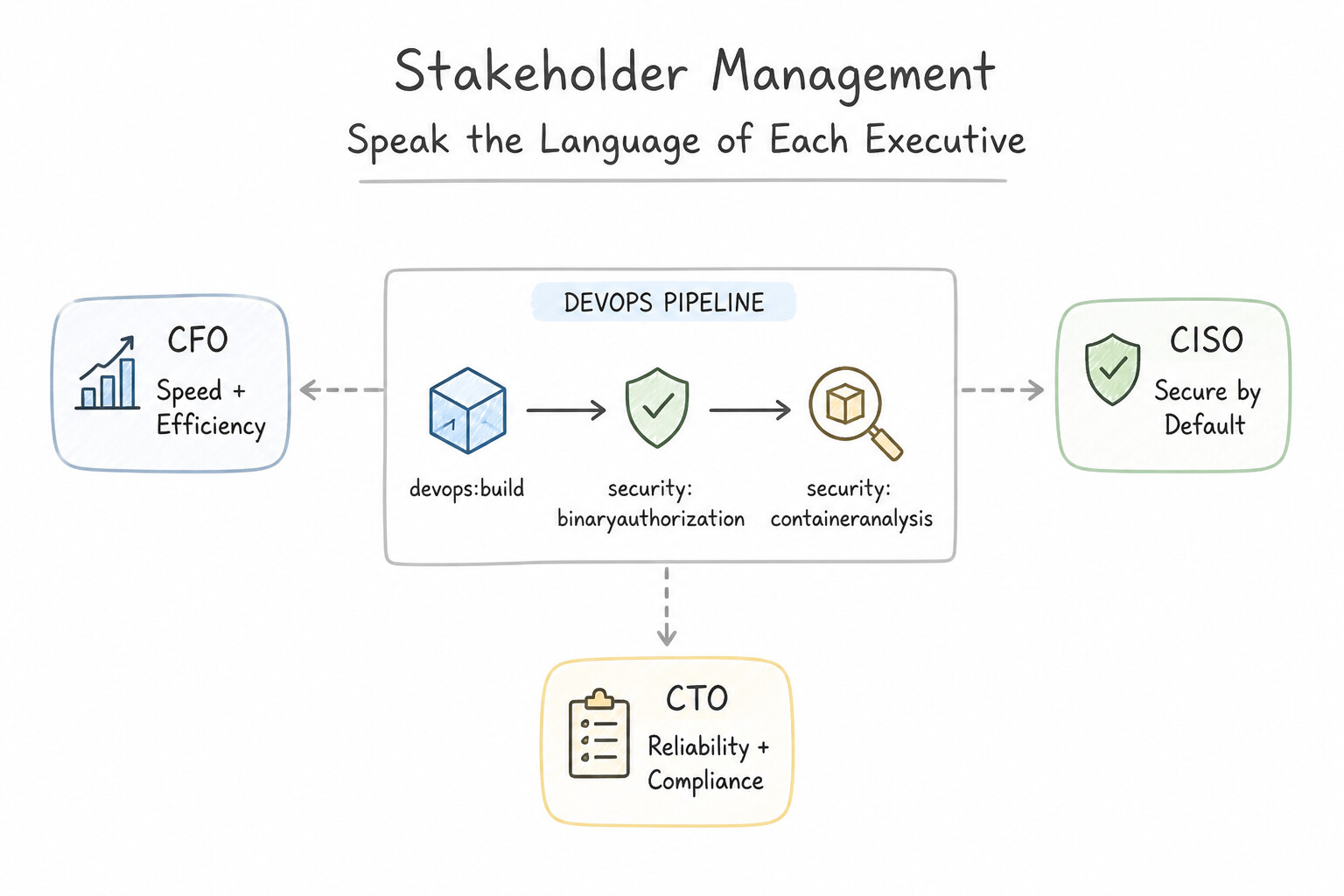
- Speak the Language of Each Executive Stakeholder:
- CFO / Finance: Frame cloud architecture around
CapEx→OpExpredictability, Total Cost of Ownership (TCO), Committed Use Discounts (CUDs), and unit economics (cost per active customer or cost per transaction). - CISO / Risk & Legal: Frame architecture around preventive guardrails (Organization Policies), data exfiltration perimeters (VPC-SC), CMEK, and automated compliance audit evidence.
- VP of Product / Business Unit: Frame architecture around Time-to-Market, feature velocity (
DORAmetrics), and customer-facing SLOs. - Engage Security and Compliance at Day 0: Never design an architecture in isolation and hand it to Security two days before launch—embed security architects in the initial design review and codify their requirements as automated CI/CD policy checks.
Key Implementation Patterns
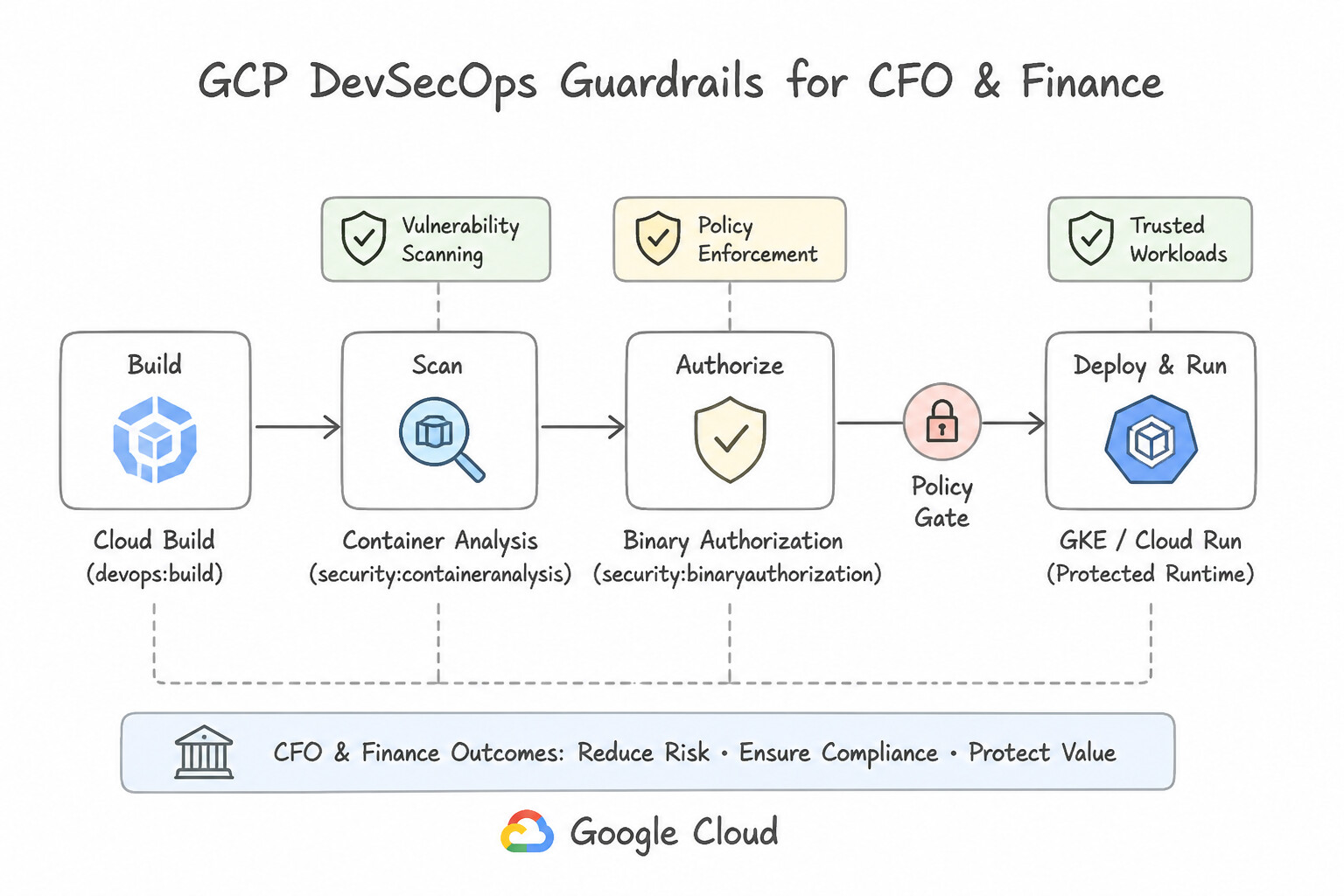
- Bridging Development Speed and Security Compliance: Use Implement a CI/CD pipeline with automated vulnerability scanning and use Binary Authorization to prevent non-compliant deployments. Automating security checks enables daily deployments while enforcing strict compliance controls.
- Influencing Cost Management Culture (FinOps): Use Define a resource labeling strategy for cost tracking, export billing data to BigQuery for analysis, and schedule regular cost review meetings with the engineering team. Labels and billing exports provide visibility, while regular reviews build a culture of shared accountability.
- Translating Business Uptime to Technical Metrics: Use Facilitate a workshop to define Service Level Objectives (SLOs) and an Error Budget that reflects acceptable user impact. Define realistic SLOs and use Error Budgets to align business goals with engineering reality. (Avoid alternative: 100% reliability is impossible and deploying to every region is not cost-effective.)
Key Takeaways (4.2a)
- Stakeholder conflicts regarding speed vs. security are best resolved by automating compliance rather than compromising on either.
- Binary Authorization is a key control for enforcing supply chain security in GKE environments.
- Manual processes are bottlenecks; Architect solutions that replace manual verification with automated policy enforcement.
- Visibility is the foundation of cost management; use labels and billing exports to achieve it.
Consideration 4.2b: Change management
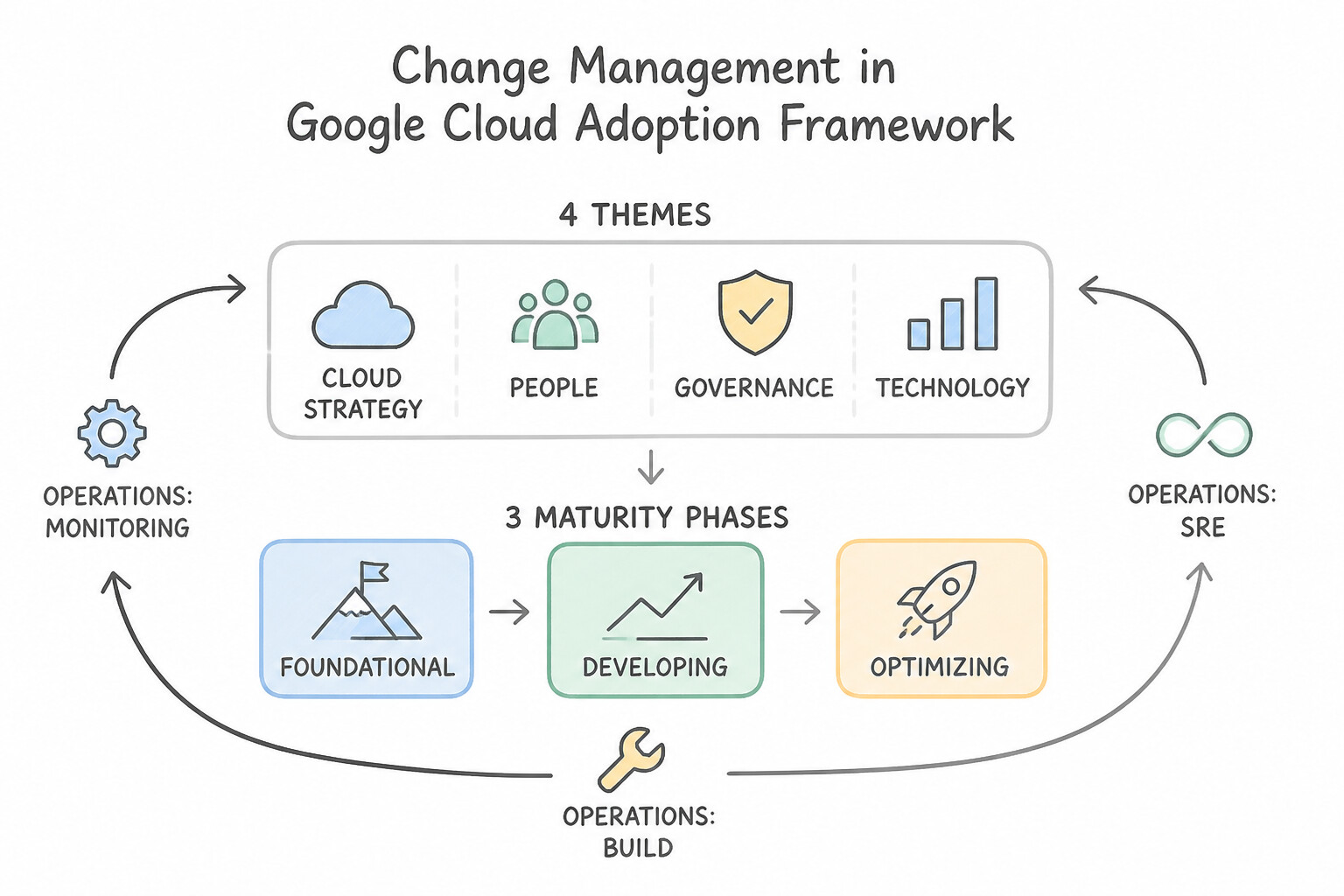
- The Google Cloud Adoption Framework (4 Themes & 3 Maturity Phases):
- Four Themes:
- Learn: Quality and scale of training programs and external partnerships.
- Lead: Mandate from executive leadership and cross-functional Cloud Center of Excellence (
CCoE) sponsorship. - Scale: Extent of cloud-native automation, IaC, and shared services across teams.
- Secure: Maturity of zero-trust identity and preventive policy guardrails.
- Three Maturity States: Tactical (ad-hoc lift-and-shift of individual workloads) → Strategic (repeatable governance and CCoE foundations) → Transformational (cloud-first autonomous teams innovating continuously).
Key Implementation Patterns
- Balancing Velocity and Reliability: Use Define Service Level Objectives (SLOs) and use an error budget to govern the pace of releases. Error budgets align dev and ops by using a shared metric to balance speed and stability. (Avoid alternative: 100% availability is unrealistic and stops all feature development.)
- Managing Infrastructure State: Use Adopt an Infrastructure as Code (IaC) workflow. Revoke manual write access to production resources, and require all changes to be committed to a version control system and deployed through a CI/CD pipeline. Implementing IaC with a CI/CD pipeline and revoking manual access enforces the source of truth and prevents configuration drift.
- Risk Mitigation in Critical Updates: Use Use a blue/green deployment strategy by maintaining two separate environments. Blue/green deployment keeps two full environments running, allowing instant traffic switching for zero downtime and immediate rollback. (Avoid alternative: Recreate deployment causes downtime because it stops the old version before starting the new one.)
Key Takeaways (4.2b)
- Zero outages (100% reliability) is not the goal; appropriate reliability is.
- Error Budgets bridge the gap between Dev and Ops by quantifying acceptable risk.
- If an Error Budget is exhausted, release velocity stops to focus on reliability.
- If an Error Budget is full, you should take more risks (release faster) to innovate.
Consideration 4.2c: Team assessment and readiness
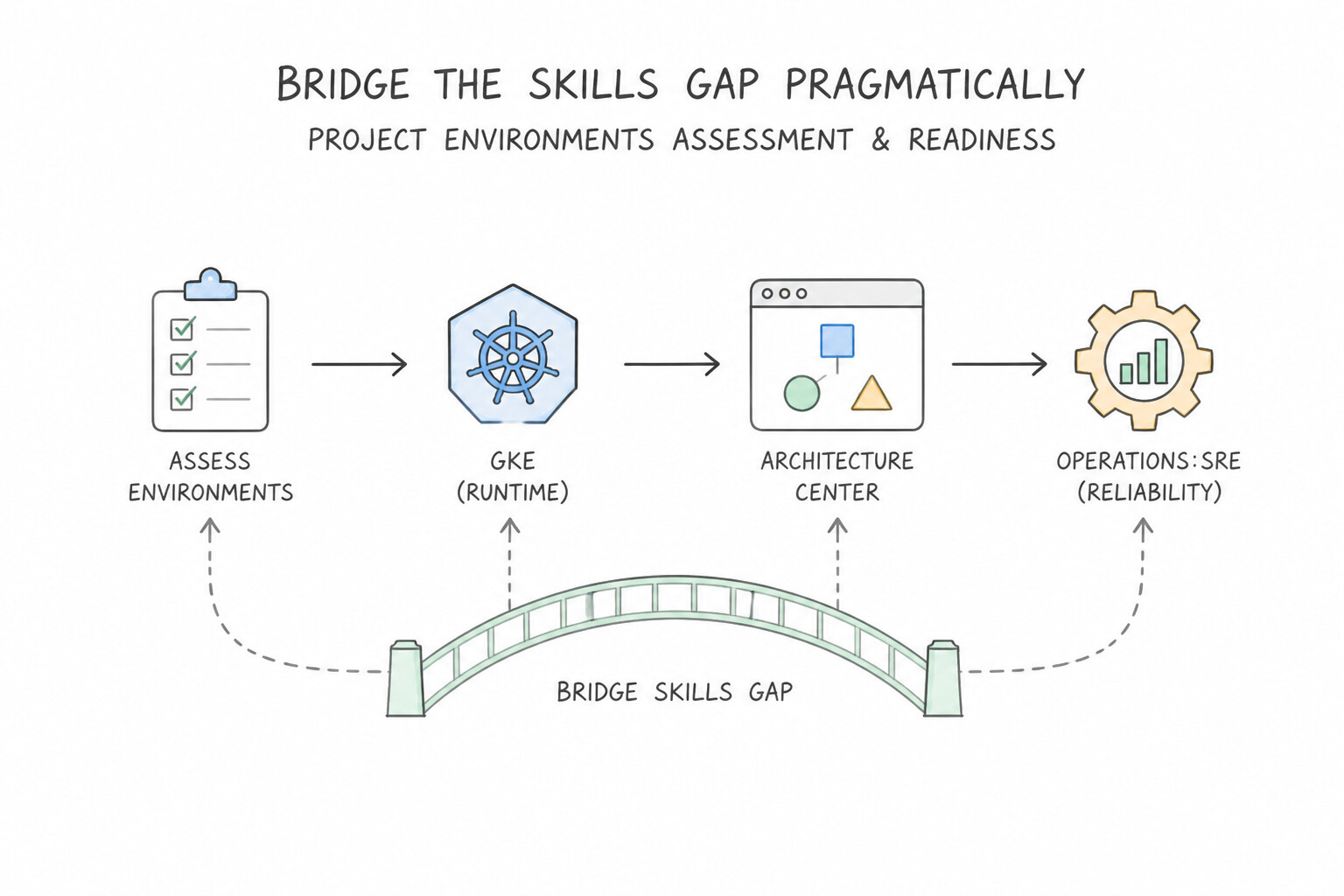
- Bridge the Skills Gap Pragmatically:
- Short-Term (Immediate Project Deadline): Select higher-abstraction managed services that match existing skills (e.g., BigQuery for SQL analysts rather than raw Java MapReduce; Cloud Run or GKE Autopilot for teams without Kubernetes node-administration expertise; VMware Engine for seasoned vSphere admins facing an urgent data-center exit).
- Medium/Long-Term: Pair internal engineers with external cloud partners or a central CCoE / Platform Engineering team, run hands-on pilot migrations on low-risk non-production apps, and invest in structured role-based certification tracks.
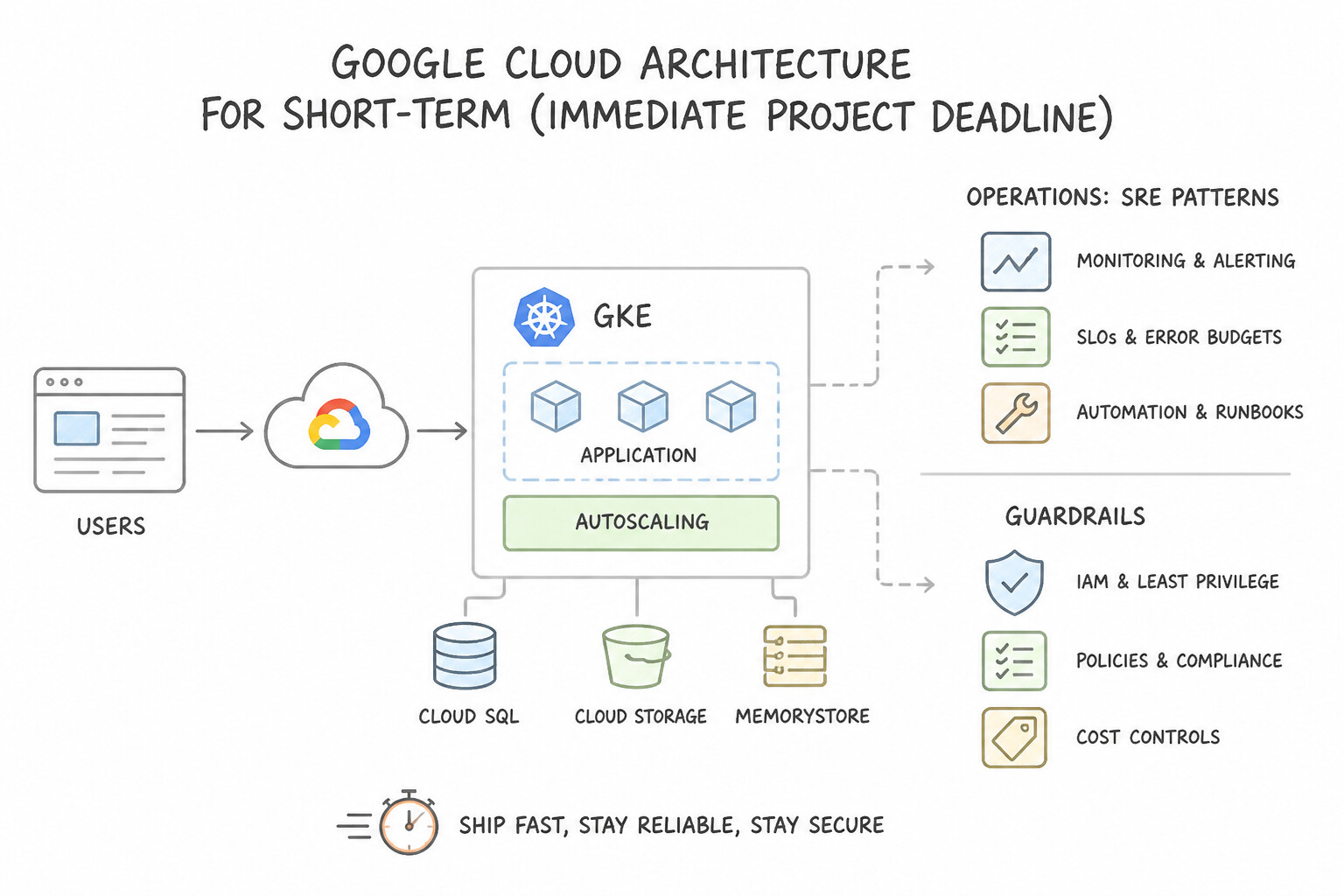
Key Implementation Patterns
- Skills Gap Analysis for Container Adoption: Use Assess the team's skills gap and create a training plan for containers and GKE. Training addresses the root cause of the risk by ensuring the team is capable of operating the new technology. (Avoid alternative: Tools automate migration but do not teach the team how to operate the new environment.)
- Addressing Cultural Resistance to Automation: Use Organize workshops to demonstrate how IaC automation reduces repetitive toil and allows engineers to focus on higher-value tasks. Addressing the team's fears by showing how automation reduces repetitive work helps build necessary cultural buy-in.
Key Takeaways (4.2c)
- Technology adoption fails without people readiness; always assess skills gaps.
- Tools (like migration services) solve technical problems, not operational knowledge problems.
- Training is a critical part of the architectural recommendation for team readiness.
- Resistance to cloud adoption is often cultural, not technical.
Consideration 4.2d: Decision-making processes
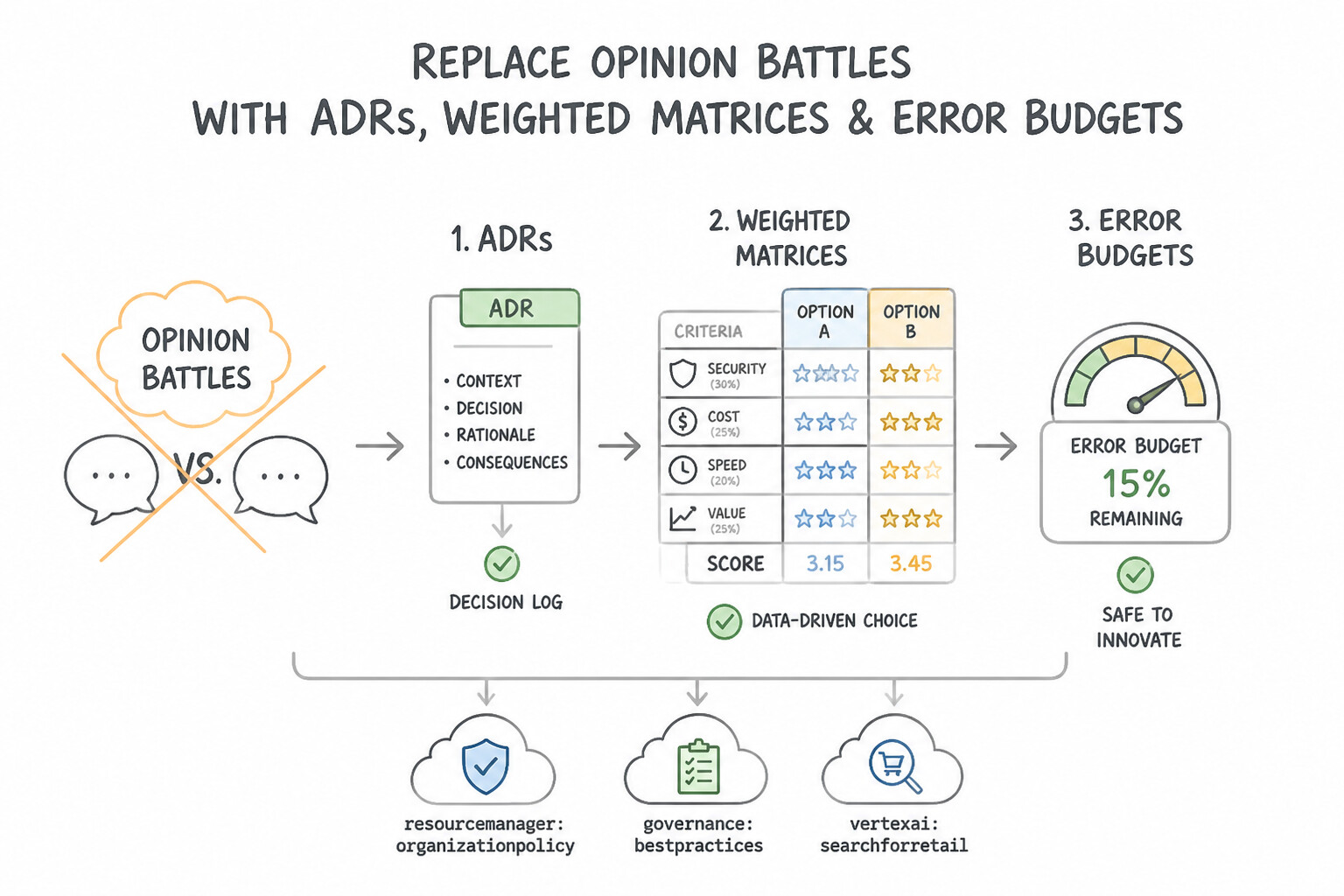
- Replace Opinion Battles with
ADRs, Weighted Matrices, andError Budgets: - Document major architectural choices using lightweight Architecture Decision Records (
ADRs) capturing the context, options considered, quantitative trade-offs, and decision rationale. - Resolve Product Builders (want fast releases) vs. SRE/Operations (want zero changes/stability) tension using an objective Error Budget Policy:
- While the service is performing above its SLO (Error Budget remaining > 0), Product teams have the green light to release rapidly.
- The moment an outage or regression exhausts the 30-day Error Budget, feature launches automatically pause (except P0 security fixes) until reliability improvements bring the service back within SLO!
Key Implementation Patterns
- Establishing an Architecture Review Board: Use Establish an Architecture Review Board (ARB) with representatives from security, operations, and development to approve reusable design patterns. An ARB provides a governance framework to standardize decisions and patterns without removing the ability for teams to innovate within those standards.
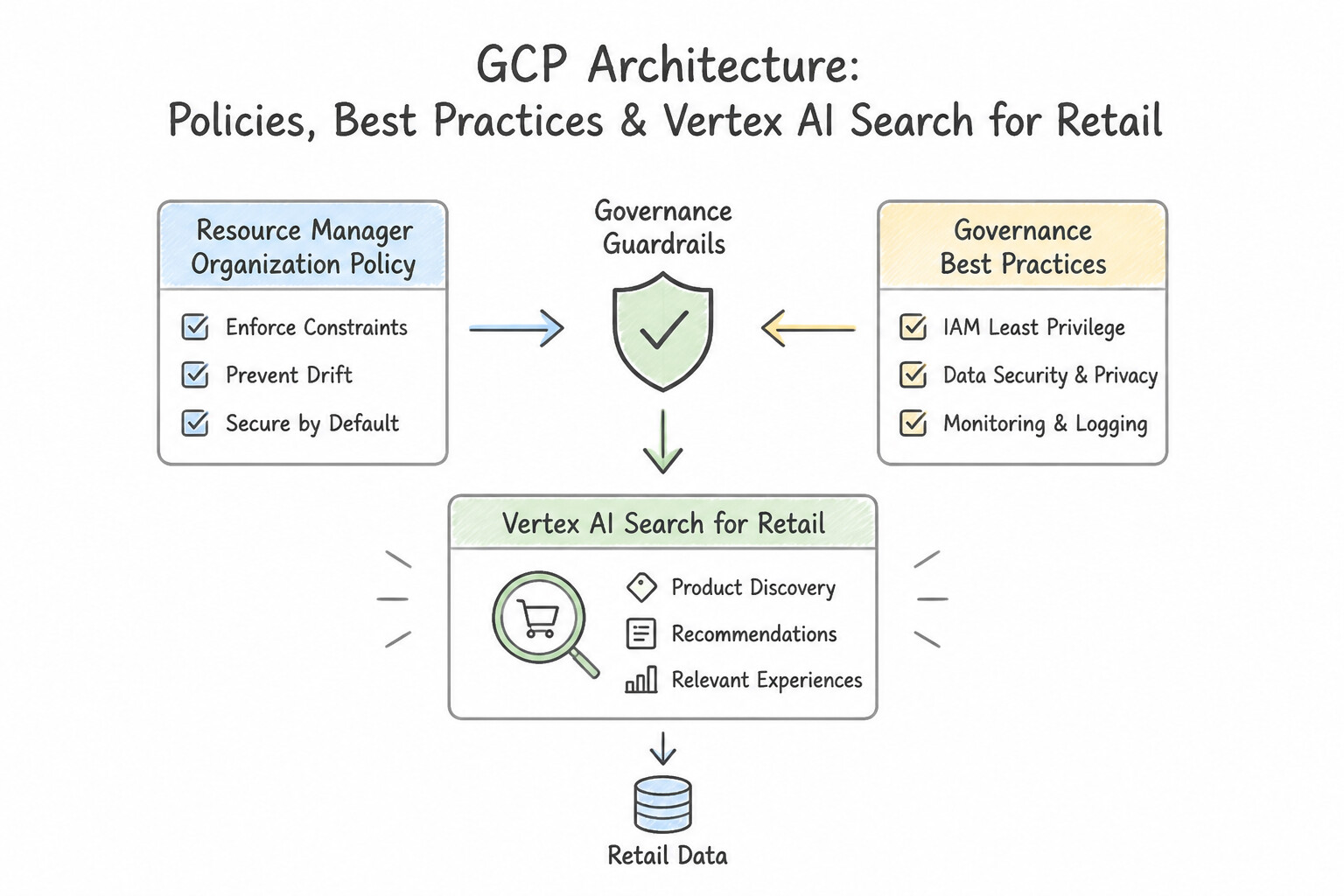
- Build vs. Buy Decision Analysis: Use Use Vertex AI Search for Retail to implement the recommendation engine. Vertex AI Search for Retail is a managed service that minimizes development time and operational overhead compared to custom solutions. (Avoid alternative: GKE requires significant management of infrastructure and custom code, failing to meet the requirement for low maintenance.)
- Prioritizing Features vs. Reliability using Error Budgets: Use Define Service Level Objectives (SLOs) and calculate an error budget. Freeze feature releases if the error budget is exhausted. Error budgets align incentives by allowing feature velocity only when the service is sufficiently reliable (meeting its SLO).
Key Takeaways (4.2d)
- Governance vs. Control: Effective governance enables teams to move fast safely, rather than just stopping them from making mistakes.
- Architecture Review Board (ARB): A cross-functional team is essential for making technical decisions that balance security, operations, and development needs.
- Standardization: Using approved blueprints or patterns reduces redundant work and security risks.
- Prioritize managed services (SaaS/PaaS) over custom infrastructure (IaaS) when time-to-market and low maintenance are key business drivers.
Consideration 4.2e: Customer success management
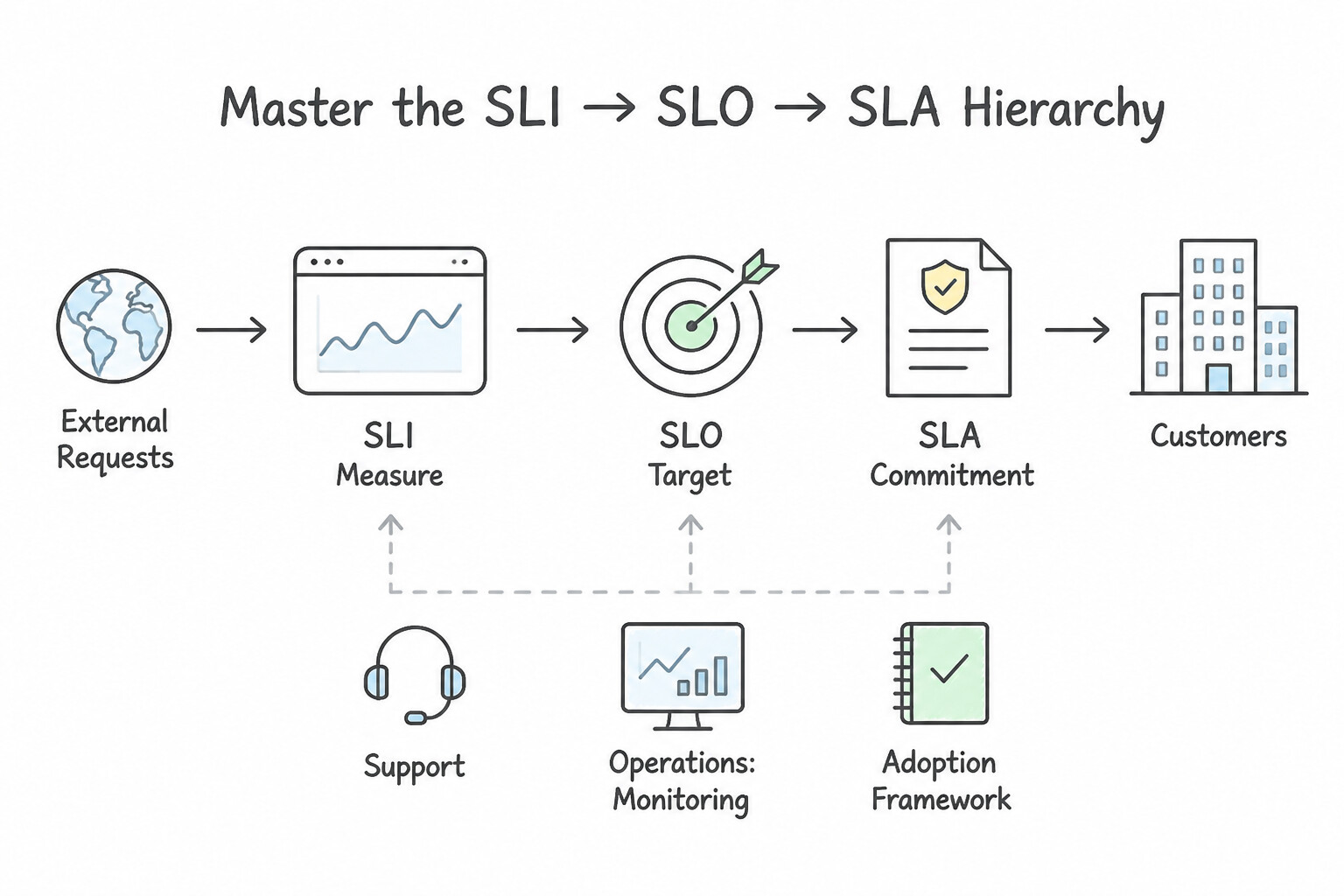
- Master the
SLI→SLO→SLAHierarchy: - Service Level Indicator (
SLI): The quantitative measurement of user experience from the customer's perspective (e.g., percentage ofHTTP POST /checkoutrequests returning status200 OKin < 300 ms measured at the Load Balancer). Trap: Never use raw VM CPU utilization or disk space as a primary customer-facing SLI! - Service Level Objective (
SLO): The internal target threshold for that SLI over a rolling window (e.g., $99.9\%$ of checkout requests succeed in $< 300\text{ ms}$ over 28 days). - Service Level Agreement (
SLA): The external legal contract with financial penalties/credits if violated. Rule: Always set your internal SLO stricter than your external SLA (e.g., $99.95\%internal SLO vs. @@ESCAPEDDOLLAR@@99.9% contractual SLA) so engineering gets paged and fixes degradation before breaching the customer contract!
Key Implementation Patterns
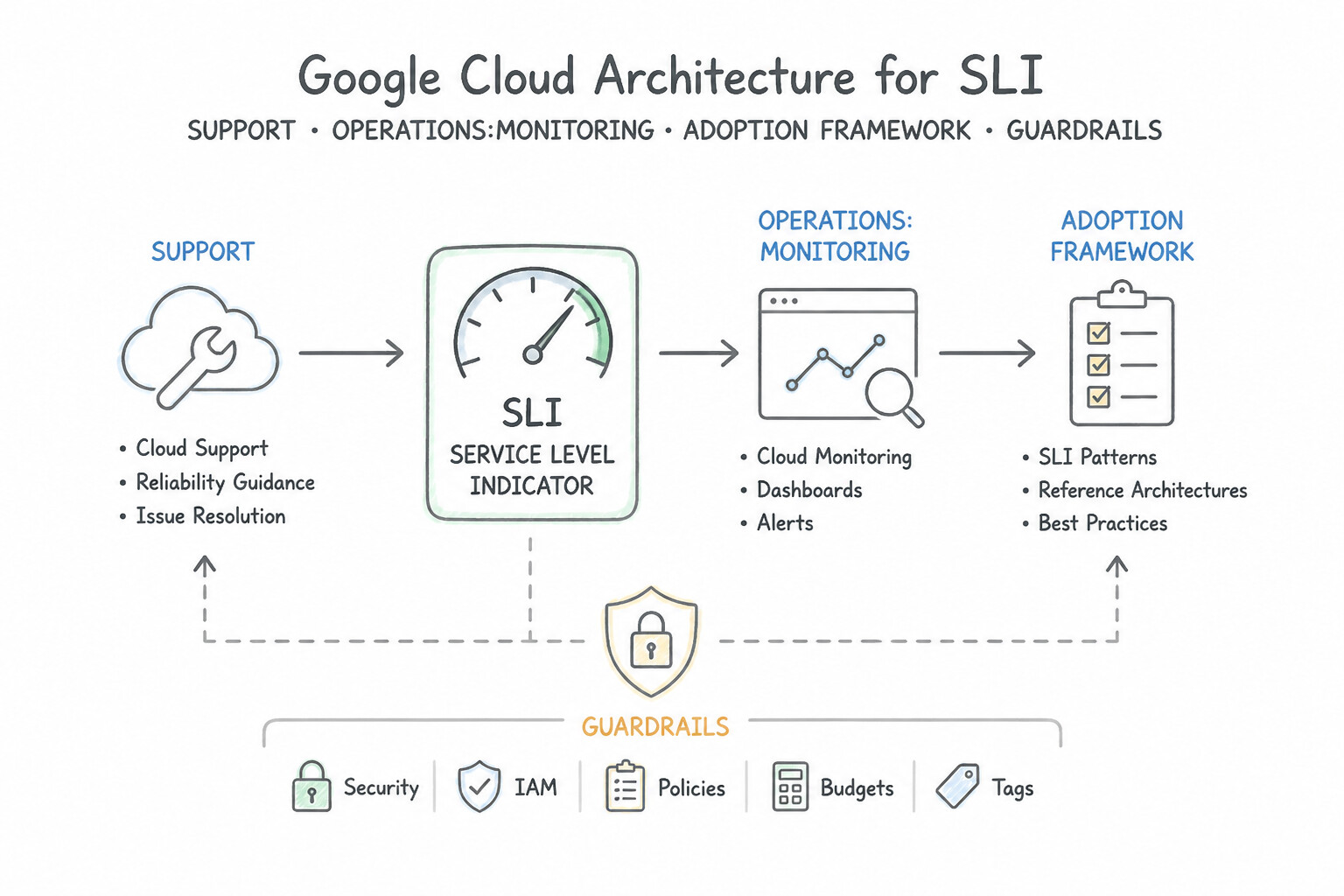
- Support Plan Alignment: Use Purchase the Premium Support plan. Premium Support provides a 15-minute response for critical issues and includes a Technical Account Manager. (Avoid alternative: Basic Support only covers billing and payments, with no technical support SLA or TAM.)
- Defining Success KPIs: Use Present metrics that track reduced time-to-market for new features and increased deployment frequency. Agility metrics such as time-to-market and deployment frequency validate the business case when cost savings are not the primary driver. (Avoid alternative: Technical metrics like CPU usage do not effectively demonstrate business value or agility to financial stakeholders.)
- Addressing Skill Gaps: Use Perform a skills gap assessment and implement a targeted training program on Kubernetes and declarative configuration. Addressing the human element through assessment and training solves the root cause of the operational struggles. (Avoid alternative: Downgrading the architecture to match legacy skills prevents the organization from realizing the benefits of modernization.)
Key Takeaways (4.2e)
- Business-critical applications requiring < 1 hour response times need Enhanced or Premium support.
- Access to a named Technical Account Manager (TAM) is a feature exclusive to Premium Support.
- Premium Support offers a 15-minute response SLA for critical P1 issues.
- Cloud value is defined by more than just cost savings; agility and innovation speed are major drivers.
Consideration 4.2f: Cost and resource optimization
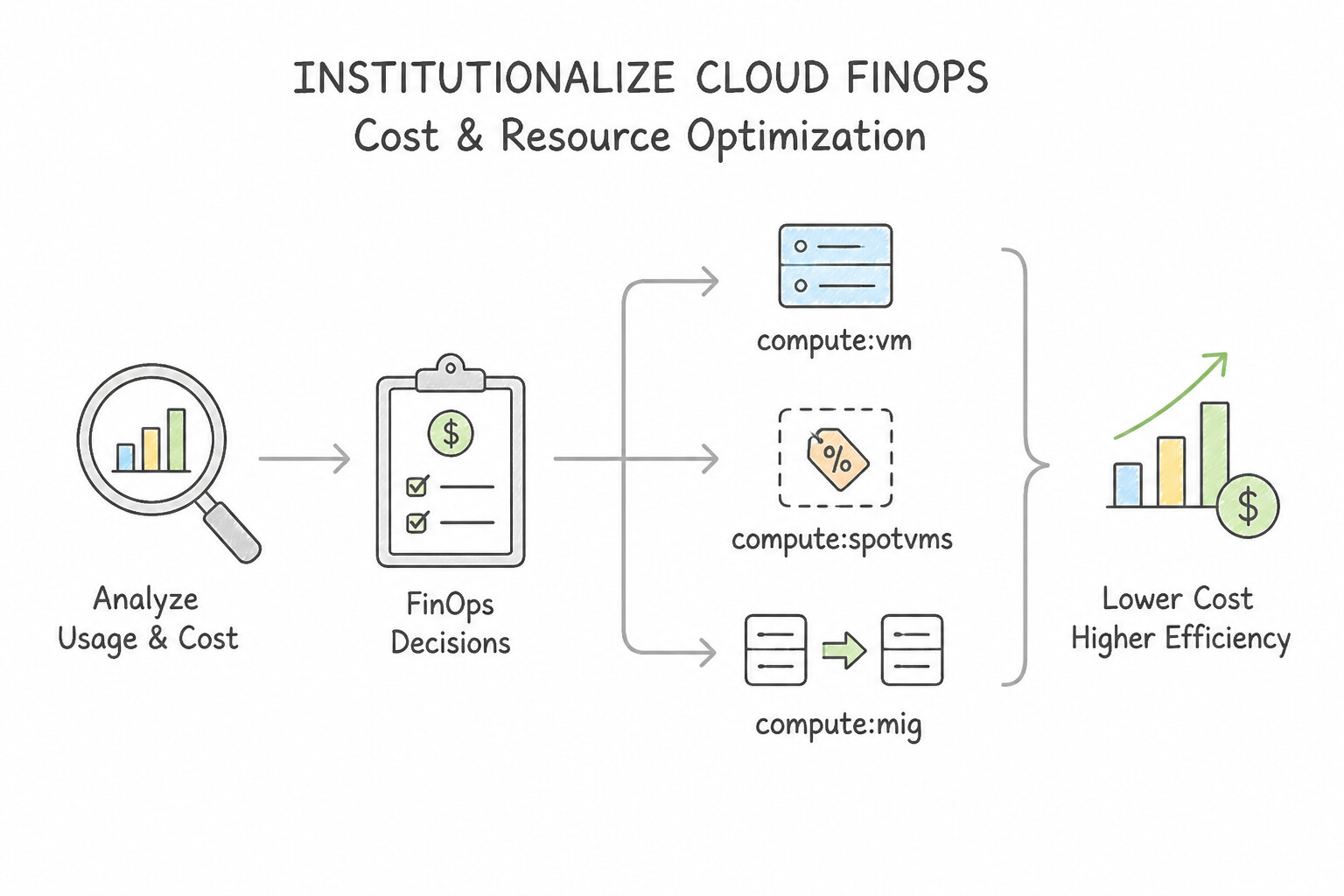
- Institutionalize Cloud FinOps:
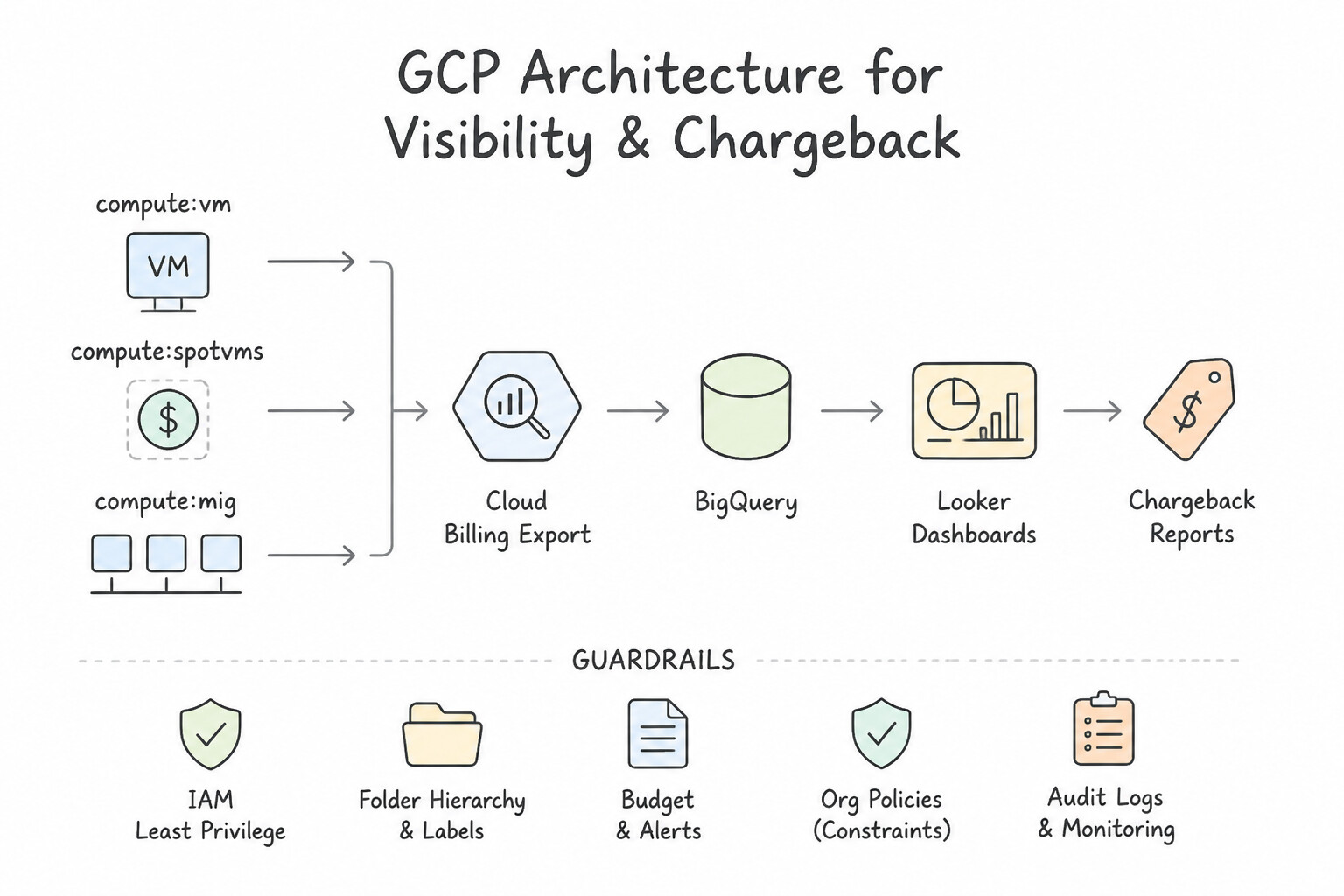
- Visibility & Chargeback: Enforce mandatory Labels (
cost-center,env,team,app) across all resources (or isolate by Project/Folder) and enable Cloud Billing Export to BigQuery connected to Looker Studio dashboards for granular department chargeback/showback. - Proactive Spend Control: Configure Cloud Billing Budgets & Alerts publishing to a Pub/Sub topic (to notify Slack/PagerDuty or trigger programmatic non-prod scale-down).
- Pricing & Discount Optimization:
- Hardware / Resource-Based CUDs: Commit to a specific amount of vCPUs and RAM in a region/machine family for 1 or 3 years (up to 57%–70% discount). Enable Discount Sharing across the Billing Account so all projects share the CUD pool!
- Spend-Based (Flexible) CUDs: Commit to a minimum hourly dollar spend across eligible services (
Cloud Run,Cloud SQL,AlloyDB,GKE Autopilot,Compute Engine) when machine families or regions vary. - Network Egress Optimization: Switch bulk, latency-tolerant outbound internet traffic from Premium Network Tier to Standard Network Tier, cache static content on Cloud CDN, and keep inter-service traffic within the same zone/region over private IPs.
Key Implementation Patterns
- Optimizing Batch Processing Costs: Use Configure the instance template to use Spot VMs. Spot VMs are the most cost-effective option for fault-tolerant, interruptible workloads. (Avoid alternative: CUDs offer lower savings than Spot VMs and require a long-term commitment.)
- Regulatory Data Archival: Use Configure a lifecycle policy to transition the objects to Archive Storage after 7 days. Archive Storage offers the lowest storage cost for long-term retention and meets the availability requirement. (Avoid alternative: Standard Storage is too expensive for long-term archival data that is rarely accessed.)
- Long-Term Database Cost Strategy: Use Purchase a 3-year Committed Use Discount (CUD) for the instances. A 3-year CUD offers the deepest discount for stable workloads with a known long-term horizon. (Avoid alternative: Preemptible VMs can be stopped at any time, making them unsuitable for 24/7 databases.)
Key Takeaways (4.2f)
- Identify workload characteristics: If a job is fault-tolerant and stateless (or checkpointed), it is a candidate for Spot VMs.
- Prioritize Spot VMs for cost optimization when availability is not the primary constraint.
- Use Committed Use Discounts for predictable, steady-state workloads that cannot be interrupted.
- Use Standard Storage for active, frequently accessed data.
Consideration 4.2g: Business continuity
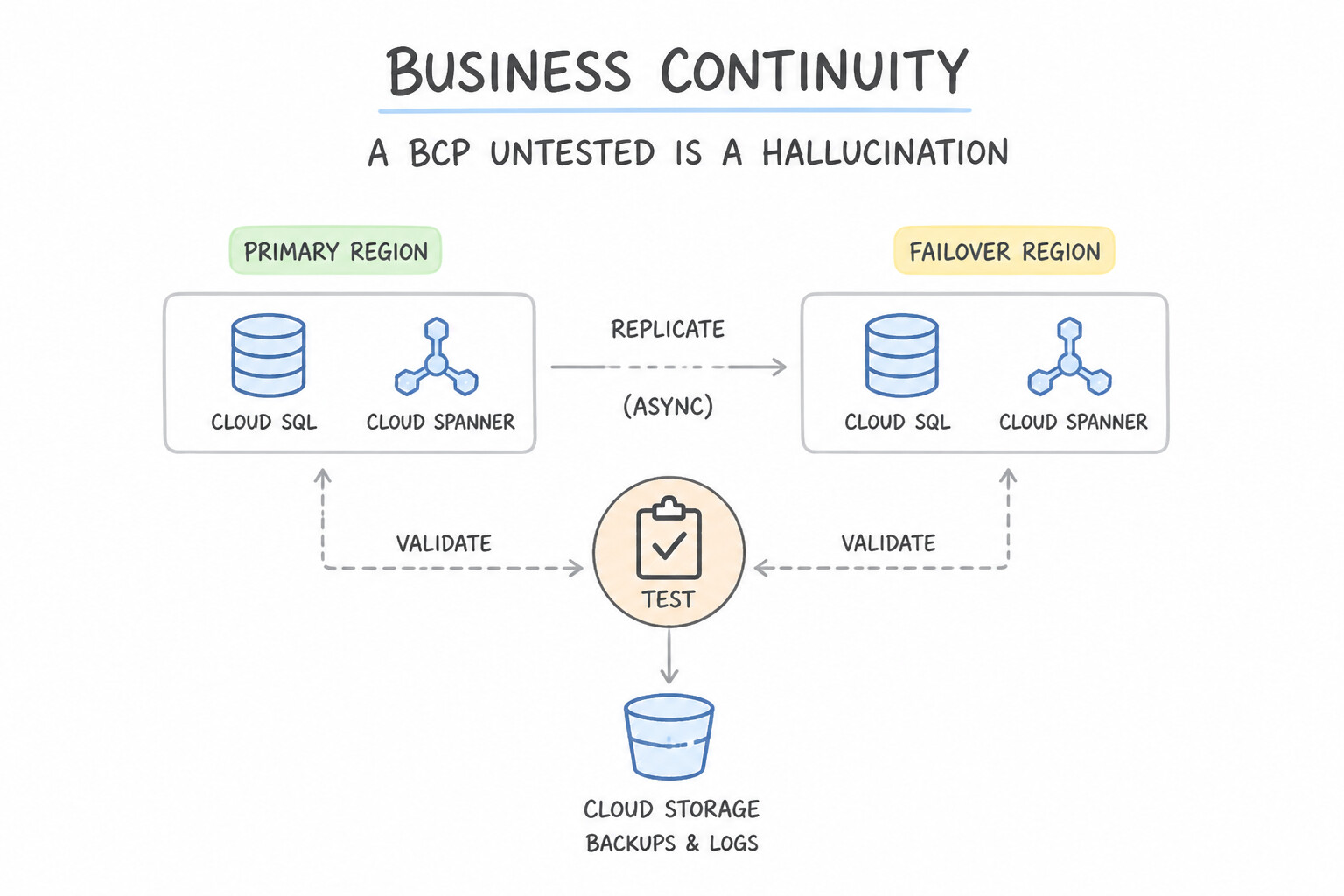
- A Business Continuity Plan (
BCP) Untested Is a Hallucination: - Define clear incident severity levels, RACI escalation matrices, and out-of-band communication channels (in case corporate email/SSO is part of the outage).
- Schedule recurring DR GameDays and Tabletop Exercises where teams actually execute regional database promotion and traffic cutover under timed observation to verify that documented
RPOandRTOtargets match reality.
Key Implementation Patterns
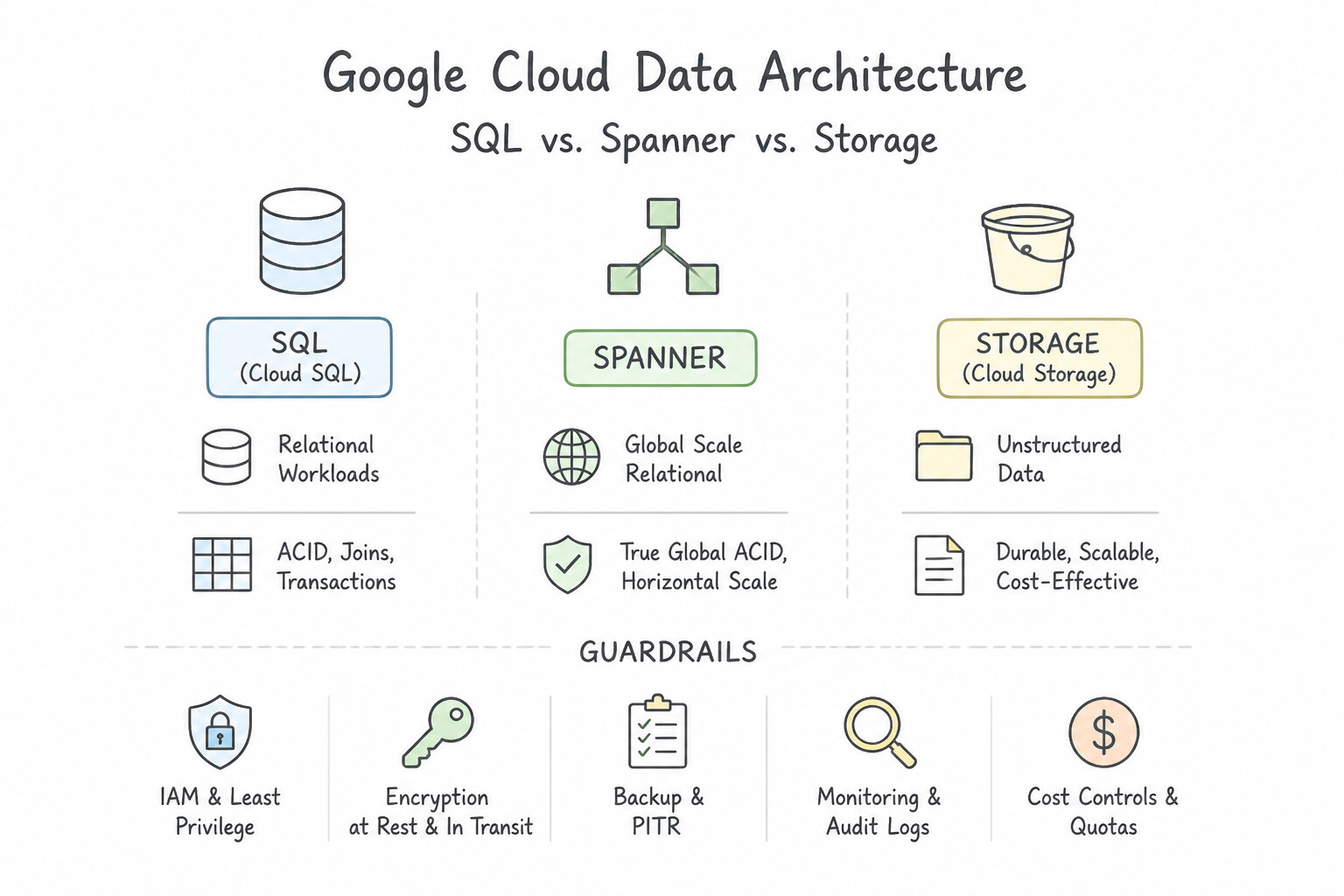
- Balancing RPO and Cost for Financial Transactions: Use Configure a Cloud SQL instance with High Availability (HA) to replicate data synchronously to a standby zone. Cloud SQL HA uses synchronous replication to a standby zone, guaranteeing zero data loss (RPO=0) during a zonal failure at a lower cost than multi-region solutions.
- Defining RTO for Non-Critical Batch Workloads: Use Create a custom image or snapshot of the VM. If the zone fails, create a new VM from the image in a different zone. A 24-hour RTO allows for a Cold DR strategy where you only store backups (images/snapshots) and spin up compute resources only when needed, minimizing costs.
Key Takeaways (4.2g)
- RPO = 0 requires synchronous replication. If you cannot lose data, writes must be confirmed in multiple locations before success.
- Cloud SQL HA is regional. It protects against zonal failures using a standby instance in a different zone.
- Multi-region is expensive. Don't use global solutions (like Multi-region Spanner) for simple zonal resiliency requirements if budget is a concern.
- Backups are for disaster recovery, not HA. Backups imply data loss equal to the gap between backups.
Quick Decision Cheat Sheet (Subsection 4.2)
If the Scenario Requires... | Choose This Google Cloud Pattern | Avoid This Common Mistake |
|---|---|---|
"Steady, predictable 24/7 compute baseline for 1 to 3 years; want maximum cost savings" | Committed Use Discounts ( CUDs) with Billing Account Discount Sharing enabled | Relying solely on Sustained Use Discounts or using Spot VMs for stateful production DBs |
"Track and charge back cloud costs across 12 departments sharing projects and BigQuery" | Apply Billing Labels ( department: finance) + enable Cloud Billing Export to BigQuery | Manually reading PDF invoices at the end of the month |
"Choose the best SLIs for a user-facing REST API or web application" | Availability (HTTP success ratio) and Latency (distribution of response times) measured at the Load Balancer | VM CPU utilization, disk IOPS, or pod restart count (those are internal system metrics, not user SLIs) |
"Internal SLO vs. External contractual SLA relationship" | Set the internal SLO stricter (higher) than the external SLA (e.g., 99.95% SLO vs. 99.9% SLA) | Setting the SLO lower than or equal to the legal SLA |
"Minimize egress cost for regional, latency-tolerant outbound internet traffic" | Standard Network Service Tier | Premium Network Service Tier |
Further Reading (Subsection 4.2)
- Shifting left on security — Explains the philosophy of integrating security early in the software development lifecycle (SDLC) to increase velocity without sacrificing safety.
- Binary Authorization overview — Provides details on how Binary Authorization ensures that only trusted container images are deployed.
- Cloud FinOps: Collaborative, Real-Time Cloud Value Decision Making — Overview of FinOps culture, principles, and the lifecycle of Inform, Optimize, and Operate.
- Organize resources using labels — Documentation on how to create and use labels to organize Google Cloud resources for billing and management.
- Google SRE Book - Service Level Objectives — The foundational chapter on why 100% is the wrong target and how to define SLOs.
- Defining SLOs — Google Cloud documentation on implementing Service Level Objectives in Cloud Monitoring.
Book TOC · Previous · Chapter 5 of 8 · Next
AwesomeGCP.com Learning
The approach taken is a question-led learning approach: you explore realistic project scenarios where you need to make decisions or take actions to achieve business goals within specific constraints. Instead of passive learning, you are challenged to think and work through the options to master the Professional Cloud Architect (PCA) certification!