Book TOC · Previous · Chapter 4 of 8 · Next
Chapter 4: Designing for Enterprise Security & Regulatory Compliance: Zero Trust, IAM, KMS & VPC-SC
Chapter Focus: Resource Hierarchy, least-privilege IAM, Workload Identity Federation, VPC Service Controls, Cloud Armor/IAP, CMEK/EKM/Confidential VM, Model Armor, and PCI-DSS/HIPAA/GDPR compliance.
Subsection 3.1: Designing for security
The Big Picture
Security in production (Section 3.1, containing 9 official considerations!) is never a single checkbox—it is a layered Zero-Trust architecture where every layer assumes the adjacent layer could be compromised:
- Identity & Access (
3.1a,3.1d,3.1g): Authenticate humans via federated Cloud Identity, external workloads via keyless Workload Identity Federation (WIF), and GKE pods via Workload Identity. Enforce Least Privilege with Predefined/Custom IAM Roles, IAM Conditions, Separation of Duties, and Identity-Aware Proxy (IAP) / Chrome Enterprise Premium instead of VPNs and bastion hosts. - Resource Hierarchy & Preventive Guardrails (
3.1b,3.1e): Mirror organizational units with Organizations → Folders → Projects, enforce preventive Organization Policies, and wrap sensitive APIs (Cloud Storage,BigQuery,Vertex AI) inside VPC Service Controls (VPC-SC) perimeters to stop data exfiltration. - Cryptographic & Secret Control (
3.1c,3.1f): Store application secrets in Secret Manager (never in Git or env vars!) and manage encryption keys with Cloud KMS (CMEK,Cloud HSM,Cloud EKM). - Software Supply Chain & AI Workload Security (
3.1h,3.1i): Verify container provenance with Artifact Registry + Binary Authorization, block prompt injection/jailbreaks with Model Armor, and redact PII/PHI with Sensitive Data Protection (SDP).
Consideration 3.1a: Identity and Access Management (IAM)
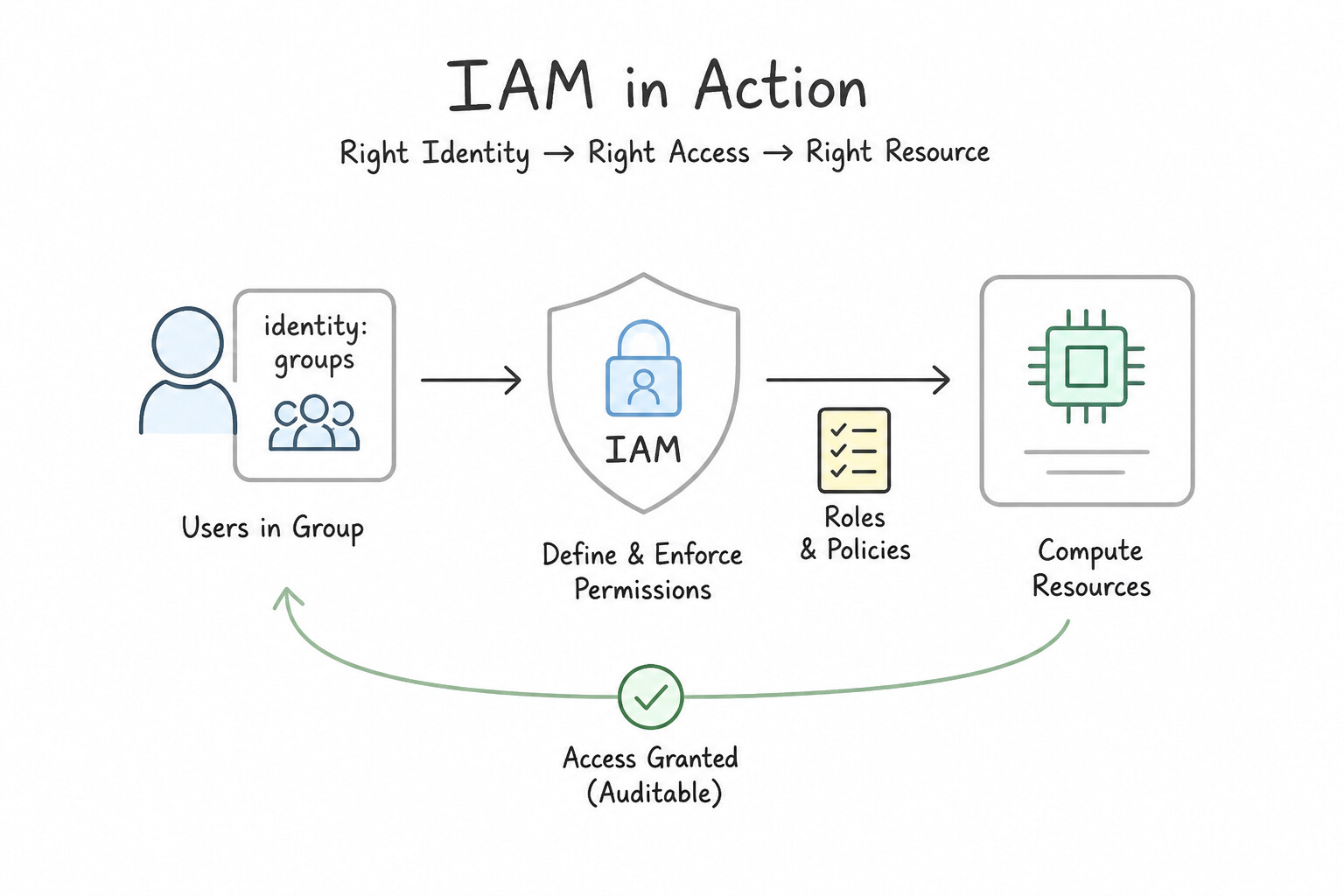
- Core IAM Principles in production:
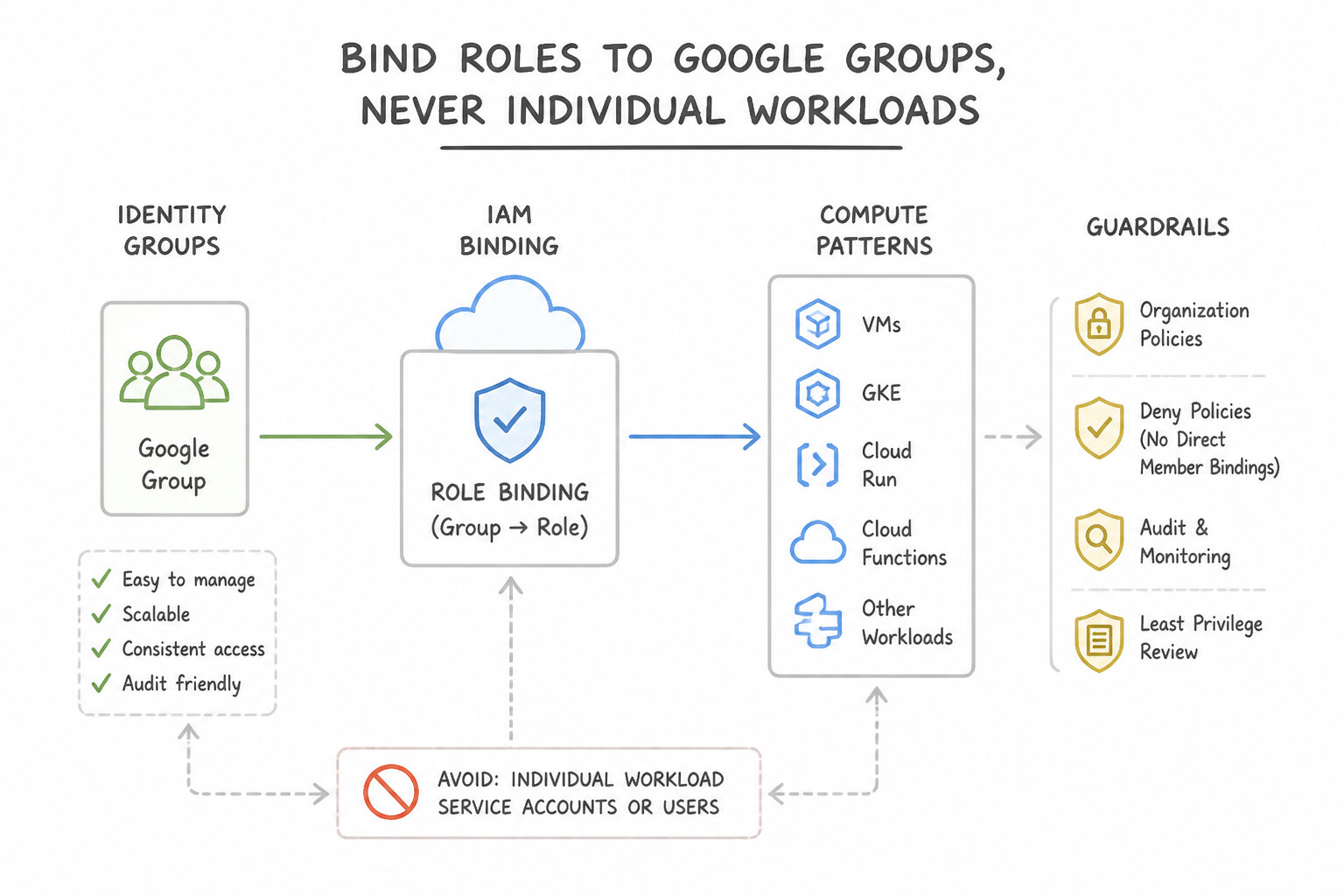
- Bind Roles to Google Groups, Never Individual Users: Assign users to identity-provider groups (synced from Active Directory / Okta via Google Cloud Directory Sync or SAML/SCIM) and bind IAM roles to the Google Group so onboarding/offboarding is automated.
- Role Selection Hierarchy:
- Predefined Roles (e.g.,
roles/storage.objectViewer,roles/bigquery.dataEditor) — Google-maintained, granular, always preferred first! - Custom Roles — Created only when a Predefined Role grants excess permissions that violate strict least-privilege mandates (you become responsible for maintaining new permissions added to the API).
- Basic Roles (
Owner,Editor,Viewer) — Never use in production (broad thousands-of-permissions blast radius). - IAM Conditions: Restrict a role binding by time (
request.time < timestamp(...)for temporary contractor/auditor access), resource name prefix (resource.name.startsWith(...)), or resource tags.
Key Implementation Patterns
- Scalable User Management via Google Groups: Use Create Google Groups for each department. Add users to the appropriate group. Assign IAM roles to the group email addresses. Mapping IAM roles to Google Groups allows you to manage access by updating group membership instead of editing IAM policies for every user change.
- Granular Permissions using Custom Roles: Use Create a custom IAM role with only the compute.instances.reset and compute.instances.getSerialPortOutput permissions, and assign it to the team. Custom Roles allow you to group specific permissions when Predefined roles are too broad.
- Cross-Cloud Authentication without Service Account Keys: Use Configure Workload Identity Federation with AWS as the identity provider. Grant the AWS IAM role access to impersonate a Google service account. Workload Identity Federation allows external workloads to access Google Cloud resources using their native credentials without long-lived keys.
Key Takeaways (3.1a)
- Always use Google Groups to manage access for human users based on job function (e.g., Developers, QA).
- Avoid assigning IAM roles to individual users to minimize administrative overhead.
- Service accounts are for applications, not people.
- Never use allAuthenticatedUsers for internal corporate resources.
Consideration 3.1b: Resource hierarchy management
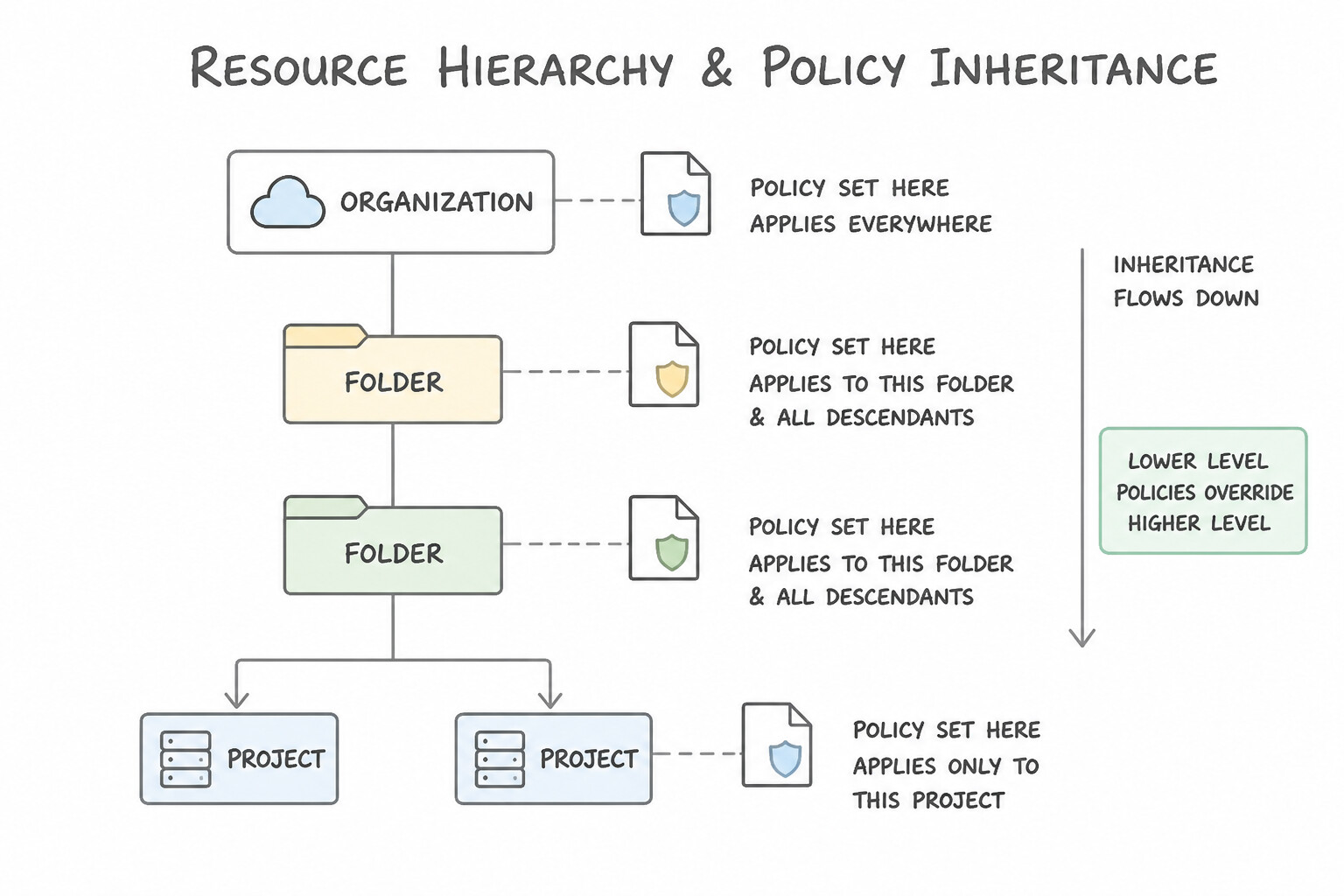
- Understand Policy Inheritance Rules:
- Hierarchy flows Organization → Folders (Department / Environment / Region) → Projects → Resources.
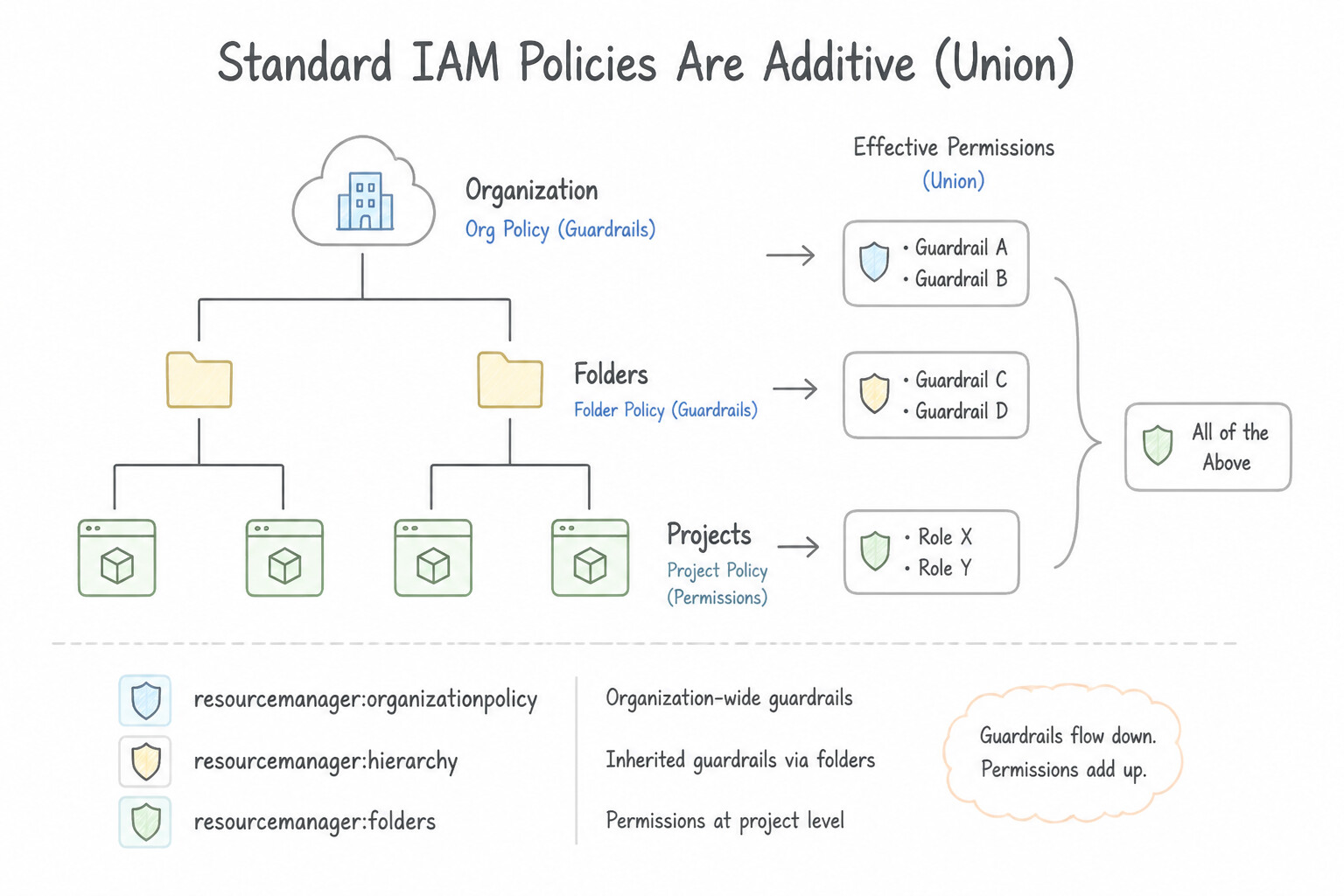
- Standard IAM Policies Are Additive (Union): A permission granted at the Organization or Folder level is inherited by all child Projects and cannot be revoked by a lower-level standard IAM binding (unless IAM Deny Policies or Principal Access Boundary policies are used!). Therefore, always grant broad read/audit roles high in the hierarchy and grant narrow write/admin roles at the Project or Resource level.
- Isolate Environments by Project: Always separate
Production,Staging, andDevelopmentinto distinct Projects (grouped under Folders) rather than mixing prod and dev VMs inside the same Project.
Key Implementation Patterns
- Enforcing Data Residency via Hierarchy: Use Define an Organization Policy with the "gcp.resourceLocations" constraint on the European division folder. Allow only "europe-west1" and "europe-west3". Organization Policies are the correct tool to enforce restrictions on resource locations (gcp.resourceLocations) across a resource hierarchy.
- Environment Isolation Strategy: Use Create top-level folders for Production and Development. Create subfolders for each team inside these environment folders. Apply policies to the top-level folders. Grouping by environment first allows you to apply policies once at the top level, which are then inherited by all teams.
- Handling IAM Inheritance and Separation of Duties: Use Remove the Project Owner role from the Organization node. Move the non-sensitive projects into a new folder. Grant the Project Owner role to the DevOps team on that folder. IAM policies are inherited and additive; removing the broad Org-level role and applying it to a specific Folder correctly scopes access.
Key Takeaways (3.1b)
- Organization Policies are used to enforce constraints on resource configurations, such as restricting valid regions.
- IAM manages permissions (who can act), while Organization Policies manage compliance (what creates are valid).
- Applying policies at the Folder level allows for efficient management of departmental or regional requirements via inheritance.
- gcp.resourceLocations is the specific constraint for enforcing data residency.
Consideration 3.1c: Data security (key management, encryption, secrets)
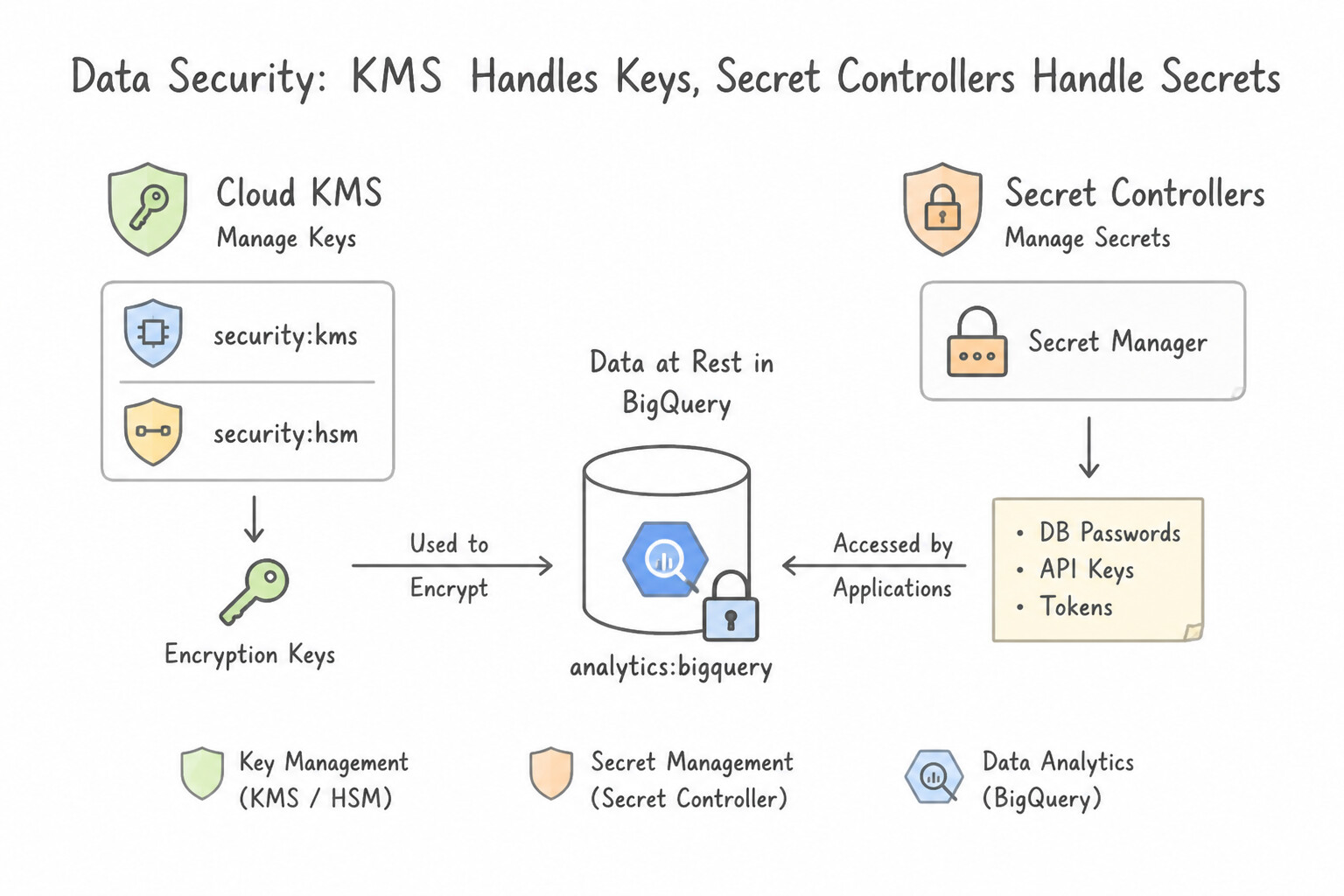
- Never Confuse
Cloud KMSwithSecret Manager: - Cloud KMS manages cryptographic keys (
AES-256,RSA,ECDSA) used to encrypt/decrypt data envelopes or sign artifacts; you cannot retrieve a raw symmetric key string from KMS. - Secret Manager stores, versions, audits, and rotates application secrets (database passwords, third-party OAuth client secrets, TLS certificates, API tokens) accessed at runtime via IAM or mounted into Cloud Run / GKE.
- Encryption in Use: When compliance requires data to remain encrypted in RAM during computation, deploy on Confidential VMs / Confidential GKE Nodes (powered by AMD SEV / Intel TDX hardware memory encryption).
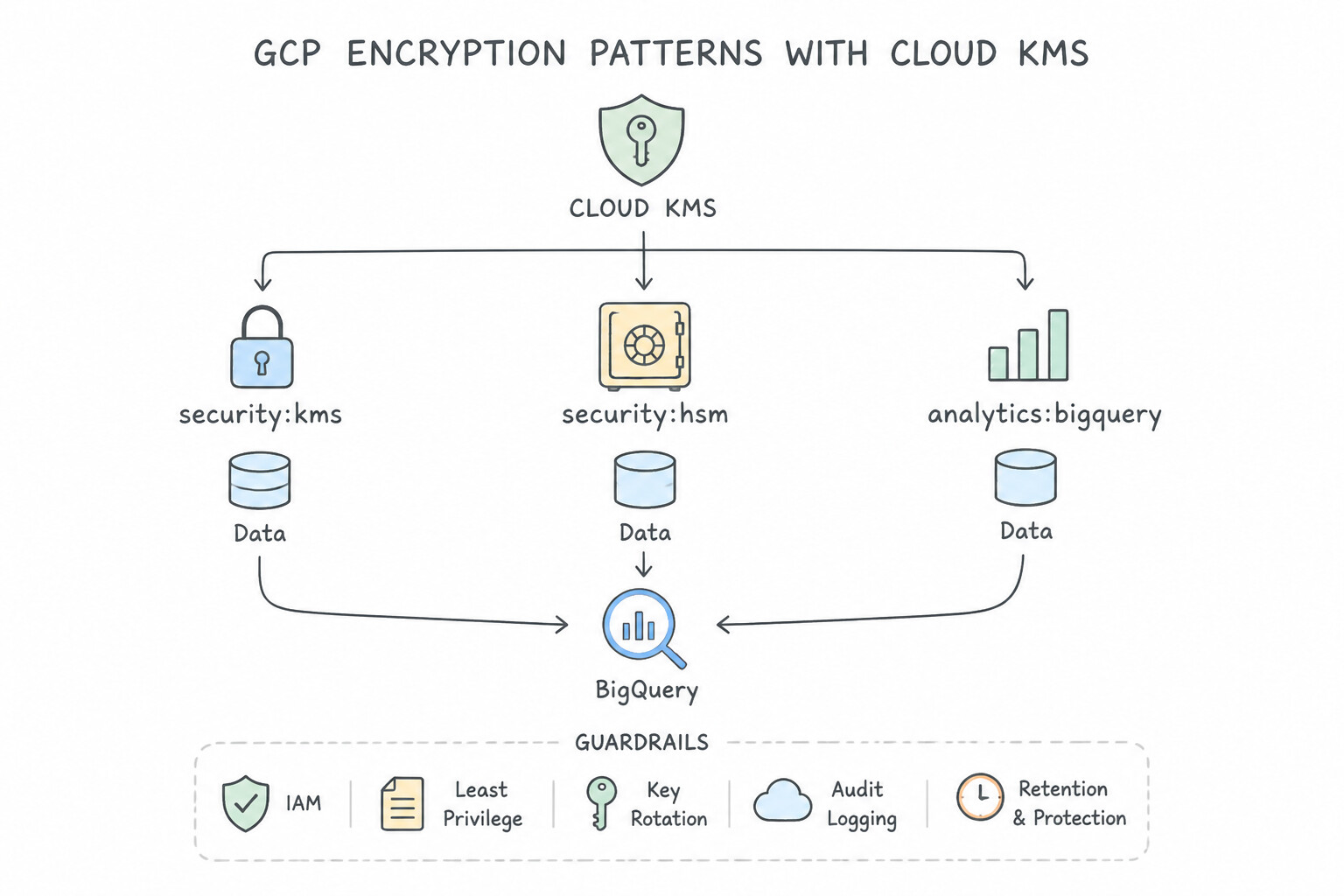
Key Implementation Patterns
- Hardware-Backed Key Protection: Use Create a key ring and keys with the protection level set to HSM. Cloud HSM provides keys backed by FIPS 140-2 Level 3 validated hardware devices, meeting the compliance requirement. (Avoid alternative: Software keys are only validated to FIPS 140-2 Level 1, which does not meet the Level 3 requirement.)
- Customer-Managed Key Lifecycle: Use Create a key in Cloud Key Management Service (Cloud KMS) with a 90-day rotation period. Configure the BigQuery dataset to use this Customer-Managed Encryption Key (CMEK). CMEK allows you to manage key rotation schedules and revoke access instantly via Cloud KMS.
Key Takeaways (3.1c)
- Compliance dictates architecture: Always map specific regulatory standards (like FIPS levels) to the corresponding Google Cloud service capabilities.
- Software vs. Hardware: Standard Cloud KMS keys are FIPS 140-2 Level 1. Cloud HSM keys are FIPS 140-2 Level 3.
- Avoid raw key storage: Never store keys in generic storage (like buckets); always use a managed key service.
- Google Cloud encrypts all data at rest by default.
Consideration 3.1d: Separation of duties
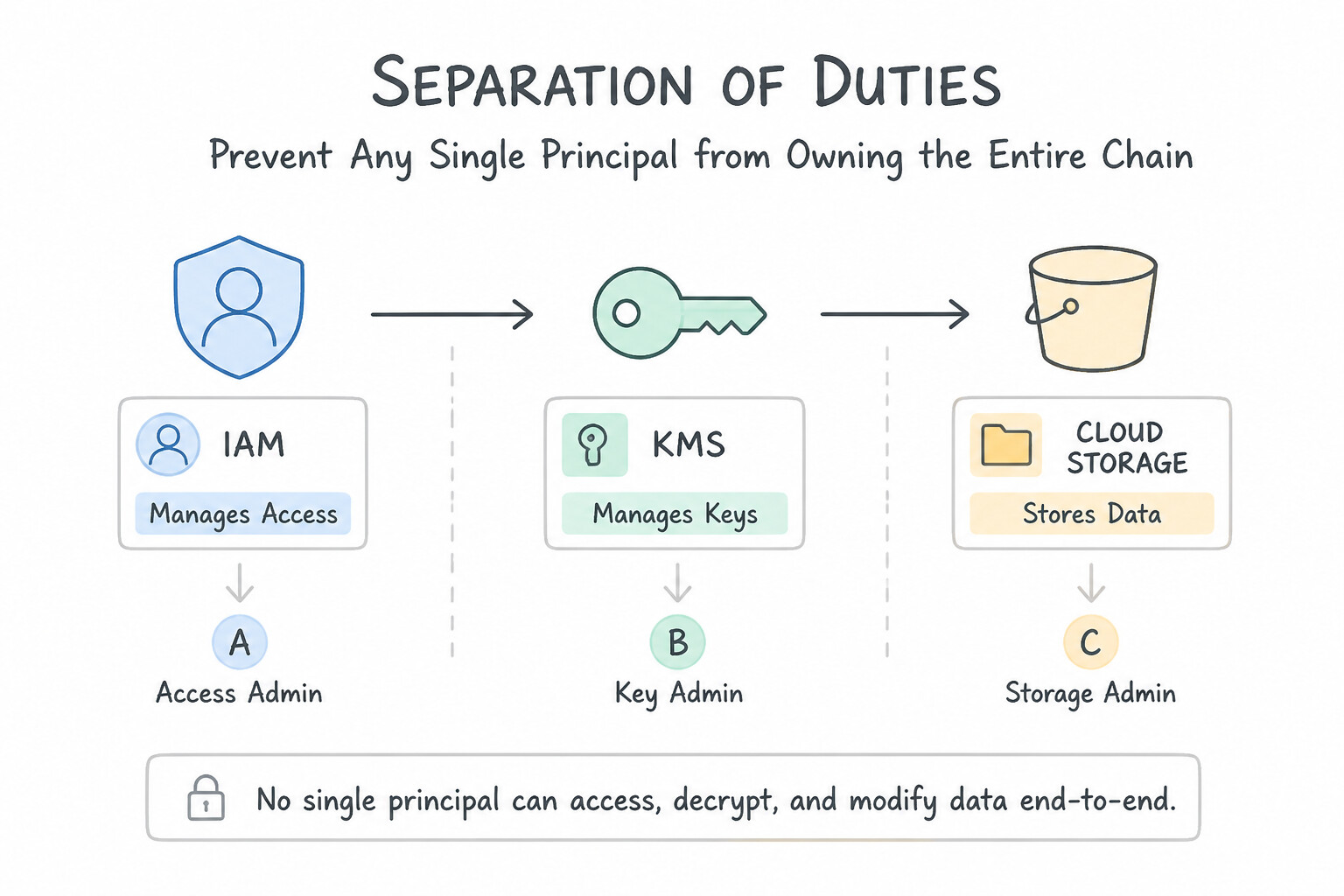
- Prevent Any Single Principal from Owning the Entire Chain:
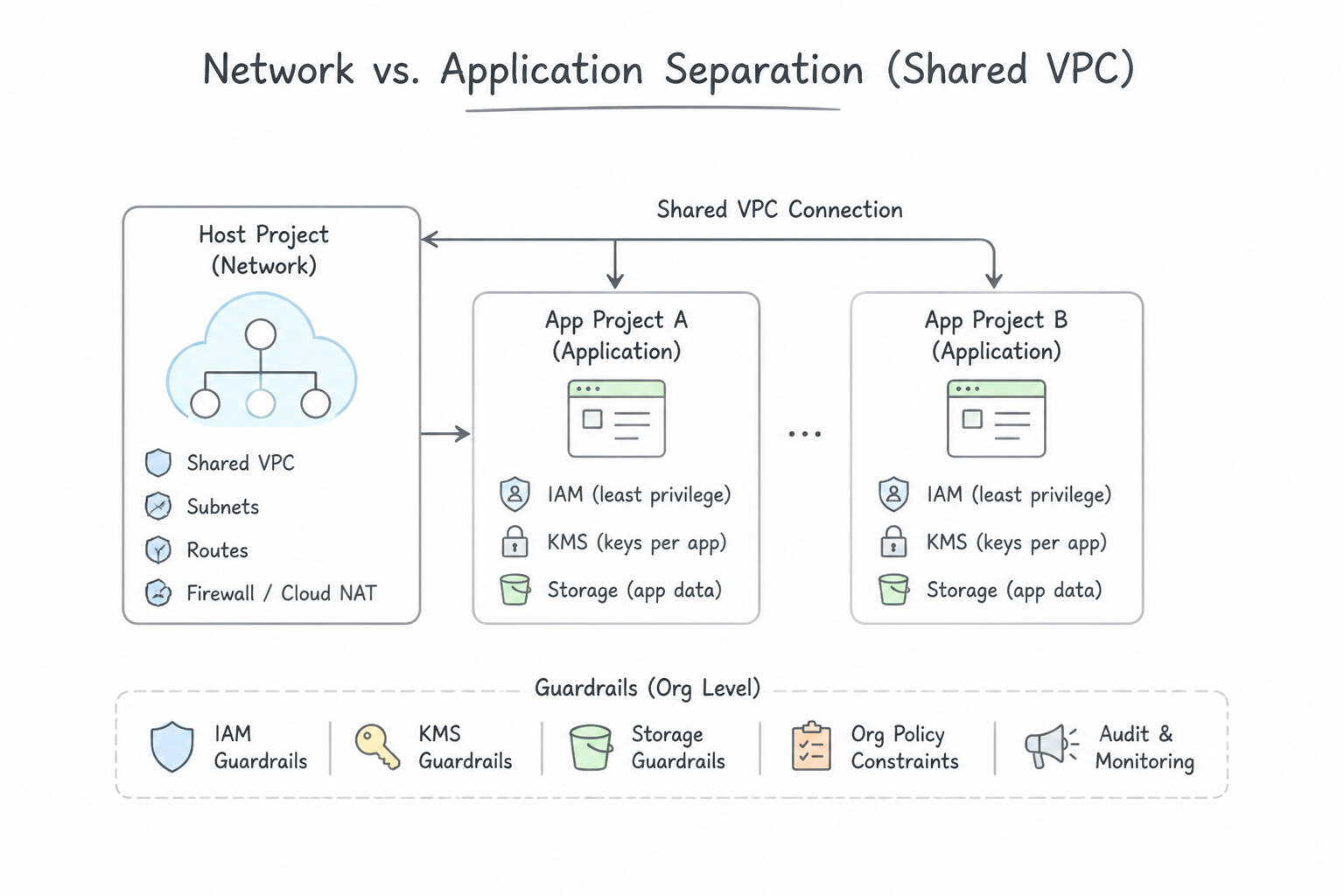
- Network vs. Application Separation (
Shared VPC): Central Network Admins holdroles/compute.networkAdminin the Host Project; App Developers holdroles/compute.instanceAdmin.v1in their Service Project androles/compute.networkUseron only their assigned subnet. - KMS vs. Storage Separation: The Security Admin manages keys in a dedicated central KMS Project (
roles/cloudkms.admin) and grants the Cloud Storage Service Agentroles/cloudkms.cryptoKeyEncrypterDecrypter—so Storage Admins cannot destroy keys and KMS Admins cannot read bucket objects! - Service Account Usage (
iam.serviceAccountUser): An engineer who can create VMs cannot attach a privileged Service Account to a VM unless they also holdroles/iam.serviceAccountUseron that specific Service Account.
Key Implementation Patterns
- Decoupling Key Management from Data Storage: Use Assign the Security Team the
Cloud KMS Adminrole on the key project. Assign the Storage Team theStorage Adminrole on the storage project. Grant the Cloud Storage Service Agent theCloud KMS CryptoKey Encrypter/Decrypterrole. This separates management duties: Security manages keys, Storage manages buckets, and the Service Agent handles the actual encryption operations. - Production Deployment Pipeline Security: Use Grant the developers the Source Repository Writer role. Grant the Cloud Build service account the App Engine Deployer role in the production project. This separates duties: developers write code, and the automated service account deploys it.
- Network Administration in Shared VPC: Use Grant the networking team the Compute Network Admin role in the host project. Grant the developers the Compute Network User role on the relevant subnets. Compute Network Admin gives full control of the network to the networking team, while Compute Network User allows developers to use subnets without modifying them.
Key Takeaways (3.1d)
- Separation of Duties: Isolate sensitive responsibilities (like key management) from operational responsibilities (like storage management) using separate projects and roles.
- Principle of Least Privilege: Grant only the permissions necessary for a user to perform their job (e.g., Admin vs. Viewer).
- Service Agents: Use Service Agents (machine identities) to grant services permission to access resources, rather than sharing human credentials.
- Developers should not have write access to production environments in a mature CI/CD pipeline.
Consideration 3.1e: Security controls and governance
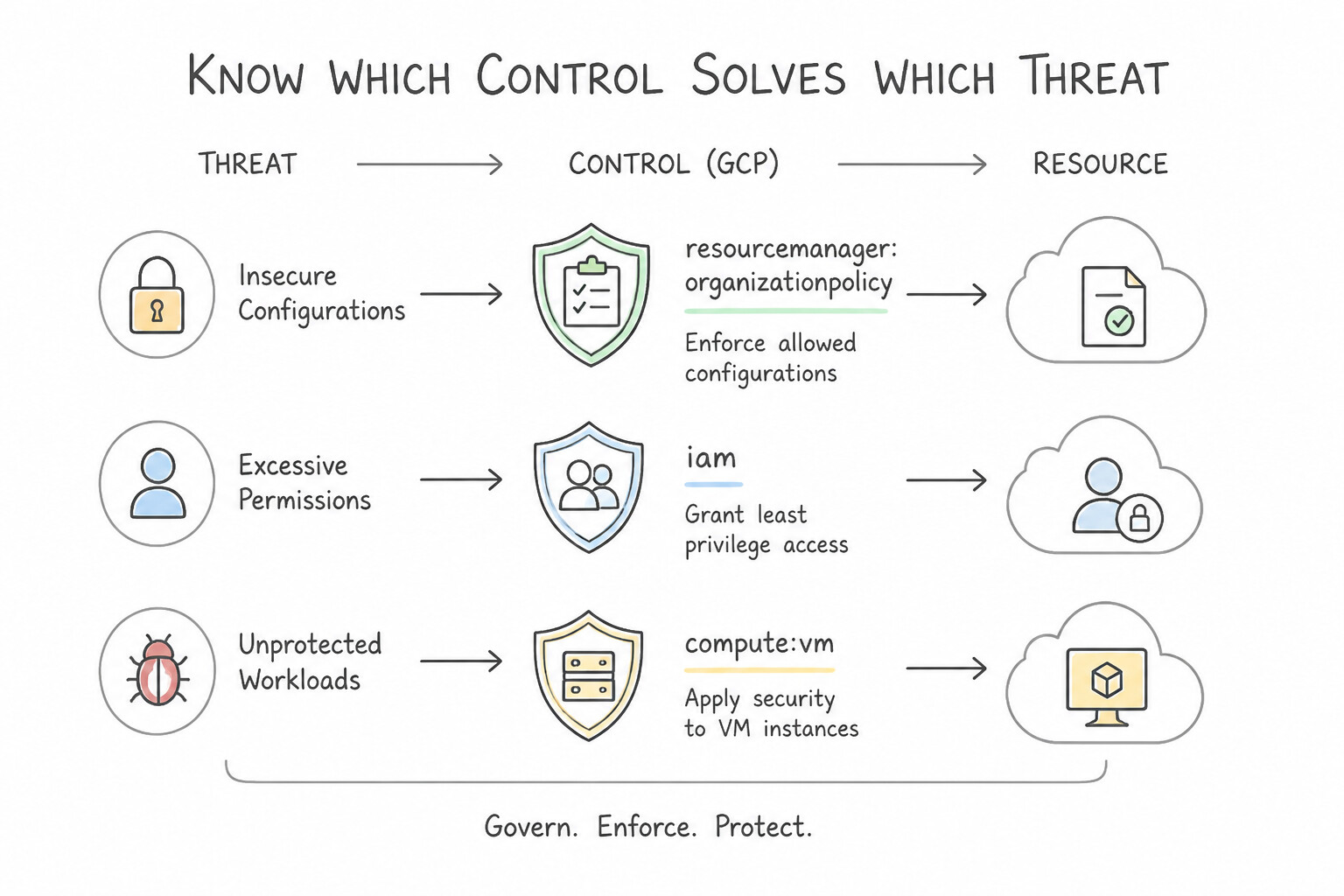
- Know Which Control Solves Which Threat:
- Organization Policy Service (Preventive Configuration Guardrails): Restricts how resources can be configured across the hierarchy (e.g.,
constraints/iam.disableServiceAccountKeyCreation,constraints/compute.vmExternalIpAccess,constraints/gcp.resourceLocations,constraints/iam.allowedPolicyMemberDomains). - VPC Service Controls (
VPC-SC— API Data Exfiltration Perimeter): Creates a logical security boundary around multitenant Google APIs (Cloud Storage,BigQuery,Vertex AI,Spanner). Blocks stolen credentials or malicious insiders from copying data out to an unauthorized external bucket/project! - Hierarchical Firewall Policies: Enforces non-bypassable Layer 3/4 allow/deny rules at the Organization or Folder level before project-level VPC firewall rules are evaluated.
- Context-Aware Access (
Access Context Manager): Evaluates user identity, device posture (corporate-managed OS, disk encryption via Endpoint Verification), IP address, and geolocation before granting access to web apps or GCP APIs.
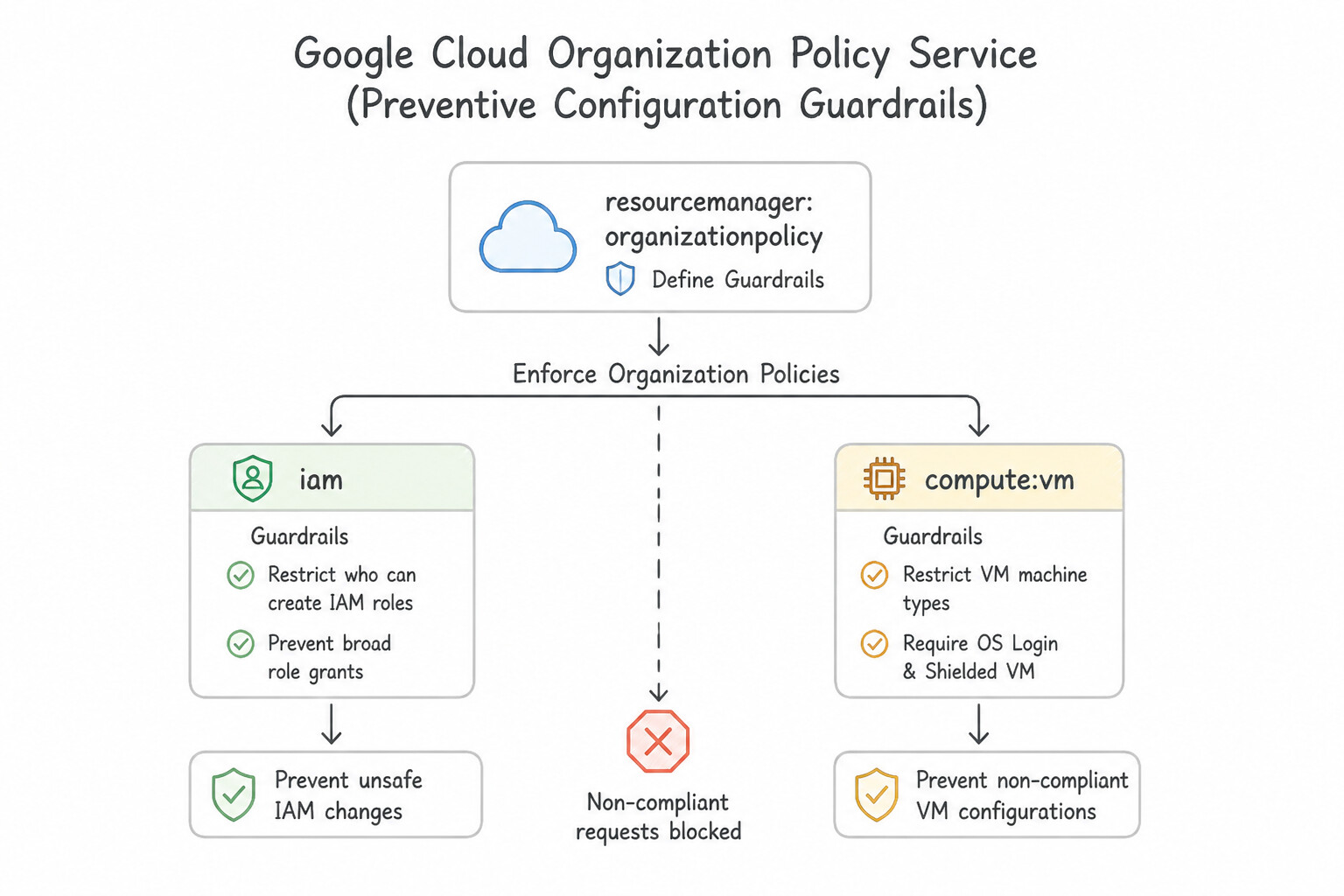
Key Implementation Patterns
- Enforcing Data Residency Compliance: Use Configure the Organization Policy Service on the application's folder. Set the 'gcp.resourceLocations' constraint to allow only 'europe-west3'. Organization Policies provide centralized control over resource configuration, and the 'gcp.resourceLocations' constraint specifically limits deployment regions.
- Restricting External IP Address Assignment: Use Define an Organization Policy on the 'Production' folder. Select the compute.vmExternalIpAccess constraint and set the policy to 'Deny All'. Organization Policies are used to enforce constraints across the resource hierarchy. The 'compute.vmExternalIpAccess' constraint specifically prevents the creation of external IP addresses.
- Preventing Data Exfiltration with Service Perimeters: Use Configure VPC Service Controls to define a service perimeter around the project. VPC Service Controls create a secure boundary that prevents data from moving out of the project to unauthorized external resources.
Key Takeaways (3.1e)
- Use Organization Policies to enforce compliance and guardrails across your resource hierarchy.
- Use IAM for managing user permissions and access control.
- The
gcp.resourceLocationsconstraint is the specific tool for restricting where resources (like VMs and buckets) can be physically created.- Apply policies at the Folder level to group related projects and enforce rules efficiently.
Consideration 3.1f: Managing Cloud KMS
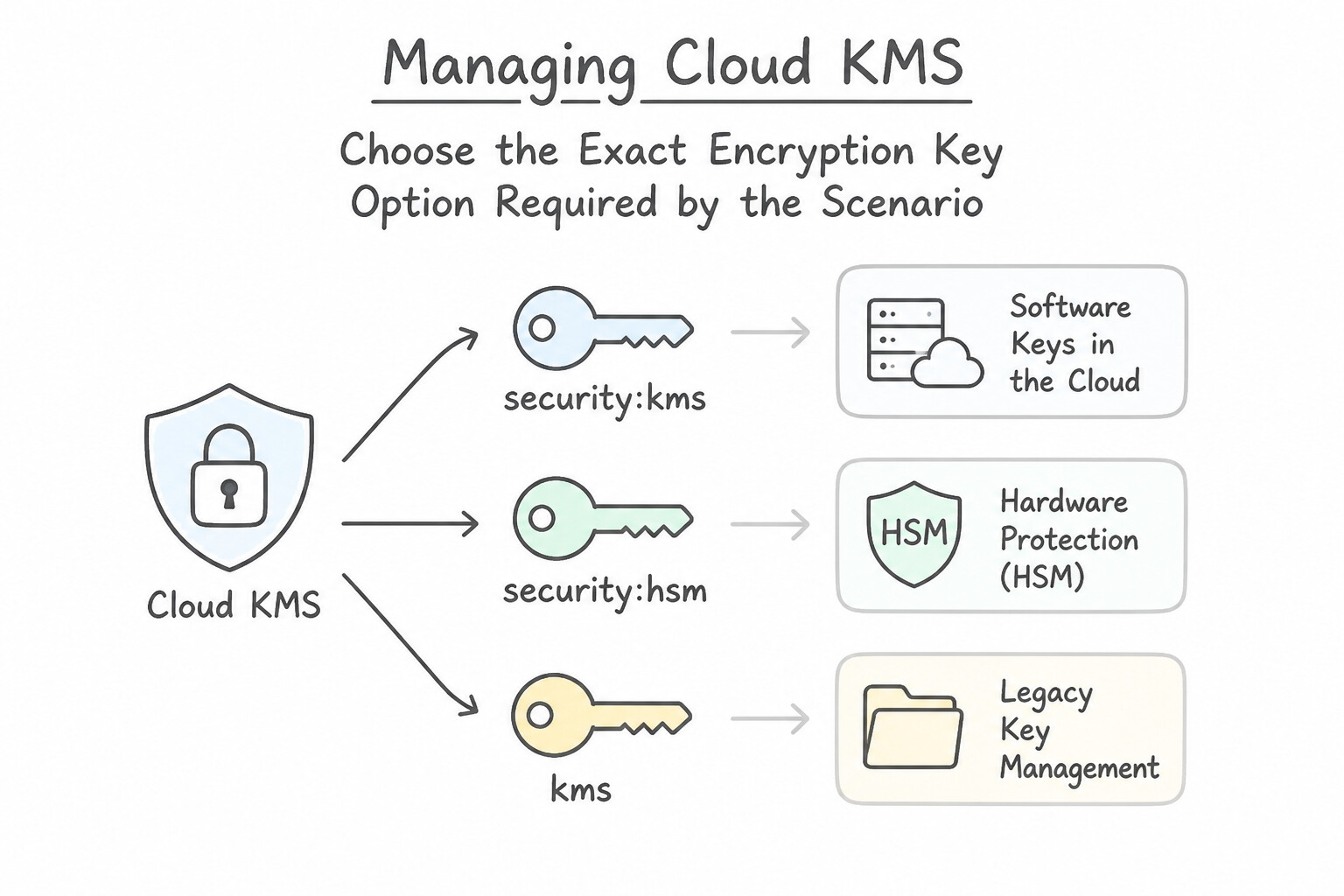
- Choose the Exact Encryption Key Option Required by the Scenario:
- Google-Managed Encryption Keys (
GMEK): Default, zero configuration, zero cost. - Customer-Managed Encryption Keys (
CMEKin Cloud KMS): You control key creation, automatic rotation schedule, and disabling/destruction in Cloud KMS. Remember: you must grant the target service's Service Agent (e.g.,service-PROJECT_NUMBER@gs-project-accounts.iam.gserviceaccount.com) theroles/cloudkms.cryptoKeyEncrypterDecrypterrole! - Cloud HSM: Keys are generated and stored inside FIPS 140-2/140-3 Level 3 certified Hardware Security Modules in Google data centers.
- Cloud External Key Manager (
Cloud EKM): Keys are stored in a third-party key manager outside Google Cloud (on-premises or partner cloud) for strict regulatory separation of data and keys.
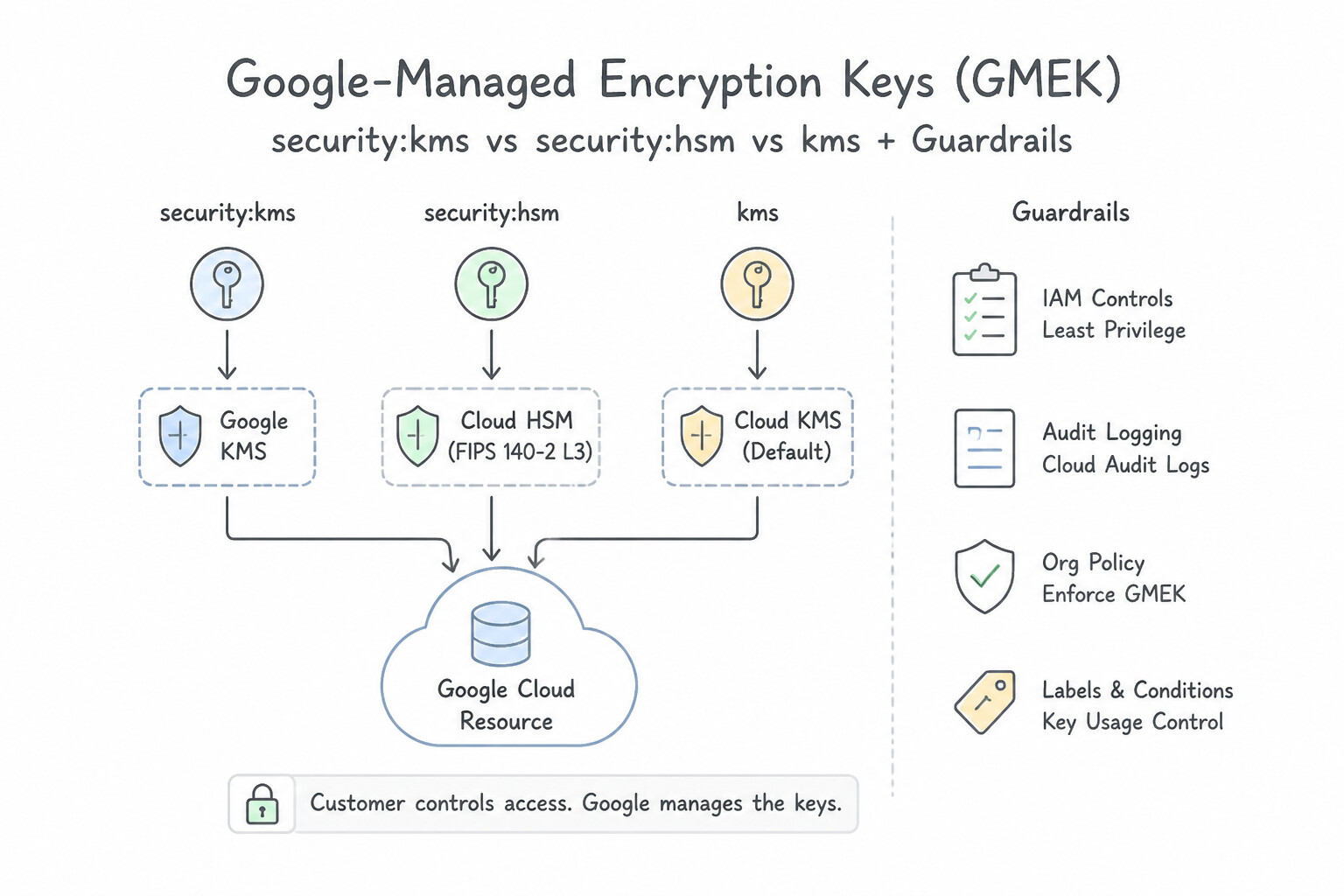
Key Implementation Patterns
- High-Assurance Hardware Requirements: Use Create a Cloud Key Management Service (Cloud KMS) key with the protection level set to HSM. Cloud KMS with the HSM protection level uses FIPS 140-2 Level 3 validated hardware. (Avoid alternative: Software-backed keys in Cloud KMS are validated to FIPS 140-2 Level 1, not Level 3.)
- Cross-Region Key Usage Constraints: Use Create a new key ring and key in the 'us-east1' region. Cloud Storage buckets and their associated Cloud KMS keys must reside in the exact same location. (Avoid alternative: A regional bucket requires a regional key, not a multi-region key.)
- Separation of Duties (IAM): Use Grant the roles/cloudkms.cryptoKeyEncrypterDecrypter role to the Data Engineering service account. This role allows encryption and decryption usage without granting management permissions, satisfying the requirement. (Avoid alternative: The Admin role grants full management permissions, violating the separation of duties requirement.)
Key Takeaways (3.1f)
- Cloud KMS unifies key management for software and hardware keys.
- Software keys (Protection Level: SOFTWARE) are FIPS 140-2 Level 1 validated.
- Cloud HSM keys (Protection Level: HSM) are FIPS 140-2 Level 3 validated.
- Use Cloud HSM when regulations strictly require hardware-backed key protection.
Consideration 3.1g: Secure remote access
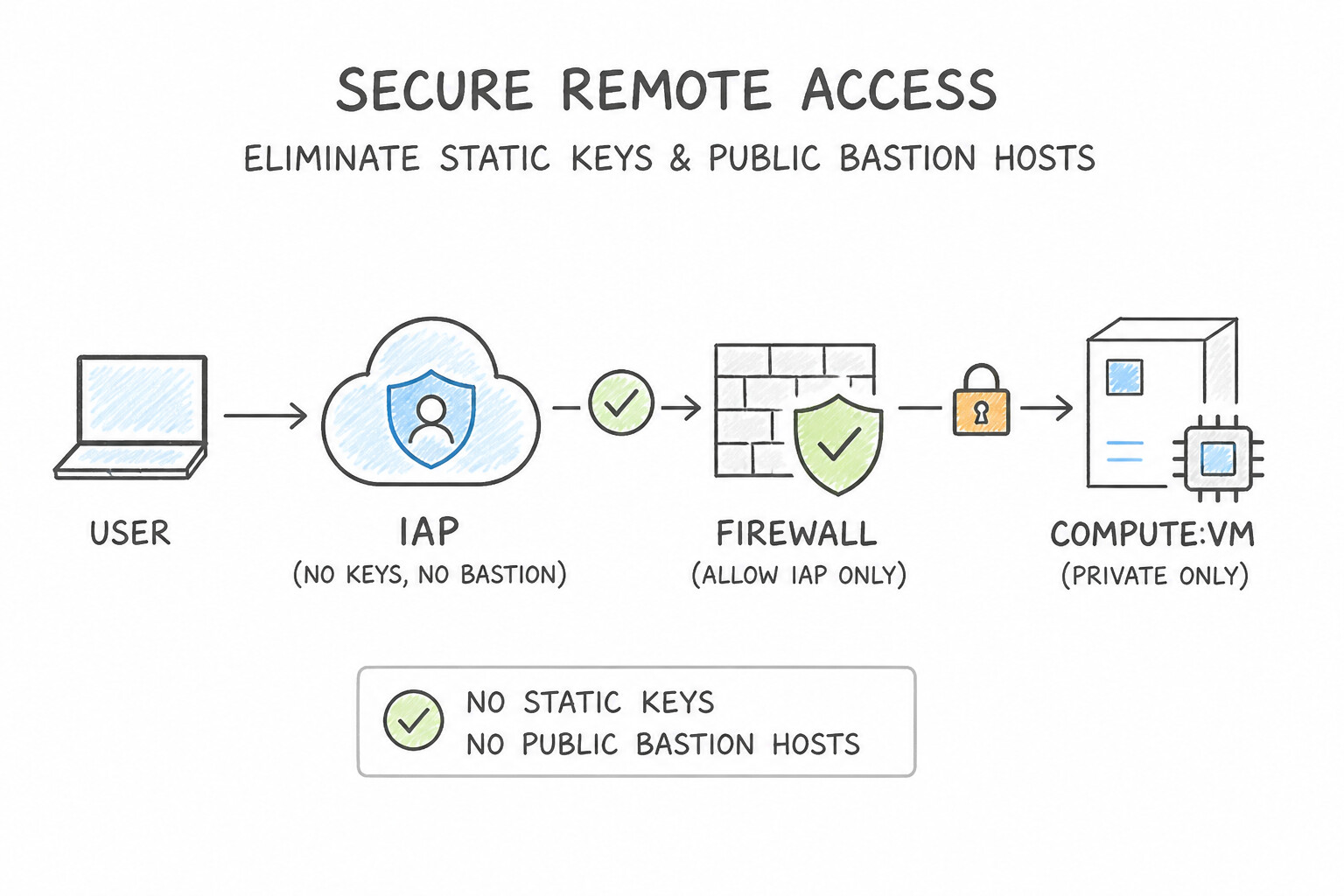
- Eliminate Static Keys and Public Bastion Hosts:
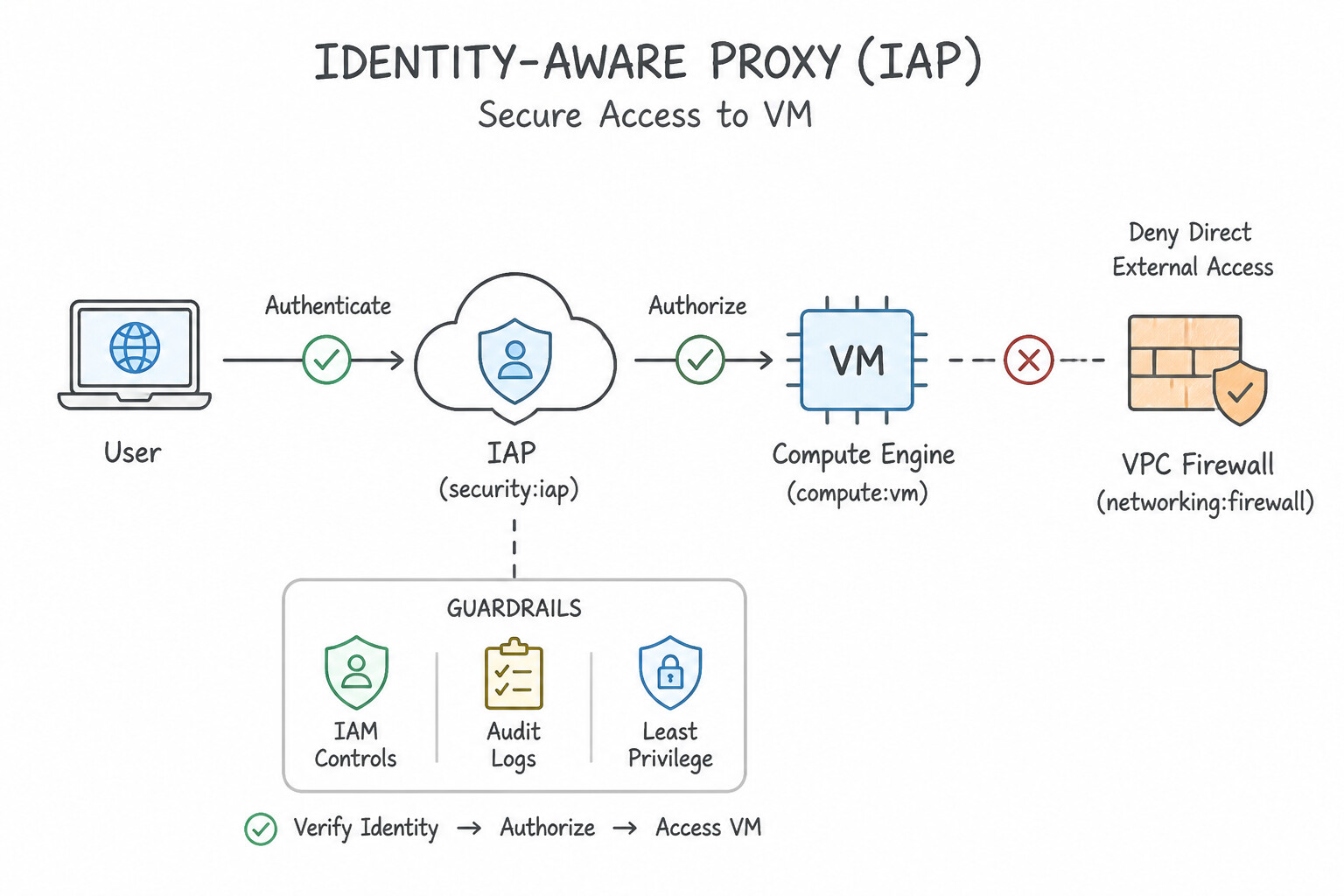
- Identity-Aware Proxy (
IAP): Enables zero-trust HTTPS and TCP Forwarding (SSH/RDP) to private VMs (no external IP needed!) by authenticating the user's identity and context—just allow ingress from the IAP proxy range35.235.240.0/20on port 22/3389. - Chrome Enterprise Premium: Extends BeyondCorp zero-trust security directly into the browser (URL filtering, malware/phishing protection, data loss prevention blocking copy-paste/downloads on unmanaged devices).
- Service Account Impersonation: Allows an authenticated engineer or pipeline to temporarily request short-lived credentials (
--impersonate-service-account) viaroles/iam.serviceAccountTokenCreator—with full audit attribution of who impersonated the account. - Workload Identity Federation (
WIF): Allows workloads in AWS, Azure, On-Premises (Active Directory / OIDC / SAML), or GitHub Actions / GitLab CI to exchange their native identity token for a short-lived Google Cloud STS token—zero downloaded JSON keys!
Key Implementation Patterns
- SSH Access Without Public IPs: Use Configure Identity-Aware Proxy (IAP) TCP forwarding. Connect using
gcloud compute sshwith the--tunnel-through-iapflag. IAP TCP forwarding enables SSH access to private VMs without external IPs or bastion hosts by tunneling traffic through Google's secure infrastructure. - Centralized SSH Key Management: Use Enable OS Login in the project metadata and grant the Compute OS Login role to the developers. OS Login ties SSH access to the Google Cloud identity, allowing immediate access revocation via IAM. (Avoid alternative: Project-wide metadata keys require manual removal and are not automatically revoked when an account is disabled.)
Key Takeaways (3.1g)
- Identity-Aware Proxy (IAP) allows secure access to VMs without external IP addresses.
- IAP verifies user identity and IAM permissions before allowing connection.
- Using
gcloud compute ssh --tunnel-through-iapcreates a secure tunnel for SSH traffic.- IAP removes the need for bastion hosts and public IP addresses for management tasks.
Consideration 3.1h: Securing software supply chain
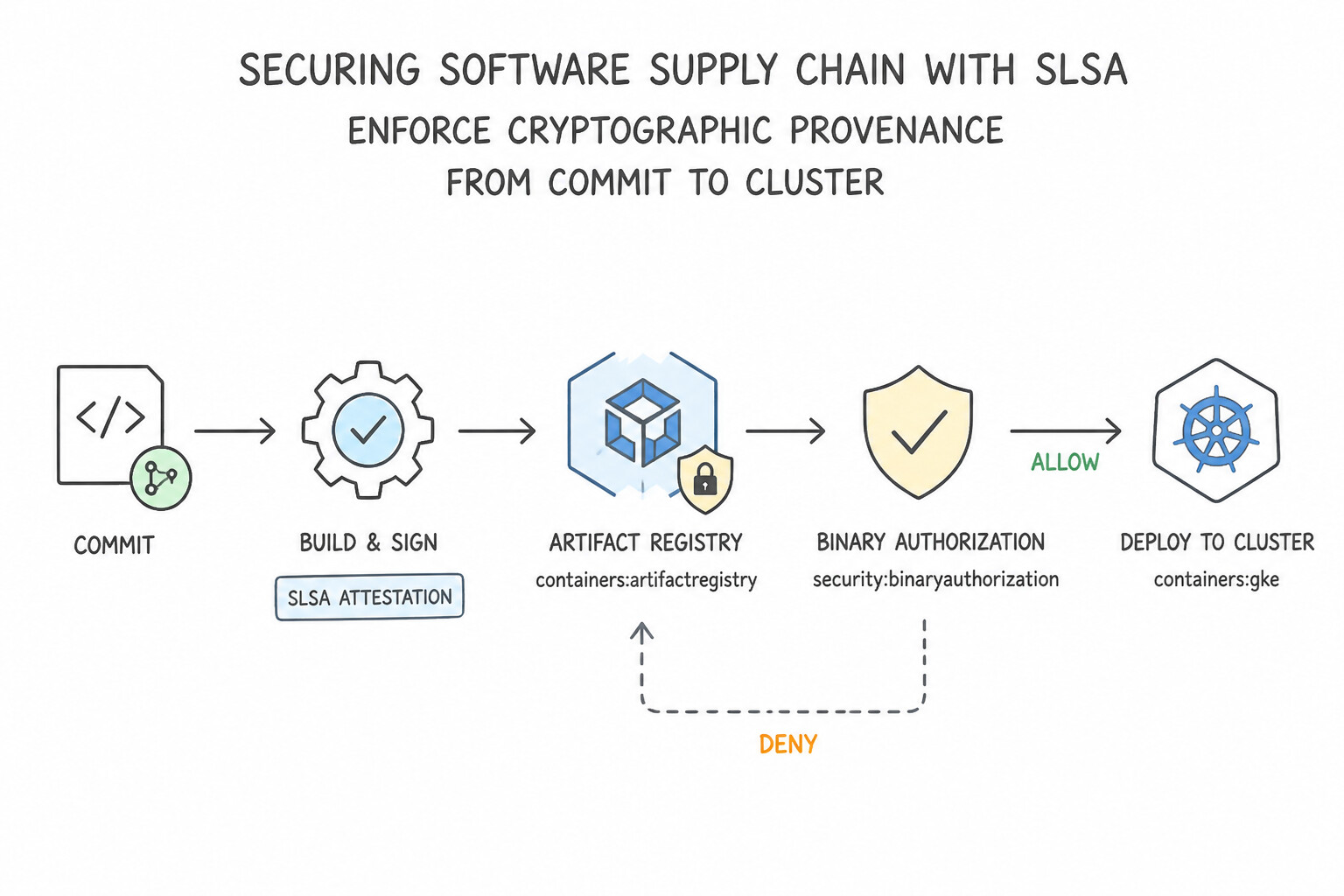
- Enforce Cryptographic Provenance from Commit to Cluster (
SLSA): - Build container images in Cloud Build (which generates cryptographic build provenance attestations).
- Store images in Artifact Registry with automated Artifact Analysis (Vulnerability Scanning) enabled.
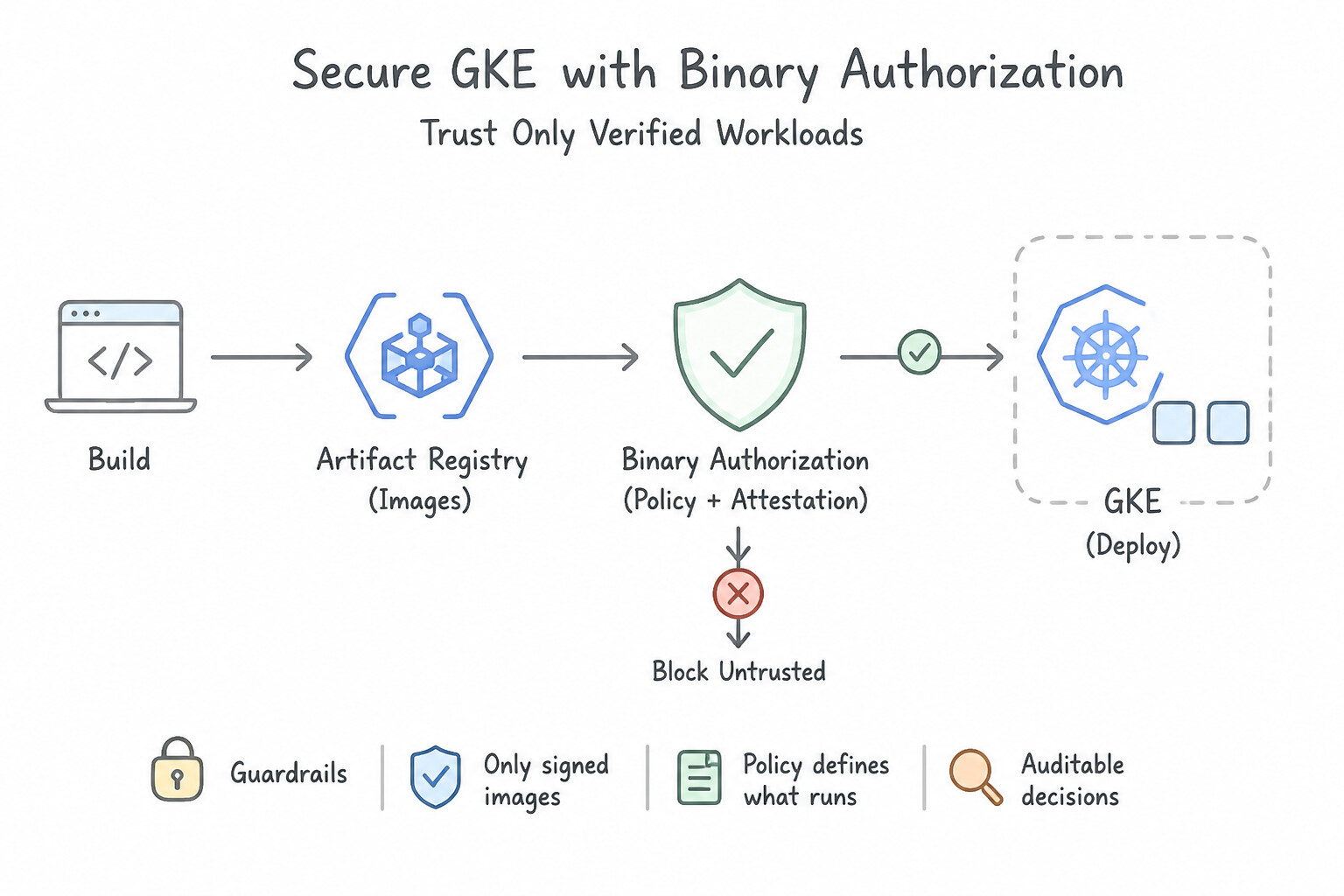
- Enforce Binary Authorization on GKE and Cloud Run to verify at admission time that the container image was signed by trusted Attestors (e.g., Build Attestor + Vulnerability-Free Security Attestor + QA Attestor) and block any unsigned or
:latestrogue image!
Key Implementation Patterns
- Enforcing Vulnerability Standards in Deployment: Use Enable Binary Authorization on the GKE cluster. Configure a policy that uses the built-in vulnerability check to block deployments exceeding the severity threshold. Binary Authorization natively integrates with Artifact Registry scanning to enforce policies that block deployments based on vulnerability severity.
- Securing Build Access to On-Prem Resources: Use Create a Cloud Build private pool. Configure the private pool to peer with your Virtual Private Cloud (VPC) network. Private pools allow Cloud Build workers to peer directly with your VPC, enabling access to private resources over Cloud VPN without public internet.
- Human Sign-off and Attestations: Use Configure Binary Authorization with an attestor. Require the QA lead to create an attestation by signing the image using Cloud Key Management Service (Cloud KMS). Binary Authorization uses attestors to verify that specific processes, such as manual QA sign-offs, have been completed via cryptographic signatures (attestations).
Key Takeaways (3.1h)
- Binary Authorization acts as a deployment-time security gate for GKE.
- Container Analysis provides the vulnerability data used by enforcement policies.
- Prefer managed security policies over custom scripts or manual deletions for supply chain security.
- Default Cloud Build workers run in a public environment and cannot access private VPC resources directly.
Consideration 3.1i: Securing AI workloads
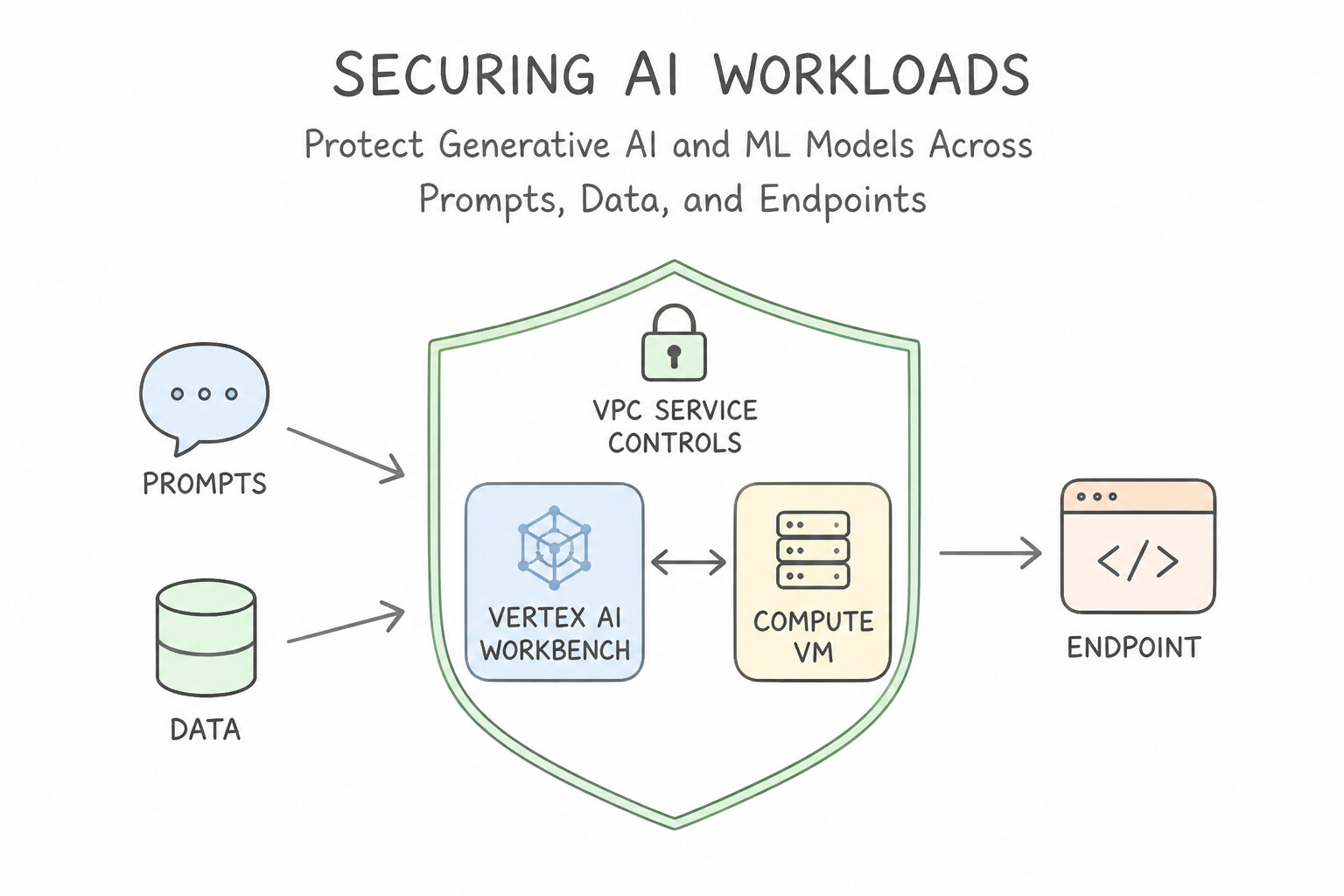
- Protect Generative AI & ML Models Across Prompts, Data, and Endpoints:
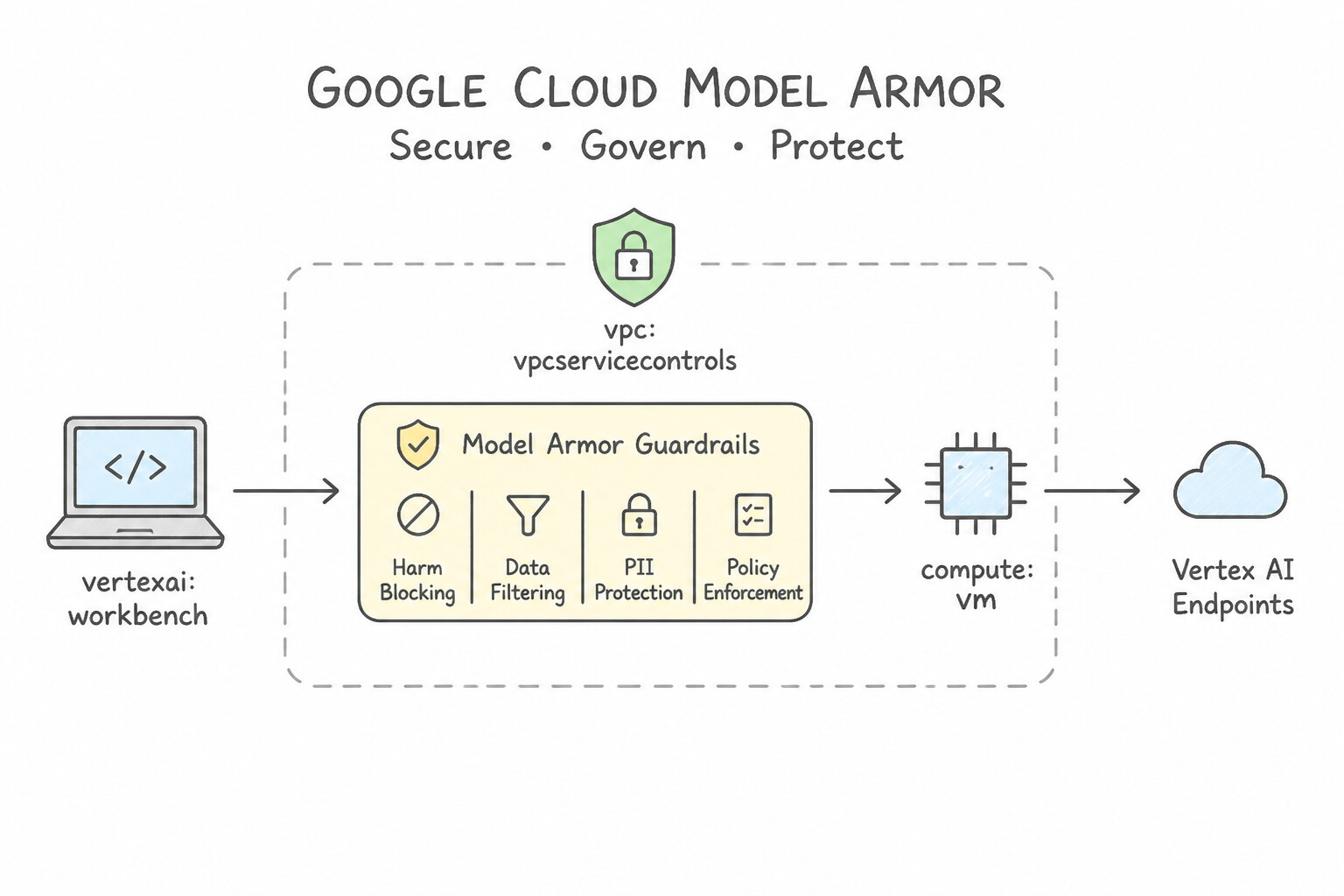
- Model Armor: Runtime AI security service that screens both user prompts and model responses (and retrieved RAG context) to block Prompt Injection, Jailbreak attempts, malicious URLs, Sensitive Data leaks, and toxic/harmful content across all models.
- Sensitive Data Protection (
Cloud DLP): Discovers, classifies, and de-identifies PII/PHI/PCI across training corpora, BigQuery tables, and LLM inputs/outputs using Redaction, Masking, Bucketing, or Crypto-Based Deterministic Tokenization (Format-Preserving Encryption/ Surrogate Tokens). - Secure Model Deployment: Host Vertex AI endpoints on Private Service Connect (
PSC) inside a VPC Service Controls (VPC-SC) perimeter with CMEK encryption so model weights and inference payloads never traverse the public internet.
Key Implementation Patterns
- Network Isolation for Vertex AI Workbench: Use Configure the instances to use only private IP addresses. Implement VPC Service Controls to create a service perimeter that encloses your project resources. Private IPs isolate the instances from the internet, and VPC Service Controls creates a perimeter that prevents unauthorized data movement to external services.
- Encryption Key Management for AI Models: Use Configure the Vertex AI resources to use Customer-Managed Encryption Keys (CMEK) with Cloud Key Management Service (Cloud KMS). CMEK allows you to manage encryption keys and revoke access instantly by disabling the key in Cloud KMS.
- Sensitive Data De-identification in AI Training: Use Create a Cloud Data Loss Prevention (Cloud DLP) job to inspect and de-identify the PII in BigQuery. Use the de-identified data for training. Cloud DLP can scan and mask PII (de-identification) before the data enters the training pipeline, ensuring compliance.
Key Takeaways (3.1i)
- Private IP is the standard for securing compute instances in regulated industries, ensuring they are not reachable from the public internet.
- Private Google Access allows instances with only private IPs to reach Google APIs (Storage, BigQuery, etc.) securely.
- VPC Service Controls are essential for preventing data exfiltration to external Google Cloud resources, providing a layer of security beyond IAM and firewalls.
- Google Cloud encrypts data at rest by default using Google-managed keys.
Quick Decision Cheat Sheet (Subsection 3.1)
If the Scenario Requires... | Choose This Google Cloud Pattern | Avoid This Common Mistake |
|---|---|---|
"Authenticate AWS, Azure, GitHub Actions, or on-premises workloads to GCP without JSON keys" | Workload Identity Federation ( WIF) | Service Account JSON keys rotated via cron scripts |
"Authenticate a specific GKE Pod to Google Cloud APIs with least privilege" | GKE Workload Identity ( KSA bound to GSA) | Node-level Compute Engine default service account or mounted JSON Secrets |
"Prevent engineers across the entire Organization from ever creating Service Account JSON keys" | Organization Policy constraints/iam.disableServiceAccountKeyCreation | Sending email reminders or auditing keys after creation |
"SSH/RDP into private Compute Engine VMs without external IPs or a bastion host" | Identity-Aware Proxy ( IAP) TCP Forwarding (allow ingress from 35.235.240.0/20) | Attaching temporary public IPs to production VMs |
"Regulatory mandate requires cryptographic keys in FIPS 140-2/3 Level 3 hardware modules" | Cloud HSM (integrated with Cloud KMS) | Standard software-backed CMEK or Secret Manager |
"Ensure only container images built and signed by Cloud Build and passing vulnerability scans can run on GKE" | Binary Authorization with Artifact Registry Vulnerability Scanning attestors | Relying on Kubernetes RBAC or manual PR reviews alone |
"Screen LLM prompts and RAG outputs for prompt injection, jailbreaks, and toxic content" | Model Armor | VPC Firewall rules or custom regex scripts |
Further Reading (Subsection 3.1)
- Best practices for using Google groups — This section of the documentation explicitly recommends using Google Groups to manage access for groups of users to streamline administration.
- Creating and managing custom roles — This page explains the lifecycle of custom roles, including when to use them and how to add specific permissions.
- Compute Engine IAM Roles — Lists the permissions contained within standard Compute Engine roles like Compute Admin and Compute Viewer.
- Workload Identity Federation — Overview of how Workload Identity Federation works and how to configure it for AWS.
- Restricting resource locations — This guide explains how to use the Organization Policy Service to restrict the physical location of new resources.
- Organization Policy Service — Overview of how Organization Policies work, including inheritance and the difference from IAM.
Subsection 3.2: Designing for compliance
The Big Picture
When a PCA production scenarios mentions HIPAA, GDPR, COPPA, PCI-DSS, SOC 2, or FedRAMP / IL4 / CJIS, it is not testing whether you memorized legal statutes—it is testing whether you know the exact Google Cloud architectural blueprint that satisfies each regulatory requirement!
In Subsection 3.2, we map legislative data sovereignty (3.2a), commercial PII/PCI handling (3.2b), industry certifications (3.2c), and immutable audit logging (3.2d) directly to Assured Workloads, Sensitive Data Protection (DLP), Cloud Healthcare API, Cloud Audit Logs, and Access Transparency.
Consideration 3.2a: Legislation and regulation requirements
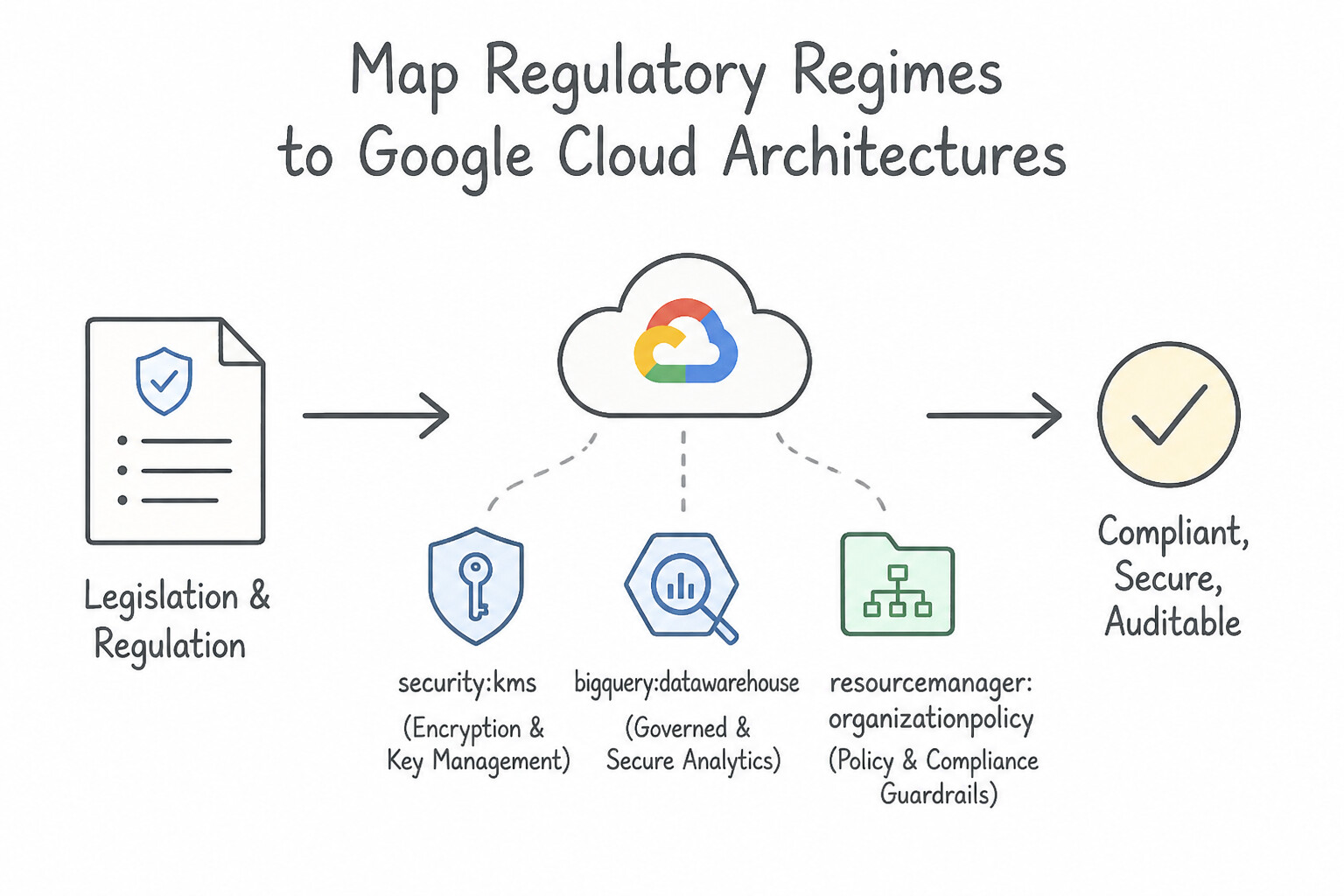
- Map Regulatory Regimes to Google Cloud Architectures:
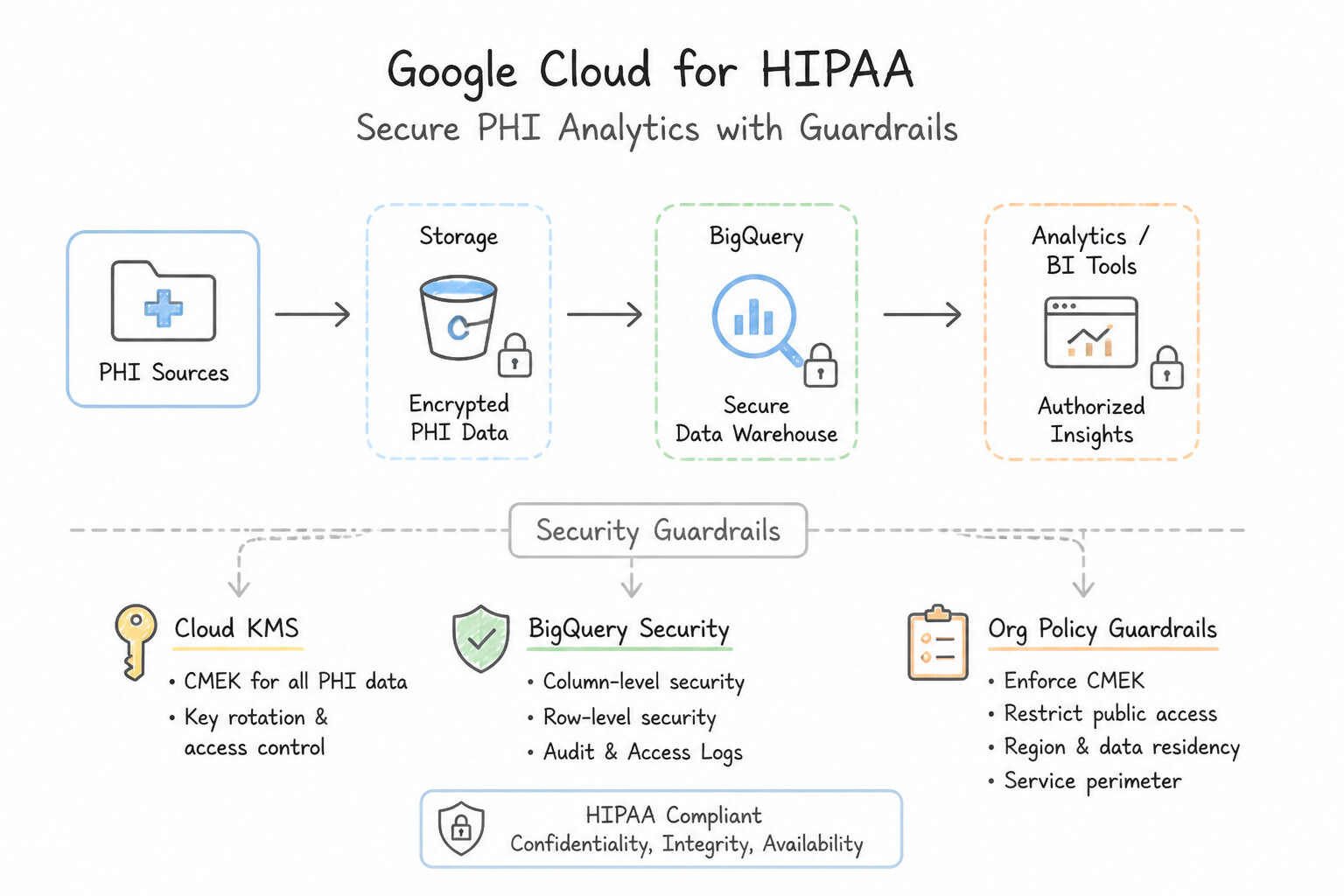
- HIPAA (Health Record Privacy — Protected Health Information
PHI): Execute a Business Associate Agreement (BAA) with Google Cloud, use only HIPAA-covered services (such as Cloud Healthcare API for FHIR/HL7v2/DICOM stores), encrypt with CMEK, and use Sensitive Data Protection (DLP)Safe Harborde-identification before sharing clinical data with research/ML teams. - GDPR & Data Sovereignty:
- Strict Geographic Residency: Enforce Organization Policy
constraints/gcp.resourceLocations(e.g.,in:eu-locations). - Sovereign Personnel & Key Control: Use Assured Workloads (automatically configures Folder-level location constraints, CMEK, and restricts Google support access by personnel nationality/clearance) + Cloud EKM + Access Approval.
- Right to Be Forgotten / Crypto-Shredding: When user data is encrypted with a dedicated CMEK key, destroying the cryptographic key version in Cloud KMS renders all underlying backups and archives permanently unreadable (crypto-shredding).
- COPPA (Children's Online Privacy Protection Act): Prohibit collection/tracking of personal identifiers from children under 13 without verifiable parental consent; strip device IDs and PII at ingestion using Sensitive Data Protection.
Key Implementation Patterns
- GDPR Right to be Forgotten Implementation: Use Encrypt each user's data with a unique encryption key managed by Cloud Key Management Service (Cloud KMS). Delete the specific key when a user requests erasure. Crypto-shredding allows you to effectively delete data by destroying the encryption key required to read it, avoiding expensive data rewrites.
- Data Residency Enforcement: Use Configure an Organization Policy with the Resource Location Restriction constraint. Apply it to the Organization node and allow only europe-west3. Organization Policies provide centralized control to restrict resource locations across the entire hierarchy.
- HIPAA Compliant Data De-identification: Use Use Cloud Data Loss Prevention (Cloud DLP) to create a de-identification template that redacts or tokenizes the PHI. Cloud DLP de-identification templates are used to remove or mask sensitive PHI from data to comply with regulations like HIPAA.
Key Takeaways (3.2a)
- Crypto-shredding is the preferred pattern for handling 'Right to Erasure' in large, immutable datasets.
- BigQuery DML operations (DELETE/UPDATE) are resource-intensive and not ideal for frequent, single-row deletions in petabyte-scale tables.
- BigQuery partitions are limited (4,000 per table), making them unsuitable for per-user partitioning in large consumer apps.
- Compliance often requires architectural patterns (like encryption) rather than just database queries.
Consideration 3.2b: Commercial compliance requirements
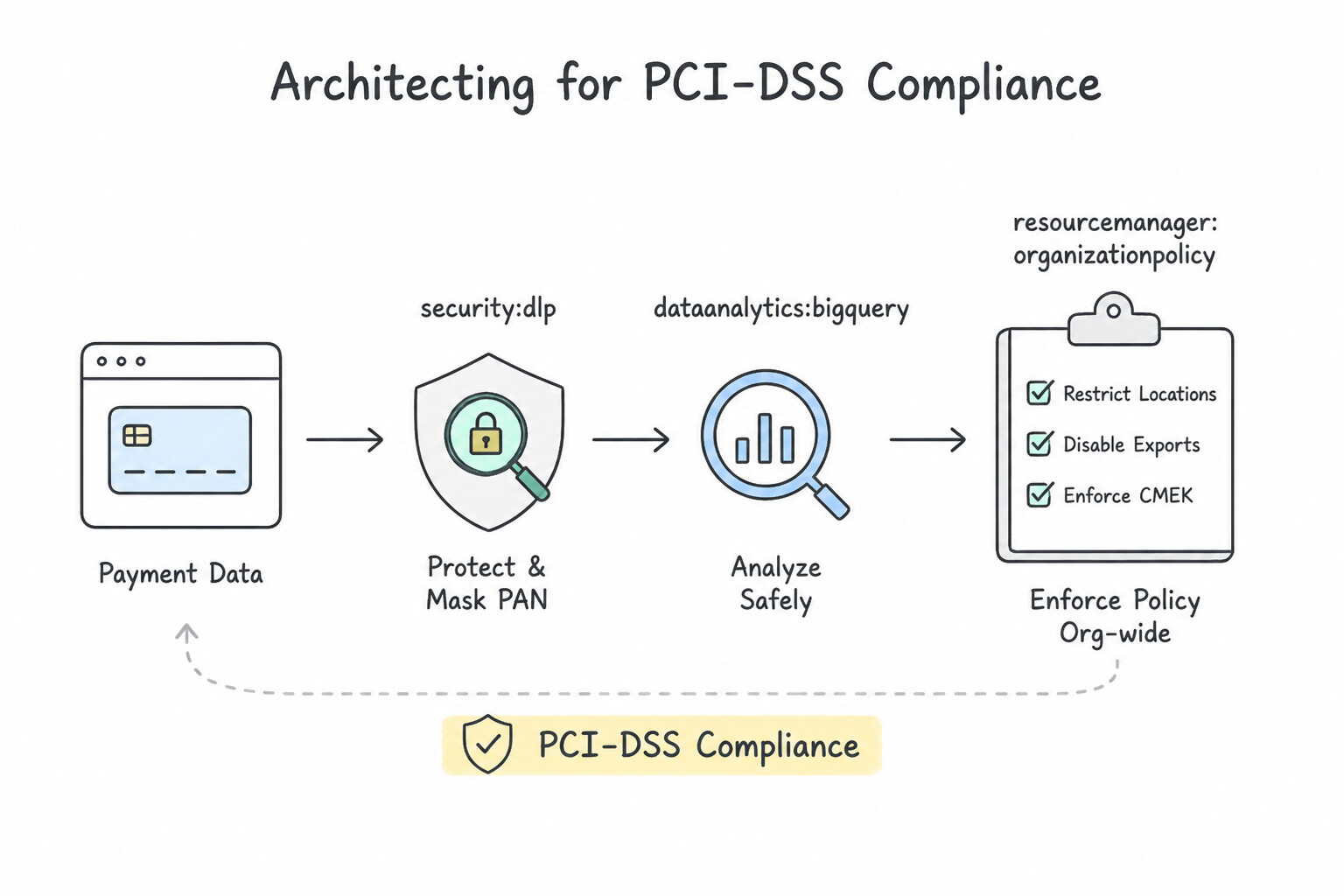
- Architecting for PCI-DSS (Credit Card Handling):
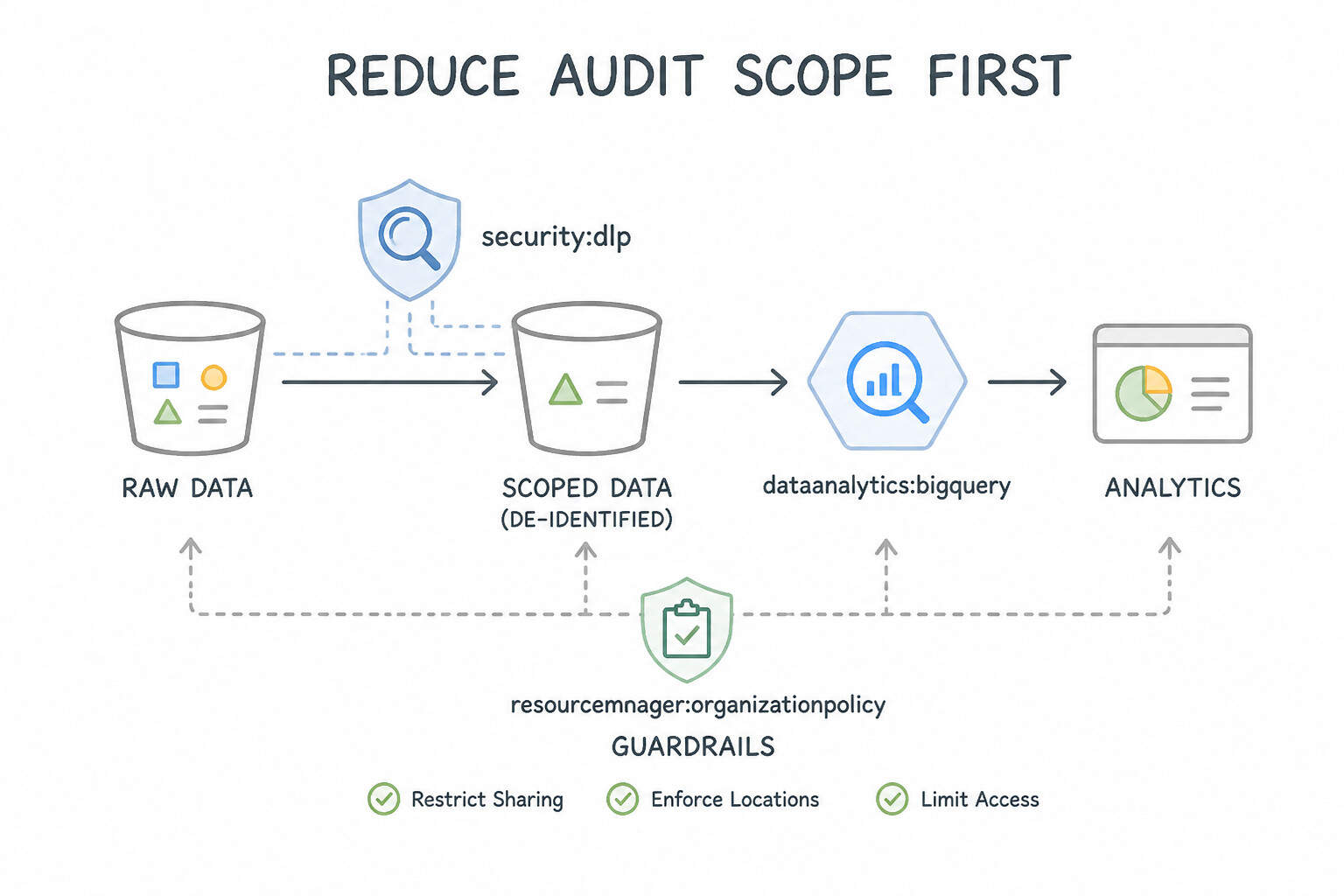
- Reduce Audit Scope First: Isolate the Cardholder Data Environment (
CDE) into a dedicated Google Cloud Project and dedicated VPC subnet separated from non-PCI workloads by strict VPC firewall rules and VPC Service Controls. Better yet, tokenize Primary Account Numbers (PANs) at the edge using a payment processor or Sensitive Data Protection Format-Preserving Encryption (FPE) so downstream analytics (BigQuery) never touch raw card numbers and stay out of PCI-DSS scope! - Sensitive Data Protection (
Cloud DLP) De-Identification Methods: - Redaction / Replacement: Replaces
4111-2222-3333-4444with[CREDIT_CARD_NUMBER](irreversible; loses join capability). - Masking: Replaces with
************4444(irreversible; preserves last 4 digits for customer support verification). - Deterministic Crypto-Hash / Format-Preserving Encryption (
FPE) / Surrogate Tokenization: Replaces a 16-digit PAN or 9-digit SSN with a format-preserving token (using a KMS-wrapped key) so referential integrity (SQL JOINs across tables) is preserved and authorized systems can re-identify (detokenize) when needed! - Industry Certifications (
SOC 2,ISO 27001—3.2c): Use Compliance Reports Manager in the Google Cloud Console to download Google's official third-party SOC 1/2/3, ISO, and PCI-DSS AOC audit reports on demand.
Key Implementation Patterns
- PCI DSS Scope Reduction: Use Use the Cloud Data Loss Prevention (DLP) API to tokenize the credit card numbers before writing the data to BigQuery. Cloud DLP tokenization replaces raw sensitive data with non-sensitive tokens before storage, satisfying the compliance requirement.
- Data Residency Enforcement: Use Configure an Organization Policy using the Resource Location Restriction constraint to allow only europe-west3. Organization Policies allow you to enforce constraints like allowed regions across the resource hierarchy. (Avoid alternative: IAM manages permissions ('who'), not broad compliance guardrails like resource location ('where').)
Key Takeaways (3.2b)
- Sanitize before storage: Always de-identify sensitive data before writing it to analytics systems to minimize compliance scope.
- Cloud DLP: Use Cloud Data Loss Prevention for discovering and transforming (masking/tokenizing) sensitive PII/PCI data.
- Tokenization for Analytics: Use deterministic encryption or tokenization if you need to perform joins or counts on sensitive fields without exposing the raw values.
- Use Organization Policies to enforce preventive guardrails across your resource hierarchy.
Consideration 3.2d: Audits and logs
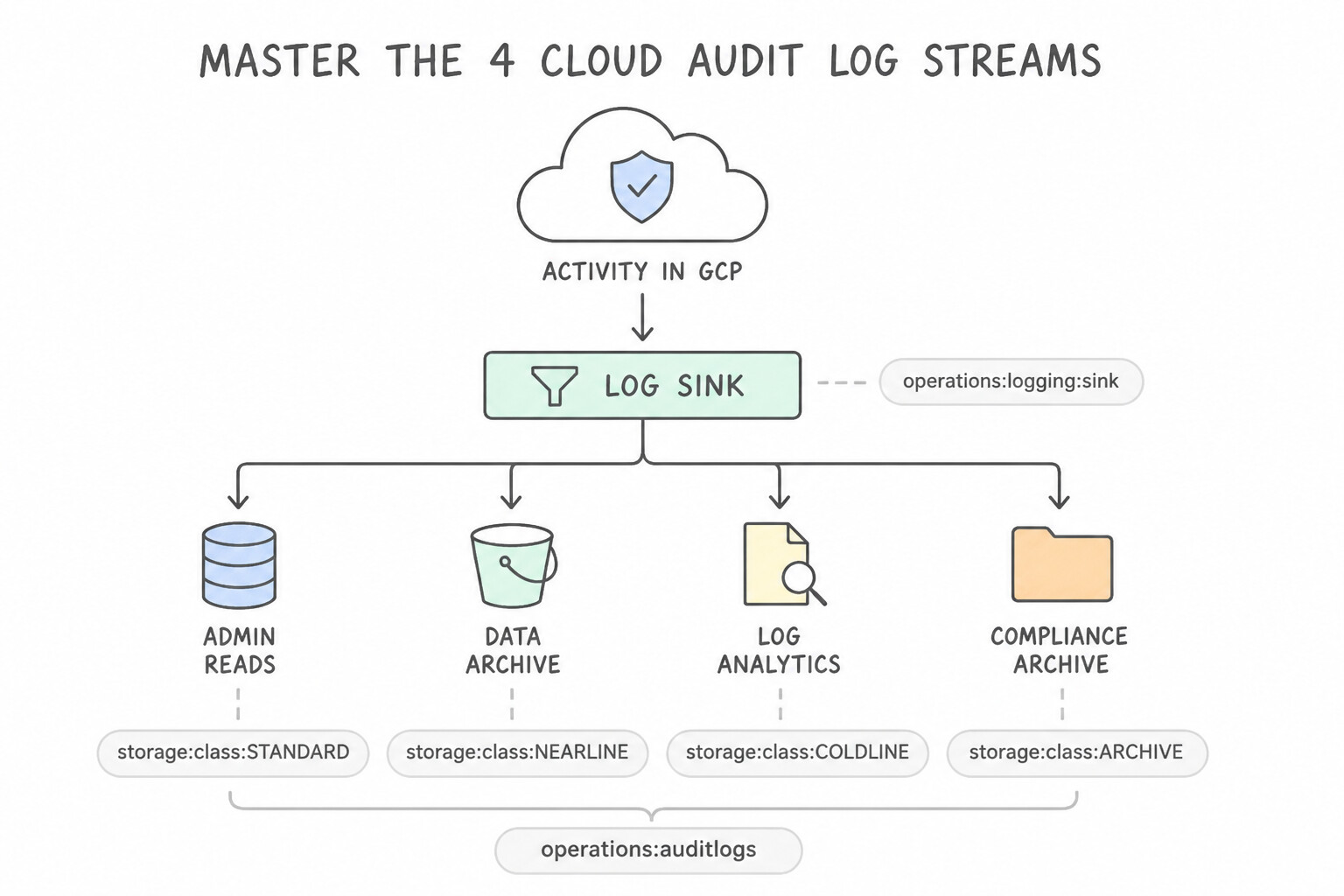
- Master the 4 Cloud Audit Log Streams:
- Admin Activity Logs: Records API calls that create/modify resources or IAM policies. Always enabled, free of charge, retained for 400 days by default.
- System Event Logs: Records Google Cloud system actions (e.g., live migration, autohealing). Always enabled, free, retained for 400 days.
- Policy Denied Logs: Records when a security policy or VPC-SC blocks access. Enabled by default, billed, retained for 30 days.
- Data Access Logs: Records
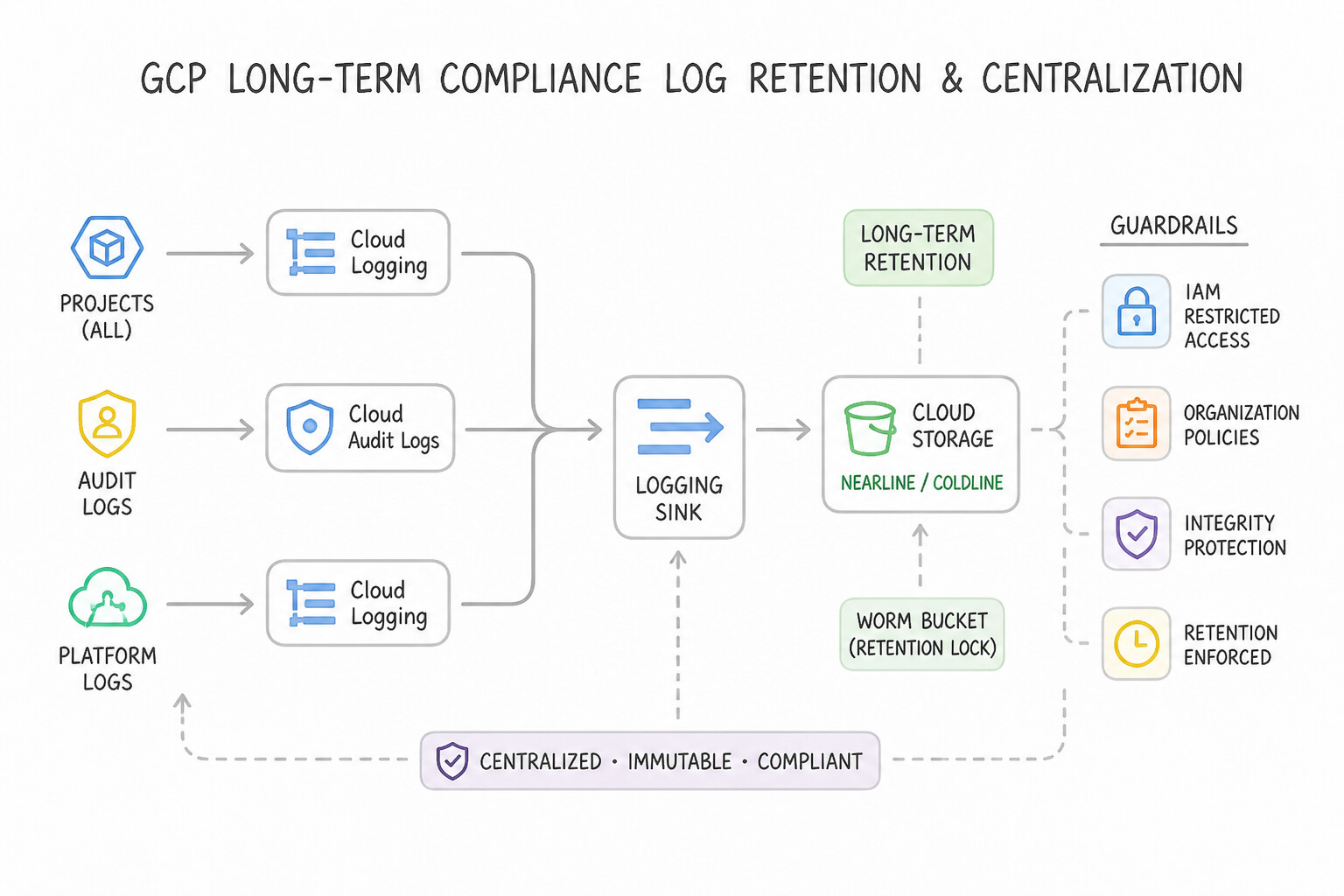
ADMIN_READ,DATA_READ, andDATA_WRITEoperations on user data. Disabled by default (except for BigQuery)! You must explicitly enable Data Access logs when compliance requires auditing who read which object or database row (retained for 30 days in_Defaultbucket). - Long-Term Compliance Log Retention & Centralization:
- Create an Aggregated Log Sink (
--include-children) at the Organization or Folder level in Cloud Logging. - Where to Route Logs:
- 7-Year Low-Cost Regulatory Retention (WORM): Route to a Cloud Storage
Archivebucket (or use OLM) with a Locked Retention Policy (Bucket Lock). - SQL-Based Security & Forensic Investigation: Route to a partitioned BigQuery dataset (or enable Log Analytics linked to BigQuery).
- Real-Time SIEM / Chronicle / Splunk Streaming: Route to a Cloud Pub/Sub topic.
- Access Transparency vs. Access Approval:
- Access Transparency: Provides near-real-time audit logs of actions taken by Google Cloud support/engineering personnel when accessing your content.
- Access Approval: Requires explicit customer approval (cryptographically signed) before Google support personnel can access your data.
Key Implementation Patterns
- Cost-Effective Long-Term Log Retention: Use Configure a log sink to export logs to a Cloud Storage bucket with the Archive storage class. The Archive storage class is the most cost-effective solution for data retained for long periods and accessed less than once a year.
- Enabling Visibility into Data Reads: Use Enable Data Access audit logs for the BigQuery API. Data Access logs capture 'read' operations and must be explicitly enabled to track SELECT queries. (Avoid alternative: A sink only exports existing logs; it does not enable the generation of new log types.)
- Real-Time SIEM Integration: Use Create a Cloud Logging sink with a Cloud Pub/Sub topic as the destination. Create a subscription and configure the on-premises SIEM to pull the log messages. Cloud Pub/Sub provides a scalable, near real-time messaging service ideal for streaming logs to external systems.
Key Takeaways (3.2d)
- Use Log Sinks to export logs from Cloud Logging to other services for retention or analysis.
- Select Cloud Storage Archive class for long-term retention of data that is accessed less than once a year.
- Avoid using BigQuery or Standard Cloud Storage for simple long-term archival if costs must be minimized and analytics are not immediately required.
- Admin Activity logs (writes/config) are on by default.
Quick Decision Cheat Sheet (Subsection 3.2)
If the Scenario Requires... | Choose This Google Cloud Pattern | Avoid This Common Mistake |
|---|---|---|
"Audit every DATA_READ and DATA_WRITE on Cloud Storage buckets for compliance" | Explicitly enable Data Access Audit Logs for Cloud Storage (they are off by default!) | Assuming Admin Activity logs capture object reads/writes |
"Centralize audit logs from all current and future projects in the Organization" | Create an Organization-level Aggregated Sink with includeChildren = true | Creating manual log sinks inside every individual project |
"7-year compliance retention of logs at minimum cost" | Route Log Sink to Cloud Storage Archive class (with Bucket Lock) | Retaining 7 years of raw logs in BigQuery or Cloud Logging hot buckets |
"Verify what actions Google support engineers took during a support ticket" | Access Transparency logs (and Access Approval to gate access beforehand) | Admin Activity logs (only record customer-initiated API actions) |
"De-identify PII while preserving format (16 digits) and SQL JOIN capability + reversible decryption" | Sensitive Data Protection with Format-Preserving Encryption ( FPE) or Crypto-Deterministic Tokenization | Masking ( ****) or Redaction ([REDACTED]) |
Further Reading (Subsection 3.2)
- De-identifying sensitive data — Explains the concept of deleting data by deleting the key necessary to decrypt it, a technique often called crypto-shredding.
- BigQuery Partition Limits — Documentation detailing the limits on partitioned tables, specifically the 4,000 partition limit.
- Restricting resource locations — This page explains how to use the Organization Policy Service to restrict the physical location of newly created resources.
- De-identifying sensitive data — This guide explains how Cloud DLP de-identification works, including redaction, replacement, and masking techniques.
- Cloud Data Loss Prevention overview — Overview of Cloud DLP features, including inspection and de-identification of sensitive data.
- PCI DSS Compliance on Google Cloud — General information on how Google Cloud helps customers meet PCI DSS requirements.
Book TOC · Previous · Chapter 4 of 8 · Next
AwesomeGCP.com Learning
The approach taken is a question-led learning approach: you explore realistic project scenarios where you need to make decisions or take actions to achieve business goals within specific constraints. Instead of passive learning, you are challenged to think and work through the options to master the Professional Cloud Architect (PCA) certification!