Book TOC · Previous · Chapter 3 of 8 · Next
Chapter 3: Enterprise AI & ML Architecture: Gemini Enterprise Agent Platform, Vertex AI & Prebuilt APIs
Chapter Focus: End-to-end ML workflows on Vertex AI / Gemini Enterprise Agent Platform, BigQuery ML vs. AutoML vs. Custom Training, Model Garden, RAG grounding, and Prebuilt AI APIs.
Subsection 2.4: Leveraging Gemini Enterprise Agent Platform for end-to-end ML workflows
The Big Picture
In enterprise AI/ML, 85% of promising models fail to reach production because data scientists build monolithic, unversioned Jupyter notebooks that manually read CSVs, train on a single local GPU, and lack automated data lineage, drift detection, or reproducible orchestration.
Subsection 2.4 tests your ability to architect industrialized, end-to-end ML and Agentic workflows on Google Cloud using Agent Platform / Vertex AI Pipelines (2.4a), governed data integration and feature pipelines (2.4b), and AI Hypercomputer (2.4c)—orchestrating Cloud TPUs and NVIDIA GPUs across flexible consumption models (Dynamic Workload Scheduler, Committed Use Discounts, and Spot capacity).
Consideration 2.4a: Using Vertex AI pipelines
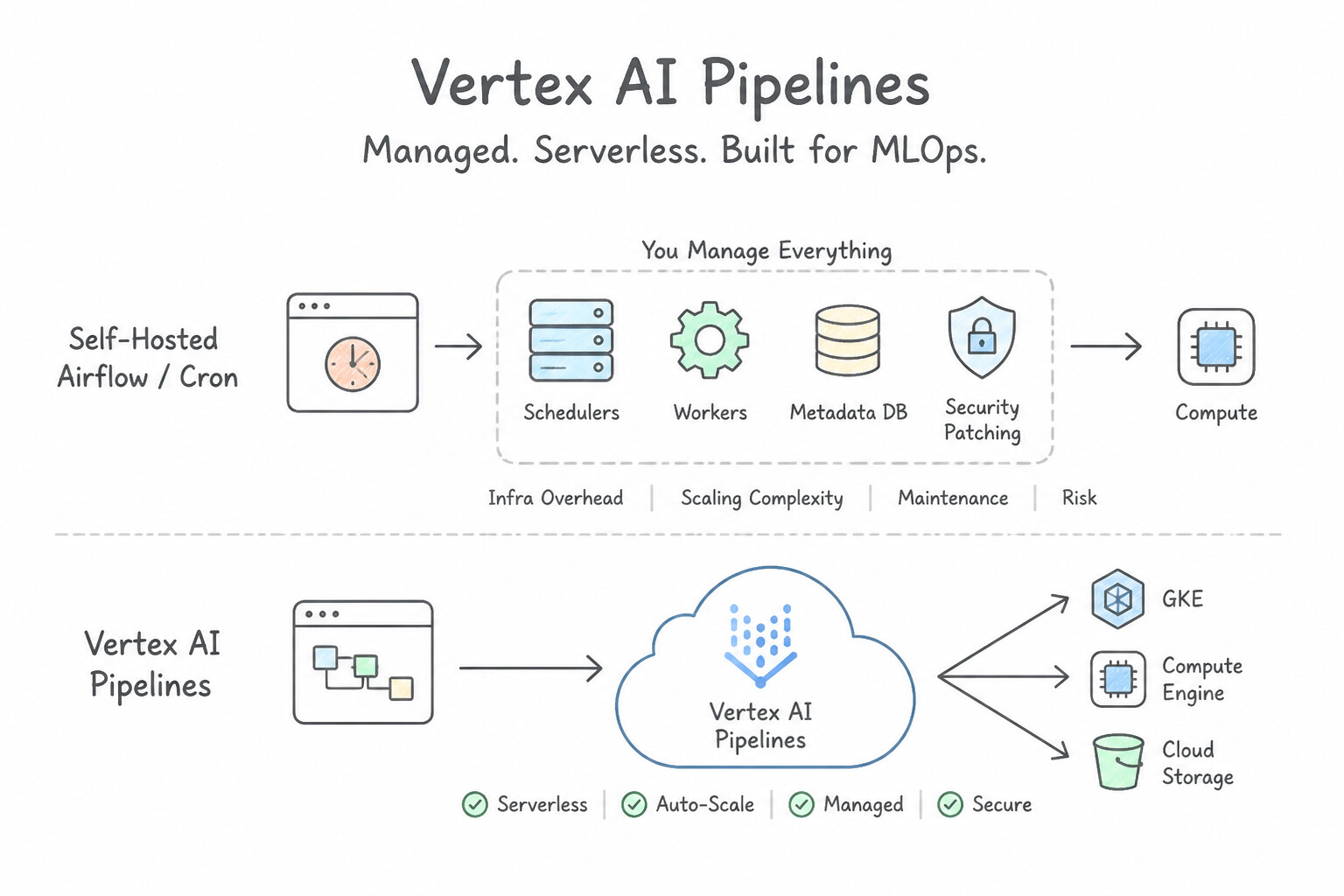
- Why Managed Serverless Pipelines Beat Self-Hosted Airflow/Cron for MLOps:
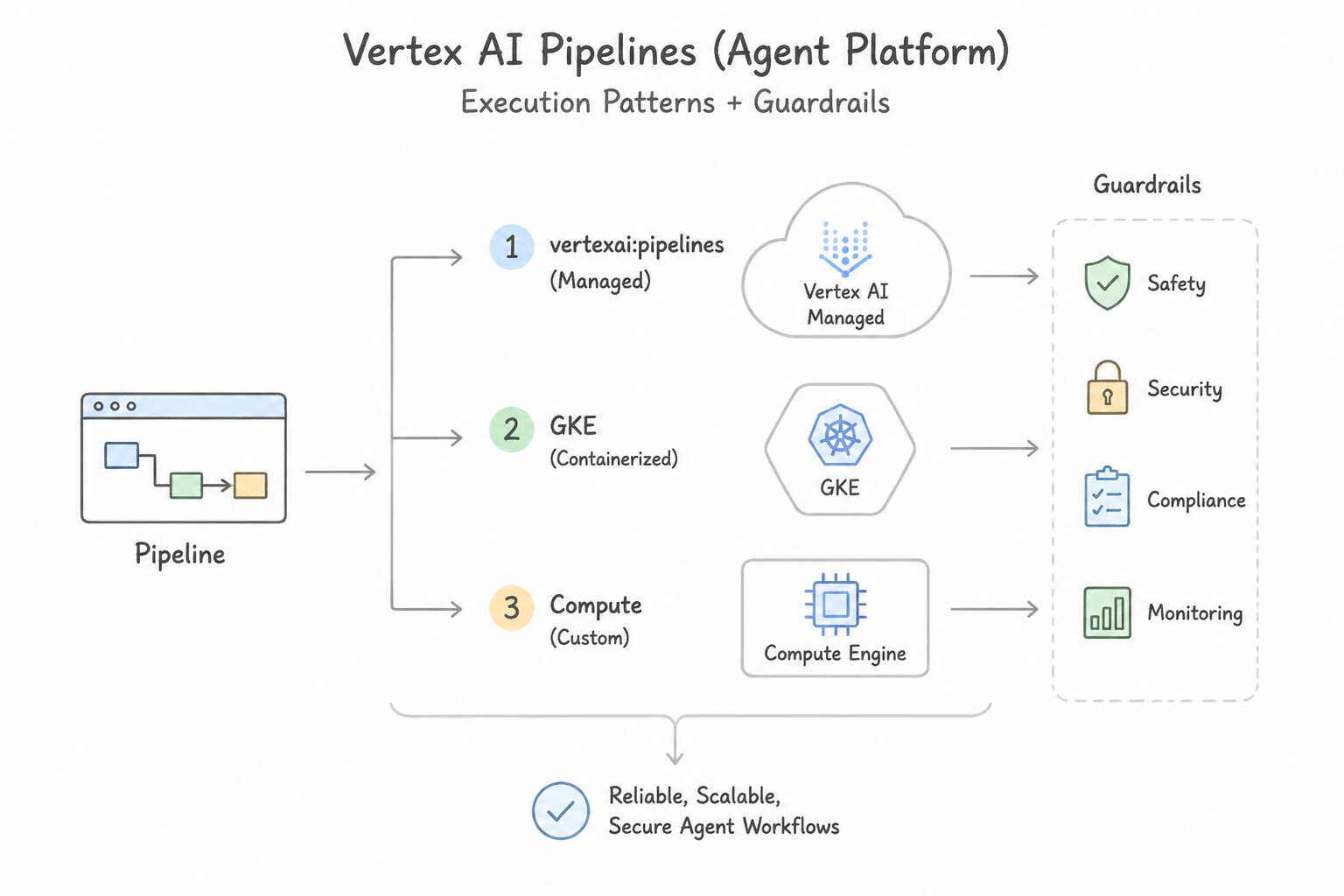
- Agent Platform Pipelines (Vertex AI Pipelines): Serverless orchestrator for Kubeflow Pipelines (
KFP) and TensorFlow Extended (TFX). You pay only while pipeline steps execute—zero idle cluster cost! - Artifact Lineage & Execution Caching: Automatically records every dataset, hyperparameter, metric, and model artifact in Vertex ML Metadata. If a 10-step pipeline fails at Step 8, Execution Caching skips Steps 1–7 on retry if their inputs/code haven't changed, saving hours of GPU/TPU compute.
- Continuous Training (
CT) Automation: Trigger automated retraining pipelines when new training data lands in Cloud Storage or when Vertex AI Model Monitoring detects feature skew / prediction drift, using Eventarc / Pub/Sub + Cloud Run functions.
Key Implementation Patterns
- Migrating On-Prem Kubeflow to Managed Services: Use Use Vertex AI Pipelines to execute the workflow using the existing Kubeflow Pipelines SDK. Vertex AI Pipelines is a serverless service that runs Kubeflow Pipelines without requiring infrastructure management. (Avoid alternative: Self-hosting Kubeflow on GKE requires managing the underlying cluster, which does not minimize operational overhead.)
- Optimizing Pipeline Costs with Caching: Use Enable execution caching for the pipeline tasks. Execution caching skips unchanged pipeline steps by reusing previous outputs, saving time and cost. (Avoid alternative: Preemptible VMs reduce unit cost but do not skip redundant computations and may introduce interruptions.)
Key Takeaways (2.4a)
- Vertex AI Pipelines provides a serverless environment to run workflows defined using the Kubeflow Pipelines SDK.
- Managed services reduce operational overhead by removing the need to patch, scale, or maintain underlying infrastructure like GKE clusters.
- Migrating to the cloud often involves trading self-managed infrastructure for platform-native managed services to improve efficiency.
- Vertex AI Pipelines supports execution caching to skip unchanged steps.
Consideration 2.4b: Preparing for Vertex AI data integration
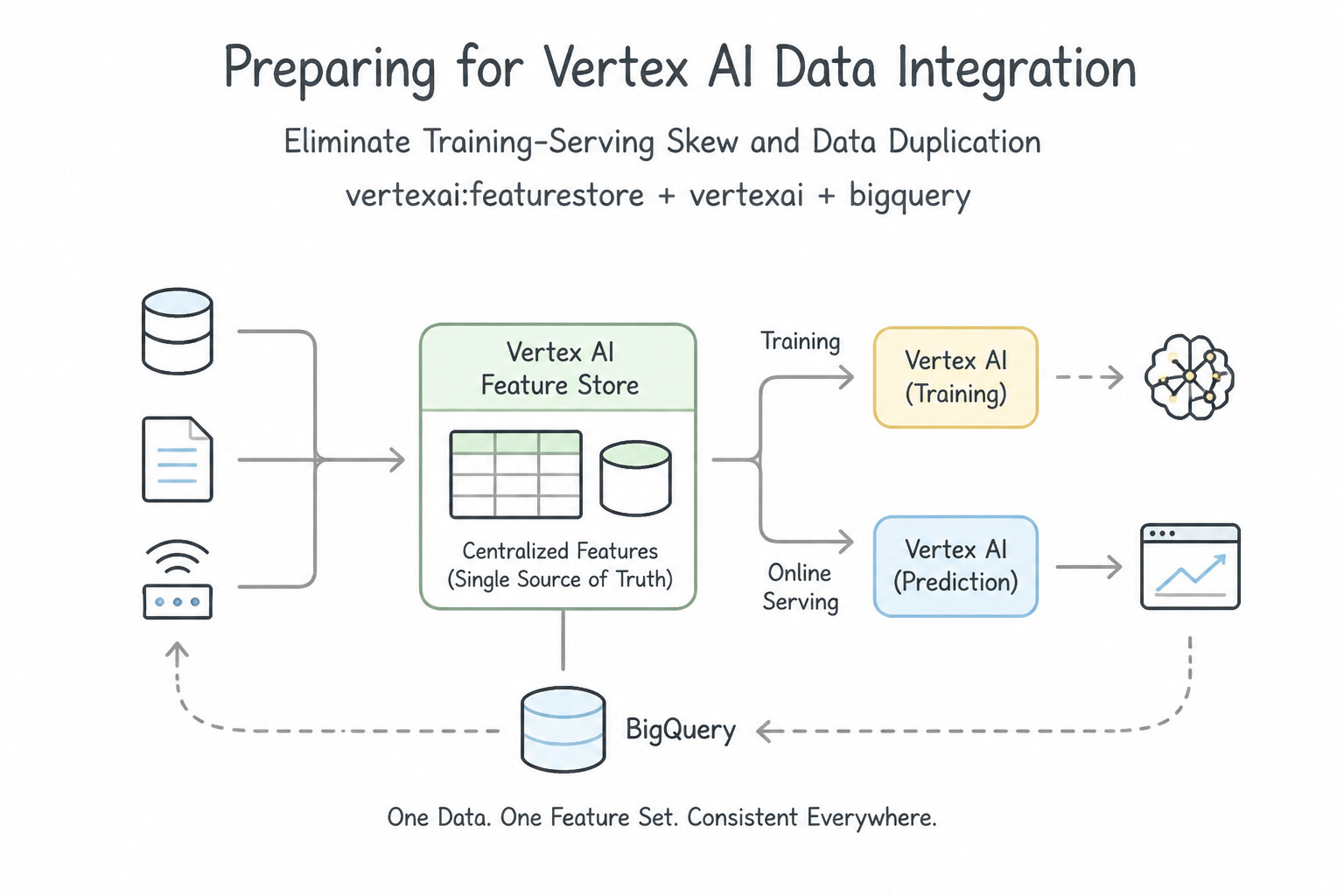
- Eliminate Training-Serving Skew & Data Duplication:
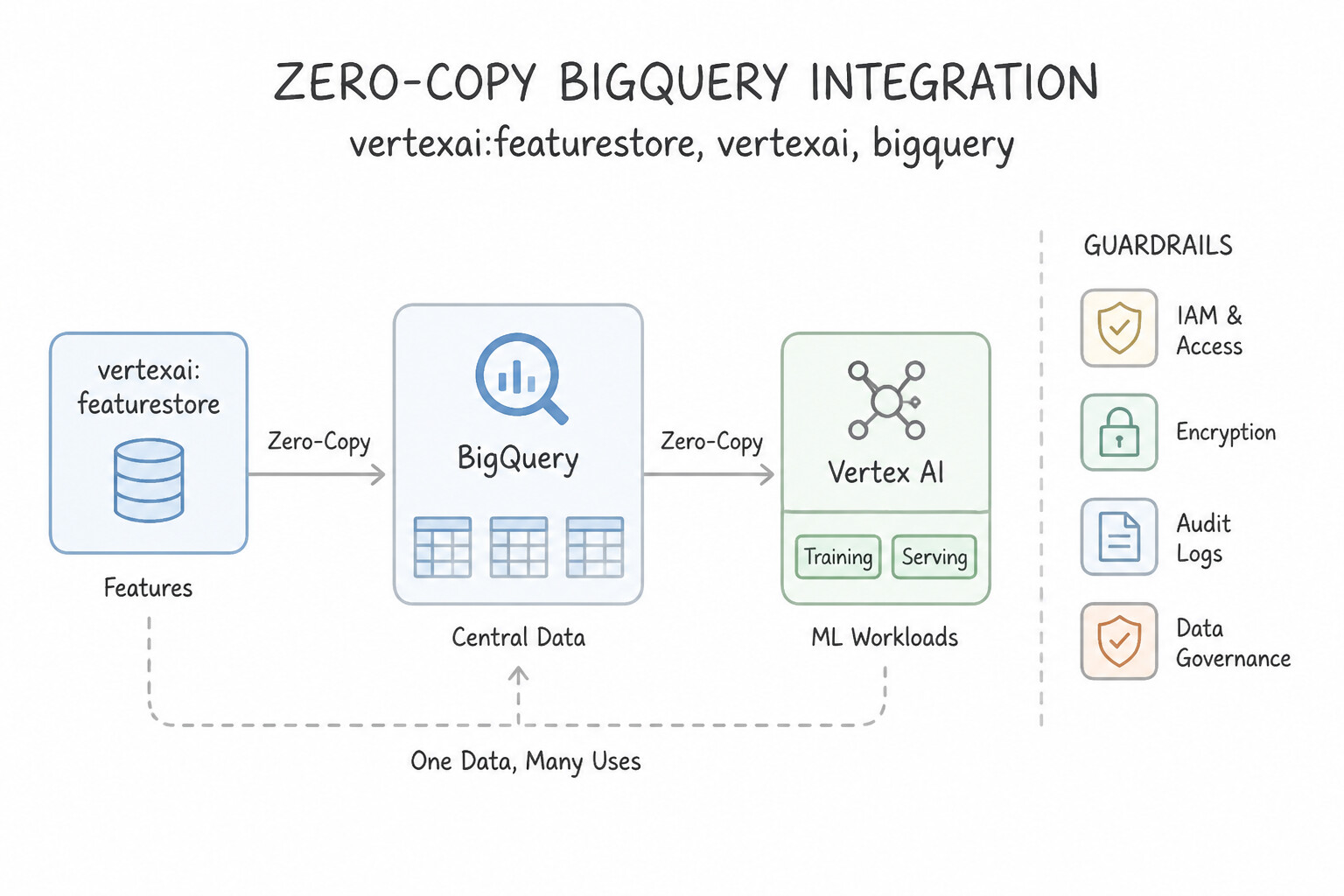
- Zero-Copy BigQuery Integration: Connect Vertex AI / Agent Platform directly to BigQuery tables (via the BigQuery Storage Read API) rather than exporting terabytes of duplicate CSVs to Cloud Storage.
- Vertex AI Feature Store: Centralizes feature engineering on top of BigQuery (for batch/historical point-in-time training without data leakage) and synchronizes to a low-latency online store (for millisecond real-time inference)—eliminating training-serving skew.
- Privacy-Preserving ML Data Prep: Run Sensitive Data Protection (
Cloud DLP) via Dataflow or Cloud Run functions to de-identify, mask, or tokenize PII/PHI before unstructured documents or tabular records enter the ML training/RAG pipeline.
Key Implementation Patterns
- Feature Consistency in Training and Serving: Use Configure Vertex AI Feature Store to manage your feature values. Use the batch serving API to retrieve historical data for training and the online serving API for real-time inference. Vertex AI Feature Store unifies feature management, offering point-in-time correct retrieval for training and low-latency serving for inference.
- Efficient Large-Scale Tabular Data Ingestion: Use Develop the training application to read data directly from BigQuery using the BigQuery Storage API. The BigQuery Storage API allows direct, high-speed data access for training without creating intermediate copies. (Avoid alternative: Exporting to Cloud Storage duplicates the 50 TB of data, increasing storage costs.)
- Secure Data Ingestion for Regulated Industries: Use Configure Private Services Access to establish VPC Network Peering between your VPC and Google services. Specify your VPC network when creating the training job. Use Private Services Access to peer your VPC with Vertex AI, enabling private communication without public IPs.
Key Takeaways (2.4b)
- Vertex AI Feature Store is the primary solution for resolving training-serving skew.
- Point-in-time correctness is essential for creating accurate training datasets from time-series data.
- Centralizing feature logic ensures that the model trains on data that statistically resembles the data it will see in production.
- Avoid moving or duplicating large datasets (TB scale) unless necessary for transformation.
Consideration 2.4c: Using AI Hypercomputer and integrating GPUs and TPUs
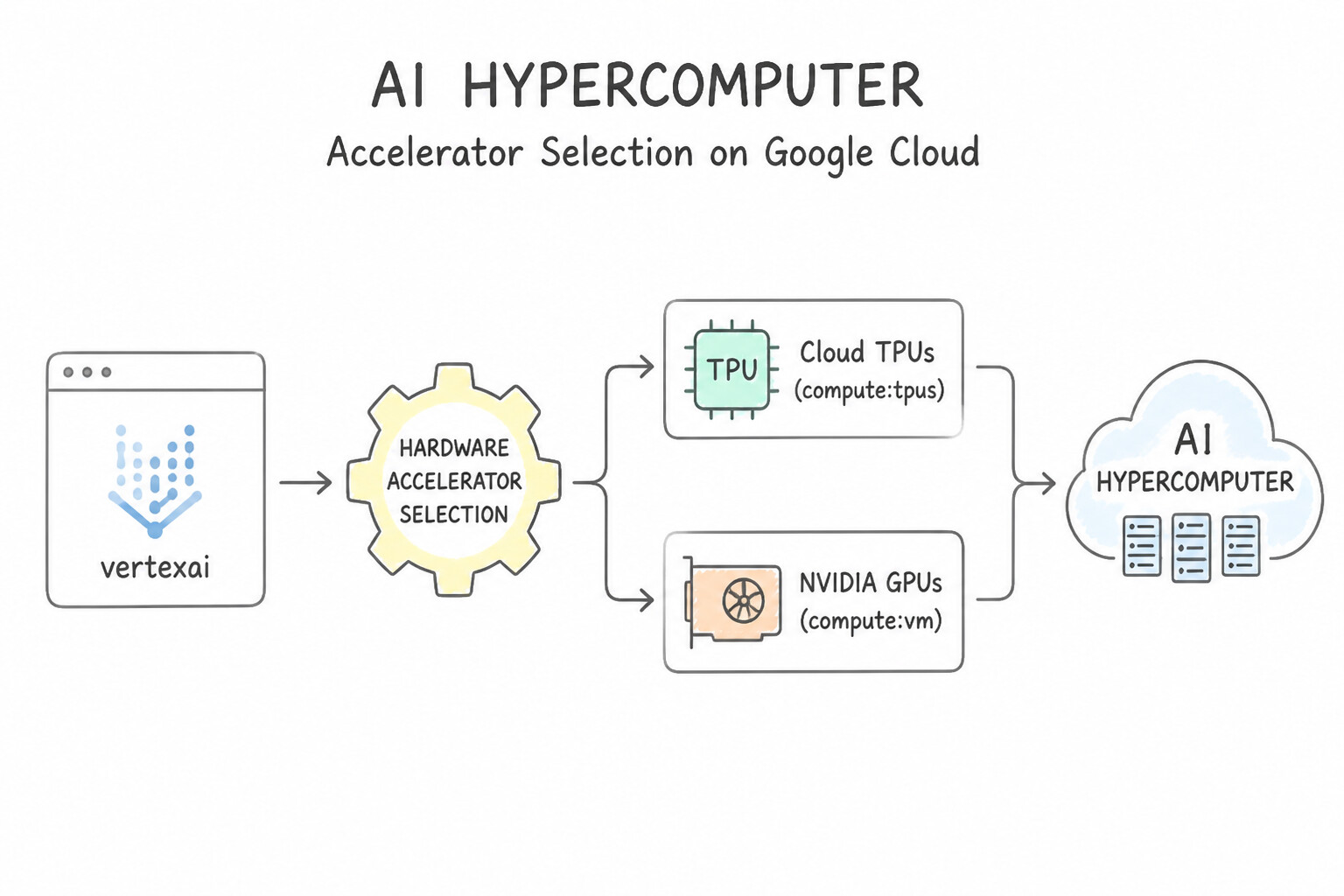
- Hardware Accelerator Selection (
Cloud TPUsvs.NVIDIA GPUs): - Cloud TPUs: Google's custom ASIC matrix processors (
TPU v5p,v5e,Trillium) connected via ultra-fast optical Inter-Chip Interconnect (ICI). Optimal for massive transformer/LLM training, JAX/PyTorch/XLA workloads, and high-throughput matrix-heavy inference. - NVIDIA GPUs: (
H100/H200onA3VMs for massive training;L4onG2VMs for cost-effective inference/fine-tuning). Optimal when workloads rely on custom CUDA kernels or GPU-specific libraries. - Matching Consumption Models to Workload Criticality:
- Assured / Reserved Capacity + CUDs: Best for mission-critical, 24/7 production inference endpoints or multi-week foundation model training runs with strict deadlines.
- Dynamic Workload Scheduler (
DWS): Queues large-scale batch training or fine-tuning jobs and provisions entire multi-node GPU/TPU slices all-at-once when capacity becomes available (for up to 7 days), preventing partial-cluster idle waste. - Spot VMs / Spot TPUs: Up to 60–91% discount for fault-tolerant training/tuning—mandatory requirement: save model checkpoints to Cloud Storage periodically so a preempted job resumes from the latest epoch rather than starting over at Epoch 0!
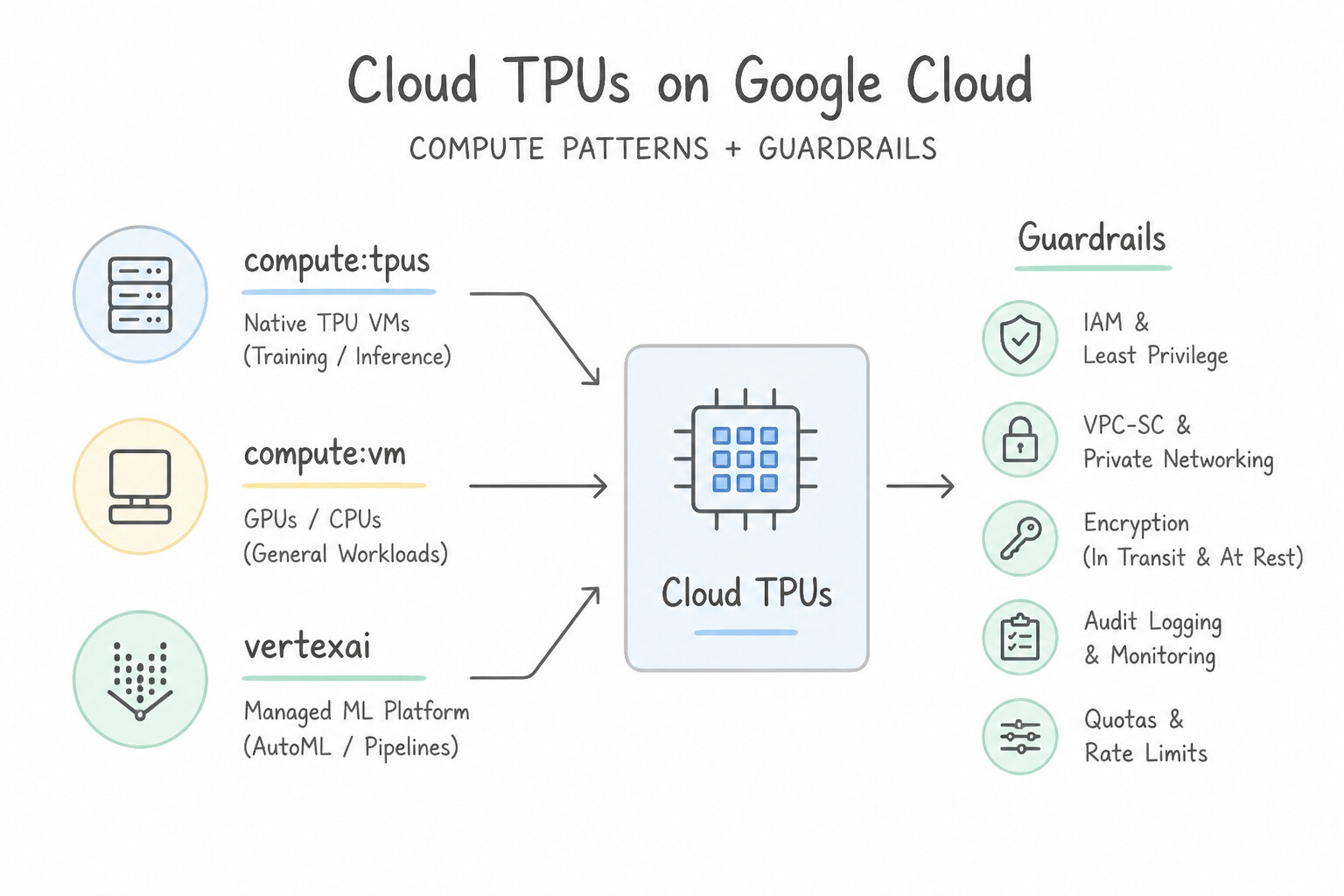
Key Implementation Patterns
- Optimizing Large-Scale JAX Model Training: Use Provision a Cloud TPU v5p Pod slice. TPUs are custom-built for ML and optimized for JAX, offering superior interconnect speeds for large model training. (Avoid alternative: GPUs are effective but do not offer the native optimization and specialized interconnect efficiency for JAX that TPUs provide.)
- Low-Latency Inference Hardware Selection: Use Configure the machine specification to use NVIDIA T4 GPUs. NVIDIA T4 GPUs are optimized for inference workloads and offer the best price-performance ratio for low-latency predictions. (Avoid alternative: NVIDIA A100 GPUs are high-cost accelerators designed for training large models, making them overkill for simple inference.)
- Cost-Efficient Fault-Tolerant Training: Use Configure the training job to use Spot virtual machine (VM) instances with attached GPUs. Spot VMs provide massive discounts for fault-tolerant workloads that support checkpointing. (Avoid alternative: Standard VMs are too expensive for a limited budget when fault tolerance is already handled by the application.)
Key Takeaways (2.4c)
- TPUs are Google's custom ASICs optimized for machine learning workloads.
- JAX is a framework that runs natively and efficiently on TPUs.
- TPU Pods provide high-bandwidth interconnects essential for large-scale distributed training.
- Always match the framework (e.g., JAX, TensorFlow) to the hardware (TPU) for maximum efficiency on Google Cloud.
Quick Decision Cheat Sheet (Subsection 2.4)
If the Scenario Requires... | Choose This Google Cloud Pattern | Avoid This Common Mistake |
|---|---|---|
"Automate reproducible MLOps workflows with artifact lineage, step caching, and zero idle orchestration cost" | Agent Platform Pipelines (Vertex AI Pipelines) | Managing a persistent 24/7 Kubernetes cluster just to run occasional training scripts |
"Eliminate training-serving skew and share engineered features across ML teams" | Vertex AI Feature Store | Copying ad-hoc SQL queries between notebooks and application servers |
"Minimize cost for a 48-hour distributed GPU/TPU training job that can tolerate preemption" | Spot GPUs / Spot TPUs paired with frequent model checkpointing to Cloud Storage | Running on Spot VMs without checkpointing (loses 100% of training progress on preemption) |
"Schedule a multi-node GPU/TPU training job so all accelerators start simultaneously when capacity is available" | Dynamic Workload Scheduler ( DWS) on AI Hypercomputer | Manual polling scripts calling gcloud compute instances create in a loop |
"Select the most cost-effective GPU for high-throughput, low-latency LLM/vision inference" | NVIDIA L4 GPUs ( G2 machine series) with autoscaling | Using 8x H100 ( A3) supercomputing nodes for lightweight inference |
Further Reading (Subsection 2.4)
- Vertex AI Pipelines introduction — Provides an overview of Vertex AI Pipelines, highlighting its serverless nature and support for the Kubeflow Pipelines SDK.
- Configure execution caching — Documentation explaining how execution caching works, how to enable/disable it, and its benefits for reducing costs and latency.
- Vertex AI Feature Store overview — Explains how Feature Store helps reuse features and serves data for both online and batch predictions with consistency.
- Read data from BigQuery — Documentation on using the BigQuery Storage API to download large results significantly faster than the standard API.
- Overview of the BigQuery Storage Read API — Explains how the Storage Read API provides high-throughput read access to table data.
- Vertex AI networking access overview — This page explains how to configure VPC Network Peering for Vertex AI to enable private IP access and secure communication between your VPC and Vertex AI training jobs.
Subsection 2.5: Configuring prebuilt solutions or APIs with Agent Platform
The Big Picture
One of the most foundational decision rules in production is the AI Abstraction Ladder:
- Level 1 — Prebuilt Google AI APIs (
Vision,Video Intelligence,Speech-to-Text,Text-to-Speech,Document AI,Translation): Zero ML expertise required, zero training data needed, instant REST/gRPC integration. - Level 2 — Gemini Enterprise, NotebookLM & Agent Builder (
Search&Conversation): Low-code enterprise grounding, workspace productivity, and conversational agents over internal company data. - Level 3 — Vertex AI Model Garden (
Gemini,Claude,Gemma,Llama,Mistral,Imagen): Discover, test, prompt-tune, or one-click deploy proprietary and open-weight foundation models. - Level 4 — Custom Training (
Vertex AI Custom Training+AI Hypercomputer): Reserved strictly for proprietary domain problems where prebuilt APIs and foundation models cannot meet accuracy or specialized modality requirements.
Consideration 2.5a: Differentiating between Google AI APIs
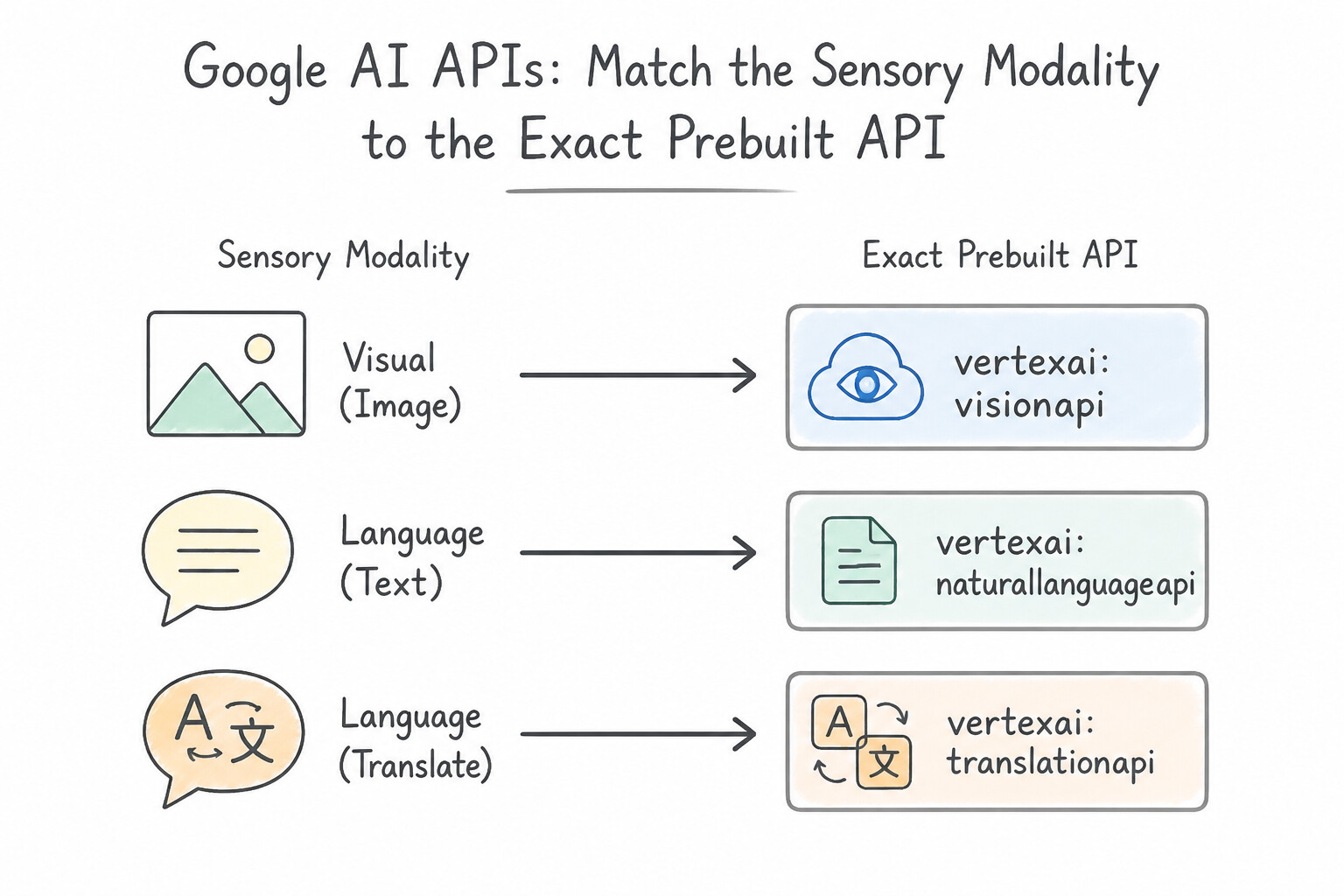
- Match the Sensory Modality to the Exact Prebuilt API:
- Cloud Vision API: Pre-trained image analysis—detects objects, faces, landmarks, explicit content (
SafeSearch), printed/handwritten text (OCR), and product search from static images. - Imagen on Vertex AI: Generative text-to-image creation and image editing/inpainting (contrast with Vision API, which analyzes existing images!).
- Cloud Video Intelligence API: Extracts temporal metadata from video files in Cloud Storage—detects shot changes, scene labels, explicit content, object tracking, celebrity recognition, and video text with exact timestamps.
- Cloud Speech-to-Text API (
Chirp): Converts spoken audio (streaming microphone or batch files) into text transcripts with speaker diarization and automatic punctuation. - Cloud Text-to-Speech API: Converts written text or SSML into natural-sounding synthetic human speech (
WaveNet/Neural2/Journeyvoices). - Document AI: Extracts structured key-value pairs and tables from complex business documents (invoices, receipts, W-2s, lending forms, identity documents).
- Agent Builder — Search vs. Conversation: Use Search (Vertex AI Search) for semantic enterprise search and RAG grounding over documents/websites/BigQuery; use Conversation for multi-turn virtual agents, contact center bots, and stateful dialog flows.
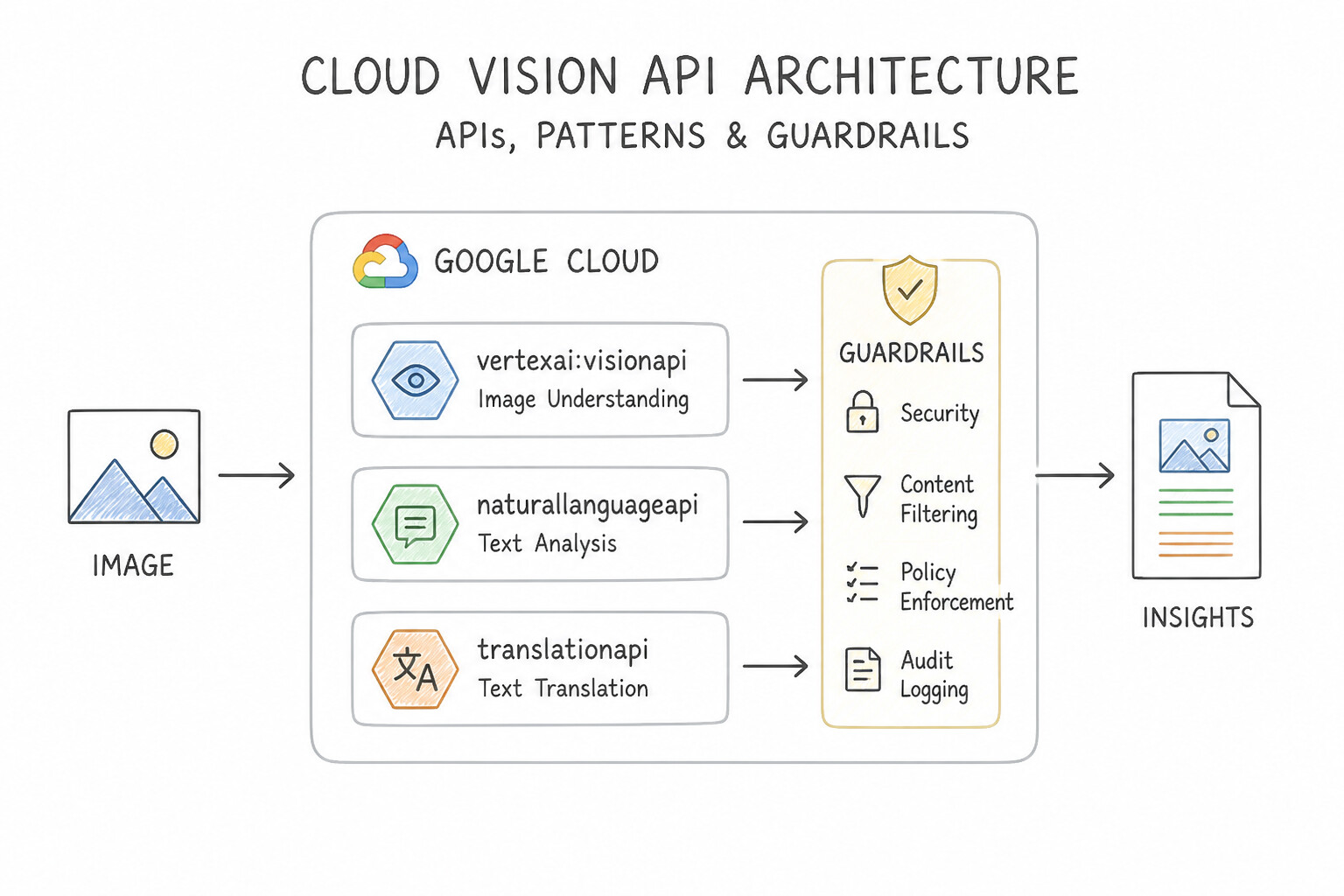
Key Implementation Patterns
- Text Extraction from Static Images: Use Use the Cloud Vision API to perform optical character recognition (OCR). The Cloud Vision API is the correct tool for extracting text from static images (OCR). (Avoid alternative: Document AI is optimized for documents like forms and invoices, not general photos of physical objects.)
- Sentiment Analysis of User Feedback: Use Use the Cloud Natural Language API to perform sentiment analysis. Cloud Natural Language API sentiment analysis specifically identifies positive, negative, or neutral opinions in text. (Avoid alternative: Cloud Translation API detects the source language or translates text, but it does not evaluate emotion or tone.)
- Audio Transcription for Analytics: Use Use the Cloud Speech-to-Text API to transcribe the files. Cloud Speech-to-Text is the specific service for converting audio data into text transcriptions. (Avoid alternative: Cloud Text-to-Speech converts text into audio, not audio into text.)
Key Takeaways (2.5a)
- Cloud Vision API is used for image analysis, including OCR for static images.
- Video Intelligence API is strictly for video files.
- Natural Language API processes text, it does not extract it from images.
- Select the API that matches your input data type (image, video, text, or document).
Consideration 2.5b: Integrating Gemini Enterprise features
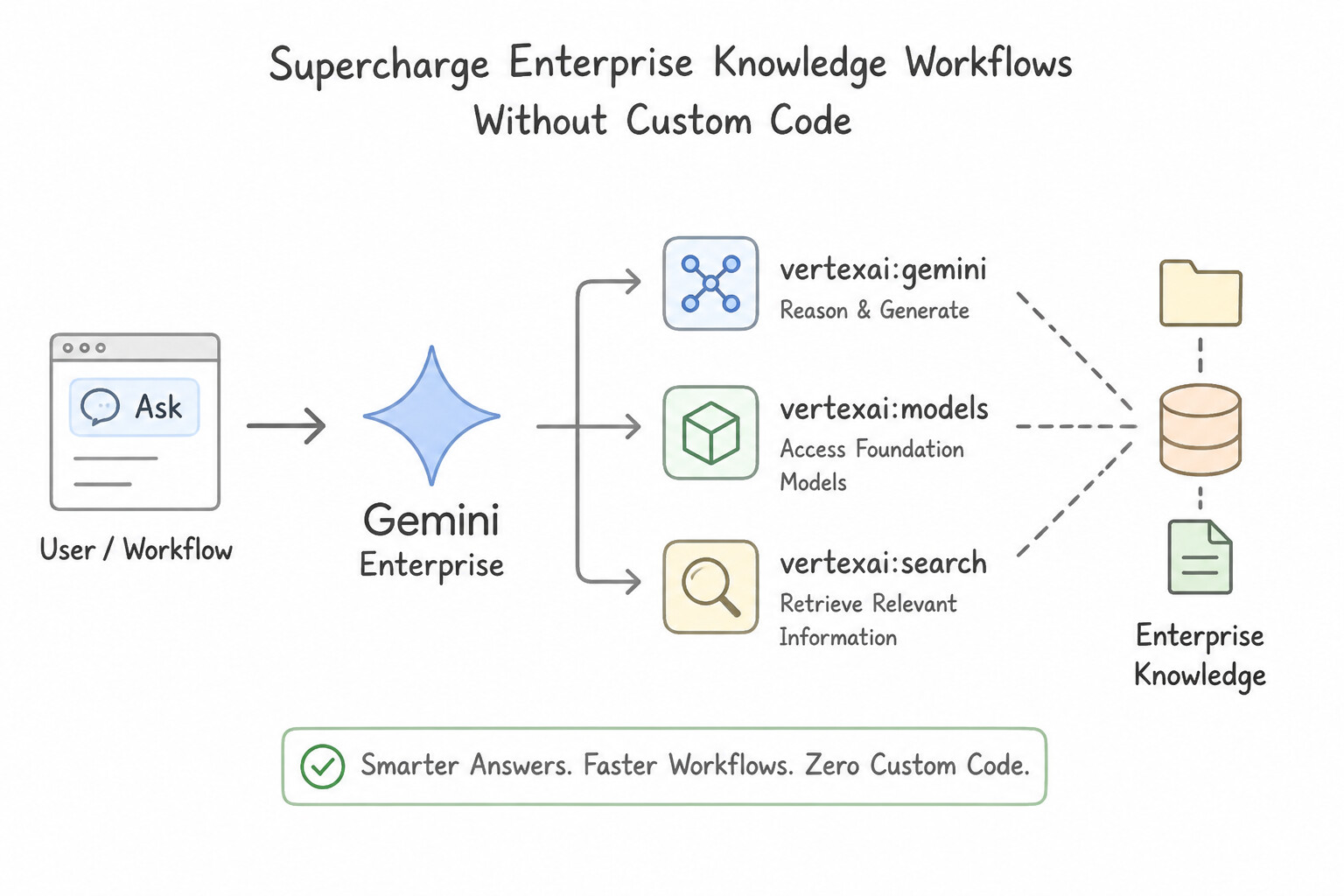
- Supercharge Enterprise Knowledge Workflows Without Custom Code:
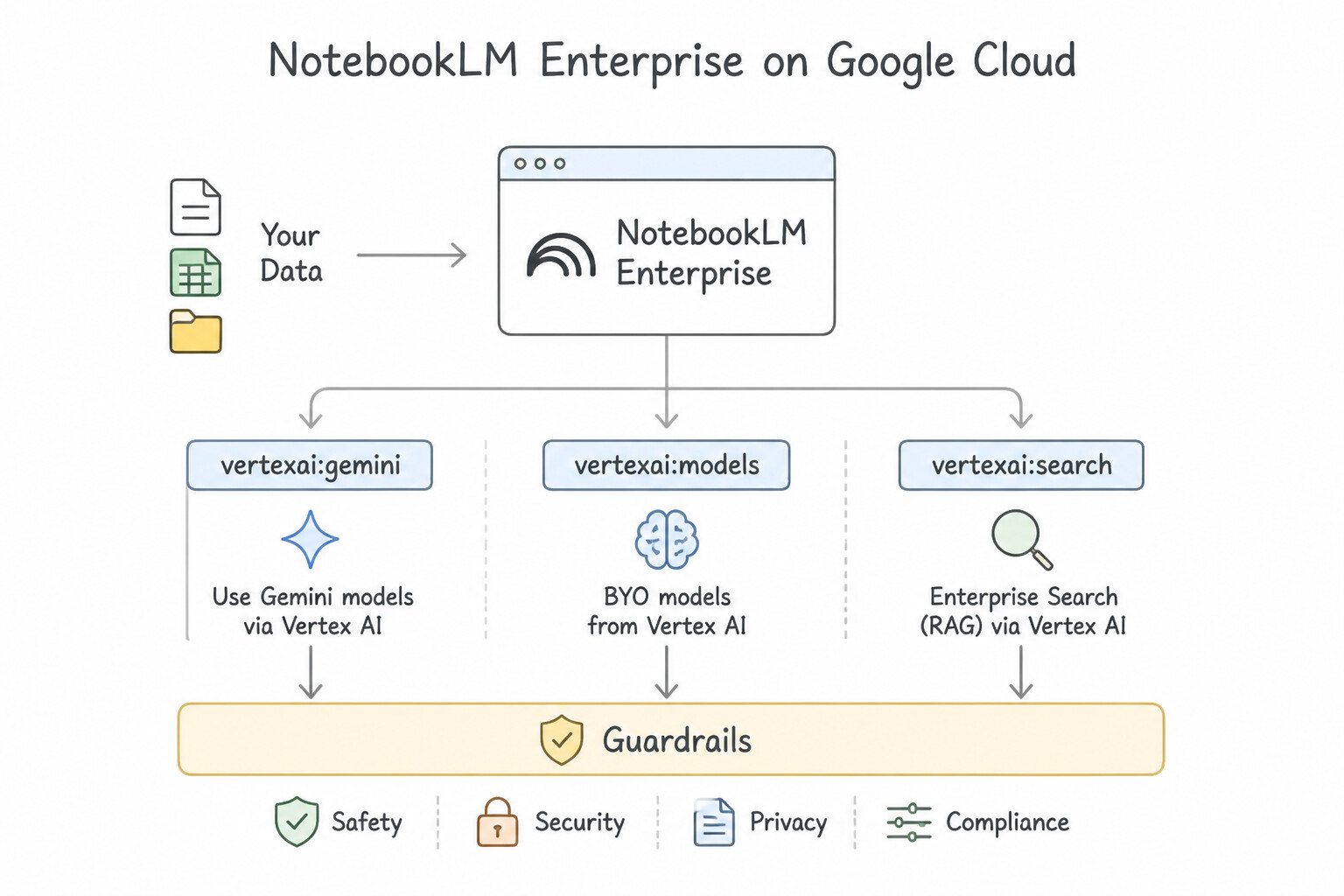
- NotebookLM Enterprise: Grounded research and synthesis assistant. Users upload source documents (PDFs, Google Docs, slides, web links, audio), and NotebookLM generates strictly source-grounded summaries, study guides, FAQs, and Audio Overviews with inline citations—and strict enterprise data privacy (customer data is never used to train global models).
- Gemini Enterprise AI Agents: Enables business and operations teams to connect enterprise SaaS applications (Google Workspace, Jira, ServiceNow, Salesforce, BigQuery) with low-code AI Agents that retrieve cross-silo context and execute governed multi-step actions respecting end-user identity ACLs.
Key Implementation Patterns
- Implementing Multimodal Analysis for Insurance Claims: Use Use the Gemini Pro model. Construct a single prompt request that includes both the PDF document and the JPG image data as multimodal input parts. Gemini Pro is a multimodal model that can process text (PDF) and images (JPG) simultaneously in a single API call.
- Grounding Responses with Enterprise Data (RAG): Use Use Vertex AI Search to index the documents and configure the Gemini model to use this index for grounding. Grounding Gemini with a Vertex AI Search index implements RAG, ensuring answers come from your data with citations.
Key Takeaways (2.5b)
- Gemini is Google's flagship multimodal model capable of processing text, images, video, and code in a single prompt.
- Use Gemini Pro for complex reasoning tasks involving mixed inputs (like documents and photos).
- PaLM 2 is optimized for text-to-text tasks.
- Imagen is optimized for text-to-image generation.
Consideration 2.5c: Integrating AI models from Model Garden
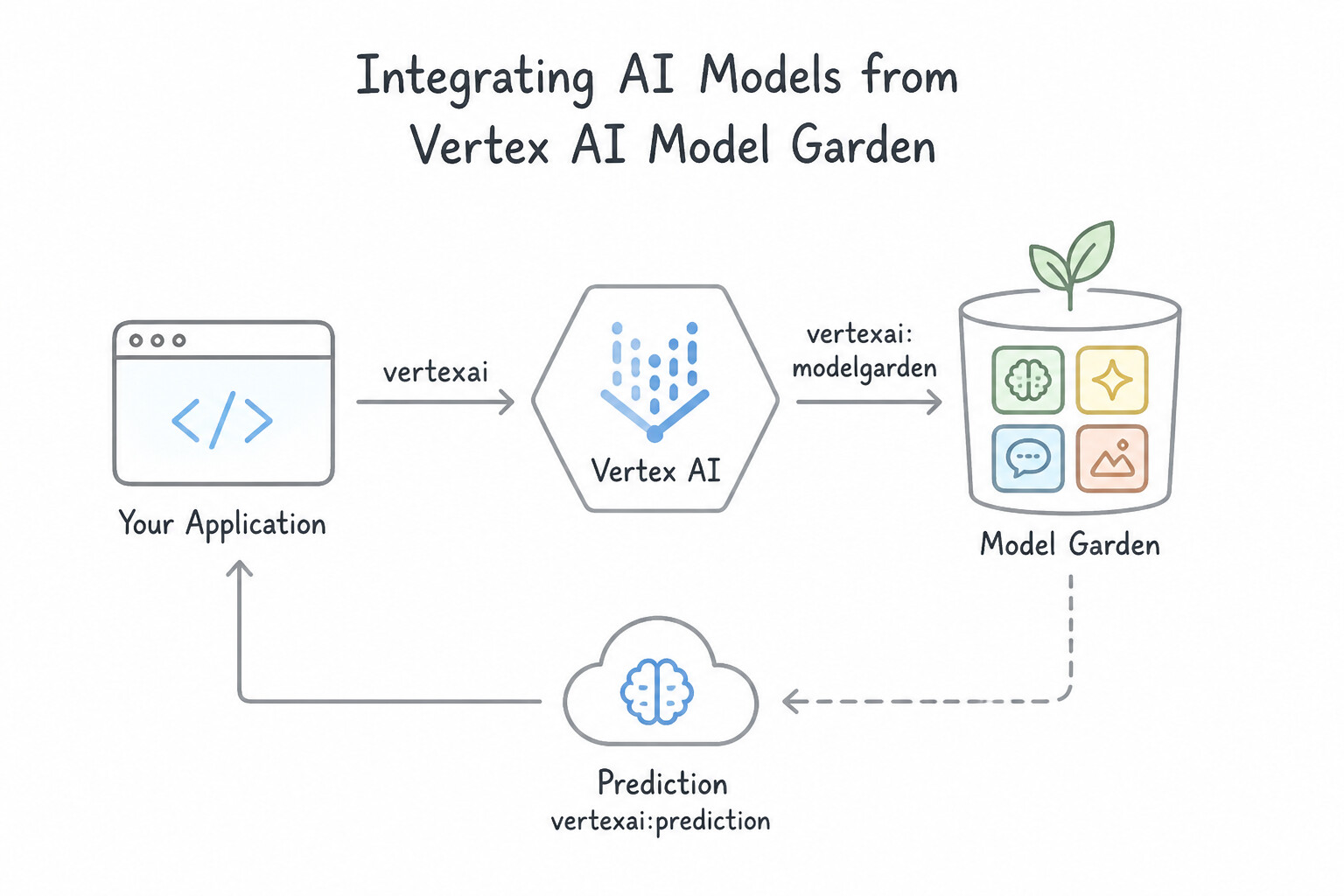
- Navigate Vertex AI Model Garden Like an Architect:
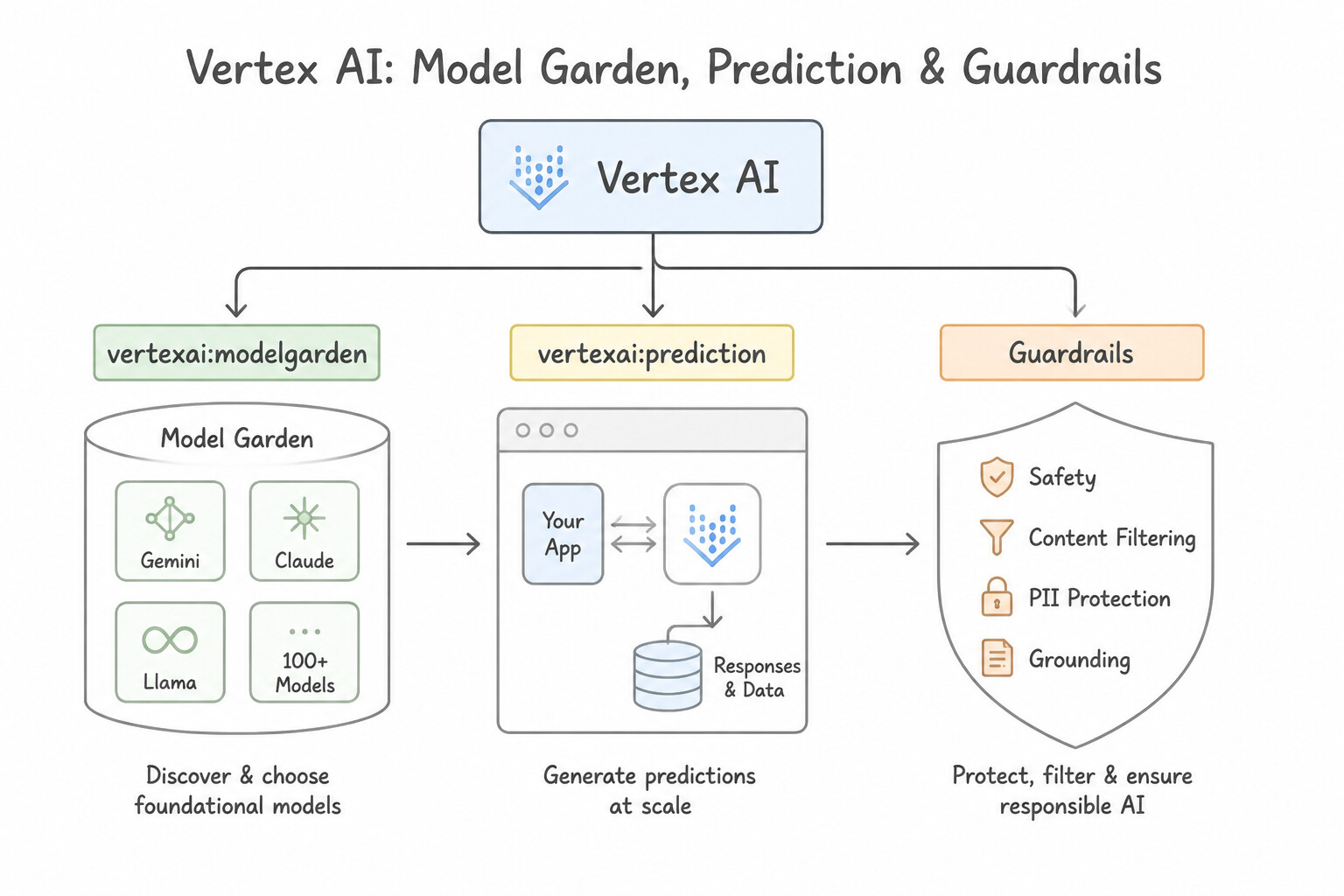
- Model Garden is the centralized catalog on Vertex AI to discover, test, customize (via Supervised Fine-Tuning or LoRA/PEFT), and deploy over 150+ first-party, partner, and open-source foundation models.
- When to Choose Managed First-Party (
Gemini 1.5/2.0/2.5 Pro & Flash): Best when you want serverless pay-per-token API consumption, massive context windows (up to $1\text{M–}2\text{M tokens}$), native multimodal input (text + image + video + audio + PDF in one prompt), and zero GPU endpoint provisioning overhead. - When to Choose Open-Weight Models (
Gemma,Llama,Mistral) from Model Garden: Best when regulatory or architectural constraints require owning/inspecting the fine-tuned model weights, deploying to dedicated Vertex AI Endpoints or GKE clusters (or edge environments), or running small specialized models (SLMs) at high throughput.
Key Implementation Patterns
- Deploying Open Source Models for Data Sovereignty: Use Deploy the model from Model Garden to a Vertex AI Endpoint using dedicated machine instances. Deploying to a Vertex AI Endpoint creates dedicated infrastructure under your control, ensuring data sovereignty. (Avoid alternative: The 'Try it now' feature uses shared infrastructure and does not ensure data stays within your VPC.)
- Hardware Acceleration Selection for Large Models: Use Select an A2 or G2 machine type with GPUs during deployment. Large models like Llama 2 70B require GPU acceleration (A2 or G2 families) for sufficient memory and compute power. (Avoid alternative: Disk size affects storage capacity, not the compute power or memory bandwidth needed to run the model.)
- Provisioning Supervised Fine-Tuning Pipelines: Use Use the Tune feature in Model Garden to run a Supervised Fine-Tuning job with the dataset. Supervised Fine-Tuning adapts a foundation model's weights to a specific style using a provided dataset. (Avoid alternative: Training from scratch requires massive data and compute; 5,000 examples are insufficient for a new base model.)
Key Takeaways (2.5c)
- Vertex AI Model Garden provides both managed APIs and deployable open-source models.
- Deploying a model creates a Vertex AI Endpoint with dedicated compute resources.
- Dedicated endpoints are required for strict VPC containment and data sovereignty compliance.
- Large Language Models (LLMs) require specialized hardware accelerators (GPUs or TPUs) for efficient inference.
Quick Decision Cheat Sheet (Subsection 2.5)
If the Scenario Requires... | Choose This Google Cloud Pattern | Avoid This Common Mistake |
|---|---|---|
"No ML expertise, standard OCR / image labeling / SafeSearch moderation" | Cloud Vision API | Custom training a ResNet model on Vertex AI |
"Analyze video files for shot changes, object tracking, and time-coded content moderation" | Cloud Video Intelligence API | Cloud Vision API (static images only) |
"Convert live customer audio streams to text; convert agent text responses back to natural voice" | Cloud Speech-to-Text API + Cloud Text-to-Speech API | Cloud Translation API alone |
"Grounded document synthesis, inline citations, and Audio Overviews for enterprise research teams" | NotebookLM Enterprise | Un-grounded zero-shot LLM chat |
"Discover, compare, fine-tune, and deploy Gemini, Claude, Gemma, or Llama models from a single catalog" | Vertex AI Model Garden | Manually downloading unverified model weights onto unmanaged Compute Engine VMs |
Further Reading (Subsection 2.5)
- Cloud Vision API Features — Documentation on detecting text in images (OCR) using the Cloud Vision API.
- Google Cloud AI Products — Overview of Google Cloud AI and Machine Learning products to differentiate between Vision, Video, and Language APIs.
- Natural Language API Basics — Documentation explaining the core features of the Natural Language API, including Sentiment Analysis, Entity Analysis, and Syntactic Analysis.
- Cloud Speech-to-Text documentation — Overview of the Speech-to-Text API capabilities, including synchronous and asynchronous transcription of audio files.
- Gemini API Overview — Provides an overview of multimodal models on Vertex AI, explaining how Gemini can process images and text simultaneously.
- Send multimodal prompt requests — Documentation on how to construct requests that include both text and media (images/video) for the Gemini model.
Book TOC · Previous · Chapter 3 of 8 · Next
AwesomeGCP.com Learning
The approach taken is a question-led learning approach: you explore realistic project scenarios where you need to make decisions or take actions to achieve business goals within specific constraints. Instead of passive learning, you are challenged to think and work through the options to master the Professional Cloud Architect (PCA) certification!