Book TOC · Previous · Chapter 2 of 8 · Next
Chapter 2: Core Infrastructure Design & Provisioning: Compute, GKE, Serverless, Storage & Networking
Chapter Focus: End-to-end selection and configuration of VPCs, Hybrid Interconnect/HA VPN, Global Load Balancing, Cloud Storage/Filestore/Persistent Disk, Relational/NoSQL DBs, VMs, GKE, and Cloud Run.
Subsection 1.3: Designing network, storage, and compute resources
The Big Picture
Subsection 1.3 is the architectural heart of Section 1. Nearly every scenario in production requires you to select the right combination of Compute platform, Storage/Database engine, Data Processing pipeline, AI/ML platform, and Cloud-Native Networking fabric.
Naive architectures fail here when they treat Google Cloud services as interchangeable: they use VPC Network Peering where Private Service Connect (PSC) is needed to avoid overlapping RFC 1918 IP ranges; they run Apache Spark jobs on Dataflow when a customer wants a rapid lift-and-shift of existing Hadoop/PySpark code (Dataproc); or they provision Cloud SQL for a high-velocity IoT sensor stream that demands Cloud Bigtable.
Consideration 1.3a: Integration with on-premises/multicloud environments
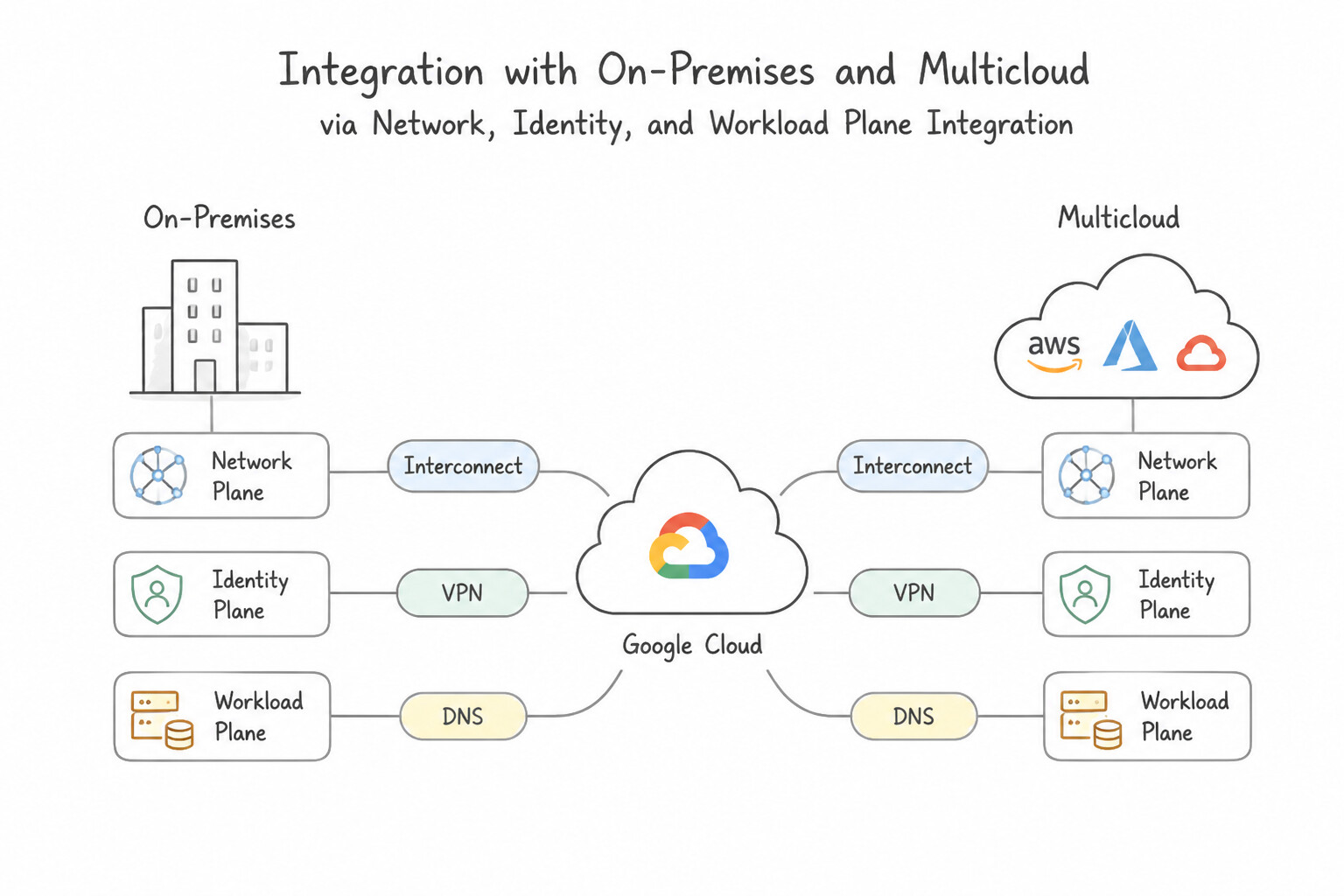
- Network, Identity, and Workload Plane Integration:
- Network Plane: Use Dedicated/Partner Interconnect for high-throughput private links, Cross-Cloud Interconnect for high-speed multicloud links to AWS/Azure/OCI, and HA VPN for encrypted IPsec connectivity over the internet.
- Identity Plane: Synchronize corporate Active Directory / Entra ID users to Cloud Identity via Google Cloud Directory Sync (GCDS) + SAML/OIDC SSO, and authenticate AWS/Azure/on-prem workloads to Google Cloud APIs keylessly using Workload Identity Federation (WIF).
- Compute & Policy Plane: Manage Kubernetes clusters across Google Cloud, on-premises bare metal, and other clouds uniformly using GKE Enterprise (Anthos) with Config Sync and Policy Controller.
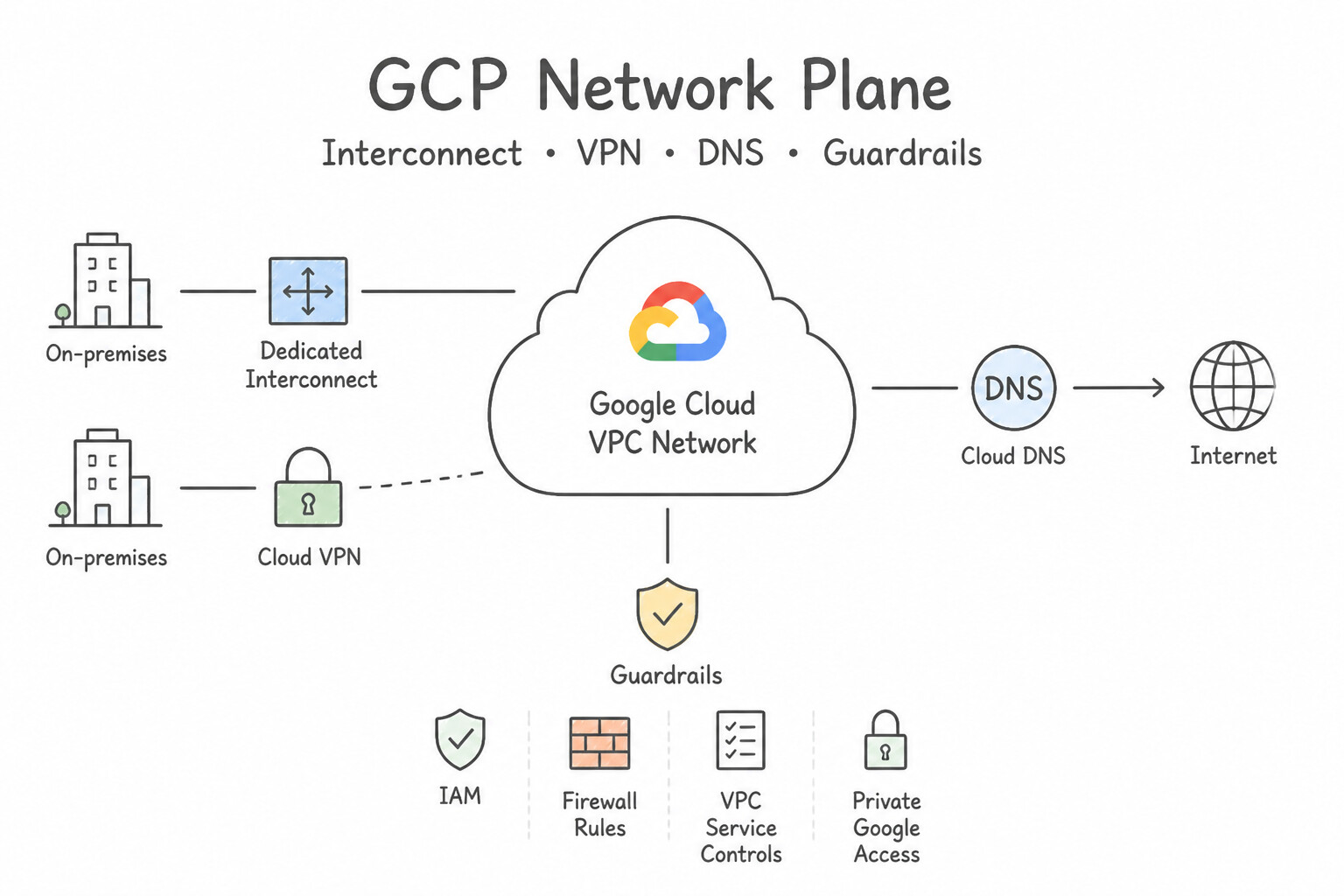
Key Implementation Patterns
- High-Throughput Enterprise Connectivity: Use Provision two 10-Gbps Dedicated Interconnect circuits. Dedicated Interconnect offers direct physical connectivity with guaranteed bandwidth and SLAs, ideal for 20 Gbps needs in a PoP. (Avoid alternative: Cloud VPN uses the public internet and cannot guarantee 20 Gbps throughput or low latency.)
- Bi-Directional Name Resolution: Use Create a Cloud DNS inbound server policy. Configure a Cloud DNS forwarding zone for the on-premises domain that points to the on-premises name servers. Use an inbound server policy for on-prem to GCP resolution and a forwarding zone for GCP to on-prem resolution.
- Secure Rapid Deployment with SLA: Use Configure an HA VPN gateway. Create two VPN tunnels that connect the two interfaces of the HA VPN gateway to a peer gateway with two external IP addresses. HA VPN with two tunnels connecting to two peer IP addresses provides the required 99.99% SLA over the public internet.
Key Takeaways (1.3a)
- Use Dedicated Interconnect for high-bandwidth (10 Gbps+), low-latency requirements when physically located in a Google PoP.
- Use Partner Interconnect if you need private connectivity but are not located in a Google PoP.
- Cloud VPN is suitable for lower bandwidth needs or as a backup, but it runs over the public internet.
- Peering is for public Google services, not private VPC access.
Consideration 1.3b: Google Cloud AI and machine learning solutions
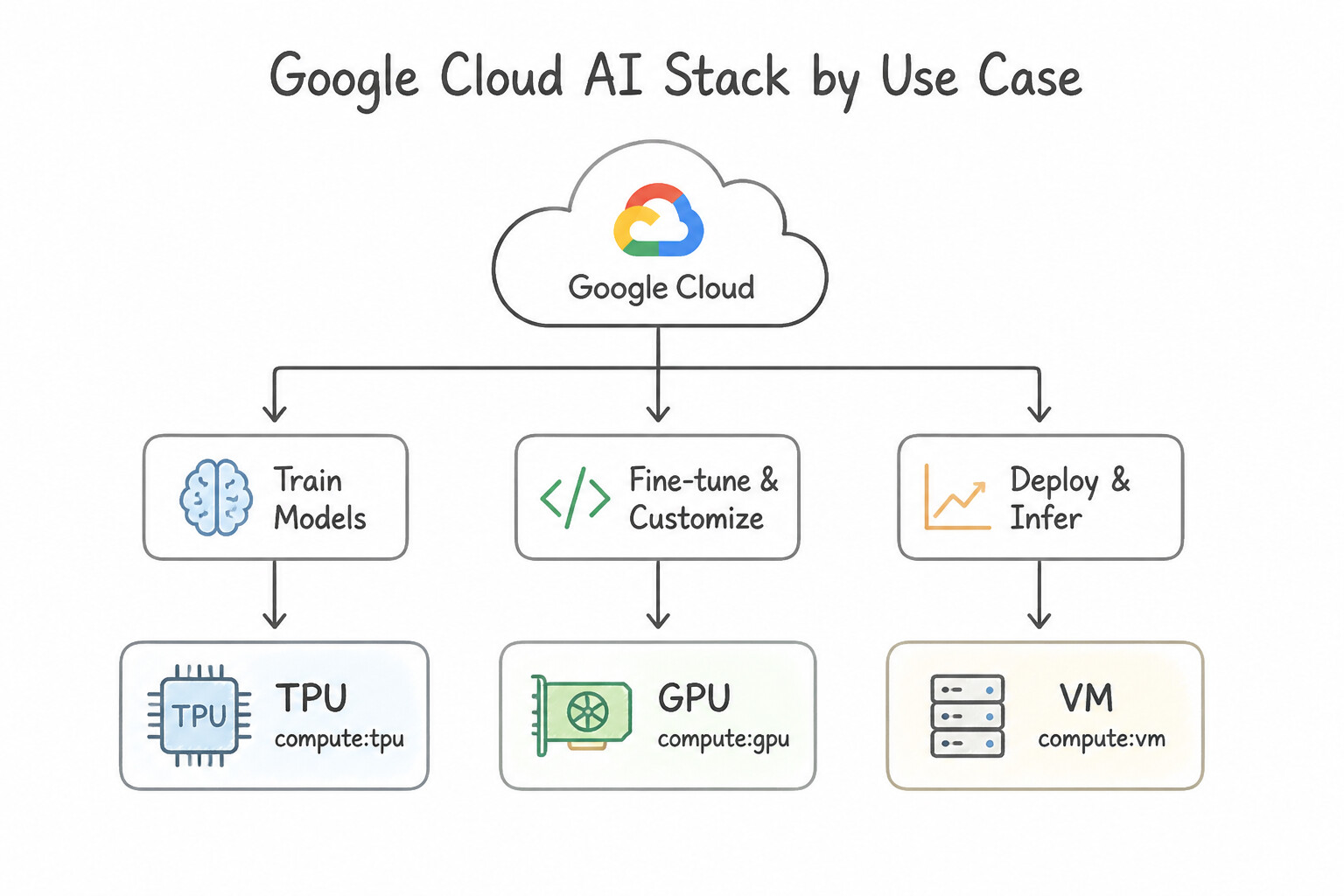
- Navigate the Google Cloud AI Stack by Use Case:
- Gemini LLMs & Model Garden: Discover, evaluate, and deploy Google's multimodal Gemini models (
Pro,Flash,Flash-Lite), partner models (Claude), and open-weight models (Gemma,Llama,Mistral) via Vertex AI Model Garden. - Vertex AI Agent Builder: Rapidly build and ground enterprise search and conversational AI agents on internal company documents (
Cloud Storage,BigQuery,SharePoint) with minimal ML coding. - AI Hypercomputer: Purpose-built supercomputing architecture combining performance-optimized hardware (Cloud TPUs and NVIDIA GPUs over ultra-low-latency RoCE/Jupiter networking), open software frameworks (
PyTorch,JAX,GKE,Vertex AI), and flexible consumption models (Dynamic Workload Scheduler,CUDs,Spot) for large-scale foundation model training and serving.
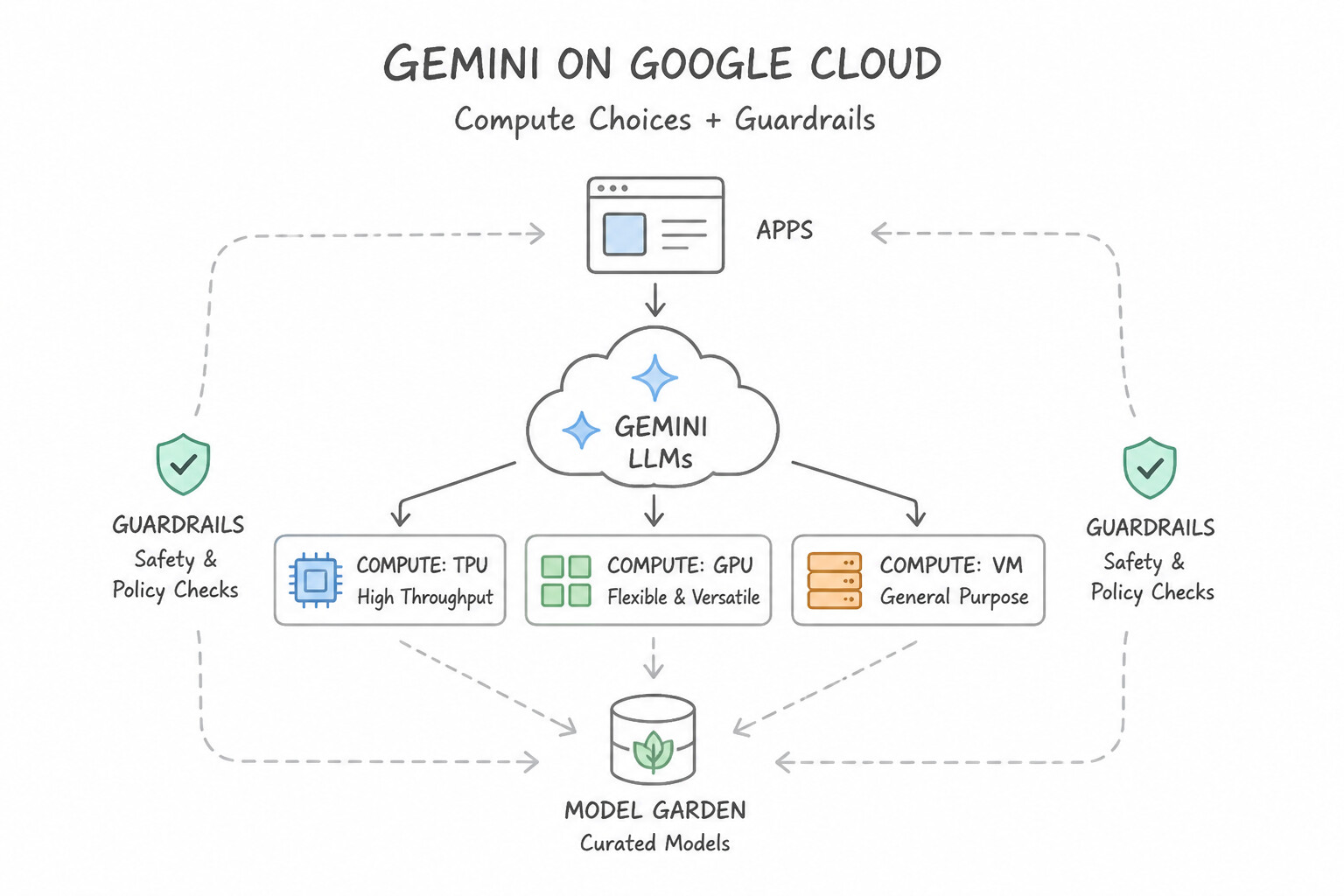
Key Implementation Patterns
- High-Performance Training Infrastructure: Use Provision Cloud TPU v4 Pods to distribute the training. TPUs are custom hardware designed specifically for TensorFlow and matrix math; TPU Pods allow massive scaling to minimize training time. (Avoid alternative: CPUs are general-purpose processors and are too slow for massive deep learning training compared to specialized accelerators.)
- Serverless API Integration for unstructured data: Use Send the images to the Cloud Vision API to detect explicit content using SafeSearch. The Cloud Vision API is a pre-trained service that offers immediate SafeSearch detection without training. (Avoid alternative: AutoML requires a labeled dataset and training time, which violates the scenario constraints.)
- SQL-Based Predictive Analytics: Use Use BigQuery ML to create, train, and execute the machine learning model using standard SQL queries. BigQuery ML allows users to build and run ML models using standard SQL within the data warehouse. (Avoid alternative: Vertex AI custom training requires Python and TensorFlow skills, which the team lacks.)
Key Takeaways (1.3b)
- CPUs are for general-purpose computing and are generally too slow for deep learning training.
- GPUs are versatile accelerators good for most AI/ML workloads.
- TPUs are Google-custom ASICs optimized specifically for TensorFlow and massive matrix multiplication workloads.
- Use TPU Pods when you need to distribute massive training jobs for maximum speed.
Consideration 1.3c: Cloud-native networking (VPC, peering, firewalls, load balancing, routing, shared VPC, Private Service Connect)
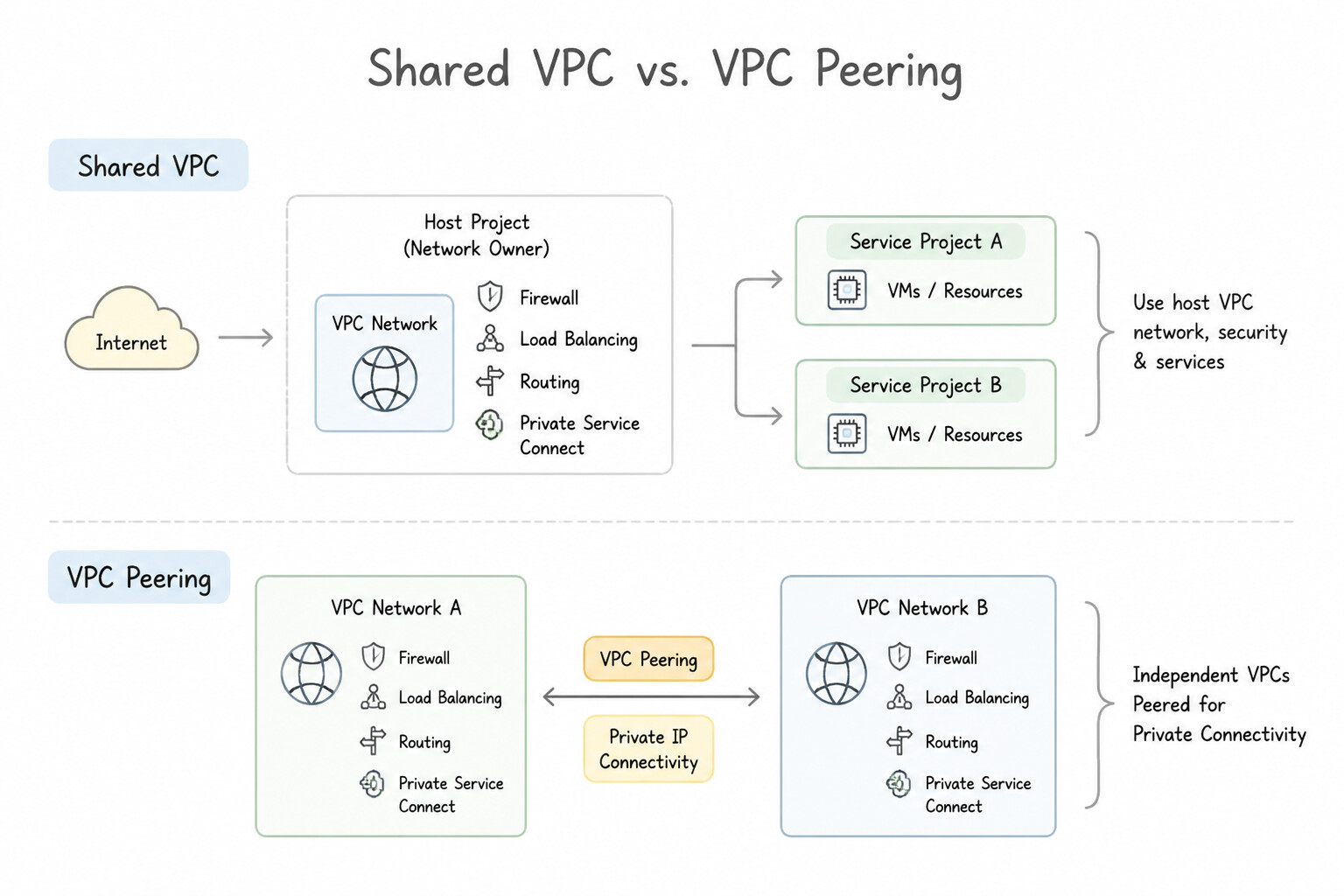
- Shared VPC vs. VPC Network Peering vs. Private Service Connect (
PSC): - Shared VPC: Best for within a single Organization where a central Network Admin team owns subnets, routes, and firewalls in a Host Project, and application teams deploy VMs/GKE in attached Service Projects.
- VPC Network Peering: Connects two VPCs (same or different Organizations) over Layer 3 private RFC 1918 routing. Hard Limits: Non-transitive (
$A\leftrightarrow Band @@CODE1@@ ↔ C does not allow$A\leftrightarrow C$), cannot have overlapping CIDR ranges, and max 25 peers per network. - Private Service Connect (
PSC): Consumer-to-producer private endpoint/NAT abstraction. Solves overlapping IPs, works across different organizations/SaaS vendors, and provides private access to Google APIs (all-apisorvpc-scbundles) with custom internal DNS names.
Key Implementation Patterns
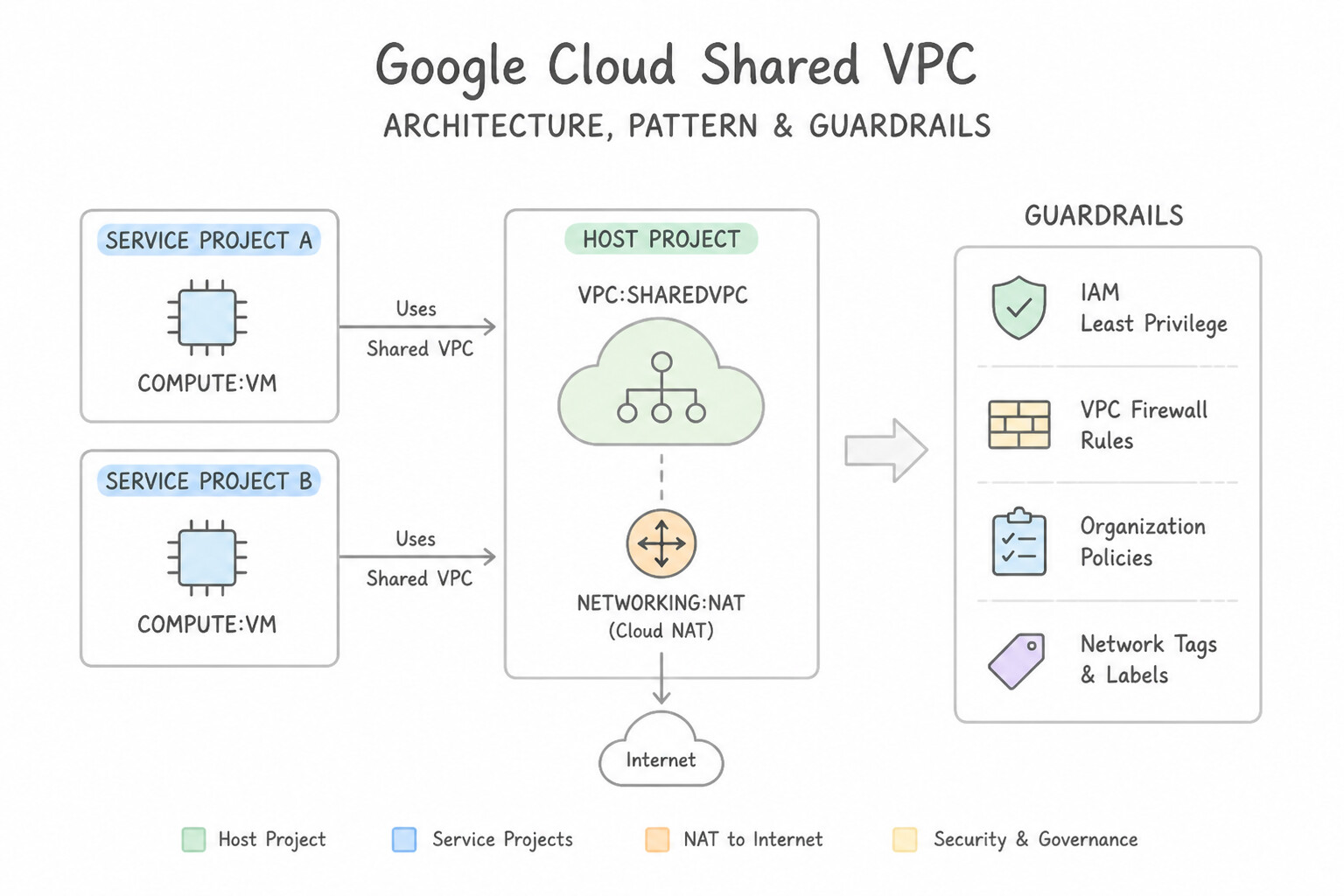
- Centralized Network Administration: Use Configure a Shared VPC. Designate the networking project as the host project and attach development projects as service projects. Shared VPC allows a central host project to manage the network while service projects use the shared subnets for their resources.
- Secure Outbound Access: Use Configure a Cloud NAT gateway attached to the Cloud Router for the subnet. Cloud NAT provides outbound internet access for private VMs without exposing them to inbound internet connections. (Avoid alternative: Private Google Access allows connectivity only to Google APIs and services, not to the general internet where OS patches typically reside.)
- SaaS Provider Connectivity: Use Publish the application using Private Service Connect and ask customers to create endpoints. Private Service Connect allows private connectivity across VPCs with overlapping IP ranges, ideal for SaaS providers. (Avoid alternative: VPC Network Peering requires non-overlapping IP address ranges, which contradicts the scenario constraints.)
Key Takeaways (1.3c)
- Shared VPC is the standard solution for separating network administration from service administration in Google Cloud.
- Host Projects hold the network infrastructure (subnets, firewalls).
- Service Projects hold the compute resources and are billed for them.
- This model supports billing isolation and strict security governance.
Consideration 1.3d: Choosing data processing solutions
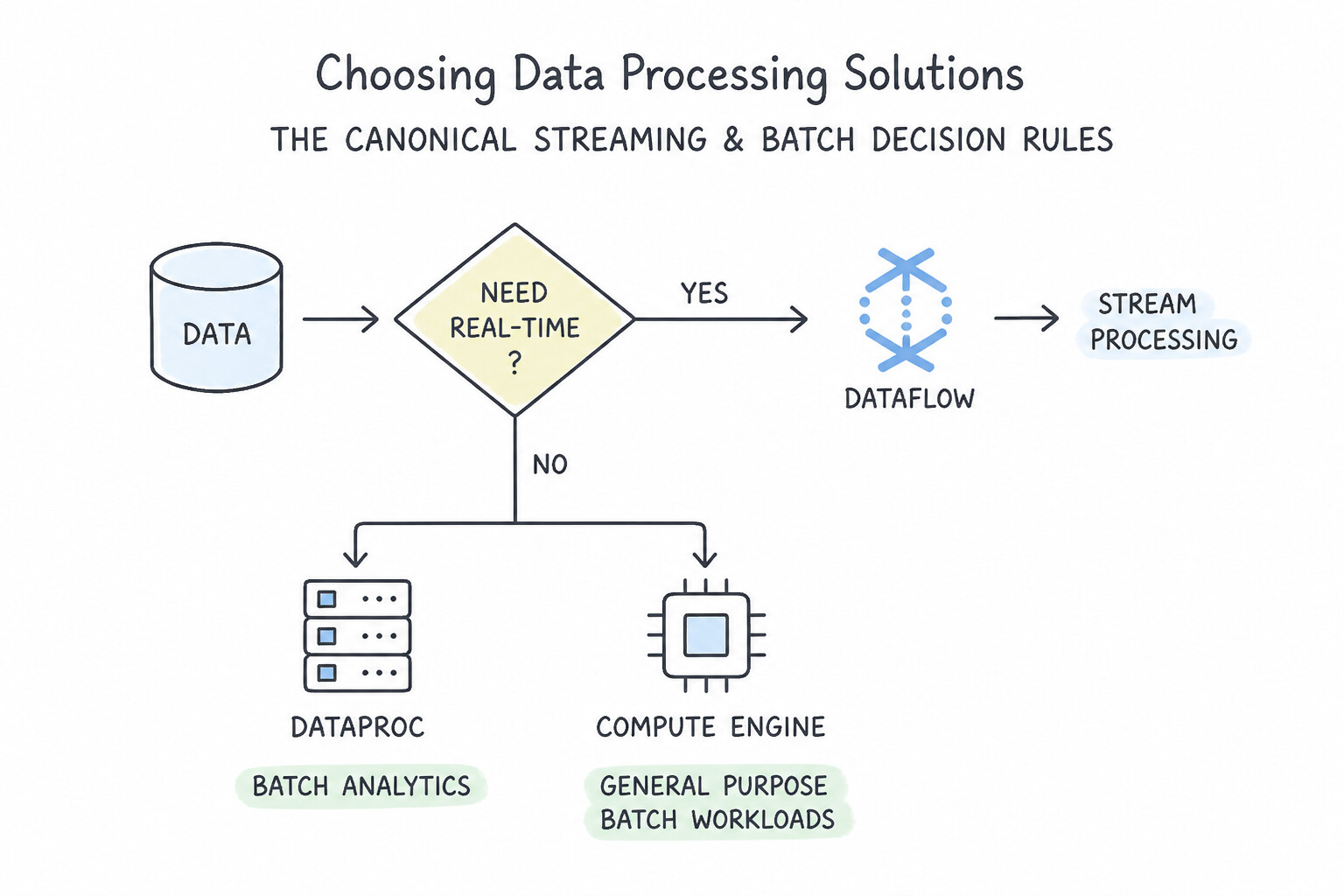
- The Canonical Streaming & Batch Decision Rules:
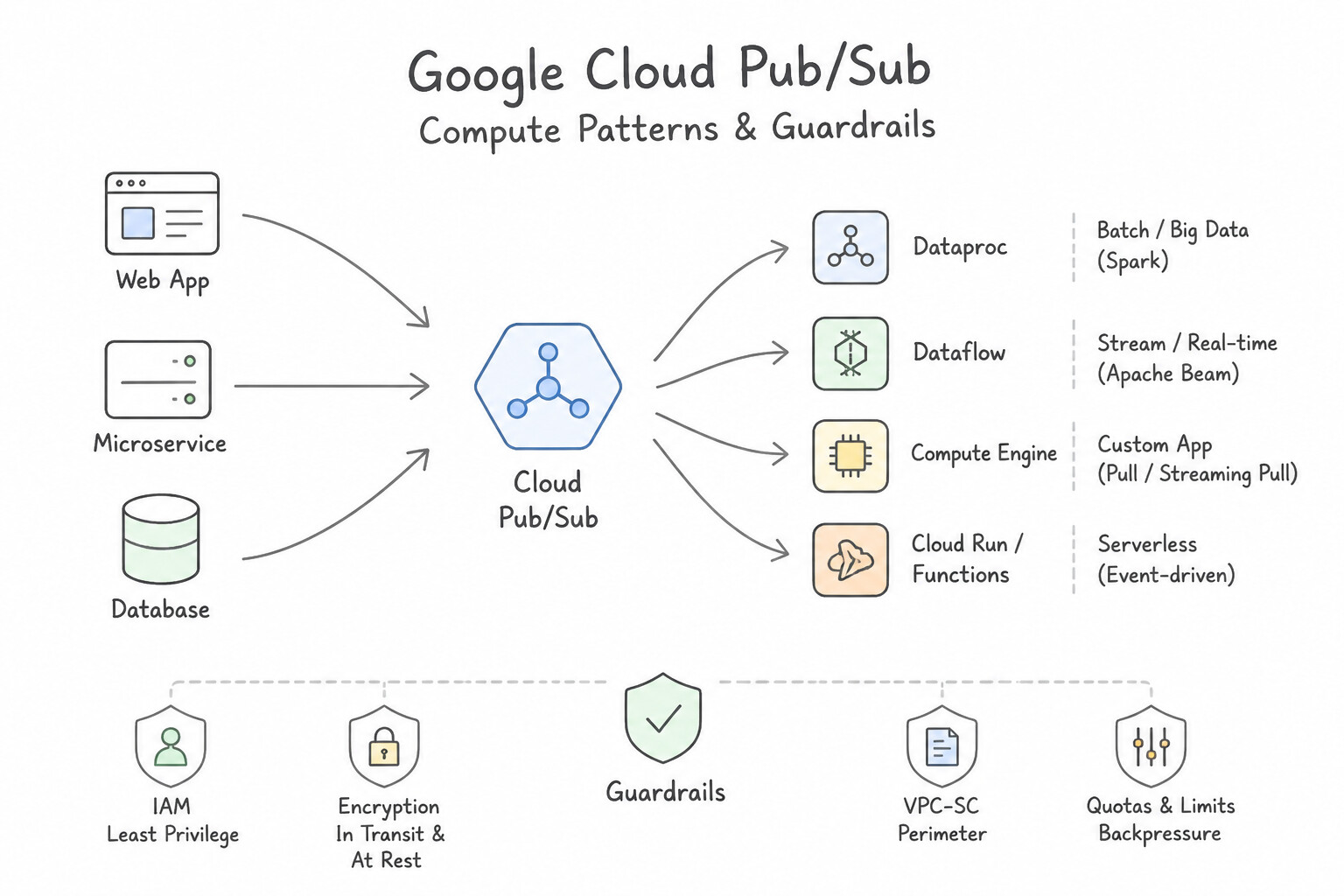
- Cloud Pub/Sub: Global asynchronous event ingestion bus with native dead-letter topics, replay/seek, and fan-out subscriptions.
- Cloud Dataflow (Apache Beam): Serverless, auto-scaling unified stream and batch processing engine. Choose Dataflow for new streaming pipelines, complex event-time windowing (tumbling, sliding, session windows), watermarks, and handling late-arriving data.
- Cloud Dataproc (Apache Spark / Hadoop): Managed Spark/Hadoop clusters. Choose Dataproc when lifting and shifting existing on-prem Spark/Hadoop/Hive jobs or when leveraging ephemeral clusters with Spot VMs as secondary workers.
- BigQuery: Serverless petabyte SQL analytics warehouse; supports BigQuery ML (train ML models using SQL) and BigLake / External Tables (query Parquet/ORC/Avro files in Cloud Storage in-place with fine-grained governance).
Key Implementation Patterns
- Migrating Legacy Hadoop Workloads: Use Create a Dataproc cluster and submit the existing Spark jobs without modifications. Dataproc is a managed Hadoop/Spark service that allows running existing jobs with minimal changes and low overhead. (Avoid alternative: Dataflow requires rewriting code into Apache Beam, violating the requirement to avoid rewriting code.)
- Unified Batch and Stream Processing: Use Create a pipeline using the Apache Beam SDK and run the job on Dataflow. Apache Beam allows you to write a single pipeline for both streaming and batch processing, ensuring identical logic is applied. (Avoid alternative: Using different technologies for streaming and batch requires maintaining two codebases, increasing effort and inconsistency risk.)
Key Takeaways (1.3d)
- Use Dataproc to migrate existing Hadoop/Spark workloads to Google Cloud to minimize code changes (Lift and Shift).
- Use Dataflow when building new pipelines or if you are willing to re-architect using Apache Beam for serverless benefits.
- Avoid running self-managed Hadoop on Compute Engine unless you have very specific OS-level customization needs, as it increases operational overhead.
- Dataflow is a fully managed service for executing Apache Beam pipelines.
Consideration 1.3e: Choosing appropriate storage types (object, file, databases)
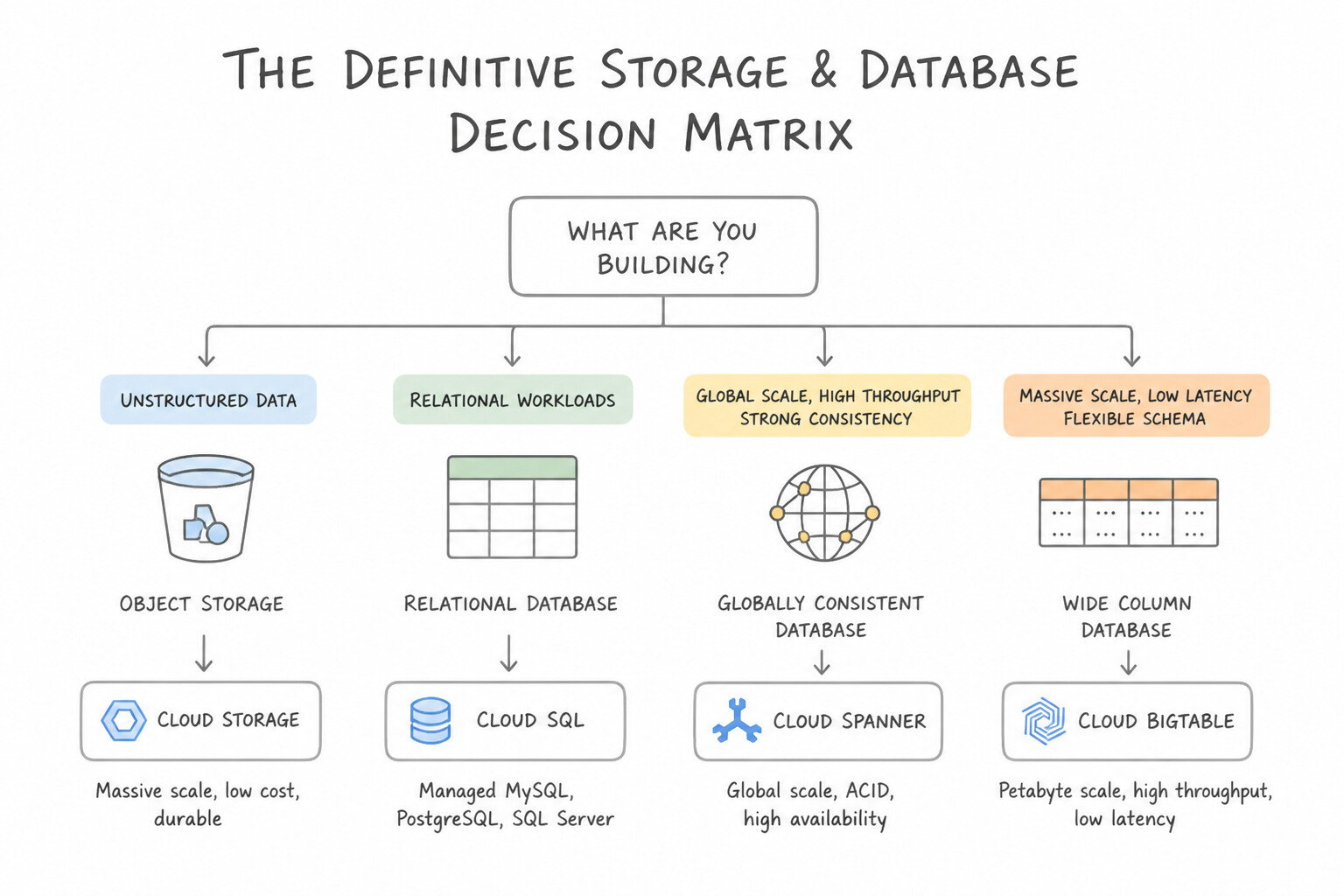
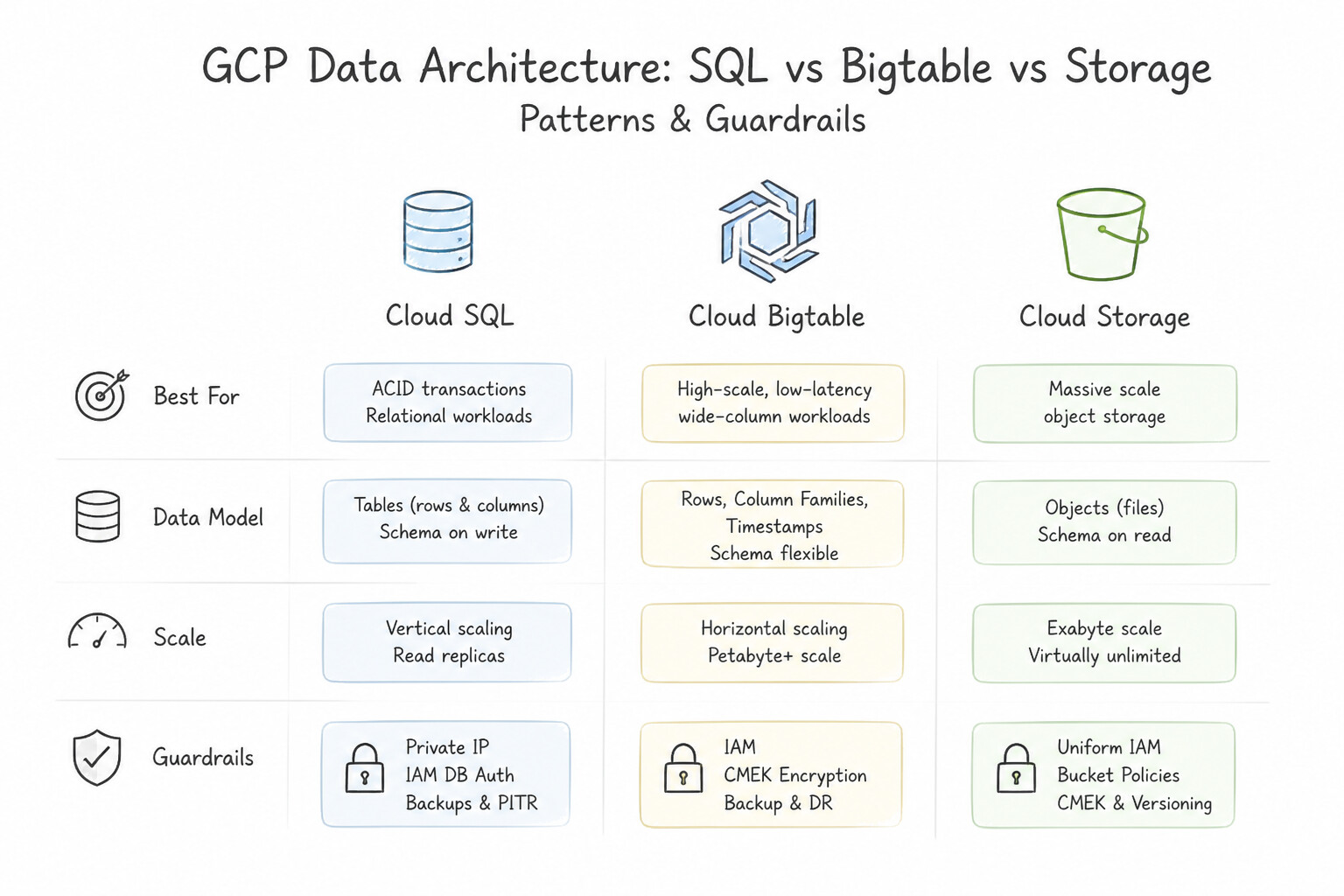
- The Definitive Storage & Database Decision Matrix:
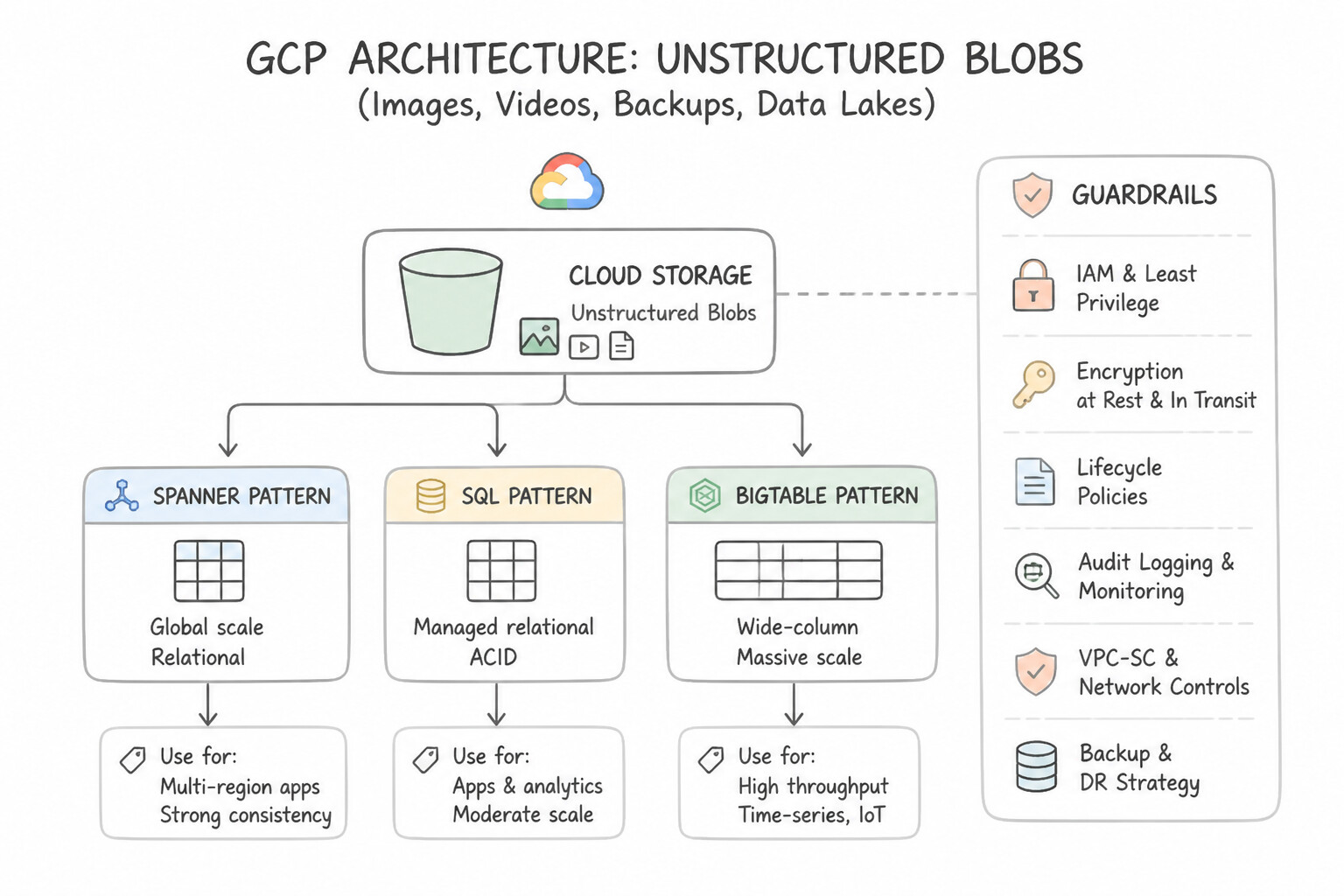
- Unstructured Blobs (Images, Videos, Backups, Data Lakes) → Cloud Storage (
Standard,Nearline,Coldline,Archive). - Shared POSIX / NFS File System (Multiple VMs or GKE Pods mounting ReadWriteMany) → Filestore.
- VM Block Storage → Persistent Disk / Hyperdisk (or Local SSD for ephemeral ultra-high IOPS scratch cache).
- Relational OLTP (Regional) → Cloud SQL (MySQL, PostgreSQL, SQL Server) or AlloyDB (high-end PostgreSQL with 99.99% SLA including maintenance).
- Relational OLTP (Global Multi-Region Horizontal Scale & 99.999% SLA) → Cloud Spanner.
- NoSQL Document (Mobile/Web Real-Time Sync, Serverless) → Firestore.
- NoSQL Wide-Column (High-Throughput IoT, Time-Series, AdTech, Financial Tick Data) → Cloud Bigtable.
Key Implementation Patterns
- Global Transactional Consistency: Use Use Cloud Spanner with a multi-region configuration. Cloud Spanner offers global strong consistency, horizontal scaling, and relational semantics suitable for financial transactions. (Avoid alternative: Cloud SQL is regional and scales vertically, which does not meet the global horizontal scaling requirement.)
- High-Throughput IoT Ingestion: Use Use Cloud Bigtable to store the time-series data. Cloud Bigtable is optimized for high-throughput writes and low-latency access required by IoT time-series data. (Avoid alternative: Cloud SQL cannot easily scale to support millions of writes per second.)
- Legacy Application Lift-and-Shift: Use Mount a Filestore file share on all the web server VMs. Filestore provides fully managed NFS file servers required by the legacy application. (Avoid alternative: Cloud Storage is object storage and requires API usage, which the scenario prohibits.)
Key Takeaways (1.3e)
- Use Cloud Spanner when you need a relational database that scales horizontally and supports global strong consistency.
- Use Cloud SQL for regional relational workloads that fit within a single machine's vertical scaling limits.
- Horizontal scaling adds more nodes to distribute load; vertical scaling adds more power to a single node.
- Financial transactions generally require ACID compliance, which limits the suitability of many NoSQL databases.
Consideration 1.3f: Mapping compute needs to platform products (e.g., GKE, Cloud Run, Cloud Run functions)
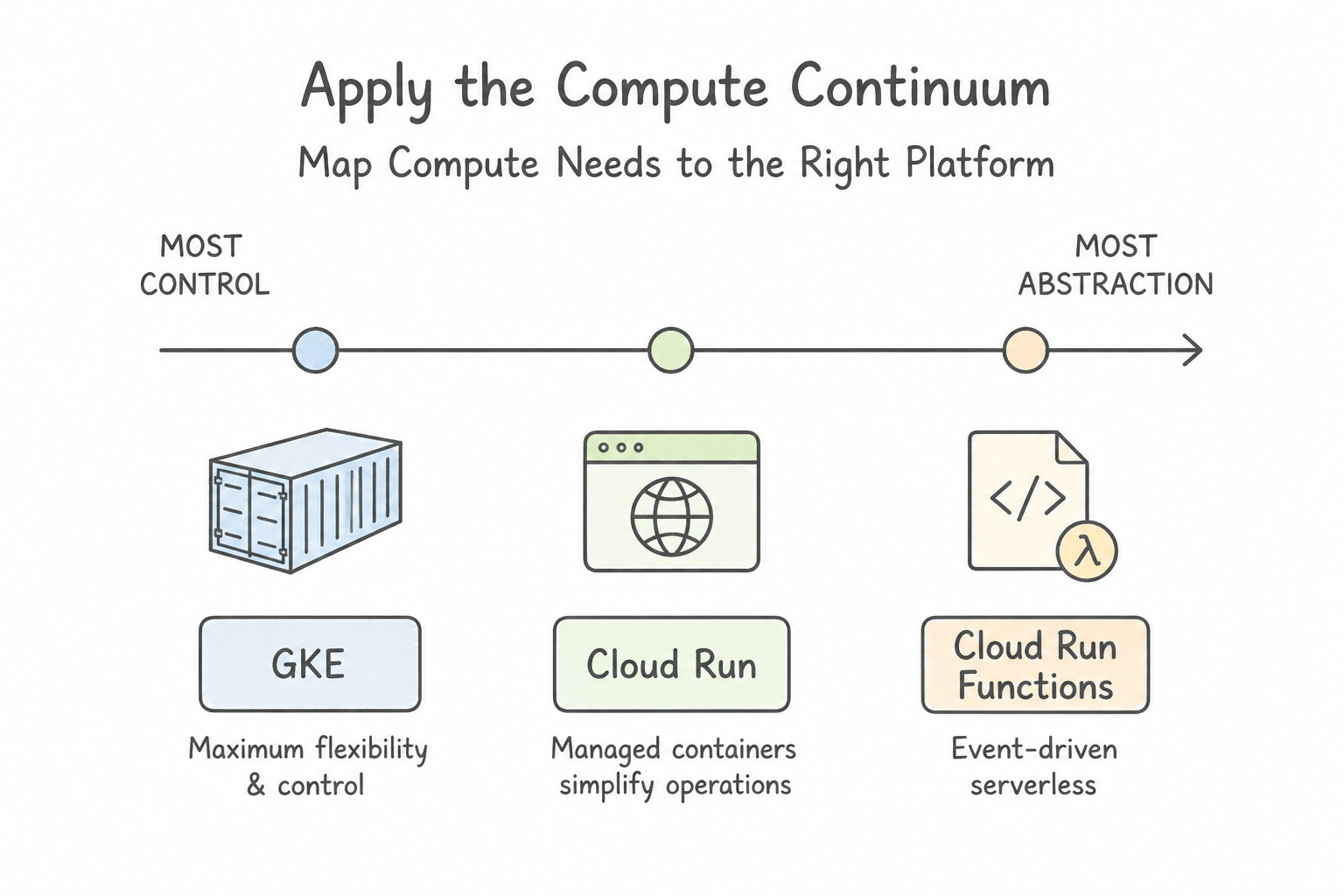
- Apply the Compute Continuum (From Most Managed to Most Control):
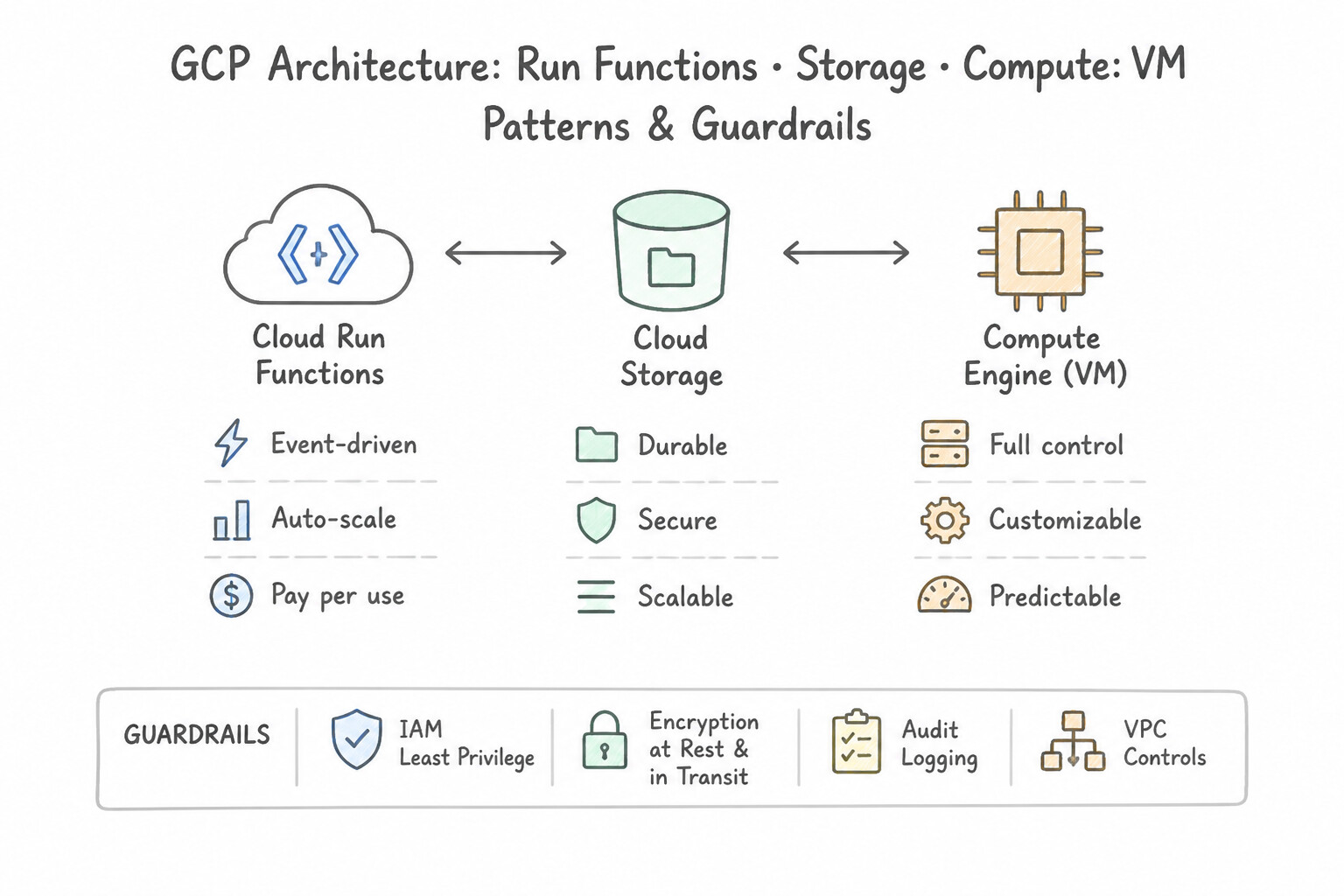
- Cloud Run functions: Single-purpose, event-driven functions triggered by Pub/Sub, Cloud Storage, Eventarc, or HTTP.
- Cloud Run: Stateless containerized web APIs, microservices, and background jobs (
Cloud Run Jobs) that scale to zero and handle concurrent requests per container instance. - Google Kubernetes Engine (
GKE): Complex multi-container microservices requiring Kubernetes APIs, Service Mesh, DaemonSets, stateful sets, or specialized GPU/TPU scheduling. Prefer GKE Autopilot unless node-level OS/kernel customization requires GKE Standard. - Compute Engine (
IaaS): Legacy non-containerizable apps, custom OS kernels, Windows Server / SQL Server lift-and-shift, or BYOL physical core licensing.
Key Implementation Patterns
- Event-Driven Lightweight Logic: Use Deploy the Python code as a Cloud Run function. Configure the function to trigger on the Cloud Storage object finalize event. Cloud Run functions allow you to deploy code directly triggered by events without managing servers or containers.
- Complex Microservices Orchestration: Use Deploy the services to Google Kubernetes Engine (GKE). GKE supports the full Kubernetes API, including StatefulSets and complex service mesh integrations like Istio. (Avoid alternative: Cloud Run is optimized for stateless workloads and does not support Kubernetes StatefulSets.)
- Stateless Container Scaling: Use Deploy the container to Cloud Run. Cloud Run automatically scales containerized applications to zero when not in use, minimizing costs for sporadic traffic. (Avoid alternative: GKE Standard clusters require running nodes and cannot scale the underlying infrastructure completely to zero to stop all costs.)
Key Takeaways (1.3f)
- Use Cloud Run functions for single-purpose, event-driven code snippets (glue code) when you want to avoid container management.
- Use Cloud Run when you have a containerized application or microservice that needs to scale to zero.
- Event-driven architectures (Push) are generally preferred over polling (Pull) for latency and cost efficiency in the cloud.
- GKE is the preferred choice for complex microservices architectures requiring full Kubernetes API support (e.g., StatefulSets).
Consideration 1.3g: Choosing compute resources (spot VMs, custom machine types, specialized workloads)
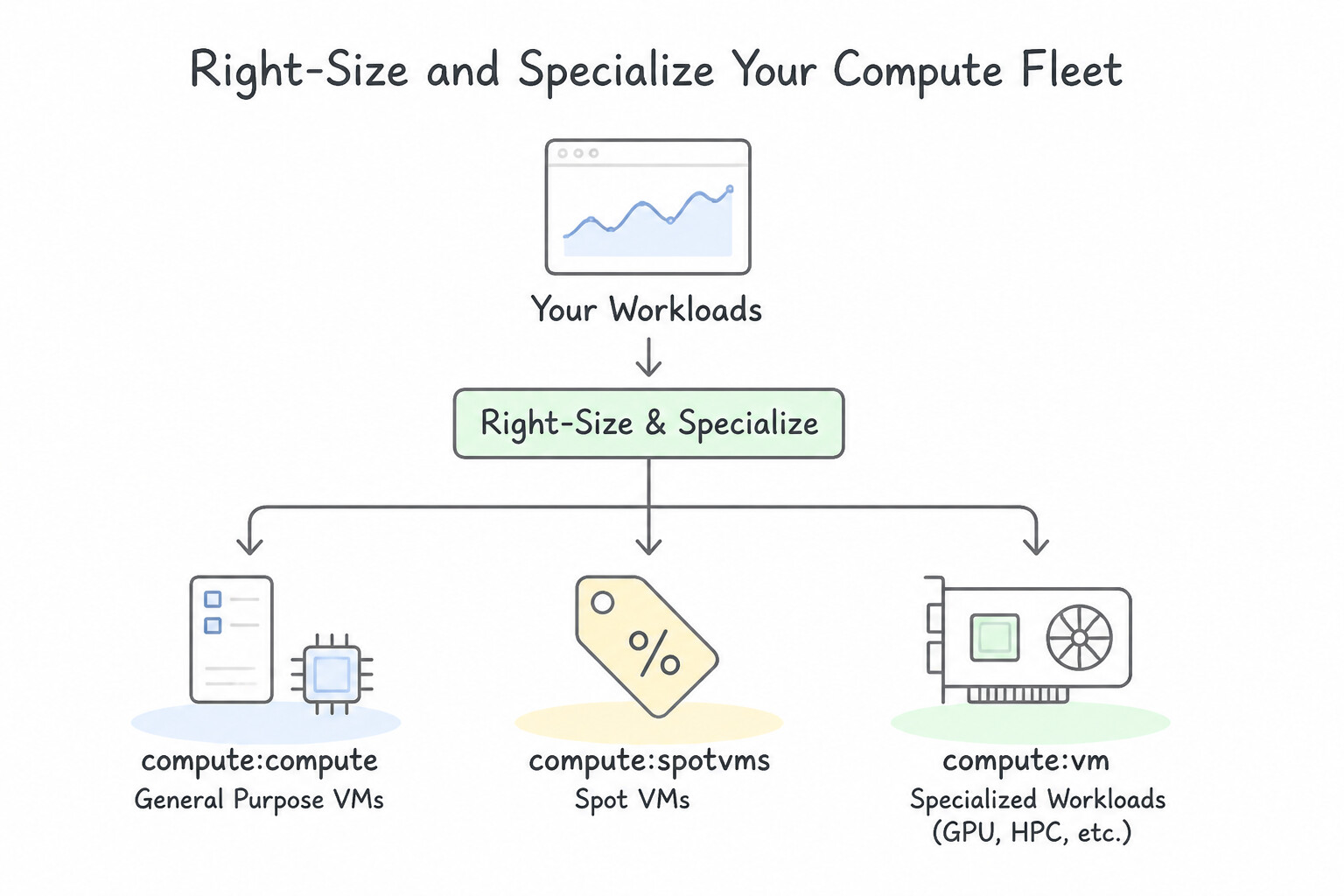
- Right-Size and Specialize Your Compute Fleet:
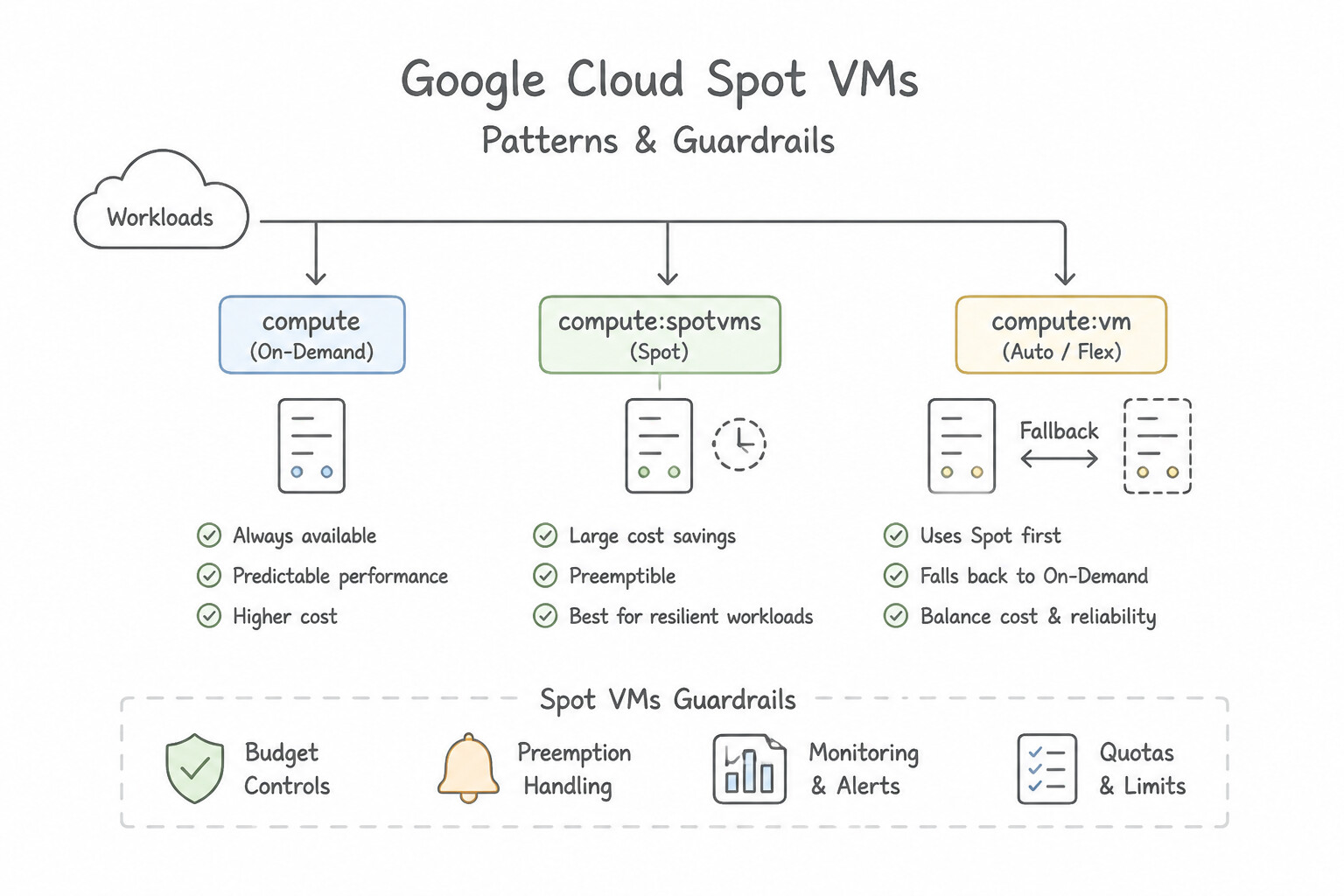
- Spot VMs: Ephemeral VMs with 60–91% discounts that can be preempted at any time (with a 30-second ACPI preemption notice for graceful shutdown scripts). Ideal for stateless batch, rendering, and fault-tolerant worker pools.
- Custom Machine Types: Tailor exact vCPU-to-memory ratios when standard shapes (
e2,n2,n4,c3) waste RAM or inflate per-vCPU commercial software licensing costs. - Specialized Workloads: Use Memory-Optimized (
M3/M4/X4) for in-memory databases like SAP HANA; Compute-Optimized (C3/C4/H3) for HPC; Accelerator-Optimized (A3/A2/G2) or Cloud TPUs for deep learning; and Sole-Tenant Nodes for hardware isolation and bring-your-own-license (BYOL) physical socket/core compliance.
Key Implementation Patterns
- Cost Optimization for Fault-Tolerant Batch Processing: Use Provision Compute Engine Spot VMs for the rendering nodes. Spot VMs provide the lowest cost for fault-tolerant, batch workloads that can handle interruptions. (Avoid alternative: Committed use discounts are for long-term, stable workloads, not potentially short-term batch jobs, and are more expensive than Spot VMs.)
- Infrastructure for Machine Learning Training: Use Select the Accelerator-optimized machine family. Accelerator-optimized VMs are built specifically for ML training and HPC workloads requiring powerful NVIDIA GPUs. (Avoid alternative: Compute-optimized families focus on high CPU performance, not the GPU acceleration required for Deep Learning.)
- Resource Efficiency for Legacy Applications: Use Create a virtual machine (VM) using a custom machine type with 6 vCPUs and 28 GB of RAM. Custom machine types allow you to specify exact vCPU and memory counts, eliminating waste when workloads do not fit standard machine types.
Key Takeaways (1.3g)
- Identify if a workload is fault-tolerant or stateless.
- Spot VMs are the primary choice for cost optimization when the application can handle interruptions.
- Queue-based architectures naturally support Spot VMs by retrying failed jobs.
- Avoid Committed Use Discounts for short-term projects or when maximum flexibility/lowest absolute price per hour is required.
Quick Decision Cheat Sheet (Subsection 1.3)
If the Scenario Requires... | Choose This Google Cloud Pattern | Avoid This Common Mistake |
|---|---|---|
"Central network team manages subnets/firewalls; app teams deploy resources in isolated projects" | Shared VPC (Host Project + Service Projects) | Creating 50 isolated VPCs connected with complex VPC Peering meshes |
"Private access to Google APIs or third-party SaaS across orgs with overlapping IP ranges" | Private Service Connect ( PSC) | VPC Network Peering or routing traffic over public IPs |
"Lift-and-shift existing Apache Spark / Hadoop / Hive jobs to Google Cloud" | Cloud Dataproc (store persistent data in Cloud Storage gs://, not local HDFS!) | Rewriting all PySpark/Hadoop code into Apache Beam for Dataflow |
"Greenfield serverless unified streaming + batch pipeline with windowing and watermarks" | Cloud Dataflow | Provisioning 24/7 Dataproc clusters with local HDFS |
"Global relational database with strong external consistency and 99.999% availability" | Cloud Spanner | Cloud Bigtable (NoSQL, not relational) or Cloud SQL (regional only) |
"Multiple GKE pods or Compute Engine VMs need concurrent ReadWriteMany POSIX file access" | Filestore (managed NFS) or Cloud Storage FUSE (for object-backed ML workloads) | Attaching a standard Persistent Disk in ReadWriteMany mode (PD only supports multi-attach in read-only mode!) |
"Large-scale LLM training requiring tightly coupled accelerators and job scheduling" | AI Hypercomputer (Cloud TPUs / A3 GPUs + Dynamic Workload Scheduler) | Standard general-purpose e2 or n2 Compute Engine VMs |
Further Reading (Subsection 1.3)
- Cloud Interconnect Overview — Provides a detailed comparison between Dedicated Interconnect and Partner Interconnect, helping determine which to choose based on location and capacity.
- Choosing a Network Connectivity Product — A guide helping architects decide between VPN, Interconnect, and Peering based on throughput, latency, and SLA requirements.
- Cloud DNS Overview (Forwarding and Peering) — See the sections on 'Forwarding zones' and 'Server policies' to understand how Cloud DNS handles hybrid DNS lookups.
- Cloud VPN Topologies — Review the section on 'HA VPN topologies' to see the diagram for the 99.99% availability configuration.
- NCC overview — Detailed breakdown of the requirements to meet the 99.99% and 99.9% availability guarantees.
- Cloud TPU System Architecture — Provides an overview of how TPU v4 Pods are architected and their benefits for large-scale training.
Subsection 2.1: Configuring network topologies
The Big Picture
Networking is the nervous system of every Google Cloud architecture. In Google Cloud architectures, Subsection 2.1 scenarios test whether you can spot subtle topological single points of failure and routing traps:
- An architect provisions a single Dedicated Interconnect connection and assumes they have a $99.99\%$ SLA—only to fail a compliance audit because Dedicated Interconnect 99.99% SLA requires 4 redundant links across 2 distinct metropolitan Edge Availability Domains (EADs) connected to Cloud Routers in 2 zones with global dynamic routing enabled.
- A security team blocks all external ingress IP ranges in the VPC firewall, inadvertently blocking
35.191.0.0/16and130.211.0.0/22—the Google Cloud Load Balancer health-check prober ranges—causing every backend VM to be marked unhealthy and dropping 100% of production traffic! - An application team strips external IPs from Compute Engine VMs for security, and suddenly the VMs can neither download OS patches from the internet (missing Cloud NAT) nor reach Cloud Storage APIs privately (missing Private Google Access).
Consideration 2.1a: Extending to on-premises environments (hybrid networking)
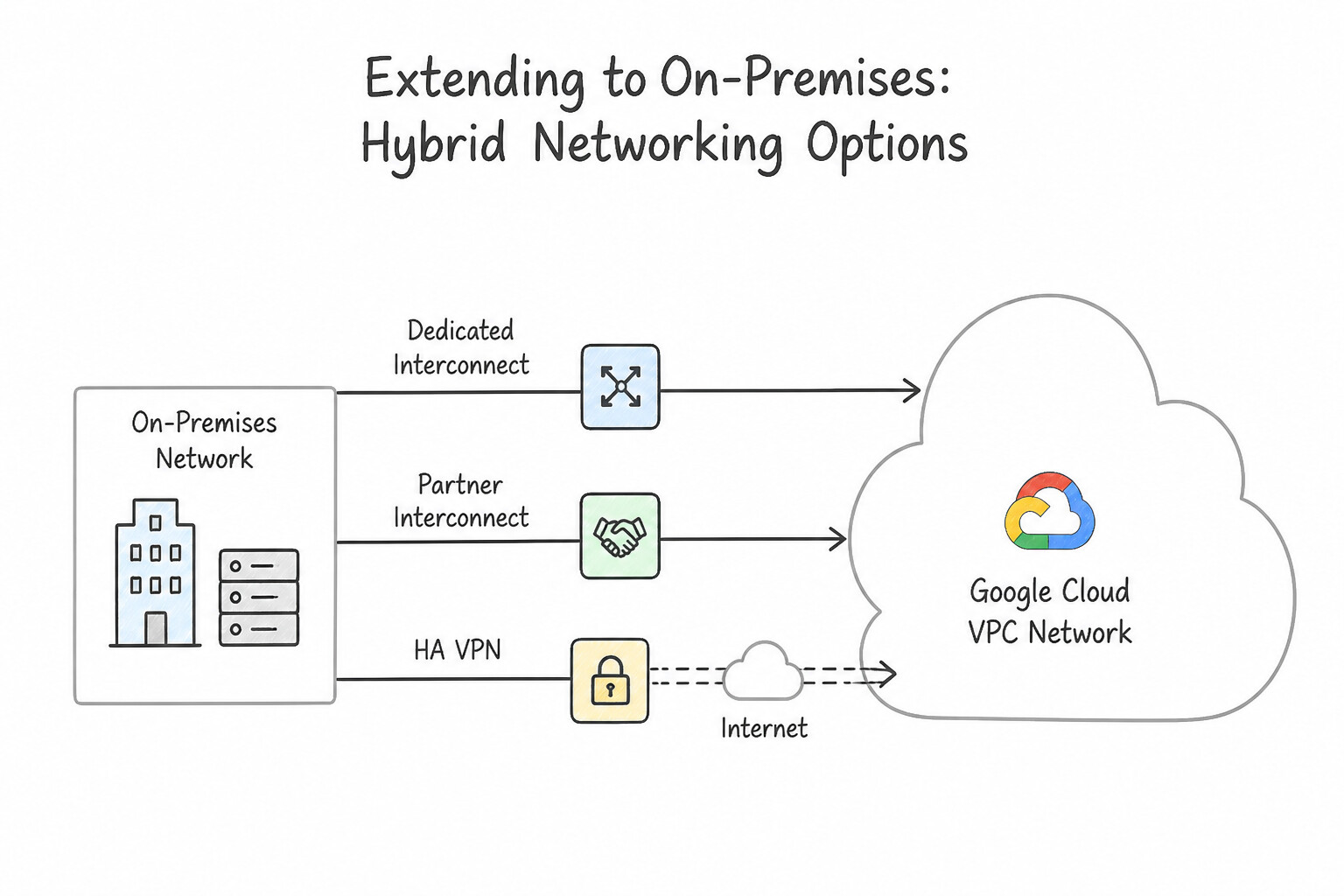
- Dedicated Interconnect vs. Partner Interconnect vs. HA VPN:
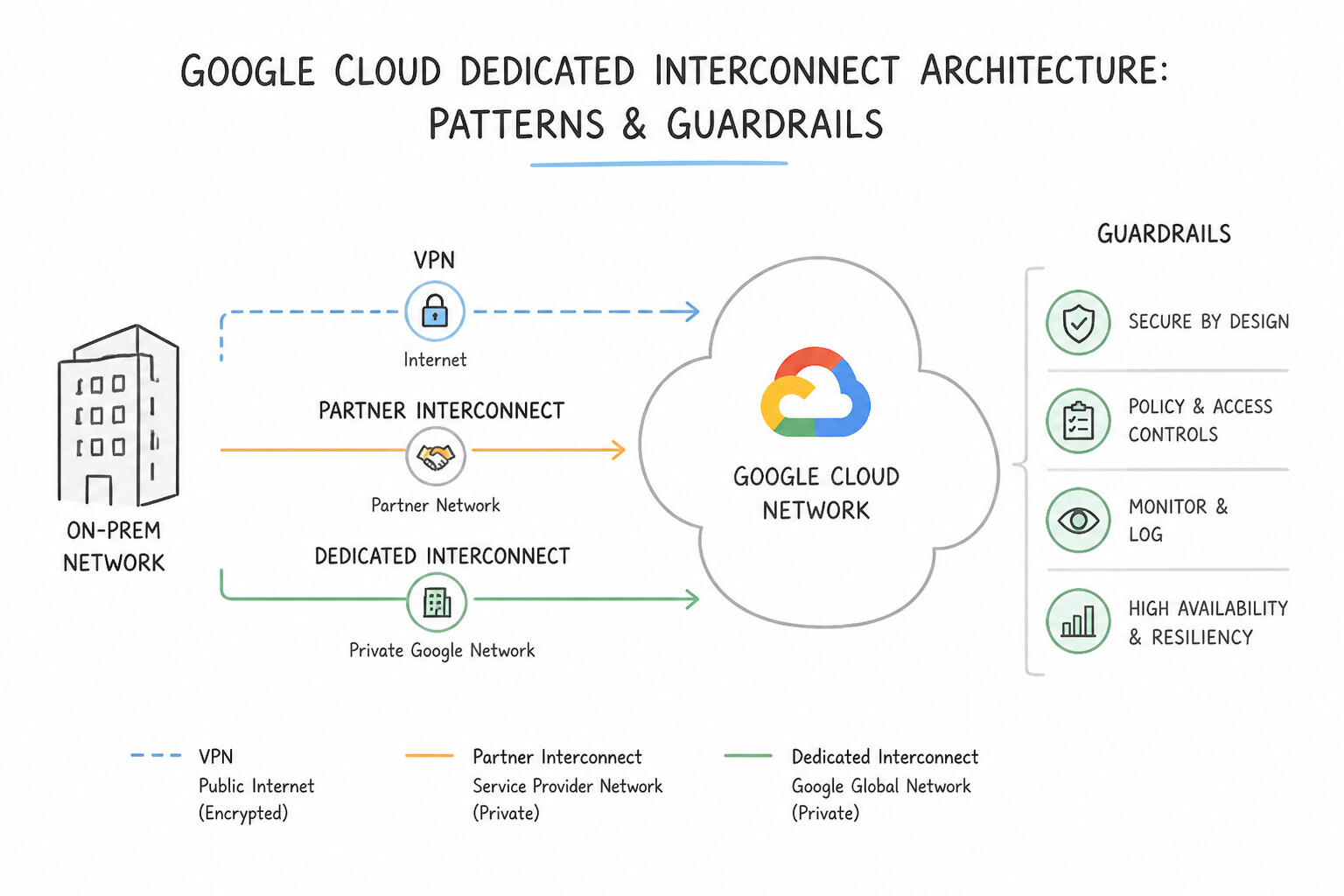
- Dedicated Interconnect: Direct physical fiber connection at a shared Google colocation facility ($10\text{ Gbps}or @@ESCAPEDDOLLAR@@100 Gbps circuits, up to $8\times 10\text{ Gbps}or @@ESCAPEDDOLLAR@@2× 100 Gbps).
- 99.99% SLA Topology: Requires 4 VLAN attachments across 4 physical connections in 2 distinct metropolitan Edge Availability Domains (EADs), terminating on Cloud Routers in 2 zones with Global Dynamic Routing enabled in the VPC. (2 connections in 1 metro with 2 EADs provides 99.9% SLA).
- Partner Interconnect: Connectivity ($50\text{ Mbps}to @@ESCAPEDDOLLAR@@50 Gbps) through a certified service provider when your data center is not in a Google colocation facility or needs sub-$10\text{ Gbps}$ capacity.
- HA VPN: Encrypted IPsec VPN over the public internet (≈ 1.5–3 Gbps per tunnel; scale via ECMP). Provides a 99.99% SLA when configured with 2 interfaces and 2 active/active or active/passive tunnels connected to a Cloud Router (plus 4 tunnels when connecting to two separate on-prem customer gateway devices).
- Encrypted Interconnect: When compliance requires IPsec encryption on top of Dedicated or Partner Interconnect without losing bandwidth, deploy HA VPN over Cloud Interconnect (or MACsec for Cloud Interconnect for Layer 2 link encryption).
Key Implementation Patterns
- Achieving 99.99% SLA with Cloud VPN: Use Configure two tunnels from the HA VPN gateway to two separate peer IP addresses on the on-premises gateway. A 99.99% SLA requires redundancy on both sides: two tunnels connecting to two separate peer IP addresses. (Avoid alternative: Connecting to a single peer IP address only qualifies for a 99.9% SLA.)
- Hybrid Connectivity without Physical Colocation: Use Provision a Partner Interconnect connection. Partner Interconnect uses a service provider to connect locations not in a Google PoP. (Avoid alternative: Dedicated Interconnect requires physical presence in a Google PoP.)
- Selecting Interconnect Type based on Bandwidth: Use Provision a Dedicated Interconnect connection. Dedicated Interconnect is the best choice for bandwidths of 10 Gbps or higher when the customer is located in a supported colocation facility. (Avoid alternative: VPN tunnels have a 3 Gbps limit and use the public internet, which is not ideal for sustained 20 Gbps throughput.)
Key Takeaways (2.1a)
- HA VPN provides an SLA of 99.99% only when configured with redundancy on both ends (2 tunnels to 2 peer IPs).
- Connecting HA VPN to a single on-premises peer IP results in a 99.9% SLA.
- HA VPN is preferred over Classic VPN for high-availability requirements.
- Bandwidth requirements under 1 Gbps are well-suited for VPN rather than Interconnect.
Consideration 2.1b: Extending to multicloud environments
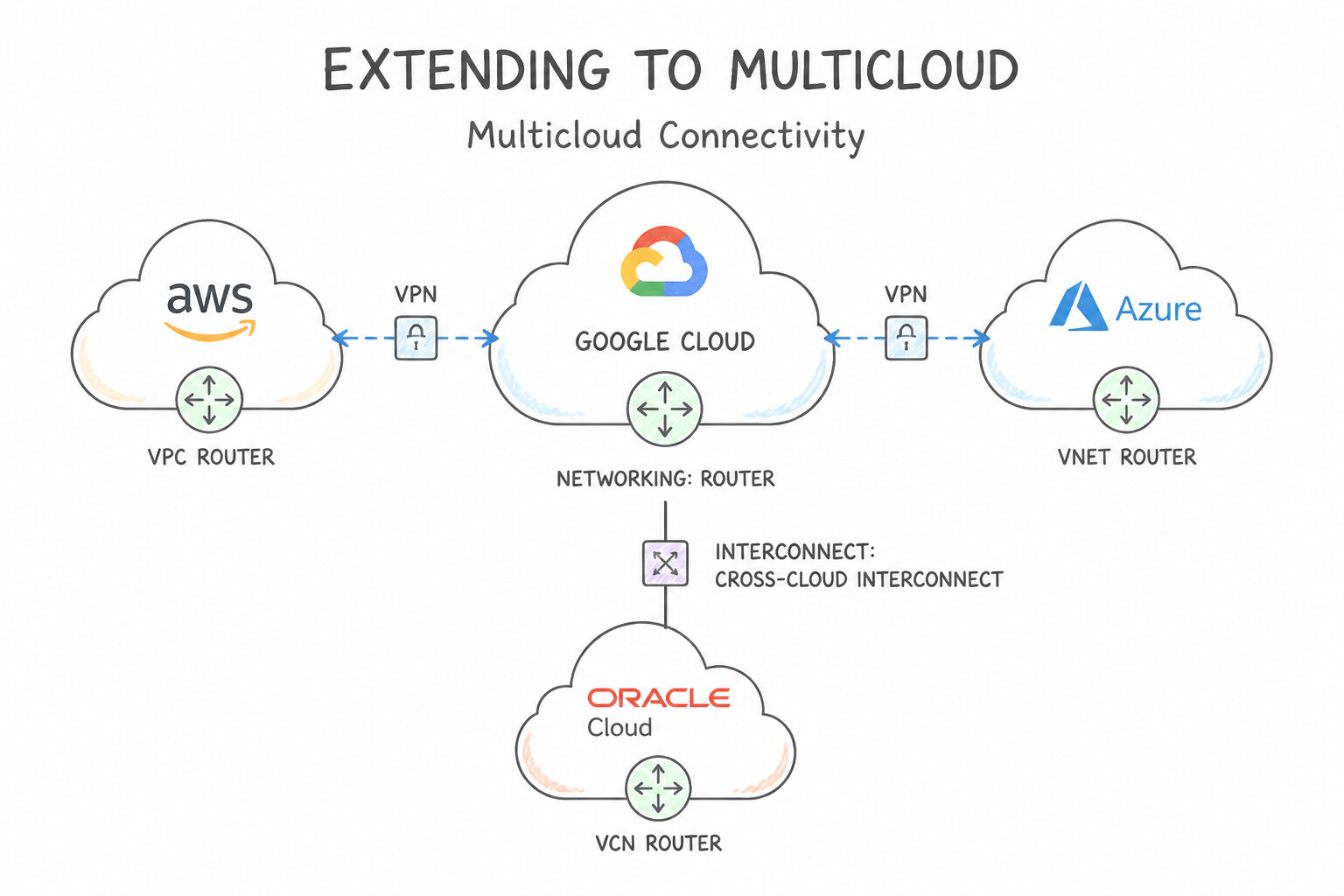
- Multicloud Connectivity (
AWS,Azure,OCI): - For high-bandwidth private physical connectivity ($10\text{ Gbps}/ @@ESCAPEDDOLLAR@@100 Gbps) between Google Cloud and another cloud provider → Cross-Cloud Interconnect.
- For encrypted IPsec connectivity over the internet between AWS Virtual Private Gateway / Transit Gateway and Google Cloud → HA VPN with Cloud Router (BGP) (4 tunnels for 99.99% end-to-end SLA).
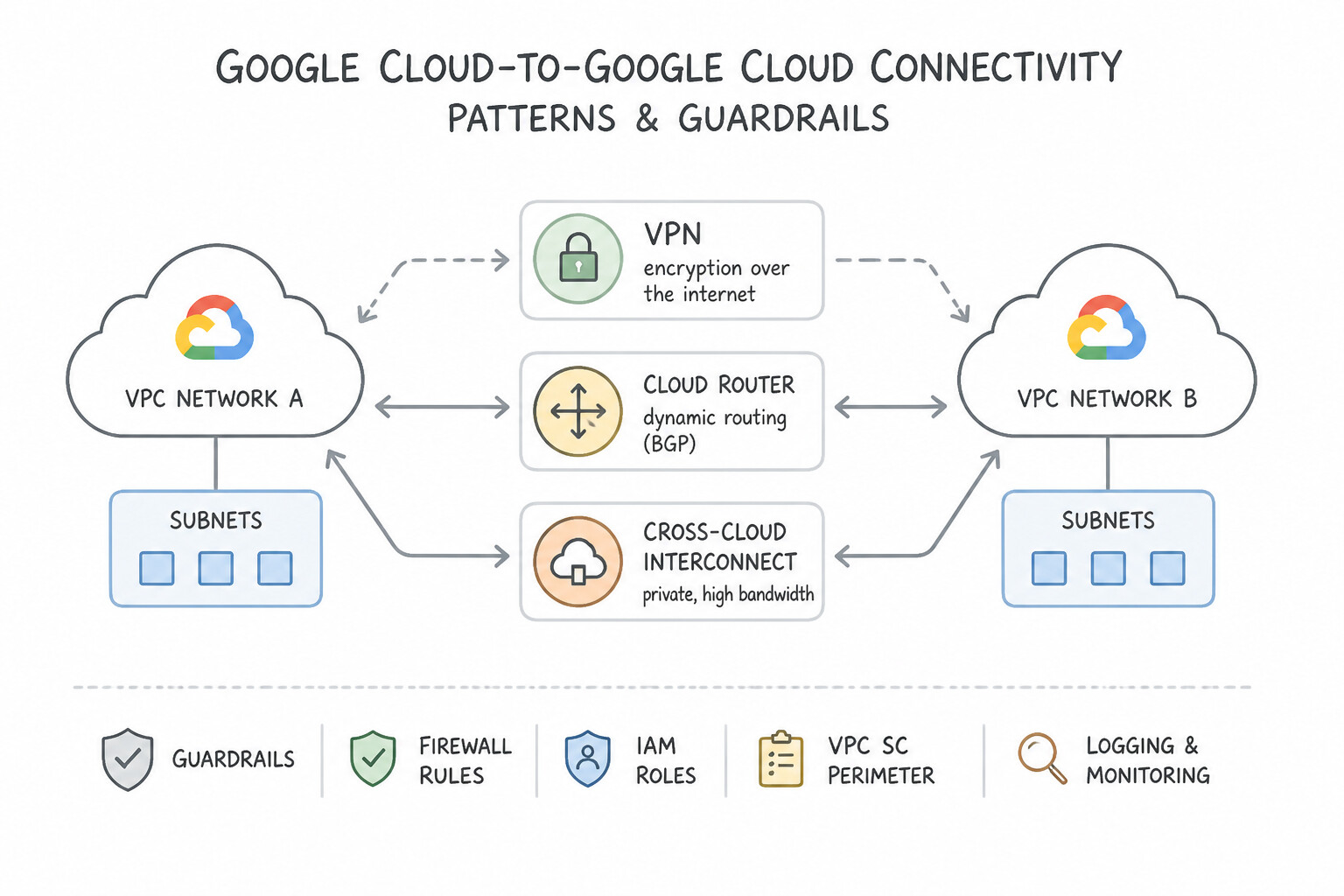
- Google Cloud-to-Google Cloud Connectivity:
- Same Organization, centralized network control → Shared VPC.
- Different Organizations or independent admin domains, non-overlapping IPs (≤ 25 peers) → VPC Network Peering.
- Overlapping RFC 1918 IP ranges, >25 consumers, or publishing a managed service endpoint across projects/orgs → Private Service Connect (
PSC). - Hub-and-spoke transit routing across many hybrid/cloud spokes → Network Connectivity Center (
NCC).
Key Implementation Patterns
- High Availability VPN to AWS: Use Configure a High Availability (HA) VPN gateway with two interfaces. Create two VPN tunnels to the AWS peer gateway and enable BGP. HA VPN with two interfaces and redundant tunnels using BGP provides the required 99.99% SLA and automatic fail over.
- Cross-Cloud Interconnect to Azure: Use Configure Cross-Cloud Interconnect between Google Cloud and Azure. Cross-Cloud Interconnect offers a managed, high-bandwidth private connection to Azure without requiring you to manage physical hardware. (Avoid alternative: Dedicated Interconnect typically requires managing physical routers in a colocation facility, which contradicts the scenario requirements.)
- Dedicated Interconnect Redundancy for Mission Criticality: Use Provision two 10 Gbps circuits in one metropolitan area and two 10 Gbps circuits in a different metropolitan area. A 99.99% SLA requires four circuits total: two in a primary metropolitan area and two in a secondary metropolitan area.
Key Takeaways (2.1b)
- HA VPN Requirement: 99.99% SLA requires an HA VPN gateway with dual interfaces and dual tunnels.
- Dynamic Routing: HA VPN requires BGP (Border Gateway Protocol); it does not support static routing.
- Interconnect vs. VPN: Use VPN for public internet connectivity; use Interconnect for dedicated physical lines.
- Use Cross-Cloud Interconnect for high-bandwidth, private connections between Google Cloud and other major cloud providers (AWS, Azure, OCI).
Consideration 2.1c: Security protection (intrusion protection, access control, firewalls)
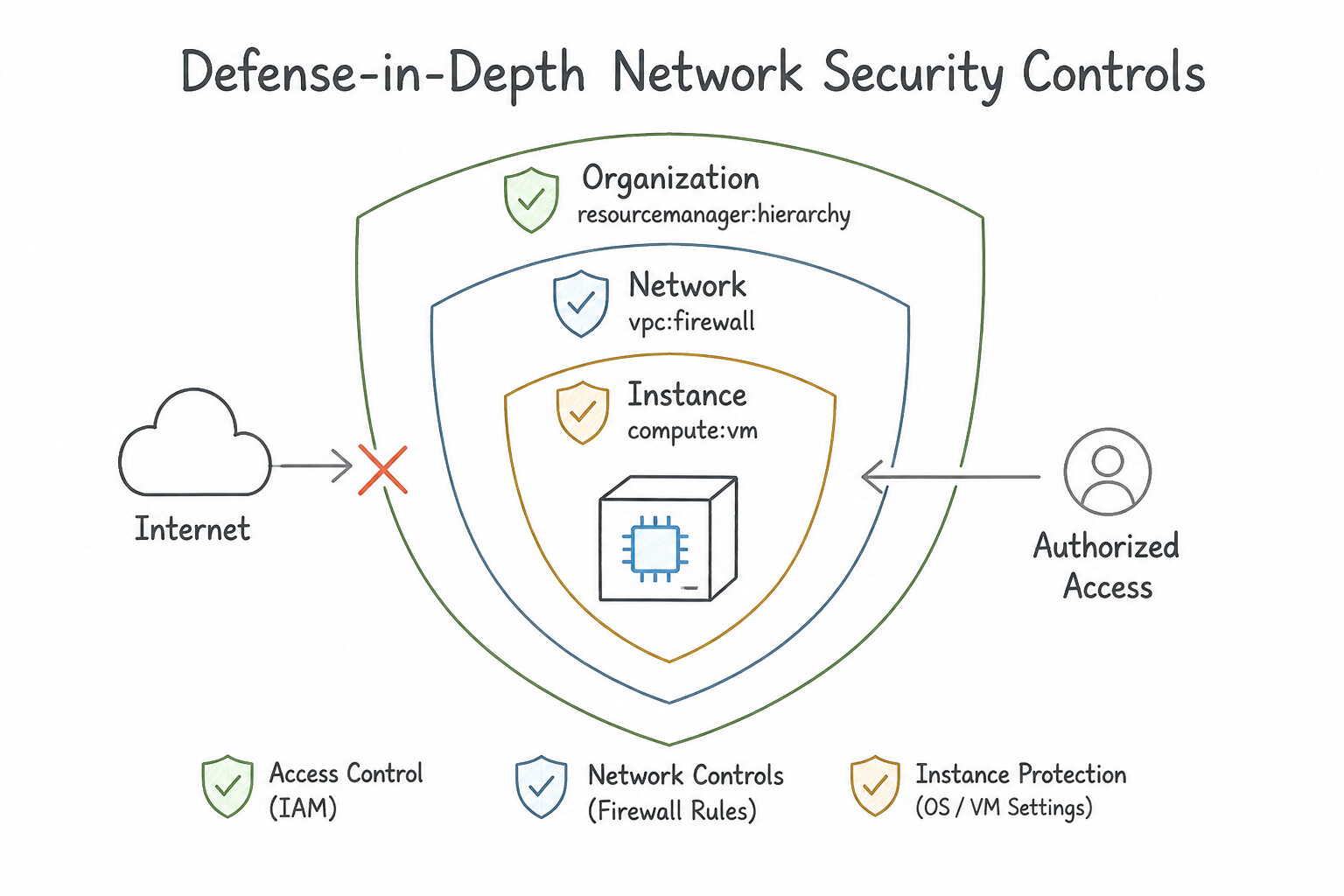
- Defense-in-Depth Network Security Controls:
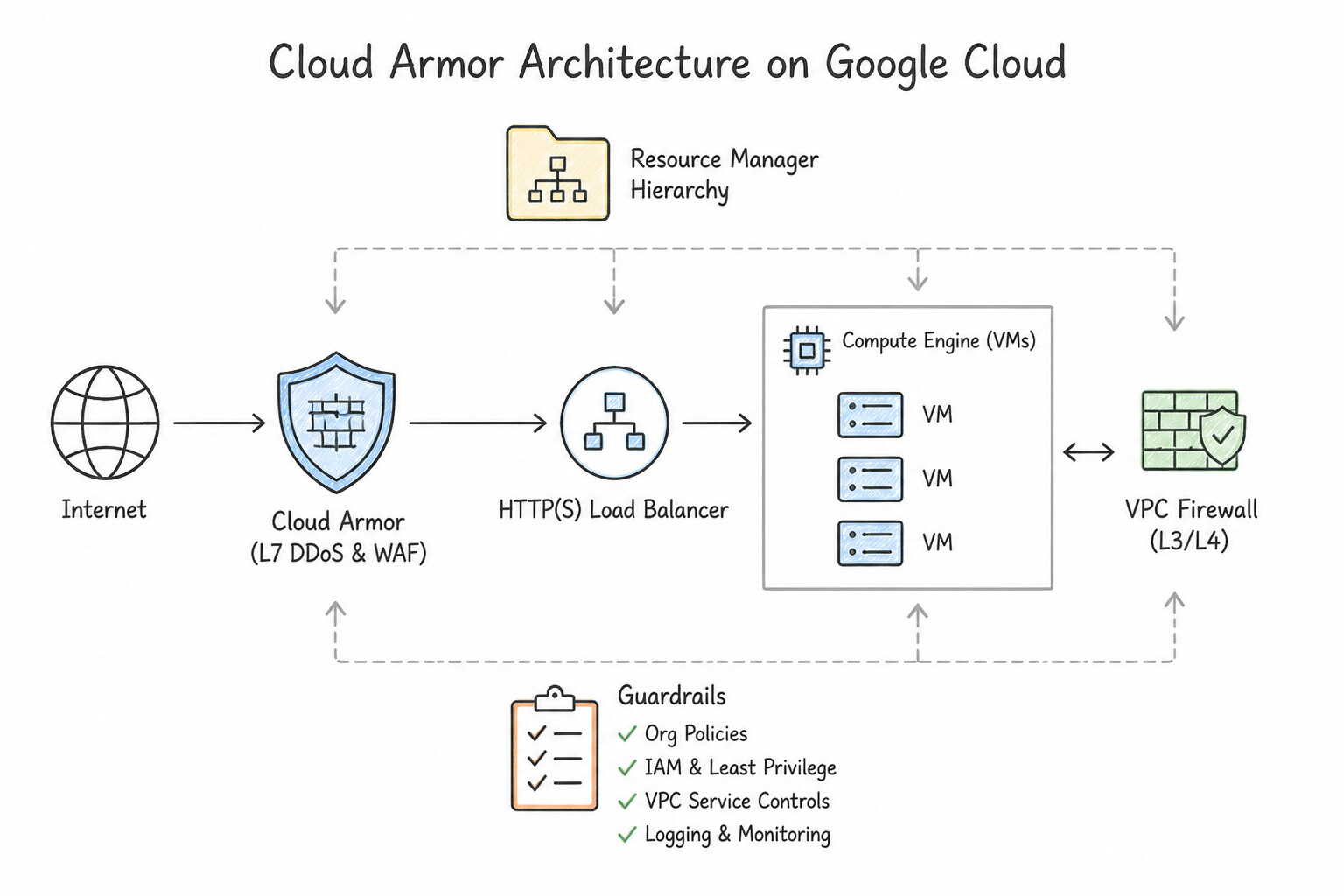
- Cloud Armor: Edge WAF and DDoS mitigation attached to Global/Regional External Application Load Balancers. Blocks OWASP Top 10 (SQLi, XSS), enforces IP/Geo-based access lists, rate-limits abusive clients, and runs ML-based Adaptive Protection.
- VPC Firewall Rules & Hierarchical Policies: Stateful firewall evaluated at the VM VNIC level.
- Evaluation Order: Global Network/Hierarchical Policies (top-down from Org → Folder → VPC) unless
goto_nextdelegates down to local VPC firewall rules. - Target Selection: Prefer Service Account-based target/source rules over Network Tags in production because IAM restricts who can attach a Service Account, whereas any user with
compute.instances.setMetadatacan add a Network Tag! - Cloud IDS & Cloud NGFW Enterprise: Use Cloud IDS (out-of-band packet mirroring + Palo Alto Networks threat engine) for passive intrusion detection, or Cloud NGFW Enterprise for inline Layer 7 deep packet inspection and IPS.
Key Implementation Patterns
- Hierarchical Firewall Policy Enforcement: Use Create a hierarchical firewall policy at the organization level with a deny rule for SSH traffic. Hierarchical firewall policies are evaluated before VPC rules and enable centralized enforcement across the organization. (Avoid alternative: VPC firewall rules are project-specific and can be modified by project owners, lacking centralized enforcement.)
- Secure VM Management Without Public IPs: Use Configure Identity-Aware Proxy (IAP) for TCP forwarding. Create a firewall rule to allow ingress traffic from the IAP IP range 35.235.240.0/20. IAP enables secure SSH access to private VMs by verifying identity and tunneling traffic, requiring only a specific ingress firewall rule.
- Defending Against Layer 7 Attacks: Use Configure Google Cloud Armor security policies with pre-configured WAF rules. Attach the policies to the backend service of the load balancer. Cloud Armor provides WAF capabilities to filter Layer 7 attacks like SQL injection and XSS at the load balancer level.
Key Takeaways (2.1c)
- Hierarchical firewall policies allow centralized management of firewall rules across the organization.
- Hierarchical rules are evaluated before VPC firewall rules.
- Use hierarchical policies to enforce security compliance that project owners cannot override.
- IAP for TCP forwarding allows SSH/RDP access to VMs without external IP addresses.
Consideration 2.1d: VPC design and load balancing
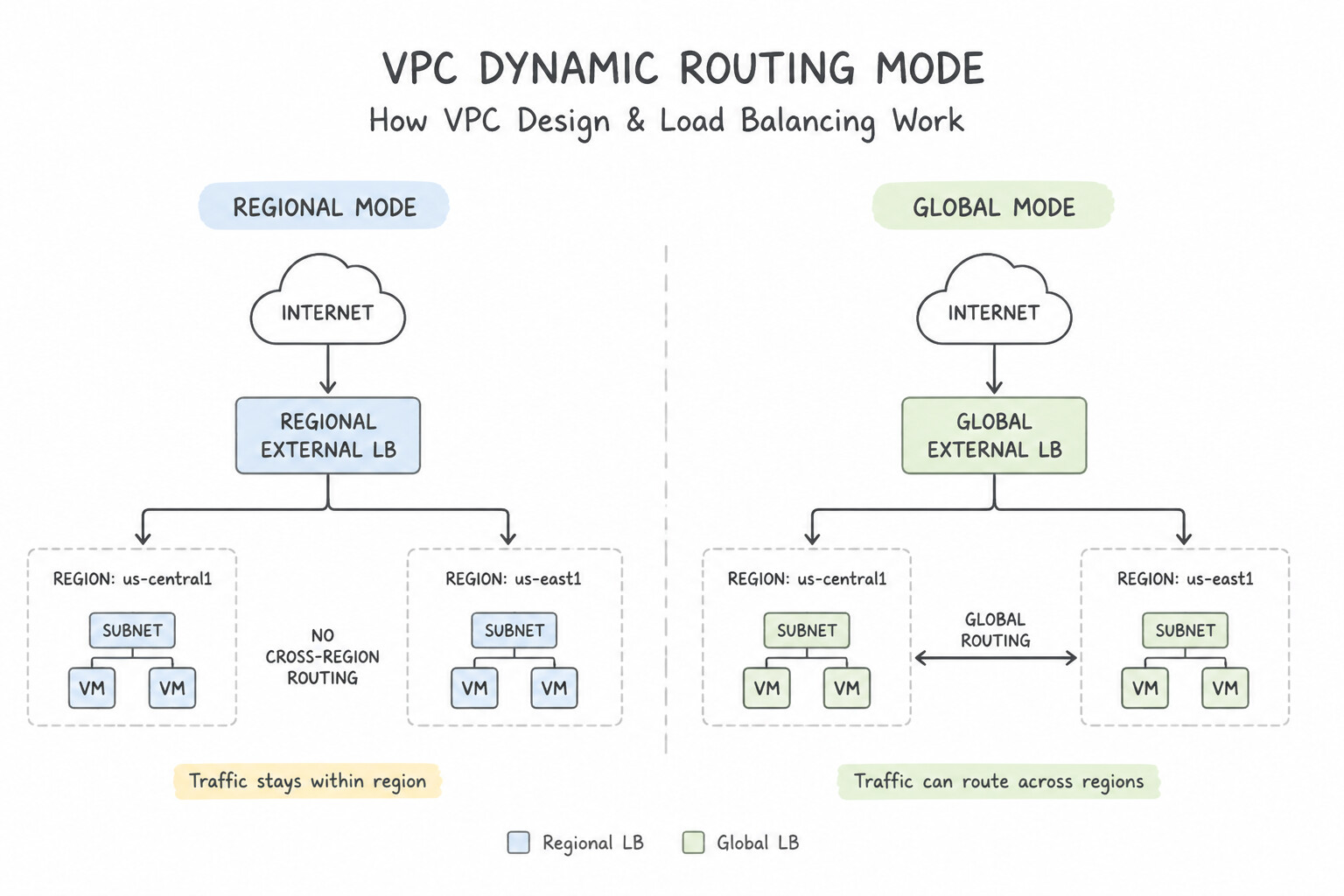
- VPC Dynamic Routing Mode (
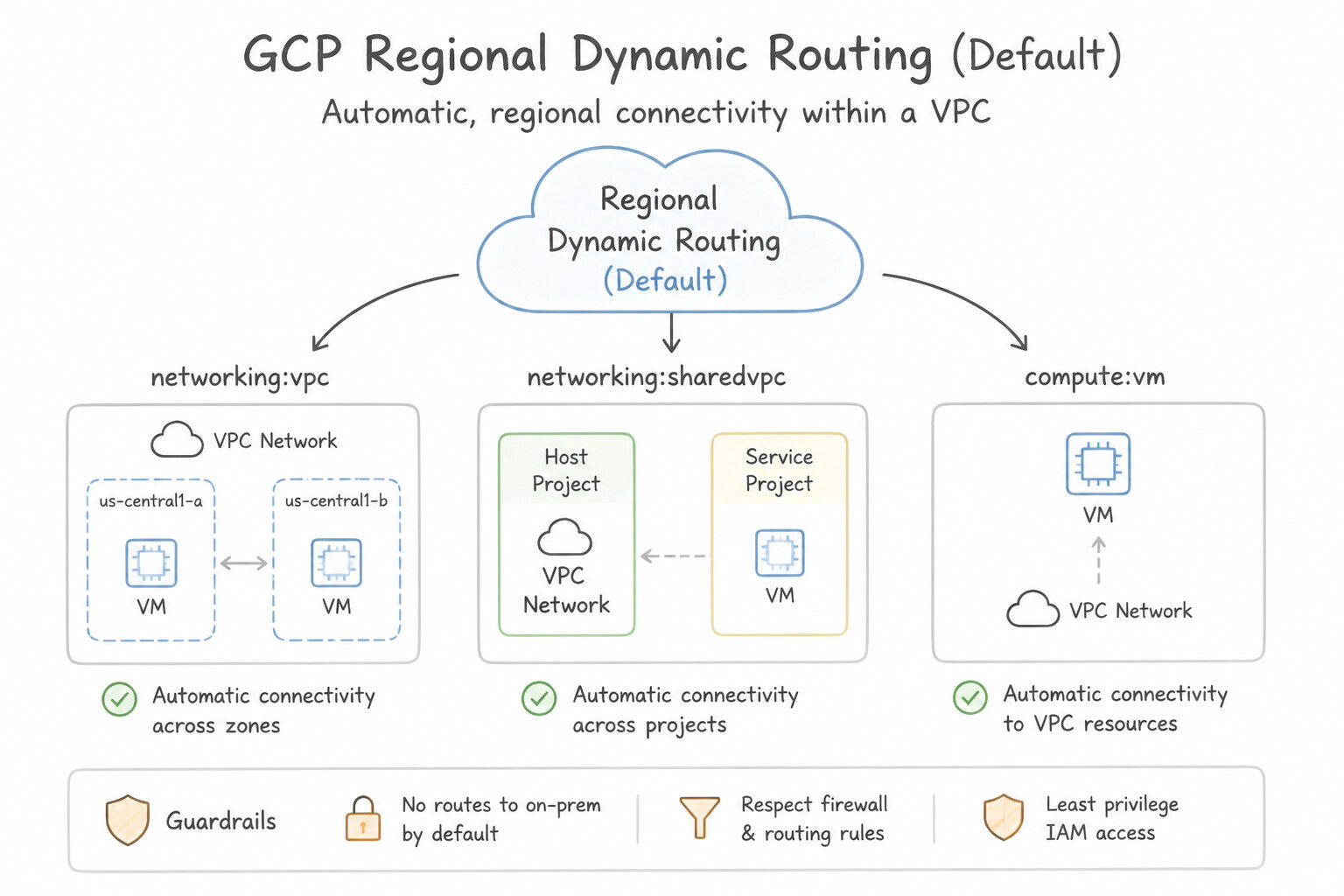
Regionalvs.Global): - Regional Dynamic Routing (Default): Cloud Router only advertises subnets in its own region and only programs learned on-prem routes for VMs in its own region.
- Global Dynamic Routing: Required when VMs in
europe-west1must reach on-premises via a Cloud Interconnect / HA VPN terminated inus-east1! - Google Cloud Load Balancing Selection:
- Global External Application Load Balancer (HTTP/HTTPS): Anycast IP, terminates TLS at global edge PoPs, integrates with Cloud CDN and Cloud Armor, routes to closest healthy multi-region backend (
MIG,GKE NEG,Cloud Run Serverless NEG,Cloud Storage Bucket). - Proxy Network LB (TCP/SSL Proxy) vs. Passthrough Network LB: Use Passthrough NLB when preserving the original client IP packet header or supporting arbitrary UDP/non-TCP protocols is mandatory.
- Mandatory Firewall Rule: Always allow ingress from
35.191.0.0/16and130.211.0.0/22so Google Load Balancer health checks can reach backend VMs/GKE nodes! - Private VM Outbound Connectivity:
- Reach internet package repos without external IPs → Cloud NAT (outbound-only NAT; never permits unsolicited inbound internet connections).
- Reach Google Cloud APIs (
storage.googleapis.com,bigquery.googleapis.com) without external IPs → enable Private Google Access (PGA) on the subnet (or create a Private Service Connect endpoint).
Key Implementation Patterns
- Centralized Network Administration with Departmental Autonomy: Use Configure a Shared VPC. Designate the networking project as the host project and attach the development projects as service projects. Shared VPC allows a central host project to own the network while attaching service projects that can use the subnets to launch resources.
- Global Content Delivery with SSL Termination: Use Configure a Global external Application Load Balancer with backends in multiple regions. Global external Application Load Balancers provide a single Anycast IP, Layer 7 processing, and edge SSL termination suitable for global HTTP(S) apps.
Key Takeaways (2.1d)
- Shared VPC is the go-to solution for separating network administration from resource creation in multi-project environments.
- Use Host Projects for central control and Service Projects for departmental autonomy.
- Avoid VPC Peering when the goal is centralized governance; peering is for connecting independent domains.
- Avoid putting all resources in a single project for large enterprises; use projects as isolation boundaries.
Quick Decision Cheat Sheet (Subsection 2.1)
If the Scenario Requires... | Choose This Google Cloud Pattern | Avoid This Common Mistake |
|---|---|---|
"Dedicated Interconnect + 99.99% availability SLA required" | 4 redundant Interconnect links across 2 metro EADs + 2 regions/zones + Global Dynamic Routing | 1 or 2 links in a single colocation facility (only 99.9% or no SLA) |
"Need $2\text{ Gbps}$ private hybrid connectivity; company has no presence in a Google colocation facility" | Partner Interconnect (with redundant VLAN attachments across 2 zones) | Dedicated Interconnect (minimum $10\text{ Gbps}$ and requires colocation presence) or Carrier Peering (no SLA, public IPs) |
"Private VMs without external IPs need outbound internet access for patches/webhooks" | Cloud NAT on a Cloud Router in that region | Bastion host port-forwarding or Private Google Access (PGA only reaches Google APIs) |
"Global users need a single Anycast IP, automatic routing to the nearest healthy region, and edge caching" | Global External Application Load Balancer + Cloud CDN on Premium Network Tier | Standard Network Tier (regional IP only) or DNS Round-Robin |
"Protect public web APIs from SQL injection, XSS, and volumetric Layer 7 DDoS attacks" | Cloud Armor security policies attached to the External Application Load Balancer | VPC Firewall rules alone (operate at Layer 3/4 and cannot inspect HTTP payloads) |
Further Reading (Subsection 2.1)
- Cloud VPN topologies — Refer to the section on 'HA VPN topologies' to see the specific requirements for 99.99% availability versus 99.9% availability.
- Partner Interconnect overview — Explains that Partner Interconnect provides connectivity between your on-premises network and your VPC network through a supported service provider, which is useful if your data center is in a physical location that cannot reach a Dedicated Interconnect colocation facility.
- Cloud Interconnect Overview — Provides a comparison table between Dedicated and Partner Interconnect, highlighting bandwidth capacities and location requirements.
- Choosing a Network Connectivity Product — A guide to selecting the right connectivity option based on throughput, encryption, and location needs.
- Cloud VPN overview — Provides the definitions of HA VPN and Classic VPN, specifically highlighting the SLA requirements for 99.99% availability.
- Cross-Cloud Interconnect overview — Explains how Cross-Cloud Interconnect enables high-bandwidth, private connectivity to other cloud providers without hardware management.
Subsection 2.2: Configuring individual storage systems
The Big Picture
In Subsection 1.3, you selected which storage or database service to use. In Subsection 2.2, Google Cloud architecture tests how you configure, secure, scale, and protect individual storage systems in production:
- You chose Cloud Bigtable for an IoT time-series workload, but your developer starts the row key with a raw timestamp (
20261013_device123). Every single write hits the exact same tablet node (hotspotting), starving 95% of the cluster while throttling writes! - You store $2\text{ PB}$ of compliance logs in Cloud Storage
Standardfor 7 years instead of configuring Object Lifecycle Management (OLM) rules (SetStorageClasstoArchiveafter 30 days +Deleteafter 2,555 days) paired with a Bucket Lock Retention Policy for WORM compliance. - You run a $50\text{ TB}$ BigQuery table without partitioning or clustering, allowing analysts to execute unindexed queries that scan the entire table on every dashboard refresh.
Consideration 2.2a: Data storage allocation
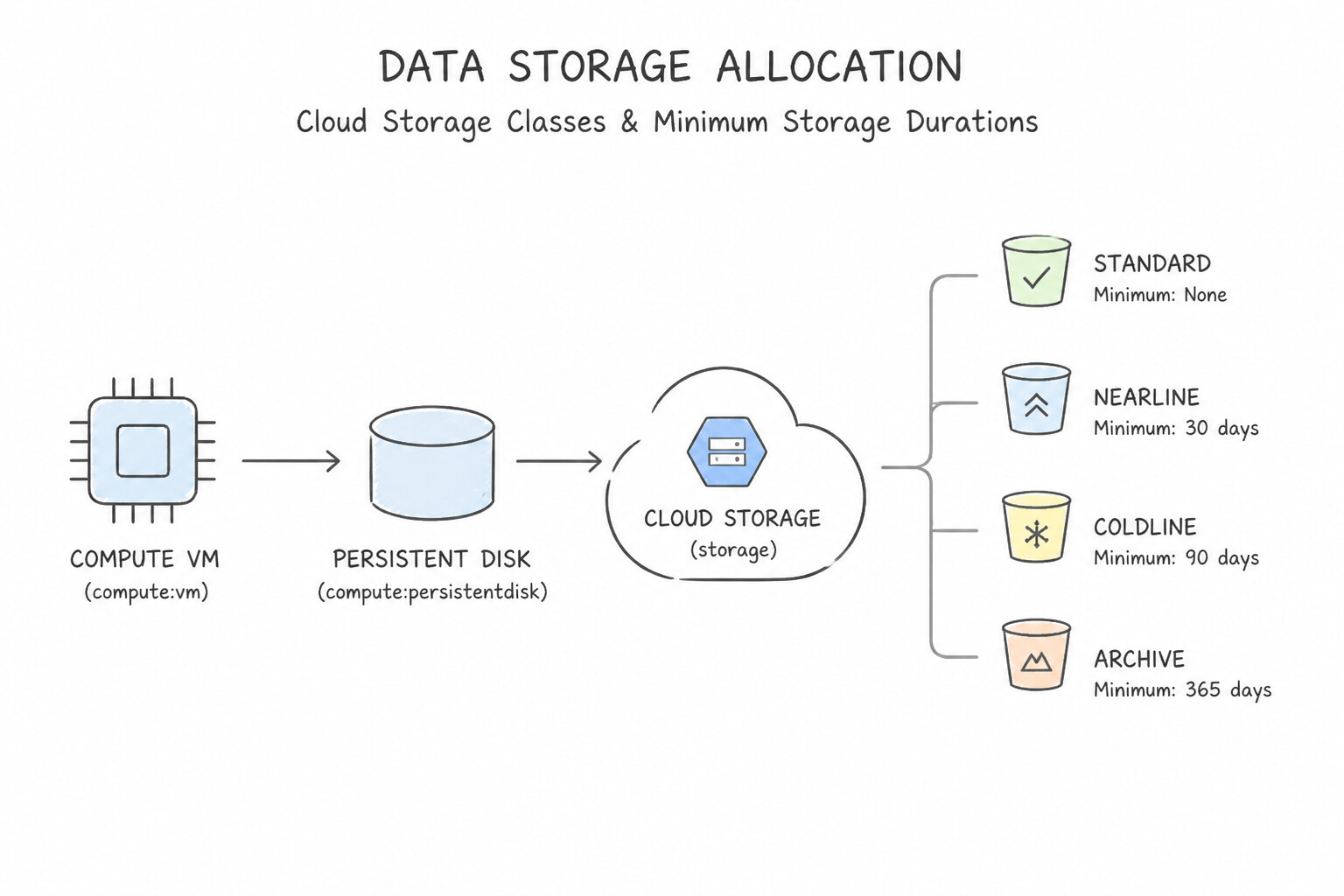
- Cloud Storage Classes & Minimum Storage Durations:
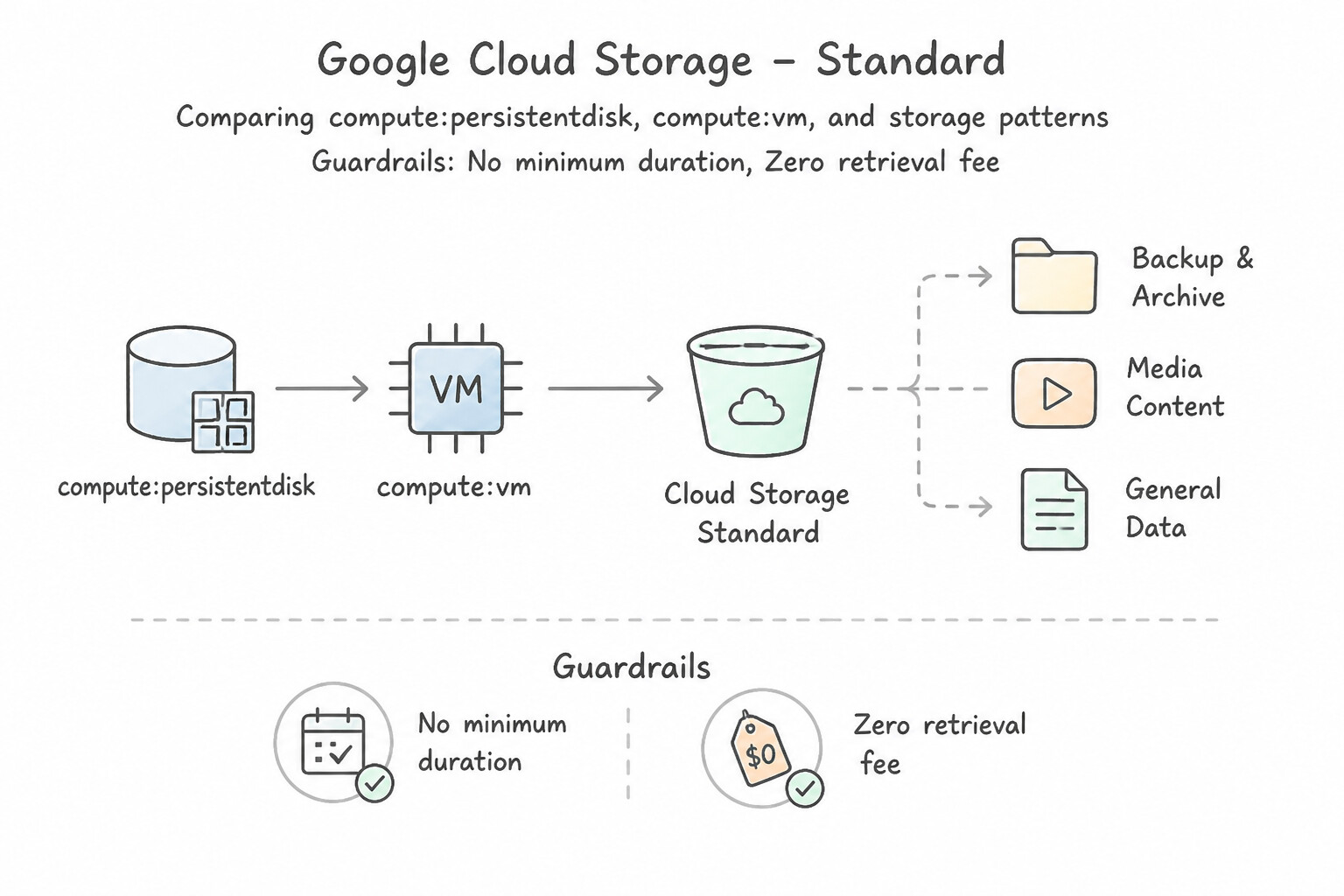
Standard: No minimum duration, zero retrieval fee. Use for active/hot data, websites, streaming videos, and frequent analytics.Nearline: 30-day minimum duration, low per-GB storage price, small per-GB retrieval fee. Best for data accessed ≤ 1 time per month.Coldline: 90-day minimum duration, lower storage price, higher retrieval fee. Best for DR/quarterly audit data accessed ≤ 1 time per quarter.Archive: 365-day minimum duration, lowest storage price, highest retrieval fee (still millisecond first-byte latency—no multi-hour tape thaw!). Best for regulatory archives accessed < 1 time per year.- Autoclass: Automatically transitions objects between
Standard,Nearline,Coldline, andArchivebased on actual last-access patterns without early-deletion penalties. - BigQuery Partitioning & Clustering (
2.2a&2.2b): - Partition tables by
DATE/TIMESTAMP(or ingestion time) and enablerequire_partition_filter = trueto prevent accidental full-table scans. - Cluster partitioned tables on up to 4 high-cardinality filter/join columns (ordered from most frequently filtered to least, e.g.,
customer_id, region, status) for automatic block-pruning.
Key Implementation Patterns
- Dynamic Expansion of Persistent Disks: Use Increase the size of the Persistent Disk in the Google Cloud console. Connect to the VM and resize the file system. Persistent Disks can be resized while the VM is running (online resizing), but you must also resize the file system within the OS to use the space.
- Optimizing GCS Costs based on Access Patterns: Use Configure Object Lifecycle Management on the bucket. Add a rule to SetStorageClass to Coldline after 30 days and a rule to Delete after 365 days. Object Lifecycle Management automates storage class transitions and deletion based on object age, meeting all requirements efficiently.
- Cloud SQL Storage Capacity Planning: Use Enable the automatic storage increase setting in the Cloud SQL instance configuration. Enabling automatic storage increase allows Cloud SQL to add disk space dynamically as needed. (Avoid alternative: Manual intervention is too slow to handle rapid, unpredictable data spikes effectively.)
Key Takeaways (2.2a)
- Persistent Disks can be resized online (while the VM is running) to prevent downtime.
- Increasing the disk size in the cloud console is only step one; you must also resize the file system within the OS.
- Always prefer resizing an existing disk over complex migration strategies if the goal is simply more capacity.
- Use Object Lifecycle Management to automate moving data to cheaper storage classes or deleting it based on age.
Consideration 2.2c: Security and access management
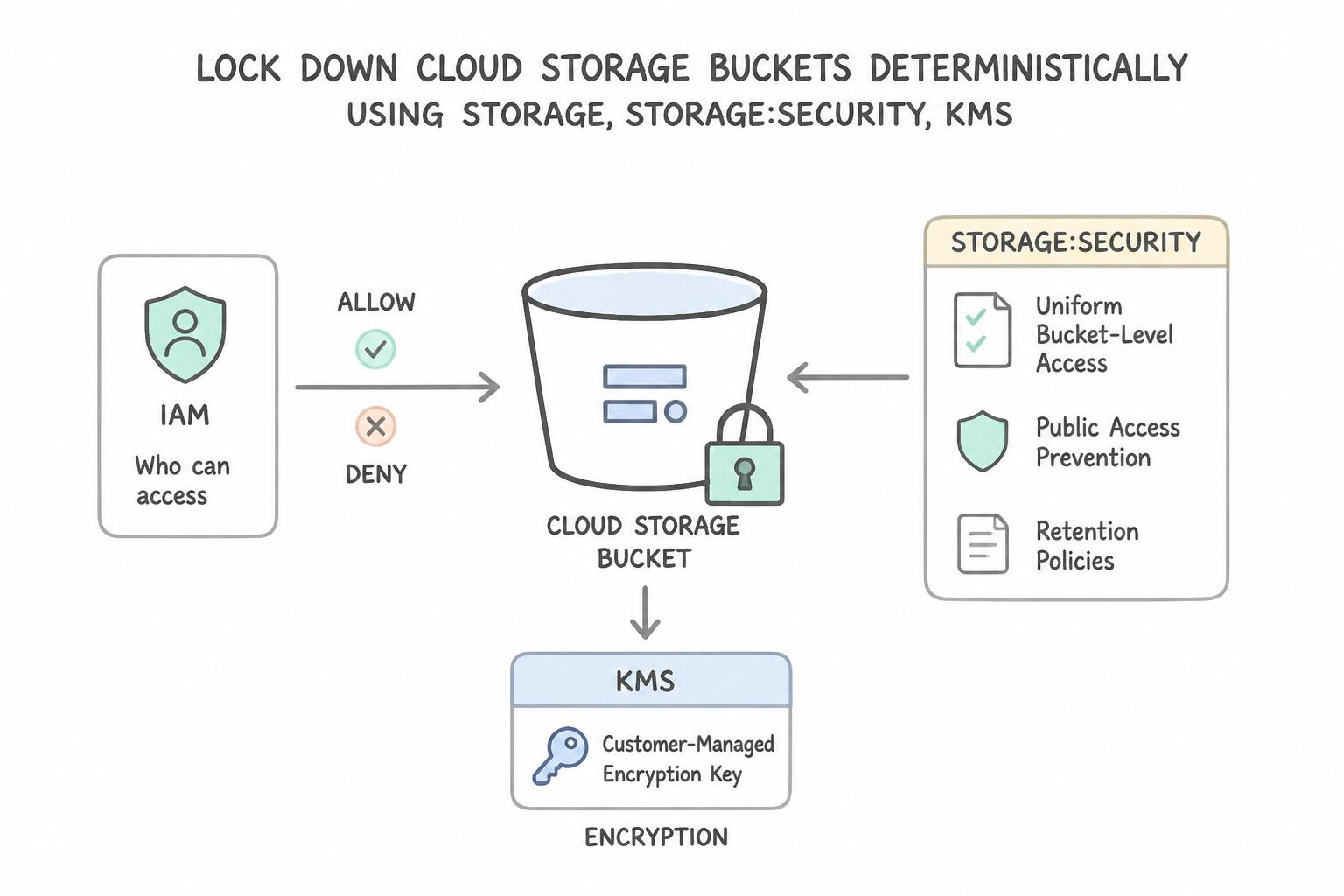
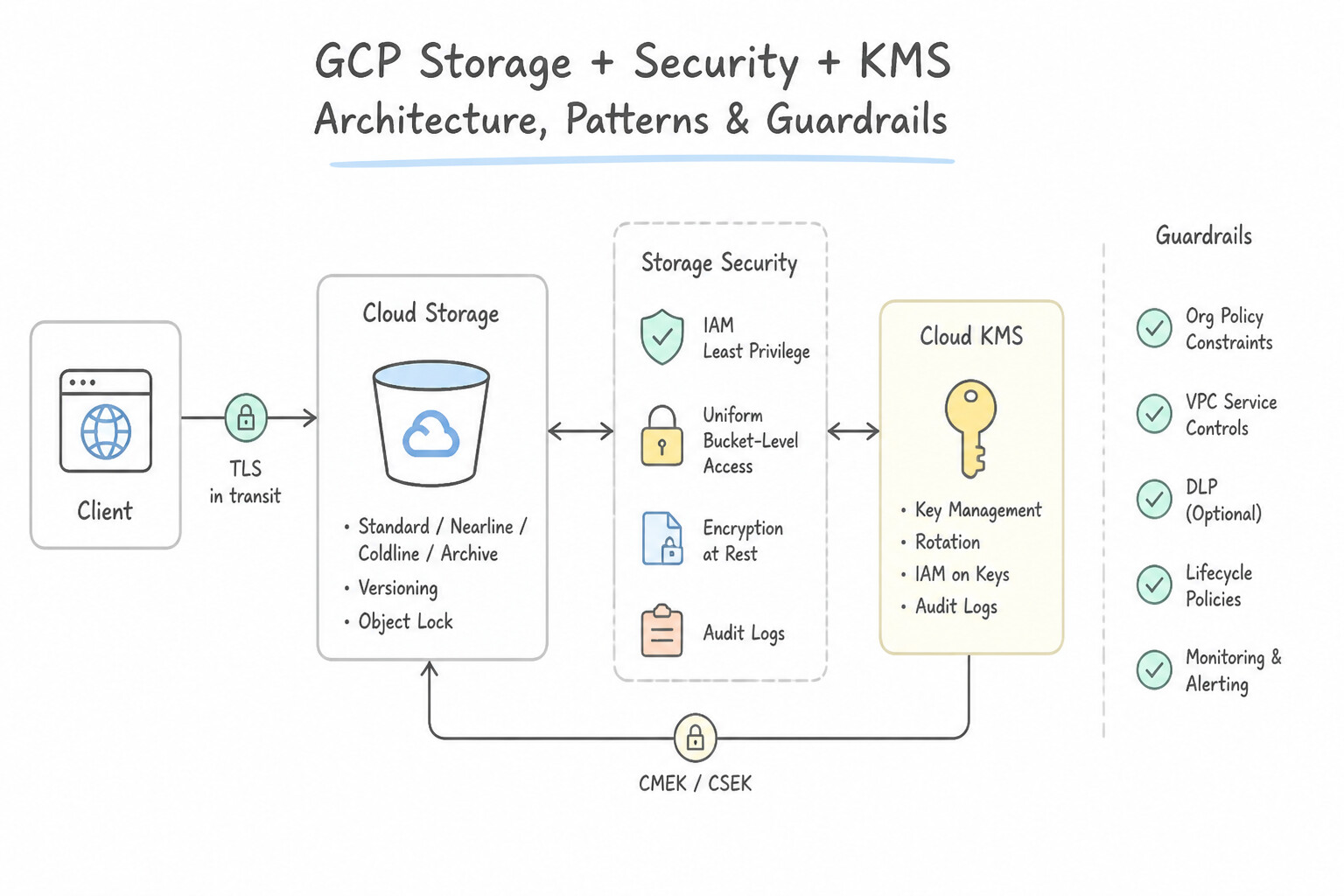
- Lock Down Cloud Storage Buckets Deterministically:
- Enable Uniform Bucket-Level Access (
UBLA) to disable legacy per-object POSIX ACLs and enforce 100% centralized IAM governance (required for IAM Conditions and Organization Policy integration). - Enable Public Access Prevention (via Organization Policy
constraints/storage.publicAccessPreventionor bucket setting) so no user can ever grantallUsersorallAuthenticatedUsers. - Grant temporary, time-bound upload/download access to unauthenticated external users using cryptographic Signed URLs (generated via a Service Account without creating a Google account for the external user).
Key Implementation Patterns
- Temporary External Upload Access: Use Generate a V4 signed URL with the PUT method and a 15-minute expiration. Signed URLs provide a secure, temporary way for users without Google credentials to perform specific actions like uploading files. (Avoid alternative: Making a bucket public allows unrestricted uploads from anyone indefinitely, which is a major security risk.)
- Regulatory Key Management: Use Configure the bucket to use Customer-Managed Encryption Keys (CMEK) with Cloud Key Management Service (Cloud KMS). CMEK via Cloud KMS provides control over key rotation and the ability to revoke access by destroying the key. (Avoid alternative: Google-managed keys do not allow you to manage rotation or destroy keys to revoke access.)
- Enforcing Consistent IAM Permissions: Use Enable Uniform Bucket-Level Access on the Cloud Storage bucket. Uniform Bucket-Level Access disables ACLs and enforces IAM policies for all objects. (Avoid alternative: Manual removal fixes the current state but does not prevent future ACL creation.)
Key Takeaways (2.2c)
- Use Signed URLs to grant temporary, limited access to Cloud Storage resources for users who do not have Google accounts.
- Avoid making storage buckets public (
allUsers) unless you strictly intend to share data with the entire internet.- Never embed Service Account keys in client-side code or public repositories.
- Signed URLs are generated by an entity (like a backend server) that already has the necessary permissions.
Consideration 2.2d: Configuration for data transfer and latency
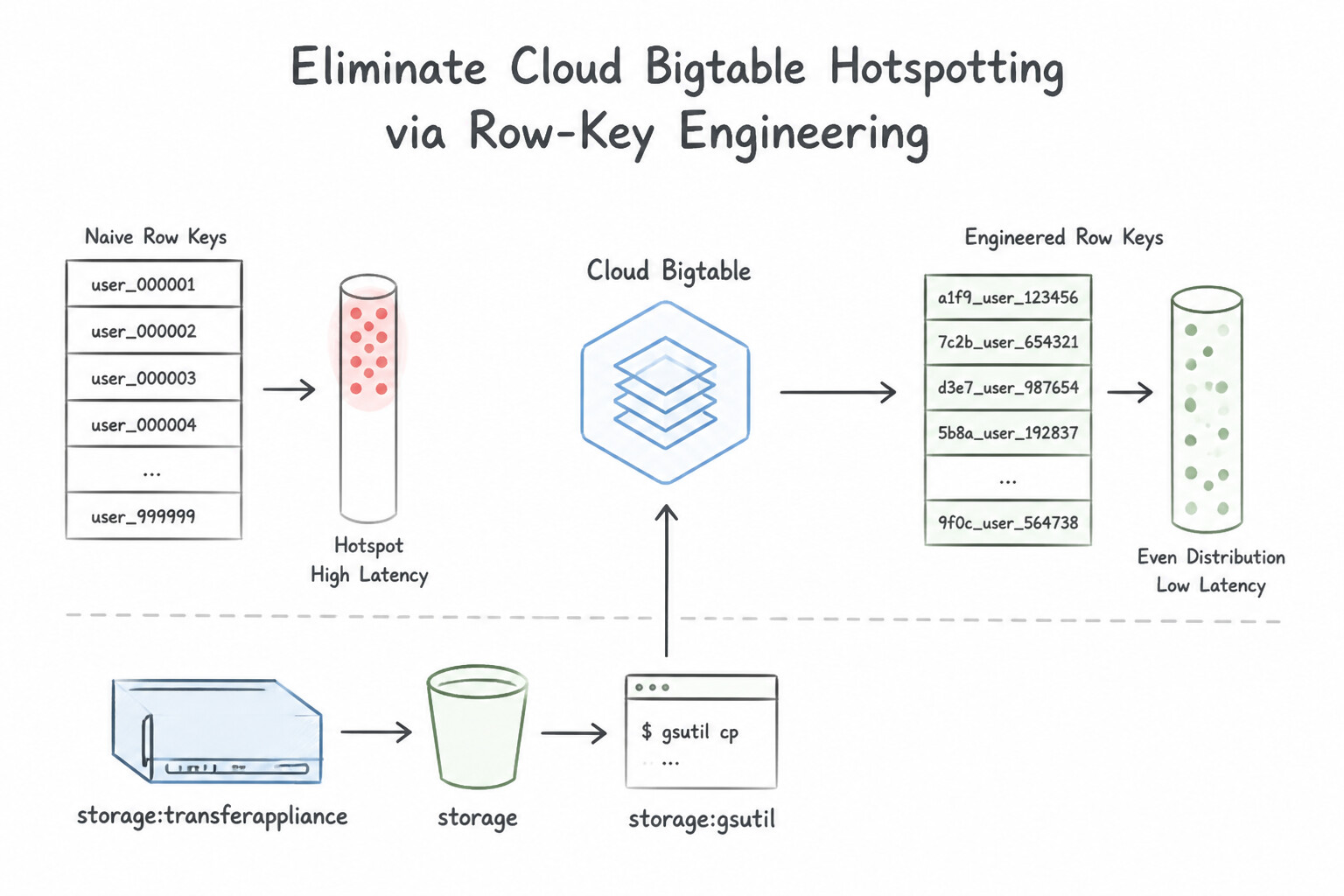
- Eliminate Cloud Bigtable Hotspotting via Row-Key Engineering:
- Bigtable sorts rows lexicographically by a single indexed Row Key and splits key ranges across tablet servers.
- Anti-Pattern (Causes Hotspotting): Starting the row key with a monotonically increasing timestamp (
2026-10-13T18:00:00#sensor_1), a sequential auto-increment ID, or a low-cardinality boolean/region code. - Best Practice: Prefix the row key with a high-cardinality identifier followed by a reverse timestamp (
MAX_LONG - timestamp) if the most recent records are queried first: e.g.,sensor_id#reverse_timestamporlocation_hash#device_id#timestamp. - Low-Latency Multi-Region Object Replication:
- Use Dual-Region buckets with Turbo Replication when you need an explicit 15-minute RPO SLA for cross-region object replication between two paired regions.
Key Implementation Patterns
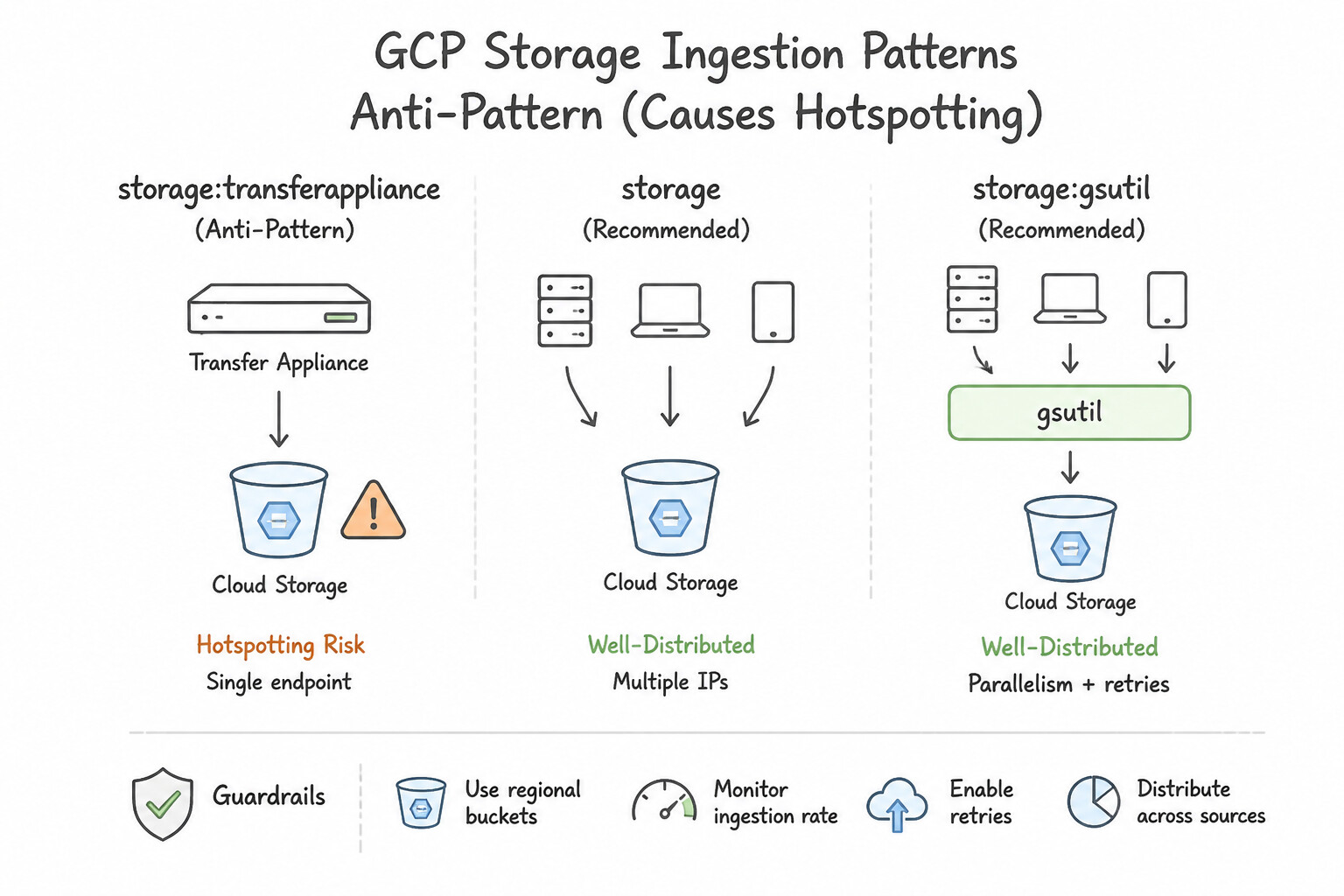
- Massive Offline Data Migration Strategy: Use Order Transfer Appliances from Google Cloud. Copy the data to the appliances and ship them to Google. 3 PB is too large for a 500 Mbps connection to transfer in 30 days; offline physical transfer is required. (Avoid alternative: Software optimizations like parallel uploads cannot overcome the physical bandwidth constraint of 500 Mbps for 3 PB of data.)
- Optimizing Large File Uploads: Use Configure the parallel_composite_upload_threshold setting in gsutil. Parallel composite uploads split a single large file into chunks to be uploaded in parallel, maximizing bandwidth usage. (Avoid alternative: The -m flag parallelizes operations across multiple files, not within a single file.)
- Automated Multi-Cloud Backup Synchronization: Use Configure a Storage Transfer Service job to run daily with the Amazon S3 bucket as the source and the Google Cloud Storage bucket as the destination. Storage Transfer Service allows you to schedule managed, automated transfers from Amazon S3 to Google Cloud Storage without writing code.
Key Takeaways (2.2d)
- Always calculate estimated transfer time: Time = Data Volume / Bandwidth.
- Use Transfer Appliance for large datasets when network bandwidth is insufficient to meet the deadline.
- Online transfer tools (gsutil, Storage Transfer Service) cannot exceed the physical bandwidth limits of the connection.
- To maximize bandwidth for a single large file, split the file into parallel streams.
Consideration 2.2e: Data retention and lifecycle management
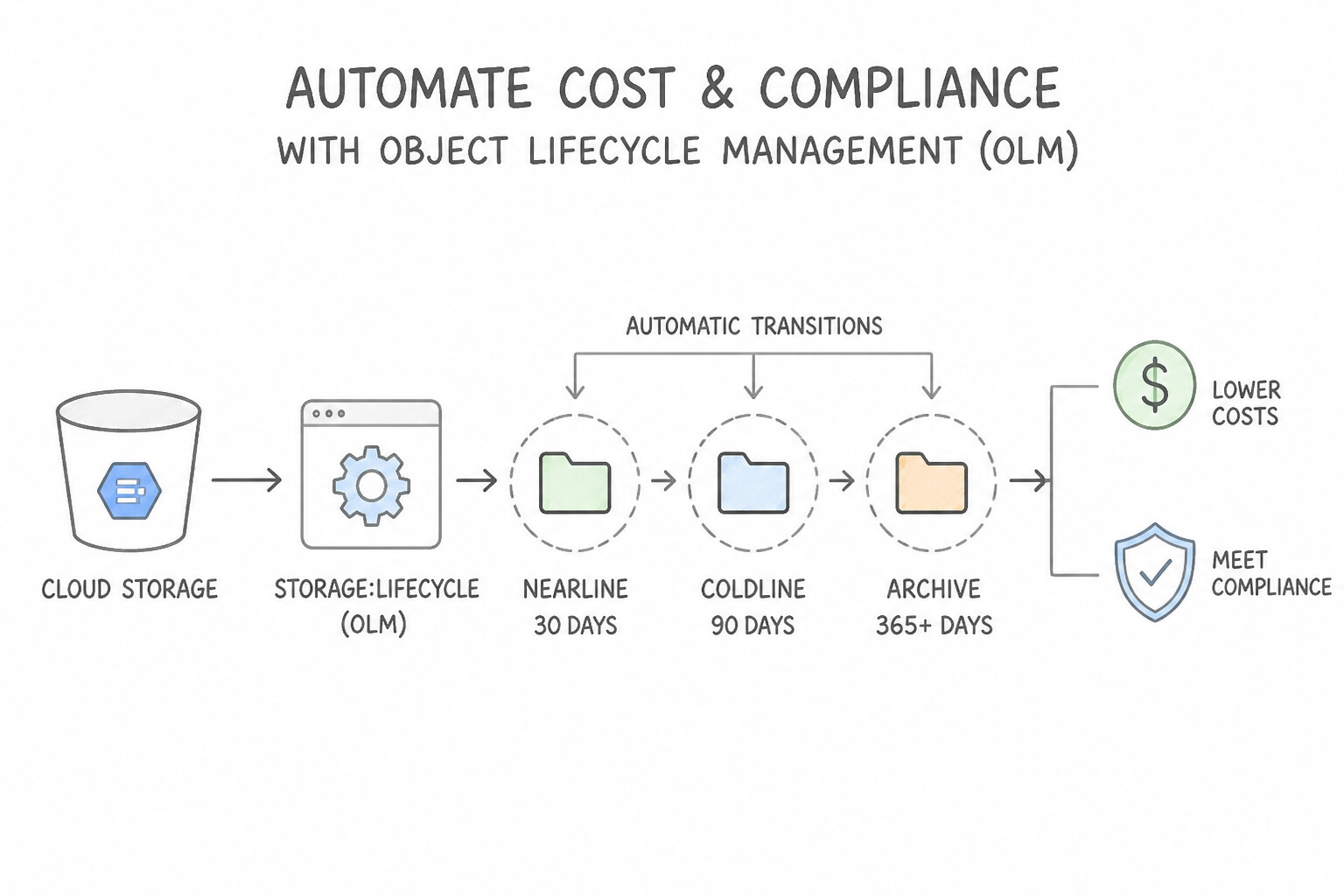
- Automate Cost & Compliance with Object Lifecycle Management (
OLM): - Define declarative JSON rules combining Conditions (
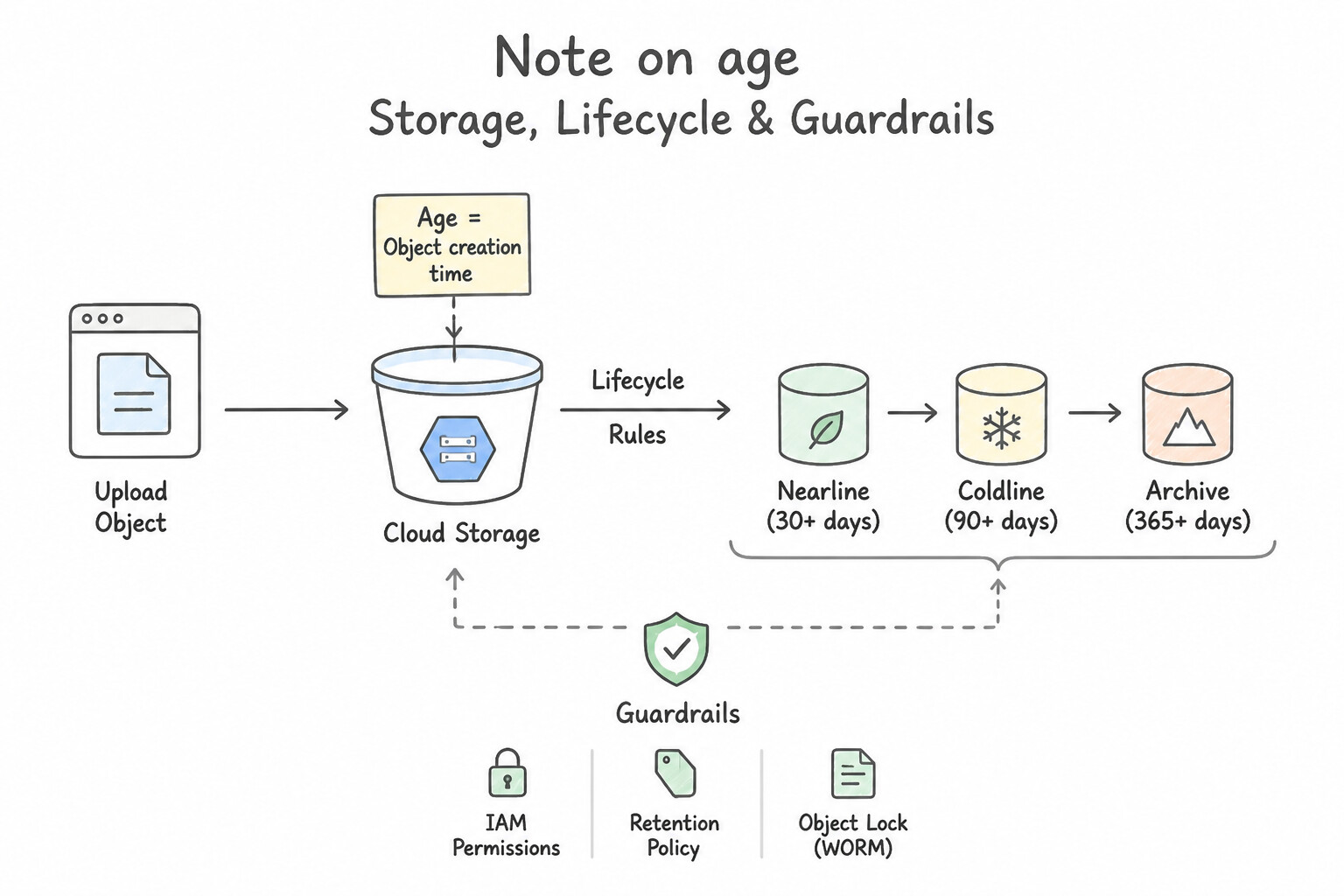
age,createdBefore,isLive,numNewerVersions,matchesStorageClass,customTimeBefore) with Actions (SetStorageClasstoNEARLINE/COLDLINE/ARCHIVE, orDelete). - Note on
age: In OLM,ageis always measured in days since object creation time (not since the last storage class transition!). Thus, a rule transitioning toNearlineatage: 30andColdlineatage: 90keeps the object inNearlinefor 60 days ($90 - 30$). - Object Versioning vs. Retention Policies (
Bucket Lock): - Object Versioning: Protects against accidental user overwrites or deletions by keeping noncurrent versions (pair with an OLM rule to
Deletenoncurrent versions whereisLive: falseandnumNewerVersions >= 3ordaysSinceNoncurrentTime > 30). - Retention Policy + Bucket Lock: Enforces WORM (Write Once, Read Many) regulatory compliance (e.g., SEC Rule 17a-4 / FINRA) where no one—not even the Organization Admin—can delete or overwrite an object until its retention period expires.
Key Implementation Patterns
- Optimizing Archival Costs for Access Logs: Use Configure an Object Lifecycle Management rule with an Age condition of 30 days and a SetStorageClass action to Coldline. Lifecycle rules automatically transition data to cheaper storage classes based on age. (Avoid alternative: Scripts require manual maintenance and compute resources; native Lifecycle Management is preferred.)
- Enforcing WORM Compliance for Financial Records: Use Configure a Retention Policy for 7 years and lock the bucket. A locked Retention Policy enforces WORM compliance, preventing even administrators from deleting data until the period expires. (Avoid alternative: Object Versioning keeps history but does not prevent administrators from permanently deleting versions.)
Key Takeaways (2.2e)
- Use Object Lifecycle Management to automate data transitions and deletions.
- Move data to colder storage classes (Nearline, Coldline, Archive) as it ages to save money.
- Avoid scripting operational tasks that are supported by built-in platform features.
- Ensure retention policies are met by choosing 'SetStorageClass' instead of 'Delete' when data must be preserved.
Consideration 2.2f: Data growth planning
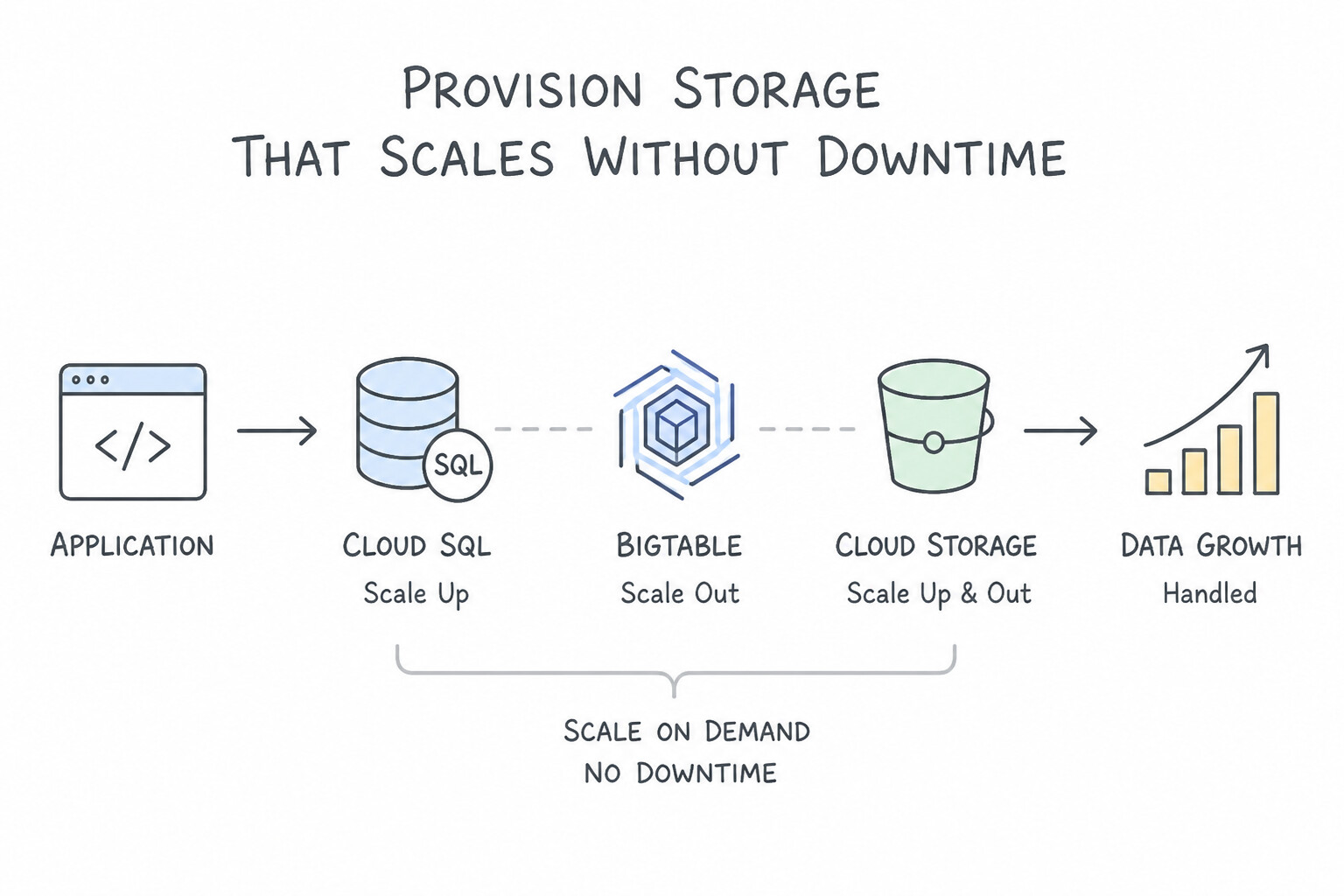
- Provision Storage That Scales Without Downtime:
- In Cloud SQL and AlloyDB, enable Automatic Storage Increase so sudden transactional logging spikes never halt database writes due to a full disk.
- For high-performance VM workloads on Compute Engine, use Google Cloud Hyperdisk (
Hyperdisk Extreme/Hyperdisk Balanced) to dynamically provision and scale IOPS and throughput independently of disk capacity GBs without detaching the disk or resizing the VM.
Key Implementation Patterns
- Cloud SQL Automatic Storage Expansion: Use Edit the instance settings and enable the "Automatic storage increase" feature. Automatic storage increase automatically adds disk capacity when free space runs low, preventing downtime without manual work. (Avoid alternative: Provisioning the maximum storage immediately is wasteful and not cost-effective as you pay for allocated space.)
- Bigtable Node Scaling for Storage: Use Add more nodes to the Cloud Bigtable cluster. Bigtable scales horizontally; adding nodes reduces the storage-per-node ratio and increases available compute resources, fixing both storage limits and latency. (Avoid alternative: HDD storage is much slower than SSD and would worsen the latency issues, even if it allows for higher density per node.)
- Cloud Storage Lifecycle Management for Archives: Use Configure an Object Lifecycle Management rule to change the storage class to Archive after 30 days. Object Lifecycle Management automates cost savings by moving aging data to cheaper storage classes like Archive. (Avoid alternative: Using a custom script on a VM adds unnecessary management overhead and compute costs compared to built-in features.)
Key Takeaways (2.2f)
- Cloud SQL requires explicit storage capacity planning or configuration.
- "Automatic storage increase" is the standard best practice for preventing disk-full outages with minimal administrative overhead.
- Always prefer automated platform features over manual alerts for critical infrastructure scaling.
- Avoid over-provisioning storage significantly as it incurs unnecessary costs.
Consideration 2.2g: Data protection (backup and recovery)
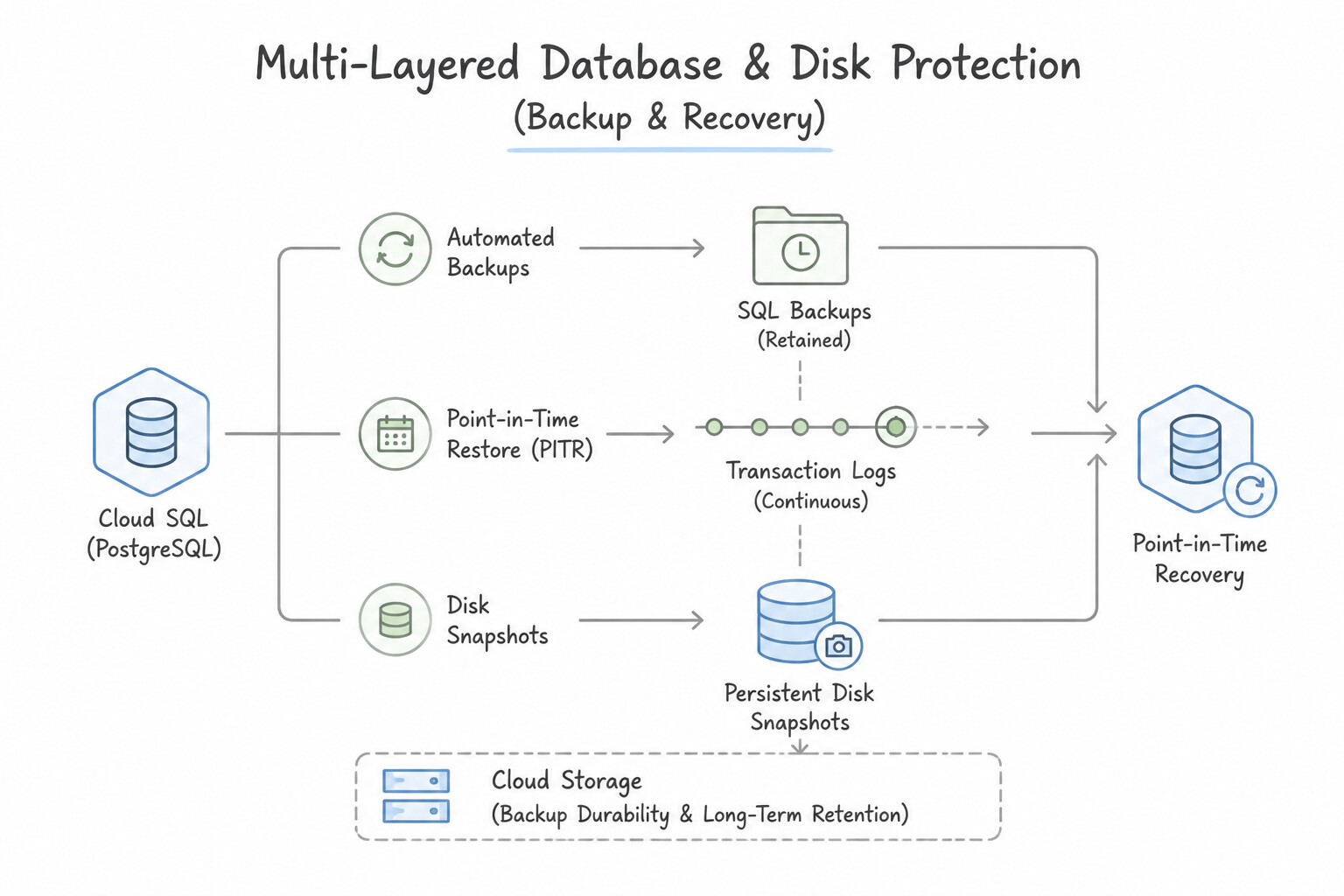
- Multi-Layered Database & Disk Protection:
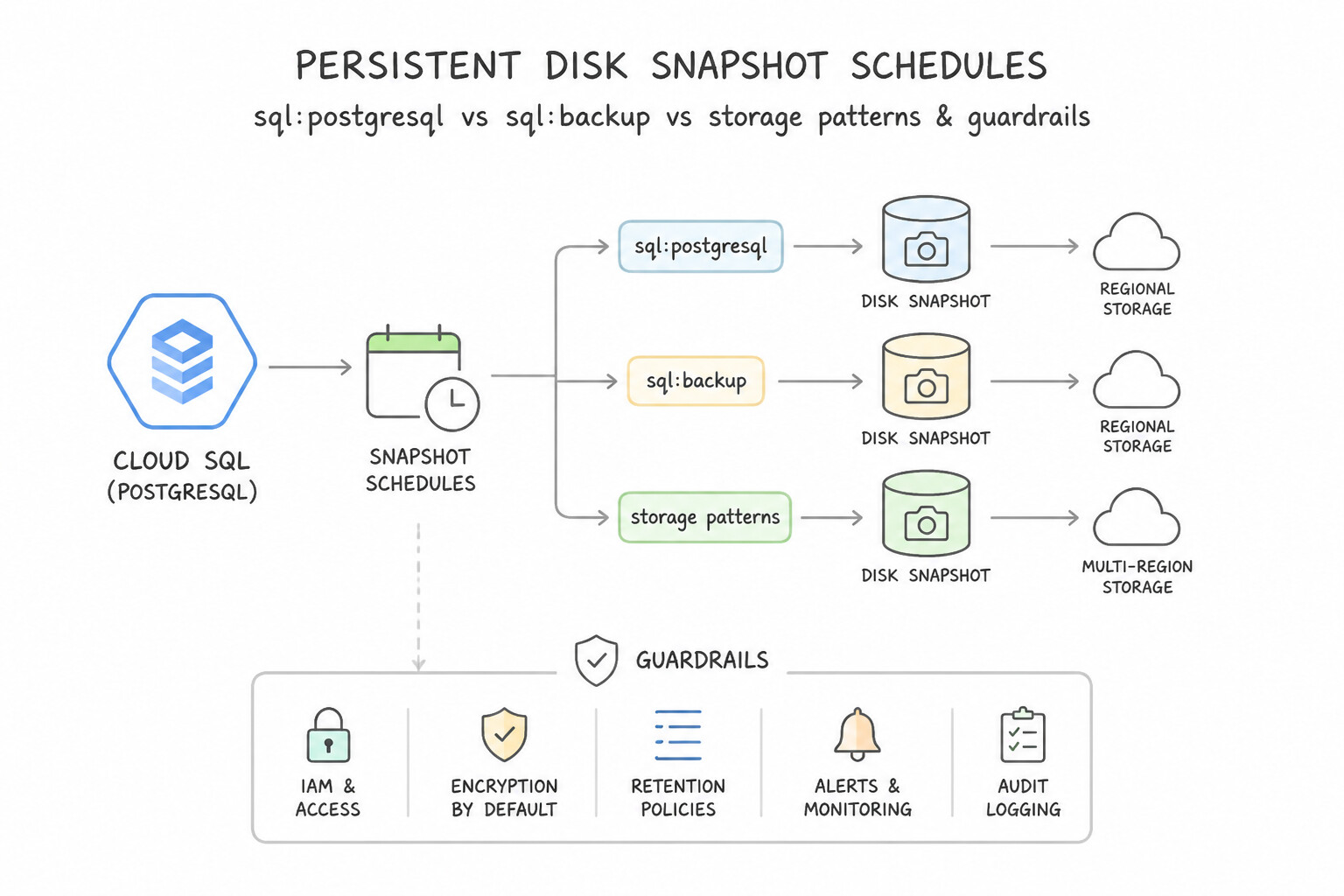
- Persistent Disk Snapshot Schedules: Automated incremental block snapshots stored redundantly across regions; only changed blocks are billed after the first full snapshot.
- Cloud SQL PITR: Requires both Automated Daily Backups AND Point-in-Time Recovery (Binary Logging / Write-Ahead Logging) enabled; restores create a new Cloud SQL instance at the target timestamp.
- Cloud Spanner Backup & Restore + Version Retention: Use Spanner Version Retention Period (up to 7 days) to run stale reads or recover from recent logical corruption using
READ AT TIMESTAMP, and use Spanner Backups for long-term archival retention (up to 1 year).
Key Implementation Patterns
- Cloud SQL Point-in-Time Recovery: Use Perform a Point-in-Time Recovery (PITR) to the specific timestamp before the script ran. PITR allows you to create a new instance with data loaded to a specific timestamp, recovering data right up to the moment before corruption. (Avoid alternative: Daily backups recover data only up to the time the backup was created, potentially causing significant data loss since that time.)
- Compliance with Bucket Lock (WORM): Use Configure a Retention Policy for 7 years on the bucket and lock the policy. A locked Retention Policy enforces WORM compliance, preventing even administrators from deleting data until the retention period expires. (Avoid alternative: Object Versioning protects against accidental deletion but does not enforce strict retention against administrators.)
- Object Versioning for Accidental Deletion: Use Enable Object Versioning on the Cloud Storage bucket. Object Versioning retains noncurrent versions of objects within the same bucket when they are overwritten or deleted, allowing easy recovery. (Avoid alternative: Uniform bucket-level access controls permissions and security, not data retention or recovery history.)
Key Takeaways (2.2g)
- Point-in-Time Recovery (PITR) is used to recover from human errors or logical corruption by restoring to a specific timestamp.
- Read Replicas provide read scaling and failover for availability but do not protect against logical data corruption because errors replicate.
- Automated Backups provide daily snapshots but lack the granularity to restore to a specific minute without PITR.
- Retention Policies prevent data deletion or modification for a specified period.
Quick Decision Cheat Sheet (Subsection 2.2)
If the Scenario Requires... | Choose This Google Cloud Pattern | Avoid This Common Mistake |
|---|---|---|
"Bigtable write throughput is throttled despite low average cluster CPU utilization" | Fix row-key hotspotting: prefix with high-cardinality attribute ( device_id#reverse_timestamp), avoid leading timestamps | Doubling the number of Bigtable nodes |
"Automate Cloud Storage transitions from Standard (day 0) to Nearline (day 30) to Archive (day 365)" | Object Lifecycle Management ( OLM) with SetStorageClass rules based on age | Writing custom Cloud Functions / cron scripts to copy and delete objects |
"Enforce SEC/FINRA immutable WORM storage where even admins cannot delete objects before 5 years" | Bucket Retention Policy with Bucket Lock | Object Versioning or IAM role removal alone |
"Protect against accidental object overwrite while bounding storage bloat from old versions" | Enable Object Versioning + OLM rule ( isLive: false + numNewerVersions: 3 → Delete) | Keeping unlimited noncurrent versions forever in Standard storage |
"Disable legacy object ACLs and manage all bucket permissions exclusively via IAM" | Enable Uniform bucket-level access ( UBLA) | Manually editing ACLs on millions of individual objects |
Further Reading (Subsection 2.2)
- Resize a zonal Persistent Disk — This official guide details the prerequisites and steps for resizing a disk, including the specific commands required for different file systems.
- Object Lifecycle Management — Documentation explaining how to configure lifecycle rules to manage object TTL and storage classes.
- Storage Classes — Overview of available storage classes, their intended use cases, and pricing models.
- Cloud SQL Instance Settings — Documentation on configuring instance settings, specifically detailing how 'Automatic storage increase' works and its benefits for availability.
- Signed URLs — Review the overview of Signed URLs, specifically the 'Use cases' section which mentions uploading files by users without Google accounts.
- V4 Signing Process with Cloud Storage tools — This page explains how to generate signed URLs using client libraries, which is the standard programmatic approach.
Subsection 2.3: Configuring compute systems
The Big Picture
Provisioning compute on Google Cloud goes far beyond clicking "Create Instance." Subsection 2.3 tests the operational mechanics of compute infrastructure:
- How do you mix Standard VMs and Spot VMs in a Cloud Dataproc cluster or GKE node pool so preemption never corrupts stateful HDFS shuffle data or drops active user transactions?
- How do you configure a Managed Instance Group (
MIG) update policy (Proactive vs. Opportunistic) when a critical zero-day OS vulnerability demands immediate fleet-wide replacement vs. when you want zero disruption to existing long-running VMs? - How do you wire Container-Native Load Balancing (
Standalone/Zonal NEGs) for GKE so the Google Cloud Load Balancer routes packets directly to Pod IP addresses without an extrakube-proxyiptableshop? - How does a serverless Cloud Run service reach a private Cloud SQL or Memorystore instance inside a VPC using Direct VPC Egress or Serverless VPC Access?
Consideration 2.3a: Compute resource provisioning
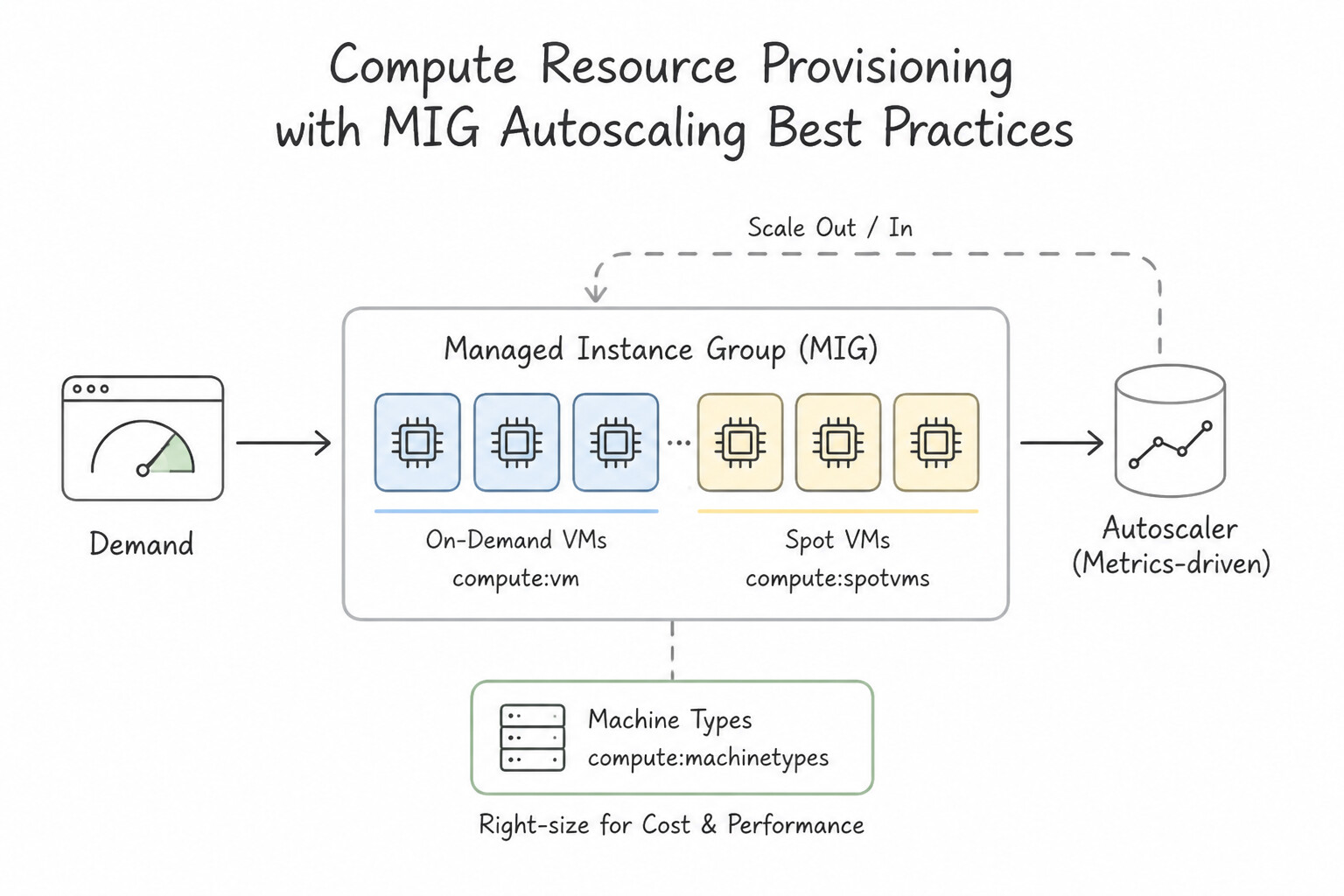
- Managed Instance Groups (
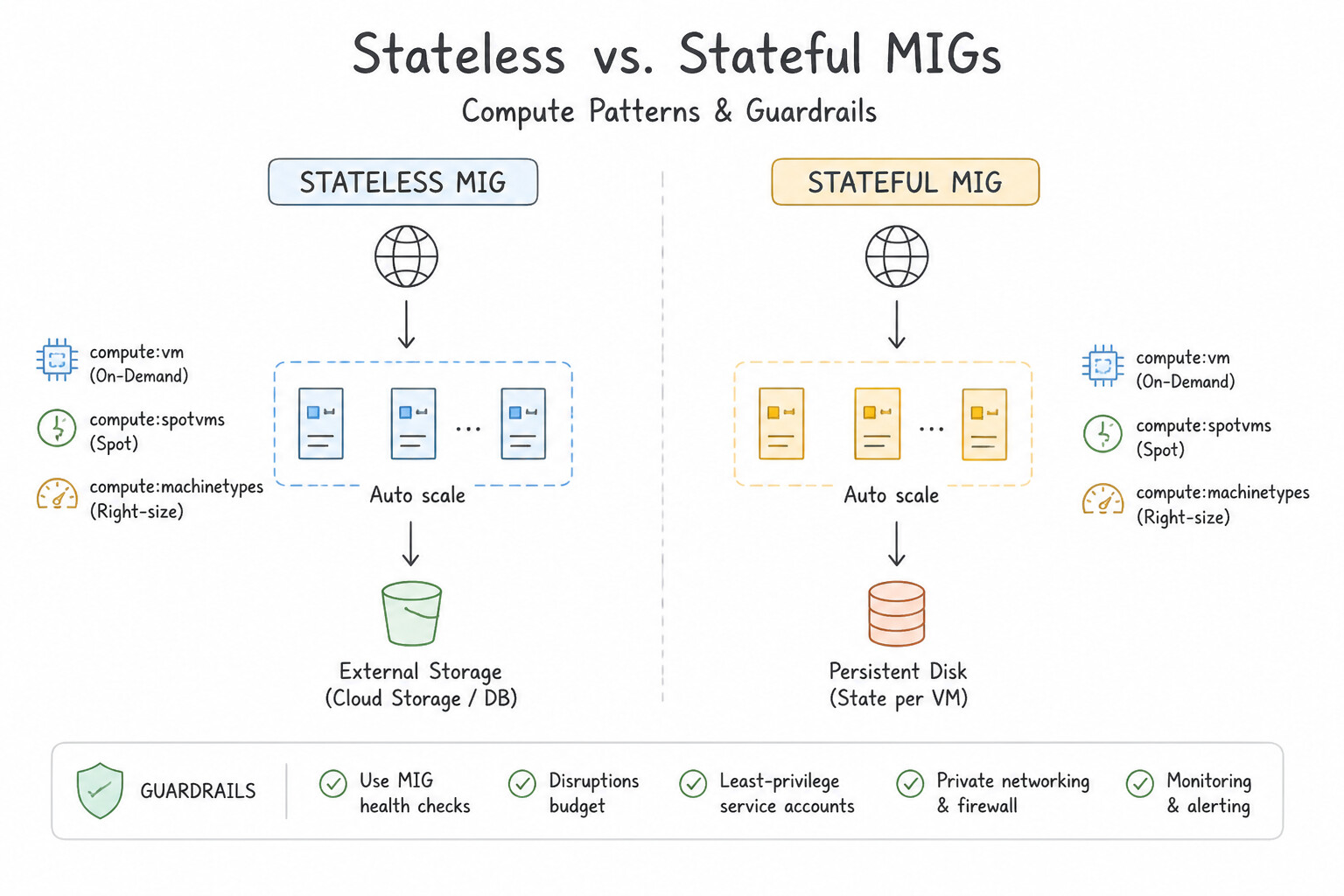
MIGs) & Autoscaling Best Practices: - Stateless vs. Stateful MIGs: Use Stateless MIGs for scalable web/worker tiers; use Stateful MIGs when preserving each instance's unique name, attached Persistent Disks, and internal IP across autohealing/recreation is required (e.g., ZooKeeper, Kafka, or legacy licensed nodes).
- Autoscaling Signals: Scale on CPU utilization, HTTP Load Balancing serving capacity, Cloud Monitoring custom metrics (such as Pub/Sub
num_undelivered_messagesper instance), or Predictive Autoscaling (for recurring daily/weekly traffic waves that have long initialization times). - Initialization / Cool-Down Period: Always set the autoscaler's initialization period to match the time required for the startup script to finish booting so the autoscaler doesn't prematurely read 100% boot CPU and over-scale—or worse, allow the Autohealer health check to kill an instance that is still installing packages!
Key Implementation Patterns
- Cost Optimization for Fault-Tolerant Batch Processing: Use Configure a managed instance group that uses Spot VMs. Spot VMs provide the lowest cost for fault-tolerant, stateless workloads that can withstand interruptions. (Avoid alternative: Standard VMs are more expensive than Spot VMs and are unnecessary for fault-tolerant workloads where cost is the primary driver.)
- Optimizing Resources for Memory-Intensive Workloads: Use Create a VM instance with a custom machine type specifying 2 vCPUs and 60 GB of RAM. Custom machine types let you decouple vCPU and memory counts to fit specific workload needs precisely. (Avoid alternative: Standard machine types force you to pay for extra vCPUs to get the required RAM.)
- Legacy Licensing Compliance (BYOL): Use Use sole-tenant nodes to host the virtual machine (VM) instances. Sole-tenant nodes provide the physical server isolation required for BYOL compliance. (Avoid alternative: Committed use discounts are for billing savings, not hardware isolation.)
Key Takeaways (2.3a)
- Spot VMs offer the lowest compute cost but come with the risk of preemption.
- Use Spot VMs for stateless, fault-tolerant, and batch processing workloads.
- Always design applications on Spot VMs to handle termination signals gracefully.
- Standard VMs or CUDs are better suited for stateful or critical workloads that cannot tolerate interruptions.
Consideration 2.3b: Compute volatility configuration (spot vs. standard)
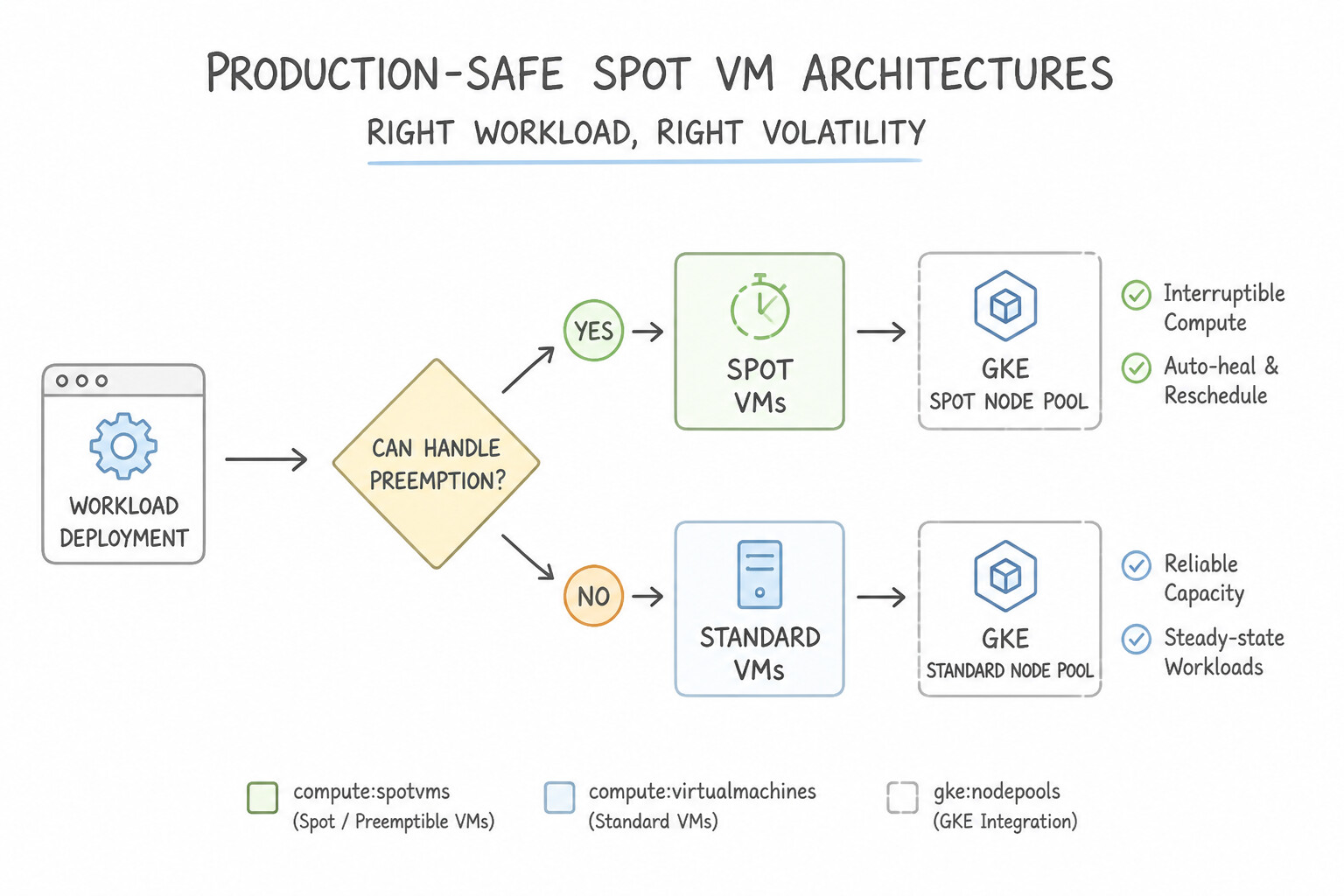
- Rules for Production-Safe
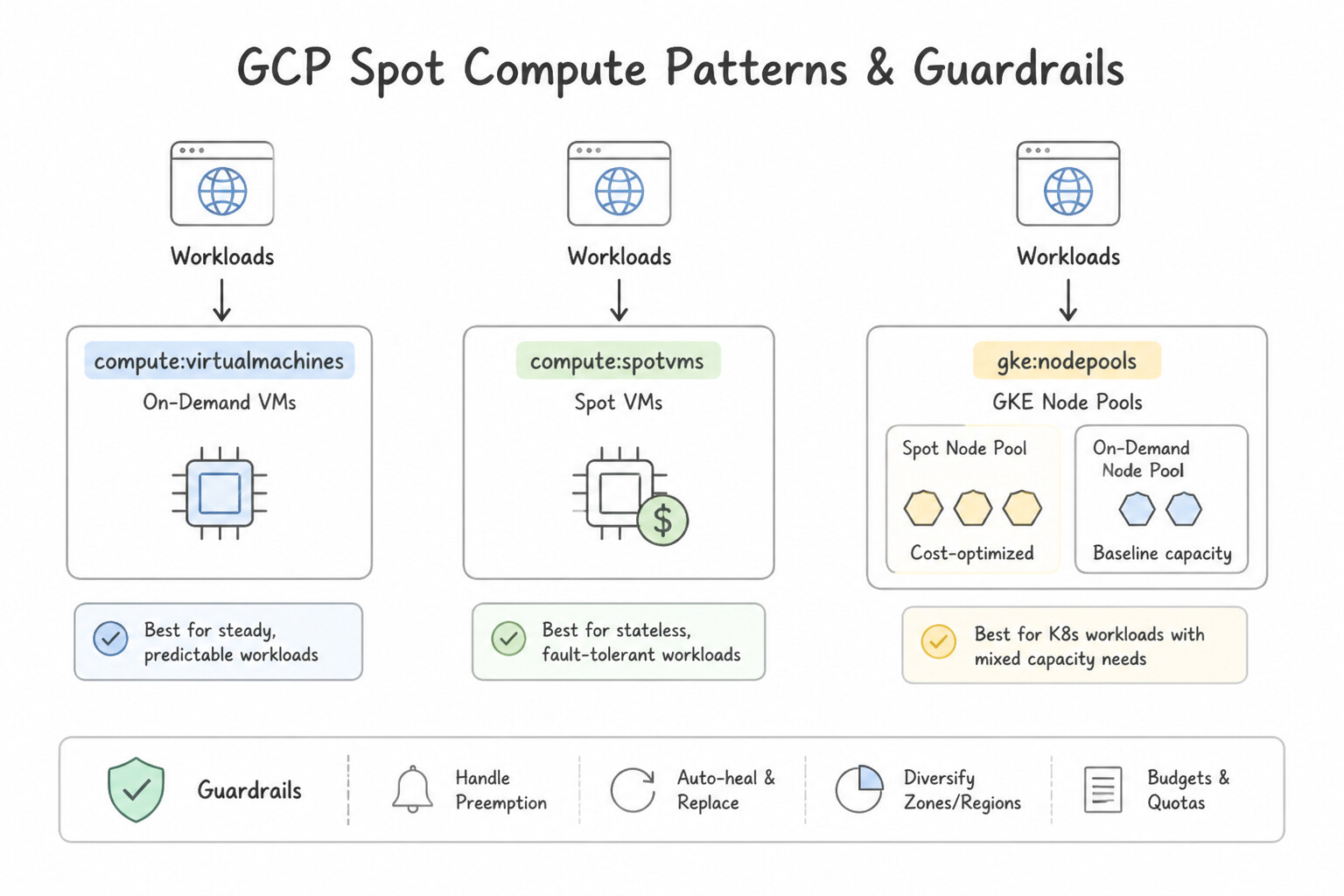
Spot VMArchitectures: - Spot VMs (the modern successor to Preemptible VMs, with no 24-hour max runtime limit) provide 60–91% discounts but can be reclaimed by Compute Engine at any time with a 30-second preemption notice.
- Graceful Shutdown Pattern: Configure a shutdown script triggered by the preemption signal to stop accepting new requests, checkpoint in-flight state to Cloud Storage / Firestore, or re-queue unfinished messages in Pub/Sub.
- Mixed Volatility Fleets:
- In Cloud Dataproc: Always use Standard VMs for Master and Primary Worker nodes (which hold HDFS metadata and data blocks) and Spot VMs exclusively for Secondary Worker nodes (compute-only, zero HDFS storage, so preemption never causes data loss or cluster instability!).
- In GKE: Run critical system workloads (
kube-system, ingress controllers, stateful services) on a Standard node pool, and schedule fault-tolerant batch/worker pods onto a Spot VM node pool using Kubernetes Taints, Tolerations, and Node Affinity.
Key Implementation Patterns
- Batch Processing Cost Optimization: Use Provision Compute Engine instances using Spot VMs. Spot VMs offer the lowest cost for fault-tolerant, stateless workloads that can handle interruptions. (Avoid alternative: Standard VMs are much more expensive than Spot VMs and are unnecessary for fault-tolerant batch jobs.)
- GKE Node Pool Strategy: Use Create a node pool with standard VMs for the frontend and a node pool with Spot VMs for the workers. Use taints and tolerations to schedule workloads. Separating workloads into distinct node pools allows you to use stable VMs for critical services and cost-effective Spot VMs for tolerant services.
Key Takeaways (2.3b)
- Use Spot VMs for stateless, fault-tolerant, batch, or queue-based workloads to save up to 91% on costs.
- Standard VMs are best for stateful applications or workloads that cannot tolerate interruption.
- Sole-tenant nodes are for compliance and isolation, usually at a higher cost.
- Use Standard VMs for stateful or critical workloads that require High Availability (HA).
Consideration 2.3c: Cloud-native network configuration for compute resources
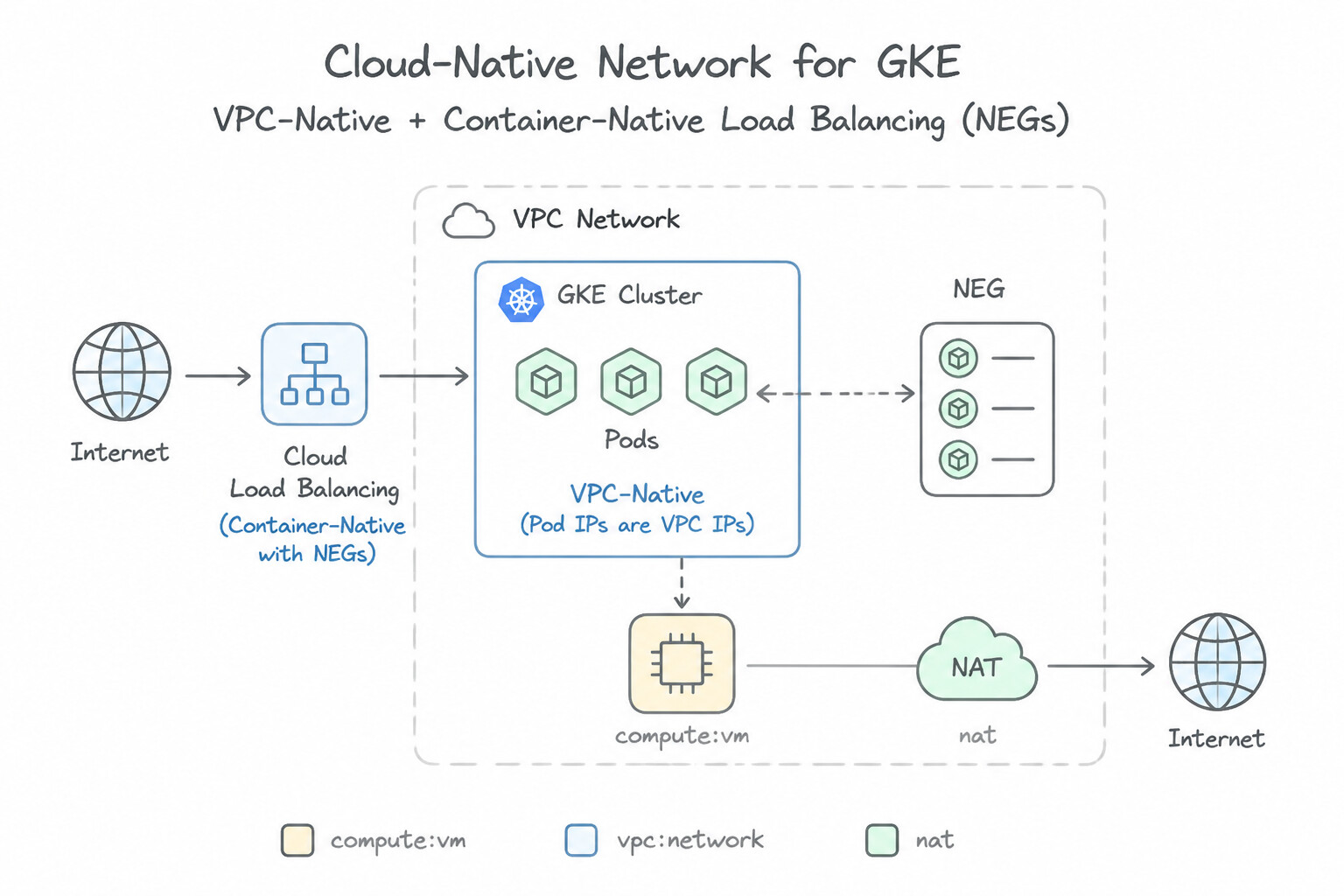
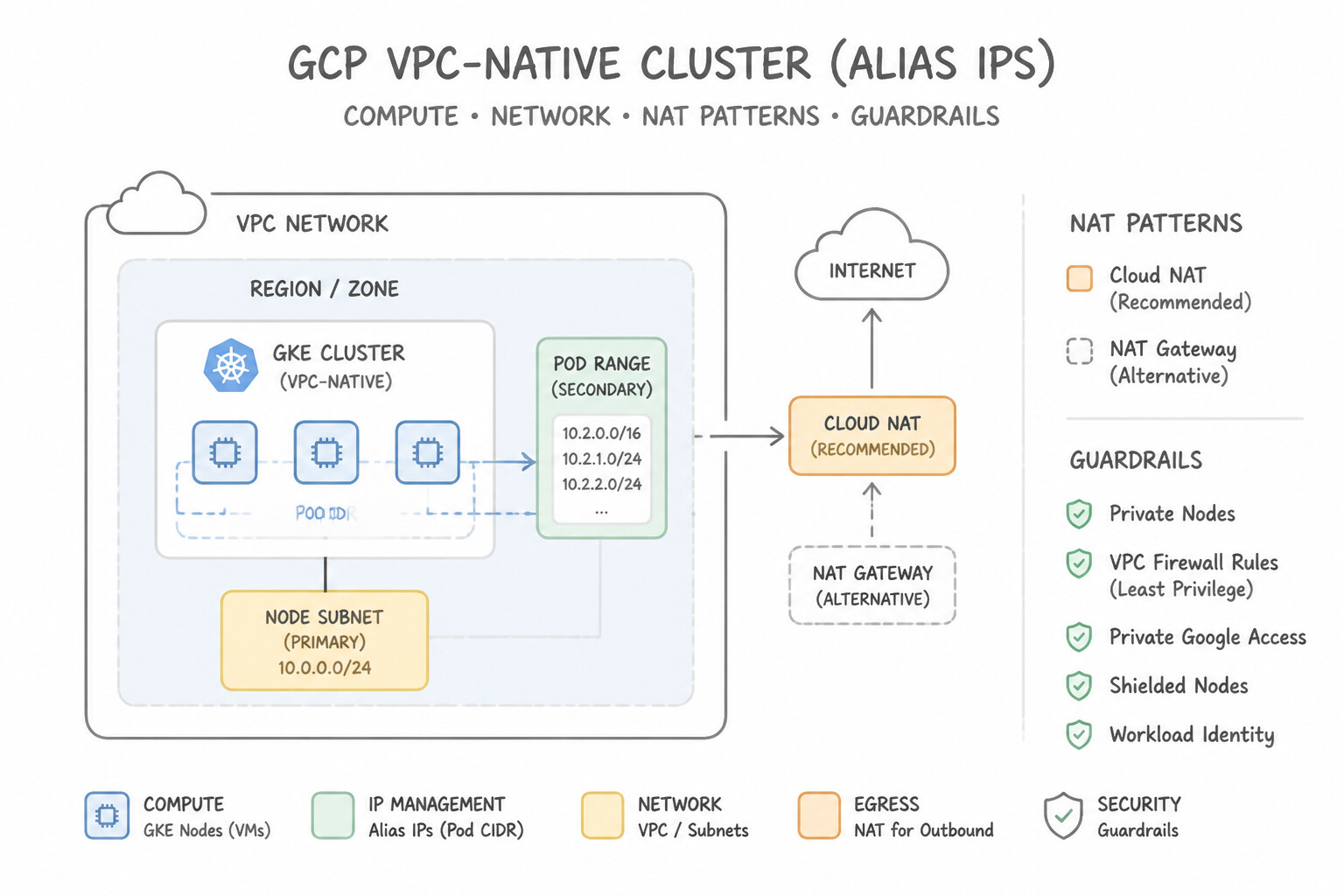
- GKE VPC-Native & Container-Native Load Balancing (
NEGs): - VPC-Native Clusters (
Alias IPs): Assign Pod IPs directly from a secondary subnet IP range in the VPC so Pods are natively routable without overlays or NAT. - Container-Native Load Balancing (
Network Endpoint Groups — NEGs): Annotate Kubernetes Services (cloud.google.com/neg: '{"ingress": true}') so the Google Cloud Application Load Balancer sends traffic directly to individual Pod IPs in theNEG, bypassing the extra node-hop (iptables/kube-proxy), improving latency, preserving client IP visibility, and enabling accurate container-level health checks. - Serverless Private Networking (
Cloud Run/Cloud Run functions): - To allow
Cloud Runto connect to private RFC 1918 resources inside your VPC (such as privateCloud SQL,AlloyDB,Memorystore, or Compute Engine VMs), configure Direct VPC Egress (lower latency, no connector VMs) or a Serverless VPC Access Connector.
Key Implementation Patterns
- Configuring Multi-Interface VMs for Network Segmentation: Use Create the VM with two network interfaces. Select the DMZ VPC for the first interface and the Internal VPC for the second interface during creation. Multi-NIC configurations must be defined during VM creation, and each interface must attach to a distinct VPC network.
- Secure Outbound Connectivity for Patch Management: Use Configure Cloud NAT on a Cloud Router for the subnet used by the VM instances. Cloud NAT enables outbound internet access for private instances without exposing them to inbound connections. (Avoid alternative: The scenario prohibits public IP addresses, making this option invalid despite the use of firewall rules.)
- Enabling Private API Access for Internal VMs: Use Enable Private Google Access on the subnet used by the VMs. Private Google Access allows VMs with only internal IPs to communicate with Google APIs and services. (Avoid alternative: Private Services Access is for peering with managed services like Cloud SQL, not for public APIs like Cloud Storage.)
Key Takeaways (2.3c)
- Compute Engine VMs can have up to 8 network interfaces (depending on vCPU count).
- Every interface on a VM must attach to a different VPC network.
- Network interfaces are immutable; they must be defined during instance creation and cannot be changed later.
- Use Cloud NAT to provide internet access to instances that do not have external IP addresses.
Consideration 2.3d: Infrastructure orchestration, resource configuration, patch management
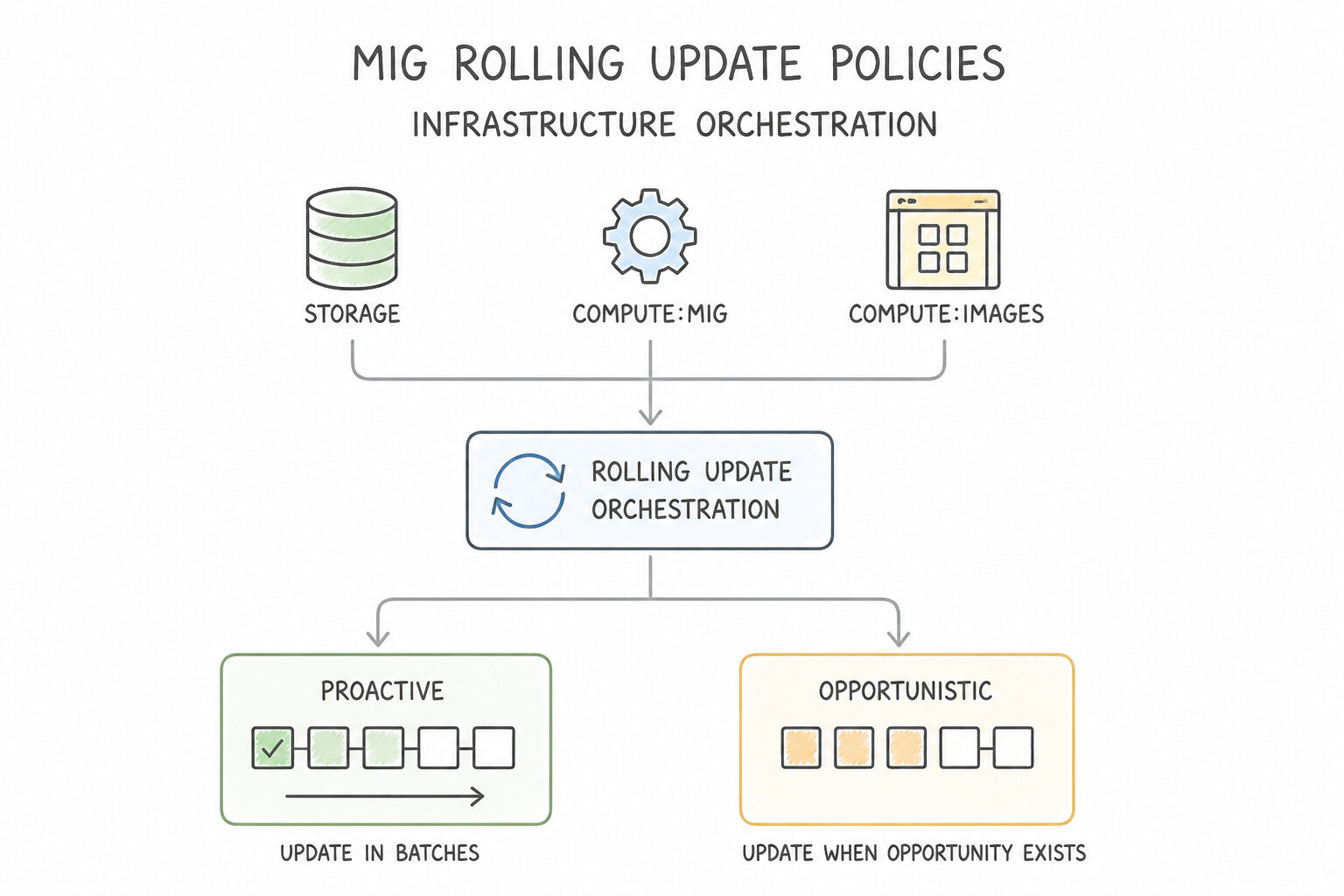
- MIG Rolling Update Policies (
Proactivevs.Opportunistic): - Proactive Update Mode: Immediately begins replacing existing VM instances with the new Instance Template according to
maxSurge(how many extra VMs can be created above target size during the rollout) andmaxUnavailable(how many VMs can be offline simultaneously; setmaxUnavailable = 0for zero-capacity-drop blue/green-style replacement!). Mandatory for urgent zero-day security patches. - Opportunistic Update Mode: Only applies the new Instance Template when new VMs are created by autoscaling or when existing VMs are manually/autohealed recreated. Zero disruption to currently running VMs, ideal for non-urgent updates on fault-tolerant batch fleets.
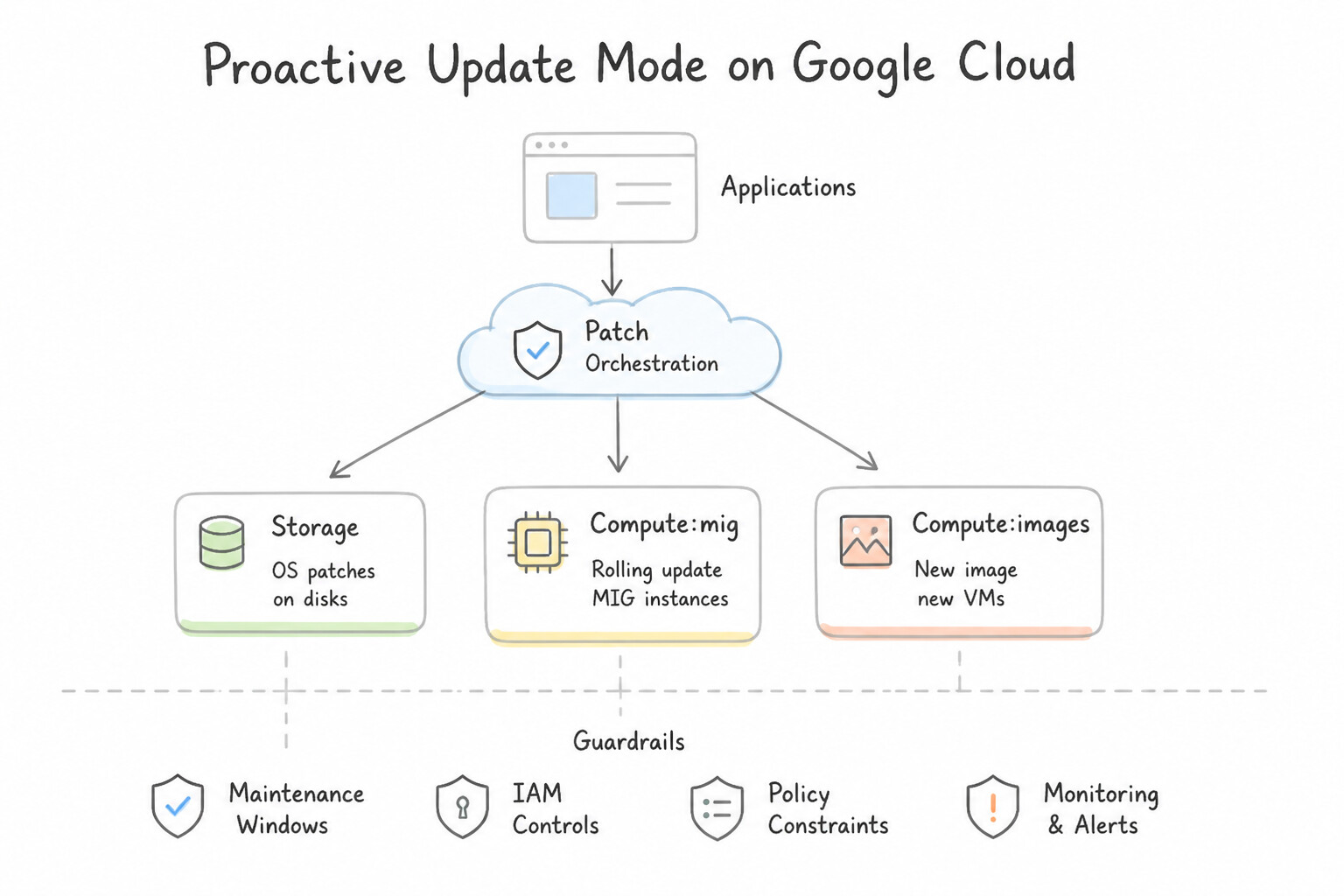
- Fleet-Wide OS Patching: Use VM Manager (
OS Patch Management&OS Config) to orchestrate scheduled, zoned rolling OS patch jobs with pre-/post-patch scripts and compliance reporting across hundreds of Linux and Windows VMs.
Key Implementation Patterns
- Managing Terraform State in Collaborative Environments: Use Configure the Terraform backend to use a Google Cloud Storage (GCS) bucket. The GCS backend provides centralized storage and native state locking, preventing corruption during simultaneous updates. (Avoid alternative: Git does not support state locking and may expose sensitive data stored in the state file.)
- Optimizing MIG Boot Times: Use Create a custom image with the application and dependencies pre-installed, and update the instance template to use this image. Pre-installing the application into a custom image eliminates the time spent downloading and compiling during boot.
- Automated Vulnerability Patching for Large Fleets: Use Enable the OS Config service agent and configure a Patch Deployment job in VM Manager. VM Manager is the native tool for OS-level patch management, offering scheduling, compliance reporting, and automation via the OS Config agent.
Key Takeaways (2.3d)
- Always use a remote backend (like GCS) for Terraform when working in a team.
- The GCS backend supports state locking to prevent corruption from simultaneous writes.
- Do not commit Terraform state files to version control (Git) as they may contain secrets and do not support locking.
- Startup scripts increase boot time because tasks run every time a VM starts.
Consideration 2.3e: Container orchestration
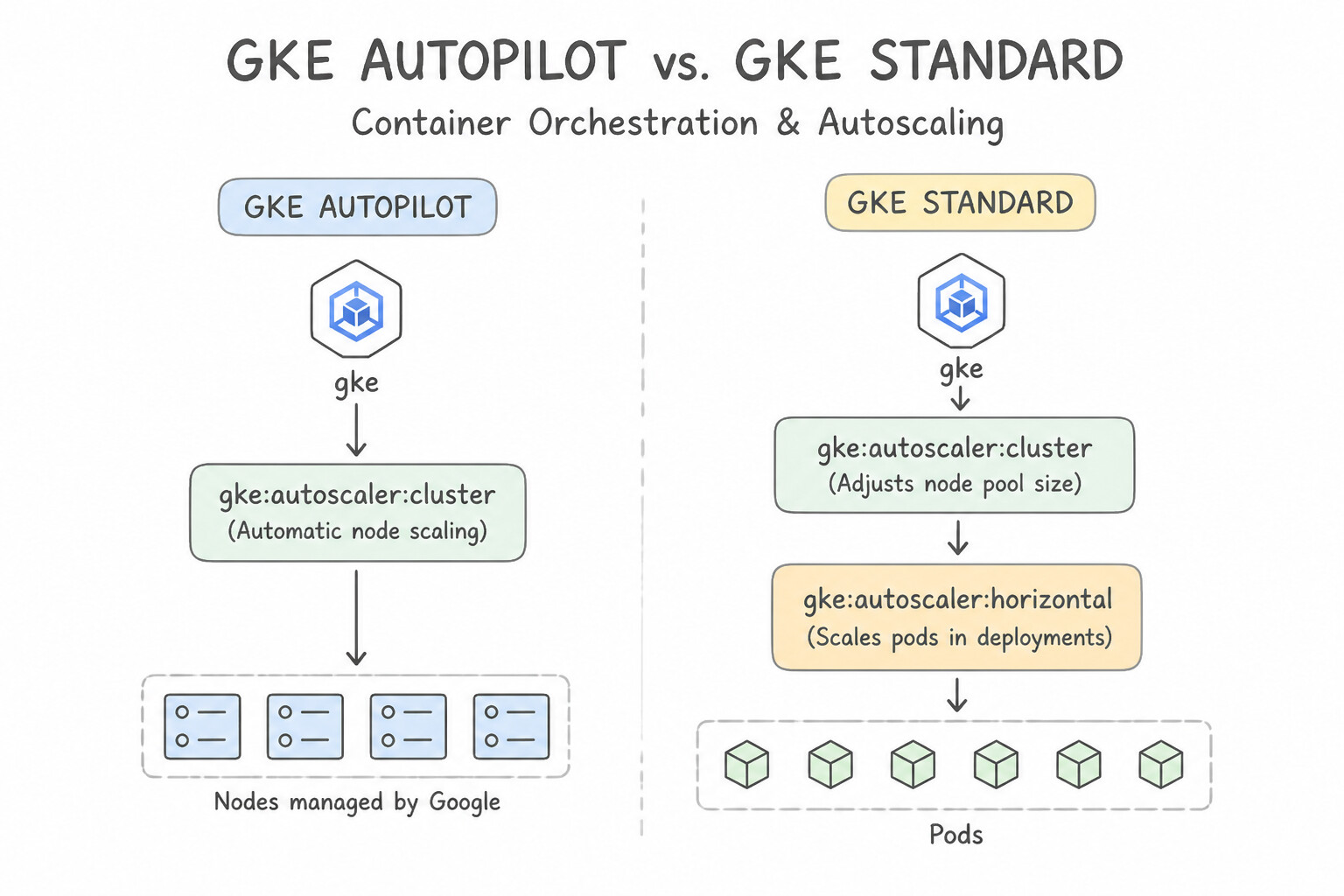
- GKE Autopilot vs. GKE Standard:
- GKE Autopilot: Google provisions, secures, and scales the underlying nodes automatically; you pay only for the vCPU, memory, and ephemeral storage requested by your running Pods. Enforces security best practices out of the box.
- GKE Standard: You manage node pools and pay for the underlying Compute Engine VMs. Required only when workloads need custom node OS configurations, privileged containers, or specialized host-level access.
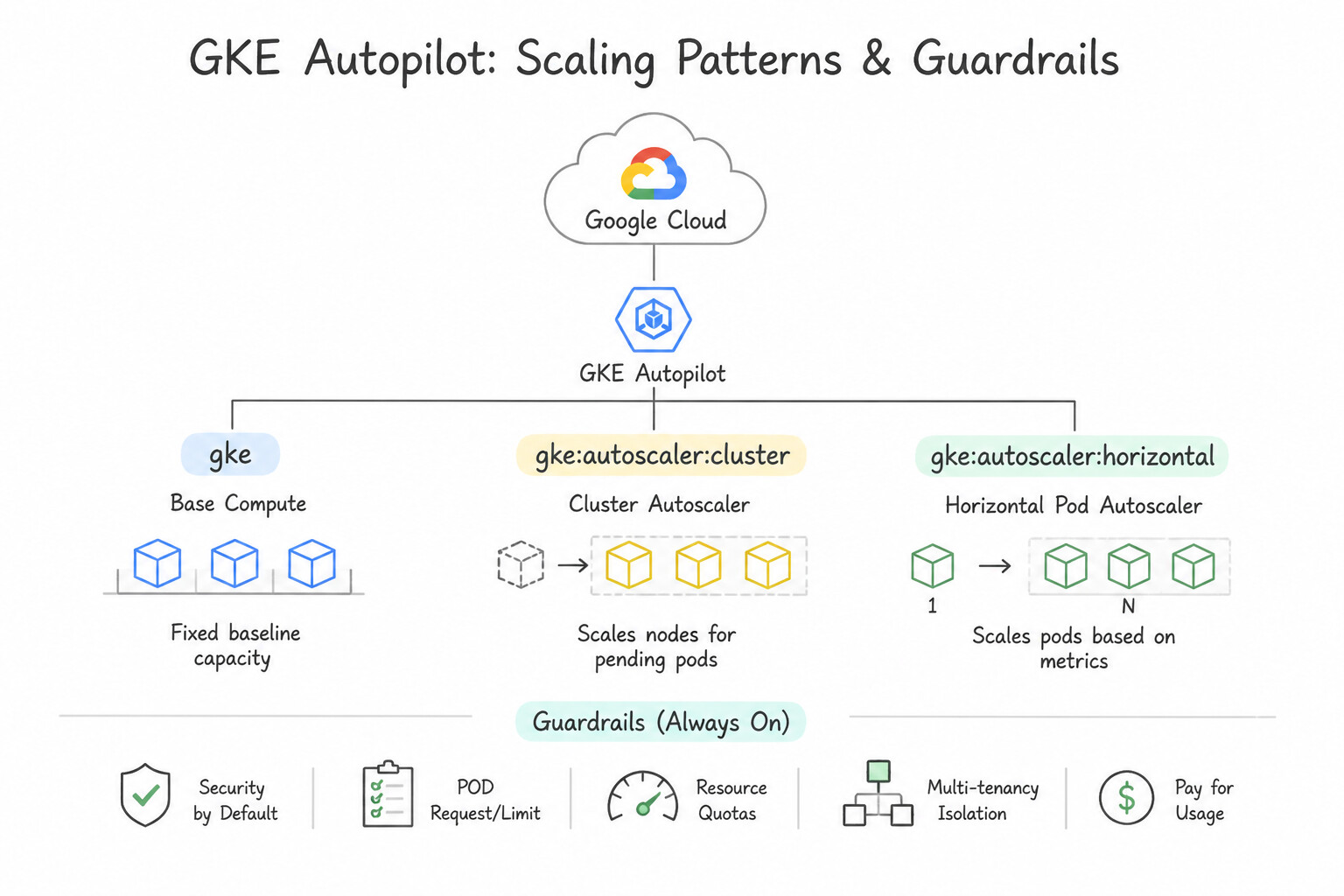
- 3-Dimensional GKE Scaling:
- Horizontal Pod Autoscaler (
HPA): Adds/removes Pod replicas based on CPU, memory, or custom metrics. - Vertical Pod Autoscaler (
VPA): Right-sizes Pod CPU/memoryrequestsandlimits. - Cluster Autoscaler & Node Auto-Provisioning (
NAP): Automatically adds/removes nodes (and creates new optimized node pools with GPUs/Spot VMs viaNAP) when Pods arePendingdue to insufficient cluster capacity.
Key Implementation Patterns
- Optimizing Cluster Costs with Autoscaling: Use Enable the Cluster Autoscaler on the GKE node pool. The Cluster Autoscaler automatically removes underutilized nodes, directly reducing infrastructure costs. (Avoid alternative: HPA scales pods, not nodes. It will not remove the underutilized virtual machines.)
- Ensuring Trusted Images with Binary Authorization: Use Enable Binary Authorization on the GKE cluster. Configure a policy that requires an attestation signed by the CI/CD pipeline's key before allowing deployment. Binary Authorization is a service specifically designed to enforce deploy-time security by requiring images to be signed (attested) by trusted authorities.
- Securing API Access with Workload Identity: Use Configure Workload Identity. Create a Kubernetes Service Account annotated to masquerade as a Google Service Account with the required permissions. Assign this account to the Pod. Workload Identity securely maps a Kubernetes Service Account to a Google Service Account without using static keys.
Key Takeaways (2.3e)
- HPA scales applications (pods); Cluster Autoscaler scales infrastructure (nodes).
- To save money on GKE, you must scale down nodes, not just pods.
- Never manually delete GKE nodes; use the autoscaler to ensure workloads are drained safely.
- Binary Authorization is the standard Google Cloud tool for enforcing deploy-time security policies on GKE.
Consideration 2.3f: Serverless computing
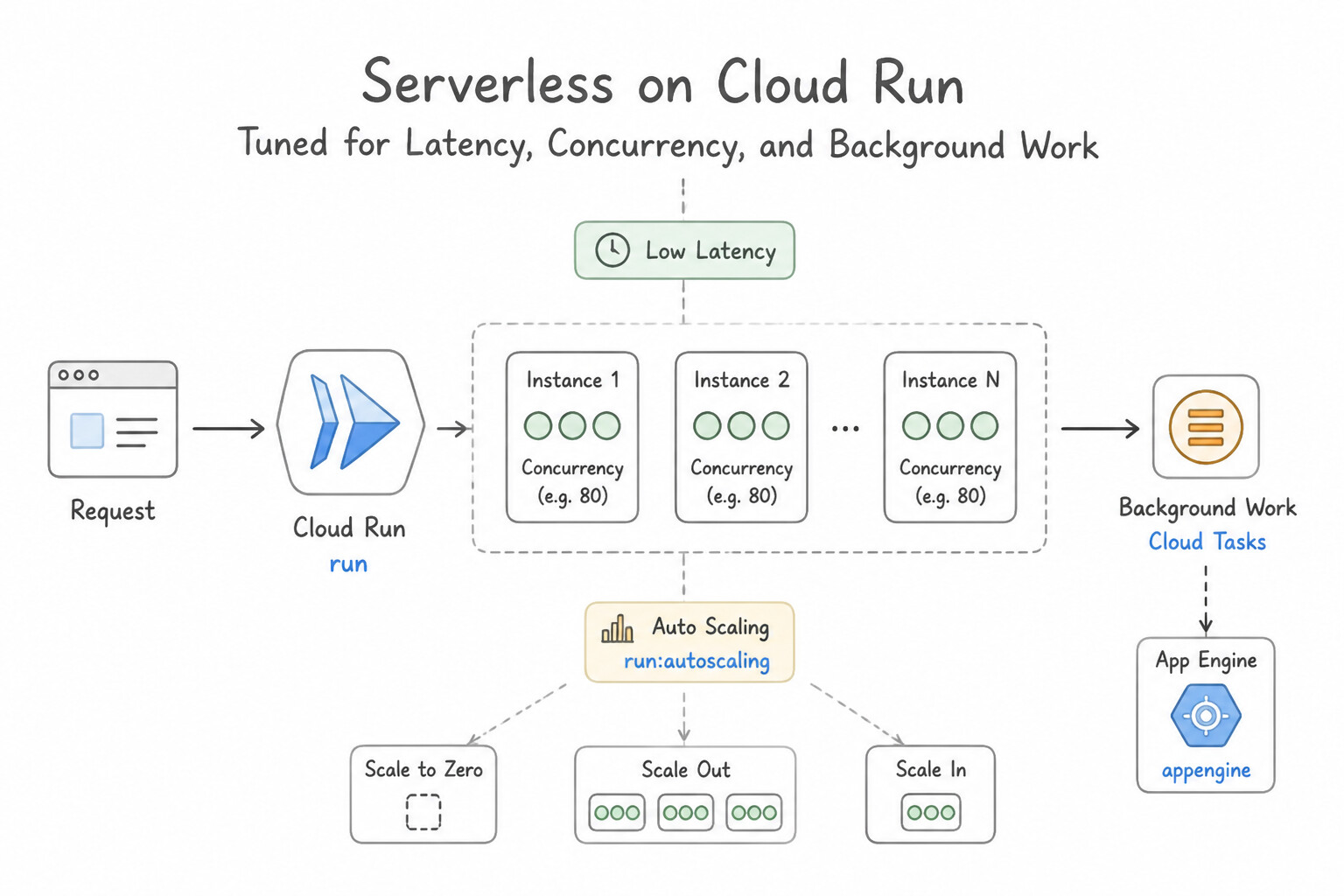
- Tuning Cloud Run for Latency, Concurrency, and Background Work:
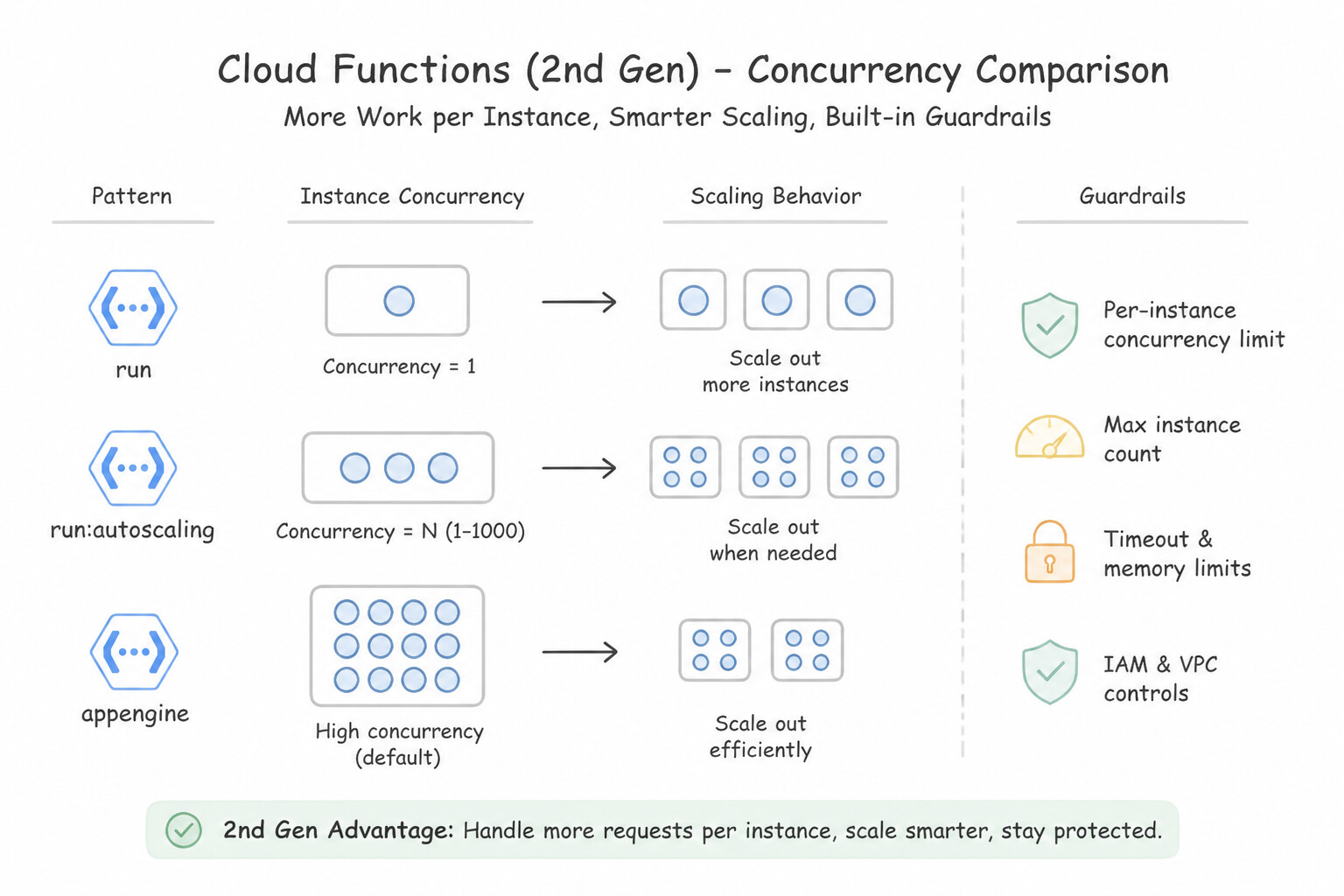
- Concurrency: Unlike legacy 1st-gen functions (1 request per instance), a single Cloud Run container (and 2nd-gen Cloud Run function) can handle up to 1,000 concurrent requests (default 80), dramatically reducing cold starts and compute cost for I/O-bound APIs. (Set
concurrency = 1if each request is heavy CPU-bound or not thread-safe). - Cold Start Elimination: Set
min-instances >= 1to keep warm container instances ready for latency-sensitive production APIs. - CPU Allocation Lifecycle: By default, CPU is throttled to near-zero outside an active HTTP request (
CPU only allocated during request processing). If your container spawns background threads after returning an HTTP 200 response, you must enableCPU is always allocated(Instance-based billing)—or better yet, decouple background work via Cloud Tasks / Pub/Sub or Cloud Run Jobs!
Key Implementation Patterns
- Mitigating Cold Starts in Cloud Run: Use Configure the service with a minimum number of instances. Setting min-instances keeps at least one instance warm, preventing cold starts. (Avoid alternative: Max instances controls the upper scaling limit, not the lower limit during inactivity.)
- Canary Deployment in App Engine: Use Deploy the new version with the
--no-promoteflag. Use the Google Cloud console to configure traffic splitting. Deploying with--no-promoteprevents immediate switchover, allowing you to manually configure a 10% traffic split. (Avoid alternative: The--promoteflag sends 100% of traffic to the new version immediately.) - Private Database Access from Cloud Functions: Use Configure a Serverless VPC Access connector in the VPC and attach it to the Cloud Function. A Serverless VPC Access connector bridges the external serverless environment with your internal VPC network. (Avoid alternative: IAM roles handle permissions, not network connectivity to private IP addresses.)
Key Takeaways (2.3f)
- Serverless platforms like Cloud Run scale to zero to optimize costs when idle.
- The process of starting an instance from zero is called a 'cold start' and adds latency.
- Use the
min-instancesconfiguration to keep instances warm for latency-sensitive applications.max-instancesis used to control costs and limit resource usage, not to prevent cold starts.
Quick Decision Cheat Sheet (Subsection 2.3)
If the Scenario Requires... | Choose This Google Cloud Pattern | Avoid This Common Mistake |
|---|---|---|
"Urgent security patch on a MIG; must roll out immediately to all running VMs" | Proactive rolling update policy | Opportunistic rolling update policy (waits until natural scale/recreate events) |
"Batch MIG update can wait until instances are naturally recycled to avoid interrupting current jobs" | Opportunistic rolling update policy | Proactive rolling update policy |
"Worker MIG pulling from Pub/Sub is not scaling up even though the queue has 500,000 backlogged messages" | Change autoscaling metric from CPU utilization to Cloud Monitoring pubsub/subscription/num_undelivered_messages | Lowering the CPU target threshold to 10% |
"Team wants Kubernetes API compatibility with zero node management overhead and pod-level billing" | GKE Autopilot | GKE Standard with manual node pools or Compute Engine VMs |
"Cloud Run background thread stops executing immediately after returning HTTP 200 to the client" | Enable CPU is always allocated on Cloud Run (or offload the task to Cloud Tasks / Pub/Sub) | Increasing container memory limit while keeping request-only CPU allocation |
Further Reading (Subsection 2.3)
- Spot VMs — Documentation describing Spot VMs, their pricing benefits, and suitable use cases such as batch jobs and fault-tolerant workloads.
- Creating a VM instance with a custom machine type — Documentation explaining how to configure custom vCPU and memory values for a VM instance to fit specific workload needs.
- Machine families resource and comparison guide — Provides details on available machine families and the concept of extended memory for custom machine types.
- Sole-tenant nodes overview — Provides a comprehensive overview of sole-tenant nodes, explaining how they offer exclusive access to physical servers for BYOL and compliance scenarios.
- Bring your own license (BYOL) — Details how to use sole-tenant nodes to utilize existing per-socket or per-core licenses on Google Cloud.
- Spot VMs in GKE — Documentation explaining how Spot VMs work within GKE node pools and best practices for using them with fault-tolerant workloads.
Book TOC · Previous · Chapter 2 of 8 · Next
AwesomeGCP.com Learning
The approach taken is a question-led learning approach: you explore realistic project scenarios where you need to make decisions or take actions to achieve business goals within specific constraints. Instead of passive learning, you are challenged to think and work through the options to master the Professional Cloud Architect (PCA) certification!