Book TOC · Previous · Chapter 1 of 8 · Next
Chapter 1: Architecting for Business & Technical Requirements, Migration Planning & Evolution
Chapter Focus: Business use cases, TCO/CapEx/OpEx, SLA/SLO/RPO/RTO design, High Availability vs. DR, 4-phase Cloud Migration plans, and Cloud-First architectural evolution.
Subsection 1.1: Designing a cloud solution infrastructure that meets business requirements
The Big Picture
In Google Cloud architectures, the most dangerous trap is choosing the technically fanciest architecture when the business scenario demands speed to market, strict regulatory sovereignty, or capital preservation. A startup with three developers and a two-week MVP deadline does not need a multi-cluster GKE Enterprise mesh with Cloud Spanner; they need Cloud Run and Firestore so 100% of engineering velocity goes into product differentiation. Conversely, a multinational European bank cannot deploy customer PII to a global multi-region bucket without deterministic Organization Policy (constraints/gcp.resourceLocations) guardrails, no matter how fast the global CDN performs.
In Subsection 1.1, your job as a Principal Architect is to act as the translator between the boardroom and the control plane—converting qualitative business goals into quantitative architectural constraints (RPO, RTO, SLOs, TCO/ROI), selecting the right workload disposition strategy (build, buy, modify, or deprecate), and designing external integration and data movement pipelines that respect both financial reality and compliance boundaries.
Consideration 1.1a: Business use cases and product strategy
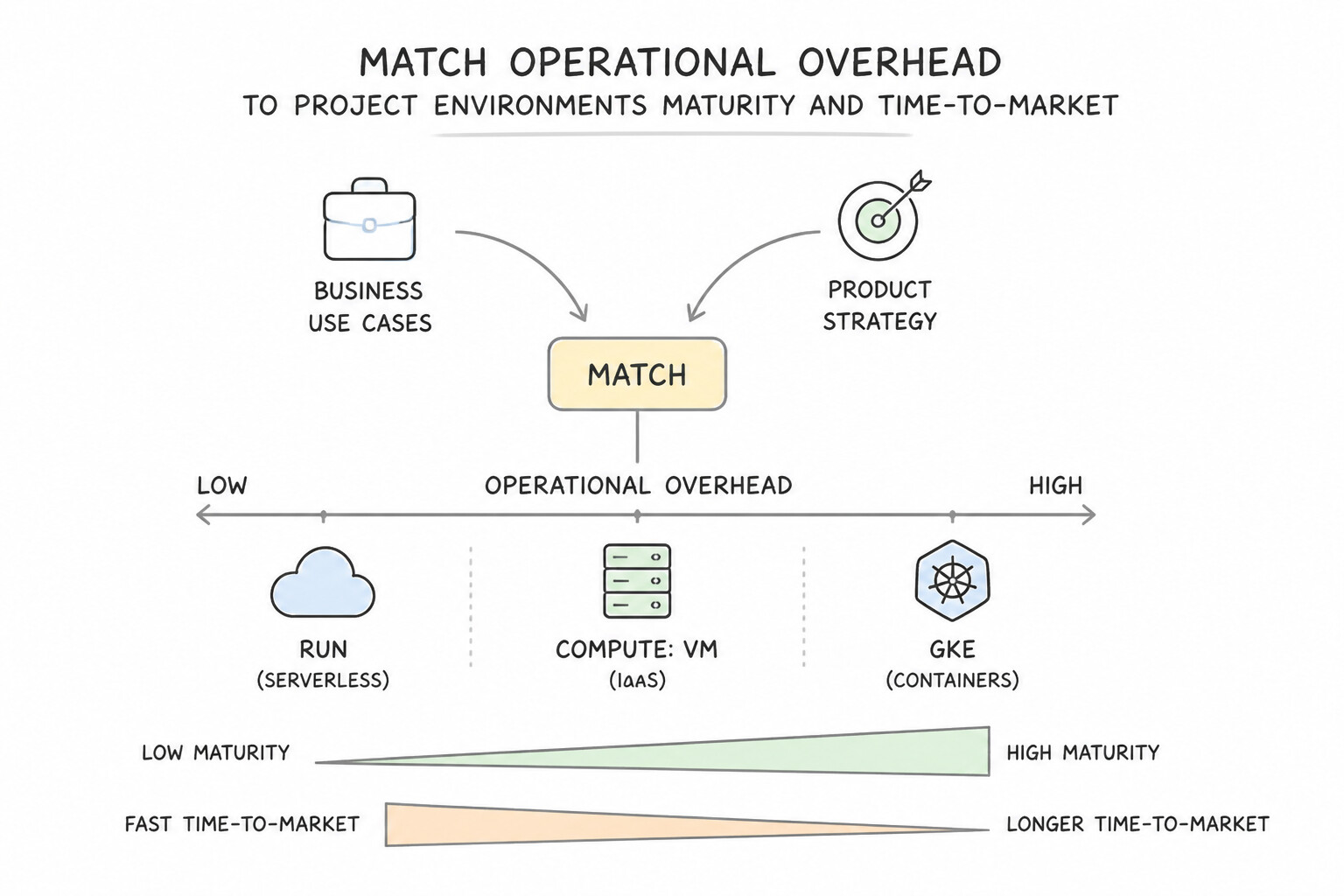
- Match Operational Overhead to Team Maturity & Time-to-Market: When a startup or small engineering team needs to launch an MVP rapidly with minimal operations staff, always choose fully managed serverless platforms (
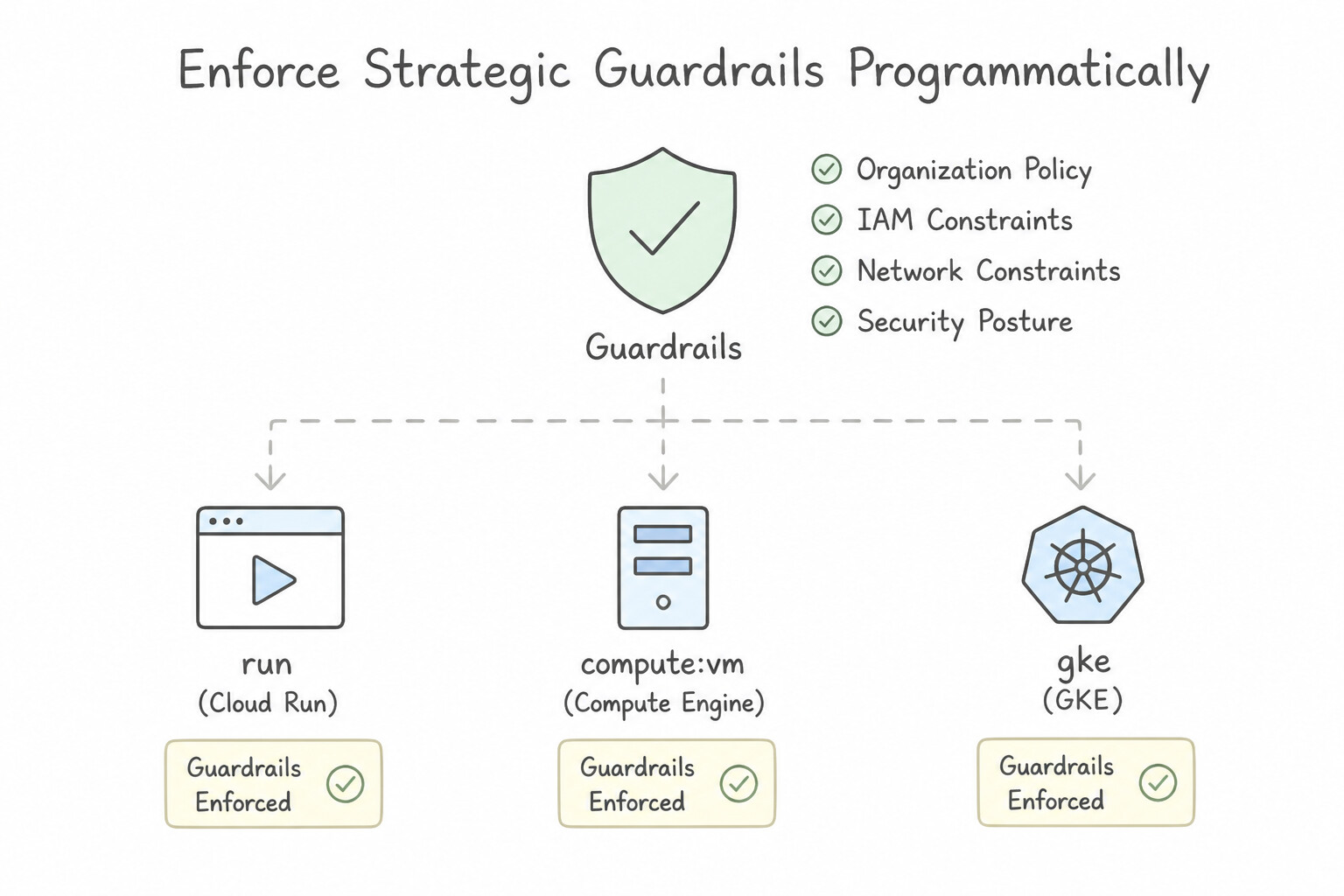
Cloud Run,Firestore,BigQuery) overGKE StandardorCompute Engine. - Enforce Strategic Guardrails Programmatically: When a product strategy expands into regulated regions (e.g., European Union banking), enforce geographic boundaries at the root using Organization Policy
constraints/gcp.resourceLocationsrather than relying on manual code reviews. - Align Pricing Models with Workload Predictability: Pair spiky, unpredictable new product launches with consumption-based pay-as-you-go serverless (
Cloud Run,BigQuery on-demand), and transition steady-state baseline capacity to Committed Use Discounts (CUDs) once product demand stabilizes.
Key Implementation Patterns
- Optimizing for Time-to-Market for a Startup: Use Containerize the application and deploy the service to Cloud Run. Cloud Run removes infrastructure management tasks, allowing the team to focus solely on the application code for a fast launch. (Avoid alternative: Compute Engine requires manual OS management and scaling configuration, which slows down deployment and requires operations expertise.)
- Global Compliance and Data Residency: Use Configure an Organization Policy with the Resource Location Restriction constraint. Set the policy to allow only the specific European Union regions. Organization Policies provide central control to restrict resource locations to specific regions for compliance.
Key Takeaways (1.1a)
- Serverless services like Cloud Run minimize operational overhead by removing the need to manage servers or clusters.
- For startups or teams with limited ops experience, prioritize managed services to accelerate time-to-market.
- Avoid IaaS (Compute Engine) unless you specifically need control over the operating system or kernel.
- Organization Policies are used for governance and preventive guardrails, such as restricting valid resource locations.
Consideration 1.1b: Identifying functional and non-functional requirements
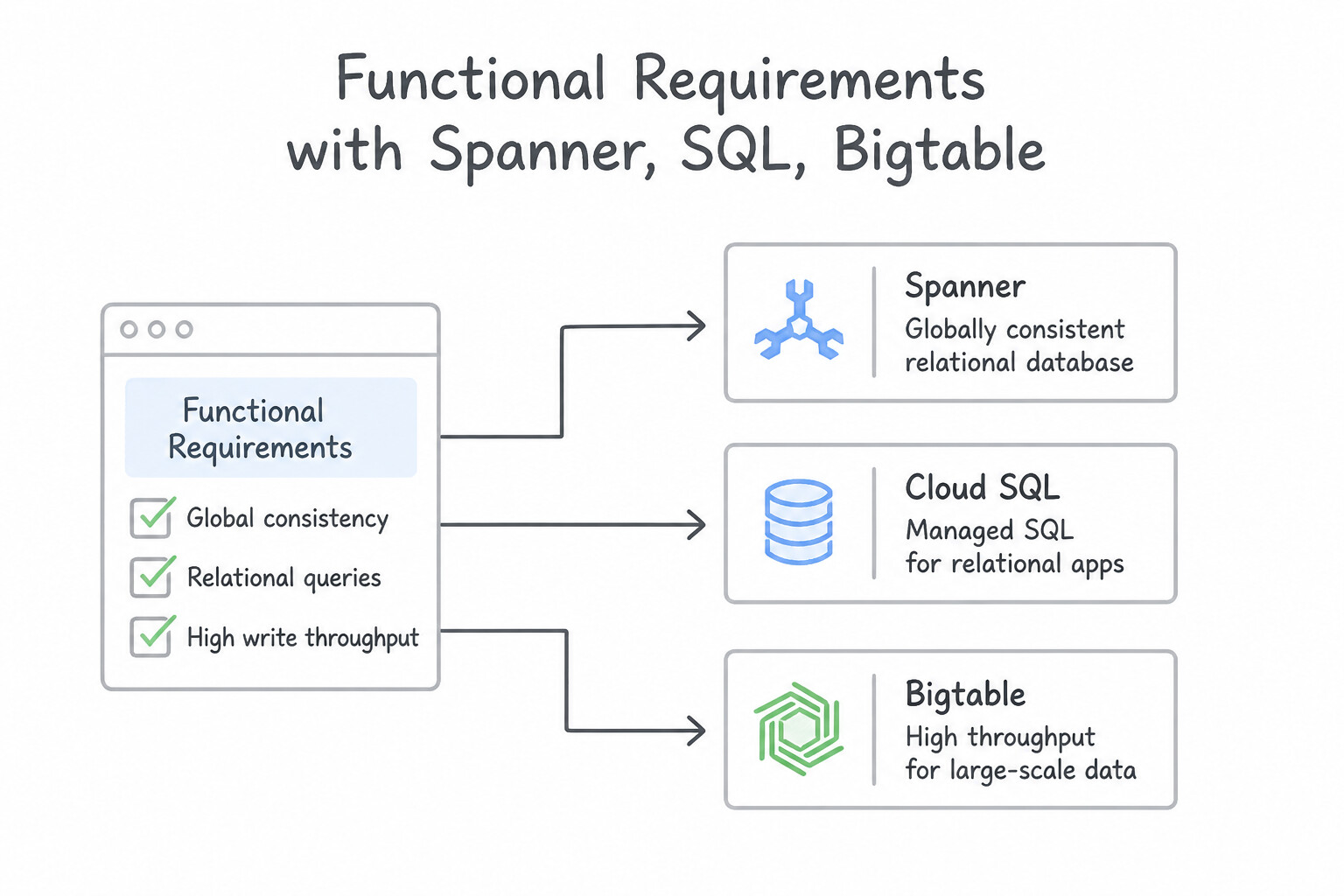
- Separate What the System Does (Functional) from How It Performs Under Stress (Non-Functional):
- Functional Requirements dictate business logic and API behaviors (e.g., "process credit card payments", "generate PDF invoices").
- Non-Functional Requirements (NFRs) dictate the architectural topology: availability ($99.99\%), *latency* (@@CODE0@@ < 50 ms), throughput ($100\text{k events/sec}$), durability, and regulatory compliance.
- Map NFR Signals to Google Cloud Primitives:
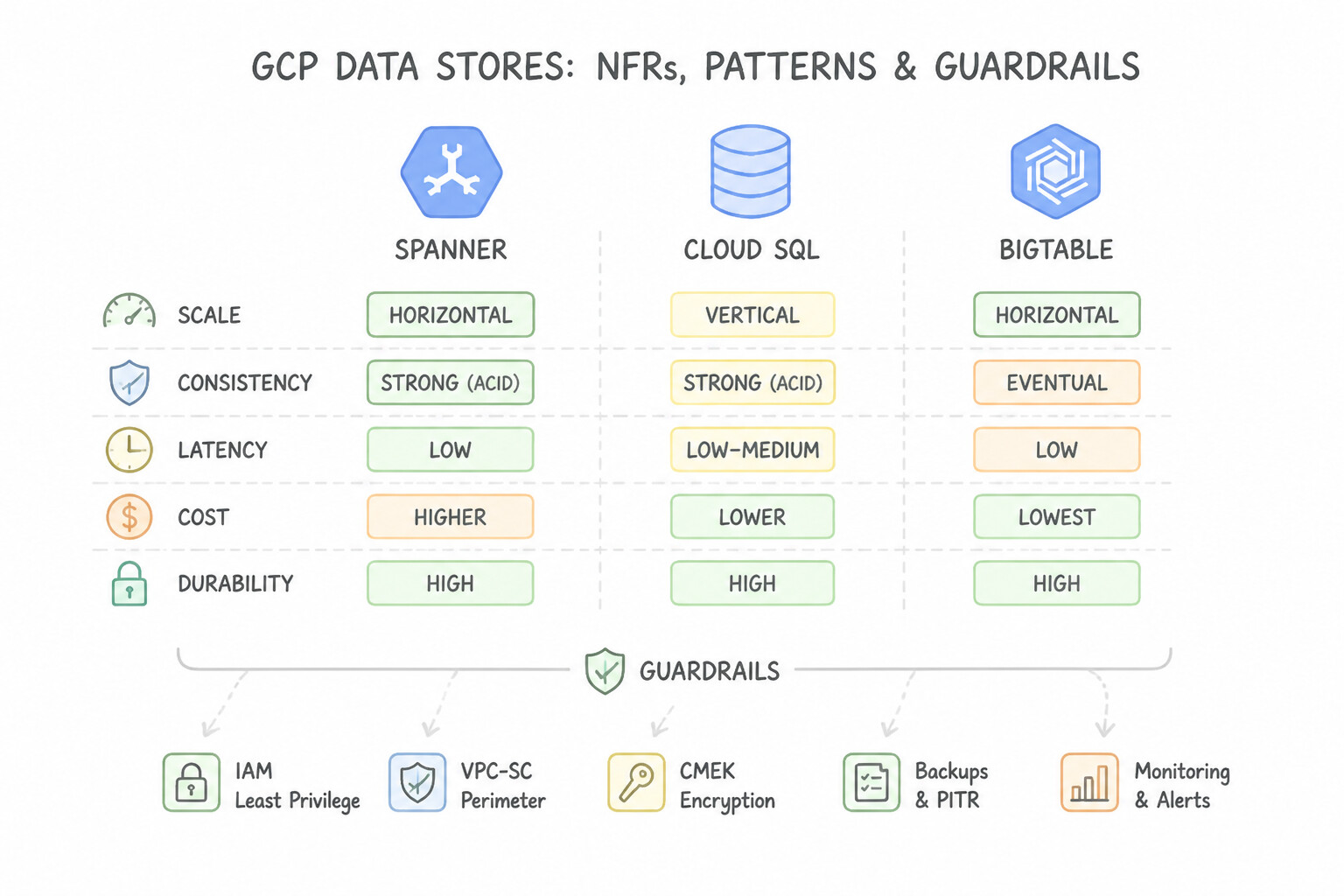
- "Global users + strong relational consistency + $99.999\%$ availability" → Cloud Spanner multi-region.
- "Sudden $10\times$ traffic spikes + zero pre-warming delay" → Global External Application Load Balancer + Cloud CDN + Cloud Run (with
min-instances) or GKE with horizontal pod autoscaling.
Key Implementation Patterns
- Global Data Consistency vs. Latency: Use Use Cloud Spanner with a multi-region configuration. Cloud Spanner provides global strong consistency and horizontal scalability, making it ideal for global financial applications. (Avoid alternative: Cloud SQL is regional and uses asynchronous replication for cross-region read replicas, which does not provide global strong consistency.)
- Data Sovereignty and Compliance: Use Configure the Organization Policy Service to enforce the Resource Location Restriction constraint on the project folders. Organization Policies provide a preventative guardrail to restrict resource creation to specific physical locations.
- Cost Optimization for Fault-Tolerant Workloads: Use Provision Spot virtual machine (VM) instances. Spot VMs offer significant cost savings for fault-tolerant workloads that can handle interruptions. (Avoid alternative: Standard VMs are more expensive and provide availability guarantees that this fault-tolerant workload does not strictly require.)
Key Takeaways (1.1b)
- Cloud Spanner is the go-to solution for applications requiring global scale, high availability (HA), and strong consistency (ACID).
- Cloud SQL is best for regional relational workloads.
- Cloud Bigtable is ideal for high-throughput heavy writes and reads where eventual consistency is acceptable.
- Always look for requirements mentioning 'financial transactions' or 'global consistency' as strong indicators for Cloud Spanner.
Consideration 1.1c: Business continuity plan
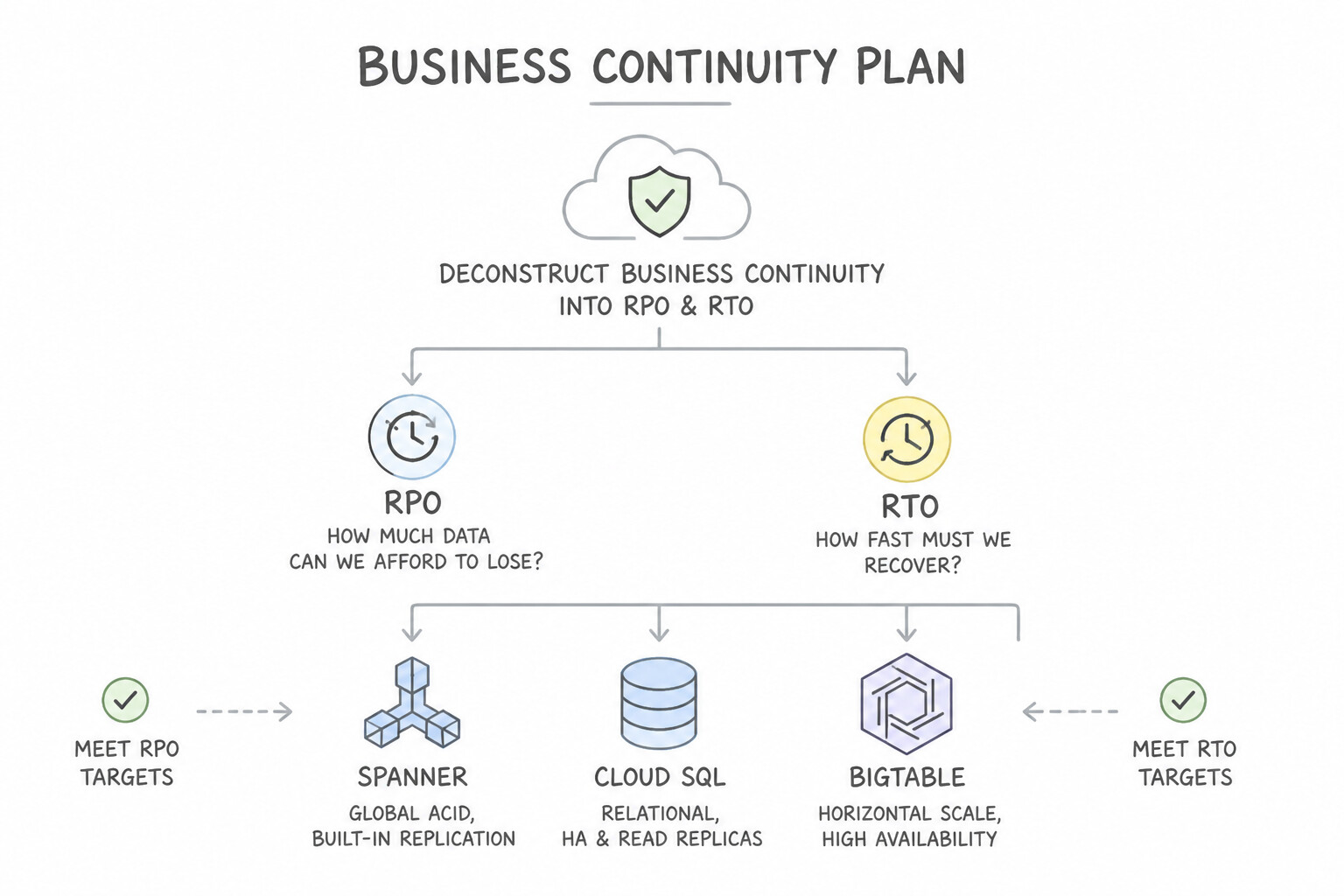
- Deconstruct Business Continuity into
RPOandRTO: - Recovery Point Objective (
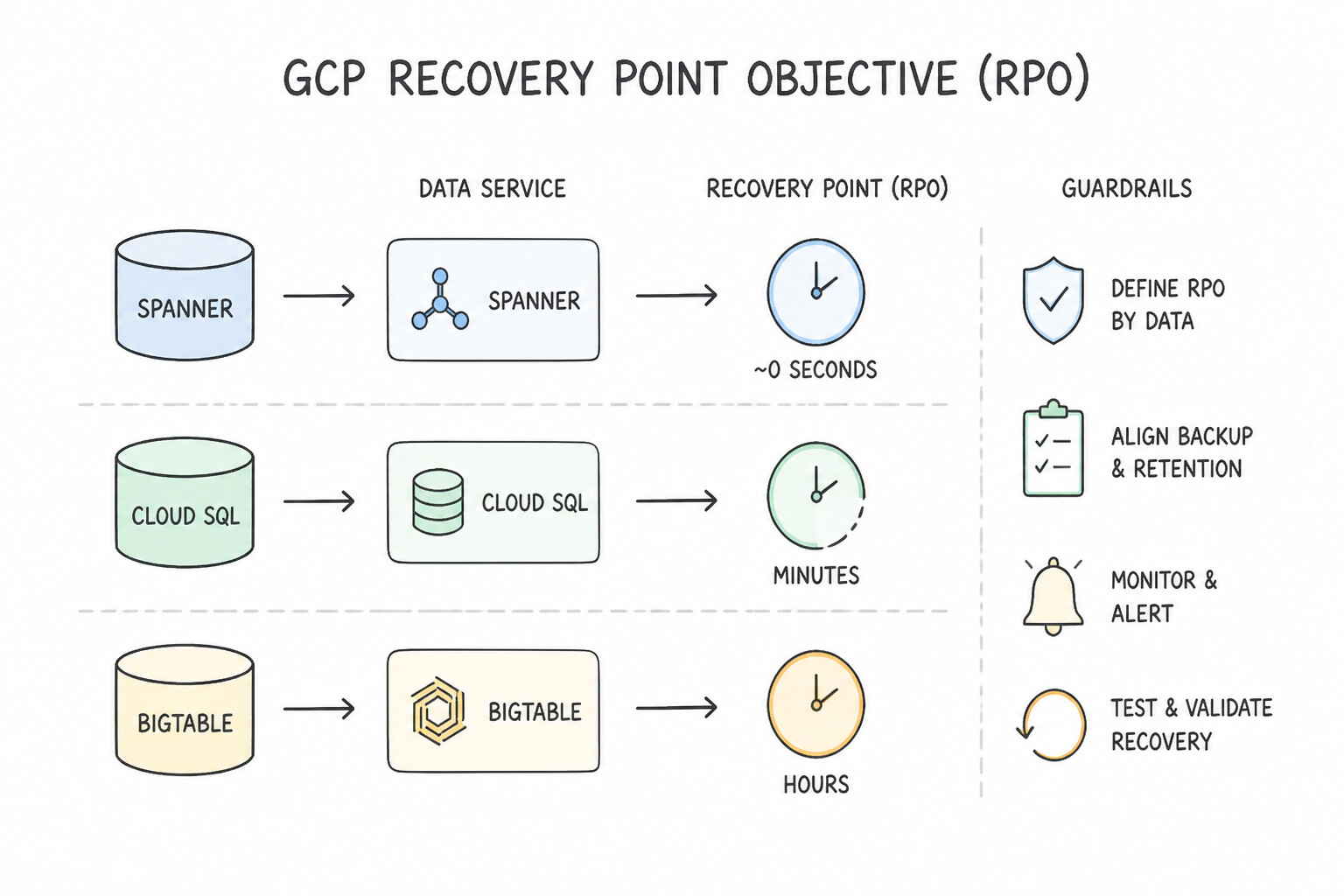
RPO): Maximum acceptable age of lost data (time looking backward). Driven by replication and backup frequency (synchronous replication = $0\text{ RPO}; asynchronous cross-region replica = seconds RPO; nightly snapshot = @@ESCAPEDDOLLAR@@24-hour RPO). - Recovery Time Objective (
RTO): Maximum acceptable duration of service downtime (time looking forward). Driven by compute standby readiness and DNS/load-balancer failover automation (Active-Active = near-$0\text{ RTO}$; Warm Standby = minutes RTO; Cold Backup & Restore = hours RTO). - Avoid Over-Engineering Non-Critical Tiers: Classify workloads into tiers (Tier 1 Mission-Critical vs. Tier 3 Internal Reporting) so you don't pay for multi-region active-active Spanner on an internal analytics tool that can tolerate a 12-hour RTO.
Key Implementation Patterns
- Global Strong Consistency for Financial Transactions: Use Provision a Cloud Spanner instance using a multi-region configuration. Cloud Spanner multi-region configurations offer the required 99.999% availability and global strong consistency. (Avoid alternative: Cloud SQL is a regional service with a lower SLA (99.99%) compared to the requirement.)
- Stateful Legacy Application Zonal Failure Protection: Use Use a Regional Persistent Disk. If the primary zone fails, force-attach the disk to a standby virtual machine (VM) instance in a different zone. Regional Persistent Disks synchronously replicate data to two zones, allowing quick fail over without data loss.
- Cost-Effective Compliance Archiving: Use Create a Dual-region bucket. Set the storage class to Archive. Dual-region ensures availability during a region failure, and Archive is the cheapest class for long-term retention. (Avoid alternative: Regional buckets do not provide availability if the specific region fails.)
Key Takeaways (1.1c)
- Cloud Spanner is the choice for global relational data requiring strong consistency and 99.999% availability.
- Cloud SQL is primarily a regional service; cross-region replicas are eventually consistent.
- Financial applications (ledgers) typically demand ACID transactions and strong consistency to ensure data accuracy.
- Stateful applications running on a single VM rely on the disk for data persistence.
Consideration 1.1d: Cost optimization
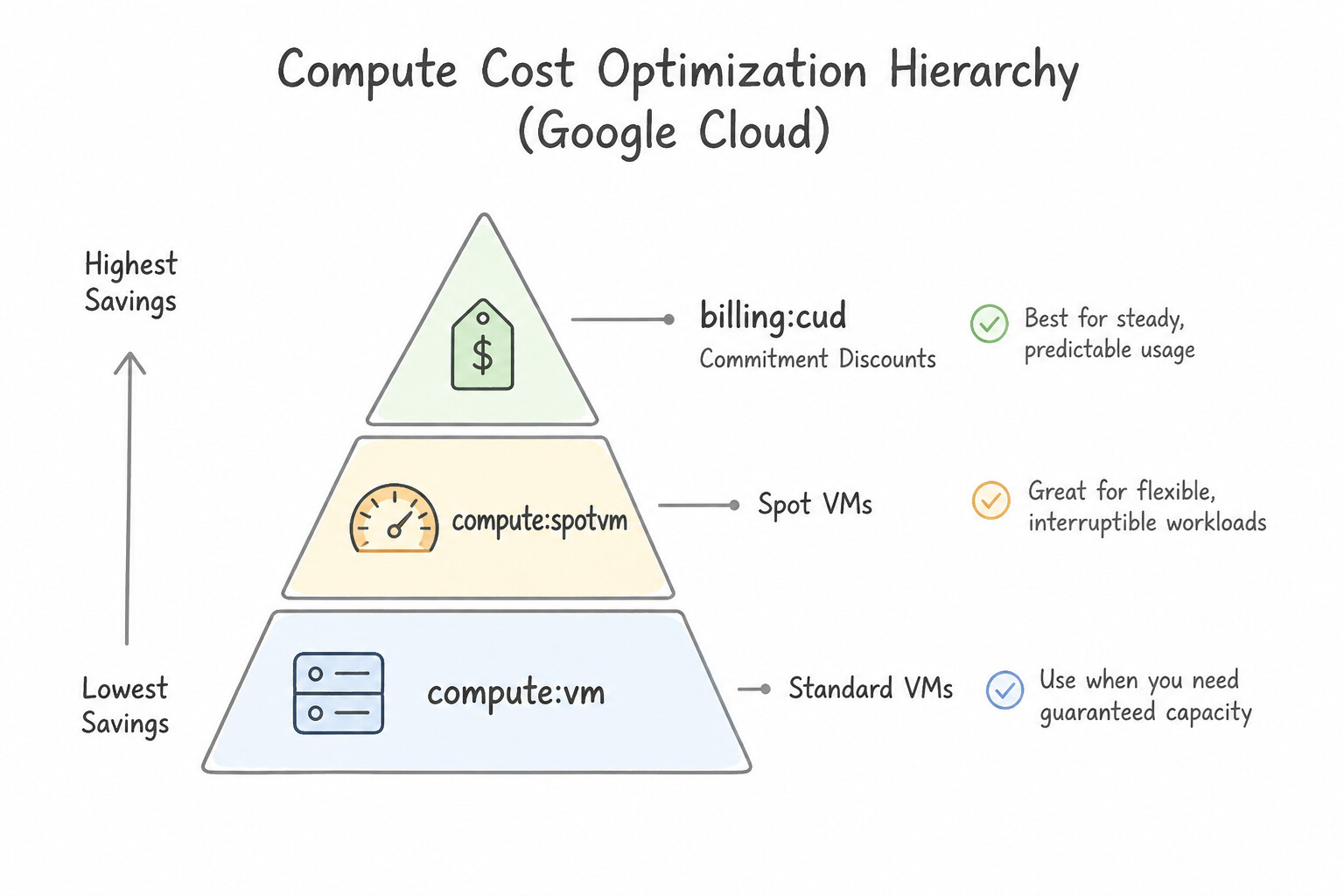
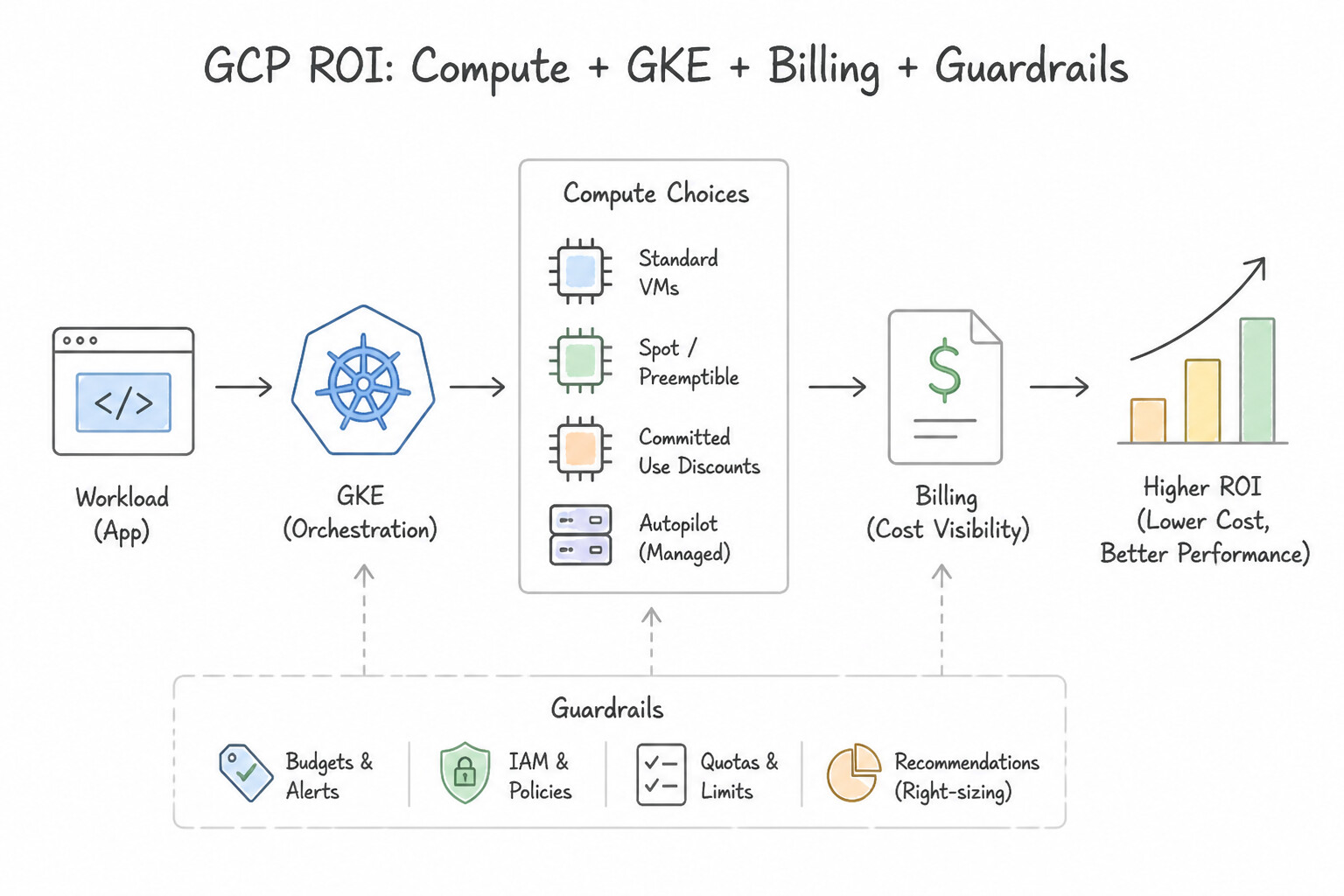
- Compute Cost Optimization Hierarchy:
- Right-size over-provisioned VMs using Active Assist / Recommender or Custom Machine Types (especially to minimize per-core commercial database licenses).
- Use Spot VMs (up to 60–91% discount) for stateless, fault-tolerant batch jobs, CI/CD runners, and secondary Dataproc workers.
- Purchase 1-year or 3-year Committed Use Discounts (CUDs) for predictable 24/7 baseline CPU/RAM/GPU usage.
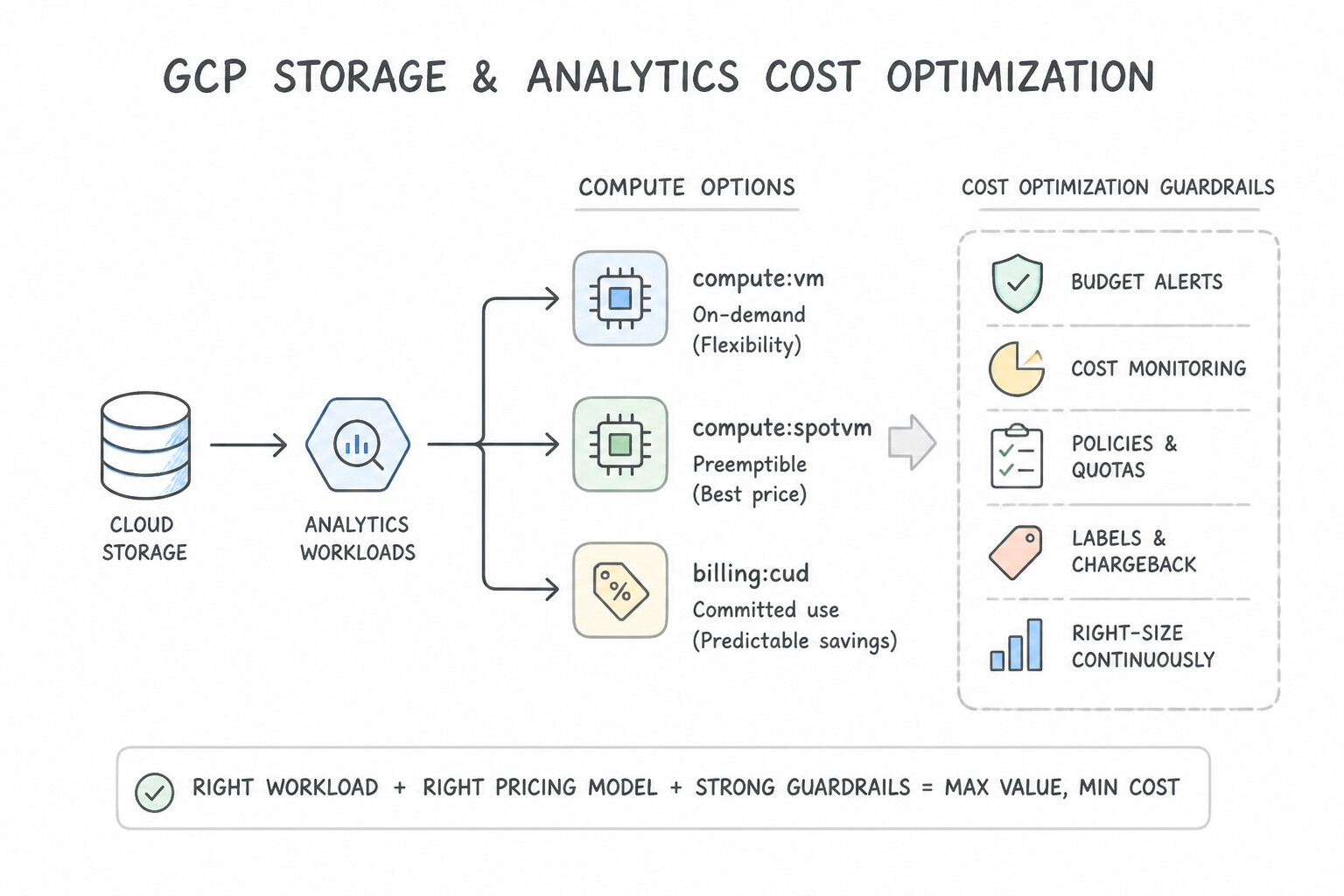
- Storage & Analytics Cost Optimization:
- Configure Cloud Storage Object Lifecycle Management (OLM) or Autoclass to automatically downgrade aging objects (
Standard→Nearline→Coldline→Archive). - In BigQuery, eliminate full-table scans (
SELECT *) by enforcing date/timestamp partitioning, clustering, partition filters (require_partition_filter = true), and slot reservations (Editions) for predictable high-volume workloads.
Key Implementation Patterns
- Optimizing Batch Processing Costs: Use Provision Spot VMs for the instance group running the simulations. Spot VMs provide the lowest cost for fault-tolerant, stateless workloads that can handle interruptions. (Avoid alternative: CUDs are for continuous 24/7 usage, not periodic monthly batch jobs, and would result in paying for unused time.)
- Predictable Baseline Workloads: Use Purchase a three-year committed use discount (CUD) for the VM resources. A 3-year Committed Use Discount offers the deepest price reduction for workloads with predictable, steady-state usage over a long duration. (Avoid alternative: Spot VMs can be terminated at any time, making them unsuitable for a core database requiring continuous availability.)
- Long-term Compliance Data Retention: Use Configure a lifecycle rule to transition the logs to Archive storage after 1 day. Archive storage provides the lowest cost for long-term retention of data that is accessed less than once a year. (Avoid alternative: Standard storage is too expensive for data that is rarely accessed over a long period.)
Key Takeaways (1.1d)
- Spot VMs offer the lowest compute prices for fault-tolerant, stateless workloads.
- Do not use Committed Use Discounts for bursty or periodic workloads; they are for steady-state usage.
- Always match the reliability requirements of the application (e.g., fault tolerance) with the infrastructure capabilities to optimize cost.
- Use Committed Use Discounts (CUDs) for predictable, steady-state usage known to last 1 or 3 years.
Consideration 1.1e: Supporting the application design
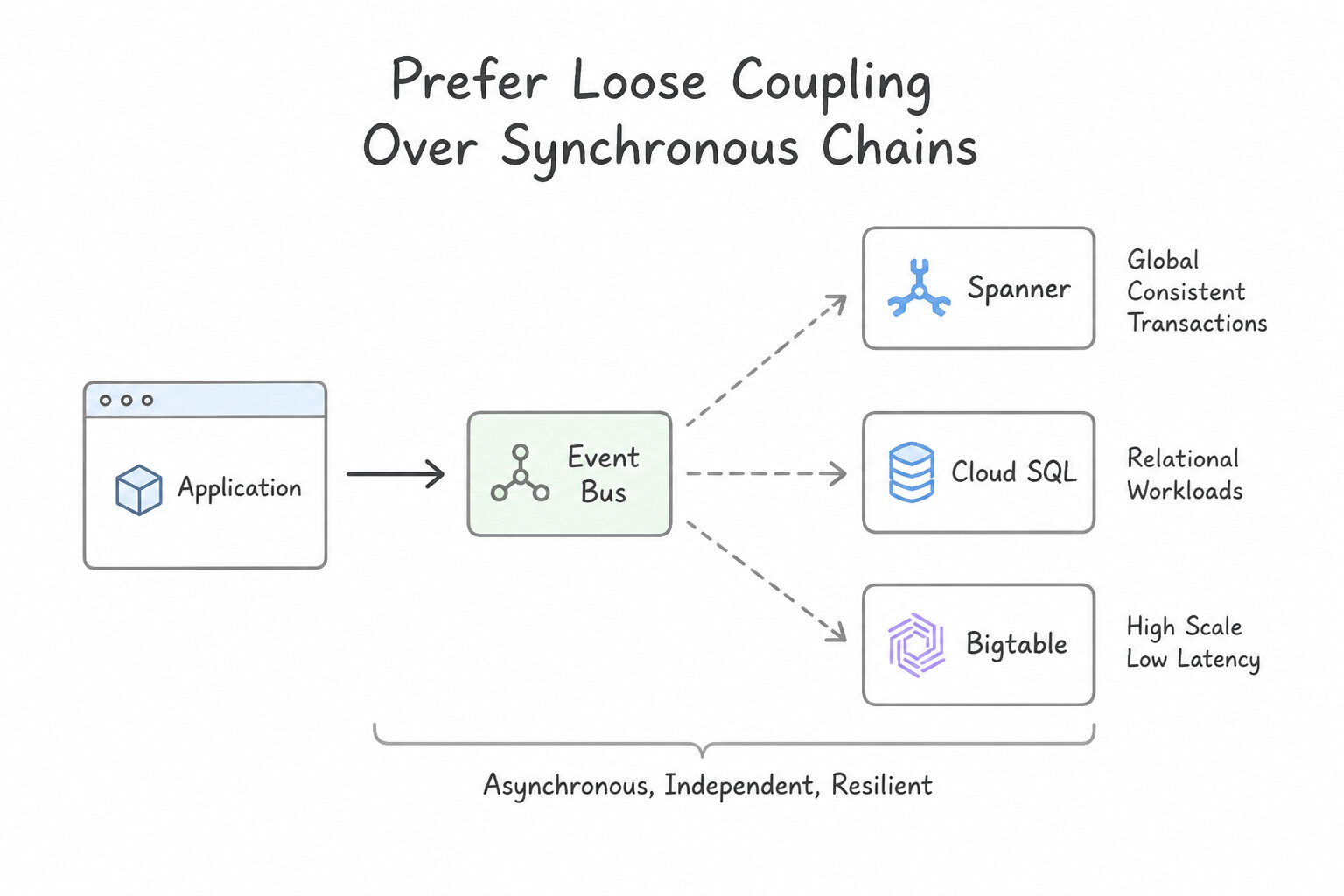
- Prefer Loose Coupling Over Synchronous Chains: Synchronous REST calls across 5 microservices multiply failure probabilities and propagate tail latency. Decouple asynchronous stages using:
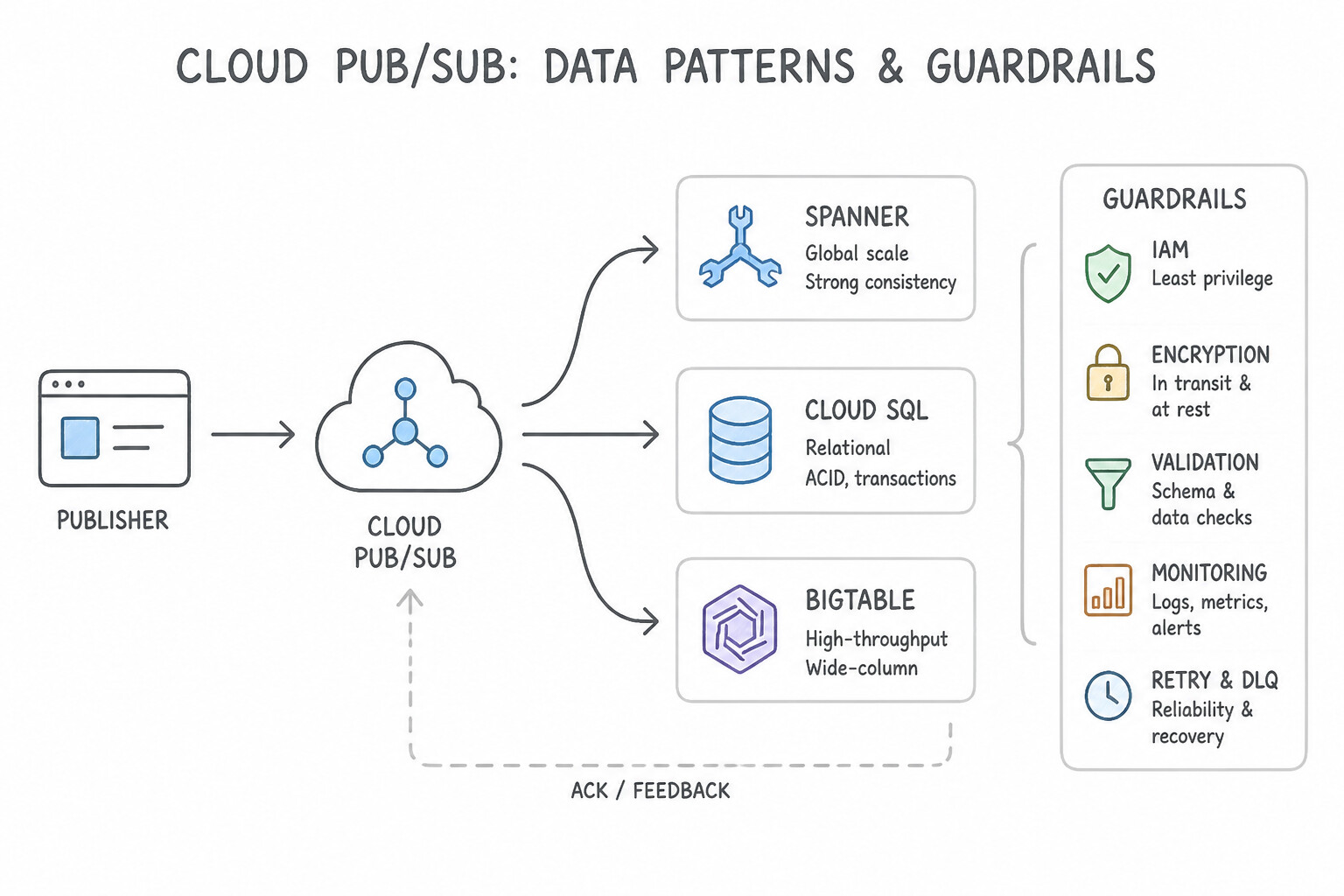
- Cloud Pub/Sub: For high-throughput event fan-out (one publisher, many independent subscribers) and streaming ingestion.
- Cloud Tasks: When the producer needs explicit control over dispatch rate throttling, retry backoff, deduplication, or scheduled delivery to a single HTTP/Cloud Run worker target (e.g., protecting a rate-limited legacy ERP or external payment gateway).
- Cloud Workflows: When orchestrating multi-step stateful sequences across Google Cloud APIs and external HTTPS services with conditional branching and error handling.
- Enterprise External Integration (1.1f): Front external partner/public APIs with Apigee API Management (for OAuth/mTLS security, rate limiting, quota monetization, and payload mediation) and use Application Integration or Cloud Data Fusion for low-code ERP/CRM connectors.
Key Implementation Patterns
- Handling Global State for High-Transaction Banking: Use Migrate the database to Cloud Spanner and configure a multi-region instance configuration. Cloud Spanner provides global strong consistency, relational semantics, and automatic horizontal scaling, meeting all the requirements for this financial application.
- Decoupling Microservices under Burst Load: Use Configure the checkout service to publish messages to a Pub/Sub topic. Configure the inventory service to subscribe to this topic. Pub/Sub decouples the services, acting as a buffer that absorbs traffic spikes and allows the inventory service to process requests at its own pace.
Key Takeaways (1.1e)
- Cloud Spanner is the choice for global, relational data requiring strong consistency and horizontal scaling.
- Cloud SQL is best for regional relational workloads up to a few terabytes.
- Cloud Bigtable is for high-throughput, low-latency NoSQL workloads (IoT, personalization).
- BigQuery is for analytics and data warehousing, not operational transactions.
Consideration 1.1g: Movement of data
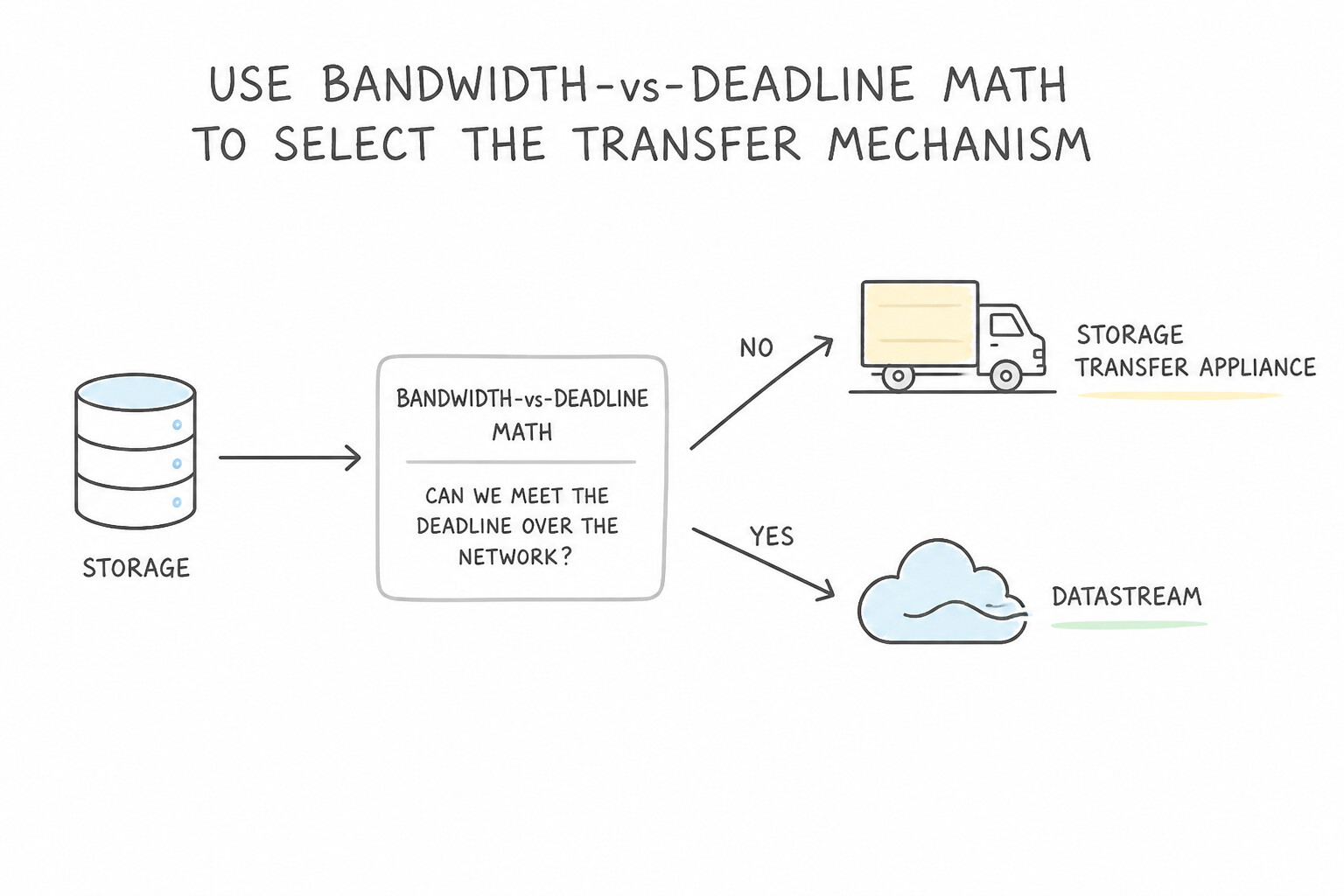
- Use Bandwidth-vs-Deadline Math to Select the Transfer Mechanism:
- Rule of Thumb: A $1\text{ Gbps}link at @@ESCAPEDDOLLAR@@80% utilization transfers ≈ 8 TB/day (≈ 240 TB/month). A $10\text{ Gbps}$ link transfers $\approx 80\text{ TB/day}$.
- Storage Transfer Service (Online): Best when network bandwidth is sufficient to meet the deadline, or when automating recurring transfers from AWS S3, Azure Blob Storage, HTTP/HTTPS, or on-premises POSIX file systems (via Transfer Service for on-premises data).
- Transfer Appliance (Offline Physical Hardware): Mandatory when transferring hundreds of terabytes to petabytes over a slow or congested link where online transfer would take months or saturate production WAN links (available in $40\text{ TB}and @@ESCAPEDDOLLAR@@300 TB encrypted appliances).
- BigQuery Data Transfer Service (BQDTS): Best for scheduled, code-free SaaS/warehouse ingestion (Google Ads, YouTube, Teradata, Redshift, S3) directly into BigQuery.
Key Implementation Patterns
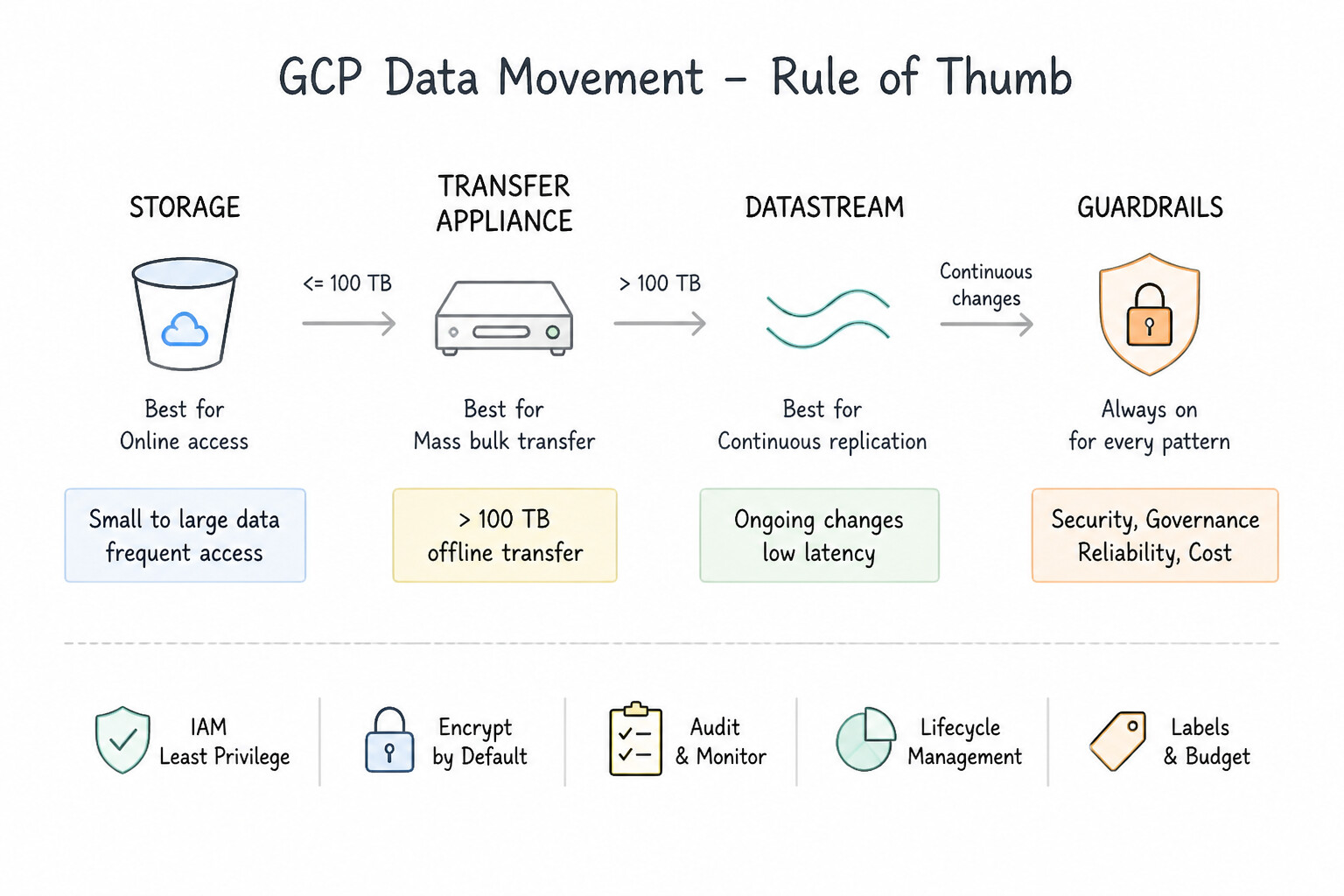
- Massive Data Migration with Bandwidth Constraints: Use Order Transfer Appliances to capture the data and ship them to Google. Transfer Appliance is the best choice for moving large datasets (800 TB) quickly when bandwidth is limited. (Avoid alternative: Online transfer of 800 TB over 1 Gbps takes roughly 80 days, missing the 3-week deadline.)
- Real-time Change Data Capture (CDC): Use Use Datastream to create a stream that replicates changes from Oracle to BigQuery. Datastream provides serverless CDC (Change Data Capture) for Oracle to BigQuery with low latency and minimal impact on the source database. (Avoid alternative: Exporting to CSV files is a manual batch process that is inefficient, hard to manage, and impacts source performance.)
- Cloud-to-Cloud Object Storage Migration: Use Configure a Storage Transfer Service job to copy the data from the Amazon S3 bucket. Storage Transfer Service is a managed tool specifically built for cloud-to-cloud migrations without needing VMs or scripts. (Avoid alternative: This requires provisioning and managing a VM, which contradicts the scenario's requirement for a managed solution.)
Key Takeaways (1.1g)
- Always estimate transfer time using the formula: Total Data / Bandwidth.
- 1 Gbps bandwidth allows for roughly 10 TB of data transfer per day under ideal conditions.
- If the estimated online transfer time exceeds the project deadline, use an offline method like Transfer Appliance.
- Transfer Appliance is ideal for moving petabytes of data securely when bandwidth is the limiting factor.
Consideration 1.1h: Design decision trade-offs
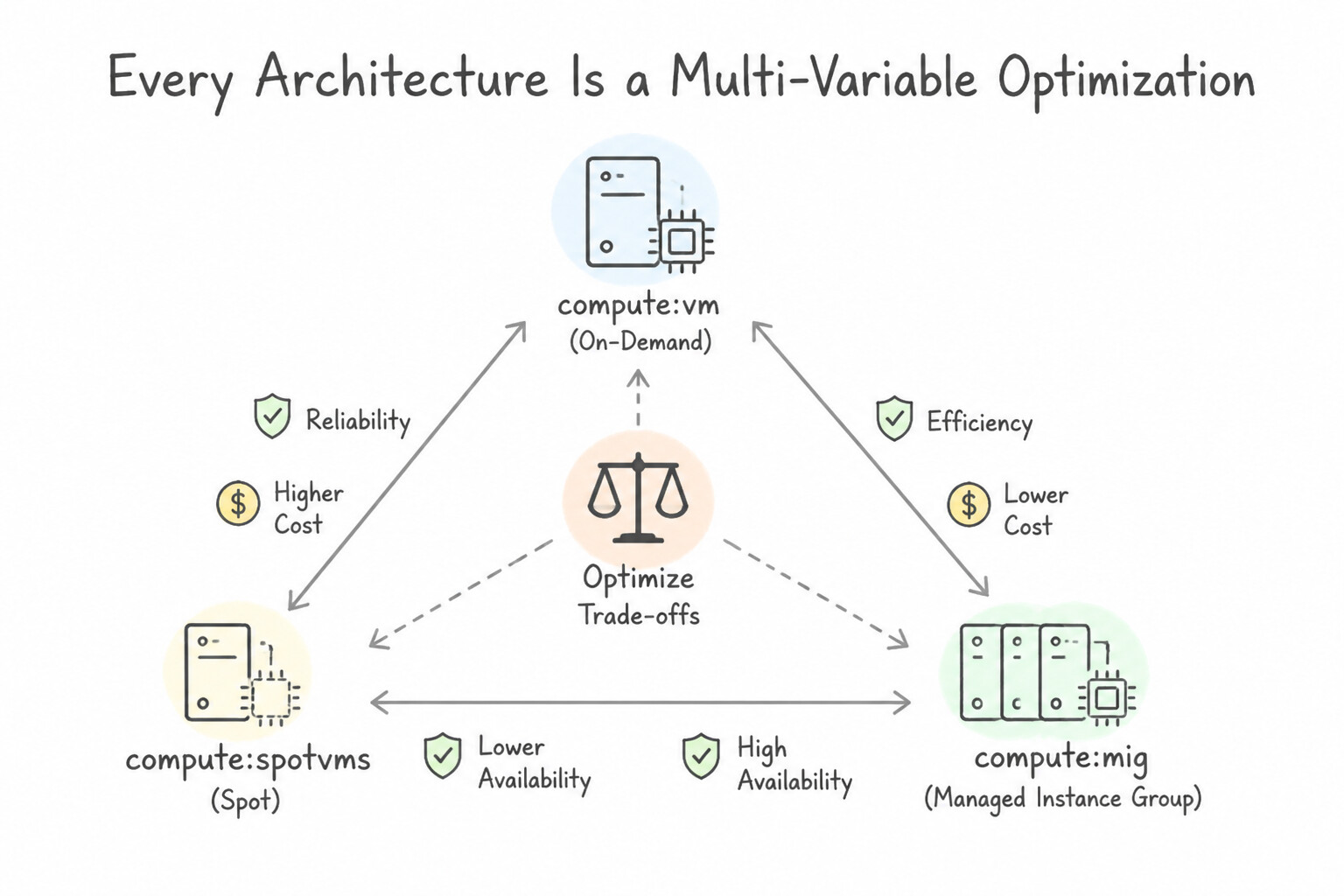
- Every Architecture Is a Multi-Variable Optimization: Google Cloud architecture constantly tests three classic trade-off axes:
- Control vs. Operational Velocity:
Compute Engine / GKE Standard(maximum kernel/network customization, high ops toil) ↔GKE Autopilot / Cloud Run(opinionated guardrails, near-zero ops overhead). - Strong Consistency vs. Global Write Latency & Cost:
Cloud Spanner(external consistency across regions via TrueTime, higher cost) ↔Cloud Bigtable / Firestore(eventual cross-region replication or single-region ultra-low latency). - Network Performance vs. Egress Cost (
Network Service Tiers): Premium Tier (routes over Google's private global fiber backbone to the nearest PoP for lowest latency and global load balancing) ↔ Standard Tier (routes over public ISP transit networks for lower regional egress cost).
Key Implementation Patterns
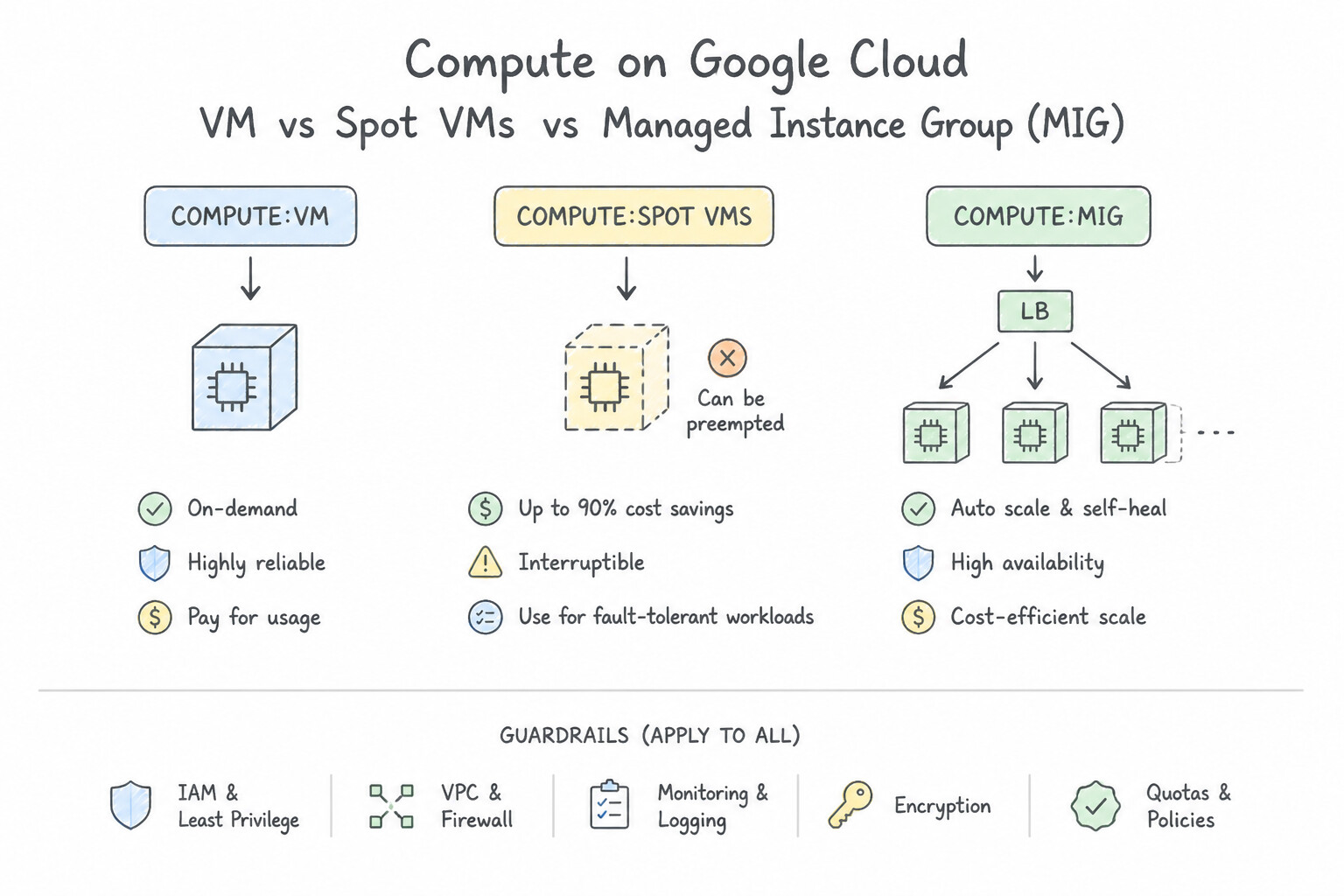
- Batch Processing Cost Optimization: Use Configure a managed instance group that uses Spot VMs for the compute nodes. Spot VMs provide significant cost savings for fault-tolerant, resumable batch workloads. (Avoid alternative: Standard VMs are too expensive for a strictly limited budget when the workload can handle interruptions.)
- Hybrid Connectivity Selection: Use Order a Transfer Appliance to migrate the data offline. Transfer Appliance is an offline migration solution perfect for large datasets and tight timelines when network bandwidth is limited or shared. (Avoid alternative: Cloud VPN secures connections but does not increase bandwidth or speed; it relies on the underlying internet connection capacity.)
- Global Transaction Consistency: Use Provision a Cloud Spanner instance with a multi-region configuration. Cloud Spanner provides the required global strict external consistency and high availability for financial ledgers. (Avoid alternative: Cloud SQL replication is asynchronous and does not offer the strict global consistency required.)
Key Takeaways (1.1h)
- Use Spot VMs for stateless, fault-tolerant, or batch workloads to save costs.
- Ensure applications on Spot VMs can handle interruptions (preemption).
- Avoid Spot VMs for databases or critical stateful applications that cannot tolerate downtime.
- Always check the provisioning lead time for infrastructure like Dedicated Interconnect versus the project deadline.
Consideration 1.1i: Workload disposition strategies (build, buy, modify, or deprecate)
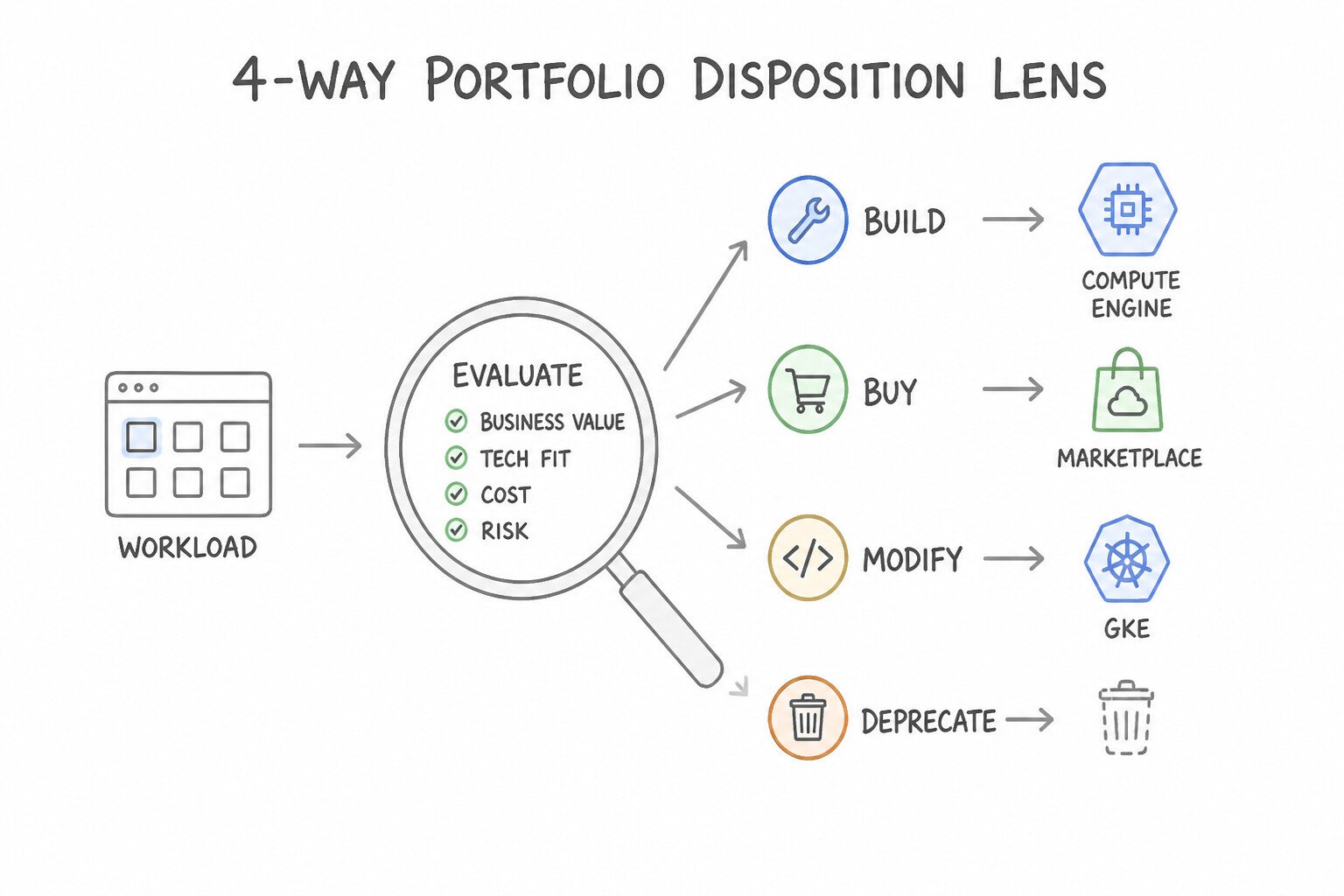
- Apply the 4-Way Portfolio Disposition Lens:
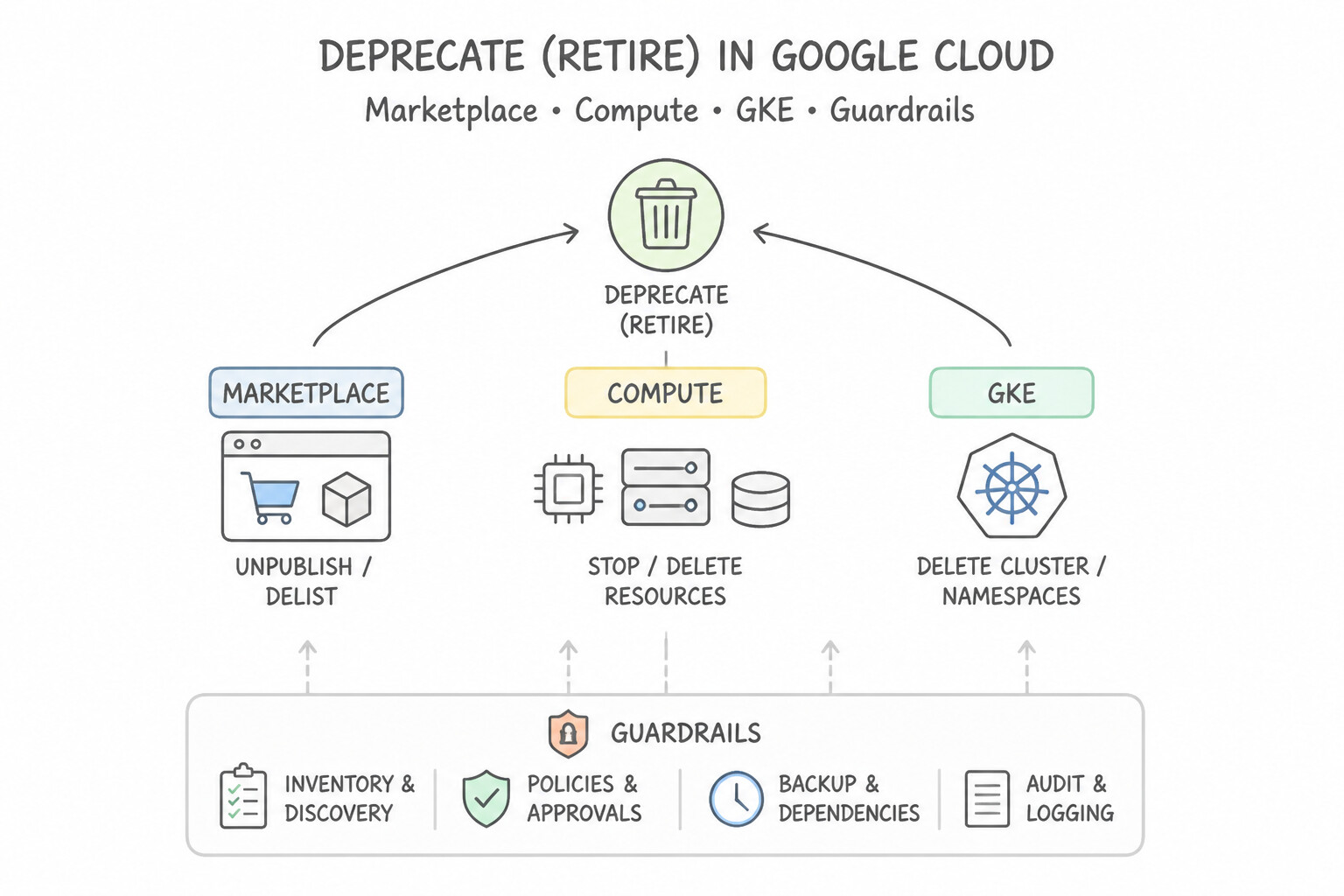
- Deprecate (Retire): Decommission legacy applications whose functionality is redundant, unused, or superseded by native cloud capabilities—zero migration cost and immediate TCO reduction.
- Buy (Replace / Adopt SaaS): When a workload is a commodity business function (not a core competitive differentiator, such as CRM, ticketing, or standard payroll), replace custom legacy code with a SaaS solution or a pre-integrated package from Google Cloud Marketplace (consolidated billing + rapid procurement).
- Modify (Replatform / Refactor): Modernize high-value differentiating applications incrementally—replatforming VMs into containers (
Migrate to Containers/GKE) or refactoring monoliths into serverlessCloud Runmicroservices. - Build (Cloud-Native Greenfield): Build net-new differentiating capabilities directly on cloud-native serverless, data, and AI primitives.
Key Implementation Patterns
- Commodity Service Replacement: Use Replace the legacy system with a third-party Software as a Service (SaaS) HR solution. SaaS (Buy) is best for standard functions with no unique requirements as it removes maintenance overhead. (Avoid alternative: Moving to VMs (Rehost) retains the burden of OS and application maintenance.)
- Post-Merger System Redundancy: Use Decommission the legacy system hardware and stop all related services. Because the data is migrated and the system is redundant, decommissioning it (Deprecate) is the only way to immediately reduce operational costs. (Avoid alternative: Migrating a redundant application to the cloud incurs unnecessary infrastructure costs.)
- Proprietary High-Frequency Trading Algorithm: Use Build a custom application on Compute Engine to ensure full control over the OS configuration. Building on Compute Engine (IaaS) provides the necessary root access to perform custom OS kernel tuning. (Avoid alternative: SaaS solutions do not allow access to the underlying operating system required for kernel tuning.)
Key Takeaways (1.1i)
- Buy over Build: For commodity workloads (HR, Payroll, Email) with no unique requirements, always prefer SaaS solutions.
- Focus on Differentiators: Only invest engineering resources (Refactoring or Building) in applications that provide a unique competitive advantage.
- Reduce Toil: Migrating to VMs (Rehost) solves hardware issues but does not eliminate OS/App maintenance toil; SaaS does.
- Deprecate redundant workloads: If a system's functionality is duplicated and its data is migrated, the most cost-effective strategy is to decommission it.
Consideration 1.1j: Success measurements (e.g., KPI, ROI, metrics)
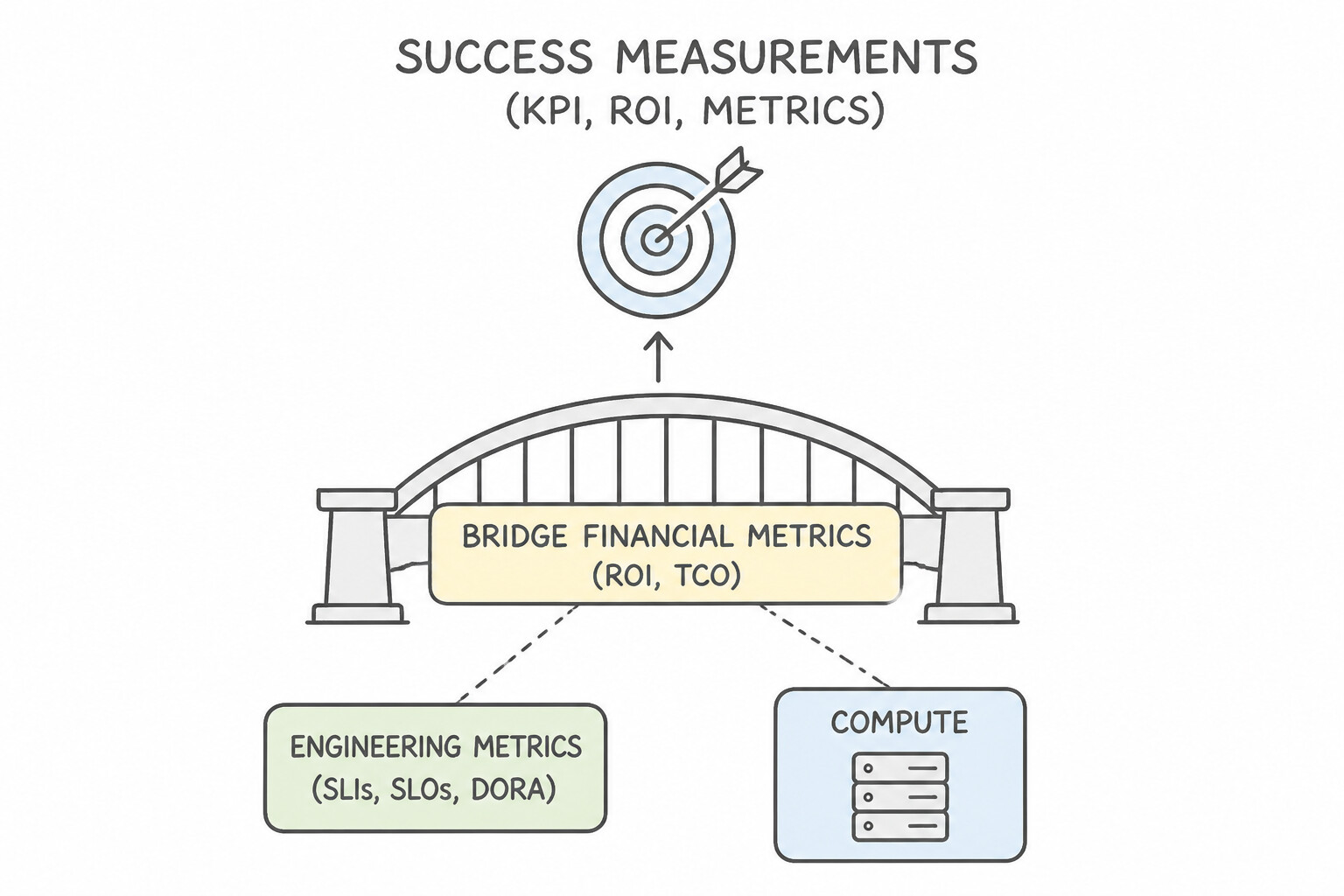
- Bridge Financial Metrics (
ROI,TCO) and Engineering Metrics (SLIs,SLOs,DORA): - Return on Investment (
ROI): \frac{Net Business Value Gained - Cost of Cloud Investment}{Cost of Cloud Investment}. Used to justify cloud modernization by quantifying revenue acceleration, avoided data center refresh CapEx, and engineering productivity gains. - Key Performance Indicators (
KPIs): Business-level outcomes (e.g., cart conversion rate, cost per processed order, customer onboarding time). - Technical Success Metrics (
SLIs&DORA): Map business KPIs to SLIs (availability, latency, yield) and DORA metrics (Deployment Frequency, Lead Time for Changes, Change Failure Rate, Mean Time to Restore).
Key Implementation Patterns
- TCO Reduction in Lift-and-Shift: Use Calculate the reduction in Total Cost of Ownership (TCO) by comparing cloud costs to the previous on-premises hardware, power, cooling, and maintenance expenses. TCO provides a complete financial picture by including hidden on-premises costs like power, cooling, and maintenance.
- Latency Impact on Conversion Rates: Use Measure the round-trip latency of checkout API requests. High latency frustrates users and causes them to leave; reducing latency directly helps reduce cart abandonment. (Avoid alternative: CPU utilization measures infrastructure load, not the user experience or business outcome.)
Key Takeaways (1.1j)
- Total Cost of Ownership (TCO) is the standard metric for comparing on-premises costs to cloud costs.
- On-premises costs include more than just hardware; they include power, cooling, real estate, and labor.
- Lift-and-shift migrations often justify success through TCO reduction rather than immediate application performance improvements.
- Business goals (like retention) must be mapped to technical metrics (like latency).
Consideration 1.1k: Security and compliance
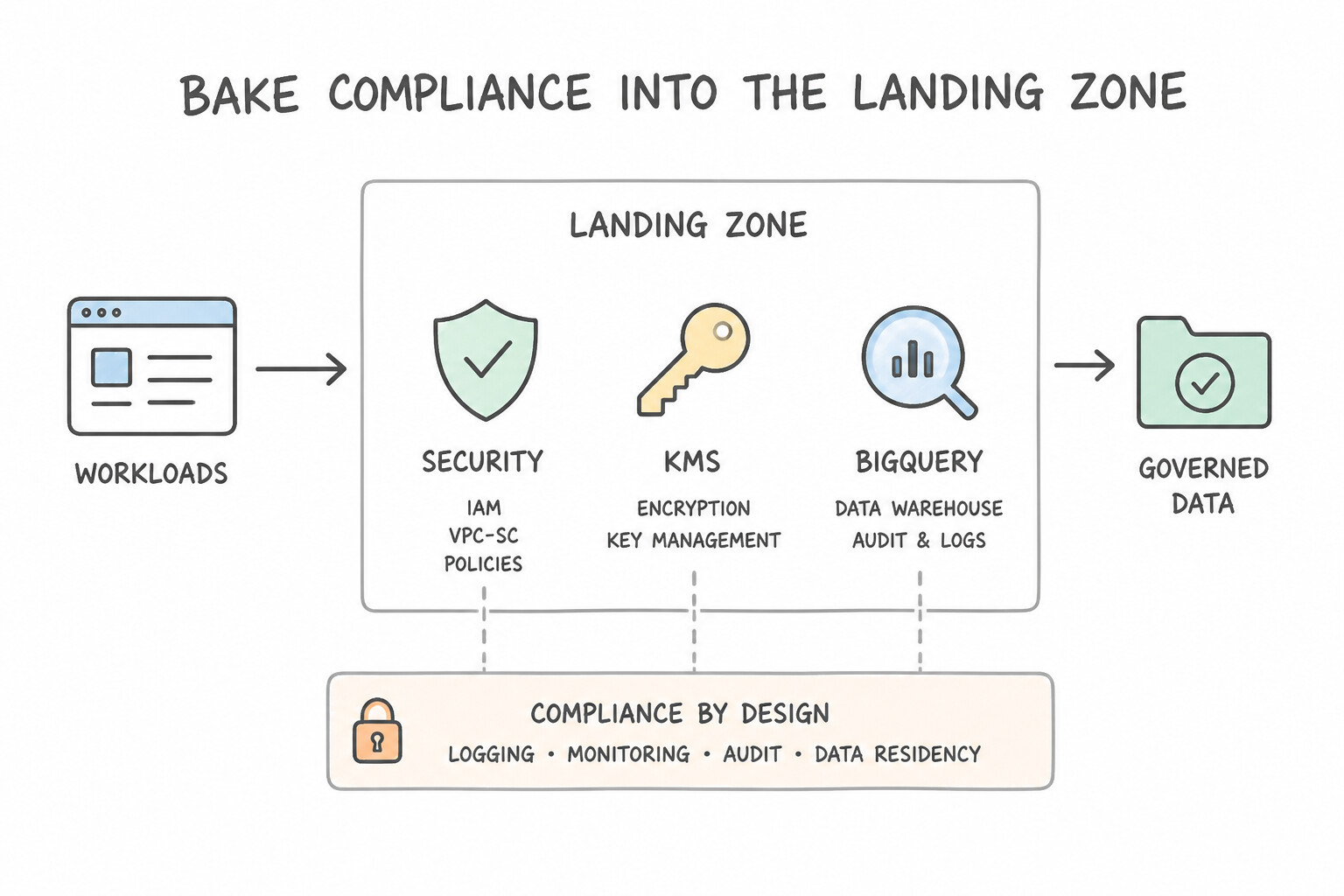
- Bake Compliance into the Landing Zone Architecture:
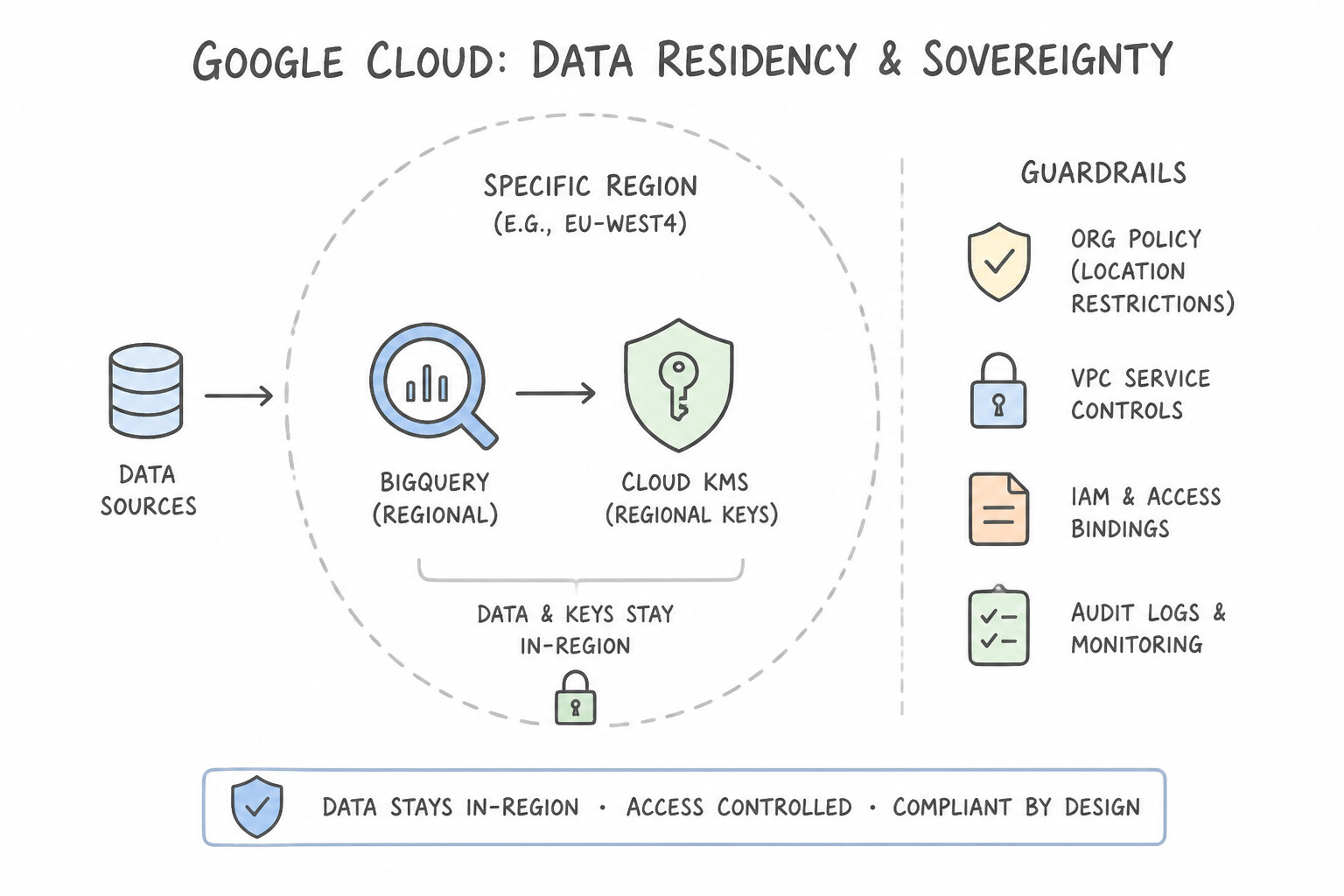
- Data Residency & Sovereignty: Enforce
constraints/gcp.resourceLocationsvia Organization Policy + Customer-Managed Encryption Keys (CMEK) or Cloud EKM (externally held keys) for strict sovereignty mandates. - Data Exfiltration Defense: Place regulated storage (
Cloud Storage,BigQuery,Cloud SQL) inside VPC Service Controls (VPC-SC) perimeters. - Unified Data Governance: Use Dataplex to centrally discover, classify, audit lineage, and enforce consistent data quality and access policies across distributed data lakes (
Cloud Storage) and warehouses (BigQuery).
Key Implementation Patterns
- Regulatory Key Management Strategy: Use Configure Customer-Managed Encryption Keys (CMEK) using Cloud Key Management Service (Cloud KMS). CMEK allows you to control the key lifecycle in Cloud KMS, enabling immediate revocation of data access. (Avoid alternative: Default encryption gives Google control over the keys, preventing unilateral revocation by the customer.)
- Automated PII Remediation: Use Run a processing job that uses the Cloud Data Loss Prevention (DLP) API to de-identify the sensitive data, and then upload the redacted files to Cloud Storage. Cloud DLP allows you to inspect and redact sensitive data before it is stored, meeting the compliance requirement to prevent PII from entering the bucket.
- Preventing Data Exfiltration: Use Configure VPC Service Controls to define a service perimeter. VPC Service Controls create a security boundary that prevents data from being copied to resources outside the trusted perimeter. (Avoid alternative: Removing external IPs does not prevent access to external Google Cloud resources via Google APIs.)
Key Takeaways (1.1k)
- Default encryption is automatic but offers no customer control over key revocation.
- CMEK (via Cloud KMS) is the standard solution for regulatory requirements demanding key ownership and revocation capabilities on GCP PaaS.
- BigQuery uses CMEK for customer-controlled encryption, not raw CSEK.
- Cloud DLP is the primary tool for inspecting and sanitizing PII in both structured and unstructured data.
Consideration 1.1l: Observability
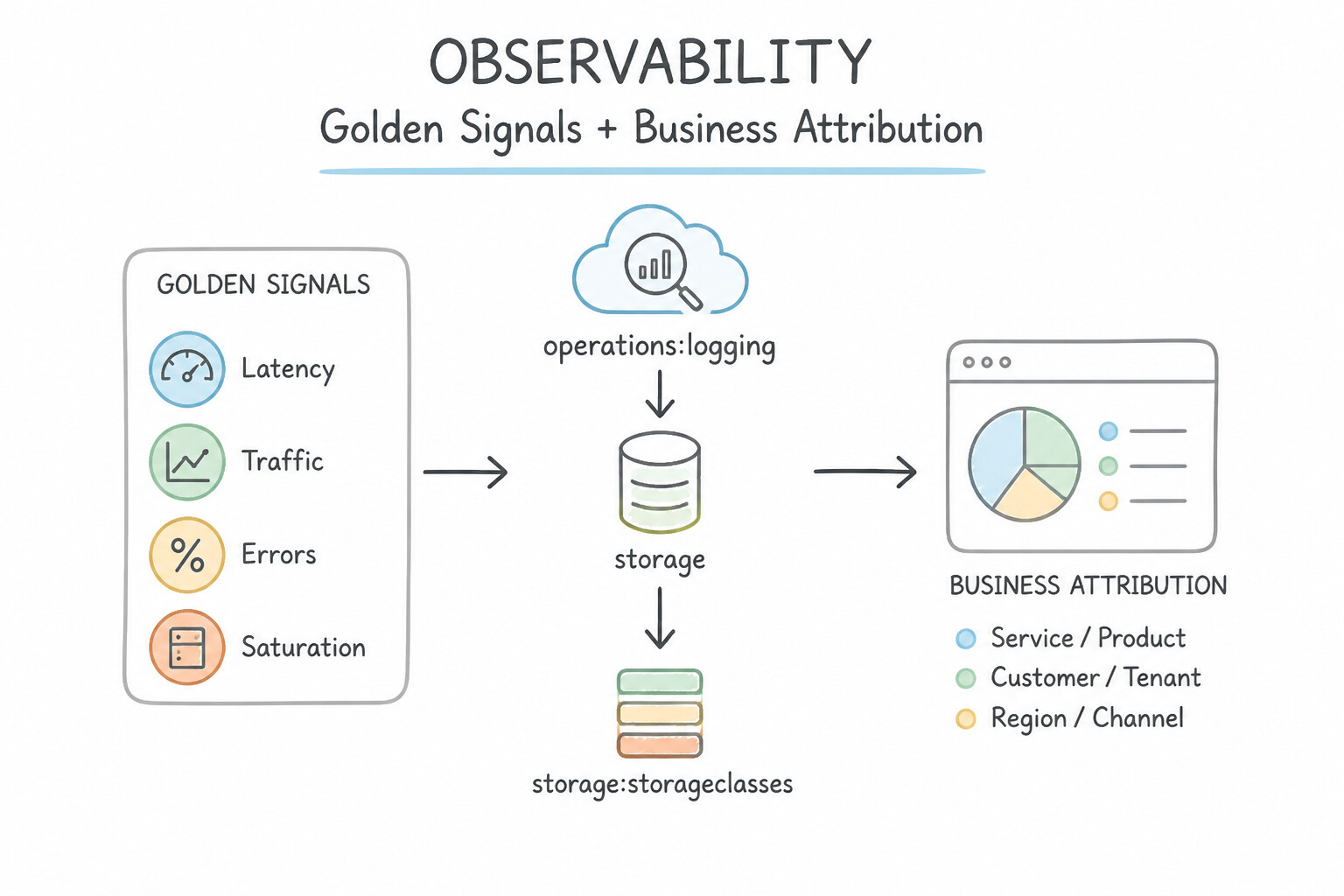
- Design for Golden Signals & Business Attribution:
- Instrument the Four Golden Signals (Latency, Traffic, Errors, Saturation) via Cloud Monitoring from day one.
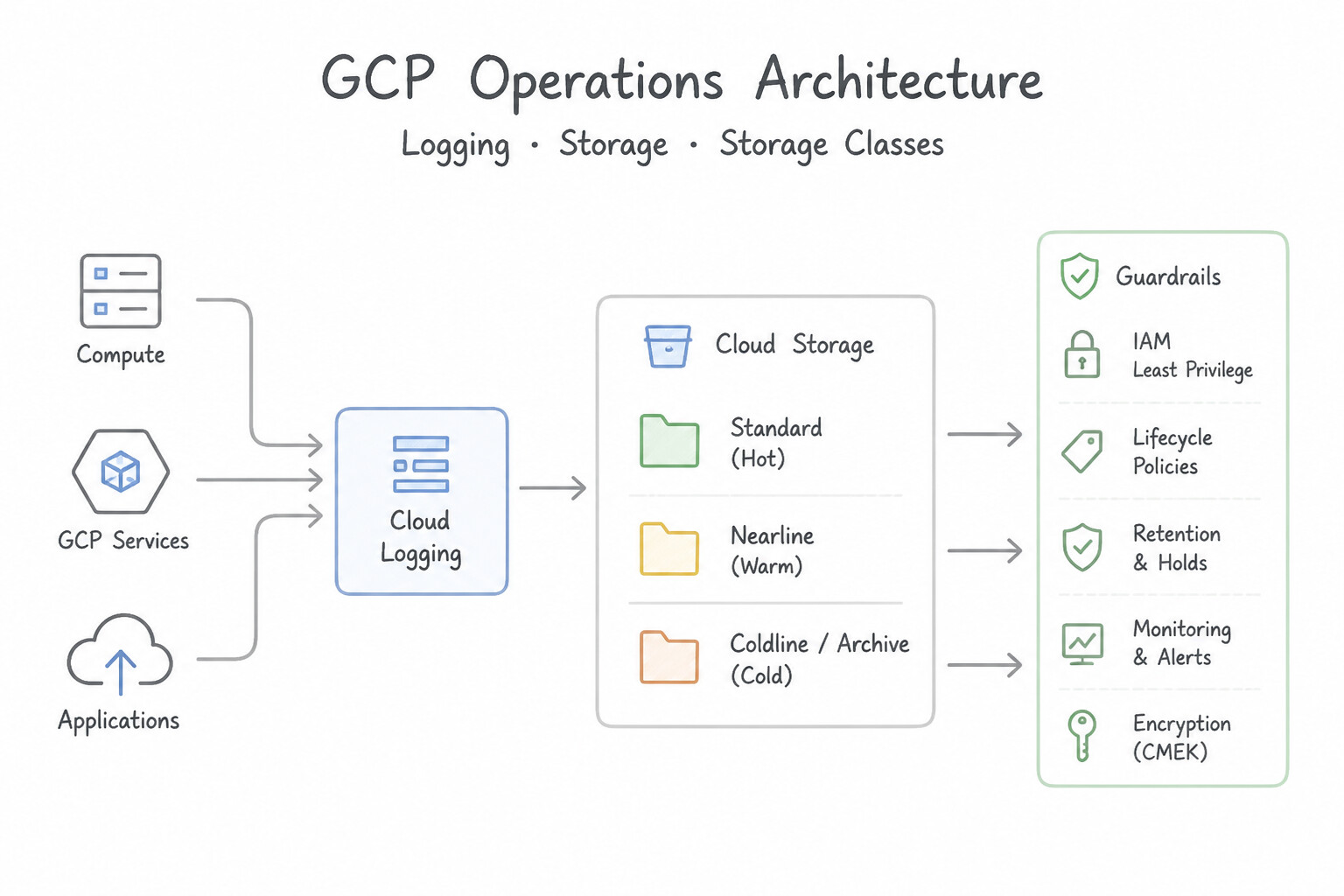
- Export Cloud Audit Logs and structured application logs via Log Router sinks to BigQuery (for SQL-based security/operational analytics) or Cloud Storage Archive (for long-term compliance retention).
- Correlate frontend user drop-offs with backend microservice bottlenecks using Cloud Trace (distributed request waterfalls) and Cloud Profiler (continuous low-overhead CPU/memory flame graphs).
Key Implementation Patterns
- Long-Term Audit Compliance Storage: Use Create a log sink to export logs to a Cloud Storage bucket with the Archive storage class. Apply a retention policy to the bucket. Exporting logs to Cloud Storage with the Archive class provides the lowest cost for long-term, rarely accessed data.
- External SIEM Integration: Use Create a sink in Cloud Logging that exports logs to a Cloud Pub/Sub topic. Configure the SIEM tool to subscribe to this topic. Cloud Pub/Sub is the standard destination for real-time log streaming to external systems. (Avoid alternative: Cloud Storage is used for batch archival and long-term retention, not real-time streaming.)
- Reducing Observability Costs: Use Configure an exclusion filter on the _Default sink to exclude logs with severity=DEBUG. Exclusion filters prevent specific logs from being ingested into the log bucket, avoiding costs while keeping other logs. (Avoid alternative: Disabling the API stops all logging, including the error logs you need to keep.)
Key Takeaways (1.1l)
- Use Cloud Storage Archive class for long-term retention of data that is rarely accessed.
- Use Log Sinks to export logs from Cloud Logging to other services for specific use cases (Storage for archival, BigQuery for analytics).
- Native Cloud Logging retention is generally more expensive than Cloud Storage for long durations.
- Use Cloud Pub/Sub for real-time log streaming to external systems or third-party tools.
Quick Decision Cheat Sheet (Subsection 1.1)
If the Scenario Requires... | Choose This Google Cloud Pattern | Avoid This Common Mistake |
|---|---|---|
"Small team, limited ops experience, rapid time-to-market, spiky or unpredictable traffic" | Cloud Run (or App Engine / Cloud Run functions) + managed serverless databases | Provisioning GKE Standard clusters or self-managed Compute Engine VMs |
"Strict EU/country data residency regulation; prevent engineers from deploying outside approved regions" | Organization Policy constraints/gcp.resourceLocations at the Folder/Org level | Relying on IAM roles alone or writing custom cron scripts to delete non-compliant VMs |
"Migrate >100 TB of data with limited WAN bandwidth and a strict deadline" | Transfer Appliance (physical encrypted appliance) | Online gsutil -m cp or Storage Transfer Service over a slow link |
"Automated recurring data sync from AWS S3 or Azure Blob Storage to Cloud Storage" | Storage Transfer Service (scheduled online cloud-to-cloud transfer) | Spinning up Compute Engine VMs running custom aws s3 sync cron jobs |
"Commodity non-differentiating legacy app with high maintenance cost" | Buy (SaaS / Google Cloud Marketplace) or Deprecate | Rewriting from scratch as cloud-native microservices (Build) |
"Protect a rate-limited legacy backend from sudden frontend traffic spikes with guaranteed retry control" | Cloud Tasks (explicit rate limiting & retry policies) | Direct synchronous REST calls or unthrottled fire-and-forget webhooks |
"Unify metadata discovery, data quality, and access governance across Cloud Storage lakes and BigQuery warehouses" | Dataplex (with Data Catalog / Universal Catalog) | Maintaining manual spreadsheets or isolated per-bucket ACLs |
Further Reading (Subsection 1.1)
- Choosing a Google Cloud compute option — This page provides a flowchart and decision matrix to help choose between Compute Engine, Cloud Run, GKE, and App Engine based on team skills and technical requirements.
- Cloud Run — Describes how Cloud Run allows you to develop and deploy highly scalable containerized applications on a fully managed serverless platform.
- Restricting resource locations — This guide explains how to use the Organization Policy Service to restrict the physical location of new resources.
- Cloud Spanner Overview — Provides an overview of Cloud Spanner features, including its global availability and strong consistency guarantees.
- Replication in Cloud Spanner — Explains how Cloud Spanner replicates data across regions to ensure low latency and high availability while maintaining strong consistency.
- Spot VMs — Documentation explaining Spot VMs, their pricing benefits, and their limitations regarding preemption.
Subsection 1.2: Designing a cloud solution infrastructure that meets technical requirements
The Big Picture
A cloud architecture that works at $100\text{ RPS}$ in us-central1-a on a sunny Tuesday afternoon is easy to draw. A production architecture that survives a complete zonal power outage, absorbs a $20\times$ viral flash crowd without database connection exhaustion, serves dynamic APIs at sub-50ms global latency, and recovers from accidental table deletion with a 5-minute RPO requires deliberate technical engineering.
Subsection 1.2 tests your mastery of the Google Cloud Well-Architected Framework and the hard technical mechanisms of high availability (HA), elastic scalability, latency optimization, backup/recovery, and AI-assisted architecture operations (Gemini Cloud Assist).
Consideration 1.2a: Familiarity with the Google Cloud Well-Architected Framework
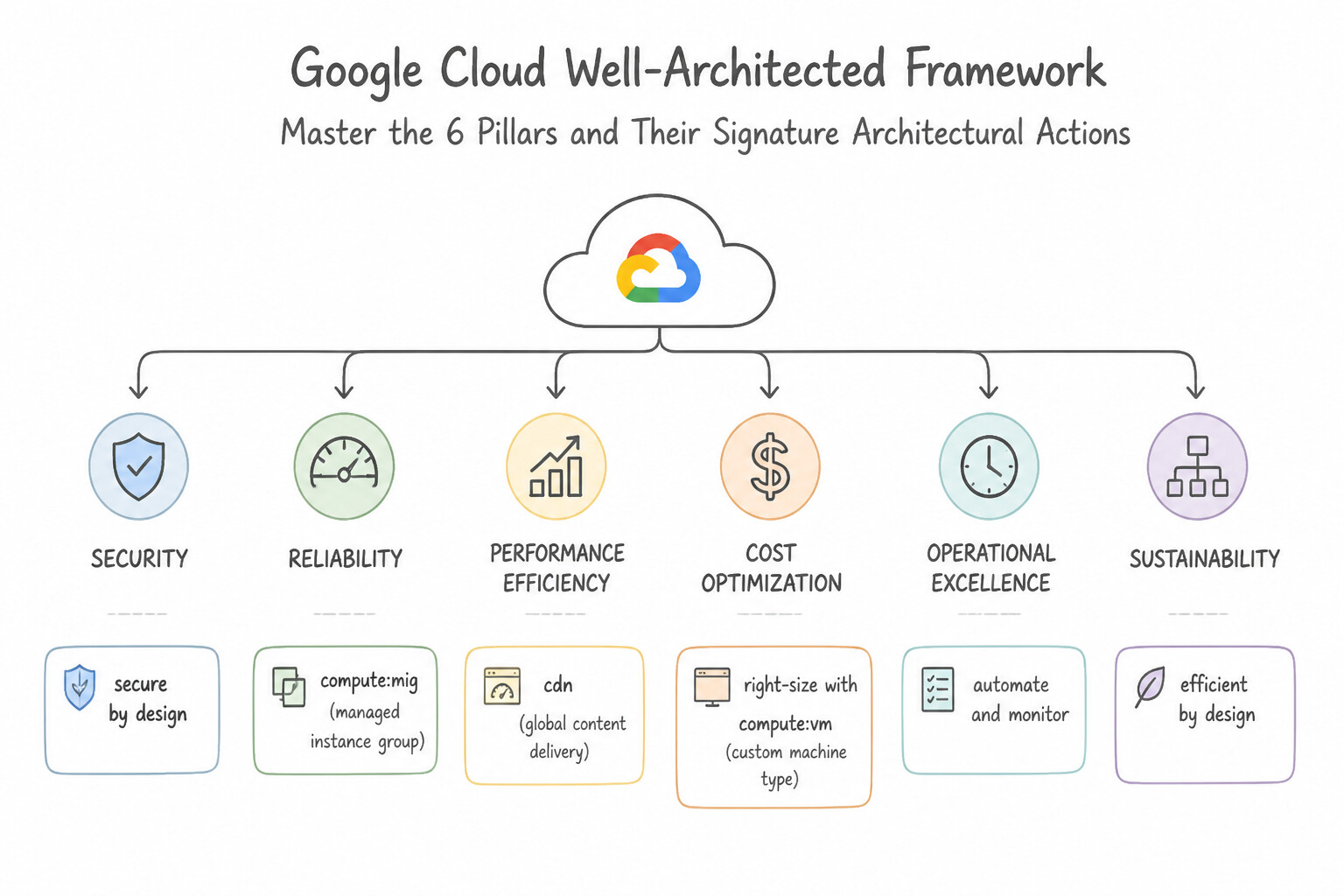
- Master the 6 Pillars & Their Signature Architectural Actions:
- Operational Excellence: Automate infrastructure (
Terraform), CI/CD (Cloud Build/Cloud Deploy), and observability (Cloud Monitoring/Logging/Trace) with blameless postmortems. - Security: Enforce defense-in-depth, zero-trust access (
IAP,WIF), least-privilegeIAM, encryption (CMEK), and data perimeters (VPC-SC). - Reliability: Design for failure via multi-zone/multi-region redundancy, automated health checks, graceful degradation,
SLOs/error budgets, and tested DR plans. - Performance Optimization: Select optimal compute/storage tiers, place resources close to users, cache aggressively (
Cloud CDN,Memorystore), and benchmark under load. - Cost Optimization: Right-size continuously, adopt serverless scale-to-zero, leverage
Spot VMsandCUDs, and attribute spend via billing labels. - Sustainability: Select Low-Carbon Google Cloud regions (high CFE% — Carbon Free Energy), eliminate zombie/idle resources, use batch scheduling in off-peak windows, and adopt multi-tenant serverless services.
Key Implementation Patterns
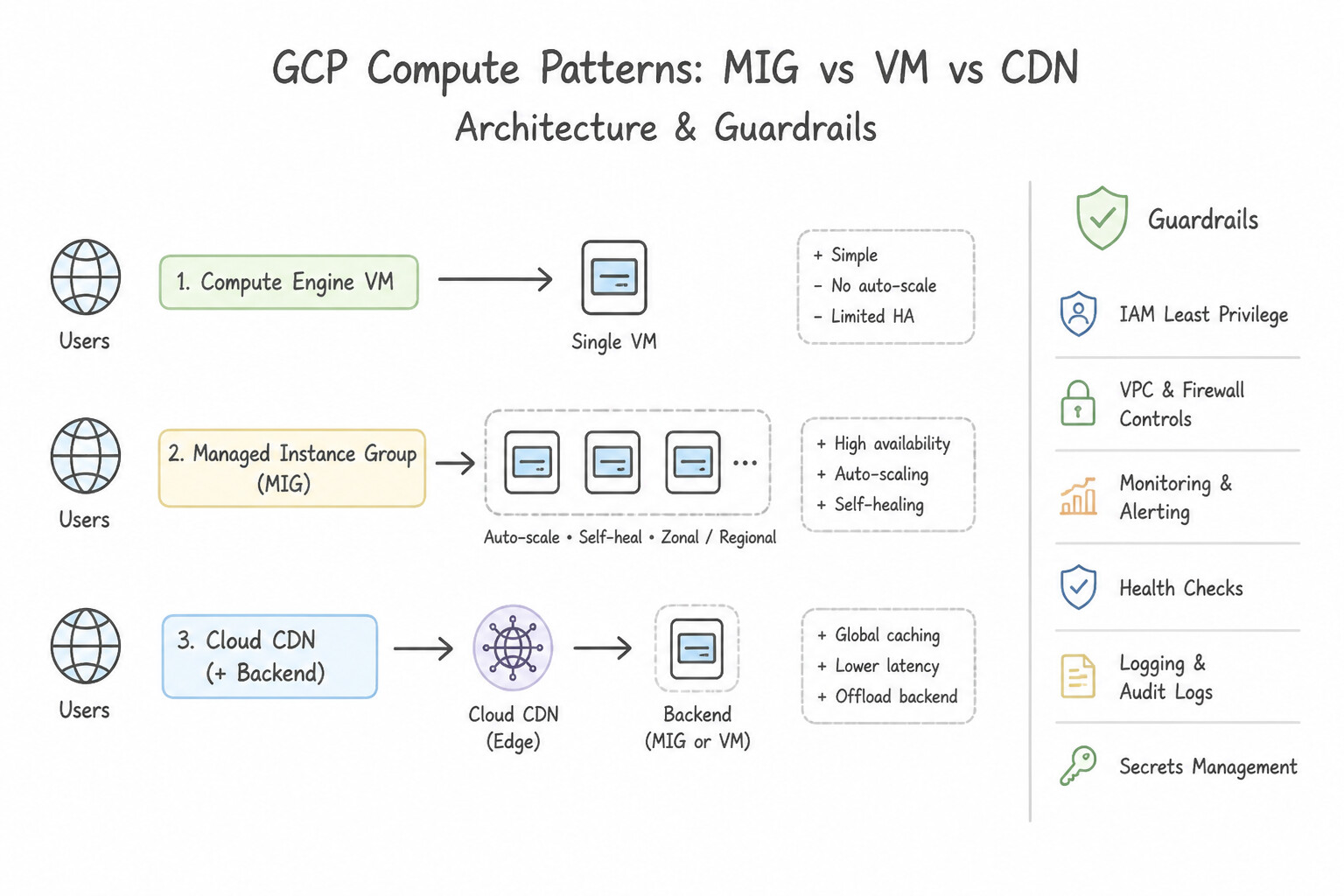
- High Availability for Stateless Web Tier: Use Deploy the VMs into a regional managed instance group (MIG). A regional MIG automatically spreads instances across multiple zones, ensuring availability even if one zone fails. (Avoid alternative: A zonal MIG places all instances in one zone, creating a single point of failure if that zone goes down.)
- Global Content Delivery Performance: Use Enable Cloud CDN on the Global External Application Load Balancer backend service. Cloud CDN caches content at the edge of the network, closer to users, which reduces latency for static assets. (Avoid alternative: Cloud VPN is for secure site-to-site connectivity, not for accelerating public static content delivery.)
- Cost Optimization for Fault-Tolerant Batch Jobs: Use Use Compute Engine Spot VMs for the worker instances. Spot VMs are the most cost-effective option for fault-tolerant workloads like batch processing. (Avoid alternative: Local SSDs add performance and cost, which is unnecessary for purely cost-driven decisions where Spot VMs are applicable.)
Key Takeaways (1.2a)
- High Availability (HA) requires eliminating single points of failure. In Compute Engine, a single zone is a single point of failure.
- Regional Managed Instance Groups (MIGs) are the preferred solution for stateless applications requiring protection against zonal outages.
- Zonal resources should only be used if the application logic cannot handle distributed instances or if high availability is not a requirement.
- Latency is largely determined by the physical distance between the user and the data.
Consideration 1.2b: High availability and fail-over design
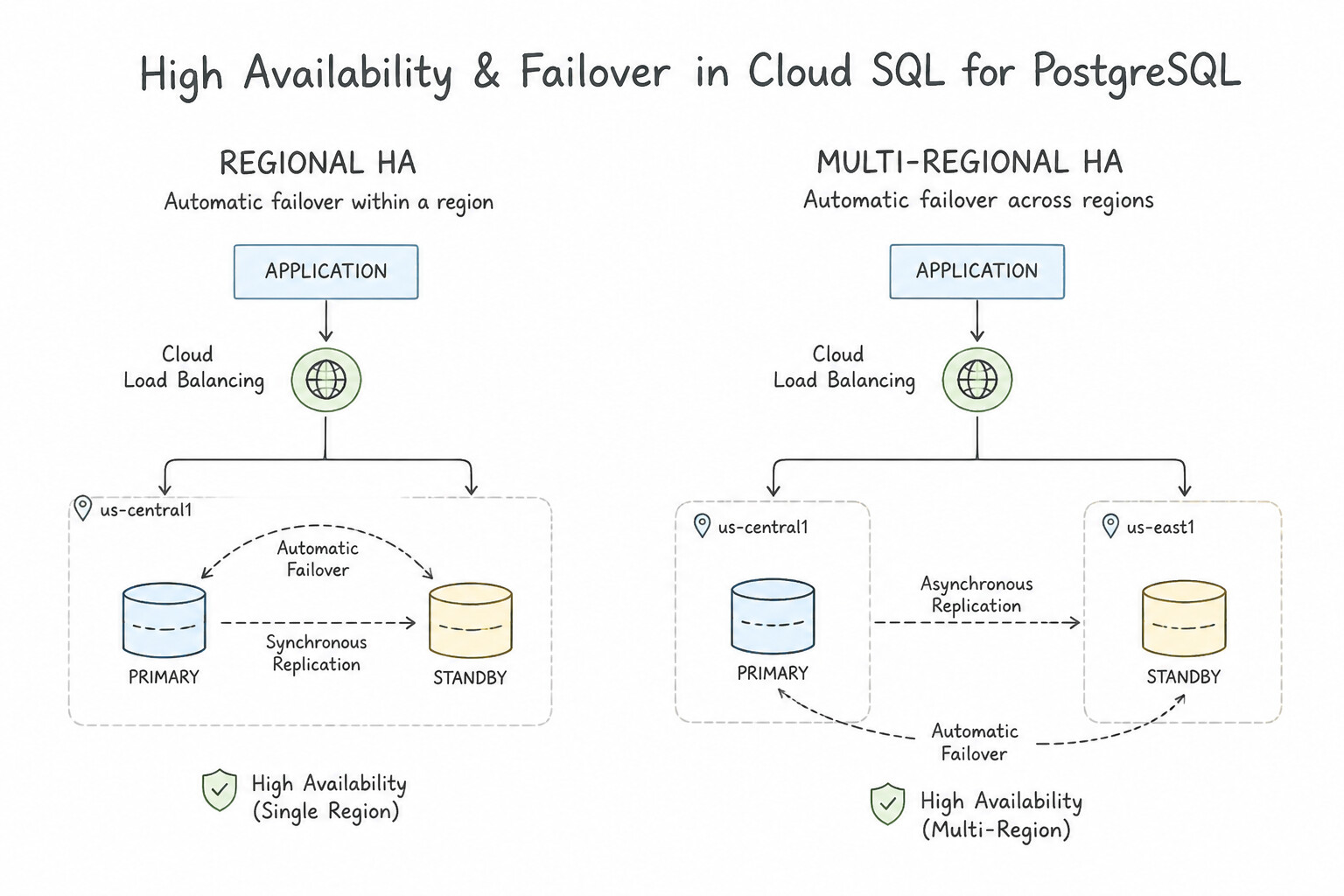
- Understand Regional HA vs. Multi-Regional HA:
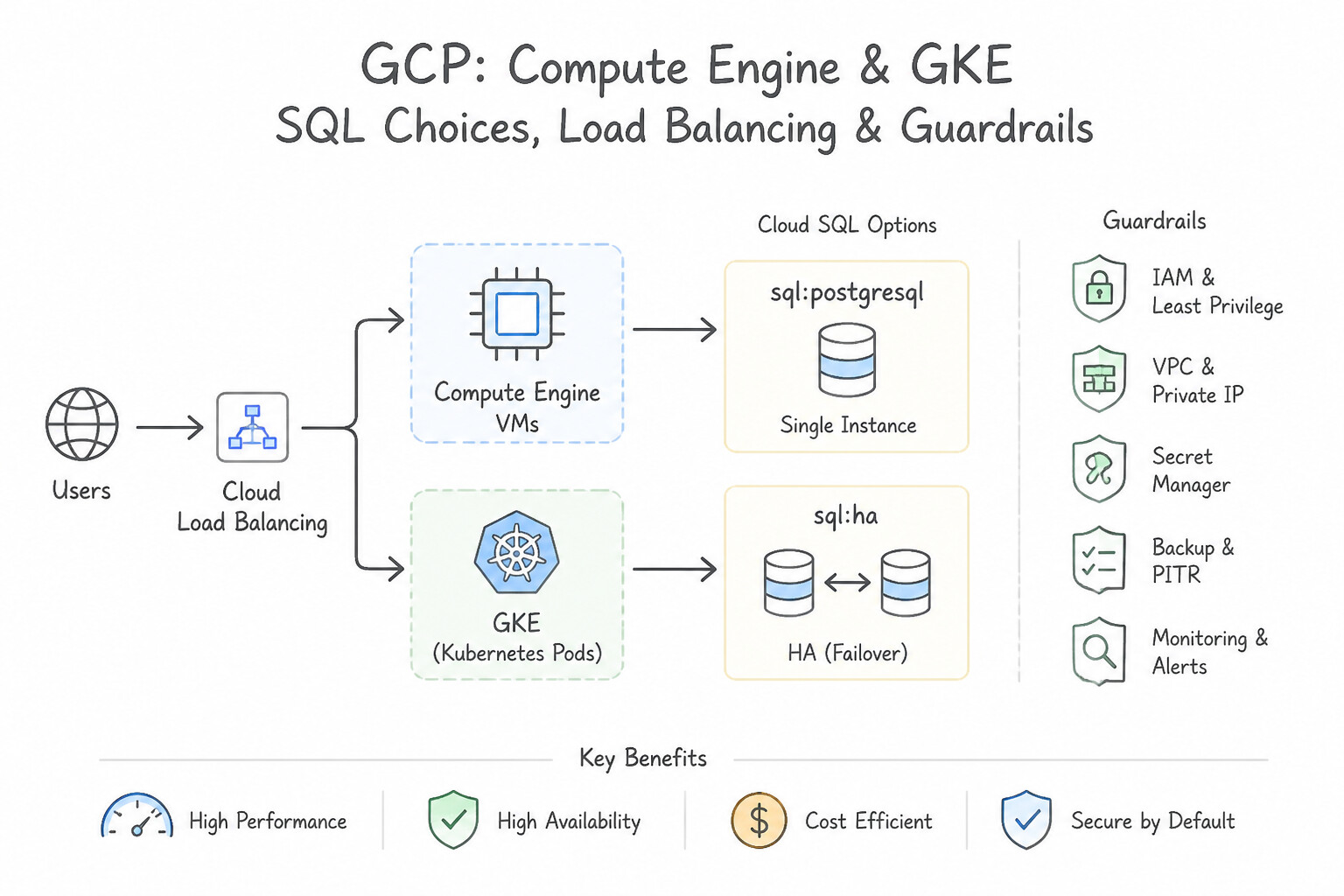
- Compute Engine / GKE: Single-zone VMs/clusters fail during a zonal outage. Use Regional Managed Instance Groups (MIGs) or Regional GKE clusters distributed across 3 zones, fronted by a Cloud Load Balancer with automated health checks and autohealing.
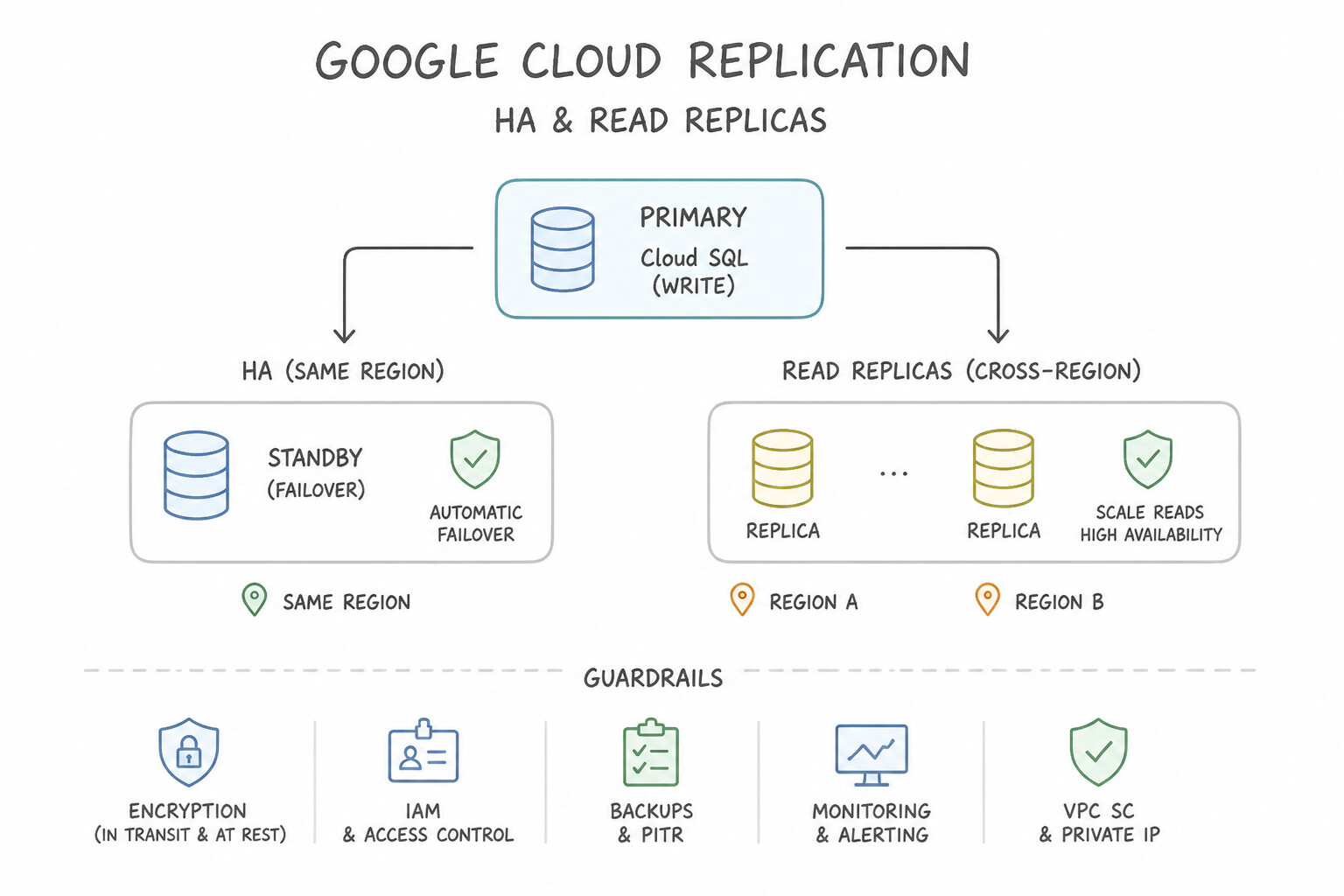
- Cloud SQL HA (Regional): Uses a Primary instance in Zone A and a Standby instance in Zone B within the same region with synchronous block replication (
Regional Persistent Disk). Automatic failover takes ≈ 60–120 seconds. Trap: A Cloud SQL Read Replica is not an automatic HA failover standby! - Cross-Region Database Failover: If an entire region goes down, Cloud SQL Regional HA will not survive on its own—you must promote a Cross-Region Read Replica (asynchronous replication, small RPO) or use Cloud Spanner (multi-region synchronous Paxos replication, $99.999\%$ SLA, zero RPO).
Key Implementation Patterns
- Database Regional High Availability: Use Enable the High availability (Regional) option to create a standby instance in a secondary zone. Cloud SQL High Availability uses synchronous replication to a standby instance in another zone, enabling automatic failover with low downtime.
- Global Load Balancing and Regional Failover: Use Configure a Global External Application Load Balancer. Create backend services with managed instance groups in multiple regions. Global External Application Load Balancers support multi-region backends and automatically route traffic to the nearest healthy region.
Key Takeaways (1.2b)
- High Availability (HA) in Cloud SQL provides automatic failover across zones.
- HA uses synchronous replication to a standby instance to ensure zero data loss (RPO=0) for committed transactions.
- Read Replicas use asynchronous replication and are primarily for offloading read operations, not for automatic HA failover.
- Regional HA configurations share a single static IP address that moves to the standby instance during failover.
Consideration 1.2c: Flexibility of cloud resources
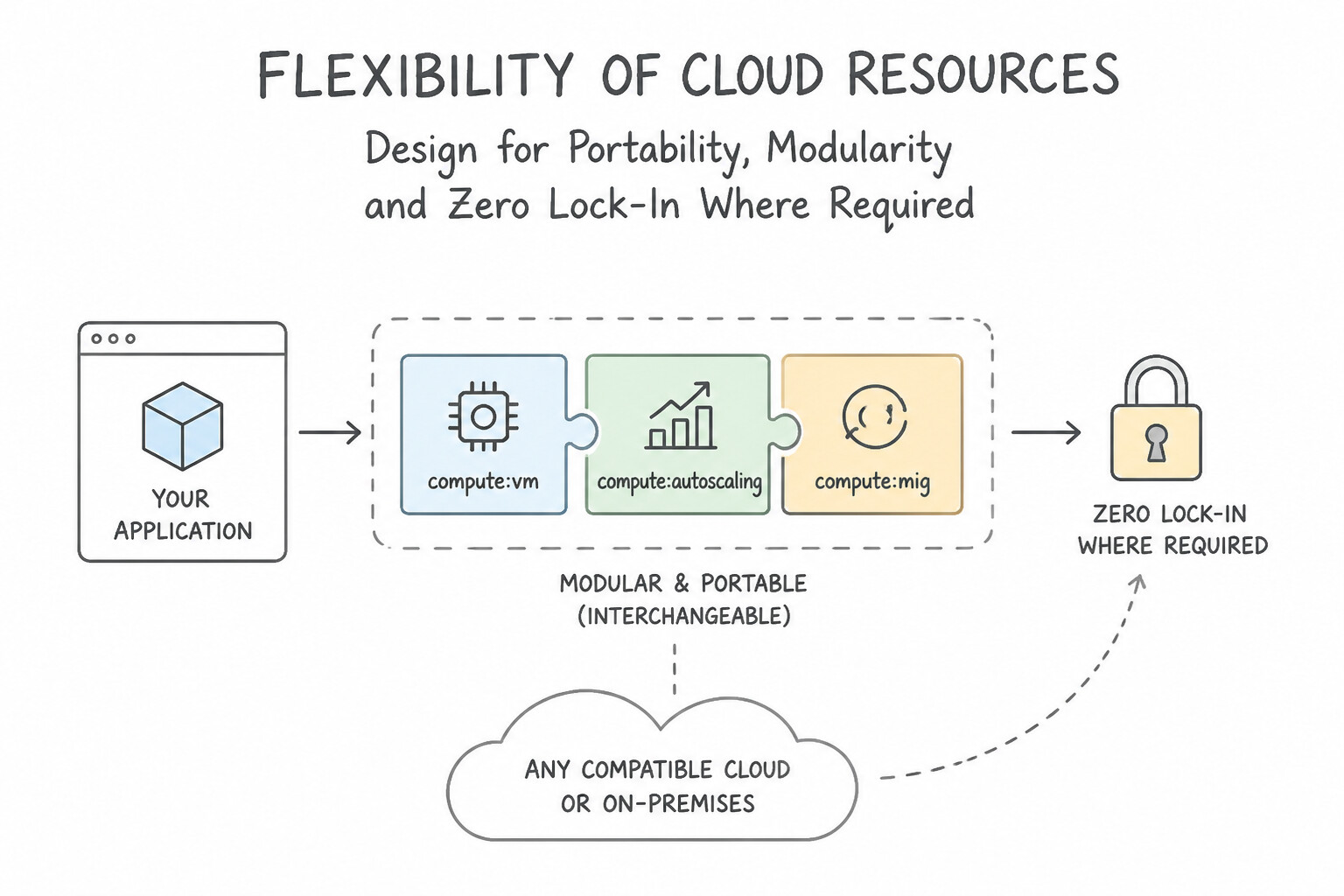
- Design for Portability, Modularity & Zero Lock-In Where Required:
- Package applications as OCI containers deployed on GKE or Cloud Run (which adheres to the open Knative API standard) so workloads can move seamlessly between serverless and Kubernetes.
- Provision infrastructure declaratively via Terraform and decouple configuration from code via Secret Manager and environment variables (12-Factor App methodology).
- Use managed messaging (Pub/Sub) and API gateways (Apigee) so backend database or compute implementations can be swapped without breaking upstream clients.
Key Implementation Patterns
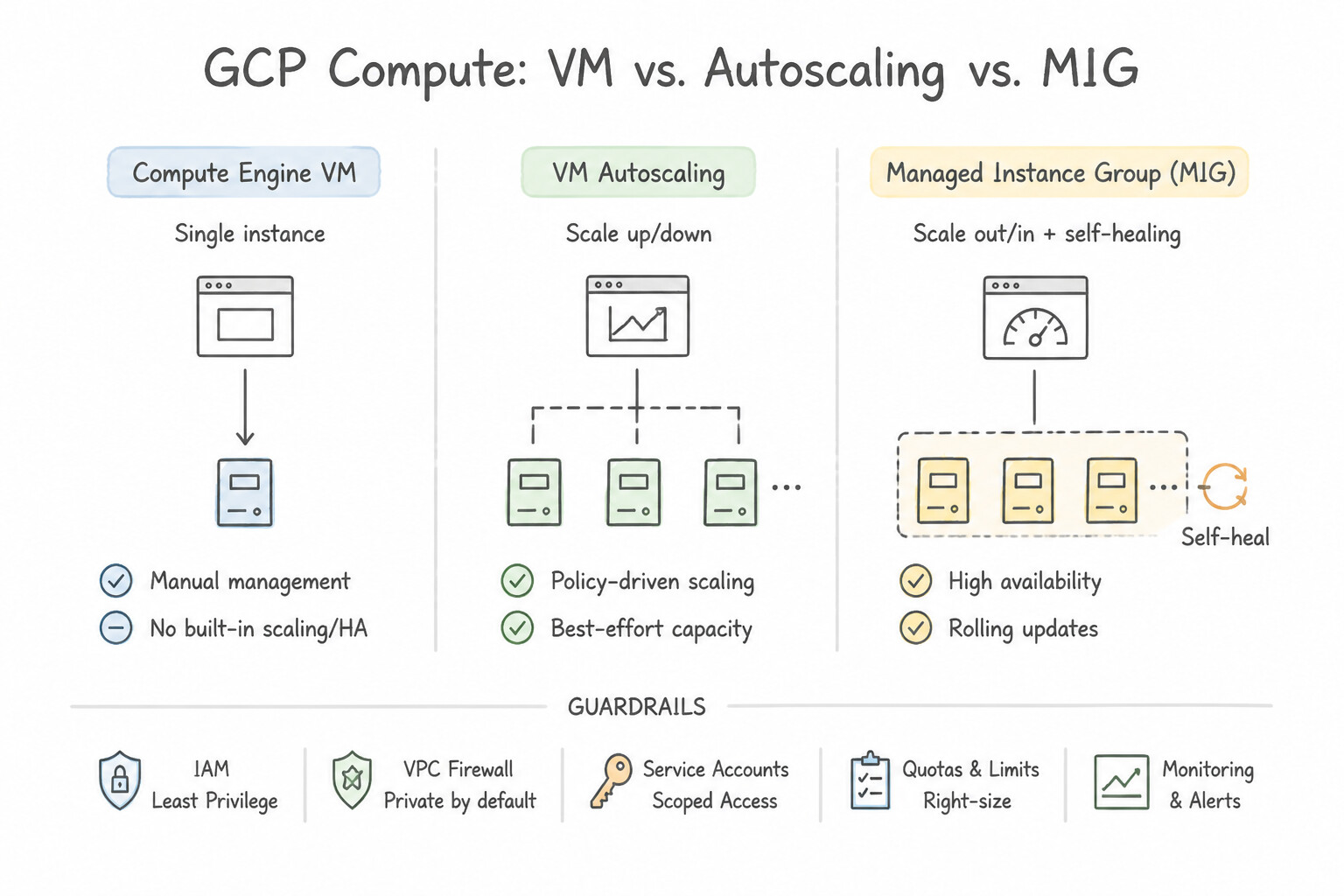
- Handling Unpredictable Traffic Bursts: Use Migrate the application to a Managed Instance Group (MIG) and configure autoscaling based on CPU utilization. Managed Instance Groups with autoscaling automatically adjust the number of VMs based on load, balancing performance and cost.
- Global Database Write Scalability: Use Use Cloud Spanner. Configure the instance to autoscale nodes based on CPU utilization. Cloud Spanner provides the required global relational structure and supports horizontal scaling for write throughput. (Avoid alternative: Read replicas scale read traffic, not write traffic; Cloud SQL scales writes vertically, not horizontally.)
- Optimizing for Fault-Tolerant Batch Workloads: Use Configure the managed instance group to use Spot VMs. Spot VMs offer the lowest price for fault-tolerant, stateless workloads that can handle interruptions. (Avoid alternative: Committed use discounts require a long-term commitment and offer lower savings compared to Spot VMs for interruptible workloads.)
Key Takeaways (1.2c)
- Unpredictable Traffic: Always prioritize horizontal scaling (adding instances) over vertical scaling for variable workloads.
- Automation: Use Managed Instance Groups (MIGs) with autoscaling to handle load changes without human intervention.
- Cost Efficiency: Autoscaling prevents paying for idle resources by removing instances when they are not needed.
- Cloud Spanner is the choice for global, relational data that needs horizontal scaling.
Consideration 1.2d: Scalability to meet growth requirements
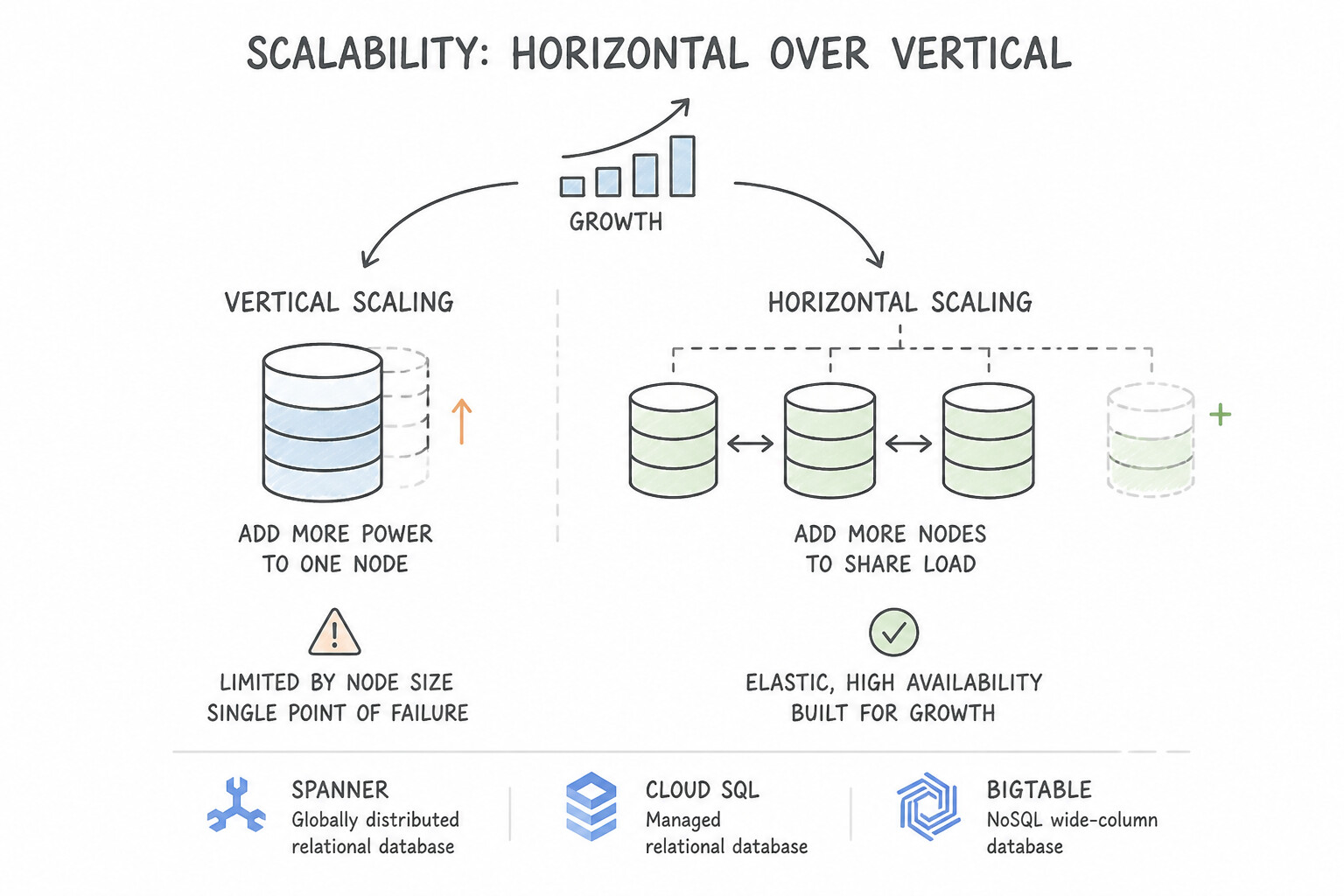
- Horizontal Over Vertical Scaling: Vertical scaling (bigger VM) hits a hard ceiling and requires a reboot/downtime. Horizontal scaling adds stateless instances behind a load balancer with zero downtime.
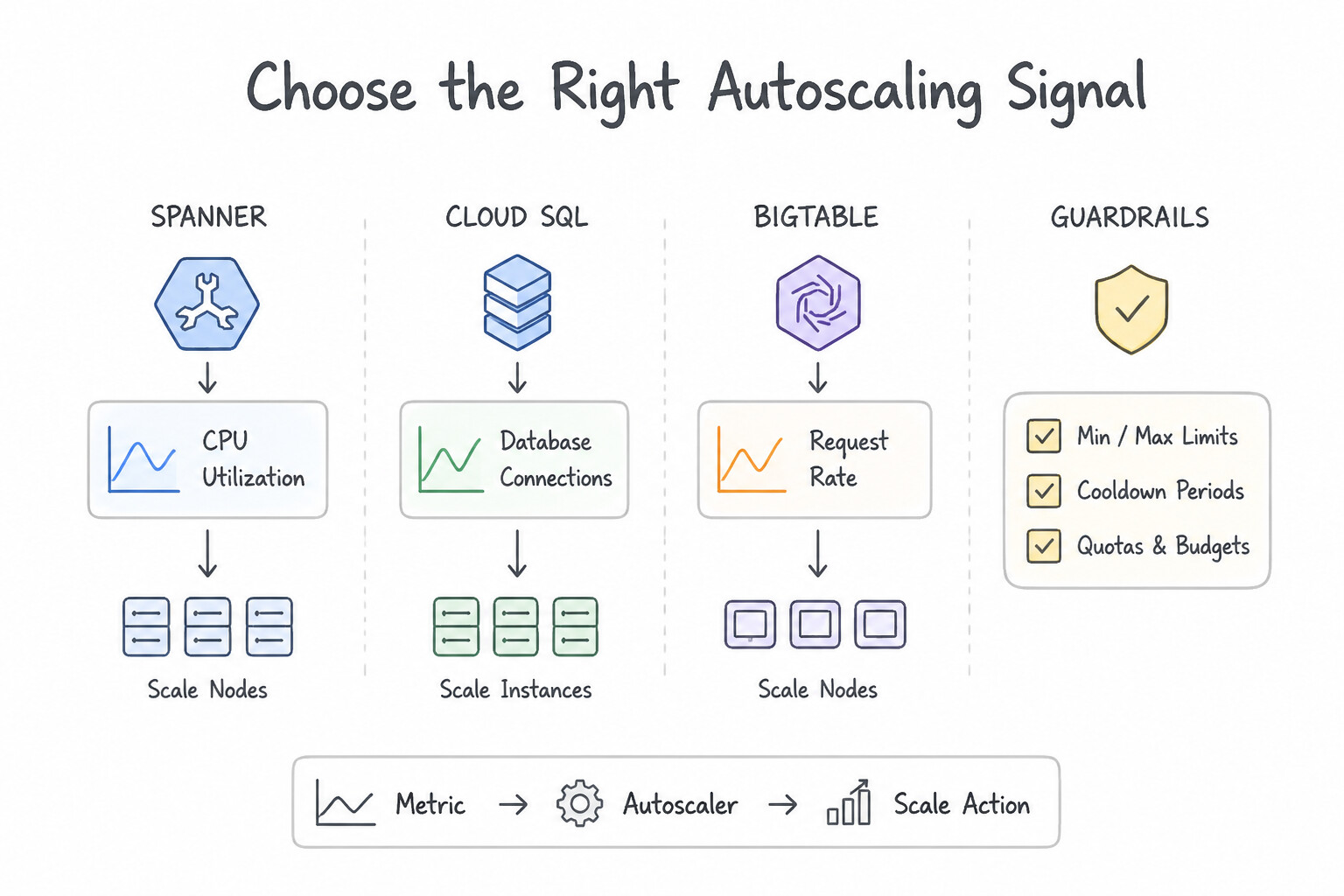
- Choose the Right Autoscaling Signal:
- For synchronous HTTP web tiers → scale on Load Balancing utilization / request rate or CPU utilization.
- For asynchronous background worker MIGs/GKE pods pulling from Pub/Sub → scale on custom Cloud Monitoring metric
num_undelivered_messages(queue backlog divided by acceptable processing latency), never CPU alone (workers waiting on I/O may have low CPU while the queue explodes!).
Key Implementation Patterns
- Global Relational Database Scalability: Use Migrate the database to Cloud Spanner. Cloud Spanner provides the required global horizontal write scalability and strict ACID consistency for financial applications. (Avoid alternative: Cloud Bigtable is a NoSQL database lacking the strict multi-row ACID transactions required for financial applications.)
- Handling Traffic Spikes with Buffering: Use Publish sensor data to a Pub/Sub topic, and use a service to subscribe and write to the database. Pub/Sub decouples ingestion from processing, buffering spikes to prevent database overload and data loss. (Avoid alternative: Vertical scaling is expensive and has limits that may not withstand massive traffic bursts.)
- Autoscaling Based on Custom Metrics: Use Install the Ops Agent on the instances to report queue depth and configure autoscaling based on this custom metric. You must export the application-specific queue depth as a custom metric to Cloud Monitoring to use it for autoscaling.
Key Takeaways (1.2d)
- Cloud Spanner is the choice for global, horizontally scalable, relational applications requiring strong consistency.
- Cloud SQL is suited for general-purpose regional relational databases but is limited by the write capacity of a single primary instance.
- Vertical scaling has physical limits; horizontal scaling allows for virtually unlimited growth.
- Financial applications often require strict ACID transactions, which eliminates most NoSQL options.
Consideration 1.2e: Performance and latency
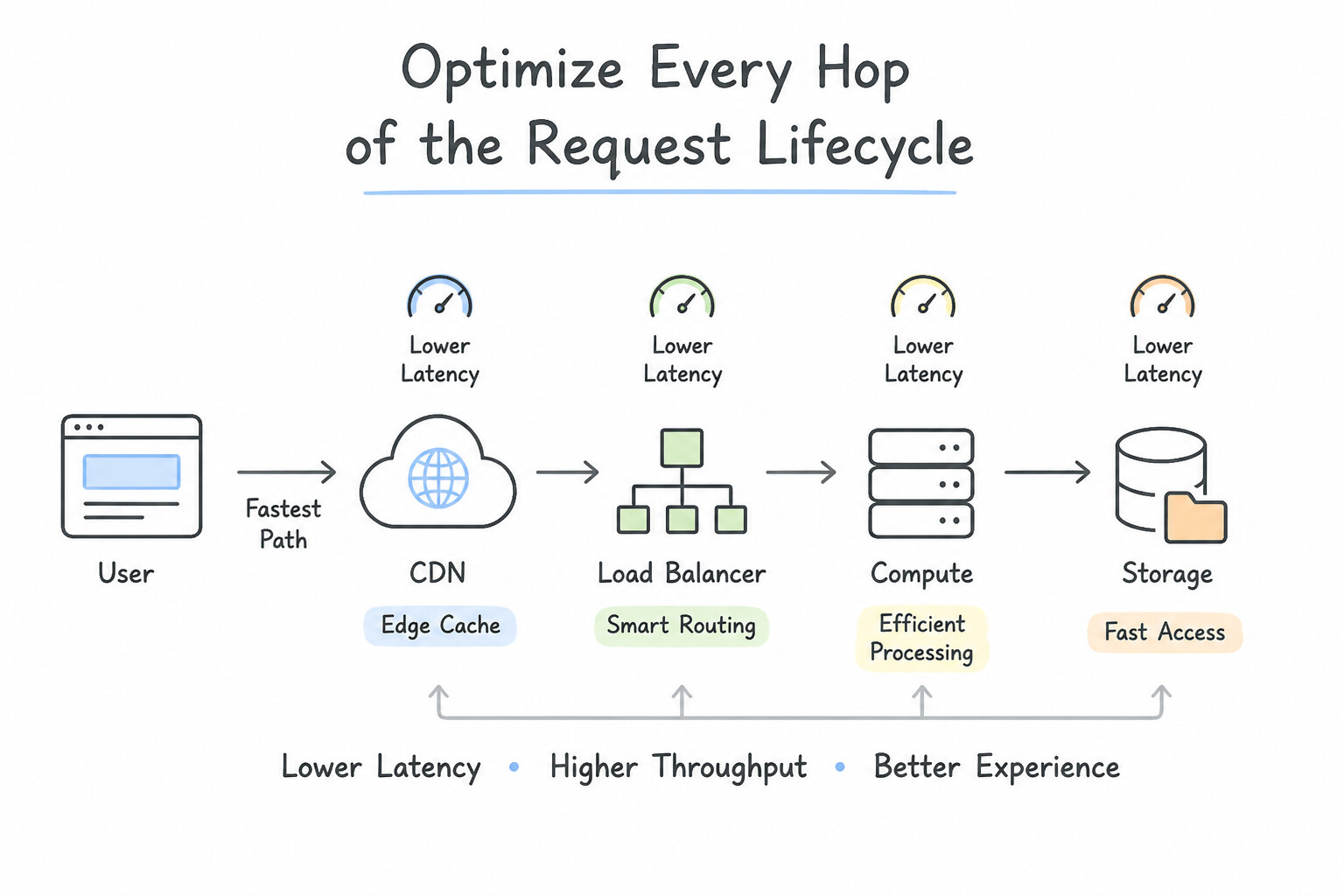
- Optimize Every Hop of the Request Lifecycle:
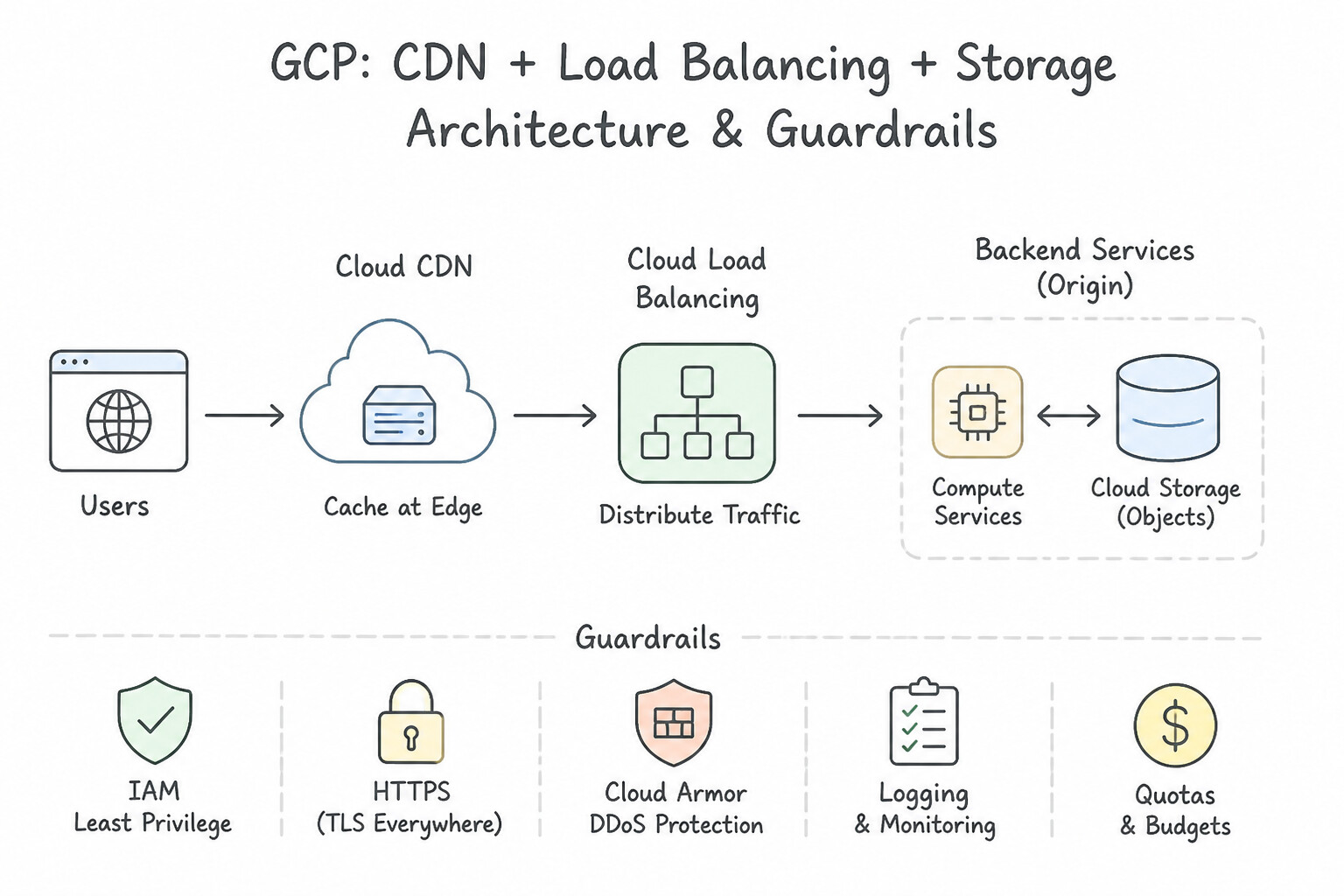
- Network Edge: Enable Premium Network Service Tier + Global External Application Load Balancer (terminates TLS at the closest Google edge PoP worldwide) + Cloud CDN (serves static assets from edge cache).
- Application Caching Layer: Place Memorystore for Redis / Valkey in front of relational databases to serve hot session states, leaderboards, and repeated catalog queries in sub-millisecond latency.
- Database Layer: Offload heavy analytical/reporting queries from OLTP databases using Read Replicas or AlloyDB Columnar Engine (which keeps frequently queried columns in an in-memory columnar format for $100\times$ faster hybrid HTAP queries without impacting transactional writes).
Key Implementation Patterns
- Global Static Content Delivery Optimization: Use Configure a Global External Application Load Balancer with Cloud CDN enabled and set the Cloud Storage bucket as the backend. Cloud CDN caches content at the network edge, minimizing latency for global users accessing static assets.
- Hybrid Connectivity for Latency-Sensitive Traffic: Use Provision a Dedicated Interconnect connection. Dedicated Interconnect offers a private, physical link with an SLA for low, predictable latency. (Avoid alternative: Cloud VPN uses the public internet, which cannot guarantee predictable millisecond latency.)
- Compute-Intensive Scientific Modeling: Use Provision C2 Compute-optimized virtual machine (VM) instances. C2 instances offer the highest clock speeds and are specifically built for compute-bound HPC workloads. (Avoid alternative: E2 instances are optimized for cost and general workloads, not high-performance compute-bound tasks.)
Key Takeaways (1.2e)
- Cloud CDN is the standard solution for reducing latency for global users accessing static content.
- Global External Application Load Balancers are required to enable Cloud CDN.
- Cloud Storage buckets can serve as backend origins for load balancers.
- Moving compute resources (VMs) does not solve static content latency as effectively as edge caching.
Consideration 1.2f: Gemini Cloud Assist
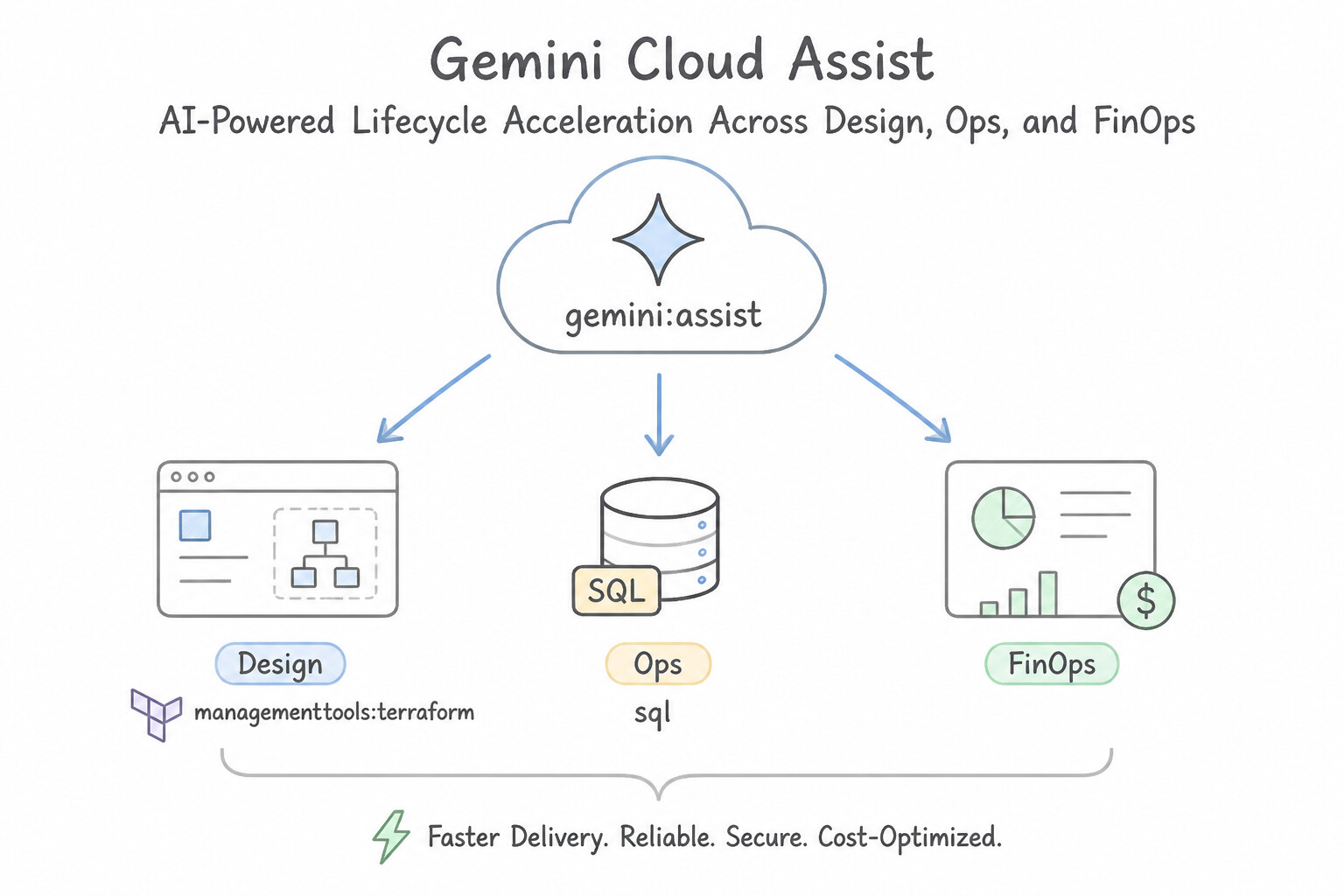
- AI-Powered Lifecycle Acceleration Across Design, Ops, and FinOps:
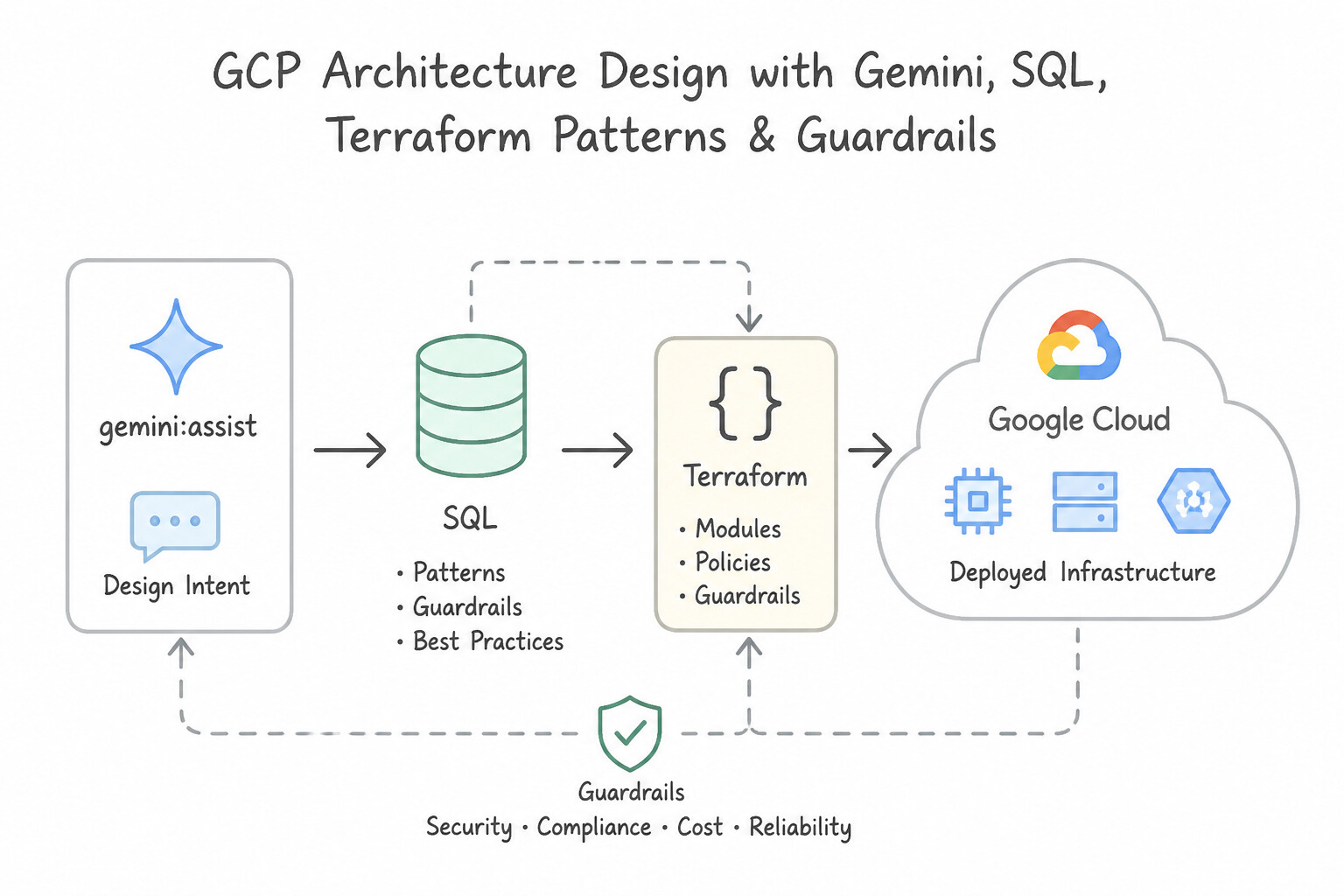
- Design: Generate architecture recommendations, Terraform/deployment configurations, and BigQuery SQL / MQL queries from natural-language requirements.
- Troubleshoot: Analyze Cloud Logging errors, IAM permission-denied traces, GKE pod crash loops, and VPC firewall drops to pinpoint the exact root cause and remediation command.
- Optimize: Surface contextual cost and performance recommendations alongside Active Assist to right-size resources and improve reliability.
Key Implementation Patterns
- Accelerating Infrastructure as Code Development: Use Open Gemini in the Google Cloud console and enter a prompt asking to generate the Terraform code for Cloud SQL Private Service Access. Gemini Cloud Assist can generate Terraform infrastructure code from natural language prompts directly in the console.
- Optimizing Cost Through Resource Identification: Use Open Gemini Cloud Assist in the Google Cloud console and enter the prompt: "List all unattached disks and idle load balancers.". Gemini Cloud Assist allows natural language queries to immediately identify idle resources across the organization.
Key Takeaways (1.2f)
- Gemini Cloud Assist allows you to generate code snippets for Google Cloud resources using natural language.
- Using AI assistants accelerates the development of Infrastructure as Code (IaC) by reducing documentation research time.
- Gemini is integrated directly into the Google Cloud console for seamless access during administrative tasks.
- Gemini Cloud Assist enables natural language interaction with your cloud infrastructure.
Consideration 1.2g: Backup and recovery
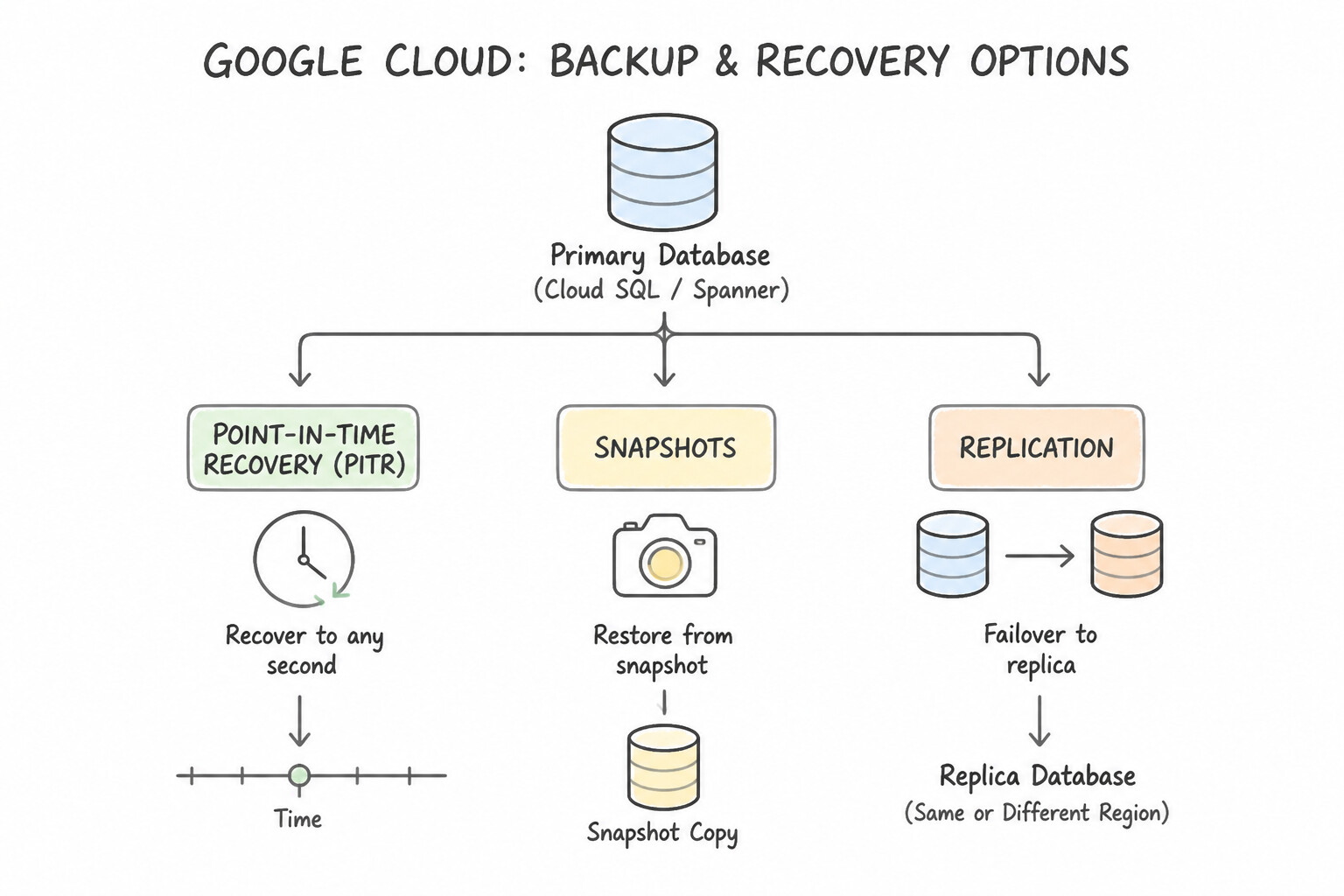
- Point-in-Time Recovery (
PITR) vs. Snapshots vs. Replication: - Replication (HA / Read Replicas) does not protect against logical data corruption (e.g., an engineer accidentally running
DROP TABLEor a buggy deployment corrupting rows—the deletion replicates immediately to the standby!). - Cloud SQL Automated Backups + Binary/Transaction Logs (
PITR): Required to restore a database to the exact second just before a logical corruption or accidental deletion occurred. - Google Cloud Backup and DR Service: Provides centralized, policy-driven, immutable and indelible backup vaults across Compute Engine VMs, GKE, VMware Engine, Cloud SQL, and SAP HANA to defend against ransomware and meet strict enterprise RPO/RTO SLAs.
Key Takeaways (1.2g)
- Point-in-Time Recovery (
PITR) vs. Snapshots vs. Replication:- Replication (HA / Read Replicas): does not protect against logical data corruption (e.g., an engineer accidentally running
DROP TABLEor a buggy deployment corrupting rows—the deletion replicates immediately to the standby!).- Cloud SQL Automated Backups + Binary/Transaction Logs (
PITR): Required to restore a database to the exact second just before a logical corruption or accidental deletion occurred.
Quick Decision Cheat Sheet (Subsection 1.2)
If the Scenario Requires... | Choose This Google Cloud Pattern | Avoid This Common Mistake |
|---|---|---|
"Minimize carbon footprint / meet corporate environmental sustainability goals" | Select Low-Carbon regions (high CFE%), use serverless/autoscale to zero, and follow the Sustainability pillar | Over-provisioning 24/7 idle VMs in high-carbon regions |
"Zonal outage took down the relational database; need automatic intra-region failover" | Enable Cloud SQL High Availability (Regional HA) with synchronous standby in a secondary zone | Creating a single-zone Read Replica (Read Replicas do not provide automatic HA failover) |
"Regional outage recovery required for Cloud SQL with minimal data loss" | Configure a Cross-Region Read Replica and promote it during a regional disaster | Relying solely on Regional HA (which only spans two zones inside the same region) |
"Accidental data deletion or ransomware corruption; need to rewind database to a specific minute" | Enable Automated Backups + Point-in-Time Recovery ( PITR) / Backup and DR Service | Relying on synchronous disk mirroring ( Regional PD or Cloud SQL HA) |
"Accelerate analytical BI queries on operational PostgreSQL data without ETL overhead" | Migrate to AlloyDB for PostgreSQL and enable the Columnar Engine | Adding more storage capacity to a standard Cloud SQL instance |
"Diagnose cryptic deployment/IAM errors and generate optimization recommendations using natural language" | Gemini Cloud Assist | Manually grepping millions of raw log lines without assistive tooling |
Further Reading (Subsection 1.2)
- Regional managed instance groups — This page explains how regional MIGs distribute instances across zones to protect against zonal failures.
- Cloud CDN Overview — Explains how Cloud CDN uses Google's global edge network to serve content closer to users, which accelerates your websites and applications.
- Performance Efficiency Pillar — Part of the Google Cloud Architecture Framework. Discusses strategies for optimizing performance, including the use of caching strategies like Cloud CDN.
- Spot VMs — Spot VMs are highly affordable compute instances suitable for batch jobs and fault-tolerant workloads. Spot VMs offer the same machine types, options, and performance as standard compute instances.
- Cost Optimization — A guide on the principles of Cost Optimization within the Google Cloud Architecture Framework, emphasizing the selection of appropriate resources for the workload's requirements.
- Cloud SQL High Availability configuration — This page explains the concept of the regional HA configuration, how synchronous replication works, and the failover process.
Subsection 1.4: Creating a migration plan (i.e., documents and architectural diagrams)
The Big Picture
Enterprise migrations rarely fail because Compute Engine or Cloud SQL cannot run the workload; they fail because teams attempt a "Big-Bang" weekend cutover without discovering hidden network dependencies, without calculating per-core BYOL software licensing traps, or without establishing a continuous change-data-capture (CDC) replication bridge. Halfway through the cutover, a migrated web tier in us-east1 makes 50 synchronous database calls per page render back to a legacy mainframe still on-premises—adding $40\text{ ms}$ of WAN latency per query and bringing the application to its knees.
Subsection 1.4 tests your ability to architect a structured 4-Phase Google Cloud Migration Plan (Assess → Plan → Deploy → Optimize) using Google Cloud Migration Center, Migrate to Virtual Machines, Migrate to Containers, Database Migration Service (DMS), and Google Cloud VMware Engine (GCVE).
Consideration 1.4a: Integrating solutions with existing systems
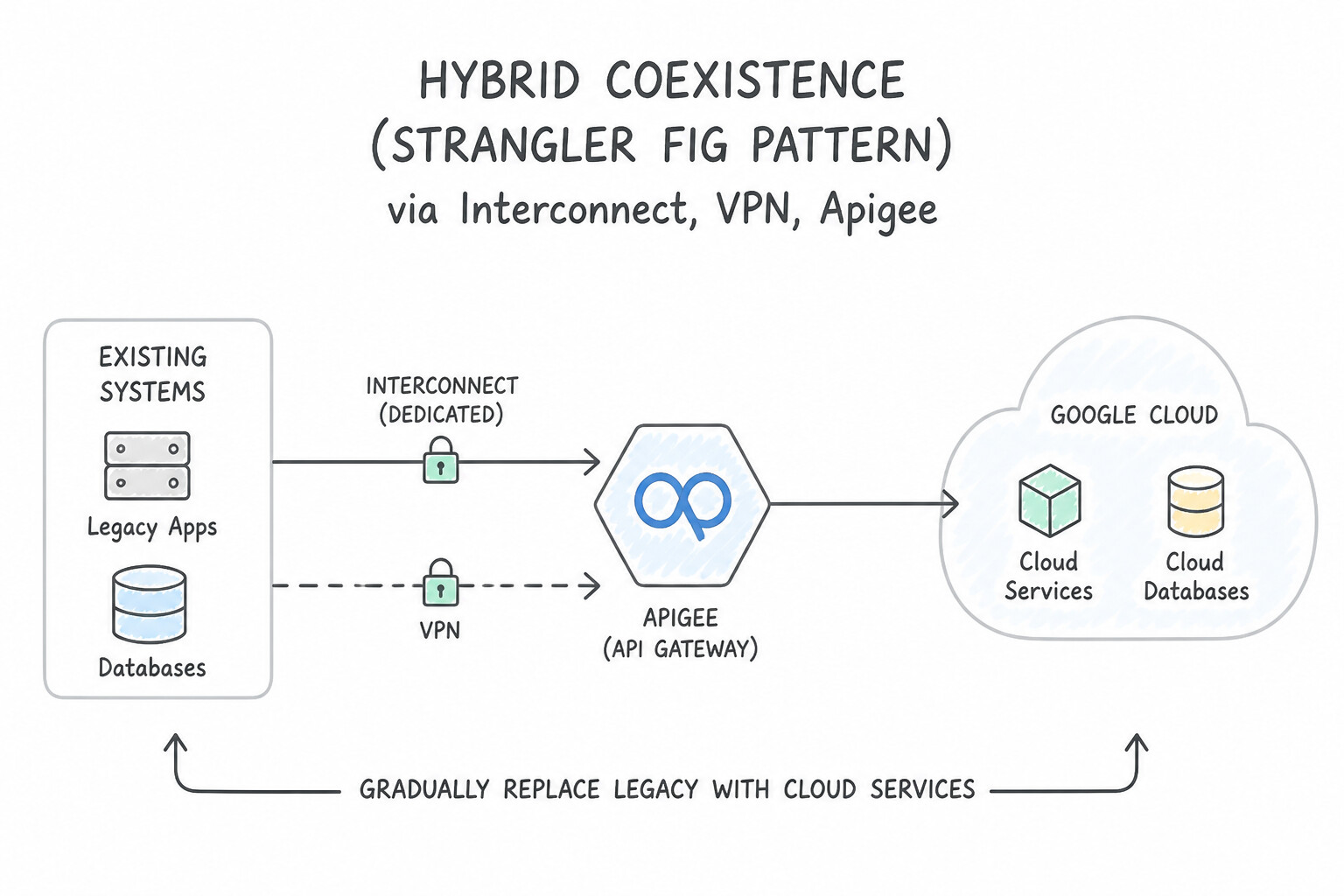
- Architect for Hybrid Coexistence (The Strangler Fig Pattern):
- Rarely does an enterprise shut down an entire data center overnight. During phased migration, use Apigee or Cloud Load Balancing (with Hybrid Network Endpoint Groups [
Hybrid NEGs]) to route traffic dynamically between legacy on-premises endpoints and newly migrated Google Cloud microservices. - Avoid splitting a chatty frontend from its synchronous database across a high-latency WAN link; either migrate tightly coupled tiers together in the same wave, or decouple them with asynchronous events (Pub/Sub) and local read replicas.
Key Implementation Patterns
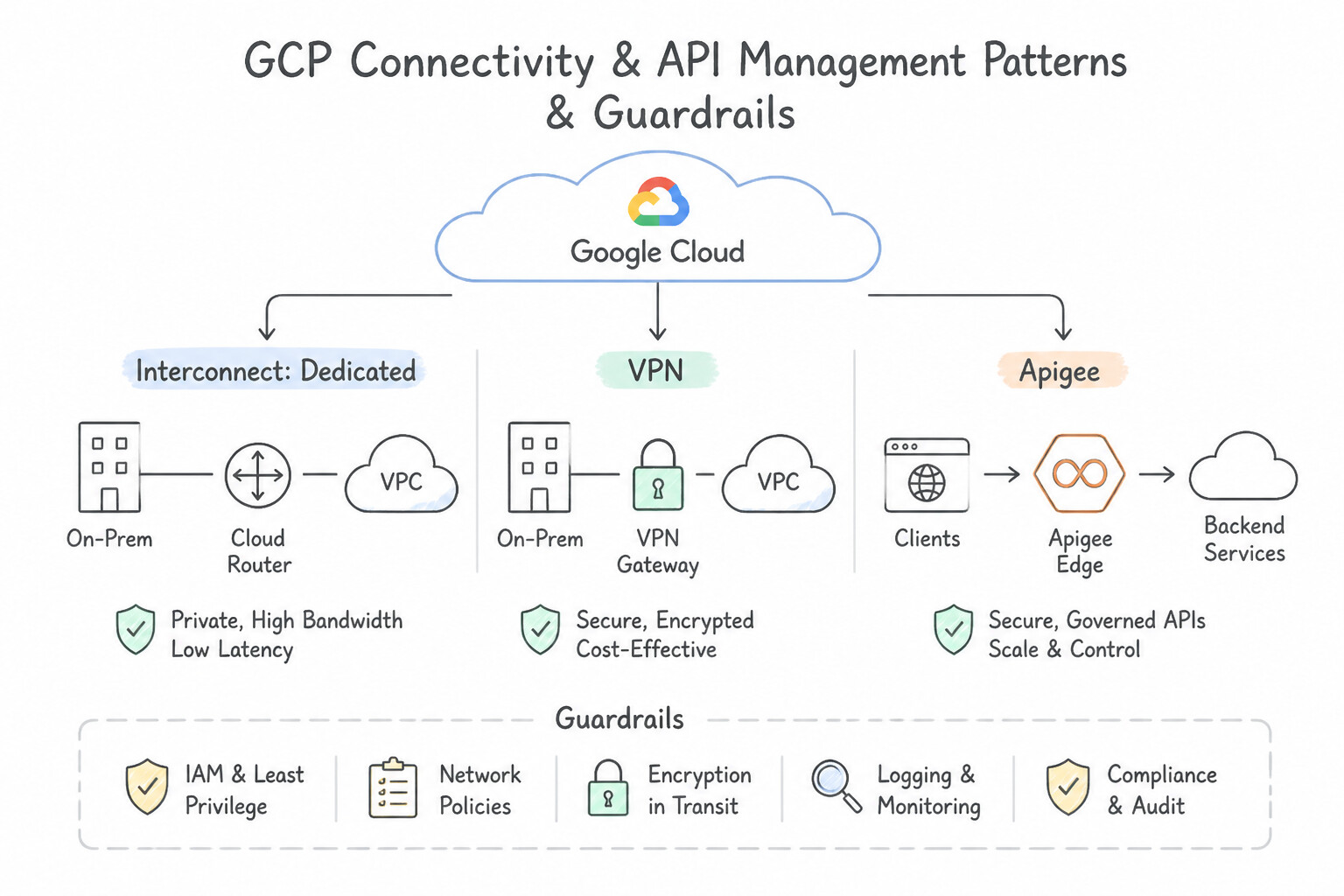
- High-Throughput Hybrid Connectivity: Use Provision Dedicated Interconnect with four 10 Gbps circuits in a redundant topology. Dedicated Interconnect is the only option that guarantees both the high bandwidth (20 Gbps) and the strict 99.99% SLA. (Avoid alternative: Cloud VPN uses the public internet and cannot guarantee 20 Gbps throughput.)
- Legacy Protocol Transformation: Use Deploy Apigee as an API gateway. Configure an API proxy to transform JSON/REST traffic from the mobile app into XML/SOAP for the legacy system. Apigee acts as an intermediary that translates JSON/REST requests into XML/SOAP, satisfying both system requirements.
- Cross-Environment Service Discovery: Use Create a Cloud DNS forwarding zone for corp.local that points to the on-premises DNS server IP addresses. Configure a Cloud DNS inbound server policy to allow on-premises servers to query the Google Cloud VPC network. Use a Cloud DNS forwarding zone for outbound resolution (GCP to on-prem) and an inbound server policy for inbound resolution (on-prem to GCP).
Key Takeaways (1.4a)
- Use Dedicated Interconnect for high-bandwidth (10 Gbps+) and mission-critical workloads.
- Cloud VPN is for lower bandwidth or rapid setup over the public internet.
- Only Interconnect and HA VPN offer SLAs; Peering does not.
- Achieving 99.99% SLA with Dedicated Interconnect requires a specific 4-circuit topology across two metros.
Consideration 1.4b: Assessing and migrating systems and data (e.g., Google Cloud Migration Center)
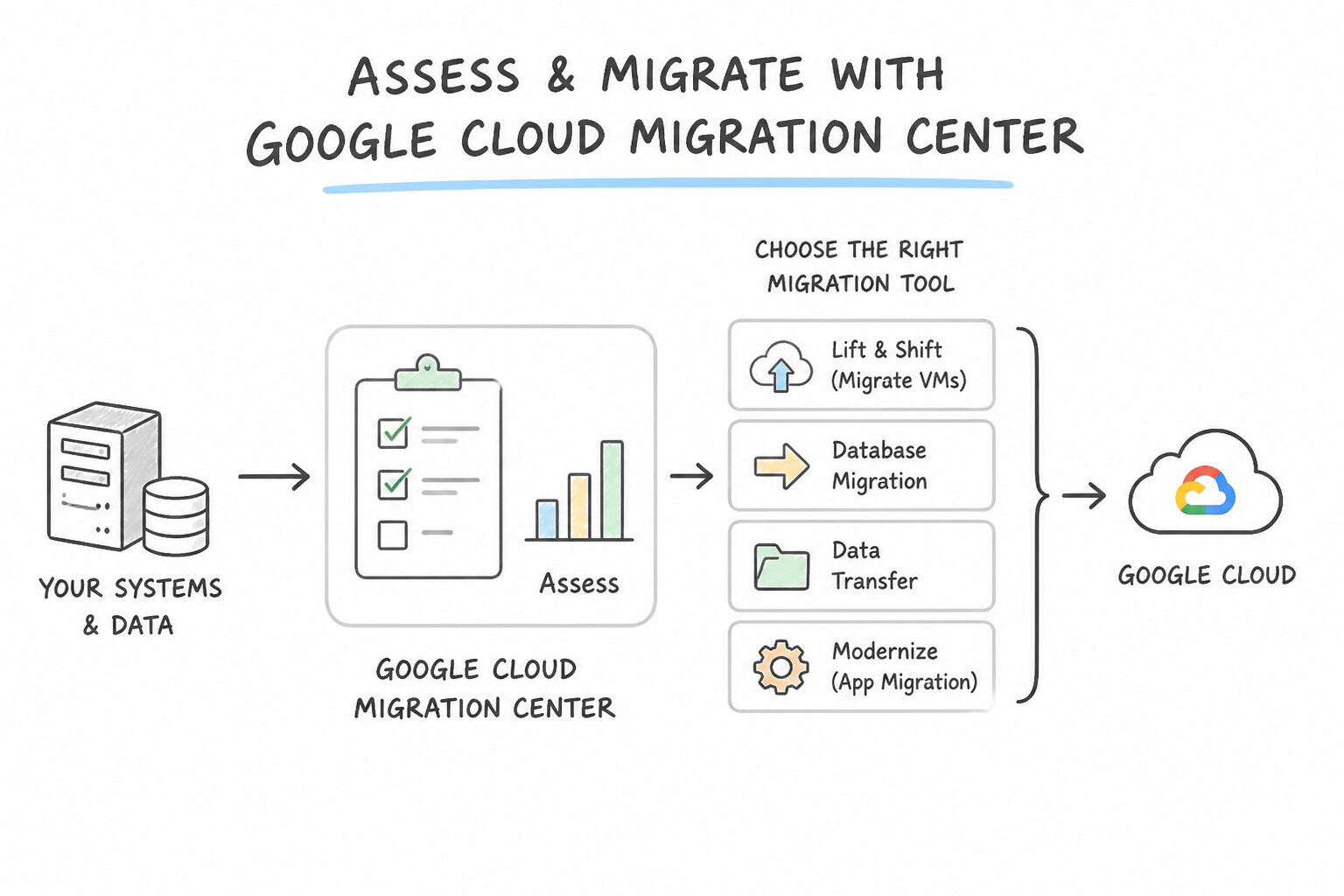
- Choose the Right Google Cloud Migration Tool for Each Asset Class:
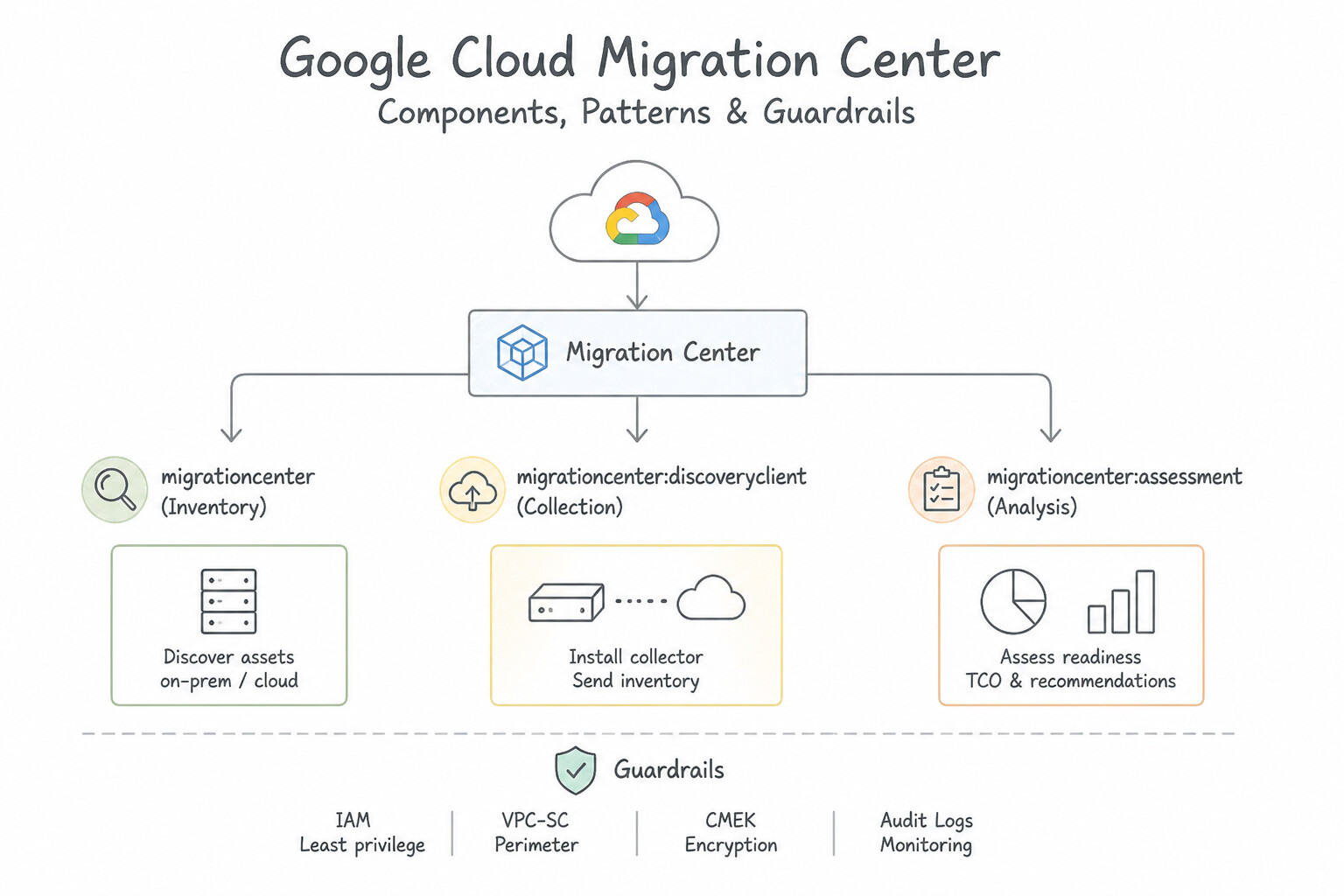
- Google Cloud Migration Center: Unified discovery and assessment platform. Install the discovery client (or import VMware RVTools exports) to collect CPU/RAM/disk utilization, discover network dependencies, generate right-sized TCO cost comparisons, and recommend target compute shapes.
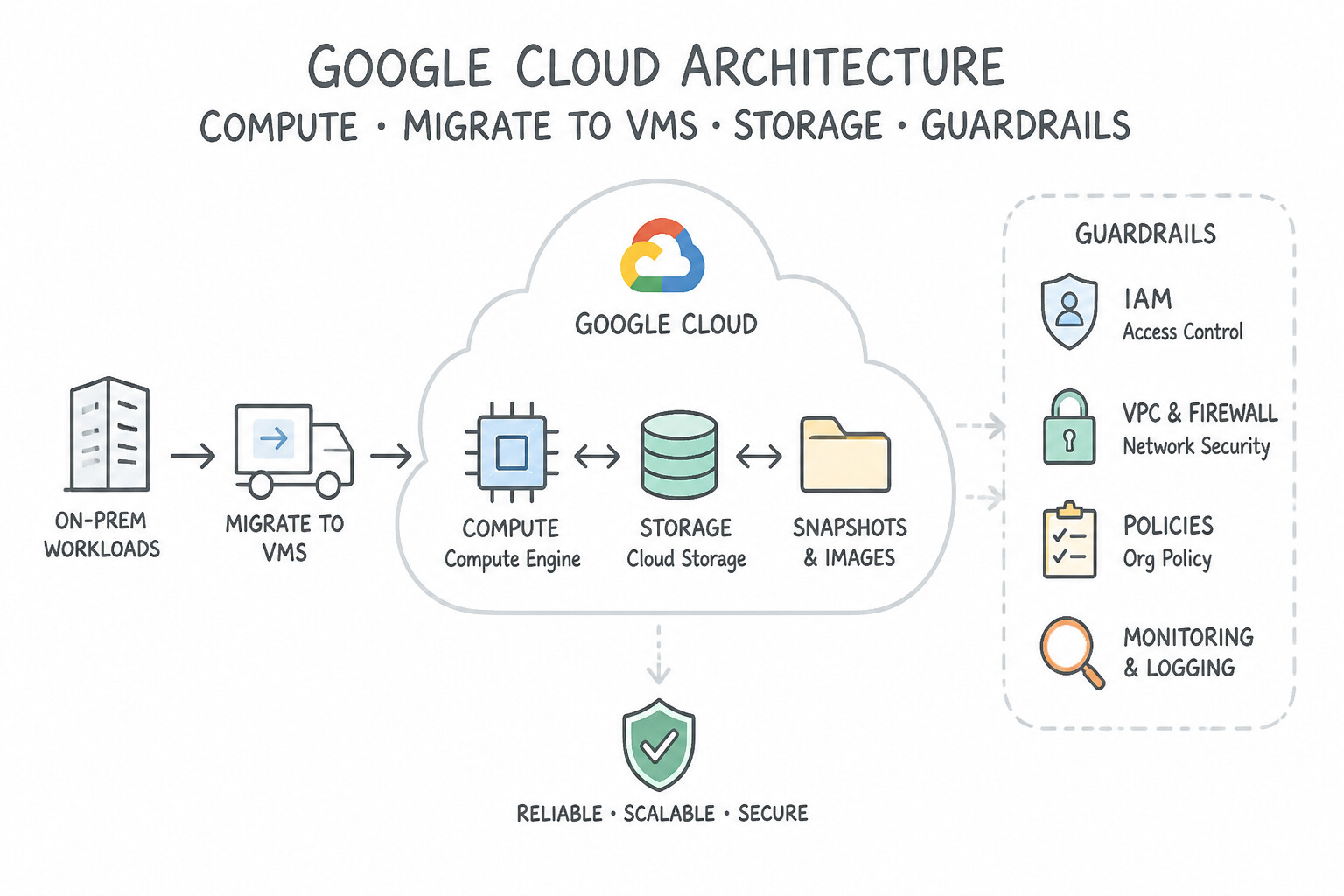
- Migrate to Virtual Machines: Replicates on-prem VMware/AWS/Azure VMs in the background with minimal impact, supports non-disruptive test clones in an isolated sandbox VPC, and performs rapid cutover to Compute Engine.
- Google Cloud VMware Engine (
GCVE): Fastest evacuation path when a data center lease is expiring in weeks—migrates native vSphere VMs via HCX (including live vMotion and L2 subnet extension without changing IP addresses!). - Database Migration Service (
DMS): Serverless, minimal-downtime homogeneous (and supported heterogeneous, e.g., Oracle to PostgreSQL/AlloyDB) database migrations using initial snapshot + continuous Change Data Capture (CDC) replication until cutover.
Key Implementation Patterns
- Automated Asset Discovery for Large Estates: Use Download and deploy the Google Cloud Migration Center discovery client in the on-premises environment. The Migration Center discovery client automates asset inventory collection without requiring agents on individual VMs.
- Total Cost of Ownership (TCO) Assessment: Use Use Google Cloud Migration Center to create a Total Cost of Ownership (TCO) assessment. Migration Center provides built-in TCO assessments that use collected inventory data to compare on-premises costs with Google Cloud costs.
Key Takeaways (1.4b)
- Migration Center is the central hub for assessment, planning, and migration execution.
- The Discovery Client is the primary tool for automated, agentless asset inventory.
- Agent-based methods are typically reserved for detailed dependency mapping after the initial inventory is known.
- Cloud Asset Inventory is for GCP resources, not on-premises.
Consideration 1.4c: Using migration methodologies, workload testing, network planning, dependency planning
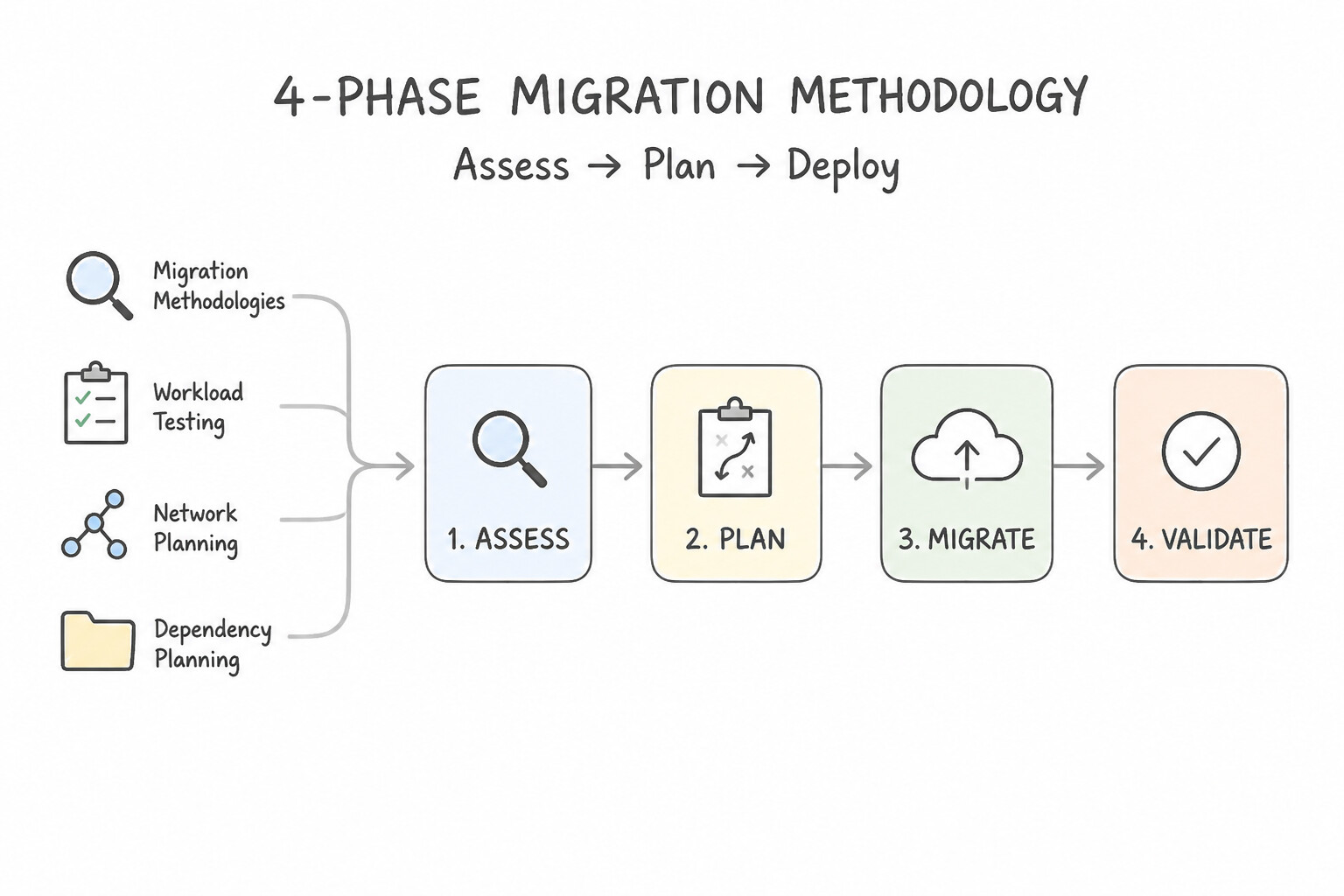
- Execute the 4-Phase Migration Methodology (
Assess → Plan → Deploy → Optimize): - Assess: Inventory hardware/software, map process-to-process network dependencies, and classify workloads into migration waves.
- Plan: Establish foundational landing zones (Resource Hierarchy, Cloud Identity, Shared VPC, HA VPN/Interconnect, non-overlapping IP CIDR allocation, and Cloud DNS forwarding). Always migrate low-risk, loosely coupled, non-production/stateless workloads in Wave 1 to validate tooling and team runbooks.
- Deploy: Run continuous background replication, execute isolated workload testing / synthetic load tests on test clones, and perform DNS/load-balancer cutover with a tested rollback window.
- Optimize: Right-size over-provisioned lift-and-shift VMs, replace self-managed databases with managed services, and purchase CUDs.
Key Implementation Patterns
- Datacenter Exit Strategy under Strict Deadline: Use Use Migrate to Virtual Machines to lift and shift the VMs to Compute Engine without modifications. Rehosting (lift and shift) is the only strategy fast enough to migrate 500 undocumented VMs in 30 days. (Avoid alternative: Manual reinstallation is too slow and risky without documentation for configuration settings.)
- Large Scale Data Transfer with Bandwidth Constraints: Use Order a Transfer Appliance to copy the data offline and ship it to Google. Transfer Appliance allows offline data transfer, bypassing the slow network to meet the deadline. (Avoid alternative: A 1 Gbps connection is too slow to transfer 500 TB within 3 weeks.)
- Migration Discovery and Assessment: Use Deploy the discovery client from Google Cloud Migration Center to collect network data and map dependencies. Migration Center's discovery tools automatically map unknown network dependencies, enabling the creation of accurate move groups.
Key Takeaways (1.4c)
- Rehosting (Lift and Shift) is the fastest migration strategy and ideal for strict deadlines.
- Refactoring requires deep knowledge of the application code and significant time, making it unsuitable for quick datacenter exits.
- Migrate to Virtual Machines is the primary Google Cloud tool for lifting and shifting VMs to Compute Engine.
- Lack of documentation is a key indicator to avoid code-level changes during migration.
Consideration 1.4d: Determining software license implications and financial impact
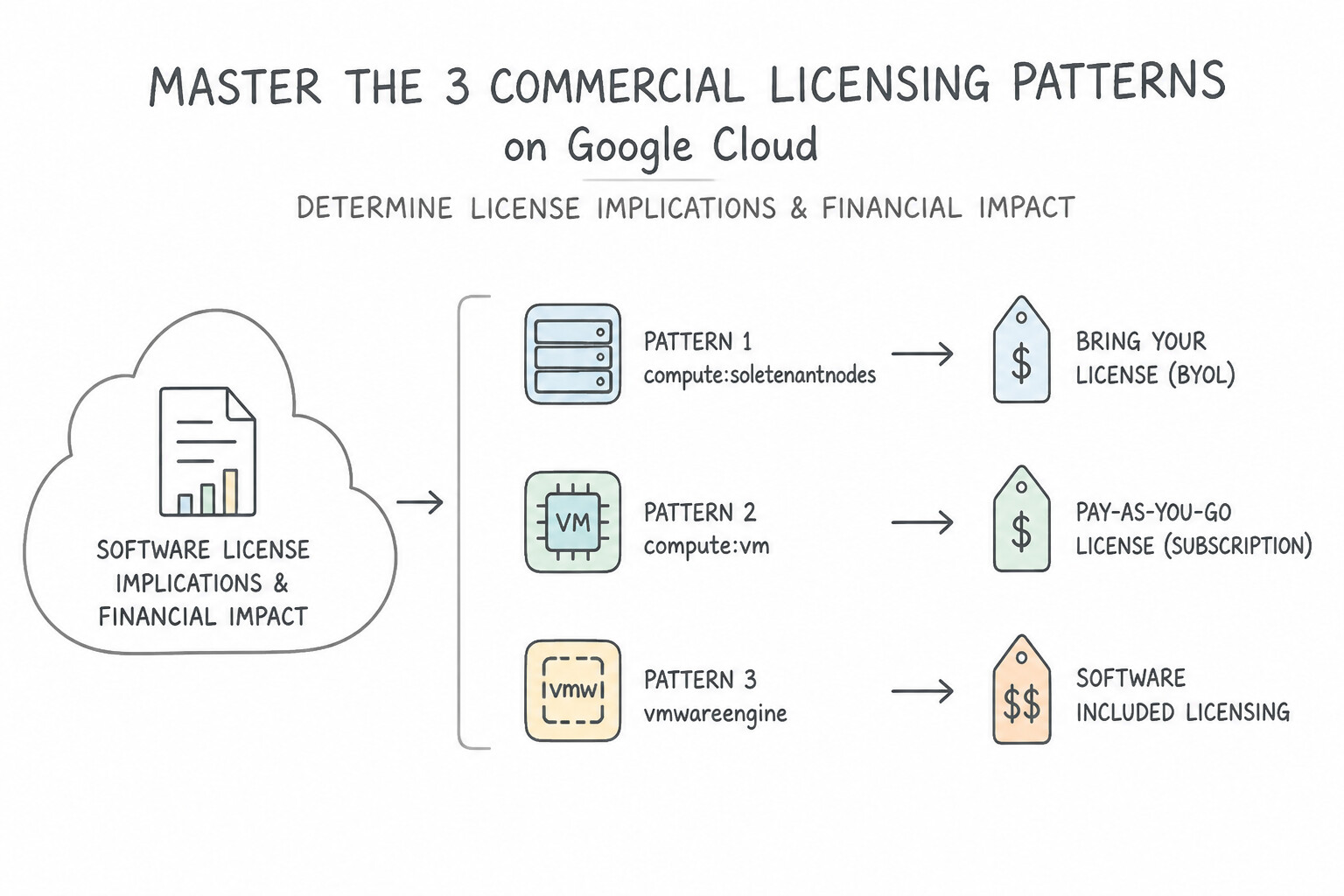
- Master the 3 Commercial Licensing Patterns on Google Cloud:
- Physical Core / Socket Bound Licenses (
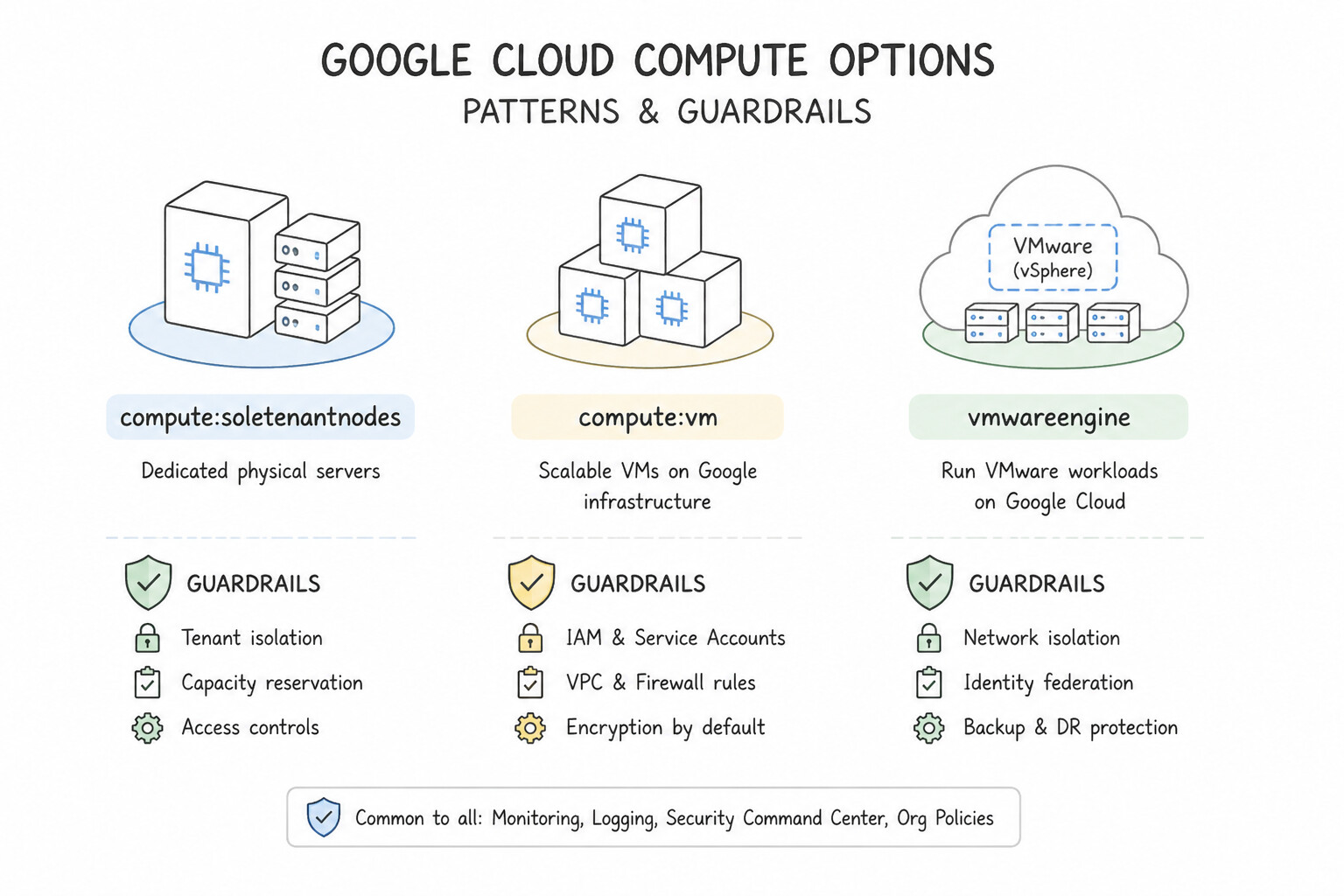
BYOL— e.g., Windows Server, SQL Server, Oracle terms tied to physical hardware): Deploy on Compute Engine Sole-Tenant Nodes with node affinity and in-place restart settings to minimize physical core reassignment and maintain compliance audits. - Per-vCPU Commercial Licenses: Use Custom Machine Types with Extended Memory (or disable simultaneous multithreading [SMT] where permitted) so you get maximum RAM and I/O throughput while paying for the absolute minimum number of vCPU licenses.
- License-Included (
PAYG/ SPLA) vs. License Modernization: For short-lived or elastic workloads, use Google Cloud's License-Included OS images (Windows Server, RHEL, SUSE, SQL Server) to convert upfront licensing CapEx into per-second OpEx—or modernize proprietary databases onto open-source AlloyDB for PostgreSQL to eliminate commercial license fees entirely.
Key Implementation Patterns
- Sole-Tenant Nodes for Windows BYOL: Use Provision Sole-tenant nodes and deploy the Windows Servers on these nodes. Sole-tenant nodes provide the dedicated physical hardware required to comply with per-socket BYOL terms. (Avoid alternative: Standard VMs run on shared hardware, which violates the requirement for dedicated physical hardware needed for per-socket licenses.)
- Google Cloud VMware Engine (GCVE) Economics: Use Migrate the workloads to Google Cloud VMware Engine. GCVE provides a native VMware environment in the cloud, allowing migration without refactoring or retraining staff. (Avoid alternative: Sole-tenant nodes solve licensing issues for OS but do not preserve the VMware management tools, requiring retraining.)
- Oracle Database on Bare Metal Solution: Use Migrate the database to Google Cloud Bare Metal Solution. Bare Metal Solution provides dedicated hardware without a hypervisor, allowing you to use existing physical core licenses. (Avoid alternative: Sole-tenant nodes use virtualization, which may not satisfy strict physical core licensing requirements for Oracle.)
Key Takeaways (1.4d)
- Most public cloud resources are multi-tenant (shared hardware).
- Sole-tenant nodes provide dedicated physical servers for a single customer.
- Use Sole-tenant nodes to satisfy compliance requirements for dedicated hardware or to support Bring Your Own License (BYOL) scenarios for per-socket or per-core licenses.
- Google Cloud VMware Engine (GCVE) enables rapid lift and shift of VMware workloads without refactoring.
Quick Decision Cheat Sheet (Subsection 1.4)
If the Scenario Requires... | Choose This Google Cloud Pattern | Avoid This Common Mistake |
|---|---|---|
"Discover unknown on-prem server inventory, map dependencies, and calculate Google Cloud TCO" | Google Cloud Migration Center | Manually interviewing developers or guessing VM sizes from peak hardware specs |
"Minimal-downtime relational database migration (MySQL/PostgreSQL/SQL Server/Oracle) to Cloud SQL or AlloyDB" | Database Migration Service ( DMS) with Continuous (CDC) replication | Offline dump-and-restore ( mysqldump / pg_dump) during business hours |
"Bring Your Own License ( BYOL) bound to physical sockets/cores + strict hardware isolation" | Compute Engine Sole-Tenant Nodes | Standard multi-tenant VMs or GKE Autopilot |
"Commercial software licensed per vCPU requires 128 GB RAM but very little CPU" | Custom Machine Type with minimal vCPUs and Extended Memory | Provisioning a standard n2-standard-32 instance (wastes 28+ vCPU licenses) |
"Which workload should be migrated in Wave 1 of an enterprise cloud migration?" | Low-risk, loosely coupled, non-mission-critical or dev/test stateless applications | Migrating the core monolithic production billing database first |
Further Reading (Subsection 1.4)
- Dedicated Interconnect overview — Explains the use cases for Dedicated Interconnect, focusing on high bandwidth and private addressing.
- Dedicated Interconnect 99.99% Availability — Details the specific topology required to achieve the 99.99% SLA.
- Understanding APIs and API proxies — This guide explains how to create a RESTful API proxy that connects to a SOAP-based backend service using Apigee. It covers the exact scenario of generating an API proxy from a WSDL file to handle the transformation.
- Cloud DNS Overview — Provides the foundational concepts of Cloud DNS, including public and private zones.
- Cloud DNS Server policies — Detailed documentation on Inbound and Outbound server policies specifically for hybrid environments.
- Google Cloud Migration Center documentation — The Migration Center documentation provides a comprehensive guide to its features, including asset discovery using the discovery client for agentless assessment.
Subsection 1.5: Envisioning future solution improvements
The Big Picture
A common post-migration antipattern is "Lift, Shift, and Stagnate": an enterprise moves 500 VMs to Compute Engine, celebrates closing its on-premises data center, and continues operating the cloud exactly like a 2010 colocation facility—running cron scripts on singleton VMs, polling relational databases every second, and manually provisioning test environments via tickets.
Subsection 1.5 tests your ability to look ahead: how to continuously adopt cloud and technology improvements (1.5a), adapt to the evolution of business needs such as global expansion, M&A, or new AI capabilities (1.5b), and champion a cloud-first design approach (1.5c) that replaces brittle, stateful polling loops with event-driven serverless primitives, managed analytical optimization, and declarative GitOps.
Consideration 1.5a: Cloud and technology improvements
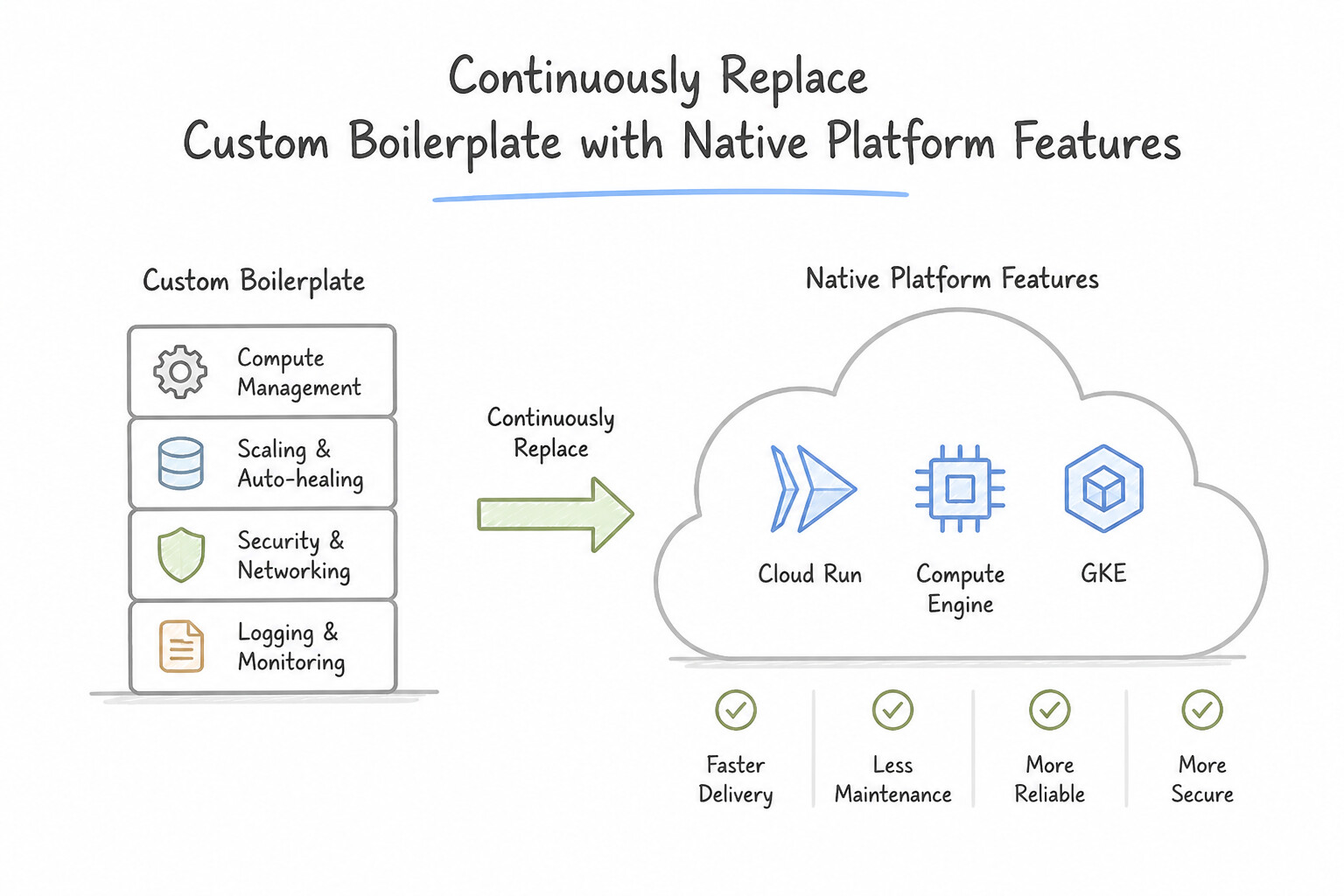
- Continuously Replace Custom Boilerplate with Native Platform Features:
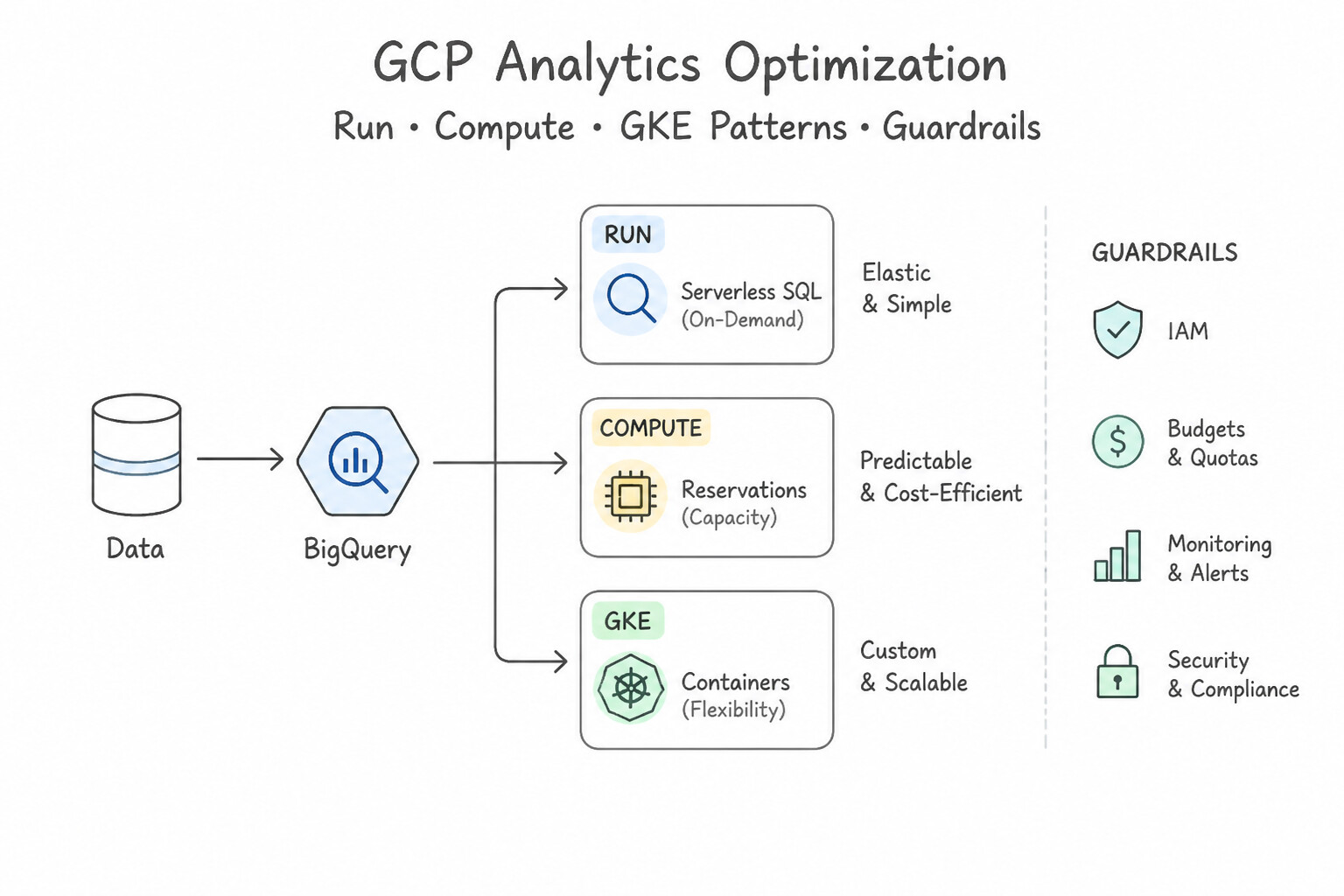
- Analytics Optimization: Instead of running scheduled cron scripts to rebuild summary tables in BigQuery every hour, adopt BigQuery Materialized Views with Smart Tuning—BigQuery automatically maintains precomputed incremental aggregates, guarantees fresh results by combining materialized data with base-table deltas, and automatically rewrites queries against the base table to hit the materialized view!
- Streaming Accuracy Improvements: Upgrade brittle hourly batch jobs to Cloud Dataflow streaming pipelines using Event-Time Windowing, Watermarks, and Allowed Lateness so out-of-order mobile/IoT telemetry is attributed to the exact window when the event occurred.
- Compute & Fleet Upgrades: Transition self-managed
GKE Standardnode pools to GKE Autopilot or newer generation machine series (C3/C4/N4with Hyperdisk) for higher price-performance.
Key Implementation Patterns
- Modernizing Compute: VM to Serverless: Use Migrate the application to Cloud Run. Cloud Run is serverless, manages infrastructure fully, and pays only for active processing. (Avoid alternative: MIGs still require OS management and cannot scale to zero as effectively as serverless.)
- Hardware Optimization: Tau T2D Adoption: Use Migrate the workload to Tau T2D instances. Tau T2D instances provide the best price-performance for scale-out x86 workloads like batch rendering. (Avoid alternative: M2 instances are expensive and designed for massive memory tasks, not cost-optimized batch rendering.)
- Database Evolution: Self-Managed to AlloyDB: Use Migrate the database to AlloyDB for PostgreSQL. AlloyDB is a fully managed, PostgreSQL-compatible service with a specialized columnar engine designed to accelerate analytical queries. (Avoid alternative: Cloud SQL reduces maintenance but does not include the specialized columnar engine required to significantly accelerate complex analytical queries.)
Key Takeaways (1.5a)
- Serverless options like Cloud Run minimize operational overhead by removing the need to manage servers or clusters.
- For bursty, stateless traffic, Cloud Run provides rapid autoscaling and allows scaling to zero to optimize costs.
- Legacy migration often involves moving from VMs (IaaS) to managed services (PaaS/Serverless) to leverage cloud-native benefits.
- Review hardware generations periodically; newer families (like Tau T2D) often provide better price-performance than older ones (like N1).
Consideration 1.5b: Evolution of business needs
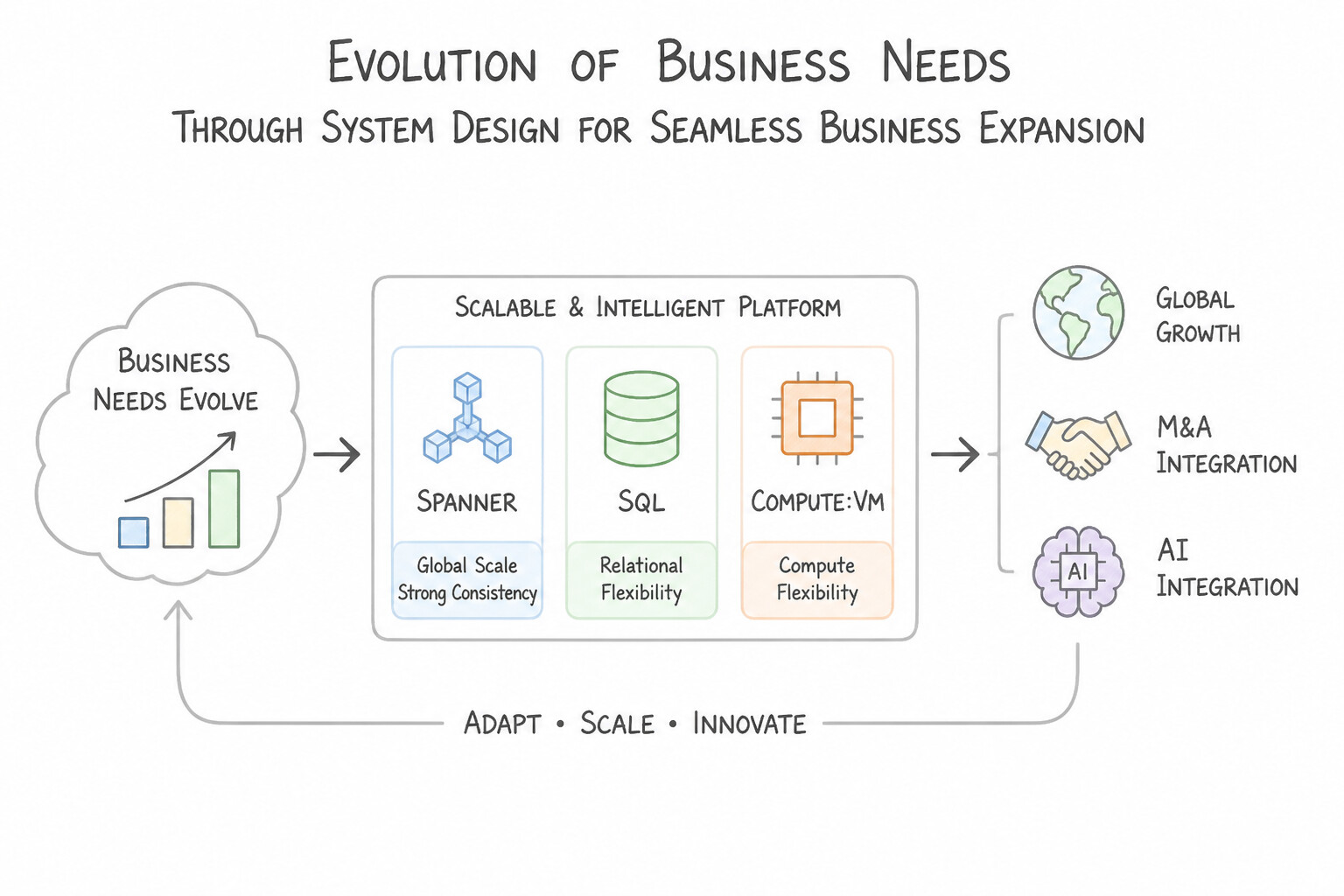
- Architect for Seamless Business Expansion (Global Growth, M&A, and AI Integration):
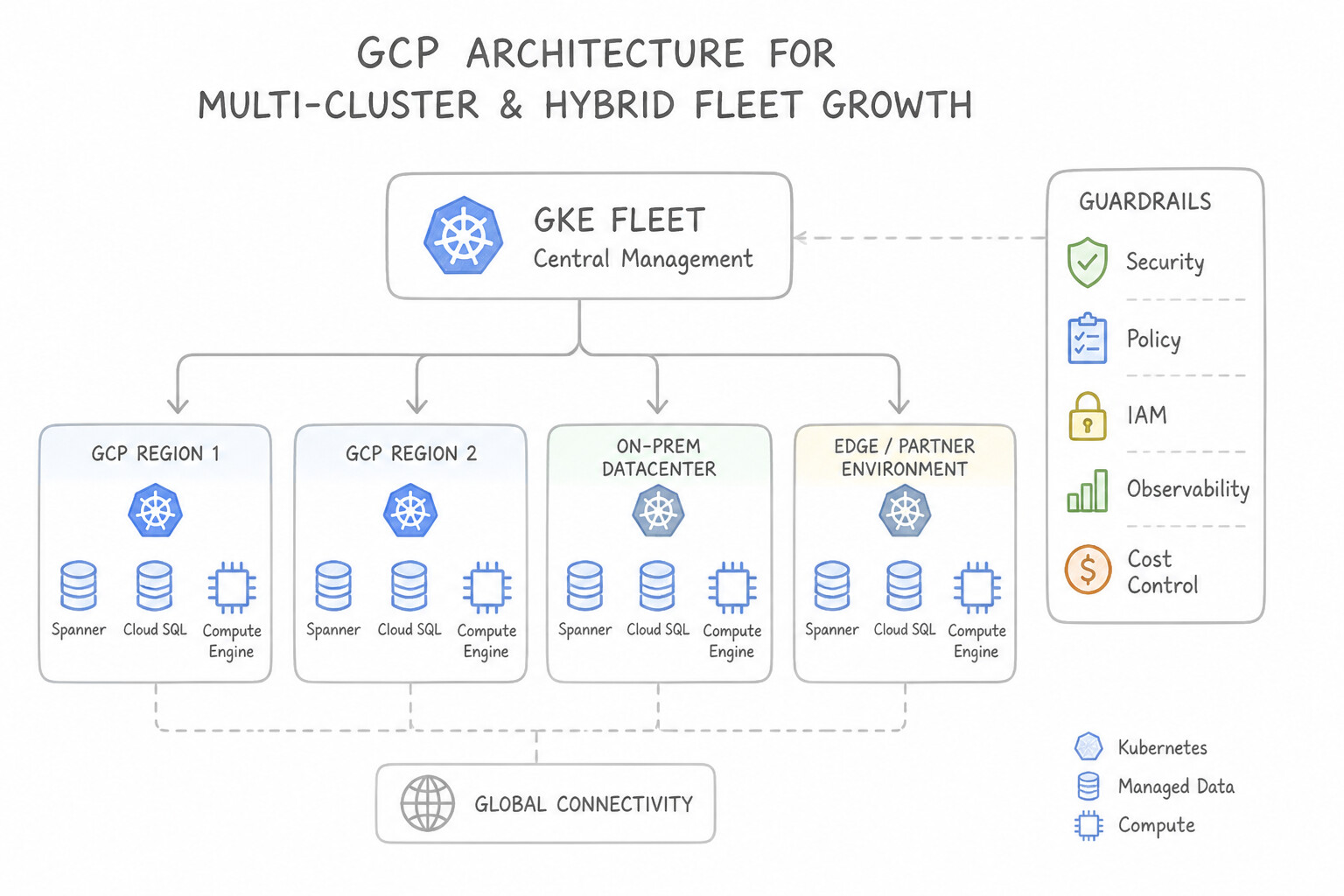
- Multi-Cluster & Hybrid Fleet Growth: When a business acquires new subsidiaries or expands to retail edge locations running Kubernetes on bare metal, adopt GKE Enterprise (Anthos) with Config Sync (GitOps synchronization) and Policy Controller (OPA Gatekeeper guardrails) to govern the entire fleet from a single Git repository.
- From Regional to Global: Design stateless application tiers using container images and externalized configuration so expanding from one region to five requires only adding regional backend services (
Cloud RunorMIGs) behind the existing Global External Application Load Balancer. - Unlocking Generative AI Capabilities: Design clean data lakes/warehouses (
BigQuery,Cloud Storage) so the business can plug in Vertex AI / Gemini Enterprise and Agent Builder without re-architecting core transactional systems.
Key Implementation Patterns
- Global Expansion and Latency Reduction: Use Migrate the database to Cloud Spanner. Configure the instance with a multi-region configuration involving us-central1, Asia, and Europe. Cloud Spanner is designed for global scale and consistency, making it the correct choice for a global checkout system.
- Cost Optimization for Flexible Workloads: Use Update the Managed Instance Group to use Spot VMs. Spot VMs offer discounts of 60-91% for interruptible workloads, perfectly matching the cost reduction goal and workload characteristics. (Avoid alternative: One-year CUDs usually offer ~37% savings, which is less than the 50% target and does not leverage the interruptible nature of the workload.)
Key Takeaways (1.5b)
- Cloud SQL is a regional service; writes must go to the primary instance.
- Cloud Spanner is the preferred choice for globally distributed relational databases requiring strong consistency.
- Vertical scaling (adding CPU/RAM) does not solve network latency issues caused by geographic distance.
- Read replicas improve read performance but do not accept write traffic.
Consideration 1.5c: Cloud-first design approach
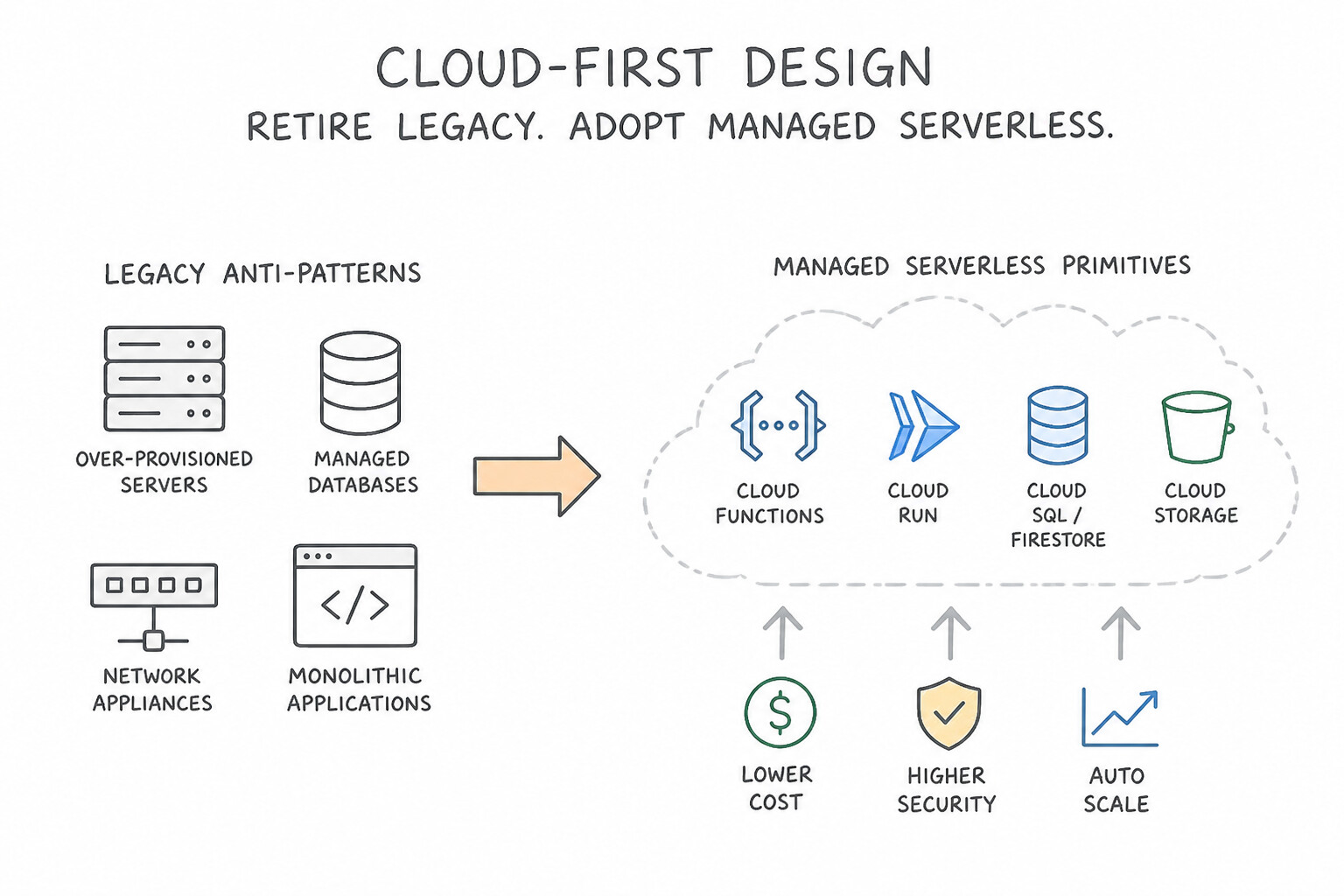
- Retire Legacy Infrastructure Anti-Patterns in Favor of Managed Serverless Primitives:
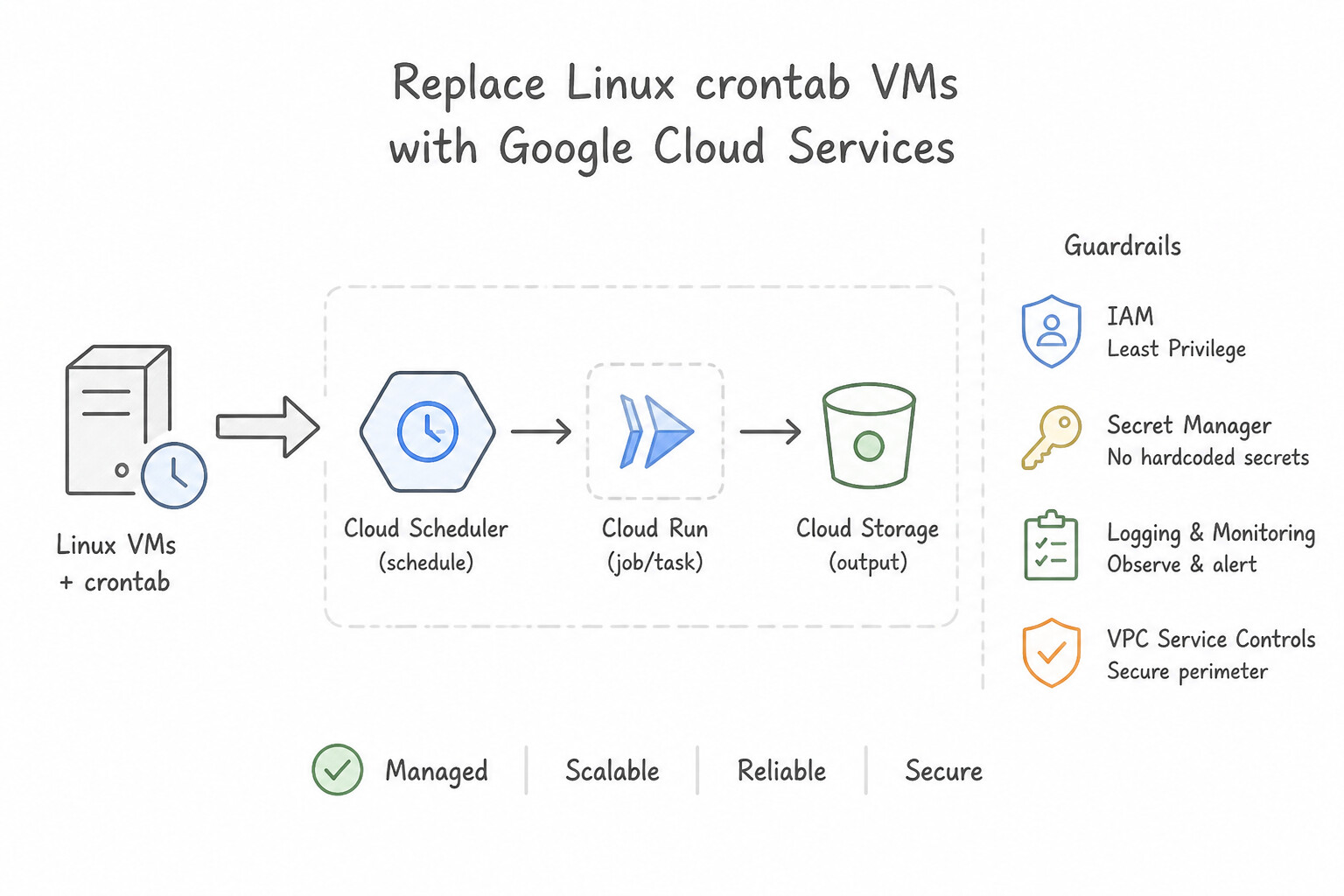
- Replace Linux
crontabVMs → Cloud Scheduler (managed enterprise cron targeting HTTP/Pub/Sub/Workflows). - Replace Self-Hosted RabbitMQ/Celery Rate-Limiting Queues → Cloud Tasks (managed task dispatch, rate throttling, and retries).
- Replace Custom State-Machine Coordinator VMs → Cloud Workflows (serverless YAML/JSON step orchestration across APIs).
- Replace Polling Loops Watching Storage Buckets → Eventarc / Cloud Storage Notifications + Cloud Run functions (instant event-driven execution on
OBJECT_FINALIZEwith scale-to-zero cost). - Embed Sustainability by Design: Use the Carbon Footprint dashboard and low-carbon region selection as part of a modern cloud-first mandate.
Key Takeaways (1.5c)
- Retire Legacy Infrastructure Anti-Patterns in Favor of Managed Serverless Primitives:
- Replace Linux
crontabVMs: → Cloud Scheduler (managed enterprise cron targeting HTTP/Pub/Sub/Workflows).- Replace Self-Hosted RabbitMQ/Celery Rate-Limiting Queues: → Cloud Tasks (managed task dispatch, rate throttling, and retries).
Quick Decision Cheat Sheet (Subsection 1.5)
If the Scenario Requires... | Choose This Google Cloud Pattern | Avoid This Common Mistake |
|---|---|---|
"Optimize repeated aggregation queries on a massive BigQuery table with zero stale data and no query code changes" | BigQuery Materialized Views (leverages Smart Tuning automatic query rewrite and delta combination) | Creating scheduled queries that overwrite static tables every hour |
"Attribute delayed / out-of-order mobile or IoT events to the exact time window they occurred" | Cloud Dataflow with Event-Time Windowing, Watermarks, and Allowed Lateness | Using processing-time windows or dropping all late events |
"Eliminate configuration drift across dozens of GKE clusters on Google Cloud and on-premises bare metal" | GKE Enterprise Config Sync (GitOps) + Policy Controller | Running cron jobs with kubectl apply from a bastion host |
"Modernize a legacy VM that runs a nightly cron job and chains 4 HTTP microservice calls" | Cloud Scheduler triggering Cloud Workflows | Moving the cron script to a bigger Compute Engine VM |
"Process files immediately upon upload to Cloud Storage with minimal operational overhead and zero idle cost" | Cloud Run functions (or Cloud Run) triggered by Cloud Storage / Eventarc | Running a 24/7 Compute Engine daemon polling the bucket API |
Further Reading (Subsection 1.5)
- Cloud Run documentation — Overview of Cloud Run features, specifically focusing on the ability to deploy containerized applications without managing infrastructure.
- Choosing a compute option — A guide helping to choose between Compute Engine, GKE, App Engine, and Cloud Run based on workload requirements.
- Tau T2D VMs — A blog post introducing Tau VMs and explaining their positioning for scale-out workloads and price-performance advantages over older generations.
- Machine Families Resource and Comparison Guide — Documentation comparing different machine families, detailing which are best for general purpose, memory-optimized, or scale-out scenarios.
- AlloyDB for PostgreSQL Overview — Provides an introduction to AlloyDB, highlighting its full PostgreSQL compatibility and the columnar engine that accelerates analytical queries.
- Cloud Spanner Product Page — Overview of Cloud Spanner features, highlighting its global consistency and horizontal scaling capabilities.
Book TOC · Previous · Chapter 1 of 8 · Next
AwesomeGCP.com Learning
The approach taken is a question-led learning approach: you explore realistic project scenarios where you need to make decisions or take actions to achieve business goals within specific constraints. Instead of passive learning, you are challenged to think and work through the options to master the Professional Cloud Architect (PCA) certification!