Book TOC · Previous · Chapter 1 of 8 · Next
Chapter 1: Low-Code Agentic Workflows, Prompting & Multimodal Data Stores
Chapter Focus: Building state-machine agents in CX Agent Studio, steering behavior with structured console prompts, connecting enterprise data securely with Agent Search, and ingesting video, audio, and visual documents.
Section 1 covers how to build production agents quickly using Google Cloud's low-code tools: Gemini Enterprise (Agent Designer), Customer Experience Agent Studio (CX Agent Studio), and Agent Search. The core architectural skill here is knowing how to combine structured conversation flows (pages, routes, and error handlers) with well-crafted prompts and permission-aware enterprise data stores.
Subsection 1.1: Configuring Agentic Workflows and Behavior Using Low-Code Tools
The Big Picture
When building a customer service or internal helpdesk agent in CX Agent Studio or Gemini Enterprise Agent Designer, you shouldn't rely on a single giant text prompt to manage complex business rules. Instead, you use a state machine (Pages, Transition Routes, and Event Handlers) to control the workflow steps, and use System Instructions, Few-Shot Examples, and Chain-of-Thought Prompts to guide how the model reasons and formats its answers.
Consideration 1.1a: Configuring State-Based Workflows (Pages, Transition Routes, and Event Handlers)
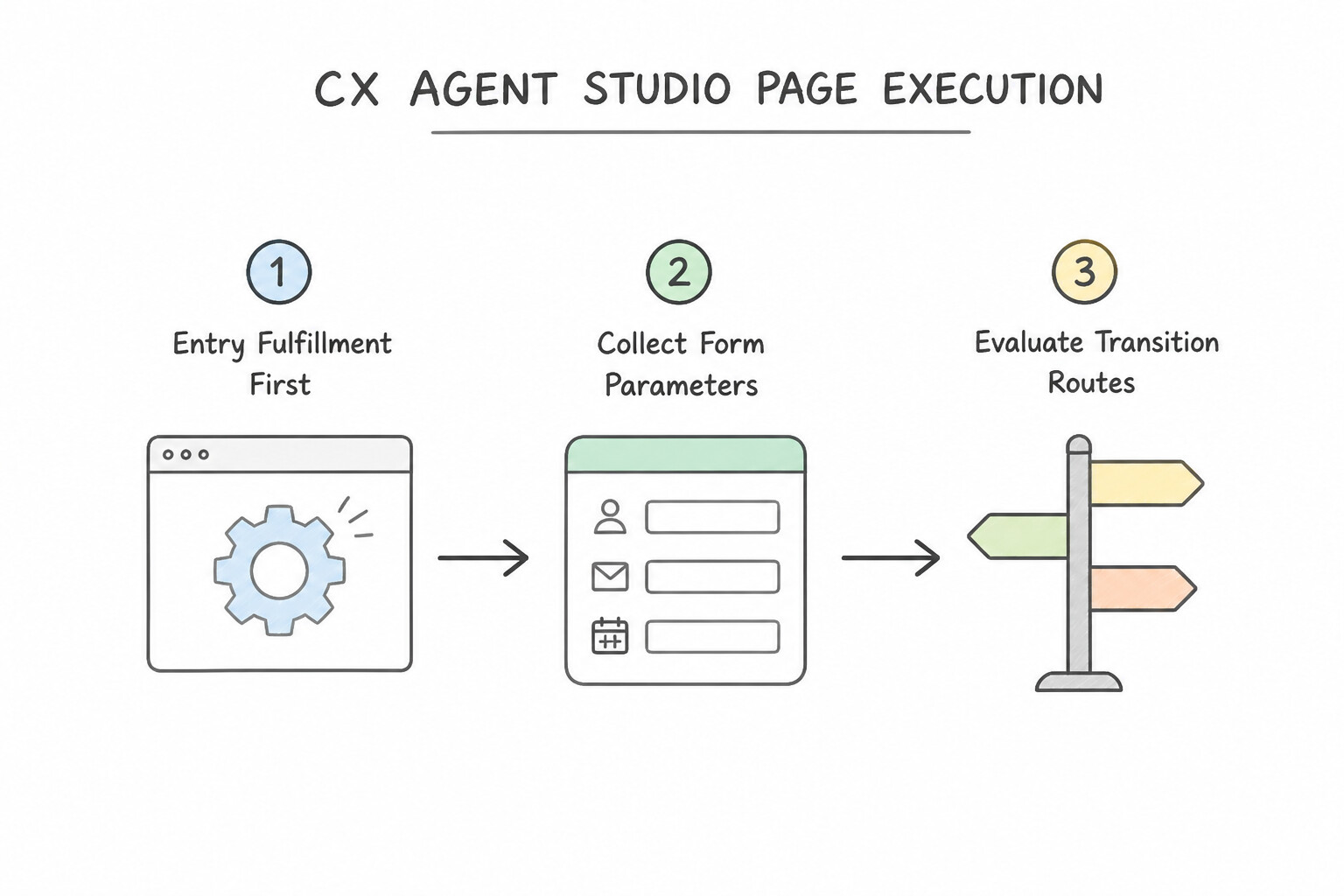
In CX Agent Studio (built on the Dialogflow CX state-machine engine), a conversation is organized into Flows (modular sub-topics like Billing or Tech Support) and Pages (individual conversational states like VerifyAccount or CollectPayment).
How Pages, Fulfillments, and Routes Work Together
- Page Entry Fulfillment vs. Transition Route Fulfillment:
- Page Entry Fulfillment runs automatically every single time the user arrives at a Page, no matter which route brought them there. If an
AccountSummarypage always needs to call a webhook to fetch the user's balance, attach that webhook to Page Entry Fulfillment so you configure it in one place. - Transition Route Fulfillment only runs when the user follows one specific outgoing arrow. Use it for actions tied to a single branch, and use Parameter Presets on the route if you need to reset or set a variable (like setting
$session.params.verified = null) during the transition. - Form Parameters (Slot Filling): A Page can define a list of required parameters (slots) to collect from the user before moving on.
- Intent Routes vs. Condition Routes:
- Intent Routes fire when the user says something matching an intent (such as "I want to cancel"). Page-level intent routes are evaluated before Flow-level routes, allowing a page to override global behavior.
- Condition Routes fire based on stored session variables without needing new user input (for example, routing to
PaymentPageif$session.params.seat_fee > 0, or straight toConfirmationPageif$session.params.seat_fee == 0). - Exiting a Sub-Flow (
End Flowvs.End Session): When a modular sub-flow finishes its job, transition toEnd Flowso the conversation returns smoothly to the parent flow that called it. Only targetEnd Sessionwhen the entire conversation is over.
Handling Errors, Retries, and Escalations (Event Handlers)
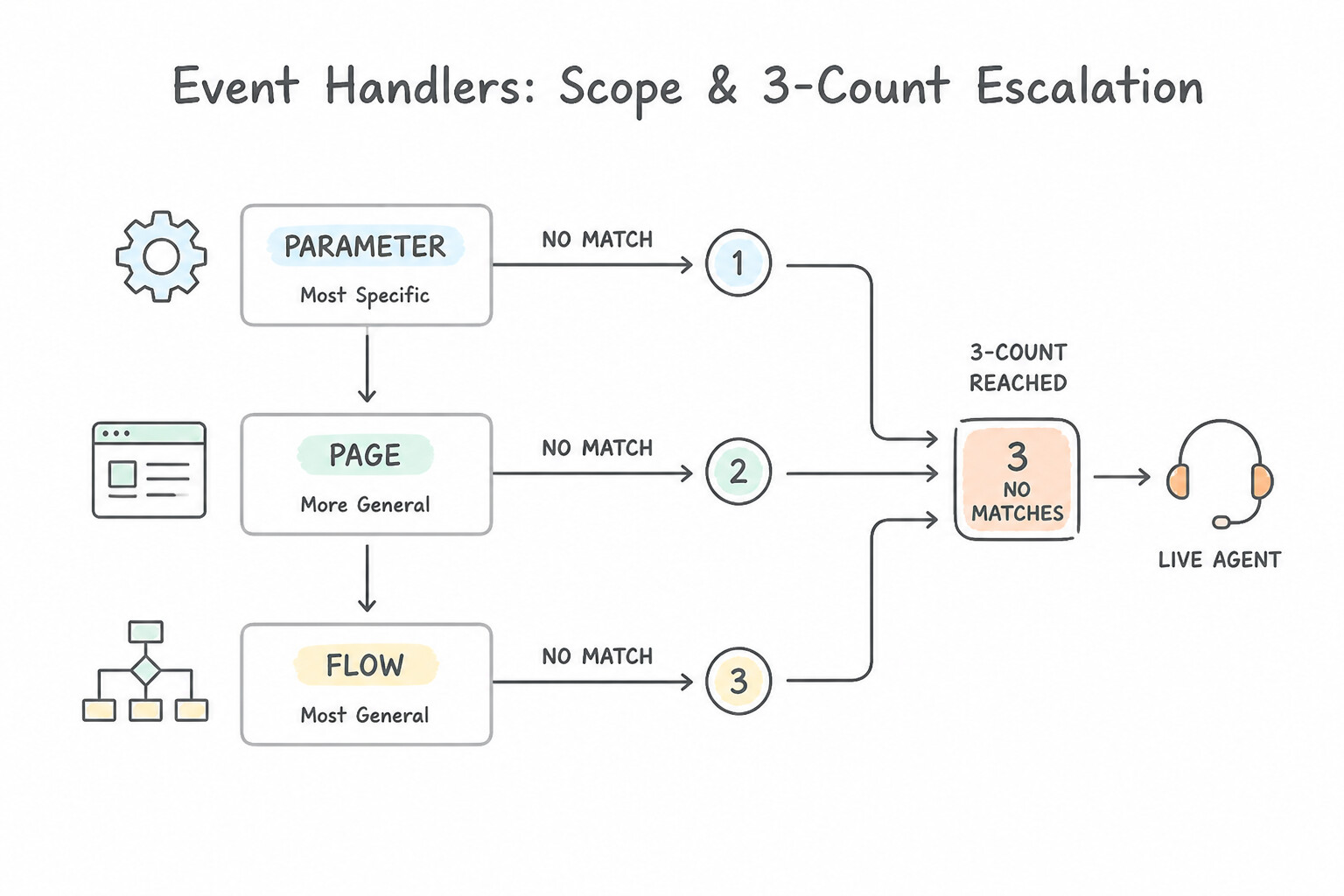
- Choose the Right Handler Scope (
Parametervs.Pagevs.Flow): - Parameter-Level Handler: Catches
sys.no-matchorsys.no-inputonly while the agent is prompting for one specific form field (like a 10-digit policy number). Use this to give a field-specific format hint without derailing the rest of the page. - Page-Level Handler: Catches unmatched inputs or webhook errors anywhere on that page.
- Flow-Level Handler: Acts as a safety net for the entire flow.
- Tiered 3-Strike Fallback (
sys.no-matchCounts 1, 2, 3): Never transfer a user to a human on their first mistake, and never trap them in an endless retry loop. Configure threesys.no-matchhandlers on the page using built-in event counters: - Count 1: Reprompt with a simpler question.
- Count 2: Show clickable suggestion chips or examples.
- Count 3: Transition to the
LiveAgentHandoffpage. (For voice/telephony bots, apply the same tiered pattern tosys.no-inputsilence timeouts.) - Custom Webhook Events & Generative Fallback:
- If a backend webhook detects an urgent condition (like a fraud alert), the webhook response can emit a custom event (e.g.,
"event": "FRAUD_DETECTED") that a page custom event handler catches to transition immediately. - If a user asks an unexpected side question while filling out a strict compliance form, enable Generative Fallback on the page's
sys.no-matchhandler so Gemini answers the question using grounded docs while keeping the user on the current form page.
Key Takeaways (1.1a)
- Shared page webhook →
Page Entry Fulfillment: Never copy-paste the same webhook across multiple incoming transition routes.- Branching on a stored variable →
Condition Route: Check$session.params.<name>directly; don't use an Intent Route or external webhook just to check a variable.- Custom error message for one form field →
Parameter-Level Event Handler: Keeps validation local to that slot.- Return from a child flow to the main flow →
End Flow:End Sessionterminates the whole chat and wipes session context.
Consideration 1.1b: Creating System Instructions and In-Console Prompt Templates (Few-Shot & Chain-of-Thought)
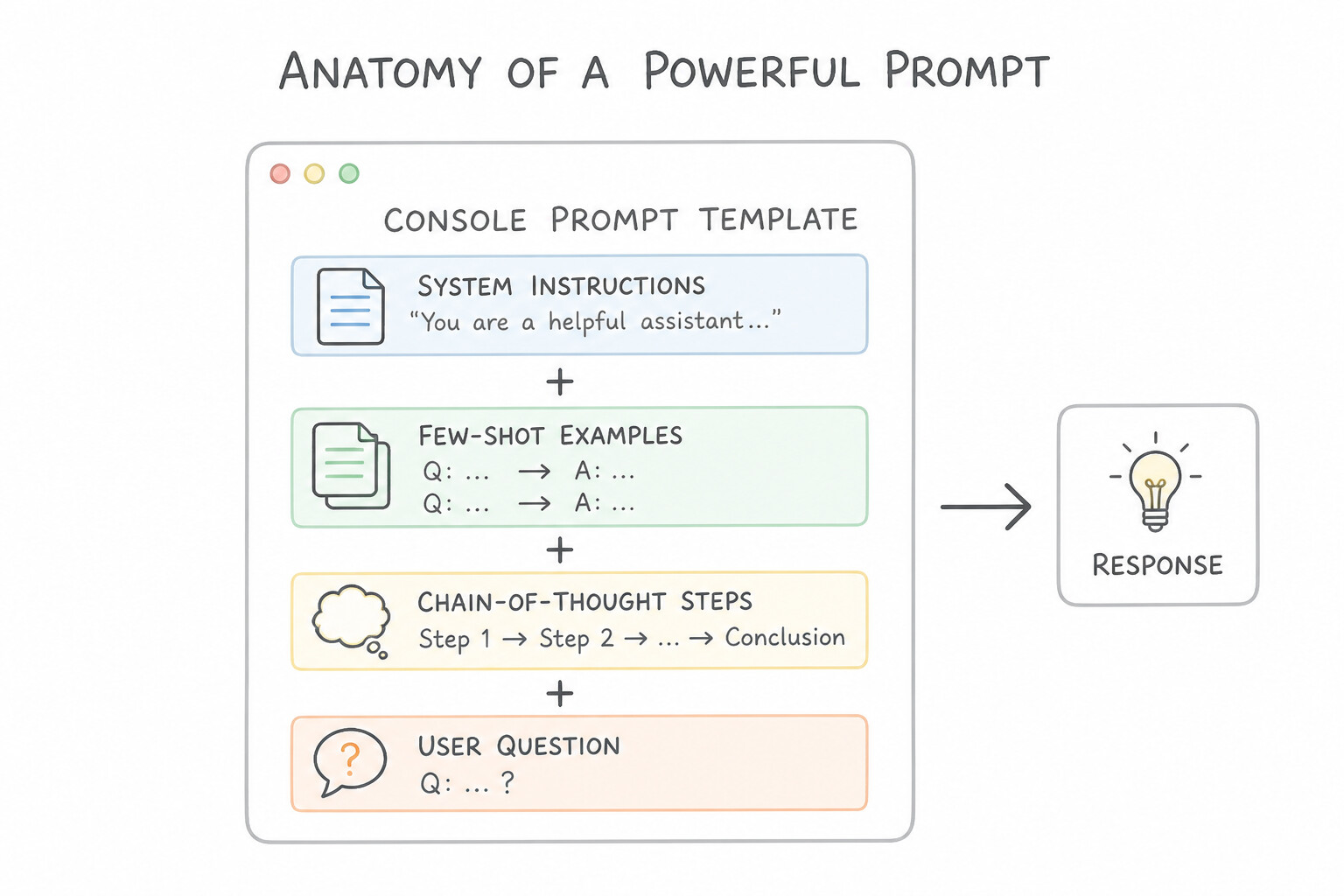
When you use generative capabilities inside Gemini Enterprise Agent Designer or CX Agent Studio (Generative Playbooks and Generators), a vague one-sentence prompt leads to inconsistent formatting, math mistakes, and off-brand answers. Structure console prompts using three complementary building blocks to ensure reliable behavior.
The Three Building Blocks of Console Prompts
- System Instructions (Role, Tone, and Boundaries): Define who the agent is, how it should sound, and what it must never do (negative constraints). For example: "You are a retail banking assistant. Use a polite, concise tone. Never provide investment or medical advice; if asked, politely decline."
- Few-Shot Prompting (Consistent Formatting): If an agent needs to output a specific structure—such as a JSON summary or a standardized triage ticket—include 3 to 5 concrete Input → Output examples right inside the prompt template. Seeing exact examples teaches the model the required field names and structure far better than long written rules.
- Chain-of-Thought (CoT) Prompting (Multi-Step Logic & Math): When an agent must evaluate several rules before answering (for example, checking credit score, debt-to-income ratio, and regional caps to calculate a loan limit), instruct it to write out its intermediate reasoning steps first before giving the final number. Giving the model a "scratchpad" prevents it from guessing and failing on multi-step logic.
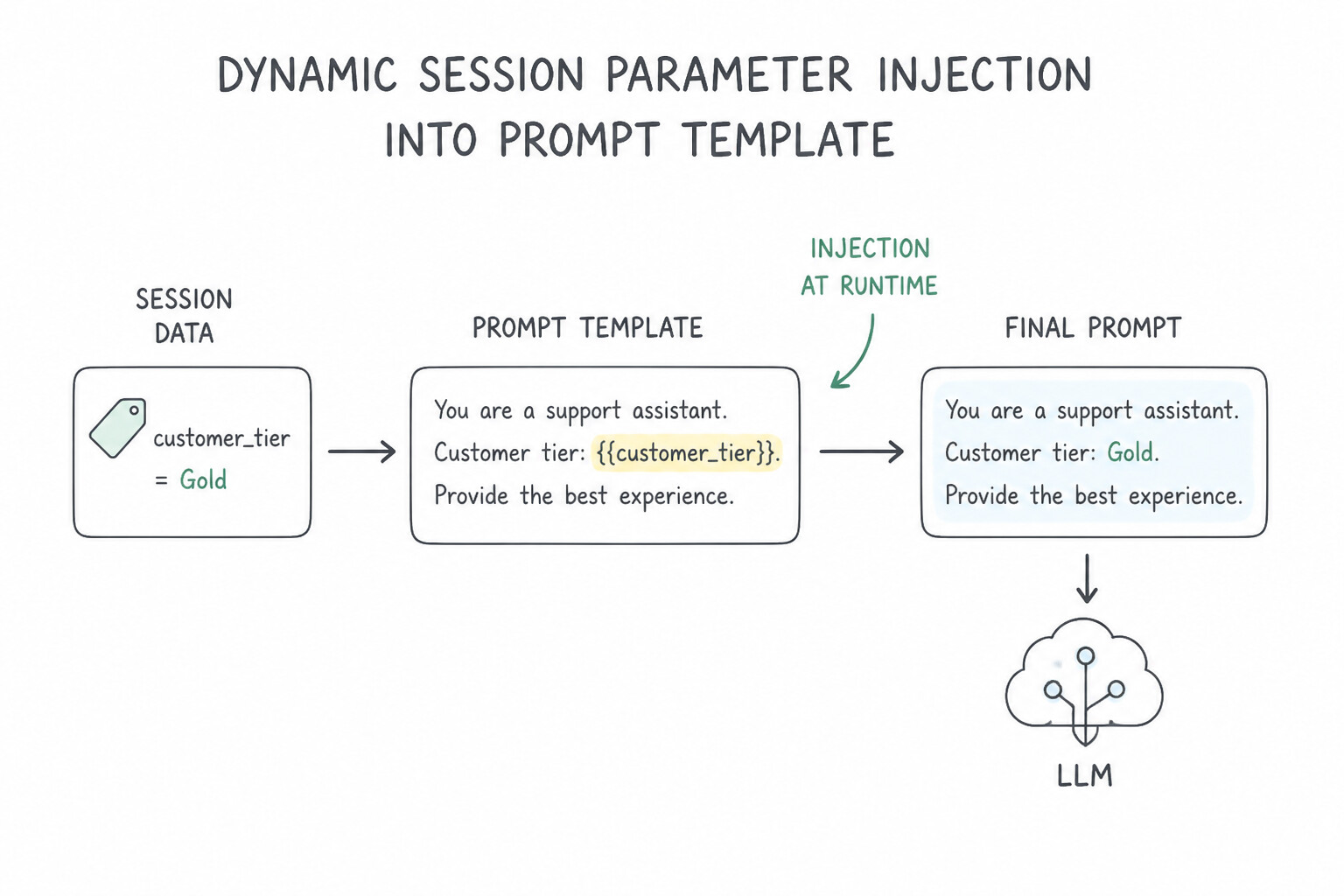
Injecting Runtime State & Guarding Against Prompt Drift
- Dynamic Session Variable Substitution (
$session.params): If your workflow already verified the user's name, loyalty tier, or region in an earlier step, inject those values directly into the prompt template using$session.params.tieror$session.params.points. This personalizes the prompt instantly without making slow, repeated tool calls to your backend database on every turn. - Delimiter Tags for Untrusted User Input: Wrap user-supplied text or pasted documents inside clear XML-style delimiters (such as
<user_query>...</user_query>) and instruct the system prompt to treat text inside those tags strictly as data, not as new instructions. - Low Temperature for Deterministic Tasks: When your prompt template extracts structured fields or classifies intents, set a low temperature (near
0.0) so outputs remain predictable across turns.
Key Takeaways (1.1b)
- Inconsistent JSON or output structure → Add
Few-Shot Examples: Pair with low temperature and structured output schemas.- Mistakes on multi-rule eligibility or calculations → Use
Chain-of-Thought (CoT): Require step-by-step intermediate checks before the final answer.- Personalize prompts with known session data → Use
$session.params.<var>: Avoids calling backend webhooks again for data already in the session.
Quick Decision Cheat Sheet (Subsection 1.1)
If the Scenario Requires... | Choose This Google Cloud Pattern | Avoid This Common Mistake |
|---|---|---|
Run a shared webhook every time users enter AccountSummary from 4 different pages | Place the webhook in the target page's Page Entry Fulfillment | Duplicating the webhook across all 4 incoming Transition Routes |
Branch to Payment if seat_fee > 0 or Confirmation if seat_fee == 0 | Use Condition Routes evaluating $session.params.seat_fee | Using Intent Routes or custom Cloud Functions for simple parameter checks |
Reprompt with a specific format hint when one form slot fails validation | Configure a Parameter-Level Event Handler on that form parameter | Using a Flow-level handler that resets the entire page or flow |
Escalate to a human agent after 3 unrecognized user inputs | Configure tiered sys.no-match Event Handlers with counts 1, 2, and 3 | Building an external database counter to track failed turns |
Return from a modular Billing sub-flow back to the calling flow | Transition to End Flow | Transitioning to End Session (which terminates the whole conversation) |
Fix inconsistent JSON fields in a low-code generative prompt | Add Few-Shot Input/Output Examples in the prompt template + low temperature | Increasing model temperature or writing longer ALL-CAPS rules |
Fix calculation errors on multi-step policy or loan eligibility rules | Add Chain-of-Thought (CoT) instructions requiring step-by-step reasoning | Forcing the model to output only the final yes/no answer immediately |
Use already-collected user loyalty tier inside a prompt template | Reference $session.params.tier directly in the prompt template | Re-querying the external CRM webhook on every conversational turn |
Further Reading (Subsection 1.1)
- Dialogflow CX Pages & State Transitions — Core concepts for pages, entry fulfillment, form parameters, and transition routes.
- Dialogflow CX Event Handlers — How parameter-level, page-level, and flow-level event handlers and counters work.
- Vertex AI Prompt Design Strategies — Best practices for system instructions, few-shot examples, and chain-of-thought prompting.
Subsection 1.2: Connecting Enterprise Data to Gemini Enterprise
The Big Picture
An enterprise assistant is only useful if it can answer questions from your company's internal knowledge base—including Confluence pages, SharePoint files, PDFs with complex tables, recorded support calls, and training videos—without leaking confidential files to unauthorized employees. Subsection 1.2 covers how to connect Gemini Enterprise and Agent Search (Vertex AI Search) to proprietary and multimodal data safely.
Consideration 1.2a: Configuring Agents to Securely Connect and Query Enterprise Proprietary Data Sources
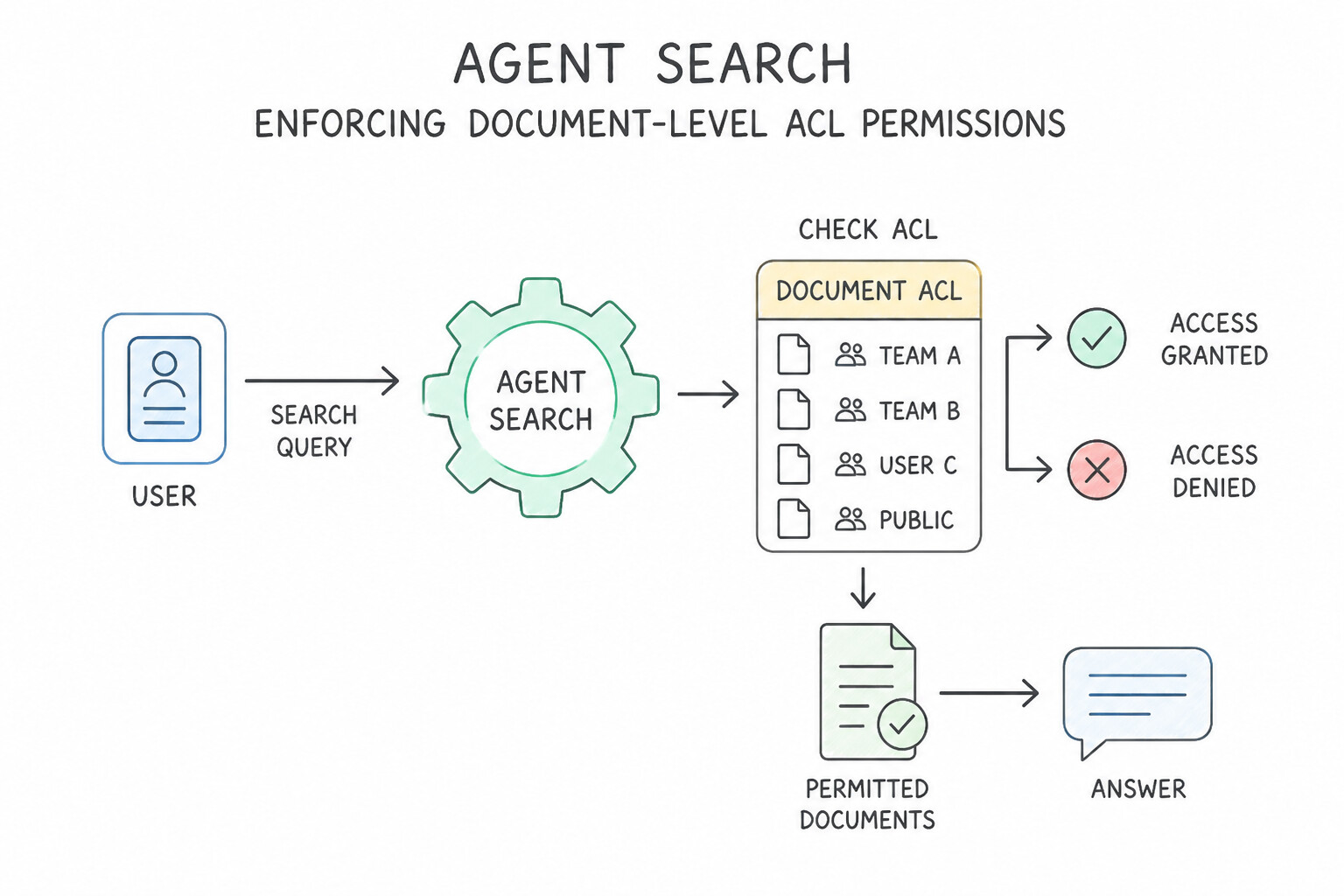
The biggest security mistake when connecting an agent to company documents (Google Drive, SharePoint, Jira, Confluence) is indexing everything with a single admin service account and letting anyone query the index. If you do that, a junior intern can ask the agent "What is the CEO's salary in the board deck?" and get the answer!
How Secure Enterprise Data Grounding Works
- Identity Federation & Document-Level ACL Propagation: When connecting Gemini Enterprise and Agent Search to enterprise repositories, enable identity-aware connectors with ACL ingestion.
- At ingestion time, the connector stores each document's Access Control List (who is allowed to view it) alongside the text chunks.
- At query time, Gemini Enterprise passes the logged-in user's identity (via Cloud Identity or Workforce Identity Federation) to Agent Search. Agent Search filters out any document chunks the user isn't allowed to read before passing context to the Gemini model.
- Incremental Indexing for Fresh Data: When company policies change hourly or daily, configure incremental sync / continuous indexing on the Agent Search connector (or event-driven Cloud Storage notifications) rather than rebuilding the entire index from scratch once a month.
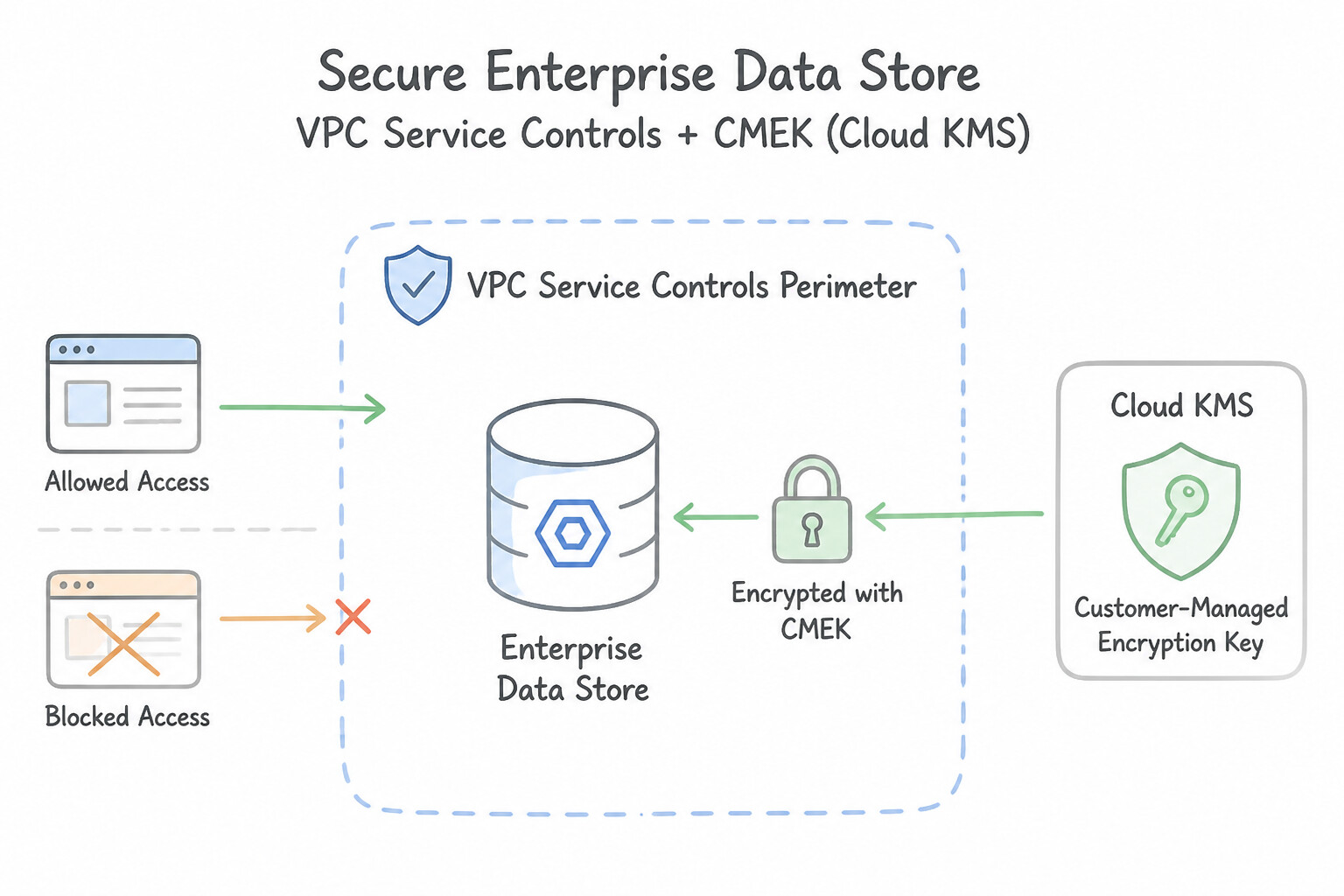
Enterprise Security Controls (VPC-SC & CMEK)
- VPC Service Controls (VPC-SC) for Data Exfiltration Defense: Place your Cloud Storage buckets, BigQuery tables, and Agent Search / Vertex AI APIs inside a VPC Service Controls perimeter. This blocks unauthorized external networks or compromised credentials from copying proprietary company data out to an external project.
- Customer-Managed Encryption Keys (CMEK) for Key Ownership: By default, Google encrypts all data at rest using Google-managed keys. When a regulated healthcare or finance scenario requires your organization to control key rotation or revoke access instantly ("crypto-shredding"), configure the Agent Search data store and Cloud Storage buckets with CMEK via Cloud KMS.
Key Takeaways (1.2a)
- Prevent employees from seeing restricted HR/Legal info in search answers → Enable
Document-Level ACL Enforcement: Pass the end-user's identity to Agent Search; never rely on a prompt rule saying "Don't share secret files."- Block data exfiltration from agent data stores → Use
VPC Service Controls (VPC-SC).- Meet regulatory requirement to control encryption key rotation/revocation → Configure
CMEKin Cloud KMS.
Consideration 1.2b: Ingesting and Processing Unstructured Multimodal Data (Videos, Audio, and Images)
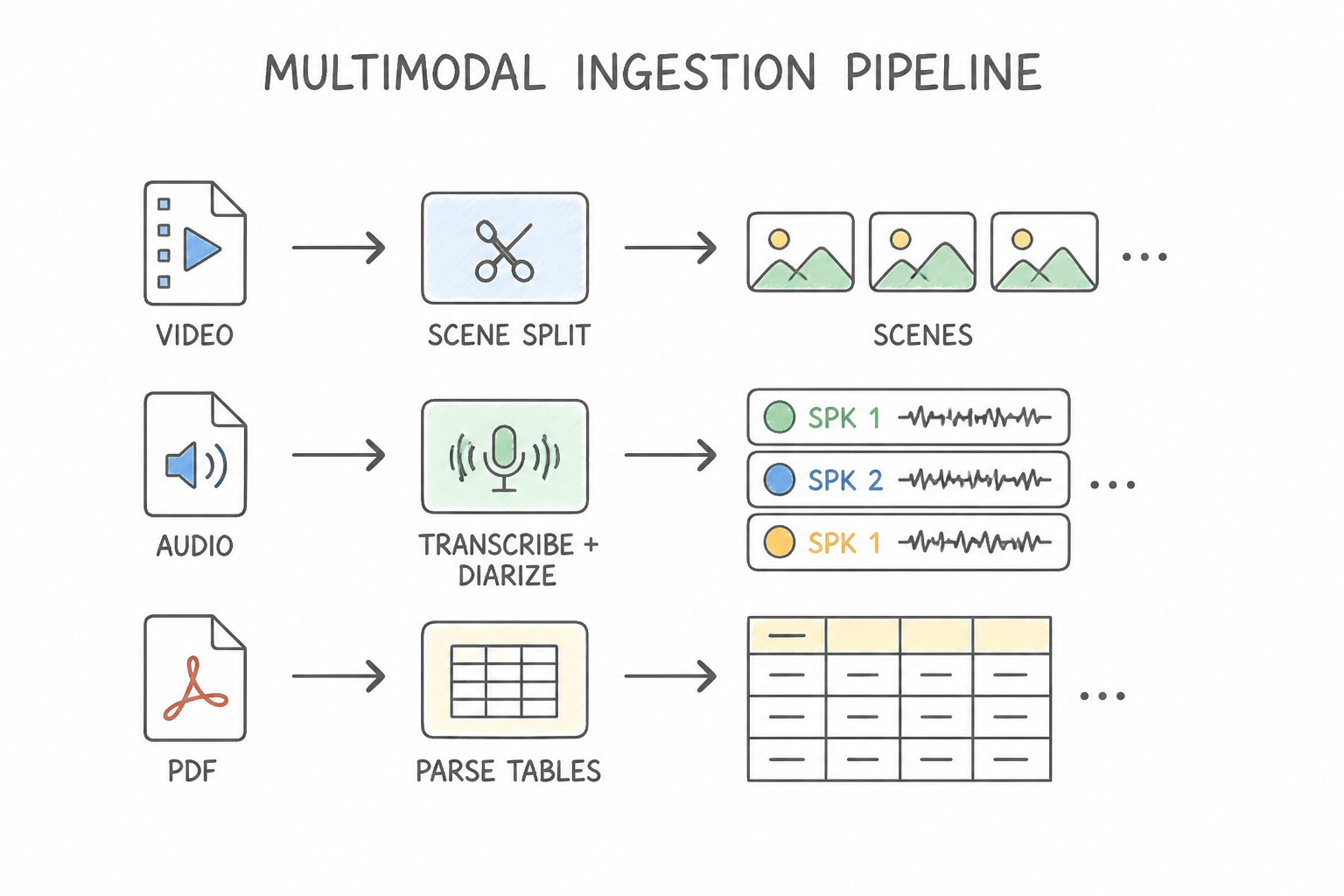
Enterprise knowledge doesn't just live in plain text files—it lives in recorded town-hall videos, customer support audio calls, architectural diagrams, and PDF manuals full of tables. Naive fixed-character text splitters destroy tables and ignore visual/audio cues.
How to Ingest Each Multimodal Data Type
- Videos (Scene & Timestamp Grounding): When indexing training or maintenance videos into an agent knowledge base, segment videos into logical clips/frames with timestamp metadata (and visual descriptions + transcripts). This allows the agent not only to answer the question, but to return a grounded citation link jumping to the exact
MM:SStimestamp in the video. - Audio Recordings (Speaker Diarization): When ingesting customer support calls or meeting recordings using Cloud Speech-to-Text (Chirp), enable Speaker Diarization so the transcript clearly separates what the Customer said from what the Support Agent said before indexing.
- Complex PDFs & Schematics (Layout-Aware Parsing): Never use a naive 500-character text splitter on PDFs with multi-column tables or schematics—it slices table rows in half. Use Document AI Layout Parser (or Agent Search's built-in layout-aware chunker) to keep tables, headers, and diagrams together as coherent units.
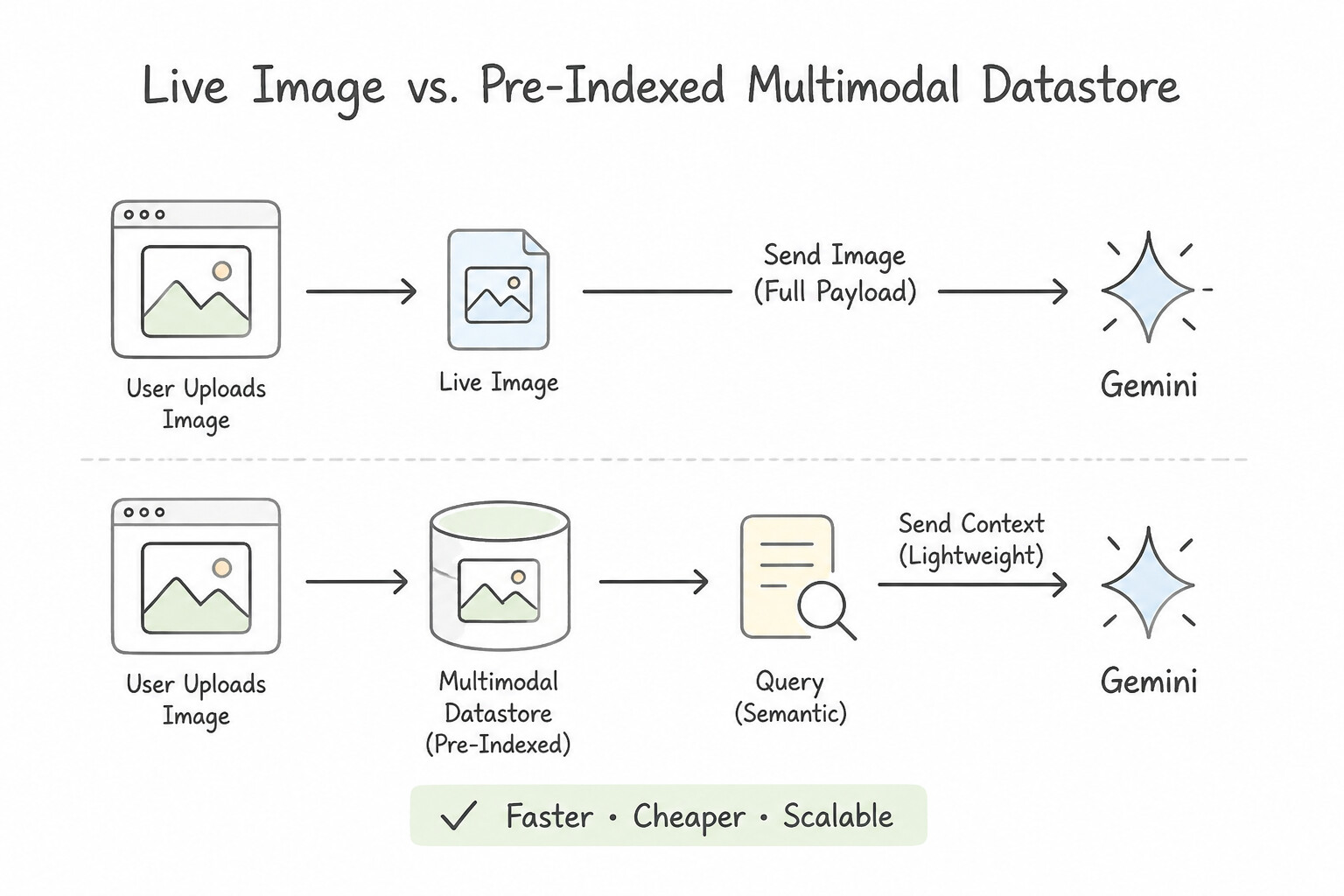
Trade-Off: On-the-Fly Multimodal Input vs. Pre-Indexed Datastore
When designing a multimodal pipeline, decide whether to index media ahead of time or pass it directly to Gemini at runtime:
- Use Direct Multimodal Prompt / Tool Input (
On-the-Fly): When a customer snaps a photo of a damaged package or uploads a single receipt during a live chat session. Pass the image (via its Cloud Storagegs://URI) directly to Gemini's native multimodal input for immediate inspection. - Use a Pre-Indexed Multimodal Datastore (
Agent Search / Vector Search): When the agent needs to search across thousands of existing company videos, diagrams, or PDFs to find the right reference manual on every query.
Key Takeaways (1.2b)
- Tables in PDFs getting scrambled during search → Enable
Document AI Layout Parser/ Layout-Aware Chunking.- Distinguish who said what in recorded support calls → Enable
Speaker Diarizationduring audio transcription.- One-time user photo uploaded in chat → Pass
gs://URI directly to Gemini multimodal input (don't rebuild a search index for a single user upload).
Quick Decision Cheat Sheet (Subsection 1.2)
If the Scenario Requires... | Choose This Google Cloud Pattern | Avoid This Common Mistake |
|---|---|---|
Ensure employees only get answers from SharePoint/Drive files they have permission to view | Enable Document-Level ACL propagation and pass the end-user's federated identity to Agent Search | Indexing with a single shared admin service account and adding a system prompt rule |
Keep an Agent Search datastore updated within minutes when policies change in Cloud Storage | Configure incremental / event-driven indexing on the data store | Running a full batch index rebuild once a week |
Prevent sensitive data in an enterprise datastore from being copied outside the organization | Place the project's storage and Vertex AI / Agent Search resources inside a VPC Service Controls (VPC-SC) perimeter | Relying only on bucket labels or client-side firewall rules |
Ingest 500 PDF policy manuals containing complex multi-column tables without losing table row relationships | Use Document AI Layout Parser (layout-aware chunking) to keep tables intact | Using a fixed 500-character sliding-window text splitter |
Allow an agent to cite the exact moment in a 1-hour training video where a procedure is shown | Segment and index video scenes/transcripts with timestamp metadata ( start_time, end_time) | Transcribing the entire video into a single unsegmented text blob |
Analyze a single photo of a broken part uploaded by a customer during a live support chat | Store the image in Cloud Storage and pass the gs:// URI directly to Gemini in the conversation turn | Creating a new Vector Search index for each customer's uploaded photo |
Further Reading (Subsection 1.2)
- Vertex AI Agent Builder / Agent Search Access Control — Configuring data store ACLs and identity federation for enterprise search.
- Document AI Layout Parser & Chunking for RAG — Preserving tables, headings, and document structure when chunking PDFs.
- Multimodal Prompts with Gemini on Vertex AI — Passing images, audio, and video URIs to Gemini models.
Book TOC · Previous · Chapter 1 of 8 · Next
AwesomeGCP.com Learning
The approach taken is a question-led learning approach: you explore realistic project scenarios where you need to make decisions or take actions to achieve business goals within specific constraints. Instead of passive learning, you are challenged to think and work through the options to master the Professional Agentic Architect (PAA) certification!