Book TOC · Previous · Chapter 3 of 6 · Next
Chapter 3: Developer Platforms & Agent Tooling: Vertex AI / Agent Platform, Model Garden, RAG & Extensions
Chapter Focus: Vertex AI / Gemini Enterprise Agent Platform, Model Garden (1st/3rd-party/open models), built-in RAG APIs, Extensions, Functions, Data Stores, and Prebuilt AI APIs.
Subsection 2.4: Describe how Google Cloud empowers developers to build with AI
The Big Picture
Many development teams can hack together a weekend AI demo on a laptop, only to spend nine months failing to get it into enterprise production because they lack managed model hosting, scalable Retrieval-Augmented Generation (RAG) plumbing, and governed agent orchestration.
Subsection 2.4 examines the three core developer acceleration pillars inside Vertex AI (Google Cloud's Agent Platform):
- The Unified Platform Trio (
2.4a — Model Garden, Agent Search, AutoML): - Model Garden: The single enterprise catalog to discover, evaluate, fine-tune, and deploy 150+ first-party (
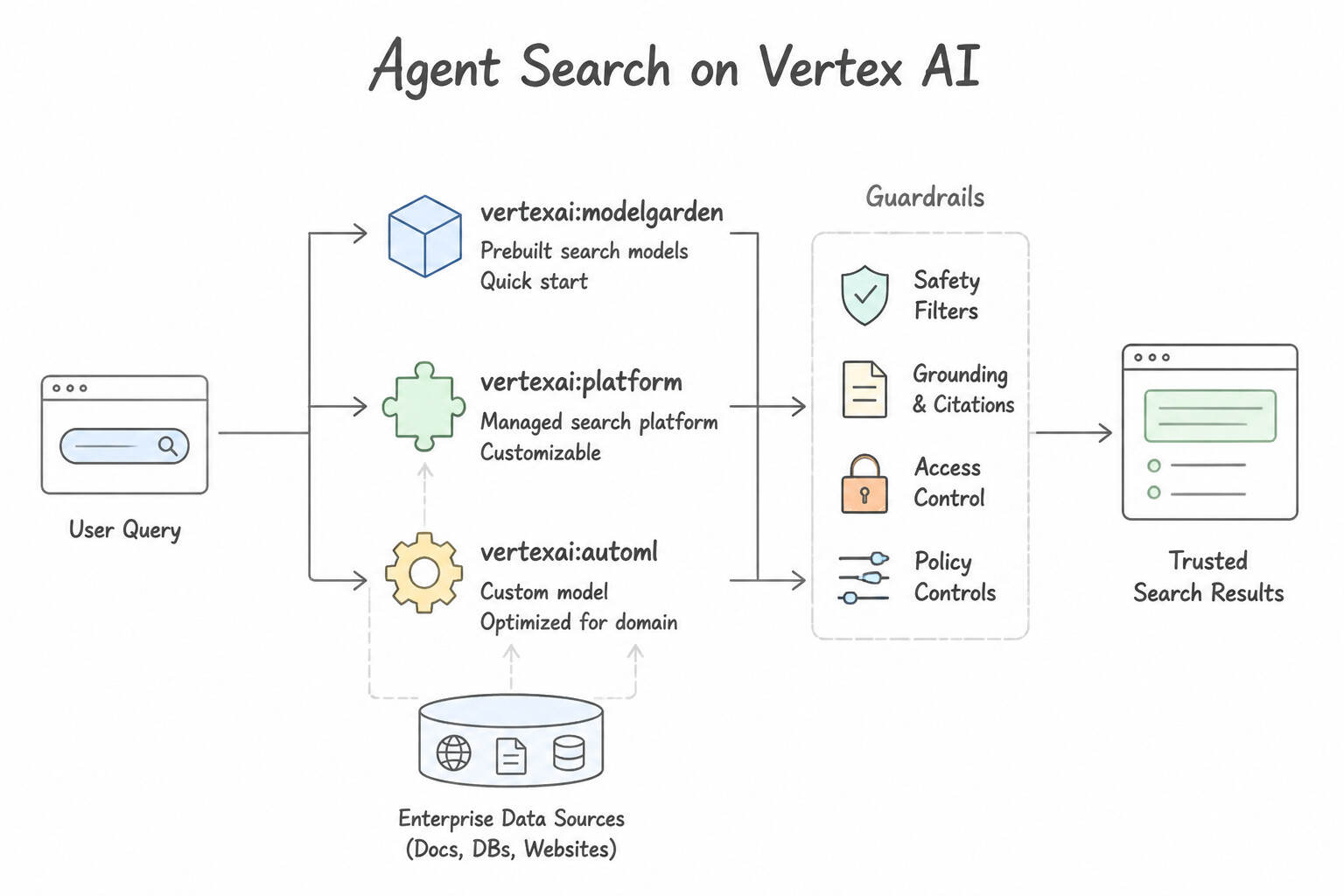
Gemini,Imagen,Veo), third-party partner (Anthropic Claude), and open-source (Gemma,Llama,Mistral) models. - Agent Search (Vertex AI Search): Turnkey indexing, chunking, embedding, and semantic retrieval engine for enterprise knowledge.
- AutoML: No-code training of custom predictive models on tabular, image, text, or video datasets when a specialized discriminative model is needed alongside generative workflows.
- Managed vs. Modular RAG Offerings (
2.4b — Prebuilt RAG with Agent Search vs. RAG APIs): Gives developers the choice between turnkey, out-of-the-box RAG (Agent Search, which handles parsing, chunking, embedding, indexing, and citations automatically) and composable, fine-grained RAG (Vertex AI RAG Engine / RAG APIs, Embeddings API, Vector Search, and Ranking API for custom chunking strategies, custom vector indices, and bespoke retrieval pipelines). - Building Custom Autonomous Agents (
2.4c — Vertex AI Agent Builder / Agent Platform): Enables developers to combine foundation models, grounding data stores, external API tools, and multi-agent handoffs using either low-code visual consoles or code-first frameworks (Agent Development Kit / ADK).
Consideration 2.4a: Vertex AI Platform including Model Garden, Search, AutoML
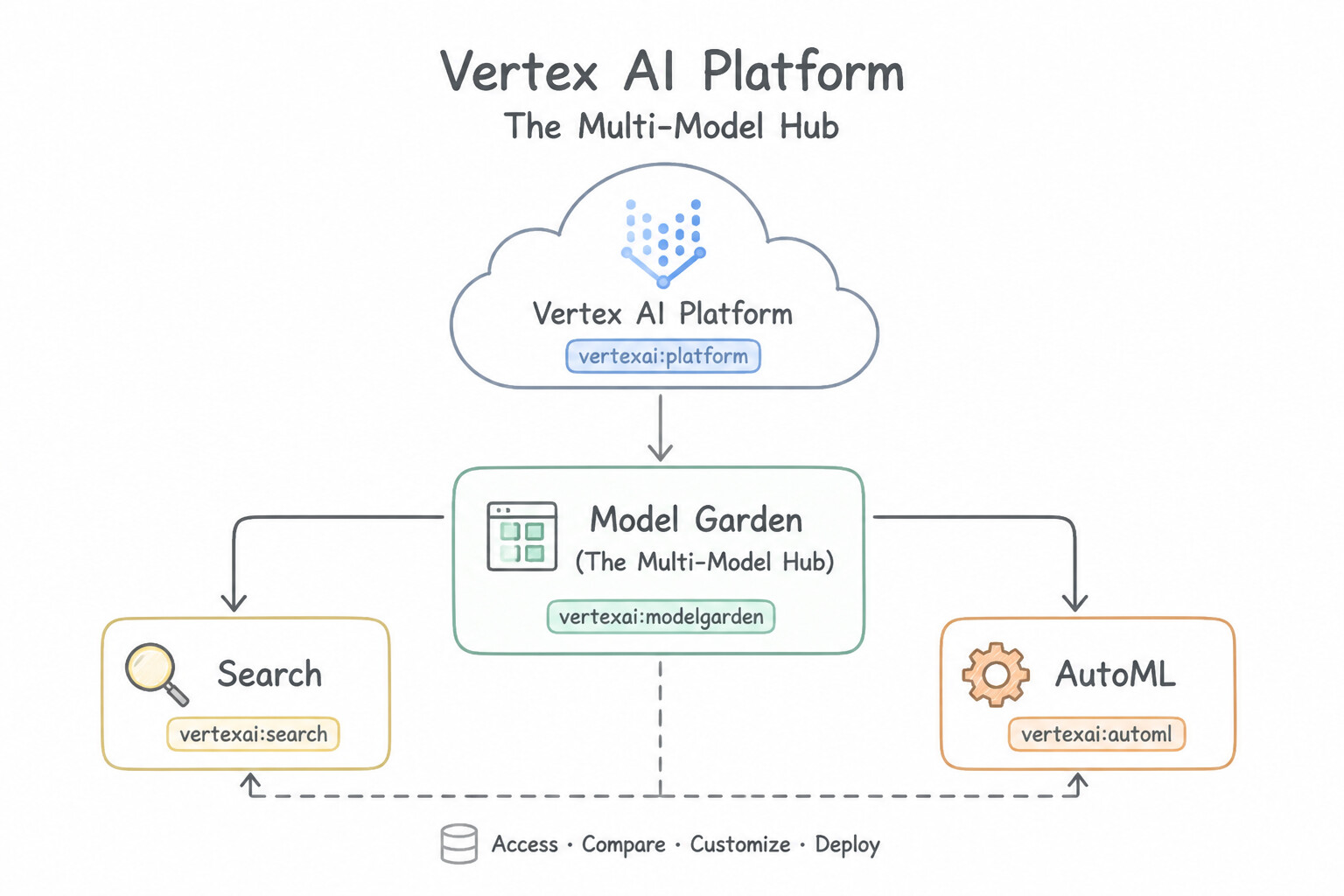
- Vertex AI Model Garden (The Multi-Model Hub): Empowers developers to browse, test, customize, and deploy Google's first-party models (
Gemini,Imagen,Veo), open-weight models (Gemma,Llama 3,Mistral), and partner models (Anthropic Claude 3.5/4) with one-click deployment to managed Vertex AI endpoints or Colab Enterprise notebooks—all governed by Google Cloud IAM and billing. - Agent Search (Vertex AI Search): Provides developers with out-of-the-box semantic search and grounding over unstructured documents (PDFs, HTML, Docs) and structured data (BigQuery, Cloud SQL) without managing embedding pipelines.
- Agent Platform AutoML (Vertex AI AutoML): When a developer or analyst needs to train a custom classification, regression, or forecasting model on enterprise tabular/image/text data without writing neural network code or tuning hyperparameters manually, AutoML automates feature engineering, architecture search, and model tuning.
Key Implementation Patterns
- Accessing Third-Party Models: Use Access Vertex AI Model Garden to search for the model and deploy it to an endpoint. Vertex AI Model Garden is the central repository for discovering and deploying first-party, third-party, and open-source models. (Avoid alternative: Building custom containers is a manual process that does not utilize the built-in model discovery features of Vertex AI.)
- Custom Image Classification without Code: Use Use Vertex AI AutoML to train a model using the labeled images. Vertex AI AutoML enables the creation of custom models using labeled data without requiring code. (Avoid alternative: Vertex AI Workbench requires coding skills and data science expertise.)
- Rapid RAG Deployment: Use Use Vertex AI Search to create a generic search app for unstructured data, import the PDF files from Cloud Storage, and enable the conversational answer feature. Vertex AI Search is a turnkey solution designed to create conversational search apps from unstructured data like PDFs without deep ML expertise.
Key Takeaways (2.4a)
- Vertex AI Model Garden is the single destination to discover, test, customize, and deploy models.
- It supports Google's first-party models, open-source models, and third-party partner models.
- Using managed services like Model Garden reduces operational overhead compared to manual deployment on VMs or containers.
- Vertex AI AutoML allows you to build high-quality custom models with zero coding.
Consideration 2.4b: RAG offerings: Vertex AI Search RAG, RAG APIs
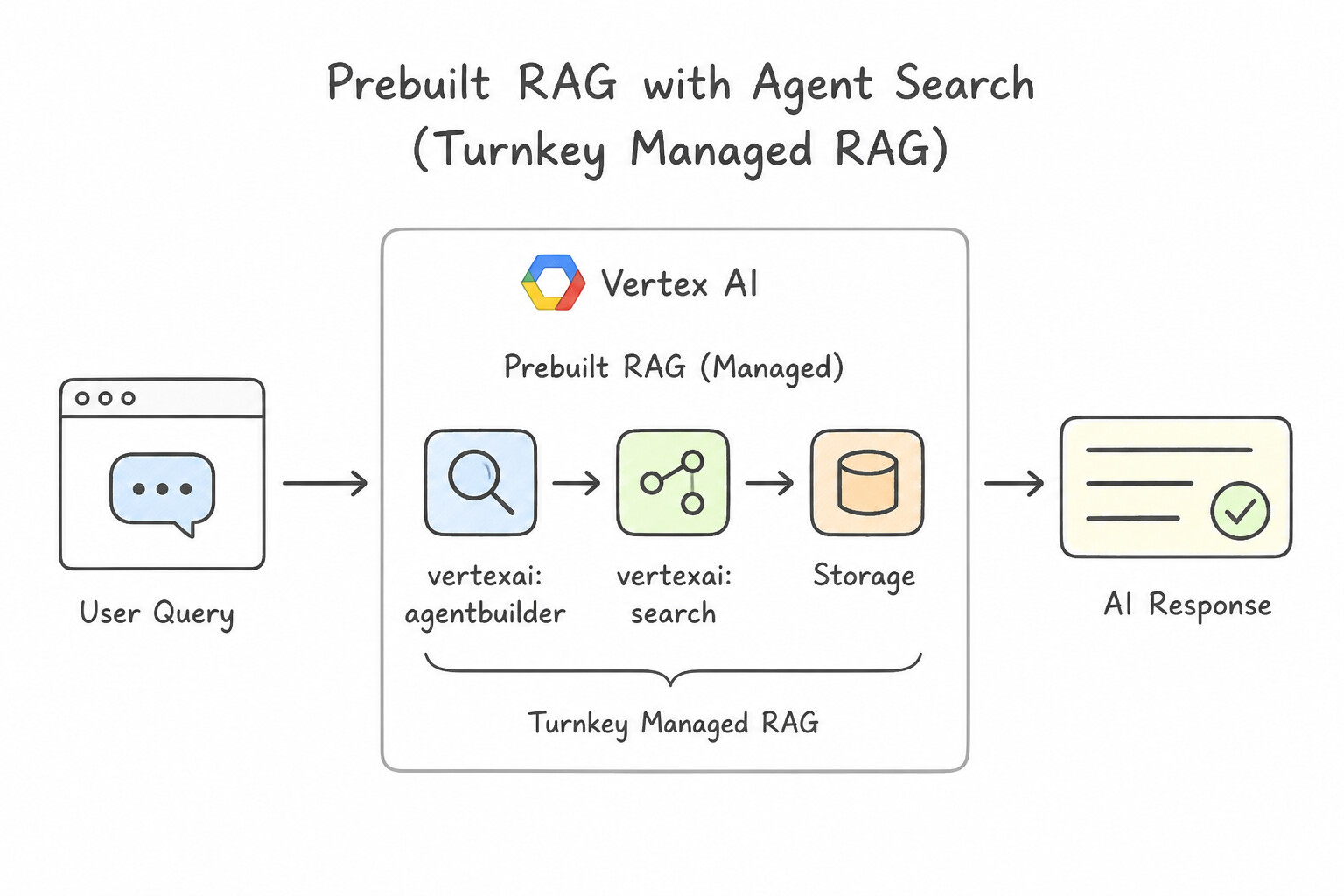
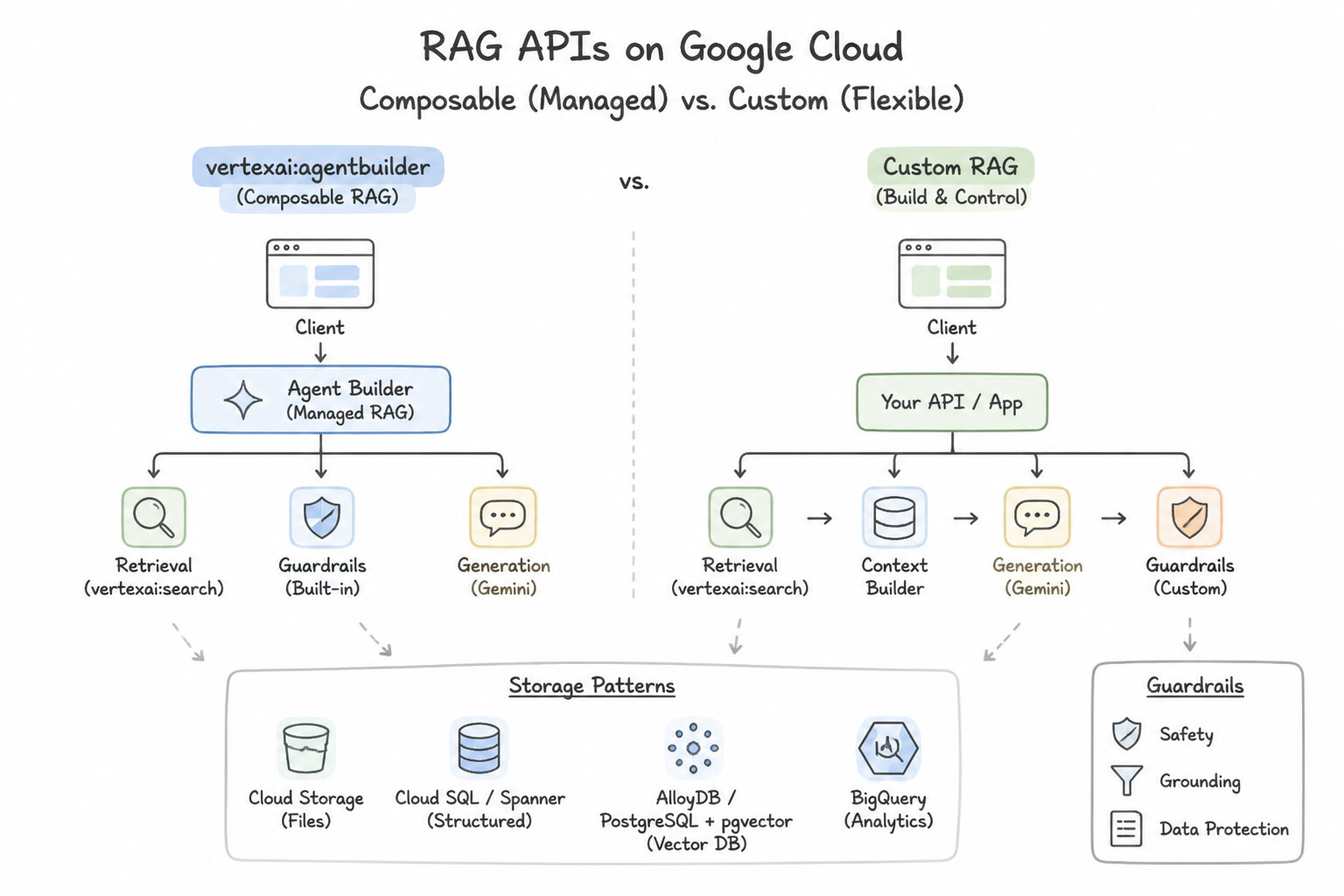
- Prebuilt RAG with Agent Search (Turnkey Managed RAG): The fastest path to production RAG. Point Agent Search at a Cloud Storage bucket, BigQuery table, or enterprise connector (Confluence, Jira, SharePoint); Google Cloud automatically parses documents, chunks text, generates embeddings, builds the index, and returns grounded answers with source citations.
- RAG APIs (Composable / Custom RAG): When an engineering team requires fine-grained architectural control—such as custom token-overlap chunking strategies, layout-aware PDF parsing (Document AI Layout Parser), custom embedding models (Vertex AI Embeddings API), sub-10ms billion-scale vector indexing (Vertex AI Vector Search), or semantic cross-encoder reranking (Ranking API) orchestrated via Vertex AI RAG Engine—they use Google Cloud's modular RAG APIs.
Key Implementation Patterns
- Managed RAG Implementation for Internal Knowledge Bases: Use Use Vertex AI Search to create a data store, import the documents from the Google Cloud Storage bucket, and link the data store to a chat app. Vertex AI Search is a fully managed RAG solution that automatically handles ingestion, chunking, and embedding from Cloud Storage.
- Grounding Models with Real-Time Public Data: Use Configure the prediction request to use the Grounding with Google Search tool. Grounding with Google Search connects the model to live web results for up-to-date information. (Avoid alternative: Increasing temperature increases randomness and hallucinations, not factual accuracy or freshness.)
Key Takeaways (2.4b)
- Vertex AI Search (part of Agent Builder) is the fully managed solution for RAG, handling chunking and embedding automatically.
- Vertex AI Vector Search is a low-level vector database that requires a custom pipeline for embedding generation.
- Fine-tuning is for model adaptation, not primarily for knowledge retrieval.
- RAG allows models to answer questions based on your specific private data.
Consideration 2.4c: Vertex AI Agent Builder
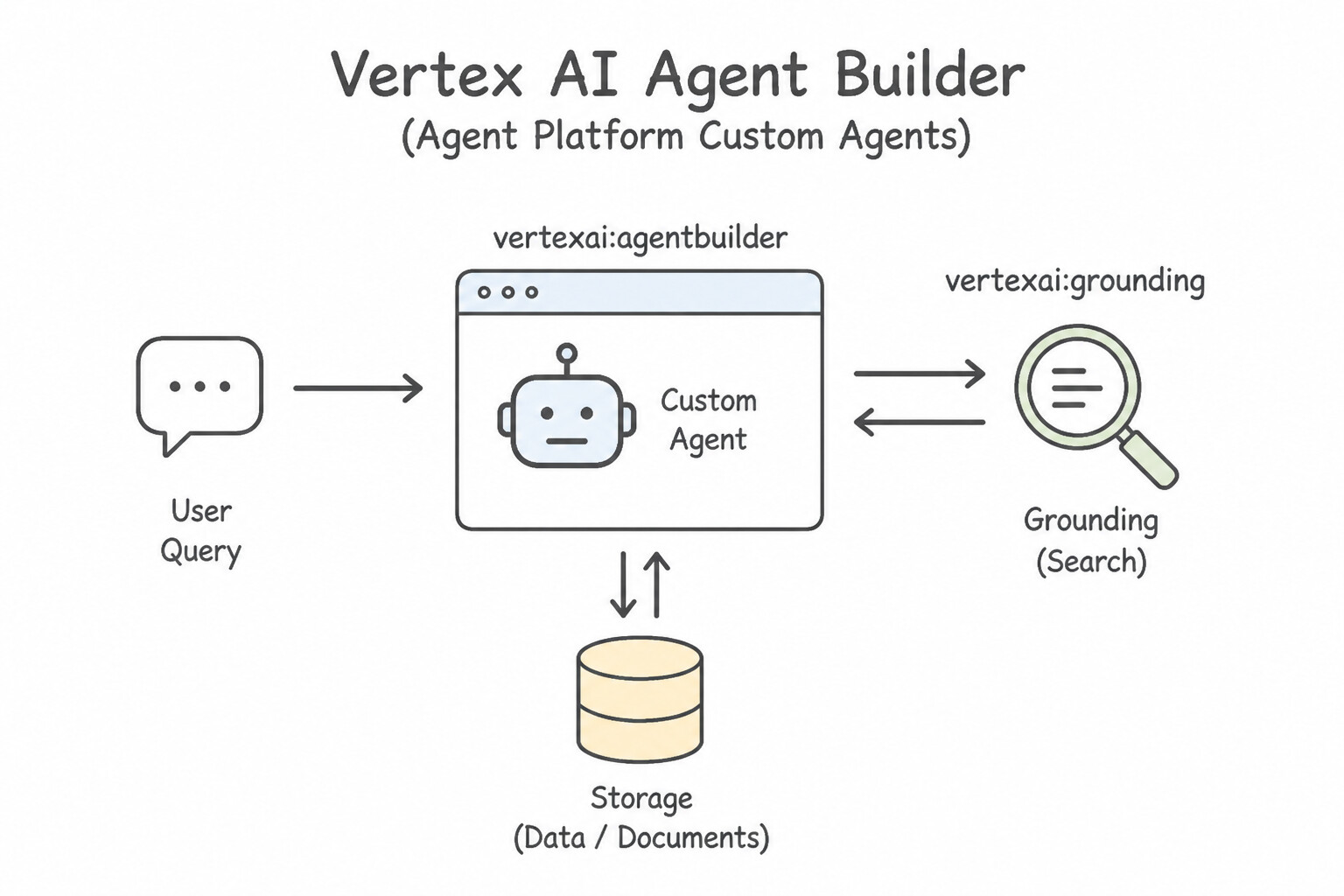
- Vertex AI Agent Builder (Agent Platform Custom Agents): Empowers developers to move beyond single-turn Q&A and build custom autonomous agents that can plan multi-step workflows, maintain conversational session state, retrieve grounded facts from Data Stores, and invoke external REST APIs via Tools / Extensions / Function Calling.
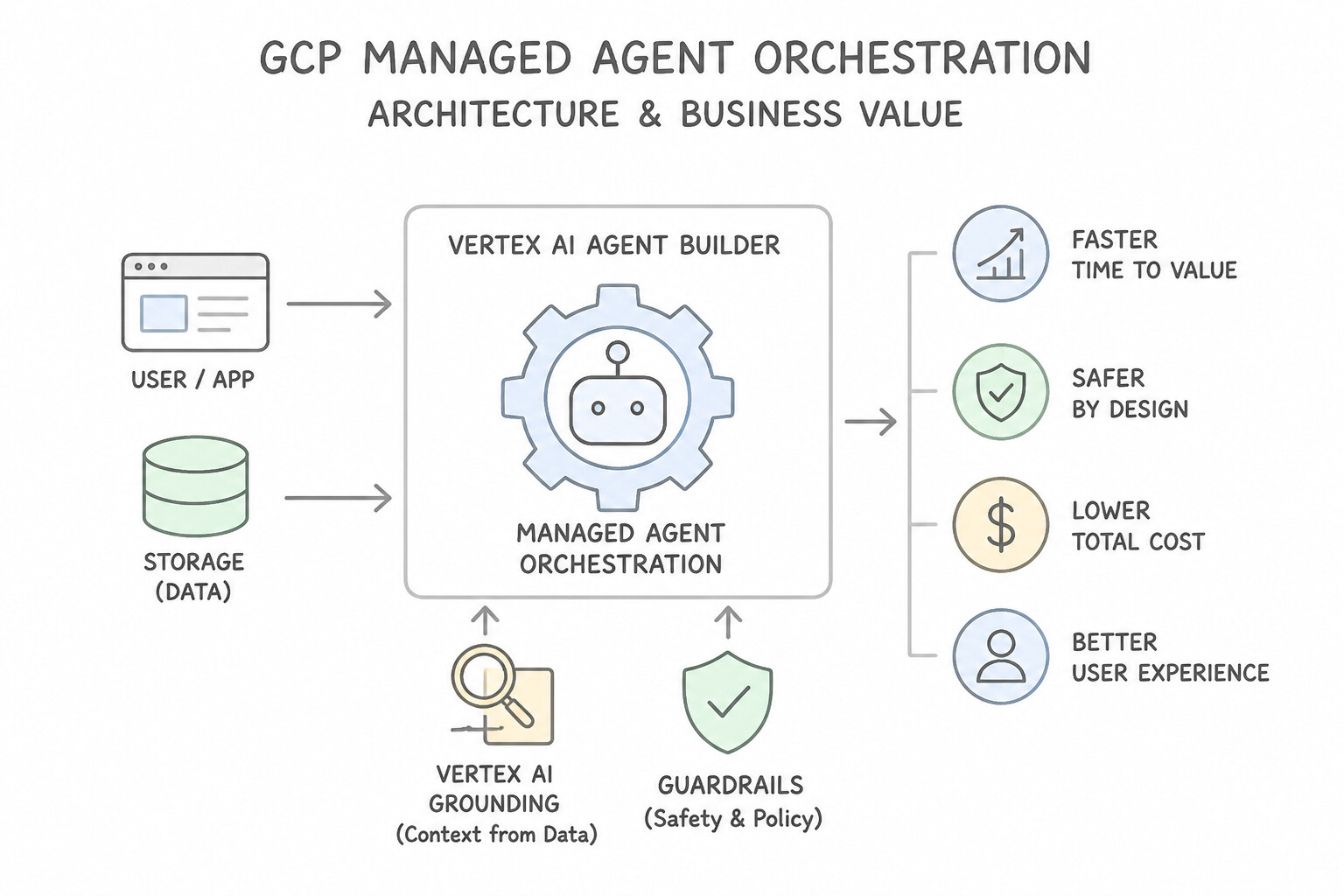
- Business Value of Managed Agent Orchestration: Instead of writing brittle custom glue code for retry loops, conversation history, safety filtering, and IAM authentication, developers use Agent Platform to visually or programmatically wire together specialized sub-agents with built-in evaluation and observability.
Key Implementation Patterns
- Internal Knowledge Base from Unstructured Data: Use Create a data store with the Unstructured content type. Select Google Cloud Storage as the data source and specify the bucket. PDFs and HTML files are unstructured data. You should create an Unstructured data store and import directly from the Google Cloud Storage bucket.
- Mitigating Hallucinations in Compliance Bots: Use Enable grounding by connecting the agent to a data store containing the loan documents. Grounding with a data store enables the agent to base answers on your documents and provide citations. (Avoid alternative: Hard-coding text is not scalable and does not provide interactive citations.)
- Product Catalog Search with Facets: Use Create a structured data store and import the BigQuery table. Configure the schema to ensure the Price, Category, and Availability fields are set as filterable. Use a structured data store for BigQuery data and explicitly configure the schema to enable filtering on specific columns.
Key Takeaways (2.4c)
- Vertex AI Agent Builder uses Data Stores to manage searchable content.
- Use 'Unstructured' data stores for documents like PDFs, HTML, and DOCX files.
- Use 'Structured' data stores for row-based data with a fixed schema (e.g., BigQuery tables, CSVs).
- Google Cloud Storage is a native source for importing unstructured documents into Agent Builder.
Quick Decision Cheat Sheet (Subsection 2.4)
If the Scenario Requires... | Choose This Developer Offering ( 2.4) | Avoid This Common Mistake |
|---|---|---|
"Discover, compare, and deploy first-party, partner (Claude), and open-source (Llama/Gemma) models" | Vertex AI Model Garden ( 2.4a) | Google AI Studio (Gemini-only prototyping) / AutoML |
"Train a custom classification or regression model without writing code" | Vertex AI AutoML ( 2.4a) | Model Garden / Agent Search |
"Out-of-the-box, zero-maintenance RAG over enterprise documents with automatic chunking & indexing" | Prebuilt RAG with Agent Search ( 2.4b) | Custom GKE vector database |
"Fine-grained developer control over custom chunking, custom embeddings, vector indexing, and reranking" | RAG APIs ( 2.4b — RAG Engine, Embeddings API, Vector Search, Ranking API) | Gemini for Google Workspace |
"Build goal-directed custom agents that combine reasoning, memory, grounding, and API execution" | Vertex AI Agent Builder / Agent Platform ( 2.4c) | Standalone ungrounded LLM endpoint |
Further Reading (Subsection 2.4)
- Vertex AI Model Garden — Documentation explaining how to explore and use foundation models, open-source models, and partner models in Model Garden.
- Vertex AI AutoML Video Classification documentation — While this link points to video, the concept for Image classification in AutoML is identical: it enables you to train models to classify images according to your own defined labels.
- Vertex AI Overview — Provides a high-level view of Vertex AI capabilities including AutoML and custom training.
- Vertex AI Search and Conversation overview — Provides an introduction to Vertex AI Search and Conversation, highlighting its ability to create apps for searching and chatting with data.
- Create a search app — Explains the steps to create a search engine based on unstructured data such as PDFs located in Cloud Storage.
- Vertex AI Agent Builder overview — Provides an overview of how Vertex AI Agent Builder (formerly Gen App Builder) allows you to build search and conversational apps using your own data with minimal coding.
Subsection 2.5: Define the purpose and types of tooling for gen AI agents
The Big Picture
By itself, even the most advanced foundation model is trapped inside its training weights: it cannot check a customer's live order status in Cloud SQL, it cannot execute a refund in an external payment gateway, and it cannot trigger a serverless microservice on Cloud Run.
Subsection 2.5 is one of the most critical architectural sections in production because it covers how agents interact with the outside world across three critical dimensions:
- The 4 Core Agent Tool Primitives (
2.5a — Extensions, Functions, Data Stores, Plugins): - Extensions: Managed, server-side connectors in Vertex AI (defined via OpenAPI specifications) where the Vertex AI runtime directly calls external/internal REST APIs on the agent's behalf.
- Function Calling (Functions): Client-side controlled execution where the model does not call the API directly; instead, the model outputs a structured JSON function name + arguments (
check_inventory(sku="123")), and your application code executes the API call and returns the result to the model. - Data Stores: Connect the agent to unstructured documents (Cloud Storage PDFs), websites, or structured tables (BigQuery) via Agent Search for read-only factual grounding (RAG).
- Plugins: Modular integrations that extend applications/agents to third-party SaaS ecosystems.
- Relevant Google Cloud Services & Pre-Built AI APIs (2.5b): Agents frequently delegate specialized perception or compute tasks to purpose-built Google Cloud services—Document AI (structured form/invoice extraction), Speech-to-Text & Text-to-Speech, Translation API, Cloud Vision API, Cloud Video Intelligence API, Natural Language API, Cloud Storage, Cloud Run, and Cloud Functions.
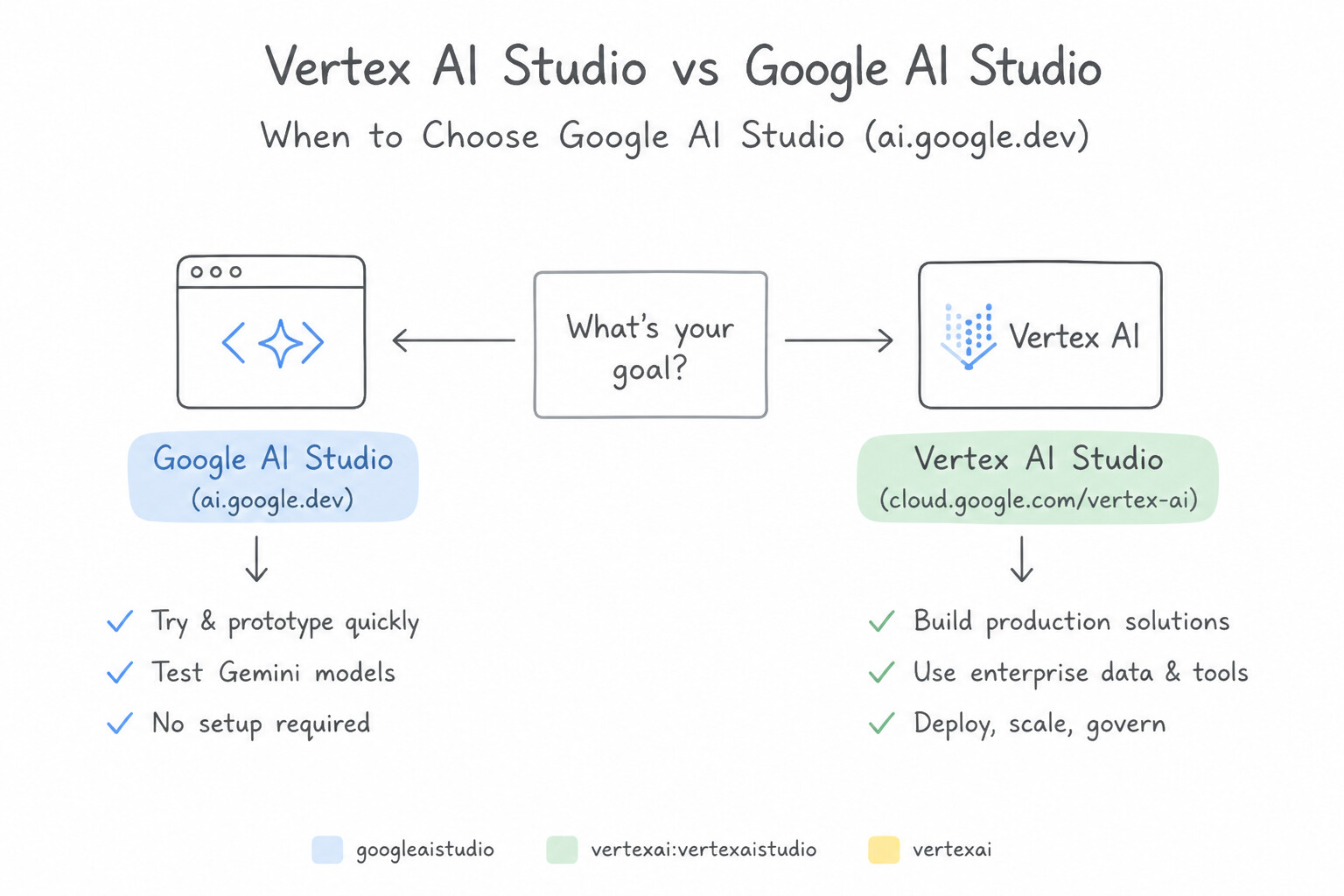
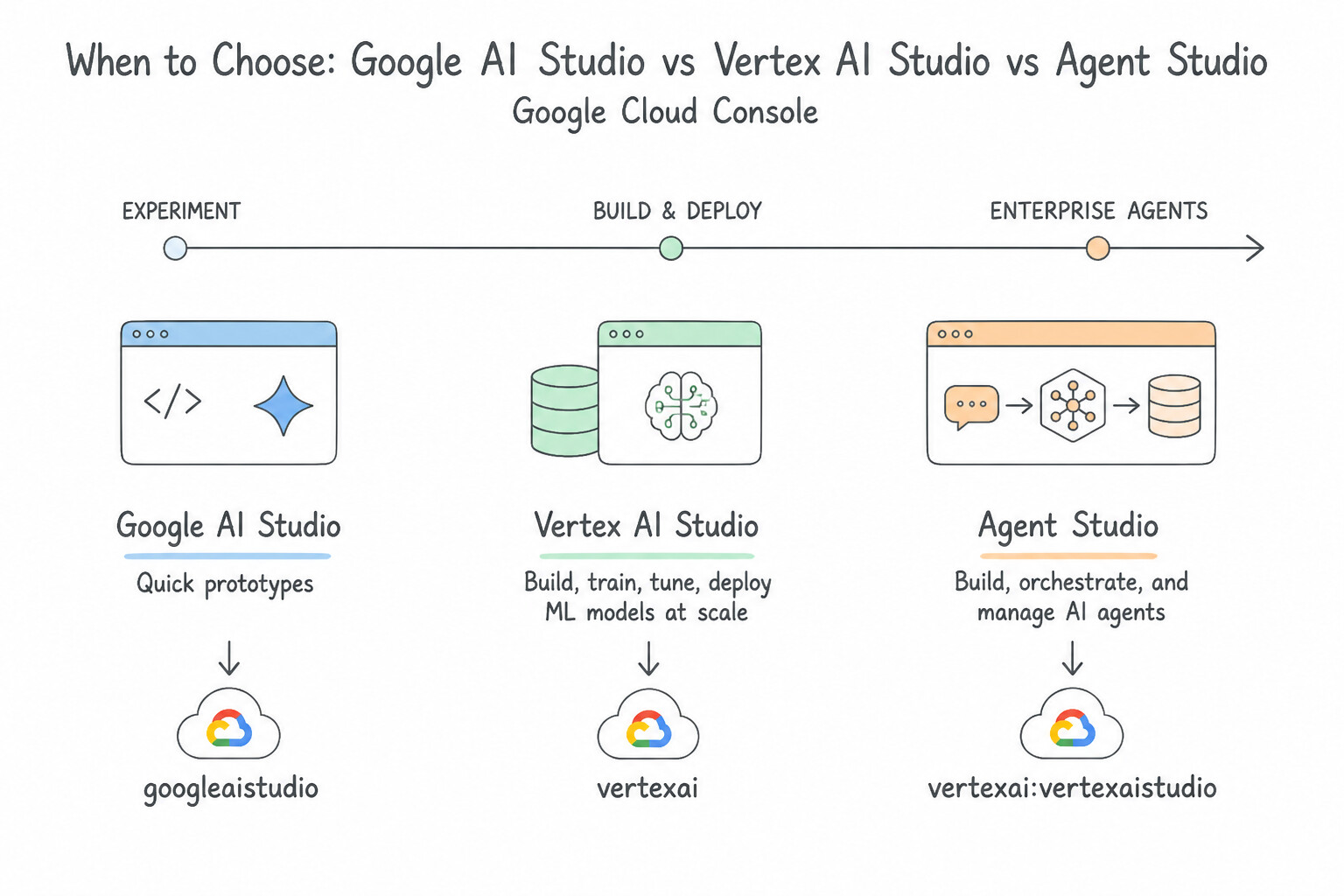
Agent Studio / Vertex AI Studiovs.Google AI Studio(2.5c): One of the most important architectural comparisons! Google AI Studio is for rapid, web-based individual developer prototyping with a quick API key. Vertex AI Studio / Agent Studio is for enterprise production requiring IAM, VPC Service Controls, CMEK, MLOps, and multi-model governance.
Consideration 2.5a: Use of tools by agents: extensions, functions, data stores, plugins
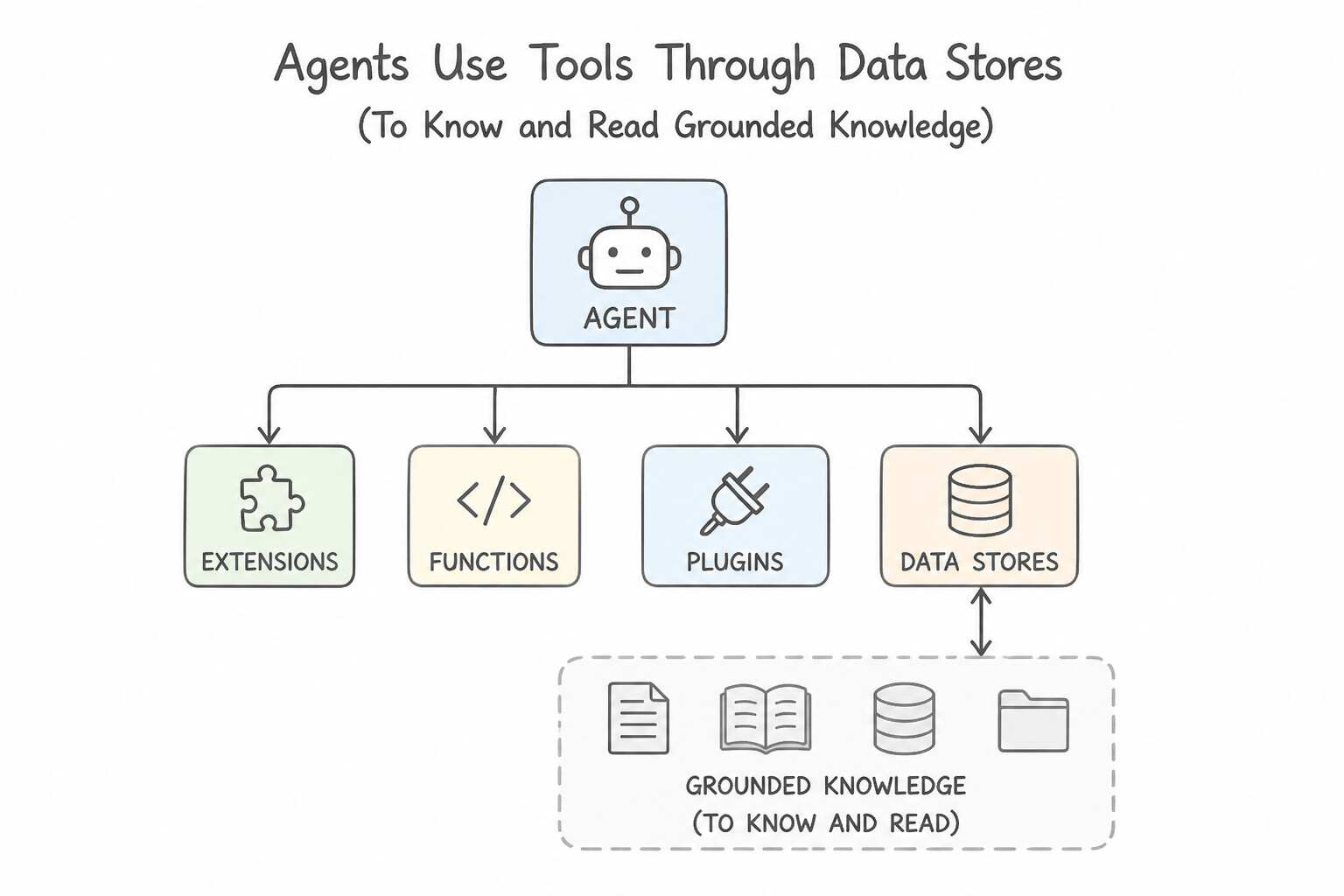
- Data Stores (To Know / Read Grounded Knowledge): Connect an agent to static or indexed enterprise knowledge (PDF manuals in Cloud Storage, intranet web pages, BigQuery tables). When a user asks a policy question, the agent queries the Data Store for grounded RAG retrieval.
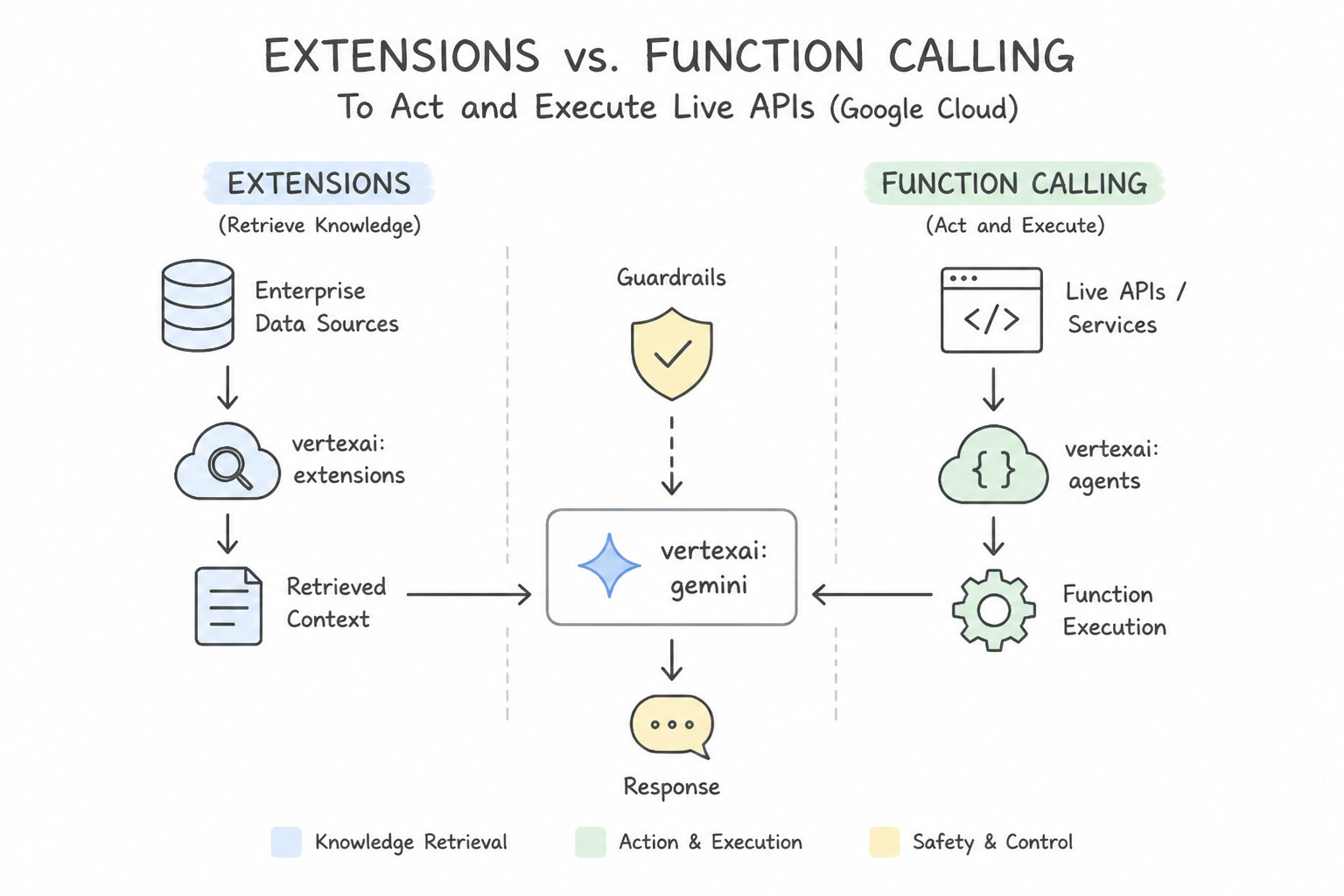
- Extensions vs. Function Calling (To Act / Execute Live APIs):
- Extensions: You upload an OpenAPI specification (YAML/JSON) to Vertex AI Agent Builder. During a conversation, the managed Vertex AI runtime autonomously invokes the external REST API endpoint (e.g., checking live flight availability or submitting a CRM ticket) and feeds the response back to the model.
- Functions (Function Calling): You declare function schemas to the model. The model outputs a structured JSON object (
{"function": "get_weather", "args": {"city": "Tokyo"}}), and your client application executes the actual API call inside your own network before passing the result back—ideal when the API sits behind strict client-side firewalls or requires custom human confirmation before execution.
Key Implementation Patterns
- Integrating Real-Time Proprietary Data: Use Create a Vertex AI Extension by importing the API's OpenAPI specification to manage the interaction. Vertex AI Extensions execute API calls server-side within the platform using an OpenAPI spec, meeting the requirement to avoid client-side middleware.
- Client-Side Execution of Legacy Protocols: Use Provide a function declaration describing the brightness tool to the model. Configure the client app to parse the model's structured output and execute the local code. Use Function Calling to generate structured output that the client app uses to trigger the local function.
Key Takeaways (2.5a)
- Vertex AI Extensions connect LLMs to real-world data and actions via APIs.
- Extensions execute API calls within the Vertex AI platform, removing the need for client-side middleware code.
- Function Calling requires the client application to handle the actual API execution.
- Data Stores are for information retrieval (RAG), not for performing actions.
Consideration 2.5b: Relevant Google services and APIs across storage, functions, run, speech, text, translation, document, vision, video, NLP
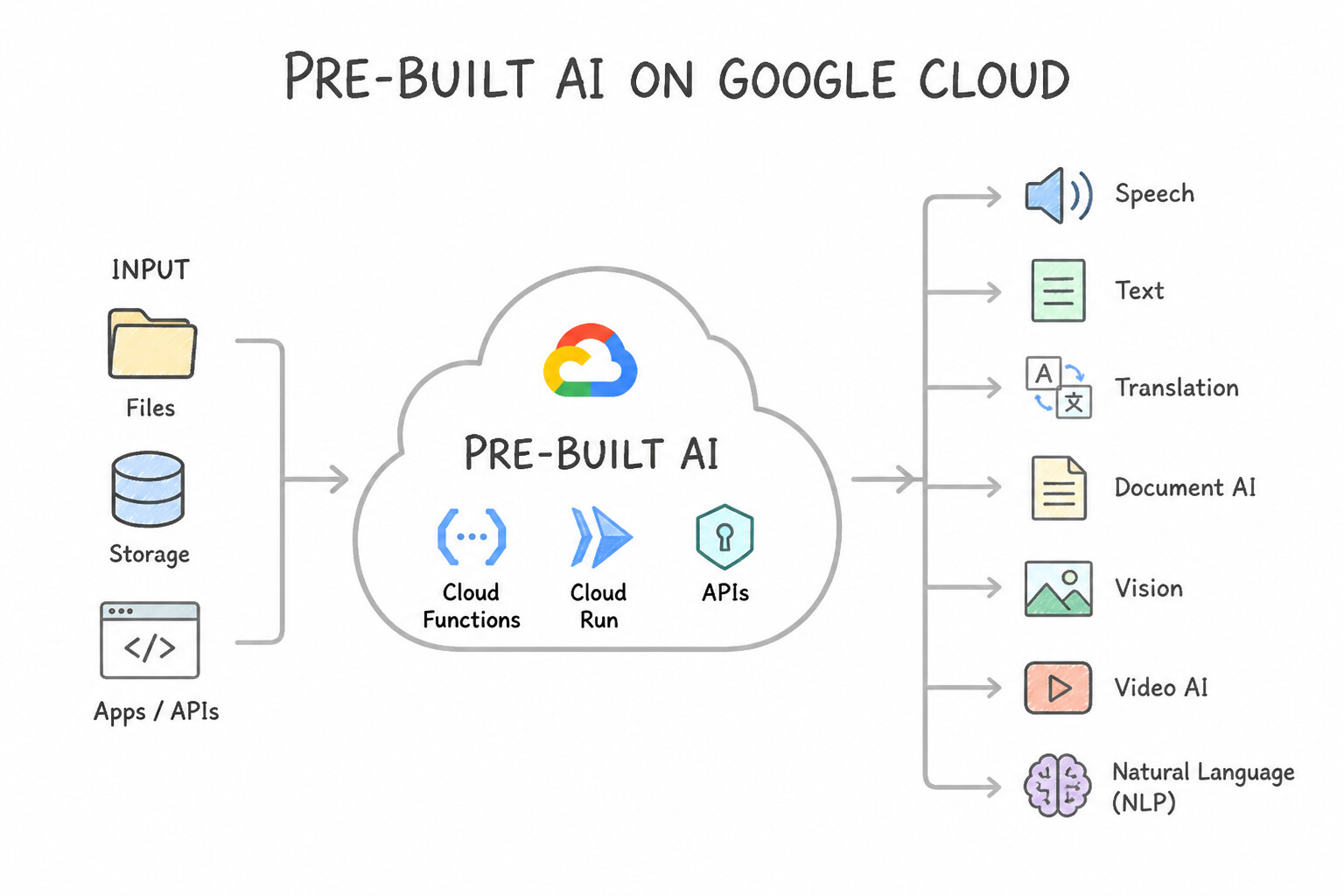
- The Pre-Built AI API Roster (Know Each API's Exact Specialty):
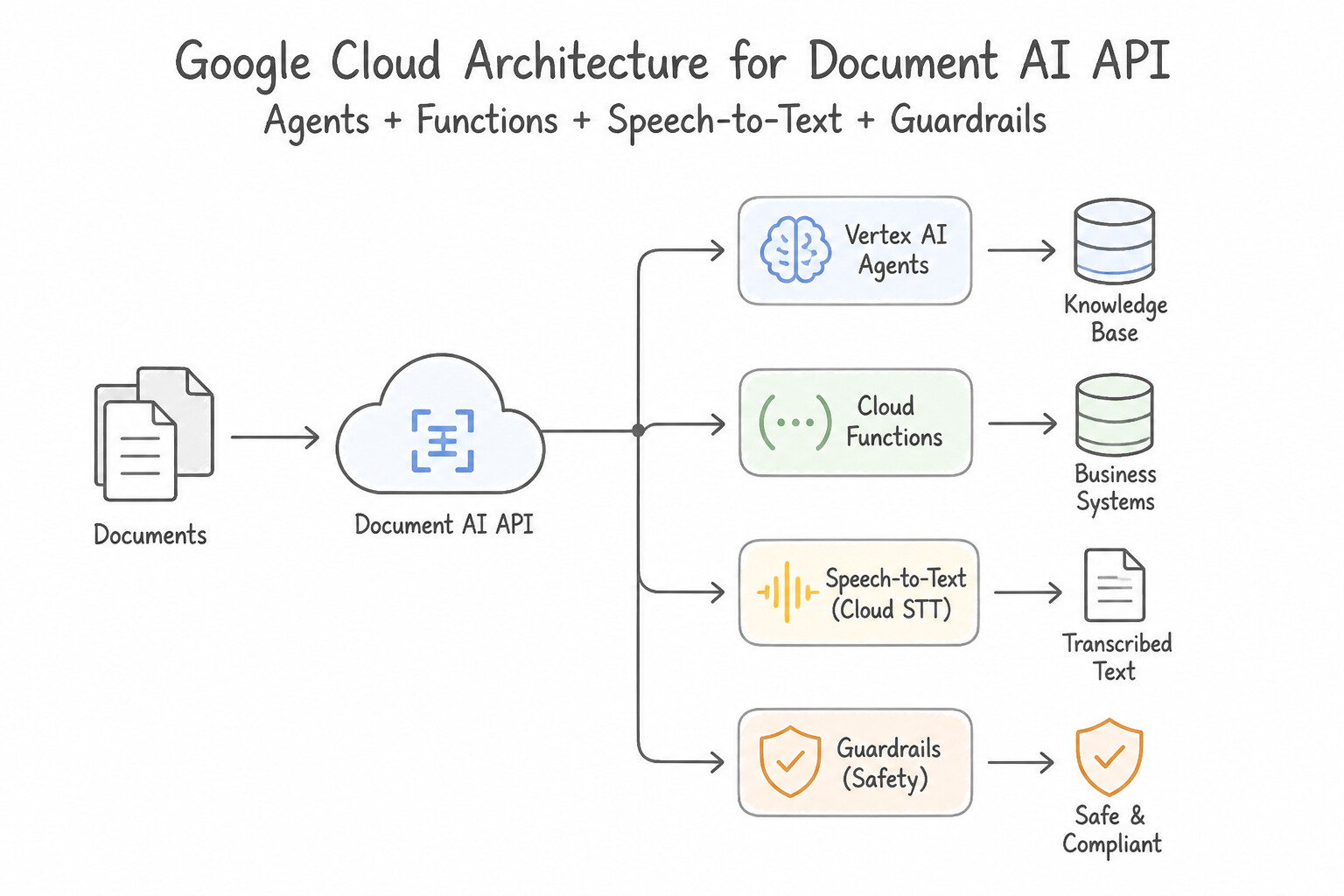
- Document AI API: Extracts structured fields, tables, and key-value pairs from complex forms, W-2s, receipts, and PDF invoices.
- Speech-to-Text API (
Chirp): Transcribes spoken audio streams or call files into written text. - Text-to-Speech API: Synthesizes natural-sounding human speech audio from text strings.
- Translation API & Document Translation API: Translates text strings or entire formatted documents (PDF/DOCX) across 100+ languages while preserving layout.
- Cloud Vision API: Detects objects, faces, landmarks, explicit content, and OCR text in static images.
- Cloud Video Intelligence API: Analyzes video files to detect shot changes, track objects across frames, flag explicit content, and extract temporal metadata.
- Natural Language API: Performs fast entity extraction, sentiment analysis, syntax analysis, and content classification on text.
- Serverless Infrastructure for Agent Tools: Cloud Functions (lightweight single-purpose event-driven webhook functions), Cloud Run (serverless autoscaling containers for agent microservices and APIs), and Cloud Storage (object storage for unstructured files and RAG corpora).
Key Implementation Patterns
- Dynamic Action Execution via Cloud Functions: Use Create Cloud Functions to call the legacy API and define them as tools for the agent. Cloud Functions act as the executable tools that the agent invokes to interact with external APIs. (Avoid alternative: Fine-tuning updates the model's weights but does not enable it to execute external code or API calls.)
- Voice Interaction Layer using Speech APIs: Use Use the Speech-to-Text API to transcribe the guest's voice and the Text-to-Speech API to vocalize the agent's response. Speech-to-Text converts audio inputs to text, and Text-to-Speech converts text outputs to audio. (Avoid alternative: The services are swapped; STT is for input transcription, and TTS is for output vocalization.)
- Ingesting Unstructured Forms with Document AI: Use Use Document AI with a Form Parser processor to extract key-value pairs from the receipts. Document AI extracts structured key-value pairs from documents, making it the correct tool for processing receipts. (Avoid alternative: Cloud Vision API label detection classifies images but does not extract specific text fields.)
Key Takeaways (2.5b)
- Generative AI models require 'Tools' or 'Function Calling' to interact with the outside world and perform actions.
- Cloud Functions provides a lightweight, serverless environment to host the code for these tools.
- Fine-tuning and RAG are for knowledge enhancement, not for action execution.
- Speech-to-Text (STT) converts audio input into text for processing.
Consideration 2.5c: Choosing Vertex AI Studio vs Google AI Studio
- When to Choose
Google AI Studio(ai.google.dev): - The scenario mentions a 24-hour hackathon, rapid Proof of Concept (PoC), individual developer experimentation, minimal setup overhead, or generating a quick API key with a standard Google account before provisioning enterprise cloud infrastructure.
- When to Choose
Vertex AI Studio/Agent Studio(Google Cloud Console): - The scenario mentions enterprise production deployment, regulated industries (finance, healthcare), IAM role-based access control, VPC Service Controls, Customer-Managed Encryption Keys (CMEK), data residency guarantees, MLOps pipelines, or fine-tuning/evaluating models inside a governed GCP project.
Key Implementation Patterns
- Rapid Prototyping for Hackathons: Use Sign in to Google AI Studio and generate an API key. Google AI Studio enables immediate API key generation for rapid prototyping without GCP project setup. (Avoid alternative: Vertex AI requires a Google Cloud project and billing setup, which takes time.)
- Enterprise Data Sovereignty: Use Use Vertex AI Studio to enforce data residency and enterprise compliance controls. Vertex AI Studio offers the regional controls and enterprise security needed for strict regulatory compliance. (Avoid alternative: Google AI Studio is optimized for speed and prototyping, not strict enterprise data residency or compliance.)
Key Takeaways (2.5c)
- Google AI Studio provides the fastest path to prototyping with Gemini models using API keys.
- Vertex AI Studio is built for enterprise-grade applications requiring IAM, billing, and project-level governance.
- Choose Google AI Studio for hackathons or individual development where setup time must be minimized.
- Use Google AI Studio for individual prototyping and quick experiments.
Quick Decision Cheat Sheet (Subsection 2.5)
If the Scenario Requires... | Choose This Tool / API / Studio ( 2.5) | Avoid This Common Mistake |
|---|---|---|
"Import an OpenAPI (Swagger) YAML/JSON spec so the agent can call a live REST API" | Extensions / OpenAPI Tools ( 2.5a) | Data Stores / Fine-tuning |
"Model outputs a structured JSON function name + parameters for the client app to execute" | Function Calling ( 2.5a) | Grounding with Google Search |
"Extract structured key-value pairs and tables from PDF invoices, receipts, or tax forms" | Document AI API ( 2.5b) | Cloud Vision API basic OCR / Natural Language API |
"Convert customer call audio into text vs. convert text responses into spoken audio" | Speech-to-Text API vs. Text-to-Speech API ( 2.5b) | Cloud Video Intelligence API |
"Detect shot changes, track objects over time, and extract metadata in MP4 videos" | Cloud Video Intelligence API ( 2.5b) | Cloud Vision API (static images only) |
"Deploy stateless, autoscaling containerized webhooks or backend microservices for agent tools" | Cloud Run (or Cloud Functions for simple single-function webhooks, 2.5b) | Persistent Compute Engine VMs |
"24-hour hackathon, rapid web prototyping, quick API key" vs. "Enterprise IAM, CMEK, MLOps, compliance" | Google AI Studio (Prototyping) vs. Vertex AI Studio / Agent Studio (Enterprise, 2.5c) | Never swap these two! |
Further Reading (Subsection 2.5)
- Vertex AI Extensions overview — Provides a high-level overview of Extensions, explaining how they import API specifications to connect models to real-time data and actions.
- Function calling — Documentation explaining how to use function calling to enable Gemini models to interact with external tools and APIs.
- Function calling in Vertex AI — Explains how to use function calling to enable models to interact with external tools and APIs.
- Cloud Speech-to-Text — Overview of the Speech-to-Text API capabilities, focusing on accurate speech recognition.
- Cloud Text-to-Speech — Overview of the Text-to-Speech API capabilities, focusing on synthesizing natural-sounding speech.
- Document AI Overview — Explains how Document AI uses machine learning to classify, split, and extract information from documents.
Book TOC · Previous · Chapter 3 of 6 · Next
AwesomeGCP.com Learning
The approach taken is a question-led learning approach: you explore realistic project scenarios where you need to make decisions or take actions to achieve business goals within specific constraints. Instead of passive learning, you are challenged to think and work through the options to master the Generative AI Leader (GAIL) certification!