Book TOC · Previous · Chapter 2 of 6 · Next
Chapter 2: Google Cloud Gen AI Strengths, Gemini for Workspace, NotebookLM & Customer Engagement
Chapter Focus: AI Hypercomputer, open vs. closed ecosystem strategy, Gemini for Google Workspace, Gemini Enterprise, NotebookLM, Agent Search, and Customer Engagement Suite (CES).
Subsection 2.1: Describe Google Cloud's strengths in the field of gen AI
The Big Picture
In Section 2, production architecture focuses on from general AI concepts to why Google Cloud is uniquely architected for enterprise generative AI.
When a Fortune 500 CIO evaluates an AI platform, a flashy consumer chatbot demo is never enough. Enterprise adoption stalls unless seven strategic pillars are satisfied—which correspond 1-to-1 to the seven official considerations of Subsection 2.1:
- Decades of AI-First Research Innovation (2.1a): Google invented the Transformer architecture ("Attention Is All You Need", 2017), pioneered custom AI silicon (TPUs), and drives foundational breakthroughs via Google DeepMind—translating research directly into production Vertex AI capabilities.
- Enterprise-Ready Platform Guarantees (2.1b): Production workloads require built-in responsibility, security, privacy, reliability (99.9%+ SLAs), and global scalability—not best-effort consumer endpoints.
- Comprehensive Cross-Product Ecosystem (2.1c): Generative AI is natively woven across Google Workspace, BigQuery, Looker, Google Search, Android, and Security Command Center, eliminating data-movement tax.
- Open Approach & Anti-Lock-In (2.1d): Through Vertex AI Model Garden (supporting 150+ first-party, third-party partner like Anthropic Claude, and open-source models like Gemma, Llama, Mistral) plus open standards (Kubernetes, TensorFlow, JAX, OpenAPI, MCP/A2A), customers never face single-model lock-in.
- AI-Optimized Infrastructure & AI Hypercomputer (2.1e): Purpose-built Cloud TPUs, NVIDIA GPUs, high-speed Jupiter optical networking, and AI Hypercomputer co-design deliver superior performance-per-dollar and energy efficiency.
- Sovereign User Data Control & Privacy (2.1f): Google Cloud's core enterprise guarantee: your customer data, prompts, and fine-tuned weights are NEVER used to train Google's foundation models without explicit permission, enforced by IAM, VPC Service Controls, and CMEK.
- Democratized AI Across Every Skill Tier (2.1g): From no-code business users (Gemini for Workspace, Gems, NotebookLM) to low-code builders (Vertex AI Agent Builder, AutoML) to pro-code ML engineers (Vertex AI SDKs, Custom Training, GKE).
Consideration 2.1a: AI-first approach and innovation leadership
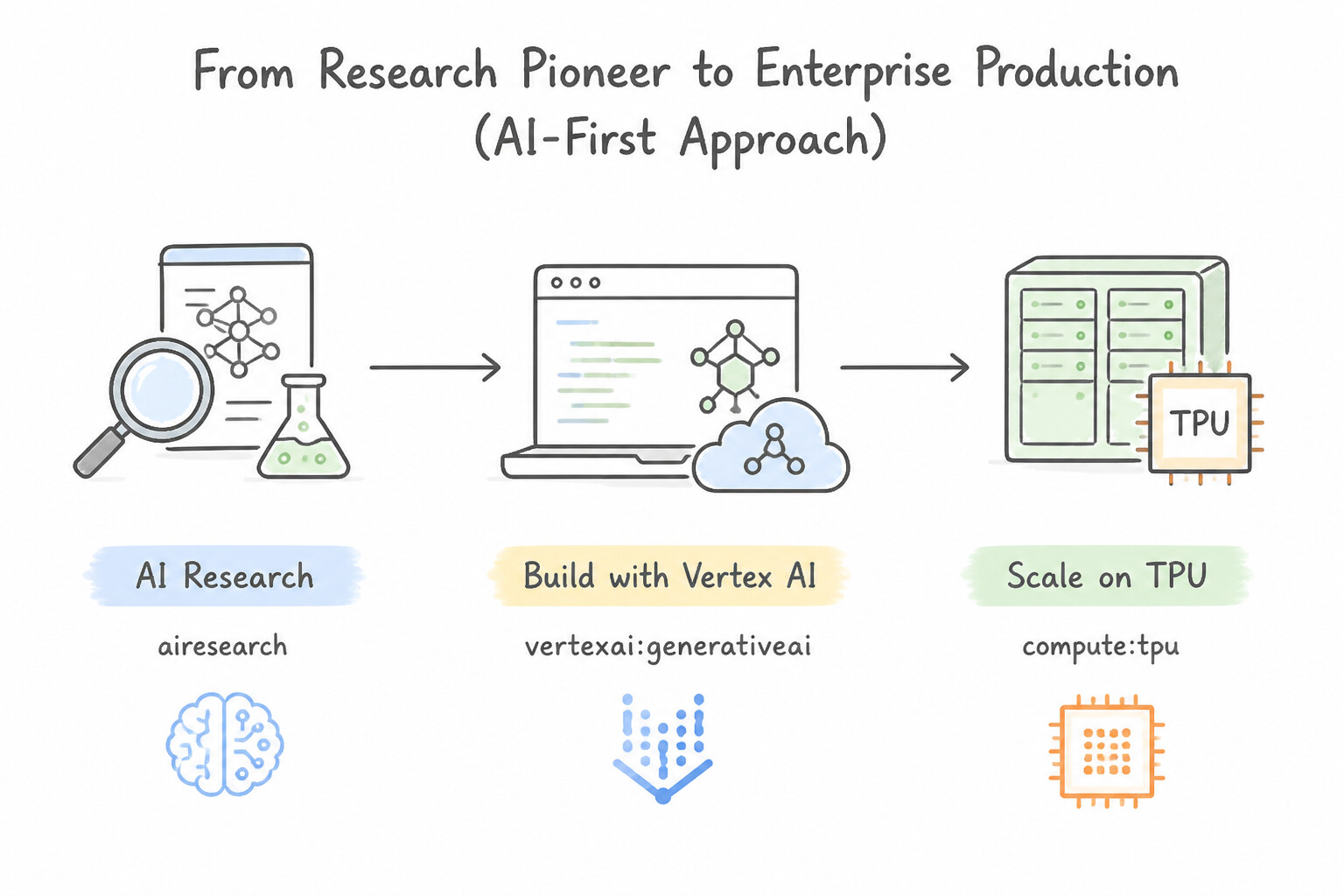
- From Research Pioneer to Enterprise Production (
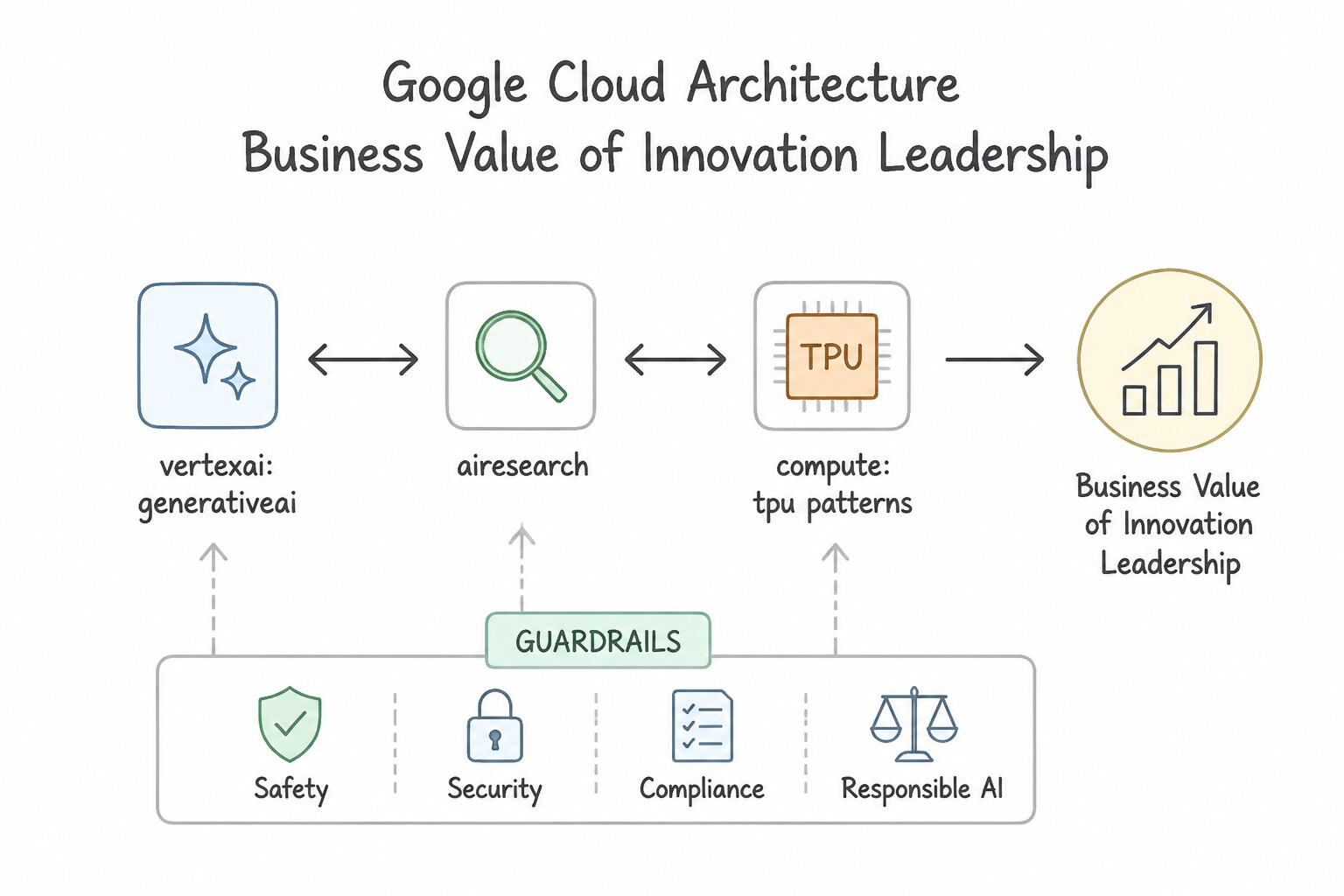
AI-First Approach): Since declaring an AI-first strategy in 2016 and publishing the seminal Transformer paper in 2017, Google has unified Google Research and Google DeepMind to continuously advance the frontier of multimodal reasoning, long-context memory, and agentic planning. - Business Value of Innovation Leadership: Customers building on Google Cloud do not have to re-architect their platform every year; as Google releases new generations of Gemini, Imagen, Veo, and Cloud TPUs, enterprises access drop-in model upgrades via stable Vertex AI APIs.
Key Implementation Patterns
- Origin of Transformer Architecture: Use Reference the paper "Attention Is All You Need". The 2017 paper "Attention Is All You Need" introduced the Transformer architecture, the basis for modern LLMs. (Avoid alternative: GANs are primarily for image generation and were introduced in 2014, not the foundation for 2017-era LLMs.)
- TPU Infrastructure and Vertical Integration: Use Provision Cloud Tensor Processing Units (TPUs). Cloud TPUs are Google-proprietary hardware accelerators designed specifically to optimize performance and cost for machine learning workloads. (Avoid alternative: Cloud Run is a serverless platform for stateless containers and is not suitable for training large foundation models.)
Key Takeaways (2.1a)
- Google's 2017 paper "Attention Is All You Need" introduced the Transformer architecture.
- The Transformer architecture enables parallel processing and self-attention, key to modern LLMs.
- Innovation leadership in AI is often demonstrated by foundational research contributions.
- TPUs are Google's custom ASICs designed specifically for accelerating machine learning workloads.
Consideration 2.1b: Enterprise-ready AI: responsible, secure, private, reliable, scalable
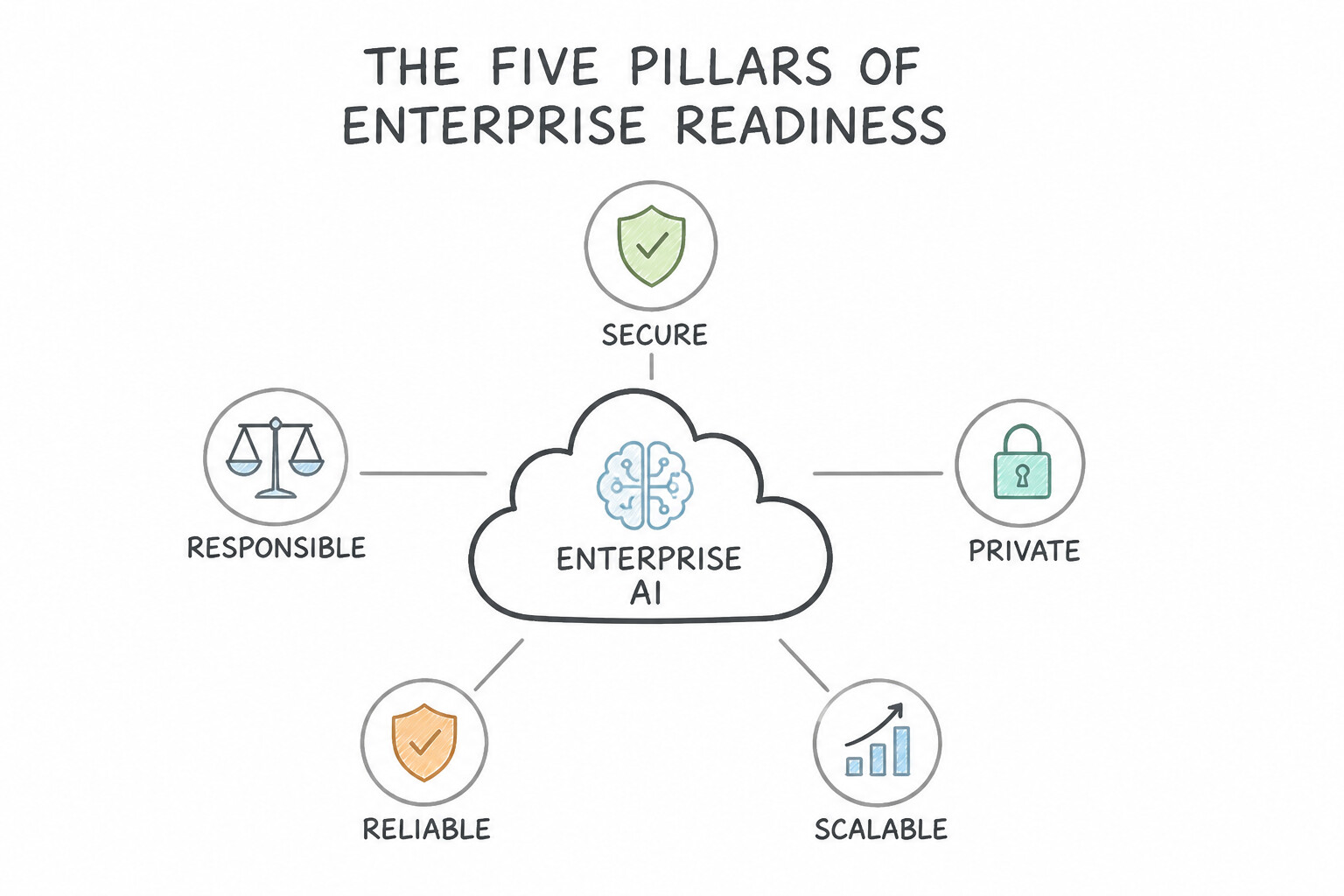
- The Five Pillars of Enterprise Readiness (
Responsible · Secure · Private · Reliable · Scalable): - Responsible: Built-in safety filters, SynthID watermarking, and alignment with Google's Responsible AI Principles.
- Secure: Protected by Google's secure-by-design infrastructure, encryption at rest/in transit, and Secure AI Framework (SAIF).
- Private: Strict tenant isolation—enterprise prompts, grounding documents, and tuned adapters remain private to your project.
- Reliable: Backed by enterprise Service Level Agreements (SLAs), Provisioned Throughput for guaranteed token capacity, and multi-region failover.
- Scalable: Serverless endpoints that autoscale seamlessly from a 10-user internal pilot to millions of global requests per minute.
Key Implementation Patterns
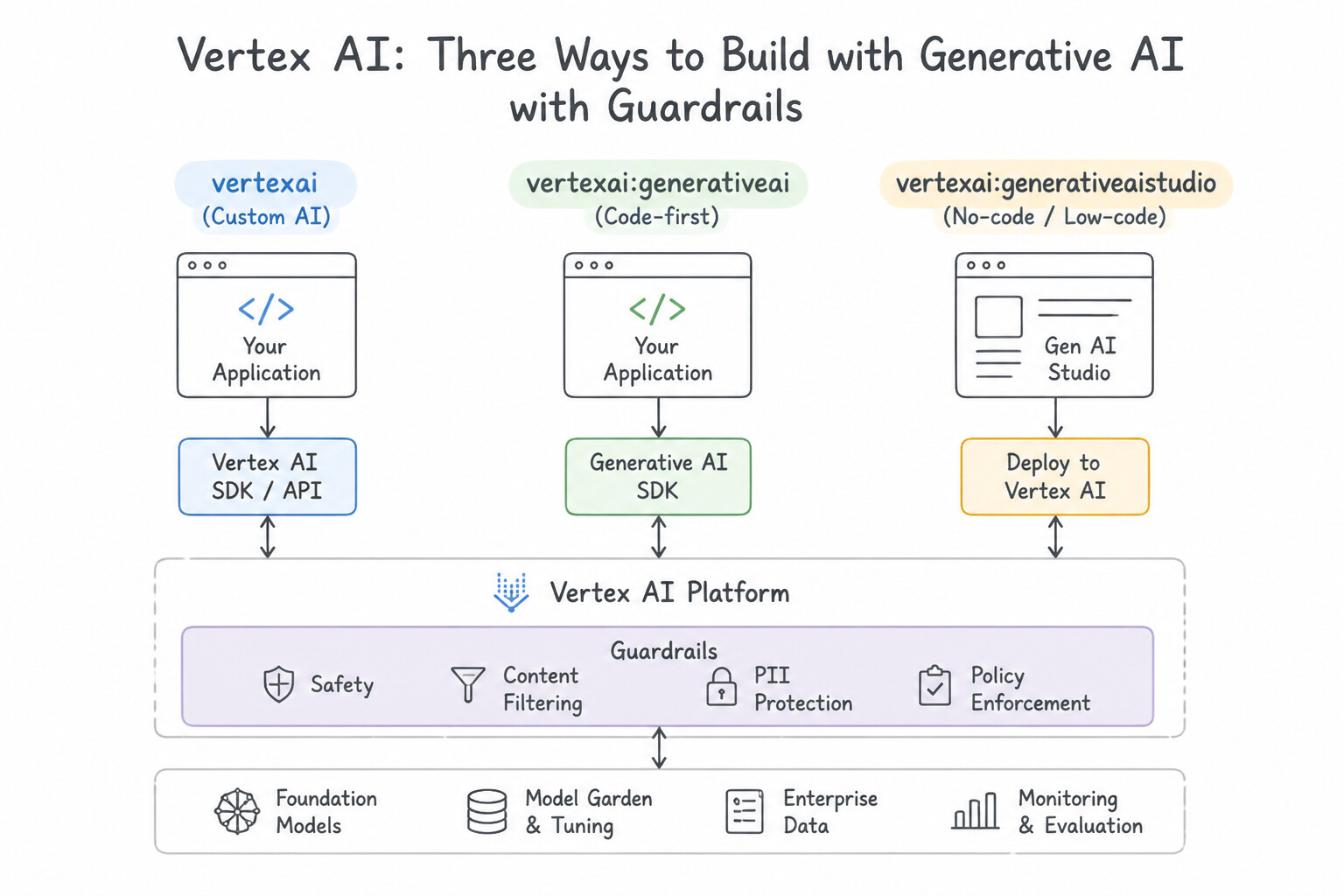
- Data Privacy in Model Tuning: Use Explain that the tuning process creates adapter layers stored in your project, while the shared base model remains frozen and does not learn from your data. Vertex AI keeps the base model frozen and stores the tuned adapter weights within the customer's project, ensuring data isolation.
- Regulatory Data Residency: Use Initialize the Vertex AI client by specifying the europe-west3 regional endpoint. Specifying the regional endpoint forces all API calls and processing to occur strictly within that region. (Avoid alternative: Global endpoints do not guarantee processing in a specific region and may route data elsewhere.)
- Mitigating Toxic Content: Use Configure the safety filter thresholds in the model settings to block harmful content categories. Safety filters in Vertex AI let you configure blocking thresholds for specific harm categories like Hate Speech. (Avoid alternative: Temperature controls randomness, not safety or toxicity.)
Key Takeaways (2.1b)
- Google Cloud creates adapter layers during model tuning rather than retraining the entire base model.
- The shared foundation model is frozen and does not learn from customer data.
- Customer data and tuned adapter weights are stored within the customer's project/tenant.
- Data privacy in Generative AI relies on isolation between the shared model and customer-specific artifacts.
Consideration 2.1c: Comprehensive AI ecosystem and integration
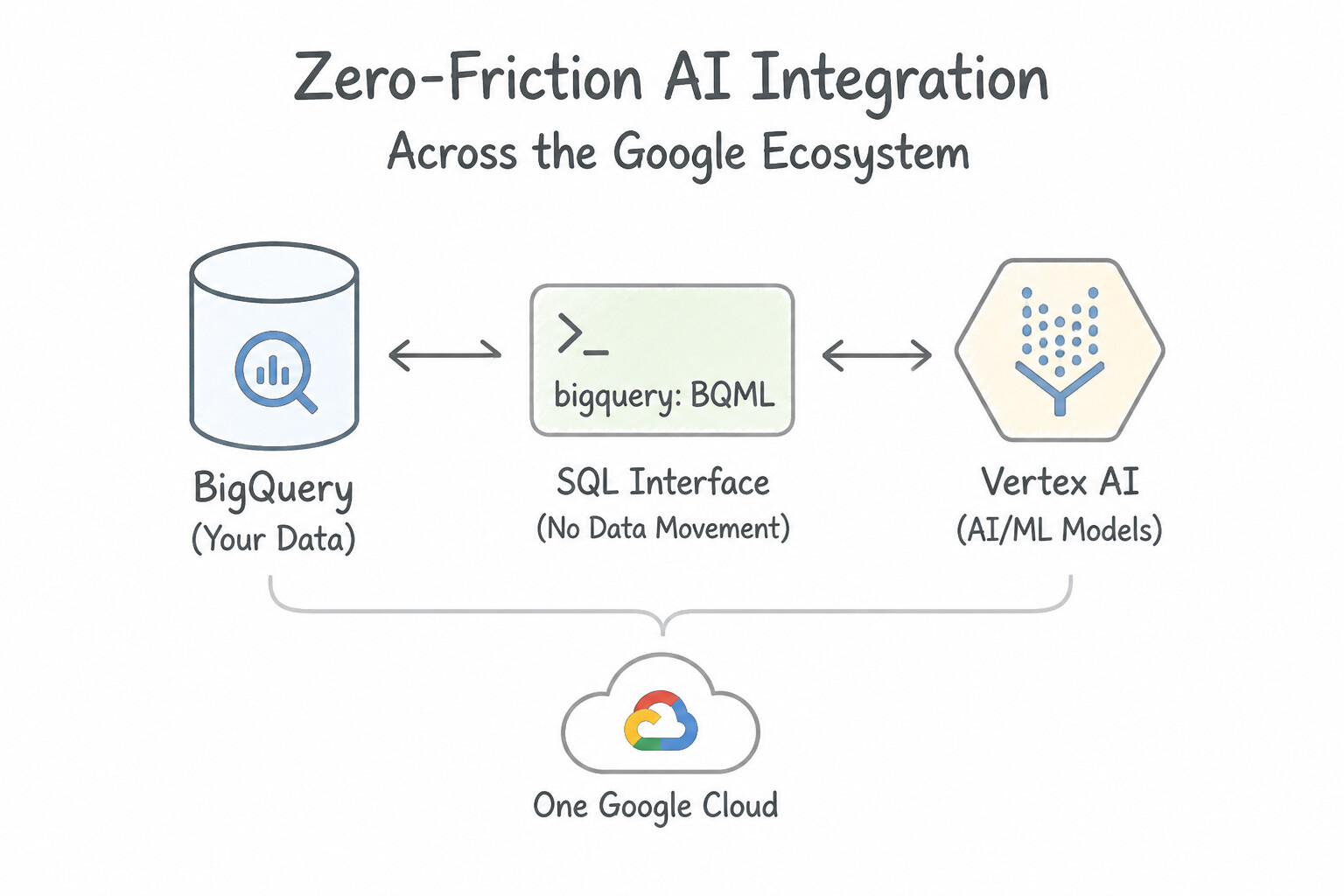
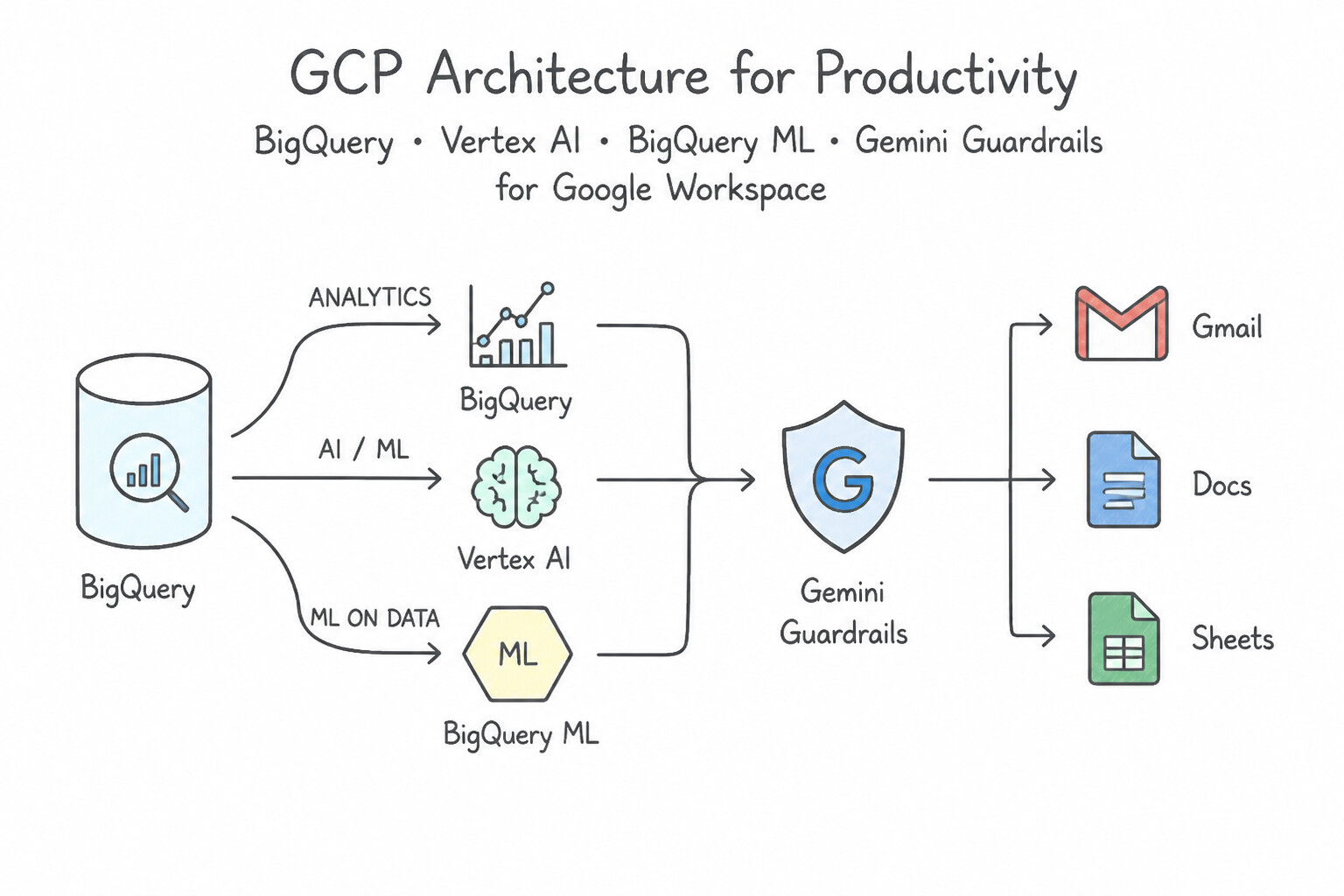
- Zero-Friction Integration Across the Google Ecosystem: Google Cloud eliminates "integration tax" by embedding Gemini directly where enterprise data and users already live:
- Productivity: Gemini for Google Workspace (Gmail, Docs, Sheets, Slides, Meet).
- Data & Analytics: BigQuery (SQL generation, unstructured object tables, vector search) and Looker (conversational BI).
- World Knowledge: Native Grounding with Google Search inside Vertex AI—the only cloud platform able to ground enterprise LLMs directly in Google's live web search index.
Key Implementation Patterns
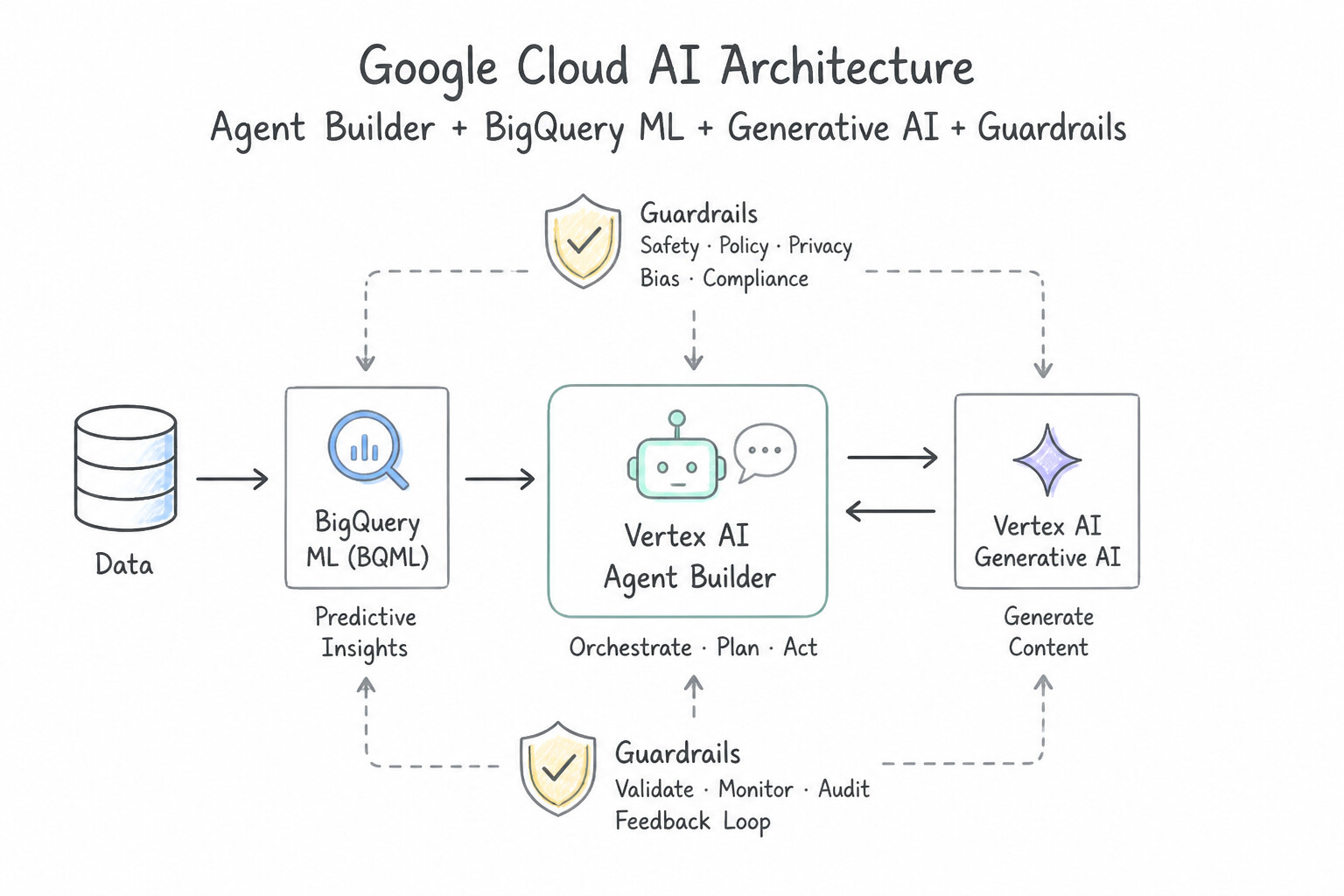
- Data-to-AI Integration with BigQuery: Use Use BigQuery ML to create a remote model that calls the Vertex AI foundation model directly within SQL queries. BigQuery ML remote models allow you to run Vertex AI foundation models directly on BigQuery data using SQL without moving the data.
- Operationalizing LLMs with MLOps: Use Use Vertex AI Pipelines to define and schedule the workflow steps. Vertex AI Pipelines provides the necessary orchestration, automation, and lineage tracking for end-to-end ML workflows. (Avoid alternative: Compute Engine requires manual management and lacks built-in MLOps features like lineage tracking and workflow visualization.)
Key Takeaways (2.1c)
- Bring AI to the data: Whenever possible, process data where it resides to avoid latency and egress costs.
- BigQuery ML Integration: BigQuery ML can invoke Vertex AI foundation models using the
REMOTE_MODELsyntax.- SQL as an AI Interface: You can perform complex generative AI tasks using standard SQL, making it accessible to data analysts without deep ML expertise.
- Vertex AI Pipelines is the primary tool for automating ML workflows and implementing MLOps on Google Cloud.
Consideration 2.1d: Open approach benefits
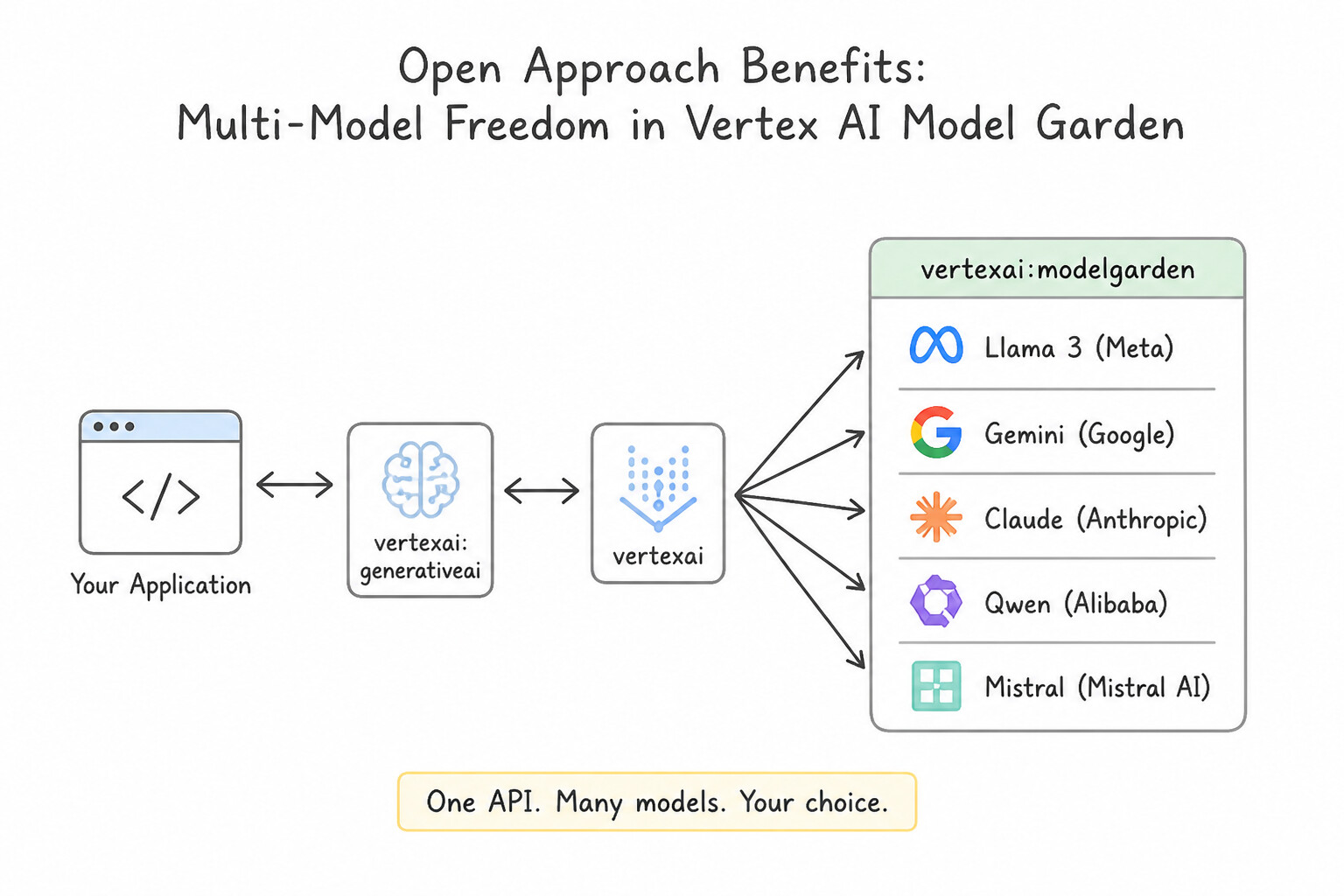
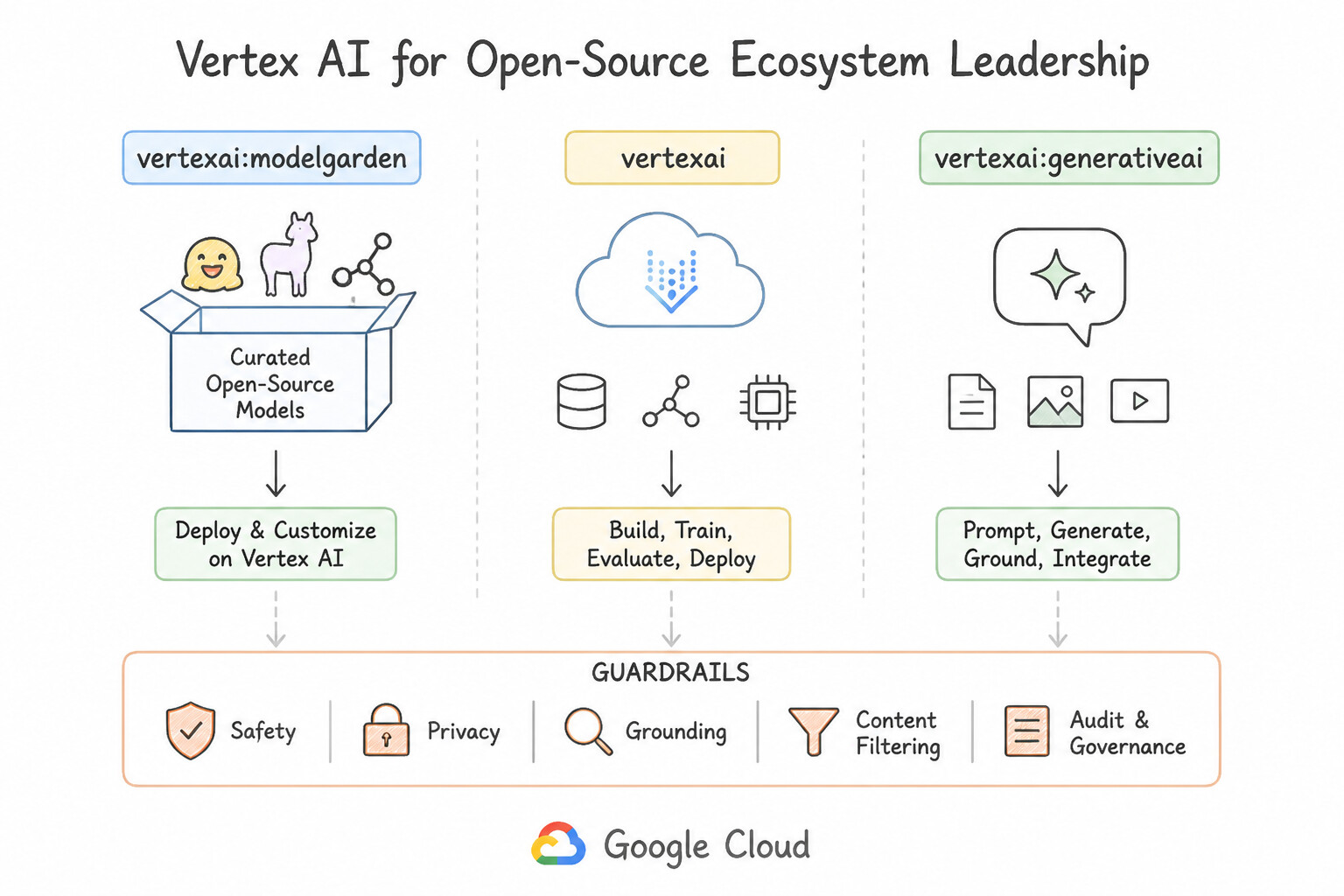
- Multi-Model Freedom in Vertex AI Model Garden: Google Cloud rejects single-vendor lock-in. Through Model Garden, organizations can discover, test, fine-tune, and deploy first-party models (
Gemini,Imagen,Veo), open-weight models (Gemma,Llama,Mistral), and third-party partner models (Anthropic Claude) using unified IAM, billing, and MLOps pipelines. - Open-Source Ecosystem Leadership: Google created and open-sourced foundational technologies including Kubernetes, TensorFlow, JAX, and Gemma, ensuring workloads remain portable across hybrid, multi-cloud, and on-premises environments.
Key Implementation Patterns
- Model Diversity and Selection Strategy: Use Use Vertex AI Model Garden to locate the Llama model and deploy it to a managed endpoint. Vertex AI Model Garden provides a managed hub to discover and deploy both first-party and third-party open-source models like Llama. (Avoid alternative: AutoML is for training custom predictive models, not for deploying specific pre-trained open-source generative AI models.)
- Integration with Open Source Frameworks: Use Use Vertex AI, which integrates natively with open-source frameworks like LangChain. Vertex AI supports an open ecosystem, allowing native integration with frameworks like LangChain without code rewrites. (Avoid alternative: AutoML trains models but does not manage or execute application orchestration logic.)
- Mitigating Vendor Lock-in: Use Vertex AI Model Garden, which allows you to discover, test, and deploy a wide variety of first-party, open-source, and third-party models. Vertex AI Model Garden provides access to a diverse ecosystem of first-party, open-source, and third-party models, offering flexibility and reducing lock-in risks.
Key Takeaways (2.1d)
- Vertex AI Model Garden is the central repository for discovering and interacting with both First-Party (Google) and Third-Party (Open Source) models.
- It allows for one-click deployment of open-source models to managed infrastructure, removing the need for manual VM configuration.
- Google Cloud's "Open Approach" means you are not locked into only using Google's proprietary models; you can leverage the broader AI ecosystem securely.
- Vertex AI supports an open ecosystem, allowing the use of open-source models and frameworks.
Consideration 2.1e: AI infrastructure: hypercomputer, TPUs, GPUs, data centers
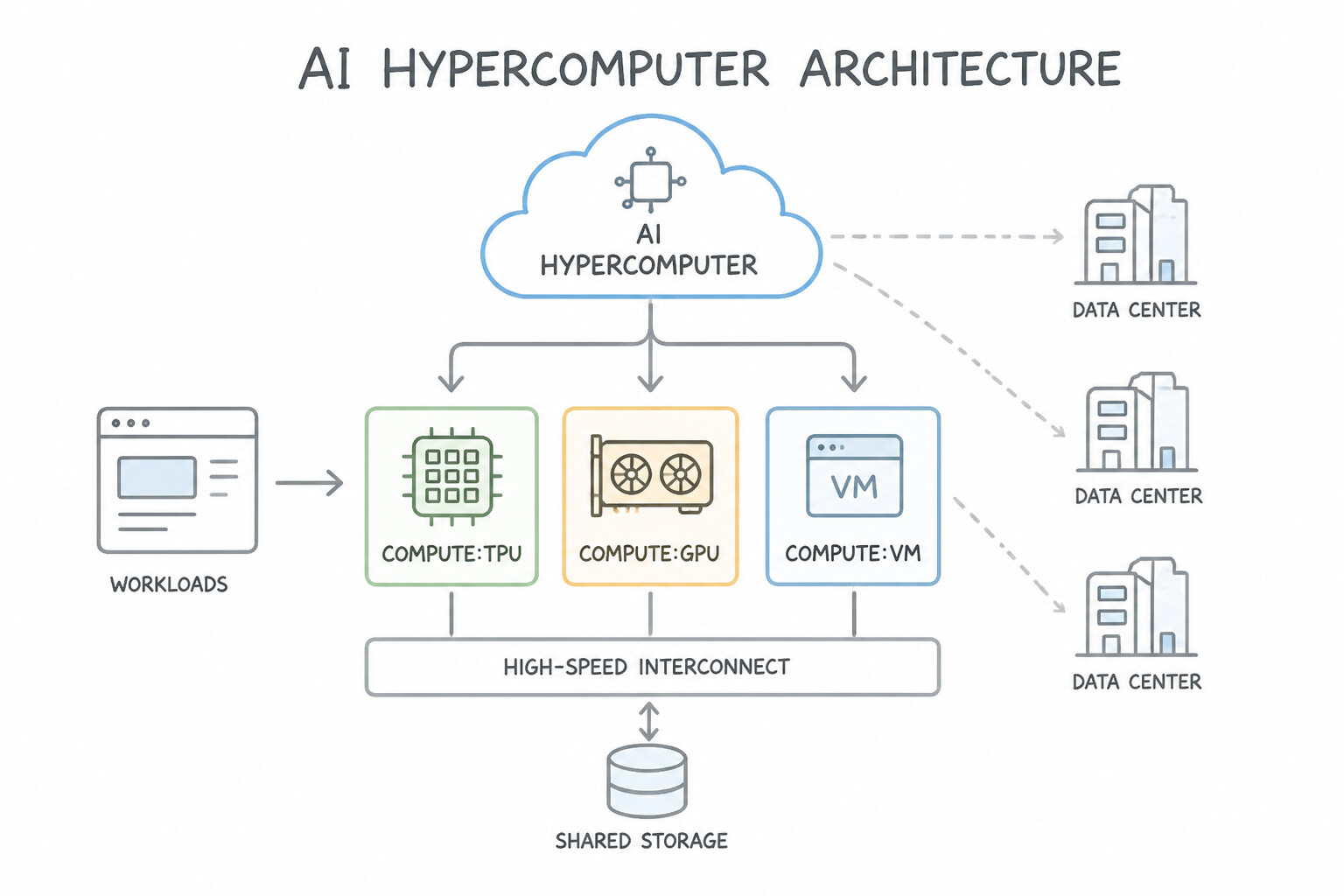
- The AI Hypercomputer Architecture: Rather than treating servers, chips, and software as isolated parts, Google Cloud's AI Hypercomputer is a supercomputing system co-designed across three layers:
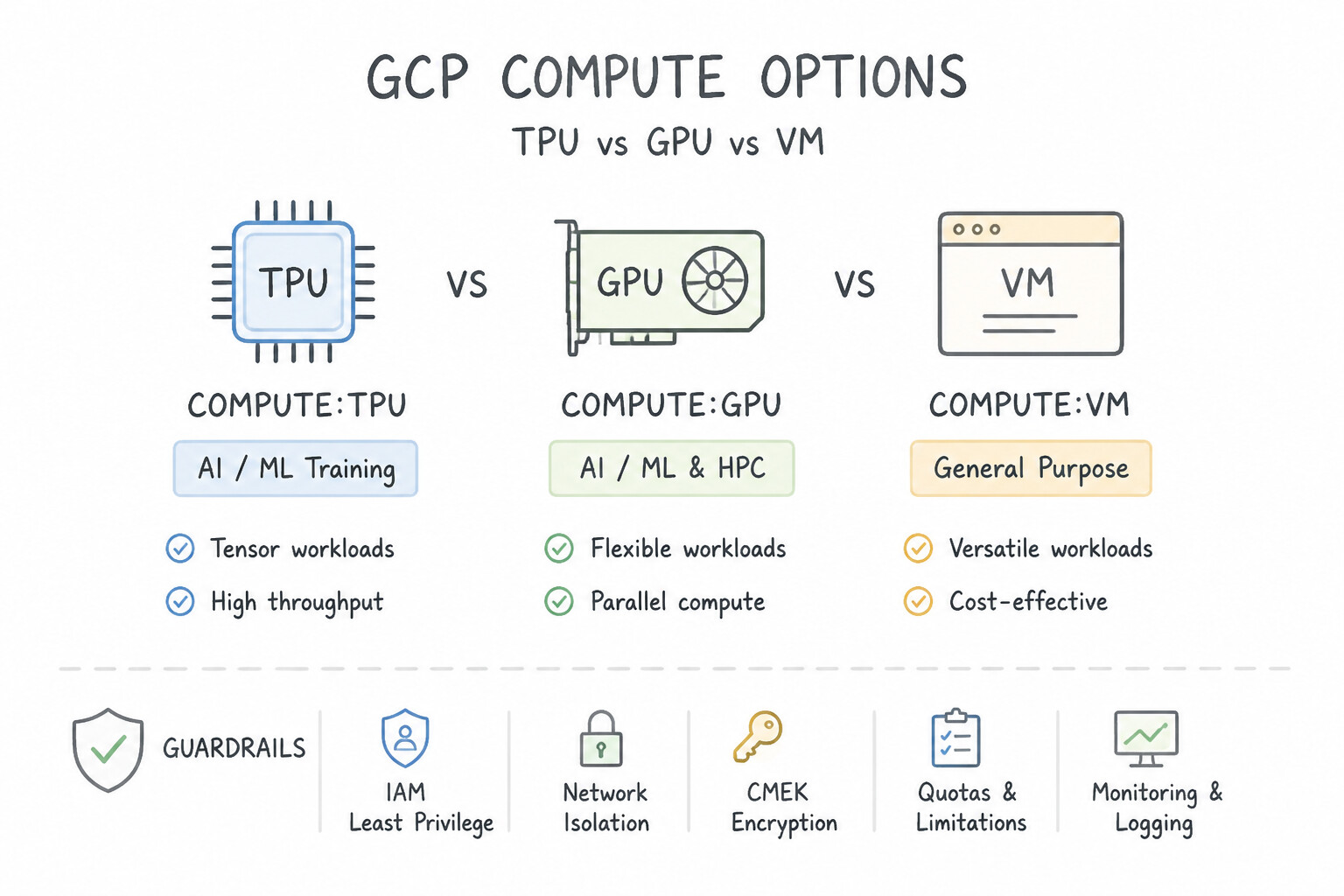
- Performance-Optimized Hardware: Custom-designed Google Cloud TPUs (Application-Specific Integrated Circuits purpose-built for matrix math in neural networks) alongside the latest NVIDIA GPUs (
H100,B200) and liquid-cooled data centers. - Open Software & Compilers: Native optimization for OpenXLA, JAX, PyTorch, and vLLM.
- Flexible Consumption Models: Dynamic Workload Scheduler, Spot VMs, and committed reservations to maximize hardware utilization and lower TCO.
Key Implementation Patterns
- TPU v5e vs. GPU for Cost Efficiency: Use Provision Cloud TPU v5e slices for the workload. TPU v5e is explicitly designed to offer the best price-performance ratio for training and inference. (Avoid alternative: TPU v5p is optimized for maximum performance and scale, not cost efficiency.)
- NVIDIA H100 (A3) for CUDA Migrations: Use Provision Compute Engine A3 instances powered by NVIDIA H100 GPUs. A3 instances use NVIDIA H100 GPUs, which support CUDA natively and provide the highest throughput available for Gen AI. (Avoid alternative: TPUs do not support custom CUDA kernels natively and would require code modification.)
Key Takeaways (2.1e)
- TPU v5p is optimized for maximum performance and scale.
- TPU v5e is optimized for cost-efficiency (price-performance).
- Choosing the right accelerator depends on prioritizing training speed (v5p/A3) vs. budget (v5e).
- CUDA Dependencies: Workloads relying on custom CUDA kernels require NVIDIA GPUs and cannot run directly on TPUs.
Consideration 2.1f: User data control: security, privacy, governance, models, agents
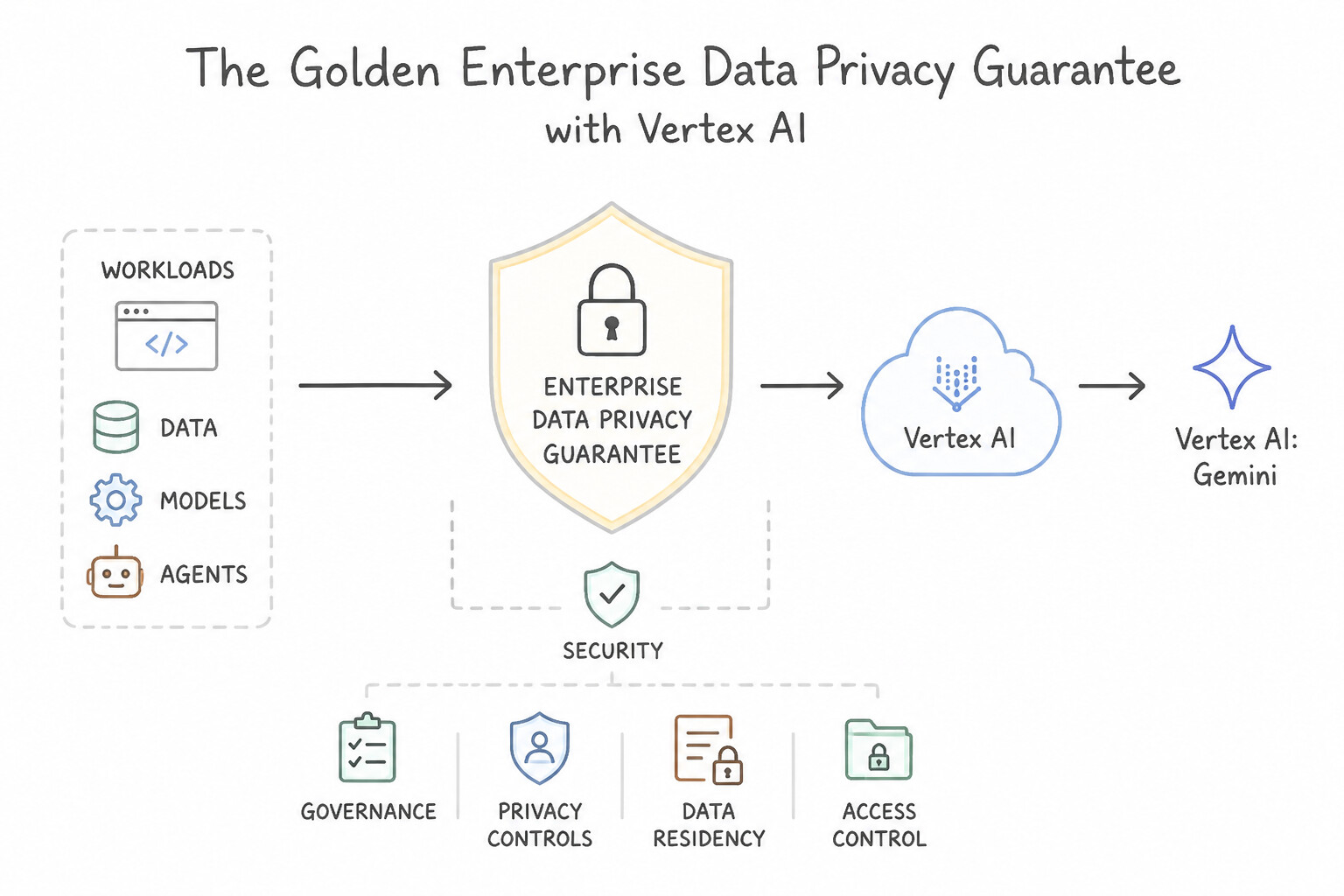
- The Golden Enterprise Data Privacy Guarantee : By default, Google Cloud NEVER uses customer data, prompts, responses, or fine-tuning datasets to train Google's foundation models or share them with other customers.
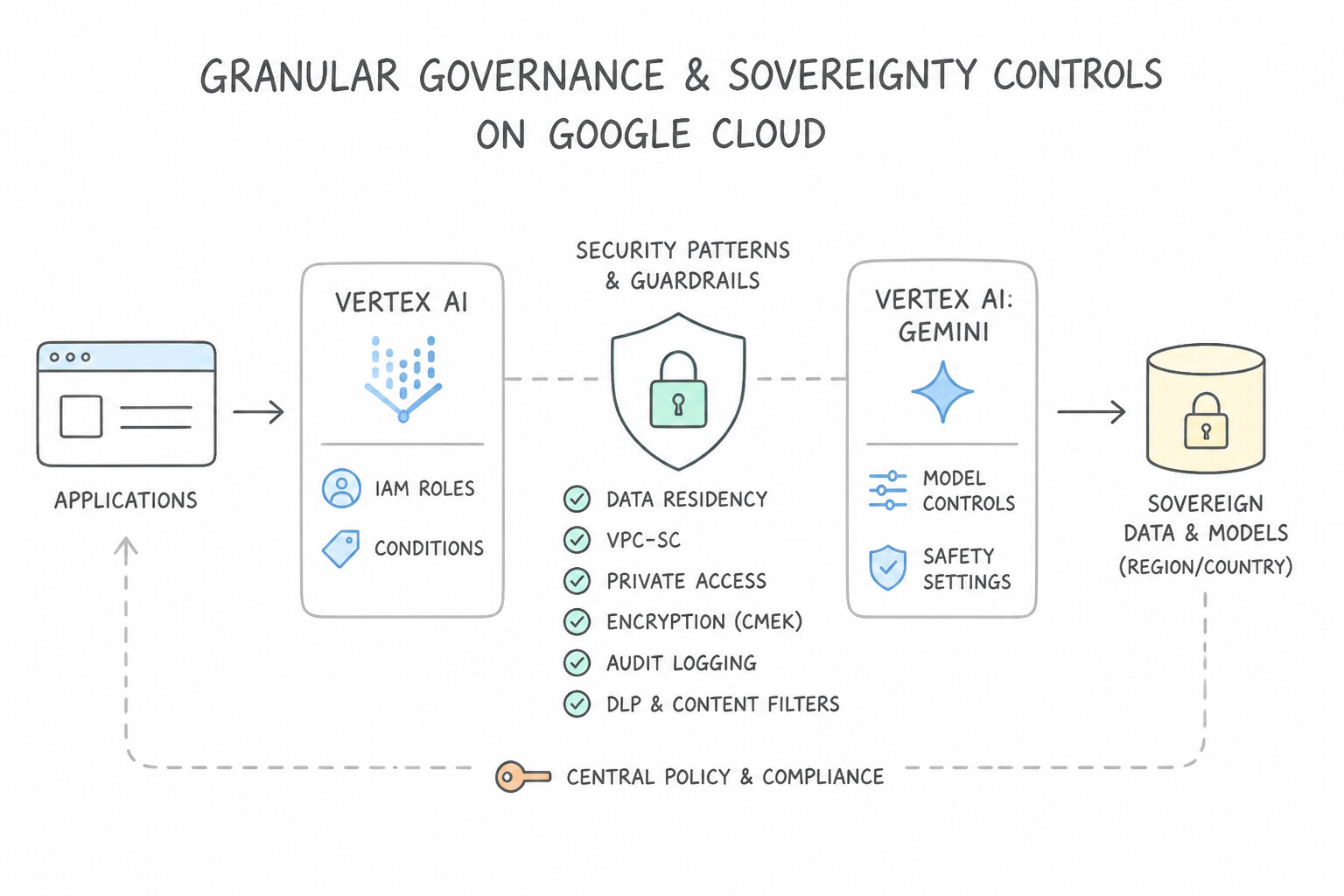
- Granular Governance & Sovereignty Controls:
- Identity and Access Management (IAM): Fine-grained role-based access to models, endpoints, and datasets.
- VPC Service Controls (VPC-SC): Cryptographic security perimeters that prevent data exfiltration from Vertex AI and Cloud Storage.
- Customer-Managed Encryption Keys (CMEK) & Data Residency: Full control over encryption keys in Cloud KMS and pinning model processing/storage to specific geographic regions (e.g., EU or US) for GDPR/HIPAA compliance.
Key Implementation Patterns
- Foundational Model Data Usage: Use Inform the CISO that Google Cloud does not use customer data sent to the Vertex AI API to train its foundational models. Google Cloud does not use customer data submitted to Vertex AI API prediction requests to train its foundational models by default.
- Tuned Model Ownership and Isolation: Use Explain that your company owns the adapter weights, Google retains ownership of the base model, and the tuned model is deployed to a private endpoint. The customer owns the fine-tuned adapter weights, Google owns the base model, and the model remains private to the customer.
- Regional Data Residency Compliance: Use Initialize the Vertex AI client with a specific regional endpoint, such as
europe-west4-aiplatform.googleapis.com. Regional endpoints enforce data processing and storage within the specified geographic region. (Avoid alternative: The global endpoint does not guarantee data residency within a specific region.)
Key Takeaways (2.1f)
- Google Cloud does not use customer data sent to the Vertex AI API to train its foundational models by default.
- Enterprise data governance on Vertex AI ensures data isolation and prevents data leakage to competitors.
- Understanding the difference between consumer-grade and enterprise-grade AI data policies is essential for security discussions.
- Google retains ownership of the base foundation models in Vertex AI.
Consideration 2.1g: Democratized AI: low/no-code, pretrained models, APIs
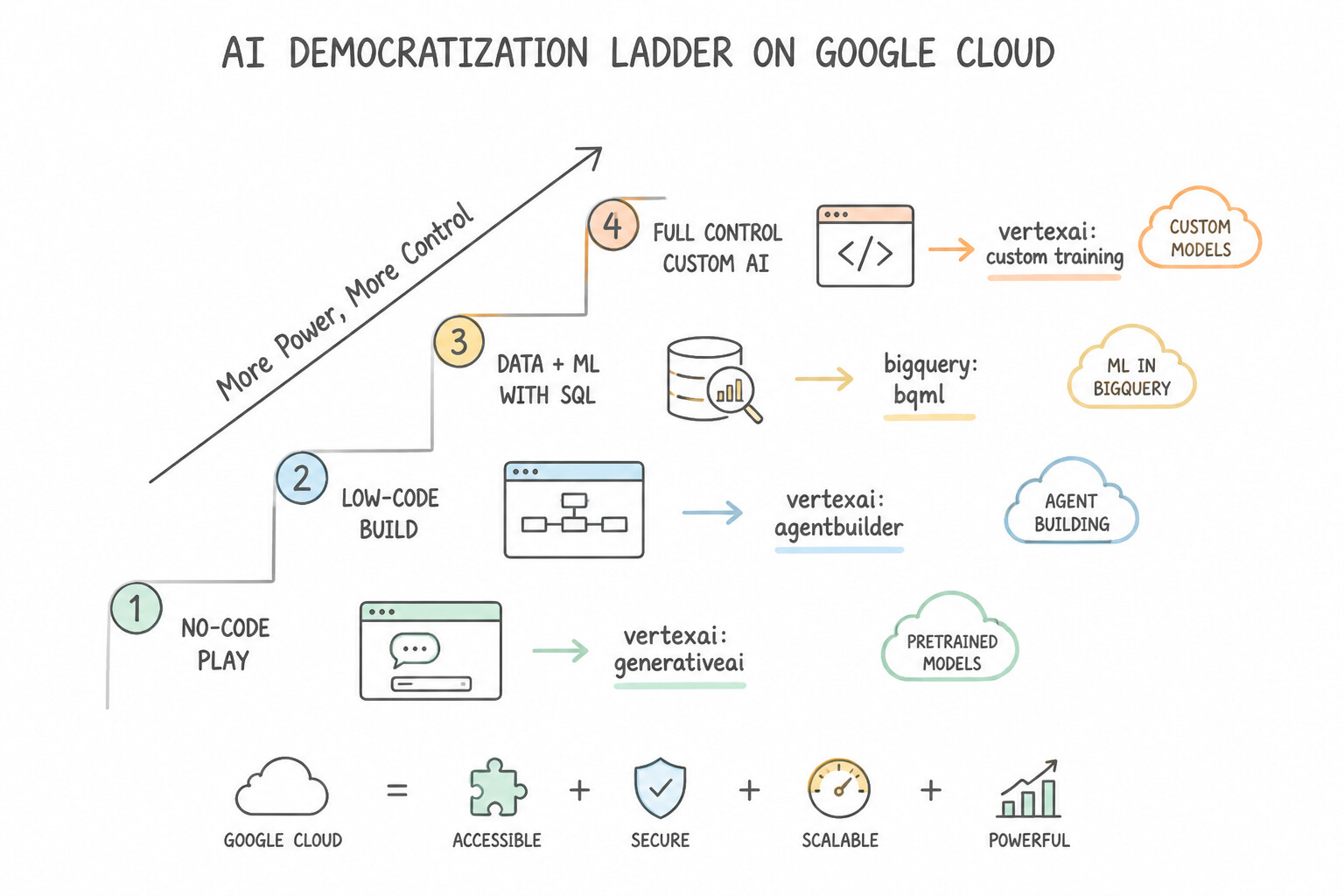
- The Four-Tier AI Democratization Ladder on Google Cloud:
- Turnkey No-Code Business Users: Gemini for Google Workspace, Gemini App (Gems), and NotebookLM enable immediate adoption via natural language.
- Low-Code Citizen Developers & Analysts: Vertex AI Agent Builder / Agent Studio and BigQuery ML enable building grounded search/chat agents and predictive models without deep ML coding.
- No-Code Custom Model Training: Vertex AI AutoML trains bespoke classification/regression models on tabular, image, text, or video data via a point-and-click GUI.
- Pro-Code AI Engineers & Data Scientists: Pre-trained AI APIs (
Vision,Document AI,Speech), Vertex AI SDK, and Custom Training provide full programmatic control.
Key Implementation Patterns
- Rapid Chatbot Deployment for Non-Technical Teams: Use Use Vertex AI Agent Builder to create a data store agent and import the PDF documents. Vertex AI Agent Builder provides a no-code graphical interface to build conversational agents grounded in your own documents (PDFs).
- Gen AI Integration in Data Warehouses: Use Configure a Cloud Resource connection and create a remote model in BigQuery ML that references a Vertex AI foundation model. BigQuery ML remote models allow calling Vertex AI models using standard SQL. (Avoid alternative: Manual processing in Vertex AI Studio is inefficient for large datasets.)
Key Takeaways (2.1g)
- Vertex AI Agent Builder enables the creation of RAG-based search and conversational apps with little to no code.
- RAG (Retrieval-Augmented Generation) grounds AI responses in your specific enterprise data (like PDFs).
- For non-technical teams, prioritize managed services with GUI consoles over raw APIs or custom model training.
- BigQuery ML enables SQL practitioners to use machine learning and generative AI without needing Python or Java.
Quick Decision Cheat Sheet (Subsection 2.1)
If the Scenario Requires... | Choose This Google Cloud Strength / Component ( 2.1) | Avoid This Common Mistake |
|---|---|---|
"Custom-designed Google ASIC optimized specifically for neural network matrix math" | Cloud TPU (Tensor Processing Unit) | General-purpose CPU / Persistent Disk |
"Integrated supercomputing system combining TPUs, GPUs, optical networking, and open software" | AI Hypercomputer | Standard Compute Engine VM |
"Ensure customer prompts and proprietary documents are never used to train public models" | Vertex AI Enterprise Data Privacy Guarantee (Data stays private to tenant) | Consumer free-tier AI tools |
"Access first-party (Gemini), partner (Claude), and open-source (Llama/Gemma) models in one catalog" | Vertex AI Model Garden (Open Approach) | Building separate point-to-point vendor accounts |
"Enable business analysts without coding skills to train custom models or build agents" | AI Democratization (Vertex AI AutoML / No-Code Agent Builder) | Custom PyTorch training on raw GKE clusters |
"Prevent data exfiltration and enforce geographic data residency + encryption key ownership" | VPC Service Controls (VPC-SC) + CMEK + Regional Endpoints | System prompt instructions ("Do not leak data") |
Further Reading (Subsection 2.1)
- Transformer: A Novel Neural Network Architecture for Language Understanding — A Google Research blog post explaining the release of the Transformer architecture and the 'Attention Is All You Need' paper.
- Cloud TPU — Overview of Cloud TPU, focusing on how it accelerates machine learning workloads and its advantages in performance and cost-efficiency.
- System Architecture | Cloud TPU — Technical documentation detailing the architecture of TPU v4 and how it integrates with Google Cloud infrastructure.
- Vertex AI Data Governance and Generative AI — This page details how Google Cloud handles data for Generative AI, specifically stating: 'Google doesn't use your prompts or its responses to improve our models' and explains the tuning artifact storage.
- Vertex AI locations — This page details the available regions for Vertex AI and explains the difference between regional and multi-regional endpoints.
- Configure safety attributes — Documentation explaining how to set safety filters and the definitions of harm categories like Hate Speech and Harassment.
Subsection 2.2: Describe how Google Cloud’s prebuilt gen AI offerings enable AI powered work
The Big Picture
One of the highest-frequency traps on Google Cloud architecture is over-engineering: a scenario describes a sales team that wants to draft 50 personalized outreach emails in Gmail, a marketing manager who wants a reusable brand-voice rewriter, or a legal team that needs to synthesize 50 uploaded PDF contracts with inline source citations—and three of the four options propose building a custom Vertex AI pipeline, training an AutoML model, or provisioning a vector database.
In Subsection 2.2, production architecture focuses on whether you recognize when Google Cloud's prebuilt, zero-infrastructure generative AI offerings deliver immediate ROI:
- The Gemini App & Gemini Advanced (
2.2a — Gems): For individual and professional ideation, complex reasoning, long-document uploads, and creating Gems (reusable, custom-instructed AI experts saved inside the Gemini app with predefined personas, rules, and reference files so users never have to re-type complex prompts). - Gemini Enterprise & NotebookLM (2.2b): For cross-repository multimodal enterprise search, custom internal agents, and NotebookLM / NotebookLM Enterprise—Google's source-grounded research and synthesis assistant that restricts responses strictly to user-uploaded documents (PDFs, Docs, Slides, web links, audio), provides exact inline citations, and generates two-host conversational Audio Overviews.
- Gemini for Google Workspace (2.2c): For seamless, in-context productivity directly inside the collaboration tools employees already live in—Gmail ("Help me write"), Google Docs (drafting and tone refinement), Google Sheets ("Help me organize", formula generation, table categorization), Google Slides (custom slide & image generation), and Google Meet ("Take notes for me", live translated captions, studio audio/lighting).
Consideration 2.2a: Gemini app and Gemini Advanced including Gems
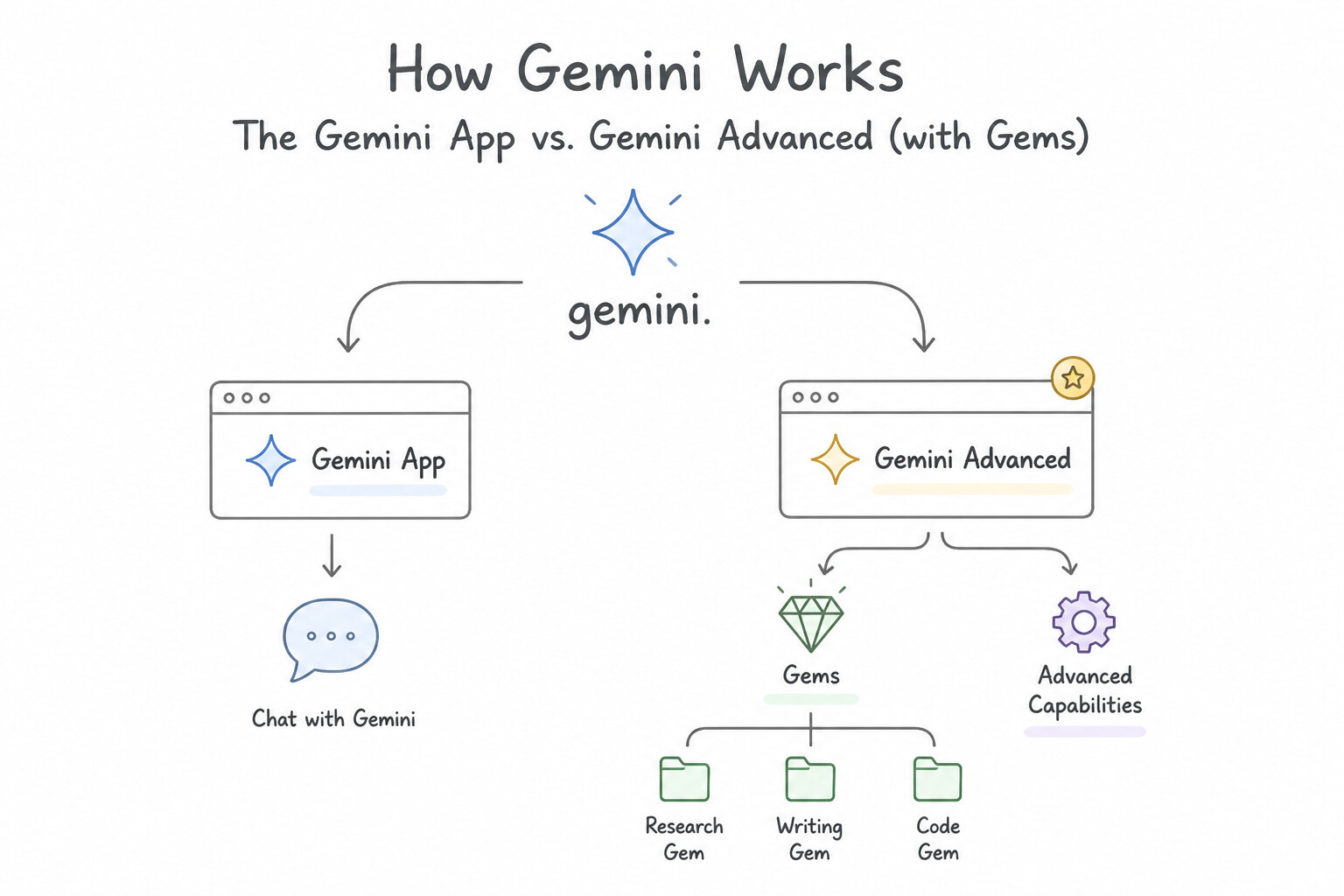
- The Gemini App vs. Gemini Advanced: The Gemini app provides conversational access to Google's multimodal AI for drafting, brainstorming, coding, and visual understanding. Gemini Advanced unlocks frontier models (
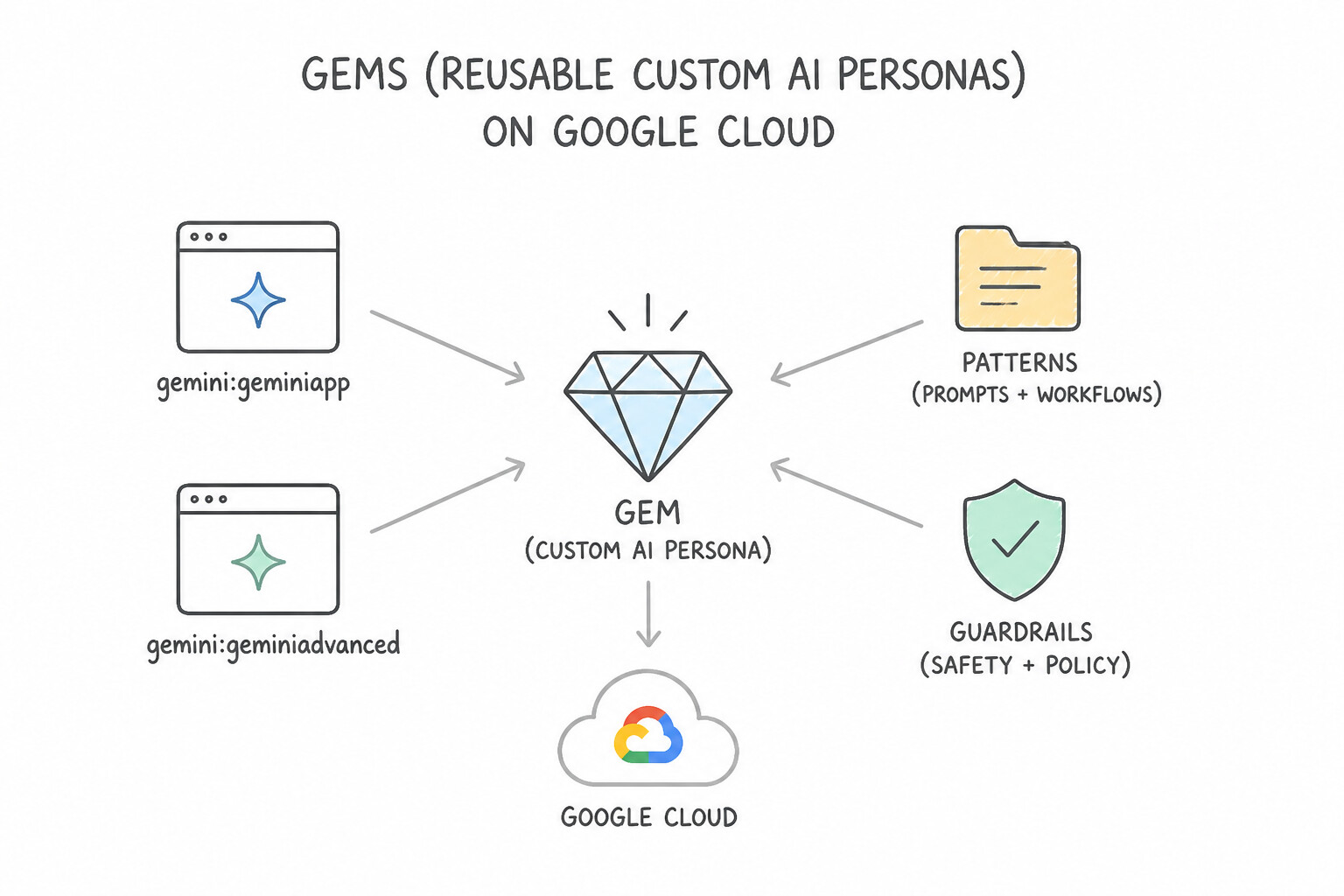
Gemini Pro) with a 1M+ token context window, enabling users to upload massive PDFs (e.g., 1,000-page contracts or financial filings), code repositories, or long videos for deep synthesis in a single turn. - Gems (Reusable Custom AI Personas): Whenever an individual or team repeatedly performs the same specialized task (e.g., rewriting blog drafts in a strict 5-point brand style guide, acting as a tough coding interviewer, or reviewing marketing compliance), they configure a Gem—a customized version of Gemini with persistent system instructions, persona, tone, and attached reference files. Gems eliminate repetitive prompt copy-pasting without writing a single line of code.
Key Implementation Patterns
- Gemini Advanced vs. Gemini Basic Model Tiers: Use Subscribe to Gemini Advanced. Gemini Advanced grants access to Gemini Ultra 1.0, the most capable model for complex reasoning and coding. (Avoid alternative: The standard Gemini app uses Gemini Pro or Flash, which are less capable than Ultra for complex tasks.)
- Large Context Window Utilization: Use Upgrade to Gemini Advanced to utilize the larger context window. Gemini Advanced offers a 1 million+ token context window, sufficient for analyzing a 700,000-word document. (Avoid alternative: The standard free version does not support the context window size required for 700,000 words.)
- Customizing Gemini with Gems: Use Create a new Gem in Gemini Advanced and define your instructions and brand voice in the setup. Gems allow you to create and save custom versions of Gemini with preset instructions and personas for repetitive tasks. (Avoid alternative: Uploading a file every time is a manual workaround and does not utilize the built-in feature designed for saving instructions.)
Key Takeaways (2.2a)
- The Gemini app has a free tier and a paid tier called Gemini Advanced.
- Gemini Advanced provides access to Gemini Ultra 1.0, Google's most capable AI model.
- Use Gemini Advanced for tasks requiring complex reasoning, advanced coding, and creative collaboration.
- Standard Gemini is suitable for everyday tasks and speed.
Consideration 2.2b: Gemini Enterprise including NotebookLM API, multimodal search, custom agents
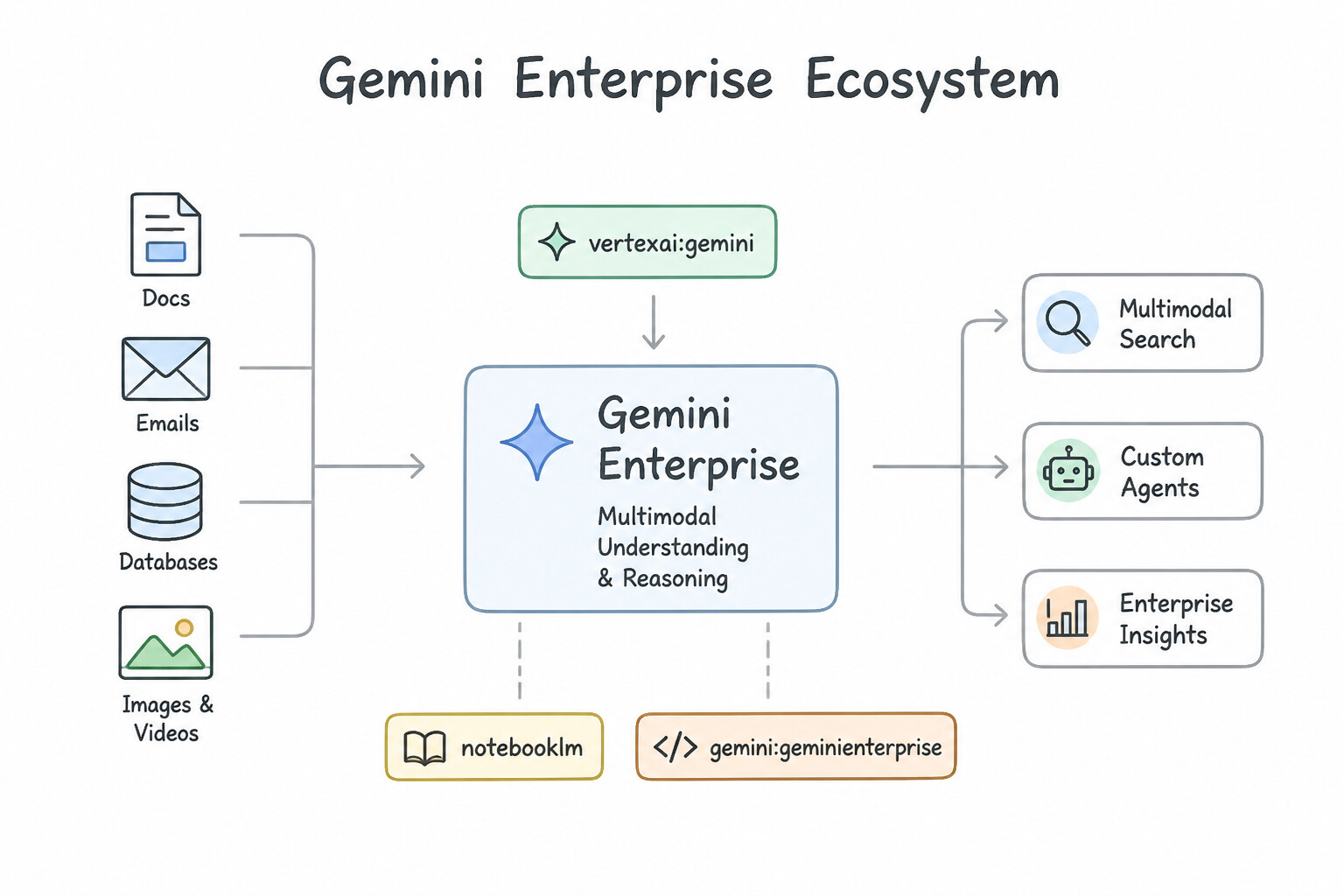
- Gemini Enterprise & Multimodal Enterprise Search (2.2b): Connects securely to an organization's fragmented internal data silos (SharePoint, Jira, Confluence, Google Drive, ServiceNow, BigQuery) with full document-level Access Control List (ACL) enforcement, empowering employees to run multimodal enterprise searches and orchestrate low-code custom agents from a unified workspace.
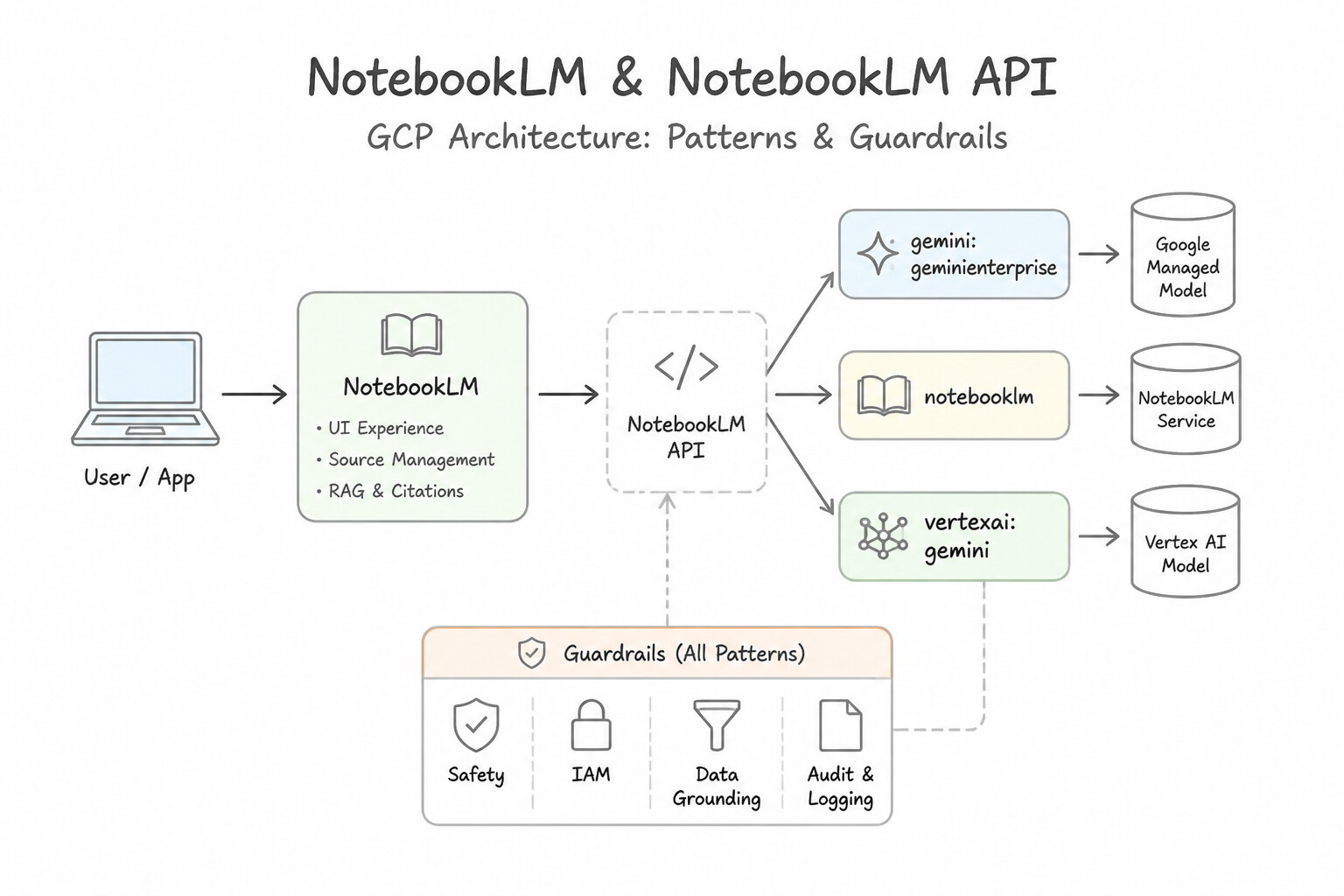
- NotebookLM & NotebookLM API (2.2b): Purpose-built for closed-set, source-grounded document synthesis. When a legal, research, or compliance team uploads 50 PDF contracts into a NotebookLM notebook:
- Every generated summary, comparison table, or FAQ is strictly grounded in those uploaded sources with clickable inline citations pointing to the exact passage (preventing outside web hallucinations).
- Audio Overviews transform dense written documents into an engaging, two-host AI audio discussion—ideal for auditory learners or executives reviewing complex briefings on the go.
- Gemini for Google Workspace (
2.2c— Embedded Side-Panel & Inline AI): - Gmail & Google Docs (
Help me write): Drafts personalized outreach emails from bullet points, summarizes long email threads, and rewrites documents by tone or length. - Google Sheets (
Help me organize): Generates custom project trackers, synthesizes complex spreadsheet formulas from natural language, and categorizes tabular rows. - Google Slides (
Help me visualize): Generates bespoke presentation slides and original copyright-safe illustrations without leaving the deck. - Google Meet (
Take notes for me): Automatically captures meeting summaries, action items, late-joiner recaps, and real-time translated captions.
Key Implementation Patterns
- Data Privacy in Gemini Enterprise: Use Assign Gemini Enterprise add-on licenses to the users. Gemini Enterprise explicitly guarantees that customer data is not used to train Google's foundation models. (Avoid alternative: The free consumer version does not guarantee that data is excluded from model training.)
- NotebookLM Source Grounding: Use Upload the PDF files to NotebookLM and use the query feature. NotebookLM is designed to ground answers in uploaded sources and provide inline citations automatically. (Avoid alternative: Document AI extracts text but does not provide the generative Q&A or citation capabilities out of the box.)
Key Takeaways (2.2b)
- Consumer Gen AI tools often use user data for model training and improvement.
- Gemini Enterprise and Gemini Business provide contractual guarantees that customer data is NOT used to train foundation models.
- Regulated industries must strictly use Enterprise SKUs to meet compliance requirements regarding data privacy and IP protection.
- NotebookLM is the go-to tool for personal or team-based research requiring strict grounding on uploaded documents with citations.
Quick Decision Cheat Sheet (Subsection 2.2)
If the Scenario Requires... | Choose This Prebuilt Offering ( 2.2) | Avoid This Common Mistake |
|---|---|---|
"Save a reusable custom persona / instruction set in the Gemini app for recurring tasks" | Gems (in Gemini Advanced, 2.2a) | Supervised Fine-Tuning on Vertex AI |
"Synthesize 50 uploaded PDFs strictly from source material with inline citations" | NotebookLM / Gemini Enterprise ( 2.2b) | Ungrounded zero-shot LLM prompt |
"Generate a two-host conversational audio discussion summarizing uploaded documents" | NotebookLM Audio Overview ( 2.2b) | Cloud Text-to-Speech API raw readout |
"Draft or refine emails and documents directly inside Gmail or Google Docs" | Gemini for Google Workspace ( Help me write, 2.2c) | Custom Vertex AI Endpoint |
"Generate spreadsheet trackers, categorize tables, or write formulas in Google Sheets" | Gemini for Google Workspace ( Help me organize, 2.2c) | BigQuery ML / Dataflow |
"Generate custom presentation visuals and slides directly inside a deck" | Gemini in Google Slides ( 2.2c) | Standalone Cloud Vision API |
Further Reading (Subsection 2.2)
- Gemini Advanced — Official product page detailing the features of Gemini Advanced and the inclusion of the Ultra 1.0 model.
- Build with Gemini — Technical documentation explaining model variants (Pro vs Flash) and their specific context window limits.
- Customize Gemini with Gems — Announcing the launch of Gems, allowing subscribers to create custom versions of Gemini to act as experts or follow specific instructions.
- Gemini for Google Workspace: How Google protects your data — This page explains how Gemini for Google Workspace (Enterprise and Business) handles data, explicitly stating that data is not used to train foundation models.
- NotebookLM: A new way to make sense of your notes — Introduces NotebookLM as an AI-first notebook that grounds the language model in your notes and sources.
- NotebookLM now available — Official product page highlighting features like source grounding and citations.
Subsection 2.3: Describe how Google Cloud’s gen AI offerings improve the customer experience
The Big Picture
Customer experience (CX) breaks down in two places: on your public website/app (External Search, where legacy keyword search returns "0 results" or 50 irrelevant links when a shopper searches "waterproof hiking jacket for sub-zero snow") and inside your contact center (Customer Support, where customers wait on hold for 40 minutes only to repeat their issue to a burned-out human agent who spends 10 minutes after every call typing wrap-up notes).
Subsection 2.3 tests how Google Cloud transforms both touchpoints:
- External & Enterprise Search (
2.3a — Agent Search / Vertex AI Search & Google Search): Replaces brittle keyword matching with semantic vector search + generative answers grounded in your product catalog, knowledge base, or live Google Search—improving conversion rates and self-service deflection. - Google’s Customer Engagement Suite (
2.3b — CES): Unifies four specialized capabilities across the contact center lifecycle: - Conversational Agents (formerly Dialogflow CX / Vertex AI Conversation): Customer-facing virtual agents (voice & chat) that resolve Level-1 inquiries autonomously 24/7.
- Agent Assist: Real-time AI co-pilot sitting beside the human agent during live calls/chats—providing instant knowledge-base answers, live coaching, and automated post-call summarization (slashing Average Handle Time / AHT).
- Conversational Insights (CCAI Insights): Post-interaction analytics engine that mines 100% of historical call recordings and chat transcripts to uncover trending call drivers, customer sentiment shifts, and compliance gaps.
- Google Cloud Contact Center as a Service (CCaaS): Turnkey cloud contact center platform embedding AI routing, CRM integration, and omnichannel orchestration natively.
Consideration 2.3a: External search: Vertex AI Search, Google Search
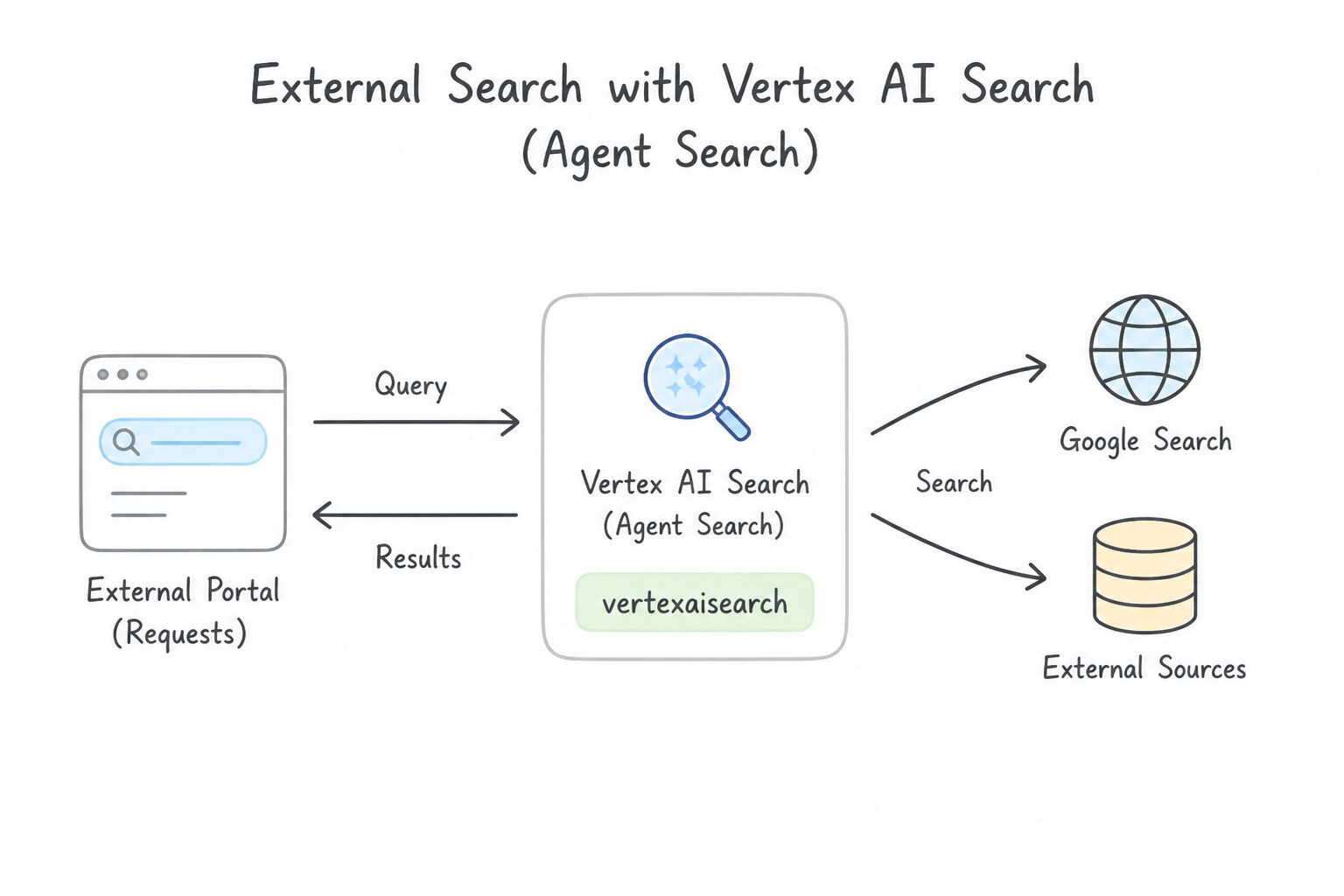
- Agent Search (Vertex AI Search) for External Customer Portals: Enables organizations to embed Google-quality semantic and multimodal search into their public websites, mobile apps, and e-commerce storefronts in hours rather than months. Unlike legacy keyword search (which fails on synonyms or conversational questions), Agent Search understands user intent, synthesizes direct grounded answers with citations from your official help center or catalog, and dramatically reduces cart abandonment and support ticket volume.
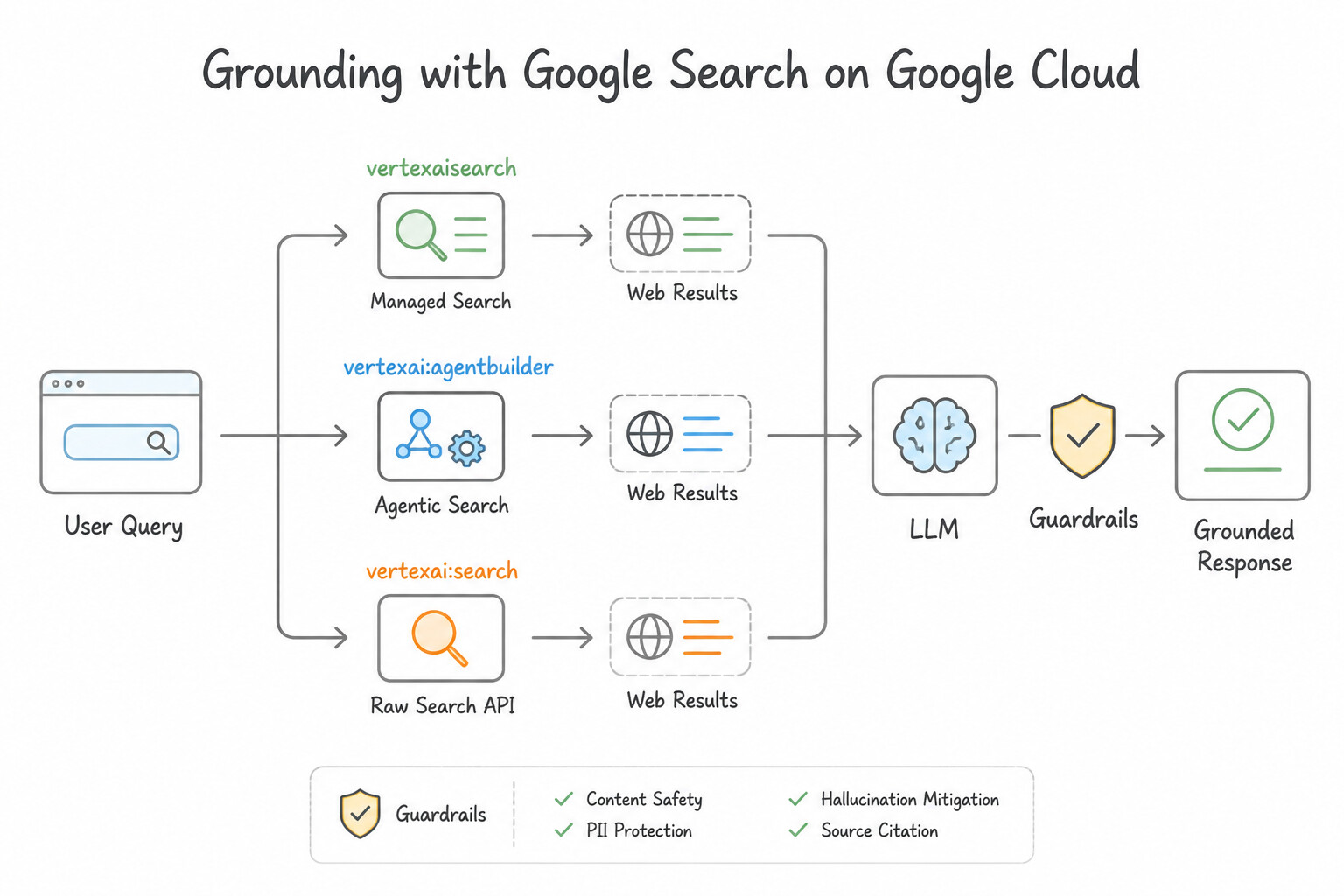
- Grounding with Google Search: When an external-facing assistant needs to combine your first-party catalog with verifiable, up-to-the-minute public world events (e.g., live travel advisories, weather disruptions, or public market news), Grounding with Google Search connects the model directly to Google's live web index.
Key Implementation Patterns
- Rapid Deployment of Public Site Search: Use Create a new app in Vertex AI Search. Select 'Website' as the data source and provide the site's URL pattern. Vertex AI Search allows you to directly index public websites by providing the URL, which automatically handles crawling and indexing.
- Structured Filtering for Travel Booking: Use Create a structured data store in Vertex AI Search and import the data directly from BigQuery. Structured data stores support row-and-column data from BigQuery, enabling strict filtering on specific fields like Price. (Avoid alternative: Unstructured data stores are for documents and do not support the strict field-based filtering required for price and availability.)
- Grounding Responses in Current Events: Use Configure the model to use Grounding with Google Search. Grounding with Google Search gives the model access to live, real-world information. (Avoid alternative: Fine-tuning is too slow and resource-intensive for real-time updates.)
Key Takeaways (2.3a)
- Vertex AI Search can index public websites directly using the 'Website' data store type.
- Using the Website data store avoids the need for manual crawling or moving data to Cloud Storage.
- Unstructured data stores are for files in Cloud Storage; Structured data stores are for data in BigQuery.
- Always match the data source location (Web, Storage, Database) to the correct Vertex AI Search data store type.
Consideration 2.3b: Customer Engagement Suite: Conversational Agents, Agent Assist, Insights, Cloud Contact Center
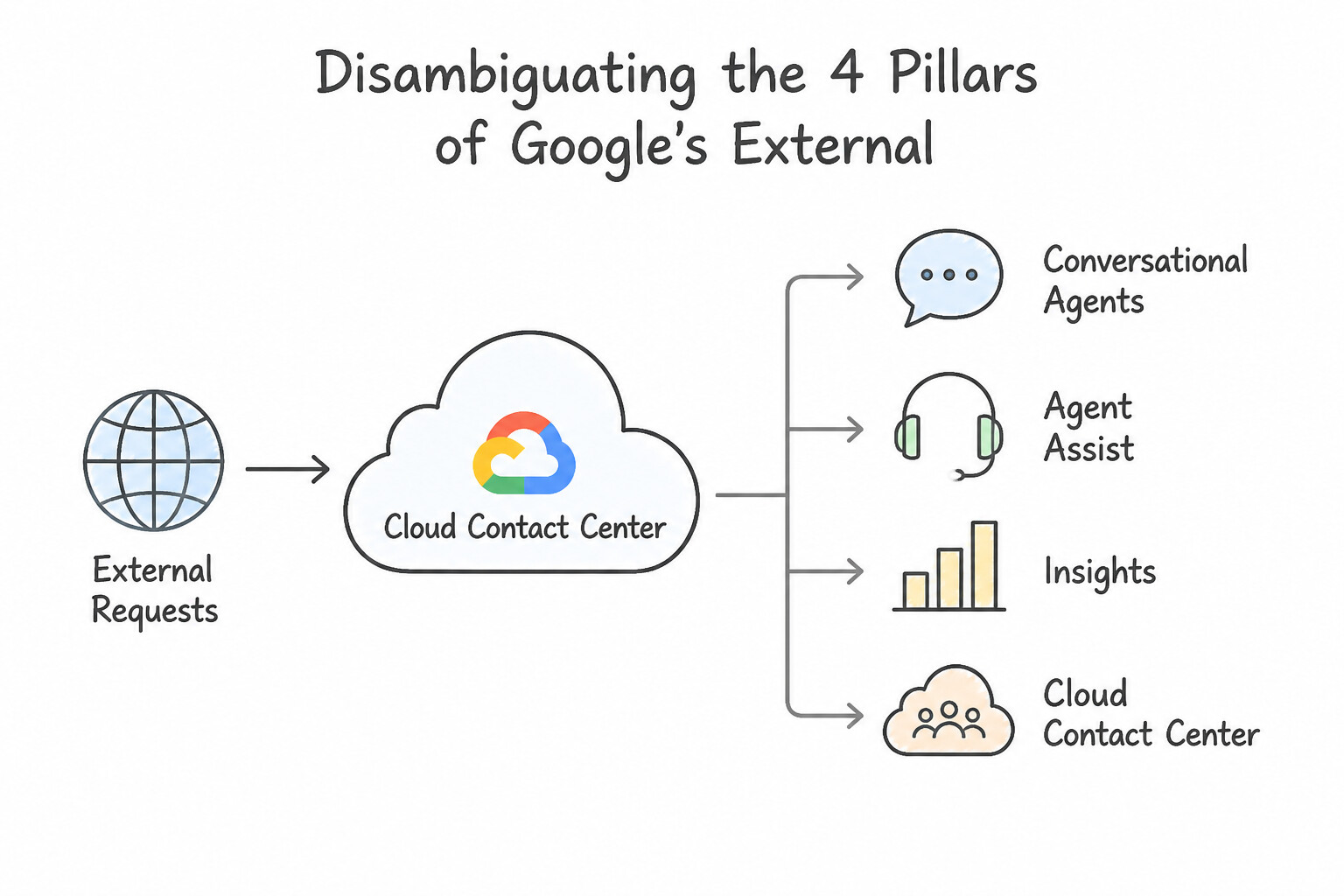
- Disambiguating the 4 Pillars of Google’s Customer Engagement Suite (
CES) — Memorize This in Production: - Conversational Agents (Virtual Agents): Talks directly to the end customer (chat or voice) to resolve routine inquiries (order tracking, password resets, return policies) without human intervention. Primary business KPI: Ticket/Call Deflection Rate and Containment Rate.
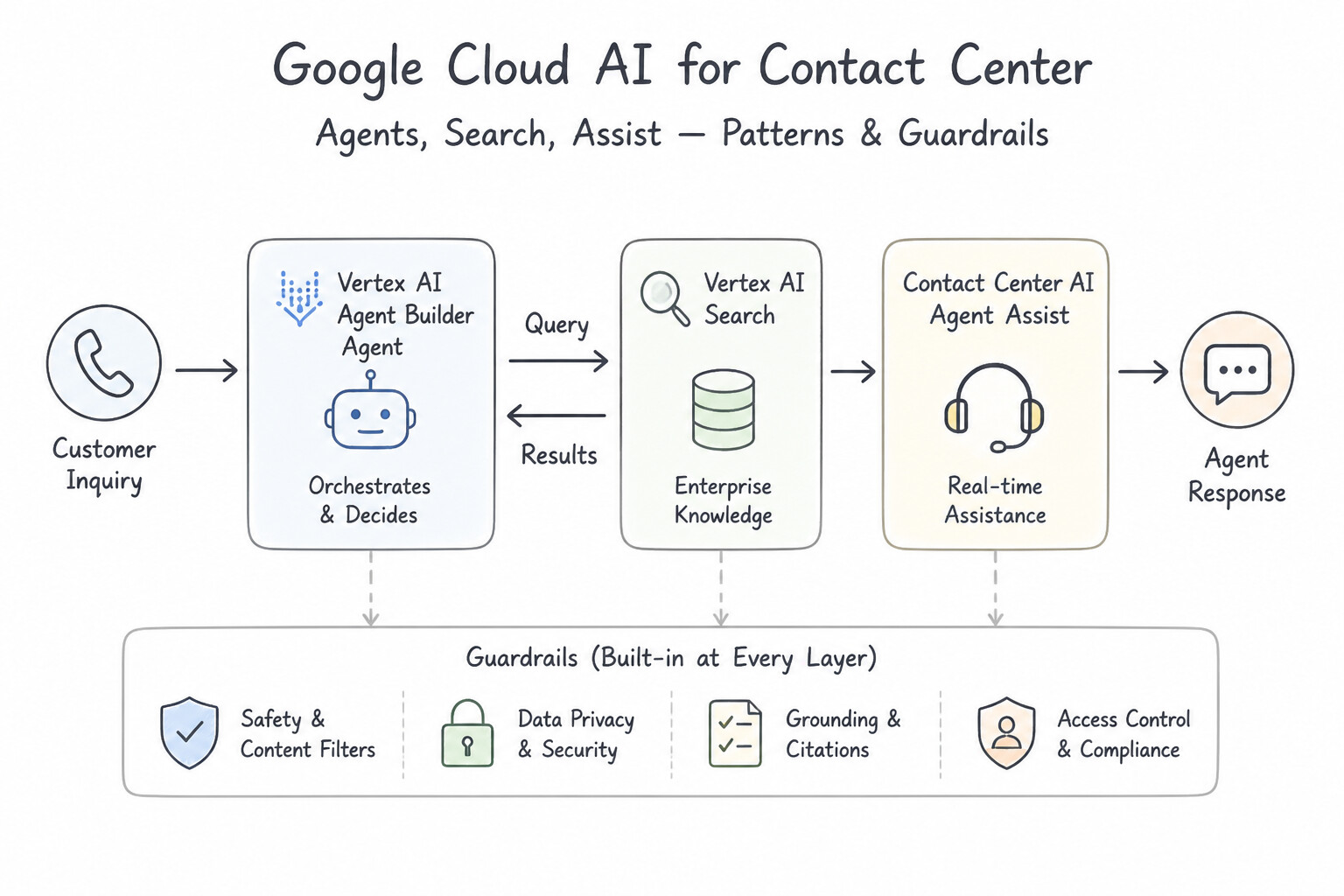
- Agent Assist: Assists the human support agent in real time during an active call or chat by surfacing relevant policy snippets, suggesting next-best responses, and automatically generating structured post-call summaries at call wrap-up. Primary business KPI: Reduction in Average Handle Time (AHT) and After-Call Work (ACW).
- Conversational Insights: Analyzes historical completed transcripts and audio recordings in batch/aggregate so contact center managers can identify emerging product defects, top call drivers, and overall customer sentiment trends.
- Google Cloud Contact Center as a Service (CCaaS): The end-to-end cloud telephony, omnichannel queue routing, and CRM-integrated contact center platform.
Key Implementation Patterns
- Rapid Virtual Agent Deployment: Use Create a Vertex AI Agent and configure a data store handler to index the public FAQ website URL. Data store handlers allow an agent to answer questions directly from a website URL without manual setup. (Avoid alternative: Manual intent creation is too slow and labor-intensive for a 48-hour deadline.)
- Reducing Agent Wrap-Up Time: Use Configure the Summarization feature to automatically generate conversation notes after the call ends. Summarization automatically creates a synopsis of the conversation, replacing manual note-taking. (Avoid alternative: Smart Reply suggests responses during a chat but does not generate post-call summaries.)
Key Takeaways (2.3b)
- Vertex AI Agents can use Data Stores to ground responses in your own data (websites, documents).
- Data Store handlers eliminate the need for manual intent creation for informational queries.
- This approach is ideal for rapid deployment of FAQ-style bots.
- Agent Assist is for human agent support, not direct customer interaction.
Quick Decision Cheat Sheet (Subsection 2.3)
If the Scenario Requires... | Choose This CX Offering ( 2.3) | Avoid This Common Mistake |
|---|---|---|
"Customer-facing 24/7 virtual agent to deflect repetitive Level-1 support tickets" | Conversational Agents ( 2.3b) | Agent Assist / Conversational Insights |
"Real-time suggestions for human agents during live calls + automatic post-call wrap-up summaries" | Agent Assist ( 2.3b) | Conversational Agents / Conversational Insights |
"Analyze thousands of past call recordings to identify top call drivers and sentiment trends" | Conversational Insights ( 2.3b) | Agent Assist / Vertex AI Search |
"Upgrade a public website or help center with semantic search and grounded generative answers" | Agent Search / Vertex AI Search ( 2.3a) | Vertex AI AutoML / Conversational Insights |
"Full omnichannel contact center telephony, intelligent routing, and CRM desktop integration" | Google Cloud Contact Center as a Service (CCaaS, 2.3b) | Standalone Speech-to-Text API |
Further Reading (Subsection 2.3)
- Create generative apps in minutes with Gen App Builder | Google Cloud Blog — This guide details the steps to create a search app using the Website data source, explaining how to verify domain ownership and index public pages.
- Prepare data for Vertex AI Search — This page explains the different data requirements for structured and unstructured data, highlighting how structured data allows for specific schema definitions.
- Grounding overview — This page explains how to ground Gemini models using Google Search to improve response accuracy and freshness.
- Vertex AI Agent Builder: Data stores — Explains how data stores are used in Dialogflow CX (Vertex AI Agents) to provide generative answers from website content.
- Train a Summarization custom model for chat — Documentation explaining how the Summarization feature works to generate conversation summaries for agents.
Book TOC · Previous · Chapter 2 of 6 · Next
AwesomeGCP.com Learning
The approach taken is a question-led learning approach: you explore realistic project scenarios where you need to make decisions or take actions to achieve business goals within specific constraints. Instead of passive learning, you are challenged to think and work through the options to master the Generative AI Leader (GAIL) certification!