Book TOC · Previous · Chapter 3 of 8 · Next
Chapter 3: Planning Storage, Databases, VPC Networking & Infrastructure as Code Tooling
Chapter Focus: Cloud Storage classes, Cloud SQL/Spanner/AlloyDB/Firestore/Bigtable/BigQuery selection, VPC topologies, Load Balancers, Terraform, Config Connector, and Cloud Shell/gcloud.
Subsection 2.2: Planning and Implementing Storage and Data Solutions
The Big Picture
Data gravity is the hardest force to reverse in cloud engineering. Once 50 terabytes of production records are written into the wrong storage or database service, migrating under live traffic is painful and expensive. In Google Cloud architectures, candidates routinely fall into four architectural traps:
- The Relational vs. NoSQL vs. Warehouse Confusion Trap (2.2a): Using BigQuery as a transactional OLTP backend for an e-commerce shopping cart (resulting in multi-second point-lookup latency and DML quota exhaustion), or using Cloud SQL for a globally distributed relational database requiring active-active multi-region writes (where Cloud Spanner is required), or using Firestore for petabyte-scale high-velocity IoT sensor telemetry (where Cloud Bigtable is purpose-built). And in Google Cloud architectures, know when to choose AlloyDB (enterprise PostgreSQL needing 4x transactional speed and built-in columnar analytics) and Google Cloud Managed Service for Apache Kafka (when lifting-and-shifting existing Kafka producers/consumers without rewriting code for Pub/Sub).
- The Block vs. Object vs. File Storage Trap (2.2b): Attempting to mount a Cloud Storage bucket as a high-performance POSIX filesystem with random byte-offset writes, or trying to attach a single Zonal Persistent Disk in
ReadWriteManymode across 20 Linux web servers concurrently. Shared POSIX/SMB file access requires Filestore (NFS), Google Cloud NetApp Volumes (multi-protocol NFS/SMB with ONTAP snapshots), or Google Cloud Managed Lustre (parallel POSIX filesystem for extreme HPC and AI training clusters). - The Storage Class Minimum Duration & Retrieval Fee Trap (2.2b): Placing frequently read files into Archive or Coldline storage to save on per-GB monthly storage fees—only to get hit with massive per-GB data retrieval fees and early deletion charges (30 days for Nearline, 90 days for Coldline, 365 days for Archive).
- The Naive Data Ingestion & Single-Region DR Trap (
2.2c,2.2d): Uploading 20 TB of data from AWS S3 by downloading it to a local laptop and runninggsutil cpinstead of using serverless cloud-to-cloud Storage Transfer Service, or confusing Cloud SQL Read Replicas (which scale reads asynchronously) with Cloud SQL High Availability (HA) Standby Instances (which provide synchronous zonal failover).
Consideration 2.2a: Choosing and deploying data products (cloud sql, bigquery, firestore, spanner, bigtable, alloydb, dataflow, pub/sub, managed kafka, memorystore)
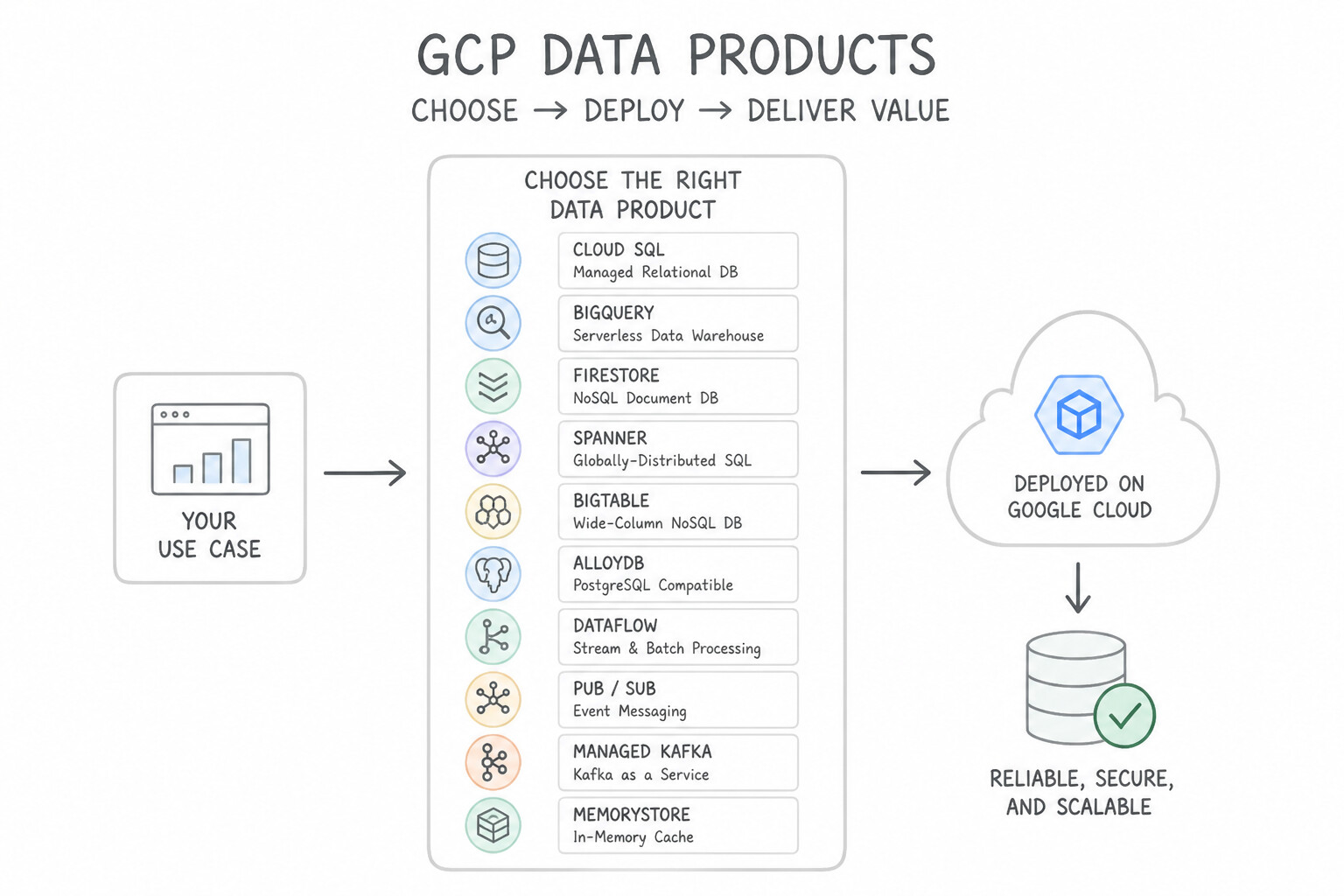
- The Relational OLTP Triad (
Cloud SQLvs.AlloyDBvs.Cloud Spanner): - Cloud SQL: Fully managed MySQL, PostgreSQL, and SQL Server (up to 64 TB). Best for standard regional relational workloads.
- AlloyDB for PostgreSQL: Google-engineered PostgreSQL-compatible database delivering 4x faster transactional throughput and up to 100x faster analytical queries (via its built-in columnar engine) with a 99.99% SLA (inclusive of maintenance). Choose AlloyDB when migrating demanding enterprise Oracle/PostgreSQL workloads that need hybrid transactional/analytical (HTAP) performance.
- Cloud Spanner: Globally distributed relational database combining SQL schemas, ACID transactions, and automatic horizontal sharding across regions with up to 99.999% multi-region availability. Choose Spanner when a relational workload exceeds single-region write limits or requires global strong consistency.
- The NoSQL & In-Memory Triad (
Firestorevs.Cloud Bigtablevs.Memorystore): - Firestore: Serverless document database (JSON-like collections/documents) with offline mobile/web SDK sync, real-time listeners, and ACID multi-document transactions. Scales to zero!
- Cloud Bigtable: HBase-compatible wide-column NoSQL store engineered for single-digit millisecond latency at massive throughput (>10,000 QPS, TB to PB scale)—the gold standard for IoT sensor streams, financial tick data, and AdTech.
- Memorystore (for Redis Cluster, Redis, Valkey, or Memcached): Sub-millisecond managed in-memory store for session caching, leaderboards, and database read offloading.
- The Analytics & Streaming Quartet (
BigQuery,Dataflow,Pub/Sub,Managed Kafka): - BigQuery: Serverless, petabyte-scale columnar SQL data warehouse (OLAP) with built-in BigQuery ML and BI Engine.
- Dataflow: Serverless, autoscaling execution engine for Apache Beam unified batch and streaming ETL pipelines.
- Pub/Sub vs. Google Cloud Managed Service for Apache Kafka: Choose Pub/Sub for zero-ops, global serverless event messaging with push/pull subscriptions. Choose Google Cloud Managed Service for Apache Kafka when migrating existing open-source Apache Kafka applications that rely on Kafka APIs, consumer offset semantics, or Kafka Connect without rewriting application code.
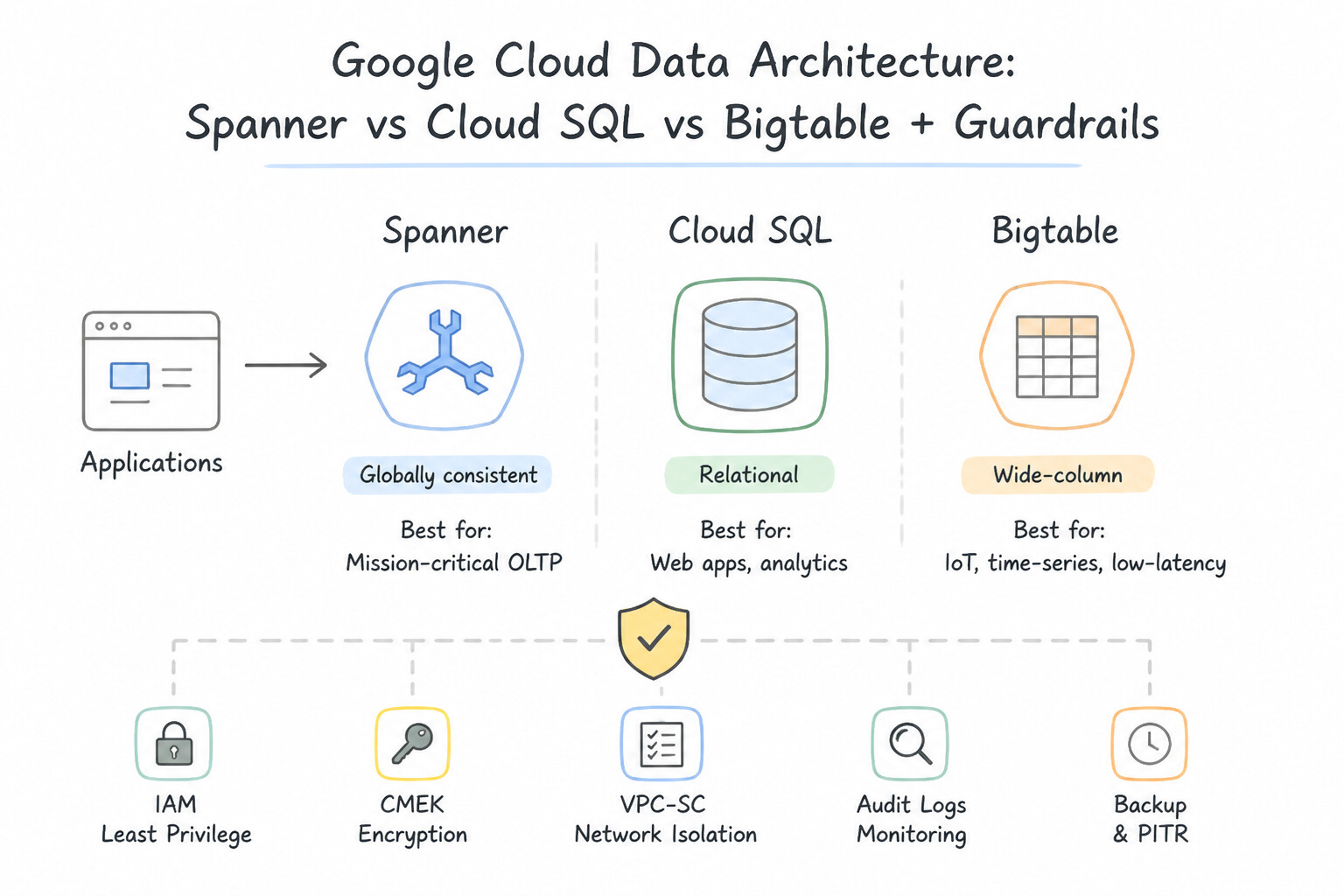
Key Implementation Patterns
- Global Banking Ledger: Use Deploy Cloud Spanner with a multi-region configuration. Cloud Spanner is the only Google Cloud service that provides a relational schema, strong consistency, and horizontal scalability across multiple regions. (Avoid alternative: Cloud SQL is regional and scales vertically, making it unsuitable for a global system requiring horizontal scalability.)
- IoT Sensor Ingestion: Use Use Cloud Bigtable as the storage backend. Cloud Bigtable is optimized for high-throughput writes, sub-millisecond latency, and petabyte-scale time-series data, making it ideal for IoT scenarios. (Avoid alternative: Cloud SQL is a relational database that does not scale horizontally to petabytes or handle the write throughput required for this IoT scenario.)
- Serverless Data Warehouse: Use Load the data into BigQuery. BigQuery is a serverless data warehouse that supports SQL, handles terabytes of data, and separates storage from compute costs. (Avoid alternative: Cloud SQL is for transactional data and requires index management; it is not optimized for terabytes of analytical logs.)
Key Takeaways (2.2a)
- Cloud Spanner is the best choice for global, relational, and horizontally scalable applications.
- Cloud SQL is ideal for general-purpose relational databases but is regionally scoped and scales vertically.
- Cloud Bigtable is for high-throughput NoSQL workloads, not relational transactions.
- BigQuery is for analytics (OLAP), not transactions (OLTP).
Consideration 2.2b: Choosing and deploying storage products (cloud storage, filestore, netapp volumes) and storage classes
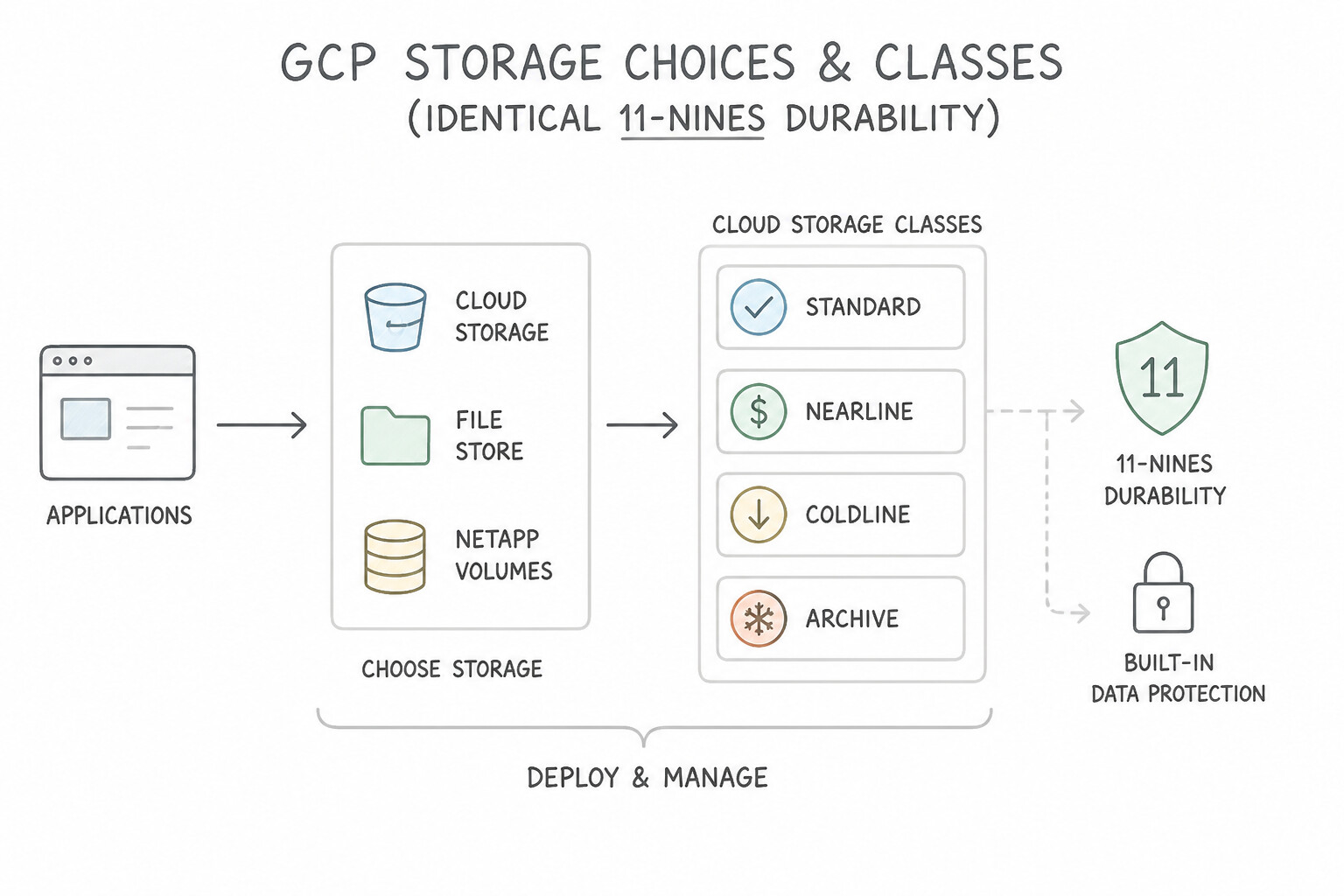
- Cloud Storage Classes (Identical 11-Nines Durability & Millisecond Latency Across All 4 Classes!):
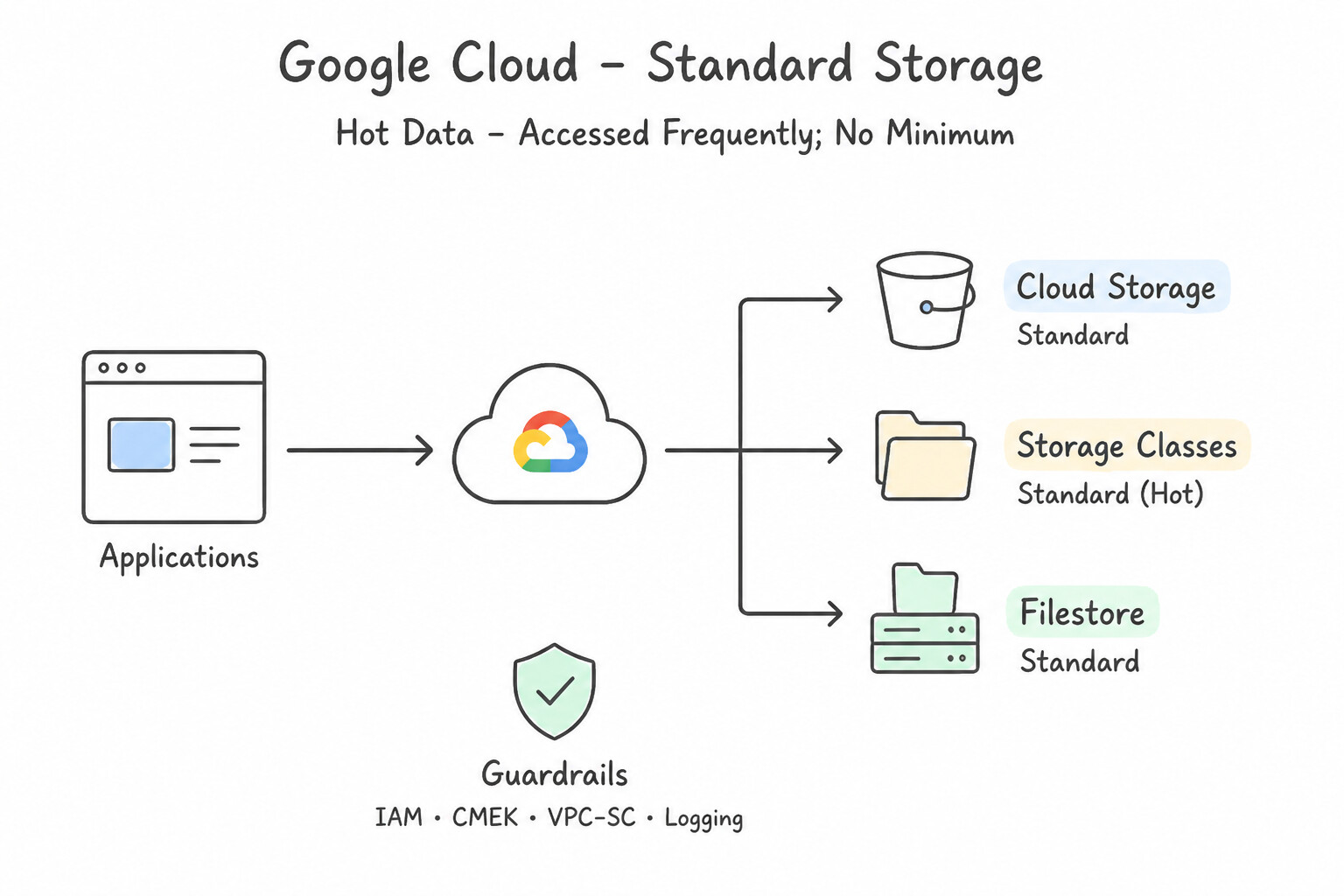
Standard: Hot data accessed frequently; no minimum storage duration and no data retrieval fee.Nearline: Accessed < 1 time per month; 30-day minimum storage duration + per-GB retrieval fee.Coldline: Accessed < 1 time per quarter; 90-day minimum storage duration + higher per-GB retrieval fee.Archive: Accessed < 1 time per year (compliance archives, DR backups); 365-day minimum storage duration + highest per-GB retrieval fee (Note: unlike AWS Glacier, Google Cloud Archive has no hours-long thawing delay—first-byte access is still milliseconds!).Autoclass: Automatically transitions objects betweenStandard,Nearline,Coldline, andArchivebased on actual last-access patterns without early-deletion penalties.- Shared File Storage (
Filestorevs.NetApp Volumesvs.Managed Lustre): - Filestore: Native managed POSIX NFSv3/v4.1 file storage mounted concurrently by Compute Engine VMs or GKE Pods (
ReadWriteMany). - Google Cloud NetApp Volumes: Fully managed enterprise file storage powered by NetApp ONTAP supporting both Windows SMB (Active Directory integrated) and Linux NFS (v3/v4.1), instantaneous space-efficient ONTAP snapshots, cloning, and cross-region replication.
- Google Cloud Managed Lustre: Fully managed parallel POSIX file system purpose-built for High-Performance Computing (HPC) and massive AI/ML GPU/TPU training workloads requiring hundreds of GB/s of parallel throughput and millions of IOPS across thousands of compute nodes.
Key Implementation Patterns
- Long-term Regulatory Archiving: Use Configure the bucket to use the Archive storage class. Archive storage provides the lowest cost for data retained for long periods (years) and accessed rarely. (Avoid alternative: Standard storage is too expensive for long-term data that is rarely accessed.)
- Legacy CMS Migration to Cloud: Use Create a Filestore instance and mount the file share on the VM instances. Filestore is the fully managed NFS solution on Google Cloud that supports concurrent read/write access for Linux VMs. (Avoid alternative: Persistent Disks generally do not support concurrent read-write access for standard file systems across multiple instances.)
- Windows-based Corporate File Share: Use Create Google Cloud NetApp Volumes. Google Cloud NetApp Volumes supports the SMB protocol required for Windows file shares. (Avoid alternative: Cloud Storage is object storage, not a file system with SMB support.)
Key Takeaways (2.2b)
- Standard storage is for frequent access.
- Nearline is for monthly access.
- Coldline is for quarterly access.
- Archive is for yearly access or long-term preservation with lowest storage cost.
Consideration 2.2c: Loading data using appropriate methods (cli upload, cloud storage loads, storage transfer service)
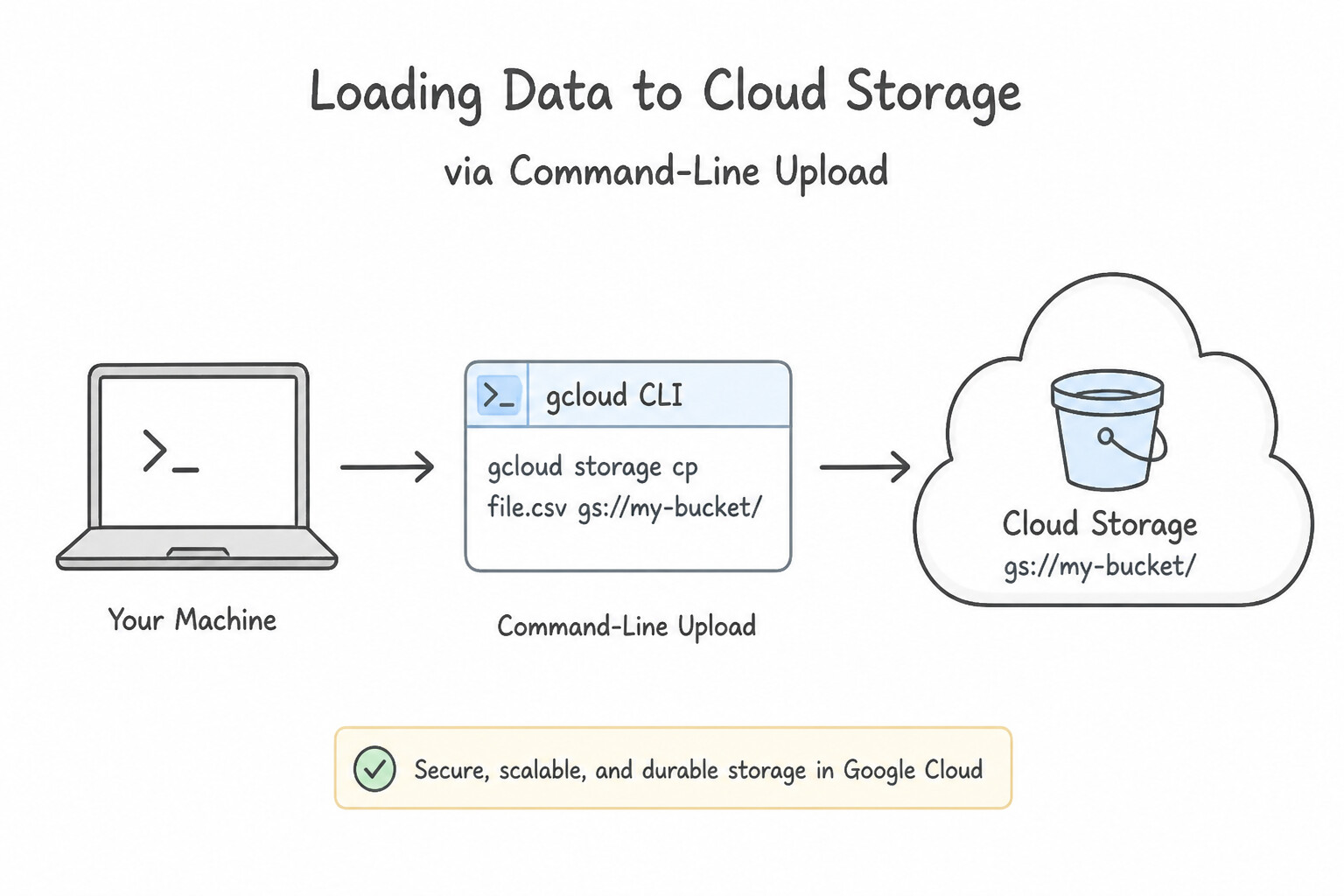
- Command-Line Uploads to Cloud Storage: Use
gcloud storage cp(orgcloud storage rsyncfor directory synchronization).gcloud storageautomatically uses parallel composite uploads and multi-threading, outperforming legacygsutil. - Loading Data into BigQuery (
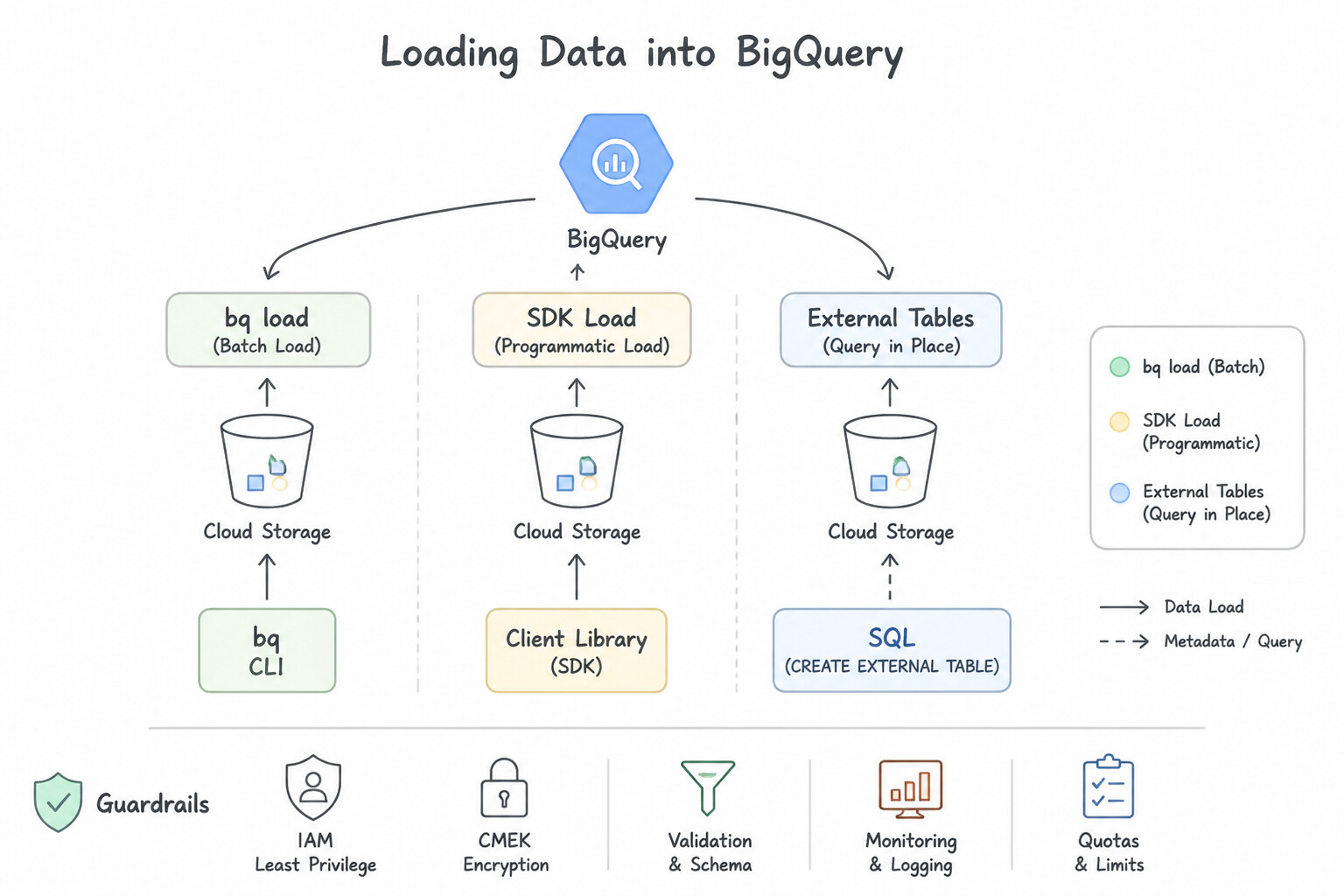
bq loadvs. External Tables): - Native ingestion from Cloud Storage (CSV, JSONL, Avro, Parquet, ORC):
bq load --source_format=PARQUET dataset.table gs://bucket/path/*.parquet(Avro and Parquet are preferred because they are self-describing binary formats that compress well and load fast; batch loading into BigQuery from GCS is free!). - Storage Transfer Service (STS):
- Managed service for transferring large datasets (terabytes to petabytes) into Cloud Storage from AWS S3, Azure Blob Storage, HTTP/HTTPS URLs, another GCS bucket, or on-premises POSIX file systems (via Transfer Agents running in Docker containers).
- Supports scheduled incremental syncs, bandwidth throttling during business hours, MD5 checksum verification, and automatic source deletion after verified transfer.
Key Implementation Patterns
- Ad-hoc Single File Upload via CLI: Use Run the command 'gcloud storage cp app-config.json gs://my-app-data'. The 'gcloud storage cp' command uses the syntax 'cp [SOURCE] [DESTINATION]' to upload a local file to a bucket. (Avoid alternative: This command reverses the source and destination, causing a download instead of an upload.)
- Synchronizing Local Directory to Cloud: Use Run the command gcloud storage rsync --recursive --delete-unmatched-destination-objects local-dir gs://bucket-name. The rsync command with the delete flag ensures the destination exactly matches the source by removing extraneous files.
- Migrating from AWS S3 to Google Cloud Storage: Use Create a Storage Transfer Service job to transfer the data from the AWS S3 bucket to the Cloud Storage bucket. Storage Transfer Service is the recommended managed solution for migrating data from AWS S3 to Google Cloud Storage.
Key Takeaways (2.2c)
- The 'gcloud storage cp' command is the standard method for manual file transfers.
- The syntax order is always Source first, then Destination.
- Cloud Storage paths must start with the 'gs://' prefix.
- Avoid complex services like Storage Transfer Service for simple, small tasks.
Consideration 2.2d: Maintaining multi-region redundancy across data solutions
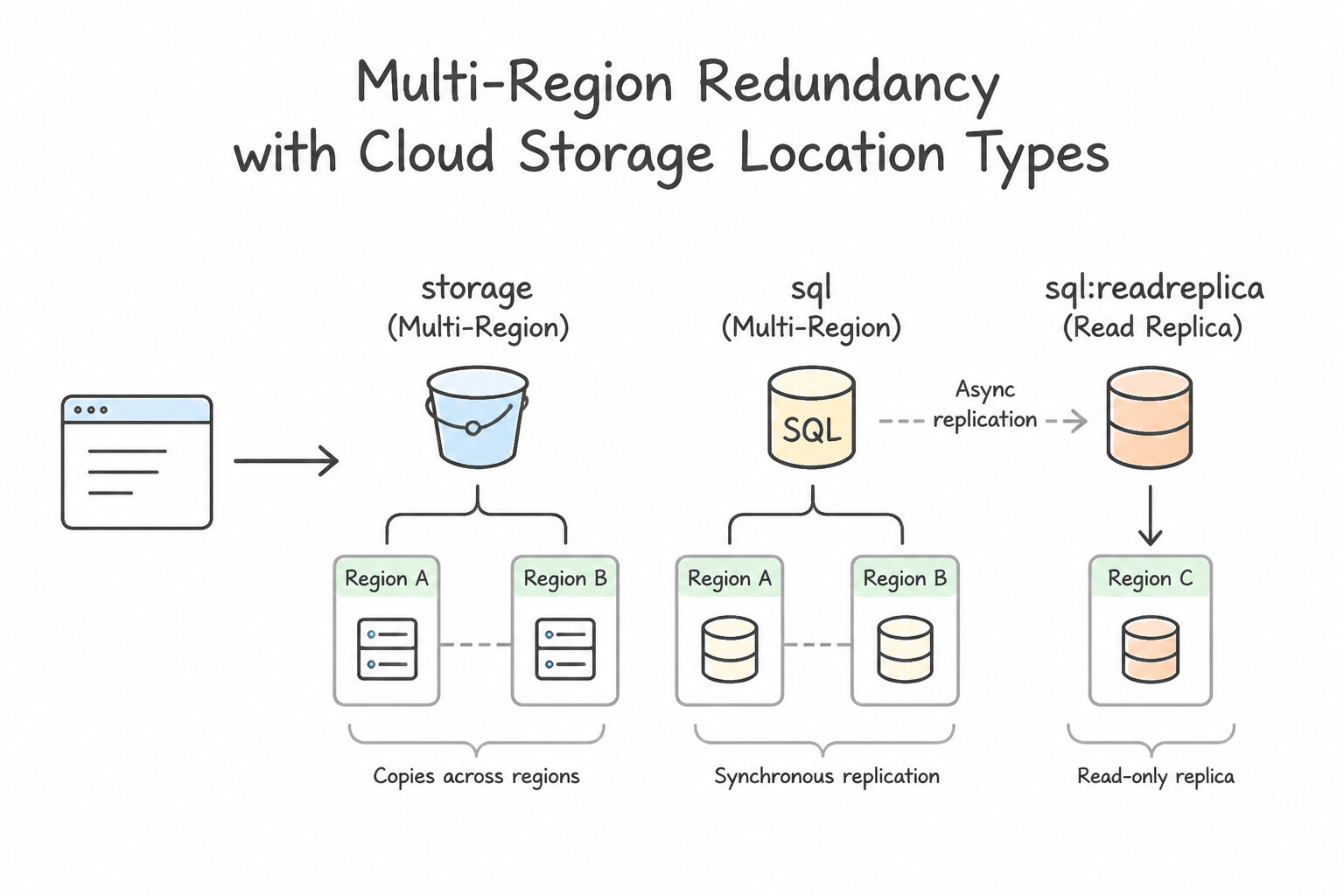
- Cloud Storage Location Types:
- Region (
us-central1): Lowest cost; data replicated across zones within 1 region. Co-locate with regional VMs/GKE to avoid egress fees. - Dual-Region (
nam4or Custom Turbo Replication Pair): Replicated across 2 specific regions with an optional 15-minute RPO SLA (Turbo Replication) and automatic geo-redundancy. - Multi-Region (
us,eu,asia): Replicated across a broad continent-scale geographic area with a 99.95% availability SLA (Standard class). - Database Redundancy Patterns:
- Cloud SQL HA vs. Cross-Region Read Replicas: Cloud SQL High Availability (HA) uses a synchronous standby instance in a different zone of the SAME region for automatic failover. To survive a complete regional disaster, create a Cross-Region Read Replica in a second region and promote it to a standalone primary if the primary region fails.
- Cloud Spanner Multi-Region Configurations (e.g.,
nam-eur-asia1ornam6) replicate data synchronously across multiple regions using Paxos consensus, surviving an entire regional outage with zero downtime and zero data loss (RPO = 0).
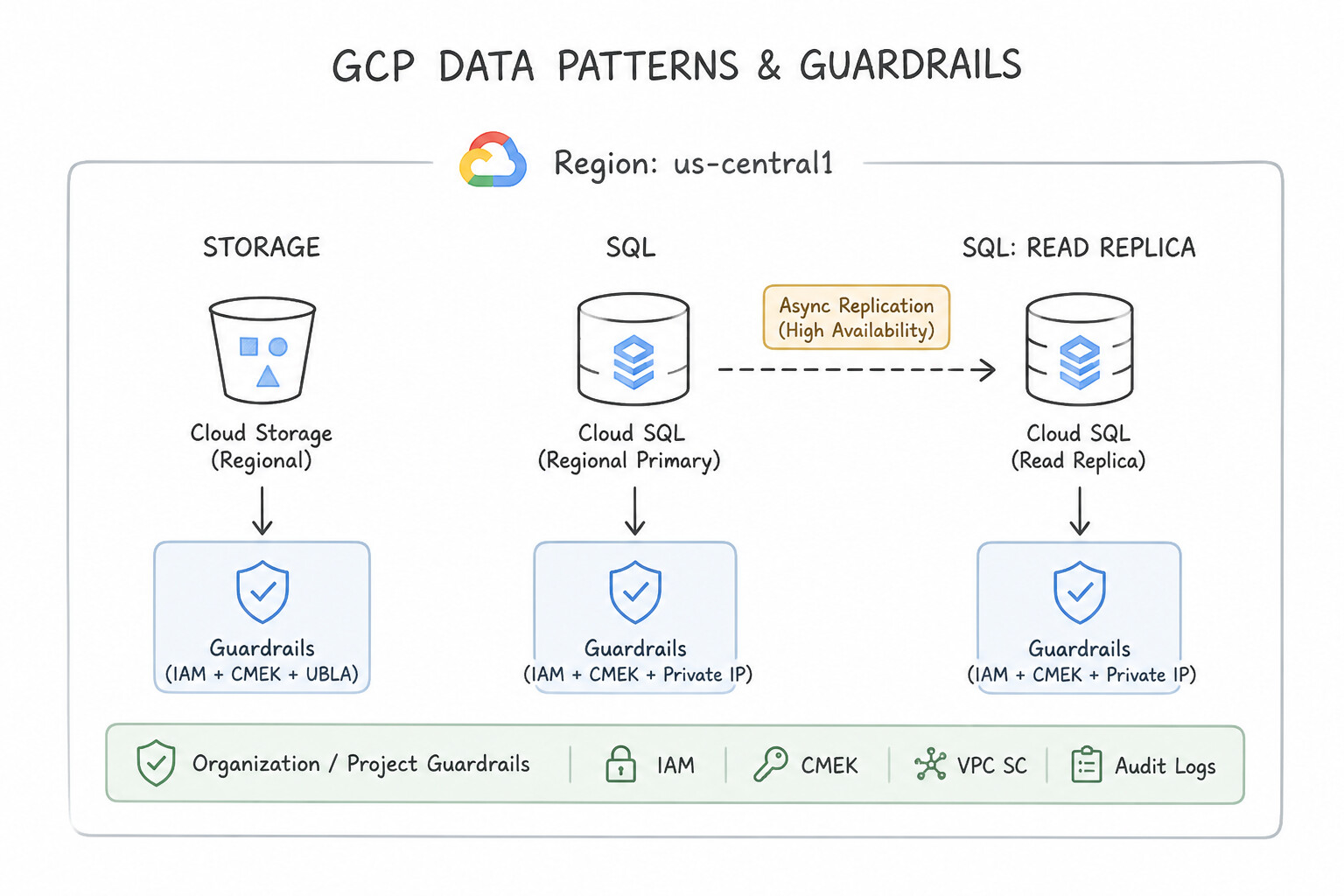
Key Implementation Patterns
- Cloud Storage for Global Content Delivery: Use Create a Cloud Storage bucket with the Multi-region location type. Multi-region buckets provide geo-redundancy across a large area, making them ideal for serving global content. (Avoid alternative: Regional buckets store data in one region and do not offer geo-redundancy.)
- Cloud SQL Disaster Recovery Strategy: Use Create a read replica in the us-east1 region. Promote this replica to a standalone instance if the primary region fails. Cross-region read replicas provide a copy of your data in a secondary region and can be promoted to a primary instance for disaster recovery.
- Cloud Spanner for Global Consistency: Use Provision a Cloud Spanner instance with a multi-region configuration. Cloud Spanner multi-region configurations provide 99.999% availability, horizontal scaling, and resilience against regional failures. (Avoid alternative: Cloud SQL scales vertically and typically offers up to 99.99% availability, which does not meet the 99.999% requirement or the need for native horizontal scaling.)
Key Takeaways (2.2d)
- Use Regional buckets for high-performance local compute and data sovereignty compliance within a single region.
- Use Dual-region buckets for specific high-availability and disaster recovery requirements between two regions.
- Use Multi-region buckets for serving content to distributed users and maximizing geo-redundancy across a continent.
- High Availability (HA) protects against zonal failures within a single region.
Quick Decision Cheat Sheet (Subsection 2.2)
If the Scenario Requires... | Choose This Google Cloud Pattern | Avoid This Common Mistake |
|---|---|---|
"Global relational database + horizontal write scaling + 99.999% availability" | Cloud Spanner | Cloud SQL with read replicas (read replicas only scale reads, not writes) |
"Serverless NoSQL document DB for mobile/web app with offline sync" | Firestore | Cloud Bigtable (requires provisioned nodes, no mobile offline SDK) |
"Compliance logs retained for 7 years, accessed less than once a year" | Cloud Storage Archive class (365-day min duration, millisecond access) | Coldline (90-day); Nearline (30-day); BigQuery active storage |
"Multiple Linux VMs in a MIG need shared ReadWriteMany POSIX file storage" | Filestore (NFS) | Zonal Persistent Disk (cannot be mounted ReadWrite across multiple VMs simultaneously unless in specialized read-only or clustered modes) |
"Enterprise file storage needing both SMB and NFS with instant ONTAP snapshots" | Google Cloud NetApp Volumes | Filestore Basic; Cloud Storage FUSE |
"HPC cluster or large-scale AI training needing a parallel POSIX file system" | Google Cloud Managed Lustre | Cloud SQL; Dataproc HDFS |
"Protect a Cloud SQL instance against a single-zone failure with automatic failover" | Enable Cloud SQL High Availability (Regional HA) (synchronous standby in a second zone) | Creating a Read Replica (read replicas are asynchronous and do not provide automatic HA failover for the primary) |
Further Reading (Subsection 2.2)
- Cloud Spanner Product Page — Overview of Cloud Spanner features, highlighting its global distribution and relational capabilities.
- Google Cloud Database Options — A guide helping to choose the right database based on workload requirements like consistency and scale.
- Cloud Bigtable Overview — Read the 'What is Cloud Bigtable?' section to understand its core use cases, specifically focusing on time-series data and high throughput.
- Bigtable — Product page describing key-value and wide-column storage for IoT and time-series workloads.
- Bigtable in a minute — Introduction to Bigtable as a fully managed, high-performance NoSQL database.
- BigQuery Overview — Provides a comprehensive overview of BigQuery, its serverless nature, and its capabilities as a data warehouse.
Subsection 2.3: Planning and Implementing Networking Resources
The Big Picture
Google Cloud's Virtual Private Cloud (VPC) is uniquely global—a single VPC spans all Google Cloud regions worldwide without needing cross-region VPNs, while its subnets are regional (spanning all zones within a region). Engineers who do not understand this global-VPC / regional-subnet architecture make four classic mistakes in production:
- The Overlapping CIDR & Auto-Mode VPC Trap (2.3a): Creating auto-mode VPCs in multiple projects assigns the exact same
10.128.0.0/9CIDR block to every project—making it impossible to connect them later via VPC Network Peering or Cloud VPN due to overlapping IP ranges. Production networks always use Custom Mode VPCs with carefully planned RFC 1918 CIDRs, and use Shared VPC when centralizing network governance across an Organization. - The Legacy Network Tag vs. Cloud NGFW Secure Tag Trap (
2.3b,2.3c): Legacy Compute Engine Network Tags are plain text labels that any user withcompute.instances.setTags(such as a VM admin in a service project) can attach to their VM to piggyback onto permissive firewall rules. Modern Google Cloud security uses Cloud Next Generation Firewall (Cloud NGFW) policies (Hierarchical and Network Firewall Policies) paired with IAM-governed Secure Tags (tagValues/...) or Service Accounts, ensuring only authorized IAM principals can bind a workload to a firewall tier. - The Non-Transitive Peering & Hybrid Bandwidth Trap (2.3d): Assuming that if
VPC-Apeers withVPC-BandVPC-Bpeers withVPC-C,VPC-Acan talk toVPC-C(false—VPC Network Peering is strictly non-transitive!). Or choosing Cloud VPN (max 1.5–3 Gbps per tunnel over the public internet) when a workload requires a deterministic 40 Gbps private connection (which requires Dedicated or Partner Cloud Interconnect). - The Load Balancer & Network Tier Mismatch Trap (
2.3e,2.3f): Selecting a Regional Network Load Balancer when a scenario demands global URL path routing (/apivs./video), Cloud CDN caching, and Cloud Armor WAF protection (which require a Global External Application Load Balancer on Premium Network Service Tier).
Consideration 2.3a: Creating vpcs and subnets (custom mode, shared vpc)
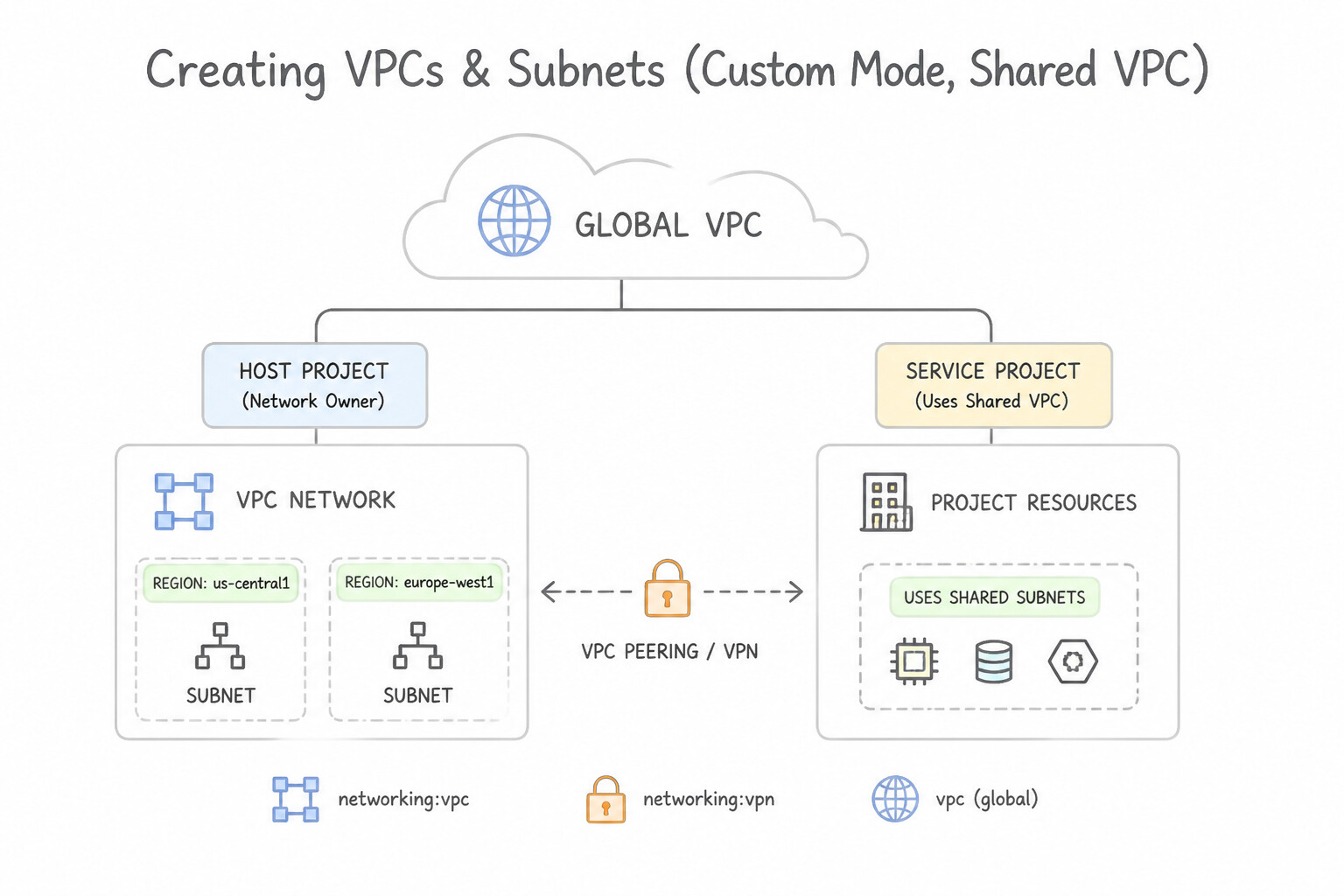
- Global VPC, Regional Subnets: A Google Cloud VPC is a global resource (
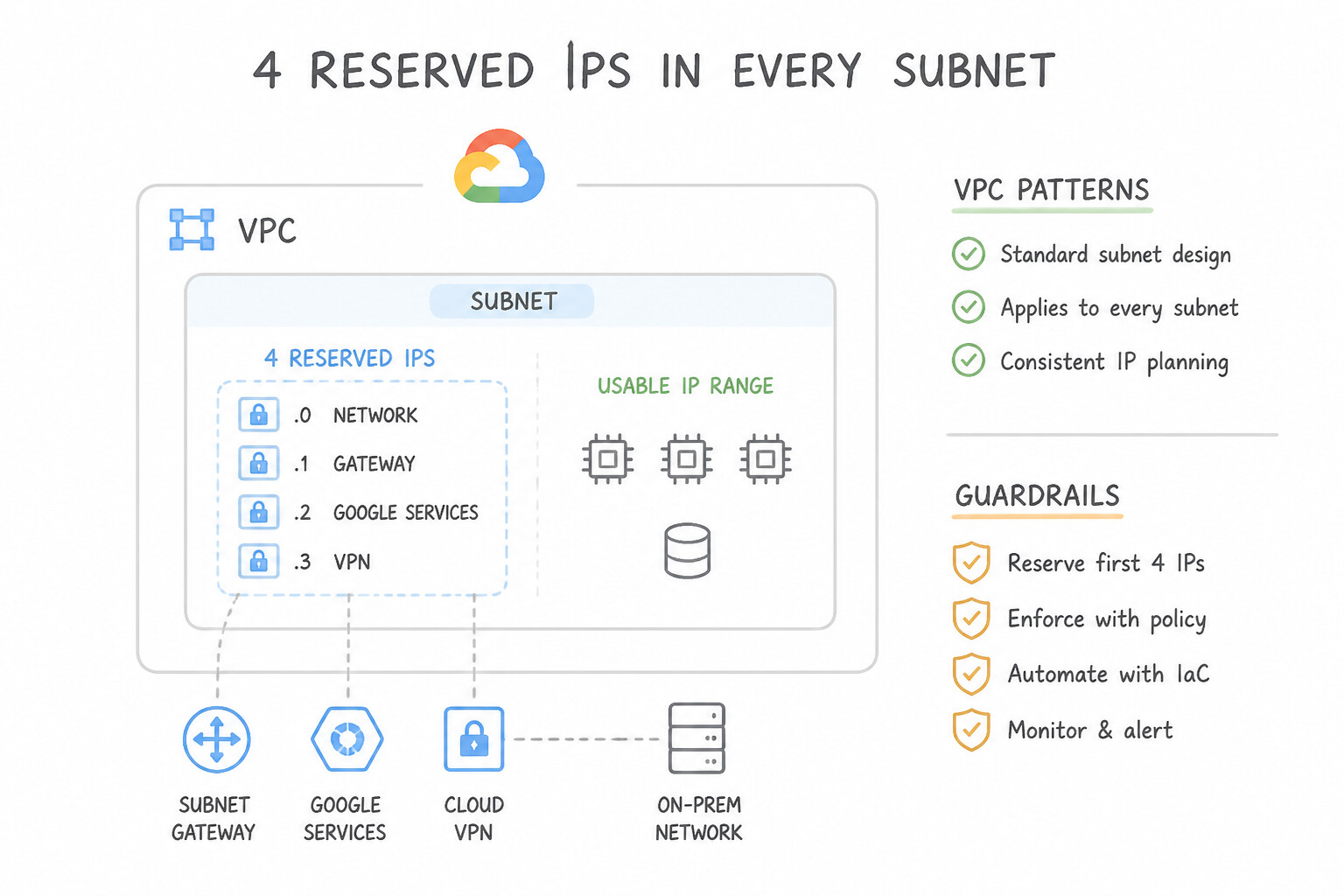
global/networks/...), while subnets are regional (regions/us-central1/subnetworks/...). VMs inus-central1-aandus-central1-bcan share the exact same subnet CIDR, and VMs inus-central1andeurope-west1inside the same VPC can communicate privately via internal IPs without a VPN gateway! - 4 Reserved IPs in Every Subnet: In every Google Cloud subnet CIDR block, 4 IP addresses are reserved by Google and cannot be assigned to VMs:
- Network address (first IP, e.g.,
10.0.0.0) - Default gateway (second IP, e.g.,
10.0.0.1) - Second-to-last IP (reserved for future use, e.g.,
10.0.0.254) - Broadcast address (last IP, e.g.,
10.0.0.255) - Formula: Usable IPs = 2(32 - prefix) - 4 (so a
/24has $256 - 4 = 252$ usable IPs; a/29is the smallest supported IPv4 subnet with $8 - 4 = 4$ usable IPs). - Shared VPC vs. VPC Network Peering:
- Shared VPC: Connects multiple Service Projects to a central Host Project VPC within the same Organization. Network Admins manage subnets/firewalls in the Host Project and grant Service Project engineers
roles/compute.networkUser(Compute Network User) on specific subnets. - VPC Network Peering: Connects two independent VPCs (within the same or different Organizations) with zero bandwidth bottleneck, but is non-transitive, requires both sides to configure peering, and cannot share subnets directly.
Key Implementation Patterns
- Custom Mode vs. Auto Mode for Hybrid Connectivity: Use Create a VPC network in custom mode. Define subnets with unique IP address ranges. Custom mode allows you to manually define subnet ranges, ensuring they do not overlap with existing on-premises networks. (Avoid alternative: Auto mode networks use the 10.128.0.0/20 range for the us-central1 region, which conflicts with your on-premises network.)
- Expanding Subnet IP Ranges: Use Run the
gcloud compute networks subnets expand-ip-rangecommand with a prefix length of /23. Using a /23 prefix doubles the IP space. This command expands the subnet without downtime. (Avoid alternative: A /25 prefix creates a smaller network than /24. You cannot shrink a subnet.) - Shared VPC Host Project Configuration: Use Configure the Network Team's project as a Shared VPC Host Project. Attach the Web App Team's project as a Service Project. Shared VPC designates the project owning the network as the Host Project and the project consuming the network as the Service Project.
Key Takeaways (2.3a)
- Hybrid Networks require unique IPs: Never reuse IP ranges between your VPC and on-premises network if you plan to connect them.
- Auto Mode Limitations: Auto mode VPCs use the
10.128.0.0/9CIDR block. If your on-prem network uses IPs in this range, you cannot use Auto mode.- Custom Mode flexibility: Use Custom mode for production environments to have full control over subnet IP ranges and regions.
- Default Network: The 'default' network in a project is always Auto mode.
Consideration 2.3b: Creating and applying cloud ngfw policies with ingress and egress rules
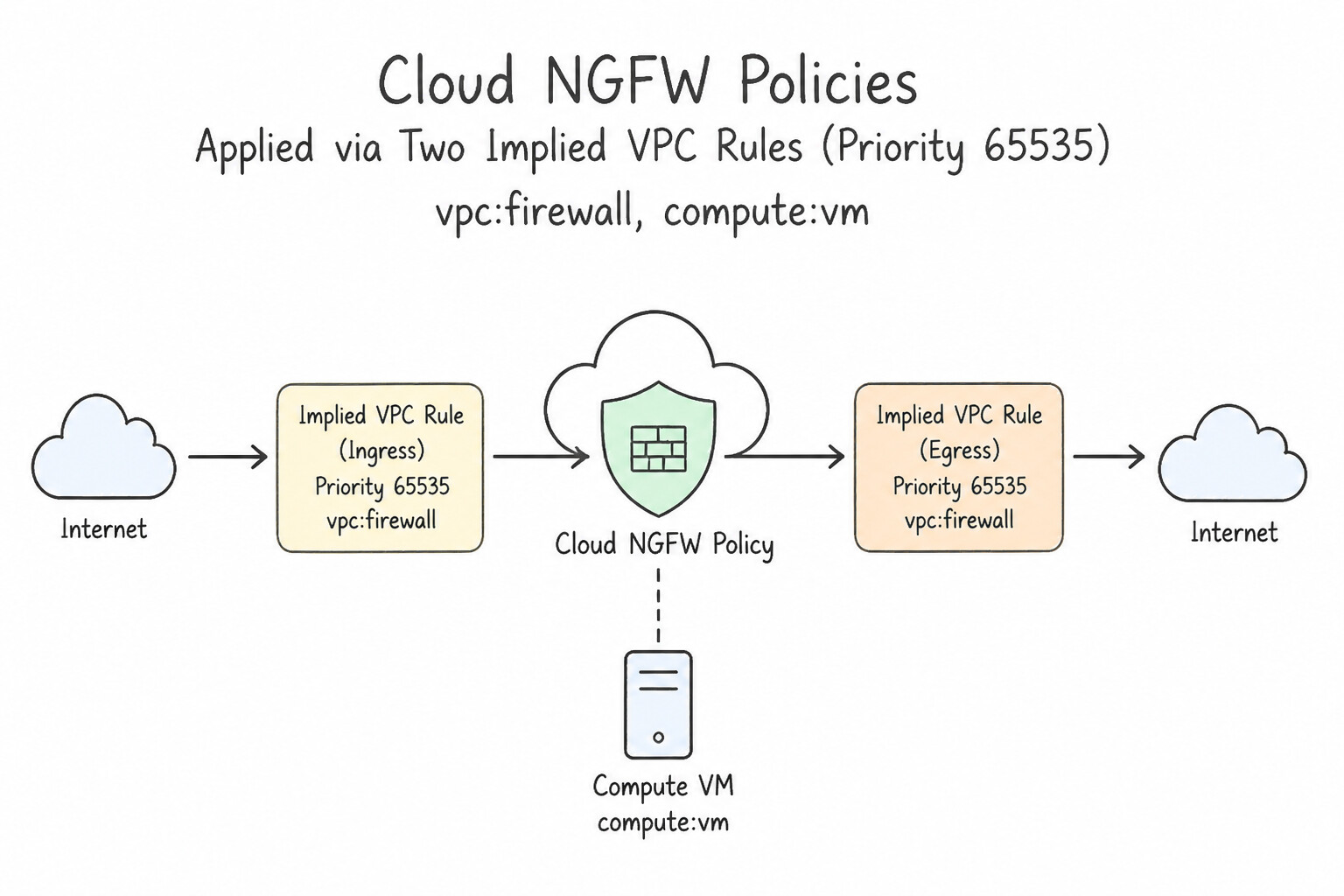
- Two Implied VPC Rules (Priority
65535): Every VPC has two invisible, unremovable baseline rules at lowest priority65535: - Implied Deny Ingress (
0.0.0.0/0): Blocks all unsolicited incoming connections unless an explicitALLOWingress rule matches. - Implied Allow Egress (
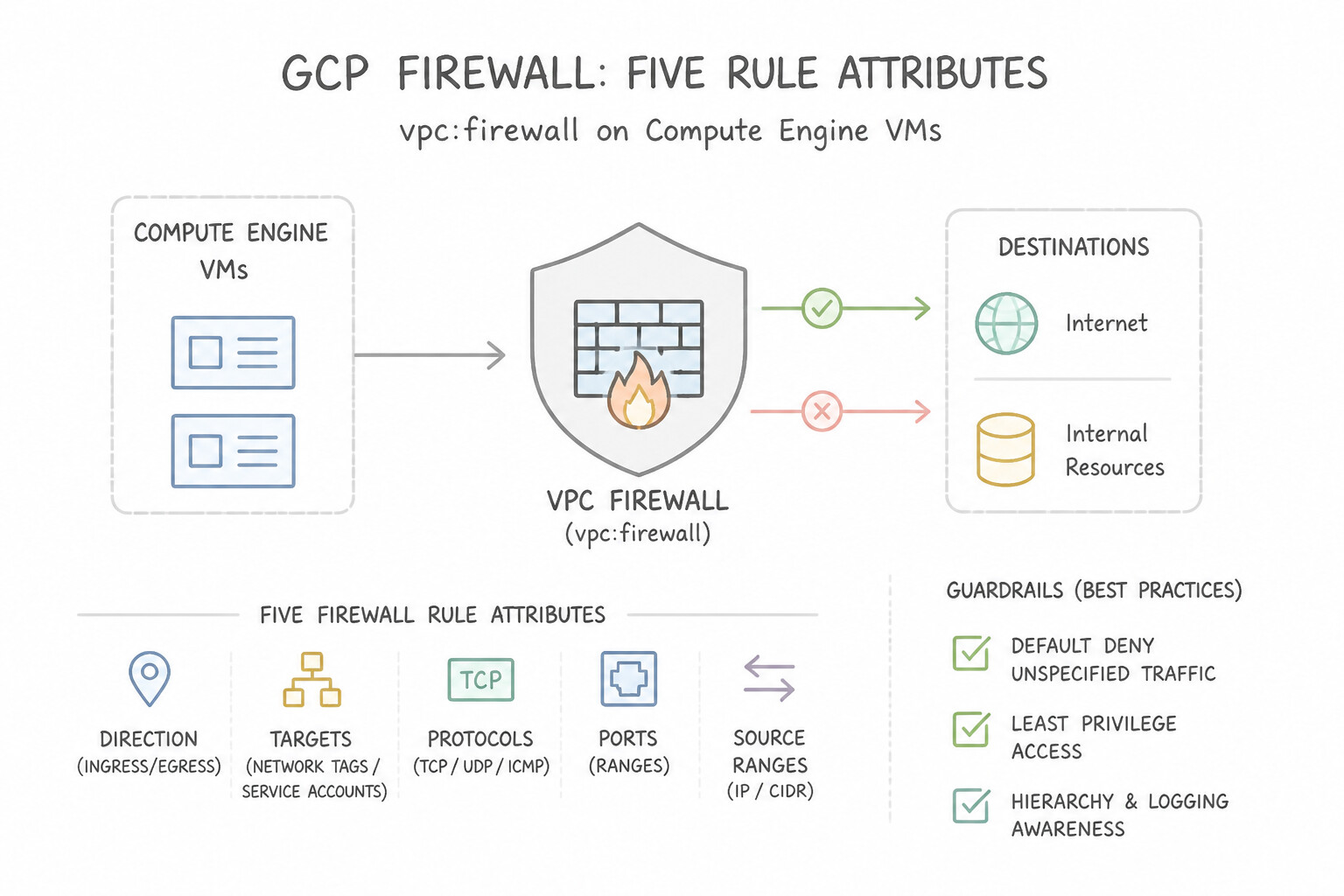
0.0.0.0/0): Permits all outbound connections unless an explicitDENYegress rule matches. - The Five Firewall Rule Attributes:
- Direction:
INGRESS(incoming to target) orEGRESS(outgoing from target). - Action:
ALLOWorDENY(orgoto_nextin Cloud NGFW policies to delegate evaluation to lower-level policies). - Priority (
0to65535): Lower integer = Higher precedence! ADENYrule at priority100overrides anALLOWrule at priority1000. If two rules have the exact same priority number,DENYalways wins overALLOW. - Protocols & Ports: e.g.,
tcp:443,udp:53,icmp. - Logs: Firewall Rule Logging can be enabled per rule (
--enable-logging) to capture connection metadata in Cloud Logging.
Key Implementation Patterns
- Default Ingress Behavior Analysis: Use Create a firewall rule to allow ingress traffic on TCP port 22. You must explicitly allow incoming SSH traffic because the default behavior blocks all ingress. (Avoid alternative: Egress traffic is allowed by default; the problem is blocked incoming traffic.)
- Conflict Resolution via Priorities: Use Update the priority of the allow rule to 800. Lower integers denote higher priority; setting the allow rule to 800 (less than 900) ensures it is evaluated first. (Avoid alternative: 1100 is greater than 900, meaning the deny rule (900) still takes precedence.)
- Granular Access with Target Tags: Use Add a network tag to the web server VMs. Create an ingress firewall rule allowing TCP port 80 with the target tag set to the tag name. Target tags allow you to scope firewall rules to specific instances within a network, ensuring traffic is allowed only to the intended VMs.
Key Takeaways (2.3b)
- VPC networks have an implied 'deny all' rule for ingress traffic.
- VPC networks have an implied 'allow all' rule for egress traffic.
- Custom Mode VPCs do not include default rules; you must create them manually.
- SSH requires allowing TCP traffic on port 22.
Consideration 2.3c: Using tags and service accounts in cloud ngfw policy rules
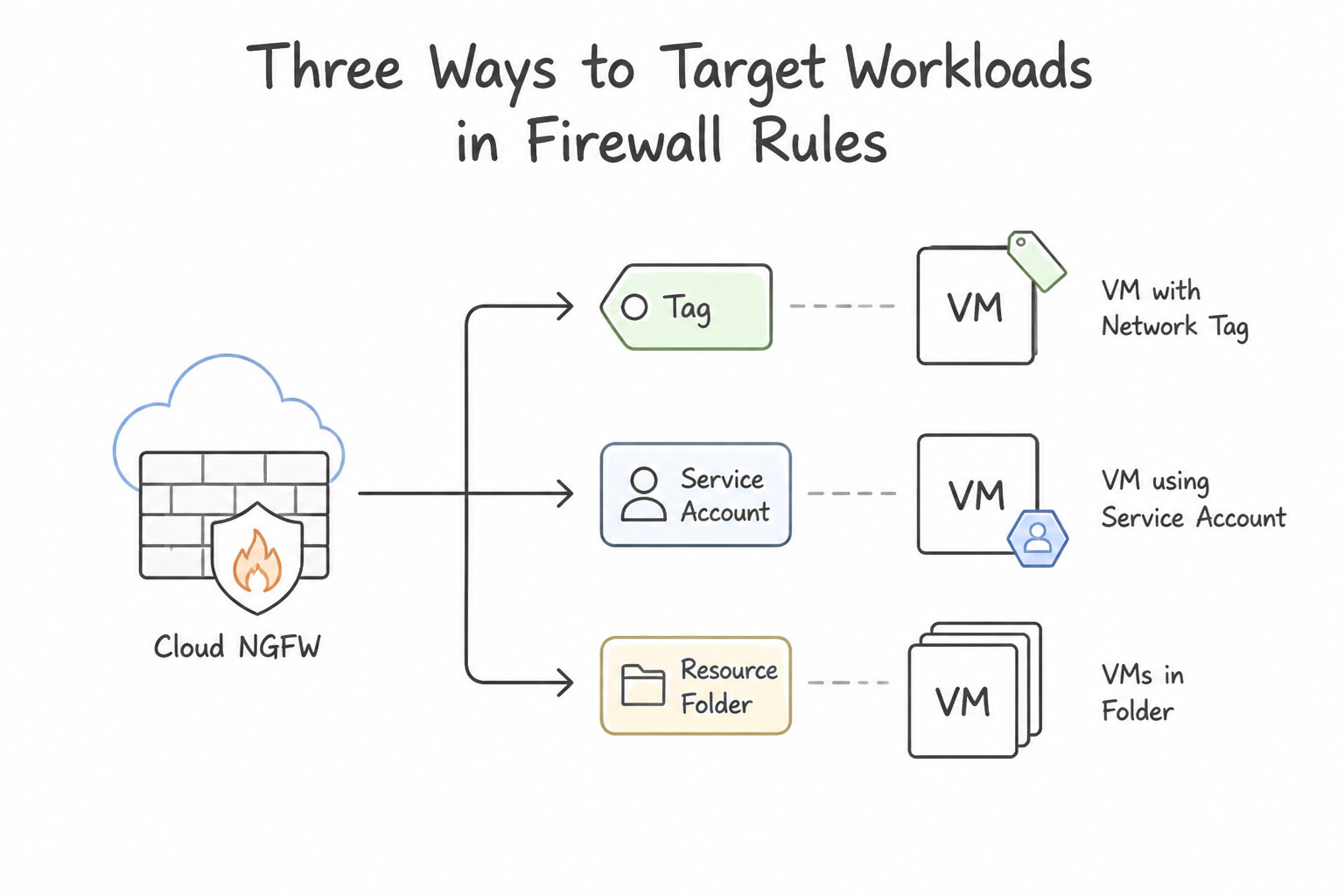
- Three Ways to Target Workloads in Firewall Rules:
- Secure Tags (
tagKeys/tagValuesin Cloud NGFW Policies — Recommended Best Practice): Resource Manager Tags governed by strict IAM permissions (roles/resourcemanager.tagUser). Unlike legacy network tags, a developer cannot spoof or remove a Secure Tag on a VM without explicit IAM authorization, and Secure Tags work seamlessly across Hierarchical, Global Network, and Regional Network Firewall Policies (including across VPC Peering when evaluated locally). - Service Accounts: Identifies workloads by the cryptographic identity of the VM's attached IAM Service Account (
target-service-accounts). Cannot be altered on a running VM without stopping the VM and havingiam.serviceAccountUserpermission, but cannot be used across VPC Network Peering. - Legacy Network Tags: Simple text strings on VMs (
--tags=http-server). Convenient for quick testing, but not IAM-governed—any user who can edit a VM instance can attach any network tag.
Key Implementation Patterns
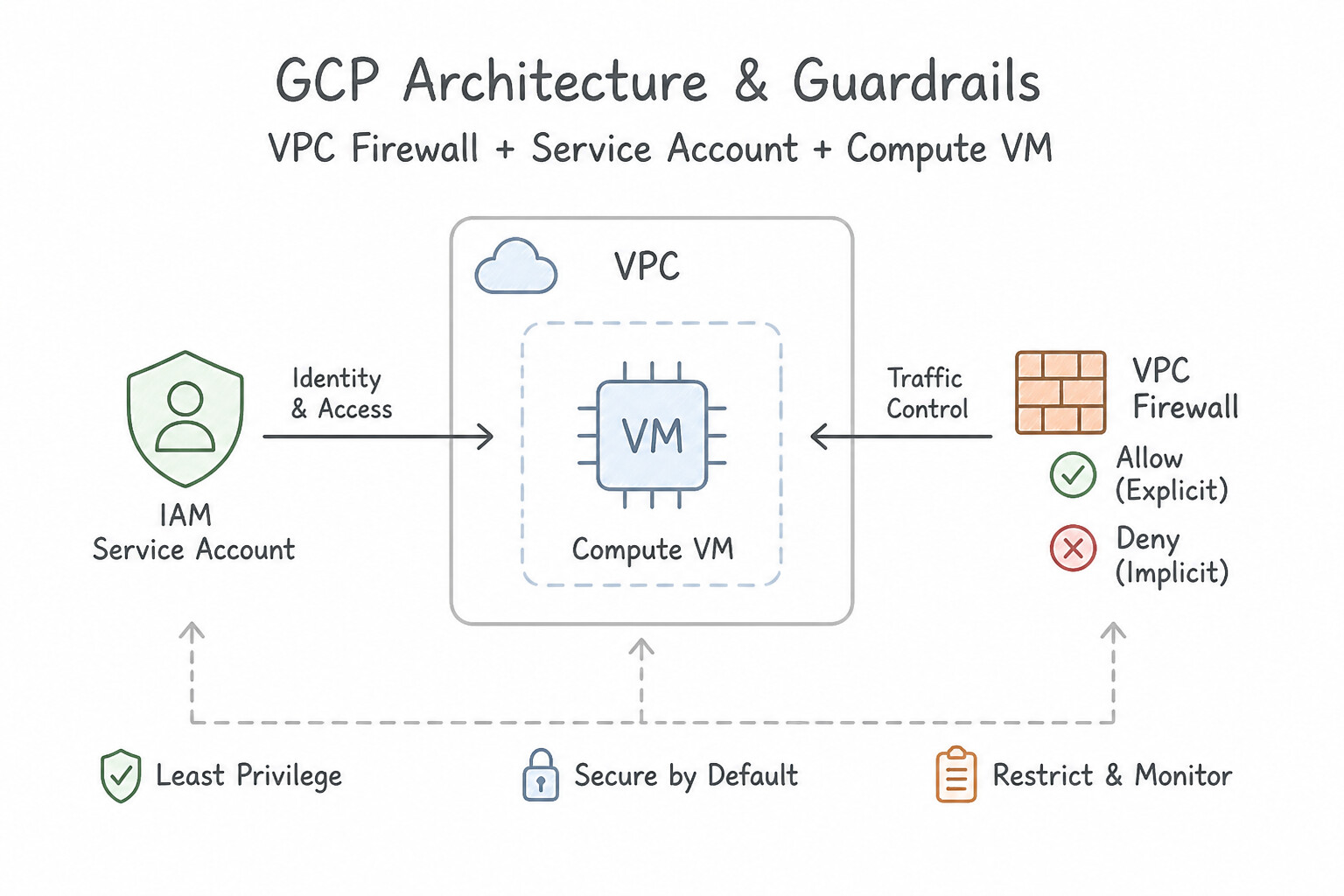
- Strict Identity-Based Database Access: Use Create an ingress firewall rule allowing TCP traffic. Set the targets to the database service account and the source filter to the application service account. Using service accounts for both source and target in firewall rules creates a secure, identity-based boundary that persists even if IP addresses change.
- Scalable Web Server Exposure: Use Update the instance template to include a network tag. Create an ingress firewall rule allowing TCP ports 80 and 443 that targets the specific network tag. Network tags allow you to apply firewall rules to a dynamic group of instances, such as those in a MIG, ensuring new instances automatically inherit the correct security policies.
- Internal Microservices Segmentation: Use Create an ingress firewall rule allowing traffic on the API port. Set the source filter to the service account used by "Payment" and the target to the service account used by "Inventory". Filtering by Service Account uses the authenticated identity of the VM to strictly control access between microservices.
Key Takeaways (2.3c)
- Firewall rules are stateful; allowing ingress traffic automatically allows the return traffic.
- Use Ingress rules to control incoming connections to a resource.
- Service Accounts provide a robust, identity-based way to filter traffic between VMs, decoupling security from network topology (IP addresses).
- Avoid using IP ranges for internal service-to-service communication when specific identities (Service Accounts) can be used instead.
Consideration 2.3d: Establishing network connectivity (cloud vpn, vpc peering, cloud interconnect)
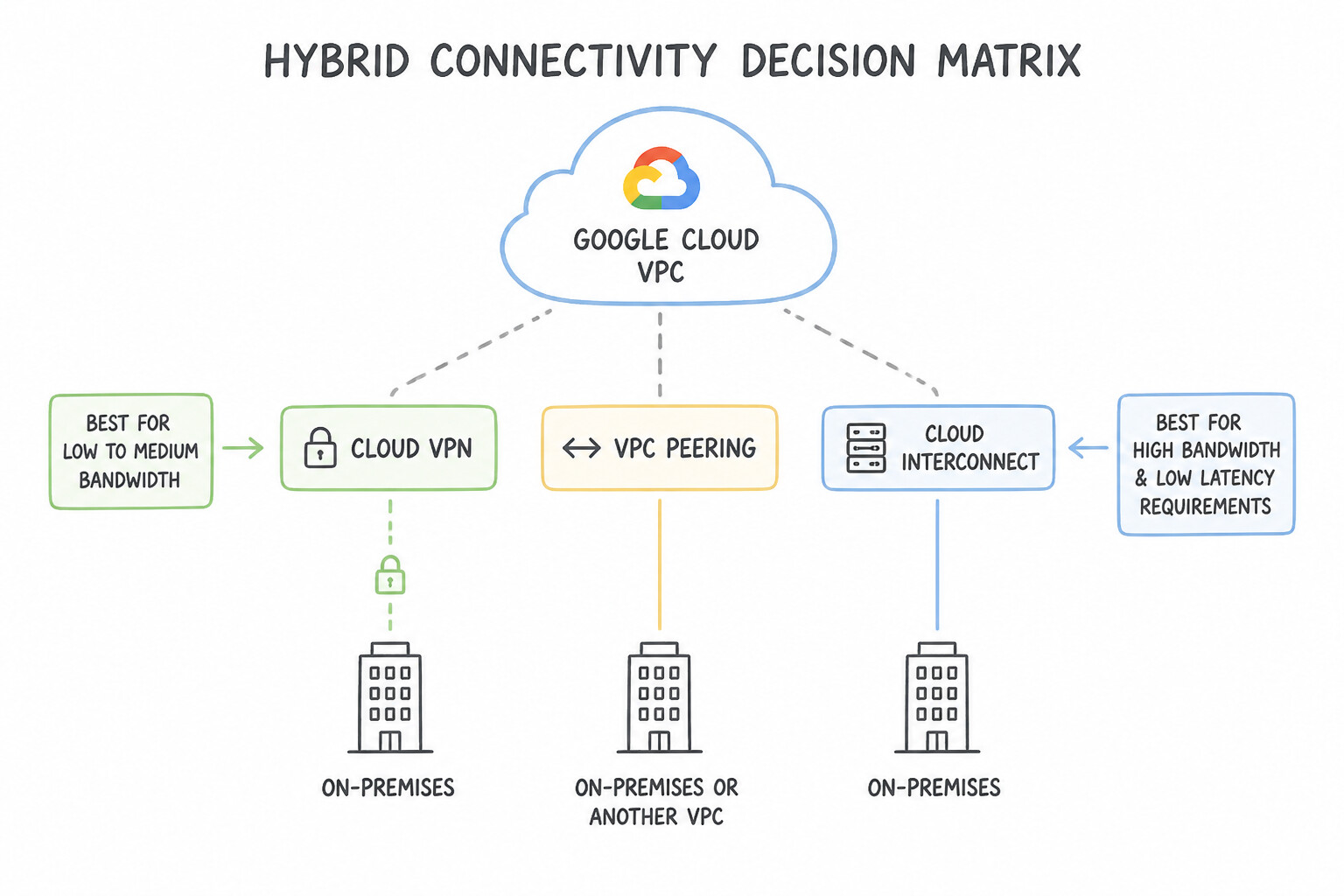
- Hybrid Connectivity Decision Matrix (
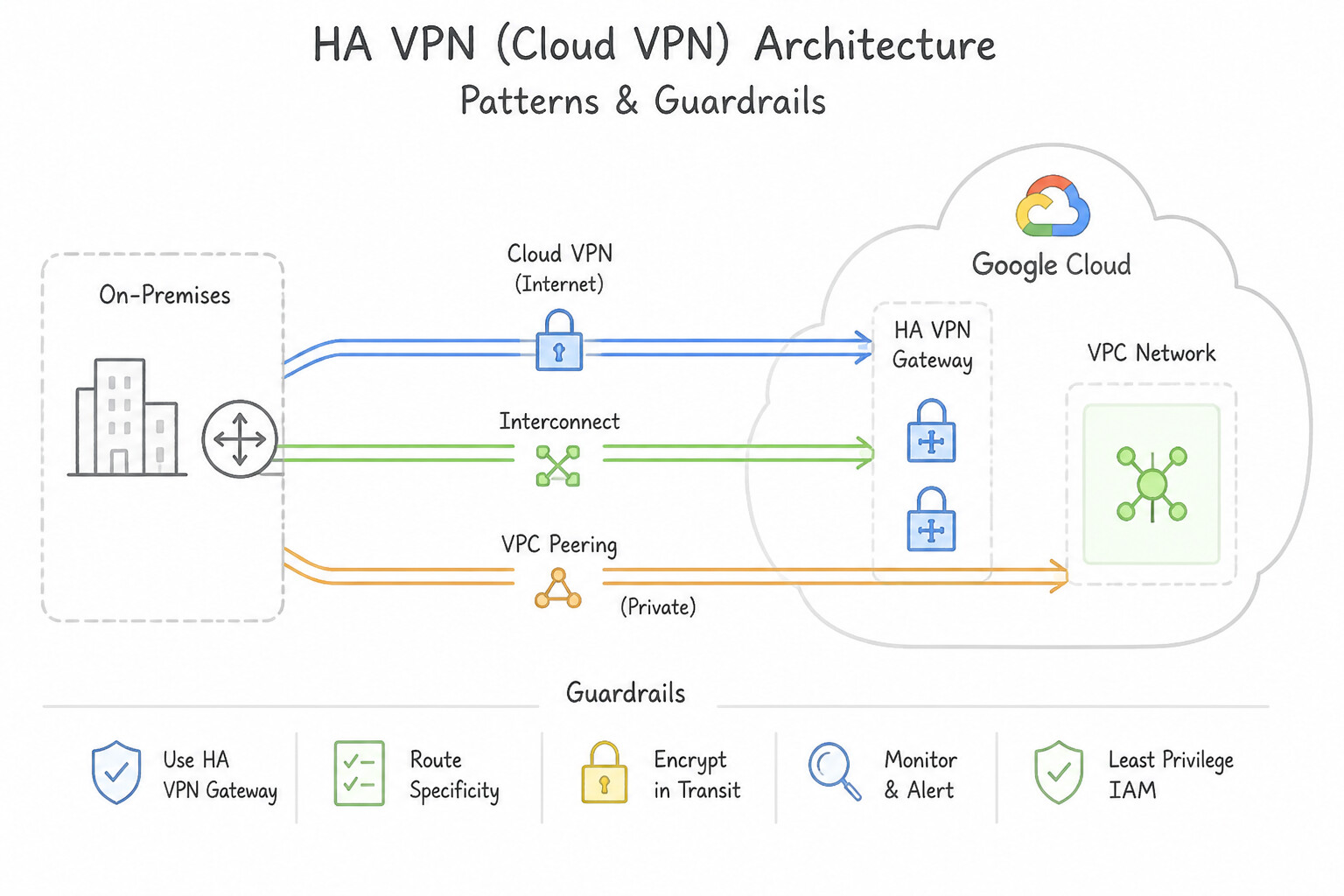
Cloud VPNvs.Dedicated Interconnectvs.Partner Interconnect): - HA VPN (Cloud VPN): IPsec encrypted tunnels over the public internet using Cloud Router (dynamic BGP routing). Provides a 99.99% SLA when configured with 2 tunnels connected to the two interfaces of the HA VPN gateway (
1.5–3 Gbpsper tunnel). Best for low-to-moderate bandwidth (< 3–5 Gbps) or rapid setup without physical circuits. - Dedicated Interconnect: Direct physical fiber connection (
10 Gbpsor100 Gbpslinks, up to80–200+ Gbps) between your router and Google's network at a shared colocation facility. - Partner Interconnect: Physical connectivity (
50 Mbpsto50 Gbps) delivered through a supported NSP/carrier when your data center is not in a Google colocation facility or needs sub-10 Gbps private bandwidth. - Cloud Router: Provides dynamic BGP (Border Gateway Protocol) route exchange for both HA VPN and Cloud Interconnect—automatically propagating new VPC subnet CIDRs and failing over between redundant tunnels without manual static route edits!
Key Implementation Patterns
- High Availability Hybrid Connectivity: Use Configure a Cloud HA VPN gateway. Create two tunnels to a peer gateway that has two external IP addresses. Cloud HA VPN with two redundant tunnels is the only VPN option that provides the required 99.99% SLA. (Avoid alternative: Dedicated Interconnect is for high-bandwidth scenarios, which the question explicitly excludes.)
- VPC Peering Transitivity: Use Establish a VPC Network Peering connection between Project A and Project C. VPC Network Peering is non-transitive, so you must peer Project A directly with Project C to enable communication. (Avoid alternative: Firewall rules cannot overcome the architectural limitation that VPC peering routes are not transitive.)
- High Bandwidth Physical Connection: Use Order a Dedicated Interconnect connection with two 10 Gbps circuits. Dedicated Interconnect is correct because you have equipment in the peering location and need high bandwidth (20 Gbps). (Avoid alternative: Cloud VPN operates over the public internet and is less suitable for consistent 20 Gbps throughput compared to physical interconnects.)
Key Takeaways (2.3d)
- Cloud HA VPN is the standard for secure, high-availability hybrid connectivity over the internet.
- To achieve a 99.99% SLA with Cloud HA VPN, you must configure two tunnels to a peer with two external IP addresses.
- Use Cloud Interconnect only when high bandwidth or low latency is strictly required, as it is more complex and costly.
- VPC Network Peering allows private communication between VPCs using internal IP addresses.
Consideration 2.3e: Choosing and deploying load balancers
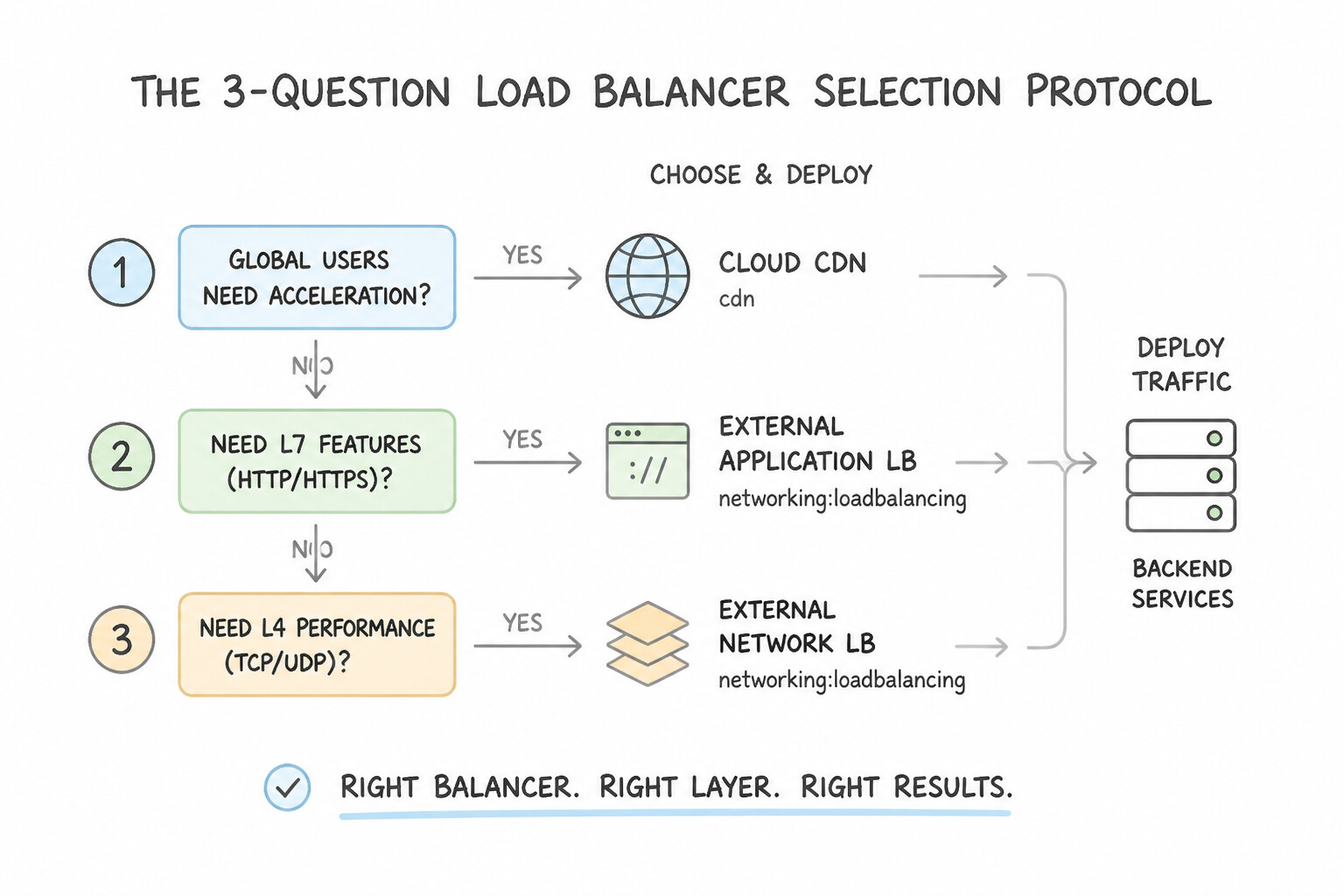
- The 3-Question Load Balancer Selection Protocol:
- External (Internet-facing) vs. Internal (Private RFC 1918 VIP)?
- Layer 7 HTTP/HTTPS (
Application Load Balancer) vs. Layer 4 TCP/UDP/SSL (Network Load Balancer)? - Global (Multi-Region Anycast) vs. Regional (Single Region)?
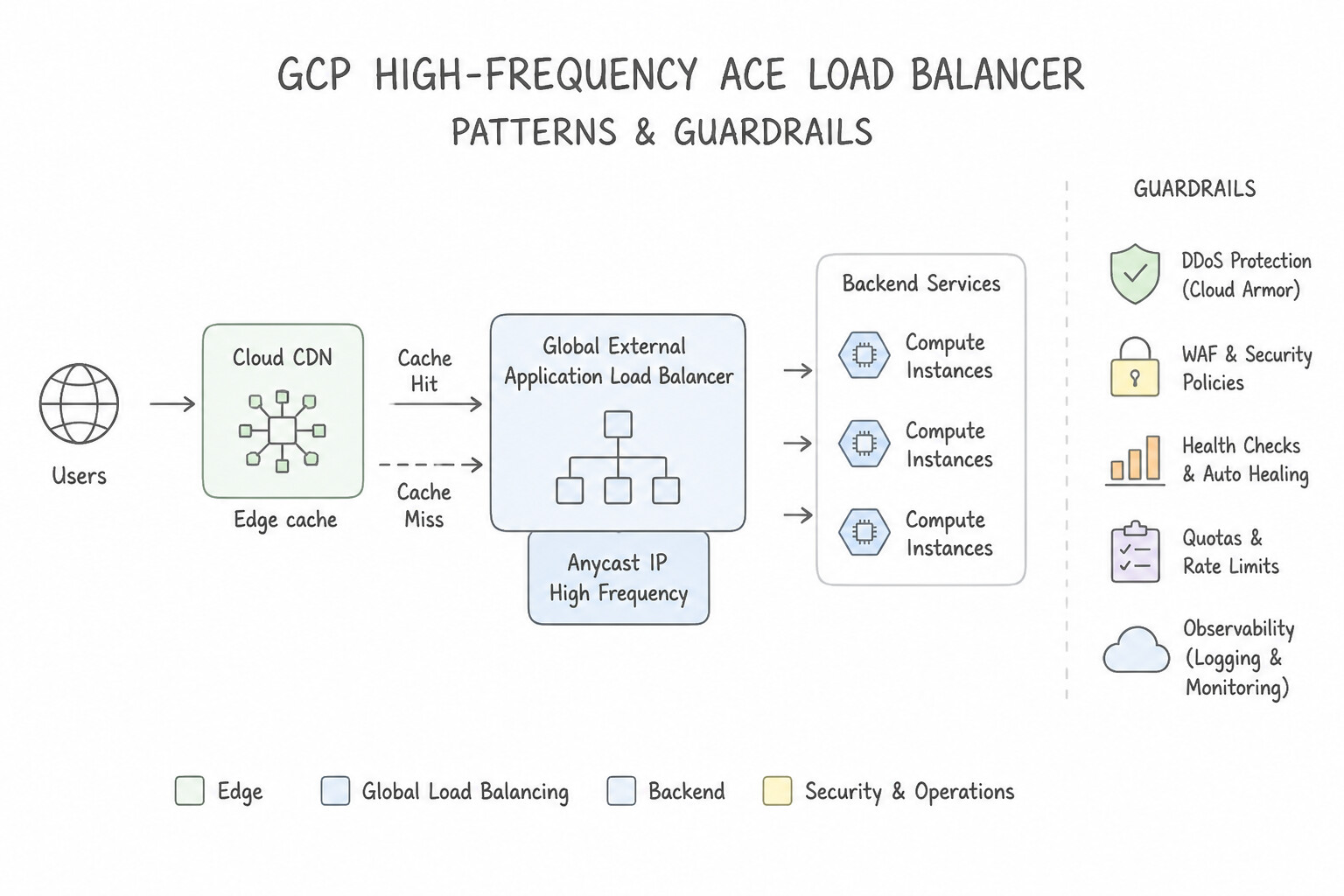
- High-Frequency ACE Load Balancers:
- Global External Application Load Balancer: Layer 7 HTTP(S) proxy on Google's global edge. Supports multi-region backend routing (closest healthy region), URL Maps (
/api→ Cloud Run,/static→ Cloud Storage bucket), Cloud CDN, and Google Cloud Armor (WAF / DDoS protection). - Regional Internal Application Load Balancer: Private Layer 7 Envoy-based HTTP(S) load balancer for internal microservices inside a VPC.
- External Proxy Network Load Balancer: Global/Regional Layer 4 TCP/SSL proxy for non-HTTP internet traffic requiring SSL offload or global anycast routing.
- External / Internal Passthrough Network Load Balancer: Regional Layer 4 pass-through load balancer that preserves the client's original source IP and supports TCP, UDP, ESP, GRE, and ICMP with ultra-low latency.
Key Implementation Patterns
- Global Web Application with Caching: Use Deploy a Global External Application Load Balancer. Global External Application Load Balancers support HTTP(S) traffic, global distribution, and native integration with Cloud CDN. (Avoid alternative: Network Load Balancers operate at Layer 4 and do not support the Layer 7 features required for Cloud CDN integration.)
- Internal Microservices Communication: Use Configure an Internal Application Load Balancer. Internal Application Load Balancers handle Layer 7 (HTTP/HTTPS) traffic using private IP addresses within the VPC. (Avoid alternative: External load balancers use public IP addresses and are designed for internet-facing traffic, not internal VPC communication.)
- High-Performance UDP Gaming Server: Use Configure an external passthrough Network Load Balancer. External passthrough Network Load Balancers support UDP and preserve the client IP address by design. (Avoid alternative: Application Load Balancers do not support UDP and do not preserve the source IP address natively.)
Key Takeaways (2.3e)
- Use Global External Application Load Balancers for HTTP(S) traffic requiring global reach and caching.
- Cloud CDN only works with HTTP(S) Load Balancers (Layer 7).
- Network Load Balancers (Layer 4) are for non-HTTP traffic or when TLS offloading is not needed in the same way.
- Internal Load Balancers are strictly for private network traffic.
Consideration 2.3f: Differentiating network service tiers
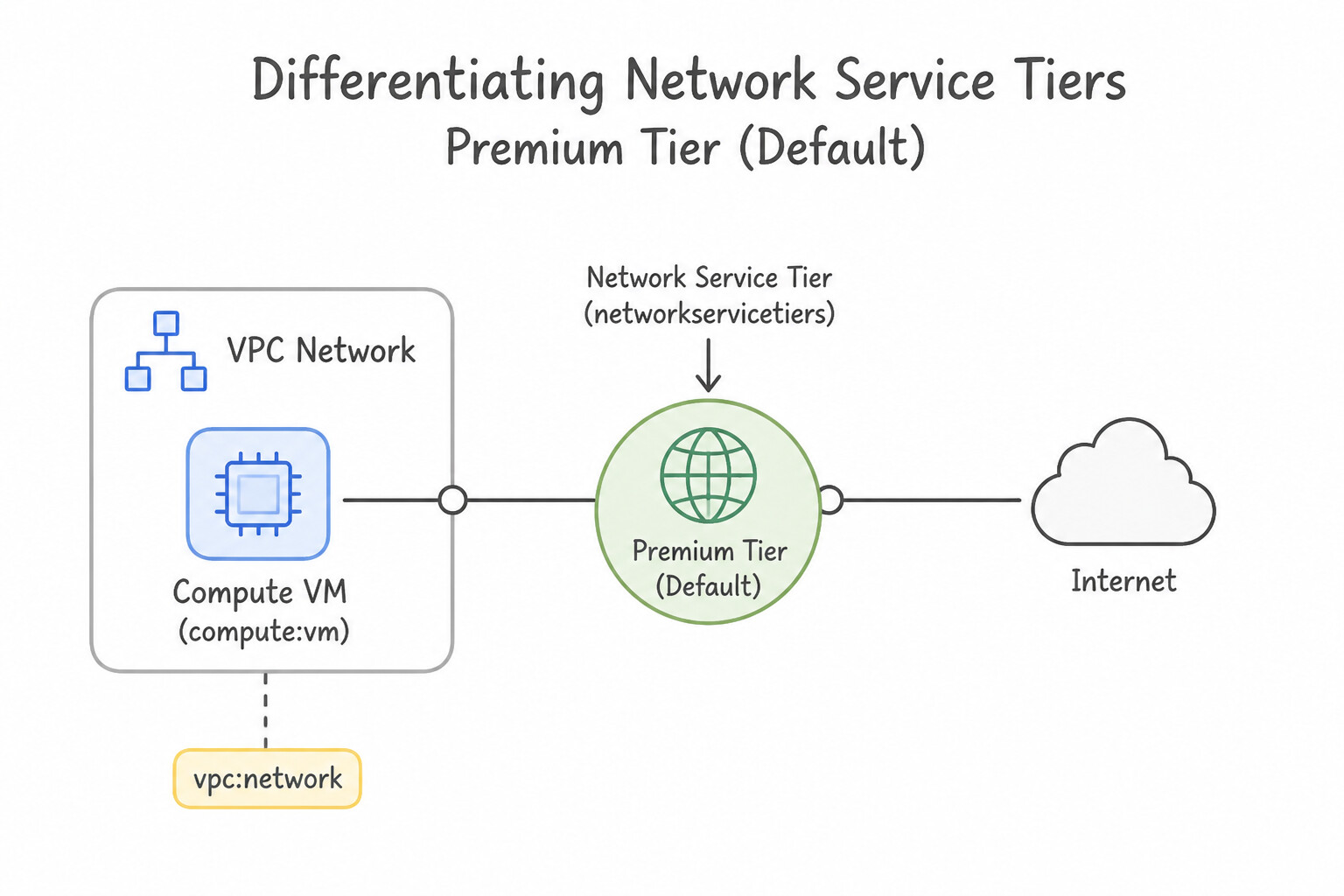
- Premium Tier (Default):
- Traffic enters and exits Google's private global fiber backbone at the edge PoP closest to the end user, traveling across Google's congestion-free private cables to your region.
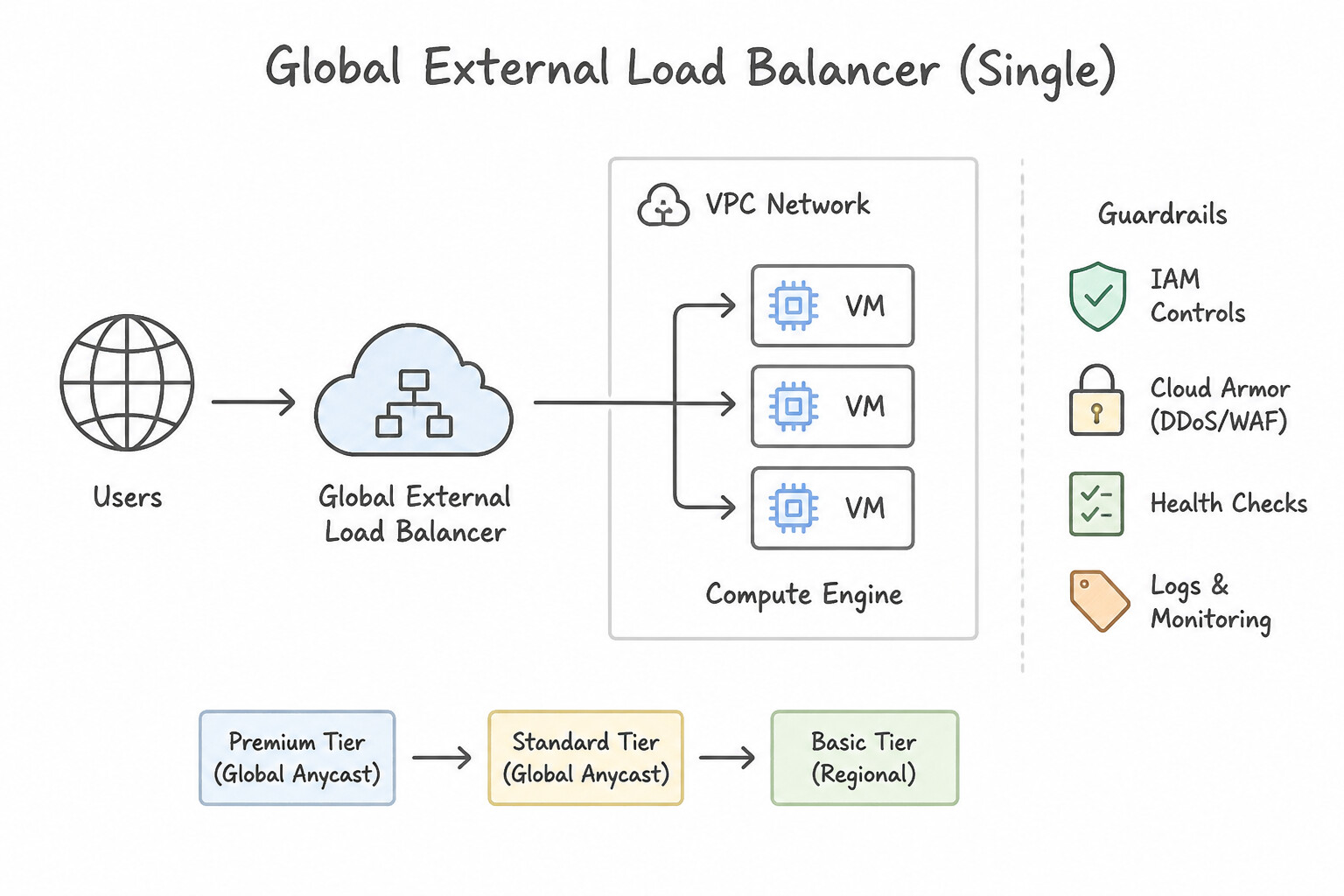
- Required for Global External Load Balancers (Single Global Anycast IP serving backends across multiple regions) and Cloud CDN global edge performance.
- Standard Tier (Cost-Optimized):
- Traffic travels over the public internet (ISP transit networks) and only enters Google's network at the specific region where your VM or load balancer lives.
- Supports only Regional External IP addresses and Regional Load Balancers. Choose Standard Tier when all users and workloads live in a single region and minimizing network egress cost is the primary constraint.
Key Implementation Patterns
- Cost Optimization for Regional Workloads: Use Assign an external IP address using the Standard Tier. Standard Tier is cheaper and suitable for regional workloads where traffic does not need Google's global backbone. (Avoid alternative: Premium Tier provides better global performance but costs more than Standard Tier.)
- Global Load Balancing Requirements: Use Configure the forwarding rule to use the Premium Tier. Global External Application Load Balancers require the Premium Tier to provide a single global Anycast IP address that routes traffic via Google's global backbone. (Avoid alternative: Standard Tier IP addresses are regional and use the public internet for transit, which prevents the use of a single global Anycast IP.)
- Optimizing for Low Latency and Jitter: Use Configure the external IP addresses to use the Premium Tier. Premium Tier routes traffic via the closest PoP using Google's global backbone for lowest latency. (Avoid alternative: Standard Tier uses the public internet for transit, which has higher latency compared to Google's backbone.)
Key Takeaways (2.3f)
- Premium Tier uses Google's global backbone and is the default choice for high performance and global reach.
- Standard Tier uses the public internet and is the cost-effective choice for single-region workloads.
- Network Tier is determined when configuring external IP addresses.
- Global static IPs require Premium Tier.
Quick Decision Cheat Sheet (Subsection 2.3)
If the Scenario Requires... | Choose This Google Cloud Pattern | Avoid This Common Mistake |
|---|---|---|
"How many usable IP addresses exist in a /26 Google Cloud subnet?" | $2^{(32-26)} - 4 = 64 - 4 = 60$ usable IPs (Google always reserves 4 IPs per subnet) | Subtracting 2 (standard on-prem rule) or 5 (AWS/Azure rule) |
"Block specific IP ranges from reaching a web server even though an allow rule exists at priority 1000" | Create an Ingress DENY firewall rule with a LOWER priority number (e.g., priority 100) | Creating a DENY rule at priority 2000 (higher number = lower precedence, so 1000 wins) |
"VPC-A is peered with VPC-B, and VPC-B is peered with VPC-C; VMs in VPC-A cannot reach VPC-C" | VPC Network Peering is non-transitive — create a direct peering between VPC-A and VPC-C (or migrate to Shared VPC / NCC) | Adding static routes across VPC-B (peering drops transitive hops by design) |
"Route /images/* to a Cloud Storage bucket and /api/* to a Cloud Run service under one HTTPS domain" | Global External Application Load Balancer with a URL Map (Backend Bucket + Serverless NEG) | Regional Passthrough Network Load Balancer (Layer 4 has no visibility into HTTP URL paths) |
"Internal TCP/UDP microservices need a private regional VIP that preserves client source IP" | Internal Passthrough Network Load Balancer | Global External Application Load Balancer |
Further Reading (Subsection 2.3)
- VPC network overview — Provides a comprehensive overview of VPCs, including the differences between auto mode and custom mode networks.
- Auto mode IP ranges — Lists the specific IP ranges assigned to regions in auto mode VPCs, confirming the 10.128.0.0/20 allocation for us-central1.
- Expand a subnet — Documentation describing how to expand the primary IP range of an existing subnet using the Google Cloud console or gcloud CLI.
- Subnets — Documentation describing a subnet's primary IPv4 range can be expanded but never shrunk.
- gcloud compute networks subnets expand-ip-range — Documentation reference for the command and its required prefix-length flag.
- Shared VPC overview — Provides a comprehensive guide on Shared VPC concepts, including Host and Service projects, and use cases for centralized administration.
Subsection 2.4: Planning and Implementing Resources Using Tooling
The Big Picture
Clicking buttons in the Google Cloud Console ("ClickOps") or running ad-hoc imperative bash scripts works for a single prototype VM, but collapses immediately when a team must reproduce identical Dev, Staging, and Prod environments, audit infrastructure changes in Git pull requests, or recover from accidental deletions. Subsection 2.4 of the 2026 ACE Curriculum tests two modern pillars of platform engineering:
- The Declarative IaC & State Management Pillar (2.4a): Choosing the right Infrastructure as Code tool for the team's operating model:
- Terraform: The industry-standard declarative HCL engine for provisioning Google Cloud infrastructure—where storing
terraform.tfstatelocally on a laptop is a cardinal sin (always use a Cloud Storage remote backend with Object Versioning and automatic state locking). - Cloud Foundation Fabric FAST (
Fabric FAST): Google's production-ready, modular Terraform reference architecture for bootstrapping enterprise landing zones (Organization hierarchy, Billing, Shared VPC networking, Security, and GKE/Data platforms). - Config Connector: A Kubernetes add-on that lets platform teams manage Google Cloud resources (Cloud SQL instances, Pub/Sub topics, Storage buckets, IAM bindings) declaratively using Kubernetes Custom Resource Definitions (CRDs) and
kubectl apply/ GitOps (Config Sync). - Helm: The Kubernetes package manager (
Chart.yaml,values.yaml) used to template, version, install, and roll back multi-manifest Kubernetes applications inside GKE. - The AI-Assisted Planning & Implementation Pillar (
2.4b— Modern Cloud Focus): Using Google's integrated AI toolchain—Gemini Cloud Assist, Application Design Center, Gemini CLI, and Google Antigravity—to accelerate architecture design, generate validated Terraform/gcloud configurations, and inspect complex infrastructure dependencies while keeping deterministicterraform planand IAM guardrails in the loop.
Consideration 2.4a: Using infrastructure as code tooling (fabric fast, config connector, terraform, helm)
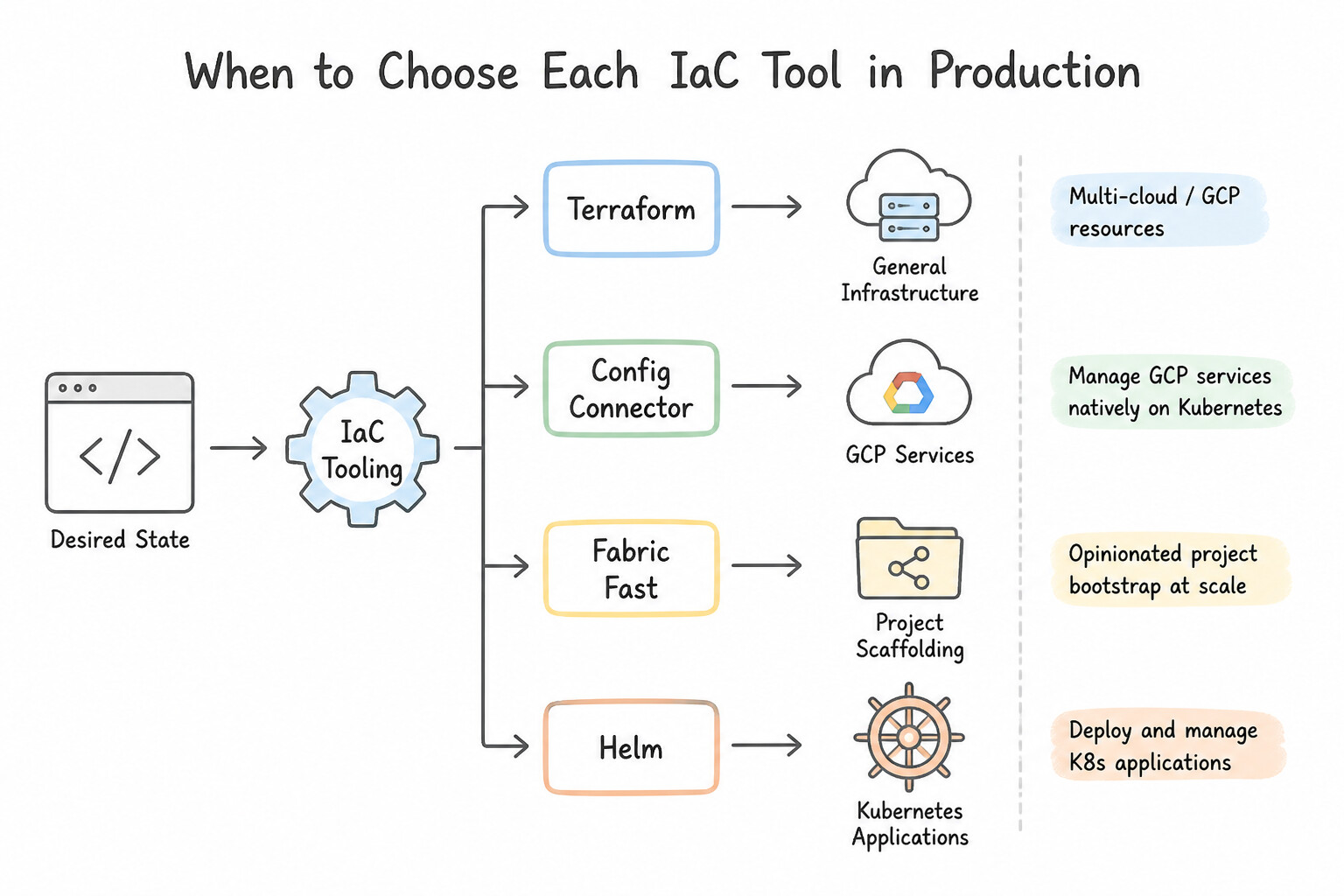
- When to Choose Each IaC Tool in production:
- Terraform: Choose when provisioning general Google Cloud resources (
google_compute_instance,google_storage_bucket,google_project_iam_member) using declarative HCL files across multi-environment CI/CD pipelines. - Fabric FAST (Cloud Foundation Fabric): Choose when the scenario asks for Google-recommended, production-ready Terraform blueprints to bootstrap an entire enterprise landing zone (hierarchical stages:
0-bootstrap,1-resman,2-networking,3-security,4-projects) without writing foundational Terraform modules from scratch. - Config Connector: Choose when a Kubernetes-native team wants to provision and reconcile Google Cloud infrastructure (such as Cloud SQL, Cloud Storage, or Pub/Sub) using Kubernetes YAML manifests (
kubectl apply) alongside their GKE application deployments. Config Connector runs as an add-on in GKE and uses Workload Identity Federation to authenticate to Google Cloud APIs. - Helm: Choose when packaging, parameterizing (
values-dev.yaml,values-prod.yaml), installing (helm install), upgrading (helm upgrade), or rolling back (helm rollback) Kubernetes applications (Deployments, Services, Ingresses, ConfigMaps) inside GKE.
Key Implementation Patterns
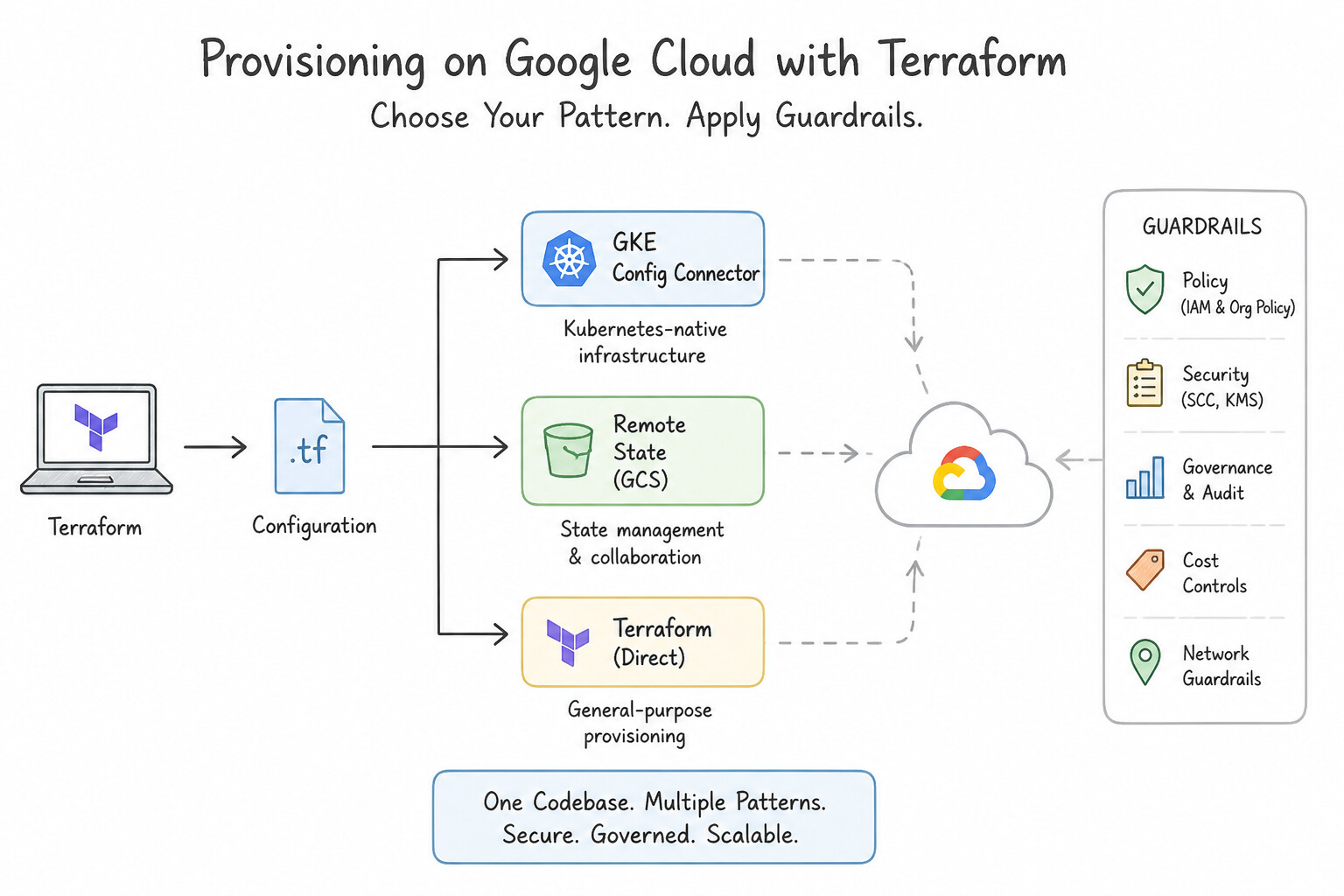
- State Management in Terraform: Use Configure the Terraform backend block to use a Google Cloud Storage bucket. The GCS backend natively supports state locking, encryption at rest, and high availability, meeting all requirements. (Avoid alternative: Git does not provide state locking features and risks exposing sensitive data found in state files.)
- Kubernetes-Native Infrastructure Management: Use Enable Config Connector on the Google Kubernetes Engine (GKE) cluster. Define the Google Cloud resources in YAML format and apply them with
kubectl. Config Connector allows you to manage Google Cloud resources using Kubernetes manifests (YAML) and tools likekubectl. - Application Packaging with Helm: Use Create a Helm chart for the application and install it as a release. Helm is the standard package manager for Kubernetes that bundles resources into versioned Charts. (Avoid alternative: Kubectl apply deploys resources but does not package or version them as a unified release.)
Key Takeaways (2.4a)
- Terraform state files map code configurations to real-world resources.
- A Remote Backend is required for team collaboration to share the state file.
- The Google Cloud Storage (GCS) backend is the preferred choice on GCP.
- GCS backend provides State Locking to prevent concurrent writes and corruption.
Consideration 2.4b: Planning and executing iac deployments including versioning, state management, and updates
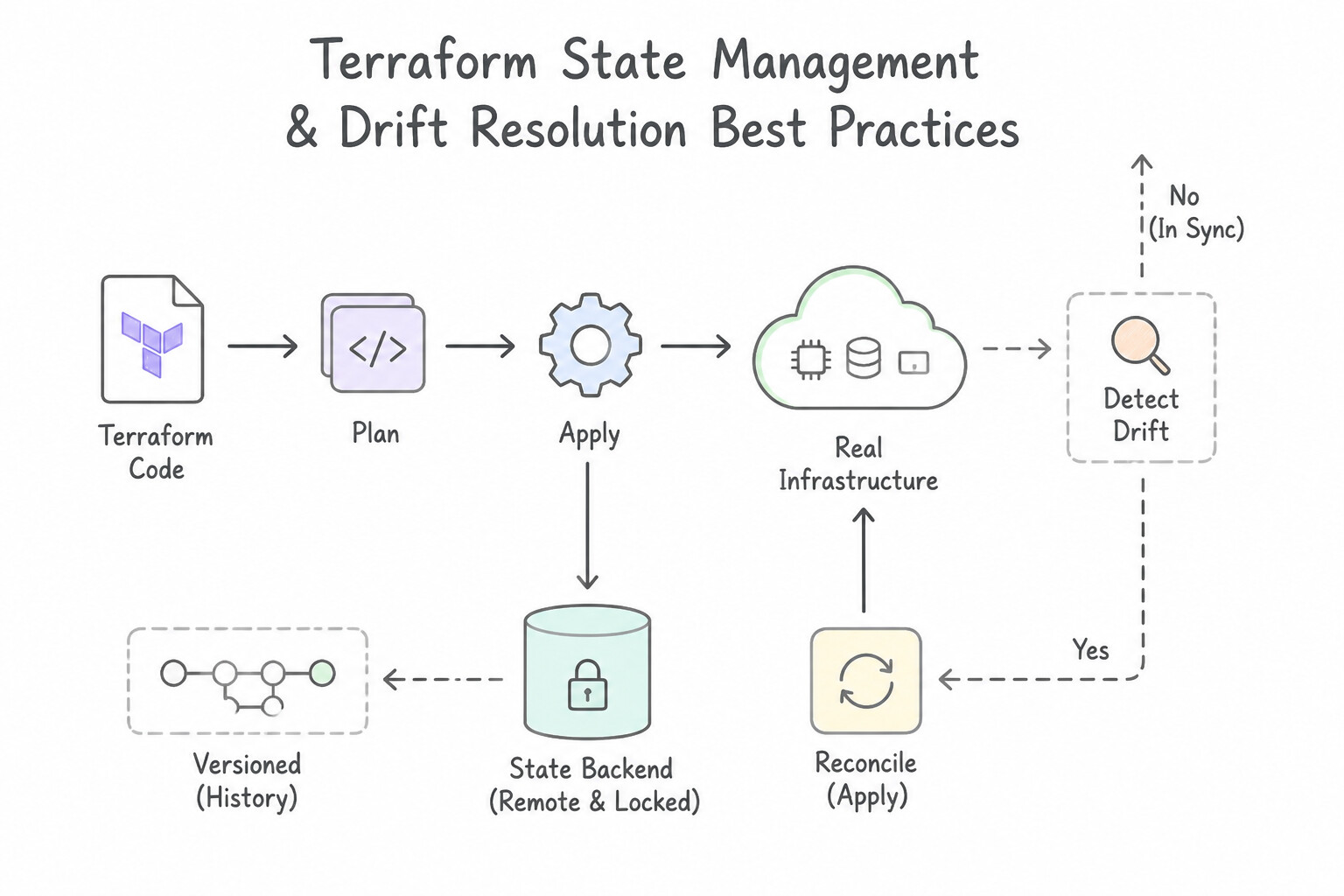
- Terraform State Management & Drift Resolution Best Practices:
- Remote State in Cloud Storage: Store
terraform.tfstatein a dedicated Cloud Storage bucket (backend "gcs"). Thegcsbackend automatically enforces distributed state locking (so two engineers or CI jobs cannot corrupt state by runningterraform applysimultaneously). Always enable Object Versioning (to recover from accidental state corruption) and restrict bucket IAM access (roles/storage.objectAdmin) because state files can contain sensitive attribute values. - Handling Manual "ClickOps" Drift: If an operator manually modifies a resource in the Console that is managed by Terraform, never edit
terraform.tfstateby hand. Either update the.tfconfiguration to match the desired change or runterraform planandterraform applyto reconcile the live cloud resource back to the Git-declared state. Useterraform importwhen bringing an existing unmanaged resource under Terraform control. - AI-Assisted Planning & Implementation:
- Application Design Center: Visual, template-driven architecture canvas in the Google Cloud Console that lets engineers compose validated multi-tier architectures (e.g., Load Balancer + Cloud Run + Cloud SQL + VPC), preview cost estimates, collaborate with teammates, and export ready-to-deploy Terraform HCL code or deploy directly via Infrastructure Manager.
- Gemini Cloud Assist: Embedded AI assistant inside the Google Cloud Console that translates natural-language architectural goals into step-by-step designs, generates
gcloudand Terraform snippets, analyzes Cloud Asset Inventory posture, and explains log/metric anomalies. - Gemini CLI & Google Antigravity: Agentic terminal (Gemini CLI) and agentic IDE (Google Antigravity) development tools that read local repository context, generate and refactor Terraform modules, Helm charts, and Kubernetes manifests, and execute sandboxed validation commands (
terraform validate,terraform plan).
Key Implementation Patterns
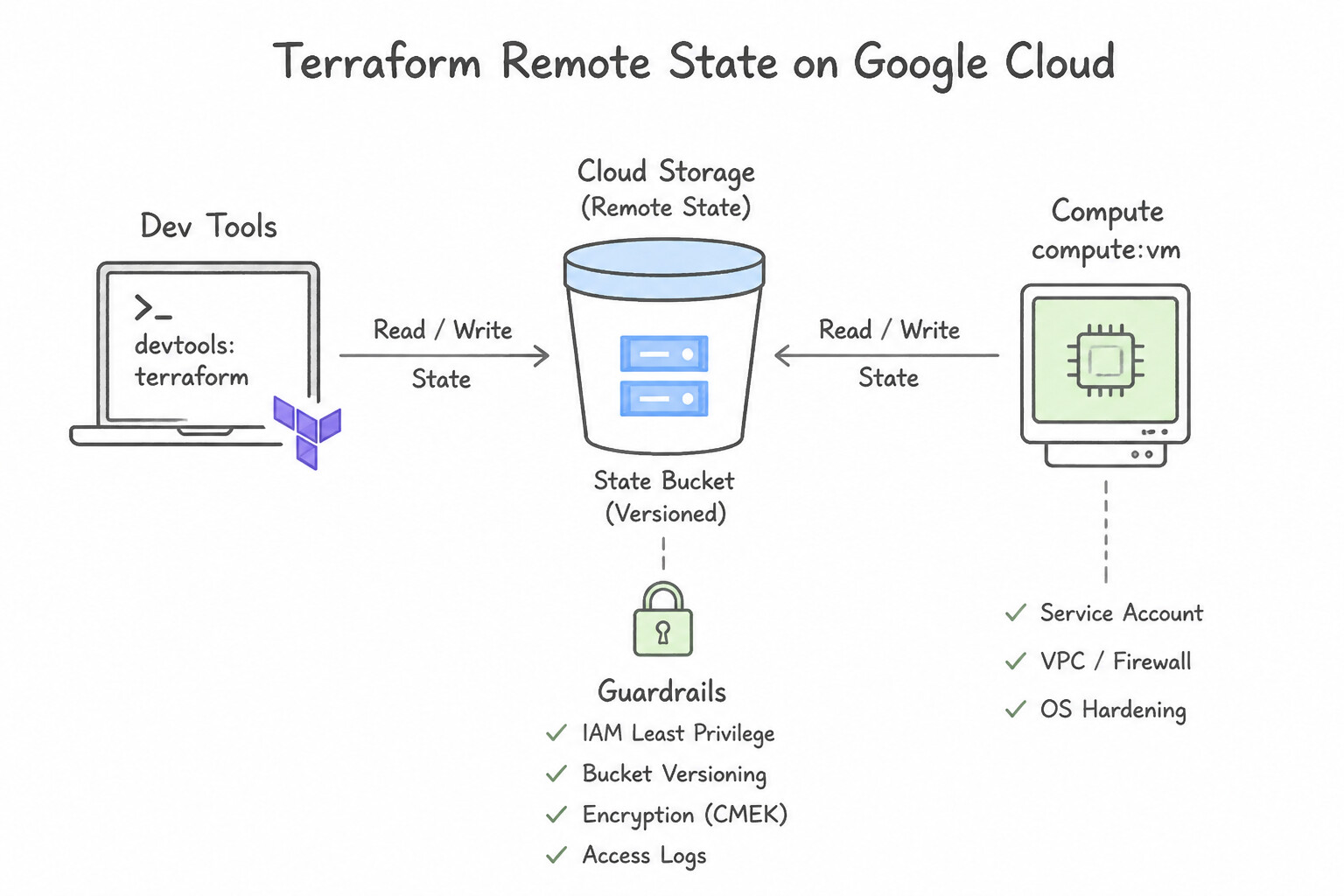
- Secure Remote State Storage: Use Configure a remote backend using a Cloud Storage bucket. Cloud Storage backends support state locking and centralized secure storage, enabling safe team collaboration. (Avoid alternative: Version control exposes secrets and lacks state locking mechanisms required for team collaboration.)
- Preventing Concurrent State Modification: Use Configure the backend block in your Terraform configuration to use a Google Cloud Storage bucket. The Google Cloud Storage backend for Terraform natively supports state locking, which prevents simultaneous writes. (Avoid alternative: Git does not provide runtime state locking and exposes sensitive data found in state files.)
- Importing Pre-existing Resources: Use Define the resource block in your Terraform configuration. Run
terraform importusing the resource identifier and the Cloud SQL instance ID. You must define the configuration and useterraform importto update the state file with the existing resource details.
Key Takeaways (2.4b)
- Terraform state files track the relationship between configuration and deployed resources.
- Local state files are unsuitable for teams due to lack of locking and sharing capabilities.
- Never commit Terraform state files to version control (Git) due to security risks and lack of locking.
- Cloud Storage (GCS) is the recommended backend for Google Cloud, providing centralization, encryption, and state locking.
Quick Decision Cheat Sheet (Subsection 2.4)
If the Scenario Requires... | Choose This Google Cloud Pattern | Avoid This Common Mistake |
|---|---|---|
"Share Terraform state securely across a team with automatic state locking" | Cloud Storage ( gcs) remote backend with Object Versioning and least-privilege IAM | Storing terraform.tfstate in a Git repository or on a shared NFS drive without locking |
"Provision Google Cloud resources (Cloud SQL, GCS) declaratively as Kubernetes CRDs using kubectl" | Config Connector | Cloud Deployment Manager (legacy); standard Helm without CRDs |
"Rapidly deploy an enterprise Google Cloud landing zone using opinionated, production-ready Terraform stages" | Fabric FAST (Cloud Foundation Fabric) | Manual Console setup; custom Python SDK scripts |
"Someone manually changed a firewall rule in the Console that is managed by Terraform" | Run terraform plan and terraform apply (or update the .tf file in Git) to reconcile drift | Manually editing the terraform.tfstate JSON file in a text editor |
"Bring an existing manually created Cloud Storage bucket under Terraform management without deleting it" | Define the resource block in .tf and run terraform import (or import {} block) | Running terraform apply directly (fails with 409 Already Exists) |
"Interactive visual canvas to design Google Cloud application architectures and export Terraform" | Application Design Center | Cloud Asset Inventory (monitors existing assets, does not design greenfield apps) |
"Agentic IDE / terminal assistant to scaffold, refactor, and validate cloud code and IaC" | Google Antigravity / Gemini CLI | Active Assist (generates idle resource/IAM recommendations, not code) |
Further Reading (Subsection 2.4)
- Store Terraform state in a Cloud Storage bucket — This official guide explains why you should use a remote backend on Google Cloud and provides the configuration steps to set up a GCS bucket for Terraform state.
- Backend Type: gcs — HashiCorp documentation detailing the specific configuration options for the 'gcs' backend, confirming support for state locking and encryption.
- Config Connector Overview — Provides a high-level explanation of what Config Connector is and how it allows you to manage Google Cloud resources through Kubernetes.
- Installing Config Connector — Details on how to enable Config Connector as an add-on for GKE, which is the standard way to deploy it.
- Config Connector Documentation — Provides explanation about entry point for installation, resource reference, and governance guides.
- Helm Documentation — The official Helm documentation provides comprehensive guides on creating, packaging, and managing Kubernetes applications using Helm charts.
Book TOC · Previous · Chapter 3 of 8 · Next
AwesomeGCP.com Learning
The approach taken is a question-led learning approach: you explore realistic project scenarios where you need to make decisions or take actions to achieve business goals within specific constraints. Instead of passive learning, you are challenged to think and work through the options to master the Associate Cloud Engineer (ACE) certification!