Book TOC · Previous · Chapter 2 of 8 · Next
Chapter 2: Planning & Implementing Compute Engine, GKE, Serverless & AI Runtimes
Chapter Focus: Compute Engine VM sizing, Spot VMs, CUDs, GKE Standard vs. Autopilot, Cloud Run services/jobs, Cloud Run functions, and Vertex AI / Agent Platform runtimes.
Subsection 2.1: Planning and Implementing Compute Resources
The Big Picture
Section 2.1 is the foundational compute foundation of Google Cloud architecture. In production, teams fail when they treat every compute problem as "spin up a VM and SSH into it with a static key":
- The Wrong Compute Abstraction Trap (
2.1a,2.1k): Running a sporadic webhook that receives 50 requests a day on a 24/7 Compute Engine VM or GKE Standard cluster wastes 99% of compute spend, whereas running a stateful legacy ERP requiring custom kernel modules on Cloud Run fails immediately.And in Google Cloud architectures, deploying a multi-turn generative AI agent onto raw VMs instead of Agent Runtime on Gemini Enterprise Agent Platform (formerly Vertex AI Agent Engine) forces your team to hand-roll session management, orchestration scaling, and telemetry. - The Manual SSH Key & Pet-VM Trap (
2.1b,2.1d,2.1e,2.1f): Pasting developer public SSH keys into project or instance metadata (ssh-keys) creates orphaned access when engineers leave the company. Production fleets enforce OS Login (enable-oslogin=TRUE) (tying Linux POSIX accounts directly to IAM roles and 2FA), manage OS patching across hundreds of VMs via VM Manager (OS Patch Management & OS Config), and scale stateless tiers horizontally via Managed Instance Groups (MIGs) built from immutable Instance Templates. - The Storage IOPS Bottleneck & Spot VM Misuse Trap (
2.1c,2.1g,2.1l): Traditional Persistent Disks tie IOPS and throughput strictly to disk capacity (forcing admins to over-provision 10 TB of disk just to get high IOPS), whereas Google Cloud Hyperdisk (hyperdisk-extreme,hyperdisk-balanced,hyperdisk-throughput) decouples performance from disk size. Similarly, placing a stateful primary database on Spot VMs (which can be preempted at any time with a 30-second notice) guarantees production outages. - The GKE Mode & Private Control Plane Trap (
2.1h,2.1i,2.1j): Choosing GKE Standard when a team wants hands-off Kubernetes operations wastes engineering hours on node pool sizing and bin-packing—when GKE Autopilot manages nodes automatically and bills strictly per Pod resource request.
Consideration 2.1a: Selecting appropriate compute choices for a workload (compute engine, gke, cloud run, cloud run functions, knative)
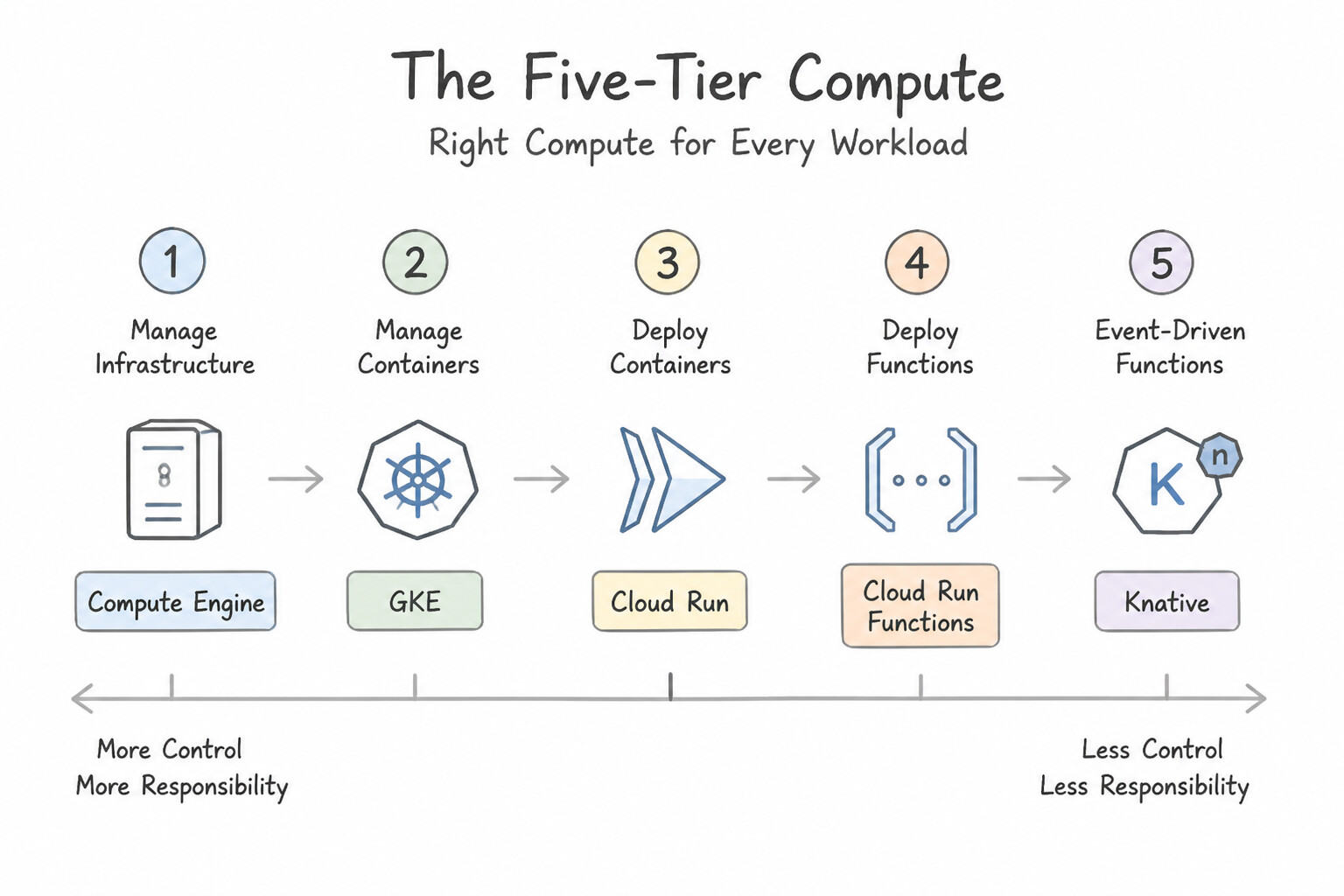
- The Five-Tier Compute Decision Matrix:
- Compute Engine (IaaS): Full guest OS control, custom kernel modules, licensing-by-core, or lift-and-shift VMs that cannot be containerized.
- Google Kubernetes Engine — GKE (CaaS): Complex multi-service container architectures requiring Kubernetes orchestration,
StatefulSets,DaemonSets, custom sidecars, or hybrid portability. - Cloud Run (Serverless Containers): Default choice for stateless HTTP/gRPC web services, APIs, and container jobs that need rapid horizontal autoscaling and scale-to-zero cost efficiency. Supports concurrent requests per container instance (
--concurrency, up to 1,000). - Cloud Run functions (formerly Cloud Functions, FaaS): Lightweight, single-purpose code snippets triggered by events (Cloud Storage uploads, Pub/Sub messages, HTTP webhooks) where developers push source code directly without maintaining a
Dockerfile. - Agent Runtime on Gemini Enterprise Agent Platform (formerly Vertex AI Agent Engine): Purpose-built managed runtime for deploying autonomous AI agents built with ADK, LangChain, or LangGraph—providing built-in managed session state, memory bank integration, tool execution sandboxing, and automatic scaling.
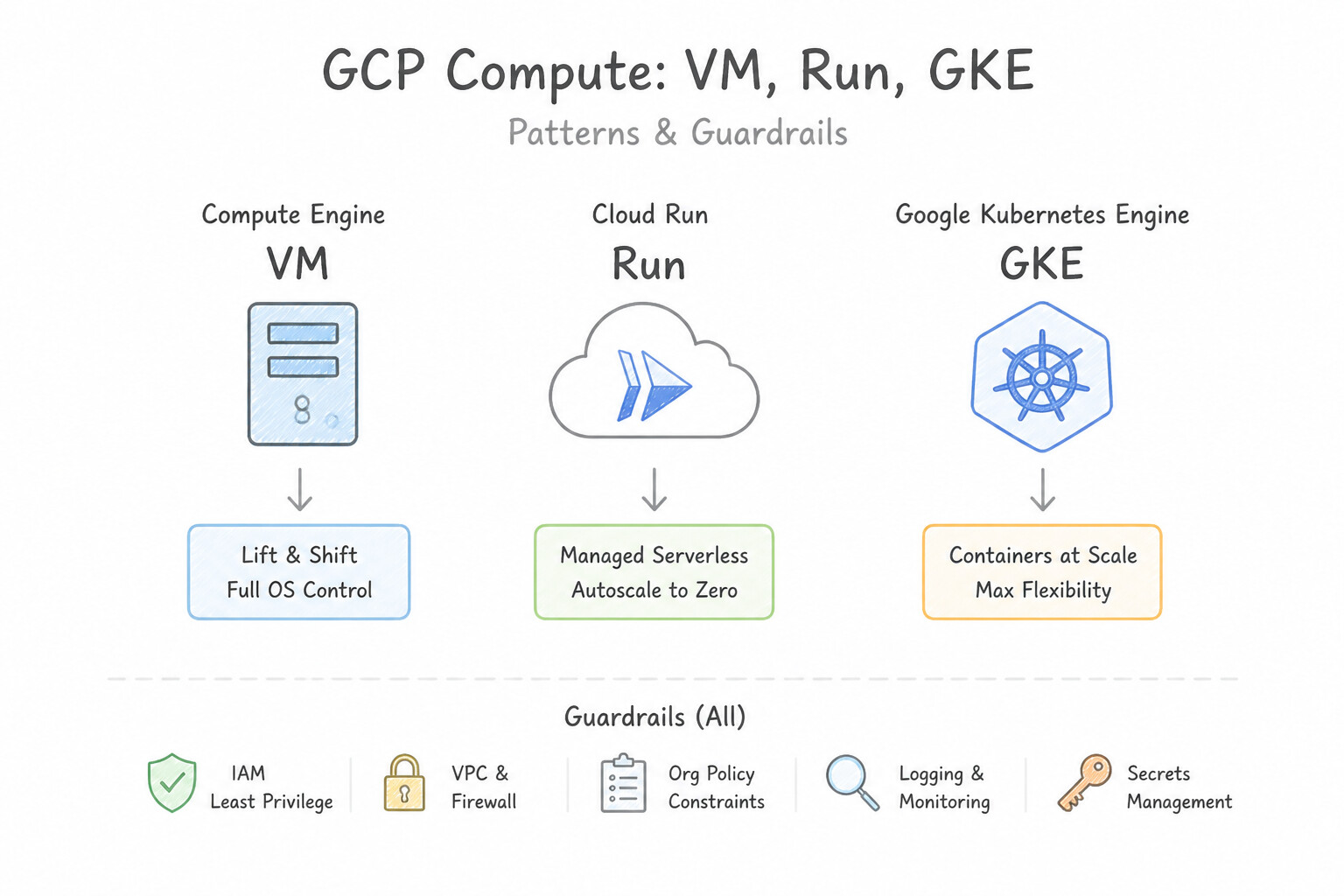
Key Implementation Patterns
- Legacy Application Lift and Shift: Use Provision a Compute Engine virtual machine (VM) and configure the required operating system. Compute Engine provides full OS control, allowing custom kernels and persistent daemons required for legacy lift-and-shift scenarios. (Avoid alternative: Cloud Run is for stateless containerized applications and does not support custom kernels or persistent background daemons.)
- Stateless Web API with Sporadic Traffic: Use Deploy the container to Cloud Run. Cloud Run allows you to run stateless containers that scale to zero when not in use and scale up almost instantly to handle spikes, minimizing management and cost. (Avoid alternative: GKE Standard involves managing node infrastructure and typically incurs continuous costs, which does not fit the requirement to avoid management and minimize costs during downtime.)
- Complex Microservices with Service Mesh: Use Deploy the application on Google Kubernetes Engine (GKE). Configure the cluster to support Istio and use Helm for deployments. GKE is a managed Kubernetes service that natively supports Helm, Istio, and granular network policies.
Key Takeaways (2.1a)
- Compute Engine is the default choice for migrating legacy applications that require OS-level changes or specific kernels.
- Cloud Run and GKE require applications to be containerized.
- Managed services (Serverless) generally do not support persistent background daemons or custom OS kernels.
- 'Lift and shift' usually implies moving to Virtual Machines (IaaS) to avoid code modifications.
Consideration 2.1b: Launching a compute instance (availability policy, ssh keys)
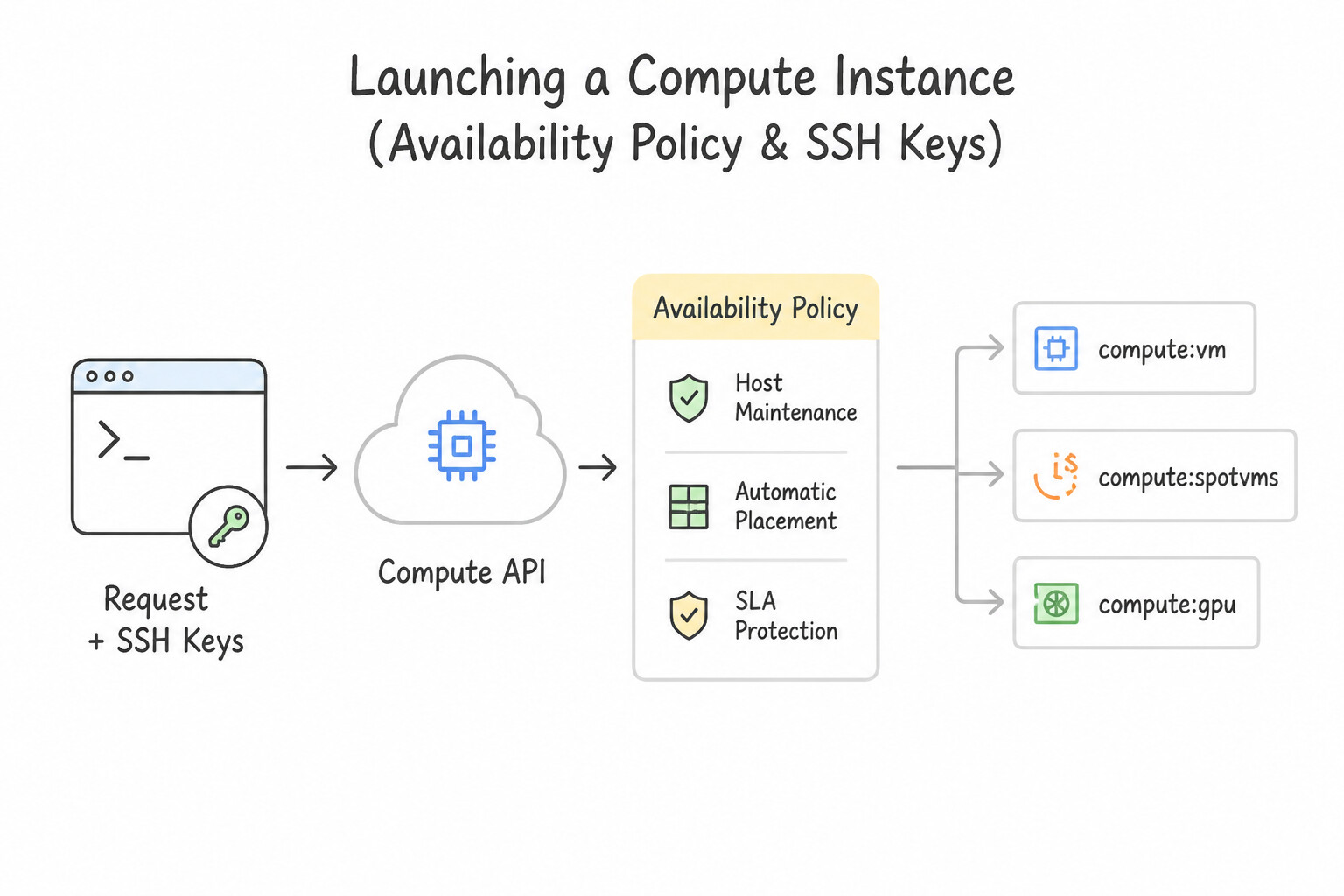
- Host Maintenance & Availability Policy: Every Compute Engine VM has an availability policy governing what happens during Google host hardware maintenance or unexpected host failures:
- On Host Maintenance:
Migrate(Live Migration — default for standard VMs, moves the running VM seamlessly with zero reboot) vs.Terminate(mandatory for VMs with attached GPUs, Local SSDs, or Spot VMs). - Automatic Restart:
On(default — automatically restarts the VM if terminated by a hardware crash; does not restart if a user runssudo shutdowninside the OS). - Startup Scripts via Metadata: Pass initialization scripts to Linux VMs using
--metadata=startup-script="..."(inline) or--metadata-from-file=startup-script=init.sh(local file) or--metadata=startup-script-url=gs://bucket/init.sh(for scripts > 256 KB stored in Cloud Storage).
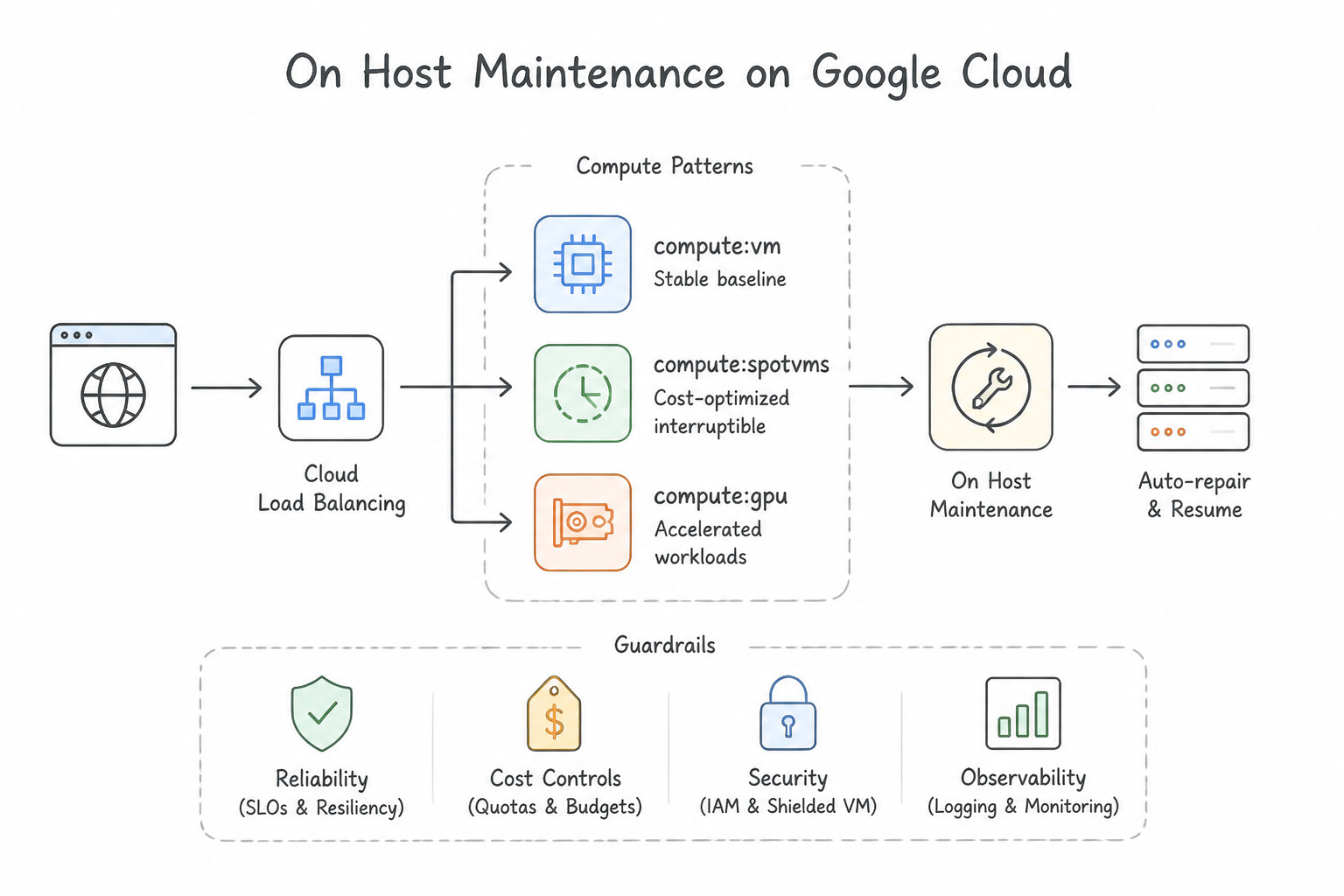
Key Implementation Patterns
- Cost Optimization for Fault-Tolerant Batch Jobs: Use Set the VM provisioning model to Spot. Spot VMs offer significant discounts for fault-tolerant workloads that can handle interruptions, matching the budget and technical requirements. (Avoid alternative: Standard instances are full-priced and prioritized for availability, making them less cost-effective than Spot VMs for this scenario.)
- High Availability for Legacy Database: Use Set the "On-host maintenance" setting to "Migrate VM instance". The "Migrate VM instance" setting enables Live Migration, keeping the VM running during host maintenance. (Avoid alternative: Terminating the instance causes downtime during maintenance, which contradicts the requirement.)
- GPU Instance Maintenance Constraints: Use Set the "On-host maintenance" setting to "Terminate VM instance". You must set the maintenance policy to Terminate because GPU instances cannot live migrate. (Avoid alternative: Instances with attached GPUs do not support live migration.)
Key Takeaways (2.1b)
- Spot VMs are the most cost-effective option for fault-tolerant, batch, or stateless workloads.
- Standard VMs should be used for stateful applications or workloads that cannot tolerate interruption.
- Spot VMs (and legacy Preemptible VMs) can be terminated by Google at any time, so your application must handle interruptions gracefully (e.g., using checkpoints).
- Sole-tenant nodes are for dedicated hardware requirements and are generally more expensive.
Consideration 2.1c: Choosing appropriate storage for compute engine (zonal/regional persistent disk, hyperdisk)
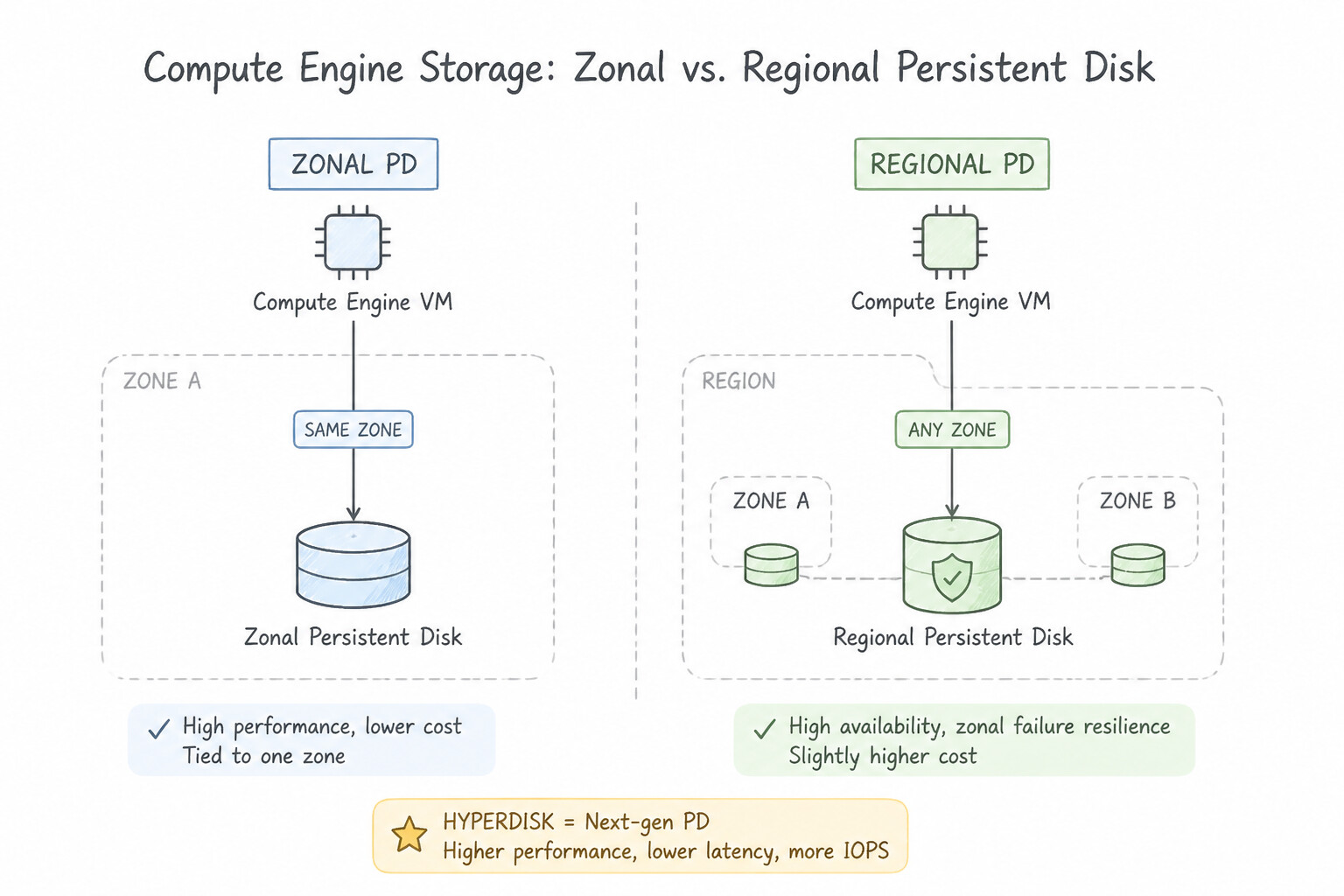
- Zonal vs. Regional Persistent Disk (PD):
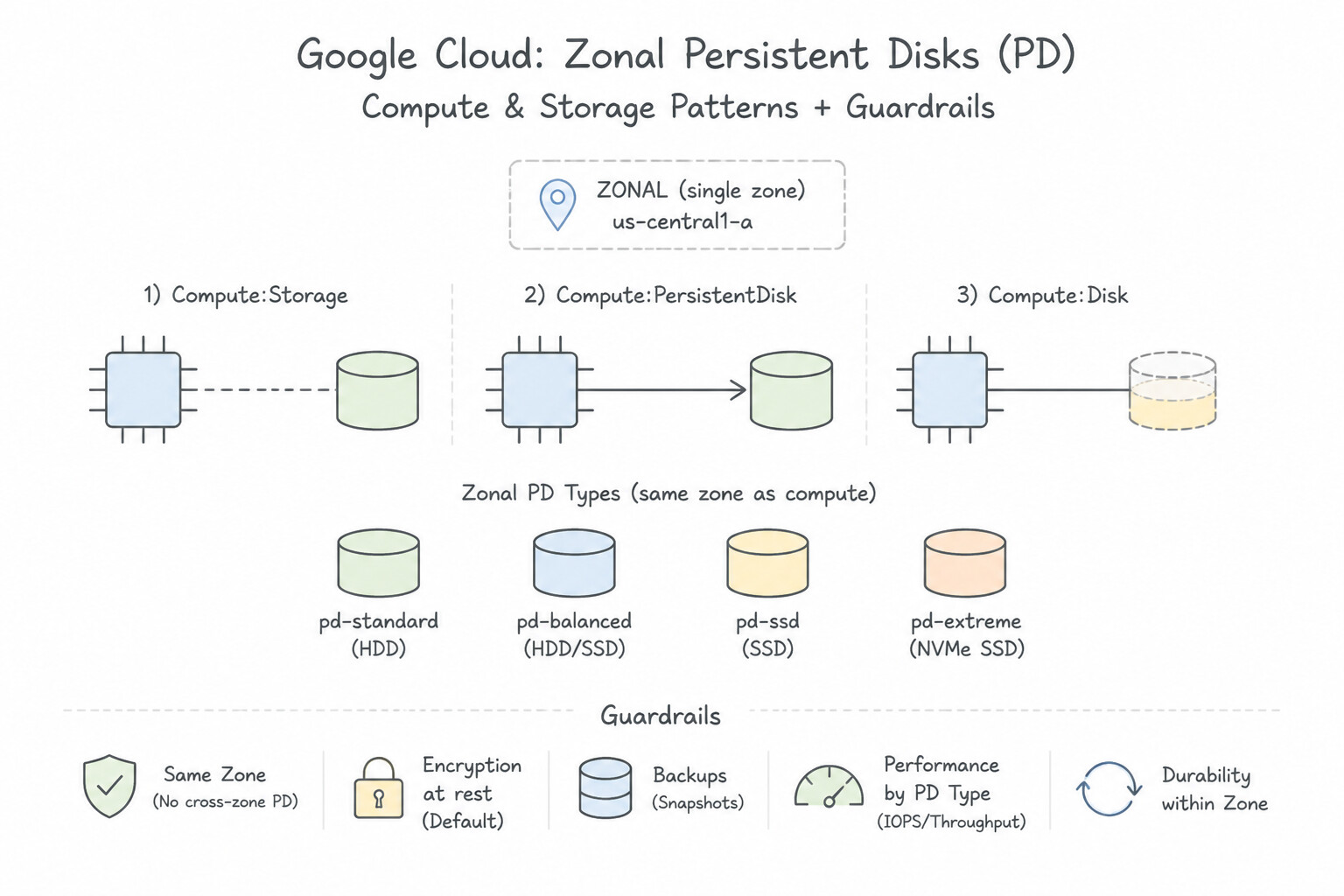
- Zonal PD (
pd-standard,pd-balanced,pd-ssd,pd-extreme): Replicated within a single zone. - Regional PD (
pd-standard,pd-balanced,pd-ssd): Synchronously replicated across two zones in the same region. If the primary VM's zone goes down, a Regional PD can be force-attached (--force-attach) to a standby VM in the secondary zone immediately without waiting to restore a snapshot! - Google Cloud Hyperdisk (
hyperdisk-balanced,hyperdisk-extreme,hyperdisk-throughput,hyperdisk-ml): - Next-generation block storage for new machine series (such as
C3,N4,M3,C4). Unlike Persistent Disk, Hyperdisk decouples IOPS and throughput from disk size—allowing you to provision a small 500 GB disk with massive IOPS, dynamically tune IOPS/throughput online without downtime, and aggregate capacity/performance across hundreds of disks using Hyperdisk Storage Pools. - Local SSD: Physically attached NVMe storage on the host server. Delivers ultra-low latency and extreme IOPS, but data is ephemeral—it survives a guest OS reboot (
sudo reboot), but is permanently wiped if the VM is stopped (gcloud compute instances stop), preempted, or terminated on host maintenance. Use only for scratch space or caches.
Key Implementation Patterns
- High Availability Database Storage: Use Create a Regional Persistent Disk and attach it to the VM. Regional Persistent Disks synchronously replicate data across two zones, ensuring zero data loss if a zone fails. (Avoid alternative: Zonal Persistent Disks reside in a single zone and do not offer cross-zone replication.)
- Decoupling Performance from Capacity: Use Create a Hyperdisk Extreme volume. Hyperdisk Extreme allows you to provision IOPS and throughput independently of disk capacity. (Avoid alternative: Standard persistent disks have low performance that is tied to disk size.)
- Cost-Effective Batch Processing: Use Attach Standard persistent disks (pd-standard) to the instances. Standard persistent disks are HDD-backed and offer the lowest cost for workloads involving sequential writes that are not time-critical. (Avoid alternative: Balanced persistent disks use SSDs and are more expensive than Standard persistent disks, making them less suitable when cost minimization is the priority.)
Key Takeaways (2.1c)
- Regional Persistent Disks provide synchronous replication across two zones.
- Use Regional Persistent Disks when you need High Availability (HA) and zero data loss (RPO=0) during a zonal outage.
- Zonal Persistent Disks are limited to a single zone and do not survive zonal failures.
- Local SSDs are ephemeral and not suitable for critical persistent data without app-level replication.
Consideration 2.1d: Creating an autoscaled managed instance group using an instance template
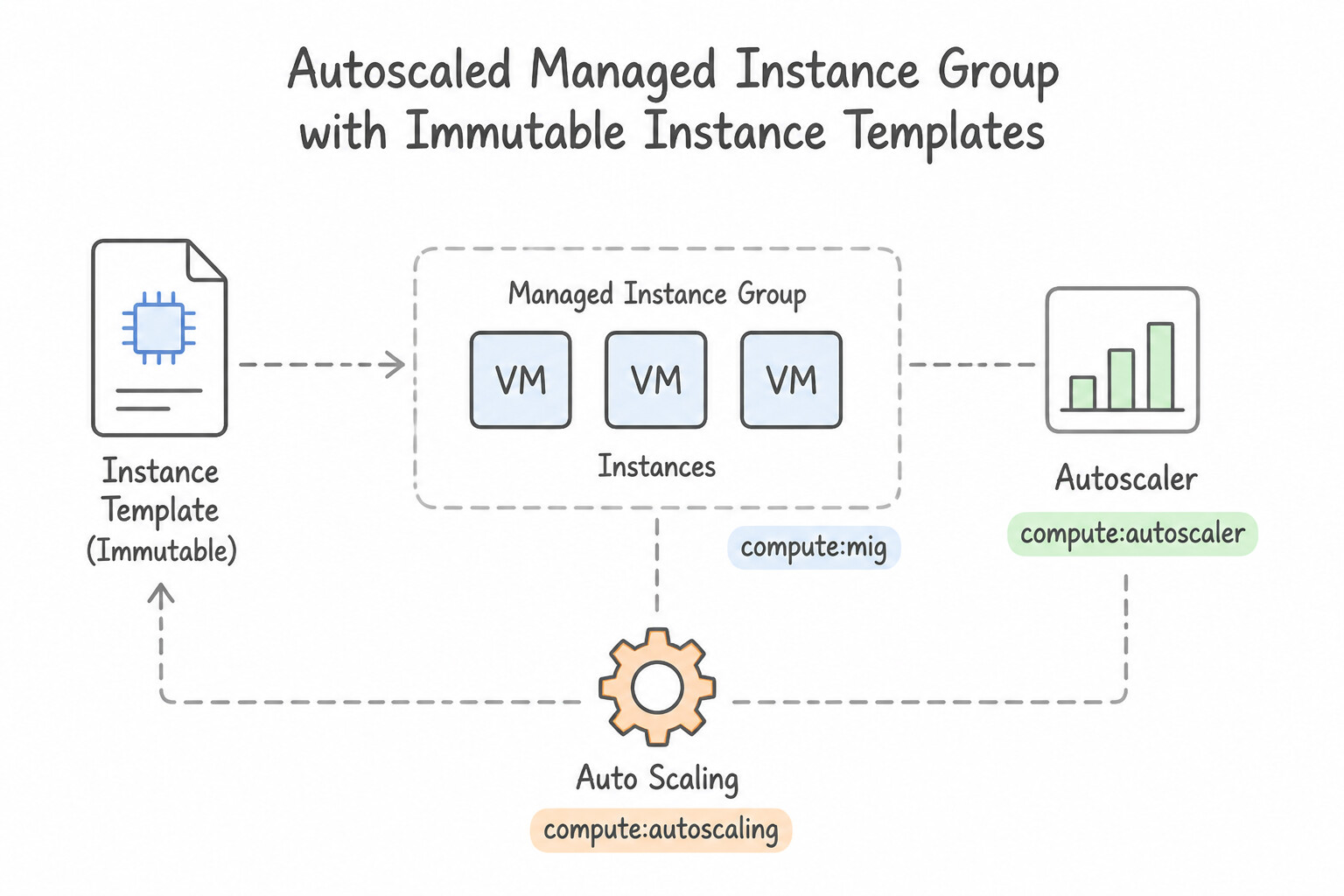
- Instance Templates Are Immutable: A Managed Instance Group requires an Instance Template that defines machine type, boot image, disks, network tags, and startup script. Because Instance Templates are immutable, updating a MIG requires creating a new Instance Template and executing a rolling update (
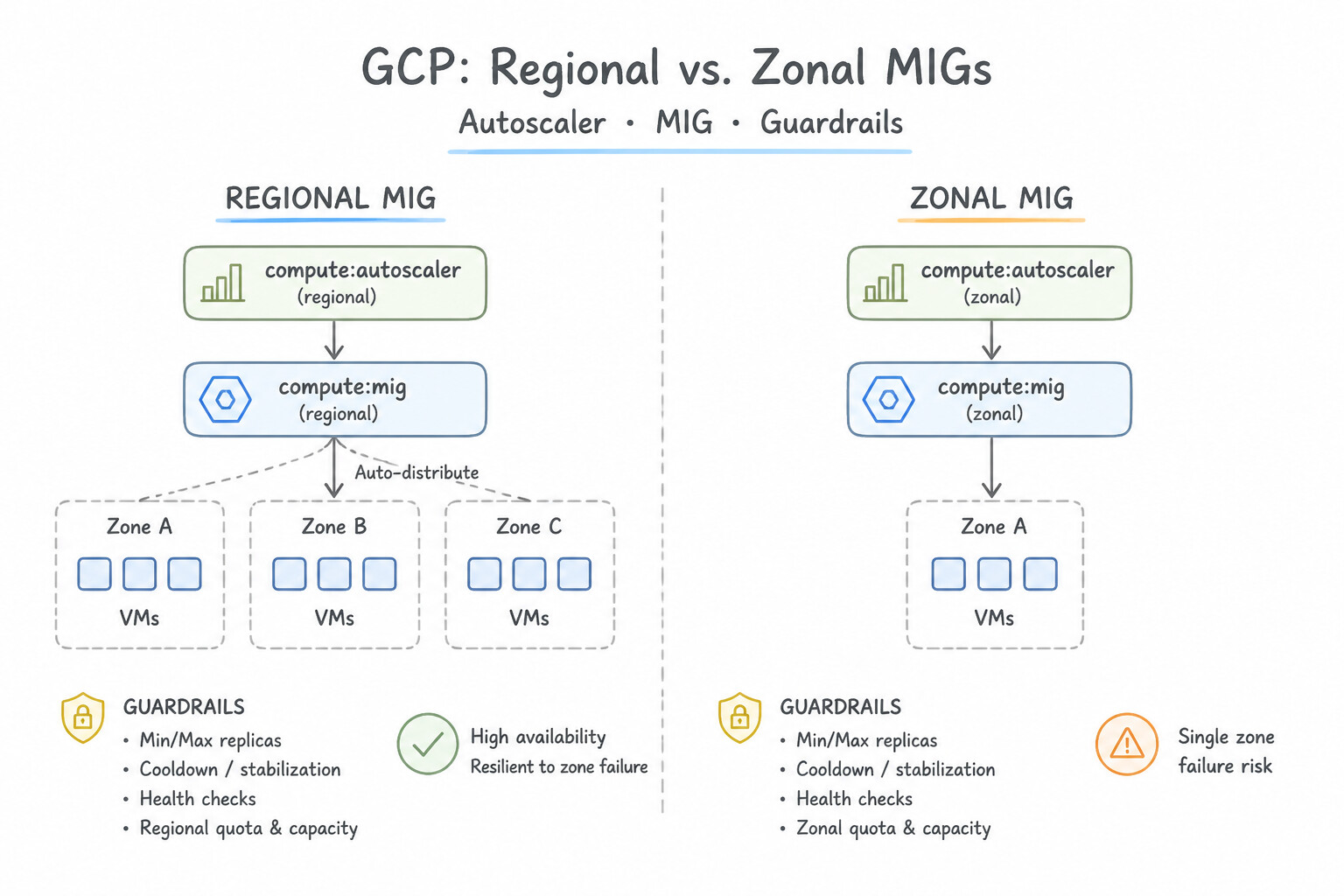
gcloud compute instance-groups managed rolling-action start-update). - Regional vs. Zonal MIGs: Always choose a Regional MIG for production high availability—it distributes instances across 3 zones in a region and prevents zonal capacity exhaustion.
- Autoscaling & Autohealing:
- Autoscaling Signals: CPU utilization, HTTP Load Balancing serving capacity, Cloud Monitoring custom metrics, or time-based Scaling Schedules (for predictable daily/weekly traffic spikes).
- Autohealing Health Checks: Periodically probes an application endpoint (e.g.,
/healthzon port 8080). If an instance fails consecutive probes, the MIG automatically deletes and recreates the VM. Always set an Initial Delay (--initial-delay, e.g., 300s) so the autohealer does not kill VMs while their startup script is still installing packages!
Key Implementation Patterns
- Scaling Based on CPU Utilization: Use Configure the MIG autoscaling policy. Select the CPU utilization metric and set the target to 70%. Configuring the MIG's native autoscaling policy with a CPU utilization target is the standard and most efficient way to handle this requirement.
- Regional vs. Zonal Availability: Use Create a regional managed instance group using the template. Configure autoscaling. Regional groups spread instances across multiple zones, ensuring availability even if one zone fails. (Avoid alternative: A zonal group lives in only one zone and cannot survive a total failure of that zone.)
- Scaling Based on Custom Metrics (Queue Depth): Use Configure the autoscaler to use a Cloud Monitoring metric based on the Pub/Sub subscription backlog. Scaling based on the queue backlog metric ensures instances are added when work piles up. (Avoid alternative: CPU usage is low, so a CPU-based trigger will not add new instances.)
Key Takeaways (2.1d)
- Managed Instance Groups (MIGs) support automatic horizontal scaling (adding/removing VMs).
- Autoscaling requires defining a policy with a specific signal (metric) and a target value.
- CPU utilization is a primary built-in signal for scaling compute-bound applications.
- Always prefer native Google Cloud features (like Autoscaler) over custom scripts (like Cloud Functions triggered by alerts) for standard operations.
Consideration 2.1e: Configuring os login
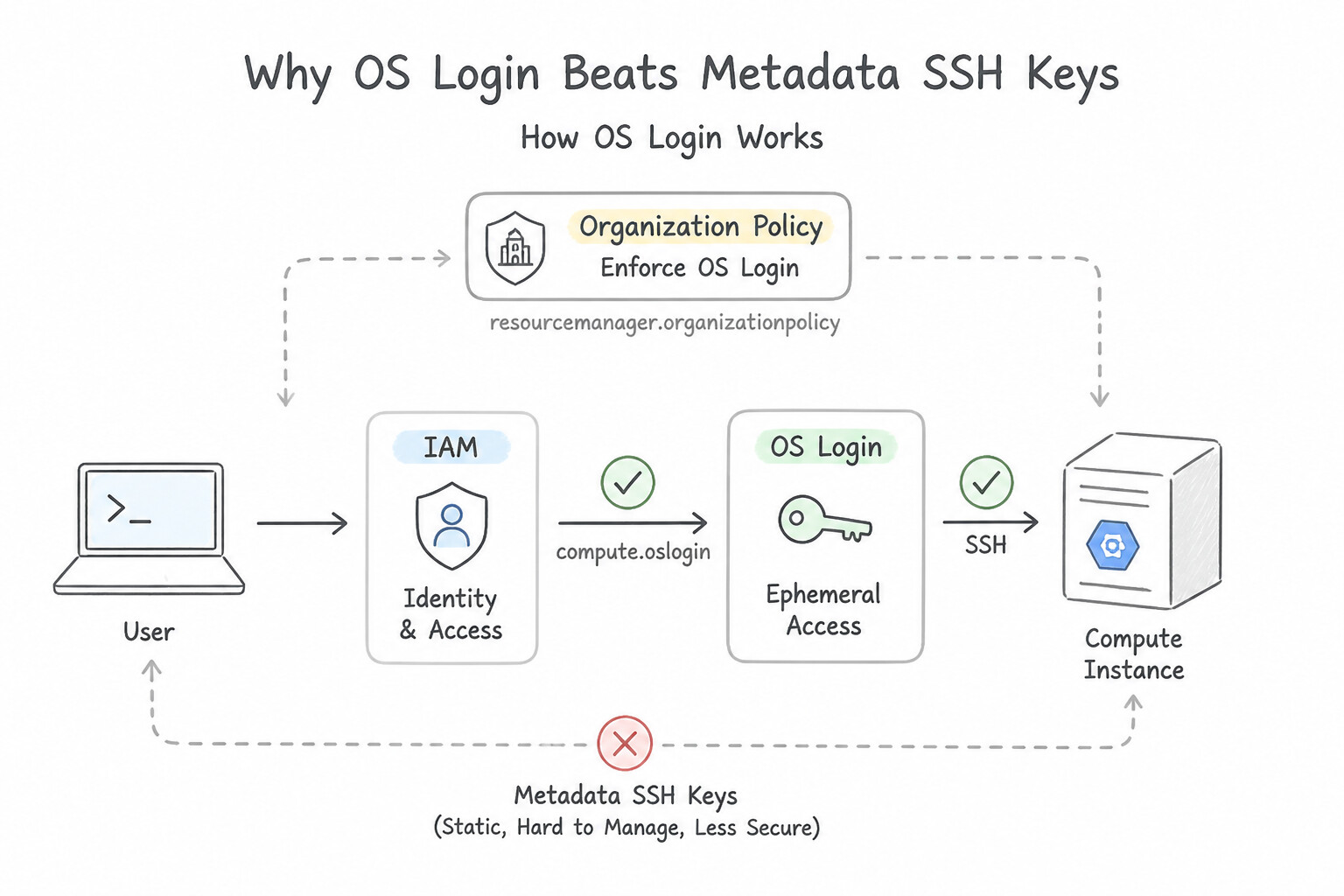
- Why OS Login Beats Metadata SSH Keys: Enabling OS Login (
enable-oslogin=TRUEin Project Metadata or Instance Metadata) disables legacyssh-keysmetadata and integrates Linux SSH authentication directly with Google Cloud IAM and Cloud Identity / Google Workspace: - Automatic POSIX account creation and UID consistency across all VMs.
- Instant access revocation the moment a user is disabled in Cloud Identity or loses their IAM role.
- Support for hardware two-factor authentication via
enable-oslogin-2fa=TRUE. - Required IAM Roles for OS Login:
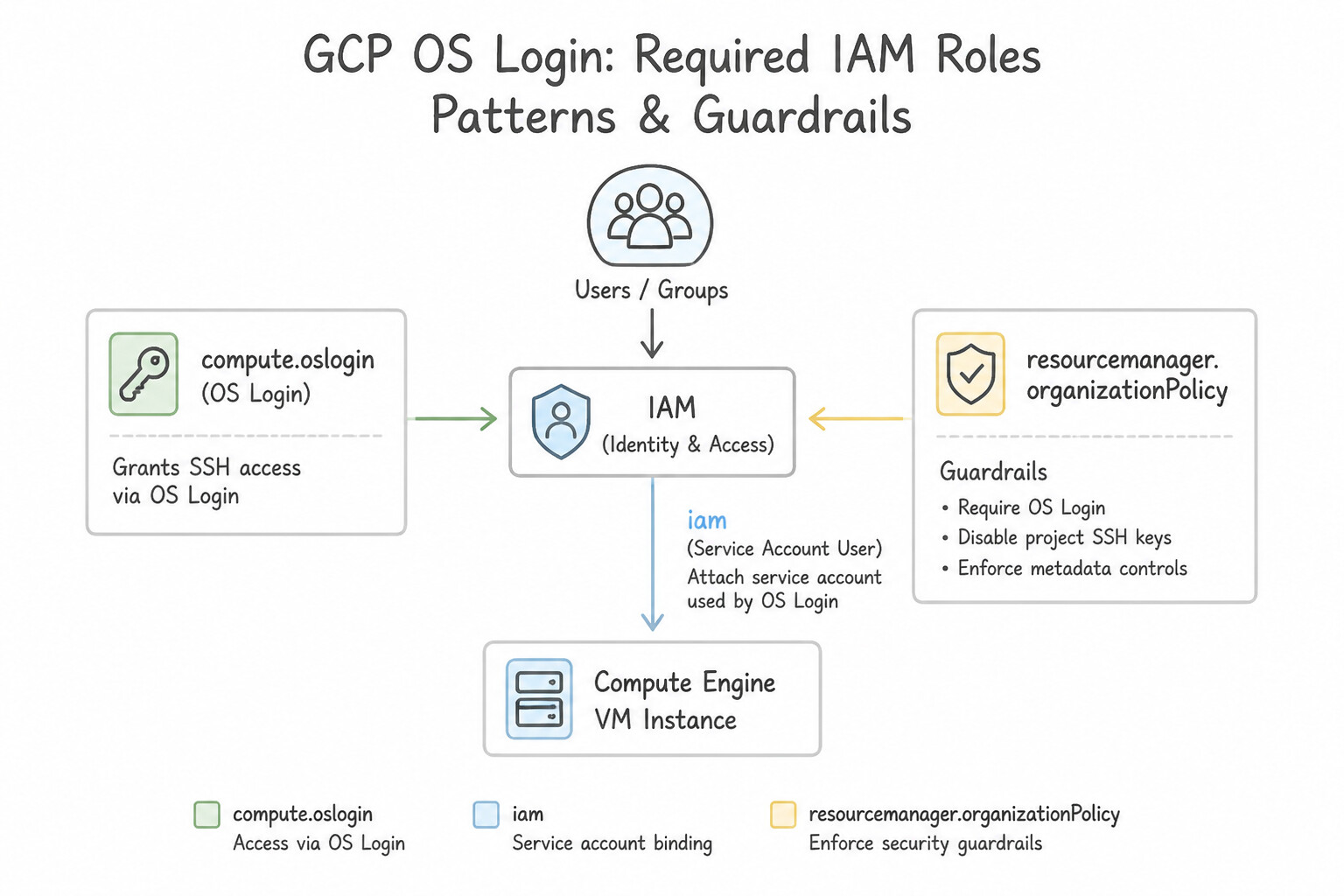
roles/compute.osLogin(Compute OS Login): Grants standard non-root SSH login (sudois not permitted).roles/compute.osAdminLogin(Compute OS Admin Login): Grants SSH login withsudo/ root privileges.- (Crucial Note) If the VM has an attached Service Account, the user also needs
roles/iam.serviceAccountUseron that Service Account!
Key Implementation Patterns
- Basic User Access Configuration: Use Compute OS Login (roles/compute.osLogin). The Compute OS Login role grants standard SSH access without root (sudo) privileges. (Avoid alternative: This role grants excessive permissions to manage instances (stop, start, delete) and violates the principle of least privilege.)
- Granting Root Privileges via OS Login: Use Grant the Compute OS Admin Login role (roles/compute.osAdminLogin) to the administrator. The Compute OS Admin Login role grants sudo privileges, allowing full administrative control over the VM. (Avoid alternative: The Compute OS Login role only allows basic SSH access without administrative (sudo) privileges.)
- Enforcing OS Login Organization-Wide: Use Enforce the
constraints/compute.requireOsLoginconstraint in an Organization Policy. Organization Policies allow you to enforce OS Login and disable metadata SSH keys across the entire hierarchy effectively. (Avoid alternative: Setting metadata manually on every instance is not scalable and does not enforce compliance organization-wide.)
Key Takeaways (2.1e)
- OS Login replaces SSH key metadata management with IAM roles.
- Use 'roles/compute.osLogin' for standard SSH access without root privileges.
- Use 'roles/compute.osAdminLogin' when sudo or root permissions are required.
- Always follow the principle of least privilege when assigning IAM roles.
Consideration 2.1f: Configuring vm manager
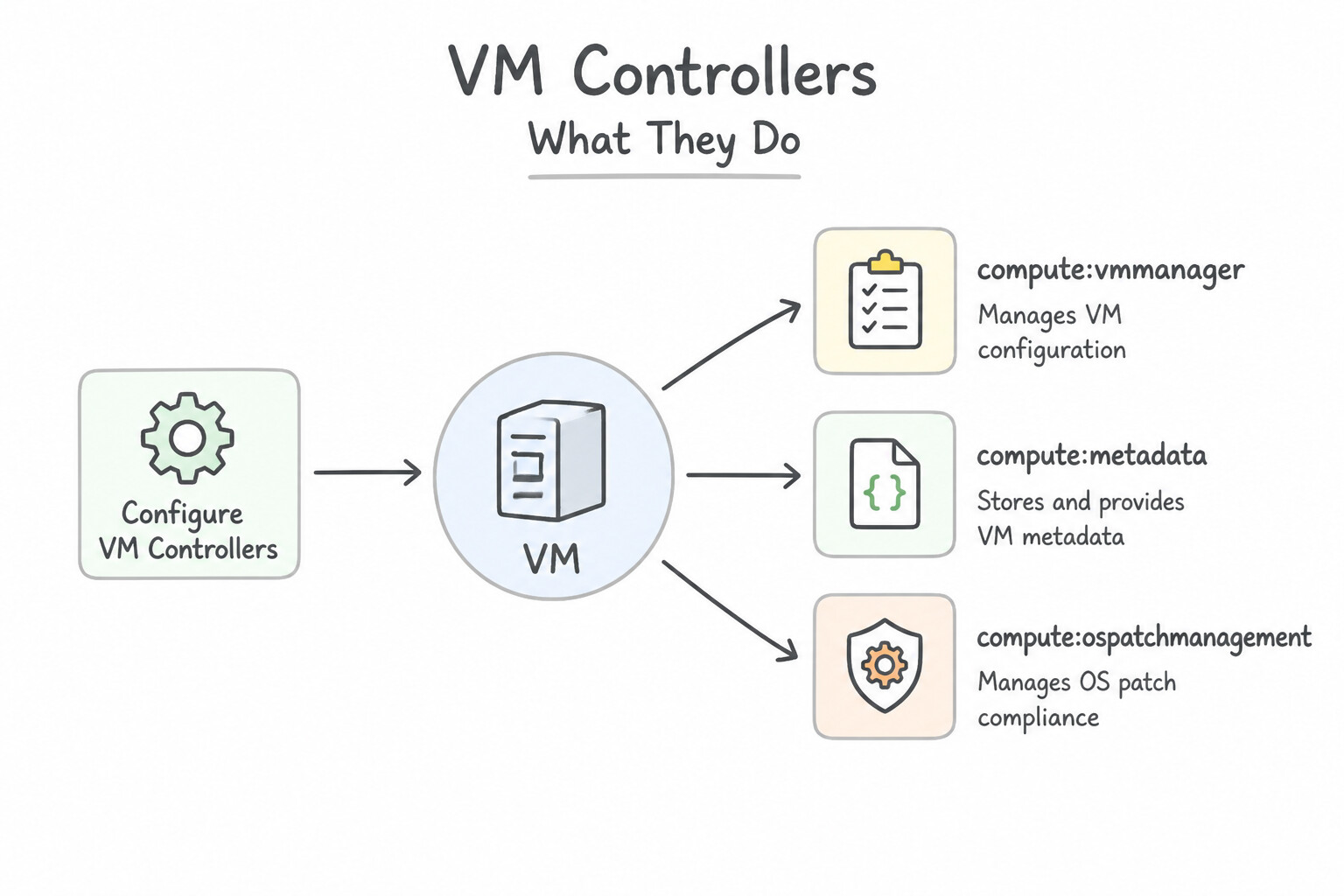
- What VM Manager Does: VM Manager is a suite of tools (
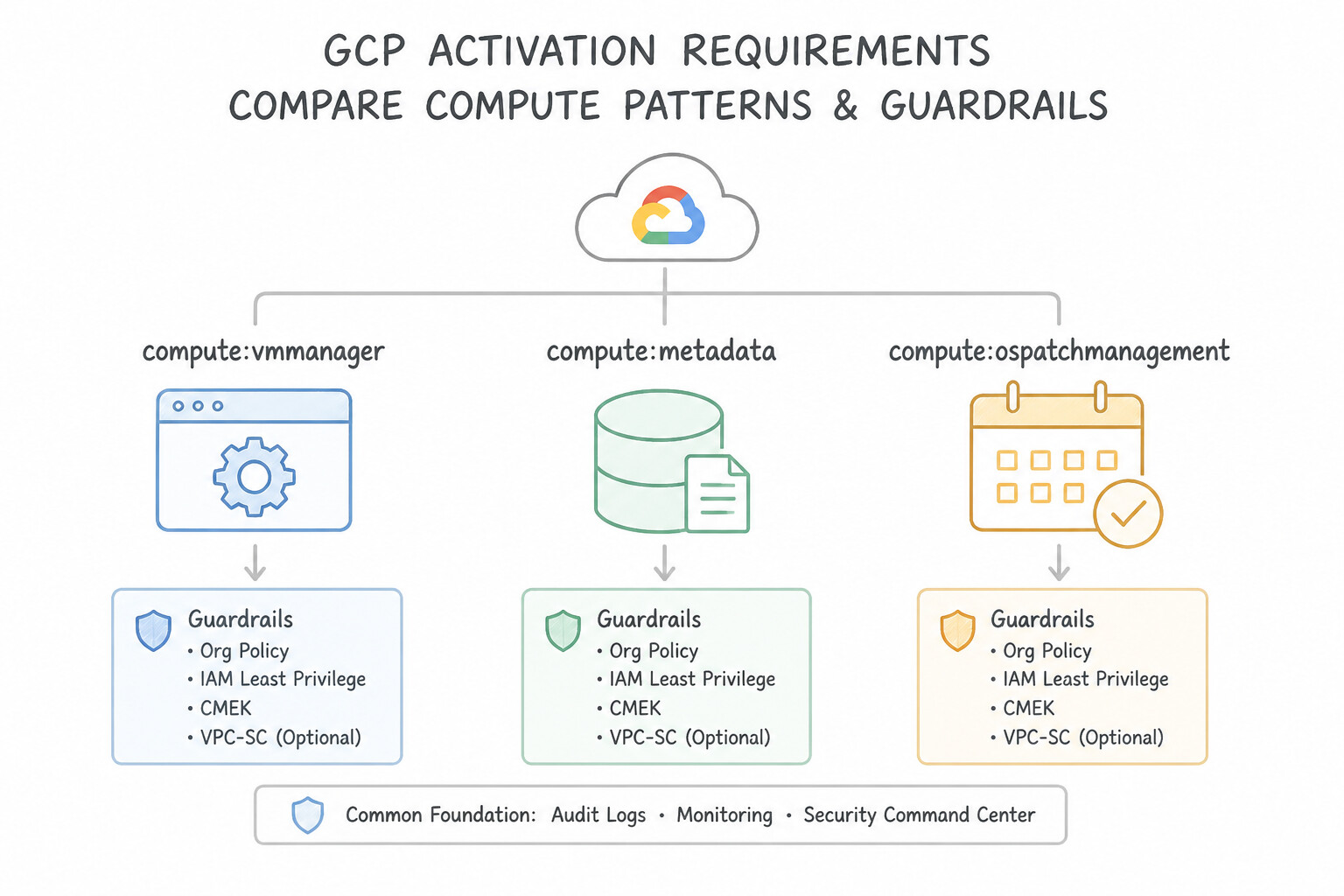
OS Inventory Management,OS Patch Management, andOS Policy / Configuration Management) that uses the pre-installed OS Config Agent on Compute Engine VMs to manage large fleets of Windows and Linux VMs centrally. - Activation Requirements: To enable VM Manager across a project:
- Enable the
osconfig.googleapis.comAPI. - Set Project Metadata
enable-osconfig=TRUE(andenable-guest-attributes=TRUEfor inventory reporting). - Ensure VMs have network access to Google APIs (via external IP, Cloud NAT, or Private Google Access) and a Service Account that can communicate with the OS Config service.
Key Implementation Patterns
- Enabling VM Manager Prerequisites: Use Set the custom metadata key "enable-os-config" to "TRUE" for the instances. You must set the metadata key 'enable-os-config' to 'TRUE' to activate the pre-installed OS Config agent. (Avoid alternative: The Cloud Monitoring agent is for metrics and logs, not for patch management.)
- Scheduling Recursive Patch Jobs: Use Use VM Manager to create a patch deployment. Set the schedule to weekly and target the VMs using instance labels. VM Manager Patch Deployments allow you to centrally schedule recursive patch jobs for groups of VMs. (Avoid alternative: Managing individual cron jobs on each VM is manual, hard to scale, and lacks centralized reporting.)
- Targeting Specific Environments: Use Create an OS Patch Management job. Use the instance filter to target VMs with the "env:staging" label. Use OS Patch Management and filter instances by the label "env:staging" to apply patches only to the specific subset of VMs. (Avoid alternative: Manual updates via SSH do not utilize VM Manager automation and are inefficient for fleet management.)
Key Takeaways (2.1f)
- VM Manager requires the OS Config Service API to be enabled.
- The OS Config agent must be installed and active on the target VMs.
- For many Google-provided images, you must set the metadata key
enable-os-config=TRUEto activate the agent.- Use VM Manager for centralized OS administration tasks like patching and inventory management.
Consideration 2.1g: Using spot vms and custom machine types
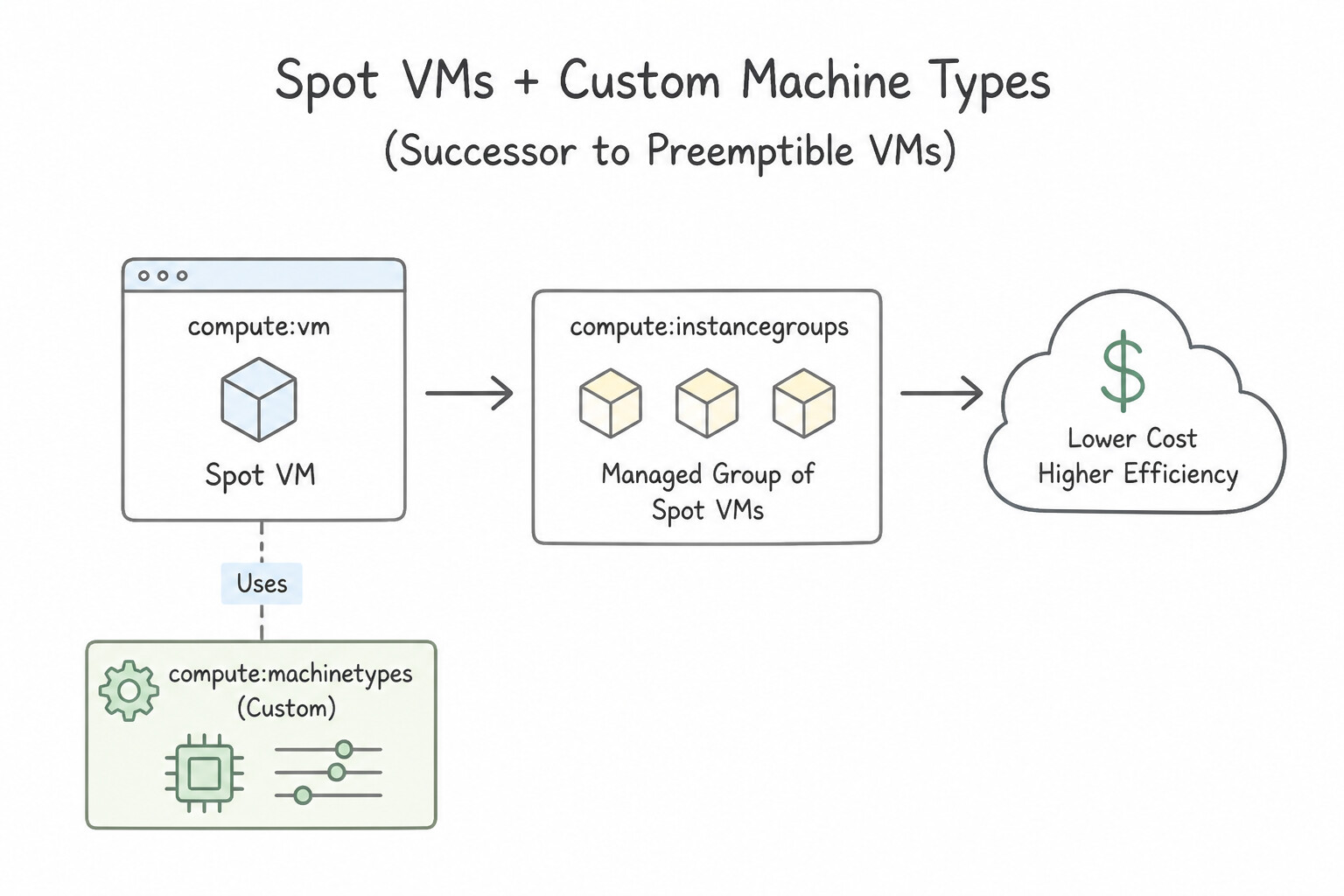
- Spot VMs (Successor to Preemptible VMs):
- Offer 60%–91% discounts off standard VM pricing using spare Google Cloud capacity.
- Unlike legacy Preemptible VMs (which had a hard 24-hour max runtime), Spot VMs have NO maximum runtime limit—they run until you stop them or until Compute Engine reclaims the capacity.
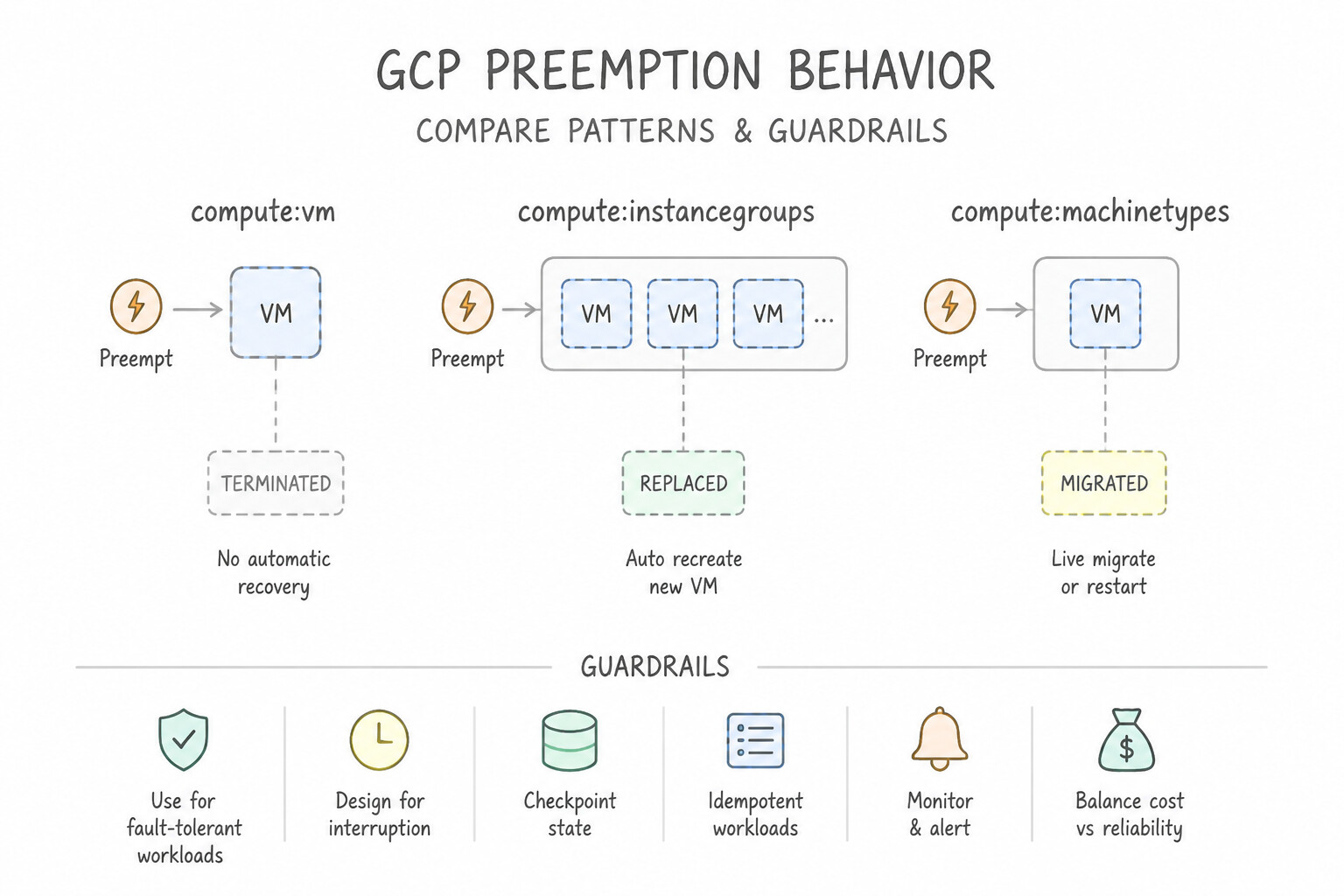
- Preemption Behavior: Compute Engine can reclaim a Spot VM at any time with a 30-second ACPI shutdown signal (which you can catch in a Shutdown Script to save checkpoints to Cloud Storage). Spot VMs have no SLA, cannot live-migrate, and are excluded from Free Tier credits.
- Custom Machine Types: When predefined machine ratios (
e2-standard-4,n2-highmem-8) leave you overpaying for unused RAM or vCPUs, create a Custom Machine Type (e.g.,n2-custom-6-20480for 6 vCPUs and 20 GB RAM). If you need more than the standard memory-per-vCPU ceiling (8 GB per vCPU on N1/N2), enable Extended Memory (--custom-extensions).
Key Implementation Patterns
- Optimizing Batch Video Transcoding Costs: Use Configure the managed instance group to use Spot VMs. Spot VMs provide the lowest cost for fault-tolerant, interruptible workloads. (Avoid alternative: Committed use discounts are more expensive than Spot VMs and require a long-term commitment.)
- Migrating Legacy Apps with Specific HW Requirements: Use Create a VM instance using a custom machine type with 6 vCPUs and 20 GB of RAM. Custom machine types allow you to specify exact vCPU and memory values to fit workloads that do not align with predefined shapes. (Avoid alternative: This option provides more resources than necessary (8 vCPUs, 30 GB RAM), leading to wasted costs.)
- Handling Spot VM Preemption Gracefully: Use Add a shutdown script to the VM metadata that saves the state to Cloud Storage. Shutdown scripts run automatically when a VM is stopped or preempted, allowing you to save state within the 30-second warning window. (Avoid alternative: Data on Local SSDs is lost when the VM instance stops or is preempted.)
Key Takeaways (2.1g)
- Use Spot VMs for stateless, fault-tolerant, or batch workloads to achieve the highest cost savings.
- Spot VMs can be preempted (stopped) by Google at any time; ensure your application handles this gracefully.
- Committed Use Discounts are best for predictable, steady-state workloads that cannot tolerate interruptions.
- Predefined machine types have fixed resource ratios (CPU to Memory).
Consideration 2.1h: Installing and configuring kubectl
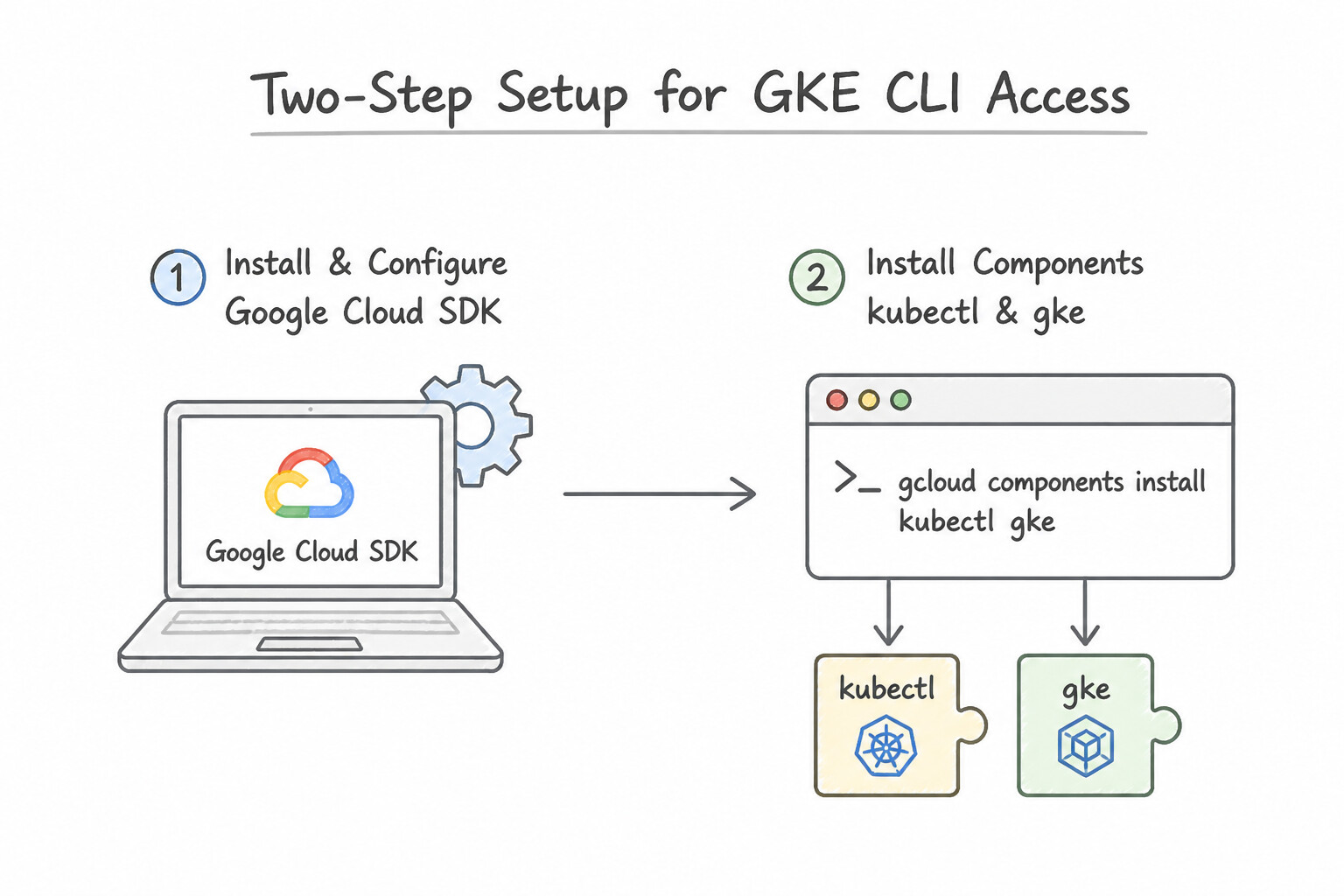
- Two-Step Setup for GKE CLI Access:
- Install
kubectland the mandatory authentication plugin:gcloud components install kubectl gke-gcloud-auth-plugin(or viaapt-get install kubectl google-cloud-cli-gke-gcloud-auth-plugin). - Populate
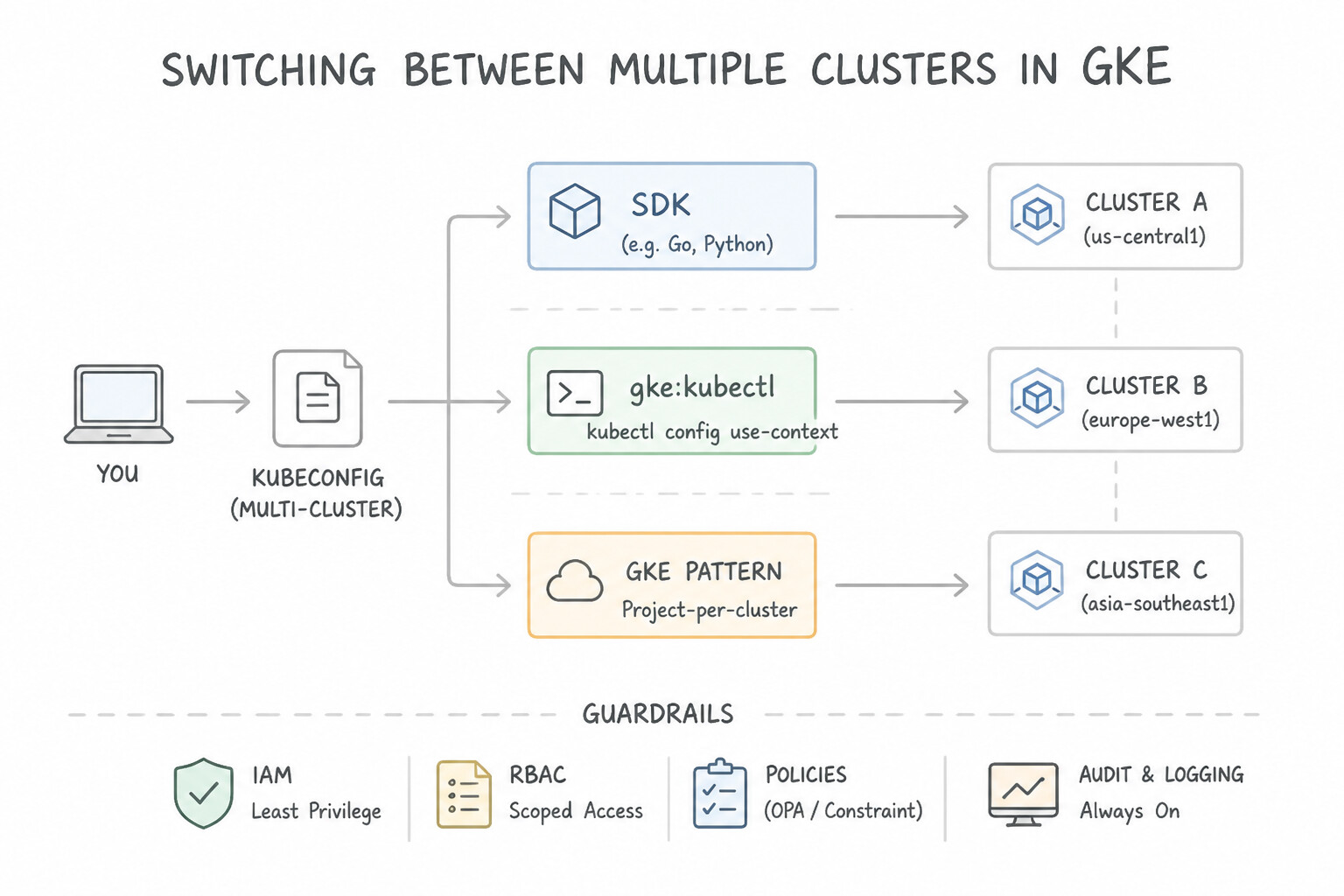
~/.kube/configwith cluster endpoint and OAuth/IAM credentials:gcloud container clusters get-credentials <CLUSTER_NAME> --region=<REGION> --project=<PROJECT_ID> - Switching Between Multiple Clusters: Use
kubectl config get-contextsto list configured clusters andkubectl config use-context <CONTEXT_NAME>to switch the active cluster target.
Key Implementation Patterns
- Initial Tool Installation via Cloud SDK: Use Run the command gcloud components install kubectl. The command gcloud components install kubectl adds the Kubernetes CLI tool to your existing gcloud installation. (Avoid alternative: This command updates existing components but does not install missing ones.)
- Generating Kubeconfig for an Existing Cluster: Use Run gcloud container clusters get-credentials web-cluster --zone us-central1-a. The get-credentials command fetches the necessary authentication details and updates your local kubeconfig file. (Avoid alternative: This command creates a new cluster rather than configuring access to an existing one.)
- Connecting to a Regional Cluster: Use Run the command gcloud container clusters get-credentials ha-prod --region us-west1. Regional clusters require the --region flag in the get-credentials command to correctly locate the control plane and configure access. (Avoid alternative: The update command modifies cluster settings on the server side, whereas get-credentials configures client-side access.)
Key Takeaways (2.1h)
- The gcloud CLI is modular and uses components for specific tools.
- Use 'gcloud components install' to add tools like kubectl.
- 'gcloud container clusters get-credentials' configures access but does not install the CLI binary.
- kubectl requires a kubeconfig file to know where the cluster is and how to authenticate.
Consideration 2.1i: Deploying gke clusters with different configurations (autopilot, regional, private)
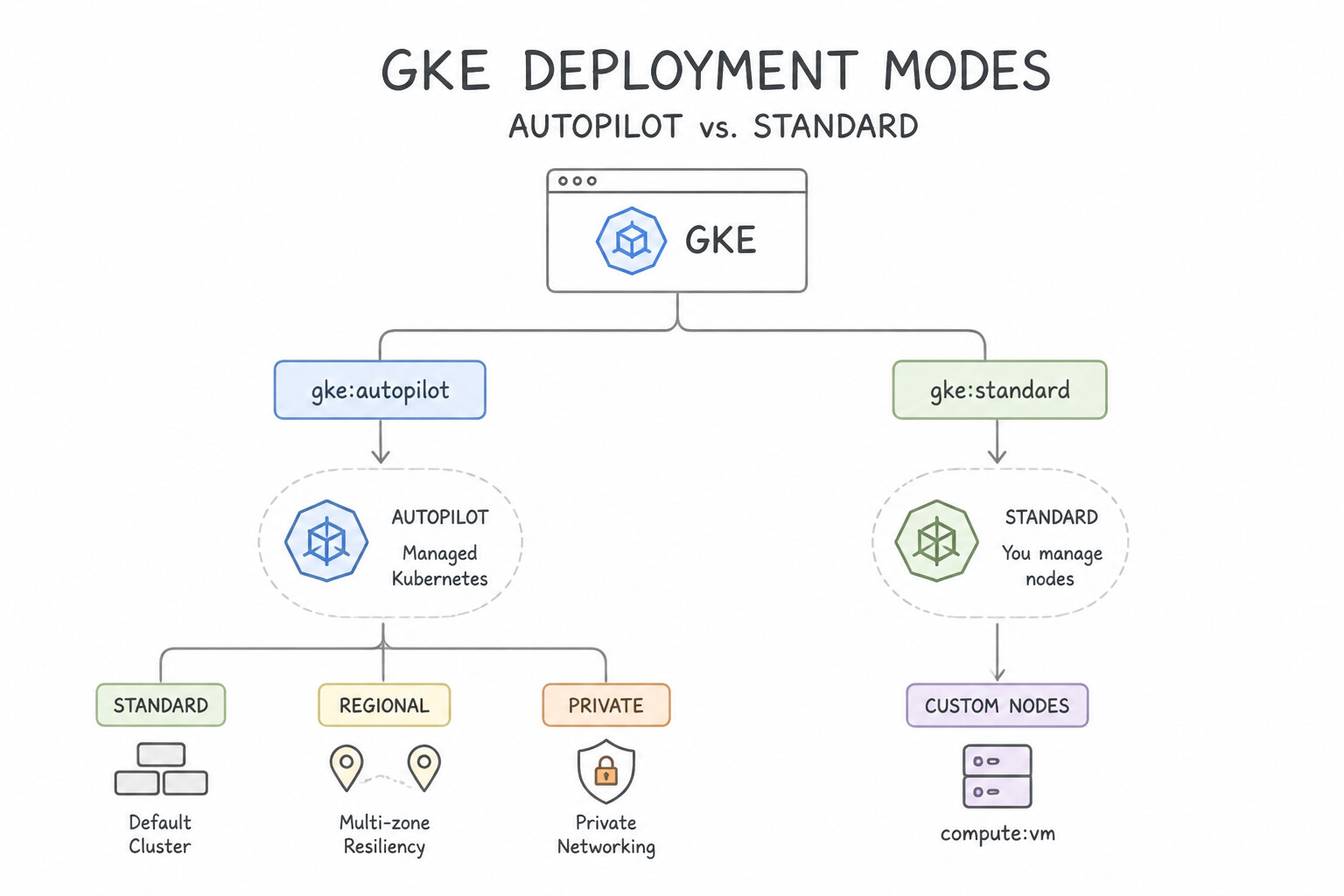
- GKE Autopilot vs. GKE Standard:
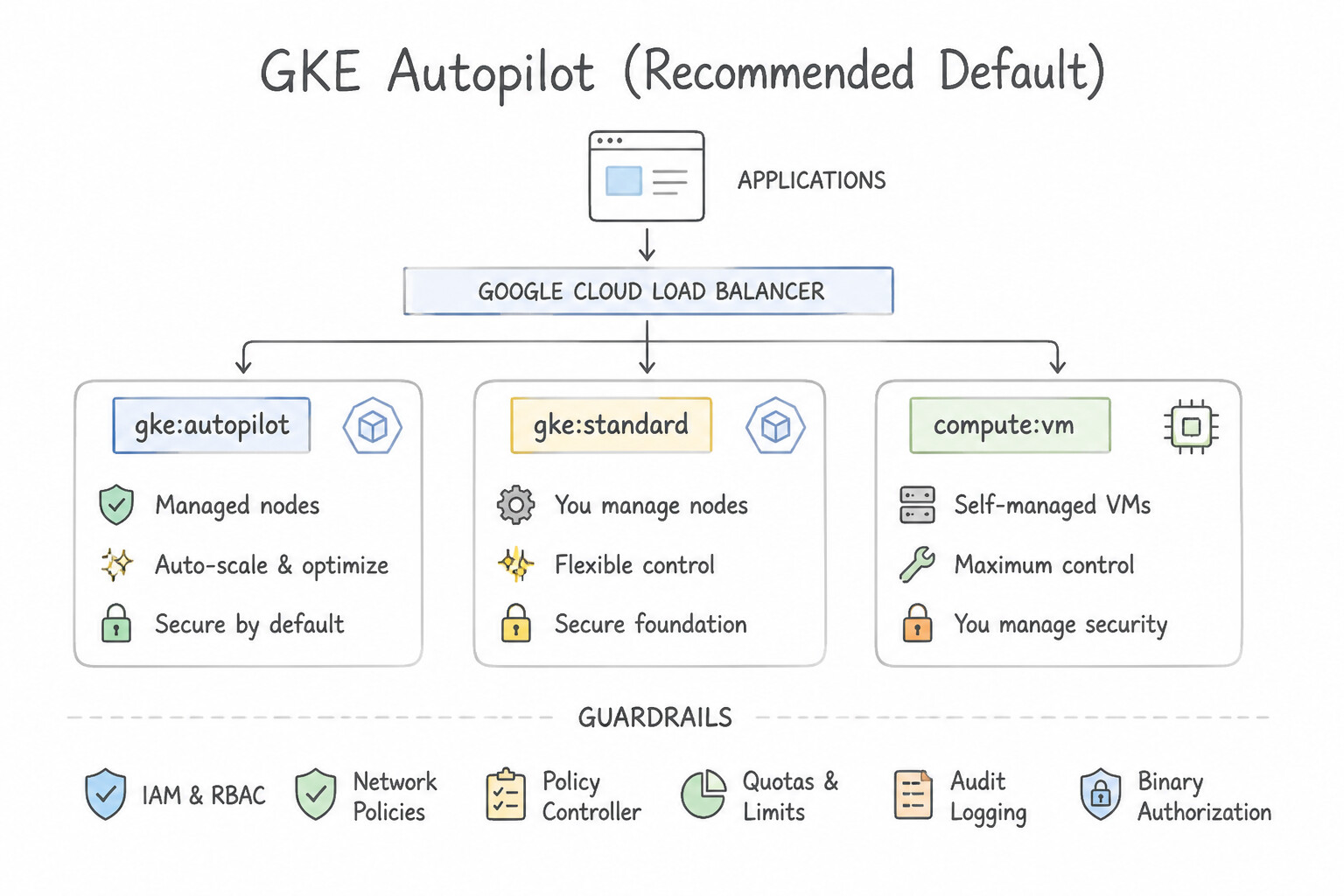
- GKE Autopilot (Recommended Default): Google provisions, scales, patches, and hardens worker nodes automatically. You pay strictly for the vCPU, memory, and ephemeral storage requested by your running Pods—zero payment for unallocated node slack!
- GKE Standard: You configure and manage Node Pools (machine types, disk sizes, Spot nodes) and pay for the underlying Compute Engine VMs regardless of how full the Pods are. Choose Standard only when you require direct host SSH access, custom kernel configurations, or privileged host-level agents not supported by Autopilot.
- Zonal vs. Regional vs. Private Clusters:
- Regional Cluster: Replicates the Kubernetes Control Plane (
kube-apiserver,etcd) AND worker nodes across 3 zones in a region for 99.95% control-plane SLA and zero-downtime control plane upgrades. - Private Cluster (
--enable-private-nodes): Worker nodes have only internal RFC 1918 IP addresses (no public IPs). Access the control plane via DNS-based control plane endpoint or Private Service Connect + Control Plane Authorized Networks.
Key Implementation Patterns
- Minimizing Operational Overhead: Use Create a GKE Autopilot cluster. GKE Autopilot fully manages the underlying infrastructure, including nodes, security patches, and scaling. (Avoid alternative: Regional control planes improve availability but do not automate node management or patching.)
- High Availability Configuration: Use Create a Regional cluster. A Regional cluster replicates the control plane across multiple zones, ensuring availability during a zonal outage. (Avoid alternative: A single-zone Zonal cluster fails completely if that zone has an outage.)
- Securing Node Connectivity: Use Create a private cluster. Ensure the nodes are configured with internal IP addresses only. Private clusters isolate nodes from the internet by removing public IP addresses and routing control plane traffic internally. (Avoid alternative: VPC-native clusters handle Pod networking but do not inherently remove public IP addresses from nodes.)
Key Takeaways (2.1i)
- GKE Autopilot creates a fully managed environment that eliminates node management.
- GKE Standard is best when you need advanced customization or control over specific node configurations.
- Small teams aiming to reduce DevOps overhead should prioritize managed services like Autopilot.
- Security best practices and resource optimization are built-in features of GKE Autopilot.
Consideration 2.1j: Deploying containerized applications to gke
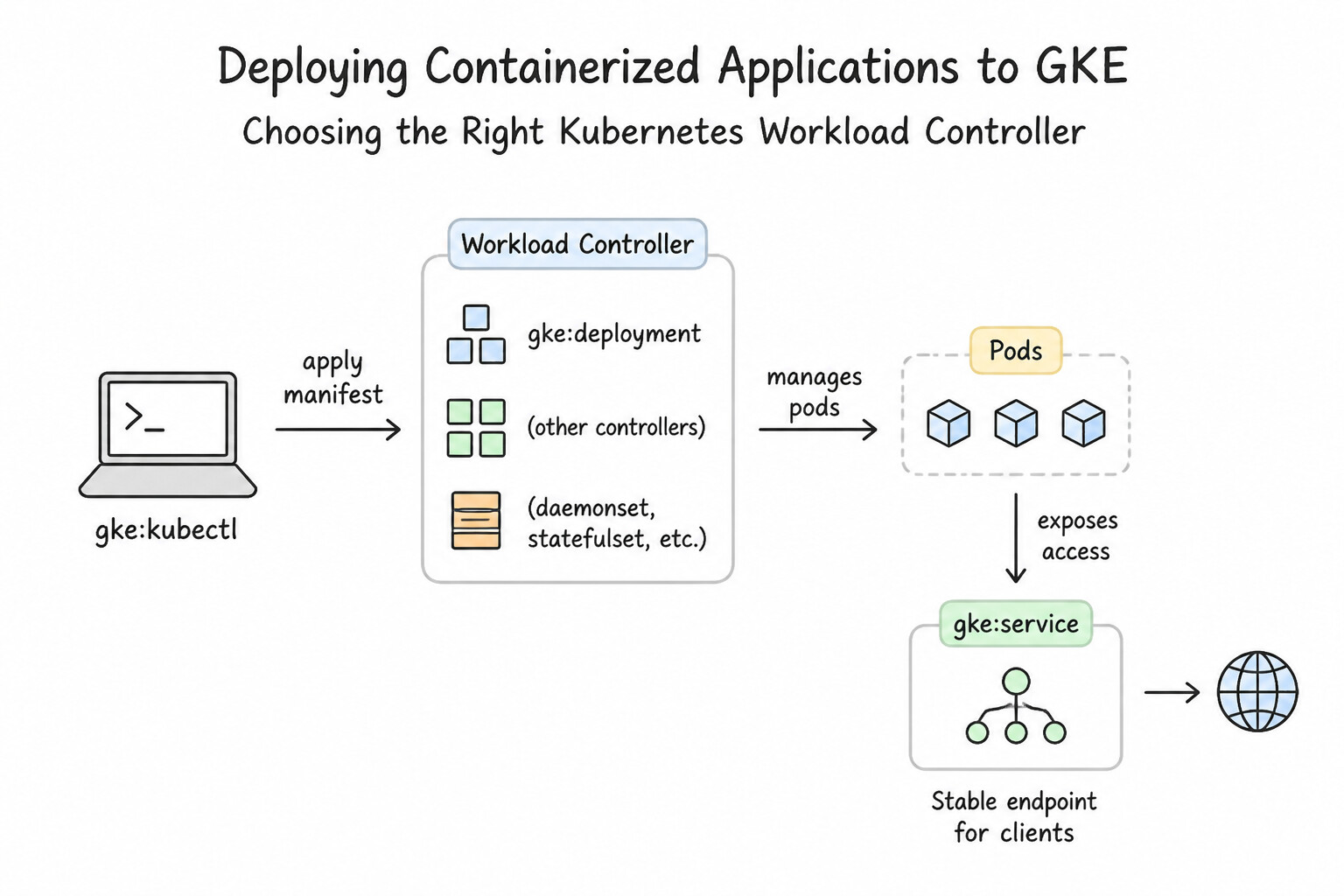
- Choosing the Right Kubernetes Workload Controller:
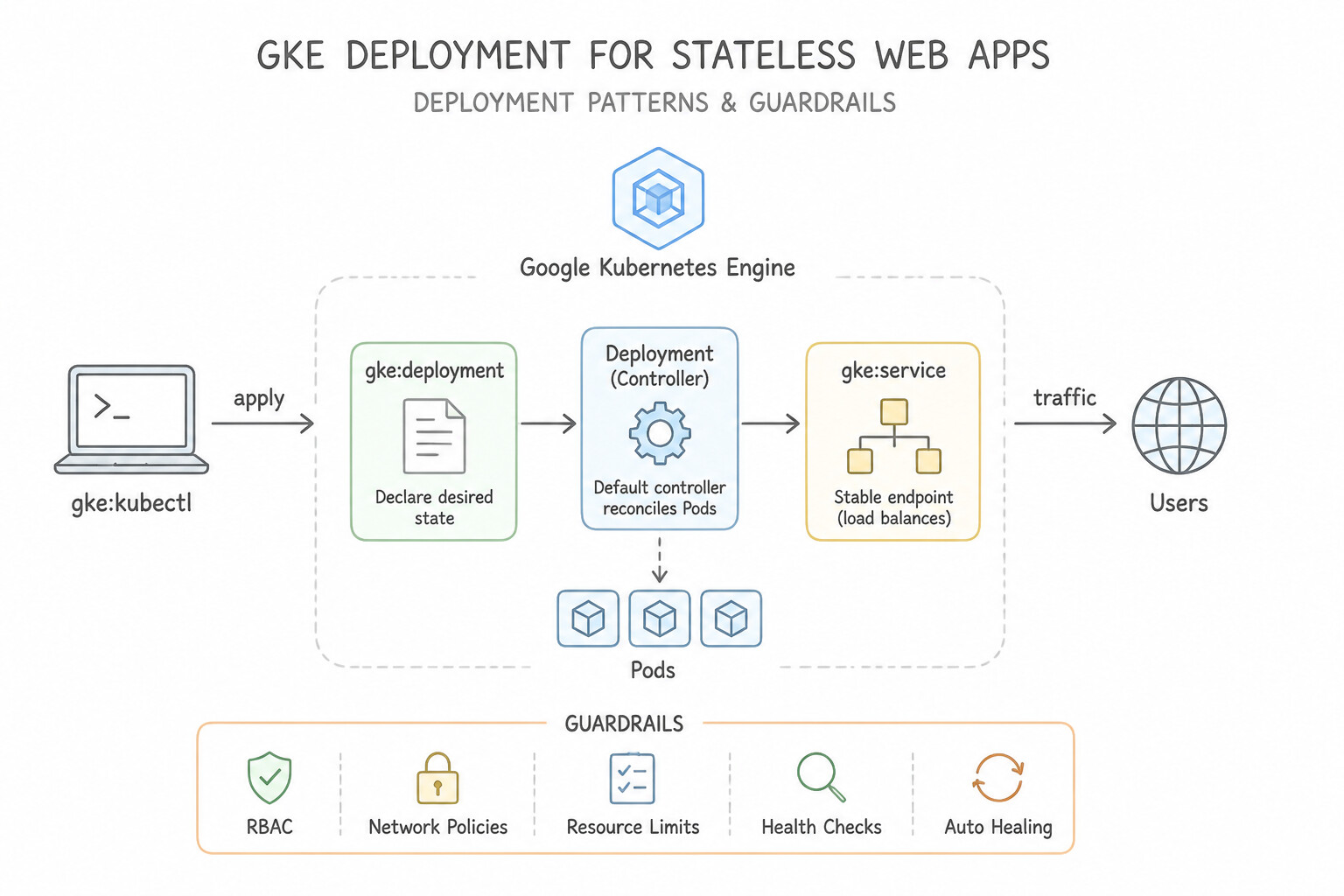
Deployment: Default controller for stateless applications (web servers, APIs). Supports declarative rolling updates (maxSurge,maxUnavailable), instant rollbacks (kubectl rollout undo), and replica scaling.StatefulSet: Required for stateful workloads (clustered databases, ZooKeeper, Kafka) that need stable, unique network identities (pod-0,pod-1), ordered sequential startup/teardown, and dedicated per-Pod PersistentVolumeClaims (volumeClaimTemplates).DaemonSet: Guarantees that exactly one Pod runs on every matching Node (or node pool vianodeSelector/taints) in the cluster—used for node-level log collectors, security scanners, and monitoring agents.Job/CronJob: Runs batch containers to completion once (Job) or on a cron schedule (CronJob).
Key Implementation Patterns
- Zero-Downtime Application Updates: Use Run the kubectl set image command to update the Deployment with the v2 container image. Updating the image triggers a Rolling Update, which gradually replaces old Pods with new ones without downtime. (Avoid alternative: Deleting a Deployment removes all running Pods immediately, causing downtime.)
- Exposing Applications Externally: Use Update the Service manifest to set the type to LoadBalancer. The LoadBalancer type triggers the provisioning of an external Google Cloud Load Balancer with a dedicated external IP address. (Avoid alternative: ClusterIP exposes the application only internally within the cluster, not to the public internet.)
- Handling Traffic Spikes Automatically: Use Create a HorizontalPodAutoscaler resource that targets the application Deployment with a target CPU utilization of 70%. HPA scales the number of pod replicas based on metrics like CPU utilization. (Avoid alternative: VPA adjusts the size (resources) of existing pods, not the number of pods.)
Key Takeaways (2.1j)
- Deployments manage stateless applications on GKE.
- The default update strategy for a Deployment is RollingUpdate, which ensures zero downtime.
- Use
kubectl set imageorkubectl applyto update a Deployment's container image.- Services are used for networking and discovery, not for defining container versions.
Consideration 2.1k: Deploying applications to serverless platforms for event processing (pub/sub, cloud storage events, eventarc)
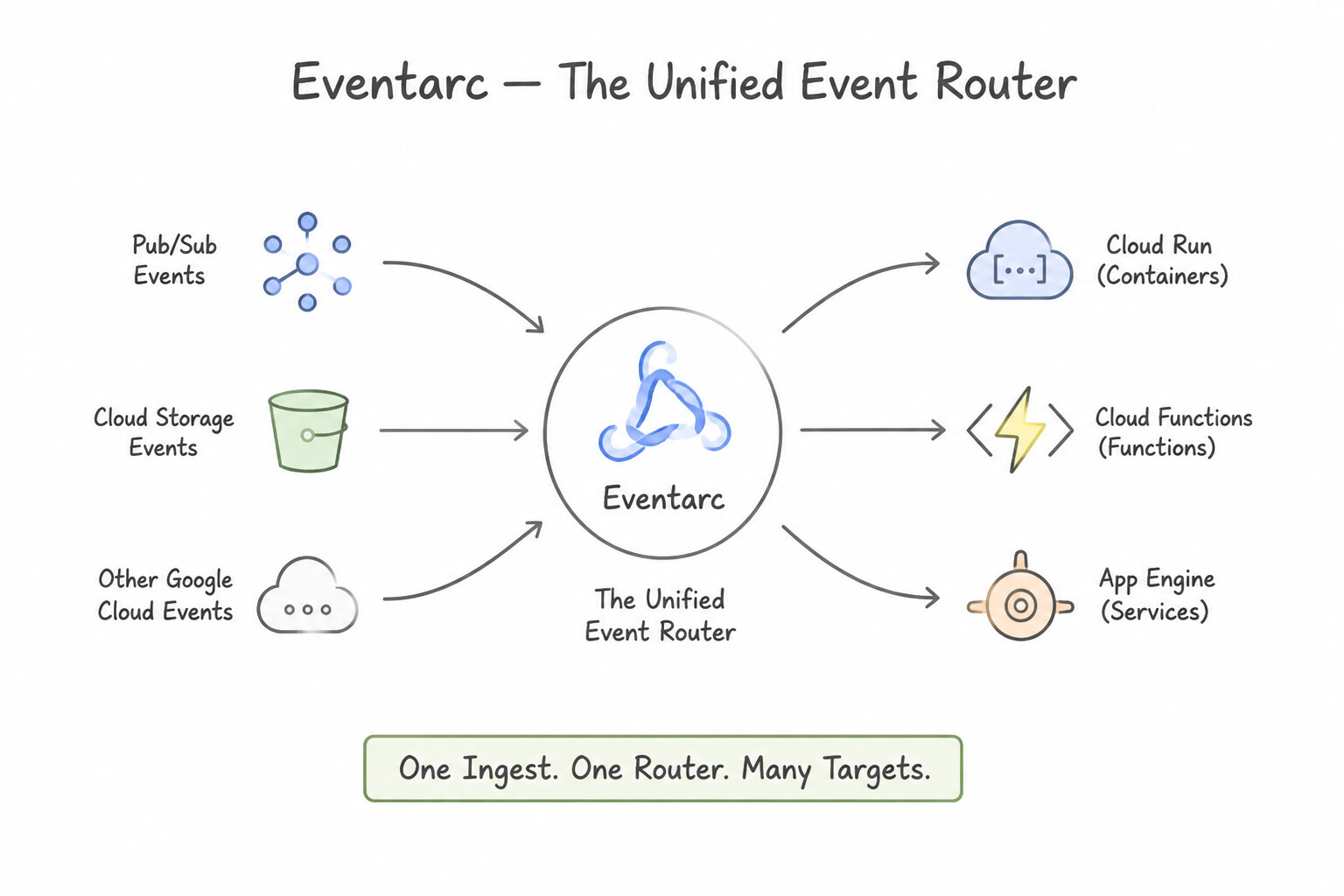
- Eventarc — The Unified Serverless Event Bus: Eventarc delivers events in the standardized CloudEvents format to Cloud Run, Cloud Run functions, GKE, and Workflows from two primary categories:
- Direct Events (Low Latency): Native high-throughput events from Cloud Pub/Sub messages and Cloud Storage object changes (
google.cloud.storage.object.v1.finalized). - Cloud Audit Log Events (130+ Services): Triggers an action whenever a specific API call is recorded in Cloud Audit Logs (e.g., a BigQuery job completes
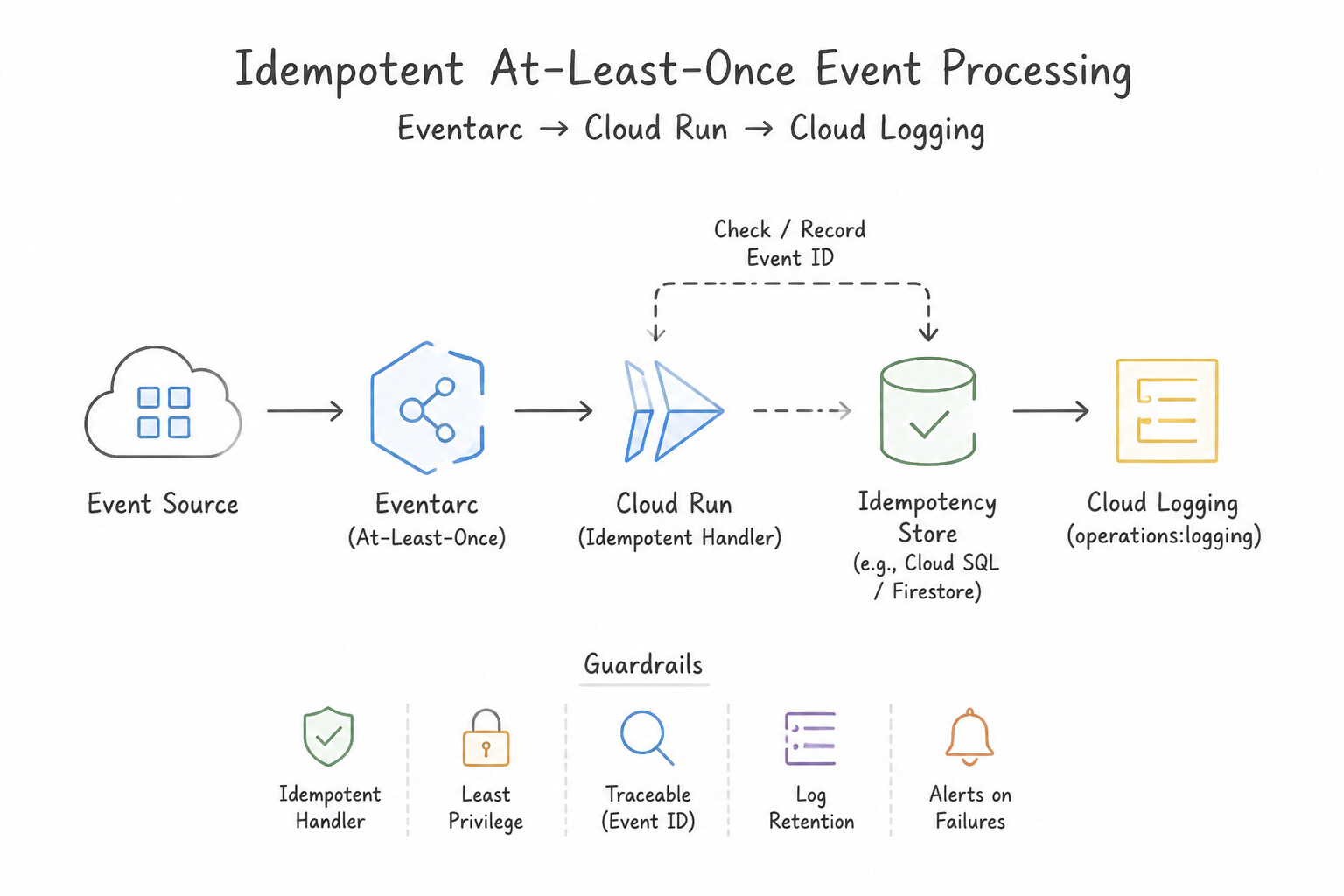
google.cloud.bigquery.job.v1.completedor a new VM is created). - Idempotency & At-Least-Once Delivery: Eventarc and Pub/Sub guarantee at-least-once delivery, meaning an event handler can occasionally receive the same event twice during retries. Always design event-driven functions to be idempotent (check event IDs or use database upserts).\n
Key Implementation Patterns
- Infrastructure Compliance Monitoring: Use Create an Eventarc trigger. Select the
google.cloud.audit.log.v1.writtenevent type. Filter byserviceName"compute.googleapis.com" and the specificmethodName. Eventarc with the audit log event type is the standard way to trigger Cloud Run services based on specific API actions.
Key Takeaways (2.1k)
- Eventarc is the primary tool for event-driven architectures in Google Cloud.
- To trigger actions based on API calls (infrastructure changes), use the
google.cloud.audit.log.v1.writtenevent type.- Always filter Audit Log triggers by
serviceNameandmethodNameto avoid triggering on irrelevant events.- Cloud Run is a supported destination for Eventarc events.
Consideration 2.1l: Identifying Whether to Use GPUs or TPUs
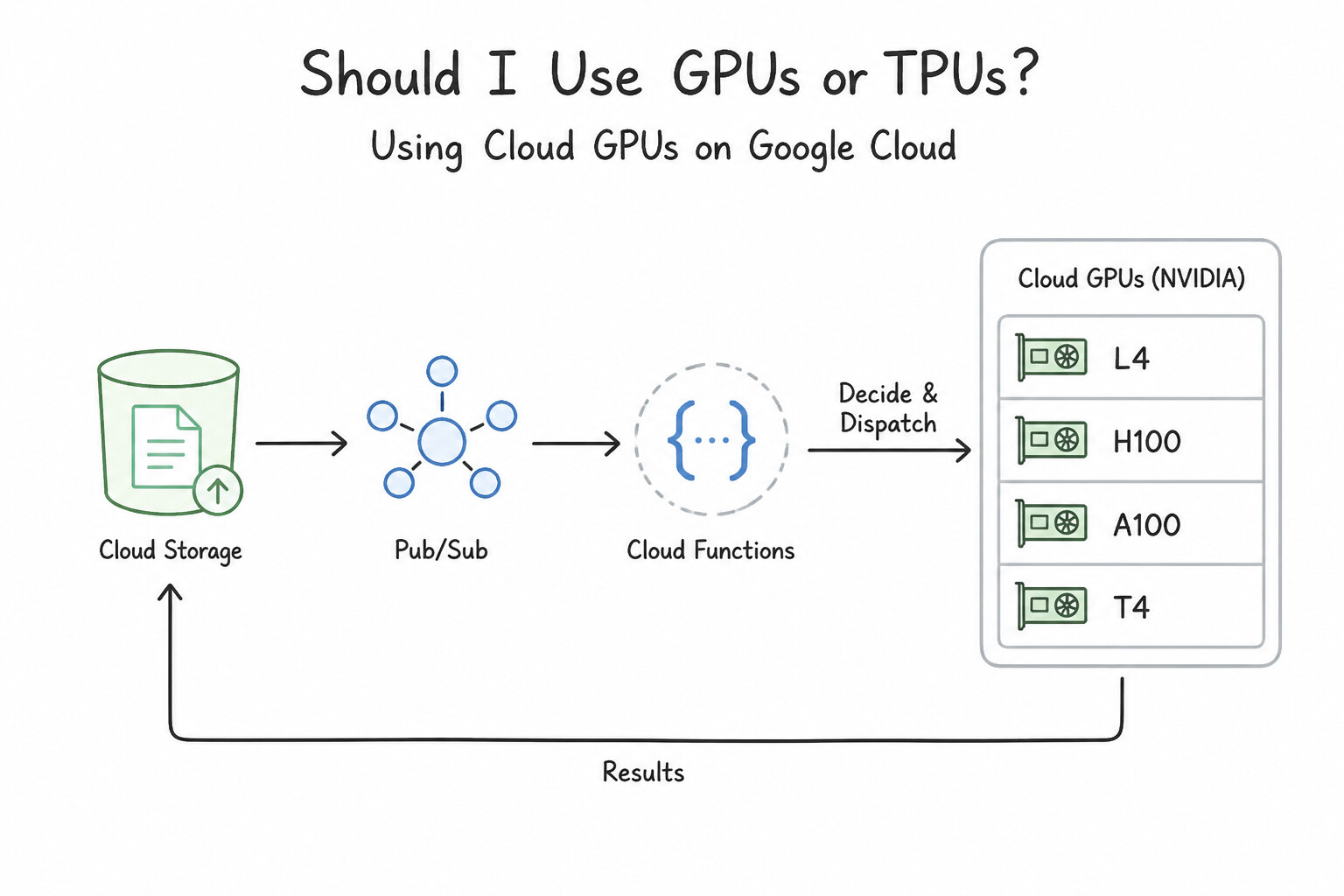
- Cloud GPUs (NVIDIA L4, H100, A100, T4):
- When to Choose: General-purpose deep learning training and inference across PyTorch, TensorFlow, JAX, CUDA-dependent C++ libraries, 3D rendering, video transcoding, or smaller-to-medium LLM serving on Compute Engine VMs, GKE, or Cloud Run GPU.
- Operational Rules: GPUs require installing NVIDIA drivers on the guest OS/container and mandate setting VM host maintenance to
Terminate(GPUs cannot be live-migrated). - Cloud TPUs (Tensor Processing Units — v5e, v5p, Trillium v6e):
- When to Choose: Google's custom-designed ASIC matrix processors (
XLAcompiler optimized) built specifically for massive-scale matrix multiplication in large-scale transformer/LLM training, fine-tuning, and high-throughput batch inference using JAX, PyTorch/XLA, or TensorFlow. - Decision Rule: Choose GPUs when the workload uses custom CUDA kernels, non-matrix operations, or general graphics/compute acceleration; choose TPUs when training or serving massive deep-learning/foundation models at scale with JAX/PyTorch/TensorFlow where maximum FLOPS-per-dollar on matrix math is required.
Key Implementation Patterns
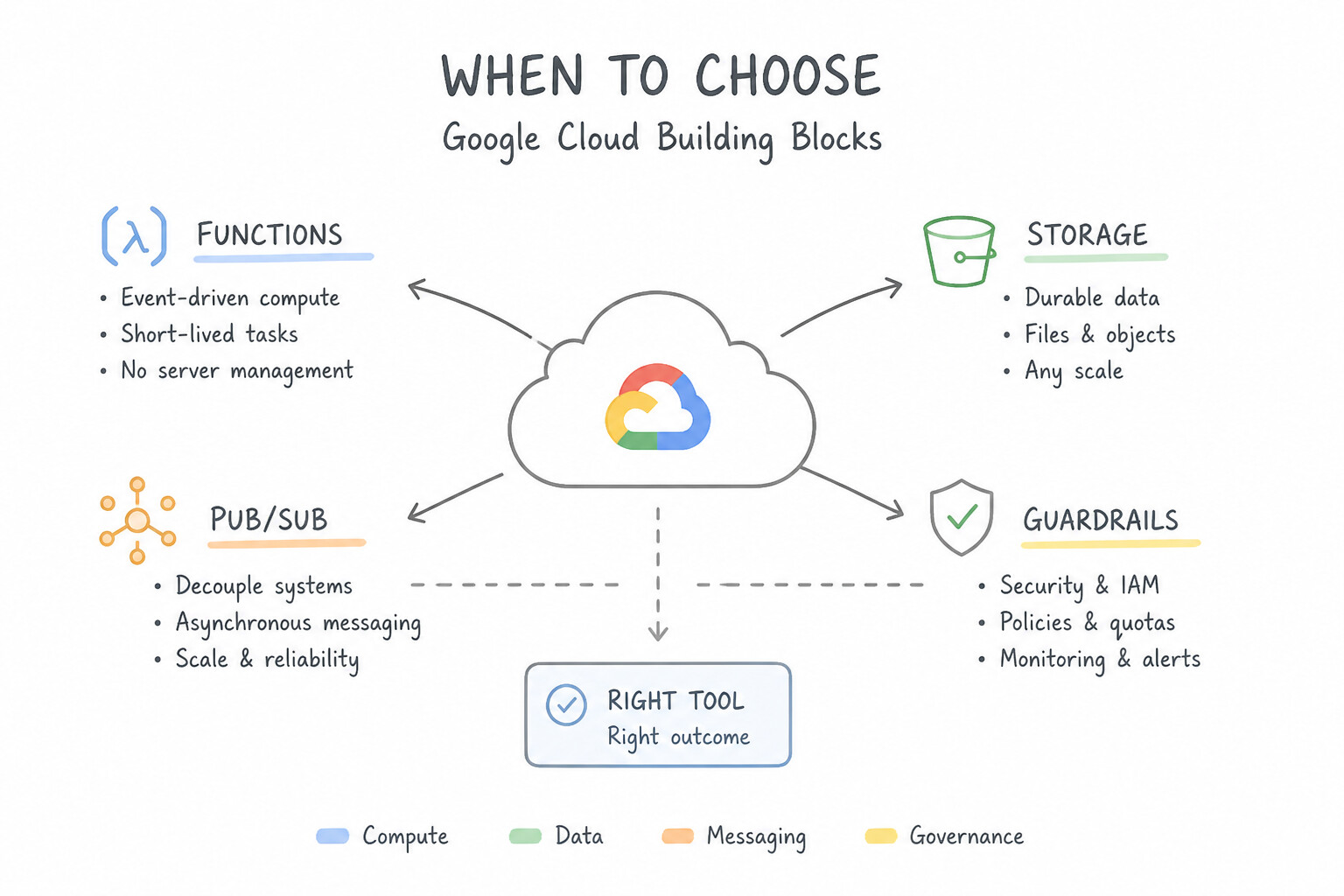
- Automated Thumbnail Generation: Use Deploy a Cloud Function. Set the trigger to Cloud Storage and select the Event Type google.storage.object.finalize. Cloud Functions with the google.storage.object.finalize trigger runs code automatically when a file upload completes. (Avoid alternative: The google.storage.object.delete event triggers on file removal, not during upload.)
- Decoupled Order Processing: Use Deploy the function with the --trigger-topic=new-orders flag. The --trigger-topic flag directly connects a Cloud Function to a Pub/Sub topic for event-driven execution. (Avoid alternative: Cloud Scheduler is for scheduled cron jobs, not for reacting to real-time events like Pub/Sub messages.)
Key Takeaways (2.1l)
- Serverless over Servers: Use Cloud Functions for single-purpose, event-driven tasks to avoid managing infrastructure.
- Event-Driven Architecture: Prefer triggers (push) over polling (pull) for efficiency and speed.
- Understand Triggers: Know the difference between trigger types like
finalize(creation) anddelete(removal).- Cloud Functions can be triggered directly by Pub/Sub messages using the
--trigger-topicflag.
Quick Decision Cheat Sheet (Subsection 2.1)
If the Scenario Requires... | Choose This Google Cloud Pattern | Avoid This Common Mistake |
|---|---|---|
"Scale to zero when no traffic is present; containerized HTTP/gRPC app" | Cloud Run ( min-instances=0) | GKE Standard; Compute Engine MIG; App Engine Flexible |
"Event-driven code snippet triggered when a file is uploaded to Cloud Storage" | Cloud Run functions (or Cloud Run) triggered via Eventarc | Polling Cloud Storage in a cron loop on a Compute Engine VM |
"Deploy an autonomous AI agent to a managed serverless agent runtime" | Agent Runtime on Gemini Enterprise Agent Platform | Cloud Composer; Dataproc; unmanaged Compute Engine VMs |
"Synchronous block storage replication across two zones in a region for rapid VM failover" | Regional Persistent Disk (or Regional Hyperdisk Balanced HA) | Zonal Persistent Disk snapshots (asynchronous, higher RTO); Local SSD (ephemeral) |
"Fault-tolerant batch processing job needing 60%–91% compute discount, can run >24 hours" | Spot VMs (with a shutdown script to handle the 30s preemption notice) | Standard on-demand VMs; legacy 24-hour Preemptible VM assumptions; Committed Use Discounts for a one-off job |
"MIG autohealer keeps terminating newly created VMs before the app finishes starting" | Increase the Health Check / Autohealing Initial Delay ( --initial-delay) | Disabling the health check; switching to an unmanaged instance group |
"Manage OS patches and package compliance across 500 Windows and Linux VMs" | VM Manager ( enable-osconfig=TRUE + OS Patch Management) | Running manual SSH loops across 500 VMs; Startup scripts alone (only run at boot) |
Further Reading (Subsection 2.1)
- Choosing a Compute Option — A guide helping to select the right compute service. It highlights that Compute Engine is best for general-purpose workloads and legacy enterprise applications that require full OS control.
- Cloud Run product overview — Describes Cloud Run as a managed compute platform that lets you run containers directly on top of Google's scalable infrastructure.
- Cloud Run pricing — Explains the pay-per-use model of Cloud Run, highlighting that you are not charged when the service is not processing requests.
- Cloud Run — Product page describing automatic scaling from zero and pay-only-when-running billing.
- What is Cloud Run? — Explains about running stateless containers serverlessly with automatic scaling to zero.
- Google Kubernetes Engine (GKE) Overview — Provides a high-level overview of GKE, explaining it is a managed environment for deploying containerized applications using Google infrastructure.
Book TOC · Previous · Chapter 2 of 8 · Next
AwesomeGCP.com Learning
The approach taken is a question-led learning approach: you explore realistic project scenarios where you need to make decisions or take actions to achieve business goals within specific constraints. Instead of passive learning, you are challenged to think and work through the options to master the Associate Cloud Engineer (ACE) certification!