Book TOC · Previous · Chapter 7 of 8 · Next
Chapter 7: Cloud Network Security: Cloud Armor, Cloud NGFW, Secure Web Proxy, Cloud NAT & NVAs
Chapter Focus: Cloud Armor WAF/Adaptive Protection/rate limiting, Hierarchical & Global Network Firewall Policies, IAM Secure Tags, Cloud NGFW Enterprise (IPS), Cloud NAT (Public/Private), Secure Web Proxy, and NVAs/Packet Mirroring.
Subsection 6.1: Configuring Google Cloud Armor policies
The Big Picture
VPC Firewall Rules and Cloud NGFW operate inside your VPC network at Layer 3/4 (or zonal endpoints). If a botnet launches a 40 million RPS HTTP flood, a credential-stuffing attack, or an OWASP SQL Injection (SQLi) / Remote Code Execution (RCE) exploit against your public web application, letting those malicious requests traverse the Google backbone all the way into your regional VPC or hit your Cloud CDN cache origin will bankrupt your autoscaling budget and overwhelm your databases.
Google Cloud Armor stops volumetric DDoS, botnet scraping, and Layer 7 OWASP attacks at the global Google Edge (GFEs)—before a single malicious byte ever enters your VPC! In Google Cloud architectures, Section 6.1 tests your mastery of six critical dimensions: Backend Security Policies vs. Edge Security Policies (6.1a), Preconfigured OWASP ModSecurity CRS 3.3 WAF Rules & False-Positive Tuning (6.1b), Adaptive Protection ML Anomaly Detection (6.1c), Granular Rate Limiting (throttle vs rate_based_ban — 6.1d), reCAPTCHA Enterprise Bot Management (6.1e), and Google Threat Intelligence Named IP Lists (6.1f).
Consideration 6.1a: Configuring and attaching edge and backend security policies
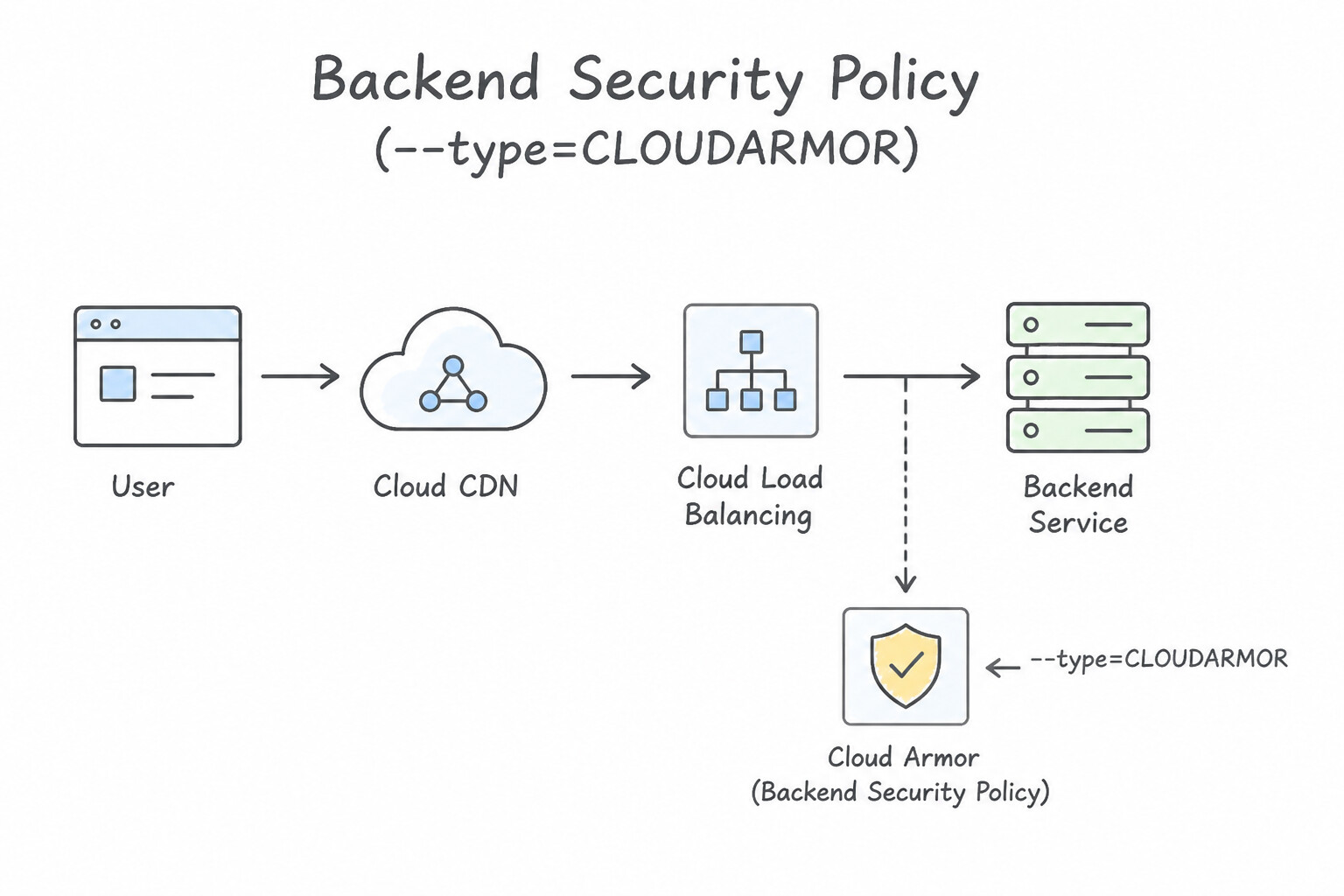
The single most frequent Section 6.1 trap in production is confusing Backend Security Policies with Edge Security Policies:
- 1. Backend Security Policies (
--type=CLOUD_ARMOR): - Where They Attach: Attach ONLY to Backend Services (backing Global/Regional External Application Load Balancers, External Proxy Network Load Balancers, or Passthrough Network Load Balancers with Advanced DDoS protection). They cannot be attached to a Cloud Storage Backend Bucket!
- The Cloud CDN Cache Hit Bypass Trap: If Cloud CDN is enabled on a Backend Service and an object is already cached at the Google Edge, a Backend Security Policy is ONLY evaluated on cache misses (requests that travel back to the Backend Service)! It will not block a sanctioned country or banned IP from downloading an object that is already warm in the Cloud CDN cache!
- 2. Edge Security Policies (
--type=CLOUD_ARMOR_EDGE): - Where They Attach: Attach to Cloud Storage Backend Buckets AND/OR Backend Services with Cloud CDN enabled.
- How They Work: Enforced at the very outer perimeter of the Google Edge before Cloud CDN cache lookup. If you must enforce Geo-blocking / embargo compliance (
origin.region_code), IP allowlists/denylists, ASN blocks, or custom CEL header checks on cached Cloud CDN content or static Cloud Storage buckets, you must use an Edge Security Policy! - Edge Policy Rule Limitations: Edge Security Policies support IP/CIDR lists,
origin.region_code(Geo),origin.asn, and CEL expressions on HTTP headers/cookies/paths, as well as rate limiting (throttle/rate_based_ban). However, deep L7 payload inspection (evaluatePreconfiguredWaf()OWASP CRS rules) requires a Backend Security Policy. - 3. Preview Mode (
--preview) for Zero-Outage Testing: - Before enforcing any new
deny,throttle, or WAF rule in production, enable Preview Mode on that specific rule. Cloud Armor evaluates every incoming request against the rule and logs what would have happened (previewSecurityPolicyMatch) in Cloud Load Balancing HTTP logs—without actually blocking a single user!
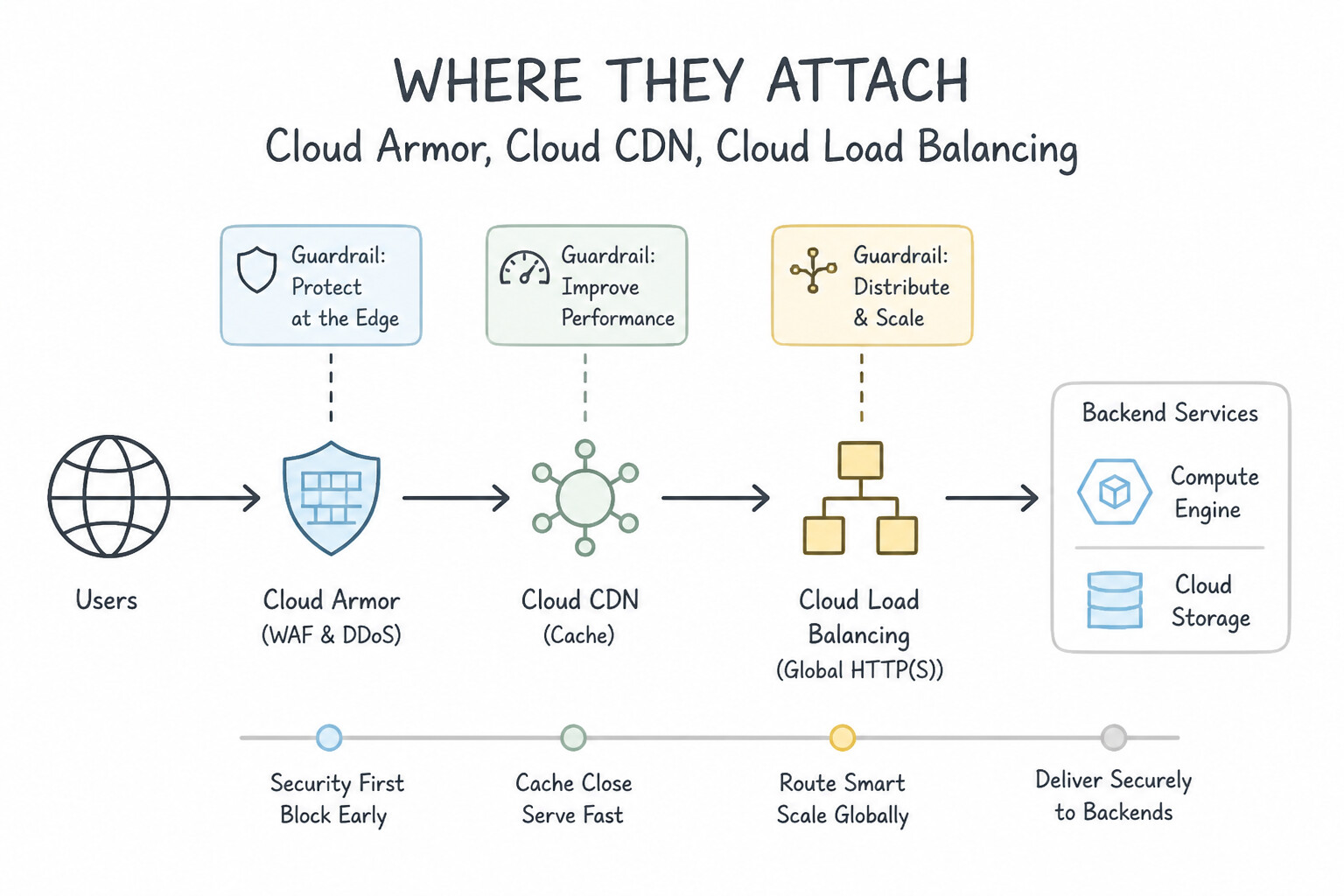
Key Implementation Patterns
- Specific type of Google Cloud Armor security policy designed to protect backend buckets: Use Edge security policy. Edge security policies filter traffic directly at Google edge locations and attach to Cloud CDN and backend buckets. (Avoid alternative: VPC firewall rules manage Layer 3/4 traffic inside VPC networks rather than edge proxies and storage buckets.)
- Integrating Cloud Armor with GKE Ingress: Use Create a BackendConfig custom resource that references the security policy. Annotate the Service to use this BackendConfig. GKE uses BackendConfig CRDs to apply Cloud Armor policies. You must create the BackendConfig and annotate the Service to reference it.
Key Takeaways (6.1a)
- Edge security policies attach to backend buckets and backend services with Cloud CDN at Google edge infrastructure.
- Backend security policies attach to standard backend services and evaluate after edge cache evaluation.
- Firewall policies (hierarchical and VPC) filter Layer 3/4 traffic inside VPC networks, not HTTP(S) traffic at edge locations.
- GKE uses
BackendConfigCRDs to configure Cloud Armor, Cloud CDN, and IAP.
Consideration 6.1b: Implementing web application firewall (WAF) rules (SQL injection, cross-site scripting, remote file inclusion)
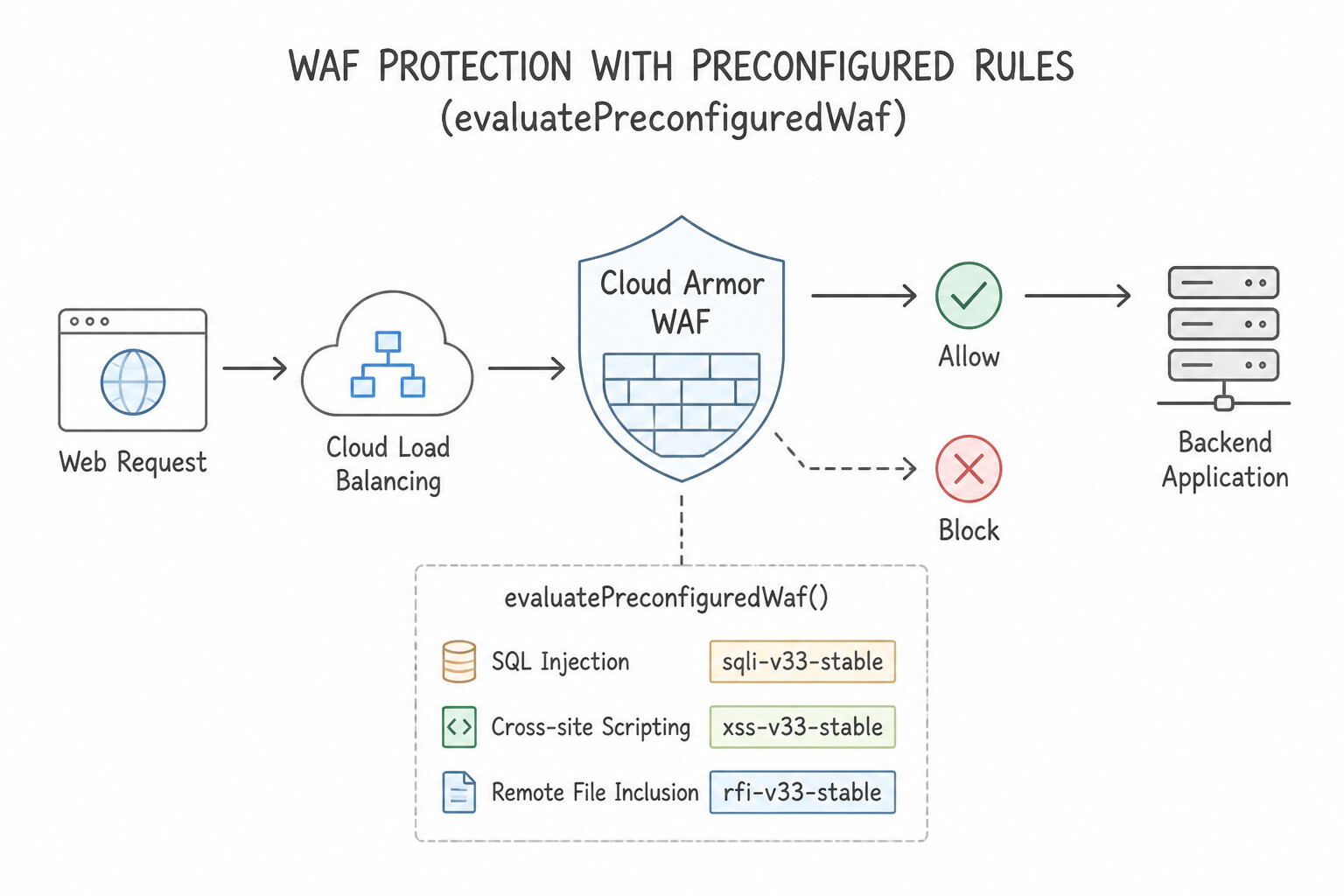
Cloud Armor's WAF engine uses the industry-standard OWASP ModSecurity Core Rule Set (CRS) v3.3:
- Preconfigured WAF Rule Syntax (
evaluatePreconfiguredWaf): - Major rule groups include:
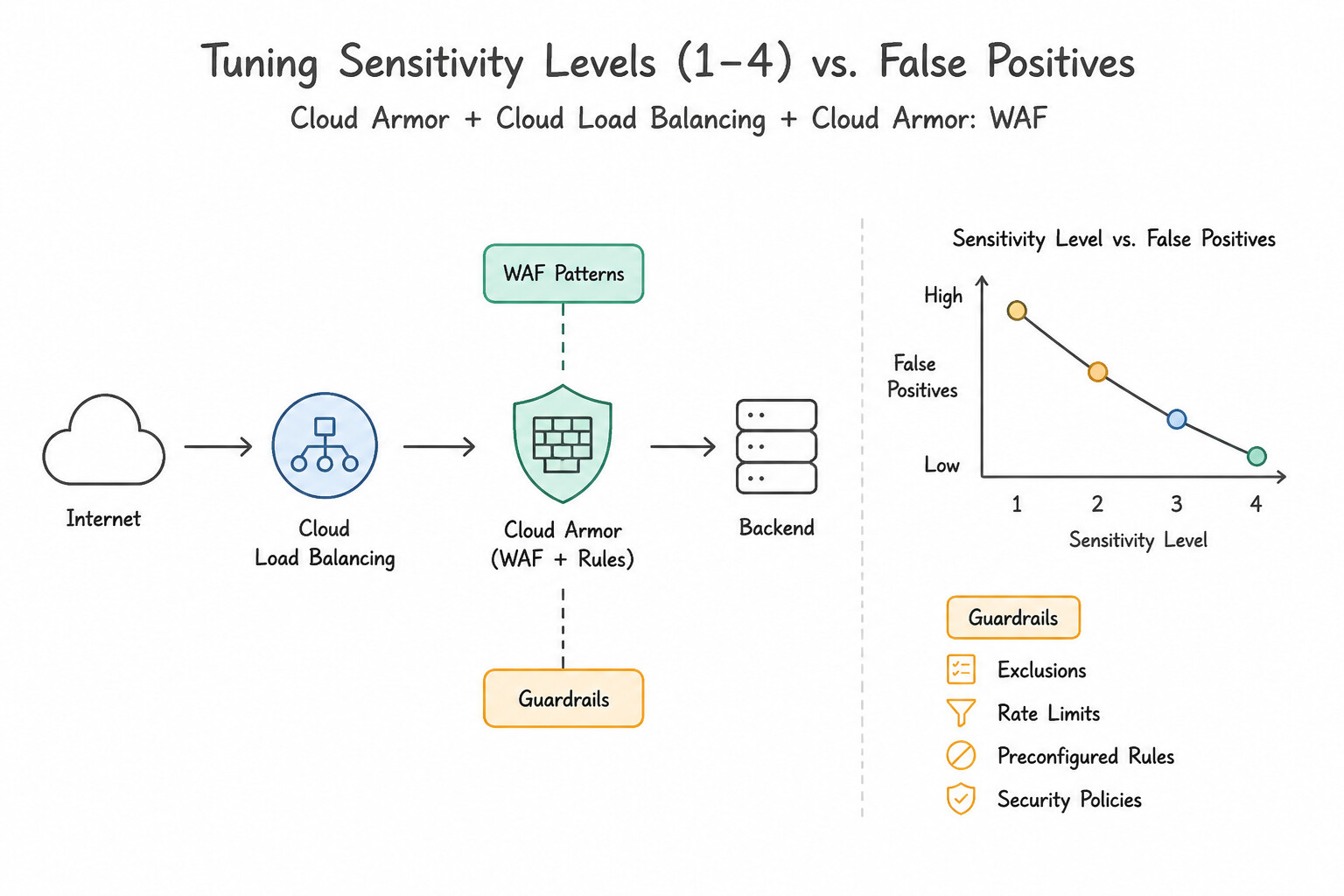
sqli-v33-stable(SQL Injection),xss-v33-stable(Cross-Site Scripting),lfi-v33-stable(Local File Inclusion),rfi-v33-stable(Remote File Inclusion),rce-v33-stable(Remote Code Execution / Command Injection),methodenforcement-v33-stable,scannerdetection-v33-stable,protocolattack-v33-stable,php-v33-stable,sessionfixation-v33-stable,java-v33-stable(Log4j / Spring4Shell), andnodejs-v33-stable. - Tuning Sensitivity Levels (
1to4) vs. False Positives: sensitivity=1(Paranoia Level 1): Highest confidence signatures with near-zero false positives (recommended starting baseline).sensitivity=2,3,4: Progressively stricter heuristics (e.g., catching obfuscated SQL comments or unusual punctuation), which increases protection but also increases false positives on legitimate complex JSON/GraphQL/CMS payloads.- Eliminating False Positives Without Disabling the Entire WAF (
opt_out_rule_ids): - production scenarios: You enable
evaluatePreconfiguredWaf('sqli-v33-stable', {'sensitivity': 2})in Preview Mode, and notice in Cloud Logging (jsonPayload.enforcedSecurityPolicy.preconfiguredExprIds/previewSecurityPolicy) that legitimate POST requests containing rich-text markdown are triggering signature IDowasp-crs-v030301-id942430-sqli. - Winning Action: Do not disable
sqli-v33-stableor drop sensitivity to0! Instead, keepsqli-v33-stableenabled and pass{'sensitivity': 2, 'opt_out_rule_ids': ['owasp-crs-v030301-id942430-sqli']}(or scope the exclusion to that specific URL pathrequest.path.matches('/api/blog/post')in a higher-priority rule). - Inspecting POST Body Size Limitation: Remember that Cloud Armor WAF inspects HTTP headers, URL parameters, and up to the configured POST body inspection size limit (default
8 KB, configurable up to64 KBin Cloud Armor Enterprise).
Key Implementation Patterns
- Cloud Armor capability that delivers managed rule signatures for common: Use WAF preconfigured rules. WAF preconfigured rules provide out-of-the-box protection against OWASP Top 10 web vulnerabilities like SQLi and XSS. (Avoid alternative: ReCAPTCHA Enterprise defends against bots and automated abuse, not general OWASP Top 10 injection or script attacks.)
Key Takeaways (6.1b)
- WAF Preconfigured Rules provide turnkey signatures for OWASP Top 10 threats like SQL injection and cross-site scripting.
- Adaptive Protection uses machine learning to detect Layer 7 DDoS and anomalous traffic.
- reCAPTCHA Enterprise protects against automated bot abuse and credential stuffing.
- Edge Security Policies enforce IP address and geo-based access controls before traffic reaches regional backends.
Consideration 6.1c: Configuring advanced network distributed denial of service (DDoS) and Adaptive Protection
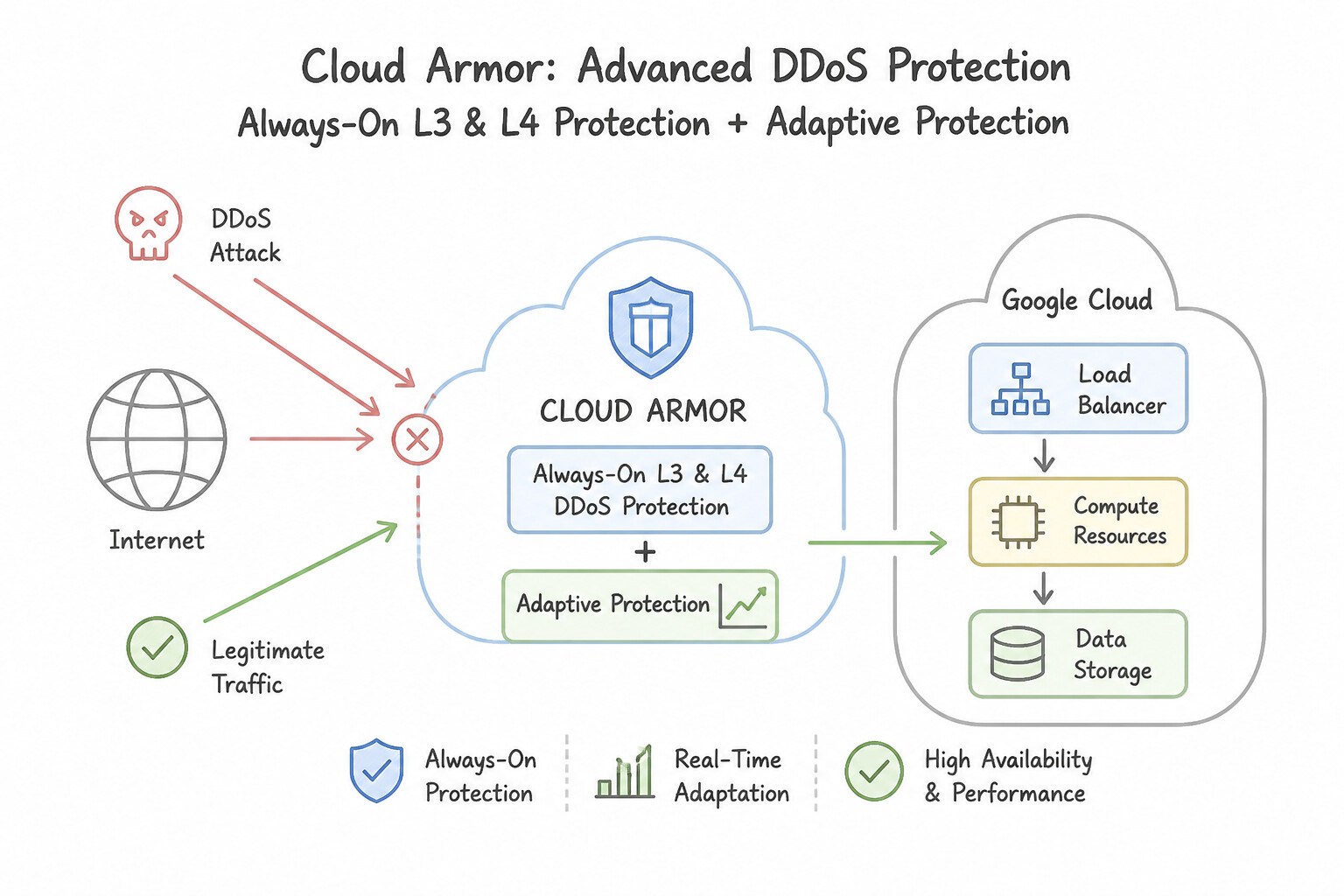
Understand the two tiers of DDoS defense and how Adaptive Protection works:
- Always-On L3/L4 DDoS Protection vs. Cloud Armor Enterprise:
- Every Google Cloud External Application Load Balancer and Proxy Network Load Balancer automatically terminates TCP/SSL at the Google Edge, absorbing volumetric L3/L4 SYN floods and UDP amplification attacks automatically. For External Passthrough Network Load Balancers and VMs with public IPs, Cloud Armor Enterprise Network Edge Security Policies provide advanced L3/L4 DDoS protection and packet filtering.
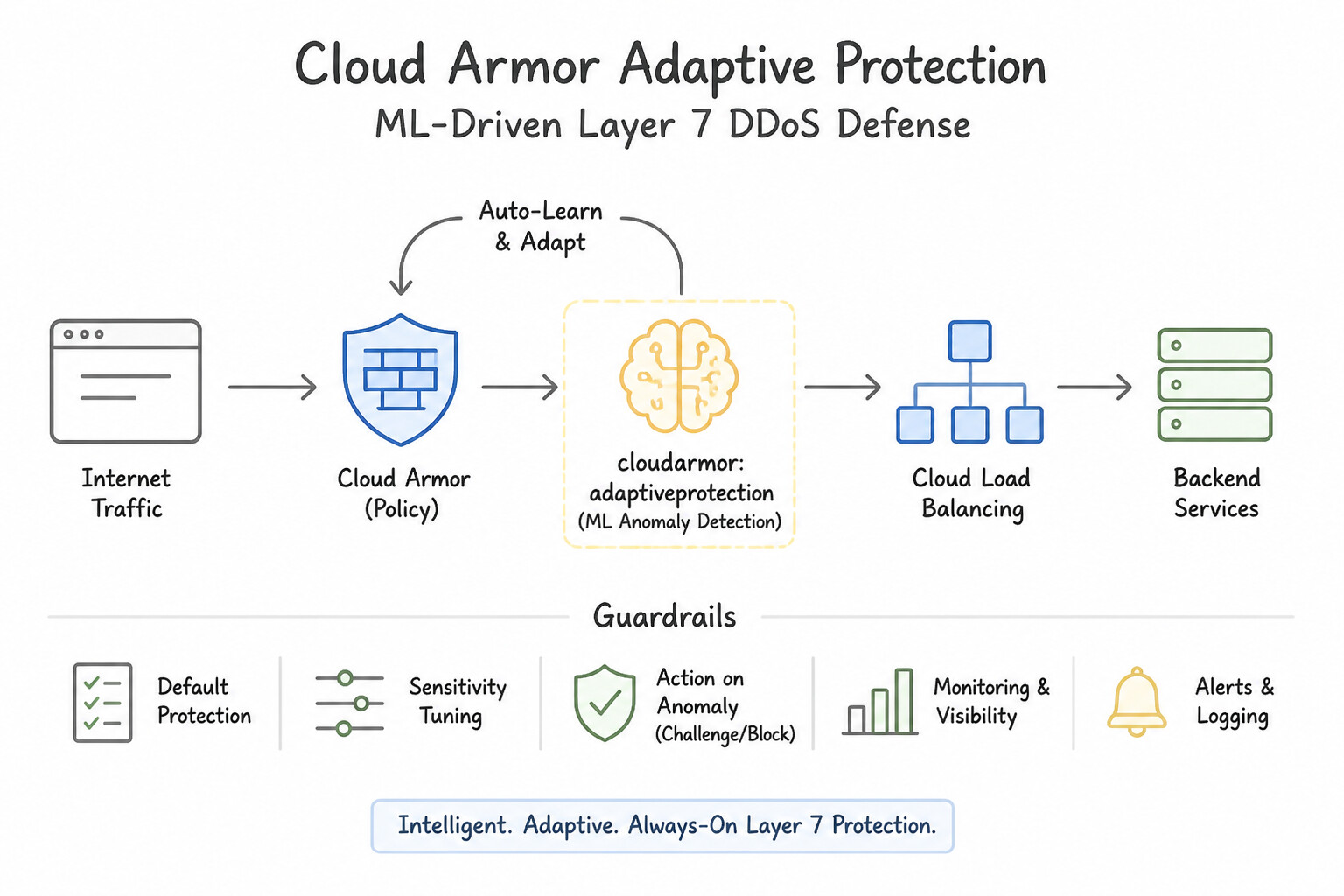
- Cloud Armor Adaptive Protection (ML-Driven Layer 7 DDoS Defense):
- How It Works: Continuously builds machine-learning models of normal Layer 7 HTTP/HTTPS traffic patterns (request rates, geographic distribution, user agents, headers, TLS fingerprints, and target URI paths) for each protected Backend Service (requires at least a 1-hour baseline training window after enabling).
- What Happens During an Attack:
- Detects an anomalous L7 traffic spike that deviates from the baseline (and correlates whether backend health/5xx errors or latency are degrading).
- Emits a high-priority event to Cloud Logging (
networksecurity.googleapis.com/http_load_balancer), Cloud Monitoring, and Security Command Center (SCC). - Automatically analyzes the attack traffic vs legitimate baseline traffic to synthesize a tailored CEL rule signature (e.g., matching a specific combination of
origin.asn,request.headers['user-agent'], andtls.ja3_fingerprint) along with a confidence score and projected impact on normal traffic. - You can deploy the suggested rule in Preview Mode or Auto-Deploy mode (using predefined auto-deploy thresholds for load, confidence, and emergency rate-limiting/blocking at a dedicated priority).
Key Implementation Patterns
- Cloud Armor capability designed for machine learning-based detection of application: Use Adaptive Protection. Adaptive Protection uses machine learning to detect Layer 7 DDoS attacks and generate mitigation rules. (Avoid alternative: Geo-fencing filters traffic based on geographic country codes rather than machine learning.)
- Legacy Device Static Routing Configuration: Use Create a Google Cloud Armor security policy. Add a rule using the preconfigured 'owasp-crs-v030001-idps' expression. Attach this policy to the backend service of the load balancer. Cloud Armor preconfigured WAF rules (like the OWASP CRS set) automatically detect and block common web attacks like SQLi and XSS without custom coding.
Key Takeaways (6.1c)
- Cloud Armor Adaptive Protection leverages machine learning to detect Layer 7 DDoS attacks automatically.
- Adaptive Protection provides attack signatures and suggested mitigation rules to quickly block malicious traffic without disrupting legitimate users.
- Standard rate limiting, static IP blocklists, and geo-fencing rely on explicit user-defined configurations rather than automated machine learning detection.
- Google Cloud Armor is the WAF solution for Global External Application Load Balancers.
Consideration 6.1d: Configuring rate limiting
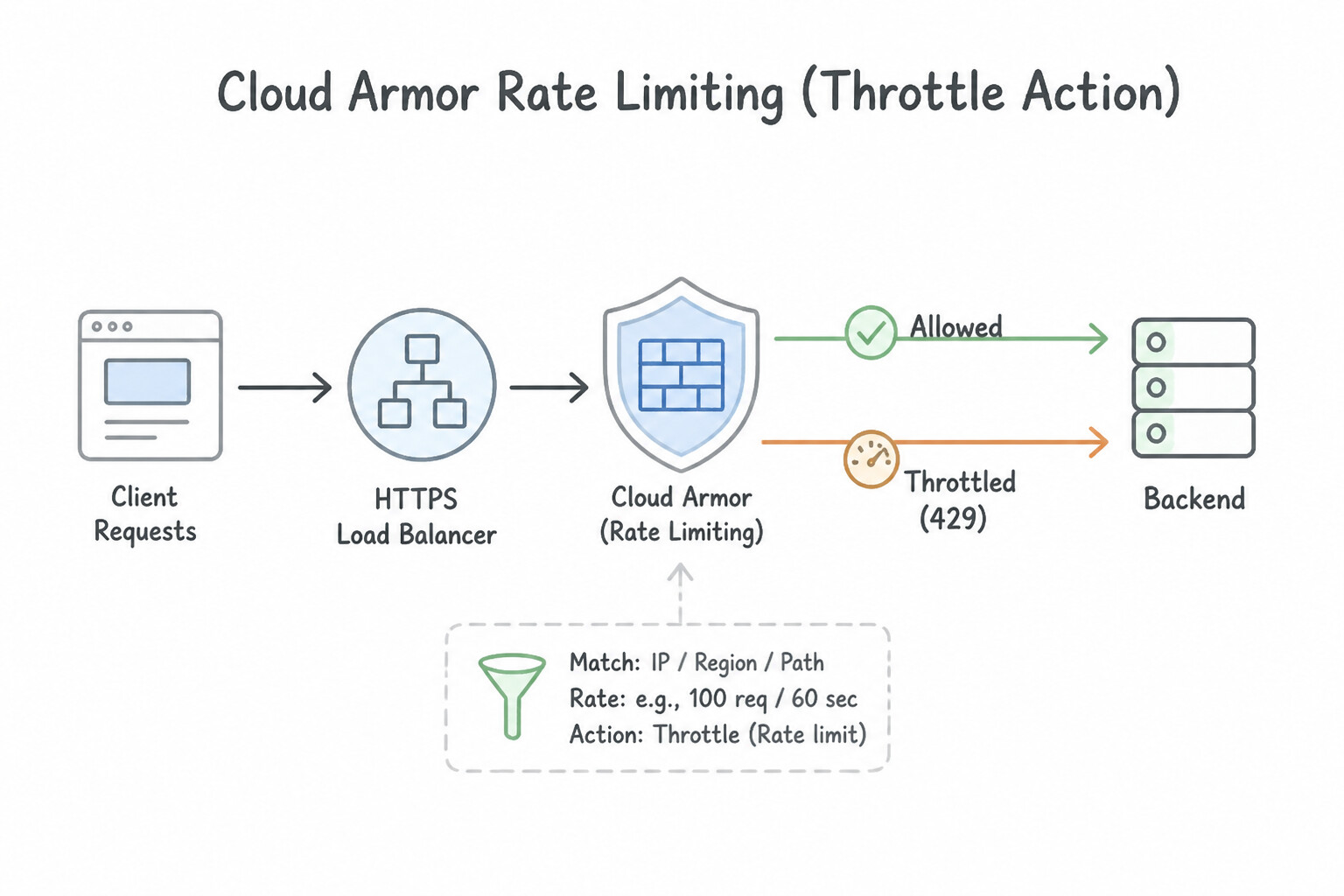
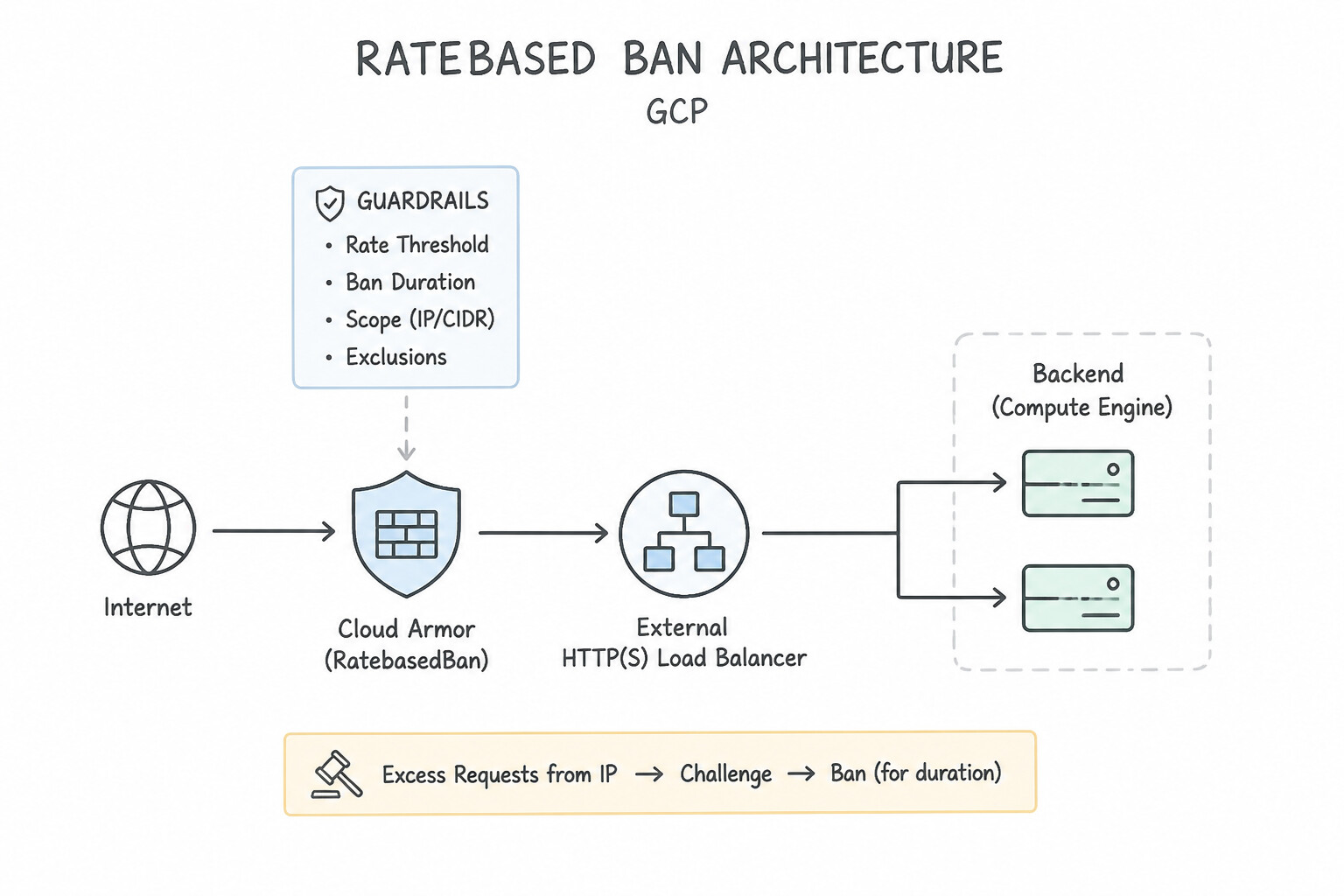
Cloud Armor supports two distinct rate-limiting actions—knowing the difference between throttle and rate_based_ban is essential:
throttleAction:- Enforces a strict requests-per-interval cap (e.g.,
100 requests per 60 seconds). As long as a client stays at or below100 req/min, requests execute theconform-action(allow). The101strequest within that window executes theexceed-action(deny(429)), but the client is immediately allowed to send100 req/minagain in the next rolling window. Usethrottleto protect backend API quotas from bursty legitimate clients. rate_based_banAction:- Adds a secondary
ban-thresholdandban-duration-sec(e.g.,rate-limit-threshold: 100 req/1m,ban-threshold: 500 req/5m,ban-duration-sec: 600). If an attacker continues hammering the endpoint and crosses theban-threshold, Cloud Armor completely bans (deny(403)ordeny(429)) ALL requests from that client key for the full600seconds—even if they slow down to 1 request per minute! Userate_based_banto stop brute-force login, credential stuffing, and aggressive scraping attacks. - Choosing the Right
enforce-on-keyGranularity: IP: Rate-limits by the direct socket source IP connecting to the Load Balancer. Trap: If hundreds of legitimate corporate users sit behind a single Corporate NAT IP or Cloudflare/Akamai CDN proxy,enforce-on-key=IPwill lump all users together and block the entire company!XFF-IP(X-Forwarded-For): Extracts the real client IP appended by an upstream trusted CDN/proxy (configured via--enforce-on-key=XFF-IP).HTTP-HEADER/HTTP-COOKIE: Rate-limits per API key (X-API-Keyheader) or authenticated session cookie—ideal when multiple users share a NAT IP.TLS-JA3-FINGERPRINT: Rate-limits bots rotating across thousands of residential proxy IPs that all share the exact same TLS client handshake fingerprint (JA3)!
Key Implementation Patterns
- Google Cloud Armor security policy feature that limits traffic based on incoming request: Use Rate limiting rules. Rate limiting rules directly throttle client traffic when request volume exceeds predefined thresholds. (Avoid alternative: Named IP address lists allow or deny traffic based on static IP address sets, not request volume throttling.)
Key Takeaways (6.1d)
- Rate Limiting: Enforces request quotas per client key (such as IP address or cookie) over a time window to prevent volumetric Layer 7 floods.
- Threat Intelligence: Evaluates incoming IP address reputation against known malicious categories.
- Geographic Filtering: Filters traffic based on regional source location.
- Named IP Lists: Allows matching against static or curated IP address ranges.
Consideration 6.1e: Configuring bot management
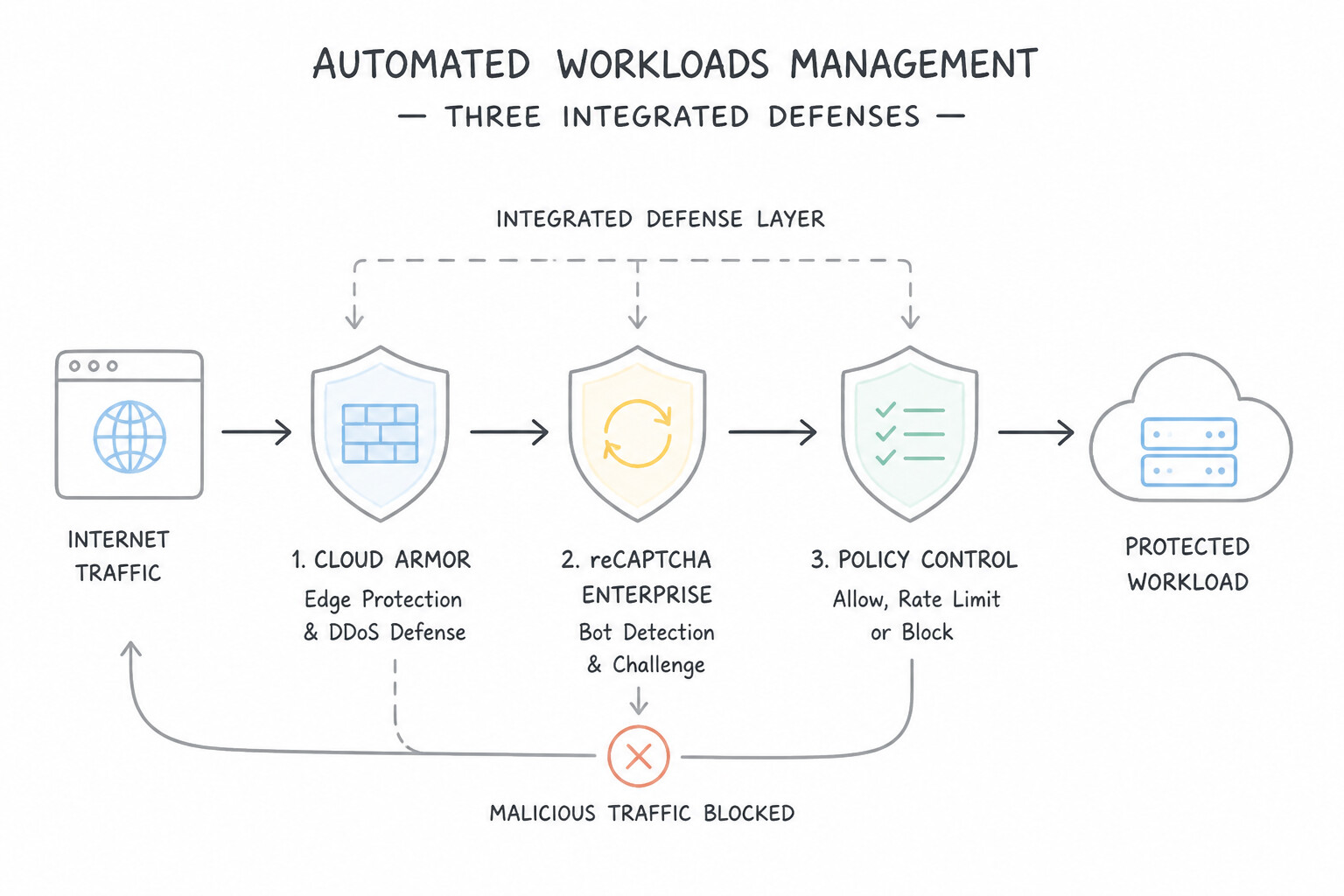
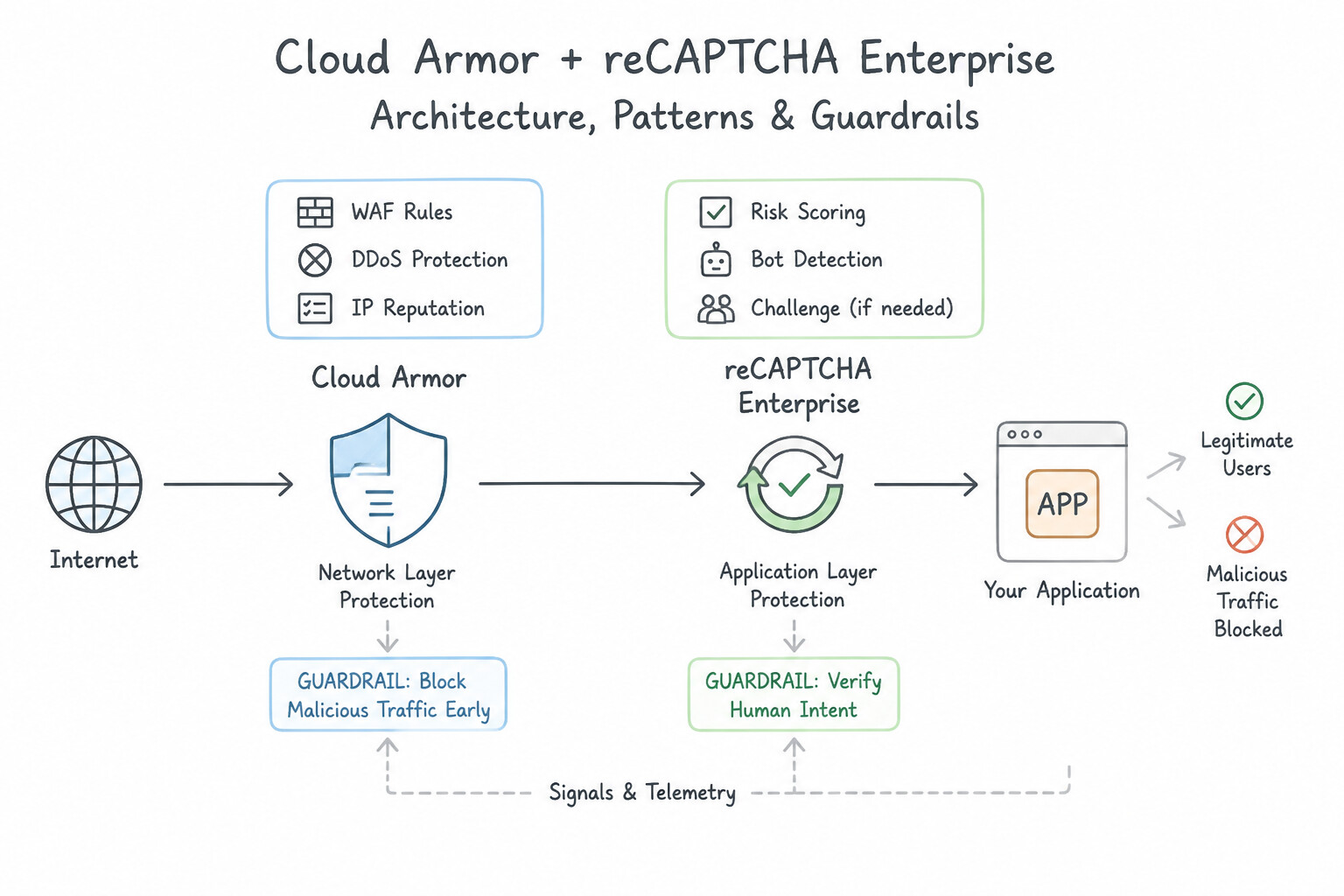
When attackers use headless browsers and residential proxy pools to scrape pricing data or hoard checkout inventory, simple IP rate-limiting fails. Combine reCAPTCHA Enterprise with Cloud Armor Bot Management:
- Three Integrated Defense Mechanisms:
- reCAPTCHA Session Tokens (Frictionless Site-Wide Assessment): JavaScript embedded on your main landing page obtains a signed reCAPTCHA session token containing a risk score (
0.0= definitely bot,1.0= definitely human) stored in a cookie. Cloud Armor inspectstoken.recaptcha_session.scoreon every subsequent page load at the Google Edge without backend overhead! - reCAPTCHA Action Tokens (High-Value Form Submission Protection): Bound to a specific user action (e.g.,
POST /checkoutorPOST /login). Cloud Armor evaluatestoken.recaptcha_action.score < 0.5and blocks automated credential-stuffing scripts before they reach your authentication microservice. - Interstitial Challenge Redirect (
action=redirect,redirect-type=GOOGLE_RECAPTCHA): For suspicious requests (e.g.,token.recaptcha_session.score < 0.7or rate-limit exceeded), instead of returning a hard403 Forbiddenthat might block a real customer on a VPN, set the Cloud Armor rule action toredirect(GOOGLE_RECAPTCHA). Cloud Armor intercepts the request at the edge, serves a CAPTCHA challenge page, and upon completion issues an exemption cookie so the verified human proceeds seamlessly to the backend!
Key Implementation Patterns
- Cloud Armor security policy rule action that initiates automated reCAPTCHA challenges: Use redirect_to_recaptcha action. The redirect_to_recaptcha action redirects suspicious traffic to a reCAPTCHA challenge to verify whether the client is human. (Avoid alternative: The deny(404) action rejects requests outright with an HTTP 404 status code rather than presenting a challenge.)
Key Takeaways (6.1e)
- Google Cloud Armor integrates with reCAPTCHA Enterprise for automated bot mitigation.
- The
redirect_to_recaptcharule action redirects matching client requests to a CAPTCHA challenge.- Standard actions in Cloud Armor include
allow,deny,rate_limit, andredirect_to_recaptcha.- Successful completion of a reCAPTCHA challenge provides an exemption token for subsequent valid requests.
Consideration 6.1f: Applying Google Threat Intelligence
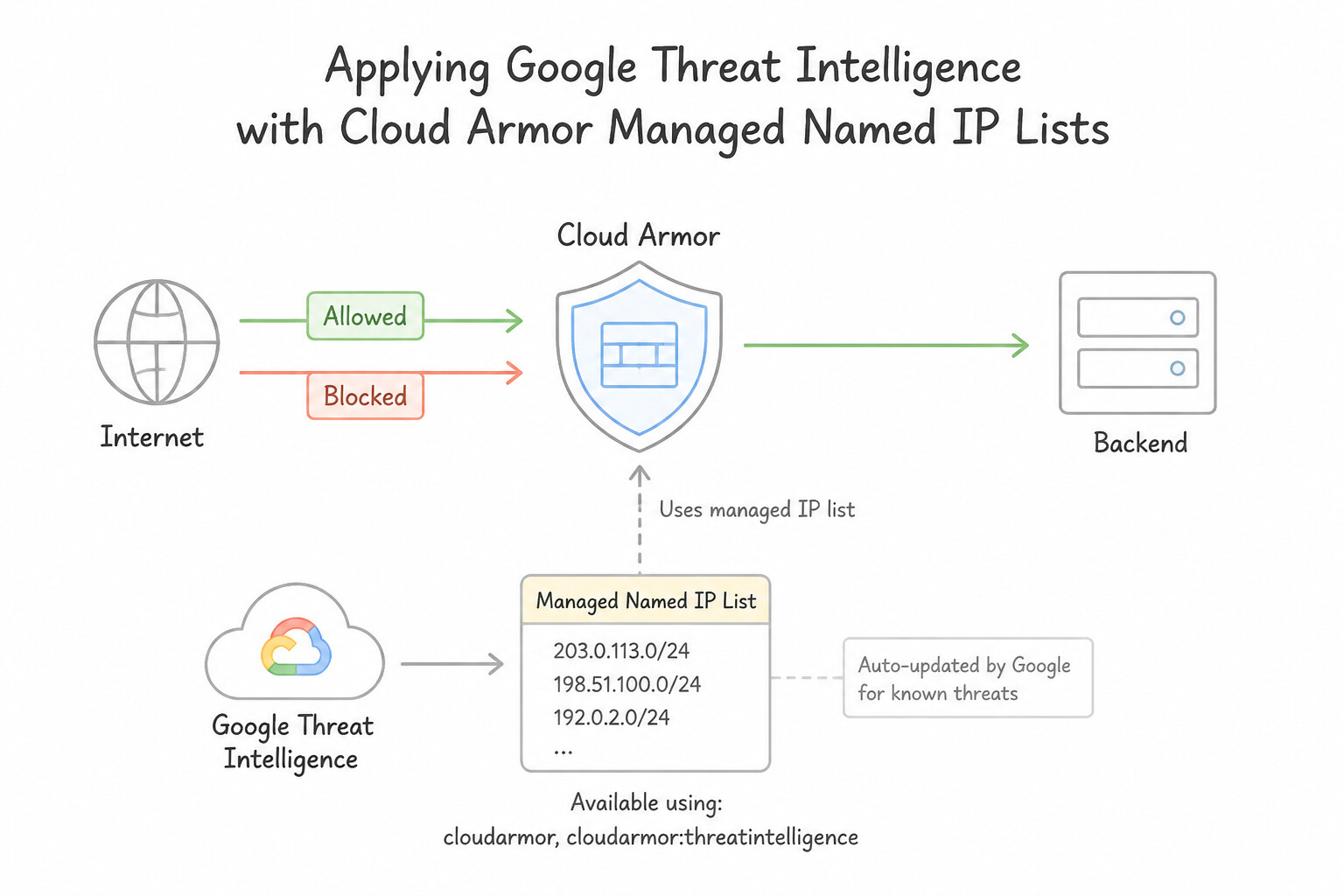
With Cloud Armor Enterprise, you do not need to manually maintain or upload 50,000-line IP blocklists (which would quickly hit the standard rule IP range quota). Instead, use evaluateThreatIntelligence() with Google's continuously updated Threat Intelligence Named IP Lists:
- Managed Named IP Lists Available:
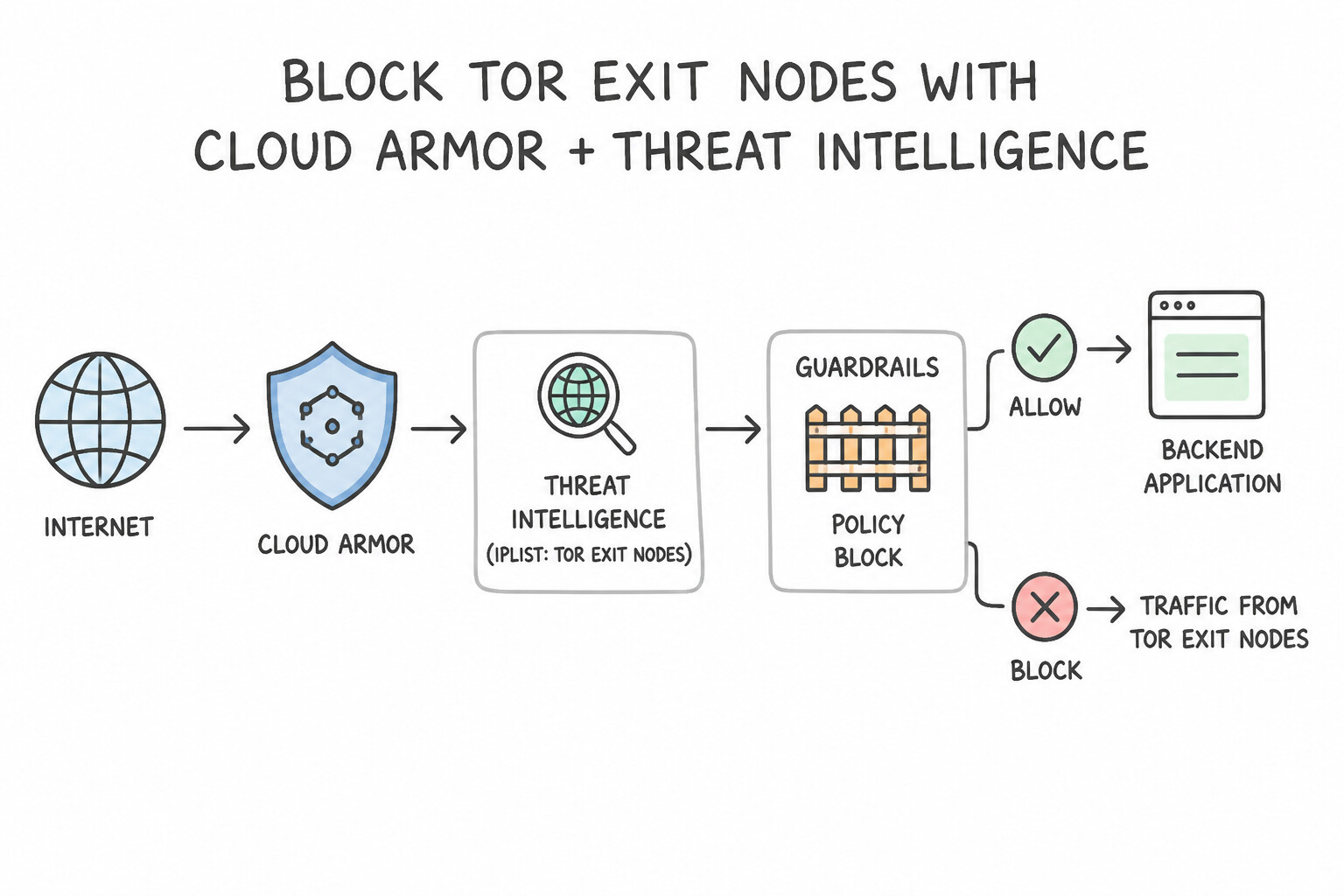
iplist-tor-exit-nodes: Blocks or challenges traffic originating from anonymizing Tor exit nodes (evaluateThreatIntelligence('iplist-tor-exit-nodes')).iplist-known-malicious-ips: Blocks IPs actively observed by Google Threat Intelligence conducting web attacks, scanning, or botnet C2 activity.iplist-public-clouds: Matches IP ranges belonging to major public cloud compute providers (useful when a consumer retail site should only be accessed by residential/mobile ISPs, not headless scrapers running on cloud VMs).iplist-vpn-providersandiplist-anon-proxies: Matches commercial VPNs and open anonymizing proxies.iplist-search-engines-crawlers: Matches verified Googlebot, Bingbot, and legitimate search engine crawlers! Architecture Tip: Place a high-priorityallowrule withevaluateThreatIntelligence('iplist-search-engines-crawlers')above your aggressive rate-limiting or bot challenge rules so you never accidentally block legitimate SEO search engine indexing!
Key Implementation Patterns
- Cloud Armor capability designed to block or allow traffic based on curated threat: Use Threat Intelligence for Armor. Threat Intelligence for Cloud Armor offers managed rules that curate and utilize threat intelligence feeds maintained by Google. (Avoid alternative: VPC Flow Logs capture sample IP address network flows for monitoring and analysis rather than actively blocking traffic with threat feeds.)
Key Takeaways (6.1f)
- Threat Intelligence for Cloud Armor utilizes Google's global security telemetry to categorize and filter traffic.
- Rules evaluate predefined categories like Tor exit nodes, open proxies, search engine crawlers, and malicious IP addresses.
- This feature eliminates the operational overhead of building and updating custom IP address blocklists.
Quick Decision Cheat Sheet (Subsection 6.1)
If the Scenario Requires... | Choose This Google Cloud Pattern | Avoid This Common Mistake |
|---|---|---|
"Block sanctioned countries or IPs from accessing Cloud CDN cached content or a Cloud Storage Backend Bucket" | Edge Security Policy ( --type=CLOUD_ARMOR_EDGE) | Backend Security Policy (only evaluates cache misses and Backend Services) |
"Test a new Cloud Armor WAF or rate-limit rule on live production traffic without blocking users" | Enable Preview Mode ( --preview) on the rule and inspect previewSecurityPolicy in HTTP Load Balancer logs | Cloning the production Load Balancer and asking real users to test a staging URL |
"Mitigate OWASP Top 10 SQL Injection ( SQLi), Cross-Site Scripting (XSS), or Log4j (java-v33-stable) at the edge" | Configure a Backend Security Policy using evaluatePreconfiguredWaf('<rule-set>-v33-stable') | Writing custom regex rules from scratch or trying to run evaluatePreconfiguredWaf inside an Edge Security Policy |
"Fix a WAF false positive caused by a single OWASP signature without sacrificing protection" | Add the offending signature ID to opt_out_rule_ids in evaluatePreconfiguredWaf() | Removing the entire sqli-v33-stable or xss-v33-stable rule |
"Completely lock out an offending client for 10 minutes once they exceed 500 requests in 5 minutes" | Use action=rate_based_ban with ban-threshold and ban-duration-sec=600 | Using action=throttle (which immediately allows conforming requests again in the next window) |
"Challenge suspected bots with an interactive CAPTCHA before letting them reach the backend" | Integrate reCAPTCHA Enterprise with Cloud Armor action=redirect (GOOGLE_RECAPTCHA) | Returning a hard 403 to all unknown User-Agents |
"Block Tor exit nodes or known malicious IPs without manually maintaining IP lists" | Use Google Threat Intelligence Named IP Lists ( evaluateThreatIntelligence('iplist-tor-exit-nodes')) | Writing a Cloud Function to scrape Tor IP lists and update VPC firewall rules (VPC firewalls only support limited IP ranges and don't run at the GFE edge) |
Further Reading (Subsection 6.1)
- Google Cloud Armor security policy overview — Provides comprehensive information on backend and edge security policies, detailing where policies attach and how rules evaluate.
- Configure Cloud Armor edge security policies — Explains how to set up edge security policies for backend buckets and Cloud CDN-enabled services.
- Configuring Cloud Armor for GKE — This guide explains the specific steps to create a BackendConfig and annotate the Service to enable Cloud Armor protection on GKE Ingress.
- Google Cloud Armor preconfigured WAF rules overview — Details the preconfigured WAF rule sets that Cloud Armor provides to mitigate OWASP Top 10 risks.
- Google Cloud Armor overview — Comprehensive guide covering DDoS protection, WAF capabilities, and policy management in Cloud Armor.
- Google Cloud Armor Adaptive Protection overview — Provides comprehensive architectural and operational details regarding machine learning-based attack detection and mitigation rule generation in Cloud Armor.
Subsection 6.2: Configuring and managing NGFW policies and VPC Firewall rules
The Big Picture
In a single small project, classic VPC Firewall Rules attached via VM Network Tags seem simple enough. In a 200-project enterprise, however, legacy VPC Firewall Rules create three fatal security vulnerabilities:
- No Central Override: A project owner with
compute.securityAdmincan delete a security rule or open0.0.0.0/0ontcp:22unless higher-level guardrails exist. - Untrusted Network Tags: Any developer with
compute.instances.setMetadata/setTagson a VM can type a plain-text Network Tag (likeprod-db-client) onto their rogue VM and immediately inherit all firewall permissions granted to that tag! Furthermore, neither Network Tags nor Service Accounts work across VPC Network Peering! - Blindness to Layer 7 Threats, FQDNs, and Evolving Threat Actors: Classic VPC firewall rules only see static Layer 3/4 IP addresses and ports—they cannot filter by dynamic DNS FQDNs (
*.github.com), Geolocation, Google Threat Intelligence, or inline Layer 7 Intrusion Prevention System (IPS) signatures.
Section 6.2 is the largest and most heavily weighted subsection in Section 6 (spanning 10 distinct Curriculum considerations 6.2a–6.2j). You must master the 4-level Firewall Policy Evaluation Hierarchy (allow vs deny vs goto_next), IAM-governed Resource Manager Secure Tags (tagValues/...), GKE and Load Balancer health check allowlisting, and the exact capabilities of Cloud NGFW Essentials, Cloud NGFW Standard, and Cloud NGFW Enterprise (with zonal Firewall Endpoints and Palo Alto Networks-powered L7 IPS + TLS inspection).
Consideration 6.2a: Planning the firewall strategy (VPC firewall rules, Cloud NGFW, hierarchical firewall rules, and third-party integration)
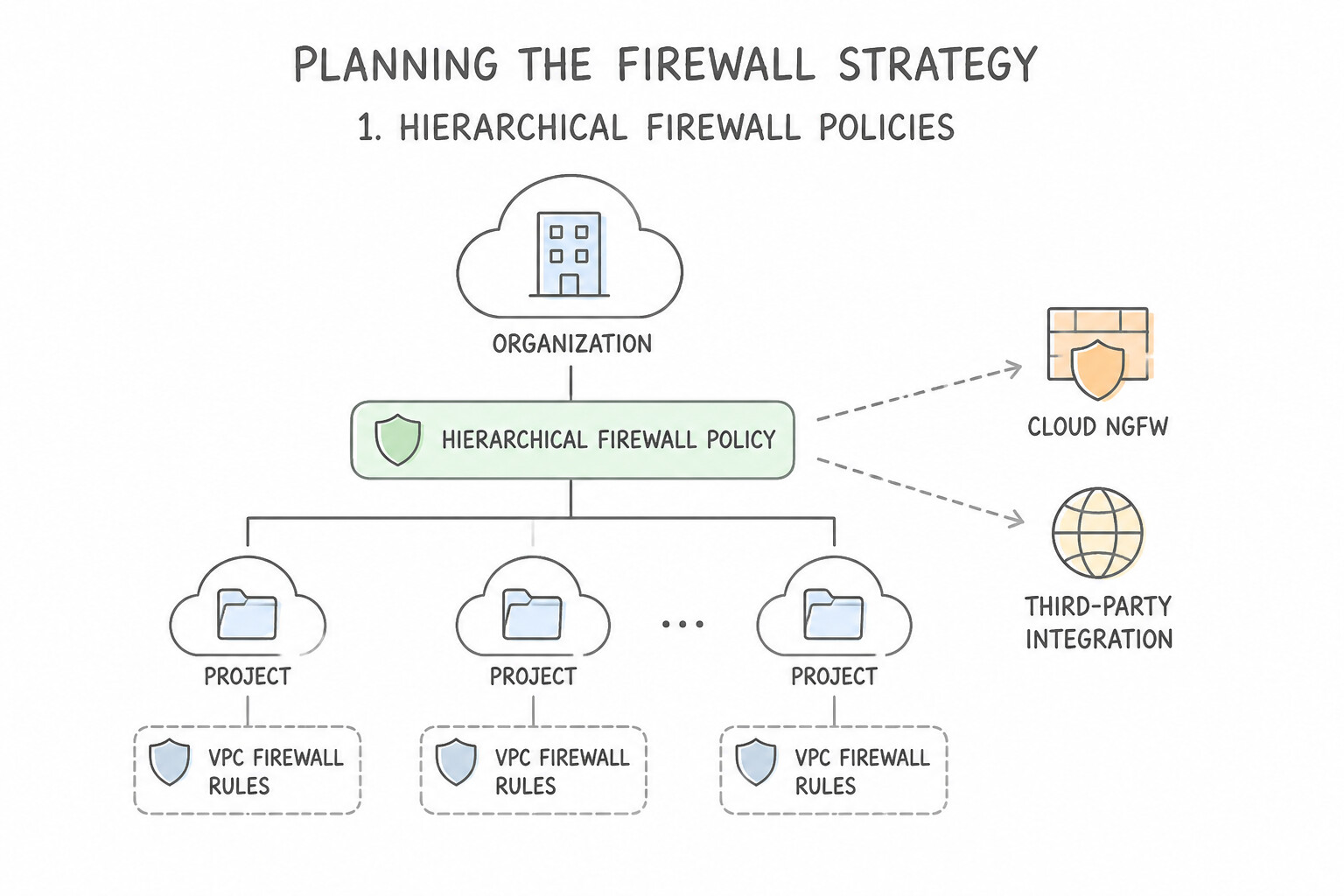
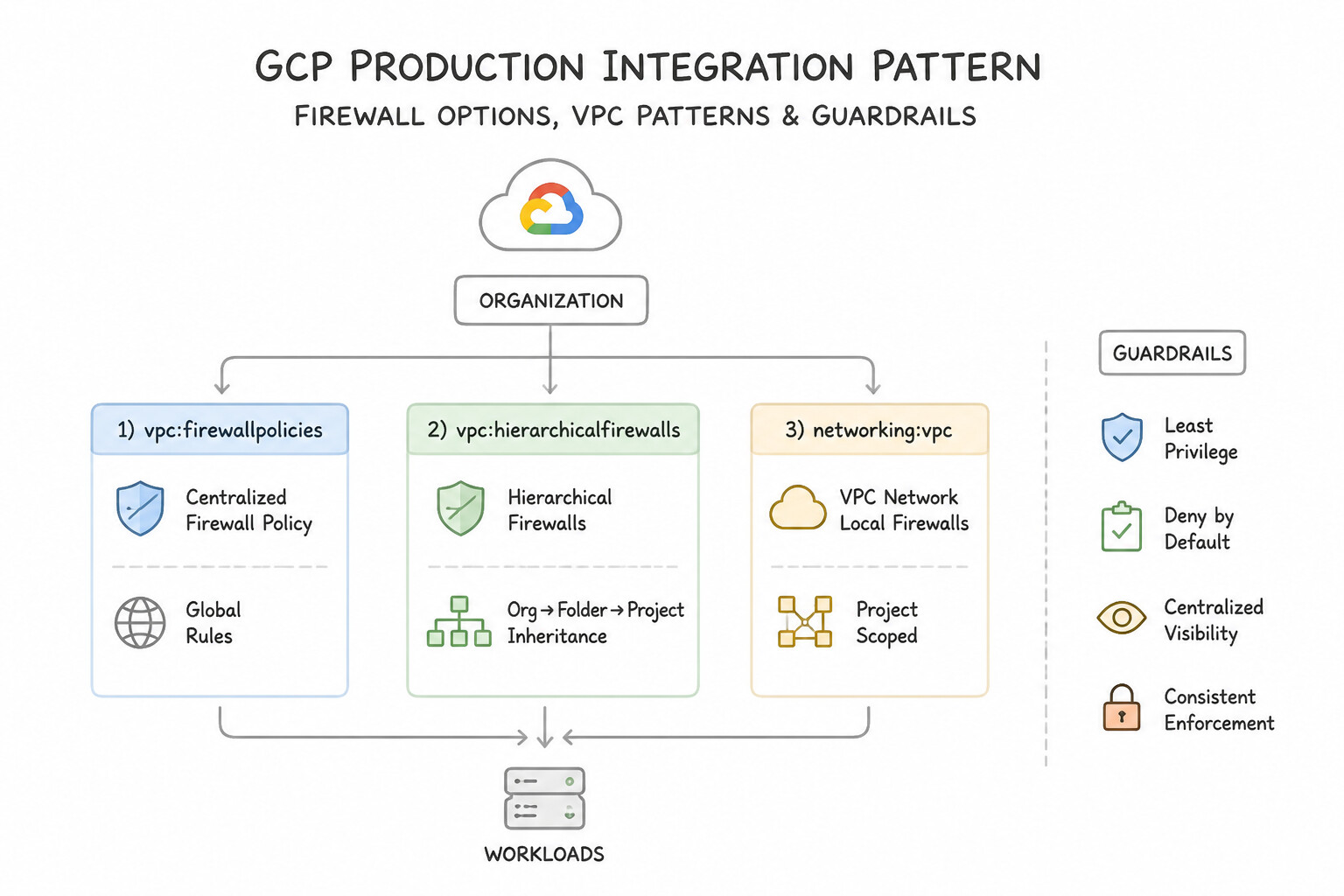
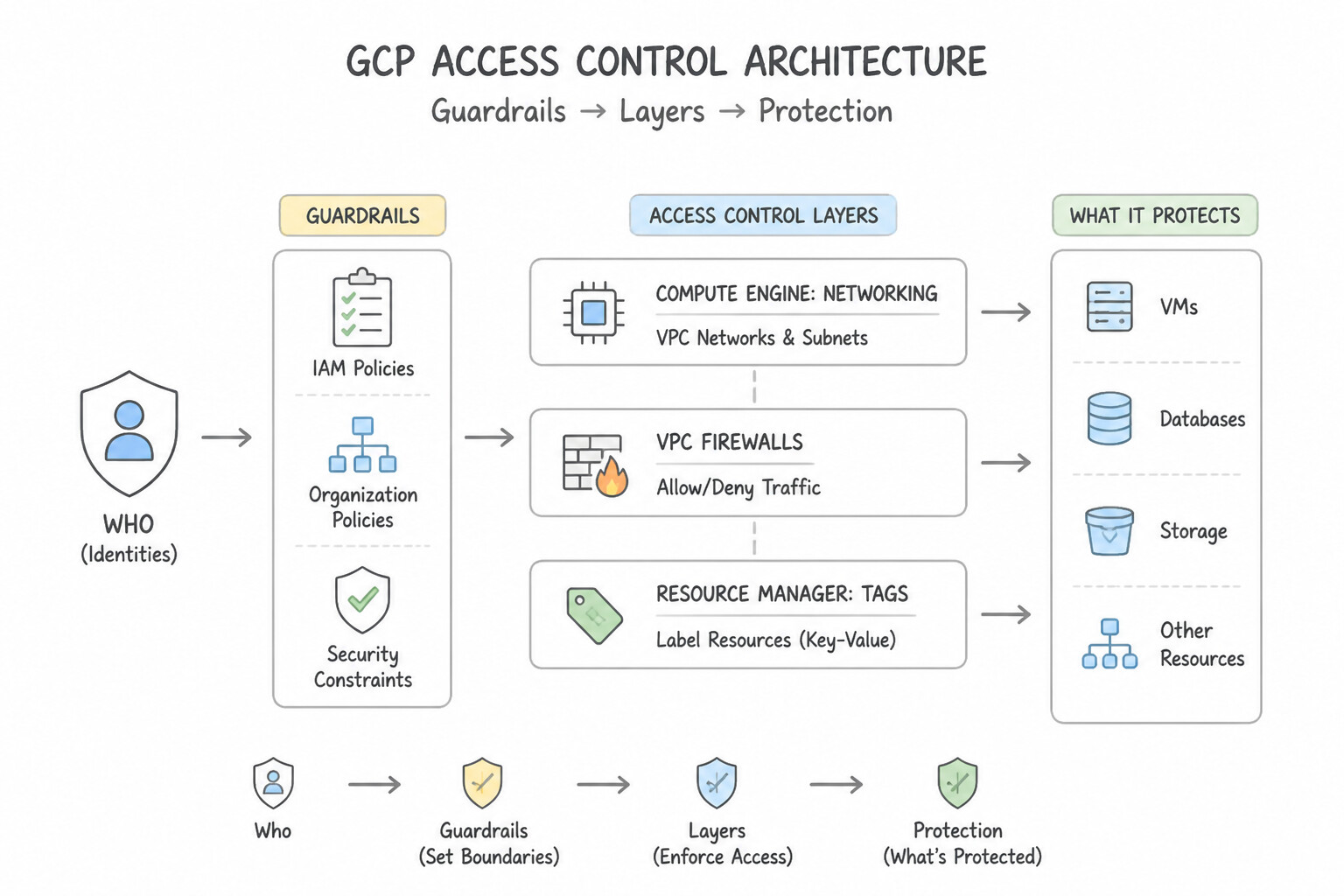
Google Cloud provides three distinct firewall policy constructs that work together in a defense-in-depth hierarchy:
- 1. Hierarchical Firewall Policies (Organization & Folder Level):
- Created at the Organization or Folder node and associated with one or more folders or the entire organization.
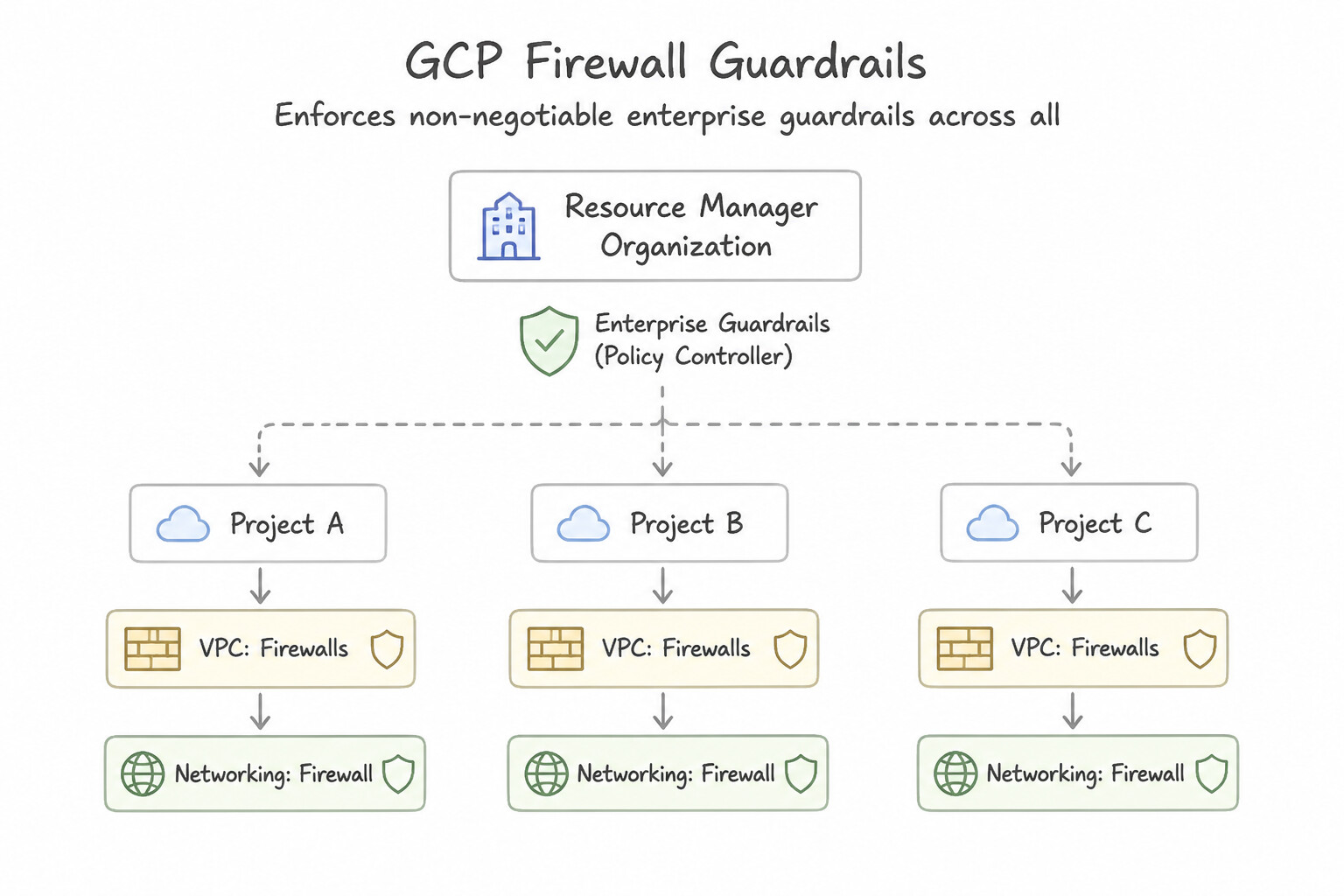
- Purpose: Enforces non-negotiable enterprise guardrails across all VPCs in all child projects (e.g., denying ingress from embargoed countries, blocking RDP
tcp:3389from0.0.0.0/0, or explicitly allowing centralized vulnerability scanners and IAP35.235.240.0/20while delegating application-specific ports viagoto_next). - 2. Network Firewall Policies (Global & Regional Cloud NGFW Policies):
- Scoped to a project and associated with one or more VPC networks.
- Global Network Firewall Policy: Rules apply across all regions of the associated VPCs (ideal for uniform VPC-wide baselines, Secure Tag micro-segmentation, FQDN filtering, and Threat Intelligence).
- Regional Network Firewall Policy: Rules apply only to workloads in a specific region (required if you need regional administrative blast-radius isolation or region-specific compliance rules).
- 3. Classic VPC Firewall Rules:
- Legacy flat list of rules defined directly on a single VPC network. Does not support
goto_next, IAM Secure Tags, FQDN objects, Geolocation, Threat Intelligence, Address Groups, or L7 IPSapply_security_profile_group.
Key Implementation Patterns
- Firewall policy type that attaches to Organization or Folder nodes in the Google Cloud: Use Hierarchical firewall policy. Hierarchical firewall policies attach directly to Organization or Folder nodes in the Google Cloud resource hierarchy. (Avoid alternative: VPC firewall rules exist only within individual projects and apply directly to a single VPC network.)
- Ordering and Provisioning Dedicated Interconnect: Use Create a hierarchical firewall policy at the Organization level with a deny rule for port 22 and associate it with the Organization node. Hierarchical firewall policies at the Organization level supersede local VPC rules and cannot be modified by project administrators.
Key Takeaways (6.2a)
- Hierarchical firewall policies attach to Organization and Folder levels in the resource hierarchy.
- Network firewall policies attach to VPC networks.
- Hierarchical firewall rules are evaluated before VPC network firewall rules.
- Hierarchical policies provide centralized security governance across all descendant projects.
Consideration 6.2b: Understanding the effective policy rules for hierarchical firewall situations
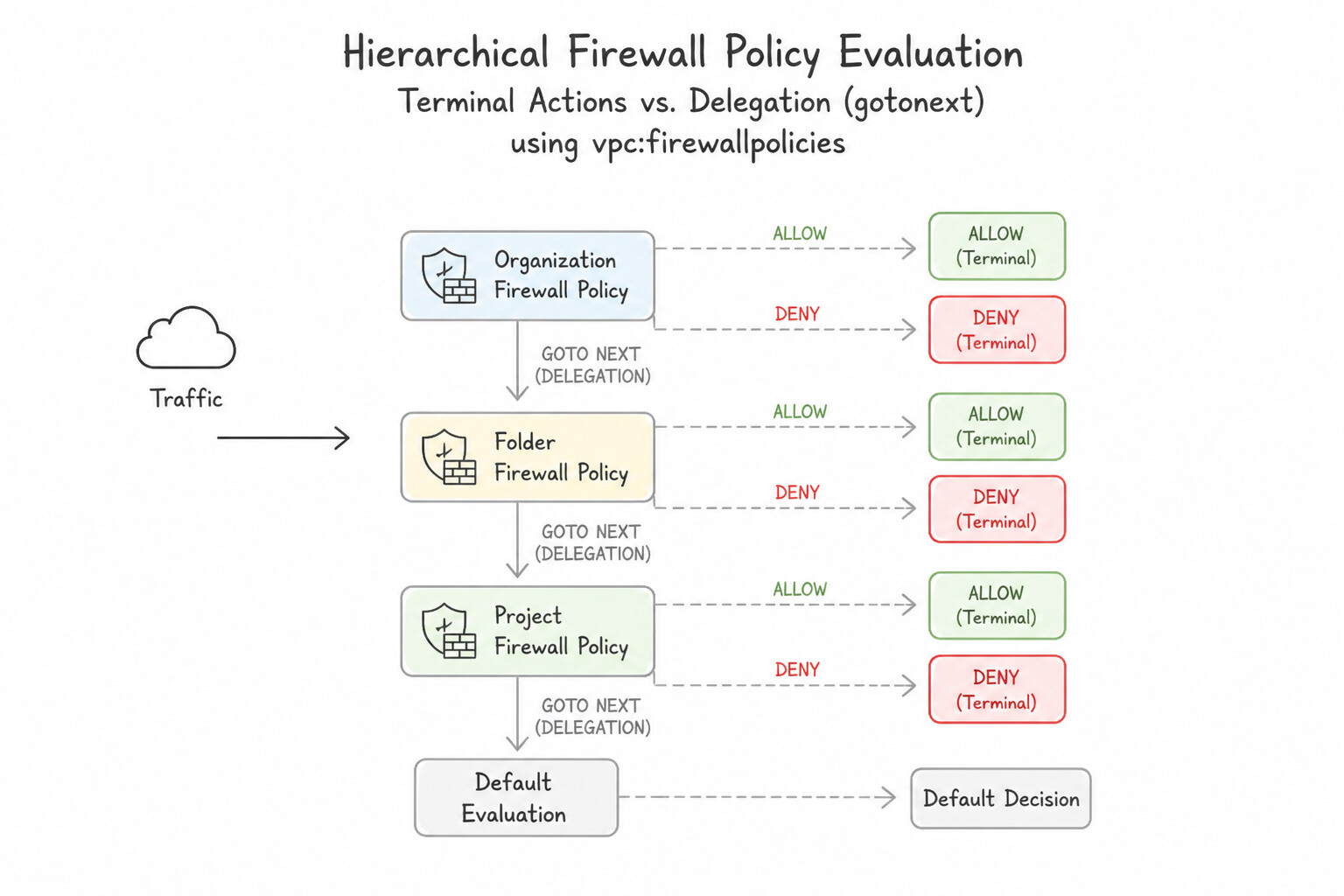
Google Cloud architecture heavily tests how a packet is evaluated across multiple policy layers:
- Terminal Actions (
allow/deny) vs. Delegation (goto_next): - At every policy level, rules are evaluated from lowest numerical priority number (
0) to highest (2147483647). - The first rule that matches the packet's attributes executes its action:
- If the action is
allowordeny, evaluation terminates immediately! Lower-level policies (Folder, Network Firewall Policy, Classic VPC Firewall Rules) can never override a higher-levelallowordeny! - If the action is
goto_next(or if no rule matches at the current level), evaluation delegates downward to the next policy level in the hierarchy! - Production Integration Pattern: The CISO wants to ensure that only the central jump host (
10.100.0.5/32) can ever SSH (tcp:22) into VMs inside theProdfolder, while still allowing individualProdproject admins to restrict which specific VMs in their VPC accept SSH from10.100.0.5/32. - Wrong Answer: Put an
allowrule for10.100.0.5/32tcp:22at Priority100in theProdFolder Hierarchical Policy (this terminally allows SSH to every VM inProd, preventing project admins from blocking it on sensitive DB VMs!). - Winning Answer: In the
ProdFolder Hierarchical Policy, create Rule100:src: 10.100.0.5/32,tcp:22,action: goto_next, followed by Rule101:src: 0.0.0.0/0,tcp:22,action: deny! Now, SSH from anywhere else is deterministically blocked at the Folder level, while SSH from10.100.0.5/32is delegated (goto_next) to each VPC's Network Firewall Policy to explicitly allow only on authorized bastion targets! - Swapping the VPC Enforcement Order (
BEFORE_CLASSIC_FIREWALLvs.AFTER_CLASSIC_FIREWALL): - Surprise Default: By default on a VPC network,
network-firewall-policy-enforcement-orderis set toAFTER_CLASSIC_FIREWALL, meaning legacy Classic VPC Firewall Rules are evaluated BEFORE Global/Regional Network Firewall Policies! - To make Global/Regional Network Firewall Policies take precedence over legacy VPC firewall rules, run:
gcloud compute networks update VPC_NAME --network-firewall-policy-enforcement-order=BEFORE_CLASSIC_FIREWALL.
Key Implementation Patterns
- Specific rule action in hierarchical firewall policies that skips remaining rules: Use goto_next action. The goto_next action instructs the firewall engine to bypass remaining rules in the current hierarchy level and delegate evaluation to lower-level policies. (Avoid alternative: The allow action immediately permits the traffic and stops further rule evaluation.)
- Split-Horizon DNS Architecture: Use Create an ingress firewall rule in VPC-B allowing tcp:5432 from source IP range 10.10.0.0/16. VPC Peering does not bypass firewall rules; you must explicitly allow ingress traffic in the destination VPC (VPC-B) from the source VPC's IP range.
Key Takeaways (6.2b)
- Hierarchical firewall policies apply at the organization or folder level.
- The
goto_nextaction passes control to lower-level policies or VPC network firewall rules.- The
allowanddenyactions terminate evaluation immediately at the hierarchy level where matched.- VPC Peering enables routing but does not automatically modify firewall rules.
Consideration 6.2c: Configuring Cloud NGFW to support GKE and Cloud Load Balancing
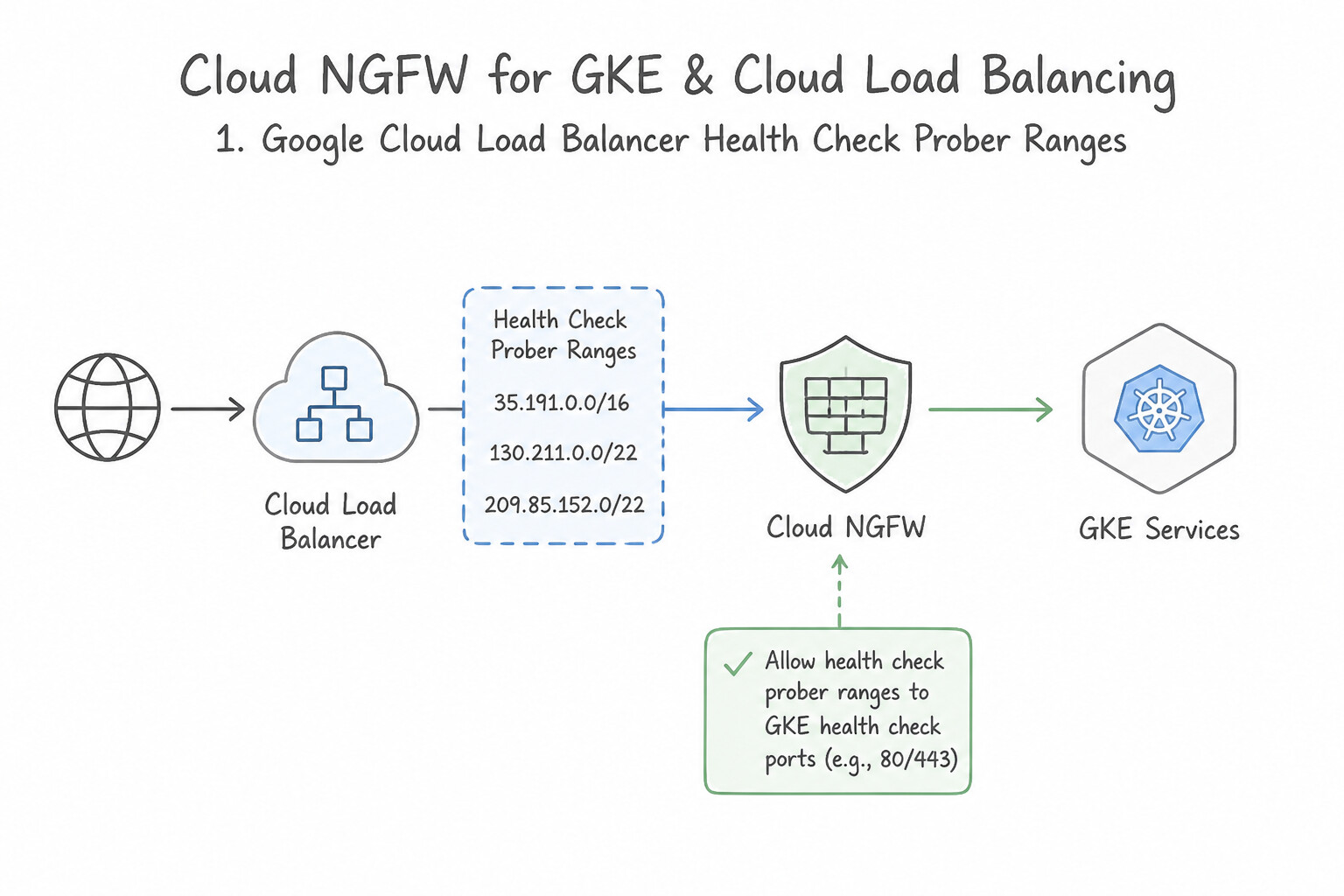
When you lock down a VPC with strict ingress/egress firewall policies, you must explicitly permit Google Cloud control-plane and load-balancing ranges or your clusters and backends will fail health checks:
- 1. Google Cloud Load Balancer Health Check Prober Ranges:
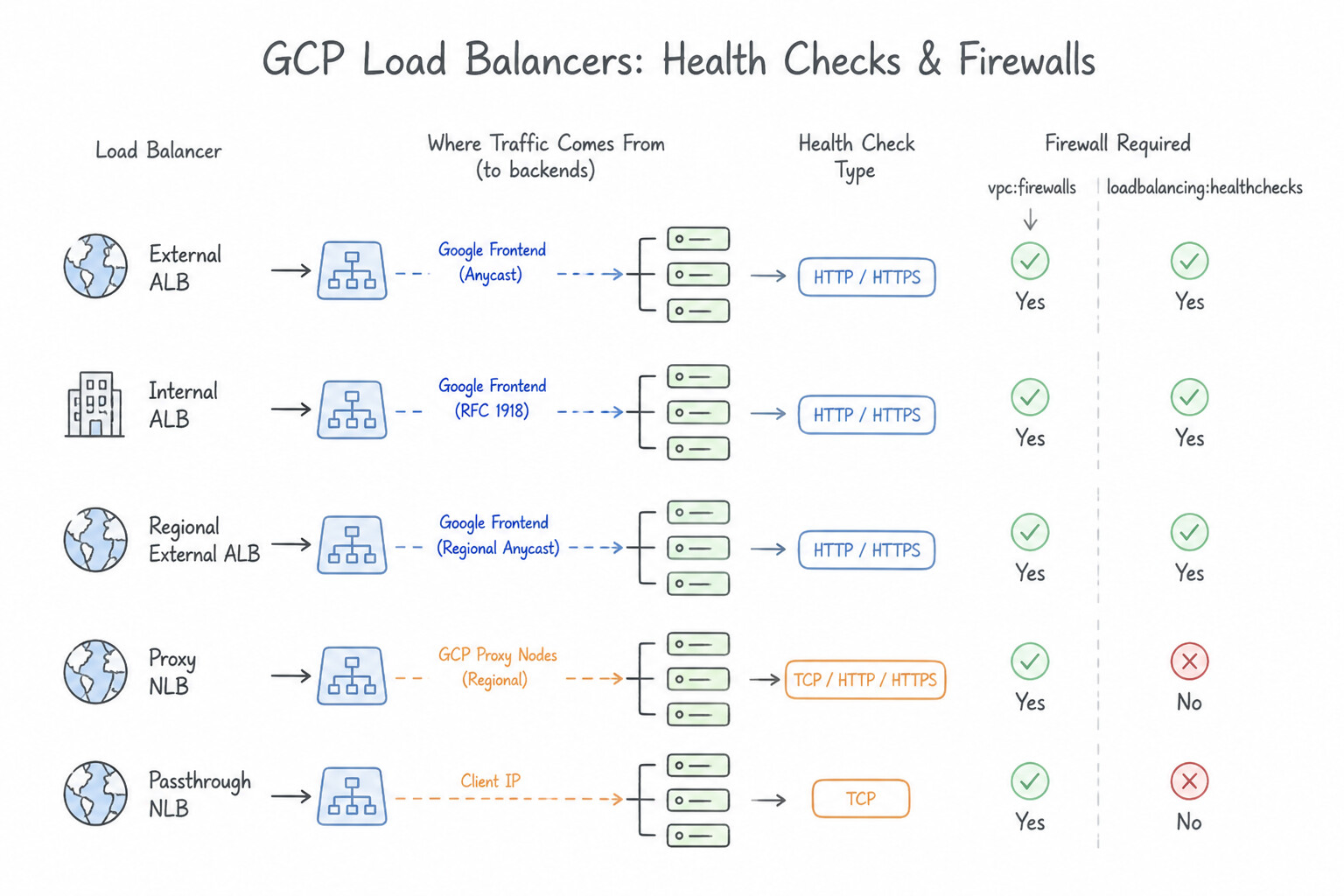
- External ALB, Internal ALB, Regional External ALB, Proxy NLB, and Passthrough NLB Health Checks: Must allow ingress from
35.191.0.0/16and130.211.0.0/22to backend VMs/GKE nodes on the health check port. - Regional Envoy-Based Load Balancers (Internal ALB, Regional External ALB, Regional Internal/External Proxy NLB): Because user traffic is terminated by Envoy proxies running inside your VPC's Regional Proxy-Only Subnet, you must also allow ingress from the Proxy-Only Subnet CIDR range to your backend VMs/GKE pods on the serving port!
- Legacy HTTP Load Balancer Health Checks (
httpHealthChecks): Also use209.85.152.0/22and209.85.204.0/22. - 2. Identity-Aware Proxy (IAP) TCP Forwarding Range:
- To allow keyless
gcloud compute ssh --tunnel-through-iapor RDP to private VMs without public IPs, allow ingress from35.235.240.0/20ontcp:22/tcp:3389. - 3. GKE Private Cluster Control Plane & Node Communication:
- For Private GKE Clusters, GKE automatically creates rules allowing the Control Plane CIDR (
/28) to reach nodes ontcp:443andtcp:10250(kubelet). However, if you deploy custom Admission Webhooks (like Istio/OPA Gatekeeper ontcp:8443,tcp:9443, ortcp:15017) or customAPIServicemetrics servers, or if an Organization/Folder Hierarchical Firewall Policy blocks internal ranges, you must explicitly allow ingress from the GKE Control Plane CIDR (or DNS-based control plane endpoint) to the GKE nodes/Pods on that custom webhook port!
Key Implementation Patterns
- Designated Google Cloud source IP address CIDR blocks required in VPC ingress firewall: Use Allow 35.191.0.0/16 and 130.211.0.0/22. Google Cloud health check probes for most load balancers originate from 35.191.0.0/16 and 130.211.0.0/22. (Avoid alternative: Google Cloud health checkers do not originate from RFC 1918 private ranges like 10.0.0.0/8.)
Key Takeaways (6.2c)
- Google Cloud health check probes primarily originate from
35.191.0.0/16and130.211.0.0/22.- You must create an ingress allow firewall rule specifying these IP address ranges to avoid backends being marked as unhealthy.
- Health check firewall rules should target the specific port and backend tags required rather than exposing the entire VM to
0.0.0.0/0.
Consideration 6.2d: Creating and troubleshooting VPC firewall rules and Cloud NGFW regional/global/hierarchical policies
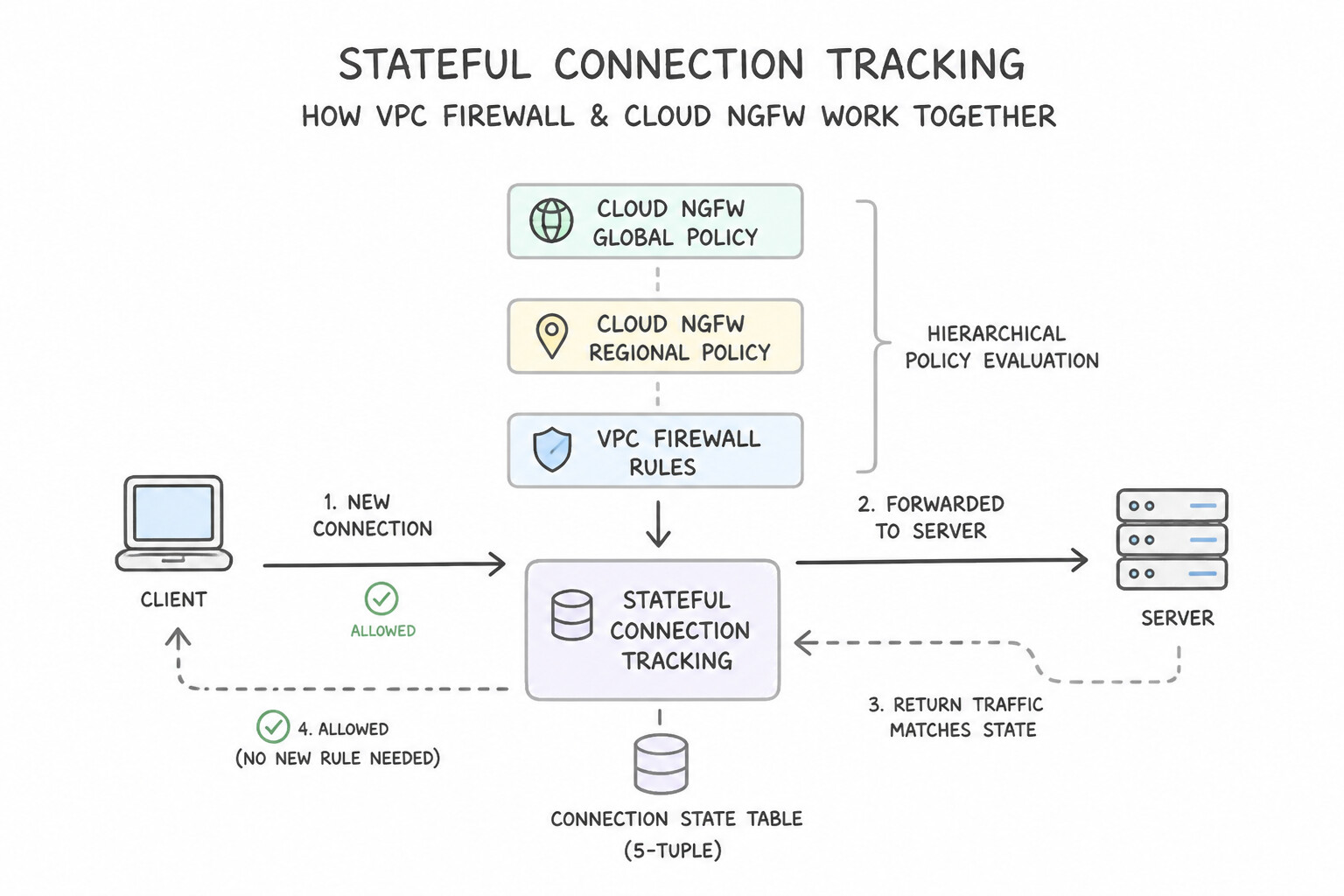
Master the stateful packet engine rules in Andromeda:
- Stateful Connection Tracking:
- All VPC Firewall Rules and Cloud NGFW Policies are stateful. Once an initiating packet (e.g., TCP
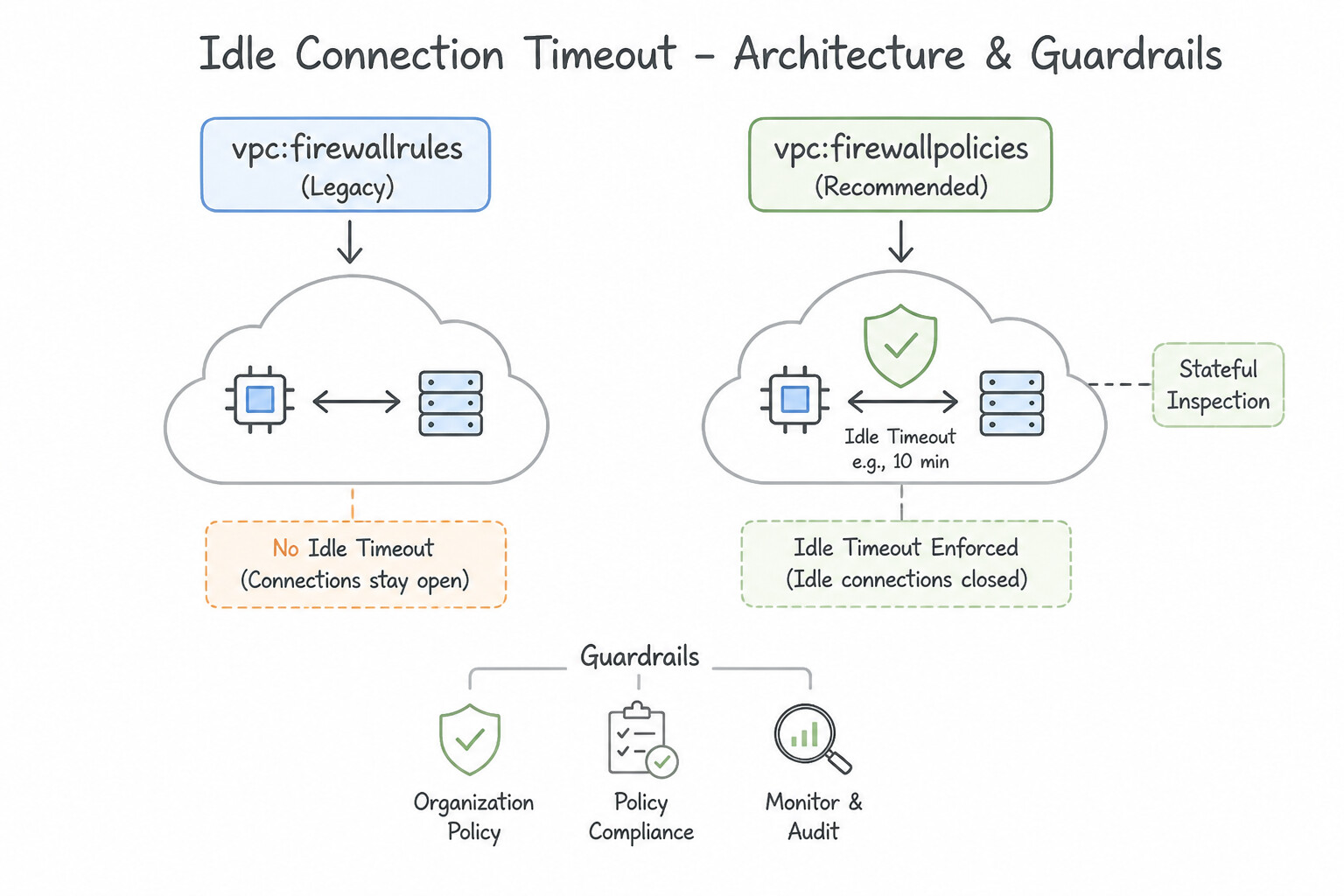
SYNor UDP request) is permitted by an ingress or egressallowrule, Andromeda writes an entry in the connection tracking table (conntrack). All subsequent return packets matching that established 5-tuple session are allowed automatically—you never need to create a separate firewall rule for return traffic! - Idle Connection Timeout: If a TCP connection remains completely silent (zero packets in either direction) for 10 minutes (
600 seconds), Andromeda purges the stateful session entry fromconntrack! Make sure long-lived idle database connections or NAT connections configure TCP Keepalives (< 600s, e.g.,120s). - Every Packet Evaluates Both Sender Egress AND Receiver Ingress:
- For VM A to talk to VM B inside the same VPC (or across peered VPCs), the packet must be allowed by VM A's Egress Firewall Rules AND VM B's Ingress Firewall Rules.
- The Two Implied Rules at Priority
65535(Lowest Possible Priority): - Implied Allow Egress (
0.0.0.0/0,::/0, all protocols, priority65535): Allows all outbound traffic from VMs unless overridden by a higher-priority (0–65535) explicitdenyegress rule. - Implied Deny Ingress (
0.0.0.0/0,::/0, all protocols, priority65535): Blocks all unsolicited inbound traffic to VMs unless overridden by a higher-priority explicitallowingress rule. Neither implied rule can be deleted, only overridden.
Key Implementation Patterns
- Top-to-bottom evaluation hierarchy for firewall policies and rules in Google Cloud: Use Hierarchical, Network, then VPC. Firewall evaluation follows the resource hierarchy: Hierarchical policies first, followed by Network firewall policies, and then legacy VPC firewall rules.
Key Takeaways (6.2d)
- Hierarchical firewall policies are evaluated first (Organization level, then Folder level).
- Network firewall policies are evaluated second (Global and Regional).
- Traditional VPC firewall rules are evaluated third.
- Within each policy level, rule priority (0-65535) dictates evaluation order, with lower integer values having higher precedence.
Consideration 6.2e: Enabling Layer 7 packet inspection with Cloud NGFW Enterprise
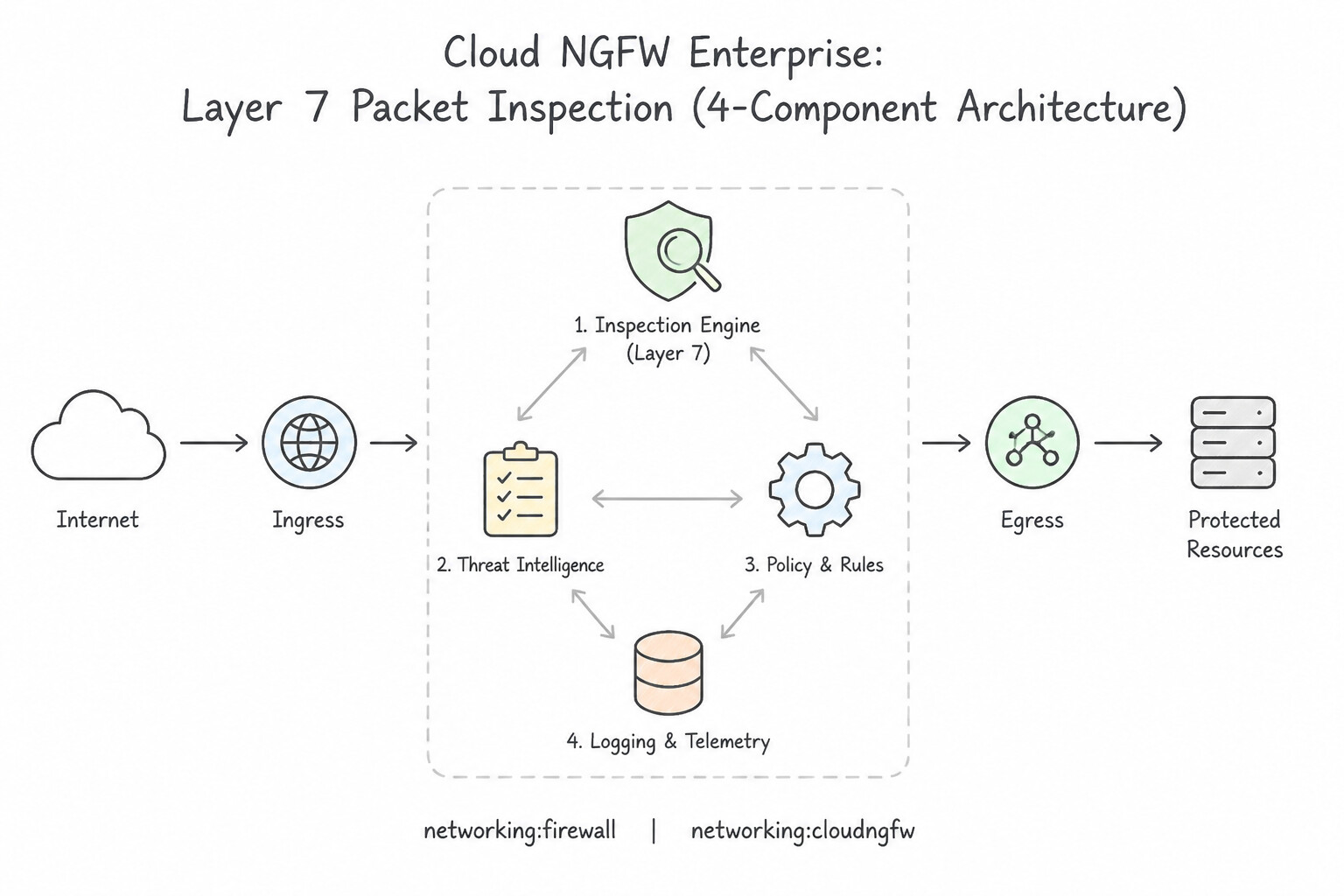
When a workload scenario requires inline Deep Packet Inspection (DPI), Intrusion Prevention System (IPS) threat signature blocking, anti-spyware/anti-virus, and TLS decryption without managing third-party NVA VM clusters, choose Cloud NGFW Enterprise:
- 4-Component Architecture of Cloud NGFW Enterprise:
- Zonal Firewall Endpoint (
network-security firewall-endpoints): A Google-managed, dedicated high-throughput L7 inspection engine created at the Organization level in a specific Zone (e.g.,us-central1-a). You do not manage VMs, MIGs, or autoscaling for this endpoint. - Firewall Endpoint Association (
firewall-endpoint-associations): Associates your VPC network (in a project) with the Zonal Firewall Endpoint so Andromeda can transparently steer matching zonal traffic through the inspection engine (Jumbo frames up to8500bytes supported). - Security Profile (
threat-prevention) & Security Profile Group: Developed in partnership with Palo Alto Networks, a Threat Prevention Security Profile defines severity-based actions (DEFAULT,ALLOW,ALERT,DENY) for thousands of CVE vulnerability signatures, spyware, command-and-control (C2), and virus signatures (with per-Threat-ID overrides). The Security Profile is placed inside a Security Profile Group. - Firewall Policy Rule with Action
apply_security_profile_group: Instead of a simple L4allowaction, your Hierarchical or Network Firewall Policy rule specifies--action=apply_security_profile_group --security-profile-group=.... When a packet matches the L4 rule criteria, Andromeda allows it at L4 and transparently redirects the flow inline to the Zonal Firewall Endpoint for deep Layer 7 IPS inspection! - Inline TLS Decryption (
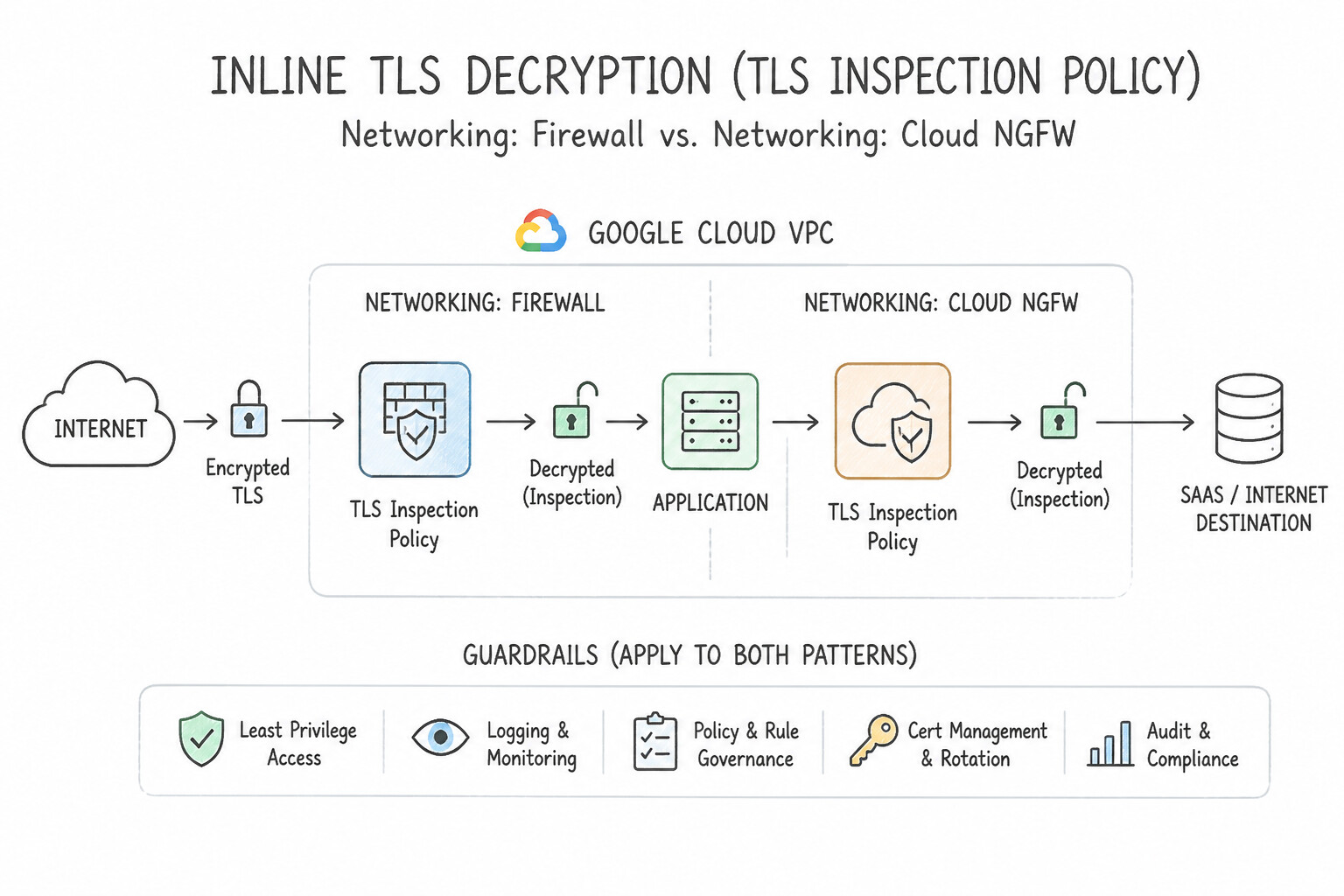
TLS Inspection Policy): - Encrypted HTTPS/TLS traffic hides L7 payloads. You can attach a TLS Inspection Policy to the Firewall Endpoint Association backed by a Private CA pool in Certificate Authority Service (CAS) (or Certificate Manager trust configs) to dynamically mint intermediate certificates, decrypt inbound/outbound TLS traffic inline, inspect the cleartext payload against IPS signatures, and re-encrypt before forwarding!
Key Implementation Patterns
- Cloud NGFW tier that offers advanced Layer 7 Intrusion Prevention System (IPS) capabilities: Use Cloud NGFW Enterprise. Cloud NGFW Enterprise provides Layer 7 Intrusion Prevention System (IPS) inspection and TLS inspection powered by Palo Alto Networks. (Avoid alternative: Cloud NGFW Standard supports FQDN and Threat Intelligence lists, but does not provide Layer 7 IPS inspection.)
Key Takeaways (6.2e)
- Cloud NGFW Essentials: Basic Layer 3/4 firewall policies and Secure Tags.
- Cloud NGFW Standard: FQDN filtering, geolocation filtering, and Threat Intelligence lists.
- Cloud NGFW Enterprise: Advanced Layer 7 Intrusion Prevention System (IPS) and TLS inspection.
- Architecture advantage: Cloud NGFW Enterprise eliminates the need to manage custom third-party firewall virtual machine (VM) clusters for deep packet inspection.
Consideration 6.2f: Migrating from VPC firewall rules to Cloud NGFW policies
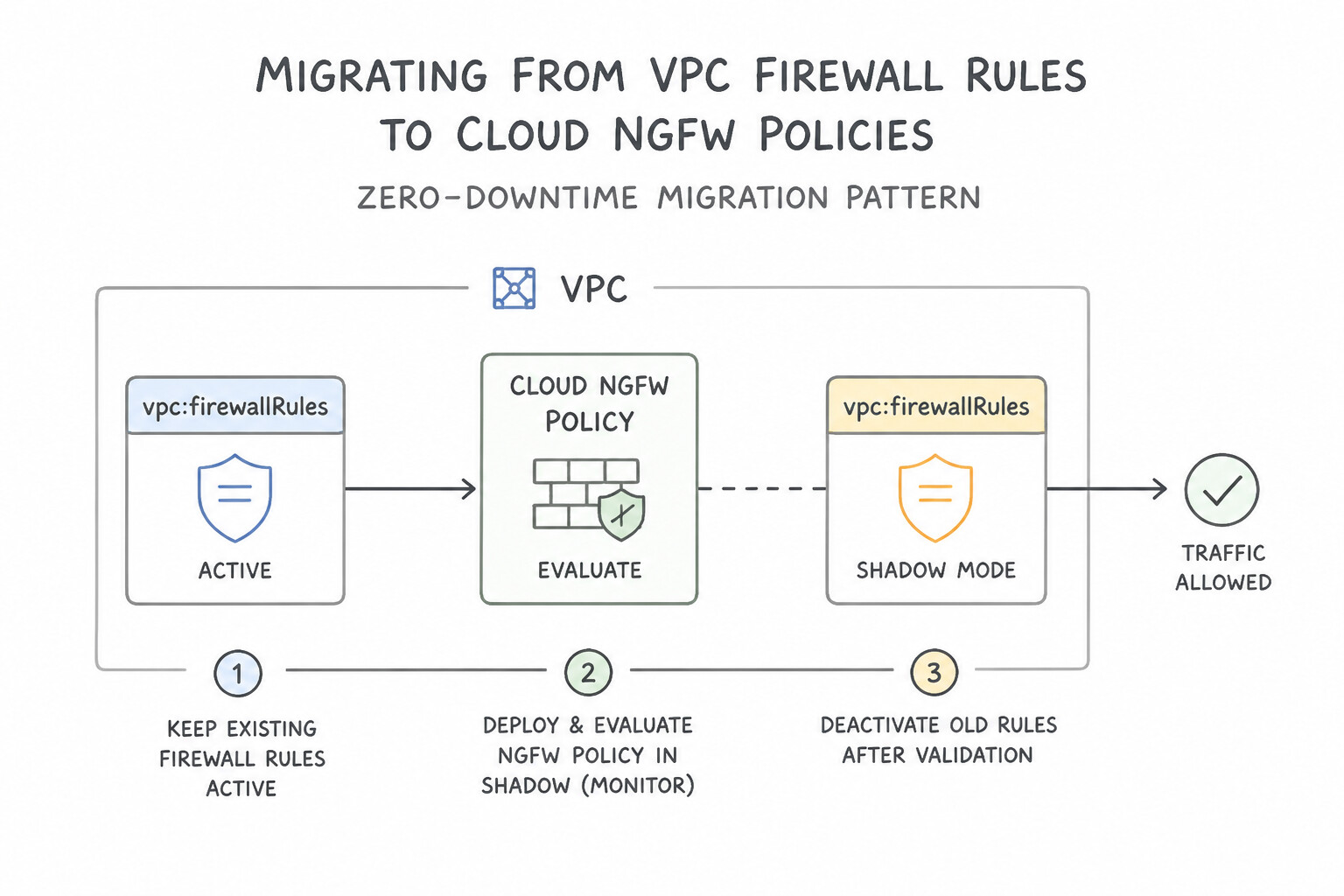
When migrating hundreds of legacy VPC Firewall Rules and untrusted Network Tags to modern Global/Regional Network Firewall Policies and IAM Secure Tags with zero downtime:
- Step-by-Step Zero-Downtime Migration Pattern:
- Use the Built-in Migration Tool / Cloner: Replicate existing Classic VPC Firewall Rules into a new Global Network Firewall Policy (converting legacy Network Tags to IAM Resource Manager Secure Tags bound to the target VMs, and consolidating repeated IP lists into reusable Address Groups).
- Keep
AFTER_CLASSIC_FIREWALLDuring Validation: Associate the new Network Firewall Policy with the VPC while enforcement order is stillAFTER_CLASSIC_FIREWALL, or test new rules using Connectivity Tests and Firewall Rules Logging. - Flip Enforcement Order to
BEFORE_CLASSIC_FIREWALL: Rungcloud compute networks update VPC_NAME --network-firewall-policy-enforcement-order=BEFORE_CLASSIC_FIREWALL. Because the Network Firewall Policy now contains explicitallowanddenyrules matching your production traffic (withoutgoto_next), evaluation terminates inside the new Network Firewall Policy! - Verify Zero Hits on Legacy Rules & Decommission: Monitor Firewall Rules Logging / Firewall Insights on the legacy Classic VPC Firewall Rules to confirm they receive zero hits (since all traffic is handled by the Network Firewall Policy above them), then safely delete the legacy VPC Firewall Rules.
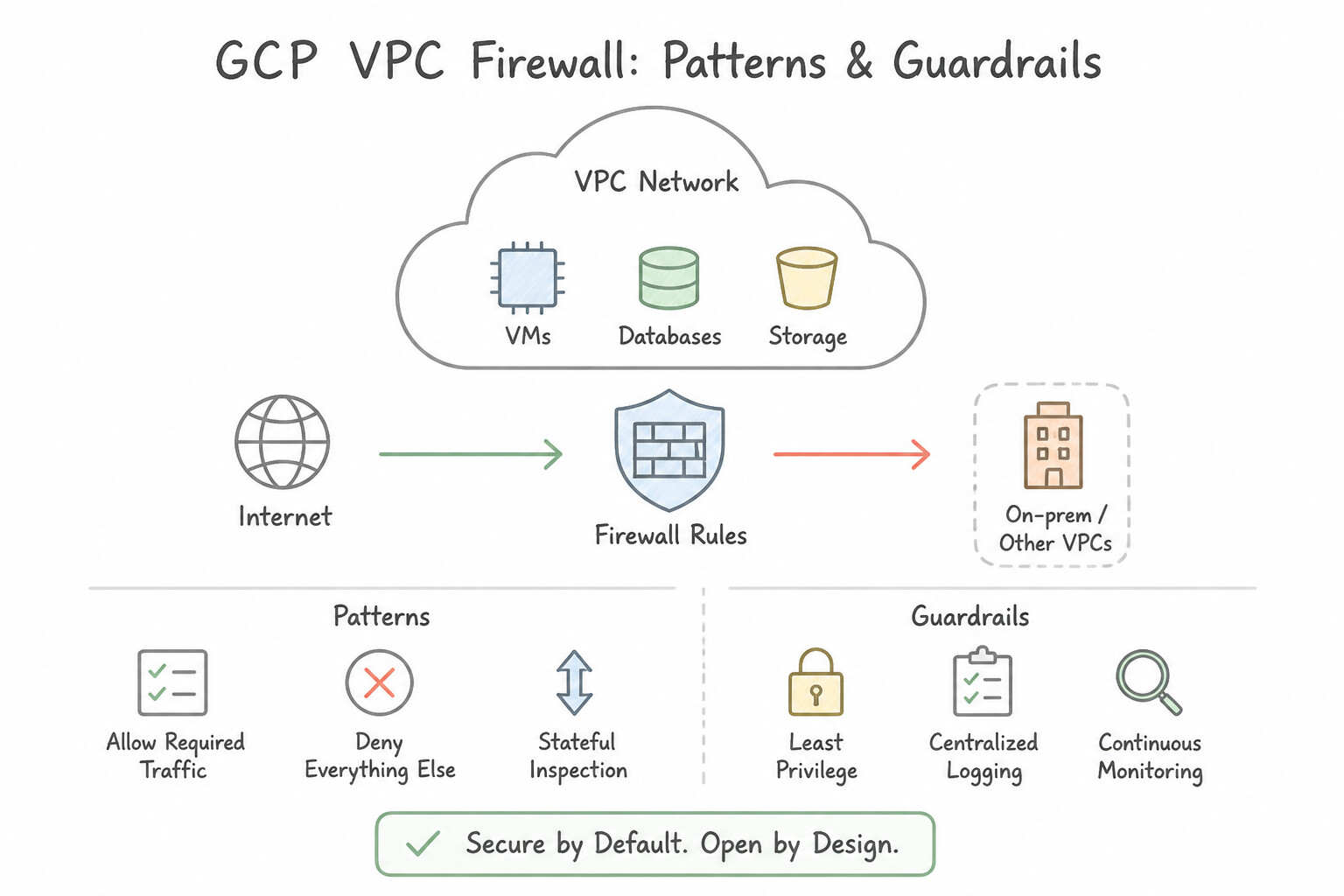
Key Implementation Patterns
- Immutability of implied VPC firewall rules and understand how to override them: Use No, but overridden by priority. Implied firewall rules are built into every VPC network and cannot be deleted, but you can override them with higher-priority rules. (Avoid alternative: Network type does not affect implied firewall rules; both auto and custom VPC networks include non-deletable implied rules.)
Key Takeaways (6.2f)
- Implied firewall rules exist in every VPC network and cannot be deleted or modified.
- The implied egress rule permits all outbound traffic; the implied ingress rule blocks all incoming traffic.
- Both implied rules are assigned priority 65535.
- To alter implied behavior, create custom firewall rules with higher priority (numerical values 0 to 65534).
Consideration 6.2g: Configuring VPC and NGFW rule criteria (rule priority, network protocols, direction, source, and destination)
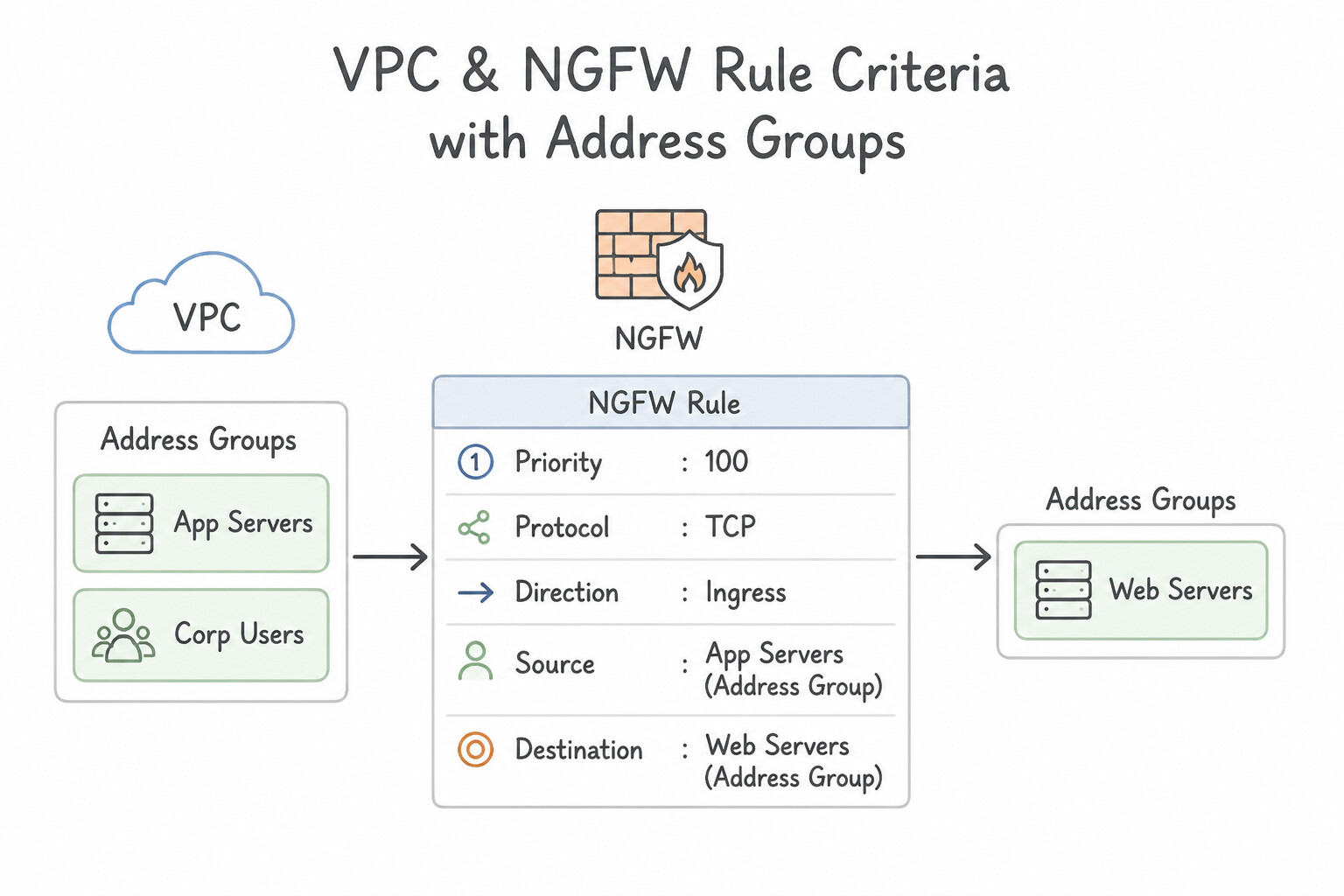
Cloud NGFW Policies expand rule matching criteria far beyond classic L3/L4 IP and port tuples:
- Address Groups (
network-security address-groups): Reusable, centrally managed named collections of IPv4 or IPv6 CIDRs that can be referenced across multiple Hierarchical and Network Firewall Policies (updating the Address Group once updates all referencing firewall policies instantly!). - FQDN (Fully Qualified Domain Name) Objects (
--dest-fqdns/--src-fqdns): - How It Works: Available in Cloud NGFW Standard (
NGFW Standard). Allows egress (or ingress) rules to match domain names likeapi.stripe.comor wildcard domains*.packages.ubuntu.com. - Crucial architectures Requirement: Cloud NGFW resolves FQDNs by integrating with Cloud DNS! For FQDN firewall rules to accurately track the IP addresses returned to your VMs, the VMs in the VPC must use Cloud DNS (
169.254.169.254) for name resolution (not hardcoded external DNS resolvers like8.8.8.8over encrypted DoH). - Geolocation (
--src-region-codes/--dest-region-codes): Matches ISO 3166-1 alpha-2 two-letter country/region codes (e.g.,US,DE,IN) on external IPv4/IPv6 addresses directly inside the VPC firewall policy. - Google Threat Intelligence Lists (
--src-threat-intelligence/--dest-threat-intelligence): Matches managed Threat Intelligence lists (iplist-tor-exit-nodes,iplist-known-malicious-ips,iplist-public-clouds,iplist-vpn-providers,iplist-anon-proxies,iplist-search-engines-crawlers) directly at the VPC vNIC for both Ingress and Egress (e.g., blocking a compromised VM from making egress C2 callbacks toiplist-known-malicious-ipsoriplist-tor-exit-nodes!).
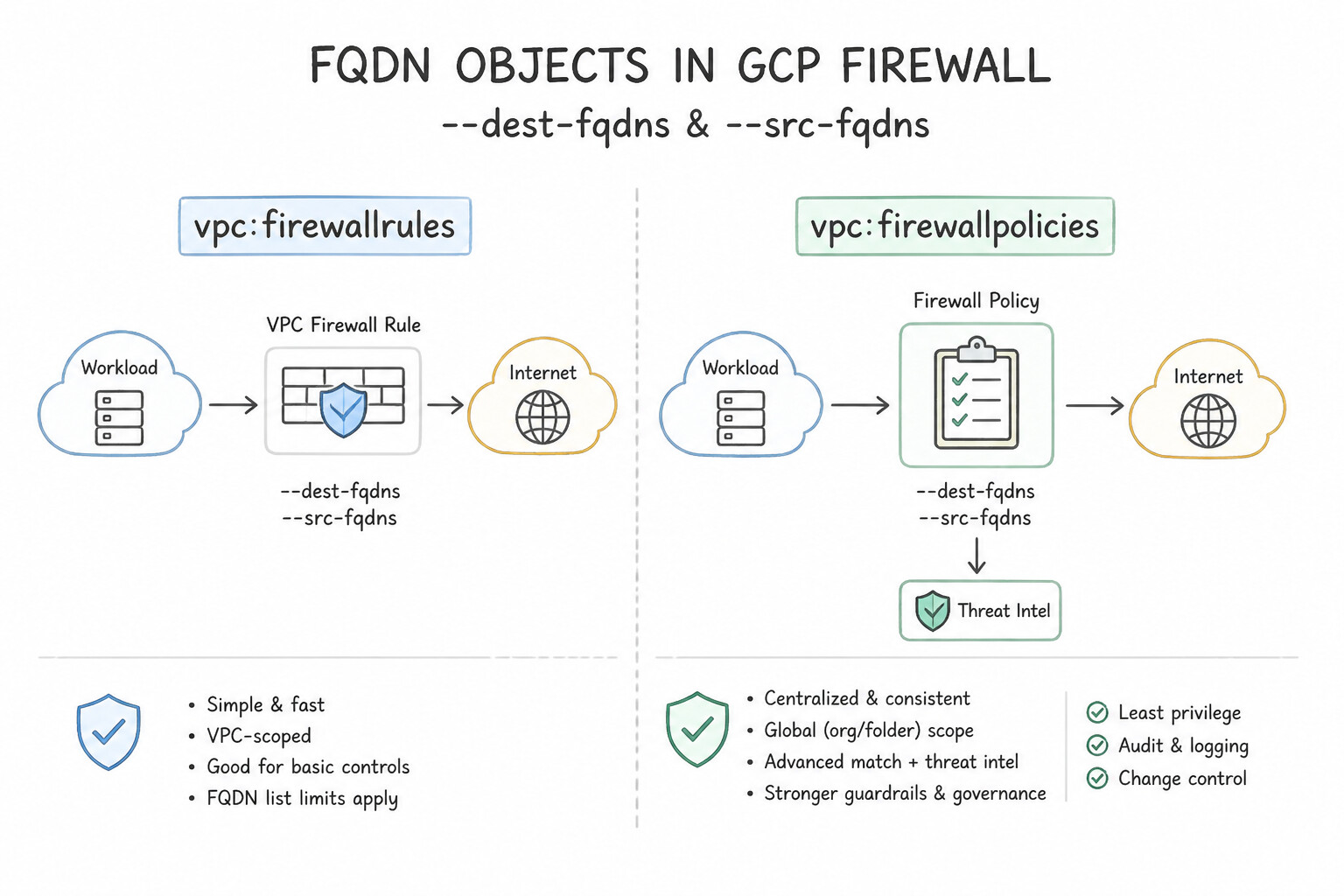
Key Implementation Patterns
- Integer boundary range supported by Google Cloud for VPC firewall rule and policy priorities: Use 0 to 65535. VPC firewall rules and policies define priorities between 0 and 65535, where 0 is the highest priority. (Avoid alternative: 1000 is only the default priority for custom rules, not the boundary of the priority range.)
Key Takeaways (6.2g)
- VPC firewall rule priority ranges from 0 to 65535.
- Priority 0 has the highest precedence; priority 65535 has the lowest precedence.
- Default priority for custom rules is 1000.
- Implied rules operate at priority 65535.
Consideration 6.2h: Configuring VPC and Firewall Rules Logging
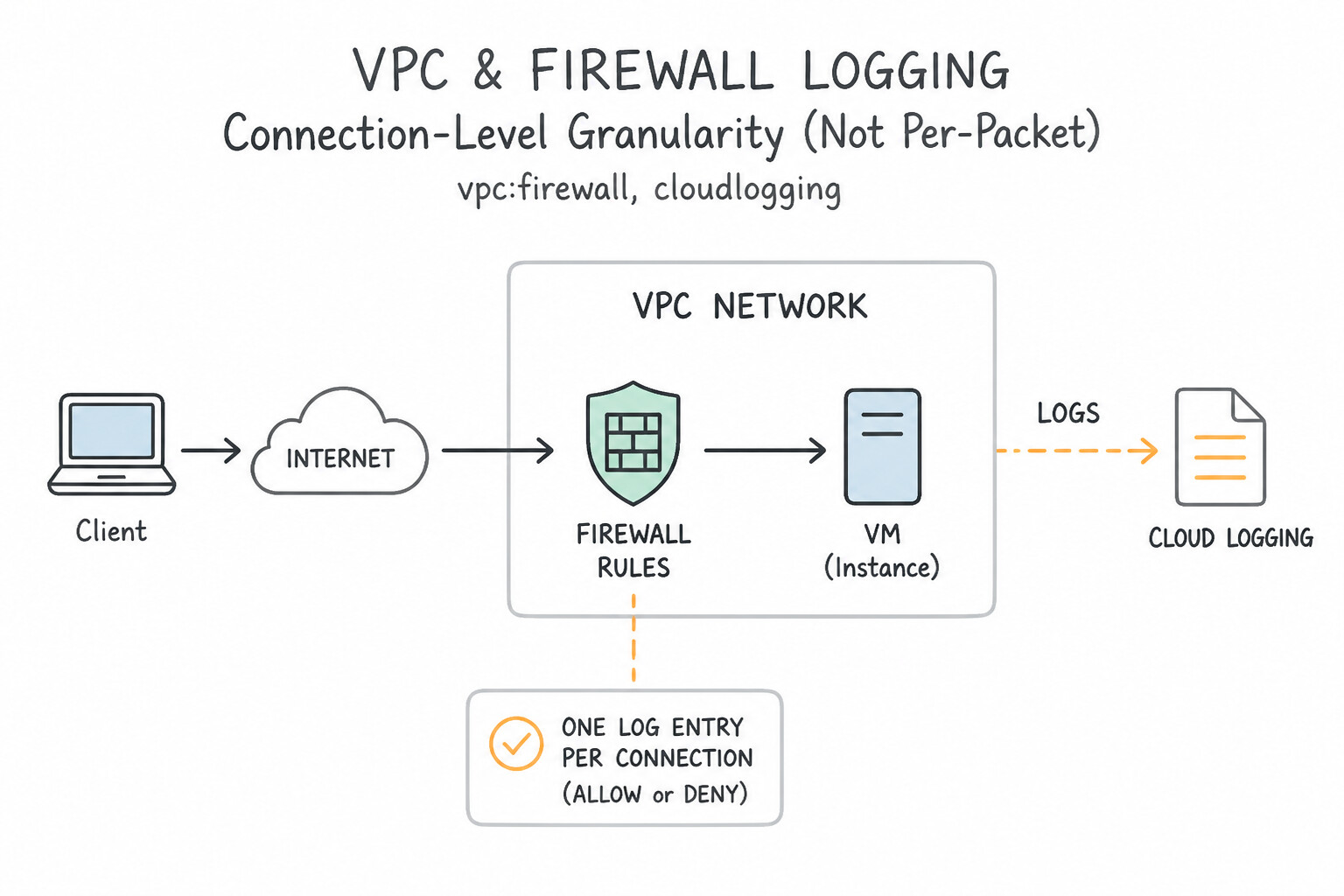
Master how Firewall Rules Logging operates and how to prevent cost overruns:
- Connection-Level Granularity (Not Per-Packet):
- Firewall Rules Logging records a log entry in Cloud Logging (
resource.type="gce_subnetwork", logNamecompute.googleapis.com%2Ffirewall) at the start of each allowed or denied TCP/UDP connection (or periodically for connectionless ICMP/UDP streams). - Per-Rule Enablement:
- Must be explicitly toggled (
--enable-logging) on each individual rule inside a Hierarchical Policy, Network Firewall Policy, or Classic VPC Firewall Rule. - Excluding Metadata (
--logging-metadata=exclude-all-metadata): - By default (
include-all-metadata), each firewall log entry includes verbose VPC, subnet, instance name, geographic, and tag metadata fields. On high-connection microservices or public web tiers, set--logging-metadata=exclude-all-metadatato strip optional metadata while preserving the core 5-tuple (connection),rule_details(policy/rule name, priority, action, direction), and timestamp—slashing Cloud Logging byte ingestion volume significantly.
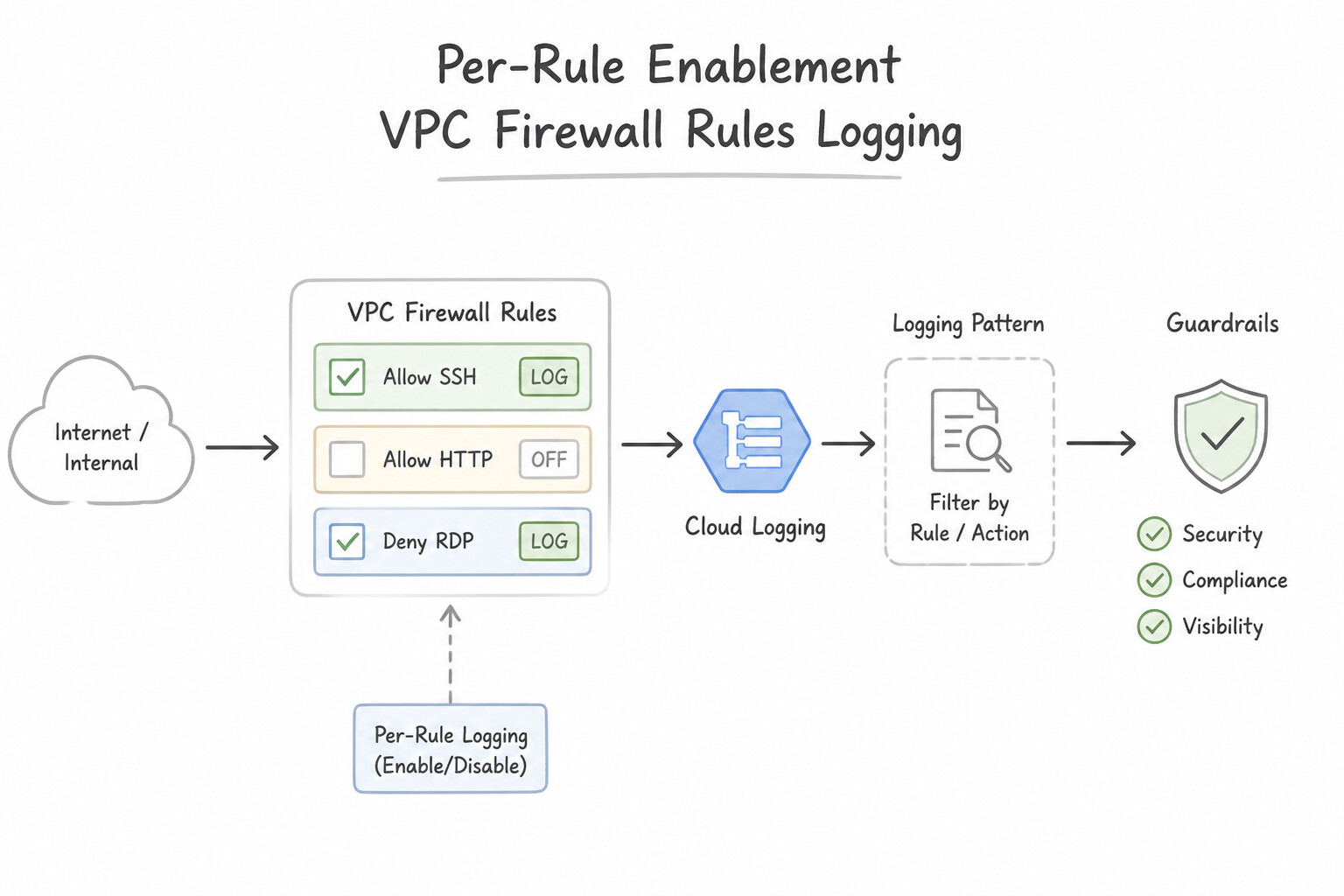
Key Implementation Patterns
- Specific Google Cloud logging feature used to monitor and record allow or deny actions: Use Firewall Rules Logging. Firewall Rules Logging records whether incoming or outgoing connections are allowed or denied by VPC firewall rules. (Avoid alternative: Policy Analyzer evaluates IAM access permissions, not VPC firewall rule decisions.)
Key Takeaways (6.2h)
- Firewall Rules Logging records allow and deny decisions made on network traffic matching specific VPC firewall rules.
- Logging is enabled per rule, allowing targeted monitoring for security auditing and debugging.
- Do not confuse Firewall Rules Logging with Cloud Audit Logs (which track API/configuration modifications) or VPC Flow Logs (which capture subnet-level flow records).
Consideration 6.2i: Incorporating micro-segmentation for security purposes (metadata, Secure Tags, service accounts, and network tags)
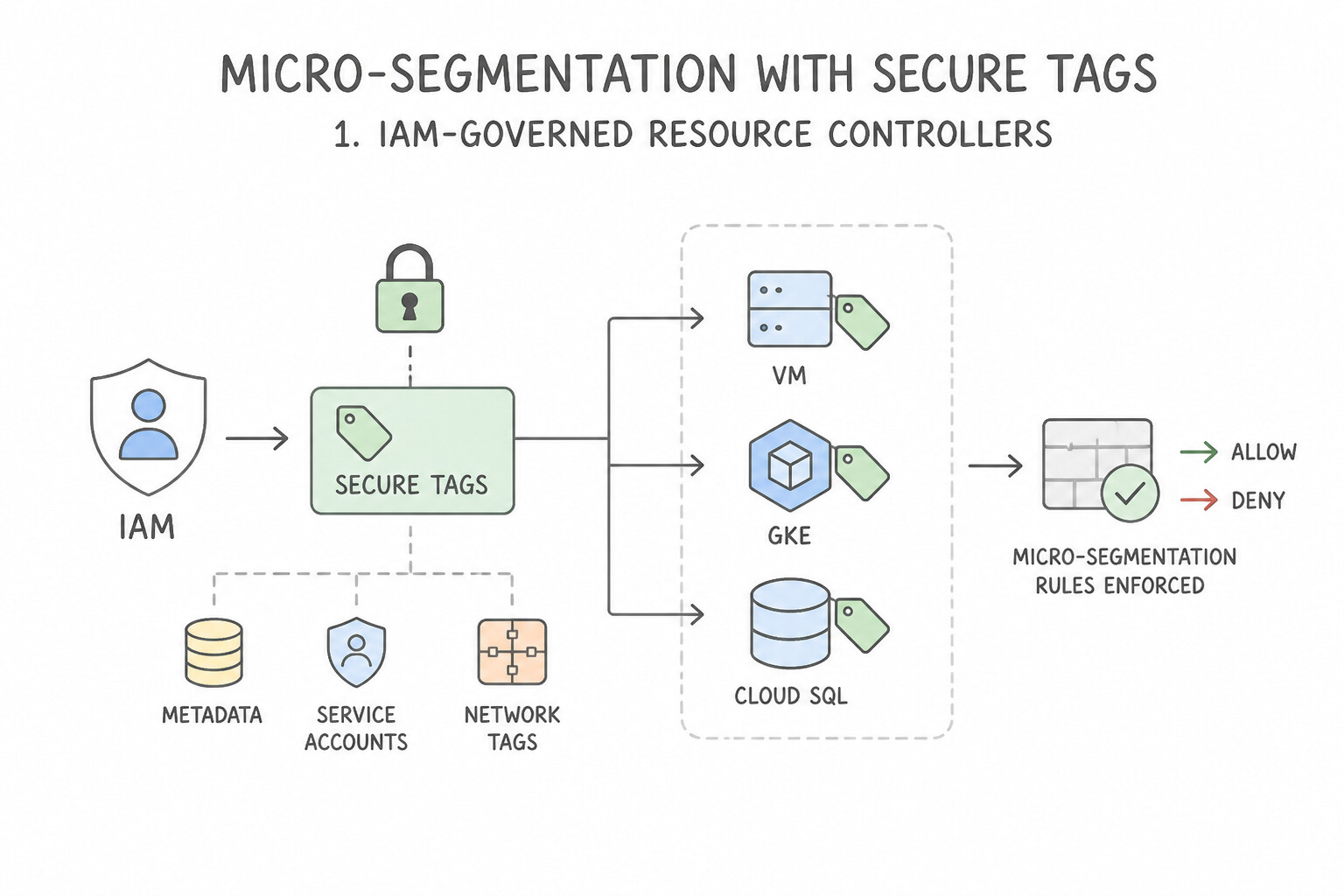
This comparison is one of the most foundational topics on the entire Google Cloud architecture:
- 1. IAM-Governed Resource Manager Secure Tags (
tagKeys/...,tagValues/...) — The Modern Zero-Trust Standard: - Access Control: Binding a Secure Tag (
purpose=GCE_FIREWALL) to a VM requires explicit IAM permissions (roles/resourcemanager.tagUser) on the TagValue! A VM administrator cannot self-assign atier=databasetag unless granted IAM permission on that tag value. - Supported Policies: Supported in Global and Regional Network Firewall Policies (not Classic VPC Firewall Rules and not Organization/Folder Hierarchical Policies, which are VPC-agnostic unless scoped appropriately).
- Works Across VPC Network Peering! Unlike Network Tags and Service Accounts, Secure Tags DO work across Peered VPCs when used in Network Firewall Policies!
- Dynamic Attachment: You can attach or change Secure Tags on a running VM without stopping or restarting the VM.
- 2. Target / Source Service Accounts:
- Bound via IAM (
iam.serviceAccountUser), making them more secure than Network Tags in Classic VPC Firewall Rules. - Three Fatal Limitations (common pitfalls):
- Requires Stopping the VM to change its attached Service Account!
- A VM can only have one Service Account attached (whereas a VM can have multiple Secure Tags for
env=prod,app=payments,role=frontend). - Does NOT work across VPC Network Peering!
- 3. Legacy Network Tags:
- Simple arbitrary strings attached to a VM's metadata. Zero IAM control on tag values—anyone who can edit the VM instance can add any Network Tag string and bypass tag-based segmentation! Does NOT work across VPC Network Peering!
- Mutual Exclusivity Rule: Within a single firewall rule, you cannot mix Secure Tags with legacy Network Tags or Service Accounts.
Key Implementation Patterns
- Primary administrative and security advantages of using Secure Tags over standard: Use Governed by IAM access control. Secure Tags require granular Resource Manager IAM permissions to attach or detach, preventing VM administrators from tampering with security boundaries.
Key Takeaways (6.2i)
- Standard network tags are mutable by VM administrators, creating a security risk.
- Secure Tags (Resource Manager tags) enforce strict IAM controls and separation of duties.
- Secure Tags work across hierarchical firewall policies and standard VPC firewall policies.
Consideration 6.2j: Differentiating between the different tiers of Cloud NGFW: Essentials, Standard, and Enterprise
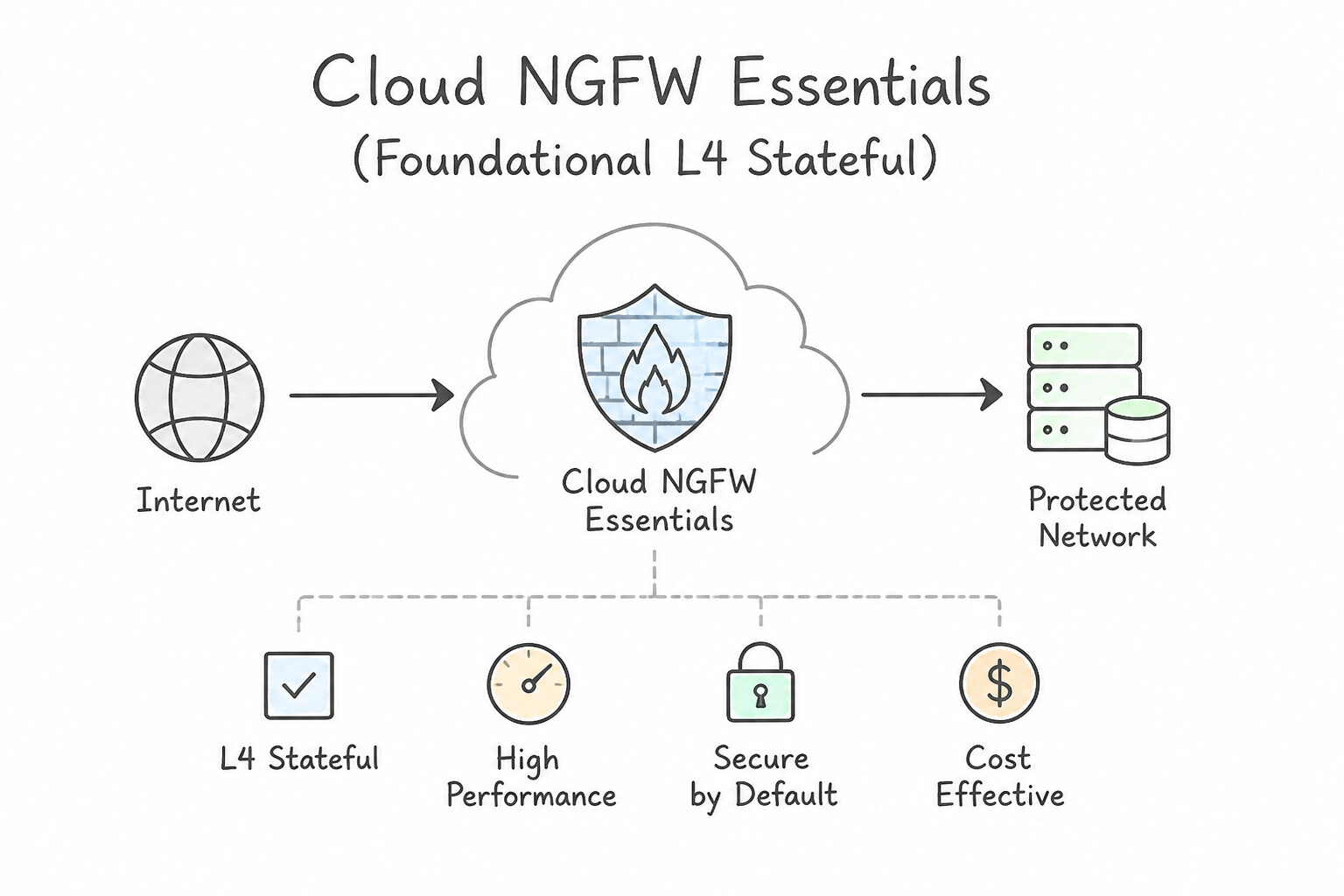
Be ready to map requirements to the exact Cloud NGFW Tier:
- 1. Cloud NGFW Essentials (Foundational L4 Stateful Firewalling):
- Includes Hierarchical Firewall Policies (Org/Folder), Global & Regional Network Firewall Policies, Classic VPC Firewall Rules, IAM-governed Secure Tags for zero-trust micro-segmentation, Address Groups (reusable IP/CIDR collections), and Firewall Rules Logging / Firewall Insights.
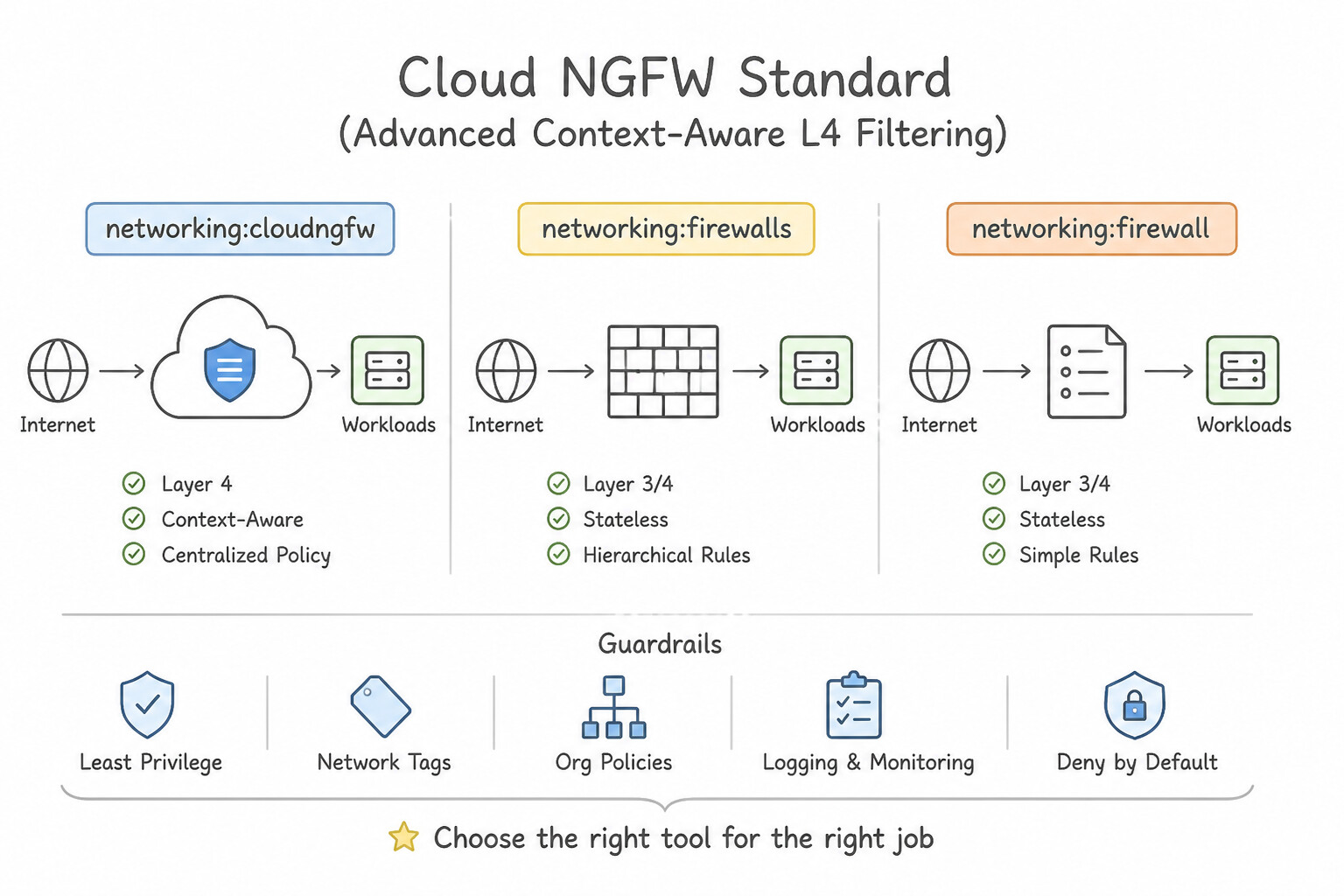
- 2. Cloud NGFW Standard (Advanced Context-Aware L4 Filtering):
- Adds three dynamic threat and context matchers on top of NGFW Essentials inside Network/Hierarchical Firewall Policies:
- FQDN (Domain Name) Filtering (
--dest-fqdns,--src-fqdns, powered by Cloud DNS integration). - Geolocation Filtering (
--src-region-codes,--dest-region-codes). - Google Threat Intelligence Lists (
--src-threat-intelligence,--dest-threat-intelligencefor Tor exit nodes, known malicious IPs, VPNs, anonymous proxies, public clouds, and search crawlers). - 3. Cloud NGFW Enterprise (Inline Layer 7 Deep Packet Inspection & IPS):
- Adds Zonal Firewall Endpoints, Firewall Endpoint Associations,
apply_security_profile_groupactions, Palo Alto Networks-powered Layer 7 Intrusion Prevention System (IPS) Threat Prevention signatures (CVEs, spyware, C2, anti-virus), and optional inline TLS Decryption/Inspection (via Certificate Authority Service).
Key Implementation Patterns
- Features included across the different service tiers of Google Cloud Next Generation: Use Cloud NGFW Standard. Cloud NGFW Standard provides advanced policy features including FQDN filtering, geolocation matching, and IAM-governed tags. (Avoid alternative: Cloud NGFW Essentials only offers foundational Layer 3 and Layer 4 firewall controls.)
- Specific Cloud NGFW tier that provides Layer 7 Intrusion Prevention Service powered: Use Cloud NGFW Enterprise. Cloud NGFW Enterprise includes the Intrusion Prevention Service (IPS) powered by Palo Alto Networks threat detection technologies. (Avoid alternative: Basic VPC firewall rules only evaluate traditional Layer 3 and Layer 4 parameters without advanced threat detection.)
Key Takeaways (6.2j)
- Cloud NGFW Essentials covers foundational Layer 3 and Layer 4 hierarchical and network policies.
- Cloud NGFW Standard adds FQDN filtering, geolocation object matching, and IAM-governed tags.
- Cloud NGFW Enterprise adds Cloud IPS for Layer 7 deep packet threat inspection and signature matching.
- Cloud NGFW Essentials: Layer 3/Layer 4 filtering, hierarchical policies, secure tags.
Quick Decision Cheat Sheet (Subsection 6.2)
If the Scenario Requires... | Choose This Google Cloud Pattern | Avoid This Common Mistake |
|---|---|---|
"Delegate firewall evaluation from an Org/Folder policy down to project-level VPC policies" | Set the rule action to goto_next in the Hierarchical Firewall Policy | Setting action to allow (terminates evaluation immediately) |
"Make Global/Regional Network Firewall Policies evaluate BEFORE legacy Classic VPC Firewall Rules" | Set --network-firewall-policy-enforcement-order=BEFORE_CLASSIC_FIREWALL on the VPC | Assuming Network Firewall Policies automatically override Classic VPC rules by default (default is AFTER_CLASSIC_FIREWALL!) |
"Zero-trust micro-segmentation that works across VPC Peering, enforces IAM access control, and attaches without rebooting VMs" | Resource Manager Secure Tags ( tagValues/..., purpose=GCE_FIREWALL) in a Network Firewall Policy | Service Accounts (require VM stop, max 1 per VM, no VPC Peering support) or Network Tags (no IAM control, no VPC Peering support) |
"Filter VPC traffic by domain name ( --dest-fqdns), Geolocation (--src-region-codes), or Threat Intelligence lists" | Cloud NGFW Standard (requires Cloud DNS for FQDN resolution) | Classic VPC Firewall Rules or self-managed cron scripts updating IP lists |
"Inline Layer 7 IPS deep packet inspection (Palo Alto Networks threat signatures) and inline TLS decryption" | Cloud NGFW Enterprise ( Firewall Endpoint + Firewall Endpoint Association + apply_security_profile_group + TLS Inspection Policy) | Cloud IDS or Packet Mirroring (out-of-band detection only; cannot block inline) |
"Allow Google Cloud Load Balancer health checks and IAP SSH to private VMs" | Allow 35.191.0.0/16 & 130.211.0.0/22 (Health Checks) + Proxy-Only Subnet (for Regional Envoy LBs) + 35.235.240.0/20 (IAP) | Allowing only 10.0.0.0/8 or the Load Balancer's public frontend IP |
"Idle TCP connections through VPC firewall or Cloud NAT drop after 10 minutes of silence" | Configure OS/Application TCP Keepalives ( < 600 seconds) to refresh the Andromeda stateful connection table | Creating a second firewall rule for return traffic |
Further Reading (Subsection 6.2)
- Hierarchical firewall policies overview — Explains how hierarchical firewall policies let you create and enforce a consistent firewall policy across your organization.
- Google Cloud Firewall overview — Provides an overview of hierarchical firewall policies, network firewall policies, and classic VPC firewall rules.
- Hierarchical firewall policies overview — This page explains how hierarchical firewall policies work, their evaluation order compared to VPC firewall rules, and how they can be used to enforce security across an organization.
- VPC Network Peering overview — See the section on 'VPC Network Peering interactions' and security.
- Firewall rules overview — Review the 'Implied rules' and how ingress/egress rules function.
- Google Cloud Load Balancing: Health checks overview — Details the required source IP address ranges for health check probes across various Google Cloud load balancing architectures.
Subsection 6.3: Configuring and securing internet egress traffic using Public Cloud NAT and Secure Web Proxy
The Big Picture
Assigning ephemeral public IPv4 addresses directly to every Compute Engine VM or GKE node exposes your compute fleet to direct internet scanning, wastes public IPv4 budget, and violates enterprise compliance frameworks (PCI-DSS, HIPAA, FedRAMP). However, simply stripping external IPs and attaching a naive Public Cloud NAT gateway introduces two new failure modes:
- Cloud NAT Port Exhaustion (
OUT_OF_RESOURCES): When a high-concurrency GKE cluster or microservice opens thousands of outbound connections to the same destination IP/port—or when Static Port Allocation is left at64ports per VM with only a single NAT IP—VMs silently drop outbound SYN packets! - Layer 7 Egress Blindness: Public Cloud NAT is purely a Layer 3/4 source-address translation mechanism—it cannot inspect HTTP URLs (
https://github.com/my-org/*vshttps://github.com/attacker-repo/*), decrypt outbound TLS traffic, or authenticate egress requests by caller identity.
Section 6.3 of the Architecture Stack tests your mastery of Public Cloud NAT IP allocation and Custom NAT Rules (6.3a), Static vs. Dynamic Port Allocation math and 64,512 port capacity calculations (6.3b), and Secure Web Proxy (SWP — 6.3c) for Layer 7 URL/FQDN/TLS-inspected internet egress.
Consideration 6.3a: Configuring public Cloud NAT IP addressing and assigning automatic and manual Cloud NAT IP addresses
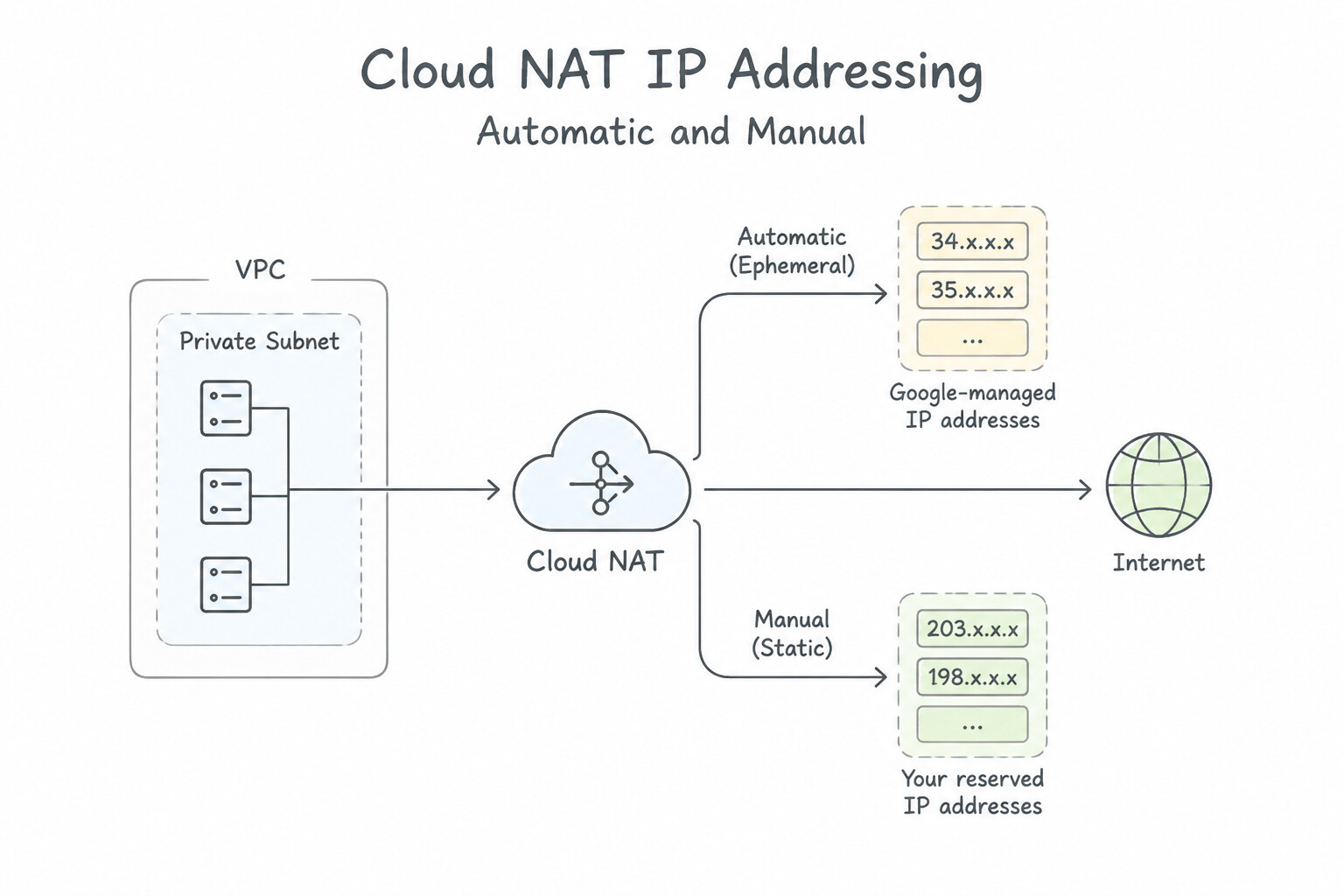
Master how Public Cloud NAT works inside Google Cloud's Andromeda fabric:
- Architecture — Software-Defined at the VM vNIC (Zero Choke-Point Appliance):
- Although you configure a Cloud NAT gateway on a regional Cloud Router, data-plane packets never pass through the Cloud Router! The Cloud Router only programs NAT control-plane rules into the Andromeda virtual switch at each VM's host hypervisor.
- Regional Scope & Prerequisites: Cloud NAT is strictly regional. It translates outbound traffic only for VMs/GKE Pods in that region that do not have an external IP address attached to their vNIC (if a VM has an external IP on
nic0, Public Cloud NAT ignoresnic0!). - Automatic vs. Manual NAT IP Allocation:
- Automatic (
AUTO_ONLY): Google Cloud automatically adds and removes ephemeral regional external IPs as VM count or port allocation grows. Common Pitfall: If a third-party SaaS or financial partner requires a fixed list of predictable source IPv4 addresses for firewall allowlisting, reject Automatic IP allocation (and note that switching from Automatic to Manual replaces all existing auto-allocated IPs, dropping active connections!). - Manual (
MANUAL_ONLY): You reserve static regional external IPv4 addresses (gcloud compute addresses create ... --region=...) and assign them to the Cloud NAT gateway so partner allowlists never break. - Custom Cloud NAT Rules (Destination-Specific Source NAT IPs):
- Suppose Partner A requires your traffic to arrive from
203.0.113.10, Partner B requires203.0.113.20, and general internet traffic can use a shared pool203.0.113.30–35. Instead of deploying separate VPCs, configure Cloud NAT Rules (gcloud compute routers nats rules create) using CEL expressions likeinIpRange(destination.ip, '198.51.100.0/24')with--source-nat-active-ips=203.0.113.10! - GKE Subnet Scope (
ALL_SUBNETWORKS_ALL_IP_RANGESvs. Custom): - For a private GKE cluster (without IP Masquerade agent), ensure Cloud NAT is configured to translate both the Primary Subnet Range (GKE Nodes) AND the Secondary Alias IP Ranges (GKE Pods)! If you choose
ALL_SUBNETWORKS_ALL_PRIMARY_IP_RANGES, GKE Pods will not be NATed to the internet unlessip-masq-agentSNATs Pod traffic to the Node IP first.
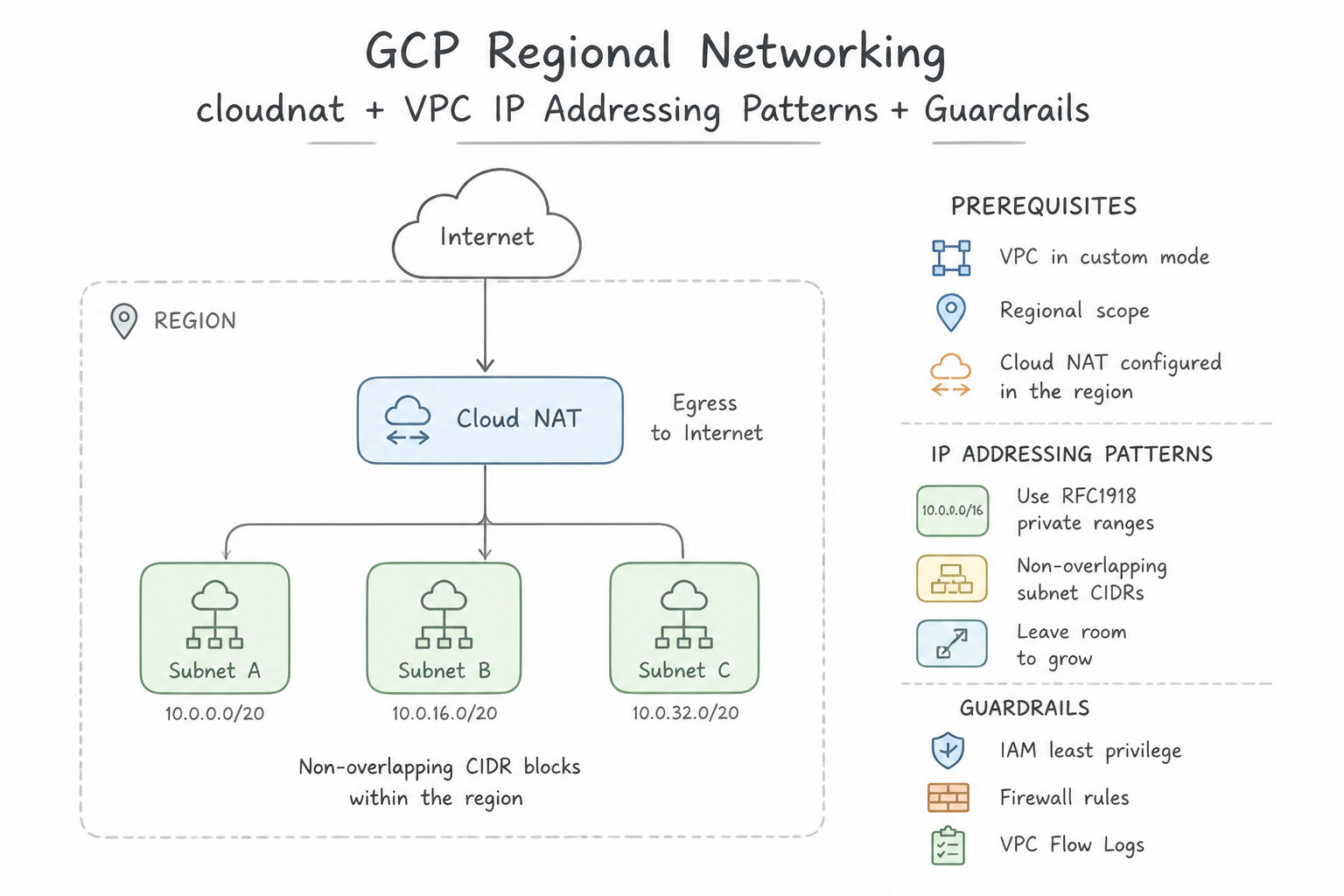
Key Implementation Patterns
- Cloud NAT IP address allocation mode that grants administrators explicit control over: Use Manual IP allocation. Manual IP allocation allows administrators to choose and assign specific reserved static external IP addresses to Cloud NAT gateways. (Avoid alternative: Dynamic DHCP allocation manages internal VM networking and is not a valid Cloud NAT external egress allocation mode.)
Key Takeaways (6.3a)
- Cloud NAT supports two allocation methods: Manual IP allocation and Automatic IP allocation.
- Manual IP allocation provides complete administrative control by requiring pre-allocated regional static external IP addresses.
- Manual allocation is required whenever external systems require an allowlist of static IP addresses for incoming connections.
- Automatic IP allocation scales external IP addresses up and down dynamically without administrative intervention.
Consideration 6.3b: Configuring static and dynamic port allocation for Cloud NAT
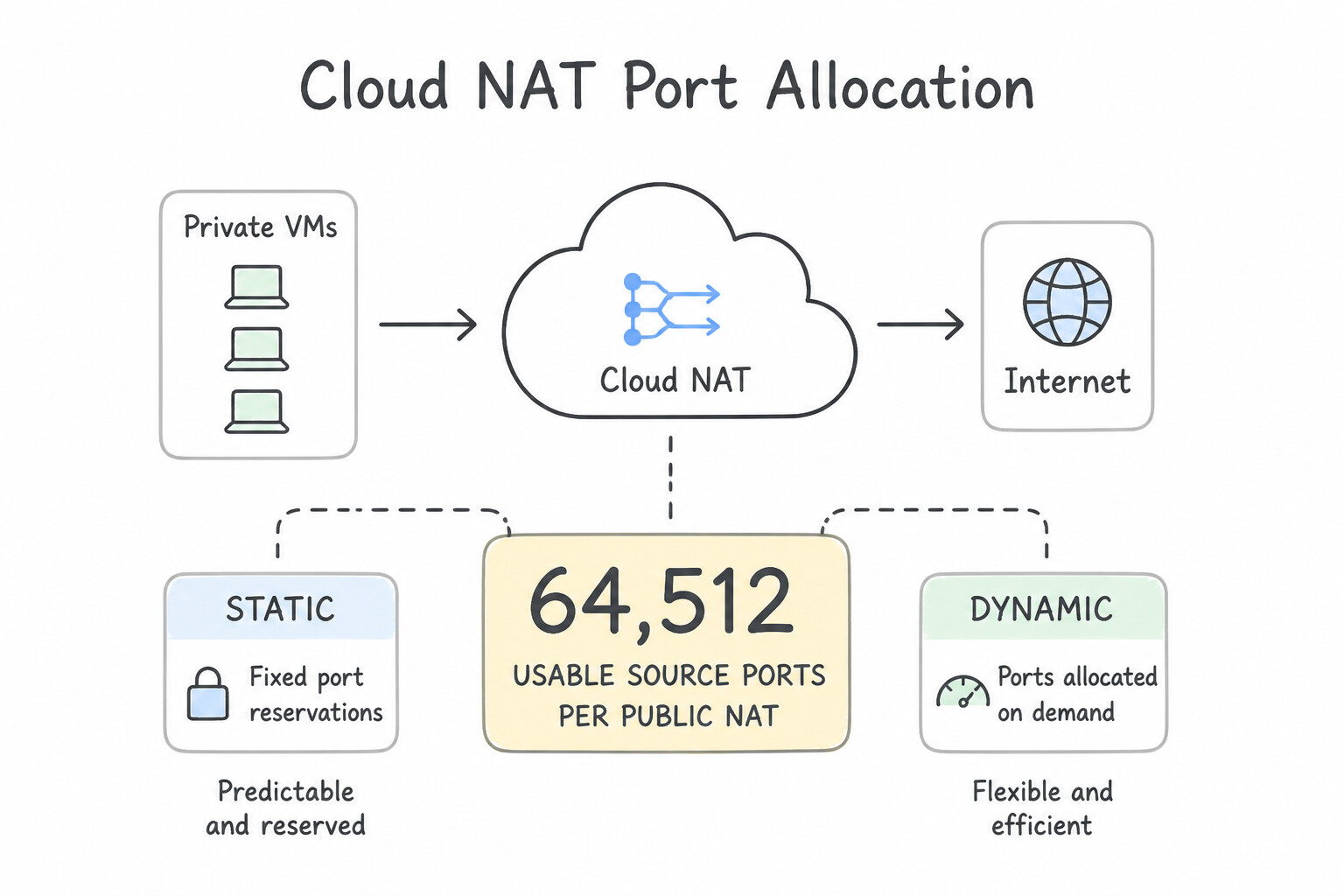
Expect at least one calculation or port-exhaustion troubleshooting question in production using these exact rules:
- The Golden Number:
64,512Usable Source Ports per Public NAT IP: - Every external IPv4 address assigned to Cloud NAT provides
64,512usable source ports ($65,536 - 1,024$ well-known privileged ports0–1023) for TCP, and64,512for UDP. - Formula for Required NAT IPs (Static Port Allocation): $Required NAT IPs = ≤ft\lceil \frac{Number of VMs × Ports per VM}{64,512} \right\rceil$ Example: If you have
200VMs and setmin-ports-per-vm = 1,024under Static Port Allocation, you need $\lceil (200 \times 1,024) / 64,512 \rceil = \lceil 204,800 / 64,512 \rceil = \mathbf{4\text{ NAT IP addresses}}$. If you only assign 3 Manual NAT IPs, VMs beyond the 189th VM will receive ZERO NAT ports and completely fail to reach the internet! - Static Port Allocation vs. Dynamic Port Allocation:
- Static Port Allocation (Default unless changed): Reserves the exact same fixed number of ports (
min-ports-per-vm, default64for TCP/UDP) for every VM covered by the NAT gateway the moment the VM boots—even if 90% of VMs are completely idle! Supports Endpoint-Independent Mapping (EIM) (needed for STUN/WebRTC/VoIP NAT traversal). - Dynamic Port Allocation (
--enable-dynamic-port-allocation): Allocates a small initial baseline (--min-ports-per-vm, e.g.,64) to each VM and dynamically borrows additional blocks of ports (in powers of 2) from the shared pool up to--max-ports-per-vm(default65,536) only when a busy VM actually needs them, releasing them when load drops! Incompatible with Endpoint-Independent Mapping (Dynamic Port Allocation automatically disables EIM). - The Destination 3-Tuple Exhaustion &
120sTCPTIME_WAITTrap: - Even if a VM has
4,096NAT ports allocated across 4 NAT IPs (1,024ports per NAT IP), if that VM opens rapid short-lived HTTP connections to a single destination IP and port (e.g.,198.51.100.5:443) without HTTP Keep-Alive connection pooling, Cloud NAT holds each closed TCP 5-tuple inTIME_WAITfor120 seconds(--tcp-time-wait-timeout=120sdefault) before reusing that source port to the same destination(dest_ip, dest_port, protocol)! - Fixes: Enable HTTP Keep-Alive / connection pooling in the application, enable Dynamic Port Allocation with a higher
max-ports-per-vm, add more NAT IPs, or safely lower--tcp-time-wait-timeout(down to30s).
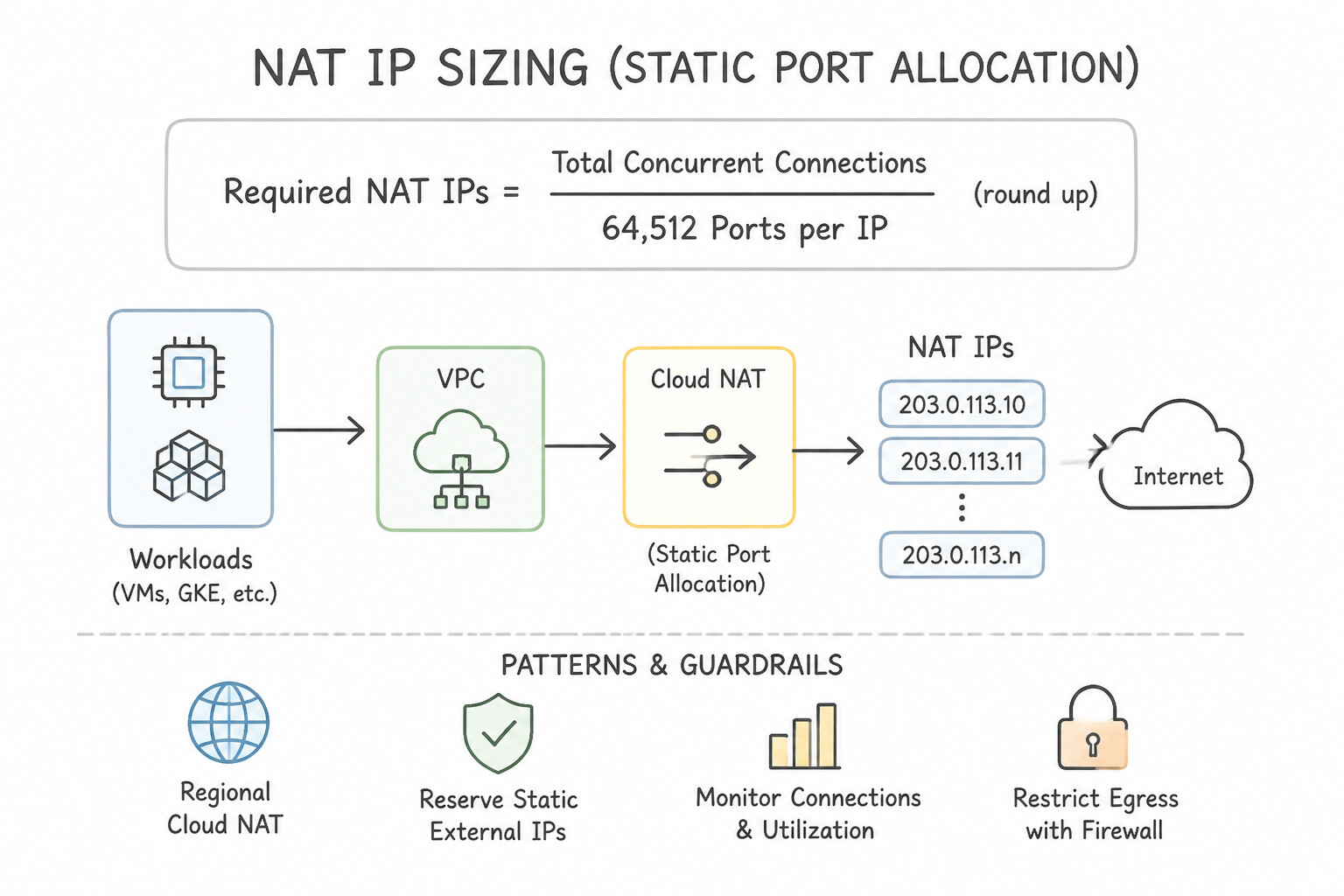
Key Implementation Patterns
- Default minimum port allocation per VM instance in Google Cloud NAT: Use 64 ports. Cloud NAT allocates a default minimum of 64 ports per VM instance. (Avoid alternative: 32 ports is incorrect; the default allocation is 64 ports.)
- Cloud NAT port allocation mode that adjusts source port allocations automatically based: Use Dynamic port allocation. Dynamic port allocation scales NAT ports up and down automatically between configured minimum and maximum limits based on traffic demands. (Avoid alternative: Static port allocation assigns a fixed number of source ports to each VM and does not adapt to traffic variations.)
Key Takeaways (6.3b)
- Cloud NAT defaults to allocating 64 ports per virtual machine (VM) instance.
- You can adjust the minimum ports per VM instance to accommodate high outbound connection requirements.
- Port exhaustion occurs if a VM instance consumes all assigned ports without dynamic port allocation enabled.
- Cloud NAT offers two port allocation strategies: Static port allocation (fixed assignment) and Dynamic port allocation (elastic assignment).
Consideration 6.3c: Configuring Secure Web Proxy
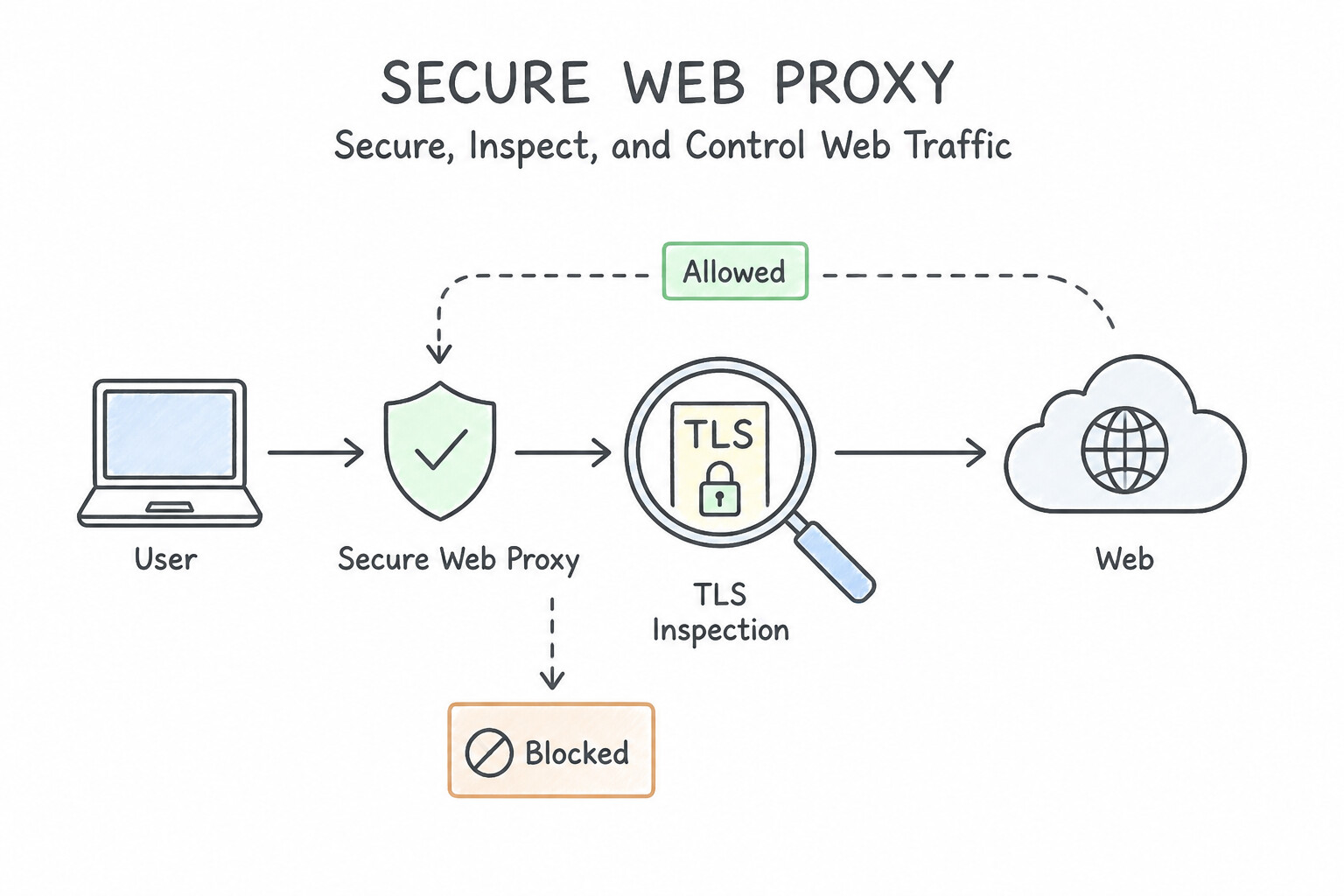
When a scenario requires filtering outbound internet traffic by HTTP/HTTPS URL path (example.com/allowed-path/*), FQDN wildcards, caller Service Account, or IAM Secure Tag, Public Cloud NAT alone cannot do it—you must deploy Secure Web Proxy (SWP):
- What Secure Web Proxy Is:
- A Google-managed, regional, highly available outbound HTTP/HTTPS proxy powered by Envoy. It requires a Regional Proxy-Only Subnet (
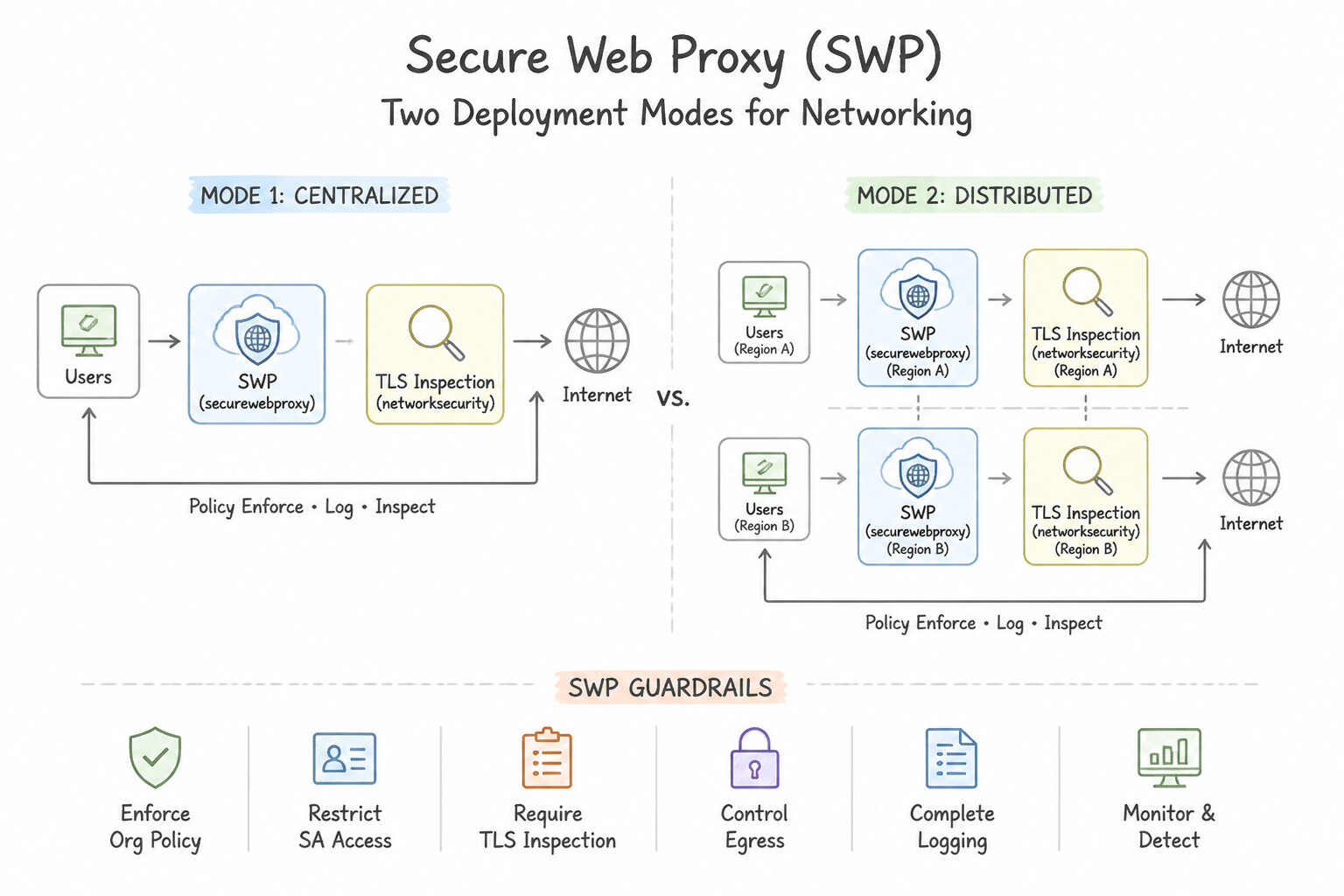
--purpose=REGIONAL_MANAGED_PROXY --role=ACTIVE) in the VPC and allocates an internal regional IP from a primary subnet. - Two Deployment Modes for SWP:
- Explicit Proxy Mode: Workload applications or OS environment variables (
HTTPS_PROXY=https://10.10.1.5:443) are configured to send HTTPCONNECTrequests directly to the SWP internal IP/FQDN. Supports matching source identity by Service Account, IAM Secure Tag, VM IP, or Subnet. - Next-Hop / Policy-Based Routing Mode (Transparent Proxy Mode): Workloads require zero
HTTP_PROXYenvironment variable changes! You create a Policy-Based Route (or custom static route) that intercepts egress traffic ontcp:80andtcp:443and steers it transparently to the Secure Web Proxy instance as the Next Hop (SWP as a next hop). - Granular CEL Security Policies & TLS Inspection:
- SWP evaluates Gateway Security Policies written in CEL (Common Expression Language) combining Session Matchers (L4 attributes:
source.ip,source.matchServiceAccount('sa@...'),source.matchTag('tagValues/123'),destination.host,destination.port) and Application Matchers (L7 attributes:request.method,request.url(),inUrlList(request.url(), '.../urlLists/allowed-repos')). - Why SWP Beats Cloud NGFW FQDN Rules for Web Egress: Cloud NGFW FQDN rules only inspect DNS resolution (
*.github.com) at L3/L4—they cannot distinguishhttps://github.com/my-enterprise/repofromhttps://github.com/malicious-user/exfil! Secure Web Proxy inspects the HTTPHost/SNI header (and with TLS Inspection enabled via Certificate Authority Service [CAS], decrypts the TLS stream to inspect the full URL path and HTTP headers/methods). - Chaining SWP with Public Cloud NAT: Because SWP Envoy proxies live inside your VPC's regional Proxy-Only Subnet without public IPs, configure your Public Cloud NAT gateway to cover the Regional Proxy-Only Subnet (
--nat-custom-subnet-ip-rangesor all subnets) so approved outbound connections from SWP exit to the internet via your Cloud NAT external IPs!
Key Implementation Patterns
- Google Cloud networking and security service designed for Layer 7 outbound egress: Use Secure Web Proxy. Secure Web Proxy provides Layer 7 outbound traffic filtering and decrypts TLS traffic to inspect URL paths and HTTP headers. (Avoid alternative: Cloud Armor protects inbound services behind load balancers rather than inspecting outbound egress traffic.)
- Operational prerequisites and agentless deployment model of Google Cloud Secure Web Proxy: Use No software agent required. Secure Web Proxy is agentless and requires no client agent software on virtual machine instances. (Avoid alternative: No local Docker containers are required to use Secure Web Proxy.)
- Invalidating Specific Files vs. Directories: Use jsonPayload.reason set to OUT_OF_RESOURCES. The reason code OUT_OF_RESOURCES in Cloud NAT logs specifically indicates that packets were dropped because no source ports were available for allocation. (Avoid alternative: This is a generic application-level network error and does not specifically identify Cloud NAT port exhaustion as the root cause.)
Key Takeaways (6.3c)
- Secure Web Proxy is Google Cloud's managed solution for inspecting and filtering outbound (egress) web traffic at Layer 7.
- With TLS inspection enabled, Secure Web Proxy decrypts outbound HTTPS sessions to enforce granular policies on URL paths, HTTP headers, and HTTP methods.
- Cloud NAT operates at Layer 3/4 and cannot inspect application-layer payloads or decrypt TLS.
- Cloud Armor protects inbound traffic directed toward Google Cloud load balancers.
Quick Decision Cheat Sheet (Subsection 6.3)
If the Scenario Requires... | Choose This Google Cloud Pattern | Avoid This Common Mistake |
|---|---|---|
"How many usable source ports does 1 Cloud NAT external IPv4 address provide?" | 64,512 usable ports per external IP ($65,536 - 1,024$ privileged ports) | 65,535 or 32,768 |
"External partner requires a fixed, unchanging list of source IPv4 addresses for allowlisting" | Configure Cloud NAT with Manual IP Allocation ( MANUAL_ONLY) using reserved static regional external IPs | Automatic IP Allocation (IPs change dynamically when scaling) |
"Use a specific static source NAT IP only when traffic is destined for a partner's 198.51.100.0/24 CIDR" | Create a Custom Cloud NAT Rule ( inIpRange(destination.ip, '198.51.100.0/24')) on the Cloud NAT gateway | Creating multiple Public Cloud NAT gateways for the same subnet |
"Bursty workloads experience NAT port exhaustion while most VMs in the subnet use very few ports" | Enable Dynamic Port Allocation ( --enable-dynamic-port-allocation) with appropriate min-ports-per-vm and max-ports-per-vm | Raising Static Port Allocation min-ports-per-vm to the peak value across all VMs (wastes NAT IPs) |
"Workloads require Endpoint-Independent Mapping ( EIM) for STUN/WebRTC NAT traversal" | Keep Static Port Allocation enabled (Dynamic Port Allocation is incompatible with EIM!) | Enabling Dynamic Port Allocation alongside Endpoint-Independent Mapping |
"Filter outbound HTTPS internet traffic by full URL path ( example.com/api/v1/*), HTTP method, or caller Service Account / Secure Tag" | Secure Web Proxy ( SWP) with TLS Inspection (Certificate Authority Service) and a URL List | Public Cloud NAT or Cloud NGFW FQDN rules (neither can inspect L7 URL paths inside HTTPS) |
"Route Secure Web Proxy outbound internet traffic through predictable static public IPs" | Chain SWP → Public Cloud NAT by including the Regional Proxy-Only Subnet in the Cloud NAT gateway configuration | Assigning external IPs directly to workload VMs |
Further Reading (Subsection 6.3)
- Cloud NAT Overview - NAT IP addresses — Describes the differences between automatic and manual IP address allocation for Cloud NAT gateways.
- Configuring Cloud NAT — Provides step-by-step guidance on reserving static external IP addresses and assigning them manually to Cloud NAT.
- Cloud NAT port reservation overview — Provides architectural details on port allocation, defaults, dynamic port allocation, and IP address mappings in Cloud NAT.
- Cloud NAT Port Reservation & Allocation — Reference document explaining how Cloud NAT allocates IP addresses and ports to backend virtual machine instances.
- Secure Web Proxy overview — Provides an overview of Secure Web Proxy features, including policy enforcement on egress traffic, FQDN filtering, and integration with Google Cloud services.
- TLS inspection overview — Explains how Secure Web Proxy decrypts and inspects TLS traffic, generates certificates dynamically, and enforces Layer 7 security policies on outbound web sessions.
Subsection 6.4: Configuring self-managed network virtual appliance and Packet Mirroring
The Big Picture
Many regulated enterprises standardize on self-managed third-party Network Virtual Appliances (NVAs) (Palo Alto Networks VM-Series, Fortinet FortiGate, Check Point CloudGuard, Cisco Catalyst) to inspect inter-VPC ("hub-and-spoke") or intra-VPC ("east-west") traffic, or deploy self-managed Packet Mirroring collectors (Suricata, Zeek, ExtraHop) for out-of-band network detection and response (NDR).
In Google Cloud, however, Andromeda is a Layer 3 software-defined fabric—not a traditional Layer 2 broadcast switch. Three fatal design errors routinely break NVA and Packet Mirroring deployments (and appear constantly in production):
- Multi-NIC VM Constraints & Asymmetric Stateful Drops (
6.4a&6.4b): Attaching two vNICs of a VM to the same VPC network is forbidden; forgetting--can-ip-forwardcauses Andromeda to drop every transit packet; and load-balancing across an active-active NVA pair without Internal Passthrough NLB Symmetric Hashing causes return packets to hit the wrong NVA instance and get dropped! - Routing Loops and Local Subnet Route Overrides (6.4c): Standard custom static routes cannot override a VPC's local subnet route! To steer traffic between two subnets in the same VPC (or override local peering routes) through an NVA ILB next hop, you must use Policy-Based Routes (PBR)—and you must exclude the NVA's own Network Tags from the PBR or you will create an infinite routing loop!
- Inline vs. Out-of-Band Inspection & Collector Firewall Traps (
6.4d&6.4e): Using inline NVAs when zero latency impact is required (instead of out-of-band Packet Mirroring or Cloud IDS), or forgetting that a Packet Mirroring collector ILB requires--is-mirroring-collectorand an ingress firewall rule allowing0.0.0.0/0(because mirrored packets preserve the original source IP of the monitored traffic!).
Consideration 6.4a: Routing and inspecting inter-VPC traffic using multi-network interface card (NIC) virtual machines (VMs)
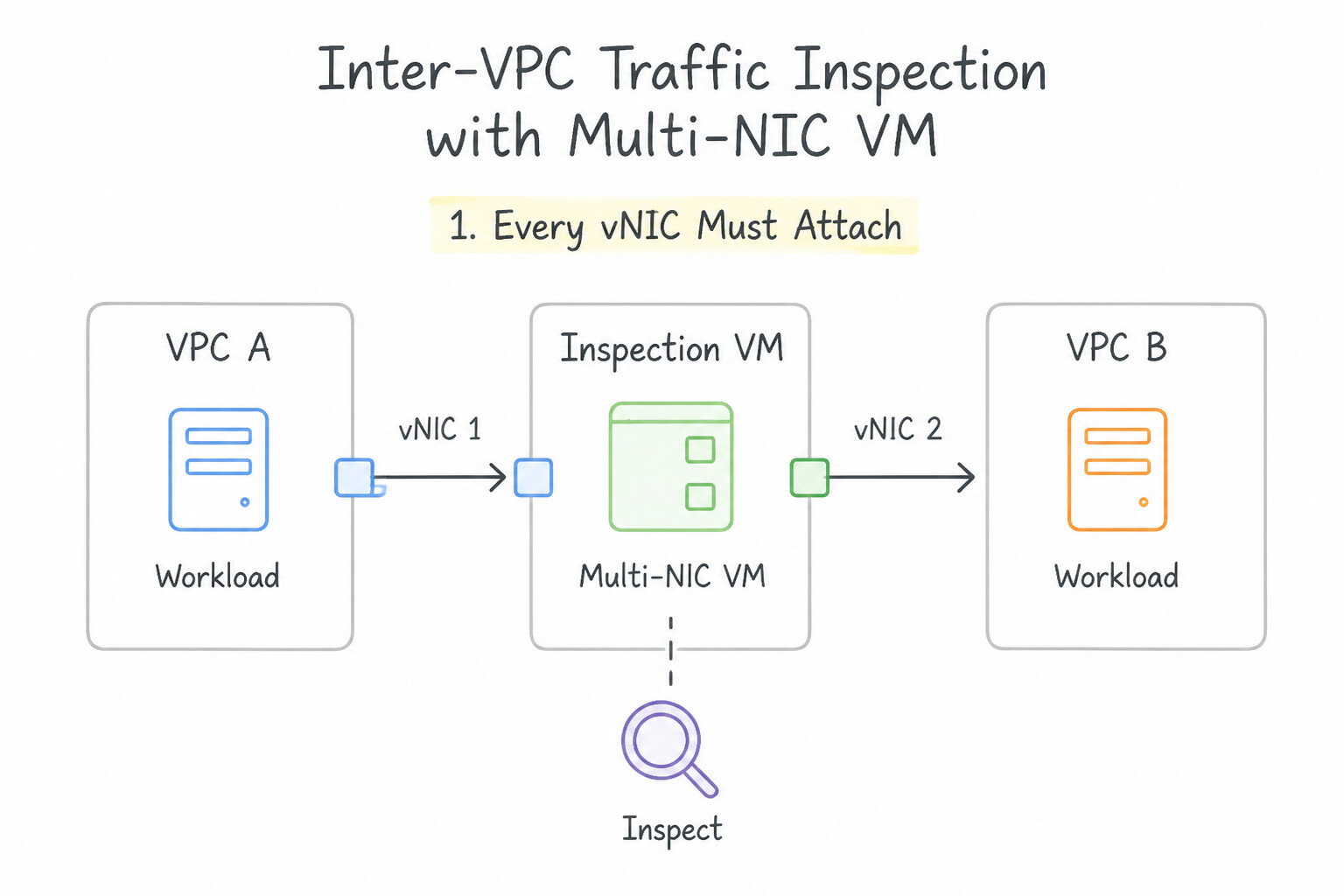
Memorize the strict architectural rules governing multi-NIC Compute Engine VMs (nic0 through nic7):
- 1. Every vNIC Must Attach to a Different VPC Network:
- Two network interfaces on the same VM can never attach to the same VPC network (nor to two subnets inside the same VPC)! Each vNIC (
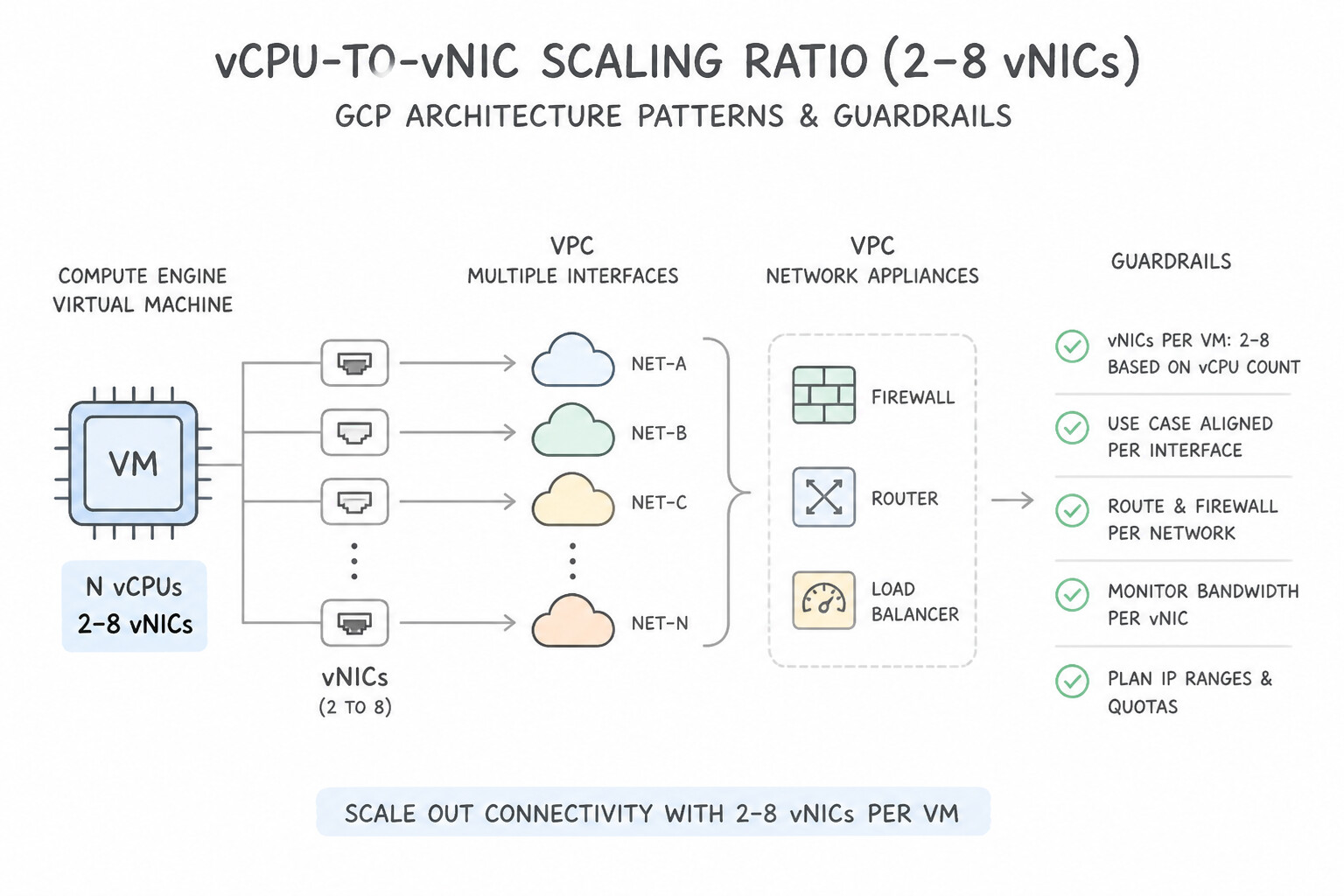
nic0,nic1,nic2...) must connect to a subnet in a distinct standalone or Shared VPC network (in the same region as the VM). - 2. vCPU-to-vNIC Scaling Ratio (
2to8vNICs): - The maximum number of vNICs scales with the machine type's vCPU count:
1–2vCPUs = max2vNICs,4vCPUs = max4vNICs,8vCPUs = max8vNICs (>= 8vCPUs allows up to the ceiling of8vNICs). - Lifecycle Rule: While Google Cloud now supports Dynamic NICs (adding/removing secondary vNICs on existing VMs with caveats), traditional static vNICs must be defined at VM creation time, and
nic0can never be deleted without deleting the VM. - 3. Enable IP Forwarding (
--can-ip-forward): - By default, Andromeda checks that every packet leaving a VM's vNIC has a source IP matching that vNIC's assigned primary/alias IP, and every packet arriving has a destination IP matching the vNIC. For an NVA VM to route or inspect transit packets whose source and destination IPs belong to other VMs, you must enable
--can-ip-forwardat VM creation time! - 4. Guest OS Policy Routing (
nic1..nic7Default Gateway Trap): - Inside the Linux Guest OS, DHCP automatically configures the default gateway (
0.0.0.0/0) onnic0(eth0) only! If a health check probe or transit packet enters the NVA onnic1(eth1), the Guest OS will try to send the reply outnic0unless you configure source-based policy routing (ip route add ... table rt1andip rule add from <nic1-ip> table rt1) inside the NVA OS!
Key Implementation Patterns
- Compute Engine architecture pattern that attaches multiple network interfaces (NICs): Use Multi-NIC network appliance. A multi-NIC network appliance attaches network interfaces in multiple VPC networks to a single VM to inspect and route traffic between them. (Avoid alternative: Cloud DNS forwarding routes DNS queries and does not inspect general network traffic.)
- Scope and capabilities of Google Cloud Packet Mirroring for traffic inspection between: Use Yes, mirrors all traffic. Packet Mirroring operates at the virtual machine interface level and mirrors all ingress and egress traffic, including intra-subnet communications. (Avoid alternative: Packet Mirroring is not limited to cross-subnet traffic.)
Key Takeaways (6.4a)
- A multi-NIC VM connects one virtual machine (VM) instance to multiple VPC networks simultaneously.
- Each network interface on the VM must reside in a distinct VPC network.
- Multi-NIC appliances are commonly used for packet inspection, firewalls, and routing between isolated VPC networks.
- Network interfaces must be configured during VM creation and cannot be added or deleted afterward.
Consideration 6.4b: Configuring an internal load balancer as a next hop for HA multi-NIC VM routing
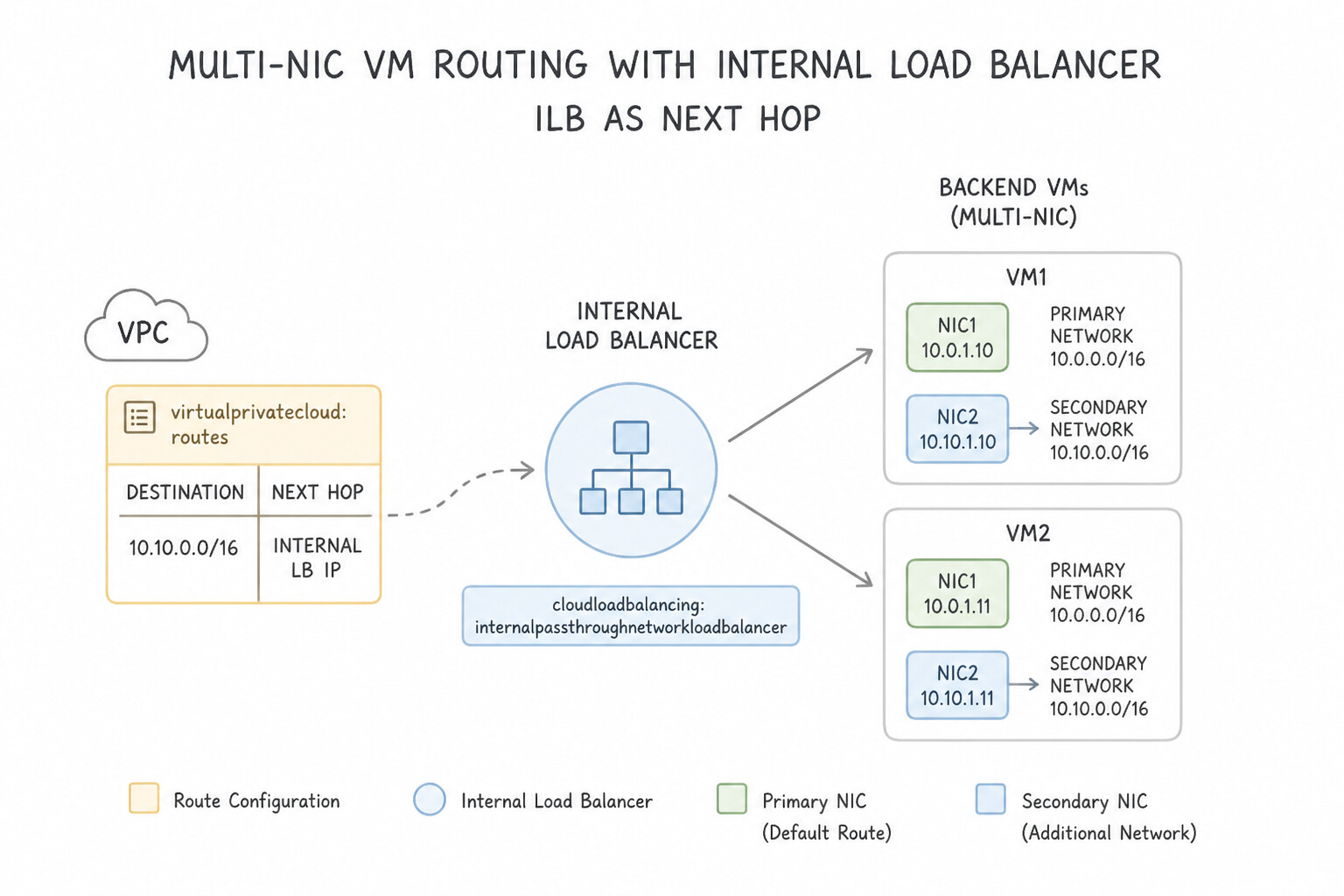
Never point a production static route at a single NVA VM IP (--next-hop-instance), because a zonal outage or NVA reboot blackholes all traffic! Instead, deploy Active-Active Multi-NIC NVA MIGs across zones behind an Internal Passthrough Network Load Balancer (ILB as a Next Hop):
- Multi-NIC ILB Architecture:
- In a hub-and-spoke NVA design (e.g.,
nic0inUntrusted-VPC,nic1inTrusted-VPC,nic2inDMZ-VPC), you deploy one Internal Passthrough NLB per VPC interface (e.g.,ILB-Untrustedtargetingnic0of the NVA MIG inUntrusted-VPC, andILB-Trustedtargetingnic1of the NVA MIG inTrusted-VPC). - Static routes (or Policy-Based Routes) in each VPC specify
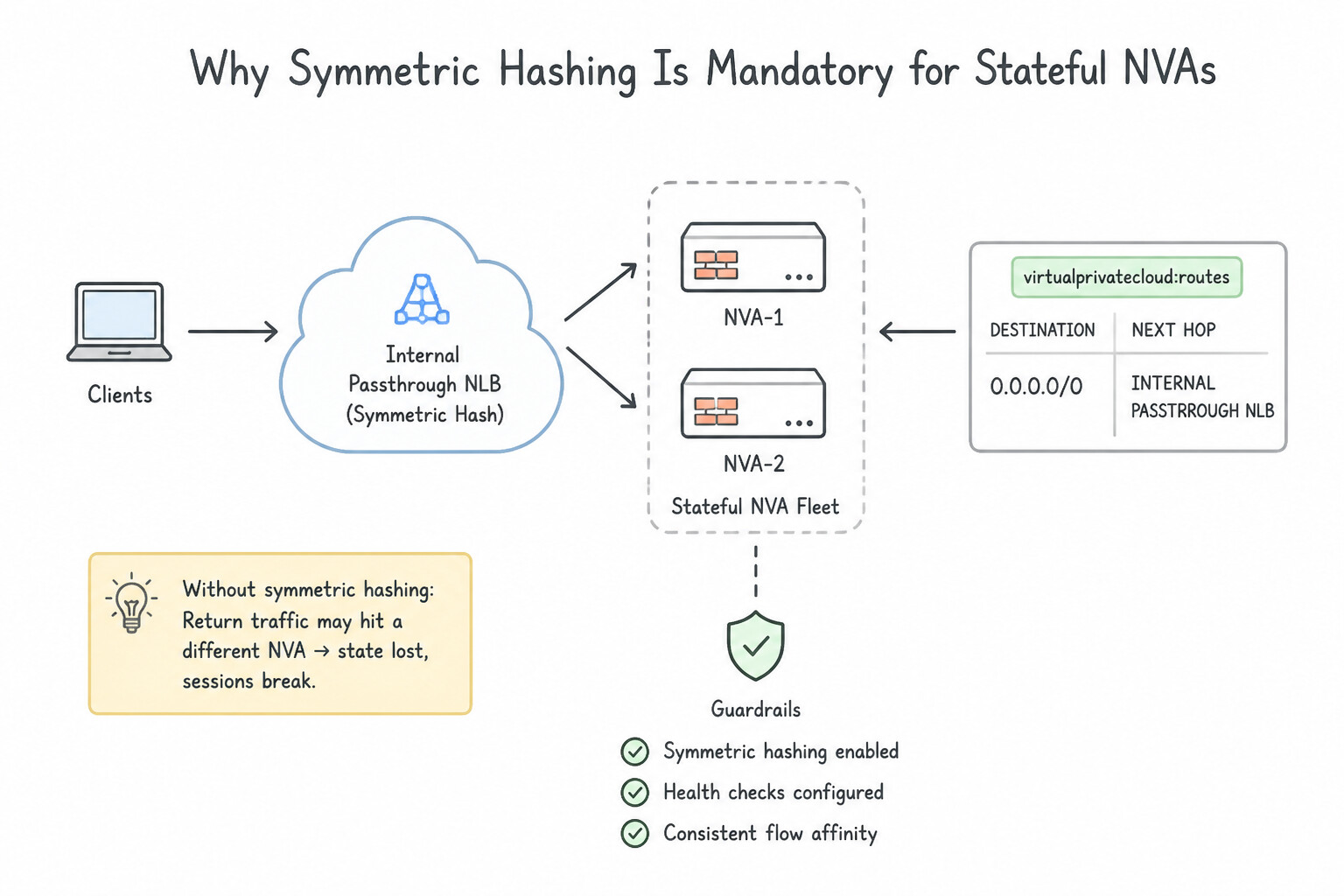
--next-hop-ilb=ILB_FORWARDING_RULE(with--next-hop-ilb-region=...). - Why Symmetric Hashing Is Mandatory for Stateful NVAs:
- Suppose Client VM in
Trusted-VPCsends a TCPSYN(10.1.0.5:54321 -> 10.2.0.9:443) toILB-Trusted, which hashes the packet to NVA-VM-1. NVA-VM-1 records the session in its stateful firewall table and forwards the packet outnic0intoUntrusted-VPC. - When the server in
Untrusted-VPCreplies (10.2.0.9:443 -> 10.1.0.5:54321), the return packet hitsILB-Untrusted. Without symmetric hashing (or if client source ports / VIPs shift),ILB-Untrustedmight hash the return packet to NVA-VM-2, which has never seen theSYNpacket and drops theSYN-ACKimmediately! - Fix: Enable Symmetric Hashing on the Internal Passthrough NLB forwarding rules (and ensure identical healthy NVA membership across both ILBs by using a shared health-check mechanism that fails over all NICs of an unhealthy NVA together) so forward and reverse 5-tuples always land on the exact same NVA instance!
Key Implementation Patterns
- Static route next-hop attribute used to direct network traffic to an Internal: Use next-hop-ilb. <code>next-hop-ilb</code> specifies an Internal Passthrough Network Load Balancer forwarding rule IP address as the next hop for custom static routes. (Avoid alternative: <code>next-hop-gateway</code> routes traffic to the default Internet gateway for external connectivity.)
Key Takeaways (6.4b)
- Use
--next-hop-ilbto configure an Internal Passthrough Network Load Balancer as the next hop in custom static routes.- This pattern allows high availability and horizontal scaling for virtual appliance firewalls and proxies.
- The forwarding rule of the Internal Passthrough Network Load Balancer must be in the same VPC network and region as the route.
Consideration 6.4c: Configuring policy-based routes for HA multi-NIC VM routing
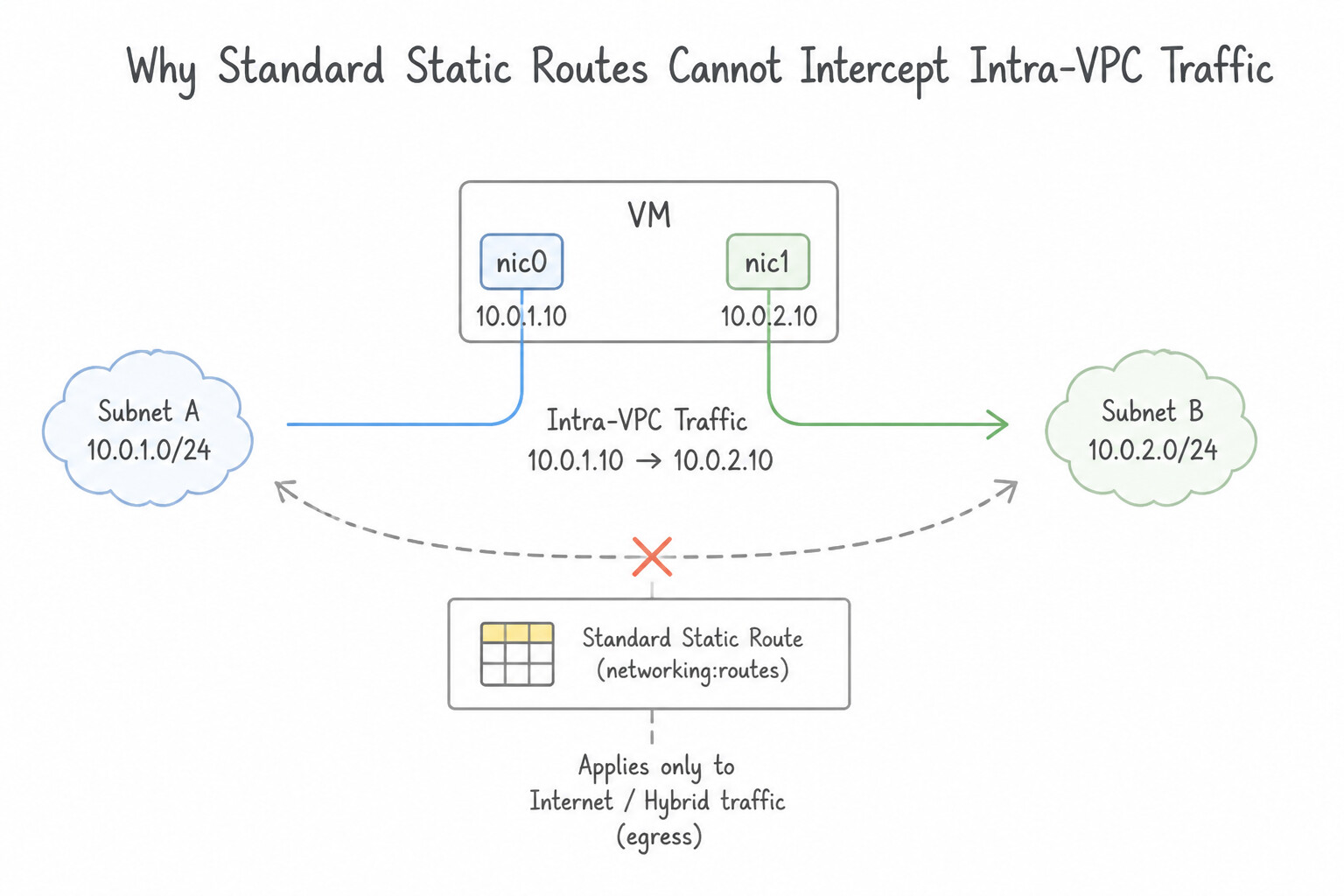
Understanding why standard routes fail for intra-VPC NVA steering—and how Policy-Based Routes (PBR) solve it—is a core Google Cloud architecture competency:
- Why Standard Static Routes Cannot Intercept Intra-VPC Traffic:
- In Google Cloud's route evaluation order, the automatically generated Local Subnet Route (which connects all subnets inside the same VPC directly via Andromeda) has the highest precedence over all custom static and dynamic BGP routes! You cannot delete or override a Local Subnet Route with a standard static route.
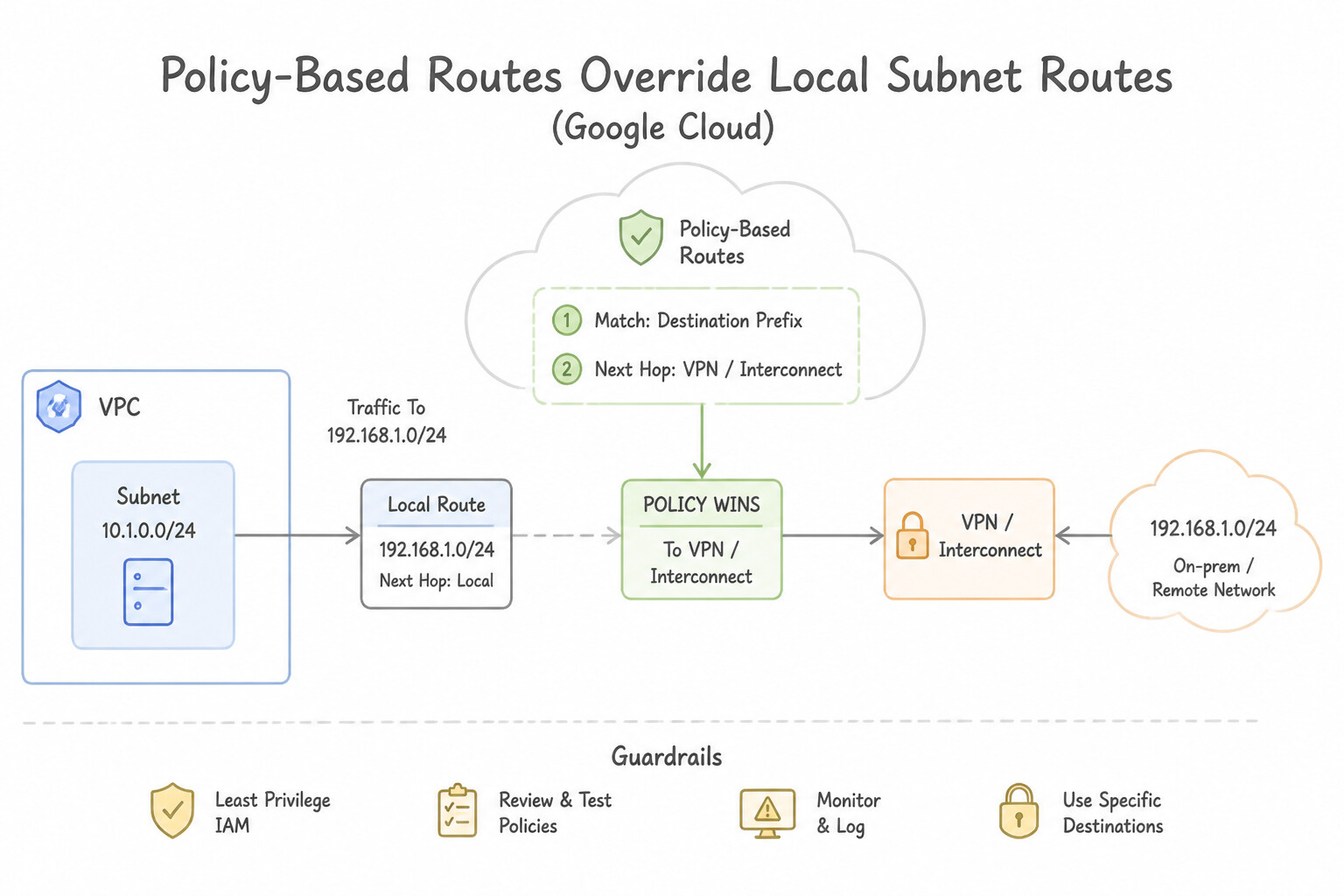
- How Policy-Based Routes (
networkconnectivity policy-based-routes) Override Local Subnet Routes: - Policy-Based Routes are evaluated BEFORE local subnet routes! They allow you to match traffic by Source IP range, Destination IP range, IP Protocol (
TCP/UDP/ICMP/ALL), and Application Layer / Network Tags (or all VMs in a VPC/Interconnect attachment), and force that traffic to a specific--next-hop-ilb-ip(Internal Passthrough NLB fronting your NVAs)! - Preventing the Infinite Routing Loop Trap (Network Tag Filtering):
- The Trap: Suppose you create a Policy-Based Route on
VPC-Amatchingsrc: 10.10.1.0/24(Subnet-1) →dest: 10.10.2.0/24(Subnet-2) withnext-hop-ilb: NVA-ILB(where the NVA applies hairpinned or multi-NIC inspection). WhenVM-1sends a packet toVM-2, the PBR intercepts it and sends it to theNVA. When theNVAinspects the packet and forwards it towardVM-2(10.10.2.0/24), if the PBR also applies to theNVAitself, Andromeda intercepts the NVA's outgoing packet and loops it right back intoNVA-ILBforever! - Two Official Fixes:
- Scope PBR by Network Tags (
--tags): Apply a tag (e.g.,workload-vm) to the workload VMs (and not to the NVA VMs), and scope the Policy-Based Route to apply only to instances with--tags=workload-vm! When the untagged (ornva-vm-tagged) NVA forwards the inspected packet, it bypasses the PBR and uses the normal local subnet route to reachVM-2! - Multi-NIC Cross-VPC Hairpin: Have the NVA receive traffic on
nic0(VPC-A) and forward inspected traffic outnic1(VPC-B) where the PBR does not apply.
Key Implementation Patterns
- Google Cloud networking capability that enables traffic forwarding based on packet: Use Policy-Based Routes. Policy-based routes direct traffic by matching attributes such as source IP address range, IP protocol, and destination port. (Avoid alternative: Static VPC routes forward packets based strictly on the destination IP address prefix.)
Key Takeaways (6.4c)
- Standard VPC routes forward traffic exclusively based on the destination IP address range.
- Policy-based routes (PBR) match traffic based on protocol, source IP address range, destination IP address range, and destination port.
- Policy-based routes take precedence over standard static and dynamic VPC routes.
Consideration 6.4d: Developing a strategy for out-of-band Network Security Integration
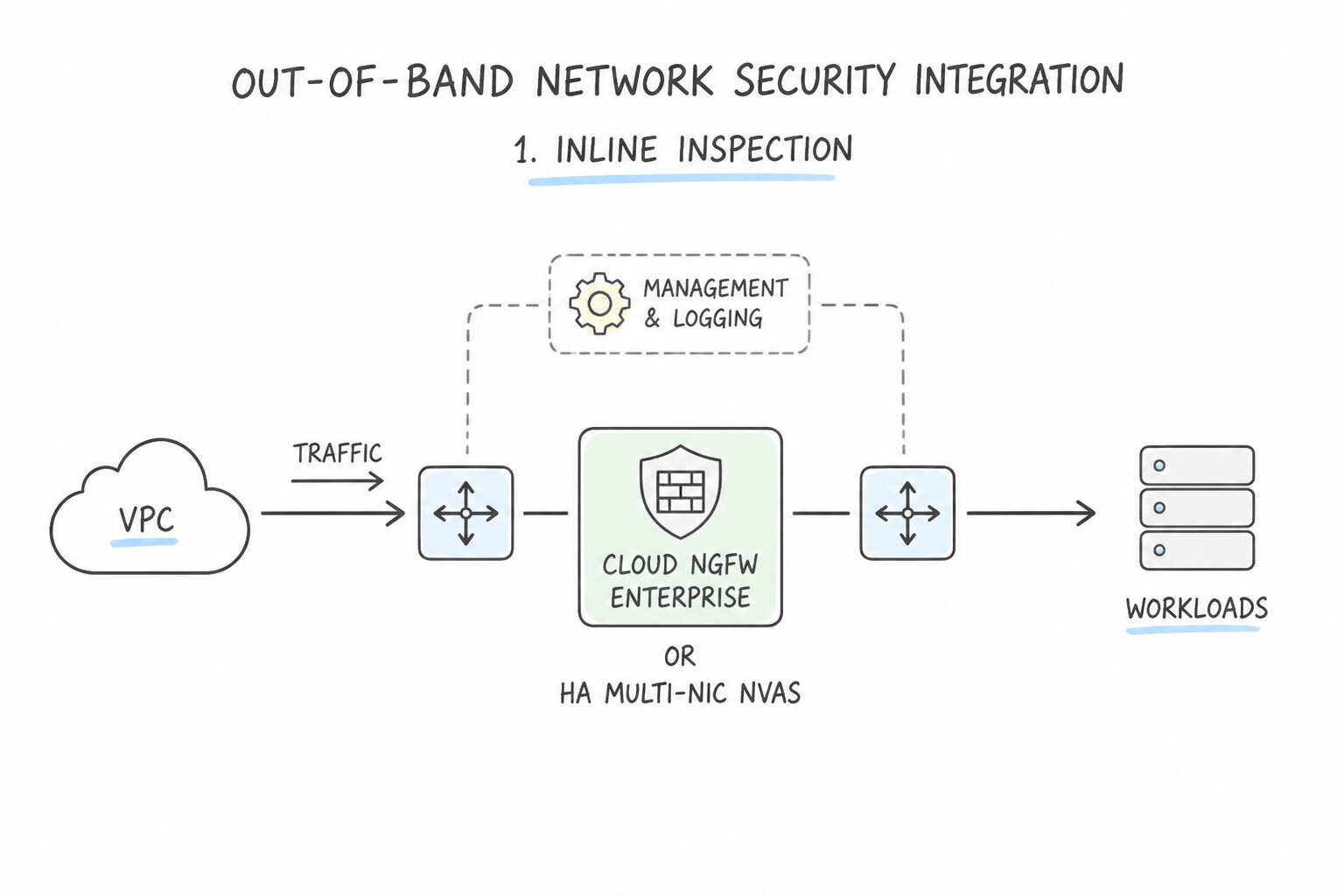
When choosing between Inline and Out-of-Band network security inspection In production architectures, evaluate three constraints: Latency Sensitivity, Prevention (Blocking) vs. Detection, and VM Bandwidth Headroom:
- 1. Inline Inspection (Cloud NGFW Enterprise OR HA Multi-NIC NVAs):
- Pros: Sits directly in the packet path; can actively block/drop (
DENY) malicious exploit packets, C2 callbacks, and data exfiltration in real time before the packet reaches the target VM. - Cons: Adds a small inline processing latency hop and requires fail-open/fail-closed resiliency planning.
- 2. Out-of-Band Inspection (Cloud IDS OR Self-Managed Packet Mirroring):
- Pros: Andromeda clones the packets asynchronously at the vNIC while the original production packet travels directly to its destination with zero added inline latency and zero risk of a collector outage breaking production traffic!
- Cons: Purely passive detection and forensics—cannot block the initial offending packet inline (must rely on out-of-band automation like a Cloud Run/Cloud Function responder triggered by Pub/Sub to update Cloud Armor or NGFW policies after detection).
- Cloud IDS vs. Self-Managed Packet Mirroring: Choose Cloud IDS when production architecture focuses on for a Google-managed, turnkey out-of-band IDS backed by Palo Alto Networks threat signatures with minimal operational overhead. Choose Packet Mirroring when the scenario requires self-managed open-source/custom collectors (Suricata, Zeek, Wireshark
pcaparchive) or custom proprietary NDR appliances. - 3. Source VM Egress Bandwidth Headroom Trap:
- Packet Mirroring duplicates traffic at the monitored source VM's host hypervisor, and the mirrored traffic counts against the monitored source VM's total egress bandwidth cap! If a VM is already running at 80% of its machine-type egress bandwidth limit and you mirror 100% of its ingress and egress traffic, the doubled bandwidth will saturate the VM's egress cap and cause production packet drops!
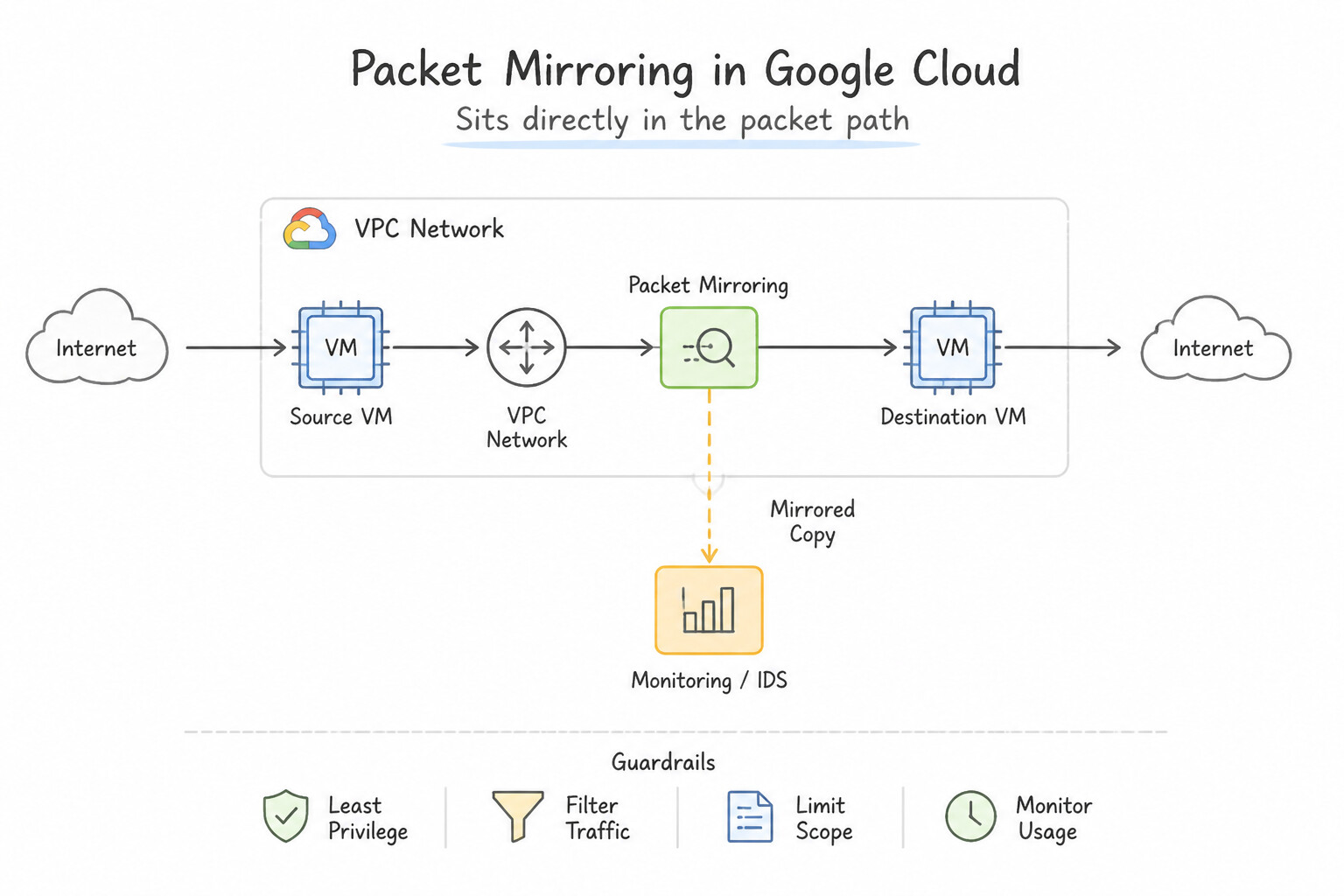
Key Implementation Patterns
- Google Cloud VPC feature designed to clone full packet streams for out-of-band security: Use Packet Mirroring. Packet Mirroring duplicates payload and header network traffic out-of-band to inspection appliances without interrupting the original flow. (Avoid alternative: VPC Flow Logs collects network metadata rather than cloning raw network packets.)
- Performance and resource footprint of VPC Packet Mirroring on monitored virtual machine: Use No compute resource overhead. Packet Mirroring captures traffic at the virtual network layer without consuming any compute or network resources from the monitored VM. (Avoid alternative: Mirrored traffic is copied within the SDN layer and does not consume egress bandwidth from the source VM.)
Key Takeaways (6.4d)
- Packet Mirroring clones full packet payloads and headers for out-of-band security inspection without disrupting production traffic.
- Packet Mirroring operates at the Andromeda network virtualization layer, requiring no guest OS agents.
- Target destinations for mirrored traffic must be an Internal Passthrough Network Load Balancer.
- VPC Flow Logs records connection metadata (5-tuple, byte count) but does not record packet payloads.
Consideration 6.4e: Configuring Packet Mirroring for VPC traffic toward self-managed collectors
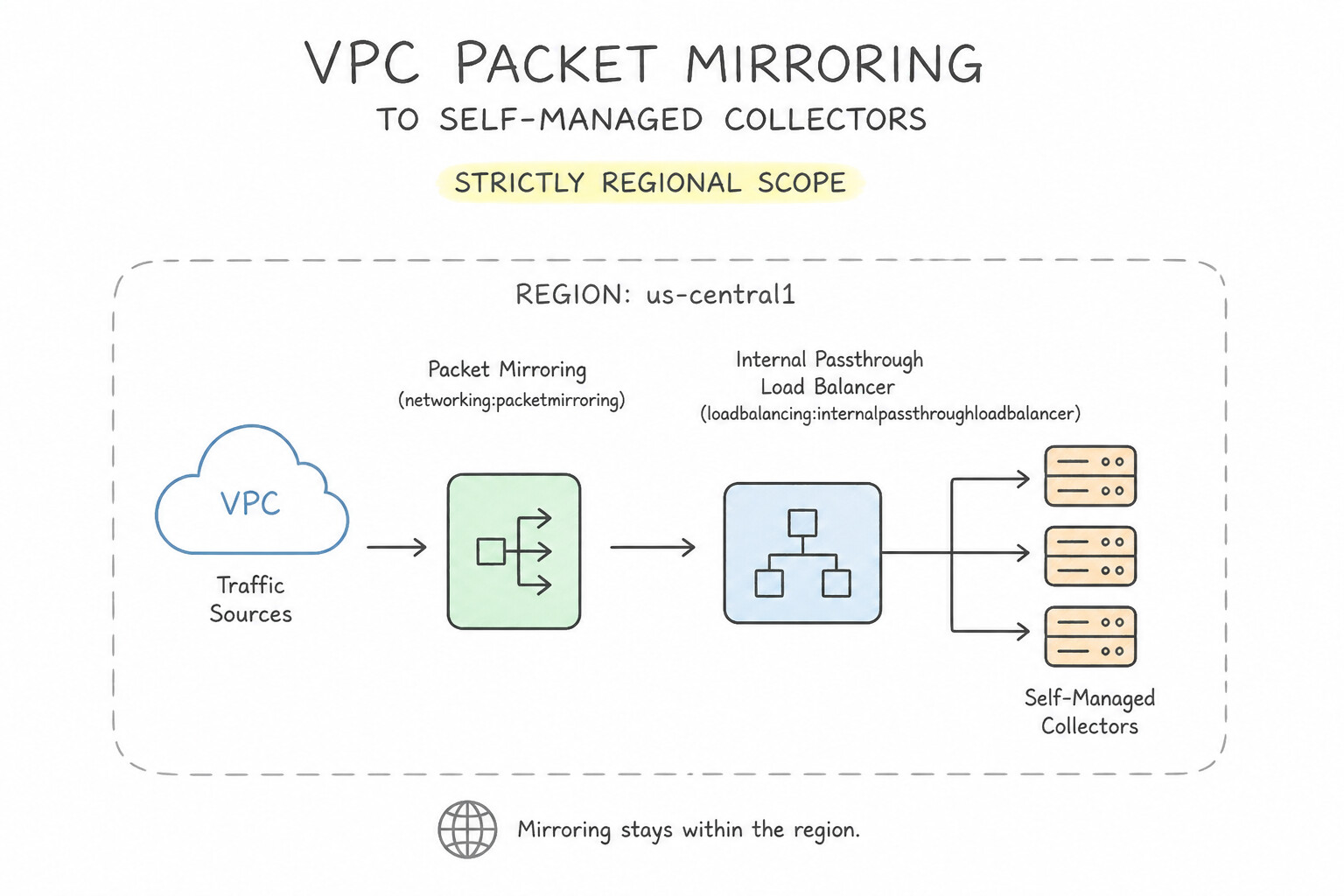
Every component of a Packet MirroringPolicy has strict configuration rules tested in production:
- 1. Strictly Regional Scope:
- A Packet Mirroring policy is regional. The Monitored Sources (VMs/GKE Nodes) and the Collector Destination (Internal Passthrough NLB + Collector VMs) must reside in the exact same Google Cloud region! (They can be in the same VPC or in Peered VPCs within that same region—note that if using Shared VPC or VPC Peering, the collector ILB can sit in a central security VPC peered to the workload VPC in the same region).
- 2. Collector Destination Must Be an Internal Passthrough NLB with
--is-mirroring-collector: - You cannot point a Packet Mirroring policy at a single VM IP or an Application/Proxy Load Balancer. You must create an Internal Passthrough Network Load Balancer whose forwarding rule has
--is-mirroring-collectorenabled (gcloud compute forwarding-rules create ... --load-balancing-scheme=INTERNAL --is-mirroring-collector). - 3. Selecting Mirrored Sources & Cost-Optimization Filters:
- Mirrored Sources: Can be specified by Subnets (mirrors all existing and future VMs/GKE nodes in the subnet), Network Tags (mirrors only VMs carrying the tag), or Individual VM Instances.
- Traffic Filters (To Prevent Collector Overload & Cut Egress Costs): Instead of mirroring 100% of backup/storage traffic, configure the Packet Mirroring filter by Direction (
INGRESS,EGRESS, orBOTH), IP Protocols (e.g.,--filter-protocols=tcp), and CIDR Ranges (e.g., mirror only traffic to/from0.0.0.0/0or sensitive subnets). - 4. The Collector Ingress Firewall Rule Trap (
Allow 0.0.0.0/0): - When Andromeda clones a packet from
Client (198.51.100.77) -> Web-VM (10.10.1.5)and sends the mirrored copy to the Collector VM, the inner/delivered packet seen by the Collector's vNIC retains the original packet's Source IP (198.51.100.77)! - Therefore, you must create an Ingress VPC Firewall Rule targeting the Collector VMs that allows all protocols/ports from
0.0.0.0/0(plus health check probers35.191.0.0/16and130.211.0.0/22)—if you only allow the monitored subnet (10.10.1.0/24), the Collector's ingress firewall will silently drop all mirrored inbound packets from external clients!
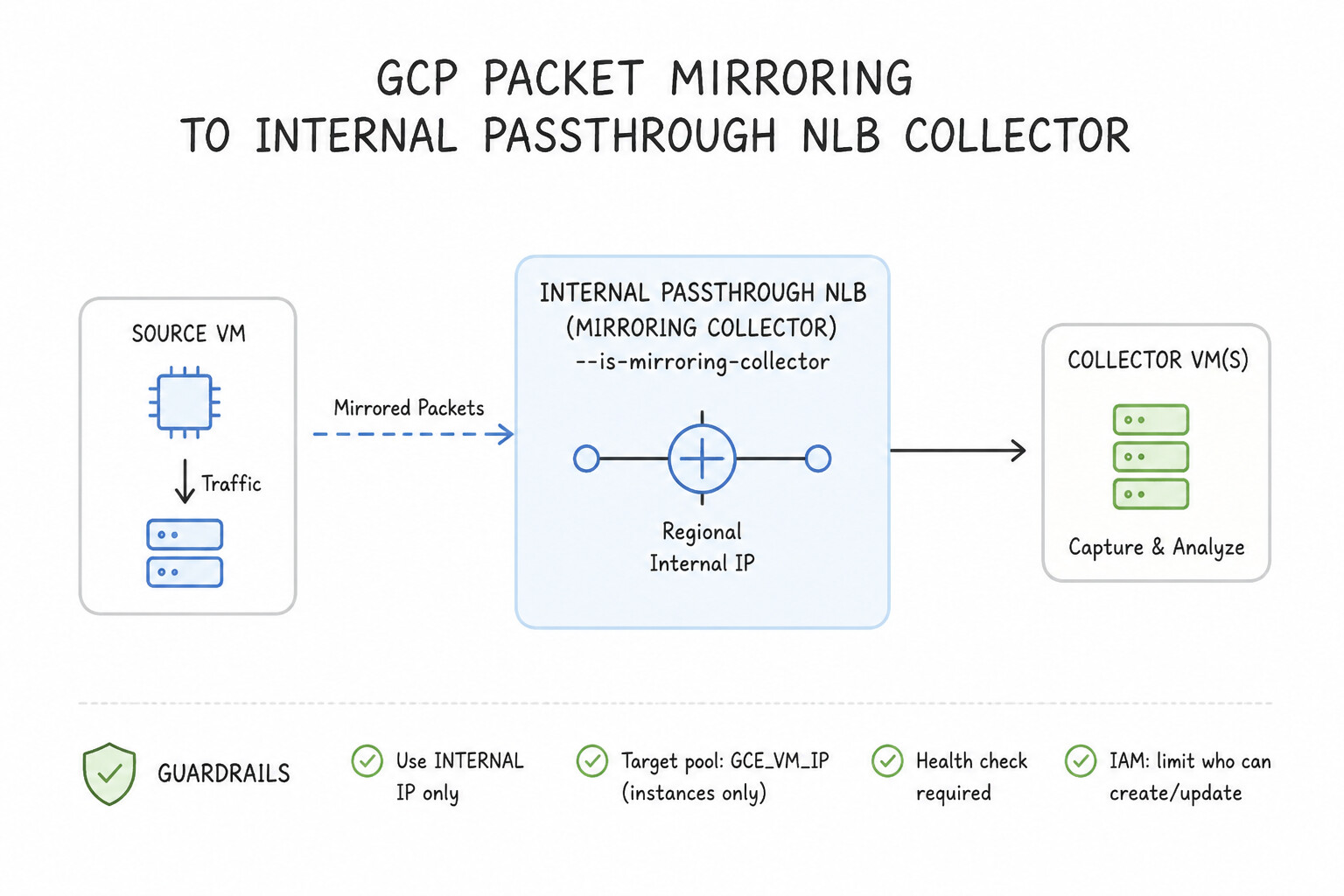
Key Implementation Patterns
- That the collector destination for Google Cloud Packet Mirroring is an Internal: Use Internal Passthrough Load Balancer. Google Cloud Packet Mirroring requires an Internal Passthrough Load Balancer forwarding rule as its collector destination. (Avoid alternative: External Application Load Balancers are Layer 7 proxy load balancers and cannot serve as Packet Mirroring collector targets.)
Key Takeaways (6.4e)
- Packet Mirroring sends cloned raw Layer 3/Layer 4 traffic directly to an Internal Passthrough Load Balancer forwarding rule.
- The load balancer distributes mirrored packets to backend virtual machine (VM) instances configured with inspection appliances.
- Packet Mirroring operates directly at the Andromeda virtual network layer without running agents on the source instances.
Quick Decision Cheat Sheet (Subsection 6.4)
If the Scenario Requires... | Choose This Google Cloud Pattern | Avoid This Common Mistake |
|---|---|---|
"Multi-NIC VM ( nic0..nic7) drops all transit packets routed through it" | Enable --can-ip-forward on the VM and configure Guest OS policy routing for nic1+ | Enabling can-ip-forward only inside sysctl net.ipv4.ip_forward=1 without enabling Google Cloud's --can-ip-forward flag on the VM resource |
"Attach 6 network interfaces ( vNICs) to an NVA VM" | Choose a machine type with at least 8 vCPUs (supports up to 8 vNICs) and attach each vNIC to a different VPC network | Using a 4-vCPU machine type (max 4 vNICs) or attaching two vNICs to the same VPC |
"Stateful Active-Active NVA cluster behind Internal Passthrough NLBs drops return SYN-ACK packets" | Enable Symmetric Hashing on the Internal Passthrough NLB forwarding rules | Using a Regional External Application Load Balancer as a next hop (only Internal Passthrough NLB can be a VPC route next hop for NVAs) |
"Inspect traffic between two subnets inside the SAME VPC using a self-managed NVA" | Create a Policy-Based Route ( PBR) targeting workload Network Tags (--tags) with --next-hop-ilb | Creating a standard custom static route (cannot override the VPC's Local Subnet Route) |
"Traffic steered by a Policy-Based Route to an NVA never reaches the destination and loops infinitely" | Exclude the NVA VMs from the Policy-Based Route by scoping the PBR to workload Network Tags only | Increasing the numeric priority value of the Policy-Based Route |
"Zero-latency-impact out-of-band packet capture ( pcap) to self-managed Zeek/Suricata collectors" | Configure Packet Mirroring in the same region pointing to an Internal Passthrough NLB ( --is-mirroring-collector) and allow 0.0.0.0/0 ingress on collector firewall rules | Deploying an inline NVA or placing the Packet Mirroring collector in a different region from the monitored VMs |
"Monitored production VM experiences sudden packet drops immediately after enabling Packet Mirroring" | Add Packet Mirroring traffic filters (protocol/CIDR/direction) or upgrade the monitored VM's machine type (mirrored traffic consumes the monitored source VM's egress bandwidth quota!) | Adding more collector VMs behind the Collector ILB |
Further Reading (Subsection 6.4)
- Multiple network interfaces overview — Describes architecture patterns, constraints, and use cases for multiple network interfaces (multi-NIC) on Compute Engine VMs.
- Best practices for deploying network appliances — Provides guidance on designing high availability, routing, and traffic inspection with network virtual appliances on Google Cloud.
- Packet Mirroring overview — Official Google Cloud documentation detailing Packet Mirroring features, concepts, and traffic capture scope.
- Using Packet Mirroring — Guide explaining how to configure packet mirroring policies and monitor inter-instance network traffic.
- Google Cloud: Using an internal passthrough Network Load Balancer as a next hop — Explains how internal passthrough Network Load Balancers function as next hops for custom static routes to distribute traffic to virtual appliances.
- Google Cloud: Routes Overview — Details the types of next hops available when configuring static routes in VPC networks.
Book TOC · Previous · Chapter 7 of 8 · Next
AwesomeGCP.com Learning
The approach taken is a question-led learning approach: you explore realistic project scenarios where you need to make decisions or take actions to achieve business goals within specific constraints. Instead of passive learning, you are challenged to think and work through the options to master the Professional Cloud Network Engineer (PCNE) certification!