Book TOC · Previous · Chapter 1 of 8 · Next
Chapter 1: Low-Code Agentic Workflows, Prompting & Multimodal Data Stores
Official Exam Guide Subsections Consolidated: 1.1, 1.2
Chapter Consolidation Telemetry: Synthesizes 40 architectural scenarios across 2 Exam Subsections and 4 Official Considerations into consolidated takeaway pillars, paired with 2 Reference Architecture Mermaid Diagrams and 12 Curated Visual Illustrations.
Chapter Focus: CX Agent Studio state machines (pages, routes, event handlers), structured JSON prompting, RBAC/ACL pass-through, and native multimodal RAG.
Subsection 1.1: Configuring Agentic Workflows and Behavior Using Low-Code Tools
Part I: Building Agents Using Low-Code Tools (~13% of Exam) · 2 Official Considerations · 21 Scenarios Consolidated
Domain Overview and Reference Architecture
Why Naive Low-Code Agents Break in Production
Low-code agent builders—specifically Customer Experience Agent Studio (CX Agent Studio) and Gemini Enterprise Agent Designer—allow teams to visually assemble conversational state machines and generative workflows in hours. However, teams that treat visual builders as "no-architecture" tools consistently fall into two production traps:
- The Spaghetti Route & Duplicate Webhook Trap (
1.1a): In a state-based workflow, conversations move between Pages (states) via Transition Routes. A common mistake is attaching data-fetching webhooks (like checking an account balance) directly to an incoming Transition Route instead of the target Page's Entry Fulfillment. The moment a second or third conversational path routes to that same Page, the webhook either fails to fire or must be duplicated across every incoming arrow—creating a maintenance nightmare. Equally dangerous is confusing Form Parameter Event Handlers (which handle reprompts for a single missing slot) with Page-Level Event Handlers (which govern overall state fallback and escalation). - The Unstructured Prompt & Zero-Shot Drift Trap (
1.1b): In hybrid and generative flows, writing a vague paragraph in the console prompt box leads to inconsistent JSON formatting, skipped business rules, and persona drift across turns. Production low-code agents require strict separation between System Instructions (foundational persona, tone, and immutable behavioral boundaries), Few-Shot Examples (demonstrating exact input-to-output formatting), and Chain-of-Thought (CoT) Prompt Templates (forcing step-by-step intermediate policy evaluation before emitting a final user response).
Core Foundational Primitives & Mental Models (Subsection 1.1)
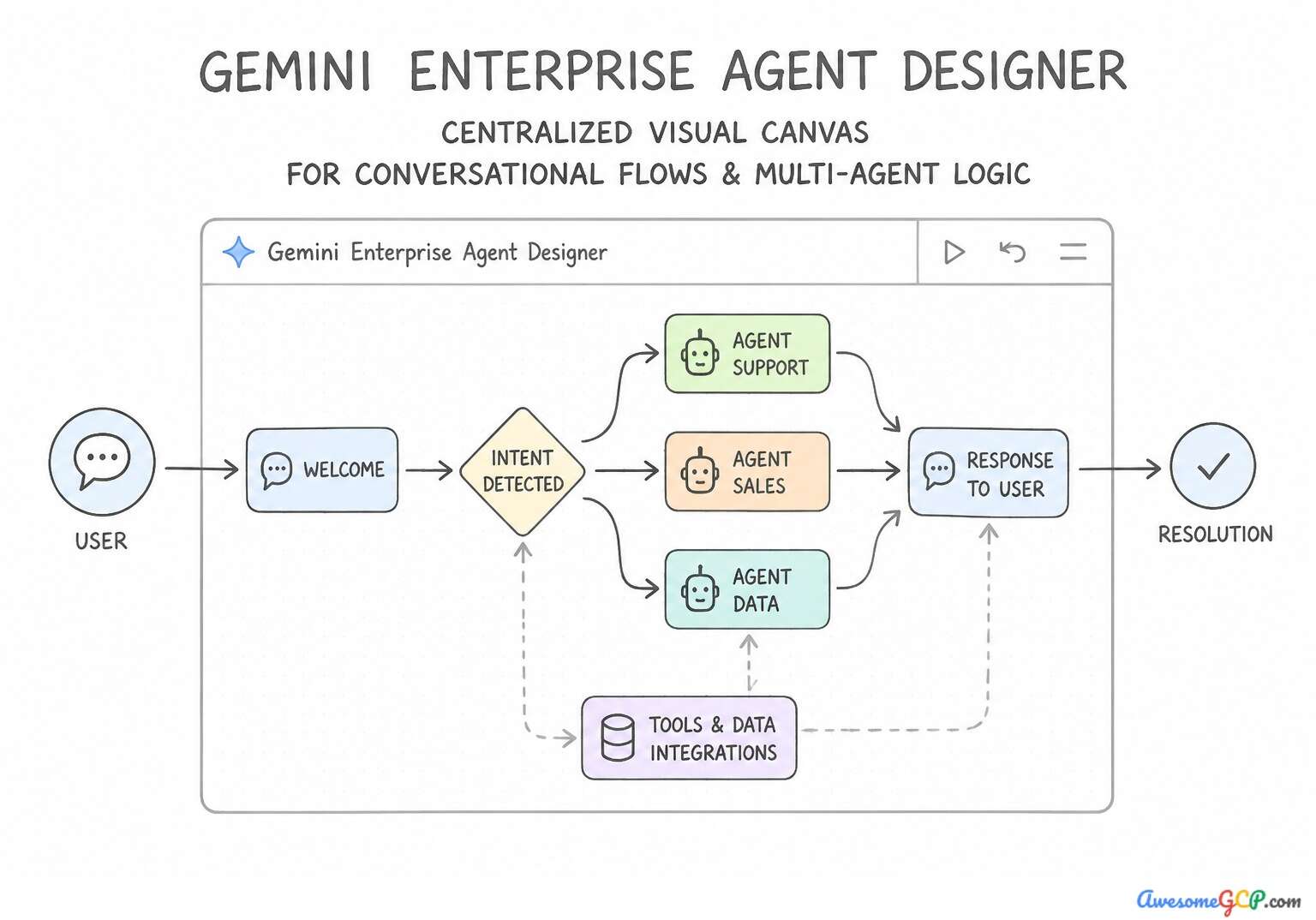
Core Concept / Service | Winning Architectural Rule & Default Behavior | Common Exam Trap to Avoid |
|---|---|---|
CX Agent Studio (Services: dialogflow_cx, vertex_ai:agent_builder) | CX Agent Studio provides the visual, graph-based builder interface for designing pages, transition routes, and event handlers. | Agent Identity handles authorization and identity management rather than conversation flow configuration. |
Gemini Enterprise Agent Designer (Services: vertex_ai:agents, gemini) | Gemini Enterprise Agent Designer is the visual low-code interface for building and orchestrating agentic workflows. | Cloud Workstations provides managed development IDE environments, not a low-code agent workflow designer. |
Few-shot prompting (Services: vertex_ai:prompt_design, vertex_ai:gemini) | Few-shot prompting provides concrete input-output example demonstrations directly within the prompt or system instructions. | Zero-shot prompting provides task instructions without providing any concrete demonstration examples. |
Chain-of-thought (Services: vertex_ai:prompt_design, vertex_ai:agents) | Chain-of-thought prompting explicitly guides a model to articulate intermediate reasoning steps before reaching a final conclusion. | Reranking is a retrieval optimization technique used to re-order search results, not a prompt engineering reasoning method. |
Event handlers (Services: dialogflow_cx, dialogflow_cx:event_handlers, vertex_ai:agents) | Event handlers manage built-in events like sys.no-match, sys.no-input, or system errors to control conversation fallback behavior. | Vector embeddings represent semantic text similarity rather than control flow and fallback management. |
Transition routes (Services: dialogflow_cx, dialogflow_cx:pages, dialogflow_cx:routes) | Transition routes define state transitions and conversational flow logic between pages in Agent Studio. | OAuth flows handle authentication and authorization, not conversational routing. |
System instructions (Services: vertex_ai:agent_builder, vertex_ai:generative_ai_studio) | System instructions establish the agent persona, operational constraints, and conversational style. | Cloud Logging sinks route and export logs, not agent behavior or personality. |
Pages (Services: dialogflow_cx, vertex_ai:agent_builder) | Pages represent individual conversational states in low-code agent tools like Dialogflow CX. | Plugins provide tool integrations and extensions, not conversational states. |
Rapid visual workflow design (Services: vertex_ai:agents, dialogflow_cx) | Low-code agent development platforms accelerate development by providing graphical visual workflow design tools. | C++ kernel compilation is a low-level systems programming task, not a feature of low-code agent builders. |
Agentic workflow (Services: vertex_ai:agent_builder, dialogflow_cx) | An agentic workflow represents the state-driven, multi-step execution and interaction logic of an agent. | A vector database indexes high-dimensional embeddings for retrieval, not conversational orchestration. |
Official Exam Considerations & Consolidated Takeaways (Subsection 1.1)
Consideration 1.1a: Configuring state-based workflows (pages, transition routes, and event handlers) using gemini enterprise tools (e.g., gemini enterprise agent designer and customer experience agent studio [cx agent studio])
When evaluating exam scenarios on CX Agent Studio (built on the Dialogflow CX state-machine model) and Gemini Enterprise Agent Designer, keep these four execution rules front and center:
- Page Entry Fulfillment vs. Transition Route Fulfillment:
Page Entry Fulfillmentruns every time the agent enters that page, regardless of which route brought the user there. Use it for loading page-required context (e.g., calling an account summary webhook). UseTransition Route Fulfillmentonly when an action belongs to one specific branching transition. - Condition Routes & Session Parameters: Dynamic branching without LLM latency is achieved via deterministic condition routes evaluating session parameters (e.g.,
$session.params.account_tier = "ENTERPRISE"or$page.params.form_complete = true). - Tiered Fallback via Event Handlers: Never escalate to a human on the first unrecognized utterance, and never leave the user in an infinite reprompt loop. Configure tiered built-in event handlers (
sys.no-match-1→ clarify;sys.no-match-2→ offer menu buttons;sys.no-match-3→ transition to Human Escalation page with context summary). - Scope Specificity (Parameter vs. Page vs. Flow): A Parameter-level event handler catches errors only while collecting that specific form parameter; a Page-level handler catches unmatched inputs across the active page; a Flow-level handler acts as a global catch-all for the entire sub-workflow.
Takeaway 1: Page Entry Fulfillment Execution Order (dialogflow_cx:pages · dialogflow_cx:fulfillment · conversational_ai:agent_studio)
- Core Concept: Execution sequence between Page Entry Fulfillment and Transition Route Fulfillment
- Scenario Trigger & Requirement: A multi-path conversational flow where data must load upon entering a specific state (AccountSummary). The core problem is that a webhook is tied to a transition route rather than the target state, creating inconsistent behavior when users enter from other pages.
- Winning Architecture & Implementation: Configure the webhook call and balance response message in the entry fulfillment of the AccountSummary page. In Customer Experience Agent Studio and Dialogflow CX, entry fulfillment executes immediately whenever the conversational flow enters a page, regardless of which transition route led to that page.
- Exam Traps to Reject: Duplicating route fulfillment is inefficient and creates unnecessary maintenance overhead. Start page event handlers do not trigger automatically on arbitrary page transitions.
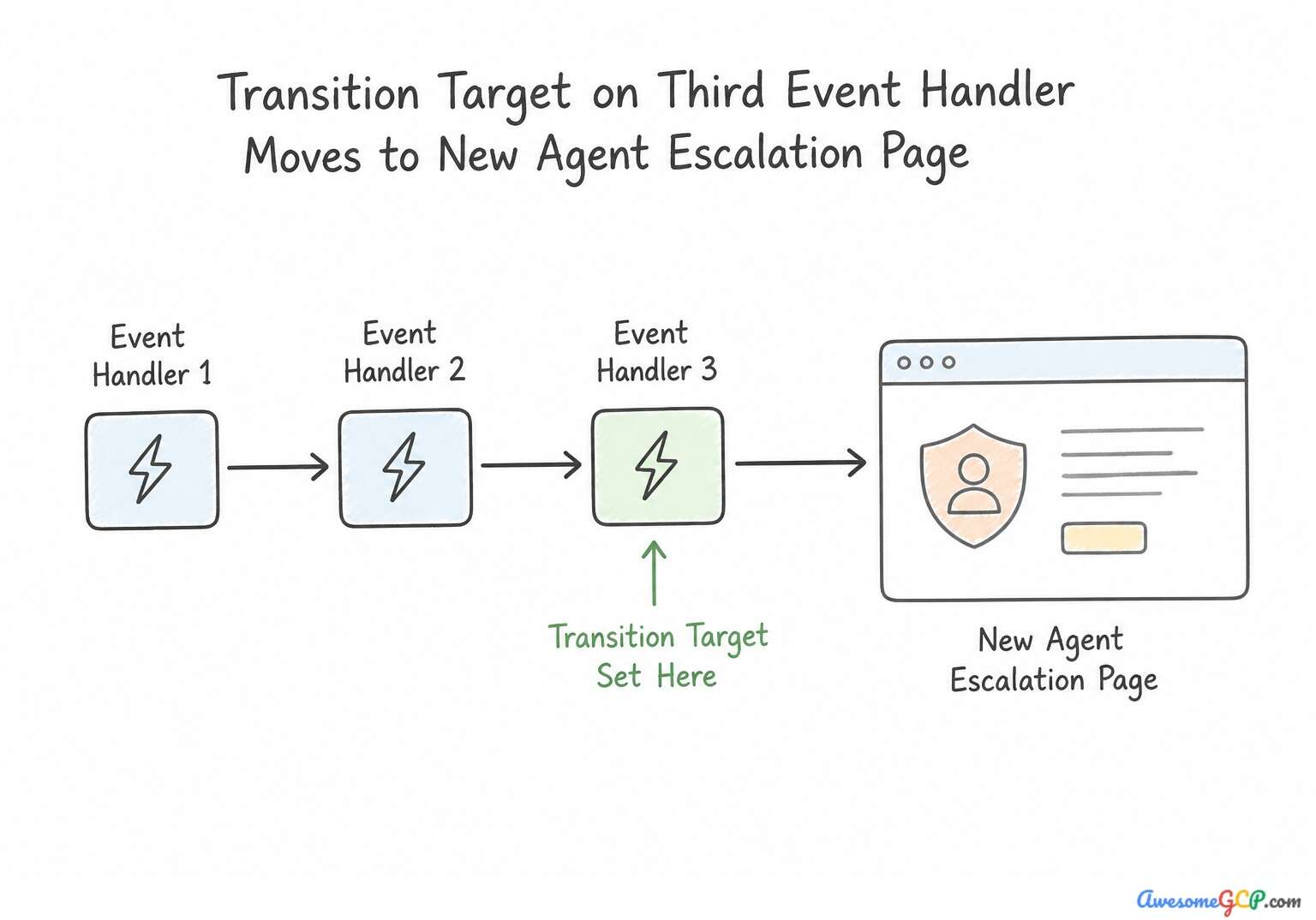
Takeaway 2: Tiered Fallback Handling via Event Handlers (dialogflow_cx:event_handlers · dialogflow_cx:pages)
- Core Concept: Configuring tiered sys.no-match event handlers with repetition counters
- Scenario Trigger & Requirement: The scenario requires progressive error handling for unrecognized user utterances on a single page: first failure gives a brief re-prompt, second failure offers suggestions, and third failure escalates to a live agent. The optimal solution must use low-code built-in capabilities.
- Winning Architecture & Implementation: Add three sys.no-match event handlers on the page with event count thresholds set to 1, 2, and 3, and configure the third handler to transition to the live agent page. Customer Experience Agent Studio and state-based visual flow designers support tiered built-in event handlers for events such as
sys.no-match. - Exam Traps to Reject: External databases and Cloud Functions are not required for turn-level failure escalation within a page. Custom webhooks and manual counters add unnecessary complexity when built-in event count handlers are available.
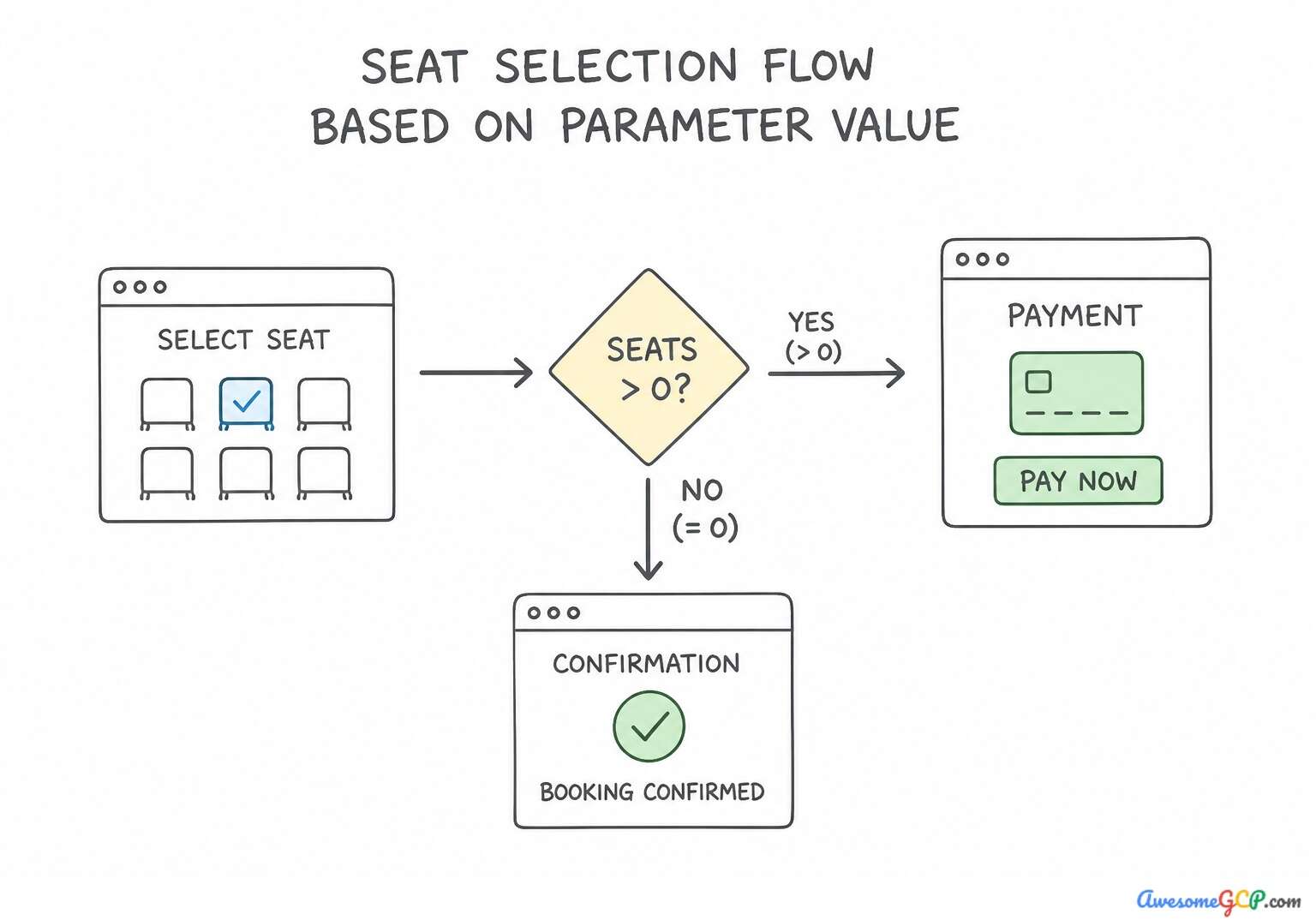
Takeaway 3: Dynamic Routing via Parameter-Based Condition Routes (dialogflow_cx:pages · dialogflow_cx:transition_routes)
- Core Concept: Transition routes with conditional rule evaluation
- Scenario Trigger & Requirement: The scenario requires dynamic branching in a conversational agent based on a numerical session parameter (
$session.params.seat_fee). The agent needs to determine whether to direct the user to a Payment page (if fee > 0) or directly to a Confirmation page (if fee == 0). - Winning Architecture & Implementation: Configure two condition-based transition routes on the seat selection page: one with condition
$session.params.seat_fee> 0 targeting the Payment page, and one with condition$session.params.seat_fee= 0 targeting the Confirmation page. In Customer Experience Agent Studio (and Dialogflow CX state machines), transition routes allow state transitions based on intent matching, condition evaluation, or both. - Exam Traps to Reject: Event handlers manage errors and unexpected input events rather than normal parameter-based business logic branching. Intent routes require user utterance matching, which is unnecessary when routing based on already collected session parameters.
Consolidated Golden Rules (Consideration 1.1a):
- Use Page Entry Fulfillment for actions and responses that must run every time a user arrives at a specific page.
- Use Transition Route Fulfillment only for actions specific to a particular conversational branching condition or intent match.
- Avoid duplicating webhooks across multiple transition routes when entering a common target state.
- Use built-in
sys.no-matchandsys.no-inputevent handlers for unrecognized input handling on pages. - Configure multiple event handlers with sequential event count thresholds (1, 2, 3+) to build progressive re-prompting and escalation flows.
- Use low-code built-in event counters rather than custom webhooks or parameters to manage conversational turn fallbacks.
Consideration 1.1b: Creating system instructions and in-console prompt templates (e.g., few-shot and chain-of-thought) to guide agent behavior (e.g., agent designer and cx agent studio)
When guiding generative behavior inside Gemini Enterprise Agent Designer and CX Agent Studio (Generative Playbooks / Generators):
- System Instructions (Role & Boundary Anchor): Define who the agent is, its communication style, and strict topical boundaries (e.g., "You are a read-only B2B billing assistant. Never speculate on legal tax liability").
- Few-Shot Prompting (Structural & Format Consistency): When the agent must emit a specific semi-structured format (such as a markdown triage ticket or categorized summary) without writing custom Python post-processing code, embed 3–5 diverse input-output Few-Shot examples using clear XML/delimiter tags (
<example><input>...</input><output>...</output></example>). - Chain-of-Thought (CoT) Prompting (Multi-Rule Reasoning): When an agent makes logic errors on multi-step eligibility rules (e.g., checking return window and item category and loyalty tier), instruct the prompt template to reason through each criterion step-by-step in a
<thinking>or intermediate reasoning block before generating the final answer. - Dynamic Session Variable Injection: Inject runtime state into console prompt templates using explicit placeholder variables (such as
$session.params.customer_region) rather than asking the LLM to infer state from raw chat history.
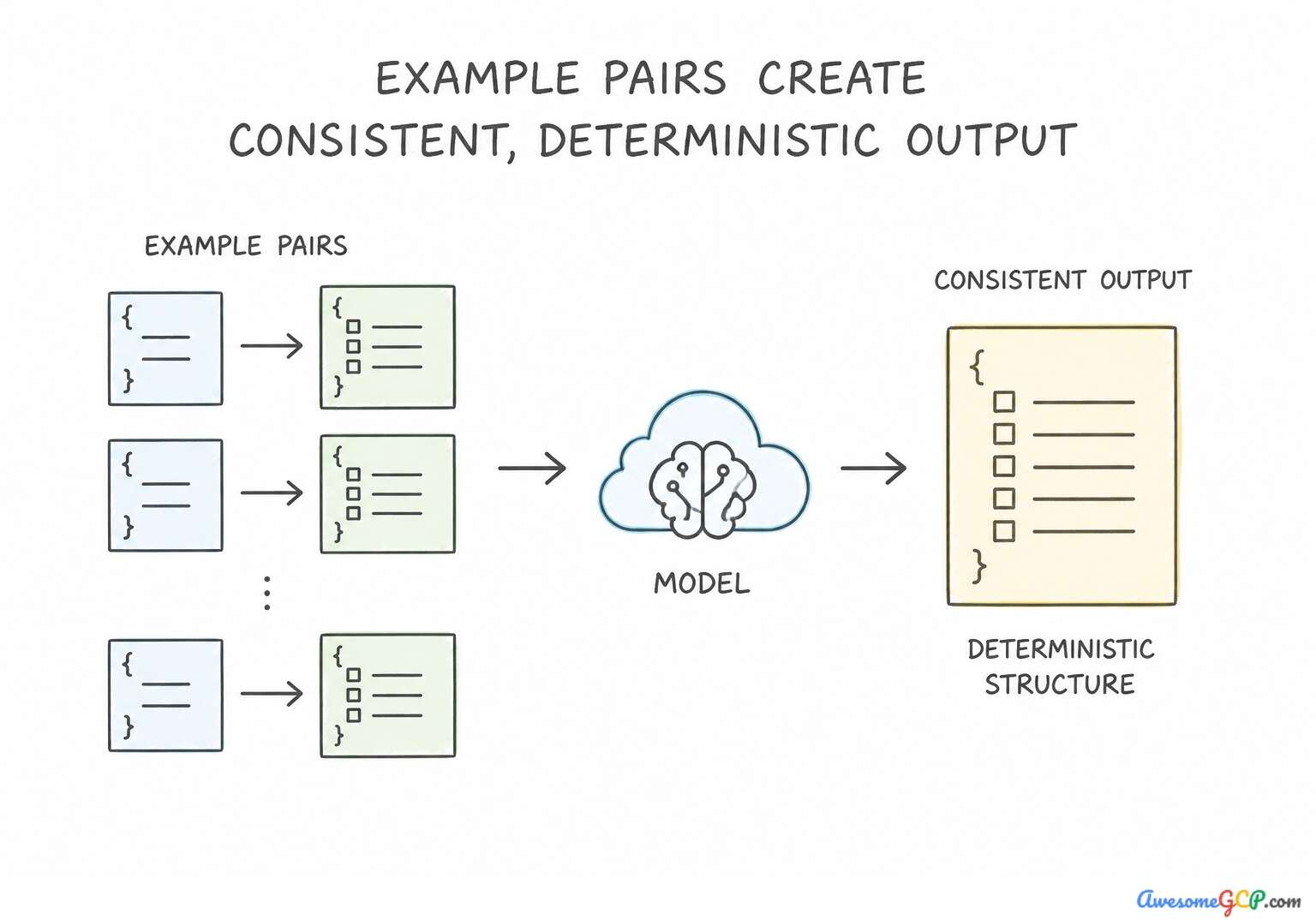
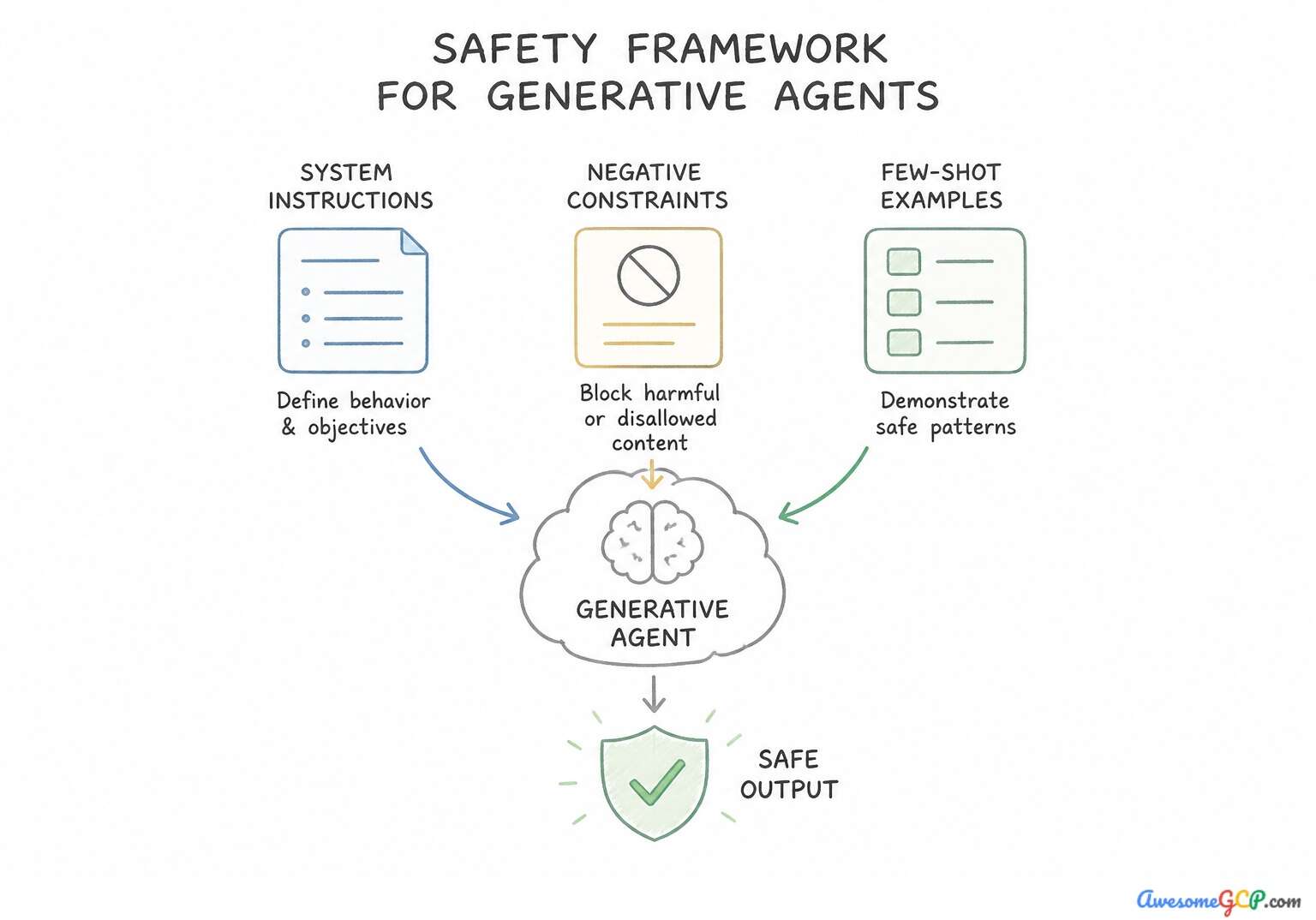
Takeaway 1: Few-Shot Prompt Formatting in CX Agent Studio (dialogflow:cx · vertex_ai:generative_ai · vertex_ai:prompt_design)
- Core Concept: Designing few-shot prompt templates to enforce deterministic structured output
- Scenario Trigger & Requirement: A generative AI claims agent built in Dialogflow CX Agent Studio that produces inconsistent JSON and hallucinates schema fields. Requires a solution implemented via prompt engineering in system instructions to achieve deterministic, structured JSON output.
- Winning Architecture & Implementation: Include diverse input-output examples directly inside the prompt template to demonstrate the exact target JSON schema. Few-shot prompting involves providing specific input-and-output example pairs within the system instructions or prompt template.
- Exam Traps to Reject: Relying on external webhooks to fix malformed text ignores foundational prompt engineering best practices. Higher temperature increases randomness and will worsen schema hallucinations.
Takeaway 2: Step-by-Step Reasoning via Chain-of-Thought in Agent Designer (vertex_ai:agent_builder · dialogflow_cx:generative_ai)
- Core Concept: Chain-of-thought (CoT) prompting for multi-step policy calculations
- Scenario Trigger & Requirement: An agent in Agent Designer that handles complex, multi-step math and policy calculations (credit score, debt-to-income, regional caps). The agent fails because it attempts to answer immediately. The requirement specifies improving accuracy through prompt engineering without external tools.
- Winning Architecture & Implementation: Update the agent system instructions to require step-by-step intermediate calculations and policy checks before providing the final loan amount. Chain-of-thought (CoT) prompting encourages large language models to break down complex multi-step reasoning into explicit, sequential steps.
- Exam Traps to Reject: Restricting outputs to immediate answers prevents the model from generating working intermediate reasoning steps. Few-shot examples without reasoning steps do not help the model learn complex multi-step evaluation rules.
Takeaway 3: Persona and Role Definition via System Instructions (dialogflow · vertex_ai:agents)
- Core Concept: Tone, persona, and behavioral boundary enforcement in agent system instructions
- Scenario Trigger & Requirement: Goal: enforce tone, persona, and negative constraints (preventing medical recommendations) in a low-code agent console (Dialogflow CX Agent Studio / Vertex AI Agent Builder). Focuses on establishing behavioral boundaries.
- Winning Architecture & Implementation: Define explicit role boundaries and negative constraints in the agent system instructions, and add few-shot examples demonstrating polite refusals to medical advice requests. Defining explicit role boundaries, clear negative constraints (specifying what the agent must NOT do), and few-shot conversational examples in the top-level system instructions is the standard Google Cloud best practice for steering generative agents built in Dialogflow CX Agent Studio or Vertex AI Agent Builder.
- Exam Traps to Reject: Higher temperature increases randomness rather than enforcing conservative behavioral boundaries. Intent-based regular expressions are brittle, unscalable, and unnecessary for generative agents.
Takeaway 4: Dynamic Variable Substitution in Console Prompt Templates (dialogflow_cx · vertex_ai:agent_builder)
- Core Concept: Using context variables and session parameters inside prompt templates
- Scenario Trigger & Requirement: The scenario requires injecting existing, verified session-level variables (loyalty tier and point balance) into an agent's prompt template without invoking unnecessary backend tools or disrupting user experience.
- Winning Architecture & Implementation: Reference the stored values in the prompt template by writing
$session.params.tierand$session.params.points. In Google Cloud Dialogflow CX and Agent Studio, session parameters store dynamic conversation data during runtime. You can inject these stored parameters directly into system prompts and prompt templates by referencing$session.params.parameter_name. - Exam Traps to Reject: Static system instructions apply globally and cannot dynamically substitute per-user runtime values. Querying a webhook on every turn creates unnecessary latency when data already exists in the session.
Consolidated Golden Rules (Consideration 1.1b):
- Use few-shot prompting with clear input-output pairs to enforce strict schema structures and reduce JSON hallucinations.
- Keep temperature low when deterministic, structured outputs are required.
- Ground system prompts with representative examples before introducing complex downstream post-processing pipelines.
- Use Chain-of-Thought (CoT) prompting whenever an LLM agent must evaluate multi-step mathematical formulas or nested conditional policies.
- Directing the model to generate intermediate reasoning tokens improves reasoning accuracy by providing a working computational scratchpad.
- Avoid suppressing intermediate reasoning tokens when dealing with complex calculations.
Multi-Constraint Production Architecture Scenarios (Subsection 1.1)
Production Scenario & Hard Constraints | Winning Google Cloud Architecture | Why Look-Alike Alternatives Fail |
|---|---|---|
Orchestration architecture that ensures reliable execution, structured transitions: The scenario requires an enterprise-grade agent to coordinate a multi-step sequence (generating purchase orders, checking quotas, sending emails) and react systematically to step failures through retries or compensation branches (the Saga pattern or state-machine error recovery). | Implement an autonomous state-machine workflow with explicit transition and fallback logic in ADK. A state machine in an agent framework provides structured transitions, error handling, and compensation logic necessary for multi-step transactional workflows. | Uncoordinated agents lack sequential tracking and coordinated rollback capabilities required for multi-step procurement. Free-form text generation cannot reliably execute enterprise API calls or structured compensation logic. |
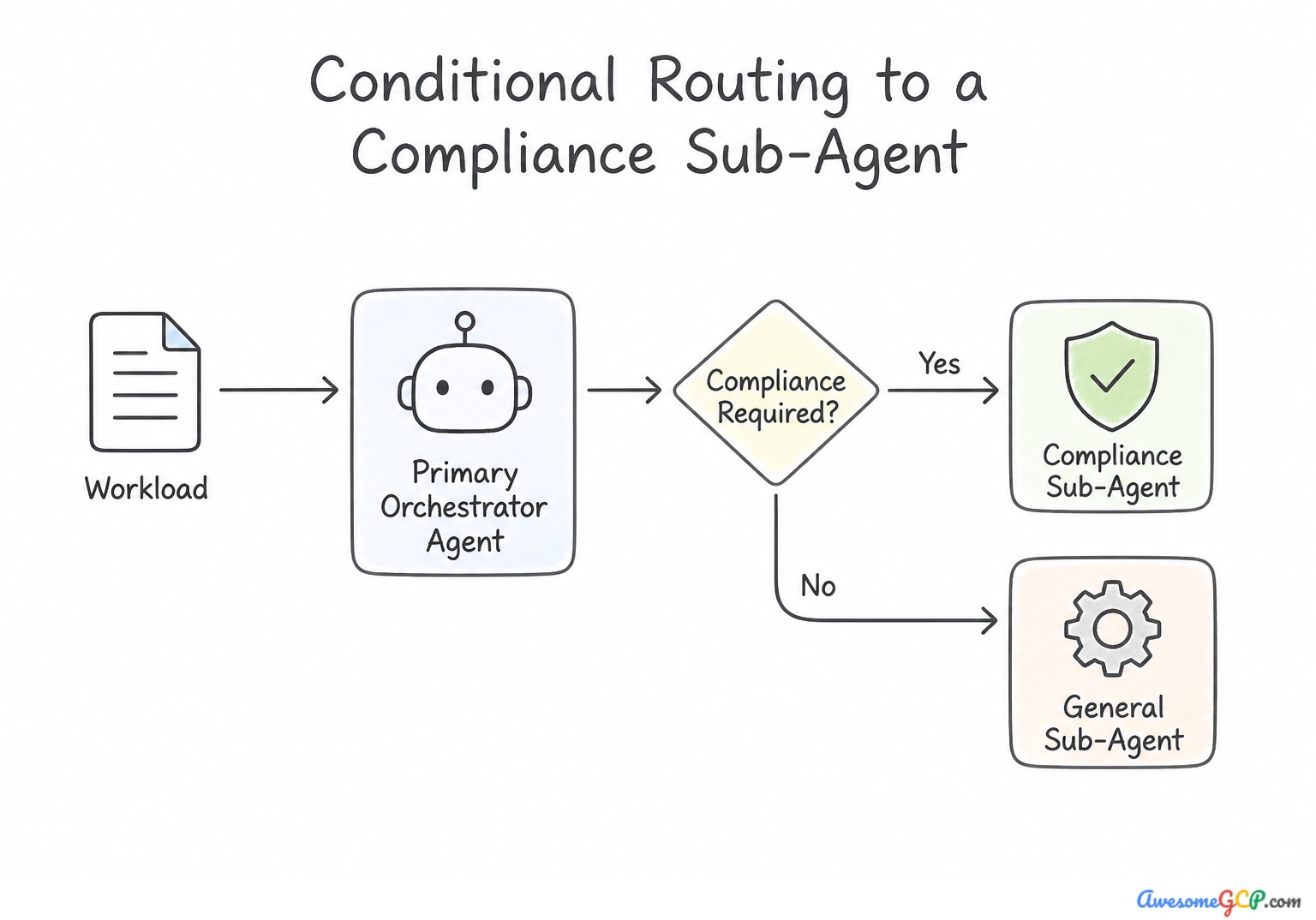
Standard multi-agent orchestration pattern for dynamically routing requests based: The scenario requires an automated routing mechanism for legal claims based on content evaluation. The primary requirements are detecting regulatory compliance issues and dispatching the task either to a specialized compliance sub-agent or to a standard processing workflow. | Implement conditional routing logic based on the classification output of the primary agent. Conditional routing directs tasks dynamically to specialized sub-agents based on the primary agent's classification output. | Manual triage for every single claim defeats the purpose of deploying an automated multi-agent architecture. Sending all claims to both sub-agents consumes unnecessary resources and increases latency. |
Vertex AI feature that enforces deterministic JSON schema adherence for automated: The question requires two primary constraints: strict conformance to a Pydantic schema and automated ingestion into a downstream ERP microservice. In production systems, downstream microservices rely on strict data contracts. Model outputs that do not conform to the schema break parsing pipelines. | Enable structured outputs (JSON schema enforcement) in the Vertex AI model configuration. Structured outputs with JSON schema enforcement guarantee schema adherence directly from the model. | Regular expressions are fragile and cannot reliably enforce complex hierarchical schemas. Natural language prompting does not guarantee schema adherence or valid JSON. |
Standard architecture pattern for preserving context and transferring conversational: The scenario requires an automated customer support agent to execute a seamless handover to a live human agent. Key requirements include providing the human representative with immediate access to a full context summary and recent turns. The architecture must convey conversational state programmatically to the support workspace. | Generate a concise session summary using ADK state summarizers and pass it with the session ID to the agent CRM. Generating a state summary and passing it with session metadata to the CRM provides the human agent instant context without requiring customer repetition. | Restarting the conversation from scratch frustrates customers and ignores existing interaction context. Raw token IDs in server logs are indecipherable to humans and inaccessible to frontend CRM agents. |
Head-to-Head Architectural Trade-Off Clinic (Subsection 1.1)
Architectural Requirement | Best Low-Code Mechanism | Why Alternative Approaches Fail |
|---|---|---|
Execute a webhook every time a user arrives at OrderStatus from 4 different pages | Page Entry Fulfillment on OrderStatus | Placing the webhook on Transition Routes duplicates configuration 4x and risks drift if one route is missed. |
Reprompt with specific format hints when a user enters an invalid 8-digit Policy ID | Parameter-Level Event Handler ( sys.no-match-default) on the policy_id form parameter | A Flow-Level or Start Page handler overrides local context and resets or derails the slot-filling loop. |
Ensure an agent evaluates 4 sequential compliance rules before approving a claim | Chain-of-Thought (CoT) prompt template + conditional state routing | Zero-shot prompts jump straight to a conclusion and frequently hallucinate rule exceptions. |
Guarantee strict JSON schema output from a generative step in a workflow | Structured Outputs ( response_schema) + Few-Shot Examples | Relying solely on a natural-language instruction ("Please reply in JSON") fails under edge-case inputs and breaks downstream parsers. |
Hand off a frustrated user to a live human agent without forcing them to repeat their issue | Event Handler / Condition Route triggering a Session Summary Generator passed in handoff metadata | Dumping 50 raw turns of unformatted JSON logs onto a human agent console increases handle time and cognitive load. |
Rapid Pattern-Trigger Cheat Sheet (Subsection 1.1)
If the Exam Scenario Mentions... | Choose This Architecture / Configuration | Reject This Common Distractor Trap |
|---|---|---|
"Multiple transition routes converge on a single page; webhook only runs on one path" | Move the webhook and response to the target page's Page Entry Fulfillment | Duplicating the webhook on every incoming transition route; using Start Page event handlers |
"Gracefully handle repeated unrecognized user inputs before transferring to a human" | Configure tiered Event Handlers ( sys.no-match-1, sys.no-match-2, sys.no-match-3) with progressive reprompts then handoff | Immediate escalation on first error; unbounded single no-match handler causing infinite loops |
"Collect 4 required parameters on a page; custom error prompt needed for only one specific parameter" | Configure a Parameter-Level Event Handler on that specific form parameter | Creating a separate page per parameter; putting parameter-specific logic in Flow-level handlers |
"Agent skips intermediate eligibility rules when evaluating complex policies in Agent Designer" | Apply Chain-of-Thought (CoT) prompting templates requiring step-by-step rule verification | Increasing model temperature; switching to zero-shot prompts |
"Agent output format varies across turns despite system instructions" | Add Few-Shot examples with explicit input/output delimiters in the console prompt template | Writing longer ALL-CAPS instructions in the system prompt |
Curated Official Google Cloud Documentation (Subsection 1.1)
- Dialogflow CX Overview — Provides architectural details on state machine concepts including flows, pages, transition routes, and event handlers.
- Pages and state transitions in Dialogflow CX — Explains the visual interface for configuring pages and defining routes between conversation states.
- Vertex AI Agent Builder Overview — Provides an overview of building conversational and agentic applications on Google Cloud with low-code tools and enterprise search capabilities.
- Vertex AI: Prompt design strategies — Provides guidance on zero-shot, few-shot, and system instruction prompt engineering patterns for Gemini models.
- Dialogflow CX - Event Handlers — Explains how event handlers process built-in and custom events such as no-match, no-input, and webhook errors.
- Dialogflow CX - Pages and Flows overview — Covers state machine modeling, routing, and transition logic in low-code Dialogflow CX agents.
- System instructions - Vertex AI — Describes how to add system instructions to steer the model behavior, specify roles, and enforce constraints across conversations.
- Build generative AI agents - Vertex AI Agent Builder — Overview of configuring agents, personas, tools, and playbooks in Vertex AI Agent Builder.
- Dialogflow CX overview — Provides an introduction to visual conversation flow design using Dialogflow CX.
- Overview of Vertex AI Agents — Explains how Vertex AI Agent Builder enables low-code and natural-language creation of generative AI agents.
- Dialogflow CX Fulfillment — Details how webhooks and responses are processed during page entry and route transitions.
- Dialogflow CX Condition Rules — Details how to write conditional expressions using session parameters for dynamic workflow branching.
Subsection 1.2: Connecting Enterprise Data and Unstructured Multimodal Pipelines to Gemini Enterprise
Part I: Building Agents Using Low-Code Tools (~13% of Exam) · 2 Official Considerations · 19 Scenarios Consolidated
Domain Overview and Reference Architecture
Why Enterprise Grounding & Multimodal Pipelines Fail Without Identity & Layout Awareness
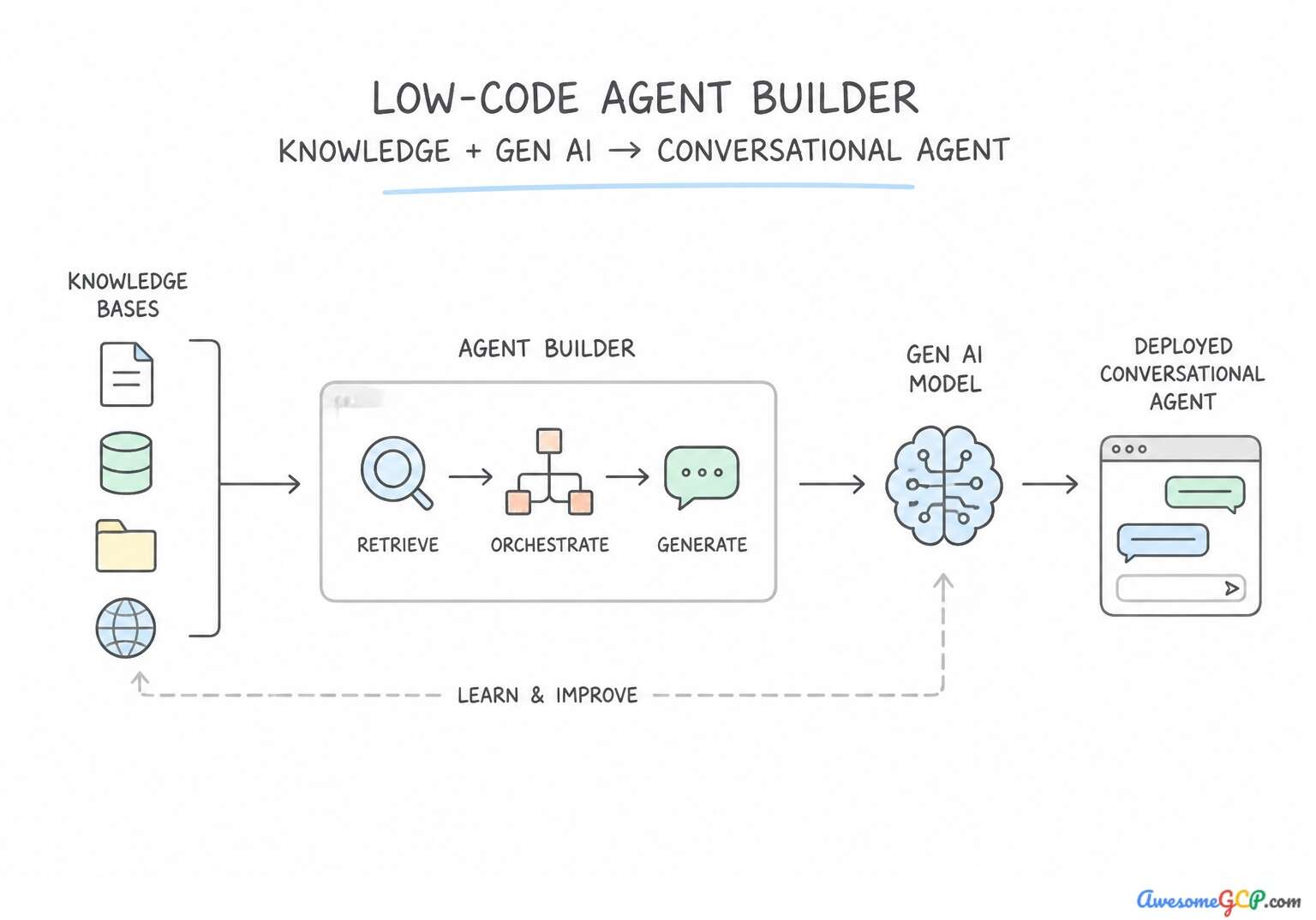
Connecting an agent in Gemini Enterprise to proprietary company knowledge via Agent Search (formerly Vertex AI Search) looks deceptively simple in a demo: point a connector at Google Drive, Confluence, SharePoint, or Cloud Storage, and start asking questions. In an enterprise production environment, two critical challenges immediately surface:
- The "Over-Privileged Search Index" Security Breach (
1.2a): If an HR or Legal agent indexes an entire SharePoint or Google Drive repository using a single admin service account and serves answers to all employees without document-level Access Control List (ACL) enforcement, any employee can ask the agent "What is the VP of Engineering's compensation package?" or "Summarize the confidential M&A board deck" and receive a grounded answer! Enterprise data connection in Gemini Enterprise requires Identity Federation + Document-Level ACL Propagation, backed by VPC Service Controls (VPC-SC) perimeters and Customer-Managed Encryption Keys (CMEK) for regulated data stores. - The "Text-Only OCR Blindness" in Multimodal Ingestion (
1.2b): Modern enterprise knowledge is not plain text—it lives in recorded training videos, customer support audio calls, scanned multi-column invoices, and complex hardware wiring schematics. Naive text-only extraction strips out visual layout, speaker identity, and video timestamps. A Professional Agentic Architect must design multimodal ingestion pipelines that preserve temporal video metadata (timestamps), speaker diarization in audio, and layout-aware visual chunking for diagrams and tables.
Core Foundational Primitives & Mental Models (Subsection 1.2)
Core Concept / Service | Winning Architectural Rule & Default Behavior | Common Exam Trap to Avoid |
|---|---|---|
Agent Search (Services: vertex_ai:agent_builder, vertex_ai:search) | Agent Search provides low-code grounding capabilities by indexing and searching unstructured enterprise data. | Agent Runtime handles execution and state management rather than unstructured data retrieval and grounding. |
Unstructured multimodal data (Services: vertex_ai:agents, vertex_ai:gemini) | Video, audio, and images represent multiple data modalities lacking a predefined tabular schema, categorizing them as unstructured multimodal data. | Structured tabular data consists of fixed rows and columns (e.g., CSV or relational tables), not raw media formats. |
Agent Search (Services: vertex_ai:agent_builder, gemini_enterprise) | Agent Search enables agents to index, search, and ground answers across corporate data repositories. | Model Armor secures LLM interactions against prompt attacks and data leaks rather than searching corporate stores. |
Cloud Storage (Services: cloud_storage, vertex_ai:agent_builder, vertex_ai:search) | Cloud Storage is the primary object storage service in Google Cloud for holding raw multimodal assets and unstructured documents prior to ingestion. | Compute Engine is an Infrastructure-as-a-Service (IaaS) compute service, not a storage repository for raw search data. |
Gemini Enterprise (Services: gemini, vertex_ai:agents) | Gemini Enterprise provides prebuilt generative AI enterprise tools and low-code builders for conversational agents. | Google Workspace Migrate is a data migration tool, not an AI agent builder. |
Official Exam Considerations & Consolidated Takeaways (Subsection 1.2)
Consideration 1.2a: Configuring agents to securely connect and query enterprise proprietary data sources (e.g., gemini enterprise and agent search)
When connecting proprietary enterprise repositories to Gemini Enterprise and Agent Search:
- Document-Level ACL Propagation & Workforce Identity: Always enable Identity-Aware Data Connectors (integrating Cloud Identity or third-party IdPs like Okta/Entra ID via Workforce Identity Federation). At query time,
Agent Searchfilters retrieved chunks against the end-user's identity and group memberships before passing context to the Gemini model—guaranteeing zero unauthorized data leakage. - Multi-Tenant Isolation via Dynamic Metadata Filtering: In B2B SaaS applications where multiple customers' documents reside in a single
Agent Searchdata store, enforce deterministicfilterexpressions (e.g.,tenant_id: ANY("tenant_abc")) injected by the backend orchestration layer—never generated by the LLM! - Data Exfiltration & Encryption Controls: Wrap
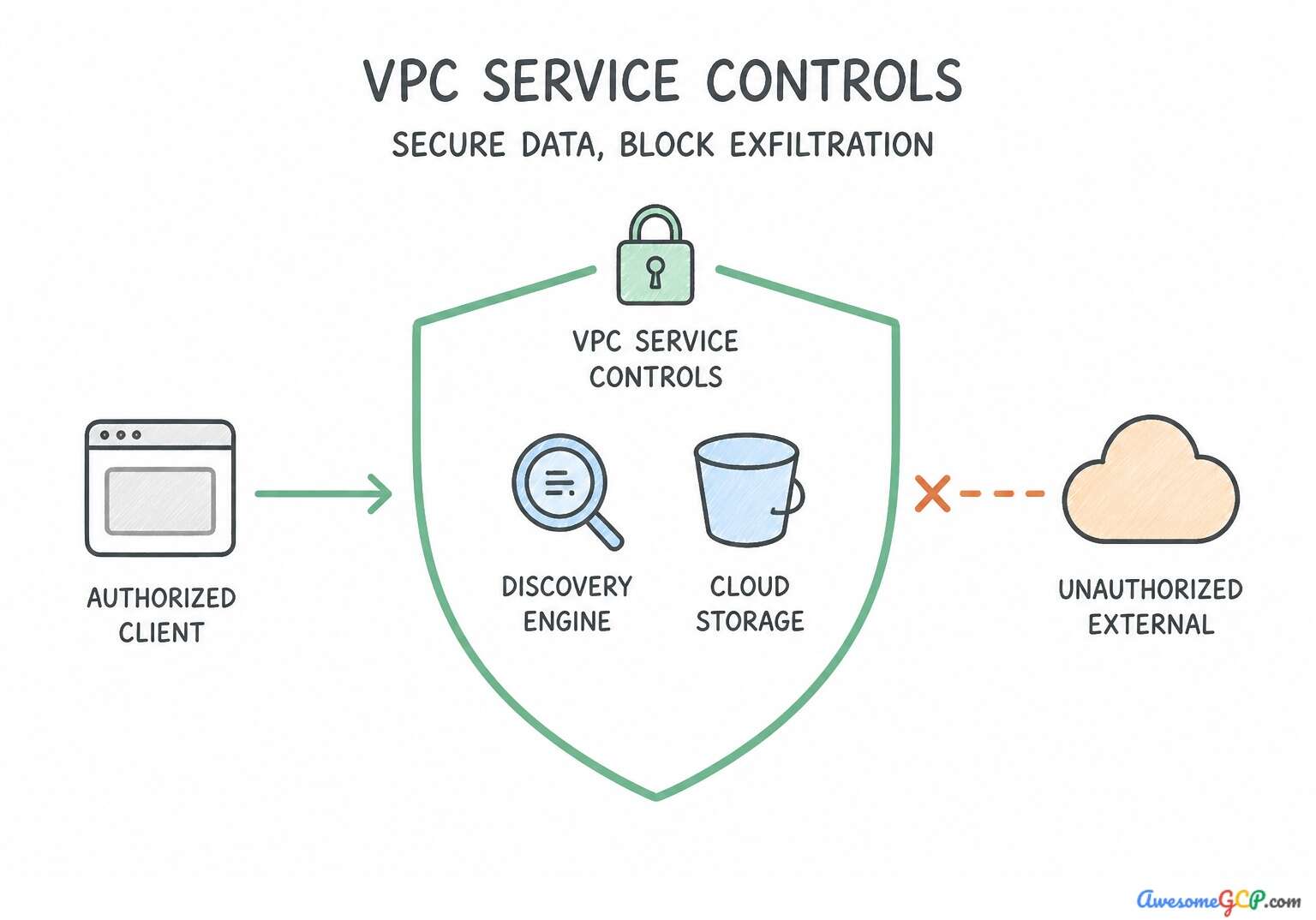
Agent Search,Cloud Storage, andVertex AIinside a VPC Service Controls (VPC-SC) perimeter to prevent data exfiltration, and configure Customer-Managed Encryption Keys (CMEK) in Cloud KMS when regulations require cryptographic erasure or key rotation control.
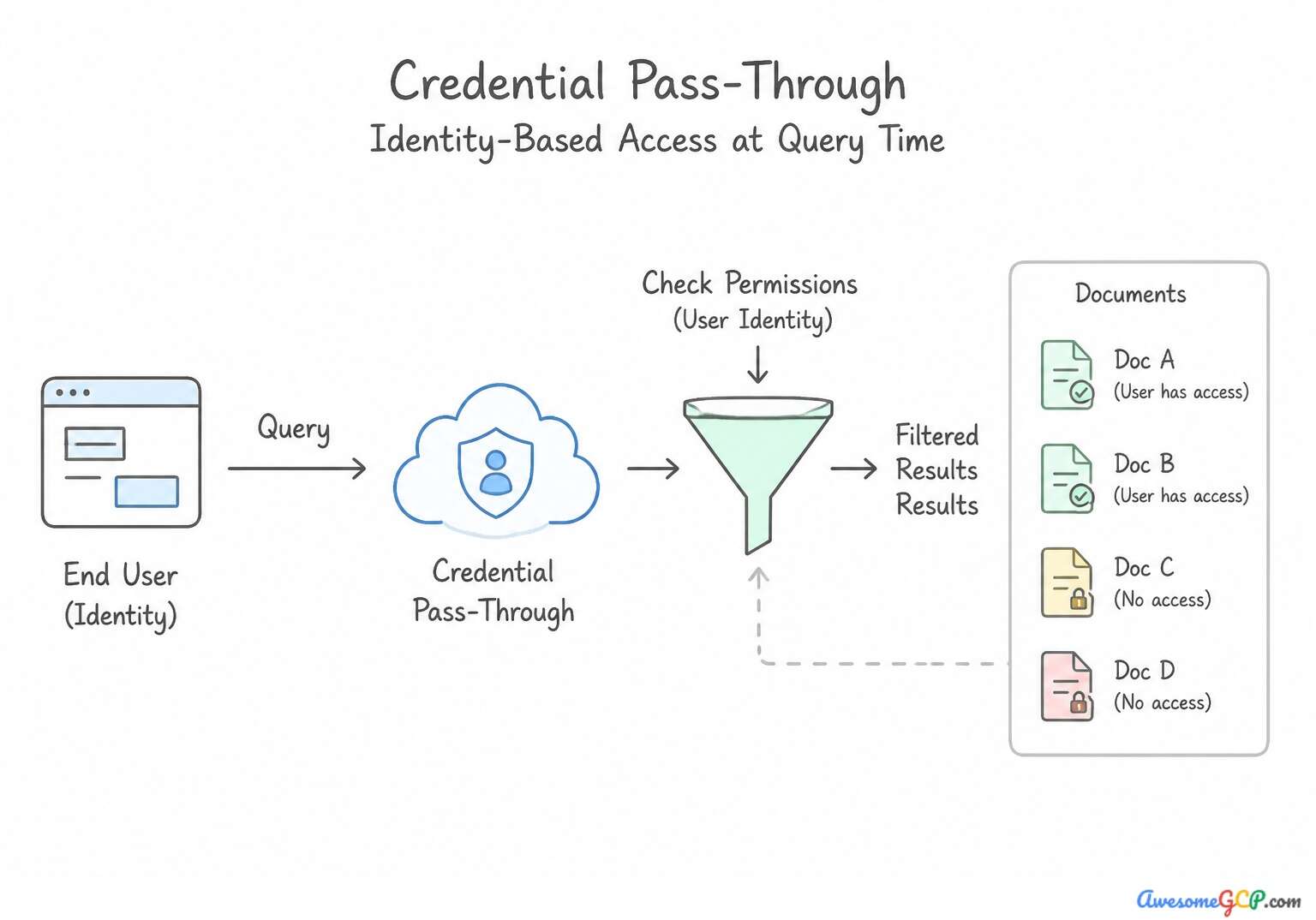
Takeaway 1: End-User Identity and ACL Propagation in Enterprise Document Search (vertex_ai:agent_builder · iam:identity_federation)
- Core Concept: Preserving source-system access control lists (ACLs) during agent search retrieval
- Scenario Trigger & Requirement: The scenario requires an enterprise search agent built with Vertex AI Agent Builder to strictly observe source-system permissions (ACLs) so that employees only search and generate answers from documents they are authorized to view.
- Winning Architecture & Implementation: Enable end-user identity mapping and OAuth credential propagation on the data store connector. When connecting enterprise repositories such as Google Workspace or third-party document management systems to Vertex AI Agent Builder, source access control lists (ACLs) must be respected.
- Exam Traps to Reject: Google Cloud IAM controls access to cloud resources, not document-level permissions inside external systems. A central service account with broad permissions bypasses individual user ACLs and can leak restricted documents.
Takeaway 2: Securing Proprietary Data Ingestion with VPC Service Controls (vpc_service_controls · vertex_ai:search · cloud_storage)
- Core Concept: Enforcing network perimeter boundaries for Cloud Storage data store indexing in Agent Search
- Scenario Trigger & Requirement: The scenario requires connecting proprietary clinical data in Cloud Storage to an AI agent through Vertex AI Search (Discovery Engine). The core constraints are strict compliance requirements for protected health information (PHI): zero public internet egress and defense against data exfiltration across organizational perimeters.
- Winning Architecture & Implementation: Create a VPC Service Controls perimeter that protects the Cloud Storage and Discovery Engine APIs within the project, and grant the Discovery Engine service account read permissions on the bucket. VPC Service Controls (VPC-SC) creates a security perimeter around Google Cloud services such as Cloud Storage and Discovery Engine (Vertex AI Search).
- Exam Traps to Reject: Cloud NAT routes outbound traffic through external IP addresses, violating the zero public internet egress requirement. External load balancers operate over public internet endpoints and do not establish API service perimeters.
Takeaway 3: Customer-Managed Encryption Keys (CMEK) for Sensitive Agent Data Stores (vertex_ai:search · cloud_kms)
- Core Concept: Applying CMEK to Vertex AI Search data stores and indexes
- Scenario Trigger & Requirement: The scenario requires securing proprietary enterprise data indexed by Vertex AI Search using Customer-Managed Encryption Keys (CMEK) via Cloud KMS. To solve this, you need to understand when CMEK is configured for data stores and which identity requires cryptographic permissions.
- Winning Architecture & Implementation: Assign the Cloud KMS CryptoKey Encrypter/Decrypter role to the Discovery Engine service agent, and select the key when you create the data store. When you enable Customer-Managed Encryption Keys (CMEK) for Vertex AI Search (Discovery Engine), you must configure the key during the creation of the data store.
- Exam Traps to Reject: CMEK cannot be retroactively applied to an existing data store that was created with Google-managed keys. Uploading pre-encrypted files breaks document parsing and indexing in Vertex AI Search.
Consolidated Golden Rules (Consideration 1.2a):
- Enforcing document-level ACLs in Vertex AI Search requires passing the end-user identity to evaluate source permissions at query time.
- Service account authorization models crawl broad data sets but require end-user identity federation to prevent unauthorized document exposure.
- Google Cloud IAM controls access to the search service itself, while source ACL propagation controls visibility of individual indexed documents.
- VPC Service Controls provides perimeter security to isolate Google Cloud APIs and prevent data exfiltration.
- Always include both the data source (Cloud Storage) and the ingestion service (Discovery Engine API) within the VPC-SC perimeter.
- Ensure the service agent for Discovery Engine holds the appropriate IAM read permissions to parse and index the underlying storage buckets.
Consideration 1.2b: Ingesting and processing unstructured multimodal data (e.g., videos, audio, and images) into the agentic workflow
When architecting workflows that ingest video, audio, scanned PDFs, and technical schematics:
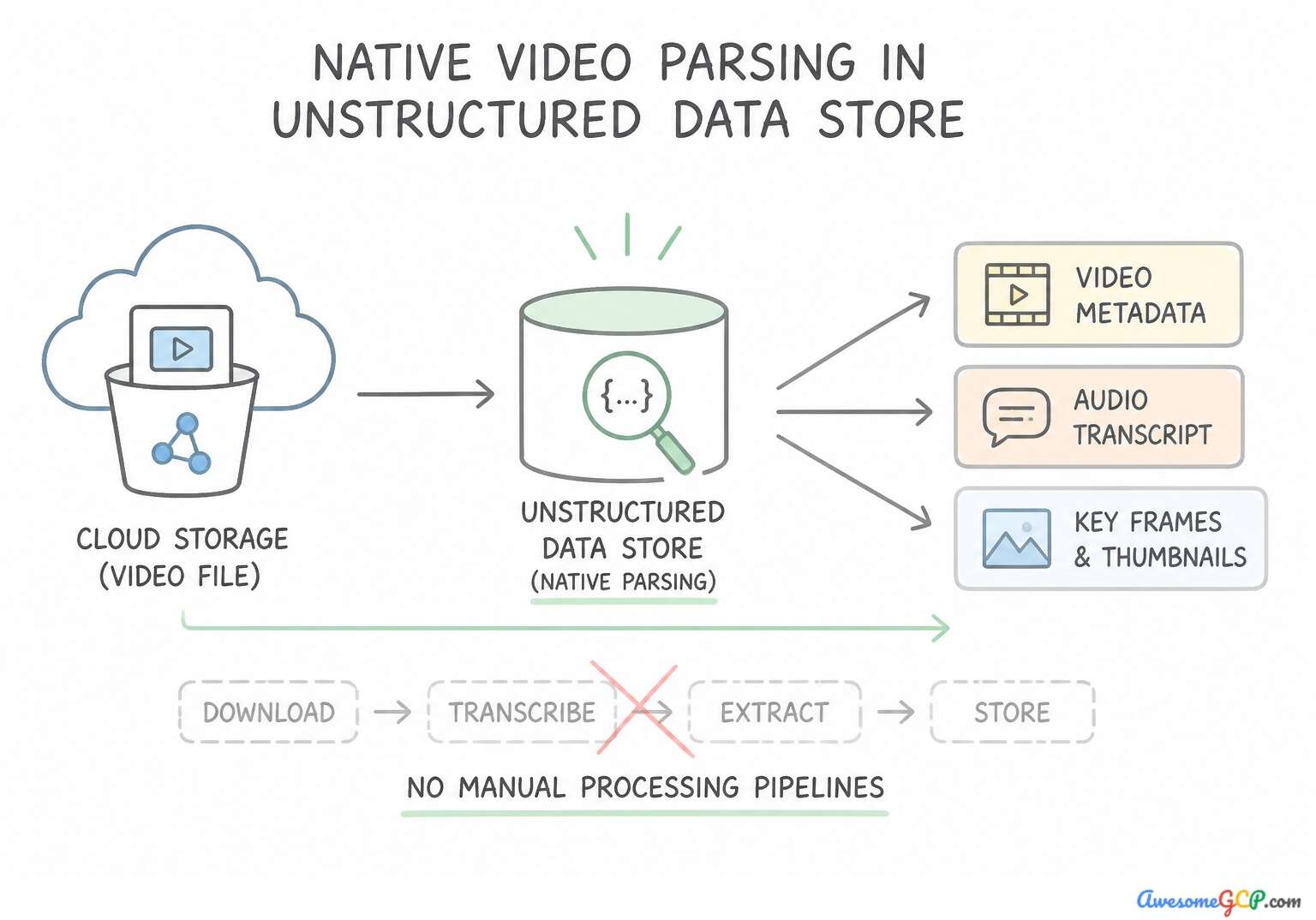
- Video Ingestion with Timestamp Grounding: Rather than transcribing speech-to-text alone (which loses visual slide/screen demonstrations), ingest videos via multimodal indexing or Gemini multimodal embeddings that segment video by scenes/time-intervals and store
start_timestamp/end_timestampmetadata so the agent can deep-link users to the exact minute and second. - Audio Ingestion with Speaker Diarization & Redaction: Process call center recordings with speaker diarization (separating
Agentvs.Customerturns) and run Sensitive Data Protection to redact spoken credit card numbers or SSNs before indexing intoAgent Search. - Schematics & Complex Documents: Use Layout Parser / Document AI combined with Gemini multimodal vision to generate rich semantic descriptions and preserve bounding-box/table relationships, rather than splitting PDFs by arbitrary character counts.
- Pre-Indexed Datastore vs. On-the-Fly Multimodal Input: Use Agent Search pre-indexed data stores for persistent enterprise corpora (manuals, video libraries) queried thousands of times; pass Cloud Storage URIs (
gs://...) directly into Gemini multimodal prompts when analyzing a single user-uploaded image, invoice, or short clip during a live session.
Takeaway 1: Timestamp-Grounded Video Knowledge Base Ingestion (vertex_ai:agent_builder · vertex_ai:search · cloud_storage)
- Core Concept: Direct Cloud Storage video ingestion with timestamp and frame-level retrieval grounding in Vertex AI Agent Builder
- Scenario Trigger & Requirement: The scenario requires connecting unstructured MP4 video tutorials in Google Cloud Storage to a Vertex AI Agent Builder conversational agent. The key requirements are providing concise answers, generating direct timestamp links to relevant video parts, and minimizing custom code.
- Winning Architecture & Implementation: Create an unstructured data store in Vertex AI Search pointing to the Cloud Storage bucket with multimodal parsing enabled, and link the data store to your agent. Vertex AI Search natively supports multimodal data ingestion for unstructured files such as videos stored in Cloud Storage.
- Exam Traps to Reject: Text summaries lose fine-grained temporal timestamp precision and introduce custom pipeline maintenance. Speech-to-Text misses visual context in machine teardown videos and requires building custom timestamp mapping pipelines.
Takeaway 2: Customer Call Audio Ingestion with Speaker Diarization (speech_to_text · vertex_ai:search · vertex_ai:gemini)
- Core Concept: Processing raw call center audio files into agentic knowledge bases while preserving speaker roles
- Scenario Trigger & Requirement: The scenario requires an enterprise agent to ingest recorded phone conversations and accurately distinguish which statements came from the customer versus the representative. The key challenge is converting raw unstructured audio into agent-searchable data while preserving conversational roles.
- Winning Architecture & Implementation: Transcribe the audio files with Cloud Speech-to-Text with speaker diarization enabled, and ingest the structured speaker-labeled text into the agent datastore. Speaker diarization is the process of recognizing distinct speakers in an audio stream and attributing each spoken segment to a specific speaker label (such as Speaker 1 or Speaker 2).
- Exam Traps to Reject: Raw audio files in datastores lack automatic speaker diarization and turn-by-turn attribution. Multimodal embeddings alone cannot separate speaker turns for granular textual compliance queries.
Takeaway 3: On-the-Fly Image Evaluation via Agent Tools vs. Pre-indexed Datastores (vertex_ai:agent_builder · vertex_ai:search)
- Core Concept: Distinguishing between real-time multimodal session inputs and static datastore grounding
- Scenario Trigger & Requirement: The scenario requires handling two distinct types of multimodal and textual data: static enterprise reference documentation (claims policy guidelines) and dynamic real-time user inputs (damage photos uploaded during a live chat).
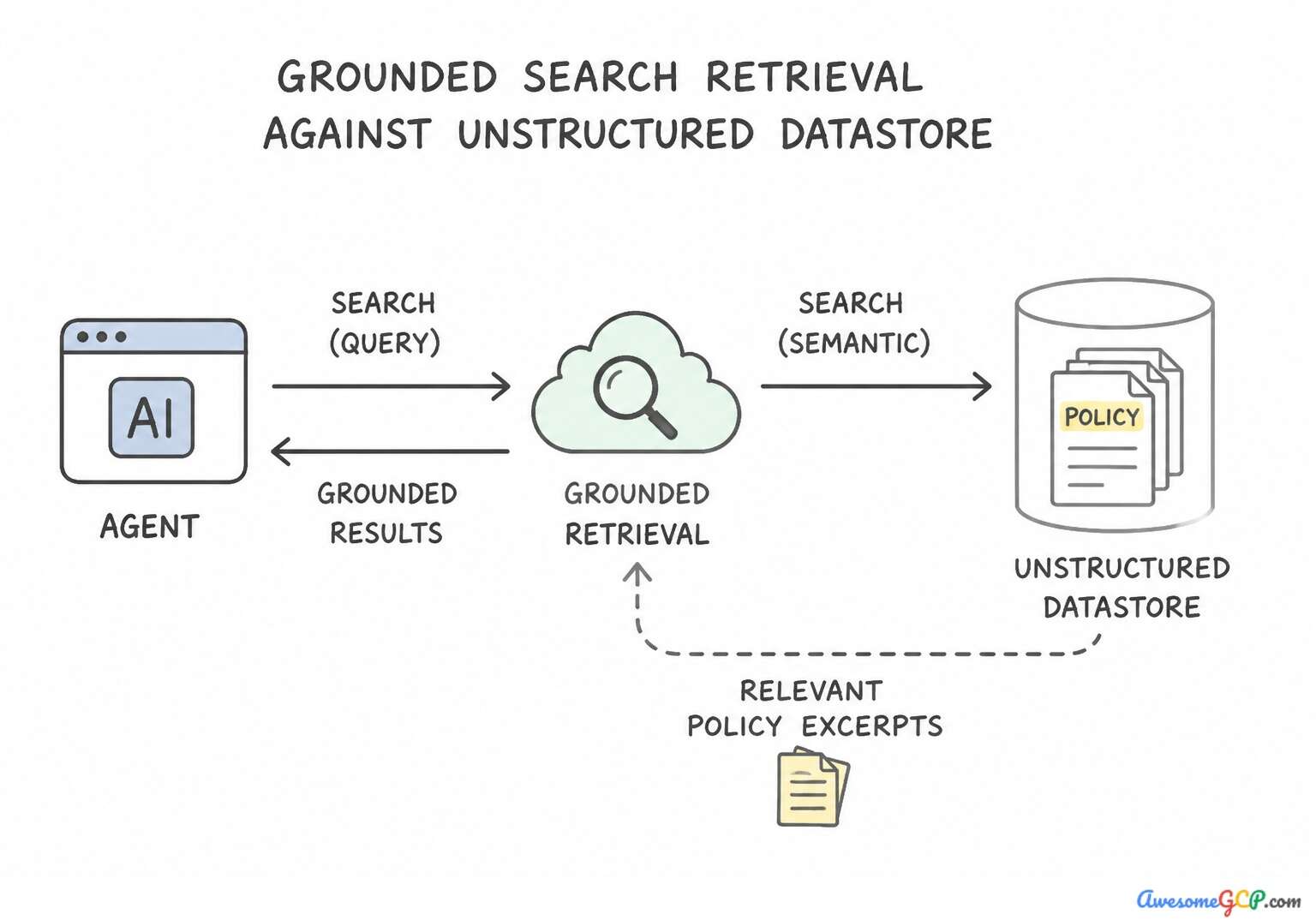
- Winning Architecture & Implementation: Index the policy guidelines in an unstructured datastore for search grounding, and configure the chat interface to pass the live vehicle photo directly into the multimodal session context for analysis. Static enterprise reference documents such as insurance policy guidelines should be pre-indexed into a Vertex AI Search unstructured datastore.
- Exam Traps to Reject: Converting text to audio is unnecessary, and HTTP headers cannot support large image payloads. Structured datastores with batch ingestion cannot handle unstructured documents or live conversational image inputs.
Takeaway 4: Technical Schematics Ingestion with Layout-Aware Visual Chunking (vertex_ai:agent_builder · vertex_ai:search · document_ai)
- Core Concept: Multimodal document parsing for complex diagrams, blueprints, and tables embedded in PDFs
- Scenario Trigger & Requirement: Technical PDF manuals containing visual blueprints, complex schematics, and structured tables. The primary issue is that standard text parsing strips visual coordinates and layout structure, causing agent hallucinations on spatial queries.
- Winning Architecture & Implementation: Configure the datastore to use layout-aware multimodal document parsing with Document AI during ingestion. Configuring the datastore with layout-aware multimodal parsing (such as Document AI or Gemini-based multimodal document parsing) preserves tables, visual structure, diagrams, and spatial relationships between text and images.
- Exam Traps to Reject: Standard text OCR strips spatial and visual relationships from schematics. Increasing chunk size on digital text parsing cannot recover missing visual schematic information.
Consolidated Golden Rules (Consideration 1.2b):
- Vertex AI Search natively ingests unstructured multimodal data directly from Cloud Storage buckets.
- Multimodal chunking extracts visual and temporal signals from video files to generate timestamp-accurate grounding.
- Avoid building custom transcription or frame extraction pipelines when built-in low-code data store ingestion meets the requirement.
- Speaker diarization separates and labels distinct speakers in an audio recording.
- Raw audio must be transcribed with speaker labels before ingesting into an agent knowledge base when role-based grounding is required.
- Multimodal embeddings capture overall semantic context but do not replace diarized transcripts for speaker-specific factual queries.
Multi-Constraint Production Architecture Scenarios (Subsection 1.2)
Production Scenario & Hard Constraints | Winning Google Cloud Architecture | Why Look-Alike Alternatives Fail |
|---|---|---|
Standard Google Cloud architecture for grounding foundation models with unstructured: The scenario requires an HR agent to provide answers strictly derived from proprietary PDF documents residing in Cloud Storage. The core challenge involves retrieving specific facts from unstructured enterprise documents dynamically and accurately, without hallucination or manual prompt maintenance. | Configure grounding with Vertex AI Search connected to the Cloud Storage data store. Vertex AI Search directly indexes Cloud Storage data stores and grounds generative models with internal documents. | Fine-tuning updates model weights for style rather than factual retrieval and is computationally expensive. Inserting full documents into system prompts exceeds token limits and is not maintainable. |
Utilize Vertex AI grounding features and citation metadata to validate source claim: The core objective is to ensure model reliability and factual accuracy in an enterprise customer support agent. Specifically, the scenario asks how to verify that every claim in the generated response directly references information in the retrieved source documents. | Enable grounding attribution scores and verify citation metadata returned by Vertex AI Search. Grounding attribution scores and citation metadata provide verifiable links and confidence metrics connecting model statements directly to source documents. | Lowering temperature reduces output randomness but does not prove claims match retrieved source text, especially if citations are disabled. Word count comparisons do not evaluate factual accuracy or claim attribution. |
Recommended Google Cloud generative AI architecture to ground responses simultaneously: Two simultaneous retrieval needs: fresh public world knowledge and secure private internal company wikis. A robust enterprise solution must retrieve information from both domains without compromising data privacy or increasing unnecessary operational maintenance. | Configure hybrid grounding with Google Search and Vertex AI Search over internal enterprise data stores. Hybrid grounding combining Google Search with Vertex AI Search connects the agent securely to both open public web information and internal enterprise wikis. | Manually copying information between separate models introduces operational friction and fails to automate agent responses. Publishing private enterprise wikis to public web servers violates information security and privacy compliance. |
Standard architecture pattern for enforcing authorization and data isolation within: An enterprise scenario where retrieval-augmented generation (RAG) processes documents that contain sensitive data (confidential payroll records) alongside general company data. Access to these documents must be restricted exclusively to HR managers. | Implement document-level access control filtering in Vertex AI Search based on the user identity and group memberships. Document-level access control in Vertex AI Search enforces permissions at the retrieval stage based on user identity and group memberships. | Security by obscurity or policy trust fails to protect confidential data from unauthorized access. Removing access controls exposes confidential information across the entire organization. |
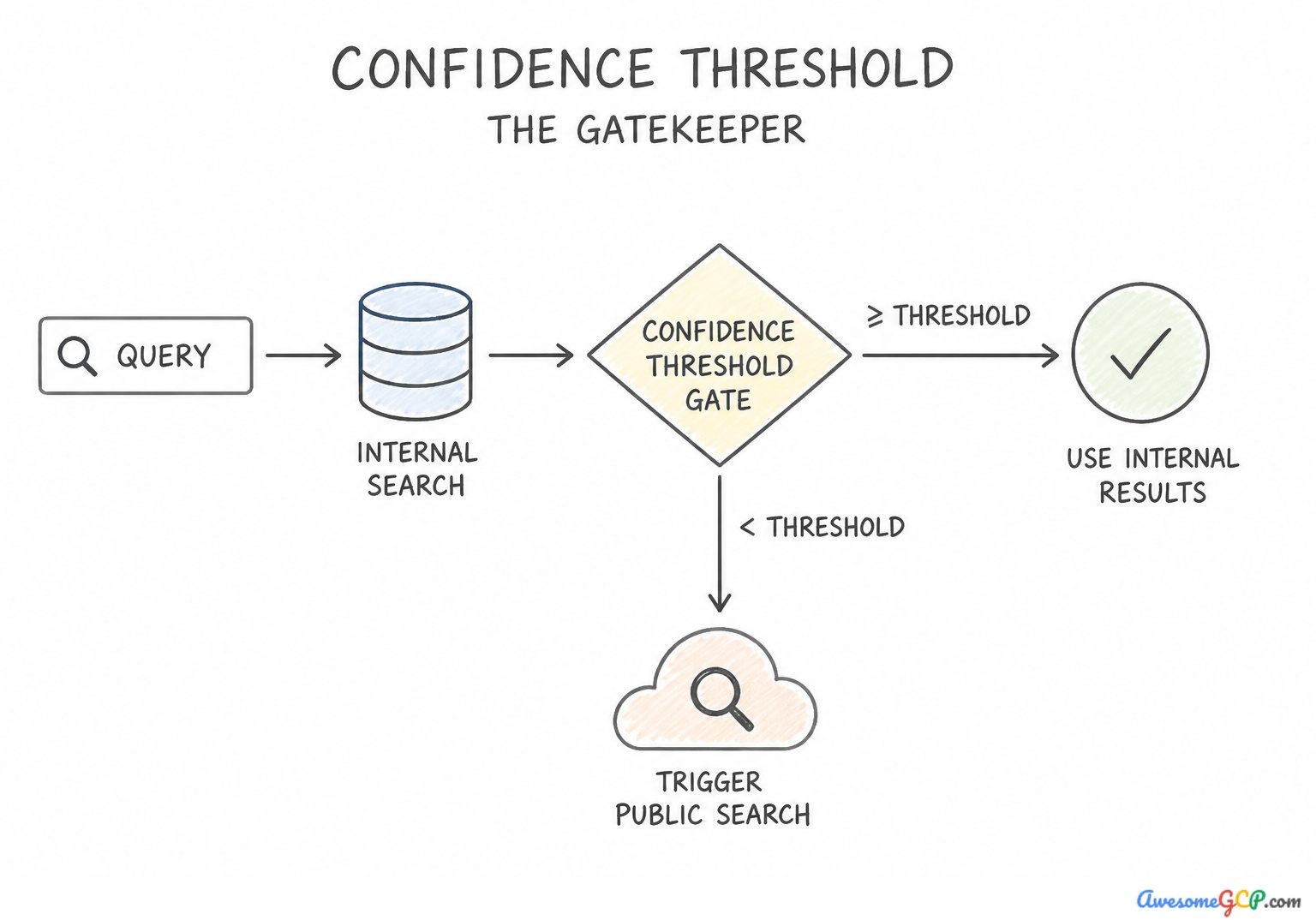
Implement dynamic grounding and fallback search strategies for enterprise generative AI agents: Two key requirements: first, the agent must check internal enterprise data for information; second, if the facts are missing internally, the agent must query the public internet for recent news. The learner must recognize how to combine enterprise Retrieval-Augmented Generation (RAG) with public search fallback mechanisms efficiently. | Configure dynamic grounding with Google Search fallback when internal retrieval confidence is low. Dynamic grounding allows models to query Google Search as a fallback when internal retrieval confidence falls below a specified threshold. | Fabricating events creates hallucinations and compromises the integrity of enterprise reporting. Fine-tuning models on daily news is expensive, slow, and does not guarantee factual recall. |
Recommended Google Cloud approach for extracting structured tabular and entity data: The prompt asks for an architectural approach to extract structured entities (vendor, line items, totals) from visual artifacts (scanned invoice images) located in Cloud Storage. Key constraints include preserving extraction accuracy across complex tabular data and maintaining automation. | Use multimodal Gemini models in Vertex AI with structured document parsing tools and Document AI. Gemini models natively process document images and integrate with Document AI for accurate, structured entity extraction. | Raw binary strings cannot be parsed semantically by text language prompts and quickly exhaust context limits. File names do not contain detailed invoice fields like line items or totals, leading to inaccurate results. |
Proper architecture and model capabilities required to process and reason over: Two core constraints: the content involves proprietary hardware designs (requiring enterprise-specific grounding rather than base model training data), and the source material combines complex circuit schematics and text descriptions. | Use a multimodal model in Vertex AI capable of understanding both schematic images and technical text. Multimodal models simultaneously process both technical diagrams and text descriptions, enabling accurate reasoning over complex visual and textual documentation. | Stripping diagrams removes critical spatial and architectural hardware information necessary for answering technical questions. Converting schematics to ASCII art degrades visual details and causes parsing failures. |
Head-to-Head Architectural Trade-Off Clinic (Subsection 1.2)
Architectural Scenario | Recommended Google Cloud Pattern | Why the Common Alternative Fails |
|---|---|---|
Employees with different clearance levels query the same HR/Legal Agent Search datastore | Enable Document-Level ACLs in Agent Search + propagate end-user identity via Workforce Identity / Cloud Identity | Creating 50 separate agents per department (unmanageable) or instructing the prompt "Don't show executive files to interns" (bypassable). |
Agent must answer questions using both internal policy docs AND live breaking news | Hybrid Grounding: Combine Agent Search enterprise datastore with Dynamic Grounding with Google Search | Relying solely on static RAG (misses live news) or solely on Google Search (misses private enterprise policies). |
Verify that every factual claim in a customer support response is backed by a source document | Enable Grounding Attribution Scores & Citations in Vertex AI / Agent Search | Asking the LLM to "rate its own confidence from 1 to 10" in the prompt (models hallucinate high confidence scores). |
Extract structured line-items and visual stamps from 10,000 scanned PDF invoices in Cloud Storage | Pass PDFs via gs:// URIs to Multimodal Gemini (or Layout Parser) with Structured Outputs (response_schema) | Running legacy regex scripts on raw plain-text dumps (loses spatial table alignment and visual checkboxes/stamps). |
Rapid Pattern-Trigger Cheat Sheet (Subsection 1.2)
If the Exam Scenario Mentions... | Choose This Architecture / Configuration | Reject This Common Distractor Trap |
|---|---|---|
"Prevent unauthorized employees from retrieving confidential executive docs in Gemini Enterprise" | Configure Agent Search with Document-Level ACLs and end-user identity propagation | Using a single shared service account with prompt-based filtering |
"Regulatory requirement to control encryption keys and destroy access to indexed search data" | Configure Customer-Managed Encryption Keys (CMEK) on the Agent Search datastore and Cloud Storage buckets | Relying on default Google-managed encryption keys (GMEK) |
"Prevent proprietary search index data from being copied to external GCP projects" | Place Agent Search, Vertex AI, and Cloud Storage inside a VPC Service Controls (VPC-SC) perimeter | Configuring standard VPC firewall rules (firewalls do not govern managed API control planes) |
"Employees need answers from 200 hours of training videos with links to exact video moments" | Ingest videos with multimodal scene/timestamp metadata indexing into Agent Search | Audio-only transcription without timestamp metadata |
"Troubleshoot hardware using PDF manuals containing dense wiring diagrams and tables" | Use layout-aware visual chunking + multimodal Gemini captioning/embeddings | Fixed 500-character plain-text sliding window chunking |
Curated Official Google Cloud Documentation (Subsection 1.2)
- Grounding overview in Vertex AI — Provides detailed information about grounding generative AI models with proprietary enterprise data.
- Vertex AI Search overview — Explains how to set up unstructured and structured data stores for enterprise search and agent grounding.
- Multimodal tasks overview in Vertex AI — Explains how multimodal models ingest and process combinations of text, images, video, and audio data in unified workflows.
- Vertex AI Agent Builder Overview — Details building conversational and workflow agents that interact with multimodal and unstructured enterprise data.
- Grounding in Vertex AI — Explains how to ground generative models with enterprise repositories and Google Search to ensure factual accuracy and avoid hallucinations.
- Create an unstructured data store with Cloud Storage — Documentation describing how to import unstructured and multimodal documents stored in Cloud Storage into a Vertex AI Search data store.
- Cloud Storage Overview — Overview of Cloud Storage as a scalable object store for unstructured and multimodal data.
- Gemini for Google Cloud overview — Overview of Gemini capabilities and enterprise generative AI solutions available across Google Cloud.
- Gemini Enterprise Overview — Describes Gemini Enterprise, including no-code and low-code tools for building and deploying enterprise agents.
- Vertex AI Search with access control — Describes how to configure document-level access control and end-user identity propagation in Vertex AI Agent Builder data stores.
- VPC Service Controls overview — Explains how VPC Service Controls perimeters mitigate data exfiltration risks and isolate Google Cloud services.
- Configure VPC Service Controls for Vertex AI Search — Details how to configure Discovery Engine and Cloud Storage data stores within a VPC-SC perimeter.
Book TOC · Previous · Chapter 1 of 8 · Next
AwesomeGCP.com Learning
The approach taken is a question-led learning approach: you explore realistic project scenarios where you need to make decisions or take actions to achieve business goals within specific constraints. Instead of passive learning, you are challenged to think and work through the options to master the Professional Agentic Architect (PAA) certification!