Book TOC · Previous · Chapter 6 of 8 · Next
Chapter 6: AgentOps: Evaluation, Autoraters, Deployment, Tracing & Cost Optimization
Chapter Focus: Testing agents with golden datasets, trajectory metrics, and LLM-as-a-Judge autoraters; choosing between Agent Runtime, Cloud Run, and GKE; and troubleshooting latency, loops, and costs with Cloud Trace and caching.
Section 4 covers AgentOps—how you test, deploy, monitor, troubleshoot, and optimize agents in production. Subsection 4.1 focuses on Evaluating and Testing Agents (golden datasets, trajectory metrics, ADK evalset, and Autoraters), while Subsection 4.2 focuses on Deploying, Monitoring, and Troubleshooting (choosing between Agent Runtime, Cloud Run, and GKE, tracing latency bottlenecks, breaking infinite loops, and cutting token costs).
Subsection 4.1: Evaluating and Testing Agents in Development and Production
The Big Picture
You cannot test an AI agent with simple assert response == 'Hello' unit tests. An agent might phrase its final answer nicely while calling the wrong tools, skipping a mandatory security check, or hallucinating facts not found in the retrieved documents. Subsection 4.1 teaches how to build Golden Datasets, measure Tool Trajectory and the RAG Triad, and automate grading with ADK evalset and Autoraters (LLM-as-a-Judge).
Consideration 4.1a: Creating Test Sets for Agent Evaluation (Golden Data, Prompts, and Edge Cases)
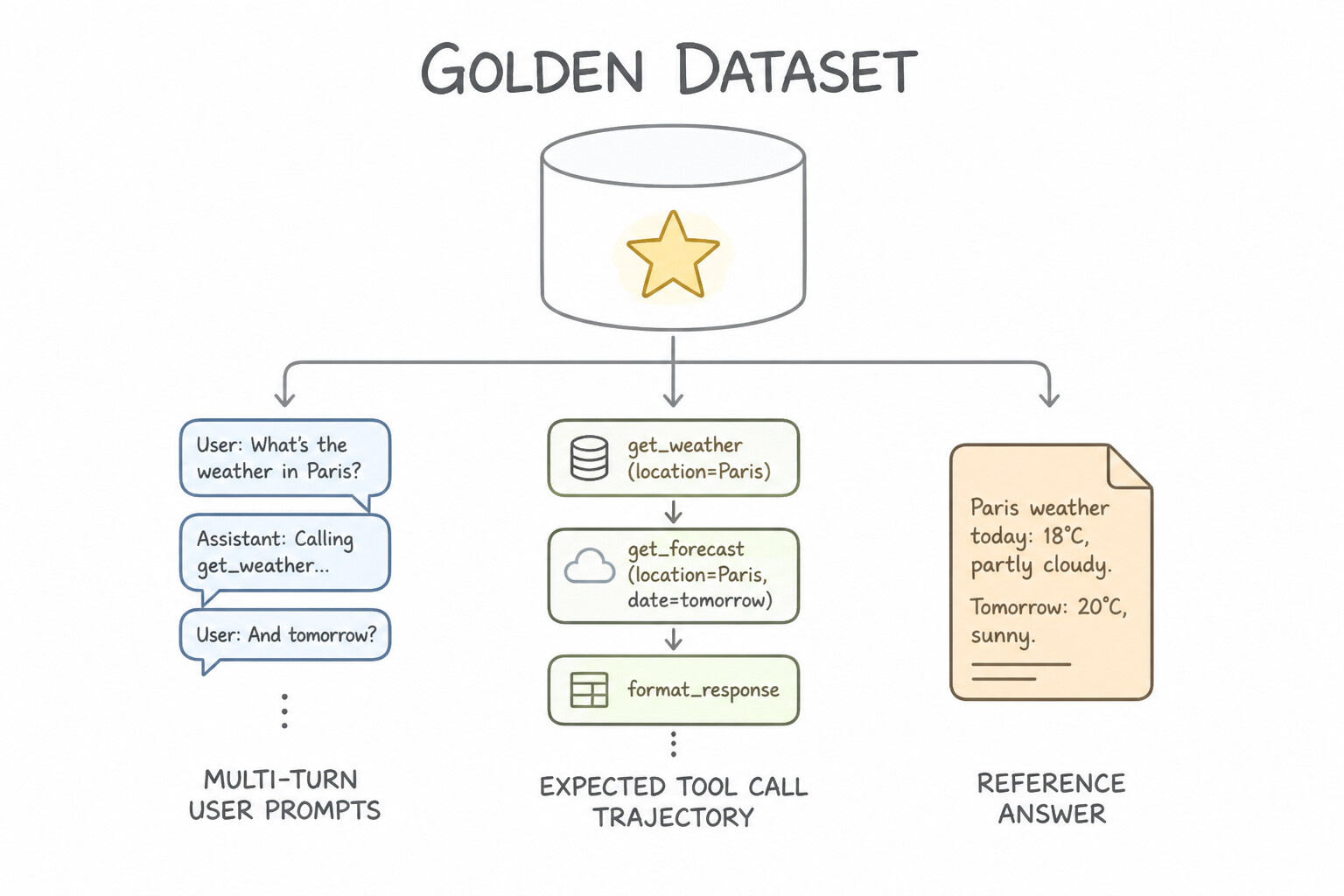
A Golden Dataset is your trusted benchmark for measuring whether a prompt change, model upgrade, or new tool makes your agent better or worse. Unlike traditional ML datasets that only have (input, label), an Agent Golden Dataset must capture the full interaction journey.
What Belongs in an Agent Golden Dataset
- Diverse Scenario Coverage:
- Happy-Path Prompts: Typical single-turn and multi-turn user requests.
- Multi-Turn Context Drift Cases: Conversations where the user changes their mind mid-chat ("Actually, change the flight from Tuesday to Thursday") to verify the agent updates state properly.
- Tool-Calling Edge Cases: Missing parameters, ambiguous dates, or API error responses (
503 Service Unavailable) to verify the agent asks clarifying questions or retries gracefully. - Adversarial & Red-Team Prompts: Prompt injections, out-of-scope questions, and harmful requests where the expected behavior is a safe refusal.
- Expected Tool Trajectory + Reference Answer: Each golden test case records both the expected sequence of tool calls and arguments (
expected_trajectory) and the ground-truth reference facts.
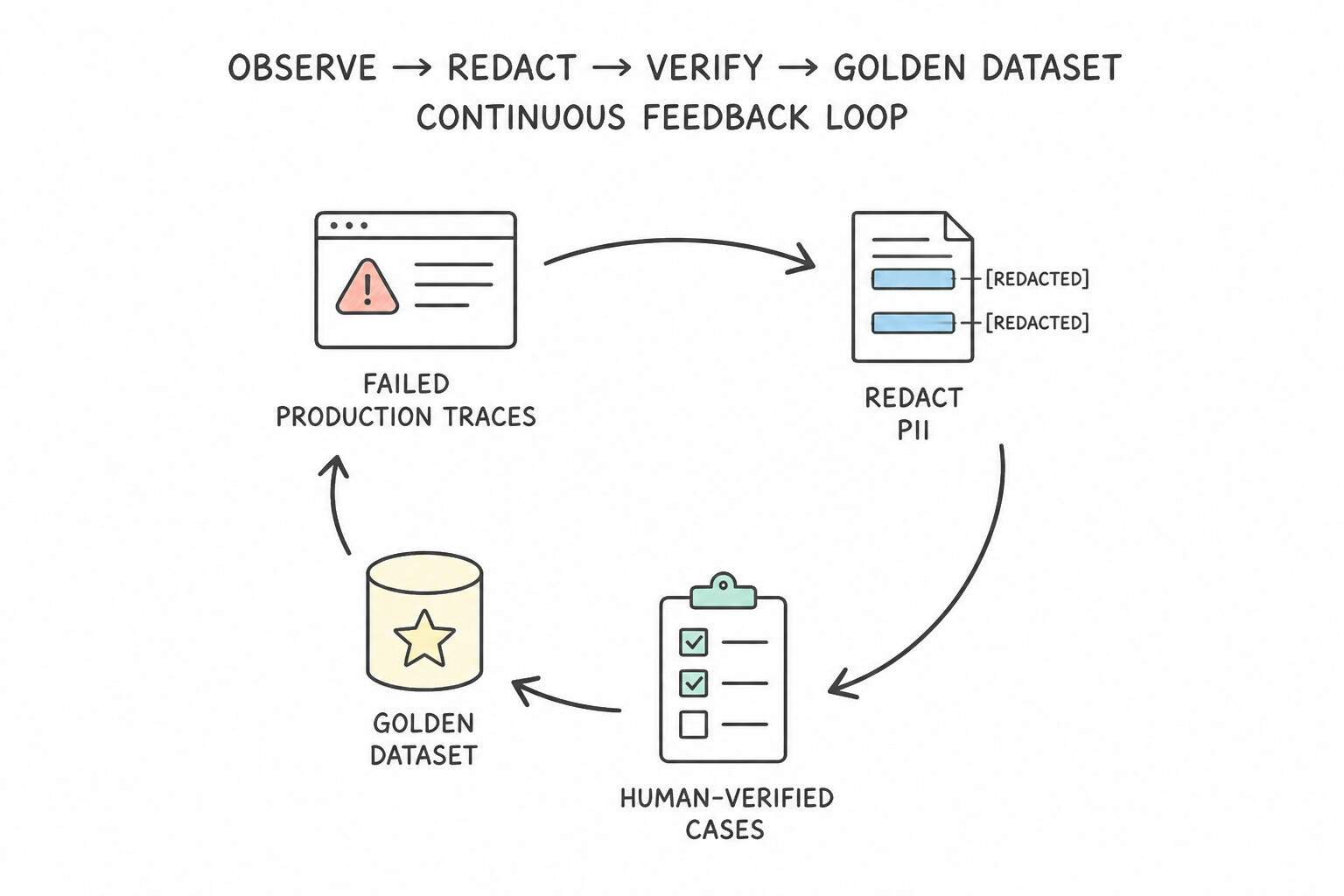
Building and Updating the Dataset (Synthetic + HITL + Production Drift)
- Bootstrapping with Synthetic Data + Human Review: When launching a new agent with zero historical logs, use an LLM to generate synthetic test scenarios across your personas and edge cases, then have domain experts review and approve (Human-in-the-Loop) the golden pairs before locking them into the benchmark.
- Continuous Production Drift Flywheel: In production, automatically sample conversations that triggered user thumbs-down ratings, fallback escalations, or low confidence scores. Run them through Sensitive Data Protection (SDP) to redact PII, have a human annotator verify the correct expected outcome, and append them to your Golden Dataset so the agent never repeats the same mistake twice.
Key Takeaways (4.1a)
- Cold-start a golden dataset before launch → Generate synthetic scenarios with an LLM + validate with
Human-in-the-Loop (HITL)domain experts.- Keep the golden dataset relevant over time → Continuously feed redacted production failures/drift back into the test set.
Consideration 4.1b: Creating Continuous Evaluation Pipelines to Assess Tool Execution
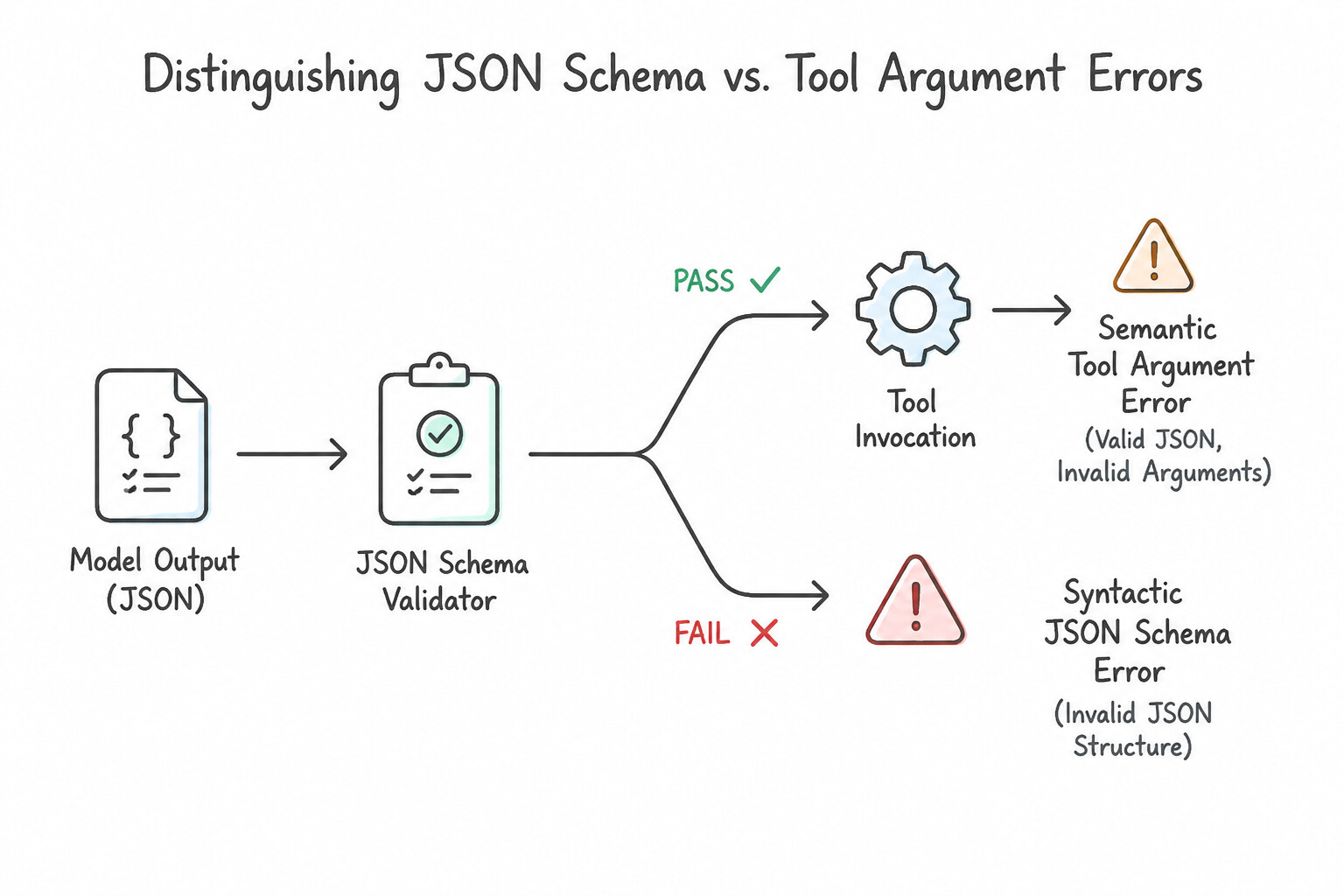
Even if an agent selects the right tool name, its tool call can fail in two very different ways: syntactic errors versus semantic errors. Your continuous evaluation pipeline must test for both.
Syntactic vs. Semantic Tool Evaluation
- Syntactic / Schema Validation Errors: The model outputs malformed JSON, omits a required field, or passes a string
"twenty"where an integer20is required by the OpenAPI/MCP schema. - Semantic Argument Errors: The JSON is 100% valid according to the schema, but the values are wrong for the conversation! For example, the user says "Book a flight from New York to London next Friday," and the agent passes valid strings
{"origin": "LON", "destination": "NYC"}(swapping origin and destination) or calculates the wrong Friday date. - Trajectory Ordering Checks: Sometimes an agent must call tools in a strict order—for example, it must call
verify_kyc_status()before callingexecute_wire_transfer(). Trajectory evaluation checks that required prerequisite tools are never skipped or called out of order.
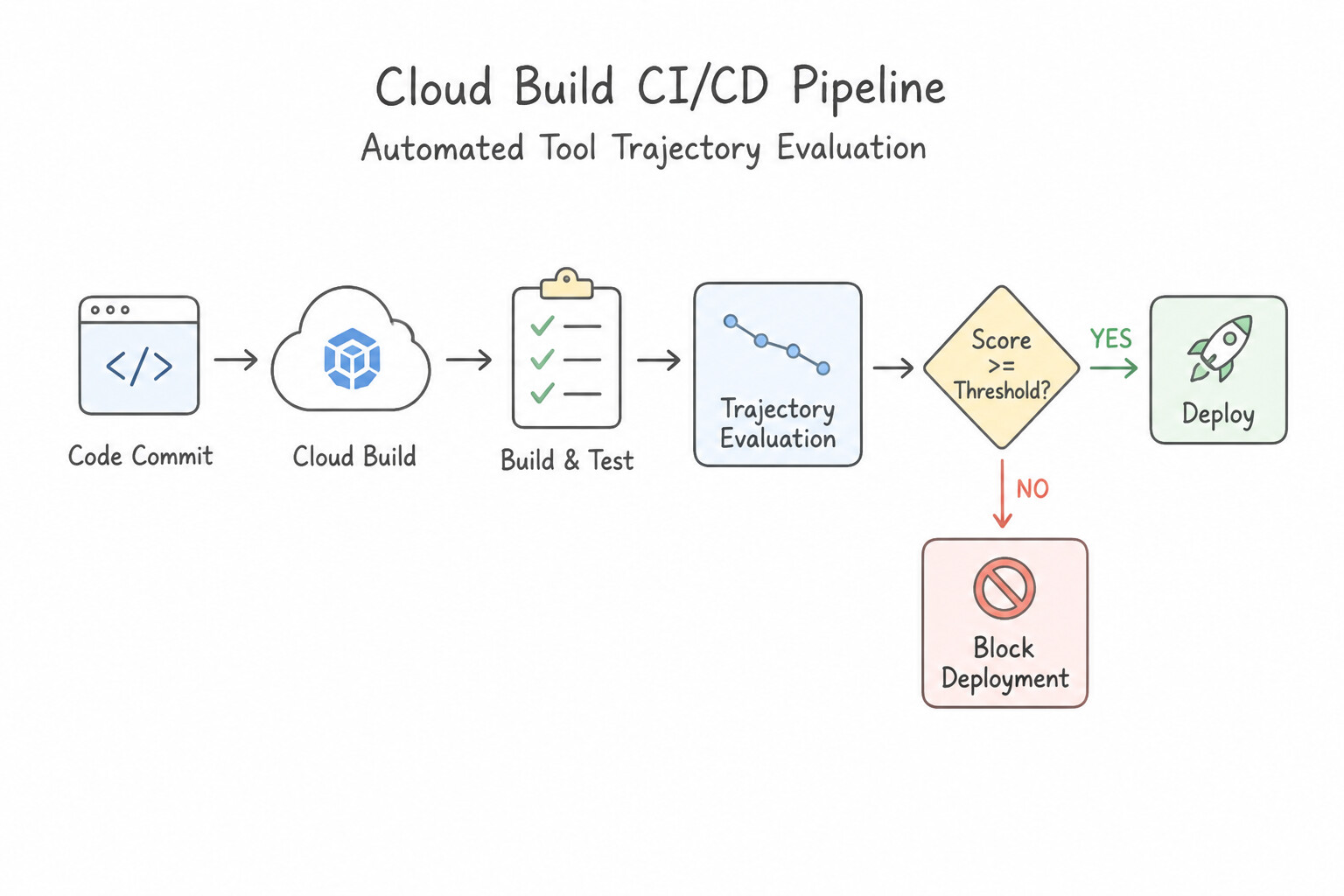
Automating CI/CD Deployment Gates
- Block Regressions Before Production: Wire your evaluation suite into Cloud Build (or GitHub Actions) so every pull request that modifies a prompt, tool docstring, or model version runs against your Golden Dataset against mocked/sandboxed tools.
- Hard Pass/Fail Thresholds: Configure the pipeline to automatically fail the build and block deployment if tool selection accuracy, trajectory ordering, or P95 latency drops below your target SLO threshold.
Key Takeaways (4.1b)
- JSON passes schema validation but has swapped or wrong parameter values → Test for
Semantic Argument Accuracyagainst golden tool inputs.- Ensure
verify_kycalways runs beforetransfer_funds→ UseTrajectory Evaluationto verify directed tool execution order.- Prevent bad prompt edits from reaching users → Gate CI/CD deployments in
Cloud Buildon automated evaluation scores.
Consideration 4.1c: Determining the Appropriate Evaluation Framework and Tooling (ADK Evalset, Gen AI Evaluation Service, and Custom Autoraters)
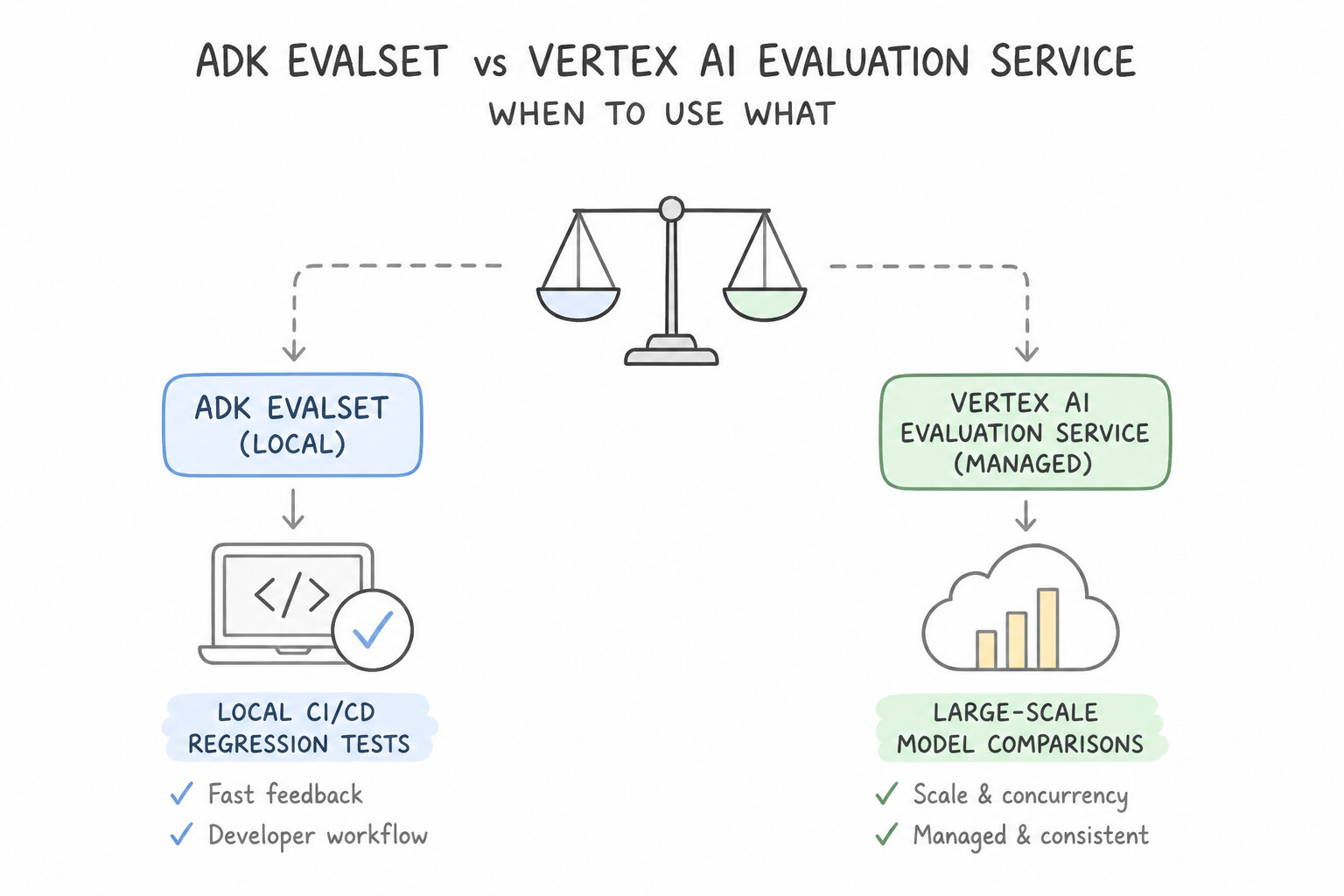
Google Cloud provides three complementary tools for agent evaluation, each designed for a distinct stage of the development lifecycle:
Choosing Between ADK evalset, Gen AI Evaluation Service, and Custom Autoraters
- ADK Evaluation Tooling (
evalset—Local Dev & CI/CD Regression): - Built directly into the Agent Development Kit (
adk eval/ Web UI). - Ideal for developers and CI/CD pipelines to rapidly replay saved multi-turn test files (
*.evalset.json) and check tool trajectory match scores (EXACT,IN_ORDER,ANY_ORDER) and response similarity. - Vertex AI Gen AI Evaluation Service (
Managed Fleet & Model Benchmarking): - Fully managed cloud service for running large-scale evaluations across hundreds or thousands of prompts, comparing candidate models, and monitoring production quality metrics (such as Groundedness, Safety, Instruction Following, and Verbosity).
- Custom Autoraters (
LLM-as-a-Judge—Domain-Specific Rubrics): - Standard string metrics like
ROUGEorBLEUonly count overlapping words—they cannot tell if a medical or financial disclaimer is legally compliant or empathetic. - When you need to grade open-ended answers against custom business or regulatory rules, configure a Custom Autorater (LLM-as-a-Judge) with an explicit step-by-step scoring rubric (e.g., a 1-to-5 scale with clear criteria) and calibrate it against human expert grades.
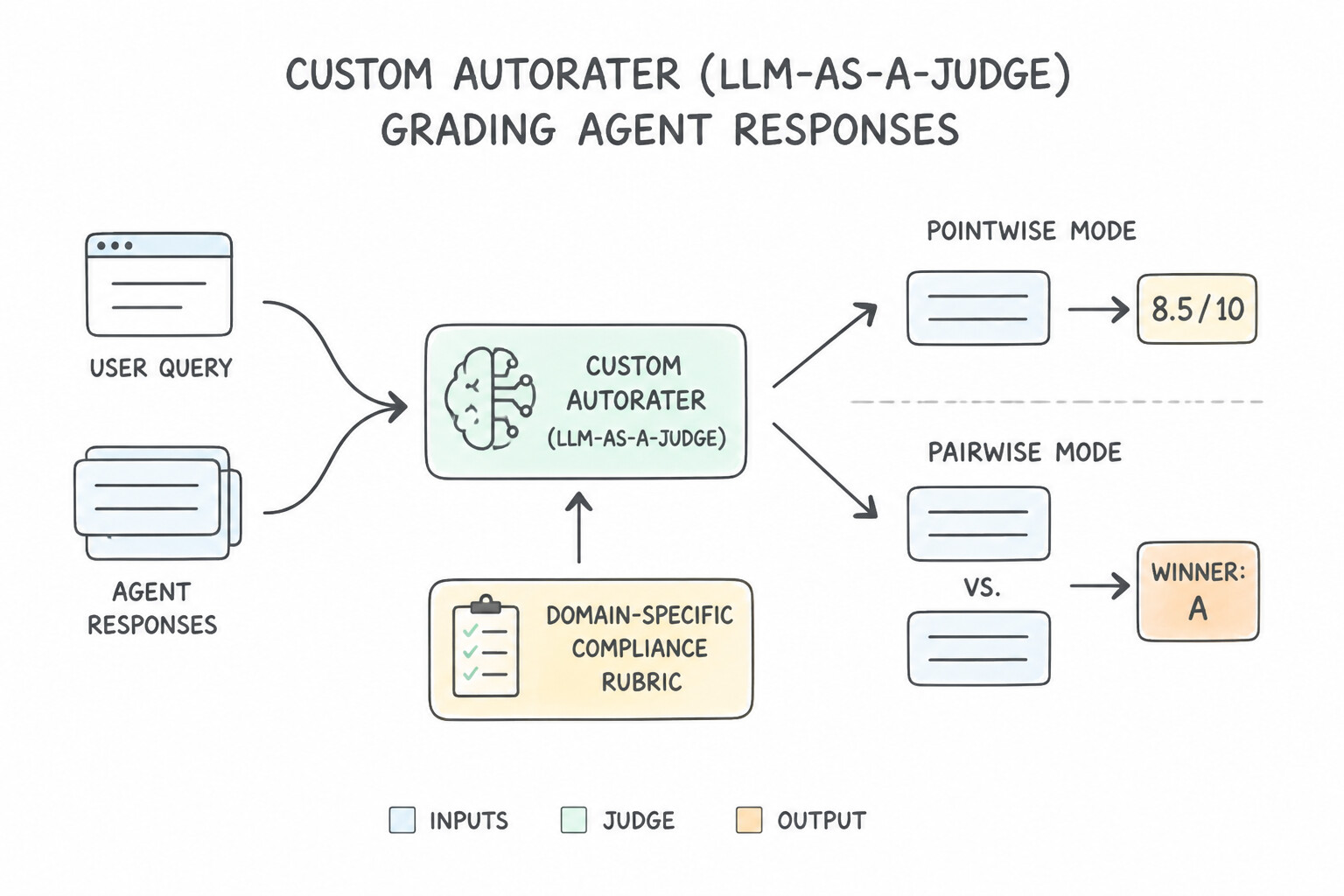
Pointwise vs. Pairwise Evaluation in Gen AI Evaluation Service
- Pointwise Evaluation: Grades a single model's response on an absolute scale (e.g., "Score Groundedness from 0 to 1" or "Pass/Fail on HIPAA compliance rubric"). Use this for continuous production monitoring and CI/CD pass/fail gates.
- Pairwise Evaluation: Shows an Autorater two responses side-by-side (Model A vs. Model B) for the same prompt and asks which one is better (win/loss/tie rate). Use Pairwise Evaluation when deciding whether to migrate from
Model AtoModel Bor comparing two major prompt rewrites.
Key Takeaways (4.1c)
- Fast local/CI regression testing of ADK agent tool trajectories →
ADK evalset.- Compare two candidate models (
Model Avs.Model B) head-to-head →Pairwise EvaluationinGen AI Evaluation Service.- Grade specialized legal/clinical tone that
BLEU/ROUGEcannot measure → Build aCustom Autorater(LLM-as-a-Judge) with a clear rubric.
Consideration 4.1d: Evaluating an Agentic System Against a Golden Dataset for Response and Retrieval Quality
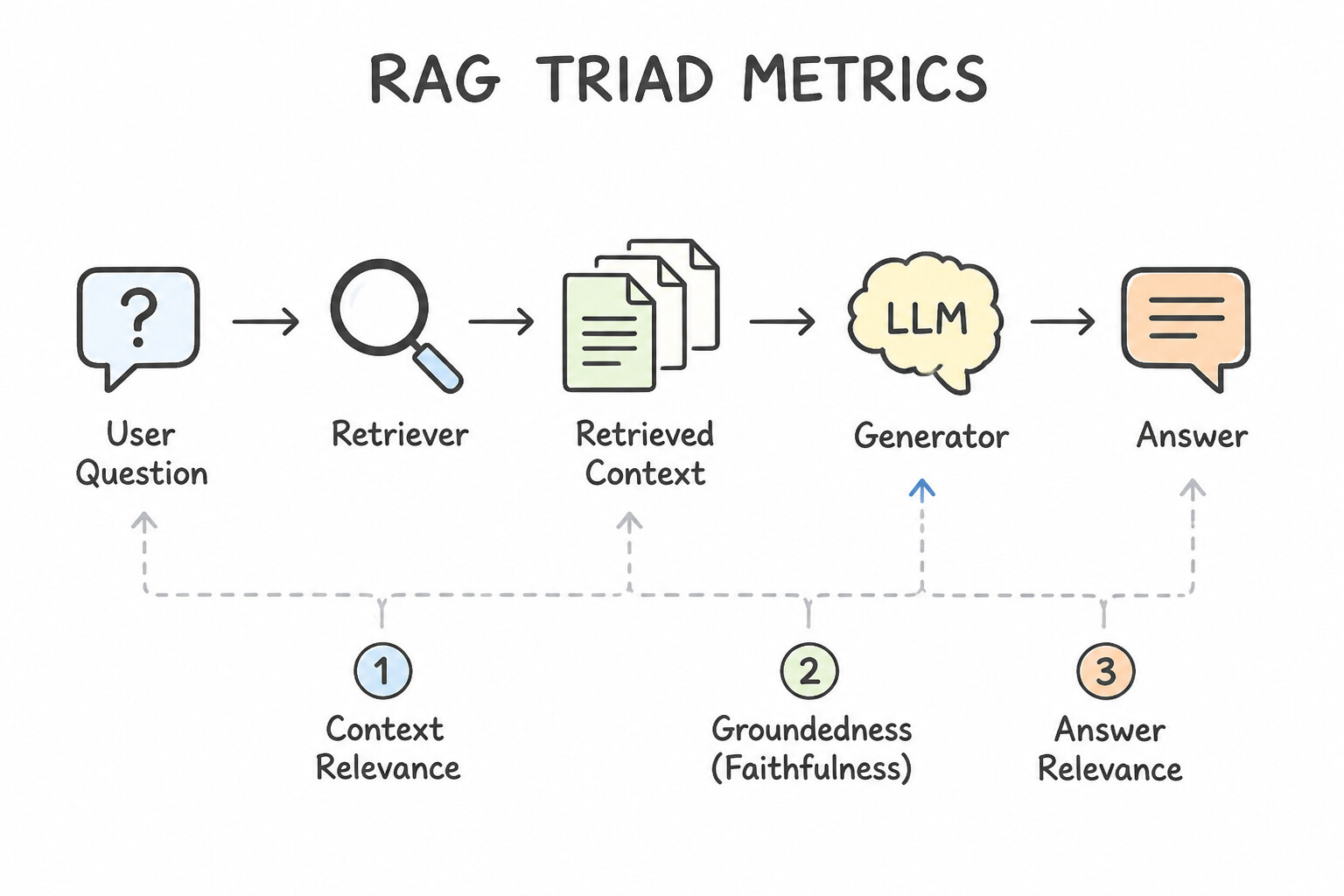
When a RAG-enabled agent gives a bad answer, how do you know whether the Retriever fetched the wrong documents or the LLM Generator hallucinated? Subsection 4.1d covers how to diagnose agent quality using Retrieval Metrics, the RAG Triad, and Trajectory Matching Modes.
Diagnosing RAG Quality: Retriever vs. Generator Metrics
- Retriever Metrics (
Did we fetch the right chunks?): - Context Recall: Did the retriever find all the essential ground-truth facts needed to answer the question? (Low recall = needed chunks were missed; fix by improving embeddings, chunking, or enabling Hybrid Search).
- Context Precision: Are the most relevant chunks ranked right at the top of the retrieved list, without lots of noisy filler chunks? (Low precision = too much noise; fix by adding a Cross-Encoder Reranker).
- Generator Metrics (
Did the LLM use the chunks properly?): - Groundedness (Faithfulness): Is every claim in the LLM's answer supported by the retrieved context? (Low Groundedness = Hallucination!)
- Answer Relevance: Did the LLM actually answer the user's specific question?
- Diagnostic Example: What if Groundedness is 98% (no hallucination), but Answer Relevance is 65%? That means the agent faithfully summarized the retrieved documents without making anything up, but failed to directly answer what the user asked!
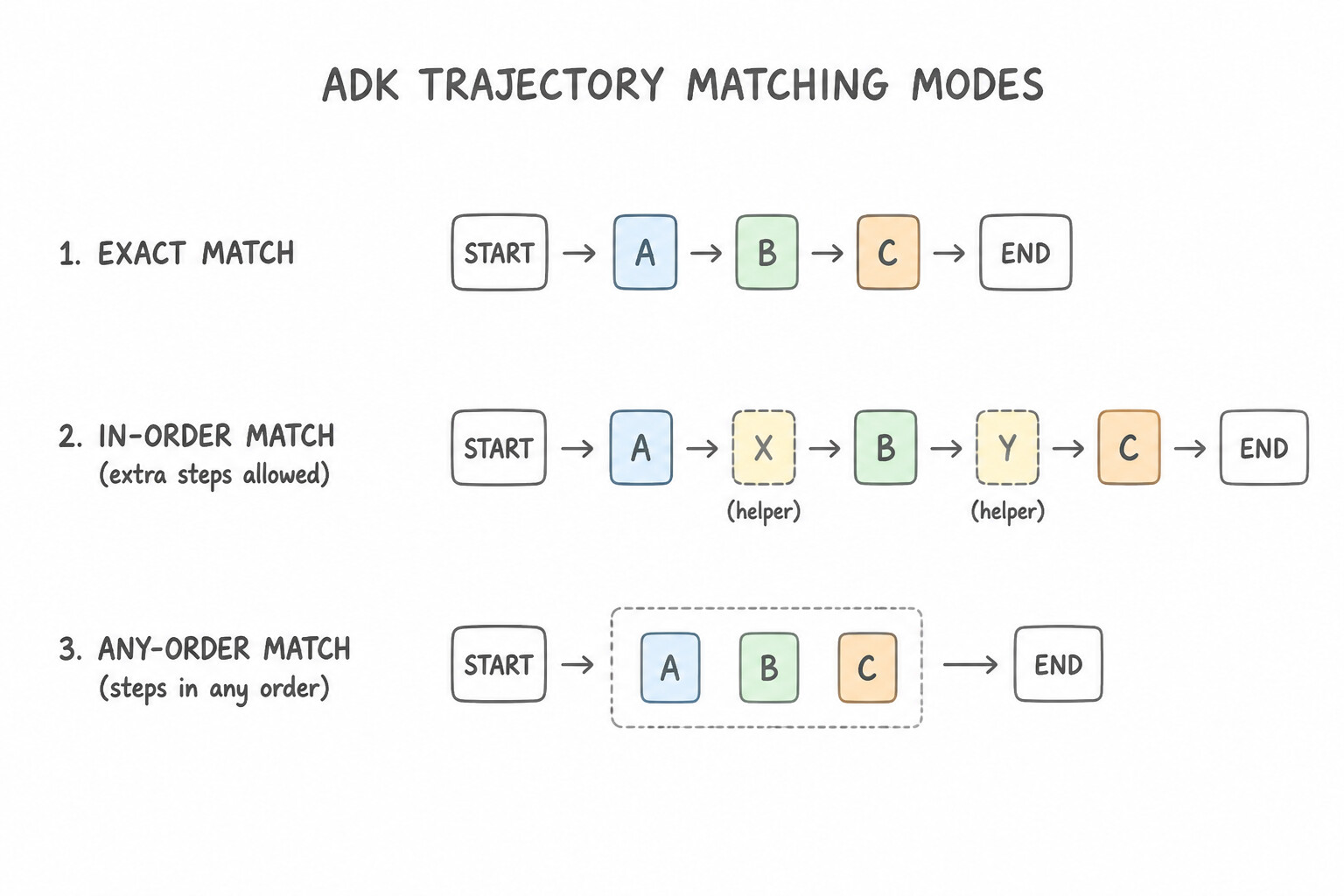
Choosing the Right ADK Trajectory Match Mode
When evaluating tool calls in ADK against a golden sequence [tool_A, tool_B]:
EXACTMatch: The agent must call only[tool_A, tool_B]in that exact order with zero extra tool calls.IN_ORDERMatch: The agent must calltool_Afollowed bytool_B, but is allowed to make extra harmless helper calls in between (for example,[list_schemas, tool_A, get_time, tool_B]).ANY_ORDERMatch: The agent must call bothtool_Aandtool_B, but the order does not matter (great for independent parallel lookups).
Key Takeaways (4.1d)
- High Groundedness (98%) + Low Answer Relevance (70%) → The answer is factually faithful to the docs (not hallucinating), but didn't answer the user's actual question.
- Required tools must run in sequence A → B, even if the agent calls extra helper tools in between → Use
IN_ORDERtrajectory match.- Measure whether an agent refuses unsafe/harmful prompts → Evaluate
Safety Compliance & Refusal Accuracyon an adversarial red-team evalset.
Quick Decision Cheat Sheet (Subsection 4.1)
If the Scenario Requires... | Choose This Google Cloud Pattern | Avoid This Common Mistake |
|---|---|---|
Create a golden evaluation dataset for a brand-new agent before production logs exist | Generate synthetic test scenarios with an LLM and validate them with Human-in-the-Loop (HITL) domain experts | Waiting 6 months after launch before writing any evaluation tests |
Ensure an agent always calls verify_identity before issue_refund, even if it makes extra read-only helper calls | Use IN_ORDER Trajectory Evaluation in ADK evalset | Using ANY_ORDER match (which allows refund before verification) or BLEU text scores |
Compare two foundation models head-to-head to see which produces better customer support replies | Run Pairwise Evaluation using an Autorater in Vertex AI Gen AI Evaluation Service | Manually reading 3 prompts in the console |
Grade whether an agent's responses follow strict company legal disclaimers and tone | Create a Custom Autorater ( LLM-as-a-Judge) with an explicit scoring rubric | Using ROUGE or BLEU exact word-overlap metrics |
Interpret evaluation results showing 99% Groundedness but 68% Answer Relevance | The agent stayed strictly faithful to the retrieved documents (no hallucinations), but did not directly answer the user's question | Assuming the model is hallucinating facts outside the knowledge base |
Safely test a new system prompt on 5% of live users and measure real conversion impact | Use Cloud Run traffic splitting (5% canary) and track user satisfaction/conversion metrics | Deploying the unverified prompt to 100% of users at once |
Further Reading (Subsection 4.1)
- Vertex AI Gen AI Evaluation Service Overview — Managed pointwise and pairwise evaluation, Autoraters, and RAG Triad metrics.
- Evaluating Agents with ADK — Running local and CI/CD trajectory and response evaluations using ADK evalset.
Subsection 4.2: Deploying, Monitoring, and Troubleshooting Production Workloads
The Big Picture
Once an agent passes evaluation, you have to run it reliably at scale. Subsection 4.2 covers three day-to-day production skills: (1) choosing the right compute runtime (Agent Runtime, Cloud Run, Cloud Run Jobs, or GKE), (2) troubleshooting production failures (infinite reasoning loops, slow tools, and downstream outages), and (3) optimizing latency and token costs using Cloud Trace, Context Caching, and Semantic Caching.
Consideration 4.2a: Selecting the Optimal Deployment Runtime (Agent Runtime, Cloud Run, and GKE)
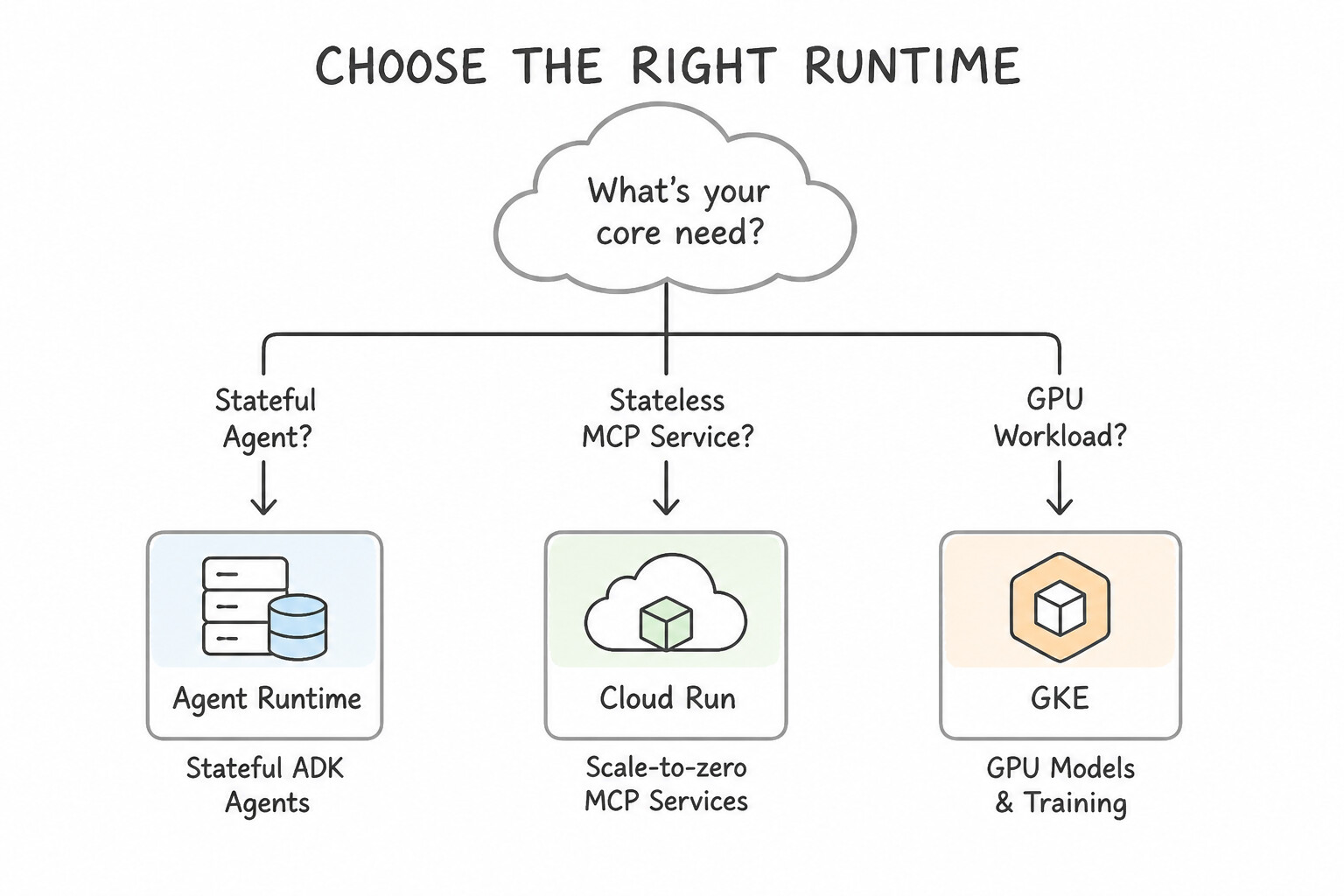
Selecting the optimal compute environment requires matching your workload characteristics to Agent Runtime (Agent Engine), Cloud Run, or Google Kubernetes Engine (GKE):
How to Pick the Right Runtime
- 1. Agent Runtime (formerly Vertex AI Agent Engine):
- Best for: Deploying stateful ADK, LangGraph, or CrewAI agents with minimal ops overhead.
- Why: It natively manages agent state, integrates directly with Managed Sessions and Memory Bank, handles automatic scaling, and wires in built-in tracing and evaluation.
- 2. Cloud Run (
Services&Jobs): - Cloud Run Service: Best for stateless HTTP agent APIs, webhooks, and remote MCP servers that have spiky traffic and need to scale down to zero when idle to save money. (If users complain about occasional cold-start delays on latency-sensitive endpoints, set
min-instances = 1or higher!). - Cloud Run Job: Best for scheduled, non-HTTP batch workloads—such as a weekly 35-minute agent simulation or nightly batch evaluation triggered by Cloud Scheduler. It runs to completion and costs $0 the rest of the week.
- 3. Google Kubernetes Engine (
GKE): - Best for: Hosting open-weight models (Gemma, Llama) on attached GPUs or TPUs requiring custom node pools, custom service meshes, or running untrusted code inside GKE Sandbox (
gVisor).
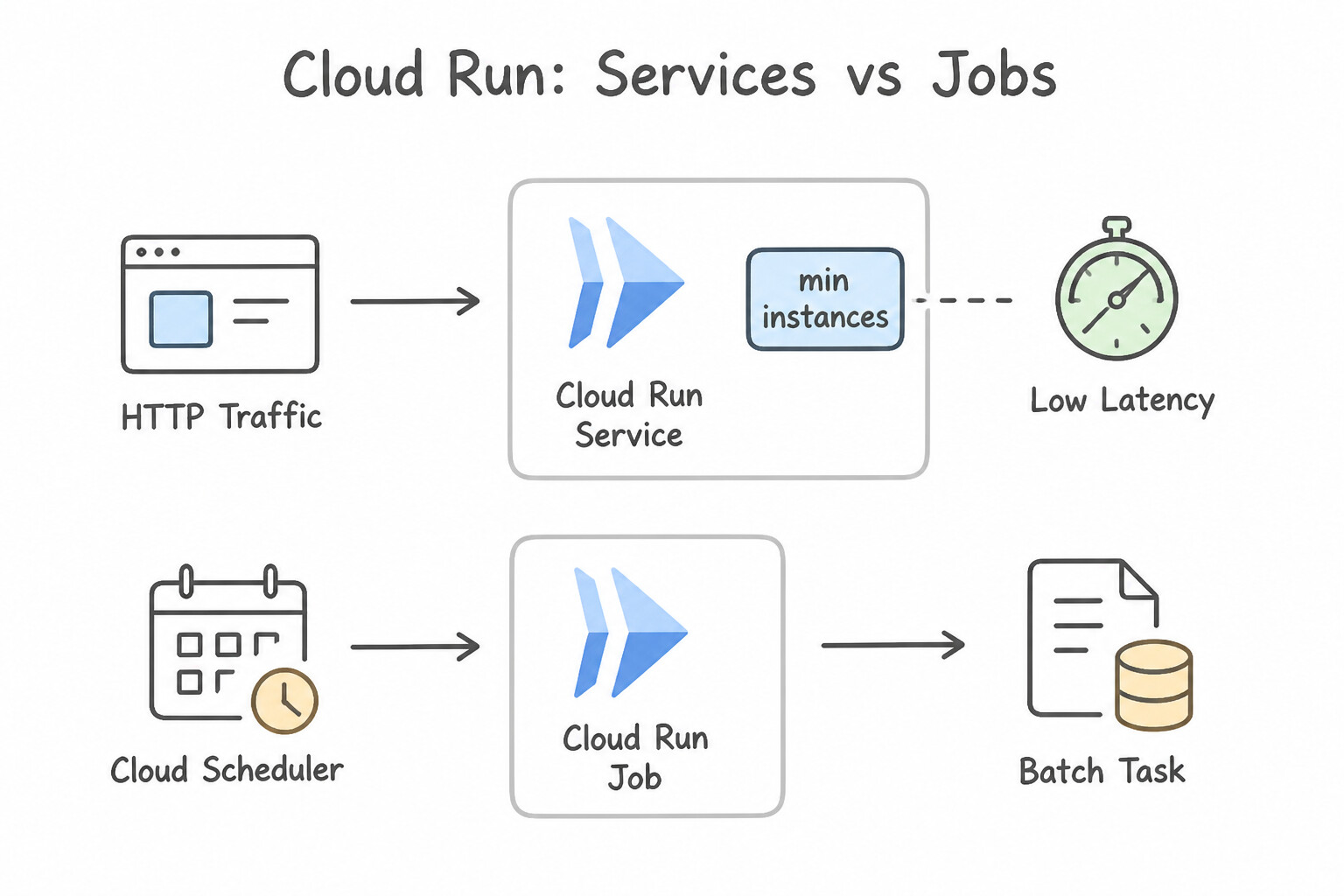
Eliminating Cold Starts & Handling Traffic Spikes on Serverless
- Spiky Traffic + Zero Idle Cost: Set
min-instances = 0and configure an appropriatemax-instancescap and concurrency setting so Cloud Run scales out during daytime surges and scales to zero overnight. - Strict Sub-Second Cold-Start SLA: Set
min-instances >= 1and enable CPU Startup Boost so warm container instances are always ready to serve the first token immediately.
Key Takeaways (4.2a)
- Turnkey managed hosting for stateful Python ADK agents →
Agent Runtime (Agent Engine).- Spiky HTTP webhook or MCP server that should cost $0 when idle →
Cloud Run Service(min-instances = 0).- Weekly 35-minute non-HTTP batch agent simulation →
Cloud Run Job+Cloud Scheduler.- Self-hosted open-weight LLM needing GPUs/TPUs or
gVisorkernel sandboxing →GKE.
Consideration 4.2b: Troubleshooting Agent Issues (Drift, Tool Latency, Reasoning Loops, and System Failures)
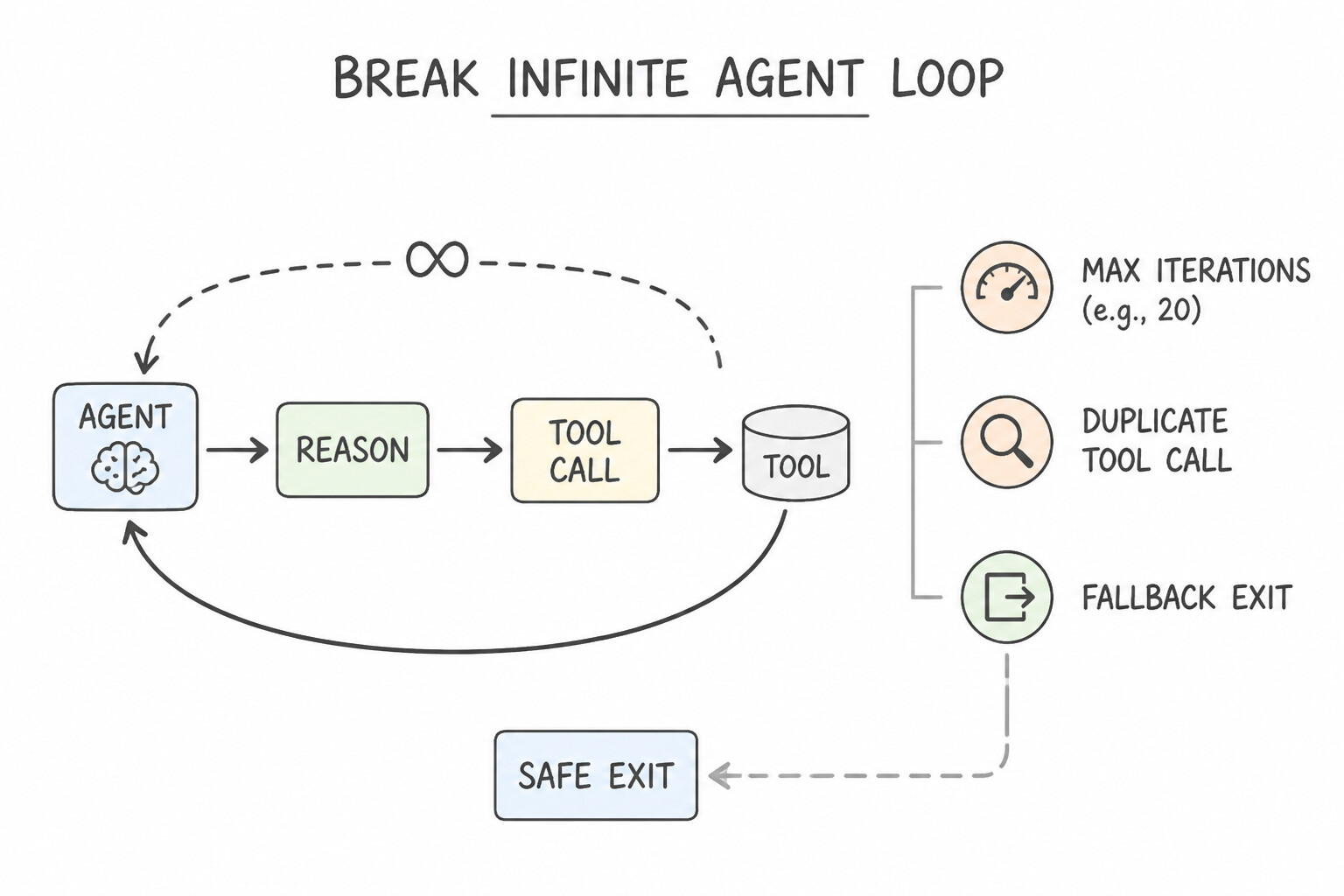
In production, autonomous agents fail in ways traditional web apps never do—most notably infinite reasoning loops and cascading tool timeouts.
How to Troubleshoot and Prevent Common Agent Failures
- 1. Infinite Reasoning & Tool-Calling Loops:
- Symptom: An agent calls a search tool, gets an empty result or confusing error, and calls the exact same tool with the exact same arguments 50 times in a row until the request times out and racks up a huge token bill.
- Fix: Enforce a hard maximum step/recursion limit (
max_iterations) in the orchestrator, add duplicate tool-call state detection (blocking identical consecutive(tool_name, args)calls), and return a clear structured message telling the agent when a tool has no more results so it transitions to a graceful fallback response. - 2. Downstream Tool Timeouts & Cascading Failures:
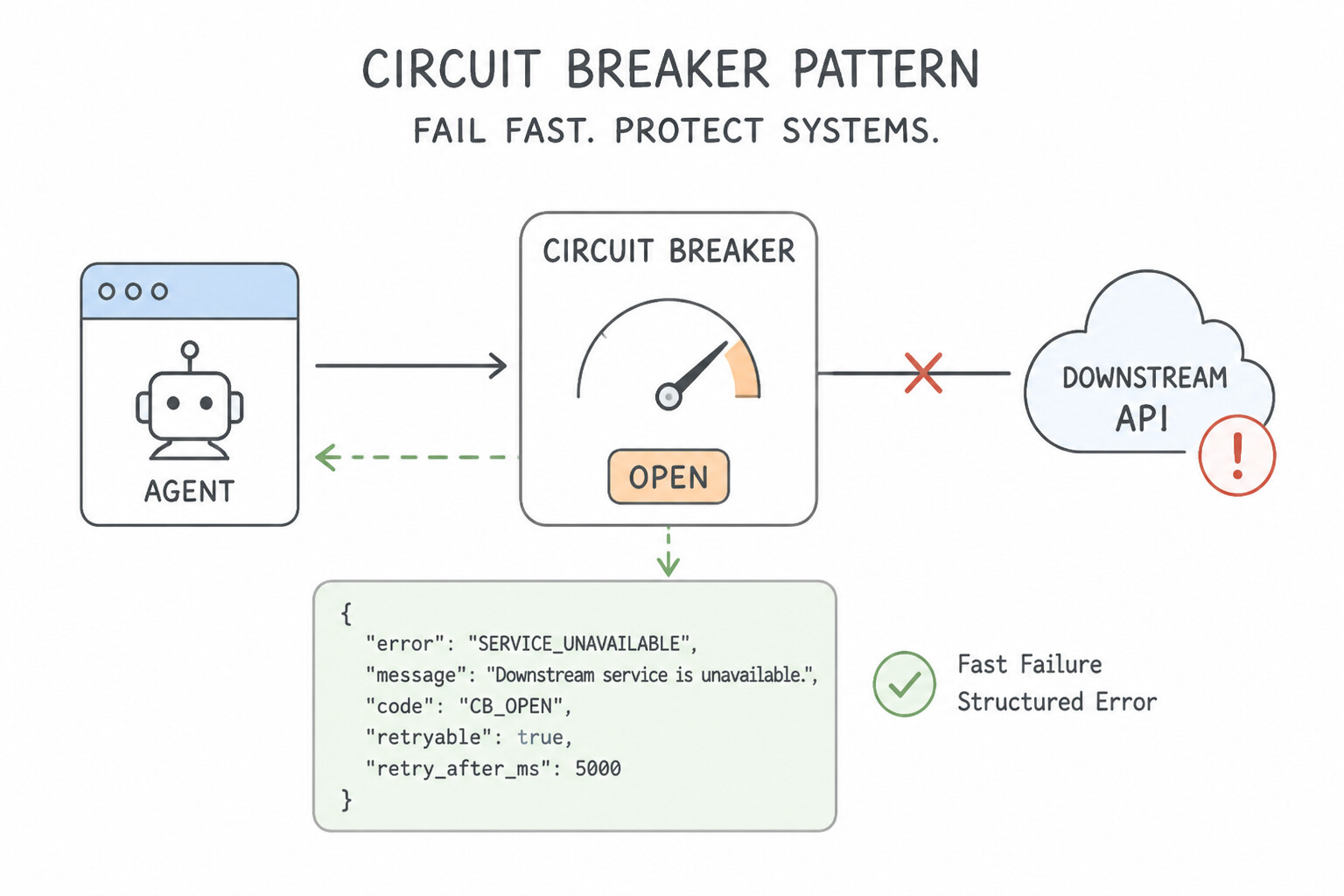
- Symptom: A third-party shipping API goes down or slows to 30 seconds.
- Fix: Wrap external tool calls with strict per-tool timeouts, exponential backoff with jitter (for transient
429/503errors), and a Circuit Breaker that trips open when the downstream API is down—immediately returning a structured fallback status to the agent (or switching to a backup tool/agent) instead of hanging.
Proactively Testing Resilience & Fixing Knowledge Drift
- Chaos Testing & Fault Injection in Staging: Don't wait for a real outage to see how your agent behaves when an MCP server returns a
500error or a 10-second delay. Inject synthetic latency and HTTP faults in staging to verify the agent follows its fallback instructions cleanly. - Detecting and Fixing Knowledge Base Drift: If users report that an agent is giving outdated answers about policies updated two hours ago, check your Agent Search / Vector Search ingestion pipeline and switch from periodic batch rebuilds to automated incremental / streaming index updates.
Key Takeaways (4.2b)
- Stop runaway agents from calling a failing tool 100 times → Set a hard
max_iterationscap + duplicate tool-call detection.- Protect an agent when a third-party API is slow or down → Use per-tool timeouts, exponential backoff, and a
Circuit Breakerwith fallback.- Verify agent resilience before launch → Run
Chaos Testing / Fault Injectionagainst tool endpoints in staging.
Consideration 4.2c: Monitoring and Optimizing Agents for Performance, Reliability, and Cost
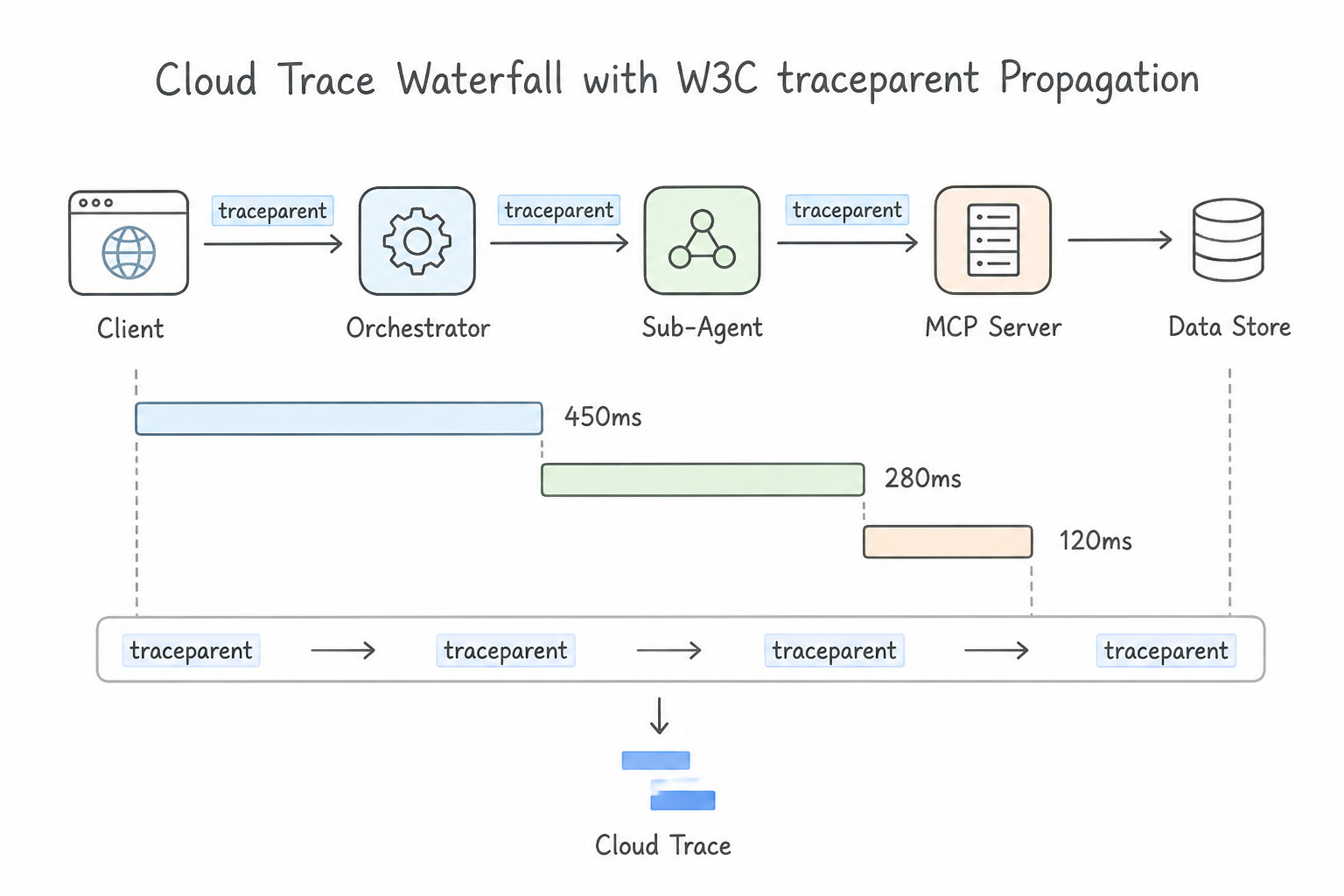
When a multi-agent request takes 12 seconds, how do you know whether the delay is in the Orchestrator LLM, a Sub-Agent, Vector Search, or an external MCP database call? And how do you cut token bills by 70% without hurting answer quality?
Observability: Cloud Trace + Cloud Logging
- End-to-End Distributed Tracing (
Cloud Trace+OpenTelemetry): - Instrument your agents and MCP servers with OpenTelemetry and propagate the W3C Trace Context (
traceparent) header across every HTTP, MCP, and A2A hop. - Cloud Trace renders a visual waterfall timeline of the entire turn, showing the exact millisecond duration of each LLM call, embedding lookup, and MCP tool execution so you can spot the bottleneck immediately.
- Correlated Structured Audit Logs (
Cloud Logging): - Write structured JSON logs containing the
trace_id,session_id, tool inputs/outputs, and token counts to Cloud Logging so you can click directly from a slow span in Cloud Trace to the exact prompt and tool payload.
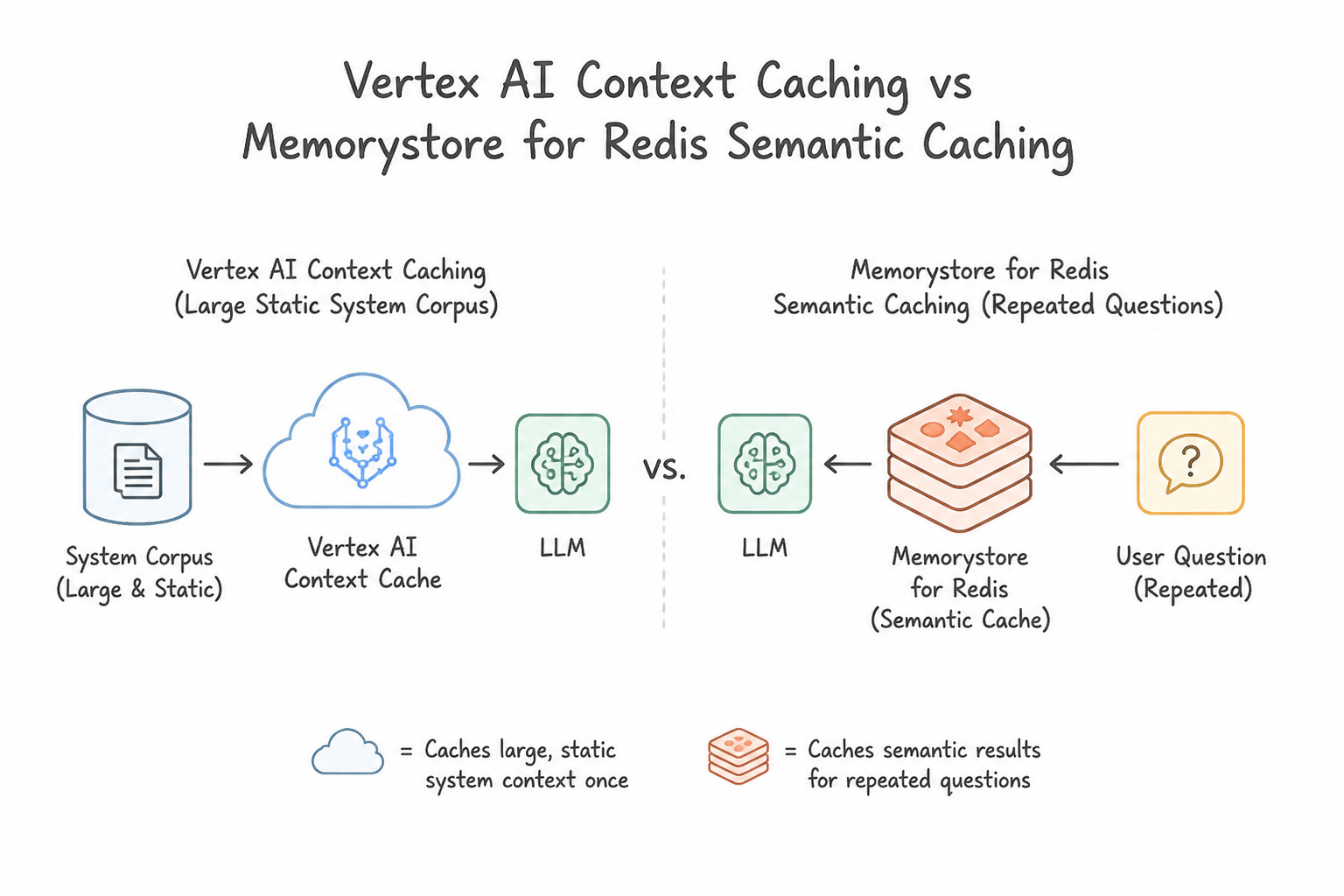
Two Essential Caching Patterns (Context Caching vs. Semantic Caching)
Two complementary caching layers reduce token cost and latency in different ways—Vertex AI Context Caching and Semantic Caching:
- 1. Vertex AI Context Caching (
Same Huge Prefix, Different Questions): - When to use: Every turn includes a massive, static block of input tokens—such as a 200-page regulatory manual, a 50-file code repository, or a 1-hour video—and users ask different questions against that same background context.
- How it works: Vertex AI caches the precomputed KV-cache tensors of that huge prefix in memory, slashing input token cost and time-to-first-token (TTFT).
- 2. Semantic Caching in Memorystore for Redis (
Different Users Asking Similar Questions): - When to use: Thousands of users ask the same or similarly phrased questions ("How do I reset my VPN password?" / "Steps to reset corporate VPN?").
- How it works: Embed the incoming question and check Memorystore for Redis (vector search). If a cached question matches above a high similarity threshold (e.g.,
> 0.95), return the cached answer in milliseconds—skipping the LLM call completely!
Key Takeaways (4.2c)
- Find which hop in a multi-agent workflow is causing high latency → Use
Cloud TracewithOpenTelemetryW3Ctraceparentpropagation.- Many different questions asked against the same huge 100k-token system prompt/document → Enable
Vertex AI Context Caching.- Many users asking repeated or similarly worded FAQ questions → Implement
Semantic CachinginMemorystore for Redis.
Quick Decision Cheat Sheet (Subsection 4.2)
If the Scenario Requires... | Choose This Google Cloud Pattern | Avoid This Common Mistake |
|---|---|---|
Deploy a stateful Python ADK agent with built-in sessions and minimal infrastructure management | Deploy to Agent Runtime (Vertex AI Agent Engine) | Manually managing stateful sticky sessions on raw Compute Engine VMs |
Run a weekly 35-minute non-HTTP batch agent evaluation job with zero cost during the rest of the week | Package as a Cloud Run Job triggered by Cloud Scheduler | Deploying an always-on GKE cluster or an HTTP Cloud Run Service |
Stop an agent from calling the same failing tool in an endless loop and exhausting token quotas | Set a hard max_iterations limit and duplicate tool-call detection | Increasing the Cloud Run request timeout |
Pinpoint whether an 8-second delay is happening inside Gemini or inside a downstream MCP tool call | Enable Cloud Trace with OpenTelemetry ( W3C traceparent) propagation across all hops | Searching raw unstructured text logs with grep |
Cut input token costs and latency when every request includes the same 300-page policy manual in the prompt | Enable Vertex AI Context Caching on the static prefix | Summarizing the 300-page manual down to 1 paragraph and losing details |
Skip LLM calls entirely when thousands of users ask variations of the same common support questions | Implement a Semantic Cache using Memorystore for Redis | Lowering the Gemini max_output_tokens parameter |
Further Reading (Subsection 4.2)
- Vertex AI Context Caching Overview — Reducing cost and latency on repeated large prompt prefixes.
- Cloud Trace & OpenTelemetry for Gen AI — Distributed latency tracing across microservices and multi-agent pipelines.
Book TOC · Previous · Chapter 6 of 8 · Next
AwesomeGCP.com Learning
The approach taken is a question-led learning approach: you explore realistic project scenarios where you need to make decisions or take actions to achieve business goals within specific constraints. Instead of passive learning, you are challenged to think and work through the options to master the Professional Agentic Architect (PAA) certification!