Book TOC · Previous · Chapter 2 of 7 · Next
Chapter 2: Data Transformation: Warehouses, Lakes, Managed Databases, Looker BI & Streaming
Chapter Focus: Structured vs. unstructured data, Dataplex governance, Cloud Storage classes, Cloud SQL/Spanner/AlloyDB/Bigtable/Firestore, BigQuery, Looker BI, Pub/Sub, and Dataflow.
Subsection 2.1: Describe the intrinsic role that data plays in an organization's digital transformation
The Big Picture
Almost every modern enterprise claims to be "data-driven," yet many struggle to extract real-time business value or train reliable AI models from their petabytes of information. Why? Because they fall into three structural anti-patterns:
- Confusing Operational Databases, Data Warehouses, and Data Lakes (2.1b): Running heavy 10-year historical analytical queries directly against a live transactional checkout database (OLTP) slows down customer orders. Conversely, dumping raw uncataloged audio, PDFs, and logs into a data lake without governance creates an unusable "data swamp."
- Broken Data Supply Chains & Data Silos (
2.1c,2.1d,2.1f): When Sales stores first-party customer records in a CRM, Inventory uses an on-premises ERP, and Marketing buys third-party demographic files, data silos prevent a unified customer view. A modern data supply chain must smoothly flow fromdata genesis → collection → processing → storage → analysis → activationacross open, interoperable platforms. - Treating Data Governance as an Afterthought (2.1e): Feeding unverified, uncataloged, or privacy-violating data into generative AI models produces hallucinations, compliance fines, and executive distrust.
Consideration 2.1a: Explain why data is valuable (e.g., generating real-time business insights, identifying trends, informing strategic decision making, fueling AI)
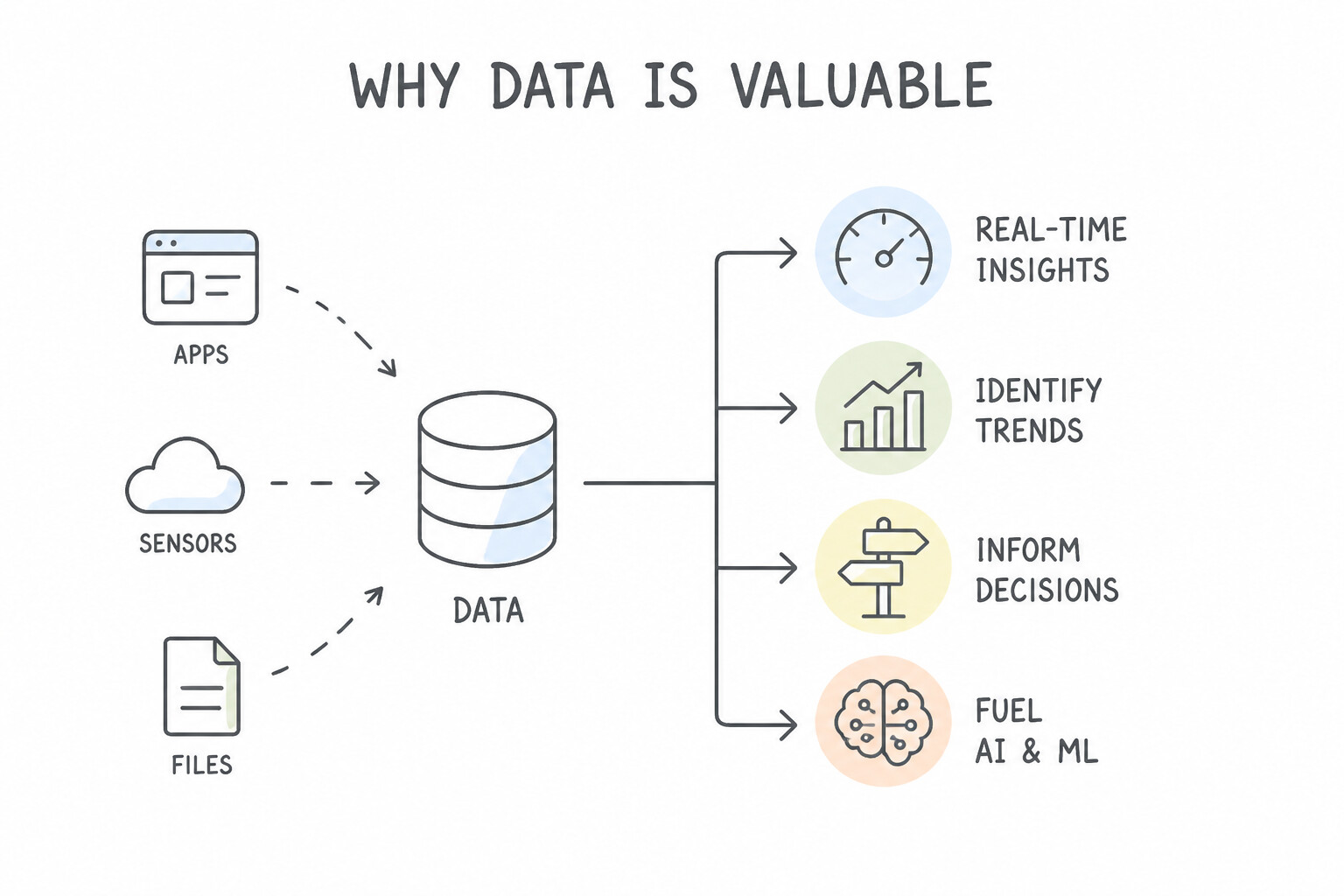
- From Hindsight to Real-Time Foresight: Moving from monthly static batch spreadsheets to real-time cloud data pipelines allows enterprises to react to market shifts, supply-chain bottlenecks, and fraud as they happen rather than weeks later.
- Fueling Artificial Intelligence & Personalization: Modern ML and generative AI models are only as capable as the proprietary enterprise data that grounds them. High-quality operational data turns generic AI into a defensible competitive advantage.
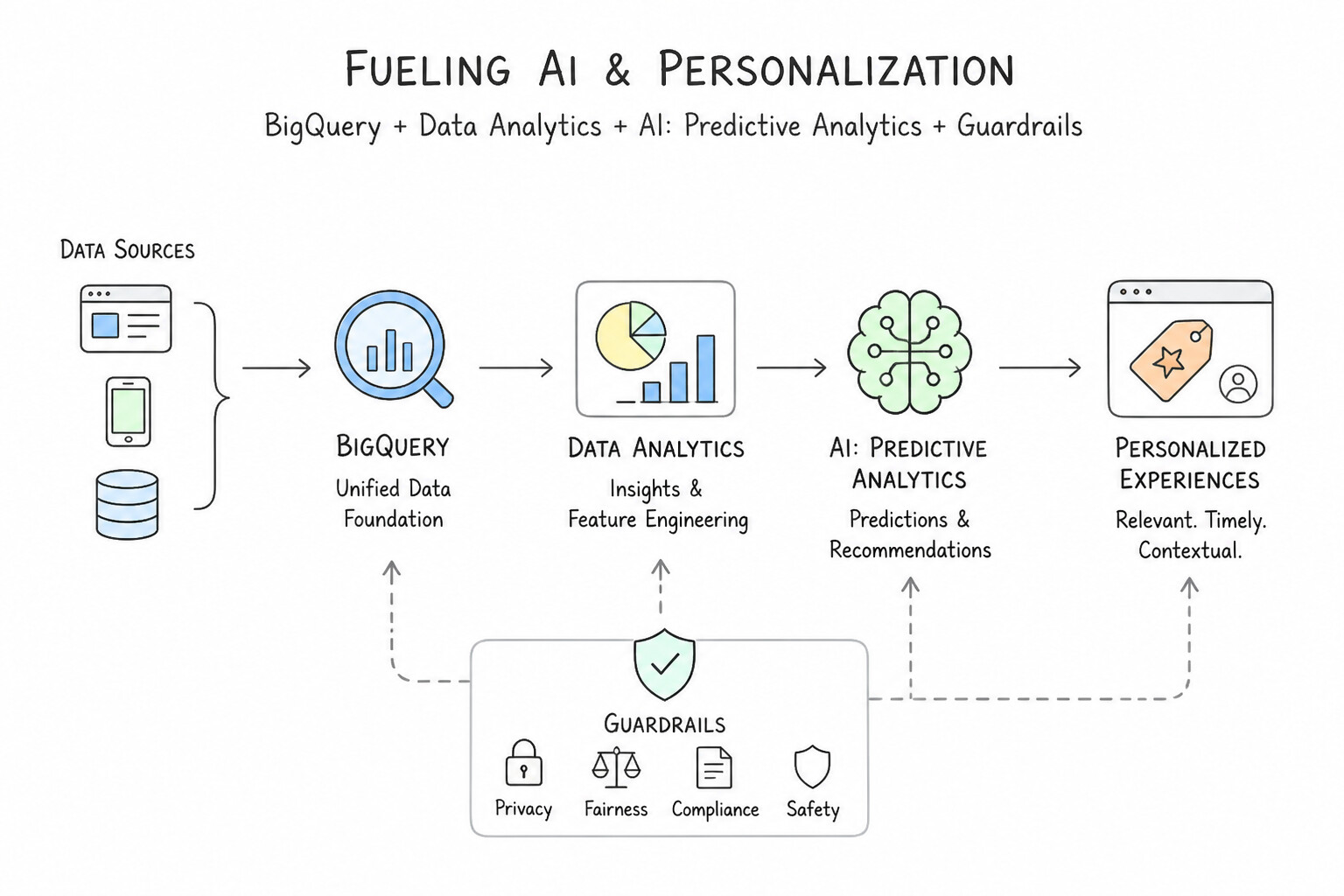
Key Implementation Patterns
- Real-Time Business Insights for E-Commerce: Use Ingest the data from all three sources into a cloud data warehouse to create a single source of truth. A cloud data warehouse unifies disparate data sources, enabling cross-functional analysis and insights. (Avoid alternative: Spreadsheets are manual, error-prone, and not scalable for integrating distinct large datasets.)
- Identifying Historical Purchasing Trends: Use Use predictive analytics to model sensor data and anticipate maintenance needs. Predictive analytics forecasts future outcomes, allowing you to prevent failures before they happen. (Avoid alternative: Descriptive analytics only summarizes past events and does not predict future outcomes.)
- Strategic Decision-Making for Market Expansion: Use Replace the batch processing workflow with a streaming analytics pipeline. Streaming analytics enables real-time processing, allowing the app to react to live data immediately. (Avoid alternative: More frequent batch processing still results in significant delays and misses the requirement for immediate adjustments.)
Key Takeaways (2.1a)
- Data silos prevent holistic business analysis.
- A Single Source of Truth consolidates data for better insights.
- Cloud data warehouses are used to unify and analyze disparate data sources.
- Predictive Analytics generates value by forecasting outcomes, allowing businesses to be proactive rather than reactive.
Consideration 2.1b: Differentiate between databases, data warehouses, and data lakes
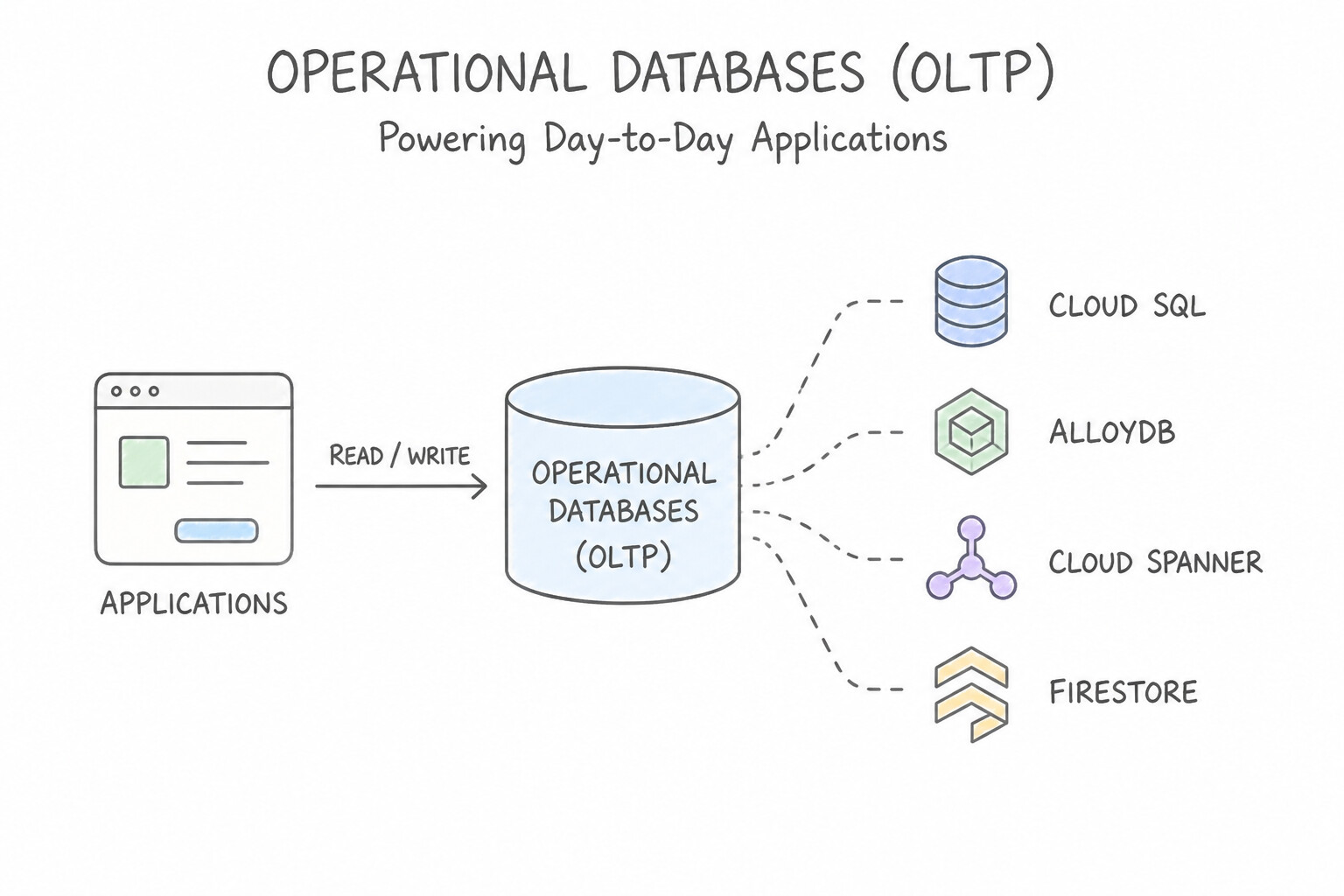
- Operational Databases (OLTP — e.g.,
Cloud SQL,AlloyDB,Cloud Spanner,Firestore): Designed for high-frequency, low-latency transactional reads and writes (inserting a single customer order, updating an account balance). Optimized for row-level or document-level operations, not scanning petabytes of history. - Data Warehouses (OLAP — e.g.,
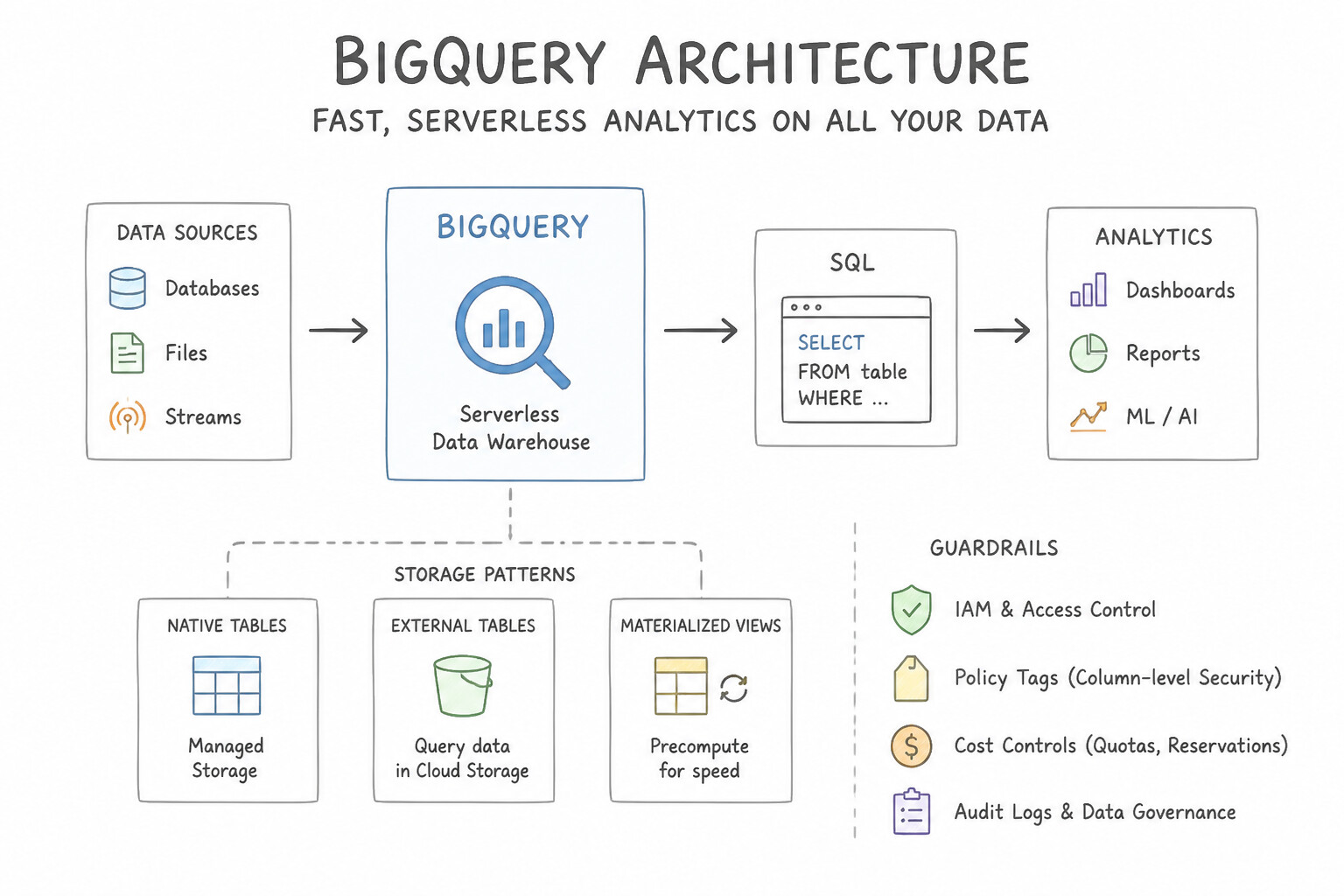
BigQuery): Designed for fast, complex analytical SQL queries across massive volumes of structured and semi-structured historical data (aggregating 10 years of global sales trends). Uses columnar storage and schema-on-write. - Data Lakes (e.g.,
Cloud Storage): Designed to store vast quantities of raw data in its native format—especially unstructured data (images, audio, video, PDFs) alongside raw CSV/JSON logs—using schema-on-read at low cost before transformation or ML training.
Key Implementation Patterns
- Choosing Between Operational Database and Data Warehouse for E-commerce: Use Select a transactional database to process and record individual order updates. Transactional databases are optimized for real-time processing and immediate consistency, which is required for handling orders.
- Storing Unstructured Media for Machine Learning Pipelines: Use Store the data in a data warehouse. Data warehouses are optimized for running complex analytics on large volumes of historical data. (Avoid alternative: Transactional databases are optimized for daily operations, not large-scale historical analytics.)
- Executive Business Intelligence and Historical Trend Analysis: Use Ingest the data into a data lake. A data lake is designed to store massive amounts of unstructured data in its native format. (Avoid alternative: Relational databases require structured data and defined schemas, making them unsuitable for raw, unstructured media files.)
Key Takeaways (2.1b)
- Databases (OLTP) are for real-time transactions, row-level updates, and operational consistency (e.g., Cloud SQL, Cloud Spanner).
- Data Warehouses (OLAP) are for analyzing historical data and generating business intelligence reports (e.g., BigQuery).
- Data Lakes store raw, unprocessed data in various formats for future use (e.g., Cloud Storage).
- Use Data Warehouses (like BigQuery) for analytics, reporting, and complex SQL queries on large historical datasets.
Consideration 2.1c: Recognize types of data (e.g., first-party, second-party, third-party, structured, unstructured, semi-structured)
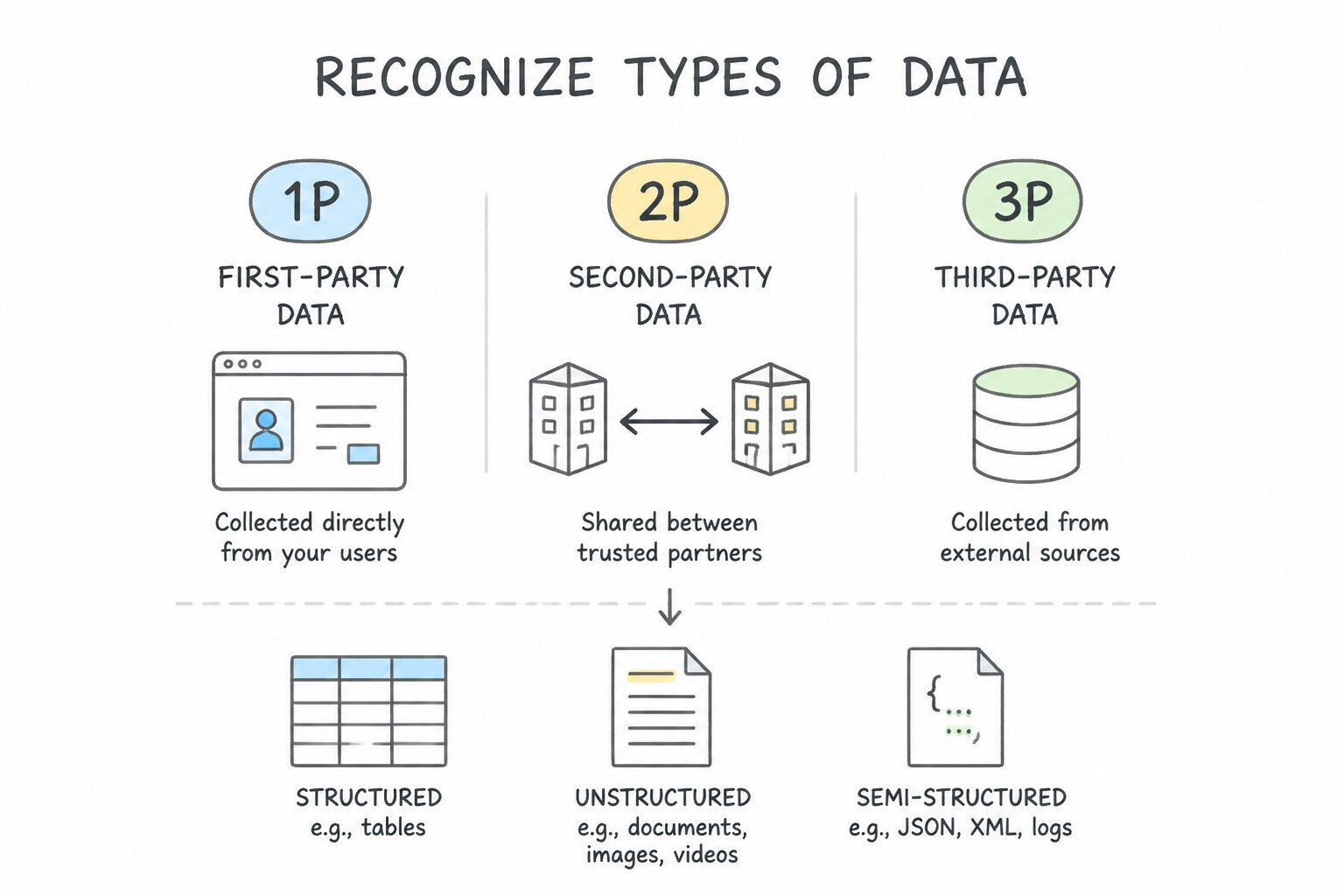
- First-Party (
1P), Second-Party (2P), and Third-Party (3P) Data: - First-Party Data: Collected directly by your organization from your own customers, website, mobile apps, PoS terminals, or IoT sensors. Highest strategic value and privacy trust.
- Second-Party Data: Another organization's first-party data shared directly with you through a trusted strategic partnership (e.g., an airline and a hotel chain sharing loyalty insights).
- Third-Party Data: Aggregated datasets purchased or licensed from external data brokers, marketplaces (Analytics Hub), or public government/weather sources with no direct relationship to the end consumer.
- Structured, Semi-Structured, and Unstructured Data:
- Structured: Strictly conforms to a predefined tabular schema of rows and columns (SQL tables in
Cloud SQL,Spanner,BigQuery). - Semi-Structured: Does not fit a rigid relational table but contains self-describing tags, keys, and hierarchy (
JSON,XML,Avro,Parquet). - Unstructured: Has no predefined data model or schema (
video files,call-center audio recordings,satellite imagery,scanned PDFs,free-form text). Historically "dark data," now unlocked by Cloud Storage + Gemini multimodal AI.
Key Implementation Patterns
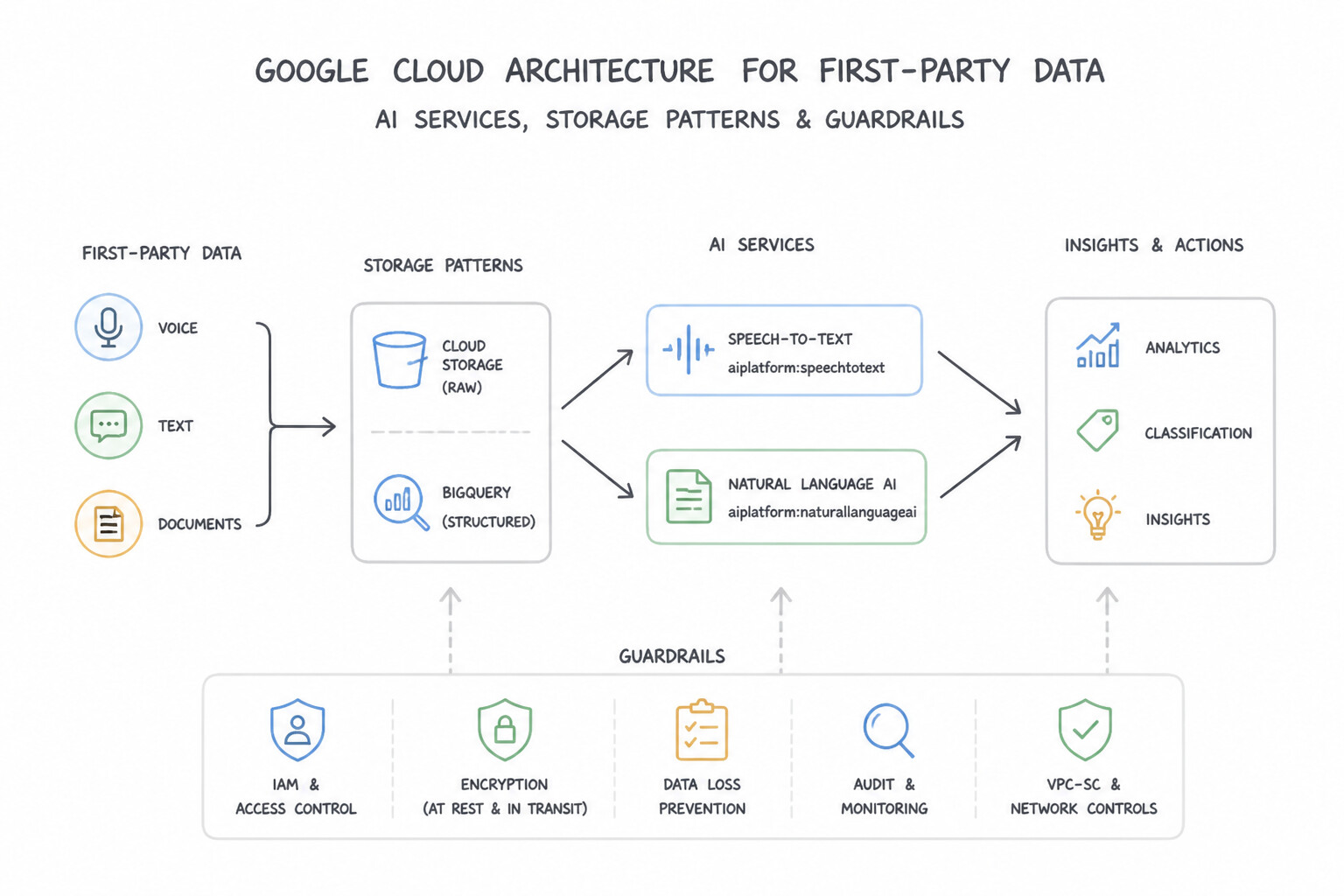
- Identifying Data Genesis in Smart Manufacturing: Use Store the audio files in Cloud Storage. Use Speech-to-Text to transcribe the audio, and then use Natural Language AI to analyze the text. Speech-to-Text converts unstructured audio into text, which Natural Language AI can then analyze for sentiment and topics.
- Streamlined Ingestion for E-Commerce Mobile Apps: Use Use Document AI to extract the fields and save them as structured data. Document AI specializes in converting unstructured documents (like PDFs) into structured data by extracting specific fields. (Avoid alternative: Cloud Storage tags help organize files but do not automatically extract internal content into structured data fields.)
- Utilizing Market Insights from Third-Party Data: Use Use AI and machine learning services to transcribe audio to text and analyze sentiment. Machine learning can convert unstructured audio into structured text for analysis and insight generation. (Avoid alternative: Manual analysis is not scalable or cost-effective for large volumes of data.)
Key Takeaways (2.1c)
- Unstructured Data (audio, video, images) requires transformation before it can be queried like a database.
- Speech-to-Text is the primary tool for converting audio into text.
- Natural Language AI extracts insights (sentiment, entities) from text.
- BigQuery and Cloud SQL are primarily for storing and querying data that is already structured.
Consideration 2.1d: Describe an organization's data supply chain (e.g., data genesis, data collection, data processing, data storage, data analysis, data activation)
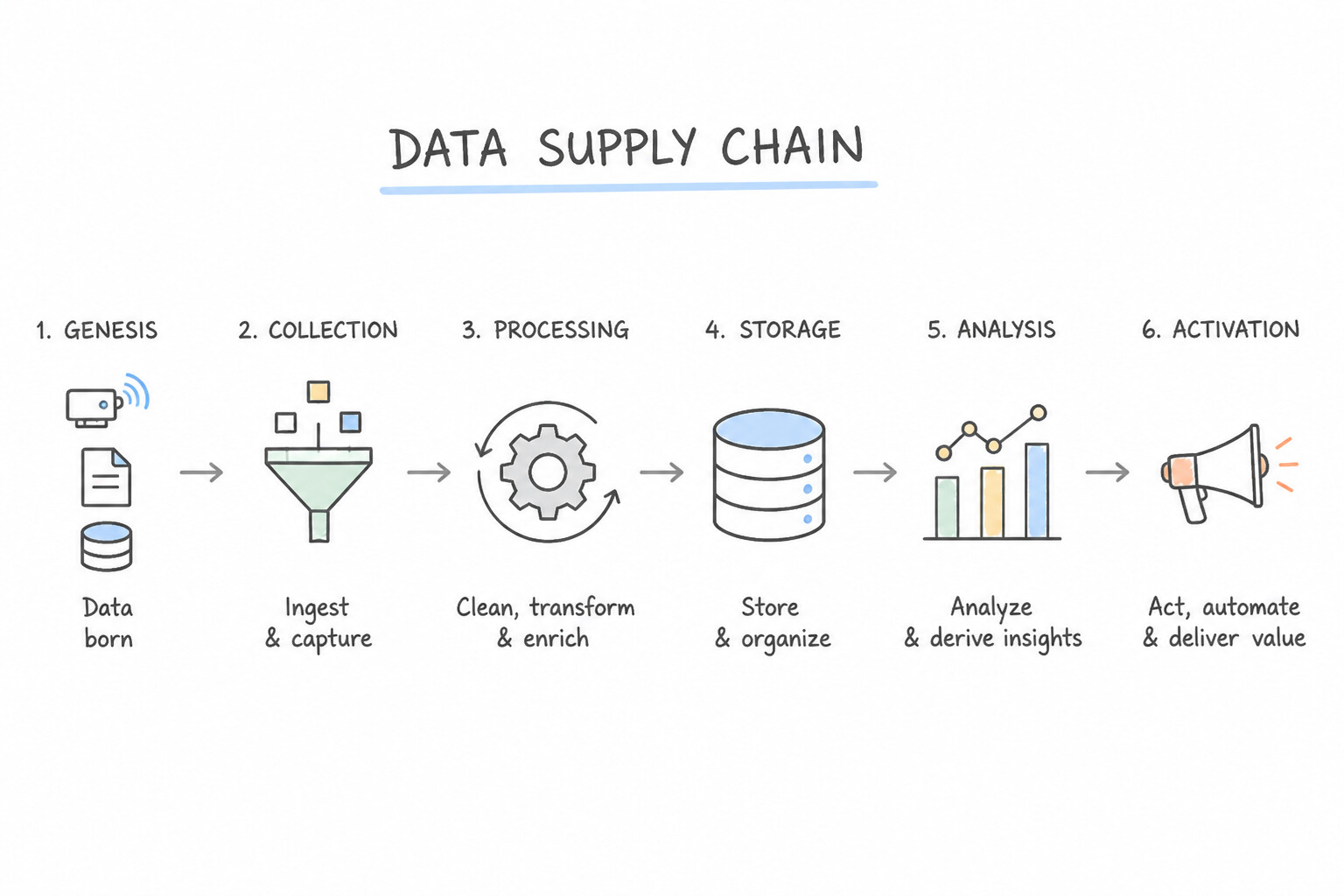
Just as a physical supply chain turns raw materials into delivered products, an enterprise Data Supply Chain moves data through six sequential stages:
- Data Genesis: Where data is originally born or created (a customer clicks "Buy," a smart meter records voltage, a support call begins).
- Data Collection: Capturing and ingesting raw events from sources into the cloud (e.g., streaming via
Pub/Subor batch ingestion). - Data Processing: Cleaning, deduplicating, standardizing formats, and enriching raw data (e.g., via
DatafloworDataproc). - Data Storage: Persisting data durably in the appropriate repository (
Cloud Storagedata lake orBigQuerydata warehouse). - Data Analysis: Running SQL analytics, BI dashboards (
Looker), or machine learning models (BigQuery ML/Vertex AI) to extract patterns and predictions. - Data Activation: Putting those insights into immediate operational action (e.g., triggering an automated personalized discount, rerouting a delayed shipment, or blocking a fraudulent card swipe in real time).
Key Implementation Patterns
- Regulatory Compliance in Global Expansion: Use Data ingestion. Data ingestion is the process of bringing data from a source into a system for use. (Avoid alternative: Data storage focuses on keeping data for the long term, not the act of moving it into the system.)
- Improving Data Quality for AI Models: Use Import the data into a data warehouse to organize it for analysis. A data warehouse organizes data from multiple sources so you can run complex analytical queries. (Avoid alternative: Storing raw files preserves the data but does not organize it for cross-referenced querying.)
- Enabling Democratized Self-Service Analytics: Use Perform a data transformation process to standardize the dates into a single format. Data transformation converts inconsistent raw data formats into a standardized structure suitable for analysis. (Avoid alternative: Visualization tools are designed for displaying data, not for heavy data cleaning or structural standardization.)
Key Takeaways (2.1d)
- Ingestion is the entry point for data into the cloud.
- Storage is persisting data.
- Transformation is modifying data.
- Analysis is deriving insights from data.
Consideration 2.1e: Describe the data governance process and why it's important
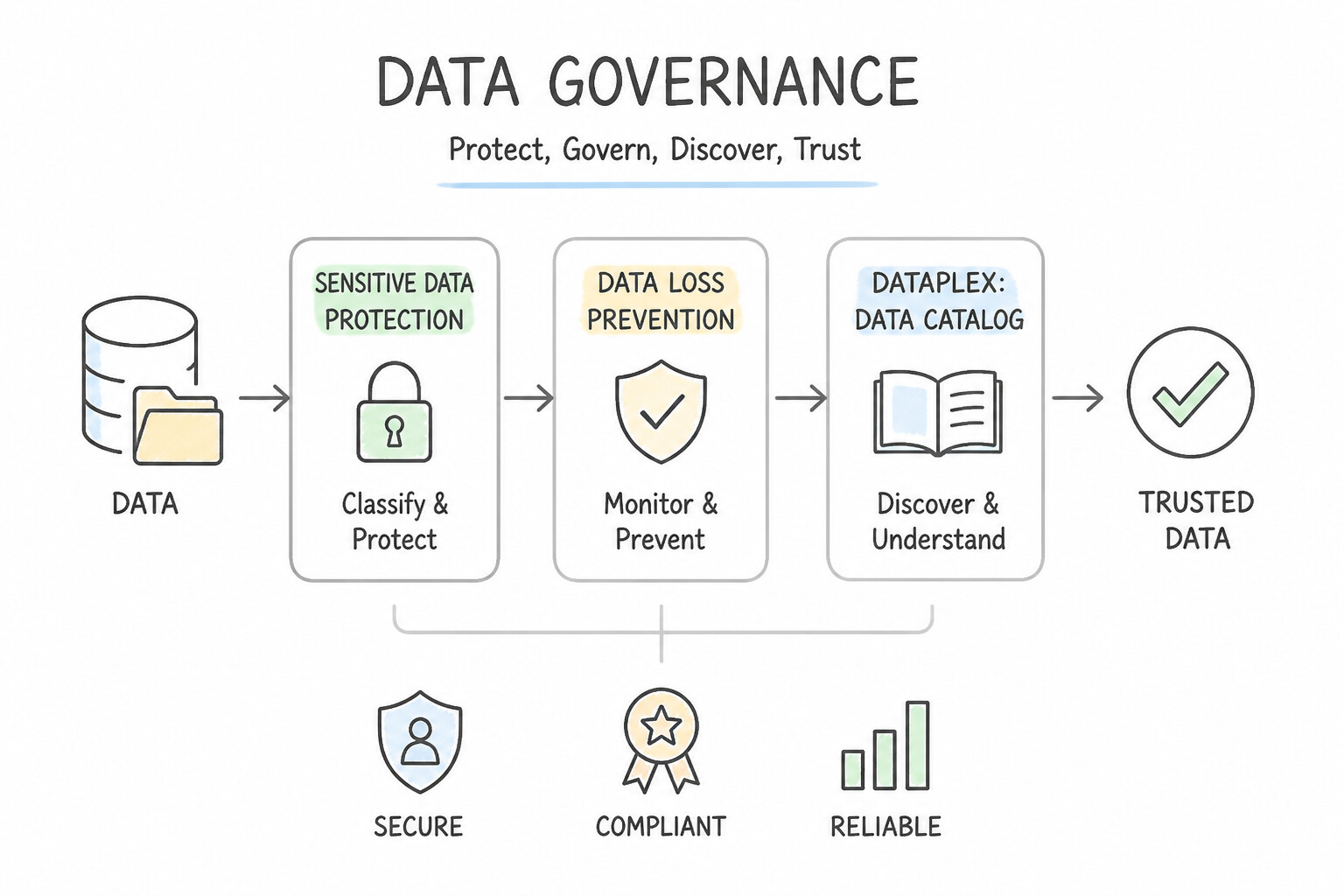
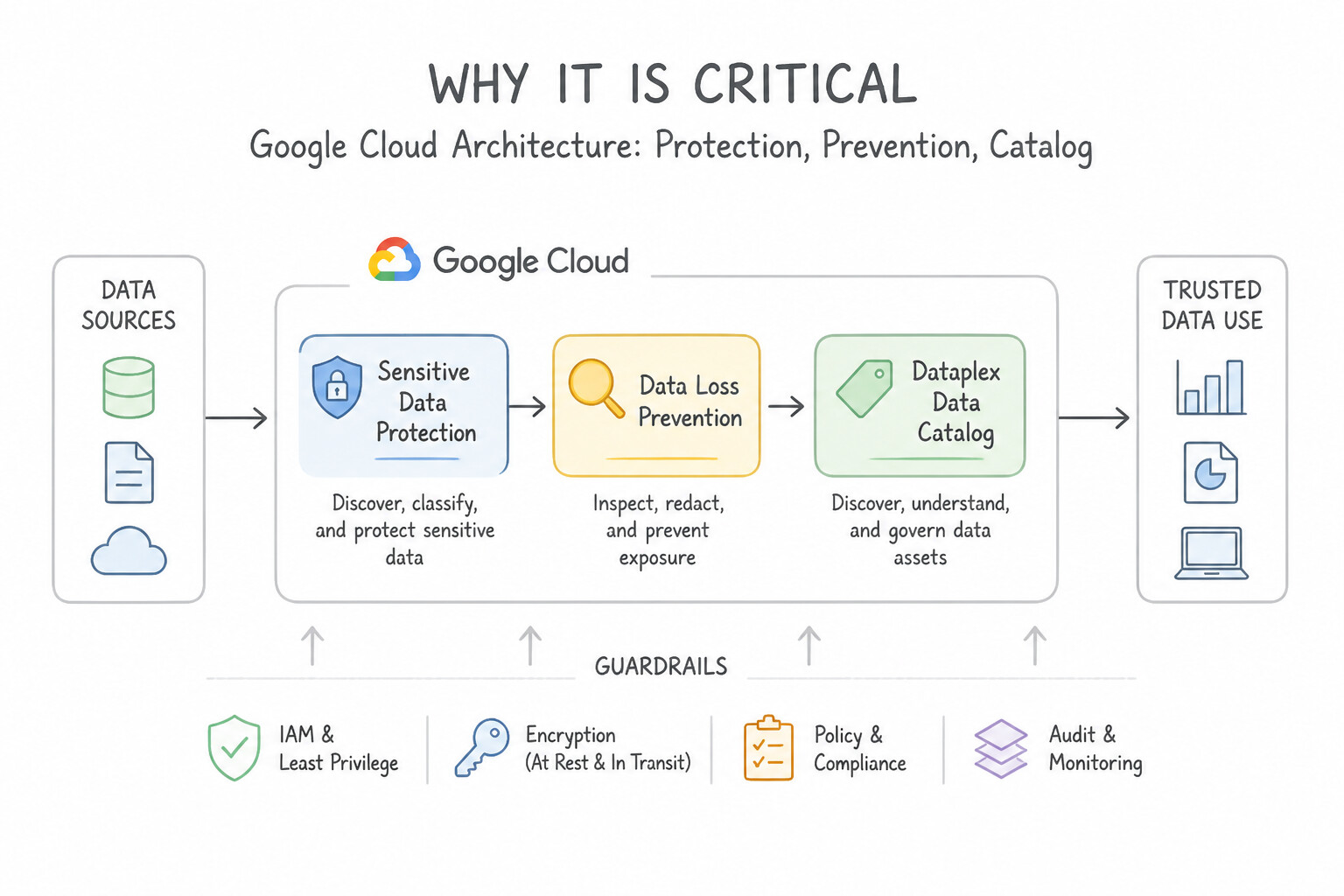
- What Data Governance Is: The holistic framework of people, processes, policies, and technologies (Google Cloud Dataplex, Data Catalog, IAM, Sensitive Data Protection) that ensures enterprise data is discoverable, accurate, secure, compliant, and trustworthy throughout its lifecycle.
- Why It Is Critical: Without governance, self-service analytics and AI initiatives fail due to inconsistent definitions, compliance violations (
GDPR,HIPAA), unauthorized PII exposure, and "garbage-in, garbage-out" model predictions.
Key Implementation Patterns
- Open File and Table Formats to Avoid Proprietary Lock-In: Use Use Sensitive Data Protection (Cloud DLP) to de-identify the PII before the team accesses the data. Sensitive Data Protection (Cloud DLP) automatically detects and masks sensitive PII, allowing safe analysis without exposing private details.
- Multi-Cloud Analytics without Data Relocation: Use Use Data Catalog to automatically discover assets and add business metadata tags. Data Catalog is a metadata management service that enables data discovery and tagging, helping users find data assets quickly. (Avoid alternative: Cloud SQL is not designed for petabyte-scale data warehousing, and moving data does not solve the lack of searchability or metadata management.)
- Bridging Legacy On-Premises Systems with Cloud Analytics: Use Configure the Resource Location Restriction organization policy constraint to allow only European regions. Organization policies provide programmatic enforcement to restrict resource creation to specific physical regions.
Key Takeaways (2.1e)
- Data Governance ensures data is secure, private, and compliant with regulations.
- Sensitive Data Protection (Cloud DLP) helps discover, classify, and de-identify sensitive data (PII).
- De-identification techniques like masking and tokenization allow you to use data for analytics without exposing private details.
- Encryption protects data at rest but does not hide content from authorized users; IAM controls access but does not modify content.
Consideration 2.1f: Explain why openness and interoperability with data management platforms are critical for eliminating data silos and avoiding vendor lock-in
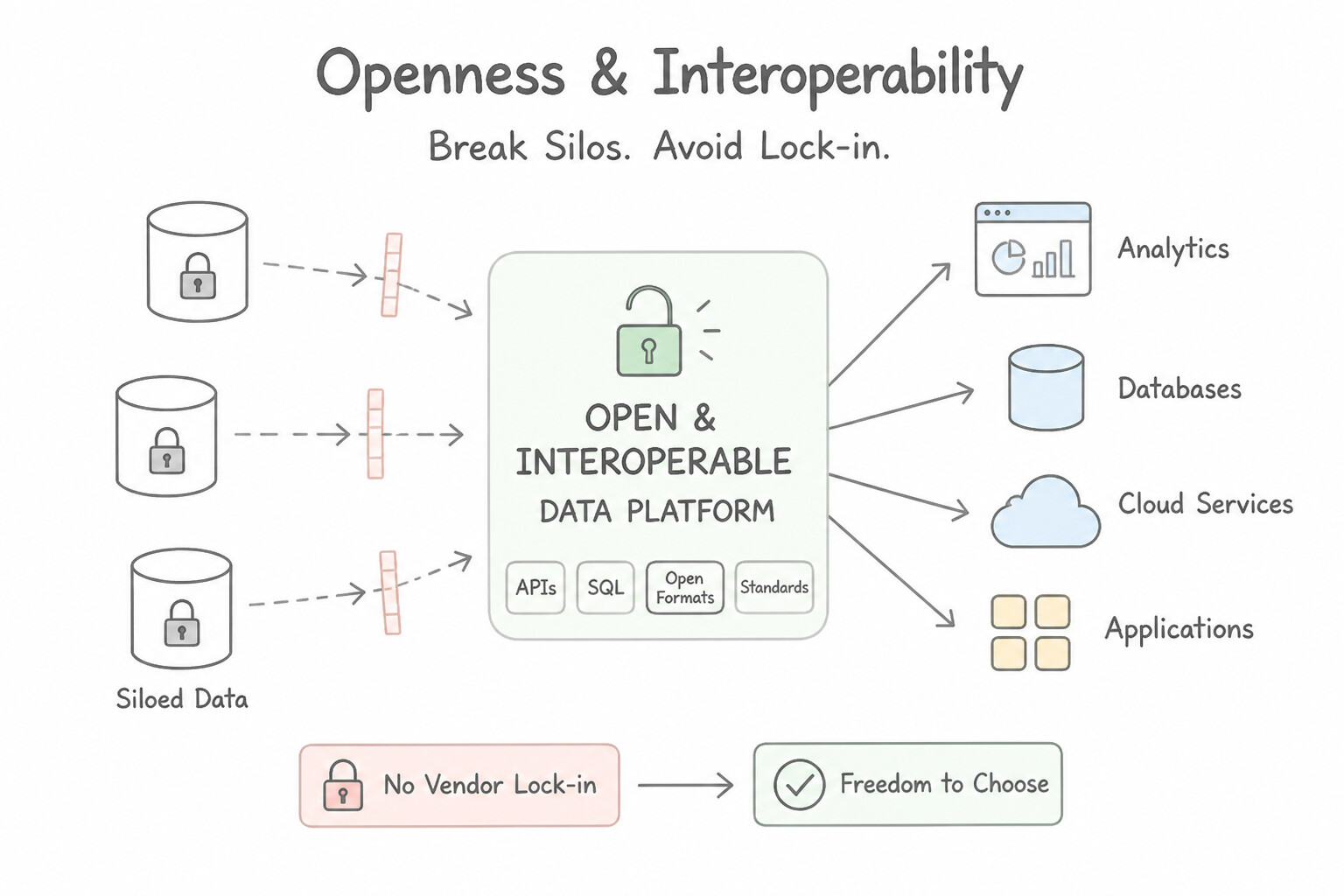
- Why Data Silos Are Toxic: When departments store data in isolated, incompatible systems (ERP vs. CRM vs. regional databases), executives get conflicting reports and AI models see only a fragmented slice of the business.
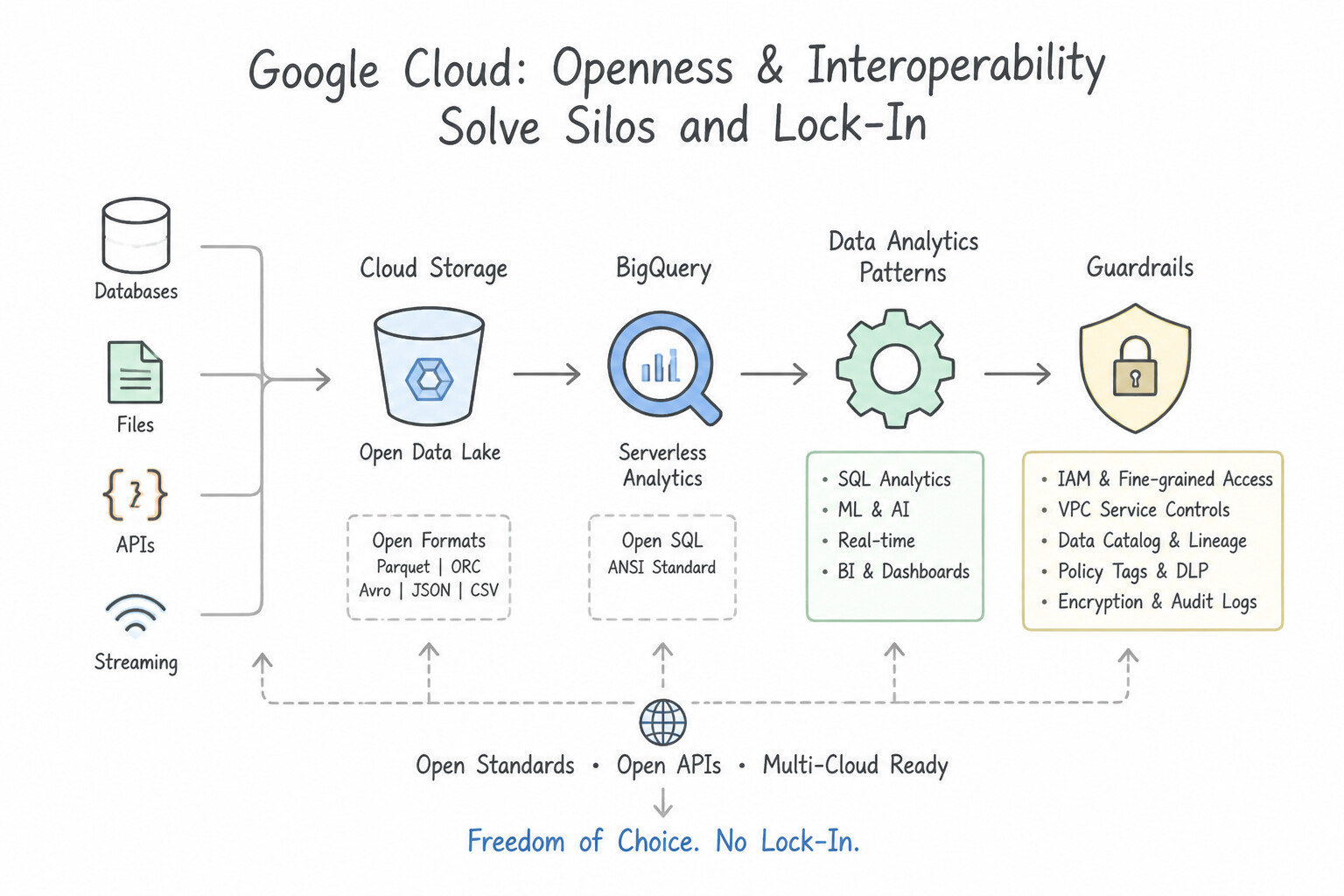
- How Openness & Interoperability Solve Silos & Lock-In: Google Cloud supports open file/table formats (
Apache Iceberg,Delta Lake,Parquet), open processing engines (Apache Spark,Apache Beam), and cross-cloud analytics (BigQuery Omni, Looker). This allows organizations to unify data across lakes, warehouses, and clouds without proprietary vendor lock-in.
Key Implementation Patterns
- Identifying First-Party Customer Data: Use Ingest the data from all three sources into BigQuery to create a centralized data warehouse. Consolidating data into a cloud data warehouse like BigQuery eliminates silos and enables holistic analysis. (Avoid alternative: Manual exports are inefficient, prone to error, and do not provide a scalable solution for integrating data.)
- Leveraging Partner-Shared Second-Party Data: Use Use Google Cloud Public Datasets to access and analyze weather data, such as NOAA datasets, directly in BigQuery. Google Cloud Public Datasets provide immediate access to hosted external data like weather patterns directly within BigQuery.
Key Takeaways (2.1f)
- Data silos prevent holistic business analysis by keeping related information in separate, unconnected systems.
- A Data Warehouse (like BigQuery) is designed to consolidate data from multiple sources for analysis.
- Value is created not just by having data, but by integrating existing datasets to find correlations and trends.
- Internal data is often insufficient for comprehensive predictive modeling; external data adds necessary context.
Quick Decision Cheat Sheet (Subsection 2.1)
If the Scenario Requires... | Choose This Architecture / Concept | Avoid This Common Mistake |
|---|---|---|
"Fast day-to-day transactional inserts and updates (checkout cart, inventory count)" | Operational Database (OLTP — Cloud SQL, Spanner, Firestore) | Data Warehouse ( BigQuery) or Data Lake (Cloud Storage) |
"Complex historical SQL queries across petabytes of structured enterprise data" | Data Warehouse (OLAP — BigQuery) | Operational Transactional Database ( Cloud SQL) |
"Store raw, unprocessed structured and unstructured files in their native format at low cost" | Data Lake ( Cloud Storage) | Relational Database ( Cloud SQL) |
"Data collected directly from your own company's website, app, or store interactions" | First-Party ( 1P) Data | Second-Party ( 2P) or Third-Party (3P) Data |
"Public weather/census datasets or demographic segments purchased from an external broker" | Third-Party ( 3P) Data | First-Party ( 1P) Data |
"JSON, XML, or Avro payloads with key-value tags and flexible nested hierarchy" | Semi-Structured Data | Strictly Structured SQL tables or raw Unstructured video/audio |
"Supply chain stage where raw events are cleaned, standardized, and transformed" | Data Processing (between Data Collection and Data Storage) | Data Genesis (creation) or Data Activation (operational action) |
"Unifying isolated departmental databases using open formats ( Iceberg/Parquet) to prevent lock-in" | Eliminating Data Silos via Openness & Interoperability | Maintaining separate proprietary departmental databases |
Further Reading (Subsection 2.1)
- Data Analytics — Overview of how Google Cloud data analytics helps organizations get insights from their data.
- What is a Data Warehouse? — Explains the concept of a data warehouse and how it aids in decision making.
- What is Predictive Analytics? — Overview of predictive analytics, how it works, and its benefits for businesses moving beyond simple data reporting.
- Maximize manufacturing value with Google Cloud — Discusses how AI and machine learning are used in manufacturing for use cases like predictive maintenance.
- Stream Analytics — Overview of Google Cloud's approach to ingesting, processing, and analyzing event streams in real time to make data more useful and accessible.
- Dataflow — Google Cloud's unified stream and batch data processing service.
Subsection 2.2: Determine which Google Cloud data management products are applicable to different business use cases
The Big Picture
Subsection 2.2 is one of the most foundational decision domains on the entire Cloud Digital Leader architectures. Almost every question here presents a specific business workload and asks you to select the right Google Cloud data management product or Cloud Storage class. Teams fail in production when they make three mistakes:
- Treating All SQL Databases as Interchangeable (
2.2a,2.2b): Cloud SQL, AlloyDB, Cloud Spanner, and BigQuery all support SQL! If you pickCloud SQLfor a global financial ledger requiring multi-region active-active strong consistency and unlimited horizontal scale, it will bottleneck (you needed Cloud Spanner). If you pickCloud Spannerfor a 50-PB historical analytics warehouse, you will overpay for transactional nodes (you needed BigQuery). If you have an enterprise PostgreSQL workload needing 4x faster transactions and 100x faster operational analytics without changing app code, choose AlloyDB for PostgreSQL. - Confusing NoSQL Document vs. Wide-Column Stores (
2.2a,2.2b): Both Firestore and Bigtable are NoSQL databases, but they serve opposite workloads. Firestore is a serverless document database for mobile/web user profiles and real-time offline sync. Bigtable is a petabyte-scale wide-column key-value store for millions of writes per second (IoT telemetry, AdTech, financial market ticks). - Misconfiguring Cloud Storage Classes (2.2c): Storing daily website images in Archive storage triggers massive early-deletion and retrieval fees; storing 7-year regulatory audit logs in Standard storage wastes 90% of the storage budget; and when access patterns are unpredictable, failing to enable Autoclass creates manual lifecycle headaches.
Consideration 2.2a: Determine which Google Cloud data management offering is best for each business use case (e.g., Cloud Storage, Spanner, Cloud SQL, AlloyDB, Bigtable, BigQuery, Firestore)
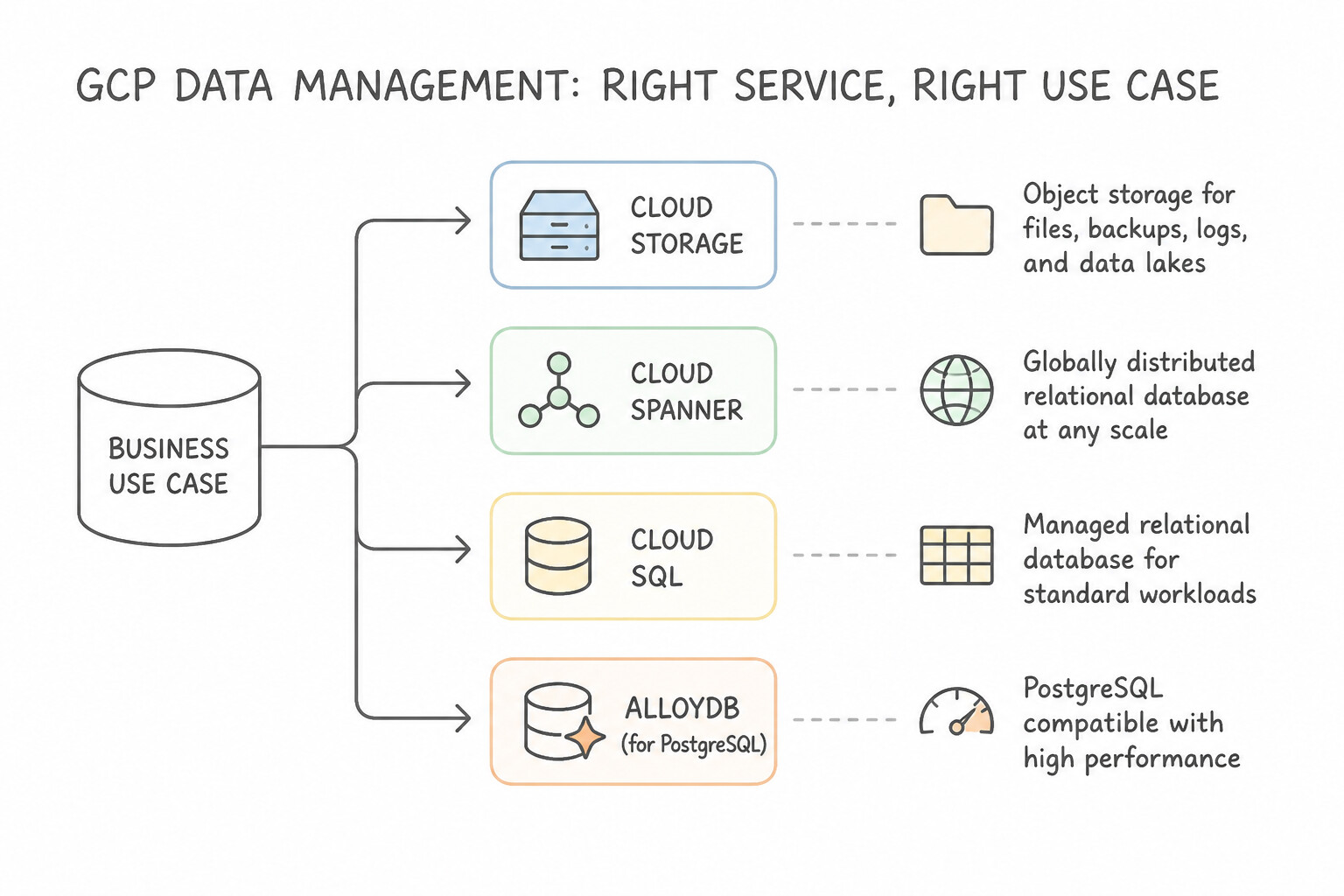
- Cloud Storage: Global object storage for unstructured binary data (media, backups, raw data lakes, ML datasets).
- Cloud SQL: Fully managed regional relational (OLTP) database for MySQL, PostgreSQL, and SQL Server (up to 128 TB). Automates patching, backups, and regional failover.
- AlloyDB for PostgreSQL: Fully managed, Google-engineered PostgreSQL-compatible database built for the most demanding enterprise workloads (4x faster than standard PostgreSQL for transactions, 100x faster for analytical queries, 99.99% availability SLA including maintenance).
- Cloud Spanner: Fully managed, globally distributed relational (OLTP) database that combines relational SQL structure and ACID transactions with unlimited horizontal scale and 99.999% (five nines) multi-region availability. Ideal for global banking ledgers, global gaming inventory, and supply chains.
- Firestore: Serverless NoSQL document database storing hierarchical JSON-like documents. Built for mobile and web apps requiring real-time listeners, automatic scaling (including to zero), and offline client synchronization.
- Cloud Bigtable: Fully managed NoSQL wide-column database engineered for petabyte scale, millions of reads/writes per second, and sub-10ms latency. Ideal for IoT sensor streams, financial market tick data, and AdTech personalization (powers Google Search and Gmail).
- BigQuery: Serverless, multi-cloud enterprise data warehouse (OLAP) for running blazingly fast SQL analytics over terabytes to petabytes of data without managing infrastructure.
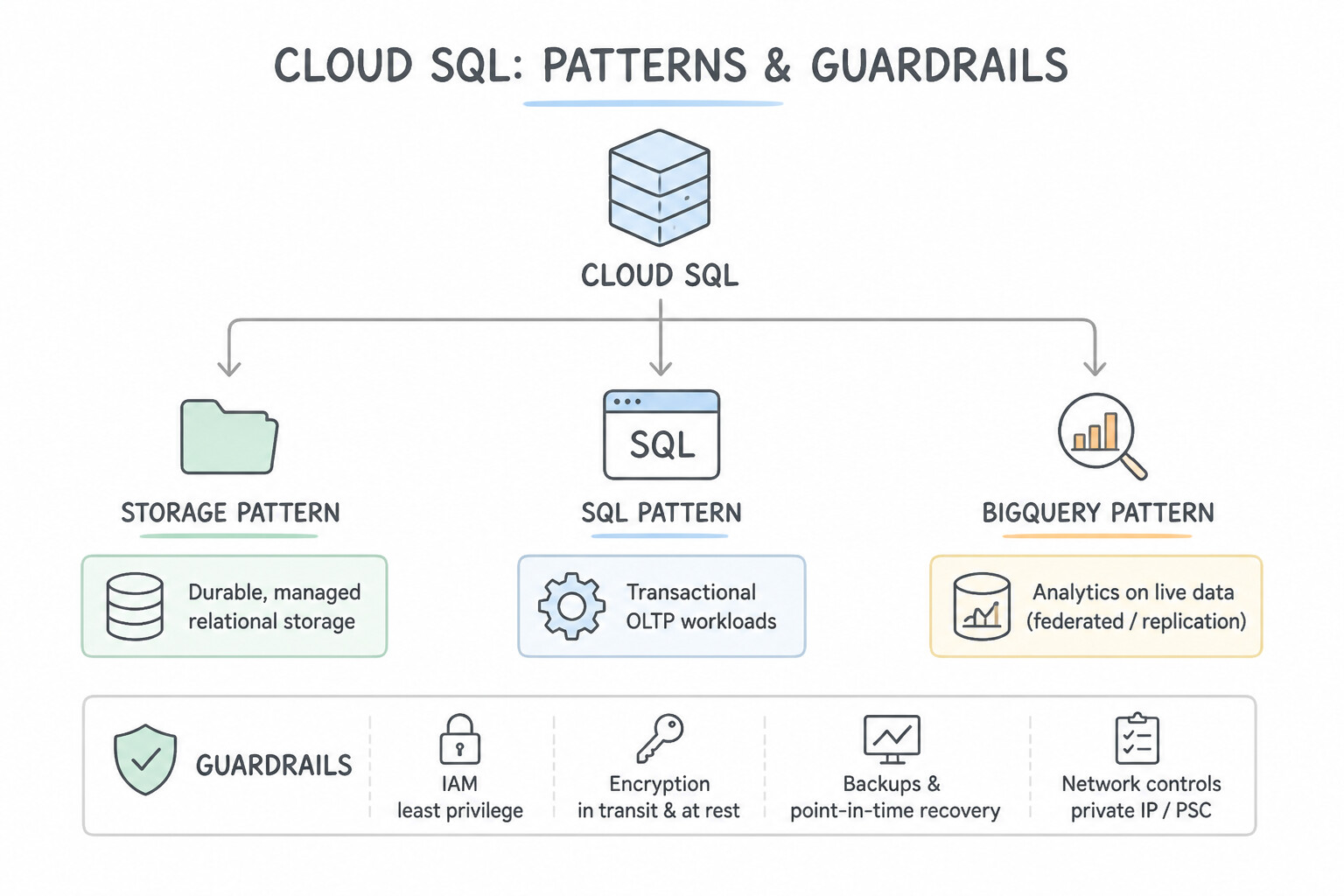
Key Implementation Patterns
- High-Throughput IoT Telemetry Storage: Use Use Cloud Storage to store the media files. Cloud Storage is the object storage service designed for unstructured data like media files and offers cost-effective tiers. (Avoid alternative: Cloud Bigtable is a NoSQL database for structured wide-column data, not unstructured media files.)
- High-Frequency Media Serving: Use Migrate the data to BigQuery. BigQuery is a fully managed, serverless data warehouse that handles all infrastructure maintenance automatically. (Avoid alternative: Compute Engine requires manual OS patching and management, failing to reduce operational overhead.)
- Enterprise Serverless Data Warehousing: Use Select Cloud Spanner for the application backend. Cloud Spanner provides the global horizontal scalability and strong consistency required for a global banking ledger. (Avoid alternative: Cloud SQL is a regional service best suited for vertical scaling, not global horizontal scaling.)
Key Takeaways (2.2a)
- Use Cloud Storage for unstructured object data like images, videos, and backups.
- Use Cloud SQL or Cloud Spanner for structured transactional data.
- Use BigQuery for analytics and data warehousing.
- Use storage classes (Standard, Nearline, Coldline, Archive) in Cloud Storage to manage costs for infrequently accessed data.
Consideration 2.2b: Define key data management concepts and terms (e.g., relational, non-relational, object storage, structured query language [SQL], NoSQL)
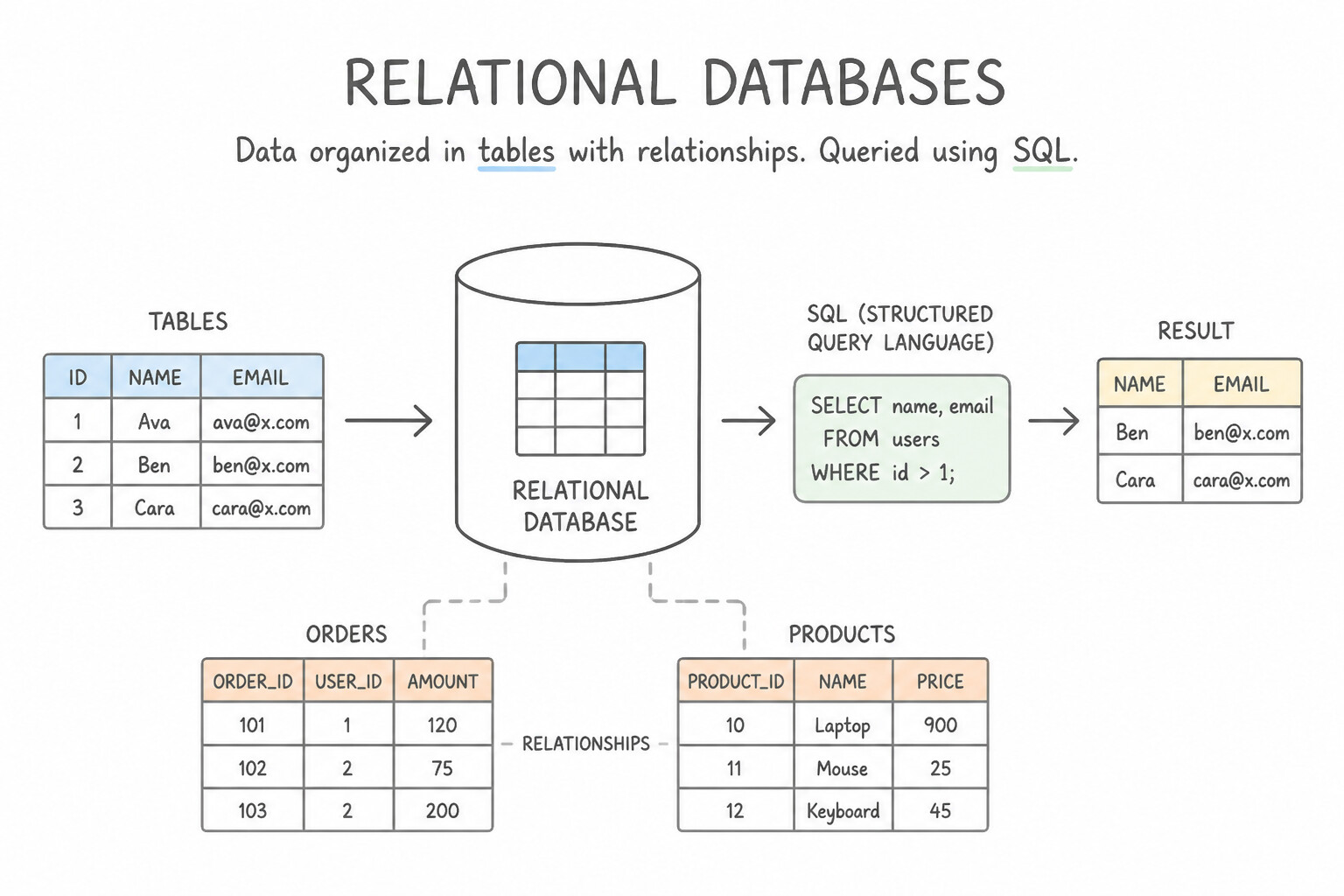
- Relational Databases (
SQL): Organize data into predefined tables of rows and columns with strict schemas, foreign keys, and ACID (Atomicity, Consistency, Isolation, Durability) guarantees. Queried using Structured Query Language (SQL). - Non-Relational Databases (
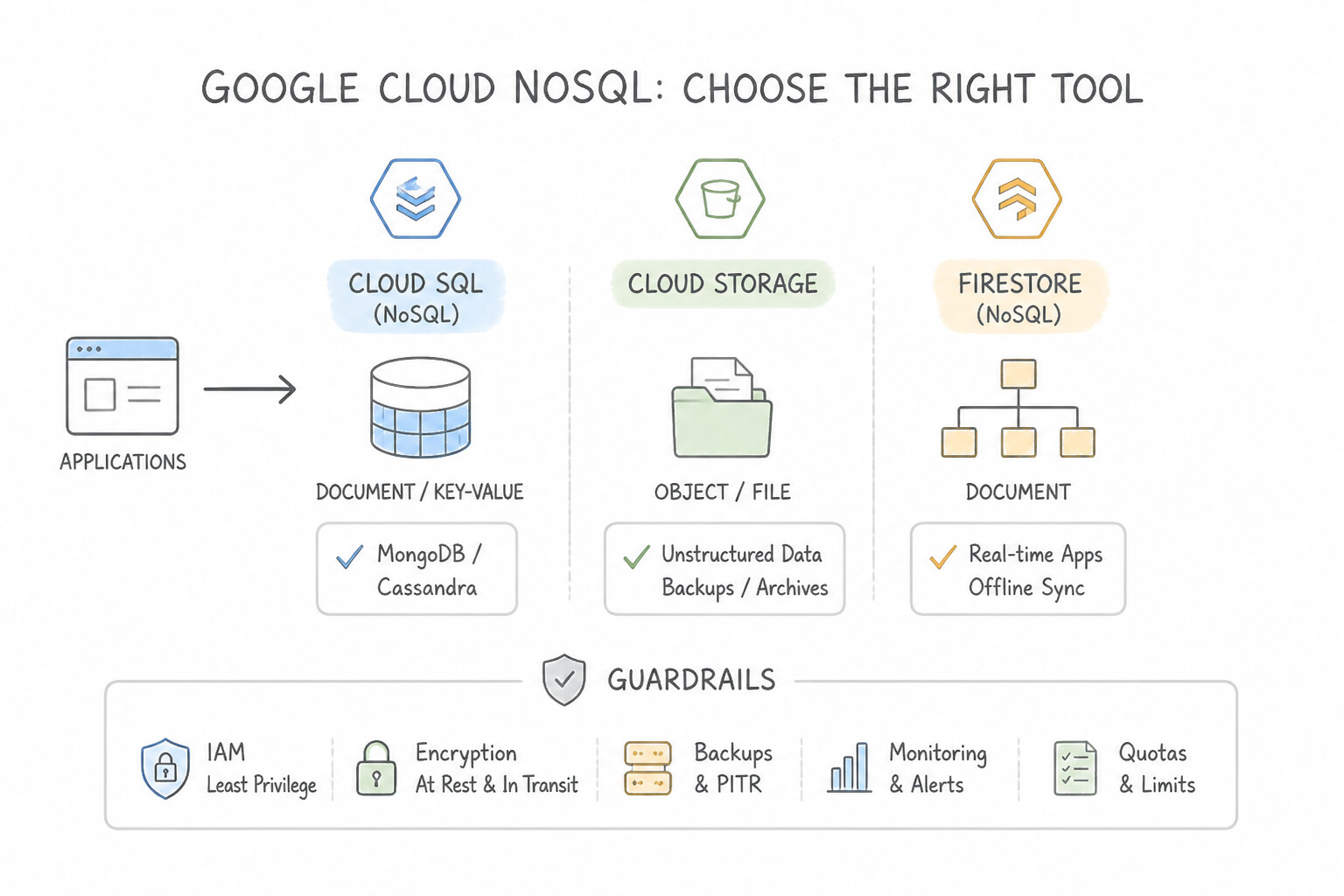
NoSQL): Store data using flexible schemas—such as documents (Firestore), wide-column key-value tables (Bigtable), or in-memory key-value caches (Memorystore). Built for horizontal scale and rapidly evolving or high-velocity data structures. - Object Storage (
Cloud Storage): Stores arbitrary files as immutable objects (consisting of the raw data bytes, rich metadata, and a globally unique key/URI) inside flat buckets rather than hierarchical file-system folders or relational tables.
Key Implementation Patterns
- Relational vs. Non-Relational Data Structures: Use Migrate the data to Cloud SQL for MySQL. Cloud SQL is a managed service compatible with MySQL, making it the best fit for migrating relational databases with minimal changes. (Avoid alternative: Cloud Storage is for files (objects) and does not run relational databases or SQL queries.)
- Object Storage for Unstructured Media Files: Use Store the files in Cloud Storage. Cloud Storage is object storage specifically designed for scalable, globally accessible unstructured data like media files. (Avoid alternative: Cloud SQL is for structured relational data, not large unstructured files like videos.)
- Regional Relational Database Management System (RDBMS): Use Select Bigtable to store the data in a NoSQL wide-column format. Bigtable is a high-throughput NoSQL database specifically designed for massive scale and rapid ingestion of IoT sensor data. (Avoid alternative: Cloud SQL is a relational database better suited for transactional data, not high-velocity IoT ingestion.)
Key Takeaways (2.2b)
- Relational Data uses tables and SQL (e.g., MySQL). Use Cloud SQL or Cloud Spanner.
- Cloud SQL is the best choice for migrating existing MySQL, PostgreSQL, or SQL Server databases with minimal code changes.
- Object Storage (Cloud Storage) is for files, not structured database records.
- NoSQL databases (Firestore, Bigtable) offer flexibility or scale but require different data models than SQL.
Consideration 2.2c: Differentiate between storage classes in Cloud Storage regarding cost and frequency of access (e.g., Standard, Nearline, Coldline, Archive, Autoclass)
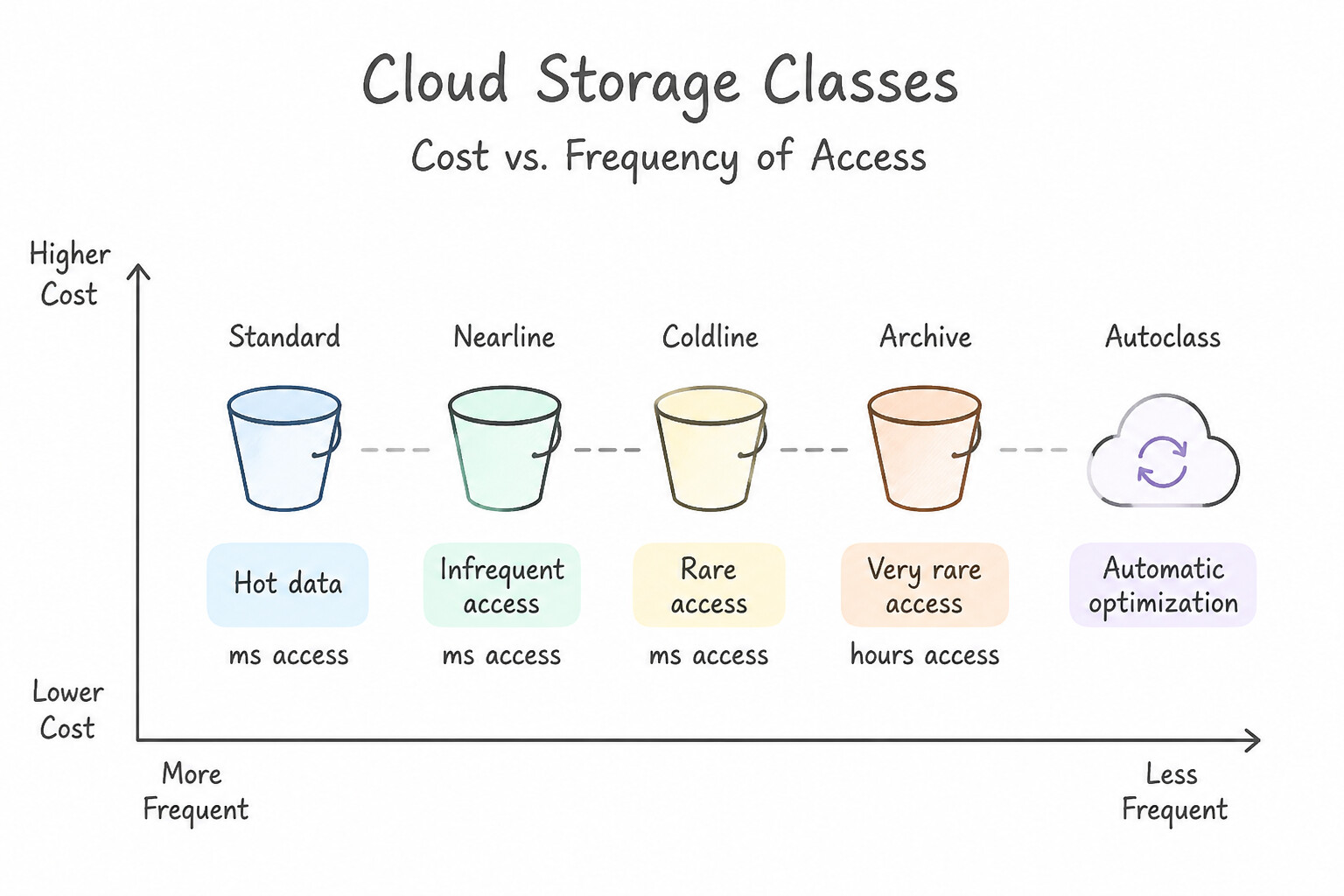
All four Cloud Storage classes offer the same 11 nines (99.999999999%) annual durability and millisecond access latency, but trade monthly storage price against minimum storage duration and retrieval fees:
- Standard Storage: Highest storage cost, zero retrieval fee, zero minimum duration. Best for hot data accessed frequently (websites, streaming videos, active analytics).
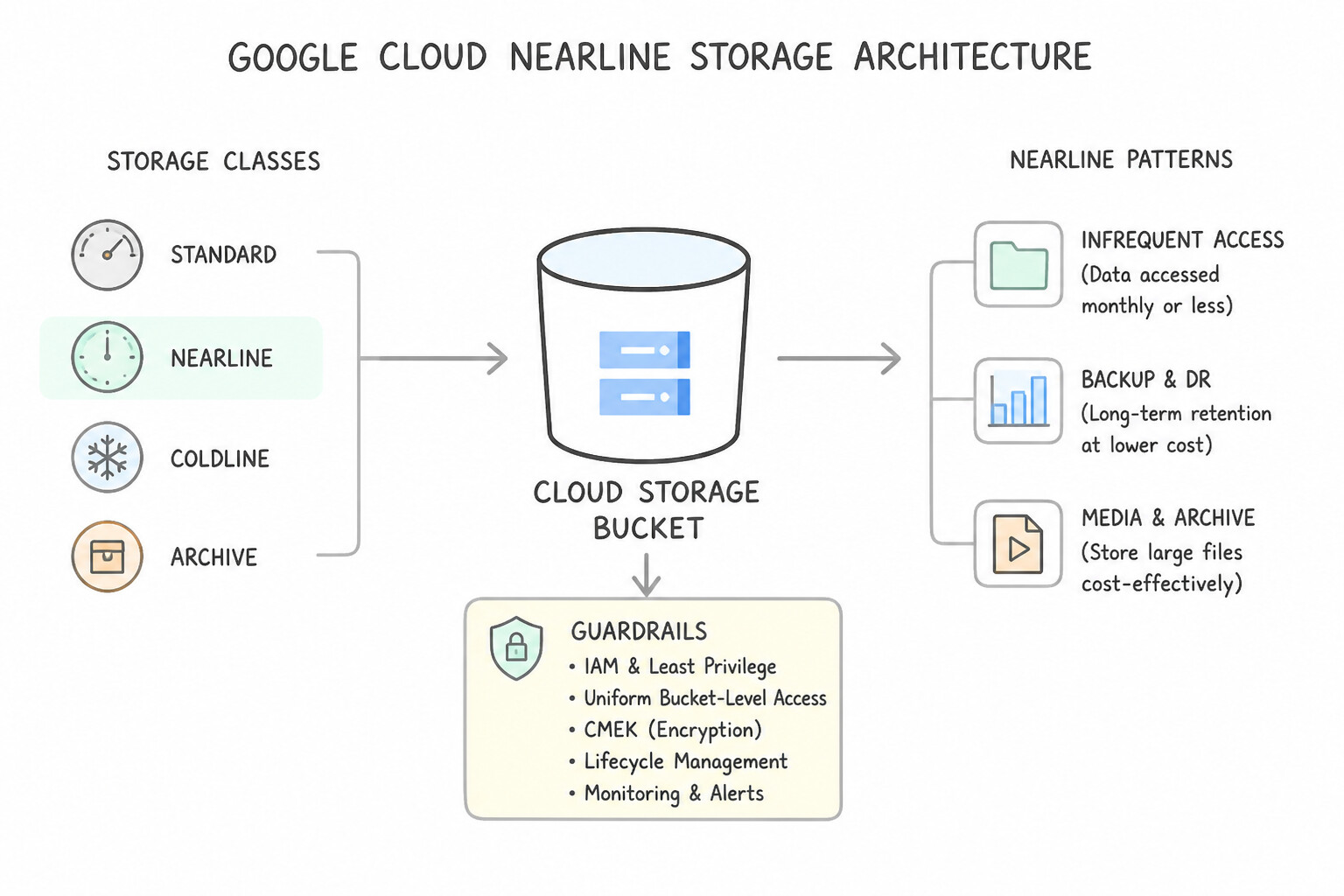
- Nearline Storage: Lower storage cost, 30-day minimum duration, small retrieval fee. Best for data accessed at most once a month (monthly reports, recent backups).
- Coldline Storage: Even lower storage cost, 90-day minimum duration, higher retrieval fee. Best for data accessed at most once a quarter (every 90 days) (disaster recovery backups, quarterly audits).
- Archive Storage: Lowest storage cost, 365-day minimum duration, highest retrieval fee. Best for data accessed less than once a year (7-year legal/regulatory compliance archives, medical record retention).
- Autoclass: Automatically transitions objects to colder storage classes when they are not accessed and immediately moves them back to Standard when read—eliminating early-deletion fees and manual Object Lifecycle Management rules when access patterns are unpredictable.
Key Implementation Patterns
- Homogeneous Relational Migration with Minimal Downtime: Use Use Standard Storage. Standard Storage is best for frequently accessed "hot" data and has no retrieval fees. (Avoid alternative: Coldline Storage is for data accessed roughly once a quarter, usually for disaster recovery.)
- Lift-and-Shift Legacy Database to Cloud Infrastructure: Use Store the logs in the Archive storage class. Archive storage has the lowest cost and is best for data accessed less than once a year. (Avoid alternative: Standard storage is for hot data and is too expensive for long-term archiving.)
- Heterogeneous Database Modernization: Use Store the backups in Nearline Storage. Nearline Storage is optimized for data accessed roughly once every 30 days, making it the most cost-effective choice. (Avoid alternative: Standard Storage is optimized for frequently accessed data and is too expensive for monthly backups.)
Key Takeaways (2.2c)
- Use Standard Storage for frequently accessed data (hot data) to avoid retrieval fees.
- Use Nearline, Coldline, or Archive for infrequently accessed data (cold data) to save on storage costs.
- Consider both storage costs and retrieval costs when selecting a class.
- Use Standard storage for frequently accessed data.
Consideration 2.2d: Describe the ways that an organization can migrate or modernize their current database in the cloud
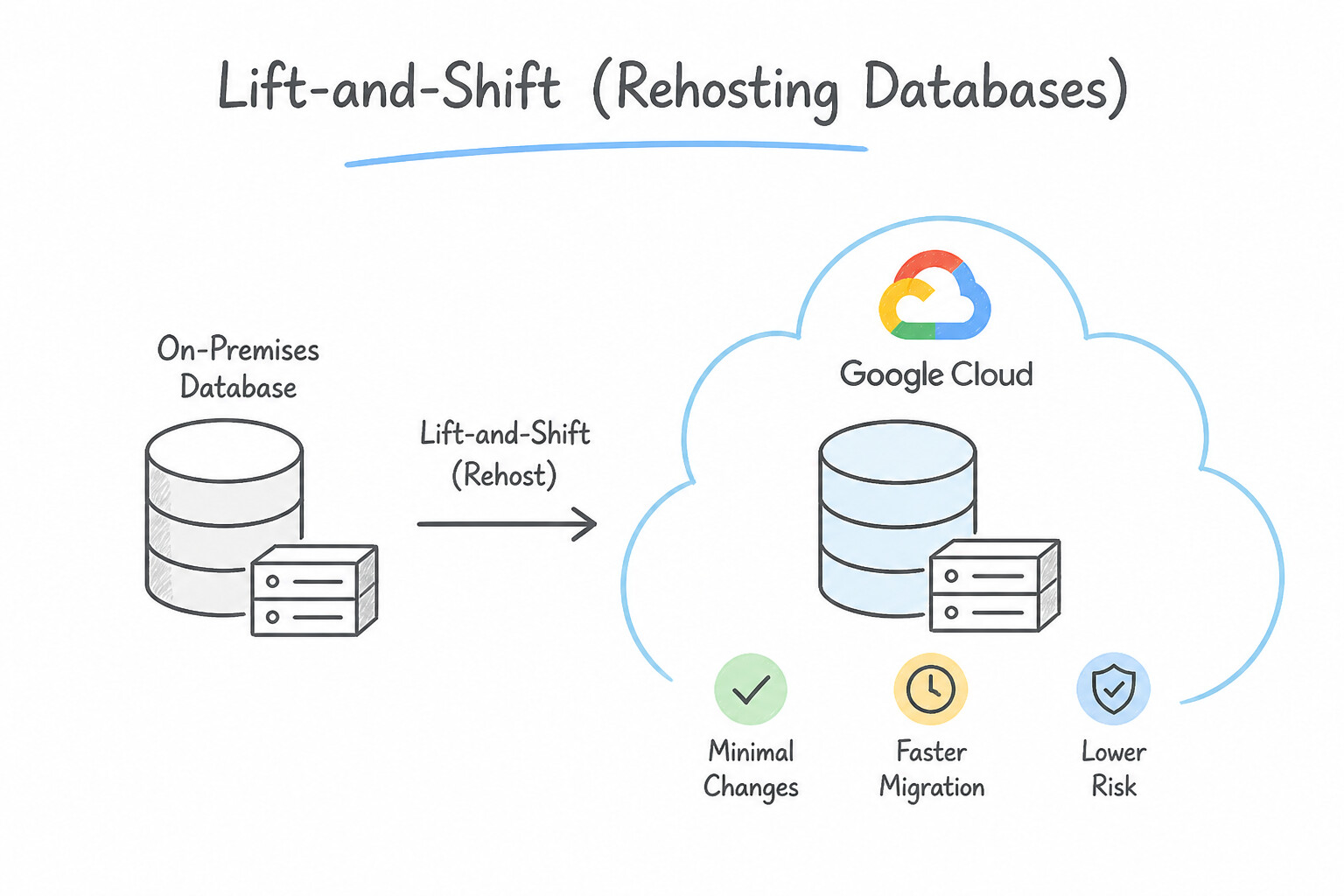
- Lift-and-Shift (Rehosting Databases on Compute Engine / Bare Metal Solution): Moving a database to a VM (or Bare Metal Solution for specialized legacy Oracle licensing/hardware requirements) with zero database engine changes.
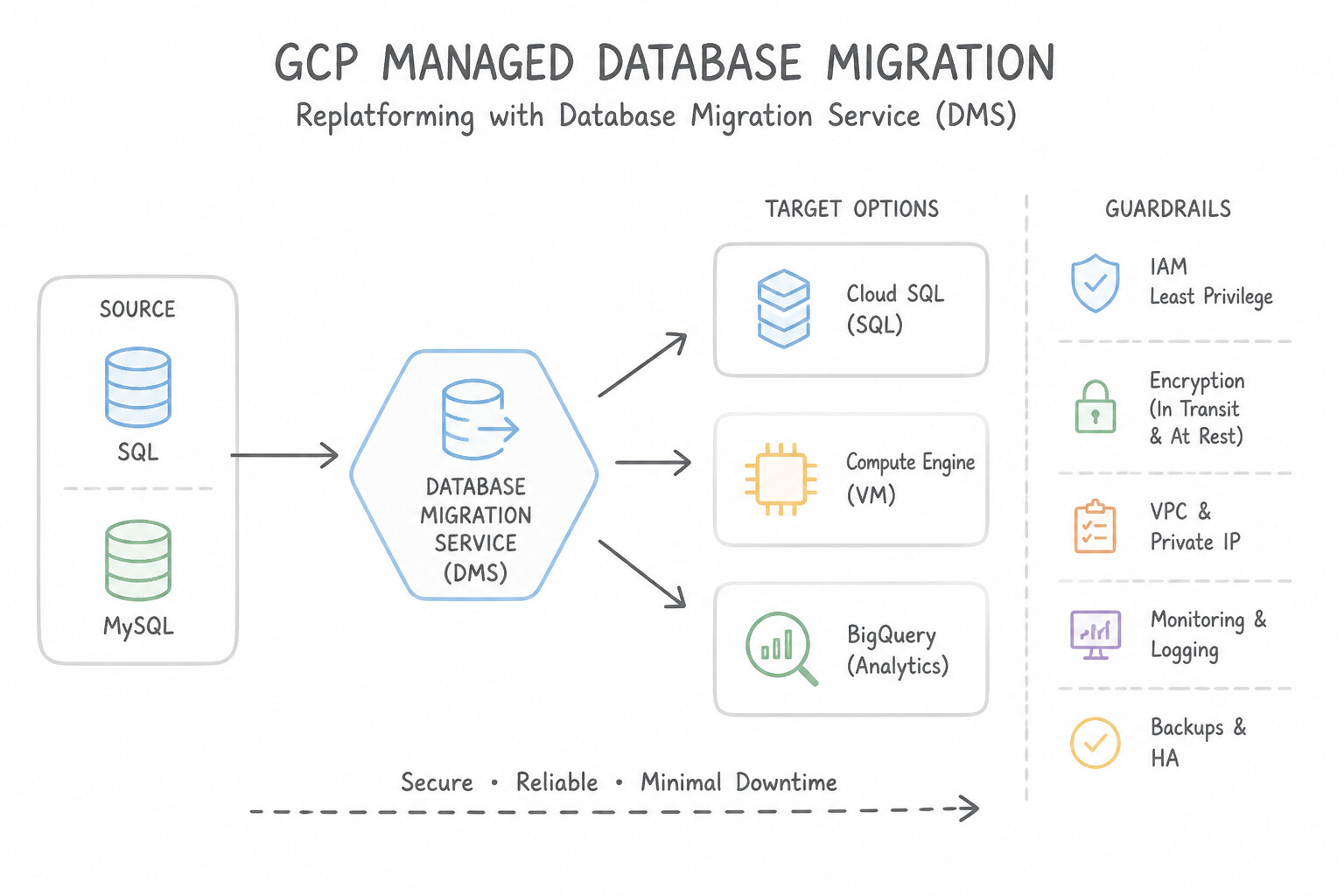
- Managed Database Migration (
Replatformingvia Database Migration Service — DMS): Migrating on-premises MySQL, PostgreSQL, or SQL Server workloads into Cloud SQL or AlloyDB using Database Migration Service (DMS) with continuous Change Data Capture (CDC) for near-zero downtime. - Database Modernization (
RefactoringAway from Proprietary Commercial Licenses): Migrating from expensive proprietary legacy databases (like Oracle or Microsoft SQL Server) to cloud-native open-source-compatible engines (AlloyDB for PostgreSQL or Cloud Spanner) to eliminate punitive licensing audits and unlock horizontal cloud scale.
Key Implementation Patterns
- Managed Service for Open Source Engines: Use Migrate the database to Cloud SQL for MySQL. Cloud SQL is a fully managed service compatible with MySQL that handles maintenance tasks like backups and patching. (Avoid alternative: Cloud Spanner generally requires code changes and is not a drop-in replacement for MySQL.)
- Global Relational Scalability: Use Cloud Spanner. Cloud Spanner is a globally distributed, relational database that offers strong consistency and horizontal scalability. (Avoid alternative: Cloud SQL is a regional relational database service and does not offer native global horizontal scalability for writes.)
- Database Migration Tooling: Use Create a migration job using the Database Migration Service. The Database Migration Service is designed for seamless, guided migrations with continuous replication for minimal downtime. (Avoid alternative: Exporting and importing files usually requires stopping the application to prevent data changes during the move.)
Key Takeaways (2.2d)
- Cloud SQL is a fully managed relational database service for MySQL, PostgreSQL, and SQL Server.
- Managed services reduce operational overhead by automating backups, patches, and updates.
- Running databases on VMs (IaaS) requires manual maintenance of the OS and database software.
- BigQuery is for analytics, not transactional applications.
Quick Decision Cheat Sheet (Subsection 2.2)
If the Scenario Requires... | Choose This Product / Storage Class | Avoid This Common Mistake |
|---|---|---|
"Managed regional MySQL, PostgreSQL, or SQL Server database (< 128 TB)" | Cloud SQL | Cloud Spanner (overkill for single-region standard relational apps) or BigQuery (OLAP) |
"Enterprise PostgreSQL workload requiring 4x faster transactions and 100x faster analytics" | AlloyDB for PostgreSQL | Standard Cloud SQL or self-managed PostgreSQL on Compute Engine |
"Global relational database + strong consistency + unlimited horizontal scale + 99.999% availability" | Cloud Spanner | Cloud SQL (regional) or Bigtable (NoSQL) |
"Mobile or web application needing real-time JSON document sync and offline client support" | Firestore | Cloud Bigtable or Cloud SQL |
"High-throughput, low-latency NoSQL wide-column store for IoT telemetry, AdTech, or financial time-series" | Cloud Bigtable | Firestore or Cloud SQL |
"Serverless enterprise data warehouse for petabyte-scale SQL analytics and BI" | BigQuery | Cloud Spanner or Cloud SQL |
"Objects accessed daily/weekly · once a month (30d) · once a quarter (90d) · once a year (365d)" | Standard · Nearline · Coldline · Archive | Using Standard for 7-year archives or Archive for active website assets |
"Unpredictable object access patterns; want automatic tiering without early-deletion fees" | Cloud Storage Autoclass | Static age-based lifecycle deletion rules |
Further Reading (Subsection 2.2)
- Cloud Storage product page — Overview of Cloud Storage features, including object storage capabilities and storage classes for cost management.
- Google Cloud Storage Options — A guide helping to choose the right storage option based on the data type (structured vs unstructured) and workload.
- What is BigQuery? — Read the 'Serverless' section to understand how BigQuery allows you to focus on data and analysis rather than infrastructure management.
- Cloud Spanner Product Page — Review the 'Key features' section, specifically focusing on global distribution and relational semantics.
- Google Cloud Database Decision Tree — Look for the flowchart or guide that helps you choose a database based on your workload (Relational vs Non-Relational, Global vs Regional).
- BigQuery Pricing — Details the separation of storage and compute pricing, explaining how on-demand analysis pricing works.
Subsection 2.3: Discuss how smart analytics, business intelligence tools, and streaming analytics can add value in different business use cases
The Big Picture
Imagine a retail bank that runs its fraud-detection pipeline as a nightly batch job at 2:00 AM, or an e-commerce retailer where the Marketing and Finance teams bring conflicting "Net Revenue" spreadsheets to the Monday executive meeting. In both cases, the enterprise has data, but its analytics architecture is broken:
- The Spreadsheet Chaos & Metric Drift Trap (
2.3a,2.3b): When business analysts export CSVs from a data warehouse into local spreadsheets, two things go wrong immediately: the data is stale the second it is downloaded, and every department writes its own formula for core KPIs (Gross Margin,Active User,Net Revenue). Looker solves this by sitting directly on top of BigQuery with a centralized, version-controlled semantic modeling layer (LookML). Metrics are defined once by data teams, and non-technical business users self-serve live dashboards, schedule alerts, or embed insights directly into operational workflows (like Salesforce or Slack). - The Overnight Batch Latency Trap (
2.3c,2.3d): Fraud prevention, dynamic ride-share surge pricing, flash-sale inventory updates, and IoT grid monitoring lose 99% of their business value if delayed by 24 hours. Modernizing data pipelines on Google Cloud uses Pub/Sub (global asynchronous event ingestion that buffers traffic spikes), Dataflow (serverless unified streaming and batch processing based on Apache Beam), and Managed Service for Apache Spark / Dataproc (for migrating existing open-source Spark/Hadoop workloads) feeding directly into BigQuery and Looker.
Consideration 2.3a: Describe how Looker democratizes access to data
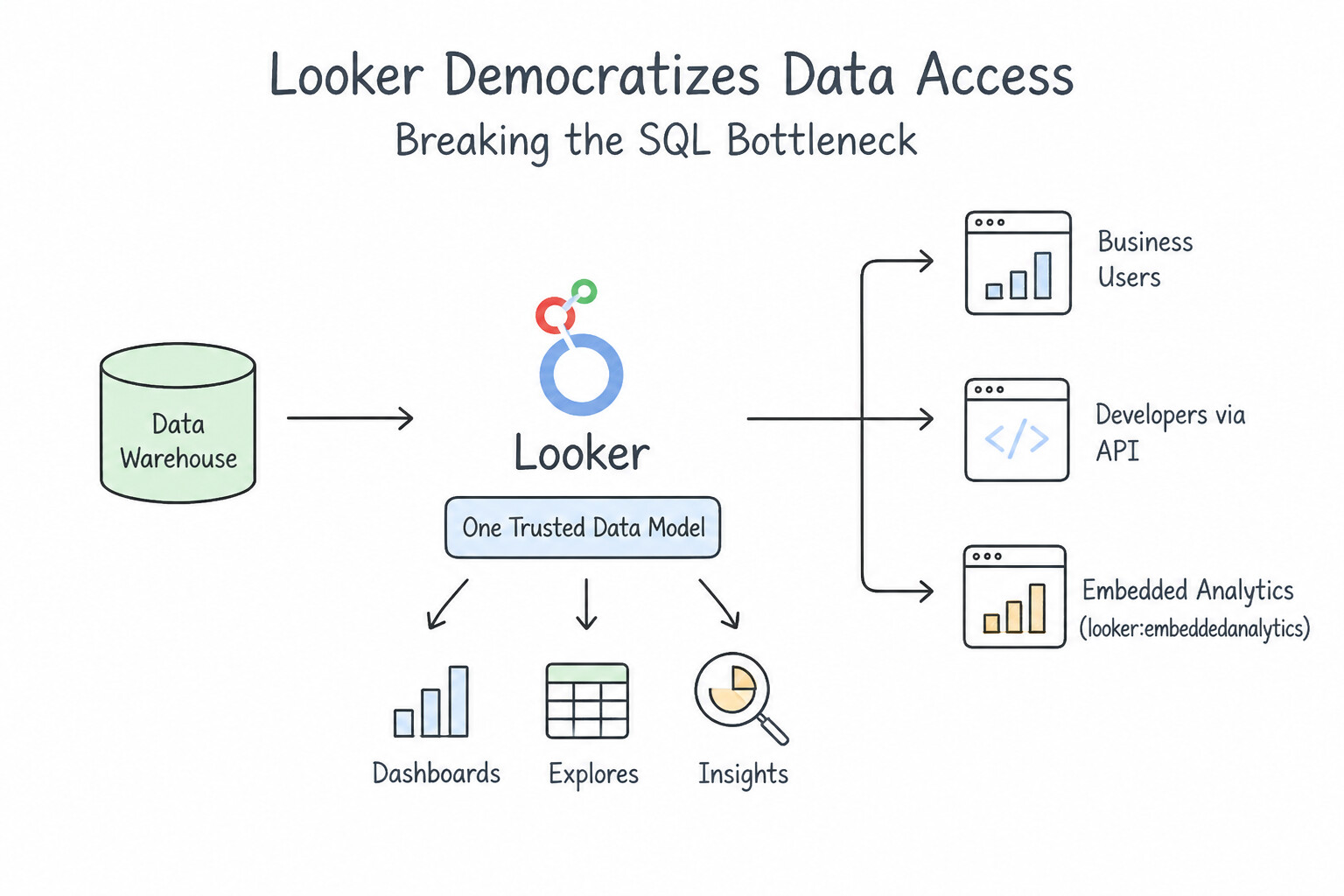
- Breaking the SQL Bottleneck: Historically, business users had to file a ticket with the data engineering team and wait days for a custom SQL query. Looker empowers non-technical employees across Sales, Marketing, HR, and Operations to explore data, drill down, and build their own visualizations via an intuitive drag-and-drop web interface—without writing a single line of SQL.
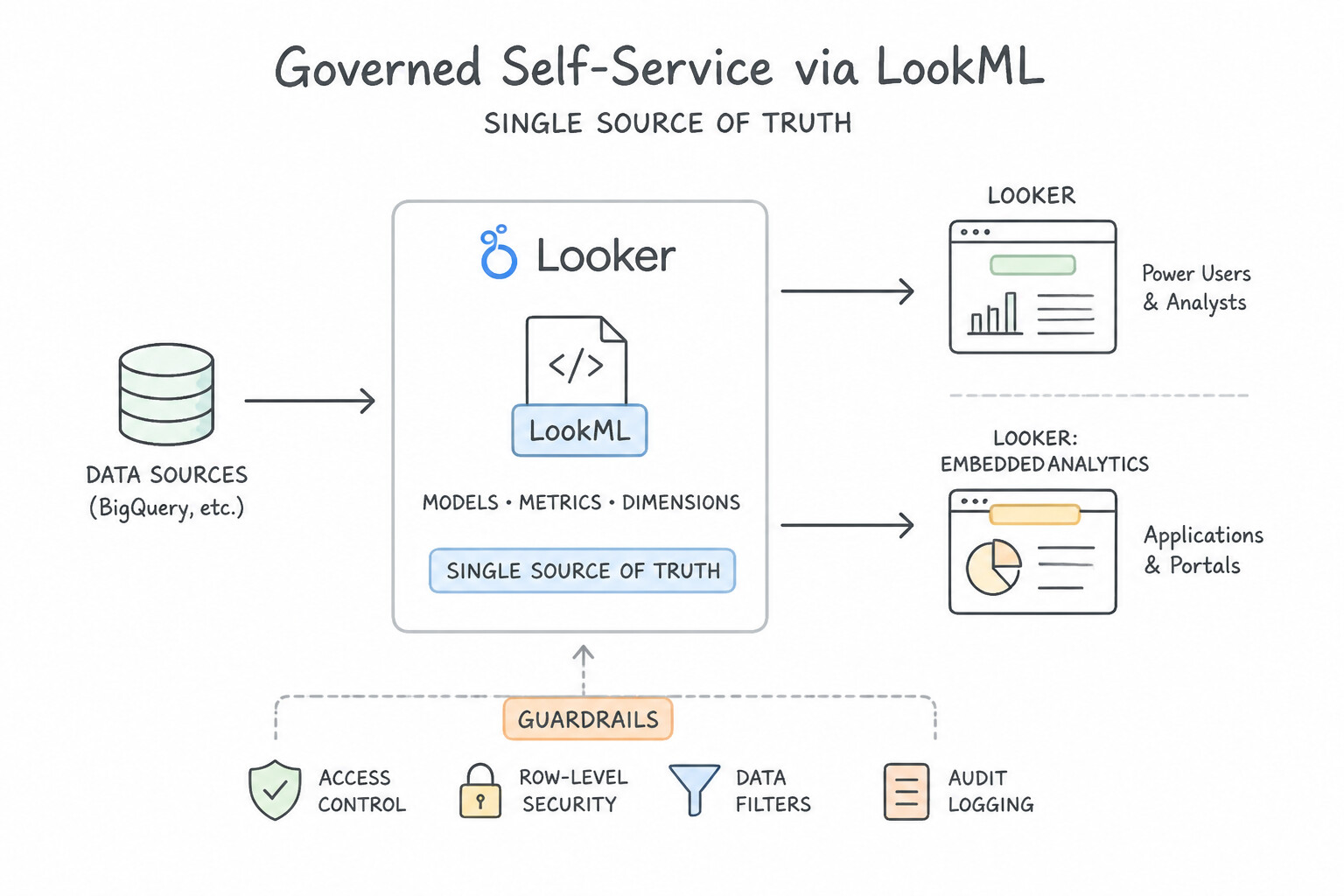
- Governed Self-Service via
LookML(Single Source of Truth): Democratization without governance leads to chaos. Looker uses LookML, a centralized modeling layer where data analysts define business logic, table joins, and KPI formulas (Net Revenue,Customer Lifetime Value) once. Every user across the company queries the exact same governed definitions.
Key Implementation Patterns
- Centralized Business Logic with LookML: Use Define the revenue calculation in Looker's semantic layer so all teams access the same metric. Looker's semantic layer centralizes metric definitions, ensuring consistent data across all departments. (Avoid alternative: Manual sharing of SQL scripts is prone to version control issues and human error.)
- Self-Service Analytics for Non-Technical Users: Use Configure the Looker Explore interface for product managers to filter and pivot data. Looker Explore enables non-technical users to query data using a drag-and-drop interface. (Avoid alternative: Direct SQL access is not suitable for non-technical users.)
- In-Database Architecture for Real-Time Insights: Use Integrate Embedded Analytics (Powered by Looker) into your application portal. Embedded Analytics allows you to place Looker dashboards directly inside your own application for external customers. (Avoid alternative: Emailing PDFs is a manual distribution method and does not integrate dashboards into your application interface.)
Key Takeaways (2.3a)
- Semantic Layer: Looker uses LookML to define business logic in one place, ensuring consistency.
- Single Source of Truth: Centralizing metric definitions prevents departments from reporting conflicting numbers.
- Data Democratization: Tools like Looker allow non-technical users to access and analyze data without needing to write SQL.
- Looker 'Explores' enable non-technical users to query data without SQL.
Consideration 2.3b: Recognize the value of analyzing and visualizing data from BigQuery in Looker to create real-time reports, dashboards, and integrating data into workflows
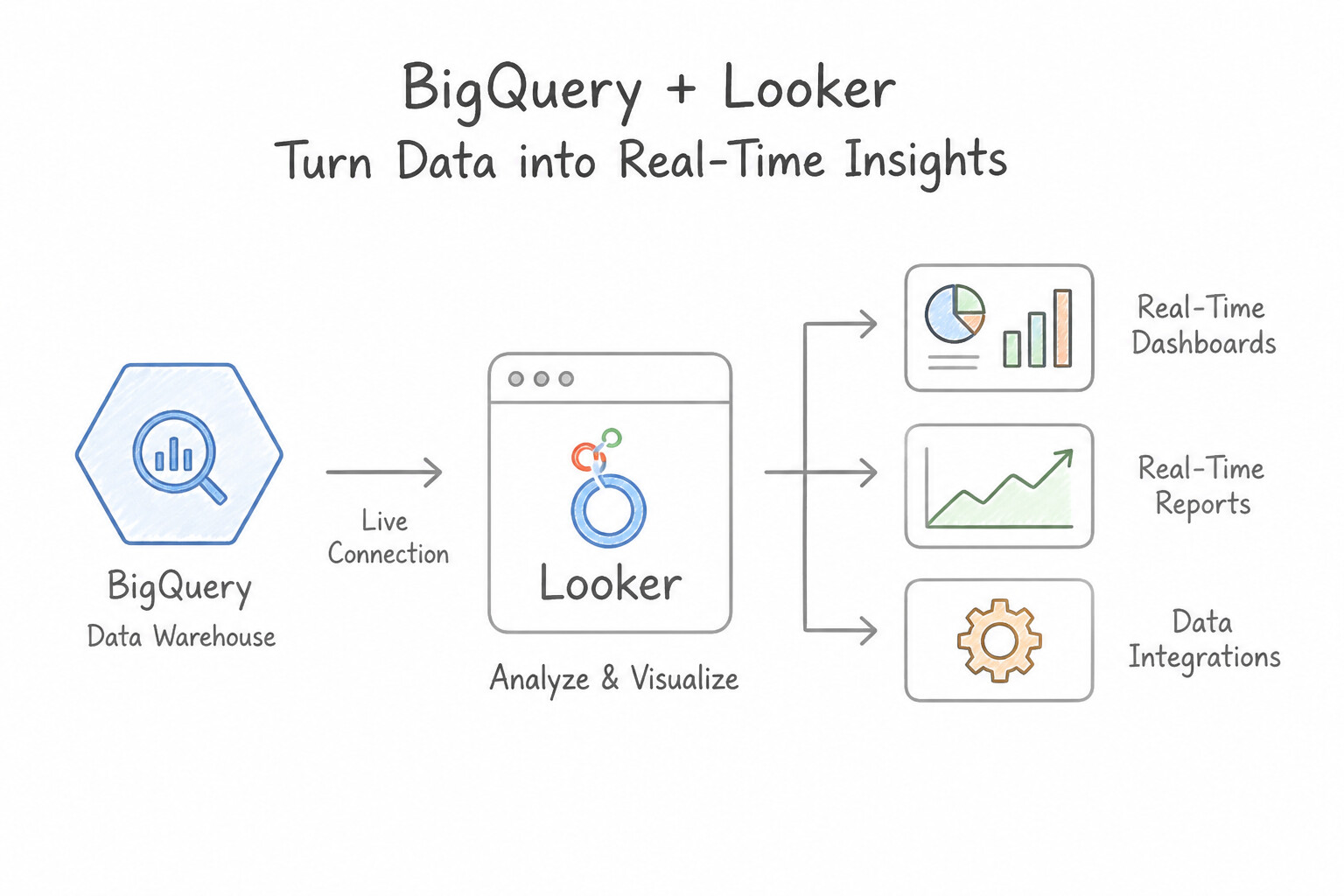
- In-Database Live Querying (No Data Extracts): Unlike legacy desktop BI tools that extract data into proprietary local files, Looker pushes queries directly down to BigQuery in real time. Dashboards always reflect live BigQuery data while leveraging BigQuery's serverless compute scale and security controls.
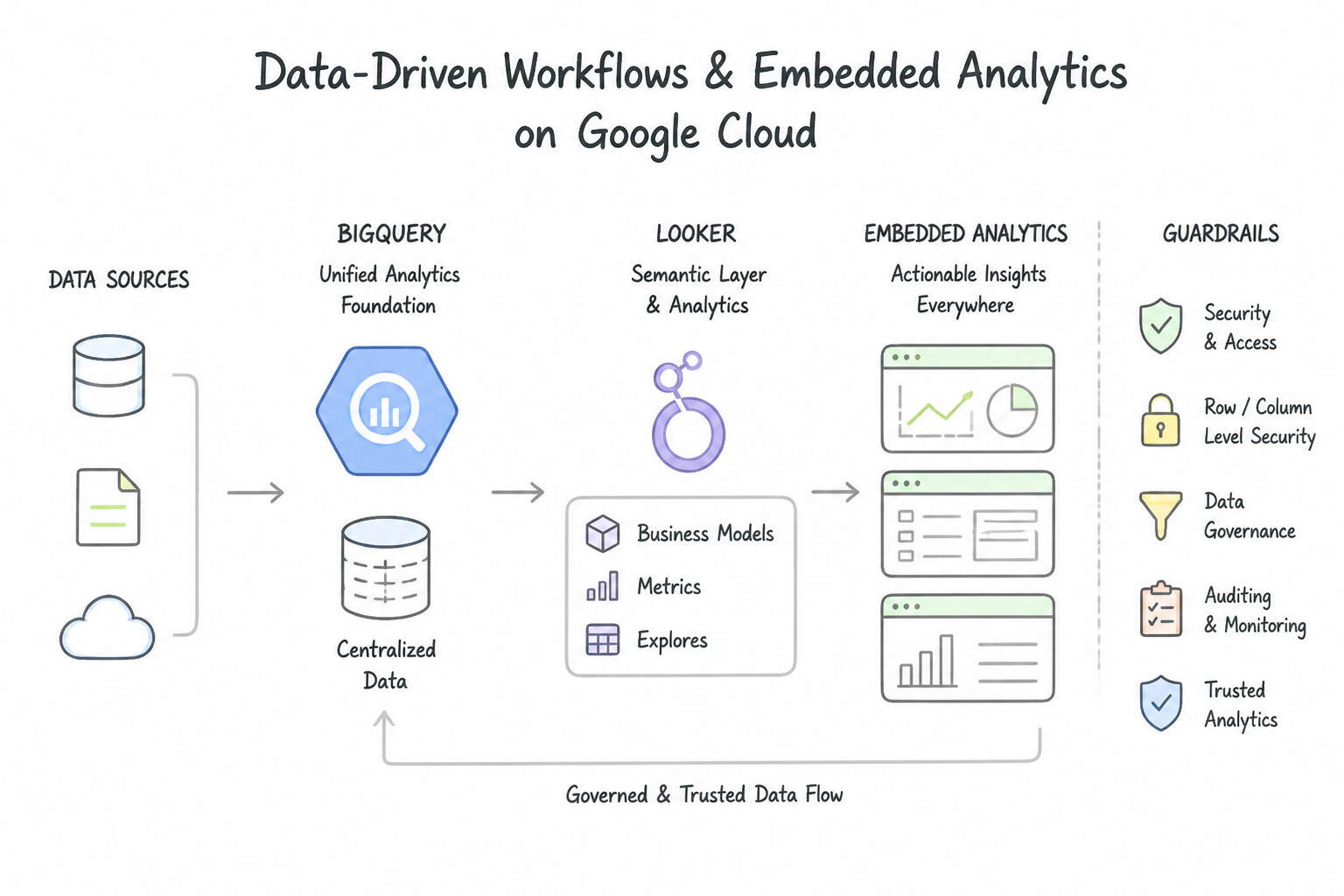
- Data-Driven Workflows & Embedded Analytics: Looker goes beyond passive charts: teams can configure automated alerts (e.g., messaging a Slack channel when regional inventory drops below a threshold), trigger third-party API actions directly from a dashboard, or embed interactive Looker visualizations inside customer-facing portals and SaaS apps.
Key Implementation Patterns
- Automated Workflow Triggers from Analytics: Use Connect Looker to BigQuery to execute queries directly in the database without moving data. Looker operates entirely in-database, generating SQL queries that run directly on BigQuery without extracting data. (Avoid alternative: Downloading results to a local server removes data from the secure cloud environment, violating the project requirements.)
- Centralized Metrics Governance across Teams: Use Define the "Net Revenue" metric centrally using LookML. LookML provides a governed semantic layer that allows you to define metrics once and use them consistently across all dashboards. (Avoid alternative: Relying on individual SQL queries creates inconsistency and does not solve the problem of conflicting definitions.)
- Real-Time Streaming Dashboards for High-Volume Events: Use Connect Looker to BigQuery and provide the marketing team with access to explore the data. Looker provides a user-friendly interface for ad-hoc exploration and visualization without requiring SQL knowledge. (Avoid alternative: This requires the marketing team to learn and write SQL, which contradicts the requirement.)
Key Takeaways (2.3b)
- Looker operates on an in-database architecture, meaning it queries data where it lives rather than extracting it.
- BigQuery handles the heavy computation for queries generated by Looker.
- Avoiding data extraction improves security and ensures data freshness.
- LookML serves as the semantic layer in Looker, translating business requirements into SQL.
Consideration 2.3c: Explain why real-time streaming analytics is critical for modern businesses
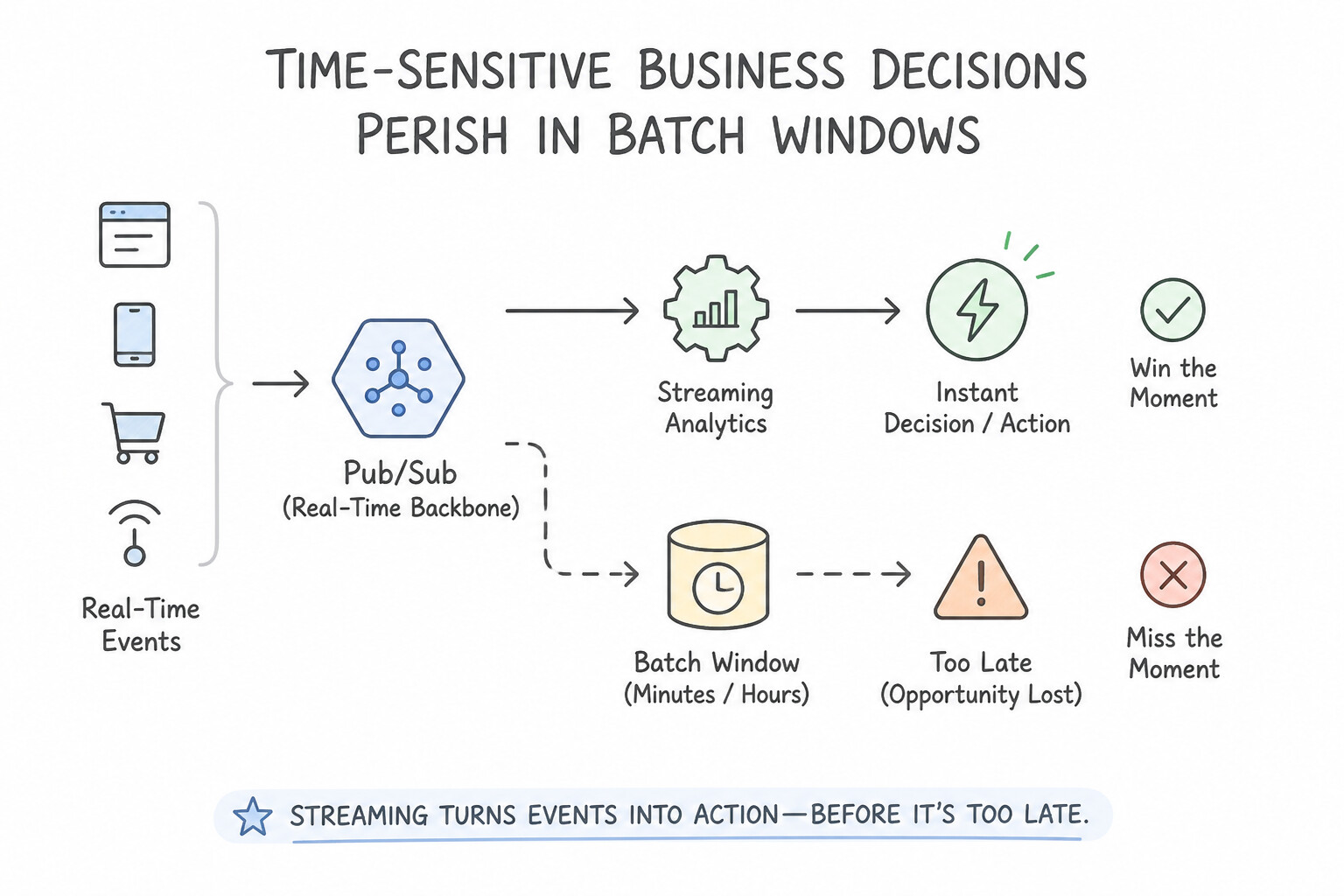
- Time-Sensitive Business Decisions Perish in Batch Windows: In modern digital business, the value of an event decays rapidly after it occurs. Detecting a stolen credit card while the thief is at the checkout terminal, adjusting ride-share pricing during a sudden rainstorm, or shutting down an overheating factory turbine requires sub-second streaming analytics rather than a 24-hour batch job.
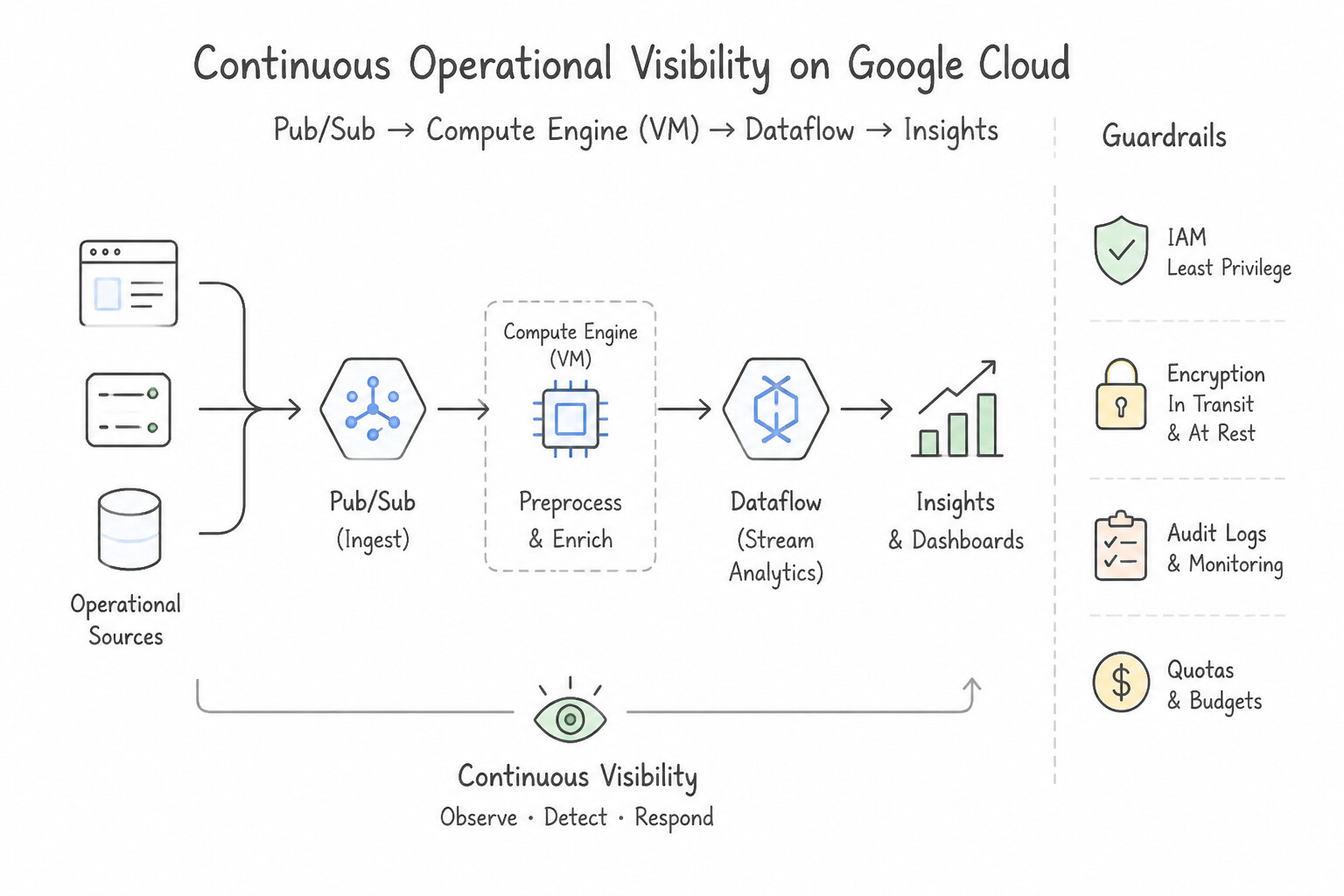
- Continuous Operational Visibility: Streaming pipelines eliminate overnight batch bottlenecks and keep executive dashboards and AI recommendation engines continuously synchronized with live customer behavior.
Key Implementation Patterns
- Asynchronous Ingestion for High-Volume IoT Data: Use Integrate Pub/Sub to capture and buffer order messages before they are processed by the database. Pub/Sub decouples systems and buffers messages, allowing the database to process high volumes of data at its own pace without crashing.
- Serverless Unified Stream and Batch Processing: Use Use Dataflow to run an Apache Beam pipeline that handles both batch and streaming data. Dataflow runs Apache Beam pipelines, which allow you to use a single code model for both batch and streaming data. (Avoid alternative: Dataproc manages clusters for Hadoop and Spark but does not inherently simplify the architecture into a single serverless pipeline model like Dataflow.)
Key Takeaways (2.3c)
- Decoupling is a key cloud design pattern that prevents failures in one system from crashing another.
- Pub/Sub is the primary Google Cloud service for asynchronous messaging and buffering data during traffic spikes.
- Scaling infrastructure vertically (adding CPU) is not a substitute for proper architectural decoupling.
- Batch data is historical and bounded; Streaming data is real-time and unbounded.
Consideration 2.3d: Describe the main Google Cloud products that modernize data pipelines (e.g., Pub/Sub, Dataflow, Managed Service for Apache Spark)
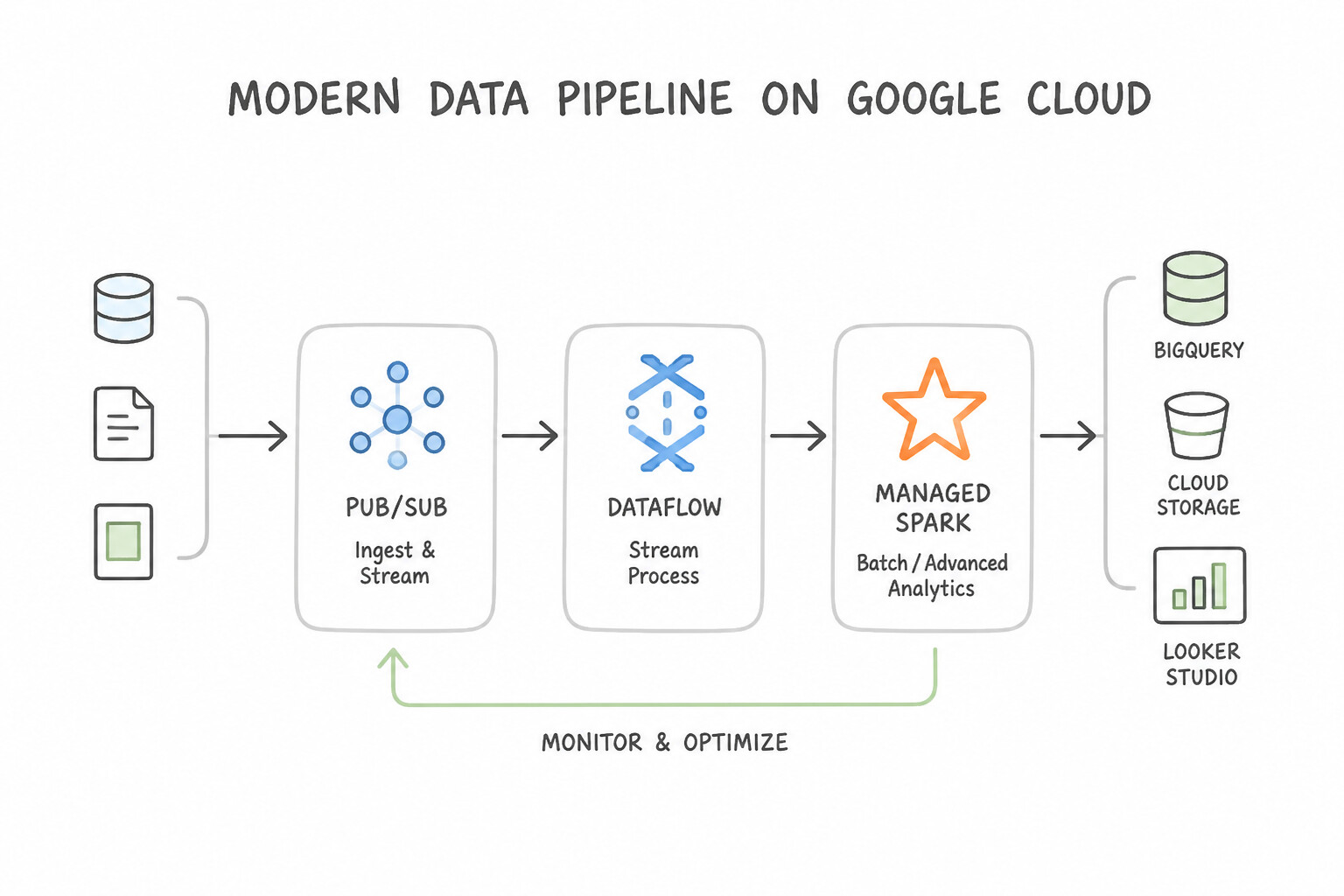
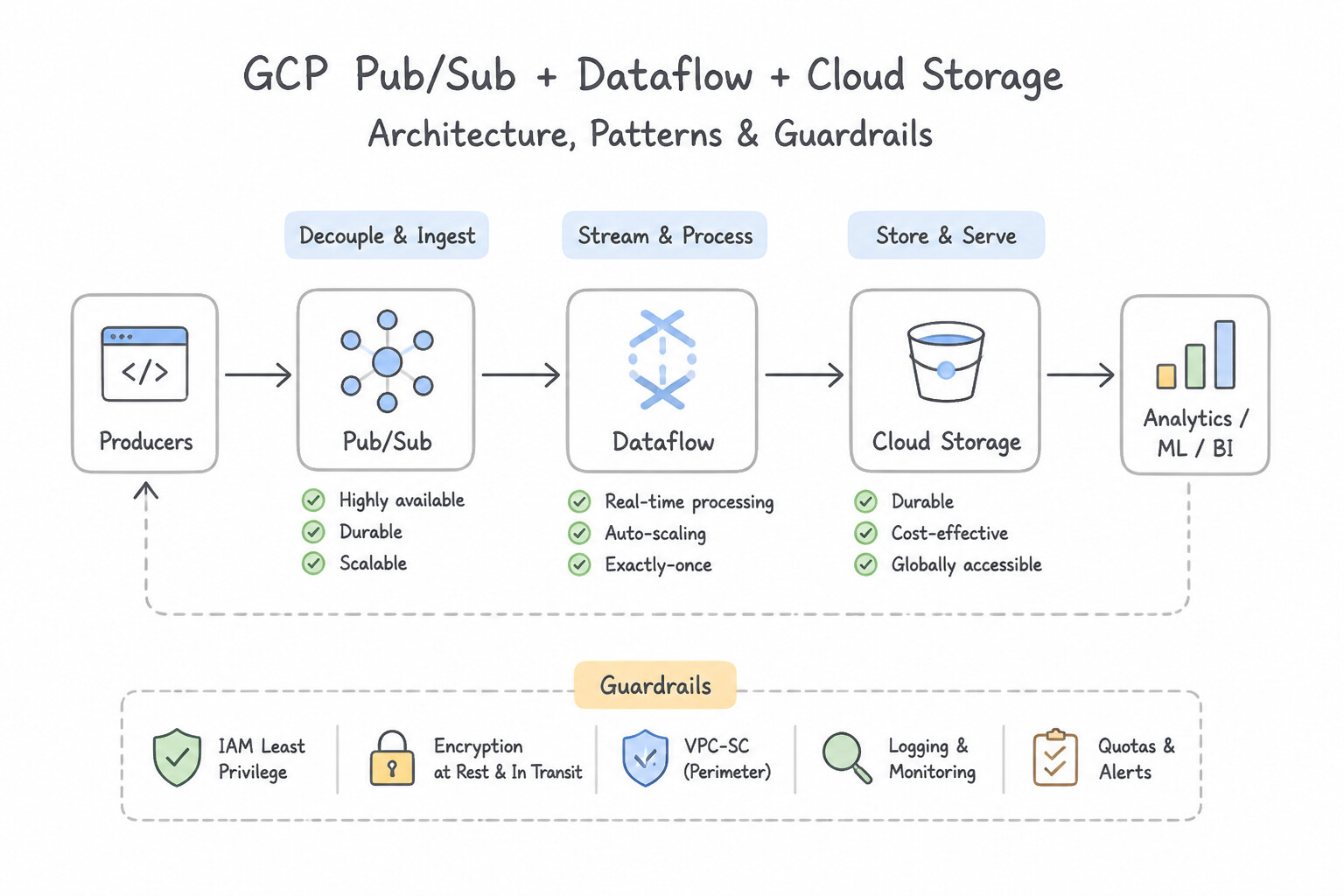
- Pub/Sub (Global Asynchronous Ingestion & Decoupling): Acts as the shock absorber and front door of a modern streaming architecture. It ingests millions of events per second, decouples event producers (web servers, IoT devices) from downstream consumers, and buffers sudden flash-sale spikes so backend databases never crash.
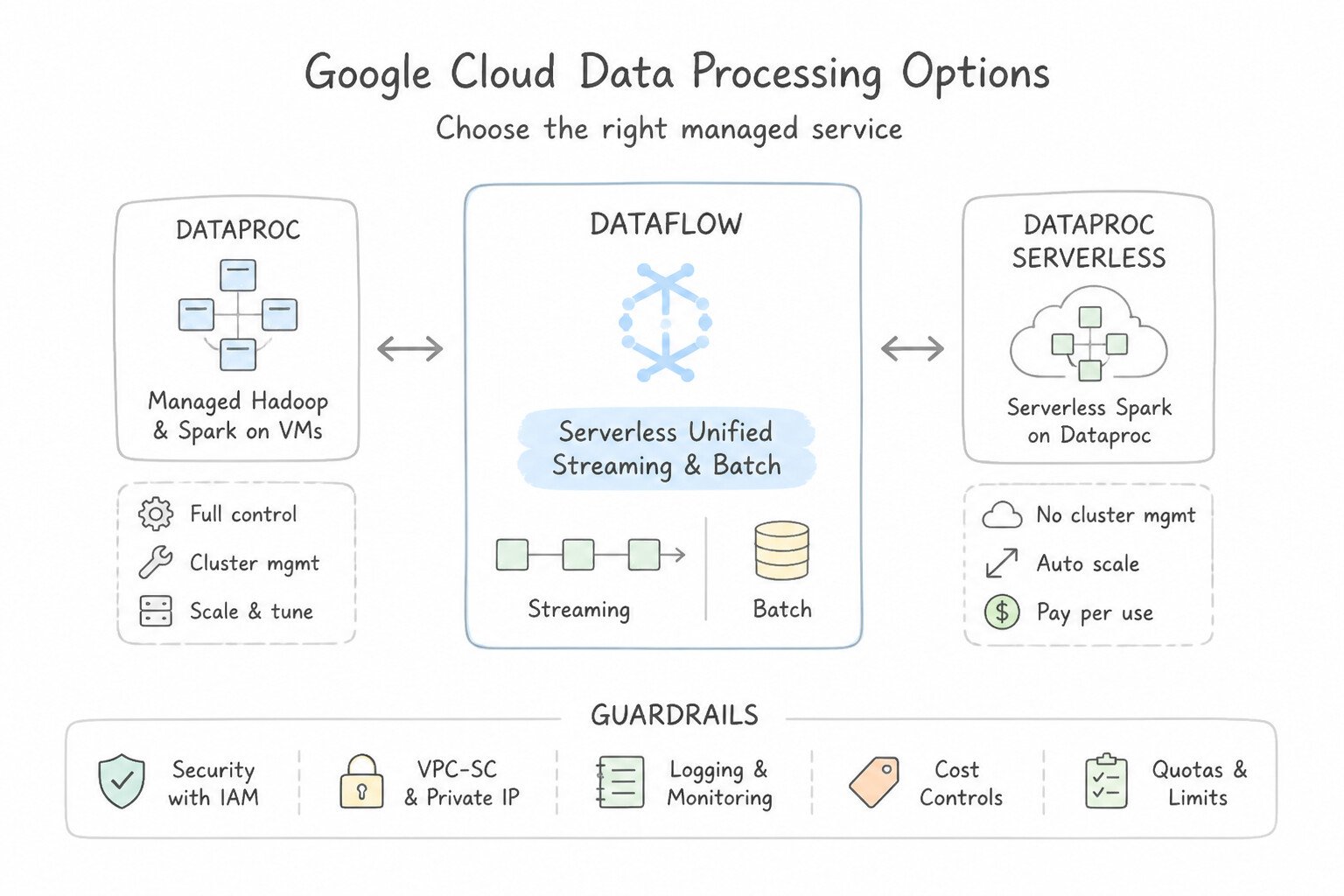
- Dataflow (Serverless Unified Streaming & Batch Processing): Fully managed, serverless execution engine for Apache Beam pipelines. Dataflow uses the exact same codebase for both real-time streaming and historical batch data processing, automatically scaling worker VMs up and down as pipeline volume fluctuates.
- Managed Service for Apache Spark / Dataproc (Open-Source Big Data Modernization): When an enterprise already has years of investment in on-premises Apache Spark or Apache Hadoop jobs, Managed Service for Apache Spark (and Dataproc) lets them migrate those open-source pipelines to Google Cloud in minutes with minimal code rewrites, using ephemeral clusters backed by Cloud Storage.
Key Implementation Patterns
- Pipeline Modernization with Managed Service for Apache Spark: Use Run the PySpark jobs using Dataproc Serverless. Dataproc Serverless runs Apache Spark jobs without requiring you to manage cluster infrastructure. (Avoid alternative: Dataflow uses Apache Beam, which requires rewriting your existing PySpark code.)
- Decoupling High-Throughput Ingestion with Pub/Sub: Use Use Pub/Sub to act as the ingestion buffer. Pub/Sub is designed to ingest high-volume streaming data and buffer it before processing. (Avoid alternative: Cloud SQL is a relational database and cannot efficiently buffer massive, high-speed streaming data.)
- Modernizing Existing On-Premises Hadoop and Spark Workloads: Use Use Pub/Sub for real-time data ingestion and Dataflow for data processing. Pub/Sub handles real-time ingestion and Dataflow handles real-time processing, meeting the speed requirements. (Avoid alternative: Batch processing every hour is too slow for real-time fraud detection requirements.)
Key Takeaways (2.3d)
- Dataproc is the primary Google Cloud product for running open-source big data tools like Apache Hadoop and Apache Spark.
- Dataproc Serverless is ideal when you want to run Spark jobs without the burden of provisioning, managing, or scaling compute clusters.
- Dataflow is also a fully managed, serverless data processing service, but it is built specifically for the Apache Beam framework. Migrating Spark code to Dataflow requires rewriting the code.
- Pub/Sub is for message ingestion and routing, not for executing complex data processing jobs.
Quick Decision Cheat Sheet (Subsection 2.3)
If the Scenario Requires... | Choose This Product / Architecture | Avoid This Common Mistake |
|---|---|---|
"Different departments calculate the same KPI differently; need a single governed source of truth for self-service BI" | Looker (using LookML semantic modeling) | Manual spreadsheet exports or unmodeled raw SQL queries |
"Visualize petabytes of live BigQuery data in real-time dashboards and trigger workflow actions/embedded charts" | BigQuery + Looker | Copying BigQuery data into Cloud SQL before visualizing |
"Ingest and buffer millions of asynchronous events per second from IoT devices or flash-sale microservices" | Pub/Sub | Writing directly from millions of IoT devices into a relational database |
"Serverless, autoscaling ETL pipeline that processes both real-time streams and historical batch data with one codebase" | Dataflow (Apache Beam) | Pub/Sub alone (Pub/Sub only transports messages; Dataflow transforms/aggregates them) |
"Modernize legacy on-premises Apache Spark or Hadoop clusters to a serverless/ephemeral cloud service" | Managed Service for Apache Spark / Dataproc | Rebuilding all Spark jobs from scratch on Compute Engine VMs |
"Detect credit card fraud, equipment failure, or dynamic pricing shifts the instant they occur" | Real-Time Streaming Analytics ( Pub/Sub → Dataflow → BigQuery → Looker/AI) | Nightly 24-hour batch ETL jobs |
Further Reading (Subsection 2.3)
- What is Looker? — Provides an overview of Looker and how it helps organizations access and analyze data.
- LookML terms and concepts — Explains how LookML acts as a language for describing dimensions, aggregates, calculations, and data relationships.
- Exploring data in Looker — Documentation describing how users can use the Explore menu to query data, filter results, and create visualizations without writing SQL.
- Looker Embedded — Overview of how Looker can be embedded into applications to provide data experiences for customers.
- Looker overview — Review the 'In-database architecture' section, which explains how Looker connects directly to your data source to run queries without extracting data.
- What is LookML? — Provides an overview of LookML and how it serves as a language for describing dimensions, aggregates, calculations, and data relationships.
Book TOC · Previous · Chapter 2 of 7 · Next
AwesomeGCP.com Learning
The approach taken is a question-led learning approach: you explore realistic project scenarios where you need to make decisions or take actions to achieve business goals within specific constraints. Instead of passive learning, you are challenged to think and work through the options to master the Cloud Digital Leader (CDL) certification!